# Best Work Instructions Software

*By [Neeraja Prakash](https://research.g2.com/insights/author/neeraja-prakash)*


Work instructions software, also called visual work instructions or digital work instructions software, allows users to create and dispense step-by-step instructions for business procedures. While tools like [knowledge management software](https://www.g2.com/categories/knowledge-management) can offer a knowledge base for bullet point facts or information, work instructions solutions enable users to create itemized guides for distinct processes complete with tips, pictures, and even videos.

User guides are universally helpful, but industries that require hands-on, mechanical tasks find even more value in dedicated work instructions platforms. Industries such as manufacturing, oil and gas, and field service are just a few that benefit the most from visual work instructions; some work instructions providers even offer industry-specific add-ons or solutions that include features that accommodate the needs of their use cases.

Work instructions solutions come bundled with integrations that allow them to be comprehensive knowledge management tools. They can integrate with other knowledge management systems and [content management systems](https://www.g2.com/categories/content-management) so guides can pull relevant information, like documents or pictures, from other repositories if necessary.

To qualify for inclusion in the Work Instructions category, a product must:

- Create step-by-step user guides and instructions for business-related processes
- Support version control for user guides
- Store guides in cloud storage and/or local servers
- Collect employee feedback concerning guides and procedures
- Provide multimedia support
- Be available on desktop and mobile devices


## Top Work Instructions Software at a Glance
| # | Product | Rating | Best For | What Users Say |
|---|---------|--------|----------|----------------|
| 1 | [Scribe](https://www.g2.com/products/scribe/reviews) | 4.8/5.0 (870 reviews) | Click-capture SOP and work instruction authoring | "[Detailed Screenshots, User-Friendly, and a Huge Upgrade from Manual Documentation](https://www.g2.com/survey_responses/scribe-review-12968483)" |
| 2 | [Connecteam](https://www.g2.com/products/connecteam/reviews) | 4.6/5.0 (3,491 reviews) | Mobile-first work instructions for deskless teams | "[Connecteam Review](https://www.g2.com/survey_responses/connecteam-review-10735494)" |
| 3 | [ABB Electronic Work Instructions](https://www.g2.com/products/abb-electronic-work-instructions/reviews) | 4.4/5.0 (51 reviews) | Paperless shopfloor SOPs with 3D work instructions | "[ABB electronics instructions eliminated paperwork and made tasks easier](https://www.g2.com/survey_responses/abb-electronic-work-instructions-review-12239242)" |
| 4 | [Tango](https://www.g2.com/products/tango-tango/reviews) | 4.7/5.0 (503 reviews) | Auto-captured click-by-click work instructions | "[Tango Makes Process Training Effortless](https://www.g2.com/survey_responses/tango-review-12665989)" |
| 5 | [livepro Knowledge Management](https://www.g2.com/products/livepro-knowledge-management/reviews) | 4.8/5.0 (167 reviews) | Guided work instructions with governed single-source | "[Knowledge Management  Systems Specialist](https://www.g2.com/survey_responses/livepro-knowledge-management-review-12189903)" |
| 6 | [guidde](https://www.g2.com/products/guidde/reviews) | 4.8/5.0 (82 reviews) | AI-generated step-by-step work instructions | "[Instant, Professional Video Guides That Scale Effortlessly](https://www.g2.com/survey_responses/guidde-review-11944787)" |
| 7 | [Clueso](https://www.g2.com/products/clueso/reviews) | 4.8/5.0 (96 reviews) | AI-generated screen-recording work instructions | "[Revolutionizes Video Creation with Stellar Support](https://www.g2.com/survey_responses/clueso-review-12973903)" |
| 8 | [Poka.io](https://www.g2.com/products/poka-io/reviews) | 4.6/5.0 (222 reviews) | Shop-floor work instructions with multimedia training | "[Bringing real time learning closer to employee at the point of need](https://www.g2.com/survey_responses/poka-io-review-7687618)" |
| 9 | [Tulip](https://www.g2.com/products/tulip-interfaces-tulip/reviews) | 4.5/5.0 (36 reviews) | No-code shop floor work instruction digitization | "[Tulip Makes Life Easier](https://www.g2.com/survey_responses/tulip-review-9174035)" |
| 10 | [VKS](https://www.g2.com/products/vks/reviews) | 4.7/5.0 (16 reviews) | Visual shop-floor work instruction authoring | "[VKS is an outstanding guidebook system](https://www.g2.com/survey_responses/vks-review-10948621)" |


## How Many Work Instructions Software Products Does G2 Track?
**Total Products under this Category:** 90

### Category Stats (Jul 2026)
- **Average Rating**: 4.57/5 The average rating of products in this category, based on all submitted ratings
- **Top Trending Product**: Scribe (+0.11%) - Among all products in this category, Scribe recorded the largest rating increase compared to last month
*Last updated: July 01, 2026*


## How Does G2 Rank Work Instructions Software Products?

**Why You Can Trust G2's Software Rankings:**

- 30 Analysts and Data Experts
- 6,700+ Authentic Reviews
- 90+ Products
- Unbiased Rankings

G2's software rankings are built on verified user reviews, rigorous moderation, and a consistent research methodology maintained by a team of analysts and data experts. Each product is measured using the same transparent criteria, with no paid placement or vendor influence. While reviews reflect real user experiences, which can be subjective, they offer valuable insight into how software performs in the hands of professionals. Together, these inputs power the G2 Score, a standardized way to compare tools within every category.


## Which Work Instructions Software Is Best for Your Use Case?

- **Leader:** [Scribe](https://www.g2.com/products/scribe/reviews)
- **Highest Performer:** [livepro Knowledge Management](https://www.g2.com/products/livepro-knowledge-management/reviews)
- **Easiest to Use:** [livepro Knowledge Management](https://www.g2.com/products/livepro-knowledge-management/reviews)
- **Top Trending:** [Tango](https://www.g2.com/products/tango-tango/reviews)
- **Best Free Software:** [Connecteam](https://www.g2.com/products/connecteam/reviews)


---

**Sponsored**

### Knowby

Capture Any Process. Guide Every Worker. Create and Share Any On-Screen or Manual Workflow by QR Code, Link or Embed in Minutes. Full Access Free 30-Day Trial with No Card. Auto-Translate 140+ languages. Minimise Downtime, Speed Up Onboarding and Keep SOPs and Work Instructions up to date. Particularly beneficial for training, onboarding, and everyday operational tasks, enabling teams to transform complex processes into easily digestible instructions. With its availability on both web and mobile platforms, Knowby Pro ensures that assistance is accessible anytime and anywhere, facilitating seamless collaboration and knowledge sharing among team members. Knowby offers four ways to capture work processes from the desk to the shop floor. Capture screen clicks, convert video to step-by-step guides quickly using AI, transform PDF docs into digital know-how or create SOPs from scratch. Targeted primarily at organizations seeking to enhance their training and operational efficiency, Knowby Pro caters to a wide range of industries, including technology, healthcare, and education. The software is designed for teams that require concise and effective communication of procedures, making it an essential resource for onboarding new employees, training staff on new tools, or providing ongoing support for existing processes. By utilizing Knowby Pro, organizations can streamline their training efforts, reduce the time spent on instruction, and improve overall productivity. One of the key features of Knowby Pro is its support for over 140 languages, which allows teams to create inclusive content that caters to diverse audiences. The integration of artificial intelligence enhances the content creation process by automatically generating instructions from video content, suggesting improvements, and providing translation services. This ensures that knowbys are not only accurate but also culturally relevant, as users can manually verify translations for quality assurance. Such capabilities make Knowby Pro a versatile tool for global teams, ensuring that all members can access and understand the necessary information. In addition, Knowby can capture valuable data and feedback from workers as they use instructions, and seamlessly integrate with other business systems. This creates a smooth flow of information across the organisation, strengthening decision-making, compliance, and continuous improvement while closing the gap between workers on the ground and the systems that guide their work. Knowby is grounded in Cognitive Load Theory, which emphasizes the importance of reducing mental effort during the learning process. Each step in a knowby is designed to present only the essential information, minimizing clutter and confusion. This intentional design makes instructions easier to follow and retain, which is particularly advantageous in fast-paced environments where clear communication is critical. By focusing on clarity and simplicity, Knowby helps organizations reduce errors and accelerate the learning curve for new processes or tools. Overall, Knowby stands out in the instructional design software category by offering a user-friendly interface, robust language support, and AI-driven features that enhance content creation. Its commitment to reducing cognitive load and improving communication makes it an invaluable asset for teams looking to optimize their training and operational workflows.


[Visit website](https://www.g2.com/external_clickthroughs/record?secure%5Bad_program%5D=ppc&amp;secure%5Bad_slot%5D=category_product_list&amp;secure%5Bcategory_id%5D=1915&amp;secure%5Bchosen_at%5D=2026-07-02T06%3A31%3A55Z&amp;secure%5Bdisplayable_resource_id%5D=1915&amp;secure%5Bdisplayable_resource_type%5D=Category&amp;secure%5Bmedium%5D=sponsored&amp;secure%5Bplacement_reason%5D=page_category&amp;secure%5Bplacement_resource_ids%5D%5B%5D=1915&amp;secure%5Bprioritized%5D=false&amp;secure%5Bproduct_id%5D=1320344&amp;secure%5Bresource_id%5D=1915&amp;secure%5Bresource_type%5D=Category&amp;secure%5Bsource_type%5D=category_page&amp;secure%5Bsource_url%5D=https%3A%2F%2Fwww.g2.com%2Fcategories%2Fwork-instructions&amp;secure%5Btoken%5D=fff6906f73a0e89d74edc6f3d88ee64addd3363a2ea6ba89b9cc78f3c8f1e720&amp;secure%5Burl%5D=https%3A%2F%2Fwww.knowby.co%2F%3Futm_campaign%3D118467781-G2%26utm_source%3Dppc%26utm_medium%3Dppc%26utm_content%3Dcategory&amp;secure%5Burl_type%5D=free_trial)

---

## What Are the Top-Rated Work Instructions Software Products in 2026?
### 1. [Scribe](https://www.g2.com/products/scribe/reviews)
See the work. Scale the best. Improve the rest. Scribe’s Workflow AI platform helps organizations ensure work gets done right, and shows how work can be done better. Trusted by teams at New York Life, T-Mobile, LinkedIn, HubSpot, and Northern Trust, Scribe is used by 94% of the Fortune 500 to work smarter, faster, and deliver exceptional results. Scribe Capture puts the best ways of working at everyone’s fingertips. It automatically creates and shares step-by-step guides, complete with text and screenshots — no more tedious screenshotting and manual documentation. ✅ Document your processes 12x faster ✅ Find answers to your questions 63% faster ✅ 98% of teams make fewer mistakes Scribe Optimize helps your organization make work even better. It continuously mines workflows to identify the biggest opportunities to improve and drive transformation. Scribe empowers your whole organization — from new hires to your most experienced team members — to do their best work. Every single day. ✨ Loved by over 5 million users ✨ Trusted by 600,000 organizations ✨ Forbes Next Billion-Dollar Startup &amp; LinkedIn Top Startup Learn more at scribe.com


**Average Rating:** 4.8/5.0
**Total Reviews:** 870
**How Do G2 Users Rate Scribe?**

- **Ease of Use:** 9.4/10 (Category avg: 9.1/10)
- **Workflows:** 8.3/10 (Category avg: 8.7/10)
- **Training Modules:** 8.7/10 (Category avg: 8.8/10)
- **Analytics:** 7.9/10 (Category avg: 8.5/10)

**Who Is the Company Behind Scribe?**

- **Seller:** [Scribe](https://www.g2.com/sellers/scribe-d2b56002-72d7-4b19-8ae1-eaba5e791638)
- **Company Website:** https://scribe.com
- **Year Founded:** 2019
- **HQ Location:** San Francisco, US
- **Twitter:** @ScribeHow (7,248 Twitter followers)
- **LinkedIn® Page:** https://www.linkedin.com/company/scribehow/ (336 employees on LinkedIn®)

**Who Uses This Product?**
- **Who Uses This:** Operations Manager, Project Manager
- **Top Industries:** Computer Software, Information Technology and Services
- **Company Size:** 48% Small-Business, 37% Mid-Market


#### What Are Scribe's Pros and Cons?

**Pros:**

- Ease of Use (358 reviews)
- Time-saving (179 reviews)
- Easy Editing (175 reviews)
- Time-Saving (158 reviews)
- Easy Creation (156 reviews)

**Cons:**

- Editing Difficulties (69 reviews)
- Screenshot Issues (43 reviews)
- Limited Features (38 reviews)
- Difficulty (27 reviews)
- Limited Customization (27 reviews)


### What Do G2 Reviewers Say About Scribe?
*AI-generated summary from verified user reviews*

**Pros:**

- Users commend Scribe&#39;s **ease of use** , which streamlines guide creation and enhances workflow efficiency.
- Users love the **time-saving capabilities** of Scribe, streamlining onboarding and support with quick, effective guides.
- Users love the **easy editing** capability of Scribe, enabling quick adjustments and comprehensive instructional drafts effortlessly.
- Users love how Scribe provides **time-saving capabilities** , streamlining processes and enhancing efficiency in creating guides.
- Users love the **easy creation** process with Scribe, enabling effortless development of training materials and demos.

**Cons:**

- Users find **editing difficulties** with Scribe, as modifying content can be frustrating and requires additional effort.
- Users find **screenshot issues** with Scribe limit its functionality, requiring edits and lacking certain interactive features.
- Users find Scribe&#39;s **limited features** restrictive, lacking flexibility in editing and access controls without paid accounts.
- Users find Scribe&#39;s **non-intuitive interface** challenging and desire improved user guidance and interactive capture features.
- Users express a need for **limited customization options** in Scribe, affecting their overall flexibility and preferences.

#### What Are Recent G2 Reviews of Scribe?

**"[Detailed Screenshots, User-Friendly, and a Huge Upgrade from Manual Documentation](https://www.g2.com/survey_responses/scribe-review-12968483)"**

**Rating:** 5.0/5.0 stars
*— Angie F.*

[Read full review](https://www.g2.com/survey_responses/scribe-review-12968483)

---

**"[Effortless Walkthroughs and Smarter Onboarding with AI-Powered Guides](https://www.g2.com/survey_responses/scribe-review-12925105)"**

**Rating:** 5.0/5.0 stars
*— Hannah D.*

[Read full review](https://www.g2.com/survey_responses/scribe-review-12925105)

---


### 2. [Connecteam](https://www.g2.com/products/connecteam/reviews)
Connecteam is a mobile-first workforce management app featuring a robust set of tools designed to help organizations with deskless teams improve communication, retain staff, and drive operational efficiency. Connecteam allows managers to put their business processes on autopilot and focus on business growth while also freeing up employees to be more productive, professional, and satisfied. At the heart of Connecteam lies a powerful suite of tools for scheduling, time tracking, task management, communication, HR processes, and training—all built for the realities of frontline teams. Whether you need to create complex shift schedules, automate payroll-ready timesheets, distribute company announcements, or onboard new hires at scale, Connecteam brings everything under one intuitive app. Save time and increase productivity with AI assisted scheduling, mobile-first custom checklists, forms, and reports; Track work hours with GPS time clock; Simplify employee communication, enhance professional skills with mobile courses (AI powered course content creator), manage daily tasks and so much more, all in one app. Connecteam AI helps you work faster and smarter than humanly possible, while keeping it simple: -AI Agent : Just ask your AI sidekick in chat. From stock info to safety steps, manuals, or care procedures, employees get instant spot-on answers, pulled straight from your in-app resources. No delays, no guesswork. -Auto scheduling : Your team schedule’s fully covered in seconds. AI puzzles availability, roles, fairness, and requirements with expert precision. The result? Reliable schedules, happier employees, and no admin hassle. -AI course creation: Turn any training topic into a full course. Just describe the subject and AI instantly builds a pro-level course, ready to go. Your team, trained the way you need, to the standard you expect. -File to Form: Digitize forms in a snap - upload a file or take a photo of any paper form. AI turns it into a fillable version your team can complete wherever they are. Easy for them, efficient for you. -AI updates and feed: Level up every update - write clear team updates that land. AI enhances your message and auto-translates it into each employee’s preferred language. Everyone stays aligned, nothing gets misinterpreted. -Speech to text: Fill forms, hands-free - simply speak into forms. AI captures, summarizes, and sorts your team’s input on the spot, without them having to look down or slow down. No distractions, no delays—just clear, accurate reporting. Additionally, ensure a secure and easy login for system admins with Active Directory Single Sign-On (SSO).


**Average Rating:** 4.6/5.0
**Total Reviews:** 3,491
**How Do G2 Users Rate Connecteam?**

- **Ease of Use:** 9.0/10 (Category avg: 9.1/10)
- **Workflows:** 8.4/10 (Category avg: 8.7/10)
- **Training Modules:** 8.5/10 (Category avg: 8.8/10)
- **Analytics:** 8.4/10 (Category avg: 8.5/10)

**Who Is the Company Behind Connecteam?**

- **Seller:** [Connecteam](https://www.g2.com/sellers/connecteam)
- **Year Founded:** 2015
- **HQ Location:** New York, NY
- **Twitter:** @ConnecteamApp (1,235 Twitter followers)
- **LinkedIn® Page:** https://www.linkedin.com/company/10591384/ (524 employees on LinkedIn®)

**Who Uses This Product?**
- **Who Uses This:** Owner, Manager
- **Top Industries:** Construction, Retail
- **Company Size:** 83% Small-Business, 14% Mid-Market


#### What Are Connecteam's Pros and Cons?

**Pros:**

- Ease of Use (1623 reviews)
- Features (950 reviews)
- Scheduling (870 reviews)
- Team Collaboration (726 reviews)
- User-Friendly (702 reviews)

**Cons:**

- Missing Features (442 reviews)
- Limited Features (424 reviews)
- Scheduling Issues (300 reviews)
- Improvement Needed (280 reviews)
- Learning Curve (280 reviews)


### What Do G2 Reviewers Say About Connecteam?
*AI-generated summary from verified user reviews*

**Pros:**

- Users find Connecteam to be incredibly **easy to use** , making onboarding and daily operations smooth and efficient.
- Users appreciate the **intuitive interface** of Connecteam, making task management and communication seamless and efficient.
- Users appreciate the **ease of scheduling** with Connecteam, enhancing team communication and minimizing missed clock-ins.
- Users appreciate the **seamless team collaboration** offered by Connecteam, enhancing communication and task management effortlessly.
- Users find Connecteam to be a **user-friendly platform** that simplifies staff management and communication effectively.

**Cons:**

- Users find the **missing features** on the mobile app limiting, wishing for more customizable options and convenience.
- Users express disappointment over **limited features** in the Connecteam app compared to the desktop version.
- Users find **scheduling issues** with Connecteam, particularly for complex needs and multiple department approvals, quite frustrating.
- Users note that **improvement is needed** in the time clock functionality and the clarity of the display.
- Users find the **learning curve challenging** , especially with features that are easier to access on desktop than mobile.

#### What Are Recent G2 Reviews of Connecteam?

**"[A Game-Changer for Small Businesses: Free, Easy Scheduling and Job Pay Tracking](https://www.g2.com/survey_responses/connecteam-review-12874312)"**

**Rating:** 5.0/5.0 stars
*— Verified User in Construction*

[Read full review](https://www.g2.com/survey_responses/connecteam-review-12874312)

---

**"[Connecteam Review](https://www.g2.com/survey_responses/connecteam-review-10735494)"**

**Rating:** 5.0/5.0 stars
*— Kurt B.*

[Read full review](https://www.g2.com/survey_responses/connecteam-review-10735494)

---


#### What Are G2 Users Discussing About Connecteam?

- [Is Connecteam secure?](https://www.g2.com/discussions/is-connecteam-secure) - 2 comments
- [How do you use Connecteam?](https://www.g2.com/discussions/how-do-you-use-connecteam) - 2 comments
- [Is Connecteam really free?](https://www.g2.com/discussions/is-connecteam-really-free)
- [Is Connecteam a good app?](https://www.g2.com/discussions/is-connecteam-a-good-app) - 2 comments

### 3. [ABB Electronic Work Instructions](https://www.g2.com/products/abb-electronic-work-instructions/reviews)
The ECS Electronic Work Instructions module provides manufacturing information and instructions, which are automatically displayed to the right user through an easy-to-use and intuitive interface. The module supports certification, procedures, drawings, safety instructions, shift notes and any other type of electronic documents and helps eliminating paper driven production process and time of redundant data entries. Thanks to instant messaging support the module enables delivery of the most important information to the shopfloor in the shortest time.


**Average Rating:** 4.4/5.0
**Total Reviews:** 51
**How Do G2 Users Rate ABB Electronic Work Instructions?**

- **Ease of Use:** 8.8/10 (Category avg: 9.1/10)
- **Workflows:** 7.9/10 (Category avg: 8.7/10)
- **Training Modules:** 8.7/10 (Category avg: 8.8/10)
- **Analytics:** 8.6/10 (Category avg: 8.5/10)

**Who Is the Company Behind ABB Electronic Work Instructions?**

- **Seller:** [ABB](https://www.g2.com/sellers/abb-b65635da-d823-49ab-9548-322dfdaf36ab)
- **HQ Location:** Zurich
- **Twitter:** @ABBgroupnews (151,491 Twitter followers)
- **LinkedIn® Page:** https://www.linkedin.com/company/abb/ (141,975 employees on LinkedIn®)
- **Ownership:** NYSE:ABB
- **Total Revenue (USD mm):** $26,134

**Who Uses This Product?**
- **Top Industries:** Electrical/Electronic Manufacturing, Oil &amp; Energy
- **Company Size:** 35% Small-Business, 33% Enterprise


#### What Are ABB Electronic Work Instructions's Pros and Cons?

**Pros:**

- Ease of Use (1 reviews)
- Efficiency Improvement (1 reviews)
- Information Management (1 reviews)
- Learning Ease (1 reviews)


### What Do G2 Reviewers Say About ABB Electronic Work Instructions?
*AI-generated summary from verified user reviews*

**Pros:**

- Users find the **ease of use** of ABB Electronic Work Instructions invaluable, significantly simplifying task completion without paperwork.
- Users value the **efficiency improvement** from ABB Electronic Work Instructions, enabling seamless digital access to instructions and task completion.
- Users appreciate the **information management** of ABB Electronic Work Instructions, enabling a seamless digital workflow and task completion.
- Users appreciate the **learning ease** of ABB Electronic Work Instructions, simplifying task completion through digital instructions.


#### What Are Recent G2 Reviews of ABB Electronic Work Instructions?

**"[ABB electronics instructions eliminated paperwork and made tasks easier](https://www.g2.com/survey_responses/abb-electronic-work-instructions-review-12239242)"**

**Rating:** 5.0/5.0 stars
*— Lokesh A.*

[Read full review](https://www.g2.com/survey_responses/abb-electronic-work-instructions-review-12239242)

---

**"[Easy Rollout and Instant Access to Digital Manuals](https://www.g2.com/survey_responses/abb-electronic-work-instructions-review-12496386)"**

**Rating:** 4.5/5.0 stars
*— Sean S.*

[Read full review](https://www.g2.com/survey_responses/abb-electronic-work-instructions-review-12496386)

---


### 4. [Tango](https://www.g2.com/products/tango-tango/reviews)
Tango is a platform for workflow documentation and digital adoption that makes knowledge sharing simple and reliable. By clicking through a process once, anyone can generate a polished, step-by-step guide in seconds, complete with screenshots and instructions. Each guide can also be turned into an interactive, on-screen walkthrough. Since its founding, Tango has powered the creation of over 3 million process guides, helping organizations reduce errors, accelerate onboarding, and standardize SOPs across teams. Today, Tango is trusted by global enterprises including Salesforce, Gusto, and Rockwell Automation. Our intuitive platform empowers IT, Operations, and Enablement teams to document workflows in seconds and ensures every teammate can follow them with in-app guidance. The outcome: processes that are consistently followed, instantly accessible, and always up to date.


**Average Rating:** 4.7/5.0
**Total Reviews:** 503
**How Do G2 Users Rate Tango?**

- **Ease of Use:** 9.5/10 (Category avg: 9.1/10)
- **Workflows:** 9.1/10 (Category avg: 8.7/10)
- **Training Modules:** 9.0/10 (Category avg: 8.8/10)
- **Analytics:** 8.4/10 (Category avg: 8.5/10)

**Who Is the Company Behind Tango?**

- **Seller:** [Tango](https://www.g2.com/sellers/tango-10f84662-d611-43f9-b2a7-e475aaea559c)
- **Company Website:** https://www.tango.ai/
- **Year Founded:** 2020
- **HQ Location:** Los Angeles, CA
- **LinkedIn® Page:** https://www.linkedin.com/company/trytango/ (70 employees on LinkedIn®)

**Who Uses This Product?**
- **Who Uses This:** Consultant, Customer Success Manager
- **Top Industries:** Computer Software, Information Technology and Services
- **Company Size:** 52% Small-Business, 32% Mid-Market


#### What Are Tango's Pros and Cons?

**Pros:**

- Ease of Use (203 reviews)
- Time-saving (115 reviews)
- Easy Creation (84 reviews)
- Intuitive (76 reviews)
- Setup Ease (73 reviews)

**Cons:**

- Limitations (34 reviews)
- Limited Features (28 reviews)
- Editing Difficulties (26 reviews)
- Limited Functionality (26 reviews)
- Limited Customization (24 reviews)


### What Do G2 Reviewers Say About Tango?
*AI-generated summary from verified user reviews*

**Pros:**

- Users find Tango&#39;s **ease of use** remarkable, simplifying workflow documentation and sharing through a seamless browser integration.
- Users appreciate the **time-saving benefits** of Tango, enabling quick and efficient sharing of workflows and tasks.
- Users love the **easy creation** of tutorials and workflows, streamlining the sharing process effectively.
- Users love Tango for its **intuitive design** , allowing effortless navigation and quick access to essential features.
- Users appreciate the **easy setup** of Tango, allowing quick access to rewards and intuitive use right from the start.

**Cons:**

- Users find limitations in **editing options and tracking capabilities** , hindering their overall experience with Tango.
- Users note the **limited features** of Tango, hindering functionality and requiring manual cleanup for workflows.
- Users face **editing difficulties** with Tango, noting issues with manual cleanup and lack of customization options.
- Users find Tango&#39;s **limited functionality** regarding editing steps and video capture to be a barrier in effective documentation.
- Users find the **limited customization** options frustrating, wishing for more flexibility in formatting and branding.

#### What Are Recent G2 Reviews of Tango?

**"[Must-Have: Simple Guides That Save Teams Time](https://www.g2.com/survey_responses/tango-review-12618681)"**

**Rating:** 4.5/5.0 stars
*— Daniel R.*

[Read full review](https://www.g2.com/survey_responses/tango-review-12618681)

---

**"[Tango Makes Process Training Effortless](https://www.g2.com/survey_responses/tango-review-12665989)"**

**Rating:** 5.0/5.0 stars
*— Chayse C.*

[Read full review](https://www.g2.com/survey_responses/tango-review-12665989)

---


### 5. [livepro Knowledge Management](https://www.g2.com/products/livepro-knowledge-management/reviews)
livepro is a comprehensive Customer Experience Knowledge Management solution designed to enhance the efficiency and effectiveness of customer service operations across various industries. Since its inception in 2001, livepro has been dedicated to providing a robust knowledge management platform that empowers customer service centers &amp; departments that support them in sectors such as Banking and Finance, Airlines, Insurance, Superannuation, Education, Health, and Government. The primary goal of livepro is to streamline the process of delivering accurate information to agents, thereby improving overall customer experience. The target audience for livepro includes organizations that prioritize customer service excellence and seek to optimize their knowledge management processes. By offering a feature-rich yet user-friendly interface, livepro allows customer service representatives to access reliable answers quickly, eliminating the need to sift through lengthy documents. This intuitive design not only enhances the speed of customer service interactions but also significantly reduces the training time required for staff, enabling them to confidently address customer inquiries with minimal onboarding. One of the standout features of livepro is its powerful search functionality, which serves as a single source of truth for organizations. This feature ensures that agents can retrieve consistent and accurate answers across multiple channels, including phone, email, front counter, website, self-service portals, live chat, and even modern virtual assistants. By providing immediate access to information, livepro helps organizations respond to even the most complex customer questions efficiently, thereby fostering a more satisfying customer experience. The benefits of implementing livepro extend beyond improved customer satisfaction. Organizations can expect a reduction in average handling time (AHT) and a decrease in training costs, as staff become more adept at navigating the system with ease. Additionally, livepro minimizes compliance and risk factors by offering clear, easy-to-follow process guidance, which helps ensure that agents adhere to established protocols. Overall, livepro stands out in the knowledge management category by delivering a solution that not only enhances the capabilities of customer service teams but also positively impacts the bottom line through operational efficiencies.


**Average Rating:** 4.8/5.0
**Total Reviews:** 167
**How Do G2 Users Rate livepro Knowledge Management?**

- **Ease of Use:** 9.5/10 (Category avg: 9.1/10)
- **Workflows:** 9.6/10 (Category avg: 8.7/10)
- **Training Modules:** 9.4/10 (Category avg: 8.8/10)
- **Analytics:** 9.3/10 (Category avg: 8.5/10)

**Who Is the Company Behind livepro Knowledge Management?**

- **Seller:** [livepro](https://www.g2.com/sellers/livepro)
- **Company Website:** https://livepro.com/
- **Year Founded:** 2001
- **HQ Location:** North Sydney, NSW
- **Twitter:** @liveprosoftware (100 Twitter followers)
- **LinkedIn® Page:** https://www.linkedin.com/company/2324422/ (34 employees on LinkedIn®)

**Who Uses This Product?**
- **Who Uses This:** Knowledge Specialist
- **Top Industries:** Government Administration, Insurance
- **Company Size:** 46% Mid-Market, 21% Enterprise


#### What Are livepro Knowledge Management's Pros and Cons?

**Pros:**

- Ease of Use (73 reviews)
- Knowledge Base (55 reviews)
- Helpful (45 reviews)
- Intuitive (36 reviews)
- Features (33 reviews)

**Cons:**

- Inefficient Search (10 reviews)
- Inefficient Search Function (9 reviews)
- Improvement Needed (8 reviews)
- Poor Search Functionality (8 reviews)
- Search Functionality (8 reviews)


### What Do G2 Reviewers Say About livepro Knowledge Management?
*AI-generated summary from verified user reviews*

**Pros:**

- Users value the **intuitive layout** of livepro Knowledge Management, enhancing ease of use and efficient information retrieval.
- Users admire the **user-friendly interface** of livepro Knowledge Management, facilitating easy information access and updates.
- Users value the **user-friendly interface** of livepro Knowledge Management, enhancing workflow and simplifying daily tasks.
- Users love the **intuitive search function** of Livepro, enabling quick and accurate answers for enhanced customer service.
- Users appreciate the **user-friendly interface** of livepro Knowledge Management, enhancing their overall experience and productivity.

**Cons:**

- Users experience **inefficient search** results, resulting in difficulty finding specific information and slow load times.
- Users find the **inefficient search function** frustrating, often leading to irrelevant results and slow loading times.
- Users find the **improvement needed** in AI accuracy and editor usability impacts their experience with livepro Knowledge Management.
- Users struggle with **poor search functionality** , often facing slow loading times and excessive article results when seeking information.
- Users find the **search functionality inadequate** , often struggling to quickly locate specific information among excessive results.

#### What Are Recent G2 Reviews of livepro Knowledge Management?

**"[Knowledge Management  Systems Specialist](https://www.g2.com/survey_responses/livepro-knowledge-management-review-12189903)"**

**Rating:** 4.5/5.0 stars
*— Joy E.*

[Read full review](https://www.g2.com/survey_responses/livepro-knowledge-management-review-12189903)

---

**"[From 5-Inch Binders to Real-Time Answers: Ditching Desk Clutter with LivePro](https://www.g2.com/survey_responses/livepro-knowledge-management-review-12531030)"**

**Rating:** 4.5/5.0 stars
*— Carly M.*

[Read full review](https://www.g2.com/survey_responses/livepro-knowledge-management-review-12531030)

---


#### What Are G2 Users Discussing About livepro Knowledge Management?

- [What is livepro Knowledge Management used for?](https://www.g2.com/discussions/what-is-livepro-knowledge-management-used-for)
- [What are the knowledge management tools?](https://www.g2.com/discussions/what-are-the-knowledge-management-tools)
- [What is the best knowledge management software?](https://www.g2.com/discussions/what-is-the-best-knowledge-management-software)
- [What is Livepro?](https://www.g2.com/discussions/what-is-livepro)
- [What are the features of knowledge management?](https://www.g2.com/discussions/what-are-the-features-of-knowledge-management)

### 6. [guidde](https://www.g2.com/products/guidde/reviews)
Guidde is a market-leading Generative AI platform designed to facilitate video documentation and serve as a comprehensive Digital Adoption Platform (DAP). This innovative solution enables modern organizations to capture, manage, and distribute step-by-step instructions efficiently, bridging the gap between complex software workflows and user comprehension. Guidde stands out as a premier AI-driven alternative to traditional screen recording tools and labor-intensive manual Standard Operating Procedure (SOP) documentation methods. The target audience for Guidde includes a diverse range of professionals across various sectors, including Customer Success (CS), IT Operations, and Human Resources (HR). These teams often face challenges in creating effective training materials and documentation that can keep pace with rapid technological changes. Guidde addresses these challenges by automating the documentation process, allowing organizations to scale their training efforts without the need for additional resources. This platform is particularly useful for onboarding new employees, reducing churn, and streamlining software rollouts, making it an essential tool for organizations aiming to enhance their operational efficiency. One of the key features of Guidde is its one-click AI video generation capability, which allows users to instantly convert on-screen actions into high-definition video guides. This automation significantly reduces the time required for video content creation by up to 70%, making it easier for teams to produce high-quality instructional materials. Additionally, Guidde offers global localization and translation services, generating native-sounding AI narration and synchronized subtitles in over 40 languages. This feature ensures that organizations can maintain training consistency across diverse geographical locations. Security and compliance are critical considerations for enterprises, and Guidde addresses these concerns with its &quot;Smart Redaction&quot; feature. This machine learning-driven capability automatically detects and blurs sensitive Personally Identifiable Information (PII) during the capture process, ensuring that organizations can create documentation without compromising data security. Furthermore, Guidde supports omnichannel distribution and integration, allowing users to embed their &quot;Guiddes&quot; into help centers, internal wikis, or share them via instant links, thereby enhancing accessibility and support ticket resolution. Lastly, Guidde provides insightful analytics that track user engagement and completion rates. This data enables organizations to identify areas where users may struggle, allowing for real-time optimization of documentation. By transforming knowledge management strategies into a visual, AI-first powerhouse, Guidde empowers organizations to enhance productivity and improve user experience effectively.


**Average Rating:** 4.8/5.0
**Total Reviews:** 82
**How Do G2 Users Rate guidde?**

- **Ease of Use:** 9.5/10 (Category avg: 9.1/10)

**Who Is the Company Behind guidde?**

- **Seller:** [guidde](https://www.g2.com/sellers/guidde)
- **Company Website:** https://www.guidde.com/
- **Year Founded:** 2020
- **HQ Location:** Belmont, CA
- **Twitter:** @GuiddeCo (1,835 Twitter followers)
- **LinkedIn® Page:** https://www.linkedin.com/company/guidde/ (101 employees on LinkedIn®)

**Who Uses This Product?**
- **Top Industries:** Computer Software, Information Technology and Services
- **Company Size:** 44% Small-Business, 28% Mid-Market


#### What Are guidde's Pros and Cons?

**Pros:**

- Ease of Use (28 reviews)
- Easy Creation (26 reviews)
- Time-saving (23 reviews)
- Customer Support (16 reviews)
- AI Features (10 reviews)

**Cons:**

- Limited Customization (5 reviews)
- Limited Language Support (2 reviews)
- Organizational Issues (2 reviews)
- Poor File (2 reviews)
- Screenshot Issues (2 reviews)


### What Do G2 Reviewers Say About guidde?
*AI-generated summary from verified user reviews*

**Pros:**

- Users praise the **ease of use** of Guidde, enabling quick creation of engaging documentation without complex processes.
- Users appreciate the **easy creation** of video guides with Guidde, making knowledge sharing smooth and engaging.
- Users love that Guidde offers **time-saving features** , enabling quick video creation and streamlined documentation processes.
- Users value the **exceptional customer support** offered by Guidde, enhancing overall satisfaction and confidence in the product.
- Users praise the **AI-generated content** of Guidde for its precision and time-saving benefits in guide creation.

**Cons:**

- Users note **limited customization** options in Guidde, making fine-tuning content a challenge despite frequent updates.
- Users find the **limited language support** in Guidde time-consuming, affecting personalization and overall content quality.
- Users find **organizational issues** frustrating, wishing for a more streamlined, single-tool solution for easier access management.
- Users face **poor file handling** issues, leading to saving problems during collaborative video editing and frame timing loss.
- Users note significant **screenshot issues** due to lag and recording limitations, affecting the overall quality of presentations.

#### What Are Recent G2 Reviews of guidde?

**"[Guidde Makes Engaging Documentation Fast—No Scripts, Editing, or Third Party Installs Needed](https://www.g2.com/survey_responses/guidde-review-12245277)"**

**Rating:** 5.0/5.0 stars
*— Andy E.*

[Read full review](https://www.g2.com/survey_responses/guidde-review-12245277)

---

**"[Instant, Professional Video Guides That Scale Effortlessly](https://www.g2.com/survey_responses/guidde-review-11944787)"**

**Rating:** 5.0/5.0 stars
*— Dennis L.*

[Read full review](https://www.g2.com/survey_responses/guidde-review-11944787)

---


### 7. [Clueso](https://www.g2.com/products/clueso/reviews)
Clueso is an AI video and documentation platform trusted by thousands of teams worldwide. It helps teams create engaging, on-brand videos and step-by-step written guides in minutes, not days. Record/upload any screen recording, PowerPoint, document, or training call and Clueso automates most of the video creation process, from scripting and AI voiceovers to editing, visual effects, branding, and documentation, so your team can focus on what matters most. Who uses Clueso: Customer Education — Build and maintain a professional library of onboarding videos, feature walkthroughs, and product tutorials that keeps up with every product update. Reduce support tickets and improve customer retention. Learning and Development — Create polished training videos, job aids, and SOPs in minutes. Update any training content instantly when tools or processes change, without re-recording from scratch. Sales Enablement — Create sales training videos, product walkthrough videos, and onboarding content that gets reps ramped up and selling faster. Turn raw recordings into polished, sales-ready enablement content automatically. Product Marketing — Ship stunning product launch videos, feature demo videos, and explainer videos for every launch, fast, without production bottlenecks or missed deadlines. Digital Customer Success — Scale your customer success motion with on-demand video guides, onboarding walkthroughs, and product education content that customers can access anytime, without requiring live CSM time. Pre-Sales — Create polished, personalized demo videos and product walkthrough videos that move deals forward asynchronously. Send a video instead of scheduling another call. Sales — Turn pitch decks, battlecards, and product walkthroughs into engaging videos your prospects actually watch. Close faster with video follow-ups that answer objections before they arise. Hundreds of enterprise teams use Clueso to cut video and documentation production time by over 90%.


**Average Rating:** 4.8/5.0
**Total Reviews:** 96
**How Do G2 Users Rate Clueso?**

- **Ease of Use:** 9.5/10 (Category avg: 9.1/10)
- **Workflows:** 8.7/10 (Category avg: 8.7/10)
- **Training Modules:** 9.2/10 (Category avg: 8.8/10)
- **Analytics:** 8.2/10 (Category avg: 8.5/10)

**Who Is the Company Behind Clueso?**

- **Seller:** [Clueso](https://www.g2.com/sellers/clueso)
- **Year Founded:** 2023
- **HQ Location:** San Francisco, US
- **LinkedIn® Page:** https://www.linkedin.com/company/clueso (34 employees on LinkedIn®)

**Who Uses This Product?**
- **Top Industries:** Computer Software, Information Technology and Services
- **Company Size:** 51% Small-Business, 43% Mid-Market


#### What Are Clueso's Pros and Cons?

**Pros:**

- Video Recording (33 reviews)
- Content Creation (30 reviews)
- Ease of Use (29 reviews)
- Video Creation (26 reviews)
- High Quality (24 reviews)

**Cons:**

- Slow Rendering (7 reviews)
- Editing Difficulties (6 reviews)
- Time Consumption (6 reviews)
- AI Limitations (4 reviews)
- Time Constraints (4 reviews)


### What Do G2 Reviewers Say About Clueso?
*AI-generated summary from verified user reviews*

**Pros:**

- Users appreciate the **efficient video recording** features of Clueso, seamlessly enhancing productivity and collaboration across teams.
- Users love the **efficient content creation** capabilities of Clueso, saving time and enhancing quality effortlessly.
- Users love the **ease of use** of Clueso, making video creation and user guide development a breeze.
- Users love how Clueso enables **efficient video creation** with seamless synchronization, saving time without sacrificing quality.
- Users praise the **high quality** of Clueso, simplifying video production and enhancing professional deliverables effortlessly.

**Cons:**

- Users report **slow rendering** issues, leading to lengthy processing times and frustrating synchronization problems during video editing.
- Users experience **editing difficulties** with Clueso, often needing to make extensive manual edits outside the platform.
- Users experience **significant time consumption** when manually aligning voice markers with videos, especially for complex content.
- Users find some **AI features clunky** , noting issues like robotic voice generation and awkward auto-detected clicks.
- Users find **time constraints** in fixing alignment issues, which can be tedious and slow for non-editors.

#### What Are Recent G2 Reviews of Clueso?

**"[Effortless Video Creation with Clueso](https://www.g2.com/survey_responses/clueso-review-12904248)"**

**Rating:** 5.0/5.0 stars
*— John Z.*

[Read full review](https://www.g2.com/survey_responses/clueso-review-12904248)

---

**"[Revolutionizes Video Creation with Stellar Support](https://www.g2.com/survey_responses/clueso-review-12973903)"**

**Rating:** 5.0/5.0 stars
*— Karishma L.*

[Read full review](https://www.g2.com/survey_responses/clueso-review-12973903)

---


### 8. [Poka.io](https://www.g2.com/products/poka-io/reviews)
Poka is the leading enterprise connected worker platform for global manufacturers, driving profitable scale by digitizing frontline processes, connecting workers to critical knowledge and training and delivering measurable results. With built-in AI and analytics, seamless integrations and rapid rollouts, Poka empowers manufacturers to standardize execution, future-proof their workforce and gain complete operational visibility. Founded in 2014 and acquired by IFS in 2022, Poka is recognized as the world’s most complete connected worker platform and the top-rated enterprise solution on G2. Trusted by global leaders including Nestlé, Bosch, ABB and Tetra Pak, Poka drives digital transformation for 15 of the largest manufacturers in the Fortune Global 500. For more, visit www.poka.io.


**Average Rating:** 4.6/5.0
**Total Reviews:** 222
**How Do G2 Users Rate Poka.io?**

- **Ease of Use:** 8.9/10 (Category avg: 9.1/10)
- **Workflows:** 8.4/10 (Category avg: 8.7/10)
- **Training Modules:** 8.9/10 (Category avg: 8.8/10)
- **Analytics:** 7.7/10 (Category avg: 8.5/10)

**Who Is the Company Behind Poka.io?**

- **Seller:** [IFS](https://www.g2.com/sellers/ifs)
- **Company Website:** https://www.ifs.com/
- **Year Founded:** 1983
- **HQ Location:** Linkoping , Sweden
- **Twitter:** @ifs (18,002 Twitter followers)
- **LinkedIn® Page:** https://www.linkedin.com/company/164301/ (9,232 employees on LinkedIn®)

**Who Uses This Product?**
- **Top Industries:** Food Production, Manufacturing
- **Company Size:** 66% Mid-Market, 25% Enterprise


#### What Are Poka.io's Pros and Cons?

**Pros:**

- Ease of Use (27 reviews)
- Efficiency Improvement (14 reviews)
- Features (14 reviews)
- Instruction Creation (13 reviews)
- Communication (12 reviews)

**Cons:**

- Confusing Procedures (7 reviews)
- Limited Features (7 reviews)
- Integration Issues (5 reviews)
- Learning Curve (5 reviews)
- Limited Functionality (4 reviews)


### What Do G2 Reviewers Say About Poka.io?
*AI-generated summary from verified user reviews*

**Pros:**

- Users find Poka.io incredibly **easy to use** , enhancing efficiency and organization on the busy workplace floor.
- Users highlight Poka.io&#39;s **efficiency improvement** , making information easily accessible and communication seamless for productive workflows.
- Users value the **user-friendly interface** of Poka.io, enhancing accessibility and efficiency for training and operations.
- Users value the **ease of instruction creation** in Poka.io, enhancing efficiency and communication within the workplace.
- Users value Poka.io for its **effective communication capabilities** , greatly enhancing team collaboration and information accessibility.

**Cons:**

- Users find the **confusing procedures** of Poka.io tedious, especially for beginners trying to navigate the setup.
- Users find the **limited features** of Poka.io hinder efficient workflows and create administrative challenges.
- Users are frustrated by **integration issues** , which complicate workflows and hinder the adoption of Poka.io in their environment.
- Users find the **initial learning curve** challenging, requiring hands-on experience to fully utilize Poka.io&#39;s features.
- Users find Poka.io&#39;s **limited functionality** hinders workflow, complicates onboarding, and restricts feature enhancements.

#### What Are Recent G2 Reviews of Poka.io?

**"[POKA Review](https://www.g2.com/survey_responses/poka-io-review-7693677)"**

**Rating:** 4.5/5.0 stars
*— Gemma S.*

[Read full review](https://www.g2.com/survey_responses/poka-io-review-7693677)

---

**"[Bringing real time learning closer to employee at the point of need](https://www.g2.com/survey_responses/poka-io-review-7687618)"**

**Rating:** 5.0/5.0 stars
*— Rajesh K.*

[Read full review](https://www.g2.com/survey_responses/poka-io-review-7687618)

---


#### What Are G2 Users Discussing About Poka.io?

- [What does Poka.Io do?](https://www.g2.com/discussions/what-does-poka-io-do) - 1 comment
- [What is the use of Poka.Io?](https://www.g2.com/discussions/what-is-the-use-of-poka-io) - 2 comments
- [Who owns Poka?](https://www.g2.com/discussions/who-owns-poka) - 1 comment
- [What is Poka io?](https://www.g2.com/discussions/what-is-poka-io) - 1 comment

### 9. [Tulip](https://www.g2.com/products/tulip-interfaces-tulip/reviews)
Tulip, the leader in frontline operations, is helping companies of all sizes and across industries, including complex manufacturing, pharmaceuticals, and medical devices equip their workforce with connected apps– leading to higher quality work, improved efficiency, and end-to-end traceability across operations. A spinoff out of MIT, the company is headquartered in Somerville, MA, with offices in Germany, and Hungary. The platform’s main features are: - Intuitive drag-and-drop app editor lets you create user-friendly apps — no coding required - Boost operator productivity with human-centric apps that incorporate computer vision, connected devices, and connections to 3rd-party systems - Native edge connectivity lets you connect your machines, sensors, cameras, and smart tools to the apps you build - Gain visibility with real-time analytics and dashboards - Integrate with the systems, databases, and software you already use - Manage permissions, ensure data policy compliance, and maintain data integrity - The Tulip Library with easy to download 100+ templates and examples and configure them to your needs


**Average Rating:** 4.5/5.0
**Total Reviews:** 36
**How Do G2 Users Rate Tulip?**

- **Ease of Use:** 8.8/10 (Category avg: 9.1/10)
- **Workflows:** 7.9/10 (Category avg: 8.7/10)
- **Training Modules:** 7.9/10 (Category avg: 8.8/10)
- **Analytics:** 7.8/10 (Category avg: 8.5/10)

**Who Is the Company Behind Tulip?**

- **Seller:** [Tulip Interfaces](https://www.g2.com/sellers/tulip-interfaces)
- **Year Founded:** 2012
- **HQ Location:** Somerville, Massachusetts, United States
- **Twitter:** @tulipinterfaces (1,103 Twitter followers)
- **LinkedIn® Page:** https://www.linkedin.com/company/tulip-interfaces/ (381 employees on LinkedIn®)

**Who Uses This Product?**
- **Top Industries:** Manufacturing
- **Company Size:** 44% Mid-Market, 39% Enterprise


#### What Are Tulip's Pros and Cons?

**Pros:**

- Time Saving (3 reviews)
- Easy Learning (2 reviews)
- API Integration (1 reviews)
- Customer Support (1 reviews)
- Customizability (1 reviews)

**Cons:**

- Limited Features (3 reviews)
- Limited Functionality (3 reviews)
- Complexity (1 reviews)
- Complex Procedures (1 reviews)
- Complex Setup (1 reviews)


### What Do G2 Reviewers Say About Tulip?
*AI-generated summary from verified user reviews*

**Pros:**

- Users value the **time-saving solution** Tulip provides, enabling quick app development and deployment for various needs.
- Users value the **easy learning curve** of Tulip, enabling quick app development and deployment to solve problems efficiently.
- Users benefit from **seamless API integration** , enhancing customizability and overall functionality in Tulip.
- Users praise the **great customer support** of Tulip, enhancing their overall experience and integration functionality.
- Users value the **ease of customizability** in Tulip, enabling seamless integration and excellent customer support.

**Cons:**

- Users note the **limited features** of Tulip, particularly with basic analytics and lacking advanced tools.
- Users note the **limited functionality** of Tulip, particularly in analytics and record management capabilities.
- Users find the **complexity in expression handling** and tables to be cumbersome, hindering their overall experience.
- Users find the **complex procedures** in Tulip challenging, suggesting improvements for easier expression handling and data management.
- Users find the **complex setup** challenging, particularly for expression handling and managing large datasets in Tulip.

#### What Are Recent G2 Reviews of Tulip?

**"[A powerful platform for simplifying Industry 4.0 solutions](https://www.g2.com/survey_responses/tulip-review-12104104)"**

**Rating:** 5.0/5.0 stars
*— Michael G.*

[Read full review](https://www.g2.com/survey_responses/tulip-review-12104104)

---

**"[Tulip Makes Life Easier](https://www.g2.com/survey_responses/tulip-review-9174035)"**

**Rating:** 5.0/5.0 stars
*— Zach K.*

[Read full review](https://www.g2.com/survey_responses/tulip-review-9174035)

---


#### What Are G2 Users Discussing About Tulip?

- [What is tulip in manufacturing?](https://www.g2.com/discussions/what-is-tulip-in-manufacturing) - 1 comment
- [What is Tulip application?](https://www.g2.com/discussions/what-is-tulip-application)
- [What is Tulip system?](https://www.g2.com/discussions/what-is-tulip-system)

### 10. [VKS](https://www.g2.com/products/vks/reviews)
VKS is a digital work instruction software that enables manufacturers to create, share, and standardize interactive work instructions with images, videos, and annotations while capturing real-time production data. It enhances shop floor connectivity, automates quality control, ensures traceability, and reduces errors and training time, driving efficiency and continuous improvement in manufacturing operations. ⭐ AWARD-WINNING INNOVATION! VKS won the &quot;New Product of the Year&quot; award at The Assembly Show in October 2024🏆, recognized for its cutting-edge IO Connect module, which enhances digital work instructions by integrating PLCs, machines, and tools into a smart, data-driven ecosystem. A SCALABLE SOLUTION FOR EVERY MANUFACTURER Backed by over 60 years of manufacturing experience, VKS offers multiple solutions tailored to different manufacturing needs: ❖ VKS Lite – The perfect entry-level solution for manufacturers looking to digitize standard operating procedures (SOPs) and visual work instructions. 📸 Step-by-step work instructions with images, videos, and annotations. 🌍 AI-powered translation into 30+ languages for global workforce alignment. 🏷️ Barcode &amp; QR scanning for instant access to the latest instructions. 📑 Version control &amp; approval workflows to maintain process consistency. ❖ VKS Pro – A complete work instruction platform with advanced features like data capture, smart forms, KPI tracking, and automated workflows. 📊 Live KPI tracking for real-time production insights. ✅ Smart forms &amp; digital checklists for error-proof processes. 🔄 Dynamic workflows &amp; rule-based automation to enforce quality standards. 🏭 Connected tools (calipers, barcode scanners, torque tools) for streamlined manufacturing. ❖ VKS Enterprise – A fully integrated smart manufacturing solution that connects with ERP, MES, and IoT devices for seamless data-driven production. 🔗 API-driven ERP &amp; MES integration for real-time data exchange. 📊 Custom reporting &amp; business intelligence insights for strategic decision-making. 🏗️ Production scheduling &amp; work order management for optimized operations. 🔒 Advanced security &amp; compliance features, including SSO &amp; access controls. SEAMLESS CONNECTIVITY &amp; SMART ADD-ONS VKS is more than just a work instruction software—it’s a connected manufacturing ecosystem. With integrations and add-ons, manufacturers can create a truly intelligent and automated production environment: ⚙️ ToolConnect IoT – Automate tool parameters, capture torque data, and ensure precision assembly. 🔗 I/O Connect – Link digital work instructions with PLCs, sensors, and industrial machines for real-time automation. 💾 DataConnect – Sync work instructions with databases and ERP/QMS systems for complete process visibility. A GROWING PARTNER ECOSYSTEM VKS is committed to Industry 4.0 and beyond, building a strong network of technology partners, resellers, and system integrators. As a VKS Partner, you gain access to a robust connected manufacturing ecosystem that eliminates paperwork, improves quality, and enhances operational efficiency. WHY CHOOSE VKS? ✔ Enhance Productivity – Ensure workers follow best practices with real-time digital guidance that enhance productivity 75%+! ✔ Improve Quality &amp; Traceability – Automate data capture, enforce compliance, and maintain detailed production records. ✔ Reduce Training Time – Onboard new hires 4x faster with step-by-step interactive instructions. ✔ Integrate with Existing Systems – Connect with ERP, MES, IoT devices, and smart tools for a unified smart factory. ✔ Scale with Your Business – From small manufacturers to global enterprises, VKS adapts to your needs. ➡️ Join leading manufacturers worldwide who trust VKS to power their digital work instructions, standard operating procedures, and real-time production tracking. Eliminate paperwork, increase efficiency, and future-proof your smart factory with VKS.


**Average Rating:** 4.7/5.0
**Total Reviews:** 16
**How Do G2 Users Rate VKS?**

- **Ease of Use:** 9.3/10 (Category avg: 9.1/10)
- **Workflows:** 9.0/10 (Category avg: 8.7/10)
- **Training Modules:** 9.0/10 (Category avg: 8.8/10)
- **Analytics:** 9.4/10 (Category avg: 8.5/10)

**Who Is the Company Behind VKS?**

- **Seller:** [Vksapp](https://www.g2.com/sellers/vksapp)
- **Year Founded:** 2013
- **HQ Location:** Chateauguay, Quebec
- **Twitter:** @vksapp (370 Twitter followers)
- **LinkedIn® Page:** https://www.linkedin.com/company/3215679 (71 employees on LinkedIn®)

**Who Uses This Product?**
- **Top Industries:** Electrical/Electronic Manufacturing
- **Company Size:** 58% Mid-Market, 37% Small-Business


#### What Are VKS's Pros and Cons?

**Pros:**

- Ease of Use (4 reviews)
- Features (4 reviews)
- Instruction Creation (4 reviews)
- Data Management (3 reviews)
- Efficiency Improvement (3 reviews)

**Cons:**

- Learning Curve (2 reviews)
- Confusing Procedures (1 reviews)
- Difficulty in Usage (1 reviews)
- Editing Issues (1 reviews)
- Lack of Customization (1 reviews)


### What Do G2 Reviewers Say About VKS?
*AI-generated summary from verified user reviews*

**Pros:**

- Users find VKS **easy to use** , allowing all employees to navigate and adapt quickly to digital work instructions.
- Users appreciate the **intuitive setup and seamless integration** of VKS, enhancing training and operational efficiency significantly.
- Users value the **intuitive instruction creation** of VKS, enhancing training and operational efficiency through visual tools.
- Users value the **intuitive data management features** of VKS, enhancing productivity and streamlining manufacturing processes effectively.
- Users highlight VKS as a **crucial tool for enhancing efficiency** and streamlining operations on the shop floor.

**Cons:**

- Users mention a **moderately-challenging learning curve** for VKS, requiring time to adapt to its UI and features.
- Users find some **confusing procedures** in VKS, but workarounds can be discovered over time with experience.
- Users find the **difficulty in usage** of VKS due to non-intuitive features, requiring workarounds for effective use.
- Users find the **editing issues** limit creativity, longing for more flexible tools rather than just standardized options.
- Users feel the **lack of customization** limits creativity, preferring more flexible styling options for their projects.

#### What Are Recent G2 Reviews of VKS?

**"[VKS is an outstanding guidebook system](https://www.g2.com/survey_responses/vks-review-10948621)"**

**Rating:** 5.0/5.0 stars
*— Gert M.*

[Read full review](https://www.g2.com/survey_responses/vks-review-10948621)

---

**"[A Feature-Rich Work Instruction Platform](https://www.g2.com/survey_responses/vks-review-11109728)"**

**Rating:** 5.0/5.0 stars
*— Grahm G.*

[Read full review](https://www.g2.com/survey_responses/vks-review-11109728)

---


#### What Are G2 Users Discussing About VKS?

- [What does Vks do?](https://www.g2.com/discussions/what-does-vks-do)
- [What are digital work instructions?](https://www.g2.com/discussions/what-are-digital-work-instructions)
- [How do I use Vks?](https://www.g2.com/discussions/how-do-i-use-vks)

### 11. [Zingtree](https://www.g2.com/products/zingtree/reviews)
Agentic AI Workflow Orchestration for Complex CX. Zingtree is the agentic workflow orchestration platform for complex, high-risk CX. Zingtree’s enterprise-grade workflow automation platform empowers CX, support, and operations leaders to safely automate and resolve even the most challenging contact center requests. Our multi-layered AI guardrail approach delivers 30-40% increases in customer satisfaction (CSAT), First Contact Resolution (FCR), and revenue, all with full confidence that every action and answer is right. Our customers across Financial Services, Healthcare, Consumer Products, Software &amp; Services, and many more, see up to: - 30% boosts in customer satisfaction (CSAT) - 40% increases in revenue - 30% increases in First Contact Resolution (FCR) - 12X increases in deflections - 85% reductions in agent ramp time - 70% reductions in contact center costs


**Average Rating:** 4.5/5.0
**Total Reviews:** 94
**How Do G2 Users Rate Zingtree?**

- **Ease of Use:** 8.7/10 (Category avg: 9.1/10)
- **Workflows:** 9.2/10 (Category avg: 8.7/10)
- **Training Modules:** 8.0/10 (Category avg: 8.8/10)
- **Analytics:** 8.0/10 (Category avg: 8.5/10)

**Who Is the Company Behind Zingtree?**

- **Seller:** [Zingtree](https://www.g2.com/sellers/zingtree)
- **Company Website:** https://zingtree.com
- **Year Founded:** 2020
- **HQ Location:** Palo Alto, US
- **Twitter:** @zingtree (251 Twitter followers)
- **LinkedIn® Page:** https://www.linkedin.com/company/1093555 (42 employees on LinkedIn®)

**Who Uses This Product?**
- **Top Industries:** Consumer Services, Consumer Goods
- **Company Size:** 44% Mid-Market, 28% Small-Business


#### What Are Zingtree's Pros and Cons?

**Pros:**

- Ease of Use (59 reviews)
- Intuitive (32 reviews)
- Helpful (29 reviews)
- Features (21 reviews)
- Simple (21 reviews)

**Cons:**

- Missing Features (13 reviews)
- Learning Curve (10 reviews)
- Limited Options (9 reviews)
- Limited Customization (8 reviews)
- Reporting Issues (8 reviews)


### What Do G2 Reviewers Say About Zingtree?
*AI-generated summary from verified user reviews*

**Pros:**

- Users benefit from Zingtree&#39;s **ease of use** , making it simple for agents to provide consistent customer support.
- Users appreciate Zingtree&#39;s **intuitive design** , making complex workflows accessible and manageable for non-coders in call centers.
- Users value Zingtree for its **helpful interactive tools** that enhance customer support efficiency and satisfaction.
- Users love the **customizable workflows** of Zingtree, optimizing operational efficiency with tailored responses and seamless integrations.
- Users value the **code-free simplicity** of Zingtree, making complex workflows easy to manage and understand.

**Cons:**

- Users note the **missing advanced logic features** and find reporting and integrations challenging with Zingtree.
- Users find the **learning curve steep** with Zingtree, especially if unfamiliar with backend processes, despite helpful tutorials.
- Users find **limited options** for customization and features, which can hinder the usability of Zingtree.
- Users find **limited customization** options in Zingtree hinder its functionality for more complex applications.
- Users find the **reporting issues** of Zingtree frustrating, craving clearer insights and easier management of analytics.

#### What Are Recent G2 Reviews of Zingtree?

**"[Integration and Automation of Processes: Top Decision Tree Software Available Today](https://www.g2.com/survey_responses/zingtree-review-7476127)"**

**Rating:** 5.0/5.0 stars
*— Iasmin L.*

[Read full review](https://www.g2.com/survey_responses/zingtree-review-7476127)

---

**"[Intuitive Decision Trees and Strong Integrations That Streamline Agent Workflows](https://www.g2.com/survey_responses/zingtree-review-12696956)"**

**Rating:** 4.5/5.0 stars
*— Matt C.*

[Read full review](https://www.g2.com/survey_responses/zingtree-review-12696956)

---


### 12. [ScreenSteps](https://www.g2.com/products/screensteps/reviews)
ScreenSteps is a knowledge ops solution that helps teams empower every employee to act and feel like an expert, regardless of their experience, background, or tenure. The solution is made up of three components: 1. Knowledge Ops Platform: a centralized knowledge hub for creating, managing, and accessing digital guides and training courses. 2. Find &amp; Follow Framework: a methodology for improving training and operations by transferring knowledge more effectively. 3. Knowledge Coaching: one-on-one coaching with knowledge ops experts to ensure a successful knowledge implementation. The results? Faster training, fewer questions, and fewer mistakes.


**Average Rating:** 4.7/5.0
**Total Reviews:** 53
**How Do G2 Users Rate ScreenSteps?**

- **Ease of Use:** 9.2/10 (Category avg: 9.1/10)
- **Workflows:** 8.3/10 (Category avg: 8.7/10)
- **Training Modules:** 9.0/10 (Category avg: 8.8/10)
- **Analytics:** 9.0/10 (Category avg: 8.5/10)

**Who Is the Company Behind ScreenSteps?**

- **Seller:** [ScreenSteps](https://www.g2.com/sellers/screensteps)
- **Year Founded:** 2009
- **HQ Location:** United States
- **Twitter:** @screensteps (858 Twitter followers)
- **LinkedIn® Page:** https://www.linkedin.com/company/screensteps/ (19 employees on LinkedIn®)

**Who Uses This Product?**
- **Top Industries:** Computer Software
- **Company Size:** 46% Mid-Market, 43% Small-Business


#### What Are ScreenSteps's Pros and Cons?

**Pros:**

- Ease of Use (1 reviews)
- Easy Setup (1 reviews)
- Efficiency (1 reviews)
- Helpful (1 reviews)
- Navigation Ease (1 reviews)

**Cons:**

- Formatting Issues (1 reviews)
- Limited Options (1 reviews)


### What Do G2 Reviewers Say About ScreenSteps?
*AI-generated summary from verified user reviews*

**Pros:**

- Users find ScreenSteps **easy to use and set up** , enhancing their experience with efficient searching capabilities.
- Users appreciate the **easy setup** of ScreenSteps, facilitating quick implementation for both internal and external documentation.
- Users find ScreenSteps to enhance **efficiency** in creating and searching product manuals effortlessly.
- Users find ScreenSteps **extremely helpful** for its ease of use and efficient search options for manuals.
- Users value the **navigation ease** of ScreenSteps, finding it simple to search and set up for manuals.

**Cons:**

- Users experience some **formatting limits** but can still create a competent Knowledge Base for clients.
- Users experience **limited formatting options** which can restrict knowledge base creation but still allow for effective results.

#### What Are Recent G2 Reviews of ScreenSteps?

**"[Comprehensive knowledge management system](https://www.g2.com/survey_responses/screensteps-review-7054815)"**

**Rating:** 5.0/5.0 stars
*— Terry H.*

[Read full review](https://www.g2.com/survey_responses/screensteps-review-7054815)

---

**"[Intuitive and easy to set up](https://www.g2.com/survey_responses/screensteps-review-7680099)"**

**Rating:** 5.0/5.0 stars
*— Sandy S.*

[Read full review](https://www.g2.com/survey_responses/screensteps-review-7680099)

---


#### What Are G2 Users Discussing About ScreenSteps?

- [Is there a free version of Screensteps?](https://www.g2.com/discussions/is-there-a-free-version-of-screensteps)
- [What are the features of Screensteps?](https://www.g2.com/discussions/what-are-the-features-of-screensteps)
- [How do you use ScreenSteps?](https://www.g2.com/discussions/how-do-you-use-screensteps)
- [What does ScreenSteps do?](https://www.g2.com/discussions/what-does-screensteps-do) - 2 comments

### 13. [Andonix](https://www.g2.com/products/andonix/reviews)
Unleash the full potential of factory personnel with Andi, the artificial intelligence (AI) powered copilot created for the manufacturing industry. Andi consolidates the collective wisdom of your workforce and makes information currently only accessible in your company’s procedures or equipment manuals readily available via a simple chat request. By leveraging your company’s documentation, operating manuals, and over 1,000 manufacturing skills, Andi amplifies your team&#39;s capabilities, transforming problem-solving into an agile bottoms-up process that leads to new productivity heights. Andi is embedded in our state-of-the-art Digital Andon, a powerful alarm and escalation system in the Andonix platform, and may also be accessed via Microsoft Teams and WhatsApp. The Digital Andon delivers real-time insights into unplanned machine stops, quality, and safety issues, bringing a new dimension of clarity and control to your operations. It seamlessly interfaces with all data sources, including PLCs, IIoT sensors, BIs, SCADAs, Wearables, MES, and ERPs. Leveraging the power of artificial intelligence, Andi allows teams to swiftly identify, react, and resolve issues, eradicating guesswork and empowering people to work with heightened efficiency and confidence. Experience unprecedented factory shop floor execution and knowledge transfer with the Andonix platform by leveraging Andi to automatically write digital standard operating procedures, work instructions, and checklists, transforming your Quality Management System from a paper-based headache to an actionable digital system that works for everyone. With Andonix and Andi, every team member, regardless of their role, becomes a change agent and an innovator, embodying resilience and determination. By navigating challenges and consistently striving for excellence, they are pioneering the future of manufacturing. Choose Andonix and Andi, and redefine what&#39;s possible in your manufacturing operations. Andonix is a technology partner to Microsoft, AWS, SAP and OpenAI.


**Average Rating:** 4.8/5.0
**Total Reviews:** 51
**How Do G2 Users Rate Andonix?**

- **Ease of Use:** 9.8/10 (Category avg: 9.1/10)
- **Workflows:** 9.7/10 (Category avg: 8.7/10)
- **Training Modules:** 9.5/10 (Category avg: 8.8/10)
- **Analytics:** 9.7/10 (Category avg: 8.5/10)

**Who Is the Company Behind Andonix?**

- **Seller:** [Andonix](https://www.g2.com/sellers/andonix)
- **Year Founded:** 2017
- **HQ Location:** Detroit, Michigan
- **Twitter:** @andonix40 (95 Twitter followers)
- **LinkedIn® Page:** https://www.linkedin.com/company/10675036/ (22 employees on LinkedIn®)

**Who Uses This Product?**
- **Top Industries:** Automotive, Electrical/Electronic Manufacturing
- **Company Size:** 63% Mid-Market, 17% Enterprise


#### What Are Recent G2 Reviews of Andonix?

**"[It just works!](https://www.g2.com/survey_responses/andonix-review-7799230)"**

**Rating:** 5.0/5.0 stars
*— Oliver C.*

[Read full review](https://www.g2.com/survey_responses/andonix-review-7799230)

---

**"[The onboarding team was very helpful and collaborative.](https://www.g2.com/survey_responses/andonix-review-8274994)"**

**Rating:** 5.0/5.0 stars
*— Brian S.*

[Read full review](https://www.g2.com/survey_responses/andonix-review-8274994)

---


#### What Are G2 Users Discussing About Andonix?

- [What is Smart Work Station used for?](https://www.g2.com/discussions/what-is-smart-work-station-used-for) - 1 comment

### 14. [XOi](https://www.g2.com/products/xoi/reviews)
XOi is the data intelligence solution for the asset lifecycle. It captures, enriches, and connects asset data across every stage of service—giving field service providers the visibility to drive revenue growth, improve operational performance, and keep assets running at their best. XOi serves the entire field service ecosystem, connecting contractors, technicians, original equipment manufacturers (OEMs), distributors, and asset owners through a shared source of truth centered on the asset. Office and leadership teams gain structured service history, real-time job visibility, portfolio-level asset insights, and connected communication between the field and back office. Sales teams leverage enriched asset data for site surveys, quoting, capital planning, and proactive equipment replacement strategies—turning jobsite capture into measurable revenue opportunity. Technicians use the XOi app on the jobsite to capture dataplate information with Optical Character Recognition (OCR), complete guided workflows, access a centralized knowledge base, and automatically generate customer-ready work summaries. XOi is ideal for field service organizations looking to: Standardize workflows and improve service consistency Capture, enrich and harmonize asset data across the lifecycle Improve visibility across service, sales, and leadership teams Turn asset intelligence into proactive maintenance, equipment uptime, and capital planning strategies Key capabilities include: Guided workflows that drive consistent jobsite execution Instant dataplate capture with Optical Character Recognition Artificial intelligence–generated work summaries and structured service history Shared knowledge base and technician support Comprehensive dashboards for asset insights and performance visibilityXOi delivers better visibility, smarter decisions, and measurable improvements in cost control, revenue growth, and asset uptime. That’s intelligence that keeps the world running.


**Average Rating:** 4.9/5.0
**Total Reviews:** 38
**How Do G2 Users Rate XOi?**

- **Ease of Use:** 9.5/10 (Category avg: 9.1/10)
- **Workflows:** 8.3/10 (Category avg: 8.7/10)
- **Training Modules:** 7.5/10 (Category avg: 8.8/10)
- **Analytics:** 7.9/10 (Category avg: 8.5/10)

**Who Is the Company Behind XOi?**

- **Seller:** [XOi](https://www.g2.com/sellers/xoi)
- **Year Founded:** 2013
- **HQ Location:** Nashville, US
- **Twitter:** @XOiTechnologies (567 Twitter followers)
- **LinkedIn® Page:** https://www.linkedin.com/company/xoi-technologies (150 employees on LinkedIn®)

**Who Uses This Product?**
- **Top Industries:** Construction, Facilities Services
- **Company Size:** 47% Mid-Market, 37% Small-Business


#### What Are XOi's Pros and Cons?

**Pros:**

- Ease of Use (10 reviews)
- Efficiency (8 reviews)
- Features (7 reviews)
- Customer Support (6 reviews)
- Data Management (6 reviews)

**Cons:**

- Improvement Needed (4 reviews)
- Difficulty (3 reviews)
- Slow Performance (3 reviews)
- Complexity (2 reviews)
- Inefficient Processes (2 reviews)


### What Do G2 Reviewers Say About XOi?
*AI-generated summary from verified user reviews*

**Pros:**

- Users find XOi&#39;s **ease of use** exceptional, enhancing workflows and allowing technicians to focus on quality service.
- Users appreciate the **efficiency** of XOi, as it streamlines work and enhances service quality through data-driven insights.
- Users value XOi’s **user-friendly interface and robust documentation** , enhancing efficiency and boosting customer confidence significantly.
- Users value the **excellent customer support** of XOi, which effectively enhances service quality and operational efficiency.
- Users value the **efficient data management** of XOi, enhancing service quality and customer confidence through detailed documentation.

**Cons:**

- Users highlight that XOi requires **significant improvement** in workflow efficiency and AI accuracy for better usability.
- Users find the **difficulty in initial setup and changes** to be a significant challenge when using XOi.
- Users experience **slow performance** due to needing to manually select unit information, hindering efficiency during tasks.
- Users find the **complexity of initial setup** with XOi to be time-consuming and often burdensome for technicians.
- Users experience **inefficient processes** with XOi, often requiring redundant data entry that hinders workflow and slows down tasks.

#### What Are Recent G2 Reviews of XOi?

**"[Powerful Job Site Visibility and Shareable Updates for Customers](https://www.g2.com/survey_responses/xoi-review-12846293)"**

**Rating:** 5.0/5.0 stars
*— Tim S.*

[Read full review](https://www.g2.com/survey_responses/xoi-review-12846293)

---

**"[XOI is a Versatile and Customizable tool.](https://www.g2.com/survey_responses/xoi-review-12077687)"**

**Rating:** 5.0/5.0 stars
*— Charles  M.*

[Read full review](https://www.g2.com/survey_responses/xoi-review-12077687)

---


### 15. [Knowby](https://www.g2.com/products/knowby/reviews)
Capture Any Process. Guide Every Worker. Create and Share Any On-Screen or Manual Workflow by QR Code, Link or Embed in Minutes. Full Access Free 30-Day Trial with No Card. Auto-Translate 140+ languages. Minimise Downtime, Speed Up Onboarding and Keep SOPs and Work Instructions up to date. Particularly beneficial for training, onboarding, and everyday operational tasks, enabling teams to transform complex processes into easily digestible instructions. With its availability on both web and mobile platforms, Knowby Pro ensures that assistance is accessible anytime and anywhere, facilitating seamless collaboration and knowledge sharing among team members. Knowby offers four ways to capture work processes from the desk to the shop floor. Capture screen clicks, convert video to step-by-step guides quickly using AI, transform PDF docs into digital know-how or create SOPs from scratch. Targeted primarily at organizations seeking to enhance their training and operational efficiency, Knowby Pro caters to a wide range of industries, including technology, healthcare, and education. The software is designed for teams that require concise and effective communication of procedures, making it an essential resource for onboarding new employees, training staff on new tools, or providing ongoing support for existing processes. By utilizing Knowby Pro, organizations can streamline their training efforts, reduce the time spent on instruction, and improve overall productivity. One of the key features of Knowby Pro is its support for over 140 languages, which allows teams to create inclusive content that caters to diverse audiences. The integration of artificial intelligence enhances the content creation process by automatically generating instructions from video content, suggesting improvements, and providing translation services. This ensures that knowbys are not only accurate but also culturally relevant, as users can manually verify translations for quality assurance. Such capabilities make Knowby Pro a versatile tool for global teams, ensuring that all members can access and understand the necessary information. In addition, Knowby can capture valuable data and feedback from workers as they use instructions, and seamlessly integrate with other business systems. This creates a smooth flow of information across the organisation, strengthening decision-making, compliance, and continuous improvement while closing the gap between workers on the ground and the systems that guide their work. Knowby is grounded in Cognitive Load Theory, which emphasizes the importance of reducing mental effort during the learning process. Each step in a knowby is designed to present only the essential information, minimizing clutter and confusion. This intentional design makes instructions easier to follow and retain, which is particularly advantageous in fast-paced environments where clear communication is critical. By focusing on clarity and simplicity, Knowby helps organizations reduce errors and accelerate the learning curve for new processes or tools. Overall, Knowby stands out in the instructional design software category by offering a user-friendly interface, robust language support, and AI-driven features that enhance content creation. Its commitment to reducing cognitive load and improving communication makes it an invaluable asset for teams looking to optimize their training and operational workflows.


**Average Rating:** 4.7/5.0
**Total Reviews:** 22
**How Do G2 Users Rate Knowby?**

- **Ease of Use:** 9.0/10 (Category avg: 9.1/10)
- **Workflows:** 8.9/10 (Category avg: 8.7/10)
- **Training Modules:** 9.7/10 (Category avg: 8.8/10)
- **Analytics:** 7.2/10 (Category avg: 8.5/10)

**Who Is the Company Behind Knowby?**

- **Seller:** [Knowby](https://www.g2.com/sellers/knowby)
- **Company Website:** https://www.knowby.co
- **Year Founded:** 2019
- **HQ Location:** Sydney, AU
- **LinkedIn® Page:** https://www.linkedin.com/company/knowby/ (16 employees on LinkedIn®)

**Who Uses This Product?**
- **Company Size:** 73% Small-Business, 14% Enterprise


#### What Are Knowby's Pros and Cons?

**Pros:**

- Ease of Use (4 reviews)
- Instruction Creation (3 reviews)
- Ease of Creation (2 reviews)
- Ease of Understanding (2 reviews)
- Easy Access (2 reviews)

**Cons:**

- Missing Features (1 reviews)


### What Do G2 Reviewers Say About Knowby?
*AI-generated summary from verified user reviews*

**Pros:**

- Users love the **ease of use** of Knowby, making onboarding and instruction creation quick and efficient.
- Users love the **easy instruction creation** with Knowby, appreciating its accessibility and innovative editing features.
- Users appreciate the **ease of creation** with Knowby, enabling simple and clear how-to guides for everyone.
- Users value the **ease of understanding** in Knowby, facilitating the creation of accessible how-to guides for everyone.
- Users find **easy access** to create and share straightforward how-to guides with convenient features and instant updates.

**Cons:**

- Users find the lack of **auto capitalization** at the beginning of sentences frustrating and inconvenient for writing.

#### What Are Recent G2 Reviews of Knowby?

**"[Easy-to-Use System with Proactive Support, Great Reporting, and Helpful AI Steps](https://www.g2.com/survey_responses/knowby-review-12916498)"**

**Rating:** 4.5/5.0 stars
*— Verified User in Construction*

[Read full review](https://www.g2.com/survey_responses/knowby-review-12916498)

---

**"[Effortless Setup, Instant Updates, and a Team That Listens](https://www.g2.com/survey_responses/knowby-review-12720010)"**

**Rating:** 5.0/5.0 stars
*— Verified User in Manufacturing*

[Read full review](https://www.g2.com/survey_responses/knowby-review-12720010)

---


### 16. [Epsilon3](https://www.g2.com/products/epsilon3/reviews)
Epsilon3 is the first AI-powered procedure and resource management tool designed for teams that engineer, build, test, and operate advanced products and systems. ✔ Standardize &amp; Optimize Processes Our interoperable procedure execution system replaces inefficient checklists managed with paper, spreadsheets, docs, and outdated planning tools. Automatically track every step to ensure quality, consistency, and traceability. ✔ Fuel Rapid Iteration &amp; Innovation Built-in version control, conditional workflows, and real-time data synchronization keep stakeholders on the same page. Enable continuous improvement and quick, data-driven decisions to stay far ahead of the competition. ✔ Streamline &amp; Scale Operations Securely integrate siloed systems and automate repetitive, error-prone tasks to boost productivity and prevent delays. Simplify training, reduce costs, and maintain efficiency as your operations expand to meet demand. Epsilon3 is trusted by industry leaders like NASA, Blue Origin, Firefly Aerospace, Sierra Space, Redwire, Shift4, AeroVironment, Commonwealth Fusion Systems, and other commercial and government organizations. The company and platform were built by engineering leaders from SpaceX, NASA, and Google. Learn how: https://www.epsilon3.io/


**Average Rating:** 4.2/5.0
**Total Reviews:** 259
**How Do G2 Users Rate Epsilon3?**

- **Ease of Use:** 7.8/10 (Category avg: 9.1/10)
- **Workflows:** 8.1/10 (Category avg: 8.7/10)
- **Training Modules:** 7.9/10 (Category avg: 8.8/10)
- **Analytics:** 7.8/10 (Category avg: 8.5/10)

**Who Is the Company Behind Epsilon3?**

- **Seller:** [Epsilon3](https://www.g2.com/sellers/epsilon3)
- **Company Website:** https://epsilon3.io
- **Year Founded:** 2021
- **HQ Location:** Los Angeles, California
- **Twitter:** @Epsilon3Inc (1,068 Twitter followers)
- **LinkedIn® Page:** https://www.linkedin.com/company/epsilon3inc (33 employees on LinkedIn®)

**Who Uses This Product?**
- **Who Uses This:** Customer Service Representative
- **Top Industries:** Aviation &amp; Aerospace, Financial Services
- **Company Size:** 43% Mid-Market, 40% Enterprise


#### What Are Epsilon3's Pros and Cons?

**Pros:**

- Ease of Use (39 reviews)
- Procedure Management (19 reviews)
- Efficiency (15 reviews)
- Efficiency Improvement (13 reviews)
- Features (12 reviews)

**Cons:**

- Complexity (11 reviews)
- Learning Curve (11 reviews)
- Steep Learning Curve (10 reviews)
- Confusing Procedures (8 reviews)
- Poor Interface Design (8 reviews)


### What Do G2 Reviewers Say About Epsilon3?
*AI-generated summary from verified user reviews*

**Pros:**

- Users find the **ease of use** of Epsilon3 ensures clarity and simplicity for new employees in their tasks.
- Users value the **ease of managing procedures** in Epsilon3, appreciating its efficiency and helpful features.
- Users value the **efficiency** of Epsilon3, centralizing procedures and streamlining processes for improved productivity and reliability.
- Users value the **efficiency improvement** Epsilon3 offers, significantly streamlining workflows and enhancing productivity.
- Users value the **easy version management** and article storage features of Epsilon3 for streamlined editing.

**Cons:**

- Users find the **complexity** of Epsilon3 frustrating, particularly due to slow loading times and confusing interfaces.
- Users experience a **steep initial learning curve** that hampers productivity while adjusting to Epsilon3&#39;s interface and functions.
- Users face a **steep learning curve** with Epsilon3, affecting initial productivity and requiring time to master.
- Users find the **confusing procedures** frustrating, particularly with the interface and the inability to search efficiently.
- Users find the **interface design poor** , as it complicates navigation and makes searching for information frustrating.

#### What Are Recent G2 Reviews of Epsilon3?

**"[Best software ever!](https://www.g2.com/survey_responses/epsilon3-review-8714480)"**

**Rating:** 5.0/5.0 stars
*— Domantas B.*

[Read full review](https://www.g2.com/survey_responses/epsilon3-review-8714480)

---

**"[Marvelous compared to piles and piles of on-paper checklists](https://www.g2.com/survey_responses/epsilon3-review-8715685)"**

**Rating:** 4.5/5.0 stars
*— Minxi L.*

[Read full review](https://www.g2.com/survey_responses/epsilon3-review-8715685)

---


### 17. [Trainn](https://www.g2.com/products/guider-labs-inc-trainn/reviews)
Trainn is a customer education platform for SaaS companies that enables customer-facing teams to create product training content - such as videos and guides - and deliver it across knowledge bases, learning management systems (LMS), and in-app experiences to support onboarding, product adoption, and customer success at scale. Our All-in-one customer education platform features: Content Authoring Hub: Create professional training content in minutes - from product demo videos to interactive walkthroughs, without any technical expertise Branded Knowledge Base: Reduce support tickets with a self-serve help center featuring intelligent search and role-based content personalization No-Code LMS: Scale customer training with a branded academy that delivers personalized learning paths, driving product adoption and retention In-app Tutorials: Embed help videos and guides directly inside your product so customers get instant answers without leaving their workflow Looking for a modern solution to your customer&#39;s training needs? Try https://trainn.co/


**Average Rating:** 4.6/5.0
**Total Reviews:** 69
**How Do G2 Users Rate Trainn?**

- **Ease of Use:** 8.9/10 (Category avg: 9.1/10)
- **Workflows:** 6.7/10 (Category avg: 8.7/10)
- **Training Modules:** 10.0/10 (Category avg: 8.8/10)
- **Analytics:** 6.3/10 (Category avg: 8.5/10)

**Who Is the Company Behind Trainn?**

- **Seller:** [Guider Labs](https://www.g2.com/sellers/guider-labs)
- **Year Founded:** 2020
- **HQ Location:** Wilmington, US
- **Twitter:** @TrainnHQ (126 Twitter followers)
- **LinkedIn® Page:** https://www.linkedin.com/company/trainn/ (16 employees on LinkedIn®)

**Who Uses This Product?**
- **Who Uses This:** Customer Success Manager
- **Top Industries:** Computer Software, Information Technology and Services
- **Company Size:** 55% Mid-Market, 43% Small-Business


#### What Are Trainn's Pros and Cons?

**Pros:**

- Ease of Use (23 reviews)
- Video Creation (18 reviews)
- Easy Creation (15 reviews)
- Team Collaboration (11 reviews)
- Content Creation (10 reviews)

**Cons:**

- AI Limitations (6 reviews)
- Recording Issues (5 reviews)
- Voice Quality (5 reviews)
- Bug Issues (4 reviews)
- Limited Features (4 reviews)


### What Do G2 Reviewers Say About Trainn?
*AI-generated summary from verified user reviews*

**Pros:**

- Users find Trainn&#39;s platform incredibly **easy to use** , enabling quick creation and sharing of training videos and courses.
- Users value the **quick video creation** capability of Trainn, enabling rapid production with customizable voiceovers.
- Users love the **easy and simple video creation process** of Trainn, enhancing their training experience effortlessly.
- Users value the **effective team collaboration** powered by Trainn, enabling seamless onboarding and support across departments.
- Users value the **ease of content creation** with Trainn, enhancing their training and learning experiences seamlessly.

**Cons:**

- Users face **significant AI limitations** with Trainn, requiring workarounds due to bugs and lack of mobile functionality.
- Users experience **recording issues** with delays and bugs in Trainn, causing frustration and inefficiencies during editing.
- Users find the **voice quality inconsistent** , with robotic sounds and challenges in splitting audio effectively.
- Users frequently experience **bug issues** with Trainn, leading to delays and inconsistencies during video editing and management.
- Users note **limited features** in Trainn, such as no mobile app and course hierarchy restrictions.

#### What Are Recent G2 Reviews of Trainn?

**"[Trainn to create Multilingual Documentation](https://www.g2.com/survey_responses/trainn-review-12996495)"**

**Rating:** 4.5/5.0 stars
*— Thivya L.*

[Read full review](https://www.g2.com/survey_responses/trainn-review-12996495)

---

**"[Efficient Screen Capturing, Needs Better Object Features](https://www.g2.com/survey_responses/trainn-review-12998856)"**

**Rating:** 4.0/5.0 stars
*— Sharon Lilly Grace S.*

[Read full review](https://www.g2.com/survey_responses/trainn-review-12998856)

---


### 18. [Manual.to](https://www.g2.com/products/manual-to/reviews)
Manual.to is an AI-powered digital work instruction platform that helps frontline teams capture, create, translate, and share operational know-how in minutes. In many factories, warehouses, field operations, and service environments, critical know-how still lives in PDFs, printed binders, SharePoint folders, or in the heads of experienced workers. When that knowledge is hard to find or out of date, onboarding slows down, mistakes happen, and experts end up explaining the same procedures again and again. Manual.to helps companies turn that know-how into clear, visual, step-by-step instructions that workers can access anywhere. Teams can record a process on a smartphone, upload existing videos or documents, and use AI to help structure the content into easy-to-follow guides with steps, descriptions, images, videos, warnings, confirmations, and translations. Once published, instructions can be shared through QR codes or links, so workers can scan a machine, workstation, product, or training area and instantly open the right guide on any device. When a procedure changes, the guide can be updated centrally, and the same QR code or link always points to the latest version. Manual.to is built for manufacturing, logistics, maintenance, field service, safety, quality, training, operations, automotive, and food and beverage teams. Common use cases include digital work instructions, SOPs, machine setup, changeovers, preventive maintenance, safety procedures, quality checks, onboarding, troubleshooting, cleaning routines, and customer-facing manuals. The platform helps teams onboard employees faster, standardize procedures across sites, reduce repeated explanations, support multilingual workforces, improve safety, and retain expert knowledge before it disappears. Manual.to is used by teams at companies including BekaertDeslee, Aperam, Sioen, Audi, ABB, Microsoft, P&amp;G, G4S, Barilla, CEVA Logistics, Umicore, and others. Founded in Belgium, Manual.to combines AI-assisted content creation with practical frontline usability: the right know-how, at the right moment, in the right language.


**Average Rating:** 4.7/5.0
**Total Reviews:** 17
**How Do G2 Users Rate Manual.to?**

- **Ease of Use:** 9.3/10 (Category avg: 9.1/10)
- **Workflows:** 7.5/10 (Category avg: 8.7/10)
- **Training Modules:** 9.4/10 (Category avg: 8.8/10)
- **Analytics:** 8.6/10 (Category avg: 8.5/10)

**Who Is the Company Behind Manual.to?**

- **Seller:** [Binders Media BV / Manual.to](https://www.g2.com/sellers/binders-media-bv-manual-to)
- **Year Founded:** 2016
- **HQ Location:** Ghent, BE
- **LinkedIn® Page:** https://www.linkedin.com/company/manual.to/ (15 employees on LinkedIn®)

**Who Uses This Product?**
- **Company Size:** 53% Mid-Market, 41% Small-Business


#### What Are Manual.to's Pros and Cons?

**Pros:**

- Ease of Use (3 reviews)
- Daily Usage (1 reviews)
- Easy Creation (1 reviews)
- Efficiency Improvement (1 reviews)
- Instruction Creation (1 reviews)

**Cons:**

- Information Management (1 reviews)
- Organizational Difficulties (1 reviews)
- Poor Organization Management (1 reviews)
- Tracking Issues (1 reviews)


### What Do G2 Reviewers Say About Manual.to?
*AI-generated summary from verified user reviews*

**Pros:**

- Users find Manual.to to be **exceptionally easy to use** , streamlining the creation of manuals quickly and effectively.
- Users find Manual.to to be a **game changer for daily usage** , simplifying tasks and enhancing productivity effortlessly.
- Users find the **easy creation** process of Manual.to enhances productivity and becomes essential in their work life.
- Users find that **Manual.to significantly enhances efficiency** , making everyday tasks faster and easier to manage.
- Users find that **instruction creation** with Manual.to is streamlined, making it an essential tool for efficiency.

**Cons:**

- Users find it **challenging to manage instructions** effectively as they create more content, leading to confusion.
- Users find it challenging to manage a growing number of instructions, leading to **organizational difficulties** with the Manual.to product.
- Users find it challenging to manage **poor organization of instructions** , complicating the creation of video content efficiently.
- Users struggle with **tracking issues** as instructions become harder to follow, especially with video content and thumbnails.

#### What Are Recent G2 Reviews of Manual.to?

**"[Clean, Intuitive Documentation That Streamlines Onboarding](https://www.g2.com/survey_responses/manual-to-review-12770403)"**

**Rating:** 4.5/5.0 stars
*— Praveen M.*

[Read full review](https://www.g2.com/survey_responses/manual-to-review-12770403)

---

**"[Instantly Clear AI Work Instructions That Drive Adoption Across Industries](https://www.g2.com/survey_responses/manual-to-review-12696180)"**

**Rating:** 5.0/5.0 stars
*— Peter V.*

[Read full review](https://www.g2.com/survey_responses/manual-to-review-12696180)

---


### 19. [ClickLearn](https://www.g2.com/products/clicklearn/reviews)
ClickLearn is the market leading solution for creating easy user instructions, e-learning and process videos for business software. ClickLearn will automate writing your business-critical walk-throughs, saving you 80% of the time you now spend creating them manually in Dynamics 365 F&amp;O/CE/BC, Salesforce, Oracle, IFS, Acumatica, SAP and most of your other business systems. The ClickLearn solution produces your walk-throughs in eight different formats from a single source, including written documentation, hands-on-labs, videos with automated effects and voice over. On top of that ClickLearn has a User Experience Panel that guides the users within the live system. Simply record your work process in your business systems. With one click, ClickLearn produces your walk-throughs in all formats and in more than 45 languages and 135 dialects. It creates a complete e-learning portal with full tracking and scoring and upgrades your work instructions as you upgrade your business system with no manual effort on your part. Learn more and get a free trial or sign up for an informative webinar at: https://clicklearn.com/


**Average Rating:** 4.5/5.0
**Total Reviews:** 40
**How Do G2 Users Rate ClickLearn?**

- **Ease of Use:** 8.2/10 (Category avg: 9.1/10)

**Who Is the Company Behind ClickLearn?**

- **Seller:** [ClickLearn](https://www.g2.com/sellers/clicklearn)
- **Year Founded:** 2009
- **HQ Location:** Copenhagen K, DK
- **Twitter:** @ClickLearn (505 Twitter followers)
- **LinkedIn® Page:** https://www.linkedin.com/company/clicklearn/ (86 employees on LinkedIn®)

**Who Uses This Product?**
- **Company Size:** 45% Enterprise, 40% Mid-Market


#### What Are ClickLearn's Pros and Cons?

**Pros:**

- Ease of Use (5 reviews)
- Efficiency (4 reviews)
- Easy Creation (3 reviews)
- Customer Support (2 reviews)
- Documentation (2 reviews)

**Cons:**

- Audio Issues (2 reviews)
- Bug Issues (1 reviews)
- Compatibility Issues (1 reviews)
- Complex Usability (1 reviews)
- Difficult Learning Experience (1 reviews)


### What Do G2 Reviewers Say About ClickLearn?
*AI-generated summary from verified user reviews*

**Pros:**

- Users love the **ease of use** of ClickLearn, finding it straightforward to create and access user guides efficiently.
- Users value the **efficiency** of ClickLearn, enabling swift user guide documentation and streamlined training processes.
- Users highlight the **easy creation** of documentation and training materials, enhancing efficiency and accessibility for clients.
- Users praise the **responsive customer support** of ClickLearn for timely assistance and effective problem-solving.
- Users praise the **ease of creating documentation** with ClickLearn, highlighted by its user-friendly tools and features.

**Cons:**

- Users experience **audio issues** with ClickLearn, noting frequent voice cut-offs and lost recordings leading to repeated efforts.
- Users frequently experience **bug issues** that result in lost recordings and repeated efforts, frustrating their workflow.
- Users find ClickLearn has **compatibility issues** due to editing limitations and struggles with older hardware performance.
- Users find the **ClickLearn studio clunky** for non-recording tasks, impacting overall usability and efficiency.
- Users find the **difficult learning experience** challenging, requiring advanced training to navigate certain features effectively.

#### What Are Recent G2 Reviews of ClickLearn?

**"[Excellent and easy to use](https://www.g2.com/survey_responses/clicklearn-review-10492344)"**

**Rating:** 5.0/5.0 stars
*— Tony R.*

[Read full review](https://www.g2.com/survey_responses/clicklearn-review-10492344)

---

**"[Extremely useful and powerful software](https://www.g2.com/survey_responses/clicklearn-review-9699648)"**

**Rating:** 5.0/5.0 stars
*— Nico M.*

[Read full review](https://www.g2.com/survey_responses/clicklearn-review-9699648)

---


#### What Are G2 Users Discussing About ClickLearn?

- [What is ClickLearn used for?](https://www.g2.com/discussions/what-is-clicklearn-used-for)

### 20. [REWO](https://www.g2.com/products/rewo/reviews)
REWO is a plug &amp; play end-to-end video SOP platform that transfers knowledge up to 12x faster than traditional documentation methods. REWO drastically improves capturing, visualizing and communicating knowledge to anyone within the company’s ecosystem.


**Average Rating:** 4.8/5.0
**Total Reviews:** 12
**How Do G2 Users Rate REWO?**

- **Ease of Use:** 9.4/10 (Category avg: 9.1/10)
- **Workflows:** 8.8/10 (Category avg: 8.7/10)
- **Training Modules:** 8.9/10 (Category avg: 8.8/10)
- **Analytics:** 8.1/10 (Category avg: 8.5/10)

**Who Is the Company Behind REWO?**

- **Seller:** [VIAR](https://www.g2.com/sellers/viar)
- **Year Founded:** 2015
- **HQ Location:** Celje, SI
- **Twitter:** @weareviar (3,627 Twitter followers)
- **LinkedIn® Page:** https://www.linkedin.com/company/viar/ (32 employees on LinkedIn®)

**Who Uses This Product?**
- **Top Industries:** Automotive
- **Company Size:** 58% Mid-Market, 33% Enterprise


#### What Are Recent G2 Reviews of REWO?

**"[Fantastic and Usefull -&quot;REWO&quot;](https://www.g2.com/survey_responses/rewo-review-7599351)"**

**Rating:** 5.0/5.0 stars
*— Rajalakshmi S.*

[Read full review](https://www.g2.com/survey_responses/rewo-review-7599351)

---

**"[A considered approach to AR which builds upon what came before](https://www.g2.com/survey_responses/rewo-review-7590222)"**

**Rating:** 4.5/5.0 stars
*— Verified User in Construction*

[Read full review](https://www.g2.com/survey_responses/rewo-review-7590222)

---


#### What Are G2 Users Discussing About REWO?

- [What is REWO used for?](https://www.g2.com/discussions/what-is-rewo-used-for)

### 21. [Envision](https://www.g2.com/products/canvas-gfx-envision/reviews)
Canvas Envision: the award-winning connected knowledge platform for manufacturing ecosystems Create and consume interactive digital work instructions for training, assembly, and maintenance. Drive faster, more effective content creation. Accelerate knowledge transfer and training. Crush those KPIs for quality improvement, cost reduction, and faster time-to-market. Digital work instructions, evolved Manufacturers are investing in Digital Transformation initiatives to strengthen their competitive position, improve shareholder value, and reduce production costs. At the same time, they’re experiencing significant challenges with employee retention and productivity. Envision helps companies grow by empowering front-line workers with the right information at the right time in the right format. More effective communication Interactivity and visual content are proven to be more effective for process learning and execution in manufacturing environments. Envision is an enterprise-wide platform that makes it easy to both create and consume everything from embeddable 2D drawings and static 3D model visualizations to digital work instruction documents using interactive models, animations, and narration. Better still: workers can share comments with the engineering team, weaving the digital thread concept into a digital loop reality.


**Average Rating:** 4.6/5.0
**Total Reviews:** 12
**How Do G2 Users Rate Envision?**

- **Ease of Use:** 9.2/10 (Category avg: 9.1/10)
- **Workflows:** 9.4/10 (Category avg: 8.7/10)
- **Training Modules:** 10.0/10 (Category avg: 8.8/10)
- **Analytics:** 7.5/10 (Category avg: 8.5/10)

**Who Is the Company Behind Envision?**

- **Seller:** [Canvas GFX](https://www.g2.com/sellers/canvas-gfx)
- **Year Founded:** 1987
- **HQ Location:** Boston, Massachusetts
- **Twitter:** @Canvas_GFX (159 Twitter followers)
- **LinkedIn® Page:** https://www.linkedin.com/company/canvas-gfx (28 employees on LinkedIn®)

**Who Uses This Product?**
- **Company Size:** 67% Small-Business, 33% Mid-Market


#### What Are Recent G2 Reviews of Envision?

**"[Visual alignment across the enterprise.](https://www.g2.com/survey_responses/envision-review-8669469)"**

**Rating:** 5.0/5.0 stars
*— Tim  S.*

[Read full review](https://www.g2.com/survey_responses/envision-review-8669469)

---

**"[Best suitable designing software](https://www.g2.com/survey_responses/envision-review-8364266)"**

**Rating:** 4.5/5.0 stars
*— Ajeet R.*

[Read full review](https://www.g2.com/survey_responses/envision-review-8364266)

---


#### What Are G2 Users Discussing About Envision?

- [What is Canvas X Pro used for?](https://www.g2.com/discussions/what-is-canvas-x-pro-used-for)

### 22. [MANUFACTURO](https://www.g2.com/products/manufacturo/reviews)
Build The Right Thing. The Right Way. Right Now. At Manufacturo, we believe the future belongs to manufacturers who learn fast and adapt even faster. Our platform is purpose-built for you to outpace the status quo — with everything you need to move from engineering to production, to scale efficiently and operate with precision. Manufacturo is a cloud platform for manufacturers that combines deep functionality with modern flexibility. It’s not just a manufacturing execution system (MES). From day one, we designed our platform to be intuitive, fast, and API-first—built to match the way modern manufacturers operate. You can deploy quickly, scale at your pace, and configure everything just the way you want it — or use it right out of the box. Our cloud platform includes native applications built from the ground up as a unified system: dispatching and work scheduling, document control, nonconformance and CAPA management, traceability, inventory and asset tracking, material requirements planning (MRP), standard operations, and more. Real-time data flows from one operation to the next—driving usability, visibility, and quality across the production process. Unlike legacy MES tools, Manufacturo embeds quality – including compliance, traceability, and change control - directly into production; there are no bolt-ons, no workarounds. Every decision is grounded in clean, contextualized data. Every production operation is a quality operation. Every process is built to adapt. And every user, from the shop floor to engineering, gets a system that makes the complex usable. Whether you&#39;re launching spacecraft, building energy infrastructure, or scaling next-gen manufacturing, Manufacturo gives you the control, visibility, and agility to do it right — and do it better.


**Average Rating:** 4.7/5.0
**Total Reviews:** 35
**How Do G2 Users Rate MANUFACTURO?**

- **Ease of Use:** 9.0/10 (Category avg: 9.1/10)
- **Workflows:** 8.0/10 (Category avg: 8.7/10)
- **Training Modules:** 6.3/10 (Category avg: 8.8/10)
- **Analytics:** 7.2/10 (Category avg: 8.5/10)

**Who Is the Company Behind MANUFACTURO?**

- **Seller:** [MANUFACTURO](https://www.g2.com/sellers/manufacturo)
- **Year Founded:** 2018
- **HQ Location:** Brea, US
- **Twitter:** @MANUFACTURO1 (70 Twitter followers)
- **LinkedIn® Page:** https://www.linkedin.com/company/manufacturo-com/ (87 employees on LinkedIn®)

**Who Uses This Product?**
- **Who Uses This:** Manufacturing Engineer
- **Top Industries:** Aviation &amp; Aerospace, Automotive
- **Company Size:** 51% Mid-Market, 37% Enterprise


#### What Are MANUFACTURO's Pros and Cons?

**Pros:**

- Ease of Use (15 reviews)
- Customer Support (11 reviews)
- Intuitive (11 reviews)
- Manufacturing Integration (10 reviews)
- Integrations (9 reviews)

**Cons:**

- Complex Usability (7 reviews)
- Difficult Learning (4 reviews)
- Learning Curve (3 reviews)
- Challenges in Usage (2 reviews)
- Complexity (2 reviews)


### What Do G2 Reviewers Say About MANUFACTURO?
*AI-generated summary from verified user reviews*

**Pros:**

- Users appreciate the **ease of use** in Manufacturo, praising its intuitive interface and quick navigation.
- Users commend the **exceptional customer support** of Manufacturo, effectively addressing issues and enhancing the overall experience.
- Users value the **intuitive user interface** of Manufacturo, enhancing ease of use and efficiency for all team members.
- Users value the **seamless manufacturing integration** of Manufacturo, enhancing production efficiency and user experience significantly.
- Users value the **seamless integrations** of Manufacturo with ERP and PLM systems, enhancing operational efficiency and customization.

**Cons:**

- Users find the **complex usability** of MANUFACTURO challenging, particularly with setup and editing functionalities.
- Users find a **difficult learning curve** with Manufacturo, especially when adjusting to its complex features and workflow.
- Users experience a **steep learning curve** initially, particularly those new to digital manufacturing, but it becomes intuitive over time.
- Users find **editing and rollback features challenging** , leading to difficulties with modifications and formatting in operations.
- Users find the **complex backend** of Manufacturo challenging, especially when integrating with other systems and navigating features.

#### What Are Recent G2 Reviews of MANUFACTURO?

**"[All-in-One Manufacturing Setup with Fast Navigation and Great Support](https://www.g2.com/survey_responses/manufacturo-review-12648011)"**

**Rating:** 4.0/5.0 stars
*— Verified User in Oil &amp; Energy*

[Read full review](https://www.g2.com/survey_responses/manufacturo-review-12648011)

---

**"[Fantastic, Intuitive Integration Across Inventory, Nonconformance, and Work Instructions](https://www.g2.com/survey_responses/manufacturo-review-12610394)"**

**Rating:** 4.0/5.0 stars
*— Verified User in Aviation &amp; Aerospace*

[Read full review](https://www.g2.com/survey_responses/manufacturo-review-12610394)

---


### 23. [Azumuta](https://www.g2.com/products/azumuta/reviews)
Azumuta offers software solutions to augment the skills of the connected workforce. The platform assist manufacturing companies by driving performance, enabling factory workers to learn, solving in-line quality issues, and offer information progressively on the factory floor. Azumuta’s software connects operators, supervisors and managers to every single manufacturing aspect, and supports a culture of constant improvement. Azumuta is a modular online platform that helps people in a factory environment to increase productivity and quality of production by better communication and technological support. Azumuta’s software modules include the following: - Digital Work Instructions - Quality Assurance - Skills Matrix &amp; Training - Audits &amp; Digital Checklist - Continuous Improvement / CAPA


**Average Rating:** 4.8/5.0
**Total Reviews:** 14
**How Do G2 Users Rate Azumuta?**

- **Ease of Use:** 8.9/10 (Category avg: 9.1/10)
- **Workflows:** 9.6/10 (Category avg: 8.7/10)
- **Training Modules:** 9.2/10 (Category avg: 8.8/10)
- **Analytics:** 5.8/10 (Category avg: 8.5/10)

**Who Is the Company Behind Azumuta?**

- **Seller:** [Azumuta](https://www.g2.com/sellers/azumuta)
- **Year Founded:** 2013
- **HQ Location:** Gent, BE
- **Twitter:** @Azumuta (61 Twitter followers)
- **LinkedIn® Page:** https://www.linkedin.com/company/azumuta/ (40 employees on LinkedIn®)

**Who Uses This Product?**
- **Company Size:** 50% Small-Business, 43% Mid-Market


#### What Are Recent G2 Reviews of Azumuta?

**"[With Azumuta our sheetmetal-welding factory is now 100% digital!](https://www.g2.com/survey_responses/azumuta-review-7782684)"**

**Rating:** 4.5/5.0 stars
*— Laurens S.*

[Read full review](https://www.g2.com/survey_responses/azumuta-review-7782684)

---

**"[Easy Intuitive Software](https://www.g2.com/survey_responses/azumuta-review-8168746)"**

**Rating:** 4.0/5.0 stars
*— Emmanuel B.*

[Read full review](https://www.g2.com/survey_responses/azumuta-review-8168746)

---


### 24. [AIMSCO](https://www.g2.com/products/aimsco/reviews)
AIMSCO is a leading cloud-based provider of no-code applications for quality management and production operations to manufacturers and industrial companies globally. AIMSCO&#39;s eChecksheets™ empower quality and process engineers to rapidly deliver lightweight apps to connected workers for faster-than-paper lean data collection, driving continuous improvement. Key users can easily build and deploy QMS, MES, Supply Chain and Warehouse Logistics applications with AIMSCO&#39;s cloud-based eChecksheets, the leading cloud-based, digital check sheet. AIMSCO eChecksheets (eCS) can be deployed stand-alone or combined with existing ERP, IoT, applications and devices. The AIMSCO eCS platform integrates securely and easily with IoT, equipment, enterprise applications and Office 365. Manufacturing intelligence is delivered through AIMSCO Power Plant™, which surfaces eCS data through Microsoft Power BI®. With powerful self-service analytics, key users drive rapid root cause analysis, alternatives evaluation, process optimization, and machine learning. A Microsoft Azure application, AIMSCO customers are assured of the highest standards for reliability, accessibility and security.


**Average Rating:** 4.5/5.0
**Total Reviews:** 26
**How Do G2 Users Rate AIMSCO?**

- **Ease of Use:** 8.5/10 (Category avg: 9.1/10)
- **Workflows:** 9.3/10 (Category avg: 8.7/10)
- **Training Modules:** 8.9/10 (Category avg: 8.8/10)
- **Analytics:** 9.3/10 (Category avg: 8.5/10)

**Who Is the Company Behind AIMSCO?**

- **Seller:** [AIMSCO](https://www.g2.com/sellers/aimsco)
- **Company Website:** https://aimsco.com
- **Year Founded:** 1997
- **HQ Location:** Chapel Hill, US
- **LinkedIn® Page:** https://www.linkedin.com/company/aims-co./ (14 employees on LinkedIn®)

**Who Uses This Product?**
- **Top Industries:** Maritime
- **Company Size:** 77% Mid-Market, 15% Enterprise


#### What Are AIMSCO's Pros and Cons?

**Pros:**

- Customer Support (2 reviews)
- Accessibility (1 reviews)
- Customer Success (1 reviews)
- Ease of Access (1 reviews)
- Ease of Use (1 reviews)

**Cons:**

- Limited Options (2 reviews)
- Inflexibility (1 reviews)
- Learning Curve (1 reviews)
- Outdated Design (1 reviews)
- Poor Mobile Compatibility (1 reviews)


### What Do G2 Reviewers Say About AIMSCO?
*AI-generated summary from verified user reviews*

**Pros:**

- Users praise the **responsive customer support** of AIMSCO, noting their quick issue resolution and helpful feedback process.
- Users appreciate the **easy accessibility** of AIMSCO, enabling quick implementation and efficient support responses.
- Users appreciate the **unmatched responsiveness** of AIMSCO&#39;s support team, making issue resolution smooth and collaborative.
- Users appreciate the **ease of access** with AIMSCO, finding it simple to implement and use for check sheets.
- Users value the **ease of use** of AIMSCO, finding it simple to implement and manage check sheets.

**Cons:**

- Users express frustration with the **limited options** for personalization and support for mobile devices in AIMSCO.
- Users find **inflexibility** in AIMSCO, noting outdated systems and challenges in personalization affecting overall satisfaction.
- Users find the **learning curve steep** for AIMSCO, especially when configuring complex check sheets and reports.
- Users find the **outdated design** of AIMSCO systems can hinder personalization and overall user experience.
- Users express frustration with the **poor mobile compatibility** of AIMSCO, wishing for better support on tablets and phones.

#### What Are Recent G2 Reviews of AIMSCO?

**"[The magnitude of benefits that AIMSCO has given Stingray Boats.](https://www.g2.com/survey_responses/aimsco-review-11633704)"**

**Rating:** 4.5/5.0 stars
*— Croxton W.*

[Read full review](https://www.g2.com/survey_responses/aimsco-review-11633704)

---

**"[Operator-Friendly, Customizable Checksheets with Hands-On AIMSCO Support](https://www.g2.com/survey_responses/aimsco-review-12548577)"**

**Rating:** 4.5/5.0 stars
*— Dwight M.*

[Read full review](https://www.g2.com/survey_responses/aimsco-review-12548577)

---


#### What Are G2 Users Discussing About AIMSCO?

- [What is AIMSCO used for?](https://www.g2.com/discussions/what-is-aimsco-used-for)

### 25. [Operations1](https://www.g2.com/products/operations1/reviews)
What is Operations1? Operations1 is an AI-powered Connected Worker Platform (worker assistance system / SOP management software) for manufacturing companies. The platform serves as the central execution layer for all worker-led processes on the shopfloor: digital work instructions, checklists, and inspection reports are created via a drag-and-drop editor, version-controlled, and delivered directly to the workstation through an offline-capable app. Workers are guided step by step through assembly, quality inspection, or maintenance, with every execution automatically generating an audit-proof report. Integrated AI features support workers and process owners along the entire workflow, from document creation to execution. The result: scalable productivity, higher manufacturing quality, and the operational flexibility to rapidly onboard new products, employees, and sites. As an official SAP partner, Operations1 integrates seamlessly into ERP, MES, CAQ, and DMS systems via bidirectional interfaces. ISO 27001 certified, GDPR-compliant, hosted on Microsoft Azure in the EU. Who is Operations1 for? Operations1 is designed for manufacturing companies with 500 or more employees. Its 160+ customers across the DACH region, Europe, and the USA include companies such as Daimler Truck, Trumpf, Liebherr, Krones, ThyssenKrupp, and Quantum Systems. Typical users are production managers, quality managers, maintenance managers, OpEx and Lean managers, and workers on the shopfloor. What use cases does Operations1 address? Digital assembly instructions: Variant-specific instructions for paperless assembly and complete as-built documentation Digital quality inspection: Inspection reports, checklists, electronic signatures and approval workflows, 5S/6S audits, and HSSE safety briefings Digital maintenance: Maintenance plans and maintenance instructions for preventive and corrective maintenance Employee onboarding and knowledge transfer: Training of new employees and temporary workers through intuitive digital worker guidance and organized process knowledge Digital commissioning (FAT/SAT): Structured acceptance protocols for mechanical and plant engineering Digital setup: Digital setup instructions for standardized setup processes and setup time optimization (SMED) Digital shift handover: Structured shift documentation and shopfloor communication for seamless information transfer Continuous improvement (CIP): Real-time analytics as a decision-making foundation for standardizing manufacturing processes Which industries use Operations1? Operations1 is used across industries in both discrete and process manufacturing. Key industries include mechanical and plant engineering, automotive and automotive suppliers, and agricultural and commercial vehicles. In addition, companies in electronics manufacturing, industrial goods, food &amp; beverage, aerospace &amp; defense, pharma &amp; life sciences, and the packaging industry use the platform for their shopfloor processes. What results do customers achieve with Operations1? Specific results vary by industry, starting point, and use case. Three verified customer examples illustrate the range of measurable impact: Quantum Systems (Aerospace): 300% output increase in 12 months, defect rate reduced from over 50% to under 2%, training time shortened from 2 months to 2 weeks Oetiker (Automotive/Industrial goods): Overall equipment effectiveness (OEE) increased by 11 percentage points and mean time to repair reduced by 23% within 6 months Soudronic (Mechanical engineering): 95% less effort in document compilation, 100% elimination of manual archiving How does Operations1 differ from MES, CMMS, or generic workflow tools? MES systems control machines and production orders but do not capture worker-led processes such as assembly, inspection, or maintenance. CMMS solutions manage maintenance tickets but cannot map work instructions or quality inspections. Generic workflow tools are not built for the shopfloor -- they offer neither offline capability nor worker guidance at the workstation. Operations1 fills exactly this gap: AI-powered work instructions, modular documentation, and audit-proof inspection reports on a single platform that, as an official SAP partner, integrates seamlessly into ERP, MES, CAQ, and DMS via bidirectional interfaces. Operation requires no IT skills and works in over 20 languages on any device - even offline.


**Average Rating:** 4.5/5.0
**Total Reviews:** 22
**How Do G2 Users Rate Operations1?**

- **Ease of Use:** 9.3/10 (Category avg: 9.1/10)
- **Workflows:** 10.0/10 (Category avg: 8.7/10)
- **Analytics:** 10.0/10 (Category avg: 8.5/10)

**Who Is the Company Behind Operations1?**

- **Seller:** [Cioplenu](https://www.g2.com/sellers/cioplenu)
- **Company Website:** https://cioplenu.com/
- **HQ Location:** N/A
- **LinkedIn® Page:** https://www.linkedin.com/company/No-Linkedin-Presence-Added-Intentionally-By-DataOps (1 employees on LinkedIn®)

**Who Uses This Product?**
- **Company Size:** 70% Mid-Market, 22% Enterprise


#### What Are Recent G2 Reviews of Operations1?

**"[Solid solution to master digitalization on the shop floor, with the best future prospects](https://www.g2.com/survey_responses/operations1-review-12935714)"**

**Rating:** 5.0/5.0 stars
*— Dmitri S.*

[Read full review](https://www.g2.com/survey_responses/operations1-review-12935714)

---

**"[A game-changer for shop floor digitization with quick integration](https://www.g2.com/survey_responses/operations1-review-12976874)"**

**Rating:** 5.0/5.0 stars
*— Hayrullah C.*

[Read full review](https://www.g2.com/survey_responses/operations1-review-12976874)

---


## What Is Work Instructions Software?

[Knowledge Management Software](https://www.g2.com/categories/knowledge-management)

## What Software Categories Are Similar to Work Instructions Software?

- [Connected Worker Platforms](https://www.g2.com/categories/connected-worker-platform)
- [Manufacturing Intelligence Software](https://www.g2.com/categories/manufacturing-intelligence)
- [Standard Operating Procedures Software](https://www.g2.com/categories/standard-operating-procedures)


---

## How Do You Choose the Right Work Instructions Software?

### What You Should Know About Work Instructions Software

### What is Work Instructions Software?

Work instructions software, also known as visual work instructions or digital work instructions software, allows users to create and dispense step-by-step instructions for business procedures, empowering companies to streamline their workflows. While tools like knowledge management software offer a knowledge base for text articles and other types of informative media, work instructions solutions enable users to create itemized guides for distinct processes, complete with tips, pictures, and videos.

Instruction guides are universally helpful, but industries that require hands-on, mechanical tasks find more value in dedicated work instructions platforms. Industries such as manufacturing, oil and gas, and field service are just a few that benefit the most from visual work instructions. Some work instructions providers even offer industry-specific add-ons that include features that accommodate the needs of their use cases.

### What are the Common Features of Work Instructions Software?

The following are some core features within work instructions software that can help users create practical step-by-step guides for their business procedures:

**Creation of visual guides:** Users can create visual guides consisting of text, checklists, photos, and videos that explain how to carry out certain tasks. New guides can be created for each different procedure a business has, and these guides can all be stored in a central location so all employees can access them.

**Performance monitoring:** If employees are required to use the company’s work instructions platform to follow guides and check off tasks as they are completed, managers can use this real-time data to monitor performance and efficiency at an employee, team, and business level.

**Analytics and reporting:** Work instructions platforms can collect data based on employees’ activity on the platform to help users create reports on production, training, downtime, etc.

**Screen recording:** If a task is meant to be done on a computer, administrators can record their screen to demonstrate how a task is meant to be completed and add the screen recording to the specific guide for that task.

### What are the Benefits of Work Instructions Software?

Besides helping with standardizing business procedures, work instructions software has other benefits, including time savings and boosting employee morale.

**Standardizes processes:** Work instructions platforms digitize and collate paper-based documents or procedures that have been documented and placed in disparate sources throughout the business. This platform becomes the single source of truth for instructions, providing guides on how to complete most, if not all, tasks.

**Saves time in documenting procedures:** Because this software is tailored to meet the needs of managers and workers, it provides the necessary tools, such as templates and authoring and publishing tools, to quickly and accurately document and distribute work procedures.

**Reduces retraining:** Because guides are collated in a central library on work instructions platforms, employees can access them at any time to review procedures they learned in the past. Also, as procedures change within an organization, administrators can update them within the work instructions platform instead of individually informing and training employees.&amp;nbsp;

**Reduces employee errors:** Employees can also have these guides open while completing tasks in real-time, so they can ensure they follow each step correctly to avoid errors. This is especially useful for workers who are visual learners. Being able to see a checklist or videos showing how to carry out a task will resonate with these workers better than just being told what to do.

**Boosts morale:** Visual guides give employees the autonomy to learn at their own pace. It empowers them to review procedures they don’t feel confident with, taking longer on some sections while going quicker through others. Having this sense of control over their own training helps to boost morale.

### Who Uses Work Instructions Software?

There are a few different use cases for work instructions software, as mentioned below:

**Manufacturing and assembly workstations:** Electronic work instructions are beneficial for frontline workers working with their hands on repetitive manufacturing and assembly tasks. Oftentimes, these tasks are time sensitive as there are numerous people involved in the creation of a single product, and instruction guides help complete them quickly and accurately.&amp;nbsp;

**Service work instruction:** Service work often involves helping customers resolve various problems. It doesn’t always make sense to train service workers on every possible issue that may arise, so work instructions are a good way for them to train themselves as different problems need to be addressed.

**Training department:** This use case covers many industries, especially those with high employee turnover. Training time is often very costly, and training guides are a self-service method for employees to train themselves.

### What are the Alternatives to Work Instructions Software?

Alternatives to work instructions software can replace this type of software, either partially or completely:

[Knowledge base software](https://www.g2.com/categories/knowledge-base): Work instructions software is essentially a subset of knowledge base software. Knowledge bases hold information pertaining to a wide range of topics, while work instructions include more action-oriented information.

[Standard operating procedures (SOP) software](http://dures): SOP platforms hold similar information to work instructions platforms. However, SOPs are more high level than work instructions. SOPs summarize the specifications of a process, while work instructions narrow down to individual tasks and explain each of the steps outlined within an SOP.

### Challenges with Work Instructions Software

Work instructions solutions can come with their own set of challenges.&amp;nbsp;

**Rapidly changing processes:** Work instructions software comes in handy in industries and workplaces where processes are undergoing continuous improvement and being updated. It can help make sure employees are staying up to date with the latest guides. However, updating the platform with the latest processes can be tedious and time consuming.

**Supplying workers with a digital interface:** Since work instructions software is a digital product, a digital interface, such as a mobile device, tablet, or laptop, needs to be provided to the employees who will be using the software, which can be costly.

### How to Buy Work Instructions Software

#### Requirements Gathering (RFI/RFP) for Work Instructions Software

Before looking for a software solution for work instructions, buyers should ask themselves what goals they want to accomplish with the software. Are they simpler goals, such as just converting paper documents to a digital format? Or do they need a complete overhaul of their operations practices to make them more automated? Whatever it is, it’s important to note these down before seeking out software as different solutions offer different functionality and levels of robustness. Here are some things to consider:

- Who will be using the software? How easy to use does it need to be?
- Which other systems and tools will the software need to connect with?
- What type of content will be stored in the work instructions platform, and how much storage will be needed?

#### Compare Work Instructions Software Products

**Create a long list**

After listing down requirements, buyers can start to browse products at a high level to create a long list. These products won’t necessarily meet all the requirements, so buyers will need to prioritize their list of requirements. By visiting G2.com’s category for work instructions software, buyers may sift through the work instructions platforms and add products to their “My List” within [G2.com](https://www.g2.com/).

**Create a short list**

Once buyers have created a short list, they can further sort their options by checking the product’s ratings on the G2 Grid® and reading user reviews to understand how their peers experience the software. This way, buyers can find the best work instructions platform for their needs.

**Conduct demos**

After narrowing down the selection, buyers must contact the vendors to schedule demonstrations of the solution. Businesses can contact many vendors directly on G2.com to request demos by selecting the “Get a Quote” button. At each demo, buyers must be sure to ask the same questions and use case scenarios to best evaluate each product.

#### Selection of Work Instructions Software

**Choose a selection team**

Depending on how the platform will be utilized, different people will need to be involved in the selection process. However, in most cases, the people that need to be involved are:

- Those who will be creating the instruction guides
- Those who will be overseeing people using the instruction guides
- Someone on the quality assurance team whose metrics depend on how well the guides are followed

**Negotiation**

Work instructions platforms have set pricing depending on which features a buyer requires, and there typically isn’t any negotiation. Enterprise-level organizations that require larger storage space and other advanced features may be able to negotiate their plan and pricing.

**Final decision**

The team member who will be overseeing the platform the most should make the final decision.

### What Does Work Instructions Software Cost?

Pricing models for these solutions are straightforward. Most providers don’t require buyers to sign a contract to purchase monthly plans. While most providers offer free plans, these come with limited storage space and basic features. Buyers can opt for one of the paid plans, which offer more storage space, advanced automation, and more integrations. These tiers increase in pricing accordingly with the capabilities they offer.

**Return on Investment (ROI)**

ROI on work instructions software can be evaluated by looking at the performance of certain tasks, such as assembly, customer support tickets, and employee training, after implementing the software. Here are some specific factors to consider:

- Time saved on these tasks
- The increase in the amount of tasks completed
- The accuracy/quality of completed tasks
- Customer satisfaction (if the software is being used by customer service teams)
- Employee satisfaction (if employees are using software for day-to-day tasks)
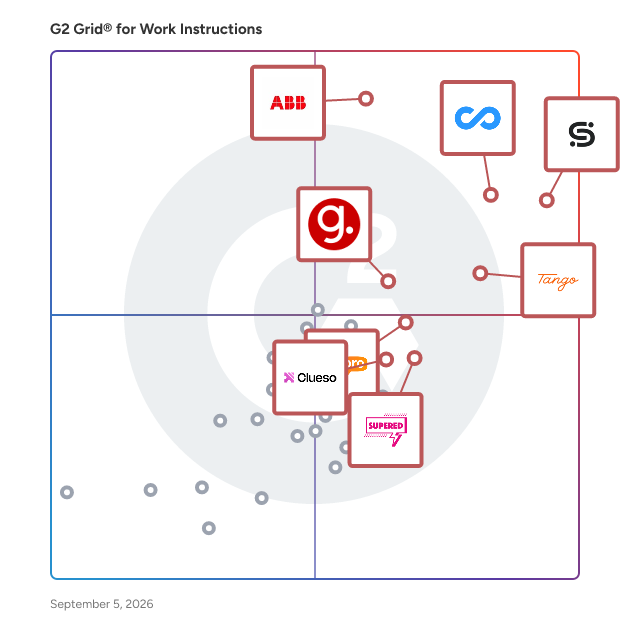


---
## What Are the Most Common Questions About Work Instructions Software?
*AI-generated · Last updated: June  3, 2026*
### Operations Managers evaluating Work Instructions software for compliance documentation and workflow optimization
According to verified users, operations managers tend to value work instructions software that keeps procedures, checklists, and reference content in one accessible place while making updates easier than paper or scattered files. Recent reviews repeatedly mention support for compliance documentation, standard work, onboarding, and day-to-day execution across frontline or distributed teams. Buyers also look for simple setup, mobile or point-of-need access, and clear guidance that helps workers follow the same process consistently. Reviewers also highlight practical needs such as photo or video-backed instructions, searchable knowledge, forms, skills tracking, and audit-friendly visibility into whether tasks, training, or required steps were completed as expected.


### Which Work Instructions platforms integrate seamlessly with existing worker training without custom development
Based on G2 reviews, these products are most often associated with training-friendly work instruction workflows.

- [Poka.io](https://www.g2.com/products/poka-io) — shop-floor training with skills tracking.
- [livepro Knowledge Management](https://www.g2.com/products/livepro-knowledge-management) — guided knowledge for onboarding consistency.
- [Scribe](https://www.g2.com/products/scribe) — step-by-step guides for new hires.
- [Tango](https://www.g2.com/products/tango-tango) — browser-based process training and walkthroughs.


### Work Instructions tools that deliver measurable process consistency improvements within the first quarter
According to verified users, early consistency gains usually come from replacing paper, scattered documents, or repeated one-off explanations with standardized digital instructions. Reviews in this category describe faster access to the latest procedure, more uniform execution across shifts or locations, and fewer gaps caused by tribal knowledge. Teams also mention benefits from guided workflows, checklists, decision support, and reusable training content that makes expectations clearer for both new and experienced workers. In the first few months, the clearest signs of impact in reviews are smoother onboarding, better compliance follow-through, more reliable documentation, and less time spent answering the same process questions over and over.


### What features are most important in work instructions software
According to verified users, the most important features in work instructions software are easy content creation, clear step-by-step guidance, and fast access where work happens. Recent reviews frequently point to visual instructions with screenshots, video, or photos; searchable knowledge; forms and checklists; and quick updates so teams are not following outdated versions. Buyers also care about mobile or shop-floor accessibility, version control, and the ability to share instructions across teams or locations. Many reviewers also emphasize training-related capabilities such as onboarding support, skills tracking, guided workflows, and progress visibility. Across products, the common theme is reducing manual documentation work while making instructions easier to follow consistently.


### How do teams use Work Instructions for onboarding
According to verified users, teams use work instructions for onboarding by giving new hires repeatable, self-serve guidance instead of relying only on live shadowing or verbal handoffs. Recent reviews describe step-by-step guides, screenshots, videos, and structured procedures that help employees learn tasks in the right order and revisit them later without waiting for a trainer. This is especially useful when teams are spread across locations, shifts, or field environments. Reviewers also connect onboarding use cases with knowledge sharing, training consistency, and reduced dependence on experienced staff for repeated explanations. In practice, buyers should expect onboarding value when the software makes procedures easy to create, update, search, and access at the point of work.