# Best Task Management Software

## How Many Task Management Software Products Does G2 Track?

**Total Products under this Category:** 482

### Category Stats (Aug 2026)

- **Average Rating:** 4.45/5 The average rating of products in this category, based on all submitted ratings
- **Top Trending Product:** Workzone (+2.15%) - Among all products in this category, Workzone recorded the largest rating increase compared to last month

_Last updated: August 01, 2026_

## How Does G2 Rank Task Management Software Products?

**Why You Can Trust G2's Software Rankings:**

- 30 Analysts and Data Experts
- 117,600+ Authentic Reviews
- 482+ Products
- Unbiased Rankings

G2's software rankings are built on verified user reviews, rigorous moderation, and a consistent research methodology maintained by a team of analysts and data experts. Each product is measured using the same transparent criteria, with no paid placement or vendor influence. While reviews reflect real user experiences, which can be subjective, they offer valuable insight into how software performs in the hands of professionals. Together, these inputs power the G2 Score, a standardized way to compare tools within every category.

## G2 Grid® for Task Management Software
 ![G2 Grid® for Task Management Software plotting products by satisfaction and market presence](https://www.g2.com/categories/task-management-software/grids.png?focus%5B%5D=278&focus%5B%5D=16194&focus%5B%5D=530&focus%5B%5D=25675&focus%5B%5D=350&focus%5B%5D=36096&focus%5B%5D=1382&focus%5B%5D=15366)

Highlighted products: Asana, monday AI Work Platform, Smartsheet, ClickUp, Trello, Airtable, Wrike, and Zoho Mail.

Underlying data: [Grid® JSON](https://www.g2.com/categories/task-management-software/grids.json?focus%5B%5D=asana&focus%5B%5D=monday-com&focus%5B%5D=smartsheet&focus%5B%5D=clickup&focus%5B%5D=trello&focus%5B%5D=airtable&focus%5B%5D=wrike&focus%5B%5D=zoho-mail)

**Sponsored**

### ZoneBilling

ZoneBilling is a NetSuite-native billing solution that automates and connects recurring billing, revenue recognition, and reporting in an auditable workflow, without the need for bolt-on tools or third-party integrations. Built for flexibility and scale, ZoneBilling supports complex billing models (subscription, usage-based, milestone) and handles contract changes without disruption. Finance teams can automate invoicing, reduce manual effort, and accelerate the close—all while ensuring billing accuracy and audit readiness. With native support for performance obligations and structured revenue data, ZoneBilling enhances NetSuite ARM and keeps finance teams compliant with ASC 606 and IFRS 15. Whether you're scaling operations, adding entities, or introducing new pricing models, ZoneBilling helps you move faster, stay in control, and grow without breaking your billing workflows. Key Features Manage any way you bill like complex billing scenarios from fixed recurring to usage-based, and multi-tier pricing Automate revenue recognition and comply with global accounting standards Seamlessly connect with CRM and CPQ solutions Customizable invoicing to meet unique customer requirements. Simplified contract renewals with auto-mated processes and integrated alerts

[Visit website](https://www.g2.com/external_clickthroughs/record?secure%5Bad_program%5D=ppc&secure%5Bad_slot%5D=category_product_list_llm&secure%5Bcategory_id%5D=646&secure%5Bchosen_at%5D=2026-08-02T04%3A40%3A18Z&secure%5Bdisplayable_resource_id%5D=90&secure%5Bdisplayable_resource_type%5D=Category&secure%5Bmedium%5D=sponsored&secure%5Bplacement_reason%5D=retargeted_product&secure%5Bplacement_resource_ids%5D%5B%5D=101256&secure%5Bprioritized%5D=false&secure%5Bproduct_id%5D=101256&secure%5Bresource_id%5D=646&secure%5Bresource_type%5D=Category&secure%5Bsource_type%5D=category_page&secure%5Bsource_url%5D=https%3A%2F%2Fwww.g2.com%2Fcategories%2Ftask-management-software&secure%5Btoken%5D=0fd7d302235f7518e304b3e18eb9b0c48cf081f001a501b2b621cd5a95a3da8d&secure%5Burl%5D=https%3A%2F%2Fhello.zoneandco.com%2Fregain-control-finance%3F%26utm_source%3Dg2%26utm_medium%3Dppc&secure%5Burl_type%5D=custom_url)

### [Asana](https://www.g2.com/it/products/asana/reviews)

Asana è una piattaforma di gestione del lavoro leader per la collaborazione tra umani e AI. Oltre 170.000 clienti come Accenture, Amazon, Anthropic e Suzuki si affidano ad Asana per allineare i team e accelerare l'impatto organizzativo. Che si tratti di gestire iniziative strategiche, programmi interfunzionali o obiettivi aziendali, Asana aiuta le organizzazioni a portare chiarezza nella complessità, trasformando i piani in azione con l'AI che lavora al fianco dei team in ogni fase. Per saperne di più, visita www.asana.com.

**Average Rating:** 4.4/5.0

**Total Reviews:** 13,272

#### How Do G2 Users Rate Asana?

- **Ritiene che the product sia stato un valido partner commerciale?:** 8.7/10 (Category avg: 9.0/10)
- **Prioritizzazione dei compiti:** 8.9/10 (Category avg: 8.7/10)
- **Creazione e Assegnazione:** 9.2/10 (Category avg: 9.0/10)
- **Liste di cose da fare:** 9.1/10 (Category avg: 8.9/10)

#### Who Is the Company Behind Asana?

- **Venditore:** [Asana](https://www.g2.com/it/sellers/asana)
- **Sito web dell'azienda:** asana.com
- **Anno di Fondazione:** 2008
- **Sede centrale:** San Francisco, CA
- **Twitter:** @Asana  
119,913 follower su Twitter
- **Pagina LinkedIn®:** [www.linkedin.com](https://www.g2.com/it/external_clickthroughs/record?secure%5Bsource_type%5D=product_profile&secure%5Btoken%5D=b0026cd552fc243cbff7e669b4f4f58fe6d8629fe0f9733833a1c30db945e3a4&secure%5Burl%5D=https%3A%2F%2Fwww.linkedin.com%2Fcompany%2F807257%2F&secure%5Burl_type%5D=linkedin_company_website)  
4,369 dipendenti su LinkedIn®

#### Who Uses This Product?

- **Who Uses This:** Project Manager, Owner
- **Top Industries:** Marketing e pubblicità, Tecnologia dell'informazione e servizi
- **Company Size:** 57% Small, 31% Medium

#### What Do G2 Reviewers Say About Asana?

_AI-generated summary from verified user reviews_

##### Pros

- Gli utenti trovano che Asana abbia un'interfaccia **facile da usare** che migliora la collaborazione e semplifica efficacemente la gestione dei compiti.
- Gli utenti apprezzano la **gestione efficace delle attività** con Asana, migliorando la collaborazione e aiutando a evitare il burnout nelle attività quotidiane.
- Gli utenti apprezzano le **funzionalità del flusso di lavoro** di Asana, trovandolo facile da usare ed efficace per la gestione dei progetti e la collaborazione in team.
- Gli utenti apprezzano le **funzionalità di collaborazione efficace del team** di Asana, migliorando le connessioni del progetto e la gestione complessiva del flusso di lavoro.
- Gli utenti apprezzano il **monitoraggio delle attività user-friendly** in Asana, che semplifica la gestione delle scadenze e migliora la produttività complessiva.

##### Cons

- Gli utenti esprimono frustrazione per le **funzionalità mancanti** come il monitoraggio del tempo e la duplicazione delle regole all'interno dei progetti.
- Gli utenti trovano la **curva di apprendimento ripida** a causa di linee guida poco chiare e funzionalità complesse, ostacolando un uso efficace.
- Gli utenti ritengono che Asana abbia **funzionalità limitate** disponibili senza un costoso aggiornamento e una curva di apprendimento difficile.
- Gli utenti trovano l' **interfaccia utente non intuitiva** , rendendo la navigazione e la gestione delle attività più complicate del necessario.
- Gli utenti trovano la **funzionalità di ricerca carente** , rendendo difficile localizzare progetti e compiti in modo efficiente.

#### What Are Recent G2 Reviews of Asana?

**["Automatizza la gestione dei progetti e aumenta la collaborazione"](https://www.g2.com/it/survey_responses/asana-review-11131331)**

**Rating:** 5.0/5.0 stars

_— Dannie S._

[Read full review](https://www.g2.com/it/survey_responses/asana-review-11131331)

**["Gestione del progetto semplificata, grande visibilità"](https://www.g2.com/it/survey_responses/asana-review-13190739)**

**Rating:** 5.0/5.0 stars

_— Ankita P._

[Read full review](https://www.g2.com/it/survey_responses/asana-review-13190739)

#### What Are G2 Users Discussing About Asana?

- [How does Asana help organizations track OKRs and strategic goals?](https://www.g2.com/it/discussions/how-does-asana-help-organizations-track-okrs-and-strategic-goals) - 1 comment, 2 upvotes
- [What apps and tools does Asana integrate with?](https://www.g2.com/it/discussions/what-apps-and-tools-does-asana-integrate-with) - 1 comment, 2 upvotes
- [How does Asana use AI to help teams manage work?](https://www.g2.com/it/discussions/how-does-asana-use-ai-to-help-teams-manage-work) - 1 comment, 2 upvotes
- [What makes Asana different from other project management and work management tools?](https://www.g2.com/it/discussions/what-makes-asana-different-from-other-project-management-and-work-management-tools) - 1 comment, 2 upvotes
- [Ne vale la pena Asana?](https://www.g2.com/it/discussions/is-asana-worth-it) - 13 comments, 18 upvotes

### [ClickUp](https://www.g2.com/products/clickup/reviews)

ClickUp is the world’s first Converged AI Workspace, bringing together all work apps, data, and workflows. ClickUp eliminates all forms of work sprawl to provide 100% context and a single place for humans and agents to work, together. Trusted by more than 20 million users worldwide, ClickUp is on a mission to maximize human productivity.

**Average Rating:** 4.6/5.0

**Total Reviews:** 12,941

#### How Do G2 Users Rate ClickUp?

- **Has the product been a good partner in doing business?:** 9.0/10 (Category avg: 9.0/10)
- **Task Prioritization:** 9.1/10 (Category avg: 8.7/10)
- **Creation & Assignment:** 9.2/10 (Category avg: 9.0/10)
- **To-Do Lists:** 9.2/10 (Category avg: 8.9/10)

#### Who Is the Company Behind ClickUp?

- **Seller:** [ClickUp](https://www.g2.com/sellers/clickup)
- **Company Website:** ClickUp.com
- **Year Founded:** 2017
- **HQ Location:** San Diego, California
- **Twitter:** @clickup  
69,539 Twitter followers
- **LinkedIn® Page:** [www.linkedin.com](https://www.g2.com/external_clickthroughs/record?secure%5Bsource_type%5D=product_profile&secure%5Btoken%5D=12451d66d580078c16b08985ccc98dcf8d832565fb04a9665439cfd4f2a74fa7&secure%5Burl%5D=https%3A%2F%2Fwww.linkedin.com%2Fcompany%2F12949663%2F&secure%5Burl_type%5D=linkedin_company_website)  
1,526 employees on LinkedIn®

#### Who Uses This Product?

- **Who Uses This:** CEO, Project Manager
- **Top Industries:** Marketing and Advertising, Computer Software
- **Company Size:** 77% Small, 19% Medium

#### What Do G2 Reviewers Say About ClickUp?

_AI-generated summary from verified user reviews_

##### Pros

- Users praise ClickUp for its **ease of use** , enhancing collaboration and project management efficiency effortlessly.
- Users value the **robust task management capabilities** of ClickUp, enhancing organization, productivity, and overall workflow efficiency.
- Users value ClickUp's **robust features and flexibility** , significantly enhancing productivity and project visibility across teams.
- Users appreciate the **flexibility and comprehensive integration** of ClickUp, enhancing teamwork and project execution efficiency.
- Users appreciate the **effective collaboration** of ClickUp, enabling seamless teamwork and task management on a single platform.

##### Cons

- Users find **missing features** frustrating in ClickUp, especially when crucial tools are restricted by paywalls and limits.
- Users find the **learning curve for beginners** to be challenging, requiring time to adapt and master the system.
- Users find ClickUp has **limited features** , lacking integrations and complex functionalities, impacting usability and flexibility.
- Users find ClickUp's interface **not intuitive** , complicating the discovery of features and overall user experience.
- Users report experiencing **slow loading** times in ClickUp, impacting overall efficiency and user experience.

#### What Are Recent G2 Reviews of ClickUp?

**["Keeps our SOC 2 evidence collection organized"](https://www.g2.com/survey_responses/clickup-review-13195013)**

**Rating:** 4.0/5.0 stars

_— Paco O._

[Read full review](https://www.g2.com/survey_responses/clickup-review-13195013)

**["BEST Project Management and Dashboard Tool on the Planet"](https://www.g2.com/survey_responses/clickup-review-6899099)**

**Rating:** 4.5/5.0 stars

_— Katrina J._

[Read full review](https://www.g2.com/survey_responses/clickup-review-6899099)

#### What Are G2 Users Discussing About ClickUp?

- [What features of ClickUp make it a preferred choice for project management in agile teams?](https://www.g2.com/discussions/what-features-of-clickup-make-it-a-preferred-choice-for-project-management-in-agile-teams) - 6 comments, 6 upvotes
- [What is ClickUp used for?](https://www.g2.com/discussions/what-is-clickup-used-for) - 10 comments, 4 upvotes
- [Does Google use ClickUp?](https://www.g2.com/discussions/does-google-use-clickup) - 4 comments, 3 upvotes
- [Who uses ClickUp?](https://www.g2.com/discussions/who-uses-clickup) - 14 comments, 4 upvotes
- [Is ClickUp really free?](https://www.g2.com/discussions/is-clickup-really-free) - 12 comments, 3 upvotes

### [Smartsheet](https://www.g2.com/it/products/smartsheet/reviews)

Smartsheet è una piattaforma di gestione del lavoro intelligente che rivoluziona il modo in cui gestisci progetti, portafogli e processi. La piattaforma Smartsheet, alimentata dall'IA, offre adattabilità, esperienze sofisticate e rigore a livello aziendale per supportare il lavoro in vari settori — dalla fornitura di servizi alla costruzione, dalle sperimentazioni cliniche alle campagne di marketing. Progettata per soddisfare requisiti esigenti, aiuta le organizzazioni a migliorare l'efficienza, accelerare l'innovazione e rimanere competitive. Oltre l'85% delle aziende Fortune 500 si fida di Smartsheet per allineare le proprie risorse al fine di migliorare l'efficienza, l'agilità e la collaborazione nel mondo del lavoro in continua evoluzione di oggi.

**Average Rating:** 4.4/5.0

**Total Reviews:** 22,233

#### How Do G2 Users Rate Smartsheet?

- **Ritiene che the product sia stato un valido partner commerciale?:** 8.6/10 (Category avg: 9.0/10)
- **Prioritizzazione dei compiti:** 8.5/10 (Category avg: 8.7/10)
- **Creazione e Assegnazione:** 8.7/10 (Category avg: 9.0/10)
- **Liste di cose da fare:** 8.5/10 (Category avg: 8.9/10)

#### Who Is the Company Behind Smartsheet?

- **Venditore:** [Smartsheet](https://www.g2.com/it/sellers/smartsheet)
- **Sito web dell'azienda:** www.smartsheet.com
- **Anno di Fondazione:** 2005
- **Sede centrale:** Bellevue, WA
- **Twitter:** @Smartsheet  
26,366 follower su Twitter
- **Pagina LinkedIn®:** [www.linkedin.com](https://www.g2.com/it/external_clickthroughs/record?secure%5Bsource_type%5D=product_profile&secure%5Btoken%5D=76edc1e5add1efea54679a7a2f12427f0ba248d86f5969d11ccde60017e80015&secure%5Burl%5D=https%3A%2F%2Fwww.linkedin.com%2Fcompany%2F167700%2F&secure%5Burl_type%5D=linkedin_company_website)  
4,022 dipendenti su LinkedIn®

#### Who Uses This Product?

- **Who Uses This:** Project Manager, Senior Project Manager
- **Top Industries:** Tecnologia dell'informazione e servizi, Costruzioni
- **Company Size:** 41% Medium, 34% Small

#### What Do G2 Reviewers Say About Smartsheet?

_AI-generated summary from verified user reviews_

##### Pros

- Gli utenti elogiano la **facilità d'uso** di Smartsheet, apprezzandone la flessibilità in varie applicazioni e le capacità di integrazione.
- Gli utenti apprezzano Smartsheet per le sue **righe personalizzabili e il potente Control Center** , che semplificano il monitoraggio dei progetti e la gestione dei dati.
- Gli utenti amano le **funzionalità di collaborazione efficace del team** di Smartsheet, che migliorano la produttività e semplificano la gestione dei compiti.
- Gli utenti apprezzano le **funzionalità di automazione** in Smartsheet, che semplificano le attività e migliorano l'efficienza del flusso di lavoro.
- Gli utenti apprezzano le **versatili capacità di monitoraggio dei progetti** di Smartsheet, che facilitano una gestione efficiente del flusso di lavoro e l'analisi dei dati.

##### Cons

- Gli utenti affrontano una **ripida curva di apprendimento** con Smartsheet, lottando in particolare con le formule e la complessità dell'interfaccia.
- Gli utenti trovano **frustranti le funzionalità mancanti** in Smartsheet, in particolare per quanto riguarda la personalizzazione e l'uso intuitivo rispetto a Excel.
- Gli utenti trovano l' **interfaccia non intuitiva** e affrontano sfide nella navigazione delle formule, influenzando la loro esperienza complessiva con Smartsheet.
- Gli utenti trovano le **funzionalità limitate** di Smartsheet restrittive, in particolare per quanto riguarda le formule e le capacità di collaborazione.
- Gli utenti trovano le **opzioni di personalizzazione limitate** di Smartsheet restrittive, influenzando la collaborazione e l'esperienza utente.

#### What Are Recent G2 Reviews of Smartsheet?

**["La condivisione granulare e le viste dinamiche fanno brillare Smartsheet"](https://www.g2.com/it/survey_responses/smartsheet-review-13190373)**

**Rating:** 4.5/5.0 stars

_— Jezryl May A._

[Read full review](https://www.g2.com/it/survey_responses/smartsheet-review-13190373)

**["Eccellente per gestire progetti, automatizzare flussi di lavoro e mantenere i team allineati"](https://www.g2.com/it/survey_responses/smartsheet-review-13169194)**

**Rating:** 5.0/5.0 stars

_— Ana G._

[Read full review](https://www.g2.com/it/survey_responses/smartsheet-review-13169194)

#### What Are G2 Users Discussing About Smartsheet?

- [In che modo Smartsheet ha trasformato la gestione dei progetti e la collaborazione del team nella tua organizzazione?](https://www.g2.com/it/discussions/in-what-ways-has-smartsheet-transformed-project-management-and-team-collaboration-in-your-organization) - 3 comments, 5 upvotes
- [A cosa serve Smartsheet?](https://www.g2.com/it/discussions/what-is-smartsheet-used-for) - 4 comments
- [Posso usare Smartsheet gratuitamente?](https://www.g2.com/it/discussions/can-i-use-smartsheet-for-free) - 10 comments, 1 upvote
- [Is smartsheet good?](https://www.g2.com/it/discussions/is-smartsheet-good) - 9 comments, 7 upvotes
- [Perché Smartsheet è pessimo?](https://www.g2.com/it/discussions/why-is-smartsheet-bad) - 34 comments

### [monday AI Work Platform](https://www.g2.com/products/monday-com/reviews)

monday.com is the AI Work Platform where people and agents operate as one team - with shared cross-department context, enterprise-grade trust, and an easy-to-use interface built for adoption at scale. With monday.com, agents work alongside teams in the same boards, workflows, and goals they already use every day, creating a new kind of teamwork where people and agents move work forward together. Beyond agents, monday.com gives every team more ways to turn AI into real business impact. With monday vibe, teams can build custom work apps for their specific needs, and with monday sidekick, every user gets a personal AI assistant to help solve business challenges, move faster, and get more done. monday.com gives organizations the visibility, permissions, human oversight, and compliance standards they need to deploy AI with confidence. AI doesn’t operate in a black box - it operates within the same trusted guardrails teams already rely on. Because monday.com is already used across departments, agents can access the broader context of how work connects across marketing, sales, product, IT, HR, operations, and more. That means smarter decisions, faster execution, and fewer silos - all in one place. Today, over 250,000 customers and more than 60% of Fortune 500 companies trust monday.com with how they run their business.

**Average Rating:** 4.7/5.0

**Total Reviews:** 16,566

#### How Do G2 Users Rate monday AI Work Platform?

- **Has the product been a good partner in doing business?:** 9.1/10 (Category avg: 9.0/10)
- **Task Prioritization:** 9.1/10 (Category avg: 8.7/10)
- **Creation & Assignment:** 9.3/10 (Category avg: 9.0/10)
- **To-Do Lists:** 9.2/10 (Category avg: 8.9/10)

#### Who Is the Company Behind monday AI Work Platform?

- **Seller:** [monday.com](https://www.g2.com/sellers/monday-com-d88207e4-9e92-412d-903b-61cd13ca592b)
- **Company Website:** monday.com
- **Year Founded:** 2012
- **HQ Location:** Tel Aviv
- **Twitter:** @mondaydotcom  
40,761 Twitter followers
- **LinkedIn® Page:** [www.linkedin.com](https://www.g2.com/external_clickthroughs/record?secure%5Bsource_type%5D=product_profile&secure%5Btoken%5D=efcc1bc784d43448424f5b18a6e2f5d5488a066e911204b167572629a6d9b361&secure%5Burl%5D=https%3A%2F%2Fwww.linkedin.com%2Fcompany%2Fmondaydotcom&secure%5Burl_type%5D=linkedin_company_website)  
3,837 employees on LinkedIn®

#### Who Uses This Product?

- **Who Uses This:** Project Manager, CEO
- **Top Industries:** Marketing and Advertising, Information Technology and Services
- **Company Size:** 61% Small, 30% Medium

#### What Do G2 Reviewers Say About monday AI Work Platform?

_AI-generated summary from verified user reviews_

##### Pros

- Users find monday AI Work Platform to be **easy to use** , enhancing organization and streamlining project management effectively.
- Users highlight the **effective cross-functional collaboration** in monday AI Work Platform, enhancing project management and team communication.
- Users love the **efficiency of clean workflows and automations** for managing complex projects seamlessly in monday AI Work Platform.
- Users value how monday AI Work Platform enhances **organization** and keeps teams coordinated with easy access to information.
- Users value the **clean workflows and automation** provided by monday AI Work Platform for efficient task management.

##### Cons

- Users note the **missing messaging features** and challenging upgrade requirements, limiting their overall experience with monday AI.
- Users find a **steep learning curve** due to implementation challenges and slow performance with large datasets.
- Users find the **limited features** of monday AI Work Platform insufficient for comprehensive reporting and essential functionalities.
- Users find the **interface not intuitive** , facing challenges with complex workflows and basic functionalities.
- Users find the **limited customization** options frustrating, hindering efficiency and collaboration across teams.

#### What Are Recent G2 Reviews of monday AI Work Platform?

**["Incredibly Smart AI Agents with Flexible, High-ROI Project Management"](https://www.g2.com/survey_responses/monday-ai-work-platform-review-13187432)**

**Rating:** 5.0/5.0 stars

_— Tim B._

[Read full review](https://www.g2.com/survey_responses/monday-ai-work-platform-review-13187432)

**["Seamless Email Automation, Visual Task Tracking, and Reliable Performance"](https://www.g2.com/survey_responses/monday-ai-work-platform-review-13117637)**

**Rating:** 5.0/5.0 stars

_— Omar A._

[Read full review](https://www.g2.com/survey_responses/monday-ai-work-platform-review-13117637)

#### What Are G2 Users Discussing About monday AI Work Platform?

- [How do I utilize monday dev's development features for building custom workflow apps?](https://www.g2.com/discussions/how-do-i-utilize-monday-dev-s-development-features-for-building-custom-workflow-apps)
- [What sets monday.com apart from other project management tools in terms of user experience and customization?](https://www.g2.com/discussions/what-sets-monday-com-apart-from-other-project-management-tools-in-terms-of-user-experience-and-customization) - 3 upvotes
- [What is monday marketer used for?](https://www.g2.com/discussions/what-is-monday-marketer-used-for)
- [Is Monday com any good?](https://www.g2.com/discussions/is-monday-com-any-good) - 10 upvotes
- [Does Monday com have a chat feature?](https://www.g2.com/discussions/does-monday-com-have-a-chat-feature) - 5 upvotes

## FAQs About Task Management Software

Generated using AI

Last updated: June 3, 2026

### Which tool supports offline task management for remote teams

Based on G2 reviews, buyers looking for remote-friendly task management often compare products that help teams stay aligned, track ownership, and keep work visible across projects. In recent reviews, users frequently mention collaboration, clear task status, due dates, and shared visibility as core needs for distributed work. Some reviews also specifically mention offline or outage-related limitations, so buyers should confirm that requirement directly when evaluating options.

- [Asana](https://www.g2.com/products/asana) — remote team alignment and deadlines.
- [Smartsheet](https://www.g2.com/products/smartsheet) — shared tracking and reminder workflows.
- [ClickUp](https://www.g2.com/products/clickup) — centralized tasks and team communication.
- [monday Work Management](https://www.g2.com/products/monday-com) — cross-team visibility and planning.

### Which vendor offers AI-powered task prioritization

Based on G2 reviews, buyers asking about AI-powered task prioritization usually want products that help teams decide what to tackle first, reduce manual follow-up, and surface the most important work. In recent reviews, users most often connect AI with summarization, automation, reminders, and priority setting rather than fully autonomous planning. Buyers should compare how well each option supports prioritization inside everyday workflows.

- [Asana](https://www.g2.com/products/asana) — AI suggestions and task prioritization.
- [ClickUp](https://www.g2.com/products/clickup) — AI summaries and workload planning.
- [monday Work Management](https://www.g2.com/products/monday-com) — AI automations and workload visibility.
- [Smartsheet](https://www.g2.com/products/smartsheet) — AI assistance with reminders.

### Which vendor provides advanced recurring task automation

Based on G2 reviews, recurring task automation is most often described in terms of reminders, repeatable workflows, templates, and automated follow-up. Buyers in this category tend to value products that reduce manual coordination, keep routine work from being missed, and make repeat processes easier to standardize across teams. Review themes suggest comparing how easily recurring work can be built, assigned, and monitored over time.

- [Asana](https://www.g2.com/products/asana) — recurring workflows and reminders.
- [Smartsheet](https://www.g2.com/products/smartsheet) — automated reminders and form workflows.
- [ClickUp](https://www.g2.com/products/clickup) — automations for repeat admin tasks.
- [monday Work Management](https://www.g2.com/products/monday-com) — automated status and task flows.

### What should buyers look for in task management software

According to verified users, strong task management software helps teams centralize work, assign ownership clearly, and keep deadlines visible without relying on scattered emails or spreadsheets. Recent reviews repeatedly mention customizable task views, subtasks, reminders, timelines, dashboards, and workload visibility as useful capabilities. Buyers also care about how easily a platform supports collaboration, recurring work, and integrations with tools already in use. Common frustrations include steep learning curves, notification overload, and features that feel hidden or hard to configure. For many teams, the best fit is software that balances ease of use with enough structure to manage priorities, progress, and accountability in one place.

### What features define modern task management

According to verified users, modern task management is defined by a mix of visibility, flexibility, and coordination. Across recent reviews, people consistently highlight task assignment, due dates, subtasks, multiple project views, reminders, dashboards, and automation as the features that matter most. Many also value integrations with tools like email, calendars, chat platforms, and file-sharing systems because they reduce switching between apps. Teams use these features to stay aligned, manage workloads, and keep projects moving with less manual follow-up. At the same time, reviewers note that the best tools avoid unnecessary complexity and make it easy to see priorities, ownership, and progress at a glance.

### [Trello](https://www.g2.com/it/products/trello/reviews)

Trello è un prodotto gratuito che funziona come la versione digitale di un post-it. Cattura le tue cose da fare come schede su Trello e organizzarle in elenchi per rimanere al passo con i tuoi compiti e scadenze, indipendentemente dall'impresa, che si tratti di pianificare un matrimonio o sentirsi organizzati al lavoro. Trello è amato da milioni di persone in tutto il mondo per la sua interfaccia facile da usare, drag-and-drop, che ti aiuta a visualizzare esattamente cosa deve essere fatto. Trello ti permette di prendere le cose da fare da ovunque tu stia lavorando e consolidarle tutte in un unico posto: 📩 Se ricevi un'email a cui devi rispondere, inoltrala a inbox@app.trello.com e si trasformerà in una scheda Trello che puoi trascinare e rilasciare sulla bacheca Trello giusta e aggiungere una data di scadenza. 🕸️ Scarica l'estensione del browser Trello per Chrome per ritagliare qualsiasi aspetto di una pagina web come una scheda Trello. 💬 Se usi app come Slack, Teams, Jira o Loom sul posto di lavoro, Trello si integra con ciascuna per rendere facile catturare contenuti e centralizzare tutti i tuoi compiti di lavoro in una vista unificata su Trello. 🤳 Con Trello sul tuo telefono o tablet, puoi usare l'app per creare schede su Trello rapidamente mentre sei in movimento. Aggiungi un widget alla schermata principale su iOS o Android, crea un collegamento "Aggiungi a Inbox" su iOS, o dì "Siri, aggiungi una scheda a Trello." Troverai tutto salvato come nuove schede nella tua Inbox di Trello, pronte per essere modificate e organizzate su qualsiasi bacheca quando sei pronto. Aggiungi date di scadenza, commenti, liste di controllo e file a schede individuali e usa colori, etichette, immagini e adesivi per creare una bellissima bacheca kanban su misura per le tue esigenze. Puoi anche aggiungere un account Google o Outlook per vedere facilmente l'intero programma all'interno di Trello. Trascina e rilascia una scheda Trello sulla scheda Trello Planner per bloccare il tempo di concentrazione sul tuo calendario per completare quel compito. Iscriviti gratuitamente su trello.com/home.

**Average Rating:** 4.4/5.0

**Total Reviews:** 13,663

#### How Do G2 Users Rate Trello?

- **Ritiene che the product sia stato un valido partner commerciale?:** 8.9/10 (Category avg: 9.0/10)
- **Prioritizzazione dei compiti:** 9.0/10 (Category avg: 8.7/10)
- **Creazione e Assegnazione:** 9.1/10 (Category avg: 9.0/10)
- **Liste di cose da fare:** 9.1/10 (Category avg: 8.9/10)

#### Who Is the Company Behind Trello?

- **Venditore:** [Atlassian](https://www.g2.com/it/sellers/atlassian)
- **Anno di Fondazione:** 2002
- **Sede centrale:** Sydney and San Francisco
- **Twitter:** @Atlassian  
106,496 follower su Twitter
- **Pagina LinkedIn®:** [www.linkedin.com](https://www.g2.com/it/external_clickthroughs/record?secure%5Bsource_type%5D=product_profile&secure%5Btoken%5D=2a96146f2051a6b8a9a49a13db5b2aa2c98263324b90f1bc18b4ceec70d380b0&secure%5Burl%5D=https%3A%2F%2Fwww.linkedin.com%2Fcompany%2Fatlassian&secure%5Burl_type%5D=linkedin_company_website)  
21,081 dipendenti su LinkedIn®
- **Proprietà:** NASDAQ:TEAM

#### Who Uses This Product?

- **Who Uses This:** Software Engineer, Project Manager
- **Top Industries:** Software per computer, Tecnologia dell'informazione e servizi
- **Company Size:** 55% Small, 30% Medium

#### What Do G2 Reviewers Say About Trello?

_AI-generated summary from verified user reviews_

##### Pros

- Gli utenti trovano l' **facilità d'uso** di Trello eccezionale, facilitando un avvio rapido e una gestione efficace dei progetti per i team.
- Gli utenti apprezzano Trello per la sua **gestione delle attività intuitiva** , che migliora l'organizzazione e il monitoraggio dei progetti senza sforzo.
- Gli utenti apprezzano la **semplicità visiva e la flessibilità** di Trello, semplificando la gestione dei progetti con un'efficace tracciamento e organizzazione delle attività.
- Gli utenti apprezzano le **funzionalità di collaborazione del team** di Trello, migliorando la gestione dei compiti e ottimizzando i flussi di lavoro dei progetti.
- Gli utenti apprezzano le **capacità organizzative** di Trello, rendendo la gestione dei progetti chiara ed efficiente con il suo layout intuitivo.

##### Cons

- Gli utenti trovano che Trello abbia **funzionalità limitate** che ostacolano la gestione dei progetti, specialmente per compiti complessi e integrazioni.
- Gli utenti ritengono che le **funzionalità avanzate mancanti** di Trello ostacolino una gestione efficace dei progetti man mano che la complessità aumenta.
- Gli utenti ritengono che Trello abbia **funzionalità limitate** per progetti di grandi dimensioni, mancando di funzionalità avanzate e migliori opzioni di ricerca.
- Gli utenti trovano difficile gestire **bacheche affollate** e limitazioni nella creazione di attività in Trello che ostacolano l'efficienza.
- Gli utenti esprimono frustrazione per le **opzioni di personalizzazione limitate** in Trello, influenzando la loro capacità di adattare la piattaforma a esigenze diverse.

#### What Are Recent G2 Reviews of Trello?

**["Gestione Kanban senza sforzo con le bacheche intuitive, veloci e flessibili di Trello"](https://www.g2.com/it/survey_responses/trello-review-13108485)**

**Rating:** 5.0/5.0 stars

_— Ahmed A._

[Read full review](https://www.g2.com/it/survey_responses/trello-review-13108485)

**["Trello rende il monitoraggio del flusso di lavoro senza sforzo con un onboarding rapido e integrazioni fluide"](https://www.g2.com/it/survey_responses/trello-review-13167767)**

**Rating:** 4.5/5.0 stars

_— Muhammed A._

[Read full review](https://www.g2.com/it/survey_responses/trello-review-13167767)

#### What Are G2 Users Discussing About Trello?

- [Quali sono le strategie più efficaci per utilizzare Trello nella gestione di progetti agili?](https://www.g2.com/it/discussions/what-are-the-most-effective-strategies-for-utilizing-trello-in-agile-project-management) - 3 comments, 4 upvotes
- [A cosa serve Trello?](https://www.g2.com/it/discussions/what-is-trello-used-for) - 6 comments, 4 upvotes
- [What does trello integrate with?](https://www.g2.com/it/discussions/what-does-trello-integrate-with) - 5 comments
- [Puoi usare Trello gratuitamente?](https://www.g2.com/it/discussions/can-you-use-trello-for-free) - 13 comments, 6 upvotes
- [Che tipo di software è Trello?](https://www.g2.com/it/discussions/what-kind-of-software-is-trello) - 3 comments

### [Airtable](https://www.g2.com/it/products/airtable/reviews)

La piattaforma di app AI di Airtable è il modo più semplice per creare app personalizzate per accelerare le operazioni aziendali. Trasforma i tuoi dati in app personalizzate, automazioni e agenti AI - senza bisogno di competenze tecniche. I tuoi team possono passare dall'idea all'impatto in pochi minuti. Più di 500.000 organizzazioni, inclusi l'80% delle aziende Fortune 100, utilizzano Airtable per gestire, costruire le loro attività e abilitare lo sviluppo cittadino. Il risultato? Innovazione più rapida, migliori esperienze per i clienti, governance di livello aziendale e un modo moderno di lavorare tra i team. Ottieni l'edizione gratuita oggi su airtable.com

**Average Rating:** 4.6/5.0

**Total Reviews:** 3,198

#### How Do G2 Users Rate Airtable?

- **Ritiene che the product sia stato un valido partner commerciale?:** 8.9/10 (Category avg: 9.0/10)
- **Prioritizzazione dei compiti:** 8.8/10 (Category avg: 8.7/10)
- **Creazione e Assegnazione:** 8.9/10 (Category avg: 9.0/10)
- **Liste di cose da fare:** 8.6/10 (Category avg: 8.9/10)

#### Who Is the Company Behind Airtable?

- **Venditore:** [Airtable](https://www.g2.com/it/sellers/airtable)
- **Sito web dell'azienda:** airtable.com
- **Anno di Fondazione:** 2012
- **Sede centrale:** San Francisco, California
- **Twitter:** @airtable  
63,795 follower su Twitter
- **Pagina LinkedIn®:** [www.linkedin.com](https://www.g2.com/it/external_clickthroughs/record?secure%5Bsource_type%5D=product_profile&secure%5Btoken%5D=e16e8d11244f3f436f92b4c62daa603527e3302aa17eb12aba0a0092f9d36e8a&secure%5Burl%5D=https%3A%2F%2Fwww.linkedin.com%2Fcompany%2F3991822%2F&secure%5Burl_type%5D=linkedin_company_website)  
937 dipendenti su LinkedIn®

#### Who Uses This Product?

- **Who Uses This:** Owner, Project Manager
- **Top Industries:** Gestione delle organizzazioni non profit, Marketing e pubblicità
- **Company Size:** 60% Small, 26% Medium

#### What Do G2 Reviewers Say About Airtable?

_AI-generated summary from verified user reviews_

##### Pros

- Gli utenti amano la **facilità d'uso** di Airtable, apprezzandone la flessibilità e le semplici capacità di gestione dei progetti.
- Gli utenti apprezzano la **flessibilità** di Airtable, rendendo facile adattarsi e creare soluzioni personalizzate per le loro esigenze.
- Gli utenti apprezzano il **layout intuitivo e facile da usare** di Airtable, migliorando la collaborazione del team e la facilità d'uso.
- Gli utenti apprezzano le **integrazioni senza soluzione di continuità** di Airtable, migliorando la collaborazione e trasformando efficacemente le operazioni aziendali.
- Gli utenti amano le **opzioni di personalizzazione** di Airtable, che consentono funzionalità su misura e un'integrazione senza soluzione di continuità con altri strumenti.

##### Cons

- Gli utenti trovano la **curva di apprendimento ripida** per Airtable, specialmente con formule complesse e sfide di navigazione.
- Gli utenti ritengono che Airtable manchi di **funzionalità essenziali** , come integrazioni integrate e opzioni di visualizzazione a griglia personalizzabili.
- Gli utenti trovano **frustranti le funzionalità limitate** di Airtable, specialmente per quanto riguarda le integrazioni e le opzioni di personalizzazione per le interfacce.
- Gli utenti trovano **difficoltà di apprendimento** con Airtable, specialmente con le formule e la navigazione per i principianti e le persone meno esperte di tecnologia.
- Gli utenti trovano che la **personalizzazione limitata** in Airtable influisca sull'usabilità, in particolare nelle viste, nei campi e nelle automazioni.

#### What Are Recent G2 Reviews of Airtable?

**["Gestisco la mia attività su Airtable"](https://www.g2.com/it/survey_responses/airtable-review-7372449)**

**Rating:** 5.0/5.0 stars

_— Vadim C._

[Read full review](https://www.g2.com/it/survey_responses/airtable-review-7372449)

**["Airtable ha trasformato il modo in cui svolgo il mio lavoro in meglio."](https://www.g2.com/it/survey_responses/airtable-review-10401636)**

**Rating:** 5.0/5.0 stars

_— Sarah S._

[Read full review](https://www.g2.com/it/survey_responses/airtable-review-10401636)

#### What Are G2 Users Discussing About Airtable?

- [Come stanno usando le aziende Airtable per semplificare la gestione dei progetti e la creazione collaborativa di database?](https://www.g2.com/it/discussions/how-are-companies-using-airtable-to-streamline-project-management-and-collaborative-database-creation) - 1 comment
- [A cosa serve Airtable?](https://www.g2.com/it/discussions/airtable-what-is-airtable-used-for) - 7 comments, 2 upvotes
- [Quanto costa Airtable enterprise?](https://www.g2.com/it/discussions/how-much-does-airtable-enterprise-cost) - 4 comments, 1 upvote
- [Vale la pena Airtable Pro?](https://www.g2.com/it/discussions/is-airtable-pro-worth) - 2 comments, 1 upvote
- [Esiste una versione gratuita di Airtable?](https://www.g2.com/it/discussions/is-there-a-free-version-of-airtable) - 3 comments

### [Wrike](https://www.g2.com/it/products/wrike/reviews)

Wrike è la piattaforma di consegna del lavoro affidabile dove l'IA estende ciò che le persone possono realizzare. Centralizzando tutto il lavoro in un ambiente governato e ricco di contesto, Wrike aiuta le organizzazioni a semplificare la collaborazione, la pianificazione dei progetti e l'esecuzione dei compiti mantenendo il controllo e la responsabilità che il lavoro complesso richiede. Wrike serve project manager, leader di team e organizzazioni di tutte le dimensioni nei settori del marketing, IT, sviluppo prodotto, servizi professionali e oltre. I team utilizzano Wrike per monitorare il progresso del lavoro, assegnare compiti, fissare scadenze e facilitare la comunicazione, eliminando i silos e promuovendo una cultura di trasparenza e responsabilità che è cruciale per una consegna di successo. Le caratteristiche principali includono Agenti AI, Wrike Copilot, Wrike MCP Server, automazioni del flusso di lavoro, dashboard personalizzabili, strumenti di collaborazione in tempo reale e capacità di reporting avanzate. I team possono costruire e automatizzare flussi di lavoro su misura che riflettono i loro processi unici, visualizzare le tempistiche attraverso diagrammi di Gantt e bacheche Kanban, e integrarsi senza problemi con strumenti come Slack, Google Drive e Microsoft Teams. Il server MCP di Wrike estende ulteriormente questo, permettendo agli assistenti AI di connettersi direttamente alla piattaforma dove l'esecuzione avviene realmente, così che le azioni guidate dall'IA diventino parte del registro verificabile di come il lavoro viene svolto, non output disconnessi che vivono al di fuori del sistema. E alimentato dal Wrike Work Intelligence® Graph, la piattaforma fornisce all'IA il contesto strutturato di cui ha bisogno per agire in modo affidabile all'interno degli stessi ruoli, permessi e controlli di accesso delle persone. Il risultato va ben oltre la gestione dei compiti. Wrike riduce il tempo speso in lavoro amministrativo, si adatta alla crescita delle organizzazioni e fornisce ai team la base governata di cui hanno bisogno per mettere l'IA al lavoro sui loro flussi di lavoro più importanti senza perdere il controllo. Con più di 20.000 organizzazioni in tutto il mondo, tra cui Siemens, Walmart, NVIDIA e The Estée Lauder Companies, che si affidano a Wrike per consegnare il loro lavoro più importante, la piattaforma si è guadagnata il suo posto come partner affidabile per le organizzazioni per consegnare senza dubbio.

**Average Rating:** 4.2/5.0

**Total Reviews:** 4,458

#### How Do G2 Users Rate Wrike?

- **Ritiene che the product sia stato un valido partner commerciale?:** 8.5/10 (Category avg: 9.0/10)
- **Prioritizzazione dei compiti:** 8.4/10 (Category avg: 8.7/10)
- **Creazione e Assegnazione:** 8.8/10 (Category avg: 9.0/10)
- **Liste di cose da fare:** 8.5/10 (Category avg: 8.9/10)

#### Who Is the Company Behind Wrike?

- **Venditore:** [Wrike, Inc.](https://www.g2.com/it/sellers/wrike-inc)
- **Sito web dell'azienda:** www.wrike.com
- **Anno di Fondazione:** 2006
- **Sede centrale:** San Diego, CA
- **Twitter:** @wrike  
13,574 follower su Twitter
- **Pagina LinkedIn®:** [www.linkedin.com](https://www.g2.com/it/external_clickthroughs/record?secure%5Bsource_type%5D=product_profile&secure%5Btoken%5D=cc0a9fedd9200dccf5fdb00e343328921320ac02d66dfcc2cca7d10fd882fdce&secure%5Burl%5D=https%3A%2F%2Fwww.linkedin.com%2Fcompany%2F612239%2F&secure%5Burl_type%5D=linkedin_company_website)  
1,254 dipendenti su LinkedIn®

#### Who Uses This Product?

- **Who Uses This:** Project Manager, Marketing Manager
- **Top Industries:** Marketing e pubblicità, Tecnologia dell'informazione e servizi
- **Company Size:** 43% Medium, 35% Small

#### What Do G2 Reviewers Say About Wrike?

_AI-generated summary from verified user reviews_

##### Pros

- Gli utenti trovano che Wrike migliori notevolmente il **monitoraggio dei progetti e la collaborazione del team** , aumentando la produttività e l'organizzazione.
- Gli utenti apprezzano la **collaborazione senza soluzione di continuità del team** in Wrike, migliorando la produttività e semplificando i processi di gestione dei progetti.
- Gli utenti apprezzano la **gestione efficace delle attività** in Wrike, migliorando la collaborazione del team e la produttività attraverso aggiornamenti in tempo reale.
- Gli utenti apprezzano le **capacità organizzative** di Wrike, migliorando la gestione dei compiti e la collaborazione del team in modo efficace.
- Gli utenti apprezzano la **facilità d'uso** di Wrike, semplificando la gestione dei compiti e migliorando la collaborazione del team senza sforzo.

##### Cons

- Gli utenti trovano che Wrike abbia una ripida **curva di apprendimento** , rendendo la navigazione e l'uso iniziali piuttosto impegnativi e opprimenti.
- Gli utenti trovano l'interfaccia di Wrike **non intuitiva** , rendendo difficile formare altri e portando a frequenti frustrazioni degli utenti.
- Gli utenti trovano la **mancanza di modelli integrati** e la ripida curva di apprendimento impegnativa, influenzando l'efficienza del flusso di lavoro in Wrike.
- Gli utenti trovano **frustranti le funzionalità limitate** di Wrike, desiderando più modelli e personalizzazione per un'esperienza più fluida.
- Gli utenti trovano l'interfaccia di Wrike inizialmente **sopraffacente e complessa** , rendendo difficile navigare e utilizzare efficacemente.

#### What Are Recent G2 Reviews of Wrike?

**["Facile Onboarding, Dashboard Potenti e Collaborazione Globale Senza Soluzione di Continuità"](https://www.g2.com/it/survey_responses/wrike-review-13175609)**

**Rating:** 5.0/5.0 stars

_— Doris H._

[Read full review](https://www.g2.com/it/survey_responses/wrike-review-13175609)

**["Rende la collaborazione FACILE"](https://www.g2.com/it/survey_responses/wrike-review-10927348)**

**Rating:** 4.5/5.0 stars

_— Kylee H._

[Read full review](https://www.g2.com/it/survey_responses/wrike-review-10927348)

#### What Are G2 Users Discussing About Wrike?

- [Come facilita Wrike la gestione dei progetti e la collaborazione tra i team in ambienti aziendali frenetici?](https://www.g2.com/it/discussions/how-is-wrike-facilitating-project-management-and-team-collaboration-in-fast-paced-business-environments) - 1 comment
- [How is Wrike being used to enhance operational efficiency and user experience in its specific field?](https://www.g2.com/it/discussions/how-is-wrike-being-used-to-enhance-operational-efficiency-and-user-experience-in-its-specific-field)
- [A cosa serve Wrike?](https://www.g2.com/it/discussions/wrike-what-is-wrike-used-for) - 3 comments
- [What should you check for when selecting your tool for a project?](https://www.g2.com/it/discussions/what-should-you-check-for-when-selecting-your-tool-for-a-project)
- [Quali sono le caratteristiche della gestione dei progetti?](https://www.g2.com/it/discussions/wrike-what-are-the-features-of-project-management) - 2 comments

### [Microsoft Planner](https://www.g2.com/it/products/microsoft-planner/reviews)

Microsoft Planner è uno strumento di gestione delle attività progettato per la collaborazione in team e l'organizzazione dei progetti. Consente agli utenti di creare piani, assegnare attività, impostare scadenze e monitorare i progressi attraverso un'interfaccia visiva e intuitiva. Come parte di Microsoft 365, Planner consente la collaborazione in tempo reale e una comunicazione facile all'interno dei team. Funzionalità come la gestione delle attività tramite drag-and-drop, etichette personalizzabili e grafici di progresso aiutano a semplificare i flussi di lavoro e migliorare la produttività. Ideale per team di tutte le dimensioni, Microsoft Planner semplifica la gestione dei progetti e migliora il lavoro di squadra. L'app Planner in Microsoft Teams è stata recentemente aggiornata per convergere Microsoft To-Do, Planner e Project in un unico prodotto per semplificare i flussi di lavoro collaborativi e l'organizzazione del team.

**Average Rating:** 4.2/5.0

**Total Reviews:** 233

#### How Do G2 Users Rate Microsoft Planner?

- **Ritiene che the product sia stato un valido partner commerciale?:** 8.7/10 (Category avg: 9.0/10)
- **Prioritizzazione dei compiti:** 8.6/10 (Category avg: 8.7/10)
- **Creazione e Assegnazione:** 8.8/10 (Category avg: 9.0/10)
- **Liste di cose da fare:** 8.9/10 (Category avg: 8.9/10)

#### Who Is the Company Behind Microsoft Planner?

- **Venditore:** [Microsoft](https://www.g2.com/it/sellers/microsoft)
- **Anno di Fondazione:** 1975
- **Sede centrale:** Redmond, Washington
- **Twitter:** @microsoft  
13,091,739 follower su Twitter
- **Pagina LinkedIn®:** [www.linkedin.com](https://www.g2.com/it/external_clickthroughs/record?secure%5Bsource_type%5D=product_profile&secure%5Btoken%5D=9458f51bd6ded48ad432a804f19ad736469f007787569b63827154231c315630&secure%5Burl%5D=https%3A%2F%2Fwww.linkedin.com%2Fcompany%2Fmicrosoft%2F&secure%5Burl_type%5D=linkedin_company_website)  
231,632 dipendenti su LinkedIn®
- **Proprietà:** MSFT

#### Who Uses This Product?

- **Who Uses This:** Project Manager
- **Top Industries:** Tecnologia dell'informazione e servizi, Software per computer
- **Company Size:** 37% Large, 35% Medium

#### What Do G2 Reviewers Say About Microsoft Planner?

_AI-generated summary from verified user reviews_

##### Pros

- Gli utenti trovano Microsoft Planner uno **strumento facile da usare e facilmente navigabile** per la gestione di attività e progetti.
- Gli utenti amano l' **integrazione senza soluzione di continuità** di Microsoft Planner con le app di Microsoft 365, migliorando la produttività e la collaborazione.
- Gli utenti apprezzano la **facilità di gestione delle attività** in Microsoft Planner, godendo della sua configurazione intuitiva e dell'integrazione con Microsoft 365.
- Gli utenti trovano **la facilità di tracciamento dei progetti di Microsoft Planner** e le funzionalità di collaborazione estremamente utili per il lavoro di squadra.
- Gli utenti amano le **funzionalità di collaborazione** di Microsoft Planner, che consentono un lavoro di squadra efficace e il monitoraggio dei progetti senza sforzo.

##### Cons

- Gli utenti notano **funzionalità limitate** in Microsoft Planner, in particolare la mancanza di viste avanzate e strumenti di reportistica robusti.
- Gli utenti trovano che Microsoft Planner abbia **funzionalità mancanti** che ne limitano l'efficacia per la gestione di progetti complessi e la collaborazione in team.
- Gli utenti trovano che la **mancanza di funzionalità robuste di monitoraggio del tempo** in Microsoft Planner ne limiti l'efficacia per la gestione avanzata dei progetti.
- Gli utenti trovano **inadeguata la reportistica** in Microsoft Planner, mancando di analisi robuste e funzionalità dettagliate di gestione dei progetti.
- Gli utenti trovano le **opzioni di personalizzazione limitate** in Microsoft Planner restrittive, ostacolando i flussi di lavoro complessi nella gestione dei progetti.

#### What Are Recent G2 Reviews of Microsoft Planner?

**["Tracciamento delle attività intuitivo e senza interruzioni con l'integrazione di Outlook e delle app MS"](https://www.g2.com/it/survey_responses/microsoft-planner-review-12845672)**

**Rating:** 5.0/5.0 stars

_— Rahul s._

[Read full review](https://www.g2.com/it/survey_responses/microsoft-planner-review-12845672)

**["Tracciamento delle attività facile con integrazione senza soluzione di continuità di Microsoft 365 e Teams"](https://www.g2.com/it/survey_responses/microsoft-planner-review-13194188)**

**Rating:** 4.5/5.0 stars

_— Sree K._

[Read full review](https://www.g2.com/it/survey_responses/microsoft-planner-review-13194188)

#### What Are G2 Users Discussing About Microsoft Planner?

- [A cosa serve Microsoft Planner?](https://www.g2.com/it/discussions/what-is-microsoft-planner-used-for) - 2 comments
- [Is there a Microsoft Planner desktop app?](https://www.g2.com/it/discussions/is-there-a-microsoft-planner-desktop-app)
- [Microsoft Planner sta per essere eliminato?](https://www.g2.com/it/discussions/is-microsoft-planner-going-away) - 1 comment
- [Is Microsoft Planner any good?](https://www.g2.com/it/discussions/is-microsoft-planner-any-good)
- [Cosa può fare Microsoft Planner?](https://www.g2.com/it/discussions/what-can-microsoft-planner-do) - 1 comment

### [Zoho Mail](https://www.g2.com/it/products/zoho-mail/reviews)

Cosa offre Zoho Mail? Con 16 milioni di utenti soddisfatti e più di un decennio di esperienza, Zoho Mail è ricco di funzionalità utili. Copre le basi e si rivolge anche alle aziende più esigenti. Di seguito sono riportati alcuni dei vantaggi che compongono Zoho Mail. ☑️ Dominio personalizzato unico come te Dai al tuo marchio o alla tua azienda un aspetto autentico e aumenta la consapevolezza del marchio con l'opzione di creare un dominio personalizzato per la tua email aziendale. Zoho Mail ti consente di acquistare il tuo dominio e configurarlo, se non ne possiedi già uno. ☑️ Email potenziata con una suite di app Gestisci le email, tieni d'occhio il tuo calendario, crea note contestuali dalle email, spunta le tue cose da fare e altro ancora con la suite di app che Zoho Mail offre. Queste app sono strettamente integrate e comunicano bene tra loro in modo che il tuo flusso di lavoro sia senza attriti. ☑️ Un carico di integrazioni Zoho Mail collabora con una serie di altre applicazioni di terze parti. Ora puoi ottenere i dettagli del tuo progetto da Asana, partecipare a una riunione Zoom o crittografare le tue email utilizzando PGP, tutto all'interno della tua casella di posta di Zoho Mail. Queste integrazioni rimangono all'interno della tua casella di posta in modo che tu possa accedervi rapidamente. ☑️ Porta la tua collaborazione a un livello superiore Zoho Mail ha una funzione ingegnosa chiamata Streams che aggiunge un tocco di social media alle tue email. Tutti possono riunirsi, ideare ed eseguire un piano senza il fastidio di interminabili thread di email. ☑️ Delega e conquista la tua giornata con la funzione di delega delle email in Zoho Mail. Puoi assegnare persone per prendersi cura della tua casella di posta mantenendo il controllo dando accesso basato sui ruoli per garantire sicurezza e privacy. ☑️ Assistenza AI Tutti hanno bisogno di una mano d'aiuto nella loro vita e Zia fa proprio questo. Zia con Zoho Mail è la tua versione AI di un cavaliere in armatura splendente. Con Zia al tuo fianco, l'efficienza delle email può migliorare notevolmente perché può aiutarti a redigere risposte e riassumere messaggi. ☑️ Sicurezza robusta Con grande potere viene grande responsabilità. È qui che Zoho Mail si vanta di seguire pratiche di sicurezza, conformità e privacy di prim'ordine. Queste assicurano che la tua esperienza di email sia sicura e che i tuoi dati rimangano veramente tuoi. ✔️Altre funzionalità ✔️Controllo amministrativo ✔️Migrazione facile ✔️Email offline ✔️App native per desktop e mobile ✔️Supporto 24/7 Con un approccio incentrato sulla privacy, Zoho Mail può trasformare il modo in cui gestisci le tue email. Inizia subito con Zoho Mail!

**Average Rating:** 4.4/5.0

**Total Reviews:** 700

#### How Do G2 Users Rate Zoho Mail?

- **Ritiene che the product sia stato un valido partner commerciale?:** 8.8/10 (Category avg: 9.0/10)
- **Prioritizzazione dei compiti:** 9.3/10 (Category avg: 8.7/10)
- **Creazione e Assegnazione:** 9.1/10 (Category avg: 9.0/10)
- **Liste di cose da fare:** 9.4/10 (Category avg: 8.9/10)

#### Who Is the Company Behind Zoho Mail?

- **Venditore:** [Zoho](https://www.g2.com/it/sellers/zoho-b00ca9d5-bca8-41b5-a8ad-275480841704)
- **Anno di Fondazione:** 1996
- **Sede centrale:** Austin, TX
- **Twitter:** @Zoho  
137,880 follower su Twitter
- **Pagina LinkedIn®:** [www.linkedin.com](https://www.g2.com/it/external_clickthroughs/record?secure%5Bsource_type%5D=product_profile&secure%5Btoken%5D=9c8e45ddb296c32c6c5597ef9ba945c94562c57624f7bd1dcf1a9e9931f71578&secure%5Burl%5D=https%3A%2F%2Fwww.linkedin.com%2Fcompany%2F38373%2F&secure%5Burl_type%5D=linkedin_company_website)  
30,766 dipendenti su LinkedIn®
- **Telefono:** +1 (888) 900-9646 

#### Who Uses This Product?

- **Who Uses This:** Founder, CEO
- **Top Industries:** Tecnologia dell'informazione e servizi, Marketing e pubblicità
- **Company Size:** 75% Small, 20% Medium

#### What Do G2 Reviewers Say About Zoho Mail?

_AI-generated summary from verified user reviews_

##### Pros

- Gli utenti apprezzano la **facilità d'uso** di Zoho Mail, godendo della sua interfaccia pulita e della casella di posta organizzata per il lavoro quotidiano.
- Gli utenti apprezzano la **gestione delle email pulita e priva di distrazioni** di Zoho Mail, migliorando la produttività e la professionalità.
- Gli utenti apprezzano le **integrazioni senza soluzione di continuità** con altre applicazioni Zoho, migliorando la loro produttività complessiva e la comunicazione aziendale.
- Gli utenti apprezzano l' **interfaccia pulita e intuitiva** di Zoho Mail, che migliora la concentrazione e semplifica le attività quotidiane.
- Gli utenti amano l' **interfaccia intuitiva** di Zoho Mail, apprezzando il suo design user-friendly e la funzionalità senza interruzioni.

##### Cons

- Gli utenti notano **prestazioni lente** nella sincronizzazione, in particolare quando cambiano dispositivo, influenzando l'esperienza complessiva.
- Gli utenti notano che i **tempi di caricamento lenti** possono ostacolare le prestazioni complessive e l'esperienza di Zoho Mail.
- Gli utenti sperimentano **ritardi nella sincronizzazione delle email** e trovano i limiti degli allegati frustranti, rendendo necessario il ricorso a servizi esterni per file più grandi.
- Gli utenti trovano **lo spazio di archiviazione limitato** frustrante, poiché ostacola la produttività e complica la gestione delle email.
- Gli utenti trovano la **curva di apprendimento ripida** , con un'interfaccia utente confusa che complica i processi di navigazione e configurazione.

#### What Are Recent G2 Reviews of Zoho Mail?

**["Email semplice e affidabile con configurazione rapida del dominio personalizzato e forte sicurezza"](https://www.g2.com/it/survey_responses/zoho-mail-review-13168600)**

**Rating:** 4.5/5.0 stars

_— Muhammed A._

[Read full review](https://www.g2.com/it/survey_responses/zoho-mail-review-13168600)

**["Gestione delle email pulita e professionale con integrazione senza soluzione di continuità con Zoho"](https://www.g2.com/it/survey_responses/zoho-mail-review-13176295)**

**Rating:** 5.0/5.0 stars

_— Chinmay Nisal N._

[Read full review](https://www.g2.com/it/survey_responses/zoho-mail-review-13176295)

#### What Are G2 Users Discussing About Zoho Mail?

- [A cosa serve Zoho Mail?](https://www.g2.com/it/discussions/zoho-mail-what-is-zoho-mail-used-for) - 2 comments, 1 upvote
- [Zoho One include Zoho Mail?](https://www.g2.com/it/discussions/does-zoho-one-include-zoho-mail) - 2 comments, 1 upvote
- [Zoho Mail è gratuito?](https://www.g2.com/it/discussions/is-zoho-mail-free) - 4 comments, 1 upvote
- [Quanto è buono Zoho Mail?](https://www.g2.com/it/discussions/how-good-is-zoho-mail) - 3 comments
- [A cosa serve Zoho Mail?](https://www.g2.com/it/discussions/what-is-zoho-mail-used-for) - 2 comments

### [Zoho Projects](https://www.g2.com/it/products/zoho-projects/reviews)

Zoho Projects è un software di gestione progetti basato su cloud con oltre 200.000 clienti in tutto il mondo. Ti aiuta a pianificare i tuoi progetti e a eseguirli con perfezione. Con Projects, puoi assegnare compiti facilmente, comunicare efficacemente sia con il tuo team che con i clienti, essere informato su tutti gli aggiornamenti del progetto, ottenere rapporti dettagliati sul progresso del lavoro e consegnare i progetti in tempo, ogni volta. Con una tonnellata di capacità di personalizzazione e funzionalità come i diagrammi di Gantt, i Blueprints e i fogli di tempo, Zoho Projects è uno strumento di gestione progetti completo che soddisfa le esigenze aziendali di aziende di tutte le dimensioni e settori. Con una vasta gamma di integrazioni interne e di terze parti, Projects è uno degli strumenti di gestione progetti più integrati disponibili e può essere un complemento perfetto per il tuo ecosistema di lavoro.

**Average Rating:** 4.3/5.0

**Total Reviews:** 512

#### How Do G2 Users Rate Zoho Projects?

- **Ritiene che the product sia stato un valido partner commerciale?:** 8.6/10 (Category avg: 9.0/10)
- **Prioritizzazione dei compiti:** 8.8/10 (Category avg: 8.7/10)
- **Creazione e Assegnazione:** 8.7/10 (Category avg: 9.0/10)
- **Liste di cose da fare:** 8.8/10 (Category avg: 8.9/10)

#### Who Is the Company Behind Zoho Projects?

- **Venditore:** [Zoho](https://www.g2.com/it/sellers/zoho-b00ca9d5-bca8-41b5-a8ad-275480841704)
- **Anno di Fondazione:** 1996
- **Sede centrale:** Austin, TX
- **Twitter:** @Zoho  
137,880 follower su Twitter
- **Pagina LinkedIn®:** [www.linkedin.com](https://www.g2.com/it/external_clickthroughs/record?secure%5Bsource_type%5D=product_profile&secure%5Btoken%5D=9c8e45ddb296c32c6c5597ef9ba945c94562c57624f7bd1dcf1a9e9931f71578&secure%5Burl%5D=https%3A%2F%2Fwww.linkedin.com%2Fcompany%2F38373%2F&secure%5Burl_type%5D=linkedin_company_website)  
30,766 dipendenti su LinkedIn®
- **Telefono:** +1 (888) 900-9646 

#### Who Uses This Product?

- **Who Uses This:** Project Manager, CEO
- **Top Industries:** Tecnologia dell'informazione e servizi, Software per computer
- **Company Size:** 59% Small, 31% Medium

#### What Do G2 Reviewers Say About Zoho Projects?

_AI-generated summary from verified user reviews_

##### Pros

- Gli utenti trovano Zoho Projects **molto facile da usare** , apprezzando particolarmente l'interfaccia intuitiva e la bacheca kanban.
- Gli utenti apprezzano la **piattaforma integrata** di Zoho Projects, che semplifica la gestione dei progetti con strumenti essenziali e automazione.
- Gli utenti apprezzano le **funzionalità di automazione delle attività e dipendenze** di Zoho Projects, migliorando la trasparenza e la responsabilità del team.
- Gli utenti trovano la funzione di **tracciamento del progetto** di Zoho Projects semplice ed efficace per gestire compiti e scadenze.
- Gli utenti apprezzano le **funzionalità efficaci di monitoraggio del tempo** in Zoho Projects, migliorando la trasparenza e la responsabilità all'interno dei team.

##### Cons

- Gli utenti trovano che le **funzionalità limitate** di Zoho Projects possano ostacolare la personalizzazione e la funzionalità specifica del progetto.
- Gli utenti trovano che le **funzionalità mancanti** in Zoho Projects ostacolino la gestione efficace dei progetti e le capacità di valutazione.
- Gli utenti spesso affrontano una **ripida curva di apprendimento** con Zoho Projects, rendendo difficile utilizzare efficacemente le funzionalità avanzate.
- Gli utenti trovano Zoho Projects **non intuitivo** , lottando con un'interfaccia affollata e una navigazione complessa per compiti di base.
- Gli utenti riscontrano **prestazioni lente** con Zoho Projects, in particolare durante la gestione di grandi progetti e l'uso dell'app mobile.

#### What Are Recent G2 Reviews of Zoho Projects?

**["Suite Zoho affidabile ed economica che semplifica la collaborazione del team"](https://www.g2.com/it/survey_responses/zoho-projects-review-13089011)**

**Rating:** 5.0/5.0 stars

_— Cozcore T._

[Read full review](https://www.g2.com/it/survey_responses/zoho-projects-review-13089011)

**["Mantiene la mia clinica e il lavoro di educazione sanitaria organizzati e in linea"](https://www.g2.com/it/survey_responses/zoho-projects-review-12784376)**

**Rating:** 5.0/5.0 stars

_— Ishan S._

[Read full review](https://www.g2.com/it/survey_responses/zoho-projects-review-12784376)

#### What Are G2 Users Discussing About Zoho Projects?

- [A cosa serve Zoho Projects?](https://www.g2.com/it/discussions/what-is-zoho-projects-used-for) - 2 comments
- [How much does Zoho Projects Cost?](https://www.g2.com/it/discussions/how-much-does-zoho-projects-cost)
- [What is Project feature?](https://www.g2.com/it/discussions/what-is-project-feature)
- [Zoho Projects è GRATUITO?](https://www.g2.com/it/discussions/is-zoho-projects-free) - 2 comments, 1 upvote
- [Che cos'è Zoho Projects?](https://www.g2.com/it/discussions/what-is-zoho-projects) - 1 comment

### [Backlog](https://www.g2.com/it/products/backlog/reviews)

Backlog è uno strumento online tutto-in-uno progettato per la gestione dei progetti, il tracciamento delle attività, il controllo delle versioni e il tracciamento dei bug, ora potenziato con un Assistente AI per aiutarti a fare di più con meno sforzo. Questa soluzione completa consente ai team di integrare senza problemi la gestione dei progetti e del codice, permettendo loro di pianificare il lavoro, monitorare i progressi e rilasciare codice tutto all'interno di una singola piattaforma. Consolidando queste funzioni e lasciando che l'AI gestisca il lavoro di routine, Backlog migliora la collaborazione e l'efficienza, rendendolo una scelta ideale per i team che cercano di semplificare i loro flussi di lavoro e migliorare i risultati dei progetti. Backlog si rivolge ai professionisti che necessitano di strumenti robusti per gestire progetti complessi. È particolarmente vantaggioso per i team che operano in ambienti agili, dove la flessibilità e l'iterazione rapida sono essenziali. Con la sua vasta gamma di funzionalità, Backlog supporta vari casi d'uso, dal tracciamento delle attività e la gestione dei bug al controllo delle versioni e alla facilitazione della comunicazione del team. Questa versatilità lo rende adatto sia per piccole startup che per organizzazioni più grandi, combinando la gestione dei progetti, il tracciamento dei problemi e la collaborazione del team in un'unica piattaforma senza prezzi per utente, così puoi scalare senza costi aggiuntivi. Una delle caratteristiche distintive di Backlog è il suo sistema di gestione dei sotto-compiti, che consente agli utenti di suddividere compiti più grandi in componenti gestibili. Questo processo è ora più veloce che mai: l'Assistente AI può trasformare chat, appunti o resoconti di riunioni in chiari cronoprogrammi con compiti attuabili alla velocità del pensiero. Questa funzionalità promuove chiarezza e responsabilità, permettendo ai membri del team di concentrarsi su aspetti specifici di un progetto senza perdere di vista gli obiettivi complessivi. Inoltre, gli stati personalizzabili forniscono ai team la possibilità di adattare il loro flusso di lavoro secondo i loro processi unici. Backlog si adatta anche al tuo modo di lavorare con strumenti di gestione dei progetti visivi come le bacheche in stile Kanban e i diagrammi di Gantt. Che tu preferisca una visione d'insieme o un tracciamento dettagliato, l'Assistente AI aiuta a creare e aggiornare le attività rapidamente. Per gli sviluppatori, Git e SVN integrati consentono ai team di gestire il codice, rivedere le richieste di pull e collegare i commit alle attività senza cambiare strumenti, mentre l'AI fornisce aggiornamenti istantanei sui progetti e genera rapporti sui progressi. Inoltre, i Wiki e i repository di file integrati centralizzano la conoscenza del tuo team; gli utenti possono sfruttare l'AI per redigere, rivedere e perfezionare documentazione ben strutturata in pochi secondi a partire da input grezzi. Nel complesso, Backlog si distingue nella categoria della gestione dei progetti offrendo una suite completa di strumenti costruiti con fiducia in mente—mantenendo il supporto AI completamente sicuro assicurando che nulla proceda senza il via libera del tuo team. La sua capacità di unificare la gestione dei progetti e del codice in un'unica piattaforma non solo migliora la trasparenza ma abbatte anche i silos, permettendo ai team di lavorare in modo più efficiente. Fornendo un ambiente strutturato e potenziato dall'AI per la collaborazione, Backlog consente ai team di trovare risposte senza immersioni profonde, raggiungere i loro obiettivi e fornire risultati di alta qualità.

**Average Rating:** 4.6/5.0

**Total Reviews:** 385

#### How Do G2 Users Rate Backlog?

- **Ritiene che the product sia stato un valido partner commerciale?:** 8.9/10 (Category avg: 9.0/10)
- **Prioritizzazione dei compiti:** 9.3/10 (Category avg: 8.7/10)
- **Creazione e Assegnazione:** 9.2/10 (Category avg: 9.0/10)
- **Liste di cose da fare:** 9.1/10 (Category avg: 8.9/10)

#### Who Is the Company Behind Backlog?

- **Venditore:** [Nulab Inc.](https://www.g2.com/it/sellers/nulab-inc-9c44ff5b-8b59-4627-9703-f685e195f1ff)
- **Anno di Fondazione:** 2004
- **Sede centrale:** Fukuoka, Japan
- **Twitter:** @nulabinc  
2,186 follower su Twitter
- **Pagina LinkedIn®:** [www.linkedin.com](https://www.g2.com/it/external_clickthroughs/record?secure%5Bsource_type%5D=product_profile&secure%5Btoken%5D=2743770f008f76e795e3ef0671357174eb2db3059456de0cc2502be5ca2ecc3b&secure%5Burl%5D=https%3A%2F%2Fwww.linkedin.com%2Fcompany%2F729787%2F&secure%5Burl_type%5D=linkedin_company_website)  
122 dipendenti su LinkedIn®

#### Who Uses This Product?

- **Who Uses This:** Software Engineer, Software Developer
- **Top Industries:** Tecnologia dell'informazione e servizi, Software per computer
- **Company Size:** 45% Medium, 44% Small

#### What Do G2 Reviewers Say About Backlog?

_AI-generated summary from verified user reviews_

##### Pros

- Gli utenti apprezzano la **gestione efficiente delle attività** e le funzionalità di tracciamento dei bug di Backlog, migliorando senza problemi la produttività del team.
- Gli utenti trovano l' **facilità d'uso** di Backlog eccezionale, permettendo a tutti di tracciare rapidamente i bug e gestire le attività.
- Gli utenti trovano **la gestione dei progetti** in Backlog efficiente, consentendo assegnazioni di compiti facili e un tracciamento dei bug senza problemi.
- Gli utenti trovano **efficiente il tracciamento delle attività** con Backlog, poiché semplifica l'assegnazione, la segnalazione dei bug e il monitoraggio dei progressi.
- Gli utenti apprezzano l' **interfaccia facile da usare** di Backlog, lodando la sua chiarezza e le utili funzionalità di gestione dei progetti.

##### Cons

- Gli utenti trovano **frustrante la lentezza** di Backlog, specialmente con i problemi tecnici e i ritardi che influenzano la loro esperienza.
- Gli utenti sperimentano **tempi di caricamento lenti** con Backlog, il che può ostacolare la produttività e frustrare l'esperienza complessiva dell'utente.
- Gli utenti trovano **la lentezza** dell'app mobile e del sito web di Backlog frustrante, influenzando la loro esperienza complessiva.
- Gli utenti ritengono che Backlog abbia **funzionalità limitate** che ostacolano la personalizzazione e la facilità d'uso per gli utenti non tecnici.
- Gli utenti trovano le **notifiche email eccessive** opprimenti, riempiendo la loro casella di posta e causando irritazione.

#### What Are Recent G2 Reviews of Backlog?

**["Gestione semplice delle attività che mantiene il nostro team sulla buona strada"](https://www.g2.com/it/survey_responses/backlog-review-12572285)**

**Rating:** 4.0/5.0 stars

_— Luong B._

[Read full review](https://www.g2.com/it/survey_responses/backlog-review-12572285)

**["Ho trovato qualcosa di molto più utile di un semplice strumento di gestione dei progetti"](https://www.g2.com/it/survey_responses/backlog-review-13002482)**

**Rating:** 5.0/5.0 stars

_— Phil J._

[Read full review](https://www.g2.com/it/survey_responses/backlog-review-13002482)

#### What Are G2 Users Discussing About Backlog?

- [A cosa serve Backlog?](https://www.g2.com/it/discussions/what-is-backlog-used-for) - 1 comment
- [CHE COS'È la gestione del progetto backlog?](https://www.g2.com/it/discussions/what-is-backlog-project-management) - 1 comment
- [Cosa c'è in un backlog?](https://www.g2.com/it/discussions/what-is-in-a-backlog) - 1 comment
- [Quali sono le caratteristiche del backlog di prodotto?](https://www.g2.com/it/discussions/what-are-product-backlog-features) - 1 comment
- [Cos'è un backlog delle funzionalità?](https://www.g2.com/it/discussions/what-is-a-feature-backlog) - 1 comment

### [Linear](https://www.g2.com/it/products/linear/reviews)

Linear è il sistema di sviluppo del prodotto per team e agenti. Progettato appositamente per pianificare e costruire prodotti, e concepito per l'era dell'IA. Linear alimenta più di 33.000 organizzazioni, da startup ambiziose a grandi imprese e aziende Fortune 20, tra cui OpenAI, Ramp, Cash App, Coinbase, Cursor e Oscar Health.

**Average Rating:** 4.5/5.0

**Total Reviews:** 87

#### How Do G2 Users Rate Linear?

- **Ritiene che the product sia stato un valido partner commerciale?:** 9.0/10 (Category avg: 9.0/10)
- **Prioritizzazione dei compiti:** 9.4/10 (Category avg: 8.7/10)
- **Creazione e Assegnazione:** 8.6/10 (Category avg: 9.0/10)
- **Liste di cose da fare:** 9.0/10 (Category avg: 8.9/10)

#### Who Is the Company Behind Linear?

- **Venditore:** [Linear](https://www.g2.com/it/sellers/linear-5ba972df-6c7c-47e5-ae2d-6410c5af12b3)
- **Sito web dell'azienda:** linear.app
- **Anno di Fondazione:** 2019
- **Sede centrale:** San Francisco, California
- **Twitter:** @linear  
105,690 follower su Twitter
- **Pagina LinkedIn®:** [www.linkedin.com](https://www.g2.com/it/external_clickthroughs/record?secure%5Bsource_type%5D=product_profile&secure%5Btoken%5D=fda3d6c05e3706c21aa4c0e34d22e6f82cf02cb198901ff59bb5b744044b8a96&secure%5Burl%5D=https%3A%2F%2Fwww.linkedin.com%2Fcompany%2Flinearapp%2Fabout%2F&secure%5Burl_type%5D=linkedin_company_website)  
226 dipendenti su LinkedIn®

#### Who Uses This Product?

- **Top Industries:** Software per computer, Tecnologia dell'informazione e servizi
- **Company Size:** 73% Small, 22% Medium

#### What Do G2 Reviewers Say About Linear?

_AI-generated summary from verified user reviews_

##### Pros

- Gli utenti apprezzano la **facilità d'uso** in Linear, godendo di un flusso di lavoro fluido e un'interfaccia chiara per la produttività.
- Gli utenti apprezzano l' **interfaccia pulita ed efficiente** di Linear, migliorando la produttività con distrazioni minime.
- Gli utenti amano l' **interfaccia semplice e potente** di Linear, che migliora la produttività e mantiene i flussi di lavoro fluidi.
- Gli utenti amano il **design intuitivo** di Linear, rendendo la gestione dei compiti e la collaborazione senza sforzo e piacevole.
- Gli utenti apprezzano Linear per la sua **interfaccia intuitiva** , che consente una navigazione senza interruzioni e un tracciamento dei problemi senza sforzo, mantenendo la concentrazione.

##### Cons

- Gli utenti ritengono che le **funzionalità limitate** di Linear limitino le capacità di personalizzazione e analisi, ostacolando i flussi di lavoro complessi.
- Gli utenti sperimentano una **mancanza di strumenti** per una gestione efficace degli epic e il monitoraggio del tempo, limitando le capacità di pianificazione dei progetti.
- Gli utenti trovano le opzioni di **personalizzazione limitata** in Linear restrittive, influenzando la loro capacità di creare flussi di lavoro e visualizzazioni su misura.
- Gli utenti sentono che le **funzionalità mancanti** in Linear ostacolano la funzionalità, in particolare la mancanza di automazione e documentazione completa.
- Gli utenti trovano che la **mancanza di intuitività** in Linear possa complicare la navigazione e portare a un'esperienza tediosa.

#### What Are Recent G2 Reviews of Linear?

**["Linear mantiene i nostri progetti organizzati, veloci e facili da collaborare."](https://www.g2.com/it/survey_responses/linear-review-12997454)**

**Rating:** 5.0/5.0 stars

_— Maud N._

[Read full review](https://www.g2.com/it/survey_responses/linear-review-12997454)

**["Il flusso di lavoro rapido e orientato alla tastiera di Linear con un'interfaccia utente pulita e un'ottima integrazione con Git"](https://www.g2.com/it/survey_responses/linear-review-13111408)**

**Rating:** 5.0/5.0 stars

_— Marwan G._

[Read full review](https://www.g2.com/it/survey_responses/linear-review-13111408)

### [Microsoft To Do](https://www.g2.com/it/products/microsoft-to-do/reviews)

Microsoft To Do è un'applicazione di gestione delle attività basata su cloud progettata per aiutare gli utenti a organizzare e gestire le loro attività quotidiane in modo efficiente. Consente la creazione di liste di cose da fare, l'impostazione di promemoria e la sincronizzazione su più dispositivi, garantendo che le attività siano accessibili in qualsiasi momento e ovunque. Integrato perfettamente con Microsoft 365, offre un pianificatore giornaliero personalizzato per migliorare la produttività. Caratteristiche e Funzionalità Principali: - My Day: Un pianificatore giornaliero personalizzato che fornisce suggerimenti intelligenti per aiutare a dare priorità alle attività ogni giorno. - Sincronizzazione tra Dispositivi: Accedi e gestisci le attività su varie piattaforme, inclusi Windows, macOS, iOS, Android e il web. - Strumenti di Gestione delle Attività: Imposta date di scadenza, promemoria e attività ricorrenti per rimanere al passo. - Condivisione delle Liste: Collabora con altri condividendo liste di attività, facilitando il coordinamento su progetti o responsabilità condivise. - Integrazione con Microsoft 365: Sincronizza le attività con Outlook e altre applicazioni di Microsoft 365 per un'esperienza di produttività unificata. Valore Primario e Soluzioni per gli Utenti: Microsoft To Do semplifica la gestione delle attività fornendo una piattaforma centralizzata per catturare, organizzare e dare priorità alle attività. La sua integrazione con Microsoft 365 assicura un flusso di lavoro coeso, permettendo agli utenti di gestire le attività insieme a email e calendari. La compatibilità tra dispositivi dell'applicazione garantisce che gli utenti possano rimanere organizzati e produttivi, sia a casa, in ufficio o in movimento.

**Average Rating:** 4.4/5.0

**Total Reviews:** 95

#### How Do G2 Users Rate Microsoft To Do?

- **Ritiene che the product sia stato un valido partner commerciale?:** 9.4/10 (Category avg: 9.0/10)
- **Prioritizzazione dei compiti:** 8.9/10 (Category avg: 8.7/10)
- **Creazione e Assegnazione:** 9.2/10 (Category avg: 9.0/10)
- **Liste di cose da fare:** 9.3/10 (Category avg: 8.9/10)

#### Who Is the Company Behind Microsoft To Do?

- **Venditore:** [Microsoft](https://www.g2.com/it/sellers/microsoft)
- **Anno di Fondazione:** 1975
- **Sede centrale:** Redmond, Washington
- **Twitter:** @microsoft  
13,091,739 follower su Twitter
- **Pagina LinkedIn®:** [www.linkedin.com](https://www.g2.com/it/external_clickthroughs/record?secure%5Bsource_type%5D=product_profile&secure%5Btoken%5D=9458f51bd6ded48ad432a804f19ad736469f007787569b63827154231c315630&secure%5Burl%5D=https%3A%2F%2Fwww.linkedin.com%2Fcompany%2Fmicrosoft%2F&secure%5Burl_type%5D=linkedin_company_website)  
231,632 dipendenti su LinkedIn®
- **Proprietà:** MSFT

#### Who Uses This Product?

- **Top Industries:** Tecnologia dell'informazione e servizi, Software per computer
- **Company Size:** 39% Small, 35% Medium

#### What Do G2 Reviewers Say About Microsoft To Do?

_AI-generated summary from verified user reviews_

##### Pros

- Gli utenti trovano che Microsoft To Do offra **facilità d'uso** , semplificando la gestione delle attività e migliorando la produttività sul posto di lavoro.
- Gli utenti trovano Microsoft To Do uno **strumento prezioso per organizzare le attività quotidiane** , migliorando la produttività con un'integrazione senza soluzione di continuità.
- Gli utenti trovano Microsoft To Do **rapido e semplice** da avviare, con un'interfaccia facile da capire per la gestione delle attività.
- Gli utenti apprezzano la **organizzazione efficace** di Microsoft To Do, facilitando la gestione delle attività e migliorando la produttività quotidiana.
- Gli utenti amano come Microsoft To Do offra un'esperienza di **gestione delle attività semplice e strutturata** , migliorando la produttività e l'organizzazione.

##### Cons

- Gli utenti trovano Microsoft To Do **non intuitivo** , lottando con la sua flessibilità e le opzioni di personalizzazione limitate.
- Gli utenti trovano le **funzionalità limitate** di Microsoft To Do insufficienti per le esigenze di gestione di progetti complessi e compiti organizzativi.
- Gli utenti trovano che Microsoft To Do manchi di **funzionalità avanzate** , rendendolo meno adatto per la gestione di progetti complessi.
- Gli utenti notano una **mancanza di integrazione** con altre app, limitando l'efficacia e la funzionalità di Microsoft To Do.
- Gli utenti trovano **personalizzazione limitata** in Microsoft To Do, il che ostacola la personalizzazione e la flessibilità per la gestione avanzata dei progetti.

#### What Are Recent G2 Reviews of Microsoft To Do?

**["Ottimo per elenchi di attività e liste di controllo—Fantastico incluso con O365"](https://www.g2.com/it/survey_responses/microsoft-to-do-review-12940466)**

**Rating:** 5.0/5.0 stars

_— Leonidas R._

[Read full review](https://www.g2.com/it/survey_responses/microsoft-to-do-review-12940466)

**["Tracciamento delle attività senza sforzo con promemoria intelligenti e sincronizzazione senza interruzioni con Microsoft 365"](https://www.g2.com/it/survey_responses/microsoft-to-do-review-13194553)**

**Rating:** 5.0/5.0 stars

_— Sree K._

[Read full review](https://www.g2.com/it/survey_responses/microsoft-to-do-review-13194553)

#### What Are G2 Users Discussing About Microsoft To Do?

- [A cosa serve To-Do?](https://www.g2.com/it/discussions/what-is-to-do-used-for) - 2 comments
- [Is Microsoft to do any good?](https://www.g2.com/it/discussions/is-microsoft-to-do-any-good)
- [What is the best free task management app?](https://www.g2.com/it/discussions/what-is-the-best-free-task-management-app)
- [Is Microsoft to do free?](https://www.g2.com/it/discussions/is-microsoft-to-do-free)
- [What is ToDo app?](https://www.g2.com/it/discussions/what-is-todo-app)

### [Todoist](https://www.g2.com/it/products/todoist/reviews)

Todoist è uno spazio di lavoro semplice e potente per individui e team per pianificare progetti, gestire attività e rimanere concentrati—fidato da oltre 50 milioni di utenti. Cattura, assegna e dai priorità al lavoro, poi traccia i progressi in viste a lista, bacheca o calendario con commenti, file, promemoria e pianificazioni ricorrenti per mantenere chiaro il contesto. Passa senza problemi tra spazi di lavoro personali e di team, collega Todoist a oltre 60 strumenti come Slack, Claude, OpenAI, Google Calendar, Outlook e Zapier, e lavora su web, desktop, mobile e email con sincronizzazione in tempo reale. Costruito con la privacy e l'affidabilità in mente, Todoist soddisfa gli standard GDPR e SOC 2 Type I così puoi collaborare con fiducia—senza la complessità della gestione tradizionale dei progetti.

**Average Rating:** 4.5/5.0

**Total Reviews:** 820

#### How Do G2 Users Rate Todoist?

- **Ritiene che the product sia stato un valido partner commerciale?:** 8.9/10 (Category avg: 9.0/10)
- **Prioritizzazione dei compiti:** 9.3/10 (Category avg: 8.7/10)
- **Creazione e Assegnazione:** 9.4/10 (Category avg: 9.0/10)
- **Liste di cose da fare:** 9.6/10 (Category avg: 8.9/10)

#### Who Is the Company Behind Todoist?

- **Venditore:** [Doist](https://www.g2.com/it/sellers/doist)
- **Sito web dell'azienda:** doist.com
- **Anno di Fondazione:** 2007
- **Sede centrale:** Palo Alto, CA
- **Twitter:** @doist  
19,918 follower su Twitter
- **Pagina LinkedIn®:** [www.linkedin.com](https://www.g2.com/it/external_clickthroughs/record?secure%5Bsource_type%5D=product_profile&secure%5Btoken%5D=5801f8a4538d2d760bc554dd637e2bd1fe39178f2728c50645eb382bcc783b45&secure%5Burl%5D=https%3A%2F%2Fwww.linkedin.com%2Fcompany%2F2934200%2F&secure%5Burl_type%5D=linkedin_company_website)  
122 dipendenti su LinkedIn®

#### Who Uses This Product?

- **Who Uses This:** Project Manager, Software Engineer
- **Top Industries:** Tecnologia dell'informazione e servizi, Software per computer
- **Company Size:** 52% Small, 29% Medium

#### What Do G2 Reviewers Say About Todoist?

_AI-generated summary from verified user reviews_

##### Pros

- Gli utenti amano la **facilità d'uso** di Todoist, che consente una gestione semplice ma efficace di compiti complessi.
- Gli utenti apprezzano la **facilità di gestione delle attività** in Todoist, apprezzando la sua semplicità e i potenti strumenti organizzativi.
- Gli utenti amano il **design intuitivo** di Todoist, che consente un rapido inserimento delle attività e una gestione del flusso di lavoro semplificata.
- Gli utenti apprezzano le **potenti funzionalità di organizzazione** di Todoist, rendendo la gestione delle attività senza sforzo ed efficiente su tutti i dispositivi.
- Gli utenti apprezzano la **facile condivisione dei compiti** in Todoist, favorendo la collaborazione del team e garantendo che tutti siano informati.

##### Cons

- Gli utenti sperimentano una **mancanza di integrazione** con strumenti come Google Calendar e Notion, ostacolando l'efficienza complessiva del flusso di lavoro.
- Gli utenti notano le **funzionalità limitate** di Todoist, che influenzano i compiti avanzati, la reportistica e la collaborazione per i team più grandi.
- Gli utenti riscontrano **problemi con il calendario** in Todoist, spesso affrontando bug e problemi con il posizionamento dei compiti nella vista calendario.
- Gli utenti trovano Todoist **costoso per team più grandi** , poiché i costi per posto aumentano e si considerano alternative.
- Gli utenti notano **opzioni di personalizzazione limitate** in Todoist, influenzando la flessibilità e la personalizzazione della loro esperienza di gestione delle attività.

#### What Are Recent G2 Reviews of Todoist?

**["Todoist mantiene i miei progetti tecnici organizzati con la pianificazione agile delle attività"](https://www.g2.com/it/survey_responses/todoist-review-12385898)**

**Rating:** 4.5/5.0 stars

_— Brian T._

[Read full review](https://www.g2.com/it/survey_responses/todoist-review-12385898)

**["Todoist è il miglior strumento per la gestione delle attività quotidiane"](https://www.g2.com/it/survey_responses/todoist-review-13100155)**

**Rating:** 5.0/5.0 stars

_— Utente verificato in Sicurezza informatica e di rete_

[Read full review](https://www.g2.com/it/survey_responses/todoist-review-13100155)

#### What Are G2 Users Discussing About Todoist?

- [A cosa serve Todoist?](https://www.g2.com/it/discussions/what-is-todoist-used-for) - 1 comment
- [Todoist gratuito è buono?](https://www.g2.com/it/discussions/is-todoist-free-good) - 1 comment
- [Todoist è il migliore?](https://www.g2.com/it/discussions/is-todoist-the-best) - 1 comment
- [Che cos'è l'app Todoist?](https://www.g2.com/it/discussions/what-is-todoist-app) - 1 comment

### [Teamwork.com](https://www.g2.com/it/products/teamwork-com/reviews)

Combinando una potente gestione dei progetti e operazioni facilmente semplificate - siamo l'unica piattaforma costruita per gestire i progetti dei clienti in modo redditizio. Consegna il lavoro in tempo e nel budget, elimina il caos dei clienti e comprendi la redditività, tutto in un'unica piattaforma. Con sede a Cork, in Irlanda, e fondata da un team che ha già gestito un'agenzia, Teamwork.com ha più di 20.000 clienti in tutto il mondo con un team globale di oltre 350 dipendenti. Scopri di più su teamwork.com.

**Average Rating:** 4.4/5.0

**Total Reviews:** 1,177

#### How Do G2 Users Rate Teamwork.com?

- **Ritiene che the product sia stato un valido partner commerciale?:** 9.0/10 (Category avg: 9.0/10)
- **Prioritizzazione dei compiti:** 9.2/10 (Category avg: 8.7/10)
- **Creazione e Assegnazione:** 9.1/10 (Category avg: 9.0/10)
- **Liste di cose da fare:** 9.1/10 (Category avg: 8.9/10)

#### Who Is the Company Behind Teamwork.com?

- **Venditore:** [Teamwork](https://www.g2.com/it/sellers/teamwork)
- **Sito web dell'azienda:** www.teamwork.com
- **Anno di Fondazione:** 2007
- **Sede centrale:** Cork
- **Twitter:** @teamwork  
1 follower su Twitter
- **Pagina LinkedIn®:** [www.linkedin.com](https://www.g2.com/it/external_clickthroughs/record?secure%5Bsource_type%5D=product_profile&secure%5Btoken%5D=d7530a7a9a1b50b103b6b37add1ac5ed68ffff24fa826c1ef51bd932ac2c2ae9&secure%5Burl%5D=https%3A%2F%2Fwww.linkedin.com%2Fcompany%2F1042291%2F&secure%5Burl_type%5D=linkedin_company_website)  
549 dipendenti su LinkedIn®

#### Who Uses This Product?

- **Who Uses This:** Project Manager, Owner
- **Top Industries:** Marketing e pubblicità, Tecnologia dell'informazione e servizi
- **Company Size:** 57% Small, 31% Medium

#### What Do G2 Reviewers Say About Teamwork.com?

_AI-generated summary from verified user reviews_

##### Pros

- Gli utenti apprezzano il **monitoraggio completo delle attività** di Teamwork.com, migliorando la gestione dei progetti e l'utilizzo delle risorse in modo efficace.
- Gli utenti apprezzano le **capacità di gestione efficace delle attività** di Teamwork.com, migliorando la concentrazione e la visibilità del progetto.
- Gli utenti apprezzano le **funzionalità di collaborazione efficace del team** di Teamwork.com, migliorando la produttività e la visibilità dei progetti.
- Gli utenti apprezzano il **monitoraggio completo delle attività** di Teamwork.com, migliorando la visibilità del progetto e la gestione delle risorse.
- Gli utenti elogiano l' **interfaccia intuitiva** di Teamwork.com, che semplifica la gestione dei compiti e migliora la produttività del team.

##### Cons

- Gli utenti trovano la **curva di apprendimento ripida** , poiché la nuova UX e le funzionalità complesse possono essere opprimenti per i nuovi arrivati.
- Gli utenti trovano che Teamwork.com soffra di **funzionalità limitate** che ostacolano la navigazione e l'efficienza complessiva nella gestione dei progetti.
- Gli utenti trovano il **processo di configurazione eccessivamente complesso** , portando a frustrazioni e ritardi nell'utilizzo efficace di Teamwork.com.
- Gli utenti notano una **mancanza di funzionalità critiche** in Teamwork.com, sperando in futuri miglioramenti per aumentare l'usabilità.
- Gli utenti trovano alcune parti di Teamwork.com **non intuitive** , risultando in una curva di apprendimento per le funzionalità avanzate.

#### What Are Recent G2 Reviews of Teamwork.com?

**["Eccellente per le agenzie che gestiscono il lavoro fatturabile dei clienti"](https://www.g2.com/it/survey_responses/teamwork-com-review-3548097)**

**Rating:** 5.0/5.0 stars

_— Gaurav G._

[Read full review](https://www.g2.com/it/survey_responses/teamwork-com-review-3548097)

**["Mantenere i progetti organizzati diventa molto più facile con Teamwork"](https://www.g2.com/it/survey_responses/teamwork-com-review-13059979)**

**Rating:** 5.0/5.0 stars

_— Omar S._

[Read full review](https://www.g2.com/it/survey_responses/teamwork-com-review-13059979)

#### What Are G2 Users Discussing About Teamwork.com?

- [Quanto è importante il lavoro di squadra?](https://www.g2.com/it/discussions/how-teamwork-is-important) - 1 comment
- [How much does teamwork cost?](https://www.g2.com/it/discussions/how-much-does-teamwork-cost)
- [How do you use teamwork projects?](https://www.g2.com/it/discussions/how-do-you-use-teamwork-projects)
- [What is teamwork program?](https://www.g2.com/it/discussions/what-is-teamwork-program)

- &lsaquo; Prev‹ Prev
- 1
- [2](/categories/task-management-software?order=g2_score&page=2#product-list)
- [3](/categories/task-management-software?order=g2_score&page=3#product-list)
- [4](/categories/task-management-software?order=g2_score&page=4#product-list)
- [5](/categories/task-management-software?order=g2_score&page=5#product-list)
- …
- [32](/categories/task-management-software?order=g2_score&page=32#product-list)
- [33](/categories/task-management-software?order=g2_score&page=33#product-list)
- [Next &rsaquo;Next ›](/categories/task-management-software?order=g2_score&page=2#product-list)

Spotlight Categories

[Employee Recognition Software](https://www.g2.com/categories/employee-recognition)

[Relational Databases](https://www.g2.com/categories/relational-databases)

[Third Party & Supplier Risk Management Software](https://www.g2.com/categories/third-party-supplier-risk-management)

[Core HR Software](https://www.g2.com/categories/core-hr)

[Analytics Platforms](https://www.g2.com/categories/analytics-platforms)

Similar Categories

- [Capital Project Management](/categories/capital-project-management)
- [Earned Value Management](/categories/earned-value-management)
- [Kanban Project Management](/categories/kanban-project-management)
- [Project and Portfolio Management](/categories/project-and-portfolio-management)
- [Project Collaboration](/categories/project-collaboration)

- [Project Cost Management](/categories/project-cost-management)
- [Project Management](/categories/project-management)
- [Project Management Tools](/categories/project-management-tools)
- [Resource Management](/categories/resource-management)
- [Stakeholder Relationship Management Software](/categories/stakeholder-relationship-management-software)

- [Strategic Planning and Execution](/categories/strategic-planning-and-execution)
- [Strategic Portfolio Management](/categories/strategic-portfolio-management)
- [Work Management](/categories/work-management)

[Browse Task Management Themes](/categories/task-management-software/themes)

 ![Subhransu Sahu](/assets/transparent-ad5be28fbcd25b7b08d2cebe1d957125437fb5407d75ee717965ad22c8808791.gif "Subhransu Sahu")
SS

Researched and written by [Subhransu Sahu](https://research.g2.com/insights/author/subhransu-sahu)

Updated April 10, 2026

Task management software assists users and teams in managing individual tasks and organizing daily workflows, creating to-do lists with start and end dates, breaking down components of larger tasks, categorizing assignments, and enabling both self-management for individuals and task assignment and monitoring for administrators.

### Core Capabilities of Task Management Software

To qualify for inclusion in the Task Management category, a product must:

- Create individual tasks and assign them to employees based on their role
- Manage interdependencies between tasks based on predefined rules
- Create start and end dates, which can be adjusted manually or automatically
- Allow employees to manage their tasks and report on their progress
- Edit task activity statuses such as open, closed, pending, or on hold
- Focus on single assignments and collaboration, not entire projects

### Common Use Cases for Task Management Software

Individuals and teams across virtually any industry use [task management software](https://learn.g2.com/best-free-task-management-software) to stay organized and on top of daily, weekly, and monthly responsibilities. Common use cases include:

- Tracking personal task progress separate from larger team or project goals
- Breaking down complex deliverables into discrete, assignable subtasks with deadlines
- Enabling administrators to assign work and monitor completion across team members

### How Task Management Software Differs from Other Tools

Task management software is closely related to [project management software](https://www.g2.com/categories/project-management) but differs in scale and scope. Project management software enables users to manage entire teams, balance multiple projects, and analyze productivity across complex initiatives. Task management software focuses on individual effort, outlining discrete assignments, setting due dates, and supporting self-management rather than full project orchestration.

### Insights from G2 on Task Management Software

Based on category trends on G2, simplicity of task creation and deadline tracking stand out as standout features. These platforms deliver improvements in daily productivity and reduced missed deadlines as primary benefits of adoption.

Top Tools at a Glance

| 

 | 

Cross-functional project visibility with workflow automation

 | 

User Review

"Automates Project Management and Boosts Collaboration"

 |
| 

 | 

Customizable task hierarchies with cross-functional visibility

 | 

User Review

"BEST Project Management and Dashboard Tool on the Planet"

 |
| 

 | 

Spreadsheet-style project tracking with cross-team visibility

 | 

User Review

"Granular Sharing and Dynamic Views Make Smartsheet Shine"

 |
| 

 | 

Visual project boards with cross-team automations

 | 

User Review

"Incredibly Smart AI Agents with Flexible, High-ROI Project Management"

 |
| 

 | 

Visual Kanban boards for cross-functional task tracking

 | 

User Review

"Effortless Kanban Management with Trello’s Intuitive, Fast, and Flexible Boards"

 |
| 

 | 

Relational task databases with custom interfaces

 | 

User Review

"I run my business on Airtable"

 |
| 

 | 

Cross-functional project intake with custom workflows

 | 

User Review

"Makes Collaboration EASY"

 |
| 

 | 

Team task boards inside Microsoft 365

 | 

User Review

"Intuitive, Seamless Task Tracking with Outlook and MS App Integration"

 |
| 

 | 

Email-embedded task assignment with Zoho ecosystem integration

 | 

User Review

"Clean, Professional Email Management with Seamless Zoho Integration"

 |

* * *

Show More

* * *

## How Do You Choose the Right Task Management Software?

### What You Should Know About Task Management Software

###   

### What is Task Management Software?

Task management software is an effective way for companies to reorganize overarching goals into a series of individual tasks. This enables companies to break down monthly and annual goals into daily and weekly tasks, which helps workers ensure they are contributing to key performance indicators on a daily basis.

Task managers can extract valuable data from task management software, as it will display how long it takes to complete certain tasks and how many resources are needed. This allows task managers to budget and forecast more accurately, which can improve the effectiveness of future projects.

An affordable, simple task management software for growing teams typically combines a low-cost or free tier with an intuitive interface that team members can adopt without training. Based on G2 reviews, operations and marketing teams evaluate task management software by comparing ease of use, customization depth, and the range of project views that fit how different teammates already work.

### Why Use Task Management Software?

Task management software can drastically improve the efficiency of your company. Workers that are able to visualize their daily tasks within a project hub are able to stay on track with their work and claim ownership over deadlines. Task management software can also save workers time by attaching all relevant documents and files within each task so workers do not have to spend time searching for them.

Besides saving plenty of time, task management software can also keep company employees happy. By analyzing how long certain tasks take to complete, task managers can better assess how much workers can handle. This way they can evenly distribute tasks among workers. This way, no worker feels overwhelmed, and every worker only takes on as much as they can handle.

### Who Uses Task Management Software?

**Task Managers and Project Managers —** Task management software is beneficial to any task manager that operates on a team. The software allows them to create and assign tasks, set due dates and reminders, and set priority levels on tasks. On a more grand scale, project managers will use task management software to break down long-term projects into daily and weekly tasks. This helps to make project work more manageable for employees.

**Employees —** Employees across all teams will benefit from using task management software. Whether you’re an employee in engineering or sales, it is valuable to visualize your daily tasks and ensure that you are staying on track. Employees within a team can also collaborate on certain tasks within the software, which can help mitigate any roadblocks that may be preventing workers from completing a task.

**Team Managers —** Team managers can extract data from each task and analyze how long it takes and how many resources are needed to complete each task. They can then use this data to consistently improve the overall efficiency of their workers.

Based on G2 reviews, growing teams choosing an affordable, simple task management software typically prioritize a low barrier to entry over feature breadth, with reviewers pointing to free or low-cost tiers, fast initial setup, and minimal training overhead as the deciding factors when scaling from a handful of users to a department. Startup founders and small-team operators mention the ability to start with a basic kanban or list view and add complexity over time, which matters more than picking the platform with the longest feature list on day one.

### Task Management Software Features

Within task management software are a variety of task management tools that will allow you to optimize task and project efficiency. Some task management apps will focus on certain features over others, so make sure to assess your company's needs before settling on a task management solution.

**Task Creation and Assignment —** Task creation and assignment features allow users to create task lists for individual users with details and due dates. This is the main function of task management software, as it helps companies achieve deadlines, set to-do lists, and set priority levels on certain tasks.

**Email Notifications —** Because task management software can get cluttered with a barrage of tasks, employees can sometimes overlook certain tasks that may be buried beneath other tasks. With this in mind, task management software includes email notification features that remind you at the beginning of each day which tasks have a high priority and must be completed by the end of the day.

**Collaborative Project Planning —** Task management software allows multiple users to collaborate on the planning and execution of a project. This feature includes a comments section where users can share their ideas and improve communication on certain projects. Users can also access an upload feature, where media can be uploaded, associated with projects or tasks, discussed, and annotated.

**Baselining/KPIs —** Task management software allows users to set and track key performance indicators within the software. This feature allows users to track key performance indicators or baseline assessments throughout a project lifecycle or across multiple projects. Key performance indicators ensure that the tasks that are being assigned are contributing to the overall success of the company.

**Kanban Boards —** Task management software helps users map out the entirety of a project with a project management tool called a kanban board. A kanban board maps out projects with milestones, due dates, deliverables, and interdependencies. This provides users with a better visual on how they are pacing throughout a project, which ensures that they complete the project.

**Portfolio Management —** Task management software often includes features that help with portfolio coordination and budgeting. Portfolio coordination allows users to organize, prioritize, rate, and score projects to best understand your business' progress and initiatives. This helps businesses keep track of goals and metrics they are trying to achieve. Portfolio budgeting allows users to allocate budgets between departments and projects and allow users to control portions for their projects.

**Resource Management —** Resource management features help with the overall management of time and assets used for certain tasks. The feature allows users to maintain a database of resources that contains employment details, skills, and availability. This provides a better visual into which team members can be deployed to complete certain tasks. Users can also monitor workload capacity and track resource workloads in order to dedicate the man-hours of your workforce most effectively. Resource management also includes a time tracking feature where users can associate effort with tasks, including planned versus actual time allocated, and determine global or specific hourly rates for contract work or value to internal man-hours.

**Mobile Access —** Mobile access offers a mobile app or mobile-optimized website to manage projects and tasks on the go. This helps employees keep track of their tasks, even as they are travelling without a computer or commuting to the office. Being able to see your tasks on the go is a great way to be mindful of the amount of work you must complete within a project.

Based on G2 reviews, the task management software with the best reviews from operations and marketing teams shares one common trait: it gets adopted across the entire team rather than living in a single power user's tab. Reviewers point to highest adoption rates among platforms that offer multiple views (kanban, list, timeline, calendar) so each team member can work in the layout they prefer while task data stays consistent underneath. For small marketing operations teams running campaign planning, content production, and approval workflows in the same tool, reviewers describe AI-assisted task organization and automation rules as the differentiators between platforms that scale with the team and ones the team eventually outgrows.

### Trends Related to Task Management Software

**Agile Task Management —** In recent years, many companies have opted to set a series of short-term goals rather than a few big long-term goals. Task managers will assign a variety of tasks to be completed in two week periods, which are labeled as sprints. This method of task management is called agile task management, and it allows for a quick turnaround for projects. The end goal of agile task management is to increase production as workers are more likely to stay focused on certain tasks for a two-week period rather than for months on end.

**AI and Task Management —** A major trend in task management is the integration of artificial intelligence. Artificial intelligence can calculate timelines depending on the task that you enter. It can also help determine certain workers’ efficiencies and deficiencies on certain tasks, which can help assess which workers are falling behind.

Based on G2 reviews, the best task management software for teams in 2026 increasingly combines core task assignment with AI-assisted features like automatic task organization, meeting notetakers, and content drafting that sit directly inside the project tool. Reviewers describe AI as moving from a novelty to a deciding factor between platforms, with users in the past six months flagging built-in AI assistants and automation rules as the features that meaningfully reduce time spent on administrative task setup.

### Potential Issues with Task Management Software

**Micromanaging —** Task managers may assign goals that lead workers to become hyper-focused on certain areas. This can lead teams to forget about other goals and not be able to shift priorities in the middle of a task.

**Not Setting Effective Goals —** A task manager’s main function is to assign tasks. That being said, they may feel the pressure to assign tasks just for the sake of it. This can lead to task managers not setting goals that directly contribute to key performance indicators and the overall success of the company. The best way to alleviate this problem is for task managers to routinely meet with management positions that understand which tasks are the most important to complete.
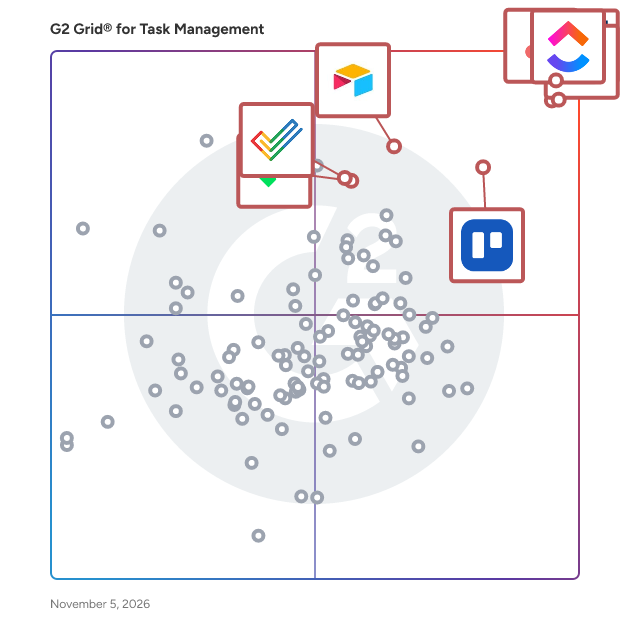
### Software and Services Related to Task Management Software

**Project Management Software —** Project management software assists employees, administrators, and teams with managing team goals and long-term projects. Task management software relates to project management software, in that it simply outlines individual efforts, breaks down components within a project, determines due dates, and allows for self-management. Combining these two software solutions together makes for a more efficient workspace across all teams at a company.

**Time Tracking Software —** Time tracking software (time management software) enables workers to either passively or manually track the time spent on projects, tasks, and other deliverables. Time tracking software increases productivity in employees, because it allows for accountability, helps discover which activities or events waste time, and keeps all time data in one location. It makes sense to integrate time tracking software into task management software so employees can visualize all data relating to their task in one central location.

**Business Process Management Software —** Business process management (BPM) software helps define, automate, and report on processes that are intended to help optimize a business’ ability to deliver on company goals. This complements task management software by clearly defining the processes that span a company’s overall goals. This helps companies with workflow management and making business processes more efficient.