Learn More About Network Monitoring Software
What is Network Monitoring Software?
Network monitoring software allows companies to keep tabs on every aspect of their network’s functionality. It enables companies to set a functional baseline for their networks, and the monitoring software will relay via alerts and emails when the network dips below that baseline. Network monitoring software also provides dashboards that allow companies to view their network’s performance in real time.
Network monitoring solutions are key to creating and preserving optimal network function, especially because network integrity is so important to modern business. Companies use internal networks to transmit information between employees, devices, and servers. This constant stream of information fuels business in the modern age of data. By providing a continuous overhead view of all network functionality, and by providing details of any operational faltering, network monitoring software keeps businesses running smoothly.
Key Benefits of Network Monitoring Software
-
Detect network performance incidents — Know exactly what’s happening on your network at any time.
-
Reduce network downtime — Notice trends that lead to downtime before downtime occurs, and drive off potential issues more easily. Also, easily track where problems occur and resolve issues more quickly.
-
Diagnose and resolve network incidents — Identify exactly where problems are occurring and create targeted solutions for those issues.
-
Manage network-related inventory — See and keep track of every device on your network — mobile phones, laptops, servers, and more.
-
Document and record historical incidents — Audit your incidents, find trends, and create informed plans for future action.
Why Use Network Monitoring Software?
Network monitoring solutions are built to keep your company’s network running optimally. When issues occur, alerts should be able to notify what is causing the failure and offer potential solutions. This helps your network teams stay on top of issues, and it can even assist in taking preventative action towards future issues like network overload or lag.
Network monitoring tools tend to be diverse but offer similar core functions. When searching for an appropriate network monitoring solution for your company, these are some considerations to keep in mind when purchasing:
Issue resolution process — When picking a solution, you should know your existing incident processes, as well as what your ideal processes would be. Make sure your in-house team has the skills and experience necessary to tackle the task. You should consider integrations for communication tools and task management software as well, as these are both crucial to issue management. Building out your ideal process will help to narrow products by comparing their features with your needs.
Customization needs — Customization plays a big role in facilitating your ideal incident management processes. You may want to set up custom alerts or incident routing standards. Other custom configurations and add-ons, such as automated ticket creation, should be considered. Make sure any tool you hope to integrate also has compatibility with the products you’re considering. There are a lot of quirks and custom features you can add to many tools if you’re not building a proprietary network monitoring solution, so keep in mind your highest priorities.
Product integration needs — Integrations and add-ons relate to customization but also add a level of functionality most customizations can’t. Commonly integrated products may include continuous delivery tools, application servers, or container management solutions. Additional tools can streamline processes, improve analysis, and add capabilities like data visualization. You should keep your existing integrations in mind but also consider new tools to increase security and performance.
Who Uses Network Monitoring Software?
Network monitoring software is going to be utilized almost exclusively by a business’ internal network and IT teams. Both of these teams will be able to use network monitoring to verify all company devices are connecting optimally and ensure that daily workflow will not be disrupted by unforeseen blips or outages.
Kinds of Network Monitoring Software
Proprietary vs. Purchased — Before looking into network monitoring solutions, consider the networking, IT, and development resources at your company’s disposal. It may be possible to use in-house or third-party services to build a custom network monitoring solution. If those resources aren’t available, buying a monitoring tool is likely your best bet. Be sure your in-house teams are capable of maintaining support and have experience managing network components. There may be consulting services available to help your network teams pick up a new monitoring system as well. If neither of these are the case, many IT outsourcing services can manage networks for you, and IT consulting services can assist you in diagnosing your needs.
Network Monitoring Software Features
Continuous network monitoring — Your network should be up and running whenever your business is. Network monitoring software helps keep your network from faltering when your company is both on and off the clock.
Network performance baselines — Every network needs a performance standard. Utilize network monitoring software to set the baseline your network should be adhering to.
Performance alerting — Should your network stray from its performance baseline, network monitoring software alerts administrators so that any troubleshooting or repair can commence immediately.
Suggest solutions and improvements — Whether usage loads need better distribution or a particular network weak point arises, network monitoring software should be able to highlight stressed or nonfunctional network points and provide solutions towards alleviating those issues.
Performance visualizations — Sifting through hundreds of lines of data is a waste of time when looking for overall metrics or key points. Network monitoring solutions include data visualization options so that the data you need is big, bold, and exactly what you’re looking for.
Potential Issues with Network Monitoring Software
Network scale — Monitoring options should quickly narrow depending on the status of your network’s size. Small-business tools can be easy to use but may not fit your projected growth needs. Enterprise solutions are not necessary for smaller networks but can provide intensive support and vast monitoring for larger, more complex networks. Many cloud offerings, though, can help small businesses scale their networks as they grow while keeping their information safe and downtime at a minimum. Be sure, when investing in a network monitoring solution, that the solution meets your company’s scale needs, both for now and in the near future.
Infrastructure location — Technology infrastructure is a key consideration for network monitoring. On-premise servers and related solutions provide greater security but can be more expensive and resource-intensive. Remote networks reduce overhead but take your hands off the network. Cloud-based network monitoring solutions are often less complex but become less customizable. On-premise networks give you more direct access to logs and incident details. All of these trade-offs should be strongly considered when differentiating between products.
Which network monitoring app is best for medium-sized enterprises?
For medium-sized enterprises, in order to find the best networking monitoring app depends on your business goals. Some interesting features to look at are: AIOps Platforms, Application Performance Monitoring, Cloud Infrastructure Monitoring, and Log Monitoring. Here are a few popular options for you:
-
Entuity provides comprehensive real-time visibility and actionable insights into your on-prem, cloud, and hybrid infrastructures. It's designed to help organizations proactively monitor and optimize network performance, enhance security, and maximize resource efficiency. Entuity is tailored for enterprises aiming to streamline operations and ensure seamless connectivity.
-
BackBox focuses on network device automation and security, making it suitable for complex multi-vendor environments. It offers over 3,000 pre-built automation tools, reducing manual errors and improving operational efficiency. It's equipped to handle challenges like rapid vulnerability patching and streamlining network configuration management.
What's the leading network monitoring software for business use?
There isn't a "one size fits all" leading software for networking monitoring software. However, here are some popular choices that businesses use for network monitoring solutions:
-
LogicMonitor - Offers hybrid observability powered by AI, providing operational visibility and predictability across on-prem and multi-cloud environments.
-
Dynatrace - Provides unified platform for broad and deep observability, enabling cloud operations automation and secure software delivery.
-
Datadog - A comprehensive monitoring, security, and analytics platform for infrastructure, application performance, and log management.
-
ThousandEyes - Empowers organizations with visibility across every network, enabling proactive issues detection and resolution.
-
Microsoft System Center - Delivers unified management for cloud platforms and IT operations, facilitating fast time-to-value.
Network Monitoring Software FAQs
Most Popular FAQs
Which Network Monitoring Software has the best reviews?
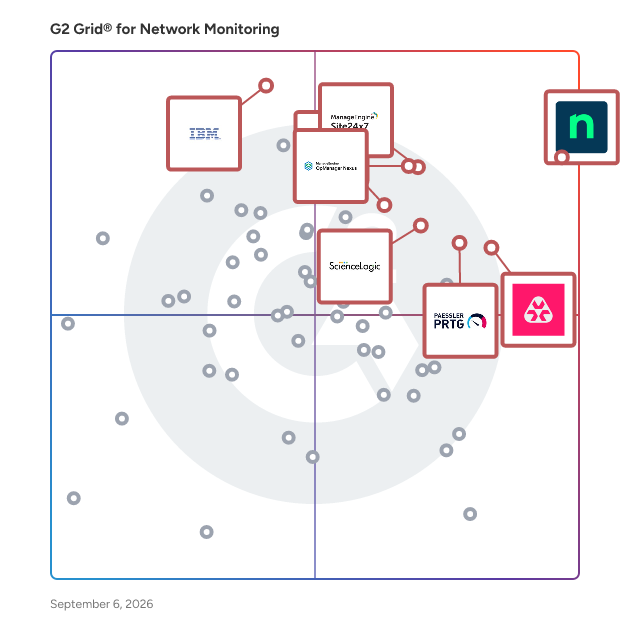
NinjaOne leads the category with over 560 verified reviews and a strong average rating driven by consistent praise for its clean UI, automation capabilities, and responsive support. Other platforms earning top marks include Paessler PRTG, Atera, and Site24x7.
-
NinjaOne — An all-in-one RMM and network monitoring platform widely praised for its intuitive interface, automated patch management, and remote access capabilities. Well-suited for MSPs and IT teams of all sizes.
-
Paessler PRTG — A comprehensive network monitoring tool known for its deep sensor-based architecture, highly customizable dashboards, and strong enterprise-grade reliability.
-
Atera — An MSP-focused RMM and monitoring platform with a standout per-technician pricing model, praised by reviewers for ease of deployment and strong endpoint visibility.
What is the best network monitoring software?
The best network monitoring software depends on your environment's scale and use case, but several platforms consistently earn top marks across key evaluation criteria including ease of use, reliability, and support quality.
-
NinjaOne — Frequently cited as a best-in-class all-in-one solution for device management, patching, remote access, and automation from a single pane of glass.
-
Paessler PRTG — A top-rated option for organizations that need granular, sensor-based monitoring across complex on-premise and hybrid environments.
-
Site24x7 — A cloud-based monitoring platform praised for centralized visibility, real-time alerting, and strong support across servers, applications, and network devices.
-
Auvik — A network-focused monitoring tool favored by MSPs for its automated network mapping, traffic analysis, and fast time-to-value during setup.
What are the best softwares to monitor networks for SaaS companies?
SaaS companies operating in the Computer Software segment prioritize tools that offer cloud-native architecture, seamless integrations, and observability across distributed infrastructure. Based on reviews from software industry professionals, these platforms stand out:
-
Datadog — A cloud-native observability platform well-loved in the SaaS world for its deep integrations, infrastructure monitoring, and APM capabilities across dynamic, containerized environments.
-
NinjaOne — Highly rated among SaaS IT teams for centralizing endpoint management, automating routine tasks, and scaling monitoring without adding overhead.
-
Site24x7 — Popular among SaaS companies for its unified visibility across cloud infrastructure, web applications, and APIs with solid alerting and reporting features.
-
Auvik — A strong fit for SaaS IT teams needing fast network topology discovery and traffic monitoring without complex setup requirements.
What are the top network monitoring software recommended for tech companies?
Tech companies, spanning IT services, computer software, and cybersecurity, represent the largest reviewer segment in this category, and their top recommendations reflect a preference for flexibility, automation, and integration depth.
-
NinjaOne — The most reviewed platform by tech professionals, consistently rated for its automation engine, API flexibility, and broad third-party integrations.
-
Paessler PRTG — Particularly popular in IT and networking environments for its extensible sensor-based model and ability to monitor everything from bandwidth to virtual machines.
-
Atera — Highly recommended by tech companies for its MSP-first design, transparent pricing, and strong endpoint monitoring without device-count penalties.
-
ManageEngine OpManager — A mature, enterprise-capable platform favored by IT teams for fault and performance management across routers, switches, servers, and virtual machines.
What software is used for network monitoring?
Network monitoring software is used to track the availability, performance, and security posture of IT infrastructure, including servers, routers, endpoints, cloud services, and applications. Teams rely on these tools for real-time alerting, automated remediation, patch management, and capacity planning. The most commonly used platforms among verified reviewers include:
-
NinjaOne — Used by MSPs and internal IT teams for unified endpoint and network monitoring, remote access, and automated patching.
-
Paessler PRTG — Deployed widely across enterprises for real-time network performance monitoring using customizable sensor templates.
-
Checkmk — An open-core monitoring platform used by IT infrastructure teams to monitor hybrid environments including on-premise, cloud, and containerized workloads.
-
IBM SevOne — Used by large enterprises and telecom providers for high-volume network performance management and scalable data collection.
Small Business FAQs
What is the most affordable Network Monitoring Software for SMBs?
For small and mid-sized businesses, affordability often means more than just a low price tag, it means predictable pricing, low setup costs, and a tool that doesn't require a dedicated team to run. The following platforms deliver strong value:
-
Atera — Offers a per-technician pricing model that's a standout for SMBs, meaning you're never penalized for adding more endpoints. Reviewers in lean IT teams appreciate the transparent cost structure.
-
NinjaOne — While priced at a slight premium, reviewers frequently note that consolidating monitoring, patching, and remote access into one platform eliminates the need for multiple separate tools, making it cost-effective overall.
-
Checkmk — Offers a free open-source tier alongside its commercial plans, making it accessible for small businesses looking to monitor infrastructure without a large upfront investment.
What is the best Network Monitoring Software for startups?
Startups need monitoring tools that are fast to deploy, easy to manage with a small team, and flexible enough to grow with the business. Based on reviews from smaller organizations, these platforms are frequently recommended:
-
NinjaOne — Reviewers consistently highlight its quick setup time and low management overhead, making it a solid choice for startups that need reliable monitoring without a dedicated IT operations team.
-
Atera — Designed with lean IT teams in mind, Atera's per-technician model and sub-day deployment time make it one of the fastest ways for startups to get endpoint and network monitoring up and running.
-
Site24x7 — A cloud-native option that's easy to onboard and provides broad observability from day one, well-suited for startups with cloud-first infrastructure stacks.
Which Network Monitoring Software is the most user-friendly for startups?
Ease of use is a top priority for startups where IT staff often wear multiple hats. The following platforms receive the highest marks for intuitive interfaces, minimal learning curves, and accessible support:
-
NinjaOne — Widely praised for its clean, modern interface that allows new users to become productive quickly. Multiple reviewers note it's approachable even without deep networking expertise.
-
Atera — Consistently earns high ease-of-use scores, with reviewers noting that sub-day deployments and straightforward onboarding reduce the burden on small teams.
-
Auvik — Frequently called out for its intuitive network mapping and topology visualization, helping non-specialist IT staff understand their network at a glance.
What is the best Network Monitoring Software for non-profit organizations?
Non-profits operating on tight budgets but supporting distributed field teams need tools that are both cost-effective and capable of managing remote endpoints reliably. Based on reviews from non-profit IT professionals, these options stand out:
-
Atera — Non-profit reviewers specifically highlight Atera's per-technician model as ideal for organizations that support fluctuating numbers of donated or field devices without incurring per-device fees.
-
NinjaOne — Valued by non-profit IT administrators for its strong remote access capabilities that eliminate the need for costly on-site visits, reducing operational expenses significantly.
-
Checkmk — The free open-source version provides a compelling starting point for resource-constrained non-profits that need solid infrastructure monitoring without licensing costs.
Which Network Monitoring Software is best for IT teams managing clients across multiple industries?
MSPs and IT service providers managing clients across diverse industries, from healthcare to financial services to manufacturing, need platforms that support multi-tenancy, easy client segmentation, and centralized oversight. Reviewers in this space consistently recommend:
-
NinjaOne — A top pick for MSPs due to its multi-tenant architecture, client-level visibility, and automation capabilities that reduce manual work across varied client environments.
-
N-able N-central — A mature RMM platform designed specifically for MSPs, offering deep automation, policy-based management, and strong integration with third-party security tools.
-
Auvik — Popular with MSPs for network-specific monitoring, offering automated discovery and documentation that helps technicians onboard new client environments quickly.
Enterprise FAQs
What are the best-rated Network Monitoring Software for tech enterprises?
Tech enterprises operating at scale require platforms that can handle high volumes of devices, complex integrations, and demanding uptime requirements. Among enterprise reviewers in tech industries, the following platforms earn the highest combined ratings:
-
Paessler PRTG — Consistently earns near-perfect ratings from enterprise tech reviewers for its flexible sensor architecture, comprehensive device coverage, and ability to scale monitoring across global infrastructure.
-
NinjaOne — Enterprise tech teams praise it for unifying endpoint management, patch automation, and monitoring under one platform, reducing tool sprawl in complex IT environments.
-
Checkmk — Well-regarded in enterprise environments for its hybrid monitoring capabilities, supporting on-premise, cloud, and containerized workloads with a consistent alerting framework.
-
ManageEngine OpManager — Favored by enterprise IT operations teams for its mature fault and performance management features, deep SNMP support, and extensive third-party integrations.
What are the most reliable Network Monitoring tools for enterprises?
Reliability in enterprise contexts means high uptime, accurate alerting with minimal false positives, and the ability to scale without degradation. Reviewers at organizations with 500+ employees consistently highlight these platforms for reliability:
-
Paessler PRTG — Enterprise reviewers cite its long track record and stable performance as key differentiators, particularly for environments requiring continuous monitoring with minimal interruptions.
-
IBM SevOne — Designed for carrier-grade scale, IBM SevOne is relied upon by large enterprises and telecom operators for high-performance data collection and network analytics across massive device inventories.
-
NETSCOUT Network & Application Observability — Trusted by enterprise networking teams for deep packet inspection and application-aware network monitoring, particularly in high-availability and mission-critical environments.
-
LogicMonitor — A SaaS-based infrastructure monitoring platform used by enterprises for its agentless discovery, predictive alerting, and strong support for hybrid cloud environments.
What are the best-reviewed Network Monitoring Software for enterprise app integration?
Enterprises running complex stacks across cloud providers, ticketing systems, ITSM tools, and security platforms need monitoring software that integrates cleanly with their broader ecosystem. Based on reviewer feedback specifically mentioning integration depth:
-
Datadog — Consistently praised for its massive integration library and native support for cloud platforms, container orchestration tools, and developer workflows, making it a natural fit for integration-heavy enterprise environments.
-
NinjaOne — Enterprise reviewers highlight its growing ecosystem of third-party integrations with PSA tools, security platforms, and backup solutions, particularly valuable for IT operations teams.
-
SolarWinds Observability — Offers a unified observability experience across infrastructure, databases, and applications, with strong integration support for enterprise ITSM and cloud platforms.
-
LogicMonitor — Widely used in enterprise environments for its pre-built integrations with ServiceNow, PagerDuty, Slack, and major cloud providers, streamlining incident management workflows.
What are the best Network Monitoring platforms for telecom and large-scale network operations?
Telecom companies and network-heavy enterprises managing thousands of devices across geographically distributed infrastructure require tools built for scale, high-frequency polling, and carrier-grade performance management.
-
IBM SevOne — Frequently selected by telecom and service provider enterprises for its ability to collect and process performance data at massive scale, with advanced analytics and anomaly detection capabilities.
-
NETSCOUT Network & Application Observability — A go-to for telecom-grade network visibility, offering real-time traffic analysis and deep packet inspection at carrier scale.
-
Paessler PRTG — Widely deployed in telecom environments for its ability to monitor bandwidth, uptime, and device health across thousands of nodes using a flexible, customizable sensor model.
What are the best enterprise Network Monitoring tools with strong support?
For enterprises where downtime translates directly into business risk, quality of vendor support is a critical buying criterion. Based on enterprise reviewer scores for Quality of Support, these platforms earn the highest marks:
-
NinjaOne — Enterprise reviewers regularly cite NinjaOne's fast, knowledgeable support team as a standout differentiator, with direct access to product specialists frequently mentioned.
-
Paessler PRTG — Long-standing enterprise customers note strong documentation, an active community, and responsive technical support as key reasons for continued renewal.
-
ManageEngine OpManager — Praised in enterprise reviews for its accessible support team and strong self-service knowledge base, helping IT operations teams resolve complex monitoring configurations efficiently.
Last updated on April 24, 2026