  # Best Payroll Software

  *By [Jeffrey Lin](https://research.g2.com/insights/author/jeffrey-lin)*

   Payroll software allows companies to manage and streamline payroll processes, ensuring employees are paid accurately and on time while helping HR and accounting teams automate payroll workflows, calculate wages, taxes, and deductions, and comply with state, federal, and international requirements. The [best payroll software](https://learn.g2.com/best-payroll-software) also helps organizations comply with various state and federal taxes and Social Security requirements.

### Core Capabilities of Payroll Software

To qualify for inclusion in the Payroll category, a product must:

- Calculate and pay employee salaries
- Follow employee pay rules, such as minimum wage and overtime pay
- Calculate and deduct withholdings, such as payroll taxes, insurance, and retirement contributions
- Print or deposit paychecks directly and manage employee payment data, such as bank accounts
- Generate payroll reports like salary statements, benefits reports, or leave summaries
- Comply with local and national workplace laws and privacy regulations

### Common Use Cases for Payroll Software

Payroll software is used by HR and finance teams across organizations of all sizes to manage compensation operations efficiently. Common use cases include:

- Automating end-to-end payroll processing for salaried and hourly employees
- Managing multi-country payroll for global or distributed workforces
- Ensuring compliance with evolving tax regulations and labor laws

### How Payroll Software Differs from Other Tools

Payroll software is purpose-built for compensation processing and compliance, distinguishing it from broader HR platforms that include payroll as a secondary feature. It integrates with [core HR software](https://www.g2.com/categories/core-hr), [accounting software](https://www.g2.com/categories/accounting), [benefits administration software](https://www.g2.com/categories/benefits-administration), and [time and attendance software](https://www.g2.com/categories/time-attendance). Organizations with global teams also commonly leverage [multi-country payroll software](https://www.g2.com/categories/multi-country-payroll) alongside their core payroll solution.

### Insights from G2 on Payroll Software

Based on category trends on G2, automated tax calculations and direct deposit capabilities stand out as standout features. Compliance with changing regulations and seamless integration with HR and accounting tools stand out as key reasons for adoption.


## Category Overview

**Total Products under this Category:** 643

  
## Trust & Credibility Stats

**Why You Can Trust G2's Software Rankings:**

- 30 Analysts and Data Experts
- 111,900+ Authentic Reviews
- 643+ Products
- Unbiased Rankings

G2's software rankings are built on verified user reviews, rigorous moderation, and a consistent research methodology maintained by a team of analysts and data experts. Each product is measured using the same transparent criteria, with no paid placement or vendor influence. While reviews reflect real user experiences, which can be subjective, they offer valuable insight into how software performs in the hands of professionals. Together, these inputs power the G2 Score, a standardized way to compare tools within every category.

  
## Top Payroll Software at a Glance
| # | Product | Rating | Best For | What Users Say |
|---|---------|--------|----------|----------------|
| 1 | [RUN Powered by ADP](https://www.g2.com/products/run-powered-by-adp/reviews) | 4.6/5.0 (5,352 reviews) | Small-business payroll automation | "[RUN by ADP Makes Payroll Easy with a Clean, User-Friendly Interface](https://www.g2.com/survey_responses/run-powered-by-adp-review-12694290)" |
| 2 | [Gusto](https://www.g2.com/products/gusto/reviews) | 4.6/5.0 (9,908 reviews) | Payroll with benefits administration | "[Effortless Payroll &amp; Privacy Features Shine](https://www.g2.com/survey_responses/gusto-review-12782183)" |
| 3 | [Paycom](https://www.g2.com/products/paycom/reviews) | 4.5/5.0 (4,249 reviews) | Centralized employee payroll visibility | "[Comprehensive, Easy-to-Access HR Solution with Helpful AI Support](https://www.g2.com/survey_responses/paycom-review-12625703)" |
| 4 | [Rippling](https://www.g2.com/products/rippling/reviews) | 4.8/5.0 (11,000 reviews) | Unified HR, IT, and payroll automation | "[Good Interface](https://www.g2.com/survey_responses/rippling-review-11379318)" |
| 5 | [Deel Payroll](https://www.g2.com/products/deel-payroll/reviews) | 4.7/5.0 (6,530 reviews) | Global payroll payment transparency | "[Effortless Payroll with Real-Time Transparency](https://www.g2.com/survey_responses/deel-payroll-review-12745213)" |
| 6 | [UKG Ready](https://www.g2.com/products/ukg-ready/reviews) | 4.4/5.0 (2,332 reviews) | Customizable workforce payroll management | "[Fast, Intuitive Tab System with Easy Onboarding and Reliable Offline Access](https://www.g2.com/survey_responses/ukg-ready-review-12635169)" |
| 7 | [Remote](https://www.g2.com/products/remote/reviews) | 4.5/5.0 (3,193 reviews) | Cross-border payroll visibility | "[Seamless, User-Friendly Timesheets with Easy Defaults and Edits](https://www.g2.com/survey_responses/remote-review-12662659)" |
| 8 | [ADP Workforce Now](https://www.g2.com/products/adp-workforce-now/reviews) | 4.2/5.0 (4,075 reviews) | Mid-market HR payroll centralization | "[Less hassle, less headaches, saves time](https://www.g2.com/survey_responses/adp-workforce-now-review-2066748)" |
| 9 | [Paylocity](https://www.g2.com/products/paylocity/reviews) | 4.4/5.0 (5,206 reviews) | Consolidated HR and payroll management | "[User-Friendly, Cost-Effective HR &amp; Payroll with First-Class Paylocity Support](https://www.g2.com/survey_responses/paylocity-review-12780521)" |
| 10 | [BambooHR](https://www.g2.com/products/bamboohr/reviews) | 4.4/5.0 (4,488 reviews) | HR-first payroll-adjacent workflows | "[BambooHR’s Clean Interface, Smooth Onboarding, and Handy Leave Accrual Calculator](https://www.g2.com/survey_responses/bamboohr-review-12759580)" |

  
## Best Payroll Software At A Glance

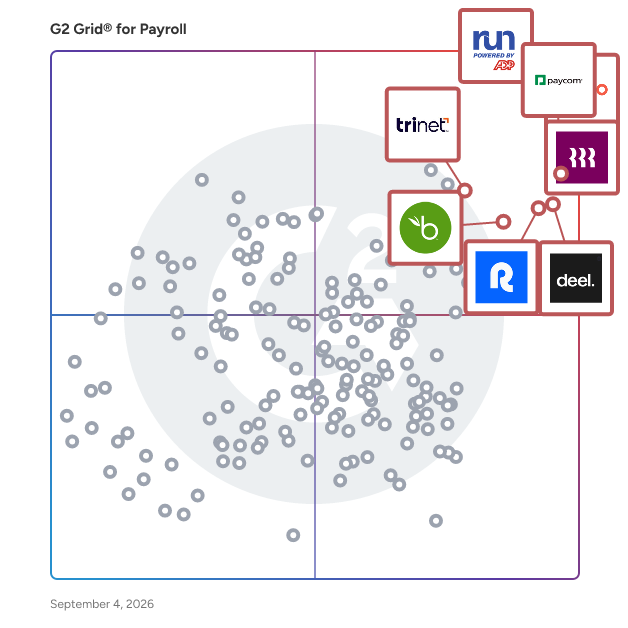
- **Leader:** [RUN Powered by ADP](https://www.g2.com/products/run-powered-by-adp/reviews)
- **Highest Performer:** [OnPay](https://www.g2.com/products/onpay/reviews)
- **Easiest to Use:** [OnPay](https://www.g2.com/products/onpay/reviews)
- **Top Trending:** [Remote People](https://www.g2.com/products/remote-people/reviews)
- **Best Free Software:** [Paylocity](https://www.g2.com/products/paylocity/reviews)

  
## Which Type of Payroll Software Tools Are You Looking For?
  - [Payroll Software](https://www.g2.com/categories/payroll) *(current)*
  - [HCM Software](https://www.g2.com/categories/hcm-software)
  - [Performance Management Software](https://www.g2.com/categories/performance-management)
  - [Core HR Software](https://www.g2.com/categories/core-hr)
  - [Time Tracking Software](https://www.g2.com/categories/time-tracking-software)
  - [Benefits Administration Software](https://www.g2.com/categories/benefits-administration)
  - [Onboarding Software](https://www.g2.com/categories/onboarding-software)
  - [Time &amp; Attendance Software](https://www.g2.com/categories/time-attendance)

  
---

**Sponsored**

### RemoFirst

RemoFirst is a global employment solution designed to help businesses employ their full-time employees and contractors across 180+ countries. This innovative platform eliminates the need for companies to invest significant time and resources into establishing local entities, allowing them to focus on their core operations while seamlessly employing top talent worldwide. By utilizing locally compliant contracts, RemoFirst ensures that businesses can operate without the complexities and risks associated with international employment. RemoFirst helps businesses of all sizes looking to expand their workforce internationally without the burden of navigating local employment laws and regulations. Startups, small to medium businesses, and even larger corporations can benefit from this solution, as it simplifies the process of hiring and managing employees and contractors in diverse geographical locations. This is particularly valuable for companies aiming to tap into global talent pools while maintaining compliance with local labor laws. Key features of RemoFirst include its comprehensive onboarding process, which allows businesses to quickly integrate new global employees and contractors into their teams. The platform provides tools for payroll management, ensuring that employees are compensated accurately and on time, regardless of their location. Additionally, RemoFirst offers risk mitigation strategies to avoid misclassification issues, which can lead to costly penalties and compliance audits. By centralizing the management of an international workforce, RemoFirst streamlines operations and enhances efficiency. The value of RemoFirst lies in its ability to simplify global employment while maintaining compliance and reducing administrative burdens. Companies can focus on their growth strategies, knowing that their international workforce is being managed effectively and in accordance with local laws. This solution stands out in its category by providing a user-friendly interface, robust support, and a deep understanding of the complexities involved in global employment, making it an essential tool for businesses looking to thrive in an increasingly interconnected world. Employer of Record services start at $199/month. International contractor payments are $25/month.


[Visit website](https://www.g2.com/external_clickthroughs/record?secure%5Bad_program%5D=ppc&amp;secure%5Bad_slot%5D=category_product_list&amp;secure%5Bcategory_id%5D=162&amp;secure%5Bdisplayable_resource_id%5D=162&amp;secure%5Bdisplayable_resource_type%5D=Category&amp;secure%5Bmedium%5D=sponsored&amp;secure%5Bplacement_reason%5D=page_category&amp;secure%5Bplacement_resource_ids%5D%5B%5D=162&amp;secure%5Bprioritized%5D=false&amp;secure%5Bproduct_id%5D=1185719&amp;secure%5Bresource_id%5D=162&amp;secure%5Bresource_type%5D=Category&amp;secure%5Bsource_type%5D=category_page&amp;secure%5Bsource_url%5D=https%3A%2F%2Fwww.g2.com%2Fcategories%2Fpayroll&amp;secure%5Btoken%5D=c162be8a004aa2ca94eaedc462232ca5c358e61b26140d84770759b08d0f9a44&amp;secure%5Burl%5D=https%3A%2F%2Fwww.remofirst.com%2Fglobal-payroll%3Futm_source%3Dg2%26utm_medium%3Dpaid%26utm_campaign%3Dpayroll&amp;secure%5Burl_type%5D=custom_url)

---

  
## Buyer Guide: Key Questions for Choosing Payroll Software Software
  ### What does Payroll Software do?
  I describe payroll software as a set of tools that helps businesses calculate employee pay, manage deductions, and support tax and compliance workflows. It acts as an operational layer that keeps payroll processes accurate, organized, and consistent. These platforms centralize employee pay records, payroll runs, tax details, benefits deductions, and reporting, ensuring compensation activities remain aligned with business and regulatory requirements. Instead of relying on manual calculations, disconnected spreadsheets, or scattered records, everything is managed through a single, controlled environment that connects payroll with HR, time, attendance, benefits, and employee self-service processes.


  ### Why do businesses use Payroll Software?
  When I reviewed G2 feedback, I found that users often highlight payroll software as a way to reduce manual work and centralize employee operations.

Common benefits include:

- Easier payroll runs and pay visibility.
- Better tracking of employee documents.
- Support for tax and regulatory compliance.
- Time and attendance efficiency.
- Fewer separate systems for HR, payroll, and employee data.
- Faster access to support and updates.


  ### Who uses Payroll Software primarily?
  From the reviewer patterns I evaluated, G2 users most often describe these primary users:

- **Payroll and HR administrators** who need to process payroll, manage employee records, and keep pay runs accurate.
- **Finance or operations leaders** who need visibility into labor costs, payroll reporting, and compliance risks.
- **Business owners and executives** who want a reliable way to pay employees, manage taxes, and support workforce growth.
- **Employees** who need easy access to pay stubs, tax documents, benefits information, and personal details.
- **Global workforce teams** who need to manage regional payroll requirements, local compliance, and multi-country employee payments.


  ### What types of Payroll Software should I consider?
  G2 reviewer sentiment points to several practical categories:

- **All-in-one HR and payroll platforms:** Users value combined HR, IT, payroll, and employee data.
- **Small-business payroll systems:** Reviewers like ease of use, quick access, and straightforward setup.
- **Global payroll tools:** G2 feedback often connects these products with regional compliance and international hiring.
- **Payroll with time and attendance:** Users frequently mention efficiency when payroll connects to scheduling or attendance.
- **Employee self-service payroll:** Reviewers appreciate easy navigation for pay information, documents, and updates.


  ### What are the core features to look for in Payroll Software?
  Based on the G2 feedback I reviewed, buyers should prioritize:

- Clean interface and simple navigation that reduces processing errors.
- Accurate payroll calculations with built-in tax support across pay periods.
- Compliance tools that keep up with employment regulations and filing requirements.
- Employee self-service access to pay stubs, tax documents, and records.
- Time-and-attendance integrations that feed directly into payroll runs.
- Reporting and visibility tools that give administrators a clear picture of payroll activity.
- Responsive support that resolves issues before they affect pay cycles.
- Integrations across HR, benefits, onboarding, and IT to reduce manual data entry.
- Flexible deployment options with implementation support for more complex setups.


  ### What trends are shaping Payroll Software right now?
  From the G2 reviewer patterns I evaluated, current priorities include:

- **Unified HR and payroll systems** are gaining traction as teams move away from fragmented tools.
- **Automation** is reducing repetitive administrative work across payroll and approval cycles.
- **Global payroll support** is expanding to meet the needs of distributed teams.
- **Tax and compliance updates** are becoming a core expectation as regional requirements grow more complex.
- **Employee self-service** is improving as workers expect faster, more transparent access to pay and benefits data.
- **Cross-functional integrations** are deepening across payroll, benefits, hiring, and IT.
- **AI-assisted tax and benefits guidance** is emerging as a differentiator in buying decisions.


  ### How should I choose Payroll Software?
  For me, the strongest payroll software is the kind that makes payroll dependable, easy to manage, and aligned with existing HR processes. When ease of use, compliance support, reliable payroll runs, and responsive support come together, payroll software becomes a trusted system for paying teams accurately and on time.


---

  ## Top-Rated Products (Ranked by G2 Score)
### 1. [RUN Powered by ADP](https://www.g2.com/products/run-powered-by-adp/reviews)
**Average Rating:** 4.6/5.0
**Total Reviews:** 5,352
**Why buyers love it?:** When I reviewed G2 feedback for RUN Powered by ADP, I found that users often highlight its approachable interface and payroll efficiency. G2 reviewers say the product helps automate payroll and tax processes for small businesses. They also value support when it works well. Some G2 feedback points to friction with timekeeping, reporting customization, and timely help.


### Quick AI Summary Based on G2 Reviews
*Generated from real user reviews*

**Pros:**

- Users highlight the **ease of use** of RUN Powered by ADP, appreciating its user-friendly design and navigation.
- Users value the **helpful customer support** provided by RUN Powered by ADP, enhancing their overall experience.
- Users appreciate the **ease of use** and helpful tech support of RUN Powered by ADP for payroll processing.
- Users appreciate the **ease of setup and payroll processing** with RUN Powered by ADP, enhancing efficiency and organization.
- Users appreciate the **ease of setup** with RUN Powered by ADP, enjoying a seamless transition and user-friendly experience.

**Cons:**

- Users express frustration with **payroll issues** , particularly due to rigid templates and limitations on custom reporting for small businesses.
- Users express frustration with the **poor customer support** , citing long wait times and inadequate assistance from representatives.
- Users are often frustrated by **rigid reporting and customization limitations** that hinder payroll management for small businesses.
- Users find the **cost of service to be pricey** , suggesting it should be more affordable or even free.
- Users express frustration with the **long waiting times** for assistance, impacting their overall experience with RUN Powered by ADP.

#### Key Features
  - Benefits Administration
  - Integration APIs
  - Benefits Manager
  - Time Off Accrual
  - Time Tracking Integration

#### Recent Reviews

**"[RUN by ADP Makes Payroll Easy with a Clean, User-Friendly Interface](https://www.g2.com/survey_responses/run-powered-by-adp-review-12694290)"**

**Rating:** 5.0/5.0 stars
*— Shannon Darcy M.*

[Read full review](https://www.g2.com/survey_responses/run-powered-by-adp-review-12694290)

---

**"[Fast, Helpful Support and Easy Mobile Time Tracking for Payroll](https://www.g2.com/survey_responses/run-powered-by-adp-review-12796393)"**

**Rating:** 5.0/5.0 stars
*— Joe C.*

[Read full review](https://www.g2.com/survey_responses/run-powered-by-adp-review-12796393)

---


#### Trending Discussions

- [What is RUN Powered by ADP used for?](https://www.g2.com/discussions/what-is-run-powered-by-adp-used-for) - 2 comments, 1 upvote
- [What is the difference between ADP run and ADP Workforce Now?](https://www.g2.com/discussions/run-powered-by-adp-what-is-the-difference-between-adp-run-and-adp-workforce-now) - 2 comments, 1 upvote
- [How do I run payroll on ADP?](https://www.g2.com/discussions/how-do-i-run-payroll-on-adp) - 2 comments, 1 upvote
### 2. [Gusto](https://www.g2.com/products/gusto/reviews)
**Average Rating:** 4.6/5.0
**Total Reviews:** 9,908
**Why buyers love it?:** My evaluation of G2 feedback showed that Gusto stands out for easy setup and broad HR coverage. G2 reviewers highlight payroll, time tracking, benefits, and employee management in one workflow. Users often value how it reduces administrative effort. G2 feedback also mentions limits around reporting, benefits customization, company switching, and onboarding.


### Quick AI Summary Based on G2 Reviews
*Generated from real user reviews*

**Pros:**

- Users appreciate Gusto for its **ease of use** , highlighting its friendly interface and straightforward setup process.
- Users appreciate the **effortless payroll and tax automation** of Gusto, significantly reducing time and stress levels.
- Users highlight the **easy setup** of Gusto, appreciating its intuitive design and efficient customer support during onboarding.
- Users value the **accessibility and user-friendly design** of Gusto, enhancing their payroll experience significantly.
- Users appreciate the **automation capabilities** of Gusto, making payroll and tax tasks effortless and stress-free.

**Cons:**

- Users find Gusto&#39;s interface has **missing features** , like intuitive expense management and advanced reporting options.
- Users report **poor customer support** , finding it challenging to reach representatives and limited to email communication.
- Users report frustrating **payroll issues** with Gusto, including confusion around paused payroll and complicated pay structures.
- Users experience **login issues** with Gusto, facing difficulties with refreshing pages and managing multiple credentials.
- Users note **limited customization** options in Gusto, finding certain reports and mobile functionalities restrictive and confusing.

#### Key Features
  - Integration APIs
  - Web Portal
  - Expense Reimbursement
  - Tax Filing
  - API / Integration

#### Recent Reviews

**"[Fast, Reliable Payments Straight to My Bank Account](https://www.g2.com/survey_responses/gusto-review-12792437)"**

**Rating:** 5.0/5.0 stars
*— Angie  Z.*

[Read full review](https://www.g2.com/survey_responses/gusto-review-12792437)

---

**"[Effortless Payroll &amp; Privacy Features Shine](https://www.g2.com/survey_responses/gusto-review-12782183)"**

**Rating:** 4.5/5.0 stars
*— desiree r.*

[Read full review](https://www.g2.com/survey_responses/gusto-review-12782183)

---


#### Trending Discussions

- [What is Gusto used for?](https://www.g2.com/discussions/what-is-gusto-used-for) - 2 comments
- [How do you use gusto payroll?](https://www.g2.com/discussions/how-do-you-use-gusto-payroll)
- [Is gusto payroll safe?](https://www.g2.com/discussions/is-gusto-payroll-safe) - 3 comments, 5 upvotes
### 3. [Paycom](https://www.g2.com/products/paycom/reviews)
**Average Rating:** 4.5/5.0
**Total Reviews:** 4,249
**Why buyers love it?:** In the G2 feedback I evaluated, Paycom is often associated with centralized HR and payroll information. Reviewers highlight easy access to employee data, paycheck transparency, and convenient clock-in tools. G2 users also value having information in one place. Some reviewers note a learning curve, punch correction confusion, and occasional slow performance.


### Quick AI Summary Based on G2 Reviews
*Generated from real user reviews*

**Pros:**

- Users love the **ease of use** of Paycom, praising its straightforward navigation and employee-friendly applications.
- Users appreciate Paycom for its **user-friendly time management software** , enhancing efficiency and reducing payroll workload significantly.
- Users value the **efficient payroll management** of Paycom, which streamlines processes and enhances employee autonomy.
- Users praise the **responsive customer support** of Paycom, enhancing their overall efficiency and satisfaction.
- Users appreciate how **simple Paycom is to use** , enhancing employee satisfaction and streamlining HR processes.

**Cons:**

- Users find the **learning curve challenging** , often taking longer to navigate Paycom’s complex interface and setup.
- Users express frustration with **poor customer support** from Paycom, highlighting unresponsiveness and lack of effective solutions.
- Users find that Paycom&#39;s **limited features** hinder functionality and fall short compared to competitors.
- Users find Paycom **not intuitive** , causing challenges in navigation and task completion before it becomes easier to use.
- Users find Paycom **not user-friendly** , often struggling to navigate and complete tasks like submitting PTO requests.

#### Recent Reviews

**"[Comprehensive, Easy-to-Access HR Solution with Helpful AI Support](https://www.g2.com/survey_responses/paycom-review-12625703)"**

**Rating:** 4.5/5.0 stars
*— Jeremy H.*

[Read full review](https://www.g2.com/survey_responses/paycom-review-12625703)

---

**"[User-Friendly, Effective Pay Management Tool](https://www.g2.com/survey_responses/paycom-review-12724558)"**

**Rating:** 4.5/5.0 stars
*— Brenna P.*

[Read full review](https://www.g2.com/survey_responses/paycom-review-12724558)

---


#### Trending Discussions

- [What is Paycom used for?](https://www.g2.com/discussions/what-is-paycom-used-for)
### 4. [Rippling](https://www.g2.com/products/rippling/reviews)
**Average Rating:** 4.8/5.0
**Total Reviews:** 11,000
**Why buyers love it?:** I found that G2 reviewers frequently connect Rippling with workflow automation across payroll, onboarding, benefits, and employee operations. Users highlight its navigation and broad platform structure. The feedback suggests value for teams that want HR and payroll tied to adjacent business systems. G2 reviewers also mention mobile app issues, interface changes, reporting friction, and leave request limitations.


### Quick AI Summary Based on G2 Reviews
*Generated from real user reviews*

**Pros:**

- Users appreciate the **ease of use** of Rippling, with one login simplifying access to multiple tools and information.
- Users appreciate the **intuitive interface** of Rippling, finding it streamlined and user-friendly for various functionalities.
- Users love the **simple navigation** of Rippling, enjoying easy access to essential features with efficiency.
- Users appreciate the **user-friendly interface** of Rippling, noting its easy navigation and helpful search bar feature.
- Users enjoy the **easy access** to features like Clock in/out and payslips, enhancing workflow efficiency.

**Cons:**

- Users find **reporting and analytics challenging** , requiring excessive setup and struggling with app inconsistencies and support delays.
- Users find Rippling to be **not user-friendly** , with slow loading times and a complicated reporting process.
- Users find the **learning curve challenging** due to the complexity of Rippling&#39;s many powerful features.
- Users find Rippling has **limited features** , particularly feeling the design and access functionality could be improved.
- Users identify **improvement needed** for Rippling due to slow loading times and complicated processes for leave and reviews.

#### Key Features
  - Expense Management
  - Integration APIs
  - Approvals
  - Tax Calculation
  - Time Tracking Integration

#### Recent Reviews

**"[Good Interface](https://www.g2.com/survey_responses/rippling-review-11379318)"**

**Rating:** 5.0/5.0 stars
*— David L.*

[Read full review](https://www.g2.com/survey_responses/rippling-review-11379318)

---

**"[Rippling Keeps Payroll, HR, and Device Management Seamlessly in One Place](https://www.g2.com/survey_responses/rippling-review-12721891)"**

**Rating:** 5.0/5.0 stars
*— Jagdish D.*

[Read full review](https://www.g2.com/survey_responses/rippling-review-12721891)

---


#### Trending Discussions

- [How is Rippling innovating in the field of HR and IT management for businesses?](https://www.g2.com/discussions/how-is-rippling-innovating-in-the-field-of-hr-and-it-management-for-businesses) - 5 comments, 6 upvotes
- [What is Rippling used for?](https://www.g2.com/discussions/what-is-rippling-used-for) - 6 comments, 3 upvotes
### 5. [Deel Payroll](https://www.g2.com/products/deel-payroll/reviews)
**Average Rating:** 4.7/5.0
**Total Reviews:** 6,530
**Why buyers love it?:** When I assessed G2 feedback for Deel Payroll, users often focused on ease of use and payment visibility. G2 reviewers highlight transparent payment processes, multiple withdrawal options, and real-time payout convenience. The product appears distinct for international payroll and contractor payment workflows. Reviewers also mention transfer fees, currency conversion clarity, slower processing, and feature limits.


### Quick AI Summary Based on G2 Reviews
*Generated from real user reviews*

**Pros:**

- Users appreciate the **ease of use** of Deel Payroll, praising its intuitive UI and seamless onboarding process.
- Users highlight the **convenience** of Deel Payroll, enjoying its fast payments and user-friendly interface for easy management.
- Users find Deel Payroll&#39;s interface **user-friendly and simple** , making global hiring and payments effortless for contractors.
- Users value the **easy payment options** on Deel Payroll, allowing for efficient management of contracts and transactions.
- Users praise Deel Payroll for its **prompt service and easy access to funds** , making transactions smooth and secure.

**Cons:**

- Users experience frustrating **payment issues** with Deel Payroll, including delays and ineffective customer support leading to unresolved problems.
- Users are frustrated with the **high fees** associated with payments and withdrawals, leading to a lack of transparency.
- Users find Deel Payroll **expensive** due to high fees and limited payment withdrawal options, including costly crypto alternatives.
- Users often face frustrating **delays** with payments and unhelpful support that impacts their financial stability.
- Users express frustration with the **slow loading** times on Deel Payroll, leading to unmet financial needs and poor support.

#### Key Features
  - Internationalization
  - Benefits Manager
  - Wage Garnishment
  - Tax Calculation
  - Other

#### Recent Reviews

**"[Effortless Payroll with Real-Time Transparency](https://www.g2.com/survey_responses/deel-payroll-review-12745213)"**

**Rating:** 4.5/5.0 stars
*— Nica W.*

[Read full review](https://www.g2.com/survey_responses/deel-payroll-review-12745213)

---

**"[Smooth and reliable platform for getting paid as an international contractor](https://www.g2.com/survey_responses/deel-payroll-review-12726146)"**

**Rating:** 5.0/5.0 stars
*— Alejandra F.*

[Read full review](https://www.g2.com/survey_responses/deel-payroll-review-12726146)

---


#### Trending Discussions

- [What is deel app?](https://www.g2.com/discussions/what-is-deel-app) - 6 comments, 1 upvote
- [Is it part of the EU?](https://www.g2.com/discussions/is-deel-an-eor) - 5 comments, 3 upvotes
- [How does Deel work for contractors?](https://www.g2.com/discussions/how-does-deel-work-for-contractors) - 6 comments, 1 upvote
### 6. [UKG Ready](https://www.g2.com/products/ukg-ready/reviews)
**Average Rating:** 4.4/5.0
**Total Reviews:** 2,332
**Why buyers love it?:** My review of G2 sentiment showed that UKG Ready is valued for thorough HR and payroll administration. Reviewers highlight customization, training resources, and a user-friendly experience. The feedback suggests fit for organizations with structured workforce processes. G2 reviewers also cite long implementation, occasional bugs, extra clicks, and inconsistent support.


### Quick AI Summary Based on G2 Reviews
*Generated from real user reviews*

**Pros:**

- Users appreciate the **user-friendly interface** of UKG Ready, making navigation and process management effortless and efficient.
- Users appreciate the **easy access** UKG Ready provides, enabling efficient management from both phone and computer.
- Users value the **simplicity and ease of use** of UKG Ready, making it accessible for everyone.
- Users appreciate the **user-friendly time tracking** of UKG Ready, allowing effortless navigation and efficient management of employee time.
- Users appreciate the **streamlined interface** of UKG Ready, which simplifies payroll and employee management tasks significantly.

**Cons:**

- Users find **navigation difficult** , citing complicated features and cumbersome menu items as major challenges.
- Users experience **frequent login issues** , facing delays and unexpected logouts that disrupt their workflow.
- Users find the **learning curve steep** , with complicated features and overwhelming menu items during initial use.
- Users find UKG Ready **not user-friendly** , struggling with navigation and initial setup, particularly in the app.
- Users find UKG Ready **not particularly intuitive** with complicated features and frustrating navigation hindering their experience.

#### Key Features
  - APIs / Integration
  - Ease of Completing Timesheets
  - User, Role, and Access Management
  - Automatic Tax Payment
  - API / Integration

#### Recent Reviews

**"[Fast, Intuitive Tab System with Easy Onboarding and Reliable Offline Access](https://www.g2.com/survey_responses/ukg-ready-review-12635169)"**

**Rating:** 5.0/5.0 stars
*— Toby M.*

[Read full review](https://www.g2.com/survey_responses/ukg-ready-review-12635169)

---

**"[Intuitive, Fast, and Insightful—UKG Ready Delivers Real Workflow Efficiency](https://www.g2.com/survey_responses/ukg-ready-review-12643555)"**

**Rating:** 5.0/5.0 stars
*— Frederick T. W.*

[Read full review](https://www.g2.com/survey_responses/ukg-ready-review-12643555)

---


#### Trending Discussions

- [What is UKG Ready used for?](https://www.g2.com/discussions/what-is-ukg-ready-used-for)
### 7. [Remote](https://www.g2.com/products/remote/reviews)
**Average Rating:** 4.5/5.0
**Total Reviews:** 3,193
**Why buyers love it?:** I found that G2 feedback for Remote centers on simplicity, structure, and pay transparency. Reviewers value its interface, salary detail visibility, payslip access, and integration experience. The product appears strongest for distributed employment and payroll workflows. G2 users also mention timesheet upload issues, support language barriers, limited flexibility, and slow loading.


### Quick AI Summary Based on G2 Reviews
*Generated from real user reviews*

**Pros:**

- Users enjoy the **ease of use** of Remote, appreciating the simple setup and responsive support throughout their experience.
- Users appreciate the **responsive support** and easy setup with Remote, enhancing their overall payment experience.
- Users appreciate the **responsive and helpful customer support** from Remote, ensuring quick resolutions and easy navigation.
- Users appreciate the **user-friendly interface** of Remote, enabling quick access to salary records and profile details.
- Users appreciate the **easy setup** of Remote, benefiting from a well-documented onboarding process and friendly support.

**Cons:**

- Users experience **poor customer support** , with delays in reaching the right help despite some friendly assistance.
- Users experience **delays** in the onboarding process and response times, suggesting a need for quicker compliance checks.
- Users desire additional features like **detailed payslips and better PTO integration** for an improved experience with Remote.
- Users experience **slow response times** , having to wait for app startups and support communications, causing frustration.
- Users experience **payment issues** with delays and limitations on payment methods, leading to frustration and confusion.

#### Key Features
  - Reporting and Dashboards
  - Web Portal
  - Pre-tax Deductions
  - Automatic Tax Payment
  - API / Integration

#### Recent Reviews

**"[Seamless, User-Friendly Timesheets with Easy Defaults and Edits](https://www.g2.com/survey_responses/remote-review-12662659)"**

**Rating:** 5.0/5.0 stars
*— Brinton C.*

[Read full review](https://www.g2.com/survey_responses/remote-review-12662659)

---

**"[Touchless Self-Service and a Snappy Dashboard That Makes Employment Easy](https://www.g2.com/survey_responses/remote-review-12762053)"**

**Rating:** 4.0/5.0 stars
*— Dan W.*

[Read full review](https://www.g2.com/survey_responses/remote-review-12762053)

---


#### Trending Discussions

- [What is Remote used for?](https://www.g2.com/discussions/what-is-remote-used-for) - 6 comments
### 8. [ADP Workforce Now](https://www.g2.com/products/adp-workforce-now/reviews)
**Average Rating:** 4.2/5.0
**Total Reviews:** 4,075
**Why buyers love it?:** When I reviewed G2 feedback for ADP Workforce Now, I found strong emphasis on centralized employment data. Reviewers highlight payroll, HR, time tracking, and benefits in one platform. G2 users also value tracking employee growth and objectives. Feedback also points to complexity for new users, slow loading, glitches, and punching limitations.


### Quick AI Summary Based on G2 Reviews
*Generated from real user reviews*

**Pros:**

- Users appreciate the **ease of use** of ADP Workforce Now, highlighting its intuitive interface for both admins and employees.
- Users find ADP Workforce Now to be **easy to use** , benefiting from its reliable payroll and HR management features.
- Users appreciate the **seamless payroll management** of ADP Workforce Now, simplifying HR tasks and enhancing overall efficiency.
- Users appreciate the **integrated payroll management** of ADP Workforce Now, finding it efficient and user-friendly.
- Users value the **easy access** to payroll, benefits, and time-off information, enhancing their overall experience.

**Cons:**

- Users experience **poor customer support** with ADP Workforce Now, facing slow response times and inadequate assistance when issues arise.
- Users find ADP Workforce Now to be **not user-friendly** , with a clunky review process and hard-to-find reports.
- Users often face **missing features** that lead to confusion and difficulty navigating ADP Workforce Now effectively.
- Users find **navigation difficult** , citing a dated interface and overly complex workflows that hinder usability.
- Users find **customization limited** in ADP Workforce Now, leading to inflexible reports and complicated workflows.

#### Key Features
  - User, Role, and Access Management
  - Web Portal
  - Payroll Entry
  - Tax Filing
  - API / Integration

#### Recent Reviews

**"[Less hassle, less headaches, saves time](https://www.g2.com/survey_responses/adp-workforce-now-review-2066748)"**

**Rating:** 4.0/5.0 stars
*— Deborah M.*

[Read full review](https://www.g2.com/survey_responses/adp-workforce-now-review-2066748)

---

**"[Ease of Use with Clear, Efficient Reporting](https://www.g2.com/survey_responses/adp-workforce-now-review-6768894)"**

**Rating:** 5.0/5.0 stars
*— Chris T.*

[Read full review](https://www.g2.com/survey_responses/adp-workforce-now-review-6768894)

---


#### Trending Discussions

- [How is ADP Workforce Now transforming human resource management and payroll processing in organizations?](https://www.g2.com/discussions/how-is-adp-workforce-now-transforming-human-resource-management-and-payroll-processing-in-organizations) - 2 comments
- [How is ADP Workforce Now being used to enhance operational efficiency and user experience in its specific field?](https://www.g2.com/discussions/how-is-adp-workforce-now-being-used-to-enhance-operational-efficiency-and-user-experience-in-its-specific-field) - 1 comment
- [What is ADP Workforce Now used for?](https://www.g2.com/discussions/what-is-adp-workforce-now-used-for) - 1 comment
### 9. [Paylocity](https://www.g2.com/products/paylocity/reviews)
**Average Rating:** 4.4/5.0
**Total Reviews:** 5,206
**Why buyers love it?:** In the G2 patterns I evaluated, Paylocity is often praised for ease of navigation and centralization. Reviewers highlight having payroll and HR items in one place. Users also value the interface for everyday administrative workflows. G2 feedback notes downtime, glitches, slow support response, reporting issues, and benefits integration friction.


### Quick AI Summary Based on G2 Reviews
*Generated from real user reviews*

**Pros:**

- Users find Paylocity&#39;s interface **very user-friendly** , with seamless implementation and prompt customer service enhancing the experience.
- Users value the **helpfulness of Paylocity&#39;s staff** , enhancing the overall support experience during payroll and recruitment processes.
- Users appreciate the **helpful customer support** of Paylocity, noting the accessibility of resources and assistance.
- Users find Paylocity to be **user-friendly and intuitive** , making navigation and approval processes significantly easier.
- Users love the **user-friendly functionality** of Paylocity, making expense management simple for the workforce.

**Cons:**

- Users express frustration with **poor customer support** , citing long response times and lack of direct communication options.
- Users find **missing features** frustrating, as certain functionalities do not meet essential needs, impacting overall efficiency.
- Users find the **learning curve steep** due to cumbersome software and inadequate support for new users.
- Users find the **limited features** of Paylocity frustrating, hindering customization and effective troubleshooting during onboarding.
- Users experience **poor support services** with delays and inconsistent help from Paylocity&#39;s customer service team.

#### Key Features
  - Organization Management
  - Customization 
  - Tracking Time to Project/Task
  - Time Tracking
  - Automated Reminders

#### Recent Reviews

**"[Super Simple Reporting and the Smoothest Onboarding Experience](https://www.g2.com/survey_responses/paylocity-review-12780203)"**

**Rating:** 4.0/5.0 stars
*— Jessica H.*

[Read full review](https://www.g2.com/survey_responses/paylocity-review-12780203)

---

**"[User-Friendly, Cost-Effective HR &amp; Payroll with First-Class Paylocity Support](https://www.g2.com/survey_responses/paylocity-review-12780521)"**

**Rating:** 5.0/5.0 stars
*— Dan W.*

[Read full review](https://www.g2.com/survey_responses/paylocity-review-12780521)

---


#### Trending Discussions

- [I&#39;m having trouble understanding how to use Airbase for managing company-wide spend. Could someone explain the best practices?](https://www.g2.com/discussions/i-m-having-trouble-understanding-how-to-use-airbase-for-managing-company-wide-spend-could-someone-explain-the-best-practices)
- [How is Paylocity transforming payroll and human capital management for businesses?](https://www.g2.com/discussions/how-is-paylocity-transforming-payroll-and-human-capital-management-for-businesses)
- [What is Paylocity used for?](https://www.g2.com/discussions/what-is-paylocity-used-for) - 1 comment
### 10. [BambooHR](https://www.g2.com/products/bamboohr/reviews)
**Average Rating:** 4.4/5.0
**Total Reviews:** 4,488
**Why buyers love it?:** My evaluation of G2 feedback showed that BambooHR is commonly valued for intuitive HR task management. Reviewers highlight setup ease, leave management, document signing, and access to company information. The product seems strongest when payroll sits alongside broader people operations. G2 users also mention onboarding alert limits, PTO update restrictions, slow loading, and personalization gaps.


### Quick AI Summary Based on G2 Reviews
*Generated from real user reviews*

**Pros:**

- Users emphasize the **ease of use** of BambooHR, making HR processes streamlined and user-friendly.
- Users enjoy the **ease of use** of BambooHR, appreciating its clean interface and simple navigation for all.
- Users appreciate the **clean and intuitive user interface** of BambooHR, making navigation and task management effortless.
- Users appreciate the **intuitive design** of BambooHR, making tasks quick and user-friendly with minimal effort.
- Users appreciate the **user-friendly interface** of BambooHR, making navigation and administrative tasks simple and efficient.

**Cons:**

- Users find the lack of **missing features** in BambooHR, such as deeper integrations and PTO visibility, frustrating.
- Users feel limited by the **minimal customization options** in BambooHR, hindering efficiency and ease of use.
- Users find BambooHR&#39;s features to be **limited** , lacking necessary custom options and robust reporting functionalities.
- Users find **limited options** in BambooHR, hindering their ability to handle complex HR scenarios effectively.
- Users note **limited capabilities** in BambooHR, particularly in reporting and hierarchical approvals for holiday requests.

#### Key Features
  - Organization Management
  - Internationalization
  - Time Off Accrual
  - Labor Forecasting
  - E-Signature

#### Recent Reviews

**"[Clean, Intuitive HRIS with Strong Functionality and Seamless Integrations](https://www.g2.com/survey_responses/bamboohr-review-12785913)"**

**Rating:** 5.0/5.0 stars
*— Tiasia F.*

[Read full review](https://www.g2.com/survey_responses/bamboohr-review-12785913)

---

**"[BambooHR’s Clean Interface, Smooth Onboarding, and Handy Leave Accrual Calculator](https://www.g2.com/survey_responses/bamboohr-review-12759580)"**

**Rating:** 4.0/5.0 stars
*— David C.*

[Read full review](https://www.g2.com/survey_responses/bamboohr-review-12759580)

---


#### Trending Discussions

- [How can I effectively use BambooHR for comprehensive employee performance management and HR analytics?](https://www.g2.com/discussions/how-can-i-effectively-use-bamboohr-for-comprehensive-employee-performance-management-and-hr-analytics) - 1 comment, 2 upvotes
- [What is BambooHR used for?](https://www.g2.com/discussions/bamboohr-what-is-bamboohr-used-for) - 1 comment, 2 upvotes
- [What is TraxPayroll used for?](https://www.g2.com/discussions/what-is-traxpayroll-used-for)
### 11. [HROne](https://www.g2.com/products/uneecops-hrone/reviews)
**Average Rating:** 4.8/5.0
**Total Reviews:** 2,048
**Why buyers love it?:** I found that G2 reviewers often describe HROne as convenient for managing HR tasks in one place. Users highlight ease of use, attendance tracking, payroll processing, and automation. The product appears useful for teams that want routine HR operations connected. G2 feedback also mentions customization limits, data deletion restrictions, integration issues, and performance concerns.


### Quick AI Summary Based on G2 Reviews
*Generated from real user reviews*

**Pros:**

- Users appreciate the **ease of use** of HROne, highlighting its intuitive interface and efficient task management features.
- Users find the **supportive help during payroll** from HROne invaluable, significantly improving efficiency and productivity.
- Users appreciate the **efficient attendance management** of HROne, streamlining processes and saving valuable time.
- Users praise HROne for its **efficient attendance tracking** and time-saving automation features, enhancing HR management.
- Users value the **easy-to-operate payroll system** of HROne, which streamlines processes and saves time.

**Cons:**

- Users find HROne lacking in **missing features** , noting the need for more reports and specific modules like timesheets.
- Users find the **limited features** of HROne restrictive, desiring more customization and functionality enhancements.
- Users experience **slow loading** times with HROne, especially during attendance marking and user login processes.
- Users face **limited customization** with HROne, especially regarding report integration and biometric settings.
- Users report **slow performance** in HROne, especially during peak usage and when marking attendance, impacting productivity.

#### Recent Reviews

**"[Efficient, User-Friendly HR Management with HROne](https://www.g2.com/survey_responses/hrone-review-12781485)"**

**Rating:** 4.0/5.0 stars
*— Pratyush S.*

[Read full review](https://www.g2.com/survey_responses/hrone-review-12781485)

---

**"[Feature-Rich and Cost-Effective HR Tool That Keeps Teams Engaged](https://www.g2.com/survey_responses/hrone-review-12468514)"**

**Rating:** 5.0/5.0 stars
*— Abhishek  K.*

[Read full review](https://www.g2.com/survey_responses/hrone-review-12468514)

---


#### Trending Discussions

- [What does Hr-One do?](https://www.g2.com/discussions/what-does-hr-one-do) - 2 comments
- [How do I use HR one app?](https://www.g2.com/discussions/how-do-i-use-hr-one-app) - 2 comments
- [What software is used in HR?](https://www.g2.com/discussions/what-software-is-used-in-hr) - 2 comments
### 12. [Keka](https://www.g2.com/products/keka/reviews)
**Average Rating:** 4.5/5.0
**Total Reviews:** 1,822
**Why buyers love it?:** My review of G2 sentiment showed that Keka is valued for an intuitive interface and automation. Reviewers highlight real-time insights, reduced manual work, and employee experience improvements. The product appears distinct where HR, payroll, and project operations connect. G2 users also mention rigidity in complex workflows, glitches, and delayed updates.


### Quick AI Summary Based on G2 Reviews
*Generated from real user reviews*

**Pros:**

- Users find Keka enhances **ease of use** with smooth payroll processing and effortless HR task management.
- Users love Keka&#39;s **intuitive interface** , making payroll and compliance management efficient and user-friendly.
- Users appreciate the **helpful support** from Keka, enhancing their payroll management experience and productivity.
- Users commend Keka for its **simple and intuitive interface** , enabling efficient management of payroll and attendance tasks.
- Users praise Keka&#39;s **user-friendly interface** , noting its simplicity and accessibility, even for newcomers.

**Cons:**

- Users express frustration over **missing features** , like inadequate payroll options and lack of accurate reporting tools.
- Users express dissatisfaction with Keka’s **limited features** , which restrict customization and hinder payroll processing.
- Users find **limited customization** options in Keka, restricting adaptability to unique organizational needs and structures.
- Users often face **slow loading times** with Keka, impacting access to essential features during critical work hours.
- Users experience **poor customer support** with limited availability and unhelpful virtual interactions for resolving issues.

#### Key Features
  - Expense Management
  - Performance
  - User, Role, and Access Management
  - Web Portal
  - Automatic Tax Payment

#### Recent Reviews

**"[Keka review](https://www.g2.com/survey_responses/keka-review-11503330)"**

**Rating:** 5.0/5.0 stars
*— Mahek T.*

[Read full review](https://www.g2.com/survey_responses/keka-review-11503330)

---

**"[Effortless HR Management with Keka](https://www.g2.com/survey_responses/keka-review-12698252)"**

**Rating:** 5.0/5.0 stars
*— syed m.*

[Read full review](https://www.g2.com/survey_responses/keka-review-12698252)

---


#### Trending Discussions

- [Which software is best for payroll?](https://www.g2.com/discussions/keka-hr-which-software-is-best-for-payroll) - 6 comments, 3 upvotes
- [Is KEKA a good company?](https://www.g2.com/discussions/is-keka-a-good-company) - 5 comments, 6 upvotes
- [What is HR and payroll software?](https://www.g2.com/discussions/what-is-hr-and-payroll-software) - 3 comments, 4 upvotes
### 13. [Justworks](https://www.g2.com/products/justworks/reviews)
**Average Rating:** 4.6/5.0
**Total Reviews:** 1,119
**Why buyers love it?:** I evaluated G2 feedback for Justworks and found repeated emphasis on ease of use. Reviewers highlight entering payroll hours, interface clarity, and integration with existing systems. The product appears useful for businesses that want payroll tied to HR and compliance support. G2 feedback also mentions support delays, documentation friction, and feature or integration limits.


### Quick AI Summary Based on G2 Reviews
*Generated from real user reviews*

**Pros:**

- Users appreciate the **ease of use** of Justworks, finding it simple and streamlined for HR needs.
- Users rave about Justworks’ **stellar customer support** , highlighting their responsiveness and helpfulness in resolving issues effectively.
- Users praise the **stellar customer support** of Justworks, appreciating its responsiveness and professionalism in problem-solving.
- Users value the **intuitive user interface** of Justworks, which greatly enhances their overall experience and ease of use.
- Users appreciate the **intuitive design** of Justworks, making it easy to navigate and manage HR tasks effectively.

**Cons:**

- Users note **missing features** in Justworks, including limited mobile app functionality and insufficient insurance options.
- Users report **poor customer support** , citing vague communication and slow response times as significant frustrations.
- Users find the **limited features** of Justworks restrictive, particularly in reporting and data accessibility.
- Users find **limited customization** frustrating, as they cannot edit details or generate tailored reports without employer involvement.
- Users criticize Justworks for **poor benefits** , citing inadequate coverage, high premium increases, and limited support for leaves of absence.

#### Key Features
  - Expense Management
  - Performance
  - Pre-tax Deductions
  - Mobile
  - Tax Filing

#### Recent Reviews

**"[Justworks Simplifies Onboarding, Payroll, Benefits, and Compliance in One Intuitive Platform](https://www.g2.com/survey_responses/justworks-review-12725889)"**

**Rating:** 5.0/5.0 stars
*— Verified User in Capital Markets*

[Read full review](https://www.g2.com/survey_responses/justworks-review-12725889)

---

**"[User-Friendly and Cost-Effective Business Administration](https://www.g2.com/survey_responses/justworks-review-12678982)"**

**Rating:** 4.0/5.0 stars
*— Imran B.*

[Read full review](https://www.g2.com/survey_responses/justworks-review-12678982)

---


#### Trending Discussions

- [What is Justworks used for?](https://www.g2.com/discussions/what-is-justworks-used-for) - 1 comment
- [What are the features of payroll system?](https://www.g2.com/discussions/justworks-what-are-the-features-of-payroll-system) - 1 comment
- [How much does Justworks cost?](https://www.g2.com/discussions/how-much-does-justworks-cost) - 1 comment
### 14. [TriNet](https://www.g2.com/products/trinet/reviews)
**Average Rating:** 4.1/5.0
**Total Reviews:** 1,192
**Why buyers love it?:** I found that G2 reviewers often value TriNet for navigation and access to HR functions in one place. Users also mention remote access through the app. The product appears suited to businesses that want payroll connected with broader HR administration. G2 feedback also notes concerns around aesthetics, notifications, feature clarity, customization, and regional adaptability.


### Quick AI Summary Based on G2 Reviews
*Generated from real user reviews*

**Pros:**

- Users commend TriNet for its **efficient support and seamless integration** , enhancing their overall HR experience significantly.
- Users value the **responsive customer support** of TriNet, appreciating quick assistance from real people for their needs.
- Users find TriNet to have **exceptional ease of use** , appreciating smooth implementation and responsive support.
- Users highly value TriNet&#39;s **efficient payroll management** , simplifying processes and ensuring compliance across multiple states.
- Users value the **comprehensive HR management** of TriNet, appreciating effortless compliance and exceptional benefit offerings.

**Cons:**

- Users experience **poor customer support** from TriNet, leading to frustration and delays in resolving issues.
- Users find TriNet&#39;s interface **not intuitive** , complicating navigation and making it hard to access necessary features.
- Users find TriNet to be **quite expensive** , especially compared to previous services and some competitors.
- Users find the **navigation difficulty** in TriNet frustrating, often struggling to locate essential information and reports.
- Users find the **learning curve steep** , struggling with navigation and reporting, hindering their overall experience with TriNet.

#### Key Features
  - Salary Structures
  - Performance
  - Policy Compliance Management
  - Benefits Manager
  - Automatic Tax Payment

#### Recent Reviews

**"[TriNet Makes Timesheets, Payroll, and Benefits Management Effortless](https://www.g2.com/survey_responses/trinet-review-12791355)"**

**Rating:** 5.0/5.0 stars
*— Rose K.*

[Read full review](https://www.g2.com/survey_responses/trinet-review-12791355)

---

**"[Reliable Payroll, Needs Better Communication](https://www.g2.com/survey_responses/trinet-review-12079371)"**

**Rating:** 5.0/5.0 stars
*— samagra B.*

[Read full review](https://www.g2.com/survey_responses/trinet-review-12079371)

---


#### Trending Discussions

- [What is TriNet used for?](https://www.g2.com/discussions/what-is-trinet-used-for) - 1 comment, 1 upvote
- [How much does TriNet cost?](https://www.g2.com/discussions/how-much-does-trinet-cost)
- [Is TriNet a good company to work for?](https://www.g2.com/discussions/is-trinet-a-good-company-to-work-for)
### 15. [Multiplier Global Payroll](https://www.g2.com/products/multiplier-global-payroll/reviews)
**Average Rating:** 4.8/5.0
**Total Reviews:** 616
**Why buyers love it?:** From the G2 feedback I assessed, Multiplier Global Payroll is frequently tied to global payroll management. Reviewers highlight its interface, efficient support, and online access to payroll information. The product stands out for HR-related tasks across countries. G2 users also mention login friction, payslip posting delays, and limited report or approval workflow customization.


### Quick AI Summary Based on G2 Reviews
*Generated from real user reviews*

**Pros:**

- Users commend the **prompt and helpful customer support** from Multiplier, ensuring smooth and efficient processes.
- Users value the **exceptional customer support** of Multiplier Global Payroll, praising responsiveness and reliability throughout the process.
- Users value the **quick response time** of Multiplier Global Payroll, enhancing their overall experience with efficient support.
- Users commend Multiplier Global Payroll for its **ease of use** , streamlining hiring and payment for global teams effectively.
- Users value the **fast response** from Multiplier Global Payroll&#39;s support team, enhancing their overall experience significantly.

**Cons:**

- Users experience **payroll delays** that can range from a day to two, causing slight inconveniences in operations.
- Users express frustration with **poor customer support** , citing ineffective communication and slow responses to payroll issues.
- Users experience **service delays** with payroll processing and document requests, impacting their overall satisfaction.
- Users find the **poor interface design** of Multiplier Global Payroll to be confusing, especially for accessing chat support.
- Users find the **user interface and workflow cumbersome** , complicating navigation for contractor-specific tasks and reports.

#### Key Features
  - User, Role, and Access Management
  - Web Portal
  - Payroll Entry
  - Tax Calculation
  - Time Tracking Integration

#### Recent Reviews

**"[Reliable Global Payroll Platform That Delivers Consistent Results](https://www.g2.com/survey_responses/multiplier-global-payroll-review-12096542)"**

**Rating:** 5.0/5.0 stars
*— Prakash R.*

[Read full review](https://www.g2.com/survey_responses/multiplier-global-payroll-review-12096542)

---

**"[Efficient Chat Support, Smooth Onboarding](https://www.g2.com/survey_responses/multiplier-global-payroll-review-12473158)"**

**Rating:** 5.0/5.0 stars
*— Michelle G.*

[Read full review](https://www.g2.com/survey_responses/multiplier-global-payroll-review-12473158)

---

### 16. [Experian Employer Services](https://www.g2.com/products/experian-employer-services/reviews)
**Average Rating:** 4.9/5.0
**Total Reviews:** 14
**Product Description:** Isn’t it time for a change? Introducing Experian Employer Services. As the world of work is evolving, employers are asking us for alternatives to outdated employer solutions services and complacent legacy providers to meet their challenges. We brought together the best of the best to deliver a suite of unmatched employer solutions services with trusted expertise and client-inspired innovation. We’re focused on the employee experience while improving your bottom line. Reduce complexity and minimize disruption with Experian Employer Services. We’re keeping the focus and flexibility you value in boutique providers and adding the resources and security of Experian.


#### Recent Reviews

**"[Experian Employer Services: Reliable and Efficient](https://www.g2.com/survey_responses/experian-employer-services-review-12663127)"**

**Rating:** 5.0/5.0 stars
*— Verified User in Consulting*

[Read full review](https://www.g2.com/survey_responses/experian-employer-services-review-12663127)

---

**"[Wonderful Experience - Great Product](https://www.g2.com/survey_responses/experian-employer-services-review-6598066)"**

**Rating:** 5.0/5.0 stars
*— Verified User in Retail*

[Read full review](https://www.g2.com/survey_responses/experian-employer-services-review-6598066)

---


#### Trending Discussions

- [What is CIC Plus used for?](https://www.g2.com/discussions/what-is-cic-plus-used-for)
### 17. [greytHR](https://www.g2.com/products/greythr/reviews)
**Average Rating:** 4.4/5.0
**Total Reviews:** 1,177
**Product Description:** greytHR is a comprehensive Human Resource Management System (HRMS) designed to streamline complex, recurring, and essential HR and payroll functions in a compliant and secure manner. This platform provides a full suite of over 50 tools that cover the entire employee lifecycle, from hiring to retirement, making it an invaluable resource for organizations looking to enhance their People Operations. The versatility of greytHR makes it suitable for a wide range of organizations, from small and medium-sized enterprises to large corporations. It is adaptable for various industries, including manufacturing, information technology, healthcare, banking, hospitality, education, and retail. This flexibility allows businesses with employee counts ranging from 5 to 50,000 to utilize the platform effectively. With over 30,000 organizations and 3 million users across more than 25 countries, greytHR has established itself as a trusted HRMS solution in regions such as India, the Middle East, and Southeast Asia. Key features of greytHR include modules for hiring, onboarding, core HR management, performance management, workforce management, and payroll processing. The platform also offers tools for absence management, time and attendance tracking, offboarding, and detailed HR reports and analytics. Employee self-service capabilities empower users to manage their own information, while a mobile app ensures accessibility on the go. Additionally, greytHR supports a marketplace for integrations, allowing organizations to connect with other software solutions seamlessly. By providing a centralized platform for all HR-related tasks, greytHR enhances operational efficiency and compliance. The platform’s robust features cater to the diverse needs of HR departments, enabling them to focus on strategic initiatives rather than administrative burdens. This holistic approach not only improves employee engagement and retention but also supports organizations in maintaining 100% compliance with HR regulations. As a result, greytHR stands out in the HRMS category, offering a unique blend of functionality, adaptability, and user-friendly design that meets the evolving needs of modern businesses.


### Quick AI Summary Based on G2 Reviews
*Generated from real user reviews*

**Pros:**

- Users appreciate the **ease of use** of greytHR, enjoying its user-friendly features for managing employee tasks efficiently.
- Users love the **employee self-service portal** in greytHR, allowing easy access to payroll and attendance information.
- Users value the **ease of use** of greytHR for managing payroll efficiently in one centralized platform.
- Users appreciate the **attendance tracking** feature, enabling easy access to attendance records and reducing HR workload.
- Users appreciate the **employee self-service portal** for its convenience in managing leave applications and accessing essential documents.

**Cons:**

- Users find that **limited customization** options for reports and workflows can hinder their experience with greytHR.
- Users experience **slow performance** with greytHR, particularly when loading large data and navigating advanced features.
- Users experience **slow loading times** with large data, impacting overall efficiency and requiring extra navigation for features.
- Users report **missing features** in greytHR, such as limited customization and integration challenges, leading to a frustrating experience.
- Users express frustration with **poor customer support** , noting slow resolutions and unhelpful responses to issues raised.

#### Recent Reviews

**"[Effortless Payroll Management with Intuitive Features and Stellar Support.](https://www.g2.com/survey_responses/greythr-review-12005771)"**

**Rating:** 5.0/5.0 stars
*— Aniket G.*

[Read full review](https://www.g2.com/survey_responses/greythr-review-12005771)

---

**"[Simple, Convenient HR Tasks with greytHR—Especially for Payslips and Tax Details](https://www.g2.com/survey_responses/greythr-review-12672493)"**

**Rating:** 4.0/5.0 stars
*— VIJAY H.*

[Read full review](https://www.g2.com/survey_responses/greythr-review-12672493)

---


#### Trending Discussions

- [What is greytHR used for?](https://www.g2.com/discussions/greythr-what-is-greythr-used-for) - 4 comments, 4 upvotes
- [What is greytHR used for?](https://www.g2.com/discussions/what-is-greythr-used-for) - 3 comments
- [What does a payroll software do?](https://www.g2.com/discussions/greythr-what-does-a-payroll-software-do) - 2 comments, 1 upvote
### 18. [Hubstaff](https://www.g2.com/products/hubstaff/reviews)
**Average Rating:** 4.4/5.0
**Total Reviews:** 2,214
**Product Description:** Hubstaff is a time tracking software built for global teams. Track hours with precision, automate payments and invoicing, and gain full visibility into how work gets done — whether your team is remote, hybrid, in-office or field-based. In addition to time tracking, Hubstaff includes built-in productivity monitoring features such as activity rates, app and URL usage, and optional screenshots — helping managers understand how time is spent and where focus is lost. The platform also offers advanced workforce analytics that classify work time, detect unusual activity patterns, and highlight inefficiencies — enabling data-driven decisions that improve performance and reduce wasted hours. Available on Mac, Windows, Linux, iOS, Android, and Chrome, Hubstaff platform integrates with over 35+ tools to streamline operations and support productive, high-performing teams.


### Quick AI Summary Based on G2 Reviews
*Generated from real user reviews*

**Pros:**

- Users find Hubstaff&#39;s **time-tracking features** convenient and reliable, making it easy to monitor work hours seamlessly.
- Users find Hubstaff **extremely user-friendly** , making time tracking and management of remote teams effortless and efficient.
- Users admire the **tracking ease** of Hubstaff, appreciating its reliable time management and accuracy in monitoring work.
- Users find Hubstaff&#39;s **time-saving capabilities** invaluable, enhancing their productivity and efficiency in daily tasks.
- Users appreciate the **accurate time tracking** of Hubstaff, finding it intuitive and easy to enhance productivity.

**Cons:**

- Users experience **inaccurate tracking** with Hubstaff, leading to confusion and interruptions during multitasking.
- Users report **time tracking issues** , causing confusion about app measurements and inconsistent timer functionality during multitasking.
- Users report **timer inconsistencies** and bugs in Hubstaff, affecting project tracking and user experience negatively.
- Users highlight **limited features** in Hubstaff, affecting project management and increasing costs due to add-ons.
- Users find Hubstaff lacking in **essential features** , limiting its effectiveness beyond basic hour tracking and causing frustration.

#### Recent Reviews

**"[Empowers Remote Team Management with Ease](https://www.g2.com/survey_responses/hubstaff-review-12669568)"**

**Rating:** 5.0/5.0 stars
*— Morissa f.*

[Read full review](https://www.g2.com/survey_responses/hubstaff-review-12669568)

---

**"[Transparent Developer Time Tracking with Strong UI/UX and Better On-Time Delivery tasks](https://www.g2.com/survey_responses/hubstaff-review-12657388)"**

**Rating:** 4.0/5.0 stars
*— Francisco Javier H.*

[Read full review](https://www.g2.com/survey_responses/hubstaff-review-12657388)

---


#### Trending Discussions

- [What is Hubstaff used for?](https://www.g2.com/discussions/hubstaff-what-is-hubstaff-used-for) - 4 comments
- [How do you use the Hubstaff app?](https://www.g2.com/discussions/how-do-you-use-the-hubstaff-app)
- [Is Hubstaff legal?](https://www.g2.com/discussions/is-hubstaff-legal) - 5 comments, 2 upvotes
### 19. [ADP Comprehensive Services](https://www.g2.com/products/adp-comprehensive-services/reviews)
**Average Rating:** 4.4/5.0
**Total Reviews:** 158
**Product Description:** ADP Comprehensive Services provides managed HR and payroll services to businesses of all sizes through the support of a team of committed professionals, trusted workflows and best practices and all-in-one technology within the ADP Workforce Now platform for your HR, talent management, benefits administration and payroll tasks. With ADP Comprehensive Services, you get outsourced execution centered around strategic guidance from a designated team of pros. Whether you choose one, some or all areas of managed services across our services, you&#39;ll find a perfect blend of support through insights, best practices, and full-service technology that will scale along with you.


### Quick AI Summary Based on G2 Reviews
*Generated from real user reviews*

**Pros:**

- Users value the **dedicated HR support** from ADP Comprehensive Services, enhancing compliance and streamlining processes effectively.
- Users enjoy the **ease of use** of ADP Comprehensive Services, facilitating smooth transitions and quick support.
- Users appreciate the **phenomenal customer support** of ADP Comprehensive Services, enhancing their overall experience and efficiency.
- Users value the **expertise and guidance** of ADP in payroll management, enhancing efficiency for smaller organizations.
- Users value the **expertise and guidance** of ADP in payroll management, significantly enhancing efficiency for smaller organizations.

**Cons:**

- Users find the **missing features** in ADP Comprehensive Services can complicate processes and hinder efficiency.
- Users experience **poor customer support** , with inconsistent service quality and frustrating communication issues affecting their overall experience.
- Users find the **steep learning curve** of ADP Comprehensive Services challenging, requiring significant time to master the platform.
- Users report a **steep learning curve** for ADP Comprehensive Services, requiring time to fully grasp its features.
- Users find the **limited features** of ADP Comprehensive Services can hinder their overall effectiveness and usability.

#### Recent Reviews

**"[Effortless HR Management with Unmatched Support](https://www.g2.com/survey_responses/adp-comprehensive-services-review-12214722)"**

**Rating:** 5.0/5.0 stars
*— Taylor I.*

[Read full review](https://www.g2.com/survey_responses/adp-comprehensive-services-review-12214722)

---

**"[Streamlined HR and Payroll with Room for Support Improvement](https://www.g2.com/survey_responses/adp-comprehensive-services-review-11694598)"**

**Rating:** 4.0/5.0 stars
*— Danielle M.*

[Read full review](https://www.g2.com/survey_responses/adp-comprehensive-services-review-11694598)

---


#### Trending Discussions

- [Is ADP software as a service?](https://www.g2.com/discussions/is-adp-software-as-a-service)
- [What type of software is ADP?](https://www.g2.com/discussions/adp-comprehensive-services-what-type-of-software-is-adp)
- [What kind of services does ADP provide?](https://www.g2.com/discussions/what-kind-of-services-does-adp-provide) - 1 comment
### 20. [UKG Pro](https://www.g2.com/products/ukg-pro/reviews)
**Average Rating:** 4.3/5.0
**Total Reviews:** 2,138
**Product Description:** Designed for organizations that prioritize diverse workforces and cultures of trust and belonging, UKG Pro® puts people at the center of your strategy. From HR and complex payroll to talent and industry-focused workforce management (WFM),our comprehensive human capital management solution (HCM) anticipates people’s needs beyond just work. We partner with you every step of the way to drive better business outcomes and create great workplaces for all.


### Quick AI Summary Based on G2 Reviews
*Generated from real user reviews*

**Pros:**

- Users appreciate the **ease of use** of UKG Pro, finding it user-friendly and efficient once familiar with the system.
- Users find UKG Pro&#39;s **user-friendly navigation** and reliable support incredibly helpful for efficient HR and payroll management.
- Users appreciate the **responsive customer support** of UKG Pro, providing assistance whenever needed for seamless operations.
- Users appreciate the **seamless onboarding and distinctive features** of UKG Pro, finding it easy to use and comprehensive.
- Users appreciate the **user-friendly interface** of UKG Pro, which simplifies navigation and enhances accessibility.

**Cons:**

- Users find UKG Pro **not user-friendly** , noting navigation difficulties and an outdated interface that needs improvement.
- Users find the **learning curve steep** , making initial navigation and setup challenging for non-technical users.
- Users express frustration with **poor customer support** , citing inconsistent service and challenges in obtaining timely assistance.
- Users find UKG Pro&#39;s **limited features** inconvenient, especially regarding profile picture changes and workflow setup.
- Users find UKG Pro&#39;s interface to be **not intuitive** , leading to navigation challenges during updates and system changes.

#### Recent Reviews

**"[UKG Pro Makes Timesheets, Goals, and Employee Info Easy to Manage](https://www.g2.com/survey_responses/ukg-pro-review-12718570)"**

**Rating:** 5.0/5.0 stars
*— mani s.*

[Read full review](https://www.g2.com/survey_responses/ukg-pro-review-12718570)

---

**"[Solid all‑in‑one HR and payroll platform for growing teams](https://www.g2.com/survey_responses/ukg-pro-review-12431080)"**

**Rating:** 5.0/5.0 stars
*— Sarah D.*

[Read full review](https://www.g2.com/survey_responses/ukg-pro-review-12431080)

---


#### Trending Discussions

- [I&#39;m having difficulty navigating UKG Pro&#39;s scheduling system. Could someone provide some tips or guidance?](https://www.g2.com/discussions/i-m-having-difficulty-navigating-ukg-pro-s-scheduling-system-could-someone-provide-some-tips-or-guidance) - 2 comments, 1 upvote
- [What is UKG Pro used for?](https://www.g2.com/discussions/what-is-ukg-pro-used-for) - 1 comment, 1 upvote
- [What is Mo used for?](https://www.g2.com/discussions/what-is-mo-used-for)
### 21. [Workday HCM](https://www.g2.com/products/workday-hcm/reviews)
**Average Rating:** 4.1/5.0
**Total Reviews:** 1,442
**Product Description:** Workday Human Capital Management is a single, unified system, offering one security model and a seamless user experience. Infused with artificial intelligence, Workday provides a cloud-based platform that intelligently adapts to your organization&#39;s evolving needs. This user-friendly, global system leverages AI to deliver personalized experiences and predictive insights, ensuring you&#39;re always on the latest version, whether on a browser or mobile device. As part of the unified Workday suite, which includes Financial Management, Payroll, and Recruiting, its AI capabilities help you make smarter, data-driven decisions for the future of your workforce.


### Quick AI Summary Based on G2 Reviews
*Generated from real user reviews*

**Pros:**

- Users highlight the **ease of use** in Workday HCM, finding it user-friendly and easy to navigate.
- Users praise the **ease of use and critical features** of Workday HCM, appreciating its organization and integrations.
- Users value Workday HCM for its **effective management of the full employee lifecycle** , enhancing HR processes and decision-making.
- Users appreciate the **comprehensive features** of Workday HCM, enhancing user experience and simplifying HR management processes.
- Users appreciate the **user-friendly interface** of Workday HCM, facilitating easy management of HR tasks and data reporting.

**Cons:**

- Users find the **poor interface design** of Workday HCM clunky and challenging, affecting navigation and performance significantly.
- Users find Workday HCM **not user-friendly** due to its clunky interface and complicated navigation for basic tasks.
- Users find the **learning curve steep** , requiring time and training to navigate Workday HCM effectively.
- Users find **limited customization** options in Workday HCM challenging, making setup and workflow configuration difficult.
- Users find **navigation difficult** in Workday HCM, with confusing layouts and too many clicks for simple tasks.

#### Recent Reviews

**"[Workday HCM Makes Payroll, Scheduling, and Onboarding Seamless](https://www.g2.com/survey_responses/workday-hcm-review-12776242)"**

**Rating:** 5.0/5.0 stars
*— Timothy S.*

[Read full review](https://www.g2.com/survey_responses/workday-hcm-review-12776242)

---

**"[Efficient, intuitive, and great for everyday HR self-service](https://www.g2.com/survey_responses/workday-hcm-review-12687116)"**

**Rating:** 5.0/5.0 stars
*— Luisa B.*

[Read full review](https://www.g2.com/survey_responses/workday-hcm-review-12687116)

---


#### Trending Discussions

- [What is Workday HCM used for?](https://www.g2.com/discussions/what-is-workday-hcm-used-for) - 1 comment, 1 upvote
- [What are the different workday modules?](https://www.g2.com/discussions/what-are-the-different-workday-modules)
- [What is the workday platform?](https://www.g2.com/discussions/what-is-the-workday-platform)
### 22. [OnPay](https://www.g2.com/products/onpay/reviews)
**Average Rating:** 4.8/5.0
**Total Reviews:** 402
**Product Description:** OnPay is designed for business owners who want to spend more time running their business — and less time managing back-office tasks. This award-winning payroll and HR software helps small and mid-sized businesses save over 15 hours each month by automating time-consuming processes and simplifying workforce management. “It’s an easy, quick, mobile-friendly system that doesn’t require a steep learning curve,” according to Entrepreneur, and it is rated “Outstanding” by PCMag. With OnPay, you can run payroll in minutes, automate federal and state tax calculations and filings, and reduce compliance risks with built-in accuracy. Employees can access their own pay stubs, tax documents, and personal information through self-service tools, which helps reduce administrative work for business owners and HR teams. The platform also makes it easy to streamline HR processes, manage employee records, and offer top-tier benefits in all 50 states. Payroll essentials start at just $49 plus $6 per worker per month. This includes full-service payroll processing, automated tax filings, year-end forms, and seamless integrations with popular accounting software like QuickBooks and Xero, as well as leading time-tracking tools. OnPay also provides onboarding support and account migration at no additional cost, making it easy to switch from another payroll provider. For businesses that need more advanced HR features, the optional HR add-on is available for $15 base plus $2 per worker per month. It includes tools like employee self-service, PTO management, and org charts to help you better manage your team. You can also add integrated benefits, a 401(k) plan, and pay-as-you-go workers’ compensation, giving you a scalable payroll and HR solution that grows with your business.


### Quick AI Summary Based on G2 Reviews
*Generated from real user reviews*

**Pros:**

- Users find OnPay incredibly **easy to use** , appreciating its efficiency in payroll management and client setup.
- Users commend the **phenomenal customer support** of OnPay, ensuring a smooth and responsive payroll experience.
- Users find the **helpful customer support** and simple interface of OnPay enhance their overall payroll experience.
- Users commend the **easy onboarding** process of OnPay, making payroll management seamless and efficient for small businesses.
- Users commend the **easy onboarding process** of OnPay, appreciating responsive support and smooth transitions during implementation.

**Cons:**

- Users express concern about **poor customer support** , feeling overwhelmed by excessive contact and lacking personalized assistance.
- Users desire a **time clock feature** and automatic payroll for a more streamlined experience with OnPay.
- Users express frustration with OnPay&#39;s **poor support services** , highlighting delays and unreliability in resolving payroll issues.
- Users face **integration issues** with Quickbooks, requiring manual adjustments and missing time tracking service connections.
- Users experience **inadequate verification** processes, leading to delays and confusion during payroll setup and registration.

#### Recent Reviews

**"[Straightforward, Affordable Payroll Solution](https://www.g2.com/survey_responses/onpay-review-12747140)"**

**Rating:** 4.5/5.0 stars
*— Derek F.*

[Read full review](https://www.g2.com/survey_responses/onpay-review-12747140)

---

**"[Efficient Payroll Service with Room for HR Improvements](https://www.g2.com/survey_responses/onpay-review-8063249)"**

**Rating:** 4.5/5.0 stars
*— Eleanor r.*

[Read full review](https://www.g2.com/survey_responses/onpay-review-8063249)

---


#### Trending Discussions

- [What is OnPay used for?](https://www.g2.com/discussions/what-is-onpay-used-for)
### 23. [CoAdvantage](https://www.g2.com/products/coadvantage/reviews)
**Average Rating:** 4.4/5.0
**Total Reviews:** 132
**Product Description:** CoAdvantage is a Professional Employer Organization (PEO) that helps small and mid-sized businesses manage human resources, payroll, and employee benefits, so they can focus on running and growing their business. With over 25 years of experience, we support more than 110,000 employees nationwide, providing both technology and expertise to simplify complex HR tasks. Our proprietary CoAdQuantum platform combines advanced tools and reporting systems with personalized service, making it easier to track employee information, process payroll, and manage benefits accurately and efficiently. We also provide guidance and support for risk management and workers’ compensation, helping businesses protect their workforce while staying informed about regulatory requirements. At CoAdvantage, HR is a partnership, not just a process. We work side by side with our clients to reduce administrative burdens, support compliance efforts, and provide guidance tailored to each company’s unique needs. By streamlining HR operations, we give businesses the freedom to focus on growing their business, improving productivity, and creating a foundation for long-term success. Our approach combines innovative technology with dedicated service, delivering efficiency, accuracy, and personalized support. By partnering with CoAdvantage, businesses gain a trusted HR partner who can simplify complex processes, empower employees, and enable sustainable success in an ever-changing business environment.


#### Recent Reviews

**"[Great Benefits with Room for Customer Service Improvement](https://www.g2.com/survey_responses/coadvantage-review-11943384)"**

**Rating:** 4.0/5.0 stars
*— Paul C.*

[Read full review](https://www.g2.com/survey_responses/coadvantage-review-11943384)

---

**"[Excellent Service and Intuitive Software That Boosts Efficiency](https://www.g2.com/survey_responses/coadvantage-review-12633390)"**

**Rating:** 5.0/5.0 stars
*— Brittany B.*

[Read full review](https://www.g2.com/survey_responses/coadvantage-review-12633390)

---


#### Trending Discussions

- [How do you use Coadvantage?](https://www.g2.com/discussions/how-do-you-use-coadvantage)
- [How many employees does CoAdvantage have?](https://www.g2.com/discussions/how-many-employees-does-coadvantage-have)
- [Is CoAdvantage a certified PEO?](https://www.g2.com/discussions/is-coadvantage-a-certified-peo)
### 24. [Fingercheck](https://www.g2.com/products/fingercheck/reviews)
**Average Rating:** 4.7/5.0
**Total Reviews:** 351
**Product Description:** Fingercheck is a cloud-based payroll, HR, and time tracking platform built for small and mid-sized businesses. Founded in 2013 and headquartered in Brooklyn, NY, Fingercheck serves 5,000+ businesses and 100,000+ workers across the US. The platform is available in English and Spanish. Most payroll software is designed for office workers. Fingercheck is built for businesses where work happens in the field: on job sites, across multiple locations, and with crews that clock in and out every shift. For business owners managing hourly workers, disconnected tools are expensive: time theft adds up, payroll errors cost hours to fix, and chasing down timesheets every pay cycle pulls owners away from running their business. Fingercheck solves this by connecting time tracking, scheduling, and payroll in a single native system. Verified hours flow directly into payroll, with overtime and break rules automatically calculated in line with local law. No manual entry, no jumping between apps, no reconciliation at the end of every pay period. For business owners and operators, the platform includes unlimited payroll runs at flat-rate pricing (no per-run fees, no long-term contracts), automated multi-state tax filing, GPS-verified punches, geofencing, biometric and facial recognition time clocks, anti-buddy-punch photo verification, and drag-and-drop scheduling with 7-level job costing. Industry-specific features include Certified Payroll reporting for construction, PBJ reporting for healthcare, and tip pooling for hospitality. Multi-state payroll allows businesses with employees working across state lines to calculate and file taxes for multiple states in a single pay cycle — no separate payroll runs, no manual adjustments. Pay On-Demand lets employees access earned wages before payday, with no cash flow risk to the employer. For HR and payroll administrators, Fingercheck includes a self-onboarding wizard, built-in ATS, benefits administration, ACA reporting, 401(k) integrations, pay-as-you-go Workers&#39; Compensation, and the Fingercheck Accountant Portal. Users report cutting payroll processing from a full day to under an hour and saving 10+ hours per month in admin time. Setup is completed in under one week with no implementation fees. And when something goes wrong, Fingercheck connects you directly to a US-based payroll specialist within 60 seconds, with same-day resolution. No chatbots, no offshore call centers, no ticket queues — just a real person who knows payroll.


### Quick AI Summary Based on G2 Reviews
*Generated from real user reviews*

**Pros:**

- Users love the **ease of use** for tracking employee time, appreciating the user-friendly dashboard and excellent customer service.
- Users appreciate the **responsive customer support** of Fingercheck, highlighting its helpfulness and efficiency in resolving issues.
- Users find Fingercheck to be **extremely helpful** and user-friendly, enhancing productivity and employee satisfaction.
- Users value the **fast payroll processing** of Fingercheck, enhancing efficiency and ease in managing employee payments.
- Users appreciate the **user-friendly interface** of Fingercheck, enjoying the ease of access to multiple options.

**Cons:**

- Users desire **missing features** like email confirmations for absence requests, which would enhance efficiency and save time.
- Users find the **navigation unintuitive** with features buried deep, complicating access to important information.
- Users face **payroll issues** with Fingercheck, including incorrect billing and complications during legal holidays.
- Users encounter **poor customer support** , struggling with long hold times and lack of weekend assistance.
- Users find the **limited customization** of Fingercheck restrictive, wishing for more functional features and flexibility.

#### Recent Reviews

**"[5+ year journey with Fingercheck](https://www.g2.com/survey_responses/fingercheck-review-4582316)"**

**Rating:** 5.0/5.0 stars
*— Anna P.*

[Read full review](https://www.g2.com/survey_responses/fingercheck-review-4582316)

---

**"[Effortless Payroll with Stellar Support](https://www.g2.com/survey_responses/fingercheck-review-12633899)"**

**Rating:** 5.0/5.0 stars
*— Hannah E.*

[Read full review](https://www.g2.com/survey_responses/fingercheck-review-12633899)

---


#### Trending Discussions

- [What is Fingercheck Payroll used for?](https://www.g2.com/discussions/what-is-fingercheck-payroll-used-for)
### 25. [Patriot Software](https://www.g2.com/products/patriot-software/reviews)
**Average Rating:** 4.8/5.0
**Total Reviews:** 601
**Product Description:** Ranked #1 by users over competitors in functionality, ease of use, value, and customer support, Patriot&#39;s payroll software is the top choice for small business owners who want powerful payroll without the bloated price tag. Run payroll in three steps in under 3 minutes, or set it and forget it with AutoPay. Includes free direct deposit, unlimited payrolls, employee self-onboarding, contractor payments, and free integrations for health benefits, 401(k), and workers&#39; comp. Two straightforward plans: Basic at $17/month + $4 per worker paid, or Full Service with tax filing at $37/month + $5 per worker paid. No surprises. Backed by unmatched free USA-based customer support, available via phone, email, or chat. Try free for 30 days + 50% off for 3 months.


### Quick AI Summary Based on G2 Reviews
*Generated from real user reviews*


**Cons:**

- Users express frustration over **high fees** combined with inadequate support, resulting in a burdensome experience with Patriot Software.
- Users struggle with **inadequate verification** , facing endless hurdles during the transition process, causing significant frustration and setbacks.
- Users experience **poor customer support** with Patriot Software, facing frustrating hurdles and inconsistent responses throughout the setup process.
- Users warn against **poor management** in Patriot Software, highlighting frustrating support and validation issues throughout their experience.
- Users face significant **verification issues** with Patriot Software, leading to frustration and complications during setup.

#### Recent Reviews

**"[Easy Setup, Smooth Payroll Runs, and Hassle-Free Tax Documents](https://www.g2.com/survey_responses/patriot-software-review-12706615)"**

**Rating:** 5.0/5.0 stars
*— Milton S.*

[Read full review](https://www.g2.com/survey_responses/patriot-software-review-12706615)

---

**"[Efficient Payroll Management with Excellent Support](https://www.g2.com/survey_responses/patriot-software-review-12694616)"**

**Rating:** 5.0/5.0 stars
*— Beth W.*

[Read full review](https://www.g2.com/survey_responses/patriot-software-review-12694616)

---


#### Trending Discussions

- [What is Patriot Payroll used for?](https://www.g2.com/discussions/what-is-patriot-payroll-used-for)
- [What payroll software does ADP use?](https://www.g2.com/discussions/patriot-payroll-what-payroll-software-does-adp-use)
- [Does Patriot software integrate with QuickBooks?](https://www.g2.com/discussions/does-patriot-software-integrate-with-quickbooks) - 2 comments

  
## Parent Category

[HR Software](https://www.g2.com/categories/hr)


## Related Categories

- [HCM Software](https://www.g2.com/categories/hcm-software)
- [Performance Management Software](https://www.g2.com/categories/performance-management)
- [Core HR Software](https://www.g2.com/categories/core-hr)
- [Time Tracking Software](https://www.g2.com/categories/time-tracking-software)
- [Benefits Administration Software](https://www.g2.com/categories/benefits-administration)
- [Onboarding Software](https://www.g2.com/categories/onboarding-software)
- [Time &amp; Attendance Software](https://www.g2.com/categories/time-attendance)


---

## Buyer Guide

### What You Should Know About Payroll Software

### Payroll Software software buying insights at a glance

[Payroll software](https://www.g2.com/categories/payroll) helps organizations calculate wages, manage tax withholdings, and deliver employee pay accurately and on schedule. These systems allow payroll teams to automate recurring payroll processes, generate payslips, track deductions, maintain records, and coordinate payroll data across [HR](https://www.g2.com/categories/core-hr), [finance and accounting systems](https://www.g2.com/categories/accounting-finance). As businesses manage distributed workforces, evolving compliance requirements, and higher expectations for payroll accuracy, payroll software is becoming essential infrastructure for organizations that want to run payroll efficiently and reduce administrative risk.

Organizations typically adopt payroll software to simplify payroll administration, reduce manual calculations, and provide employees with clearer access to pay information. Across G2 user reviews, buyers frequently highlight benefits such as intuitive payroll workflows, strong employee self-service features, and streamlined payroll administration that reduces HR overhead.&amp;nbsp;

The top payroll software companies and payroll software vendors stand out when they combine reliable payroll processing, strong compliance support, and integrated HR functionality. In practice, the most effective payroll platforms function as an operational hub that connects payroll processing, employee records, time tracking, and reporting within a single environment.

Pricing varies depending on company size, payroll complexity, geographic coverage, and whether the platform includes broader HR or [workforce management](https://www.g2.com/categories/workforce-management) features. Many payroll software vendors offer tiered subscription plans or per-employee pricing models, while some top payroll systems combine base subscription fees with add-ons for compliance services, benefits administration, or global payroll capabilities. Organizations evaluating payroll software and payroll platforms often also factor in implementation support, reporting capabilities, and long-term administrative effort when estimating the total cost of ownership.

**Top 5 FAQs from software buyers:**

- How do payroll systems improve processing accuracy and compliance?
- What features should teams evaluate when choosing the best payroll software?
- How well do payroll platforms integrate with HR and time-tracking systems?
- What level of automation do payroll software solutions offer for tax filing and reporting?
- How scalable is payroll software for multi-state organizations?

G2&#39;s top-rated Payroll software, based on verified reviews, include [RUN Powered by ADP](https://www.g2.com/products/run-powered-by-adp/reviews), [Gusto](https://www.g2.com/products/gusto/reviews) **,** [Rippling](https://www.g2.com/products/rippling/reviews) **,** [Deel Payroll](https://www.g2.com/products/deel-payroll/reviews) **,** and [UKG Ready](https://www.g2.com/products/ukg-ready/reviews) **.**

### What are the top-reviewed Payroll Software on G2?

[RUN Powered by ADP](https://www.g2.com/products/run-powered-by-adp/reviews)

- Number of Reviews: 3,488
- Satisfaction: 100
- Market Score: 99
- G2 Score: 99

[Gusto](https://www.g2.com/products/gusto/reviews)

- Number of Reviews: 5,357
- Satisfaction: 100
- Market Score: 82
- G2 Score: 91

[Rippling](https://www.g2.com/products/rippling/reviews)

- Number of Reviews: 6,632
- Satisfaction: 100
- Market Score: 81
- G2 Score: 91

[Deel Payroll](https://www.g2.com/products/deel-payroll/reviews)

- Number of Reviews: 3,689
- Satisfaction: 100
- Market Score: 72
- G2 Score: 86

[UKG Ready](https://www.g2.com/products/ukg-ready/reviews)

- Number of Reviews: 1,387
- Satisfaction: 89
- Market Score: 82
- G2 Score: 85

Satisfaction reflects user-reported ratings across factors such as ease of use, feature fit, and support quality. ([Source 2](https://www.g2.com/reports))

Market Presence scores are calculated based on review volume, third-party signals, and overall market visibility. ([Source 2](https://www.g2.com/reports))

G2 Score is a weighted composite of Satisfaction and Market Presence. ([Source 2](https://www.g2.com/reports))

Learn how G2 scores products. ([Source 1](https://documentation.g2.com/docs/research-scoring-methodologies?_gl=1*5vlk6s*_gcl_au*MTAwMzU5MzUxLjE3NjM0MTg0NzYuNjY0NTIxMTY0LjE3NjQ2MTc0NzcuMTc2NDYxNzQ3Nw..*_ga*NzY1MDU0NjE3LjE3NjM0NzQ3ODM.*_ga_MFZ5NDXZ5F*czE3NjYwODk1MTMkbzY3JGcxJHQxNzY2MDkyMjQyJGo1NyRsMCRoMA..))

### What I Often See in Payroll Software

#### Feedback Pros: What Users Consistently Appreciate

- **Intuitive navigation with powerful search and built-in support access**
- “_For the most part, the site is easy to navigate with the main menu on the left. The search bar in the top middle of the page is exceptional at finding what I&#39;m looking for. For example, I couldn&#39;t find where to update my banking info on the menu, but the search bar found it no problem. I also like that the chat feature is always in the bottom-right corner for customer support help if I need it. The integration with our HR and 401k is very helpful.”_ - [Greg B.](https://www.g2.com/products/run-powered-by-adp/reviews/run-powered-by-adp-review-12461673), RUN Powered by ADP review

- **Highly organized interface with seamless web and mobile experience**
- “_Everything about the platform is extremely easy to use and clear-cut. It is very organized, and I have never had any trouble finding my way around the site. I use Gusto very frequently to track my paychecks, new work documents, and review my information. I also like that you are able to see all employees of the company and who their manager is, as well as their current role at the company. The platform&#39;s look is very organized and polished. I also love that the mobile app is just as easy to use as the web browser! That is absolutely not always the case with these platforms.”_ - [Laura G.](https://www.g2.com/products/gusto/reviews/gusto-review-12465890), Gusto reviews

- **Centralized employee dashboard for PTO, payslips, and self-service HR tasks**
- “_I use Deel regularly as our company&#39;s internal HR portal, and the best part is just having everything in one single place. I can easily request my time off, check my remaining PTO balance, and download my monthly payslips without ever having to bother HR. The dashboard is really clean and super easy to navigate as a regular employee”_ - [Afzal M.](https://www.g2.com/products/deel-payroll/reviews/deel-payroll-review-12446005), Deel Payroll review

#### Cons: Where Many Platforms Fall Short

- **Implementation delays and communication gaps during payroll onboarding**
- “_One area that could be improved in Rippling is the implementation experience, particularly for India payroll. There were a few instances where timelines shifted, leading to back-and-forth communication and follow-ups to complete certain configurations. More proactive communication, clearer implementation milestones, and stronger adherence to deadlines would help make the onboarding process smoother for customers.”_ - [Aarthee S.](https://www.g2.com/products/rippling/reviews/rippling-review-12458250), Rippling review

- **Complex system configuration and learning curve for HR teams during adoption**
- “_UKG Ready is solving several operational and compliance challenges by centralizing our HR processes into one integrated system. It streamlines full-cycle recruitment, onboarding, time and attendance, payroll, and employee record management, eliminating the need for multiple platforms and reducing manual data entry. This has benefited us by improving data accuracy, ensuring compliance, increasing visibility into workforce metrics, and saving significant administrative time. Managers and HR staff can access real-time information, track employee credentials and documentation, and address issues proactively. Overall, UKG Ready has increased efficiency, strengthened compliance, and allowed our team to focus more on employee support and organizational needs rather than administrative tasks.”_ - [Benedick N.](https://www.g2.com/products/ukg-ready/reviews/ukg-ready-review-12135337), UKG Ready review

- **Inconsistent payroll report exports requiring frequent manual adjustments**
- “_Their reports are inconsistent. I export the CSV files every payroll, and the order of the accounts changes depending on things like holidays, double overtime, etc. That means I have to go in and manually edit the files each time. I also don’t like that time clock support ends fairly early for those of us in PST.”_ - [Janet V.](https://www.g2.com/products/run-powered-by-adp/reviews/run-powered-by-adp-review-12456071), RUN Powered by ADP review

### My Expert Takeaway on Payroll Software

Payroll software delivers the most value when organizations treat it as a workflow system rather than just a tool for calculating paychecks. The strongest payroll platforms combine payroll processing with employee self-service, time tracking, reporting, and HR data management, allowing teams to run payroll and manage routine tasks with minimal manual intervention.

Review sentiment reflects strong adoption across the category. In this dataset, payroll software holds a 4.59 average star rating, with strong usability signals including 6.60 Ease of Use, 6.26 Ease of Setup, and 6.41 Quality of Support. Likelihood to recommend is also high at 9.19 out of 10, indicating that buyers see clear operational improvements after implementation.

Friction typically appears as organizations scale payroll processes or add complexity. Teams that struggle often underestimate the effort required to configure reporting, approvals, and integrations with [HR](https://www.g2.com/categories/core-hr) or [finance systems](https://www.g2.com/categories/financial-services). High-performing teams approach payroll software with defined workflows and clear employee self-service practices.

The best payroll software vendors succeed when they balance automation with reliability. Strong payroll platforms help organizations streamline payroll cycles while maintaining control over compliance, reporting, and employee data. As companies scale distributed teams and more complex compensation structures, payroll software is becoming core operational infrastructure.

### Payroll Software FAQs

#### **Which software is mostly used for payroll?**

The most commonly used payroll software depends on company size, compliance requirements, and integration needs. On G2, widely adopted solutions include [Gusto](https://www.g2.com/products/gusto/reviews) **,** [Paycom](https://www.g2.com/products/paycom/reviews) **,** [Rippling](https://www.g2.com/products/rippling/reviews) **,** [RUN Powered by ADP](https://www.g2.com/products/run-powered-by-adp/reviews), and [Remote](https://www.g2.com/products/remote/reviews), which are frequently chosen for their payroll automation, tax filing capabilities, employee self-service features, and integrations with HR and finance systems. Buyers often prioritize payroll platforms that combine reliable payroll processing, strong usability, and responsive support to ensure payroll runs accurately and on schedule.

#### **What is the best software for payroll?**

The best payroll software depends on your organization’s size, compliance needs, and workflow complexity. On G2, widely recognized solutions include [RUN Powered by ADP](https://www.g2.com/products/run-powered-by-adp/reviews) **,** [Gusto](https://www.g2.com/products/gusto/reviews) **,** [Rippling](https://www.g2.com/products/rippling/reviews) **,** and [Deel Payroll](https://www.g2.com/products/deel-payroll/reviews). These payroll platforms are often chosen for their strong usability, reliable payroll processing, integrated HR features, and high customer satisfaction.

#### **Which are the best-rated payroll apps for accurate payments?**

Some of the best-rated payroll apps for accurate payments include:

- [RUN Powered by ADP](https://www.g2.com/products/run-powered-by-adp/reviews) - Known for automated payroll processing and tax filing that helps businesses ensure compliance and pay employees accurately on time.
- [Gusto](https://www.g2.com/products/gusto/reviews) - Popular for its intuitive interface and full-service payroll features, including automated tax filings, direct deposit, and employee self-service tools.
- [Rippling](https://www.g2.com/products/rippling/reviews) - Stands out for its unified HR, payroll, and automation capabilities that connect payroll workflows with employee data and reporting.
- [Deel Payroll](https://www.g2.com/products/deel-payroll/reviews) - Designed for global teams, helping companies manage payroll, contractors, and compliance across multiple countries from one platform.
- [UKG Ready](https://www.g2.com/products/ukg-ready/reviews) - Recognized for enterprise-grade payroll processing that simplifies compliance while supporting accurate and timely payments.

Together, these payroll platforms are widely used because they combine reliable payroll calculations, compliance automation, and strong reporting capabilities.

#### **Which are the top-rated payroll solutions for tech startups?**

For tech startups, the best payroll solutions prioritize fast setup, automation, and flexibility as teams grow. [Justworks](https://www.g2.com/products/justworks/reviews) is popular for combining payroll with [PEO](https://www.g2.com/categories/peo-providers) support and benefits management for small teams. [Square Payroll](https://www.g2.com/products/square-payroll/reviews) stands out for its simple pricing and quick payroll runs for lean startups. [Paychex Flex](https://www.g2.com/products/paychex/reviews) offers scalable payroll with strong compliance tools as companies expand. [Oyster](https://www.g2.com/products/oyster-oyster/reviews) helps startups hire and pay international employees while managing global compliance.

**How does payroll software work?**

Payroll software collects employee wages, taxes, benefits, and time data, then calculates gross-to-net pay, deductions, employer taxes, and filing obligations. It automates approvals, generates pay statements, supports direct deposit, and stores records, enabling teams to run payroll accurately and consistently.

### Sources

1. [G2 Scoring Methodologies](https://documentation.g2.com/docs/research-scoring-methodologies?_gl=1*5ky9es*_gcl_au*MTY2NDg2MDY3Ny4xNzU1MDQxMDU4*_ga*MTMwMTMzNzE1MS4xNzQ5MjMyMzg1*_ga_MFZ5NDXZ5F*czE3NTUwOTkzMjgkbzQkZzEkdDE3NTUwOTk3NzYkajU3JGwwJGgw)
2. [G2 Winter 2026 Reports](https://company.g2.com/news/g2-winter-2026-reports)

Researched By: [Jeffrey Lin](https://research.g2.com/insights/author/jeffrey-lin)

Last updated on March 17, 2026