Best Inventory Control Software

How Many Inventory Control Software Products Does G2 Track?

Total Products under this Category: 683

Category Stats (Sep 2026)

  • Average Rating: 4.31/5 The average rating of products in this category, based on all submitted ratings
  • Top Trending Product: UC! Web (+9.08%) - Among all products in this category, UC! Web recorded the largest rating increase compared to last month

Last updated: September 01, 2026

How Does G2 Rank Inventory Control Software Products?

Why You Can Trust G2's Software Rankings:

  • 30 Analysts and Data Experts
  • 13,700+ Authentic Reviews
  • 683+ Products
  • Unbiased Rankings

G2's software rankings are built on verified user reviews, rigorous moderation, and a consistent research methodology maintained by a team of analysts and data experts. Each product is measured using the same transparent criteria, with no paid placement or vendor influence. While reviews reflect real user experiences, which can be subjective, they offer valuable insight into how software performs in the hands of professionals. Together, these inputs power the G2 Score, a standardized way to compare tools within every category.

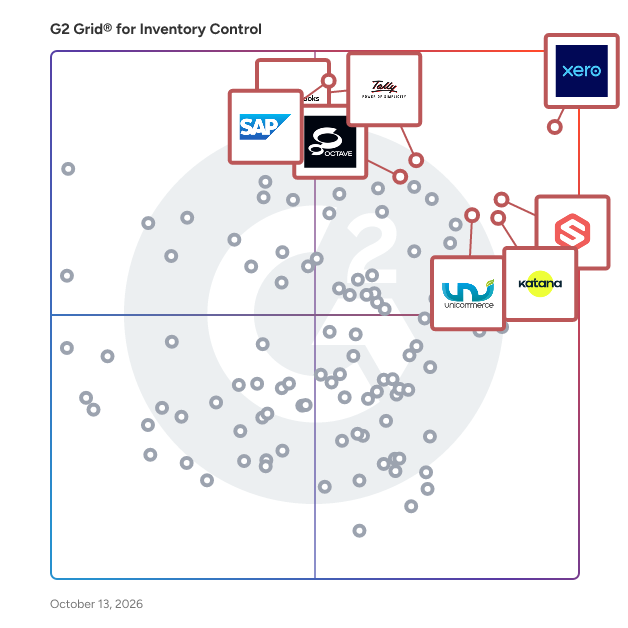
G2 Grid® for Inventory Control Software

G2 Grid® for Inventory Control Software plotting products by satisfaction and market presence

Highlighted products: Xero, QuickBooks Online, ShipHero, Katana Cloud Inventory, TallyPrime, SAP Integrated Business Planning, Unicommerce, and Cin7 Core.

Underlying data: [Grid® JSON](https://www.g2.com/categories/inventory-control-software/grids.json?focus%5B%5D=xero&focus%5B%5D=quickbooks-online&focus%5B%5D=shiphero&focus%5B%5D=katana-cloud-inventory&focus%5B%5D=tallyprime&focus%5B%5D=sap-integrated-business-planning&focus%5B%5D=unicommerce&focus%5B%5D=cin7-core)

Xero

Xero is a cloud-based accounting software solution designed to help small business owners and accounting professionals manage their financial operations efficiently. With a user-friendly interface and a focus on automation, Xero enables users to streamline their bookkeeping processes, allowing them to concentrate on growing their businesses rather than getting bogged down by administrative tasks. Targeted primarily at small businesses, Xero caters to a diverse audience that includes entrepreneurs, freelancers, and accounting firms. The platform is particularly beneficial for those who seek to simplify financial management while ensuring compliance with regional tax regulations. Xero's innovative features, such as JAX (Just Ask Xero), an AI financial superagent, enhance the user experience by providing real-time insights and automating routine tasks. This allows users to create quotes, send invoices, and reconcile bank transactions through natural language commands, making financial management more accessible and efficient. One of the key features of Xero is its ability to automate data ingestion from various sources, including banks and e-commerce platforms. This functionality significantly reduces the time spent on manual data entry, with many users reporting an average savings of six hours per month. Additionally, Xero's smart bank reconciliation adapts to user patterns, simplifying the bookkeeping process to a straightforward click-to-confirm operation. This level of efficiency not only saves time but also enhances accuracy in financial reporting. Xero also prioritizes cash flow management, a critical aspect for any business. Users can create customizable online invoices equipped with integrated "Pay Now" buttons, which facilitate faster payments. Coupled with automated payment reminders, Xero helps businesses reduce the time spent on collections, allowing them to focus on revenue generation. Furthermore, Xero's tools are designed to simplify tax compliance across various jurisdictions, making it easier for users to navigate the complexities of tax regulations. The platform is supported by a robust ecosystem of over 1,000 third-party applications and a global directory of certified accountants and bookkeepers. This connectivity ensures that users have access to specialized tools for inventory management, customer relationship management, and financial advice tailored to their specific needs. With a customer support team rated highly by new users, Xero provides the assurance and assistance necessary for businesses to operate confidently in their financial endeavors.

Average Rating: 4.4/5.0

Total Reviews: 1,805

G2 Deal: 90% off Xero for 6 months

Simplify your business with Xero: access apps, banks, and financial tools in one place. Start now and enjoy 90% off for six months!

View this exclusive G2 deal

How Do G2 Users Rate Xero?

  • Has the product been a good partner in doing business?: 8.6/10 (Category avg: 8.9/10)
  • Data Exporting / Importing: 9.4/10 (Category avg: 8.3/10)
  • Client management: 9.0/10 (Category avg: 8.0/10)
  • What is your organization's estimated ROI on the product (payback period in months)?: 10/10 (Category avg: 10/10)

Who Is the Company Behind Xero?

  • Seller: Xero
  • Company Website:
  • Year Founded: 2006
  • HQ Location: Wellington
  • Twitter: @Xero
    77,493 Twitter followers
  • LinkedIn® Page: www.linkedin.com
    6,186 employees on LinkedIn®

Who Uses This Product?

  • Who Uses This: Owner, Director
  • Top Industries: Accounting, Information Technology and Services
  • Company Size: 73% Small, 31% Medium

What Do G2 Reviewers Say About Xero?

AI-generated summary from verified user reviews

Pros
  • Users appreciate the ease of use of Xero, enjoying its automatic invoicing and seamless data integration.
  • Users love the automatic invoice generation in Xero, which streamlines operations and minimizes manual work.
  • Users value Xero for its efficient transaction management, simplifying reconciliation and enhancing overall financial workflow.
  • Users value the efficiency of Xero, appreciating its smooth integration and effortless reconciliation process for financial management.
  • Users find Xero to be incredibly simple for invoicing and tracking payments, streamlining financial workflows effectively.
Cons
  • Users feel Xero lacks missing features that hinder usability and require extensive experience to navigate effectively.
  • Users find Xero has limited options, noting a need for more features and better customization in reporting.
  • Users experience limited customization in Xero's reporting, leading to interruptions in their workflow for deeper insights.
  • Users find the reporting limitations in Xero restrict their ability to analyze data efficiently, disrupting workflow.
  • Users are frustrated by Xero's poor customer support, especially due to the absence of immediate phone assistance.

What Are Recent G2 Reviews of Xero?

What Are G2 Users Discussing About Xero?

QuickBooks Online

Easy Online Accounting to Organize Your Finances in One Place. Run your entire business with the #1 small business cloud accounting solution!

Average Rating: 4.0/5.0

Total Reviews: 3,774

How Do G2 Users Rate QuickBooks Online?

  • Has the product been a good partner in doing business?: 7.8/10 (Category avg: 8.9/10)
  • Data Exporting / Importing: 8.6/10 (Category avg: 8.3/10)
  • Client management: 8.7/10 (Category avg: 8.0/10)
  • What is your organization's estimated ROI on the product (payback period in months)?: 10/10 (Category avg: 10/10)

Who Is the Company Behind QuickBooks Online?

  • Seller: Intuit
  • Year Founded: 1983
  • HQ Location: Mountain View, California
  • Twitter: @Intuit
    80,559 Twitter followers
  • LinkedIn® Page: www.linkedin.com
    18,185 employees on LinkedIn®
  • Ownership: VIE:INTU

Who Uses This Product?

  • Who Uses This: Owner, Accountant
  • Top Industries: Accounting, Construction
  • Company Size: 81% Small, 15% Medium

What Do G2 Reviewers Say About QuickBooks Online?

AI-generated summary from verified user reviews

Pros
  • Users praise the ease of use of QuickBooks Online, highlighting its intuitive features and straightforward setup.
  • Users appreciate the user-friendly interface of QuickBooks Online, enabling easy management of finances and documents.
  • Users appreciate the seamless integrations of QuickBooks Online, enhancing collaboration and efficiency across various software.
  • Users love the cloud-based access of QuickBooks Online, which simplifies bookkeeping and collaboration with financial professionals.
  • Users appreciate the anywhere access of QuickBooks Online, enhancing convenience and ease of managing finances.
Cons
  • Users find missing features in QuickBooks Online, as essential details may be overlooked or require extra setup.
  • Users find QuickBooks Online too expensive, especially considering the lack of strong customer support and hidden charges.
  • Users experience poor customer support with QuickBooks Online, facing challenges and delays when seeking assistance.
  • Users criticize the high fees for QuickBooks Online, stating services and support are overpriced and inadequate.
  • Users find QuickBooks Online has limited customization, making it challenging to tailor the tool to specific needs.

What Are Recent G2 Reviews of QuickBooks Online?

What Are G2 Users Discussing About QuickBooks Online?

ShipHero

ShipHero makes it easy to ship eCommerce with our powerful warehouse management software (WMS). Our cloud-based WMS is perfect for emerging, scaling and high volume brands. Instead of holding you back, ShipHero can push your eCommerce business forward with the technology and processes you need to run a successful warehouse. We Crush it for for eCommerce Brands and 3PLs: - Reduce mis-picks and mis-ships by 99% - Reduce warehouse costs by 35%+ - Increase picking efficiency by 3x

Average Rating: 4.5/5.0

Total Reviews: 214

How Do G2 Users Rate ShipHero?

  • Has the product been a good partner in doing business?: 9.0/10 (Category avg: 8.9/10)
  • Data Exporting / Importing: 8.5/10 (Category avg: 8.3/10)
  • What is your organization's estimated ROI on the product (payback period in months)?: 10/10 (Category avg: 10/10)

Who Is the Company Behind ShipHero?

  • Seller: ShipHero
  • Company Website:
  • Year Founded: 2013
  • HQ Location: Garnerville, New York
  • Twitter: @weareshiphero
    6,223 Twitter followers
  • LinkedIn® Page: www.linkedin.com
    361 employees on LinkedIn®

Who Uses This Product?

  • Who Uses This: CEO, Operations Manager
  • Top Industries: Logistics and Supply Chain, Warehousing
  • Company Size: 82% Small, 15% Medium

What Do G2 Reviewers Say About ShipHero?

AI-generated summary from verified user reviews

Pros
  • Users find ShipHero to have an intuitive interface and easy onboarding, streamlining their workflow and training processes.
  • Users highlight the excellent customer support at ShipHero, which ensures a smooth onboarding experience and ongoing assistance.
  • Users value the intuitive user interface and seamless integrations which enhance their onboarding experience and operational efficiency.
  • Users value the reliable inventory management of ShipHero, enhancing efficiency and supporting business growth effectively.
  • Users value the setup ease of ShipHero, highlighting its straightforward implementation and effective onboarding support.
Cons
  • Users find the missing features of bulk order editing and billing functionality frustrating, complicating their experience with ShipHero.
  • Users experience poor customer support with slow response times and unresolved technical issues affecting their workflow.
  • Users struggle with bulk operations issues, finding it hard to navigate and integrate with their existing workflows.
  • Users face integration issues with ShipHero, particularly with module switching, invoicing, and syncing between platforms.
  • Users find the inventory management process cumbersome and wish for better label printing capabilities within ShipHero.

What Are Recent G2 Reviews of ShipHero?

What Are G2 Users Discussing About ShipHero?

Katana Cloud Inventory

Katana Cloud Inventory gives you a centralized view of your inventory to maintain optimal stock levels across all your locations and efficiently track products available for sale. Easily manage incoming orders from all your sales channels and issue purchase orders directly from Katana to ensure restocking at the right time and in the right quantities. Seamlessly integrate Katana with your ecommerce, accounting, and other business software to automate repetitive tasks and get real-time visibility over your daily operations and business performance.

Average Rating: 4.4/5.0

Total Reviews: 122

How Do G2 Users Rate Katana Cloud Inventory?

  • Has the product been a good partner in doing business?: 9.1/10 (Category avg: 8.9/10)
  • Data Exporting / Importing: 7.9/10 (Category avg: 8.3/10)
  • Client management: 7.0/10 (Category avg: 8.0/10)
  • What is your organization's estimated ROI on the product (payback period in months)?: 10/10 (Category avg: 10/10)

Who Is the Company Behind Katana Cloud Inventory?

  • Seller: Katana
  • Company Website:
  • Year Founded: 2017
  • HQ Location: Tallinn, Harju
  • Twitter: @Katana_MRP
    842 Twitter followers
  • LinkedIn® Page: www.linkedin.com
    105 employees on LinkedIn®

Who Uses This Product?

  • Who Uses This: Managing Director
  • Top Industries: Manufacturing, Consumer Goods
  • Company Size: 89% Small, 9% Medium

What Do G2 Reviewers Say About Katana Cloud Inventory?

AI-generated summary from verified user reviews

Pros
  • Users find Katana Cloud Inventory to be simple and intuitive, streamlining their manufacturing processes with ease.
  • Users value the responsive customer support of Katana Cloud Inventory, appreciating timely solutions and proactive engagement.
  • Users appreciate the intuitive inventory management of Katana Cloud Inventory, enhancing efficiency and insight into manufacturing processes.
  • Users value the seamless integrations of Katana Cloud Inventory, enhancing workflow with tools like Shopify and Quickbooks.
  • Users commend the exceptional customer support of Katana Cloud Inventory, enhancing their overall experience and satisfaction.
Cons
  • Users find the limited functionality of Katana Cloud Inventory frustrating, lacking essential features for effective inventory management.
  • Users find Katana Cloud Inventory lacks essential features like robust analytics and effective project management, making operations challenging.
  • Users criticize the lack of features in Katana Cloud Inventory, hindering efficiency and professional presentation.
  • Users find feature deficiencies in Katana Cloud Inventory, hindering efficient inventory management and usability.
  • Users find data management frustrating, especially with issues in packing and customizing templates, impacting overall usability.

What Are Recent G2 Reviews of Katana Cloud Inventory?

Unicommerce

Unicommerce is a leading e-commerce enablement SaaS platform that enables end-to-end management of e-commerce operations for brands, marketplaces, and logistics service providers. Its full-stack solutions cover both pre-purchase and post-purchase segments, driving operational efficiency and growth. Convertway by Unicommerce is a marketing automation platform that enhances customer engagement. It helps brands increase sales by capturing visitor data, enabling automated WhatsApp and SMS communications for non-shoppers, running customized campaigns with smart segmentation, and providing live chatbot support during or after order placement. Uniware is an advanced order processing platform that streamlines operations once a customer places an order. It manages inventory across multiple locations, processes orders for online and offline channels, handles returns, and reconciles payments. Uniware includes seller management, order management, warehouse management, inventory management, and omnichannel retail solutions. Shipway by Unicommerce is a logistics management platform that reduces shipment costs with courier aggregation and shipping automation. Key solutions include smart courier allocation, order tracking, return and exchange automation, and more. With a robust ecosystem of 285+ plug-and-play technology & partner integrations, Unicommerce seamlessly connects with marketplaces, logistics providers, and ERP systems. This ensures smooth inventory optimization, logistics automation, and compliance with financial, taxation, and regulatory requirements. Unicommerce powers 7500+ clients across India, Southeast Asia, and the Middle East, including brands like FabIndia, Lenskart, Timex, TCNS, Mamaearth, Sugar, Emami, Urban Company, Blue Star, Cello, Symphony, Healthkart, GNC, boAt, Portronics, TMRW, Mensa, Landmark Group, Edamama, and more. The company’s product suite is sector- and size-agnostic and designed to meet the business needs of various types and sizes of retail and e-commerce enterprises, both online and offline. As of December 31, 2025, Unicommerce has a 1Bn+ annual transaction run rate, 10,300+ warehouses, and 850+ stores processing orders through its platform, reinforcing our strong client base, ARR, and revenue growth. Incorporated in 2012, Unicommerce is listed on the National Stock Exchange India and the Bombay Stock Exchange.

Average Rating: 4.5/5.0

Total Reviews: 81

How Do G2 Users Rate Unicommerce?

  • Has the product been a good partner in doing business?: 8.8/10 (Category avg: 8.9/10)
  • Data Exporting / Importing: 9.2/10 (Category avg: 8.3/10)
  • Client management: 9.3/10 (Category avg: 8.0/10)
  • What is your organization's estimated ROI on the product (payback period in months)?: 9.2/10 (Category avg: 10/10)

Who Is the Company Behind Unicommerce?

Who Uses This Product?

  • Top Industries: Apparel & Fashion, Retail
  • Company Size: 54% Small, 29% Medium

What Do G2 Reviewers Say About Unicommerce?

AI-generated summary from verified user reviews

Pros
  • Users commend the ease of use of Unicommerce for seamless integration and efficient order management.
  • Users appreciate the ease of use and efficiency of Unicommerce for effective multi-channel inventory management.
  • Users value the streamlined order and inventory management of Unicommerce, enjoying its efficiency and ease of use.
  • Users praise the active customer support of Unicommerce, appreciating their quick and helpful responses to issues.
  • Users find Unicommerce's real-time order syncing and automated processes greatly enhance efficiency and operational productivity.
Cons
  • Users frequently face software bugs in Unicommerce, leading to frustrating server downtime and order management issues.
  • Users experience slow performance with Unicommerce, facing delays in stock and order updates that hinder efficiency.
  • Users report that the difficult learning curve of Unicommerce can be overwhelming, especially during initial onboarding.
  • Users face challenges in usage due to a steep learning curve and occasional system slowdowns impacting operations.
  • Users report frequent server outages and inventory reflection problems with Unicommerce, affecting overall usability and efficiency.

What Are Recent G2 Reviews of Unicommerce?

What Are G2 Users Discussing About Unicommerce?

TallyPrime

TallyPrime is a comprehensive business management software solution designed to assist organizations in efficiently managing their invoicing, accounting, inventory, banking, cash and credit management, taxation, payroll, and cost management, among other essential functions. By consolidating multiple business operations into a single platform, TallyPrime aims to simplify complex processes, allowing users to concentrate on driving business growth rather than getting bogged down by administrative tasks. Targeted primarily at small to medium-sized enterprises, TallyPrime caters to a diverse range of industries, including retail, manufacturing, and services. Its user-friendly interface and intuitive design make it easier to get started with. Businesses can leverage TallyPrime to streamline their operations, ensuring that all financial and operational aspects are interconnected and easily manageable. This integrated approach not only enhances efficiency but also fosters better decision-making and strategic planning. One of the standout features of TallyPrime is its extensive reporting capabilities. With over 400+ insightful business reports, users can gain a comprehensive view of their organization’s performance. These reports can be generated quickly, allowing for real-time analysis and informed decision-making. Furthermore, TallyPrime offers customization options, enabling users to tailor reports to their specific needs. The ability to access reports on mobile or any devices ensures that business owners and managers can stay updated on their operations from anywhere, facilitating easy access of data anytime. In addition to its robust reporting features, TallyPrime automates critical business processes, significantly reducing the time and effort required for routine tasks. This automation not only enhances operational efficiency but also minimizes the risk of human error, leading to more accurate financial records. The software also provides tools for effective cash and credit management, ensuring that businesses maintain healthy financial practices. Overall, TallyPrime stands out in the business management software category by offering a holistic solution that integrates various functions into a single platform. Its focus on automation, extensive reporting capabilities, and user-friendly design make it an invaluable tool for businesses looking to optimize their operations and achieve sustainable growth.

Average Rating: 4.4/5.0

Total Reviews: 289

How Do G2 Users Rate TallyPrime?

  • Has the product been a good partner in doing business?: 9.0/10 (Category avg: 8.9/10)
  • Data Exporting / Importing: 8.8/10 (Category avg: 8.3/10)
  • Client management: 8.6/10 (Category avg: 8.0/10)
  • What is your organization's estimated ROI on the product (payback period in months)?: 10/10 (Category avg: 10/10)

Who Is the Company Behind TallyPrime?

  • Seller: Tally Solutions
  • Company Website:
  • Year Founded: 1986
  • HQ Location: Bangalore
  • Twitter: @tallysolutions
    14,693 Twitter followers
  • LinkedIn® Page: www.linkedin.com
    4,945 employees on LinkedIn®

Who Uses This Product?

  • Who Uses This: Accountant, Senior Accountant
  • Top Industries: Accounting, Information Technology and Services
  • Company Size: 59% Small, 35% Medium

What Do G2 Reviewers Say About TallyPrime?

AI-generated summary from verified user reviews

Pros
  • Users value TallyPrime's ease of use, praising its intuitive interface and powerful functionality for efficient accounting.
  • Users value TallyPrime for its easy and reliable accounting management, ensuring accurate financial records and GST compliance.
  • Users value the accounting efficiency of TallyPrime, appreciating its speed and reliability in financial management.
  • Users value the reliable accounting features of TallyPrime, emphasizing its efficiency and strong GST compliance.
  • Users appreciate the efficient reporting capabilities of TallyPrime, making financial management streamlined and effective.
Cons
  • Users find the missing features of TallyPrime, such as a mobile app, hinder overall functionality and convenience.
  • Users note the limited customization options in TallyPrime, hindering flexibility in reports and invoices.
  • Users feel that the interface design of TallyPrime is outdated, hindering usability and complicating advanced feature utilization.
  • Users find TallyPrime user-unfriendly due to its outdated UI and steep learning curve for advanced features.
  • Users find the learning curve challenging for new users, particularly those without prior accounting experience.

What Are Recent G2 Reviews of TallyPrime?

What Are G2 Users Discussing About TallyPrime?

SAP Integrated Business Planning

Respond to new market expectations with real-time supply chain planning capabilities and fulfill future demand profitably supply chain management. Powered by in-memory computing technology within SAP HANA, this cloud-based solution combines capabilities for sales and operations; demand, response, and supply planning; and inventory optimization. - Cloud deployment - Real-time scenarios and simulation - Social collaboration - Powerful predictive Analytics KEY BENEFITS: Achieve a rapid deployment Get up and running quickly with SAP Integrated Business Planning by using preconfigured process templates for an accelerated implementation. Empower employees with intuitive features Offer a unified, intuitive user experience with SAP Fiori and planning and simulation capabilities based on Microsoft Excel. Plan resources effectively Optimize resource efficiency by creating supply plans based on prioritized demands, allocations, and supply chain constraints. KEY CAPABILITIES: Integration with SAP Supply Chain Control Tower Gain end-to-end visibility of your supply chain, decision support, and fast corrective action through integration with SAP Supply Chain Control Tower. Forecasting and demand management Get full demand transparency with short-term, mid-term, and long-term forecasting. Take advantage of best-in-class capabilities for demand sensing and statistical forecasting. Inventory optimization Establish optimal inventory targets that enable you to maximize profits, while leaving a buffer to help you meet unexpected demand. Sales and operations planning Deliver a cross-departmental sales and operations plan that balances inventory, service levels, and profitability. Response and supply planning Optimize resourcing efficiency by creating supply plans based on prioritized demands, allocations, and supply chain constraints.

Average Rating: 4.3/5.0

Total Reviews: 213

How Do G2 Users Rate SAP Integrated Business Planning?

  • Has the product been a good partner in doing business?: 8.3/10 (Category avg: 8.9/10)
  • Data Exporting / Importing: 8.8/10 (Category avg: 8.3/10)
  • Client management: 8.1/10 (Category avg: 8.0/10)
  • What is your organization's estimated ROI on the product (payback period in months)?: 10/10 (Category avg: 10/10)

Who Is the Company Behind SAP Integrated Business Planning?

  • Seller: SAP
  • Company Website:
  • Year Founded: 1972
  • HQ Location: Walldorf
  • Twitter: @SAP
    297,052 Twitter followers
  • LinkedIn® Page: www.linkedin.com
    141,955 employees on LinkedIn®

Who Uses This Product?

  • Who Uses This: Consultant, Senior Consultant
  • Top Industries: Information Technology and Services, Consumer Goods
  • Company Size: 57% Large, 27% Medium

What Do G2 Reviewers Say About SAP Integrated Business Planning?

AI-generated summary from verified user reviews

Pros
  • Users value the high forecasting accuracy of SAP Integrated Business Planning, enabling effective and confident decision-making.
  • Users appreciate the ease of use of SAP IBP, finding it simple and efficient for planning tasks.
  • Users value the real-time data optimization of SAP Integrated Business Planning, enhancing decision-making and streamlining supply chain management.
  • Users value the unified platform of SAP IBP for seamless real-time data integration, enhancing collaboration and decision-making.
  • Users value the real-time visibility SAP Integrated Business Planning provides, enhancing decision-making and preventing inventory issues.
Cons
  • Users struggle with the complexity of SAP Integrated Business Planning, citing challenging setups and steep training requirements.
  • Users find the steep learning curve of SAP Integrated Business Planning challenging and time-consuming for new users.
  • Users find the difficult learning curve challenging, requiring extensive time and effort to master the system.
  • Users face a complex setup for SAP Integrated Business Planning, requiring significant time and expertise for effective implementation.
  • Users find the complexity of SAP Integrated Business Planning challenging, especially for newcomers navigating its many features.

What Are Recent G2 Reviews of SAP Integrated Business Planning?

What Are G2 Users Discussing About SAP Integrated Business Planning?

Cin7 Core

Cin7 Core is an app that makes enterprise-level Inventory Management Software, manufacturing, sales integration, reporting, and automation accessible to all businesses. Leverage the power of multi-module inventory management software to keep the moving parts of your business all in one location. Automate time-consuming tasks, whether you are in retail, wholesale or manufacturing. Track customer orders from quote to fulfillment. Core helps you achieve complete visibility of sales across all channels. Integrations with online stores and shipping platforms help you reach more customers and increase sales. Everything is in one system at a fraction of the cost of ERPs. Cin7 Core supports Quickbooks and all major ecommerce sale channels, shipment services and POS e.g. Square, Amazon, Fulfillment by Amazon, Shopify, WooCommerce, Shipstation, Vend, Floship and more.

Average Rating: 4.3/5.0

Total Reviews: 343

How Do G2 Users Rate Cin7 Core?

  • Has the product been a good partner in doing business?: 8.1/10 (Category avg: 8.9/10)
  • Data Exporting / Importing: 8.0/10 (Category avg: 8.3/10)
  • Client management: 7.3/10 (Category avg: 8.0/10)
  • What is your organization's estimated ROI on the product (payback period in months)?: 10/10 (Category avg: 10/10)

Who Is the Company Behind Cin7 Core?

  • Seller: Cin7
  • Company Website:
  • Year Founded: 2011
  • HQ Location: Denver, CO
  • Twitter: @Cin7online
    3,036 Twitter followers
  • LinkedIn® Page: www.linkedin.com
    327 employees on LinkedIn®

Who Uses This Product?

  • Who Uses This: Operations Manager, Director
  • Top Industries: Retail, Wholesale
  • Company Size: 86% Small, 10% Medium

What Do G2 Reviewers Say About Cin7 Core?

AI-generated summary from verified user reviews

Pros
  • Users praise the seamless integration with platforms like Shopify and QuickBooks, enhancing their inventory management experience.
  • Users find Cin7 Core to be extremely easy to use and integrate, enhancing their overall operational efficiency.
  • Users commend the exceptional customer support at Cin7 Core, highlighting responsiveness and helpful training experiences.
  • Users love the easy integrations of Cin7 Core with platforms like Shopify and QuickBooks, enhancing their operations seamlessly.
  • Users find Cin7 Core's robust features essential for managing complex inventory workflows and improving operational efficiency.
Cons
  • Users are disappointed by the missing features in Cin7 Core, leading to unmet expectations and limited functionality.
  • Users report frustrating integration issues with Cin7 Core, especially concerning lag and product configuration complexities.
  • Users note limited customization in Cin7 Core, particularly regarding bulk editing and inventory adjustment options.
  • Users express frustration with poor customer support, feeling ignored and unsupported during onboarding and throughout their experience.
  • Users experience syncing issues with Cin7 Core, leading to oversells and delays in stock adjustments.

What Are Recent G2 Reviews of Cin7 Core?

What Are G2 Users Discussing About Cin7 Core?

Increff WMS

Integrated web-based cloud-hosted Warehouse Management System (WMS) & Order Management System (OMS) recognized in Gartner reports, Increff WMS is a comprehensive solution for retail brands to expose 100% inventory, in a single view, to both offline and online channels simultaneously. The world’s simplest and most efficient multi-channel order fulfillment and inventory management solution is quick to integrate and easy to implement. Its key features include: - Unique piece barcoding for serialization of each item, helping achieve 100% inventory and order picking accuracy. - +99.5% order fulfillment within SLA Near real-time Inventory, and order syncing time to prevent excess order booking and cancellation. - A solid tech infrastructure to support billions of API calls per month, with 97% health of calls and zero downtime.

Average Rating: 4.7/5.0

Total Reviews: 112

How Do G2 Users Rate Increff WMS?

  • Has the product been a good partner in doing business?: 9.3/10 (Category avg: 8.9/10)
  • Data Exporting / Importing: 8.9/10 (Category avg: 8.3/10)
  • Client management: 9.1/10 (Category avg: 8.0/10)
  • What is your organization's estimated ROI on the product (payback period in months)?: 10/10 (Category avg: 10/10)

Who Is the Company Behind Increff WMS?

  • Seller: Increff
  • Year Founded: 2016
  • HQ Location: Bengaluru, Karnataka
  • Twitter: @increff
    215 Twitter followers
  • LinkedIn® Page: www.linkedin.com
    293 employees on LinkedIn®

Who Uses This Product?

  • Top Industries: Apparel & Fashion, Retail
  • Company Size: 55% Medium, 23% Small

What Do G2 Reviewers Say About Increff WMS?

AI-generated summary from verified user reviews

Pros
  • Users value the real-time stock visibility of Increff WMS, significantly enhancing accuracy and order fulfillment efficiency.
  • Users value the ease of use of Increff WMS, making warehouse management and operations streamlined and efficient.
  • Users value the quick customer support from Increff WMS, which enhances their overall operational efficiency and satisfaction.
  • Users appreciate the faster order fulfillment and high SLA compliance of Increff WMS, enhancing workflow efficiency significantly.
  • Users appreciate the real-time inventory tracking of Increff WMS, boosting accuracy and streamlining order fulfillment.
Cons
  • Users feel the reporting system is inadequate, requiring unnecessary downloads and lacking essential automated features.
  • Users find the limited reporting capabilities of Increff WMS inconvenient, preferring more efficient online report access.
  • Users face limited features in Increff WMS, struggling with report access and customization restrictions.
  • Users highlight inadequate reporting capabilities, expressing the need for better analytics and easier access to online reports.
  • Users express a desire for greater dashboard customization in Increff WMS to improve data access and efficiency.

What Are Recent G2 Reviews of Increff WMS?

What Are G2 Users Discussing About Increff WMS?

RF- SMART WMS

RF-SMART is the leading third-party warehouse management system (WMS) for NetSuite, serving 2,800+ customers across 40+ countries. Beyond NetSuite, RF-SMART also provides inventory management solutions for Oracle Cloud SCM and Healthcare, JD Edwards, and Microsoft Dynamics. RF-SMART has been recognized as the #1 reviewed WMS on NetSuite's SuiteApp marketplace, a Built-for-NetSuite certified solution, a G2 Leader for WMS and Ease of Use, and a Capterra WMS Shortlist recipient. Native Architecture Unlike other third-party solutions, RF-SMART is built natively in NetSuite and Oracle Cloud, meaning there are no separate servers, databases, or middleware to maintain, no integration to build or monitor, and all inventory data lives in the ERP as the single source of truth. Product Lines From warehouse management and label printing to material handling automation and shipping, RF-SMART offers end-to-end Built-for-NetSuite inventory management solutions. Who We Serve RF-SMART helps NetSuite businesses scale with confidence at every stage of growth, from companies under $1 million in revenue to enterprises surpassing $1 billion. Our customers process anywhere from fewer than 10 to more than 5,000 orders per day across industries including wholesale distribution, manufacturing, retail, eCommerce, food and beverage, pharmaceuticals, healthcare, automotive, and more. Many also supply major retailers such as Walmart, Amazon, Costco, and Home Depot. Key Capabilities - License plating (LPN) for pallet and container tracking - Advanced picking strategies with task-directed workflows - Automation integration with AMR, ASRS, and VLM systems - Regulatory compliance including lot tracking, serialization, and full traceability for FDA, USDA, and other requirements - Manufacturing support including work orders and assemblies - Multi-site operations with real-time visibility With 100+ inventory and warehouse tools, RF-SMART gives teams an intuitive, easy-to-use interface that drives fast adoption. Built on 40+ years of inventory management expertise, 13+ years of NetSuite-focused innovation, and a network of 400+ implementation partners, RF-SMART helps customers achieve 99.9% inventory accuracy, increase productivity by 40%, and gain real-time visibility backed by industry-leading support.

Average Rating: 4.4/5.0

Total Reviews: 81

How Do G2 Users Rate RF- SMART WMS?

  • Has the product been a good partner in doing business?: 9.1/10 (Category avg: 8.9/10)
  • Data Exporting / Importing: 7.5/10 (Category avg: 8.3/10)
  • Client management: 6.3/10 (Category avg: 8.0/10)
  • What is your organization's estimated ROI on the product (payback period in months)?: 10/10 (Category avg: 10/10)

Who Is the Company Behind RF- SMART WMS?

  • Seller: RF-SMART
  • Company Website:
  • Year Founded: 1982
  • HQ Location: Jacksonville, Florida
  • Twitter: @rfsmart
    1,060 Twitter followers
  • LinkedIn® Page: www.linkedin.com
    809 employees on LinkedIn®

Who Uses This Product?

  • Top Industries: Manufacturing, Retail
  • Company Size: 44% Medium, 39% Small

What Do G2 Reviewers Say About RF- SMART WMS?

AI-generated summary from verified user reviews

Pros
  • Users find RF- SMART WMS to be extremely user-friendly, allowing efficient management of distribution processes effortlessly.
  • Users appreciate the streamlined inventory management of RF-SMART WMS, enhancing accuracy and simplifying processes in their warehouses.
  • Users highlight the setup ease of RF- SMART WMS, making it simple for new employees to train and implement.
  • Users commend the friendly and supportive customer support of RF-SMART WMS, enhancing their overall experience with the software.
  • Users value the seamless integrations of RF-Smart WMS, enhancing efficiency and simplifying operations across systems.
Cons
  • Users desire greater customization options in RF SMART WMS, finding limitations hinder their specific business needs.
  • Users find the complexity of RF-SMART WMS challenging, especially during the initial setup and learning process.
  • Users find RF- SMART WMS to be expensive, particularly due to high costs for customizations and enhancements.
  • Users express frustration with the high overhead and lack of real-time inventory tracking in RF-SMART WMS.
  • Users find the printing function cumbersome and experience challenges configuring invoicing and navigating some features.

What Are Recent G2 Reviews of RF- SMART WMS?

What Are G2 Users Discussing About RF- SMART WMS?

Netstock

Supply and demand planning made smarter with AI. Netstock empowers small and medium-sized businesses to optimize inventory and demand planning across 67 countries, managing over $25 billion in inventory value. Our solutions transform how companies balance supply and demand, reducing inventory levels by 25% while improving fill rates by 15% and saving 70% of time on ordering and forecasting. Why businesses choose netstock - Flexible forecasting – Forecast by product, group, sales channel, and key customers - Smart inventory planning – Balance stock levels and reduce risk with smart AI tools that quickly deliver real results - AI functionality -Quickly interpret dashboards, reports or at SKU level to spot and resolve issues before they happen - Balance risk - Factor in supplier and forecast risk every 24 hours from the order level down to the SKU level - Over 60 ERP integrations – Purpose-built to automatically convert raw ERP data into predictive insights to drive confident decision-making - Quick ROI – Free up cash tied up in slow-moving inventory from day one - Enterprise-grade security – ISO 27001-certified so your data remains secure - Complete support – Personalized onboarding, 24/7 assistance, and ongoing education With a global footprint of 2,400+ customers and 20,000+ users, Netstock empowers customers with increased visibility, faster planning, and smarter inventory decisions—ensuring they’re always prepared for disruptions or market changes. As we continue to innovate our software, we remain the trusted advisor and go-to solution for SMBs in inventory management and demand planning - making sure our customers have the right stock, in the right place at the right time.

Average Rating: 4.6/5.0

Total Reviews: 179

How Do G2 Users Rate Netstock?

  • Has the product been a good partner in doing business?: 9.3/10 (Category avg: 8.9/10)
  • Data Exporting / Importing: 8.2/10 (Category avg: 8.3/10)
  • Client management: 7.6/10 (Category avg: 8.0/10)
  • What is your organization's estimated ROI on the product (payback period in months)?: 10/10 (Category avg: 10/10)

Who Is the Company Behind Netstock?

  • Seller: NETSTOCK
  • Company Website:
  • Year Founded: 2010
  • HQ Location: Boston, US
  • Twitter: @netstock
    18 Twitter followers
  • LinkedIn® Page: www.linkedin.com
    204 employees on LinkedIn®

Who Uses This Product?

  • Who Uses This: Supply Chain Manager, Purchasing Manager
  • Top Industries: Retail, Wholesale
  • Company Size: 54% Medium, 40% Small

What Do G2 Reviewers Say About Netstock?

AI-generated summary from verified user reviews

Pros
  • Users appreciate the ease of use of Netstock, benefiting from intuitive navigation and effective stock management.
  • Users value the accurate forecasting capabilities of Netstock, enhancing inventory management and fill rates effectively.
  • Users appreciate how Netstock’s inventory management automates processes, enhances forecasting, and identifies opportunities for improvement.
  • Users value the inventory optimization capabilities of Netstock, enhancing management and minimizing missed opportunities.
  • Users value Netstock's forecasting capabilities, enabling effective inventory management and supplier planning through precise demand insights.
Cons
  • Users are frustrated by the missing features in Netstock, including lack of inventory roll-ups and limited filtering options.
  • Users experience data inaccuracies with Netstock, requiring manual adjustments to order recommendations and filtering of suggestions.
  • Users experience data management issues with Netstock, including lack of inventory roll-ups and insufficient dataset export options.
  • Users find the difficult learning curve challenging, especially when adapting the software to specific business needs.
  • Users experience limited customization with Netstock's reporting tools, finding it difficult to tailor them to specific needs.

What Are Recent G2 Reviews of Netstock?

What Are G2 Users Discussing About Netstock?

Zoho Inventory

Zoho Inventory is cloud-based inventory management software that helps you create and manage both your sales and purchase orders, and track your inventory. You can integrate it with online sales channels like Amazon, eBay, and Etsy, as well as shopping carts like Shopify and many more.   Here's what we have in store:   Stay updated on your stock levels at all times.   Get instant updates on your inventory levels and get notified wherever your stock goes below re-order level. Keep your inventory organised with vital details like prices, cost, availability and SKUs.   Centralised inventory system for multiple online stores.   Automatically update your inventory quantities across all your selling channels  whenever a sale is made. There's no margin for error when everything is in perfect sync.   Integrate with shippings carriers, payment gateways and much more.   Automate your entire sales process, from creating sales orders and shipping the products to tracking the delivery status and sending invoices to your customers. Manage everything from one single place.   Make informed business decisions with our extensive reports.   Use our comprehensive dashboard reports to get instant visibility into your business. See which products are your best-sellers with  sales reports. You can also get details about your best customers and their payment history.

Average Rating: 4.4/5.0

Total Reviews: 88

How Do G2 Users Rate Zoho Inventory?

  • Has the product been a good partner in doing business?: 8.5/10 (Category avg: 8.9/10)
  • Data Exporting / Importing: 7.6/10 (Category avg: 8.3/10)
  • Client management: 7.4/10 (Category avg: 8.0/10)
  • What is your organization's estimated ROI on the product (payback period in months)?: 10/10 (Category avg: 10/10)

Who Is the Company Behind Zoho Inventory?

  • Seller: Zoho
  • Year Founded: 1996
  • HQ Location: Austin, TX
  • Twitter: @Zoho
    137,880 Twitter followers
  • LinkedIn® Page: www.linkedin.com
    30,766 employees on LinkedIn®
  • Phone: +1 (888) 900-9646

Who Uses This Product?

  • Who Uses This: CEO, Owner
  • Top Industries: Food & Beverages, Retail
  • Company Size: 82% Small, 18% Medium

What Do G2 Reviewers Say About Zoho Inventory?

AI-generated summary from verified user reviews

Pros
  • Users value the ease of use of Zoho Inventory, praising its quick implementation and accessibility across devices.
  • Users value the full control over inventory and seamless integration that Zoho Inventory provides for their businesses.
  • Users appreciate the full control over inventory and multichannel integration provided by Zoho Inventory for their businesses.
  • Users value the easy integrations of Zoho Inventory, enabling seamless connections with various sales channels and apps.
  • Users love the seamless integrations of Zoho Inventory, enhancing their workflow with various sales channels and apps.
Cons
  • Users express frustration with feature limitations in Zoho Inventory, hindering usability and creating unnecessary expenses.
  • Users express frustration with limited customization options and inconvenient inventory tracking in Zoho Inventory.
  • Users are frustrated by the limited customization options in Zoho Inventory, hindering their ability to tailor the product effectively.
  • Users are frustrated by the missing features in Zoho Inventory, limiting customization and creating inconsistencies with other Zoho apps.
  • Users are frustrated with pricing issues limiting access to advanced features and templates in Zoho Inventory.

What Are Recent G2 Reviews of Zoho Inventory?

What Are G2 Users Discussing About Zoho Inventory?

Kintone

Kintone is a no-code business application platform designed to empower non-technical users to create robust applications, workflows, and databases tailored to their teams and organizations. By utilizing a user-friendly interface that emphasizes clicks over coding, Kintone enables individuals to develop applications that streamline business processes, enhance collaboration on projects and tasks, and facilitate the reporting of complex data with ease. This platform is particularly beneficial for business users who require immediate solutions without the need for extensive programming knowledge. Kintone offers a wide array of pre-built applications that cater to various use cases, including customer relationship management (CRM), project management, inventory management, and more. These templates allow users to hit the ground running and adapt the applications to their specific needs, significantly reducing the time and effort required to implement new systems. Kintone's target audience includes small to medium-sized businesses, project managers, team leaders, and any professional looking to optimize their workflow without relying on IT departments or external developers. The no-code approach democratizes app development, allowing users from diverse backgrounds to participate in creating solutions that address their unique challenges. This inclusivity fosters a culture of innovation within organizations, as team members can contribute ideas and improvements based on their firsthand experiences. Key features of Kintone include customizable dashboards, automated workflows, and real-time collaboration tools. Users can design dashboards that provide insights into their projects and data at a glance, while automated workflows help eliminate repetitive tasks, ensuring that team members can focus on higher-value activities. The platform also supports real-time collaboration, enabling teams to work together seamlessly, share updates, and track progress on projects without the need for constant meetings or email exchanges. Kintone stands out in the no-code platform category by offering a flexible and scalable solution that grows with organizations. Its ability to integrate with other tools and services further enhances its functionality, allowing users to create a comprehensive ecosystem that meets their evolving business needs. By providing a powerful yet accessible platform for app development, Kintone empowers users to take control of their workflows and drive efficiency within their teams.

Average Rating: 4.6/5.0

Total Reviews: 263

How Do G2 Users Rate Kintone?

  • Has the product been a good partner in doing business?: 9.4/10 (Category avg: 8.9/10)
  • Data Exporting / Importing: 8.4/10 (Category avg: 8.3/10)
  • Client management: 8.4/10 (Category avg: 8.0/10)
  • What is your organization's estimated ROI on the product (payback period in months)?: 10/10 (Category avg: 10/10)

Who Is the Company Behind Kintone?

  • Seller: Kintone
  • Company Website:
  • Year Founded: 1997
  • HQ Location: San Francisco, CA
  • Twitter: @kintone
    2,101 Twitter followers
  • LinkedIn® Page: www.linkedin.com
    83 employees on LinkedIn®

Who Uses This Product?

  • Who Uses This: CEO, Executive Director
  • Top Industries: Non-Profit Organization Management, Information Technology and Services
  • Company Size: 73% Small, 22% Medium

What Do G2 Reviewers Say About Kintone?

AI-generated summary from verified user reviews

Pros
  • Users love Kintone for its ease of use, enabling workflow creation without needing a dedicated developer.
  • Users value Kintone's outstanding customer support, noting their clear communication and quick, effective issue resolution.
  • Users value Kintone’s customization and centralized workflows, significantly improving communication and efficiency across teams.
  • Users appreciate the high degree of customization Kintone offers, allowing tailored solutions to fit unique business needs.
  • Users value Kintone's customization options that streamline workflows and enhance efficiency tailored to specific business needs.
Cons
  • Users note missing features, such as improved dropdowns and basic accounting tools, which hinder overall functionality.
  • Users find Kintone's poor interface design impacts usability, making it less friendly and attractive for everyday tasks.
  • Users find Kintone's limited customization frustrating, as it hinders effective data management and integration with other apps.
  • Users find Kintone's limited features frustrating, particularly in integration and advanced customization capabilities.
  • Users find Kintone's poor usability frustrating due to its outdated interface and lack of intuitive design.

What Are Recent G2 Reviews of Kintone?

What Are G2 Users Discussing About Kintone?

Streamline

Streamline is an advanced AI-powered planning platform specifically designed for the retail, wholesale, distribution, and manufacturing sectors. This innovative solution enhances decision-making processes by integrating demand planning and forecasting capabilities. With Streamline, users can collaborate effectively, monitor performance metrics, and accurately forecast demand while leveraging cutting-edge planning technologies and strategies. Targeted primarily at manufacturers, distributors, and retailers, Streamline addresses the critical need for optimized inventory management. The platform offers automated demand forecasting, replenishment execution, and multi-location planning, making it an essential tool for businesses aiming to improve operational efficiency. By accounting for seasonality and supplier management, Streamline ensures that users can adapt to changing market conditions and consumer preferences, ultimately leading to better inventory control and reduced waste. Key features of Streamline include its AI-driven demand planning, which mimics human-like behavior for more accurate forecasting. This eliminates the reliance on traditional methods such as Excel spreadsheets or data from ERP systems. The inventory planning functionality optimizes stock levels and automatically updates replenishment plans, providing users with clear insights into what to order, how much, and when. Additionally, the production planning capabilities help reduce order quantities and transportation costs, streamlining the supply chain process and enhancing overall productivity. Streamline excels in material requirements planning (MRP) by generating comprehensive plans based on demand forecasts and bill of materials (BoM). This feature is particularly beneficial for businesses facing supplier unpredictability and disruptions in historical data, as it allows for effective planning even in the absence of prior sales data. By automatically rebalancing various factors, the platform minimizes the risks of overstock and stockouts, maintaining optimal inventory levels and improving cash flow management. With its robust supply planning capabilities, Streamline provides complete visibility and control over the supply chain, empowering users to make informed decisions that can significantly reduce operating costs and enhance profitability. By integrating these advanced features, Streamline stands out as a comprehensive solution for businesses seeking to elevate their planning processes and achieve greater operational success.

Average Rating: 4.4/5.0

Total Reviews: 253

How Do G2 Users Rate Streamline?

  • Has the product been a good partner in doing business?: 8.9/10 (Category avg: 8.9/10)
  • Data Exporting / Importing: 9.0/10 (Category avg: 8.3/10)
  • Client management: 7.9/10 (Category avg: 8.0/10)
  • What is your organization's estimated ROI on the product (payback period in months)?: 10/10 (Category avg: 10/10)

Who Is the Company Behind Streamline?

  • Seller: GMDH
  • Company Website:
  • Year Founded: 2020
  • HQ Location: New York, US
  • Twitter: @GMDH_Streamline
    1,209 Twitter followers
  • LinkedIn® Page: www.linkedin.com
    92 employees on LinkedIn®

Who Uses This Product?

  • Who Uses This: Supply Chain Manager
  • Top Industries: Retail, Consumer Goods
  • Company Size: 47% Medium, 44% Small

What Do G2 Reviewers Say About Streamline?

AI-generated summary from verified user reviews

Pros
  • Users commend Streamline for its high forecasting accuracy, enhancing operational efficiency and simplifying complex planning data.
  • Users find Streamline to be easy to navigate, making it simple to manage complex tasks efficiently.
  • Users value the rapid and accurate forecasting capabilities of Streamline, enhancing efficiency and decision-making across teams.
  • Users highlight the automation capabilities of Streamline, significantly reducing manual work and boosting overall efficiency.
  • Users value the planning efficiency of Streamline, enabling seamless collaboration and accurate forecasting for improved operations.
Cons
  • Users find limited customization in Streamline, leading to challenges in adapting to specific supply chain needs.
  • Users find the user difficulty in Streamline significant, especially with complex settings and customization needs.
  • Users face data management issues with Streamline, struggling with aggregation and frequent, poorly communicated updates.
  • Users find the implementation complexity of Streamline challenging, requiring significant IT support and change management efforts.
  • Users report slow performance with Streamline, especially during collaborative work on larger projects, leading to extended loading times.

What Are Recent G2 Reviews of Streamline?

What Are G2 Users Discussing About Streamline?

Octave Attune EAM

Octave Attune EAM (formerly HxGN EAM) is an enterprise asset management solution designed to assist organizations that operate complex, capital-intensive environments. This software integrates various functions such as asset performance management, work order processing, materials handling, and procurement into a unified platform. By consolidating these critical operations, Attune EAM eliminates the need for teams to navigate through disparate systems, enabling them to achieve a comprehensive view of their asset management processes. Targeted primarily at industries such as manufacturing, energy, and transportation, Attune EAM offers specialized modules that address key operational needs, including risk management, auditability, and Environmental, Social, and Governance (ESG) tracking. This tailored approach ensures that organizations can effectively manage their assets while adhering to industry standards and regulatory requirements. The solution is particularly beneficial for teams looking to transition from reactive maintenance practices to more proactive strategies, allowing them to leverage real-time data and Internet of Things (IoT) integrations for condition-based and predictive maintenance. One of the standout features of Attune EAM is its capital investment planning tools, which link maintenance expenditures to long-term capital expenditure (capex) objectives. This capability helps organizations maintain control over their total cost of ownership, ensuring that financial resources are allocated efficiently. Additionally, field teams benefit from real-time mobile access to essential information, including asset history, technical documentation, and Geographic Information System (GIS) mapping. This accessibility empowers teams to make informed decisions on-site, enhancing operational efficiency. The software also supports advanced technologies such as 2D Computer-Aided Design (CAD) and 3D digital twins, providing a spatially aware asset management experience. This integration allows users to visualize assets in a more interactive manner, facilitating better planning and execution of maintenance tasks. Furthermore, Attune EAM features an API-first architecture, ensuring seamless integration into existing IT ecosystems. The multi-tenant cloud delivery model supports continuous updates and scalability across complex, multi-site operations, making it a robust solution for organizations looking to optimize their asset management strategies.

Average Rating: 4.3/5.0

Total Reviews: 75

How Do G2 Users Rate Octave Attune EAM?

  • Has the product been a good partner in doing business?: 8.1/10 (Category avg: 8.9/10)
  • Data Exporting / Importing: 5.0/10 (Category avg: 8.3/10)
  • Client management: 0.0/10 (Category avg: 8.0/10)
  • What is your organization's estimated ROI on the product (payback period in months)?: 10/10 (Category avg: 10/10)

Who Is the Company Behind Octave Attune EAM?

  • Seller: Octave
  • Company Website:
  • HQ Location: Madison, US
  • LinkedIn® Page: www.linkedin.com
    3,001 employees on LinkedIn®

Who Uses This Product?

  • Top Industries: Hospital & Health Care, Transportation/Trucking/Railroad
  • Company Size: 40% Medium, 30% Large

What Do G2 Reviewers Say About Octave Attune EAM?

AI-generated summary from verified user reviews

Pros
  • Users appreciate the ease of use of Octave Attune EAM, making onboarding and daily operations seamless and efficient.
  • Users appreciate the real-time tracking of HxGN EAM, enhancing maintenance efficiency and operational reliability.
  • Users benefit from the efficient work order management in Octave Attune EAM, enhancing organization and proactive maintenance planning.
  • Users value the comprehensive tracking of work orders, enhancing their understanding of asset performance and history.
  • Users appreciate the robust asset management capabilities of Octave Attune EAM, enabling efficient tracking and maintenance organization.
Cons
  • Users find the initial configuration complex, especially when transitioning from legacy systems and facing training challenges.
  • Users face data management issues with Octave Attune EAM, leading to confusion and inefficiencies in handling information.
  • Users find the initial configuration complex, especially when migrating from legacy systems, complicating their experience.
  • Users find the complex setup challenging, especially when migrating from old systems and adapting to new configurations.
  • Users find the navigation and task scheduling confusing, affecting their initial experience with Octave Attune EAM.

What Are Recent G2 Reviews of Octave Attune EAM?

What Are G2 Users Discussing About Octave Attune EAM?

Daniel Rivera
DR
Researched and written by Daniel Rivera
Updated March 5, 2025

Learn More About Inventory Control Software

What is Inventory Control Software?

Inventory control software optimizes the economic order quantity (EOQ) of businesses. The EOQ is the optimal inventory a business should purchase to minimize the cost of ordering and holding. This type of software helps regulate inventory stored in the warehouse, understand how to maximize inventory layout, and ensure there’s enough product to sell at every point.  

Inventory control software falls under the overarching category of inventory management, which also includes software that helps organize warehouses, scan barcodes, and print shipping labels. Inventory, or stock control solutions, automate the order fulfillment and shipping process, thus allowing vendors to instead focus on maximizing their inventory levels.

The ultimate goal of managing stock levels is to eliminate any inefficiencies that may incur economic costs on vendors or cause inconveniences for consumers. Effective stock control gives businesses a competitive advantage to streamline a speedy shipping process. For businesses with perishable inventory, managing inventory is particularly important to prevent spoilage with the implementation of a first-in, first-out policy. In addition, these solutions prevent the accumulation of dead stock (or unsellable inventory) and excessive amounts of a product that may not ever be sold.

What Types of Inventory Control Software Exist?

Barcode inventory systems

Barcode inventory systems update inventory levels in real time at the point of sale when workers scan an item. With barcode technology, inventory managers can eliminate time-consuming data errors that occur frequently with manual or paper systems for inventory counts.

Radio-frequency identification (RFID) inventory systems

RFID inventory systems use fixed tag readers for inventory tracking. Similar to barcode systems, RFID tags update inventory levels in real time when they are scanned. However, the difference between RFID and barcode systems is that with the former, multiple products can be counted simultaneously, while products can only be counted one at a time with barcode systems. While RFID technology systems might be pricier, they are dramatically faster than barcode scanning and can be very useful for managing large inventories.

What are the Common Features of Inventory Control Softwares?

Below are key features of inventory control software that help replenish physical inventory in real time, eliminate inefficiencies, and optimize customer satisfaction: 

Barcodes: Barcodes are an essential feature that can help maximize the efficiency of inventory management techniques. By labeling barcodes on every product, inventory managers can scan a product, which automatically categorizes the product and accounts for it in the inventory. The other option is manually counting each product, which is not only time consuming but can also result in human errors.

Automated ordering: Inventory management systems can automatically detect when a particular product is running low on stock and will instantly update the product quantity for the inventory. As a result, the software will prompt reordering of new stock. This can help businesses maintain the right inventory and respond to customer needs if a particular product is in high demand.

Order management: Retailers can manage all of their sales and purchases from within the software. This allows retailers to create packages and shipments, and can even send delivery updates to customers through the software.

Reporting: Inventory control software can provide businesses with reports on which products are the most profitable, how quickly workers are stocking products, and how often purchase orders are being fulfilled on time. These reports can point to any inefficiencies in the warehouse or supply chain.

Forecasting: Proper management of inventory levels helps forecast when products will be going out of stock and when there is an abundance. Proper forecasting metrics allow for efficient spending of a company’s resources.

Serial number tracking: Serial number tracking allows inventory managers to attach a code to each product and monitor its movement from the point of purchase up until the time of sale. If orders are delayed or a customer would like to find out where their shipment is, this feature can give them insight and reassurance that the shipment is on its way.

Product kitting: Product kitting is the process of bundling separate inventory items into one package. Inventory control software can help identify each item that needs to be packaged together to form the bundle and assign those packaged kits in a central location within the warehouse. This saves warehouse workers plenty of time by not having to walk around to different areas of the warehouse to package these items together.

Cloud-based inventory management: Cloud-based inventory management is a way of tracking inventory through a web browser. A stock system that can be managed through the cloud allows businesses to access inventory on any device. Real-time access to the amount of inventory enhances coordination among staff for quick and smart business decisions.

Internet of things (IoT) integrations: The connection of consumer devices with manufacturing machines helps supply chains excel. Inventory control software enables firms to generate insights, business intelligence, and cost-effective strategies. For example, IoT devices can be put on actual inventory or RFID labels.

Machine learning and artificial intelligence (AI): E-commerce chatbots share the availability of products to shoppers. These virtual agents use algorithms to inform customers of stock shortages and recommend other products based on their carts.  

What are the Benefits of Inventory Control Software? 

Inventory control software improves the management of current inventory and eliminates any major inefficiencies in the supply chain. By accurately accounting for every product, businesses can lower costs, speed up fulfillment, and improve the overall production.

Optimize inventory levels at all times: Having excess stock costs companies a hefty sum. Warehouses can combat this issue by using inventory management software to only purchase products when they are in high demand. The alternative option is using manual labor to count each product and use conjecture on whether more stock should be ordered.

Track inventory numbers accurately: Real-time updates of inventory levels allow for more precise reports on available stock. Barcode scanning and RFID systems make this process seamless.

Fulfill orders on time to increase customer satisfaction: Issues such as inaccurate inventory records can cause higher lead times, which result in slower response to demand. Once this happens, stock inventory runs out and customers cannot place orders. This may cause customer disapproval and even a loss of business. Inventory control software will eliminate this issue by automatically alerting inventory managers when stock is running low, as well as automatically restocking these products. Therefore, shorter lead times will get more customers their products on time and increase overall customer approval.

Identify sales and losses by tracking sales patterns: Tracking stock is one of the best ways to keep track of sales patterns. This software provides an overview of which products are in high demand and which products are not selling as well. This will allow businesses to respond to customer demand by supplying more items that are frequently purchased and potentially discontinuing items that are hurting the business’ bottom line.

Who Uses Inventory Control Software?

Retailers: Retailers use inventory control software to categorize products, import item barcodes, and manage item price points across their inventory. Managing product levels will also provide retailers with analytics on which products are performing well and are in high demand. These analytics will alert retailers to autofill orders on items that are selling quickly so the product is always in stock. Additionally, if a product is overstocked at another retail outlet, the software can suggest stock transfers so each outlet can have a more balanced inventory level.

Manufacturers: Inventory control is a critical tool for day-to-day operations in the manufacturing industry. When a customer orders a bulk shipment of a certain product, the manufacturers must assess whether they have enough raw materials in stock to complete the order. Oftentimes, these orders consist of a variety of raw materials that the manufacturer must combine to create one final product. An order might require the manufacturer to obtain more stock from a variety of other suppliers so it can be completed. 

Historically, manufacturers would take stock by spreadsheets, which was a very rudimentary system often prone to error. With specialized software, however, each item has a barcode attached to it that is linked to the software. The manufacturer can then accurately assess if they have enough material, track orders from suppliers, and fulfill orders in a more timely manner.

E-commerce sellers: Stock control is important for businesses that sell products through online marketplaces. E-commerce sellers especially use software to handle returns, automate re-stocking, shipping, and virtual stock inventory.

Wholesale distributors: Wholesalers who use online distribution channels use stock control software to track bulk inventory, manage suppliers and customers, and automate the fulfillment process. Wholesalers frequently use software features such as kitting, sales order and warehouse fulfillment, lot tracking for perishable products, and bin management.

Software Related to Inventory Control Software

Related solutions that can be used together with inventory control software include:

Enterprise resource planning (ERP) software: Integrating inventory control software with an ERP system is key to maximizing its potential. Integration between these two systems will allow managers to see all data that relates to manufacturing, supply chain, and shipping all in one place. This will ultimately lead to more visibility of how business processes are connected.

Accounting software: Integrating inventory management software with accounting software will allow businesses to accurately present inventory in financial reports. Important documents such as tax returns can then accurately reflect inventory value. If the stated assets from the warehouse don’t match with bookkeeping, then the company can get audited. The best way to maintain the financial integrity of a warehouse is by integrating inventory control system with accounting software.

Warehouse management software: Insight into the daily operations of a business’ warehouse is provided through warehouse management software. Such visibility includes monitoring the movement of products between warehouses to improve shipping and handling procedures.

Barcode software: Barcodes are the building blocks of the shipment process, so barcode software is necessary to print unique codes for each product. Each country and company may mandate different barcode styles, and software dedicated to this service will allow customizable styles for identifying labels.

Label printing software: Labels are a logistical necessity for the fulfillment process. Label printing software help businesses print unique labels for products to ensure an accurate transfer of products during the shipping process.

E-commerce Platforms: Integrating inventory control software with a business’s e-commerce platform is critical for keeping track of inventory. Without it, managers must instead manually track orders on their e-commerce platform and then adjust the stock in a spreadsheet. When these two are integrated, every sale made online will automatically be reflected in the inventory management software. The result is more visibility and accuracy, which will translate to fewer inventory errors.

Challenges with Inventory Control Software

No software is free of challenges, and inventory control products come with their own set of difficulties. 

Lack of supply chain functionality: Some systems are scaled down in comparison to ERP or other supply chain systems. Inventory control software can lack support when it comes to functions such as procurement and route optimization. In this sense, most stock-level software will need additional integrations to make it a more complete tool that can assist with managing the supply chain. Users should be aware of this before purchasing this software.

Complexity: Learning how to operate this software can take countless hours of training. While some functions are more intuitive than others, it will still take specialized training and patience to master functions like RFID tracking and product kitting.

Which Companies Should Buy Inventory Control Software?

Food distributors: When perishable goods are a staple of a business’ product portfolio, inventory management is crucial to prevent the spoilage of goods. First-in, first-out policies allow food at risk for expiration to be sold before other products. 

E-commerce: Online retailers rely heavily on inventory control since the purchase of goods occurs exclusively on the internet. Real-time updates in inventory are necessary to prevent sellouts, transactions for products that aren’t actually in stock, and to alert customers of low stock thresholds. Automated inventory management allows for instantaneous updates in stock levels to ensure smooth, reliable functioning of business processes. 

Consumer goods: For physical retailers of consumer packaged goods, stock control is needed when there are seasonal products that can complicate the process of forecasting. Effective inventory management software helps simplify this process and provide more accurate predictions.

How to Buy Inventory Control Software

Requirements Gathering (RFI/RFP) for Inventory Control Software

When searching for the right inventory control software, it’s important to create a long list based on products that contain some of the most necessary features for a functioning stock management system. After the available pool has been segmented based on crucial features, one can then sort based on nice-to-haves, bells and whistles, and industry-specific software requirements.

Compare Inventory Control Software Products

Create a long list

In order to create a long list, buyers must ensure the products being considered meet these core criteria:

  • The software is compatible with one’s technology and computer programs
  • The system should easily import and export data to be used for ordering and accounting software, i.e., if a business uses spreadsheets, it should be able to export data in a .csv or .xlsx format
  • The availability of the “reorder point” feature that triggers automatic reordering when inventories hit a certain threshold
  • A perpetual updating system for small manufacturers
  • Options for RFID or barcode labeling

Create a short list

Once a long list based on core features is created, a short list should be further narrowed based on industry-specific necessities, nice-to-haves, and bells and whistles. The below features address mandatory features unique to certain businesses and simplify the process of shipping with advanced technological features:

  • Software compatible with a first-in, first-out system for sellers of perishable products 
  • Intuitive interface
  • Machine learning and AI
  • Configurability
  • Cloud infrastructure
  • Dropshipping

Conduct demos

Buyers must schedule calls with the vendors on the short list to ensure their product is the right fit. The most foolproof way to make the right decision is to actually test out the software. It is important to ask vendors about how their product addresses the business’ most pressing needs.

Selection of Inventory Control Software

Choose a selection team

Vendors will be bringing their strongest team to seal the deal with a potential client. Therefore, it’s important to come to the negotiation process with questions and directives on certain key considerations. These include procurement, legal and contracts, internal business needs, application development, finance and accounting, and information security. Buyers must ask questions about the total costs and fees associated with purchasing, implementing, and using the product. In order to prevent surprises later, it is crucial to ensure the terms and conditions are read in full and discussed.

Negotiation

During the negotiation process, the buyer will need a clear understanding of user seating pricing and fees associated with hosting, upgrades, support and maintenance, and training staff on how to use the software. In addition, a forecast on the cost of maintaining the inventory management system across multiple years will be needed. The goal of this process is to receive all the information needed on pricing and features to assist in the final decision.

Final decision

It could be useful to create a scoring template that measures the various features mentioned in the long and short list, as well as notes from calls between the sales organization and vendor.

What Does Inventory Control Software Cost?

This category of software costs on average about $100 per month. A basic or frills-free option is often available at a much lower cost, but the necessary features to help run an efficient business may be lacking.

Return on Investment (ROI)

ROI measures the time it takes for an investment to pay off and, more importantly, lead to maximization of business revenue. Several factors help determine the ROI for inventory control software. When narrowing down the short list to make the final choice, the following factors should be quantified into concrete numbers to make the best decision:

  • Labor savings
  • Vehicle savings
  • Inventory reductions
  • Lower shipping costs
  • Fewer customer chargebacks
  • Less need for storage facilities (and the accompanying cost of maintaining these facilities)
  • Increased resources for focusing on business growth
  • Increased customer satisfaction

According to G2 data from August 25, 2021, ROI tends to be achieved in the following increments for this category.

  • Within 6 months, 52.8% achieved ROI
  • Within 7 to 12 months, another 24.19% achieved ROI
  • Within 13 to 24 months, another 11.21% achieved ROI
  • Overall, almost all respondents reported achieving ROI within 48 months

Implementation of Inventory Control Software

How is Inventory Control Software Implemented?

Before implementing the inventory management system, it’s important to have a strong, existing process of inventory management. Once that process is codified, buyers must work with the new vendor to train personnel on utilizing the new software. Staff buy-in on the product is essential for a smooth transition that reduces human error.

Who is Responsible for Inventory Control Software Implementation?

Subject matter experts from the vendor will assist in the process of implementing the new software, as well as team leaders and IT personnel who participated in the purchasing process.

What Does the Implementation Process Look Like for Inventory Control Software?

G2 data from August 25, 2021 shows a general timetable upon which the implementation of this type of software occurs:

  • 67.3% of businesses report implementation in less than a month
  • 18.3% report implementation within three months
  • 6.4% report implementation within six months
  • 4.4% report implementation within 12 months