Best Field Service Management Software for Small Business

How Many Field Service Management Software Products Does G2 Track?

Total Products under this Category: 1,497

Category Stats (Oct 2026)

  • Average Rating: 4.43/5 The average rating of products in this category, based on all submitted ratings
  • Top Trending Product: Ascora (+2.21%) - Among all products in this category, Ascora recorded the largest rating increase compared to last month

Last updated: October 13, 2026

How Does G2 Rank Field Service Management Software Products?

Why You Can Trust G2's Software Rankings:

  • 30 Analysts and Data Experts
  • 38,300+ Authentic Reviews
  • 1,497+ Products
  • Unbiased Rankings

G2's software rankings are built on verified user reviews, rigorous moderation, and a consistent research methodology maintained by a team of analysts and data experts. Each product is measured using the same transparent criteria, with no paid placement or vendor influence. While reviews reflect real user experiences, which can be subjective, they offer valuable insight into how software performs in the hands of professionals. Together, these inputs power the G2 Score, a standardized way to compare tools within every category.

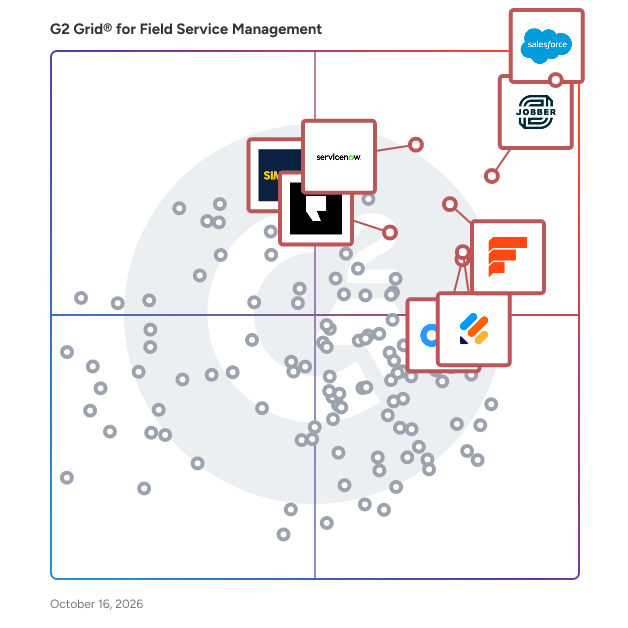
G2 Grid® for Field Service Management Software

G2 Grid® for Field Service Management Software plotting products by satisfaction and market presence

Highlighted products: Salesforce Field Service and Operations, Jobber, Simpro, Connecteam, Podium, Field Nation, Jotform, and ServiceNow Field Service Management.

Underlying data: [Grid® JSON](https://www.g2.com/categories/field-service-management/grids.json?focus%5B%5D=agentforce-field-service-formerly-salesforce-field-service&focus%5B%5D=jobber&focus%5B%5D=simpro&focus%5B%5D=connecteam&focus%5B%5D=podium&focus%5B%5D=field-nation&focus%5B%5D=jotform&focus%5B%5D=servicenow-field-service-management&segment=small-business)

Salesforce Field Service and Operations

Salesforce Field Service is the leading AI platform powering field service. With AI-powered insights and tools, you can enable the delivery of exceptional field experiences, boost productivity for mobile workers, and enable continuous improvement in field service operations. With an emphasis on time to value, we help you find success now and power the workforce of tomorrow. - Redefine how your customers engage: Increase customer satisfaction with online appointment booking, real-time visual remote assistance all built into AI-powered support. We help free up your experts from routine tasks, enabling them to focus on what they do best. Experience lightning-fast problem-solving and enhanced customer satisfaction. - Rethink how your teams work: Transform your business from reactive to proactive and boost productivity with AI-generated insights and recommendations. Say goodbye to unplanned downtime, emergency situations, and failures. Real-time data offers a window into the future of your assets' health, predicting maintenance needs, and ensuring peak performance. Our enhanced scheduling engine allows you to make every action count and optimize every decision. - Reinvent your field visits: Our offline first mobile app helps you address the talent shortage and turn everyone into your best mobile worker. With instant access to crucial data, your teams have everything they need in the field to stream service delivery while boosting confidence. AI-driven work summarization saves time, while mobile quoting and invoicing drive revenue on the spot. Turn every worker into a hero with our AI-powered solutions. With the tools and technology your team and your customers need to thrive, Salesforce Field Service helps companies drive efficiency and scale service that customers love.

Average Rating: 4.3/5.0

Total Reviews: 1,152

How Do G2 Users Rate Salesforce Field Service and Operations?

  • Has the product been a good partner in doing business?: 8.7/10 (Category avg: 9.0/10)
  • Roles: 8.6/10 (Category avg: 8.7/10)
  • Analytics: 8.6/10 (Category avg: 8.5/10)
  • Location: 8.7/10 (Category avg: 8.5/10)

Who Is the Company Behind Salesforce Field Service and Operations?

  • Seller: Salesforce
  • Company Website:
  • Year Founded: 1999
  • HQ Location: San Francisco, CA
  • Twitter: @salesforce
    579,511 Twitter followers
  • LinkedIn® Page: www.linkedin.com
    89,711 employees on LinkedIn®

Who Uses This Product?

  • Who Uses This: Salesforce Developer, Software Engineer
  • Top Industries: Information Technology and Services, Manufacturing
  • Company Size: 41% Medium, 35% Large

What Do G2 Reviewers Say About Salesforce Field Service and Operations?

AI-generated summary from verified user reviews

Pros
  • Users find the ease of use in Salesforce Field Service enhances their workflow and improves customer service efficiency.
  • Users value the integrated scheduling ecosystem of Agentforce Field Service, enhancing efficiency and service delivery.
  • Users appreciate the easy integration of Agentforce Field Service, enhancing service delivery and user experience across systems.
  • Users value the seamless integrations of Agentforce Field Service, enhancing data connectivity and workflow customization.
  • Users value the real-time visibility of Agentforce Field Service, enhancing coordination and efficiency in customer service.
Cons
  • Users find that improvement is needed in system optimization and the complexity of Salesforce Field Service for smaller operations.
  • Users find the learning curve steep, especially during initial setup, complicating the overall user experience.
  • Users find customization difficult, facing a steep learning curve and challenges with mobile experience and sharing rules.
  • Users report setup difficulties with Agentforce Field Service, highlighting a complicated process and a steep learning curve.
  • Users find Agentforce Field Service expensive, especially for smaller operations, due to cumulative licensing costs.

What Are Recent G2 Reviews of Salesforce Field Service and Operations?

What Are G2 Users Discussing About Salesforce Field Service and Operations?

Jobber

Start Your Free Trial of Jobber - No Credit Card Required Run a more efficient, predictable service business with one system built for growing, multi-crew teams. Keep Work Moving as You Get Busier Jobber connects quoting, scheduling, invoicing, and payments in one place so work moves forward without constant follow-ups or manual coordination. Build efficient days without spending hours managing the calendar, and adjust quickly when plans change. Plus, connect with tools like QuickBooks Online to keep your operations running smoothly. Keep Your Team Aligned in the Field and Office Give your crews clear schedules, job details, and updates they can access anywhere. While they stay focused on the work, your office has real-time visibility into every job without chasing calls, texts, or status updates. Drive Predictable, Profitable Performance Track jobs, revenue, and payments in one place so you always know how your business is performing. Automations keep quotes, invoices, and follow-ups moving, helping you maintain steady cash flow without adding more admin work. Client Testimonial “I spend maybe an hour per week on invoicing and paperwork now. Online payments and invoicing make me look professional.” - Stacey Flanagan, SEF The Lawn Surgeon Discover the Jobber Difference Join 200,000+ service professionals across 50+ industries including landscaping, HVAC, and residential cleaning who run their business with Jobber.

Average Rating: 4.6/5.0

Total Reviews: 520

How Do G2 Users Rate Jobber?

  • Has the product been a good partner in doing business?: 9.3/10 (Category avg: 9.0/10)
  • Roles: 8.9/10 (Category avg: 8.7/10)
  • Analytics: 7.9/10 (Category avg: 8.5/10)
  • Location: 8.3/10 (Category avg: 8.5/10)

Who Is the Company Behind Jobber?

  • Seller: Jobber
  • Company Website:
  • Year Founded: 2011
  • HQ Location: Edmonton, Canada
  • Twitter: @GetJobber
    7,288 Twitter followers
  • LinkedIn® Page: www.linkedin.com
    1,462 employees on LinkedIn®

Who Uses This Product?

  • Who Uses This: Owner, Office Manager
  • Top Industries: Construction, Consumer Services
  • Company Size: 85% Small, 6% Medium

What Do G2 Reviewers Say About Jobber?

AI-generated summary from verified user reviews

Pros
  • Users find Jobber's ease of use invaluable, enhancing workflow both in-office and on-field, simplifying invoicing and scheduling.
  • Users value the easy-to-use scheduling features of Jobber, enhancing efficiency and customer management in their businesses.
  • Users love the easy-to-use invoicing system in Jobber, streamlining billing and ensuring a professional appearance.
  • Users value the flexibility and comprehensive features of Jobber, enhancing efficiency across all departments.
  • Users love the convenient scheduling management that keeps everything organized in one accessible location.
Cons
  • Users find Jobber's limited functionality frustrating, particularly lacking marketing features and options for larger operations.
  • Users believe that improvements are needed in maintenance agreements and invoicing processes for better workflow management.
  • Users find Jobber's limited features frustrating, particularly for time tracking and usability with larger operations.
  • Users experience feature limitations in Jobber, particularly with clock-in/out and lack of user-friendly cost analysis.
  • Users express frustration with limited customization, especially regarding settings and credit card processing options in Jobber.

What Are Recent G2 Reviews of Jobber?

What Are G2 Users Discussing About Jobber?

Simpro

Simpro is field service management software that helps trade and service contractors manage the complete job lifecycle in one connected platform. Designed as business management software for trades, it brings office and field teams together across customer management, estimating, scheduling, job and project delivery, asset maintenance, invoicing, payments, inventory, and reporting. Whether a business is comparing job management software, trade contractor software, HVAC software, plumbing software, electrical contractor software, or security contractor software, Simpro supports residential and commercial workflows including service calls, preventive maintenance, installations, and projects. • Win and plan work: Customer management, estimating and quoting, quote-view triggers, and smart scheduling and dispatch software help teams move from inquiry to an assigned job with clearer information and less manual coordination. • Complete work in the field: Mobile workflows, work orders, digital forms, job notes, asset records, and maintenance planning connect technicians with the information they need while keeping office records current. This makes Simpro useful as service software and asset maintenance software, not just a calendar or dispatch board. • Protect cash flow and contractor profitability: Job costing, inventory visibility, invoicing, payment options, dashboards, and business intelligence give managers a more connected view from quote to cash, helping them identify issues and make informed operational decisions. • Add AI field service management to everyday operations: Simpro Lightning is an embedded intelligence layer, not a separate replacement system. It brings AI for field service into the workflows businesses already use. Its AI digital workers are role-based agents: FieldReady supports workflow training, JobReady prepares pre-dispatch context, JobScribe structures field documentation, and JobBrief creates customer summaries for technician review. JustAsk provides conversational access to business data. By combining field service automation with practical operational controls, Simpro helps growing contractors replace disconnected tools with a consistent workflow across the office, field, and finance teams. The result is a platform built to simplify complexity, strengthen visibility, and support more predictable service delivery.

Average Rating: 4.1/5.0

Total Reviews: 474

How Do G2 Users Rate Simpro?

  • Has the product been a good partner in doing business?: 8.0/10 (Category avg: 9.0/10)
  • Roles: 7.9/10 (Category avg: 8.7/10)
  • Analytics: 7.3/10 (Category avg: 8.5/10)
  • Location: 7.6/10 (Category avg: 8.5/10)

Who Is the Company Behind Simpro?

  • Seller: Simpro
  • Company Website:
  • Year Founded: 2002
  • HQ Location: Miami, FL
  • Twitter: @simprosoftware
    2,426 Twitter followers
  • LinkedIn® Page: www.linkedin.com
    719 employees on LinkedIn®

Who Uses This Product?

  • Who Uses This: Director, Office Manager
  • Top Industries: Construction, Electrical/Electronic Manufacturing
  • Company Size: 77% Small, 23% Medium

What Do G2 Reviewers Say About Simpro?

AI-generated summary from verified user reviews

Pros
  • Users appreciate the ease of use of Simpro, facilitating a seamless workflow from quoting to invoicing.
  • Users value the comprehensive data management of Simpro, streamlining asset maintenance and enhancing workflow efficiency.
  • Users appreciate the streamlined data processes in Simpro, enabling a unified system for management and efficiency.
  • Users highlight the quick and comprehensive customer support from Simpro, enhancing the overall user experience significantly.
  • Users value the efficiency of Simpro's comprehensive asset maintenance and streamlined workflow processes in one package.
Cons
  • Users find simPRO's complexity daunting, requiring extensive setup and training to fully utilize its features.
  • Users find the setup process complex and challenging, requiring significant effort to fully utilize Simpro's features.
  • Users find simPRO's setup to be difficult to learn, resulting in challenges during onboarding and workflow application.
  • Users find that improvement is needed in Simpro due to a complex onboarding process and ongoing training challenges.
  • Users find the learning curve steep, as the complexity and feature set can overwhelm new users initially.

What Are Recent G2 Reviews of Simpro?

What Are G2 Users Discussing About Simpro?

AI can help you find the answers. G2 helps you trust them.

Connect G2 to Claude or ChatGPT for answers grounded in G2's trusted reviews, comparisons, and pricing from real user insights.

How it works

Connecteam

Connecteam is a mobile-first workforce management app featuring a robust set of tools designed to help organizations with deskless teams improve communication, retain staff, and drive operational efficiency. Connecteam allows managers to put their business processes on autopilot and focus on business growth while also freeing up employees to be more productive, professional, and satisfied. At the heart of Connecteam lies a powerful suite of tools for scheduling, time tracking, task management, communication, HR processes, and training—all built for the realities of frontline teams. Whether you need to create complex shift schedules, automate payroll-ready timesheets, distribute company announcements, or onboard new hires at scale, Connecteam brings everything under one intuitive app. Save time and increase productivity with AI assisted scheduling, mobile-first custom checklists, forms, and reports; Track work hours with GPS time clock; Simplify employee communication, enhance professional skills with mobile courses (AI powered course content creator), manage daily tasks and so much more, all in one app. Connecteam AI helps you work faster and smarter than humanly possible, while keeping it simple: -AI Agent : Just ask your AI sidekick in chat. From stock info to safety steps, manuals, or care procedures, employees get instant spot-on answers, pulled straight from your in-app resources. No delays, no guesswork. -Auto scheduling : Your team schedule’s fully covered in seconds. AI puzzles availability, roles, fairness, and requirements with expert precision. The result? Reliable schedules, happier employees, and no admin hassle. -AI course creation: Turn any training topic into a full course. Just describe the subject and AI instantly builds a pro-level course, ready to go. Your team, trained the way you need, to the standard you expect. -File to Form: Digitize forms in a snap - upload a file or take a photo of any paper form. AI turns it into a fillable version your team can complete wherever they are. Easy for them, efficient for you. -AI updates and feed: Level up every update - write clear team updates that land. AI enhances your message and auto-translates it into each employee’s preferred language. Everyone stays aligned, nothing gets misinterpreted. -Speech to text: Fill forms, hands-free - simply speak into forms. AI captures, summarizes, and sorts your team’s input on the spot, without them having to look down or slow down. No distractions, no delays—just clear, accurate reporting. Additionally, ensure a secure and easy login for system admins with Active Directory Single Sign-On (SSO).

Average Rating: 4.6/5.0

Total Reviews: 3,492

How Do G2 Users Rate Connecteam?

  • Has the product been a good partner in doing business?: 9.3/10 (Category avg: 9.0/10)
  • Roles: 8.9/10 (Category avg: 8.7/10)
  • Analytics: 8.2/10 (Category avg: 8.5/10)
  • Location: 8.8/10 (Category avg: 8.5/10)

Who Is the Company Behind Connecteam?

  • Seller: Connecteam
  • Year Founded: 2015
  • HQ Location: New York, NY
  • Twitter: @ConnecteamApp
    1,235 Twitter followers
  • LinkedIn® Page: www.linkedin.com
    536 employees on LinkedIn®

Who Uses This Product?

  • Who Uses This: Owner, Manager
  • Top Industries: Construction, Retail
  • Company Size: 83% Small, 14% Medium

What Do G2 Reviewers Say About Connecteam?

AI-generated summary from verified user reviews

Pros
  • Users find Connecteam's ease of use remarkable, noting its intuitive design and straightforward setup for all staff members.
  • Users value the ease of use and comprehensive features of Connecteam, enhancing communication and efficiency within teams.
  • Users love the customizable scheduling feature of Connecteam, enhancing organization and accountability among staff greatly.
  • Users value the effortless team collaboration in Connecteam, enhancing scheduling, communication, and overall team rapport.
  • Users find Connecteam to be user-friendly, enabling easy navigation and effective communication among staff members.
Cons
  • Users find missing features in Connecteam, such as limited templates and underwhelming admin organization, frustrating.
  • Users find the limited features of Connecteam to be frustrating and wish for more customization options.
  • Users face scheduling issues with Connecteam, citing limitations in view options and difficulties in managing time effectively.
  • Users report needing improvements for clearer notifications and easier access to admin features in Connecteam.
  • Users find the learning curve challenging, especially with navigation differences between desktop and app functionalities.

What Are Recent G2 Reviews of Connecteam?

What Are G2 Users Discussing About Connecteam?

Podium

Podium builds the AI Employees that power local businesses. Trusted by 60,000+ businesses across Automotive, Home Services, Aesthetics, and Retail, Podium's AI Employees increase lead conversion by 45% and generate 30% more revenue, without adding headcount. Podium is purpose-built for the industries we serve: Automotive: Podium turns every lead into a test drive or service appointment and searches for more opportunities in your database. Used by over 6,000 auto dealerships, Jerry, our AI employee, drives revenue through Sales AI, Service AI and Voice AI for fixed ops, with direct integrations to Reynolds & Reynolds, VinSolutions, CDK, Tekion, Dealertrack, Dealervault, Dealersocket, X-time and every other major CRM, DMS and scheduling system Home Services: Podium is the AI Operating System for HVAC, plumbing, electrical, and garage door contractors: Podium FSM, scheduling, memberships, and payments all in one platform. Larry, our AI employee, answers every call, books jobs directly onto the dispatch board, and follows up until the invoice is paid. Aesthetics: Podium is the AI Operating System for aesthetics: Podium EMR, patient communications, and marketing all in one platform. Avery, our AI front desk, responds to every lead, books appointments directly onto your calendar, and handles after-hours inquiries. Retail: Podium is the AI-powered communication, reviews, and payments platform for furniture, appliance, jewelry, and mattress retailers. Podium's AI Employee responds to every lead in under 60 seconds, 24/7. Since our founding in 2014, Podium has deployed thousands of AI Employees and become the system that drives growth and efficiency for local businesses. Podium has been recognized for Best AI Implementation by Inc. Magazine, highlighted by OpenAI for building revenue-driving AI Agents for local business, and awarded #1 AI Agent for Business Operations by G2.

Average Rating: 4.5/5.0

Total Reviews: 2,072

How Do G2 Users Rate Podium?

  • Has the product been a good partner in doing business?: 9.2/10 (Category avg: 9.0/10)

Who Is the Company Behind Podium?

  • Seller: Podium
  • Company Website:
  • Year Founded: 2014
  • HQ Location: Lehi, UT
  • Twitter: @PodiumHQ
    4,178 Twitter followers
  • LinkedIn® Page: www.linkedin.com
    1,639 employees on LinkedIn®

Who Uses This Product?

  • Who Uses This: Owner, General Manager
  • Top Industries: Automotive, Retail
  • Company Size: 61% Small, 34% Medium

What Do G2 Reviewers Say About Podium?

AI-generated summary from verified user reviews

Pros
  • Users find Podium's ease of use and intuitive design to significantly enhance their business operations and efficiency.
  • Users appreciate Podium for its user-friendly interface and effective communication features that enhance business operations.
  • Users highly value Podium's unified communication, seamlessly integrating multiple messaging platforms for streamlined customer engagement.
  • Users love the easy communication with customers via Podium, enhancing real-time interactions and improving service insights.
  • Users rave about the fantastic customer support from Podium, enhancing business operations and satisfaction significantly.
Cons
  • Users find messaging issues with Podium, struggling to manage a high volume of inquiries effectively.
  • Users express concern over missing features in Podium, hindering effective service management and customer engagement.
  • Users find Podium's limited features challenging, particularly with tracking messages and lack of integration options.
  • Users find Podium's pricing to be excessive, deterring small businesses from fully utilizing the platform.
  • Users report poor customer support, facing aggressive practices and frustrating cancellation processes that sour their experience.

What Are Recent G2 Reviews of Podium?

What Are G2 Users Discussing About Podium?

Field Nation

Field Nation is the category-leading on-demand labor platform for technology field service. We help service organizations build and operate scalable field service labor programs with skilled local technicians, automation, and performance intelligence. As demand changes and coverage expands, fixed labor costs, travel expenses, and manual coordination can limit growth. Field Nation enables companies to add capacity where they need it while retaining ownership of their program standards, technician selection, and costs. Companies use the platform to build technician networks around their requirements, automate dispatch, and use outcome data to guide future decisions. Independent technicians choose work that aligns with their skills, rates, and schedules and remain responsible for how they perform it. From distributed break/fix work to multi-site rollouts and recurring service, Field Nation helps teams make on-demand labor a repeatable part of their delivery strategy alongside employees and strategic partners. Build quality into your labor program. Define work requirements and use credentials, work history, and performance intelligence to inform technician selection. Track outcomes across your program to identify opportunities to improve consistency and reduce repeat visits. - 75% fewer site revisits versus third parties.* Scale capacity with less manual coordination. Build your network of skilled local technicians and configure dispatch rules around your program’s needs. Automation reduces repetitive sourcing and coordination so your team can focus on oversight and exceptions as work volume grows. - 80% faster time to dispatch than traditional models.* - 90% faster project sourcing than traditional models.* - 12-minute average time to first request in major cities.** Align labor costs to demand. Use local technicians to reduce travel expenses, limit fixed labor exposure, and avoid third-party margin stacking. Pricing visibility helps your team make informed decisions about labor costs across work types and markets. - 50% cost savings versus third parties.* - 10% lower costs versus full-time employees.* Field Nation supports more than one million completed work orders annually across more than 600,000 sites and 42+ service types.** Build and scale your field service labor program with Field Nation. *Comparative impact figures from Hobson & Company. Individual results vary.* **Field Nation platform data.**

Average Rating: 4.6/5.0

Total Reviews: 410

How Do G2 Users Rate Field Nation?

  • Has the product been a good partner in doing business?: 9.1/10 (Category avg: 9.0/10)
  • Roles: 8.5/10 (Category avg: 8.7/10)
  • Analytics: 8.4/10 (Category avg: 8.5/10)
  • Location: 8.6/10 (Category avg: 8.5/10)

Who Is the Company Behind Field Nation?

  • Seller: Field Nation
  • Company Website:
  • Year Founded: 2008
  • HQ Location: Minneapolis, MN
  • Twitter: @FieldNation
    2,707 Twitter followers
  • LinkedIn® Page: www.linkedin.com
    2,364 employees on LinkedIn®

Who Uses This Product?

  • Who Uses This: Project Manager, Project Coordinator
  • Top Industries: Information Technology and Services, Telecommunications
  • Company Size: 59% Small, 34% Medium

What Do G2 Reviewers Say About Field Nation?

AI-generated summary from verified user reviews

Pros
  • Users find Field Nation to be incredibly easy to use, facilitating seamless integration and streamlined operations for field services.
  • Users value the excellent customer support of Field Nation, appreciating quick responses and efficient training throughout their process.
  • Users appreciate the efficiency of Field Nation, enabling quick dispatch and effective management of field service operations.
  • Users praise Field Nation for its user-friendly interface, making it easy for both beginners and experienced professionals to navigate.
  • Users find Field Nation to be highly helpful for efficiently managing field technicians and ensuring quality service delivery.
Cons
  • Users report quality issues with technicians and an unstable app, complicating the hiring process for skilled workers.
  • Users are frustrated by high fees that inflate expenses and offer no discounts, complicating budgeting and costs.
  • Users report technical issues with Field Nation, including unstable apps and frustrating website functionality that disrupts workflows.
  • Users find the lack of a reliable mobile app for Field Nation frustrating, impacting their overall experience.
  • Users report poor support from Field Nation, struggling with a buggy mobile app and high costs for minimal assistance.

What Are Recent G2 Reviews of Field Nation?

What Are G2 Users Discussing About Field Nation?

Jotform

Trusted by more than 35 million users worldwide, Jotform is an AI-powered online form builder designed to help individuals and organizations create, customize, and publish forms in minutes, from any device. With an intuitive drag-and-drop interface, Jotform makes it simple for anyone to build professional, mobile-responsive forms without writing a single line of code. As a fully no-code platform, Jotform empowers users to automate workflows, streamline data collection, and digitize processes. Jotform offers one of the largest template libraries in the industry, featuring 10,000+ ready-made form templates tailored to every use case. Popular categories include payment forms, lead generation forms, event registration forms, application forms, surveys, order forms, onboarding forms, consent forms, and feedback forms. Each template is fully customizable, allowing users to adjust layouts, add conditional logic, collect e-signatures, upload files, apply branding, and incorporate advanced field types. This level of flexibility ensures every form is optimized for user experience and aligned with organizational goals. To streamline workflows, Jotform integrates seamlessly with over 200 popular third-party apps, including Google Sheets, Slack, Zoom, HubSpot, Salesforce, PayPal, Stripe, and numerous other business tools. These integrations automate data collection, payment processing, CRM updates, and team notifications. By connecting forms directly to the tools your team already uses, Jotform helps eliminate data silos and supports end-to-end process automation—all within a no-code environment. Security and compliance are at the core of Jotform’s platform. Features such as HIPAA compliance options, 256-bit SSL encryption, CAPTCHA, form access controls, and audit logs help organizations protect sensitive data and meet industry standards. Whether you're collecting healthcare information, financial data, or internal employee records, Jotform provides the reliability and safeguards needed to operate with confidence. With powerful features like automated emails, approval workflows, analytics dashboards, and embeddable widgets, Jotform delivers an all-in-one solution for organizations looking to simplify data collection and improve productivity. From small businesses to enterprises, educational institutions, healthcare providers, and nonprofits, millions of teams rely on Jotform to capture information efficiently and turn submissions into actionable results.

Average Rating: 4.6/5.0

Total Reviews: 5,420

G2 Deal: Save 50% on an annual Jotform plans

Get more forms, more submissions, more payments, more e-sign documents, and more powerful automation features — at half the price.

Price: ~~$39/user/month~~ → $19.50/user/month

View this exclusive G2 deal

How Do G2 Users Rate Jotform?

  • Has the product been a good partner in doing business?: 9.1/10 (Category avg: 9.0/10)
  • Roles: 7.5/10 (Category avg: 8.7/10)
  • Analytics: 8.1/10 (Category avg: 8.5/10)
  • Location: 7.3/10 (Category avg: 8.5/10)

Who Is the Company Behind Jotform?

  • Seller: Jotform
  • Company Website:
  • Year Founded: 2006
  • HQ Location: San Francisco, California
  • Twitter: @Jotform
    39,289 Twitter followers
  • LinkedIn® Page: www.linkedin.com
    925 employees on LinkedIn®

Who Uses This Product?

  • Who Uses This: Owner, CEO
  • Top Industries: Non-Profit Organization Management, Education Management
  • Company Size: 71% Small, 20% Medium

What Do G2 Reviewers Say About Jotform?

AI-generated summary from verified user reviews

Pros
  • Users appreciate the ease of use of Jotform, enabling quick navigation and efficient form management for clients.
  • Users appreciate the ease of use of Jotform, finding it simplifies event management and form creation significantly.
  • Users commend the intuitive setup process of Jotform, which simplifies form creation and customization significantly.
  • Users love the user-friendly design of Jotform, making navigation and form creation a breeze.
  • Users love the ease of building powerful forms with Jotform's user-friendly interface and flexible integrations.
Cons
  • Users find Jotform too expensive compared to other survey sites, especially given the misleading advertising of free options.
  • Users find some missing features in Jotform, particularly in font customization and payment integration difficulties.
  • Users face form issues with navigation, integration, and functionality, making the experience less user-friendly.
  • Users find limited customization options for Jotform, making design adjustments more challenging than expected.
  • Users find the form design confusing with unclear navigation and limitations in customization options and features.

What Are Recent G2 Reviews of Jotform?

What Are G2 Users Discussing About Jotform?

ServiceNow Field Service Management

ServiceNow Field Service Management gives field service organizations one place to run the full job lifecycle — from work order creation through close-out — on a single platform and data model. Scheduling, dispatch, technician guidance, parts management, and contractor workflows all connect across customer service, field execution, asset management, and back-office settlement without manual re-entry between systems. For organizations that have tried to solve field service with point solutions, or with AI investments that haven't added up to operational outcomes, FSM is the workflow layer underneath it all: one audit trail, one governance layer, and AI agents that finish the work. Built for field service across telecom, manufacturing, technology, healthcare, public sector, retail, and beyond — designed for leaders running field service at volume, where the cost of a missed SLA or a repeat truck roll lands immediately and the margin for manual coordination has run out. Predict and prevent Monitor asset health in real time, identify failure risks before they surface as breakdowns, and automatically trigger maintenance — with the right technician, skills, and parts already matched — through the same platform that handles scheduling, dispatch, and close-out. The prediction and response are connected. Unplanned downtime drops. Emergency dispatches disappear. Autonomous scheduling and dispatch AI agents match every job to the right technician, skills, and parts — and reoptimize continuously as conditions shift. Cancellations, absences, urgent inbounds, last-minute callouts: the board adjusts and qualified replacements surface in real time, from mobile, without a dispatcher manually rebuilding around every exception. SLA commitments hold without adding headcount. AI-guided field execution Technicians arrive with a complete brief — customer history, asset record, parts confirmed. On site, AI agents guide crews through diagnostics and unfamiliar repairs. At close-out, work orders, parts consumed, and asset updates are captured automatically through voice, image, and contextual prompts. First-visit resolution stops being a target and starts being the standard. Continuous asset intelligence Every completed job writes back to the asset record automatically — parts consumed, work performed, follow-on needs flagged — without a technician updating a separate system after the fact. Service history stays current, maintenance plans reflect what actually happened in the field, and the data driving future scheduling, parts planning, and contract renewals reflects reality. The record is never behind the work. Blended workforce management Third-party contractors work through the same workflow as direct employees — same dispatch, same mobile experience, same close-out process. Recruit, onboard, and deploy extended teams at scale as demand shifts, without losing visibility or control. Contractors aren't bolted on the side; they're part of the same operation. Dispatchers move from firefighting the schedule to shaping capacity. Technicians close more jobs on the first visit and spend less time on paperwork. Service leaders have real-time visibility into performance, quality, and cost across the operation. And field service stops being a constraint on the business — it becomes the thing the business can actually rely on.

Average Rating: 4.3/5.0

Total Reviews: 167

How Do G2 Users Rate ServiceNow Field Service Management?

  • Has the product been a good partner in doing business?: 8.8/10 (Category avg: 9.0/10)
  • Roles: 8.9/10 (Category avg: 8.7/10)
  • Analytics: 9.3/10 (Category avg: 8.5/10)
  • Location: 9.0/10 (Category avg: 8.5/10)

Who Is the Company Behind ServiceNow Field Service Management?

  • Seller: ServiceNow
  • Company Website:
  • Year Founded: 2004
  • HQ Location: Santa Clara, CA
  • Twitter: @servicenow
    55,548 Twitter followers
  • LinkedIn® Page: www.linkedin.com
    35,078 employees on LinkedIn®

Who Uses This Product?

  • Top Industries: Information Technology and Services, Hospital & Health Care
  • Company Size: 30% Medium, 30% Large

What Do G2 Reviewers Say About ServiceNow Field Service Management?

AI-generated summary from verified user reviews

Pros
  • Users appreciate the real-time visibility in ServiceNow Field Service Management, enhancing coordination and operational efficiency.
  • Users value the clarity and efficiency in scheduling, enhancing accountability and productivity across operations.
  • Users appreciate the ease of use of ServiceNow Field Service Management, benefiting from its intuitive setup and workflows.
  • Users appreciate the seamless integration of ServiceNow Field Service Management, enhancing collaboration and operational efficiency.
  • Users value the seamless integrations within ServiceNow FSM, enhancing overall efficiency and project management across modules.
Cons
  • Users find the learning curve steep, making routine tasks cumbersome and slowing down operations for support teams.
  • Users note the complex initial setup and slow performance in ServiceNow Field Service Management, affecting user experience.
  • Users find the licensing costs high, making ServiceNow Field Service Management less affordable for smaller teams.
  • Users face setup difficulties in ServiceNow Field Service Management, as initial configuration can be complex and time-consuming.
  • Users find customization difficulties in ServiceNow Field Service Management due to its steep learning curve and complex configurations.

What Are Recent G2 Reviews of ServiceNow Field Service Management?

What Are G2 Users Discussing About ServiceNow Field Service Management?

Housecall Pro

Housecall Pro is a comprehensive business solution designed specifically for home service professionals, providing a suite of innovative tools and features within an easy-to-use platform. Trusted by over 200k+ Pros, Housecall Pro aims to streamline operations for professionals in various home service industries, including plumbing, electrical work, landscaping, and cleaning services. This platform is accessible via both web and mobile applications, allowing users to manage their businesses efficiently from anywhere. The target audience for Housecall Pro includes small to medium-sized businesses in the home services sector that are looking to enhance their operational efficiency and increase revenue. The platform caters to a variety of use cases, such as automating marketing efforts to attract new customers, facilitating online booking, and managing job schedules. By integrating these functionalities, Housecall Pro empowers service professionals to focus more on their core work while effectively managing the business side of operations. Key features of Housecall Pro include automated marketing campaigns that help users reach potential clients, visually appealing proposal creation, and consumer financing options that enable businesses to secure larger jobs. The platform also supports online payment processing, allowing customers to pay via multiple methods, including credit cards, bank transfers, and mobile wallets. This flexibility not only enhances customer satisfaction but also accelerates cash flow for service providers. In addition to revenue growth and payment solutions, Housecall Pro offers robust job management capabilities. Users can automate routine tasks such as scheduling, dispatching, and invoicing, while also tracking leads and job progress through a comprehensive workflow management board. Real-time alerts enhance communication among team members and clients, ensuring everyone stays informed throughout the service process. Furthermore, the platform integrates seamlessly with third-party tools like QuickBooks, enabling users to sync data effortlessly and manage payroll and employee benefits. Housecall Pro also provides valuable insights through detailed analytics and reporting on key business metrics, allowing professionals to make informed decisions and scale their operations effectively. On average, users report a more than 35% increase in monthly revenue after their first year with Housecall Pro. Subscribers gain access to an online community where they can connect with other home service professionals, sharing insights and best practices. This collaborative environment fosters growth and learning, making Housecall Pro not just a tool, but a partner in business success.

Average Rating: 4.3/5.0

Total Reviews: 202

How Do G2 Users Rate Housecall Pro?

  • Has the product been a good partner in doing business?: 8.8/10 (Category avg: 9.0/10)
  • Roles: 8.6/10 (Category avg: 8.7/10)
  • Analytics: 8.0/10 (Category avg: 8.5/10)
  • Location: 8.7/10 (Category avg: 8.5/10)

Who Is the Company Behind Housecall Pro?

  • Seller: Housecall Pro
  • Company Website:
  • Year Founded: 2013
  • HQ Location: San Diego, CA
  • LinkedIn® Page: www.linkedin.com
    1,550 employees on LinkedIn®

Who Uses This Product?

  • Who Uses This: Owner, owner
  • Top Industries: Construction, Consumer Services
  • Company Size: 90% Small, 4% Medium

What Do G2 Reviewers Say About Housecall Pro?

AI-generated summary from verified user reviews

Pros
  • Users appreciate the ease of use of Housecall Pro, highlighting its simple setup and user-friendly features.
  • Users appreciate the easy setup of Housecall Pro, highlighting its user-friendly nature and seamless integration.
  • Users find Housecall Pro to be highly user-friendly, simplifying business operations and enhancing customer interactions.
  • Users appreciate the user-friendly interface of Housecall Pro, finding it easy to set up and learn.
  • Users value the responsive customer support of Housecall Pro, enhancing their overall experience and business efficiency.
Cons
  • Users find missing features in Housecall Pro, such as insufficient customization and lack of specialized tools for industries.
  • Users find Housecall Pro to be a little expensive, especially when adding more contractors increases overall costs significantly.
  • Users express the need for improvement in functionality, reporting consistency, and less aggressive upselling of services.
  • Users express frustration over limited features in Housecall Pro, desiring better customization and specialized tools for scheduling.
  • Users feel that feature limitations hinder Housecall Pro's effectiveness, lacking customization and specialized options for diverse needs.

What Are Recent G2 Reviews of Housecall Pro?

What Are G2 Users Discussing About Housecall Pro?

FieldPulse

FieldPulse is an all-in-one business management solution specifically designed for field service teams. This software provides a comprehensive platform that assists users in managing various aspects of their operations, from scheduling and dispatching to customer relationship management (CRM) and financial documentation. By integrating essential functionalities into a single solution, FieldPulse aims to streamline workflows and enhance productivity for business owners, administrators, and technicians alike. The target audience for FieldPulse includes a diverse range of field service businesses, such as plumbing, electrical, HVAC, septic, glass repair, and garage door companies. These organizations often face challenges related to administrative tasks, team communication, and customer service. FieldPulse addresses these pain points by offering tools that simplify scheduling, manage estimates and invoices, and facilitate effective communication with customers. The software is particularly beneficial for companies seeking to improve their operational efficiency and enhance the overall customer experience. FieldPulse stands out in the market with its robust feature set, which includes not only standard field service management (FSM) capabilities but also advanced tools that cater to the needs of growing businesses. Key features such as a flat-rate pricebook, lead management, and inventory management empower users to make informed decisions and optimize their resources. Additionally, advanced reporting functionalities provide insights into business performance, enabling users to track key metrics and identify areas for improvement. The software's user-friendly interface ensures that even those with limited technical expertise can navigate the system with ease. However, its advanced features make it suitable for companies of any size that are looking to scale their operations. FieldPulse also offers customer management tools, timesheet tracking, booking portals, and franchise management capabilities, making it a versatile solution for various business models. By consolidating these functionalities into one platform, FieldPulse helps businesses reduce administrative burdens, enhance team collaboration, and ultimately drive growth.

Average Rating: 4.7/5.0

Total Reviews: 375

How Do G2 Users Rate FieldPulse?

  • Has the product been a good partner in doing business?: 9.2/10 (Category avg: 9.0/10)
  • Roles: 8.8/10 (Category avg: 8.7/10)
  • Analytics: 8.4/10 (Category avg: 8.5/10)
  • Location: 8.7/10 (Category avg: 8.5/10)

Who Is the Company Behind FieldPulse?

  • Seller: FieldPulse
  • Company Website:
  • Year Founded: 2015
  • HQ Location: Dallas, Texas
  • Twitter: @FieldPulseApp
    1,076 Twitter followers
  • LinkedIn® Page: www.linkedin.com
    208 employees on LinkedIn®

Who Uses This Product?

  • Who Uses This: Owner, Office Manager
  • Top Industries: Construction, Consumer Services
  • Company Size: 94% Small, 4% Medium

What Do G2 Reviewers Say About FieldPulse?

AI-generated summary from verified user reviews

Pros
  • Users commend the responsive customer support of FieldPulse, appreciating quick answers and hands-on assistance.
  • Users value the ease of use of FieldPulse, finding it simple to navigate and implement in their business.
  • Users appreciate the excellent customer service from FieldPulse, receiving quick responses and effective support for all inquiries.
  • Users praise the exceptional customer support of FieldPulse, highlighting fast, helpful responses and effective onboarding assistance.
  • Users appreciate the ease of use and detailed project tracking in FieldPulse, enhancing workflow management effectively.
Cons
  • Users find the limited customization options in FieldPulse challenging, impacting their workflows and overall experience.
  • Users find the need for improvement in FieldPulse, citing issues with CRM functionality and system integration.
  • Users find the limited features of FieldPulse hinder their workflow and integration capabilities significantly.
  • Users express frustration with update issues, particularly regarding missed features and ineffective support responses.
  • Users find customization difficulties frustrating, especially with invoices, estimates, and limited options for personalizing features.

What Are Recent G2 Reviews of FieldPulse?

What Are G2 Users Discussing About FieldPulse?

ServiceTitan

Ready to grow your service business? Meet ServiceTitan. ServiceTitan is AI for the trades - a purpose-built agentic operating system automating every workflow that runs a contracting business, from enterprise commercial construction to residential field service, exteriors and beyond. ServiceTitan is powerful yet easy to use, combining scheduling, dispatch, invoicing, sales, marketing, reporting, and more in a mobile, cloud-based platform. Say hello to effortless job booking, seamless communication with your techs, advanced reporting, call recording and tracking, paperless invoicing, incredible visual sales tools, the ability to process credit cards in the field, and much more. ServiceTitan has helped a growing number of extraordinary service companies—like George Brazil, Hunter Heat & Air, Gold Medal Service, and Goettl—achieve incredible business results.

Average Rating: 4.4/5.0

Total Reviews: 370

How Do G2 Users Rate ServiceTitan?

  • Has the product been a good partner in doing business?: 8.7/10 (Category avg: 9.0/10)
  • Roles: 8.4/10 (Category avg: 8.7/10)
  • Analytics: 8.3/10 (Category avg: 8.5/10)
  • Location: 8.6/10 (Category avg: 8.5/10)

Who Is the Company Behind ServiceTitan?

  • Seller: ServiceTitan
  • Company Website:
  • Year Founded: 2012
  • HQ Location: Glendale, CA
  • Twitter: @ServiceTitan
    4,766 Twitter followers
  • LinkedIn® Page: www.linkedin.com
    3,381 employees on LinkedIn®

Who Uses This Product?

  • Who Uses This: Office Manager, Owner
  • Top Industries: Construction, Consumer Services
  • Company Size: 65% Small, 32% Medium

What Do G2 Reviewers Say About ServiceTitan?

AI-generated summary from verified user reviews

Pros
  • Users value the ease of use of ServiceTitan, enjoying its accessibility and intuitive navigation for business efficiency.
  • Users commend the exceptional customer support at ServiceTitan, highlighting the team's responsiveness and helpfulness throughout the onboarding process.
  • Users appreciate the comprehensive features of ServiceTitan, significantly enhancing tracking, reporting, and overall workflow efficiency.
  • Users appreciate the robust tracking capabilities of ServiceTitan, enhancing efficiency in managing materials and labor.
  • Users value the efficiency of ServiceTitan in organizing operations and enhancing communication, leading to business growth.
Cons
  • Users face a steep learning curve and often struggle with setup, requiring additional training to utilize ServiceTitan effectively.
  • Users note the improvement needed in ServiceTitan due to bugs and issues affecting certain features and usability.
  • Users report poor customer support from ServiceTitan, citing misinformation and difficulty in obtaining satisfactory answers.
  • Users experience poor support with ServiceTitan, struggling to find adequate answers and facing communication issues.
  • Users find the limited functionality of ServiceTitan frustrating, often requiring workarounds for essential features.

What Are Recent G2 Reviews of ServiceTitan?

What Are G2 Users Discussing About ServiceTitan?

Workiz

You’ve built something real. Brick by brick, call by call. You didn’t wait for a blueprint, you became the blueprint. You’ve put in the work, made the tough decisions, and built your business on your own terms. We’re not here to rewrite your story. We’re here to help you amplify it. To give you the tools to move forward, not start from scratch. Workiz was built for service pros who already know what it takes — the hard work, the late hours, the persistence. You’ve figured out how to make things run, but we know it can be done smarter, faster, and more efficiently. No wasted steps. No slowing down. Just real solutions that keep pace with your ambition. You know where you’re going. Workiz is here to help you get there, faster. With real AI and smart automation working in the background, Workiz simplifies your operations, strengthens customer relationships, and grows your service business. Trusted by over 120,000 service pros, Workiz helps you streamline your day-to-day, increase revenue, and deliver a superior customer experience. Win more jobs with tools like Genius Answering, Angi, Thumbtack, and Google’s Local Services Ads. Impress customers and stay connected with real-time communication through the Workiz mobile app. And manage everything from one central hub, syncing seamlessly with QuickBooks, Stripe, CompanyCam, and more — all from your Workiz dashboard. Book a free demo: https://link.workiz.com/g2 Try Workiz free for 7 days: https://link.workiz.com/g2-trial #FieldService #FSM #HomeServiceBusiness #ServicePros #Contractors #SmallBusinessGrowth #HVAC #Plumbing #Locksmith #ApplianceRepair #Electricians #JunkRemoval #Workiz #BusinessAutomation #SmartScheduling

Average Rating: 4.5/5.0

Total Reviews: 241

How Do G2 Users Rate Workiz?

  • Has the product been a good partner in doing business?: 9.0/10 (Category avg: 9.0/10)
  • Roles: 8.7/10 (Category avg: 8.7/10)
  • Analytics: 8.3/10 (Category avg: 8.5/10)
  • Location: 8.3/10 (Category avg: 8.5/10)

Who Is the Company Behind Workiz?

  • Seller: Workiz
  • Year Founded: 2015
  • HQ Location: San Diego, California
  • Twitter: @workizinc
    617 Twitter followers
  • LinkedIn® Page: www.linkedin.com
    162 employees on LinkedIn®

Who Uses This Product?

  • Who Uses This: Owner, President
  • Top Industries: Construction, Consumer Services
  • Company Size: 93% Small, 3% Medium

What Do G2 Reviewers Say About Workiz?

AI-generated summary from verified user reviews

Pros
  • Users love the customer support features of Workiz, enhancing communication and streamlining business operations effectively.
  • Users appreciate the ease of use of Workiz, benefiting from its seamless integration of essential business operations.
  • Users appreciate the user-friendly interface of Workiz, praising its ease of navigation and helpful resources.
  • Users love the seamless integrations of Workiz, enhancing communication and streamlining business operations effortlessly.
  • Users love the user-friendly scheduling and invoicing capabilities of Workiz, enhancing efficiency for their field teams.
Cons
  • Users face customization difficulties with Workiz, wishing for more flexibility and options in personalizing their experience.
  • Users express frustration over high pricing, citing it as a major reason for discontinuing use and recommending alternatives.
  • Users feel that work flow improvements are needed in the mobile app, citing UI issues and slow performance.
  • Users face a learning curve with Workiz, particularly in setting automations and getting accustomed to its unique features.
  • Users are frustrated with the expensive pricing model, which adds costs for new features and services.

What Are Recent G2 Reviews of Workiz?

What Are G2 Users Discussing About Workiz?

Praxedo

Praxedo is a specialized, best-of-breed Field Service Management (FSM) platform purpose-built for mid-market and enterprise industrial operations, including telecom fiber rollouts, utility grid maintenance, commercial HVAC diagnostics, solar energy installations, and heavy equipment maintenance. The Mid-Market FSM Sweet Spot Operations leaders choose Praxedo because it hits the ideal functional sweet spot. It bypasses the rigid limitations of basic scheduling tools that cannot scale, while entirely avoiding the exorbitant deployment costs, heavy custom coding, and multi-month timelines associated with overly complex enterprise platforms. Praxedo delivers deep operational control with a rapid, zero-disruption rollout that gets field teams up and running in a fraction of the time. Flexible Architecture & Open Ecosystem Engineered to seamlessly replace unscalable spreadsheets, manual workflows, and aging homegrown systems, Praxedo features robust Open APIs and flexible data connectivity. The platform effortlessly links daily field activity to critical back-office software, featuring pre-built integration capability for Microsoft Dynamics 365 Business Central, Sage 200cloud, SAP ECC, and QuickBooks Online, alongside standard compatibility with widely used CRMs, specialized industry billing applications, and internal asset databases. Core Capabilities & Practical Use Cases: SmartScheduler Automated Routing: Purpose-built to eliminate manual coordination and chaotic dispatch processes. The intelligent scheduling engine automates daily planning by instantly bundling jobs based on travel proximity, appointment windows, and technician certifications, ensuring the right person is assigned to the right job every time. Intuitive Mobile App & Live Map Visibility: Designed for rapid adoption by field crews, the user-friendly mobile application provides real-time access to job details, history, and optimal routes. Simultaneously, office dispatchers gain a clear, live view of technician status and progress, bridging the communication gap between the field and the back office. Reliable Offline Workflows: Built for field teams operating in remote regions or cell-dead zones (such as basements or rural utility sites). Technicians can complete safety checklists, update job statuses, and capture customer signatures entirely offline, with data automatically syncing the moment a signal returns. Geofencing & Customized Checklists: Operations teams can easily view geographic service zones to streamline daily tracking. Dispatchers can also deploy flexible, zero-code digital forms and safety checklists tailored to specific business lines, ensuring consistent compliance and data collection on every service call. Trusted globally by over 1,500 businesses and 65,000 daily users, Praxedo provides the operational visibility, scalability, and reporting precision required to run a modern, efficient field organization.

Average Rating: 4.6/5.0

Total Reviews: 47

How Do G2 Users Rate Praxedo?

  • Has the product been a good partner in doing business?: 9.3/10 (Category avg: 9.0/10)
  • Roles: 8.8/10 (Category avg: 8.7/10)
  • Analytics: 6.9/10 (Category avg: 8.5/10)
  • Location: 8.2/10 (Category avg: 8.5/10)

Who Is the Company Behind Praxedo?

  • Seller: Praxedo
  • Company Website:
  • Year Founded: 2005
  • HQ Location: Paris, FR
  • Twitter: @Praxedo
    644 Twitter followers
  • LinkedIn® Page: www.linkedin.com
    148 employees on LinkedIn®

Who Uses This Product?

  • Company Size: 70% Small, 26% Medium

What Do G2 Reviewers Say About Praxedo?

AI-generated summary from verified user reviews

Pros
  • Users praise the ease of use of Praxedo, enhancing efficiency and streamlining work order management seamlessly.
  • Users appreciate the efficient scheduling management of Praxedo, streamlining work order tracking and enhancing organization.
  • Users appreciate the easy setup of Praxedo, enabling quick deployment and efficient workflow management for teams.
  • Users appreciate the efficient data management Praxedo provides, keeping everything organized and accessible in one place.
  • Users appreciate the tracking efficiency of Praxedo, streamlining work order management and enhancing productivity in the field.
Cons
  • Users express frustration with the scheduling issues in Praxedo, particularly regarding report exports and job assignments.
  • Users experience connectivity issues with Praxedo, particularly the inconvenience of frequent logouts from the web app.
  • Users wish for improved integration with Quickbooks, specifically to choose the "ship to" address over the "bill to" address.
  • Users feel the pricing issues arise from additional costs for features that should be included in the base price.
  • Users find the initial configuration process for Praxedo to be somewhat complex and challenging.

What Are Recent G2 Reviews of Praxedo?

What Are G2 Users Discussing About Praxedo?

SAP Field Service Management

SAP Field Service Management (FSM) is a cloud-native, mobile-first solution that optimizes the end-to-end service process, from receiving a customer request to final invoicing. It transforms reactive repairs into proactive service engagements, ensuring operational excellence in the field. Powered by AI, FSM intelligently schedules the right technician with the correct skills and parts inventory, maximizing first-time fix rates and asset uptime. It features extensive mobile capabilities for technicians, including offline access to work orders, parts lists, and documentation. Seamlessly integrating with SAP's ERP core, FSM connects real-time service execution data directly to inventory, billing, and warranty processes, accelerating cash flow and boosting customer satisfaction.

Average Rating: 4.3/5.0

Total Reviews: 72

How Do G2 Users Rate SAP Field Service Management?

  • Has the product been a good partner in doing business?: 9.0/10 (Category avg: 9.0/10)
  • Roles: 9.0/10 (Category avg: 8.7/10)
  • Analytics: 8.6/10 (Category avg: 8.5/10)
  • Location: 9.3/10 (Category avg: 8.5/10)

Who Is the Company Behind SAP Field Service Management?

  • Seller: SAP
  • Company Website:
  • Year Founded: 1972
  • HQ Location: Walldorf
  • Twitter: @SAP
    297,052 Twitter followers
  • LinkedIn® Page: www.linkedin.com
    149,349 employees on LinkedIn®

Who Uses This Product?

  • Top Industries: Computer Software, Logistics and Supply Chain
  • Company Size: 34% Large, 28% Medium

What Do G2 Reviewers Say About SAP Field Service Management?

AI-generated summary from verified user reviews

Pros
  • Users find SAP Field Service Management easy to use, ensuring efficiency even for those not technically inclined.
  • Users value the real-time visibility offered by SAP Field Service Management, enhancing efficiency and customer service.
  • Users appreciate the easy scheduling and real-time visibility in SAP Field Service Management, significantly enhancing field operations.
  • Users highly value SAP Field Service Management for its seamless integration with existing ERP systems, enhancing overall efficiency.
  • Users commend the easy setup of SAP Field Service Management, facilitating a smooth onboarding process for teams.
Cons
  • Users find the learning curve steep with SAP Field Service Management, posing challenges during initial setup and integration.
  • Users find that improvement is needed in integration, speed, customization, and mobile app performance of SAP Field Service Management.
  • Users face customization difficulties with SAP Field Service Management, requiring extensive expertise and time-consuming onboarding.
  • Users find the high cost of SAP Field Service Management a significant barrier, especially for smaller companies.
  • Users face feature limitations in SAP Field Service Management, struggling with customization, data integration, and user interface issues.

What Are Recent G2 Reviews of SAP Field Service Management?

Tofu

Light field service management software for growing service teams (2–10 people). Tofu handles scheduling, invoicing, payments, and customer records without the complexity of enterprise software. It's built for businesses that visit the same clients on a regular schedule – cleaning, pool, lawn care, landscaping, and similar trades – including crews that also take day-to-day service calls. Tofu is best for: ・Small cleaning and janitorial crews ・Pool service and lawn care teams ・Landscaping crews ・HVAC, plumbing, and electrical teams with a few techs ・Any small trade business managing recurring clients across multiple job sites Key features: ・Scheduling & dispatching: Set a client's schedule and price once, and Tofu creates the visits and keeps them on the calendar ・Job management: Track each job from booked to done with notes, photos, and status updates ・Tech assignment: Assign visits to your crew and see what's been closed out from the office ・Estimates: Build estimates on-site with line items, labor, and materials, and reuse a price book to keep them consistent ・Invoicing: Generate invoices from estimates or on their own; for recurring clients Tofu drafts the month's invoices for you to review and send ・Payments: Accept card and ACH payments online and get paid without chasing ・Customer records: Keep contact info, job history, photos, and notes in one place per client ・Tofu Team app: A separate app for techs (iOS and Android) to see the day's visits and close each one with a photo ・Offline mode: Keep working when signal drops; everything syncs once you're back online Why Tofu? Tofu keeps it simple. It's made for real field conditions – bad reception, tight schedules, dirty hands – and sized for small crews rather than enterprise operations. The app is easy to use, so most of your time goes to the work instead of the admin.

Average Rating: 4.7/5.0

Total Reviews: 43

How Do G2 Users Rate Tofu?

  • Has the product been a good partner in doing business?: 10.0/10 (Category avg: 9.0/10)

Who Is the Company Behind Tofu?

  • Seller: Tofu
  • Year Founded: 2022
  • HQ Location: California, US
  • LinkedIn® Page: www.linkedin.com
    18 employees on LinkedIn®

Who Uses This Product?

  • Company Size: 100% Small

What Are Recent G2 Reviews of Tofu?

Inia Debnath
ID
Researched and written by Inia Debnath
Updated