Best Document Management Software - Page 3

How Many Document Management Software Products Does G2 Track?

Total Products under this Category: 710

Category Stats (Sep 2026)

  • Average Rating: 4.42/5 The average rating of products in this category, based on all submitted ratings
  • Top Trending Product: Docuplete (+1.75%) - Among all products in this category, Docuplete recorded the largest rating increase compared to last month

Last updated: September 01, 2026

How Does G2 Rank Document Management Software Products?

Why You Can Trust G2's Software Rankings:

  • 30 Analysts and Data Experts
  • 19,900+ Authentic Reviews
  • 710+ Products
  • Unbiased Rankings

G2's software rankings are built on verified user reviews, rigorous moderation, and a consistent research methodology maintained by a team of analysts and data experts. Each product is measured using the same transparent criteria, with no paid placement or vendor influence. While reviews reflect real user experiences, which can be subjective, they offer valuable insight into how software performs in the hands of professionals. Together, these inputs power the G2 Score, a standardized way to compare tools within every category.

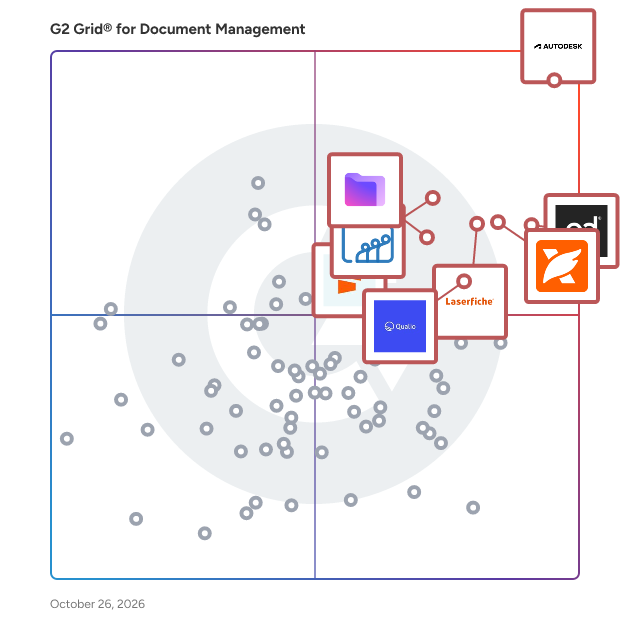
G2 Grid® for Document Management Software

G2 Grid® for Document Management Software plotting products by satisfaction and market presence

Highlighted products: PandaDoc, Foxit PDF Editor, Laserfiche, Zoho WorkDrive, Seismic Enablement Cloud, Proton Drive For Business, M-Files, and Signify.

Underlying data: [Grid® JSON](https://www.g2.com/categories/document-management/grids.json?focus%5B%5D=pandadoc&focus%5B%5D=foxit-pdf-editor&focus%5B%5D=laserfiche&focus%5B%5D=zoho-workdrive&focus%5B%5D=seismic-enablement-cloud&focus%5B%5D=proton-drive-for-business&focus%5B%5D=m-files&focus%5B%5D=signify-signify)

SlideHub

SlideHub is the AI-Powered Presentation Management Platform. Find your best slides in seconds with powerful search, or create new ones by simply describing to the AI what you need. Keep everything organized, up-to-date, and on-brand - right inside PowerPoint, Word, Excel, and Outlook. Update a slide once, and it syncs everywhere. See what's being used and what's gathering dust. SlideHub is your one place to find, create, share, and maintain your company's presentations. Trusted by 500+ forward thinking organizations. ▪️ For business advisors and consultants: Less time rebuilding slides, more time winning business. Find proven proposals, case studies, and credentials in seconds, so you can respond to RFPs faster and focus on what matters. ▪️ For B2B organizations: Your entire team builds presentations from approved, on-brand content. No more hunting through shared drives or wondering if slides are current. Everyone has instant access to what works. ▪️ For marketing professionals: Keep everyone using the right logos, colors, and messaging. You control what's available, but your team can suggest additions when they spot a gap. ▪️ For sales leaders: Your reps can customize proposals quickly with smart automations. Spend less time formatting, more time selling. ▪️ For IT and security teams: Get up and running in 15 minutes. No complex rollout, no IT headaches. Just simple user management that keeps you in control.

Average Rating: 4.9/5.0

Total Reviews: 56

How Do G2 Users Rate SlideHub?

  • Has the product been a good partner in doing business?: 10.0/10 (Category avg: 8.8/10)
  • Ease of Admin: 8.9/10 (Category avg: 8.4/10)
  • Quality of Support: 9.9/10 (Category avg: 8.5/10)
  • Ease of Use: 9.0/10 (Category avg: 8.6/10)

Who Is the Company Behind SlideHub?

  • Seller: SlideHub
  • Company Website:
  • Year Founded: 2016
  • HQ Location: Copenhagen K, Denmark
  • LinkedIn® Page: www.linkedin.com
    74 employees on LinkedIn®

Who Uses This Product?

  • Top Industries: Consulting
  • Company Size: 26% Small, 19% Medium

What Do G2 Reviewers Say About SlideHub?

AI-generated summary from verified user reviews

Pros
  • Users find SlideHub's ease of use exceptional, significantly streamlining presentation creation and asset management.
  • Users commend the responsive customer support at SlideHub, noting quick assistance and effective problem resolution.
  • Users love the easy-to-use templates and organizational tools that save time and enhance presentation quality.
  • Users value the time-saving features of SlideHub, simplifying the creation and management of presentations significantly.
  • Users find the interface easy to use, enhancing productivity and simplifying the management of presentations.
Cons
  • Users note feature limitations, including lack of AI functionality and improved template identification, affecting usability.
  • Users find several missing features in SlideHub, including AI functionality and a drag/drop upload option.
  • Users find the tagging and mapping convention confusing, affecting their overall experience with SlideHub.
  • Users desire more customization options in SlideHub to enhance design flexibility and improve workflow efficiency.
  • Users find search issues frustrating, especially with tagging confusion and limitations in visual element searches.

What Are Recent G2 Reviews of SlideHub?

What Are G2 Users Discussing About SlideHub?

IconSystem

Communicate all building specifications and standards whilst collaborating with team members and keeping projects instantly updated through an intelligent common data environment. IconSystem is no ordinary Information Management or document collaboration tool. It utilises a dynamic cloud database for building design specifications and standards whilst allowing teams to manage any type of project. IconSystem is used by construction, hospitality and retail customers to manage their property data.

Average Rating: 4.4/5.0

Total Reviews: 15

How Do G2 Users Rate IconSystem?

  • Has the product been a good partner in doing business?: 9.5/10 (Category avg: 8.8/10)
  • Ease of Admin: 7.9/10 (Category avg: 8.4/10)
  • Quality of Support: 9.6/10 (Category avg: 8.5/10)
  • Ease of Use: 8.5/10 (Category avg: 8.6/10)

Who Is the Company Behind IconSystem?

  • Seller: Eleco
  • Company Website:
  • Year Founded: 1895
  • HQ Location: London, GB
  • Twitter: @Elecosoft
    397 Twitter followers
  • LinkedIn® Page: www.linkedin.com
    164 employees on LinkedIn®

Who Uses This Product?

  • Top Industries: Retail
  • Company Size: 47% Medium, 40% Large

What Are Recent G2 Reviews of IconSystem?

TeamSlide

TeamSlide is a presentation management and slide library solution that works inside PowerPoint. Search and insert approved slides, images, and videos without ever leaving your presentation; synced directly from SharePoint, Box, OneDrive, Google Drive, Dropbox, or any other content management system. No migration required; your content management system stays the single source of truth. Keep every presentation on-brand automatically. Version control flags out-of-date slides and lets your team replace them with one click. Slide check catches typos, formatting problems, and off-brand fonts, colors, and layouts before they reach your audience. Template management ensures every deck starts from an approved design. TeamSlide also use generates fully designed slides using your own PowerPoint design system, so AI output reflects your brand and voice instead of looking generic. Includes SSO, manage access rights, and deploy in the cloud or on-premise. Maximize the value of your content and ensure your entire team builds on-brand presentations.

Average Rating: 4.7/5.0

Total Reviews: 43

How Do G2 Users Rate TeamSlide?

  • Has the product been a good partner in doing business?: 9.6/10 (Category avg: 8.8/10)
  • Ease of Admin: 8.6/10 (Category avg: 8.4/10)
  • Quality of Support: 9.5/10 (Category avg: 8.5/10)
  • Ease of Use: 9.5/10 (Category avg: 8.6/10)

Who Is the Company Behind TeamSlide?

  • Seller: Aploris
  • Company Website:
  • Year Founded: 2015
  • HQ Location: Hamburg, Germany
  • LinkedIn® Page: www.linkedin.com
    6 employees on LinkedIn®

Who Uses This Product?

  • Top Industries: Consulting
  • Company Size: 51% Small, 35% Medium

What Do G2 Reviewers Say About TeamSlide?

AI-generated summary from verified user reviews

Pros
  • Users praise the ease of use of TeamSlide, highlighting its friendly interface and effective search capabilities.
  • Users value the effective search functionality of TeamSlide, enabling quick access to needed slides and enhancing productivity.
  • Users value the easy access to resources, enhancing efficiency and consistency across their organization's presentations.
  • Users love the collaboration features of TeamSlide, enhancing productivity and ensuring access to approved content seamlessly.
  • Users rave about the responsive customer support from TeamSlide, enhancing their overall experience and satisfaction.
Cons
  • Users may face a learning curve with TeamSlide, with initial setup causing some frustration before becoming easier.
  • Users find a learning difficulty with TeamSlide, as the setup and implementation can be challenging for beginners.
  • Users experience slow loading times with TeamSlide, which affects usability and increases wait times for features.
  • Users experience update issues with TeamSlide, as changes are delayed and slide management can be challenging.
  • Users find the access issues frustrating, particularly with the learning curve and lack of offline availability.

What Are Recent G2 Reviews of TeamSlide?

DocLink

Acquired by AI leader Beyond Limits in 2022, Altec, headquartered in Southern California, delivers its powerful content and process automation platform DocLink, which helps companies save important time and money through better data management. Using DocLink, companies can digitize their documents and data in ANY department – AP, AR, HR, legal/contracts, IT and more, as well as automate workflows and streamlining vital business document processes. Taking everything digital results in a paperless and touchless environment that allows for faster approvals, less data entry, and reduced human errors. DocLink's secure digital data repository enables anyone to capture, create, process, and approve documents and data from anywhere. Automated workflows for document routing, approvals, and notifications reduce manual data entry and increase accuracy. This results in: • reduced AP processing times (on average 50-75%) • faster approval times (from weeks/days to hours/minutes) • storage savings with ALL storage eliminated • faster document retrieval • anytime data access from anywhere, on any device The benefits are significant, including improved access, visibility, and control; accelerated approval cycles; elimination of missed deadlines; and reduction of human errors. Ultimately, DocLink helps businesses spend less time managing their data, resulting in significant time and cost savings.

Average Rating: 4.1/5.0

Total Reviews: 62

How Do G2 Users Rate DocLink?

  • Has the product been a good partner in doing business?: 7.5/10 (Category avg: 8.8/10)
  • Ease of Admin: 8.0/10 (Category avg: 8.4/10)
  • Quality of Support: 8.0/10 (Category avg: 8.5/10)
  • Ease of Use: 8.6/10 (Category avg: 8.6/10)

Who Is the Company Behind DocLink?

Who Uses This Product?

  • Top Industries: Education Management, Information Technology and Services
  • Company Size: 40% Small, 38% Medium

What Do G2 Reviewers Say About DocLink?

AI-generated summary from verified user reviews

Pros
  • Users praise the ease of use of DocLink, streamlining document management and collaboration effortlessly.
  • Users benefit from the ease of document management in DocLink, streamlining collaboration and workflows effectively.
  • Users praise DocLink for its effective data management, enabling automation and seamless integration that saves significant time.
  • Users value the seamless ERP integration of DocLink, enhancing workflow efficiency and reducing time wasted between systems.
  • Users appreciate the seamless integration of DocLink with ERP systems, enhancing efficiency and saving valuable time daily.
Cons
  • Users experience performance issues with DocLink, especially with large document volumes causing slow load times.
  • Users find DocLink lacking features compared to other document management systems, limiting its functionality for advanced needs.
  • Users find the learning curve steep for DocLink, requiring training to navigate its complex workflows effectively.
  • Users often experience slow performance with DocLink during peak times and with large document volumes, impacting productivity.
  • Users find that DocLink has limited features, which can restrict functionality compared to other document management systems.

What Are Recent G2 Reviews of DocLink?

What Are G2 Users Discussing About DocLink?

AI File Pro

AI File Pro cleans up messy file folders automatically. It reads and understands your files - documents, PDFs, scans, pictures, videos, and voice recordings - then sorts them into tidy, clearly named folders so you can find anything in seconds. WHAT IT DOES - Organizes your files: reads each file, figures out what it is, and puts it in the right folder - Gives files clear names: no more "scan_0042.pdf" - every file gets a name that tells you what is inside - Watches your folders: new files are sorted automatically as they arrive - Cleans up scans: splits multi-document scans apart and removes duplicate copies - Answers questions: ask in plain English - "What is the report due date?" - and get the answer with a link to the exact file READS HANDWRITING AND SCANS Built-in AI reads the text in scanned paper and even handwriting, so paper documents become just as easy to search as digital ones. KEEPS YOUR DATA PRIVATE - No person ever sees your files - everything is processed automatically - Your files are encrypted on your computer and whenever they move WHO IT IS FOR Any business drowning in files - legal, finance, healthcare, and office teams tired of hunting for documents. WHAT YOU GET - Find documents in seconds instead of minutes - Hours saved every week on filing and searching - Clean, consistent folders that stay organized on their own See it work on your own files - most teams are organized within minutes of connecting their first folder. Start your free trial: https://www.fabsoft.com/ai-file-pro-sales-trial/?utm_source=g2&utm_medium=review_site&utm_campaign=g2_profile_cta&utm_content=start_trial Learn more: https://www.fabsoft.com/products/ai-file-pro/

Average Rating: 4.9/5.0

Total Reviews: 16

How Do G2 Users Rate AI File Pro?

  • Quality of Support: 9.3/10 (Category avg: 8.5/10)
  • Ease of Use: 9.7/10 (Category avg: 8.6/10)

Who Is the Company Behind AI File Pro?

  • Seller: FabSoft
  • Company Website:
  • Year Founded: 1992
  • HQ Location: Montville, US
  • Twitter: @FabsoftTech
    63 Twitter followers
  • LinkedIn® Page: www.linkedin.com
    10 employees on LinkedIn®

Who Uses This Product?

  • Top Industries: Information Technology and Services
  • Company Size: 156% Medium, 138% Small

What Do G2 Reviewers Say About AI File Pro?

AI-generated summary from verified user reviews

Pros
  • Users value the accuracy of AI File Pro in retrieving necessary documents quickly and efficiently, enhancing productivity.
  • Users value the efficient data extraction of AI File Pro, making document organization and retrieval seamless and effective.
  • Users value the document automation of AI File Pro, streamlining organization and access to diverse records efficiently.
  • Users value the plain-language search in AI File Pro, significantly enhancing efficiency in locating documents swiftly.
  • Users praise the ease of use of AI File Pro, highlighting its simple search and automatic document organization features.
Cons
  • Users experience slow performance with large files and occasional lags, impacting the efficiency of AI File Pro.
  • Users highlight integration issues, noting a lack of direct connections with key platforms like Microsoft Teams and SharePoint.
  • Users experience compatibility issues with AI File Pro, especially due to its limitation to Windows and some file formats.
  • Users experience occasional connection issues, particularly with API integrations and large file syncs affecting accessibility.
  • Users find the missing features of AI File Pro affect its understanding of technical language and specialized files.

What Are Recent G2 Reviews of AI File Pro?

Filently

Filently is an AI-powered filing layer for Google Drive that automatically identifies, renames, and organizes your documents without any manual effort. Instead of spending hours renaming files and sorting folders, Filently applies your custom naming conventions and files every document in the right place the moment it arrives. No more "Scan_0147862.pdf". Just a clean, consistent, and searchable Google Drive. Filently is built for freelancers and SMBs who are drowning in client documents and need a Single Source of Truth, without switching to a complex DMS. How it works: Filently connects to your existing Google Drive. When a new document arrives, it reads the content, identifies the document type, applies your naming convention, and moves the file to the correct folder automatically. You can either keep your existing folder structure or let Filently create a clean, optimized one for you. No manual input required. No prompts. No drag and drop. Who uses Filently: Filently is used by anyone who spends too much time managing files instead of doing actual work. If your Google Drive looks like a graveyard of unsorted files, Filently is built for you. Key capabilities: - Auto-detection of document type (invoices, contracts, reports, and more) - Custom naming convention enforcement - Automatic folder routing & smart folder creation - Support for PDF, Word, Excel, images, and 20+ languages - GDPR-compliant, CASA Tier 2 certified, EU-based processing Why Filently: Unlike traditional document management systems, Filently requires no migration and no new infrastructure. Your files stay in Google Drive. Your team keeps working the way they always have, just without the manual filing overhead. Built in Switzerland. GDPR-compliant, CASA Tier 2 certified, EU-based processing. (Filently was formerly known as Fileo.)

Average Rating: 4.8/5.0

Total Reviews: 11

How Do G2 Users Rate Filently?

  • Has the product been a good partner in doing business?: 10.0/10 (Category avg: 8.8/10)
  • Ease of Admin: 10.0/10 (Category avg: 8.4/10)
  • Quality of Support: 10.0/10 (Category avg: 8.5/10)
  • Ease of Use: 9.8/10 (Category avg: 8.6/10)

Who Is the Company Behind Filently?

  • Seller: Filently
  • Year Founded: 2026
  • HQ Location: Frauenfeld, CH
  • LinkedIn® Page: www.linkedin.com
    2 employees on LinkedIn®

Who Uses This Product?

  • Company Size: 91% Small, 9% Large

What Do G2 Reviewers Say About Filently?

AI-generated summary from verified user reviews

Pros
  • Users value the automatic folder structure creation in Filently, enhancing their document organization efficiency.

What Are Recent G2 Reviews of Filently?

FolderManifest

FolderManifest is a privacy-first desktop software for Windows that helps individuals and organizations verify, document, and audit large folders without sending any data to the cloud. It automatically scans a selected directory, identifies duplicate files using checksum comparison, detects changes across folder versions, and generates a clean HTML manifest report that can be shared, archived, or used for compliance and audit workflows. Unlike traditional duplicate finders or cloud-based file management tools, FolderManifest is built for professionals who manage large, sensitive, or mission-critical file libraries—such as researchers, project managers, studios, engineering teams, compliance teams, digital archivists, and IT administrators. Because the entire process runs locally and offline, no file content or metadata ever leaves the user’s machine, ensuring complete privacy and control. FolderManifest addresses common challenges users face when dealing with complex folder structures: manually tracking duplicates, cleaning disorganized assets, preparing datasets for handover, validating backup integrity, or reconstructing a clear audit trail after months—or years—of file changes. With checksum-based verification, FolderManifest detects duplicate or modified files even if they have different names or timestamps, making it especially valuable for environments that rely on reliable version control and data accuracy. The software produces export-ready HTML manifest reports that include folder trees, file metadata, counts, sizes, modification details, and integrity validation results. These reports are frequently used for research reproducibility, client delivery documentation, compliance audits, data migrations, archival preservation, and collaborative team review. Every license is a one-time, lifetime purchase with unlimited scans, unlimited reports, and unlimited verification runs—no subscriptions and no recurring fees. FolderManifest supports up to 10 devices depending on license tier, making it suitable for individuals, households, studios, and distributed teams managing shared assets. Whether you’re preparing an archive for long-term storage, cleaning up years of project files, verifying that backups are accurate, or organizing a massive media or research dataset, FolderManifest provides a fast, secure, and fully offline solution to bring clarity, confidence, and audit-ready structure to your file system. Includes free online tools (no account required, files never stored): - File integrity checker: https://foldermanifest.com/free-tools/compare-files - Duplicate file finder: https://foldermanifest.com/free-tools/find-duplicates - Folder comparison tool: https://foldermanifest.com/free-tools/folder-compare - SHA-256 / MD5 / CRC32 checksum calculator: https://foldermanifest.com/free-tools/checksum-calculator - File metadata extractor: https://foldermanifest.com/free-tools/metadata-viewer - Spreadsheet duplicate finder: https://foldermanifest.com/free-tools/spreadsheet-duplicate-finder

Average Rating: 4.9/5.0

Total Reviews: 19

How Do G2 Users Rate FolderManifest?

  • Has the product been a good partner in doing business?: 10.0/10 (Category avg: 8.8/10)
  • Ease of Admin: 10.0/10 (Category avg: 8.4/10)
  • Quality of Support: 9.1/10 (Category avg: 8.5/10)
  • Ease of Use: 9.5/10 (Category avg: 8.6/10)

Who Is the Company Behind FolderManifest?

Who Uses This Product?

  • Who Uses This: Research Assistant
  • Top Industries: Research
  • Company Size: 95% Small, 5% Medium

What Do G2 Reviewers Say About FolderManifest?

AI-generated summary from verified user reviews

Pros
  • Users appreciate the ease of use of FolderManifest, making organization and documentation exceptionally simple and efficient.
  • Users value the simple and efficient document organization of FolderManifest, enhancing workflow and reducing errors significantly.
  • Users appreciate the efficient organization capabilities of FolderManifest, streamlining folder management while ensuring data privacy.
  • Users highlight efficiency in FolderManifest, enjoying quick organization and reduced manual effort for managing folder structures.
  • Users love the high-accuracy duplicate search of FolderManifest, transforming chaotic folders into organized, efficient directories.
Cons
  • Users are disappointed by missing features, such as Mac compatibility and lack of an undo option, impacting usability.
  • Users feel the user interface could be more effective and user-friendly, impacting overall experience and efficiency.
  • Users find limited customization options in FolderManifest, making adaptation to unique project needs more challenging.
  • Users experience a steep learning curve with FolderManifest due to its unintuitive interface and technical terminology.
  • Users find the limited functionality of FolderManifest restricts efficiency and requires manual management of files.

What Are Recent G2 Reviews of FolderManifest?

dMACQ DMS+

DMS+ (https://dmacq.com/dms+) is the next-gen AI-powered Document Management System that transforms how businesses digitize, secure and manage critical documents. Built for Enterprises across Finance, Human Resource, Legal, Healthcare, Manufacturing and Government Sectors, DMS+ doesn’t just store files but supercharges it's productivity with Intelligent Automation, Enterprise-Grade security and Seamless Compliance with GDPR, DPDP Act, RBI regulations and more. Why DMS+? 🔍 AI-Powered Search & OCR – Find any document in seconds with smart search & lightning-fast text recognition. 📂 Smart Metadata Management – Tag, categorize and organize documents effortlessly for faster retrieval and better data governance. 🤖 Automated Workflows – Ditch manual processes with AI-driven approvals, routing and compliance tracking. ☁️ Flexible Hosting – Secure cloud or on-premise? You choose—full control, zero compromises. 📑 Version Control & Audit Trails – Track every edit, restore previous versions and stay audit-ready 24/7. 🔄 ERP/CRM Integrations – Works flawlessly with SAP, Salesforce, Microsoft Dynamics and more. 🔒 Bank-Grade Security – Role-based access, encryption, digital signatures and MFA keep your data locked down. Ready to leave clunky document management behind? Discover DMS+ today! (https://dmacq.com/dms+)

Average Rating: 4.3/5.0

Total Reviews: 30

How Do G2 Users Rate dMACQ DMS+?

  • Has the product been a good partner in doing business?: 9.5/10 (Category avg: 8.8/10)
  • Ease of Admin: 8.7/10 (Category avg: 8.4/10)
  • Quality of Support: 9.0/10 (Category avg: 8.5/10)
  • Ease of Use: 8.3/10 (Category avg: 8.6/10)

Who Is the Company Behind dMACQ DMS+?

  • Seller: dMACQ
  • Year Founded: 2011
  • HQ Location: Mumbai, Maharashtra, IN
  • Twitter: @SrikantKrishnan
    4 Twitter followers
  • LinkedIn® Page: www.linkedin.com
    82 employees on LinkedIn®

Who Uses This Product?

  • Company Size: 52% Medium, 26% Large

What Do G2 Reviewers Say About dMACQ DMS+?

AI-generated summary from verified user reviews

Pros
  • Users value the ease of use of dMACQ DMS+, enhancing organization and efficiency in their tasks.
  • Users value the robust document management capabilities of dMACQ DMS+, enhancing productivity and simplifying data organization.
  • Users value the robust audit trails and seamless workflows of dMACQ DMS+, enhancing efficiency and security.
  • Users love the powerful search functionality, enabling rapid document discovery with just a few keywords.
  • Users appreciate the efficiency of dMACQ DMS+, streamlining workflows and enhancing productivity with reliable tools.
Cons
  • Users note the lack of features in dMACQ DMS+, desiring improvements in usability and advanced functionalities.
  • Users find the navigation complex, often relying on support to manage features and access rights effectively.
  • Users find the learning curve challenging, especially for advanced features, impacting initial usability and configuration.
  • Users find the complex workflows cumbersome, needing extra clicks, and often requiring support for basic tasks.
  • Users highlight cost issues with dMACQ DMS+, suggesting it needs better features and UI/UX to justify expenses.

What Are Recent G2 Reviews of dMACQ DMS+?

What Are G2 Users Discussing About dMACQ DMS+?

Rapid Global

Rapid Global is the AI-powered platform transforming workplace safety and compliance. Trusted by leading global companies, Rapid brings together more than 20 years of industry experience to deliver a smarter, more proactive approach to managing risk. Our end-to-end solution simplifies and strengthens every part of safety and compliance management. From contractor pre-qualification and online inductions to visitor management, site access control, audits, AI-enabled camera monitoring, and incident reporting, Rapid gives organisations one connected platform to keep people safe and workplaces compliant. What sets Rapid apart is our proprietary AI technology. By moving beyond manual processes, organisations gain real-time visibility, faster response times, and confidence that critical compliance tasks are never missed. Clients using Rapid Global report a 40% increase in contractor compliance, a 93% reduction in time spent verifying documents, and up to 60 hours saved each month on inductions alone. These efficiencies translate into stronger compliance outcomes and more time for teams to focus on high-value activities. Offering a range of integrations, Rapid fits seamlessly into existing business systems while providing the scalability required by complex operations. The platform is intuitive for end users, easy to administer, and built to meet the needs of safety, operations, and compliance managers who require both precision and reliability. With Rapid, organisations can replace fragmented processes with one trusted solution, ensuring safer worksites, greater compliance assurance, and measurable business impact. Schedule a quick call with our friendly sales team to learn more about our solutions and answer any questions you have. From there we can tailor a custom demonstration to meet your needs.

Average Rating: 4.1/5.0

Total Reviews: 75

How Do G2 Users Rate Rapid Global?

  • Has the product been a good partner in doing business?: 8.5/10 (Category avg: 8.8/10)
  • Ease of Admin: 8.1/10 (Category avg: 8.4/10)
  • Quality of Support: 7.8/10 (Category avg: 8.5/10)
  • Ease of Use: 8.0/10 (Category avg: 8.6/10)

Who Is the Company Behind Rapid Global?

  • Seller: Rapid Global
  • Year Founded: 2001
  • HQ Location: Sydney, AU
  • Twitter: @RapidGlobal
    146 Twitter followers
  • LinkedIn® Page: www.linkedin.com
    137 employees on LinkedIn®

Who Uses This Product?

  • Top Industries: Construction
  • Company Size: 36% Medium, 16% Large

What Do G2 Reviewers Say About Rapid Global?

AI-generated summary from verified user reviews

Pros
  • Users value the ease of use of Rapid Global, enhancing their experience in managing inductions and audits.
  • Users appreciate the efficiency of Rapid Global, which significantly streamlines contractor management and simplifies user experience.
  • Users appreciate the ease of access with Rapid Global, simplifying navigation and enhancing overall productivity.
  • Users find the easy setup of Rapid Global enhances efficiency and ensures a smooth induction process.
  • Users value the efficiency improvement with Rapid Global, praising its user-friendly interface and streamlined onboarding processes.
Cons
  • Users note the difficult learning curve for Rapid Global, especially for first-time or infrequent users.
  • Users are frustrated by the signing in issues, finding the process unintuitive and challenging for new users.
  • Users struggle with the poor interface design of Rapid Global, leading to navigation and organization challenges.
  • Users report difficult adjustments with Rapid Global, particularly for newcomers and infrequent users struggling with its features.
  • Users highlight the insufficient information available, leading to challenges in understanding and managing contractor processes.

What Are Recent G2 Reviews of Rapid Global?

What Are G2 Users Discussing About Rapid Global?

Business-in-a-Box

Business in a Box — The Business Operating System for SMBs Business in a Box (BIB) is the Business Operating System (BOS) for small and medium businesses that want to run their company with structure, clarity, and control — without juggling dozens of disconnected tools. Most businesses don’t struggle because of a lack of effort. They struggle because their operations are fragmented: tasks in one app, documents in another, communication scattered, and critical knowledge living in people’s heads. Business in a Box replaces that chaos with one unified system that defines how the business works. Unlike traditional project management or collaboration tools, BIB is designed as a system, not just software. It brings together execution, communication, documentation, and organizational structure into a single operating layer for the business. With Business in a Box, companies can: - Organize work through goals, projects, and tasks with clear ownership - Centralize documents, templates, and company knowledge - Collaborate through built-in chat and communication channels tied directly to work - Set up departments, roles, and responsibilities that persist even when people change - Onboard teams quickly using prebuilt structures and workflows BIB also includes AI-powered capabilities that go beyond basic automation. The platform builds a contextual understanding of each business — learning from goals, projects, tasks, documents, and activity — to support planning, execution, and decision-making. AI can assist with creating business documents, recommending templates, highlighting risks, and guiding next steps, all within the context of how the company actually operates. Business in a Box is built for businesses with 1 to 100 employees, from founders and small teams to growing organizations that need more structure without enterprise complexity. A Free Forever Starter Plan allows companies to begin operating with a system from day one, while paid plans unlock full BOS capabilities with simple, transparent per-user pricing. At its core, Business in a Box helps companies move from ad-hoc operations to intentional execution. Instead of relying on memory, emails, and scattered tools, teams run their business on one operating system — designed to scale as they grow. Business in a Box is not just another tool. It’s how your business runs. Get Started Free in Just a Few Minutes! https://account.business-in-a-box.com/create-account/

Average Rating: 4.7/5.0

Total Reviews: 13

How Do G2 Users Rate Business-in-a-Box?

  • Has the product been a good partner in doing business?: 10.0/10 (Category avg: 8.8/10)
  • Ease of Admin: 10.0/10 (Category avg: 8.4/10)
  • Quality of Support: 9.4/10 (Category avg: 8.5/10)
  • Ease of Use: 9.6/10 (Category avg: 8.6/10)

Who Is the Company Behind Business-in-a-Box?

  • Seller: Biztree
  • Year Founded: 2002
  • HQ Location: Montreal, Quebec, Canada
  • LinkedIn® Page: www.linkedin.com
    4 employees on LinkedIn®
  • Ownership: Biztree Inc.
  • Phone: 514-768-4100

Who Uses This Product?

  • Company Size: 92% Small, 8% Medium

What Do G2 Reviewers Say About Business-in-a-Box?

AI-generated summary from verified user reviews

Pros
  • Users praise the affordability of Business-in-a-Box, effectively replacing costly tools with great value.
  • Users value the cost-effective collaboration features of Business-in-a-Box, replacing multiple expensive tools seamlessly.
  • Users value the cost-effective data management solution, successfully replacing multiple expensive tools with one platform.
  • Users value the efficiency of Business-in-a-Box, as it consolidates multiple tools into one affordable solution.
  • Users value the cost-effective replacement for expensive tools, providing great value for small to medium-sized businesses.

What Are Recent G2 Reviews of Business-in-a-Box?

What Are G2 Users Discussing About Business-in-a-Box?

altaFlow

altaFlow generates custom docs with a click, integrates eSignatures, creates webforms, and more without coding. It’s the ultimate tool to simplify, automate, and elevate your workflows.

Average Rating: 4.5/5.0

Total Reviews: 56

How Do G2 Users Rate altaFlow?

  • Has the product been a good partner in doing business?: 9.3/10 (Category avg: 8.8/10)
  • Ease of Admin: 8.2/10 (Category avg: 8.4/10)
  • Quality of Support: 9.3/10 (Category avg: 8.5/10)
  • Ease of Use: 8.0/10 (Category avg: 8.6/10)

Who Is the Company Behind altaFlow?

  • Seller: airSlate
  • Company Website:
  • Year Founded: 2006
  • HQ Location: Brookline, Massachusetts
  • Twitter: @airSlate
    1,234 Twitter followers
  • LinkedIn® Page: www.linkedin.com
    798 employees on LinkedIn®

Who Uses This Product?

  • Top Industries: Financial Services, Higher Education
  • Company Size: 52% Medium, 41% Small

What Do G2 Reviewers Say About altaFlow?

AI-generated summary from verified user reviews

Pros
  • Users find altaFlow to be extremely user-friendly, with quick implementation and excellent customer support for seamless navigation.
  • Users commend the excellent customer support of altaFlow, praising its responsiveness and helpfulness when needed.
  • Users find altaFlow to be very intuitive and user-friendly, facilitating easy navigation and quick implementation.
  • Users value the time-saving features of altaFlow, allowing for quick implementation and efficient workflow management.
Cons
  • Users report frequent bot issues leading to significant slowdowns and response time delays during complex workflows.
  • Users find the complexity of settings in altaFlow overwhelming, making navigation and understanding challenging.
  • Users find difficult editing a major inconvenience, as it requires restarting the entire signing process for changes.
  • Users find it challenging to navigate altaFlow due to the complexity of its various offerings and features.
  • Users find the difficult setup of altaFlow can be time-consuming, impacting initial user experience despite its advantages.

What Are Recent G2 Reviews of altaFlow?

What Are G2 Users Discussing About altaFlow?

PairSoft

PairSoft brings together industry-leading products – PaperSave, DocuPeak, WorkPlace, and APRO – to form the strongest procure-to-pay platform for mid-market and enterprise businesses. With PairSoft, automating the creation of purchase orders, invoice capture, AP payments, and approval workflows is a breeze. Best of all, PairSoft features true integrations with trusted ERPs like Microsoft Dynamics GP and 365 Business Central, Blackbaud (BBCRM, Raiser's Edge NXT, and Financial Edge NXT), NetSuite, Oracle Financials Cloud and E-Business Suite, and Sage Intacct, which means you don’t have to toggle between tools to get your work done. NEW! Payment Management: PairSoft Pay simplifies AP payments while enhancing speed and security directly from your ERP. By eliminating paper checks in favor of an electronic platform, you’ll save your team the excessive time and money normally spent on a manual payment management process. Accounts Payable: The AP process can be time-consuming and frustrating for businesses of any size. Break free of manual processes with PairSoft's automated invoice processing and workflows that directly integrate with your ERP. ECM: Maintaining organized files is a business necessity, but the expense associated with paper-based processes typically outweighs the return on investment. PairSoft's document management solutions eliminate 30% of time spent filing, searching, and retrieving documents. Procurement: Empower your entire team with PairSoft's innovative procure-to-pay solution that’s easy for employees, effective for management, and powerful for accounting. Fundraising: Free up your fundraising and advancement teams’ time by reducing the amount of traditional, paper-based processes they use. PairSoft's secure, cloud-based platform integrates with popular applications and boosts efficiency with automated gift and donation processing and streamlined document management. Schedule your free demo now: https://www.pairsoft.com/get-a-demo/

Average Rating: 4.4/5.0

Total Reviews: 112

How Do G2 Users Rate PairSoft?

  • Has the product been a good partner in doing business?: 8.7/10 (Category avg: 8.8/10)
  • Ease of Admin: 8.1/10 (Category avg: 8.4/10)
  • Quality of Support: 8.6/10 (Category avg: 8.5/10)
  • Ease of Use: 8.8/10 (Category avg: 8.6/10)

Who Is the Company Behind PairSoft?

  • Seller: PairSoft
  • Company Website:
  • Year Founded: 1997
  • HQ Location: Miami, FL
  • Twitter: @Paperless_Post
    925 Twitter followers
  • LinkedIn® Page: www.linkedin.com
    199 employees on LinkedIn®

Who Uses This Product?

  • Top Industries: Non-Profit Organization Management, Accounting
  • Company Size: 58% Medium, 32% Small

What Do G2 Reviewers Say About PairSoft?

AI-generated summary from verified user reviews

Pros
  • Users value the seamless integrations of PairSoft, enhancing performance and efficiency across financial operations and document management.
  • Users value the seamless accounting integration of PairSoft, enhancing efficiency and streamlining financial operations effortlessly.
  • Users appreciate the streamlined automation of PairSoft, enhancing efficiency and reducing manual processing time significantly.
  • Users value the seamless document management of PairSoft, which enhances accessibility and efficiency across operations.
  • Users appreciate the ease of use of PairSoft, seamlessly integrating various functions for efficient business operations.
Cons
  • Users report efficiency issues with PairSoft, experiencing slow performance and struggles during high load conditions.
  • Users report inefficiency with PairSoft, citing slow performance and issues during high load file downloads.
  • Users often experience inefficient process management with PairSoft, especially during high load and file downloads.
  • Users face inefficient search functionality, which leads to slow performance and challenges during high-load activities.
  • Users report performance issues with PairSoft, experiencing slow speeds and inefficiencies during file downloads under heavy load.

What Are Recent G2 Reviews of PairSoft?

What Are G2 Users Discussing About PairSoft?

NetDocuments

NetDocuments is a cloud-native document management system built for legal professionals who need secure, intelligent, and connected ways to manage their work. Trusted by law firms, corporate legal departments, and public-sector organizations, NetDocuments goes beyond document storage to serve as the central platform where legal work happens. It brings together content, workflows, collaboration, and AI in a single governed environment—helping teams work more efficiently while maintaining strict security, compliance, and auditability. With built-in AI capabilities like intelligent search, automated profiling, and workflow automation, NetDocuments helps legal teams surface insight faster, reduce administrative effort, and apply their expertise where it matters most. Deep integrations with Microsoft 365 and other legal technologies ensure professionals can work seamlessly in the tools they already use — without sacrificing control or governance. NetDocuments is designed to scale with organizations of any size, providing a secure foundation for intelligent legal work today and in the future.

Average Rating: 3.9/5.0

Total Reviews: 33

How Do G2 Users Rate NetDocuments?

  • Has the product been a good partner in doing business?: 8.1/10 (Category avg: 8.8/10)
  • Ease of Admin: 7.5/10 (Category avg: 8.4/10)
  • Quality of Support: 7.5/10 (Category avg: 8.5/10)
  • Ease of Use: 7.9/10 (Category avg: 8.6/10)

Who Is the Company Behind NetDocuments?

  • Seller: NetDocuments
  • Company Website:
  • Year Founded: 1998
  • HQ Location: Lehi, UT
  • Twitter: @netdocuments
    6,598 Twitter followers
  • LinkedIn® Page: www.linkedin.com
    578 employees on LinkedIn®

Who Uses This Product?

  • Who Uses This: Paralegal
  • Top Industries: Law Practice, Legal Services
  • Company Size: 46% Small, 43% Medium

What Do G2 Reviewers Say About NetDocuments?

AI-generated summary from verified user reviews

Pros
  • Users value the efficient document management features of NetDocuments, such as effective search and easy downloads.
  • Users find the ease of creation in NetDocuments enhances workflow with simple saving and downloading of documents.
  • Users find NetDocuments easy to use, especially appreciating the effective search and document handling features.
  • Users find the easy upload process in NetDocuments convenient, enhancing their document management experience.
  • Users find NetDocuments intuitive and easy to navigate, enhancing their overall experience with effective features.
Cons
  • Users report multiple billing issues with NetDocuments, including unexpected costs and inadequate support for setup and storage.
  • Users express concerns over cost increases due to inadequate sub-folder setups and unexpected storage fees.
  • Users find the document management setup cumbersome and feel it lacks adequate support and customization options.
  • Users struggle with email integration, finding setup cumbersome and lacking essential features compared to previous systems.
  • Users express concerns about the expensive nature of NetDocuments, especially regarding storage and setup costs.

What Are Recent G2 Reviews of NetDocuments?

What Are G2 Users Discussing About NetDocuments?

Bitrix24

Bitrix24 is an all-in-one business workspace that combines CRM, collaboration, and management tools in a single, easy-to-use platform – free for unlimited users. Whether you're a small team or a growing business, Bitrix24 helps you to: — Track leads and manage customer relationships with a built-in CRM — Stay on top of projects and tasks with Kanban boards, timelines, and time tracking — Communicate easily via team messenger, video calls, and shared calendars — Create and edit documents, manage files, and collect e-signatures — Run marketing campaigns and manage customer interactions through email, calls, and WhatsApp Bitrix24’s AI-powered assistant CoPilot helps automate routine tasks, write emails, analyze data, and suggest next steps, saving time and boosting productivity. What makes Bitrix24 a great solution for businesses: — Free forever for unlimited users, with access to core features and 5 GB storage — No per-user fees – upgrade only when you need more storage or advanced tools — Accessible anywhere via web, desktop, and mobile apps — Scalable – grow your business without switching platforms or juggling tools Over 15 million companies trust Bitrix24 to simplify operations, cut costs, and get more done – all in one place.

Average Rating: 4.1/5.0

Total Reviews: 576

How Do G2 Users Rate Bitrix24?

  • Has the product been a good partner in doing business?: 7.8/10 (Category avg: 8.8/10)
  • Ease of Admin: 7.7/10 (Category avg: 8.4/10)
  • Quality of Support: 7.7/10 (Category avg: 8.5/10)
  • Ease of Use: 7.9/10 (Category avg: 8.6/10)

Who Is the Company Behind Bitrix24?

  • Seller: Bitrix24
  • Company Website:
  • Year Founded: 1998
  • HQ Location: Alexandria, Virginia
  • LinkedIn® Page: www.linkedin.com
    267 employees on LinkedIn®

Who Uses This Product?

  • Who Uses This: Marketing Manager, Project Manager
  • Top Industries: Information Technology and Services, Marketing and Advertising
  • Company Size: 55% Small, 35% Medium

What Do G2 Reviewers Say About Bitrix24?

AI-generated summary from verified user reviews

Pros
  • Users find Bitrix24 to be easy to use, effectively streamlining business processes and enhancing customer experience.
  • Users appreciate the team collaboration tools in Bitrix24, enhancing communication and streamlining business processes effortlessly.
  • Users value the effective communication capabilities of Bitrix24, enhancing collaboration with teams and customers seamlessly.
  • Users appreciate the flexibility and versatility of Bitrix24, enjoying its comprehensive features for business management.
  • Users find Bitrix24 intuitive, making collaboration and customer management seamless and enhancing overall productivity.
Cons
  • Users find the learning curve steep, requiring time and training to fully utilize Bitrix24's extensive features.
  • Users report performance issues with Bitrix24, experiencing lag and slowdowns, especially during complex workflows.
  • Users express concern over lacking features, with notable omissions affecting value as compared to initial promises.
  • Users find Bitrix24 to be not user-friendly, often struggling to locate tools and navigate the system efficiently.
  • Users experience slow performance with Bitrix24, especially during complex workflows, impacting overall productivity.

What Are Recent G2 Reviews of Bitrix24?

What Are G2 Users Discussing About Bitrix24?

GDocs

GDocs is a comprehensive Document Management System (DMS) designed to centralize and streamline document storage, retrieval, and management for organizations of all sizes. By providing a secure, hosted environment accessible anytime and anywhere, GDocs ensures that all documents are organized, easily retrievable, and managed efficiently, thereby saving time and resources. Key Features and Functionality: - Centralized Document Repository: Index and store all documents in a single, organized location. - Advanced Search Capabilities: Quickly locate documents using full-text search and metadata indexing. - Version Control: Maintain and track multiple versions of documents to ensure accuracy and compliance. - Access Control and Security: Implement multi-tier security with user hierarchy and access controls to protect sensitive information. - Audit Trails: Monitor document access and modifications with comprehensive logging. - Optical Character Recognition (OCR): Convert scanned documents into searchable and editable text. - Integration with Office Applications: Seamlessly integrate with applications like Microsoft Office, Open Office, and Outlook for efficient document handling. - Workflow Automation: Define and manage document workflows to streamline business processes. - Document Sharing and Collaboration: Share documents with individuals or groups, facilitating collaboration. Primary Value and Solutions Provided: GDocs addresses the challenges organizations face in managing vast amounts of documents by offering a tailored solution that enhances efficiency, security, and accessibility. It eliminates the inefficiencies of manual document handling, reduces the risk of data loss, and ensures compliance with regulatory requirements. By automating workflows and providing robust search capabilities, GDocs empowers users to focus on core business activities, thereby improving overall productivity and operational effectiveness.

Average Rating: 4.6/5.0

Total Reviews: 113

How Do G2 Users Rate GDocs?

  • Has the product been a good partner in doing business?: 9.6/10 (Category avg: 8.8/10)
  • Ease of Admin: 9.6/10 (Category avg: 8.4/10)
  • Quality of Support: 9.0/10 (Category avg: 8.5/10)
  • Ease of Use: 9.3/10 (Category avg: 8.6/10)

Who Is the Company Behind GDocs?

  • Seller: General Data
  • Year Founded: 1984
  • HQ Location: Mumbai, Maharashtra
  • Twitter: @GeneralDataCo
    309 Twitter followers
  • LinkedIn® Page: www.linkedin.com
    33 employees on LinkedIn®

Who Uses This Product?

  • Top Industries: Computer Software, Information Technology and Services
  • Company Size: 40% Small, 39% Medium

What Do G2 Reviewers Say About GDocs?

AI-generated summary from verified user reviews

Pros
  • Users find Google Docs to be extremely easy to use, especially appreciating real-time collaboration and seamless accessibility.
  • Users value the real-time collaboration of GDocs, finding it user-friendly and seamless across all devices.
  • Users enjoy the real-time cloud collaboration of GDocs, facilitating effortless teamwork and access from any device.
  • Users laud the real-time collaboration in GDocs, making teamwork efficient and convenient for group projects.
  • Users appreciate the cross-platform compatibility of GDocs, enhancing collaboration and accessibility across all devices.
Cons
  • Users express concern over limited formatting options in GDocs, affecting their ability to create complex documents.
  • Users face formatting issues with GDocs, finding options limited for complex documents and performance lacking on larger files.
  • Users find GDocs lacking advanced features compared to desktop word processors, limiting their document capabilities.
  • Users experience slow loading times when working with large documents, impacting their productivity negatively.
  • Users experience slow performance with GDocs, particularly on large documents, affecting their overall efficiency.

What Are Recent G2 Reviews of GDocs?

What Are G2 Users Discussing About GDocs?

Neeraja Prakash
NP
Researched and written by Neeraja Prakash
Updated October 3, 2024