# Best Core HR Software for Small Business

*By [Grace Savides](https://research.g2.com/insights/author/grace-savides)*

The best core HR software in 2026 is RUN Powered by ADP, rated 4.6 out of 5 on G2 based on 5,600+ verified reviews. For small businesses, Gusto bundles payroll and benefits in one place. The highest user-rated platform among the top five is Rippling at 4.8 stars.

1. RUN Powered by ADP — 4.6/5 (5,600+ reviews): Best for small-business payroll and HR
2. Rippling — 4.8/5 (12,000+ reviews): Best for unified HR, IT, and payroll
3. BambooHR — 4.4/5 (5,500+ reviews): Best for centralized employee lifecycle and PTO
4. Gusto — 4.6/5 (10,000+ reviews): Best for SMB payroll and benefits
5. TriNet — 4.2/5 (1,600+ reviews): Best for PEO-managed payroll, benefits, and compliance

*Updated June 2026. Based on 2026 G2 verified review data across 758 products.*


Products classified in the overall Core HR category are similar in many regards and help companies of all sizes solve their business problems. However, small business features, pricing, setup, and installation differ from businesses of other sizes, which is why we match buyers to the right Small Business Core HR to fit their needs. Compare product ratings based on reviews from enterprise users or connect with one of G2&#39;s buying advisors to find the right solutions within the Small Business Core HR category.

In addition to qualifying for inclusion in the Core HR Software category, to qualify for inclusion in the Small Business Core HR Software category, a product must have at least 10 reviews left by a reviewer from a small business.


## Top Core HR Software at a Glance
| # | Product | Rating | Best For | What Users Say |
|---|---------|--------|----------|----------------|
| 1 | [RUN Powered by ADP](https://www.g2.com/products/run-powered-by-adp/reviews) | 4.7/5.0 (5,925 reviews) | All-in-one payroll and HR compliance | "[RUN Powered by ADP Streamlines Payroll and Onboarding with an Intuitive Experience](https://www.g2.com/survey_responses/run-powered-by-adp-review-13114567)" |
| 2 | [Rippling](https://www.g2.com/products/rippling/reviews) | 4.8/5.0 (11,569 reviews) | Unified HR, payroll, and IT lifecycle automation | "[Smooth User Experience with Rippling](https://www.g2.com/survey_responses/rippling-review-11136743)" |
| 3 | [BambooHR](https://www.g2.com/products/bamboohr/reviews) | 4.4/5.0 (5,226 reviews) | Centralized employee lifecycle and PTO workflows | "[Streamlined HR Tasks with Ultimate Ease](https://www.g2.com/survey_responses/bamboohr-review-13088413)" |
| 4 | [TriNet](https://www.g2.com/products/trinet/reviews) | 4.2/5.0 (1,901 reviews) | Centralized payroll, benefits, and HR compliance | "[TriNet Simplifies HR So SMBs Can Focus on Growth](https://www.g2.com/survey_responses/trinet-review-12967209)" |
| 5 | [Gusto](https://www.g2.com/products/gusto/reviews) | 4.6/5.0 (11,727 reviews) | All-in-one payroll, compliance, and onboarding automation | "[Happy Customer](https://www.g2.com/survey_responses/gusto-review-12006488)" |
| 6 | [Paylocity](https://www.g2.com/products/paylocity/reviews) | 4.4/5.0 (5,997 reviews) | Unified employee lifecycle HR and payroll | "[Seamless All-in-One HR Platform That Saves Hours](https://www.g2.com/survey_responses/paylocity-review-12915096)" |
| 7 | [HiBob HRIS](https://www.g2.com/products/hibob-hris/reviews) | 4.5/5.0 (2,480 reviews) | Employee lifecycle automation with social-style engagement | "[Highly Customizable, Saves Time with Automation](https://www.g2.com/survey_responses/hibob-hris-review-13055546)" |
| 8 | [Keka](https://www.g2.com/products/keka/reviews) | 4.4/5.0 (2,035 reviews) | Unified payroll, attendance, and employee lifecycle automation | "[Streamlined HR Tasks with Some Room for Improvement](https://www.g2.com/survey_responses/keka-review-13070476)" |
| 9 | [Deel HR](https://www.g2.com/products/deel-hr/reviews) | 4.8/5.0 (1,302 reviews) | Cross-border payroll with built-in compliance | "[User-Friendly Platform with Fast, Trackable Payments](https://www.g2.com/survey_responses/deel-hr-review-12683686)" |
| 10 | [HROne](https://www.g2.com/products/uneecops-hrone/reviews) | 4.8/5.0 (2,062 reviews) | India-compliant payroll and workforce automation | "[On-time support &amp; easy access, email pay-slip automation can be improved](https://www.g2.com/survey_responses/hrone-review-10898412)" |


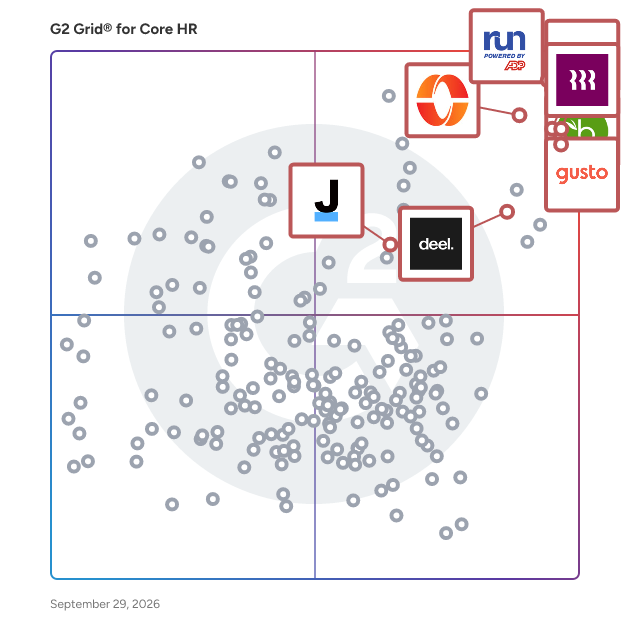
## G2 Grid® for Core HR Software
![G2 Grid® for Core HR Software plotting products by satisfaction and market presence](https://www.g2.com/categories/core-hr/grids.png?focus%5B%5D=5449&focus%5B%5D=3637&focus%5B%5D=53090&focus%5B%5D=4062&focus%5B%5D=3236&focus%5B%5D=1621546&focus%5B%5D=4499&focus%5B%5D=21135)
Highlighted products: RUN Powered by ADP, Gusto, Rippling, TriNet, BambooHR, Deel HR, Justworks, and Keka.
Underlying data: [Grid® JSON](https://www.g2.com/categories/core-hr/grids.json?focus%5B%5D=run-powered-by-adp&amp;focus%5B%5D=gusto&amp;focus%5B%5D=rippling&amp;focus%5B%5D=trinet&amp;focus%5B%5D=bamboohr&amp;focus%5B%5D=deel-hr&amp;focus%5B%5D=justworks&amp;focus%5B%5D=keka&amp;segment=small-business)


## How Many Core HR Software Products Does G2 Track?
**Total Products under this Category:** 676

### Category Stats (Jul 2026)
- **Average Rating**: 4.35/5 (↑0.01 vs Jun 2026) The average rating of products in this category, based on all submitted ratings
- **Top Trending Product**: LinovHR (+53.03%) - Among all products in this category, LinovHR recorded the largest rating increase compared to last month
*Last updated: July 16, 2026*


## How Does G2 Rank Core HR Software Products?

**Why You Can Trust G2's Software Rankings:**

- 30 Analysts and Data Experts
- 114,500+ Authentic Reviews
- 676+ Products
- Unbiased Rankings

G2's software rankings are built on verified user reviews, rigorous moderation, and a consistent research methodology maintained by a team of analysts and data experts. Each product is measured using the same transparent criteria, with no paid placement or vendor influence. While reviews reflect real user experiences, which can be subjective, they offer valuable insight into how software performs in the hands of professionals. Together, these inputs power the G2 Score, a standardized way to compare tools within every category.


---

**Sponsored**

### Checkmate

Pre-employment screening just got easy👌🏻 Checkmate is an easy-to-use online background screening and workforce compliance platform. We help businesses streamline pre-employment screening and reference checking, and stay on top of ongoing employee compliance, so their teams can focus on hiring the right people, faster. Trusted by global brands like Samsung, EY, and Woolworths, Checkmate automates background screening with an intuitive, mobile-friendly workflow. Candidates complete everything in minutes, and hiring teams gain real-time visibility into progress—all from one powerful dashboard. Operating in 190+ countries, Checkmate covers everything from identity verification and reference checks to criminal, employment, and right-to-work screenings. Whether hiring locally or globally, our platform ensures compliance with ever-changing regulations, reducing risk and keeping your business protected. Security and data privacy are at the core of Checkmate. As an ISO 27001 and SOC2-certified, GDPR-compliant platform, we adhere to the highest industry standards. Our commitment to safeguarding candidate and client data makes us a trusted partner for businesses worldwide. Checkmate integrates seamlessly with your existing hiring tech stack, connecting with leading ATS and HRIS platforms like Workday, SAP, SmartRecruiters, and BambooHR. No setup fees, no fixed contracts—just a fast, flexible way to simplify hiring. Our automated reference checking tool ensures a smooth, thorough, and fraud-resistant process, customisable to your needs. With a global reach and real-time reporting, hiring teams can make informed decisions quickly, improving both speed and accuracy. And if you ever need support? We’re here 24/7, ready to help. Join thousands of organisations worldwide using Checkmate to hire smarter, reduce admin, and deliver an outstanding candidate experience. Pre-employment screening and ongoing workforce compliance just got easy.


[Visit website](https://www.g2.com/external_clickthroughs/record?secure%5Bad_program%5D=ppc&amp;secure%5Bad_slot%5D=category_product_list&amp;secure%5Bcategory_id%5D=241&amp;secure%5Bchosen_at%5D=2026-07-19T22%3A47%3A21Z&amp;secure%5Bdisplayable_resource_id%5D=241&amp;secure%5Bdisplayable_resource_type%5D=Category&amp;secure%5Bmedium%5D=sponsored&amp;secure%5Bplacement_reason%5D=page_category&amp;secure%5Bplacement_resource_ids%5D%5B%5D=241&amp;secure%5Bprioritized%5D=false&amp;secure%5Bproduct_id%5D=90148&amp;secure%5Bresource_id%5D=241&amp;secure%5Bresource_type%5D=Category&amp;secure%5Bsource_type%5D=category_page&amp;secure%5Bsource_url%5D=https%3A%2F%2Fwww.g2.com%2Fcategories%2Fcore-hr%2Fsmall-business%3Fpage%3D2&amp;secure%5Btoken%5D=60b118e052097366cbd3d7da3a6a5539057a184c4998fa16dc717f15314037de&amp;secure%5Burl%5D=https%3A%2F%2Fwww.checkmate.tech%2F&amp;secure%5Burl_type%5D=company_website)

---

## What Are the Top-Rated Core HR Software Products in 2026?
### 1. [RUN Powered by ADP](https://www.g2.com/products/run-powered-by-adp/reviews)
RUN Powered by ADP is a software designed to simplify payroll processing and HR management for small businesses. The software provides automated tax deductions, error flagging, and HR tools by leveraging AI-enabled compliance monitoring across all 50 states. It automates recurring payroll runs and time tracking, reducing the burden of manual calculations and timecard management. RUN Powered by ADP addresses common small-business HR challenges by combining payroll, benefits administration, recruiting, and onboarding into a single platform backed by real-person professional support. The software supports use cases including salary benchmarking, mobile payroll access, employee self-service, and compliance training integrations.


**Average Rating:** 4.7/5.0
**Total Reviews:** 5,925
**How Do G2 Users Rate RUN Powered by ADP?**

- **Has the product been a good partner in doing business?:** 9.3/10 (Category avg: 8.7/10)
- **Organization Management:** 8.8/10 (Category avg: 8.7/10)
- **Performance:** 9.3/10 (Category avg: 8.6/10)
- **Compliance:** 9.2/10 (Category avg: 8.6/10)

**Who Is the Company Behind RUN Powered by ADP?**

- **Seller:** [ADP](https://www.g2.com/sellers/adp)
- **Company Website:** https://ADP.com
- **Year Founded:** 1949
- **HQ Location:** Roseland, New Jersey
- **Twitter:** @ADP (48,757 Twitter followers)
- **LinkedIn® Page:** https://www.linkedin.com/company/adp/ (99,043 employees on LinkedIn®)

**Who Uses This Product?**
- **Who Uses This:** Owner, Office Manager
- **Top Industries:** Construction, Accounting
- **Company Size:** 80% Small-Business, 5% Mid-Market


#### What Are RUN Powered by ADP's Pros and Cons?

**Pros:**

- Ease of Use (2869 reviews)
- Customer Support (1708 reviews)
- Helpful (1655 reviews)
- Payroll (1592 reviews)
- Payroll Ease (1453 reviews)

**Cons:**

- Poor Customer Support (452 reviews)
- Payroll Issues (420 reviews)
- Reporting Issues (322 reviews)
- Expensive (246 reviews)
- Long Waiting Time (230 reviews)


### What Do G2 Reviewers Say About RUN Powered by ADP?
*AI-generated summary from verified user reviews*

**Pros:**

- Users find RUN Powered by ADP to be **extremely user-friendly** , making payroll processing quick and organized.
- Users praise the **excellent customer support** of RUN Powered by ADP, appreciating its easy access and fast response.
- Users value the **excellent customer support** of RUN Powered by ADP, enhancing their overall experience and accessibility.
- Users find the **payroll processing quick and easy** , making employee payments organized and stress-free.
- Users value the **quick and organized payroll processing** of RUN Powered by ADP, enhancing efficiency and ease of use.

**Cons:**

- Users report **poor customer support** , struggling to reach real representatives and enduring frustrating automated interactions.
- Users find **payroll issues** frustrating, especially with rigid templates, tax payment troubles, and employee access complications.
- Users face **reporting issues** that require multiple contacts for resolution, complicating the overall experience with RUN Powered by ADP.
- Users find the **fees associated with RUN Powered by ADP** to be quite high, wishing for more affordability.
- Users experience **long waiting times** for chat help, indicating a need for improved notification and support efficiency.

#### What Are Recent G2 Reviews of RUN Powered by ADP?

**"[Fast, Knowledgeable Chat Support That Makes the Software Easy to Use](https://www.g2.com/survey_responses/run-powered-by-adp-review-13119471)"**

**Rating:** 5.0/5.0 stars
*— Jennifer D.*

[Read full review](https://www.g2.com/survey_responses/run-powered-by-adp-review-13119471)

---

**"[RUN Powered by ADP Streamlines Payroll and Onboarding with an Intuitive Experience](https://www.g2.com/survey_responses/run-powered-by-adp-review-13114567)"**

**Rating:** 4.5/5.0 stars
*— Tania R.*

[Read full review](https://www.g2.com/survey_responses/run-powered-by-adp-review-13114567)

---


#### What Are G2 Users Discussing About RUN Powered by ADP?

- [What is RUN Powered by ADP used for?](https://www.g2.com/discussions/what-is-run-powered-by-adp-used-for) - 2 comments, 1 upvote
- [What is the difference between ADP run and ADP Workforce Now?](https://www.g2.com/discussions/run-powered-by-adp-what-is-the-difference-between-adp-run-and-adp-workforce-now) - 2 comments, 1 upvote
- [How do I run payroll on ADP?](https://www.g2.com/discussions/how-do-i-run-payroll-on-adp) - 2 comments, 1 upvote
- [What software does ADP use?](https://www.g2.com/discussions/what-software-does-adp-use)
- [WHAT IS RUN Powered by ADP?](https://www.g2.com/discussions/what-is-run-powered-by-adp) - 2 comments

### 2. [Gusto](https://www.g2.com/products/gusto/reviews)
Gusto is a software designed to help small and medium-sized businesses manage payroll, benefits, hiring, and employee administration in one place. The software provides automated payroll calculations, tax filings, benefits administration, and salary benchmarking by leveraging a consolidated, user-friendly interface built for organizations without large HR teams. It automates compliance with federal and state regulations and reduces the risk of costly payroll errors. Gusto addresses the challenge of managing multiple disconnected HR systems by consolidating workforce management functions into a single platform with built-in expert support. The software supports use cases including employee onboarding, open enrollment, performance review templates, compliance checklists, and health insurance and retirement plan administration.


**Average Rating:** 4.6/5.0
**Total Reviews:** 11,727
**How Do G2 Users Rate Gusto?**

- **Has the product been a good partner in doing business?:** 9.1/10 (Category avg: 8.7/10)
- **Organization Management:** 8.8/10 (Category avg: 8.7/10)
- **Performance:** 9.2/10 (Category avg: 8.6/10)
- **Compliance:** 8.8/10 (Category avg: 8.6/10)

**Who Is the Company Behind Gusto?**

- **Seller:** [Gusto](https://www.g2.com/sellers/gusto)
- **Company Website:** https://gusto.com/
- **Year Founded:** 2011
- **HQ Location:** San Francisco, CA
- **Twitter:** @GustoHQ (21,245 Twitter followers)
- **LinkedIn® Page:** https://www.linkedin.com/company/2499210/ (4,426 employees on LinkedIn®)

**Who Uses This Product?**
- **Who Uses This:** Owner, CEO
- **Top Industries:** Non-Profit Organization Management, Health, Wellness and Fitness
- **Company Size:** 76% Small-Business, 14% Mid-Market


#### What Are Gusto's Pros and Cons?

**Pros:**

- Ease of Use (5185 reviews)
- Payroll Ease (2722 reviews)
- Easy Setup (2700 reviews)
- Simple (2678 reviews)
- Payroll (2263 reviews)

**Cons:**

- Missing Features (619 reviews)
- Poor Customer Support (548 reviews)
- Payroll Issues (454 reviews)
- Login Issues (415 reviews)
- Limited Customization (409 reviews)


### What Do G2 Reviewers Say About Gusto?
*AI-generated summary from verified user reviews*

**Pros:**

- Users appreciate Gusto&#39;s **ease of use** , enjoying its user-friendly, intuitive features that simplify their experience.
- Users value the **user-friendly interface** of Gusto, which simplifies payroll and HR tasks with effective automation.
- Users highlight the **easy setup** of Gusto, appreciating its quick and straightforward initial experience compared to others.
- Users appreciate the **accessibility and user-friendly design** of Gusto, making payroll management seamless and efficient.
- Users appreciate the **user-friendly interface** of Gusto, making payroll tasks smooth and efficient to manage.

**Cons:**

- Users find Gusto&#39;s **missing features** limiting, lacking intuitive expense handling and advanced reporting options.
- Users face challenges with **poor customer support** , finding it hard to reach representatives when needed.
- Users experience **payroll issues** including confusion with paused payroll confirmations and complications with manual pay entries.
- Users often face **login issues** with Gusto, experiencing repeated logins and integration challenges with their business systems.
- Users note the **limited customization** in Gusto, finding the mobile app less intuitive and lacking advanced features.

#### What Are Recent G2 Reviews of Gusto?

**"[Happy Customer](https://www.g2.com/survey_responses/gusto-review-12006488)"**

**Rating:** 4.0/5.0 stars
*— Makinzie L.*

[Read full review](https://www.g2.com/survey_responses/gusto-review-12006488)

---

**"[Intuitive, Secure Experience with Easy Alerts and Paycheck Access](https://www.g2.com/survey_responses/gusto-review-13112193)"**

**Rating:** 4.0/5.0 stars
*— Amanda O.*

[Read full review](https://www.g2.com/survey_responses/gusto-review-13112193)

---


#### What Are G2 Users Discussing About Gusto?

- [What is Gusto used for?](https://www.g2.com/discussions/what-is-gusto-used-for) - 2 comments
- [How do you use gusto payroll?](https://www.g2.com/discussions/how-do-you-use-gusto-payroll)
- [Is gusto payroll safe?](https://www.g2.com/discussions/is-gusto-payroll-safe) - 4 comments, 7 upvotes
- [Is there an app for Gusto payroll?](https://www.g2.com/discussions/is-there-an-app-for-gusto-payroll) - 4 comments, 1 upvote
- [What is gusto payroll?](https://www.g2.com/discussions/what-is-gusto-payroll) - 2 comments

### 3. [Rippling](https://www.g2.com/products/rippling/reviews)
Rippling is a software designed to unify HR, IT, payroll, and spend management into a single platform. The software provides employee lifecycle management, device management, software access control, and compliance monitoring by leveraging a centralized dashboard with real-time financial visibility. It automates HR tasks and approval workflows, reducing the administrative overhead of managing people, technology, and spend across separate systems. Rippling addresses the complexity of fragmented business operations by consolidating workforce and IT functions into one connected platform. The software supports use cases including benefits administration, dynamic spend policies, compliance enforcement, and integration with third-party business tools.


**Average Rating:** 4.8/5.0
**Total Reviews:** 11,569
**How Do G2 Users Rate Rippling?**

- **Has the product been a good partner in doing business?:** 9.1/10 (Category avg: 8.7/10)
- **Organization Management:** 9.4/10 (Category avg: 8.7/10)
- **Performance:** 9.4/10 (Category avg: 8.6/10)
- **Compliance:** 9.2/10 (Category avg: 8.6/10)

**Who Is the Company Behind Rippling?**

- **Seller:** [Rippling](https://www.g2.com/sellers/rippling)
- **Company Website:** https://www.rippling.com
- **Year Founded:** 2016
- **HQ Location:** San Francisco, CA
- **Twitter:** @Rippling (12,402 Twitter followers)
- **LinkedIn® Page:** https://www.linkedin.com/company/17988315/ (7,523 employees on LinkedIn®)

**Who Uses This Product?**
- **Who Uses This:** Software Engineer, Account Executive
- **Top Industries:** Computer Software, Information Technology and Services
- **Company Size:** 54% Mid-Market, 29% Small-Business


#### What Are Rippling's Pros and Cons?

**Pros:**

- Ease of Use (6968 reviews)
- Intuitive (5171 reviews)
- Simple (4565 reviews)
- User Interface (3811 reviews)
- Easy Access (3660 reviews)

**Cons:**

- Missing Features (1241 reviews)
- Not User-Friendly (886 reviews)
- Learning Curve (858 reviews)
- Limited Features (843 reviews)
- Improvement Needed (820 reviews)


### What Do G2 Reviewers Say About Rippling?
*AI-generated summary from verified user reviews*

**Pros:**

- Users value the **ease of use** of Rippling, enjoying seamless access to multiple tools with one login.
- Users appreciate the **intuitive user interface** of Rippling, making navigation and feature access simple and efficient.
- Users appreciate the **ease of navigation** with Rippling, enjoying its streamlined and efficient access to essential features.
- Users appreciate the **user-friendly interface** of Rippling, enhancing navigation and accessibility for all features.
- Users appreciate the **easy access** to Clock in/out and payslips, enjoying a streamlined and efficient experience.

**Cons:**

- Users find **missing features** in reporting and app consistency, leading to frustration and inefficiency in their workflows.
- Users find Rippling **not user-friendly** , experiencing slow load times, complicated reporting, and an outdated design.
- Users find the **steep learning curve** of Rippling challenging, especially due to its many powerful features.
- Users find Rippling&#39;s **limited features** create an outdated design and cluttered interfaces, hindering usability and aesthetic appeal.
- Users express the need for improvements in **notification functionality and overall system performance** , citing confusion and slow load times.

#### What Are Recent G2 Reviews of Rippling?

**"[Smooth User Experience with Rippling](https://www.g2.com/survey_responses/rippling-review-11136743)"**

**Rating:** 5.0/5.0 stars
*— Frebeliza B.*

[Read full review](https://www.g2.com/survey_responses/rippling-review-11136743)

---

**"[All-in-One HR Platform That Streamlines Payroll, Time Tracking, and Access Management](https://www.g2.com/survey_responses/rippling-review-13091087)"**

**Rating:** 5.0/5.0 stars
*— Jetsy M.*

[Read full review](https://www.g2.com/survey_responses/rippling-review-13091087)

---


#### What Are G2 Users Discussing About Rippling?

- [How is Rippling innovating in the field of HR and IT management for businesses?](https://www.g2.com/discussions/how-is-rippling-innovating-in-the-field-of-hr-and-it-management-for-businesses) - 6 comments, 7 upvotes
- [What is Rippling used for?](https://www.g2.com/discussions/what-is-rippling-used-for) - 6 comments, 3 upvotes

### 4. [TriNet](https://www.g2.com/products/trinet/reviews)
TriNet is a software designed to deliver comprehensive PEO-based HR solutions tailored for small and midsize businesses. The software provides payroll processing, benefits administration, time tracking, performance management, learning and development, and workforce analytics by leveraging over 30 years of industry-specific HR expertise and proprietary technology. It automates compliance support and risk mitigation processes, reducing the administrative burden of managing multiple HR vendors. TriNet addresses complex HR challenges by consolidating payroll, benefits, and people management into a unified platform backed by assigned HR professionals and relationship managers. The software supports use cases including instructor-led compliance training, hiring and onboarding consultation, compensation benchmarking, and access to premium benefits through national and regional carriers.


**Average Rating:** 4.2/5.0
**Total Reviews:** 1,901
**How Do G2 Users Rate TriNet?**

- **Has the product been a good partner in doing business?:** 8.2/10 (Category avg: 8.7/10)
- **Organization Management:** 8.0/10 (Category avg: 8.7/10)
- **Performance:** 8.2/10 (Category avg: 8.6/10)
- **Compliance:** 8.5/10 (Category avg: 8.6/10)

**Who Is the Company Behind TriNet?**

- **Seller:** [TriNet](https://www.g2.com/sellers/trinet)
- **Company Website:** https://www.trinet.com
- **Year Founded:** 1988
- **HQ Location:** Dublin , CA
- **Twitter:** @TriNet (24,429 Twitter followers)
- **LinkedIn® Page:** https://www.linkedin.com/company/9438/ (4,423 employees on LinkedIn®)

**Who Uses This Product?**
- **Who Uses This:** Controller, Office Manager
- **Top Industries:** Information Technology and Services, Computer Software
- **Company Size:** 49% Small-Business, 48% Mid-Market


#### What Are TriNet's Pros and Cons?

**Pros:**

- Customer Support (118 reviews)
- Helpful (117 reviews)
- Ease of Use (104 reviews)
- Payroll (66 reviews)
- Response Time (40 reviews)

**Cons:**

- Poor Customer Support (61 reviews)
- High Fees (31 reviews)
- Not Intuitive (28 reviews)
- Navigation Difficulty (22 reviews)
- Limited Features (21 reviews)


### What Do G2 Reviewers Say About TriNet?
*AI-generated summary from verified user reviews*

**Pros:**

- Users praise TriNet&#39;s **responsive customer support** , consistently resolving issues efficiently and enhancing the overall experience.
- Users value the **responsiveness and helpfulness** of TriNet&#39;s support team, enhancing their overall experience and satisfaction.
- Users appreciate the **ease of use** of TriNet, highlighting its smooth implementation and user-friendly interface.
- Users value the **automated payroll processing** of TriNet, appreciating consistent support and a seamless experience.
- Users appreciate the **quick response time** of TriNet&#39;s support team, ensuring prompt assistance whenever needed.

**Cons:**

- Users experience **poor customer support** with unhelpful agents, delays in issue resolution, and excessive dependency on the support team.
- Users find TriNet&#39;s **high fees** to be a drawback, despite valuing their extensive HR and accounting services.
- Users find TriNet&#39;s interface **not intuitive** , with clunky navigation and confusing organizational structures affecting usability.
- Users find the **navigation difficult** , with a clunky interface and excessive redirects impacting their overall experience.
- Users find TriNet has **limited features** like absence of payroll approval and insufficient salary history visibility.

#### What Are Recent G2 Reviews of TriNet?

**"[TriNet Simplifies HR So SMBs Can Focus on Growth](https://www.g2.com/survey_responses/trinet-review-12967209)"**

**Rating:** 5.0/5.0 stars
*— Tiffany V.*

[Read full review](https://www.g2.com/survey_responses/trinet-review-12967209)

---

**"[Simple and Stress-Free Benefits Management](https://www.g2.com/survey_responses/trinet-review-13036603)"**

**Rating:** 5.0/5.0 stars
*— Gianna G.*

[Read full review](https://www.g2.com/survey_responses/trinet-review-13036603)

---


#### What Are G2 Users Discussing About TriNet?

- [What is TriNet used for?](https://www.g2.com/discussions/what-is-trinet-used-for) - 1 comment, 1 upvote
- [How much does TriNet cost?](https://www.g2.com/discussions/how-much-does-trinet-cost)
- [Is TriNet a good company to work for?](https://www.g2.com/discussions/is-trinet-a-good-company-to-work-for)
- [What is TriNet passport?](https://www.g2.com/discussions/what-is-trinet-passport) - 1 comment, 1 upvote
- [What is a TriNet?](https://www.g2.com/discussions/what-is-a-trinet) - 1 comment

### 5. [BambooHR](https://www.g2.com/products/bamboohr/reviews)
BambooHR is a software designed to centralize employee data and simplify people management across the full employee lifecycle. The software provides payroll processing, time tracking, benefits administration, and electronic signature collection by leveraging a unified database trusted by companies in over 150 countries. It automates HR workflows from onboarding to offboarding, reducing manual data entry and administrative inefficiencies. BambooHR addresses coordination and compliance challenges by consolidating employee records, payroll, and benefits into a single, secure platform. The software supports use cases including self-service HR access, lifecycle workflow automation, and integrations with third-party HR and business tools.


**Average Rating:** 4.4/5.0
**Total Reviews:** 5,226
**How Do G2 Users Rate BambooHR?**

- **Has the product been a good partner in doing business?:** 9.0/10 (Category avg: 8.7/10)
- **Organization Management:** 8.8/10 (Category avg: 8.7/10)
- **Performance:** 8.5/10 (Category avg: 8.6/10)
- **Compliance:** 7.9/10 (Category avg: 8.6/10)

**Who Is the Company Behind BambooHR?**

- **Seller:** [BambooHR](https://www.g2.com/sellers/bamboohr)
- **Company Website:** https://www.bamboohr.com
- **Year Founded:** 2008
- **HQ Location:** Draper, UT
- **Twitter:** @bamboohr (18,007 Twitter followers)
- **LinkedIn® Page:** https://www.linkedin.com/company/2049060/ (1,894 employees on LinkedIn®)

**Who Uses This Product?**
- **Who Uses This:** HR Manager, Human Resources Manager
- **Top Industries:** Computer Software, Information Technology and Services
- **Company Size:** 61% Mid-Market, 26% Small-Business


#### What Are BambooHR's Pros and Cons?

**Pros:**

- Ease of Use (906 reviews)
- Simple (487 reviews)
- User Interface (403 reviews)
- Intuitive (336 reviews)
- User-Friendly Interface (324 reviews)

**Cons:**

- Missing Features (261 reviews)
- Limited Customization (183 reviews)
- Limited Features (170 reviews)
- Limited Options (108 reviews)
- Limited Capabilities (102 reviews)


### What Do G2 Reviewers Say About BambooHR?
*AI-generated summary from verified user reviews*

**Pros:**

- Users appreciate the **ease of use** of BambooHR, making HR tasks faster and more efficient for everyone.
- Users love the **ease of use** of BambooHR, praising its clean interface and simplified management features.
- Users love the **clean and intuitive user interface** of BambooHR, simplifying administrative tasks and enhancing user experience.
- Users love the **intuitive design** of BambooHR, making it easy to navigate and manage HR tasks efficiently.
- Users appreciate the **user-friendly interface** of BambooHR, praising its intuitive design and easy navigation.

**Cons:**

- Users miss **essential features** like deeper integrations and flexible PTO visibility, impacting overall functionality and transparency.
- Users find the **limited customization options** in BambooHR hinder efficient management of timecards and profiles.
- Users find BambooHR&#39;s features **limited** , lacking necessary custom options and robust reporting for effective HR management.
- Users find the **limited options** in BambooHR restrict their ability to handle diverse HR situations effectively.
- Users note some **limited capabilities** in BambooHR, particularly regarding approval hierarchies and reporting flexibility.

#### What Are Recent G2 Reviews of BambooHR?

**"[Simple, Intuitive HR Platform with a People-First Focus](https://www.g2.com/survey_responses/bamboohr-review-13100717)"**

**Rating:** 5.0/5.0 stars
*— Francisco C.*

[Read full review](https://www.g2.com/survey_responses/bamboohr-review-13100717)

---

**"[Streamlined HR Tasks with Ultimate Ease](https://www.g2.com/survey_responses/bamboohr-review-13088413)"**

**Rating:** 5.0/5.0 stars
*— Hannah F.*

[Read full review](https://www.g2.com/survey_responses/bamboohr-review-13088413)

---


#### What Are G2 Users Discussing About BambooHR?

- [How can I effectively use BambooHR for comprehensive employee performance management and HR analytics?](https://www.g2.com/discussions/how-can-i-effectively-use-bamboohr-for-comprehensive-employee-performance-management-and-hr-analytics) - 1 comment, 2 upvotes
- [What is BambooHR used for?](https://www.g2.com/discussions/bamboohr-what-is-bamboohr-used-for) - 1 comment, 2 upvotes
- [What is TraxPayroll used for?](https://www.g2.com/discussions/what-is-traxpayroll-used-for)

### 6. [Deel HR](https://www.g2.com/products/deel-hr/reviews)
Deel HR is a software designed to manage people, compliance, and HR processes for companies operating across multiple countries. The software provides core HR operations, onboarding, time-off management, compensation benchmarking, costed headcount planning, and performance reviews by leveraging built-in global data, AI automation, and modular tools that layer onto a central employee record. It automates routine HR tasks and compliance workflows, reducing manual work and giving HR teams back significant time each month. Deel HR addresses the complexity of managing a global workforce by supporting every worker type and local regulatory requirements across 150 or more countries. The software supports use cases including AI-assisted offboarding, headcount planning, salary benchmarking, goal tracking, learning and surveys, and country-aware reporting for hiring and pay decisions.


**Average Rating:** 4.8/5.0
**Total Reviews:** 1,302
**How Do G2 Users Rate Deel HR?**

- **Has the product been a good partner in doing business?:** 9.5/10 (Category avg: 8.7/10)
- **Organization Management:** 9.6/10 (Category avg: 8.7/10)
- **Performance:** 9.2/10 (Category avg: 8.6/10)
- **Compliance:** 9.5/10 (Category avg: 8.6/10)

**Who Is the Company Behind Deel HR?**

- **Seller:** [Deel](https://www.g2.com/sellers/deel)
- **Company Website:** https://www.deel.com/
- **Year Founded:** 2019
- **HQ Location:** San Francisco, California
- **Twitter:** @deel (30,540 Twitter followers)
- **LinkedIn® Page:** https://www.linkedin.com/company/deel/ (9,619 employees on LinkedIn®)

**Who Uses This Product?**
- **Who Uses This:** Contractor, Software Engineer
- **Top Industries:** Computer Software, Information Technology and Services
- **Company Size:** 47% Small-Business, 43% Mid-Market


#### What Are Deel HR's Pros and Cons?

**Pros:**

- Ease of Use (862 reviews)
- Simple (427 reviews)
- Helpful (364 reviews)
- Intuitive (356 reviews)
- Convenience (355 reviews)

**Cons:**

- High Fees (129 reviews)
- Expensive (115 reviews)
- Payment Issues (104 reviews)
- Slow Loading (103 reviews)
- Slow Performance (101 reviews)


### What Do G2 Reviewers Say About Deel HR?
*AI-generated summary from verified user reviews*

**Pros:**

- Users find Deel HR to have a **user-friendly interface** , making tasks like time tracking and invoicing effortless.
- Users appreciate the **intuitive navigation** of Deel HR, finding it easy to track time and manage invoices.
- Users value the **helpful time-tracking features** and intuitive design of Deel HR, enhancing their overall experience.
- Users find Deel HR to be extremely **intuitive and easy to use** , enhancing their overall experience with seamless onboarding.
- Users appreciate the **convenience** of Deel HR, facilitating project tracking and timely salary payments effortlessly.

**Cons:**

- Users find the **high fees** for transfers and withdrawals with Deel HR to be a significant drawback.
- Users find Deel HR&#39;s **transfer fees expensive** , especially for common withdrawal methods like bank transfers and PayPal.
- Users experience **payment issues** with Deel HR, citing slow international transfers and high fees for various withdrawal methods.
- Users experience **slow loading** times, leading to frustration with document uploads and response delays.
- Users experience **slow performance** with Deel HR, facing delays in loading and transferring amounts that frustrate the process.

#### What Are Recent G2 Reviews of Deel HR?

**"[User-Friendly Platform with Fast, Trackable Payments](https://www.g2.com/survey_responses/deel-hr-review-12683686)"**

**Rating:** 5.0/5.0 stars
*— Carmen M.*

[Read full review](https://www.g2.com/survey_responses/deel-hr-review-12683686)

---

**"[Transparent, Reliable Payroll With Clear Fee Breakdowns](https://www.g2.com/survey_responses/deel-hr-review-12722827)"**

**Rating:** 4.0/5.0 stars
*— Santiago N.*

[Read full review](https://www.g2.com/survey_responses/deel-hr-review-12722827)

---


### 7. [Justworks](https://www.g2.com/products/justworks/reviews)
Justworks is a multi-product solution offering global payroll, benefits, compliance support, time tracking, HR tools and more with award-winning support by HR certified experts. We handle the nitty gritty so you can focus on what matters: building your business and your team.


**Average Rating:** 4.6/5.0
**Total Reviews:** 1,119
**How Do G2 Users Rate Justworks?**

- **Has the product been a good partner in doing business?:** 9.2/10 (Category avg: 8.7/10)
- **Organization Management:** 8.9/10 (Category avg: 8.7/10)
- **Performance:** 9.2/10 (Category avg: 8.6/10)
- **Compliance:** 8.9/10 (Category avg: 8.6/10)

**Who Is the Company Behind Justworks?**

- **Seller:** [Justworks](https://www.g2.com/sellers/justworks)
- **Company Website:** https://www.justworks.com
- **Year Founded:** 2012
- **HQ Location:** New York
- **LinkedIn® Page:** https://www.linkedin.com/company/justworks-/ (1,586 employees on LinkedIn®)
- **Ownership:** NASDAQ: JW

**Who Uses This Product?**
- **Who Uses This:** Operations Manager, CEO
- **Top Industries:** Computer Software, Information Technology and Services
- **Company Size:** 75% Small-Business, 24% Mid-Market


#### What Are Justworks's Pros and Cons?

**Pros:**

- Ease of Use (315 reviews)
- Customer Support (223 reviews)
- Helpful (216 reviews)
- User Interface (167 reviews)
- Intuitive (162 reviews)

**Cons:**

- Missing Features (65 reviews)
- Poor Customer Support (50 reviews)
- Limited Features (48 reviews)
- Limited Customization (34 reviews)
- Poor Benefits (32 reviews)


### What Do G2 Reviewers Say About Justworks?
*AI-generated summary from verified user reviews*

**Pros:**

- Users value the **ease of use** of Justworks, appreciating its user-friendly design and streamlined processes.
- Users highlight the **exceptional customer support** at Justworks, providing timely and effective assistance for workplace challenges.
- Users appreciate the **stellar customer support** of Justworks, highlighting its responsiveness and thoroughness in resolving issues.
- Users rave about the **excellent user interface** of Justworks, which ensures an easy and enjoyable experience.
- Users appreciate the **intuitive user interface** of Justworks, making HR tasks easy and stress-free.

**Cons:**

- Users note **missing features** in the Justworks mobile app and limited options for insurance plans.
- Users experience **poor customer support** , struggling with communication issues and slow response times for critical inquiries.
- Users find **limited features** in Justworks, particularly in reporting, API access, and time tracking across platforms.
- Users express frustration with **limited customization options** on Justworks, impacting data access and report flexibility.
- Users express frustration with Justworks&#39; **poor benefits** , citing high premiums and insufficient coverage options as major drawbacks.

#### What Are Recent G2 Reviews of Justworks?

**"[User-Friendly and Cost-Effective Business Administration](https://www.g2.com/survey_responses/justworks-review-12678982)"**

**Rating:** 4.0/5.0 stars
*— Imran B.*

[Read full review](https://www.g2.com/survey_responses/justworks-review-12678982)

---

**"[Justworks Simplifies Onboarding, Payroll, Benefits, and Compliance in One Intuitive Platform](https://www.g2.com/survey_responses/justworks-review-12725889)"**

**Rating:** 5.0/5.0 stars
*— Verified User in Capital Markets*

[Read full review](https://www.g2.com/survey_responses/justworks-review-12725889)

---


#### What Are G2 Users Discussing About Justworks?

- [What is Justworks used for?](https://www.g2.com/discussions/what-is-justworks-used-for) - 1 comment
- [What are the features of payroll system?](https://www.g2.com/discussions/justworks-what-are-the-features-of-payroll-system) - 1 comment
- [How much does Justworks cost?](https://www.g2.com/discussions/how-much-does-justworks-cost) - 1 comment
- [Does Justworks have an app?](https://www.g2.com/discussions/does-justworks-have-an-app) - 2 comments
- [What is Justworks?](https://www.g2.com/discussions/what-is-justworks) - 1 comment

### 8. [Keka](https://www.g2.com/products/keka/reviews)
Keka is a software designed to align teams, drive performance, and streamline HR, payroll, and project delivery for growing businesses globally. The software provides hiring, onboarding, time tracking, performance reviews, payroll processing, and project billing by leveraging a flexible, modular system built for HR, finance, and delivery teams across countries and industries. It automates compliance management and payroll workflows, reducing the complexity of scaling people operations and project billing across regions. Keka addresses the challenge of managing desk and frontline workforces in one place by offering project-level insights and compliance support for every region it serves. The software supports use cases including billable project management, multi-country payroll, performance management, and workforce operations for service businesses.


**Average Rating:** 4.4/5.0
**Total Reviews:** 2,035
**How Do G2 Users Rate Keka?**

- **Has the product been a good partner in doing business?:** 8.9/10 (Category avg: 8.7/10)
- **Organization Management:** 8.8/10 (Category avg: 8.7/10)
- **Performance:** 8.6/10 (Category avg: 8.6/10)
- **Compliance:** 8.5/10 (Category avg: 8.6/10)

**Who Is the Company Behind Keka?**

- **Seller:** [Keka Technologies](https://www.g2.com/sellers/keka-technologies)
- **Company Website:** https://www.keka.com
- **Year Founded:** 2015
- **HQ Location:** Seattle, US
- **Twitter:** @kekahr_official (1,155 Twitter followers)
- **LinkedIn® Page:** https://www.linkedin.com/company/6417440/ (1,265 employees on LinkedIn®)

**Who Uses This Product?**
- **Who Uses This:** HR Manager, HR Executive
- **Top Industries:** Information Technology and Services, Computer Software
- **Company Size:** 68% Mid-Market, 20% Small-Business


#### What Are Keka's Pros and Cons?

**Pros:**

- Ease of Use (805 reviews)
- Customer Support (410 reviews)
- User Interface (362 reviews)
- Intuitive (343 reviews)
- Payroll (343 reviews)

**Cons:**

- Limited Customization (156 reviews)
- Poor Customer Support (145 reviews)
- Limited Features (143 reviews)
- Slow Loading (143 reviews)
- Missing Features (119 reviews)


### What Do G2 Reviewers Say About Keka?
*AI-generated summary from verified user reviews*

**Pros:**

- Users find KEKA&#39;s **user-friendly interface** and easy navigation enhance their HR management experience significantly.
- Users commend the **excellent customer support** from Keka, particularly appreciating their responsiveness and training sessions.
- Users appreciate Keka&#39;s **clean and intuitive UI** , which simplifies navigating HR functionalities and tracking employee information.
- Users highlight Keka&#39;s **intuitive interface** , making it easy for everyone to navigate and utilize effectively.
- Users value the **smooth payroll processing** of Keka, enhancing accuracy and efficiency in HR management.

**Cons:**

- Users find the **limited customization** of Keka frustrating, as it restricts tailoring the software to their needs.
- Users report **poor customer support** with slow responses and inadequate handling, leading to significant frustration.
- Users find Keka&#39;s **limited automation options** and notifications to be insufficient for their management needs.
- Users express significant frustration with **slow loading** times and occasional lag that affect their overall experience.
- Users note that Keka has **missing features** like flexible performance reviews and weak mobile app functionality.

#### What Are Recent G2 Reviews of Keka?

**"[Streamlined HR Tasks with Some Room for Improvement](https://www.g2.com/survey_responses/keka-review-13070476)"**

**Rating:** 4.5/5.0 stars
*— Mohammed S.*

[Read full review](https://www.g2.com/survey_responses/keka-review-13070476)

---

**"[Streamlines HR with Seamless Efficiency](https://www.g2.com/survey_responses/keka-review-8624783)"**

**Rating:** 4.5/5.0 stars
*— Akash C.*

[Read full review](https://www.g2.com/survey_responses/keka-review-8624783)

---


#### What Are G2 Users Discussing About Keka?

- [Which software is best for payroll?](https://www.g2.com/discussions/keka-hr-which-software-is-best-for-payroll) - 6 comments, 3 upvotes
- [Is KEKA a good company?](https://www.g2.com/discussions/is-keka-a-good-company) - 5 comments, 6 upvotes
- [What is HR and payroll software?](https://www.g2.com/discussions/what-is-hr-and-payroll-software) - 3 comments, 4 upvotes
- [What is KEKA software?](https://www.g2.com/discussions/what-is-keka-software) - 4 comments, 1 upvote

### 9. [Paylocity](https://www.g2.com/products/paylocity/reviews)
Paylocity is a software designed to bring HR, finance, and IT functions together in a single modern platform. The software provides payroll, benefits, talent management, workforce management, expense tracking, accounts payable, and headcount planning by leveraging a single employee record that keeps policies and approval workflows synchronized. It automates spend management and HR lifecycle workflows, reducing the friction of managing people and finances across disconnected systems. Paylocity addresses operational complexity by anchoring all employee data, policies, and approvals to one unified record that adapts as employees join, move, and grow. The software supports use cases including corporate card management, procurement, compliance, and integrated reporting across HR and finance functions.


**Average Rating:** 4.4/5.0
**Total Reviews:** 5,997
**How Do G2 Users Rate Paylocity?**

- **Has the product been a good partner in doing business?:** 8.8/10 (Category avg: 8.7/10)
- **Organization Management:** 8.3/10 (Category avg: 8.7/10)
- **Performance:** 8.5/10 (Category avg: 8.6/10)
- **Compliance:** 8.3/10 (Category avg: 8.6/10)

**Who Is the Company Behind Paylocity?**

- **Seller:** [Paylocity](https://www.g2.com/sellers/paylocity)
- **Company Website:** https://www.paylocity.com
- **Year Founded:** 1997
- **HQ Location:** Schaumburg, IL
- **Twitter:** @Paylocity (4,577 Twitter followers)
- **LinkedIn® Page:** https://www.linkedin.com/company/24614/ (6,978 employees on LinkedIn®)

**Who Uses This Product?**
- **Who Uses This:** HR Manager, Controller
- **Top Industries:** Computer Software, Information Technology and Services
- **Company Size:** 69% Mid-Market, 19% Small-Business


#### What Are Paylocity's Pros and Cons?

**Pros:**

- Ease of Use (1348 reviews)
- Helpful (661 reviews)
- Customer Support (603 reviews)
- Intuitive (562 reviews)
- Simple (552 reviews)

**Cons:**

- Poor Customer Support (483 reviews)
- Missing Features (333 reviews)
- Learning Curve (318 reviews)
- Limited Features (251 reviews)
- Poor Support Services (245 reviews)


### What Do G2 Reviewers Say About Paylocity?
*AI-generated summary from verified user reviews*

**Pros:**

- Users find Paylocity to have **ease of use** , especially after training and during invoice reconciliation processes.
- Users appreciate the **helpful customer service** of Paylocity, providing assistance and support when needed.
- Users appreciate the **helpful customer support** of Paylocity, enhancing their payroll experience with valuable assistance and resources.
- Users appreciate the **intuitive navigation** of Paylocity, making it easy to find information and complete tasks.
- Users find Paylocity to be a **simple and user-friendly solution** for managing expenses and integrating with other software.

**Cons:**

- Users report **poor customer support** , experiencing long wait times and lack of direct access to assistance.
- Users often find **missing features** in Paylocity, leading to frustrations and inefficient workflows during critical tasks.
- Users find the **learning curve steep** with Paylocity, citing outdated software and lack of support for new users.
- Users express frustration with **limited features** in Paylocity, wishing for better admin controls and customization options.
- Users report **poor support services** , facing long wait times and inconsistent resolutions from customer service representatives.

#### What Are Recent G2 Reviews of Paylocity?

**"[Seamless All-in-One HR Platform That Saves Hours](https://www.g2.com/survey_responses/paylocity-review-12915096)"**

**Rating:** 5.0/5.0 stars
*— Ahtziri A.*

[Read full review](https://www.g2.com/survey_responses/paylocity-review-12915096)

---

**"[User-Friendly, Seamless Suite with Helpful and Quick Support](https://www.g2.com/survey_responses/paylocity-review-12934263)"**

**Rating:** 4.5/5.0 stars
*— Whitney J.*

[Read full review](https://www.g2.com/survey_responses/paylocity-review-12934263)

---


#### What Are G2 Users Discussing About Paylocity?

- [I&#39;m having trouble understanding how to use Airbase for managing company-wide spend. Could someone explain the best practices?](https://www.g2.com/discussions/i-m-having-trouble-understanding-how-to-use-airbase-for-managing-company-wide-spend-could-someone-explain-the-best-practices)
- [How is Paylocity transforming payroll and human capital management for businesses?](https://www.g2.com/discussions/how-is-paylocity-transforming-payroll-and-human-capital-management-for-businesses)
- [What is Paylocity used for?](https://www.g2.com/discussions/what-is-paylocity-used-for) - 1 comment
- [What is Airbase used for?](https://www.g2.com/discussions/what-is-airbase-used-for) - 3 comments
- [Why is paylocity not working?](https://www.g2.com/discussions/why-is-paylocity-not-working) - 3 comments

### 10. [HROne](https://www.g2.com/products/uneecops-hrone/reviews)
HROne is a software designed to automate HR processes and deliver actionable insights across the full employee lifecycle for enterprises. The software provides task management, global search, workforce analytics, and a Gmail-inspired HR inbox by leveraging a mobile-first HCM suite with real-time automation across 20-plus industries. It automates operational HR tasks and uses proactive reminders to discourage backlogs, reducing delays and manual follow-up across HR functions. HROne addresses inefficiency and fragmentation in enterprise HR by putting all workforce processes on autopilot while providing measurable ROI tracking within the platform. The software supports use cases including attendance management, payroll processing, onboarding, performance management, and HR operations for over 1,100 enterprises across manufacturing, IT, and other sectors.


**Average Rating:** 4.8/5.0
**Total Reviews:** 2,062
**How Do G2 Users Rate HROne?**

- **Has the product been a good partner in doing business?:** 9.4/10 (Category avg: 8.7/10)
- **Organization Management:** 9.4/10 (Category avg: 8.7/10)
- **Performance:** 9.3/10 (Category avg: 8.6/10)
- **Compliance:** 9.4/10 (Category avg: 8.6/10)

**Who Is the Company Behind HROne?**

- **Seller:** [HROne](https://www.g2.com/sellers/hrone-94ee16e4-7edc-45bb-803d-2eb147a2e6ba)
- **Year Founded:** 2016
- **HQ Location:** Noida
- **Twitter:** @hronecloud (1,569 Twitter followers)
- **LinkedIn® Page:** https://www.linkedin.com/company/hronecloud/ (450 employees on LinkedIn®)

**Who Uses This Product?**
- **Who Uses This:** HR Manager, Assistant Manager
- **Top Industries:** Manufacturing, Information Technology and Services
- **Company Size:** 61% Mid-Market, 26% Enterprise


#### What Are HROne's Pros and Cons?

**Pros:**

- Ease of Use (1127 reviews)
- Payroll (644 reviews)
- Helpful (571 reviews)
- Customer Support (546 reviews)
- Automation (467 reviews)

**Cons:**

- Slow Loading (331 reviews)
- Limited Features (273 reviews)
- Limited Customization (272 reviews)
- Missing Features (233 reviews)
- Slow Performance (167 reviews)


### What Do G2 Reviewers Say About HROne?
*AI-generated summary from verified user reviews*

**Pros:**

- Users find HROne to be **user-friendly and accessible** , streamlining time office management with ease and support.
- Users value the **cooperative support during payroll** , which significantly saves time and improves efficiency.
- Users appreciate the **helpful reminder feature** of HROne, ensuring timely completion of tasks without oversight.
- Users value the **excellent customer support** from HROne, appreciating timely assistance and cooperative service during payrolls.
- Users appreciate the **automation features** of HROne, enhancing efficiency and streamlining HR processes effortlessly.

**Cons:**

- Users experience **slow loading times** during peak usage, impacting efficiency and user satisfaction with HROne.
- Users find HROne&#39;s **limited features** frustrating, as essential tools like overtime planning and seamless mobile integration are missing.
- Users find the **limited customization** options of HROne restrictive, hindering personalized experiences and configurations.
- Users express dissatisfaction with missing **features** like an overtime planner and user-friendly mobile app functionality.
- Users often experience **slow performance** with HROne, affecting attendance marking and overall usability during peak times.

#### What Are Recent G2 Reviews of HROne?

**"[On-time support &amp; easy access, email pay-slip automation can be improved](https://www.g2.com/survey_responses/hrone-review-10898412)"**

**Rating:** 4.5/5.0 stars
*— Dhanaji T.*

[Read full review](https://www.g2.com/survey_responses/hrone-review-10898412)

---

**"[All-in-One HR Platform That Makes Daily Tasks Fast and Convenient](https://www.g2.com/survey_responses/hrone-review-12909282)"**

**Rating:** 4.5/5.0 stars
*— Anjaly T.*

[Read full review](https://www.g2.com/survey_responses/hrone-review-12909282)

---


#### What Are G2 Users Discussing About HROne?

- [What does Hr-One do?](https://www.g2.com/discussions/what-does-hr-one-do) - 2 comments
- [How do I use HR one app?](https://www.g2.com/discussions/how-do-i-use-hr-one-app) - 2 comments
- [What software is used in HR?](https://www.g2.com/discussions/what-software-is-used-in-hr) - 2 comments
- [What are the features of HR software?](https://www.g2.com/discussions/hr-one-what-are-the-features-of-hr-software) - 1 comment

### 11. [Remote HR Management](https://www.g2.com/products/remote-hr-management/reviews)
Remote HR Management is a software designed to centralize global HR operations for teams distributed across multiple countries. The software provides workforce management and people operations capabilities by leveraging Remote&#39;s global infrastructure and compliance expertise. It automates cross-border HR processes and reduces the complexity of managing international employee records and policies. Remote HR Management addresses the challenge of decentralized global team management by providing a unified platform for HR data and operations across regions. The software supports use cases including global employee management, compliance tracking, and centralized HR administration for distributed workforces.


**Average Rating:** 4.6/5.0
**Total Reviews:** 490
**How Do G2 Users Rate Remote HR Management?**

- **Has the product been a good partner in doing business?:** 9.1/10 (Category avg: 8.7/10)
- **Organization Management:** 8.5/10 (Category avg: 8.7/10)
- **Performance:** 9.0/10 (Category avg: 8.6/10)
- **Compliance:** 8.8/10 (Category avg: 8.6/10)

**Who Is the Company Behind Remote HR Management?**

- **Seller:** [Remote](https://www.g2.com/sellers/remote)
- **Company Website:** https://remote.com
- **Year Founded:** 2019
- **HQ Location:** San Francisco, CA
- **Twitter:** @remote (34,740 Twitter followers)
- **LinkedIn® Page:** https://www.linkedin.com/company/remote.com (15,644 employees on LinkedIn®)

**Who Uses This Product?**
- **Who Uses This:** Software Engineer, Senior Software Engineer
- **Top Industries:** Computer Software, Information Technology and Services
- **Company Size:** 46% Mid-Market, 37% Small-Business


#### What Are Remote HR Management's Pros and Cons?

**Pros:**

- Ease of Use (336 reviews)
- Helpful (246 reviews)
- Customer Support (240 reviews)
- User Interface (188 reviews)
- Easy Setup (184 reviews)

**Cons:**

- Poor Customer Support (68 reviews)
- Delays (66 reviews)
- Missing Features (47 reviews)
- Onboarding Issues (41 reviews)
- Long Waiting Time (36 reviews)


### What Do G2 Reviewers Say About Remote HR Management?
*AI-generated summary from verified user reviews*

**Pros:**

- Users find Remote HR Management incredibly **easy to use** , with intuitive navigation and a clear, organized platform.
- Users appreciate the **user-friendly interface and supportive team** of Remote HR Management, enhancing payroll and compliance experiences.
- Users value the **responsive customer support** of Remote HR Management, enhancing their overall experience and ensuring seamless operations.
- Users appreciate the **intuitive and user-friendly interface** of Remote HR Management, making employment tasks effortless and organized.
- Users appreciate the **easy setup** of Remote HR Management, enjoying a straightforward onboarding and user-friendly interface.

**Cons:**

- Users find the **poor customer support** frustrating, experiencing delays and automated responses without prompt assistance.
- Users experience **payment processing delays** and slow support responses, affecting the overall reliability of Remote HR Management.
- Users feel the need for **missing features** like additional leave options and customizable menus in Remote HR Management.
- Users find the **onboarding process lengthy and tedious** , leading to frustration with delays and excessive paperwork.
- Users experience **long waiting times** for onboarding and support, leading to frustration and inefficiencies in HR processes.

#### What Are Recent G2 Reviews of Remote HR Management?

**"[Fast, Efficient, But Limited Benefits](https://www.g2.com/survey_responses/remote-hr-management-review-11139114)"**

**Rating:** 5.0/5.0 stars
*— Alsu G.*

[Read full review](https://www.g2.com/survey_responses/remote-hr-management-review-11139114)

---

**"[All-in-One HR Solution with Smooth Onboarding](https://www.g2.com/survey_responses/remote-hr-management-review-11722266)"**

**Rating:** 5.0/5.0 stars
*— Shivam S.*

[Read full review](https://www.g2.com/survey_responses/remote-hr-management-review-11722266)

---


### 12. [UKG Pro](https://www.g2.com/products/ukg-pro/reviews)
Designed for organizations that prioritize diverse workforces and cultures of trust and belonging, UKG Pro® puts people at the center of your strategy. From HR and complex payroll to talent and industry-focused workforce management (WFM),our comprehensive human capital management solution (HCM) anticipates people’s needs beyond just work. We partner with you every step of the way to drive better business outcomes and create great workplaces for all.


**Average Rating:** 4.3/5.0
**Total Reviews:** 2,162
**How Do G2 Users Rate UKG Pro?**

- **Has the product been a good partner in doing business?:** 8.3/10 (Category avg: 8.7/10)
- **Organization Management:** 8.4/10 (Category avg: 8.7/10)
- **Performance:** 8.5/10 (Category avg: 8.6/10)
- **Compliance:** 8.3/10 (Category avg: 8.6/10)

**Who Is the Company Behind UKG Pro?**

- **Seller:** [UKG](https://www.g2.com/sellers/ukg)
- **Company Website:** https://www.ukg.com/
- **Year Founded:** 1977
- **HQ Location:** Weston, FL
- **Twitter:** @UKGInc (42,629 Twitter followers)
- **LinkedIn® Page:** https://www.linkedin.com/company/67539665 (16,399 employees on LinkedIn®)

**Who Uses This Product?**
- **Who Uses This:** Payroll Manager, HR Generalist
- **Top Industries:** Hospital &amp; Health Care, Oil &amp; Energy
- **Company Size:** 48% Mid-Market, 46% Enterprise


#### What Are UKG Pro's Pros and Cons?

**Pros:**

- Ease of Use (171 reviews)
- Helpful (90 reviews)
- Customer Support (65 reviews)
- Features (65 reviews)
- User Interface (64 reviews)

**Cons:**

- Not User-Friendly (50 reviews)
- Learning Curve (45 reviews)
- Poor Customer Support (39 reviews)
- Limited Features (36 reviews)
- Not Intuitive (36 reviews)


### What Do G2 Reviewers Say About UKG Pro?
*AI-generated summary from verified user reviews*

**Pros:**

- Users find UKG Pro to be **user-friendly** , appreciating its ease of navigation and helpful self-service features.
- Users commend UKG Pro for its **ease of navigation** and reliable support, enhancing efficiency and confidence in HR tasks.
- Users value the **responsive customer support** of UKG Pro, ensuring assistance is always available when needed.
- Users appreciate the **user-friendly platform** of UKG Pro, noting its effective tracking and comprehensive features.
- Users value the **user-friendly interface** of UKG Pro, appreciating its organization and accessible features for staff.

**Cons:**

- Users find UKG Pro&#39;s interface **not user-friendly** , citing difficulties in navigation and an outdated design.
- Users note that the **learning curve** can be steep, impacting efficiency and initial usability of UKG Pro.
- Users report **poor customer support** with inconsistent service, making it hard to find timely assistance when needed.
- Users express the need for **limited features** , such as custom profile picture changes and improved workflow functionality.
- Users find UKG Pro&#39;s **non-intuitive design** frustrating, particularly during updates, affecting overall system navigation and usability.

#### What Are Recent G2 Reviews of UKG Pro?

**"[UKG Pro Makes Timesheets, Goals, and Employee Info Easy to Manage](https://www.g2.com/survey_responses/ukg-pro-review-12718570)"**

**Rating:** 5.0/5.0 stars
*— mani s.*

[Read full review](https://www.g2.com/survey_responses/ukg-pro-review-12718570)

---

**"[Unmatched Customization and Support from UKG](https://www.g2.com/survey_responses/ukg-pro-review-12926322)"**

**Rating:** 5.0/5.0 stars
*— Carlos t.*

[Read full review](https://www.g2.com/survey_responses/ukg-pro-review-12926322)

---


### 13. [Fingercheck](https://www.g2.com/products/fingercheck/reviews)
Fingercheck is a cloud-based payroll, HR, and time tracking platform built for small and mid-sized businesses. Founded in 2013 and headquartered in Brooklyn, NY, Fingercheck serves 5,000+ businesses and 100,000+ workers across the US. The platform is available in English and Spanish. Most payroll software is designed for office workers. Fingercheck is built for businesses where work happens in the field: on job sites, across multiple locations, and with crews that clock in and out every shift. For business owners managing hourly workers, disconnected tools are expensive: time theft adds up, payroll errors cost hours to fix, and chasing down timesheets every pay cycle pulls owners away from running their business. Fingercheck solves this by connecting time tracking, scheduling, and payroll in a single native system. Verified hours flow directly into payroll, with overtime and break rules automatically calculated in line with local law. No manual entry, no jumping between apps, no reconciliation at the end of every pay period. For business owners and operators, the platform includes unlimited payroll runs at flat-rate pricing (no per-run fees, no long-term contracts), automated multi-state tax filing, GPS-verified punches, geofencing, biometric and facial recognition time clocks, anti-buddy-punch photo verification, and drag-and-drop scheduling with 7-level job costing. Industry-specific features include Certified Payroll reporting for construction, PBJ reporting for healthcare, and tip pooling for hospitality. Multi-state payroll allows businesses with employees working across state lines to calculate and file taxes for multiple states in a single pay cycle — no separate payroll runs, no manual adjustments. Pay On-Demand lets employees access earned wages before payday, with no cash flow risk to the employer. For HR and payroll administrators, Fingercheck includes a self-onboarding wizard, built-in ATS, benefits administration, ACA reporting, 401(k) integrations, pay-as-you-go Workers&#39; Compensation, and the Fingercheck Accountant Portal. Users report cutting payroll processing from a full day to under an hour and saving 10+ hours per month in admin time. Setup is completed in under one week. And when something goes wrong, Fingercheck connects you directly to a payroll specialist with same-day resolution.


**Average Rating:** 4.7/5.0
**Total Reviews:** 352
**How Do G2 Users Rate Fingercheck?**

- **Has the product been a good partner in doing business?:** 9.5/10 (Category avg: 8.7/10)
- **Organization Management:** 8.9/10 (Category avg: 8.7/10)
- **Performance:** 9.3/10 (Category avg: 8.6/10)
- **Compliance:** 9.2/10 (Category avg: 8.6/10)

**Who Is the Company Behind Fingercheck?**

- **Seller:** [Fingercheck](https://www.g2.com/sellers/fingercheck)
- **Company Website:** https://fingercheck.com
- **Year Founded:** 2013
- **HQ Location:** Brooklyn, NY
- **Twitter:** @FingerCheck (1,914 Twitter followers)
- **LinkedIn® Page:** https://www.linkedin.com/company/fingercheck (141 employees on LinkedIn®)

**Who Uses This Product?**
- **Who Uses This:** CFO, Bookkeeper
- **Top Industries:** Construction, Real Estate
- **Company Size:** 66% Small-Business, 30% Mid-Market


#### What Are Fingercheck's Pros and Cons?

**Pros:**

- Ease of Use (100 reviews)
- Customer Support (74 reviews)
- Helpful (61 reviews)
- Payroll (41 reviews)
- Payroll Ease (34 reviews)

**Cons:**

- Poor Customer Support (11 reviews)
- Clarity Issues (9 reviews)
- Date Issues (9 reviews)
- Slow Loading (9 reviews)
- Missing Features (8 reviews)


### What Do G2 Reviewers Say About Fingercheck?
*AI-generated summary from verified user reviews*

**Pros:**

- Users highlight the **ease of use** of Fingercheck, appreciating its user-friendly dashboard and simple payroll processing.
- Users appreciate the **responsive customer support** of Fingercheck, praising the helpful chat feature and friendly assistance.
- Users appreciate the **helpful and friendly customer service** , noting their vast knowledge and supportive guidance.
- Users appreciate the **seamless payroll processing** of Fingercheck, enjoying the organized interface and employee portal convenience.
- Users appreciate the **seamless payroll processing** of Fingercheck, making payroll management quick and efficient.

**Cons:**

- Users express frustration with **poor customer support** , citing long response times and limited availability during weekends.
- Users find **clarity issues** in Fingercheck, especially regarding reporting, PTO, and navigating buttons effectively.
- Users report **date issues** with Fingercheck, including premature fund withdrawal and clock-in inconsistencies affecting payroll accuracy.
- Users note the **slow loading times** in Fingercheck can be frustrating, impacting efficiency during tasks like approving timesheets.
- Users feel the lack of **email notifications and streamlined absence management** hinders efficiency and quick communication.

#### What Are Recent G2 Reviews of Fingercheck?

**"[5+ year journey with Fingercheck](https://www.g2.com/survey_responses/fingercheck-review-4582316)"**

**Rating:** 5.0/5.0 stars
*— Anna P.*

[Read full review](https://www.g2.com/survey_responses/fingercheck-review-4582316)

---

**"[Effortless Payroll with Stellar Support](https://www.g2.com/survey_responses/fingercheck-review-12633899)"**

**Rating:** 5.0/5.0 stars
*— Hannah E.*

[Read full review](https://www.g2.com/survey_responses/fingercheck-review-12633899)

---


#### What Are G2 Users Discussing About Fingercheck?

- [What is Fingercheck Payroll used for?](https://www.g2.com/discussions/what-is-fingercheck-payroll-used-for)

### 14. [Asanify AI](https://www.g2.com/products/asanify-ai/reviews)
Asanify is an AI-powered global HR, payroll, and Employer of Record (EOR) platform that enables companies to hire, manage, and pay teams across countries—without setting up local entities or stitching together multiple tools. Built for speed and simplicity, Asanify replaces fragmented HR operations with an intelligent system that automates workflows, reduces manual effort, and ensures compliance across geographies. From onboarding to payroll to global contractor payouts, Asanify acts as a single operating system for people operations—helping founders, HR, and finance teams run global teams with minimal overhead. Key capabilities include: • AI-assisted onboarding, payroll processing, and HR workflows to reduce manual intervention • Global hiring through Employer of Record (EOR) across multiple countries without entity setup • Automated multi-country payroll and contractor payments with built-in compliance • Unified employee data layer with real-time insights and reporting • Integrations and automation that eliminate repetitive HR and finance tasks Asanify is designed to be intuitive from day one—requiring minimal training and enabling teams to go live quickly without heavy implementation. Rated #1 globally for ease of use on G2, Asanify helps companies scale global teams without scaling operational complexity.


**Average Rating:** 4.9/5.0
**Total Reviews:** 364
**How Do G2 Users Rate Asanify AI?**

- **Has the product been a good partner in doing business?:** 9.6/10 (Category avg: 8.7/10)
- **Organization Management:** 9.8/10 (Category avg: 8.7/10)
- **Performance:** 9.6/10 (Category avg: 8.6/10)
- **Compliance:** 9.7/10 (Category avg: 8.6/10)

**Who Is the Company Behind Asanify AI?**

- **Seller:** [Asanify Technologies Private Limited](https://www.g2.com/sellers/asanify-technologies-private-limited)
- **Year Founded:** 2019
- **HQ Location:** India
- **Twitter:** @asanifyhq (21 Twitter followers)
- **LinkedIn® Page:** https://www.linkedin.com/company/asanify/ (31 employees on LinkedIn®)
- **Ownership:** Private Limited

**Who Uses This Product?**
- **Who Uses This:** Associate Developer, Senior Executive
- **Top Industries:** Information Technology and Services, Hospital &amp; Health Care
- **Company Size:** 62% Small-Business, 38% Mid-Market


#### What Are Asanify AI's Pros and Cons?

**Pros:**

- Ease of Use (231 reviews)
- Simple (99 reviews)
- Payroll (94 reviews)
- Tracking Ease (59 reviews)
- Payroll Ease (52 reviews)

**Cons:**

- Feature Absence (10 reviews)
- Limited Features (7 reviews)
- Limited Customization (6 reviews)
- Lack of Mobile App (4 reviews)
- Missing Features (4 reviews)


### What Do G2 Reviewers Say About Asanify AI?
*AI-generated summary from verified user reviews*

**Pros:**

- Users find Asanify AI extremely **easy to use** , streamlining attendance and leave management across multiple platforms seamlessly.
- Users love the **simplicity and user-friendliness** of Asanify AI, making tasks like salary generation and attendance easy.
- Users appreciate the **user-friendly payroll system** of Asanify, which simplifies attendance tracking and payslip access.
- Users appreciate the **tracking ease** of Asanify AI, allowing efficient time management and effortless leave applications.
- Users value the **seamless payroll management** of Asanify, which significantly saves time and reduces compliance worries.

**Cons:**

- Users express frustration over the **absence of features** such as work from home applications and employee photo uploads.
- Users find the **limited features** of Asanify AI challenging, especially for larger teams and essential tasks.
- Users find the **limited customization** options frustrating, desiring more flexibility in the employee management features.
- Users express frustration over the **lack of a dedicated mobile app** , requesting availability for both Android and iOS.
- Users find the **missing features** in Asanify AI, such as hiring and analytics, difficult and clumsy to navigate.

#### What Are Recent G2 Reviews of Asanify AI?

**"[Easy Payslip Downloads with 100% Compliance Assurance](https://www.g2.com/survey_responses/asanify-ai-review-13121610)"**

**Rating:** 5.0/5.0 stars
*— Tasleem A.*

[Read full review](https://www.g2.com/survey_responses/asanify-ai-review-13121610)

---

**"[Affordable HRMS with Essential Features, Needs More Flexibility](https://www.g2.com/survey_responses/asanify-ai-review-12728876)"**

**Rating:** 4.0/5.0 stars
*— Rishabh J.*

[Read full review](https://www.g2.com/survey_responses/asanify-ai-review-12728876)

---


### 15. [Zoho People](https://www.g2.com/products/zoho-people/reviews)
Zoho People is a cloud-based HR software designed to help businesses streamline and automate their HR processes—right from onboarding to offboarding. It offers a comprehensive suite of tools including time and attendance tracking, leave management, performance reviews, employee self-service, document management, and more. With Zoho People, HR teams can reduce manual work, ensure compliance, and offer a better experience to employees. It’s highly customizable, integrates with popular third-party apps, and scales with your organization—whether you&#39;re a startup or an enterprise. ✅ Attendance &amp; Time Tracking: Monitor work hours, manage shifts, and integrate with biometric systems. ✅ Leave Management: Automate leave policies, approvals, and accruals. ✅ Performance Management: Enable 360° reviews, set goals, and track progress. ✅ Employee Self-Service: Let employees update info, request time off, and access policies. ✅ HR Workflows: Automate tasks like onboarding, document collection, and approvals. ✅ Custom Forms &amp; Fields: Tailor the system to match your unique HR processes. ✅ Integration-Ready: Connect with Zoho apps, Google Workspace, Microsoft 365, and more. Try Zoho People now: https://www.zoho.com/people/signup.html


**Average Rating:** 4.4/5.0
**Total Reviews:** 412
**How Do G2 Users Rate Zoho People?**

- **Has the product been a good partner in doing business?:** 8.5/10 (Category avg: 8.7/10)
- **Organization Management:** 9.1/10 (Category avg: 8.7/10)
- **Performance:** 8.8/10 (Category avg: 8.6/10)
- **Compliance:** 8.7/10 (Category avg: 8.6/10)

**Who Is the Company Behind Zoho People?**

- **Seller:** [Zoho](https://www.g2.com/sellers/zoho-b00ca9d5-bca8-41b5-a8ad-275480841704)
- **Year Founded:** 1996
- **HQ Location:** Austin, TX
- **Twitter:** @Zoho (137,880 Twitter followers)
- **LinkedIn® Page:** https://www.linkedin.com/company/38373/ (30,766 employees on LinkedIn®)
- **Phone:** +1 (888) 900-9646 

**Who Uses This Product?**
- **Who Uses This:** Software Engineer, HR Manager
- **Top Industries:** Information Technology and Services, Computer Software
- **Company Size:** 55% Mid-Market, 33% Small-Business


#### What Are Zoho People's Pros and Cons?

**Pros:**

- Ease of Use (65 reviews)
- Attendance Tracking (40 reviews)
- Leave Management (39 reviews)
- HR Management (33 reviews)
- Simple (28 reviews)

**Cons:**

- Limited Customization (19 reviews)
- Learning Curve (17 reviews)
- Not User-Friendly (16 reviews)
- Slow Loading (13 reviews)
- Complex Setup (12 reviews)


### What Do G2 Reviewers Say About Zoho People?
*AI-generated summary from verified user reviews*

**Pros:**

- Users find Zoho People to be **easy to use** , significantly simplifying HR tasks and enhancing the onboarding experience.
- Users appreciate the **automated attendance tracking** of Zoho People, simplifying daily HR operations for teams.
- Users appreciate the **ease of use** in Zoho People, simplifying daily tasks like leave management and attendance tracking.
- Users value the **automation of HR tasks** in Zoho People, streamlining processes and enhancing overall productivity.
- Users appreciate the **simplicity** of Zoho People, finding it easy to manage HR tasks efficiently in one place.

**Cons:**

- Users find the **limited customization** of Zoho People frustrating, particularly in performance and leaves management.
- Users often face a **steep learning curve** with Zoho People, citing complexity in setup and navigation.
- Users experience **user-friendliness issues** with Zoho People, citing cluttered interfaces and mobile performance challenges.
- Users experience **slow loading** times, especially during photo check-ins, impacting the overall user experience.
- Users find the **initial setup complex** , leading to a clunky experience and occasional glitches during use.

#### What Are Recent G2 Reviews of Zoho People?

**"[An HR lifesaver that keeps everything in one place](https://www.g2.com/survey_responses/zoho-people-review-13101579)"**

**Rating:** 4.5/5.0 stars
*— Ananya B.*

[Read full review](https://www.g2.com/survey_responses/zoho-people-review-13101579)

---

**"[Zoho People Streamlined Our HR with an Intuitive, User-Friendly Experience](https://www.g2.com/survey_responses/zoho-people-review-12984473)"**

**Rating:** 5.0/5.0 stars
*— Divyansh S.*

[Read full review](https://www.g2.com/survey_responses/zoho-people-review-12984473)

---


#### What Are G2 Users Discussing About Zoho People?

- [What is Zoho People used for?](https://www.g2.com/discussions/what-is-zoho-people-used-for) - 3 comments, 1 upvote
- [How do I use Zoho payroll?](https://www.g2.com/discussions/how-do-i-use-zoho-payroll)
- [Is Zoho free?](https://www.g2.com/discussions/is-zoho-free) - 3 comments
- [How do I use Zoho people?](https://www.g2.com/discussions/how-do-i-use-zoho-people) - 1 comment
- [What is Zoho people?](https://www.g2.com/discussions/what-is-zoho-people) - 1 comment, 1 upvote

### 16. [Native Teams](https://www.g2.com/products/native-teams/reviews)
Native Teams is the global platform for work payments and employment, designed to support both businesses and their teams. Beyond Employer of Record (EOR), we provide end-to-end solutions for global hiring, payroll, and multi-currency payments, ensuring compliance, efficiency, and financial stability. We help businesses maximise value per dollar spent, reducing administrative burdens while delivering streamlined and scalable employment solutions. Why Native Teams? - Ideal for startups, SMEs, and enterprises expanding globally - Simplifies hiring and payroll across borders - Reduces the burden of local compliance, taxes, and employment laws - Offers local expertise in over 85 countries What sets us apart? - Multi-currency payments – Pay your team in their preferred currency. - Built-in financial tools – Top-up, transfer, and track all in one place. - Automated compliance – Stay aligned with local labour laws. - Advanced reporting – Make smarter workforce decisions. - User-friendly platform – Easy to manage teams and processes. With Native Teams, you focus on growing your business - we handle the rest. Global hiring and payments, made simple.


**Average Rating:** 4.8/5.0
**Total Reviews:** 244
**How Do G2 Users Rate Native Teams?**

- **Has the product been a good partner in doing business?:** 9.9/10 (Category avg: 8.7/10)
- **Organization Management:** 10.0/10 (Category avg: 8.7/10)
- **Performance:** 10.0/10 (Category avg: 8.6/10)
- **Compliance:** 10.0/10 (Category avg: 8.6/10)

**Who Is the Company Behind Native Teams?**

- **Seller:** [Native Teams](https://www.g2.com/sellers/native-teams)
- **Company Website:** https://nativeteams.com/
- **Year Founded:** 2020
- **HQ Location:** Skopje, Skopje Statistical Region, North Macedonia
- **LinkedIn® Page:** https://www.linkedin.com/company/nativeteams (368 employees on LinkedIn®)

**Who Uses This Product?**
- **Who Uses This:** Founder, Co-Founder
- **Top Industries:** Marketing and Advertising, Information Technology and Services
- **Company Size:** 85% Small-Business, 10% Mid-Market


#### What Are Native Teams's Pros and Cons?

**Pros:**

- Ease of Use (131 reviews)
- Easy Payments (89 reviews)
- Payment Management (86 reviews)
- Convenience (84 reviews)
- Timely Payments (66 reviews)

**Cons:**

- Delays (16 reviews)
- Platform Usability (8 reviews)
- Service Delays (7 reviews)
- Slow Loading (7 reviews)
- Technical Issues (7 reviews)


### What Do G2 Reviewers Say About Native Teams?
*AI-generated summary from verified user reviews*

**Pros:**

- Users value the **ease of use** of Native Teams, enhancing efficiency and simplifying freelance operations significantly.
- Users value the **easy payment process** of Native Teams, enjoying fast, transparent transactions and preferred currency options.
- Users value the **efficient payment management** of Native Teams, streamlining transactions and reducing paperwork stress.
- Users appreciate the **convenience** of Native Teams for simplifying processes and enhancing efficiency in freelance work.
- Users appreciate the **timely payments** from Native Teams, ensuring a smooth and efficient freelance experience.

**Cons:**

- Users experience **delays in payments and verifications** , particularly during high activity periods, affecting onboarding and approvals.
- Users express frustration with the **poor platform usability** , citing difficulty navigating and needing more clear instructions.
- Users experience **service delays** , with slow support responses and prolonged approval processes affecting their overall satisfaction.
- Users often find **Native Teams slow** , experiencing frustrating delays during task completion and feature updates.
- Users experience occasional **slowness in app features** , particularly with payout processing and dashboard updates, affecting efficiency.

#### What Are Recent G2 Reviews of Native Teams?

**"[Streamlined Global Workforce Management, Needs Smoother UX](https://www.g2.com/survey_responses/native-teams-review-12688985)"**

**Rating:** 4.0/5.0 stars
*— Abbas N.*

[Read full review](https://www.g2.com/survey_responses/native-teams-review-12688985)

---

**"[Smooth, Transparent Payroll with Responsive, Real-Person Support](https://www.g2.com/survey_responses/native-teams-review-12919367)"**

**Rating:** 5.0/5.0 stars
*— Rosen D.*

[Read full review](https://www.g2.com/survey_responses/native-teams-review-12919367)

---


### 17. [Workday HCM](https://www.g2.com/products/workday-hcm/reviews)
Workday HCM is a software designed to manage human capital across global organizations within a single, unified cloud-based system. The software provides personalized workforce experiences, predictive insights, and data-driven decision-making by leveraging AI capabilities built into one security model shared across HR, Financial Management, Payroll, and Recruiting. It automates workforce planning and HR administrative processes, reducing manual effort and ensuring organizations always operate on the latest platform version. Workday HCM addresses the challenge of fragmented enterprise people management by unifying HR, finance, and talent functions in an adaptive system that evolves with organizational needs. The software supports use cases including global workforce reporting, payroll management, talent acquisition, compliance monitoring, and mobile access for employees and managers.


**Average Rating:** 4.1/5.0
**Total Reviews:** 1,605
**How Do G2 Users Rate Workday HCM?**

- **Has the product been a good partner in doing business?:** 8.3/10 (Category avg: 8.7/10)
- **Organization Management:** 8.6/10 (Category avg: 8.7/10)
- **Performance:** 8.5/10 (Category avg: 8.6/10)
- **Compliance:** 8.4/10 (Category avg: 8.6/10)

**Who Is the Company Behind Workday HCM?**

- **Seller:** [Workday](https://www.g2.com/sellers/workday)
- **Company Website:** https://www.workday.com
- **Year Founded:** 2005
- **HQ Location:** Pleasanton, CA
- **Twitter:** @Workday (52,273 Twitter followers)
- **LinkedIn® Page:** https://www.linkedin.com/company/17719/ (24,145 employees on LinkedIn®)

**Who Uses This Product?**
- **Who Uses This:** Recruiter, Account Executive
- **Top Industries:** Information Technology and Services, Computer Software
- **Company Size:** 69% Enterprise, 22% Mid-Market


#### What Are Workday HCM's Pros and Cons?

**Pros:**

- Ease of Use (117 reviews)
- Features (42 reviews)
- Helpful (42 reviews)
- Comprehensive Features (41 reviews)
- HR Management (41 reviews)

**Cons:**

- Poor Interface Design (38 reviews)
- Not User-Friendly (36 reviews)
- Learning Curve (33 reviews)
- Limited Customization (31 reviews)
- Navigation Difficulty (25 reviews)


### What Do G2 Reviewers Say About Workday HCM?
*AI-generated summary from verified user reviews*

**Pros:**

- Users appreciate the **ease of use** of Workday HCM, noting its friendly navigation and user-friendly design.
- Users value the **easy integration and extensive features** of Workday HCM, which enhance organization and accessibility.
- Users value how Workday HCM provides a **comprehensive system for managing the entire employee lifecycle** efficiently and effectively.
- Users appreciate the **comprehensive features** of Workday HCM, enhancing management and user experience across various operations.
- Users value the **intuitive interface and powerful reporting** of Workday HCM, enhancing HR management efficiency and engagement.

**Cons:**

- Users experience a **poor interface design** with clunky navigation and significant performance issues in Workday HCM.
- Users find Workday HCM **not user-friendly** due to clunky navigation and difficulty completing even simple tasks.
- Users find the **learning curve steep** , requiring time and specialized training to grasp Workday HCM effectively.
- Users find **limited customization** in Workday HCM, making it challenging to tailor the system to their needs.
- Users find **navigation difficult** in Workday HCM, often struggling with clunky interfaces and confusing layouts.

#### What Are Recent G2 Reviews of Workday HCM?

**"[Intuitive, Fast, and Customizable HCM Solution](https://www.g2.com/survey_responses/workday-hcm-review-12642058)"**

**Rating:** 4.5/5.0 stars
*— Tim C.*

[Read full review](https://www.g2.com/survey_responses/workday-hcm-review-12642058)

---

**"[Seamless Compensation Management with Intuitive Updates](https://www.g2.com/survey_responses/workday-hcm-review-12626194)"**

**Rating:** 5.0/5.0 stars
*— Samantha R.*

[Read full review](https://www.g2.com/survey_responses/workday-hcm-review-12626194)

---


#### What Are G2 Users Discussing About Workday HCM?

- [What is Workday HCM used for?](https://www.g2.com/discussions/what-is-workday-hcm-used-for) - 1 comment, 2 upvotes
- [What are the different workday modules?](https://www.g2.com/discussions/what-are-the-different-workday-modules)
- [What is the workday platform?](https://www.g2.com/discussions/what-is-the-workday-platform)
- [What is Workday software used for?](https://www.g2.com/discussions/workday-hcm-what-is-workday-software-used-for)
- [What is included in Workday HCM?](https://www.g2.com/discussions/what-is-included-in-workday-hcm) - 2 comments

### 18. [Multiplier Global Payroll](https://www.g2.com/products/multiplier-global-payroll/reviews)
Multiplier Global Payroll is a comprehensive global payroll management solution designed to help businesses run payroll across multiple countries from a single, unified platform. It automates complex tasks like multi-country tax and benefit calculations, compliance with local labor laws, and payslip generation — all while providing real-time visibility and reporting across your global workforce. The platform supports payroll in over 100+ countries with accurate calculations, seamless HR/HRIS integrations, and local compliance expertise to reduce administrative burden and streamline global payroll operations.


**Average Rating:** 4.8/5.0
**Total Reviews:** 616
**How Do G2 Users Rate Multiplier Global Payroll?**

- **Has the product been a good partner in doing business?:** 9.4/10 (Category avg: 8.7/10)
- **Organization Management:** 9.4/10 (Category avg: 8.7/10)
- **Performance:** 9.2/10 (Category avg: 8.6/10)
- **Compliance:** 9.5/10 (Category avg: 8.6/10)

**Who Is the Company Behind Multiplier Global Payroll?**

- **Seller:** [Multiplier](https://www.g2.com/sellers/multiplier)
- **Year Founded:** 2020
- **HQ Location:** New York, US
- **Twitter:** @UseMultiplier (9,995 Twitter followers)
- **LinkedIn® Page:** https://www.linkedin.com/company/multipliertechnologies/ (1,267 employees on LinkedIn®)

**Who Uses This Product?**
- **Who Uses This:** System administrator, Analyst
- **Top Industries:** Information Technology and Services, Legal Services
- **Company Size:** 51% Mid-Market, 43% Small-Business


#### What Are Multiplier Global Payroll's Pros and Cons?

**Pros:**

- Helpful (358 reviews)
- Customer Support (288 reviews)
- Response Time (212 reviews)
- Ease of Use (200 reviews)
- Fast Response (145 reviews)

**Cons:**

- Poor Customer Support (33 reviews)
- Delays (29 reviews)
- Service Delays (21 reviews)
- Poor Interface Design (19 reviews)
- Invoicing Issues (17 reviews)


### What Do G2 Reviewers Say About Multiplier Global Payroll?
*AI-generated summary from verified user reviews*

**Pros:**

- Users value the **helpful customer support** of Multiplier Global Payroll, enhancing their overall experience and satisfaction.
- Users commend the **responsive customer support** of Multiplier, making the payroll process seamless and hassle-free.
- Users commend the **super fast response time** of Multiplier Global Payroll, enhancing their overall experience and support.
- Users find Multiplier Global Payroll very **easy to use** , appreciating its seamless processes and responsive support.
- Users commend the **fast response** of Multiplier Global Payroll, appreciating timely support and quick issue resolution.

**Cons:**

- Users experience **poor customer support** due to limited availability and occasional issues with messaging responses.
- Users experience **delays** during peak usage and payout processing, impacting the overall reliability of Multiplier Global Payroll.
- Users experience **service delays** that can lead to uncertainty, particularly around processing and payment timelines.
- Users find the **poor interface design** of Multiplier Global Payroll hinders usability and efficiency in accessing support.
- Users face **invoicing issues** due to delays and lack of tailored tools, complicating freelancer tasks unnecessarily.

#### What Are Recent G2 Reviews of Multiplier Global Payroll?

**"[Reliable Global Payroll Platform That Delivers Consistent Results](https://www.g2.com/survey_responses/multiplier-global-payroll-review-12096542)"**

**Rating:** 5.0/5.0 stars
*— Prakash R.*

[Read full review](https://www.g2.com/survey_responses/multiplier-global-payroll-review-12096542)

---

**"[Efficient Chat Support, Smooth Onboarding](https://www.g2.com/survey_responses/multiplier-global-payroll-review-12473158)"**

**Rating:** 5.0/5.0 stars
*— Michelle G.*

[Read full review](https://www.g2.com/survey_responses/multiplier-global-payroll-review-12473158)

---


### 19. [Revolut People](https://www.g2.com/products/revolut-people/reviews)
Revolut People is a performance-first HR platform built by the team behind Revolut, one of Europe’s fastest-growing tech companies. Originally developed to support Revolut’s own scaling — from a few hundred employees to over 10,000+ people across 60+ countries — the platform was released to external companies in 2024. Headquartered in London, Revolut People continues to evolve based on feedback from hundreds of tech startups and mid-sized enterprises across the UK, EEA and beyond. The platform unifies three essential HR functions in one powerful solution: Performance Management, Recruitment through an integrated ATS, and Core HR. With features like 360° performance reviews, goal alignment, interview scorecards, onboarding workflows, and AI-powered 1:1s, Revolut People helps teams manage the full employee lifecycle — from hiring and onboarding to continuous development and retention. For fast-growing companies, Revolut People solves the core challenge of scaling teams without sacrificing performance. It removes bias from hiring and reviews, automates manual HR processes, and provides real-time visibility into team health and development — enabling HR leaders and managers to make data-driven decisions and build high-performing cultures by design. ⸻ Unlike traditional HR systems focused on admin, Revolut People is built to drive performance. Every feature — from structured performance review scorecards to skills-based hiring frameworks — is designed to help organisations scale with intention. The platform connects Recruitment, Performance, and Core HR into a single ecosystem, eliminating data silos and enabling true visibility across hiring decisions, employee performance, and business outcomes. What makes Revolut People different is where it comes from: it was built and battle-tested inside Revolut, using the same systems that helped the company grow globally at speed. That DNA now powers other high-growth organisations to scale with clarity, accountability, and operational excellence. Whether you’re rolling out your first performance review cycle or building a culture of continuous feedback, Revolut People gives you the structure, insights, and tools to do it right — at scale.


**Average Rating:** 4.3/5.0
**Total Reviews:** 38
**How Do G2 Users Rate Revolut People?**

- **Has the product been a good partner in doing business?:** 9.3/10 (Category avg: 8.7/10)
- **Organization Management:** 9.1/10 (Category avg: 8.7/10)
- **Performance:** 9.4/10 (Category avg: 8.6/10)

**Who Is the Company Behind Revolut People?**

- **Seller:** [REVOLUT](https://www.g2.com/sellers/revolut)
- **Year Founded:** 2015
- **HQ Location:** London, UK
- **LinkedIn® Page:** https://www.linkedin.com/company/5356541/ (18,271 employees on LinkedIn®)

**Who Uses This Product?**
- **Top Industries:** Computer Software, Financial Services
- **Company Size:** 61% Small-Business, 39% Mid-Market


#### What Are Revolut People's Pros and Cons?

**Pros:**

- Ease of Use (9 reviews)
- Comprehensive Features (8 reviews)
- Customer Support (8 reviews)
- Helpful (8 reviews)
- Goal Setting (6 reviews)

**Cons:**

- Missing Features (4 reviews)
- Not User-Friendly (3 reviews)
- Integration Issues (2 reviews)
- Learning Curve (2 reviews)
- Limited Customization (2 reviews)


### What Do G2 Reviewers Say About Revolut People?
*AI-generated summary from verified user reviews*

**Pros:**

- Users find the **ease of use** of Revolut People enhances HR workflows and simplifies recruitment and onboarding processes.
- Users value the **comprehensive features** of Revolut People, enhancing employee management and overall functionality effortlessly.
- Users value the **responsive customer support** of Revolut People, enhancing their overall experience and satisfaction.
- Users find Revolut People **helpful for managing HR workflows** , simplifying recruitment and staff management effectively.
- Users value the **effective goal-setting feature** of Revolut People, enhancing management and team deliverables efficiently.

**Cons:**

- Users note the **missing features** in Revolut People, highlighting a need for further development and functionality improvements.
- Users find the platform **not user-friendly** , facing bugs and a complex setup that hinders easy navigation.
- Users experience **integration issues** with Revolut People, particularly with Slack and Linear, requiring support for resolution.
- Users struggle with a **steep learning curve** due to hidden settings and non-intuitive features during onboarding.
- Users note **limited customization** options with Revolut People, affecting recruitment stages and data visibility significantly.

#### What Are Recent G2 Reviews of Revolut People?

**"[Comprehensive HR Platform That Streamlines Processes](https://www.g2.com/survey_responses/revolut-people-review-12976654)"**

**Rating:** 4.0/5.0 stars
*— Mariska M.*

[Read full review](https://www.g2.com/survey_responses/revolut-people-review-12976654)

---

**"[All-in-One HR Platform That Keeps Improving](https://www.g2.com/survey_responses/revolut-people-review-12802531)"**

**Rating:** 4.0/5.0 stars
*— Maria S.*

[Read full review](https://www.g2.com/survey_responses/revolut-people-review-12802531)

---


### 20. [ADP Workforce Now](https://www.g2.com/products/adp-workforce-now/reviews)
ADP Workforce Now is a software designed to manage payroll, HR, benefits, talent, time, and learning for mid-market and enterprise organizations within a single cloud-based database. The software provides configurable HR workflows, ACA compliance tracking, compensation benchmarking, performance management, and workforce analytics by leveraging the ADP DataCloud, the industry&#39;s largest workforce dataset, and an ecosystem of third-party integrations. It automates timekeeping, attendance tracking, open enrollment, and new hire onboarding, reducing administrative burden and compliance risk across jurisdictions. ADP Workforce Now addresses the challenge of managing complex, multi-function HR operations by consolidating all people management capabilities into one scalable, data-driven platform. The software supports use cases including global payroll processing, talent acquisition through 25,000 or more job sites, pay-for-performance compensation planning, mobile workforce access, and custom integrations via ADP API Central.


**Average Rating:** 4.2/5.0
**Total Reviews:** 4,152
**How Do G2 Users Rate ADP Workforce Now?**

- **Has the product been a good partner in doing business?:** 8.0/10 (Category avg: 8.7/10)
- **Organization Management:** 8.2/10 (Category avg: 8.7/10)
- **Performance:** 8.1/10 (Category avg: 8.6/10)
- **Compliance:** 8.3/10 (Category avg: 8.6/10)

**Who Is the Company Behind ADP Workforce Now?**

- **Seller:** [ADP](https://www.g2.com/sellers/adp)
- **Company Website:** https://ADP.com
- **Year Founded:** 1949
- **HQ Location:** Roseland, New Jersey
- **Twitter:** @ADP (48,757 Twitter followers)
- **LinkedIn® Page:** https://www.linkedin.com/company/adp/ (99,043 employees on LinkedIn®)

**Who Uses This Product?**
- **Who Uses This:** Human Resources Manager, HR Manager
- **Top Industries:** Hospital &amp; Health Care, Non-Profit Organization Management
- **Company Size:** 64% Mid-Market, 20% Enterprise


#### What Are ADP Workforce Now's Pros and Cons?

**Pros:**

- Ease of Use (309 reviews)
- Helpful (218 reviews)
- Payroll (204 reviews)
- Payroll Management (160 reviews)
- Features (154 reviews)

**Cons:**

- Poor Customer Support (111 reviews)
- Not User-Friendly (98 reviews)
- Limited Customization (81 reviews)
- Missing Features (79 reviews)
- Limited Features (75 reviews)


### What Do G2 Reviewers Say About ADP Workforce Now?
*AI-generated summary from verified user reviews*

**Pros:**

- Users value the **ease of use** of ADP Workforce Now, appreciating its intuitive interface for all users.
- Users appreciate the **helpful customer support** and user-friendly design of ADP Workforce Now for administration and employees.
- Users appreciate the **user-friendly payroll dashboard** of ADP Workforce Now, simplifying navigation and enhancing efficiency.
- Users value the **easy access and centralized features** of ADP Workforce Now, simplifying payroll and benefits management.
- Users value the **integrated HR functions** of ADP Workforce Now, which streamlines processes and enhances user experience.

**Cons:**

- Users experience **poor customer support** , leading to frustration when issues arise and assistance is needed promptly.
- Users find ADP Workforce Now to be **not user-friendly** , noting issues with clunky navigation and difficult report access.
- Users find **limited customization** in ADP Workforce Now, facing challenges with reports and workflows that hinder efficiency.
- Users find **missing features** in ADP Workforce Now, noting limitations in customization and flexibility of reports and workflows.
- Users find the **limited features** of ADP Workforce Now challenging, particularly in recruitment and reporting functionalities.

#### What Are Recent G2 Reviews of ADP Workforce Now?

**"[Solid product that could benefit from more updated reporting functionality](https://www.g2.com/survey_responses/adp-workforce-now-review-13117601)"**

**Rating:** 4.0/5.0 stars
*— Gerald S.*

[Read full review](https://www.g2.com/survey_responses/adp-workforce-now-review-13117601)

---

**"[Helpful HR Tool for Attendance, Payroll, and Employee Information](https://www.g2.com/survey_responses/adp-workforce-now-review-12882746)"**

**Rating:** 5.0/5.0 stars
*— Amit B.*

[Read full review](https://www.g2.com/survey_responses/adp-workforce-now-review-12882746)

---


#### What Are G2 Users Discussing About ADP Workforce Now?

- [How is ADP Workforce Now transforming human resource management and payroll processing in organizations?](https://www.g2.com/discussions/how-is-adp-workforce-now-transforming-human-resource-management-and-payroll-processing-in-organizations) - 3 comments
- [How is ADP Workforce Now being used to enhance operational efficiency and user experience in its specific field?](https://www.g2.com/discussions/how-is-adp-workforce-now-being-used-to-enhance-operational-efficiency-and-user-experience-in-its-specific-field) - 2 comments
- [What is ADP Workforce Now used for?](https://www.g2.com/discussions/what-is-adp-workforce-now-used-for) - 2 comments
- [What is the difference between ADP run and ADP Workforce Now?](https://www.g2.com/discussions/adp-workforce-now-what-is-the-difference-between-adp-run-and-adp-workforce-now) - 2 comments
- [What software does ADP use?](https://www.g2.com/discussions/adp-workforce-now-what-software-does-adp-use)

### 21. [Sage HR](https://www.g2.com/products/sage-hr/reviews)
All-in-one HR software that transforms how small and medium-sized businesses manage and engage their people. Whether it’s simple leave&amp;nbsp;management&amp;nbsp;or end-to-end HR management, Sage HR helps small businesses work more effectively, by automating and streamlining their HR tasks across the employment journey. Unlike other solutions that involve multiple and disparate systems, Sage HR allows businesses to access and manage everything they need from a single digital platform, delivering amazing work-life experiences for everyone in the process.&amp;nbsp; Key features of Sage HR include: • Core HR and leave management • Shift scheduling and timesheets • Performance management • Onboarding and offboarding • Employee records and database • Asset management • Expenses management • Reports and analytics • Recruitment


**Average Rating:** 4.3/5.0
**Total Reviews:** 91
**How Do G2 Users Rate Sage HR?**

- **Has the product been a good partner in doing business?:** 9.0/10 (Category avg: 8.7/10)
- **Organization Management:** 8.6/10 (Category avg: 8.7/10)
- **Performance:** 8.7/10 (Category avg: 8.6/10)
- **Compliance:** 8.0/10 (Category avg: 8.6/10)

**Who Is the Company Behind Sage HR?**

- **Seller:** [Sage Software](https://www.g2.com/sellers/sage-software-d61a780c-4fb3-4781-9519-baa772f5ea91)
- **Year Founded:** 1981
- **HQ Location:** Newcastle
- **LinkedIn® Page:** https://www.linkedin.com/company/2802/ (15,579 employees on LinkedIn®)
- **Ownership:** SGE.L
- **Phone:** +1 (866) 996-7243

**Who Uses This Product?**
- **Top Industries:** Information Technology and Services, Marketing and Advertising
- **Company Size:** 53% Small-Business, 40% Mid-Market


#### What Are Sage HR's Pros and Cons?

**Pros:**

- Ease of Use (5 reviews)
- Comprehensive Features (3 reviews)
- Features (3 reviews)
- Easy Implementation (2 reviews)
- Easy Integrations (2 reviews)

**Cons:**

- Not Intuitive (2 reviews)
- Not User-Friendly (2 reviews)
- Poor Customer Support (2 reviews)
- Poor Interface Design (2 reviews)
- Slow Loading (2 reviews)


### What Do G2 Reviewers Say About Sage HR?
*AI-generated summary from verified user reviews*

**Pros:**

- Users value the **ease of use** of Sage HR, finding it smooth and efficient for managing reimbursements and approvals.
- Users value the **comprehensive features** of Sage HR, particularly for seamless employee management from onboarding to offboarding.
- Users appreciate the **smooth reimbursement process** in Sage HR, enjoying clear workflows and quick approvals.
- Users commend the **easy implementation** of Sage HR, appreciating its straightforward setup and user-friendly design.
- Users appreciate the **easy integrations** of Sage HR, seamlessly connecting various HR processes for enhanced efficiency.

**Cons:**

- Users find Sage HR to be **not intuitive** , experiencing confusion with navigation and integration features that hinder usability.
- Users find the **interface and integration process not user-friendly** , complicating onboarding and self-help efforts.
- Users find **poor customer support** frustrating, especially when struggling with integration and needing ongoing assistance.
- Users find the **poor interface design** of Sage HR confusing and sluggish, hindering efficient document handling and navigation.
- Users experience **slow loading** and frustrating bugs in Sage HR, impacting the overall usability and efficiency.

#### What Are Recent G2 Reviews of Sage HR?

**"[Streamlines HR Processes and Boosts the Employee Experience](https://www.g2.com/survey_responses/sage-hr-review-12855057)"**

**Rating:** 5.0/5.0 stars
*— bonani m.*

[Read full review](https://www.g2.com/survey_responses/sage-hr-review-12855057)

---

**"[Easy-to-Use, Highly Customizable Time-Off Management That Keeps Getting Better](https://www.g2.com/survey_responses/sage-hr-review-12701985)"**

**Rating:** 5.0/5.0 stars
*— Shoaib S.*

[Read full review](https://www.g2.com/survey_responses/sage-hr-review-12701985)

---


#### What Are G2 Users Discussing About Sage HR?

- [What should be included in HR software?](https://www.g2.com/discussions/sage-hr-what-should-be-included-in-hr-software)
- [Does sage have an HR module?](https://www.g2.com/discussions/does-sage-have-an-hr-module) - 1 comment
- [What does Sage HR do?](https://www.g2.com/discussions/what-does-sage-hr-do) - 1 comment
- [What are the features of HR software?](https://www.g2.com/discussions/sage-hr-what-are-the-features-of-hr-software) - 1 comment

### 22. [Superworks](https://www.g2.com/products/superworks/reviews)
Headline: Transform Your Workplace with Superworks HRMS: Boost Productivity &amp; Employee Happiness About Superworks: Superworks empowers enterprises and SMBs to create thriving, productive workplaces by streamlining HR and operational processes. Our comprehensive Super HRMS suite is designed to simplify complex tasks and boost employee engagement, driving tangible results for your business. Key Features &amp; Benefits: 1. Recruit Top Talent: Streamline your hiring process with our powerful RECRUIT module. From applicant tracking to onboarding, find the perfect candidates faster and more efficiently. This reduces time-to-hire and lowers recruitment costs. 2. Streamlined Employee Lifecycle Management: Manage the entire employee lifecycle from onboarding to offboarding within a single platform. Automate key processes, ensure data consistency, and improve the employee experience. This reduces administrative burden, improves data accuracy, and enhances employee satisfaction throughout their journey with the company. 3. Accurate Attendance Tracking: Simplify attendance management with automated time and attendance tracking. Eliminate manual processes, reduce errors, and gain real-time visibility into employee attendance. This reduces payroll errors, minimizes time theft, and improves workforce management. 4. Effective Field Force Management: Manage your field teams efficiently with our dedicated tools for tracking location, assigning tasks, and monitoring performance. This improves field team productivity, optimizes routes, and enhances customer service. 5. Effortless Payroll: Simplify payroll management with our automated PAYROLL system. Ensure accurate and timely payments, reduce errors, and stay compliant with evolving regulations. This minimizes compliance risks and frees up HR for strategic initiatives. 6. Boost Performance: Drive employee growth and development with our integrated PERFORMANCE management tools. Set clear goals, conduct performance reviews, and provide valuable feedback to maximize individual and team performance. This improves employee engagement, drives performance improvements, and supports career development. 7. Efficient Asset Management: Take control of your company&#39;s assets with our ASSETS module. Track inventory, manage maintenance, and optimize asset utilization. This reduces operational costs and improves asset ROI. Seamless Project Management: Manage projects effectively with our integrated PROJECT MANAGEMENT tools. Collaborate seamlessly, track progress, and ensure projects are delivered on time and within budget. This improves project delivery rates and enhances team collaboration. 8. Enhanced Employee Monitoring (Optional - Use with caution and transparency): Gain insights into team activity and productivity with our EMPLOYEE MONITORING features (Note: Ensure compliance with all applicable laws and ethical guidelines). This can help identify productivity bottlenecks and optimize workflows, while ensuring employee privacy is respected. 9. Real-Time Communication: Foster seamless communication and collaboration with our built-in CHAT platform. Connect employees, share updates, and facilitate teamwork. This improves internal communication and strengthens team cohesion. 10. Gather Valuable Feedback: Collect employee feedback with our easy-to-use SURVEY tools. Gain valuable insights into employee satisfaction, identify areas for improvement, and create a more positive work environment. This improves employee morale and drives positive organizational change. Our Commitment: At Superworks, we&#39;re committed to providing cutting-edge SaaS solutions that simplify your operations, boost efficiency, and empower your people. We believe that a happy and productive workforce is the key to business success, and our Super HRMS suite is designed to help you achieve just that. Why Choose Superworks? 1. Comprehensive Suite: One integrated platform for all your HR and operational needs. 2. User-Friendly Interface: Easy to learn and use, minimizing training time and maximizing adoption. 3. Scalable Solution: Grows with your business, adapting to your changing needs. 4. Dedicated Support: Our expert team is here to support you every step of the way.


**Average Rating:** 4.8/5.0
**Total Reviews:** 198
**How Do G2 Users Rate Superworks?**

- **Has the product been a good partner in doing business?:** 9.6/10 (Category avg: 8.7/10)
- **Organization Management:** 9.6/10 (Category avg: 8.7/10)
- **Performance:** 9.5/10 (Category avg: 8.6/10)
- **Compliance:** 9.5/10 (Category avg: 8.6/10)

**Who Is the Company Behind Superworks?**

- **Seller:** [SUPERWORKS](https://www.g2.com/sellers/superworks)
- **Year Founded:** 2020
- **HQ Location:** Surat, IN
- **LinkedIn® Page:** https://www.linkedin.com/company/78054562 (102 employees on LinkedIn®)

**Who Uses This Product?**
- **Who Uses This:** HR Manager, Human Resources Manager
- **Top Industries:** Information Technology and Services, Computer Software
- **Company Size:** 50% Mid-Market, 49% Small-Business


#### What Are Superworks's Pros and Cons?

**Pros:**

- Ease of Use (112 reviews)
- Helpful (53 reviews)
- Customer Support (48 reviews)
- Efficiency (48 reviews)
- Comprehensive Features (47 reviews)

**Cons:**

- Slow Loading (18 reviews)
- Limited Features (14 reviews)
- Missing Features (11 reviews)
- Limited Customization (10 reviews)
- Chat Application Performance (9 reviews)


### What Do G2 Reviewers Say About Superworks?
*AI-generated summary from verified user reviews*

**Pros:**

- Users appreciate the **ease of use** of Superworks, finding its interface intuitive and processes streamlined for efficiency.
- Users find the **user-friendly interface** of Superworks makes it easy to operate and implement in business operations.
- Users commend the **excellent customer support** of Superworks, appreciating the helpfulness and cooperation of the team.
- Users praise the **efficiency** of Superworks, streamlining operations and significantly boosting productivity with ease of use.
- Users value the **comprehensive features** of Superworks, which effectively streamline task management for businesses.

**Cons:**

- Users report **slow loading times** with the chat tool, leading to frustration and impacting overall experience.
- Users express a desire for **expanded features** in Superworks to enhance their overall experience and functionality.
- Users find the absence of **employee activity monitoring features** a significant limitation in Super Works for tracking productivity.
- Users note a need for improved **customization flexibility** in Superworks to enhance their overall experience.
- Users report **performance issues** with the chat application, including lag and repeated messages that disrupt communication.

#### What Are Recent G2 Reviews of Superworks?

**"[Its very useful and easy to organise and monitor tasks and of our own profile](https://www.g2.com/survey_responses/superworks-review-12682453)"**

**Rating:** 5.0/5.0 stars
*— Hemika N.*

[Read full review](https://www.g2.com/survey_responses/superworks-review-12682453)

---

**"[Good and Manages overall HR Work](https://www.g2.com/survey_responses/superworks-review-12857547)"**

**Rating:** 5.0/5.0 stars
*— Priyanka K.*

[Read full review](https://www.g2.com/survey_responses/superworks-review-12857547)

---


### 23. [HiBob HRIS](https://www.g2.com/products/hibob-hris/reviews)
HiBob HRIS is a software designed to simplify people management and modernize the work experience for employees across onsite, remote, and hybrid environments. The software provides onboarding, performance management, compensation management, and real-time workforce analytics by leveraging automated workflows configurable to each organization&#39;s structure. It automates core HR touchpoints and approval processes, reducing time spent on manual coordination and administrative tasks. HiBob HRIS addresses engagement, retention, and productivity challenges by giving HR teams and managers quantifiable data to inform strategic decisions. The software supports use cases including compensation planning, performance reviews, workforce reporting, and integration with third-party HR and business systems.


**Average Rating:** 4.5/5.0
**Total Reviews:** 2,480
**How Do G2 Users Rate HiBob HRIS?**

- **Has the product been a good partner in doing business?:** 8.9/10 (Category avg: 8.7/10)
- **Organization Management:** 8.7/10 (Category avg: 8.7/10)
- **Performance:** 8.5/10 (Category avg: 8.6/10)
- **Compliance:** 7.6/10 (Category avg: 8.6/10)

**Who Is the Company Behind HiBob HRIS?**

- **Seller:** [HiBob](https://www.g2.com/sellers/hibob)
- **Company Website:** https://www.hibob.com
- **Year Founded:** 2015
- **HQ Location:** New York
- **Twitter:** @HiBob_HR (4,192 Twitter followers)
- **LinkedIn® Page:** https://www.linkedin.com/company/7586104/ (2,088 employees on LinkedIn®)

**Who Uses This Product?**
- **Who Uses This:** HR Manager, Head of People
- **Top Industries:** Computer Software, Information Technology and Services
- **Company Size:** 76% Mid-Market, 16% Small-Business


#### What Are HiBob HRIS's Pros and Cons?

**Pros:**

- Ease of Use (1186 reviews)
- User Interface (661 reviews)
- Intuitive (646 reviews)
- Helpful (548 reviews)
- Simple (530 reviews)

**Cons:**

- Limited Features (379 reviews)
- Missing Features (350 reviews)
- Limited Customization (332 reviews)
- Integration Issues (241 reviews)
- Feature Absence (172 reviews)


### What Do G2 Reviewers Say About HiBob HRIS?
*AI-generated summary from verified user reviews*

**Pros:**

- Users appreciate the **intuitive interface** of HiBob HRIS, which simplifies navigation and enhances the overall user experience.
- Users find HiBob HRIS **easy and intuitive** , making HR management straightforward and user-friendly.
- Users highlight the **intuitive design** of HiBob HRIS, making navigation and usage seamless for everyone.
- Users appreciate the **helpful support** from HiBob HRIS, enhancing their experience with quick responses and detailed guidance.
- Users love the **customizability and ease of use** in HiBob HRIS, appreciating its user-friendly design and helpful resources.

**Cons:**

- Users find HiBob HRIS has **limited features** like reporting and add-ons that restrict their usability and effectiveness.
- Users find **missing features** in HiBob HRIS, such as limited automation and lack of essential functions in the app.
- Users note the **limited customization** options in HiBob, making it challenging to fully adapt to their needs.
- Users face **integration issues** with HiBob HRIS, particularly with performance reviews and third-party software compatibility.
- Users find HiBob HRIS lacking in **flexibility and essential features** , impacting their overall user experience.

#### What Are Recent G2 Reviews of HiBob HRIS?

**"[Highly Customizable, Saves Time with Automation](https://www.g2.com/survey_responses/hibob-hris-review-13055546)"**

**Rating:** 5.0/5.0 stars
*— Ola K.*

[Read full review](https://www.g2.com/survey_responses/hibob-hris-review-13055546)

---

**"[Hibob Empowers Employees with Easy Leave, Team Updates, and Smart Integrations](https://www.g2.com/survey_responses/hibob-hris-review-12701093)"**

**Rating:** 4.5/5.0 stars
*— Noxy P.*

[Read full review](https://www.g2.com/survey_responses/hibob-hris-review-12701093)

---


#### What Are G2 Users Discussing About HiBob HRIS?

- [What is Hibob HRIS used for?](https://www.g2.com/discussions/what-is-hibob-hris-used-for)

### 24. [UKG Ready](https://www.g2.com/products/ukg-ready/reviews)
UKG Ready is a software designed to centralize HR, payroll, benefits, time, talent, and scheduling for small to mid-sized businesses in a single HCM suite. The software provides automated payroll calculations, compliance updates, workforce scheduling, expense tracking, and culture measurement by leveraging AI trained on decades of people, work, and workplace culture data. It automates time and attendance tracking, leave accruals, and approval workflows, reducing administrative workload and compliance risk across the organization. UKG Ready addresses the challenge of fragmented workforce management by consolidating employee data into a single secure database with real-time analytics and self-service access for employees and managers. The software supports use cases including shift scheduling, multi-position pay rules, benefits administration, performance insights through the Great Place To Work Hub, and continuous payroll processing with automatic regulatory updates.


**Average Rating:** 4.4/5.0
**Total Reviews:** 2,369
**How Do G2 Users Rate UKG Ready?**

- **Has the product been a good partner in doing business?:** 8.5/10 (Category avg: 8.7/10)
- **Organization Management:** 8.4/10 (Category avg: 8.7/10)
- **Performance:** 8.7/10 (Category avg: 8.6/10)
- **Compliance:** 8.6/10 (Category avg: 8.6/10)

**Who Is the Company Behind UKG Ready?**

- **Seller:** [UKG](https://www.g2.com/sellers/ukg)
- **Company Website:** https://www.ukg.com/
- **Year Founded:** 1977
- **HQ Location:** Weston, FL
- **Twitter:** @UKGInc (42,629 Twitter followers)
- **LinkedIn® Page:** https://www.linkedin.com/company/67539665 (16,399 employees on LinkedIn®)

**Who Uses This Product?**
- **Who Uses This:** Teacher, Human Resources Manager
- **Top Industries:** Hospital &amp; Health Care, Retail
- **Company Size:** 55% Mid-Market, 30% Enterprise


#### What Are UKG Ready's Pros and Cons?

**Pros:**

- Ease of Use (852 reviews)
- Easy Access (365 reviews)
- Time Tracking (331 reviews)
- Simple (311 reviews)
- User Interface (278 reviews)

**Cons:**

- Login Problems (111 reviews)
- Navigation Difficulty (110 reviews)
- Not Intuitive (91 reviews)
- Login Issues (81 reviews)
- Learning Curve (80 reviews)


### What Do G2 Reviewers Say About UKG Ready?
*AI-generated summary from verified user reviews*

**Pros:**

- Users appreciate the **ease of use** of UKG Ready, finding navigation and time management straightforward and efficient.
- Users love the **easy access** to payroll documents and the simplicity of managing time off and pay history.
- Users appreciate the **efficiency of time tracking** in UKG Ready, simplifying payroll and employee communication.
- Users find UKG Ready to be **extremely user-friendly** , making time tracking and request management straightforward and efficient.
- Users appreciate the **neat and simple user interface** of UKG Ready, making information easily accessible for everyone.

**Cons:**

- Users face **login problems** with UKG Ready due to glitches and mandatory logins for punching in.
- Users find **navigation difficult** initially, experiencing confusion with the system and requiring additional support.
- Users find UKG Ready **not particularly intuitive** , leading to frustration with complicated features and navigation difficulties.
- Users experience **login issues** , with frequent logouts and delays in accessing the app affecting convenience.
- Users find the **steep learning curve** of UKG Ready challenging, particularly with complex features and navigation issues.

#### What Are Recent G2 Reviews of UKG Ready?

**"[Intuitive, Fast, and Insightful—UKG Ready Delivers Real Workflow Efficiency](https://www.g2.com/survey_responses/ukg-ready-review-12643555)"**

**Rating:** 5.0/5.0 stars
*— Frederick T. W.*

[Read full review](https://www.g2.com/survey_responses/ukg-ready-review-12643555)

---

**"[Easy to Use, Wish I could see the notes](https://www.g2.com/survey_responses/ukg-ready-review-12832721)"**

**Rating:** 5.0/5.0 stars
*— Roxanne C.*

[Read full review](https://www.g2.com/survey_responses/ukg-ready-review-12832721)

---


### 25. [greytHR](https://www.g2.com/products/greythr/reviews)
greytHR is a software designed to streamline HR and payroll functions in a compliant and secure manner across the full employee lifecycle from hiring to retirement. The software provides over 50 HR tools covering onboarding, core HR management, performance management, absence management, time and attendance tracking, payroll processing, and workforce analytics by leveraging a centralized HRMS platform with employee self-service and mobile access. It automates recurring HR and payroll tasks and offboarding workflows, reducing administrative burden and supporting 100% regulatory compliance across regions. greytHR addresses the people operations needs of organizations ranging from 5 to 50,000 employees by offering an adaptable platform trusted by over 30,000 organizations across India, the Middle East, and Southeast Asia. The software supports use cases including multi-industry HR management across manufacturing, IT, healthcare, banking, hospitality, education, and retail, as well as third-party integrations through its built-in marketplace.


**Average Rating:** 4.4/5.0
**Total Reviews:** 1,196
**How Do G2 Users Rate greytHR?**

- **Has the product been a good partner in doing business?:** 8.7/10 (Category avg: 8.7/10)
- **Organization Management:** 8.8/10 (Category avg: 8.7/10)
- **Performance:** 8.6/10 (Category avg: 8.6/10)
- **Compliance:** 8.6/10 (Category avg: 8.6/10)

**Who Is the Company Behind greytHR?**

- **Seller:** [Greytip Software Pvt. Ltd.](https://www.g2.com/sellers/greytip-software-pvt-ltd)
- **Company Website:** https://www.greythr.com/
- **Year Founded:** 1994
- **HQ Location:** Bangalore
- **Twitter:** @greythr2 (1,092 Twitter followers)
- **LinkedIn® Page:** https://www.linkedin.com/company/600275/ (1,023 employees on LinkedIn®)

**Who Uses This Product?**
- **Who Uses This:** HR Manager, HR
- **Top Industries:** Information Technology and Services, Computer Software
- **Company Size:** 65% Mid-Market, 24% Small-Business


#### What Are greytHR's Pros and Cons?

**Pros:**

- Ease of Use (396 reviews)
- Payroll (240 reviews)
- Customer Support (157 reviews)
- Simple (155 reviews)
- User Interface (155 reviews)

**Cons:**

- Limited Customization (87 reviews)
- Slow Loading (87 reviews)
- Poor Customer Support (83 reviews)
- Limited Features (65 reviews)
- Login Problems (58 reviews)


### What Do G2 Reviewers Say About greytHR?
*AI-generated summary from verified user reviews*

**Pros:**

- Users appreciate the **ease of use** with greytHR, finding it user-friendly and simple to implement.
- Users appreciate the **user-friendly payroll management** of greytHR, facilitating easy handling of employee information and tasks.
- Users appreciate the **quick and effective customer support** from greytHR, enhancing their overall satisfaction with the service.
- Users appreciate the **user-friendly interface** of greytHR, making navigation and attendance tracking seamless for everyone.
- Users appreciate the **user-friendly interface** of greytHR, making HR operations streamlined and efficient.

**Cons:**

- Users find the **limited customization** options in greytHR frustrating, particularly for generating tailored reports.
- Users experience **slow loading times** with greytHR, impacting their efficiency and overall satisfaction with the application.
- Users express frustration with **poor customer support** , citing delays and unresolved queries that hinder timely assistance.
- Users find that some features are **limited or underdeveloped** , suggesting improvements for a more comprehensive experience.
- Users experience **login problems** due to network requirements and delays, which hinder quick access to the system.

#### What Are Recent G2 Reviews of greytHR?

**"[Secure, Mobile-Friendly greytHR with Real-Time Updates and Great Support](https://www.g2.com/survey_responses/greythr-review-13101868)"**

**Rating:** 5.0/5.0 stars
*— Abhiraj E.*

[Read full review](https://www.g2.com/survey_responses/greythr-review-13101868)

---

**"[Efficient HR Management for Growing Organizations](https://www.g2.com/survey_responses/greythr-review-12918190)"**

**Rating:** 4.5/5.0 stars
*— Sumisha J.*

[Read full review](https://www.g2.com/survey_responses/greythr-review-12918190)

---


#### What Are G2 Users Discussing About greytHR?

- [What is greytHR used for?](https://www.g2.com/discussions/greythr-what-is-greythr-used-for) - 4 comments, 4 upvotes
- [What is greytHR used for?](https://www.g2.com/discussions/what-is-greythr-used-for) - 3 comments
- [What does a payroll software do?](https://www.g2.com/discussions/greythr-what-does-a-payroll-software-do) - 2 comments, 1 upvote
- [What is great HR?](https://www.g2.com/discussions/what-is-great-hr) - 2 comments
- [What is the most popular payroll software?](https://www.g2.com/discussions/what-is-the-most-popular-payroll-software) - 4 comments


## What Is Core HR Software?

[HR Software](https://www.g2.com/categories/hr)

## What Software Categories Are Similar to Core HR Software?

- [Performance Management Software](https://www.g2.com/categories/performance-management)
- [Payroll Software](https://www.g2.com/categories/payroll)
- [Time &amp; Attendance Software](https://www.g2.com/categories/time-attendance)


---

## How Do You Choose the Right Core HR Software?

### What You Should Know About Core HR Software

### Core HR software buying insights at a glance

[Core HR software](https://www.g2.com/categories/core-hr) serves as the central system for managing employee data, streamlining HR operations, and supporting compliance across the organization. It offers capabilities such as data consolidation, automated workflows, policy tracking, and workforce reporting.

Organizations typically use Core HR platforms to maintain accurate employee records, manage leave and attendance, onboard and offboard staff, and automate essential HR tasks. Solutions range from lightweight tools for small businesses to enterprise-grade systems designed for large, multi-location teams or compliance-heavy industries.

Most Core HR solutions are priced per user per year. According to G2 data, pricing starts with free plans for basic needs, averages around $310.76 per user/year, and can scale to over $7,000 per user/year for full-featured enterprise solutions.

When evaluating Core HR software, consider your company size, internal HR processes, integration needs, regulatory requirements, and support expectations. Key questions to ask include:

- What parts of the employee profile can staff update on their own?
- How customizable are workflows, permissions, and approval chains?
- Which third-party systems (e.g., payroll, LMS, ATS) does it integrate with?
- What onboarding and support options are available?
- Does the platform offer real-time reporting and audit-ready logs?

Top-rated Core HR solutions on G2 currently include Rippling, BambooHR, HiBob HRIS, RUN Powered by ADP, and Keka.

### What is Core HR software?

G2 defines [Core HR software](https://www.g2.com/categories/core-hr) as platforms that serve as the central system of record for managing essential employee data, streamlining administrative HR tasks, and supporting compliance across an organization. These systems consolidate data from functions like payroll, onboarding, benefits, and performance management, enabling HR teams to track, update, and report on workforce information.

Core HR solutions collect first-party data from sources such as time-tracking tools, onboarding forms, performance reviews, and benefits records. They organize this data by role, tenure, department, compensation, and changes over time to maintain a reliable system of record.

As organizations scale, Core HR software helps automate routine tasks such as maintaining employee records, managing time-off requests, tracking compensation history, and supporting compliance with federal, state, and local labour regulations. Many platforms also integrate with third-party tools—like learning management systems (LMS) or applicant tracking systems (ATS)—to extend their capabilities across the full employee lifecycle.

Built-in reporting tools or analytics modules allow HR professionals to generate workforce insights on key topics like turnover rates, diversity metrics, onboarding outcomes, and retention trends. These insights can inform strategic decisions, ensure regulatory compliance, and optimize talent strategies.

The Core HR software market is projected to grow from $19.45 billion in 2024 to $21.03 billion in 2025, reflecting a compound annual growth rate (CAGR) of 8.1%. ([_Source 1_](https://www.thebusinessresearchcompany.com/report/core-hr-software-global-market-report))

Core HR software remains a highly active and well-reviewed category on G2, with 700 products currently tracked and over 6,749 verified reviews collected in the last 12 months. This strong volume of feedback highlights the category’s importance to organizations focused on modernizing their HR operations. ([_Source 2_](https://documentation.g2.com/docs/research-scoring-methodologies))

### What are the top reviewed Core HR systems on G2?

G2 evaluates Core HR software products using a [proprietary algorithm](https://documentation.g2.com/docs/research-scoring-methodologies) that considers real-user satisfaction ratings and popularity from review data. Based on the latest data, here are the top five Core HR software products:​_​_

#### 1. [Rippling](https://www.g2.com/products/rippling/reviews)

- Number of Reviews: 2,78
- Satisfaction: 100
- Market Presence: 96
- G2 Score: 98

#### 2. [BambooHR](https://www.g2.com/products/bamboohr/reviews)

- Number of Reviews: 1,854
- Satisfaction: 99
- Market Presence: 92
- G2 Score: 95

#### 3. [HiBob HRIS](https://www.g2.com/products/hibob-hris/reviews)

- Number of Reviews: 1,179
- Satisfaction: 98
- Market Presence: 85
- G2 Score: 91

#### 4. [RUN Powered by ADP](https://www.g2.com/products/run-powered-by-adp/reviews)

- Number of Reviews: 329
- Satisfaction: 71
- Market Presence: 98
- G2 Score: 85

#### 5. [Keka](https://www.g2.com/products/keka/reviews)

- Number of Reviews: 1,082
- Satisfaction: 96
- Market Presence: 73
- G2 Score: 84

These rankings are determined by combining verified user ratings and publicly available web search popularity data:

- **Satisfaction Score:** This metric reflects user satisfaction based on verified reviews. It accounts for review quality, quantity, recency, and user-submitted ratings across criteria like ease of use, support, and product direction. It shows how well a product meets user expectations. ([_Source 2_](https://documentation.g2.com/docs/research-scoring-methodologies))
- **Market Presence Score:** This score assesses a product’s visibility and reach within the market. It pulls data from G2’s platform and external sources to evaluate indicators such as company size, employee headcount, web presence, and social following. ([_Source 2_](https://documentation.g2.com/docs/research-scoring-methodologies))
- **G2 Score:** The G2 Score is a 0–100 rating that ranks software products by combining two weighted factors: Satisfaction, based on verified user reviews, and Market Presence, which includes metrics like company size, web traffic, and social following. The score determines each product’s placement in the Grid® Report and allows buyers to compare tools based on both user feedback and market data. ([_Source 2_](https://documentation.g2.com/docs/research-scoring-methodologies))

### Core HR software pricing and cost considerations

Core HR software pricing varies significantly based on the provider, company size, feature depth, and deployment method. Pricing levels generally fall into three main categories:

- **Free plans:** Offers basic features suitable for small teams managing simple employee records and limited HR functions.
- **Entry-level and mid-market plans:** These plans include standard modules such as onboarding, leave tracking, and document management, with per-user pricing geared toward growing businesses.
- **Enterprise-level plans** : Deliver broad functionality with advanced configuration options, integrations with other HR systems, audit-ready compliance tools, and premium support.

Most Core HR systems are priced per user per year, though monthly options may be available. Based on G2 data for 37 Core HR products and 93 editions, the average annual license cost is approximately $310.76. Some products offer free plans, while the most robust enterprise solutions reach up to $7,188 per user per year.

When evaluating pricing, organizations should consider the total cost of ownership (TCO), including:

- Setup and onboarding time
- Integration with payroll, ATS, or LMS tools
- Training for admins and end users
- Ongoing technical support or vendor-led system updates

Additional costs such as infrastructure, internal IT resources, and maintenance should also be considered for on-premise deployments.

### Types of Core HR software on G2

Core HR solutions typically fall into the following categories, each designed to support specific business needs, operational structures, and deployment preferences:

- **Integrated Core HR Suites** : These suites combine core HR functions—such as employee data management, onboarding, time tracking, and benefits administration—into a unified platform, streamlining HR operations and reducing reliance on disconnected tools.
- [HR Analytics Software](https://www.g2.com/categories/hr-analytics): Prioritize workforce analytics by offering dashboards, KPIs, and predictive insights to help HR teams monitor trends like turnover, retention, and workforce productivity.
- **Industry-Specific Core HR** : Tailored to the unique compliance and workflow requirements of specific industries. These solutions often include built-in compliance templates, industry-aligned terminology, and custom workflows. Examples include [Healthcare HR](https://www.g2.com/categories/healthcare-hr), Construction HR, Nonprofit HR, and [Education HR](https://www.g2.com/categories/education-hr).
- **Cloud-Based Core HR** : Delivered via web-based infrastructure, these solutions provide remote access, reduce IT overhead, and support real-time updates for hybrid or distributed workforces.
- [Onboarding-Focused Core HR](https://www.g2.com/categories/onboarding-software): Built to streamline the new hire experience with tools for document collection, compliance tracking, and task automation during the employee onboarding process.
- [Small-Business Core HR](https://www.g2.com/categories/core-hr/small-business): Offers essential HR capabilities in a lightweight, easy-to-use format for smaller teams. It covers basics like employee records, leave tracking, and basic reporting.
- [Enterprise Core HR](https://www.g2.com/categories/core-hr/enterprise): Supports complex HR ecosystems with features like role-based permissions, audit trails, multi-location support, and integrations with payroll and performance systems.

### Best Core HR software features rated by G2 reviewers

When evaluating Core HR solutions, focus on the core capabilities that help streamline workforce management, ensure compliance, and support day-to-day HR operations. Here are the essential features commonly found in leading Core HR platforms:

- Organization Management: Allows HR teams to structure employees by departments, roles, and reporting lines. This framework is used to control access, generate reports, and manage teams more efficiently.
- Time, Attendance, and PTO Tracking: This tool tracks employee hours, schedules, vacation days, sick leave, and other types of time off in one place. It helps ensure accurate payroll and compliance with labour laws.
- Benefits Administration: This allows employees to view and manage their health, dental, and other benefit plans. HR teams can also track payroll deductions and update plans during open enrollment or life events.
- Salary Structures: Supports consistent compensation management by organizing job descriptions and salary grades across the organization.
- Compliance Tools: These tools help ensure HR policies align with legal standards by tracking key compliance areas and automating related reporting.
- Expense Management: Allows employees to submit expense reports and track reimbursements. Often integrates with payroll or finance systems for smoother processing.

### Top Core HR software benefits identified by G2 reviewers

Implementing Core HR software effectively can lead to measurable improvements across HR operations, including:

**Centralized and simplified HR processes:** Core HR platforms consolidate critical HR functions—such as leave management, payroll access, and document workflows—into a single system. This integration streamlines day-to-day operations, reduces administrative overhead, and enhances the employee experience.

“_The tool integrates HR, payroll, benefits, and IT management into a single platform, reducing the need for multiple systems. The user interface is modern, clean, and intuitive, making it easy to navigate even for non-technical users and first-time users like me. Thanks team!_” -[Varalakshmi S., Software Developer](https://www.g2.com/products/rippling/reviews/rippling-review-10957300)

**Reliable and automated payroll management:** These systems accurately process payroll by syncing with attendance data and time-off records, reducing human error and ensuring timely compensation.

“_It is the most user-friendly HR benefits and payroll software. Everything is easy to find and easy to edit/change things when needed. I love that Rippling is the only place that I need to go to check my benefits, submit requests for time off, collect my tax documents, and monitor my subordinates (employees that report to me).”_ -[Rod C. Creative Director](https://www.g2.com/products/rippling/reviews/rippling-review-11003179)

**User-first design that boosts adoption:** With clean interfaces and mobile functionality, Core HR tools are easy for employees to adopt and use consistently, even without formal training.

_“This tool has been a game-changer for our HR processes. The implementation process was very smooth. The user-friendly interface makes it easy to handle people database, attendance and leave management all in one place. Additionally, the support team is very responsive and helpful, ensuring any issues are resolved within 24 to 48 hours. We are using this tool for our day-to-day activities as well. The biometric integration helped us to track employee login data.”_ - [Manasa D., HRBP-Executive](https://www.g2.com/products/keka/reviews/keka-review-10878279)

**Improved time tracking and scheduling:** Employees benefit from intuitive time tracking tools that make it easy to monitor availability, request time off, and stay organized—while giving HR greater control and visibility.

_“We use this tool for job postings, applicant tracking, employee documentation, onboarding processes, and so much more. We are grateful that BambooHR works hard to provide a safe and secure place for our employee&#39;s most sensitive data.” -_ [Michelle A., Human Resource Manager](https://www.g2.com/products/bamboohr/reviews/bamboohr-review-8906696)

### Top Core HR solutions challenges identified by G2 reviewers

While Core HR systems bring much-needed structure to HR operations, G2 reviewers also highlight key limitations. These include process confusion, data access issues, and approval bottlenecks. Here&#39;s what reviewers reveal—and how organizations can proactively address these concerns:

**1. Inability to edit personal or job information independently:** Employees often encounter roadblocks when trying to update their own information, requiring HR involvement for even minor changes like department updates or contact details.

- **Essential questions to ask your Core HR vendor:** What types of employee profile data can end users edit? Are change requests subject to approval workflows?
- **How to overcome the challenge:** Look for systems that support self-service updates for personal details, with HR-controlled approval paths for sensitive fields like salary or job title.

**2. Errors or delays in attendance and log tracking:** Inaccurate or delayed log data—often due to sync issues between biometric systems and the software—can disrupt payroll calculations and employee trust.

- **Essential questions to ask your Core HR vendor:** What attendance tracking methods do you support? How is data synced and validated for accuracy?
- **How to overcome the challenge:** Choose platforms that offer multi-channel tracking (web, mobile, biometric), and provide real-time dashboards to catch and correct discrepancies early.

**3. Limited role-based visibility and approval transparency:** Some users note unclear or inconsistent approval workflows—making it difficult to know who needs to take action or where a request stands.

- **Essential questions to ask your Core HR vendor:** Can approval paths be configured by department or process? Are approvers clearly displayed in the user interface?
- **How to overcome the challenge:** Implement tools that provide visual approval chains, send reminder notifications, and allow approvers to delegate or escalate pending actions when needed.

**4. Rigid performance review templates and inflexible workflows:** A number of reviewers point out that performance management modules often lack adaptability, such as fixed scoring methods, review frequencies, or goal formats.

- **Essential questions to ask your Core HR vendor:** Can performance review forms, rating scales, and review cycles be customized per department or role?
- **How to overcome the challenge:** Use solutions that enable modular review cycles, allow HR teams to configure their own scoring systems, and support 360-degree feedback where applicable.

**5. Lack of detailed audit trails or change logs:** Without visibility into who modified what—and when—HR teams can struggle with accountability, compliance, or internal investigations.

- **Essential questions to ask your Core HR vendor:** Does the system maintain audit logs for profile edits, approvals, and system changes? Are these accessible and exportable by admins?
- **How to overcome the challenge:** Ensure the platform includes real-time audit tracking, filterable logs, and data retention settings that comply with your internal and legal requirements.

### What is Core HR software used for?

Core HR software is primarily used by HR teams, people managers, and employees to manage essential workforce data and handle routine HR tasks. Based on user reviews, the most common use cases include:

- **Employee data management:** Organizations rely on Core HR systems to maintain accurate, secure records of employee profiles, roles, contracts, and documentation. This eliminates the need for scattered spreadsheets or disconnected systems.
- **Leave and attendance tracking:** A key use case is automating time-off requests, approvals, and attendance monitoring. These features give HR teams and employees real-time visibility into balances, scheduling, and absenteeism.
- **Onboarding and offboarding workflows:** From document collection and task assignments to benefits enrollment, Core HR platforms help standardize and streamline the onboarding experience for new hires—and similarly guide exits with structured offboarding checklists.
- **Compliance and recordkeeping:** HR teams use these platforms to ensure audit readiness and policy adherence by keeping a verifiable trail of employee records, contracts, and changes, which is particularly important for regulated industries.
- **Internal communication and task coordination:** Some systems include features for sending updates, assigning HR-related tasks (e.g., policy acknowledgement), or facilitating announcements—creating a central space for employee engagement beyond payroll and benefits.

### Who uses Core HR systems?

Core HR software users span a range of roles—from HR specialists to executives overseeing people operations. Based on G2 reviewer demographics, common users include HR managers, software engineers, account executives, owners, and office managers. Popular industries include computer software, information technology, healthcare, financial services, and marketing. Most reviewers represent small to midsize businesses, particularly organizations with 11 to 500 employees.

### Common Core HR software integrations

We analyzed extensive user-review data to identify common software categories users frequently integrate with Core HR platforms:

**Payroll software:** Integrating Core HR software with [payroll systems](https://www.g2.com/categories/payroll) allows businesses to automate salary calculations, tax deductions, and benefits processing by syncing employee records, time-off balances, and attendance data—ensuring accurate and timely payroll execution.

**Workforce management software:** Core HR platforms are often integrated with [workforce management tools](https://www.g2.com/categories/workforce-management) to streamline scheduling, monitor time tracking, and manage shift-based roles, helping organizations optimize staffing and reduce manual oversight.

**HRIS systems:** Many users transition between [HR software](https://www.g2.com/categories/hr) or run multiple tools in parallel. Integrating Core HR software with other HRIS platforms helps companies manage benefits, organizational charts, and performance reviews without data silos.

**Accounting software:** Integrations with [accounting software](https://www.g2.com/categories/accounting) enable HR and finance teams to align payroll outputs with general ledger entries, tax reporting, and expense tracking—improving financial accuracy and streamlining reconciliation.

**Global employment platforms:** Businesses with international teams often integrate Core HR systems with [global employment platforms](https://www.g2.com/categories/global-employment-platforms-gep) to manage contractor onboarding, compliance with local labour laws, and cross-border payments—especially in remote or hybrid environments.

### Future of Core HR software

- **AI-driven automation and predictive analytics:** Core HR platforms are increasingly leveraging AI and machine learning to automate workflows, surface actionable insights, and predict employee behaviour. This helps HR teams reduce manual tasks, improve retention strategies, and make proactive decisions around workforce planning **.** [(](https://www.aihr.com/blog/hr-technology-trends/)[_Source 3_](https://www.aihr.com/blog/hr-technology-trends/)[)](https://www.aihr.com/blog/hr-technology-trends/)
- **Personalized employee experience platforms (EXP):** HR software is shifting toward platforms that enhance employee experience across touchpoints—combining self-service, feedback, development, and wellness tools. This evolution supports individualized journeys tailored to each employee’s career stage and role **.** [(](https://www.sdworx.com/en-en/resources/talent-management/top-5-hr-trends-2025-building-people-centric-ai-driven-future)[_Source 4_](https://www.sdworx.com/en-en/resources/talent-management/top-5-hr-trends-2025-building-people-centric-ai-driven-future)[)](https://www.sdworx.com/en-en/resources/talent-management/top-5-hr-trends-2025-building-people-centric-ai-driven-future)
- **Cloud-native, mobile-first infrastructure:** As hybrid and remote work persist, Core HR tools are transitioning to cloud-native architectures. This allows for mobile access, rapid scalability, and secure global deployment—ensuring that HR services are accessible anytime, anywhere. ([Source 5](https://www.hrplan.net/articles/the-future-of-hr-software-top-trends-to-watch-in-2025))
- **Compliance-first design and secure data governance:** With regulations like GDPR and HIPAA tightening future-ready HR platforms, built-in compliance workflows, access controls, and audit-ready reporting are embedded to protect sensitive employee data. ([Source 6](https://workant.io/core-hr-trends-2025))
- **Smarter integrations and platform unification:** Organizations are consolidating fragmented HR tech stacks. Next-gen Core HR software will offer native integrations with payroll, benefits, and learning systems—reducing complexity and improving operational efficiency. [(](https://www.aihr.com/blog/hr-technology-trends/)[_Source 3_](https://www.aihr.com/blog/hr-technology-trends/)[)](https://www.aihr.com/blog/hr-technology-trends/)

### Sources

1. [Core HR Software Global Market Report 2025](https://www.thebusinessresearchcompany.com/report/core-hr-software-global-market-report), The Business Research Company
2. G2 reviews data: G2 ratings are based on feedback from authenticated software users and take into account satisfaction scores, market traction, and current user interest. The rankings featured in this guide reflect an evaluation of G2 reviews submitted within the past year. For a detailed explanation, refer to [G2’s full scoring methodology](https://documentation.g2.com/docs/research-scoring-methodologies).
3. [13 HR Technology Trends To Watch in 2025](https://www.aihr.com/blog/hr-technology-trends/), AIHR
4. [Top 5 HR Trends for 2025: Building a People-Centric, AI-Driven Future](https://www.sdworx.com/en-en/resources/talent-management/top-5-hr-trends-2025-building-people-centric-ai-driven-future), SD Worx
5. [The Future of HR Software: Top Trends to Watch in 2025](https://www.hrplan.net/articles/the-future-of-hr-software-top-trends-to-watch-in-2025), HRPlan
6. [Core HR Trends 2025](https://workant.io/core-hr-trends-2025), Workant


---
## What Are the Most Common Questions About Core HR Software?
*AI-generated · Last updated: April 27, 2026*
### What is the best rated HR tools for automation?
Based on G2 reviews, these products are frequently noted for automation and streamlined HR workflows.

- [Rippling](https://www.g2.com/products/rippling/reviews) -- Reviewers regularly describe Rippling as automating onboarding, payroll, approvals, benefits, and employee data updates in one place.
- [BambooHR](https://www.g2.com/products/bamboohr/reviews) -- Users often highlight BambooHR for simplifying onboarding, time-off requests, employee records, and routine HR administration with an easy interface.
- [Gusto](https://www.g2.com/products/gusto/reviews) -- Reviewers commonly mention Gusto for automating payroll, tax filings, onboarding steps, and employee self-service for smaller teams.
- [Keka](https://www.g2.com/products/keka/reviews) -- Recent reviewers emphasize Keka for automating attendance, leave tracking, payroll, and other day-to-day HR processes.
- [HROne](https://www.g2.com/products/uneecops-hrone/reviews) -- Users frequently mention HROne for automating payroll, attendance, compliance-related work, and employee self-service tasks.


### What is the best HR software options for startups?
Based on G2 reviews, these products are commonly used by startups and growing teams for core HR needs.

- [Rippling](https://www.g2.com/products/rippling/reviews) -- Reviewers say Rippling helps startups centralize HR, payroll, onboarding, and app access while reducing manual work.
- [BambooHR](https://www.g2.com/products/bamboohr/reviews) -- Users describe BambooHR as simple to roll out for employee records, PTO tracking, onboarding, and everyday HR tasks.
- [Gusto](https://www.g2.com/products/gusto/reviews) -- G2 reviewers often mention Gusto as a strong fit for small businesses and startups handling payroll, onboarding, and benefits in one place.
- [HiBob HRIS](https://www.g2.com/products/hibob-hris/reviews) -- Reviewers highlight HiBob HRIS for centralizing people data, workflows, and employee experience as teams scale.
- [Humaans](https://www.g2.com/products/humaans/reviews) -- Recent reviews describe Humaans as straightforward to implement for employee data, onboarding, compliance, and time-off management.


### What is the best human resources system?
Based on G2 reviews, there is no single answer for every team, but several products stand out.

- [Rippling](https://www.g2.com/products/rippling/reviews) -- Reviewers frequently praise Rippling for bringing HR, payroll, onboarding, benefits, and IT-related workflows into one system.
- [BambooHR](https://www.g2.com/products/bamboohr/reviews) -- Users often value BambooHR for intuitive employee records, PTO visibility, onboarding, and easy day-to-day HR access.
- [Gusto](https://www.g2.com/products/gusto/reviews) -- Reviewers commonly note Gusto for payroll, tax handling, onboarding, and benefits support, especially for smaller organizations.
- [Paylocity](https://www.g2.com/products/paylocity/reviews) -- Users mention Paylocity for consolidating payroll, onboarding, learning, and employee management in a single platform.
- [HiBob HRIS](https://www.g2.com/products/hibob-hris/reviews) -- Reviewers highlight HiBob HRIS for centralizing employee data, reporting, performance workflows, and broader people operations.


### What is core hr software?
Core HR software is the system teams use to keep essential employee information and everyday HR processes in one place. Across recent G2 reviews in this category, users most often describe it as the hub for employee records, onboarding, time-off tracking, attendance, payroll-related information, org charts, documents, and basic workflow approvals. Reviewers consistently value having these tasks centralized instead of spread across spreadsheets, email, or separate tools. Common benefits mentioned include easier access to employee data, less manual follow-up, smoother onboarding, clearer visibility into leave and attendance, and a simpler experience for employees who need to find pay, policy, or profile information quickly.


### How does core HR software help teams stay organized?
Across recent G2 reviews, a recurring theme is that core HR platforms help teams stay organized by centralizing routine tasks that were previously handled across email, spreadsheets, or multiple systems. Reviewers frequently mention easier access to employee records, pay information, PTO balances, company documents, org charts, and onboarding tasks. Many also note that self-service tools reduce back-and-forth with HR because employees can request time off, update details, review documents, and check status updates on their own. Another repeated theme is clearer visibility into who is out, what tasks are pending, and where key information lives, which helps managers and employees plan work more efficiently.