Best Email Software

How Many Email Software Products Does G2 Track?

Total Products under this Category: 143

Category Stats (Sep 2026)

  • Average Rating: 4.07/5 (↓0.01 vs Aug 2026) The average rating of products in this category, based on all submitted ratings
  • Top Trending Product: Neo (+0.06%) - Among all products in this category, Neo recorded the largest rating increase compared to last month

Last updated: September 01, 2026

How Does G2 Rank Email Software Products?

Why You Can Trust G2's Software Rankings:

  • 30 Analysts and Data Experts
  • 57,400+ Authentic Reviews
  • 143+ Products
  • Unbiased Rankings

G2's software rankings are built on verified user reviews, rigorous moderation, and a consistent research methodology maintained by a team of analysts and data experts. Each product is measured using the same transparent criteria, with no paid placement or vendor influence. While reviews reflect real user experiences, which can be subjective, they offer valuable insight into how software performs in the hands of professionals. Together, these inputs power the G2 Score, a standardized way to compare tools within every category.

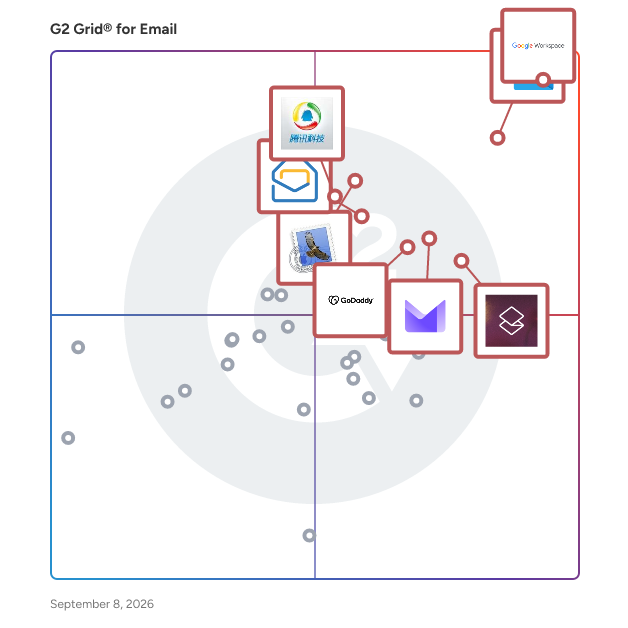
G2 Grid® for Email Software

G2 Grid® for Email Software plotting products by satisfaction and market presence

Highlighted products: Google Workspace, Microsoft Outlook, Superhuman Mail, Proton Mail For Business, Apple Mail, GoDaddy Email & Office, Zoho Mail, and Tencent Exmail.

Underlying data: [Grid® JSON](https://www.g2.com/categories/email/grids.json?focus%5B%5D=google-workspace&focus%5B%5D=microsoft-outlook&focus%5B%5D=superhuman-mail&focus%5B%5D=proton-mail-for-business&focus%5B%5D=apple-mail&focus%5B%5D=godaddy-email-office&focus%5B%5D=zoho-mail&focus%5B%5D=tencent-exmail)

Google Workspace

Google Workspace is a comprehensive productivity and collaboration solution designed to help users streamline their work processes by integrating essential tools such as email, chat, file storage, and video conferencing into a unified platform. This suite of applications is tailored for businesses, educational institutions, and individuals looking to enhance their communication and collaboration efforts, all while leveraging the power of Google’s artificial intelligence. Targeted at a diverse audience, Google Workspace caters to teams of all sizes, from small startups to large enterprises. It is particularly beneficial for remote teams and organizations that prioritize collaboration across different locations. The platform supports various use cases, including project management, team communication, document sharing, and virtual meetings, making it an ideal choice for professionals who need to work together efficiently, regardless of their physical location. One of the key features of Google Workspace is its seamless integration of applications such as Gmail, Google Meet, Google Drive, and Google Docs. This interconnectedness allows users to switch effortlessly between tasks, whether they are sending emails, participating in video calls, or collaborating on documents in real-time. The AI capabilities embedded within the platform enhance user experience by providing smart suggestions, automating repetitive tasks, and improving search functionalities, ultimately saving time and increasing productivity. Additionally, Google Workspace prioritizes security and data protection, offering robust features such as two-factor authentication, advanced phishing protection, and customizable access controls. These measures ensure that sensitive information remains secure while allowing teams to collaborate freely. The platform also supports third-party integrations, enabling users to connect their favorite applications and tools, further enhancing their workflow. In summary, Google Workspace stands out in the productivity software category by providing a holistic approach to collaboration. Its user-friendly interface, combined with powerful AI-driven features and strong security protocols, makes it a valuable tool for anyone looking to improve their work processes and foster effective teamwork. Whether for managing projects, communicating with colleagues, or sharing files, Google Workspace is designed to meet the diverse needs of its users, making it an essential resource in today’s digital workplace.

Average Rating: 4.6/5.0

Total Reviews: 45,692

How Do G2 Users Rate Google Workspace?

  • Has the product been a good partner in doing business?: 9.0/10 (Category avg: 8.7/10)
  • Ease of Use: 9.3/10 (Category avg: 8.5/10)
  • Quality of Support: 8.6/10 (Category avg: 8.3/10)
  • Ease of Admin: 9.0/10 (Category avg: 8.5/10)

Who Is the Company Behind Google Workspace?

  • Seller: Google
  • Year Founded: 1998
  • HQ Location: Mountain View, CA
  • Twitter: @google
    31,899,995 Twitter followers
  • LinkedIn® Page: www.linkedin.com
    301,144 employees on LinkedIn®
  • Ownership: NASDAQ:GOOG

Who Uses This Product?

  • Who Uses This: Student, Teacher
  • Top Industries: Information Technology and Services, Education Management
  • Company Size: 46% Small, 35% Medium

What Do G2 Reviewers Say About Google Workspace?

AI-generated summary from verified user reviews

Pros
  • Users appreciate the ease of use in Google Workspace, facilitating smooth and efficient workflow management.
  • Users love the seamless team collaboration in Google Workspace, enhancing communication and boosting productivity effortlessly.
  • Users love the seamless integrations in Google Workspace, enhancing efficiency with easy access to tools and scheduling.
  • Users praise the ease of use and integration in Google Workspace, enhancing productivity and collaboration seamlessly.
  • Users appreciate the seamless Google integration of Workspace, enhancing collaboration and efficiency across all tools.
Cons
  • Users face missing features in Google Workspace, such as limited offline capabilities and restrictions on accessing certain functionalities.
  • Users find the limited features of Google Workspace unnecessary for smaller teams, lacking essential tools for their needs.
  • Users find Google Workspace lacking features compared to other platforms, impacting effective campaign management and data handling.
  • Users find internet dependency challenging, as offline functionality is limited and issues with quality can arise.
  • Users find limited customization options in Google Workspace, particularly for calendars and forms, restricting flexibility and creativity.

What Are Recent G2 Reviews of Google Workspace?

What Are G2 Users Discussing About Google Workspace?

Microsoft Outlook

Microsoft Outlook is a comprehensive email and calendar application designed to help users stay connected and organized across various devices. It integrates email, calendar, contacts, and tasks into a single platform, enabling efficient management of communications and schedules. With a Microsoft 365 subscription, users can share attachments directly from OneDrive, access contacts, and view LinkedIn profiles, enhancing productivity and collaboration. Key Features and Functionality: - Unified Communication: Combines email, calendar, contacts, and tasks in one application, streamlining workflow and reducing the need to switch between different apps. - Calendar Management: Allows booking of conference rooms, tracking RSVPs, and sharing calendars to coordinate schedules effectively. - Enterprise-Grade Security: Provides robust security measures to protect confidential information, ensuring peace of mind for users. - Intelligent Assistance: Automatically adds travel and bill payment details to the calendar and offers intelligent reminders to keep users on track. Primary Value and User Solutions: Microsoft Outlook addresses the need for a centralized platform to manage emails, schedules, and tasks efficiently. By integrating these functions, it reduces the complexity of juggling multiple applications, thereby enhancing productivity. Its security features ensure that sensitive information remains protected, while intelligent tools assist in planning and organization, allowing users to focus on their priorities without missing important events or communications.

Average Rating: 4.5/5.0

Total Reviews: 3,448

How Do G2 Users Rate Microsoft Outlook?

  • Has the product been a good partner in doing business?: 8.8/10 (Category avg: 8.7/10)
  • Ease of Use: 9.0/10 (Category avg: 8.5/10)
  • Quality of Support: 8.6/10 (Category avg: 8.3/10)
  • Ease of Admin: 8.6/10 (Category avg: 8.5/10)

Who Is the Company Behind Microsoft Outlook?

  • Seller: Microsoft
  • Year Founded: 1975
  • HQ Location: Redmond, Washington
  • Twitter: @microsoft
    13,091,739 Twitter followers
  • LinkedIn® Page: www.linkedin.com
    232,750 employees on LinkedIn®
  • Ownership: MSFT

Who Uses This Product?

  • Who Uses This: Software Engineer, Project Manager
  • Top Industries: Information Technology and Services, Computer Software
  • Company Size: 39% Large, 38% Medium

What Do G2 Reviewers Say About Microsoft Outlook?

AI-generated summary from verified user reviews

Pros
  • Users find Microsoft Outlook's ease of use invaluable for organizing emails, calendars, and tasks efficiently.
  • Users appreciate the calendar integration of Microsoft Outlook, facilitating efficient scheduling and seamless team coordination.
  • Users value the seamless integrations of Outlook, enhancing communication and productivity across various platforms and devices.
  • Users appreciate the efficient scheduling features of Outlook, helping them manage meetings and deadlines with ease.
  • Users value the seamless integration of Microsoft Outlook with MS Teams and AI tools, enhancing productivity and communication.
Cons
  • Users experience slow loading times with Outlook, leading to frustration and the need for alternative email access.
  • Users experience slow performance in Outlook, struggling with delays and loading times, especially with large inboxes.
  • Users find the missing features in Outlook, like calendar invite imports, hinder productivity and create frustration.
  • Users often face sync issues with Outlook, leading to delays and frustrating email sending experiences.
  • Users express frustration with the invasive ads and the tendency to overlook important messages due to email threading.

What Are Recent G2 Reviews of Microsoft Outlook?

What Are G2 Users Discussing About Microsoft Outlook?

Superhuman Mail

Superhuman Mail is the AI-native email app that helps high-performing teams fly through their inboxes and focus on what matters. Built for speed, clarity, and collaboration, Superhuman helps professionals save four hours per person, per week. Smart triage, lightning-fast UX, and powerful integrations let you move through messages in record time without losing context or control. Whether you're following up with prospects, clearing internal threads, or managing projects via email, Superhuman gives you the tools to work faster and stay responsive. Superhuman Mail is part of Superhuman, the AI productivity platform on a mission to unlock the superhuman potential in everyone. Superhuman’s suite of apps and agents brings AI wherever people work, helping over 40 million individuals and 50,000 organizations focus on what matters.

Average Rating: 4.7/5.0

Total Reviews: 1,272

How Do G2 Users Rate Superhuman Mail?

  • Has the product been a good partner in doing business?: 9.4/10 (Category avg: 8.7/10)
  • Ease of Use: 9.2/10 (Category avg: 8.5/10)
  • Quality of Support: 9.6/10 (Category avg: 8.3/10)
  • Ease of Admin: 9.2/10 (Category avg: 8.5/10)

Who Is the Company Behind Superhuman Mail?

  • Seller: Superhuman
  • Company Website:
  • HQ Location: San Francisco, California
  • LinkedIn® Page: www.linkedin.com
    7,182 employees on LinkedIn®

Who Uses This Product?

  • Who Uses This: CEO, Founder
  • Top Industries: Computer Software, Information Technology and Services
  • Company Size: 76% Small, 18% Medium

What Do G2 Reviewers Say About Superhuman Mail?

AI-generated summary from verified user reviews

Pros
  • Users love the time-saving features of Superhuman Mail, enabling quick email management and achieving inbox zero effortlessly.
  • Users highlight the ease of use of Superhuman Mail, enjoying its efficient, streamlined email management and productivity features.
  • Users praise the speed of Superhuman Mail, making inbox navigation and management incredibly efficient.
  • Users love the keyboard shortcuts in Superhuman Mail, making email management fast and efficient.
  • Users love the intuitive design of Superhuman Mail, making email management fast and effortless.
Cons
  • Users find the learning curve challenging, causing some to revert to simpler email solutions like Gmail.
  • Users find Superhuman Mail expensive, especially when compared to other email products, despite its feature set.
  • Users note the steep learning curve of Superhuman Mail, which can deter less tech-savvy individuals from fully adopting it.
  • Users desire more native integrations and improved functionality, especially with calendar and Apple devices for better usability.
  • Users find the high cost of Superhuman Mail to be a significant drawback despite its features.

What Are Recent G2 Reviews of Superhuman Mail?

What Are G2 Users Discussing About Superhuman Mail?

Proton Mail For Business

Proton Mail for Business is a secure email and calendar solution tailored specifically for small and medium-sized businesses (SMBs). This platform enables users to send, receive, organize, and manage professional email and calendar communications while ensuring built-in privacy and encryption. Designed to support critical business communication workflows, Proton Mail for Business protects sensitive information from unauthorized access and assists organizations in meeting data privacy and compliance requirements. Its features cater to SMBs looking to enhance email security, centralize user management, and integrate encrypted messaging with productivity tools like calendar scheduling. The product's core capabilities focus on providing a robust business email experience. With end-to-end encryption, email content remains confidential, ensuring that only the intended senders and recipients can read messages. Proton Mail cannot decrypt stored emails, even for compliance or support purposes, which reinforces its commitment to user privacy. Additionally, businesses can utilize custom domains for branded email addresses, enhancing professionalism and brand identity. Integrated calendar tools allow teams to create, share, and schedule events seamlessly alongside email, reducing the need for multiple disparate applications. Proton Mail for Business also includes a variety of productivity and workflow features designed to streamline communication. Advanced inbox organization tools, such as filters and folders, automatically sort incoming mail, while labels help categorize messages for efficient workflow management. Email automation capabilities enable users to schedule messages, create autoresponders, and snooze emails, which is particularly beneficial for managing busy inboxes. Furthermore, the AI-assisted writing support, Proton Scribe, aids in drafting and proofreading messages without compromising privacy, ensuring that sensitive content remains secure. Security and compliance are paramount in Proton Mail for Business, which is why it offers strong regulatory support for GDPR, HIPAA, CCPA, and other privacy regulations through its default end-to-end encryption and zero-access architecture. Hosted under Swiss privacy laws, the platform provides additional legal protections compared to other jurisdictions, safeguarding user data from forced access. The centralized admin panel allows for efficient user management, enabling administrators to add or remove users, enforce two-factor authentication, and manage permissions across the business domain. Advanced threat protection through Proton Sentinel combines AI and human analysis to identify and block potential account breaches and other security threats. By combining encrypted communication with practical organizational tools and administrative oversight, Proton Mail for Business positions itself as a comprehensive and secure email platform for SMBs. Its focus on privacy and compliance, along with its ability to enhance professional communication continuity and improve team productivity, makes it a valuable solution for businesses prioritizing secure digital communications.

Average Rating: 4.6/5.0

Total Reviews: 485

G2 Deal: Try Proton Mail For Business for Free

Start a 14-day free business trial. Protect your business communications with easy-to-use encrypted email and calendar. Stay private, stay compliant.

Price: ~~$9.99 /user per month~~

View this exclusive G2 deal

How Do G2 Users Rate Proton Mail For Business?

  • Has the product been a good partner in doing business?: 9.2/10 (Category avg: 8.7/10)
  • Ease of Use: 9.1/10 (Category avg: 8.5/10)
  • Quality of Support: 8.9/10 (Category avg: 8.3/10)
  • Ease of Admin: 9.2/10 (Category avg: 8.5/10)

Who Is the Company Behind Proton Mail For Business?

  • Seller: Proton AG
  • Company Website:
  • Year Founded: 2014
  • HQ Location: Plan-les-Ouates, Geneva, Switzerland
  • Twitter: @ProtonPrivacy
    363,085 Twitter followers
  • LinkedIn® Page: www.linkedin.com
    973 employees on LinkedIn®

Who Uses This Product?

  • Who Uses This: Owner, Founder
  • Top Industries: Information Technology and Services, Computer Software
  • Company Size: 24% Small, 9% Medium

What Do G2 Reviewers Say About Proton Mail For Business?

AI-generated summary from verified user reviews

Pros
  • Users appreciate the ease of use of Proton Mail For Business, finding it simple and reliable for communication.
  • Users love the end-to-end encryption of Proton Mail for Business, enhancing security and privacy effortlessly.
  • Users appreciate the reliability of Proton Mail for Business, noting its transparency and consistent performance improvements.
  • Users appreciate the end-to-end encryption and simplicity of Proton Mail, making it a top choice for secure communication.
  • Users enjoy the simple, clean interface of Proton Mail For Business, enhancing their communication experience.
Cons
  • Users face compatibility issues with Proton Mail for Business, including limited storage and problematic search functions.
  • Users find the limited features of the free version complicate expanding usage of Proton Mail for Business.
  • Users are frustrated with the limited storage in the free plan and difficulties in email recovery and searching.
  • Users feel that improvement in UI is needed to enhance the overall experience with Proton Mail for Business.
  • Users are frustrated with the inefficient search functionality of Proton Mail for Business, complicating their email management.

What Are Recent G2 Reviews of Proton Mail For Business?

What Are G2 Users Discussing About Proton Mail For Business?

Apple Mail

Apple Mail is a comprehensive email client developed by Apple Inc., seamlessly integrated across macOS, iOS, iPadOS, watchOS, and visionOS platforms. Originating from NeXTMail, it has evolved to offer a user-friendly interface and robust functionality, catering to both personal and professional communication needs. Key Features and Functionality: - Unified Inbox: Manage multiple email accounts from various providers, including iCloud, Gmail, Yahoo, and Outlook, within a single, organized inbox. - Email Categorization: Automatically sorts incoming emails into categories such as Primary, Transactions, Updates, and Promotions, enhancing inbox organization. - Priority Messages: Highlights urgent emails, like same-day invitations or boarding passes, ensuring critical information is promptly accessible. - Smart Reply and Summarization: Utilizes Apple Intelligence to suggest context-aware responses and provide concise summaries of emails and threads, streamlining communication. - Scheduling and Undo Send: Allows users to schedule emails for later delivery and offers a brief window to undo sent messages, adding flexibility and control. - Integration with Apple Ecosystem: Seamlessly connects with Contacts, Calendar, and other Apple applications, facilitating a cohesive user experience. Primary Value and User Solutions: Apple Mail enhances email management by providing a centralized platform that integrates multiple accounts and organizes messages efficiently. The incorporation of Apple Intelligence introduces advanced features like email categorization, priority highlighting, and smart replies, which collectively reduce the time and effort required to manage communications. The ability to schedule emails and undo sends offers users greater control over their correspondence. By integrating deeply with the Apple ecosystem, Apple Mail ensures a seamless and productive experience across all Apple devices.

Average Rating: 3.9/5.0

Total Reviews: 159

How Do G2 Users Rate Apple Mail?

  • Has the product been a good partner in doing business?: 7.8/10 (Category avg: 8.7/10)
  • Ease of Use: 8.5/10 (Category avg: 8.5/10)
  • Quality of Support: 8.1/10 (Category avg: 8.3/10)
  • Ease of Admin: 7.9/10 (Category avg: 8.5/10)

Who Is the Company Behind Apple Mail?

  • Seller: Apple
  • Year Founded: 1976
  • HQ Location: Cupertino, CA
  • Twitter: @Apple
    9,935,357 Twitter followers
  • LinkedIn® Page: www.linkedin.com
    187,339 employees on LinkedIn®
  • Ownership: NASDAQ:AAPL

Who Uses This Product?

  • Top Industries: Computer Software, Information Technology and Services
  • Company Size: 57% Small, 32% Medium

What Do G2 Reviewers Say About Apple Mail?

AI-generated summary from verified user reviews

Pros
  • Users find Apple Mail remarkably easy to use, enabling even novices to navigate email effortlessly across devices.
  • Users love the seamless integrations in Apple Mail, significantly enhancing their productivity and efficiency.
  • Users admire the intuitive interface of Apple Mail, enhancing their email management experience across devices seamlessly.
  • Users love the clean interface of Apple Mail, making email management intuitive and visually appealing across devices.
  • Users find Apple Mail to be easy to navigate, enabling seamless usage even for those unfamiliar with technology.
Cons
  • Users feel that the interface design is poor, lacking the polish and updates seen in other Apple applications.
  • Users find the inefficient search functionality of Apple Mail lacking compared to other options like Gmail.
  • Users feel the missing features in Apple Mail detract from its usability and modern appeal compared to other apps.
  • Users feel that Apple Mail's update issues have led to a neglected interface and lack of new features.

What Are Recent G2 Reviews of Apple Mail?

What Are G2 Users Discussing About Apple Mail?

GoDaddy Email & Office

When you sign up for Professional Email, every time you send @your business.com emails, you're getting your business name and website out there.

Average Rating: 3.8/5.0

Total Reviews: 51

How Do G2 Users Rate GoDaddy Email & Office?

  • Has the product been a good partner in doing business?: 9.1/10 (Category avg: 8.7/10)
  • Ease of Use: 8.3/10 (Category avg: 8.5/10)
  • Quality of Support: 8.1/10 (Category avg: 8.3/10)
  • Ease of Admin: 8.9/10 (Category avg: 8.5/10)

Who Is the Company Behind GoDaddy Email & Office?

  • Seller: GoDaddy
  • Year Founded: 1997
  • HQ Location: Scottsdale, AZ
  • Twitter: @GoDaddy
    274,844 Twitter followers
  • LinkedIn® Page: www.linkedin.com
    9,052 employees on LinkedIn®
  • Ownership: NYSE:GDDY

Who Uses This Product?

  • Who Uses This: Owner
  • Top Industries: Marketing and Advertising
  • Company Size: 85% Small, 15% Medium

What Do G2 Reviewers Say About GoDaddy Email & Office?

AI-generated summary from verified user reviews

Pros
  • Users value the generous 50 GB cloud storage for emails, enhancing their organizational capabilities across devices.
  • Users find GoDaddy Email & Office to be efficient and easy to use, enhancing their overall email experience.
  • Users find GoDaddy Email & Office to be highly efficient and user-friendly, enhancing their email management experience.
  • Users appreciate the generous 50 GB email storage provided by GoDaddy Email & Office, accommodating large volumes of emails.
  • Users appreciate the cross-device sync of GoDaddy Email & Office, enhancing accessibility and convenience across platforms.
Cons
  • Users face access limitations with GoDaddy Email & Office, restricting essential Microsoft 365 features and complex support options.
  • Users find the inefficient search functionality can make finding emails time-consuming, especially with large inboxes.
  • Users experience poor customer support, struggling with complex issues and facing unexpected renewal fees from GoDaddy Email & Office.
  • Users face pricing issues with GoDaddy Email & Office, citing higher renewal fees and limited access to features.
  • Users face spam issues that detract from their experience with GoDaddy Email & Office, limiting effective communication.

What Are Recent G2 Reviews of GoDaddy Email & Office?

What Are G2 Users Discussing About GoDaddy Email & Office?

Zoho Mail

What does Zoho Mail offer? With 16 million happy users and more than a decade of experience, Zoho Mail is packed with useful features. It nails down the basics and also caters to demanding businesses. Below are some of the bells and whistles that comprise Zoho Mail. ☑️ Custom domain as unique as you Give your brand or business that authentic exterior and increase brand awareness with the option to create a custom domain for your business email. Zoho Mail lets you purchase your own domain and set it up, if you don't own one already. ☑️ Supercharged email with a suite of apps Crush emails, keep an eye on your calendar, create contextual notes from emails, tick off your to-dos, and more with the suite of apps Zoho Mail comes with. These apps are tightly integrated and talk well with each other so that your workflow is frictionless. ☑️ A truck-load of integrations Zoho Mail cooperates with a host of other third-party applications. Now you can get your project details from Asana, jump into a Zoom meeting, or encrypt your emails using PGP, all within your Zoho Mail inbox. These integrations stay right inside your inbox so that you can quickly access them. ☑️ Take your collaboration up a notch Zoho Mail has a nifty feature called Streams that adds a flavor of social media to your emails. Everyone can come together, ideate, and execute a plan without the hassle of unending email threads. Email delegation ☑️ Delegate and conquer your day with the email delegation feature in Zoho Mail. You can assign people to take care of your inbox while maintaining control by giving role-based access to ensure security and privacy. ☑️ AI assistance Everyone needs a helping hand in their life and Zia does just that. Zia with Zoho Mail is your AI version of a knight in shining armor. With Zia by your side, email efficiency can vastly improve because it can help you with drafting responses and summarizing messages. ☑️ Robust security With great power comes great responsibility. This is where Zoho Mail takes much pride in following best-in-class security, compliance, and privacy practices. These make sure that your emailing experience is secure and your data remains yours truly. ✔️Other features ✔️Admin control ✔️Easy migration ✔️Offline emailing ✔️Native desktop and mobile apps ✔️24/7 support With a privacy-first approach, Zoho Mail can transform the way you go about your emails. Get started with Zoho Mail now!

Average Rating: 4.4/5.0

Total Reviews: 699

How Do G2 Users Rate Zoho Mail?

  • Has the product been a good partner in doing business?: 8.8/10 (Category avg: 8.7/10)
  • Ease of Use: 9.0/10 (Category avg: 8.5/10)
  • Quality of Support: 8.4/10 (Category avg: 8.3/10)
  • Ease of Admin: 8.8/10 (Category avg: 8.5/10)

Who Is the Company Behind Zoho Mail?

  • Seller: Zoho
  • Year Founded: 1996
  • HQ Location: Austin, TX
  • Twitter: @Zoho
    137,880 Twitter followers
  • LinkedIn® Page: www.linkedin.com
    30,913 employees on LinkedIn®
  • Phone: +1 (888) 900-9646

Who Uses This Product?

  • Who Uses This: Founder, CEO
  • Top Industries: Information Technology and Services, Marketing and Advertising
  • Company Size: 75% Small, 21% Medium

What Do G2 Reviewers Say About Zoho Mail?

AI-generated summary from verified user reviews

Pros
  • Users appreciate the clean and easy-to-use interface of Zoho Mail, enhancing their daily work efficiency.
  • Users appreciate the clean and distraction-free email management of Zoho Mail, enhancing their productivity and professionalism.
  • Users value the seamless integrations of Zoho Mail with other applications, enhancing their overall communication experience.
  • Users appreciate the clean and intuitive interface of Zoho Mail, finding it fast and easy to use.
  • Users find Zoho Mail's intuitive interface enhances productivity and makes email management effortless and enjoyable.
Cons
  • Users experience slow performance, particularly with syncing emails and using the mobile app, affecting overall efficiency.
  • Users note that slow loading times can affect syncing and overall experience, especially on mobile devices.
  • Users experience sync delays and limitations on attachment sizes, making the email process less efficient and cumbersome.
  • Users express concern about limited storage in Zoho Mail's free plan, impacting their ability to manage emails effectively.
  • Users find the learning curve challenging, especially with navigation and initial configuration of Zoho Mail.

What Are Recent G2 Reviews of Zoho Mail?

What Are G2 Users Discussing About Zoho Mail?

Tencent Exmail

Tencent Exmail is a professional email service developed by Tencent, designed to meet the communication needs of businesses of all sizes. Leveraging Tencent's extensive experience in managing large-scale email systems, Exmail offers a stable, user-friendly, and efficient platform that integrates seamlessly with various enterprise applications. This service enhances organizational productivity by providing tools for resource sharing, message dissemination, and organizational management. Notably, Tencent Exmail is deeply integrated with the WeChat ecosystem, offering a convenient and effective mobile email solution. Key Features and Functionality: - Enterprise-Level Security: Exmail employs advanced security measures, including enterprise-level encryption and intelligent spam filtering, to ensure the confidentiality and integrity of communications. - Seamless Integration with WeChat: Users can send and receive emails directly within WeChat, facilitating efficient communication without the need to switch between applications. - Custom Domain Support: Businesses can use their own domains for email addresses, reinforcing brand identity and professionalism. - Cross-Device Accessibility: Exmail supports synchronization across multiple devices, ensuring users have access to their emails anytime, anywhere. - Administrative Controls: The platform offers robust administrative tools for managing user accounts, permissions, and organizational structures. Primary Value and Solutions Provided: Tencent Exmail addresses the critical need for secure, reliable, and integrated email communication within the corporate environment. By offering a platform that combines advanced security features with seamless integration into widely used tools like WeChat, Exmail enhances operational efficiency and collaboration. Its support for custom domains and cross-device accessibility ensures that businesses maintain a professional image and that employees can stay connected, regardless of their location. Furthermore, the administrative controls provided by Exmail enable organizations to effectively manage their communication infrastructure, ensuring compliance and streamlined operations.

Average Rating: 4.0/5.0

Total Reviews: 13

How Do G2 Users Rate Tencent Exmail?

  • Has the product been a good partner in doing business?: 9.4/10 (Category avg: 8.7/10)
  • Ease of Use: 7.8/10 (Category avg: 8.5/10)
  • Quality of Support: 8.3/10 (Category avg: 8.3/10)
  • Ease of Admin: 7.5/10 (Category avg: 8.5/10)

Who Is the Company Behind Tencent Exmail?

  • Seller: QQ Mail
  • HQ Location: N/A
  • LinkedIn® Page: www.linkedin.com
    1 employees on LinkedIn®
  • Ownership: OTC: TCEHY

Who Uses This Product?

  • Company Size: 54% Small, 38% Medium

What Do G2 Reviewers Say About Tencent Exmail?

AI-generated summary from verified user reviews

Pros
  • Users appreciate the clean interface of Tencent Exmail, which enhances usability and overall communication efficiency.
  • Users value the intuitive user interface of Tencent Exmail, making their email experience seamless and efficient.
  • Users value the efficiency of Tencent Exmail, highlighting its stability and seamless integration with Tencent’s ecosystem.
  • Users value the seamless integration with Tencent’s ecosystem, enhancing team communication effectively.
  • Users find Tencent Exmail's intuitive interface enhances their email experience, making management and communication easy.
Cons
  • Users find limited functionality in Tencent Exmail, facing challenges with outdated interface and difficult configurations.
  • Users find Tencent Exmail’s limited mobile app functionality affects usability, especially with outdated interface and complex settings.
  • Users experience poor customer support, often hindered by language barriers and complicated setup processes with Tencent Exmail.
  • Users find the poor interface design of Tencent Exmail outdated and challenging, especially for non-Chinese speakers.
  • Users find the interface outdated compared to other platforms, making navigation and setup more challenging.

What Are Recent G2 Reviews of Tencent Exmail?

What Are G2 Users Discussing About Tencent Exmail?

Titan

Titan is an email suite built specifically for professionals and small businesses. Professional email with in-built marketing, business growth, and security tools — all in one place, at the right price for growing businesses. Check out: www.titan.email Where generic email providers give you an inbox, Titan gives you visibility and control: Know when your emails are read, track when attachments are opened, leverage AI to read, write, summarize your emails, save, access and share files from Drive built within your inbox, make every email a branded touchpoint — all from within your mailbox. What's included: Read Receipts | Attachment Tracking | Link Tracking | AI Write, Refine & Summarize | Titan Drive | Signature Designer | Titan Tasks | Company Branding | and many more features Built by a team with a track record: Titan is launched by the Founder and team behind Directi group of companies, which collectively built products used by hundreds of millions of people worldwide. Trusted by partners you already use: WordPress | GoDaddy | Bluehost | Name.com | Hostinger | HostGator | GMO | SquareSpace Loved by growing businesses: 3 Mn mailboxes managed | 2Mn App downloads | 4.6 Rating on Play Store | 4.7 Rating on iOS App Store Best For: Professionals or small businesses looking for a comprehensive email suite that enables meaningful customer relationships.

Average Rating: 4.6/5.0

Total Reviews: 566

How Do G2 Users Rate Titan?

  • Has the product been a good partner in doing business?: 9.4/10 (Category avg: 8.7/10)
  • Ease of Use: 9.3/10 (Category avg: 8.5/10)
  • Quality of Support: 9.5/10 (Category avg: 8.3/10)
  • Ease of Admin: 9.3/10 (Category avg: 8.5/10)

Who Is the Company Behind Titan?

  • Seller: Titan
  • Year Founded: 2018
  • HQ Location: Mumbai, IN
  • Twitter: @TitanEmail
    639 Twitter followers
  • LinkedIn® Page: www.linkedin.com
    601 employees on LinkedIn®

Who Uses This Product?

  • Who Uses This: CEO, Owner
  • Top Industries: Marketing and Advertising, Computer Software
  • Company Size: 98% Small, 2% Medium

What Do G2 Reviewers Say About Titan?

AI-generated summary from verified user reviews

Pros
  • Users commend the excellent customer support of Titan, providing quick and efficient solutions to problems.
  • Users enjoy Titan's clean interface, which enhances their email experience with useful features and improved security.
  • Users appreciate the seamless communication capabilities of Titan, finding it easy to send and receive emails.
  • Users enjoy the excellent customer experience with Titan, praising its intuitive setup and responsive support.
  • Users find Titan's ease of use impressive, with fast installation and intuitive instructions for everyone.
Cons
  • Users find the difficult setup of Titan frustrating, often struggling to uncover hidden functions for proper use.
  • Users cite folder management limitations in Titan, making it challenging to organize inboxes effectively.
  • Users find the constant inbox notifications distracting and irritating during their mail management experience.
  • Users find the learning curve steep due to hidden functions and minimalistic design in Titan.
  • Users find the limited features of Titan restrict usability and integration with third-party tools, hindering overall experience.

What Are Recent G2 Reviews of Titan?

HostArmada

HostArmada is a privately owned and independently funded web hosting provider that started in November 2019 with a team dedicated to providing fast, secure, and reliable web hosting services. HostArmada is more than just a web hosting company. We are a team of passionate individuals committed to providing exceptional hosting services to our customers. Our focus is on delivering fast, secure, and reliable web hosting services that meet the unique needs of businesses and individuals worldwide. At HostArmada, we understand that every business is different, and that's why we offer a wide range of hosting solutions to cater to the needs of companies of all sizes, from small startups to large enterprises. Our hosting services include shared hosting WordPress hosting, reseller hosting, VPS hosting, and Cloud hosting, all backed by a robust infrastructure that ensures high performance and uptime for your website. With HostArmada, you can choose the hosting plan that best suits your needs and scale it up or down as your business grows. Our control panel makes it easy for you to manage your hosting account and website, even if you don't have technical expertise. You can easily manage your website files, databases, domains, and email accounts with just a few clicks. At HostArmada, we believe that customer support is just as important as the quality of our hosting services. That's why we have a dedicated customer support team that is available 24/7 to assist you with any hosting-related questions or issues you may encounter. Our team is highly trained and knowledgeable, and we pride ourselves on delivering fast and reliable assistance through various channels such as live chat, email, and phone. We understand that pricing is a crucial factor when it comes to choosing a web hosting provider. That's why we offer affordable pricing and transparent billing. You can rest assured that there are no hidden fees or surprises when it comes to your hosting bill. Additionally, we offer a hassle-free 45-day money-back guarantee demonstrating our commitment to customer satisfaction. HostArmada is a reliable and customer-oriented web hosting company that offers top-notch web hosting services to businesses and individuals worldwide. With our wide range of hosting solutions, user-friendly control panel, and exceptional customer support, you can be sure that your website is in good hands. We invite you to join our community of satisfied customers and experience the difference for yourself.

Average Rating: 4.9/5.0

Total Reviews: 308

How Do G2 Users Rate HostArmada?

  • Has the product been a good partner in doing business?: 9.8/10 (Category avg: 8.7/10)
  • Ease of Use: 9.6/10 (Category avg: 8.5/10)
  • Quality of Support: 9.9/10 (Category avg: 8.3/10)
  • Ease of Admin: 9.7/10 (Category avg: 8.5/10)

Who Is the Company Behind HostArmada?

  • Seller: HostArmada.com
  • Year Founded: 2019
  • HQ Location: Delaware, Wilmington
  • Twitter: @HostArmada
    172 Twitter followers
  • LinkedIn® Page: www.linkedin.com
    14 employees on LinkedIn®

Who Uses This Product?

  • Who Uses This: CEO, Owner
  • Top Industries: Marketing and Advertising, Computer Software
  • Company Size: 98% Small, 2% Medium

What Do G2 Reviewers Say About HostArmada?

AI-generated summary from verified user reviews

Pros
  • Users praise the excellent customer support of HostArmada, highlighting their responsiveness and expertise in resolving issues.
  • Users praise the responsive and helpful support from HostArmada, enhancing their overall hosting experience.
  • Users commend the quick response of HostArmada's support team, ensuring timely assistance and satisfaction with their services.
  • Users commend HostArmada for their exceptional technical support, consistently providing quick and clear assistance for all issues.
  • Users highlight the exceptional reliability of HostArmada, praising its fast service and outstanding customer support.
Cons
  • Users find HostArmada's pricing expensive, especially after initial rates rise, affecting long-term budget considerations.
  • Users find the high cost of HostArmada, especially at renewal, to be a significant drawback.
  • Users note that renewal pricing increases significantly, leading to concerns about budget planning and upfront clarity.
  • Users find the high pricing of HostArmada challenging, especially with increased rates at renewal.
  • Users find the high renewal costs of HostArmada concerning, noting unclear communication on pricing changes.

What Are Recent G2 Reviews of HostArmada?

What Are G2 Users Discussing About HostArmada?

Neo

Neo is an email and growth suite designed to accelerate the online growth of small businesses and entrepreneurs. Over 130,000 small businesses trust Neo. Neo is an all-in-one business email platform where you get a custom business email address (yourname@yourcompany.com) that matches your brand name and powerful features that help grow your brand. A business email address adds credibility and instills trust in your clients and customers for your brand. And the best part? We'll help you with a domain name if you don't already have one! Neo also includes an AI designed website and requires no setup or coding. Neo is packed with a range of tools along with rich webmail, including integrated Calendar and Contacts apps, email marketing, appointment scheduling, an AI email assistant to write and respond to any email, read receipts, and a host of other productivity and security features. Ideal for: Small businesses, entrepreneurs, and startups seeking a comprehensive email suite to engage with clients and teammates effectively.

Average Rating: 4.6/5.0

Total Reviews: 143

How Do G2 Users Rate Neo?

  • Has the product been a good partner in doing business?: 9.5/10 (Category avg: 8.7/10)
  • Ease of Use: 9.5/10 (Category avg: 8.5/10)
  • Quality of Support: 9.0/10 (Category avg: 8.3/10)
  • Ease of Admin: 9.5/10 (Category avg: 8.5/10)

Who Is the Company Behind Neo?

  • Seller: Neo
  • HQ Location: Boston, US
  • LinkedIn® Page: www.linkedin.com
    3 employees on LinkedIn®

Who Uses This Product?

  • Who Uses This: Director, CEO
  • Top Industries: Marketing and Advertising, Retail
  • Company Size: 89% Small, 4% Medium

What Do G2 Reviewers Say About Neo?

AI-generated summary from verified user reviews

Pros
  • Users love the ease of use of Neo, finding setup and scheduling incredibly simple and efficient.
  • Users appreciate the easy setup of Neo, finding it straightforward and user-friendly for their needs.
  • Users find the setup ease of Neo refreshing, enjoying a user-friendly experience right from the start.
  • Users love Neo's affordable pricing, appreciating its value for money and comprehensive features for business needs.
  • Users love the affordability of Neo, appreciating its excellent price for comprehensive email and web services.
Cons
  • Users find NEO's limited features in the basic plan restrict their experience and require costly upgrades for full functionality.
  • Users find the difficult setup of Neo challenging, requiring more time and effort than expected during migration.
  • Users find Neo to be expensive and wish for more flexible pricing options without unnecessary tiers.
  • Users find missing features in Neo, especially regarding vague reports, email organization, and template creation.
  • Users express frustration with pricing issues, desiring more flexibility and a la carte options for features.

What Are Recent G2 Reviews of Neo?

Spark for Teams

Spark for Teams is a collaborative email platform builds on the foundation of the Spark email app, which is widely recognized for its smart features that help users manage their email more efficiently. The primary goal of Spark for Teams is to enhance team productivity and streamline communication by offering several key features: 1. **Shared Inboxes**: Teams can collaborate on emails from shared addresses like support@ or info@, ensuring that all team members can access and respond to messages. 2. **Shared Emails**: Stop forwarding or screenshooting your emails to post them into Slack or Microsoft Teams — with Shared Emails you could paste a link and your team will have access to all the email conversations without noisy "adding to cc" emails. 3. **Email Delegation**: Assign emails to team members directly within the app, allowing for clear responsibility and follow-up on tasks. 4. **Team Comments**: Team members can discuss emails internally without forwarding or copying emails back and forth, making internal communication more efficient. 5. **Shared Drafts +AI**: Collaborate on email drafts in real-time, allowing multiple team members to contribute to the creation of important messages. 6. **Templates +AI**: Create and share email templates within the team to ensure consistent communication and save time on repetitive responses. 7. **+AI Meeting Notes** can transcribe and summarize your meeting to capture every point. Fully focus during every discussion and never miss a detail. No bots joining your call, works with any meeting tool. Access all your meeting notes anytime in Spark Mail App. 8. **Centralized Email Management**: Manage multiple email accounts from a single interface, which is particularly useful for teams handling multiple projects or client accounts. 9. **Smart Inbox +AI**: Prioritize important emails and filter out distractions with intelligent sorting and categorization of incoming messages. 10. **Integrations**: Connect Spark with other productivity tools like Trello, Asana, and more to streamline workflows and ensure that email communications integrate smoothly with other team activities. Spark for Teams aims to reduce the chaos often associated with team email management by providing a suite of tools that enhance collaboration, improve communication efficiency, and streamline workflows.

Average Rating: 4.4/5.0

Total Reviews: 22

How Do G2 Users Rate Spark for Teams?

  • Has the product been a good partner in doing business?: 9.6/10 (Category avg: 8.7/10)
  • Ease of Use: 9.4/10 (Category avg: 8.5/10)
  • Quality of Support: 9.7/10 (Category avg: 8.3/10)
  • Ease of Admin: 9.8/10 (Category avg: 8.5/10)

Who Is the Company Behind Spark for Teams?

  • Seller: Spark Mail
  • Year Founded: 2007
  • HQ Location: Odessa, Ukraine
  • Twitter: @Readdle
    25,721 Twitter followers
  • LinkedIn® Page: www.linkedin.com
    335 employees on LinkedIn®

Who Uses This Product?

  • Top Industries: Marketing and Advertising
  • Company Size: 86% Small, 9% Medium

What Do G2 Reviewers Say About Spark for Teams?

AI-generated summary from verified user reviews

Pros
  • Users highlight the effective email management features of Spark, enhancing team collaboration and productivity significantly.
  • Users value the seamless collaboration features in Spark for Teams, enhancing productivity and email management significantly.
  • Users praise the ease of use of Spark for Teams, enhancing collaboration and productivity effortlessly.
  • Users value the efficient collaboration features in Spark for Teams, enhancing email management and teamwork seamlessly.
  • Users value the streamlined communication features of Spark for Teams, enhancing collaboration and efficiency significantly.
Cons
  • Users report bug issues with syncing delays and crashes, impacting usability and complicating user experience.
  • Users express frustration over missing features in Spark for Teams, impacting usability and experience across devices.
  • Users experience frequent software bugs with syncing delays and crashes, complicating their productivity and usability.
  • Users face challenges with infrequent updates, leading to unexpected changes that complicate management and team efficiency.
  • Users find the interface design lacking on Mac, preferring the native feel of previous versions for smoother performance.

What Are Recent G2 Reviews of Spark for Teams?

Yahoo! Mail

Yahoo Mail is a web-based email app accessible on desktops and mobile devices, including iOS and Android devices. Users can stay connected to their email with one-tap access to their inbox, multiple Yahoo account support, and instant email alerts from any device. Users can access contrast themes, text resizing, and screen reader support within the web app. Yahoo Mail includes many helpful features including document and image storage, travel confirmations, package delivery tracking, and more. Yahoo Mail allows users to add Gmail, Outlook, and AOL email accounts for easier access.

Average Rating: 3.9/5.0

Total Reviews: 102

How Do G2 Users Rate Yahoo! Mail?

  • Has the product been a good partner in doing business?: 7.2/10 (Category avg: 8.7/10)
  • Ease of Use: 9.0/10 (Category avg: 8.5/10)
  • Quality of Support: 8.0/10 (Category avg: 8.3/10)
  • Ease of Admin: 8.6/10 (Category avg: 8.5/10)

Who Is the Company Behind Yahoo! Mail?

  • Seller: Verizon Media
  • Year Founded: 2005
  • HQ Location: San Francisco, CA
  • Twitter: @FlurryMobile
    16,225 Twitter followers
  • LinkedIn® Page: www.linkedin.com
    11 employees on LinkedIn®

Who Uses This Product?

  • Top Industries: Marketing and Advertising, Information Technology and Services
  • Company Size: 65% Small, 17% Medium

What Do G2 Reviewers Say About Yahoo! Mail?

AI-generated summary from verified user reviews

Pros
  • Users find Yahoo! Mail very easy to use, appreciating its intuitive navigation and efficient email management features.
  • Users find Yahoo! Mail intuitive and easy to navigate, enhancing their email management experience effortlessly.
  • Users value the generous storage capacity of Yahoo Mail, enhancing their email management and overall experience.
  • Users value the clean and professional interface of Yahoo Mail, making it easy to navigate and use.
  • Users enjoy the easy-to-use interface of Yahoo Mail, making daily email management seamless and efficient.
Cons
  • Users face spam issues that lead to missed messages and increased frustration with Yahoo! Mail.
  • Users frequently experience slow performance with Yahoo! Mail, hindering their overall email management experience.
  • Users report frustrating connectivity issues with Yahoo! Mail, including slow loading and inconsistent access to inbox messages.
  • Users find Yahoo! Mail's mobile app lacking, noting it doesn't measure up to other email services' apps.
  • Users find scheduling issues with Yahoo! Mail, as ads distract and spam filters misclassify important emails.

What Are Recent G2 Reviews of Yahoo! Mail?

What Are G2 Users Discussing About Yahoo! Mail?

Canary Mail

Canary Mail helps users manage Gmail, Outlook, iCloud, Exchange, and IMAP accounts in one unified inbox across macOS, Windows, iPhone, iPad, and Android. It combines optional AI for writing, summaries, search, and triage with productivity tools like read receipts, Send Later, Snooze, templates, and Inbox Zero. For users who need stronger privacy and security, Canary Mail also includes PGP, SecureSend, tracker blocking, and security controls, without requiring users to switch email providers. Love Canary? Leave a review and help us improve.

Average Rating: 4.5/5.0

Total Reviews: 52

How Do G2 Users Rate Canary Mail?

  • Has the product been a good partner in doing business?: 9.2/10 (Category avg: 8.7/10)
  • Ease of Use: 9.3/10 (Category avg: 8.5/10)
  • Quality of Support: 9.2/10 (Category avg: 8.3/10)
  • Ease of Admin: 9.3/10 (Category avg: 8.5/10)

Who Is the Company Behind Canary Mail?

  • Seller: Canary Mail
  • Year Founded: 2017
  • HQ Location: San Francisco, US
  • Twitter: @CanaryMailApp
    7,664 Twitter followers
  • LinkedIn® Page: www.linkedin.com
    22 employees on LinkedIn®

Who Uses This Product?

  • Top Industries: Marketing and Advertising, Consulting
  • Company Size: 85% Small, 9% Medium

What Do G2 Reviewers Say About Canary Mail?

AI-generated summary from verified user reviews

Pros
  • Users value the advanced features of Canary Mail, including encryption and read notifications, making it a top choice.
  • Users love the intuitive design of Canary Mail, combining simplicity with powerful features for an optimal experience.
  • Users admire the intuitive and aesthetically pleasing user interface of Canary Mail, enhancing email management and organization.
  • Users love the intelligent AI features of Canary Mail, streamlining email management and enhancing productivity remarkably.
  • Users appreciate the email integration in Canary Mail, enhancing their organization and tracking of important communications.
Cons
  • Users report email issues such as laggy swiping, address confusion, unread emails showing as read, and formatting problems.
  • Users feel that the AI "Summarize Email" feature needs improvement, providing only basic summaries for effective use.
  • Users desire a more minimalist and clearer interface for Canary Mail to enhance usability and customization.
  • Users note the outdated interface of Canary Mail, suggesting it needs modern updates for improved usability.
  • Users find the AI performance lacking, with features feeling forced and unhelpful in email summarization and composition.

What Are Recent G2 Reviews of Canary Mail?

What Are G2 Users Discussing About Canary Mail?

MDaemon Email Server

The MDaemon Email Server was one of the first Microsoft Exchange alternatives offered to businesses around the world. It has been developed with the ongoing input from IT professionals seeking an easy-to-use, reliable, and secure mail server that does not require expensive administration or impose high per-user costs. It simplifies messaging and collaboration with a focus on security and privacy, an intuitive, user-friendly web mail design and by offering administrators Mobile Device Management, Business Instant Messaging, Document Sharing, and other enterprise-class features that can be managed with minimal support.

Average Rating: 4.7/5.0

Total Reviews: 173

How Do G2 Users Rate MDaemon Email Server?

  • Has the product been a good partner in doing business?: 9.2/10 (Category avg: 8.7/10)
  • Ease of Use: 9.0/10 (Category avg: 8.5/10)
  • Quality of Support: 8.8/10 (Category avg: 8.3/10)
  • Ease of Admin: 9.0/10 (Category avg: 8.5/10)

Who Is the Company Behind MDaemon Email Server?

  • Seller: MDaemon Technologies
  • Company Website:
  • Year Founded: 1996
  • HQ Location: Grapevine, TX
  • Twitter: @MDaemon_Email
    649 Twitter followers
  • LinkedIn® Page: www.linkedin.com
    32 employees on LinkedIn®

Who Uses This Product?

  • Who Uses This: IT Manager, President
  • Top Industries: Computer Software, Information Technology and Services
  • Company Size: 47% Medium, 44% Small

What Do G2 Reviewers Say About MDaemon Email Server?

AI-generated summary from verified user reviews

Pros
  • Users value the email automation in MDaemon Email Server, enhancing productivity and simplifying management across multiple domains.
  • Users value the robust security features of MDaemon Email Server, ensuring safe handling of sensitive communications.
  • Users appreciate the team collaboration features of MDaemon Email Server, which enhance productivity and streamline administration.
Cons
  • Users experience inefficient search functionality, making it difficult to find solutions in a timely manner.
  • Users experience poor customer support with MDaemon, causing delays in resolving technical issues and finding solutions.
  • Users experience slow customer support from MDaemon Email Server, leading to delays in resolving technical issues.

What Are Recent G2 Reviews of MDaemon Email Server?

What Are G2 Users Discussing About MDaemon Email Server?

Neeraja Prakash
NP
Researched and written by Neeraja Prakash
Updated October 3, 2024

Learn More About Email Software

What is Email Software?

Email is the main gateway for internal and external communication within a company. As such, it’s crucial to implement a software that is intuitive, organized, secure, and efficient.

Email software can achieve a variety of other tasks for your company, such as deploying marketing campaigns, engaging consumers, setting task reminders, chatting with other employees, keeping a schedule for meetings, and more. Considerations for what email software to use should depend on your company size, business industry, security requirements, storage space, and pricing.

Key Benefits of Email Software:

  • Send and receive important business messages between employees
  • Improve outreach with email marketing campaigns
  • Keep a permanent record of all messages that are sent and received
  • Send and receive important business messages from anywhere at any time

Why Use Email Software?

There are infinite reasons to implement email software at your company, but the most important one is communication. Whether this means conveying an important message to coworkers or delivering your brand message to prospective customers, the main function is to relay a message.

Email can also help with customer engagement. Customizable email platforms allow companies to illustrate their brand and communicate their company’s mission statement. When a client or a prospective lead receives an email from your company, you can deliver your marketing message with taglines, logos, and customizable email signatures. This helps keep your brand in the spotlight.

Email software is also the vehicle for all of your email marketing campaigns, which can help generate leads and drive more business to your company. Email marketing tactics such as customer targeting and calls to action can help gain more subscribers and translate to a higher ROI.

Who Uses Email Software?

All employees in your company can benefit from email software, since it’s the main form of communication for important documents and messages. However, some employees will be sending out more emails than others. Those employees may work in departments such as:

Marketing

Email has the built-in capability of being sent in bulk, which makes it the perfect software to use for mass marketing campaigns. Marketing teams often gather leads from the company’s CRM and send out marketing campaigns. This is a great way to elicit a meaningful call to action for prospective buyers. Oftentimes, email marketing is also integrated with AI software to automate email marketing on a scheduled basis. This benefits the marketing team by making the process less tedious and more efficient.

Customer Service

Customer service and success teams constantly answer inquiries via email. A business’ email software should include auto-generated responses these teams can use to alert customers that their inquiry will be answered promptly. Most email software will vary with their ability to customize auto-generated responses, so make sure to evaluate this before choosing an email software.

HR

HR teams use email to inform employees of any updates related to the office. This can include calendar updates, payroll changes, and much more. HR teams need a streamlined email solution so they can easily prioritize their schedules.

Kinds of Email Software

Email Client

An email client is a software platform that allows you to access your email without logging onto the web. Email client software works through POP3 and IMAP addressing. This means that you can access your email through your desktop programs. Email clients offer the benefit of extra security with more encryption to protect your emails. The main drawback here is that users will find it difficult to access their email from other computers, since an email client is usually installed on the user’s desktop.

Webmail

Webmail is a software platform that allows users to access emails through a web browser. The main benefit of webmail is mobile access. If you are travelling somewhere and forget to bring your laptop, you can easily access your email on any other computer as long as you have internet access. Furthermore, most webmail software has built-in suites that feature document creation, video conferencing, and other tools that can be accessed via the internet.

Email Features

Storage Space

Most email software offers a free amount of storage space just by signing up for the software. This can typically range between 15 and 50 GB. Depending on your budget and company size, email software will offer your company more or less storage space for varying prices. The main aspect to consider here is the amount of email you receive on a daily basis and how that quantity of email can overwhelm your server over time. If your email software only offers a limited amount of free space, this can easily burden the server and cause it to slow down.

Address Books

Having a list of all your client contacts is a great way for your company to stay organized. Client information and email lists can easily be kept within an email solution’s built-in address book.

Email Filters

A key feature of most email platforms is the ability to filter your inbox so you can easily find the most relevant messages. The main benefit for businesses is to block any potential threats from entering the company’s server as well as filter out any unwanted messages.

App-Based Integration Tools

Many forms of email software provide productivity and collaboration suites that are beneficial additions to signing up for their software. Lots of these features can help increase office efficiency with tools such as video conferencing, spreadsheets, and document creation. Depending on your company’s size, this can be a great way to centralize all of your office needs in one place.

File Attachment

Email software allows users to attach files when sending messages. Files can range from simple Word documents to detailed presentations and videos. The major benefit to businesses is the removal of the need for a USB to transport data. Instead, anyone can send large files via the internet to accelerate efficiency.

Email Automation

An example of email automation is when a new user receives a welcome email when they sign up, which may indicate instructions on how to start using the site as well as any new features that the company has been working on. This is a great benefit for businesses, as they no longer have to manually send out emails to every new user. It also helps grow your company’s subscriber list, which will help improve sales.

IMAP

An Internet Message Access Protocol (IMAP) is responsible for the mobile access that virtually every email solution provides. This feature is vital to organizations with a remote workforce or employees who travel frequently.

Potential Issues with Email Software

Businesses looking for email software should be mindful of these potential issues:

Spam

Perhaps the biggest issue with using email software is the potential for receiving unsolicited emails, also known as spam. Spam emails can range from unwanted commercial emails to malicious emails that try to spread viruses to your computer. This issue can be harmful to the security of your messages.

Email Attachment Size

It is sometimes critical to send emails with large attachments. Some email software does not allow for emails to send attachments over 25–30 MB, while other solutions allow emails to be up to 300 MB. If your company sends emails that use lots of space, you may want to consider email software that allows for larger limits on attachments.

Security

The biggest issue with sending mail electronically is the potential for malware. This invasive and threatening software, also referred to as ransomware, is a type of virus that can only be eradicated through monetary payment. Companies should ensure they have an active security team in order to stay vigilant, or they need to install proper precautions.

Deliverability

Email deliverability is the number of emails you send that actually reach an inbox. This is important for business initiatives (like marketing campaigns) that need to reach a long list of prospective buyers. Reputable email software will be more likely to send emails through trusted ISPs. This will ensure emails are not bouncing and have a high deliverability rate.