Best Workflow Management Software

How Many Workflow Management Software Products Does G2 Track?

Total Products under this Category: 389

Category Stats (Aug 2026)

  • Average Rating: 4.54/5 The average rating of products in this category, based on all submitted ratings
  • Top Trending Product: R2 Docuo (+0.84%) - Among all products in this category, R2 Docuo recorded the largest rating increase compared to last month

Last updated: August 04, 2026

How Does G2 Rank Workflow Management Software Products?

Why You Can Trust G2's Software Rankings:

  • 30 Analysts and Data Experts
  • 145,100+ Authentic Reviews
  • 389+ Products
  • Unbiased Rankings

G2's software rankings are built on verified user reviews, rigorous moderation, and a consistent research methodology maintained by a team of analysts and data experts. Each product is measured using the same transparent criteria, with no paid placement or vendor influence. While reviews reflect real user experiences, which can be subjective, they offer valuable insight into how software performs in the hands of professionals. Together, these inputs power the G2 Score, a standardized way to compare tools within every category.

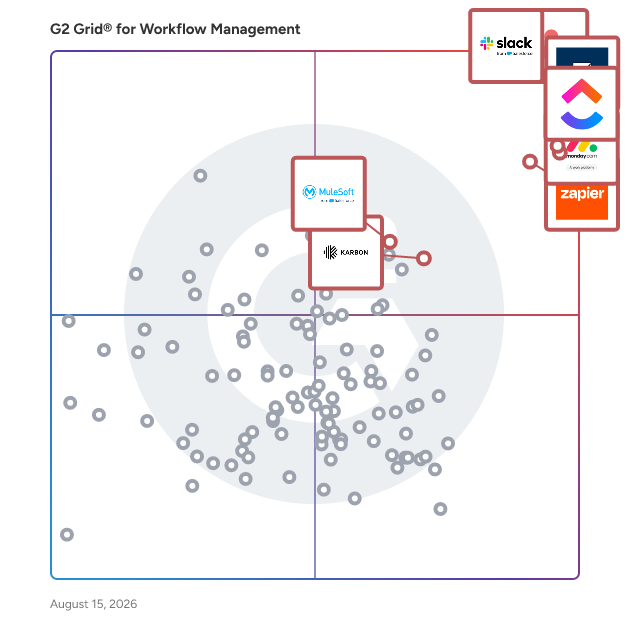
G2 Grid® for Workflow Management Software

G2 Grid® for Workflow Management Software plotting products by satisfaction and market presence

Highlighted products: Slack, Asana, Smartsheet, ClickUp, monday AI Work Platform, Zapier, Karbon, and MuleSoft Automation.

Underlying data: [Grid® JSON](https://www.g2.com/categories/workflow-management/grids.json?focus%5B%5D=slack&focus%5B%5D=asana&focus%5B%5D=smartsheet&focus%5B%5D=clickup&focus%5B%5D=monday-com&focus%5B%5D=zapier&focus%5B%5D=karbon-2025-03-03&focus%5B%5D=mulesoft-automation)

Sponsored

Wrike

Wrike is the trusted work delivery platform where AI extends what people can accomplish. By centralizing all work in one governed, context-rich environment, Wrike helps organizations streamline collaboration, project planning, and task execution while maintaining the control and accountability that complex work demands. Wrike serves project managers, team leaders, and organizations of all sizes across marketing, IT, product development, professional services, and beyond. Teams use Wrike to track work progress, assign tasks, set deadlines, and facilitate communication, eliminating silos and fostering a culture of transparency and accountability that is crucial for successful delivery. Key features include AI Agents, Wrike Copilot, Wrike MCP Server, workflow automations, customizable dashboards, real-time collaboration tools, and advanced reporting capabilities. Teams can build and automate tailored workflows that reflect their unique processes, visualize timelines through Gantt charts and Kanban boards, and integrate seamlessly with tools like Slack, Google Drive, and Microsoft Teams. Wrike's MCP server extends this further, allowing AI assistants to connect directly to the platform where execution actually happens so AI-driven actions become part of the auditable record of how work gets done, not disconnected outputs living outside the system. And powered by the Wrike Work Intelligence® Graph, the platform gives AI the structured context it needs to act reliably inside the same roles, permissions, and access controls as your people. The result goes far beyond task management. Wrike reduces time spent on administrative work, scales alongside growing organizations, and gives teams the governed foundation they need to put AI to work on their most consequential workflows without losing control. With more than 20,000 organizations worldwide, including Siemens, Walmart, NVIDIA, and The Estée Lauder Companies, trusting Wrike to deliver their most important work, the platform has earned its place as a reliable partner for organizations to deliver without doubt

Visit website

Slack

Slack is your single workspace that connects you with the people and tools you work with everyday, no matter where you are or what you do. With Slack you get real-time messaging through calls and chat, a searchable record of all your files and conversations, and integrations with a growing number of handy bots and apps. Now everyone can finally be on the same page and get their work done. Slack: It’s where work happens.

Average Rating: 4.5/5.0

Total Reviews: 37,508

How Do G2 Users Rate Slack?

  • Has the product been a good partner in doing business?: 9.1/10 (Category avg: 9.1/10)
  • Activities: 9.1/10 (Category avg: 8.9/10)
  • Flows: 8.9/10 (Category avg: 8.9/10)
  • Integration: 8.9/10 (Category avg: 8.4/10)

Who Is the Company Behind Slack?

  • Seller: Salesforce
  • Company Website:
  • Year Founded: 1999
  • HQ Location: San Francisco, CA
  • Twitter: @salesforce
    579,511 Twitter followers
  • LinkedIn® Page: www.linkedin.com
    83,223 employees on LinkedIn®

Who Uses This Product?

  • Who Uses This: Software Engineer, Project Manager
  • Top Industries: Computer Software, Information Technology and Services
  • Company Size: 41% Small, 41% Medium

What Do G2 Reviewers Say About Slack?

AI-generated summary from verified user reviews

Pros
  • Users find Slack incredibly easy to use, promoting seamless collaboration and integration within their daily workflow.
  • Users appreciate the effective team collaboration features in Slack, facilitating organized communication and task management.
  • Users love the efficient communication with teams across time zones, enabling quick responses and effective collaboration.
  • Users appreciate the extensive integrations of Slack, enhancing collaboration and allowing seamless automation across platforms.
  • Users value the feature-rich organization of Slack, enhancing team communication with categorized channels and seamless integrations.
Cons
  • Users experience notification issues with Slack, leading to missed important messages and overwhelming alerts from numerous channels.
  • Users express concern over missing features, particularly with organization and search functionality in Slack.
  • Users express frustration over Slack's limited features, particularly regarding message history and organization tools.
  • Users find the overwhelming notifications and message management in Slack stressful, impacting team communication and efficiency.
  • Users find the channel management overwhelming with too many notifications, limited message history, and missed replies.

What Are Recent G2 Reviews of Slack?

What Are G2 Users Discussing About Slack?

Asana

Asana is a leading work management platform for human + AI collaboration. Over 170,000 customers like Accenture, Amazon, Anthropic, and Suzuki rely on Asana to align teams and accelerate organizational impact. Whether it’s managing strategic initiatives, cross-functional programs, or company-wide goals, Asana helps organizations bring clarity to complexity—turning plans into action with AI working alongside teams every step of the way. To learn more, visit www.asana.com.

Average Rating: 4.4/5.0

Total Reviews: 13,291

How Do G2 Users Rate Asana?

  • Has the product been a good partner in doing business?: 8.7/10 (Category avg: 9.1/10)
  • Activities: 8.7/10 (Category avg: 8.9/10)
  • Flows: 8.6/10 (Category avg: 8.9/10)
  • Integration: 8.0/10 (Category avg: 8.4/10)

Who Is the Company Behind Asana?

  • Seller: Asana
  • Company Website:
  • Year Founded: 2008
  • HQ Location: San Francisco, CA
  • Twitter: @Asana
    119,913 Twitter followers
  • LinkedIn® Page: www.linkedin.com
    4,369 employees on LinkedIn®

Who Uses This Product?

  • Who Uses This: Project Manager, Owner
  • Top Industries: Marketing and Advertising, Information Technology and Services
  • Company Size: 57% Small, 31% Medium

What Do G2 Reviewers Say About Asana?

AI-generated summary from verified user reviews

Pros
  • Users find Asana to have a user-friendly interface that enhances collaboration and simplifies task management effectively.
  • Users appreciate effective task management with Asana, enhancing collaboration and helping avoid burnout in daily activities.
  • Users appreciate the workflow features of Asana, finding it user-friendly and effective for project management and team collaboration.
  • Users value the effective team collaboration features of Asana, enhancing project connections and overall workflow management.
  • Users value the user-friendly task tracking in Asana, which simplifies managing deadlines and enhances overall productivity.
Cons
  • Users express frustration over the missing features like time tracking and duplicating rules within projects.
  • Users find the learning curve steep due to unclear guidelines and complex functionalities, hindering effective use.
  • Users feel that Asana has limited features available without a costly upgrade and a tough learning curve.
  • Users find the UI not intuitive, making navigation and task management more cumbersome than necessary.
  • Users find the search functionality lacking, making it difficult to efficiently locate projects and tasks.

What Are Recent G2 Reviews of Asana?

What Are G2 Users Discussing About Asana?

Smartsheet

Smartsheet is an Intelligent Work Management Platform that revolutionizes how you manage projects, portfolios, and processes. The Smartsheet AI-powered platform delivers adaptability, sophisticated experiences, and enterprise-grade rigor to support work across industries — from service delivery to construction, clinical trials, and marketing campaigns. Designed to meet demanding requirements, it helps organizations drive efficiency, accelerate innovation, and stay competitive. Over 85% of Fortune 500 companies trust Smartsheet to align their resources to improve efficiency, agility, and collaboration in today’s ever-changing world of work.

Average Rating: 4.4/5.0

Total Reviews: 22,266

How Do G2 Users Rate Smartsheet?

  • Has the product been a good partner in doing business?: 8.6/10 (Category avg: 9.1/10)
  • Activities: 8.3/10 (Category avg: 8.9/10)
  • Flows: 8.5/10 (Category avg: 8.9/10)
  • Integration: 7.5/10 (Category avg: 8.4/10)

Who Is the Company Behind Smartsheet?

  • Seller: Smartsheet
  • Company Website:
  • Year Founded: 2005
  • HQ Location: Bellevue, WA
  • Twitter: @Smartsheet
    26,366 Twitter followers
  • LinkedIn® Page: www.linkedin.com
    4,034 employees on LinkedIn®

Who Uses This Product?

  • Who Uses This: Project Manager, Senior Project Manager
  • Top Industries: Information Technology and Services, Construction
  • Company Size: 41% Medium, 34% Small

What Do G2 Reviewers Say About Smartsheet?

AI-generated summary from verified user reviews

Pros
  • Users commend the ease of use of Smartsheet, appreciating its flexibility across various applications and integration capabilities.
  • Users value Smartsheet for its customizable rows and powerful Control Center, streamlining project tracking and data management.
  • Users love the effective team collaboration features of Smartsheet, enhancing productivity and streamlining task management.
  • Users value the automation features in Smartsheet, which streamline tasks and improve workflow efficiency.
  • Users value the versatile project tracking capabilities of Smartsheet, facilitating efficient workflow management and data analysis.
Cons
  • Users face a steep learning curve with Smartsheet, particularly struggling with formulas and the interface's complexity.
  • Users find missing features in Smartsheet frustrating, particularly around customization and intuitive use compared to Excel.
  • Users find the interface not intuitive and face challenges navigating formulas, impacting their overall experience with Smartsheet.
  • Users find the limited features of Smartsheet restrictive, particularly regarding formulas and collaboration capabilities.
  • Users find the limited customization options of Smartsheet restrictive, impacting collaboration and user experience.

What Are Recent G2 Reviews of Smartsheet?

What Are G2 Users Discussing About Smartsheet?

monday AI Work Platform

monday.com is the AI Work Platform where people and agents operate as one team - with shared cross-department context, enterprise-grade trust, and an easy-to-use interface built for adoption at scale. With monday.com, agents work alongside teams in the same boards, workflows, and goals they already use every day, creating a new kind of teamwork where people and agents move work forward together. Beyond agents, monday.com gives every team more ways to turn AI into real business impact. With monday vibe, teams can build custom work apps for their specific needs, and with monday sidekick, every user gets a personal AI assistant to help solve business challenges, move faster, and get more done. monday.com gives organizations the visibility, permissions, human oversight, and compliance standards they need to deploy AI with confidence. AI doesn’t operate in a black box - it operates within the same trusted guardrails teams already rely on. Because monday.com is already used across departments, agents can access the broader context of how work connects across marketing, sales, product, IT, HR, operations, and more. That means smarter decisions, faster execution, and fewer silos - all in one place. Today, over 250,000 customers and more than 60% of Fortune 500 companies trust monday.com with how they run their business.

Average Rating: 4.7/5.0

Total Reviews: 16,648

How Do G2 Users Rate monday AI Work Platform?

  • Has the product been a good partner in doing business?: 9.1/10 (Category avg: 9.1/10)
  • Activities: 8.9/10 (Category avg: 8.9/10)
  • Flows: 8.9/10 (Category avg: 8.9/10)
  • Integration: 8.3/10 (Category avg: 8.4/10)

Who Is the Company Behind monday AI Work Platform?

  • Seller: monday.com
  • Company Website:
  • Year Founded: 2012
  • HQ Location: Tel Aviv
  • Twitter: @mondaydotcom
    40,761 Twitter followers
  • LinkedIn® Page: www.linkedin.com
    3,837 employees on LinkedIn®

Who Uses This Product?

  • Who Uses This: Project Manager, CEO
  • Top Industries: Marketing and Advertising, Information Technology and Services
  • Company Size: 61% Small, 30% Medium

What Do G2 Reviewers Say About monday AI Work Platform?

AI-generated summary from verified user reviews

Pros
  • Users find monday AI Work Platform to be easy to use, enhancing organization and streamlining project management effectively.
  • Users highlight the effective cross-functional collaboration in monday AI Work Platform, enhancing project management and team communication.
  • Users love the efficiency of clean workflows and automations for managing complex projects seamlessly in monday AI Work Platform.
  • Users value how monday AI Work Platform enhances organization and keeps teams coordinated with easy access to information.
  • Users value the clean workflows and automation provided by monday AI Work Platform for efficient task management.
Cons
  • Users note the missing messaging features and challenging upgrade requirements, limiting their overall experience with monday AI.
  • Users find a steep learning curve due to implementation challenges and slow performance with large datasets.
  • Users find the limited features of monday AI Work Platform insufficient for comprehensive reporting and essential functionalities.
  • Users find the interface not intuitive, facing challenges with complex workflows and basic functionalities.
  • Users find the limited customization options frustrating, hindering efficiency and collaboration across teams.

What Are Recent G2 Reviews of monday AI Work Platform?

What Are G2 Users Discussing About monday AI Work Platform?

ClickUp

ClickUp is the world’s first Converged AI Workspace, bringing together all work apps, data, and workflows. ClickUp eliminates all forms of work sprawl to provide 100% context and a single place for humans and agents to work, together. Trusted by more than 20 million users worldwide, ClickUp is on a mission to maximize human productivity.

Average Rating: 4.6/5.0

Total Reviews: 13,035

How Do G2 Users Rate ClickUp?

  • Has the product been a good partner in doing business?: 9.0/10 (Category avg: 9.1/10)
  • Activities: 8.8/10 (Category avg: 8.9/10)
  • Flows: 8.8/10 (Category avg: 8.9/10)
  • Integration: 8.2/10 (Category avg: 8.4/10)

Who Is the Company Behind ClickUp?

  • Seller: ClickUp
  • Company Website:
  • Year Founded: 2017
  • HQ Location: San Diego, California
  • Twitter: @clickup
    69,539 Twitter followers
  • LinkedIn® Page: www.linkedin.com
    1,526 employees on LinkedIn®

Who Uses This Product?

  • Who Uses This: CEO, Project Manager
  • Top Industries: Marketing and Advertising, Computer Software
  • Company Size: 77% Small, 19% Medium

What Do G2 Reviewers Say About ClickUp?

AI-generated summary from verified user reviews

Pros
  • Users praise ClickUp for its ease of use, enhancing collaboration and project management efficiency effortlessly.
  • Users value the robust task management capabilities of ClickUp, enhancing organization, productivity, and overall workflow efficiency.
  • Users value ClickUp's robust features and flexibility, significantly enhancing productivity and project visibility across teams.
  • Users appreciate the flexibility and comprehensive integration of ClickUp, enhancing teamwork and project execution efficiency.
  • Users appreciate the effective collaboration of ClickUp, enabling seamless teamwork and task management on a single platform.
Cons
  • Users find missing features frustrating in ClickUp, especially when crucial tools are restricted by paywalls and limits.
  • Users find the learning curve for beginners to be challenging, requiring time to adapt and master the system.
  • Users find ClickUp has limited features, lacking integrations and complex functionalities, impacting usability and flexibility.
  • Users find ClickUp's interface not intuitive, complicating the discovery of features and overall user experience.
  • Users report experiencing slow loading times in ClickUp, impacting overall efficiency and user experience.

What Are Recent G2 Reviews of ClickUp?

What Are G2 Users Discussing About ClickUp?

Zapier

Zapier is the #1 workflow automation platform for businesses that want to grow faster by maximizing the efficiency of their teams, tools, and processes without relying on development teams. With our new visual editor, free Filter and Formatter tasks for more control, and reduced task-based pricing, you're going love automating with Zapier. It's free to sign up — no credit card required — and creating your first workflow, what we call a "Zap," is just a few clicks away. Since 2011, over 2 million business have turned to Zapier for their automation needs, including: lead management, sales pipeline, marketing campaigns, customer support, data management, project management, and tickets and incidents.

Average Rating: 4.5/5.0

Total Reviews: 2,063

How Do G2 Users Rate Zapier?

  • Has the product been a good partner in doing business?: 8.8/10 (Category avg: 9.1/10)
  • Flows: 10.0/10 (Category avg: 8.9/10)
  • Integration: 10.0/10 (Category avg: 8.4/10)

Who Is the Company Behind Zapier?

  • Seller: Zapier
  • Company Website:
  • Year Founded: 2011
  • HQ Location: San Francisco, CA
  • Twitter: @zapier
    95,859 Twitter followers
  • LinkedIn® Page: www.linkedin.com
    1,473 employees on LinkedIn®

Who Uses This Product?

  • Who Uses This: Owner, CEO
  • Top Industries: Marketing and Advertising, Information Technology and Services
  • Company Size: 70% Small, 24% Medium

What Do G2 Reviewers Say About Zapier?

AI-generated summary from verified user reviews

Pros
  • Users appreciate the ease of use of Zapier, effortlessly automating tasks with seamless integrations and a user-friendly interface.
  • Users appreciate the seamless automation offered by Zapier, effortlessly connecting tools and saving significant time on tasks.
  • Users love the wide range of integrations in Zapier, enhancing automation and improving productivity across various tools.
  • Users value the easy integrations of Zapier, enabling seamless automation across essential platforms like Google Workspace.
  • Users value the wide range of integrations in Zapier, enhancing task automation across various platforms effortlessly.
Cons
  • Users find Zapier to be expensive for the features it offers, especially when scaling usage over time.
  • Users find that Zapier has pricing issues as costs surge with advanced workflows, limiting access to essential features.
  • Users find the setup complexity of Zapier challenging, especially in error diagnosis and testing limitations.
  • Users experience a steep learning curve, particularly those without a coding background, making efficient usage challenging.
  • Users find Zapier's limited features in the free plan restrictive for growing workflows and advanced automations.

What Are Recent G2 Reviews of Zapier?

What Are G2 Users Discussing About Zapier?

Karbon

Karbon is a Practice Management platform for accounting firms. It provides a truly collaborative platform to manage workflows, communicate with teams and deliver exceptional client work. By combining email, discussions, tasks and powerful workflows, Karbon aligns your team with a single place to communicate and collaborate, increasing capacity to deliver on time and budget.

Average Rating: 4.8/5.0

Total Reviews: 907

How Do G2 Users Rate Karbon?

  • Has the product been a good partner in doing business?: 9.3/10 (Category avg: 9.1/10)
  • Activities: 9.1/10 (Category avg: 8.9/10)
  • Flows: 9.0/10 (Category avg: 8.9/10)
  • Integration: 8.0/10 (Category avg: 8.4/10)

Who Is the Company Behind Karbon?

  • Seller: KarbonHQ
  • Company Website:
  • Year Founded: 2014
  • HQ Location: Sausalito, California
  • Twitter: @karbonhq
    3,663 Twitter followers
  • LinkedIn® Page: www.linkedin.com
    420 employees on LinkedIn®

Who Uses This Product?

  • Who Uses This: Accountant, Bookkeeper
  • Top Industries: Accounting, Financial Services
  • Company Size: 86% Small, 10% Medium

What Do G2 Reviewers Say About Karbon?

AI-generated summary from verified user reviews

Pros
  • Users love the ease of use of Karbon, appreciating its functionality for managing workflow and correspondence.
  • Users appreciate the efficient task management of Karbon, enhancing organization and productivity across their workflows.
  • Users value the efficiency of Karbon, noting improved organization and streamlined task management that enhances productivity.
  • Users commend Karbon for its excellent communication and collaboration tools, enhancing team workflows and client management.
  • Users appreciate the enhanced team collaboration and streamlined task management in Karbon, boosting overall productivity.
Cons
  • Users noted the missing features like a simple task list and mass client invite, affecting usability.
  • Users find the email integration confusing, complicating email handling and causing issues with triage and organization.
  • Users find the steep learning curve of Karbon challenging, particularly with customization and advanced features.
  • Users struggle with poor usability in Karbon due to constant UI changes and a steep learning curve.
  • Users find email integration confusing, complicating triage and making it hard to manage sensitive messages effectively.

What Are Recent G2 Reviews of Karbon?

MuleSoft Automation

MuleSoft Automation is an enterprise-grade agentic automation platform that enables organizations to build, orchestrate, and govern autonomous workflows. MuleSoft Automation is designed for enterprises that need to move beyond simple task automation to a state of agentic efficiency. By providing native, low-code tools like MuleSoft for Flow, MuleSoft IDP, Flow Builder, and Flow Orchestration, the platform allows organizations to operationalize AI agents that can read documents, connect non-Salesforce systems, synchronize data across common SaaS applications, and reason through complex cross-platform processes. Key capabilities and components include: MuleSoft for Flow: Integration, which provides 200+ native, low-code connectors (including NetSuite, Quickbooks, Jira, Asana, and more) and pre-built templates and actions directly inside the Salesforce Flow Builder UI. MuleSoft for Flow: IDP provides agentic document processing capabilities natively in Salesforce Flow Builder, allowing teams to automatically extract, understand, and act on unstructured data from documents within end-to-end workflows. MuleSoft Intelligent Document Processing (IDP), an AI-native engine that uses LLM to extract and structure data from unstructured sources like PDFs, images, and handwritten forms without requiring rigid templates. MuleSoft for Agentforce Actions, which allows any MuleSoft-integrated system or IDP extraction model to be instantly exposed as an invocable action for Agentforce, giving agents "hands" to act in external systems. Hybrid automation orchestration, which combines deterministic Salesforce Flows with generative AI reasoning to handle complex business logic while maintaining enterprise guardrails. Overall, MuleSoft Automation is a unified agentic platform for organizations seeking to power end-to-end operational actions at scale.

Average Rating: 4.4/5.0

Total Reviews: 45

How Do G2 Users Rate MuleSoft Automation?

  • Has the product been a good partner in doing business?: 8.7/10 (Category avg: 9.1/10)
  • Activities: 8.9/10 (Category avg: 8.9/10)
  • Flows: 9.6/10 (Category avg: 8.9/10)
  • Integration: 8.3/10 (Category avg: 8.4/10)

Who Is the Company Behind MuleSoft Automation?

  • Seller: Salesforce
  • Company Website:
  • Year Founded: 1999
  • HQ Location: San Francisco, CA
  • Twitter: @salesforce
    579,511 Twitter followers
  • LinkedIn® Page: www.linkedin.com
    83,223 employees on LinkedIn®

Who Uses This Product?

  • Top Industries: Consulting, Information Technology and Services
  • Company Size: 39% Large, 35% Medium

What Do G2 Reviewers Say About MuleSoft Automation?

AI-generated summary from verified user reviews

Pros
  • Users value the powerful automation capabilities of MuleSoft, significantly enhancing efficiency and task management across platforms.
  • Users value the seamless integrations of MuleSoft Automation, enhancing connectivity across various applications and platforms.
  • Users find that MuleSoft Automation greatly enhances automation efficiency, streamlining processes and improving productivity across teams.
  • Users commend the ease of use of MuleSoft Automation, enhancing efficiency and streamlining complex business processes effortlessly.
  • Users value the easy integrations with MuleSoft Automation, enhancing workflows and enabling efficient automation across systems.
Cons
  • Users experience a steep learning curve with MuleSoft Automation, complicating initial setup and ease of use.
  • Users find the complexity of MuleSoft challenging, especially regarding maintenance and understanding the system's user experience.
  • Users find MuleSoft Automation to be expensive compared to other integration tools, affecting its overall value.
  • Users note a steep learning curve with MuleSoft Automation, making initial setup and configuration more challenging than anticipated.
  • Users find the difficult learning curve of MuleSoft Automation frustrating, requiring extensive training to achieve effective use.

What Are Recent G2 Reviews of MuleSoft Automation?

Kintone

Kintone is a no-code business application platform designed to empower non-technical users to create robust applications, workflows, and databases tailored to their teams and organizations. By utilizing a user-friendly interface that emphasizes clicks over coding, Kintone enables individuals to develop applications that streamline business processes, enhance collaboration on projects and tasks, and facilitate the reporting of complex data with ease. This platform is particularly beneficial for business users who require immediate solutions without the need for extensive programming knowledge. Kintone offers a wide array of pre-built applications that cater to various use cases, including customer relationship management (CRM), project management, inventory management, and more. These templates allow users to hit the ground running and adapt the applications to their specific needs, significantly reducing the time and effort required to implement new systems. Kintone's target audience includes small to medium-sized businesses, project managers, team leaders, and any professional looking to optimize their workflow without relying on IT departments or external developers. The no-code approach democratizes app development, allowing users from diverse backgrounds to participate in creating solutions that address their unique challenges. This inclusivity fosters a culture of innovation within organizations, as team members can contribute ideas and improvements based on their firsthand experiences. Key features of Kintone include customizable dashboards, automated workflows, and real-time collaboration tools. Users can design dashboards that provide insights into their projects and data at a glance, while automated workflows help eliminate repetitive tasks, ensuring that team members can focus on higher-value activities. The platform also supports real-time collaboration, enabling teams to work together seamlessly, share updates, and track progress on projects without the need for constant meetings or email exchanges. Kintone stands out in the no-code platform category by offering a flexible and scalable solution that grows with organizations. Its ability to integrate with other tools and services further enhances its functionality, allowing users to create a comprehensive ecosystem that meets their evolving business needs. By providing a powerful yet accessible platform for app development, Kintone empowers users to take control of their workflows and drive efficiency within their teams.

Average Rating: 4.6/5.0

Total Reviews: 263

How Do G2 Users Rate Kintone?

  • Has the product been a good partner in doing business?: 9.4/10 (Category avg: 9.1/10)
  • Activities: 9.2/10 (Category avg: 8.9/10)
  • Flows: 9.4/10 (Category avg: 8.9/10)
  • Integration: 8.8/10 (Category avg: 8.4/10)

Who Is the Company Behind Kintone?

  • Seller: Kintone
  • Company Website:
  • Year Founded: 1997
  • HQ Location: San Francisco, CA
  • Twitter: @kintone
    2,101 Twitter followers
  • LinkedIn® Page: www.linkedin.com
    83 employees on LinkedIn®

Who Uses This Product?

  • Who Uses This: CEO, Executive Director
  • Top Industries: Non-Profit Organization Management, Information Technology and Services
  • Company Size: 73% Small, 22% Medium

What Do G2 Reviewers Say About Kintone?

AI-generated summary from verified user reviews

Pros
  • Users find Kintone’s ease of use exceptional, enabling straightforward workflow creation without needing technical expertise.
  • Users value Kintone's outstanding customer service, highlighting clear communication and quick, effective support.
  • Users value the no-code flexibility and customization of Kintone, enhancing workflows and centralizing communication effectively.
  • Users value Kintone's high degree of customization, enabling tailored workflows and forms to meet diverse business needs.
  • Users value the high degree of customization in Kintone, enabling tailored solutions for diverse business needs.
Cons
  • Users note the missing features in Kintone, wishing for enhanced charting and basic accounting functionalities.
  • Users find Kintone's poor interface design hindered by its outdated aesthetics and lack of intuitiveness.
  • Users find limited customization in Kintone, facing challenges with integration and sorting options for data management.
  • Users find Kintone's limited features hindered by a dated interface and inadequate integration capabilities.
  • Users find the poor usability of Kintone problematic, citing a lack of modern interface and intuitive features.

What Are Recent G2 Reviews of Kintone?

What Are G2 Users Discussing About Kintone?

Jotform Workflows

Jotform Workflows is a powerful no-code automation platform that makes it easy to streamline, manage, and optimize your business processes from end to end. Using an intuitive drag-and-drop builder, you can design custom workflows that match your exact needs — whether you’re routing approvals, collecting payments, assigning tasks, or automating repetitive steps across your organization. Jotform Workflows eliminates manual work, reduces errors, and helps teams move faster by keeping every process consistent, transparent, and fully automated. With 200+ professionally designed workflow templates, getting started is effortless. Choose a ready-made workflow for HR, finance, operations, customer service, education, healthcare, or any other use case, and customize it to fit your processes. Workflows can include conditional logic, automated notifications, role-based approvals, and dynamic routing rules that adapt to each form submission, ensuring the right steps happen at the right time. For organizations that rely on payments, Jotform Workflows supports automated payment collection and processing through 40+ trusted payment gateways, including PayPal, Square, and Stripe. You can trigger payments based on user selections, approval steps, or predefined conditions, helping you collect funds quickly and accurately without manual intervention. Seamless integration is at the heart of Jotform Workflows. Connect your workflows to 200+ popular apps — including Slack, Google Sheets, Airtable, HubSpot, Trello, and more — to automatically sync data, create tasks, notify team members, or update external systems in real time. This creates a fully connected ecosystem where every submission triggers the right actions across your tools. Jotform Workflows also includes powerful task management capabilities. Create tasks, assign them to team members, track progress, and automate follow-ups based on form responses or workflow conditions. This centralizes all activity into one organized workspace, giving teams full visibility into what needs to happen next. All workflow data is automatically stored and organized in Jotform Tables and Jotform Inbox. View submissions as spreadsheets, calendars, or cards, manage permissions for team members, and respond to approvals or requests quickly from any device. This ensures complete oversight and helps teams make informed decisions faster. With robust automation, deep integrations, secure data handling, and a no-code builder anyone can use, Jotform Workflows empowers organizations of all sizes to create efficient, scalable, and fully automated processes — without relying on developers or technical expertise.

Average Rating: 4.5/5.0

Total Reviews: 574

How Do G2 Users Rate Jotform Workflows?

  • Has the product been a good partner in doing business?: 8.9/10 (Category avg: 9.1/10)
  • Activities: 8.6/10 (Category avg: 8.9/10)
  • Flows: 8.7/10 (Category avg: 8.9/10)
  • Integration: 7.5/10 (Category avg: 8.4/10)

Who Is the Company Behind Jotform Workflows?

  • Seller: Jotform
  • Company Website:
  • Year Founded: 2006
  • HQ Location: San Francisco, California
  • Twitter: @Jotform
    39,289 Twitter followers
  • LinkedIn® Page: www.linkedin.com
    901 employees on LinkedIn®

Who Uses This Product?

  • Who Uses This: Owner, CEO
  • Top Industries: Non-Profit Organization Management, Hospital & Health Care
  • Company Size: 64% Small, 29% Medium

What Do G2 Reviewers Say About Jotform Workflows?

AI-generated summary from verified user reviews

Pros
  • Users appreciate the ease of use of Jotform Workflows, making setup and monitoring straightforward and efficient.
  • Users love the automation capabilities of Jotform Workflows, greatly enhancing efficiency and streamlining processes effortlessly.
  • Users appreciate the easy-to-use form creation in Jotform Workflows, enabling smooth workflows and customization options.
  • Users value the easy integrations with platforms like Hubspot, enhancing their workflow efficiency significantly.
  • Users love the customization options in Jotform Workflows, enabling seamless brand alignment and efficient form creation.
Cons
  • Users find the steep learning curve for advanced features challenging, making implementation difficult for newcomers.
  • Users find the navigational complexity of Jotform Workflows time-consuming and challenging during setup and personalization.
  • Users express frustration over the missing features, particularly lacking communication channels and intuitive project management tools.
  • Users face integration issues with limited customizability, creating challenges for complex workflows and overall user experience.
  • Users experience form issues like slow searches and incompatibility with encrypted forms, affecting workflow efficiency.

What Are Recent G2 Reviews of Jotform Workflows?

Quixy

Quixy is a cloud-based, user-friendly platform that empowers users without coding skills to create enterprise-grade applications ten times faster using a simple drag-and-drop design. Built for today’s dynamic business environment, Quixy allows businesses to build and manage enterprise applications quickly and effortlessly, enhancing efficiency, transparency, and productivity across operations. With a wide range of pre-built solutions for various use cases such as CRM, Project Management, HRMS, and more. Quixy simplifies application development and helps organizations stay agile while meeting their unique needs. The platform also integrates a seamless cloud database, enterprise-grade security, regulatory compliance, and a scalable infrastructure to support global business operations. Schedule a Demo at https://quixy.com/get-demo/

Average Rating: 5.0/5.0

Total Reviews: 129

How Do G2 Users Rate Quixy?

  • Has the product been a good partner in doing business?: 9.9/10 (Category avg: 9.1/10)
  • Activities: 9.8/10 (Category avg: 8.9/10)
  • Flows: 9.9/10 (Category avg: 8.9/10)
  • Integration: 9.7/10 (Category avg: 8.4/10)

Who Is the Company Behind Quixy?

  • Seller: Quixy
  • Year Founded: 2019
  • HQ Location: Hyderabad, Telangana
  • LinkedIn® Page: www.linkedin.com
    231 employees on LinkedIn®

Who Uses This Product?

  • Who Uses This: Senior Software Engineer, Associate Software Engineer
  • Top Industries: Computer Software, Information Technology and Services
  • Company Size: 62% Medium, 23% Small

What Do G2 Reviewers Say About Quixy?

AI-generated summary from verified user reviews

Pros
  • Users value Quixy's easy and fast automation, effectively streamlining workflows and significantly reducing manual efforts.
  • Users find automation incredibly easy with Quixy, streamlining workflows and saving time with its user-friendly platform.
  • Users praise Quixy for its easy and fast automation, enhancing internal workflows and saving considerable time and effort.
  • Users value the ease of automation Quixy offers, allowing seamless workflow management without coding skills.
  • Users praise Quixy's powerful workflow automation capabilities, making complex processes easy and efficient without coding requirements.
Cons
  • Users experience slow refresh speeds and buffering, along with occasional missed notifications that disrupt their workflow.
  • Users experience communication issues due to low refresh speeds and missed notifications, impacting overall efficiency.
  • Users face email issues due to slow refresh speeds and missed notifications affecting user experience.
  • Users experience lagging issues with slow refresh speeds and missed notifications, impacting their overall experience.
  • Users experience performance issues like low refresh speed and missed notifications, impacting their workflow efficiency.

What Are Recent G2 Reviews of Quixy?

What Are G2 Users Discussing About Quixy?

Wrike

Wrike is the trusted work delivery platform where AI extends what people can accomplish. By centralizing all work in one governed, context-rich environment, Wrike helps organizations streamline collaboration, project planning, and task execution while maintaining the control and accountability that complex work demands. Wrike serves project managers, team leaders, and organizations of all sizes across marketing, IT, product development, professional services, and beyond. Teams use Wrike to track work progress, assign tasks, set deadlines, and facilitate communication, eliminating silos and fostering a culture of transparency and accountability that is crucial for successful delivery. Key features include AI Agents, Wrike Copilot, Wrike MCP Server, workflow automations, customizable dashboards, real-time collaboration tools, and advanced reporting capabilities. Teams can build and automate tailored workflows that reflect their unique processes, visualize timelines through Gantt charts and Kanban boards, and integrate seamlessly with tools like Slack, Google Drive, and Microsoft Teams. Wrike's MCP server extends this further, allowing AI assistants to connect directly to the platform where execution actually happens so AI-driven actions become part of the auditable record of how work gets done, not disconnected outputs living outside the system. And powered by the Wrike Work Intelligence® Graph, the platform gives AI the structured context it needs to act reliably inside the same roles, permissions, and access controls as your people. The result goes far beyond task management. Wrike reduces time spent on administrative work, scales alongside growing organizations, and gives teams the governed foundation they need to put AI to work on their most consequential workflows without losing control. With more than 20,000 organizations worldwide, including Siemens, Walmart, NVIDIA, and The Estée Lauder Companies, trusting Wrike to deliver their most important work, the platform has earned its place as a reliable partner for organizations to deliver without doubt

Average Rating: 4.2/5.0

Total Reviews: 4,458

How Do G2 Users Rate Wrike?

  • Has the product been a good partner in doing business?: 8.5/10 (Category avg: 9.1/10)
  • Activities: 8.3/10 (Category avg: 8.9/10)
  • Flows: 8.3/10 (Category avg: 8.9/10)
  • Integration: 7.8/10 (Category avg: 8.4/10)

Who Is the Company Behind Wrike?

  • Seller: Wrike, Inc.
  • Company Website:
  • Year Founded: 2006
  • HQ Location: San Diego, CA
  • Twitter: @wrike
    13,574 Twitter followers
  • LinkedIn® Page: www.linkedin.com
    1,257 employees on LinkedIn®

Who Uses This Product?

  • Who Uses This: Project Manager, Marketing Manager
  • Top Industries: Marketing and Advertising, Information Technology and Services
  • Company Size: 43% Medium, 35% Small

What Do G2 Reviewers Say About Wrike?

AI-generated summary from verified user reviews

Pros
  • Users find Wrike to greatly enhance project tracking and team collaboration, boosting productivity and organization.
  • Users appreciate the seamless team collaboration in Wrike, enhancing productivity and simplifying project management processes.
  • Users appreciate the effective task management in Wrike, enhancing team collaboration and productivity through real-time updates.
  • Users value the organization capabilities of Wrike, enhancing task management and team collaboration effectively.
  • Users appreciate the ease of use of Wrike, streamlining task management and enhancing team collaboration effortlessly.
Cons
  • Users find Wrike has a steep learning curve, making initial navigation and usage quite challenging and overwhelming.
  • Users find Wrike's interface not intuitive, making it challenging to train others and leading to frequent user frustration.
  • Users find the lack of built-in templates and steep learning curve challenging, affecting workflow efficiency in Wrike.
  • Users find Wrike's limited features frustrating, desiring more templates and customizability for a smoother experience.
  • Users find Wrike's interface initially overwhelming and complex, making it challenging to navigate and utilize effectively.

What Are Recent G2 Reviews of Wrike?

What Are G2 Users Discussing About Wrike?

M-Files

M-Files delivers Context-First Document Management with an AI-native, metadata-driven architecture that eliminates information chaos and improves productivity across the document lifecycle. By linking documents to the people, processes, clients, and projects that give them meaning, M-Files creates a unified, connected environment that accelerates decision-making, strengthens governance, and streamlines industry-specific workflows through advanced workflow automation and AI. M-Files is also the only document management system that is native to Microsoft 365. This unified solution extends Microsoft collaboration, Copilot, and Purview capabilities to curated M-Files content, enabling stronger security, more consistent compliance, and more accurate AI outcomes grounded in trusted, contextualized information. Organizations gain a seamless, future-ready environment that maximizes ROI on their Microsoft investments while supporting smarter and more efficient work across the business. Schedule a Demo: https://bit.ly/3O1SCm0 Free Trial: https://bit.ly/4ehlAsV

Average Rating: 4.4/5.0

Total Reviews: 229

How Do G2 Users Rate M-Files?

  • Has the product been a good partner in doing business?: 8.4/10 (Category avg: 9.1/10)
  • Activities: 9.1/10 (Category avg: 8.9/10)
  • Flows: 9.0/10 (Category avg: 8.9/10)
  • Integration: 9.0/10 (Category avg: 8.4/10)

Who Is the Company Behind M-Files?

  • Seller: M-Files Corporation
  • Year Founded: 2002
  • HQ Location: Austin, Texas
  • Twitter: @M_Files
    8,609 Twitter followers
  • LinkedIn® Page: www.linkedin.com
    842 employees on LinkedIn®

Who Uses This Product?

  • Who Uses This: Project Manager, Director
  • Top Industries: Information Technology and Services, Computer Software
  • Company Size: 48% Medium, 41% Small

What Do G2 Reviewers Say About M-Files?

AI-generated summary from verified user reviews

Pros
  • Users value the user-friendly interface of M-Files, enhancing document management and simplifying navigation for everyone.
  • Users value the efficient organization and collaboration features of M-Files, making document management effortless and streamlined.
  • Users appreciate the easy access to files anytime, benefiting from quick, user-friendly features and secure storage.
  • Users find M-Files enhances data management, making information retrieval significantly quicker and ensuring better organization.
  • Users value the organized structure of M-Files, simplifying file management and enhancing workflow efficiency.
Cons
  • Users find the learning curve steep, requiring time and training for effective use of M-Files.
  • Users found the initial training required to onboard on M-Files challenging, especially for those accustomed to traditional systems.
  • Users experience slow performance with M-Files, particularly when handling large volumes of documents or complex searches.
  • Users experience slow loading times with M-Files, especially when handling large documents or performing complex searches.
  • Users find the outdated features of M-Files challenging, particularly the cluttered interface and inconsistent version compatibility.

What Are Recent G2 Reviews of M-Files?

What Are G2 Users Discussing About M-Files?

Hubstaff

Hubstaff is a time tracking software built for global teams. Track hours with precision, automate payments and invoicing, and gain full visibility into how work gets done — whether your team is remote, hybrid, in-office or field-based. In addition to time tracking, Hubstaff includes built-in productivity monitoring features such as activity rates, app and URL usage, and optional screenshots — helping managers understand how time is spent and where focus is lost. The platform also offers advanced workforce analytics that classify work time, detect unusual activity patterns, and highlight inefficiencies — enabling data-driven decisions that improve performance and reduce wasted hours. Available on Mac, Windows, Linux, iOS, Android, and Chrome, Hubstaff platform integrates with over 35+ tools to streamline operations and support productive, high-performing teams.

Average Rating: 4.4/5.0

Total Reviews: 2,268

How Do G2 Users Rate Hubstaff?

  • Has the product been a good partner in doing business?: 8.8/10 (Category avg: 9.1/10)
  • Activities: 9.2/10 (Category avg: 8.9/10)
  • Flows: 9.2/10 (Category avg: 8.9/10)
  • Integration: 8.9/10 (Category avg: 8.4/10)

Who Is the Company Behind Hubstaff?

  • Seller: Hubstaff
  • Company Website:
  • Year Founded: 2013
  • HQ Location: Indianapolis, IN
  • Twitter: @HubStaff
    11,558 Twitter followers
  • LinkedIn® Page: www.linkedin.com
    345 employees on LinkedIn®

Who Uses This Product?

  • Who Uses This: Owner, CEO
  • Top Industries: Information Technology and Services, Computer Software
  • Company Size: 45% Small, 26% Medium

What Do G2 Reviewers Say About Hubstaff?

AI-generated summary from verified user reviews

Pros
  • Users appreciate the ease of use of Hubstaff, finding it seamless and simple to navigate activities and schedules.
  • Users find time tracking effortless with Hubstaff, appreciating its ease of use and excellent customer support.
  • Users find time tracking effortless with Hubstaff, appreciating seamless management and user-friendly interface across timezones.
  • Users appreciate the ease of time tracking with Hubstaff, enhancing their ability to bill accurately for activities.
  • Users value the effective productivity tracking of Hubstaff, enhancing workflow and accountability in their work processes.
Cons
  • Users experience issues with inaccurate time tracking, leading to frustration and concerns about productivity monitoring.
  • Users express concerns about inaccurate tracking in Hubstaff, leading to frustrations with work percentage assessments.
  • Users are frustrated by Hubstaff's limited features, including costly add-ons and insufficient reporting options.
  • Users report time tracking issues with Hubstaff, including project limits that hinder productivity and raise privacy concerns.
  • Users experience slow loading times, particularly when syncing and recording tasks, impacting overall efficiency.

What Are Recent G2 Reviews of Hubstaff?

What Are G2 Users Discussing About Hubstaff?

MindStudio

MindStudio is a powerful no-code platform that makes it easy for teams and creators to design, build, and deploy custom AI agents, chatbots, and applications — without writing a single line of code. Whether you’re building an internal tool, automating workflows, enhancing customer support, or launching a new AI-powered product, MindStudio gives you everything you need to go from idea to production in minutes. With MindStudio, you can connect your data, design conversational flows, and integrate with APIs or existing systems — all through an intuitive visual interface. Our platform is built for flexibility and scalability, enabling startups, enterprises, and creators alike. Key Features: 🧠 No-Code AI Builder: Create powerful AI apps and agents visually — no programming required. ⚙️ Custom Workflows & Integrations: Connect 600+ third-party apps, tools, and data sources for smarter automation and seamless integration with existing workflows. 🔍 LLM Flexibility: Use OpenAI GPT-4, Google Gemini, Anthropic Claude, and other 200+ leading models to power your applications. 📊 Analytics & Optimization: Monitor performance and continuously improve your AI’s results. Trusted by enterprises, professionals, and individuals worldwide, MindStudio is redefining how businesses build with AI.

Average Rating: 4.9/5.0

Total Reviews: 26

How Do G2 Users Rate MindStudio?

  • Has the product been a good partner in doing business?: 10.0/10 (Category avg: 9.1/10)
  • Activities: 9.3/10 (Category avg: 8.9/10)
  • Flows: 9.6/10 (Category avg: 8.9/10)
  • Integration: 8.1/10 (Category avg: 8.4/10)

Who Is the Company Behind MindStudio?

  • Seller: MindStudio
  • Company Website:
  • Year Founded: 2023
  • HQ Location: N/A
  • Twitter: @mindstudioai
    28 Twitter followers
  • LinkedIn® Page: www.linkedin.com
    52 employees on LinkedIn®

Who Uses This Product?

  • Top Industries: Consulting, Marketing and Advertising
  • Company Size: 85% Small, 8% Medium

What Do G2 Reviewers Say About MindStudio?

AI-generated summary from verified user reviews

Pros
  • Users praise the ease of use of MindStudio, enabling everyone to effortlessly build AI agents in minutes.
  • Users find MindStudio's intuitive design exceptionally easy, benefiting both technical and non-technical users alike.
  • Users appreciate the time efficiency of MindStudio, streamlining workflows and enhancing productivity for AI projects.
  • Users benefit from the time-saving capabilities of MindStudio, allowing quick and efficient project execution.
  • Users praise the efficiency and ease of use in creating AI agents quickly, benefitting both technical and non-technical teams.
Cons
  • Users note a lack of features, such as advanced analytics and integrations, limiting the platform's full potential.
  • Users face integration issues with MindStudio, needing advanced knowledge to connect with other platforms effectively.
  • Users find the initial learning curve steep, making it challenging to effectively organize their workspace at first.
  • Users express frustration with the limited customization options in MindStudio, which can disrupt creative workflows.
  • Users find the overwhelming features of MindStudio can complicate learning and organization for new users.

What Are Recent G2 Reviews of MindStudio?

Bijou Barry
BB
Researched and written by Bijou Barry
Updated April 9, 2026

Learn More About Workflow Management Software

Workflow management software buying insights at a glance

At its core, workflow management software helps teams structure how work moves from request to completion. Instead of relying on email chains or manual status updates, these platforms define clear steps, owners, and timelines so tasks progress consistently across teams. By bringing work into a shared system, organizations can track progress, reduce bottlenecks, and make operational processes easier to manage.

As teams coordinate work across departments, locations, and tools, workflow management tools have become an important way to keep processes organized. These platforms allow teams to assign responsibilities, automate approvals, monitor deadlines, and visualize work across projects. In practice, workflow management systems help organizations move beyond simple task lists by connecting daily activities to repeatable processes and broader operational goals.

Based on G2 review data, workflow management software receives strong ratings across usability and support metrics. The category averages 4.49 out of 5 stars and a likelihood to recommend score of 8.98 out of 10. Ease-of-use indicators are also high, including 6.27/7 for Ease of Use, 6.21/7 for Ease of Setup, and 6.22/7 for Quality of Support. These signals suggest that most teams are able to begin using workflow management solutions quickly once processes are defined.

One buying pattern I consistently see in reviews is that teams want flexibility without unnecessary complexity. Organizations evaluating the best workflow management software often need tools that can support custom processes while still remaining intuitive enough for everyday use. The strongest workflow management platforms tend to balance configurable workflows with clear interfaces that make it easy to manage tasks, projects, and approvals.

Organizations typically adopt workflow management software to coordinate tasks, assign responsibilities, and keep projects moving across teams. These platforms also help automate routine steps such as approvals, reminders, and notifications while giving stakeholders a shared space to collaborate and track work. By standardizing repeatable processes and providing visibility into deadlines, workloads, and progress, workflow management tools make it easier for teams to manage operations efficiently.

Pricing for workflow management solutions typically scales with the number of users, automation capabilities, integrations, and reporting features. Entry-level plans often support smaller teams with basic task tracking, while enterprise workflow management tools provide more advanced automation, analytics, and governance controls for larger organizations.

Top 5 FAQs from software buyers

  • How does workflow management software improve operational efficiency?
  • What features should teams evaluate when choosing the best workflow management software?
  • How customizable are workflow management systems for different business processes?
  • Can workflow management tools integrate with project collaboration tools or project management platforms?
  • How scalable are workflow management solutions for growing organizations?

G2’s top-rated workflow management software, based on G2 review data, includes Slack, Asana, Smartsheet, monday Work Management, and ClickUp.

What are the top-reviewed workflow management software on G2?

Slack

  • Number of Reviews: 1308
  • Satisfaction: 98
  • Market Presence: 99
  • G2 Score: 99

Asana

  • Number of Reviews: 3215
  • Satisfaction: 99
  • Market Presence: 89
  • G2 Score: 94

Smartsheet

  • Number of Reviews: 8201
  • Satisfaction: 99
  • Market Presence: 87
  • G2 Score: 93

monday Work Management

  • Number of Reviews: 6022
  • Satisfaction: 100
  • Market Presence: 82
  • G2 Score: 91

ClickUp

  • Number of Reviews: 3277
  • Satisfaction: 90
  • Market Presence: 79
  • G2 Score: 85

Satisfaction reflects how users rate their experience with the product based on review signals such as usability, support quality, and likelihood to recommend. (Source 2)

Market Presence represents a product’s market footprint using signals such as company size, adoption, and product growth indicators. (Source 2)

G2 Score combines Satisfaction and Market Presence to provide a category-level comparison between products. (Source 2)

Learn more about how G2 calculates these scores. (Source 1)

What I Often See in Workflow Management Software

Feedback Pros: What Users Consistently Appreciate

  • Customizable workflows and automation simplify complex operational processes

“I love all the filters that monday Work Management has and all of the customizations that let you make boards your own. With lots of people in our organization doing different things, it's nice to create a personalized board to see what you're concerned with while also accessing the overall workspace to understand what others are working on and their bandwidth. The filters and customizations let us use monday Work Management in the best way for us, with lots of great capabilities right out of the box. I also found the onboarding process really simple; it didn't take long for us to adapt and make it work.”

- monday Work Management Review, Madeline S.

  • Clear task organization improves visibility across projects and teams

“Asana has been a very useful tool for managing projects and daily tasks over the past year. I’ve been using it to handle company task lists, regular updates, and overall workflow tracking, and it has made coordination much easier. Tasks can be created quickly, assigned to team members, and tracked with clear due dates, which helps everyone stay aligned. The list and board views are especially helpful for organizing work and monitoring progress. We regularly update company-related lists and ongoing activities in Asana, and everything stays well-structured and easy to follow. Adding comments, files, and subtasks within each task keeps all communication in one place and reduces unnecessary back-and-forth on email or other tools. Asana also improves visibility across the team, so everyone knows their responsibilities and upcoming deadlines. Notifications and reminders are reliable and help prevent missed follow-ups. Overall, Asana has improved productivity, collaboration, and transparency in our workflow. It’s a dependable platform for both day-to-day task management and longer-term planning, making it easier to manage work efficiently as a team.”

- Asana Review, Muzammil M.

  • Multiple project views help teams track work progress efficiently

“ClickUp gives us one place to manage client projects, internal tasks, and documentation. The flexibility is the biggest win. We can customize statuses, fields, and views based on each team’s workflow, whether it’s development, SEO, or content. Dashboards help us track workload and deadlines across multiple projects. Automations also save time by reducing manual follow-ups and status updates. Overall, it keeps our operations organized, and task management becomes easy.”

- ClickUp Review, Verified User in Consulting

Cons: Where Many Platforms Fall Short

  • Advanced workflow configuration can feel complex for new users

“One downside is that advanced features like automations and conditional logic can feel overwhelming for new users at first. There is a learning curve when building more complex workflows, but once learned, the system becomes very powerful and efficient.”

- Process Street Review, Rachel C.

  • Reporting dashboards sometimes lack deeper process insights

“One area that could be improved is advanced reporting and MIS-level analytics. The basic dashboards are helpful, but pulling deeper, highly customizable reports for large-scale operational tracking can still take manual effort or require using external tools.”

- Asana Review, Mohammad Yaqub S.

  • Interface performance can slow down when managing larger projects

“Slack is powerful but still has room to grow. Search can feel overwhelming in large workspaces, so smarter AI-based filtering and summarization would help users quickly find relevant conversations. Thread visibility sometimes hides important context, making discussions harder to track. Notification management can become noisy, so more granular priority controls would improve focus. Performance can slow down in large organizations with heavy integrations. File management and organization could also be more structured, with better categorization and preview options. Overall, refining clarity, speed, and noise control would make Slack more efficient and less distracting for daily work.”

- Slack Review, Verified User in Publishing

My Expert Takeaway on Workflow Management Software in 2026

After reviewing G2 review data, one theme stands out clearly: workflow management software tends to perform well in the areas that drive long-term adoption. The category averages 4.49 out of 5 stars and an 8.98 out of 10 likelihood-to-recommend score, indicating that many teams find these platforms valuable once they become part of daily operations.

The biggest difference I see between average and high-performing teams is how they implement workflows within the software. Teams that see the most benefit usually go beyond basic task tracking and build structured processes into the platform. Instead of managing projects informally, they define clear steps for approvals, recurring tasks, and operational checklists. That structure helps teams reduce manual coordination and maintain visibility across projects.

Industry patterns also appear in the review data. Adoption is particularly common among technology organizations, marketing teams, and professional services firms, where projects often involve multiple stakeholders and moving parts. In these environments, workflow management systems help teams maintain transparency into work progress while ensuring consistent processes across departments.

Another pattern across reviews involves usability and support. Products that receive higher recommendation scores often combine flexible workflow configuration with interfaces that remain easy for teams to navigate. Metrics such as Ease of Use (6.27/7) and Quality of Support (6.22/7) suggest that many organizations can implement workflow management solutions without significant onboarding challenges.

If I were advising a team evaluating the best workflow management software, I would focus on three factors early in the buying process: how easily workflows can be customized to match existing processes, how clearly teams can monitor progress and responsibilities, and how well the platform integrates with collaboration and productivity tools. Platforms that perform well in these areas often become core systems for coordinating work across teams.

Workflow Management Software FAQs

What does workflow management software do?

Workflow management software helps teams organize tasks, automate processes, and track work as it moves through different stages. Instead of managing projects through email or spreadsheets, these platforms create structured workflows with clear responsibilities, deadlines, and progress tracking. Based on G2 review data, organizations often use workflow management tools to standardize recurring processes, improve collaboration, and increase operational visibility across teams.

What is the most affordable workflow management software for SMBs?

Small and midsize businesses often prioritize platforms that are easy to adopt and reasonably priced while still supporting automation and collaboration. Recommended tools include:

  • Slack is often used by smaller teams to manage lightweight workflows through channels, integrations, and automation features such as Workflow Builder.
  • Smartsheet provides spreadsheet-style workflow management with automation and reporting features that help SMBs coordinate projects and operational processes.
  • monday Work Management is frequently chosen by growing teams because of its intuitive interface and flexible workflow configuration.

What platform integrates workflow management with CRM and ERP systems?

Organizations often choose workflow platforms that connect operational processes with other business systems such as CRM, ERP, and productivity tools. Strong integration-focused platforms include:

  • monday Work Management offers extensive integrations with tools like Salesforce, HubSpot, and Google Workspace.
  • ClickUp supports a wide range of integrations with CRM platforms, collaboration tools, and productivity apps.
  • Smartsheet is often used by organizations that need workflow systems that connect project workflows with enterprise applications.

Which vendor offers AI-powered workflow optimization?

Many modern workflow platforms now include AI features that help automate tasks, generate project insights, and optimize operational processes. Some of the top providers include:

  • ClickUp provides AI-powered assistance for task creation, documentation, and workflow automation to help teams manage complex projects more efficiently.
  • Creatio combines workflow automation with AI-driven process optimization designed for managing operational and customer-facing workflows.
  • Kintone allows organizations to build custom workflow applications while incorporating intelligent automation to streamline internal processes.

Which workflow management software offers the best automation capabilities?

Automation is one of the most important features buyers evaluate when choosing workflow platforms. Popular automation-focused tools include:

  • Pipefy focuses on structured workflow automation for approvals, operational processes, and service requests.
  • Zoho Flow enables organizations to automate workflows between applications and business processes through integration-based automation.
  • Jotform Workflows supports automated approval flows and task routing for teams managing operational forms and internal processes.

Sources

  1. G2 Research Scoring Methodologies
  2. G2 Market Presence Score Overview


Researched By: Bijou Barry

Last updated on: March 16, 2026