# Best Enterprise Content Management (ECM) Systems - Page 4

*By [Neeraja Prakash](https://research.g2.com/insights/author/neeraja-prakash)*


Enterprise content management (ECM) systems help companies organize, manage, and distribute unstructured content such as documents, images, health or accounting records, surveys, product information, emails, and web pages. Companies use this software to store, track, edit, and collaborate on content creation and other information-related projects, while maintaining predefined and appropriate security levels. Employees at every level of the organization can access and exchange information using ECM software based on user privileges assigned by a system administrator, which streamlines the lifecycle of information and automates various business processes using embedded workflow.

ECM is compatible with most file types including popular office productivity suites (DOC, XLS, OCF), image files (JPEG, TIFF, PNG), email, web standard (XML, HTML), and CAD files from a variety of software platforms. It serves as an enterprise platform to securely store large amounts of content, distribute information, build and manage workflows, facilitate team collaboration, and integrate with other enterprise systems, such as [ERP systems](https://www.g2.com/categories/erp-systems).

To qualify for inclusion in the Enterprise Content Management category, a product must be able to:

- Store large amounts of content across various file types
- Impose order on data based on organizational models
- Make resources easy to find, manage, and distribute through search and advanced filtering and tagging
- Allow collaboration and the creation of new documents
- Ensure the integrity of data and keep it secure with permissions structures


## Top Enterprise Content Management (ECM) Systems at a Glance
| # | Product | Rating | Best For | What Users Say |
|---|---------|--------|----------|----------------|
| 1 | [Box](https://www.g2.com/products/box/reviews) | 4.2/5.0 (5,031 reviews) | Secure cross-organizational content sharing with granular permissions | "[Box Helps Us Manage and Share Business Documents Securely Across Teams](https://www.g2.com/survey_responses/box-review-12922941)" |
| 2 | [Laserfiche](https://www.g2.com/products/laserfiche/reviews) | 4.7/5.0 (1,206 reviews) | Paper-to-digital forms with automated workflow routing | "[Robust and Reliable](https://www.g2.com/survey_responses/laserfiche-review-10968098)" |
| 3 | [Dropbox Dash](https://www.g2.com/products/dropbox-dash/reviews) | 4.2/5.0 (86 reviews) | Cross-app content retrieval with AI search | "[Dash Stacks and AI Search Supercharge Team Collaboration and Workflow](https://www.g2.com/survey_responses/dropbox-dash-review-11886687)" |
| 4 | [M-Files](https://www.g2.com/products/m-files/reviews) | 4.4/5.0 (229 reviews) | Metadata-driven ECM with compliance-ready workflows | "[Reliable Platform for Managing Documents and Content Workflows](https://www.g2.com/survey_responses/m-files-review-12787325)" |
| 5 | [Hyland OnBase](https://www.g2.com/products/hyland-onbase/reviews) | 4.4/5.0 (308 reviews) | Cross-departmental document workflow and process automation | "[Onbase system admin](https://www.g2.com/survey_responses/hyland-onbase-review-10301258)" |
| 6 | [iManage Work](https://www.g2.com/products/imanage-work/reviews) | 4.4/5.0 (334 reviews) | — | "[Secure, and Efficient - the one tool that empowers document sharing](https://www.g2.com/survey_responses/imanage-work-review-12942630)" |
| 7 | [Cloudflare Application Security and Performance](https://www.g2.com/products/cloudflare-application-security-and-performance/reviews) | 4.5/5.0 (580 reviews) | DNS-level content delivery with automated DDoS mitigation | "[Eight Years Later, Cloudflare Remains a Core Part of My Technology Stack](https://www.g2.com/survey_responses/cloudflare-application-security-and-performance-review-12963256)" |
| 8 | [Storyblok](https://www.g2.com/products/storyblok/reviews) | 4.5/5.0 (577 reviews) | Multi-brand headless content with visual editing | "[Storyblok stands out in a crowded CMS landscape](https://www.g2.com/survey_responses/storyblok-review-12563261)" |
| 9 | [Docusign CLM](https://www.g2.com/products/docusign-clm/reviews) | 4.3/5.0 (482 reviews) | Salesforce-native contract generation and execution workflows | "[Centralized Contracts, Inbuilt approval Workflow](https://www.g2.com/survey_responses/docusign-clm-review-12230849)" |
| 10 | [Jahia DXP](https://www.g2.com/products/jahia-dxp/reviews) | 4.4/5.0 (597 reviews) | Multi-site content governance with native CDP personalization | "[Impressive Flexibility and Scalability](https://www.g2.com/survey_responses/jahia-dxp-review-12186392)" |

---
## What Are the Most Common Questions About Enterprise Content Management (ECM) Systems?
*AI-generated · Last updated: May 26, 2026*
### Which ECM solution offers the best security features?
Based on G2 reviews, [Box](https://www.g2.com/products/box/reviews/box-review-12859434) stands out for security-focused ECM use cases because verified users repeatedly mention granular permission roles, audit trails, secured shared links, access logs, and strong controls for sensitive file sharing. According to verified users, Box helps teams centralize documents while keeping access restricted for internal and external stakeholders, and several reviewers describe it as a secure source of truth for contracts, project files, and regulated content. G2 reviewers mention that its security strengths are especially useful for file governance, controlled collaboration, and external sharing, though some users note that advanced permission setup can take effort.


### Which ECM software offers AI-powered content classification?
Based on G2 reviews, buyers looking for AI-assisted classification and extraction most often mention Laserfiche, Box, and M-Files. According to verified users, Laserfiche is used for Smart Fields, AI agents, and metadata extraction from large document sets, while Box reviewers mention AI for summarizing folders, smarter search, and content insights. G2 reviewers also mention M-Files for metadata-based organization and automated extraction that helps teams classify and retrieve content without relying on folder paths alone. The common pattern in recent reviews is that AI is most valuable when it supports metadata capture, search, and document organization rather than replacing core document controls.


### What top ECM tools for multi-location document access?
Based on G2 reviews, products that stand out for multi-location document access focus on cloud availability, mobile access, and consistent retrieval across teams. According to verified users, Box is frequently used to access files from anywhere and collaborate across remote teams and external partners. G2 reviewers also mention iManage Work for secure cloud access that lets attorneys and staff retrieve and share files from mobile devices and distributed offices. Reviews for Jahia DXP also describe multi-site and multi-language management from a centralized platform, which supports distributed content teams. Across recent feedback, buyers value anywhere access, centralized storage, and reliable search when teams work across offices, countries, or field locations.

**Here are some of the top-rated products on G2:**

- [Box](https://www.g2.com/products/box/reviews/box-review-12859434) – secure cloud file sharing and anywhere access for remote teams and external partners
- [iManage Work](https://www.g2.com/products/imanage-work/reviews/imanage-work-review-12849261) – cloud document access and mobile sharing for distributed legal and knowledge teams
- [Jahia DXP](https://www.g2.com/products/jahia-dxp/reviews/jahia-dxp-review-12133111) – centralized management for multiple sites, languages, and geographically distributed teams


### What best platforms for collaborative content editing?
Based on G2 reviews, collaborative editing in ECM is strongest when teams can work from one source of truth with version control and role-based access. According to verified users, Box is often used for shared editing, approvals, secure links, and version tracking across internal and external users. G2 reviewers also highlight Brightspot for real-time collaboration among writers, editors, and reviewers, especially in publishing workflows. Storyblok appears frequently in reviews from teams that need content editors and developers to work together in a shared environment with reusable components and intuitive editing. Across the category, buyers consistently value streamlined collaboration, reduced email back-and-forth, and clearer control over the latest version of content.

**Here are some of the top-rated products on G2:**

- [Box](https://www.g2.com/products/box/reviews/box-review-12840546) – collaborative file editing and approval workflows inside a secure shared workspace
- [Brightspot](https://www.g2.com/products/brightspot/reviews/brightspot-review-12791669) – real-time collaboration for writers and editors working on shared digital content
- [Storyblok](https://www.g2.com/products/storyblok/reviews/storyblok-review-12563261) – shared environment for content, design, and development collaboration across websites


### What top-rated ECM platforms for large organizations?
Based on G2 reviews, large organizations tend to favor ECM platforms that combine scalability, governance, and cross-team process support. According to verified users, Box is used as a centralized content hub for large teams that need secure file sharing, permissions, and integrations across business functions. G2 reviewers also describe Laserfiche as effective for forms, records management, workflow automation, and scalable business processes across departments. Recent reviews for Hyland OnBase emphasize its ability to support complex workflows, document retention, integrations, and high-volume use cases in enterprise environments. Across these reviews, the most important traits for large organizations are configurability, centralized control, and support for multi-department document and process management.

**Here are some of the top-rated products on G2:**

- [Box](https://www.g2.com/products/box/reviews/box-review-12657023) – centralized secure content hub for large teams with integrations and governance controls
- [Laserfiche](https://www.g2.com/products/laserfiche/reviews/laserfiche-review-12716290) – scalable automation, records readiness, and governance across departments
- [Hyland OnBase](https://www.g2.com/products/hyland-onbase/reviews/hyland-onbase-review-11714655) – enterprise document management, approvals, and workflow support for broad organizational use


### What top tools for enterprise-wide content storage?
Based on G2 reviews, enterprise-wide content storage platforms are judged mainly on centralization, retrieval, version control, and access management. According to verified users, Box helps organizations keep contracts, working documents, training assets, and client materials in one secure place with role-based permissions. G2 reviewers also mention iManage Work as a centralized repository for documents and emails, especially where secure storage and search matter. Laserfiche reviews highlight centralized, secure storage paired with records management and workflow support. Across recent reviews, the strongest products for broad content storage are those that reduce scattered files, improve consistency, and make documents easier to find across departments and locations.

**Here are some of the top-rated products on G2:**

- [Box](https://www.g2.com/products/box/reviews/box-review-12652479) – centralized storage for approved business content with sharing and control across teams
- [iManage Work](https://www.g2.com/products/imanage-work/reviews/imanage-work-review-12841648) – central document repository for secure storage and easy retrieval across the firm
- [Laserfiche](https://www.g2.com/products/laserfiche/reviews/laserfiche-review-12716358) – centralized and secure data storage that supports streamlined business processes


### Which ECM integrates with Microsoft 365?
Based on G2 reviews, several ECM products are repeatedly praised for Microsoft 365 connectivity. According to verified users, Box integrates seamlessly with Microsoft 365 for editing, collaboration, and workflow steps tied to tools like Slack and DocuSign. G2 reviewers also mention Laserfiche as compatible with Microsoft Office and useful for secure document management with Microsoft-based workflows. Reviews for iManage Work highlight strong Microsoft integration as a core reason teams use it for document and email management. Across recent feedback, buyers value products that let employees stay in familiar Microsoft tools while keeping content governed, searchable, and centrally managed inside the ECM platform.


### What best ECM solutions for compliance-heavy industries?
Based on G2 reviews, compliance-heavy buyers often prioritize audit trails, retention support, version control, and secure access. According to verified users, MasterControl Quality Management System is used to centralize SOPs, deviations, CAPAs, training, and audit preparation, with reviewers saying it helps keep teams audit-ready. G2 reviewers also point to Hyland OnBase for records retention, document control, and workflow automation in regulated environments. Laserfiche appears in reviews focused on public records readiness, governance, retention schedules, and process consistency. Across recent reviews, the best fit for compliance-driven teams is typically a platform that combines secure document control with traceability and repeatable review workflows.

**Here are some of the top-rated products on G2:**

- [MasterControl Quality Management System](https://www.g2.com/products/mastercontrol-quality-management-system/reviews/mastercontrol-quality-management-system-review-12851698) – audit-ready quality documentation, CAPA, and traceable compliance workflows
- [Hyland OnBase](https://www.g2.com/products/hyland-onbase/reviews/hyland-onbase-review-11653166) – retention, document-of-record storage, and process control for regulated environments
- [Laserfiche](https://www.g2.com/products/laserfiche/reviews/laserfiche-review-12707928) – retention scheduling, approvals, and records management for policy-driven processes


### Which is the best ECM platform for document organization?
Based on G2 reviews, [Box](https://www.g2.com/products/box/reviews/box-review-12843847) is the strongest recent choice for document organization because reviewers consistently describe it as a central place to organize files, control versions, assign permissions, and reduce confusion across teams. According to verified users, Box helps replace scattered documents and email attachments with a structured workspace that supports secure sharing and easier retrieval. G2 reviewers mention that version history, access controls, and centralized folders make it especially useful for teams managing active projects, client content, and internal records. Some users note that deep folder structures and search can occasionally be slower than expected, but organization remains a recurring strength in the reviews.


### What best tools for managing digital workflows in ECM systems?
Based on G2 reviews, workflow-focused ECM buyers should look for products that reduce manual steps, route content clearly, and keep approvals traceable. According to verified users, Laserfiche is widely praised for forms, workflows, automation, and no-code process building across onboarding, records, and intake scenarios. G2 reviewers also mention Box for workflow automation through features like Relay and integrations that trigger notifications and streamline approvals. Hyland OnBase is another common choice for automating invoice processing, fax handling, document routing, and department-specific workflows. Across recent reviews, the strongest workflow tools combine document control with repeatable automation that helps teams standardize processes and reduce paper-heavy work.

**Here are some of the top-rated products on G2:**

- [Laserfiche](https://www.g2.com/products/laserfiche/reviews/laserfiche-review-12714508) – forms and workflows that automate intake, routing, and paper-based processes
- [Box](https://www.g2.com/products/box/reviews/box-review-12711135) – workflow automation with integrations that trigger notifications and reduce manual follow-up
- [Hyland OnBase](https://www.g2.com/products/hyland-onbase/reviews/hyland-onbase-review-11604981) – document ingestion, auto-indexing, and workflow routing for operational processes


## How Many Enterprise Content Management (ECM) Systems Products Does G2 Track?
**Total Products under this Category:** 226

### Category Stats (Jul 2026)
- **Average Rating**: 4.38/5 The average rating of products in this category, based on all submitted ratings
- **Top Trending Product**: Fluid Topics (+25.0%) - Among all products in this category, Fluid Topics recorded the largest rating increase compared to last month
*Last updated: July 01, 2026*


## How Does G2 Rank Enterprise Content Management (ECM) Systems Products?

**Why You Can Trust G2's Software Rankings:**

- 30 Analysts and Data Experts
- 18,000+ Authentic Reviews
- 226+ Products
- Unbiased Rankings

G2's software rankings are built on verified user reviews, rigorous moderation, and a consistent research methodology maintained by a team of analysts and data experts. Each product is measured using the same transparent criteria, with no paid placement or vendor influence. While reviews reflect real user experiences, which can be subjective, they offer valuable insight into how software performs in the hands of professionals. Together, these inputs power the G2 Score, a standardized way to compare tools within every category.


## Which Enterprise Content Management (ECM) Systems Is Best for Your Use Case?

- **Leader:** [Box](https://www.g2.com/products/box/reviews)
- **Highest Performer:** [Pickit](https://www.g2.com/products/pickit/reviews)
- **Easiest to Use:** [Box](https://www.g2.com/products/box/reviews)
- **Top Trending:** [iManage Work](https://www.g2.com/products/imanage-work/reviews)
- **Best Free Software:** [Box](https://www.g2.com/products/box/reviews)


---

**Sponsored**

### Contentful

Contentful is a digital experience platform (DXP) designed for marketers, developers, and digital teams who need to build, personalize, and deliver impactful experiences across every channel—quickly and at scale. By combining its headless CMS with native, contextual AI, Contentful enables rapid creation, seamless management, and consistent omnichannel delivery of on-brand, data-driven content. Contentful empowers teams to adapt, reuse, personalize, and publish modular content and design components without reliance on developers, enabling rapid iteration and real-time targeting, experimentation, and optimization at the component level. Complemented by a robust ecosystem, and built on an infinitely-extensible, API-first platform, Contentful gives teams the freedom to easily build or deploy new experiences and integrations quickly to meet the ever-evolving needs of their brand. Trusted by global market leaders, Contentful is engineered for enterprise reliability, extensibility, and future-proof growth—helping organizations maximize ROI and outperform in today’s competitive digital landscape.


[Visit website](https://www.g2.com/external_clickthroughs/record?secure%5Bad_program%5D=ppc&amp;secure%5Bad_slot%5D=category_product_list&amp;secure%5Bcategory_id%5D=199&amp;secure%5Bchosen_at%5D=2026-07-02T07%3A58%3A45Z&amp;secure%5Bdisplayable_resource_id%5D=199&amp;secure%5Bdisplayable_resource_type%5D=Category&amp;secure%5Bmedium%5D=sponsored&amp;secure%5Bplacement_reason%5D=page_category&amp;secure%5Bplacement_resource_ids%5D%5B%5D=199&amp;secure%5Bprioritized%5D=false&amp;secure%5Bproduct_id%5D=4941&amp;secure%5Bresource_id%5D=199&amp;secure%5Bresource_type%5D=Category&amp;secure%5Bsource_type%5D=category_page&amp;secure%5Bsource_url%5D=https%3A%2F%2Fwww.g2.com%2Fcategories%2Fenterprise-content-management-ecm&amp;secure%5Btoken%5D=f49c9e8f0cc19067972cb1e8a48daaf2674bbdc656c238f859b441a59bfdd478&amp;secure%5Burl%5D=https%3A%2F%2Fwww.contentful.com%2Fproducts%2Fpersonalization%2F%3Fnt_experiences%3D9BZdShPA4TYFUwHsEmNZi%3D0%26utm_source%3Dg2%26utm_medium%3Dpaid%26utm_campaign%3Dfy27-q1-global-inbound_competitor&amp;secure%5Burl_type%5D=book_demo)

---

## What Are the Top-Rated Enterprise Content Management (ECM) Systems Products in 2026?
### 1. [CartaDC](https://www.g2.com/products/cartadc/reviews)
CartaDC is your paperless enterprise document management command central. It’s an information management solution for fast, secure, compliant access to all your documents—both digital and paper. Whether you’re starting with thousands of paper documents or electronic files in multiple digital formats, our cloud-based platform has you covered. CartaDC gives you quick visibility into all of your documents anywhere in the world. Store documents online safely and securely, and get closer to that dream of having a completely paperless office. Save time, save money, and help your team be more efficient with this smart paperless document management system. We integrate with leading enterprise content management (ECM) systems and enterprise resource planning (ERP) solutions to create a unified source for all your business documents. Access is the largest privately-held records and information management services provider worldwide, with operations across the United States, Canada, Central and South America. Access provides transformative services, expertise, and technologies to make organizations more efficient and more compliant. Access helps companies manage and activate their critical business information through offsite storage and information governance services, scanning and digital transformation solutions, document management software including CartaHR, CartaDC and CartaDC Essentials, and secure destruction services. For 11 consecutive years, Access has been named to the Inc. 5000, the ranking of fastest-growing private companies in the U.S.


**Average Rating:** 4.5/5.0
**Total Reviews:** 3
**How Do G2 Users Rate CartaDC?**

- **Ease of Use:** 10.0/10 (Category avg: 8.6/10)
- **Process Automation:** 10.0/10 (Category avg: 8.6/10)
- **Performance and Reliability:** 10.0/10 (Category avg: 8.9/10)
- **Conditions:** 10.0/10 (Category avg: 8.4/10)

**Who Is the Company Behind CartaDC?**

- **Seller:** [Access](https://www.g2.com/sellers/access)
- **Year Founded:** 2004
- **HQ Location:** Peabody, Massachusetts, United States
- **Twitter:** @AccessToday (1,934 Twitter followers)
- **LinkedIn® Page:** https://www.linkedin.com/company/access-information-management/ (1,109 employees on LinkedIn®)

**Who Uses This Product?**
- **Company Size:** 67% Small-Business, 33% Mid-Market


#### What Are Recent G2 Reviews of CartaDC?

**"[Great Document Management Tool](https://www.g2.com/survey_responses/cartadc-review-4953219)"**

**Rating:** 5.0/5.0 stars
*— Verified User in Information Technology and Services*

[Read full review](https://www.g2.com/survey_responses/cartadc-review-4953219)

---

**"[Great product](https://www.g2.com/survey_responses/cartadc-review-4956421)"**

**Rating:** 5.0/5.0 stars
*— Verified User in Chemicals*

[Read full review](https://www.g2.com/survey_responses/cartadc-review-4956421)

---


#### What Are G2 Users Discussing About CartaDC?

- [What is CartaDC used for?](https://www.g2.com/discussions/what-is-cartadc-used-for)

### 2. [Docsvault](https://www.g2.com/products/docsvault/reviews)
Docsvault is a document management software that helps organizations organize, secure, and control documents and emails from a single platform. It simplifies legal document management while supporting accounting, healthcare, and other professional services all within a secure, on-premise system you fully control. Docsvault is designed for organizations that need more than basic file storage. It brings structure to document management with features such as version control, audit trails, workflow automation, OCR, &amp; a built-in PDF editor making it easier to manage documents throughout their lifecycle while maintaining accuracy &amp; compliance. Docsvault’s flexible configuration allows organizations to adapt the system to their workflows without unnecessary complexity. Its user-friendly interface makes it easy to adopt across teams, while its scalable architecture supports organizations of different sizes and industries. By reducing reliance on paper, scattered file systems, and email-based document handling, Docsvault helps streamline business processes, improve productivity, and ensure documents are always easy to find and manage. At the same time, its on-premise deployment model provides complete control over data security and compliance, while contributing to a lower total cost of ownership. Key Benefits • Organize documents by project, client, or matter: Centralize all files -documents, emails, and records into a structured system for easy access and consistency. • Find information instantly: Use full-text search and metadata indexing to quickly locate documents, saving time and reducing manual effort. • Maintain complete document history: Track every change with version control and audit trails, ensuring transparency and accountability. • Control access securely: Protect sensitive information with role-based permissions and document-level access control. • Digitize and manage paper records: Scan and convert physical files into searchable digital documents using OCR. • Work efficiently with PDFs: Edit, annotate, and manage PDFs directly without switching between tools. • Integrate with Microsoft Office: Compare documents, apply stamping, and work seamlessly within familiar Office applications. • Manage emails and documents together: Capture and organize emails and attachments alongside documents for complete record keeping. • Automate document workflows: Streamline approvals, reviews, and routing to improve efficiency across teams and locations. • Access documents anytime, anywhere: Securely access files via desktop, web, or mobile for remote and on-the-go work. • Protect and secure business data: Ensure data safety with automatic backups, strong security controls, and controlled access. • Manage records retention and lifecycle: Define retention policies, archive documents, and securely delete records to meet compliance and regulatory requirements. • Reduce manual work with AI-powered data capture: Automatically extract metadata and index documents for faster, more accurate organization.


**Average Rating:** 4.8/5.0
**Total Reviews:** 3
**How Do G2 Users Rate Docsvault?**

- **Ease of Use:** 9.4/10 (Category avg: 8.6/10)
- **Process Automation:** 9.2/10 (Category avg: 8.6/10)
- **Performance and Reliability:** 10.0/10 (Category avg: 8.9/10)
- **Conditions:** 10.0/10 (Category avg: 8.4/10)

**Who Is the Company Behind Docsvault?**

- **Seller:** [Easy Data Access](https://www.g2.com/sellers/easy-data-access)
- **Year Founded:** 2003
- **HQ Location:** Linwood,, US
- **Twitter:** @DocsVault (351 Twitter followers)
- **LinkedIn® Page:** https://www.linkedin.com/company/2118067 (17 employees on LinkedIn®)

**Who Uses This Product?**
- **Company Size:** 100% Small-Business


#### What Are Recent G2 Reviews of Docsvault?

**"[Easy to use](https://www.g2.com/survey_responses/docsvault-review-4394345)"**

**Rating:** 5.0/5.0 stars
*— Nicole B.*

[Read full review](https://www.g2.com/survey_responses/docsvault-review-4394345)

---

**"[Excellent storage software](https://www.g2.com/survey_responses/docsvault-review-2115907)"**

**Rating:** 4.5/5.0 stars
*— Verified User in Accounting*

[Read full review](https://www.g2.com/survey_responses/docsvault-review-2115907)

---


### 3. [GoFAST DMS &amp; DigitalWorkplace](https://www.g2.com/products/gofast-dms-digitalworkplace/reviews)
GoFAST is a unified &quot;DMS+Collaborative&quot; work environment to replace Office 365 including Sharepoint, for managing all documents from template to e-signature, with office co-editing tools, workflows and tasks, full-text search, chat and web conferencing, wiki, forums. GoFAST includes sovereign AI functionalities Onpremise or Private Saas. With the GoFAST solution - Federate collaborative working and replace the obsolete file server for: zero duplicates, zero attachments, zero version errors, zero wasted time and zero forgotten tasks. - A unified working environment that&#39;s quick to learn, avoiding &quot;application libraries&quot; and &quot;information silos&quot;. GoFAST is a relevant Open-Source alternative to some GAFAM solutions (e.g. SharePoint-Office365-Teams). - Efficient document management from template to e-signature: contracts, public procurement contracts, minutes and reports, budgets, quality processes, agreements, invoices, letters... But also knowledge bases and repositories, cross-functional projects, sharing with elected representatives and external parties. - Dematerialize collaborative tasks (kanban) and business processes (workflows), simplify life for managers and teams, and promote best practices. - Telework as if you were in the office and collaborate between remote sites or on the move: secure &quot;full-web&quot; access, activity summary notifications, web-conference meetings, tChat on PCs and Smartphones, co-editing of Office files... Data security and sovereignty - Designed for the public and private sectors, GoFAST fits perfectly into the &quot;Cloud at the Center&quot; circular: not subject to extraterritorial laws, Open Source with open standards guaranteeing perenniality and reversibility, hosted in dedicated SaaS (having your own platform and knowing where your data is), in SecNumCloud SaaS, available notably on Dassault Systèmes&#39; Outscale Marketplace, qualified as a &quot;Trusted Cloud&quot;, or OnPremise (in its Datacenter). - Content access managed by the business, separate from system administration (simplified RGPD), authentication delegated to your AD/LDAP/SSO to comply with internal password management policy, additional &quot;double authentication&quot; module, numerous audit trails. Two editions available - GoFAST Enterprise: full functionality, available on a subscription basis (with &quot;all the services of a SaaS even OnPremise&quot;). - GoFAST Community&quot; available as a free download, with limited functionality. The user community can exchange views with the editor on online forums, for upgrade requests and functional questions.


**Average Rating:** 4.7/5.0
**Total Reviews:** 3
**How Do G2 Users Rate GoFAST DMS &amp; DigitalWorkplace?**

- **Ease of Use:** 8.9/10 (Category avg: 8.6/10)
- **Process Automation:** 8.9/10 (Category avg: 8.6/10)
- **Performance and Reliability:** 8.9/10 (Category avg: 8.9/10)
- **Conditions:** 5.0/10 (Category avg: 8.4/10)

**Who Is the Company Behind GoFAST DMS &amp; DigitalWorkplace?**

- **Seller:** [CEO-Vision](https://www.g2.com/sellers/ceo-vision)
- **Year Founded:** 2010
- **HQ Location:** Archamps Technopole, FR
- **LinkedIn® Page:** https://www.linkedin.com/company/ceo-vision (19 employees on LinkedIn®)

**Who Uses This Product?**
- **Company Size:** 67% Enterprise, 33% Small-Business


#### What Are GoFAST DMS &amp; DigitalWorkplace's Pros and Cons?

**Pros:**

- Cloud Hosting (1 reviews)
- Collaboration (1 reviews)
- Customer Support (1 reviews)
- Data Storage (1 reviews)
- Document Management (1 reviews)


### What Do G2 Reviewers Say About GoFAST DMS &amp; DigitalWorkplace?
*AI-generated summary from verified user reviews*

**Pros:**

- Users value the **flexible cloud hosting** of GoFAST DMS &amp; DigitalWorkplace, enhancing collaboration and data security.
- Users value the **team collaboration** features of GoFAST DMS &amp; DigitalWorkplace, enhancing document management and teamwork.
- Users appreciate the **responsive customer support** that listens to feedback and addresses feature requests effectively.
- Users appreciate the **flexibility of data storage** in GoFAST DMS, enhancing team collaboration and data security.
- Users value the **integration of open source software** for seamless teamwork and document collaboration on GoFAST DMS.


#### What Are Recent G2 Reviews of GoFAST DMS &amp; DigitalWorkplace?

**"[Powerful DMS and Collaborative Platform Enhanced by Seamless Integration with Odoo ERP](https://www.g2.com/survey_responses/gofast-dms-digitalworkplace-review-11236661)"**

**Rating:** 5.0/5.0 stars
*— Amaury C.*

[Read full review](https://www.g2.com/survey_responses/gofast-dms-digitalworkplace-review-11236661)

---

**"[Not perfect but clearly a good alternative for self hosting collaborative workspace](https://www.g2.com/survey_responses/gofast-dms-digitalworkplace-review-11743114)"**

**Rating:** 4.5/5.0 stars
*— Pierre C.*

[Read full review](https://www.g2.com/survey_responses/gofast-dms-digitalworkplace-review-11743114)

---


### 4. [MadCap Syndicate](https://www.g2.com/products/madcap-syndicate/reviews)
Syndicate is a governed content delivery platform that centralizes how learning and knowledge content is distributed across LMSs, portals, apps, and AI tools. It ensures every system receives the latest approved version while enriching content with metadata for personalization, semantic search accuracy, and reliable RAG retrieval. With automatic update‑everywhere distribution and cross‑system analytics, Syndicate eliminates content drift and provides a single source of truth for all human and AI experiences. Product Description: MadCap Syndicate is a governed content delivery platform that centralizes how learning, help, and technical content is distributed across LMSs, LXPs, portals, customer support systems, and AI applications. Syndicate eliminates duplication and version drift by ensuring every system and audience receives the latest approved content from a single delivery hub. Organizations can publish instantly from MadCap Create, MadCap Flare, and other connected content sources, then deliver structured, metadata‑rich content to Salesforce, SAP, Zendesk, LMSs, and chatbots through native integrations and APIs. Syndicate enhances content discoverability with AI‑powered semantic search and supports responsible AI adoption by providing a governed source of truth with Retrieval‑Augmented Generation (RAG). Because Syndicate delivers structured content enriched with metadata, semantic search and AI assistants can retrieve precise, accurate answers with far greater context. Real‑time governance, version control, and granular permissions ensure only accurate, approved content is delivered, while cross‑system analytics reveal how content is used across destinations. The result is a unified delivery platform that ensures consistency, strengthens search, powers AI experiences, and drives operational efficiency across the entire content ecosystem.


**Average Rating:** 4.6/5.0
**Total Reviews:** 21
**How Do G2 Users Rate MadCap Syndicate?**

- **Ease of Use:** 8.5/10 (Category avg: 8.6/10)
- **Process Automation:** 10.0/10 (Category avg: 8.6/10)
- **Performance and Reliability:** 10.0/10 (Category avg: 8.9/10)

**Who Is the Company Behind MadCap Syndicate?**

- **Seller:** [MadCap Software](https://www.g2.com/sellers/madcap-software)
- **Company Website:** https://www.madcapsoftware.com
- **Year Founded:** 2005
- **HQ Location:** Denver, CO
- **Twitter:** @MadCapSoftware (1,678 Twitter followers)
- **LinkedIn® Page:** https://www.linkedin.com/company/69797/ (120 employees on LinkedIn®)

**Who Uses This Product?**
- **Company Size:** 62% Enterprise, 33% Mid-Market


#### What Are MadCap Syndicate's Pros and Cons?

**Pros:**

- Customer Support (3 reviews)
- Ease of Use (3 reviews)
- Analytics (2 reviews)
- Content Management (2 reviews)
- Content Quality (2 reviews)

**Cons:**

- Access Issues (1 reviews)
- Integration Difficulty (1 reviews)
- Integration Issues (1 reviews)
- Limited Customization (1 reviews)
- Missing Features (1 reviews)


### What Do G2 Reviewers Say About MadCap Syndicate?
*AI-generated summary from verified user reviews*

**Pros:**

- Users highlight the **exceptional customer support** from Xyleme, feeling valued and partnered throughout their experience.
- Users appreciate the **ease of use** of MadCap Syndicate, enhancing efficiency and simplifying content publishing.
- Users value the **exceptional analytics** provided by MadCap Syndicate, enhancing tracking and decision-making capabilities significantly.
- Users value the **simplified content management** capabilities of MadCap Syndicate, enhancing insights and collaboration in learning materials.
- Users praise the **high-quality content** of MadCap Syndicate, which enhances eLearning and tracking capabilities significantly.

**Cons:**

- Users find **access issues** frustrating due to needing to create users in both Syndicate and Create.
- Users face **integration difficulties** with MadCap Syndicate, but hope for improved connectivity in future updates.
- Users face **integration issues** with MadCap Syndicate, limiting automated connections with other systems despite future improvements anticipated.
- Users find the **limited customization** in MadCap Syndicate frustrating, especially regarding user access and branding flexibility.
- Users express frustration over **missing user management features** in Syndicate, impacting access and branding options.

#### What Are Recent G2 Reviews of MadCap Syndicate?

**"[Effortless Document Distribution with MadCap Syndicate](https://www.g2.com/survey_responses/madcap-syndicate-review-12911968)"**

**Rating:** 4.0/5.0 stars
*— Pascal P.*

[Read full review](https://www.g2.com/survey_responses/madcap-syndicate-review-12911968)

---

**"[Centralized Content That Saves Hours and Speeds Up Publishing](https://www.g2.com/survey_responses/madcap-syndicate-review-12921986)"**

**Rating:** 5.0/5.0 stars
*— Carla D.*

[Read full review](https://www.g2.com/survey_responses/madcap-syndicate-review-12921986)

---


#### What Are G2 Users Discussing About MadCap Syndicate?

- [What is Xyleme used for?](https://www.g2.com/discussions/what-is-xyleme-used-for)

### 5. [MetaViewer](https://www.g2.com/products/metaviewer/reviews)
The MetaViewer paperless automation solution is the fastest and easiest way to capture, manage and access data. By capturing information from virtually any document – both print and digital – MetaViewer allows your organization to effectively manage all its business-critical content. It is this simple, yet revolutionary access to information that enables an equally impressive search proficiency throughout your entire enterprise. And why it’s unlike any other automation solution out there. MetaViewer will enhance your Microsoft Dynamics and other leading ERP solutions by adding integrated eInvoicing, workflow, document imaging and dashboard views of all your financial processes. MetaViewer lets you automate all your processes from accounts payable to accounts receivable and human resources. Why Automate? Despite the influx of technology, today’s workplaces are still buried in piles of paper. That’s where we come in. MetaViewer uses robotic process automation (RPA) technology to automate tedious, manual tasks that are taking up valuable employee time. Perks of going paperless include: time savings, increased ROI, improved accuracy, enhanced visibility, enterprise expansion and remote, work from anywhere access. Watch our presentation &quot;Paperless Automation: The 5 Perks of Going Paperless&quot; How does it work? Let&#39;s look at the MetaViewer &quot;Big Picture&quot; Document Capture -MetaViewer Invoice Accelerator captures documents utilizing stateof-the-art technology, then intelligently reads and extracts all transactional data whether it arrives on paper or electronically, all while eliminating manual data entry Integration - Integration is automatic. MetaViewer blends with your existing environment in perfect harmony. MetaViewer’s automation solution tightly integrates with all Microsoft Dynamics ERP and financial modules (AX, D365 Business Central, D365O, GP, NAV and SL). Intelligent Workflow - MetaViewer’s automated workflow facilitates two- and threeway matching and reconciliation with Microsoft Dynamics and other ERPs, routes documents for approval, standardizes processes, automates GL coding and notifies users about the status of invoices. Retrieval - MetaViewer gives you the information you need, when you need it. Find all appropriate documents within a second or two using a web-based search or directly from your Microsoft Dynamics solution with the click of a button. We don’t stop at AP Automation! MetaViewer easily expands across your enterprise, from AR to HR to Legal and beyond. MetaViewer offers advanced functionality including Journal Entry, Expense Reporting, Requisition, Mobile and more. Ask us about our Invoice-to-Payment Automation solution.


**Average Rating:** 4.9/5.0
**Total Reviews:** 10
**How Do G2 Users Rate MetaViewer?**

- **Ease of Use:** 10.0/10 (Category avg: 8.6/10)
- **Process Automation:** 10.0/10 (Category avg: 8.6/10)
- **Performance and Reliability:** 10.0/10 (Category avg: 8.9/10)
- **Conditions:** 10.0/10 (Category avg: 8.4/10)

**Who Is the Company Behind MetaViewer?**

- **Seller:** [Metafile Information Systems](https://www.g2.com/sellers/metafile-information-systems)
- **Year Founded:** 1979
- **HQ Location:** Rochester, MN
- **Twitter:** @MetaViewer (1,200 Twitter followers)
- **LinkedIn® Page:** https://www.linkedin.com/company/metafile/ (44 employees on LinkedIn®)

**Who Uses This Product?**
- **Company Size:** 70% Mid-Market, 20% Enterprise


#### What Are Recent G2 Reviews of MetaViewer?

**"[Fantastic Software with Fast ROI](https://www.g2.com/survey_responses/metaviewer-review-4647751)"**

**Rating:** 5.0/5.0 stars
*— Michael L.*

[Read full review](https://www.g2.com/survey_responses/metaviewer-review-4647751)

---

**"[Metaviewer changed our business](https://www.g2.com/survey_responses/metaviewer-review-7360478)"**

**Rating:** 5.0/5.0 stars
*— Kelly S.*

[Read full review](https://www.g2.com/survey_responses/metaviewer-review-7360478)

---


#### What Are G2 Users Discussing About MetaViewer?

- [What is MetaViewer used for?](https://www.g2.com/discussions/what-is-metaviewer-used-for)

### 6. [Odoo Documents](https://www.g2.com/products/odoo-documents/reviews)
Save time recording bills, scanning contracts, approving documents, and become a paperless company. With Odoo Documents, you can easily share, send, categorize, and archive scanned documents. You can also generate business documents such as vendor bills, tasks, and product sheets for manufacturing.


**Average Rating:** 3.8/5.0
**Total Reviews:** 3
**How Do G2 Users Rate Odoo Documents?**

- **Ease of Use:** 7.5/10 (Category avg: 8.6/10)
- **Process Automation:** 6.7/10 (Category avg: 8.6/10)
- **Performance and Reliability:** 8.3/10 (Category avg: 8.9/10)
- **Conditions:** 6.7/10 (Category avg: 8.4/10)

**Who Is the Company Behind Odoo Documents?**

- **Seller:** [Odoo](https://www.g2.com/sellers/odoo)
- **Year Founded:** 2005
- **HQ Location:** Brussels, Belgium
- **Twitter:** @Odoo (55,391 Twitter followers)
- **LinkedIn® Page:** https://www.linkedin.com/company/633558/ (8,467 employees on LinkedIn®)

**Who Uses This Product?**
- **Company Size:** 67% Small-Business, 33% Mid-Market


#### What Are Odoo Documents's Pros and Cons?

**Pros:**

- Data Storage (1 reviews)
- Document Management (1 reviews)

**Cons:**

- Lack of Features (1 reviews)


### What Do G2 Reviewers Say About Odoo Documents?
*AI-generated summary from verified user reviews*

**Pros:**

- Users value the **vast document storage capacity** of Odoo Documents, ensuring easy access to necessary files at any time.
- Users appreciate the **extensive document storage** of Odoo Documents, ensuring easy access to necessary files anytime.

**Cons:**

- Users find the **lack of document preview** frustrating as it requires downloading files to view their contents.

#### What Are Recent G2 Reviews of Odoo Documents?

**"[ERP with Document management system](https://www.g2.com/survey_responses/odoo-documents-review-4404045)"**

**Rating:** 4.0/5.0 stars
*— Verified User in Computer Software*

[Read full review](https://www.g2.com/survey_responses/odoo-documents-review-4404045)

---

**"[Effortless Document Storage and Retrieval](https://www.g2.com/survey_responses/odoo-documents-review-11886848)"**

**Rating:** 4.0/5.0 stars
*— Julio E. R.*

[Read full review](https://www.g2.com/survey_responses/odoo-documents-review-11886848)

---


#### What Are G2 Users Discussing About Odoo Documents?

- [What is Odoo Documents used for?](https://www.g2.com/discussions/what-is-odoo-documents-used-for)

### 7. [PaperOffice AI Suite](https://www.g2.com/products/paperoffice-ai-suite/reviews)
Complete AI Document Solutions: DMS + IDP + OCR/LLM APIs - All-in-One or Standalone PaperOffice AI is your one-stop provider for intelligent document solutions. Whether you need a complete document management system with integrated AI, standalone Intelligent Document Processing (IDP), or pure OCR+LLM APIs - we deliver enterprise-grade accuracy with SME-friendly pricing. Process over 33 million documents daily with 100% accuracy across our entire solution portfolio. The Only Official DMS for QNAP &amp; ASUSTOR NAS + Advanced API Data Extraction PaperOffice AI Smart Suite combines enterprise-grade document management with 100% accurate data extraction APIs. As the exclusive official DMS solution for QNAP and ASUSTOR NAS devices worldwide, we serve over 60,000 NAS installations monthly while providing cutting-edge Intelligent Document Processing (IDP) through our high-performance API infrastructure. \_\_\_\_\_\_\_\_\_\_\_\_\_\_\_\_\_\_\_\_\_\_\_\_\_\_\_\_\_\_\_\_\_\_\_\_\_\_\_\_ Our Complete Solution Portfolio 🏢 PaperOffice DMS with Integrated AI Complete document management + built-in IDP/OCR+LLM • Full document lifecycle management with AI-powered automation • Exclusive official DMS for QNAP &amp; ASUSTOR NAS (60,000+ installations monthly) • Built-in intelligent document processing and data extraction • Perfect for businesses wanting everything in one platform 🤖 Standalone IDP Solutions Pure Intelligent Document Processing without DMS • Advanced document classification and data extraction • OCR + LLM technology for semantic understanding • Template-free processing for any document type • Ideal for businesses with existing document storage 🔌 API-Only Services Developer-focused OCR, LLM, and IDP APIs • RESTful APIs for custom application integration • Real-time and batch processing capabilities • Perfect for software developers and system integrators 📊 Processing Capacity Across All Solutions • Over 33 million documents daily processing capacity • 1 billion documents monthly through our infrastructure • 99.9% uptime with redundant European data centers • Sub-second response times for real-time API calls \_\_\_\_\_\_\_\_\_\_\_\_\_\_\_\_\_\_\_\_\_\_\_\_\_\_\_\_\_\_\_\_\_\_\_\_\_\_\_\_ Why Choose PaperOffice AI Solutions 🎯 Flexibility - Deploy How You Want All-in-One Approach: • Get DMS + IDP + APIs in one integrated platform • Single vendor relationship with unified support • Consistent user experience across all features Best-of-Breed Approach: • Use only the IDP components you need • Integrate with your existing document storage • API-first architecture for custom workflows Hybrid Approach: • Mix and match solutions as your needs evolve • Start with APIs, upgrade to full DMS later • Gradual migration from legacy systems 💰 Proven ROI Across All Solutions DMS with Integrated AI: • 60-80% reduction in total document management costs • 50x faster workflows vs manual processing • 450% average ROI in first year Standalone IDP: • 85-95% reduction in manual data entry • 99% accuracy eliminates error correction costs • 6-12 month payback period typical \_\_\_\_\_\_\_\_\_\_\_\_\_\_\_\_\_\_\_\_\_\_\_\_\_\_\_\_\_\_\_\_\_\_\_\_\_\_\_\_ Technology Stack That Powers All Solutions 🧠 Advanced AI Technologies • OCR + LLM Integration: Semantic understanding beyond character recognition • Computer Vision: Layout analysis and structure recognition • Natural Language Processing: Context-aware data extraction • Machine Learning: Continuous accuracy improvement 🔒 Enterprise Security &amp; Compliance • GDPR, HIPAA, PCI-DSS certified across all solutions • EU data residency guaranteed for all processing • End-to-end encryption with audit trails • On-premise deployment options available 🌍 Multi-Language &amp; Format Support • 50+ languages including handwriting recognition • All document formats: PDF, images, Office docs, scanned documents • Complex layouts: Tables, forms, invoices, contracts • Legacy document digitization and modernization \_\_\_\_\_\_\_\_\_\_\_\_\_\_\_\_\_\_\_\_\_\_\_\_\_\_\_\_\_\_\_\_\_\_\_\_\_\_\_\_ Solution-Specific Features 📁 DMS with Integrated AI Features • Intelligent filing: Automatic document classification and routing • Smart search: AI-powered content discovery across millions of documents • Workflow automation: Task assignment with deadline monitoring • Version control: Complete document lifecycle management • Collaboration tools: Secure sharing with role-based access ⚡ Standalone IDP Features • Template-free processing: No setup required for new document types • Batch and real-time: Handle high volumes or process instantly • Custom field mapping: Extract exactly the data you need • Quality validation: Built-in accuracy checks and confidence scoring • Integration ready: APIs and webhooks for seamless connectivity 🔌 API-Only Features • RESTful architecture: Standard HTTP calls for easy integration • Comprehensive documentation: Code examples in multiple languages • Flexible pricing: Pay only for successful extractions • Rate limiting: Enterprise-grade throughput controls • Status monitoring: Real-time processing updates and error handling \_\_\_\_\_\_\_\_\_\_\_\_\_\_\_\_\_\_\_\_\_\_\_\_\_\_\_\_\_\_\_\_\_\_\_\_\_\_\_\_ Awards &amp; Recognition 🏆 Industry Leadership • 20+ years document management expertise • Exclusive partnerships with QNAP and ASUSTOR worldwide • 60,000+ monthly installations across global customer base • 173+ team members across European offices • Fortune 500 customers trust our solutions 📈 Market Position • Leading IDP accuracy in independent benchmarks • Highest customer satisfaction in document management category • Best value for integrated DMS + AI solutions • Innovation award for OCR + LLM integration • GDPR compliance certification from European authorities \_\_\_\_\_\_\_\_\_\_\_\_\_\_\_\_\_\_\_\_\_\_\_\_\_\_\_\_\_\_\_\_\_\_\_\_\_\_\_\_ 🎯 Global Presence - Founded: 2009 with over 20 years of DMS expertise - Headquarters: Germany with offices in Spain, Switzerland, UK, USA - Team Size: 173+ employees and partners across Europe - Customer Base: SMEs to Fortune 500 companies across 50+ countries \_\_\_\_\_\_\_\_\_\_\_\_\_\_\_\_\_\_\_\_\_\_\_\_\_\_\_\_\_\_\_\_\_\_\_\_\_\_\_\_ PaperOffice AI Smart Suite - Your complete partner for intelligent document solutions, from simple APIs to enterprise DMS platforms.


**Average Rating:** 5.0/5.0
**Total Reviews:** 3
**How Do G2 Users Rate PaperOffice AI Suite?**

- **Ease of Use:** 10.0/10 (Category avg: 8.6/10)
- **Process Automation:** 10.0/10 (Category avg: 8.6/10)
- **Performance and Reliability:** 10.0/10 (Category avg: 8.9/10)
- **Conditions:** 10.0/10 (Category avg: 8.4/10)

**Who Is the Company Behind PaperOffice AI Suite?**

- **Seller:** [PaperOffice AI Suite](https://www.g2.com/sellers/paperoffice-ai-suite)
- **Year Founded:** 2002
- **HQ Location:** Gibraltar, GI
- **LinkedIn® Page:** https://www.linkedin.com/company/paperoffice-smart-ai-suite/ (11 employees on LinkedIn®)

**Who Uses This Product?**
- **Company Size:** 167% Small-Business, 67% Mid-Market


#### What Are PaperOffice AI Suite's Pros and Cons?

**Pros:**

- Document Management (4 reviews)
- Data Storage (2 reviews)
- Process Improvement (2 reviews)
- Search Functionality (2 reviews)
- Speed Performance (2 reviews)


### What Do G2 Reviewers Say About PaperOffice AI Suite?
*AI-generated summary from verified user reviews*

**Pros:**

- Users praise the **automatic categorization and fast processing** of PaperOffice AI Suite, enhancing efficiency in document management.
- Users value the **automatic categorization of documents** in PaperOffice AI Suite, streamlining their workflow significantly.
- Users value the **process improvement** delivered by PaperOffice AI Suite, streamlining workflows and reducing administrative burdens.
- Users value the **efficient search functionality** of PaperOffice AI Suite, enhancing productivity and document management significantly.
- Users commend the **remarkable speed performance** of PaperOffice AI Suite, transforming hours of work into minutes.


#### What Are Recent G2 Reviews of PaperOffice AI Suite?

**"[Benefits in document processing work](https://www.g2.com/survey_responses/paperoffice-ai-suite-review-11646123)"**

**Rating:** 5.0/5.0 stars
*— Tala  A.*

[Read full review](https://www.g2.com/survey_responses/paperoffice-ai-suite-review-11646123)

---

**"[A Must-Have for Paperless Offices](https://www.g2.com/survey_responses/paperoffice-ai-suite-review-11214096)"**

**Rating:** 5.0/5.0 stars
*— Alex  D.*

[Read full review](https://www.g2.com/survey_responses/paperoffice-ai-suite-review-11214096)

---


### 8. [Syberworks Training Center](https://www.g2.com/products/syberworks-training-center/reviews)
SyberWorks is the integrated LMS/DMS for regulated industries and law enforcement. It is trusted by industrial manufacturers, life sciences and security services to deliver. SyberWorks presents and manages all types of online and instructor-led training. Because the LMS and DMS are integrated, the system creates read-and-sign courses automatically and distributes the requirements to users based on job role. The integration also means that all of your training records are in one place for comprehensive reporting and auditing. The system complies with 21 CFR Part 11 for regulated industries. These features such as electronic signatures, audit trails, and strong password policies are useful for all organizations. Law Enforcement features include firearms registration and qualification, training request administration and equipment management. We know that one size does not fit all so the system is specifically tailored to your requirements. You will have a dedicated implementation/support consultant. And you will receive a fully populated, turnkey system so you can be productive from day one.


**Average Rating:** 4.6/5.0
**Total Reviews:** 12
**How Do G2 Users Rate Syberworks Training Center?**

- **Ease of Use:** 7.6/10 (Category avg: 8.6/10)
- **Performance and Reliability:** 10.0/10 (Category avg: 8.9/10)

**Who Is the Company Behind Syberworks Training Center?**

- **Seller:** [Syberworks](https://www.g2.com/sellers/syberworks)
- **Year Founded:** 1995
- **HQ Location:** Waltham, MA
- **LinkedIn® Page:** https://www.linkedin.com/company/syberworks/ (9 employees on LinkedIn®)

**Who Uses This Product?**
- **Company Size:** 38% Small-Business, 31% Enterprise


#### What Are Recent G2 Reviews of Syberworks Training Center?

**"[Customizable, Reliable, and Available to Help!](https://www.g2.com/survey_responses/syberworks-training-center-review-4193143)"**

**Rating:** 4.5/5.0 stars
*— John W.*

[Read full review](https://www.g2.com/survey_responses/syberworks-training-center-review-4193143)

---

**"[Syberworks Used as Management Tool for SOP Trainings](https://www.g2.com/survey_responses/syberworks-training-center-review-4196193)"**

**Rating:** 4.0/5.0 stars
*— Andreas S.*

[Read full review](https://www.g2.com/survey_responses/syberworks-training-center-review-4196193)

---


#### What Are G2 Users Discussing About Syberworks Training Center?

- [What is Syberworks Training Center used for?](https://www.g2.com/discussions/what-is-syberworks-training-center-used-for)

### 9. [SYDLE ONE](https://www.g2.com/products/sydle-one/reviews)
SYDLE ONE is an all-in-one corporate digital platform that provides several solutions in one place, allowing you to keep up with the digital transformation. The platform provides you with native and seamlessly integrated solutions, flexible architecture to connect other corporate systems and applications, and many extra resources to enrich your users’ experience. Take a look at a few SYDLE ONE solutions available in different plans: · BPM: business process automation and workflows. · ECM: centralized data and complete content and document management. · Analytics: real-time business indicators. · CRM: 360-degree customer relationship management. · Service Desk: complete management of your tickets and customer service. · Service Portal: next-level self-service and relationship portals. · SYBOX: solutions for shared services, such as HR, procurement, finance, and more. · E-commerce: an online sales platform with integrated front-end and back-end. · Billing: billing management, with pricing, invoicing, collecting, and more. Learn more at www.sydle.com.


**Average Rating:** 4.4/5.0
**Total Reviews:** 9
**How Do G2 Users Rate SYDLE ONE?**

- **Ease of Use:** 8.3/10 (Category avg: 8.6/10)
- **Conditions:** 6.7/10 (Category avg: 8.4/10)

**Who Is the Company Behind SYDLE ONE?**

- **Seller:** [SYDLE](https://www.g2.com/sellers/sydle)
- **HQ Location:** Global, OO
- **LinkedIn® Page:** https://www.linkedin.com/company/562384 (303 employees on LinkedIn®)

**Who Uses This Product?**
- **Company Size:** 60% Mid-Market, 40% Small-Business


#### What Are SYDLE ONE's Pros and Cons?

**Pros:**

- Centralized Management (1 reviews)
- Configuration Ease (1 reviews)
- Customizability (1 reviews)
- Customization (1 reviews)
- Deployment Ease (1 reviews)

**Cons:**

- Difficult Learning (1 reviews)
- Integration Issues (1 reviews)
- Lack of Guidance (1 reviews)
- Lack of Tutorials (1 reviews)
- Learning Curve (1 reviews)


### What Do G2 Reviewers Say About SYDLE ONE?
*AI-generated summary from verified user reviews*

**Pros:**

- Users value the **centralized management** of SYDLE ONE, as it simplifies workflows and enhances efficiency across processes.
- Users appreciate the **configuration ease** of SYDLE ONE, allowing for simple adjustments and streamlined workflow management.
- Users value the **customizability** of SYDLE ONE, enabling effortless adaptation of workflows to various business needs.
- Users value the **customization options** in SYDLE ONE, enabling tailored workflows that enhance efficiency and adaptability.
- Users value the **deployment ease** of SYDLE ONE, appreciating its intuitive onboarding and flexible workflow management.

**Cons:**

- Users find the **difficult learning curve** of SYDLE ONE challenging, wishing for better onboarding and documentation support.
- Users struggle with **integration issues** , finding it challenging to navigate advanced workflows and configurations without better guidance.
- Users find the **lack of guidance** challenging, needing better onboarding and documentation for a smoother start with SYDLE ONE.
- Users note a significant **lack of tutorials** , making it hard for beginners to navigate SYDLE ONE effectively.
- Users struggle with the **learning curve** of SYDLE ONE, finding it difficult to master features and configurations.

#### What Are Recent G2 Reviews of SYDLE ONE?

**"[All-in-One Low-Code Platform That Streamlines Workflow Automation](https://www.g2.com/survey_responses/sydle-one-review-12933204)"**

**Rating:** 4.0/5.0 stars
*— Verified User in Oil &amp; Energy*

[Read full review](https://www.g2.com/survey_responses/sydle-one-review-12933204)

---

**"[SYDLE ONE, pretty interface, useful tools and a great CRM project.](https://www.g2.com/survey_responses/sydle-one-review-11039188)"**

**Rating:** 5.0/5.0 stars
*— Dafne M.*

[Read full review](https://www.g2.com/survey_responses/sydle-one-review-11039188)

---


#### What Are G2 Users Discussing About SYDLE ONE?

- [What is SYDLE ONE used for?](https://www.g2.com/discussions/what-is-sydle-one-used-for)

### 10. [Unbound by Bridgeline](https://www.g2.com/products/unbound-by-bridgeline/reviews)
Bridgeline Content empowers you to engage prospects and build customer relationships across multiple channels in order to deliver exceptional customer experiences. Bridgeline Content powers more than 15,000 websites around the globe for many of the world’s most powerful brands. Build the face of your business on a flexible foundation with out-of-the-box templates, streamlined SEO management, plug-and-play content library, personalization features, and more.


**Average Rating:** 2.7/5.0
**Total Reviews:** 19
**How Do G2 Users Rate Unbound by Bridgeline?**

- **Ease of Use:** 6.5/10 (Category avg: 8.6/10)

**Who Is the Company Behind Unbound by Bridgeline?**

- **Seller:** [Bridgeline Digital](https://www.g2.com/sellers/bridgeline-digital)
- **Year Founded:** 2000
- **HQ Location:** Burlington, MA
- **Twitter:** @Bridgeline (1,653 Twitter followers)
- **LinkedIn® Page:** https://www.linkedin.com/company/16846/ (287 employees on LinkedIn®)
- **Ownership:** NASDAQ:BLIN

**Who Uses This Product?**
- **Company Size:** 65% Mid-Market, 25% Small-Business


#### What Are Recent G2 Reviews of Unbound by Bridgeline?

**"[Great virtual sharing app for small businesses](https://www.g2.com/survey_responses/unbound-by-bridgeline-review-447252)"**

**Rating:** 5.0/5.0 stars
*— Verified User in Translation and Localization*

[Read full review](https://www.g2.com/survey_responses/unbound-by-bridgeline-review-447252)

---

**"[Very powerful with a lot of features](https://www.g2.com/survey_responses/unbound-by-bridgeline-review-8333740)"**

**Rating:** 5.0/5.0 stars
*— Erik E.*

[Read full review](https://www.g2.com/survey_responses/unbound-by-bridgeline-review-8333740)

---


#### What Are G2 Users Discussing About Unbound by Bridgeline?

- [What is Unbound eCommerce used for?](https://www.g2.com/discussions/what-is-unbound-ecommerce-used-for)

### 11. [DocuXplorer](https://www.g2.com/products/docuxplorer/reviews)
DocuXplorer is a document management platform built to maximize efficiency and drive down costs for organizations handling large volumes of files and information. With DocuXplorer, you eliminate slow, manual processes and empower your team to find, manage, and act on documents with unprecedented speed and precision.​ Boost Productivity and Cut Manual Work DocuXplorer automates document routing, approvals, and archiving—transforming repetitive tasks into seamless digital workflows that can cut manual processing time by up to 70%. Employees spend less time searching for files and more time on high-value work thanks to full-text search, custom workflows, intelligent document processing, and audit trails. Real-Time Insights and Compliance With AI-powered analytics, you&#39;ll uncover insights and track trends within your document repository, making business intelligence accessible to all users. You&#39;ll also simplify audit readiness and stay compliant with a system that enforces strict security protocols. Intuitive and Flexible Integration DocuXplorer offers a user-friendly interface, with drag-and-drop functionality and customizable workflows that adapt to how you already work. Setup and integration with your current tools and systems is straightforward and doesn&#39;t require technical expertise, so you&#39;ll see immediate ROI in productivity gains. Trust and Support For over 25 years, DocuXplorer has been trusted by businesses and government agencies to securely manage documents and drive digital transformation while reducing risk and saving money. You can expect to: - Find information instantly. Search for any document or keyword using built-in OCR and metadata indexing tools that turn scanned and digital files into searchable text. With DocuXplorer&#39;s AI features, capture and understand information more efficiently, visualize document trends, and make data-informed decisions about where to improve your processes. - Stay organized and compliant. Structure files according to business rules using customizable taxonomies and version control, ensuring every document is tracked, up to date, and audit-ready. - Protect sensitive data. Control who can view, edit, or share documents through role or group-based access permissions that align with internal policies and compliance requirements. - Eliminate redundant manual work. Streamline approvals and task routing using workflow automation, keeping processes consistent and projects on schedule. - Work seamlessly across systems. Connect document management with accounting, ERP, or CRM tools through integrations that support continuous information flow. With DocuXplorer, you&#39;ll move beyond siloed storage and workflow systems to create a single structured, searchable, and intelligent information hub. Your teams will work confidently with their data—securely, efficiently, and with full visibility across operations.


**Average Rating:** 4.5/5.0
**Total Reviews:** 2
**How Do G2 Users Rate DocuXplorer?**

- **Ease of Use:** 10.0/10 (Category avg: 8.6/10)
- **Process Automation:** 8.3/10 (Category avg: 8.6/10)
- **Performance and Reliability:** 8.3/10 (Category avg: 8.9/10)
- **Conditions:** 8.3/10 (Category avg: 8.4/10)

**Who Is the Company Behind DocuXplorer?**

- **Seller:** [Archive Power Systems](https://www.g2.com/sellers/archive-power-systems)
- **Year Founded:** 1996
- **HQ Location:** Charleston, US
- **Twitter:** @DocuXplorer (96 Twitter followers)
- **LinkedIn® Page:** https://www.linkedin.com/company/docuxplorer-software/ (6 employees on LinkedIn®)

**Who Uses This Product?**
- **Company Size:** 100% Small-Business, 50% Mid-Market


#### What Are Recent G2 Reviews of DocuXplorer?

**"[Docuxplorer File Management made easy! Organized documents in a clever software.](https://www.g2.com/survey_responses/docuxplorer-review-5001801)"**

**Rating:** 5.0/5.0 stars
*— William C.*

[Read full review](https://www.g2.com/survey_responses/docuxplorer-review-5001801)

---

**"[Good Document storage and ability to find what you are looking for.  ](https://www.g2.com/survey_responses/docuxplorer-review-3284010)"**

**Rating:** 4.0/5.0 stars
*— Verified User in Accounting*

[Read full review](https://www.g2.com/survey_responses/docuxplorer-review-3284010)

---


#### What Are G2 Users Discussing About DocuXplorer?

- [What is DocuXplorer used for?](https://www.g2.com/discussions/what-is-docuxplorer-used-for)

### 12. [eBA Transactional ECM](https://www.g2.com/products/eba-transactional-ecm/reviews)
eBA offers a transactional enterprise content management solution for midsize companies running SAP and ERP business applications.


**Average Rating:** 3.8/5.0
**Total Reviews:** 2
**How Do G2 Users Rate eBA Transactional ECM?**

- **Ease of Use:** 5.8/10 (Category avg: 8.6/10)
- **Process Automation:** 9.2/10 (Category avg: 8.6/10)
- **Performance and Reliability:** 10.0/10 (Category avg: 8.9/10)
- **Conditions:** 9.2/10 (Category avg: 8.4/10)

**Who Is the Company Behind eBA Transactional ECM?**

- **Seller:** [Bimser International](https://www.g2.com/sellers/bimser-international)
- **Year Founded:** 1998
- **HQ Location:** N/A
- **LinkedIn® Page:** https://www.linkedin.com/company/bimser-international (2 employees on LinkedIn®)

**Who Uses This Product?**
- **Company Size:** 100% Enterprise


#### What Are Recent G2 Reviews of eBA Transactional ECM?

**"[Digital Transformation Swiss Knife](https://www.g2.com/survey_responses/eba-transactional-ecm-review-726555)"**

**Rating:** 5.0/5.0 stars
*— Celil .*

[Read full review](https://www.g2.com/survey_responses/eba-transactional-ecm-review-726555)

---


#### What Are G2 Users Discussing About eBA Transactional ECM?

- [What is eBA Transactional ECM used for?](https://www.g2.com/discussions/what-is-eba-transactional-ecm-used-for)

### 13. [EnterMedia](https://www.g2.com/products/entermedia/reviews)
EnterMedia is an intuitive media database that connects users to their assets. We are an open source digital asset management company, committed to a diverse and flexible platform that empowers you to take control of your media, and manage every aspect of asset workflow.


**Average Rating:** 3.5/5.0
**Total Reviews:** 2
**How Do G2 Users Rate EnterMedia?**

- **Ease of Use:** 7.5/10 (Category avg: 8.6/10)
- **Process Automation:** 6.7/10 (Category avg: 8.6/10)
- **Performance and Reliability:** 7.5/10 (Category avg: 8.9/10)
- **Conditions:** 5.8/10 (Category avg: 8.4/10)

**Who Is the Company Behind EnterMedia?**

- **Seller:** [EnterMedia DB](https://www.g2.com/sellers/entermedia-db)
- **Year Founded:** 2001
- **HQ Location:** Cincinnati, US
- **Twitter:** @EnterMedia_DB (711 Twitter followers)
- **LinkedIn® Page:** https://www.linkedin.com/company/entermedia/ (12 employees on LinkedIn®)

**Who Uses This Product?**
- **Company Size:** 50% Enterprise, 50% Small-Business


#### What Are Recent G2 Reviews of EnterMedia?

**"[An incredible alternative for our ourselves.](https://www.g2.com/survey_responses/entermedia-review-9619112)"**

**Rating:** 4.5/5.0 stars
*— Valentina T.*

[Read full review](https://www.g2.com/survey_responses/entermedia-review-9619112)

---


### 14. [Extrieve](https://www.g2.com/products/extrieve/reviews)
Extrieve provides technologies to create, process and manage documents. It is a key technology player in the Enterprise Content Management space. Extrieve enables businesses to achieve operational excellence with world-class document workflow, automation and management solutions. Extrieve&#39;s products can be integrated with existing solutions, which helps in accelerating business processes, reduces operational costs, and drives productivity and business growth. For more information, visit extrieve.com. Products Overview Listed below are the following are some of the major products PowerFile (Enterprise Document Management Solution) Enterprise organisations rely on PowerFile to store, access, and distribute their sensitive data and documents to users while upholding the company&#39;s security guidelines. PowerFile natively supports maker checker processes. This system can be used over the company’s intranet and the internet. PowerFile has a proven track record in even the most demanding enterprise environments. PowerFile has a unique approach to document management. This simplifies the first time implementation as well as improves the overall user experience of the customers. High performance, high dependability, and secure web-based access — everything required for business DMS without the associated costs and complexity. Extrieve Digital Suite A collection of APIs and SDKs that offer a wide range of tools and apps that can be used for enhancing the existing solution to address particular issues with document automation. The inclusion of these APIs &amp; SDKs can boost productivity and cut costs or operations. Here are some of the available modules: •Browser &amp; Mobile Based Scanning SDKs The document scanning SDK for Mobile or Web-based applications, which can capture highly compressed images without compromising the quality of the output image. This will save network bandwidth as well as storage space. The capture API / SDK allows creating server-driven custom settings for capturing images / upload earlier captured pictures from the device&#39;s storage / galleries to optimise it before uploading to the server •Document Generator Centralized template-based document generator API or SDK that enables business applications to automate the creation of documents, promote brand consistency and generate large volumes of documents in real-time The process of creating critical business documents, such as contracts, loan proposals, and invoices, by filling up the essential fields in the template and dynamically producing the finished product, •Data Extraction (OCR) Data is extracted from structured and semi-structured document images and the data is produced in a structured format (TEXT, XML/ JSON) for processing by a business application. Data Extraction with the help of the Splicer SDK/API, scanned images can be processed, recognised and converted into useful data that can be shared with other programs or stored in a database. •Image Processing SDK (ImageWizHelper) The image processing SDK allows a variety of imaging processing tasks, including format conversions, compression, masking, and OCR pre-processing for images captured from mobile or web-app. This SDK provides a simple entry point for multiple imaging processes while hiding the complexity for developers.


**Average Rating:** 5.0/5.0
**Total Reviews:** 2
**How Do G2 Users Rate Extrieve?**

- **Ease of Use:** 10.0/10 (Category avg: 8.6/10)
- **Process Automation:** 6.7/10 (Category avg: 8.6/10)
- **Performance and Reliability:** 10.0/10 (Category avg: 8.9/10)
- **Conditions:** 10.0/10 (Category avg: 8.4/10)

**Who Is the Company Behind Extrieve?**

- **Seller:** [Extrieve Technologies](https://www.g2.com/sellers/extrieve-technologies)
- **Year Founded:** 1996
- **HQ Location:** Noida, IN
- **LinkedIn® Page:** https://www.linkedin.com/company/extrieve (99 employees on LinkedIn®)

**Who Uses This Product?**
- **Company Size:** 50% Enterprise, 50% Mid-Market


#### What Are Recent G2 Reviews of Extrieve?

**"[Robust &amp; Sustainable](https://www.g2.com/survey_responses/extrieve-review-8335114)"**

**Rating:** 5.0/5.0 stars
*— Charles  A.*

[Read full review](https://www.g2.com/survey_responses/extrieve-review-8335114)

---

**"[Right choice for Software](https://www.g2.com/survey_responses/extrieve-review-8348735)"**

**Rating:** 5.0/5.0 stars
*— Subodh S.*

[Read full review](https://www.g2.com/survey_responses/extrieve-review-8348735)

---


### 15. [ILINX by ImageSource](https://www.g2.com/products/ilinx-by-imagesource/reviews)
ILINX technologies are designed with a focus on functionality, simplicity, reach and affordability. We provide agile solutions for capture, workflow, content management, eForms, migration and integration. Join other forward thinking businesses who are implementing end-to-end automation or augmenting existing ECM systems for improved efficiency.


**Average Rating:** 4.0/5.0
**Total Reviews:** 2
**How Do G2 Users Rate ILINX by ImageSource?**

- **Ease of Use:** 8.3/10 (Category avg: 8.6/10)
- **Process Automation:** 8.3/10 (Category avg: 8.6/10)
- **Performance and Reliability:** 10.0/10 (Category avg: 8.9/10)
- **Conditions:** 8.3/10 (Category avg: 8.4/10)

**Who Is the Company Behind ILINX by ImageSource?**

- **Seller:** [ImageSource](https://www.g2.com/sellers/imagesource)
- **Year Founded:** 1994
- **HQ Location:** N/A
- **Twitter:** @imagesourceinc (511 Twitter followers)
- **LinkedIn® Page:** https://www.linkedin.com/company/imagesourceinc/ (103 employees on LinkedIn®)

**Who Uses This Product?**
- **Company Size:** 50% Mid-Market


#### What Are Recent G2 Reviews of ILINX by ImageSource?

**"[Useful Information managament Tool](https://www.g2.com/survey_responses/ilinx-by-imagesource-review-3719335)"**

**Rating:** 4.0/5.0 stars
*— Vishal P.*

[Read full review](https://www.g2.com/survey_responses/ilinx-by-imagesource-review-3719335)

---

**"[ILINX by ImageSource Review](https://www.g2.com/survey_responses/ilinx-by-imagesource-review-4568694)"**

**Rating:** 4.0/5.0 stars
*— Kelly G.*

[Read full review](https://www.g2.com/survey_responses/ilinx-by-imagesource-review-4568694)

---


#### What Are G2 Users Discussing About ILINX by ImageSource?

- [What is ILINX by ImageSource used for?](https://www.g2.com/discussions/what-is-ilinx-by-imagesource-used-for)

### 16. [NAVIGATOR](https://www.g2.com/products/navigator-2024-04-29/reviews)
NAVIGATOR is an enterprise content management software for transparent workflows. By implementing the NAVIGATOR, you can effortlessly manage all the business processes, store documentation in one place, have access to the information you need anytime from anywhere, capture data from PDF/images to avoid rewriting, integrate the platform with your favorite tools via API, and develop our own application without coding skills.


**Average Rating:** 4.7/5.0
**Total Reviews:** 3
**How Do G2 Users Rate NAVIGATOR?**

- **Ease of Use:** 8.3/10 (Category avg: 8.6/10)
- **Process Automation:** 10.0/10 (Category avg: 8.6/10)
- **Performance and Reliability:** 10.0/10 (Category avg: 8.9/10)
- **Conditions:** 10.0/10 (Category avg: 8.4/10)

**Who Is the Company Behind NAVIGATOR?**

- **Seller:** [Archman](https://www.g2.com/sellers/archman)
- **Year Founded:** 2007
- **HQ Location:** Kraków, PL
- **LinkedIn® Page:** https://www.linkedin.com/company/archman/ (21 employees on LinkedIn®)

**Who Uses This Product?**
- **Company Size:** 100% Small-Business


#### What Are NAVIGATOR's Pros and Cons?

**Pros:**

- Customization (1 reviews)
- Customization Options (1 reviews)
- User-Friendly (1 reviews)
- User Interface (1 reviews)

**Cons:**

- Cost Issues (1 reviews)
- Expensive (1 reviews)


### What Do G2 Reviewers Say About NAVIGATOR?
*AI-generated summary from verified user reviews*

**Pros:**

- Users highlight the **customization capabilities** of NAVIGATOR, providing flexibility to meet individual needs and preferences.
- Users love the **customization options** of NAVIGATOR, allowing them to tailor the interface to their needs.
- Users value the **user-friendly interface** of NAVIGATOR, allowing for easy customization to meet their needs.
- Users value the **customizable interface** of NAVIGATOR, enhancing their overall experience and usability.

**Cons:**

- Users find the **cost issues** of NAVIGATOR to be higher compared to Odoo&#39;s subscription model.
- Users find NAVIGATOR **expensive** compared to Odoo, which offers a more affordable subscription model.

#### What Are Recent G2 Reviews of NAVIGATOR?

**"[Essential tool for me](https://www.g2.com/survey_responses/navigator-review-9784916)"**

**Rating:** 4.5/5.0 stars
*— Szymon C.*

[Read full review](https://www.g2.com/survey_responses/navigator-review-9784916)

---

**"[Everything at one place](https://www.g2.com/survey_responses/navigator-review-9850375)"**

**Rating:** 5.0/5.0 stars
*— Mariia N.*

[Read full review](https://www.g2.com/survey_responses/navigator-review-9850375)

---


### 17. [omniContent](https://www.g2.com/products/omnicontent/reviews)
Content Management and Distribution platform to manage and grow your business using multi-media with no monthly fees. Omnibasis has all your need to power anything you can publish, like blogs, podcasts, videos, audios, digital books, in short, any type of content! With our full featured solution we enable anyone to create, publish, distribute and monetize content. omniContent is Omnibasis&#39;s full-feature content management solution that enables businesses and professionals, large and small, to create and manage any type of content with text, images, audios, and videos, including payment and subscription processing, notifications, marketing, search engine optimization and free web hosting. Using omniContent, we empower businesses with intuitive technology and tools to manage and distribute content online, B2C and B2B, with rich feature sets that include your favorite payment gateway integration, hosted submission pages, membership management, full services catalog and powerful analytics. All without the costs and challenges associated with building and maintaining your own infrastructure. Unleash the power and capabilities of content management and distribution (CMD) platform with Omnibasis. omniContent Content Management and Distribution (CMD) platform is a software system that enables organizations to manage and distribute their digital content with key features and capabilities. Content creation and publishing omniContent CMD platform allows users to create and publish various types of content such as articles, videos, images, and audio. Content storage and organization omniContent platform provides a centralized repository for storing content. Users can organize content into folders, categories, tags, and other structures for easy access and retrieval. Content editing and versioning omniContent CMD platform enables users to edit and modify content directly within the system. They also offer version control features, allowing users to track changes and revert to earlier versions of content. Content distribution and syndication omniContent CMD platform enables users to distribute and syndicate content to various channels and platforms, including websites, social media, email, and mobile apps. Content analytics and reporting omniContent platform offers analytics and reporting features to help users track content performance, such as pageviews, engagement, and conversions. Users can generate reports to analyze the effectiveness of their content strategies. Workflow and collaboration omniContent CMD platform provides workflow and collaboration features to streamline content creation and publishing processes. Users can assign tasks, set deadlines, and collaborate with team members. Content security and access control omniContent CMD platform offers security features to ensure that content is protected from unauthorized access and misuse. They also provide access control features, allowing users to define roles and permissions for different users. Integration with other systems omniContent CMD platform integrated with other Omnibasis products such as omniCustomers customer relationship management (CRM) software, omniMarketer marketing automation tools, and omniCommerce e-commerce platforms to provide a seamless content experience for users and customers. Personalization and targeting omniContent CMD platform offers personalization and targeting features that allow users to deliver personalized content to specific audiences based on their interests, behavior, and demographics. omniContent CMD platform helps organizations manage their digital content efficiently and effectively, enabling them to reach their target audiences and achieve their content goals. Start with omniContent FREE today.


**Average Rating:** 4.5/5.0
**Total Reviews:** 4
**How Do G2 Users Rate omniContent?**

- **Ease of Use:** 8.8/10 (Category avg: 8.6/10)
- **Process Automation:** 9.2/10 (Category avg: 8.6/10)
- **Performance and Reliability:** 10.0/10 (Category avg: 8.9/10)
- **Conditions:** 9.2/10 (Category avg: 8.4/10)

**Who Is the Company Behind omniContent?**

- **Seller:** [Omnibasis Inc.](https://www.g2.com/sellers/omnibasis-inc)
- **HQ Location:** N/A
- **Twitter:** @omnibasisinc (23 Twitter followers)
- **LinkedIn® Page:** https://www.linkedin.com/company/No-Linkedin-Presence-Added-Intentionally-By-DataOps (1 employees on LinkedIn®)

**Who Uses This Product?**
- **Company Size:** 100% Small-Business


#### What Are Recent G2 Reviews of omniContent?

**"[Our feature run-throughs are on this, it’s phenomenal](https://www.g2.com/survey_responses/omnicontent-review-8482907)"**

**Rating:** 5.0/5.0 stars
*— Debangsu B.*

[Read full review](https://www.g2.com/survey_responses/omnicontent-review-8482907)

---

**"[omniContent review](https://www.g2.com/survey_responses/omnicontent-review-8185610)"**

**Rating:** 4.5/5.0 stars
*— Nambaru M.*

[Read full review](https://www.g2.com/survey_responses/omnicontent-review-8185610)

---


### 18. [PaperVision Enterprise](https://www.g2.com/products/papervision-enterprise/reviews)
Enable automation and tracking of business processes using the simple, searchable Enterprise Content Management (ECM) system, PaperVision Enterprise.


**Average Rating:** 4.0/5.0
**Total Reviews:** 2
**How Do G2 Users Rate PaperVision Enterprise?**

- **Ease of Use:** 8.3/10 (Category avg: 8.6/10)
- **Process Automation:** 8.3/10 (Category avg: 8.6/10)
- **Performance and Reliability:** 8.3/10 (Category avg: 8.9/10)
- **Conditions:** 5.0/10 (Category avg: 8.4/10)

**Who Is the Company Behind PaperVision Enterprise?**

- **Seller:** [Digitechsystems](https://www.g2.com/sellers/digitechsystems)
- **Year Founded:** 1997
- **HQ Location:** Greenwood Village, US
- **Twitter:** @ecmnow (329 Twitter followers)
- **LinkedIn® Page:** https://www.linkedin.com/company/digitech-systems (100 employees on LinkedIn®)

**Who Uses This Product?**
- **Company Size:** 50% Mid-Market, 50% Enterprise


#### What Are Recent G2 Reviews of PaperVision Enterprise?

**"[awesome space saver](https://www.g2.com/survey_responses/papervision-enterprise-review-1680603)"**

**Rating:** 5.0/5.0 stars
*— Kisha B.*

[Read full review](https://www.g2.com/survey_responses/papervision-enterprise-review-1680603)

---


#### What Are G2 Users Discussing About PaperVision Enterprise?

- [What is PaperVision Enterprise used for?](https://www.g2.com/discussions/what-is-papervision-enterprise-used-for)

### 19. [Wagtail CMS](https://www.g2.com/products/wagtail-cms/reviews)
A free, open-source enterprise CMS that focuses on editor experience, accessibility, and sustainability. There are no license fees and no hidden costs. 74% of developers choose Django for full-stack development, and Wagtail is the world&#39;s most popular Django-based CMS. As a Python framework, Django streamlines the integration of AI features directly into Wagtail. Tens of thousands of organisations worldwide power their digital estates with Wagtail, including NASA, Google, US/UK/Irish governments, and the UK’s National Health Service (NHS). It’s also trusted by many household-name charities, like Oxfam, Samaritans, and the Royal National Institute of Blind People (RNIB). Like Contentful, Storyblok, etc., Wagtail has REST and GraphQL APIs and can be used in a headless or hybrid architecture to separate content management from the website and presentation layer(s). It can also be used in a coupled/monolithic architecture, especially with Django. KEY BENEFITS: - 🔒 Secure - strong adherence to OWASP 10 security principles - 💰 Free - open-source and free to use, download, and modify - 💪 Mature - enterprise features at the core, not plugins - 🥰 Community-supported - thousands of users and developers are on hand to answer questions. - 🌟 Established - ten years and counting, with four major releases per year - 🦻 Accessible for editors - compliance with Section 508, WCAG 2.1 (AA level) and ATAG 2.0 (AA level) - 🌱 Flexible and extensible - built with Django - 📈 Scalable - used by websites receiving trillions of monthly users Wagtail is the only CMS approved for use on Google&#39;s domain due to its strong security practices. KEY FEATURES: - Visual editor - Established APIs for headless and MACH architectures - Live preview - Content metrics to help editors write better content - Taxonomy management - Multisite - Comprehensive internationalisation and localisation support - Full audit log and revision history for all changes - Editor comments for collaboration - Customisable workflows - Customisable permissions - Easy integration with CRMs, DAMs, SSO, etc.


**Average Rating:** 4.3/5.0
**Total Reviews:** 29
**How Do G2 Users Rate Wagtail CMS?**

- **Ease of Use:** 8.5/10 (Category avg: 8.6/10)
- **Process Automation:** 10.0/10 (Category avg: 8.6/10)
- **Performance and Reliability:** 10.0/10 (Category avg: 8.9/10)
- **Conditions:** 10.0/10 (Category avg: 8.4/10)

**Who Is the Company Behind Wagtail CMS?**

- **Seller:** [Torchbox](https://www.g2.com/sellers/torchbox)
- **Year Founded:** 2000
- **HQ Location:** Bristol, UK
- **Twitter:** @torchbox (3,868 Twitter followers)
- **LinkedIn® Page:** https://www.linkedin.com/company/torchbox/ (129 employees on LinkedIn®)

**Who Uses This Product?**
- **Company Size:** 62% Small-Business, 28% Mid-Market


#### What Are Wagtail CMS's Pros and Cons?

**Pros:**

- Customer Support (1 reviews)
- Customization (1 reviews)
- Easy Integrations (1 reviews)
- Features (1 reviews)
- Helpful (1 reviews)

**Cons:**

- Bug Issues (1 reviews)
- Learning Curve (1 reviews)
- Outdated Features (1 reviews)
- Poor UI (1 reviews)
- Software Bugs (1 reviews)


### What Do G2 Reviewers Say About Wagtail CMS?
*AI-generated summary from verified user reviews*

**Pros:**

- Users commend the **responsive customer support** of Wagtail CMS, enhancing their overall experience and satisfaction.
- Users benefit from the **highly customizable** nature of Wagtail CMS, enhancing their content management experience significantly.
- Users love the **easy integrations** with Wagtail CMS, enhancing workflow and simplifying management of website content.
- Users appreciate the **amazing features** of Wagtail CMS, which simplify content management and enhance workflow efficiency.
- Users find Wagtail CMS **incredibly helpful** with its easy-to-use tools for managing website content and workflow.

**Cons:**

- Users report **bug issues** in Wagtail CMS that hinder their workflow and contribute to an outdated UI experience.
- Users find Wagtail CMS has an **outdated UI and bugs** that disrupt their workflow and user experience.
- Users find the **old-fashioned UI** and bugs negatively impact their workflow and overall experience with Wagtail CMS.
- Users find the **old-fashioned UI** of Wagtail CMS unappealing and buggy, hindering their workflow experience.
- Users find the **software bugs** in Wagtail CMS disrupt workflow and highlight outdated UI issues.

#### What Are Recent G2 Reviews of Wagtail CMS?

**"[Best application to manage web content and websites](https://www.g2.com/survey_responses/wagtail-cms-review-10860006)"**

**Rating:** 4.5/5.0 stars
*— Raaj P.*

[Read full review](https://www.g2.com/survey_responses/wagtail-cms-review-10860006)

---

**"[Web portal and post managing tool](https://www.g2.com/survey_responses/wagtail-cms-review-9085768)"**

**Rating:** 4.5/5.0 stars
*— Apex Y.*

[Read full review](https://www.g2.com/survey_responses/wagtail-cms-review-9085768)

---


#### What Are G2 Users Discussing About Wagtail CMS?

- [Is Wagtail worth learning?](https://www.g2.com/discussions/is-wagtail-worth-learning)
- [Is Wagtail better than WordPress?](https://www.g2.com/discussions/is-wagtail-better-than-wordpress)
- [Is Wagtail a good CMS?](https://www.g2.com/discussions/is-wagtail-a-good-cms) - 1 comment
- [What is Wagtail used for?](https://www.g2.com/discussions/what-is-wagtail-used-for) - 1 comment

### 20. [360¬∞](https://www.g2.com/products/tieto-360/reviews)
360° is a flexible, standardized application for document and information management, built on SharePoint and Office. It is easy to use and information can be saved and managed directly from familiar interfaces on your computer, tablet or mobile.


**Average Rating:** 4.0/5.0
**Total Reviews:** 1
**How Do G2 Users Rate 360¬∞?**

- **Ease of Use:** 6.7/10 (Category avg: 8.6/10)
- **Process Automation:** 10.0/10 (Category avg: 8.6/10)
- **Performance and Reliability:** 8.3/10 (Category avg: 8.9/10)
- **Conditions:** 8.3/10 (Category avg: 8.4/10)

**Who Is the Company Behind 360¬∞?**

- **Seller:** [Tieto](https://www.g2.com/sellers/tieto)
- **Year Founded:** 1968
- **HQ Location:** Helsinki, FI
- **LinkedIn® Page:** https://www.linkedin.com/company/tieto/ (6,297 employees on LinkedIn®)

**Who Uses This Product?**
- **Company Size:** 100% Enterprise


#### What Are Recent G2 Reviews of 360¬∞?

**"[Integrated wonderfully!](https://www.g2.com/survey_responses/360-review-82620)"**

**Rating:** 4.0/5.0 stars
*— Verified User in Financial Services*

[Read full review](https://www.g2.com/survey_responses/360-review-82620)

---


#### What Are G2 Users Discussing About 360¬∞?

- [What is 360¬∞ used for?](https://www.g2.com/discussions/360-what-is-360-used-for)
- [What is 360¬∞ used for?](https://www.g2.com/discussions/what-is-360-used-for)

### 21. [Access Unify | Lifecycle](https://www.g2.com/products/access-unify-lifecycle/reviews)
Virgo offers cloud-based legal and regulatory research and retention software that helps you increase your precision and gives you the agility to be on top of your information governance efforts. With constantly changing retention regulations, Virgo helps you maintain accurate retention schedules and inventories by linking regulatory requirements to record series in a retention schedule. Our proven methods have been used for years to customize regulatory reports of customers in complex, highly regulated industries while drastically reducing their cost of compliance. With Virgo as your retention software, you will always be audit-ready. Key Features: - Over 170,000 requirements tracked in more than 200 jurisdictions worldwide - Delivery of up-to-date changes to laws and regulations that impact record series - Secure environment to inventory private and sensitive information - Deep visibility through audit trails for change tracking - Integrations into external systems: Microsoft 365 and OpenText - Centralized retention schedule management - Unified monitoring and visibility through customizable regulatory reports - Scalable and protected cloud-based software solution - Support from an expert team of attorneys, paralegals, and certified records managers Access is the largest privately-held records and information management services provider worldwide, with operations across the United States, Canada, Central and South America. Access provides transformative services, expertise, and technologies to make organizations more efficient and more compliant. Access helps companies manage and activate their critical business information through offsite storage and information governance services, scanning and digital transformation solutions, document management software including CartaHR, CartaDC and CartaDC Essentials, and secure destruction services. For 11 consecutive years, Access has been named to the Inc. 5000, the ranking of fastest-growing private companies in the U.S.


**Average Rating:** 4.0/5.0
**Total Reviews:** 1

**Who Is the Company Behind Access Unify | Lifecycle?**

- **Seller:** [Access](https://www.g2.com/sellers/access)
- **Year Founded:** 2004
- **HQ Location:** Peabody, Massachusetts, United States
- **Twitter:** @AccessToday (1,934 Twitter followers)
- **LinkedIn® Page:** https://www.linkedin.com/company/access-information-management/ (1,109 employees on LinkedIn®)

**Who Uses This Product?**
- **Company Size:** 100% Enterprise


#### What Are Recent G2 Reviews of Access Unify | Lifecycle?

**"[Proactive Solution for Simplifying Retention](https://www.g2.com/survey_responses/access-unify-lifecycle-review-7123715)"**

**Rating:** 4.0/5.0 stars
*— Verified User in Medical Practice*

[Read full review](https://www.g2.com/survey_responses/access-unify-lifecycle-review-7123715)

---


### 22. [Accruent Meridian](https://www.g2.com/products/accruent-meridian/reviews)
Accruent&#39;s Meridian is a purpose-built Engineering Document Management System (EDMS) designed to navigate the complexities of today&#39;s engineering, project, and operational landscape. In a world that is increasingly mobile and reliant on data, Meridian serves as an accessible and scalable single source of truth for organizations seeking real-time collaboration and compliance with the latest industry standards. Why Choose Meridian for your Organization? Achieve and Maintain Perfect Compliance. Meridian ensures full and real-time compliance with the latest regulatory frameworks and standards like FDA 21 CFR Part 11, ISO 55000, and GMP. Modernize Your Organization. Meridian can instantly modernize your tech stack with features like auditable workflows with e-signature, secure and efficient sharing and collaboration, robust reporting features, and streamlined integration with leading solutions such as CMMS/EAM and ERP. Save Money and Boost Productivity. Meridian is a comprehensive solution that helps organizations save time and money by replacing tedious tasks such as compliance and manual data processes, while providing tools designed to boost maintenance team productivity like the ability to work offline and easily search for and access documents. Unmatched Support and Flexibility. Each subscription comes with a dedicated account executive, unlimited technical support, and access to future updates and enhancements. Meridian provides hosting flexibility, allowing organizations to choose between cloud and on-premises deployment based on their specific needs. Meridian Product Suite Meridian Server (On-Premises): Track your mission-critical engineering documents throughout the entire lifecycle using a centralized repository with secure global access, ensuring that your entire organization is always working with the most up-to-date information. Meridian Cloud Project: Facilitate the controlled exchange of documents in the Cloud while maximizing data integrity and collaboration with third parties including contractors, vendors, suppliers, and owner-operators. Meridian Cloud Business: Easily and securely manage and scale your engineering documentation in the Cloud while reducing infrastructure costs and the burden placed on IT teams. Meridian Cloud for Life Sciences: Seamlessly transition to the Cloud and ensure continued compliance with expert-validated EDMS designed specifically for life sciences organizations. Empower Your Organization with Meridian.


**Average Rating:** 4.0/5.0
**Total Reviews:** 1
**How Do G2 Users Rate Accruent Meridian?**

- **Ease of Use:** 8.3/10 (Category avg: 8.6/10)
- **Process Automation:** 8.3/10 (Category avg: 8.6/10)
- **Performance and Reliability:** 10.0/10 (Category avg: 8.9/10)
- **Conditions:** 8.3/10 (Category avg: 8.4/10)

**Who Is the Company Behind Accruent Meridian?**

- **Seller:** [Accruent](https://www.g2.com/sellers/accruent)
- **Year Founded:** 1995
- **HQ Location:** Austin, TX
- **Twitter:** @AccruentLLC (1,296 Twitter followers)
- **LinkedIn® Page:** https://www.linkedin.com/company/accruent (1,041 employees on LinkedIn®)

**Who Uses This Product?**
- **Company Size:** 100% Mid-Market


#### What Are Accruent Meridian's Pros and Cons?

**Pros:**

- Document Management (1 reviews)
- Search Functionality (1 reviews)
- Workflow Efficiency (1 reviews)

**Cons:**

- Large Data Management (1 reviews)


### What Do G2 Reviewers Say About Accruent Meridian?
*AI-generated summary from verified user reviews*

**Pros:**

- Users appreciate the **automatic revisioning** and efficient document management features of Accruent Meridian.
- Users appreciate the **search functionality** of Accruent Meridian, enabling efficient access to engineering documentation and workflows.
- Users commend the **workflow efficiency** of Accruent Meridian, enhancing productivity with seamless document management and access.

**Cons:**

- Users often face **problematic bulk loading of drawings** , which can hinder their workflow efficiency in Accruent Meridian.

#### What Are Recent G2 Reviews of Accruent Meridian?

**"[Efficient Workflow and Documentation, but Bulkloading Drawings Needs Improvement](https://www.g2.com/survey_responses/accruent-meridian-review-11838543)"**

**Rating:** 4.0/5.0 stars
*— Verified User in Utilities*

[Read full review](https://www.g2.com/survey_responses/accruent-meridian-review-11838543)

---


### 23. [ADEC Preview](https://www.g2.com/products/adec-preview/reviews)
ADEC Preview provides document scanning and provides a vast range of document outsourcing services


**Average Rating:** 4.2/5.0
**Total Reviews:** 3
**How Do G2 Users Rate ADEC Preview?**

- **Ease of Use:** 10.0/10 (Category avg: 8.6/10)

**Who Is the Company Behind ADEC Preview?**

- **Seller:** [Adecpreview](https://www.g2.com/sellers/adecpreview)
- **Year Founded:** 1996
- **HQ Location:** Frenchs Forest, AU
- **Twitter:** @ADECPreview (7 Twitter followers)
- **LinkedIn® Page:** https://www.linkedin.com/company/adec-preview-solutions-anz/ (9 employees on LinkedIn®)

**Who Uses This Product?**
- **Company Size:** 33% Enterprise, 33% Mid-Market


#### What Are Recent G2 Reviews of ADEC Preview?

**"[Works like a charm ](https://www.g2.com/survey_responses/adec-preview-review-3113528)"**

**Rating:** 4.0/5.0 stars
*— Peter  G.*

[Read full review](https://www.g2.com/survey_responses/adec-preview-review-3113528)

---

**"[Great!!!](https://www.g2.com/survey_responses/adec-preview-review-5261787)"**

**Rating:** 5.0/5.0 stars
*— Rajane&#39; B.*

[Read full review](https://www.g2.com/survey_responses/adec-preview-review-5261787)

---


#### What Are G2 Users Discussing About ADEC Preview?

- [What is ADEC Preview used for?](https://www.g2.com/discussions/what-is-adec-preview-used-for)

### 24. [Altiar](https://www.g2.com/products/altiar/reviews)
With Altiar, users can connect quickly with the information they need, enabling organizations to improve performance and competitiveness.


**Average Rating:** 4.5/5.0
**Total Reviews:** 1
**How Do G2 Users Rate Altiar?**

- **Ease of Use:** 6.7/10 (Category avg: 8.6/10)
- **Process Automation:** 10.0/10 (Category avg: 8.6/10)
- **Performance and Reliability:** 6.7/10 (Category avg: 8.9/10)
- **Conditions:** 10.0/10 (Category avg: 8.4/10)

**Who Is the Company Behind Altiar?**

- **Seller:** [Altiar](https://www.g2.com/sellers/altiar)
- **Year Founded:** 2014
- **HQ Location:** Leeds, GB
- **Twitter:** @altiar (7 Twitter followers)
- **LinkedIn® Page:** https://www.linkedin.com/company/altiar/?originalSubdomain=uk (3 employees on LinkedIn®)

**Who Uses This Product?**
- **Company Size:** 100% Small-Business


#### What Are Altiar's Pros and Cons?

**Pros:**

- Data Storage (1 reviews)
- Ease of Use (1 reviews)
- Simple (1 reviews)

**Cons:**

- Lack of Features (1 reviews)
- Storage Limitations (1 reviews)


### What Do G2 Reviewers Say About Altiar?
*AI-generated summary from verified user reviews*

**Pros:**

- Users value Altiar&#39;s **superior data storage** , effortlessly connecting to diverse sources and enabling real-time dashboards.
- Users commend Altiar for its **ease of use** , enabling quick creation of dashboards and real-time data access.
- Users appreciate the **ease of dashboard creation** in Altiar, allowing real-time access to diverse data sources.

**Cons:**

- Users find the **lack of features** for data visualization in Altiar limits their ability to create complex charts.
- Users find the **limited tools for data visualization** in Altiar frustrating, often needing additional software for complex tasks.

#### What Are Recent G2 Reviews of Altiar?

**"[Improving my decision-making](https://www.g2.com/survey_responses/altiar-review-10279411)"**

**Rating:** 4.5/5.0 stars
*— Gerente P.*

[Read full review](https://www.g2.com/survey_responses/altiar-review-10279411)

---


### 25. [ARIGAMIX](https://www.g2.com/products/arigamix-arigamix/reviews)
ARIGAMIX is an ECM|BPM platform for high-performance workflow and business process automation solutions in various business industries. ARIGAMIX Features: - Digital document archive Store documents and structured data(insurance policies,losses,etc.) - Various business processes Approve, process, and manage documents(invoices, contracts, etc.) - Service desk and case management Vacation requests, task management and much more - Corporate portals with news and document libraries Knowledge base, content preview, and beyond


**Average Rating:** 5.0/5.0
**Total Reviews:** 1
**How Do G2 Users Rate ARIGAMIX?**

- **Ease of Use:** 10.0/10 (Category avg: 8.6/10)

**Who Is the Company Behind ARIGAMIX?**

- **Seller:** [ARIGAMIX](https://www.g2.com/sellers/arigamix)
- **HQ Location:** Ljubljana, SI
- **LinkedIn® Page:** https://www.linkedin.com/company/arigamix/ (3 employees on LinkedIn®)

**Who Uses This Product?**
- **Company Size:** 100% Small-Business


#### What Are Recent G2 Reviews of ARIGAMIX?

**"[Great solution for document management!](https://www.g2.com/survey_responses/arigamix-review-6514025)"**

**Rating:** 5.0/5.0 stars
*— Robert D.*

[Read full review](https://www.g2.com/survey_responses/arigamix-review-6514025)

---


## What Is Enterprise Content Management (ECM) Systems?

[Content Management Systems](https://www.g2.com/categories/content-management)

## What Software Categories Are Similar to Enterprise Content Management (ECM) Systems?

- [Web Content Management Software](https://www.g2.com/categories/web-content-management)
- [Cloud Content Collaboration Software](https://www.g2.com/categories/cloud-content-collaboration)
- [Document Management Software](https://www.g2.com/categories/document-management)


---

## How Do You Choose the Right Enterprise Content Management (ECM) Systems?

### What You Should Know About Enterprise Content Management (ECM) Software

### What is Enterprise Content Management (ECM) Software?

Enterprise content management (ECM) tools help companies organize and maintain large volumes of data of varying file types. They connect members of an organization, usually through the cloud, by offering them an interconnected, navigable portal for file management and storage purposes. Users can assign roles and permissions, and administrators can increase security by auditing which account holders are allowed to view and comment on which projects and files.

The tool carries users and organizations through the entire process of file and document management. Teams can scan in or upload files or create files directly within the tool. They can then choose the appropriate storage location and assign permissions based on role, password, or other security settings. Files can be organized according to the company’s preferences such as by team, level of seniority, or task type. For example, a company could create separate folders for marketing vs. sales teams, another could use folders to differentiate middle-manager files from entry-level documents, or one could use folders to separate HR documents from payroll information.

Once stored in the system, documents can be shared via links or by entering the designated folder into the system’s search function. Users can collaborate around these files by leaving comments on the task’s or project’s progression, helping to hold employees accountable for their parts. Many tools have version control functionality, meaning that the most recently updated version of a file is the one users are directed to. This decreases confusion and chances of updating the wrong version of a document. It also saves previous versions to eliminate the possibility of a mistake causing irreversible damage.

Administrators can adjust settings to automate certain processes such as attaching metadata to file documents. ECM tools allow users to set expiration dates determining when files should be disposed of or archived for indefinite safekeeping. This is especially useful in industries such as health care or legal where it is necessary to retain documents over long periods of time. Organizations can hold onto information for years or set it to delete after a contract is complete.

Key Benefits of Enterprise Content Management (ECM) Software

- Connect, access, visualize, maintain, manage, and eliminate siloed content repositories with a single overarching architecture
- Increase employee productivity and reduce file redundancy
- Encourage the collaborative instincts of your organization with readily available and shareable content
- Automate business processes, making them structured, documented, and auditable
- Ensure government compliance through strict maintenance of file security, permissions, approvals, and lifecycle
- Integrate with other types of content management software to provide all-encompassing enterprise content management services
- Simplify workflow
- Centralize collateral in one repository

### Why Use Enterprise Content Management (ECM) Software?

Enterprise content management software provides corporations and organizations with a central repository to store, manage, archive, and otherwise handle data of varying degrees of confidentiality and importance. It could be used to help, for example, HR departments organize hundreds of employee contracts or protect transcripts at a large university.

**Facilitates collaboration —** ECM inherently helps firms be more collaborative by breaking content out of their isolated silos and sharing them across the organization. Many products offer other features like versioning, audit trails, comments and annotation, and collaborative document and file editing that make collaboration even easier. It is worth considering how features like these can benefit your organization and how an ECM implementation can be leveraged to connect disjointed corporate teams.

**Provides lifecycle management —** Data storage is at a high premium, and an organization’s file storage compounds just from daily intake and creation. Moving files from active storage to archives and deleting old and unnecessary files help limit unnecessary spending on data storage and hardware, and ECM software can be used to maintain the proper lifecycle of files and documents.

And as with other aspects of document management, government structures are important here too. Legal compliance often requires that certain records be maintained and accessible for a specific amount of time and not a moment longer. ECM solutions can make managing document and file lifecycles structured and automatic. Investigate where ECM products can implement this lifecycle logic and how they will integrate with your existing storage and backup infrastructure.

### Who Uses Enterprise Content Management (ECM) Software?

The benefits of enterprise content management software are not limited to one specific company size or sector. Reviewers have cited using this software for help gaining invoice approval or managing lengthy expense reports. A small photography studio might also benefit from using the software to share files with clients, and an international company can easily trade documents internally. The solutions offered can be helpful to any company that requires better organizational tactics, whether that is in regards to their HR department, finances, account management, sales and marketing, administration, planning, governance, or another area.

### Kinds of Enterprise Content Management (ECM) Software

Given the open-ended nature of most ECM systems, one would be hard-pressed to say there are distinct types. However, the easiest distinctions can be made for ECM tools that are built for specific industries. Many industries have highly regulated processes regarding the management of legal files, health records, inspection forms, certifications, etc. Beyond government-imposed standards, some organizations may need specific capabilities and configurations. Many ECM vendors offer tailored industry solutions based on standards and previous implementations, and industries with extensive bureaucratic processes will find the most use out of ECM systems. Specific examples include, but are not limited to, health care, law, and public service. However, most modern businesses find themselves regularly handling everything from invoices to content marketing materials to health records, and ECM systems are designed to help scan, categorize, and store all the aforementioned and more.

### Enterprise Content Management (ECM) Software Features

Enterprise content management systems often provide the same basic features. However, ECM products for specific industries will often include specific feature solutions.

#### File Management Features

**File type support —** Supports storage of multiple file types. This includes, but is not limited to, text-based files, PDFs, images, videos, and audio files.

**Metadata —** Automatically adds descriptive metadata like file size and upload date, inserts standard metadata fields like keywords, and allows for the creation of custom fields and vocabulary.

**OCR scanning —** Facilitates the structuring of unstructured data through [OCR software](https://www.g2.com/categories/ocr) or other automated filing/tagging processes for scanned documents.

**Versioning —** Keeps track of incrementally changing versions of the same file.

**Collaboration —** Supports the simultaneous collaboration of multiple users on document creation, annotation, and review.

**Document assembly —** Autogenerates documents based on templates and form submission.

**Form creation —** Supports the creation and management of submittable user forms.

**Portals and sites —** Provides the ability to create user portals and sites.

**Disposition —** Automatically archives, deletes, or revokes access to files that have reached the end of their lifecycle.

**Search —** Simplifies and eases the discovery of files via a simple or advanced search.

**Web interface —** Allows access to documents via a web interface without requiring a client to install it on a device.

**Mobile apps —** Provides iOS, Android, and Windows phone apps with functionality that enables users to perform the same functions as they would on a PC.

#### Workflow Features

**Process automation —** Automates internal processes by specifying a series of conditions and actions, which can be customizable to the complexities of an organization&#39;s needs and is easy to set up and execute.

**Conditions —** Provides a workflow engine that is relevant and customizable to conditions that are necessary to execute rules.

**Records management —** Provides the necessary tools and functionality to maintain evidence of business activities and comply with governmental requirements or industry standards.

**Case management —** Provides specialized functionality for bundling structured and unstructured content, automating adaptive, multiperson processes, and setting deadlines for open cases. Also allows both the completion and closing of cases and the storage and future auditing of associated information.

#### Administration Features

**User, role, and access management —** Grants access to select data, features, objects, etc., based on the users, user roles, groups, etc.

**Single sign-on —** Facilitates the onboarding and offboarding of team members with Active Directory/SAML-based identity providers.

**Policies and controls —** Provides the ability to control file/folder access by user or group, external sharing permissions, editing policies, device location restrictions, etc.

**Storage limits —** Facilitates the administration of storage limits by user or group.

**Storage zones —** Supports the choice in which data center your files should be stored.

**Security —** Stores and transfers files in a secure environment.

#### Platform Features

**Internationalization —** Allows multinational organizations to use tools effectively across multiple languages and currencies.

**Performance and reliability —** Ensures that the software is consistently available (up-time) and allows users to complete tasks quickly because they are not waiting for the software to respond to an action they took.

**Reporting and auditing —** Provides access to prebuilt and custom reports to monitor user activity and storage.

**System of record integration —** Integrates with other systems of record such as CRM, ERP, Outlook, Sharepoint.

**APIs —** Enables custom integration to external systems.
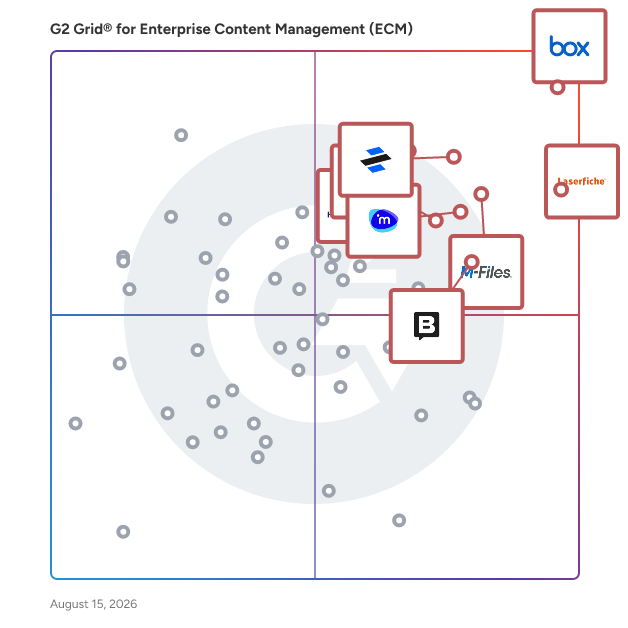
### Trends Related to Enterprise Content Management (ECM) Software

**Popularity in more flexible options —** For all the benefits that can come with extensive content management, ECM systems have a mixed reputation. Some consider them dated, and the term itself can deter potential customers. Enterprise content management as a software type evokes associations with decades-old, unintuitive on-premises solutions that were difficult to both implement and maintain. While these on-premises solutions have improved and are primarily used by large enterprise organizations, the vast majority of ECM solutions available today are now slim, cloud-based offerings. ECM developers are putting snappy UI and flexibility first in modern offerings to compete with less complicated document management software types. However, this has blurred the lines between enterprise content management systems and other similar types of content management systems.

**Space lacks strong distinctions —** The larger document management space as a whole lacks definitive delineations between products. Content management has changed significantly since the days of on-premise enterprise solutions, and with the industry as a whole pivoting toward sleek, cloud-based products, the lines between document management solutions has weakened. While distinctions once existed between simple document management software and ECM, one could argue that the specific terms between products is mostly up to vendor preference.

### Software and Services Related to Enterprise Content Management (ECM) Software

**Business content management —** Both [business content management software](https://www.g2.com/categories/business-content-management) and [file storage and sharing software](https://www.g2.com/categories/file-storage-and-sharing) are content repositories similar to enterprise content management systems. However, at one point they were more simplified, known for being cloud-based offerings and better choices for small businesses. However, with an industry-wide push toward cloud products, there are few differences between any of them now.

**Digital asset management —** While enterprise content management systems are intended to hold all of an organization’s content, [digital asset management software](https://www.g2.com/categories/digital-asset-management), or DAM systems, are intended specifically for rich media files. This includes files like images, videos, audio, and presentations. DAM software is used specifically by marketing teams to hold marketing collateral in one tailored repository. While both ECMs and DAMs are both capable of holding an extensive amount of content, DAMs have a more specific use case and features to accommodate, such as advanced preview thumbnails and streamlined import and export functionality.