# Best Business Process Management Software

*By [Bijou Barry](https://research.g2.com/insights/author/bijou-barry)*


Business process management (BPM) software defines, automates, and reports on processes that optimize businesses and deliver on company goals. These tools aid in improving workflows and enhancing overall efficacy in day-to-day functions. BPM systems define processes spanning an entire company’s operations and subsequently monitor those processes. These tools can also be used to automate processes. The strength of BPM systems lies in their ability to provide an overview of the entire company, rendering them suitable for use by any department. However, they are commonly favored by operations teams. BPM systems can incorporate case management features, leading to common integrations with [CRM software](https://www.g2.com/categories/crm).

While BPM software shares features and functionalities with other solutions, it is crucial to understand the differences between various offerings. Although both BPM systems and [workflow management software](https://www.g2.com/categories/workflow-management) facilitate the definition and management of sequences of business activities and tasks, the former is distinguished since it provides users the ability to get a broader picture of all the processes in an organization. While workflow management is a component of BPM, it is more about task management and how repeatable, less complex individual processes get accomplished.

Businesses looking to create internal applications to streamline processes and automate tasks can utilize [rapid application development (RAD) software](https://www.g2.com/categories/rapid-application-development-rad) like low-code and no-code development platforms. These platforms sometimes have tools that assist in building process automation into applications. Solutions specifically tailored for building applications for a process automation use case are called [digital process automation (DPA)](https://www.g2.com/categories/digital-process-automation-dpa) software. Finally, businesses simply looking to map and mine their processes through diagramming, process discovery, and more can take advantage of [process mining software](https://www.g2.com/categories/process-mining).

To qualify for inclusion in the Business Process Management (BPM) category, a product must:

- Capture business processes, both software and human, outside of the context of automation
- Use business process model and notation (BPMN)
- Allow the creation of business rule logic
- Provide tools for mapping and monitoring execution performance
- Give users the ability to automate business processes
- Have the ability to create forms and other basic interfaces in a digital format or allow for integrations with other tools for the data


## Top Business Process Management Software at a Glance
| # | Product | Rating | Best For | What Users Say |
|---|---------|--------|----------|----------------|
| 1 | [Microsoft Power Automate](https://www.g2.com/products/microsoft-power-automate/reviews) | 4.4/5.0 (1,041 reviews) | Microsoft 365 process automation | "[Easy Drag-and-Drop Workflow Automation That Fits Perfectly in the Microsoft Stack](https://www.g2.com/survey_responses/microsoft-power-automate-review-12836935)" |
| 2 | [Zapier](https://www.g2.com/products/zapier/reviews) | 4.5/5.0 (2,056 reviews) | — | "[Zapier has changed a lot recently!](https://www.g2.com/survey_responses/zapier-review-12997643)" |
| 3 | [Laserfiche](https://www.g2.com/products/laserfiche/reviews) | 4.7/5.0 (1,206 reviews) | Document-driven workflow automation | "[Robust and Reliable](https://www.g2.com/survey_responses/laserfiche-review-10968098)" |
| 4 | [Jotform Workflows](https://www.g2.com/products/jotform-workflows/reviews) | 4.5/5.0 (547 reviews) | Form-led approvals and task routing | "[Intuitive Tool for Faster Candidate Email Updates](https://www.g2.com/survey_responses/jotform-workflows-review-12956925)" |
| 5 | [Bizagi](https://www.g2.com/products/bizagi/reviews) | 4.6/5.0 (300 reviews) | Visual process modeling and workflow improvement | "[Bizagi Makes Workflow Automation Easy and Fast to Set Up](https://www.g2.com/survey_responses/bizagi-review-12834161)" |
| 6 | [AuraQuantic](https://www.g2.com/products/auraquantic/reviews) | 4.9/5.0 (64 reviews) | No-code process automation and visibility | "[AuraQuantic Brings Peace of Mind with Real-Time Process Visibility](https://www.g2.com/survey_responses/auraquantic-review-12320779)" |
| 7 | [Appian](https://www.g2.com/products/appian/reviews) | 4.5/5.0 (428 reviews) | Enterprise low-code process automation | "[Implementation and Costs: Major Challenges for Appian](https://www.g2.com/survey_responses/appian-review-12935187)" |
| 8 | [Quixy](https://www.g2.com/products/quixy/reviews) | 5.0/5.0 (129 reviews) | No-code workflow and app building | "[Quixy - The only destination for automating workflows](https://www.g2.com/survey_responses/quixy-review-10408888)" |
| 9 | [Camunda](https://www.g2.com/products/camunda/reviews) | 4.5/5.0 (317 reviews) | Developer-led process orchestration | "[Camunda: Scalable Flexibility with Some Adoption Challenges](https://www.g2.com/survey_responses/camunda-review-12624528)" |
| 10 | [Nintex](https://www.g2.com/products/nintex-nintex/reviews) | 4.3/5.0 (1,272 reviews) | Low-code workflow and document automation | "[Nintex - Best in Industry that provides Seamless SharePoint Integration That Speeds Up Workflow](https://www.g2.com/survey_responses/nintex-review-12729348)" |

---
## What Are the Most Common Questions About Business Process Management Software?
*AI-generated · Last updated: May 26, 2026*
### What&#39;s the leading BPM software for medium-sized companies?
Based on G2 reviews, [Microsoft Power Automate](https://www.g2.com/products/microsoft-power-automate/reviews) stands out most often for medium-sized teams that want to automate approvals, notifications, reporting, and data movement without deep coding. According to verified users, it is especially valued for its low-code builder, templates, and strong integrations with Outlook, Teams, SharePoint, Excel, and other Microsoft tools already used in day-to-day operations. G2 reviewers mention that it helps reduce repetitive work, improve consistency, and give business users more control over process changes. They also note tradeoffs: advanced workflows can become harder to troubleshoot, premium connectors can add complexity, and some teams report occasional delays or debugging challenges as automations scale.


### Best-rated BPM apps for improving workflow?
Based on G2 reviews, buyers looking to improve workflow commonly highlight products that reduce manual handoffs, standardize approvals, and make process steps easier to track. According to verified users, Microsoft Power Automate is frequently used for repetitive task automation inside Microsoft environments, while Laserfiche is often praised for forms, records management, and structured workflows. G2 reviewers also describe Bizagi as helpful for visualizing and standardizing workflows so teams can better understand ownership and bottlenecks. Across reviews, the main value comes from replacing email-driven or paper-based processes with clearer routing, better visibility, and more consistent execution. Common cautions include learning curves, debugging effort, and slower performance when workflows become larger or more complex.

**Here are some of the top-rated products on G2:**

- [Microsoft Power Automate](https://www.g2.com/products/microsoft-power-automate/reviews) – frequently used to automate approvals, notifications, file handling, and data updates across Microsoft tools
- [Laserfiche](https://www.g2.com/products/laserfiche/reviews) – often used for forms, document workflows, records management, and reducing paper-based processes
- [Bizagi](https://www.g2.com/products/bizagi/reviews) – commonly used to model workflows visually, standardize approvals, and improve process visibility across teams


### Best BPM system for integrating with existing business apps?
Based on G2 reviews, buyers evaluating integration capabilities often focus on how well a BPM platform connects existing systems without forcing major process redesign. According to verified users, Microsoft Power Automate is frequently praised for connecting Microsoft 365 apps, email, SharePoint, Power Apps, APIs, and many external services, which helps automate data movement and notifications across tools. G2 reviewers also mention Bizagi for API and external system connections, especially when teams need structured workflow orchestration, and Laserfiche for linking document processes and databases. Reviewers consistently say the strongest integration value comes from reducing manual re-entry and keeping information synchronized, though setup effort, premium connectors, and more advanced configurations can introduce complexity.

**Here are some of the top-rated products on G2:**

- [Microsoft Power Automate](https://www.g2.com/products/microsoft-power-automate/reviews) – often used to connect Microsoft 365, email, SharePoint, APIs, and third-party services for automated data flow
- [Bizagi](https://www.g2.com/products/bizagi/reviews) – used for workflow automation with API integrations and external system orchestration across departments
- [Laserfiche](https://www.g2.com/products/laserfiche/reviews) – supports document workflows, database connectivity, and process integration for records-heavy environments


### Top business process tools for efficient office work?
Based on G2 reviews, efficient office work usually means reducing repetitive admin, speeding approvals, and keeping documents and tasks from getting lost across inboxes and shared folders. According to verified users, Microsoft Power Automate is often used for approvals, notifications, file routing, and recurring reporting, especially in Microsoft-centered workplaces. G2 reviewers mention Laserfiche for replacing paper processes with forms, records management, and structured routing, while Jotform Workflows is often described as an easy option for form-based approvals and request tracking. Across these products, reviewers consistently point to better visibility, faster handoffs, and fewer manual follow-ups as the main benefits. They also note that more complex logic or workflow customization can require extra setup effort.

**Here are some of the top-rated products on G2:**

- [Microsoft Power Automate](https://www.g2.com/products/microsoft-power-automate/reviews) – helps automate approvals, recurring emails, file updates, and routine office tasks inside Microsoft 365
- [Laserfiche](https://www.g2.com/products/laserfiche/reviews) – supports office teams with digital forms, records management, and paperless process routing
- [Jotform Workflows](https://www.g2.com/products/jotform-workflows/reviews) – commonly used for form-driven approvals, request tracking, and reducing email-based coordination


### Premium business process management software with free trial?
Based on G2 reviews, users in this category frequently describe premium BPM products in terms of breadth, flexibility, and support rather than trial availability. According to verified users, products such as Appian, Camunda, SAP Signavio, and Nintex are often associated with enterprise-grade workflow automation, orchestration, or process visibility. G2 reviewers mention strengths like low-code development, business process modeling, approvals, integrations, and cross-team standardization. They also describe common tradeoffs, including steeper learning curves, more involved setup, and higher perceived cost for some environments. Because the recent G2 review data provided here does not consistently verify free-trial availability, buyers should treat trial status as needing direct confirmation from the vendor rather than as a review-grounded category conclusion.


### Best business management tool for large enterprises?
Based on G2 reviews, large enterprises tend to value platforms that support complex workflows, cross-department coordination, governance, and integration at scale. According to verified users, Microsoft Power Automate is widely used to automate approvals, notifications, and data movement across enterprise Microsoft environments, while SAP Signavio is often highlighted for process mapping, process mining, and identifying inefficiencies across large organizations. G2 reviewers also describe Bizagi as useful for standardized workflow modeling and enterprise collaboration. The common theme is visibility: teams want clearer ownership, fewer manual handoffs, and a more structured way to improve operations. Reviewers also note that complexity grows with scale, so onboarding, reporting setup, and advanced customization often require dedicated effort.

**Here are some of the top-rated products on G2:**

- [Microsoft Power Automate](https://www.g2.com/products/microsoft-power-automate/reviews) – well suited for large Microsoft-centric organizations automating approvals, reporting, and system-to-system tasks
- [SAP Signavio](https://www.g2.com/products/sap-signavio/reviews) – often used by enterprises for process mapping, mining, and standardizing operations across teams
- [Bizagi](https://www.g2.com/products/bizagi/reviews) – supports enterprise workflow standardization, process visibility, and structured collaboration between business and IT


### Most recommended business process management service for a tech firm?
Based on G2 reviews, tech-focused teams often favor BPM platforms that support APIs, automation logic, integrations, and visibility into multi-step processes. According to verified users, Bizagi is frequently described as useful for connecting workflows with APIs, external systems, and data-driven processes while keeping business and technical teams aligned through visual modeling. G2 reviewers also mention Microsoft Power Automate for connecting apps, APIs, and Microsoft services, and Camunda for process orchestration and developer-oriented workflow automation. Across the reviews, the strongest signals are around reducing manual handoffs, improving accountability, and making complex processes easier to monitor. Reviewers also caution that technical onboarding, documentation depth, and debugging can become bigger factors in advanced implementations.

**Here are some of the top-rated products on G2:**

- [Bizagi](https://www.g2.com/products/bizagi/reviews) – often used by technical teams for API-connected workflows, BPMN modeling, and cross-team process clarity
- [Microsoft Power Automate](https://www.g2.com/products/microsoft-power-automate/reviews) – helps tech teams automate integrations, API-driven tasks, and data movement across apps
- [Camunda](https://www.g2.com/products/camunda/reviews) – commonly used for orchestration, BPMN-based automation, and managing complex workflows across systems


### Best business process management software for a small startup?
Based on G2 reviews, small startups usually benefit most from BPM software that is easy to learn, quick to set up, and able to remove manual work without requiring a large technical team. According to verified users, Microsoft Power Automate is often praised for templates, drag-and-drop flow building, and automating routine tasks like emails, approvals, and file updates. G2 reviewers also describe Jotform Workflows as approachable for form-based approvals and request routing, and Laserfiche users highlight no-code forms and workflow structure for organizations digitizing paper-heavy processes. Across reviews, buyers should weigh usability and setup speed against the extra complexity that can appear once workflows become more advanced or highly customized.

**Here are some of the top-rated products on G2:**

- [Microsoft Power Automate](https://www.g2.com/products/microsoft-power-automate/reviews) – helps smaller teams automate recurring tasks, approvals, and updates without heavy coding
- [Jotform Workflows](https://www.g2.com/products/jotform-workflows/reviews) – useful for startups that need simple form routing, approvals, and centralized request handling
- [Laserfiche](https://www.g2.com/products/laserfiche/reviews) – supports startups digitizing forms and document-driven processes with strong workflow structure


### Which BPM software is best for reducing operational costs?
Based on G2 reviews, [Microsoft Power Automate](https://www.g2.com/products/microsoft-power-automate/reviews) is the most evident choice for reducing operational costs because reviewers repeatedly describe it replacing repetitive manual tasks, reducing data entry, minimizing errors, and freeing staff for higher-value work. According to verified users, it is used for approvals, automated emails, reporting, file handling, registration workflows, and syncing information across systems, which cuts down on routine administrative effort. G2 reviewers mention that its templates, low-code interface, and Microsoft integrations make it practical for many common business processes. They also note that costs can become less predictable when advanced workflows rely on premium connectors or more complex automation scenarios.


### Top-rated BPM solutions for automating tasks?
Based on G2 reviews, task automation buyers usually prioritize tools that can remove repetitive work, standardize approvals, and keep process status visible without constant follow-up. According to verified users, Microsoft Power Automate is widely used for automating emails, notifications, file updates, approvals, and data synchronization. G2 reviewers also highlight Bizagi for structured workflow automation and clear process visibility, while Jotform Workflows is often mentioned for automating form-based tasks, approvals, and routing. Across the category, reviewers consistently value easier handoffs, less manual coordination, and faster completion of recurring tasks. At the same time, they note that more advanced automation often brings tradeoffs like steeper learning curves, integration setup effort, or troubleshooting complexity.

**Here are some of the top-rated products on G2:**

- [Microsoft Power Automate](https://www.g2.com/products/microsoft-power-automate/reviews) – automates recurring business tasks such as approvals, file handling, notifications, and data syncing
- [Bizagi](https://www.g2.com/products/bizagi/reviews) – supports workflow automation with visual process design, task tracking, and approval routing
- [Jotform Workflows](https://www.g2.com/products/jotform-workflows/reviews) – helps automate submissions, approvals, and task routing for teams managing form-driven processes


## How Many Business Process Management Software Products Does G2 Track?
**Total Products under this Category:** 190

### Category Stats (Jun 2026)
- **Average Rating**: 4.54/5 (↑0.01 vs May 2026) The average rating of products in this category, based on all submitted ratings
- **Top Trending Product**: Engage Process (+9.1%) - Among all products in this category, Engage Process recorded the largest rating increase compared to last month
*Last updated: June 24, 2026*


## How Does G2 Rank Business Process Management Software Products?

**Why You Can Trust G2's Software Rankings:**

- 30 Analysts and Data Experts
- 13,600+ Authentic Reviews
- 190+ Products
- Unbiased Rankings

G2's software rankings are built on verified user reviews, rigorous moderation, and a consistent research methodology maintained by a team of analysts and data experts. Each product is measured using the same transparent criteria, with no paid placement or vendor influence. While reviews reflect real user experiences, which can be subjective, they offer valuable insight into how software performs in the hands of professionals. Together, these inputs power the G2 Score, a standardized way to compare tools within every category.


## Which Business Process Management Software Is Best for Your Use Case?

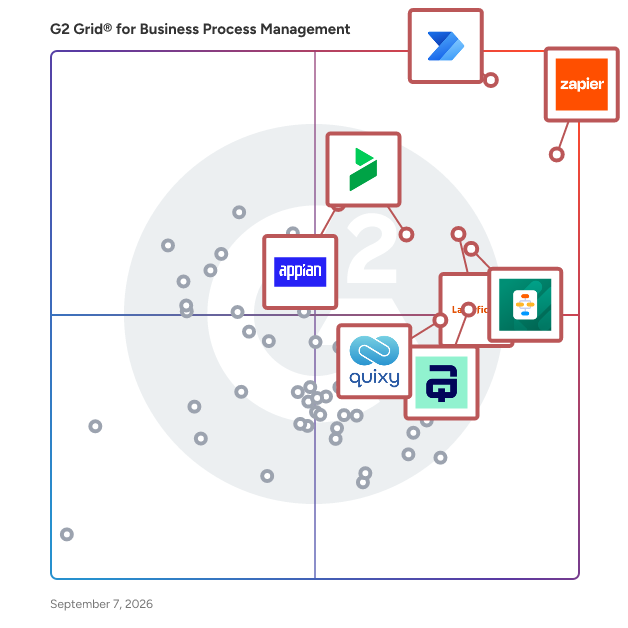
- **Leader:** [Microsoft Power Automate](https://www.g2.com/products/microsoft-power-automate/reviews)
- **Highest Performer:** [Quixy](https://www.g2.com/products/quixy/reviews)
- **Easiest to Use:** [Emakin](https://www.g2.com/products/emakin/reviews)
- **Top Trending:** [Zapier](https://www.g2.com/products/zapier/reviews)
- **Best Free Software:** [Zapier](https://www.g2.com/products/zapier/reviews)


---

**Sponsored**

### Moxo

Moxo is the AI orchestration platform built for business operations teams. From manual coordination to intelligent orchestration, Moxo transforms the way organizations run complex processes. The old way relies on scattered emails and manual follow-ups; the Moxo way keeps every step clear, connected, and accountable. We put human actions and decisions at the center of workflows, while AI and automation clear the manual work behind the scenes. By connecting people, systems, and AI, Moxo drives the right actions, from the right people, at the right time —whether it’s client onboarding, multi-party approvals, or ongoing account management. Business teams can eliminate bottlenecks, reduce drop-offs, and keep critical milestones moving forward. Trusted by leading global enterprises across financial services, consulting, legal, and healthcare, Moxo is the smarter way to orchestrate mission-critical workflows with confidence.


[Visit website](https://www.g2.com/external_clickthroughs/record?secure%5Bad_program%5D=paid_promo&amp;secure%5Bad_slot%5D=category_product_list&amp;secure%5Bcategory_id%5D=163&amp;secure%5Bmedium%5D=sponsored&amp;secure%5Bprioritized%5D=false&amp;secure%5Bproduct_id%5D=16700&amp;secure%5Bresource_id%5D=163&amp;secure%5Bresource_type%5D=Category&amp;secure%5Bsource_type%5D=category_page&amp;secure%5Bsource_url%5D=https%3A%2F%2Fwww.g2.com%2Fcategories%2Fbusiness-process-management&amp;secure%5Btoken%5D=3cfcb3b7c284529761c2852bd3506e5af95332612de6666df8ef26b30f99f732&amp;secure%5Burl%5D=https%3A%2F%2Fwww.moxo.com%2Fproduct%2Foverview&amp;secure%5Burl_type%5D=paid_promos)

---


## Business Process Management Software Features & Capabilities

### What are the Best Business Process Management Software with No-Code App Development?
Provides drag and drop tools usable by admins with little to no coding experience in order to build applications which automate workflows and business processes.

**Top-rated Business Process Management Software for No-Code App Development:**
- [Microsoft Power Automate](https://www.g2.com/products/microsoft-power-automate/reviews)
- [Laserfiche](https://www.g2.com/products/laserfiche/reviews)
- [Jotform Workflows](https://www.g2.com/products/jotform-workflows/reviews)
[Explore Business Process Management Software with No-Code App Development](https://www.g2.com/categories/business-process-management/f/no-code-app-development)

### What are the Best Business Process Management Software with Low-Code App Development?
Provides development environments to allow users to develop applications which automate workflows and business processes with minimal coding.

**Top-rated Business Process Management Software for Low-Code App Development:**
- [Microsoft Power Automate](https://www.g2.com/products/microsoft-power-automate/reviews)
- [Laserfiche](https://www.g2.com/products/laserfiche/reviews)
- [Jotform Workflows](https://www.g2.com/products/jotform-workflows/reviews)
[Explore Business Process Management Software with Low-Code App Development](https://www.g2.com/categories/business-process-management/f/low-code-app-development)

### What are the Best Business Process Management Software with Process Analysis?
Delivers data points such as time and cost of a process on a dashboard to evaluate process efficacy.

**Top-rated Business Process Management Software for Process Analysis:**
- [Microsoft Power Automate](https://www.g2.com/products/microsoft-power-automate/reviews)
- [Laserfiche](https://www.g2.com/products/laserfiche/reviews)
- [Jotform Workflows](https://www.g2.com/products/jotform-workflows/reviews)
[Explore Business Process Management Software with Process Analysis](https://www.g2.com/categories/business-process-management/f/process-analysis)

### What are the Best Business Process Management Software with Document Generation?
Enables users to create documents for business processes and provides a wide array of templates which are customizable.

**Top-rated Business Process Management Software for Document Generation:**
- [Microsoft Power Automate](https://www.g2.com/products/microsoft-power-automate/reviews)
- [Laserfiche](https://www.g2.com/products/laserfiche/reviews)
- [Jotform Workflows](https://www.g2.com/products/jotform-workflows/reviews)
[Explore Business Process Management Software with Document Generation](https://www.g2.com/categories/business-process-management/f/document-generation)


## What Are the Top-Rated Business Process Management Software Products in 2026?
### 1. [Microsoft Power Automate](https://www.g2.com/products/microsoft-power-automate/reviews)
Optimize business processes across your organization with a cloud-first, comprehensive automation platform, powered by low-code and AI. Modernize and integrate operations at scale, maintain visibility and control with enterprise-grade governance, monitor and protect your data, and continuously improve with process insights.


**Average Rating:** 4.4/5.0
**Total Reviews:** 1,041
**How Do G2 Users Rate Microsoft Power Automate?**

- **Intelligence:** 7.9/10 (Category avg: 8.3/10)
- **Has the product been a good partner in doing business?:** 8.7/10 (Category avg: 9.0/10)
- **Process Overview:** 8.5/10 (Category avg: 8.8/10)
- **Process Analysis:** 8.2/10 (Category avg: 8.6/10)

**Who Is the Company Behind Microsoft Power Automate?**

- **Seller:** [Microsoft](https://www.g2.com/sellers/microsoft)
- **Company Website:** https://www.microsoft.com/
- **Year Founded:** 1975
- **HQ Location:** Redmond, Washington
- **Twitter:** @microsoft (13,091,739 Twitter followers)
- **LinkedIn® Page:** https://www.linkedin.com/company/microsoft/ (231,632 employees on LinkedIn®)

**Who Uses This Product?**
- **Who Uses This:** Software Engineer, RPA Developer
- **Top Industries:** Information Technology and Services, Computer Software
- **Company Size:** 33% Mid-Market, 32% Enterprise


#### What Are Microsoft Power Automate's Pros and Cons?

**Pros:**

- Ease of Use (340 reviews)
- Automation (290 reviews)
- Easy Integrations (271 reviews)
- Integrations (264 reviews)
- Process Automation (247 reviews)

**Cons:**

- Complexity (191 reviews)
- Slow Performance (102 reviews)
- Expensive (96 reviews)
- Bugs (88 reviews)
- Software Bugs (87 reviews)


### What Do G2 Reviewers Say About Microsoft Power Automate?
*AI-generated summary from verified user reviews*

**Pros:**

- Users appreciate the **ease of use** of Microsoft Power Automate, finding it intuitive and simple for quick development.
- Users value the **seamless automation** capabilities of Microsoft Power Automate, significantly reducing manual tasks and saving time.
- Users value the **easy integrations** with Office 365, enhancing workflow creation and automation across multiple applications effortlessly.
- Users praise the **seamless integration** with numerous applications, enhancing productivity and simplifying workflow efficiently.
- Users value the **process automation capabilities** of Microsoft Power Automate for enhancing efficiency and reducing manual tasks.

**Cons:**

- Users find the **complexity** of Power Automate difficult, particularly when managing large workflows and navigating its UI.
- Users often face **slow performance** issues with Power Automate, impacting the overall usability and workflow experience.
- Users find Microsoft Power Automate to be **expensive** and lacking sufficient learning resources for effective use.
- Users express frustration with the **rigidity of connectors** , leading to complications in workflow and debugging processes.
- Users experience **software bugs** in Power Automate that lead to inconvenient workflow failures and slow performance.

#### What Are Recent G2 Reviews of Microsoft Power Automate?

**"[Easy Drag-and-Drop Workflow Automation That Fits Perfectly in the Microsoft Stack](https://www.g2.com/survey_responses/microsoft-power-automate-review-12836935)"**

**Rating:** 5.0/5.0 stars
*— Tanzim S.*

[Read full review](https://www.g2.com/survey_responses/microsoft-power-automate-review-12836935)

---

**"[Reliable No-Code Automations with Seamless Microsoft 365 Integration](https://www.g2.com/survey_responses/microsoft-power-automate-review-12826550)"**

**Rating:** 4.5/5.0 stars
*— Swati J.*

[Read full review](https://www.g2.com/survey_responses/microsoft-power-automate-review-12826550)

---


#### What Are G2 Users Discussing About Microsoft Power Automate?

- [What is Microsoft Power Automate used for?](https://www.g2.com/discussions/what-is-microsoft-power-automate-used-for) - 3 comments
- [How do I install Microsoft Power automate?](https://www.g2.com/discussions/how-do-i-install-microsoft-power-automate) - 2 comments
- [What are the features of RPA?](https://www.g2.com/discussions/winautomation-by-softomotive-what-are-the-features-of-rpa)
- [How does process mining work?](https://www.g2.com/discussions/minit-how-does-process-mining-work-40782154-031f-4d7d-8727-edb11742979c)
- [How does process mining work?](https://www.g2.com/discussions/minit-how-does-process-mining-work)

### 2. [Zapier](https://www.g2.com/products/zapier/reviews)
Zapier is the #1 workflow automation platform for businesses that want to grow faster by maximizing the efficiency of their teams, tools, and processes without relying on development teams. With our new visual editor, free Filter and Formatter tasks for more control, and reduced task-based pricing, you&#39;re going love automating with Zapier. It&#39;s free to sign up —&amp;nbsp;no credit card required —&amp;nbsp;and creating your first workflow, what we call a &quot;Zap,&quot; is just a few clicks away. Since 2011, over 2 million business have turned to Zapier for their automation needs, including: lead management, sales pipeline, marketing campaigns, customer support, data management, project management, and tickets and incidents.


**Average Rating:** 4.5/5.0
**Total Reviews:** 2,056
**How Do G2 Users Rate Zapier?**

- **Has the product been a good partner in doing business?:** 8.8/10 (Category avg: 9.0/10)
- **Process Overview:** 10.0/10 (Category avg: 8.8/10)

**Who Is the Company Behind Zapier?**

- **Seller:** [Zapier](https://www.g2.com/sellers/zapier)
- **Company Website:** https://zapier.com
- **Year Founded:** 2011
- **HQ Location:** San Francisco, CA
- **Twitter:** @zapier (95,859 Twitter followers)
- **LinkedIn® Page:** https://www.linkedin.com/company/zapier (1,473 employees on LinkedIn®)

**Who Uses This Product?**
- **Who Uses This:** Owner, CEO
- **Top Industries:** Marketing and Advertising, Information Technology and Services
- **Company Size:** 70% Small-Business, 24% Mid-Market


#### What Are Zapier's Pros and Cons?

**Pros:**

- Ease of Use (302 reviews)
- Automation (273 reviews)
- Integrations (214 reviews)
- Easy Integrations (180 reviews)
- Time-saving (149 reviews)

**Cons:**

- Expensive (125 reviews)
- Complexity (107 reviews)
- Pricing Issues (100 reviews)
- Learning Curve (54 reviews)
- Limited Features (50 reviews)


### What Do G2 Reviewers Say About Zapier?
*AI-generated summary from verified user reviews*

**Pros:**

- Users find Zapier&#39;s interface incredibly **easy to use** , simplifying automation and enhancing workflow management effortlessly.
- Users praise Zapier for its **seamless automation** , effortlessly streamlining workflows and enhancing productivity across disconnected apps.
- Users appreciate the **extensive integrations** of Zapier, seamlessly connecting essential apps and simplifying task automation.
- Users love the **easy integrations** with various tools, streamlining automation without needing extra applications.
- Users love Zapier for its **time-saving automation** , streamlining tasks and enhancing productivity without manual effort.

**Cons:**

- Users find the **cost of Zapier** to be a significant drawback, especially for accessing premium features and integrations.
- Users find the **complexity of setup and troubleshooting** in Zapier challenging, especially without prior automation experience.
- Users find the **pricing issues** with Zapier challenging due to high subscription costs for essential features.
- Users find the **learning curve steep** due to the overwhelming number of integrations and options in Zapier.
- Users find the **limited features** of Zapier restrict its usability, especially for those needing custom integrations.

#### What Are Recent G2 Reviews of Zapier?

**"[Zapier has changed a lot recently!](https://www.g2.com/survey_responses/zapier-review-12997643)"**

**Rating:** 4.5/5.0 stars
*— Yauhen D.*

[Read full review](https://www.g2.com/survey_responses/zapier-review-12997643)

---

**"[Easy to Use with a Huge Range of Integrations](https://www.g2.com/survey_responses/zapier-review-12938138)"**

**Rating:** 4.0/5.0 stars
*— Richard D.*

[Read full review](https://www.g2.com/survey_responses/zapier-review-12938138)

---


#### What Are G2 Users Discussing About Zapier?

- [What is Zapier used for?](https://www.g2.com/discussions/what-is-zapier-used-for) - 3 comments
- [Is Zapier an app?](https://www.g2.com/discussions/is-zapier-an-app) - 4 comments
- [What does Zapier cost?](https://www.g2.com/discussions/what-does-zapier-cost) - 2 comments
- [How good is Zapier?](https://www.g2.com/discussions/how-good-is-zapier) - 2 comments
- [What can Zapier do?](https://www.g2.com/discussions/what-can-zapier-do) - 2 comments, 2 upvotes

### 3. [Laserfiche](https://www.g2.com/products/laserfiche/reviews)
Get work done faster with Laserfiche, the leading SaaS provider of AI-powered document management and process automation. Through powerful workflows, electronic forms, document management and analytics, Laserfiche accelerates processes across the enterprise. ✓ Organize Your Content with AI-Powered Document Management Optimize your operations and increase team productivity with AI-powered document management. Centralize your content, improve collaboration and maintain audit trails to support compliance needs. ✓ Boost Your Productivity with Intelligent Automation Increase efficiency by automating tasks with low-code process automation and prebuilt solution templates. Work smarter and shift your team’s focus to higher priority strategic goals. ✓ Unify Your Systems with Powerful Integrations Laserfiche is the backbone connecting hundreds of mission-critical applications. Users can access relevant documents from a single location, eliminating the need to search across multiple platforms. ✓ Elevate Your Work with Laserfiche AI Laserfiche AI enables organizations to simplify their work, take control of processes and supercharge productivity — all without losing sight of critical data privacy and security standards.


**Average Rating:** 4.7/5.0
**Total Reviews:** 1,206
**How Do G2 Users Rate Laserfiche?**

- **Intelligence:** 8.5/10 (Category avg: 8.3/10)
- **Has the product been a good partner in doing business?:** 9.2/10 (Category avg: 9.0/10)
- **Process Overview:** 8.9/10 (Category avg: 8.8/10)
- **Process Analysis:** 8.7/10 (Category avg: 8.6/10)

**Who Is the Company Behind Laserfiche?**

- **Seller:** [Laserfiche](https://www.g2.com/sellers/laserfiche)
- **Company Website:** https://www.laserfiche.com/
- **Year Founded:** 1976
- **HQ Location:** Long Beach, California
- **Twitter:** @laserfiche (4,770 Twitter followers)
- **LinkedIn® Page:** https://www.linkedin.com/company/19414/ (403 employees on LinkedIn®)

**Who Uses This Product?**
- **Who Uses This:** Deputy City Clerk, Business Systems Analyst
- **Top Industries:** Government Administration, Education Management
- **Company Size:** 60% Mid-Market, 25% Enterprise


#### What Are Laserfiche's Pros and Cons?

**Pros:**

- Ease of Use (125 reviews)
- Process Automation (88 reviews)
- Automation (84 reviews)
- Workflow Management (69 reviews)
- Document Management (66 reviews)

**Cons:**

- Learning Curve (40 reviews)
- Learning Difficulty (34 reviews)
- Missing Features (34 reviews)
- Update Issues (23 reviews)
- Limited Functionality (22 reviews)


### What Do G2 Reviewers Say About Laserfiche?
*AI-generated summary from verified user reviews*

**Pros:**

- Users commend the **ease of use** of Laserfiche, enabling smooth implementation and efficient process management without coding.
- Users appreciate the **process automation** of Laserfiche, streamlining workflows and simplifying business processes effortlessly.
- Users benefit from **automated workflows** in Laserfiche, enhancing efficiency in form processes and document management.
- Users value the **automation and flexibility** of Laserfiche Workflow, enhancing document management and integration capabilities seamlessly.
- Users commend Laserfiche for its **intuitive document management** , enhancing workflow and simplifying employee onboarding.

**Cons:**

- Users note a **small learning curve** with Laserfiche, especially in grasping metadata and workflows effectively.
- Users experience a **steep learning curve** when navigating Laserfiche, which can hinder effective use and efficiency.
- Users find the **missing features** in Laserfiche frustrating, especially in the unlicensed version and setup process.
- Users express concerns about **update issues** , struggling to keep up with the rapid pace of development.
- Users express frustration over **limited functionality** , particularly regarding basic wireframing and coding in form design.

#### What Are Recent G2 Reviews of Laserfiche?

**"[Document Management and Automation](https://www.g2.com/survey_responses/laserfiche-review-3536890)"**

**Rating:** 4.5/5.0 stars
*— Matthew D.*

[Read full review](https://www.g2.com/survey_responses/laserfiche-review-3536890)

---

**"[Robust and Reliable](https://www.g2.com/survey_responses/laserfiche-review-10968098)"**

**Rating:** 4.5/5.0 stars
*— Holly V.*

[Read full review](https://www.g2.com/survey_responses/laserfiche-review-10968098)

---


#### What Are G2 Users Discussing About Laserfiche?

- [What is Laserfiche used for?](https://www.g2.com/discussions/what-is-laserfiche-used-for)
- [What is document imaging software?](https://www.g2.com/discussions/what-is-document-imaging-software) - 1 upvote
- [How much is laserfiche?](https://www.g2.com/discussions/how-much-is-laserfiche)
- [What is Laserfiche software?](https://www.g2.com/discussions/what-is-laserfiche-software) - 2 comments

### 4. [Jotform Workflows](https://www.g2.com/products/jotform-workflows/reviews)
Jotform Workflows is a powerful no-code automation platform that makes it easy to streamline, manage, and optimize your business processes from end to end. Using an intuitive drag-and-drop builder, you can design custom workflows that match your exact needs — whether you’re routing approvals, collecting payments, assigning tasks, or automating repetitive steps across your organization. Jotform Workflows eliminates manual work, reduces errors, and helps teams move faster by keeping every process consistent, transparent, and fully automated. With 200+ professionally designed workflow templates, getting started is effortless. Choose a ready-made workflow for HR, finance, operations, customer service, education, healthcare, or any other use case, and customize it to fit your processes. Workflows can include conditional logic, automated notifications, role-based approvals, and dynamic routing rules that adapt to each form submission, ensuring the right steps happen at the right time. For organizations that rely on payments, Jotform Workflows supports automated payment collection and processing through 40+ trusted payment gateways, including PayPal, Square, and Stripe. You can trigger payments based on user selections, approval steps, or predefined conditions, helping you collect funds quickly and accurately without manual intervention. Seamless integration is at the heart of Jotform Workflows. Connect your workflows to 200+ popular apps — including Slack, Google Sheets, Airtable, HubSpot, Trello, and more — to automatically sync data, create tasks, notify team members, or update external systems in real time. This creates a fully connected ecosystem where every submission triggers the right actions across your tools. Jotform Workflows also includes powerful task management capabilities. Create tasks, assign them to team members, track progress, and automate follow-ups based on form responses or workflow conditions. This centralizes all activity into one organized workspace, giving teams full visibility into what needs to happen next. All workflow data is automatically stored and organized in Jotform Tables and Jotform Inbox. View submissions as spreadsheets, calendars, or cards, manage permissions for team members, and respond to approvals or requests quickly from any device. This ensures complete oversight and helps teams make informed decisions faster. With robust automation, deep integrations, secure data handling, and a no-code builder anyone can use, Jotform Workflows empowers organizations of all sizes to create efficient, scalable, and fully automated processes — without relying on developers or technical expertise.


**Average Rating:** 4.5/5.0
**Total Reviews:** 547
**How Do G2 Users Rate Jotform Workflows?**

- **Intelligence:** 8.3/10 (Category avg: 8.3/10)
- **Has the product been a good partner in doing business?:** 8.9/10 (Category avg: 9.0/10)
- **Process Overview:** 8.5/10 (Category avg: 8.8/10)
- **Process Analysis:** 8.4/10 (Category avg: 8.6/10)

**Who Is the Company Behind Jotform Workflows?**

- **Seller:** [Jotform](https://www.g2.com/sellers/jotform)
- **Company Website:** https://www.jotform.com/
- **Year Founded:** 2006
- **HQ Location:** San Francisco, California
- **Twitter:** @Jotform (39,289 Twitter followers)
- **LinkedIn® Page:** https://www.linkedin.com/company/3541463/ (901 employees on LinkedIn®)

**Who Uses This Product?**
- **Who Uses This:** Owner, CEO
- **Top Industries:** Non-Profit Organization Management, Hospital &amp; Health Care
- **Company Size:** 64% Small-Business, 29% Mid-Market


#### What Are Jotform Workflows's Pros and Cons?

**Pros:**

- Ease of Use (263 reviews)
- Automation (129 reviews)
- Form Creation (97 reviews)
- Process Automation (85 reviews)
- Customization (83 reviews)

**Cons:**

- Learning Curve (56 reviews)
- Complexity (48 reviews)
- Missing Features (42 reviews)
- Integration Issues (40 reviews)
- Form Issues (33 reviews)


### What Do G2 Reviewers Say About Jotform Workflows?
*AI-generated summary from verified user reviews*

**Pros:**

- Users appreciate the **ease of use** of Jotform Workflows, finding setup and integration straightforward and efficient.
- Users appreciate the **automation capabilities** of Jotform Workflows, which streamline processes and reduce manual work significantly.
- Users value the **form creation capabilities** of Jotform Workflows, enhancing efficiency and streamlining processes significantly.
- Users laud the **process automation** of Jotform Workflows for simplifying tasks and enhancing overall efficiency.
- Users love the **customization** options in Jotform Workflows, allowing for quick, professional, and brand-aligned form creation.

**Cons:**

- Users note a **steep initial learning curve** for Jotform Workflows, requiring time to grasp advanced features effectively.
- Users find the **complexity of conditional logic** in Jotform Workflows overwhelming, requiring clearer guidance and support.
- Users find the lack of **communication features** a challenge, hindering interaction between decision-makers and form submitters.
- Users face **integration issues** like reauthorizing connections and lack of guidance, making setup confusing and daunting.
- Users find **form issues** such as slow searching and compatibility problems with encrypted forms frustrating in Jotform Workflows.

#### What Are Recent G2 Reviews of Jotform Workflows?

**"[Helps Me Keep Daily Consultation and Follow-up Work More Organized](https://www.g2.com/survey_responses/jotform-workflows-review-12723636)"**

**Rating:** 4.5/5.0 stars
*— Ishan S.*

[Read full review](https://www.g2.com/survey_responses/jotform-workflows-review-12723636)

---

**"[Intuitive Tool for Faster Candidate Email Updates](https://www.g2.com/survey_responses/jotform-workflows-review-12956925)"**

**Rating:** 4.5/5.0 stars
*— Harold D.*

[Read full review](https://www.g2.com/survey_responses/jotform-workflows-review-12956925)

---


### 5. [Bizagi](https://www.g2.com/products/bizagi/reviews)
Bizagi is an enterprise platform for business orchestration and AI automation, enabling organizations to design, automate, and run complex end-to-end processes that bring together people, AI agents, systems, and data. Unlike point AI tools, Bizagi is the operational layer where AI, processes, and enterprise systems work together: governed, auditable, and production-ready. Built on more than two decades of enterprise process expertise, Bizagi brings the depth of operational knowledge that newer AI platforms simply have not had time to develop. That foundation is what makes Bizagi&#39;s AI story credible where others are still experimental. Bizagi&#39;s native AI capabilities are built directly into the platform. AI Agents are reusable, GenAI-powered assistants configured in the AI Hub, capable of content generation, document analysis, classification, summarization, and more. They can be invoked from processes, interfaces, or other agents, and integrate via connectors and Model Context Protocol to reach internal and external systems. AI Workers automate repetitive tasks inside forms and workflows by analyzing rules, field history, and process context, operating in supervised or more autonomous modes and improving through reinforcement learning. Ask Ada, Bizagi&#39;s conversational analytics assistant, lets users query business data in natural language and receive answers, charts, and insights, all within Bizagi&#39;s role and permission model and grounded in both process data and enterprise documents through a built-in RAG knowledge layer. Governance is central, not optional. Bizagi runs on Microsoft Azure with Private OpenAI integration, keeping sensitive data within a secure perimeter. AI features require deliberate configuration and deployment. Generative AI capabilities are intentionally built into workflows rather than casually enabled, and Data Domains, Personas, and Bizagi&#39;s role model control precisely what any AI capability can access and how results can be used. Customers see results fast. Stone Coast Fund Services reduced processing time by 80% across more than 25,000 annual service requests, going live in six weeks. Bizagi&#39;s AI Ignite packages take organizations from zero to live AI Agents or AI Assistants in approximately seven weeks, combining software and professional services to de-risk early projects. With over 1,000 enterprise implementations across financial services, manufacturing, healthcare, and government, Bizagi is named in the 2025 Gartner Magic Quadrant for Business Orchestration and Automation Technologies (BOAT), Microsoft Certified for AI in Financial Services and Manufacturing, and a G2 leader across Agentic AI, AI Agents for Business Operations, BPM, and Digital Process Automation. Customers include DHL, Unilever, Caterpillar, and Old Mutual. For more information, visit bizagi.com.


**Average Rating:** 4.6/5.0
**Total Reviews:** 300
**How Do G2 Users Rate Bizagi?**

- **Intelligence:** 7.9/10 (Category avg: 8.3/10)
- **Has the product been a good partner in doing business?:** 8.6/10 (Category avg: 9.0/10)
- **Process Overview:** 9.1/10 (Category avg: 8.8/10)
- **Process Analysis:** 9.0/10 (Category avg: 8.6/10)

**Who Is the Company Behind Bizagi?**

- **Seller:** [Bizagi](https://www.g2.com/sellers/bizagi)
- **Company Website:** https://www.bizagi.com
- **Year Founded:** 1989
- **HQ Location:** 1775 Tysons Blvd, 5th Floor, Tysons, VA, 22102
- **Twitter:** @bizagi (5,749 Twitter followers)
- **LinkedIn® Page:** https://www.linkedin.com/company/2652230/ (435 employees on LinkedIn®)

**Who Uses This Product?**
- **Who Uses This:** Business Analyst, SDET
- **Top Industries:** Information Technology and Services, Computer Software
- **Company Size:** 46% Mid-Market, 29% Enterprise


#### What Are Bizagi's Pros and Cons?

**Pros:**

- Ease of Use (65 reviews)
- Process Automation (34 reviews)
- Automation (33 reviews)
- Efficiency (33 reviews)
- Workflow Management (31 reviews)

**Cons:**

- Missing Features (17 reviews)
- Performance Issues (15 reviews)
- Slow Performance (15 reviews)
- Learning Curve (13 reviews)
- Complexity (12 reviews)


### What Do G2 Reviewers Say About Bizagi?
*AI-generated summary from verified user reviews*

**Pros:**

- Users praise the **intuitive and user-friendly interface** of Bizagi, making process modeling and automation accessible to everyone.
- Users praise Bizagi for its **effective process automation** , leading to improved operational efficiency and customer satisfaction.
- Users praise Bizagi for its **effective automation** tools, enhancing IT processes and improving overall business outcomes.
- Users value the **efficiency** of Bizagi, which streamlines BPM processes and improves collaboration and customer satisfaction.
- Users appreciate the **automated workflows** of Bizagi, which significantly enhance efficiency and simplify process design.

**Cons:**

- Users find the **lack of pre-defined templates and best practices** in Bizagi limits its usability and effectiveness.
- Users experience **performance issues** with Bizagi, especially when handling large workflows, requiring higher system specifications.
- Users experience **slow performance** in complex processes and when managing large workflows, impacting usability.
- Users find the **learning curve steep** , particularly for complex tasks, requiring technical expertise for effective use.
- Users find that **complexity in processes** can lead to slow performance and require significant technical expertise for effective use.

#### What Are Recent G2 Reviews of Bizagi?

**"[Bizagi Makes Workflow Automation Easy and Fast to Set Up](https://www.g2.com/survey_responses/bizagi-review-12834161)"**

**Rating:** 4.5/5.0 stars
*— Josh S.*

[Read full review](https://www.g2.com/survey_responses/bizagi-review-12834161)

---

**"[Bizagi Streamlines Approvals and Routing with Reusable Templates](https://www.g2.com/survey_responses/bizagi-review-12954953)"**

**Rating:** 4.5/5.0 stars
*— Marvin C.*

[Read full review](https://www.g2.com/survey_responses/bizagi-review-12954953)

---


#### What Are G2 Users Discussing About Bizagi?

- [Is bizagi open source?](https://www.g2.com/discussions/is-bizagi-open-source)
- [What is bizagi engine?](https://www.g2.com/discussions/what-is-bizagi-engine)
- [What is bizagi studio used for?](https://www.g2.com/discussions/what-is-bizagi-studio-used-for)

### 6. [AuraQuantic](https://www.g2.com/products/auraquantic/reviews)
AuraQuantic is an enterprise No-Code Business Process Management (BPM) and Digital Process Automation (DPA) platform designed to help organizations design, automate, and orchestrate end-to-end business processes without complex coding. As a powerful Business Orchestration and Automation Platform, AuraQuantic connects people, data, and enterprise systems to streamline operations across the entire organization. Built for both business and IT teams, AuraQuantic enables rapid creation of workflow-driven applications through visual modeling and centralized governance. Organizations use the platform to standardize operations, eliminate manual tasks, and gain real-time visibility with full traceability—making it ideal for scalable Business Process Automation (BPA) and enterprise digital transformation. Key capabilities include: - Visual workflow design and rule-based automation - Real-time dashboards and performance monitoring - Seamless integration with ERP, CRM, SharePoint, legacy systems, databases, and APIs - Centralized data orchestration across departments - Enterprise-grade security, scalability, and governance controls A key differentiator is AuraQuantic’s embedded Artificial Intelligence (AI) and AI agents, which enhance automation through: - AI-powered document processing and intelligent data extraction - Predictive analytics and automated decision rules - Smart task routing and contextual recommendations - Dynamic workflow optimization By combining no-code application development, advanced BPM functionality, AI-driven automation, and enterprise orchestration, AuraQuantic enables organizations to reduce costs, increase productivity, strengthen compliance, and enhance customer-facing processes across industries such as finance, healthcare, education, manufacturing, and public administration.


**Average Rating:** 4.9/5.0
**Total Reviews:** 64
**How Do G2 Users Rate AuraQuantic?**

- **Intelligence:** 9.5/10 (Category avg: 8.3/10)
- **Has the product been a good partner in doing business?:** 9.9/10 (Category avg: 9.0/10)
- **Process Overview:** 9.8/10 (Category avg: 8.8/10)
- **Process Analysis:** 9.9/10 (Category avg: 8.6/10)

**Who Is the Company Behind AuraQuantic?**

- **Seller:** [AuraQuantic](https://www.g2.com/sellers/auraquantic)
- **Company Website:** https://www.auraquantic.com
- **Year Founded:** 2002
- **HQ Location:** Miami, FL
- **LinkedIn® Page:** https://www.linkedin.com/company/auraquantic (124 employees on LinkedIn®)

**Who Uses This Product?**
- **Company Size:** 52% Mid-Market, 42% Enterprise


#### What Are AuraQuantic's Pros and Cons?

**Pros:**

- Automation Efficiency (1 reviews)
- Automation Excellence (1 reviews)
- Customer Satisfaction (1 reviews)
- Customization Options (1 reviews)
- Ease of Use (1 reviews)

**Cons:**

- Complexity (1 reviews)
- Learning Curve (1 reviews)
- Learning Difficulty (1 reviews)
- Steep Learning Curve (1 reviews)


### What Do G2 Reviewers Say About AuraQuantic?
*AI-generated summary from verified user reviews*

**Pros:**

- Users love the **automation efficiency** of AuraQuantic, enabling smooth process automation without technical skills required.
- Users value the **real-time visibility** of AuraQuantic, providing peace of mind by tracking processes effortlessly.
- Users appreciate the **peace of mind** provided by AuraQuantic, as it offers real-time visibility into business processes.
- Users value the **customization options** in AuraQuantic, enabling easy automation and personalized user experiences.
- Users value the **ease of use** in AuraQuantic, enjoying real-time insights and a clear view of processes.

**Cons:**

- Users find the **complexity** of AuraQuantic overwhelming initially, requiring significant effort to master its capabilities.
- Users find the **learning curve steep** , requiring significant mental effort to master AuraQuantic&#39;s complexity and capabilities.
- Users note that the **learning difficulty** of AuraQuantic requires significant mental effort to master its capabilities.
- Users find a **steep learning curve** with AuraQuantic, requiring significant effort to master its complex capabilities.

#### What Are Recent G2 Reviews of AuraQuantic?

**"[AuraQuantic Brings Peace of Mind with Real-Time Process Visibility](https://www.g2.com/survey_responses/auraquantic-review-12320779)"**

**Rating:** 5.0/5.0 stars
*— Marwan K.*

[Read full review](https://www.g2.com/survey_responses/auraquantic-review-12320779)

---

**"[Automation and Efficiency](https://www.g2.com/survey_responses/auraquantic-review-10770192)"**

**Rating:** 5.0/5.0 stars
*— Amelia M.*

[Read full review](https://www.g2.com/survey_responses/auraquantic-review-10770192)

---


#### What Are G2 Users Discussing About AuraQuantic?

- [What is AuraQuantic used for?](https://www.g2.com/discussions/what-is-auraquantic-used-for)

### 7. [Appian](https://www.g2.com/products/appian/reviews)
Appian provides AI automation for mission-critical work. We automate complex processes in large enterprises and governments. Our platform is known for its unique reliability and scale. We&#39;ve been automating processes for more than 25 years and understand enterprise operations like no one else. For more information, visit [www.appian.com](http://www,appian.com?utm_source=g2). [Nasdaq: APPN] ANALYST REPORTS Appian is proud to be named a Leader by Gartner for Business Orchestration and Automation Technologies (BOAT). Access report via: https://ap.pn/3d8RYQJ


**Average Rating:** 4.5/5.0
**Total Reviews:** 428
**How Do G2 Users Rate Appian?**

- **Intelligence:** 8.0/10 (Category avg: 8.3/10)
- **Has the product been a good partner in doing business?:** 8.8/10 (Category avg: 9.0/10)
- **Process Overview:** 8.5/10 (Category avg: 8.8/10)
- **Process Analysis:** 8.4/10 (Category avg: 8.6/10)

**Who Is the Company Behind Appian?**

- **Seller:** [Appian](https://www.g2.com/sellers/appian)
- **Company Website:** https://www.appian.com
- **Year Founded:** 1999
- **HQ Location:** McLean, Virginia
- **Twitter:** @Appian (16,293 Twitter followers)
- **LinkedIn® Page:** https://www.linkedin.com/company/8088/ (2,501 employees on LinkedIn®)

**Who Uses This Product?**
- **Who Uses This:** Manager, Consultant
- **Top Industries:** Financial Services, Banking
- **Company Size:** 58% Enterprise, 28% Mid-Market


#### What Are Appian's Pros and Cons?

**Pros:**

- Ease of Use (38 reviews)
- Automation (29 reviews)
- Low Code (26 reviews)
- AI Technology (24 reviews)
- Artificial Intelligence (23 reviews)

**Cons:**

- Limited Features (15 reviews)
- Expensive (13 reviews)
- Limited Flexibility (12 reviews)
- Complexity (11 reviews)
- Limited Customization (11 reviews)


### What Do G2 Reviewers Say About Appian?
*AI-generated summary from verified user reviews*

**Pros:**

- Users value the **intuitive interface** of Appian, which simplifies workflow design without requiring coding skills.
- Users appreciate the **automation capabilities** of Appian, enabling quick and intuitive workflow design without coding experience.
- Users appreciate the **rapid application development** capabilities of Appian&#39;s low-code approach, enhancing efficiency and integration.
- Users appreciate the **AI capabilities** of Appian, enhancing efficiency through automation and smart services for easier workflows.
- Users value Appian&#39;s **AI capabilities** for enhancing efficiency through smart automation and seamless integration.

**Cons:**

- Users highlight the **limited features** of Appian, particularly regarding security and RPA capabilities compared to competitors.
- Users find Appian&#39;s **licensing expensive** compared to other technologies, limiting accessibility for many businesses.
- Users face **limited flexibility** with Appian, particularly regarding performance and out-of-the-box feature restrictions.
- Users find Appian&#39;s **complexity** challenging, especially in version control and tailoring it to specific business needs.
- Users find **limited customization** options with Appian, making adherence to brand specifications challenging despite rapid UI creation.

#### What Are Recent G2 Reviews of Appian?

**"[Implementation and Costs: Major Challenges for Appian](https://www.g2.com/survey_responses/appian-review-12935187)"**

**Rating:** 4.0/5.0 stars
*— Manuel Yeison S.*

[Read full review](https://www.g2.com/survey_responses/appian-review-12935187)

---

**"[Streamlined Our Operations with Low-Code Power](https://www.g2.com/survey_responses/appian-review-12900106)"**

**Rating:** 5.0/5.0 stars
*— Alemu J.*

[Read full review](https://www.g2.com/survey_responses/appian-review-12900106)

---


#### What Are G2 Users Discussing About Appian?

- [What is Appian used for?](https://www.g2.com/discussions/what-is-appian-used-for) - 1 comment
- [What is Appian Workforce Safety used for?](https://www.g2.com/discussions/what-is-appian-workforce-safety-used-for)
- [What is Appian Platform in GovCloud used for?](https://www.g2.com/discussions/what-is-appian-platform-in-govcloud-used-for)
- [Is Appian SaaS or PaaS?](https://www.g2.com/discussions/is-appian-saas-or-paas)
- [What programming language does Appian use?](https://www.g2.com/discussions/what-programming-language-does-appian-use) - 1 comment

### 8. [Quixy](https://www.g2.com/products/quixy/reviews)
Quixy is a cloud-based, user-friendly platform that empowers users without coding skills to create enterprise-grade applications ten times faster using a simple drag-and-drop design. Built for today’s dynamic business environment, Quixy allows businesses to build and manage enterprise applications quickly and effortlessly, enhancing efficiency, transparency, and productivity across operations. With a wide range of pre-built solutions for various use cases such as CRM, Project Management, HRMS, and more. Quixy simplifies application development and helps organizations stay agile while meeting their unique needs. The platform also integrates a seamless cloud database, enterprise-grade security, regulatory compliance, and a scalable infrastructure to support global business operations. Schedule a Demo at https://quixy.com/get-demo/


**Average Rating:** 5.0/5.0
**Total Reviews:** 129
**How Do G2 Users Rate Quixy?**

- **Intelligence:** 9.8/10 (Category avg: 8.3/10)
- **Has the product been a good partner in doing business?:** 9.9/10 (Category avg: 9.0/10)
- **Process Overview:** 9.9/10 (Category avg: 8.8/10)
- **Process Analysis:** 9.8/10 (Category avg: 8.6/10)

**Who Is the Company Behind Quixy?**

- **Seller:** [Quixy](https://www.g2.com/sellers/quixy)
- **Year Founded:** 2019
- **HQ Location:** Hyderabad, Telangana
- **LinkedIn® Page:** https://www.linkedin.com/company/14492640/ (238 employees on LinkedIn®)

**Who Uses This Product?**
- **Who Uses This:** Senior Software Engineer, Associate Software Engineer
- **Top Industries:** Computer Software, Information Technology and Services
- **Company Size:** 62% Mid-Market, 23% Small-Business


#### What Are Quixy's Pros and Cons?

**Pros:**

- Automation (1 reviews)
- Automation Ease (1 reviews)
- Automation Excellence (1 reviews)
- Automation Focus (1 reviews)
- Capabilities (1 reviews)

**Cons:**

- Bugs (1 reviews)
- Communication Issues (1 reviews)
- Email Issues (1 reviews)
- Lagging Issues (1 reviews)
- Performance Issues (1 reviews)


### What Do G2 Reviewers Say About Quixy?
*AI-generated summary from verified user reviews*

**Pros:**

- Users commend Quixy for its **easy and fast workflow automation** , significantly improving efficiency and reducing manual effort.
- Users appreciate the **ease of automation** Quixy offers, streamlining workflows and saving valuable time and effort.
- Users celebrate Quixy&#39;s **ease of automation** , streamlining workflows and significantly reducing manual work and tracking efforts.
- Users praise Quixy for its **easy and fast automation** , streamlining internal tasks and enhancing overall operational efficiency.
- Users commend Quixy for its **powerful no-code capabilities** , simplifying workflow automation and enhancing performance significantly.

**Cons:**

- Users report **low refresh speeds and buffering issues** , leading to missed notifications and a frustrating experience.
- Users experience **communication issues** with low refresh speed and missed notifications affecting their experience.
- Users experience **email issues** with slow refresh speeds and missed notifications, complicating their communication efforts.
- Users experience **lagging issues** with refresh speed, leading to buffering and missed notifications.
- Users experience **performance issues** with Quixy, including slow refresh speeds and missed notifications.

#### What Are Recent G2 Reviews of Quixy?

**"[Automated our workflow](https://www.g2.com/survey_responses/quixy-review-6873231)"**

**Rating:** 5.0/5.0 stars
*— Sanjiv K.*

[Read full review](https://www.g2.com/survey_responses/quixy-review-6873231)

---

**"[Quixy - The only destination for automating workflows](https://www.g2.com/survey_responses/quixy-review-10408888)"**

**Rating:** 5.0/5.0 stars
*— Fojeme M.*

[Read full review](https://www.g2.com/survey_responses/quixy-review-10408888)

---


#### What Are G2 Users Discussing About Quixy?

- [How do you use Quixy?](https://www.g2.com/discussions/how-do-you-use-quixy)
- [Who owns Quixy?](https://www.g2.com/discussions/who-owns-quixy)
- [How much does Quixy cost?](https://www.g2.com/discussions/how-much-does-quixy-cost)
- [What does Quixy do?](https://www.g2.com/discussions/what-does-quixy-do)

### 9. [Camunda](https://www.g2.com/products/camunda/reviews)
Camunda is the enterprise platform for agentic orchestration, enabling organizations to coordinate AI agents, people, and systems across complex, end-to-end business processes. With built-in governance, auditability, and human oversight, Camunda gives enterprises the control they need to move AI from pilots to production — safely and at scale. Trusted by over 700 organizations worldwide, including 9 of top 10 US banks, Camunda helps enterprises boost operational efficiency, accelerate time-to-value, and deliver better customer experiences. Recognized as a Visionary in the Gartner Magic Quadrant™ for BOAT 2025 and rated 5/5 in Orchestration by Forrester. For more information, visit camunda.com.


**Average Rating:** 4.5/5.0
**Total Reviews:** 317
**How Do G2 Users Rate Camunda?**

- **Intelligence:** 7.6/10 (Category avg: 8.3/10)
- **Has the product been a good partner in doing business?:** 8.6/10 (Category avg: 9.0/10)
- **Process Overview:** 8.7/10 (Category avg: 8.8/10)
- **Process Analysis:** 8.4/10 (Category avg: 8.6/10)

**Who Is the Company Behind Camunda?**

- **Seller:** [Camunda](https://www.g2.com/sellers/camunda)
- **Company Website:** https://www.camunda.com/
- **Year Founded:** 2008
- **HQ Location:** Berlin, Deutschland
- **Twitter:** @Camunda (6,135 Twitter followers)
- **LinkedIn® Page:** https://www.linkedin.com/company/3221992/ (693 employees on LinkedIn®)

**Who Uses This Product?**
- **Who Uses This:** Software Engineer
- **Top Industries:** Banking, Financial Services
- **Company Size:** 45% Enterprise, 31% Mid-Market


#### What Are Camunda's Pros and Cons?

**Pros:**

- Ease of Use (52 reviews)
- Automation (43 reviews)
- Flexibility (34 reviews)
- Process Management (34 reviews)
- Integrations (30 reviews)

**Cons:**

- Complexity (38 reviews)
- Learning Curve (37 reviews)
- Setup Difficulties (25 reviews)
- Difficult Learning (16 reviews)
- Expensive (16 reviews)


### What Do G2 Reviewers Say About Camunda?
*AI-generated summary from verified user reviews*

**Pros:**

- Users appreciate the **ease of use** of Camunda, allowing for clear visual communication of complex processes.
- Users appreciate the **powerful automation capabilities** of Camunda, finding it intuitive for modeling and managing processes.
- Users value the **flexibility** of Camunda, enabling swift adaptation to changes and enhancing tool relevance.
- Users value Camunda&#39;s **robust process management** , appreciating its scalability and alignment with enterprise-level BPM needs.
- Users love the **flexibility for integrations** with Camunda, enabling seamless workflows and efficient BPMN model generation.

**Cons:**

- Users find the **complexity of Camunda** challenging, especially those unfamiliar with BPMN or without a development background.
- Users find Camunda&#39;s **learning curve challenging** , especially non-technical users struggling with unclear documentation and BPMN understanding.
- Users face **setup difficulties** with Camunda 8, requiring significant expertise and resources for smooth operation.
- Users find the **difficult learning curve** of Camunda challenges new users, especially with BPMN and setup complexities.
- Users find Camunda **expensive and cumbersome** to upgrade, especially with high entry prices for smaller teams.

#### What Are Recent G2 Reviews of Camunda?

**"[Camunda: Scalable Flexibility with Some Adoption Challenges](https://www.g2.com/survey_responses/camunda-review-12624528)"**

**Rating:** 4.0/5.0 stars
*— Verified User in Retail*

[Read full review](https://www.g2.com/survey_responses/camunda-review-12624528)

---

**"[From Automation to Business Value](https://www.g2.com/survey_responses/camunda-review-12950900)"**

**Rating:** 5.0/5.0 stars
*— Maryia A.*

[Read full review](https://www.g2.com/survey_responses/camunda-review-12950900)

---


#### What Are G2 Users Discussing About Camunda?

- [What is BPM engine?](https://www.g2.com/discussions/camunda-platform-what-is-bpm-engine)
- [What is BPM engine?](https://www.g2.com/discussions/what-is-bpm-engine)
- [What are the BPM tools?](https://www.g2.com/discussions/camunda-platform-what-are-the-bpm-tools)
- [What are the BPM tools?](https://www.g2.com/discussions/what-are-the-bpm-tools)
- [Is Camunda BPM free?](https://www.g2.com/discussions/camunda-platform-is-camunda-bpm-free) - 1 comment

### 10. [Nintex](https://www.g2.com/products/nintex-nintex/reviews)
Nintex helps companies unlock the power of endless possibilities with agentic business orchestration. Today, more than 7,000 public and private sector organizations across 100+ countries turn to the Nintex platform to automate how work gets done, remove friction from business processes, and unlock the full potential of their people. Nintex CE allows organizations to govern how people, systems, and AI work together: combining the speed and innovation of easy, low-code application development, with the flexibility of workflow orchestration, and the intelligence of AI agents to build solutions that solve their unique business challenges. Nintex K2 allows organizations to get advanced orchestration, control, and scalability, while keeping data securely on-premises to meet the exacting standards of highly regulated entities or those with strict data sovereignty requirements. Harness powerful on-prem automation, rich application development, and complex case management with full control.


**Average Rating:** 4.3/5.0
**Total Reviews:** 1,272
**How Do G2 Users Rate Nintex?**

- **Intelligence:** 7.9/10 (Category avg: 8.3/10)
- **Has the product been a good partner in doing business?:** 8.4/10 (Category avg: 9.0/10)
- **Process Overview:** 8.4/10 (Category avg: 8.8/10)
- **Process Analysis:** 8.0/10 (Category avg: 8.6/10)

**Who Is the Company Behind Nintex?**

- **Seller:** [Nintex](https://www.g2.com/sellers/nintex)
- **Company Website:** https://www.nintex.com
- **Year Founded:** 2006
- **HQ Location:** Bellevue, WA
- **LinkedIn® Page:** https://www.linkedin.com/company/258303/ (1,192 employees on LinkedIn®)

**Who Uses This Product?**
- **Who Uses This:** Business Analyst, Salesforce Administrator
- **Top Industries:** Information Technology and Services, Financial Services
- **Company Size:** 48% Enterprise, 40% Mid-Market


#### What Are Nintex's Pros and Cons?

**Pros:**

- Ease of Use (31 reviews)
- Automation (18 reviews)
- Workflow Management (18 reviews)
- Easy Setup (15 reviews)
- Versatility (15 reviews)

**Cons:**

- Limited Features (15 reviews)
- Learning Curve (13 reviews)
- Expensive (9 reviews)
- Complexity (8 reviews)
- Limited Customization (8 reviews)


### What Do G2 Reviewers Say About Nintex?
*AI-generated summary from verified user reviews*

**Pros:**

- Users value the **ease of use** of Nintex, enabling quick adoption and efficient workflow creation for all skill levels.
- Users value the **ease of automation** with Nintex, praising its intuitive design and robust workflow capabilities.
- Users value the **intuitive and dependable workflows** of Nintex, enhancing efficiency and communication in their processes.
- Users find the **easy setup** of Nintex helps them quickly implement features without any issues.
- Users value the **versatility** of Nintex, enabling automation for both simple and complex workflows effortlessly.

**Cons:**

- Users find **limited features** in Nintex for data tasks and customization, impacting overall functionality and flexibility.
- Users face a noticeable **learning curve** with Nintex, making it challenging to fully utilize all features.
- Users find Nintex to be **expensive** , especially for smaller teams, hindering broader adoption and accessibility.
- Users find the **complexity of workflows** in Nintex can hinder usability and increase setup challenges for smaller teams.
- Users express frustration with **limited customization options** , hindering their ability to achieve desired automation and workflow goals.

#### What Are Recent G2 Reviews of Nintex?

**"[Nintex - Best in Industry that provides Seamless SharePoint Integration That Speeds Up Workflow](https://www.g2.com/survey_responses/nintex-review-12729348)"**

**Rating:** 5.0/5.0 stars
*— Verified User in Information Technology and Services*

[Read full review](https://www.g2.com/survey_responses/nintex-review-12729348)

---

**"[Boosts Productivity with No-Code Automation](https://www.g2.com/survey_responses/nintex-review-12454818)"**

**Rating:** 4.0/5.0 stars
*— Valerie D.*

[Read full review](https://www.g2.com/survey_responses/nintex-review-12454818)

---


#### What Are G2 Users Discussing About Nintex?

- [What is Nintex Process Platform used for?](https://www.g2.com/discussions/what-is-nintex-process-platform-used-for) - 1 comment
- [What is Nintex Assuresign used for?](https://www.g2.com/discussions/what-is-nintex-assuresign-used-for)
- [What is Skuid used for?](https://www.g2.com/discussions/what-is-skuid-used-for)
- [How much does nintex cost?](https://www.g2.com/discussions/how-much-does-nintex-cost) - 1 comment
- [What is RPA not good for?](https://www.g2.com/discussions/what-is-rpa-not-good-for)

### 11. [Pega Platform](https://www.g2.com/products/pega-platform/reviews)
Pega is a powerful low-code platform that builds agility into the world’s leading organizations so they can adapt to change. Clients use our AI-powered decisioning and workflow automation to solve their most pressing business challenges – from personalizing engagement to automating service to streamlining operations. Since 1983, we’ve built our scalable and flexible architecture to help people focus on what matters most, so they can meet today’s customer demands while continuously transforming for tomorrow. Experience the simplicity and power of the Pega Platform today: https://www.pega.com/platform-guided-tour


**Average Rating:** 4.2/5.0
**Total Reviews:** 199
**How Do G2 Users Rate Pega Platform?**

- **Intelligence:** 8.8/10 (Category avg: 8.3/10)
- **Has the product been a good partner in doing business?:** 8.3/10 (Category avg: 9.0/10)
- **Process Overview:** 9.2/10 (Category avg: 8.8/10)
- **Process Analysis:** 8.5/10 (Category avg: 8.6/10)

**Who Is the Company Behind Pega Platform?**

- **Seller:** [Pegasystems](https://www.g2.com/sellers/pegasystems)
- **Year Founded:** 1983
- **HQ Location:** Cambridge, MA
- **Twitter:** @pega (45,022 Twitter followers)
- **LinkedIn® Page:** https://www.linkedin.com/company/pegasystems (5,558 employees on LinkedIn®)
- **Ownership:** NASDAQ:PEGA

**Who Uses This Product?**
- **Who Uses This:** Senior Software Engineer, Consultant
- **Top Industries:** Information Technology and Services, Banking
- **Company Size:** 68% Enterprise, 20% Mid-Market


#### What Are Pega Platform's Pros and Cons?

**Pros:**

- Customer Support (3 reviews)
- Data Management (3 reviews)
- Ease of Use (3 reviews)
- Features (3 reviews)
- Integrations (3 reviews)

**Cons:**

- Limitations (2 reviews)
- Limited Features (2 reviews)
- Outdated Interface (2 reviews)
- Poor Interface Design (2 reviews)
- Poor UI (2 reviews)


### What Do G2 Reviewers Say About Pega Platform?
*AI-generated summary from verified user reviews*

**Pros:**

- Users value Pega&#39;s **exceptional customer support** , highlighting helpful onboarding processes and seamless integration capabilities.
- Users value the **powerful data management capabilities** of Pega Platform, enabling complex process automation and integration.
- Users value the **ease of use** of Pega Platform, allowing automation of complex processes without coding skills.
- Users appreciate the **user-friendly interface and seamless integrations** of Pega Platform, enabling efficient business operations.
- Users value the **easy integrations** with various systems, enhancing overall functionality and improving business operations.

**Cons:**

- Users find the **limitations in UI customization** frustrating, impacting their ability to create desired designs.
- Users find the **limited features** of Pega Platform restrictive, hindering desired customizations and interface quality.
- Users find the **outdated interface** of Pega Platform frustrating, hindering customization and overall user experience.
- Users face challenges with **poor interface design** in Pega Platform, limiting customization and leading to outdated appearances.
- Users find the **poor UI** of Pega Platform restrictive and frustrating, hindering effective customization and overall experience.

#### What Are Recent G2 Reviews of Pega Platform?

**"[Quick, Easy, and Highly Configurable—Pega Keeps Getting Better](https://www.g2.com/survey_responses/pega-platform-review-12711599)"**

**Rating:** 4.5/5.0 stars
*— Verified User in Banking*

[Read full review](https://www.g2.com/survey_responses/pega-platform-review-12711599)

---

**"[Pega’s Powerful, Future-Ready BPM with Deep Customization and Integrations](https://www.g2.com/survey_responses/pega-platform-review-12751402)"**

**Rating:** 4.5/5.0 stars
*— Surendra P.*

[Read full review](https://www.g2.com/survey_responses/pega-platform-review-12751402)

---


#### What Are G2 Users Discussing About Pega Platform?

- [What is Pega Platform used for?](https://www.g2.com/discussions/pega-platform-what-is-pega-platform-used-for) - 1 comment
- [Is PEGA SAAS or PaaS?](https://www.g2.com/discussions/is-pega-saas-or-paas)
- [Is PEGA easy or tough?](https://www.g2.com/discussions/is-pega-easy-or-tough) - 1 comment
- [What is PEGA platform used for?](https://www.g2.com/discussions/what-is-pega-platform-used-for)
- [What is claims processing system?](https://www.g2.com/discussions/what-is-claims-processing-system)

### 12. [Emakin](https://www.g2.com/products/emakin/reviews)
Emakin is a Low-Code/No-Code Business Process Management (BPM) platform that helps organisations design, automate and manage business processes without the need for extensive software development. The platform provides a visual environment where users can model workflows, integrate systems and monitor operations, enabling faster adaptation to business, operational and regulatory changes across different departments. Emakin is used by companies of all sizes, particularly in sectors such as finance, insurance, retail, healthcare, manufacturing, pharmaceutical and education. It helps them streamline routine work, eliminate manual errors and achieve consistent process execution across teams. Emakin combines workflow automation, case management and analytics capabilities within a unified system that promotes collaboration and shared visibility between business and IT users. Key capabilities include • Visual process and form design – model and configure workflows and user interfaces through an intuitive drag and drop environment • Case management and task tracking – gain full visibility into ongoing operations, monitor progress, manage exceptions and track performance indicators efficiently • Integration hub – connect enterprise systems and data sources through APIs, databases and web services for seamless interoperability • Decision and rules management – configure business rules and decision models to ensure consistent, transparent and rule based operations • Analytics and reporting – access real time dashboards and detailed insights into process performance, bottlenecks and compliance metrics Emakin enables organisations to optimise their workflows, shorten turnaround times and maintain control over complex processes. It serves as a comprehensive platform for digital transformation, supporting approvals, service requests, compliance workflows and other enterprise-wide operations with agility and precision.


**Average Rating:** 4.9/5.0
**Total Reviews:** 28
**How Do G2 Users Rate Emakin?**

- **Intelligence:** 8.7/10 (Category avg: 8.3/10)
- **Has the product been a good partner in doing business?:** 9.8/10 (Category avg: 9.0/10)
- **Process Overview:** 10.0/10 (Category avg: 8.8/10)
- **Process Analysis:** 9.8/10 (Category avg: 8.6/10)

**Who Is the Company Behind Emakin?**

- **Seller:** [Emakin](https://www.g2.com/sellers/emakin)
- **Year Founded:** 2010
- **HQ Location:** Dublin City, IE
- **LinkedIn® Page:** https://www.linkedin.com/company/emakin (14 employees on LinkedIn®)

**Who Uses This Product?**
- **Top Industries:** Computer Software
- **Company Size:** 61% Small-Business, 25% Enterprise


#### What Are Emakin's Pros and Cons?

**Pros:**

- Ease of Use (15 reviews)
- Easy Integrations (11 reviews)
- Flexibility (10 reviews)
- Integration (10 reviews)
- Low-Code Development (9 reviews)

**Cons:**

- Learning Curve (7 reviews)
- Limited Customization (4 reviews)
- Coding Difficulty (2 reviews)
- Limited Features (2 reviews)
- Missing Features (2 reviews)


### What Do G2 Reviewers Say About Emakin?
*AI-generated summary from verified user reviews*

**Pros:**

- Users find Emakin to be **user-friendly and easy to use** , enhancing their operational efficiency with seamless integrations.
- Users value the **easy integrations** with platforms like Microsoft 365 and OnlyOffice, enhancing operational efficiency and flexibility.
- Users value the **strong flexibility** of Emakin, enabling seamless integration and quick adaptation to changing business needs.
- Users value the **strong integration capabilities** of Emakin, enabling seamless workflows and efficient management of resources.
- Users value the **flexibility of low-code development** in Emakin, enhancing ease of implementation and customization.

**Cons:**

- Users face a **learning curve** initially, particularly those new to BPM tools, hindering quick adoption of features.
- Users find **limited customization** options in Emakin, impacting flexibility and usability for advanced functionalities.
- Users note a **coding difficulty** due to a learning curve and the need for scripting in advanced UI customization.
- Users desire improved **UI customization options** for better flexibility and enhanced overall experience with Emakin.
- Users express a need for **missing features** and enhancements in Emakin to improve usability and adoption.

#### What Are Recent G2 Reviews of Emakin?

**"[Scalable low-code platform for managing diverse business processes](https://www.g2.com/survey_responses/emakin-review-12638374)"**

**Rating:** 5.0/5.0 stars
*— Alperen M.*

[Read full review](https://www.g2.com/survey_responses/emakin-review-12638374)

---

**"[Emakin within BPM Platforms](https://www.g2.com/survey_responses/emakin-review-12308155)"**

**Rating:** 5.0/5.0 stars
*— Faruk .*

[Read full review](https://www.g2.com/survey_responses/emakin-review-12308155)

---


#### What Are G2 Users Discussing About Emakin?

- [What is Emakin used for?](https://www.g2.com/discussions/what-is-emakin-used-for)

### 13. [Cflow](https://www.g2.com/products/cflow/reviews)
Cflow is a leading AI-powered approval automation platform that empowers key decision makers with actionable data for making informed business decisions. Trusted by a 100,000+ user base spanning SMBs, mid-market, and Enterprise companies, Cflow is the highest-rated choice for unstoppable, no-code workflow automation. Complex workflows with multiple approval levels can be effectively automated within minutes using the visual workflow builder. Cflow takes paperless offices to the next level by providing intelligent document processing and document management features that include AI-powered OCR, Auto-classification, Fuzzy Search Mapping, Document Designer, Integrated electronic signatures, and role-based access control. SEYARC AI in Cflow turns data into decisions instantly by automating data entry, form filling, document reading, and insights. Cflow’s core value proposition lies in its ability to automate processes and deliver results in days, not months. Backed by SOC 2 Type 2, ISO 27001, GDPR, and HIPAA compliance, Cflow delivers enterprise-grade security that Global businesses require.


**Average Rating:** 4.7/5.0
**Total Reviews:** 184
**How Do G2 Users Rate Cflow?**

- **Intelligence:** 9.5/10 (Category avg: 8.3/10)
- **Has the product been a good partner in doing business?:** 9.6/10 (Category avg: 9.0/10)
- **Process Overview:** 9.5/10 (Category avg: 8.8/10)
- **Process Analysis:** 9.6/10 (Category avg: 8.6/10)

**Who Is the Company Behind Cflow?**

- **Seller:** [Cavintek Inc](https://www.g2.com/sellers/cavintek-inc)
- **Company Website:** https://www.cavintek.com
- **Year Founded:** 2011
- **HQ Location:** 4140 Via Candidiz UNIT 158, San Diego, CA 92130, United States
- **Twitter:** @cflowapps (828 Twitter followers)
- **LinkedIn® Page:** https://www.linkedin.com/company/cflowapps/ (26 employees on LinkedIn®)

**Who Uses This Product?**
- **Top Industries:** Marketing and Advertising, Information Technology and Services
- **Company Size:** 46% Mid-Market, 41% Small-Business


#### What Are Cflow's Pros and Cons?

**Pros:**

- Ease of Use (83 reviews)
- Automation (56 reviews)
- Workflow Management (53 reviews)
- Automation Efficiency (48 reviews)
- Process Automation (47 reviews)

**Cons:**

- Performance Issues (32 reviews)
- Slow Performance (28 reviews)
- Learning Curve (25 reviews)
- Limited Features (13 reviews)
- Slow Loading (12 reviews)


### What Do G2 Reviewers Say About Cflow?
*AI-generated summary from verified user reviews*

**Pros:**

- Users praise the **ease of use** of Cflow, enabling effortless automation of workflows without any coding skills.
- Users value the **effortless automation** of Cflow, transforming complex processes into streamlined workflows seamlessly.
- Users value the **streamlined workflow management** of Cflow, enhancing approvals and coordination in their outreach teams.
- Users value the **automation efficiency** of Cflow, seamlessly transforming manual processes into streamlined workflows.
- Users value the **process automation** in Cflow, enhancing operational efficiency and streamlining approval workflows effectively.

**Cons:**

- Users experience **performance issues** with Cflow, particularly during heavy workloads or editing complex workflows.
- Users find that the **slow performance** of Cflow, particularly during data transfer, impacts their overall experience.
- Users face a **steep learning curve** with Cflow, particularly when linking workflows and editing forms.
- Users find Cflow&#39;s **limited features** restricts advanced customization and integration, impacting workflow potential.
- Users find that the **slow loading** times for tasks hinder their overall experience with Cflow.

#### What Are Recent G2 Reviews of Cflow?

**"[Cflow has been a great software solution for our team.](https://www.g2.com/survey_responses/cflow-review-13029422)"**

**Rating:** 5.0/5.0 stars

[Read full review](https://www.g2.com/survey_responses/cflow-review-13029422)

---

**"[Cflow Streamlines Workflows with Clear Visibility and Easy Collaboration](https://www.g2.com/survey_responses/cflow-review-12913981)"**

**Rating:** 5.0/5.0 stars
*— Krishna Rahul B.*

[Read full review](https://www.g2.com/survey_responses/cflow-review-12913981)

---


### 14. [IBM Blueworks Live](https://www.g2.com/products/ibm-blueworks-live/reviews)
IBM Blueworks Live is a cloud-based business process modeling and management solution designed to help organizations identify, document, and improve their business processes through intuitive mapping and real-time collaboration. As a type of Business Process Management (BPM) software, IBM Blueworks Live is built for any company that needs a unified solution to document, analyze, and optimize their workflows. This tool serves as a single source of truth for business process documentation, providing comprehensive support for process discovery, modeling, and management. It is particularly valuable for companies looking to standardize operations, enhance collaboration, and ensure compliance in highly regulated environments. IBM Blueworks Live stands out by offering built-in support for industry-standard diagrams, such as BPMN 2.0, and real-time editing features, making it easier for teams to communicate, make decisions, and drive process improvements effectively from anywhere. Key Features and Benefits: Intuitive Process Discovery and Mapping: - Drag-and-drop interface with pre-built templates for easy process mapping. - Built-in support for BPMN 2.0 ensures standardized and clear process diagrams. - Simplifies the identification and documentation of processes, reducing time and effort. Unified Single Source of Truth: - Comprehensive process modeling and decision modeling capabilities. - Consistent and accurate documentation across the organization. - Enhances decision-making with reliable and standardized information. Real-Time Collaboration and Governance: - Instant visibility of changes, integrated chat, and audit trails for better governance. - Supports role-based access and process integrity management. - Facilitates collaboration with team members, ensuring that everyone stays aligned. Compliance and Standardization: - Helps manage regulatory compliance through structured process documentation. - Reduces the risk of compliance breaches with up-to-date and accurate process information. - Supports governance with audit trails and revision histories. Cloud-Based Accessibility: - No need for complex software installations; accessible from anywhere with internet connectivity. - Scalable and adaptable to suit both small teams and large enterprises. IBM Blueworks Live is ideal for businesses that need a reliable starting point for process improvement initiatives, enabling teams to work more efficiently while maintaining control over their operations. Its ability to provide a unified view of business processes with robust collaboration features sets it apart from other tools, helping organizations achieve higher productivity and smoother operations.


**Average Rating:** 4.3/5.0
**Total Reviews:** 70
**How Do G2 Users Rate IBM Blueworks Live?**

- **Intelligence:** 6.8/10 (Category avg: 8.3/10)
- **Has the product been a good partner in doing business?:** 8.5/10 (Category avg: 9.0/10)
- **Process Overview:** 8.6/10 (Category avg: 8.8/10)
- **Process Analysis:** 8.0/10 (Category avg: 8.6/10)

**Who Is the Company Behind IBM Blueworks Live?**

- **Seller:** [IBM](https://www.g2.com/sellers/ibm)
- **Year Founded:** 1911
- **HQ Location:** Armonk, New York, United States
- **Twitter:** @IBMSecurity (74,660 Twitter followers)
- **LinkedIn® Page:** https://www.linkedin.com/company/1009/ (328,202 employees on LinkedIn®)
- **Ownership:** SWX:IBM

**Who Uses This Product?**
- **Top Industries:** Information Technology and Services, Financial Services
- **Company Size:** 61% Enterprise, 32% Mid-Market


#### What Are IBM Blueworks Live's Pros and Cons?

**Pros:**

- Ease of Use (8 reviews)
- Process Management (8 reviews)
- Team Collaboration (6 reviews)
- Helpful (5 reviews)
- Efficiency (4 reviews)

**Cons:**

- Missing Features (5 reviews)
- Tool Limitations (4 reviews)
- Complexity (3 reviews)
- Expensive (3 reviews)
- Limited Features (3 reviews)


### What Do G2 Reviewers Say About IBM Blueworks Live?
*AI-generated summary from verified user reviews*

**Pros:**

- Users find the **ease of use** of IBM Blueworks Live enhanced by user-friendly templates and helpful tutorials.
- Users value the **improved efficiency and collaboration** offered by IBM Blueworks Live&#39;s process management capabilities.
- Users value the **easy collaboration** features of IBM Blueworks Live, enhancing team workflows and communication.
- Users appreciate the **real-time cloud collaboration** of IBM Blueworks Live, enhancing efficiency in process management.
- Users value the **improved efficiency** of IBM Blueworks Live, enhancing collaboration and streamlining workflows effectively.

**Cons:**

- Users find the **missing features** in IBM Blueworks Live limit functionality and hinder effective workflow management.
- Users find the **tool limitations** of IBM Blueworks Live restrict productivity, affecting reporting and collaboration capabilities.
- Users find the **complexity** of IBM Blueworks Live daunting, as it has a steep learning curve and cluttered interface.
- Users find the **cost of IBM Blueworks Live to be high** , making it less accessible for smaller teams.
- Users find the **limited features** of IBM Blueworks Live frustrating, especially with customization and performance for complex processes.

#### What Are Recent G2 Reviews of IBM Blueworks Live?

**"[Simplifying our work with IBM Bluework Live.](https://www.g2.com/survey_responses/ibm-blueworks-live-review-10567320)"**

**Rating:** 5.0/5.0 stars
*— Rahul C.*

[Read full review](https://www.g2.com/survey_responses/ibm-blueworks-live-review-10567320)

---

**"[IBM Blueworks Review](https://www.g2.com/survey_responses/ibm-blueworks-live-review-10354954)"**

**Rating:** 4.5/5.0 stars
*— Verified User in Information Technology and Services*

[Read full review](https://www.g2.com/survey_responses/ibm-blueworks-live-review-10354954)

---


#### What Are G2 Users Discussing About IBM Blueworks Live?

- [What is IBM BlueworksLive used for?](https://www.g2.com/discussions/what-is-ibm-blueworkslive-used-for)

### 15. [LogicGate Risk Cloud](https://www.g2.com/products/logicgate-risk-cloud/reviews)
LogicGate is the Leading AI GRC Platform for the Enterprise, providing the flexibility, scalability, and intuitive automations that empower leaders to be more effective. The Risk Cloud platform offers a holistic view of enterprise-wide risk, combining AI-driven workflows, real-time insights, and seamless integrations to deliver actionable intelligence. With over 40 purpose-built applications, the no-code platform adapts to any environment and remains easy to use across the enterprise. LogicGate helps risk teams quantify their impact, align with business priorities, and move beyond compliance, supporting sustainable growth, improved operational efficiency, and a dynamic, predictive approach to risk and resilience.


**Average Rating:** 4.6/5.0
**Total Reviews:** 189
**How Do G2 Users Rate LogicGate Risk Cloud?**

- **Intelligence:** 8.5/10 (Category avg: 8.3/10)
- **Has the product been a good partner in doing business?:** 9.7/10 (Category avg: 9.0/10)
- **Process Overview:** 9.2/10 (Category avg: 8.8/10)
- **Process Analysis:** 8.8/10 (Category avg: 8.6/10)

**Who Is the Company Behind LogicGate Risk Cloud?**

- **Seller:** [LogicGate](https://www.g2.com/sellers/logicgate)
- **Company Website:** https://www.logicgate.com
- **Year Founded:** 2015
- **HQ Location:** Chicago, IL
- **Twitter:** @LogicGate (842 Twitter followers)
- **LinkedIn® Page:** https://www.linkedin.com/company/10009944/ (242 employees on LinkedIn®)

**Who Uses This Product?**
- **Top Industries:** Financial Services, Insurance
- **Company Size:** 52% Enterprise, 37% Mid-Market


#### What Are LogicGate Risk Cloud's Pros and Cons?

**Pros:**

- Ease of Use (24 reviews)
- Customizability (16 reviews)
- Features (15 reviews)
- Customization (13 reviews)
- Intuitive (12 reviews)

**Cons:**

- Improvement Needed (5 reviews)
- Learning Difficulty (5 reviews)
- Missing Features (5 reviews)
- Difficulty (4 reviews)
- Inadequate Reporting (4 reviews)


### What Do G2 Reviewers Say About LogicGate Risk Cloud?
*AI-generated summary from verified user reviews*

**Pros:**

- Users appreciate the **ease of use** of LogicGate Risk Cloud, finding navigation and workflow creation intuitive and straightforward.
- Users enjoy the **high customizability** of LogicGate Risk Cloud, allowing rapid adjustments to meet specific organizational needs.
- Users value the **customizable frameworks** and **real-time insights** of LogicGate Risk Cloud for efficient risk management.
- Users value the **customizable frameworks** of LogicGate Risk Cloud, enabling quick adjustments tailored to their needs.
- Users love the **intuitive design** of LogicGate Risk Cloud, which simplifies automation and aligns with ERM policies.

**Cons:**

- Users feel the **improvement is needed** in the detail of history logs and overall interface aesthetics.
- Users find the **learning difficulty** in initial setup challenging, especially without prior GRC experience.
- Users struggle with **missing features** like inadequate dashboards and limited detail in history logs, causing inefficiencies.
- Users find the **initial setup challenging** due to complexity and lack of effective collaboration in LogicGate Risk Cloud.
- Users find the **inadequate reporting** in LogicGate Risk Cloud limits their ability to effectively track changes and outcomes.

#### What Are Recent G2 Reviews of LogicGate Risk Cloud?

**"[Streamlined GRC Management with Customization Challenges](https://www.g2.com/survey_responses/logicgate-risk-cloud-review-12244168)"**

**Rating:** 4.5/5.0 stars
*— Rajesh S.*

[Read full review](https://www.g2.com/survey_responses/logicgate-risk-cloud-review-12244168)

---

**"[Streamlined GRC Tool with Excellent Training Resources](https://www.g2.com/survey_responses/logicgate-risk-cloud-review-12799613)"**

**Rating:** 5.0/5.0 stars
*— Samantha Z.*

[Read full review](https://www.g2.com/survey_responses/logicgate-risk-cloud-review-12799613)

---


#### What Are G2 Users Discussing About LogicGate Risk Cloud?

- [What is LogicGate Risk Cloud used for?](https://www.g2.com/discussions/what-is-logicgate-risk-cloud-used-for)

### 16. [Integrated Management System (IMS)](https://www.g2.com/products/integrated-management-system-ims/reviews)
Interfacing’s Integrated Management System (IMS) is an AI-powered platform that unifies BPM, QMS, Document Control, and GRC into one platform. Organizations use IMS to model and automate processes, control documents, manage risks, and maintain regulatory compliance with full traceability and audit readiness. Built for highly regulated sectors such as aerospace, life sciences, finance, and government, IMS provides real-time visibility, automated workflows, and AI-driven insights that improve quality and reduce operational risk. The platform is ISO 27001 certified and fully validated for 21 CFR Part 11, making it suitable for mission-critical environments requiring strong governance, security, and control. IMS also includes low-code automation, process mining, audit management, training tracking, CAPA workflows, and dashboards to help teams streamline operations and continuously improve. AI strengthens governance, improves accuracy, and reinforces regulatory control.


**Average Rating:** 4.6/5.0
**Total Reviews:** 59
**How Do G2 Users Rate Integrated Management System (IMS)?**

- **Intelligence:** 8.6/10 (Category avg: 8.3/10)
- **Has the product been a good partner in doing business?:** 9.0/10 (Category avg: 9.0/10)
- **Process Overview:** 8.3/10 (Category avg: 8.8/10)
- **Process Analysis:** 8.7/10 (Category avg: 8.6/10)

**Who Is the Company Behind Integrated Management System (IMS)?**

- **Seller:** [Interfacing Technologies Corporation](https://www.g2.com/sellers/interfacing-technologies-corporation)
- **Year Founded:** 1983
- **HQ Location:** Quebec, Canada
- **Twitter:** @interfacing (683 Twitter followers)
- **LinkedIn® Page:** https://www.linkedin.com/company/49288 (75 employees on LinkedIn®)

**Who Uses This Product?**
- **Who Uses This:** CEO
- **Top Industries:** Management Consulting, Telecommunications
- **Company Size:** 48% Enterprise, 36% Small-Business


#### What Are Integrated Management System (IMS)'s Pros and Cons?

**Pros:**

- Compliance Management (15 reviews)
- Ease of Use (14 reviews)
- Process Management (13 reviews)
- Workflow Management (11 reviews)
- Audit Management (10 reviews)

**Cons:**

- Learning Curve (9 reviews)
- Steep Learning Curve (8 reviews)
- Complex Setup (7 reviews)
- Complexity (6 reviews)
- Difficult Learning (6 reviews)


### What Do G2 Reviewers Say About Integrated Management System (IMS)?
*AI-generated summary from verified user reviews*

**Pros:**

- Users benefit from **complete visibility and control** with Interfacing&#39;s Compliance Management, enhancing workflow and risk monitoring.
- Users value the **ease of use** of the Integrated Management System, enabling seamless process mapping and visibility.
- Users value the **enhanced visibility and control** in managing processes, leading to improved service delivery and governance.
- Users value the **comprehensive visibility and control** in workflow management, enhancing efficiency and compliance across departments.
- Users appreciate the **seamless integration for audit management** in Interfacing&#39;s IMS, streamlining compliance and reporting processes.

**Cons:**

- Users find the **learning curve steep** , requiring extensive training and support to navigate the system effectively.
- Users find the **steep learning curve** challenging due to the system&#39;s complexity and extensive feature set.
- Users find the **complex setup** process time-consuming and challenging, requiring extensive training and configuration efforts.
- Users find the **complexity of the system** challenging, requiring time for configuration and training for new staff.
- Users find the **difficult learning curve** challenging due to the complex interface and extensive configuration needed.

#### What Are Recent G2 Reviews of Integrated Management System (IMS)?

**"[Excellent Platform for Process Transparency and Risk Control](https://www.g2.com/survey_responses/integrated-management-system-ims-review-11814338)"**

**Rating:** 4.5/5.0 stars
*— Tom  K.*

[Read full review](https://www.g2.com/survey_responses/integrated-management-system-ims-review-11814338)

---

**"[BPM System with Strong Compliance Features](https://www.g2.com/survey_responses/integrated-management-system-ims-review-11785158)"**

**Rating:** 4.0/5.0 stars
*— Ronald L.*

[Read full review](https://www.g2.com/survey_responses/integrated-management-system-ims-review-11785158)

---


#### What Are G2 Users Discussing About Integrated Management System (IMS)?

- [What is Interfacing used for?](https://www.g2.com/discussions/what-is-interfacing-used-for)

### 17. [Kissflow](https://www.g2.com/products/kissflow/reviews)
Kissflow is an easy-to-use, low-code platform for custom application development tailored to business operations. Kissflow enables process owners and IT developers to automate and build middle-office processes and applications. Kissflow help solve two main challenges in the enterprise: The first is the custom application backlog. Enterprise IT teams say “not now” to most custom application requests from business teams. While important to a department, they aren’t vital enough to engage limited IT bandwidth. Kissflow gives internal developers a hyper-fast platform to build various applications quickly. The second is starting a citizen development program. Process owners are scattered throughout the organization and need a standard, approved, and governed way to build automated applications that are a step up from spreadsheets. With its simple no-code design, patented rules engine, and comprehensive governance module, Kissflow is the ONLY platform that fulfills all the requirements for true citizen development. Teams can build a wide variety of solutions on Kissflow, from custom multifunctional applications to automated human-centric processes, workflows, case management, and project management. Hundreds of global and Fortune 500 brands rely on Kissflow to transform middle-office operations.


**Average Rating:** 4.3/5.0
**Total Reviews:** 560
**How Do G2 Users Rate Kissflow?**

- **Intelligence:** 8.6/10 (Category avg: 8.3/10)
- **Has the product been a good partner in doing business?:** 8.6/10 (Category avg: 9.0/10)
- **Process Overview:** 8.7/10 (Category avg: 8.8/10)
- **Process Analysis:** 8.2/10 (Category avg: 8.6/10)

**Who Is the Company Behind Kissflow?**

- **Seller:** [KissFlow](https://www.g2.com/sellers/kissflow-aa004628-df19-42e1-bf5d-750b1c144168)
- **Year Founded:** 2012
- **HQ Location:** Delaware, USA
- **Twitter:** @kissflow (6,920 Twitter followers)
- **LinkedIn® Page:** https://www.linkedin.com/company/kissflow/ (504 employees on LinkedIn®)

**Who Uses This Product?**
- **Who Uses This:** IT Manager, Business Analyst
- **Top Industries:** Information Technology and Services, Education Management
- **Company Size:** 55% Mid-Market, 24% Small-Business


#### What Are Kissflow's Pros and Cons?

**Pros:**

- Ease of Use (37 reviews)
- Workflow Management (20 reviews)
- Automation (19 reviews)
- Flexibility (18 reviews)
- Customization (16 reviews)

**Cons:**

- Limited Features (16 reviews)
- Missing Features (14 reviews)
- Limited Customization (11 reviews)
- Integration Issues (9 reviews)
- Access Control (6 reviews)


### What Do G2 Reviewers Say About Kissflow?
*AI-generated summary from verified user reviews*

**Pros:**

- Users rave about the **ease of use** of Kissflow, simplifying document management and enhancing workflow efficiency effortlessly.
- Users love how Kissflow offers a **flexible and easy-to-use workflow management** system for efficient document approval.
- Users appreciate the **automation features** of Kissflow, enhancing productivity and streamlining daily operations effectively.
- Users appreciate the **flexibility** of Kissflow, making it easy to adapt workflows to varied organizational needs.
- Users value the **customization options** of Kissflow, enabling tailored workflows and seamless integrations with various tools.

**Cons:**

- Users find **limited features** in Kissflow, particularly regarding flexibility and mobile app functionality.
- Users desire a **more versatile feature set** , including a scripting engine and improved reporting options for customization.
- Users desire a **more flexible customization** option in Kissflow to better adapt the app to their needs.
- Users experience **integration issues** that complicate workflows and hinder functionality within Kissflow.
- Users find that Kissflow lacks **adequate access control** , leading to privacy concerns and inconsistent permissions across the platform.

#### What Are Recent G2 Reviews of Kissflow?

**"[Clean UI and Low-Code Tools Make Workflow Building Easy for Business Teams](https://www.g2.com/survey_responses/kissflow-review-12225713)"**

**Rating:** 4.0/5.0 stars
*— Carlos C.*

[Read full review](https://www.g2.com/survey_responses/kissflow-review-12225713)

---

**"[One Stop optionality for complete P2P process](https://www.g2.com/survey_responses/kissflow-review-11636638)"**

**Rating:** 4.0/5.0 stars
*— Saksham A.*

[Read full review](https://www.g2.com/survey_responses/kissflow-review-11636638)

---


#### What Are G2 Users Discussing About Kissflow?

- [What is Kissflow Procurement Cloud used for?](https://www.g2.com/discussions/what-is-kissflow-procurement-cloud-used-for)
- [How much does Kissflow cost?](https://www.g2.com/discussions/how-much-does-kissflow-cost)
- [What are the 3 basic components of workflow?](https://www.g2.com/discussions/what-are-the-3-basic-components-of-workflow)
- [How do you use Kissflow?](https://www.g2.com/discussions/how-do-you-use-kissflow) - 1 comment
- [What is Kissflow software?](https://www.g2.com/discussions/what-is-kissflow-software) - 1 comment

### 18. [FlowForma Process Automation](https://www.g2.com/products/flowforma-process-automation/reviews)
FlowForma is a type of process automation solution designed to help users digitize, automate, and optimize business processes across various complexities. This enterprise-grade platform leverages AI technology to provide a no-code environment, allowing users, regardless of their technical expertise, to create and manage automated workflows efficiently. By integrating intelligent automation into everyday operations, FlowForma addresses the growing need for organizations to enhance productivity and streamline processes. The target audience for FlowForma includes business leaders, IT professionals, and organizations of all sizes seeking to improve their operational efficiency. With its user-friendly interface, FlowForma caters to both small businesses and large enterprises, making it an adaptable solution for diverse industries. Specific use cases range from automating simple tasks, such as data entry and approvals, to managing complex workflows that require intricate decision-making and collaboration among multiple stakeholders. Key features of FlowForma include its agentic AI capabilities, which allow users to design and optimize processes with the assistance of AI as an active collaborator. This functionality not only enhances the automation experience but also enables users to evolve their processes intelligently over time. The platform is built to be scalable and secure, ensuring that organizations can grow and adapt their automation strategies without compromising data integrity or system performance. FlowForma stands out in the process automation category by making automation accessible and affordable. With over 300,000 users worldwide, the platform has proven its effectiveness in delivering measurable results. Users benefit from the ability to streamline operations, reduce manual errors, and enhance overall productivity. The no-code aspect of FlowForma empowers individuals to take control of their automation needs without relying heavily on IT resources, fostering a culture of innovation and agility within organizations. In addition to its robust features, FlowForma offers a free trial, allowing potential users to experience the platform&#39;s capabilities firsthand. This trial period provides an opportunity for organizations to evaluate how FlowForma can transform their processes and drive efficiency, ultimately leading to improved business outcomes.


**Average Rating:** 4.5/5.0
**Total Reviews:** 98
**How Do G2 Users Rate FlowForma Process Automation?**

- **Intelligence:** 8.6/10 (Category avg: 8.3/10)
- **Has the product been a good partner in doing business?:** 9.3/10 (Category avg: 9.0/10)
- **Process Overview:** 8.7/10 (Category avg: 8.8/10)
- **Process Analysis:** 8.3/10 (Category avg: 8.6/10)

**Who Is the Company Behind FlowForma Process Automation?**

- **Seller:** [FlowForma](https://www.g2.com/sellers/flowforma)
- **Company Website:** https://www.flowforma.com
- **Year Founded:** 2012
- **HQ Location:** Dublin
- **Twitter:** @FlowForma (493 Twitter followers)
- **LinkedIn® Page:** https://www.linkedin.com/company/10197246/ (27 employees on LinkedIn®)

**Who Uses This Product?**
- **Top Industries:** Construction, Information Technology and Services
- **Company Size:** 64% Mid-Market, 25% Small-Business


#### What Are FlowForma Process Automation's Pros and Cons?

**Pros:**

- Ease of Use (18 reviews)
- Automation (16 reviews)
- Efficiency (16 reviews)
- Automation Efficiency (10 reviews)
- Productivity Improvement (10 reviews)

**Cons:**

- Learning Curve (8 reviews)
- Difficult Learning (5 reviews)
- Missing Features (5 reviews)
- Learning Difficulty (4 reviews)
- Complexity (3 reviews)


### What Do G2 Reviewers Say About FlowForma Process Automation?
*AI-generated summary from verified user reviews*

**Pros:**

- Users enjoy the **ease of use** of FlowForma, appreciating its intuitive design and automated processes for efficiency.
- Users find **automation features** of FlowForma invaluable, enhancing efficiency and enabling quick access to client data.
- Users value the **enhanced efficiency** FlowForma provides, streamlining workflows and reducing team workloads significantly.
- Users value the **automation efficiency** of FlowForma Process Automation, enhancing quick access and streamlined business processes.
- Users value the **productivity improvement** from FlowForma, enhancing workflow efficiency and reducing team workloads effectively.

**Cons:**

- Users find the **learning curve steep** with FlowForma, requiring time and training to navigate effectively.
- Users find **difficult learning** curve with FlowForma, suggesting improvements for easier navigation and understanding of the system.
- Users find the **missing features** in FlowForma Process Automation limit customization and integration options, affecting overall experience.
- Users find that FlowForma has a **learning difficulty** that requires time to master and structured thinking to navigate effectively.
- Users find the **complexity** of FlowForma challenging, hindering smooth navigation and management of intricate tasks.

#### What Are Recent G2 Reviews of FlowForma Process Automation?

**"[FlowForma Makes Automating Forms and Document Generation a Breeze](https://www.g2.com/survey_responses/flowforma-process-automation-review-12473742)"**

**Rating:** 4.0/5.0 stars
*— Jolanta L.*

[Read full review](https://www.g2.com/survey_responses/flowforma-process-automation-review-12473742)

---

**"[Fast, Responsive Support That Resolves Tickets Quickly](https://www.g2.com/survey_responses/flowforma-process-automation-review-12376989)"**

**Rating:** 5.0/5.0 stars
*— Alex B.*

[Read full review](https://www.g2.com/survey_responses/flowforma-process-automation-review-12376989)

---


#### What Are G2 Users Discussing About FlowForma Process Automation?

- [What do you like most about FlowForma for process automation, and what could be improved?](https://www.g2.com/discussions/what-do-you-like-most-about-flowforma-for-process-automation-and-what-could-be-improved)
- [What is FlowForma Process Automation used for?](https://www.g2.com/discussions/what-is-flowforma-process-automation-used-for) - 1 comment

### 19. [PIX RPA](https://www.g2.com/products/pix-rpa/reviews)
PIX RPA is an intelligent automation platform that combines RPA, AI, and BPM to help businesses automate processes, improve efficiency, and scale operations. Advantages of PIX RPA Platform: - Built-in IDP for intelligent document automation; - Enterprise-ready platform with robust scalability; - PROM Framework for flexible process modeling; - Integrated AI support for smarter decision-making; - Centralized orchestration with BPM tools; - Multi-platform compatibility for diverse systems. PIX Platform Components: - PIX Studio: Tool for creating and designing software robots; - PIX Robot: Execution module that runs automated algorithms; - PIX Master (On-premise &amp; Cloud): Administration console to manage multiple robots and processes; - PIX Runner: Application for running and operating robots on a user’s device; - PIX Converter: Tool for automated migration of UiPath projects to PIX RPA; - PIX Analytics Module: A new component that enables real-time monitoring of automation results and evaluation of PIX RPA implementation impact through advanced data visualizations and performance insights; - PIX Smart Module: Intelligent add-on that enhances automation capabilities through AI-driven decision-making, adaptive process optimization, and predictive analytics. Key Benefits: - Faster automation speed than traditional methods; - Accelerated process execution with improved quality; - Enhanced compliance and reduced operational risks; - Higher employee satisfaction through task automation; - Quick ROI with scalable and intelligent automation.


**Average Rating:** 4.8/5.0
**Total Reviews:** 233
**How Do G2 Users Rate PIX RPA?**

- **Intelligence:** 9.1/10 (Category avg: 8.3/10)
- **Has the product been a good partner in doing business?:** 9.3/10 (Category avg: 9.0/10)
- **Process Overview:** 8.9/10 (Category avg: 8.8/10)
- **Process Analysis:** 9.1/10 (Category avg: 8.6/10)

**Who Is the Company Behind PIX RPA?**

- **Seller:** [PIX Robotics](https://www.g2.com/sellers/pix-robotics)
- **Year Founded:** 2018
- **HQ Location:** Dubai, AE
- **LinkedIn® Page:** https://www.linkedin.com/company/pix-rpa-platform/ (69 employees on LinkedIn®)

**Who Uses This Product?**
- **Who Uses This:** Desarrollador, Estudiante
- **Top Industries:** Computer Software, Information Technology and Services
- **Company Size:** 68% Small-Business, 19% Mid-Market


#### What Are PIX RPA's Pros and Cons?

**Pros:**

- Ease of Use (18 reviews)
- Automation (12 reviews)
- Intuitive (11 reviews)
- User Interface (11 reviews)
- Features (9 reviews)

**Cons:**

- Missing Features (6 reviews)
- Integration Issues (4 reviews)
- Lacking Features (3 reviews)
- Limited Features (3 reviews)
- Difficult Learning (2 reviews)


### What Do G2 Reviewers Say About PIX RPA?
*AI-generated summary from verified user reviews*

**Pros:**

- Users enjoy the **ease of use** of PIX RPA, praising its intuitive interface and quick setup for complex tasks.
- Users value the **effortless automation** capabilities of PIX RPA, simplifying daily tasks and improving workflow efficiency.
- Users love the **intuitive visual editor** of PIX RPA, making bot creation quick and accessible for everyone.
- Users appreciate the **friendly and easy-to-understand interface** of PIX RPA, making setup and operation intuitive.
- Users appreciate the **intuitive visual editor and AI features** of PIX RPA, enabling quick and effective bot creation.

**Cons:**

- Users note the **missing features** in PIX RPA, particularly in advanced AI capabilities and customization options.
- Users face **integration issues** with PIX RPA, particularly regarding advanced features and support for various AI models.
- Users note the **limited feature set** in PIX RPA, particularly in advanced AI integration and customization options.
- Users note **limited features** in PIX RPA, specifically regarding advanced AI capabilities and integration options.
- Users find **difficult learning** due to the transition from Python scripting to PIX RPA&#39;s graphical interface.

#### What Are Recent G2 Reviews of PIX RPA?

**"[Friendly and Effective Interface to Automate Complex Processes](https://www.g2.com/survey_responses/pix-rpa-review-12553796)"**

**Rating:** 5.0/5.0 stars
*— David A.*

[Read full review](https://www.g2.com/survey_responses/pix-rpa-review-12553796)

---

**"[Intuitive, but with room for improvement in power and accessibility](https://www.g2.com/survey_responses/pix-rpa-review-12387264)"**

**Rating:** 4.5/5.0 stars
*— yulie g.*

[Read full review](https://www.g2.com/survey_responses/pix-rpa-review-12387264)

---


### 20. [BIC Platform](https://www.g2.com/products/gbtec-software-bic-platform/reviews)
BIC is an AI-powered all-in-one solution for digital transformation that unites process design, automation, and enterprise architecture in a single, intuitive platform — helping organizations work smarter, faster, and more efficiently. - BIC Process Design – intuitive process modeling, documentation, &amp; analysis - BIC Enterprise Architecture Management (EAM) – strategic alignment of business and IT - BIC Process Execution – process automation and workflow execution With BIC Process Design, organizations accelerate transformation by intelligently automating manual modeling tasks, generating process variants, and continuously improving efficiency and performance. Through BIC EAM, they visualize, analyze, and strategically steer their IT landscape, ensuring every technology investment aligns with business goals. With BIC Process Execution, they bring processes to life — automating workflows, integrating systems, and driving real-time collaboration and compliance across the business. BIC empowers organizations to manage and optimize their processes, quality, performance, and enterprise architecture within a single, integrated environment.


**Average Rating:** 4.6/5.0
**Total Reviews:** 65
**How Do G2 Users Rate BIC Platform?**

- **Intelligence:** 7.4/10 (Category avg: 8.3/10)
- **Has the product been a good partner in doing business?:** 9.6/10 (Category avg: 9.0/10)
- **Process Overview:** 8.7/10 (Category avg: 8.8/10)
- **Process Analysis:** 8.2/10 (Category avg: 8.6/10)

**Who Is the Company Behind BIC Platform?**

- **Seller:** [GBTEC Software](https://www.g2.com/sellers/gbtec-software)
- **Company Website:** https://www.gbtec.com/
- **Year Founded:** 2005
- **HQ Location:** Bochum, North Rhine-Westphalia, Germany
- **Twitter:** @GBTEC (461 Twitter followers)
- **LinkedIn® Page:** https://www.linkedin.com/company/2907514 (255 employees on LinkedIn®)

**Who Uses This Product?**
- **Top Industries:** Insurance, Financial Services
- **Company Size:** 45% Enterprise, 38% Mid-Market


#### What Are BIC Platform's Pros and Cons?

**Pros:**

- Ease of Use (11 reviews)
- Workflow Management (7 reviews)
- Automation (6 reviews)
- Customization (6 reviews)
- Process Automation (6 reviews)

**Cons:**

- Limited Features (5 reviews)
- Complexity (3 reviews)
- Expensive (3 reviews)
- Limited Reporting (3 reviews)
- UX Improvement (3 reviews)


### What Do G2 Reviewers Say About BIC Platform?
*AI-generated summary from verified user reviews*

**Pros:**

- Users find the **ease of use** of BIC Platform exceptional, enhancing efficiency in managing business processes seamlessly.
- Users value the **intuitive workflow management** of BIC Platform, simplifying automation and enhancing operational efficiency.
- Users value the **effortless automation** capabilities of BIC Platform, simplifying workflows and enhancing productivity without technical expertise.
- Users love the **customization options** of BIC Platform, enabling tailored experiences for businesses to enhance processes.
- Users value the **simplicity of process automation** in BIC Platform, enhancing efficiency without needing technical expertise.

**Cons:**

- Users note the **limited customization options** of BIC Platform, which may hinder highly specialized workflows.
- Users find the **complexity of the BIC Platform** challenging, especially in handling advanced features and workflows.
- Users find the BIC Platform to be **expensive for small businesses** needing only a few features, affecting accessibility.
- Users find the **limited reporting options** on BIC Platform restrictive, hindering thorough data analysis and insights.
- Users find the **UX improvement necessary** as the interface lacks user-friendliness and rich functionalities.

#### What Are Recent G2 Reviews of BIC Platform?

**"[Easy-to-Use BPM Tool](https://www.g2.com/survey_responses/bic-platform-review-12645054)"**

**Rating:** 4.5/5.0 stars
*— Leonor M.*

[Read full review](https://www.g2.com/survey_responses/bic-platform-review-12645054)

---

**"[Great Business Management Tool](https://www.g2.com/survey_responses/bic-platform-review-10871142)"**

**Rating:** 5.0/5.0 stars
*— Sanjana C.*

[Read full review](https://www.g2.com/survey_responses/bic-platform-review-10871142)

---


### 21. [timextender](https://www.g2.com/products/timextender/reviews)
With over 3,000 global customers, Timextender offers a comprehensive suite of products including Data Integration, Master Data Management, Data Quality, and Orchestration. These tools enable organizations to automate and streamline complex data processes, ensuring high data quality and governance across platforms. Timextender’s solutions are designed to help businesses efficiently manage their data assets without extensive coding, empowering informed decision-making and driving operational efficiency​​.


**Average Rating:** 4.3/5.0
**Total Reviews:** 147
**How Do G2 Users Rate timextender?**

- **Intelligence:** 10.0/10 (Category avg: 8.3/10)
- **Has the product been a good partner in doing business?:** 9.0/10 (Category avg: 9.0/10)
- **Process Overview:** 10.0/10 (Category avg: 8.8/10)
- **Process Analysis:** 10.0/10 (Category avg: 8.6/10)

**Who Is the Company Behind timextender?**

- **Seller:** [timextender](https://www.g2.com/sellers/timextender)
- **Company Website:** https://www.timextender.com
- **Year Founded:** 2006
- **HQ Location:** Aarhus, DK
- **Twitter:** @timextender (17,630 Twitter followers)
- **LinkedIn® Page:** https://www.linkedin.com/company/timextender/ (92 employees on LinkedIn®)

**Who Uses This Product?**
- **Who Uses This:** Data Analyst, Business Intelligence Consultant
- **Top Industries:** Information Technology and Services, Computer Software
- **Company Size:** 45% Mid-Market, 34% Small-Business


#### What Are timextender's Pros and Cons?

**Pros:**

- Ease of Use (68 reviews)
- Customer Support (33 reviews)
- Automation (25 reviews)
- Simple (23 reviews)
- Time-saving (22 reviews)

**Cons:**

- Limitations (18 reviews)
- Data Management (17 reviews)
- Poor Documentation (13 reviews)
- Steep Learning Curve (11 reviews)
- Error Reporting (9 reviews)


### What Do G2 Reviewers Say About timextender?
*AI-generated summary from verified user reviews*

**Pros:**

- Users appreciate the **ease of use** provided by Timextender’s intuitive drag-and-drop interface for data management.
- Users commend the **responsive customer support** of TimeXtender, enhancing their overall experience and software implementation.
- Users value the **automation features** of TimeXtender, enhancing efficiency and simplifying data management processes.
- Users value the **low-code interface** of TimeXtender, allowing effortless creation of data pipelines with ease.
- Users appreciate the **time-saving benefits** of TimeXtender, streamlining data processes and enhancing workflow efficiency effortlessly.

**Cons:**

- Users face **limitations in deployment options** and struggle with handling large data volumes in TimeXtender.
- Users report a **steep learning curve and limited coding support** in data management with TimeXtender, creating challenges.
- Users struggle with **poor documentation** , finding it insufficient for effective usage and training on the product.
- Users experience a **steep learning curve** with TimeXtender, especially when dealing with complex data transformations and setups.
- Users find the **error reporting confusing** , with unclear messages and difficulties when multiple users deploy the same project.

#### What Are Recent G2 Reviews of timextender?

**"[Effortless Data Consistency and Automation](https://www.g2.com/survey_responses/timextender-review-12028087)"**

**Rating:** 4.0/5.0 stars
*— Verified User in Insurance*

[Read full review](https://www.g2.com/survey_responses/timextender-review-12028087)

---

**"[TimeXtender Classic is still a Classic!](https://www.g2.com/survey_responses/timextender-review-11786389)"**

**Rating:** 4.5/5.0 stars
*— Benjamin P.*

[Read full review](https://www.g2.com/survey_responses/timextender-review-11786389)

---


#### What Are G2 Users Discussing About timextender?

- [How do you use Timextender?](https://www.g2.com/discussions/how-do-you-use-timextender)
- [Why use TimeXtender?](https://www.g2.com/discussions/why-use-timextender) - 1 comment
- [What is Odx server?](https://www.g2.com/discussions/what-is-odx-server) - 2 comments
- [What does TimeXtender do?](https://www.g2.com/discussions/what-does-timextender-do)

### 22. [DocuWare](https://www.g2.com/products/docuware/reviews)
DocuWare is a type of digital document management and automated workflow solution designed to help organizations streamline their document processes and enhance operational efficiency. This versatile platform caters to businesses of all sizes and spans various industries, including but not limited to manufacturing, finance, education, and government. By offering a comprehensive suite of tools for managing documents and automating workflows, DocuWare enables users to reduce manual tasks, improve collaboration, and ensure compliance with regulatory requirements. The target audience for DocuWare includes organizations seeking to optimize their document management practices and automate repetitive processes. This solution is particularly beneficial for businesses that handle large volumes of paperwork or require secure access to sensitive information. With its capabilities, DocuWare serves a diverse clientele, from small businesses to large enterprises, making it a flexible choice for any organization looking to enhance its document handling capabilities. DocuWare&#39;s key features include robust document storage, intelligent document processing, advanced search functionalities, and customizable workflow automation. Users can easily store and retrieve documents in a secure digital environment, ensuring that critical information is always accessible. The platform&#39;s advanced search capabilities allow users to locate documents quickly, saving time and improving productivity. Additionally, the customizable workflow automation tools enable organizations to design processes tailored to their specific needs, facilitating smoother operations and reducing the likelihood of errors. One of the standout aspects of DocuWare is its adaptability to various deployment options. Organizations can choose between cloud-based or on-premises solutions, allowing them to select the deployment method that best fits their infrastructure and security requirements. With support for 24 languages, DocuWare is accessible to a global audience, making it a suitable choice for multinational organizations. The platform currently serves over 20,000 customers and 930,000 users across more than 100 countries, backed by a network of over 800 partners, which highlights its widespread acceptance and reliability in the market. Overall, DocuWare provides a comprehensive solution for organizations looking to modernize their document management and workflow processes. By leveraging its advanced features and flexible deployment options, businesses can enhance efficiency, improve collaboration, and ensure that they remain compliant with industry regulations.


**Average Rating:** 4.4/5.0
**Total Reviews:** 238
**How Do G2 Users Rate DocuWare?**

- **Has the product been a good partner in doing business?:** 9.0/10 (Category avg: 9.0/10)

**Who Is the Company Behind DocuWare?**

- **Seller:** [DocuWare](https://www.g2.com/sellers/docuware)
- **Company Website:** https://docuware.com
- **Year Founded:** 1988
- **HQ Location:** Beacon, NY
- **Twitter:** @DocuWare (2,283 Twitter followers)
- **LinkedIn® Page:** https://www.linkedin.com/company/101401/ (640 employees on LinkedIn®)

**Who Uses This Product?**
- **Who Uses This:** Software Analyst
- **Top Industries:** Information Technology and Services, Pharmaceuticals
- **Company Size:** 47% Mid-Market, 30% Enterprise


#### What Are DocuWare's Pros and Cons?

**Pros:**

- Ease of Use (16 reviews)
- Integrations (16 reviews)
- Automation (12 reviews)
- Document Management (12 reviews)
- Easy Integrations (12 reviews)

**Cons:**

- Learning Curve (7 reviews)
- Complexity (5 reviews)
- Missing Features (5 reviews)
- Limited Customization (4 reviews)
- Needs Improvement (4 reviews)


### What Do G2 Reviewers Say About DocuWare?
*AI-generated summary from verified user reviews*

**Pros:**

- Users appreciate the **ease of use** in DocuWare, enabling efficient document retrieval and streamlined workflows.
- Users value the **seamless integrations** of DocuWare, enhancing workflows and simplifying document management across various platforms.
- Users value the **seamless workflow automation** of DocuWare, enhancing efficiency and simplifying document management tasks.
- Users value the **efficient document management** of DocuWare, enabling quick access and organization of important files.
- Users love the **easy integrations** of DocuWare, which simplify workflows across various applications seamlessly.

**Cons:**

- Users find the **learning curve steep** for DocuWare, making initial setup and customization challenging.
- Users face a **complex customization process** with DocuWare, hindering usability and requiring extensive scripting knowledge.
- Users feel the **missing features** in DocuWare hinder customization and limit access to vital reporting tools.
- Users find the **limited customization** in DocuWare frustrating, especially for reports and workflows requiring extensive scripting.
- Users feel the **mobile app and reporting capabilities** need improvement, alongside challenges with OCR and system integration.

#### What Are Recent G2 Reviews of DocuWare?

**"[Secure Document Management with Fair Pricing](https://www.g2.com/survey_responses/docuware-review-12929690)"**

**Rating:** 5.0/5.0 stars
*— Natalie S.*

[Read full review](https://www.g2.com/survey_responses/docuware-review-12929690)

---

**"[DocuWare Makes Secure Document Storage and Access Seamless Anywhere](https://www.g2.com/survey_responses/docuware-review-12837116)"**

**Rating:** 5.0/5.0 stars
*— Timothy S.*

[Read full review](https://www.g2.com/survey_responses/docuware-review-12837116)

---


#### What Are G2 Users Discussing About DocuWare?

- [What is DocuWare used for?](https://www.g2.com/discussions/what-is-docuware-used-for)
- [What benefits does DocuWare offer in purchasing?](https://www.g2.com/discussions/what-benefits-does-docuware-offer-in-purchasing) - 1 comment
- [How much does DocuWare cost?](https://www.g2.com/discussions/how-much-does-docuware-cost) - 1 comment
- [How do I use DocuWare?](https://www.g2.com/discussions/how-do-i-use-docuware) - 1 comment
- [What is DocuWare software?](https://www.g2.com/discussions/what-is-docuware-software) - 1 comment

### 23. [ARIS](https://www.g2.com/products/aris-aris/reviews)
ARIS supports your operational excellence by providing visibility into your operations, enabling you to create outstanding processes, and ensuring close monitoring of your business. As a pioneer and the leader in process intelligence, ARIS provides the foundation when it comes to successfully transforming, optimizing and controlling the way you run your business. Follow thousands of leading organizations from all industries and all over the globe and set on ARIS for sustainable success. ARIS brings everything you need to collaboratively analyse, design, and manage your processes end-to-end.:   - Business Process Analysis – Continuously improve and roll out processes. - Process Mining - Get deep business insights to take the right decisions.   - Process Automation - Reach operational excellence. - Risk &amp; Compliance - Secure compliance and operational resilience. ​  Stop making decisions based on gut fillings and start acting on data-driven decisions that can help you reduce costs, increase efficiency, and ultimately boost your bottom line.


**Average Rating:** 4.4/5.0
**Total Reviews:** 162
**How Do G2 Users Rate ARIS?**

- **Intelligence:** 8.3/10 (Category avg: 8.3/10)
- **Has the product been a good partner in doing business?:** 8.4/10 (Category avg: 9.0/10)
- **Process Overview:** 8.7/10 (Category avg: 8.8/10)
- **Process Analysis:** 8.4/10 (Category avg: 8.6/10)

**Who Is the Company Behind ARIS?**

- **Seller:** [ARIS](https://www.g2.com/sellers/aris)
- **Company Website:** https://aris.com/
- **Year Founded:** 2024
- **HQ Location:** Saarbrücken, Saarland
- **LinkedIn® Page:** https://www.linkedin.com/company/aris-community/ (386 employees on LinkedIn®)

**Who Uses This Product?**
- **Top Industries:** Information Technology and Services, Banking
- **Company Size:** 53% Enterprise, 29% Mid-Market


#### What Are ARIS's Pros and Cons?

**Pros:**

- Ease of Learning (1 reviews)
- Ease of Use (1 reviews)
- Efficiency (1 reviews)
- Low Code (1 reviews)
- No-coding (1 reviews)

**Cons:**

- Bugs (1 reviews)
- Complexity (1 reviews)
- Complex Processes (1 reviews)
- Lacking Features (1 reviews)
- Process Management (1 reviews)


### What Do G2 Reviewers Say About ARIS?
*AI-generated summary from verified user reviews*

**Pros:**

- Users find the **ease of learning** with ARIS beneficial, especially for no-code configurations and quick dashboard setups.
- Users value the **ease of use** of ARIS, appreciating its intuitive interface and helpful AI guidance.
- Users value the **efficiency** of ARIS, highlighting easy data loading and time-saving features for project reuse.
- Users value the **low code efficiency** of ARIS, enabling quick configuration and easing the learning curve.
- Users value the **no-coding features** of ARIS, making it easy to configure and manage without technical skills.

**Cons:**

- Users face **bugs and inconsistencies** in ARIS, complicating data management and affecting report accuracy.
- Users find the **complexity in data handling** of ARIS challenging, affecting their efficiency and workflow clarity.
- Users find **complex processes** in ARIS frustrating, especially when managing data and applying filters effectively.
- Users find the **lack of intuitive features** in ARIS complicates data management and process interlinking.
- Users find the **data overwriting and filtering processes complex** , leading to confusion and inconsistent metrics in reports.

#### What Are Recent G2 Reviews of ARIS?

**"[Powerful Process Modeling and Analysis for Clear, Standardised Workflows](https://www.g2.com/survey_responses/aris-review-12701748)"**

**Rating:** 4.5/5.0 stars
*— Atharva P.*

[Read full review](https://www.g2.com/survey_responses/aris-review-12701748)

---

**"[ARIS: Strong Culture, Quality Solutions, and Real Growth Opportunities](https://www.g2.com/survey_responses/aris-review-12708147)"**

**Rating:** 5.0/5.0 stars
*— Parmanand s.*

[Read full review](https://www.g2.com/survey_responses/aris-review-12708147)

---


#### What Are G2 Users Discussing About ARIS?

- [Is Aris a BPM?](https://www.g2.com/discussions/is-aris-a-bpm) - 1 upvote
- [What is ARIS PPM?](https://www.g2.com/discussions/what-is-aris-ppm)
- [What is process mining software?](https://www.g2.com/discussions/aris-process-mining-what-is-process-mining-software)
- [What is ARIS software used for?](https://www.g2.com/discussions/what-is-aris-software-used-for)

### 24. [Decisions](https://www.g2.com/products/decisions-decisions/reviews)
Decisions is an AI-powered process orchestration and automation platform used by enterprises to coordinate AI agents, systems, and people across complex, rules-driven processes—especially where governance, visibility, and accountability are critical. The platform combines visual workflow automation, an enterprise rules engine, AI orchestration, system integrations, forms, and dashboards into a unified control layer. Teams use Decisions to model decision logic, orchestrate work across systems, and govern AI behavior without siloing logic in code, agents, or disconnected tools. This approach allows organizations to coordinate end-to-end execution while keeping decisions explicit, testable, and easy to change as business and regulatory requirements evolve. Decisions is designed for collaboration between business and IT teams. Business users can define and manage process and decision logic visually, while IT maintains architectural oversight, security, and integrations. Logic that is often fragmented across application code, AI agents, spreadsheets, or manual processes can be centralized, governed, and reused—reducing inconsistency and operational risk as automation scales.


**Average Rating:** 4.6/5.0
**Total Reviews:** 40
**How Do G2 Users Rate Decisions?**

- **Intelligence:** 8.5/10 (Category avg: 8.3/10)
- **Has the product been a good partner in doing business?:** 9.6/10 (Category avg: 9.0/10)
- **Process Overview:** 8.9/10 (Category avg: 8.8/10)
- **Process Analysis:** 8.8/10 (Category avg: 8.6/10)

**Who Is the Company Behind Decisions?**

- **Seller:** [Decisions](https://www.g2.com/sellers/decisions)
- **Company Website:** https://www.decisions.com
- **Year Founded:** 2010
- **HQ Location:** Virginia Beach, Virginia
- **Twitter:** @decisions (466 Twitter followers)
- **LinkedIn® Page:** https://www.linkedin.com/company/2373238/ (271 employees on LinkedIn®)

**Who Uses This Product?**
- **Top Industries:** Financial Services
- **Company Size:** 44% Mid-Market, 37% Enterprise


#### What Are Decisions's Pros and Cons?

**Pros:**

- Customer Support (2 reviews)
- Customization (2 reviews)
- Easy Integrations (2 reviews)
- Integration (2 reviews)
- Integrations (2 reviews)

**Cons:**

- Learning Difficulty (2 reviews)
- Complexity (1 reviews)
- Database Limitations (1 reviews)
- Data Migration (1 reviews)
- Difficult Learning (1 reviews)


### What Do G2 Reviewers Say About Decisions?
*AI-generated summary from verified user reviews*

**Pros:**

- Users value the **exceptional customer support** from Decisions, enhancing their development and integration experience.
- Users love the **customization options** of Decisions, which make it user-friendly and accessible for all skill levels.
- Users value the **easy integrations** with SQL &amp; SAP, streamlining their workflows and enhancing productivity.
- Users value the **out-of-the-box integration capabilities** of Decisions, enhancing productivity and workflow efficiency.
- Users appreciate the **many available integrations** of Decisions, enhancing their development and reporting efficiencies.

**Cons:**

- Users find the **learning difficulty** significant due to complex features, lacking documentation, and challenging design processes.
- Users find the **complexity** of data matching and documentation lacking, making form design and migration difficult.
- Users face **database limitations** that complicate data integration, migration, and form design, impacting overall workflow efficiency.
- Users find **data migration challenging** due to mismatched IDs and insufficient documentation, complicating the process significantly.
- Users find that the **difficult learning curve** requires time and examples to effectively master the features.

#### What Are Recent G2 Reviews of Decisions?

**"[Excellent Low Code Tool](https://www.g2.com/survey_responses/decisions-review-11659105)"**

**Rating:** 5.0/5.0 stars
*— Manjot S.*

[Read full review](https://www.g2.com/survey_responses/decisions-review-11659105)

---

**"[Decisions is a great project!](https://www.g2.com/survey_responses/decisions-review-11420336)"**

**Rating:** 5.0/5.0 stars
*— Mel C.*

[Read full review](https://www.g2.com/survey_responses/decisions-review-11420336)

---


#### What Are G2 Users Discussing About Decisions?

- [What is Decisions used for?](https://www.g2.com/discussions/what-is-decisions-used-for)

### 25. [SS&amp;C Blue Prism Intelligent Automation Platform](https://www.g2.com/products/ss-c-blue-prism-intelligent-automation-platform/reviews)
SS&amp;C Blue Prism’s intelligent automation platform (IAP) connects a unified workforce of people and digital resources with systems, cognitive tools, applications and technologies, including an ecosystem of ready-made automations. The combination of these automation technologies, including business process management, robotic process automation and artificial intelligence, automate business processes and streamline decision making across organizations. A digital workforce increases process efficiency, reduces operating costs and returns millions of hours to staff to focus on higher-value work. Intelligent automation removes tedious and manual work, dramatically improving efficiency and boosting employee satisfaction with paths to career growth. Implemented at scale, the potential of intelligent automation is unlocked and delivers transformational business value by helping organizations unify their workforce, transforming journeys and scaling enterprise wide.


**Average Rating:** 4.5/5.0
**Total Reviews:** 347
**How Do G2 Users Rate SS&amp;C Blue Prism Intelligent Automation Platform?**

- **Intelligence:** 8.6/10 (Category avg: 8.3/10)
- **Has the product been a good partner in doing business?:** 8.9/10 (Category avg: 9.0/10)
- **Process Overview:** 9.1/10 (Category avg: 8.8/10)
- **Process Analysis:** 8.9/10 (Category avg: 8.6/10)

**Who Is the Company Behind SS&amp;C Blue Prism Intelligent Automation Platform?**

- **Seller:** [SS&amp;C Blue Prism](https://www.g2.com/sellers/ss-c-blue-prism)
- **Year Founded:** 2001
- **HQ Location:** Windsor, CT
- **Twitter:** @SSCTechnologies (4,796 Twitter followers)
- **LinkedIn® Page:** https://www.linkedin.com/company/blue-prism-limited/ (1,046 employees on LinkedIn®)
- **Ownership:** NASDAQ: SSNC

**Who Uses This Product?**
- **Who Uses This:** RPA Developer, Software Engineer
- **Top Industries:** Information Technology and Services, Computer Software
- **Company Size:** 55% Enterprise, 27% Mid-Market


#### What Are SS&amp;C Blue Prism Intelligent Automation Platform's Pros and Cons?

**Pros:**

- Ease of Use (48 reviews)
- Automation (36 reviews)
- Automation Ease (21 reviews)
- Efficiency (20 reviews)
- Features (20 reviews)

**Cons:**

- Learning Curve (15 reviews)
- Missing Features (14 reviews)
- Complexity (12 reviews)
- Expensive (11 reviews)
- Integration Issues (11 reviews)


### What Do G2 Reviewers Say About SS&amp;C Blue Prism Intelligent Automation Platform?
*AI-generated summary from verified user reviews*

**Pros:**

- Users appreciate the **ease of use** of SS&amp;C Blue Prism, highlighting its intuitive interface and low learning curve.
- Users praise the **ease of automation** with SS&amp;C Blue Prism, enabling quick RPA bot creation and integration.
- Users enjoy the **automation ease** of SS&amp;C Blue Prism, finding it simple to implement and scale effectively.
- Users commend the **efficiency** of SS&amp;C Blue Prism, enabling quick adaptations to changing business needs and processes.
- Users praise the **user-friendly interface** and **powerful automation capabilities** of SS&amp;C Blue Prism, enhancing efficiency and scalability.

**Cons:**

- Users find the **learning curve steep** for SS&amp;C Blue Prism, with challenges in setup and insufficient training resources.
- Users feel there are **missing features** in SS&amp;C Blue Prism, such as more automation examples and improved design.
- Users find the **complexity of advanced scheduling and learning** Blue Prism challenging, suggesting need for simplification and better management tools.
- Users find the **costs for small businesses** to be a significant barrier to using SS&amp;C Blue Prism effectively.
- Users report **integration issues** with SS&amp;C Blue Prism, causing delays and unresponsiveness during automated tasks.

#### What Are Recent G2 Reviews of SS&amp;C Blue Prism Intelligent Automation Platform?

**"[Blueprism Review](https://www.g2.com/survey_responses/ss-c-blue-prism-intelligent-automation-platform-review-2332027)"**

**Rating:** 5.0/5.0 stars
*— Van Judhel C.*

[Read full review](https://www.g2.com/survey_responses/ss-c-blue-prism-intelligent-automation-platform-review-2332027)

---

**"[Easy to understand and get the basics](https://www.g2.com/survey_responses/ss-c-blue-prism-intelligent-automation-platform-review-9846409)"**

**Rating:** 4.5/5.0 stars
*— Napoleon R.*

[Read full review](https://www.g2.com/survey_responses/ss-c-blue-prism-intelligent-automation-platform-review-9846409)

---


#### What Are G2 Users Discussing About SS&amp;C Blue Prism Intelligent Automation Platform?

- [What is blue prism certification?](https://www.g2.com/discussions/what-is-blue-prism-certification)
- [Is Blue Prism good?](https://www.g2.com/discussions/is-blue-prism-good) - 2 comments
- [What is Blue Prism architecture?](https://www.g2.com/discussions/what-is-blue-prism-architecture) - 2 comments
- [Does Blue Prism require coding?](https://www.g2.com/discussions/does-blue-prism-require-coding) - 1 comment, 1 upvote


## What Is Business Process Management Software?

[Process Automation Software](https://www.g2.com/categories/process-automation)

## What Software Categories Are Similar to Business Process Management Software?

- [No-Code Development Platforms](https://www.g2.com/categories/no-code-development-platforms)
- [Digital Process Automation (DPA) Software](https://www.g2.com/categories/digital-process-automation-dpa)
- [Workflow Management Software](https://www.g2.com/categories/workflow-management)


---

## How Do You Choose the Right Business Process Management Software?

### What You Should Know About Business Process Management Software

### What is Business Process Management (BPM) Software?

Business process management (BPM) is the practice of streamlining and improving business activities to more efficiently perform specific business actions. Often these business actions require cross-team collaboration and consist of many moving parts, whether they are software systems or human intervention. There are many BPM software products that can help companies achieve the ultimate goal of seamless workflow automation. BPM tools often provide process modeling, execution, and analysis functionality to help business managers ensure that the processes they need done are working efficiently and effectively. The possibilities are vast and varied: this software can be used for a host of different use cases, such as invoicing, marketing, and accounting.

With business process automation solutions, businesses are able to improve and increase collaboration and be on the road toward automation. Through detailed mappings of processes and tools for managing workflows, professionals can get a birds-eye view of their business operations and thereby have a clear understanding of how they can optimize them.&amp;nbsp;

#### What Types of Business Process Management (BPM) Software Exist?

There are a few different types and use cases of BPM software, but each helps an organization streamline workflows. Although all of these tools capture business processes and give users the ability to automate them, they differ in terms of their ability for users to create standalone applications on top of these processes.

**Standard BPM software**

With standard BPM software, users get full control over their business processes, providing them with tools for monitoring execution performance and analyzing their current goals, workflows, and more. It should be noted that BPM solutions do not exist in isolation from a company’s broader software stack. On the contrary, it is key for them to integrate into various other tools, such as [CRM software](https://www.g2.com/categories/crm) and [ERP software](https://www.g2.com/categories/erp). With proper integration, users are able to better understand the company’s manifold processes in order to optimize or automate them.&amp;nbsp;

**Digital process automation (DPA)**

DPA&amp;nbsp;is a subset of BPM and refers to those products which include all of the core functionality of BPM software, but also allow users to create standalone applications on top of business processes. For example, a retail company can use [digital process automation](https://www.g2.com/categories/business-process-management/f/digital-process-automation) to analyze how sales representatives are selling their products across various regions, such as how they input pipeline data into spreadsheets, send emails to prospects, and more. Then, an administrator can create an application which the salespeople can use to streamline and automate this process, helping them become more efficient.

### What are the Common Features of Business Process Management (BPM) Software?

The following are some core features within BPM software that can help companies in defining, automating, and reporting on processes that are intended to help optimize businesses to deliver on company goals.

**Real-time process monitoring:** Keeping track of the manifold processes a business has can be difficult, especially when doing so in real time across various systems. With properly deployed BPM software in place, users can monitor these processes in real time. This provides the benefit of being able to rigorously test variations and changes to these processes. For example, a business can test the effect of routing all of their support cases to a particular individual or system. If it is found that this is not working well, they can iterate and test different options, all while keeping a close eye on their BPM monitoring feature for insight.

**Document automation:** Forms and documents are ubiquitous across businesses, such as onboarding documents for new employees, contracts for customers or vendors, and surveys. Manually inputting and analyzing data from these sources can be time consuming and tedious. BPM software can assist in automating this process, whether that be in part or in total. For example, one can use BPM to automate inputting data from new employees’ personal documents onto the company’s [core HR software](https://www.g2.com/categories/core-hr).&amp;nbsp;

BPM tools will differ in regards to how much intelligence, or natural language understanding, they have built in. Thus, although most solutions will have optical character recognition (OCR) built-in, some will also provide the ability to understand documents. This would allow it to “read” documents and, for example, summarize the text therein or recognize key terms in order to input them into other documents or systems.

**Process automation:** Automating processes and workflows does not happen overnight. BPM software provides features for facilitating this automation through process design and execution. In other words, users can use this software to not just document processes, but to also create them ex nihilo and to automate them, often via a drag-and-drop interface.

In regards to how this is facilitated, many BPM products have a library in which to keep previously used or designed workflows for future use. In addition, some tools provide templates for common use cases, such as accounts payable, employee onboarding, and procurement. Users can adopt and adapt these templates for their particular needs and use case.

Other Features of Business Process Management Software: [Document generation](https://www.g2.com/categories/business-process-management/f/document-generation), [Finance](https://www.g2.com/categories/business-process-management/f/finance), [Low-code app development](https://www.g2.com/categories/business-process-management/f/low-code-app-development), [No-code app development](https://www.g2.com/categories/business-process-management/f/no-code-app-development), [Process analysis](https://www.g2.com/categories/business-process-management/f/process-analysis)

Specific Subject Matters: [Human resources](https://www.g2.com/categories/business-process-management/f/human-resources)

### What are the Benefits of Business Process Management (BPM) Software?

Companies purchase BPM software because they need to solve some type of operational objective in a streamlined and efficient way. BPM software allows users to easily build unique workflows, assess the necessary steps required to carry out the objective, and integrate all the different solutions involved in the process. The actions that need to be carried out are usually time consuming and complex, so finding a way to automate these business processes can be very beneficial to any company. Additionally, BPM solutions can provide insights into the efficiency of processes. BPM tools can help identify bottlenecks and unnecessary process steps, and they even help hold employees accountable for their actions.

**Increased efficiency:** Using BPM solutions ensures that tasks are carried out in the most efficient manner possible. The processes are set up in an optimal way so that businesses are not wasting resources and employees are not wasting time, steps are not being skipped, and all actions are being performed as they should be; therefore, all tasks are being performed to their fullest.

**Enhanced productivity:** If companies are properly taking advantage of BPM tools, that means that they are saving their employees’ time through automation. By streamlining and automating the tedious tasks, workers have more time to focus on business-critical tasks instead of working on the time-consuming ones.

**Improved collaboration:** Businesses can easily get siloed, with business units working on their own, focused on their own goals and metrics. Although they all strive to improve the broader business, collaboration between departments can be difficult. A key benefit for BPM software is providing a bird’s eye view of all of a company’s processes, across its departments. With one source of truth in place, interdepartmental conversations become easier and more fruitful.

### Who Uses Business Process Management (BPM) Software?

Traditionally, BPM tools are used by mid-market and enterprise-sized companies. Larger companies tend to have more siloed departments, and when business actions need to become integrated to be efficient, BPM software is an easy solution. It is much rarer for small businesses to need a dedicated tool for workflow management.

Within companies, BPM tools are frequently leveraged by operations and [IT administrators](https://www.g2.com/categories/business-process-management/f/it) but can expand to really any department that needs to automate business processes. Some companies may have dedicated business analysts or process directors who ensure that internal processes are as streamlined as possible. Here are some department-specific examples:

**Sales:** BPM software can help automate actions performed by a [sales team](https://www.g2.com/categories/business-process-management/f/sales), specifically when it comes to contract creation and approval. Many BPM tools offer document management features specifically built for contract creation. Once a sales representative convinces a prospect to buy, the next step in the workflow is to send a contract. Based on the particular specifications of the deal, a contract can be created using BPM tools.

**Supply chain:** Once a deal is finalized, the next step in a workflow may be to ship the goods purchased. If a document is signed, BPM software can help place the exact order bought by the customer. This is where the tool goes from working with a business’ CRM to working with their [supply chain software](https://www.g2.com/categories/business-process-management/f/supply-chain). The order is automatically entered into a company’s ERP system and the goods are manufactured and shipped.

**Accounting:** Now that the goods are shipped and received, the accounting department needs to note the exact exchange of goods (i.e., how much was shipped, how much did they pay for it, etc.). This information can be inputted into an [accounting system](https://www.g2.com/categories/accounting) using BPM software.

### What are the Alternatives to Business Process Management (BPM) Software?

Alternatives to BPM software can replace this type of software, either partially or completely:

[Workflow management software](https://www.g2.com/categories/workflow-management) **:** Businesses should have a clear idea regarding what they are trying to achieve to determine the type of software they are looking for. Thus, if a business is looking for a more lightweight solution for facilitating workflow, workflow management software might be the best fit. This software helps to define and manage sequences of business activities and tasks and is more beneficial for small and medium-sized businesses with a low to medium complexity level of their operations.

[Robotic process automation (RPA) software](https://www.g2.com/categories/robotic-process-automation-rpa) **:** If a business is looking to automate routine tasks, RPA might be a good option. RPA provides robots that mimic clicks and other activity on the computer screen and facilitates the automation of a host of tasks, such as invoicing and employee onboarding. These virtual agents perform actions following these workflows both with and without human supervision or intervention.

[Rapid application development (RAD) software](https://www.g2.com/categories/rapid-application-development-rad) **:** Businesses should understand that they can pursue different avenues to achieve automation. Instead of BPM or in addition to it, users should investigate RAD software, such as the form of [low-code](https://www.g2.com/categories/low-code-development-platforms)and [no-code](https://www.g2.com/categories/no-code-development-platforms) development platforms. With this software, businesses are able to develop software quickly with minimal coding, reducing the need for extensive coding experience. Some of these tools are purpose-built for process automation.&amp;nbsp;

#### Software Related to Business Process Management (BPM) Software

The following solutions can be used in conjunction with BPM tools to create end-to-end business process automation and further advance digital transformation:

[Robotic process automation (RPA) software](https://www.g2.com/categories/robotic-process-automation-rpa) **:** RPA software is somewhat of an automation advancement born from BPM. RPA software allows businesses to build and train bots to carry out tedious tasks. By providing both supervised and unsupervised automation, RPA software helps to take BPM one step further, in terms of seamless workflow automation and process execution. RPA tools may be used side by side or in lieu of BPM solutions.

[Process mining software](https://www.g2.com/categories/process-mining) **:** While BPM tools help to set up workflows and automation, process mining software helps to monitor the automation and ensure the processes are being carried out correctly. Process mining software helps find where processes are falling short, which steps are being skipped, and how effective the processes are to the overall business objective. These tools can monitor event logs to make sure that employees are following all of the necessary steps or if they are skipping certain tasks. With the help of machine learning, process mining software can often inform business analysts of unnecessary steps that can streamline business processes.

### Challenges with Business Process Management (BPM) Software

Software solutions can come with their own set of challenges.&amp;nbsp;Especially when it comes to BPM solutions, which integrates and connects to systems across the organization, it is important to pay attention to the following core issues:

**Return on investment (ROI):** The biggest issue with BPM software is understanding the ROI. It is hard to measure the exact level of productivity and efficiency gained from BPM tools, which can make gaining traction and internal adoption a struggle.

**Integration:** Integration is another concern, especially with the rapid frequency that companies add new software solutions. However, with SaaS products becoming the norm, the ease of integrating disparate software products across departments is becoming easier. If a business is using legacy, on-premises solutions, it can be challenging and expensive to make the theoretical processes work seamlessly in practice.

### Which Companies Should Buy Business Process Management (BPM) Software?

The implementation of artificial intelligence (AI) can have a positive impact on businesses across a host of different industries. Here are some examples:

**Financial services:** Within financial institutions, such as banks, brokerage firms, and credit unions, it is common for a host of different systems to be used. They can benefit from a BPM tool that can help them get a better understanding of their business processes and the use of these various systems across the business. As an industry that is heavily regulated, BPM can be particularly beneficial, since it can assist in auditing company processes.

**Healthcare:** For many healthcare-related organizations, software can help with processes such as inputting data related to new patients and processing insurance claims. This assists in analyzing the efficiency of current processes and improving them. Through the automation and streamlining of processes, healthcare companies can lower risk and costs, and make their billing and collections smarter.

**Government:** It is commonly said that governmental organizations are inefficient. This stereotype is attributed to the fact that these organizations might be using legacy technology, as well as disparate tools across departments. The effects of this inefficiency are not trivial. With BPM software, governmental organizations can streamline and automate their workflows.

### How to Buy Business Process Management (BPM) Software

#### Requirements Gathering (RFI/RFP) for Business Process Management (BPM) Software

When looking to deploy a BPM solution, it is important to start from the beginning. In other words, a business should begin by conducting an overview of business processes. If a company is just starting out and looking to purchase their first BPM software, or wherever a business is in its buying process, g2.com can help select the best option.

Taking a holistic overview of the business systems and processes will help businesses to identify pain points. This will help them to figure out which software to buy (e.g., if it can effectively handle the business’ processes) and to develop buying criteria. A carefully created checklist can help in determining the necessary and nice-to-have features, such as features, budget, integrations, number of users, security requirements, cloud or on-premises solutions, and more.

A request for information (RFI) can be useful, especially if the deployment is large in scale and scope. By producing this, a business can be well placed to gather information from sellers. Depending on the scope of the deployment, it might be helpful to produce an RFI, a one-page list with a few bullet points describing what is needed from a BPM software.

#### Compare Business Process Management (BPM) Software Products

**Create a long list**

Evaluating vendors should start with a long list, which will help to determine whether or not a given solution is a good fit. Buyers should create a broad list of tools that align with their business goals. So that there is a level playing field, it is important to ask the same set of questions to each seller.

**Create a short list**

Next, a whittling down should take place. Through pointed questions, demos, and trials, one can go from a long list to a short one. Although this will differ for each business and use case, three to five products are typically a good number. With this list in hand, businesses can produce a matrix to compare the features and pricing of the various solutions.

**Conduct demos**

To ensure the comparison is thoroughgoing, the user should demo each solution on the short list with the same use case and datasets. This will allow the business to evaluate like for like and see how each vendor stacks up against the competition.

#### Selection of Business Process Management (BPM) Software

**Choose a selection team**

Before getting started, it&#39;s crucial to create a winning team that will work together throughout the entire process, from identifying pain points to implementation. The software selection team should consist of members of the organization who have the right interest, skills, and time to participate in this process. A good starting point is to aim for three to five people who fill roles such as the main decision maker, project manager, process owner, system owner, or staffing subject matter expert, as well as a technical lead, IT administrator, or security administrator. In smaller companies, the vendor selection team may be smaller, with fewer participants multitasking and taking on more responsibilities.

**Negotiation**

Just because something is written on a company’s pricing page, does not mean it is fixed (although some companies will not budge). It is imperative to open up a conversation regarding pricing and licensing. For example, the vendor may be willing to give a discount for multi-year contracts or for recommending the product to others.

**Final decision**

After this stage, and before going all in, it is recommended to roll out a test run or pilot program to test adoption with a small sample size of users. If the tool is well used and well received, the buyer can be confident that the selection was correct. If not, it might be time to go back to the drawing board.

### Business Process Management (BPM) Software Trends

Digital transformation is working its way into every type of software, and BPM is no exception. AI and predictive analytics are two of the more powerful trends in the BPM space today.

**Machine learning**

By implementing machine learning functionality into BPM tools, these solutions can become more adaptive and predictive. If a BPM solution can learn what is working and what is not, and make changes autonomously that benefit the business, then it saves the company time, effort, and money. However, while truly intelligent BPM products are still years away, the logic is there and could impact the industry in massive ways.

**Analytics**

Analytics is a much more immediate trend for BPM tools. Being able to monitor and view the data that goes into each process is critical for businesses. It gives business users an understanding of exactly how effective and efficient each business process is and allows teams to adjust accordingly.