Sponsored
altaFlow
altaFlow generates custom docs with a click, integrates eSignatures, creates webforms, and more without coding. It’s the ultimate tool to simplify, automate, and elevate your workflows.
Total Products under this Category: 226
Last updated: August 14, 2026
Why You Can Trust G2's Software Rankings:
G2's software rankings are built on verified user reviews, rigorous moderation, and a consistent research methodology maintained by a team of analysts and data experts. Each product is measured using the same transparent criteria, with no paid placement or vendor influence. While reviews reflect real user experiences, which can be subjective, they offer valuable insight into how software performs in the hands of professionals. Together, these inputs power the G2 Score, a standardized way to compare tools within every category.
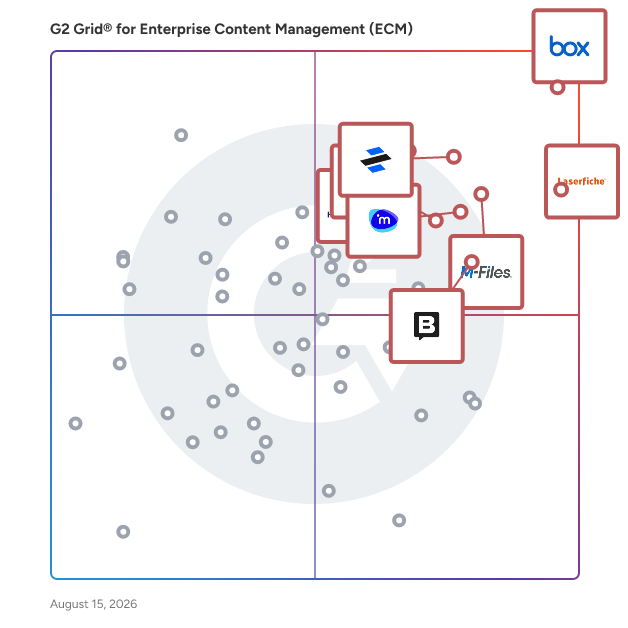
Highlighted products: Box, Laserfiche, Dropbox Dash, M-Files, Hyland OnBase, iManage Work, Cloudflare Application Security and Performance, and Storyblok.
Underlying data: [Grid® JSON](https://www.g2.com/categories/enterprise-content-management-ecm/grids.json?focus%5B%5D=box&focus%5B%5D=laserfiche&focus%5B%5D=dropbox-dash&focus%5B%5D=m-files&focus%5B%5D=hyland-onbase&focus%5B%5D=imanage-work&focus%5B%5D=cloudflare-application-security-and-performance&focus%5B%5D=storyblok)
Sponsored
altaFlow generates custom docs with a click, integrates eSignatures, creates webforms, and more without coding. It’s the ultimate tool to simplify, automate, and elevate your workflows.
Box: The leader in Intelligent Content Management — Store, secure, and automate content on an AI-powered platform Box helps businesses of every size get more value from their documents and files with stringent security controls, intelligent workflow automation, and AI agents that extract critical insight. ✓ Box AI — Summarize documents, extract insights, ask questions in natural language, and deploy and create intelligent AI agents that automate repetitive work ✓ Intelligent workflow automation — Streamline reviews, contract approvals, and onboarding with AI-powered workflows ✓ Security and compliance — Protect sensitive information with granular access controls, intelligent threat detection, and AI governance that meet HIPAA, FINRA, FedRAMP, and GDPR standards ✓ Integrations and extensibility — Connect Box with 1,500+ popular apps or extend functionality with APIs and SDKs ✓ Industry solutions — Trusted by leading finance, technology, government, and life sciences organizations for secure collaboration and AI-enhanced productivity
Average Rating: 4.2/5.0
Total Reviews: 5,038
AI-generated summary from verified user reviews
Rating: 5.0/5.0 stars
— Isaac S.
"Still the one cloud sync solution I turn to"
Rating: 5.0/5.0 stars
— Diego N.
Get work done faster with Laserfiche, the leading SaaS provider of AI-powered document management and process automation. Through powerful workflows, electronic forms, document management and analytics, Laserfiche accelerates processes across the enterprise. ✓ Organize Your Content with AI-Powered Document Management Optimize your operations and increase team productivity with AI-powered document management. Centralize your content, improve collaboration and maintain audit trails to support compliance needs. ✓ Boost Your Productivity with Intelligent Automation Increase efficiency by automating tasks with low-code process automation and prebuilt solution templates. Work smarter and shift your team’s focus to higher priority strategic goals. ✓ Unify Your Systems with Powerful Integrations Laserfiche is the backbone connecting hundreds of mission-critical applications. Users can access relevant documents from a single location, eliminating the need to search across multiple platforms. ✓ Elevate Your Work with Laserfiche AI Laserfiche AI enables organizations to simplify their work, take control of processes and supercharge productivity — all without losing sight of critical data privacy and security standards.
Average Rating: 4.7/5.0
Total Reviews: 1,206
AI-generated summary from verified user reviews
"Document Management and Automation"
Rating: 4.5/5.0 stars
— Matthew D.
Rating: 4.5/5.0 stars
— Holly V.
Dropbox Dash is an AI-powered search and knowledge management platform that brings your company's content into one secure, central workspace. Dash connects to the apps your team already uses, making it easier to find, organize, and put your team’s knowledge to work—no matter where it lives. Search across your apps Quickly find what you’re looking for—files, images, videos, and more—across all your connected apps, not just Dropbox. Dash understands your work, so you get more relevant, contextual results without toggling between tabs, digging through folders, or guessing file names. Get answers from your work Ask questions about your files (“Which version is approved?”) and get clear answers—not just links. Dash can generate drafts, summarize documents, surface insights, and organize content to help move projects forward. Smarter, faster sharing Pull files, folders, and conversations from across your tools into Stacks. Share with teams, clients, or partners—permissions already set. Dash is built on the security and reliability Dropbox brings to 700 million users and 575,000 teams worldwide. With integrations for Google Workspace, Microsoft 365, Zoom, Miro, Canva, Notion, Asana, Slack, and more—all respecting existing permissions, so your work stays secure.
Average Rating: 4.2/5.0
Total Reviews: 86
AI-generated summary from verified user reviews
"Dropbox Dash: A Time-Saving Hub for All My Work Tools"
Rating: 5.0/5.0 stars
— Oussama A.
"Dash Stacks and AI Search Supercharge Team Collaboration and Workflow"
Rating: 5.0/5.0 stars
— George Z.
M-Files delivers Context-First Document Management with an AI-native, metadata-driven architecture that eliminates information chaos and improves productivity across the document lifecycle. By linking documents to the people, processes, clients, and projects that give them meaning, M-Files creates a unified, connected environment that accelerates decision-making, strengthens governance, and streamlines industry-specific workflows through advanced workflow automation and AI. M-Files is also the only document management system that is native to Microsoft 365. This unified solution extends Microsoft collaboration, Copilot, and Purview capabilities to curated M-Files content, enabling stronger security, more consistent compliance, and more accurate AI outcomes grounded in trusted, contextualized information. Organizations gain a seamless, future-ready environment that maximizes ROI on their Microsoft investments while supporting smarter and more efficient work across the business. Schedule a Demo: https://bit.ly/3O1SCm0 Free Trial: https://bit.ly/4ehlAsV
Average Rating: 4.4/5.0
Total Reviews: 229
AI-generated summary from verified user reviews
"Good Metadata Driven Document Management And Requires Planning Up Front"
Rating: 4.5/5.0 stars
— Kaleem A.
"Reliable Platform for Managing Documents and Content Workflows"
Rating: 5.0/5.0 stars
— Ishan S.
OnBase provides a broad spectrum of turn-key industry and departmental solutions that are expertly tailored to meet specific business challenges. As an enterprise platform, OnBase has purpose-built integrations and connectors to core industry LOBs such as Epic and Workday, supporting critical content and process solutions. With repeatable industry solutions, OnBase provides the capability to intelligently automate your business processes so your team can focus on higher value work without the need to build costly customized solutions. With business ownership of solutions, OnBase enables expansion beyond IT, delivering faster ROI. OnBase speeds up processes and reduces costs by capturing important information into a single system so you can manage data, documents and processes. Workflow can be configured to address your departmental, industry and enterprise challenges. Organizations also benefit from low-code application development and a range of multichannel capture options. OnBase can integrate with your existing systems and provide instant access to everyone who needs it, giving visibility into your processes and system performance while securely storing, protecting and expunging your content.
Average Rating: 4.4/5.0
Total Reviews: 308
AI-generated summary from verified user reviews
Rating: 4.5/5.0 stars
— Surbhi D.
"Great product with a lot of promise"
Rating: 4.0/5.0 stars
— Kelly A.
iManage Work is the industry’s leading document and email management application, empowering professionals to manage information more productively, securely, and seamlessly. We built iManage Work with a comprehensive focus on the user experience, bringing you and your knowledge workers agility, efficiency, and access across devices. Key Benefits - Work productively: Manage documents and emails more efficiently and intuitively - Work from anywhere: Mobile-first design lets users work remotely on any device - Work securely: Industry-leading security and governance ensures that iManage Work is the safest place to store information - Work seamlessly: Integrations with Office 365 enable users to do more from inside the familiar Office and Outlook interfaces - Find anything: Smart search cuts through clutter to deliver personalized results For professionals and organizations who need security, agility, and ease-of-use, iManage Work 10 provides a single-source-of-truth for documents and emails to simplify and streamline work. Used globally by leading corporations, law firms, and professional services firms — over 1 million professionals worldwide rely on iManage Work every day.
Average Rating: 4.4/5.0
Total Reviews: 337
AI-generated summary from verified user reviews
"A Solid Platform with a Strong Ecosystem That’s Served Us Well for 20 Years"
Rating: 4.5/5.0 stars
— Steve D.
"Secure, and Efficient - the one tool that empowers document sharing"
Rating: 4.0/5.0 stars
— Oliver D.
Cloudflare is the connectivity cloud for the "everywhere world," on a mission to help build a better Internet. We provide a unified platform of networking, security, and developer services delivered from a single, intelligent global network that spans hundreds of cities in over 125 countries. This empowers organizations of all sizes, from small businesses to the world's largest enterprises, to make their employees, applications, and networks faster and more secure everywhere, while significantly reducing complexity and cost. Our comprehensive platform includes: - Advanced Security: Protect your online presence with industry-leading DDoS protection, a robust Web Application Firewall (WAF), Bot mitigation, and API security. Implement Zero Trust security to secure remote access, data, and applications for your entire workforce. - Superior Performance: Accelerate website and application loading times globally with our Content Delivery Network (CDN), intelligent DNS, and smart routing capabilities. Optimize images and deliver dynamic content with unparalleled speed. - Powerful Developer Tools: Empower your developers to build and deploy full-stack applications at the edge using Cloudflare Workers (serverless functions), R2 Storage (object storage without egress fees), and D1 (serverless SQL database). Cloudflare helps connect and protect millions of customers globally, offering the control, visibility, and reliability businesses need to work, develop, and accelerate their operations in today's hyperconnected landscape. Our global network continuously learns and adapts, ensuring your digital assets are always protected and performing at their best.
Average Rating: 4.5/5.0
Total Reviews: 689
AI-generated summary from verified user reviews
"Cloudflare Unifies Security and Speed with Easy-to-Manage Protection"
Rating: 4.5/5.0 stars
— Pawan K.
"Essential for Security and Speed in One Package"
Rating: 4.5/5.0 stars
— Raghav A.
Storyblok est un CMS sans tête qui permet aux marketeurs et aux développeurs de créer avec joie et de publier en toute confiance. Il vous permet de diffuser du contenu structuré et cohérent partout : sites web, applications, recherche IA, et au-delà. Les marketeurs disposent d'un éditeur visuel avec des composants réutilisables, un aperçu contextuel et des flux de travail pour lancer rapidement et rester fidèles à la marque. Les développeurs ont la liberté d'utiliser leurs frameworks préférés et d'intégrer avec n'importe quoi grâce à la plateforme API-first. Les marques obtiennent une source unique de vérité pour un contenu qui est précis, flexible et mesurable. Des marques légendaires comme Virgin Media O2, Oatly et TomTom utilisent Storyblok pour avoir un impact plus grand et plus rapide sur le marché.
Average Rating: 4.5/5.0
Total Reviews: 582
AI-generated summary from verified user reviews
"Système stable, doit se préparer à des exigences plus complexes."
Rating: 4.0/5.0 stars
— Carolin R.
"Édition rapide et conviviale avec un assistant IA vraiment utile"
Rating: 4.5/5.0 stars
— Chloe R.
Revver (formerly eFileCabinet) is an AI-powered document management and workflow automation platform that helps organizations streamline, secure, and accelerate their document-centric work. New Revver users get unlimited storage and unlimited use of Revver AI Smart Suite in all license tiers. Designed for industries like finance, insurance, government, and manufacturing, Revver empowers teams to automate up to 80% of repetitive document processes—from intake to approval—boosting productivity and reducing manual effort. With Revver, businesses can: ✷ Organize and retrieve documents instantly through intelligent indexing and search powered by Smart Extract AI, capable of reading diverse file types including scans and handwritten forms. ✷ Automate workflows and approvals with no-code tools that route documents, assign tasks, and enforce compliance rules—helping teams work up to 70% faster than with manual systems. ✷ Share files securely through custom-branded client portals and encrypted email links, maintaining complete audit trails and permissions control. ✷ Simplify compliance with built-in retention schedules, legal holds, audit logs, and SOC 2 Type II and ISO 27001 certified infrastructure. ✷Accelerate signatures and forms with integrated eSignature and fillable form templates that eliminate third-party tools and versioning confusion. Accessible via any web browser or desktop app, Revver enables teams to collaborate securely from anywhere—backed by a U.S.-based customer success team and guided onboarding that delivers fast ROI, often within the first 90 days. With over 2 billion data points processed and 1 million+ workflows automated, Revver helps growing organizations turn their documents into a strategic advantage—working smarter, not harder.
Average Rating: 4.4/5.0
Total Reviews: 457
AI-generated summary from verified user reviews
"Revver’s Powerful API Integrations and Smart Extract AI Save Us Tons of Time"
Rating: 4.0/5.0 stars
— Derek T.
"Powerful Search and Built-In eSignature That Save Time Daily"
Rating: 4.0/5.0 stars
— Audrey L.
While eSignature has changed the way that many organizations execute a contract, the lifecycle before and after signature is often managed through manual processes, spreadsheets, and emails—slowing the pace of doing business, increasing risk, and frustrating customers and employees. Docusign CLM (Contract Lifecycle Management) allows organizations to streamline the agreement lifecycle by transforming analog manual processes into a digital automated workflow. The end result is an accelerated pace of doing business, increased compliance, and more efficient employees. Key Features: Central Repository, Advanced Search & Find, Version Control, Clause Library, Collaboration with internal and external parties, Redlining, Simple & Advanced Workflows, Tagging, Mobile Access, Multi Platform integrations (including tight integration with Salesforce).
Average Rating: 4.3/5.0
Total Reviews: 497
AI-generated summary from verified user reviews
"Seamless Document Signing, Flawless Performance"
Rating: 4.5/5.0 stars
— Strive M.
"Streamlines Contract Management with Powerful Automation and Visibility"
Rating: 5.0/5.0 stars
— Andres R.
Jahia is a digital platform combining a hybrid CMS and DXP, built for organizations that manage complex content environments and require strong control over their data, architecture, and digital operations. A hybrid CMS for editorial flexibility and distribution agility: Jahia CMS supports both traditional and headless approaches. Content teams work through rich editorial interfaces, while developers distribute content via APIs to any front-end experience, including websites, mobile applications, portals, and third-party systems. This architecture is particularly suited to multi-site, multi-brand, and portal deployments where content governance and distribution speed are equally critical. A DXP with native CDP capabilities: On the experience side, Jahia collects, unifies, and activates customer data through built-in CDP capabilities, enabling real-time personalization without requiring a separate CDP. Organizations retain ownership of their customer data within a controlled environment, without adding unnecessary data silos. AI-assisted productivity: Built-in AI features, including automatic translation, writing assistance, and automated content classification, reduce manual effort and accelerate time to market for both editorial and technical teams, helping business users move faster while developers stay focused on high-value work. Open architecture, built for complex ecosystems: Jahia is built on a modular, API-first architecture that integrates with existing systems such as CRM, analytics, DAM, and e-commerce platforms. It deploys in the cloud or on-premises, giving organizations control over their infrastructure, security posture, and compliance requirements without locking teams into a rigid technology stack. Designed for collaboration: Jahia bridges the gap between business and technical teams. Granular roles, permissions, and workflows give each team the autonomy they need without creating governance gaps. Content editors, marketers, and developers work in the same environment, with clear boundaries and shared visibility. Trusted by NASA, Marriott Vacations Worldwide, Ben & Jerry’s, and the European Parliament, Jahia is designed for teams that treat data control, architectural flexibility, and digital experience performance not as options, but as requirements.
Average Rating: 4.4/5.0
Total Reviews: 597
AI-generated summary from verified user reviews
"Impressive Flexibility and Scalability"
Rating: 5.0/5.0 stars
— Anhao M.
"Indispensable for Successful Customer Management"
Rating: 4.5/5.0 stars
— Lucas M.
The Content Operating System—a fully customizable all-code backend for content-driven websites and apps. Power all your content operations from a single platform with a feature-rich content workspace, interactive visual editing, serverless functions, AI agent, and the database optimized for content. Learn more: https://www.sanity.io/ Try it out: https://www.sanity.io/get-started Join the community: https://snty.link/community Get work-ready: https://www.sanity.io/learn Questions? hello@sanity.io
Average Rating: 4.7/5.0
Total Reviews: 911
AI-generated summary from verified user reviews
"Sanity: Flexible, Highly Customizable Headless CMS with Seamless Integrations"
Rating: 4.0/5.0 stars
— Bri S.
"Intuitive Content Navigation with Powerful Query Testing and Reliable Performance"
Rating: 4.5/5.0 stars
— Maksim V.
Systemware is an Enterprise Content Management (ECM) and content services platform that helps organizations manage, govern, access, and automate content and information across enterprise systems. The platform is designed for organizations that manage large volumes of documents, reports, records, and other business content across multiple repositories and applications. Systemware is commonly used by enterprises in regulated industries such as financial services, insurance, healthcare, retail, and government to support document management, records management, information governance, workflow automation, and content modernization initiatives. Systemware provides a centralized platform for managing both structured and unstructured content while enabling organizations to connect information across cloud, distributed, and mainframe environments. The platform supports public cloud, private cloud, hybrid cloud, on-premises, and hosted SaaS deployment models. Organizations use Systemware to improve access to information, automate document-intensive processes, support compliance requirements, and prepare content and data for downstream analytics and AI applications. Key platform capabilities include: Enterprise Content Management (ECM), document management, and records management Intelligent Document Processing (IDP), data extraction, and workflow automation Information governance, retention management, security controls, and audit support Content migration and modernization from legacy content repositories and archive systems Integration with enterprise applications, cloud platforms, analytics tools, and AI technologies through APIs and data services Systemware supports organizations that need to manage content throughout its lifecycle, from capture and processing to retention and delivery. The platform enables users to search, retrieve, secure, and distribute content while maintaining governance policies and access controls. The software is used by IT teams, records managers, compliance professionals, operations teams, and business users who require access to enterprise information across departments and systems. By providing a unified approach to content management and information governance, Systemware helps organizations reduce manual processes, improve visibility into content assets, and support digital transformation and modernization initiatives.
Average Rating: 4.6/5.0
Total Reviews: 33
AI-generated summary from verified user reviews
"Powerful Functionality Backed by Great Support"
Rating: 4.5/5.0 stars
— Verified User in Food & Beverages
"Intuitive, Flexible UI with Exceptional Systemware Support"
Rating: 5.0/5.0 stars
— Verified User in Retail
IBM Cloud Pak for Business Automation is a modular set of integrated software components, built for any hybrid cloud, each designed to automate work and accelerate the growth of your business. It simplifies complex multi-step workflows, manual tasks, decision-making, data extraction, record management, document governance and compliance, and more. You can start your digital transformation journey by applying robotic process automation (RPA) to free up human employees, speed decisioning with operational intelligence, and expand to automate key types of work across core operations. Security-rich environments bring trust and transparency to multi-party workflows, all of which can be tailored and integrated with your existing investments. Using this complete intelligent automation solution, clients are transforming fragile and disparate workflows—achieving 97% straight-through processing—to stay competitive and deliver more efficient and satisfying customer and employee experiences while reducing operational costs.
Average Rating: 4.3/5.0
Total Reviews: 38
"Business automation with IBM cloud pack"
Rating: 5.0/5.0 stars
— ATUL S.
"IBM Cloud Pak - It's the future of Automation Platform"
Rating: 5.0/5.0 stars
— Rajat S.
MHC is a global provider of AI-powered SaaS solutions for document and payment automation, purpose-built for highly regulated industries. Our platform helps organizations improve efficiency, ensure compliance, and modernize customer communications at scale. MHC customers generate over 10 billion documents and process billions in AP payments annually using our solutions.
Average Rating: 4.4/5.0
Total Reviews: 181
AI-generated summary from verified user reviews
"We finally feel confident that employee hours are always accurate"
Rating: 4.0/5.0 stars
— Clarice B.
"Mass Pay and Vendor Onboarding Make Global Payments Effortless"
Rating: 5.0/5.0 stars
— Keith A.
Enterprise content management (ECM) tools help companies organize and maintain large volumes of data of varying file types. They connect members of an organization, usually through the cloud, by offering them an interconnected, navigable portal for file management and storage purposes. Users can assign roles and permissions, and administrators can increase security by auditing which account holders are allowed to view and comment on which projects and files.
The tool carries users and organizations through the entire process of file and document management. Teams can scan in or upload files or create files directly within the tool. They can then choose the appropriate storage location and assign permissions based on role, password, or other security settings. Files can be organized according to the company’s preferences such as by team, level of seniority, or task type. For example, a company could create separate folders for marketing vs. sales teams, another could use folders to differentiate middle-manager files from entry-level documents, or one could use folders to separate HR documents from payroll information.
Once stored in the system, documents can be shared via links or by entering the designated folder into the system’s search function. Users can collaborate around these files by leaving comments on the task’s or project’s progression, helping to hold employees accountable for their parts. Many tools have version control functionality, meaning that the most recently updated version of a file is the one users are directed to. This decreases confusion and chances of updating the wrong version of a document. It also saves previous versions to eliminate the possibility of a mistake causing irreversible damage.
Administrators can adjust settings to automate certain processes such as attaching metadata to file documents. ECM tools allow users to set expiration dates determining when files should be disposed of or archived for indefinite safekeeping. This is especially useful in industries such as health care or legal where it is necessary to retain documents over long periods of time. Organizations can hold onto information for years or set it to delete after a contract is complete.
Key Benefits of Enterprise Content Management (ECM) Software
Enterprise content management software provides corporations and organizations with a central repository to store, manage, archive, and otherwise handle data of varying degrees of confidentiality and importance. It could be used to help, for example, HR departments organize hundreds of employee contracts or protect transcripts at a large university.
Facilitates collaboration — ECM inherently helps firms be more collaborative by breaking content out of their isolated silos and sharing them across the organization. Many products offer other features like versioning, audit trails, comments and annotation, and collaborative document and file editing that make collaboration even easier. It is worth considering how features like these can benefit your organization and how an ECM implementation can be leveraged to connect disjointed corporate teams.
Provides lifecycle management — Data storage is at a high premium, and an organization’s file storage compounds just from daily intake and creation. Moving files from active storage to archives and deleting old and unnecessary files help limit unnecessary spending on data storage and hardware, and ECM software can be used to maintain the proper lifecycle of files and documents.
And as with other aspects of document management, government structures are important here too. Legal compliance often requires that certain records be maintained and accessible for a specific amount of time and not a moment longer. ECM solutions can make managing document and file lifecycles structured and automatic. Investigate where ECM products can implement this lifecycle logic and how they will integrate with your existing storage and backup infrastructure.
The benefits of enterprise content management software are not limited to one specific company size or sector. Reviewers have cited using this software for help gaining invoice approval or managing lengthy expense reports. A small photography studio might also benefit from using the software to share files with clients, and an international company can easily trade documents internally. The solutions offered can be helpful to any company that requires better organizational tactics, whether that is in regards to their HR department, finances, account management, sales and marketing, administration, planning, governance, or another area.
Given the open-ended nature of most ECM systems, one would be hard-pressed to say there are distinct types. However, the easiest distinctions can be made for ECM tools that are built for specific industries. Many industries have highly regulated processes regarding the management of legal files, health records, inspection forms, certifications, etc. Beyond government-imposed standards, some organizations may need specific capabilities and configurations. Many ECM vendors offer tailored industry solutions based on standards and previous implementations, and industries with extensive bureaucratic processes will find the most use out of ECM systems. Specific examples include, but are not limited to, health care, law, and public service. However, most modern businesses find themselves regularly handling everything from invoices to content marketing materials to health records, and ECM systems are designed to help scan, categorize, and store all the aforementioned and more.
Enterprise content management systems often provide the same basic features. However, ECM products for specific industries will often include specific feature solutions.
File type support — Supports storage of multiple file types. This includes, but is not limited to, text-based files, PDFs, images, videos, and audio files.
Metadata — Automatically adds descriptive metadata like file size and upload date, inserts standard metadata fields like keywords, and allows for the creation of custom fields and vocabulary.
OCR scanning — Facilitates the structuring of unstructured data through OCR software or other automated filing/tagging processes for scanned documents.
Versioning — Keeps track of incrementally changing versions of the same file.
Collaboration — Supports the simultaneous collaboration of multiple users on document creation, annotation, and review.
Document assembly — Autogenerates documents based on templates and form submission.
Form creation — Supports the creation and management of submittable user forms.
Portals and sites — Provides the ability to create user portals and sites.
Disposition — Automatically archives, deletes, or revokes access to files that have reached the end of their lifecycle.
Search — Simplifies and eases the discovery of files via a simple or advanced search.
Web interface — Allows access to documents via a web interface without requiring a client to install it on a device.
Mobile apps — Provides iOS, Android, and Windows phone apps with functionality that enables users to perform the same functions as they would on a PC.
Process automation — Automates internal processes by specifying a series of conditions and actions, which can be customizable to the complexities of an organization's needs and is easy to set up and execute.
Conditions — Provides a workflow engine that is relevant and customizable to conditions that are necessary to execute rules.
Records management — Provides the necessary tools and functionality to maintain evidence of business activities and comply with governmental requirements or industry standards.
Case management — Provides specialized functionality for bundling structured and unstructured content, automating adaptive, multiperson processes, and setting deadlines for open cases. Also allows both the completion and closing of cases and the storage and future auditing of associated information.
User, role, and access management — Grants access to select data, features, objects, etc., based on the users, user roles, groups, etc.
Single sign-on — Facilitates the onboarding and offboarding of team members with Active Directory/SAML-based identity providers.
Policies and controls — Provides the ability to control file/folder access by user or group, external sharing permissions, editing policies, device location restrictions, etc.
Storage limits — Facilitates the administration of storage limits by user or group.
Storage zones — Supports the choice in which data center your files should be stored.
Security — Stores and transfers files in a secure environment.
Internationalization — Allows multinational organizations to use tools effectively across multiple languages and currencies.
Performance and reliability — Ensures that the software is consistently available (up-time) and allows users to complete tasks quickly because they are not waiting for the software to respond to an action they took.
Reporting and auditing — Provides access to prebuilt and custom reports to monitor user activity and storage.
System of record integration — Integrates with other systems of record such as CRM, ERP, Outlook, Sharepoint.
APIs — Enables custom integration to external systems.