  # Best Enterprise Content Management (ECM) Systems - Page 10

  *By [Neeraja Prakash](https://research.g2.com/insights/author/neeraja-prakash)*

   Enterprise content management (ECM) systems help companies organize, manage, and distribute unstructured content such as documents, images, health or accounting records, surveys, product information, emails, and web pages. Companies use this software to store, track, edit, and collaborate on content creation and other information-related projects, while maintaining predefined and appropriate security levels. Employees at every level of the organization can access and exchange information using ECM software based on user privileges assigned by a system administrator, which streamlines the lifecycle of information and automates various business processes using embedded workflow.

ECM is compatible with most file types including popular office productivity suites (DOC, XLS, OCF), image files (JPEG, TIFF, PNG), email, web standard (XML, HTML), and CAD files from a variety of software platforms. It serves as an enterprise platform to securely store large amounts of content, distribute information, build and manage workflows, facilitate team collaboration, and integrate with other enterprise systems, such as [ERP systems](https://www.g2.com/categories/erp-systems).

To qualify for inclusion in the Enterprise Content Management category, a product must be able to:

- Store large amounts of content across various file types
- Impose order on data based on organizational models
- Make resources easy to find, manage, and distribute through search and advanced filtering and tagging
- Allow collaboration and the creation of new documents
- Ensure the integrity of data and keep it secure with permissions structures


## How Many Enterprise Content Management (ECM) Systems Products Does G2 Track?
**Total Products under this Category:** 224

### Category Stats (May 2026)
- **Average Rating**: 4.37/5 (↓0.01 vs Apr 2026)
- **New Reviews This Quarter**: 168
- **Buyer Segments**: Mid-Market 50% │ Small-Business 28% │ Enterprise 22%
- **Top Trending Product**: CloudFuze (+0.179)
*Last updated: May 18, 2026*

  
## How Does G2 Rank Enterprise Content Management (ECM) Systems Products?

**Why You Can Trust G2's Software Rankings:**

- 30 Analysts and Data Experts
- 17,900+ Authentic Reviews
- 224+ Products
- Unbiased Rankings

G2's software rankings are built on verified user reviews, rigorous moderation, and a consistent research methodology maintained by a team of analysts and data experts. Each product is measured using the same transparent criteria, with no paid placement or vendor influence. While reviews reflect real user experiences, which can be subjective, they offer valuable insight into how software performs in the hands of professionals. Together, these inputs power the G2 Score, a standardized way to compare tools within every category.

  
## Which Enterprise Content Management (ECM) Systems Is Best for Your Use Case?

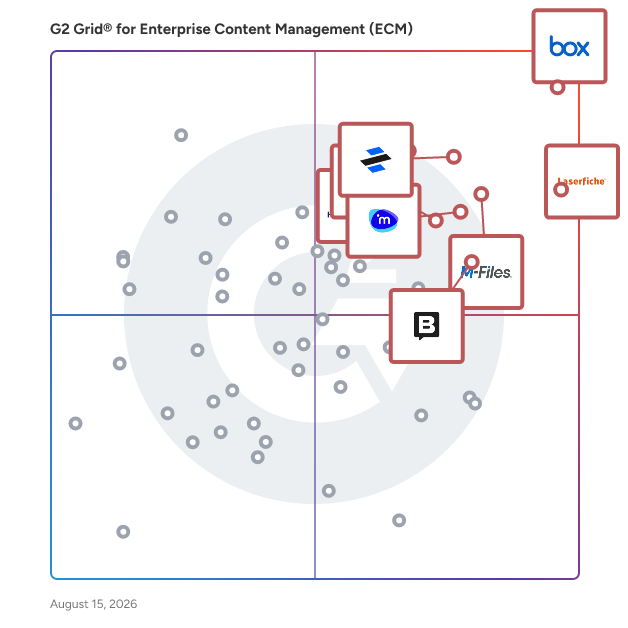
- **Leader:** [Box](https://www.g2.com/products/box/reviews)
- **Highest Performer:** [Pickit](https://www.g2.com/products/pickit/reviews)
- **Easiest to Use:** [Box](https://www.g2.com/products/box/reviews)
- **Top Trending:** [iManage Work](https://www.g2.com/products/imanage-work/reviews)
- **Best Free Software:** [Box](https://www.g2.com/products/box/reviews)

  
---

**Sponsored**

### Contentful

Contentful is a digital experience platform (DXP) designed for marketers, developers, and digital teams who need to build, personalize, and deliver impactful experiences across every channel—quickly and at scale. By combining its headless CMS with native, contextual AI, Contentful enables rapid creation, seamless management, and consistent omnichannel delivery of on-brand, data-driven content. Contentful empowers teams to adapt, reuse, personalize, and publish modular content and design components without reliance on developers, enabling rapid iteration and real-time targeting, experimentation, and optimization at the component level. Complemented by a robust ecosystem, and built on an infinitely-extensible, API-first platform, Contentful gives teams the freedom to easily build or deploy new experiences and integrations quickly to meet the ever-evolving needs of their brand. Trusted by global market leaders, Contentful is engineered for enterprise reliability, extensibility, and future-proof growth—helping organizations maximize ROI and outperform in today’s competitive digital landscape.


[Visit website](https://www.g2.com/external_clickthroughs/record?secure%5Bad_program%5D=ppc&amp;secure%5Bad_slot%5D=category_product_list&amp;secure%5Bcategory_id%5D=199&amp;secure%5Bdisplayable_resource_id%5D=199&amp;secure%5Bdisplayable_resource_type%5D=Category&amp;secure%5Bmedium%5D=sponsored&amp;secure%5Bplacement_reason%5D=page_category&amp;secure%5Bplacement_resource_ids%5D%5B%5D=199&amp;secure%5Bprioritized%5D=false&amp;secure%5Bproduct_id%5D=4941&amp;secure%5Bresource_id%5D=199&amp;secure%5Bresource_type%5D=Category&amp;secure%5Bsource_type%5D=category_page&amp;secure%5Bsource_url%5D=https%3A%2F%2Fwww.g2.com%2Fcategories%2Fenterprise-content-management-ecm&amp;secure%5Btoken%5D=d4cc77f0e6eec91b36e10c960e88793a9c3b1bf2b0aa21972cebdd391faf72fb&amp;secure%5Burl%5D=https%3A%2F%2Fwww.contentful.com%2Fproducts%2Fpersonalization%2F%3Fnt_experiences%3D9BZdShPA4TYFUwHsEmNZi%3D0%26utm_source%3Dg2%26utm_medium%3Dpaid%26utm_campaign%3Dfy27-q1-global-inbound_competitor&amp;secure%5Burl_type%5D=book_demo)

---

  
    ## What Is Enterprise Content Management (ECM) Systems?
  [Content Management Systems](https://www.g2.com/categories/content-management)
  ## What Software Categories Are Similar to Enterprise Content Management (ECM) Systems?
    - [Web Content Management Software](https://www.g2.com/categories/web-content-management)
    - [Cloud Content Collaboration Software](https://www.g2.com/categories/cloud-content-collaboration)
    - [Headless CMS Software](https://www.g2.com/categories/headless-cms)
    - [Accounts Payable Automation Software](https://www.g2.com/categories/ap-automation)
    - [Digital Experience Platforms (DXP)](https://www.g2.com/categories/digital-experience-platforms-dxp)
    - [Workflow Management Software](https://www.g2.com/categories/workflow-management)
    - [Document Management Software](https://www.g2.com/categories/document-management)

  
---

## How Do You Choose the Right Enterprise Content Management (ECM) Systems?

### What You Should Know About Enterprise Content Management (ECM) Software

### What is Enterprise Content Management (ECM) Software?

Enterprise content management (ECM) tools help companies organize and maintain large volumes of data of varying file types. They connect members of an organization, usually through the cloud, by offering them an interconnected, navigable portal for file management and storage purposes. Users can assign roles and permissions, and administrators can increase security by auditing which account holders are allowed to view and comment on which projects and files.

The tool carries users and organizations through the entire process of file and document management. Teams can scan in or upload files or create files directly within the tool. They can then choose the appropriate storage location and assign permissions based on role, password, or other security settings. Files can be organized according to the company’s preferences such as by team, level of seniority, or task type. For example, a company could create separate folders for marketing vs. sales teams, another could use folders to differentiate middle-manager files from entry-level documents, or one could use folders to separate HR documents from payroll information.

Once stored in the system, documents can be shared via links or by entering the designated folder into the system’s search function. Users can collaborate around these files by leaving comments on the task’s or project’s progression, helping to hold employees accountable for their parts. Many tools have version control functionality, meaning that the most recently updated version of a file is the one users are directed to. This decreases confusion and chances of updating the wrong version of a document. It also saves previous versions to eliminate the possibility of a mistake causing irreversible damage.

Administrators can adjust settings to automate certain processes such as attaching metadata to file documents. ECM tools allow users to set expiration dates determining when files should be disposed of or archived for indefinite safekeeping. This is especially useful in industries such as health care or legal where it is necessary to retain documents over long periods of time. Organizations can hold onto information for years or set it to delete after a contract is complete.

Key Benefits of Enterprise Content Management (ECM) Software

- Connect, access, visualize, maintain, manage, and eliminate siloed content repositories with a single overarching architecture
- Increase employee productivity and reduce file redundancy
- Encourage the collaborative instincts of your organization with readily available and shareable content
- Automate business processes, making them structured, documented, and auditable
- Ensure government compliance through strict maintenance of file security, permissions, approvals, and lifecycle
- Integrate with other types of content management software to provide all-encompassing enterprise content management services
- Simplify workflow
- Centralize collateral in one repository

### Why Use Enterprise Content Management (ECM) Software?

Enterprise content management software provides corporations and organizations with a central repository to store, manage, archive, and otherwise handle data of varying degrees of confidentiality and importance. It could be used to help, for example, HR departments organize hundreds of employee contracts or protect transcripts at a large university.

**Facilitates collaboration —** ECM inherently helps firms be more collaborative by breaking content out of their isolated silos and sharing them across the organization. Many products offer other features like versioning, audit trails, comments and annotation, and collaborative document and file editing that make collaboration even easier. It is worth considering how features like these can benefit your organization and how an ECM implementation can be leveraged to connect disjointed corporate teams.

**Provides lifecycle management —** Data storage is at a high premium, and an organization’s file storage compounds just from daily intake and creation. Moving files from active storage to archives and deleting old and unnecessary files help limit unnecessary spending on data storage and hardware, and ECM software can be used to maintain the proper lifecycle of files and documents.

And as with other aspects of document management, government structures are important here too. Legal compliance often requires that certain records be maintained and accessible for a specific amount of time and not a moment longer. ECM solutions can make managing document and file lifecycles structured and automatic. Investigate where ECM products can implement this lifecycle logic and how they will integrate with your existing storage and backup infrastructure.

### Who Uses Enterprise Content Management (ECM) Software?

The benefits of enterprise content management software are not limited to one specific company size or sector. Reviewers have cited using this software for help gaining invoice approval or managing lengthy expense reports. A small photography studio might also benefit from using the software to share files with clients, and an international company can easily trade documents internally. The solutions offered can be helpful to any company that requires better organizational tactics, whether that is in regards to their HR department, finances, account management, sales and marketing, administration, planning, governance, or another area.

### Kinds of Enterprise Content Management (ECM) Software

Given the open-ended nature of most ECM systems, one would be hard-pressed to say there are distinct types. However, the easiest distinctions can be made for ECM tools that are built for specific industries. Many industries have highly regulated processes regarding the management of legal files, health records, inspection forms, certifications, etc. Beyond government-imposed standards, some organizations may need specific capabilities and configurations. Many ECM vendors offer tailored industry solutions based on standards and previous implementations, and industries with extensive bureaucratic processes will find the most use out of ECM systems. Specific examples include, but are not limited to, health care, law, and public service. However, most modern businesses find themselves regularly handling everything from invoices to content marketing materials to health records, and ECM systems are designed to help scan, categorize, and store all the aforementioned and more.

### Enterprise Content Management (ECM) Software Features

Enterprise content management systems often provide the same basic features. However, ECM products for specific industries will often include specific feature solutions.

#### File Management Features

**File type support —** Supports storage of multiple file types. This includes, but is not limited to, text-based files, PDFs, images, videos, and audio files.

**Metadata —** Automatically adds descriptive metadata like file size and upload date, inserts standard metadata fields like keywords, and allows for the creation of custom fields and vocabulary.

**OCR scanning —** Facilitates the structuring of unstructured data through [OCR software](https://www.g2.com/categories/ocr) or other automated filing/tagging processes for scanned documents.

**Versioning —** Keeps track of incrementally changing versions of the same file.

**Collaboration —** Supports the simultaneous collaboration of multiple users on document creation, annotation, and review.

**Document assembly —** Autogenerates documents based on templates and form submission.

**Form creation —** Supports the creation and management of submittable user forms.

**Portals and sites —** Provides the ability to create user portals and sites.

**Disposition —** Automatically archives, deletes, or revokes access to files that have reached the end of their lifecycle.

**Search —** Simplifies and eases the discovery of files via a simple or advanced search.

**Web interface —** Allows access to documents via a web interface without requiring a client to install it on a device.

**Mobile apps —** Provides iOS, Android, and Windows phone apps with functionality that enables users to perform the same functions as they would on a PC.

#### Workflow Features

**Process automation —** Automates internal processes by specifying a series of conditions and actions, which can be customizable to the complexities of an organization&#39;s needs and is easy to set up and execute.

**Conditions —** Provides a workflow engine that is relevant and customizable to conditions that are necessary to execute rules.

**Records management —** Provides the necessary tools and functionality to maintain evidence of business activities and comply with governmental requirements or industry standards.

**Case management —** Provides specialized functionality for bundling structured and unstructured content, automating adaptive, multiperson processes, and setting deadlines for open cases. Also allows both the completion and closing of cases and the storage and future auditing of associated information.

#### Administration Features

**User, role, and access management —** Grants access to select data, features, objects, etc., based on the users, user roles, groups, etc.

**Single sign-on —** Facilitates the onboarding and offboarding of team members with Active Directory/SAML-based identity providers.

**Policies and controls —** Provides the ability to control file/folder access by user or group, external sharing permissions, editing policies, device location restrictions, etc.

**Storage limits —** Facilitates the administration of storage limits by user or group.

**Storage zones —** Supports the choice in which data center your files should be stored.

**Security —** Stores and transfers files in a secure environment.

#### Platform Features

**Internationalization —** Allows multinational organizations to use tools effectively across multiple languages and currencies.

**Performance and reliability —** Ensures that the software is consistently available (up-time) and allows users to complete tasks quickly because they are not waiting for the software to respond to an action they took.

**Reporting and auditing —** Provides access to prebuilt and custom reports to monitor user activity and storage.

**System of record integration —** Integrates with other systems of record such as CRM, ERP, Outlook, Sharepoint.

**APIs —** Enables custom integration to external systems.

### Trends Related to Enterprise Content Management (ECM) Software

**Popularity in more flexible options —** For all the benefits that can come with extensive content management, ECM systems have a mixed reputation. Some consider them dated, and the term itself can deter potential customers. Enterprise content management as a software type evokes associations with decades-old, unintuitive on-premises solutions that were difficult to both implement and maintain. While these on-premises solutions have improved and are primarily used by large enterprise organizations, the vast majority of ECM solutions available today are now slim, cloud-based offerings. ECM developers are putting snappy UI and flexibility first in modern offerings to compete with less complicated document management software types. However, this has blurred the lines between enterprise content management systems and other similar types of content management systems.

**Space lacks strong distinctions —** The larger document management space as a whole lacks definitive delineations between products. Content management has changed significantly since the days of on-premise enterprise solutions, and with the industry as a whole pivoting toward sleek, cloud-based products, the lines between document management solutions has weakened. While distinctions once existed between simple document management software and ECM, one could argue that the specific terms between products is mostly up to vendor preference.

### Software and Services Related to Enterprise Content Management (ECM) Software

**Business content management —** Both [business content management software](https://www.g2.com/categories/business-content-management) and [file storage and sharing software](https://www.g2.com/categories/file-storage-and-sharing) are content repositories similar to enterprise content management systems. However, at one point they were more simplified, known for being cloud-based offerings and better choices for small businesses. However, with an industry-wide push toward cloud products, there are few differences between any of them now.

**Digital asset management —** While enterprise content management systems are intended to hold all of an organization’s content, [digital asset management software](https://www.g2.com/categories/digital-asset-management), or DAM systems, are intended specifically for rich media files. This includes files like images, videos, audio, and presentations. DAM software is used specifically by marketing teams to hold marketing collateral in one tailored repository. While both ECMs and DAMs are both capable of holding an extensive amount of content, DAMs have a more specific use case and features to accommodate, such as advanced preview thumbnails and streamlined import and export functionality.