Best Document Creation Software

How Many Document Creation Software Products Does G2 Track?

Total Products under this Category: 335

Category Stats (Sep 2026)

  • Average Rating: 4.37/5 The average rating of products in this category, based on all submitted ratings
  • Top Trending Product: DocNexus (+2.22%) - Among all products in this category, DocNexus recorded the largest rating increase compared to last month

Last updated: September 01, 2026

How Does G2 Rank Document Creation Software Products?

Why You Can Trust G2's Software Rankings:

  • 30 Analysts and Data Experts
  • 156,600+ Authentic Reviews
  • 335+ Products
  • Unbiased Rankings

G2's software rankings are built on verified user reviews, rigorous moderation, and a consistent research methodology maintained by a team of analysts and data experts. Each product is measured using the same transparent criteria, with no paid placement or vendor influence. While reviews reflect real user experiences, which can be subjective, they offer valuable insight into how software performs in the hands of professionals. Together, these inputs power the G2 Score, a standardized way to compare tools within every category.

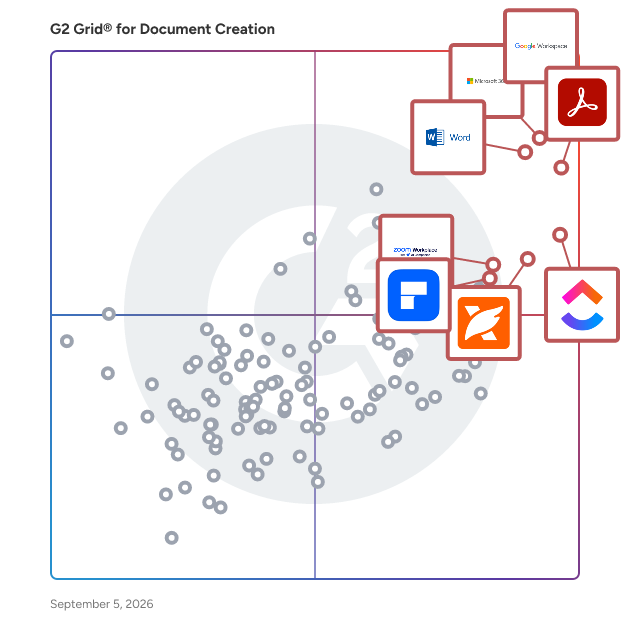
G2 Grid® for Document Creation Software

G2 Grid® for Document Creation Software plotting products by satisfaction and market presence

Highlighted products: Google Workspace, Microsoft 365, Adobe Acrobat, Microsoft Word, ClickUp, Foxit PDF Editor, Zoom Workplace, and Wondershare PDFelement.

Underlying data: [Grid® JSON](https://www.g2.com/categories/document-creation/grids.json?focus%5B%5D=google-workspace&focus%5B%5D=microsoft365&focus%5B%5D=adobe-acrobat&focus%5B%5D=microsoft-word&focus%5B%5D=clickup&focus%5B%5D=foxit-pdf-editor&focus%5B%5D=zoom-workplace&focus%5B%5D=wondershare-wondershare-pdfelement)

Google Workspace

Google Workspace is a comprehensive productivity and collaboration solution designed to help users streamline their work processes by integrating essential tools such as email, chat, file storage, and video conferencing into a unified platform. This suite of applications is tailored for businesses, educational institutions, and individuals looking to enhance their communication and collaboration efforts, all while leveraging the power of Google’s artificial intelligence. Targeted at a diverse audience, Google Workspace caters to teams of all sizes, from small startups to large enterprises. It is particularly beneficial for remote teams and organizations that prioritize collaboration across different locations. The platform supports various use cases, including project management, team communication, document sharing, and virtual meetings, making it an ideal choice for professionals who need to work together efficiently, regardless of their physical location. One of the key features of Google Workspace is its seamless integration of applications such as Gmail, Google Meet, Google Drive, and Google Docs. This interconnectedness allows users to switch effortlessly between tasks, whether they are sending emails, participating in video calls, or collaborating on documents in real-time. The AI capabilities embedded within the platform enhance user experience by providing smart suggestions, automating repetitive tasks, and improving search functionalities, ultimately saving time and increasing productivity. Additionally, Google Workspace prioritizes security and data protection, offering robust features such as two-factor authentication, advanced phishing protection, and customizable access controls. These measures ensure that sensitive information remains secure while allowing teams to collaborate freely. The platform also supports third-party integrations, enabling users to connect their favorite applications and tools, further enhancing their workflow. In summary, Google Workspace stands out in the productivity software category by providing a holistic approach to collaboration. Its user-friendly interface, combined with powerful AI-driven features and strong security protocols, makes it a valuable tool for anyone looking to improve their work processes and foster effective teamwork. Whether for managing projects, communicating with colleagues, or sharing files, Google Workspace is designed to meet the diverse needs of its users, making it an essential resource in today’s digital workplace.

Average Rating: 4.6/5.0

Total Reviews: 45,692

How Do G2 Users Rate Google Workspace?

  • Has the product been a good partner in doing business?: 9.0/10 (Category avg: 9.0/10)
  • Quality of Support: 8.6/10 (Category avg: 8.6/10)
  • Ease of Use: 9.3/10 (Category avg: 8.9/10)
  • Ease of Admin: 9.0/10 (Category avg: 8.9/10)

Who Is the Company Behind Google Workspace?

  • Seller: Google
  • Year Founded: 1998
  • HQ Location: Mountain View, CA
  • Twitter: @google
    31,899,995 Twitter followers
  • LinkedIn® Page: www.linkedin.com
    301,144 employees on LinkedIn®
  • Ownership: NASDAQ:GOOG

Who Uses This Product?

  • Who Uses This: Student, Teacher
  • Top Industries: Information Technology and Services, Education Management
  • Company Size: 46% Small, 35% Medium

What Do G2 Reviewers Say About Google Workspace?

AI-generated summary from verified user reviews

Pros
  • Users appreciate the ease of use in Google Workspace, facilitating smooth and efficient workflow management.
  • Users love the seamless team collaboration in Google Workspace, enhancing communication and boosting productivity effortlessly.
  • Users love the seamless integrations in Google Workspace, enhancing efficiency with easy access to tools and scheduling.
  • Users praise the ease of use and integration in Google Workspace, enhancing productivity and collaboration seamlessly.
  • Users appreciate the seamless Google integration of Workspace, enhancing collaboration and efficiency across all tools.
Cons
  • Users face missing features in Google Workspace, such as limited offline capabilities and restrictions on accessing certain functionalities.
  • Users find the limited features of Google Workspace unnecessary for smaller teams, lacking essential tools for their needs.
  • Users find Google Workspace lacking features compared to other platforms, impacting effective campaign management and data handling.
  • Users find internet dependency challenging, as offline functionality is limited and issues with quality can arise.
  • Users find limited customization options in Google Workspace, particularly for calendars and forms, restricting flexibility and creativity.

What Are Recent G2 Reviews of Google Workspace?

What Are G2 Users Discussing About Google Workspace?

Microsoft 365

Launch and grow your business with Microsoft 365. Do more, faster, with intelligent tools to create, send, share, and store professional, branded documents with your customers and team - securely in the cloud. Microsoft 365 is a cloud-based suite of software tools designed to help you do more—with best-in-class communication, design, and data management apps, intelligent cloud services, and advanced security. Access your data from anywhere, collaborate with team members in real time, meet with people virtually, and use thousands of predesigned templates to better communicate with customers and manage your business - all with built-in security technology that safeguards your data and devices from anywhere. Get the latest Office apps, such as Microsoft Teams, Word, Excel, PowerPoint, Outlook, OneDrive, and more.

Average Rating: 4.6/5.0

Total Reviews: 5,544

How Do G2 Users Rate Microsoft 365?

  • Has the product been a good partner in doing business?: 8.8/10 (Category avg: 9.0/10)
  • Quality of Support: 8.5/10 (Category avg: 8.6/10)
  • Ease of Use: 9.0/10 (Category avg: 8.9/10)
  • Ease of Admin: 8.7/10 (Category avg: 8.9/10)

Who Is the Company Behind Microsoft 365?

  • Seller: Microsoft
  • Year Founded: 1975
  • HQ Location: Redmond, Washington
  • Twitter: @microsoft
    13,091,739 Twitter followers
  • LinkedIn® Page: www.linkedin.com
    232,750 employees on LinkedIn®
  • Ownership: MSFT

Who Uses This Product?

  • Who Uses This: Owner, Software Engineer
  • Top Industries: Information Technology and Services, Education Management
  • Company Size: 37% Medium, 35% Small

What Do G2 Reviewers Say About Microsoft 365?

AI-generated summary from verified user reviews

Pros
  • Users highlight the ease of use in Microsoft 365, enjoying straightforward implementation and seamless navigation.
  • Users appreciate the seamless team collaboration in Microsoft 365, enhancing efficiency and communication across various applications.
  • Users value the easy integration with Microsoft apps, enhancing data access and collaboration across devices.
  • Users value the easy integration of Microsoft 365 with other tools, enhancing collaboration and accessibility across devices.
  • Users love the seamless integration of Microsoft 365 with other apps, enhancing accessibility and collaboration.
Cons
  • Users find Microsoft 365 too expensive for small teams, encountering frustrating limitations and issues with updates.
  • Users find the missing features frustrating, as essential tools are locked behind higher-priced plans and updates disrupt functionality.
  • Users find the learning curve daunting with Microsoft 365, often feeling overwhelmed by its complexity and features.
  • Users find Microsoft 365 lacking essential features, especially with frequent updates that disrupt established workflows and settings.
  • Users are frustrated by limited features in Microsoft 365, often requiring costly plans for full functionality.

What Are Recent G2 Reviews of Microsoft 365?

What Are G2 Users Discussing About Microsoft 365?

Adobe Acrobat

Acrobat: Trusted for documents. Now built for how work really happens. For more than 30 years, Acrobat has been the trusted name in document workflow — helping businesses create, sign, and share with confidence. As one of the leading enterprise document platforms that scales for global teams, Acrobat has evolved beyond the PDF. Now with Acrobat Studio, it has been reimagined for how modern teams work: smarter, more collaborative, and powered by AI. Acrobat Studio builds on everything professionals know from Acrobat Pro — powerful PDF editing, signing, and reviewing — and expands it into a connected workspace where teams can create, collaborate, and communicate in entirely new ways. While Acrobat Pro focuses on the PDF itself, Acrobat Studio connects the full document journey, from insight to action. With PDF Spaces, teams can bring related documents together, chat with AI Assistants that summarize content or surface key takeaways, and keep everyone aligned without endless versions or email threads. Express Premium tools make it easy to remix or reuse that same content into branded presentations, visuals, or reports — helping teams communicate ideas faster and more confidently. Security remains a constant. Acrobat follows Adobe's Secure Product Lifecycle to safeguard data at every stage, with encryption, access controls, and enterprise-grade compliance. For organizations evaluating document automation tools suitable for multi-region, multi-team deployments, Acrobat Studio delivers the scale, security, and integrations to support it. From small teams to large enterprises, it turns everyday PDFs into powerful, intelligent workspaces — helping people move ideas forward and communicate with greater clarity and impact.

Average Rating: 4.5/5.0

Total Reviews: 4,676

How Do G2 Users Rate Adobe Acrobat?

  • Has the product been a good partner in doing business?: 8.9/10 (Category avg: 9.0/10)
  • Quality of Support: 8.5/10 (Category avg: 8.6/10)
  • Ease of Use: 8.8/10 (Category avg: 8.9/10)
  • Ease of Admin: 8.9/10 (Category avg: 8.9/10)

Who Is the Company Behind Adobe Acrobat?

  • Seller: Adobe
  • Company Website:
  • Year Founded: 1982
  • HQ Location: San Jose, CA
  • Twitter: @Adobe
    956,842 Twitter followers
  • LinkedIn® Page: www.linkedin.com
    42,975 employees on LinkedIn®

Who Uses This Product?

  • Who Uses This: Graphic Designer, Software Engineer
  • Top Industries: Information Technology and Services, Computer Software
  • Company Size: 42% Small, 31% Medium

What Do G2 Reviewers Say About Adobe Acrobat?

AI-generated summary from verified user reviews

Pros
  • Users appreciate the ease of use of Adobe Acrobat, simplifying PDF management and enhancing productivity seamlessly.
  • Users appreciate the easy editing features of Adobe Acrobat, which streamline PDF handling and enhance productivity.
  • Users value the versatile PDF editing capabilities of Adobe Acrobat, making document management seamless and efficient.
  • Users appreciate the editing versatility of Adobe Acrobat, allowing seamless document management and security across devices.
  • Users value the centralized management of PDFs in Adobe Acrobat, appreciating its all-in-one platform for various tasks.
Cons
  • Users feel that Adobe Acrobat is expensive, particularly due to limited free features and a restrictive subscription model.
  • Users experience slow performance with Adobe Acrobat, noting lag and loading issues despite having high-end systems.
  • Users often face PDF issues with Acrobat, including difficulty compressing, slow performance, and challenging editing experiences.
  • Users find Adobe Acrobat not user friendly, especially when trying to navigate its complex features and tools.
  • Users find the learning curve steep, with advanced tools often overwhelming and hidden, causing initial difficulties in usage.

What Are Recent G2 Reviews of Adobe Acrobat?

What Are G2 Users Discussing About Adobe Acrobat?

Microsoft Word

Microsoft Word is a comprehensive word processing application developed by Microsoft, first introduced in 1983. It enables users to create, edit, format, and share text documents efficiently. Over the years, Word has evolved into a versatile tool, offering a wide range of features that cater to both personal and professional document creation needs. Key Features and Functionality: - Text Editing and Formatting: Provides a rich set of tools for text manipulation, including font selection, size adjustment, color customization, and paragraph alignment. - Templates: Offers a variety of pre-designed templates for resumes, reports, letters, and more, streamlining the document creation process. - Collaboration Tools: Supports real-time co-authoring, allowing multiple users to work on the same document simultaneously. - Review and Commenting: Includes features for tracking changes, adding comments, and comparing document versions to facilitate collaborative editing. - Integration with Other Microsoft Office Applications: Seamlessly integrates with Excel, PowerPoint, and Outlook, enhancing productivity across the Office suite. - Advanced Formatting: Supports the creation of tables, charts, and graphs, as well as the insertion of images and hyperlinks to enrich documents. - Macros and Automation: Allows users to automate repetitive tasks through the use of macros, improving efficiency. - File Compatibility: Supports various file formats, including its native DOCX, as well as PDF and ODF, ensuring compatibility across different platforms. Primary Value and User Solutions: Microsoft Word addresses the need for a reliable and user-friendly word processing tool that caters to a wide range of document creation and editing tasks. Its intuitive interface and robust feature set make it suitable for drafting simple letters, creating complex reports, designing newsletters, and more. The application's collaboration capabilities enhance teamwork by allowing multiple users to edit documents in real-time, while its integration with other Microsoft Office applications streamlines workflows. By offering extensive formatting options and support for various file formats, Word ensures that users can produce professional-quality documents that meet diverse requirements.

Average Rating: 4.7/5.0

Total Reviews: 2,017

How Do G2 Users Rate Microsoft Word?

  • Has the product been a good partner in doing business?: 9.0/10 (Category avg: 9.0/10)
  • Quality of Support: 8.8/10 (Category avg: 8.6/10)
  • Ease of Use: 9.2/10 (Category avg: 8.9/10)
  • Ease of Admin: 9.2/10 (Category avg: 8.9/10)

Who Is the Company Behind Microsoft Word?

  • Seller: Microsoft
  • Year Founded: 1975
  • HQ Location: Redmond, Washington
  • Twitter: @microsoft
    13,091,739 Twitter followers
  • LinkedIn® Page: www.linkedin.com
    232,750 employees on LinkedIn®
  • Ownership: MSFT

Who Uses This Product?

  • Who Uses This: Student, Software Engineer
  • Top Industries: Information Technology and Services, Computer Software
  • Company Size: 40% Small, 32% Medium

What Do G2 Reviewers Say About Microsoft Word?

AI-generated summary from verified user reviews

Pros
  • Users appreciate the ease of use in Microsoft Word, enjoying its simple navigation and reliable functionality for all needs.
  • Users appreciate the feature abundance of Microsoft Word, enabling seamless document creation and integration from various applications.
  • Users appreciate the easy editing capabilities of Microsoft Word, enhancing their collaboration and document review processes.
  • Users appreciate the simplicity and user-friendly design of Microsoft Word, making document creation effortless and effective.
  • Users find the templates extremely helpful, enabling easier document creation and seamless project management in Microsoft Word.
Cons
  • Users note the missing features in Microsoft Word, which can hinder document formatting and complicate workflows.
  • Users find little actions complicated, often leading to frustration and inefficiency during their Microsoft Word experience.
  • Users find Microsoft Word expensive, especially due to the requirement of a paid license or subscription.
  • Users find the learning curve steep due to frequent updates and difficulties with basic actions like deleting pages.
  • Users experience performance issues with Microsoft Word, especially when handling large documents or complex formatting, leading to frustration.

What Are Recent G2 Reviews of Microsoft Word?

What Are G2 Users Discussing About Microsoft Word?

ClickUp

ClickUp is the world’s first Converged AI Workspace, bringing together all work apps, data, and workflows. ClickUp eliminates all forms of work sprawl to provide 100% context and a single place for humans and agents to work, together. Trusted by more than 20 million users worldwide, ClickUp is on a mission to maximize human productivity.

Average Rating: 4.6/5.0

Total Reviews: 13,520

How Do G2 Users Rate ClickUp?

  • Has the product been a good partner in doing business?: 9.0/10 (Category avg: 9.0/10)
  • Quality of Support: 8.8/10 (Category avg: 8.6/10)
  • Ease of Use: 8.5/10 (Category avg: 8.9/10)
  • Ease of Admin: 8.6/10 (Category avg: 8.9/10)

Who Is the Company Behind ClickUp?

  • Seller: ClickUp
  • Company Website:
  • Year Founded: 2017
  • HQ Location: San Diego, California
  • Twitter: @clickup
    69,539 Twitter followers
  • LinkedIn® Page: www.linkedin.com
    7,082 employees on LinkedIn®

Who Uses This Product?

  • Who Uses This: CEO, Project Manager
  • Top Industries: Marketing and Advertising, Computer Software
  • Company Size: 77% Small, 19% Medium

What Do G2 Reviewers Say About ClickUp?

AI-generated summary from verified user reviews

Pros
  • Users find ClickUp to be incredibly easy and simple to use, streamlining tasks and enhancing productivity effortlessly.
  • Users value the flexibility in task management, enabling customized workflows for personal, team, and project tasks.
  • Users appreciate the abundance of features in ClickUp, making task management seamless and efficient.
  • Users appreciate ClickUp for its streamlined management tasks, enabling better organization and efficiency in project handling.
  • Users appreciate ClickUp for its streamlined organization, making team management and project tracking efficient and effortless.
Cons
  • Users find the missing features in ClickUp frustrating, particularly the lack of basic tools like subfolders.
  • Users experience a learning curve with ClickUp, finding the plethora of features daunting at first.
  • Users note limited features in ClickUp, with missing basic options and a complex setup process hindering ease of use.
  • Users find ClickUp not intuitive, feeling overwhelmed by its many features and struggling with initial setup and performance.
  • Users experience slow loading times in ClickUp, which affects their productivity when managing multiple tasks and fields.

What Are Recent G2 Reviews of ClickUp?

What Are G2 Users Discussing About ClickUp?

Foxit PDF Editor

Founded in 2001, Foxit is a leading provider of innovative PDF and eSignature products and services, helping knowledge workers increase productivity and do more with documents. Foxit combines easy-to-use desktop software, mobile apps, and cloud services in one powerful solution: The Foxit PDF Editor. This intelligent document solution allows users to create, edit, fill, and sign documents through their integrated PDF Editor and eSign offerings – from anywhere and on any device. Most editing tools focus only on creating and modifying documents, leaving storage, organization, and control to other systems. Foxit Document Management System (DMS) is included in Foxit PDF Editor, so every document is securely stored, organized, governed, and connected from the moment it's edited. As the first to market with AI-powered PDF editing solutions, Foxit enhances productivity with smart document editing and workflow automation. Winner of numerous awards, Foxit has over 700 million users and has sold to over 528,000 customers, ranging from SMBs to global enterprises worldwide. Foxit products are ISO 32000-1/PDF 1.7 standard compliant, therefore, compatible with your existing PDF documents and forms.

Average Rating: 4.6/5.0

Total Reviews: 3,509

G2 Deal: Foxit PDF Editor - Offer for G2 Users

Cost-effective, easy-to-use, and integrated PDF and eSign solution. Perfect for knowledge workers who work independently. Sign up now to get 20% off your first year when you purchase 10-30 licenses.

Price: ~~Starting at $1399.90/year~~ → 10-30 Licenses: starting at $1119.92/year

View this exclusive G2 deal

How Do G2 Users Rate Foxit PDF Editor?

  • Has the product been a good partner in doing business?: 9.0/10 (Category avg: 9.0/10)
  • Quality of Support: 8.9/10 (Category avg: 8.6/10)
  • Ease of Use: 9.0/10 (Category avg: 8.9/10)
  • Ease of Admin: 8.9/10 (Category avg: 8.9/10)

Who Is the Company Behind Foxit PDF Editor?

  • Seller: Foxit
  • Company Website:
  • Year Founded: 2001
  • HQ Location: Fremont, CA
  • Twitter: @foxitsoftware
    6,226 Twitter followers
  • LinkedIn® Page: www.linkedin.com
    590 employees on LinkedIn®

Who Uses This Product?

  • Who Uses This: Owner, President
  • Top Industries: Construction, Accounting
  • Company Size: 63% Small, 24% Medium

What Do G2 Reviewers Say About Foxit PDF Editor?

AI-generated summary from verified user reviews

Pros
  • Users appreciate the ease of use of Foxit PDF Editor, highlighting its intuitive interface and quick setup process.
  • Users appreciate the intuitive and user-friendly interface of Foxit PDF Editor, enhancing their editing experience significantly.
  • Users love the easy editing features of Foxit PDF Editor, enhancing their workflow with intuitive and efficient tools.
  • Users commend Foxit PDF Editor for its fast, lightweight, and easy-to-use interface, enhancing productivity in PDF management.
  • Users appreciate the user-friendly interface of Foxit PDF Editor, enhancing their editing experience with powerful tools and ease of use.
Cons
  • Users find the learning curve steep, especially for newcomers, due to advanced features being hard to discover.
  • Users find the difficulty in discovering advanced features and initial setup frustrating, impacting their overall experience.
  • Users find the pricing concerns of Foxit PDF Editor to be a significant drawback, especially for beginners.
  • Users find missing features in Foxit PDF Editor, particularly in the free version and Mac compatibility.
  • Users find the limited features of Foxit PDF Editor restrict its usability without a paid subscription.

What Are Recent G2 Reviews of Foxit PDF Editor?

What Are G2 Users Discussing About Foxit PDF Editor?

Zoom Workplace

Goodbye app overload. Hello effortless work. Work can be complicated. Your tools shouldn't be. Zoom Workplace connects all the ways you collaborate — from meetings to docs to chat and more — with built-in AI and seamless integrations that help teams focus and work flawlessly. Zoom Communications: Unified, Effortless Connection for Modern Work Bring every way your teams communicate—meetings, chat, calls, email, and scheduling—into one seamless experience. With Zoom, collaboration happens faster and more naturally across channels, without switching apps or losing context. From spontaneous chats to scheduled meetings and calls, everything stays connected, searchable, and secure—powered by one intuitive platform built for how modern teams work. Zoom Productivity: Workflows Connected, Work Effortless Transform how work gets done with AI-first collaboration that keeps people, content, and actions in one place. From brainstorming on whiteboards to co-creating in docs, sharing clips, and automating follow-ups, Zoom connects every step of your workflow. With Zoom Hub and integrated video management, knowledge stays organized, accessible, and actionable—so teams can move from idea to outcome without friction. Zoom Spaces: Smarter, Connected Workplaces for Every Team Bring your physical and hybrid environments to life with intelligent, connected spaces. Zoom Spaces unifies meeting rooms, desk reservations, digital signage, and visitor management into one seamless experience—making it simple to collaborate, navigate, and manage the workplace. Whether employees are remote, hybrid, or on-site, Zoom creates a consistent, secure, and flexible environment that keeps teams connected wherever work happens. Zoom Employee Engagement: Connect, Inspire, and Empower Every Employee Foster belonging and alignment with Workvivo by Zoom—a modern employee experience platform that unites communication, culture, and community in one place. From company-wide updates to recognition, feedback, and social engagement, Workvivo gives every employee a voice and a sense of connection. Built right into Zoom Workplace, it helps organizations strengthen culture, boost engagement, and keep teams informed and inspired—no matter where they work.

Average Rating: 4.5/5.0

Total Reviews: 53,599

How Do G2 Users Rate Zoom Workplace?

  • Has the product been a good partner in doing business?: 9.1/10 (Category avg: 9.0/10)
  • Quality of Support: 8.7/10 (Category avg: 8.6/10)
  • Ease of Use: 9.1/10 (Category avg: 8.9/10)
  • Ease of Admin: 9.0/10 (Category avg: 8.9/10)

Who Is the Company Behind Zoom Workplace?

  • Seller: Zoom
  • Company Website:
  • Year Founded: 2011
  • HQ Location: San Jose, CA
  • Twitter: @zoom
    1,042,714 Twitter followers
  • LinkedIn® Page: www.linkedin.com
    14,013 employees on LinkedIn®

Who Uses This Product?

  • Who Uses This: Owner, Software Engineer
  • Top Industries: Information Technology and Services, Computer Software
  • Company Size: 51% Small, 31% Medium

What Do G2 Reviewers Say About Zoom Workplace?

AI-generated summary from verified user reviews

Pros
  • Users love the ease of use of Zoom Workplace, enjoying seamless access to features with just a click.
  • Users appreciate the ease of collaboration in Zoom Workplace, especially with breakout rooms and seamless screen sharing.
  • Users value the reliability of Zoom Workplace, ensuring seamless connectivity and stability even during adverse conditions.
  • Users find the ease of use for meetings in Zoom Workplace invaluable for seamless collaboration and productivity.
  • Users enjoy the easy-to-use video conferencing features of Zoom, facilitating smooth communication and collaboration in hybrid work settings.
Cons
  • Users note the limited features of Zoom Workplace, expressing a need for improved built-in collaboration tools.
  • Users experience Zoom issues like fatigue, connectivity problems, and confusing configurations that hinder their overall meeting effectiveness.
  • Users experience Zoom fatigue, notification overload, and connectivity issues, making long meetings feel overwhelming and impersonal.
  • Users find missing features in Zoom Workplace, like improved sharing links and chat access post-calls, frustrating.
  • Users often face connection issues with Zoom Workplace, leading to a frustrating and less seamless experience.

What Are Recent G2 Reviews of Zoom Workplace?

What Are G2 Users Discussing About Zoom Workplace?

Wondershare PDFelement

PDFelement is a comprehensive PDF editing solution designed to assist users in managing their PDF documents efficiently. This versatile software caters to a wide range of needs, including creating, editing, converting, annotating, and securing PDF files. With its user-friendly interface and advanced features, PDFelement is suitable for both professionals and individuals seeking to streamline their document workflows. The target audience for PDFelement includes businesses, students, and professionals who frequently work with PDF files. Its capabilities are particularly beneficial for those who require a reliable tool for document management, whether for creating reports, filling out forms, or collaborating on projects. The software is designed to enhance productivity by simplifying complex tasks associated with PDF handling, making it an essential tool for anyone who regularly interacts with digital documents. One of the standout features of PDFelement is its advanced Optical Character Recognition (OCR) technology, which allows users to convert scanned documents into editable and searchable text. This feature is particularly useful for professionals who need to digitize paper documents while preserving their original formatting. Additionally, PDFelement supports the conversion of PDFs to and from various formats, including Word, Excel, and PowerPoint, ensuring that users can work with their documents in the format that best suits their needs. PDFelement also offers robust security features, enabling users to protect sensitive information within their documents. Users can easily password-protect their PDFs, redact confidential data, and electronically sign documents, facilitating secure collaboration. The software’s form-filling capabilities further enhance its utility, allowing users to create and fill out forms effortlessly, which is especially beneficial for businesses that require streamlined data collection processes. Overall, PDFelement stands out in the PDF editing category due to its combination of powerful features, ease of use, and versatility. By optimizing PDF tasks and providing a comprehensive set of tools, PDFelement empowers users to manage their documents more effectively, ultimately enhancing their productivity and workflow efficiency.

Average Rating: 4.5/5.0

Total Reviews: 1,026

How Do G2 Users Rate Wondershare PDFelement?

  • Has the product been a good partner in doing business?: 8.9/10 (Category avg: 9.0/10)
  • Quality of Support: 8.7/10 (Category avg: 8.6/10)
  • Ease of Use: 9.1/10 (Category avg: 8.9/10)
  • Ease of Admin: 9.0/10 (Category avg: 8.9/10)

Who Is the Company Behind Wondershare PDFelement?

  • Seller: Wondershare
  • Company Website:
  • Year Founded: 2003
  • HQ Location: Shenzen, CN
  • Twitter: @Wondershare
    14,154 Twitter followers
  • LinkedIn® Page: www.linkedin.com
    639 employees on LinkedIn®

Who Uses This Product?

  • Who Uses This: Owner, Project Manager
  • Top Industries: Information Technology and Services, Computer Software
  • Company Size: 66% Small, 23% Medium

What Do G2 Reviewers Say About Wondershare PDFelement?

AI-generated summary from verified user reviews

Pros
  • Users find Wondershare PDFelement to be extremely user-friendly and easy to use, enhancing their PDF editing experience effortlessly.
  • Users value the ease of use and extensive features of Wondershare PDFelement, enhancing productivity and workflow.
  • Users commend the ease of use of Wondershare PDFelement, appreciating its smooth editing and comprehensive toolset.
  • Users find the easy editing capabilities of Wondershare PDFelement invaluable for managing PDF documents effortlessly.
  • Users appreciate the comprehensive PDF management features of Wondershare PDFelement, making their tasks efficient and easy.
Cons
  • Users report slow performance with large files, often leading to crashes and frustrating processing times.
  • Users report zooming and extraction issues with PDFelement, which can hinder smooth navigation and document management.
  • Users feel the product is too expensive and desire more affordable upgrade options or a perpetual license model.
  • Users note the limited features of Wondershare PDFelement, suggesting enhancements for better productivity and functionality.
  • Users find missing features problematic, particularly with large files and outdated templates affecting usability.

What Are Recent G2 Reviews of Wondershare PDFelement?

What Are G2 Users Discussing About Wondershare PDFelement?

pdfFiller

pdfFiller is a cloud-native document management platform that unifies editing, e-signing, storage, and collaboration. Purpose-built for small and mid-sized businesses, it eliminates the need for multiple subscriptions and constant app-switching, delivering enterprise-grade functionality without enterprise-grade complexity. pdfFiller is engineered for value-driven small businesses, enabling teams to work confidently from wherever they choose. Documents are securely stored in the cloud, giving teams reliable anytime-anywhere access with zero risk of data loss. Recognized internationally as a leading PDF solution across industries and sectors of various sizes, pdfFiller is trusted by organizations seeking to modernize their document workflows and scale operational efficiency. Across sectors, pdfFiller has become a go-to solution for a wide range of business-critical workflows. Real estate professionals rely on the platform for fast, secure contract signing, while healthcare providers and patients use its HIPAA-compliant e-signature capabilities to manage medical forms with confidence. Insurance professionals turn to pdfFiller for editable, fillable application forms, and HR teams — from lean startups to large enterprises — use it to streamline employee onboarding. Educators leverage the platform to quickly create worksheets and instructional materials, nonprofit organizations and researchers apply it for scalable online data collection. Finance professionals, bookkeepers, and accountants value its intuitive, low-friction approach to everyday document handling. Beyond its core editing and signing capabilities, pdfFiller offers a robust set of value-added tools designed to support evolving business needs, including document resizing and cropping, AI-powered summarization and translation, and AI-assisted document generation and template creation. Together, these capabilities position pdfFiller as more than a document tool — it's a platform built to keep pace with the demands of modern, fast-moving organizations. Integrating pdfFiller into daily operations delivers measurable business impact, strengthening cross-departmental collaboration, boosting organizational productivity, and elevating the overall customer experience. The results speak for themselves: businesses using pdfFiller report saving over 40 hours of employee work time per week, achieving a 70% reduction in document preparation errors, and realizing contract turnaround times up to 24 times faster than traditional methods, a clear testament to the platform's impact on operational excellence.

Average Rating: 4.6/5.0

Total Reviews: 878

How Do G2 Users Rate pdfFiller?

  • Has the product been a good partner in doing business?: 9.5/10 (Category avg: 9.0/10)
  • Quality of Support: 9.0/10 (Category avg: 8.6/10)
  • Ease of Use: 9.1/10 (Category avg: 8.9/10)
  • Ease of Admin: 9.3/10 (Category avg: 8.9/10)

Who Is the Company Behind pdfFiller?

  • Seller: airSlate
  • Company Website:
  • Year Founded: 2006
  • HQ Location: Brookline, Massachusetts
  • Twitter: @airSlate
    1,234 Twitter followers
  • LinkedIn® Page: www.linkedin.com
    816 employees on LinkedIn®

Who Uses This Product?

  • Who Uses This: Owner, President
  • Top Industries: Real Estate, Insurance
  • Company Size: 82% Small, 13% Medium

What Do G2 Reviewers Say About pdfFiller?

AI-generated summary from verified user reviews

Pros
  • Users appreciate the ease of use of pdfFiller, enjoying its user-friendly interface and quick accessibility.
  • Users value the easy editing capabilities of pdfFiller, enabling fast modifications and seamless document management from anywhere.
  • Users value the cloud-based access of pdfFiller, enabling work flexibility and efficient document management from anywhere.
  • Users value the easy editing of PDF files with pdfFiller, enhancing productivity and streamlining document management.
  • Users value the e-signing features of pdfFiller, enhancing document approvals and boosting workplace efficiency.
Cons
  • Users note the missing features in pdfFiller, including limitations with signatures and template customization.
  • Users find the high pricing of pdfFiller to be a barrier, especially with limited free features available.
  • Users find pdfFiller not user friendly, particularly for newcomers struggling with its overwhelming interface and complex features.
  • Users find feature limitations frustrating, particularly with customization and slow loading for complex documents.
  • Users face PDF issues like slow performance with large documents and limited copy-paste functions, causing frustration.

What Are Recent G2 Reviews of pdfFiller?

What Are G2 Users Discussing About pdfFiller?

iLovePDF

iLovePDF streamlines document management with a versatile suite of 25+ tools, accessible on mobile, desktop, and via a REST API. Whether editing, merging, splitting, compressing, converting, or eSigning PDFs, it offers an all-in-one solution. Trusted by millions worldwide, iLovePDF caters to diverse users, from local businesses to global enterprises and public institutions.

Average Rating: 4.6/5.0

Total Reviews: 577

How Do G2 Users Rate iLovePDF?

  • Has the product been a good partner in doing business?: 9.0/10 (Category avg: 9.0/10)
  • Quality of Support: 9.0/10 (Category avg: 8.6/10)
  • Ease of Use: 9.6/10 (Category avg: 8.9/10)
  • Ease of Admin: 9.1/10 (Category avg: 8.9/10)

Who Is the Company Behind iLovePDF?

  • Seller: ILovePDF
  • Year Founded: 2010
  • HQ Location: Barcelona
  • Twitter: @ilovepdf_com
    28,781 Twitter followers
  • LinkedIn® Page: www.linkedin.com
    71 employees on LinkedIn®

Who Uses This Product?

  • Who Uses This: Software Engineer, Assistant Manager
  • Top Industries: Information Technology and Services, Accounting
  • Company Size: 49% Small, 32% Medium

What Do G2 Reviewers Say About iLovePDF?

AI-generated summary from verified user reviews

Pros
  • Users appreciate the ease of use of iLovePDF, enjoying a straightforward and convenient PDF management experience.
  • Users appreciate the easy conversion features of iLovePDF, streamlining their document management tasks effortlessly.
  • Users appreciate the convenience and simplicity of iLovePDF, with all necessary PDF tools available in one place.
  • Users appreciate the all-in-one convenience of iLovePDF, seamlessly merging, converting, and editing files with ease.
  • Users find iLovePDF to be simple and convenient, making PDF tasks quick and effortless.
Cons
  • Users find the limited features in the free version of iLovePDF restrictive for their needs.
  • Users find the limited features of iLovePDF restrict their editing capabilities, especially with the free version.
  • Users dislike the subscription model of iLovePDF, as many advanced features are locked behind a paywall.
  • Users find iLovePDF expensive due to subscription costs for advanced features and limitations on free usage.
  • Users note the limitations in the free version, which affect capabilities and include ads and performance issues.

What Are Recent G2 Reviews of iLovePDF?

What Are G2 Users Discussing About iLovePDF?

Pages

Pages is a word processor developed by Apple, designed to create stunning documents with ease. It comes pre-installed on most Apple devices, including Mac, iPad, and iPhone, and is also accessible via iCloud on a PC. With real-time collaboration features, teams can work together seamlessly from anywhere. Key Features and Functionality: - Templates: Over 90 Apple-designed templates for reports, letters, resumes, and more. - Media Integration: Easily add images, videos, audio clips, and customizable shapes to documents. - Apple Pencil Support: On iPad, use Apple Pencil to draw, annotate, and convert handwriting to text. - Real-Time Collaboration: Work simultaneously with others, with automatic saving and change tracking. - Cross-Device Compatibility: Seamlessly transition between Mac, iPad, iPhone, and even PC via iCloud. - Advanced Formatting: Customize fonts, text styles, and utilize features like Smart Annotation. - Multimedia Support: Embed YouTube and Vimeo videos directly into documents. Primary Value and User Solutions: Pages empowers users to produce professional-quality documents effortlessly, catering to both personal and professional needs. Its intuitive design and robust features streamline the document creation process, while real-time collaboration and cross-device compatibility enhance productivity and flexibility. Whether drafting a simple letter or designing an interactive digital book, Pages provides the tools necessary to bring ideas to life.

Average Rating: 4.3/5.0

Total Reviews: 371

How Do G2 Users Rate Pages?

  • Has the product been a good partner in doing business?: 8.6/10 (Category avg: 9.0/10)
  • Quality of Support: 8.7/10 (Category avg: 8.6/10)
  • Ease of Use: 8.9/10 (Category avg: 8.9/10)
  • Ease of Admin: 8.7/10 (Category avg: 8.9/10)

Who Is the Company Behind Pages?

  • Seller: Apple
  • Year Founded: 1976
  • HQ Location: Cupertino, CA
  • Twitter: @Apple
    9,935,357 Twitter followers
  • LinkedIn® Page: www.linkedin.com
    187,339 employees on LinkedIn®
  • Ownership: NASDAQ:AAPL

Who Uses This Product?

  • Who Uses This: Owner, Teacher
  • Top Industries: Education Management, Marketing and Advertising
  • Company Size: 66% Small, 18% Medium

What Do G2 Reviewers Say About Pages?

AI-generated summary from verified user reviews

Pros
  • Users appreciate the ease of use in Pages, enabling simple real-time collaboration and rich digital content creation.
  • Users value the easy editing features in Pages, enhancing collaboration and allowing seamless real-time updates.
  • Users love the integrations with Apple Intelligence, enhancing their writing experience with powerful tools and templates.
  • Users enjoy the sharing ease of Pages, allowing real-time collaboration and seamless interactive content creation.
  • Users enjoy the simple interface of Pages, appreciating its seamless integration with other Apple applications.
Cons
  • Users find collaboration difficulties due to the Apple ecosystem, limiting file accessibility for non-Apple users.
  • Users experience missing features when exporting files, leading to lost layout and formatting inconsistencies with tables.

What Are Recent G2 Reviews of Pages?

What Are G2 Users Discussing About Pages?

Adobe Export PDF

Adobe Export PDF is a subscription-based service that enables users to convert PDF files into editable formats such as Microsoft Word, Excel, PowerPoint, and Rich Text Format (RTF). This tool is designed to streamline workflows by allowing users to repurpose content from PDFs without the need for manual retyping, thereby enhancing productivity and efficiency. Key Features and Functionality: - Multiple Format Conversion: Convert PDFs into various formats, including DOCX, XLSX, PPTX, and RTF, facilitating easy editing and content reuse. - Optical Character Recognition (OCR): Utilize OCR technology to convert scanned documents and images within PDFs into searchable and editable text, supporting multiple languages. - Preserved Formatting: Maintain the original layout, fonts, and formatting of the PDF during conversion, ensuring consistency and reducing the need for post-conversion adjustments. - Cross-Platform Accessibility: Access and use the service across various devices and operating systems, including desktop and mobile platforms, providing flexibility for users on the go. - Integration with Adobe Acrobat Reader: Seamlessly integrate with Adobe Acrobat Reader, allowing users to export PDFs directly from the application. Primary Value and User Solutions: Adobe Export PDF addresses the common challenge of editing and repurposing content locked within PDF files. By enabling straightforward conversion to editable formats, it eliminates the time-consuming process of manual data entry and reformatting. This service is particularly beneficial for professionals who frequently work with documents, such as business reports, academic papers, and legal contracts, allowing them to efficiently extract and modify content as needed. Additionally, the OCR feature enhances accessibility by transforming scanned documents into editable text, making it easier to update and share information. Overall, Adobe Export PDF simplifies document management tasks, enhances collaboration, and boosts overall productivity.

Average Rating: 4.6/5.0

Total Reviews: 435

How Do G2 Users Rate Adobe Export PDF?

  • Has the product been a good partner in doing business?: 8.7/10 (Category avg: 9.0/10)
  • Quality of Support: 8.7/10 (Category avg: 8.6/10)
  • Ease of Use: 9.2/10 (Category avg: 8.9/10)
  • Ease of Admin: 9.0/10 (Category avg: 8.9/10)

Who Is the Company Behind Adobe Export PDF?

  • Seller: Adobe
  • Year Founded: 1982
  • HQ Location: San Jose, CA
  • Twitter: @Adobe
    956,842 Twitter followers
  • LinkedIn® Page: www.linkedin.com
    42,975 employees on LinkedIn®
  • Ownership: NASDAQ:ADBE

Who Uses This Product?

  • Who Uses This: Manager, Student
  • Top Industries: Information Technology and Services, Computer Software
  • Company Size: 41% Small, 30% Medium

What Do G2 Reviewers Say About Adobe Export PDF?

AI-generated summary from verified user reviews

Pros
  • Users appreciate the ease of use of Adobe Export PDF, finding it intuitive and helpful for their document needs.
  • Users appreciate the easy editing capabilities of Adobe Export PDF, enhancing convenience for both personal and professional use.
  • Users appreciate the simple and efficient conversion process of Adobe Export PDF, with seamless format preservation and integration.
  • Users appreciate the easy integrations with various formats and applications, enhancing their workflow and document management.
  • Users enjoy the effortless daily conversion of PDFs with Adobe Export PDF, saving time and maintaining formatting.
Cons
  • Users experience slow performance with Adobe Export PDF, leading to inefficiencies and the need to seek alternative solutions.
  • Users experience performance issues with slow processing times for large files, which can disrupt productivity.
  • Users experience slow loading times with Adobe Export PDF, affecting overall efficiency during document processing.
  • Users find Adobe Export PDF expensive, especially for small businesses or individuals needing standalone purchases.
  • Users experience internet dependency issues, requiring a stable connection for effective PDF export, especially for larger files.

What Are Recent G2 Reviews of Adobe Export PDF?

What Are G2 Users Discussing About Adobe Export PDF?

Dropbox Paper

Dropbox Paper is a collaborative document-editing service developed by Dropbox, designed to facilitate seamless teamwork and idea sharing. Launched in January 2017, Paper provides a flexible workspace where teams can create, review, and organize content in real-time, enhancing productivity and collaboration. Key Features and Functionality: - Real-Time Collaboration: Multiple users can simultaneously edit documents, with changes instantly visible to all participants. - Rich Media Integration: Embed images, videos, audio files, and even code snippets directly into documents, supporting a wide range of content types. - Task Management: Assign tasks, set due dates, and track progress within documents, streamlining project management. - Commenting and Annotation: Add comments and annotations to specific sections of a document, facilitating clear communication and feedback. - Version History: Access previous versions of documents to track changes and revert to earlier iterations if necessary. - Integration with Third-Party Tools: Connect with popular design and productivity tools like InVision, Figma, and Sketch, allowing for seamless workflow integration. Primary Value and User Solutions: Dropbox Paper addresses the need for a unified platform where teams can collaboratively create and manage content without the constraints of traditional document editors. By combining document creation, media embedding, and task management in a single interface, Paper eliminates the need to switch between multiple applications, thereby reducing workflow fragmentation. Its real-time collaboration features ensure that team members stay aligned, while the integration with various tools enhances versatility. Overall, Dropbox Paper simplifies the collaborative process, making it more efficient and effective for teams of all sizes.

Average Rating: 4.1/5.0

Total Reviews: 4,381

How Do G2 Users Rate Dropbox Paper?

  • Has the product been a good partner in doing business?: 8.6/10 (Category avg: 9.0/10)
  • Quality of Support: 8.4/10 (Category avg: 8.6/10)
  • Ease of Use: 8.7/10 (Category avg: 8.9/10)
  • Ease of Admin: 8.5/10 (Category avg: 8.9/10)

Who Is the Company Behind Dropbox Paper?

  • Seller: Dropbox
  • Year Founded: 2007
  • HQ Location: San Francisco, California
  • Twitter: @Dropbox
    3,279,477 Twitter followers
  • LinkedIn® Page: www.linkedin.com
    4,183 employees on LinkedIn®
  • Ownership: NASDAQ: DBX

Who Uses This Product?

  • Who Uses This: Teacher, Owner
  • Top Industries: Education Management, Higher Education
  • Company Size: 50% Small, 27% Medium

What Do G2 Reviewers Say About Dropbox Paper?

AI-generated summary from verified user reviews

Pros
  • Users find Dropbox Paper to have a clean and easy-to-use interface, enhancing collaboration and productivity.
  • Users praise the seamless team collaboration capabilities of Dropbox Paper, enhancing teamwork and efficiency in projects.
  • Users love the seamless Dropbox integration, enhancing their workflow by effortlessly incorporating files into their documents.
  • Users love the easy editing capabilities of Dropbox Paper, enhancing collaborative efforts and simplifying document organization.
  • Users enjoy the real-time collaboration of Dropbox Paper, allowing seamless teamwork and idea sharing.
Cons
  • Users feel the limited features of Dropbox Paper restrict document creation and organization, hindering overall productivity.
  • Users find Dropbox Paper's missing features problematic, such as limited formatting and export options, affecting overall usability.
  • Users experience integration issues with Dropbox Paper, noting limitations in third-party app connectivity and functionality.
  • Users find internet dependency challenging, as offline functionality is limited and affects overall experience.
  • Users find the costs to be very high, especially due to limited free storage options with Dropbox Paper.

What Are Recent G2 Reviews of Dropbox Paper?

What Are G2 Users Discussing About Dropbox Paper?

UPDF

This leading alternative to Adobe® Acrobat® and Foxit® offers enterprise-grade PDF functionalities and perpetual licensing at a fraction of the price.UPDF is an all-in-one PDF solution that allows you to view,OCR,edit, sign,annotate, convert, protect, organize, crop, split, and share PDF files effortlessly.We support SSO and Online management portal to manage your licenses. It is compatible with Windows, macOS, iOS, and Android systems. With UPDF, you can easily process your PDF files wherever you go. One license can be used across Windows, macOS, iOS, and Android systems.

Average Rating: 4.5/5.0

Total Reviews: 442

How Do G2 Users Rate UPDF?

  • Has the product been a good partner in doing business?: 9.2/10 (Category avg: 9.0/10)
  • Quality of Support: 9.0/10 (Category avg: 8.6/10)
  • Ease of Use: 9.1/10 (Category avg: 8.9/10)
  • Ease of Admin: 9.3/10 (Category avg: 8.9/10)

Who Is the Company Behind UPDF?

Who Uses This Product?

  • Who Uses This: Owner, CEO
  • Top Industries: Consulting, Higher Education
  • Company Size: 81% Small, 8% Medium

What Do G2 Reviewers Say About UPDF?

AI-generated summary from verified user reviews

Pros
  • Users find UPDF's interface incredibly easy to use, making document management and editing simple and efficient.
  • Users love UPDF for its versatile features, enabling efficient editing and seamless access across various devices.
  • Users value the ease of use of UPDF, allowing for quick editing without overwhelming complexity.
  • Users love the easy editing capabilities of UPDF, transforming PDF tasks into a simple and enjoyable experience.
  • Users love the user-friendly interface of UPDF, enhancing their efficiency and enjoyment while working with PDFs.
Cons
  • Users find the missing features in UPDF limit its functionality compared to competitors like Adobe Acrobat.
  • Users encounter PDF issues like limited simultaneous viewing, tool navigation difficulties, and lack of JavaScript support.
  • Users note a slow learning curve due to initial menu un-intuitiveness and the need for trial and error.
  • Users find the interface not user-friendly, making it difficult to locate essential functions like signing and stamping.
  • Users find UPDF difficult to navigate at first, experiencing a steep learning curve and issues with element selection.

What Are Recent G2 Reviews of UPDF?

Conga Composer

Flexible. Scalable. Embedded. Conga Composer transforms how businesses generate documents Disconnected systems and manual workflows make document generation slow, error-prone, and costly. Conga Composer streamlines this by embedding automated document creation into your existing tools. It supports multiple formats, merges data from any source, and scales effortlessly, empowering teams to deliver accurate, beautifully branded documents faster, with less effort and greater control. Conga Composer excels in document generation with key advantages: Launch Anywhere – Trigger document generation from buttons, flows, Apex, or external systems- no custom code needed. Multi-Format Support – Create Word, PDF, Excel, PowerPoint, and HTML email templates. Dynamic Content – Use conditional logic, charts, dashboards, rich text, and global currencies. High-Volume Ready – Supports large templates (25MB), merged outputs (250MB), and batch processing. Enterprise Scalability – Reusable templates and behaviors across departments and use cases. eSignature Integration – Seamless pairing with Conga Sign for end-to-end agreement workflows. Revenue Lifecycle Alignment – Only vendor that integrates doc gen into CLM, CPQ, and full revenue processes. Admin-Friendly Setup – Built for Salesforce admins and business users—no developer dependency. Proven Performance – Trusted by 8,000+ businesses; millions of documents generated monthly. Future-Ready – Monitoring AI trends to invest when enterprise-grade reliability is guaranteed. With these strengths, Conga Composer delivers a scalable, flexible, and automated solution for efficient document generation.

Average Rating: 4.4/5.0

Total Reviews: 847

How Do G2 Users Rate Conga Composer?

  • Has the product been a good partner in doing business?: 8.7/10 (Category avg: 9.0/10)
  • Quality of Support: 8.7/10 (Category avg: 8.6/10)
  • Ease of Use: 8.3/10 (Category avg: 8.9/10)
  • Ease of Admin: 8.1/10 (Category avg: 8.9/10)

Who Is the Company Behind Conga Composer?

  • Seller: Conga
  • Company Website:
  • Year Founded: 2006
  • HQ Location: 3200 Kirby Dr., Suite 500, Houston, TX 77098
  • LinkedIn® Page: www.linkedin.com
    2,159 employees on LinkedIn®
  • Phone: (303) 465-1616

Who Uses This Product?

  • Who Uses This: Salesforce Administrator, Business Analyst
  • Top Industries: Information Technology and Services, Computer Software
  • Company Size: 47% Medium, 28% Large

What Do G2 Reviewers Say About Conga Composer?

AI-generated summary from verified user reviews

Pros
  • Users value the powerful API of Conga Composer for efficient bulk document generation and seamless integration.
  • Users value the easy document customization and excellent support from Conga Composer for efficient document management.
  • Users value the ease of use of Conga Composer, finding it straightforward for document configuration and template launching.
  • Users value the time-saving capabilities of Conga Composer, streamlining document creation and delivery processes effortlessly.
  • Users value the seamless integration with Salesforce that enhances efficiency and reduces errors in document creation.
Cons
  • Users find the learning curve steep, making it challenging to resolve issues independently, leading to frustration.
  • Users find the steep learning curve of Conga Composer challenging, requiring time to master templates and queries.
  • Users find the difficult learning curve and complex steps hinder their experience with Conga Composer.
  • Users find that tasks are time-consuming due to the complex setup and steep learning curve of Conga Composer.
  • Users face a complex setup for Conga Composer, making issue resolution tedious and time-consuming with many unresolved tickets.

What Are Recent G2 Reviews of Conga Composer?

What Are G2 Users Discussing About Conga Composer?

Neeraja Prakash
NP
Researched and written by Neeraja Prakash
Updated April 10, 2026

Learn More About Document Creation Software

What is Document Creation Software?

Cloud-based document creation tools can be shared, viewed, and adjusted with anyone a user chooses to collaborate with. Additionally, the tools include access privilege settings so only users with permissions can view certain documents. Cloud-based tools also provide users with access to documents anytime, anywhere, provided you have internet access. In some cases, document creation tools allow offline adjustments—although those edits won’t save until internet access is regained—which is particularly helpful for workers who are traveling and cannot easily access the internet.

On top of its accessibility benefits, document creation software enables better organization. In many cases, the software provides a repository to store and manage all created documents. Such a repository generally exists on a drive that can easily be shared with a team. If an entire team has access to the documents created, they can more easily locate specific projects and better collaborate with team members.

Key Benefits of Document Creation Software

  • Provides an easy collaboration solution
  • Easily configures settings to formalize consistent formatting standards and ensure privacy
  • Eases the sharing and managing of stored documents

Why Use Document Creation Software?

For businesses, the main benefit of a document creation solution is collaboration on written or visual projects. Document creation software can significantly simplify collaborative projects, easily storing, organizing, and allowing edits to any project-related documentation. That benefit can be felt either in situations where multiple team members must equally contribute to a project or when a single document requires a second set of eyes prior to publication.

Furthermore, document creation software provides a seamless solution for writers. Take, for example, remote freelance writers or team members: Rather than endlessly email pieces of content back and forth, they can easily submit their written content on a company's shared drive. Once the content exists on the drive, then it can easily be shared with other team members and managers, seamlessly fitting into existing processes and workflows.

Who Uses Document Creation Software?

Written and visual content is everywhere, no matter the industry, so all businesses and freelancers have a use case for document creation software. Document creation tools are most commonly seen in industries that publish or share content, such as marketing, media, and education. Additionally, financial services companies, law firms, and other corporate entities all use document creation tools to produce documents. For example, a loan originator might use a document generator to create a loan contract quickly and easily. The collaborative aspect helps connect teams on single projects, assists with file conversions, and provides an easy word processing solution, which is why the software is popular across all industries.

Kinds of Document Creation software

There are a couple of different document creation tools available:

Word processor — When the goal is putting words onto the page, a word processor is your go-to type of document creation tool. Whether it’s a report, contract, or even brainstorming notes, word processors provide a variety of resources to facilitate the writing process. For example, word count and page count, which are common features of word processors, help the user keep track of any task goals or parameters they have set in place.

PDF creator/editor — PDF editors assist in creating, editing, and converting PDFs. PDF editors are useful in situations where text needs to be redacted or when you need to make a document's text searchable.

Document Creation Software Features

Despite their apparent simplicity, document creation software comes packed with features to streamline the process of typing documents. Most products in the space will come with the same basic features, but many cloud-based solutions are able to provide extra collaborative features because of their syncable nature.

Word processor — All document creation solutions serve as a word processor. The main, bare-bones use case of a document creation solution is to allow users to input, edit, and format text.

Grammar and spell check — The majority of document creation solutions provide a built-in grammar and spell checker. Words that are either spelled incorrectly or used incorrectly in terms of grammar are highlighted so users can review them and make changes. Grammar and spell checkers will also often provide a recommended fix that offers the potential correct spelling or usage for a word.

Font modifiers — Document creation software may provide dozens of preinstalled fonts for users to choose from. For on-premises solutions, users can also download fonts online and use them within the software after installation. Users also have the ability to bold, italicize, and underline text, and some options also allow users to change the color of text and highlight sections.

Save and store — Users can save and store their documents from inside the document creation software. On-premises solutions will allow users to name their documents and decide where in their hard drive they want to store the document. Cloud-based solutions will often integrate with a content management system to store saved documents. All saved documents can be opened again later so users can continue writing or edit them.

Document formatting — Document creation tools enable users to change all aspects of a document, including margins, headers and footers, line spacing, and indentation.

Templates — Document formats can be saved as a template for repeat use. Many document creation tools will also provide premade templates for documents like resumes, legal forms, letters, and brochures.

Insert images — Document creation tools can add images to documents from saved local storage or from the cloud, depending on the solution. Some solutions can even pull images like graphs or charts from other software like spreadsheets if integrations are provided.

File types — Most document creation tools will allow users to save or download their documents as different file types, including PDF, plain text files, and rich text files.

Additional Document Creation Features

Collaborative editing — Since cloud-based document creation solutions can sync across devices, most allow multiple users to edit a document at the same time. Users can view changes and additions in real time (and see who is making them). Cloud-based solutions also allow users to see everyone who is viewing the document at a given moment, even if they aren’t making any additions to the document itself.

Suggest edits — Cloud-based solutions will allow users to share documents with others so they can proofread their work. Proofreaders will have the option to suggest edits instead of editing the document directly. These suggested edits can then be approved by either the document’s owner or whoever the owner gives permission. Once changes are approved, the recommended edit is then applied to the original document.

Sharing — While documents created using on-premises document creation solutions will have to be attached to a message to share it, those made with cloud-based solutions can simply share a link that takes the user to the document. The owner of the document can set different permissions per document or user, such as view-only or allow others to make changes.

Potential Issues with Document Creation Software

Potentially expensive — While some computers will come with an on-premises, local document creation tool preinstalled, those that don’t will have to pay for a license for an on-premises solution should they want one. On-premises solutions can be expensive without discounts like vouchers or complimentary licenses through schools, universities, or employers. While free on-premises document creation solutions are available, name-brand options that are sometimes required by schools or workplaces come with a hefty price tag.

While popular cloud-based document creation solutions offer a free base product, businesses looking for storage space that can accomodate them might have to pay extra. While the ability to use the document creation software is usually free, the accompanying cloud storage space required may be expensive.