Best Workflow Management Software - Page 5

How Many Workflow Management Software Products Does G2 Track?

Total Products under this Category: 392

Category Stats (Aug 2026)

  • Average Rating: 4.54/5 The average rating of products in this category, based on all submitted ratings
  • Top Trending Product: R2 Docuo (+0.84%) - Among all products in this category, R2 Docuo recorded the largest rating increase compared to last month

Last updated: August 04, 2026

How Does G2 Rank Workflow Management Software Products?

Why You Can Trust G2's Software Rankings:

  • 30 Analysts and Data Experts
  • 145,200+ Authentic Reviews
  • 392+ Products
  • Unbiased Rankings

G2's software rankings are built on verified user reviews, rigorous moderation, and a consistent research methodology maintained by a team of analysts and data experts. Each product is measured using the same transparent criteria, with no paid placement or vendor influence. While reviews reflect real user experiences, which can be subjective, they offer valuable insight into how software performs in the hands of professionals. Together, these inputs power the G2 Score, a standardized way to compare tools within every category.

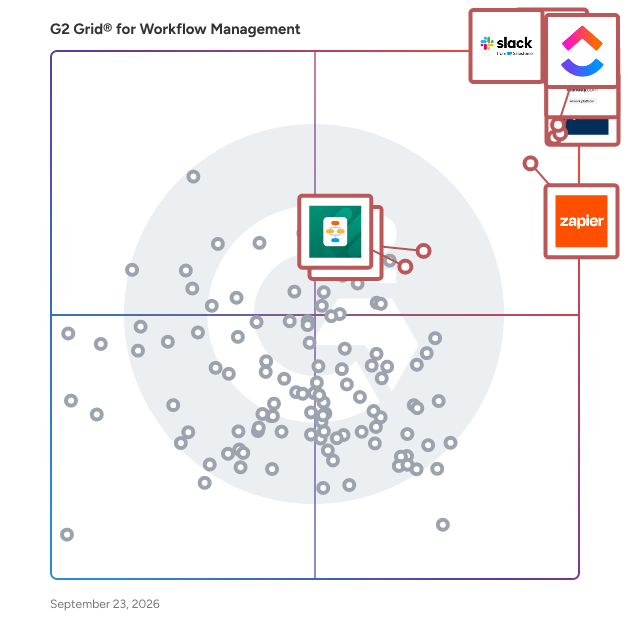
G2 Grid® for Workflow Management Software

G2 Grid® for Workflow Management Software plotting products by satisfaction and market presence

Highlighted products: Slack, Asana, Smartsheet, ClickUp, monday AI Work Platform, Zapier, Karbon, and MuleSoft Automation.

Underlying data: [Grid® JSON](https://www.g2.com/categories/workflow-management/grids.json?focus%5B%5D=slack&focus%5B%5D=asana&focus%5B%5D=smartsheet&focus%5B%5D=clickup&focus%5B%5D=monday-com&focus%5B%5D=zapier&focus%5B%5D=karbon-2025-03-03&focus%5B%5D=mulesoft-automation)

Sponsored

Moxo

Moxo is the AI orchestration platform built for business operations teams. From manual coordination to intelligent orchestration, Moxo transforms the way organizations run complex processes. The old way relies on scattered emails and manual follow-ups; the Moxo way keeps every step clear, connected, and accountable. We put human actions and decisions at the center of workflows, while AI and automation clear the manual work behind the scenes. By connecting people, systems, and AI, Moxo drives the right actions, from the right people, at the right time —whether it’s client onboarding, multi-party approvals, or ongoing account management. Business teams can eliminate bottlenecks, reduce drop-offs, and keep critical milestones moving forward. Trusted by leading global enterprises across financial services, consulting, legal, and healthcare, Moxo is the smarter way to orchestrate mission-critical workflows with confidence.

Visit website

FlowForma Process Automation

FlowForma is a type of process automation solution designed to help users digitize, automate, and optimize business processes across various complexities. This enterprise-grade platform leverages AI technology to provide a no-code environment, allowing users, regardless of their technical expertise, to create and manage automated workflows efficiently. By integrating intelligent automation into everyday operations, FlowForma addresses the growing need for organizations to enhance productivity and streamline processes. The target audience for FlowForma includes business leaders, IT professionals, and organizations of all sizes seeking to improve their operational efficiency. With its user-friendly interface, FlowForma caters to both small businesses and large enterprises, making it an adaptable solution for diverse industries. Specific use cases range from automating simple tasks, such as data entry and approvals, to managing complex workflows that require intricate decision-making and collaboration among multiple stakeholders. Key features of FlowForma include its agentic AI capabilities, which allow users to design and optimize processes with the assistance of AI as an active collaborator. This functionality not only enhances the automation experience but also enables users to evolve their processes intelligently over time. The platform is built to be scalable and secure, ensuring that organizations can grow and adapt their automation strategies without compromising data integrity or system performance. FlowForma stands out in the process automation category by making automation accessible and affordable. With over 300,000 users worldwide, the platform has proven its effectiveness in delivering measurable results. Users benefit from the ability to streamline operations, reduce manual errors, and enhance overall productivity. The no-code aspect of FlowForma empowers individuals to take control of their automation needs without relying heavily on IT resources, fostering a culture of innovation and agility within organizations. In addition to its robust features, FlowForma offers a free trial, allowing potential users to experience the platform's capabilities firsthand. This trial period provides an opportunity for organizations to evaluate how FlowForma can transform their processes and drive efficiency, ultimately leading to improved business outcomes.

Average Rating: 4.5/5.0

Total Reviews: 99

How Do G2 Users Rate FlowForma Process Automation?

  • Has the product been a good partner in doing business?: 9.3/10 (Category avg: 9.1/10)
  • Activities: 9.2/10 (Category avg: 8.9/10)
  • Flows: 9.2/10 (Category avg: 8.9/10)
  • Integration: 7.9/10 (Category avg: 8.4/10)

Who Is the Company Behind FlowForma Process Automation?

  • Seller: FlowForma
  • Company Website:
  • Year Founded: 2012
  • HQ Location: Dublin
  • Twitter: @FlowForma
    493 Twitter followers
  • LinkedIn® Page: www.linkedin.com
    26 employees on LinkedIn®

Who Uses This Product?

  • Top Industries: Construction, Information Technology and Services
  • Company Size: 64% Medium, 26% Small

What Do G2 Reviewers Say About FlowForma Process Automation?

AI-generated summary from verified user reviews

Pros
  • Users find the ease of use in FlowForma Process Automation enhances efficiency and integration within their business.
  • Users find automation features of FlowForma invaluable for enhancing efficiency and simplifying client data management.
  • Users commend the efficiency of FlowForma, highlighting its ability to streamline workflows and reduce workload effectively.
  • Users find automation efficiency in FlowForma Process Automation boosts productivity and simplifies data management seamlessly.
  • Users value the productivity improvement FlowForma delivers, enhancing efficiency and reducing team workload significantly.
Cons
  • Users find the learning curve steep, requiring time and training to navigate FlowForma’s system effectively.
  • Users find the difficult learning curve of FlowForma challenging, requiring time and training to navigate effectively.
  • Users find the missing features in FlowForma Process Automation lead to customization and integration limitations.
  • Users find that learning difficulty impacts their ability to navigate and manage complex tasks effectively in FlowForma.
  • Users find the complexity of FlowForma challenging, hindering smooth navigation and efficient task management.

What Are Recent G2 Reviews of FlowForma Process Automation?

What Are G2 Users Discussing About FlowForma Process Automation?

Progress ShareFile

Progress® ShareFile® AI-powered document collaboration platform is designed to help businesses run client work from start to finish—securely, efficiently and with less friction. Built for organizations that handle sensitive information—such as accounting, legal and financial services—ShareFile software goes beyond traditional file transfer tools to support a more connected, end-to-end client experience. From document collection and collaboration to approvals, e-signatures and secure storage, ShareFile unifies key stages of client work in a single, secure platform. With ShareFile, teams can securely share files, manage document workflows and collaborate with clients through branded client portals—while helping maintain visibility into documents, requests and client interactions. Instead of juggling disconnected tools, businesses can streamline processes, reduce manual work and create more consistent, professional client experiences. ShareFile combines secure file transfer, client portals, document workflow automation and e-signature capabilities into one solution, helping teams move work faster, while helping organizations manage sensitive data. Key capabilities include: • Secure file sharing and large file transfer with encrypted email and attachments • Client portals for structured, branded collaboration and document exchange • Document workflow automation for intake, approvals, onboarding and repeatable processes • Built-in e-signature, forms and approvals to help complete work without switching tools • AI-powered document automation, including intake, summarization and instant Q&A • Granular permissions, audit trails and governance controls to help improve visibility and support compliance efforts • Advanced security features, including encryption in transit and at rest, plus tools that support secure client interactions By unifying people, processes and data into a single platform, ShareFile helps reduce tool sprawl and enables teams to scale client work without increasing complexity. Benefits can include improved efficiency, more consistent client experiences and stronger operational outcomes. ShareFile is a modern alternative to legacy FTP systems and basic file-sharing tools—purpose-built to help organizations run client work end-to-end, improve client experiences and operate with greater confidence.

Average Rating: 4.2/5.0

Total Reviews: 1,478

How Do G2 Users Rate Progress ShareFile?

  • Has the product been a good partner in doing business?: 8.5/10 (Category avg: 9.1/10)
  • Activities: 8.2/10 (Category avg: 8.9/10)
  • Flows: 8.9/10 (Category avg: 8.9/10)
  • Integration: 8.1/10 (Category avg: 8.4/10)

Who Is the Company Behind Progress ShareFile?

  • Seller: Progress Software
  • Company Website:
  • Year Founded: 1981
  • HQ Location: Burlington, MA.
  • Twitter: @ProgressSW
    48,773 Twitter followers
  • LinkedIn® Page: www.linkedin.com
    4,205 employees on LinkedIn®

Who Uses This Product?

  • Who Uses This: Owner, Office Manager
  • Top Industries: Accounting, Information Technology and Services
  • Company Size: 37% Small, 32% Medium

What Do G2 Reviewers Say About Progress ShareFile?

AI-generated summary from verified user reviews

Pros
  • Users appreciate the ease of use of Progress ShareFile, praising its intuitive interface and smooth collaboration features.
  • Users value the robust security features of Progress ShareFile, ensuring secure collaboration and document management across teams.
  • Users appreciate the easy document sharing of Progress ShareFile, facilitating seamless collaboration across teams and devices.
  • Users praise the easy collaboration and sharing capabilities of Progress ShareFile across devices and locations.
  • Users appreciate the secure sharing of Progress ShareFile, enabling smooth collaboration with internal and external teams.
Cons
  • Users find the file tracking system cumbersome, making it harder to manage shared files and their histories.
  • Users find the interface issues of Progress ShareFile challenging, especially for newcomers navigating its complex features.
  • Users experience slow performance with Progress ShareFile, particularly when uploading large files or handling multiple tasks simultaneously.
  • Users find the pricing expensive, particularly challenging for small teams or startups needing basic file-sharing features.
  • Users find the interface usability lacking, citing complexity and clutter that can overwhelm new users.

What Are Recent G2 Reviews of Progress ShareFile?

What Are G2 Users Discussing About Progress ShareFile?

NewgenONE Digital Transformation Platform

Transform your business with NewgenONE, an intelligent enterprise orchestration platform, featuring a suite of cutting-edge technologies—from task automation to mission-critical, content-rich applications and advanced workflow orchestration. Effortlessly integrate your existing systems and devices into a seamless ecosystem that ensures personalized, efficient experiences across the board. Build powerful applications at lightning speed with NewgenONE, a completely native low-code platform. Enjoy seamless scalability, robust security, and built-in governance and compliance, all while accelerating automation across your enterprise. Automate thousands of enterprise-wide processes and stay ahead of the competition with rapid, innovative solutions.

Average Rating: 4.5/5.0

Total Reviews: 89

How Do G2 Users Rate NewgenONE Digital Transformation Platform?

  • Has the product been a good partner in doing business?: 8.6/10 (Category avg: 9.1/10)
  • Activities: 8.3/10 (Category avg: 8.9/10)
  • Flows: 9.0/10 (Category avg: 8.9/10)
  • Integration: 8.6/10 (Category avg: 8.4/10)

Who Is the Company Behind NewgenONE Digital Transformation Platform?

  • Seller: Newgen
  • Year Founded: 1992
  • HQ Location: Mclean, VA
  • Twitter: @newgensoftware
    3,363 Twitter followers
  • LinkedIn® Page: www.linkedin.com
    5,405 employees on LinkedIn®

Who Uses This Product?

  • Top Industries: Banking, Financial Services
  • Company Size: 59% Large, 22% Medium

What Do G2 Reviewers Say About NewgenONE Digital Transformation Platform?

AI-generated summary from verified user reviews

Pros
  • Users value the comprehensive end-to-end automation of NewgenONE, making digital transformation effortless and efficient.
  • Users praise the end-to-end automation of NewgenONE, enhancing efficiency without requiring advanced technical skills.
  • Users value the end-to-end automation features of NewgenONE, enabling streamlined processes without requiring extensive technical skills.
  • Users value the comprehensive end-to-end automation of NewgenONE, enabling efficient processes without extensive technical expertise.
  • Users value the low-code, no-code platform of NewgenONE, facilitating easy access for non-technical users.
Cons
  • Users frequently face bug issues that complicate the setup process and hinder their experience with NewgenONE.
  • Users face numerous bugs in the NewgenONE platform, causing challenges in setup and overall user experience.
  • Users find the setup process complicated due to numerous bugs, making initial configurations challenging.
  • Users find the setup process complicated and report numerous bugs, complicating their initial experience.
  • Users find the difficult configuration of NewgenONE frustrating, complicating even basic setup tasks.

What Are Recent G2 Reviews of NewgenONE Digital Transformation Platform?

What Are G2 Users Discussing About NewgenONE Digital Transformation Platform?

Jira Misc Workflow Extensions (JMWE)

What is Jira Misc Workflow Extensions (JMWE)? JMWE is a powerful, all-in-one Jira automation app that helps teams customize and expand their workflows with ease. It provides an extensive suite of tools to build, configure, and enhance workflows, catering to both non-coders and advanced users alike. Purpose: JMWE simplifies and enhances workflow automation in Jira, empowering teams to create tailored processes that fit their unique needs. It helps streamline repetitive tasks, enforce business rules, and improve overall efficiency - all with no-code and low-code capabilities. Key features: - Workflow extensions: Includes post functions, conditions, and validators that go beyond native Jira functionality. - Live fields: Customize field behavior for enhanced interactivity. - Event-based automation: Trigger automation based on field or issue changes. - Shared actions: Reuse post functions across multiple workflows to save time. - Scheduled Actions: Schedule post functions to automate recurring tasks at specific times - Simplified Scripting: Customize workflows with Jira expressions or Nunjucks, using syntax checking, interactive help, and a script tester. Benefits to users: JMWE empowers teams to create workflows tailored to their needs. With drag-and-drop configurations, reusable actions, and workflow extensions—including post functions, validators, and conditions—teams can automate processes without extensive coding knowledge. And for those seeking more advanced workflow automation, JMWE provides the flexibility to customize automations using low-code scripting. Combining no-code simplicity with low-code flexibility, JMWE is the ultimate solution for teams seeking powerful, scalable workflow automation tailored to their unique needs.

Average Rating: 4.5/5.0

Total Reviews: 21

How Do G2 Users Rate Jira Misc Workflow Extensions (JMWE)?

  • Has the product been a good partner in doing business?: 9.2/10 (Category avg: 9.1/10)
  • Activities: 7.7/10 (Category avg: 8.9/10)
  • Flows: 7.4/10 (Category avg: 8.9/10)
  • Integration: 6.6/10 (Category avg: 8.4/10)

Who Is the Company Behind Jira Misc Workflow Extensions (JMWE)?

  • Seller: Appfire
  • Company Website:
  • Year Founded: 2005
  • HQ Location: Boston, Massachusetts
  • Twitter: @Appfire
    1,632 Twitter followers
  • LinkedIn® Page: www.linkedin.com
    745 employees on LinkedIn®

Who Uses This Product?

  • Company Size: 52% Medium, 17% Small

What Do G2 Reviewers Say About Jira Misc Workflow Extensions (JMWE)?

AI-generated summary from verified user reviews

Pros
  • Users find JMWE's automation capabilities invaluable, enabling custom logic and streamlined workflows beyond Jira's native features.
  • Users find JMWE to be extremely easy to use, streamlining workflow management and enhancing Jira's native capabilities.
  • Users value the flexibility JMWE brings to workflows, enabling powerful automation and simplifying processes without coding skills.
  • Users value the time-saving automation JMWE provides, enhancing workflow efficiency without complex coding requirements.
  • Users appreciate the enhanced efficiency of JMWE, enabling effective and automated workflows without needing coding skills.
Cons
  • Users find the learning curve steep for Jira Misc Workflow Extensions, complicating initial setup and effective use.
  • Users find the complexity of initial setup challenging, impacting their experience despite the tool's eventual effectiveness.
  • Users experience slow performance with JMWE, especially in larger workflows and instances with numerous automation rules.
  • Users find the cost of JMWE prohibitive, especially when compared to free alternatives available in the market.
  • Users note missing features that complicate migration and require additional administration in Jira Misc Workflow Extensions.

What Are Recent G2 Reviews of Jira Misc Workflow Extensions (JMWE)?

Gmelius

Gmelius is the first Gmail-native platform where AI agents and your team work together in real time to manage, prioritize, and reply to emails—turning your inbox into a collaborative, self-organizing workspace.

Average Rating: 4.4/5.0

Total Reviews: 756

How Do G2 Users Rate Gmelius?

  • Has the product been a good partner in doing business?: 8.5/10 (Category avg: 9.1/10)
  • Activities: 8.5/10 (Category avg: 8.9/10)
  • Flows: 8.7/10 (Category avg: 8.9/10)
  • Integration: 8.7/10 (Category avg: 8.4/10)

Who Is the Company Behind Gmelius?

  • Seller: Gmelius SA
  • Year Founded: 2016
  • HQ Location: Geneva
  • Twitter: @gmelius
    1,772 Twitter followers
  • LinkedIn® Page: www.linkedin.com
    18 employees on LinkedIn®

Who Uses This Product?

  • Who Uses This: Owner, CEO
  • Top Industries: Marketing and Advertising, Information Technology and Services
  • Company Size: 81% Small, 16% Medium

What Do G2 Reviewers Say About Gmelius?

AI-generated summary from verified user reviews

Pros
  • Users find Gmelius to be extremely user-friendly, streamlining their work processes and simplifying inbox management.
  • Users love the easy email assignment and note-taking features of Gmelius, enhancing team communication and workflow.
  • Users value the seamless collaboration tools of Gmelius, enhancing organization and keeping teams aligned effortlessly.
  • Users appreciate the robust team collaboration features of Gmelius, simplifying email management and enhancing communication.
  • Users appreciate the robust team collaboration features of Gmelius, enhancing email management and streamlining communication.
Cons
  • Users experience significant email management issues with Gmelius, including slow loading times and ineffective search functions.
  • Users find Gmelius lacking in advanced mobile features, making email management on the go challenging.
  • Users experience performance issues with Gmelius, citing slow email loading times and inefficient bulk task management.
  • Users experience significant email loading delays with Gmelius, leading to frustration and inefficiency in email management.
  • Users find the learning curve steep, requiring additional training and guidance for effective software deployment.

What Are Recent G2 Reviews of Gmelius?

What Are G2 Users Discussing About Gmelius?

GUIDEcx

GUIDEcx is the world's leading Client Onboarding solution that creates a seamless transition between your sales and implementation process. With over five years and 300,000 successful onboarding projects completed, we know how to leverage our wisdom to deliver consistent Customer Onboarding experiences. Our process is designed to drive engagement, increase efficiency, and expand capacity without sacrificing quality of service. Easy to integrate into your existing CRM, GUIDEcx has custom templates, different customer views for each role, purpose-built integrations, and robust reporting. We don't just move your process to our software, our Professional Services team and Guide University resources are here to Guide and support you through every step of the process to accelerate time to value and maximize your onboarding team productivity. Reach out today to and we can help you bring your Customer Onboarding experience to new heights.

Average Rating: 4.6/5.0

Total Reviews: 460

How Do G2 Users Rate GUIDEcx?

  • Has the product been a good partner in doing business?: 9.5/10 (Category avg: 9.1/10)
  • Activities: 8.8/10 (Category avg: 8.9/10)
  • Flows: 8.9/10 (Category avg: 8.9/10)
  • Integration: 8.4/10 (Category avg: 8.4/10)

Who Is the Company Behind GUIDEcx?

  • Seller: GuideCX
  • Year Founded: 2017
  • HQ Location: Lehi, Utah
  • Twitter: @guidecx
    173 Twitter followers
  • LinkedIn® Page: www.linkedin.com
    53 employees on LinkedIn®

Who Uses This Product?

  • Who Uses This: Project Manager, Implementation Manager
  • Top Industries: Computer Software, Information Technology and Services
  • Company Size: 52% Medium, 39% Small

What Do G2 Reviewers Say About GUIDEcx?

AI-generated summary from verified user reviews

Pros
  • Users appreciate the ease of use of GUIDEcx, enabling smooth navigation and efficient communication automation.
  • Users value the responsive customer support of GUIDEcx, ensuring they feel supported throughout their implementation journey.
  • Users praise GuideCX for enhancing onboarding efficiency and keeping all stakeholders informed and engaged throughout the process.
  • Users find GUIDEcx's ease of learning exceptional, facilitating quick onboarding and seamless navigation for effective task management.
  • Users value the effective team collaboration of GUIDEcx, enabling seamless communication and project management with clients.
Cons
  • Users note a steep learning curve with GUIDEcx, requiring initial effort to navigate customization and setup effectively.
  • Users experience slow loading times and occasional lags, affecting the efficiency of navigating through projects on GUIDEcx.
  • Users experience glitches and hiccups with GUIDEcx, particularly with ticket creation and profile impersonation.
  • Users note that the complexity of GUIDEcx's setup may require significant effort for those without a clear onboarding flow.
  • Users experience glitches such as lag and unexpected logouts, affecting task updates and navigation efficiency.

What Are Recent G2 Reviews of GUIDEcx?

What Are G2 Users Discussing About GUIDEcx?

Gatekeeper

Gatekeeper is the only unified Vendor and Contract Lifecycle Management solution. Built for lean Finance, Procurement and Legal teams with enterprise-sized compliance responsibilities, Gatekeeper brings every vendor, contract, obligation, renewal, performance review and line of spend together in one connected platform. Unlike standalone CLM, supplier risk and procurement tools, every stage of the vendor lifecycle stays connected, giving organisations complete visibility, stronger governance and better commercial decisions. Due diligence shapes the contract. The contract stays connected to obligations, performance and spend. A continuous view of what every vendor delivers and costs surfaces savings your team can act on Gatekeeper AI turns your data into answers, while Gatekeeper Agents turn those answers into action. More than 50 specialist agents automate due diligence, contract review, evidence collection, compliance monitoring, obligation tracking and supplier performance. Customers reduce vendor onboarding by up to 90%, accelerate contracting by up to 75%, reclaim more than 30 weeks of manual administration and reduce vendor spend by up to 14%. With implementation in less than 60 days, more than 1,700 integrations and SOC 1 Type 2, SOC 2 Type 1, ISO 9001 and ISO 27001 certifications, Gatekeeper helps organisations strengthen governance, accelerate contracting and unlock more value from every supplier relationship. Protection ✦ Performance. Together.

Average Rating: 4.5/5.0

Total Reviews: 82

How Do G2 Users Rate Gatekeeper?

  • Has the product been a good partner in doing business?: 9.3/10 (Category avg: 9.1/10)

Who Is the Company Behind Gatekeeper?

  • Seller: Gatekeeper
  • Company Website:
  • Year Founded: 2010
  • HQ Location: London, United Kingdom
  • Twitter: @gatekeeperhq
    100 Twitter followers
  • LinkedIn® Page: www.linkedin.com
    115 employees on LinkedIn®

Who Uses This Product?

  • Top Industries: Information Technology and Services, Financial Services
  • Company Size: 49% Medium, 29% Large

What Do G2 Reviewers Say About Gatekeeper?

AI-generated summary from verified user reviews

Pros
  • Users commend the user-friendly design of Gatekeeper, praising its ease of use and efficient functionality.
  • Users praise the responsive customer support from Gatekeeper, highlighting their timely assistance and helpful team members.
  • Users find contract management easy and efficient with Gatekeeper, benefiting from templates and superb customer support.
  • Users find the implementation process straightforward, supported by a proactive and responsive team, ensuring a seamless experience.
  • Users value the customization options of Gatekeeper, which enhance functionality and streamline contract management processes.
Cons
  • Users desire customization options and better ERP integration in Gatekeeper, limiting its overall utility for some.
  • Users find limited customization options frustrating, as they require significant effort and may not meet individual needs.
  • Users find the additional modules expensive, leading to concerns about the overall pricing structure and budgeting.
  • Users find the high fees for additional modules to be a significant drawback of Gatekeeper.
  • Users report poor customer support, facing challenges even after submitting Tech support requests for issue resolution.

What Are Recent G2 Reviews of Gatekeeper?

What Are G2 Users Discussing About Gatekeeper?

Productboard

Productboard is the agentic product system for modern product teams. It features Productboard Spark, a built-in agent that knows your product and customers from day one. As your product agent, Spark allows you to interact with your product data and documents conversationally. It's also specifically designed to power core product workflows, like surfacing customer needs and new opportunities, turning ideas into delivery-ready specs, and measuring the impact of what you ship. Over 6,000 companies, including Zoom, Autodesk, and Salesforce, use Productboard to gain clarity on the right products and features to build next. With offices in Prague and San Francisco, Productboard is backed by Sequoia Capital, Kleiner Perkins, Index Ventures, Bessemer Venture Partners, Dragoneer Investment Group, Tiger Global Management, and Credo Ventures. www.productboard.com

Average Rating: 4.3/5.0

Total Reviews: 249

How Do G2 Users Rate Productboard?

  • Has the product been a good partner in doing business?: 8.8/10 (Category avg: 9.1/10)
  • Activities: 8.7/10 (Category avg: 8.9/10)
  • Flows: 8.9/10 (Category avg: 8.9/10)
  • Integration: 7.5/10 (Category avg: 8.4/10)

Who Is the Company Behind Productboard?

  • Seller: productboard
  • Year Founded: 2014
  • HQ Location: San Francisco, CA
  • Twitter: @productboard
    9,984 Twitter followers
  • LinkedIn® Page: www.linkedin.com
    263 employees on LinkedIn®

Who Uses This Product?

  • Who Uses This: Product Manager, Senior Product Manager
  • Top Industries: Computer Software, Information Technology and Services
  • Company Size: 50% Medium, 43% Small

What Do G2 Reviewers Say About Productboard?

AI-generated summary from verified user reviews

Pros
  • Users value the collaboration features of Productboard, enhancing team alignment and integrating seamlessly with existing workflows.
  • Users appreciate the fast customer support of Productboard, enhancing their experience with quick issue resolution.
  • Users find Productboard's ease of use enhances team collaboration and streamlines product prioritization effortlessly.
  • Users value the easy integrations of Productboard, enhancing workflow and allowing seamless communication across tools.
  • Users value Productboard's customer feedback aggregation, enhancing product management and facilitating effective prioritization.
Cons
  • Users find the lack of features challenging, especially with limited search options and integration difficulties.
  • Users find the learning curve challenging, requiring time to navigate Productboard's complex features effectively.
  • Users find learning difficulties in Productboard due to its complexity and awkward navigation for beginners.
  • Users find limited customization options frustrating, as they hinder efficient use and integration with various tools.
  • Users find the missing features in Productboard challenging, complicating the user experience and limiting integration options.

What Are Recent G2 Reviews of Productboard?

What Are G2 Users Discussing About Productboard?

Camunda

Camunda is the enterprise platform for agentic orchestration, enabling organizations to coordinate AI agents, people, and systems across complex, end-to-end business processes. With built-in governance, auditability, and human oversight, Camunda gives enterprises the control they need to move AI from pilots to production — safely and at scale. Trusted by over 700 organizations worldwide, including 9 of top 10 US banks, Camunda helps enterprises boost operational efficiency, accelerate time-to-value, and deliver better customer experiences. Recognized as a Visionary in the Gartner Magic Quadrant™ for BOAT 2025 and rated 5/5 in Orchestration by Forrester. For more information, visit camunda.com.

Average Rating: 4.5/5.0

Total Reviews: 317

How Do G2 Users Rate Camunda?

  • Has the product been a good partner in doing business?: 8.6/10 (Category avg: 9.1/10)
  • Activities: 8.5/10 (Category avg: 8.9/10)
  • Flows: 8.8/10 (Category avg: 8.9/10)
  • Integration: 8.3/10 (Category avg: 8.4/10)

Who Is the Company Behind Camunda?

  • Seller: Camunda
  • Company Website:
  • Year Founded: 2008
  • HQ Location: Berlin, Deutschland
  • Twitter: @Camunda
    6,135 Twitter followers
  • LinkedIn® Page: www.linkedin.com
    693 employees on LinkedIn®

Who Uses This Product?

  • Who Uses This: Software Engineer
  • Top Industries: Banking, Financial Services
  • Company Size: 45% Large, 31% Medium

What Do G2 Reviewers Say About Camunda?

AI-generated summary from verified user reviews

Pros
  • Users appreciate the ease of use in Camunda, finding it simple to model and communicate complex processes visually.
  • Users appreciate the automation capabilities of Camunda, finding it intuitive and powerful for process modeling and management.
  • Users value Camunda's flexibility that allows easy adaptation to changing requirements and keeps tools up to date.
  • Users value the scalability and thoughtfulness of Camunda for enterprise-level BPM implementations, driving effective process management.
  • Users commend the flexibility for integrations in Camunda, enabling seamless connections with various services and AI functionalities.
Cons
  • Users find the complexity of Camunda can be challenging, especially for those new to BPMN and development.
  • Users find the learning curve challenging, particularly for those without a technical background or familiarity with BPMN.
  • Users experience setup difficulties with Camunda, particularly when lacking DevOps expertise and ease of use for business users.
  • Users often find the difficult learning curve of Camunda challenging, especially those new to BPMN and process management.
  • Users find Camunda to have high costs that may pose challenges, especially for smaller teams and newcomers.

What Are Recent G2 Reviews of Camunda?

What Are G2 Users Discussing About Camunda?

ScriptRunner for Jira

Designed for Jira administrators of all technical backgrounds, ScriptRunner enables you to surpass the limitations of Jira through its unlimited and advanced automation and customisation capabilities. Harness the power of scripted automation with pre-built templates and an assisted coding experience, allowing you to swiftly fulfill advanced requirements and free yourself of repetitive manual tasks Trigger actions in response to issue creation using the Script Listeners Customise your configurations and gain control over your fields using Behaviours Keep teams synced with readily-calculated info using Scripted Fields Build bespoke workflows, enforce any criteria with validators and conditions, and more. Leverage advanced JQL functions with Enhanced Search (also a standalone app) Get comprehensive documentation, a dedicated support team, and the flexibility to easily scale as your needs grow. Try ScriptRunner for free.

Average Rating: 4.4/5.0

Total Reviews: 25

How Do G2 Users Rate ScriptRunner for Jira?

  • Has the product been a good partner in doing business?: 8.5/10 (Category avg: 9.1/10)
  • Activities: 8.3/10 (Category avg: 8.9/10)
  • Integration: 10.0/10 (Category avg: 8.4/10)

Who Is the Company Behind ScriptRunner for Jira?

  • Seller: Adaptavist
  • Year Founded: 2005
  • HQ Location: London, Greater London
  • Twitter: @Adaptavist
    4,718 Twitter followers
  • LinkedIn® Page: www.linkedin.com
    660 employees on LinkedIn®

Who Uses This Product?

  • Top Industries: Information Technology and Services, Computer Software
  • Company Size: 35% Large, 35% Medium

What Do G2 Reviewers Say About ScriptRunner for Jira?

AI-generated summary from verified user reviews

Pros
  • Users appreciate the ease of automation in ScriptRunner, enhancing workflow efficiency and simplifying issue management.
  • Users value the high customizability of ScriptRunner for Jira, enabling tailored automation and enhanced functionality.
  • Users value the flexibility and customization of ScriptRunner for Jira, enhancing automation and tailored workflow solutions.
  • Users find ScriptRunner for Jira to be extremely easy to use, enhancing workflow efficiency with its automation capabilities.
  • Users value the Jira integration of ScriptRunner, enabling powerful customizations and workflow automations easily.
Cons
  • Users find ScriptRunner's functionality to be complex to use, particularly if they lack coding expertise, affecting efficiency.
  • Users find difficult learning curves in ScriptRunner due to complex setup and the need for scripting knowledge.
  • Users are frustrated by the insufficient information and outdated documentation, hindering their ability to utilize ScriptRunner effectively.
  • Users find the learning curve steep with ScriptRunner for Jira, particularly due to its advanced scripting capabilities.
  • Users have experienced performance issues with ScriptRunner, often due to extensive customizations affecting system efficiency.

What Are Recent G2 Reviews of ScriptRunner for Jira?

What Are G2 Users Discussing About ScriptRunner for Jira?

Nocoly HAP

Nocoly, founded by enterprise software veterans, addresses key industry challenges like rising DevOps costs, complex enterprise apps, and the disconnect between business experts and developers. Their Hyper Application Platform (HAP) offers a No Code approach, with Hyper Automation and Integration features. Its Cloud Native architecture allows easy installation on customer clouds, reducing IT costs with affordable buy-out pricing options. VAR partners can create vertical solutions within HAP’s ecosystem, achieving higher ROI. Nocoly simplifies enterprise digitization tasks, making HAP quick and easy to deploy on various clouds.

Average Rating: 4.5/5.0

Total Reviews: 14

How Do G2 Users Rate Nocoly HAP?

  • Has the product been a good partner in doing business?: 8.9/10 (Category avg: 9.1/10)
  • Activities: 8.3/10 (Category avg: 8.9/10)
  • Flows: 8.3/10 (Category avg: 8.9/10)

Who Is the Company Behind Nocoly HAP?

Who Uses This Product?

  • Company Size: 50% Medium, 33% Small

What Are Recent G2 Reviews of Nocoly HAP?

LaunchBay

LaunchBay is the client experience platform for B2B service providers, agencies, and software companies that want to deliver a best-in-class customer experience without having to hire more staff or add work to their existing team's plate. From onboarding and implementation to ongoing service delivery, LaunchBay brings every step including tasks, communication, approvals, time tracking, resource management, and data collection into one platform your team and your clients actually use. For internal teams, LaunchBay delivers the operational clarity of a professional services automation tool with the client experience layer most PSA platforms leave out. A real-time projects dashboard gives ops leaders visibility into health scores, project status, and blockers across every active engagement. Spot which projects are on track and which are behind at a glance, drill into any blocker instantly, and take action before clients complain. Reusable templates standardize delivery across every project, automated reminders replace manual follow-up, and a shared message center with private internal notes keeps client communication centralized and your team aligned. For clients, LaunchBay creates a premium self-service experience. Each customer gets a secure, branded portal with loginless access via magic link, no account creation required. Clients complete tasks with clear context on what to do and why, track their own project progress in real time, and always know exactly where things stand without emailing your team to ask. The result is faster time-to-value, fewer status calls, and a client experience that reflects your brand's professionalism at every touchpoint. Whether you're a SaaS company managing customer onboarding, a marketing agency running client kickoff projects, or a professional services firm delivering complex implementations, LaunchBay gives you the workflow automation, task management, and client communication tools to deliver with speed, consistency, and confidence. LaunchBay helps growing B2B teams run all client work in one place, streamline service delivery, and deliver an exceptional client experience.

Average Rating: 4.7/5.0

Total Reviews: 55

How Do G2 Users Rate LaunchBay?

  • Has the product been a good partner in doing business?: 9.3/10 (Category avg: 9.1/10)
  • Activities: 10.0/10 (Category avg: 8.9/10)
  • Flows: 10.0/10 (Category avg: 8.9/10)
  • Integration: 10.0/10 (Category avg: 8.4/10)

Who Is the Company Behind LaunchBay?

Who Uses This Product?

  • Top Industries: Marketing and Advertising
  • Company Size: 98% Small, 2% Medium

What Do G2 Reviewers Say About LaunchBay?

AI-generated summary from verified user reviews

Pros
  • Users appreciate the ease of use of LaunchBay, which simplifies client project management and collaboration effectively.
  • Users value the streamlined client management of LaunchBay, enhancing onboarding, communication, and project efficiency significantly.
  • Users praise the excellent customer support of LaunchBay, enhancing their experience and improving client communication.
  • Users appreciate the centralization of communication and tasks in LaunchBay, streamlining project management and client coordination.
  • Users appreciate the intuitive interface of LaunchBay, enhancing client collaboration and simplifying project management.
Cons
  • Users find the limited features of LaunchBay restrict their project management capabilities and overall flexibility.
  • Users find missing robust features in LaunchBay, wishing for better project management and visibility options.
  • Users note a need for improved document management to keep projects organized and accessible within LaunchBay.
  • Users find inefficient task management, especially for quick tasks, frustrating due to cumbersome project setups and integration limits.
  • Users find integration issues with LaunchBay, as it mainly connects through Zapier, limiting seamless functionality.

What Are Recent G2 Reviews of LaunchBay?

Content Snare

Content Snare helps accounting firms, mortgage brokers, law firms, and professional services teams collect documents and information from clients without endless email back-and-forth. Customers report a 71% reduction in time spent gathering information, a 67% reduction in stalled projects, and a 23.9× return on investment. Send clients a secure, branded portal with a checklist of exactly what you need. Auto-saving progress means clients can complete the request over multiple sessions; automatic reminders handle the follow-up; in-context approvals and rejections replace the email back-and-forth when something needs correcting. Used by 1,900+ companies across 103 countries to collect tax documents, onboarding information, workpapers, KYC, and ongoing client requests. ISO 27001 certified. Integrates with Xero, Zapier, Make, Google Drive, Dropbox, OneDrive, and SharePoint.

Average Rating: 4.7/5.0

Total Reviews: 53

How Do G2 Users Rate Content Snare?

  • Has the product been a good partner in doing business?: 9.8/10 (Category avg: 9.1/10)

Who Is the Company Behind Content Snare?

  • Seller: Content Snare
  • Year Founded: 2016
  • HQ Location: Brisbane, Queensland
  • Twitter: @contentsnare
    901 Twitter followers
  • LinkedIn® Page: www.linkedin.com
    7 employees on LinkedIn®

Who Uses This Product?

  • Top Industries: Accounting, Marketing and Advertising
  • Company Size: 89% Small, 11% Medium

What Do G2 Reviewers Say About Content Snare?

AI-generated summary from verified user reviews

Pros
  • Users love the ease of use of Content Snare, simplifying client interactions and streamlining their processes effectively.
  • Users praise Content Snare's client management for streamlining document collection and enhancing overall workflow and professionalism.
  • Users praise the responsive customer support of Content Snare, ensuring seamless operation and user satisfaction.
  • Users highlight the efficiency of Content Snare, streamlining client communication and drastically reducing workload.
  • Users value the automation features of Content Snare, significantly streamlining client communication and information collection.
Cons
  • Users note that excessive email notifications can overwhelm clients, suggesting a daily summary might improve the experience.
  • Users find Content Snare to be expensive, especially when technical issues lead to significant unforeseen costs.
  • Users report experiencing significant bugs in Content Snare, leading to costly issues and unsatisfactory customer support responses.
  • Users experience data saving issues as clients lack access to links for their completed requests.
  • Users find the email integration overwhelming, wishing for a way to consolidate messages into daily summaries.

What Are Recent G2 Reviews of Content Snare?

What Are G2 Users Discussing About Content Snare?

Drag

Drag is the AI-powered inbox platform built for teams. Used by 200,000+ users since 2017. Drag turns Gmail into a shared workspace where teams collaborate on email, support tickets, sales pipelines, and operational workflows - without leaving the inbox. The platform includes shared inboxes, AI agents that resolve tickets end-to-end, AI Intelligence grounded in your team's knowledge, live chat, kanban boards, automations, internal notes, and assignments. Teams use Drag for: • Customer support: Shared inboxes for support@, info@, and help@ addresses. Assign emails, leave internal notes, track SLAs, automate triage. • Sales pipelines: Convert inbound emails into deal pipelines. Track conversations, assign reps, monitor close rates. • Operations: Manage finance@, hr@, ops@ and other shared addresses. Route requests, automate handoffs, keep a single source of truth. • AI-first workflows: Drag Agents resolve tickets autonomously using your help center, past tickets, and team knowledge. Connect agents via MCP to Claude, ChatGPT, Cursor and other tools. Drag is available as a webapp, Chrome extension, desktop app, MCP server, and API. Backed by Techstars (Class of 2019) and other investors. Featured by Google on the Chrome Store. Shared inboxes — Multiple team members manage email together inside Gmail AI Agents — Resolve tickets end-to-end using your knowledge base and history AI Intelligence — Grounded responses from your team's docs, tickets, and chat Live chat — Customer chat that lands in the same inbox as email Kanban boards — Visual pipelines for tickets, deals, and tasks Automations — Trigger-based workflows for routing, replies, and escalations Internal notes — Private team discussions inside each email thread Assignments — Owner tracking and accountability per email/thread Email templates — Shared, AI-enhanced response libraries Reporting — Team performance, response times, and volume metrics MCP server — Connect Drag to Claude, ChatGPT, and other AI tools REST API — Build custom integrations and automations Chrome extension — Native Gmail integration, zero context switching Webapp & desktop — Use Drag outside Gmail when needed Google integration — SSO, Calendar, Workspace native

Average Rating: 4.5/5.0

Total Reviews: 254

How Do G2 Users Rate Drag?

  • Has the product been a good partner in doing business?: 9.2/10 (Category avg: 9.1/10)
  • Activities: 8.9/10 (Category avg: 8.9/10)
  • Flows: 9.3/10 (Category avg: 8.9/10)
  • Integration: 7.9/10 (Category avg: 8.4/10)

Who Is the Company Behind Drag?

  • Seller: DragApp.com
  • Year Founded: 2018
  • HQ Location: London
  • Twitter: @lovedragapp
    913 Twitter followers
  • LinkedIn® Page: www.linkedin.com
    9 employees on LinkedIn®

Who Uses This Product?

  • Who Uses This: CEO
  • Top Industries: Non-Profit Organization Management, Leisure, Travel & Tourism
  • Company Size: 85% Small, 11% Medium

What Do G2 Reviewers Say About Drag?

AI-generated summary from verified user reviews

Pros
  • Users appreciate the real-time collaboration features of Drag, significantly enhancing team productivity and communication.
  • Users love the organization features of Drag, enhancing workflow efficiency and simplifying email management for better collaboration.
  • Users highlight the effective team collaboration in Drag, facilitating real-time sharing and enhanced productivity in shared inbox management.
  • Users appreciate the ease of use of Drag, enjoying its intuitive interface and efficient collaboration features.
  • Users appreciate the seamless email management of Drag, which enhances organization and boosts team collaboration effortlessly.
Cons
  • Users desire more customization options for Drag, hoping for enhanced flexibility in personalizing their experience.
  • Users find the difficult setup process challenging, particularly with advanced functions and the learning curve involved.
  • Users desire greater customization options in Drag to better tailor the product to their specific needs.
  • Users find the learning curve steep, especially those new to Kanban boards, making initial setup challenging.
  • Users find the steep learning curve challenging, especially when starting with advanced features and the interface.

What Are Recent G2 Reviews of Drag?

What Are G2 Users Discussing About Drag?

Onspring

Onspring is an award-winning GRC process automation and reporting software. Our SaaS platform is known for its flexibility and ease of use for end-users and administrators. Simple, no-code, drag-and-drop functionality makes it easy to create new applications, workflows, and reports independently without relying on IT or developers and subject to IT timelines and competing priorities. - Manage a centralized risk register with multiple hierarchies - Keep tabs on financial impacts and probabilities based on risk tolerance - Capture and relate financial, operational, reputational, and third-party risks - Map controls to regulations, frameworks, incidents, and risks - Remediate findings through workflows or the POA&M process Ready-made products get you started in as quickly as 30 days: - Governance, Risk & Compliance Suite - Risk Management - Third-party Risk - Controls & Compliance - Audit & Assurance - Policy Management - CMMC - BC/DR FedRAMP moderate-authorized environment available. Simply put, Onspring believes in creating better ways for people to do their best work. We champion simplified workflows, process transparency, and eliminating manual, repetitive tasks. Customized for each team’s needs, our enterprise software solutions make daily work life easier, smarter, and better.

Average Rating: 4.7/5.0

Total Reviews: 78

How Do G2 Users Rate Onspring?

  • Has the product been a good partner in doing business?: 9.3/10 (Category avg: 9.1/10)
  • Activities: 8.6/10 (Category avg: 8.9/10)
  • Flows: 7.8/10 (Category avg: 8.9/10)
  • Integration: 5.0/10 (Category avg: 8.4/10)

Who Is the Company Behind Onspring?

  • Seller: Onspring Technologies
  • Company Website:
  • Year Founded: 2010
  • HQ Location: Overland Park, Kansas
  • Twitter: @onspring
    374 Twitter followers
  • LinkedIn® Page: www.linkedin.com
    110 employees on LinkedIn®

Who Uses This Product?

  • Top Industries: Insurance, Hospital & Health Care
  • Company Size: 54% Large, 33% Medium

What Do G2 Reviewers Say About Onspring?

AI-generated summary from verified user reviews

Pros
  • Users value the easy customization in Onspring, enhancing workflows and simplifying compliance management without coding.
  • Users value the ease of use of Onspring, benefiting from intuitive customization and efficient compliance tracking.
  • Users value the high level of customizability in Onspring, enabling flexible workflow management and efficient reporting.
  • Users commend the responsive and knowledgeable customer support of Onspring, enhancing their experience and platform success.
  • Users value Onspring's easy customization and automation, enhancing compliance workflows and efficient reporting capabilities.
Cons
  • Users find the steep learning curve of Onspring challenging, particularly with permissions and reporting customization.
  • Users find the limited customization options in Onspring challenging, making configuration and maintenance complex.
  • Users find file size limitations frustrating, and the inability to delete fields creates unnecessary clutter.
  • Users find the complexity of configuring permissions and customizing reporting a significant barrier initially.
  • Users find the difficult setup process challenging, requiring time and effort for effective configuration and customization.

What Are Recent G2 Reviews of Onspring?

What Are G2 Users Discussing About Onspring?

Bijou Barry
BB
Researched and written by Bijou Barry
Updated April 9, 2026