Best Enterprise Workflow Management Software - Page 2

How Many Workflow Management Software Products Does G2 Track?

Total Products under this Category: 959

Category Stats (Nov 2026)

  • Average Rating: 4.54/5 (↑0.01 vs Oct 2026) The average rating of products in this category, based on all submitted ratings
  • Top Trending Product: ExactFlow (+12.5%) - Among all products in this category, ExactFlow recorded the largest rating increase compared to last month

Last updated: November 01, 2026

How Does G2 Rank Workflow Management Software Products?

Why You Can Trust G2's Software Rankings:

  • 30 Analysts and Data Experts
  • 211,200+ Authentic Reviews
  • 959+ Products
  • Unbiased Rankings

G2's software rankings are built on verified user reviews, rigorous moderation, and a consistent research methodology maintained by a team of analysts and data experts. Each product is measured using the same transparent criteria, with no paid placement or vendor influence. While reviews reflect real user experiences, which can be subjective, they offer valuable insight into how software performs in the hands of professionals. Together, these inputs power the G2 Score, a standardized way to compare tools within every category.

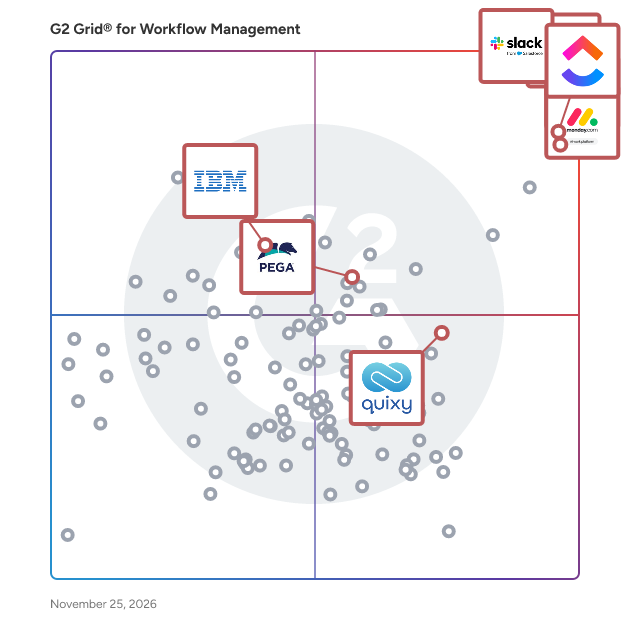
G2 Grid® for Workflow Management Software

G2 Grid® for Workflow Management Software plotting products by satisfaction and market presence

Highlighted products: Slack, Smartsheet, monday AI Workspace, Asana, ClickUp, Pega Platform, IBM Cloud Pak for Business Automation, and Quixy.

Underlying data: [Grid® JSON](https://www.g2.com/categories/workflow-management/grids.json?focus%5B%5D=slack&focus%5B%5D=smartsheet&focus%5B%5D=monday-com&focus%5B%5D=asana&focus%5B%5D=clickup&focus%5B%5D=pega-platform&focus%5B%5D=ibm-cloud-pak-for-business-automation&focus%5B%5D=quixy&segment=enterprise)

ProHance

ProHance is the Productivity Control Room for enterprises, the single place where productivity across employees, vendors, AI copilots, and autonomous agents is observed, governed, and improved. Modern work is no longer done by employees alone, yet most organizations can measure and govern only employee productivity. ProHance unifies every worker type in one control room: one view, one governance layer, one source of truth. Modules span Work Time, Work Output, Workflow Management, Advanced Analytics, Asset Optimization, AI Adoption Index, and an AI-enabled Retention Risk Index. Trusted by 450,000+ users across 220+ enterprises in 55 countries, ProHance delivers measurable gains in operational efficiency for banking and financial services, BPO/KPO, global capability centers, healthcare RCM, and IT services organizations, with enterprise-grade, privacy-first architecture

Average Rating: 4.6/5.0

Total Reviews: 219

How Do G2 Users Rate ProHance?

  • Has the product been a good partner in doing business?: 9.1/10 (Category avg: 9.2/10)
  • Activities: 9.3/10 (Category avg: 9.0/10)
  • Flows: 8.6/10 (Category avg: 8.9/10)
  • Integration: 9.0/10 (Category avg: 8.4/10)

Who Is the Company Behind ProHance?

  • Seller: ProHance
  • Company Website:
  • Year Founded: 2010
  • HQ Location: Bangalore, Karnataka
  • LinkedIn® Page: www.linkedin.com
    242 employees on LinkedIn®

Who Uses This Product?

  • Who Uses This: Assistant Manager, Project Manager
  • Top Industries: Information Technology and Services, Hospital & Health Care
  • Company Size: 56% Medium, 38% Large

What Do G2 Reviewers Say About ProHance?

AI-generated summary from verified user reviews

Pros
  • Users value the effective time tracking of ProHance, enhancing business efficiency and employee welfare.
  • Users value the efficiency-enhancing capabilities of ProHance, significantly improving productivity and operational performance.
  • Users praise the user-friendly interface of ProHance, facilitating efficient monitoring of productivity without confusion.
  • Users value the time-saving features of ProHance, enhancing productivity and minimizing manual tracking efforts.
  • Users appreciate the ease of tracking with ProHance, ensuring productivity is monitored efficiently without confusion.
Cons
  • Users find difficult navigation in ProHance frustrating, particularly in unfamiliar situations, impacting their overall efficiency.
  • Users feel the limited features hinder customization, wishing for more options to enhance their experience.
  • Users face data inaccuracy issues with timesheets, requiring manual input which complicates usage and reliability.
  • Users lament the missing customisation options, impacting their overall satisfaction and usability with ProHance.
  • Users find the system not intuitive, highlighting complex navigation and a need for a more user-friendly interface.

What Are Recent G2 Reviews of ProHance?

What Are G2 Users Discussing About ProHance?

FlowForma Process Automation

FlowForma is a type of process automation solution designed to help users digitize, automate, and optimize business processes across various complexities. This enterprise-grade platform leverages AI technology to provide a no-code environment, allowing users, regardless of their technical expertise, to create and manage automated workflows efficiently. By integrating intelligent automation into everyday operations, FlowForma addresses the growing need for organizations to enhance productivity and streamline processes. The target audience for FlowForma includes business leaders, IT professionals, and organizations of all sizes seeking to improve their operational efficiency. With its user-friendly interface, FlowForma caters to both small businesses and large enterprises, making it an adaptable solution for diverse industries. Specific use cases range from automating simple tasks, such as data entry and approvals, to managing complex workflows that require intricate decision-making and collaboration among multiple stakeholders. Key features of FlowForma include its agentic AI capabilities, which allow users to design and optimize processes with the assistance of AI as an active collaborator. This functionality not only enhances the automation experience but also enables users to evolve their processes intelligently over time. The platform is built to be scalable and secure, ensuring that organizations can grow and adapt their automation strategies without compromising data integrity or system performance. FlowForma stands out in the process automation category by making automation accessible and affordable. With over 300,000 users worldwide, the platform has proven its effectiveness in delivering measurable results. Users benefit from the ability to streamline operations, reduce manual errors, and enhance overall productivity. The no-code aspect of FlowForma empowers individuals to take control of their automation needs without relying heavily on IT resources, fostering a culture of innovation and agility within organizations. In addition to its robust features, FlowForma offers a free trial, allowing potential users to experience the platform's capabilities firsthand. This trial period provides an opportunity for organizations to evaluate how FlowForma can transform their processes and drive efficiency, ultimately leading to improved business outcomes.

Average Rating: 4.5/5.0

Total Reviews: 98

How Do G2 Users Rate FlowForma Process Automation?

  • Has the product been a good partner in doing business?: 9.3/10 (Category avg: 9.2/10)
  • Activities: 9.2/10 (Category avg: 9.0/10)
  • Flows: 9.0/10 (Category avg: 8.9/10)
  • Integration: 7.9/10 (Category avg: 8.4/10)

Who Is the Company Behind FlowForma Process Automation?

  • Seller: FlowForma
  • Company Website:
  • Year Founded: 2012
  • HQ Location: Dublin
  • LinkedIn® Page: www.linkedin.com
    24 employees on LinkedIn®

Who Uses This Product?

  • Top Industries: Construction, Information Technology and Services
  • Company Size: 64% Medium, 26% Small

What Do G2 Reviewers Say About FlowForma Process Automation?

AI-generated summary from verified user reviews

Pros
  • Users find FlowForma Process Automation to be user-friendly, enhancing efficiency with its low-code/no-code functionalities.
  • Users value the efficiency of automation in FlowForma, streamlining processes and enhancing operational effectiveness across organizations.
  • Users value the efficiency of FlowForma, significantly improving process speed and reducing reliance on outdated paper methods.
  • Users value the automation efficiency of FlowForma, streamlining processes and enhancing productivity across various organizations.
  • Users commend FlowForma Process Automation for its ability to significantly enhance productivity and efficiency in various processes.
Cons
  • Users note the steep learning curve for FlowForma, requiring dedicated time to master its features and functionalities.
  • Users find the difficult learning curve of FlowForma hinders their ability to effectively navigate the system.
  • Users find the missing features in FlowForma Process Automation limit customization and affect overall user experience.
  • Users note a steep learning curve with FlowForma, requiring time and effort to fully grasp the system.
  • Users find the complexity of forms in FlowForma hinders quick responses and smooth navigation.

What Are Recent G2 Reviews of FlowForma Process Automation?

What Are G2 Users Discussing About FlowForma Process Automation?

Jotform Workflows

Jotform Workflows is a powerful no-code automation platform that makes it easy to streamline, manage, and optimize your business processes from end to end. Using an intuitive drag-and-drop builder, you can design custom workflows that match your exact needs — whether you’re routing approvals, collecting payments, assigning tasks, or automating repetitive steps across your organization. Jotform Workflows eliminates manual work, reduces errors, and helps teams move faster by keeping every process consistent, transparent, and fully automated. With 200+ professionally designed workflow templates, getting started is effortless. Choose a ready-made workflow for HR, finance, operations, customer service, education, healthcare, or any other use case, and customize it to fit your processes. Workflows can include conditional logic, automated notifications, role-based approvals, and dynamic routing rules that adapt to each form submission, ensuring the right steps happen at the right time. For organizations that rely on payments, Jotform Workflows supports automated payment collection and processing through 40+ trusted payment gateways, including PayPal, Square, and Stripe. You can trigger payments based on user selections, approval steps, or predefined conditions, helping you collect funds quickly and accurately without manual intervention. Seamless integration is at the heart of Jotform Workflows. Connect your workflows to 200+ popular apps — including Slack, Google Sheets, Airtable, HubSpot, Trello, and more — to automatically sync data, create tasks, notify team members, or update external systems in real time. This creates a fully connected ecosystem where every submission triggers the right actions across your tools. Jotform Workflows also includes powerful task management capabilities. Create tasks, assign them to team members, track progress, and automate follow-ups based on form responses or workflow conditions. This centralizes all activity into one organized workspace, giving teams full visibility into what needs to happen next. All workflow data is automatically stored and organized in Jotform Tables and Jotform Inbox. View submissions as spreadsheets, calendars, or cards, manage permissions for team members, and respond to approvals or requests quickly from any device. This ensures complete oversight and helps teams make informed decisions faster. With robust automation, deep integrations, secure data handling, and a no-code builder anyone can use, Jotform Workflows empowers organizations of all sizes to create efficient, scalable, and fully automated processes — without relying on developers or technical expertise.

Average Rating: 4.5/5.0

Total Reviews: 706

How Do G2 Users Rate Jotform Workflows?

  • Has the product been a good partner in doing business?: 8.9/10 (Category avg: 9.2/10)
  • Activities: 8.6/10 (Category avg: 9.0/10)
  • Flows: 8.7/10 (Category avg: 8.9/10)
  • Integration: 7.6/10 (Category avg: 8.4/10)

Who Is the Company Behind Jotform Workflows?

  • Seller: Jotform
  • Company Website:
  • Year Founded: 2006
  • HQ Location: San Francisco, California
  • LinkedIn® Page: www.linkedin.com
    925 employees on LinkedIn®

Who Uses This Product?

  • Who Uses This: Owner, Founder
  • Top Industries: Non-Profit Organization Management, Education Management
  • Company Size: 66% Small, 28% Medium

What Do G2 Reviewers Say About Jotform Workflows?

AI-generated summary from verified user reviews

Pros
  • Users appreciate the ease of use of Jotform Workflows, enhancing daily tasks and simplifying HR processes effortlessly.
  • Users appreciate the automation in Jotform Workflows, enhancing efficiency and simplifying communication and approvals.
  • Users value the ease of form creation in Jotform Workflows, enhancing workflow efficiency and simplifying approvals.
  • Users appreciate the process automation of Jotform Workflows, significantly enhancing efficiency and reducing manual work.
  • Users enjoy the high level of customization in Jotform Workflows, allowing tailored setups to meet individual needs.
Cons
  • Users find the learning curve challenging due to the complexity of workflows and lack of guidance.
  • Users often find the complexity of workflows in Jotform Workflows challenging, especially with PDF creation and conditional logic.
  • Users find the missing features like chat, stable Arabic support, and table functionalities limit their experience significantly.
  • Users find form issues problematic, particularly around limited report downloads and difficulties in formatting and editing forms.
  • Users note integration issues with Jotform Workflows, particularly with Google Sheets and Asana, causing manual updates and difficulties.

What Are Recent G2 Reviews of Jotform Workflows?

AI can help you find the answers. G2 helps you trust them.

Connect G2 to Claude or ChatGPT for answers grounded in G2's trusted reviews, comparisons, and pricing from real user insights.

How it works

Hive

Hive is an AI-powered project management software and work management platform that brings projects, tasks, workflows, collaboration, reporting, CRM, and finance into one workspace. Hive plans, assigns, follows up, and reports, so your team can stop managing work and start doing it. Teams use Hive to plan work, automate repetitive processes, track progress, and keep work moving. What is in Hive: - Project management: plan in Kanban, Gantt, Calendar, Table, List, Timeline, and Portfolio views, with templates, intake forms, dependencies, and milestones. - Buzz, the AI assistant built into your workspace: Buzz works from your real workspace data to set up projects, assign and follow up on work, and summarize progress. Buzz writes it, you review it. - AI-powered workflows: automate the hand-offs between teams and turn repetitive tasks into one-line commands. - AI Proofing and approvals: Hive reads every document, video, and live page against your brand guidelines and flags what is off. Clients approve from an email link, without a Hive account. - Resourcing and time tracking: plan capacity by team and role, log time against estimates, and see budget, hours, and utilization side by side. - Hive CRM: accounts, opportunities, and pipeline with a live pulse on every account, and two-way sync with Salesforce. - Sidekick: your AI co-pilot for every meeting, with real-time transcription, live coaching, and automatic action items. - Hive Finance: run estimates, billing, accounting, and reporting from one central hub, tied to your projects in Hive. Who uses Hive: marketing, creative, operations, PMO, professional services, education, and enterprise teams that coordinate complex work across people and departments. Agencies run new business, client projects, resourcing, time, and billing in one workspace. Hive connects to the tools you already use, with native Salesforce and email integrations plus 1,000+ more, and an open API. Hive imports your work from Asana, Smartsheet, Trello, and Basecamp. Hive is SOC 2, GDPR, and CCPA compliant, and your workspace data is never used to train AI models. Start for free with no credit card. Hive has a free plan and Starter, Teams, and Enterprise plans, priced per seat, on web, desktop, and mobile.

Average Rating: 4.6/5.0

Total Reviews: 673

G2 Deal: Get 20% off Hive

Get 20% off Hive Starter or Hive Teams plans. Customize your project management experience with the best tools & functionality for every budget.

Price: ~~$5 per user/month~~ → $4 per user/month

View this exclusive G2 deal

How Do G2 Users Rate Hive?

  • Has the product been a good partner in doing business?: 9.4/10 (Category avg: 9.2/10)
  • Activities: 8.8/10 (Category avg: 9.0/10)
  • Flows: 9.1/10 (Category avg: 8.9/10)
  • Integration: 8.0/10 (Category avg: 8.4/10)

Who Is the Company Behind Hive?

  • Seller: Hive
  • Company Website:
  • Year Founded: 2016
  • HQ Location: New York, New York
  • LinkedIn® Page: www.linkedin.com
    63 employees on LinkedIn®

Who Uses This Product?

  • Who Uses This: Project Manager, Graphic Designer
  • Top Industries: Marketing and Advertising, Information Technology and Services
  • Company Size: 63% Small, 29% Medium

What Do G2 Reviewers Say About Hive?

AI-generated summary from verified user reviews

Pros
  • Users value the advanced project management features of Hive, enhancing collaboration and streamlining workflow processes.
  • Users appreciate Hive's ease of use, benefiting from intuitive project management and seamless collaboration tools.
  • Users love Hive's team collaboration features, enhancing communication and streamlining teamwork across multiple projects and tasks.
  • Users love Hive's project handling features, enabling efficient tracking, collaboration, and easy access to project statuses.
  • Users value the organizational capabilities of Hive, enhancing efficiency in project management and teamwork.
Cons
  • Users find Hive lacks essential missing features like real-time data processing and efficient task reassignment tools.
  • Users find the initial learning curve of Hive overwhelming, particularly for smaller teams adapting to its extensive features.
  • Users report limited features in Hive's PC and mobile apps, making urgent tasks difficult and slow to process.
  • Users find Hive's interface not intuitive, leading to difficulties in navigating its extensive feature set effectively.
  • Users find Hive's complexity overwhelming, particularly its initial learning curve and potential for over-configuration.

What Are Recent G2 Reviews of Hive?

Pipefy

Pipefy is the agentic orchestration platform to scale governed processes. Ideal for complex operations with processes that span multiple systems and still rely on manual tasks. Pipefy uses customer-defined processes to orchestrate actions across people, systems, and AI agents—increasing the speed, quality, and scale of expected delivery. Built on top of this is deep intelligence accumulated across back-office and SSC/BPO processes, giving Pipefy an operational context that no AI tool can replicate. - AI Agents: run with permissions, audit trails, and SLAs. - MCP: Claude, ChatGPT, Copilot, Gemini operates within Pipefy’s rules. - BYOM: Your LLM and your cloud with your keys and your contract. - Context Schema: Cross-system operational context. - iPaaS: Connects your processes to hundreds of business applications. - Copilots: build and read processes, pinpoint bottlenecks, and apply approved improvements. - Governance: adherence to SOX, GDPR, LGPD, and other regulations.

Average Rating: 4.6/5.0

Total Reviews: 213

How Do G2 Users Rate Pipefy?

  • Has the product been a good partner in doing business?: 8.9/10 (Category avg: 9.2/10)
  • Activities: 9.0/10 (Category avg: 9.0/10)
  • Flows: 9.2/10 (Category avg: 8.9/10)
  • Integration: 8.5/10 (Category avg: 8.4/10)

Who Is the Company Behind Pipefy?

  • Seller: Pipefy
  • Company Website:
  • Year Founded: 2015
  • HQ Location: San Francisco, CA
  • LinkedIn® Page: www.linkedin.com
    628 employees on LinkedIn®

Who Uses This Product?

  • Top Industries: Information Technology and Services, Computer Software
  • Company Size: 53% Small, 29% Medium

What Do G2 Reviewers Say About Pipefy?

AI-generated summary from verified user reviews

Pros
  • Users value the ease of use of Pipefy, enhancing productivity through intuitive and customizable business process automation.
  • Users value the seamless automation capabilities of Pipefy, significantly reducing workload and enhancing team collaboration.
  • Users highlight the efficiency of Pipefy, appreciating its automation and customizable features that streamline workflows and save time.
  • Users value the clean and intuitive user interface of Pipefy, enhancing workflow organization and team collaboration.
  • Users love the intuitive design of Pipefy, making process automation simple and user-friendly for everyone.
Cons
  • Users find Pipefy's high financial commitment challenging, making its premium features inaccessible for some firms.
  • Users find the learning curve steep, making it challenging for new team members to adapt to all features.
  • Users find the lack of integrations with essential tools like Jira, Notion, and Slack frustrating for their workflows.
  • Users face automation issues with Pipefy, citing occasional glitches that disrupt their workflow consistency.
  • Users face integration issues with Pipefy, as it lacks support for essential tools like Jira, Notion, and Slack.

What Are Recent G2 Reviews of Pipefy?

What Are G2 Users Discussing About Pipefy?

Hubstaff

Hubstaff is a time tracking software built for global teams. Track hours with precision, automate payments and invoicing, and gain full visibility into how work gets done — whether your team is remote, hybrid, in-office or field-based. In addition to time tracking, Hubstaff includes built-in productivity monitoring features such as activity rates, app and URL usage, and optional screenshots — helping managers understand how time is spent and where focus is lost. The platform also offers advanced workforce analytics that classify work time, detect unusual activity patterns, and highlight inefficiencies — enabling data-driven decisions that improve performance and reduce wasted hours. Available on Mac, Windows, Linux, iOS, Android, and Chrome, Hubstaff platform integrates with over 35+ tools to streamline operations and support productive, high-performing teams.

Average Rating: 4.4/5.0

Total Reviews: 2,317

How Do G2 Users Rate Hubstaff?

  • Has the product been a good partner in doing business?: 8.9/10 (Category avg: 9.2/10)
  • Activities: 9.2/10 (Category avg: 9.0/10)
  • Flows: 9.2/10 (Category avg: 8.9/10)
  • Integration: 8.9/10 (Category avg: 8.4/10)

Who Is the Company Behind Hubstaff?

  • Seller: Hubstaff
  • Company Website:
  • Year Founded: 2013
  • HQ Location: Indianapolis, IN
  • LinkedIn® Page: www.linkedin.com
    352 employees on LinkedIn®

Who Uses This Product?

  • Who Uses This: CEO, Owner
  • Top Industries: Information Technology and Services, Computer Software
  • Company Size: 45% Small, 26% Medium

What Do G2 Reviewers Say About Hubstaff?

AI-generated summary from verified user reviews

Pros
  • Users love the easy time tracking with Hubstaff, enhancing team productivity and efficiency effortlessly.
  • Users find Hubstaff's interface easy to use, allowing seamless tracking with simple play and pause functionality.
  • Users love the tracking ease of Hubstaff, enhancing team productivity and simplifying time management effortlessly.
  • Users appreciate the time-saving features of Hubstaff, simplifying project tracking and enhancing team productivity effortlessly.
  • Users love Hubstaff for its simple and user-friendly design, making time tracking and productivity management effortless.
Cons
  • Users complain about inaccurate tracking, leading to frustrations with timekeeping and potential data loss during project updates.
  • Users report significant time tracking issues in Hubstaff, particularly lacking a "submit timesheet" feature on mobile.
  • Users report technical issues with time tracking, including payment failures and overly strict activity tracking.
  • Users criticize the limited features of Hubstaff, feeling constrained in their ability to manage tasks effectively.
  • Users note the missing features in Hubstaff, particularly the lack of mobile timesheet submission and notifications.

What Are Recent G2 Reviews of Hubstaff?

What Are G2 Users Discussing About Hubstaff?

Creatio AI CRM

Creatio is an AI CRM and workflow platform where people and AI agents work together -with no limits on users, agents, or scale. Creatio helps midsize and large organizations run customer workflows in the AI era. This innovative platform enables organizations to create and manage workflows effortlessly, allowing users to focus on their core business activities while automating routine tasks. With millions of workflows operating daily, Creatio supports a diverse clientele across 100 countries, emphasizing a commitment to genuine care for its clients and partners. The platform is particularly beneficial for businesses seeking to enhance their operational efficiency without requiring extensive technical expertise. Its target audience includes small to large enterprises across various industries, particularly those looking to leverage technology to improve customer engagement and internal processes. Creatio's offerings cater to a wide range of use cases, from marketing automation and sales management to customer service optimization, making it a versatile solution for businesses aiming to adapt to the evolving market landscape. Key features of Creatio include the Creatio Studio, a no-code platform that allows users to build custom applications and AI agents using intuitive visual designers and natural language processing. This empowers users to create tailored solutions that meet their specific business needs without relying on traditional coding methods. Additionally, the CRM suite integrates embedded AI agents across Creatio Marketing, Sales, and Service, enhancing user experience and providing actionable insights to drive decision-making. Creatio also offers a specialized Financial Services CRM platform and industry-specific workflows across 19 verticals, ensuring that businesses can find solutions that resonate with their unique operational requirements. The availability of a marketplace with various add-ons further extends the platform's capabilities, allowing organizations to customize their experience and enhance functionality as needed. Recognized as a Leader and Strong Performer in prestigious Gartner and Forrester reports, Creatio stands out in its category by combining user-friendly design with powerful automation and AI-driven insights, making it an attractive option for businesses aiming to elevate their customer relationship management efforts. With its headquarters in Boston, MA, and a global presence of 1000 employees across ten offices in 25 countries, $300M revenue. Creatio has established long-lasting relationships with thousands of customers and over 500 partners worldwide. This extensive network underscores the platform's reliability and commitment to delivering value to its users, positioning Creatio as a trusted partner in the realm of AI agents, CRM, and workflow automation.

Average Rating: 4.6/5.0

Total Reviews: 338

How Do G2 Users Rate Creatio AI CRM?

  • Has the product been a good partner in doing business?: 9.2/10 (Category avg: 9.2/10)
  • Activities: 9.2/10 (Category avg: 9.0/10)
  • Flows: 8.9/10 (Category avg: 8.9/10)
  • Integration: 8.7/10 (Category avg: 8.4/10)

Who Is the Company Behind Creatio AI CRM?

  • Seller: Creatio
  • Company Website:
  • Year Founded: 2014
  • HQ Location: Boston, Massachusetts
  • LinkedIn® Page: www.linkedin.com
    1,186 employees on LinkedIn®
  • Phone: +1 617 765 7997

Who Uses This Product?

  • Who Uses This: CEO, Business Analyst
  • Top Industries: Information Technology and Services, Computer Software
  • Company Size: 43% Medium, 42% Small

What Do G2 Reviewers Say About Creatio AI CRM?

AI-generated summary from verified user reviews

Pros
  • Users commend the ease of use of Creatio, highlighting its adaptability and user-friendly interface for all team members.
  • Users highlight the efficiency of Creatio, enabling rapid adaptation and streamlined sales processes for better performance.
  • Users highly value the customizability of Creatio, allowing effortless adaptation to unique workflows and requirements.
  • Users praise the easy customization of Creatio, allowing tailored solutions for unique workflows without complexity.
  • Users value the easy customization options of Creatio, enabling tailored solutions for diverse business needs.
Cons
  • Users experience a steep learning curve during initial setup, which can be challenging for newcomers to the platform.
  • Users face challenges with missing features like insufficient documentation and limited reporting capabilities, hindering effective use of Creatio.
  • Users find limited features in Creatio, which restricts advanced analytics and hinders comprehensive customizations.
  • Users face limited customization options in Creatio, hindering easy UI design changes and plugin integration.
  • Users face limited options in Creatio, restricting flexibility for growth metrics and contact management solutions.

What Are Recent G2 Reviews of Creatio AI CRM?

What Are G2 Users Discussing About Creatio AI CRM?

SmartSuite

SmartSuite is the connected GRC platform for the enterprise. Governance, risk, compliance, audit, IT service and business operations run on one AI-native platform, with frameworks, controls, policies and evidence in one place. Teams automate workflows without code, connect the systems they already use, and let AI agents handle the routine work. Founded by the team that built Archer, SmartSuite is used by more than 2,000 organizations in more than 100 countries and is available in 16 languages. Teams in eight countries across every US time zone, headquartered in Irvine, California.

Average Rating: 4.4/5.0

Total Reviews: 226

How Do G2 Users Rate SmartSuite?

  • Has the product been a good partner in doing business?: 9.2/10 (Category avg: 9.2/10)
  • Activities: 10.0/10 (Category avg: 9.0/10)
  • Flows: 10.0/10 (Category avg: 8.9/10)
  • Integration: 6.7/10 (Category avg: 8.4/10)

Who Is the Company Behind SmartSuite?

  • Seller: SmartSuite
  • Company Website:
  • Year Founded: 2019
  • HQ Location: Newport Beach, US
  • LinkedIn® Page: www.linkedin.com
    51 employees on LinkedIn®

Who Uses This Product?

  • Top Industries: Information Technology and Services, Consulting
  • Company Size: 46% Small, 35% Medium

What Do G2 Reviewers Say About SmartSuite?

AI-generated summary from verified user reviews

Pros
  • Users love the intuitive user interface of SmartSuite, enabling seamless collaboration and efficient project management.
  • Users value the high customizability of SmartSuite, enabling tailored workflows that boost efficiency and enhance collaboration.
  • Users appreciate the diverse integration options of SmartSuite, enhancing collaboration and facilitating smooth workflow optimization.
  • Users find automation features of SmartSuite exceptionally helpful for enhancing productivity and streamlining workflows.
  • Users love the intuitive interface of SmartSuite, enhancing daily productivity and streamlining work processes effectively.
Cons
  • Users note limited features in SmartSuite, particularly in formula functions and automation capabilities, affecting functionality.
  • Users find the pricing of SmartSuite to be expensive, which may deter potential customers from choosing the platform.
  • Users find the learning curve steep, requiring some database knowledge and time for training to navigate effectively.
  • Users desire a more efficient My Tasks view and improvements in the mobile app experience.
  • Users feel the library of formula functions is limited, lacking essential tools for text and date manipulation.

What Are Recent G2 Reviews of SmartSuite?

Scoro

Scoro is a professional services automation (PSA) software purpose-built for consultancies, agencies, IT firms, architecture companies, and other professional services businesses. It unites projects, resources, and finances in one system, so you don’t need to juggle multiple tools for planning, tracking, and billing for your work. Core features include: - CRM & pipeline – Get a complete overview of your sales funnel and upcoming work - Quote-to-cash – Estimate scope, track progress and budget burn, and bill for work in one system - Capacity & resource planning – Plan ahead with live heatmaps and utilization forecasts - Time & expense tracking – Log time with built-in timers and auto-populated timesheets - Cost & profit forecasts – Understand margins with role or service-level insights - Billing & invoicing – Automate time & material, fixed-fee, and retainer billing - Revenue forecasting – Track project income based on pipeline and committed work - AI-powered insights & actions – Save time with automation and data-driven suggestions - Live dashboards – Monitor progress, profitability, and capacity in real time Scoro’s pricing is modular, built around core apps rather than fixed tiers, so you can shape a package to match your actual workflow. You choose which apps you need and price is shaped by the chosen combination, billed per user per month.

Average Rating: 4.5/5.0

Total Reviews: 489

How Do G2 Users Rate Scoro?

  • Has the product been a good partner in doing business?: 9.0/10 (Category avg: 9.2/10)
  • Activities: 8.6/10 (Category avg: 9.0/10)
  • Flows: 8.3/10 (Category avg: 8.9/10)
  • Integration: 7.8/10 (Category avg: 8.4/10)

Who Is the Company Behind Scoro?

  • Seller: Scoro
  • Company Website:
  • Year Founded: 2013
  • HQ Location: London
  • LinkedIn® Page: www.linkedin.com
    141 employees on LinkedIn®

Who Uses This Product?

  • Who Uses This: Project Manager, CEO
  • Top Industries: Marketing and Advertising, Information Technology and Services
  • Company Size: 66% Small, 25% Medium

What Do G2 Reviewers Say About Scoro?

AI-generated summary from verified user reviews

Pros
  • Users value the ease of use of Scoro, seamlessly integrating with Xero and Expensify for efficient financial management.
  • Users highlight the efficient project management tools in Scoro, enhancing productivity and clarity in workflows.
  • Users value the efficient project tracking in Scoro, which enhances productivity and simplifies task management.
  • Users value the time tracking features of Scoro, which streamline project management and enhance productivity significantly.
  • Users value the effective task management in Scoro, enhancing productivity and simplifying project tracking.
Cons
  • Users report a steep learning curve with Scoro, requiring more time and effort to adapt to its features.
  • Users find the missing features in Scoro's mobile version limit its usability compared to the desktop experience.
  • Users find the interface not intuitive, feeling overwhelmed by excessive information and complex workflows that hinder efficiency.
  • Users find a steep learning curve due to overwhelming features and complex navigation that hinder quick use.
  • Users find the complexity of Scoro overwhelming, with learning curves and non-intuitive workflows that hinder efficiency.

What Are Recent G2 Reviews of Scoro?

What Are G2 Users Discussing About Scoro?

M-Files

M-Files is a metadata-driven document management platform used by more than 6,000 organizations in over 100 countries. It connects documents with the people, projects, clients, contracts, and processes around them, helping teams find and trust information, automate document-driven work, and strengthen governance and compliance. M-Files runs natively inside Microsoft 365, helping organizations work through familiar Microsoft experiences, get more from their Microsoft investments, and prepare trusted business information for AI. Schedule a Demo: https://bit.ly/3O1SCm0

Average Rating: 4.4/5.0

Total Reviews: 229

How Do G2 Users Rate M-Files?

  • Has the product been a good partner in doing business?: 8.4/10 (Category avg: 9.2/10)
  • Activities: 9.1/10 (Category avg: 9.0/10)
  • Flows: 9.0/10 (Category avg: 8.9/10)
  • Integration: 9.0/10 (Category avg: 8.4/10)

Who Is the Company Behind M-Files?

Who Uses This Product?

  • Who Uses This: Project Manager, Director
  • Top Industries: Information Technology and Services, Computer Software
  • Company Size: 48% Medium, 41% Small

What Do G2 Reviewers Say About M-Files?

AI-generated summary from verified user reviews

Pros
  • Users find M-Files to have a user-friendly interface, making it simple to learn and reducing manual file management.
  • Users love the user-friendly interface of M-Files, making document management simple and efficient for all needs.
  • Users enjoy the easy access from anywhere, simplifying document sharing and retrieval on the go.
  • Users highlight the easy access and intuitive organization in M-Files, enhancing their document management experience significantly.
  • Users value the organization through metadata, making document retrieval and management efficient and hassle-free.
Cons
  • Users find the learning curve steep, requiring thorough documentation and guidance for effective use of M-Files.
  • Users find the training required for M-Files challenging, particularly for new users and technical configurations.
  • Users experience slow performance with M-Files, particularly during searches and while navigating the interface.
  • Users find the slow loading times can hinder their experience, especially with large files and updates.
  • Users find M-Files' outdated interface and slow syncing challenging, especially for new users adapting to the system.

What Are Recent G2 Reviews of M-Files?

What Are G2 Users Discussing About M-Files?

Automate®

Automate® is a robotic process automation (RPA) solution designed to help users streamline repetitive manual tasks across various business processes. By utilizing no-code features, Automate® makes RPA accessible to individuals and organizations regardless of their coding experience. This user-friendly approach allows businesses to enhance efficiency and productivity by automating tasks that would otherwise require significant manual effort. The target audience for Automate® includes businesses of all sizes looking to optimize their operations. From small teams focusing on specific tasks to large enterprises aiming for comprehensive automation across multiple departments, Automate® caters to a wide range of use cases. Organizations can start with automating a single task within one department and gradually scale their automation efforts to encompass enterprise-wide workflows. This flexibility enables users to adapt their automation strategies as their needs evolve, ensuring that they can keep pace with the fast-changing business landscape. Key features of Automate® include its intuitive drag-and-drop interface, which allows users to create automation workflows without any programming knowledge. This feature is particularly beneficial for organizations that want to empower their employees to take part in automation initiatives without the need for extensive training. Additionally, Automate® supports integration with various applications and systems, enabling users to automate virtually any IT or business process seamlessly. This capability not only enhances operational efficiency but also reduces the risk of human error, leading to more reliable outcomes. Another significant advantage of Automate® is its ability to scale automation efforts across the organization. As businesses grow and their processes become more complex, Automate® can adapt to meet these challenges. The solution is part of Fortra’s comprehensive portfolio, which aims to simplify the automation landscape by providing integrated products that address various organizational needs. This holistic approach ensures that users have access to a suite of tools designed to streamline and secure their operations throughout their automation journey. In summary, Automate® stands out in the RPA category by offering an accessible, scalable, and flexible solution for automating repetitive tasks. Its no-code features, extensive integration capabilities, and alignment with Fortra’s broader automation strategy make it a valuable asset for organizations looking to enhance their efficiency and adapt to the evolving demands of the business environment.

Average Rating: 4.5/5.0

Total Reviews: 160

How Do G2 Users Rate Automate®?

  • Has the product been a good partner in doing business?: 9.0/10 (Category avg: 9.2/10)
  • Activities: 10.0/10 (Category avg: 9.0/10)
  • Flows: 10.0/10 (Category avg: 8.9/10)

Who Is the Company Behind Automate®?

  • Seller: Fortra
  • Company Website:
  • Year Founded: 1982
  • HQ Location: Eden Prairie, Minnesota
  • LinkedIn® Page: www.linkedin.com
    1,784 employees on LinkedIn®

Who Uses This Product?

  • Top Industries: Information Technology and Services, Financial Services
  • Company Size: 54% Medium, 23% Small

What Do G2 Reviewers Say About Automate®?

AI-generated summary from verified user reviews

Pros
  • Users love the simple setup and integration of Automate®, which streamlines automation and enhances productivity effortlessly.
  • Users highly appreciate the ease of use in Automate®, making task automation straightforward even for non-programmers.
  • Users value the simple setup and seamless integrations of Automate®, enhancing productivity in business processes.
  • Users value the efficiency of Automate®, significantly speeding up workflows and improving productivity across business processes.
  • Users value the efficiency optimization of Automate®, significantly enhancing their productivity and reducing manual workloads.
Cons
  • Users experience slow performance especially with large workflows, impacting efficiency and usability of Automate®.
  • Users find the complexity of workflows in Automate® challenging, hindering ease of navigation and documentation.
  • Users experience software bugs that hinder automation reliability and complicate troubleshooting, impacting workflow efficiency.
  • Users report frequent update issues with Automate®, causing workflow disruptions and complicating error resolution processes.
  • Users find workflow complexity challenging, especially with dynamic elements and UI performance issues, hindering smooth automation processes.

What Are Recent G2 Reviews of Automate®?

What Are G2 Users Discussing About Automate®?

Rocketlane

Rocketlane is the only execution platform for professional services. For decades, PSA tools tracked the work — status, resources, financials — but never executed on it. Rocketlane, with Nitro,Rocketlane’s native AI capabilities, runs the actual work: from kickoff, plan generation, QBR, status, and customer onboarding, on the same platform the team already tracks against. Operations, delivery, and the work itself live on one engagement record, on the same data the human manages. Rocketlant works with service leaders to define your successes and provide desired outcomes. Proven across 800 customers, including 19 of the Forbes Cloud 100.

Average Rating: 4.7/5.0

Total Reviews: 854

How Do G2 Users Rate Rocketlane?

  • Has the product been a good partner in doing business?: 9.4/10 (Category avg: 9.2/10)
  • Activities: 9.2/10 (Category avg: 9.0/10)
  • Flows: 9.1/10 (Category avg: 8.9/10)
  • Integration: 9.2/10 (Category avg: 8.4/10)

Who Is the Company Behind Rocketlane?

  • Seller: Rocketlane Corp
  • Company Website:
  • Year Founded: 2020
  • HQ Location: Walnut, US
  • LinkedIn® Page: www.linkedin.com
    310 employees on LinkedIn®

Who Uses This Product?

  • Who Uses This: Customer Success Manager, Software Engineer
  • Top Industries: Computer Software, Information Technology and Services
  • Company Size: 56% Medium, 27% Small

What Do G2 Reviewers Say About Rocketlane?

AI-generated summary from verified user reviews

Pros
  • Users praise the ease of use of Rocketlane, enjoying its intuitive interface and seamless project management features.
  • Users appreciate the intuitive project management capabilities of Rocketlane, enjoying its organized layout and seamless collaboration tools.
  • Users find task management effortless with Rocketlane, thanks to integrated tools and streamlined project tracking.
  • Users appreciate the transparent project tracking in Rocketlane, allowing clear oversight of timelines, tasks, and progress.
  • Users praise Rocketlane for its seamless team collaboration, enhancing project communication and simplifying management tasks significantly.
Cons
  • Users express concerns about missing features like audit logs and reporting capabilities in Rocketlane.
  • Users experience slow performance with Rocketlane, leading to delays in responses and notification fatigue during complex projects.
  • Users experience a learning curve with Rocketlane as workflows are not immediately clear, initially slowing down productivity.
  • Users find limited customization options in Rocketlane restrict their ability to tailor the platform to their needs.
  • Users find Rocketlane's interface not intuitive, struggling with features like tagging and templates that hinder user experience.

What Are Recent G2 Reviews of Rocketlane?

What Are G2 Users Discussing About Rocketlane?

NewgenONE

Transform your business with NewgenONE, an intelligent enterprise orchestration platform, featuring a suite of cutting-edge technologies—from task automation to mission-critical, content-rich applications and advanced workflow orchestration. Effortlessly integrate your existing systems and devices into a seamless ecosystem that ensures personalized, efficient experiences across the board. Build powerful applications at lightning speed with NewgenONE, a completely native low-code platform. Enjoy seamless scalability, robust security, and built-in governance and compliance, all while accelerating automation across your enterprise. Automate thousands of enterprise-wide processes and stay ahead of the competition with rapid, innovative solutions.

Average Rating: 4.5/5.0

Total Reviews: 89

How Do G2 Users Rate NewgenONE?

  • Has the product been a good partner in doing business?: 8.6/10 (Category avg: 9.2/10)
  • Activities: 8.3/10 (Category avg: 9.0/10)
  • Flows: 9.0/10 (Category avg: 8.9/10)
  • Integration: 8.6/10 (Category avg: 8.4/10)

Who Is the Company Behind NewgenONE?

  • Seller: Newgen
  • Year Founded: 1992
  • HQ Location: Mclean, VA
  • LinkedIn® Page: www.linkedin.com
    5,434 employees on LinkedIn®

Who Uses This Product?

  • Top Industries: Banking, Financial Services
  • Company Size: 59% Large, 22% Medium

What Do G2 Reviewers Say About NewgenONE?

AI-generated summary from verified user reviews

Pros
  • Users value the end-to-end automation of NewgenONE, enabling seamless processes without extensive technical skills.
  • Users appreciate the end-to-end automation of NewgenONE, enhancing efficiency without requiring technical expertise.
  • Users value the comprehensive end-to-end automation features of NewgenONE, enhancing efficiency without requiring technical skills.
  • Users value the end-to-end automation features of NewgenONE, facilitating seamless digital transformation without requiring extensive technical knowledge.
  • Users value the easy-to-use cloud services of NewgenONE, enabling efficient automation and user management without technical skills.
Cons
  • Users face numerous bug issues that complicate setup and hinder the effectiveness of the NewgenONE platform.
  • Users frequently face numerous bugs and complicated setup processes that hinder their overall experience with NewgenONE.
  • Users find the setup process complicated, citing many bugs that hinder their experience with NewgenONE.
  • Users find the complex setup process challenging, with numerous bugs complicating the initial experience.
  • Users face difficult configuration challenges, particularly with setup and bugs that hinder smooth implementation.

What Are Recent G2 Reviews of NewgenONE?

What Are G2 Users Discussing About NewgenONE?

Kissflow

Kissflow is an easy-to-use, low-code platform for custom application development tailored to business operations. Kissflow enables process owners and IT developers to automate and build middle-office processes and applications. Kissflow help solve two main challenges in the enterprise: The first is the custom application backlog. Enterprise IT teams say “not now” to most custom application requests from business teams. While important to a department, they aren’t vital enough to engage limited IT bandwidth. Kissflow gives internal developers a hyper-fast platform to build various applications quickly. The second is starting a citizen development program. Process owners are scattered throughout the organization and need a standard, approved, and governed way to build automated applications that are a step up from spreadsheets. With its simple no-code design, patented rules engine, and comprehensive governance module, Kissflow is the ONLY platform that fulfills all the requirements for true citizen development. Teams can build a wide variety of solutions on Kissflow, from custom multifunctional applications to automated human-centric processes, workflows, case management, and project management. Hundreds of global and Fortune 500 brands rely on Kissflow to transform middle-office operations.

Average Rating: 4.3/5.0

Total Reviews: 559

How Do G2 Users Rate Kissflow?

  • Has the product been a good partner in doing business?: 8.6/10 (Category avg: 9.2/10)
  • Activities: 8.5/10 (Category avg: 9.0/10)
  • Flows: 8.9/10 (Category avg: 8.9/10)
  • Integration: 8.0/10 (Category avg: 8.4/10)

Who Is the Company Behind Kissflow?

  • Seller: KissFlow
  • Year Founded: 2012
  • HQ Location: Delaware, USA
  • LinkedIn® Page: www.linkedin.com
    512 employees on LinkedIn®

Who Uses This Product?

  • Who Uses This: IT Manager, Business Analyst
  • Top Industries: Information Technology and Services, Education Management
  • Company Size: 55% Medium, 24% Small

What Do G2 Reviewers Say About Kissflow?

AI-generated summary from verified user reviews

Pros
  • Users love the ease of use of Kissflow, enabling quick workflow setup with intuitive features and minimal IT dependency.
  • Users appreciate the intuitive workflow management of Kissflow, enabling seamless automation and collaboration across teams.
  • Users value the ease of automation in Kissflow, simplifying workflows and reducing reliance on IT teams.
  • Users praise the flexibility of Kissflow, making it ideal for varying workflow processes and document management needs.
  • Users value the customization options in Kissflow, enabling streamlined automation and efficient workflow management without coding.
Cons
  • Users find the limited features of Kissflow restrictive, particularly for complex workflows and advanced customizations.
  • Users find the missing features of Kissflow limiting, especially for complex processes and robust reporting needs.
  • Users find limited customization frustrating, especially for complex processes requiring advanced integrations and dynamic workflows.
  • Users experience integration issues with Kissflow, particularly with complex workflows and external system connectivity.
  • Users face limitations in access control, making it challenging to manage permissions and adapt workflows effectively.

What Are Recent G2 Reviews of Kissflow?

What Are G2 Users Discussing About Kissflow?

Parabola

Prowork (formerly Parabola) is the AI-native platform for the long tail of finance and operations. It helps the people closest to each process turn scattered operational data and undocumented, changing logic into visible, code-backed Flows. Teams can get a useful analysis or Artifact immediately, validate the implementation on live data, deploy it as a managed agent, and continuously improve it. Prowork is built for whole operational datasets and gives IT the permissions, monitoring, lineage, version history, and controls required for production.

Average Rating: 4.9/5.0

Total Reviews: 107

How Do G2 Users Rate Parabola?

  • Has the product been a good partner in doing business?: 9.9/10 (Category avg: 9.2/10)
  • Activities: 8.6/10 (Category avg: 9.0/10)
  • Flows: 9.3/10 (Category avg: 8.9/10)
  • Integration: 8.7/10 (Category avg: 8.4/10)

Who Is the Company Behind Parabola?

  • Seller: Parabola
  • Year Founded: 2017
  • HQ Location: San Francisco, CA
  • LinkedIn® Page: www.linkedin.com
    79 employees on LinkedIn®

Who Uses This Product?

  • Top Industries: Consumer Goods, Retail
  • Company Size: 53% Medium, 35% Small

What Do G2 Reviewers Say About Parabola?

AI-generated summary from verified user reviews

Pros
  • Users love the efficiency of automation with Parabola, transforming tedious tasks into quick workflows and saving valuable time.
  • Users love the ease of use of Parabola, making automation accessible even for non-coders.
  • Users highlight the intuitive navigation of Parabola, making automation accessible even for non-coders without hassle.
  • Users love the time-saving capabilities of Parabola, transforming weeks of work into mere minutes for better efficiency.
  • Users find Parabola a significant time-saver, drastically reducing workflow times from weeks to mere minutes.
Cons
  • Users find the limitations in collaborative features and unique steps for data manipulation frustrating and time-consuming.
  • Users experience a notable learning curve with Parabola, especially for those unfamiliar with logic flows and data transformations.
  • Users find that the time consumption for each unique step in Parabola can make workflows cumbersome and lengthy.
  • Users often face data inaccuracy with Parabola, needing to double-check work to ensure reliability.
  • Users express frustration with limited export options, especially regarding data size limits and exporting behavior.

What Are Recent G2 Reviews of Parabola?

What Are G2 Users Discussing About Parabola?

Bijou Barry
BB
Researched and written by Bijou Barry
Updated