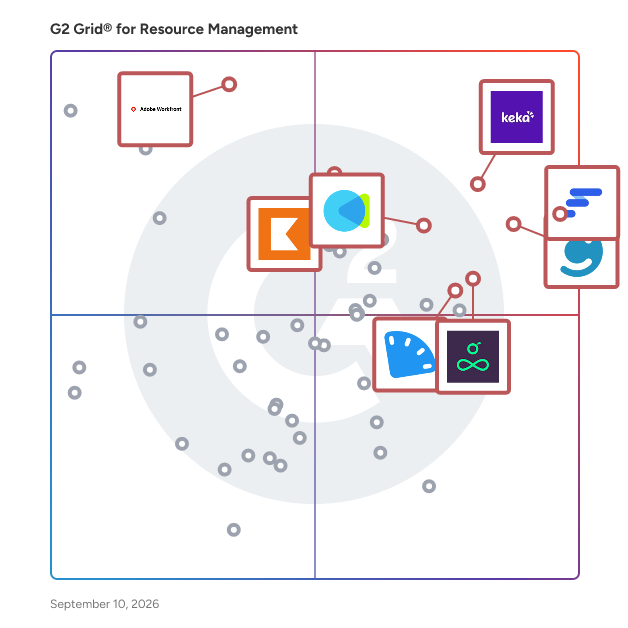
  # Best Resource Management Software for Small Business - Page 2

  *By [Subhransu Sahu](https://research.g2.com/insights/author/subhransu-sahu)*

   Products classified in the overall Resource Management category are similar in many regards and help companies of all sizes solve their business problems. However, small business features, pricing, setup, and installation differ from businesses of other sizes, which is why we match buyers to the right Small Business Resource Management to fit their needs. Compare product ratings based on reviews from enterprise users or connect with one of G2&#39;s buying advisors to find the right solutions within the Small Business Resource Management category.

In addition to qualifying for inclusion in the Resource Management Software category, to qualify for inclusion in the Small Business Resource Management Software category, a product must have at least 10 reviews left by a reviewer from a small business.


  ## How Many Resource Management Software Products Does G2 Track?
**Total Products under this Category:** 107

  
## How Does G2 Rank Resource Management Software Products?

**Why You Can Trust G2's Software Rankings:**

- 30 Analysts and Data Experts
- 20,000+ Authentic Reviews
- 107+ Products
- Unbiased Rankings

G2's software rankings are built on verified user reviews, rigorous moderation, and a consistent research methodology maintained by a team of analysts and data experts. Each product is measured using the same transparent criteria, with no paid placement or vendor influence. While reviews reflect real user experiences, which can be subjective, they offer valuable insight into how software performs in the hands of professionals. Together, these inputs power the G2 Score, a standardized way to compare tools within every category.

  
## Which Resource Management Software Is Best for Your Use Case?

- **Best for Small Businesses:** [Float.com](https://www.g2.com/products/float-com/reviews)
- **Best for Mid-Market:** [Keka](https://www.g2.com/products/keka/reviews)
- **Best for Enterprise:** [Workfront](https://www.g2.com/products/workfront/reviews)
- **Highest User Satisfaction:** [Float.com](https://www.g2.com/products/float-com/reviews)
- **Best Free Software:** [Float.com](https://www.g2.com/products/float-com/reviews)

  
---

**Sponsored**

### Productive

Productive is the all-in-one professional services automation platform built for agencies, consultancies, and service businesses. Manage projects, resources, and finances in one place — with real-time visibility across your entire company. Sales Pipeline Easily manage your sales funnel and win more deals with a simple CRM solution. You won&#39;t ever forget to follow up on that potential business opportunity. When the deal is won, convert it into a project, and continue working in the same tool. Project Management Assign work, collaborate, and organize agency projects. Project Management features are integrated with Time Tracking and Task Management so you will run projects faster and more elegantly. Resource Planning Organize and plan a work schedule for your entire agency. Find bottlenecks that cost money and consume time. Avoid collisions, burnouts, and overbooking with resource planning features. Powerful Business Insights Build customizable reports from scratch by focusing on what&#39;s important for you: Actual Utilization by People, Revenue &amp; Profitability by Client, Invoiced Revenue by Months, Overtime by People, Profitability by Months, etc. Billing and Invoicing Automatically track invoiced amounts and be confident you’ve billed everything you need. Simply generate invoices using tracked time on billable services.


[Visit website](https://www.g2.com/external_clickthroughs/record?secure%5Bad_program%5D=ppc&amp;secure%5Bad_slot%5D=category_product_list&amp;secure%5Bcategory_id%5D=1902&amp;secure%5Bdisplayable_resource_id%5D=1902&amp;secure%5Bdisplayable_resource_type%5D=Category&amp;secure%5Bmedium%5D=sponsored&amp;secure%5Bplacement_reason%5D=page_category&amp;secure%5Bplacement_resource_ids%5D%5B%5D=1902&amp;secure%5Bprioritized%5D=false&amp;secure%5Bproduct_id%5D=42943&amp;secure%5Bresource_id%5D=1902&amp;secure%5Bresource_type%5D=Category&amp;secure%5Bsource_type%5D=category_page&amp;secure%5Bsource_url%5D=https%3A%2F%2Fwww.g2.com%2Fcategories%2Fresource-management%3Fpage%3D5&amp;secure%5Btoken%5D=2f2207b6087c37d64aa22f3fa102371ee9b8d7c66a5b1e22c302d433afb5cd1c&amp;secure%5Burl%5D=https%3A%2F%2Fproductive.io%2Flp-resource-management-software%2F%3Futm_source%3Dg2.com%26utm_medium%3Dad%26utm_campaign%3DResource%2520Management&amp;secure%5Burl_type%5D=custom_url)

---

  ## What Are the Top-Rated Resource Management Software Products in 2026?
### 1. [Rocketlane](https://www.g2.com/products/rocketlane-corp/reviews)
  Rocketlane is the world’s first Agentic Professional Services Automation (PSA) platform, built to transform how professional services teams deliver value in the AI-first era. While traditional PSAs focus on recording work, Rocketlane accelerates it through a connected system that unifies the entire front and back office. The platform brings together project delivery, resource management, time tracking, billing, and financial operations alongside collaboration capabilities such as Spaces, real-time chat, a modern client portal, Sheets for structured data, and a powerful Custom Apps framework that lets teams model any workflow inside Rocketlane. Everything lives in a single ecosystem, eliminating tool sprawl and fragmented data that slows down services teams. At the core of this is Nitro, Rocketlane&#39;s agentic execution layer: a network of intelligent AI agents that execute real delivery tasks, automate setup, manage workflows, detect risks, enforce governance, and continuously learn from patterns across the organization. This shift unlocks faster go-lives, better utilization, proactive issue detection, consistent delivery quality, and a level of operational resilience that was previously impossible. Over 650 companies, including Retool, Coursera, Postman, Intercom, Glean, AuditBoard, Vercel, Sprinklr, Worldpay, Grafana, OpenGov, and Outreach trust Rocketlane to run their mission-critical delivery processes. Customers across SaaS, services, and consulting use Rocketlane to shorten onboarding timelines, reduce escalations, improve forecasting accuracy, and accelerate moving from booked to consumed revenue. Founded in 2020, headquartered in the US, and operating globally with teams across India and the UK, Rocketlane is backed by leading investors, including Nexus Venture Partners and 8VC. The company’s rapid growth reflects strong market confidence in its category-defining vision for Agentic PSA.


  **Average Rating:** 4.7/5.0
  **Total Reviews:** 822
**How Do G2 Users Rate Rocketlane?**

- **Ease of Use:** 9.2/10 (Category avg: 8.6/10)
- **Resource Definiton:** 8.3/10 (Category avg: 8.6/10)
- **Capacity:** 8.9/10 (Category avg: 8.8/10)
- **Forecasting:** 8.3/10 (Category avg: 8.4/10)

**Who Is the Company Behind Rocketlane?**

- **Seller:** [Rocketlane Corp](https://www.g2.com/sellers/rocketlane-corp-a131cbb6-f2af-4f5b-a775-6d3bc6cda8e6)
- **Company Website:** https://www.rocketlane.com/
- **Year Founded:** 2020
- **HQ Location:** Walnut, US
- **Twitter:** @RocketlaneHQ (1,473 Twitter followers)
- **LinkedIn® Page:** https://www.linkedin.com/company/rocketlane/ (226 employees on LinkedIn®)

**Who Uses This Product?**
  - **Who Uses This:** Customer Success Manager, Software Engineer
  - **Top Industries:** Computer Software, Information Technology and Services
  - **Company Size:** 56% Mid-Market, 28% Small-Business


#### What Are Rocketlane's Pros and Cons?

**Pros:**

- Ease of Use (78 reviews)
- Project Management (72 reviews)
- Task Management (53 reviews)
- Project Tracking (49 reviews)
- Team Collaboration (42 reviews)

**Cons:**

- Missing Features (31 reviews)
- Slow Performance (21 reviews)
- Learning Curve (18 reviews)
- Limited Customization (18 reviews)
- Not Intuitive (18 reviews)

### 2. [Milient Software](https://www.g2.com/products/milient-software/reviews)
  Hub Planner helps teams plan resources and deliver projects with confidence. Built by resource managers who needed more than spreadsheets, Hub Planner gives you the visibility and control to match the right people to the right projects—without the guesswork. From day-to-day scheduling to long-term forecasting, Hub Planner makes resource management simple, intuitive, and powerful. Thousands of teams worldwide use Hub Planner to: Schedule resources: see who’s working on what and when with a visual scheduler that keeps everyone aligned. Plan capacity: track availability, manage time off, and balance workloads to prevent burnout. Forecast demand: use real-time data to align pipeline, skills, and project needs for smarter planning. Track time: log actuals with integrated timesheets for more accurate reporting and billing. Report: analyze utilization, project performance, and budgets with powerful built-in reports. Hub Planner is now part of Milient Software. Alongside Milient’s stand-alone solutions for project, knowledge, and time management, Hub Planner remains the go-to for resource management. It gives you the visibility and data you need to match the right people to the right projects, move beyond spreadsheets, and keep schedules on track as work shifts.


  **Average Rating:** 4.2/5.0
  **Total Reviews:** 58
**How Do G2 Users Rate Milient Software?**

- **Ease of Use:** 8.3/10 (Category avg: 8.6/10)
- **Resource Definiton:** 7.9/10 (Category avg: 8.6/10)
- **Capacity:** 8.1/10 (Category avg: 8.8/10)
- **Forecasting:** 7.5/10 (Category avg: 8.4/10)

**Who Is the Company Behind Milient Software?**

- **Seller:** [Milient Software](https://www.g2.com/sellers/milient-software)
- **Company Website:** https://www.milientsoftware.com/
- **Year Founded:** 2023
- **HQ Location:** Sankt Hanshaugen, Oslo
- **Twitter:** @hubplanner (224 Twitter followers)
- **LinkedIn® Page:** https://www.linkedin.com/company/milient/ (90 employees on LinkedIn®)

**Who Uses This Product?**
  - **Top Industries:** Information Technology and Services, Computer Software
  - **Company Size:** 59% Mid-Market, 34% Small-Business


#### What Are Milient Software's Pros and Cons?

**Pros:**

- Ease of Use (8 reviews)
- Intuitive (6 reviews)
- Task Management (5 reviews)
- User Interface (5 reviews)
- Team Collaboration (4 reviews)

**Cons:**

- Mobile App Limitations (3 reviews)
- Timesheet Issues (2 reviews)
- Complex UI (1 reviews)
- Expensive (1 reviews)
- Limited Customization (1 reviews)

### 3. [Accelo](https://www.g2.com/products/accelo/reviews)
  Accelo is used and loved by professional service businesses around the world to manage their business operations, profitably. The end-to-end cloud-based platform manages all aspects of a deal, from prospect to payment, including sales, projects, tickets, retainers, timesheets, resourcing, and more, regardless of where you are. With an emphasis on time and money, the professional services automation suite gives you a holistic view of your most up-to-date business data and financial performance. Having client communications, activities, and work centralized in a single platform, you always know where things are without having to ask for a status update. Accelo streamlines workflows and increases efficiency across the business and teams to enhance visibility and coordination, helping leaders run the business and professionals focus on the most important work. By harnessing powerful automation, managers can easily deliver projects on time and within budget. Accelo&#39;s up-to-date and secure analytics give leaders the confidence to make smart decisions, ensuring the growth and prosperity of the business.


  **Average Rating:** 4.4/5.0
  **Total Reviews:** 538
**How Do G2 Users Rate Accelo?**

- **Ease of Use:** 8.1/10 (Category avg: 8.6/10)
- **Resource Definiton:** 6.9/10 (Category avg: 8.6/10)
- **Capacity:** 7.1/10 (Category avg: 8.8/10)
- **Forecasting:** 5.7/10 (Category avg: 8.4/10)

**Who Is the Company Behind Accelo?**

- **Seller:** [Accelo](https://www.g2.com/sellers/accelo)
- **Company Website:** https://www.accelo.com/
- **Year Founded:** 2011
- **HQ Location:** Denver, Colorado
- **Twitter:** @accelo (2,981 Twitter followers)
- **LinkedIn® Page:** https://www.linkedin.com/company/6652457/ (79 employees on LinkedIn®)

**Who Uses This Product?**
  - **Who Uses This:** Project Manager, Director
  - **Top Industries:** Marketing and Advertising, Information Technology and Services
  - **Company Size:** 76% Small-Business, 21% Mid-Market


#### What Are Accelo's Pros and Cons?

**Pros:**

- Ease of Use (35 reviews)
- Project Management (29 reviews)
- Efficiency (26 reviews)
- Client Management (25 reviews)
- Task Management (25 reviews)

**Cons:**

- Missing Features (20 reviews)
- Learning Curve (19 reviews)
- Limited Features (16 reviews)
- Limited Customization (13 reviews)
- Complexity (12 reviews)

### 4. [PSOHUB.](https://www.g2.com/products/psohub/reviews)
  PSOhub is PSA software purpose-built for professional services organizations: IT firms, consultancies, marketing agencies, and financial services teams. It covers the entire delivery cycle in one connected platform, from quoting and project management through resource and capacity planning, time and expense tracking, and invoicing. Built by a founding team with over 30 years of combined experience in professional services, and trusted by organizations across 40+ countries. From quote to project When a quote is accepted, the project is ready to start. Tasks are structured, budgets are set, and the team is assigned. Project managers get a real-time view of task progress, budget burn, and margin at every stage, so there are no surprises at month-end. Most professional services teams run 6 to 10 separate tools. PSOhub replaces that stack so data flows without manual handovers at every step. Resource and capacity planning The AI scheduling layer automatically assigns and reschedules resources based on skills, live capacity, and current utilization. When someone hits full utilization, the system flags it and suggests moving tasks to another team member with headroom. Keeping utilization high without blowing deadlines used to mean constant manual oversight. With PSOhub, it largely handles itself. Time and expense tracking Time and expenses connect directly to each project&#39;s budget and contract type. Whether billing fixed-fee, time and material, or retainer, hours log against the right scope and invoices generate without a manual reconciliation step. AI project and risk management The AI Copilot generates a full project plan, including financials, team assignment, and timeline, in around 10 seconds, drawing on the organization&#39;s own historical data rather than generic benchmarks. It monitors margins continuously, flags scope creep early, including situations like a senior consultant logging hours on a junior task, and generates risk assessments with concrete recommended actions. Integrations For teams using HubSpot as their CRM, a native two-way integration connects closed deals directly to projects, with time logs flowing back to the CRM. Also integrates with SAP Business One, QuickBooks, Xero, and Salesforce. Works for organizations of 10 to 1,000+.


  **Average Rating:** 4.2/5.0
  **Total Reviews:** 200
**How Do G2 Users Rate PSOHUB.?**

- **Ease of Use:** 8.2/10 (Category avg: 8.6/10)
- **Resource Definiton:** 6.9/10 (Category avg: 8.6/10)
- **Capacity:** 7.2/10 (Category avg: 8.8/10)
- **Forecasting:** 5.6/10 (Category avg: 8.4/10)

**Who Is the Company Behind PSOHUB.?**

- **Seller:** [PSOHUB.](https://www.g2.com/sellers/psohub)
- **Company Website:** https://www.psohub.com/
- **Year Founded:** 2020
- **HQ Location:** Bussum, North Holland, Netherlands
- **Twitter:** @PSOhub (38 Twitter followers)
- **LinkedIn® Page:** https://www.linkedin.com/company/64996832/ (16 employees on LinkedIn®)

**Who Uses This Product?**
  - **Top Industries:** Consulting, Marketing and Advertising
  - **Company Size:** 68% Small-Business, 30% Mid-Market


#### What Are PSOHUB.'s Pros and Cons?

**Pros:**

- Ease of Use (47 reviews)
- Time Tracking (39 reviews)
- Project Management (30 reviews)
- Project Tracking (28 reviews)
- Tracking (23 reviews)

**Cons:**

- Not Intuitive (14 reviews)
- Time Tracking Issues (12 reviews)
- Limited Customization (11 reviews)
- Complex Usability (10 reviews)
- Learning Curve (10 reviews)

### 5. [Primetric](https://www.g2.com/products/primetric/reviews)
  With Primetric, you can easily forecast people availability and projects profitability in your professional service company. Plan, track, budget, and optimize from a high-level view.


  **Average Rating:** 4.9/5.0
  **Total Reviews:** 68
**How Do G2 Users Rate Primetric?**

- **Ease of Use:** 9.5/10 (Category avg: 8.6/10)
- **Resource Definiton:** 10.0/10 (Category avg: 8.6/10)
- **Capacity:** 9.6/10 (Category avg: 8.8/10)
- **Forecasting:** 9.4/10 (Category avg: 8.4/10)

**Who Is the Company Behind Primetric?**

- **Seller:** [Primetric](https://www.g2.com/sellers/primetric)
- **Year Founded:** 2016
- **HQ Location:** Wrocław, Dolnosląskie
- **LinkedIn® Page:** https://www.linkedin.com/company/11460217/ (19 employees on LinkedIn®)

**Who Uses This Product?**
  - **Top Industries:** Computer Software, Information Technology and Services
  - **Company Size:** 63% Mid-Market, 28% Small-Business


#### What Are Primetric's Pros and Cons?

**Pros:**

- Resource Management (5 reviews)
- Automation (4 reviews)
- Report Generation (4 reviews)
- Intuitive (3 reviews)
- Project Management (3 reviews)

**Cons:**

- Missing Features (3 reviews)
- App Functionality (1 reviews)
- Budgeting/Accounting Issues (1 reviews)
- Change Adjustments (1 reviews)
- Language Limitations (1 reviews)

### 6. [Forecast](https://www.g2.com/products/accelo-forecast/reviews)
  Forecast is an AI-powered PSA platform that combines project management, resource planning, financial tracking, and operational risk mitigation — giving you the single source of truth you need to run your business. This real-time visibility provides actionable insights into resource capacity, project profitability, and overall business health, empowering you to make confident decisions faster, optimize utilization, and finally steer your firm towards predictable, profitable growth.


  **Average Rating:** 4.2/5.0
  **Total Reviews:** 123
**How Do G2 Users Rate Forecast?**

- **Ease of Use:** 8.1/10 (Category avg: 8.6/10)
- **Resource Definiton:** 7.8/10 (Category avg: 8.6/10)
- **Capacity:** 7.8/10 (Category avg: 8.8/10)
- **Forecasting:** 7.6/10 (Category avg: 8.4/10)

**Who Is the Company Behind Forecast?**

- **Seller:** [Accelo](https://www.g2.com/sellers/accelo)
- **Company Website:** https://www.accelo.com/
- **Year Founded:** 2011
- **HQ Location:** Denver, Colorado
- **Twitter:** @accelo (2,981 Twitter followers)
- **LinkedIn® Page:** https://www.linkedin.com/company/6652457/ (79 employees on LinkedIn®)

**Who Uses This Product?**
  - **Top Industries:** Marketing and Advertising, Computer Software
  - **Company Size:** 54% Small-Business, 43% Mid-Market


### 7. [TaskRay](https://www.g2.com/products/taskray/reviews)
  TaskRay is your ultimate solution for streamlined project management and seamless customer onboarding—all within Salesforce. Empower your teams to create project plans, automate repetitive tasks, allocate resources effectively, and foster collaboration across departments. Whether you&#39;re managing new customer implementations or driving internal initiatives, TaskRay ensures every project is delivered with precision and efficiency. 100% Salesforce Native TaskRay integrates seamlessly into your existing Salesforce ecosystem, offering unmatched visibility and alignment across Sales, CPQ, Service, and Experience Clouds. Designed for Growing Businesses If your organization has outgrown spreadsheets or non-Salesforce tools and needs better visibility into project performance, TaskRay is your next step. It&#39;s ideal for businesses facing challenges like: ✓ Revenue delays caused by lengthy onboarding or implementation timelines. ✓ Complex implementations, where multiple SKUs require custom solutions and support. ✓ Integrated customer management, spanning multiple Salesforce Clouds. Industry-Specific Expertise • TaskRay is trusted by industry leaders in: • Technology &amp; SaaS • Healthcare &amp; Life Sciences • Manufacturing • Real Estate &amp; Franchising • Financial Services • Telecommunications Deliver Faster, Reduce Costs, and Increase Customer Satisfaction TaskRay helps you accelerate project timelines, cut operational costs, and improve productivity. Here&#39;s what our customers achieve: • 2.5x Faster Project Completion: Streamline workflows and improve efficiency. • 29% Faster Revenue Realization: Get to value quicker with optimized onboarding. • 21% Cost Reduction: Save time and resources with automation and visibility. • 15% Increase in Customer Satisfaction: Delight customers with smooth implementations. • 200% Boost in Project Visibility: Gain clarity and insight into every project detail. • 20% More Project Capacity: Handle more work without adding complexity. Proven Success Across Industries Join the growing list of businesses transforming their operations with TaskRay. From technology innovators to global manufacturers, our platform drives results.


  **Average Rating:** 4.3/5.0
  **Total Reviews:** 156
**How Do G2 Users Rate TaskRay?**

- **Ease of Use:** 8.3/10 (Category avg: 8.6/10)
- **Resource Definiton:** 6.7/10 (Category avg: 8.6/10)
- **Capacity:** 6.7/10 (Category avg: 8.8/10)
- **Forecasting:** 6.3/10 (Category avg: 8.4/10)

**Who Is the Company Behind TaskRay?**

- **Seller:** [TaskRay](https://www.g2.com/sellers/taskray)
- **Company Website:** https://taskray.com
- **Year Founded:** 2010
- **HQ Location:**  Denver, CO
- **Twitter:** @TaskRay (400 Twitter followers)
- **LinkedIn® Page:** https://www.linkedin.com/company/1160248/ (55 employees on LinkedIn®)

**Who Uses This Product?**
  - **Top Industries:** Computer Software, Information Technology and Services
  - **Company Size:** 50% Mid-Market, 47% Small-Business


#### What Are TaskRay's Pros and Cons?

**Pros:**

- Ease of Use (7 reviews)
- Easy Integration (7 reviews)
- Salesforce Integration (7 reviews)
- Integrations (6 reviews)
- Organization (6 reviews)

**Cons:**

- Limitations (4 reviews)
- Inefficient Task Management (3 reviews)
- Complexity (2 reviews)
- Difficult Customization (2 reviews)
- Learning Curve (2 reviews)

### 8. [eResource Scheduler](https://www.g2.com/products/eresource-scheduler/reviews)
  eResource Scheduler (eRS) is enterprise resource management &amp; scheduling software built to cut chaos clean. Whether managing 50 resources or 5000, eRS gives real-time visibility into capacity, availability, schedule, actuals (timesheets), and financials, no messy spreadsheets required. Plans stay fast and friction-free with drag-and-drop scheduling, resource requests, and semi-auto scheduling. Actuals flow from schedules into timesheets, giving immediate planned vs. actuals insight. Heatmaps flag bottlenecks before they burn, capacity planning reports forecast demand, and financials track costs, revenue, and profit. Management reports turn data into decisions, user access rights keep control tight, and integrations tie in seamlessly with your go-to platforms. From one office to global teams, eRS keeps resources optimized and teams billable, not just busy. The eRS mobile app extends the same real-time resource scheduling experience beyond the desk, enabling managers and teams to view schedules, enter, approve, and update timesheets, and stay informed through real-time notifications wherever work happens. Trusted across industries, eRS turns scheduling from guesswork into growth, with visibility into the dollar impact of every allocation.


  **Average Rating:** 4.9/5.0
  **Total Reviews:** 33
**How Do G2 Users Rate eResource Scheduler?**

- **Ease of Use:** 10.0/10 (Category avg: 8.6/10)
- **Resource Definiton:** 10.0/10 (Category avg: 8.6/10)
- **Capacity:** 10.0/10 (Category avg: 8.8/10)
- **Forecasting:** 8.3/10 (Category avg: 8.4/10)

**Who Is the Company Behind eResource Scheduler?**

- **Seller:** [Enbraun](https://www.g2.com/sellers/enbraun)
- **Company Website:** https://ers_enbraun.com
- **Year Founded:** 2010
- **HQ Location:** Jaipur, IN
- **LinkedIn® Page:** https://www.linkedin.com/company/enbraun/ (63 employees on LinkedIn®)

**Who Uses This Product?**
  - **Company Size:** 61% Small-Business, 18% Mid-Market


#### What Are eResource Scheduler's Pros and Cons?

**Pros:**

- Ease of Use (6 reviews)
- Resource Management (4 reviews)
- Scheduling Management (4 reviews)
- Easy Setup (3 reviews)
- User Interface (3 reviews)

**Cons:**

- Lack of Clarity (2 reviews)
- Complex UI (1 reviews)
- Learning Curve (1 reviews)
- Limited Features (1 reviews)
- Poor Navigation (1 reviews)

### 9. [Paymo](https://www.g2.com/products/paymo/reviews)
  Paymo is a complete time tracking, project management, and invoicing solution for client-focused teams of up to 20 people. From task planning to invoicing, Paymo helps agencies and professionals deliver on time, stay profitable, and manage projects without multiple tools. It is ideal for digital, creative, and marketing agencies, consulting businesses, software &amp; engineering firms, and architecture firms. It allows you to manage client projects and business tasks, track work time, and invoice clients from one place, wherever you are. The primary focus of the software is helping teams track work time and manage projects from start to finish: - split projects into task lists and tasks and assign them to your employees or co-workers - automatically track work time at the office via web timer or on the go via mobile apps - submit and approve timesheets - keep everyone involved in a project up to date with what&#39;s happening through discussions - create customizable static and live reports and track business performance - store all the files related to the project - so everyone can access them anytime - visualize your team&#39;s work, eliminate bottlenecks, and reduce the idle time in your projects - keep track of time spent on all computer activities and allocate that time to projects - track expenses, generate estimates and invoices for the client, and get paid online - with milestones, the team knows when major project stages are due to be completed - save projects as templates and use them when you need to create a similar project - track project and client profitability


  **Average Rating:** 4.6/5.0
  **Total Reviews:** 584
**How Do G2 Users Rate Paymo?**

- **Ease of Use:** 9.0/10 (Category avg: 8.6/10)
- **Resource Definiton:** 9.2/10 (Category avg: 8.6/10)
- **Capacity:** 9.2/10 (Category avg: 8.8/10)
- **Forecasting:** 8.8/10 (Category avg: 8.4/10)

**Who Is the Company Behind Paymo?**

- **Seller:** [Paymo](https://www.g2.com/sellers/paymo)
- **Year Founded:** 2008
- **HQ Location:** Bihor, Romania
- **Twitter:** @Paymo (3,128 Twitter followers)
- **LinkedIn® Page:** https://www.linkedin.com/company/5368468/ (16 employees on LinkedIn®)

**Who Uses This Product?**
  - **Who Uses This:** Owner, CEO
  - **Top Industries:** Marketing and Advertising, Information Technology and Services
  - **Company Size:** 83% Small-Business, 11% Mid-Market


#### What Are Paymo's Pros and Cons?

**Pros:**

- Time Tracking (5 reviews)
- Intuitive (4 reviews)
- Invoicing (3 reviews)
- Progress Tracking (3 reviews)
- Time-saving (3 reviews)

**Cons:**

- Poor Customer Support (3 reviews)
- App Functionality (2 reviews)
- Integration Issues (2 reviews)
- Lack of Customization (2 reviews)
- Limited Features (2 reviews)


    ## What Is Resource Management Software?
  [Project, Portfolio &amp; Program Management Software](https://www.g2.com/categories/project-portfolio-program-management)
  ## What Software Categories Are Similar to Resource Management Software?
    - [Project Management Software](https://www.g2.com/categories/project-management)
    - [Professional Services Automation Software](https://www.g2.com/categories/professional-services-automation)
    - [Work Management Software](https://www.g2.com/categories/work-management)


