2026 Best Software Awards are here!See the list

Best Patch Management Software for Medium-Sized Businesses

Brandon Summers-Miller
BS
Researched and written by Brandon Summers-Miller

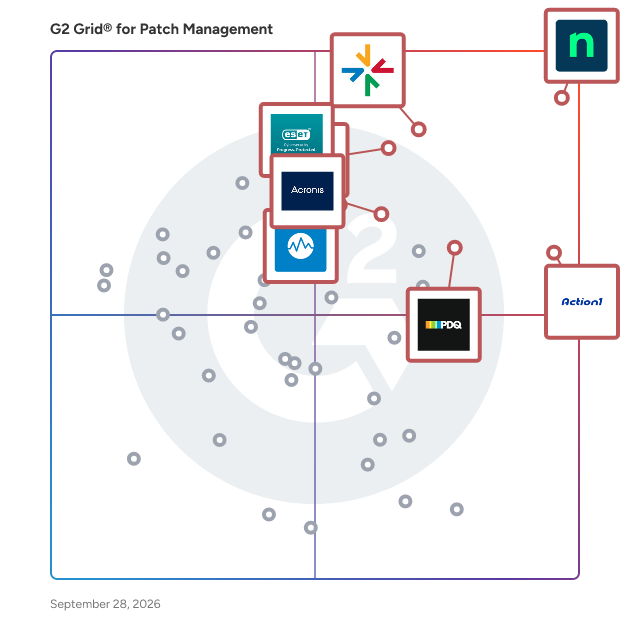
Products classified in the overall Patch Management category are similar in many regards and help companies of all sizes solve their business problems. However, medium-sized business features, pricing, setup, and installation differ from businesses of other sizes, which is why we match buyers to the right Medium-Sized Business Patch Management to fit their needs. Compare product ratings based on reviews from enterprise users or connect with one of G2's buying advisors to find the right solutions within the Medium-Sized Business Patch Management category.

In addition to qualifying for inclusion in the Patch Management Software category, to qualify for inclusion in the Medium-Sized Business Patch Management Software category, a product must have at least 10 reviews left by a reviewer from a medium-sized business.

Show More
Show Less

G2 takes pride in showing unbiased reviews on user satisfaction in our ratings and reports. We do not allow paid placements in any of our ratings, rankings, or reports. Learn about our scoring methodologies.

1 filter applied
Clear All
30 Listings in Patch Management Available
(3,697)4.7 out of 5
Optimized for quick response
3rd Easiest To Use in Patch Management software
View top Consulting Services for NinjaOne
  • Overview
    Expand/Collapse Overview
  • Product Description
    How are these determined?Information
    This description is provided by the seller.

    NinjaOne unifies IT to simplify work for 35,000+ customers in 140+ countries. The NinjaOne Unified IT Operations Platform delivers endpoint management, autonomous patching, backup, and remote acces

    Users
    • IT Manager
    • Owner
    Industries
    • Information Technology and Services
    • Computer & Network Security
    Market Segment
    • 49% Mid-Market
    • 43% Small-Business
    User Sentiment
    How are these determined?Information
    These insights, currently in beta, are compiled from user reviews and grouped to display a high-level overview of the software.
    • NinjaOne is a remote monitoring and management tool that offers features such as patch management, remote access, IT documentation, and automation.
    • Users frequently mention the ease of use, the ability to automate tasks across numerous devices, the constant improvements and enhancements, and the responsive customer support as key benefits of NinjaOne.
    • Users mentioned issues such as the lack of a dark mode, occasional UI quirks, limited report customization, high pricing for smaller teams, and a steep learning curve for advanced setup as drawbacks of the product.
  • Pros and Cons
    Expand/Collapse Pros and Cons
  • NinjaOne Pros and Cons
    How are these determined?Information
    Pros and Cons are compiled from review feedback and grouped into themes to provide an easy-to-understand summary of user reviews.
    Pros
    Ease of Use
    1,383
    Features
    916
    Remote Access
    857
    Automation
    819
    Customer Support
    759
    Cons
    Missing Features
    703
    Limited Features
    355
    Improvement Needed
    332
    Needs Improvement
    326
    Feature Issues
    299
  • User Satisfaction
    Expand/Collapse User Satisfaction
  • NinjaOne features and usability ratings that predict user satisfaction
    9.1
    Ease of Admin
    Average: 8.9
    9.4
    Has the product been a good partner in doing business?
    Average: 9.0
    9.1
    Quality of Support
    Average: 8.8
    9.1
    Ease of Use
    Average: 8.8
  • Seller Details
    Expand/Collapse Seller Details
  • Seller Details
    Seller
    NinjaOne
    Company Website
    Year Founded
    2013
    HQ Location
    Austin, Texas
    Twitter
    @NinjaOne
    3,486 Twitter followers
    LinkedIn® Page
    www.linkedin.com
    2,006 employees on LinkedIn®
Product Description
How are these determined?Information
This description is provided by the seller.

NinjaOne unifies IT to simplify work for 35,000+ customers in 140+ countries. The NinjaOne Unified IT Operations Platform delivers endpoint management, autonomous patching, backup, and remote acces

Users
  • IT Manager
  • Owner
Industries
  • Information Technology and Services
  • Computer & Network Security
Market Segment
  • 49% Mid-Market
  • 43% Small-Business
User Sentiment
How are these determined?Information
These insights, currently in beta, are compiled from user reviews and grouped to display a high-level overview of the software.
  • NinjaOne is a remote monitoring and management tool that offers features such as patch management, remote access, IT documentation, and automation.
  • Users frequently mention the ease of use, the ability to automate tasks across numerous devices, the constant improvements and enhancements, and the responsive customer support as key benefits of NinjaOne.
  • Users mentioned issues such as the lack of a dark mode, occasional UI quirks, limited report customization, high pricing for smaller teams, and a steep learning curve for advanced setup as drawbacks of the product.
NinjaOne Pros and Cons
How are these determined?Information
Pros and Cons are compiled from review feedback and grouped into themes to provide an easy-to-understand summary of user reviews.
Pros
Ease of Use
1,383
Features
916
Remote Access
857
Automation
819
Customer Support
759
Cons
Missing Features
703
Limited Features
355
Improvement Needed
332
Needs Improvement
326
Feature Issues
299
NinjaOne features and usability ratings that predict user satisfaction
9.1
Ease of Admin
Average: 8.9
9.4
Has the product been a good partner in doing business?
Average: 9.0
9.1
Quality of Support
Average: 8.8
9.1
Ease of Use
Average: 8.8
Seller Details
Seller
NinjaOne
Company Website
Year Founded
2013
HQ Location
Austin, Texas
Twitter
@NinjaOne
3,486 Twitter followers
LinkedIn® Page
www.linkedin.com
2,006 employees on LinkedIn®
Entry Level Price:Free
  • Overview
    Expand/Collapse Overview
  • Product Description
    How are these determined?Information
    This description is provided by the seller.

    ManageEngine Endpoint Central is an all-in-one unified endpoint management and security (UEMS) solution that delivers end-to-end life cycle management and endpoint protection. From automated multi-OS

    Users
    • IT Manager
    • System Administrator
    Industries
    • Information Technology and Services
    • Financial Services
    Market Segment
    • 65% Mid-Market
    • 23% Enterprise
  • Pros and Cons
    Expand/Collapse Pros and Cons
  • ManageEngine Endpoint Central Pros and Cons
    How are these determined?Information
    Pros and Cons are compiled from review feedback and grouped into themes to provide an easy-to-understand summary of user reviews.
    Pros
    Ease of Use
    342
    Patch Management
    284
    Features
    226
    Software Deployment
    189
    Endpoint Management
    177
    Cons
    Missing Features
    106
    Feature Issues
    84
    Complexity
    72
    Patching Issues
    71
    Update Issues
    64
  • User Satisfaction
    Expand/Collapse User Satisfaction
  • ManageEngine Endpoint Central features and usability ratings that predict user satisfaction
    8.8
    Ease of Admin
    Average: 8.9
    8.9
    Has the product been a good partner in doing business?
    Average: 9.0
    8.4
    Quality of Support
    Average: 8.8
    8.7
    Ease of Use
    Average: 8.8
  • Seller Details
    Expand/Collapse Seller Details
  • Seller Details
    Seller
    Zoho
    Year Founded
    1996
    HQ Location
    Austin, TX
    Twitter
    @Zoho
    137,064 Twitter followers
    LinkedIn® Page
    www.linkedin.com
    29,794 employees on LinkedIn®
    Phone
    +1 (888) 900-9646
Product Description
How are these determined?Information
This description is provided by the seller.

ManageEngine Endpoint Central is an all-in-one unified endpoint management and security (UEMS) solution that delivers end-to-end life cycle management and endpoint protection. From automated multi-OS

Users
  • IT Manager
  • System Administrator
Industries
  • Information Technology and Services
  • Financial Services
Market Segment
  • 65% Mid-Market
  • 23% Enterprise
ManageEngine Endpoint Central Pros and Cons
How are these determined?Information
Pros and Cons are compiled from review feedback and grouped into themes to provide an easy-to-understand summary of user reviews.
Pros
Ease of Use
342
Patch Management
284
Features
226
Software Deployment
189
Endpoint Management
177
Cons
Missing Features
106
Feature Issues
84
Complexity
72
Patching Issues
71
Update Issues
64
ManageEngine Endpoint Central features and usability ratings that predict user satisfaction
8.8
Ease of Admin
Average: 8.9
8.9
Has the product been a good partner in doing business?
Average: 9.0
8.4
Quality of Support
Average: 8.8
8.7
Ease of Use
Average: 8.8
Seller Details
Seller
Zoho
Year Founded
1996
HQ Location
Austin, TX
Twitter
@Zoho
137,064 Twitter followers
LinkedIn® Page
www.linkedin.com
29,794 employees on LinkedIn®
Phone
+1 (888) 900-9646
G2 Advertising
Sponsored
G2 Advertising
Get 2x conversion than Google Ads with G2 Advertising!
G2 Advertising places your product in premium positions on high-traffic pages and on targeted competitor pages to reach buyers at key comparison moments.
(888)4.9 out of 5
1st Easiest To Use in Patch Management software
Entry Level Price:Free
  • Overview
    Expand/Collapse Overview
  • Product Description
    How are these determined?Information
    This description is provided by the seller.

    Action1 is an autonomous endpoint management platform trusted by many Fortune 500 companies. Cloud-native, infinitely scalable, highly secure, and configurable in 5 minutes—it just works and is always

    Users
    • IT Manager
    • Systems Administrator
    Industries
    • Information Technology and Services
    • Manufacturing
    Market Segment
    • 54% Mid-Market
    • 37% Small-Business
    User Sentiment
    How are these determined?Information
    These insights, currently in beta, are compiled from user reviews and grouped to display a high-level overview of the software.
    • Action1 is a software tool used for managing updates, vulnerabilities, and remote control of endpoints in a network.
    • Reviewers frequently mention the ease of use, the ability to manage updates and vulnerabilities efficiently, and the free access for up to 200 endpoints.
    • Users reported issues with the remote control feature being slow, the lack of a mobile application, and difficulties in adding custom software.
  • Pros and Cons
    Expand/Collapse Pros and Cons
  • Action1 Pros and Cons
    How are these determined?Information
    Pros and Cons are compiled from review feedback and grouped into themes to provide an easy-to-understand summary of user reviews.
    Pros
    Ease of Use
    357
    Patch Management
    321
    Easy Setup
    208
    Software Deployment
    204
    Automation
    201
    Cons
    Missing Features
    168
    Remote Access Issues
    100
    Feature Limitations
    77
    Improvement Needed
    69
    Needs Improvement
    60
  • User Satisfaction
    Expand/Collapse User Satisfaction
  • Action1 features and usability ratings that predict user satisfaction
    9.5
    Ease of Admin
    Average: 8.9
    9.6
    Has the product been a good partner in doing business?
    Average: 9.0
    9.3
    Quality of Support
    Average: 8.8
    9.5
    Ease of Use
    Average: 8.8
  • Seller Details
    Expand/Collapse Seller Details
  • Seller Details
    Seller
    Action1
    Company Website
    Year Founded
    2018
    HQ Location
    Houston, Texas
    Twitter
    @Action1corp
    586 Twitter followers
    LinkedIn® Page
    www.linkedin.com
    102 employees on LinkedIn®
Product Description
How are these determined?Information
This description is provided by the seller.

Action1 is an autonomous endpoint management platform trusted by many Fortune 500 companies. Cloud-native, infinitely scalable, highly secure, and configurable in 5 minutes—it just works and is always

Users
  • IT Manager
  • Systems Administrator
Industries
  • Information Technology and Services
  • Manufacturing
Market Segment
  • 54% Mid-Market
  • 37% Small-Business
User Sentiment
How are these determined?Information
These insights, currently in beta, are compiled from user reviews and grouped to display a high-level overview of the software.
  • Action1 is a software tool used for managing updates, vulnerabilities, and remote control of endpoints in a network.
  • Reviewers frequently mention the ease of use, the ability to manage updates and vulnerabilities efficiently, and the free access for up to 200 endpoints.
  • Users reported issues with the remote control feature being slow, the lack of a mobile application, and difficulties in adding custom software.
Action1 Pros and Cons
How are these determined?Information
Pros and Cons are compiled from review feedback and grouped into themes to provide an easy-to-understand summary of user reviews.
Pros
Ease of Use
357
Patch Management
321
Easy Setup
208
Software Deployment
204
Automation
201
Cons
Missing Features
168
Remote Access Issues
100
Feature Limitations
77
Improvement Needed
69
Needs Improvement
60
Action1 features and usability ratings that predict user satisfaction
9.5
Ease of Admin
Average: 8.9
9.6
Has the product been a good partner in doing business?
Average: 9.0
9.3
Quality of Support
Average: 8.8
9.5
Ease of Use
Average: 8.8
Seller Details
Seller
Action1
Company Website
Year Founded
2018
HQ Location
Houston, Texas
Twitter
@Action1corp
586 Twitter followers
LinkedIn® Page
www.linkedin.com
102 employees on LinkedIn®
(725)4.5 out of 5
6th Easiest To Use in Patch Management software
View top Consulting Services for Datto RMM
  • Overview
    Expand/Collapse Overview
  • Product Description
    How are these determined?Information
    This description is provided by the seller.

    Datto RMM is a secure, cloud-based platform for IT Managed Service Providers (MSPs) to remotely monitor, manage and support endpoints across their customer base. It provides a multi-tenant view, autom

    Users
    • Owner
    • IT Technician
    Industries
    • Information Technology and Services
    • Computer & Network Security
    Market Segment
    • 62% Small-Business
    • 33% Mid-Market
    User Sentiment
    How are these determined?Information
    These insights, currently in beta, are compiled from user reviews and grouped to display a high-level overview of the software.
    • Datto RMM is a remote monitoring and management tool that allows users to manage and troubleshoot issues on different devices remotely, customize the interface, and assign devices to different sites.
    • Users frequently mention the tool's ability to manage multiple users in real-time, its powerful automation policies, and its compatibility with other Datto/Kaseya products and Microsoft 365 as significant benefits.
    • Reviewers noted issues with the tool's web remote feature, its patch management struggling with third-party apps, and the responsiveness and helpfulness of Kaseya support as areas for improvement.
  • Pros and Cons
    Expand/Collapse Pros and Cons
  • Datto RMM Pros and Cons
    How are these determined?Information
    Pros and Cons are compiled from review feedback and grouped into themes to provide an easy-to-understand summary of user reviews.
    Pros
    Ease of Use
    81
    Automation
    63
    Features
    52
    Integrations
    51
    Remote Access
    48
    Cons
    Remote Access Issues
    41
    Feature Issues
    26
    Missing Features
    26
    Slow Performance
    25
    Needs Improvement
    19
  • User Satisfaction
    Expand/Collapse User Satisfaction
  • Datto RMM features and usability ratings that predict user satisfaction
    8.9
    Ease of Admin
    Average: 8.9
    9.0
    Has the product been a good partner in doing business?
    Average: 9.0
    8.5
    Quality of Support
    Average: 8.8
    8.9
    Ease of Use
    Average: 8.8
  • Seller Details
    Expand/Collapse Seller Details
  • Seller Details
    Seller
    Kaseya
    Company Website
    Year Founded
    2000
    HQ Location
    Miami, FL
    Twitter
    @KaseyaCorp
    17,439 Twitter followers
    LinkedIn® Page
    www.linkedin.com
    5,512 employees on LinkedIn®
Product Description
How are these determined?Information
This description is provided by the seller.

Datto RMM is a secure, cloud-based platform for IT Managed Service Providers (MSPs) to remotely monitor, manage and support endpoints across their customer base. It provides a multi-tenant view, autom

Users
  • Owner
  • IT Technician
Industries
  • Information Technology and Services
  • Computer & Network Security
Market Segment
  • 62% Small-Business
  • 33% Mid-Market
User Sentiment
How are these determined?Information
These insights, currently in beta, are compiled from user reviews and grouped to display a high-level overview of the software.
  • Datto RMM is a remote monitoring and management tool that allows users to manage and troubleshoot issues on different devices remotely, customize the interface, and assign devices to different sites.
  • Users frequently mention the tool's ability to manage multiple users in real-time, its powerful automation policies, and its compatibility with other Datto/Kaseya products and Microsoft 365 as significant benefits.
  • Reviewers noted issues with the tool's web remote feature, its patch management struggling with third-party apps, and the responsiveness and helpfulness of Kaseya support as areas for improvement.
Datto RMM Pros and Cons
How are these determined?Information
Pros and Cons are compiled from review feedback and grouped into themes to provide an easy-to-understand summary of user reviews.
Pros
Ease of Use
81
Automation
63
Features
52
Integrations
51
Remote Access
48
Cons
Remote Access Issues
41
Feature Issues
26
Missing Features
26
Slow Performance
25
Needs Improvement
19
Datto RMM features and usability ratings that predict user satisfaction
8.9
Ease of Admin
Average: 8.9
9.0
Has the product been a good partner in doing business?
Average: 9.0
8.5
Quality of Support
Average: 8.8
8.9
Ease of Use
Average: 8.8
Seller Details
Seller
Kaseya
Company Website
Year Founded
2000
HQ Location
Miami, FL
Twitter
@KaseyaCorp
17,439 Twitter followers
LinkedIn® Page
www.linkedin.com
5,512 employees on LinkedIn®
(1,295)4.7 out of 5
7th Easiest To Use in Patch Management software
View top Consulting Services for Acronis Cyber Protect Cloud
  • Overview
    Expand/Collapse Overview
  • Product Description
    How are these determined?Information
    This description is provided by the seller.

    Acronis delivers the world’s most complete cyber resilience platform, combining backup, disaster recovery, cybersecurity, RMM, and business operations tools into a single, natively integrated solution

    Users
    • CEO
    • Director
    Industries
    • Information Technology and Services
    • Computer & Network Security
    Market Segment
    • 68% Small-Business
    • 28% Mid-Market
    User Sentiment
    How are these determined?Information
    These insights, currently in beta, are compiled from user reviews and grouped to display a high-level overview of the software.
    • Acronis Cyber Protect Cloud is a unified platform that integrates backup, cybersecurity, disaster recovery and endpoint protection into a single solution.
    • Users like the platform's ability to combine backup, disaster recovery, and cybersecurity into one platform, its user-friendly dashboard, and its reliable backup and recovery process.
    • Reviewers noted that some features can feel complex to configure initially, especially for new users, and the interface could be more intuitive in certain areas, and the pricing can also be slightly high compared to basic backup-only solutions, especially for smaller organisations.
  • Pros and Cons
    Expand/Collapse Pros and Cons
  • Acronis Cyber Protect Cloud Pros and Cons
    How are these determined?Information
    Pros and Cons are compiled from review feedback and grouped into themes to provide an easy-to-understand summary of user reviews.
    Pros
    Ease of Use
    206
    Backup Solutions
    199
    Backup Ease
    157
    Protection
    149
    Reliability
    145
    Cons
    Slow Performance
    74
    Expensive
    56
    Poor Customer Support
    50
    Complexity
    46
    Learning Curve
    39
  • User Satisfaction
    Expand/Collapse User Satisfaction
  • Acronis Cyber Protect Cloud features and usability ratings that predict user satisfaction
    9.1
    Ease of Admin
    Average: 8.9
    9.2
    Has the product been a good partner in doing business?
    Average: 9.0
    8.8
    Quality of Support
    Average: 8.8
    9.1
    Ease of Use
    Average: 8.8
  • Seller Details
    Expand/Collapse Seller Details
  • Seller Details
    Seller
    Acronis
    Company Website
    Year Founded
    2003
    HQ Location
    Schaffhausen
    Twitter
    @acronis
    94,971 Twitter followers
    LinkedIn® Page
    www.linkedin.com
    1,917 employees on LinkedIn®
Product Description
How are these determined?Information
This description is provided by the seller.

Acronis delivers the world’s most complete cyber resilience platform, combining backup, disaster recovery, cybersecurity, RMM, and business operations tools into a single, natively integrated solution

Users
  • CEO
  • Director
Industries
  • Information Technology and Services
  • Computer & Network Security
Market Segment
  • 68% Small-Business
  • 28% Mid-Market
User Sentiment
How are these determined?Information
These insights, currently in beta, are compiled from user reviews and grouped to display a high-level overview of the software.
  • Acronis Cyber Protect Cloud is a unified platform that integrates backup, cybersecurity, disaster recovery and endpoint protection into a single solution.
  • Users like the platform's ability to combine backup, disaster recovery, and cybersecurity into one platform, its user-friendly dashboard, and its reliable backup and recovery process.
  • Reviewers noted that some features can feel complex to configure initially, especially for new users, and the interface could be more intuitive in certain areas, and the pricing can also be slightly high compared to basic backup-only solutions, especially for smaller organisations.
Acronis Cyber Protect Cloud Pros and Cons
How are these determined?Information
Pros and Cons are compiled from review feedback and grouped into themes to provide an easy-to-understand summary of user reviews.
Pros
Ease of Use
206
Backup Solutions
199
Backup Ease
157
Protection
149
Reliability
145
Cons
Slow Performance
74
Expensive
56
Poor Customer Support
50
Complexity
46
Learning Curve
39
Acronis Cyber Protect Cloud features and usability ratings that predict user satisfaction
9.1
Ease of Admin
Average: 8.9
9.2
Has the product been a good partner in doing business?
Average: 9.0
8.8
Quality of Support
Average: 8.8
9.1
Ease of Use
Average: 8.8
Seller Details
Seller
Acronis
Company Website
Year Founded
2003
HQ Location
Schaffhausen
Twitter
@acronis
94,971 Twitter followers
LinkedIn® Page
www.linkedin.com
1,917 employees on LinkedIn®
Entry Level Price:$12.00
  • Overview
    Expand/Collapse Overview
  • Product Description
    How are these determined?Information
    This description is provided by the seller.

    PDQ Connect keeps your Windows & macOS devices patched and secure, no matter where they are — no VPN required. Take full control of your fleet while reducing tedious, repetitive tasks. Free time l

    Users
    • IT Manager
    • Systems Administrator
    Industries
    • Information Technology and Services
    • Manufacturing
    Market Segment
    • 54% Mid-Market
    • 14% Enterprise
    User Sentiment
    How are these determined?Information
    These insights, currently in beta, are compiled from user reviews and grouped to display a high-level overview of the software.
    • PDQ Connect is a software solution that identifies vulnerabilities and enables teams to deploy patches and updates, while also providing remote support and inventory management.
    • Users frequently mention the ease of use, the ability to manage and deploy software remotely, and the valuable support channels such as the Discord server and YouTube channel.
    • Users reported issues with software updates not working, limited scanners compared to PDQ inventory/deploy, and difficulties in converting and configuring nested packages from the old system.
  • Pros and Cons
    Expand/Collapse Pros and Cons
  • PDQ Connect Pros and Cons
    How are these determined?Information
    Pros and Cons are compiled from review feedback and grouped into themes to provide an easy-to-understand summary of user reviews.
    Pros
    Ease of Use
    188
    Software Deployment
    148
    Easy Deployment
    115
    Easy Setup
    103
    Automation
    94
    Cons
    Missing Features
    95
    Improvement Needed
    53
    Limited Features
    41
    Deployment Issues
    27
    Remote Access Issues
    25
  • User Satisfaction
    Expand/Collapse User Satisfaction
  • PDQ Connect features and usability ratings that predict user satisfaction
    9.4
    Ease of Admin
    Average: 8.9
    9.4
    Has the product been a good partner in doing business?
    Average: 9.0
    9.2
    Quality of Support
    Average: 8.8
    9.1
    Ease of Use
    Average: 8.8
  • Seller Details
    Expand/Collapse Seller Details
  • Seller Details
    Seller
    PDQ.com
    Company Website
    Year Founded
    2001
    HQ Location
    Salt Lake City, Utah, United States
    Twitter
    @admarsenal
    980 Twitter followers
    LinkedIn® Page
    www.linkedin.com
    341 employees on LinkedIn®
Product Description
How are these determined?Information
This description is provided by the seller.

PDQ Connect keeps your Windows & macOS devices patched and secure, no matter where they are — no VPN required. Take full control of your fleet while reducing tedious, repetitive tasks. Free time l

Users
  • IT Manager
  • Systems Administrator
Industries
  • Information Technology and Services
  • Manufacturing
Market Segment
  • 54% Mid-Market
  • 14% Enterprise
User Sentiment
How are these determined?Information
These insights, currently in beta, are compiled from user reviews and grouped to display a high-level overview of the software.
  • PDQ Connect is a software solution that identifies vulnerabilities and enables teams to deploy patches and updates, while also providing remote support and inventory management.
  • Users frequently mention the ease of use, the ability to manage and deploy software remotely, and the valuable support channels such as the Discord server and YouTube channel.
  • Users reported issues with software updates not working, limited scanners compared to PDQ inventory/deploy, and difficulties in converting and configuring nested packages from the old system.
PDQ Connect Pros and Cons
How are these determined?Information
Pros and Cons are compiled from review feedback and grouped into themes to provide an easy-to-understand summary of user reviews.
Pros
Ease of Use
188
Software Deployment
148
Easy Deployment
115
Easy Setup
103
Automation
94
Cons
Missing Features
95
Improvement Needed
53
Limited Features
41
Deployment Issues
27
Remote Access Issues
25
PDQ Connect features and usability ratings that predict user satisfaction
9.4
Ease of Admin
Average: 8.9
9.4
Has the product been a good partner in doing business?
Average: 9.0
9.2
Quality of Support
Average: 8.8
9.1
Ease of Use
Average: 8.8
Seller Details
Seller
PDQ.com
Company Website
Year Founded
2001
HQ Location
Salt Lake City, Utah, United States
Twitter
@admarsenal
980 Twitter followers
LinkedIn® Page
www.linkedin.com
341 employees on LinkedIn®
(931)4.6 out of 5
Optimized for quick response
10th Easiest To Use in Patch Management software
View top Consulting Services for ESET PROTECT
Entry Level Price:Contact Us
  • Overview
    Expand/Collapse Overview
  • Product Description
    How are these determined?Information
    This description is provided by the seller.

    Stay one step ahead of known and emerging cyber threats with our AI-native, prevention-first approach. ESET combines the power of AI and human expertise to make protection easy and effective. Expe

    Users
    • IT Manager
    • Network Administrator
    Industries
    • Information Technology and Services
    • Computer Software
    Market Segment
    • 48% Small-Business
    • 46% Mid-Market
  • Pros and Cons
    Expand/Collapse Pros and Cons
  • ESET PROTECT Pros and Cons
    How are these determined?Information
    Pros and Cons are compiled from review feedback and grouped into themes to provide an easy-to-understand summary of user reviews.
    Pros
    Ease of Use
    199
    Security
    168
    Protection
    153
    Reliability
    113
    Features
    112
    Cons
    Learning Curve
    51
    Difficult Configuration
    47
    Expensive
    43
    Not User-Friendly
    37
    Slow Performance
    37
  • User Satisfaction
    Expand/Collapse User Satisfaction
  • ESET PROTECT features and usability ratings that predict user satisfaction
    8.5
    Ease of Admin
    Average: 8.9
    8.9
    Has the product been a good partner in doing business?
    Average: 9.0
    8.9
    Quality of Support
    Average: 8.8
    8.9
    Ease of Use
    Average: 8.8
  • Seller Details
    Expand/Collapse Seller Details
  • Seller Details
    Seller
    ESET
    Company Website
    Year Founded
    1992
    HQ Location
    Bratislava, Slovak Republic
    Twitter
    @ESET
    276,951 Twitter followers
    LinkedIn® Page
    www.linkedin.com
    1,944 employees on LinkedIn®
Product Description
How are these determined?Information
This description is provided by the seller.

Stay one step ahead of known and emerging cyber threats with our AI-native, prevention-first approach. ESET combines the power of AI and human expertise to make protection easy and effective. Expe

Users
  • IT Manager
  • Network Administrator
Industries
  • Information Technology and Services
  • Computer Software
Market Segment
  • 48% Small-Business
  • 46% Mid-Market
ESET PROTECT Pros and Cons
How are these determined?Information
Pros and Cons are compiled from review feedback and grouped into themes to provide an easy-to-understand summary of user reviews.
Pros
Ease of Use
199
Security
168
Protection
153
Reliability
113
Features
112
Cons
Learning Curve
51
Difficult Configuration
47
Expensive
43
Not User-Friendly
37
Slow Performance
37
ESET PROTECT features and usability ratings that predict user satisfaction
8.5
Ease of Admin
Average: 8.9
8.9
Has the product been a good partner in doing business?
Average: 9.0
8.9
Quality of Support
Average: 8.8
8.9
Ease of Use
Average: 8.8
Seller Details
Seller
ESET
Company Website
Year Founded
1992
HQ Location
Bratislava, Slovak Republic
Twitter
@ESET
276,951 Twitter followers
LinkedIn® Page
www.linkedin.com
1,944 employees on LinkedIn®
(723)4.8 out of 5
Optimized for quick response
2nd Easiest To Use in Patch Management software
Entry Level Price:$2.00
  • Overview
    Expand/Collapse Overview
  • Product Description
    How are these determined?Information
    This description is provided by the seller.

    Patch My PC is an automated patch management solution built for IT and security teams who want to simplify software updates, strengthen endpoint security, and reduce manual work. We integrate directl

    Users
    • System Administrator
    • Systems Administrator
    Industries
    • Information Technology and Services
    • Higher Education
    Market Segment
    • 53% Enterprise
    • 44% Mid-Market
  • Pros and Cons
    Expand/Collapse Pros and Cons
  • Patch My PC Pros and Cons
    How are these determined?Information
    Pros and Cons are compiled from review feedback and grouped into themes to provide an easy-to-understand summary of user reviews.
    Pros
    Patch Management
    84
    Customer Support
    73
    Ease of Use
    46
    Easy Deployment
    39
    Time-saving
    39
    Cons
    Missing Features
    28
    Needs Improvement
    10
    Mac Support
    8
    Insufficient Information
    7
    Lack of Cloud Support
    7
  • User Satisfaction
    Expand/Collapse User Satisfaction
  • Patch My PC features and usability ratings that predict user satisfaction
    9.3
    Ease of Admin
    Average: 8.9
    9.7
    Has the product been a good partner in doing business?
    Average: 9.0
    9.7
    Quality of Support
    Average: 8.8
    9.3
    Ease of Use
    Average: 8.8
  • Seller Details
    Expand/Collapse Seller Details
  • Seller Details
    Company Website
    Year Founded
    2011
    HQ Location
    Castle Rock, US
    Twitter
    @PatchMyPC
    8,071 Twitter followers
    LinkedIn® Page
    www.linkedin.com
    162 employees on LinkedIn®
Product Description
How are these determined?Information
This description is provided by the seller.

Patch My PC is an automated patch management solution built for IT and security teams who want to simplify software updates, strengthen endpoint security, and reduce manual work. We integrate directl

Users
  • System Administrator
  • Systems Administrator
Industries
  • Information Technology and Services
  • Higher Education
Market Segment
  • 53% Enterprise
  • 44% Mid-Market
Patch My PC Pros and Cons
How are these determined?Information
Pros and Cons are compiled from review feedback and grouped into themes to provide an easy-to-understand summary of user reviews.
Pros
Patch Management
84
Customer Support
73
Ease of Use
46
Easy Deployment
39
Time-saving
39
Cons
Missing Features
28
Needs Improvement
10
Mac Support
8
Insufficient Information
7
Lack of Cloud Support
7
Patch My PC features and usability ratings that predict user satisfaction
9.3
Ease of Admin
Average: 8.9
9.7
Has the product been a good partner in doing business?
Average: 9.0
9.7
Quality of Support
Average: 8.8
9.3
Ease of Use
Average: 8.8
Seller Details
Company Website
Year Founded
2011
HQ Location
Castle Rock, US
Twitter
@PatchMyPC
8,071 Twitter followers
LinkedIn® Page
www.linkedin.com
162 employees on LinkedIn®
(279)4.5 out of 5
Optimized for quick response
9th Easiest To Use in Patch Management software
View top Consulting Services for Automox
Entry Level Price:$1.00
  • Overview
    Expand/Collapse Overview
  • Product Description
    How are these determined?Information
    This description is provided by the seller.

    Automox is the Autonomous Endpoint Management platform built for autonomous from day one. Policy-driven, human-controlled automation gives IT and security teams the speed, clarity, and control to r

    Users
    • Systems Administrator
    • IT Manager
    Industries
    • Information Technology and Services
    • Computer & Network Security
    Market Segment
    • 68% Mid-Market
    • 21% Enterprise
  • Pros and Cons
    Expand/Collapse Pros and Cons
  • Automox Pros and Cons
    How are these determined?Information
    Pros and Cons are compiled from review feedback and grouped into themes to provide an easy-to-understand summary of user reviews.
    Pros
    Patch Management
    101
    Automation
    75
    Ease of Use
    69
    Easy Deployment
    40
    Customer Support
    35
    Cons
    Access Issues
    17
    Missing Features
    16
    Poor Reporting
    16
    Slow Performance
    16
    Needs Improvement
    15
  • User Satisfaction
    Expand/Collapse User Satisfaction
  • Automox features and usability ratings that predict user satisfaction
    8.8
    Ease of Admin
    Average: 8.9
    9.0
    Has the product been a good partner in doing business?
    Average: 9.0
    8.7
    Quality of Support
    Average: 8.8
    8.9
    Ease of Use
    Average: 8.8
  • Seller Details
    Expand/Collapse Seller Details
  • Seller Details
    Seller
    Automox
    Company Website
    Year Founded
    2015
    HQ Location
    Austin, TX
    Twitter
    @Automox
    889 Twitter followers
    LinkedIn® Page
    www.linkedin.com
    221 employees on LinkedIn®
Product Description
How are these determined?Information
This description is provided by the seller.

Automox is the Autonomous Endpoint Management platform built for autonomous from day one. Policy-driven, human-controlled automation gives IT and security teams the speed, clarity, and control to r

Users
  • Systems Administrator
  • IT Manager
Industries
  • Information Technology and Services
  • Computer & Network Security
Market Segment
  • 68% Mid-Market
  • 21% Enterprise
Automox Pros and Cons
How are these determined?Information
Pros and Cons are compiled from review feedback and grouped into themes to provide an easy-to-understand summary of user reviews.
Pros
Patch Management
101
Automation
75
Ease of Use
69
Easy Deployment
40
Customer Support
35
Cons
Access Issues
17
Missing Features
16
Poor Reporting
16
Slow Performance
16
Needs Improvement
15
Automox features and usability ratings that predict user satisfaction
8.8
Ease of Admin
Average: 8.9
9.0
Has the product been a good partner in doing business?
Average: 9.0
8.7
Quality of Support
Average: 8.8
8.9
Ease of Use
Average: 8.8
Seller Details
Seller
Automox
Company Website
Year Founded
2015
HQ Location
Austin, TX
Twitter
@Automox
889 Twitter followers
LinkedIn® Page
www.linkedin.com
221 employees on LinkedIn®
  • Overview
    Expand/Collapse Overview
  • Product Description
    How are these determined?Information
    This description is provided by the seller.

    Red Hat® Ansible® Automation Platform is Red Hat's primary enterprise automation product offering., it includes all of the tooling needed for building, deploying, and managing end-to-end automation at

    Users
    • Software Engineer
    • DevOps Engineer
    Industries
    • Information Technology and Services
    • Financial Services
    Market Segment
    • 49% Enterprise
    • 35% Mid-Market
  • Pros and Cons
    Expand/Collapse Pros and Cons
  • Red Hat Ansible Automation Platform Pros and Cons
    How are these determined?Information
    Pros and Cons are compiled from review feedback and grouped into themes to provide an easy-to-understand summary of user reviews.
    Pros
    Automation
    60
    Automation Efficiency
    50
    Ease of Use
    45
    Easy Integrations
    38
    Task Automation
    38
    Cons
    Complexity
    17
    Learning Curve
    17
    Learning Difficulty
    17
    Complex Setup
    13
    Automation Issues
    12
  • User Satisfaction
    Expand/Collapse User Satisfaction
  • Red Hat Ansible Automation Platform features and usability ratings that predict user satisfaction
    8.8
    Ease of Admin
    Average: 8.9
    8.8
    Has the product been a good partner in doing business?
    Average: 9.0
    8.3
    Quality of Support
    Average: 8.8
    8.7
    Ease of Use
    Average: 8.8
  • Seller Details
    Expand/Collapse Seller Details
  • Seller Details
    Seller
    Red Hat
    Year Founded
    1993
    HQ Location
    Raleigh, NC
    Twitter
    @RedHat
    298,565 Twitter followers
    LinkedIn® Page
    www.linkedin.com
    19,575 employees on LinkedIn®
Product Description
How are these determined?Information
This description is provided by the seller.

Red Hat® Ansible® Automation Platform is Red Hat's primary enterprise automation product offering., it includes all of the tooling needed for building, deploying, and managing end-to-end automation at

Users
  • Software Engineer
  • DevOps Engineer
Industries
  • Information Technology and Services
  • Financial Services
Market Segment
  • 49% Enterprise
  • 35% Mid-Market
Red Hat Ansible Automation Platform Pros and Cons
How are these determined?Information
Pros and Cons are compiled from review feedback and grouped into themes to provide an easy-to-understand summary of user reviews.
Pros
Automation
60
Automation Efficiency
50
Ease of Use
45
Easy Integrations
38
Task Automation
38
Cons
Complexity
17
Learning Curve
17
Learning Difficulty
17
Complex Setup
13
Automation Issues
12
Red Hat Ansible Automation Platform features and usability ratings that predict user satisfaction
8.8
Ease of Admin
Average: 8.9
8.8
Has the product been a good partner in doing business?
Average: 9.0
8.3
Quality of Support
Average: 8.8
8.7
Ease of Use
Average: 8.8
Seller Details
Seller
Red Hat
Year Founded
1993
HQ Location
Raleigh, NC
Twitter
@RedHat
298,565 Twitter followers
LinkedIn® Page
www.linkedin.com
19,575 employees on LinkedIn®
(1,050)4.6 out of 5
Optimized for quick response
4th Easiest To Use in Patch Management software
  • Overview
    Expand/Collapse Overview
  • Product Description
    How are these determined?Information
    This description is provided by the seller.

    The first and only Agentic AI platform for IT management, offers a digital workforce of AI agents that proactively and autonomously support your entire IT operation. Atera’s all-in-one IT management

    Users
    • Owner
    • IT Manager
    Industries
    • Information Technology and Services
    • Computer & Network Security
    Market Segment
    • 61% Small-Business
    • 32% Mid-Market
    User Sentiment
    How are these determined?Information
    These insights, currently in beta, are compiled from user reviews and grouped to display a high-level overview of the software.
    • Atera is an all-in-one IT platform that combines automation and AI to manage tasks such as patching, ticketing, remote access, and inventory management.
    • Users like Atera's user-friendly interface, its ability to solve problems before they arise, the customizable dashboard, the licensing structure that counts by tech and not by endpoint, and the impressive product stack.
    • Users mentioned that the mobile app experience needs improvement, the reporting seems to be behind a pay wall, the ticket history can be frustrating, and the initial setup for some scripts isn’t very easy to complete.
  • Pros and Cons
    Expand/Collapse Pros and Cons
  • Atera Pros and Cons
    How are these determined?Information
    Pros and Cons are compiled from review feedback and grouped into themes to provide an easy-to-understand summary of user reviews.
    Pros
    Ease of Use
    538
    Features
    357
    Automation
    296
    Remote Access
    240
    Customer Support
    235
    Cons
    Missing Features
    248
    Limited Features
    176
    Feature Issues
    131
    Improvement Needed
    116
    Needs Improvement
    94
  • User Satisfaction
    Expand/Collapse User Satisfaction
  • Atera features and usability ratings that predict user satisfaction
    9.0
    Ease of Admin
    Average: 8.9
    9.2
    Has the product been a good partner in doing business?
    Average: 9.0
    9.0
    Quality of Support
    Average: 8.8
    9.2
    Ease of Use
    Average: 8.8
  • Seller Details
    Expand/Collapse Seller Details
  • Seller Details
    Seller
    Atera
    Company Website
    Year Founded
    2011
    HQ Location
    Tel Aviv
    Twitter
    @AteraCloud
    1,682 Twitter followers
    LinkedIn® Page
    www.linkedin.com
    380 employees on LinkedIn®
Product Description
How are these determined?Information
This description is provided by the seller.

The first and only Agentic AI platform for IT management, offers a digital workforce of AI agents that proactively and autonomously support your entire IT operation. Atera’s all-in-one IT management

Users
  • Owner
  • IT Manager
Industries
  • Information Technology and Services
  • Computer & Network Security
Market Segment
  • 61% Small-Business
  • 32% Mid-Market
User Sentiment
How are these determined?Information
These insights, currently in beta, are compiled from user reviews and grouped to display a high-level overview of the software.
  • Atera is an all-in-one IT platform that combines automation and AI to manage tasks such as patching, ticketing, remote access, and inventory management.
  • Users like Atera's user-friendly interface, its ability to solve problems before they arise, the customizable dashboard, the licensing structure that counts by tech and not by endpoint, and the impressive product stack.
  • Users mentioned that the mobile app experience needs improvement, the reporting seems to be behind a pay wall, the ticket history can be frustrating, and the initial setup for some scripts isn’t very easy to complete.
Atera Pros and Cons
How are these determined?Information
Pros and Cons are compiled from review feedback and grouped into themes to provide an easy-to-understand summary of user reviews.
Pros
Ease of Use
538
Features
357
Automation
296
Remote Access
240
Customer Support
235
Cons
Missing Features
248
Limited Features
176
Feature Issues
131
Improvement Needed
116
Needs Improvement
94
Atera features and usability ratings that predict user satisfaction
9.0
Ease of Admin
Average: 8.9
9.2
Has the product been a good partner in doing business?
Average: 9.0
9.0
Quality of Support
Average: 8.8
9.2
Ease of Use
Average: 8.8
Seller Details
Seller
Atera
Company Website
Year Founded
2011
HQ Location
Tel Aviv
Twitter
@AteraCloud
1,682 Twitter followers
LinkedIn® Page
www.linkedin.com
380 employees on LinkedIn®
(322)4.1 out of 5
Optimized for quick response
15th Easiest To Use in Patch Management software
View top Consulting Services for Kaseya VSA
  • Overview
    Expand/Collapse Overview
  • Product Description
    How are these determined?Information
    This description is provided by the seller.

    Kaseya VSA is an integrated IT systems management platform that can be leveraged seamlessly across IT disciplines to streamline and automate your IT services. Kaseya VSA integrates key management capa

    Users
    • Owner
    • IT Director
    Industries
    • Information Technology and Services
    • Computer & Network Security
    Market Segment
    • 52% Small-Business
    • 42% Mid-Market
    User Sentiment
    How are these determined?Information
    These insights, currently in beta, are compiled from user reviews and grouped to display a high-level overview of the software.
    • Kaseya VSA is a product that allows users to manage IT tasks from one place, including endpoint management, server patches, remote connection, and automation tasks.
    • Reviewers appreciate the product's ease of use, its ability to automate tasks with workflows and scripts, and the seamless integration of software applications, which makes day-to-day IT tasks more efficient.
    • Users mentioned issues such as slow loading times for individual computers, difficulties in updating from previous software versions, occasional website downtime, and a lack of direct file transfer methods.
  • Pros and Cons
    Expand/Collapse Pros and Cons
  • Kaseya VSA Pros and Cons
    How are these determined?Information
    Pros and Cons are compiled from review feedback and grouped into themes to provide an easy-to-understand summary of user reviews.
    Pros
    Automation
    16
    Ease of Use
    15
    Remote Access
    10
    User Interface
    10
    Features
    9
    Cons
    Missing Features
    8
    Connectivity Issues
    6
    Improvement Needed
    6
    Remote Access Issues
    5
    Slow Performance
    5
  • User Satisfaction
    Expand/Collapse User Satisfaction
  • Kaseya VSA features and usability ratings that predict user satisfaction
    7.9
    Ease of Admin
    Average: 8.9
    7.8
    Has the product been a good partner in doing business?
    Average: 9.0
    7.4
    Quality of Support
    Average: 8.8
    7.7
    Ease of Use
    Average: 8.8
  • Seller Details
    Expand/Collapse Seller Details
  • Seller Details
    Seller
    Kaseya
    Company Website
    Year Founded
    2000
    HQ Location
    Miami, FL
    Twitter
    @KaseyaCorp
    17,439 Twitter followers
    LinkedIn® Page
    www.linkedin.com
    5,512 employees on LinkedIn®
Product Description
How are these determined?Information
This description is provided by the seller.

Kaseya VSA is an integrated IT systems management platform that can be leveraged seamlessly across IT disciplines to streamline and automate your IT services. Kaseya VSA integrates key management capa

Users
  • Owner
  • IT Director
Industries
  • Information Technology and Services
  • Computer & Network Security
Market Segment
  • 52% Small-Business
  • 42% Mid-Market
User Sentiment
How are these determined?Information
These insights, currently in beta, are compiled from user reviews and grouped to display a high-level overview of the software.
  • Kaseya VSA is a product that allows users to manage IT tasks from one place, including endpoint management, server patches, remote connection, and automation tasks.
  • Reviewers appreciate the product's ease of use, its ability to automate tasks with workflows and scripts, and the seamless integration of software applications, which makes day-to-day IT tasks more efficient.
  • Users mentioned issues such as slow loading times for individual computers, difficulties in updating from previous software versions, occasional website downtime, and a lack of direct file transfer methods.
Kaseya VSA Pros and Cons
How are these determined?Information
Pros and Cons are compiled from review feedback and grouped into themes to provide an easy-to-understand summary of user reviews.
Pros
Automation
16
Ease of Use
15
Remote Access
10
User Interface
10
Features
9
Cons
Missing Features
8
Connectivity Issues
6
Improvement Needed
6
Remote Access Issues
5
Slow Performance
5
Kaseya VSA features and usability ratings that predict user satisfaction
7.9
Ease of Admin
Average: 8.9
7.8
Has the product been a good partner in doing business?
Average: 9.0
7.4
Quality of Support
Average: 8.8
7.7
Ease of Use
Average: 8.8
Seller Details
Seller
Kaseya
Company Website
Year Founded
2000
HQ Location
Miami, FL
Twitter
@KaseyaCorp
17,439 Twitter followers
LinkedIn® Page
www.linkedin.com
5,512 employees on LinkedIn®
  • Overview
    Expand/Collapse Overview
  • Product Description
    How are these determined?Information
    This description is provided by the seller.

    ManageEngine Patch Manager Plus is a comprehensive, automated patch management solution designed to keep enterprise systems secure and up-to-date. It supports multiple operating systems, including Win

    Users
    • IT Manager
    • System Administrator
    Industries
    • Information Technology and Services
    • Financial Services
    Market Segment
    • 61% Mid-Market
    • 21% Enterprise
  • Pros and Cons
    Expand/Collapse Pros and Cons
  • ManageEngine Patch Manager Plus Pros and Cons
    How are these determined?Information
    Pros and Cons are compiled from review feedback and grouped into themes to provide an easy-to-understand summary of user reviews.
    Pros
    Patch Management
    12
    Ease of Use
    11
    Patching Efficiency
    9
    Automation
    7
    Reliability
    6
    Cons
    Patching Issues
    10
    Missing Features
    3
    Access Issues
    2
    Installation Issues
    2
    Insufficient Information
    2
  • User Satisfaction
    Expand/Collapse User Satisfaction
  • ManageEngine Patch Manager Plus features and usability ratings that predict user satisfaction
    9.1
    Ease of Admin
    Average: 8.9
    9.0
    Has the product been a good partner in doing business?
    Average: 9.0
    8.5
    Quality of Support
    Average: 8.8
    8.8
    Ease of Use
    Average: 8.8
  • Seller Details
    Expand/Collapse Seller Details
  • Seller Details
    Seller
    Zoho
    Year Founded
    1996
    HQ Location
    Austin, TX
    Twitter
    @Zoho
    137,064 Twitter followers
    LinkedIn® Page
    www.linkedin.com
    29,794 employees on LinkedIn®
    Phone
    +1 (888) 900-9646
Product Description
How are these determined?Information
This description is provided by the seller.

ManageEngine Patch Manager Plus is a comprehensive, automated patch management solution designed to keep enterprise systems secure and up-to-date. It supports multiple operating systems, including Win

Users
  • IT Manager
  • System Administrator
Industries
  • Information Technology and Services
  • Financial Services
Market Segment
  • 61% Mid-Market
  • 21% Enterprise
ManageEngine Patch Manager Plus Pros and Cons
How are these determined?Information
Pros and Cons are compiled from review feedback and grouped into themes to provide an easy-to-understand summary of user reviews.
Pros
Patch Management
12
Ease of Use
11
Patching Efficiency
9
Automation
7
Reliability
6
Cons
Patching Issues
10
Missing Features
3
Access Issues
2
Installation Issues
2
Insufficient Information
2
ManageEngine Patch Manager Plus features and usability ratings that predict user satisfaction
9.1
Ease of Admin
Average: 8.9
9.0
Has the product been a good partner in doing business?
Average: 9.0
8.5
Quality of Support
Average: 8.8
8.8
Ease of Use
Average: 8.8
Seller Details
Seller
Zoho
Year Founded
1996
HQ Location
Austin, TX
Twitter
@Zoho
137,064 Twitter followers
LinkedIn® Page
www.linkedin.com
29,794 employees on LinkedIn®
Phone
+1 (888) 900-9646
  • Overview
    Expand/Collapse Overview
  • Product Description
    How are these determined?Information
    This description is provided by the seller.

    Microsoft System Center helps customers realize the benefits of the Microsoft Cloud Platform by delivering unified management. Experience fast time-to-value with out-of-the-box monitoring, provisionin

    Users
    • IT Manager
    • Network Engineer
    Industries
    • Information Technology and Services
    • Education Management
    Market Segment
    • 46% Enterprise
    • 33% Mid-Market
  • Pros and Cons
    Expand/Collapse Pros and Cons
  • Microsoft System Center Pros and Cons
    How are these determined?Information
    Pros and Cons are compiled from review feedback and grouped into themes to provide an easy-to-understand summary of user reviews.
    Pros
    Ease of Use
    4
    All-in-One Solution
    1
    Automation
    1
    Centralized Management
    1
    Customization
    1
    Cons
    Expensive
    3
    Pricing Issues
    3
    Inaccurate Information
    2
    Missing Features
    2
    Performance Issues
    2
  • User Satisfaction
    Expand/Collapse User Satisfaction
  • Microsoft System Center features and usability ratings that predict user satisfaction
    7.9
    Ease of Admin
    Average: 8.9
    8.1
    Has the product been a good partner in doing business?
    Average: 9.0
    8.0
    Quality of Support
    Average: 8.8
    7.7
    Ease of Use
    Average: 8.8
  • Seller Details
    Expand/Collapse Seller Details
  • Seller Details
    Seller
    Microsoft
    Year Founded
    1975
    HQ Location
    Redmond, Washington
    Twitter
    @microsoft
    13,093,068 Twitter followers
    LinkedIn® Page
    www.linkedin.com
    226,132 employees on LinkedIn®
    Ownership
    MSFT
Product Description
How are these determined?Information
This description is provided by the seller.

Microsoft System Center helps customers realize the benefits of the Microsoft Cloud Platform by delivering unified management. Experience fast time-to-value with out-of-the-box monitoring, provisionin

Users
  • IT Manager
  • Network Engineer
Industries
  • Information Technology and Services
  • Education Management
Market Segment
  • 46% Enterprise
  • 33% Mid-Market
Microsoft System Center Pros and Cons
How are these determined?Information
Pros and Cons are compiled from review feedback and grouped into themes to provide an easy-to-understand summary of user reviews.
Pros
Ease of Use
4
All-in-One Solution
1
Automation
1
Centralized Management
1
Customization
1
Cons
Expensive
3
Pricing Issues
3
Inaccurate Information
2
Missing Features
2
Performance Issues
2
Microsoft System Center features and usability ratings that predict user satisfaction
7.9
Ease of Admin
Average: 8.9
8.1
Has the product been a good partner in doing business?
Average: 9.0
8.0
Quality of Support
Average: 8.8
7.7
Ease of Use
Average: 8.8
Seller Details
Seller
Microsoft
Year Founded
1975
HQ Location
Redmond, Washington
Twitter
@microsoft
13,093,068 Twitter followers
LinkedIn® Page
www.linkedin.com
226,132 employees on LinkedIn®
Ownership
MSFT
(529)4.4 out of 5
Optimized for quick response
13th Easiest To Use in Patch Management software
View top Consulting Services for N-able N-central
  • Overview
    Expand/Collapse Overview
  • Product Description
    How are these determined?Information
    This description is provided by the seller.

    Join the thousands of MSPs and IT professionals who use N-able™ N-central® to remotely monitor and manage devices and complex networks. Built with security in mind, N-central provides the visibility a

    Users
    • Owner
    • Director
    Industries
    • Information Technology and Services
    • Computer & Network Security
    Market Segment
    • 62% Small-Business
    • 33% Mid-Market
  • Pros and Cons
    Expand/Collapse Pros and Cons
  • N-able N-central Pros and Cons
    How are these determined?Information
    Pros and Cons are compiled from review feedback and grouped into themes to provide an easy-to-understand summary of user reviews.
    Pros
    Ease of Use
    104
    Features
    72
    Automation
    69
    Remote Access
    59
    Customer Support
    58
    Cons
    Missing Features
    52
    Needs Improvement
    39
    Not User-Friendly
    34
    Feature Issues
    33
    Learning Curve
    33
  • User Satisfaction
    Expand/Collapse User Satisfaction
  • N-able N-central features and usability ratings that predict user satisfaction
    7.9
    Ease of Admin
    Average: 8.9
    8.6
    Has the product been a good partner in doing business?
    Average: 9.0
    8.0
    Quality of Support
    Average: 8.8
    7.9
    Ease of Use
    Average: 8.8
  • Seller Details
    Expand/Collapse Seller Details
  • Seller Details
    Seller
    N-able
    Company Website
    HQ Location
    Morrisville, North Carolina
    Twitter
    @Nable
    15,905 Twitter followers
    LinkedIn® Page
    www.linkedin.com
    2,224 employees on LinkedIn®
    Ownership
    NYSE: NABL
Product Description
How are these determined?Information
This description is provided by the seller.

Join the thousands of MSPs and IT professionals who use N-able™ N-central® to remotely monitor and manage devices and complex networks. Built with security in mind, N-central provides the visibility a

Users
  • Owner
  • Director
Industries
  • Information Technology and Services
  • Computer & Network Security
Market Segment
  • 62% Small-Business
  • 33% Mid-Market
N-able N-central Pros and Cons
How are these determined?Information
Pros and Cons are compiled from review feedback and grouped into themes to provide an easy-to-understand summary of user reviews.
Pros
Ease of Use
104
Features
72
Automation
69
Remote Access
59
Customer Support
58
Cons
Missing Features
52
Needs Improvement
39
Not User-Friendly
34
Feature Issues
33
Learning Curve
33
N-able N-central features and usability ratings that predict user satisfaction
7.9
Ease of Admin
Average: 8.9
8.6
Has the product been a good partner in doing business?
Average: 9.0
8.0
Quality of Support
Average: 8.8
7.9
Ease of Use
Average: 8.8
Seller Details
Seller
N-able
Company Website
HQ Location
Morrisville, North Carolina
Twitter
@Nable
15,905 Twitter followers
LinkedIn® Page
www.linkedin.com
2,224 employees on LinkedIn®
Ownership
NYSE: NABL