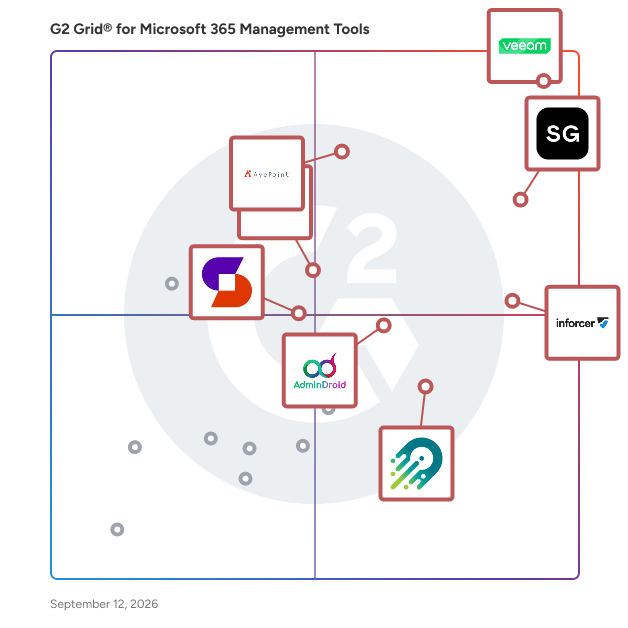
Learn More About Microsoft 365 Management Tools
Who Uses Office 365 Management Tools?
IT industry: IT teams of various enterprises can boost their productivity with tools like Word, Excel, Exchange, Teams, SharePoint, and more. Since Office 365 is cloud-based, it is accessible from location and on any device, as long as there’s a stable internet connection. However, solving visibility and reporting problems can be a recurring challenge. Office 365 management software provides an easy way to completely manage Microsoft 365 tools, tightening security and compliance, thereby assisting end users to get the most out of all Microsoft 365 applications.
Healthcare industry: Office 365 tools assist the healthcare sector by facilitating effective patient care and lowering operational costs by enhancing collaboration between healthcare staff and independent specialties, health teams, and healthcare professionals in hospitals. However, without implementing Office 365 management software, hospitals may lose millions of dollars in unwanted licensing fees, face security vulnerabilities, and fail to maximize their ROI in office 365 productivity tools.
Financial services industry: Using Office 365 tools helps the banking, finance, and insurance industry optimize their productivity. Implementing the software to manage them assists in addressing various issues relating to governance like visibility, license management, adoption, provisioning and de-provisioning, and more.
Retail industry: Office 365 has helped retail outlets to streamline processes, facilitate effective communication among the staff, deliver excellent customer experience, and secure their business. Deploying an Office 365 management tool provides feature-based governance to gain visibility and monitor Microsoft 365 components. It helps to identify who has access to what environment to tackle security issues arising due to different user accesses on mailboxes, OneDrive, and other tools.
How to Buy Office 365 Management Tools
Requirements Gathering (RFI/RFP) for Office 365 Management Software
If a company is just starting and looking to purchase its first Office 365 Management tool, or maybe an organization needs to update legacy office management solutions--wherever a business is in its buying process, g2.com can help select the best Office 365 management solution for the business.
Organizations all over the world have adopted Microsoft 365 as a communication and workflow solution for their staff. However, managing a large Microsoft 365 tenant isn’t a cakewalk. With so many O365 management service providers available, it has become more complex for businesses to select a provider that suits their organizational goals and strategy.
Taking a comprehensive overview of the business—which tools are being used to conduct business and identify pain points can help the team to produce an RFI, a one-page list with precise bullet points describing what is needed from the Office 365 management solution.
This checklist serves as a guide that helps in determining both necessary and nice-to-have features including budget features, number of users, integrations, security requirements, and more.
Compare Office 365 Management Software Products
Create a long list
An initial list of potential Office 365 management software providers is created by eliminating the options that are not in line with the organization’s business strategy. Vendor evaluation also depends on the Microsoft Office 365 tools implemented and the kind of management functionality that the organization is looking for. Vendor evaluation helps to prepare a consistent list of questions regarding specific needs and concerns to ask each vendor.
Create a short list
After a long list has been created, it’s realistic to look at each product in more detail to determine if it will meet the needs of the organization to narrow down the list. This should include evaluating additional and more sophisticated features of each product, beyond the ones identified as essential to determine if that additional functionality would make the management of the Microsoft 365 environment effortless.
Conduct demos
Demos provide an opportunity to buyers to see how an Office 365 management solution is effective in monitoring and resolving a host of issues within Office 365 tools. While pre-recorded demonstrations are available on the vendor’s website, it is useful to request the vendor for a live demonstration to see how the software will help in providing insights on the organization’s Office 365 stack and manage the tools.
Selection of Office 365 Management Software
Choose a selection team
When choosing an Office 365 management software, it is important to involve any relevant stakeholders who might be using the product to ensure that the software will meet everyone’s needs. This likely includes the management and the IT team who will be responsible for weighing in on the technical concerns with the products.
Negotiation
After narrowing in on a preferred product, it’s time to negotiate a pricing package. Buyers must consider the licensing fee and pricing model of the software, such as whether the seller charges a flat monthly or annual fee or, more commonly, charges a fee based on how many users would be utilizing the product. Also, the buyer can consider negotiating a discount in exchange for multi-year contracts.
Final decision
The parties involved in decision-making should consider whether the software is easy to implement, improves operational efficiency, and allows for better monitoring of the O365 environment. It is pragmatic to scrutinize the terms and conditions of the product support and licensing agreements or SLAs to achieve organizational goals within the defined budget. It is essential to capture and monitor deployment and operational risks and improvement opportunities early so that it is possible to modify plans when needed. Whenever a new technology is implemented, it is good to devise back-out plans or alternatives when assumptions and outcomes change. It must be ensured that the solution selected will be adaptable to the company’s future requirements.
Most Popular FAQs
How do you manage Microsoft Office 365?
Managing Microsoft 365 effectively goes beyond the native admin center; it typically requires dedicated tools that consolidate reporting, governance, security monitoring, and user lifecycle management in one place. Most IT teams rely on third-party Office 365 management software to gain visibility into licenses, permissions, SharePoint sites, and Teams workspaces, reducing the manual overhead of operating at scale. Key management tasks include license optimization, access reviews, delegated administration, compliance reporting, and automated user provisioning and deprovisioning.
What is the best Office 365 management software for automating onboarding and offboarding?
Automating user onboarding and offboarding in Microsoft 365 is one of the highest-impact use cases for management tools, ensuring new hires get the right access from day one and that departing users are cleanly removed without leaving behind security gaps. The following platforms are recognized for their provisioning and lifecycle automation capabilities:
-
CoreView: A comprehensive Microsoft 365 management platform with strong workflow automation for user provisioning, license assignment, and policy enforcement across the entire M365 stack.
-
Orchestry: A governance and workspace management tool built natively for Microsoft Teams and SharePoint that automates the creation, configuration, and archival of workspaces during employee transitions.
-
AdminDroid: A reporting and administration tool that surfaces onboarding and offboarding activity across Microsoft 365 services, giving IT teams the audit trails and automation triggers needed to enforce consistent processes.
Which company has the most complete Office 365 management platform for MSPs?
Managed service providers need Office 365 management tools that support multi-tenant administration, delegated access, and scalable reporting across client environments, capabilities that go well beyond what single-tenant solutions offer. The platforms below are most frequently cited by MSP-oriented IT professionals in this category:
-
AdminDroid: A cloud-based reporting and management suite for Microsoft 365 that supports multi-tenant environments and delivers more than 1,800 pre-built reports, making it a practical choice for MSPs managing multiple client tenants from a single pane.
-
ManageEngine M365 Manager Plus: A unified Microsoft 365 management and reporting tool that consolidates administration across Exchange Online, Azure AD, SharePoint, OneDrive, and Teams, giving MSPs a single dashboard to oversee multiple services across client environments.
-
CoreView: An enterprise-grade Microsoft 365 management platform built for complex, distributed environments, offering virtual tenants and delegated administration models that align well with MSP operational structures.
Are free Microsoft 365 management tools effective?
Free Microsoft 365 management tools can cover basic reporting and monitoring needs, but they typically come with limitations around data retention, the depth of analytics, automation features, and support responsiveness. For organizations with straightforward requirements, such as small teams needing simple license audits or basic activity logs, free tiers can serve well as a starting point. However, as environments grow and compliance demands increase, most teams find that the gaps in free tools, particularly around governance automation, security alerting, and delegation, outweigh the cost savings.
Small Business FAQs
What is the most affordable Office 365 Management tool for SMBs?
Small and mid-sized businesses looking for Office 365 Management tools suited to SMBs need solutions that balance cost with functionality, without requiring dedicated IT staff or enterprise-level budgets. The following tools are frequently used by SMBs and offer accessible pricing alongside meaningful feature depth:
-
AdminDroid: A cloud-hosted Microsoft 365 reporting and administration platform known for its generous free tier and affordable paid plans, making it a common starting point for small IT teams needing visibility without high overhead.
-
Orchestry: A Microsoft Teams and SharePoint governance tool with SMB-friendly packaging that helps small organizations enforce workspace standards and avoid sprawl without complex setup.
-
Teams Manager for Microsoft Teams: A focused, lightweight tool for managing Microsoft Teams environments, offering SMBs an affordable way to control team creation, membership, and lifecycle without broader platform complexity.
What is the best Office 365 Management tool for startups?
Startups need Office 365 Management tools built for fast-growing organizations that can scale quickly without requiring significant IT resources to set up or maintain. The following platforms are well-suited for startup environments based on ease of use, quick time to value, and SMB adoption:
-
Orchestry: Purpose-built for Microsoft 365, Orchestry helps startups establish Teams and SharePoint governance from the ground up so collaboration environments don't become chaotic as headcount grows.
-
AdminDroid: Delivers broad Microsoft 365 visibility through pre-built dashboards and reports that require minimal configuration, giving lean startup IT teams immediate operational insight.
-
AvePoint Confidence Platform: A data management and governance platform that helps growing companies protect Microsoft 365 data, manage permissions, and meet compliance requirements as they scale into regulated industries.
Which Office 365 Management tool is the most user-friendly for non-technical teams?
Ease of use is consistently one of the top factors cited by small business reviewers when evaluating Office 365 management tools, particularly for organizations where IT responsibilities fall to office managers or operations staff without deep technical backgrounds. The following tools earn high marks for intuitive interfaces and low learning curves among SMB users:
-
Orchestry: Reviewers frequently highlight its clean, modern interface and guided workspace request flows, making it accessible to business users who aren't Microsoft 365 specialists.
-
Teams Manager for Microsoft Teams: Designed specifically for Teams administration, this tool simplifies governance tasks into straightforward workflows that don't require familiarity with the broader Microsoft admin center.
-
Veeam Data Cloud for Microsoft 365: While primarily a backup solution, its user-friendly dashboard and straightforward restore workflows make it a go-to for SMBs needing reliable Microsoft 365 data protection without operational complexity.
What is the most recommended Office 365 Management tool for SMBs with compliance needs?
For SMBs operating in regulated industries: healthcare, financial services, or nonprofits, Office 365 Management tools with compliance capabilities are increasingly essential for managing audit trails, data access controls, and policy enforcement without a large compliance team. These tools are most frequently recommended among small business reviewers with compliance-related use cases:
-
Office Protect: A Microsoft 365 security and compliance tool designed for SMBs that monitors configurations, detects policy deviations, and provides real-time alerts to help small teams stay compliant without requiring a dedicated security analyst.
-
AvePoint Confidence Platform: Combines data governance, backup, and compliance tools in a single platform, making it well-suited for SMBs that need to address multiple regulatory requirements with one investment.
-
AdminDroid: Offers deep audit log reporting and compliance-focused dashboards that help small IT teams stay on top of user activity, permission changes, and policy adherence across Microsoft 365 services.
Enterprise FAQs
What is the best-rated Office 365 Management tool for tech enterprises?
Technology companies managing large Microsoft 365 environments require platforms that can handle complex permission structures, integrate with developer workflows, and support high-volume reporting without performance degradation. Among enterprise Office 365 Management solutions, the following are the highest-rated by reviewers in the IT and software industries:
-
ShareGate: A Microsoft 365 migration and governance platform that consistently earns top ratings from enterprise tech teams for its migration accuracy, SharePoint management depth, and strong support quality.
-
AvePoint Confidence Platform: An enterprise-grade data governance and protection platform with broad Microsoft 365 coverage, earning high marks from tech organizations for its compliance automation and lifecycle management capabilities.
-
sapio365: A Microsoft 365 data and analytics platform built for IT professionals who need deep, cross-service visibility into user activity, permissions, and configuration, particularly valued by enterprise tech teams for its analytical depth and flexibility.
-
CoreView: Rated well by technology enterprises for its virtual tenant architecture and granular delegation capabilities, enabling large IT organizations to distribute management responsibilities without compromising security posture.
What is the most reliable Office 365 Management tool for enterprises?
Reliability in an enterprise Microsoft 365 management tool means consistent uptime, accurate data, dependable alerting, and support teams that respond when something goes wrong. Enterprise reviewers in this category point to the following platforms as their most dependable long-term solutions:
-
Veeam Data Cloud for Microsoft 365: A cloud-native backup and recovery platform for Microsoft 365 with a strong enterprise track record for data protection reliability, particularly for Exchange Online, SharePoint, and Teams data.
-
AvePoint Confidence Platform: Enterprises cite AvePoint for its consistent performance across large tenants, particularly for backup, governance, and migration workloads where data integrity is non-negotiable.
-
ShareGate: Enterprise IT teams frequently reference ShareGate's migration and reporting consistency as a key reason they return to it for successive migration projects across large, complex SharePoint environments.
What is the best-reviewed Office 365 Management tool for enterprise app integration?
Enterprises running Microsoft 365 alongside a broader technology stack, ServiceNow, Salesforce, HR systems, and identity providers need management tools that connect with those systems rather than operating in isolation. The following tools earn the strongest reviews for integration depth among enterprise users:
-
CoreView: Reviewers highlight CoreView's integration capabilities with HR and ITSM platforms as a key differentiator, enabling automated provisioning and policy enforcement that stays synchronized with enterprise systems of record.
-
Automation Anywhere Agentic Process Automation: An AI-powered automation platform that connects Microsoft 365 workflows with enterprise applications, enabling sophisticated cross-system automations that go beyond native M365 capabilities.
-
AvePoint Confidence Platform: Supports integrations across cloud storage, identity management, and compliance platforms, making it a strong choice for enterprises that need Microsoft 365 governance to extend across a hybrid cloud environment.
What is the most complete Office 365 Management solution for large enterprise security teams?
Security teams at large enterprises need more than usage reports; they need tools that surface access risks, detect anomalous behavior, enforce least-privilege policies, and generate audit-ready documentation. Among enterprise-focused Office 365 Management tools, the following are most frequently referenced by enterprise security and compliance professionals:
-
CoreView: Provides security teams with deep visibility into Microsoft 365 configurations, delegated policy enforcement, and role-based access controls that support zero-trust governance models at scale.
-
sapio365: Gives enterprise security teams granular, real-time visibility into Microsoft 365 permissions, group memberships, and user activity across services, enabling faster identification of access risks and policy gaps without complex scripting.
-
ShareGate: Offers enterprise security teams granular permission reporting and governance controls for SharePoint and Teams, helping organizations identify and remediate overprivileged access before it becomes a liability.
What is the best enterprise Office 365 Management platform for organizations managing large-scale Microsoft Teams deployments?
As Microsoft Teams becomes the operational backbone of enterprise communication and collaboration, IT teams need management tools specifically designed to govern Teams at scale, controlling workspace sprawl, managing guest access, enforcing naming conventions, and maintaining lifecycle policies. The following platforms are most recognized by enterprise reviewers for their Teams management depth:
-
Orchestry: Purpose-built for Microsoft 365 governance with a particular focus on Teams and SharePoint, Orchestry is frequently cited by enterprises for its workspace provisioning templates, governance automation, and end-user self-service capabilities.
-
CoreView: Offers enterprise Teams management as part of a broader Microsoft 365 platform, enabling security policies, delegation, and Teams-specific reporting at a scale that native tools can't match.
-
Teams Manager for Microsoft Teams: A purpose-built Teams administration tool that gives enterprise IT teams and business owners direct control over Teams governance without requiring access to the full Microsoft admin center.
Last updated on April 27, 2026