Best E-Signature APIs Software

How Many E-Signature APIs Software Products Does G2 Track?

Total Products under this Category: 39

Category Stats (Oct 2026)

  • Average Rating: 4.52/5 (↓0.01 vs Sep 2026) The average rating of products in this category, based on all submitted ratings
  • Top Trending Product: Docusign (+0.16%) - Among all products in this category, Docusign recorded the largest rating increase compared to last month

Last updated: October 05, 2026

How Does G2 Rank E-Signature APIs Software Products?

Why You Can Trust G2's Software Rankings:

  • 30 Analysts and Data Experts
  • 10,600+ Authentic Reviews
  • 39+ Products
  • Unbiased Rankings

G2's software rankings are built on verified user reviews, rigorous moderation, and a consistent research methodology maintained by a team of analysts and data experts. Each product is measured using the same transparent criteria, with no paid placement or vendor influence. While reviews reflect real user experiences, which can be subjective, they offer valuable insight into how software performs in the hands of professionals. Together, these inputs power the G2 Score, a standardized way to compare tools within every category.

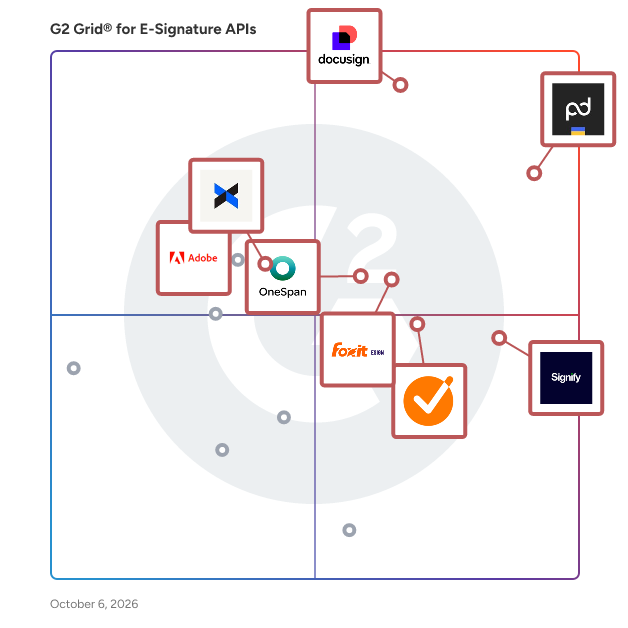
G2 Grid® for E-Signature APIs Software

G2 Grid® for E-Signature APIs Software plotting products by satisfaction and market presence

Highlighted products: PandaDoc API, Docusign, Signify, Foxit eSign, GetAccept, OneSpan Sign, Adobe Acrobat Sign API, and DropBox Sign API.

Underlying data: [Grid® JSON](https://www.g2.com/categories/e-signature-apis/grids.json?focus%5B%5D=pandadoc-api&focus%5B%5D=docusign&focus%5B%5D=signify-signify&focus%5B%5D=foxit-esign&focus%5B%5D=getaccept&focus%5B%5D=onespan-sign&focus%5B%5D=adobe-acrobat-sign-api&focus%5B%5D=dropbox-sign-api)

PandaDoc API

Create, manage, and eSign documents — directly on your platform. Easily integrate PandaDoc eSignature and document generation capabilities to optimize your workflow. For more information, including pricing and product features, visit us at www.pandadoc.com/api

Average Rating: 4.6/5.0

Total Reviews: 128

How Do G2 Users Rate PandaDoc API?

  • Ease of Use: 9.2/10 (Category avg: 8.8/10)
  • Quality of Support: 8.9/10 (Category avg: 9.0/10)
  • Has the product been a good partner in doing business?: 9.2/10 (Category avg: 9.0/10)
  • Ease of Setup: 8.9/10 (Category avg: 8.8/10)

Who Is the Company Behind PandaDoc API?

  • Seller: PandaDoc
  • Company Website:
  • Year Founded: 2011
  • HQ Location: San Francisco, CA
  • Twitter: @pandadoc
    18,428 Twitter followers
  • LinkedIn® Page: www.linkedin.com
    883 employees on LinkedIn®

Who Uses This Product?

  • Who Uses This: Account Executive
  • Top Industries: Computer Software, Hospital & Health Care
  • Company Size: 47% Small, 35% Medium

What Do G2 Reviewers Say About PandaDoc API?

AI-generated summary from verified user reviews

Pros
  • Users praise the ease of use of PandaDoc API, finding it simple to navigate and highly effective.
  • Users value the organizational integration of PandaDoc API, enhancing agility and synchronizing effortlessly with internal systems.
  • Users value the eSignature functionality of PandaDoc API, appreciating its simplicity and convenience in transactions.
  • Users value the seamless integrations of PandaDoc API, enhancing workflows and improving team collaboration across platforms.
  • Users value the simplicity and user-friendliness of PandaDoc API, enhancing their e-signature experience significantly.
Cons
  • Users express a desire for missing features, noting limitations in text editing and conditional flexibility.
  • Users struggle with email delivery issues as PandaDoc sometimes ends up in spam, complicating communication.
  • Users feel the lack of automation limits functionality, particularly with webhook distribution and conditional field management.
  • Users find template issues in PandaDoc API frustrating, with limited functionality and a confusing user interface.
  • Users find the complexity of field mapping challenging, particularly for quicker document creation and sending processes.

What Are Recent G2 Reviews of PandaDoc API?

Docusign

Docusign helps organizations connect and automate how they prepare, sign, act on and manage agreements. As part of the Docusign's Intelligent Agreement Mangement (IAM), Docusign offers eSignature, the world's #1 way to sign electronically on practically any device, from almost anywhere, at any time. Today, over a million customers and more than a billion users in over 180 countries use the Docusign Intelligent Agreement Management (IAM) to accelerate the process of doing business and simplify people's lives. Docusign helps your business: * Send, sign and track agreements quickly and easily * Boost customer satisfaction by providing a superior signing experience * Standardize the agreement process * Save time by reducing manual work * Increase accuracy of agreements * Integrate with your existing business systems But don’t just take our word for it. Check out these customer stories now to see why Docusign is the leading eSignature provider: https://www.docusign.com/customer-stories Why companies everywhere choose Docusign: * Trusted by over a million customers and more than a billion users * 80% of agreements completed in 24 hours (44% in < 15 minutes) *Saves an average of $36 per document compared to traditional paper processes * 24/7 customer support * 350+ integrations and APIs *Docusign eSignature has the most 5-star reviews of any electronic signature product on Apple App Store, Google Play Store and Salesforce AppExchange * Docusign eSignatures are secure, lawful and court-admissible

Average Rating: 4.5/5.0

Total Reviews: 2,626

How Do G2 Users Rate Docusign?

  • Ease of Use: 9.0/10 (Category avg: 8.8/10)
  • Quality of Support: 8.3/10 (Category avg: 9.0/10)
  • Has the product been a good partner in doing business?: 8.4/10 (Category avg: 9.0/10)
  • Ease of Setup: 8.5/10 (Category avg: 8.8/10)

Who Is the Company Behind Docusign?

  • Seller: Docusign
  • Company Website:
  • Year Founded: 2003
  • HQ Location: San Francisco, CA
  • Twitter: @Docusign
    143,953 Twitter followers
  • LinkedIn® Page: www.linkedin.com
    8,566 employees on LinkedIn®

Who Uses This Product?

  • Who Uses This: Account Executive, Owner
  • Top Industries: Computer Software, Real Estate
  • Company Size: 40% Small, 38% Medium

What Do G2 Reviewers Say About Docusign?

AI-generated summary from verified user reviews

Pros
  • Users find DocuSign incredibly user-friendly, streamlining document signing and enhancing convenience for all parties involved.
  • Users value the easy electronic signing of DocuSign, enhancing productivity and streamlining document processes efficiently.
  • Users find signatures easy to configure and appreciate the simple interface for signing documents.
  • Users value the seamless and reliable document signing experience provided by DocuSign, enhancing productivity and efficiency.
  • Users value the time-saving efficiency of Docusign, allowing for quick document signing without software hassles.
Cons
  • Users find the pricing of DocuSign to be prohibitively high, creating challenges for small and mid-sized businesses.
  • Users are frustrated by rigid pricing and poor customer service, especially regarding cancellation and autorenew policies.
  • Users highlight limited customization options in DocuSign, making document management and integrations frustrating for smaller businesses.
  • Users are frustrated with missing features in DocuSign, complicating contract management and customer support experience.
  • Users highlight poor customer support from Docusign, citing unhelpfulness and lack of responsiveness in resolving issues.

What Are Recent G2 Reviews of Docusign?

What Are G2 Users Discussing About Docusign?

Signify

Signify is a digital contracting platform that helps teams manage, automate, and track documents in one place. From sending and signing to organizing and archiving, it supports the full document workflow. Signify combines e-signatures, workflow automation, a team workspace, and a searchable archive. Set signing order and recipient roles, assign documents to folders with team-based permissions, and use structured templates to keep processes consistent across the company. You can see exactly what’s signed, pending, or in progress - and who’s involved. Permissions are clear, templates are shared with built-in rules, and folder access is controlled by team roles. Over 4.5 million documents have been sent through Signify, with 80% finalized in under 24 hours. Signify is built to support both the people who manage documents and those who sign them - making the entire process simple and efficient.

Average Rating: 4.9/5.0

Total Reviews: 119

How Do G2 Users Rate Signify?

  • Ease of Use: 9.9/10 (Category avg: 8.8/10)
  • Quality of Support: 9.9/10 (Category avg: 9.0/10)
  • Has the product been a good partner in doing business?: 10.0/10 (Category avg: 9.0/10)
  • Ease of Setup: 9.9/10 (Category avg: 8.8/10)

Who Is the Company Behind Signify?

  • Seller: Signify
  • Company Website:
  • Year Founded: 2021
  • HQ Location: Tbilisi, GE
  • LinkedIn® Page: www.linkedin.com
    36 employees on LinkedIn®

Who Uses This Product?

  • Who Uses This: Lawyer
  • Top Industries: Computer Software, Banking
  • Company Size: 41% Medium, 33% Small

What Do G2 Reviewers Say About Signify?

AI-generated summary from verified user reviews

Pros
  • Users appreciate the ease of use of Signify, highlighting its convenience and time-saving capabilities.
  • Users find Signify to be a time-saving tool, enhancing workflow and simplifying document management processes.
  • Users appreciate the time-saving benefits of Signify, enjoying its convenience and positive impact on nature.
  • Users enjoy the convenience of Signify, appreciating its time-saving features and effective collaboration capabilities.
  • Users highlight the efficiency of digital signatures, making signing documents easy and streamlining the approval process.
Cons
  • Users find the document visibility lacking for recipients and struggle with the commenting process before rejecting documents.
  • Users experience slow loading times, with delays in opening documents and navigating the interface affecting usability.
  • Users experience slow performance, as operations like document opening and file deletion can lag significantly at times.
  • Users find difficult editing of documents frustrating, wishing for easier in-upload modifications rather than re-uploading.
  • Users face legal uncertainty and system limitations with Signify, complicating the signing process and acceptance of documents.

What Are Recent G2 Reviews of Signify?

AI can help you find the answers. G2 helps you trust them.

Connect G2 to Claude or ChatGPT for answers grounded in G2's trusted reviews, comparisons, and pricing from real user insights.

How it works

Foxit eSign

Over 650 million users use Foxit, and it has sold to over 425,000 customers, ranging from SMBs to global enterprises, located in more than 200 countries worldwide. Foxit eSign allows you to grow your business based on your needs, not everyone else’s. Break away from cookie-cutter eSignature solutions that put you in a plan with features you don’t need. Foxit empowers organizations of all sizes and individuals to get documents signed and move on with their day. Our flexible solution comes in two plans. Simple eSigning and payment collection tools are yours with the Foxit eSign Essentials plan. Or empower teams with template sharing, custom branding, and user management tools with Foxit eSign for Business. Need more compliance, access to integrations, or advanced workflow management? You can get all that and more by adding whichever modules you need to your Foxit eSign Business plan anytime. Work is hard enough. Let’s keep eSigning simple. Just a few of the helpful features available with Foxit eSign software include: • Reusable templates to save time • Bulk signing and sending • Audit trails and Certificates of Completion • Attach photos, driver's license, etc. directly to documents • In-person signing • Generate in-email document links for easy access and signing • Online form/embedding code available to integrate eSignatures directly into websites • Use eSign Genie REST APIs to integrate with your website or application • Easily integrate with Google Drive, Dropbox, and more • Excel reporting • Email bounce notifications • Signing in 11 different languages Most eSignature tools stop at the signature. Foxit Document Management System (DMS) and Foxit eSign work as one, signing, storing, organizing, and governing every document in a single connected workflow.

Average Rating: 4.6/5.0

Total Reviews: 1,439

How Do G2 Users Rate Foxit eSign?

  • Ease of Use: 9.1/10 (Category avg: 8.8/10)
  • Quality of Support: 9.0/10 (Category avg: 9.0/10)
  • Has the product been a good partner in doing business?: 9.3/10 (Category avg: 9.0/10)
  • Ease of Setup: 9.2/10 (Category avg: 8.8/10)

Who Is the Company Behind Foxit eSign?

  • Seller: Foxit
  • Company Website:
  • Year Founded: 2001
  • HQ Location: Fremont, CA
  • Twitter: @foxitsoftware
    6,226 Twitter followers
  • LinkedIn® Page: www.linkedin.com
    590 employees on LinkedIn®

Who Uses This Product?

  • Who Uses This: Owner, CEO
  • Top Industries: Higher Education, Information Technology and Services
  • Company Size: 68% Small, 22% Medium

What Do G2 Reviewers Say About Foxit eSign?

AI-generated summary from verified user reviews

Pros
  • Users value the ease of use of Foxit eSign, seamlessly integrating into their existing PDF workflows for efficiency.
  • Users value the eSign functionality of Foxit eSign for its ease and efficiency in obtaining signatures.
  • Users commend the quick and easy document signing process of Foxit eSign, enhancing their overall experience.
  • Users appreciate the easy setup of Foxit eSign, finding it quick and efficient for their teams.
  • Users love the quick and easy document signing process of Foxit eSign, enhancing productivity and efficiency.
Cons
  • Users note the limited features of Foxit eSign, hindering customization and deeper integration with internal systems.
  • Users find limited customization options in Foxit eSign restrict their ability to personalize document layouts effectively.
  • Users struggle with signature issues, finding the process confusing and needing external help to navigate features.
  • Users experience e-signature issues with Foxit eSign, finding features difficult to navigate and lacking flexibility.
  • Users find it challenging due to missing features like easy template sending and complex document personalization.

What Are Recent G2 Reviews of Foxit eSign?

What Are G2 Users Discussing About Foxit eSign?

GetAccept

GetAccept is the #1 AI Digital Sales Room, built to help revenue teams run every deal like their best sales rep. It replaces scattered emails and static attachments with an AI-native workspace, bringing content, proposals, e-signing, and buyer communication together so sellers, buyers, and every stakeholder stay aligned on the latest documents, timelines, and next steps across the full sales cycle. GetAccept's AI analyses your meetings, calls, emails, CRM data, internal content, and publicly available data, and is trained to take action, building and updating personalized Digital Sales Rooms in minutes and keeping every rep on track with your sales process and methodology. Real-time tracking shows exactly how buyers engage with each deal, and native CRM integrations keep everything synced in the tools reps already use. GetAccept solves the problem of deals stalling between meetings in scattered email threads, static attachments, and manual admin. By giving sellers and buyers a single, trackable space to collaborate from first touch to signature, it helps revenue teams of every size to work smarter, close faster, and win more. Why revenue teams choose GetAccept  ↳ AI-powered enablement: auto-generate and surface the right content for each deal, stage, and stakeholder, grounded in your meetings, CRM, and internal knowledge.  ↳ AI-built sales rooms: spin up a personalized, interactive Digital Sales Room in minutes that keeps conversations, materials, and actions aligned.  ↳ Deal intelligence: turn buyer engagement signals into clear visibility and AI-guided next steps.  ↳ Proposals and e-signing built in: create, send, track, and close documents without leaving the room.  ↳ Connected to your stack: #1-rated native integrations with Salesforce, HubSpot, and Slack, plus 100+ more, keep activity synced everywhere automatically. Trusted by 5,000+ revenue teams, including Dealfront, ScaleWise, Samsung, and Chargebee. "This is a way for you to control the narrative, to make sure your reps are sticking to the process and helping your customers experience value instead of just product pitching." Remi Aaagaard Mørken, SVP of Sales, SalesScreen (100% increase in win rate) "Since I started using GetAccept, my sales process and communication with my prospects are way more project- and solution-oriented. They know where to find the content they need, and I can focus on providing solutions." Carolina Bräuninger, Senior Strategic Account Executive, Dealfront (67% decrease in sales cycle time) "If you haven't got something like GetAccept from a contracts perspective, but equally from a Deal Room perspective, then you're behind." Gavin Summer, Co-Founder, ScaleWise (51% increase in proposal-to-close rate) (edited)

Average Rating: 4.6/5.0

Total Reviews: 1,253

How Do G2 Users Rate GetAccept?

  • Ease of Use: 8.9/10 (Category avg: 8.8/10)
  • Quality of Support: 9.3/10 (Category avg: 9.0/10)
  • Has the product been a good partner in doing business?: 9.3/10 (Category avg: 9.0/10)
  • Ease of Setup: 8.7/10 (Category avg: 8.8/10)

Who Is the Company Behind GetAccept?

  • Seller: GetAccept Inc.
  • Company Website:
  • Year Founded: 2015
  • HQ Location: Palo Alto, CA
  • Twitter: @getaccept
    1,433 Twitter followers
  • LinkedIn® Page: www.linkedin.com
    154 employees on LinkedIn®

Who Uses This Product?

  • Who Uses This: Sales Manager, Account Manager
  • Top Industries: Computer Software, Information Technology and Services
  • Company Size: 50% Small, 43% Medium

What Do G2 Reviewers Say About GetAccept?

AI-generated summary from verified user reviews

Pros
  • Users commend the ease of use in GetAccept, ensuring a smooth experience and minimal complaints from users.
  • Users appreciate the responsive customer support of GetAccept, enhancing their overall experience with the platform.
  • Users find GetAccept intuitive and easy to use, enhancing document workflows and client engagement effectively.
  • Users value the exceptional customer service of GetAccept, enhancing their overall experience and satisfaction with the platform.
  • Users find GetAccept a huge time-saver, thanks to its all-in-one accessibility and efficient automation features.
Cons
  • Users note the missing dark mode, which affects comfort and visual experience while using GetAccept.
  • Users face limited customization, leading to frustration and complexity when managing minor variations in contracts.
  • Users find difficult editing due to clunky blocks and limitations on signing order and quote modifications.
  • Users find the limited features of GetAccept to create unnecessary complexity and hinder customization options.
  • Users often face poor integration issues with GetAccept, leading to time-consuming troubleshooting and error message frustrations.

What Are Recent G2 Reviews of GetAccept?

OneSpan Sign

OneSpan Sign is a modern, secure, and enterprise-grade eSignature solution designed to help organizations streamline document signing workflows and enhance customer experiences. This innovative platform addresses the growing need for efficient and reliable electronic signature processes, particularly in industries where compliance and security are paramount. By leveraging advanced technology, OneSpan Sign empowers businesses to manage their document signing needs effectively while reducing turnaround times and improving overall operational efficiency. Targeted primarily at enterprises and organizations that require robust eSignature capabilities, OneSpan Sign caters to a wide range of industries, including finance, insurance, government, public sector, healthcare, technology, and business services. These sectors often face stringent regulatory requirements and high stakes when it comes to document security and integrity. OneSpan Sign provides a comprehensive solution that not only meets these demands but also offers a user-friendly interface that simplifies the signing process for both senders and signers. This ease of use is crucial in fostering positive customer interactions and ensuring that agreements are completed swiftly. One of the key features of OneSpan Sign is its high level of customization, which allows organizations to fully tailor the signing experience to align with their brand identity. This includes the ability to incorporate logos, colors, and personalized messaging, ensuring that the eSignature process feels cohesive and familiar to users. Unlike other eSignature solutions that prioritize their own branding, OneSpan Sign’s white-labeling capabilities keep your brand front and center, leading to higher adoption and a seamless user experience. Security is a cornerstone of OneSpan Sign, which offers advanced identity proofing, authentication methods, and encryption protocols to protect sensitive information. This focus on security not only helps organizations safeguard their data but also builds trust with customers who are increasingly concerned about privacy and fraud. Furthermore, OneSpan Sign is recognized for its exceptional customer support, ranked #1 in customer satisfaction according to G2 Quality of Support. This commitment to responsive and expert assistance ensures seamless implementation and ongoing success for users. Another significant advantage of OneSpan Sign is its cost-effectiveness compared to traditional eSignature solutions. Many organizations struggle with the high costs associated with scaling eSignature capabilities, but OneSpan Sign offers one of the most flexible and competitive pricing models on the market. This makes it an attractive option for businesses looking to enhance their document signing processes without incurring prohibitive expenses, ultimately leading to improved operational efficiency and customer satisfaction.

Average Rating: 4.7/5.0

Total Reviews: 742

How Do G2 Users Rate OneSpan Sign?

  • Ease of Use: 9.3/10 (Category avg: 8.8/10)
  • Quality of Support: 9.3/10 (Category avg: 9.0/10)
  • Has the product been a good partner in doing business?: 9.4/10 (Category avg: 9.0/10)
  • Ease of Setup: 8.8/10 (Category avg: 8.8/10)

Who Is the Company Behind OneSpan Sign?

  • Seller: OneSpan
  • Company Website:
  • Year Founded: 1991
  • HQ Location: Boston, MA
  • Twitter: @OneSpan
    3,374 Twitter followers
  • LinkedIn® Page: www.linkedin.com
    669 employees on LinkedIn®

Who Uses This Product?

  • Who Uses This: CEO, President
  • Top Industries: Information Technology and Services, Financial Services
  • Company Size: 34% Small, 27% Medium

What Do G2 Reviewers Say About OneSpan Sign?

AI-generated summary from verified user reviews

Pros
  • Users find OneSpan Sign offers a friendly and intuitive platform, making digital transformation simple and efficient.
  • Users find OneSpan Sign intuitive and easy to use, simplifying workflows and enhancing user experience significantly.
  • Users appreciate the simplicity and reliability of OneSpan Sign, streamlining the e-signature process across devices.
  • Users value the seamless organizational integration of OneSpan Sign, enhancing e-signature workflows across various platforms effortlessly.
  • Users love the simplicity of OneSpan Sign, making e-signatures easy and reliable for everyone.
Cons
  • Users find OneSpan Sign confusing, citing complex usability and difficulties with simple tasks and documentation clarity.
  • Users find the interface usability complex, making simple tasks difficult and causing frustration with error clarity.
  • Users find missing features in OneSpan Sign, citing limited customization and inflexible reporting options as drawbacks.
  • Users find OneSpan Sign not user-friendly, noting that simple tasks are complex and documentation is difficult to navigate.
  • Users find usability complex, making simple tasks challenging and error details unclear, complicating the experience.

What Are Recent G2 Reviews of OneSpan Sign?

What Are G2 Users Discussing About OneSpan Sign?

Adobe Acrobat Sign API

Acrobat Sign’s APIs allow you to create apps and embed the Acrobat Sign UI and functionality into your applications. Those apps can receive status updates in real-time as well as retrieve and store copies of the signed agreements

Average Rating: 4.5/5.0

Total Reviews: 12

How Do G2 Users Rate Adobe Acrobat Sign API?

  • Ease of Use: 8.3/10 (Category avg: 8.8/10)
  • Quality of Support: 8.5/10 (Category avg: 9.0/10)
  • Has the product been a good partner in doing business?: 8.9/10 (Category avg: 9.0/10)
  • Ease of Setup: 9.1/10 (Category avg: 8.8/10)

Who Is the Company Behind Adobe Acrobat Sign API?

  • Seller: Adobe
  • Year Founded: 1982
  • HQ Location: San Jose, CA
  • Twitter: @Adobe
    956,842 Twitter followers
  • LinkedIn® Page: www.linkedin.com
    42,975 employees on LinkedIn®
  • Ownership: NASDAQ:ADBE

Who Uses This Product?

  • Company Size: 58% Small, 25% Large

What Are Recent G2 Reviews of Adobe Acrobat Sign API?

DropBox Sign API

Dropbox Sign API helps your business seamlessly embed legally binding eSignatures into your applications, platforms, or workflows. It delivers a secure, native signing experience that keeps users in your product, with customizable branding that looks and feels like a natural extension of your business. Built for developers, Dropbox Sign API helps you launch integrations faster with intuitive APIs, SDKs, interactive documentation, and AI-powered support. Go from implementation to production in hours, not weeks. Why teams choose Dropbox Sign API - Scalable workflows, from simple agreements to high-volume use cases - Customizable branding, including your logos, colors, and fonts - Enterprise-grade security and compliance support - Fast setup, in as few as three hours Developer-friendly integration SDKs, code samples, and interactive documentation give you everything you need to build embedded eSignature workflows more easily. AI-powered support Get instant, context-aware answers without leaving your documents. Click Ask AI and ask questions like, “How do I create a signature request in C#?” for clear, actionable guidance in seconds. Manage your API in one place Quickly get your integration up and running, monitor API usage from a single dashboard, and troubleshoot with built-in insights that surface issues before they affect your users. Collect eSignatures securely Enterprise-grade security and compliance without the enterprise complexity. Help protect your documents with data encryption, audit trails, and tamper-proofing. ISO 27001 and SOC 2 Type II certified and supports compliance with HIPAA, GDPR, and eIDAS.

Average Rating: 4.2/5.0

Total Reviews: 47

How Do G2 Users Rate DropBox Sign API?

  • Ease of Use: 8.5/10 (Category avg: 8.8/10)
  • Quality of Support: 8.2/10 (Category avg: 9.0/10)
  • Has the product been a good partner in doing business?: 8.2/10 (Category avg: 9.0/10)
  • Ease of Setup: 8.3/10 (Category avg: 8.8/10)

Who Is the Company Behind DropBox Sign API?

  • Seller: Dropbox
  • Company Website:
  • Year Founded: 2007
  • HQ Location: San Francisco, California
  • Twitter: @Dropbox
    3,279,477 Twitter followers
  • LinkedIn® Page: www.linkedin.com
    4,183 employees on LinkedIn®

Who Uses This Product?

  • Top Industries: Information Technology and Services, Computer Software
  • Company Size: 47% Medium, 40% Small

What Do G2 Reviewers Say About DropBox Sign API?

AI-generated summary from verified user reviews

Pros
  • Users find DropBox Sign API to be easy to use and integrate, enhancing the signing experience significantly.
  • Users appreciate the ease of creating and reusing templates with DropBox Sign API for quick contract modifications.
  • Users praise the responsive customer support of DropBox Sign API, enhancing their integration and overall experience.
  • Users love the user-friendly digital signatures of DropBox Sign API, making paperwork signing effortless and efficient.
  • Users find the integration and setup process easy, appreciating responsive support and helpful solutions from the team.
Cons
  • Users find multiple signer document bundles cumbersome to configure, leading to frustrations with the signing process.
  • Users face editing difficulties with DropBox Sign API, often unable to modify quotes without starting over.
  • Users find the loss of viewing items directly on mobile as a complexity that hinders functionality and workflow efficiency.
  • Users frequently struggle with modifying sent quotes, often needing to redo entire submissions due to incomplete retrieval.
  • Users find formatting issues with templates challenging, but modifications can help improve document fit.

What Are Recent G2 Reviews of DropBox Sign API?

Xodo Sign

Xodo Sign, formerly known as eversign, is a secure and affordable electronic signature solution built to support both small businesses and enterprise users in managing contracts, agreements, and approvals online. Powered by Apryse technology, it offers powerful features such as legally binding and compliant e-signatures, advanced PDF editing, real-time audit trails, team collaboration tools, reusable templates, and smooth integration with popular business apps. Try Xodo Sign today to close deals faster, cut operational costs, and streamline document editing and e-signing, all within one secure platform. For teams and developers, Xodo Sign also provides a flexible eSignature API to embed digital signing directly into existing systems and workflows.

Average Rating: 4.8/5.0

Total Reviews: 2,739

How Do G2 Users Rate Xodo Sign?

  • Ease of Use: 9.4/10 (Category avg: 8.8/10)
  • Quality of Support: 9.3/10 (Category avg: 9.0/10)
  • Has the product been a good partner in doing business?: 9.6/10 (Category avg: 9.0/10)
  • Ease of Setup: 9.4/10 (Category avg: 8.8/10)

Who Is the Company Behind Xodo Sign?

  • Seller: Apryse
  • Company Website:
  • Year Founded: 1998
  • HQ Location: Denver, CO
  • Twitter: @aprysesolutions
    381 Twitter followers
  • LinkedIn® Page: www.linkedin.com
    569 employees on LinkedIn®

Who Uses This Product?

  • Who Uses This: Owner, CEO
  • Top Industries: Marketing and Advertising, Real Estate
  • Company Size: 90% Small, 6% Medium

What Do G2 Reviewers Say About Xodo Sign?

AI-generated summary from verified user reviews

Pros
  • Users praise the ease of use of Xodo Sign, enabling quick document preparation and a great user interface.
  • Users appreciate the time-saving setup of Xodo Sign, enabling quick contract management and efficient document processing.
  • Users appreciate the user-friendly interface of Xodo Sign, making document management quick and efficient.
  • Users appreciate the user-friendly interface of Xodo Sign, making document preparation quick and easy.
  • Users find Xodo Sign extremely easy to use, appreciating its intuitive features for signing and sending documents.
Cons
  • Users find the signature customization limited in Xodo Sign, leading to a less straightforward signing process.
  • Users note the limited customization options for signatures in Xodo Sign, affecting the overall user experience.
  • Users find the tool expensive, especially with fewer documents available in the free version than initially promised.
  • Users find the initial user interface confusing, which complicates their experience with Xodo Sign.
  • Users are disappointed by the limited features of the free version, finding only three document limits restrictive.

What Are Recent G2 Reviews of Xodo Sign?

What Are G2 Users Discussing About Xodo Sign?

Zoho Sign API

Digital signature API plans and pricing. Simple, transparent, and pay as you use.

Average Rating: 4.5/5.0

Total Reviews: 23

How Do G2 Users Rate Zoho Sign API?

  • Ease of Use: 9.3/10 (Category avg: 8.8/10)
  • Quality of Support: 8.7/10 (Category avg: 9.0/10)
  • Has the product been a good partner in doing business?: 9.6/10 (Category avg: 9.0/10)
  • Ease of Setup: 9.3/10 (Category avg: 8.8/10)

Who Is the Company Behind Zoho Sign API?

  • Seller: Zoho
  • Year Founded: 1996
  • HQ Location: Austin, TX
  • Twitter: @Zoho
    137,880 Twitter followers
  • LinkedIn® Page: www.linkedin.com
    30,913 employees on LinkedIn®
  • Phone: +1 (888) 900-9646

Who Uses This Product?

  • Top Industries: Computer Software, Information Technology and Services
  • Company Size: 39% Small, 39% Medium

What Are Recent G2 Reviews of Zoho Sign API?

SignNow API

The airSlate SignNow API is a robust electronic signature solution designed to seamlessly integrate eSignature capabilities into websites, applications, and platforms. This API enables businesses to create, send, and manage documents requiring signatures directly within their existing systems, enhancing workflow efficiency and user experience. Key Features and Functionality: - Embedded Signing: Facilitates in-app signing experiences, allowing users to sign documents without leaving the application. - Embedded Editor: Provides tools for users to add custom fields and prepare documents for signature within the app. - Embedded Sending: Enables users to send signature requests directly from the application, with options to add fields before dispatching. - Multiple Brands: Offers customization of the signing experience, including invite emails, welcome pop-ups, and embedded signing sessions, to align with multiple brand identities. - Webhooks: Delivers real-time event notifications for document statuses, supporting up to 75 unique document and user events. - Security and Compliance: Adheres to stringent legal and security standards, including eIDAS, ESIGN, QES, HIPAA, FDA Part 11, SOC 2, and AES encryption, ensuring the protection of sensitive information. Primary Value and User Solutions: The airSlate SignNow API addresses the need for efficient, secure, and legally compliant electronic signature processes within business applications. By integrating this API, organizations can streamline document workflows, reduce turnaround times, and enhance the overall user experience. The API's ease of integration, comprehensive documentation, and support for multiple programming languages make it accessible for developers, while its scalability and competitive pricing cater to businesses of various sizes. Ultimately, the airSlate SignNow API empowers businesses to digitize and automate their document signing processes, leading to increased productivity and operational efficiency.

Average Rating: 4.4/5.0

Total Reviews: 13

How Do G2 Users Rate SignNow API?

  • Ease of Use: 8.1/10 (Category avg: 8.8/10)
  • Quality of Support: 9.2/10 (Category avg: 9.0/10)
  • Has the product been a good partner in doing business?: 8.9/10 (Category avg: 9.0/10)
  • Ease of Setup: 8.9/10 (Category avg: 8.8/10)

Who Is the Company Behind SignNow API?

  • Seller: airSlate
  • Year Founded: 2006
  • HQ Location: Brookline, Massachusetts
  • Twitter: @airSlate
    1,234 Twitter followers
  • LinkedIn® Page: www.linkedin.com
    816 employees on LinkedIn®

Who Uses This Product?

  • Company Size: 62% Small, 23% Medium

What Do G2 Reviewers Say About SignNow API?

AI-generated summary from verified user reviews

Pros
  • Users value the clear and user-friendly webhook setup of SignNow API, finding it superior to Docusign.
  • Users find the setup ease for webhooks very clear and user-friendly, especially compared to Docusign.
Cons
  • Users experience e-signature issues with SignNow, often requiring more calls and finding inaccuracies in the documentation.
  • Users find the poor interface design of SignNow to complicate workflows and lead to documentation inconsistencies.

What Are Recent G2 Reviews of SignNow API?

Yousign API

Yousign API is a comprehensive solution designed to seamlessly integrate electronic signature capabilities into your business applications, enhancing document workflows and ensuring compliance with European regulations. It offers a secure and efficient method for automating contract processes, enabling businesses to manage document approvals and agreements directly within their existing systems. Key Features and Functionality: - Electronic Signature Integration: Embed legally binding eSignatures into your applications, compliant with GDPR and eIDAS standards, to facilitate secure document signing. - Electronic Seals: Automatically apply electronic seals to documents, ensuring their authenticity and integrity. - Identity and Document Verification: Simplify customer onboarding and reduce fraud risk with integrated identity and document verification solutions. - Developer-Friendly API: Benefit from a RESTful API with clear documentation, code examples, and a free 40-day sandbox environment for testing and integration. - Customization and Automation: Customize the signing experience with your brand elements and automate workflows using features like webhooks, smart anchors, and custom notifications. Primary Value and Solutions Provided: Yousign API addresses the need for efficient, secure, and compliant digital transaction management. By integrating Yousign's electronic signature capabilities, businesses can: - Accelerate Contract Processes: Reduce the time required to prepare, send, and sign documents, leading to faster deal closures. - Enhance User Experience: Offer a seamless and intuitive signing process within your own applications, improving customer satisfaction. - Ensure Legal Compliance: Meet European regulatory requirements with eIDAS-compliant signatures and verifications, providing peace of mind for both businesses and clients. - Streamline Operations: Automate document workflows and integrate with existing tools (CRM, ERP, etc.), reducing manual tasks and operational costs. By leveraging Yousign API, organizations can transform their document management processes, ensuring security, compliance, and efficiency in their digital transactions.

Average Rating: 4.1/5.0

Total Reviews: 19

How Do G2 Users Rate Yousign API?

  • Ease of Use: 8.2/10 (Category avg: 8.8/10)
  • Quality of Support: 8.6/10 (Category avg: 9.0/10)
  • Has the product been a good partner in doing business?: 9.2/10 (Category avg: 9.0/10)
  • Ease of Setup: 8.8/10 (Category avg: 8.8/10)

Who Is the Company Behind Yousign API?

  • Seller: Yousign
  • Year Founded: 2013
  • HQ Location: Caen, Normandie
  • LinkedIn® Page: www.linkedin.com
    253 employees on LinkedIn®

Who Uses This Product?

  • Top Industries: Information Technology and Services
  • Company Size: 55% Small, 35% Medium

What Do G2 Reviewers Say About Yousign API?

AI-generated summary from verified user reviews

Pros
  • Users appreciate the easy and user-friendly interface of Yousign API, making integration and navigation effortless.
  • Users enjoy the ease of use of Yousign API, highlighting its simplicity and effective integration capabilities.
  • Users appreciate the robust contract management capabilities of Yousign API, making integration and onboarding seamless.
  • Users praise the easy signing process of Yousign API, enhancing document workflows and client onboarding significantly.
  • Users value the seamless eSignature functionality of Yousign API, enabling effortless document signing and integration.
Cons
  • Users find the Yousign API not user-friendly, particularly for non-expert freelancers needing assistance with integration.
  • Users highlight pricing issues with Yousign API, facing unexpected billing and unclear pricing policies for small projects.
  • Users experience slow performance with the Yousign API, especially when handling larger files, impacting efficiency.
  • Users find editing difficult for beginners, which may hinder smoother integration experiences with the Yousign API.
  • Users find the subscription expensive, making it less economical for small enterprises looking for cost-effective solutions.

What Are Recent G2 Reviews of Yousign API?

Anvil

Anvil helps turn clunky paperwork processes into embeddable document workflows with document APIs for product teams. We work closely with HRtech, Insurtech, FinTech, Healthcare, Real Estate, and startup companies where paperwork, user experience, and data accessibility are considered "high-priority".

Average Rating: 4.7/5.0

Total Reviews: 32

How Do G2 Users Rate Anvil?

  • Ease of Use: 9.0/10 (Category avg: 8.8/10)
  • Quality of Support: 9.4/10 (Category avg: 9.0/10)
  • Has the product been a good partner in doing business?: 8.8/10 (Category avg: 9.0/10)
  • Ease of Setup: 8.9/10 (Category avg: 8.8/10)

Who Is the Company Behind Anvil?

Who Uses This Product?

  • Company Size: 63% Small, 26% Medium

What Do G2 Reviewers Say About Anvil?

AI-generated summary from verified user reviews

Pros
  • Users find Anvil's ease of use exceptional, praising its effortless implementation and outstanding support experience.
  • Users commend Anvil for its outstanding customer support, noting swift onboarding and superb assistance throughout setup.
  • Users praise Anvil's efficiency in connecting databases and APIs, streamlining app development for non-developers.
  • Users appreciate the effortless software integration of Anvil, making app development fast and accessible for everyone.
  • Users highlight the incredible ease of use of Anvil, appreciating its intuitive setup and seamless integration features.
Cons
  • Users find the navigation confusing, often losing their place in long documents despite robust documentation.
  • Users find the template builder complex and tedious, making the experience less user-friendly and efficient.
  • Users face implementation difficulties with Anvil, particularly in integrating APIs and navigating costly custom workflow options.
  • Users find the missing translation and document versioning features hinder their experience, leading to inaccuracies and inefficiencies.
  • Users find the poor documentation lacking in clear examples and tutorials, complicating the learning experience.

What Are Recent G2 Reviews of Anvil?

Legalesign API

Legalesign API is UK-based eSignature software to send, sign and manage contracts online. Flexible architecture allows total control of PDFs, sent documents, workflows, groups and users. Built for scalability, our digital signature API is structured around groups/teams, simple to implement but with the flexibility to describe many organisational systems. Companies use Legalesign to gain significant productivity and financial benefits, increase their customers' satisfaction by removing the need for a printer and enabling them to sign from anywhere and, last but not least, relieve the burden of tiresome paperwork upon long suffering staff everywhere. Try Legalesign's RESTful API for 14-days with our free trial: https://access.legalesign.com/?q=signUp

Average Rating: 4.8/5.0

Total Reviews: 15

How Do G2 Users Rate Legalesign API?

  • Ease of Use: 9.2/10 (Category avg: 8.8/10)
  • Quality of Support: 10.0/10 (Category avg: 9.0/10)
  • Has the product been a good partner in doing business?: 9.7/10 (Category avg: 9.0/10)
  • Ease of Setup: 9.4/10 (Category avg: 8.8/10)

Who Is the Company Behind Legalesign API?

  • Seller: Legalesign
  • Year Founded: 2012
  • HQ Location: Cambridge, England
  • Twitter: @Legalesign
    512 Twitter followers
  • LinkedIn® Page: www.linkedin.com
    12 employees on LinkedIn®

Who Uses This Product?

  • Company Size: 93% Small, 7% Medium

What Are Recent G2 Reviews of Legalesign API?

Yousign

Yousign is the easy-to-use, legally binding eSignature, and contract automation solution that is helping more than 13 000 SMBs power their agreements. Our platform streamlines your approval workflows, secures your agreements, and enables you to offer a top-notch experience to your customers, partners, and teams. We deliver a seamless and personalized signing experience with compliance at its core. As a trusted third party, certification authority, and eIDAS-certified solution, we always ensure the legal validity of your signatures. Yousign enables your business to: Be productive - Approve, send, and sign all documents in just a few clicks from anywhere - Automate tracking and speed up signatures - Easily integrate with your existing solutions Be secure - Strengthen data security and traceability - Provide centralized legally binding signatures Be collaborative - Ensure immediate adoption and better collaboration - Streamline and standardize processes Be unique - Offer a high-quality signing experience to both users and end-users - Enhance the brand image and ensure consistency

Average Rating: 4.3/5.0

Total Reviews: 91

How Do G2 Users Rate Yousign?

  • Ease of Use: 9.1/10 (Category avg: 8.8/10)
  • Quality of Support: 9.0/10 (Category avg: 9.0/10)
  • Has the product been a good partner in doing business?: 9.3/10 (Category avg: 9.0/10)
  • Ease of Setup: 9.2/10 (Category avg: 8.8/10)

Who Is the Company Behind Yousign?

  • Seller: Yousign
  • Year Founded: 2013
  • HQ Location: Caen, Normandie
  • LinkedIn® Page: www.linkedin.com
    253 employees on LinkedIn®

Who Uses This Product?

  • Who Uses This: CEO
  • Top Industries: Real Estate, Financial Services
  • Company Size: 78% Small, 19% Medium

What Do G2 Reviewers Say About Yousign?

AI-generated summary from verified user reviews

Cons
  • Users report poor customer support, with unresponsive assistance and unresolved issues affecting their overall experience.
  • Users report unexpected fees in Yousign, facing misleading pricing and additional charges during the onboarding process.
  • Users find Yousign expensive and misleading, with unexpected costs and unsatisfactory support affecting their experience.
  • Users find the expensive subscriptions of Yousign misleading, leading to unexpected costs and poor support experiences.
  • Users report payment issues with Yousign, facing unauthorized charges and unresponsive support in cancellation processes.

What Are Recent G2 Reviews of Yousign?

What Are G2 Users Discussing About Yousign?

Adam Crivello
AC
Researched and written by Adam Crivello
Updated October 3, 2024