Best E-Signature APIs Software for Small Business

How Many E-Signature APIs Software Products Does G2 Track?

Total Products under this Category: 42

Category Stats (Nov 2026)

  • Average Rating: 4.54/5 (↑0.02 vs Oct 2026) The average rating of products in this category, based on all submitted ratings
  • Top Trending Product: DocSpring (+12.5%) - Among all products in this category, DocSpring recorded the largest rating increase compared to last month

Last updated: November 12, 2026

How Does G2 Rank E-Signature APIs Software Products?

Why You Can Trust G2's Software Rankings:

  • 30 Analysts and Data Experts
  • 11,300+ Authentic Reviews
  • 42+ Products
  • Unbiased Rankings

G2's software rankings are built on verified user reviews, rigorous moderation, and a consistent research methodology maintained by a team of analysts and data experts. Each product is measured using the same transparent criteria, with no paid placement or vendor influence. While reviews reflect real user experiences, which can be subjective, they offer valuable insight into how software performs in the hands of professionals. Together, these inputs power the G2 Score, a standardized way to compare tools within every category.

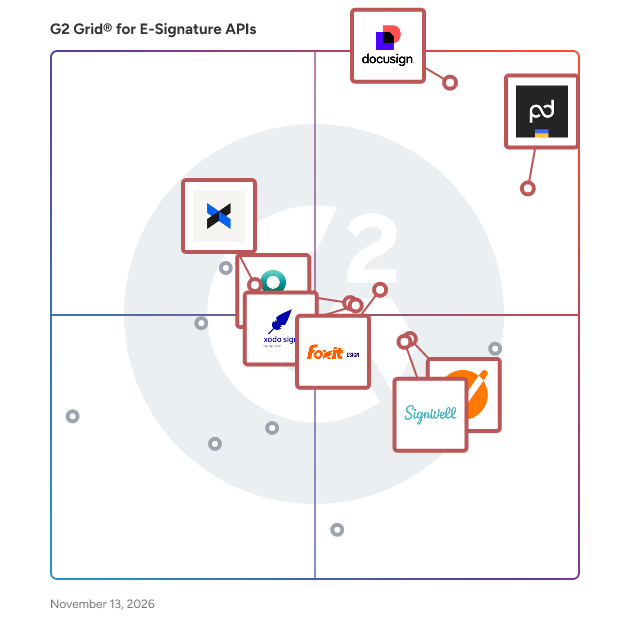
G2 Grid® for E-Signature APIs Software

G2 Grid® for E-Signature APIs Software plotting products by satisfaction and market presence

Highlighted products: Docusign, PandaDoc API, Xodo Sign, SignWell, Foxit eSign, DropBox Sign API, GetAccept, and OneSpan Sign.

Underlying data: [Grid® JSON](https://www.g2.com/categories/e-signature-apis/grids.json?focus%5B%5D=docusign&focus%5B%5D=pandadoc-api&focus%5B%5D=xodo-sign&focus%5B%5D=signwell&focus%5B%5D=foxit-esign&focus%5B%5D=dropbox-sign-api&focus%5B%5D=getaccept&focus%5B%5D=onespan-sign&segment=small-business)

Docusign

Docusign helps organizations connect and automate how they prepare, sign, act on and manage agreements. As part of the Docusign's Intelligent Agreement Mangement (IAM), Docusign offers eSignature, the world's #1 way to sign electronically on practically any device, from almost anywhere, at any time. Today, over a million customers and more than a billion users in over 180 countries use the Docusign Intelligent Agreement Management (IAM) to accelerate the process of doing business and simplify people's lives. Docusign helps your business: * Send, sign and track agreements quickly and easily * Boost customer satisfaction by providing a superior signing experience * Standardize the agreement process * Save time by reducing manual work * Increase accuracy of agreements * Integrate with your existing business systems But don’t just take our word for it. Check out these customer stories now to see why Docusign is the leading eSignature provider: https://www.docusign.com/customer-stories Why companies everywhere choose Docusign: * Trusted by over a million customers and more than a billion users * 80% of agreements completed in 24 hours (44% in < 15 minutes) *Saves an average of $36 per document compared to traditional paper processes * 24/7 customer support * 350+ integrations and APIs *Docusign eSignature has the most 5-star reviews of any electronic signature product on Apple App Store, Google Play Store and Salesforce AppExchange * Docusign eSignatures are secure, lawful and court-admissible

Average Rating: 4.5/5.0

Total Reviews: 2,692

How Do G2 Users Rate Docusign?

  • Ease of Use: 9.0/10 (Category avg: 8.9/10)
  • Quality of Support: 8.3/10 (Category avg: 9.0/10)
  • Has the product been a good partner in doing business?: 8.4/10 (Category avg: 9.0/10)
  • Ease of Setup: 8.6/10 (Category avg: 8.9/10)

Who Is the Company Behind Docusign?

  • Seller: Docusign
  • Company Website:
  • Year Founded: 2003
  • HQ Location: San Francisco, CA
  • LinkedIn® Page: www.linkedin.com
    8,566 employees on LinkedIn®
  • Ownership: NASDAQ: DOCU

Who Uses This Product?

  • Who Uses This: Account Executive, Owner
  • Top Industries: Computer Software, Real Estate
  • Company Size: 41% Small, 38% Medium

What Do G2 Reviewers Say About Docusign?

AI-generated summary from verified user reviews

Pros
  • Users find DocuSign to be extremely easy to use, making document handling straightforward for both staff and clients.
  • Users appreciate the fast and easy electronic signing of DocuSign, simplifying remote transactions effortlessly.
  • Users value the streamlined online document signing process of Docusign, enhancing efficiency and legality in transactions.
  • Users love the easy and intuitive document signing process of Docusign, enhancing efficiency and legal compliance.
  • Users value the time-saving features of DocuSign, making document signing fast and efficient without travel hassles.
Cons
  • Users find Docusign expensive, with unclear pricing and additional costs for advanced features and support.
  • Users find pricing issues with Docusign, as it can be confusing and expensive for smaller teams.
  • Users express concerns over poor customer support, highlighting slow response times and rigid refund policies.
  • Users note the limited customization of templates in Docusign, hindering usability and flexibility for different business needs.
  • Users find the lack of templates and export options in Docusign limiting, complicating long-term document management.

What Are Recent G2 Reviews of Docusign?

What Are G2 Users Discussing About Docusign?

PandaDoc API

Create, manage, and eSign documents — directly on your platform. Easily integrate PandaDoc eSignature and document generation capabilities to optimize your workflow. For more information, including pricing and product features, visit us at www.pandadoc.com/api

Average Rating: 4.6/5.0

Total Reviews: 129

How Do G2 Users Rate PandaDoc API?

  • Ease of Use: 9.2/10 (Category avg: 8.9/10)
  • Quality of Support: 8.9/10 (Category avg: 9.0/10)
  • Has the product been a good partner in doing business?: 9.2/10 (Category avg: 9.0/10)
  • Ease of Setup: 8.9/10 (Category avg: 8.9/10)

Who Is the Company Behind PandaDoc API?

  • Seller: PandaDoc
  • Company Website:
  • Year Founded: 2011
  • HQ Location: San Francisco, CA
  • LinkedIn® Page: www.linkedin.com
    883 employees on LinkedIn®

Who Uses This Product?

  • Who Uses This: Account Executive
  • Top Industries: Computer Software, Hospital & Health Care
  • Company Size: 47% Small, 35% Medium

What Do G2 Reviewers Say About PandaDoc API?

AI-generated summary from verified user reviews

Pros
  • Users highlight the ease of use of PandaDoc API, simplifying contract management and enhancing user experience.
  • Users value the organizational integration of PandaDoc API, enhancing agility and synchronization with internal systems seamlessly.
  • Users value the eSignature functionality of PandaDoc for simplifying contract signing and enhancing workflow efficiency.
  • Users appreciate the seamless integration of PandaDoc API with HubSpot, enhancing efficiency and simplifying proposal management.
  • Users find the simplicity and user-friendliness of PandaDoc API enhances their e-signature experience significantly.
Cons
  • Users find it limiting due to missing features like document scheduling and comprehensive editing capabilities.
  • Users find PandaDoc's inconsistent email delivery problematic, as important documents often end up in spam folders.
  • Users find the lack of automation limiting, wishing for better integration with automation software and webhooks.
  • Users struggle with template issues, finding the interface difficult and lacking adequate support for troubleshooting.
  • Users find the complexity of field mapping and workspace API key management cumbersome, complicating document creation and management.

What Are Recent G2 Reviews of PandaDoc API?

Xodo Sign

Xodo Sign, formerly known as eversign, is an electronic signature solution for businesses and teams that need to create, send, sign, and track documents online. It supports electronic signature workflows for contracts, agreements, approvals, and other business documents, combining e-signing and PDF editing capabilities within one platform. Xodo Sign also supports organizations with security and compliance requirements, including SOC 2 Type II and HIPAA. Its document tracking and audit trail capabilities provide visibility into signature activity and help teams maintain a record of the signing process. Key Xodo Sign capabilities include: - Electronic signatures and document workflows: Send documents for legally binding e-signatures, assign signing roles, track document status, and manage agreements online. - PDF editing: Edit PDF documents as part of the preparation and e-signature process, reducing the need to move between separate PDF editing and signing tools. - Audit trails and document tracking: Monitor document and signing activity through audit trails and status information. - Templates and team features: Create reusable document templates and support repeatable e-signature workflows across teams. - Integrations and eSignature API: Connect Xodo Sign with business applications or use the eSignature API to embed digital signing capabilities into existing applications and workflows. Xodo Sign is designed for both small businesses and enterprise users, with capabilities that cover document preparation, electronic signatures, tracking, and workflow integration. By bringing PDF editing and e-signing together, teams can manage more of the document lifecycle within a single platform.

Average Rating: 4.8/5.0

Total Reviews: 2,770

How Do G2 Users Rate Xodo Sign?

  • Ease of Use: 9.4/10 (Category avg: 8.9/10)
  • Quality of Support: 9.3/10 (Category avg: 9.0/10)
  • Has the product been a good partner in doing business?: 9.6/10 (Category avg: 9.0/10)
  • Ease of Setup: 9.4/10 (Category avg: 8.9/10)

Who Is the Company Behind Xodo Sign?

  • Seller: Apryse
  • Company Website:
  • Year Founded: 1998
  • HQ Location: Denver, CO
  • LinkedIn® Page: www.linkedin.com
    569 employees on LinkedIn®

Who Uses This Product?

  • Who Uses This: Owner, CEO
  • Top Industries: Marketing and Advertising, Real Estate
  • Company Size: 90% Small, 6% Medium

What Do G2 Reviewers Say About Xodo Sign?

AI-generated summary from verified user reviews

Pros
  • Users find Xodo Sign to be easy to use, streamlining online document signing and improving efficiency.
  • Users value the time-saving capabilities of Xodo Sign, allowing for quick and efficient electronic signatures on contracts.
  • Users find the user-friendly interface of Xodo Sign makes managing documents and signatures simple and intuitive.
  • Users appreciate the ease of use of Xodo Sign, highlighting its simplicity and efficiency for quick document signing.
  • Users love the ease of use and automation features of Xodo Sign, enhancing efficiency in document signing.
Cons
  • Users find signature expiration limitations challenging, requiring resubmission and raising concerns about Xodo Sign's recognition.
  • Users feel frustrated by the limited customization options in Xodo Sign, hindering flexibility for signatures and templates.
  • Users find Xodo Sign to be too expensive, which limits its accessibility for small businesses and individual needs.
  • Users find the user interface and name change confusing, impacting their overall experience with Xodo Sign.
  • Users are disappointed by the limited free version that restricts document signing to only three uploads per month.

What Are Recent G2 Reviews of Xodo Sign?

What Are G2 Users Discussing About Xodo Sign?

AI can help you find the answers. G2 helps you trust them.

Connect G2 to Claude or ChatGPT for answers grounded in G2's trusted reviews, comparisons, and pricing from real user insights.

How it works

SignWell

SignWell is a secure electronic signature and document workflow platform trusted by tens of thousands of businesses worldwide. We help teams sign documents online, automate approvals, and reduce paperwork with legally binding eSignatures, SOC 2 Type II compliance, and support for GDPR, HIPAA, and NOM-151 requirements. With an easy-to-use interface, a powerful eSignature API, and best-in-class customer support included on every plan, SignWell makes it simple to sign PDFs, manage agreements, and move business forward—without the enterprise price tag.

Average Rating: 4.8/5.0

Total Reviews: 488

How Do G2 Users Rate SignWell?

  • Ease of Use: 9.6/10 (Category avg: 8.9/10)
  • Quality of Support: 9.4/10 (Category avg: 9.0/10)
  • Has the product been a good partner in doing business?: 9.6/10 (Category avg: 9.0/10)
  • Ease of Setup: 9.6/10 (Category avg: 8.9/10)

Who Is the Company Behind SignWell?

  • Seller: SignWell
  • Year Founded: 2010
  • HQ Location: Portland, OR
  • LinkedIn® Page: www.linkedin.com
    15 employees on LinkedIn®

Who Uses This Product?

  • Who Uses This: CEO, Founder
  • Top Industries: Real Estate, Marketing and Advertising
  • Company Size: 89% Small, 4% Medium

What Do G2 Reviewers Say About SignWell?

AI-generated summary from verified user reviews

Pros
  • Users appreciate the ease of use of SignWell, enjoying a straightforward setup and various document options.
  • Users value the intuitive setup of SignWell, enabling quick and easy document signing for seamless client agreements.
  • Users appreciate the time-saving capabilities of SignWell, enabling quick document signing and efficient client agreements.
  • Users find the user-friendly interface of SignWell intuitive and efficient for managing documents and signatures.
  • Users appreciate the easy setup of SignWell, making document creation and sending quick and efficient.
Cons
  • Users struggle with signature issues that waste time, especially when changing signers resets progress on forms.
  • Users criticize SignWell for its expensive fees, expressing a desire for better monetization strategies.
  • Users note that email issues such as notifications going to junk folders can lead to missed messages.
  • Users note the limited customization options in SignWell, wishing for more flexibility in signatures and document creation.
  • Users feel the limited features of SignWell restrict their capabilities, particularly on the basic and free plans.

What Are Recent G2 Reviews of SignWell?

What Are G2 Users Discussing About SignWell?

Foxit eSign

Over 650 million users use Foxit, and it has sold to over 425,000 customers, ranging from SMBs to global enterprises, located in more than 200 countries worldwide. Foxit eSign allows you to grow your business based on your needs, not everyone else’s. Break away from cookie-cutter eSignature solutions that put you in a plan with features you don’t need. Foxit empowers organizations of all sizes and individuals to get documents signed and move on with their day. Our flexible solution comes in two plans. Simple eSigning and payment collection tools are yours with the Foxit eSign Essentials plan. Or empower teams with template sharing, custom branding, and user management tools with Foxit eSign for Business. Need more compliance, access to integrations, or advanced workflow management? You can get all that and more by adding whichever modules you need to your Foxit eSign Business plan anytime. Work is hard enough. Let’s keep eSigning simple. Just a few of the helpful features available with Foxit eSign software include: • Reusable templates to save time • Bulk signing and sending • Audit trails and Certificates of Completion • Attach photos, driver's license, etc. directly to documents • In-person signing • Generate in-email document links for easy access and signing • Online form/embedding code available to integrate eSignatures directly into websites • Use eSign Genie REST APIs to integrate with your website or application • Easily integrate with Google Drive, Dropbox, and more • Excel reporting • Email bounce notifications • Signing in 11 different languages Most eSignature tools stop at the signature. Foxit Document Management System (DMS) and Foxit eSign work as one, signing, storing, organizing, and governing every document in a single connected workflow.

Average Rating: 4.6/5.0

Total Reviews: 1,446

How Do G2 Users Rate Foxit eSign?

  • Ease of Use: 9.1/10 (Category avg: 8.9/10)
  • Quality of Support: 9.0/10 (Category avg: 9.0/10)
  • Has the product been a good partner in doing business?: 9.3/10 (Category avg: 9.0/10)
  • Ease of Setup: 9.2/10 (Category avg: 8.9/10)

Who Is the Company Behind Foxit eSign?

  • Seller: Foxit
  • Company Website:
  • Year Founded: 2001
  • HQ Location: Fremont, CA
  • LinkedIn® Page: www.linkedin.com
    590 employees on LinkedIn®

Who Uses This Product?

  • Who Uses This: Owner, CEO
  • Top Industries: Higher Education, Information Technology and Services
  • Company Size: 68% Small, 22% Medium

What Do G2 Reviewers Say About Foxit eSign?

AI-generated summary from verified user reviews

Pros
  • Users appreciate the ease of use of Foxit eSign, making it accessible for those less familiar with technology.
  • Users appreciate the simple and efficient eSignature functionality of Foxit eSign for fast and hassle-free document signing.
  • Users value the ease of use of Foxit eSign, greatly simplifying the signature process and streamlining workflows.
  • Users love the easy signing process of Foxit eSign, which simplifies document handling without unnecessary complexity.
  • Users find the easy setup of Foxit eSign convenient, allowing quick document preparation without complications.
Cons
  • Users find the limited customization options frustrating, particularly for workflows and template creation in Foxit eSign.
  • Users experience limited features in Foxit eSign, particularly in customization, reporting, and overall interface polish.
  • Users find the signature process complicated, with a need for accounts and a confusing interface impacting usability.
  • Users report poor customer support, experiencing long delays and unresponsive service when assistance is needed.
  • Users often face e-signature issues with Foxit eSign, finding the interface and account requirements frustrating and challenging.

What Are Recent G2 Reviews of Foxit eSign?

What Are G2 Users Discussing About Foxit eSign?

DropBox Sign API

Dropbox Sign API helps your business seamlessly embed legally binding eSignatures into your applications, platforms, or workflows. It delivers a secure, native signing experience that keeps users in your product, with customizable branding that looks and feels like a natural extension of your business. Built for developers, Dropbox Sign API helps you launch integrations faster with intuitive APIs, SDKs, interactive documentation, and AI-powered support. Go from implementation to production in hours, not weeks. Why teams choose Dropbox Sign API - Scalable workflows, from simple agreements to high-volume use cases - Customizable branding, including your logos, colors, and fonts - Enterprise-grade security and compliance support - Fast setup, in as few as three hours Developer-friendly integration SDKs, code samples, and interactive documentation give you everything you need to build embedded eSignature workflows more easily. AI-powered support Get instant, context-aware answers without leaving your documents. Click Ask AI and ask questions like, “How do I create a signature request in C#?” for clear, actionable guidance in seconds. Manage your API in one place Quickly get your integration up and running, monitor API usage from a single dashboard, and troubleshoot with built-in insights that surface issues before they affect your users. Collect eSignatures securely Enterprise-grade security and compliance without the enterprise complexity. Help protect your documents with data encryption, audit trails, and tamper-proofing. ISO 27001 and SOC 2 Type II certified and supports compliance with HIPAA, GDPR, and eIDAS.

Average Rating: 4.2/5.0

Total Reviews: 47

How Do G2 Users Rate DropBox Sign API?

  • Ease of Use: 8.5/10 (Category avg: 8.9/10)
  • Quality of Support: 8.2/10 (Category avg: 9.0/10)
  • Has the product been a good partner in doing business?: 8.2/10 (Category avg: 9.0/10)
  • Ease of Setup: 8.3/10 (Category avg: 8.9/10)

Who Is the Company Behind DropBox Sign API?

  • Seller: Dropbox
  • Company Website:
  • Year Founded: 2007
  • HQ Location: San Francisco, California
  • LinkedIn® Page: www.linkedin.com
    4,183 employees on LinkedIn®
  • Ownership: NASDAQ: DBX

Who Uses This Product?

  • Top Industries: Information Technology and Services, Computer Software
  • Company Size: 47% Medium, 40% Small

What Do G2 Reviewers Say About DropBox Sign API?

AI-generated summary from verified user reviews

Pros
  • Users appreciate the ease of use of Dropbox Sign API, making document signing straightforward and efficient.
  • Users appreciate the ease of creating and personalizing templates with Dropbox Sign API for efficient contract management.
  • Users value the responsive customer support of Dropbox Sign API, enhancing their integration and overall experience.
  • Users praise the efficiency and user-friendliness of DropBox Sign API, simplifying the signature process significantly.
  • Users find the helpful support and integration of Dropbox Sign API enhances their overall experience considerably.
Cons
  • Users find multiple signer configuration cumbersome and face difficulties with reminders and customization in DropBox Sign API.
  • Users often face editing difficulties with DropBox Sign API, struggling to modify quotes and documents effectively.
  • Users find the loss of mobile access to Dropbox items complicates processes and restricts feature implementation.
  • Users struggle with document deletion issues, often needing to redo quotes due to incomplete modifications.
  • Users find formatting issues with templates challenging, though adjustments can usually help align everything properly.

What Are Recent G2 Reviews of DropBox Sign API?

GetAccept

GetAccept is the #1 AI Digital Sales Room, built to help revenue teams run every deal like their best sales rep. It replaces scattered emails and static attachments with an AI-native workspace, bringing content, proposals, e-signing, and buyer communication together so sellers, buyers, and every stakeholder stay aligned on the latest documents, timelines, and next steps across the full sales cycle. GetAccept's AI analyses your meetings, calls, emails, CRM data, internal content, and publicly available data, and is trained to take action, building and updating personalized Digital Sales Rooms in minutes and keeping every rep on track with your sales process and methodology. Real-time tracking shows exactly how buyers engage with each deal, and native CRM integrations keep everything synced in the tools reps already use. GetAccept solves the problem of deals stalling between meetings in scattered email threads, static attachments, and manual admin. By giving sellers and buyers a single, trackable space to collaborate from first touch to signature, it helps revenue teams of every size to work smarter, close faster, and win more. Why revenue teams choose GetAccept  ↳ AI-powered enablement: auto-generate and surface the right content for each deal, stage, and stakeholder, grounded in your meetings, CRM, and internal knowledge.  ↳ AI-built sales rooms: spin up a personalized, interactive Digital Sales Room in minutes that keeps conversations, materials, and actions aligned.  ↳ Deal intelligence: turn buyer engagement signals into clear visibility and AI-guided next steps.  ↳ Proposals and e-signing built in: create, send, track, and close documents without leaving the room.  ↳ Connected to your stack: #1-rated native integrations with Salesforce, HubSpot, and Slack, plus 100+ more, keep activity synced everywhere automatically. Trusted by 5,000+ revenue teams, including Dealfront, ScaleWise, Samsung, and Chargebee. "This is a way for you to control the narrative, to make sure your reps are sticking to the process and helping your customers experience value instead of just product pitching." Remi Aaagaard Mørken, SVP of Sales, SalesScreen (100% increase in win rate) "Since I started using GetAccept, my sales process and communication with my prospects are way more project- and solution-oriented. They know where to find the content they need, and I can focus on providing solutions." Carolina Bräuninger, Senior Strategic Account Executive, Dealfront (67% decrease in sales cycle time) "If you haven't got something like GetAccept from a contracts perspective, but equally from a Deal Room perspective, then you're behind." Gavin Summer, Co-Founder, ScaleWise (51% increase in proposal-to-close rate) (edited)

Average Rating: 4.6/5.0

Total Reviews: 1,301

How Do G2 Users Rate GetAccept?

  • Ease of Use: 8.9/10 (Category avg: 8.9/10)
  • Quality of Support: 9.2/10 (Category avg: 9.0/10)
  • Has the product been a good partner in doing business?: 9.3/10 (Category avg: 9.0/10)
  • Ease of Setup: 8.7/10 (Category avg: 8.9/10)

Who Is the Company Behind GetAccept?

  • Seller: GetAccept Inc.
  • Company Website:
  • Year Founded: 2015
  • HQ Location: Palo Alto, CA
  • LinkedIn® Page: www.linkedin.com
    154 employees on LinkedIn®

Who Uses This Product?

  • Who Uses This: Account Manager, Sales Manager
  • Top Industries: Computer Software, Information Technology and Services
  • Company Size: 50% Small, 43% Medium

What Do G2 Reviewers Say About GetAccept?

AI-generated summary from verified user reviews

Pros
  • Users value the ease of use in GetAccept, enhancing workflow efficiency through intuitive features and integrations.
  • Users commend GetAccept's excellent customer support, enhancing their experience through AI and seamless integrations with other tools.
  • Users appreciate the flexibility and AI support of GetAccept, enhancing efficiency across various processes and integrations.
  • Users appreciate the intuitive design of GetAccept, simplifying workflows and enhancing user experience in document management.
  • Users value the time-saving features of GetAccept, enhancing efficiency through AI support and seamless integrations.
Cons
  • Users seek more flexibility and features in GetAccept, particularly for templates and e-signature capabilities.
  • Users express frustration over limited customization options in GetAccept, wishing for more flexibility in templates.
  • Users report limited features in GetAccept templates, hindering flexibility and contract management capabilities.
  • Users find the difficult editing process to be clunky and limited, hindering flexibility in creating templates.
  • Users report poor integration issues with GetAccept, leading to confusion and time-consuming troubleshooting efforts.

What Are Recent G2 Reviews of GetAccept?

OneSpan Sign

OneSpan Sign is the eSignature platform built for customer agreements. OneSpan Sign makes it easy to prepare, sign, verify, and manage agreements, reducing delays, abandonment, and manual work across the agreement process. Financial services, insurance, and other organizations use OneSpan Sign to solve common workflow problems, such as delays and abandonment caused by identity verification bottlenecks, complex agreement language, missing customer information, document errors, and rework. More than an eSignature solution, OneSpan Sign extends digital agreement capabilities across the broader workflow. By combining identity verification, signer attachment validation, secure signing, and connected workflows in one integrated workflow, organizations can keep agreements moving efficiently from start to finish. Why choose OneSpan Sign: More completions Fully white-labeled workflows, Smart Forms, and features like AI Summary and Q&A (coming soon) help customers complete agreements with greater confidence. Organizations using OneSpan Sign's white labeling capability have improved completion rates by up to 23%. Faster completions OneSpan Sign keeps agreements moving with SMS notifications, automated reminders, flexible routing, integrated identity verification, and mobile-friendly signing experiences. Businesses have reduced process times by up to 99% with OneSpan Sign. Fewer exceptions Built-in business rules, conditional logic, and NIGO Good Order Checks capabilities (coming soon) help identify missing, incorrect, expired, or potentially altered information before it creates issues later in the process. Financial institutions using OneSpan Sign have cut errors and irregularities by up to 80%. Higher adoption OneSpan Sign delivers intuitive experiences for signers and senders. Mobile-first signing, flexible authentication options, reusable templates, and low-code tools help drive adoption across customers and internal teams. Organizations using OneSpan Sign have achieved up to 98% user adoption.​ Identity assurance OneSpan Sign includes AI-powered identity verification and a wide range of authentication options to help organization confirm that a signer is who they say they are. From SMS authentication and FIDO passkeys to ID verification with biometric face matching and video liveness detection, select the right authentication method for each signer based on the assurance requirements of the transaction. Regulatory defensibility OneSpan Sign captures a tamper-evident audit trail of each agreement process. It includes signer actions, identity evidence, authentication events, and NIGO records. A single audit trail makes it easier to demonstrate who signed, what was signed, and how the agreement was completed. Robust security Backed by OneSpan's decades of experience as a cybersecurity company, OneSpan Sign provides a broad set of security controls. These include flexible authentication options, signer attachment validation capabilities, tamper-evident audit trails, white labeling as a layer of defense against phishing, and advanced identity verification to help defend against deepfakes, replay attacks, synthetic identities, and other types of identity fraud. Easy connectivity OneSpan Sign connects agreement workflows with other core systems through integrations, low-code tools, and APIs. Teams can initiate signing from existing applications and automatically connect completed agreements to the next business process.

Average Rating: 4.7/5.0

Total Reviews: 749

How Do G2 Users Rate OneSpan Sign?

  • Ease of Use: 9.3/10 (Category avg: 8.9/10)
  • Quality of Support: 9.3/10 (Category avg: 9.0/10)
  • Has the product been a good partner in doing business?: 9.4/10 (Category avg: 9.0/10)
  • Ease of Setup: 8.8/10 (Category avg: 8.9/10)

Who Is the Company Behind OneSpan Sign?

  • Seller: OneSpan
  • Company Website:
  • Year Founded: 1991
  • HQ Location: Boston, MA
  • LinkedIn® Page: www.linkedin.com
    669 employees on LinkedIn®
  • Ownership: OSPN

Who Uses This Product?

  • Who Uses This: CEO, President
  • Top Industries: Information Technology and Services, Financial Services
  • Company Size: 34% Small, 27% Medium

What Do G2 Reviewers Say About OneSpan Sign?

AI-generated summary from verified user reviews

Pros
  • Users find the ease of use in OneSpan Sign makes the e-signature process simple and accessible for everyone.
  • Users appreciate the intuitive design of OneSpan Sign, making e-signatures easy and accessible for everyone.
  • Users appreciate the simplicity and reliability of OneSpan Sign for managing e-signatures across various devices.
  • Users value the seamless organizational integration of OneSpan Sign, enhancing efficiency through automated e-signature processes.
  • Users appreciate the reliability of OneSpan Sign, simplifying the e-signature process for all users across devices.
Cons
  • Users find the usability confusing, as simple tasks and error clarity present significant challenges in OneSpan Sign.
  • Users find the interface usability complex, with an outdated feel and difficulties in performing simple tasks.
  • Users feel that OneSpan Sign has limited customization options, making it difficult to tailor branding and reports effectively.
  • Users find the missing features in OneSpan Sign, such as limited customization and flexibility, frustrating for form development.
  • Users find OneSpan Sign not user-friendly, with complex usability making simple tasks and error details difficult to navigate.

What Are Recent G2 Reviews of OneSpan Sign?

What Are G2 Users Discussing About OneSpan Sign?

YouTrust API

YouTrust API is a comprehensive solution designed to seamlessly integrate electronic signature capabilities into your business applications, enhancing document workflows and ensuring compliance with European regulations. It offers a secure and efficient method for automating contract processes, enabling businesses to manage document approvals and agreements directly within their existing systems. Key Features and Functionality: - Electronic Signature Integration: Embed legally binding eSignatures into your applications, compliant with GDPR and eIDAS standards, to facilitate secure document signing. - Electronic Seals: Automatically apply electronic seals to documents, ensuring their authenticity and integrity. - Identity and Document Verification: Simplify customer onboarding and reduce fraud risk with integrated identity and document verification solutions. - Developer-Friendly API: Benefit from a RESTful API with clear documentation, code examples, and a free 40-day sandbox environment for testing and integration. - Customization and Automation: Customize the signing experience with your brand elements and automate workflows using features like webhooks, smart anchors, and custom notifications. Primary Value and Solutions Provided: Yousign API addresses the need for efficient, secure, and compliant digital transaction management. By integrating Yousign's electronic signature capabilities, businesses can: - Accelerate Contract Processes: Reduce the time required to prepare, send, and sign documents, leading to faster deal closures. - Enhance User Experience: Offer a seamless and intuitive signing process within your own applications, improving customer satisfaction. - Ensure Legal Compliance: Meet European regulatory requirements with eIDAS-compliant signatures and verifications, providing peace of mind for both businesses and clients. - Streamline Operations: Automate document workflows and integrate with existing tools (CRM, ERP, etc.), reducing manual tasks and operational costs. By leveraging Yousign API, organizations can transform their document management processes, ensuring security, compliance, and efficiency in their digital transactions.

Average Rating: 4.1/5.0

Total Reviews: 19

How Do G2 Users Rate YouTrust API?

  • Ease of Use: 8.2/10 (Category avg: 8.9/10)
  • Quality of Support: 8.6/10 (Category avg: 9.0/10)
  • Has the product been a good partner in doing business?: 9.2/10 (Category avg: 9.0/10)
  • Ease of Setup: 8.8/10 (Category avg: 8.9/10)

Who Is the Company Behind YouTrust API?

  • Seller: YouTrust
  • Year Founded: 2013
  • HQ Location: Caen, Normandie
  • LinkedIn® Page: www.linkedin.com
    253 employees on LinkedIn®

Who Uses This Product?

  • Top Industries: Information Technology and Services
  • Company Size: 55% Small, 35% Medium

What Do G2 Reviewers Say About YouTrust API?

AI-generated summary from verified user reviews

Pros
  • Users appreciate the easy integration and user-friendly interface of YouTrust API, enhancing their overall experience with eSignatures.
  • Users appreciate the ease of use of YouTrust API, making integration and testing a seamless experience.
  • Users appreciate the seamless contract management of YouTrust API, enhancing integration with business tools for effortless workflows.
  • Users find Easy Signing effortless for online document signing, with smooth integration into various business tools.
  • Users love the efficient eSignature functionality of YouTrust API, streamlining remote document signing effortlessly.
Cons
  • Users find the interface not user-friendly, especially for freelancers or those less tech-savvy, complicating integration.
  • Users find pricing issues with YouTrust API, citing unclear policies and unexpected charges as problematic.
  • Users experience slow performance with the YouTrust API, particularly when processing large files and during response times.
  • Users find the editing difficulty challenging for beginners, making initial integration somewhat complex.
  • Users find the expensive subscriptions of YouTrust API to be a barrier for small enterprises seeking economical options.

What Are Recent G2 Reviews of YouTrust API?

Legalesign API

Legalesign API is UK-based eSignature software to send, sign and manage contracts online. Flexible architecture allows total control of PDFs, sent documents, workflows, groups and users. Built for scalability, our digital signature API is structured around groups/teams, simple to implement but with the flexibility to describe many organisational systems. Companies use Legalesign to gain significant productivity and financial benefits, increase their customers' satisfaction by removing the need for a printer and enabling them to sign from anywhere and, last but not least, relieve the burden of tiresome paperwork upon long suffering staff everywhere. Try Legalesign's RESTful API for 14-days with our free trial: https://access.legalesign.com/?q=signUp

Average Rating: 4.8/5.0

Total Reviews: 15

How Do G2 Users Rate Legalesign API?

  • Ease of Use: 9.2/10 (Category avg: 8.9/10)
  • Quality of Support: 10.0/10 (Category avg: 9.0/10)
  • Has the product been a good partner in doing business?: 9.7/10 (Category avg: 9.0/10)
  • Ease of Setup: 9.4/10 (Category avg: 8.9/10)

Who Is the Company Behind Legalesign API?

  • Seller: Legalesign
  • Year Founded: 2012
  • HQ Location: Cambridge, England
  • LinkedIn® Page: www.linkedin.com
    12 employees on LinkedIn®

Who Uses This Product?

  • Company Size: 93% Small, 7% Medium

What Are Recent G2 Reviews of Legalesign API?

YouTrust

Yousign is the easy-to-use, legally binding eSignature, and contract automation solution that is helping more than 13 000 SMBs power their agreements. Our platform streamlines your approval workflows, secures your agreements, and enables you to offer a top-notch experience to your customers, partners, and teams. We deliver a seamless and personalized signing experience with compliance at its core. As a trusted third party, certification authority, and eIDAS-certified solution, we always ensure the legal validity of your signatures. Yousign enables your business to: Be productive - Approve, send, and sign all documents in just a few clicks from anywhere - Automate tracking and speed up signatures - Easily integrate with your existing solutions Be secure - Strengthen data security and traceability - Provide centralized legally binding signatures Be collaborative - Ensure immediate adoption and better collaboration - Streamline and standardize processes Be unique - Offer a high-quality signing experience to both users and end-users - Enhance the brand image and ensure consistency

Average Rating: 4.3/5.0

Total Reviews: 91

How Do G2 Users Rate YouTrust?

  • Ease of Use: 9.1/10 (Category avg: 8.9/10)
  • Quality of Support: 9.0/10 (Category avg: 9.0/10)
  • Has the product been a good partner in doing business?: 9.3/10 (Category avg: 9.0/10)
  • Ease of Setup: 9.2/10 (Category avg: 8.9/10)

Who Is the Company Behind YouTrust?

  • Seller: YouTrust
  • Year Founded: 2013
  • HQ Location: Caen, Normandie
  • LinkedIn® Page: www.linkedin.com
    253 employees on LinkedIn®

Who Uses This Product?

  • Who Uses This: CEO
  • Top Industries: Real Estate, Financial Services
  • Company Size: 78% Small, 19% Medium

What Do G2 Reviewers Say About YouTrust?

AI-generated summary from verified user reviews

Cons
  • Users report poor customer support, often receiving no response or resolution to their issues and concerns.
  • Users report unexpected fees from YouTrust, highlighting misleading pricing and unauthorized charges that frustrate their experience.
  • Users feel that YouTrust is expensive, with misleading pricing and poor support negatively affecting their experience.
  • Users are frustrated by the expensive subscriptions of YouTrust and the misleading pricing communications leading to unexpected costs.
  • Users report significant payment issues, including unauthorized charges and lack of support for cancellation requests.

What Are Recent G2 Reviews of YouTrust?

What Are G2 Users Discussing About YouTrust?

Adam Crivello
AC
Researched and written by Adam Crivello
Updated