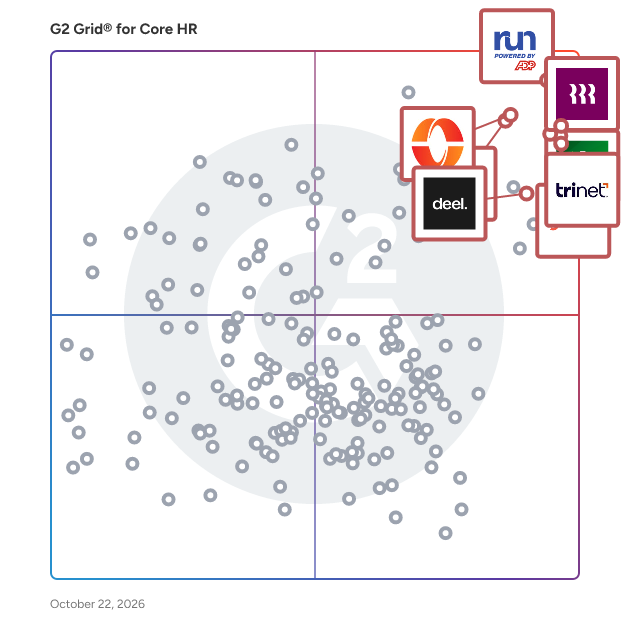
# Best Core HR Software - Page 3

*By [Jeffrey Lin](https://research.g2.com/insights/author/jeffrey-lin)*

The best core HR software in 2026 is RUN Powered by ADP, rated 4.6 out of 5 on G2 based on 5,600+ verified reviews. For small businesses, Gusto bundles payroll and benefits in one place. The highest user-rated platform among the top five is Rippling at 4.8 stars.

1. RUN Powered by ADP — 4.6/5 (5,600+ reviews): Best for small-business payroll and HR
2. Rippling — 4.8/5 (12,000+ reviews): Best for unified HR, IT, and payroll
3. BambooHR — 4.4/5 (5,500+ reviews): Best for centralized employee lifecycle and PTO
4. Gusto — 4.6/5 (10,000+ reviews): Best for SMB payroll and benefits
5. TriNet — 4.2/5 (1,600+ reviews): Best for PEO-managed payroll, benefits, and compliance

*Updated June 2026. Based on 2026 G2 verified review data across 758 products.*


Core HR software, also referred to as human capital management (HCM) software or HRIS/HRMS, serves as the central system of record for employee information, enabling HR teams to manage employee profiles, store documents, track records, and report key workforce trends from a single, centralized database.

### Core Capabilities of Core HR Software

To qualify for inclusion in the Core HR category, a product must:

- Store employee information and documents in a central database
- Allow users to customize employee profiles with unique data fields
- Enable simple exporting and importing of employee data for reporting purposes
- Integrate with third-party HR applications from which additional employee information can be pulled

### Common Use Cases for Core HR Software

HR departments use core HR software to maintain accurate employee records and provide a single source of truth across HR operations. Common use cases include:

- Maintaining and updating centralized employee profiles including payroll and benefits data
- Providing employee self-service options to update benefits or contact information without disrupting HR workflows
- Reporting key HR trends and workforce metrics to management

### How Core HR Software Differs from Other Tools

Core HR software is often implemented as part of an integrated [HR management suite](https://www.g2.com/categories/hr-management-suites) that combines multiple HR functions in one platform. Standalone core HR solutions extend their value through integrations with third-party HR applications across functions such as payroll, recruiting, and performance management, serving as the foundational data layer for the broader HR technology stack.

### Insights from G2 on Core HR Software

Based on category trends on G2, centralized employee data management and self-service capabilities stand out as the most valued features. These platforms deliver improvements in data accuracy and reduced administrative burden as primary benefits of adoption.


## Top Core HR Software at a Glance
| # | Product | Rating | Best For | What Users Say |
|---|---------|--------|----------|----------------|
| 1 | [RUN Powered by ADP](https://www.g2.com/products/run-powered-by-adp/reviews) | 4.7/5.0 (5,713 reviews) | All-in-one payroll and HR compliance | "[ADP RUN: Intuitive, Reliable Payroll with Outstanding Support](https://www.g2.com/survey_responses/run-powered-by-adp-review-12993955)" |
| 2 | [Rippling](https://www.g2.com/products/rippling/reviews) | 4.8/5.0 (11,464 reviews) | Unified HR, payroll, and IT lifecycle automation | "[Everything in One Place: Streamlining HR, Payroll, Benefits, and IT](https://www.g2.com/survey_responses/rippling-review-12913744)" |
| 3 | [BambooHR](https://www.g2.com/products/bamboohr/reviews) | 4.4/5.0 (5,128 reviews) | Centralized employee lifecycle and PTO workflows | "[An intuitive platform to manage HR.](https://www.g2.com/survey_responses/bamboohr-review-13021390)" |
| 4 | [TriNet](https://www.g2.com/products/trinet/reviews) | 4.2/5.0 (1,715 reviews) | Centralized payroll, benefits, and HR compliance | "[TriNet’s HR Expertise and Support Make Payroll, Benefits, and Compliance Easy](https://www.g2.com/survey_responses/trinet-review-12939906)" |
| 5 | [Gusto](https://www.g2.com/products/gusto/reviews) | 4.6/5.0 (11,166 reviews) | All-in-one payroll, compliance, and onboarding automation | "[Simple, Reliable, and Easy to Use](https://www.g2.com/survey_responses/gusto-review-13022433)" |
| 6 | [Paylocity](https://www.g2.com/products/paylocity/reviews) | 4.4/5.0 (5,456 reviews) | Unified employee lifecycle HR and payroll | "[Streamlined Interface with Easy to Navigate Payroll and Onboarding Processes](https://www.g2.com/survey_responses/paylocity-review-12915309)" |
| 7 | [HiBob HRIS](https://www.g2.com/products/hibob-hris/reviews) | 4.5/5.0 (2,477 reviews) | Employee lifecycle automation with social-style engagement | "[Hibob Empowers Employees with Easy Leave, Team Updates, and Smart Integrations](https://www.g2.com/survey_responses/hibob-hris-review-12701093)" |
| 8 | [Deel HR](https://www.g2.com/products/deel-hr/reviews) | 4.8/5.0 (1,302 reviews) | Cross-border payroll with built-in compliance | "[User-Friendly Platform with Fast, Trackable Payments](https://www.g2.com/survey_responses/deel-hr-review-12683686)" |
| 9 | [Keka](https://www.g2.com/products/keka/reviews) | 4.5/5.0 (1,949 reviews) | Unified payroll, attendance, and employee lifecycle automation | "[User-Friendly HR Platform That Simplifies Attendance, Leave, Payroll, and Performance](https://www.g2.com/survey_responses/keka-review-12995782)" |
| 10 | [HROne](https://www.g2.com/products/uneecops-hrone/reviews) | 4.8/5.0 (2,060 reviews) | India-compliant payroll and workforce automation | "[On-time support &amp; easy access, email pay-slip automation can be improved](https://www.g2.com/survey_responses/hrone-review-10898412)" |


## How Many Core HR Software Products Does G2 Track?
**Total Products under this Category:** 762

### Category Stats (Jun 2026)
- **Average Rating**: 4.35/5 The average rating of products in this category, based on all submitted ratings
- **Top Trending Product**: Buk Manage (+0.5) - Among all products in this category, Buk Manage recorded the largest rating increase compared to last month
*Last updated: June 01, 2026*


## How Does G2 Rank Core HR Software Products?

**Why You Can Trust G2's Software Rankings:**

- 30 Analysts and Data Experts
- 117,100+ Authentic Reviews
- 762+ Products
- Unbiased Rankings

G2's software rankings are built on verified user reviews, rigorous moderation, and a consistent research methodology maintained by a team of analysts and data experts. Each product is measured using the same transparent criteria, with no paid placement or vendor influence. While reviews reflect real user experiences, which can be subjective, they offer valuable insight into how software performs in the hands of professionals. Together, these inputs power the G2 Score, a standardized way to compare tools within every category.


## Which Core HR Software Is Best for Your Use Case?

- **Leader:** [RUN Powered by ADP](https://www.g2.com/products/run-powered-by-adp/reviews)
- **Highest Performer:** [Native Teams](https://www.g2.com/products/native-teams/reviews)
- **Easiest to Use:** [Asanify AI](https://www.g2.com/products/asanify-ai/reviews)
- **Top Trending:** [Deel HR](https://www.g2.com/products/deel-hr/reviews)
- **Best Free Software:** [BambooHR](https://www.g2.com/products/bamboohr/reviews)


---

**Sponsored**

### HR Partner

If your business has outgrown spreadsheets but enterprise HR software feels like overkill, HR Partner is built for you. It is a complete HRIS (Human Resource Information System) designed for small and medium businesses with 20 to 500 employees, giving you everything you need to manage your people without the complexity, cost, or lengthy implementation that comes with larger platforms. Most customers are up and running within hours, not months. HR Partner covers the full employee lifecycle in one platform: employee records, leave management, onboarding and offboarding checklists, document storage and e-signing, applicant tracking (ATS), performance appraisals, expense claims, timesheets, and asset tracking. Employees handle their own day-to-day HR tasks through a self-service portal, checking leave balances, submitting requests, and accessing documents, which frees up HR teams from constant back-and-forth. HR Partner also integrates with tools you already use, including Xero and Slack. Founded in 2017, HR Partner is trusted by thousands of small and medium businesses worldwide. We believe smaller businesses deserve access to the same HR tools as large enterprises, without the big business price tag. Our customers tell us it saves them at least a day a week in admin, and our support team is known for going the extra mile: fast responses, free implementation sessions, and a genuine interest in making it work for your team.


[Visit website](https://www.g2.com/external_clickthroughs/record?secure%5Bad_program%5D=paid_promo&amp;secure%5Bad_slot%5D=category_product_list&amp;secure%5Bcategory_id%5D=241&amp;secure%5Bmedium%5D=sponsored&amp;secure%5Bprioritized%5D=false&amp;secure%5Bproduct_id%5D=15747&amp;secure%5Bresource_id%5D=241&amp;secure%5Bresource_type%5D=Category&amp;secure%5Bsource_type%5D=category_page&amp;secure%5Bsource_url%5D=https%3A%2F%2Fwww.g2.com%2Fcategories%2Fcore-hr%3Fpage%3D20&amp;secure%5Btoken%5D=77e310728cead1cfc01d75f134e3a8bd6b753f144b67f2d9a87eff1169ebf103&amp;secure%5Burl%5D=https%3A%2F%2Fwww.hrpartner.io%2Fpricing.html&amp;secure%5Burl_type%5D=paid_promos)

---

## What Are the Top-Rated Core HR Software Products in 2026?
### 1. [SixFifty](https://www.g2.com/products/sixfifty/reviews)
SixFifty is the employment law platform for HR teams managing compliance across multiple states. We combine attorney-drafted content, intelligent automation to help you stay compliant, without the stress (or the billable hours). What you can do with SixFifty: RESEARCH AND UNDERSTAND EMPLOYMENT LAWS 50-State Employment Law Database: Instantly access federal, state, and local laws in plain English—updated in real time by our in-house legal team. SixFifty AI: Ask any employment law question and get a clear, reliable answer powered by our proprietary research and legal expertise. Toolkits &amp; Assessments: Identify what laws apply to your workforce and compare requirements across states with just a few clicks. GENERATE AND MAINTAIN COMPLIANCE LEGAL DOCUMENTS Employee Handbook Builder: Build a customized, compliant handbook tailored to every state where you have employees—in minutes. Employment Agreement Generator: Create compliant hiring and separation documents, including employment agreements, NDAs, separation and release agreements, and more, without starting from scratch. Employee Classification Analyzers: Eliminate misclassification risks with tools that help you correctly classify employees and contractors under federal and state law. STAY COMPLIANT OVERTIME AI-Powered Legal Updates: We monitor the law, notify you when changes affect your policies, and help you apply updates in real-time—no need to rewrite anything yourself. Digital Distribution &amp; Tracking: Send your handbooks and labor law posters to employees digitally, and track who’s received and signed what, so nothing slips through the cracks. Digital Labor Law Posters: Share required labor law posters digitally to your remote workforce. Cases: Collect and manage sensitive or policy-driven employee input and requests. \_\_\_\_\_\_\_\_\_\_ WHAT SETS SIXFIFTY APART? AI Built on Legal Expertise Unlike generic AI tools, SixFifty draws from a proprietary, attorney-vetted employment law database, so you get accurate answers and legally sound information. Built for Multi-State Teams From California’s paid leave laws to Colorado’s pay transparency requirements, SixFifty simplifies compliance for companies with employees across the U.S. Smarter Document Generation Our documents are fully customizable, designed for complex, multi-state requirements, and automatically updated as laws change, so you’re never left behind. Take the stress and complexity out of employment law compliance. With SixFifty, you can be your own expert. Learn more at www.sixfifty.com


**Average Rating:** 4.9/5.0
**Total Reviews:** 36
**How Do G2 Users Rate SixFifty?**

- **Has the product been a good partner in doing business?:** 9.8/10 (Category avg: 8.7/10)
- **Organization Management:** 7.1/10 (Category avg: 8.6/10)
- **Performance:** 9.3/10 (Category avg: 8.6/10)
- **Compliance:** 9.5/10 (Category avg: 8.6/10)

**Who Is the Company Behind SixFifty?**

- **Seller:** [SixFifty](https://www.g2.com/sellers/sixfifty)
- **Year Founded:** 2019
- **HQ Location:** Salt Lake City, UT
- **Twitter:** @sixfiftyhq (1,196 Twitter followers)
- **LinkedIn® Page:** https://www.linkedin.com/company/sixfiftyhq/ (66 employees on LinkedIn®)

**Who Uses This Product?**
- **Top Industries:** Consulting, Human Resources
- **Company Size:** 58% Small-Business, 42% Mid-Market


#### What Are SixFifty's Pros and Cons?

**Pros:**

- Ease of Use (8 reviews)
- Easy Setup (5 reviews)
- Helpful (4 reviews)
- Intuitive (4 reviews)
- Time-Saving (4 reviews)

**Cons:**

- Navigation Difficulty (3 reviews)
- Complex Navigation (1 reviews)
- Lack of App (1 reviews)
- Limited Customization (1 reviews)
- Not Intuitive (1 reviews)


### What Do G2 Reviewers Say About SixFifty?
*AI-generated summary from verified user reviews*

**Pros:**

- Users love the **ease of use** of SixFifty, appreciating its intuitive layout and automated updates for compliance.
- Users praise the **easy setup** of SixFifty, enhancing compliance efficiency and simplifying handbook management with excellent support.
- Users find SixFifty&#39;s **user-friendly handbook development** and automated updates invaluable for compliance and peace of mind.
- Users find SixFifty&#39;s **intuitive design** enhances their productivity, making document creation effortless and efficient.
- Users love the **time-saving efficiency** of SixFifty, simplifying compliance management and enhancing operational effectiveness.

**Cons:**

- Users find **navigation difficult** due to limited search functionality and challenges in accessing client portals.
- Users find the navigation occasionally **non-intuitive** , but they manage to locate what they need in time.
- Users desire greater flexibility in branding, mentioning a **lack of app customization** for State Check-lists.
- Users desire more **customization options** , particularly for re-branding state check-lists beyond SixFifty&#39;s colors.
- Users note that the **navigation isn&#39;t intuitive** , although they eventually manage to find what they need.

#### What Are Recent G2 Reviews of SixFifty?

**"[Easy Customization and Collaboration with Compliance-Ready Outputs](https://www.g2.com/survey_responses/sixfifty-review-12935252)"**

**Rating:** 5.0/5.0 stars
*— Verified User in Human Resources*

[Read full review](https://www.g2.com/survey_responses/sixfifty-review-12935252)

---

**"[Multi-State Compliance bestie](https://www.g2.com/survey_responses/sixfifty-review-12993366)"**

**Rating:** 5.0/5.0 stars
*— Verified User in Information Technology and Services*

[Read full review](https://www.g2.com/survey_responses/sixfifty-review-12993366)

---


### 2. [APS](https://www.g2.com/products/aps-aps/reviews)
APS (Automatic Payroll Systems, Inc.) is a type of Human Capital Management (HCM) solution designed to help users streamline payroll and HR processes. This all-in-one, cloud-based platform equips businesses with the necessary tools to manage their workforce efficiently and effectively, catering to a wide range of organizational needs. By consolidating various HR functions into a single platform, APS allows organizations to enhance their operational workflows and improve overall productivity. The APS platform is particularly beneficial for small, mid-sized, and larger organizations seeking to optimize their HR functions. It offers a comprehensive suite of features that address various aspects of human capital management. With dedicated modules for payroll management, HR management, time and attendance tracking, workforce analytics, and benefits administration, APS provides a holistic approach to managing employee-related processes. This makes it suitable for HR professionals, payroll administrators, and business leaders who require a reliable system to enhance their operational efficiency. One of the standout features of APS is its payroll management capabilities, which ensure accurate and timely payroll runs. This includes automatic tax calculations and compliance with federal, state, and local regulations, allowing businesses to navigate the complexities of payroll with ease. The HR management module further supports organizations by offering tools for employee data management, performance tracking, and applicant tracking, thus streamlining the hiring and onboarding processes. Additionally, the time and attendance feature allows real-time tracking of employee hours, integrating seamlessly with payroll for precise wage calculations. Businesses benefit significantly from using APS due to its ability to enhance efficiency and accuracy. By automating payroll and HR processes, organizations can reduce the time and effort required to manage these functions, allowing them to focus on strategic initiatives. The platform&#39;s workforce planning tools provide insights into labor costs and headcount management, aiding in informed decision-making. Furthermore, APS helps organizations maintain compliance with ever-changing tax laws and employment regulations, mitigating the risk of penalties and fines. The value that APS offers extends beyond its core functionalities. Its scalable design means that the platform can grow alongside a business, making it a versatile solution for organizations of varying sizes. The user-friendly interface simplifies complex tasks, ensuring that users can navigate the system with ease. APS&#39; guided implementation process ensures visibility, accountability, and long-term success. Additionally, APS provides personalized support and training resources, ensuring that users can maximize the platform&#39;s benefits. With seamless integration capabilities with other business systems, such as accounting and ERP software, APS fosters a cohesive workflow that enhances overall productivity.


**Average Rating:** 4.6/5.0
**Total Reviews:** 813
**How Do G2 Users Rate APS?**

- **Has the product been a good partner in doing business?:** 9.5/10 (Category avg: 8.7/10)
- **Organization Management:** 8.0/10 (Category avg: 8.6/10)
- **Performance:** 8.7/10 (Category avg: 8.6/10)
- **Compliance:** 8.2/10 (Category avg: 8.6/10)

**Who Is the Company Behind APS?**

- **Seller:** [APS](https://www.g2.com/sellers/aps)
- **Company Website:** https://www.apspayroll.com
- **Year Founded:** 1996
- **HQ Location:** Shreveport, LA
- **Twitter:** @APSPayroll (1,099 Twitter followers)
- **LinkedIn® Page:** https://www.linkedin.com/company/427924/ (202 employees on LinkedIn®)

**Who Uses This Product?**
- **Who Uses This:** Controller, Human Resources Manager
- **Top Industries:** Non-Profit Organization Management, Hospital &amp; Health Care
- **Company Size:** 53% Mid-Market, 43% Small-Business


#### What Are APS's Pros and Cons?

**Pros:**

- Customer Support (47 reviews)
- Helpful (44 reviews)
- Ease of Use (41 reviews)
- Payroll (32 reviews)
- Payroll Ease (30 reviews)

**Cons:**

- Limited Customization (18 reviews)
- Limited Features (18 reviews)
- Missing Features (15 reviews)
- Not User-Friendly (13 reviews)
- Not Intuitive (11 reviews)


### What Do G2 Reviewers Say About APS?
*AI-generated summary from verified user reviews*

**Pros:**

- Users praise APS for its **exceptional customer support** , highlighting friendly service and responsive feedback incorporation.
- Users commend APS for its **exceptional customer service** , feeling valued and supported throughout their experience.
- Users value the **ease of use** of APS, appreciating its user-friendly nature and organized implementation process.
- Users appreciate the **organized implementation process** and supportive customer service of APS, enhancing their payroll experience.
- Users appreciate the **streamlined payroll process** of APS, simplifying recruitment and employee management efficiently.

**Cons:**

- Users find the **limited customization** options in APS restrictive, hindering their ability to efficiently manage reports and settings.
- Users find the **limited features** of APS restrict their customization and convenience, impacting overall usability.
- Users report **missing features** like inflexible employee deletion and clunky report outputs hindering efficiency in APS.
- Users find APS to have a **not user-friendly interface** , making navigation and training more challenging than needed.
- Users find some features of APS to be **not intuitive** , leading to frequent confusion and reliance on customer support.

#### What Are Recent G2 Reviews of APS?

**"[Economical, Straightforward Platform That Keeps Improving](https://www.g2.com/survey_responses/aps-review-12352842)"**

**Rating:** 4.0/5.0 stars
*— Tara C.*

[Read full review](https://www.g2.com/survey_responses/aps-review-12352842)

---

**"[Strong Core Features with Room to Grow](https://www.g2.com/survey_responses/aps-review-11667576)"**

**Rating:** 4.0/5.0 stars
*— Jamie V.*

[Read full review](https://www.g2.com/survey_responses/aps-review-11667576)

---


#### What Are G2 Users Discussing About APS?

- [What is the best free payroll software?](https://www.g2.com/discussions/what-is-the-best-free-payroll-software)
- [What payroll software does ADP use?](https://www.g2.com/discussions/aps-payroll-solution-what-payroll-software-does-adp-use)
- [What does a payroll software do?](https://www.g2.com/discussions/aps-payroll-solution-what-does-a-payroll-software-do)
- [What software do you use for payroll?](https://www.g2.com/discussions/what-software-do-you-use-for-payroll) - 1 comment

### 3. [ADP TotalSource](https://www.g2.com/products/adp-totalsource/reviews)
ADP TotalSource is a full-service professional employment organization (PEO) that provides dedicated, hands-on expert guidance along with user-friendly technology. This enables clients to focus on what matters most to them with peace of mind, knowing they can count on a trusted partner to get the people side of the business done right. Our extensive range of HR support includes payroll, compliance, benefits, workers&#39; compensation, retirement planning, and more. We offer both day-to-day assistance and strategic guidance, all backed by ADP. ADP TotalSource offers various levels of HR expert guidance for small and medium-sized businesses, including: • One-on-one guidance, when you need it. With ADP TotalSource, businesses will reap the rewards of having a real-life, dedicated HR business partner (HRBP) guiding them through the full range of HR issues. They’ll know their HRBP by name and their ADP HRBP will know each client’s business, priorities, and how they operate. • HRBPs are experienced, credentialed HR professionals (PHR, SPHR, SHRM-CP, MRRM, CHRS) and their guidance is backed by ADP. • Help with day-to-day tasks like compliance questions, addressing turnover, or tricky employee situations. • Customized plan for a business’ HR goals and strategy. • Access to a specialized team of advisors: • Businesses can also count on a highly specialized team of advisors who will work alongside the HR Business Partner (HRBP), for payroll, payroll tax, workers’ compensation and worksite risk and safety, benefit administration and enrollment, and much more. • The level of support and expertise provided by TotalSource for any situation is truly world-class.


**Average Rating:** 4.3/5.0
**Total Reviews:** 330
**How Do G2 Users Rate ADP TotalSource?**

- **Has the product been a good partner in doing business?:** 8.6/10 (Category avg: 8.7/10)
- **Organization Management:** 8.3/10 (Category avg: 8.6/10)
- **Performance:** 8.3/10 (Category avg: 8.6/10)
- **Compliance:** 8.9/10 (Category avg: 8.6/10)

**Who Is the Company Behind ADP TotalSource?**

- **Seller:** [ADP](https://www.g2.com/sellers/adp)
- **Company Website:** https://ADP.com
- **Year Founded:** 1949
- **HQ Location:** Roseland, New Jersey
- **Twitter:** @ADP (48,757 Twitter followers)
- **LinkedIn® Page:** https://www.linkedin.com/company/adp/ (99,043 employees on LinkedIn®)

**Who Uses This Product?**
- **Who Uses This:** President, Controller
- **Top Industries:** Non-Profit Organization Management, Construction
- **Company Size:** 69% Small-Business, 26% Mid-Market


#### What Are ADP TotalSource's Pros and Cons?

**Pros:**

- Customer Support (71 reviews)
- Ease of Use (67 reviews)
- HR Management (55 reviews)
- Payroll Management (55 reviews)
- Helpful (52 reviews)

**Cons:**

- Poor Customer Support (38 reviews)
- Expensive (29 reviews)
- Payroll Issues (25 reviews)
- High Fees (20 reviews)
- Navigation Difficulty (20 reviews)


### What Do G2 Reviewers Say About ADP TotalSource?
*AI-generated summary from verified user reviews*

**Pros:**

- Users commend the **excellent customer support** of ADP TotalSource, ensuring efficient assistance and straightforward processes.
- Users appreciate the **ease of use** of ADP TotalSource, enjoying a user-friendly dashboard and streamlined benefits management.
- Users value the **supportive HR management** of ADP TotalSource, benefiting from comprehensive assistance and streamlined processes.
- Users appreciate the **integration of HR and payroll** in ADP TotalSource, valuing its simplicity and efficiency.
- Users value the **helpful support team** of ADP TotalSource, making HR management smooth and efficient.

**Cons:**

- Users experience **poor customer support** , facing delays and unresolved issues that complicate their service experience.
- Users express concerns over the **high cost** of ADP TotalSource, citing it as a primary reason for potential departure.
- Users face **payroll issues** such as errors during finalization and difficulties transitioning employee statuses.
- Users express concerns over **high fees** for ADP TotalSource, prompting considerations of switching for cost-saving reasons.
- Users find the **navigation difficulty** in ADP TotalSource challenging, with a steep learning curve and sluggish reporting.

#### What Are Recent G2 Reviews of ADP TotalSource?

**"[ADPreview](https://www.g2.com/survey_responses/adp-totalsource-review-11714667)"**

**Rating:** 4.5/5.0 stars
*— Dima K.*

[Read full review](https://www.g2.com/survey_responses/adp-totalsource-review-11714667)

---

**"[ADP TotalSource for the win!](https://www.g2.com/survey_responses/adp-totalsource-review-7717661)"**

**Rating:** 4.5/5.0 stars
*— Jasmine R.*

[Read full review](https://www.g2.com/survey_responses/adp-totalsource-review-7717661)

---


#### What Are G2 Users Discussing About ADP TotalSource?

- [What is ADP TotalSource used for?](https://www.g2.com/discussions/what-is-adp-totalsource-used-for) - 1 comment
- [What software does ADP use?](https://www.g2.com/discussions/adp-totalsource-what-software-does-adp-use) - 1 comment
- [How much does ADP TotalSource cost?](https://www.g2.com/discussions/how-much-does-adp-totalsource-cost) - 1 comment
- [What is the difference between ADP and ADP TotalSource?](https://www.g2.com/discussions/what-is-the-difference-between-adp-and-adp-totalsource) - 2 comments, 1 upvote
- [How does ADP TotalSource work?](https://www.g2.com/discussions/how-does-adp-totalsource-work) - 2 comments, 1 upvote

### 4. [HRMS - All in one software](https://www.g2.com/products/hrms-all-in-one-software/reviews)
A cloud-based HRMS software designed to assist businesses of all sizes in achieving smooth and efficient operations. Integrates with Time Attendance, Payroll, Leave and Claims Management, Appraisal, Project Cost Management and Accounting for a seamless all-in-one software experience. Our HRMS Modules: Mobile Attendance App Clock-in Attendance with GPS Location &amp; Face Recognition Fingerprint/ Face Recognition Door Access Real-time transfer to Cloud Time Attendance Software Lateness &amp; Over-Time Reports Shift/ Roster/ Scheduling Payroll Software Itemized payslip online submission to CPF Board, Bank GIRO &amp; IRAS Project Costing Software Multiple project details, time &amp; cost spent per project Leave Software Leave application and approval; Live notifications of leave alerts Claim Software Claims easily made and tracked; Customizable claims templates Appraisal Software Customizable 360 appraisal templates


**Average Rating:** 4.6/5.0
**Total Reviews:** 61
**How Do G2 Users Rate HRMS - All in one software?**

- **Has the product been a good partner in doing business?:** 9.3/10 (Category avg: 8.7/10)
- **Organization Management:** 8.5/10 (Category avg: 8.6/10)
- **Performance:** 6.9/10 (Category avg: 8.6/10)
- **Compliance:** 8.5/10 (Category avg: 8.6/10)

**Who Is the Company Behind HRMS - All in one software?**

- **Seller:** [Info-Tech Systems Ltd.](https://www.g2.com/sellers/info-tech-systems-ltd)
- **Year Founded:** 1996
- **HQ Location:** Singapore
- **LinkedIn® Page:** https://www.linkedin.com/company/info-tech-systems-integrators/ (502 employees on LinkedIn®)

**Who Uses This Product?**
- **Top Industries:** Construction, Retail
- **Company Size:** 66% Small-Business, 33% Mid-Market


#### What Are HRMS - All in one software's Pros and Cons?

**Pros:**

- Attendance Tracking (1 reviews)
- Ease of Use (1 reviews)
- Easy Access (1 reviews)
- Helpful (1 reviews)


### What Do G2 Reviewers Say About HRMS - All in one software?
*AI-generated summary from verified user reviews*

**Pros:**

- Users find the **attendance tracking** feature of HRMS efficient for managing leaves and salary slips seamlessly.
- Users appreciate the **ease of use** of HRMS, enjoying the friendly mobile application and accessible features.
- Users appreciate the **easy access** of the HRMS software, finding it user-friendly and feature-rich on mobile.
- Users find the **helpful management tools** in HRMS essential for attendance, leave tracking, and salary slip downloads.


#### What Are Recent G2 Reviews of HRMS - All in one software?

**"[Review on hrms infotech](https://www.g2.com/survey_responses/hrms-all-in-one-software-review-11769238)"**

**Rating:** 5.0/5.0 stars
*— Lavi G.*

[Read full review](https://www.g2.com/survey_responses/hrms-all-in-one-software-review-11769238)

---

**"[Best experience to use it](https://www.g2.com/survey_responses/hrms-all-in-one-software-review-10663321)"**

**Rating:** 5.0/5.0 stars
*— Mohd O.*

[Read full review](https://www.g2.com/survey_responses/hrms-all-in-one-software-review-10663321)

---


### 5. [Ease](https://www.g2.com/products/employee-navigator-ease/reviews)
Ease helps insurance brokers offer their SMB clients better service through simple technology. Ease makes it simple to set up and manage benefits, onboard new hires, stay compliant, and offer employees one destination for all their human resources information. Today, more than 75,000 SMBs use Ease for benefits and HR.


**Average Rating:** 4.6/5.0
**Total Reviews:** 1,347
**How Do G2 Users Rate Ease?**

- **Has the product been a good partner in doing business?:** 9.2/10 (Category avg: 8.7/10)
- **Organization Management:** 8.9/10 (Category avg: 8.6/10)
- **Performance:** 9.2/10 (Category avg: 8.6/10)
- **Compliance:** 9.0/10 (Category avg: 8.6/10)

**Who Is the Company Behind Ease?**

- **Seller:** [Employee Navigator](https://www.g2.com/sellers/employee-navigator)
- **Year Founded:** 2008
- **HQ Location:** Bethesda, MD
- **Twitter:** @EmployeeNav (712 Twitter followers)
- **LinkedIn® Page:** https://www.linkedin.com/sales/company/804727?_ntb=dmAtVkEWTquE5VXISrvHeg%3D%3D (452 employees on LinkedIn®)

**Who Uses This Product?**
- **Who Uses This:** HR Manager, Account Manager
- **Top Industries:** Insurance, Construction
- **Company Size:** 52% Small-Business, 46% Mid-Market


#### What Are Ease's Pros and Cons?

**Pros:**

- Ease of Use (3 reviews)
- Simplicity (3 reviews)
- Easy Setup (2 reviews)
- Ease of Understanding (1 reviews)
- Easy Access (1 reviews)

**Cons:**

- Integration Issues (1 reviews)
- Limited Capabilities (1 reviews)
- Limited Customization (1 reviews)
- Limited Options (1 reviews)
- Missing Features (1 reviews)


### What Do G2 Reviewers Say About Ease?
*AI-generated summary from verified user reviews*

**Pros:**

- Users find Ease **user-friendly and easy to navigate** , allowing smooth setup and quick completion of benefits records.
- Users love the **simplicity** of Ease, making client setup and navigation effortlessly user-friendly.
- Users find the **easy setup** of Ease beneficial, facilitating a smooth experience for clients and their employees.
- Users find the **ease of understanding** of Ease to be straightforward and user-friendly, enhancing their experience.
- Users value the **easy access** of Ease, making it ideal for new brokers and small companies alike.

**Cons:**

- Users find **integration issues** with payroll and HR features limit the overall functionality of Ease.
- Users find the **limited options** of Ease unnecessary, suggesting it could be integrated with Gusto instead.
- Users find the **limited customization** options of Ease insufficient, almost suggesting it could integrate with Gusto instead.
- Users find the **limited options** of Ease almost unnecessary, suggesting it could function as part of Gusto.
- Users find the **lack of seamless integration** with payroll and HR features a notable drawback of Ease.

#### What Are Recent G2 Reviews of Ease?

**"[Revolutionized Our Benefits Management](https://www.g2.com/survey_responses/ease-review-4349915)"**

**Rating:** 5.0/5.0 stars
*— James D.*

[Read full review](https://www.g2.com/survey_responses/ease-review-4349915)

---

**"[Good platform for employees to select benefits and for the company to administer these.](https://www.g2.com/survey_responses/ease-review-12710286)"**

**Rating:** 4.5/5.0 stars
*— Adrian  A.*

[Read full review](https://www.g2.com/survey_responses/ease-review-12710286)

---


#### What Are G2 Users Discussing About Ease?

- [What does Ease do?](https://www.g2.com/discussions/what-does-ease-do) - 5 comments
- [How do you use an ease address?](https://www.g2.com/discussions/how-do-you-use-an-ease-address) - 2 comments
- [How do you use EASE Focus?](https://www.g2.com/discussions/how-do-you-use-ease-focus)
- [What is ease software?](https://www.g2.com/discussions/what-is-ease-software) - 7 comments

### 6. [QuickBooks Workforce](https://www.g2.com/products/quickbooks-workforce/reviews)
QuickBooks Workforce is a payroll and human capital management (HCM) solution that helps businesses manage payroll processing, tax compliance, time tracking, HR operations, and talent management within a single platform. It is available in three tiers, each one expanding capabilities to support teams as they grow. QuickBooks Workforce is built on the same platform as QuickBooks Online, giving businesses one place to manage their people and their finances together. Rather than syncing data between separate systems, payroll costs, time, and employee records live natively alongside accounting — so business owners can see how workforce decisions affect the bottom line without toggling between tools or reconciling separate sources of truth. Key features across plans include: - Automated payroll and taxes: QuickBooks Workforce calculates wages, deductions, overtime, and bonuses, and handles federal and state payroll tax filings, W-2 and 1099 generation, and direct deposit. Workforce Elite includes tax penalty protection of up to $25,000 per year. - Time tracking and labor cost visibility: Geofencing, project tracking, manager approval workflows, and real-time reporting give businesses a clear view of hours worked and what those hours mean for the business — all in the same place as payroll and accounting. - HR tools and compliance support: Hiring, onboarding, and offboarding workflows can be automated across the employee lifecycle. Plus, get access to HR advisory support through Mineral, Inc. for guidance on wages, overtime, hiring, and termination. - Talent management: Workforce includes tools for recruiting and applicant tracking, AI-powered job descriptions and candidate summaries, performance reviews, goal-setting, and progress tracking — supporting the full employee journey from hire to development. - Intuit AI and payroll automation: AI-assisted tools collect time data, flag payroll issues, and send updates to help you run payroll accurately and on time. Auto Payroll enables recurring payroll to run automatically after initial setup, on qualifying plans. QuickBooks Workforce is designed for businesses that want payroll, HR, time tracking, and financial data to work as one system rather than a patchwork of connected tools. Availability of features and functionality varies by plan. Subscription to QuickBooks Online is required for integrated financials and accounting.


**Average Rating:** 4.4/5.0
**Total Reviews:** 489
**How Do G2 Users Rate QuickBooks Workforce?**

- **Has the product been a good partner in doing business?:** 8.9/10 (Category avg: 8.7/10)
- **Organization Management:** 8.8/10 (Category avg: 8.6/10)
- **Performance:** 8.6/10 (Category avg: 8.6/10)
- **Compliance:** 8.6/10 (Category avg: 8.6/10)

**Who Is the Company Behind QuickBooks Workforce?**

- **Seller:** [Intuit](https://www.g2.com/sellers/intuit)
- **Company Website:** https://www.intuit.com/
- **Year Founded:** 1983
- **HQ Location:** Mountain View, California
- **Twitter:** @Intuit (80,559 Twitter followers)
- **LinkedIn® Page:** https://www.linkedin.com/company/1666/ (18,185 employees on LinkedIn®)

**Who Uses This Product?**
- **Who Uses This:** Owner, CEO
- **Top Industries:** Computer Software, Non-Profit Organization Management
- **Company Size:** 53% Small-Business, 41% Mid-Market


#### What Are QuickBooks Workforce's Pros and Cons?

**Pros:**

- Ease of Use (33 reviews)
- Helpful (22 reviews)
- Customer Support (19 reviews)
- Comprehensive Features (13 reviews)
- Easy Access (13 reviews)

**Cons:**

- Missing Features (14 reviews)
- Poor Customer Support (14 reviews)
- Lack of Features (9 reviews)
- Inadequate Reporting (8 reviews)
- Payroll Issues (8 reviews)


### What Do G2 Reviewers Say About QuickBooks Workforce?
*AI-generated summary from verified user reviews*

**Pros:**

- Users find QuickBooks Workforce extremely **easy to use** , appreciating its straightforward setup and user-friendly features.
- Users find the **support team exceptionally helpful** , providing quick assistance during urgent payroll submissions and onboarding.
- Users appreciate the **responsive customer support** of QuickBooks Workforce, ensuring quick solutions and a smooth payroll process.
- Users appreciate the **comprehensive features** of QuickBooks Workforce, finding it easy and efficient for onboarding and document collection.
- Users appreciate the **easy access** to critical HR information, all organized and secure in one convenient location.

**Cons:**

- Users note the **missing features** in QuickBooks Workforce, highlighting limitations in shift management and reporting capabilities.
- Users often face **poor customer support** , finding it difficult to get timely help for necessary configurations.
- Users experience a **lack of features** in QuickBooks Workforce, leading to frustrations with configuration and integrations.
- Users find **inadequate reporting** in QuickBooks Workforce, limiting their ability to gain advanced data insights.
- Users experience **payroll issues** with QuickBooks Workforce, including customization limits and slow direct deposit processing.

#### What Are Recent G2 Reviews of QuickBooks Workforce?

**"[Easy Setup, Strong Privacy, and Time-Saving Payroll at a Great Price](https://www.g2.com/survey_responses/quickbooks-workforce-review-12548723)"**

**Rating:** 5.0/5.0 stars
*— Denyse C.*

[Read full review](https://www.g2.com/survey_responses/quickbooks-workforce-review-12548723)

---

**"[One-Click Payroll That Handles Direct Deposits and Tax Filings](https://www.g2.com/survey_responses/quickbooks-workforce-review-12792022)"**

**Rating:** 5.0/5.0 stars
*— Brian M.*

[Read full review](https://www.g2.com/survey_responses/quickbooks-workforce-review-12792022)

---


#### What Are G2 Users Discussing About QuickBooks Workforce?

- [What are the 3 QuickBooks Online Payroll offerings?](https://www.g2.com/discussions/what-are-the-3-quickbooks-online-payroll-offerings)
- [What is included in QuickBooks enhanced payroll?](https://www.g2.com/discussions/what-is-included-in-quickbooks-enhanced-payroll)
- [Which QuickBooks does payroll?](https://www.g2.com/discussions/which-quickbooks-does-payroll)
- [Does QuickBooks help with payroll?](https://www.g2.com/discussions/does-quickbooks-help-with-payroll)

### 7. [PDS Vista](https://www.g2.com/products/pds-vista/reviews)
PDS’ Vista is the complete HCM software solution for organizations with employees based in the United States, Canada, or the Caribbean. All the pieces—HR, payroll, benefits, recruiting, onboarding, time and attendance, self-service, analytics, workflow, mobile and extensive reporting—come together to simplify your business practices and processes. PDS serves a wide variety of organizations in many different industries, including professional services, finance, healthcare, retail, manufacturing, utilities, transportation, hospitality, non-profit, education, government, and others. Organizations are able to take advantage of the benefits of our cross-border, single database architecture that automatically presents employees with appropriate U.S. or Canadian page content, based upon their citizenship. Although a single, integrated HCM and payroll solution, Vista’s individual components can be deployed in phases according to your particular needs and priorities. The PDS solution, whether it’s deployed in the cloud or on-premises, can help your organization optimize your greatest assets—your employees, while you save time and money. Whether your users need access to HCM data from their desktop, their laptop, their tablet, or their smartphone—Vista delivers!


**Average Rating:** 4.3/5.0
**Total Reviews:** 22
**How Do G2 Users Rate PDS Vista?**

- **Has the product been a good partner in doing business?:** 9.0/10 (Category avg: 8.7/10)
- **Organization Management:** 8.6/10 (Category avg: 8.6/10)
- **Performance:** 8.3/10 (Category avg: 8.6/10)
- **Compliance:** 9.1/10 (Category avg: 8.6/10)

**Who Is the Company Behind PDS Vista?**

- **Seller:** [Personnel Data Systems](https://www.g2.com/sellers/personnel-data-systems)
- **Year Founded:** 1974
- **HQ Location:** Blue Bell, PA
- **Twitter:** @PDSSoftware (10 Twitter followers)
- **LinkedIn® Page:** https://www.linkedin.com/company/282601/ (61 employees on LinkedIn®)

**Who Uses This Product?**
- **Top Industries:** Information Technology and Services
- **Company Size:** 73% Mid-Market, 18% Small-Business


#### What Are PDS Vista's Pros and Cons?


**Cons:**

- Feature Absence (1 reviews)
- Limited Features (1 reviews)


### What Do G2 Reviewers Say About PDS Vista?
*AI-generated summary from verified user reviews*


**Cons:**

- Users note the **absence of fully developed features** in PDS Vista, limiting its functionality for comprehensive training management.
- Users find **limited features** in PDS Vista, lacking comprehensive tools expected from a full learning management system.

#### What Are Recent G2 Reviews of PDS Vista?

**"[Easy access to data and customizable to work the way you want](https://www.g2.com/survey_responses/pds-vista-review-5229070)"**

**Rating:** 5.0/5.0 stars
*— Verified User in Retail*

[Read full review](https://www.g2.com/survey_responses/pds-vista-review-5229070)

---

**"[Reliable HR &amp; Payroll Solution Tailored for Hong Kong](https://www.g2.com/survey_responses/pds-vista-review-12483991)"**

**Rating:** 4.0/5.0 stars
*— Leen W.*

[Read full review](https://www.g2.com/survey_responses/pds-vista-review-12483991)

---


#### What Are G2 Users Discussing About PDS Vista?

- [What is PDS Vista used for?](https://www.g2.com/discussions/what-is-pds-vista-used-for) - 1 comment

### 8. [Odoo Employees](https://www.g2.com/products/odoo-employees/reviews)
Odoo Employees is a comprehensive human resources management application designed to centralize and streamline all employee-related information and processes within an organization. Serving as more than just a staff directory, it acts as the central hub for a suite of HR features, enabling businesses to manage their workforce efficiently. Key Features and Functionality: - Centralized Employee Information: Maintain a detailed record of all employees, including contact details, job titles, departments, and contract statuses, providing a holistic view of the workforce. - Access Control: Implement restricted access settings to safeguard sensitive employee information, such as emergency contacts and visa details, ensuring privacy and compliance. - Skills Management: Document and track each employee&#39;s unique skills and competencies, facilitating effective resource allocation and project planning. - Time Off Management: Monitor and manage paid time off (PTO) requests with integrated tracking, allowing for efficient approval processes and accurate attendance records. - Document Management: Upload, store, and manage all employee-related documents, including contracts and signed agreements, in a secure and organized manner. - Performance Appraisals: Schedule and conduct employee evaluations to assess performance and support professional development. - Recruitment Management: Create job postings, track applications, and manage the hiring process seamlessly within the application. - Onboarding Plans: Assign and monitor activities for new hires to ensure a smooth integration into the company. - Organizational Chart: Visualize team structures and hierarchies directly on employee profiles for clear organizational insight. - Attendance Monitoring: Track and analyze employee attendance patterns to support workforce management and planning. Primary Value and Solutions Provided: Odoo Employees addresses the complexities of human resource management by offering a unified platform that automates and simplifies various HR processes. By centralizing employee data and integrating with other Odoo modules, it reduces administrative overhead, minimizes errors, and enhances operational efficiency. The application empowers HR teams to focus on strategic initiatives by automating routine tasks such as onboarding, leave management, and performance evaluations. Additionally, the secure handling of sensitive information ensures compliance with privacy regulations, while the comprehensive tracking of skills and attendance supports informed decision-making and effective workforce planning.


**Average Rating:** 4.5/5.0
**Total Reviews:** 16
**How Do G2 Users Rate Odoo Employees?**

- **Has the product been a good partner in doing business?:** 7.5/10 (Category avg: 8.7/10)
- **Organization Management:** 8.6/10 (Category avg: 8.6/10)
- **Performance:** 9.6/10 (Category avg: 8.6/10)
- **Compliance:** 9.4/10 (Category avg: 8.6/10)

**Who Is the Company Behind Odoo Employees?**

- **Seller:** [Odoo](https://www.g2.com/sellers/odoo)
- **Year Founded:** 2005
- **HQ Location:** Brussels, Belgium
- **Twitter:** @Odoo (55,391 Twitter followers)
- **LinkedIn® Page:** https://www.linkedin.com/company/633558/ (8,467 employees on LinkedIn®)

**Who Uses This Product?**
- **Company Size:** 63% Small-Business, 31% Mid-Market


#### What Are Odoo Employees's Pros and Cons?

**Pros:**

- Comprehensive Features (1 reviews)
- Easy Navigation (1 reviews)
- Helpful (1 reviews)

**Cons:**

- Limited Features (1 reviews)


### What Do G2 Reviewers Say About Odoo Employees?
*AI-generated summary from verified user reviews*

**Pros:**

- Users appreciate the **comprehensive features** of Odoo Employees, allowing easy access to employee data and organizational charts.
- Users appreciate the **easy navigation** of Odoo Employees, allowing quick access to comprehensive employee data and organization structures.
- Users appreciate the **helpful employee data management** features, enabling easy departmental organization and chart creation.

**Cons:**

- Users find Odoo Employees to have **limited features** , especially compared to competitors offering more payroll management options.

#### What Are Recent G2 Reviews of Odoo Employees?

**"[Flexible Design That Adapts to Anything We Need](https://www.g2.com/survey_responses/odoo-employees-review-12724942)"**

**Rating:** 5.0/5.0 stars
*— Brian V.*

[Read full review](https://www.g2.com/survey_responses/odoo-employees-review-12724942)

---

**"[Best Feature to handle your employee management in 1 screen](https://www.g2.com/survey_responses/odoo-employees-review-10925292)"**

**Rating:** 5.0/5.0 stars
*— Mukul M.*

[Read full review](https://www.g2.com/survey_responses/odoo-employees-review-10925292)

---


#### What Are G2 Users Discussing About Odoo Employees?

- [What is Odoo Employees used for?](https://www.g2.com/discussions/what-is-odoo-employees-used-for)

### 9. [Sage HR](https://www.g2.com/products/sage-hr/reviews)
All-in-one HR software that transforms how small and medium-sized businesses manage and engage their people. Whether it’s simple leave&amp;nbsp;management&amp;nbsp;or end-to-end HR management, Sage HR helps small businesses work more effectively, by automating and streamlining their HR tasks across the employment journey. Unlike other solutions that involve multiple and disparate systems, Sage HR allows businesses to access and manage everything they need from a single digital platform, delivering amazing work-life experiences for everyone in the process.&amp;nbsp; Key features of Sage HR include: • Core HR and leave management • Shift scheduling and timesheets • Performance management • Onboarding and offboarding • Employee records and database • Asset management • Expenses management • Reports and analytics • Recruitment


**Average Rating:** 4.3/5.0
**Total Reviews:** 90
**How Do G2 Users Rate Sage HR?**

- **Has the product been a good partner in doing business?:** 9.0/10 (Category avg: 8.7/10)
- **Organization Management:** 8.6/10 (Category avg: 8.6/10)
- **Performance:** 8.7/10 (Category avg: 8.6/10)
- **Compliance:** 8.0/10 (Category avg: 8.6/10)

**Who Is the Company Behind Sage HR?**

- **Seller:** [Sage Software](https://www.g2.com/sellers/sage-software-d61a780c-4fb3-4781-9519-baa772f5ea91)
- **Year Founded:** 1981
- **HQ Location:** Newcastle
- **LinkedIn® Page:** https://www.linkedin.com/company/2802/ (15,579 employees on LinkedIn®)
- **Ownership:** SGE.L
- **Phone:** +1 (866) 996-7243

**Who Uses This Product?**
- **Top Industries:** Information Technology and Services, Marketing and Advertising
- **Company Size:** 53% Small-Business, 41% Mid-Market


#### What Are Sage HR's Pros and Cons?

**Pros:**

- Ease of Use (5 reviews)
- Comprehensive Features (3 reviews)
- Features (3 reviews)
- Easy Implementation (2 reviews)
- Easy Integrations (2 reviews)

**Cons:**

- Not Intuitive (2 reviews)
- Not User-Friendly (2 reviews)
- Poor Customer Support (2 reviews)
- Poor Interface Design (2 reviews)
- Slow Loading (2 reviews)


### What Do G2 Reviewers Say About Sage HR?
*AI-generated summary from verified user reviews*

**Pros:**

- Users love the **ease of use** of Sage HR, experiencing smooth processes and organized workflows for reimbursements.
- Users value the **comprehensive features** of Sage HR, enhancing employee management and streamlining integrations seamlessly.
- Users appreciate the **smoother reimbursement process** in Sage HR, enjoying streamlined workflows and easy expense tracking.
- Users enjoy the **easy implementation** of Sage HR, benefiting from its user-friendly interface and efficient setup.
- Users value the **easy integrations** of Sage HR, simplifying employee management and syncing effortlessly with other Sage products.

**Cons:**

- Users find Sage HR **not intuitive** , struggling with navigation and ambiguous integration processes that hinder usability.
- Users find the **interface not user-friendly** , struggling with integration and navigation throughout the setup process.
- Users experience **poor customer support** , struggling with integration and lacking accessible help for their inquiries.
- Users find the **poor interface design** of Sage HR can be slow and confusing, complicating their overall experience.
- Users find the **slow loading** of Sage HR frustrating, impacting document uploads and overall navigation efficiency.

#### What Are Recent G2 Reviews of Sage HR?

**"[Streamlines HR Processes and Boosts the Employee Experience](https://www.g2.com/survey_responses/sage-hr-review-12855057)"**

**Rating:** 5.0/5.0 stars
*— bonani m.*

[Read full review](https://www.g2.com/survey_responses/sage-hr-review-12855057)

---

**"[Easy-to-Use, Highly Customizable Time-Off Management That Keeps Getting Better](https://www.g2.com/survey_responses/sage-hr-review-12701985)"**

**Rating:** 5.0/5.0 stars
*— Shoaib S.*

[Read full review](https://www.g2.com/survey_responses/sage-hr-review-12701985)

---


#### What Are G2 Users Discussing About Sage HR?

- [What should be included in HR software?](https://www.g2.com/discussions/sage-hr-what-should-be-included-in-hr-software)
- [Does sage have an HR module?](https://www.g2.com/discussions/does-sage-have-an-hr-module) - 1 comment
- [What does Sage HR do?](https://www.g2.com/discussions/what-does-sage-hr-do) - 1 comment
- [What are the features of HR software?](https://www.g2.com/discussions/sage-hr-what-are-the-features-of-hr-software) - 1 comment

### 10. [factoHR](https://www.g2.com/products/factohr/reviews)
Elevate your HR management with factoHR, an advanced, mobile-centric HCM platform that automates every HR function from hire to retire. Our intelligent platform delivers actionable insights, empowering you to meet your business objectives faster. Join 3500+ businesses and a workforce of 2.6 million, including industry giants like Tata Steel (BSL), Mercedes Benz, Wipro, Denso Group, BSE, and Cycle Agarbatti. Experience productivity gains of up to 87% just like they have. Key Benefits: Unified Platform: Boost productivity with our seamlessly integrated tools. Employee Engagement: Utilize real-time mood analysis to keep teams engaged. Strategic Growth: Implement OKRs &amp; KPIs to drive organizational success. Resource Optimization: Detailed shift and roster planning maximizes output. Robust Security: Leverage Azure&#39;s high-grade data security and AI/ML capabilities. Data Integrity: Maintain a single, consistent data source across your organization. Unmatched Features: Mobile-First Approach: Accessible anytime, anywhere Interactive Chatbot: Immediate, smart assistance Dynamic Dashboards: Real-time, actionable insights Touchless Attendance: Advanced face recognition &amp; shift management Geo-Fencing: Accurate remote work monitoring Mobile-Driven Performance Management: On-the-go employee assessments About factoHR: An ISO 27001-certified leader, factoHR has specialized in retirement benefits and workforce management solutions since 2005.


**Average Rating:** 4.6/5.0
**Total Reviews:** 162
**How Do G2 Users Rate factoHR?**

- **Has the product been a good partner in doing business?:** 9.4/10 (Category avg: 8.7/10)
- **Organization Management:** 8.9/10 (Category avg: 8.6/10)
- **Performance:** 9.3/10 (Category avg: 8.6/10)
- **Compliance:** 8.9/10 (Category avg: 8.6/10)

**Who Is the Company Behind factoHR?**

- **Seller:** [Version Systems Pvt. Ltd.](https://www.g2.com/sellers/version-systems-pvt-ltd)
- **Year Founded:** 2005
- **HQ Location:** Navi Mumbai, Maharashtra
- **Twitter:** @versionsys (73 Twitter followers)
- **LinkedIn® Page:** https://www.linkedin.com/company/version-systems-private-limited/ (160 employees on LinkedIn®)

**Who Uses This Product?**
- **Who Uses This:** HR, HR Manager
- **Top Industries:** Marketing and Advertising, Consumer Goods
- **Company Size:** 71% Mid-Market, 20% Enterprise


#### What Are factoHR's Pros and Cons?

**Pros:**

- Ease of Use (77 reviews)
- Time-Saving (69 reviews)
- Efficiency (59 reviews)
- Time-saving (53 reviews)
- Payroll Management (49 reviews)

**Cons:**

- Slow Loading (17 reviews)
- Reporting Issues (9 reviews)
- Time-Consuming (9 reviews)
- Limited Customization (8 reviews)
- Performance Lag (8 reviews)


### What Do G2 Reviewers Say About factoHR?
*AI-generated summary from verified user reviews*

**Pros:**

- Users love the **ease of use** of factoHR, streamlining HR processes and improving accessibility for all employees.
- Users appreciate the **time-saving capabilities** of factoHR, streamlining tasks for both in-office and remote teams.
- Users appreciate the **efficiency** of factoHR, transforming hours of HR tasks into just minutes.
- Users find the **time-saving** features of factoHR invaluable for efficient HR management and streamlined attendance processes.
- Users appreciate the **fast payroll processing** of factoHR, significantly reducing time spent on manual tasks.

**Cons:**

- Users experience **slow loading times** for syncing attendance data, complicating timely HR management and increasing manual workload.
- Users experience **reporting issues** with slow data syncing and lack of bulk upload, complicating HR processes.
- Users experience **time-consuming syncing delays** in factoHR, complicating work hour verification and adding manual reconciliation efforts.
- Users experience **limited customization** options in factoHR, hindering their ability to tailor the software to their needs.
- Users experience occasional **performance lag** , facing slow system responses and server issues during login and usage.

#### What Are Recent G2 Reviews of factoHR?

**"[Efficient Payroll and HR Management with Compliance Peace](https://www.g2.com/survey_responses/factohr-review-12315928)"**

**Rating:** 4.5/5.0 stars
*— Jordan D.*

[Read full review](https://www.g2.com/survey_responses/factohr-review-12315928)

---

**"[Simple, Smooth, and Glitch-Free Experience with factoHR](https://www.g2.com/survey_responses/factohr-review-12640232)"**

**Rating:** 5.0/5.0 stars
*— Rohan G.*

[Read full review](https://www.g2.com/survey_responses/factohr-review-12640232)

---


### 11. [Darwinbox](https://www.g2.com/products/darwinbox/reviews)
Darwinbox is a new-age, agile HCM that enables enterprises to automate their day-to-day HR processes, deliver actionable insights and build better workplaces. It is trusted by over 850+ leading brands and 2.2 Million+ employees across 110+ countries. Darwinbox is the proud HR Tech Partner for Starbucks, Nivea, Pouring with Heart, Apollo.io, JSW &amp; more


**Average Rating:** 4.4/5.0
**Total Reviews:** 173
**How Do G2 Users Rate Darwinbox?**

- **Has the product been a good partner in doing business?:** 7.2/10 (Category avg: 8.7/10)
- **Organization Management:** 8.9/10 (Category avg: 8.6/10)
- **Performance:** 8.7/10 (Category avg: 8.6/10)
- **Compliance:** 8.7/10 (Category avg: 8.6/10)

**Who Is the Company Behind Darwinbox?**

- **Seller:** [Darwinbox Digital Solutions](https://www.g2.com/sellers/darwinbox-digital-solutions)
- **Year Founded:** 2015
- **HQ Location:** Singapore, SG
- **Twitter:** @theDarwinbox (1,796 Twitter followers)
- **LinkedIn® Page:** https://www.linkedin.com/company/10549027/ (1,408 employees on LinkedIn®)

**Who Uses This Product?**
- **Who Uses This:** Inside sales specialist
- **Top Industries:** Information Technology and Services, Financial Services
- **Company Size:** 50% Enterprise, 43% Mid-Market


#### What Are Darwinbox's Pros and Cons?

**Pros:**

- Ease of Use (47 reviews)
- Comprehensive Features (21 reviews)
- Payroll (21 reviews)
- User Interface (20 reviews)
- Intuitive (16 reviews)

**Cons:**

- Slow Loading (21 reviews)
- Not Intuitive (13 reviews)
- Slow Performance (11 reviews)
- Steep Learning Curve (10 reviews)
- Learning Curve (8 reviews)


### What Do G2 Reviewers Say About Darwinbox?
*AI-generated summary from verified user reviews*

**Pros:**

- Users appreciate the **ease of use** of Darwinbox, with all essential features conveniently accessible and intuitive.
- Users value the **comprehensive features** of Darwinbox that streamline HR processes and enhance organizational efficiency.
- Users find Darwinbox&#39;s **payroll features easy to use and powerful** , streamlining various HR processes effectively.
- Users highlight the **user-friendly interface** of Darwinbox, enhancing ease of navigation and efficiency in HR tasks.
- Users appreciate the **intuitive interface** of Darwinbox, facilitating easy navigation and efficient HR task management.

**Cons:**

- Users experience **slow loading times** with Darwinbox, particularly during peak usage, which hinders their efficiency.
- Users find the **UI/UX not intuitive** , making it challenging for first-time users to navigate without training.
- Users report **slow performance** with Darwinbox, particularly during busy times, hindering overall efficiency and experience.
- Users experience a **steep learning curve** with Darwinbox, complicating navigation and requiring additional training support.
- Users face a **steep learning curve** with Darwinbox, needing support to navigate its complex features effectively.

#### What Are Recent G2 Reviews of Darwinbox?

**"[Versatile HR Tool, Smooth App Experience](https://www.g2.com/survey_responses/darwinbox-review-11545190)"**

**Rating:** 4.5/5.0 stars
*— Sharath J.*

[Read full review](https://www.g2.com/survey_responses/darwinbox-review-11545190)

---

**"[Centralized HR Processes with Efficient Mobile Access](https://www.g2.com/survey_responses/darwinbox-review-12850994)"**

**Rating:** 4.0/5.0 stars
*— Nehal D.*

[Read full review](https://www.g2.com/survey_responses/darwinbox-review-12850994)

---


#### What Are G2 Users Discussing About Darwinbox?

- [Is Darwinbox a startup?](https://www.g2.com/discussions/is-darwinbox-a-startup) - 4 comments, 1 upvote
- [Is Darwinbox a good company?](https://www.g2.com/discussions/is-darwinbox-a-good-company) - 2 comments
- [What is the use of Darwinbox?](https://www.g2.com/discussions/what-is-the-use-of-darwinbox)
- [What is unique about Darwinbox?](https://www.g2.com/discussions/what-is-unique-about-darwinbox)

### 12. [Workable](https://www.g2.com/products/workable/reviews)
Workable is an all-in-one HR platform designed to assist businesses in finding exceptional candidates, expediting the hiring process, and managing their teams more efficiently. This comprehensive solution combines a robust Applicant Tracking System (ATS) with a flexible Human Resource Information System (HRIS), serving as a centralized system of record for all HR-related activities. Trusted by 35,000+ teams in more than 100 countries, it serves HR professionals and hiring managers at organizations of all sizes, from startups to established enterprises. Its extensive features are tailored to streamline the recruitment process, making it easier for users to source talent, conduct interviews, and manage employee data. The platform is particularly beneficial for companies seeking to enhance their hiring strategies and improve overall team management.  At the core of Workable is its AI Recruiting Agent, which autonomously handles the information-heavy work at the top of the hiring funnel. The agent continuously searches 400M+ candidate profiles to source passive talent, sends personalized outreach, screens every inbound applicant, fills information gaps through direct candidate conversations, and delivers a shortlist of vetted, engaged candidates for every open role. With approximately 2x the response rate of standard templates and full auditability, the agent works like a member of your team while your team focuses on judgment calls that move a hire forward.   Workable&#39;s ATS also gives hiring teams the full infrastructure they need. Users can post job openings to over 200 job boards. The platform further simplifies hiring with AI-powered screening tools, self-scheduled interviews, customizable pipelines and approval workflows, and automated offer management with e-signatures and integrated background checks, all designed to reduce the time and effort involved in recruitment. Beyond hiring, Workable offers a comprehensive suite of tools for employee management. The platform automates onboarding processes, securely stores HR data, and facilitates performance reviews, ensuring organizations can maintain accurate and up-to-date employee records. It also includes tools for tracking time and attendance, allowing businesses to manage time off requests, monitor work hours, and generate payroll reports seamlessly. Context captured at hiring flows straight through to workforce management, so HR teams work from one unified record rather than disconnected systems. Designed for user-friendliness, the platform includes a mobile app for on-the-go management, ensuring HR professionals can stay connected and responsive wherever they are. With 270+ integrations and enterprise-grade security, Workable has established itself as a trusted partner in building high-performance teams.


**Average Rating:** 4.4/5.0
**Total Reviews:** 687
**How Do G2 Users Rate Workable?**

- **Has the product been a good partner in doing business?:** 8.7/10 (Category avg: 8.7/10)
- **Organization Management:** 8.0/10 (Category avg: 8.6/10)
- **Performance:** 8.6/10 (Category avg: 8.6/10)
- **Compliance:** 7.6/10 (Category avg: 8.6/10)

**Who Is the Company Behind Workable?**

- **Seller:** [Workable](https://www.g2.com/sellers/workable)
- **Company Website:** https://www.workable.com
- **Year Founded:** 2012
- **HQ Location:** Boston, Massachusetts
- **Twitter:** @Workable (9,000 Twitter followers)
- **LinkedIn® Page:** https://www.linkedin.com/company/2666416/ (441 employees on LinkedIn®)

**Who Uses This Product?**
- **Who Uses This:** Talent Acquisition Specialist, Recruiter
- **Top Industries:** Information Technology and Services, Computer Software
- **Company Size:** 59% Mid-Market, 29% Small-Business


#### What Are Workable's Pros and Cons?

**Pros:**

- Ease of Use (194 reviews)
- Features (111 reviews)
- Intuitive (94 reviews)
- Candidate Management (92 reviews)
- User Interface (88 reviews)

**Cons:**

- Limited Customization (67 reviews)
- Missing Features (60 reviews)
- Candidate Management (58 reviews)
- Limited Features (48 reviews)
- Limited Options (42 reviews)


### What Do G2 Reviewers Say About Workable?
*AI-generated summary from verified user reviews*

**Pros:**

- Users value the **ease of use** of Workable, finding it intuitive and time-saving for recruitment processes.
- Users value Workable for its **streamlined recruiting process** , offering an efficient, user-friendly platform for managing applicants.
- Users praise Workable for its **intuitive design** , making it accessible for teams with varied tech skills.
- Users value the **efficient candidate management** in Workable, streamlining the recruiting process with intuitive organization and tracking.
- Users love the **intuitive interface** of Workable, facilitating seamless collaboration and efficient management of the recruitment process.

**Cons:**

- Users find **limited customization** in Workable&#39;s reporting and screening features, impacting their overall efficiency and flexibility.
- Users find **missing features** in Workable, especially in reporting customization and robust onboarding options.
- Users find the **candidate management tools limited** , citing issues with reporting, search filters, and mobile functionality.
- Users note the **limited reporting customization** and onboarding features in Workable compared to other platforms.
- Users point out the **limited options** available in Workable, particularly for custom reporting and analytics features.

#### What Are Recent G2 Reviews of Workable?

**"[Workable Streamlines Hiring with Organized, Easy Collaboration](https://www.g2.com/survey_responses/workable-review-12778546)"**

**Rating:** 5.0/5.0 stars
*— Preeti Y.*

[Read full review](https://www.g2.com/survey_responses/workable-review-12778546)

---

**"[Nice solution with to quickly post a job across dozens of platforms at once](https://www.g2.com/survey_responses/workable-review-12471453)"**

**Rating:** 4.0/5.0 stars
*— Lloyd W.*

[Read full review](https://www.g2.com/survey_responses/workable-review-12471453)

---


#### What Are G2 Users Discussing About Workable?

- [What is Workable used for?](https://www.g2.com/discussions/what-is-workable-used-for) - 1 comment
- [Is workable com legit?](https://www.g2.com/discussions/is-workable-com-legit) - 3 comments
- [What are key points in an applicant tracking system?](https://www.g2.com/discussions/workable-what-are-key-points-in-an-applicant-tracking-system)
- [What are workable costs?](https://www.g2.com/discussions/what-are-workable-costs) - 2 comments

### 13. [WebHR](https://www.g2.com/products/webhr/reviews)
WebHR is a social all-in-one HR software that covers everything from &quot;Hire&quot; to &quot;Retire&quot; for the most important asset in your company - your employees. WebHR will make it easy for your HR team to start managing your HR effectively and efficiently. WebHR is an indispensable tool not just for HR but for the entire company. WebHR is based on Software as a Service (SaaS) and Cloud Computing model.


**Average Rating:** 4.4/5.0
**Total Reviews:** 185
**How Do G2 Users Rate WebHR?**

- **Has the product been a good partner in doing business?:** 9.1/10 (Category avg: 8.7/10)
- **Organization Management:** 9.1/10 (Category avg: 8.6/10)
- **Performance:** 9.1/10 (Category avg: 8.6/10)
- **Compliance:** 9.0/10 (Category avg: 8.6/10)

**Who Is the Company Behind WebHR?**

- **Seller:** [WebHR](https://www.g2.com/sellers/webhr)
- **Year Founded:** 2016
- **HQ Location:** 39111 Paseo Padre Parkway, Fremont, California, 94538, USA
- **Twitter:** @webhrco (4,134 Twitter followers)
- **LinkedIn® Page:** https://www.linkedin.com/company/3512509/ (74 employees on LinkedIn®)

**Who Uses This Product?**
- **Who Uses This:** HR Manager
- **Top Industries:** Non-Profit Organization Management, Information Technology and Services
- **Company Size:** 68% Mid-Market, 30% Small-Business


#### What Are WebHR's Pros and Cons?

**Pros:**

- Customer Support (24 reviews)
- Comprehensive Features (15 reviews)
- Intuitive (15 reviews)
- User Interface (15 reviews)
- Navigation Ease (10 reviews)

**Cons:**

- Feature Absence (5 reviews)
- Date Issues (3 reviews)
- Limited Options (2 reviews)
- Poor Customer Support (2 reviews)
- Clarity Issues (1 reviews)


### What Do G2 Reviewers Say About WebHR?
*AI-generated summary from verified user reviews*

**Pros:**

- Users commend the **exceptional customer support** of WebHR, highlighting its responsiveness and willingness to improve services.
- Users value the **comprehensive features** of WebHR, providing a holistic solution for efficient HR management.
- Users appreciate WebHR&#39;s **intuitive user interface** , making navigation and usage seamless and efficient for HR tasks.
- Users highlight the **user-friendly interface** of WebHR, enhancing HR processes and simplifying employee management.
- Users enjoy the **navigation ease** of WebHR, allowing quick leave requests and seamless tracking of vacation days.

**Cons:**

- Users are frustrated by the **absence of key features** , particularly the unreleased recruitment portal integration with WebHR.
- Users face significant **date issues** in WebHR, particularly with attendance and leave tracking challenges.
- Users find **limited options** in WebHR, particularly regarding integration and the mobile app&#39;s functionality.
- Users experience **poor customer support** with WebHR, often facing delays and insufficient responses to their issues.
- Users find **clarity issues** with WebHR, especially in reporting and functionality for non-IT administrators.

#### What Are Recent G2 Reviews of WebHR?

**"[Streamlined HR Operations with Powerful Automations](https://www.g2.com/survey_responses/webhr-review-12403216)"**

**Rating:** 4.0/5.0 stars
*— Lucas T.*

[Read full review](https://www.g2.com/survey_responses/webhr-review-12403216)

---

**"[Good HR Software with best in providing solutions for HR Department](https://www.g2.com/survey_responses/webhr-review-11758092)"**

**Rating:** 4.0/5.0 stars
*— Lalit A.*

[Read full review](https://www.g2.com/survey_responses/webhr-review-11758092)

---


#### What Are G2 Users Discussing About WebHR?

- [What is WebHR used for?](https://www.g2.com/discussions/what-is-webhr-used-for)

### 14. [ONEHCM](https://www.g2.com/products/onehcm/reviews)
OnePoint Human Capital Management (HCM) is a comprehensive human resources solution designed to assist organizations in managing the entire employment lifecycle. This platform serves as an all-in-one tool that enables companies to recruit, engage, empower, and retain employees effectively. By integrating various HR functions into a single database, OnePoint HCM simplifies complex processes, allowing businesses to focus on their core operations while enhancing workforce management. Perfect for growing companies, OnePoint HCM addresses the challenges of managing multiple HR systems by providing a unified platform that consolidates various functions such as recruitment, payroll, and employee engagement. This solution is particularly beneficial for organizations looking to streamline their HR processes and improve operational efficiency. By utilizing OnePoint HCM, companies can reduce the administrative burden associated with managing disparate systems, thereby allowing HR teams to dedicate more time to strategic initiatives. Key features of OnePoint HCM include automated HR and payroll processes, which help eliminate manual tasks and reduce the likelihood of errors. The platform’s user-friendly interface facilitates easy navigation, enabling HR professionals to access critical information quickly. Additionally, OnePoint HCM offers robust reporting and analytics capabilities, empowering organizations to make data-driven decisions regarding their workforce. The integration of compliance tools ensures that businesses remain aligned with regulatory requirements, further enhancing the platform&#39;s value. OnePoint HCM stands out in the market by providing dedicated support to its clients, ensuring that organizations can configure the system to meet their specific needs. This level of customization allows businesses to tailor the platform to their unique workflows and processes, fostering a more personalized experience for both HR teams and employees. By delivering a unified employee experience, OnePoint HCM enhances engagement and communication across the organization, ultimately contributing to higher employee satisfaction and retention rates. In summary, OnePoint Human Capital Management is a versatile HCM solution that unifies various HR functions into a single platform. Its focus on automation, customization, and support makes it an ideal choice for growing companies seeking to optimize their workforce management and improve overall organizational efficiency.


**Average Rating:** 4.3/5.0
**Total Reviews:** 64
**How Do G2 Users Rate ONEHCM?**

- **Has the product been a good partner in doing business?:** 9.0/10 (Category avg: 8.7/10)
- **Organization Management:** 9.0/10 (Category avg: 8.6/10)
- **Performance:** 8.8/10 (Category avg: 8.6/10)
- **Compliance:** 9.2/10 (Category avg: 8.6/10)

**Who Is the Company Behind ONEHCM?**

- **Seller:** [ONEHCM](https://www.g2.com/sellers/onehcm)
- **Year Founded:** 2008
- **HQ Location:** Fresno, CA
- **LinkedIn® Page:** https://www.linkedin.com/company/1397765/ (37 employees on LinkedIn®)

**Who Uses This Product?**
- **Top Industries:** Non-Profit Organization Management
- **Company Size:** 82% Mid-Market, 12% Small-Business


#### What Are ONEHCM's Pros and Cons?

**Pros:**

- Customer Support (2 reviews)
- Ease of Use (2 reviews)
- Easy Navigation (1 reviews)
- Helpful (1 reviews)
- Navigation Ease (1 reviews)

**Cons:**

- Limited Customization (2 reviews)
- App Problems (1 reviews)
- Complex Reporting (1 reviews)
- Editing Limitations (1 reviews)
- Hours Management (1 reviews)


### What Do G2 Reviewers Say About ONEHCM?
*AI-generated summary from verified user reviews*

**Pros:**

- Users appreciate the **excellent customer support** of ONEHCM, ensuring assistance is always available when needed.
- Users find ONEHCM to be **easy to use** , benefiting from a clear layout and excellent customer support.
- Users appreciate the **easy navigation** of ONEHCM, benefiting from a clear and cohesive layout.
- Users find ONEHCM **easy to use** for HR and Payroll, appreciating the standout support and overall value.
- Users love the **ease of navigation** in ONEHCM, appreciating its clear layout and helpful customer support.

**Cons:**

- Users note the **limited customization** options in reporting, requiring workarounds for tailored data insights.
- Users experience **app problems** with ONEHCM, including slow workflows and limited mobile features, affecting usability.
- Users find **complex reporting** in ONEHCM limiting, with slow workflows and inadequate mobile features impacting usability.
- Users find **inadequate reporting** on ONEHCM, noting limited flexibility and slow workflows impacting usability.
- Users note the **limited features** of ONEHCM, particularly in reporting and mobile capabilities compared to competitors.

#### What Are Recent G2 Reviews of ONEHCM?

**"[OnePoint HCM is Fantastic!](https://www.g2.com/survey_responses/onehcm-review-10897067)"**

**Rating:** 5.0/5.0 stars
*— Elizabeth B.*

[Read full review](https://www.g2.com/survey_responses/onehcm-review-10897067)

---

**"[Easy-to-Use All-in-One HR &amp; Payroll with Standout Support](https://www.g2.com/survey_responses/onehcm-review-12253348)"**

**Rating:** 5.0/5.0 stars
*— Harikiran C.*

[Read full review](https://www.g2.com/survey_responses/onehcm-review-12253348)

---


#### What Are G2 Users Discussing About ONEHCM?

- [What is OnePoint HCM used for?](https://www.g2.com/discussions/what-is-onepoint-hcm-used-for)

### 15. [Cegid HR](https://www.g2.com/products/cegid-hr/reviews)
Cegid HR is a cloud-based human resources management suite built for HR teams, managers, talent acquisition and learning professionals in mid-market and large organizations. The platform centralizes core HR, recruitment, performance and learning modules while providing automation and local compliance controls across multi-entity deployments. In daily use Cegid HR consolidates employee records, automates lifecycle events (hire, mobility, contract end), and exposes self-service portals for employees and managers. It connects to payroll/ERP and third-party ATS tools, delivers ready dashboards and enables progressive rollouts without a full IT overhaul. Used by Air France, Decathlon, Orange, Carglass and Franprix, Cegid HR offers a number of key capabilities: • Centralize and govern workforce data with historized employee dossiers and reporting. • Manage the full employee lifecycle and automate administrative HR processes. • Recruit with an integrated ATS, personalized career sites and AI-assisted CV analysis. • Maintain a dynamic, AI-enriched skills repository for talent identification and succession. • Deliver a fully integrated learning suite with authoring tools, off-the-shelf content and impact indicators. • Provide conversational agent support and natural-language access to HR data and tasks. The solution aims to reduce manual work, shorten time-to-hire, improve talent visibility and scale HR services securely in the cloud while preserving local regulatory adaptations.


**Average Rating:** 4.2/5.0
**Total Reviews:** 29
**How Do G2 Users Rate Cegid HR?**

- **Has the product been a good partner in doing business?:** 8.1/10 (Category avg: 8.7/10)
- **Organization Management:** 7.5/10 (Category avg: 8.6/10)
- **Performance:** 8.3/10 (Category avg: 8.6/10)
- **Compliance:** 6.7/10 (Category avg: 8.6/10)

**Who Is the Company Behind Cegid HR?**

- **Seller:** [Cegid](https://www.g2.com/sellers/cegid)
- **Year Founded:** 1983
- **HQ Location:** Lyon
- **LinkedIn® Page:** https://www.linkedin.com/showcase/cegid-retail/

**Who Uses This Product?**
- **Top Industries:** Staffing and Recruiting
- **Company Size:** 37% Mid-Market, 33% Enterprise


#### What Are Cegid HR's Pros and Cons?

**Pros:**

- Helpful (2 reviews)
- Analytics (1 reviews)
- Communication Efficiency (1 reviews)
- Ease of Use (1 reviews)
- Features (1 reviews)

**Cons:**

- Access Issues (1 reviews)
- Complex Administration (1 reviews)
- Complex Features (1 reviews)
- Complexity (1 reviews)
- Complex Reporting (1 reviews)


### What Do G2 Reviewers Say About Cegid HR?
*AI-generated summary from verified user reviews*

**Pros:**

- Users find Cegid HR to be **very good for reporting and analysis** , enhancing their HR management experience.
- Users find the **reporting and analysis capabilities** of Cegid HR to be very effective when using the full suite.
- Users find Cegid HR enhances **communication efficiency** for reporting and analysis when utilizing the full suite.
- Users appreciate the **user-friendly interface** of Cegid HR, enhancing their overall experience with the platform.
- Users find Cegid HR to be a **powerful tool for reporting and analysis** , enhancing their overall experience with the suite.

**Cons:**

- Users face **access issues** , finding the platform non-intuitive and difficult to navigate for efficient use.
- Users find the **complex administration** of Cegid HR challenging, particularly due to its outdated features and non-intuitive design.
- Users find Cegid HR&#39;s **complex features** challenging due to its outdated design and steep learning curve.
- Users find Cegid HR&#39;s interface **complex and outdated** , making it challenging to navigate and learn effectively.
- Users find Cegid HR&#39;s **complex reporting** challenging due to its outdated architecture and difficult learning curve.

#### What Are Recent G2 Reviews of Cegid HR?

**"[Meta 4 is a global talent management solution](https://www.g2.com/survey_responses/cegid-hr-review-8182344)"**

**Rating:** 5.0/5.0 stars
*— praveen d.*

[Read full review](https://www.g2.com/survey_responses/cegid-hr-review-8182344)

---

**"[Amazing trading platform](https://www.g2.com/survey_responses/cegid-hr-review-8172879)"**

**Rating:** 5.0/5.0 stars
*— Vatan S.*

[Read full review](https://www.g2.com/survey_responses/cegid-hr-review-8172879)

---


#### What Are G2 Users Discussing About Cegid HR?

- [What is Cegid Talentsoft used for?](https://www.g2.com/discussions/what-is-cegid-talentsoft-used-for)

### 16. [Tanda](https://www.g2.com/products/tanda/reviews)
Tanda helps you manage and pay staff for the time they work - quickly and compliantly. Built for a variety of industries, Tanda pays your staff the correct entitlements, using award rules maintained by our in-house compliance team. Tanda’s rostering forecasts wages, paired with live data from your POS system to provide unmatched accuracy in your budgeting. Tanda offers truly paperless onboarding for new employees including electronic TFND lodgement, upload qualifications and attachments, &amp; acknowledgment of key documents such as contracts and policies. The best place for managers is running shifts, not running payroll.


**Average Rating:** 4.8/5.0
**Total Reviews:** 56
**How Do G2 Users Rate Tanda?**

- **Has the product been a good partner in doing business?:** 9.3/10 (Category avg: 8.7/10)
- **Organization Management:** 7.5/10 (Category avg: 8.6/10)
- **Performance:** 9.2/10 (Category avg: 8.6/10)
- **Compliance:** 9.8/10 (Category avg: 8.6/10)

**Who Is the Company Behind Tanda?**

- **Seller:** [Tanda](https://www.g2.com/sellers/tanda)
- **Company Website:** https://tanda.com.au
- **Year Founded:** 2012
- **HQ Location:** Brisbane
- **Twitter:** @TandaHQ (1,346 Twitter followers)
- **LinkedIn® Page:** https://www.linkedin.com/company/2942441/ (243 employees on LinkedIn®)

**Who Uses This Product?**
- **Top Industries:** Hospitality, Retail
- **Company Size:** 53% Small-Business, 43% Mid-Market


#### What Are Tanda's Pros and Cons?

**Pros:**

- Ease of Use (19 reviews)
- Helpful (17 reviews)
- Customer Support (15 reviews)
- Payroll (10 reviews)
- Time-saving (10 reviews)

**Cons:**

- Integration Issues (3 reviews)
- Poor Customer Support (3 reviews)
- Delayed Support (2 reviews)
- Improvement Needed (2 reviews)
- Learning Curve (2 reviews)


### What Do G2 Reviewers Say About Tanda?
*AI-generated summary from verified user reviews*

**Pros:**

- Users value the **ease of use** of Tanda, praising its simplicity for managers and teams alike.
- Users appreciate Tanda&#39;s **responsive support** and user-friendly interface, enhancing efficiency in their business operations.
- Users commend Tanda&#39;s **exceptional customer support** , highlighting responsiveness and commitment to helping clients and partners succeed.
- Users value Tanda&#39;s **responsive support** and easy integration, making payroll and rostering hassle-free and efficient.
- Users value the **time-saving features** of Tanda, streamlining their scheduling and attendance processes effectively.

**Cons:**

- Users experience **integration issues** with Tanda, including slow syncing and limited integration options affecting functionality.
- Users express frustration over **poor customer support** , highlighting delays in communication and insufficient immediate assistance during critical moments.
- Users experience frustrating **delayed support** during critical moments, impacting their ability to resolve issues promptly.
- Users find the **set-up process disorganized** , suggesting a more structured approach for better user experience.
- Users find the **learning curve steep** , wishing for a more organized and structured setup process in Tanda.

#### What Are Recent G2 Reviews of Tanda?

**"[All-in-One Workforce and Payroll Management That Saves Serious Admin Time](https://www.g2.com/survey_responses/tanda-review-12809173)"**

**Rating:** 5.0/5.0 stars
*— Margaret B.*

[Read full review](https://www.g2.com/survey_responses/tanda-review-12809173)

---

**"[Intuitive, Time-Saving Rostering with Awesome Features](https://www.g2.com/survey_responses/tanda-review-12698891)"**

**Rating:** 5.0/5.0 stars
*— Daniel C.*

[Read full review](https://www.g2.com/survey_responses/tanda-review-12698891)

---


#### What Are G2 Users Discussing About Tanda?

- [Is Tanda good?](https://www.g2.com/discussions/is-tanda-good)
- [How does the Tanda app work?](https://www.g2.com/discussions/how-does-the-tanda-app-work)
- [What is Tanda system?](https://www.g2.com/discussions/what-is-tanda-system) - 1 comment
- [What does Tanda do?](https://www.g2.com/discussions/what-does-tanda-do) - 1 comment

### 17. [ClayHR](https://www.g2.com/products/clayhr/reviews)
Transform your employee journey from recruitment to retirement with ClayHR HRMS. Enhance talent acquisition, management, and development with our adaptable system. Simplify performance reviews with a thorough and insightful Performance Management System. Leverage data for informed decision-making and cultivate exceptional employee experiences.


**Average Rating:** 4.7/5.0
**Total Reviews:** 16
**How Do G2 Users Rate ClayHR?**

- **Has the product been a good partner in doing business?:** 9.5/10 (Category avg: 8.7/10)
- **Organization Management:** 9.5/10 (Category avg: 8.6/10)
- **Performance:** 9.5/10 (Category avg: 8.6/10)
- **Compliance:** 8.9/10 (Category avg: 8.6/10)

**Who Is the Company Behind ClayHR?**

- **Seller:** [Clay HR](https://www.g2.com/sellers/clay-hr)
- **Year Founded:** 2013
- **HQ Location:** Reston, Virginia, United States
- **LinkedIn® Page:** https://www.linkedin.com/company/clayhr/ (89 employees on LinkedIn®)

**Who Uses This Product?**
- **Company Size:** 65% Mid-Market, 35% Small-Business


#### What Are ClayHR's Pros and Cons?

**Pros:**

- Ease of Use (10 reviews)
- Simplicity (6 reviews)
- Time-Saving (4 reviews)
- User Interface (3 reviews)
- Easy Access (2 reviews)

**Cons:**

- Connectivity Issues (1 reviews)
- Expensive (1 reviews)
- HR Issues (1 reviews)
- Inadequate Reporting (1 reviews)
- Navigation Difficulty (1 reviews)


### What Do G2 Reviewers Say About ClayHR?
*AI-generated summary from verified user reviews*

**Pros:**

- Users appreciate the **ease of use** of ClayHR, as it simplifies HR processes and enhances staff performance management.
- Users appreciate the **simplicity** of ClayHR, enhancing their workflow and making HR processes more efficient and organized.
- Users value the **time-saving features** of ClayHR, enhancing efficiency and making HR operations smoother and more organized.
- Users praise ClayHR&#39;s **intuitive and user-friendly interface** , making navigation and employee engagement effortless and efficient.
- Users value the **easy access** offered by ClayHR, significantly enhancing workflow and operational management efficiency.

**Cons:**

- Users face **connectivity issues** with ClayHR when their internet connection is weak, hindering access to the server.
- Users find the **cost of acquisition expensive** , noting it as a significant concern despite competitive pricing.
- Users report that **HR cannot print certificates** post-test completion, limiting accessibility and usability for HR personnel.
- Users feel the **reporting is inadequate** , wishing for more depth in analytics to enhance their experience.
- Users find the **navigation difficulty** frustrating, as it inconsistently returns them to the main section while editing profiles.

#### What Are Recent G2 Reviews of ClayHR?

**"[Streamlined Recruitment and Onboarding](https://www.g2.com/survey_responses/clayhr-review-11858332)"**

**Rating:** 5.0/5.0 stars
*— Lynde A.*

[Read full review](https://www.g2.com/survey_responses/clayhr-review-11858332)

---

**"[One of the most powerful HRIS](https://www.g2.com/survey_responses/clayhr-review-11752345)"**

**Rating:** 5.0/5.0 stars
*— Verified User in Financial Services*

[Read full review](https://www.g2.com/survey_responses/clayhr-review-11752345)

---


#### What Are G2 Users Discussing About ClayHR?

- [What is BizMerlin used for?](https://www.g2.com/discussions/what-is-bizmerlin-used-for)

### 18. [HR4](https://www.g2.com/products/hr4/reviews)
HR4 is a leading workforce management platform of apps dedicated to maximizing business profits and employee experiences From HR4’s Applicant Tracking System (ATS) managers can create a job posting, push the posting to career pages and popular job boards. Management can move candidates throughout the hiring stages, schedule interviews, grade candidates, communicate via text or email and even extend templated job offers. Applicant profiles can be converted to employee profiles for digital onboarding. Employees can complete their pre-hire tasks and forms and then begin any number of custom, company and role specific training programs within the HR4 Learning Management System (LMS). Management and employees can then use HR4’s scheduling, mobile time clocks to track hours and PTO to be exported to payroll systems. HR4 is a full end-to-end suite including employee communication, engagement, directory, compliance, performance and compensation management apps. HR4 serves hundreds of companies from small to enterprise across North America with an easy-to-use platform and an exceptional implementation and support model.


**Average Rating:** 4.7/5.0
**Total Reviews:** 31
**How Do G2 Users Rate HR4?**

- **Has the product been a good partner in doing business?:** 9.6/10 (Category avg: 8.7/10)
- **Organization Management:** 9.3/10 (Category avg: 8.6/10)
- **Performance:** 9.2/10 (Category avg: 8.6/10)
- **Compliance:** 9.7/10 (Category avg: 8.6/10)

**Who Is the Company Behind HR4?**

- **Seller:** [HR4 Ltd](https://www.g2.com/sellers/hr4-ltd)
- **Year Founded:** 2017
- **HQ Location:** Toronto, CA
- **Twitter:** @Hr4Ltd (23 Twitter followers)
- **LinkedIn® Page:** https://www.linkedin.com/company/37506363 (26 employees on LinkedIn®)

**Who Uses This Product?**
- **Top Industries:** Automotive
- **Company Size:** 53% Mid-Market, 22% Small-Business


#### What Are HR4's Pros and Cons?

**Pros:**

- Onboarding (8 reviews)
- Ease of Use (7 reviews)
- Easy Onboarding (6 reviews)
- Features (6 reviews)
- Helpful (6 reviews)

**Cons:**

- Limited Features (3 reviews)
- Feature Issues (2 reviews)
- Lack of Mobile App (2 reviews)
- Learning Curve (2 reviews)
- Limited Customization (2 reviews)


### What Do G2 Reviewers Say About HR4?
*AI-generated summary from verified user reviews*

**Pros:**

- Users appreciate the **simplicity and ease of use** of HR4, making HR management efficient and organized.
- Users highlight the **simplicity and ease of use** of HR4, making HR management efficient and intuitive.
- Users value the **easy onboarding** process of HR4, making implementation and training smooth for all employees.
- Users enjoy the **user-friendly design** of HR4, facilitating efficient management and streamlined access to all HR activities.
- Users highlight the **helpful onboarding support** and seamless integration that streamline the hiring and management processes.

**Cons:**

- Users find the **limited features** of HR4 restrict productivity, with requests for better customization and smoother navigation.
- Users experience **feature issues** with HR4, including slow performance and limited customization that hinder efficiency.
- Users note the **absence of a dedicated mobile app** , preferring the desktop version for a better experience.
- Users find the **learning curve challenging** due to slow features and initial confusion navigating the platform.
- Users express concern over **limited customization** , wishing for more options to enhance their overall experience with HR4.

#### What Are Recent G2 Reviews of HR4?

**"[Essential HR Tool with Room for UI Improvement](https://www.g2.com/survey_responses/hr4-review-12668022)"**

**Rating:** 5.0/5.0 stars
*— R D.*

[Read full review](https://www.g2.com/survey_responses/hr4-review-12668022)

---

**"[Simplifies HR Tasks with Ease](https://www.g2.com/survey_responses/hr4-review-12082520)"**

**Rating:** 5.0/5.0 stars
*— Anushka S.*

[Read full review](https://www.g2.com/survey_responses/hr4-review-12082520)

---


#### What Are G2 Users Discussing About HR4?

- [What is HR4 used for?](https://www.g2.com/discussions/what-is-hr4-used-for)

### 19. [HR-ON](https://www.g2.com/products/hr-on/reviews)
HR-ON develops and supports all the digital tools an HR professional needs. This includes everything from recruiting new employees, where HR-ON Recruit supports your efforts to find the perfect candidate. It is done user-friendly and GDPR-compliant, ensuring effective communication between you and the candidates. Once the candidate is hired, onboarding needs to begin - and what could be easier than transferring the candidate&#39;s data to your new HR system, HR-ON Staff, with a single click? HR-ON Staff is your platform equipped with tools to manage all employee data, draft, and sign contracts, create and distribute surveys, and set up HR processes, just to name a few of its intuitive features. Meanwhile, employees can use the StaffBuddy app to register vacation and absences, access documents, track working hours, and view their colleagues&#39; contact information. Why choose Recruit and Staff? Are you looking for an intuitive and user-friendly platform where all HR tasks are gathered in one place? HR-ON Recruit and Staff fulfill that need. With HR-ON&#39;s all-in-one platform, you can manage recruitment, pre-, on-, and offboarding processes seamlessly. Additionally, your employees will benefit from the platform&#39;s many features when handling recruitment and onboarding in your company. HR-ON is tailored to small, medium, and large businesses. Among our 500 clients, you&#39;ll find both private companies and public organizations, meaning we can meet your needs as well. With HR-ON, you&#39;ll receive comprehensive onboarding to the platform, and you can sign up for our free monthly Masterclasses and unlimited support in Danish, English, and German. When can I begin? Sign up for a personal demo with one of our sales representatives and get an introduction to the platform today.


**Average Rating:** 4.6/5.0
**Total Reviews:** 33
**How Do G2 Users Rate HR-ON?**

- **Has the product been a good partner in doing business?:** 9.5/10 (Category avg: 8.7/10)
- **Organization Management:** 8.7/10 (Category avg: 8.6/10)
- **Performance:** 8.9/10 (Category avg: 8.6/10)
- **Compliance:** 9.0/10 (Category avg: 8.6/10)

**Who Is the Company Behind HR-ON?**

- **Seller:** [HR-ON](https://www.g2.com/sellers/hr-on)
- **Year Founded:** 2012
- **HQ Location:** Odense C, Fyn
- **Twitter:** @hr_on_ (144 Twitter followers)
- **LinkedIn® Page:** https://www.linkedin.com/company/2776718 (68 employees on LinkedIn®)

**Who Uses This Product?**
- **Company Size:** 68% Mid-Market, 26% Small-Business


#### What Are HR-ON's Pros and Cons?

**Pros:**

- Ease of Use (5 reviews)
- Helpful (5 reviews)
- Intuitive (3 reviews)
- Customer Support (2 reviews)
- Efficiency (2 reviews)

**Cons:**

- Lack of Features (2 reviews)
- Poor System Usability (2 reviews)
- Complex Process (1 reviews)
- Employee Management (1 reviews)
- Limited Customization (1 reviews)


### What Do G2 Reviewers Say About HR-ON?
*AI-generated summary from verified user reviews*

**Pros:**

- Users value the **intuitive and easy-to-use interface** of HR-ON, enhancing their overall experience and efficiency.
- Users appreciate the **helpful support** of HR-ON, facilitating a smooth onboarding and effective use of the system.
- Users find HR-ON Staff to be **intuitive and easy to use** , simplifying HR processes and enhancing efficiency.
- Users appreciate the **quick and helpful customer support** of HR-ON, enhancing their overall experience with the system.
- Users value the **efficiency** of HR-ON, noting significant time savings and easy management of HR processes.

**Cons:**

- Users express a need for a **more intuitive feature set** in HR-ON to enhance usability and evaluation processes.
- Users experience **poor system usability** due to translation issues and a need for a more intuitive evaluation system.
- Users find the **complex process** of making small adjustments frustrating due to lengthy timelines for development.
- Users express the need for a more **user-friendly evaluation system** in HR-ON for employee management.
- Users find that the **timelines for small adjustments** on HR-ON can be excessively long, impacting efficiency.

#### What Are Recent G2 Reviews of HR-ON?

**"[HR ON an effective tool for the recruitment process](https://www.g2.com/survey_responses/hr-on-review-4526660)"**

**Rating:** 4.5/5.0 stars
*— Verified User in Human Resources*

[Read full review](https://www.g2.com/survey_responses/hr-on-review-4526660)

---

**"[Easy to implement and adapt for the business, and user-friendly for employees.](https://www.g2.com/survey_responses/hr-on-review-7759482)"**

**Rating:** 5.0/5.0 stars
*— Samuel G.*

[Read full review](https://www.g2.com/survey_responses/hr-on-review-7759482)

---


### 20. [Hono HCM](https://www.g2.com/products/hono-hcm/reviews)
HONO HCM is an AI-driven Human Capital Management (HCM) platform designed to streamline HR processes and enhance employee experiences across organizations of all sizes. By integrating advanced technologies such as artificial intelligence and machine learning, HONO offers a comprehensive suite of tools that manage the entire employee lifecycle—from recruitment and onboarding to performance management and payroll processing. Its user-friendly, conversational interface ensures seamless interactions, fostering a culture of growth and connectivity within the workplace. Key Features and Functionality: - Conversational HRMS: HONO&#39;s &quot;Chat First&quot; approach provides an intuitive interface that integrates with platforms like WhatsApp, Slack, and Microsoft Teams, enabling efficient communication and task management. - Multi-Country Payroll: The platform supports payroll processing across multiple countries, ensuring compliance with diverse regulations and simplifying complex calculations. - Predictive Analytics: HONO leverages AI to offer predictive insights, aiding in workforce planning, talent acquisition, and performance management. - Employee Self-Service Portal: Employees can access personal information, pay slips, leave balances, and more, promoting transparency and reducing administrative overhead. - Talent Management: The system facilitates goal setting, performance reviews, and learning opportunities, aligning individual objectives with organizational goals. - Time and Attendance Management: Comprehensive tools for tracking attendance, managing leave requests, and monitoring overtime enhance productivity and ensure accurate record-keeping. - Employee Engagement: Interactive feedback platforms, recognition programs, and social connectivity features boost employee morale and foster a collaborative work environment. Primary Value and Solutions Provided: HONO HCM addresses the complexities of modern HR management by automating routine tasks, ensuring compliance across jurisdictions, and providing actionable insights through predictive analytics. By centralizing HR functions into a single, scalable platform, it reduces administrative burdens, enhances decision-making, and improves overall operational efficiency. For employees, HONO offers tools that support professional development and engagement, leading to higher satisfaction and retention rates. Ultimately, HONO empowers organizations to focus on strategic growth by transforming HR processes into streamlined, data-driven operations.


**Average Rating:** 4.6/5.0
**Total Reviews:** 60
**How Do G2 Users Rate Hono HCM?**

- **Has the product been a good partner in doing business?:** 9.4/10 (Category avg: 8.7/10)
- **Organization Management:** 9.1/10 (Category avg: 8.6/10)
- **Performance:** 8.6/10 (Category avg: 8.6/10)
- **Compliance:** 8.8/10 (Category avg: 8.6/10)

**Who Is the Company Behind Hono HCM?**

- **Seller:** [Hono](https://www.g2.com/sellers/hono)
- **Year Founded:** 2008
- **HQ Location:** Gurugram, Haryana
- **Twitter:** @ConnectWithHono (469 Twitter followers)
- **LinkedIn® Page:** https://www.linkedin.com/company/connectwithhono/ (262 employees on LinkedIn®)

**Who Uses This Product?**
- **Top Industries:** Education Management, Manufacturing
- **Company Size:** 75% Enterprise, 22% Mid-Market


#### What Are Hono HCM's Pros and Cons?

**Pros:**

- Comprehensive Features (5 reviews)
- Attendance Tracking (4 reviews)
- Helpful (3 reviews)
- Leave Management (3 reviews)
- Simplicity (3 reviews)

**Cons:**

- Not User-Friendly (3 reviews)
- Login Issues (2 reviews)
- Missing Features (2 reviews)
- Poor Customer Support (2 reviews)
- Clarity Issues (1 reviews)


### What Do G2 Reviewers Say About Hono HCM?
*AI-generated summary from verified user reviews*

**Pros:**

- Users commend the **comprehensive features** of Hono HCM for effectively streamlining the entire HR process and employee management.
- Users appreciate the **integrated attendance tracking** in Hono HCM, making leave management and daily monitoring effortless.
- Users find Hono HCM **extremely helpful for tracking attendance, leaves, and managing attendance-related tasks effectively.** 
- Users appreciate the **efficient leave management** in Hono HCM, allowing easy tracking of leave balances and applications.
- Users appreciate the **simplicity** of Hono HCM, as it streamlines HR processes and enhances task management effortlessly.

**Cons:**

- Users find Hono HCM **not user-friendly** , struggling with its complexity and slow interface, hindering overall usability.
- Users experience occasional **login issues** with Hono HCM, leading to delays that hinder efficiency.
- Users feel that **missing features** hinder customization and real-time performance of Hono HCM, affecting overall efficiency.
- Users are frustrated with the **poor customer support** , citing delays in response time and long query resolution turnaround.
- Users find **clarity issues** in Hono HCM, citing difficulties in understanding and navigating the system efficiently.

#### What Are Recent G2 Reviews of Hono HCM?

**"[Comprehensive and Efficient HRMS Solution with Robust Features](https://www.g2.com/survey_responses/hono-hcm-review-10292843)"**

**Rating:** 5.0/5.0 stars
*— Ajay K.*

[Read full review](https://www.g2.com/survey_responses/hono-hcm-review-10292843)

---

**"[Effortless HR and Payroll Management](https://www.g2.com/survey_responses/hono-hcm-review-12070588)"**

**Rating:** 4.5/5.0 stars
*— Verified User*

[Read full review](https://www.g2.com/survey_responses/hono-hcm-review-12070588)

---


#### What Are G2 Users Discussing About Hono HCM?

- [What is Hono HCM used for?](https://www.g2.com/discussions/what-is-hono-hcm-used-for) - 2 comments

### 21. [Cezanne HR](https://www.g2.com/products/cezanne-hr-cezanne-hr/reviews)
Cezanne is a cloud-based HR and payroll software solution that helps organisations manage HR through the entire employee lifecycle. The platform covers multiple HR functions with integrated modules, including Core HR, Onboarding, Absence Management, Performance Evaluation, Compensation, Recruitment, Learning Management Systems (LMS), HR Analytics, Payroll, and more. By centralising and simplifying these tasks, Cezanne enables HR professionals to save time, reduce manual errors, and easily access accurate data for informed decision-making. Cezanne targets HR and payroll departments in the UK and Europe. It benefits organisations aiming to modernise HR practices. The flexible, modular software lets businesses choose and implement only the modules they need, making it suitable for companies of all sizes and industries. Businesses use it to automate onboarding, manage performance reviews to boost engagement, and run payroll, either fully managed or in-house. Key features of Cezanne include automation capabilities, intuitive self-service options for employees, and configurable workflows tailored to each organisation&#39;s needs. These lead to significant time savings and reduced paperwork, allowing HR teams to focus on improving hiring, employee engagement, and talent development. The payroll module enhances efficiency by automating calculations, checking data, and ensuring alignment with local regulations, helping maintain operational accuracy and legal compliance. Security and compliance are paramount, and Cezanne meets these requirements through ISO 27001 certification and GDPR compliance, ensuring data protection and legal compliance. The platform’s robust, scalable design supports organisational growth. Multi-language support ensures accessibility for diverse workforces. Dedicated UK-based experts provide timely assistance, maximising platform value. Cezanne empowers HR teams with data-driven insights to inform decision-making, enhancing business and employee outcomes.


**Average Rating:** 4.4/5.0
**Total Reviews:** 62
**How Do G2 Users Rate Cezanne HR?**

- **Has the product been a good partner in doing business?:** 9.3/10 (Category avg: 8.7/10)
- **Organization Management:** 8.1/10 (Category avg: 8.6/10)
- **Performance:** 8.3/10 (Category avg: 8.6/10)
- **Compliance:** 8.1/10 (Category avg: 8.6/10)

**Who Is the Company Behind Cezanne HR?**

- **Seller:** [Cezanne HR](https://www.g2.com/sellers/cezanne-hr)
- **Company Website:** https://www.cezannehr.com
- **Year Founded:** 2013
- **HQ Location:** London, England
- **Twitter:** @CezanneHR (1,675 Twitter followers)
- **LinkedIn® Page:** https://www.linkedin.com/company/2999765/ (164 employees on LinkedIn®)

**Who Uses This Product?**
- **Company Size:** 94% Mid-Market, 6% Small-Business


#### What Are Cezanne HR's Pros and Cons?

**Pros:**

- Customer Support (28 reviews)
- Ease of Use (26 reviews)
- Helpful (21 reviews)
- User-Friendly Interface (12 reviews)
- User Interface (11 reviews)

**Cons:**

- Inadequate Reporting (9 reviews)
- Time-Consuming (9 reviews)
- Navigation Difficulty (7 reviews)
- Limited Customization (6 reviews)
- Limited Features (6 reviews)


### What Do G2 Reviewers Say About Cezanne HR?
*AI-generated summary from verified user reviews*

**Pros:**

- Users value the **exceptional customer support** from Cezanne HR, highlighting helpful training and excellent implementation assistance.
- Users appreciate the **easy navigation** of Cezanne HR, enabling efficiency and effective management of HR tasks.
- Users find the **training and support** from Cezanne HR incredibly helpful for navigating the system effectively.
- Users appreciate the **user-friendly interface** of Cezanne HR, noting its ease of use and customization.
- Users appreciate the **user-friendly interface** of Cezanne HR, which simplifies HR processes and enhances overall efficiency.

**Cons:**

- Users find the **reporting inadequate** , needing extra effort to access essential information and simplify summaries.
- Users find Cezanne HR&#39;s **time-consuming processes** frustrating, requiring excessive clicks and effort for essential reporting and changes.
- Users find the **navigation difficult** , with reporting requiring extra steps and information hard to locate efficiently.
- Users find **limited customization** options in Cezanne HR, hindering their ability to tailor the system to their needs.
- Users find the **limited features** of Cezanne HR require additional tools and clicks for necessary reporting and processes.

#### What Are Recent G2 Reviews of Cezanne HR?

**"[Flexible and cost effective HRIS with strong workflow capability and reliable support](https://www.g2.com/survey_responses/cezanne-hr-review-12601035)"**

**Rating:** 4.0/5.0 stars
*— Declan B.*

[Read full review](https://www.g2.com/survey_responses/cezanne-hr-review-12601035)

---

**"[Cezanne HR’s PDR and Reporting Make Finding Information Fast and Easy](https://www.g2.com/survey_responses/cezanne-hr-review-12271052)"**

**Rating:** 5.0/5.0 stars
*— brooke M.*

[Read full review](https://www.g2.com/survey_responses/cezanne-hr-review-12271052)

---


### 22. [empeon](https://www.g2.com/products/empeon/reviews)
Empeon is a flexible platform that allows companies to easily manage all their HR and Payroll needs in one place. Often companies say they have this feature, but they only have the ability to connect, causing bottlenecks and slowing operations. Come test out our platform to see why it&#39;s truly the best for your business.


**Average Rating:** 4.7/5.0
**Total Reviews:** 36
**How Do G2 Users Rate empeon?**

- **Has the product been a good partner in doing business?:** 8.9/10 (Category avg: 8.7/10)
- **Organization Management:** 10.0/10 (Category avg: 8.6/10)
- **Performance:** 9.8/10 (Category avg: 8.6/10)
- **Compliance:** 9.8/10 (Category avg: 8.6/10)

**Who Is the Company Behind empeon?**

- **Seller:** [empeon](https://www.g2.com/sellers/empeon)
- **Year Founded:** 1998
- **HQ Location:** Suffern, New York, United States
- **LinkedIn® Page:** https://www.linkedin.com/company/empeon (104 employees on LinkedIn®)

**Who Uses This Product?**
- **Top Industries:** Hospital &amp; Health Care
- **Company Size:** 68% Mid-Market, 20% Small-Business


#### What Are empeon's Pros and Cons?

**Pros:**

- Ease of Use (13 reviews)
- Customer Support (6 reviews)
- Simple (6 reviews)
- Payroll (5 reviews)
- Time-saving (5 reviews)

**Cons:**

- Error Handling (4 reviews)
- Login Issues (4 reviews)
- Login Problems (4 reviews)
- Logout Issues (4 reviews)
- Tax Issues (1 reviews)


### What Do G2 Reviewers Say About empeon?
*AI-generated summary from verified user reviews*

**Pros:**

- Users appreciate the **ease of use** of empeon, finding it simple to navigate and quick to start.
- Users value the **effective and fast customer support** of Empeon, enhancing their overall experience and efficiency.
- Users praise Empeon for its **user-friendly interface** , making payroll and time tracking seamless and efficient.
- Users praise the **user-friendly payroll system** that simplifies processes and enhances employee satisfaction.
- Users find Empeon to be **time-saving** , streamlining payroll and making time tracking accurate and effortless.

**Cons:**

- Users experience **frequent logout issues** with empeon, leading to disrupted access and frustration during use.
- Users face **login issues** with empeon, frequently getting logged out after brief periods of inactivity.
- Users experience **login problems** due to frequent logouts after inactivity, disrupting their workflow and access to information.
- Users frequently face **logout issues** with Empeon, requiring multiple logins during their tasks and activities.
- Users express concern over **tax issues** , finding the process complex and challenging to navigate effectively.

#### What Are Recent G2 Reviews of empeon?

**"[Effortless Payroll with User-Friendly Integration](https://www.g2.com/survey_responses/empeon-review-12670893)"**

**Rating:** 5.0/5.0 stars
*— Sigmund B.*

[Read full review](https://www.g2.com/survey_responses/empeon-review-12670893)

---

**"[User-Friendly Payroll Platform with Powerful Reporting and Seamless Integrations](https://www.g2.com/survey_responses/empeon-review-12673098)"**

**Rating:** 5.0/5.0 stars
*— Anna Lyka B.*

[Read full review](https://www.g2.com/survey_responses/empeon-review-12673098)

---


### 23. [247HRM](https://www.g2.com/products/247hrm/reviews)
247HRM is a leading HR &amp; Payroll Software that empowers organizations to manage their people operations with ease, accuracy, and efficiency. Designed for modern workplaces, 247HRM offers a comprehensive, cloud-based HRMS that automates payroll, attendance, performance, compliance, and more — all from a single, intuitive platform. With 100,000+ users across 20+ industry verticals, 247HRM is trusted by some of India’s most respected names including Apollo 247, Harsha Toyota, Apollo Institute, ICAI, Vimta Labs, Illumifin, Mangalya Shopping Mall, Swayamvar, Relaxwell, and the Fortune Group, among many other reputed organizations. 247HRM ensures your workforce stays connected anywhere, anytime with dedicated Android and iOS mobile apps, enabling employees and HR teams to manage attendance, leaves, payroll information, and performance on the go. Key Features: ✅Payroll &amp; Statutory Compliance Management ✅Leave &amp; Attendance Automation ✅Performance &amp; Appraisal Management ✅360 Degree Review &amp; Feeback ✅Learning Management System ✅Recruitment &amp; Onboarding ✅Employee Self-Service (ESS) Portal ✅HR Document Management ✅HR Analytics &amp; Dashboards Mobile Access via Android &amp; iOS Apps With over 16+ years of HR tech expertise, 247HRM combines powerful automation with user-friendly design to deliver a secure, scalable, and reliable HRMS trusted across India. Whether you’re a startup or an enterprise, 247HRM helps your HR team focus less on paperwork and more on people. To know more, visit our website: https://www.247hrm.com/


**Average Rating:** 4.5/5.0
**Total Reviews:** 272
**How Do G2 Users Rate 247HRM?**

- **Has the product been a good partner in doing business?:** 8.9/10 (Category avg: 8.7/10)
- **Organization Management:** 8.9/10 (Category avg: 8.6/10)
- **Performance:** 8.5/10 (Category avg: 8.6/10)
- **Compliance:** 8.7/10 (Category avg: 8.6/10)

**Who Is the Company Behind 247HRM?**

- **Seller:** [247HRM](https://www.g2.com/sellers/247hrm)
- **Company Website:** https://www.247hrm.com
- **Year Founded:** 2000
- **HQ Location:** Hyderabad, Telangana
- **Twitter:** @247HRMS (113 Twitter followers)
- **LinkedIn® Page:** https://www.linkedin.com/company/13203220/ (30 employees on LinkedIn®)

**Who Uses This Product?**
- **Who Uses This:** HR Manager, HR
- **Top Industries:** Information Technology and Services, Automotive
- **Company Size:** 56% Mid-Market, 28% Small-Business


#### What Are 247HRM's Pros and Cons?

**Pros:**

- Ease of Use (37 reviews)
- Customer Support (34 reviews)
- Helpful (30 reviews)
- Payroll Management (18 reviews)
- User-Friendly Interface (17 reviews)

**Cons:**

- Slow Loading (19 reviews)
- Login Issues (10 reviews)
- Slow Performance (10 reviews)
- Connectivity Issues (9 reviews)
- Limited Customization (6 reviews)


### What Do G2 Reviewers Say About 247HRM?
*AI-generated summary from verified user reviews*

**Pros:**

- Users love the **ease of use** of 247HRM, appreciating its user-friendly interface and prompt customer support.
- Users value the **ultimate support** from the 247HRM team, with quick resolutions and a user-friendly application.
- Users value the **helpfulness** of 247HRM, noting its supportive team and efficient problem resolution enhance the experience.
- Users value the **easy payroll processing** of 247HRM, appreciating its comprehensive HR automation and user-friendly interface.
- Users love the **user-friendly interface** of 247HRM, noting its ease of use and intuitive design for everyone.

**Cons:**

- Users experience occasional **slow loading** , often due to server issues, impacting the overall functionality of 247HRM.
- Users often face **login issues** with 247HRM, including slow responses and unexpected session timeouts.
- Users find the **slow performance** of 247HRM frustrating, particularly due to occasional server issues impacting functionality.
- Users experience occasional **connectivity issues** with 247HRM, including problems opening the app and server demands.
- Users find the **limited customization** options restrictive, hindering their ability to tailor the software to specific needs.

#### What Are Recent G2 Reviews of 247HRM?

**"[Great for On-Site Punch Tracking and Accurate Employee Location](https://www.g2.com/survey_responses/247hrm-review-12363801)"**

**Rating:** 4.0/5.0 stars
*— Shubham  M.*

[Read full review](https://www.g2.com/survey_responses/247hrm-review-12363801)

---

**"[Streamlining HR Processes Made Easy](https://www.g2.com/survey_responses/247hrm-review-11171527)"**

**Rating:** 4.0/5.0 stars
*— Verified User in Human Resources*

[Read full review](https://www.g2.com/survey_responses/247hrm-review-11171527)

---


#### What Are G2 Users Discussing About 247HRM?

- [What is 247HRM used for?](https://www.g2.com/discussions/what-is-247hrm-used-for)

### 24. [HarmonyHR](https://www.g2.com/products/harmonyhr/reviews)
HarmonyHR is a modern HR platform designed to help growing companies manage their entire employee lifecycle in one place. Built for startups, SMBs, and scaling teams, HarmonyHR combines powerful HR management tools with an intuitive user experience and affordable pricing. HarmonyHR offers two core products that help organizations streamline hiring, manage employees, and improve team performance. HarmonyHR All-in-One HR Platform The HarmonyHR All-in-One platform combines HRIS, performance management, employee surveys, and recruiting into a single integrated system. Companies can manage employee data, automate HR processes, track performance, collect employee feedback, and hire new talent without switching between multiple tools. Key capabilities include employee management, onboarding and offboarding workflows, performance reviews, employee engagement surveys, reporting and analytics, and built-in recruitment tools. The platform is designed to reduce manual HR work, improve visibility into workforce data, and support better people decisions. With pricing starting at just $7 per employee per month (billed annually), HarmonyHR delivers enterprise-grade HR functionality at a price point accessible to growing businesses. HarmonyHR Applicant Tracking System (ATS) HarmonyHR ATS is a fast and efficient recruitment platform built for teams that want to improve their hiring process. It helps recruiters and hiring managers manage job postings, track candidates, collaborate on hiring decisions, and build structured hiring pipelines. The system centralizes candidate data, automates hiring workflows, and provides clear visibility across every stage of recruitment. Teams can easily coordinate interviews, evaluate candidates, and move the best talent through the pipeline faster. HarmonyHR ATS is available as a standalone solution starting at $200 per recruiter per year, making it one of the most cost-effective ATS platforms available. Why companies choose HarmonyHR Companies choose HarmonyHR because it combines powerful HR capabilities, modern design, and exceptional affordability. Instead of paying for multiple HR tools, teams can run their HR operations and recruiting processes within one unified platform or choose the standalone ATS based on their needs. HarmonyHR helps organizations simplify HR management, improve hiring efficiency, and build high-performing teams.


**Average Rating:** 4.6/5.0
**Total Reviews:** 23
**How Do G2 Users Rate HarmonyHR?**

- **Has the product been a good partner in doing business?:** 10.0/10 (Category avg: 8.7/10)
- **Organization Management:** 9.7/10 (Category avg: 8.6/10)
- **Performance:** 9.7/10 (Category avg: 8.6/10)
- **Compliance:** 9.8/10 (Category avg: 8.6/10)

**Who Is the Company Behind HarmonyHR?**

- **Seller:** [HarmonyHR](https://www.g2.com/sellers/harmonyhr)
- **HQ Location:** Limassol, CY
- **LinkedIn® Page:** https://www.linkedin.com/company/harmonyhr/ (8 employees on LinkedIn®)

**Who Uses This Product?**
- **Company Size:** 57% Mid-Market, 39% Small-Business


#### What Are HarmonyHR's Pros and Cons?

**Pros:**

- Ease of Use (11 reviews)
- User Interface (5 reviews)
- Easy Setup (4 reviews)
- Comprehensive Features (3 reviews)
- Customer Support (3 reviews)

**Cons:**

- Limited Features (1 reviews)
- Missing Features (1 reviews)


### What Do G2 Reviewers Say About HarmonyHR?
*AI-generated summary from verified user reviews*

**Pros:**

- Users praise the **ease of use** of HarmonyHR, citing its intuitive design and quick employee onboarding.
- Users appreciate the **clean and intuitive interface** of HarmonyHR, making HR processes easy and stress-free.
- Users find the **easy setup** of HarmonyHR remarkable, enabling quick implementation and a stress-free HR experience.
- Users value the **comprehensive features** of HarmonyHR, consolidating essential HR functions in an easily accessible platform.
- Users commend HarmonyHR&#39;s **responsive customer support** that actively incorporates user feedback for continuous product improvement.

**Cons:**

- Users find the current reporting options limited, wishing for more **pre-built reports** to enhance usability for their company size.
- Users note a **missing hiring module** in HarmonyHR, which is a significant gap in functionality for them.

#### What Are Recent G2 Reviews of HarmonyHR?

**"[From BambooHR to HarmonyHR - best switch ever](https://www.g2.com/survey_responses/harmonyhr-review-11813332)"**

**Rating:** 5.0/5.0 stars
*— Marsel M.*

[Read full review](https://www.g2.com/survey_responses/harmonyhr-review-11813332)

---

**"[HarmonyHR: Great Pricing, User-Friendly Features, and Effortless Recruitment Tracking](https://www.g2.com/survey_responses/harmonyhr-review-12844790)"**

**Rating:** 5.0/5.0 stars
*— Арсен .*

[Read full review](https://www.g2.com/survey_responses/harmonyhr-review-12844790)

---


### 25. [Cinode](https://www.g2.com/products/cinode/reviews)
Cinode is the AI-powered operating platform for consulting firms — the single system that connects skills, sales, and resource planning to supercharge growth. Founded in 2010, Cinode was built specifically for the consulting industry to solve its most fundamental questions: Who knows what? Who’s available? What can we sell? and How do we win more business — faster and smarter? From first client contact to staffing, delivery, and long-term growth, Cinode gives consultancy leaders real-time insights that drive better decisions and measurable results. With intuitive skills management, instant CV creation, advanced utilization planning, and AI-driven matching — all in one platform — teams work with clarity, speed, and confidence. A Platform Built for the Future of Consulting Cinode brings together the core building blocks of a modern consultancy: • Skills &amp; Competence Management – Map every skill, identify gaps, and unlock the full value of your collective expertise. • Professional CV &amp; Profiles – Create tailored, high-quality consultant profiles in seconds to win more deals. • Resource Planning &amp; Matching – Maximize utilization with intelligent planning and precision matching. • Sales &amp; Delivery Integration – Connect pipeline and delivery to shorten sales cycles and reduce friction. • Partners &amp; Subcontractors – Scale delivery through collaboration with external consultants and partners. • AI-Driven Automation – Automate intake, matching, insights, and actions with AI, including MCP Server and AI chat directly on your Cinode data. A Growing Global Network Cinode is not just a platform — it’s an ecosystem. Today, Cinode connects a network of over 9,000 consulting firms, enabling collaboration, partner sourcing, and access to a broader pool of skills when demand peaks. Why Cinode Consulting firms use Cinode to: • respond to client requests in minutes instead of days, • improve utilization and profitability, • engage consultants with better matching and transparency, and • scale their business with data-driven confidence. Headquartered in Stockholm, Cinode is trusted by consulting firms across Europe and beyond — helping tens of thousands of consultants match the right skills to the right assignments, every day.


**Average Rating:** 4.6/5.0
**Total Reviews:** 145
**How Do G2 Users Rate Cinode?**

- **Has the product been a good partner in doing business?:** 9.1/10 (Category avg: 8.7/10)
- **Organization Management:** 8.4/10 (Category avg: 8.6/10)
- **Performance:** 8.8/10 (Category avg: 8.6/10)
- **Compliance:** 5.0/10 (Category avg: 8.6/10)

**Who Is the Company Behind Cinode?**

- **Seller:** [Cinode](https://www.g2.com/sellers/cinode)
- **Company Website:** https://cinode.com/
- **Year Founded:** 2010
- **HQ Location:** Stockholm, Sweden
- **LinkedIn® Page:** https://www.linkedin.com/company/1813914 (24 employees on LinkedIn®)

**Who Uses This Product?**
- **Who Uses This:** CEO
- **Top Industries:** Information Technology and Services, Consulting
- **Company Size:** 45% Small-Business, 39% Mid-Market


#### What Are Cinode's Pros and Cons?

**Pros:**

- Ease of Use (23 reviews)
- Comprehensive Features (9 reviews)
- Easy Creation (9 reviews)
- Helpful (9 reviews)
- Skill Management (9 reviews)

**Cons:**

- Learning Difficulty (7 reviews)
- Learning Curve (6 reviews)
- Time-Consuming (6 reviews)
- Navigation Difficulty (4 reviews)
- Not Intuitive (4 reviews)


### What Do G2 Reviewers Say About Cinode?
*AI-generated summary from verified user reviews*

**Pros:**

- Users appreciate the **ease of use** of Cinode, enabling efficient project management and streamlined resource allocation.
- Users highly appreciate Cinode&#39;s **comprehensive features** , which streamline operations and enhance consultant matching efficiency.
- Users find **easy creation** within Cinode ideal for quickly generating CVs and managing projects efficiently.
- Users appreciate the **AI support** of Cinode for simplifying translations and enhancing their professional profiles effortlessly.
- Users value Cinode&#39;s **efficient skill management** , simplifying consultant selection and CV creation with AI-enhanced features.

**Cons:**

- Users find Cinode lacks **intuitive learning** , requiring significant time investment to master its features effectively.
- Users find the **learning curve steep** , requiring time and training to fully leverage Cinode&#39;s features and reports.
- Users find the **time-consuming setup** process and updates a hurdle in fully utilizing Cinode&#39;s features.
- Users find the **navigation difficult** , especially when starting out due to a confusing interface and slow adaptation.
- Users find Cinode to be **not intuitive** , requiring significant time investment to navigate its features effectively.

#### What Are Recent G2 Reviews of Cinode?

**"[Cinode makes the annoying job pretty easy](https://www.g2.com/survey_responses/cinode-review-12366595)"**

**Rating:** 4.5/5.0 stars

[Read full review](https://www.g2.com/survey_responses/cinode-review-12366595)

---

**"[Quick, easy quality agreements between suppliers and customers.](https://www.g2.com/survey_responses/cinode-review-12562877)"**

**Rating:** 5.0/5.0 stars
*— CARL E.*

[Read full review](https://www.g2.com/survey_responses/cinode-review-12562877)

---


#### What Are G2 Users Discussing About Cinode?

- [What improvements would you recommend for Cinode to better meet your resource management needs?](https://www.g2.com/discussions/what-improvements-would-you-recommend-for-cinode-to-better-meet-your-resource-management-needs)


## What Is Core HR Software?

[HR Software](https://www.g2.com/categories/hr)

## What Software Categories Are Similar to Core HR Software?

- [Performance Management Software](https://www.g2.com/categories/performance-management)
- [Payroll Software](https://www.g2.com/categories/payroll)
- [Time &amp; Attendance Software](https://www.g2.com/categories/time-attendance)


---

## How Do You Choose the Right Core HR Software?

### What You Should Know About Core HR Software

### Core HR software buying insights at a glance

[Core HR software](https://www.g2.com/categories/core-hr) serves as the central system for managing employee data, streamlining HR operations, and supporting compliance across the organization. It offers capabilities such as data consolidation, automated workflows, policy tracking, and workforce reporting.

Organizations typically use Core HR platforms to maintain accurate employee records, manage leave and attendance, onboard and offboard staff, and automate essential HR tasks. Solutions range from lightweight tools for small businesses to enterprise-grade systems designed for large, multi-location teams or compliance-heavy industries.

Most Core HR solutions are priced per user per year. According to G2 data, pricing starts with free plans for basic needs, averages around $310.76 per user/year, and can scale to over $7,000 per user/year for full-featured enterprise solutions.

When evaluating Core HR software, consider your company size, internal HR processes, integration needs, regulatory requirements, and support expectations. Key questions to ask include:

- What parts of the employee profile can staff update on their own?
- How customizable are workflows, permissions, and approval chains?
- Which third-party systems (e.g., payroll, LMS, ATS) does it integrate with?
- What onboarding and support options are available?
- Does the platform offer real-time reporting and audit-ready logs?

Top-rated Core HR solutions on G2 currently include Rippling, BambooHR, HiBob HRIS, RUN Powered by ADP, and Keka.

### What is Core HR software?

G2 defines [Core HR software](https://www.g2.com/categories/core-hr) as platforms that serve as the central system of record for managing essential employee data, streamlining administrative HR tasks, and supporting compliance across an organization. These systems consolidate data from functions like payroll, onboarding, benefits, and performance management, enabling HR teams to track, update, and report on workforce information.

Core HR solutions collect first-party data from sources such as time-tracking tools, onboarding forms, performance reviews, and benefits records. They organize this data by role, tenure, department, compensation, and changes over time to maintain a reliable system of record.

As organizations scale, Core HR software helps automate routine tasks such as maintaining employee records, managing time-off requests, tracking compensation history, and supporting compliance with federal, state, and local labour regulations. Many platforms also integrate with third-party tools—like learning management systems (LMS) or applicant tracking systems (ATS)—to extend their capabilities across the full employee lifecycle.

Built-in reporting tools or analytics modules allow HR professionals to generate workforce insights on key topics like turnover rates, diversity metrics, onboarding outcomes, and retention trends. These insights can inform strategic decisions, ensure regulatory compliance, and optimize talent strategies.

The Core HR software market is projected to grow from $19.45 billion in 2024 to $21.03 billion in 2025, reflecting a compound annual growth rate (CAGR) of 8.1%. ([_Source 1_](https://www.thebusinessresearchcompany.com/report/core-hr-software-global-market-report))

Core HR software remains a highly active and well-reviewed category on G2, with 700 products currently tracked and over 6,749 verified reviews collected in the last 12 months. This strong volume of feedback highlights the category’s importance to organizations focused on modernizing their HR operations. ([_Source 2_](https://documentation.g2.com/docs/research-scoring-methodologies))

### What are the top reviewed Core HR systems on G2?

G2 evaluates Core HR software products using a [proprietary algorithm](https://documentation.g2.com/docs/research-scoring-methodologies) that considers real-user satisfaction ratings and popularity from review data. Based on the latest data, here are the top five Core HR software products:​_​_

#### 1. [Rippling](https://www.g2.com/products/rippling/reviews)

- Number of Reviews: 2,78
- Satisfaction: 100
- Market Presence: 96
- G2 Score: 98

#### 2. [BambooHR](https://www.g2.com/products/bamboohr/reviews)

- Number of Reviews: 1,854
- Satisfaction: 99
- Market Presence: 92
- G2 Score: 95

#### 3. [HiBob HRIS](https://www.g2.com/products/hibob-hris/reviews)

- Number of Reviews: 1,179
- Satisfaction: 98
- Market Presence: 85
- G2 Score: 91

#### 4. [RUN Powered by ADP](https://www.g2.com/products/run-powered-by-adp/reviews)

- Number of Reviews: 329
- Satisfaction: 71
- Market Presence: 98
- G2 Score: 85

#### 5. [Keka](https://www.g2.com/products/keka/reviews)

- Number of Reviews: 1,082
- Satisfaction: 96
- Market Presence: 73
- G2 Score: 84

These rankings are determined by combining verified user ratings and publicly available web search popularity data:

- **Satisfaction Score:** This metric reflects user satisfaction based on verified reviews. It accounts for review quality, quantity, recency, and user-submitted ratings across criteria like ease of use, support, and product direction. It shows how well a product meets user expectations. ([_Source 2_](https://documentation.g2.com/docs/research-scoring-methodologies))
- **Market Presence Score:** This score assesses a product’s visibility and reach within the market. It pulls data from G2’s platform and external sources to evaluate indicators such as company size, employee headcount, web presence, and social following. ([_Source 2_](https://documentation.g2.com/docs/research-scoring-methodologies))
- **G2 Score:** The G2 Score is a 0–100 rating that ranks software products by combining two weighted factors: Satisfaction, based on verified user reviews, and Market Presence, which includes metrics like company size, web traffic, and social following. The score determines each product’s placement in the Grid® Report and allows buyers to compare tools based on both user feedback and market data. ([_Source 2_](https://documentation.g2.com/docs/research-scoring-methodologies))

### Core HR software pricing and cost considerations

Core HR software pricing varies significantly based on the provider, company size, feature depth, and deployment method. Pricing levels generally fall into three main categories:

- **Free plans:** Offers basic features suitable for small teams managing simple employee records and limited HR functions.
- **Entry-level and mid-market plans:** These plans include standard modules such as onboarding, leave tracking, and document management, with per-user pricing geared toward growing businesses.
- **Enterprise-level plans** : Deliver broad functionality with advanced configuration options, integrations with other HR systems, audit-ready compliance tools, and premium support.

Most Core HR systems are priced per user per year, though monthly options may be available. Based on G2 data for 37 Core HR products and 93 editions, the average annual license cost is approximately $310.76. Some products offer free plans, while the most robust enterprise solutions reach up to $7,188 per user per year.

When evaluating pricing, organizations should consider the total cost of ownership (TCO), including:

- Setup and onboarding time
- Integration with payroll, ATS, or LMS tools
- Training for admins and end users
- Ongoing technical support or vendor-led system updates

Additional costs such as infrastructure, internal IT resources, and maintenance should also be considered for on-premise deployments.

### Types of Core HR software on G2

Core HR solutions typically fall into the following categories, each designed to support specific business needs, operational structures, and deployment preferences:

- **Integrated Core HR Suites** : These suites combine core HR functions—such as employee data management, onboarding, time tracking, and benefits administration—into a unified platform, streamlining HR operations and reducing reliance on disconnected tools.
- [HR Analytics Software](https://www.g2.com/categories/hr-analytics): Prioritize workforce analytics by offering dashboards, KPIs, and predictive insights to help HR teams monitor trends like turnover, retention, and workforce productivity.
- **Industry-Specific Core HR** : Tailored to the unique compliance and workflow requirements of specific industries. These solutions often include built-in compliance templates, industry-aligned terminology, and custom workflows. Examples include [Healthcare HR](https://www.g2.com/categories/healthcare-hr), Construction HR, Nonprofit HR, and [Education HR](https://www.g2.com/categories/education-hr).
- **Cloud-Based Core HR** : Delivered via web-based infrastructure, these solutions provide remote access, reduce IT overhead, and support real-time updates for hybrid or distributed workforces.
- [Onboarding-Focused Core HR](https://www.g2.com/categories/onboarding-software): Built to streamline the new hire experience with tools for document collection, compliance tracking, and task automation during the employee onboarding process.
- [Small-Business Core HR](https://www.g2.com/categories/core-hr/small-business): Offers essential HR capabilities in a lightweight, easy-to-use format for smaller teams. It covers basics like employee records, leave tracking, and basic reporting.
- [Enterprise Core HR](https://www.g2.com/categories/core-hr/enterprise): Supports complex HR ecosystems with features like role-based permissions, audit trails, multi-location support, and integrations with payroll and performance systems.

### Best Core HR software features rated by G2 reviewers

When evaluating Core HR solutions, focus on the core capabilities that help streamline workforce management, ensure compliance, and support day-to-day HR operations. Here are the essential features commonly found in leading Core HR platforms:

- Organization Management: Allows HR teams to structure employees by departments, roles, and reporting lines. This framework is used to control access, generate reports, and manage teams more efficiently.
- Time, Attendance, and PTO Tracking: This tool tracks employee hours, schedules, vacation days, sick leave, and other types of time off in one place. It helps ensure accurate payroll and compliance with labour laws.
- Benefits Administration: This allows employees to view and manage their health, dental, and other benefit plans. HR teams can also track payroll deductions and update plans during open enrollment or life events.
- Salary Structures: Supports consistent compensation management by organizing job descriptions and salary grades across the organization.
- Compliance Tools: These tools help ensure HR policies align with legal standards by tracking key compliance areas and automating related reporting.
- Expense Management: Allows employees to submit expense reports and track reimbursements. Often integrates with payroll or finance systems for smoother processing.

### Top Core HR software benefits identified by G2 reviewers

Implementing Core HR software effectively can lead to measurable improvements across HR operations, including:

**Centralized and simplified HR processes:** Core HR platforms consolidate critical HR functions—such as leave management, payroll access, and document workflows—into a single system. This integration streamlines day-to-day operations, reduces administrative overhead, and enhances the employee experience.

“_The tool integrates HR, payroll, benefits, and IT management into a single platform, reducing the need for multiple systems. The user interface is modern, clean, and intuitive, making it easy to navigate even for non-technical users and first-time users like me. Thanks team!_” -[Varalakshmi S., Software Developer](https://www.g2.com/products/rippling/reviews/rippling-review-10957300)

**Reliable and automated payroll management:** These systems accurately process payroll by syncing with attendance data and time-off records, reducing human error and ensuring timely compensation.

“_It is the most user-friendly HR benefits and payroll software. Everything is easy to find and easy to edit/change things when needed. I love that Rippling is the only place that I need to go to check my benefits, submit requests for time off, collect my tax documents, and monitor my subordinates (employees that report to me).”_ -[Rod C. Creative Director](https://www.g2.com/products/rippling/reviews/rippling-review-11003179)

**User-first design that boosts adoption:** With clean interfaces and mobile functionality, Core HR tools are easy for employees to adopt and use consistently, even without formal training.

_“This tool has been a game-changer for our HR processes. The implementation process was very smooth. The user-friendly interface makes it easy to handle people database, attendance and leave management all in one place. Additionally, the support team is very responsive and helpful, ensuring any issues are resolved within 24 to 48 hours. We are using this tool for our day-to-day activities as well. The biometric integration helped us to track employee login data.”_ - [Manasa D., HRBP-Executive](https://www.g2.com/products/keka/reviews/keka-review-10878279)

**Improved time tracking and scheduling:** Employees benefit from intuitive time tracking tools that make it easy to monitor availability, request time off, and stay organized—while giving HR greater control and visibility.

_“We use this tool for job postings, applicant tracking, employee documentation, onboarding processes, and so much more. We are grateful that BambooHR works hard to provide a safe and secure place for our employee&#39;s most sensitive data.” -_ [Michelle A., Human Resource Manager](https://www.g2.com/products/bamboohr/reviews/bamboohr-review-8906696)

### Top Core HR solutions challenges identified by G2 reviewers

While Core HR systems bring much-needed structure to HR operations, G2 reviewers also highlight key limitations. These include process confusion, data access issues, and approval bottlenecks. Here&#39;s what reviewers reveal—and how organizations can proactively address these concerns:

**1. Inability to edit personal or job information independently:** Employees often encounter roadblocks when trying to update their own information, requiring HR involvement for even minor changes like department updates or contact details.

- **Essential questions to ask your Core HR vendor:** What types of employee profile data can end users edit? Are change requests subject to approval workflows?
- **How to overcome the challenge:** Look for systems that support self-service updates for personal details, with HR-controlled approval paths for sensitive fields like salary or job title.

**2. Errors or delays in attendance and log tracking:** Inaccurate or delayed log data—often due to sync issues between biometric systems and the software—can disrupt payroll calculations and employee trust.

- **Essential questions to ask your Core HR vendor:** What attendance tracking methods do you support? How is data synced and validated for accuracy?
- **How to overcome the challenge:** Choose platforms that offer multi-channel tracking (web, mobile, biometric), and provide real-time dashboards to catch and correct discrepancies early.

**3. Limited role-based visibility and approval transparency:** Some users note unclear or inconsistent approval workflows—making it difficult to know who needs to take action or where a request stands.

- **Essential questions to ask your Core HR vendor:** Can approval paths be configured by department or process? Are approvers clearly displayed in the user interface?
- **How to overcome the challenge:** Implement tools that provide visual approval chains, send reminder notifications, and allow approvers to delegate or escalate pending actions when needed.

**4. Rigid performance review templates and inflexible workflows:** A number of reviewers point out that performance management modules often lack adaptability, such as fixed scoring methods, review frequencies, or goal formats.

- **Essential questions to ask your Core HR vendor:** Can performance review forms, rating scales, and review cycles be customized per department or role?
- **How to overcome the challenge:** Use solutions that enable modular review cycles, allow HR teams to configure their own scoring systems, and support 360-degree feedback where applicable.

**5. Lack of detailed audit trails or change logs:** Without visibility into who modified what—and when—HR teams can struggle with accountability, compliance, or internal investigations.

- **Essential questions to ask your Core HR vendor:** Does the system maintain audit logs for profile edits, approvals, and system changes? Are these accessible and exportable by admins?
- **How to overcome the challenge:** Ensure the platform includes real-time audit tracking, filterable logs, and data retention settings that comply with your internal and legal requirements.

### What is Core HR software used for?

Core HR software is primarily used by HR teams, people managers, and employees to manage essential workforce data and handle routine HR tasks. Based on user reviews, the most common use cases include:

- **Employee data management:** Organizations rely on Core HR systems to maintain accurate, secure records of employee profiles, roles, contracts, and documentation. This eliminates the need for scattered spreadsheets or disconnected systems.
- **Leave and attendance tracking:** A key use case is automating time-off requests, approvals, and attendance monitoring. These features give HR teams and employees real-time visibility into balances, scheduling, and absenteeism.
- **Onboarding and offboarding workflows:** From document collection and task assignments to benefits enrollment, Core HR platforms help standardize and streamline the onboarding experience for new hires—and similarly guide exits with structured offboarding checklists.
- **Compliance and recordkeeping:** HR teams use these platforms to ensure audit readiness and policy adherence by keeping a verifiable trail of employee records, contracts, and changes, which is particularly important for regulated industries.
- **Internal communication and task coordination:** Some systems include features for sending updates, assigning HR-related tasks (e.g., policy acknowledgement), or facilitating announcements—creating a central space for employee engagement beyond payroll and benefits.

### Who uses Core HR systems?

Core HR software users span a range of roles—from HR specialists to executives overseeing people operations. Based on G2 reviewer demographics, common users include HR managers, software engineers, account executives, owners, and office managers. Popular industries include computer software, information technology, healthcare, financial services, and marketing. Most reviewers represent small to midsize businesses, particularly organizations with 11 to 500 employees.

### Common Core HR software integrations

We analyzed extensive user-review data to identify common software categories users frequently integrate with Core HR platforms:

**Payroll software:** Integrating Core HR software with [payroll systems](https://www.g2.com/categories/payroll) allows businesses to automate salary calculations, tax deductions, and benefits processing by syncing employee records, time-off balances, and attendance data—ensuring accurate and timely payroll execution.

**Workforce management software:** Core HR platforms are often integrated with [workforce management tools](https://www.g2.com/categories/workforce-management) to streamline scheduling, monitor time tracking, and manage shift-based roles, helping organizations optimize staffing and reduce manual oversight.

**HRIS systems:** Many users transition between [HR software](https://www.g2.com/categories/hr) or run multiple tools in parallel. Integrating Core HR software with other HRIS platforms helps companies manage benefits, organizational charts, and performance reviews without data silos.

**Accounting software:** Integrations with [accounting software](https://www.g2.com/categories/accounting) enable HR and finance teams to align payroll outputs with general ledger entries, tax reporting, and expense tracking—improving financial accuracy and streamlining reconciliation.

**Global employment platforms:** Businesses with international teams often integrate Core HR systems with [global employment platforms](https://www.g2.com/categories/global-employment-platforms-gep) to manage contractor onboarding, compliance with local labour laws, and cross-border payments—especially in remote or hybrid environments.

### Future of Core HR software

- **AI-driven automation and predictive analytics:** Core HR platforms are increasingly leveraging AI and machine learning to automate workflows, surface actionable insights, and predict employee behaviour. This helps HR teams reduce manual tasks, improve retention strategies, and make proactive decisions around workforce planning **.** [(](https://www.aihr.com/blog/hr-technology-trends/)[_Source 3_](https://www.aihr.com/blog/hr-technology-trends/)[)](https://www.aihr.com/blog/hr-technology-trends/)
- **Personalized employee experience platforms (EXP):** HR software is shifting toward platforms that enhance employee experience across touchpoints—combining self-service, feedback, development, and wellness tools. This evolution supports individualized journeys tailored to each employee’s career stage and role **.** [(](https://www.sdworx.com/en-en/resources/talent-management/top-5-hr-trends-2025-building-people-centric-ai-driven-future)[_Source 4_](https://www.sdworx.com/en-en/resources/talent-management/top-5-hr-trends-2025-building-people-centric-ai-driven-future)[)](https://www.sdworx.com/en-en/resources/talent-management/top-5-hr-trends-2025-building-people-centric-ai-driven-future)
- **Cloud-native, mobile-first infrastructure:** As hybrid and remote work persist, Core HR tools are transitioning to cloud-native architectures. This allows for mobile access, rapid scalability, and secure global deployment—ensuring that HR services are accessible anytime, anywhere. ([Source 5](https://www.hrplan.net/articles/the-future-of-hr-software-top-trends-to-watch-in-2025))
- **Compliance-first design and secure data governance:** With regulations like GDPR and HIPAA tightening future-ready HR platforms, built-in compliance workflows, access controls, and audit-ready reporting are embedded to protect sensitive employee data. ([Source 6](https://workant.io/core-hr-trends-2025))
- **Smarter integrations and platform unification:** Organizations are consolidating fragmented HR tech stacks. Next-gen Core HR software will offer native integrations with payroll, benefits, and learning systems—reducing complexity and improving operational efficiency. [(](https://www.aihr.com/blog/hr-technology-trends/)[_Source 3_](https://www.aihr.com/blog/hr-technology-trends/)[)](https://www.aihr.com/blog/hr-technology-trends/)

### Sources

1. [Core HR Software Global Market Report 2025](https://www.thebusinessresearchcompany.com/report/core-hr-software-global-market-report), The Business Research Company
2. G2 reviews data: G2 ratings are based on feedback from authenticated software users and take into account satisfaction scores, market traction, and current user interest. The rankings featured in this guide reflect an evaluation of G2 reviews submitted within the past year. For a detailed explanation, refer to [G2’s full scoring methodology](https://documentation.g2.com/docs/research-scoring-methodologies).
3. [13 HR Technology Trends To Watch in 2025](https://www.aihr.com/blog/hr-technology-trends/), AIHR
4. [Top 5 HR Trends for 2025: Building a People-Centric, AI-Driven Future](https://www.sdworx.com/en-en/resources/talent-management/top-5-hr-trends-2025-building-people-centric-ai-driven-future), SD Worx
5. [The Future of HR Software: Top Trends to Watch in 2025](https://www.hrplan.net/articles/the-future-of-hr-software-top-trends-to-watch-in-2025), HRPlan
6. [Core HR Trends 2025](https://workant.io/core-hr-trends-2025), Workant


---
## What Are the Most Common Questions About Core HR Software?
*AI-generated · Last updated: April 27, 2026*
### What is the best rated HR tools for automation?
Based on G2 reviews, these products are frequently noted for automation and streamlined HR workflows.

- [Rippling](https://www.g2.com/products/rippling/reviews) -- Reviewers regularly describe Rippling as automating onboarding, payroll, approvals, benefits, and employee data updates in one place.
- [BambooHR](https://www.g2.com/products/bamboohr/reviews) -- Users often highlight BambooHR for simplifying onboarding, time-off requests, employee records, and routine HR administration with an easy interface.
- [Gusto](https://www.g2.com/products/gusto/reviews) -- Reviewers commonly mention Gusto for automating payroll, tax filings, onboarding steps, and employee self-service for smaller teams.
- [Keka](https://www.g2.com/products/keka/reviews) -- Recent reviewers emphasize Keka for automating attendance, leave tracking, payroll, and other day-to-day HR processes.
- [HROne](https://www.g2.com/products/uneecops-hrone/reviews) -- Users frequently mention HROne for automating payroll, attendance, compliance-related work, and employee self-service tasks.


### What is the best HR software options for startups?
Based on G2 reviews, these products are commonly used by startups and growing teams for core HR needs.

- [Rippling](https://www.g2.com/products/rippling/reviews) -- Reviewers say Rippling helps startups centralize HR, payroll, onboarding, and app access while reducing manual work.
- [BambooHR](https://www.g2.com/products/bamboohr/reviews) -- Users describe BambooHR as simple to roll out for employee records, PTO tracking, onboarding, and everyday HR tasks.
- [Gusto](https://www.g2.com/products/gusto/reviews) -- G2 reviewers often mention Gusto as a strong fit for small businesses and startups handling payroll, onboarding, and benefits in one place.
- [HiBob HRIS](https://www.g2.com/products/hibob-hris/reviews) -- Reviewers highlight HiBob HRIS for centralizing people data, workflows, and employee experience as teams scale.
- [Humaans](https://www.g2.com/products/humaans/reviews) -- Recent reviews describe Humaans as straightforward to implement for employee data, onboarding, compliance, and time-off management.


### What is the best human resources system?
Based on G2 reviews, there is no single answer for every team, but several products stand out.

- [Rippling](https://www.g2.com/products/rippling/reviews) -- Reviewers frequently praise Rippling for bringing HR, payroll, onboarding, benefits, and IT-related workflows into one system.
- [BambooHR](https://www.g2.com/products/bamboohr/reviews) -- Users often value BambooHR for intuitive employee records, PTO visibility, onboarding, and easy day-to-day HR access.
- [Gusto](https://www.g2.com/products/gusto/reviews) -- Reviewers commonly note Gusto for payroll, tax handling, onboarding, and benefits support, especially for smaller organizations.
- [Paylocity](https://www.g2.com/products/paylocity/reviews) -- Users mention Paylocity for consolidating payroll, onboarding, learning, and employee management in a single platform.
- [HiBob HRIS](https://www.g2.com/products/hibob-hris/reviews) -- Reviewers highlight HiBob HRIS for centralizing employee data, reporting, performance workflows, and broader people operations.


### What is core hr software?
Core HR software is the system teams use to keep essential employee information and everyday HR processes in one place. Across recent G2 reviews in this category, users most often describe it as the hub for employee records, onboarding, time-off tracking, attendance, payroll-related information, org charts, documents, and basic workflow approvals. Reviewers consistently value having these tasks centralized instead of spread across spreadsheets, email, or separate tools. Common benefits mentioned include easier access to employee data, less manual follow-up, smoother onboarding, clearer visibility into leave and attendance, and a simpler experience for employees who need to find pay, policy, or profile information quickly.


### How does core HR software help teams stay organized?
Across recent G2 reviews, a recurring theme is that core HR platforms help teams stay organized by centralizing routine tasks that were previously handled across email, spreadsheets, or multiple systems. Reviewers frequently mention easier access to employee records, pay information, PTO balances, company documents, org charts, and onboarding tasks. Many also note that self-service tools reduce back-and-forth with HR because employees can request time off, update details, review documents, and check status updates on their own. Another repeated theme is clearer visibility into who is out, what tasks are pending, and where key information lives, which helps managers and employees plan work more efficiently.