Best Content Creation Software - Page 2

How Many Content Creation Software Products Does G2 Track?

Total Products under this Category: 522

Category Stats (Sep 2026)

  • Average Rating: 4.59/5 (↑0.01 vs Aug 2026) The average rating of products in this category, based on all submitted ratings
  • Top Trending Product: Booltool (+50.0%) - Among all products in this category, Booltool recorded the largest rating increase compared to last month

Last updated: September 01, 2026

How Does G2 Rank Content Creation Software Products?

Why You Can Trust G2's Software Rankings:

  • 30 Analysts and Data Experts
  • 62,900+ Authentic Reviews
  • 522+ Products
  • Unbiased Rankings

G2's software rankings are built on verified user reviews, rigorous moderation, and a consistent research methodology maintained by a team of analysts and data experts. Each product is measured using the same transparent criteria, with no paid placement or vendor influence. While reviews reflect real user experiences, which can be subjective, they offer valuable insight into how software performs in the hands of professionals. Together, these inputs power the G2 Score, a standardized way to compare tools within every category.

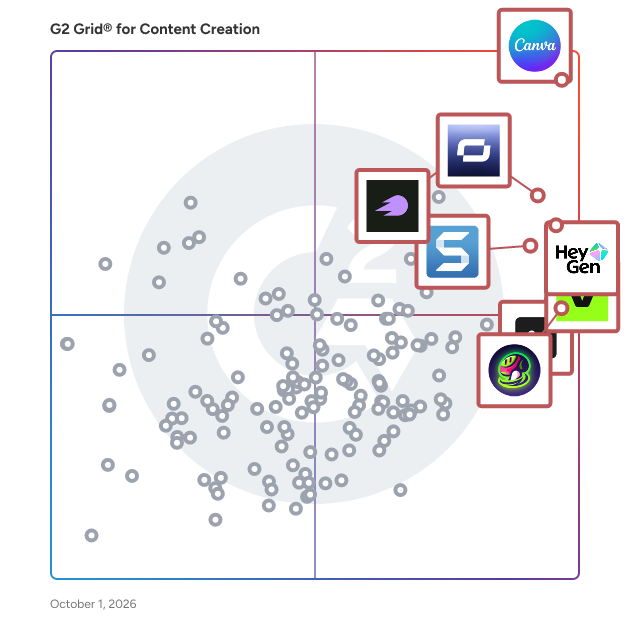
G2 Grid® for Content Creation Software

G2 Grid® for Content Creation Software plotting products by satisfaction and market presence

Highlighted products: Canva, Synthesia, HeyGen, VEED, Semrush, Riverside, Snagit, and Picsart.

Underlying data: [Grid® JSON](https://www.g2.com/categories/content-creation/grids.json?focus%5B%5D=canva&focus%5B%5D=synthesia&focus%5B%5D=heygen&focus%5B%5D=veed&focus%5B%5D=semrush&focus%5B%5D=riverside&focus%5B%5D=snagit&focus%5B%5D=picsart)

PosterMyWall

PosterMyWall is an AI design and marketing platform for small and local businesses. Everything you need for awesome marketing is bundled in one value-packed app: create designs with AI prompts, social media publishing, event pages and calendars for your website,  email marketing, and free customizable templates. People around the world use PosterMyWall to create eye-catching designs, videos, newsletters, event pages, social media posts, and more. If your small business, church, or organization wants to reach more people and grow, PosterMyWall makes it happen – fast. PosterMyWall helps your business grow with quick design and marketing in one value-packed, affordable app. Key features include: - AI prompt and design tools: Generate unique images and designs, write engaging copy, and redesign content in a click. - Email marketing: Create and send professional emails and newsletters with easy drag-and-drop editing and branded templates. - Social media publishing: Plan, schedule, and publish posts directly to platforms like Facebook, Instagram, and X (Twitter) - Shareable event pages and calendars for your website increase the discoverability of your events, sales, and special offers. Collect registrations or link to your ticketing service. - Content planner gives you a snapshot of everything you’ve got scheduled. - Built-in analytics quantify campaign performance. - 3.3 million+ free customizable templates for every occasion, theme, and business category (restaurants, retail, salons, churches, schools, gyms, etc.) The platform provides web and mobile access (both android and iOS), enabling users to design and manage campaigns from anywhere.

Average Rating: 4.7/5.0

Total Reviews: 71

How Do G2 Users Rate PosterMyWall?

  • Quality of Support: 9.1/10 (Category avg: 9.0/10)

Who Is the Company Behind PosterMyWall?

  • Seller: PosterMyWall
  • Year Founded: 2010
  • HQ Location: San Mateo, California
  • Twitter: @postermywall
    6,571 Twitter followers
  • LinkedIn® Page: www.linkedin.com
    115 employees on LinkedIn®

Who Uses This Product?

  • Top Industries: Marketing and Advertising, Non-Profit Organization Management
  • Company Size: 65% Small, 35% Medium

What Do G2 Reviewers Say About PosterMyWall?

AI-generated summary from verified user reviews

Pros
  • Users love the ease of use of PosterMyWall, making creativity accessible to everyone with its intuitive interface.
  • Users love the vast library of templates on PosterMyWall, making design easy and inspiring creativity.
  • Users love the wide variety of templates in PosterMyWall, enhancing creativity for diverse design needs.
  • Users love the wide variety of templates on PosterMyWall, which inspires creativity for all design needs.
  • Users love the customization options in PosterMyWall, enabling them to create unique and professional designs effortlessly.
Cons
  • Users desire more templates in the healthcare category to enhance their design options and engagement.
  • Users dislike the watermarks and limited features in the free version, hindering their design experience.
  • Users find design limitations with templates, affecting editability and spacing alignment during poster creation.
  • Users find PosterMyWall expensive due to subscription prompts, despite its lower costs compared to Adobe alternatives.
  • Users are frustrated by the high premium cost, feeling pressured to upgrade for basic design needs.

What Are Recent G2 Reviews of PosterMyWall?

What Are G2 Users Discussing About PosterMyWall?

Shorthand

Shorthand is the beautifully simple visual storytelling platform that helps the world's iconic brands tell their most important stories. Shorthand empowers content creators, designers, and developers to publish visual stories with up to 10x higher audience engagement, in a fraction of the time. Global organisations such as Honda, the BBC, TripAdvisor, and Sky Sports use Shorthand to engage their high-value audiences on their owned properties. Creating premium digital stories is often slow, fragmented, and resource-intensive. Shorthand solves this with a powerful no-code editor that lets anyone create, edit, and publish stunning reading experiences in minutes — without needing design or development skills. Prebuilt templates, AI-powered auto layout, and PDF import help teams move from source material to published story faster, while built-in workflow and collaboration tools keep everyone aligned. The AI Creative Companion takes this further, letting teams generate story drafts, explore ideas, and make edits using natural-language prompts directly inside Shorthand — reducing production friction while keeping teams in full editorial control. With Shorthand for WordPress, teams can create and publish immersive stories straight from their CMS, bringing Shorthand's storytelling tools to the world's most widely used publishing platform. Users can publish Shorthand content nearly anywhere — via AWS, their CMS, Shorthand hosting, or by embedding directly on their website. The Shorthand team is a band of geeks with art and heart, dedicated to helping content teams build the world's most impressive and impactful digital content.

Average Rating: 4.7/5.0

Total Reviews: 126

How Do G2 Users Rate Shorthand?

  • Quality of Support: 9.6/10 (Category avg: 9.0/10)
  • AI Text Summarization: 5.8/10 (Category avg: 8.0/10)
  • Execute Content Publication: 8.8/10 (Category avg: 8.2/10)
  • Collaborative Editorial Calendars / Scheduling Content: 6.9/10 (Category avg: 8.0/10)

Who Is the Company Behind Shorthand?

  • Seller: Shorthand
  • Company Website:
  • Year Founded: 2013
  • HQ Location: Brisbane, Australia
  • Twitter: @Shorthand
    3,182 Twitter followers
  • LinkedIn® Page: www.linkedin.com
    66 employees on LinkedIn®

Who Uses This Product?

  • Top Industries: Higher Education, Non-Profit Organization Management
  • Company Size: 46% Small, 26% Medium

What Do G2 Reviewers Say About Shorthand?

AI-generated summary from verified user reviews

Pros
  • Users find Shorthand's ease of use exceptional, enabling impactful story creation without coding skills or complex software.
  • Users appreciate the easy creation feature of Shorthand, enabling impactful presentations without the hassle of complex tools.
  • Users love the ease of creating visually engaging stories with Shorthand, enhancing their ability to share impactful narratives.
  • Users enjoy the ease of creation with Shorthand, enabling quick and impressive storytelling without technical skills.
  • Users praise Shorthand for its intuitive features that enhance storytelling and streamline content creation efficiently.
Cons
  • Users find the initial learning curve quite challenging, requiring time and adaptation for effective use of Shorthand.
  • Users find Shorthand expensive for startups and small institutions, highlighting challenges in affordability for limited budgets.
  • Users feel Shorthand is expensive, making it challenging for budget-conscious startups to adopt comfortably.
  • Users find design limitations in Shorthand restricting, especially when achieving complex layouts without code.
  • Users desire greater customization options in Shorthand, finding the current layout restrictions limiting for creative projects.

What Are Recent G2 Reviews of Shorthand?

What Are G2 Users Discussing About Shorthand?

VisionStory AI

VisionStory is an AI-powered video creation platform designed to help users transform static images into dynamic, talking avatars with lifelike expressions and natural movements. This innovative solution allows users to upload a photo and input a script, generating engaging videos that feature realistic speech and customizable emotions. By leveraging advanced artificial intelligence technology, VisionStory streamlines the video production process, making it accessible to a wide range of users. Targeting creators, marketers, educators, and businesses, VisionStory serves as a versatile tool for various applications. For marketers, it offers a unique way to create compelling advertisements that capture audience attention. Educators can utilize the platform to produce engaging instructional videos that enhance learning experiences. Additionally, storytellers and content creators can bring their narratives to life, while businesses can use the platform for effective communication and branding. The ability to create professional-quality videos without the need for filming or extensive editing makes VisionStory an invaluable resource for anyone looking to convey messages visually. Key features of VisionStory include voice cloning, which allows users to replicate specific voice characteristics for a more personalized touch. The platform also supports green screen capabilities, enabling users to place their avatars in various backgrounds, enhancing the storytelling experience. With support for over 30 languages, VisionStory caters to a global audience, making it easier for users to reach diverse markets. High-definition video output ensures that the final product meets professional standards, further elevating the quality of the content produced. The benefits of using VisionStory extend beyond convenience. By enabling quick and cost-effective video production, users can save time and resources while still achieving impactful results. The platform's intuitive interface allows even those with minimal technical skills to create engaging videos effortlessly. VisionStory stands out in its category by combining advanced AI technology with user-friendly features, making it a powerful tool for anyone looking to enhance their visual communication.

Average Rating: 4.7/5.0

Total Reviews: 283

How Do G2 Users Rate VisionStory AI?

  • Quality of Support: 9.1/10 (Category avg: 9.0/10)

Who Is the Company Behind VisionStory AI?

Who Uses This Product?

  • Top Industries: Animation, Education Management
  • Company Size: 53% Small, 9% Medium

What Do G2 Reviewers Say About VisionStory AI?

AI-generated summary from verified user reviews

Pros
  • Users appreciate the affordability of VisionStory AI, enjoying high-quality videos at a fraction of traditional production costs.
  • Users find VisionStory AI to be incredibly easy to use, enabling quick creation of high-quality videos effortlessly.
  • Users find that VisionStory AI offers easy-to-use natural voices, enabling quick production of high-quality videos for marketing.
  • Users praise the impressive quality and fast turnaround of VisionStory AI, making content creation efficient and affordable.
  • Users love the quick content generation of VisionStory AI, making it ideal for fast-paced marketing needs.
Cons
  • Users desire more customization options for tone and expression to better match specific brand voices.

What Are Recent G2 Reviews of VisionStory AI?

Foleon

Foleon is a content creation platform that makes it easy for anyone to create interactive content that is 100% on brand. We provide B2B companies with an intuitive drag & drop editor and interactive Foleon Doc format that empowers them to create bespoke digital content experiences that are engaging, intelligent and scalable. Most companies are still wasting time, money and energy on publishing their most valuable content in ineffective legacy formats. PDFs are a headache to produce, a bore to read, and totally void of reader insights. Foleon, on the other hand, offers a modern format that is easy to create, highly engaging, and full of the intelligence you’ve been missing. Founded in Amsterdam with locations in the US and Europe, Foleon is on a mission to empower companies to create the content their audience craves.

Average Rating: 4.7/5.0

Total Reviews: 181

How Do G2 Users Rate Foleon?

  • Quality of Support: 9.4/10 (Category avg: 9.0/10)
  • AI Text Summarization: 5.7/10 (Category avg: 8.0/10)
  • Execute Content Publication: 8.8/10 (Category avg: 8.2/10)
  • Collaborative Editorial Calendars / Scheduling Content: 6.7/10 (Category avg: 8.0/10)

Who Is the Company Behind Foleon?

  • Seller: Foleon
  • Company Website:
  • Year Founded: 2013
  • HQ Location: Amsterdam, North Holland
  • Twitter: @GetFoleon
    1,082 Twitter followers
  • LinkedIn® Page: www.linkedin.com
    117 employees on LinkedIn®

Who Uses This Product?

  • Who Uses This: Graphic Designer, Marketing Manager
  • Top Industries: Higher Education, Financial Services
  • Company Size: 38% Medium, 34% Small

What Do G2 Reviewers Say About Foleon?

AI-generated summary from verified user reviews

Pros
  • Users find Foleon to be very easy to use, allowing quick onboarding and rapid document creation across multiple touchpoints.
  • Users appreciate the ease of creating digital assets with Foleon, benefiting from its versatile features and excellent support.
  • Users value the exceptional customer support from Foleon, enhancing their overall experience and success with the platform.
  • Users praise Foleon for its intuitive user interface and seamless onboarding, enhancing their overall experience significantly.
  • Users value the customization options in Foleon, enabling easy design and collaboration for various projects.
Cons
  • Users feel the lack of customization in Foleon limits flexibility and collaboration, affecting their design experience.
  • Users find Foleon to have limited customization, restricting flexibility in design and hinder collaboration among team members.
  • Users note the limited features of Foleon, expressing a desire for more design assets and analytics tools.
  • Users feel Foleon needs more design assets and improved analytics to enhance the overall user experience.
  • Users find difficult customization with Foleon, seeking features like flexible blocks and intuitive editing capabilities.

What Are Recent G2 Reviews of Foleon?

What Are G2 Users Discussing About Foleon?

Murf.ai

Murf AI is the complete voice AI platform powering enterprises, developers, and creators to deploy conversational voice agents, power real-time applications with the fastest text-to-speech API available, produce studio-quality voiceovers, and localize video into 40+ languages. Everything runs on Murf's own speech models and infrastructure, not licensed third-party TTS. Trusted by 10 million+ users and 300+ Forbes 2000 companies across 190+ countries. AI Voice Agents and Conversational AI Murf deploys production-grade voice agents that handle inbound and outbound calls in 35+ languages. They resolve support tickets, qualify leads, book appointments, update CRM records, and escalate to human agents with full conversation context. Live calls run at sub-800ms response latency with natural turn-taking, including mid-sentence interruptions. Ground agents in your knowledge base, policies, and customer data through RAG. Connect them to Salesforce, HubSpot, Zoho, Twilio, Google Calendar, Zapier, and internal systems through native integrations and REST APIs, and run them on your own LLM (OpenAI, Anthropic, Gemini, or a fine-tuned model). Murf's agent designers and forward-deployed engineers handle design, deployment, and continuous optimization. Teams using Murf report 40% lower cost-to-serve and a 30% increase in CSAT. Murf Falcon: The Fastest, Most Efficient TTS API Falcon delivers 55ms model latency and 130ms time-to-first-audio, verified across 10+ geographies through edge deployment. It covers 35+ languages with mid-sentence language switching, scales to 10,000 concurrent calls without latency degradation, and costs $0.01 per minute. Falcon leads the Voice Quality Metric among streaming models, hits 99.38% pronunciation accuracy, and supports on-premise deployment and data residency in 10+ regions. Murf Studio: AI Voiceover Studio and Text to Speech Produce voiceovers 10x faster with 200+ expressive AI voices across 35+ languages. Control pitch, speed, emphasis, and intonation, build a custom pronunciation library, clone voices, and use "Say It My Way" to direct delivery with your own recording. Integrations with Canva, PowerPoint, Google Slides, and Adobe Captivate drop Studio into existing production workflows. Murf Dubbing Localize video and audio into 40+ languages while preserving the original speaker's voice, meaning, and timing. Auto language detection, context-aware translation, native-speaker linguistic review, and a Dubbing API for high-volume localization. 165K+ hours of video dubbed to date. Murf is SOC 2 Type II and ISO 27001 certified and GDPR and HIPAA compliant, with role-based access controls, end-to-end encryption, and a 99.9% uptime commitment. Get started at https://murf.ai

Average Rating: 4.7/5.0

Total Reviews: 1,404

How Do G2 Users Rate Murf.ai?

  • Quality of Support: 9.2/10 (Category avg: 9.0/10)
  • AI Text Summarization: 4.2/10 (Category avg: 8.0/10)
  • Execute Content Publication: 8.8/10 (Category avg: 8.2/10)
  • Collaborative Editorial Calendars / Scheduling Content: 8.6/10 (Category avg: 8.0/10)

Who Is the Company Behind Murf.ai?

  • Seller: Murf Inc.
  • Company Website:
  • Year Founded: 2020
  • HQ Location: Salt Lake City, US
  • Twitter: @MURFAISTUDIO
    4,022 Twitter followers
  • LinkedIn® Page: www.linkedin.com
    114 employees on LinkedIn®

Who Uses This Product?

  • Who Uses This: CEO, Owner
  • Top Industries: E-Learning, Marketing and Advertising
  • Company Size: 77% Small, 14% Medium

What Do G2 Reviewers Say About Murf.ai?

AI-generated summary from verified user reviews

Pros
  • Users find Murf.ai to be super easy to use, allowing quick learning and a satisfying editing experience.
  • Users love the natural voices of Murf.ai, finding them intuitive and impressively realistic for various projects.
  • Users praise the natural sound quality of Murf.ai, enhancing engagement and satisfaction in their projects.
  • Users praise the realistic voice quality of Murf.ai, enjoying its simplicity and effectiveness for professional voiceovers.
  • Users appreciate the voice customization options in Murf.ai, enabling engaging and unique audio content creation.
Cons
  • Users desire more voice options in Murf.ai, as current choices limit quality and flexibility in editing.
  • Users find Murf.ai expensive and desire more voice tone options and better pricing for infrequent use.
  • Users find pricing issues with Murf.ai, feeling it's too expensive for infrequent use and wishing for more options.

What Are Recent G2 Reviews of Murf.ai?

What Are G2 Users Discussing About Murf.ai?

Descript

In Descript you can make any video you want, any way you want. All you need is an idea; it helps if you know how to type. With the world’s first only AI co-editor, Underlord, you can make a video just by describing your vision. It will create, edit, and design your video—all under your direction. It’s got the taste and judgment you want in a creative partner and the expertise you need from a video editor. And it’s tireless—so you can stay focused on getting the result you’re after while it does all the dirty work. And when you want to get dirty, you don’t need special knowledge or skills. If you can edit text, you can edit video with Descript. It’s loaded with automated design tools, plus the friendliest timeline editor you’ve ever seen, a built-in recorder, and hosted publishing that makes collaboration as easy as sending a link. Create product demos, training videos, screen recordings, video messages, podcasts, or social clips. Join the 7 million+ creators and businesses using Descript, and create something impressive—something you can be proud of.

Average Rating: 4.6/5.0

Total Reviews: 907

How Do G2 Users Rate Descript?

  • Quality of Support: 8.4/10 (Category avg: 9.0/10)
  • AI Text Summarization: 7.8/10 (Category avg: 8.0/10)
  • Execute Content Publication: 7.7/10 (Category avg: 8.2/10)
  • Collaborative Editorial Calendars / Scheduling Content: 6.2/10 (Category avg: 8.0/10)

Who Is the Company Behind Descript?

  • Seller: Descript
  • Company Website:
  • Year Founded: 2017
  • HQ Location: San Francisco, CA
  • LinkedIn® Page: www.linkedin.com
    179 employees on LinkedIn®

Who Uses This Product?

  • Who Uses This: Founder, Owner
  • Top Industries: Marketing and Advertising, Media Production
  • Company Size: 87% Small, 8% Medium

What Do G2 Reviewers Say About Descript?

AI-generated summary from verified user reviews

Pros
  • Users highlight the easy editing features of Descript, streamlining production and enhancing overall user experience significantly.
  • Users appreciate the ease of use of Descript, finding it simplifies editing and enhances productivity significantly.
  • Users commend Descript for its AI integration and user-friendly video editing, significantly enhancing their production efficiency.
  • Users love Descript's AI-driven ease of use, simplifying video and audio editing while continually enhancing its versatile features.
  • Users love the script-based editing features of Descript, which simplify video and audio edits for all skill levels.
Cons
  • Users face a challenging learning curve with Descript, complicating project setup and usability for new creators.
  • Users find the learning difficulty of Descript frustrating, struggling with audio insertion and understanding its features.
  • Users express frustration over the difficulty and complexity of navigating updates and integrations in Descript.
  • Users experience slow performance with Descript, often facing freezes and needing regular restarts for updates.
  • Users experience editing issues with hard cuts, inaccurate transcriptions, and challenges adding audio during edits.

What Are Recent G2 Reviews of Descript?

What Are G2 Users Discussing About Descript?

Restream

Restream is the live video platform for professional broadcasts. Produce studio-quality live video in your browser, record in 4K, bring remote guests on screen, and stream on YouTube, LinkedIn, X, Twitch, Facebook, Instagram, TikTok, and 30+ platforms at the same time. No downloads, no extra hardware, no production crew required. Create in our web-based Studio or connect the tools you already use: OBS, Zoom, vMix, or Ecamm Live. What Restream helps you do: → Reach every audience with one stream. Multistream to 30+ social channels at once and manage live chats from a single view. More reach from the same broadcast, with no extra bandwidth. → Look professional without a production team. Custom layouts, branded overlays, high-resolution screen sharing, and calls to action turn a single virtual event into a polished live show. → Turn one broadcast into weeks of content. Restream Clips converts long videos into short, captioned vertical highlights and posts them automatically, including live clips that publish while you're still on air. → Guests bring their audience. Invite up to 10 remote guests on screen for interviews, panels, and co-hosted shows. Let them add their social channels or company profiles to 3X your reach. → Record TV-quality video. Capture 4K video with 48kHz audio for podcasts and interviews, solo or with guests, while you stream or on its own. → Fit every feed. Stream portrait and landscape at the same time, so your video looks right on YouTube and TikTok alike. → Stay live even when you're offline. Schedule pre-recorded videos to play as live and keep your channels active around the clock. → Know exactly what worked. Track views, engagement, and growth across every platform in one place. Ask AI to surface missed questions, chat sentiment, or peak viewer moments. → Run it as a team. Shared workspaces and assigned seats let hosts, producers, and marketers plan, run, and repurpose broadcasts together. What teams use Restream for: ✔︎ Launch and announce. Product launches, demos, press conferences, music releases, and company announcements that reach every channel at once, while attention is at its peak. ✔︎ Engage your audience. Webinars, Q&As, AMAs, interviews, podcasts, and executive fireside chats with remote guests and live audience interaction built in. ✔︎ Broadcast live moments. Sports, news, industry conferences, hackathons, meetups, and live coding and build-in-public sessions, produced professionally and streamed everywhere. ✔︎ Communicate at scale. Town halls, internal comms, earnings calls, and public briefings delivered live to employees, investors, and communities wherever they watch.

Average Rating: 4.5/5.0

Total Reviews: 81

How Do G2 Users Rate Restream?

  • Quality of Support: 9.0/10 (Category avg: 9.0/10)

Who Is the Company Behind Restream?

  • Seller: Restream
  • Company Website:
  • Year Founded: 2015
  • HQ Location: Austin, TX
  • Twitter: @Restreamio
    190,188 Twitter followers
  • LinkedIn® Page: www.linkedin.com
    116 employees on LinkedIn®

Who Uses This Product?

  • Top Industries: Marketing and Advertising, Religious Institutions
  • Company Size: 84% Small, 12% Medium

What Do G2 Reviewers Say About Restream?

AI-generated summary from verified user reviews

Pros
  • Users find setup extraordinarily simple, allowing quick connections to social channels and seamless streaming of content.
  • Users value the user-friendly content management of Restream for seamless livestreaming and easy file extraction.
  • Users value the user-friendly interface of Restream, facilitating easy content management and livestreaming across multiple platforms.
  • Users love the easy integrations of Restream, simplifying livestreaming and enhancing content management effortlessly.
  • Users enjoy the easy management of Restream, appreciating its user-friendly interface and seamless integration for content creation.
Cons
  • Users are frustrated by the access limitations of Restream, facing difficulties with video storage and cumbersome processes.
  • Users find Restream expensive due to its costly upgrade for basic storage needs, causing frustration and inefficiency.
  • Users are frustrated with storage limitations on Restream, making it cumbersome to manage recordings effectively.
  • Users report streaming issues with Restream, including time zone errors and limited channel selection for events.

What Are Recent G2 Reviews of Restream?

What Are G2 Users Discussing About Restream?

1min.AI

🤖 Boosting productivity with AI is a good way to improve your work and life. However, switching or learning new tools for different use cases is not fun, and it is expensive, too! 💡 1min.AI is an all-in-one AI app that unlock all AI features. You pay only for what you use at 1min.AI, with no hidden costs or setup required elsewhere. 🔮 The unique features of 1min.AI is offering a variety of AI features powered by various AI models. You can see it clearly with the Chat with Many Assistants feature, it includes Gemini, GPT, Claude, Llama, MistralAI, ... 🪄 Other multi-media features like Content, Image, Audio, Video can also be used with different models to utilize their abilities and give out the best results. 💰 Lastly, we offer credit estimation and transparent usage history, so you know exactly how does the feature cost before running and can track the usage easily. Trying 1min.AI for Free to make sure it's right for you before making any decision! 🥳

Average Rating: 4.6/5.0

Total Reviews: 679

How Do G2 Users Rate 1min.AI?

  • Quality of Support: 8.4/10 (Category avg: 9.0/10)
  • AI Text Summarization: 8.8/10 (Category avg: 8.0/10)
  • Execute Content Publication: 7.2/10 (Category avg: 8.2/10)
  • Collaborative Editorial Calendars / Scheduling Content: 6.7/10 (Category avg: 8.0/10)

Who Is the Company Behind 1min.AI?

  • Seller: 1min.AI
  • Year Founded: 2023
  • HQ Location: CA, USA
  • Twitter: @1min_dot_ai
    418 Twitter followers
  • LinkedIn® Page: www.linkedin.com
    16 employees on LinkedIn®

Who Uses This Product?

  • Who Uses This: CEO, Owner
  • Top Industries: Information Technology and Services, Computer Software
  • Company Size: 81% Small, 7% Medium

What Do G2 Reviewers Say About 1min.AI?

AI-generated summary from verified user reviews

Pros
  • Users appreciate the ease of use of 1min.AI, finding it accessible even for non-technical individuals.
  • Users appreciate the impressive AI engine of 1min.AI for generating and combining engaging visuals effortlessly.
  • Users appreciate the variety of AI features, especially the powerful Doc AI for document analysis.
  • Users value the diverse model access and ease of use, streamlining their research and daily workflow efficiently.
  • Users find 1min.AI's wide variety of models invaluable, enhancing research efficiency and workflow smoothness.
Cons
  • Users find credit issues problematic in 1min.AI, especially with image generation consuming credits quickly.
  • Users find the limited credits issue frustrating, as videos and image generation quickly consume their allowance.
  • Users find that credit usage is excessive, with quick depletion affecting their ability to utilize the service effectively.
  • Users find the costly nature of 1min.AI frustrating, especially due to token drain and expensive model usage.
  • Users face significant credit system issues that complicate usage and hinder effective document analysis.

What Are Recent G2 Reviews of 1min.AI?

Conductor

Conductor is the only end-to-end, enterprise AEO platform built on the industry’s most complete data engine. Conductor is built for the new era of search—helping brands maximize visibility across AI and traditional search engines, power the full content lifecycle from insight to creation to measurement, and protect site health with 24/7 monitoring. The unified platform connects every data signal and delivers prioritized, actionable insights across AEO/SEO, content, and technical health, giving teams a single source of truth to optimize for growth in AI search surfaces. Conductor was named a Leader in the 2025 Forrester Wave—achieving the highest scores possible in AI-integrated SEO—and was SoftwareReviews’ Gold Medalist in the 2024 Search Engine Optimization Data Quadrant for the fourth consecutive year. Conductor’s customers include Citi, Airbnb, e.l.f Cosmetics, and FedEx.

Average Rating: 4.5/5.0

Total Reviews: 761

How Do G2 Users Rate Conductor?

  • Quality of Support: 9.4/10 (Category avg: 9.0/10)
  • AI Text Summarization: 10.0/10 (Category avg: 8.0/10)
  • Execute Content Publication: 6.0/10 (Category avg: 8.2/10)
  • Collaborative Editorial Calendars / Scheduling Content: 5.8/10 (Category avg: 8.0/10)

Who Is the Company Behind Conductor?

  • Seller: Conductor
  • Company Website:
  • Year Founded: 2008
  • HQ Location: New York
  • Twitter: @Conductor
    41,356 Twitter followers
  • LinkedIn® Page: www.linkedin.com
    539 employees on LinkedIn®

Who Uses This Product?

  • Who Uses This: SEO Manager, SEO Specialist
  • Top Industries: Marketing and Advertising, Consumer Services
  • Company Size: 37% Large, 31% Medium

What Do G2 Reviewers Say About Conductor?

AI-generated summary from verified user reviews

Pros
  • Users appreciate Conductor's user-friendly interface, comprehensive features, and excellent support for SEO and keyword tracking.
  • Users find Conductor to be very easy to use for new users, enhancing their overall experience and effectiveness.
  • Users praise Conductor for its ease of use and effective SEO optimization, enhancing collaboration and content quality.
  • Users find Conductor's ease of use invaluable for effective content creation and collaboration across teams.
  • Users value Conductor for its clear insights and streamlined workflows, making SEO opportunity identification straightforward and efficient.
Cons
  • Users find the learning curve steep, making implementation time-consuming and affecting consistent usage across teams.
  • Users highlight a lack of features in Conductor that hinders productivity and limits content creation capabilities.
  • Users feel the limited features of Conductor hinder their ability to create dynamic and engaging content effectively.
  • Users find learning difficulties with Conductor, noting its complex features can be daunting and time-consuming to master.
  • Users experience a steep learning curve in reporting which complicates usage compared to other tools.

What Are Recent G2 Reviews of Conductor?

What Are G2 Users Discussing About Conductor?

VistaCreate

VistaCreate (ex-Crello) is a graphic design platform where anyone can quickly create engaging projects for any industry or occasion — design skills are optional. Start with selecting from 150K+ professionally designed templates that are already preformatted and customizable. Quickly edit, resize, and remove image backgrounds in a few clicks. Edit video content and add music to create multi-dimensional visuals. Upload your photos or use a vast library of 70M+ royalty-free creative assets, including premium images, videos, and vectors. You can also easily brand your content with the Brand Kit functionality. With VistaCreate, everyone can produce designs that look like they took hours, in minutes.

Average Rating: 4.5/5.0

Total Reviews: 169

How Do G2 Users Rate VistaCreate?

  • Quality of Support: 8.7/10 (Category avg: 9.0/10)
  • AI Text Summarization: 5.0/10 (Category avg: 8.0/10)
  • Execute Content Publication: 6.7/10 (Category avg: 8.2/10)
  • Collaborative Editorial Calendars / Scheduling Content: 7.7/10 (Category avg: 8.0/10)

Who Is the Company Behind VistaCreate?

  • Seller: Depositphotos
  • Year Founded: 2009
  • HQ Location: New York
  • Twitter: @Depositphotos
    14,798 Twitter followers
  • LinkedIn® Page: www.linkedin.com
    306 employees on LinkedIn®

Who Uses This Product?

  • Who Uses This: Community Manager, Graphic Designer
  • Top Industries: Marketing and Advertising, Design
  • Company Size: 80% Small, 16% Medium

What Do G2 Reviewers Say About VistaCreate?

AI-generated summary from verified user reviews

Pros
  • Users find VistaCreate to have ease of learning, making graphic design simple and accessible for beginners.
  • Users love the ease of use in VistaCreate, making graphic design accessible for beginners and professionals alike.
  • Users love the vast selection of templates, making it easy to create personalized designs for both personal and business use.
  • Users love the wide variety of templates and stock images that make creating business and personal projects a breeze.
  • Users love the customizability of VistaCreate, making graphic design easy and accessible for beginners.
Cons
  • Users desire more free options for stock photos on VistaCreate to enhance their design flexibility.
  • Users wish for more free stock photo options in VistaCreate, feeling limited by the current selection.
  • Users desire more free options for stock photos, highlighting limitations in VistaCreate's current offerings.

What Are Recent G2 Reviews of VistaCreate?

Agentio

Agentio simplifies creator-led advertising by making it easy to buy ad reads from top YouTube creators. You can manage your campaigns effortlessly, ensuring you reach your target audience with engaging, authentic content. Drive higher conversions and sales while benefiting from direct integration with creators who resonate with your brand. - Identify conversions driven by creator content on Agentio - Track conversion revenue to measure return on ad spend (ROAS) - Evaluate campaign results and adjust strategies for higher conversions Designed for performance marketers, Agentio streamlines the entire workflow—from creator discovery and bidding to content approval and performance tracking. Brands use Agentio to run high-trust, in-content YouTube integrations at scale—turning word-of-mouth into a measurable, repeatable growth channel.

Average Rating: 4.9/5.0

Total Reviews: 66

How Do G2 Users Rate Agentio?

  • Quality of Support: 9.9/10 (Category avg: 9.0/10)
  • AI Text Summarization: 6.8/10 (Category avg: 8.0/10)
  • Execute Content Publication: 8.7/10 (Category avg: 8.2/10)
  • Collaborative Editorial Calendars / Scheduling Content: 8.3/10 (Category avg: 8.0/10)

Who Is the Company Behind Agentio?

  • Seller: Agentio
  • Company Website:
  • Year Founded: 2023
  • HQ Location: Brooklyn, US
  • LinkedIn® Page: www.linkedin.com
    77 employees on LinkedIn®

Who Uses This Product?

  • Who Uses This: Talent Manager
  • Top Industries: Marketing and Advertising, Entertainment
  • Company Size: 61% Small, 12% Medium

What Do G2 Reviewers Say About Agentio?

AI-generated summary from verified user reviews

Pros
  • Users love the ease of use of Agentio, appreciating its straightforward workflow and responsive support.
  • Users commend the quick and helpful customer support from Agentio, enhancing their overall experience with the platform.
  • Users praise Agentio for its efficient connections with brands, significantly simplifying collaboration for creators.
  • Users find Agentio to be very easy to use, enhancing influencer marketing management and overall user experience.
  • Users appreciate the time-saving efficiency of Agentio, enabling seamless campaign management and quick collaboration.
Cons
  • Users find the limited offers with Agentio restrict their negotiation options, impacting potential visibility for creators.
  • Users express concerns about creator issues on Agentio, highlighting low rates and awkward negotiation processes that hinder opportunities.
  • Users feel that Agentio is expensive due to below-standard rates and limited pricing flexibility for creators.
  • Users experience adjustment issues with bidding, wishing for a more intuitive negotiation process and clearer communication options.
  • Users find rates uncompetitive and face frustrations with the negotiation process and tracking campaign performance on Agentio.

What Are Recent G2 Reviews of Agentio?

RELAYTO AI

How do you 100× your content’s impact? RELAYTO is the AI-powered interactive content experience platform that turns every static PDF, PowerPoint, MP4, or image into a choose-your-own-path experience. Check out our own RELAYTO-powered buying journey that started as a conventional presentation here: https://rla.to/pitch In minutes, no code required, you can drag and drop files into our intuitive builder, layer in video, audio, forms, and CTAs, and publish a responsive microsite that feels more like Netflix than a flipbook. The result is an interactive sales-collateral hub, digital sales room, or secure proposal microsite that buyers binge on any device while they self-educate at their own pace. Behind the scenes, RELAYTO’s AI-driven content-engagement analytics capture 360° digital body language—page-level heatmaps, scroll depth, dwell time, replays, document heat-map insights, and intent scoring—delivering the PDF analytics legacy sales-enablement suites can’t. Real-time alerts surface high-intent viewers so revenue teams, account-based marketers, and customer-success managers can prioritize follow-up, shorten deal cycles, and prove content ROI with data-backed confidence. Security and scale come standard: create unlimited public or private interactive experiences, lock them down with granular permissions, SSO, watermarking, and compliance controls, or open them up with SEO-friendly embedding links across email, LinkedIn, HubSpot, Salesforce, your CMS, and anywhere a single link can travel. From AI-powered flipbook e-books and white papers to interactive pitch decks, proposal microsites, demo portals, and digital sales rooms, RELAYTO is the simplest way to transform boring documents into captivating, measurable experiences that boost engagement, conversion, and revenue. https://relayto.com/showcase

Average Rating: 4.7/5.0

Total Reviews: 457

How Do G2 Users Rate RELAYTO AI?

  • Quality of Support: 9.5/10 (Category avg: 9.0/10)
  • AI Text Summarization: 9.2/10 (Category avg: 8.0/10)
  • Execute Content Publication: 9.3/10 (Category avg: 8.2/10)
  • Collaborative Editorial Calendars / Scheduling Content: 9.1/10 (Category avg: 8.0/10)

Who Is the Company Behind RELAYTO AI?

  • Seller: Relayto
  • Year Founded: 2023
  • HQ Location: San Francisco , California
  • Twitter: @relayter
    2,206 Twitter followers
  • LinkedIn® Page: www.linkedin.com
    42 employees on LinkedIn®

Who Uses This Product?

  • Who Uses This: Student, Executive Assistant
  • Top Industries: Marketing and Advertising, Information Technology and Services
  • Company Size: 62% Small, 23% Medium

What Do G2 Reviewers Say About RELAYTO AI?

AI-generated summary from verified user reviews

Pros
  • Users love the ease of use of RELAYTO AI, making interactive content creation accessible to everyone.
  • Users appreciate the ability to customize PDF documents easily with RELAYTO AI, enhancing their workflow and creativity.
  • Users love RELAYTO's user-friendly interface, making it easy to create and customize interactive content effortlessly.
  • Users appreciate the high-quality templates and intuitive interface of RELAYTO AI, streamlining their workflow effectively.
  • Users love the easy creation of content with RELAYTO, thanks to its user-friendly interface and customizable templates.
Cons
  • Users experience a challenging learning curve with RELAYTO but find it rewarding as they become proficient.
  • Users find that there is a learning difficulty with Relayto AI, especially for new users navigating its features.
  • Users may face a steep learning curve with Relayto AI, especially when starting to use its advanced features.
  • Users find the initial difficulty in navigating RELAYTO AI can be challenging before becoming proficient with its features.
  • New users may experience a learning curve with Relayto AI, affecting their initial experience with the platform.

What Are Recent G2 Reviews of RELAYTO AI?

What Are G2 Users Discussing About RELAYTO AI?

Animaker

Animaker is an online animation maker that helps creators and teams bring ideas to life through animated videos - for training, communication, and marketing. Trusted by 35 million users and 80% of Fortune 500 companies, Animaker turns simple prompts, scripts, or data into professional animated content in minutes, no animation or design skills required. At its core, Animaker is built around animation, and its toolkit comes loaded with advanced AI tools that simplify every stage of video creation. ● AI Whiteboard Video - Create engaging animated videos in a hand-drawn whiteboard style from prompts. ● AI Clip Generator - Generate professional-looking clips from prompts or uploaded media. ● AI Video Generator - Produce full-length, studio-quality Gen AI videos from simple prompts. ● AI Infographic Maker - Convert data and reports into visually stunning animated infographic videos. ● AI Video Trainers - Build personalized, on-demand training videos at scale. ● AI Video Quiz - Make training videos engaging and interactive by adding quizzes within the content. ● AI Video Editor - Edit, enhance, and polish videos automatically with our AI Assistant Max. ● Subtitle Generator - Add accurate, multilingual subtitles in seconds with one click! ● AI Translate - Auto-translate animaker-made videos into 100+ languages to connect with the audience worldwide ● AI Voice Generator - Create realistic, human-like voiceovers from 180+ voices across 2000+ languages and accents. Our other powerful features include - ● Avatar Maker - Build unique, customizable animated characters that represent your brand and audience. ● Animaker Deck - Create animated presentations with characters for engagement and retention! ● 1000+ ready-to-use templates - Quickly make videos for any purpose from training and onboarding to marketing and internal communication. Since 2015, Animaker has powered over 50 million animated videos, helping L&D teams, educators, and enterprises revolutionize how they train, communicate, and grow through the power of AI-driven video creation. Need to work with regular videos instead? Animaker's AI tools generate, edit, and enhance them too.

Average Rating: 4.7/5.0

Total Reviews: 1,065

How Do G2 Users Rate Animaker?

  • Quality of Support: 9.0/10 (Category avg: 9.0/10)
  • AI Text Summarization: 10.0/10 (Category avg: 8.0/10)
  • Execute Content Publication: 10.0/10 (Category avg: 8.2/10)
  • Collaborative Editorial Calendars / Scheduling Content: 9.6/10 (Category avg: 8.0/10)

Who Is the Company Behind Animaker?

  • Seller: Animaker, Inc
  • Company Website:
  • Year Founded: 2015
  • HQ Location: San Francisco, California
  • Twitter: @animakerhq
    4,054 Twitter followers
  • LinkedIn® Page: www.linkedin.com
    199 employees on LinkedIn®

Who Uses This Product?

  • Who Uses This: Student, Teacher
  • Top Industries: Animation, Higher Education
  • Company Size: 78% Small, 13% Medium

What Do G2 Reviewers Say About Animaker?

AI-generated summary from verified user reviews

Pros
  • Users find Animaker to be incredibly user-friendly, allowing easy creation of engaging animations and educational content.
  • Users find that Animaker makes video creation effortless with its animations, customization, and user-friendly features.
  • Users appreciate the user-friendly interface of Animaker, facilitating effortless navigation for engaging video creation.
  • Users love the easy-to-use animation features that simplify video creation and enhance creativity.
  • Users love the variety of character styles in Animaker, enhancing engagement and making video creation enjoyable.
Cons
  • Users find Animaker's free account limitations frustrating, especially with video length and export failures hindering their projects.
  • Users find Animaker's pricing to be expensive, especially for those on a budget or students.
  • Users find the limited access to premium features in Animaker frustrating, as it hampers their creative potential.
  • Users find the plan limitations of Animaker restrictive, particularly the 2-minute video cap and limited features.
  • Users experience slow rendering issues that hinder smooth animation and complicate video integration, affecting productivity.

What Are Recent G2 Reviews of Animaker?

What Are G2 Users Discussing About Animaker?

FlippingBook

FlippingBook is an online tool and desktop software for creating professional digital flipbooks. It makes your PDF ebooks, e-catalogs, digital brochures, annual reports, presentations, magazines, and sales collateral interactive. More than 50,000 companies across 179 countries use FlippingBook to create easy-to-use online documents, deliver content across the web, and improve their communication processes. The service works on desktops and mobile devices and can be integrated with third-party systems such as Zapier, Google Analytics, and WordPress. FlippingBook helps small businesses and large renowned brands, such as Unilever, Marriott, Intel, Cartier, FOX, Nestle.

Average Rating: 4.7/5.0

Total Reviews: 292

How Do G2 Users Rate FlippingBook?

  • Quality of Support: 9.4/10 (Category avg: 9.0/10)
  • AI Text Summarization: 10.0/10 (Category avg: 8.0/10)
  • Execute Content Publication: 9.2/10 (Category avg: 8.2/10)
  • Collaborative Editorial Calendars / Scheduling Content: 7.3/10 (Category avg: 8.0/10)

Who Is the Company Behind FlippingBook?

  • Seller: FlippingBook
  • Year Founded: 2004
  • HQ Location: Cospicua, Malta
  • Twitter: @flippingbook
    1,120 Twitter followers
  • LinkedIn® Page: www.linkedin.com
    47 employees on LinkedIn®

Who Uses This Product?

  • Who Uses This: Marketing Manager, Marketing Coordinator
  • Top Industries: Marketing and Advertising, Real Estate
  • Company Size: 58% Small, 31% Medium

What Do G2 Reviewers Say About FlippingBook?

AI-generated summary from verified user reviews

Pros
  • Users rave about the ease of use in FlippingBook, making content creation efficient and accessible for everyone.
  • Users find FlippingBook to be intuitive and easy-to-use, effortlessly creating engaging and interactive content for audiences.
  • Users value the exceptional quality of FlippingBook for creating engaging and interactive content with ease.
  • Users love the intuitive design and robust features of FlippingBook, enhancing customer engagement and streamlining communication.
  • Users rave about the intuitive and user-friendly interface of FlippingBook, making content access effortless and efficient.
Cons
  • Users face feature limitations with FlippingBook, such as lack of editing capabilities and no tracking for downloads.
  • Users find limited customization options in FlippingBook, which restricts design flexibility for their specific needs.
  • Users find the missing features of FlippingBook, such as reporting and live editing, frustrating and limiting.
  • Users express frustration over limited features in FlippingBook, wishing for enhanced customization and reporting capabilities.
  • Users find FlippingBook to be expensive, feeling that its value does not always justify the high cost.

What Are Recent G2 Reviews of FlippingBook?

What Are G2 Users Discussing About FlippingBook?

Outgrow

Outgrow allows you to better acquire, qualify and engage leads by making it easy to build personalized quizzes, calculators, assessments, contests, forms/surveys, recommendations, polls & chatbots. No developers or designers required! Outgrow has a host of design templates which are fully optimized for mobile, desktop, and tablet, and are easily embeddable into your advertising, websites, mobile apps, social media, SMS and email communication. In addition, there are over 1000 pre-made content pieces and funnels that are optimized to improve conversion so you can change the questions, make a few tweaks so it's consistent with your brand and have your own interactive content ready in minutes.

Average Rating: 4.7/5.0

Total Reviews: 318

G2 Deal: 20% off annual plan for new users

20% Discount on Freelancer, Essentials, Business plans

Price: ~~$14-600/mo~~ → $11-480/mo

View this exclusive G2 deal

How Do G2 Users Rate Outgrow?

  • Quality of Support: 9.5/10 (Category avg: 9.0/10)
  • AI Text Summarization: 8.6/10 (Category avg: 8.0/10)
  • Execute Content Publication: 8.5/10 (Category avg: 8.2/10)
  • Collaborative Editorial Calendars / Scheduling Content: 8.7/10 (Category avg: 8.0/10)

Who Is the Company Behind Outgrow?

  • Seller: Outgrow
  • Company Website:
  • Year Founded: 2012
  • HQ Location: New York, NY
  • Twitter: @OutgrowCo
    3,719 Twitter followers
  • LinkedIn® Page: www.linkedin.com
    52 employees on LinkedIn®

Who Uses This Product?

  • Who Uses This: Founder, CEO
  • Top Industries: Marketing and Advertising, Computer Software
  • Company Size: 79% Small, 17% Medium

What Do G2 Reviewers Say About Outgrow?

AI-generated summary from verified user reviews

Pros
  • Users praise the ease of use of Outgrow, appreciating its intuitive design and quick setup for effective solutions.
  • Users commend the exceptional customer support of Outgrow, highlighting their responsiveness and helpfulness throughout the experience.
  • Users value Outgrow's comprehensive tools for quizzes and calculators, enhancing lead generation and user engagement effectively.
  • Users find Outgrow to be quick and easy to use, facilitating fast implementation and effective lead generation.
  • Users appreciate the easy setup of Outgrow, allowing for quick implementation and immediate engagement with customers.
Cons
  • Users find the learning curve of Outgrow challenging, particularly with navigation and various quiz types for new users.
  • Users find limited features in Outgrow, with basic designs and lacking advanced options for effective lead generation.
  • Users find the missing features in Outgrow's basic plan limit their functionality and customization options.
  • Users find the pricing of Outgrow to be expensive, making it hard to justify its value for low usage.
  • Users find limited customization options in Outgrow, leading to extra costs and basic-looking outputs.

What Are Recent G2 Reviews of Outgrow?

Yukta Rustagi
YR
Researched and written by Yukta Rustagi
Updated October 3, 2024