Best Assessment Software - Page 2

How Many Assessment Software Products Does G2 Track?

Total Products under this Category: 358

Category Stats (Sep 2026)

  • Average Rating: 4.26/5 (↓0.01 vs Aug 2026) The average rating of products in this category, based on all submitted ratings
  • Top Trending Product: Gradescope (+2.56%) - Among all products in this category, Gradescope recorded the largest rating increase compared to last month

Last updated: September 01, 2026

How Does G2 Rank Assessment Software Products?

Why You Can Trust G2's Software Rankings:

  • 30 Analysts and Data Experts
  • 10,800+ Authentic Reviews
  • 358+ Products
  • Unbiased Rankings

G2's software rankings are built on verified user reviews, rigorous moderation, and a consistent research methodology maintained by a team of analysts and data experts. Each product is measured using the same transparent criteria, with no paid placement or vendor influence. While reviews reflect real user experiences, which can be subjective, they offer valuable insight into how software performs in the hands of professionals. Together, these inputs power the G2 Score, a standardized way to compare tools within every category.

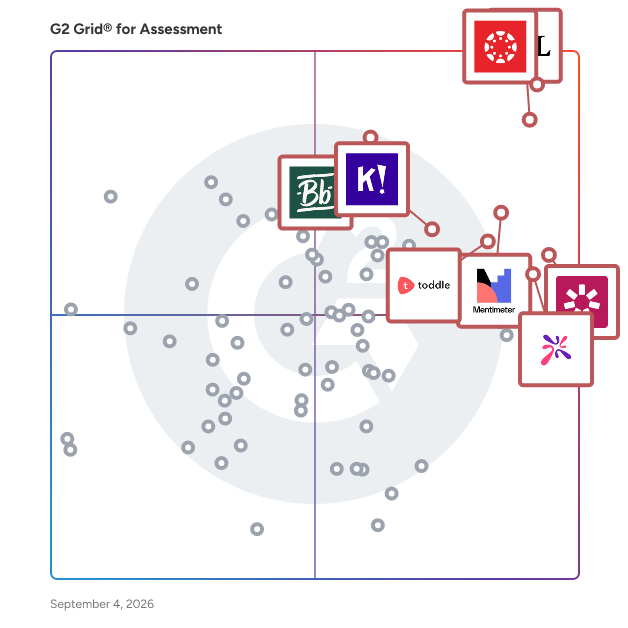
G2 Grid® for Assessment Software

G2 Grid® for Assessment Software plotting products by satisfaction and market presence

Highlighted products: Canvas LMS, D2L Brightspace, Mentimeter, iSpring Suite, AhaSlides, Toddle, Blackboard, and Kahoot!.

Underlying data: [Grid® JSON](https://www.g2.com/categories/assessment/grids.json?focus%5B%5D=canvas-lms&focus%5B%5D=d2l-brightspace&focus%5B%5D=mentimeter&focus%5B%5D=ispring-suite&focus%5B%5D=ahaslides&focus%5B%5D=toddle&focus%5B%5D=blackboard&focus%5B%5D=kahoot)

MagicBox

MagicBox is an AI-powered, end-to-end digital publishing platform that empowers K-12 and higher education publishers, authors, and content providers, as well as enterprise publishers, to create, manage, enrich, and deliver digital content through custom-branded web and mobile apps. With its multi-tenant architecture, each school, district, or corporate entity is a separate tenant that can be customized to individual requirements. With over 7 million users globally, MagicBox has received several accolades for its inclusive learning solutions and continues to innovate to enhance its features and functionalities.

Average Rating: 4.6/5.0

Total Reviews: 28

How Do G2 Users Rate MagicBox?

  • Ease of Use: 8.9/10 (Category avg: 8.4/10)
  • Real-time assessment: 8.4/10 (Category avg: 8.5/10)
  • Analytics dashboard: 8.7/10 (Category avg: 8.3/10)
  • White-labeling: 9.1/10 (Category avg: 7.9/10)

Who Is the Company Behind MagicBox?

  • Seller: Magic Software
  • Year Founded: 2013
  • HQ Location: New York, US
  • Twitter: @getmagicbox
    215 Twitter followers
  • LinkedIn® Page: www.linkedin.com
    4 employees on LinkedIn®

Who Uses This Product?

  • Top Industries: Primary/Secondary Education, Publishing
  • Company Size: 71% Medium, 26% Small

What Do G2 Reviewers Say About MagicBox?

AI-generated summary from verified user reviews

Pros
  • Users find MagicBox highly user-friendly, enjoying its intuitive tools and straightforward navigation for seamless content development.
  • Users enjoy the comprehensive assessment features of MagicBox, enabling easy creation and customization of digital evaluations.
  • Users appreciate the wide range of assessment types in MagicBox, enhancing their e-Learning experience effortlessly.
  • Users praise the great features and flexibility of MagicBox's eBook, enhancing teaching and learning experiences.
  • Users commend MagicBox for its intuitive design, making navigation and content management straightforward and efficient.
Cons
  • Users find MagicBox to be not user-friendly, citing difficulties with navigation and complex reporting features.
  • Users find difficult usability in MagicBox, leading to frustrations with setup and implementation in educational settings.
  • Users find MagicBox difficult to use, facing challenges with setup, reporting, and overall implementation in classrooms.
  • Users find MagicBox expensive due to high costs for custom reporting and difficulties in usage and onboarding.
  • Users express concern over the limited customization options in MagicBox, hindering unique design and branding efforts.

What Are Recent G2 Reviews of MagicBox?

Talview

Talview is the trust infrastructure for high-stakes decisions in the AI era. As generative AI, deepfakes, and proxy networks undermine the credibility of exams and interviews, organizations need more than monitoring. They need enforceable, auditable integrity. Talview delivers defense-in-depth trust controls combining identity assurance, environment integrity, behavior verification, and AI agents with human escalation, producing defensible, audit-ready outcomes. Talview's patented Agentic AI powers both sides of high-stakes decisions: Alvy, the world's first AI proctor, delivers continuous assessment integrity at scale, working alongside human oversight to secure exams and certifications. Ivy, Talview's Agentic AI interviewer, conducts structured interviews with built-in trust controls, ensuring every hiring signal is credible, consistent, and defensible. Across 120+ countries and 10 million+ candidates assessed, Talview is the choice for mission-critical assessments worldwide.

Average Rating: 4.4/5.0

Total Reviews: 112

How Do G2 Users Rate Talview?

  • Ease of Use: 8.5/10 (Category avg: 8.4/10)
  • Real-time assessment: 8.0/10 (Category avg: 8.5/10)
  • Analytics dashboard: 8.1/10 (Category avg: 8.3/10)
  • White-labeling: 7.9/10 (Category avg: 7.9/10)

Who Is the Company Behind Talview?

  • Seller: Talview
  • Company Website:
  • Year Founded: 2017
  • HQ Location: San Mateo, California
  • Twitter: @Talview
    1,623 Twitter followers
  • LinkedIn® Page: www.linkedin.com
    276 employees on LinkedIn®

Who Uses This Product?

  • Top Industries: Information Technology and Services, Education Management
  • Company Size: 58% Large, 23% Small

What Do G2 Reviewers Say About Talview?

AI-generated summary from verified user reviews

Pros
  • Users appreciate the ease of use of Talview, finding it simple to navigate and efficient for high-volume hiring.
  • Users commend the great customer support from Talview, noting quick turnaround times and helpful staff.
  • Users praise the customizable assessment tools and excellent support of Talview, enhancing their hiring efficiency and effectiveness.
  • Users commend the helpful customer support of Talview, appreciating timely assistance and valuable guidance throughout their experience.
  • Users praise Talview for its efficient candidate assessment, streamlining recruitment and enhancing selection processes significantly.
Cons
  • Users point out a significant lack of clarity in proctoring policies and assessment criteria, affecting overall user satisfaction.
  • Users often face technical challenges, such as video issues and vague error messages, complicating candidate management.
  • Users feel there are missing features in Talview, hindering aspects like multi-screen support and authentication improvements.
  • Users find the UI to be poor and not intuitive, hindering a seamless experience across platforms.
  • Users face scheduling issues with time zone differences and lack of notifications, complicating the interview process.

What Are Recent G2 Reviews of Talview?

What Are G2 Users Discussing About Talview?

Wooclap

Wooclap is an interactive platform that maximises the possibility for smartphones and computers to become exceptional learning tools that make learning awesome and effective.It was developed in collaboration with neuroscientists, course technologists, and teachers to maximise information retention and enhance learning during lectures, whether in a classroom or remotely. There is no app to download, nothing to install: students use a link to connect to the platform on their smartphone, tablet, or computer, and answer questions online or by SMS text. Wooclap is compatible with all teaching models (traditional, synchronous, asynchronous, distance, hybrid, HyFlex...) and integrates with many tools that teachers use on a daily basis (PowerPoint, Google Slides, Genially, Canvas, Microsoft Teams...). This means they can use Wooclap’s many question-types and features within their existing Virtual Learning Environment (VLE).

Average Rating: 4.5/5.0

Total Reviews: 86

How Do G2 Users Rate Wooclap?

  • Ease of Use: 9.0/10 (Category avg: 8.4/10)
  • Real-time assessment: 9.7/10 (Category avg: 8.5/10)
  • Analytics dashboard: 8.4/10 (Category avg: 8.3/10)
  • White-labeling: 7.7/10 (Category avg: 7.9/10)

Who Is the Company Behind Wooclap?

  • Seller: Wooclap SPRL
  • Company Website:
  • Year Founded: 2014
  • HQ Location: Brussels, Belgium
  • Twitter: @wooclap
    9,271 Twitter followers
  • LinkedIn® Page: www.linkedin.com
    86 employees on LinkedIn®

Who Uses This Product?

  • Top Industries: Higher Education, Primary/Secondary Education
  • Company Size: 33% Medium, 30% Large

What Do G2 Reviewers Say About Wooclap?

AI-generated summary from verified user reviews

Pros
  • Users find it easy to create diverse questions, enhancing engagement with interactive questionnaires and seamless sharing options.
  • Users love the interactive gaming aspect of Wooclap, keeping students engaged with diverse question formats.
  • Users value the variety of question types Wooclap offers, enhancing interactivity and user engagement in sessions.
  • Users appreciate the diverse question options in Wooclap, enabling engaging and varied assessments for students.
  • Users find Wooclap's ease of use exceptional for creating, sharing, and utilizing questions effortlessly.
Cons
  • Users find the difficult usage of Wooclap frustrating, especially with large text and access issues on mobile devices.
  • Users experience poor usability with Wooclap, facing difficulties in event organization and navigating the interface.
  • Users face difficult navigation issues with Wooclap, causing frustration when accessing features and reading text on mobile devices.
  • Users find Wooclap a bit challenging for beginners, citing a steep learning curve that may hinder usability.
  • Users find the learning curve challenging, making it difficult for beginners to navigate Wooclap effectively.

What Are Recent G2 Reviews of Wooclap?

Gradescope

Gradescope is the paper-to-digital grading platform that dramatically improves grading and feedback workflows, offers flexible assessment solutions, and provides valuable insights. Only Gradescope supports digital grading workflows for paper-based assessment while integrating AI-assisted grading and systematic answer grouping to eliminate redundant steps from the grading process.

Average Rating: 4.2/5.0

Total Reviews: 32

How Do G2 Users Rate Gradescope?

  • Ease of Use: 8.1/10 (Category avg: 8.4/10)
  • Real-time assessment: 8.9/10 (Category avg: 8.5/10)
  • Analytics dashboard: 9.2/10 (Category avg: 8.3/10)
  • White-labeling: 10.0/10 (Category avg: 7.9/10)

Who Is the Company Behind Gradescope?

  • Seller: Turnitin
  • Year Founded: 1996
  • HQ Location: Oakland, CA
  • Twitter: @Turnitin
    24,497 Twitter followers
  • LinkedIn® Page: www.linkedin.com
    990 employees on LinkedIn®

Who Uses This Product?

  • Top Industries: Higher Education
  • Company Size: 44% Medium, 38% Small

What Are Recent G2 Reviews of Gradescope?

What Are G2 Users Discussing About Gradescope?

Seesaw

Seesaw is trusted and loved by 25 million educators, students, and families worldwide and is the only elementary Learning Experience Platform that offers a suite of award-winning tools, resources, and curriculum for teachers to deliver joyful, inclusive instruction. Through interactive lessons, digital portfolios, and two-way communication features, Seesaw keeps everyone in the learning loop by providing continuous visibility into the student's learning experience to support and celebrate their learning.

Average Rating: 4.4/5.0

Total Reviews: 47

How Do G2 Users Rate Seesaw?

  • Ease of Use: 8.5/10 (Category avg: 8.4/10)
  • Real-time assessment: 8.5/10 (Category avg: 8.5/10)
  • Analytics dashboard: 7.8/10 (Category avg: 8.3/10)
  • White-labeling: 9.0/10 (Category avg: 7.9/10)

Who Is the Company Behind Seesaw?

  • Seller: Seesaw
  • Year Founded: 2015
  • HQ Location: San Francisco, California
  • Twitter: @Seesaw
    118,685 Twitter followers
  • LinkedIn® Page: www.linkedin.com
    264 employees on LinkedIn®

Who Uses This Product?

  • Top Industries: Primary/Secondary Education, Education Management
  • Company Size: 40% Medium, 33% Small

What Do G2 Reviewers Say About Seesaw?

AI-generated summary from verified user reviews

Pros
  • Users love the easy communication features of Seesaw, enabling quick contact with teachers and peers in real-time.
  • Users appreciate the ease of use of Seesaw, finding it simple to set up and share quickly.
  • Users value the setup ease of Seesaw, finding it quick to open, share, and communicate within their groups.
Cons
  • Users find the poor navigation in Seesaw due to cluttered old messages, making the app feel clunky.

What Are Recent G2 Reviews of Seesaw?

What Are G2 Users Discussing About Seesaw?

Versant by Pearson

Versant by Pearson is an innovative, automated language assessment solution designed to meet the needs of forward-thinking businesses and HR professionals. As a leading tool in the language testing sphere, Versant offers precise, reliable evaluations of a candidate's language proficiency through advanced artificial intelligence and speech processing technologies. The assessments cover various skills, including speaking, listening, reading, and writing, ensuring a comprehensive analysis of language capabilities. Versant is not just about testing; it's about empowering organisations to make well-informed decisions in talent acquisition, development, and management. By providing quick, accurate results, Versant enables businesses to identify the best talent, streamline their recruitment process, and foster better communication within diverse teams. With its user-friendly interface and seamless integration capabilities, Versant stands out as a powerful ally for companies aiming to enhance their global workforce's language skills, ensuring they remain competitive in an increasingly interconnected market.

Average Rating: 4.5/5.0

Total Reviews: 20

How Do G2 Users Rate Versant by Pearson?

  • Ease of Use: 9.1/10 (Category avg: 8.4/10)
  • Real-time assessment: 8.3/10 (Category avg: 8.5/10)
  • Analytics dashboard: 8.3/10 (Category avg: 8.3/10)

Who Is the Company Behind Versant by Pearson?

  • Seller: Pearson
  • Year Founded: 1988
  • HQ Location: London, United Kingdom
  • Twitter: @pearsonlanguage
    55,880 Twitter followers
  • LinkedIn® Page: www.linkedin.com
    13,006 employees on LinkedIn®
  • Ownership: NYSE: PSO

Who Uses This Product?

  • Top Industries: Higher Education
  • Company Size: 55% Small, 25% Medium

What Are Recent G2 Reviews of Versant by Pearson?

What Are G2 Users Discussing About Versant by Pearson?

PowerSchool Schoology Learning

Schoology Learning, the leading K-12 learning management system (LMS), is part of the PowerSchool Unified Classroom solution. The system is designed to help schools and districts improve student performance, parent engagement, and overall communication and collaboration. With Schoology Learning, you can support student growth with individualized instruction and equitable access to learning for every student—at home, at school, or anywhere in between.

Average Rating: 4.4/5.0

Total Reviews: 382

How Do G2 Users Rate PowerSchool Schoology Learning?

  • Ease of Use: 8.5/10 (Category avg: 8.4/10)
  • Real-time assessment: 8.3/10 (Category avg: 8.5/10)
  • Analytics dashboard: 7.9/10 (Category avg: 8.3/10)
  • White-labeling: 7.6/10 (Category avg: 7.9/10)

Who Is the Company Behind PowerSchool Schoology Learning?

  • Seller: PowerSchool
  • HQ Location: Folsom, CA
  • Twitter: @MyPowerSchool
    12,129 Twitter followers
  • LinkedIn® Page: www.linkedin.com
    3,303 employees on LinkedIn®
  • Ownership: NYSE: PWSC

Who Uses This Product?

  • Who Uses This: Teacher, Educator
  • Top Industries: Primary/Secondary Education, Education Management
  • Company Size: 48% Medium, 34% Large

What Do G2 Reviewers Say About PowerSchool Schoology Learning?

AI-generated summary from verified user reviews

Pros
  • Users value the seamless integration of Schoology with PowerSchool, enhancing lesson pacing and professional development tracking.
  • Users appreciate the efficient organization of student work in Schoology, enhancing assignment management and analysis.
  • Users find Assignment Management in Schoology efficient for organizing resources, facilitating communication, and analyzing student performance.
  • Users appreciate the ease of use of PowerSchool Schoology Learning, making it ideal for organizing student work effectively.
  • Users appreciate the easy organization and accessibility of resources and curriculum through PowerSchool Schoology Learning.
Cons
  • Users find the lack of intuitiveness in PowerSchool Schoology Learning frustrating, complicating their ability to use features smoothly.
  • Users find the embedded features not intuitive, leading to frustrating troubleshooting and a complicated experience.
  • Users find PowerSchool Schoology Learning to be not user-friendly, often struggling with intuitive navigation and outdated design.
  • Users often face technical glitches and non-intuitive features in PowerSchool Schoology, complicating their overall experience.
  • Users experience integration issues with outside resources, leading to difficulties in achieving a seamless learning experience.

What Are Recent G2 Reviews of PowerSchool Schoology Learning?

What Are G2 Users Discussing About PowerSchool Schoology Learning?

Renaissance Accelerated Reader

Renaissance Accelerated Reader is an independent reading practice program that helps K–12 students become confident, lifelong readers. Supporting more than 210,000 fiction and nonfiction books at a wide range of levels, Accelerated Reader gives students extensive choice in what they read—and keeps them engaged in independent reading practice as they work toward personalized goals. Quizzes for Spanish titles help meet the needs of emergent bilingual learners, while in-depth reporting supports regular teacher-student conversations about reading time, reading comprehension, and reading growth.

Average Rating: 4.8/5.0

Total Reviews: 36

How Do G2 Users Rate Renaissance Accelerated Reader?

  • Ease of Use: 9.4/10 (Category avg: 8.4/10)
  • Real-time assessment: 9.8/10 (Category avg: 8.5/10)
  • Analytics dashboard: 10.0/10 (Category avg: 8.3/10)
  • White-labeling: 9.2/10 (Category avg: 7.9/10)

Who Is the Company Behind Renaissance Accelerated Reader?

  • Seller: Renaissance Learning
  • Year Founded: 1986
  • HQ Location: Wisconsin Rapids, Wisconsin, United States
  • Twitter: @RenLearnUS
    5,796 Twitter followers
  • LinkedIn® Page: www.linkedin.com
    2,192 employees on LinkedIn®

Who Uses This Product?

  • Who Uses This: Teacher
  • Top Industries: Primary/Secondary Education, Education Management
  • Company Size: 47% Small, 34% Medium

What Do G2 Reviewers Say About Renaissance Accelerated Reader?

AI-generated summary from verified user reviews

Pros
  • Users value the interactive learning offered by Renaissance Accelerated Reader, enhancing engagement through its game-based points system.
  • Users enjoy the learning enhancement provided by Renaissance Accelerated Reader's engaging point-based gaming system.
Cons
  • Users find that quiz issues occasionally hinder motivation and disrupt the learning process with Renaissance Accelerated Reader.

What Are Recent G2 Reviews of Renaissance Accelerated Reader?

What Are G2 Users Discussing About Renaissance Accelerated Reader?

Achieve

Achieve is Macmillan Learning's flagship courseware and learning platform that helps every student perform better, including less academically prepared students. Integrating directly into campus LMS systems with single sign-on and automatic grade sync, Achieve supports flexible instruction across in-person, online, and hybrid modalities. Built on learning science principles and co-designed with educators, Achieve helps students at all preparation levels master course content through adaptive learning, intentionally-designed assessments, and integrated e-text. Achieve is the ideal courseware solution for instructors who value: Content and learning resources that engage students for deeper understanding of course concepts. Intentional assessments that clearly align with their specific pedagogical values and approaches. Support for the effective implementation of active learning strategies. Technology that works the way they and their students do. Macmillan Learning is a learning technology company with a long history of supporting teaching and learning in higher education. With teams across the United States, the United Kingdom, and other international markets, Macmillan Learning partners with educators, authors, researchers, and institutions to develop trusted content, digital tools, and course solutions that support student success.

Average Rating: 4.1/5.0

Total Reviews: 18

How Do G2 Users Rate Achieve?

  • Ease of Use: 8.1/10 (Category avg: 8.4/10)
  • Analytics dashboard: 10.0/10 (Category avg: 8.3/10)

Who Is the Company Behind Achieve?

  • Seller: Macmillan Learning
  • Company Website:
  • HQ Location: New York City, NY
  • Twitter: @MacmillanLearn
    1,885 Twitter followers
  • LinkedIn® Page: www.linkedin.com
    854 employees on LinkedIn®

Who Uses This Product?

  • Top Industries: Higher Education
  • Company Size: 58% Medium, 26% Large

What Do G2 Reviewers Say About Achieve?

AI-generated summary from verified user reviews

Pros
  • Users find Achieve to be easy to use, enjoying its intuitive process that enhances their overall experience.
  • Users value Achieve's educational resources for enhancing the writing process and facilitating timely feedback.
  • Users value Achieve for its effective feedback system, enhancing the writing process and supporting student development.
  • Users find Achieve's interface easy to use and intuitive, enhancing their overall experience and productivity.
  • Users value the effective teacher quality of Achieve, which enhances student understanding and timely feedback.
Cons
  • Students experience difficulties in learning due to challenges with the Learning Curve activities and customer support issues.
  • Users find the customer support lacking, making it difficult to navigate and resolve issues effectively.
  • Users find the interface design poor, noting it's messy and lacks intuitiveness for a better experience.

What Are Recent G2 Reviews of Achieve?

Explorance Blue

- What is Explorance Blue: Explorance Blue is a feedback analytics platform that helps institutions and organizations gather, analyze, and act on feedback at scale. From course evaluations and student experience surveys to employee engagement and 360-degree feedback, Blue supports a wide range of feedback use cases. With flexible workflows, deep integration capabilities, and powerful analytics, Blue adapts to your unique structures and systems – whether centralized or decentralized. Automate survey delivery, streamline reporting, and turn feedback into meaningful insights that drive continuous improvement in student and employee experiences. - Explorance Blue for Higher Education: Institutions are increasingly looking for ways to boost survey response rates and streamline feedback across diverse academic structures. Explorance Blue solves this with automated workflows, deep customization, robust reporting, and seamless integration with your SIS, LMS, and other existing IT systems. It improves student participation by delivering timely, personalized surveys and simplifies feedback collection across schools, departments, and programs. With real-time response rate monitoring and automated reporting, institutions can turn feedback into actionable insights that drive teaching effectiveness and improve the student experience. * Use Cases: All central and major feedback gathering initiatives within an institution, including: Course evaluations, Midterm surveys, Peer evaluations, 360-degree Feedback, Student engagement surveys, Clinical rotations, Placement surveys, Student exit surveys, Faculty/Staff surveys, Alumni surveys - Explorance Blue for the Workplace: Forward-thinking HR teams are seeking better ways to translate employee feedback into impactful organizational change. Explorance Blue simplifies the process with automated survey delivery, built-in data governance, and integration with existing HR systems. It empowers leaders with clear, real-time insights to employee engagement drivers, track trends, and make data-informed decisions. The result is stronger engagement, better performance, and a more responsive workplace culture. * Use Cases: All central and major feedback gathering initiatives within an organization, including: Employee engagement surveys, Employee experience surveys, employee listening strategies, Voice of the employee initiatives, 360-degree feedback, Stay/exit surveys - Key Features: 1- Automated and Flexible Survey Management: * Automatically distributes personalized surveys with delegated customization across departments, roles, and programs * Uses organizational hierarchies and role-based logic for targeted survey and report delivery * Native support for complex course evaluation scenarios including cross-listed and team-taught courses, and unique course stat/end dates. * Leverages existing data sources to minimize manual setup and reduce administrative workload 2- Multi-Channel Delivery and Inclusive Accessibility * Delivers surveys through LMS, HRIS, email, SMS, and QR codes to maximize response rates * Fully responsive and compliant with WCAG 2.1 AA and Section 508 accessibility standards * Supports multiple languages for global and diverse respondent groups * Real-time response rate monitoring, built-in reporting and dashboard suites, and automated reminders to drive survey participation 3- Insightful Reporting with Built-In Privacy and Security * Offers real-time analytics, data visualizations, and contextualized reports with internal benchmarks * Global Employee Engagement benchmarks across key themes such as Culture & Values, Career Development, Inclusiveness/DEI, Teamwork, and more. * Enables role-based access and automated report distribution based on organizational hierarchy, roles, and responsibilities * Provides AI-powered qualitative analysis through Explorance MLY for deeper understanding of open-ended feedback * Ensures data privacy with configurable confidentiality settings and secure delivery workflows 4- Seamless Integration and Centralized Oversight * Integrates with SIS, LMS, HRIS, and data warehouses for a unified feedback ecosystem * Automated supports for roster syncs and dynamic data updates * Centralized platform to manage diverse feedback types—from engagement and satisfaction surveys to 360-degree feedback and course evaluations

Average Rating: 4.2/5.0

Total Reviews: 52

How Do G2 Users Rate Explorance Blue?

  • Ease of Use: 7.8/10 (Category avg: 8.4/10)
  • Real-time assessment: 8.9/10 (Category avg: 8.5/10)
  • Analytics dashboard: 9.1/10 (Category avg: 8.3/10)
  • White-labeling: 8.8/10 (Category avg: 7.9/10)

Who Is the Company Behind Explorance Blue?

  • Seller: Explorance
  • Year Founded: 2003
  • HQ Location: Montreal, Quebec
  • Twitter: @explorance
    866 Twitter followers
  • LinkedIn® Page: www.linkedin.com
    251 employees on LinkedIn®

Who Uses This Product?

  • Top Industries: Higher Education
  • Company Size: 38% Small, 36% Large

What Do G2 Reviewers Say About Explorance Blue?

AI-generated summary from verified user reviews

Pros
  • Users find Blue's ease of use enhances productivity, making tasks like data collection and recording effortless and efficient.
  • Users value the efficiency of Explorance Blue, praising its speed and convenience in data collection and idea generation.
  • Users highlight the easy setup of Explorance Blue, making deployment smooth and hassle-free for creativity and data collection.
  • Users find the initial setup easy, enhancing their creative tasks and data collection experiences with Blue.
  • Users find the setup ease of Explorance Blue highly beneficial for quick deployment and enhanced creativity.
Cons
  • Users find the login requirements frustrating, causing interruptions during critical moments like recording sessions.
  • Users find the difficult setup of Explorance Blue challenging, complicating their initial experience with the software.
  • Users find Blue to be expensive and challenging, particularly in terms of initial setup and resource demands.

What Are Recent G2 Reviews of Explorance Blue?

What Are G2 Users Discussing About Explorance Blue?
Nearpod

Nearpod offers an interactive instructional platform that merges real-time formative assessment and dynamic media for live and self-paced learning experiences inside and outside of the classroom. Nearpod works with any classroom technology, from tablets and smartphones to laptops and Chromebooks. The platform helps engage students with more than 15,000 ready-to-run interactive lessons, videos, and activities created in partnership with leading organizations like Common Sense Education and Smithsonian. In 2019, Nearpod acquired Flocabulary, a learning platform that engages students in academically rigorous K–12 concepts while promoting literacy through hip-hop videos. Together, Nearpod and Flocabulary reach educators in 100 of the largest school districts in the US. In 2018, Nearpod was named EdTech Digest’s Company of the Year.

Average Rating: 4.6/5.0

Total Reviews: 118

How Do G2 Users Rate Nearpod?

  • Ease of Use: 8.6/10 (Category avg: 8.4/10)
  • Real-time assessment: 9.7/10 (Category avg: 8.5/10)
  • Analytics dashboard: 8.6/10 (Category avg: 8.3/10)
  • White-labeling: 7.8/10 (Category avg: 7.9/10)

Who Is the Company Behind Nearpod?

  • Seller: Renaissance Learning
  • Year Founded: 1986
  • HQ Location: Wisconsin Rapids, Wisconsin, United States
  • Twitter: @RenLearnUS
    5,796 Twitter followers
  • LinkedIn® Page: www.linkedin.com
    2,192 employees on LinkedIn®

Who Uses This Product?

  • Who Uses This: Teacher
  • Top Industries: Primary/Secondary Education, Education Management
  • Company Size: 45% Medium, 29% Small

What Do G2 Reviewers Say About Nearpod?

AI-generated summary from verified user reviews

Pros
  • Users value the enhanced access control features of Nearpod, greatly improving engagement and participation in classrooms.
  • Users love the seamless app integration of Nearpod, enhancing accessibility and ease of sharing content with students.
  • Users appreciate the real-time assessments in Nearpod, which enhance student engagement and track progress effectively.
  • Users value the cloud storage capabilities of Nearpod for easy access and sharing of educational content.
  • Users value the real-time communication capabilities of Nearpod, enhancing engagement and interaction in the classroom.
Cons
  • Users face complexity issues with Nearpod, especially for new users and managing lessons in real-time.
  • Users find Nearpod to be expensive, as enhanced features require payment that strains school budgets.
  • Users find the learning curve challenging, requiring time to explore all functionalities and manage lessons effectively.
  • Users find the limited customization of Nearpod restricts usage options and may not meet all teaching needs.
  • Users find that Nearpod has limited features in its free version, leading to potential added costs for upgrades.

What Are Recent G2 Reviews of Nearpod?

What Are G2 Users Discussing About Nearpod?

Echo360

Echo360 engages every learner, anywhere with the most comprehensive solutions for video recording and streaming, video content management, audience engagement, content creation, and assessments. We deliver our services through the Echosystem, a meticulously crafted portfolio of solutions designed and implemented to foster engagement and drive evidence-based learning outcomes for our customers. We aim to ensure equitable access to high-quality learning and training experiences, no matter the learning environment.

Average Rating: 4.6/5.0

Total Reviews: 446

How Do G2 Users Rate Echo360?

  • Ease of Use: 8.9/10 (Category avg: 8.4/10)
  • Real-time assessment: 9.2/10 (Category avg: 8.5/10)
  • Analytics dashboard: 8.3/10 (Category avg: 8.3/10)
  • White-labeling: 8.0/10 (Category avg: 7.9/10)

Who Is the Company Behind Echo360?

  • Seller: Echo360
  • Company Website:
  • HQ Location: Youngstown, OH
  • Twitter: @echo360
    12,767 Twitter followers
  • LinkedIn® Page: www.linkedin.com
    166 employees on LinkedIn®

Who Uses This Product?

  • Who Uses This: Teacher, Assistant Professor
  • Top Industries: Higher Education, Education Management
  • Company Size: 38% Small, 31% Medium

What Do G2 Reviewers Say About Echo360?

AI-generated summary from verified user reviews

Pros
  • Users value Echo360 for its seamless communication features that enhance teaching and learning through easy integration.
  • Users appreciate the easy content creation with Echo360, allowing intuitive design and consistent brand adherence.
  • Users appreciate the intuitive design tools of Echo360, enhancing consistency and facilitating effective multimedia feedback.
  • Users find the intuitive interface of Echo360 easy to navigate, enhancing content creation with a straightforward design tool.
  • Users appreciate the user-friendly interface of Echo360, which simplifies content creation for everyone.
Cons
  • Users experience frustration due to internet access issues that disrupt the flow of using Echo360 effectively.
  • While Echo360 has a tendency to be glitchy at times, it often functions smoothly for users.
  • Users experience occasional glitch issues with Echo360, but overall functionality is often satisfactory.
  • Users find the complex usability of Echo360 challenging due to limited features and difficult integration processes.
  • Users find the lack of a unified content library on Echo360 limiting for advanced multimedia design needs.

What Are Recent G2 Reviews of Echo360?

What Are G2 Users Discussing About Echo360?

McGraw-Hill Connect

McGraw-Hill Education Connect is a robust toolkit of learning resources designed with the flexibility instructors need, to unlock the potential of a diverse student population. Connect provides opportunities for both formative and summative assessment. Our adaptive technology provides students with a safe place to make mistakes encouraging deliberate practice and enabling them to move one step closer to mastery. AUTO-GRADING Your valuable time and expertise should be devoted to teaching—not grading. Connect will automatically grade assignments and quizzes, providing you with easy-to-read reports so you know which students need more guidance. CONSOLIDATED RESOURCES Who has the time to sift through multiple files, folders and click through various websites? Not you. Everything you need to be an effective educator is at your fingertips; consolidate all your course materials with Connect. TAGGED LEARNING OBJECTIVES Focus on what’s important: learning outcomes. Within Connect, you can create assignments and run reports to quickly assess whether students are learning crucial course content. SMARTBOOK SmartBook is a digital version of your course textbook. It contains the same content within the textbook, but unlike a typical eBook, SmartBook actively tailors that content to your individual needs as a student. SmartBook can be accessed online through your laptop. And, many SmartBooks are available on tablet, too!

Average Rating: 3.6/5.0

Total Reviews: 167

How Do G2 Users Rate McGraw-Hill Connect?

  • Ease of Use: 7.3/10 (Category avg: 8.4/10)
  • Real-time assessment: 8.0/10 (Category avg: 8.5/10)
  • Analytics dashboard: 6.7/10 (Category avg: 8.3/10)
  • White-labeling: 6.3/10 (Category avg: 7.9/10)

Who Is the Company Behind McGraw-Hill Connect?

Who Uses This Product?

  • Who Uses This: Teacher, Associate Professor
  • Top Industries: Higher Education, Education Management
  • Company Size: 42% Large, 36% Medium

What Are Recent G2 Reviews of McGraw-Hill Connect?

What Are G2 Users Discussing About McGraw-Hill Connect?

ALEKS

Assessment and Learning in Knowledge Spaces is a Web-based, artificially intelligent assessment and learning system. ALEKS uses adaptive questioning to quickly and accurately determine exactly what a student knows and doesn't know in a course.

Average Rating: 3.2/5.0

Total Reviews: 32

How Do G2 Users Rate ALEKS?

  • Ease of Use: 7.6/10 (Category avg: 8.4/10)

Who Is the Company Behind ALEKS?

Who Uses This Product?

  • Who Uses This: Student
  • Top Industries: E-Learning, Higher Education
  • Company Size: 44% Small, 32% Medium

What Are Recent G2 Reviews of ALEKS?

What Are G2 Users Discussing About ALEKS?

Edsby

The Edsby® digital learning platform for K-12 is built specifically for school districts, regional governments and independent schools. They love Edsby for its modern, pedagogically sound K-12 assessment & reporting, family engagement, personalized learning and analytics. Edsby transforms every organization that adopts it. Teachers and administrators live in it all day. Students and parents make extensive use of it for all aspects of school life, all within a single, familiar, social-style user experience. It integrates closely with existing systems and extends the breadth of what a learning organization can achieve. Edsby addresses several critical challenges faced by K-12 institutions. It modernizes assessment and reporting processes, allowing educators to track student progress effectively and provide timely feedback. The platform also improves family engagement by facilitating communication between schools and families, ensuring parents are informed and involved in their children's education. Additionally, Edsby streamlines communication channels, enhances student engagement through interactive features, and builds capacity for educators by providing tools that support professional development. Other challenges solved by Edsby include data-driven insights into student performance and engagement via robust analytics capabilities. This allows educators to make informed decisions based on real-time data, ultimately improving educational outcomes. The platform also helps improve privacy and security, ensuring that sensitive information is protected while maintaining compliance with relevant regulations. With its extensive integration capabilities, Edsby is built to work alongside existing systems, extending the functionality of K-12 organizations and enabling them to achieve more. Edsby is deployed by organizations around the world. It has been licensed for national use by the New Zealand Ministry of Education and the country of Georgia. With over 80 industry awards and distinctions, it stands out for its comprehensive set of features tailored specifically for K-12 learning environments. With Edsby, educational institutions can enhance their operational efficiency, foster stronger relationships among stakeholders, and ultimately create a more effective learning environment for students.

Average Rating: 4.4/5.0

Total Reviews: 117

How Do G2 Users Rate Edsby?

  • Ease of Use: 8.6/10 (Category avg: 8.4/10)
  • Analytics dashboard: 7.3/10 (Category avg: 8.3/10)

Who Is the Company Behind Edsby?

  • Seller: Edsby
  • Company Website:
  • Year Founded: 2010
  • HQ Location: Andover, Massachusetts
  • Twitter: @edsby
    4,060 Twitter followers
  • LinkedIn® Page: www.linkedin.com
    41 employees on LinkedIn®

Who Uses This Product?

  • Who Uses This: Teacher
  • Top Industries: Primary/Secondary Education, Education Management
  • Company Size: 54% Medium, 34% Small

What Do G2 Reviewers Say About Edsby?

AI-generated summary from verified user reviews

Pros
  • Users appreciate the ease of use of Edsby, finding it invaluable for remote learning and communication.
  • Users value the ease of communication in Edsby, facilitating seamless interaction between teachers, students, and parents.
  • Users value the communication efficiency of Edsby, benefiting from its all-in-one platform for grading and messaging.
  • Users appreciate the ease of communication and centralized information in Edsby, enhancing the remote learning experience.
  • Users appreciate the ease of parent communication with Edsby, fostering engagement and connectivity between teachers and families.
Cons
  • Users note limited features in Edsby, with some functionalities lacking depth and requiring additional purchases for full access.
  • Users experience technical issues with Edsby, including assignment access problems and bugs that hinder smooth operation.
  • Users find the initial setup and navigation challenging, complicating their ability to use Edsby effectively.
  • Users find limited functionality in Edsby, especially regarding multi-class coordination and assignment management.
  • Users experience occasional software bugs with Edsby, leading to minor inconveniences and delays in resolution.

What Are Recent G2 Reviews of Edsby?

What Are G2 Users Discussing About Edsby?

Emma Stein
ES
Researched and written by Emma Stein
Updated October 3, 2024