Best Classroom Messaging Software

Emma Stein
ES
Researched and written by Emma Stein

Classroom messaging software facilitates communication between parents and school administrators. These solutions are primarily used for communication between K–12 educators and parents. The teacher can send correspondences about assignments, upcoming activities and excursions, and any information they deem pertinent. Once the message is sent, teachers can usually track whether a parent has read a given message sent via the application.

Classroom messaging software eliminates communication barriers or difficulties between teachers and parents. These solutions enable two-way communication and the exchange of multimedia messages between parents and teachers, maintaining the school and home balance.

Solutions in the classroom messaging category often contain classroom management software functionality, although there are several standalone messaging applications. Classroom messaging software often integrates with learning management systems and certain student information systems.

To qualify for inclusion in the Classroom Messaging category, a product must:

Include multimedia messaging options
Provide mass messaging and push notifications
Facilitate two-way parent-teacher messaging
Sync messages to multiple platforms, including email
Show More
Show Less

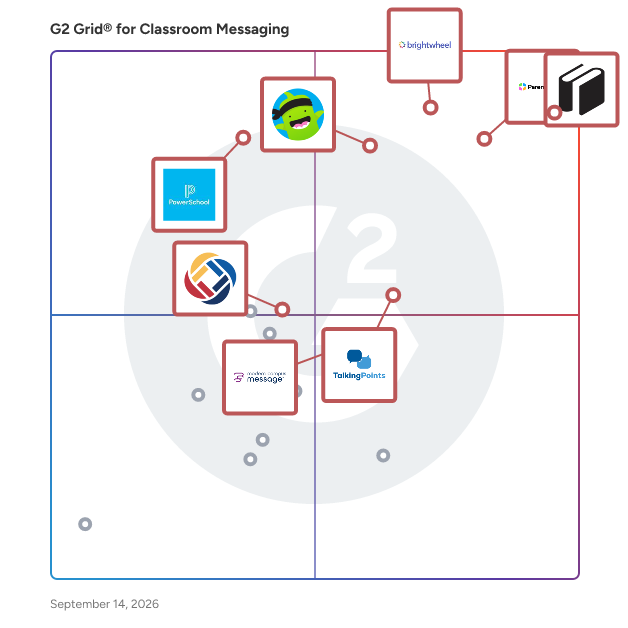
Best Classroom Messaging Software At A Glance

Highest Performer:
Easiest to Use:
Top Trending:
Best Free Software:
Show LessShow More
Easiest to Use:
Top Trending:
Best Free Software:

G2 takes pride in showing unbiased reviews on user satisfaction in our ratings and reports. We do not allow paid placements in any of our ratings, rankings, or reports. Learn about our scoring methodologies.

No filters applied
59 Listings in Classroom Messaging Available
(677)4.9 out of 5
Entry Level Price:Contact Us
2nd Easiest To Use in Classroom Messaging software
G2 Advertising
Sponsored
G2 Advertising
Get 2x conversion than Google Ads with G2 Advertising!
G2 Advertising places your product in premium positions on high-traffic pages and on targeted competitor pages to reach buyers at key comparison moments.
(361)4.5 out of 5
5th Easiest To Use in Classroom Messaging software
(253)4.6 out of 5
8th Easiest To Use in Classroom Messaging software
(570)4.8 out of 5
Entry Level Price:Contact Us
4th Easiest To Use in Classroom Messaging software
(111)4.5 out of 5
Entry Level Price:Contact Us
3rd Easiest To Use in Classroom Messaging software
(102)4.5 out of 5
Entry Level Price:$0.99
10th Easiest To Use in Classroom Messaging software

Learn More About Classroom Messaging Software

What is Classroom Messaging Software?

Classroom messaging software enables communication between teachers, parents and students, including mass messaging and sending images. Classroom messaging is most often used with students in K—12. As classroom sizes grow, it’s difficult for teachers to have clear, consistent communication with parents. Classroom messaging capabilities make that much easier. Teachers can send individual and mass messages, include images, and can track if a message has been read. Classroom messaging is a common feature in classroom management software, but also exists as stand-alone platforms. They allow teachers to run their classrooms how they want.

Key Benefits of Classroom Messaging Software

  • Allows teachers to keep consistent communication with parents and students
  • Supports sharing multimedia messages
  • Keeps messages sent by teachers in one place for quick access
  • Keeps teachers’ personal contact information private

Why Use Classroom Messaging Software?

Classroom messaging software is the best way to inform parents about their students’ progress and ensure students receive important information in and out of the classroom. Classroom messaging software lets teachers keep up with all the communication necessary to ensure students succeed; it saves time for teachers, allowing seamless communication with parents. Most classroom messaging software operates similarly to a texting conversation. Teachers not only share individual updates, but can also give further clarity to students and parents by providing images of projects. Both enable parents to engage further with students outside of school. The ultimate goal of classroom messaging software is to give teachers seamless access to communicate with students’ guardians, and is a prime example of how software can benefit the classroom.

Classroom messaging tools can send out mass alerts to students. This helps teachers save time planning class trips, and ensures all students come prepared to class. Most classroom messaging software allows private messages in case there are any questions regarding announcements.

Who Uses Classroom Messaging Software?

The people that use classroom messaging software are predictable — anyone involved in a classroom in some capacity are the standard users of classroom messaging software. Teachers, students, and parents all benefit from the streamlined communication these products offer.

Teachers — Classroom messaging software is almost always used by teachers as a way to keep in contact with parents and students.

Parents — Many busy parents rely on classroom messaging software to stay informed about what their student is doing and where they might need help. This also gives parents a place to reach out to teachers with questions or concerns.

Students — Students can receive mass messages from teachers about upcoming classroom activities, as well as emergency alerts.

Classroom Messaging Software Features

Classroom messaging software will generally have the following features to optimize communication for teachers.

Direct messaging — Classroom messaging software is mainly used for messaging between teachers, students, and families. The ability to direct message will come with any classroom messaging software.

Multimedia message sharing — Classroom messaging software allows users to share photos, videos, and other media with families while they aren’t in the classroom.

Mass messaging — One of the most important features of classroom messaging tools is the ability to send mass messages to students and families. This is useful when a teacher needs to quickly relay information to an entire classroom.

Push notifications — Classroom messaging software ensures everyone sees messages by sending push notifications to recipients. Many classroom messaging platforms include the ability to see if messages have been delivered and read. This is an important feature for teachers; they can see which students and parents need to be followed up with.

Additional Classroom Messaging Features

Quite a few classroom messaging tools include the following features. These added features give teachers even more opportunity to communicate.

Multi-channel notifications — Everyone has their own preferred method of communication. Classroom messaging software can send notifications on multiple platforms including voice, text, email, and web notifications.

Volunteer sign ups — Some classroom messaging tools include a feature that lets students and parents sign up for volunteer opportunities. This enables educators to keep track of chaperone sign ups or classroom presentations.

Integration capabilities — Not all classroom messaging tools offer integration. Some let users sync messages on multiple platforms including email. Some even integrate with classroom management software and learning management systems (LMS).

Potential Issues with Classroom Messaging Software

Unfiltered communication — One issue that has emerged with classroom messaging software is parents messaging teachers, occasionally aggressively, outside of school hours. This depends on the parent, and can easily be solved — or at least heavily curbed — by setting boundaries and expectations when introducing the technology.