Best Demo Automation Software

Julie Jung
JJ
Researched and written by Julie Jung

Demo automation solutions are used in presales processes to automate the creation of software product demonstrations. It also enables prospects to get an early product experience through a customized and personalized demo. These solutions educate the prospect early in the process by illustrating a product’s value and highlighting its capabilities. They save presales teams valuable time developing and customizing demos for specific personas or industries. Demo automation solutions have multiple use cases, including interactive product tours, guided demos, and live demonstrations.

These solutions can be leveraged by multiple teams, such as presales teams, sales reps, and product marketers, to educate the prospect on the product benefits and aid in qualifying the prospect. Products in this category provide engagement analytics, such as views, clicks, and shares, to gain insights into which demos are most successful and which aspects of the demo resonated with the prospect.

Demo automation solutions can also offer mobile app demos, letting users showcase their mobile product through interactive or guided demos by automating in-app flows and gestures. These solutions should integrate with key business systems such as customer relationship management (CRM) software to push prospect engagement data to associated opportunities and accounts.

Demo automation solutions can serve a variety of use cases and be leveraged at various stages of the sales cycle. Solutions in this category are differentiated based on use cases, including product tours, live demos, and sandbox or proof of concept (POC) automation:

Product tour solutions provide interactive tours of a software product and can be embedded on a website or left as a leave-behind for prospects to have a guided tour, typically through HTML or screen capture.
Live demo solutions allow sales reps and sales engineers to showcase a live version of a product while overlaying or injecting synthetic data into the demo environment. Live demos enable sales reps to tailor the data within a demo to the prospect’s interests.
Sandbox or POC automation solutions allow prospects to have a trial experience of a product through a pre-configured or cloned environment.

To qualify for inclusion in the Demo Automation category, a product must:

Integrate with key business systems such as CRM, marketing automation, or digital analytics software
Automate the creation of demos, such as by capturing application or screen
Provide the ability to personalize the demo for specific audiences
Provide the ability to add overlays with text or video, or modify data, for storytelling purposes
Allow for demos to be shared with prospects through email, live demonstration, or embedded on the website
Provide engagement analytics on demo usage
Show More
Show Less

Best Demo Automation Software At A Glance

Leader:
Highest Performer:
Easiest to Use:
Top Trending:
Best Free Software:
Show LessShow More
Easiest to Use:
Top Trending:
Best Free Software:

G2 takes pride in showing unbiased reviews on user satisfaction in our ratings and reports. We do not allow paid placements in any of our ratings, rankings, or reports. Learn about our scoring methodologies.

No filters applied
59 Listings in Demo Automation Available
10% Off
Entry Level Price:Free
G2 Advertising
Sponsored
G2 Advertising
Get 2x conversion than Google Ads with G2 Advertising!
G2 Advertising places your product in premium positions on high-traffic pages and on targeted competitor pages to reach buyers at key comparison moments.
(1,343)4.8 out of 5
4th Easiest To Use in Demo Automation software
View top Consulting Services for Storylane
20% Off
20% Off
Entry Level Price:Free
(210)4.9 out of 5
5th Easiest To Use in Demo Automation software
Entry Level Price:Free
(107)4.8 out of 5
15th Easiest To Use in Demo Automation software

Learn More About Demo Automation Software

Demo Automation software buying insights at a glance

Demo automation software helps businesses streamline the creation, delivery, and personalization of product demonstrations across the buyer journey. These platforms enable teams to offer interactive demos, guided product tours, sandbox environments, or pre-recorded walkthroughs that replicate a live demo experience without requiring a sales rep on every interaction. By enabling prospects to explore product value on demand, demo automation tools help reduce friction, accelerate qualification, and scale product storytelling across channels.

As buying teams do more self-serve research and expect instant proof, demo automation software has become essential for marketing, sales, and presales teams that need consistent product storytelling at scale.

Buyers adopt demo automation platforms to reduce demo prep time, speed up sales cycles, and improve how product value is shown across segments. Based on G2 reviews, the average rating for demo automation tools is 4.63/5, with an average likelihood to recommend of 9.26/10. Ease of use is also strong, at 6.35/7, and the Quality of Support averages 6.47/7. What that tells me is this: the best demo automation software usually wins by making it easy to build and update demos, while also giving teams the analytics to see what prospects actually view. Most teams evaluating demo automation tools and best interactive demo software are trying to solve the same core problem: scaling “show, don’t tell” without adding more meetings.

Pricing varies based on the number of demo experiences, the number of seats, personalization capabilities, and integration requirements. Many vendors offer tiered plans, with higher tiers unlocking features such as advanced analytics, CRM, and marketing automation integrations, as well as sandbox environments and enterprise-grade security controls. Larger teams often opt to custom pricing, depending on the demo traffic volume and deployment complexity. When comparing demo automation tools, buyers tend to balance pricing against scalability, ease of setup, and the platform’s ability to support multiple teams and go-to-market motions over time.

Top 5 FAQs from software buyers

  • How well does the platform support the demo experience needed, including interactive product tours, sandbox demos, video demos, and personalized paths for different audiences?
  • How easily can teams build, update, and maintain demos over time without heavy technical effort or constant involvement from product and engineering teams?
  • What level of personalization and targeting is possible, including industry-specific versions, persona-based messaging, and dynamic content based on firmographics or intent signals?
  • How strong are the analytics and buyer insights, including visibility into feature engagement, drop-off points, conversion outcomes, and handoff signals for sales?
  • How well does it integrate with the go-to-market stack, including CRM, marketing automation, data enrichment tools, and web analytics, so demo engagement can trigger workflows and attribution reporting?

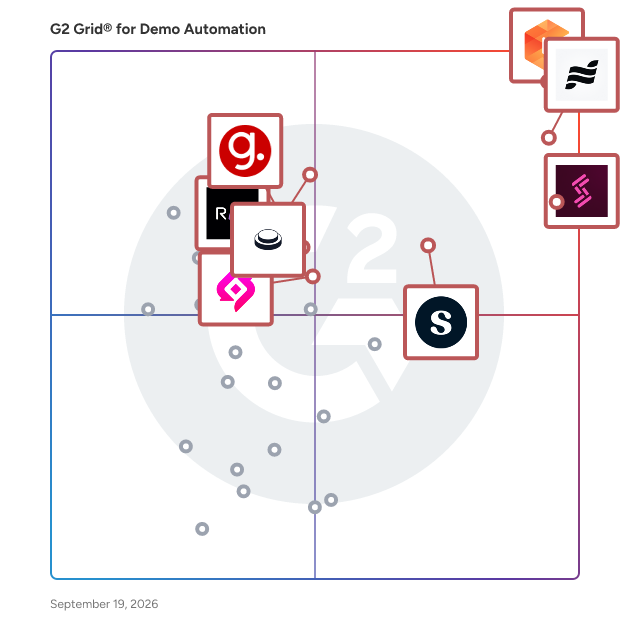
G2’s top-rated Demo Automation software, based on this review dataset, includes Navattic, Supademo, Storylane, and Consensus. (Source 2)

What are the top-reviewed Demo Automation on G2?

Consensus

  • Number of Reviews: 1,358
  • Satisfaction: 99
  • Market Presence: 99
  • G2 Score: 99

Storylane

  • Number of Reviews: 1,030
  • Satisfaction: 99
  • Market Presence: 72
  • G2 Score: 86

Supademo

  • Number of Reviews: 443
  • Satisfaction: 81
  • Market Presence: 66
  • G2 Score: 74

Navattic

  • Number of Reviews: 503
  • Satisfaction: 83
  • Market Presence: 81
  • G2 Score: 82

Walnut

  • Number of Reviews: 138
  • Satisfaction: 88
  • Market Presence: 75
  • G2 Score: 47

Satisfaction reflects user-reported product experience and is derived from review signals like star ratings and key satisfaction questions. (Source 2)

Market Presence reflects a product’s reach, reputation, and visibility using multiple market signals. (Source 3)

G2 Score is a standardized composite of Satisfaction and Market Presence, normalized within each category. (Source 2)

What I Often See in Demo Automation

Feedback Pros: What Users Consistently Appreciate

  • Fast initial setup turns product flows into shareable demos
  • It is really easy to set up new DemoBoards for prospects and customers. I now use a consensus demo in almost every sales cycle which I run. The integration with our CRM system makes this even easier as a lot of the fields prepopulate and save me time having to fill them out by hand. Once a demo link has been sent it is then super useful to understand when the demo has been viewed, what they viewed, who they shared it with etc. These analytics then really enable me to gauge interest and traction with early prospects.” - Jay M, Consensus Review
  • Interactive click paths help prospects learn without live meetings
  • What I like best about Storylane is how incredibly easy and fast it makes it to produce high-quality interactive tutorials without needing support from engineering or design. The learning curve is extremely low, the editor is intuitive, and the final result feels polished and professional. For a B2B SaaS company like ours, Storylane helps us break down complex workflows (procurement, payments, supplier onboarding, etc.) into simple, guided experiences that our users can follow at their own pace…” - Marian G, Storylane Review
  • Viewer analytics show exactly where prospects pause or drop
  • Consensus helps me get video demos out to prospects and allows me to provide information in a more "human to human" way by recording videos. The best part about this tool is the data it provides you by tracking what the recipient has watched, rewatched and who they have forwarded the video to internally. It helps speed up the sales cycle and helps open doors to new contacts you may not have had access to. In addition, in a world where C-level contacts don't have the time to sit on every 2-3 hour live demo, Consensus allows you to bring forward what matters to them most, capture their attention and save them time as well.” - Taylor W, Consensus Review

Cons: Where Many Platforms Fall Short

  • Advanced branching and personalization can take real training time
  • Compared to other interactive demo tools, creating the first few flows can take a little bit of time so I would account for this when you're onboarding the tool internally. We found this especially when creating the first few 'guides'. The captures are really quick but it does take time to get used to building the demos at the start. Compared to how this looked in the initial sales call, we didn't quite anticipate how long it would take to start building the demos.” - Lucy. Navattic Review
  • Branding and layout customization sometimes feel limited or rigid
  • Storylane has good features and we are relying on it for onboarding new users, but there are some limits you should know before trying it. Any background edit you make applies to the entire chapter, not just a single step. This means you can’t add text or change the background for only one screen, which can be inconvenient and sometimes requires extra work in another app.” - Erika C, Storylane Review
  • Large demos can load slowly, especially with many steps
  • I find that the analytics within Consensus can be quite slow to load, which interrupts my workflow. Additionally, there are some quirks related to filtering, such as losing filters when switching screens.” - Verified User, Consensus Review

Expert Takeaway

Based on G2 reviews, products in the demo automation category earn strong marks across the factors that usually predict adoption: 4.63/5 average star rating, 9.26/10 likelihood to recommend, 6.35/7 Ease of Use, and 6.47/7 Quality of Support. That combination usually means teams feel confident rolling these tools out beyond a small pilot.

The biggest difference I see between average and high-performing teams is how they operationalize demos. Teams that get the most value from demo automation tools treat demos like a product asset, not a one-time sales task. They create a small library of persona-based demos, assign clear owners for updates, and build a process to refresh demos whenever the UI changes. They also use analytics to tighten the story: if prospects keep dropping at the same step, the demo is telling you what to simplify.

When buyers compare demo automation platforms and the best interactive demo software, the decision usually comes down to three practical checks:

  1. Build speed: can a non-technical user create and edit demos quickly?
  2. Governance: can you manage versions, permissions, and brand consistency at scale?
  3. Signal quality: do analytics and integrations make follow-up smarter, not noisier?

If those three are strong, the best demo automation software becomes a repeatable growth lever across marketing and sales, not just a nicer way to run product tours.

Demo Automation Software FAQs

How long does it take to set up and maintain demos?

Initial setup can range from a few hours to a few weeks, depending on product complexity and how interactive the demo needs to be. Ongoing maintenance is usually tied to product updates. Teams that plan for regular demo refreshes and assign clear ownership report fewer issues and higher long-term adoption of demo automation platforms.

How is demo automation software priced?

Pricing for demo automation tools typically depends on the number of creators, demo environments, analytics depth, and security features. Most vendors offer tiered SaaS pricing with annual contracts, and costs often increase as teams scale usage across marketing, sales, and presales. Buyers evaluating the best demo automation software usually balance price against how widely demos will be used across the funnel.

Which demo automation software is easiest to set up for non-technical teams?

Many buyers comparing tools like Navattic, Reprise, Walnut, and Supademo look for how quickly non-technical users can build and publish demos. Ease of setup matters most when teams have limited engineering support;  products with drag-and-drop editors and clear UX patterns tend to score highest in real user reviews.

How do teams use demo automation for lead generation?

Marketing teams commonly embed demos on landing pages, product pages, and email campaigns to capture high-intent engagement. Instead of gating content with a form alone, demo automation software lets prospects interact first, then converts that engagement into lead signals for sales follow-up. Reviews often highlight higher-quality leads compared to static content.

Are interactive product demos better than live sales demos?

Interactive demos are not a replacement for live demos, but they are often more effective earlier in the buying journey. Reviews show that prospects value being able to explore a product on their own time, without scheduling a call. High-performing teams use demo automation tools to qualify interest before a live demo, which leads to more productive sales conversations.

Sources

  1. G2 Research Hub
  2. G2 Research Scoring Methodologies
  3. G2 Market Presence Score Overview

Researched By: Julie Jang

Last updated on: January 6, 2026