Best Unified Workspaces Software

How Many Unified Workspaces Software Products Does G2 Track?

Total Products under this Category: 193

Category Stats (Sep 2026)

  • Average Rating: 4.59/5 (↓0.01 vs Aug 2026) The average rating of products in this category, based on all submitted ratings
  • Top Trending Product: TSplus (+0.04%) - Among all products in this category, TSplus recorded the largest rating increase compared to last month

Last updated: September 05, 2026

How Does G2 Rank Unified Workspaces Software Products?

Why You Can Trust G2's Software Rankings:

  • 30 Analysts and Data Experts
  • 59,600+ Authentic Reviews
  • 193+ Products
  • Unbiased Rankings

G2's software rankings are built on verified user reviews, rigorous moderation, and a consistent research methodology maintained by a team of analysts and data experts. Each product is measured using the same transparent criteria, with no paid placement or vendor influence. While reviews reflect real user experiences, which can be subjective, they offer valuable insight into how software performs in the hands of professionals. Together, these inputs power the G2 Score, a standardized way to compare tools within every category.

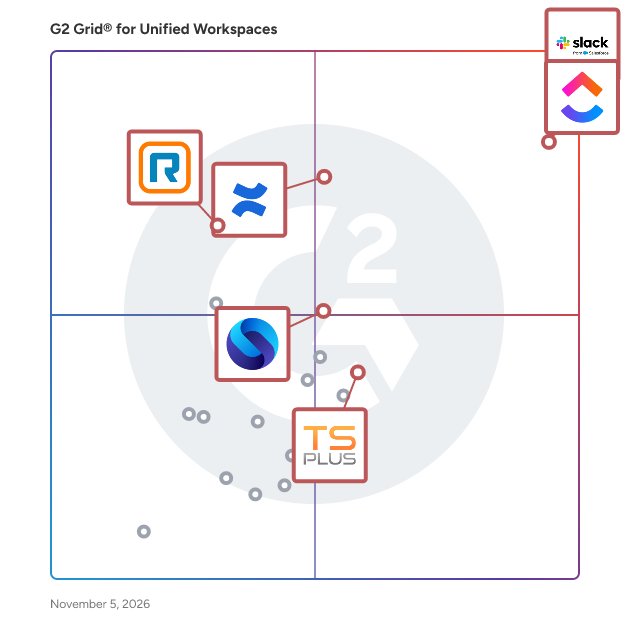
G2 Grid® for Unified Workspaces Software

G2 Grid® for Unified Workspaces Software plotting products by satisfaction and market presence

Highlighted products: Slack, ClickUp, Confluence, Shift, Workona, Rambox, BlackBerry UEM, and MangoApps.

Underlying data: [Grid® JSON](https://www.g2.com/categories/unified-workspaces/grids.json?focus%5B%5D=slack&focus%5B%5D=clickup&focus%5B%5D=confluence&focus%5B%5D=redbrick-shift&focus%5B%5D=workona&focus%5B%5D=rambox&focus%5B%5D=blackberry-uem&focus%5B%5D=mangoapps)

Slack

Slack is your single workspace that connects you with the people and tools you work with everyday, no matter where you are or what you do. With Slack you get real-time messaging through calls and chat, a searchable record of all your files and conversations, and integrations with a growing number of handy bots and apps. Now everyone can finally be on the same page and get their work done. Slack: It’s where work happens.

Average Rating: 4.5/5.0

Total Reviews: 37,547

G2 Deal: 25% off eligible upgrades to Slack Pro and Business+ for 12 months

Slack goes beyond chat and video—it empowers teams to work more efficiently by automating everyday tasks, putting your most important conversations at the center, and connecting everyone instantly (right where they're already working). Limited time offer for companies with 200 or fewer users.

View this exclusive G2 deal

How Do G2 Users Rate Slack?

  • Ease of Use: 9.2/10 (Category avg: 9.0/10)
  • Password Saver: 8.5/10 (Category avg: 8.2/10)
  • Multiple Workspaces: 9.0/10 (Category avg: 9.2/10)
  • Single Sign-On (SSO): 9.1/10 (Category avg: 8.8/10)

Who Is the Company Behind Slack?

  • Seller: Salesforce
  • Company Website:
  • Year Founded: 1999
  • HQ Location: San Francisco, CA
  • Twitter: @salesforce
    579,511 Twitter followers
  • LinkedIn® Page: www.linkedin.com
    89,711 employees on LinkedIn®

Who Uses This Product?

  • Who Uses This: Software Engineer, Project Manager
  • Top Industries: Computer Software, Information Technology and Services
  • Company Size: 41% Small, 41% Medium

What Do G2 Reviewers Say About Slack?

AI-generated summary from verified user reviews

Pros
  • Users find Slack to be extremely easy to use, facilitating seamless collaboration and integration across teams.
  • Users love the effective team collaboration in Slack, finding huddles and organized channels enhance communication and task management.
  • Users love Slack for its efficient communication, enabling quick responses and seamless team collaboration across time zones.
  • Users love the seamless integrations of Slack, enhancing collaboration and automating tasks effortlessly across the platform.
  • Users appreciate the ease of coordination and integrations in Slack, enhancing team communication and productivity.
Cons
  • Users often face notification issues in Slack, causing missed messages and overwhelming alerts from multiple channels.
  • Users find the missing features in Slack lead to confusion and difficulty in organizing channels efficiently.
  • Users are frustrated by Slack's limited message history and lack of intuitive organization for shared assets.
  • Users find the overwhelming experience of constant alerts and message volume to be stressful and distracting.
  • Users find the overwhelming number of channels and limited message history challenging for project tracking and communication.

What Are Recent G2 Reviews of Slack?

What Are G2 Users Discussing About Slack?

ClickUp

ClickUp is the world’s first Converged AI Workspace, bringing together all work apps, data, and workflows. ClickUp eliminates all forms of work sprawl to provide 100% context and a single place for humans and agents to work, together. Trusted by more than 20 million users worldwide, ClickUp is on a mission to maximize human productivity.

Average Rating: 4.6/5.0

Total Reviews: 13,490

How Do G2 Users Rate ClickUp?

  • Ease of Use: 8.5/10 (Category avg: 9.0/10)
  • Password Saver: 8.6/10 (Category avg: 8.2/10)
  • Multiple Workspaces: 9.2/10 (Category avg: 9.2/10)
  • Single Sign-On (SSO): 8.9/10 (Category avg: 8.8/10)

Who Is the Company Behind ClickUp?

  • Seller: ClickUp
  • Company Website:
  • Year Founded: 2017
  • HQ Location: San Diego, California
  • Twitter: @clickup
    69,539 Twitter followers
  • LinkedIn® Page: www.linkedin.com
    7,082 employees on LinkedIn®

Who Uses This Product?

  • Who Uses This: CEO, Project Manager
  • Top Industries: Marketing and Advertising, Computer Software
  • Company Size: 77% Small, 19% Medium

What Do G2 Reviewers Say About ClickUp?

AI-generated summary from verified user reviews

Pros
  • Users find ClickUp to be incredibly easy and simple to use, streamlining tasks and enhancing productivity effortlessly.
  • Users value the flexibility in task management, enabling customized workflows for personal, team, and project tasks.
  • Users appreciate the abundance of features in ClickUp, making task management seamless and efficient.
  • Users appreciate ClickUp for its streamlined management tasks, enabling better organization and efficiency in project handling.
  • Users appreciate ClickUp for its streamlined organization, making team management and project tracking efficient and effortless.
Cons
  • Users find the missing features in ClickUp frustrating, particularly the lack of basic tools like subfolders.
  • Users experience a learning curve with ClickUp, finding the plethora of features daunting at first.
  • Users note limited features in ClickUp, with missing basic options and a complex setup process hindering ease of use.
  • Users find ClickUp not intuitive, feeling overwhelmed by its many features and struggling with initial setup and performance.
  • Users experience slow loading times in ClickUp, which affects their productivity when managing multiple tasks and fields.

What Are Recent G2 Reviews of ClickUp?

What Are G2 Users Discussing About ClickUp?

Confluence

Confluence is the AI-powered collaborative workspace for all teams. Equipped with intelligent AI agents to save time on tedious tasks, brainstorm new ideas, and help you quickly find the answers you need, Confluence is where knowledge becomes impact. Versatile content types like pages, live docs, whiteboards, and databases help teams move seamlessly from ideation to execution. Confluence integrates with the Atlassian suite of products like Jira Software, Trello, and Loom to enable both synchronous and async work and to push work forward.

Average Rating: 4.1/5.0

Total Reviews: 4,249

How Do G2 Users Rate Confluence?

  • Ease of Use: 8.0/10 (Category avg: 9.0/10)
  • Password Saver: 8.7/10 (Category avg: 8.2/10)
  • Multiple Workspaces: 9.1/10 (Category avg: 9.2/10)
  • Single Sign-On (SSO): 9.4/10 (Category avg: 8.8/10)

Who Is the Company Behind Confluence?

  • Seller: Atlassian
  • Company Website:
  • Year Founded: 2002
  • HQ Location: Sydney and San Francisco
  • Twitter: @Atlassian
    106,496 Twitter followers
  • LinkedIn® Page: www.linkedin.com
    16,946 employees on LinkedIn®

Who Uses This Product?

  • Who Uses This: Software Engineer, Product Manager
  • Top Industries: Computer Software, Information Technology and Services
  • Company Size: 48% Medium, 34% Large

What Do G2 Reviewers Say About Confluence?

AI-generated summary from verified user reviews

Pros
  • Users value ease of use in Confluence, appreciating its efficient document management and collaboration features.
  • Users highlight the exceptional adaptability and integration of Confluence, enhancing collaboration and facilitating seamless teamwork.
  • Users appreciate the organization and ease of use in Confluence, facilitating smooth documentation and collaboration.
  • Users value the seamless integrations of Confluence, enhancing collaboration and simplifying project management processes.
  • Users value the collaboration efficiency of Confluence, enhancing team alignment and streamlining documentation across departments.
Cons
  • Users find Confluence not intuitive, struggling with slow performance, awkward formatting, and inconsistent search results.
  • Users find that Confluence can be slow and difficult to navigate, especially when dealing with large content volumes.
  • Users face challenges with page management, including slow performance, messy content, and confusing permissions.
  • Users face a steep learning curve with Confluence, finding advanced features and permissions complex and time-consuming to master.
  • Users find the complexity of Confluence challenging, especially regarding permissions, searching, and version control.

What Are Recent G2 Reviews of Confluence?

What Are G2 Users Discussing About Confluence?

Shift

Shift is a customizable browser built for people who live in their browser all day. Unlike standard browsers, Shift lets you drag and drop apps, bars, and controls to build a layout that actually matches how you work. Choose from 6 starter templates or build from scratch. Either way, you end up with a browser that fits your workflow, not the other way around. Whether you're a freelancer juggling clients, a remote worker managing multiple tools, or an entrepreneur running several projects at once, Shift gives you the flexibility to shape your digital workspace around your life. Sign into 1,500+ web apps, stay logged into multiple accounts at once, and use Spaces to keep work, side hustles, and personal browsing completely separate. Shift AI is built right in, so you can summarize pages, draft content, and get answers without jumping between tools or losing your train of thought. Everything you need lives in one place — your calendar, email, project management tools, and favorite apps — all accessible without the tab overload that comes with a standard browser. No more context-switching chaos, just one calm, organized place to get things done and stay focused on what actually matters. Shift is a Certified B Corp, a pioneer in carbon-neutral browsing, and has been recognized as a top browser on G2, TrustRadius, and SourceForge. Founded in 2016 in Victoria, BC, and part of the Redbrick portfolio, Shift is reimagining what a browser can do, not just for productivity, but for the planet.

Average Rating: 4.5/5.0

Total Reviews: 263

How Do G2 Users Rate Shift?

  • Ease of Use: 9.1/10 (Category avg: 9.0/10)
  • Password Saver: 7.7/10 (Category avg: 8.2/10)
  • Multiple Workspaces: 9.3/10 (Category avg: 9.2/10)
  • Single Sign-On (SSO): 8.0/10 (Category avg: 8.8/10)

Who Is the Company Behind Shift?

  • Seller: Redbrick
  • Company Website:
  • Year Founded: 2011
  • HQ Location: Victoria, British Columbia
  • Twitter: @rdbrck
    1,633 Twitter followers
  • LinkedIn® Page: www.linkedin.com
    162 employees on LinkedIn®

Who Uses This Product?

  • Who Uses This: Owner, CEO
  • Top Industries: Marketing and Advertising, Information Technology and Services
  • Company Size: 86% Small, 10% Medium

What Do G2 Reviewers Say About Shift?

AI-generated summary from verified user reviews

Pros
  • Users appreciate the ease of use of Shift, enhancing organization and streamlining their daily workflow effortlessly.
  • Users enjoy the easy accessibility of Shift, effectively managing multiple apps and workspaces for enhanced organization.
  • Users love the streamlined organization Shift provides, enhancing daily productivity and making multi-account management effortless.
  • Users love the easy access to all their tools in one place, enhancing organization and productivity effortlessly.
  • Users praise the all-in-one organization capabilities of Shift, maximizing productivity and simplifying their workflow seamlessly.
Cons
  • Users experience frequent app issues with Shift, including loading failures and bugs causing crashes, leading to frustration.
  • Users are frustrated by the missing features in Shift, impacting functionality and overall efficiency in their workflow.
  • Users experience frequent software bugs and crashes, leading to frustration with navigation and functionality in Shift.
  • Users experience slow performance with Shift, leading to freezes and high CPU usage that disrupts their workflow.
  • Users are frustrated by the limited customization options for account visuals and management in Shift.

What Are Recent G2 Reviews of Shift?

What Are G2 Users Discussing About Shift?

Workona

Workona is the unified workspace for work in the cloud, helping teams organize all of their work in one place. Spaces keep important project work—cloud docs, links, notes & tasks—close at hand and easy to find. With over half a million users, Workona is transforming how modern work is done.

Average Rating: 4.8/5.0

Total Reviews: 66

How Do G2 Users Rate Workona?

  • Ease of Use: 9.2/10 (Category avg: 9.0/10)
  • Password Saver: 7.6/10 (Category avg: 8.2/10)
  • Multiple Workspaces: 9.5/10 (Category avg: 9.2/10)
  • Single Sign-On (SSO): 8.6/10 (Category avg: 8.8/10)

Who Is the Company Behind Workona?

  • Seller: Workona
  • HQ Location: San Mateo, US
  • Twitter: @workona
  • LinkedIn® Page: www.linkedin.com
    15 employees on LinkedIn®

Who Uses This Product?

  • Top Industries: Computer Software, Information Technology and Services
  • Company Size: 76% Small, 11% Large

What Do G2 Reviewers Say About Workona?

AI-generated summary from verified user reviews

Pros
  • Users find Workona's ease of use exceptional, enabling efficient organization and enhanced productivity in their browser experience.
  • Users value the organization features of Workona, enhancing productivity and reducing tab clutter efficiently.
  • Users find that Workona significantly boosts productivity by organizing workflows and reducing browser clutter effectively.

What Are Recent G2 Reviews of Workona?

What Are G2 Users Discussing About Workona?

Rambox

Rambox is a digital workspace organizer that boosts productivity for professionals who use web apps frequently. It centralizes all your apps, making it easy to organize and access frequently used applications in one place. With over 700 pre-configured apps, including Gmail, WhatsApp, Facebook, iCloud, and more, you can instantly add them to your workspace. And if your app isn't listed, no problem - you can add any custom app in a few easy steps. Rambox synchronizes app configurations and can disable notifications across all devices in the user dashboard, automatically hibernating inactive apps to free up memory. Plus, users can apply CSS styling and JS code to improve each app's design and performance. Other features include a dark mode, do not disturb mode, spell checking, ad blocking, password management, notification management, and keyboard shortcuts.

Average Rating: 4.7/5.0

Total Reviews: 85

How Do G2 Users Rate Rambox?

  • Ease of Use: 9.3/10 (Category avg: 9.0/10)
  • Password Saver: 7.2/10 (Category avg: 8.2/10)
  • Multiple Workspaces: 8.4/10 (Category avg: 9.2/10)
  • Single Sign-On (SSO): 8.0/10 (Category avg: 8.8/10)

Who Is the Company Behind Rambox?

  • Seller: Rambox
  • Year Founded: 2016
  • HQ Location: N/A
  • Twitter: @ramboxapp
    1,900 Twitter followers
  • LinkedIn® Page: www.linkedin.com
    3 employees on LinkedIn®

Who Uses This Product?

  • Top Industries: Information Technology and Services, Computer Software
  • Company Size: 88% Small, 11% Medium

What Do G2 Reviewers Say About Rambox?

AI-generated summary from verified user reviews

Pros
  • Users praise Rambox for its ease of use, enabling seamless management of multiple accounts and streamlined workflows.
  • Users love the easy accessibility of Rambox, efficiently managing all their apps and notifications in one place.
  • Users appreciate the easy access to all their tools in one place, streamlining their workflow and enhancing organization.
  • Users value the platform centralization of Rambox, seamlessly integrating both business and private messaging channels.
  • Users love the seamless sharing of communication tools in Rambox, making multitasking effortless and efficient.
Cons
  • Users report that Rambox can be a resource hog, significantly slowing down performance on devices with limited RAM.
  • Users find Rambox to have slow performance, with delays in popup windows and heavy resource demands.
  • Users face app issues with Rambox, including infrequent updates and troublesome network detection problems.
  • Users report that Rambox is a resource hog, causing high RAM usage and performance issues on older devices.
  • Users critique the poor interface design of Rambox, wishing for more intuitive navigation and handling of external links.

What Are Recent G2 Reviews of Rambox?

What Are G2 Users Discussing About Rambox?

BlackBerry UEM

BlackBerry UEM is a suite of solutions that all rely on the same foundation of security to secure the digital workplace. It keeps employees productive on any device, anywhere, while allowing your security team to manage diverse devices, ensure data security, support remote work, and reduce operational costs. Gain comprehensive control, enhance security, and streamline your IT operations.

Average Rating: 3.8/5.0

Total Reviews: 363

How Do G2 Users Rate BlackBerry UEM?

  • Ease of Use: 8.0/10 (Category avg: 9.0/10)

Who Is the Company Behind BlackBerry UEM?

  • Seller: BlackBerry
  • Year Founded: 1984
  • HQ Location: Waterloo, Ontario
  • Twitter: @BlackBerry
    2,766,747 Twitter followers
  • LinkedIn® Page: www.linkedin.com
    1,986 employees on LinkedIn®
  • Ownership: NYSE:BB

Who Uses This Product?

  • Who Uses This: Consultant
  • Top Industries: Financial Services, Information Technology and Services
  • Company Size: 55% Large, 27% Small

What Do G2 Reviewers Say About BlackBerry UEM?

AI-generated summary from verified user reviews

Pros
  • Users highly value the strong security features of BlackBerry UEM, ensuring data confidentiality and precise access control.
  • Users find the ease of use of BlackBerry UEM beneficial for managing communications and enhancing productivity efficiently.
  • Users value the strong security features of BlackBerry UEM, ensuring data confidentiality and precise access control.
  • Users value the impressive reliability of BlackBerry UEM, ensuring strong security for sensitive corporate information.
  • Users value the impressively strong security features of BlackBerry UEM, ensuring the utmost protection for sensitive data.
Cons
  • Users find the learning curve steep with BlackBerry UEM, especially those unfamiliar with sophisticated security features.
  • Users find the complex features of BlackBerry UEM challenging, particularly those unfamiliar with sophisticated security options.
  • Users find the complexity of BlackBerry UEM challenging, especially those unfamiliar with advanced security configurations.
  • Users find the complex setup of BlackBerry UEM challenging, particularly those unfamiliar with security options.
  • Users face development challenges with BlackBerry UEM due to limited apps and lack of updates affecting functionality.

What Are Recent G2 Reviews of BlackBerry UEM?

What Are G2 Users Discussing About BlackBerry UEM?

MangoApps

MangoApps is a leading intranet platform and employee hub that brings together your people, knowledge, tools, and AI in one secure, unified digital workplace. Whether you’re managing desk-based teams, frontline employees, or a mix of both, MangoApps replaces disconnected apps and outdated systems with a single source of truth—accessible anytime, anywhere, on any device. The platform combines a modern intranet, a frontline employee app, and an AI-powered knowledge experience to make work simpler, faster, and more connected. Employees can find information instantly, collaborate in real time, complete training, manage tasks, and engage with company culture—all in one place. Trusted by global brands across retail, healthcare, finance, manufacturing, and more, MangoApps helps organizations boost employee communication, strengthen employee engagement, and create a better overall employee experience. By reducing app overload and bridging the digital divide, MangoApps empowers every worker to focus on what matters most—getting work done. Key Highlights: - AI-powered search and chat for accurate, role-based answers - Mobile-first experience for frontline employee engagement - Streamlined communication and collaboration tools - Enterprise-grade security (HITRUST, ISO 27001, SOC 2 Type II) - Proven adoption rates of 90%+ in companies from 300 to 300,000+ employees Why Choose MangoApps? Organizations choose MangoApps because it delivers a digital workplace that works for everyone—desk, remote, and frontline employees alike. Instead of juggling multiple tools for intranet, chat, file sharing, training, and workflows, MangoApps gives you one integrated platform that’s easy to use, highly secure, and built for enterprise scale. With MangoApps, you can: - Centralize communications so every announcement, update, and resource is seen - Drive measurable gains in employee engagement with personalized, targeted content - Give frontline employees mobile access to schedules, tasks, and training in real time -Connect AI to your company’s knowledge for instant, reliable answers - Scale effortlessly from hundreds to hundreds of thousands of employees without losing performance or usability From replacing outdated intranets to creating a mobile-first employee communication platform, MangoApps is the employee experience solution that grows with your organization. It’s not just software—it’s a smarter way to connect people, knowledge, and work.

Average Rating: 4.2/5.0

Total Reviews: 118

How Do G2 Users Rate MangoApps?

  • Ease of Use: 8.4/10 (Category avg: 9.0/10)
  • Password Saver: 8.3/10 (Category avg: 8.2/10)
  • Multiple Workspaces: 8.5/10 (Category avg: 9.2/10)
  • Single Sign-On (SSO): 9.1/10 (Category avg: 8.8/10)

Who Is the Company Behind MangoApps?

  • Seller: MangoApps
  • Year Founded: 2008
  • HQ Location: Issaquah, WA
  • Twitter: @mangoappsinc
    1,254 Twitter followers
  • LinkedIn® Page: www.linkedin.com
    169 employees on LinkedIn®

Who Uses This Product?

  • Who Uses This: Project Manager
  • Top Industries: Hospital & Health Care, Information Technology and Services
  • Company Size: 57% Medium, 22% Large

What Do G2 Reviewers Say About MangoApps?

AI-generated summary from verified user reviews

Pros
  • Users appreciate the ease of use of MangoApps, finding it engaging and intuitive for collaboration across teams.
  • Users find MangoApps intuitive and user-friendly, making collaboration seamless for diverse teams across various platforms.
  • Users appreciate the centralized notification system and feature abundance of MangoApps, enhancing company-wide communication and efficiency.
  • Users value the centralized notification system in MangoApps, enhancing communication and collaboration among diverse teams.
  • Users value the collaborative work environment MangoApps fosters, enhancing teamwork for geographically diverse teams.
Cons
  • Users find the complex features overwhelming, requiring time to learn despite the helpful support resources available.
  • Users find the complexity of MangoApps overwhelming due to its numerous features, despite helpful support resources.
  • Users find the complex usability of MangoApps overwhelming, despite helpful customer support and community resources.
  • Users find the confusion caused by numerous features overwhelming, requiring time to learn and navigate effectively.
  • Users find the difficult learning curve challenging due to the overwhelming number of features in MangoApps.

What Are Recent G2 Reviews of MangoApps?

What Are G2 Users Discussing About MangoApps?

Basaas

With Basaas you can support every colleague with a device-independent digital workplace and distribute your apps for teams or departments. Combine all your apps into a tailor made and integrated enterprise solution. Integrate your existing apps and internal solutions as well. You can easily provide access to all apps, data and information in one place and simplify remote work with a device-independent workplace. The built-in password manager simplify access to all apps. Get started – It's free!

Average Rating: 4.7/5.0

Total Reviews: 23

How Do G2 Users Rate Basaas?

  • Ease of Use: 9.4/10 (Category avg: 9.0/10)
  • Password Saver: 7.8/10 (Category avg: 8.2/10)
  • Multiple Workspaces: 9.3/10 (Category avg: 9.2/10)
  • Single Sign-On (SSO): 9.4/10 (Category avg: 8.8/10)

Who Is the Company Behind Basaas?

  • Seller: Basaas GmbH
  • Year Founded: 2014
  • HQ Location: Berlin, Berlin
  • Twitter: @basaas_com
    99 Twitter followers
  • LinkedIn® Page: www.linkedin.com
    3 employees on LinkedIn®

Who Uses This Product?

  • Top Industries: Information Technology and Services, Computer Software
  • Company Size: 84% Small, 8% Medium

What Are Recent G2 Reviews of Basaas?

What Are G2 Users Discussing About Basaas?

Venn

Venn is the leader in workspace security for remote and contractor workforces. Built on Venn’s patented technology, Blue Border™ protects company data, applications, and AI workflows on any computer – without VDI and without fully managing the endpoint. Installing Blue Border on a Mac or PC creates a company-controlled secure enclave directly on that device. All business activity inside the enclave – company data, applications, networking, and AI workflows – is protected and isolated from any other use on the same computer. Work applications run locally, with no performance tradeoffs, visually marked by a blue line wrapped around those application windows. Blue Border gives IT a simpler, device-agnostic way to secure remote work, enable contractor and BYOD workforces, govern AI usage and replace VDI. More than 700 security and compliance-driven organizations – including Fidelity, Guardian, Whatnot, and the IMF – trust Venn to support the strictest compliance standards: HIPAA, FINRA, SEC, NAIC, and SOC 2. To learn more, visit venn.com.

Average Rating: 4.1/5.0

Total Reviews: 11

How Do G2 Users Rate Venn?

  • Ease of Use: 9.0/10 (Category avg: 9.0/10)
  • Password Saver: 10.0/10 (Category avg: 8.2/10)
  • Multiple Workspaces: 10.0/10 (Category avg: 9.2/10)
  • Single Sign-On (SSO): 8.8/10 (Category avg: 8.8/10)

Who Is the Company Behind Venn?

  • Seller: Venn
  • Company Website:
  • Year Founded: 2019
  • HQ Location: New York, US
  • LinkedIn® Page: www.linkedin.com
    143 employees on LinkedIn®

Who Uses This Product?

  • Company Size: 55% Medium, 27% Small

What Do G2 Reviewers Say About Venn?

AI-generated summary from verified user reviews

Pros
  • Users appreciate the secure password management of Venn, enhancing their app organization and launch experience.
  • Users appreciate Venn's automation features, making app organization and secure password management seamless and efficient.
  • Users value the prompt and effective customer support from Venn, appreciating their courteous and helpful approach.
  • Users value the ease of use of Venn, especially for organizing apps and managing secure passwords effortlessly.
  • Users appreciate the easy access Venn provides for organizing apps and securely saving passwords.
Cons
  • Users note the limited customization options in Venn, but find it still effectively fulfills their organizational needs.
  • Users report persistent software bugs causing crashes, impacting multiple laptops and requiring costly upgrades.
  • Users face significant update issues with Venn, leading to repeated crashes and costly hardware upgrades.

What Are Recent G2 Reviews of Venn?

What Are G2 Users Discussing About Venn?

Station

Station helps you find key information scattered across hundreds of apps thanks to a unified search nested in your browser. Whenever you need to access or share any document, task, and information, Station instantly resurfaces the most relevant results intelligently as you go about your work. No more switching through apps, tabs, or asking your co-workers. Station makes information actionable with Power-ups: check your team's latest edits and comments in Google Drive or join your next call instantly without opening your Calendar. You can customize Station to your workflow with tons of other views like pins, frequently visited pages, and more. We're currently working on collaborative features to help teams automatically organize all the knowledge they share across cloud services (like Google Drive), knowledge bases (Notion or Airtable), task managers, and more. Request access to our Beta and be among the first to test it.

Average Rating: 4.7/5.0

Total Reviews: 34

How Do G2 Users Rate Station?

  • Ease of Use: 9.3/10 (Category avg: 9.0/10)
  • Password Saver: 10.0/10 (Category avg: 8.2/10)
  • Multiple Workspaces: 10.0/10 (Category avg: 9.2/10)
  • Single Sign-On (SSO): 10.0/10 (Category avg: 8.8/10)

Who Is the Company Behind Station?

  • Seller: Station
  • Year Founded: 2024
  • HQ Location: Amsterdam, North Holland
  • Twitter: @stationhq
    3,735 Twitter followers
  • LinkedIn® Page: www.linkedin.com
    1 employees on LinkedIn®

Who Uses This Product?

  • Top Industries: Hospitality
  • Company Size: 74% Small, 26% Medium

What Are Recent G2 Reviews of Station?

Focos

Focos is a single place for all of your work apps, social media and email accounts from a desktop app. Tired of logging in and out of multiple accounts and getting lost in browser tabs? Focos is streamlined, smooth and reliable experience. The future of work has changed, more and more of us are working from home, Focos is a simple and beautiful solution for managing everything better, great for entrepreneurs, freelancers and teams.

Average Rating: 4.7/5.0

Total Reviews: 15

How Do G2 Users Rate Focos?

  • Ease of Use: 10.0/10 (Category avg: 9.0/10)
  • Password Saver: 10.0/10 (Category avg: 8.2/10)
  • Multiple Workspaces: 9.7/10 (Category avg: 9.2/10)
  • Single Sign-On (SSO): 10.0/10 (Category avg: 8.8/10)

Who Is the Company Behind Focos?

  • Seller: Focos
  • Year Founded: 2019
  • HQ Location: London, England
  • Twitter: @focos
    109 Twitter followers
  • LinkedIn® Page: www.linkedin.com
    15 employees on LinkedIn®

Who Uses This Product?

  • Company Size: 73% Small, 27% Medium

What Are Recent G2 Reviews of Focos?

What Are G2 Users Discussing About Focos?

Workspace 365

At Workspace 365, we believe in simplifying the digital environment to help employees achieve their ultimate work focus. Our personalised digital workplace provides centralised access to all your necessary applications, company information, and personal documents. We integrate everything into one interface, seamlessly connecting legacy and cloud applications to enhance collaboration and create a unified digital experience. With Workspace 365, you can access your workspace from anywhere, at any time, and on any device.

Average Rating: 4.6/5.0

Total Reviews: 33

How Do G2 Users Rate Workspace 365?

  • Ease of Use: 8.6/10 (Category avg: 9.0/10)

Who Is the Company Behind Workspace 365?

  • Seller: New Day at Work B.V.
  • Year Founded: 2010
  • HQ Location: Nijkerk, Nederland
  • Twitter: @workspace_365
    677 Twitter followers
  • LinkedIn® Page: www.linkedin.com
    83 employees on LinkedIn®

Who Uses This Product?

  • Top Industries: Computer Hardware
  • Company Size: 45% Large, 39% Medium

What Do G2 Reviewers Say About Workspace 365?

AI-generated summary from verified user reviews

Pros
  • Users appreciate the great customer support of Workspace 365, making management of multiple applications hassle-free.
  • Users find the ease of use in managing multiple applications without headaches, enhanced by excellent customer support.
Cons
  • Users experience connectivity issues with Workspace 365, requiring a fast internet connection for optimal performance.
  • Users find the outdated interface of Workspace 365 unappealing and in need of significant upgrades for better usability.
  • Users criticize the poor interface design of Workspace 365, calling for enhancements and faster internet connectivity.

What Are Recent G2 Reviews of Workspace 365?

Desktop.com

Desktop.com lets you set up the ultimate online HQ for yourself or your team. Stay on top of it all by creating one or several workspaces, connect them and organize tools and content into separated Desktops. Add app integrations, share and manage access or use the global search to instantly search across everything from a single location to find what you need. It’s a secure workspace for organizing and managing everything you need in your digital workday, and ensuring that you can access it safely from any device at any time. Working with a team, partners or other guest users? Enable the complete Desktop.com communication suite with chat, voice and video call functionality that seamlessly gets added to your workspace. Desktop.com offers a complete solution that saves money and instantly provide you and your team with all key aspects for efficient online collaboration and organization: - powerful search; search across ALL your content, apps, integrations and more! - integrated app store; instant access to all the best web apps - bookmark management and sharing - password manager & password sharing - browser extension with secure vault - import feature - app integrations - SSO - MFA Communication suite: - group chat, 1-on-1 chat, cross-app chat - voice and video call - meeting breakout rooms - schedule meetings And much more. Organize it all, with an online Desktop.

Average Rating: 4.6/5.0

Total Reviews: 17

How Do G2 Users Rate Desktop.com?

  • Ease of Use: 8.5/10 (Category avg: 9.0/10)
  • Password Saver: 8.8/10 (Category avg: 8.2/10)
  • Multiple Workspaces: 9.0/10 (Category avg: 9.2/10)
  • Single Sign-On (SSO): 7.9/10 (Category avg: 8.8/10)

Who Is the Company Behind Desktop.com?

Who Uses This Product?

  • Company Size: 50% Small, 39% Medium

What Are Recent G2 Reviews of Desktop.com?

What Are G2 Users Discussing About Desktop.com?

HyLyt

Save up to an hour a day! The perfect platform for this and much more …. Content management, collaboration, video conference, file storage, reminders, calendars .... all your productivity tools at one place with many additional innovations! HyLyt, a patented Unified Information Management and collaboration platform; operates on top of your current apps to help you manage your important data. You can get enhanced productivity, data leakage prevention and a 360 degree view of information that matters at one place. Simply pull different types of data from any source into one place easily and instantly, interconnect on multiple parameters, retrieve information instantly when needed, access anytime across multiple devices, share seamlessly with various stakeholders internally and externally, control how recipients can use the data, and pull it back when you want. See what the Media has to say about us https://hylyt.co/media-coverage/

Average Rating: 4.6/5.0

Total Reviews: 11

How Do G2 Users Rate HyLyt?

  • Ease of Use: 8.3/10 (Category avg: 9.0/10)
  • Password Saver: 8.6/10 (Category avg: 8.2/10)
  • Multiple Workspaces: 8.7/10 (Category avg: 9.2/10)
  • Single Sign-On (SSO): 8.3/10 (Category avg: 8.8/10)

Who Is the Company Behind HyLyt?

Who Uses This Product?

  • Company Size: 92% Small, 8% Medium

What Are Recent G2 Reviews of HyLyt?

What Are G2 Users Discussing About HyLyt?

Neeraja Prakash
NP
Researched and written by Neeraja Prakash
Updated October 3, 2024