# Best Construction Project Management Software

*By [Neya Kumaresan](https://research.g2.com/insights/author/neya-kumaresan)*


Construction project management software, also referred to as construction management software, is a specific type of project management software designed for the construction industry. The solution provides project owners and managers with an overview of an entire project: its lifecycle, as well as all of its relevant players and resources. Construction project management software is an end-to-end solution that bundles task management, document management, resource management, risk management, and team communication to improve the completion and delivery of construction projects. The [best construction project management software](https://learn.g2.com/best-construction-project-management-software) delineates scope and planning, coordinates budgeting and scheduling, sets and tracks expectations and requirements, oversees procurement, and qualifies physical and human resources utilized on jobsites. Construction project management software synchronizes information between the field and back office, most often used by engineers, architects and builders, contractors, owners, and site builders.

To qualify for inclusion in the Construction Project Management category, a product must:

- Manage construction project workflows
- Allocate tasks and work to field workers and construction professionals
- Track job costs, bids, timesheets, documents, and contracts


## Top Construction Project Management Software at a Glance
| # | Product | Rating | Best For | What Users Say |
|---|---------|--------|----------|----------------|
| 1 | [Autodesk Forma (formerly Autodesk Construction Cloud)](https://www.g2.com/products/autodesk-forma-formerly-autodesk-construction-cloud/reviews) | 4.4/5.0 (5,198 reviews) | Revit-native BIM coordination and field-to-office document control | "[A Connected Platform That Improves Construction Project Collaboration and Control](https://www.g2.com/survey_responses/autodesk-forma-formerly-autodesk-construction-cloud-review-12844228)" |
| 2 | [Procore](https://www.g2.com/products/procore/reviews) | 4.6/5.0 (4,147 reviews) | Field-to-office construction document control | "[Procore Keeps Everything Organized from Bidding to Closeout](https://www.g2.com/survey_responses/procore-review-12853904)" |
| 3 | [Fieldwire by Hilti](https://www.g2.com/products/fieldwire-by-hilti/reviews) | 4.5/5.0 (548 reviews) | Field-to-office drawing markup and task tracking | "[Essential Field Management for Commercial Construction](https://www.g2.com/survey_responses/fieldwire-by-hilti-review-13051751)" |
| 4 | [RDash](https://www.g2.com/products/rdash/reviews) | 4.6/5.0 (51 reviews) | Construction procurement-to-PO visibility and control | "[“Strengthening Safety Compliance Through Better Visibility”](https://www.g2.com/survey_responses/rdash-review-12952311)" |
| 5 | [Buildertrend](https://www.g2.com/products/buildertrend/reviews) | 4.3/5.0 (226 reviews) | End-to-end residential construction job coordination | "[Scheduling, Notifications, and Document Sharing We Rely On](https://www.g2.com/survey_responses/buildertrend-review-13032648)" |
| 6 | [Houzz Pro](https://www.g2.com/products/houzz-pro/reviews) | 4.0/5.0 (45 reviews) | Design-build project lifecycle with integrated CRM | "[Houzz Pro Keeps Our Projects Organized and Professional—Great Value and Easy for Clients](https://www.g2.com/survey_responses/houzz-pro-review-12981604)" |
| 7 | [HCSS](https://www.g2.com/products/hcss/reviews) | 4.6/5.0 (254 reviews) | Bid-to-field cost tracking for heavy construction | "[Seamless Estimating-to-Field Workflow Saves Time](https://www.g2.com/survey_responses/hcss-review-13052710)" |
| 8 | [Oracle Primavera](https://www.g2.com/products/oracle-primavera/reviews) | 4.4/5.0 (341 reviews) | CPM scheduling with resource-loaded baseline control | "[Promising Tool with Scope for Enhancements](https://www.g2.com/survey_responses/oracle-primavera-review-12906556)" |
| 9 | [JobTread](https://www.g2.com/products/jobtread/reviews) | 5.0/5.0 (85 reviews) | Job costing with subcontractor-first estimating workflows | "[Simple, Streamlined, and Easy to Work With](https://www.g2.com/survey_responses/jobtread-review-13056042)" |
| 10 | [Revizto](https://www.g2.com/products/revizto/reviews) | 4.6/5.0 (238 reviews) | Federated BIM clash detection and issue tracking | "[Fast, Smooth BIM Coordination—Even on Lower-End Hardware](https://www.g2.com/survey_responses/revizto-review-12930620)" |


## How Many Construction Project Management Software Products Does G2 Track?
**Total Products under this Category:** 498

### Category Stats (Jul 2026)
- **Average Rating**: 4.38/5 (↑0.01 vs Jun 2026) The average rating of products in this category, based on all submitted ratings
- **Top Trending Product**: Buildertrend (+3.48%) - Among all products in this category, Buildertrend recorded the largest rating increase compared to last month
*Last updated: July 02, 2026*


## How Does G2 Rank Construction Project Management Software Products?

**Why You Can Trust G2's Software Rankings:**

- 30 Analysts and Data Experts
- 18,200+ Authentic Reviews
- 498+ Products
- Unbiased Rankings

G2's software rankings are built on verified user reviews, rigorous moderation, and a consistent research methodology maintained by a team of analysts and data experts. Each product is measured using the same transparent criteria, with no paid placement or vendor influence. While reviews reflect real user experiences, which can be subjective, they offer valuable insight into how software performs in the hands of professionals. Together, these inputs power the G2 Score, a standardized way to compare tools within every category.


## Which Construction Project Management Software Is Best for Your Use Case?

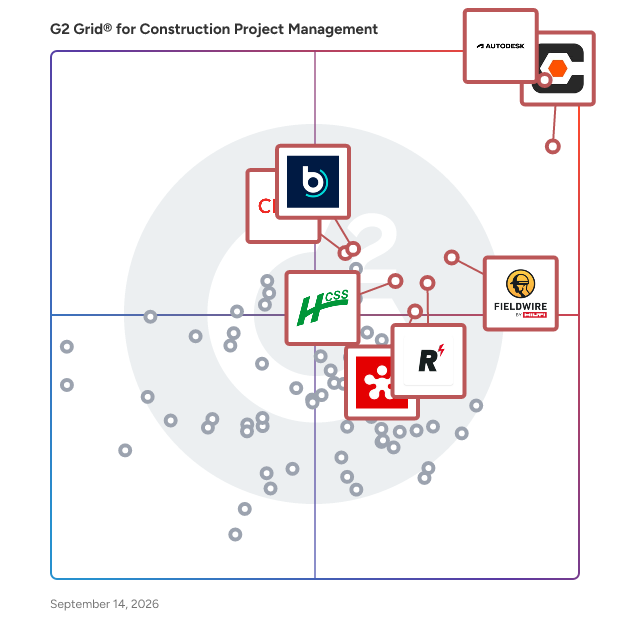
- **Leader:** [Autodesk Forma (formerly Autodesk Construction Cloud)](https://www.g2.com/products/autodesk-forma-formerly-autodesk-construction-cloud/reviews)
- **Highest Performer:** [JobTread](https://www.g2.com/products/jobtread/reviews)
- **Easiest to Use:** [JobTread](https://www.g2.com/products/jobtread/reviews)
- **Top Trending:** [Contractor Foreman](https://www.g2.com/products/contractor-foreman/reviews)
- **Best Free Software:** [Autodesk Forma (formerly Autodesk Construction Cloud)](https://www.g2.com/products/autodesk-forma-formerly-autodesk-construction-cloud/reviews)


---

**Sponsored**

### InEight

InEight offers integrated project controls software built for capital construction. The modular platform is integrated to support flexible implementation and is architected for scalability. Purpose-built applications manage all project phases, from accurate pre-planning to predictable execution and completion. By connecting cost, schedule, contracts, and project information in one platform, teams gain real-time visibility and advanced analytics to make smarter decisions. Trusted by 850+ companies and used to manage over $1 trillion in projects worldwide, InEight supports industries including infrastructure, transportation, mining, water, power and renewables, nuclear, oil, gas, and chemical. With InEight, teams can improve project delivery, modernize operations, standardize best practices, manage budgets and forecasts, control scope changes, enhance collaboration, and gain the clarity to keep even the most complex capital projects on track.


[Visit website](https://www.g2.com/external_clickthroughs/record?secure%5Bad_program%5D=ppc&amp;secure%5Bad_slot%5D=category_product_list&amp;secure%5Bcategory_id%5D=2355&amp;secure%5Bchosen_at%5D=2026-07-02T23%3A24%3A16Z&amp;secure%5Bdisplayable_resource_id%5D=2355&amp;secure%5Bdisplayable_resource_type%5D=Category&amp;secure%5Bmedium%5D=sponsored&amp;secure%5Bplacement_reason%5D=page_category&amp;secure%5Bplacement_resource_ids%5D%5B%5D=2355&amp;secure%5Bprioritized%5D=false&amp;secure%5Bproduct_id%5D=12967&amp;secure%5Bresource_id%5D=2355&amp;secure%5Bresource_type%5D=Category&amp;secure%5Bsource_type%5D=category_page&amp;secure%5Bsource_url%5D=https%3A%2F%2Fwww.g2.com%2Fcategories%2Fconstruction-project-management&amp;secure%5Btoken%5D=9c6dc4976da778fc87807049073225f3201e220d2a57a91acceac07ad4c0cc86&amp;secure%5Burl%5D=https%3A%2F%2Fineight.com%2Frequest-a-demo-g2%2F%3Futm_source%3DG2%26utm_medium%3DReview_Sites%26utm_campaign%3D2601-GL-RS-G2-CPC-RAD-GN&amp;secure%5Burl_type%5D=custom_url)

---

## What Are the Top-Rated Construction Project Management Software Products in 2026?
### 1. [Autodesk Forma (formerly Autodesk Construction Cloud)](https://www.g2.com/products/autodesk-forma-formerly-autodesk-construction-cloud/reviews)
Autodesk Forma (formerly Autodesk Construction Cloud) connects workflows, teams and data at every stage of construction to reduce risk, maximize efficiency, and increase profits. Autodesk Build is part of Autodesk Forma (formerly Autodesk Construction Cloud)&#39;s newest set of products that further connect data, workflows, and teams throughout the entire building lifecycle. Build delivers a broad, deep, and connected set of field execution and project management tools for builders in a single software platform that is easy to deploy, adopt and use. Autodesk Build delivers the unification of best-in-class technology from PlanGrid and BIM 360, along with new functionality, to connect construction data and workflows across the headquarters, office, and jobsite. It offers tools for project management, quality, safety, cost, document management and project closeout workflows in a single application that is purpose-built for what you do and where you are working. -Supports integrated &amp; digitized processes for the build phase of a project in a platform that is easy to deploy, adopt and use, while ensuring information sharing and workflows are tightly controlled and highly-configurable. -Standardized and centralized data collection from design through operations enables data-driven decision making, and predictive analytics provide visibility into high-risk issues that can impact project cost, schedule, quality, and safety. -Cloud-based document management provides a single source of truth for all project documentation for the owner, GCs and subs. Autodesk Takeoff empowers estimators to create fast, accurate takeoffs in a cloud-based solution that combines 2D and 3D workflows. Autodesk Takeoff is part of Autodesk Forma (formerly Autodesk Construction Cloud)&#39;s newest set of products that further connect data, workflows, and teams throughout the entire building lifecycle. Autodesk Takeoff allows estimators to perform more accurate 2D takeoffs and generate automated quantities from 3D models in a single online solution. Preconstruction teams are empowered to win more work with integrated takeoffs and quantities that help produce quality estimates for faster, more accurate bidding. -Manage sheets and models in one data environment with Autodesk Docs -Easily capture project scope with linear, count and area takeoff -Generate multiple quantities and use custom formulas -Get instant access to quantities from models for automated 3D takeoffs -Access aggregated quantities from drawings and models Autodesk BIM Collaborate is part of Autodesk Forma (formerly Autodesk Construction Cloud)&#39;s newest set of products that further connect data, workflows, and teams throughout the entire building lifecycle. BIM Collaborate empowers project teams to align and execute on design intent and constructability by managing the entire design collaboration and coordination workflow. Autodesk BIM Collaborate empowers design and construction teams to align and execute on design intent and constructability in a single online solution. By allowing teams to manage the entire design collaboration and coordination process in a single common data environment, BIM Collaborate reduces rework and improves overall design quality. -No limits on projects or file storage -Subscribe once and use on any project you are working on -Flexible subscription offerings for users, projects and businesses -Easily add subscribers and models as your business grows -Keep the same central administration and user login when adding new products


**Average Rating:** 4.4/5.0
**Total Reviews:** 5,198
**How Do G2 Users Rate Autodesk Forma (formerly Autodesk Construction Cloud)?**

- **Has the product been a good partner in doing business?:** 8.3/10 (Category avg: 8.7/10)
- **Construction Workforce Management Tool Integration:** 7.2/10 (Category avg: 8.0/10)
- **Workforce Scheduling:** 6.7/10 (Category avg: 7.6/10)
- **Information Management:** 8.6/10 (Category avg: 8.8/10)

**Who Is the Company Behind Autodesk Forma (formerly Autodesk Construction Cloud)?**

- **Seller:** [Autodesk](https://www.g2.com/sellers/autodesk)
- **Company Website:** https://www.autodesk.com
- **Year Founded:** 1982
- **HQ Location:** San Francisco
- **Twitter:** @autodesk (273,215 Twitter followers)
- **LinkedIn® Page:** https://www.linkedin.com/company/autodesk/ (15,352 employees on LinkedIn®)

**Who Uses This Product?**
- **Who Uses This:** BIM Manager, Project Manager
- **Top Industries:** Construction, Architecture &amp; Planning
- **Company Size:** 45% Mid-Market, 31% Enterprise


#### What Are Autodesk Forma (formerly Autodesk Construction Cloud)'s Pros and Cons?

**Pros:**

- Ease of Use (556 reviews)
- Collaboration (493 reviews)
- Team Collaboration (429 reviews)
- Sharing (345 reviews)
- Document Management (335 reviews)

**Cons:**

- Missing Features (299 reviews)
- Limitations (226 reviews)
- Access Limitations (183 reviews)
- Improvement Needed (176 reviews)
- Learning Curve (169 reviews)


### What Do G2 Reviewers Say About Autodesk Forma (formerly Autodesk Construction Cloud)?
*AI-generated summary from verified user reviews*

**Pros:**

- Users value the **ease of use** in Autodesk Forma, facilitating file access and efficient BIM coordination.
- Users value the **effective collaboration** features of Autodesk Forma, enhancing coordination among team members and stakeholders.
- Users value the **real-time collaboration** feature of Autodesk Forma, enhancing coordination among team members and stakeholders.
- Users value the **seamless collaboration** offered by Autodesk Forma, enhancing teamwork and real-time data sharing in projects.
- Users value the **flexibility and accessibility** of Autodesk Forma for managing large CAD files seamlessly online.

**Cons:**

- Users are frustrated by the **missing features** like iProperties access and lack of an undo button, complicating tasks.
- Users find the **collaboration limitations** challenging, especially with external parties lacking ACC licenses and repetitive asset creation processes.
- Users are frustrated by the **access limitations** in Autodesk Forma, hindering user management and folder organization features.
- Users feel that **improvement is needed** in Autodesk Forma&#39;s file management and extraction capabilities for efficient project handling.
- Users find the **steep learning curve** of Autodesk Forma challenging, making it difficult for smaller teams to adapt.

#### What Are Recent G2 Reviews of Autodesk Forma (formerly Autodesk Construction Cloud)?

**"[A Connected Platform That Improves Construction Project Collaboration and Control](https://www.g2.com/survey_responses/autodesk-forma-formerly-autodesk-construction-cloud-review-12844228)"**

**Rating:** 5.0/5.0 stars
*— G I.*

[Read full review](https://www.g2.com/survey_responses/autodesk-forma-formerly-autodesk-construction-cloud-review-12844228)

---

**"[ACC Forma removes the delay from the GC&#39;s world of &quot;requests&quot; via AU&#39;s phenomenal platform !!](https://www.g2.com/survey_responses/autodesk-forma-formerly-autodesk-construction-cloud-review-10380089)"**

**Rating:** 4.5/5.0 stars
*— Kerrie  S.*

[Read full review](https://www.g2.com/survey_responses/autodesk-forma-formerly-autodesk-construction-cloud-review-10380089)

---


#### What Are G2 Users Discussing About Autodesk Forma (formerly Autodesk Construction Cloud)?

- [How is Autodesk Construction Cloud facilitating collaboration and efficiency in the construction industry?](https://www.g2.com/discussions/how-is-autodesk-construction-cloud-facilitating-collaboration-and-efficiency-in-the-construction-industry) - 3 comments, 1 upvote
- [What is Autodesk Construction Cloud used for?](https://www.g2.com/discussions/what-is-autodesk-construction-cloud-used-for) - 2 comments, 1 upvote
- [What is Autodesk 360 used for?](https://www.g2.com/discussions/what-is-autodesk-360-used-for) - 1 comment
- [What does Autodesk BIM 360 do?](https://www.g2.com/discussions/what-does-autodesk-bim-360-do) - 2 comments, 1 upvote
- [Does BIM 360 work with AutoCAD?](https://www.g2.com/discussions/does-bim-360-work-with-autocad) - 5 comments, 1 upvote

### 2. [Procore](https://www.g2.com/products/procore/reviews)
Procore construction software manages your construction projects, resources and financials from planning to closeout. The platform connects every project contributor to solutions built specifically for the industry for the owner, the general contractor and the specialty contractor. The ability to communicate across teams makes it easier to work together by establishing a single source of truth. This is how Procore gives your team easy access to everything they need to know to get the job done.


**Average Rating:** 4.6/5.0
**Total Reviews:** 4,147
**How Do G2 Users Rate Procore?**

- **Has the product been a good partner in doing business?:** 8.8/10 (Category avg: 8.7/10)
- **Construction Workforce Management Tool Integration:** 8.1/10 (Category avg: 8.0/10)
- **Workforce Scheduling:** 7.9/10 (Category avg: 7.6/10)
- **Information Management:** 9.0/10 (Category avg: 8.8/10)

**Who Is the Company Behind Procore?**

- **Seller:** [Procore Technologies](https://www.g2.com/sellers/procore-technologies)
- **Company Website:** https://www.procore.com
- **Year Founded:** 2003
- **HQ Location:** Carpinteria, CA
- **Twitter:** @procoretech (16,491 Twitter followers)
- **LinkedIn® Page:** https://www.linkedin.com/company/1912597/ (4,722 employees on LinkedIn®)

**Who Uses This Product?**
- **Who Uses This:** Project Manager, Project Engineer
- **Top Industries:** Construction, Architecture &amp; Planning
- **Company Size:** 49% Mid-Market, 39% Small-Business


#### What Are Procore's Pros and Cons?

**Pros:**

- Ease of Use (670 reviews)
- Project Management (355 reviews)
- Centralization (343 reviews)
- Document Management (293 reviews)
- Intuitive (292 reviews)

**Cons:**

- Missing Features (231 reviews)
- Learning Curve (192 reviews)
- Limitations (156 reviews)
- Difficult Learning (148 reviews)
- Improvement Needed (144 reviews)


### What Do G2 Reviewers Say About Procore?
*AI-generated summary from verified user reviews*

**Pros:**

- Users find Procore&#39;s **ease of use** invaluable, simplifying tasks and enhancing productivity in construction management.
- Users find that Procore&#39;s **effective project management** keeps teams organized and ensures everyone stays informed.
- Users value the **centralization of project data** in Procore, enhancing efficiency and reducing the need for paper storage.
- Users appreciate the **easy accessibility of documentation** in Procore, centralizing project data effectively for their teams.
- Users appreciate the **intuitive design** of Procore, streamlining workflows and enhancing team collaboration effortlessly.

**Cons:**

- Users find **missing features** in Procore, including limited report flexibility and issues with notifications and meeting management.
- Users find the **learning curve** of Procore steep and feel it could be more user-friendly and efficient.
- Users find the **limited integration with QuickBooks** and cumbersome invoicing features reduce Procore&#39;s effectiveness for their needs.
- Users find Procore&#39;s interface to be **difficult to learn** , complicating the onboarding process with its multitude of features.
- Users express a need for **improvement in financial features** and find notifications overwhelming, lacking essential updates.

#### What Are Recent G2 Reviews of Procore?

**"[Procore Makes Collaboration and Project Documentation Seamless](https://www.g2.com/survey_responses/procore-review-12975375)"**

**Rating:** 5.0/5.0 stars
*— Maria Silveria S.*

[Read full review](https://www.g2.com/survey_responses/procore-review-12975375)

---

**"[Procore Keeps Everything Organized from Bidding to Closeout](https://www.g2.com/survey_responses/procore-review-12853904)"**

**Rating:** 5.0/5.0 stars
*— Saugirdas R.*

[Read full review](https://www.g2.com/survey_responses/procore-review-12853904)

---


#### What Are G2 Users Discussing About Procore?

- [What makes Procore a leading solution in construction project management software?](https://www.g2.com/discussions/what-makes-procore-a-leading-solution-in-construction-project-management-software) - 3 comments
- [What is Procore used for?](https://www.g2.com/discussions/procore-what-is-procore-used-for) - 1 comment
- [Does procore have estimating software?](https://www.g2.com/discussions/does-procore-have-estimating-software) - 2 comments
- [What does procore software cost?](https://www.g2.com/discussions/what-does-procore-software-cost) - 2 comments
- [What is procore software?](https://www.g2.com/discussions/what-is-procore-software) - 2 comments

### 3. [Fieldwire by Hilti](https://www.g2.com/products/fieldwire-by-hilti/reviews)
The field-first construction platform for less busywork and more building. Trusted on 4M+ projects worldwide, Fieldwire by Hilti connects the field and office in one simple, powerful platform so teams can move faster, stay aligned, and navigate projects with confidence from start to finish. Construction demands clear information, reliable coordination, and tools that perform where the work happens. Fieldwire brings plans, tasks, and updates into one transparent source of truth, giving everyone – from CEO to installer – access to the information they need, whether in the office or on the jobsite. Built for contractors across every trade, Fieldwire keeps teams aligned with up-to-date information and no surprises. Designed for easy adoption in the field, teams gain real-time visibility into progress, clear ownership of work, and the context to make confident decisions. Automated workflows and streamlined reporting reduce manual work, improve accountability, and help projects stay on schedule and on budget. As part of the Hilti Group, Fieldwire combines deep construction expertise with modern digital innovation to deliver better outcomes on every job. Learn more at Fieldwire.com.


**Average Rating:** 4.5/5.0
**Total Reviews:** 548
**How Do G2 Users Rate Fieldwire by Hilti?**

- **Has the product been a good partner in doing business?:** 8.9/10 (Category avg: 8.7/10)
- **Construction Workforce Management Tool Integration:** 6.9/10 (Category avg: 8.0/10)
- **Workforce Scheduling:** 6.8/10 (Category avg: 7.6/10)
- **Information Management:** 8.4/10 (Category avg: 8.8/10)

**Who Is the Company Behind Fieldwire by Hilti?**

- **Seller:** [Fieldwire](https://www.g2.com/sellers/fieldwire)
- **Company Website:** https://www.fieldwire.com
- **Year Founded:** 2013
- **HQ Location:** San Francisco, CA
- **LinkedIn® Page:** https://www.linkedin.com/company/3078180/ (354 employees on LinkedIn®)

**Who Uses This Product?**
- **Who Uses This:** Project Manager, Project Engineer
- **Top Industries:** Construction, Civil Engineering
- **Company Size:** 56% Small-Business, 32% Mid-Market


#### What Are Fieldwire by Hilti's Pros and Cons?

**Pros:**

- Ease of Use (92 reviews)
- Project Management (38 reviews)
- Team Collaboration (34 reviews)
- Easy Access (33 reviews)
- Intuitive (30 reviews)

**Cons:**

- Limited Customization (18 reviews)
- Limited Functionality (16 reviews)
- Slow Performance (14 reviews)
- Missing Features (12 reviews)
- Update Issues (11 reviews)


### What Do G2 Reviewers Say About Fieldwire by Hilti?
*AI-generated summary from verified user reviews*

**Pros:**

- Users appreciate the **ease of use** of Fieldwire, streamlining communication and enhancing project management efficiency.
- Users appreciate the **short learning curve** of Fieldwire by Hilti, making project management straightforward and efficient.
- Users appreciate the **easy-to-use team collaboration** features of Fieldwire, enhancing communication and project tracking.
- Users value the **easy access to current plans** with Fieldwire, enhancing productivity and communication on projects.
- Users enjoy the **intuitive interface** of Fieldwire, enhancing productivity and organization on job sites.

**Cons:**

- Users express frustration with the **limited customization** options, hindering task management and overall usability.
- Users find the **limited functionality** in Fieldwire frustrating, especially with restricted project visibility and drawing precision.
- Users experience **slow performance** on mobile and desktop, impacting their efficiency in accessing projects.
- Users find the **missing features** frustrating, particularly regarding checklist integration and report customization limitations.
- Users face **update issues** with Fieldwire, especially regarding external user access and excessive auto-email notifications.

#### What Are Recent G2 Reviews of Fieldwire by Hilti?

**"[Essential Field Management for Commercial Construction](https://www.g2.com/survey_responses/fieldwire-by-hilti-review-13051751)"**

**Rating:** 5.0/5.0 stars
*— Scott  P.*

[Read full review](https://www.g2.com/survey_responses/fieldwire-by-hilti-review-13051751)

---

**"[Fieldwire’s Real-Time Mobile Updates Keep Everyone Aligned](https://www.g2.com/survey_responses/fieldwire-by-hilti-review-13055946)"**

**Rating:** 5.0/5.0 stars
*— Russell P.*

[Read full review](https://www.g2.com/survey_responses/fieldwire-by-hilti-review-13055946)

---


#### What Are G2 Users Discussing About Fieldwire by Hilti?

- [What is Fieldwire used for?](https://www.g2.com/discussions/what-is-fieldwire-used-for)
- [What does Fieldwire do?](https://www.g2.com/discussions/what-does-fieldwire-do)
- [How do you use a field wire?](https://www.g2.com/discussions/how-do-you-use-a-field-wire)
- [How much does Fieldwire cost?](https://www.g2.com/discussions/how-much-does-fieldwire-cost)
- [What is Fieldwire app?](https://www.g2.com/discussions/what-is-fieldwire-app) - 2 comments

### 4. [RDash](https://www.g2.com/products/rdash/reviews)
RDash is an AI-powered construction management software that unifies site teams, procurement, design and finance – out of the box. RDash is easy to deploy and integrates with all of the major ERPs


**Average Rating:** 4.6/5.0
**Total Reviews:** 51
**How Do G2 Users Rate RDash?**

- **Has the product been a good partner in doing business?:** 9.4/10 (Category avg: 8.7/10)
- **Construction Workforce Management Tool Integration:** 9.4/10 (Category avg: 8.0/10)
- **Workforce Scheduling:** 9.6/10 (Category avg: 7.6/10)
- **Information Management:** 9.9/10 (Category avg: 8.8/10)

**Who Is the Company Behind RDash?**

- **Seller:** [RDash](https://www.g2.com/sellers/rdash)
- **Company Website:** https://rdash.ai/
- **Year Founded:** 2022
- **HQ Location:** Gurugram, IN
- **LinkedIn® Page:** https://www.linkedin.com/company/r-dash (95 employees on LinkedIn®)

**Who Uses This Product?**
- **Top Industries:** Construction, Architecture &amp; Planning
- **Company Size:** 82% Mid-Market, 18% Small-Business


#### What Are Recent G2 Reviews of RDash?

**"[RDash Keeps All Project Files and Updates Organized in One Place](https://www.g2.com/survey_responses/rdash-review-12980520)"**

**Rating:** 5.0/5.0 stars
*— Mansi S.*

[Read full review](https://www.g2.com/survey_responses/rdash-review-12980520)

---

**"[“Strengthening Safety Compliance Through Better Visibility”](https://www.g2.com/survey_responses/rdash-review-12952311)"**

**Rating:** 4.5/5.0 stars
*— Aashish P.*

[Read full review](https://www.g2.com/survey_responses/rdash-review-12952311)

---


### 5. [Buildertrend](https://www.g2.com/products/buildertrend/reviews)
Buildertrend is the industry’s leading all-in-one construction management platform built for home builders, remodelers, specialty trades and commercial contractors managing projects with the complexity, collaboration and client involvement of a residential build. Trusted by more than 20,000 contractors – and used on over half of all new home builds in the U.S. – it brings your projects, people, clients and financials into one unified system, so you can operate with clarity, confidence and control. Unlike disconnected tools or surface-level integrations, Buildertrend connects every part of your business – from scheduling and communication to job costing and client experience – creating a single source of truth and a system built to reflect how real construction businesses actually operate and grow. With Buildertrend, you can: • Run your entire business on one truly unified platform • Scale with confidence – without outgrowing your systems • Gain real-time financial visibility with built-in job costing and forecasting • Streamline operations and eliminate gaps between teams and workflows • Put your data to work with AI built into your workflows, automating the busywork and surfacing insights you can actually act on But Buildertrend goes beyond software. It’s a long-term partner in your success, equipping you with: • A proven platform trusted by the industry’s top builders • Buildertrend Community – an online hub connecting you with peers and real-world best practices • Exclusive virtual and in-person opportunities to learn, connect and grow Buildertrend isn’t a tool you piece together or outgrow. It’s the system builders move to when they’re ready to run a more connected, more disciplined and more profitable business – where every part of the operation works together, and every decision is backed by real data.


**Average Rating:** 4.3/5.0
**Total Reviews:** 226
**How Do G2 Users Rate Buildertrend?**

- **Has the product been a good partner in doing business?:** 8.5/10 (Category avg: 8.7/10)
- **Construction Workforce Management Tool Integration:** 8.2/10 (Category avg: 8.0/10)
- **Workforce Scheduling:** 8.6/10 (Category avg: 7.6/10)
- **Information Management:** 9.1/10 (Category avg: 8.8/10)

**Who Is the Company Behind Buildertrend?**

- **Seller:** [Buildertrend Solutions](https://www.g2.com/sellers/buildertrend-solutions)
- **Company Website:** https://www.buildertrend.com
- **Year Founded:** 2006
- **HQ Location:** Omaha, NE
- **Twitter:** @Buildertrend (3,903 Twitter followers)
- **LinkedIn® Page:** https://www.linkedin.com/company/1828205/ (726 employees on LinkedIn®)

**Who Uses This Product?**
- **Who Uses This:** Project Manager, Owner
- **Top Industries:** Construction, Building Materials
- **Company Size:** 87% Small-Business, 11% Mid-Market


#### What Are Buildertrend's Pros and Cons?

**Pros:**

- Ease of Use (12 reviews)
- Document Management (7 reviews)
- Project Management (7 reviews)
- Scheduling (6 reviews)
- Organization (5 reviews)

**Cons:**

- Expensive (4 reviews)
- Complexity (3 reviews)
- Learning Curve (2 reviews)
- Update Issues (2 reviews)
- File Organization (1 reviews)


### What Do G2 Reviewers Say About Buildertrend?
*AI-generated summary from verified user reviews*

**Pros:**

- Users find Buildertrend incredibly **easy to use** , allowing seamless management of projects and quick access to support.
- Users value the **organized document management** in Buildertrend, praising its efficiency and ease of access for projects.
- Users admire Buildertrend&#39;s **effective scheduling and project management features** , aiding timely project delivery and organization.
- Users value the **efficient scheduling system** of Buildertrend, which keeps all trades informed about project timelines.
- Users value the **organization and workflow efficiency** of Buildertrend, enhancing project management and business escalation.

**Cons:**

- Users find Buildertrend to be **expensive** , making it more suitable for larger builders despite its high quality.
- Users find Buildertrend&#39;s interface **overwhelmingly complex** , making it challenging to adapt and fully utilize its features.
- Users note a significant **learning curve** with Buildertrend, making initial use more challenging than anticipated.
- Users often face **update issues** that disrupt familiar features, requiring relearning while navigating costly changes.
- Users struggle with **file organization** , as photos uploaded incorrectly get lost in a generic category, causing confusion.

#### What Are Recent G2 Reviews of Buildertrend?

**"[Scheduling, Notifications, and Document Sharing We Rely On](https://www.g2.com/survey_responses/buildertrend-review-13032648)"**

**Rating:** 4.5/5.0 stars
*— Steve B.*

[Read full review](https://www.g2.com/survey_responses/buildertrend-review-13032648)

---

**"[Buildertrend Daily Logs Keep Site Updates, Photos, and Tasks Effortless](https://www.g2.com/survey_responses/buildertrend-review-13034495)"**

**Rating:** 5.0/5.0 stars
*— Trilby W.*

[Read full review](https://www.g2.com/survey_responses/buildertrend-review-13034495)

---


#### What Are G2 Users Discussing About Buildertrend?

- [What is Buildertrend used for?](https://www.g2.com/discussions/what-is-buildertrend-used-for) - 2 comments
- [Who uses Buildertrend?](https://www.g2.com/discussions/who-uses-buildertrend) - 1 comment
- [Is Buildertrend a CRM?](https://www.g2.com/discussions/is-buildertrend-a-crm)
- [How much does Buildertrend really cost?](https://www.g2.com/discussions/how-much-does-buildertrend-really-cost)
- [What is Buildertrend software?](https://www.g2.com/discussions/what-is-buildertrend-software)

### 6. [Houzz Pro](https://www.g2.com/products/houzz-pro/reviews)
Houzz Pro, the leading platform for construction and design, empowers industry professionals and homeowners with the tools they need to make every project a success. Used by more than 3 million construction and design industry professionals and over 70 million homeowners and home design enthusiasts around the world, our AI-powered project management and design software helps pros win projects, collaborate with clients and teams, and run their businesses efficiently and profitably. It’s an all-in-one solution that spans the full customer lifecycle, CRM and Email Marketing tools, Estimates &amp; Proposals, 3D Floor Plans, Schedule, Selections, financial tools, Invoicing &amp; Payments, QuickBooks integration, and a client portal.


**Average Rating:** 4.0/5.0
**Total Reviews:** 45
**How Do G2 Users Rate Houzz Pro?**

- **Has the product been a good partner in doing business?:** 8.8/10 (Category avg: 8.7/10)
- **Construction Workforce Management Tool Integration:** 5.7/10 (Category avg: 8.0/10)
- **Workforce Scheduling:** 6.2/10 (Category avg: 7.6/10)
- **Information Management:** 7.7/10 (Category avg: 8.8/10)

**Who Is the Company Behind Houzz Pro?**

- **Seller:** [Houzz](https://www.g2.com/sellers/houzz)
- **Company Website:** https://www.houzz.com/
- **Year Founded:** 2009
- **HQ Location:** Palo Alto, CA
- **Twitter:** @houzz (293,583 Twitter followers)
- **LinkedIn® Page:** https://www.linkedin.com/company/houzz/ (1,387 employees on LinkedIn®)

**Who Uses This Product?**
- **Top Industries:** Construction, Design
- **Company Size:** 89% Small-Business, 2% Mid-Market


#### What Are Houzz Pro's Pros and Cons?

**Pros:**

- Ease of Use (11 reviews)
- Features (9 reviews)
- Integrations (5 reviews)
- Project Management (5 reviews)
- Business Integration (4 reviews)

**Cons:**

- Expensive (3 reviews)
- Improvement Needed (3 reviews)
- Integration Issues (3 reviews)
- Pricing Issues (3 reviews)
- Billing Issues (2 reviews)


### What Do G2 Reviewers Say About Houzz Pro?
*AI-generated summary from verified user reviews*

**Pros:**

- Users value the **ease of use** of Houzz Pro, which streamlines construction management through integrated functionalities.
- Users love the **integrated functionality** of Houzz Pro, enhancing efficiency and streamlining construction project management.
- Users value the **integrated functionalities** of Houzz Pro, enabling seamless project and relationship management in construction.
- Users value the **comprehensive project management** features of Houzz Pro, streamlining tasks and enhancing overall efficiency.
- Users value the **seamless business integration** of Houzz Pro, enhancing efficiency and communication within construction projects.

**Cons:**

- Users find the subscription price of Houzz Pro to be **expensive** , with additional fees for client transactions adding to the cost.
- Users express frustration with **limited filtering options** and missing features, such as Excel downloads and refunds.
- Users face significant **integration issues** with Houzz Pro, impacting features like QuickBooks syncing and mobile functionality.
- Users express concerns about **high pricing issues** , including fees for client credit card payments and costly subscriptions.
- Users face **billing issues** with Houzz Pro, including slow processing, high fees, and complicated refund procedures.

#### What Are Recent G2 Reviews of Houzz Pro?

**"[Houzz Pro Keeps Our Projects Organized and Professional—Great Value and Easy for Clients](https://www.g2.com/survey_responses/houzz-pro-review-12981604)"**

**Rating:** 5.0/5.0 stars
*— Tiffany C.*

[Read full review](https://www.g2.com/survey_responses/houzz-pro-review-12981604)

---

**"[Houzz Pro Keeps Projects Organized with a Polished, Client-Friendly Experience](https://www.g2.com/survey_responses/houzz-pro-review-12614312)"**

**Rating:** 5.0/5.0 stars
*— Carsyn C.*

[Read full review](https://www.g2.com/survey_responses/houzz-pro-review-12614312)

---


#### What Are G2 Users Discussing About Houzz Pro?

- [What is Houzz Pro used for?](https://www.g2.com/discussions/what-is-houzz-pro-used-for)

### 7. [HCSS](https://www.g2.com/products/hcss/reviews)
Founded in 1986, Heavy Construction Systems Specialists (HCSS) is the leading software partner for heavy civil, infrastructure, and energy contractors. Our team has spent four decades designing and building a unified platform that connects the office to the dirt, helping thousands of contractors across North America close the gap between winning the bid and executing the work. Our unified platform covers the entire project lifecycle with tools built specifically for the unforgiving math of heavy construction. HCSS delivers rapid and accurate estimating capabilities (HeavyBid), real-time field management and daily job costing (HeavyJob), offline-capable safety and compliance tracking, and comprehensive fleet maintenance that brings mixed-fleet telematics into a single, unified dashboard. We solve the problem of disconnected spreadsheets and delayed reporting that lead to invisible profit leaks. By centralizing your estimating, field actuals, and equipment data, HCSS gives your operations the real-time clarity needed to stop guessing at margins, catch production issues before they compound, and scale your business with absolute confidence.


**Average Rating:** 4.6/5.0
**Total Reviews:** 254
**How Do G2 Users Rate HCSS?**

- **Has the product been a good partner in doing business?:** 9.1/10 (Category avg: 8.7/10)
- **Construction Workforce Management Tool Integration:** 8.2/10 (Category avg: 8.0/10)
- **Workforce Scheduling:** 8.1/10 (Category avg: 7.6/10)
- **Information Management:** 8.3/10 (Category avg: 8.8/10)

**Who Is the Company Behind HCSS?**

- **Seller:** [HCSS](https://www.g2.com/sellers/hcss)
- **Company Website:** https://www.hcss.com
- **Year Founded:** 1986
- **HQ Location:** Sugar Land, TX
- **Twitter:** @hcss (2,473 Twitter followers)
- **LinkedIn® Page:** https://www.linkedin.com/company/28223/ (685 employees on LinkedIn®)

**Who Uses This Product?**
- **Who Uses This:** Estimator, Senior Estimator
- **Top Industries:** Construction, Civil Engineering
- **Company Size:** 57% Mid-Market, 30% Small-Business


#### What Are HCSS's Pros and Cons?

**Pros:**

- Ease of Use (55 reviews)
- Customer Support (50 reviews)
- Helpful (28 reviews)
- Efficiency Improvement (27 reviews)
- Estimating (24 reviews)

**Cons:**

- Improvement Needed (19 reviews)
- Missing Features (19 reviews)
- Expensive (11 reviews)
- Inefficient Processes (11 reviews)
- Integration Issues (11 reviews)


### What Do G2 Reviewers Say About HCSS?
*AI-generated summary from verified user reviews*

**Pros:**

- Users find HCSS to be **very user friendly** , making data organization and bid pricing easy and efficient.
- Users value the **responsive and knowledgeable customer support** of HCSS, receiving efficient help without long wait times.
- Users praise the **personal and responsive customer support** of HCSS, ensuring assistance when needed.
- Users value the **efficiency improvement** of HCSS, streamlining operations and enhancing collaboration among mechanics in real-time.
- Users value the **robust estimating features** of HCSS, appreciating the support and extensive tools available for bids.

**Cons:**

- Users express the need for **improvement in communication** with support for a smoother experience with HCSS.
- Users find the **missing features** in HCSS limiting, especially regarding integration and report generation.
- Users find that the **cost of licenses can be expensive** , especially for larger organizations with fluctuating personnel needs.
- Users experience **inefficient processes** with HCSS, facing challenges in communication and bid item management.
- Users report **integration issues** with third-party tools and data transfer, hindering efficiency and usability.

#### What Are Recent G2 Reviews of HCSS?

**"[Seamless Estimating-to-Field Workflow Saves Time](https://www.g2.com/survey_responses/hcss-review-13052710)"**

**Rating:** 5.0/5.0 stars
*— Thomas S.*

[Read full review](https://www.g2.com/survey_responses/hcss-review-13052710)

---

**"[This Software has Changed the Game for Our Estimating &amp; Job Costing Processes](https://www.g2.com/survey_responses/hcss-review-9317969)"**

**Rating:** 4.5/5.0 stars
*— Jonny K.*

[Read full review](https://www.g2.com/survey_responses/hcss-review-9317969)

---


#### What Are G2 Users Discussing About HCSS?

- [What is HCSS HeavyJob used for?](https://www.g2.com/discussions/what-is-hcss-heavyjob-used-for) - 1 comment, 2 upvotes
- [What is Equipment360 used for?](https://www.g2.com/discussions/equipment360-what-is-equipment360-used-for)
- [What is Equipment360 used for?](https://www.g2.com/discussions/what-is-equipment360-used-for) - 1 comment, 1 upvote
- [What is HCSS Dispatcher used for?](https://www.g2.com/discussions/what-is-hcss-dispatcher-used-for) - 1 comment
- [What is HCSS Plans used for?](https://www.g2.com/discussions/what-is-hcss-plans-used-for) - 1 comment

### 8. [Oracle Primavera](https://www.g2.com/products/oracle-primavera/reviews)
For more than 30 years, successful projects around the world have relied on Oracle Construction and Engineering&#39;s Primavera solutions to plan, build, and operate critical assets. It is the only solution that integrates project and portfolio planning and delivery teams for planning, resourcing, risk mitigation, scheduling, and program management. Manage projects of any size. Robust and easy-to-use. Key Benefits - Cloud-based, delivering fast time to value - One platform for planning, prioritizing, executing, and monitoring projects and programs - Optimization and oversight of capital spend to maximize return and align with strategies - Enhanced risk mitigation; better visibility of project and portfolio health - Comprehensive, integrated planning - critical path method (CPM) and Lean scheduling, plus upstream portfolio planning and downstream risk mitigation - Total resource management – maintain optimal staffing levels to improve delivery efficiency - Collaboration and control across teams – drive efficiency and quality, reduce waste - Connect teams with access from any device, create and update activities and tasks, and view portfolios and files with offline support - Risk mitigation – avoid delays and cost overruns


**Average Rating:** 4.4/5.0
**Total Reviews:** 341
**How Do G2 Users Rate Oracle Primavera?**

- **Has the product been a good partner in doing business?:** 8.0/10 (Category avg: 8.7/10)
- **Construction Workforce Management Tool Integration:** 8.1/10 (Category avg: 8.0/10)
- **Workforce Scheduling:** 8.6/10 (Category avg: 7.6/10)
- **Information Management:** 8.2/10 (Category avg: 8.8/10)

**Who Is the Company Behind Oracle Primavera?**

- **Seller:** [Oracle](https://www.g2.com/sellers/oracle)
- **Year Founded:** 1977
- **HQ Location:** Austin, TX
- **Twitter:** @Oracle (827,997 Twitter followers)
- **LinkedIn® Page:** https://www.linkedin.com/company/1028/ (208,078 employees on LinkedIn®)
- **Ownership:** NYSE:ORCL

**Who Uses This Product?**
- **Who Uses This:** Planning Engineer, Project Manager
- **Top Industries:** Construction, Oil &amp; Energy
- **Company Size:** 38% Mid-Market, 37% Enterprise


#### What Are Oracle Primavera's Pros and Cons?

**Pros:**

- Project Management (2 reviews)
- Centralization (1 reviews)
- Comprehensive Coverage (1 reviews)
- Comprehensive Features (1 reviews)
- Organization (1 reviews)

**Cons:**

- Complex Setup (1 reviews)
- Cost Issues (1 reviews)
- Expensive (1 reviews)
- Limited Features (1 reviews)
- Limited Functionality (1 reviews)


### What Do G2 Reviewers Say About Oracle Primavera?
*AI-generated summary from verified user reviews*

**Pros:**

- Users find Oracle Primavera&#39;s **project management tools** essential for keeping large, high-stakes projects organized and on track.
- Users value the **centralization** of Oracle Primavera, which keeps high-stakes projects organized and on track.
- Users value the **comprehensive coverage** of Oracle Primavera for streamlined project management from start to finish.
- Users value the **comprehensive features** of Oracle Primavera for effective project management from planning to execution.
- Users find that Oracle Primavera is essential for maintaining **organization in high-stakes projects** , ensuring everything stays on track.

**Cons:**

- Users struggle with a **complex setup** due to the steep learning curve and outdated interface of Oracle Primavera.
- Users find the **cost issues** of Oracle Primavera concerning, especially for small or simple projects.
- Users find Oracle Primavera **expensive** , with its extensive features being overkill for small or straightforward projects.
- Users find the **limited features** of Oracle Primavera inadequate for simple projects, leading to frustration.
- Users find **limited functionality** of Oracle Primavera unsuitable for small or straightforward projects, feeling it may be excessive.

#### What Are Recent G2 Reviews of Oracle Primavera?

**"[Promising Tool with Scope for Enhancements](https://www.g2.com/survey_responses/oracle-primavera-review-12906556)"**

**Rating:** 4.5/5.0 stars
*— Valli K.*

[Read full review](https://www.g2.com/survey_responses/oracle-primavera-review-12906556)

---

**"[Essential for Organizing and Managing High-Stakes Projects](https://www.g2.com/survey_responses/oracle-primavera-review-11850374)"**

**Rating:** 4.5/5.0 stars
*— Sanket W.*

[Read full review](https://www.g2.com/survey_responses/oracle-primavera-review-11850374)

---


#### What Are G2 Users Discussing About Oracle Primavera?

- [What is Oracle Primavera used for?](https://www.g2.com/discussions/oracle-primavera-what-is-oracle-primavera-used-for) - 1 comment
- [Is Primavera better than Microsoft Project?](https://www.g2.com/discussions/is-primavera-better-than-microsoft-project)
- [What are the features and applications of Primavera?](https://www.g2.com/discussions/what-are-the-features-and-applications-of-primavera) - 1 comment
- [What is Primavera p6 software used for?](https://www.g2.com/discussions/what-is-primavera-p6-software-used-for) - 1 comment
- [What is Oracle Primavera used for?](https://www.g2.com/discussions/what-is-oracle-primavera-used-for) - 1 comment

### 9. [JobTread](https://www.g2.com/products/jobtread/reviews)
JobTread provides end-to-end construction management software that helps jobs-based businesses manage all of their processes, from pre-construction to project completion. The platform serves as a central location to manage jobs, teams, documents, photos, finances, customers, vendors, sub-contractors, and more. Its budget-first approach creates financial transparency at every stage of a project. Through JobTread, you will have access to an extensive list of Sales and Estimating features ranging from a construction CRM and budgeting to contracts and eSignitures. The Project Management features cover purchase orders, daily logs, tasks and scheduling and more. Its Finance and Cashflow features offer Change Orders, invoices, billing, job costing, and payment processing. With the Business Intelligence features the user has custom fields, reporting, dashboards, and performance insights. JobTread has integrations with Quickbooks Online, Stripe Payments, Slack, and Zapier.


**Average Rating:** 5.0/5.0
**Total Reviews:** 85
**How Do G2 Users Rate JobTread?**

- **Has the product been a good partner in doing business?:** 9.9/10 (Category avg: 8.7/10)
- **Construction Workforce Management Tool Integration:** 9.5/10 (Category avg: 8.0/10)
- **Workforce Scheduling:** 9.6/10 (Category avg: 7.6/10)
- **Information Management:** 9.7/10 (Category avg: 8.8/10)

**Who Is the Company Behind JobTread?**

- **Seller:** [JobTread](https://www.g2.com/sellers/jobtread)
- **Company Website:** https://www.jobtread.com
- **Year Founded:** 2019
- **HQ Location:** Dallas, US
- **Twitter:** @jobtread (225 Twitter followers)
- **LinkedIn® Page:** https://www.linkedin.com/company/28920856 (60 employees on LinkedIn®)

**Who Uses This Product?**
- **Who Uses This:** Owner
- **Top Industries:** Construction
- **Company Size:** 95% Small-Business, 3% Enterprise


#### What Are JobTread's Pros and Cons?

**Pros:**

- Customer Support (5 reviews)
- Ease of Use (5 reviews)
- Efficiency Improvement (4 reviews)
- Affordable (3 reviews)
- Efficiency (3 reviews)

**Cons:**

- Missing Features (4 reviews)
- Access Limitations (2 reviews)
- Editing Difficulties (2 reviews)
- Update Issues (2 reviews)
- Access Restrictions (1 reviews)


### What Do G2 Reviewers Say About JobTread?
*AI-generated summary from verified user reviews*

**Pros:**

- Users praise the **amazing customer support** of JobTread, which greatly enhances their overall experience and success.
- Users appreciate the **ease of use** of JobTread, highlighting its intuitive interface and excellent customer support.
- Users appreciate the **efficiency improvement** from JobTread, making project management tasks faster and easier than ever.
- Users find JobTread to be an **affordable** solution that enhances efficiency and simplifies workflows for their teams.
- Users find JobTread enhances **efficiency** , streamlining tasks and processes for smoother project management and collaboration.

**Cons:**

- Users note **missing features** , like a takeoff tool and options for fixed-price contracts, limiting overall functionality.
- Users face **access limitations** with JobTread, as editing spreadsheets directly on the platform is not possible.
- Users find **editing difficulties** in JobTread, particularly regarding spreadsheet modifications and invoice adjustments, somewhat frustrating.
- Users find it difficult to keep up with **update issues** as JobTread frequently evolves, impacting overall usability.
- Users find **access restrictions** challenging when using JobTread for fixed-price contracts, complicating client approval workflows.

#### What Are Recent G2 Reviews of JobTread?

**"[Robust and Comprehensive, Yet Streamlined for Construction Management](https://www.g2.com/survey_responses/jobtread-review-12913656)"**

**Rating:** 5.0/5.0 stars
*— Polly M.*

[Read full review](https://www.g2.com/survey_responses/jobtread-review-12913656)

---

**"[Simple, Streamlined, and Easy to Work With](https://www.g2.com/survey_responses/jobtread-review-13056042)"**

**Rating:** 5.0/5.0 stars
*— Jessica J.*

[Read full review](https://www.g2.com/survey_responses/jobtread-review-13056042)

---


#### What Are G2 Users Discussing About JobTread?

- [What is JobTread used for?](https://www.g2.com/discussions/what-is-jobtread-used-for)

### 10. [Revizto](https://www.g2.com/products/revizto/reviews)
Revizto is revolutionizing collaboration across the AECO industry. Helping architects, engineers, contractors, and owners deliver projects on time and on budget, without risk or waste. Revizto enables the people behind the world’s most important structures to do their best work. We connect architects, engineers, contractors, and owners through one shared 2D and 3D environment across the entire building lifecycle. By uniting teams from concept through completion, Revizto drives maximum collaboration, clarity, and results. Designed for professionals across the AECO industry, Revizto serves as a centralized Collaboration Hub where all project stakeholders can communicate, coordinate, and resolve issues in real time. The platform is especially powerful for large-scale, complex projects where alignment across multiple disciplines is critical. From airports and hospitals to data centers and other critical infrastructure, Revizto helps teams stay connected and informed, ensuring everyone is working from the same source of truth. Revizto’s intuitive interface allows users to visualize and interact with coordinated 2D sheets and 3D models in real time, making it easier to identify clashes, track issues, and resolve risks early in the design and construction process. Automated clash detection and robust issue tracking enable teams to assign responsibilities, monitor progress, and maintain accountability. This reduces rework, delays, and costly errors later in the project lifecycle. Built on a gaming engine, Revizto’s technology is purposefully engineered to withstand construction’s toughest conditions and most complex projects. The platform is fast, stable, and reliable, working seamlessly wherever teams need it, whether in the office or on site, across desktop, tablet, or mobile devices. As a cloud-based solution, Revizto ensures that every stakeholder has access to the most up-to-date project information, regardless of location. This flexibility supports today’s increasingly distributed teams while maintaining data integrity, security, and project continuity. Trusted by leading firms including Jacobs, AECOM, AtkinsRéalis, Skanska, and Stantec, Revizto is redefining how the built world collaborates. Backed by Summit Partners and headquartered in Lausanne, Switzerland, with team members across the globe, Revizto continues to transform the way critical infrastructure is designed and delivered, building a world that is made to last.


**Average Rating:** 4.6/5.0
**Total Reviews:** 238
**How Do G2 Users Rate Revizto?**

- **Has the product been a good partner in doing business?:** 8.9/10 (Category avg: 8.7/10)
- **Construction Workforce Management Tool Integration:** 7.4/10 (Category avg: 8.0/10)
- **Workforce Scheduling:** 5.6/10 (Category avg: 7.6/10)
- **Information Management:** 8.2/10 (Category avg: 8.8/10)

**Who Is the Company Behind Revizto?**

- **Seller:** [Revizto](https://www.g2.com/sellers/revizto)
- **Company Website:** https://revizto.com
- **Year Founded:** 2010
- **HQ Location:** Lausanne, Switzerland
- **Twitter:** @REVIZTO (9,157 Twitter followers)
- **LinkedIn® Page:** https://www.linkedin.com/company/3813166/ (213 employees on LinkedIn®)

**Who Uses This Product?**
- **Who Uses This:** BIM Manager, VDC Manager
- **Top Industries:** Construction, Architecture &amp; Planning
- **Company Size:** 49% Mid-Market, 32% Enterprise


#### What Are Revizto's Pros and Cons?

**Pros:**

- Ease of Use (104 reviews)
- Collaboration (74 reviews)
- Features (66 reviews)
- Issue Management (55 reviews)
- Team Collaboration (51 reviews)

**Cons:**

- Missing Features (33 reviews)
- Lack of Features (23 reviews)
- Functionality Issues (18 reviews)
- Inadequate Tools (18 reviews)
- Learning Curve (16 reviews)


### What Do G2 Reviewers Say About Revizto?
*AI-generated summary from verified user reviews*

**Pros:**

- Users praise the **ease of use** of Revizto, appreciating its simple setup and effective workflow integration.
- Users appreciate the **effective collaboration** features of Revizto, enhancing communication and streamlining project workflows.
- Users value Revizto for its **centralized communication** and seamless management of 3D models and issues.
- Users value Revizto for its **effective issue management** , enhancing BIM coordination and streamlining communication across teams.
- Users highlight the **ease of collaboration** in Revizto, allowing teams to work effectively across various projects.

**Cons:**

- The **missing features** in Revizto, such as quantity takeoff and integration issues, hinder user experience and data accuracy.
- Users report a **lack of intuitive features** in Revizto, making it hard for new users to effectively navigate.
- Users report **functionality issues** with Revizto, particularly with larger models and a complicated user interface.
- Users find the **tools inadequate** , especially for clash detection and drawing integration, limiting their workflow efficiency.
- Users find the **learning curve steep** due to unclear icons and limited instructional resources, leading to frustration.

#### What Are Recent G2 Reviews of Revizto?

**"[Fast, Smooth BIM Coordination—Even on Lower-End Hardware](https://www.g2.com/survey_responses/revizto-review-12930620)"**

**Rating:** 5.0/5.0 stars
*— Matteo G.*

[Read full review](https://www.g2.com/survey_responses/revizto-review-12930620)

---

**"[Revizto, not Revitzo](https://www.g2.com/survey_responses/revizto-review-12931373)"**

**Rating:** 4.0/5.0 stars
*— Jason L.*

[Read full review](https://www.g2.com/survey_responses/revizto-review-12931373)

---


#### What Are G2 Users Discussing About Revizto?

- [What is Revizto 5?](https://www.g2.com/discussions/what-is-revizto-5)
- [Is Revizto cloud based?](https://www.g2.com/discussions/is-revizto-cloud-based)
- [Why use Revizto?](https://www.g2.com/discussions/why-use-revizto)
- [What does Revizto do?](https://www.g2.com/discussions/what-does-revizto-do)

### 11. [Oracle Aconex](https://www.g2.com/products/oracle-aconex/reviews)
Owners and delivery teams trust Oracle Aconex for visibility, control, reduced risk, and connected teams. Drive efficiency in design and construction coordination, project controls and cost management, document management, and field management. Get fast time to value with construction management software that is easy to use and deploys in days. The Aconex Difference: - A trusted platform and rock-solid audit trail drives adoption, visibility, a single source of truth and minimizes disputes. - Connected processes and data drives performance, insights, continuous learning and control. - Set up flexible processes based on how you work, and change as your processes develop. - Secure and compliant, meeting the highest international security standards. - Unparalleled service and support get your projects off to the best possible start and helps keep them running smoothly. Key Business Benefits of Oracle Aconex include: - Control, insights, effortless handover, and fast ROI - Process management across the entire lifecycle - Connected project team enhances collaboration - Common data environment (CDE) connects all project and model information - Configurable platform - enable specific processes - Single source of truth improves data management, reduces errors - Data-driven intelligence fuels continuous improvement Product Features: - Secure Document Management - Advanced Communications and Forms - Model Coordination in a Common Data Environment - Integrated Cost Management - Quality and Safety Processes - Unparalleled Service and Support “Using the review process, workflows and the online viewer have removed work duplication due to easy collaboration between all parties.” Nisha Khetani, Head of Document Control, Multiplex


**Average Rating:** 4.5/5.0
**Total Reviews:** 198
**How Do G2 Users Rate Oracle Aconex?**

- **Has the product been a good partner in doing business?:** 8.5/10 (Category avg: 8.7/10)
- **Construction Workforce Management Tool Integration:** 8.8/10 (Category avg: 8.0/10)
- **Workforce Scheduling:** 9.2/10 (Category avg: 7.6/10)
- **Information Management:** 9.4/10 (Category avg: 8.8/10)

**Who Is the Company Behind Oracle Aconex?**

- **Seller:** [Oracle](https://www.g2.com/sellers/oracle)
- **Year Founded:** 1977
- **HQ Location:** Austin, TX
- **Twitter:** @Oracle (827,997 Twitter followers)
- **LinkedIn® Page:** https://www.linkedin.com/company/1028/ (208,078 employees on LinkedIn®)
- **Ownership:** NYSE:ORCL

**Who Uses This Product?**
- **Who Uses This:** Document Controller, Senior Document Controller
- **Top Industries:** Construction, Civil Engineering
- **Company Size:** 54% Mid-Market, 30% Enterprise


#### What Are Oracle Aconex's Pros and Cons?


**Cons:**

- File Organization (1 reviews)
- Missing Features (1 reviews)


### What Do G2 Reviewers Say About Oracle Aconex?
*AI-generated summary from verified user reviews*


**Cons:**

- Users find the **folder hierarchy lacking** , causing challenges in document organization and accessibility in Aconex.
- Users find the **missing hierarchy features** frustrating, as it limits organization and document management capabilities.

#### What Are Recent G2 Reviews of Oracle Aconex?

**"[Streamlines Project Management and Communication](https://www.g2.com/survey_responses/oracle-aconex-review-12541171)"**

**Rating:** 5.0/5.0 stars
*— Umer I.*

[Read full review](https://www.g2.com/survey_responses/oracle-aconex-review-12541171)

---

**"[Role of Oracle Aconex in project management](https://www.g2.com/survey_responses/oracle-aconex-review-9164527)"**

**Rating:** 4.0/5.0 stars
*— Aaron S.*

[Read full review](https://www.g2.com/survey_responses/oracle-aconex-review-9164527)

---


#### What Are G2 Users Discussing About Oracle Aconex?

- [What is Oracle Aconex used for?](https://www.g2.com/discussions/what-is-oracle-aconex-used-for)
- [Is aconex free?](https://www.g2.com/discussions/is-aconex-free) - 1 comment
- [What is the main purpose of the Aconex Software?](https://www.g2.com/discussions/oracle-aconex-what-is-the-main-purpose-of-the-aconex-software)
- [What is Oracle aconex?](https://www.g2.com/discussions/what-is-oracle-aconex) - 1 comment

### 12. [Contractor Foreman](https://www.g2.com/products/contractor-foreman/reviews)
NOW: Starting @ $49/m for the WHOLE company, Contractor Foreman is the most affordable all-in-one solution for managing construction projects. Free Trial + 100 day Guarantee Quickly and easily create Estimates, Schedules, Daily Logs, Time Cards (w/GPS), Online Signatures, Invoices, Submittals, Change Orders, PO&#39;s, Bid Management, Client Portal, safety topics and more. Integrates with QuickBooks, Zapier, and more. There are NO PER-PROJECT FEES. Save thousands compared to other systems. Use it on the phone, tablet, and computer.


**Average Rating:** 4.5/5.0
**Total Reviews:** 372
**How Do G2 Users Rate Contractor Foreman?**

- **Has the product been a good partner in doing business?:** 9.1/10 (Category avg: 8.7/10)
- **Construction Workforce Management Tool Integration:** 8.2/10 (Category avg: 8.0/10)
- **Workforce Scheduling:** 8.3/10 (Category avg: 7.6/10)
- **Information Management:** 8.7/10 (Category avg: 8.8/10)

**Who Is the Company Behind Contractor Foreman?**

- **Seller:** [Contractor Foreman](https://www.g2.com/sellers/contractor-foreman)
- **Company Website:** https://contractorforeman.com
- **Year Founded:** 2017
- **HQ Location:** North Carolina, USA
- **Twitter:** @contractorapps (32 Twitter followers)
- **LinkedIn® Page:** https://www.linkedin.com/company/contractor-foreman/ (92 employees on LinkedIn®)

**Who Uses This Product?**
- **Who Uses This:** Owner, Project Manager
- **Top Industries:** Construction, Electrical/Electronic Manufacturing
- **Company Size:** 88% Small-Business, 9% Mid-Market


#### What Are Contractor Foreman's Pros and Cons?

**Pros:**

- Ease of Use (61 reviews)
- Project Management (42 reviews)
- Customer Support (40 reviews)
- Features (37 reviews)
- Helpful (29 reviews)

**Cons:**

- Limited Customization (17 reviews)
- Integration Issues (12 reviews)
- Missing Features (12 reviews)
- Update Issues (11 reviews)
- Limited Features (10 reviews)


### What Do G2 Reviewers Say About Contractor Foreman?
*AI-generated summary from verified user reviews*

**Pros:**

- Users praise the **ease of use** of Contractor Foreman, making training minimal and enhancing efficiency across teams.
- Users value the **comprehensive project management features** of Contractor Foreman, enhancing efficiency and organization across projects.
- Users highly value the **responsive customer support** of Contractor Foreman, enhancing their overall experience and satisfaction.
- Users appreciate the **extensive features** of Contractor Foreman, finding it effective for various business tasks and projects.
- Users commend the **outstanding customer support** of Contractor Foreman, appreciating instant assistance and comprehensive resources throughout their experience.

**Cons:**

- Users experience **limited customization** , making it challenging to adapt Contractor Foreman to their specific workflows effectively.
- Users face **integration issues** with Contractor Foreman, leading to inefficiencies and frequent data management challenges.
- Users find the **missing features** in Contractor Foreman limit customization and add unnecessary complexity to tasks.
- Users report frequent **update issues** that disrupt workflow and complicate app accessibility for field employees.
- Users note the **limited features** of Contractor Foreman, feeling it lacks customization and modern interface options.

#### What Are Recent G2 Reviews of Contractor Foreman?

**"[Foreman Software: User-Friendly, Real-Time Project Tracking That Boosts Construction Productivity](https://www.g2.com/survey_responses/contractor-foreman-review-12830601)"**

**Rating:** 5.0/5.0 stars
*— Nandini D.*

[Read full review](https://www.g2.com/survey_responses/contractor-foreman-review-12830601)

---

**"[A powerfull and reliable plataform to manage the projects](https://www.g2.com/survey_responses/contractor-foreman-review-12642847)"**

**Rating:** 5.0/5.0 stars
*— Victoria M.*

[Read full review](https://www.g2.com/survey_responses/contractor-foreman-review-12642847)

---


#### What Are G2 Users Discussing About Contractor Foreman?

- [Does contractor foreman integrate with QuickBooks?](https://www.g2.com/discussions/does-contractor-foreman-integrate-with-quickbooks)
- [What is a contractor software?](https://www.g2.com/discussions/what-is-a-contractor-software) - 2 comments
- [What does a construction Foreman do?](https://www.g2.com/discussions/what-does-a-construction-foreman-do) - 2 comments
- [What is foreman and contractor?](https://www.g2.com/discussions/what-is-foreman-and-contractor)

### 13. [Methvin](https://www.g2.com/products/methvin/reviews)
Construction estimators don&#39;t lose bids because they priced too high. They lose because their numbers weren&#39;t built on solid ground. Methvin is the only platform that calculates costs from first principles. While other tools rely on historical averages that no longer reflect the market, Methvin builds every figure from scratch, labor, plant, and materials. One miscalculation on a tight-margin project doesn&#39;t just hurt the job; it can wipe out the profit from three others. Stop guessing. Start winning bids you can actually deliver on. --- WHY TOP FIRMS CHOOSE METHVIN --- ACCURACY: Automate heavy lifting and turn around accurate tenders faster without cutting corners. SCALABILITY: From small fitouts to large civil infrastructure, the platform scales without breaking your process. FLEXIBILITY: Configure workflows to match how your team actually estimates. Methvin adapts to you, not the other way around. REAL-TIME COLLABORATION: Everyone works from the same numbers, from anywhere, in real time. --- THE FULL PROJECT LIFECYCLE --- Beyond estimating, Methvin handles the heavy lifting of project management: Takeoff tools to measure quantities directly from plans. Gantt scheduling to keep timelines and dependencies visible. Job costing to track spend as it happens. Cost-vs-Allowable reporting to flag variances before they become problems. --- THE INTELLIGENT RECORD --- Most platforms miss the biggest risk: the &quot;he-said, she-said&quot; of site disputes. Methvin’s Correspondence module brings every contract, RFI, site instruction, and variation into one place. You can ask it questions in plain language: &quot;What was agreed on the structural steel spec?&quot; or &quot;Has the client signed off on the drainage scope?&quot; The answer comes straight from your documents instantly. In construction, a missed instruction can cost more than the original estimate. An intelligent, searchable record isn&#39;t a luxury, it is how professional teams protect their margins. Methvin is purpose-built for construction. If your current tools feel like you&#39;re working around them, it&#39;s time to see what a platform built for this industry actually feels like.


**Average Rating:** 4.6/5.0
**Total Reviews:** 105
**How Do G2 Users Rate Methvin?**

- **Has the product been a good partner in doing business?:** 8.9/10 (Category avg: 8.7/10)
- **Construction Workforce Management Tool Integration:** 9.8/10 (Category avg: 8.0/10)
- **Workforce Scheduling:** 9.9/10 (Category avg: 7.6/10)
- **Information Management:** 9.9/10 (Category avg: 8.8/10)

**Who Is the Company Behind Methvin?**

- **Seller:** [Methvin](https://www.g2.com/sellers/methvin)
- **Company Website:** https://www.methvin.org
- **Year Founded:** 2018
- **HQ Location:** Albany, Auckland
- **Twitter:** @Methvin (15 Twitter followers)
- **LinkedIn® Page:** https://www.linkedin.com/company/methvin (8 employees on LinkedIn®)

**Who Uses This Product?**
- **Top Industries:** Construction, Civil Engineering
- **Company Size:** 56% Small-Business, 31% Enterprise


#### What Are Methvin's Pros and Cons?

**Pros:**

- Estimating (28 reviews)
- Ease of Use (24 reviews)
- Estimating Tools (21 reviews)
- Project Management (21 reviews)
- Collaboration (19 reviews)

**Cons:**

- Learning Curve (20 reviews)
- Steep Learning Curve (16 reviews)
- Difficult Learning (15 reviews)
- Poor Interface Design (13 reviews)
- Difficult Learning Curve (11 reviews)


### What Do G2 Reviewers Say About Methvin?
*AI-generated summary from verified user reviews*

**Pros:**

- Users value the **cloud collaboration** of Methvin, enabling real-time teamwork for estimators and project managers.
- Users value the **ease of use** of Methvin, simplifying complex tasks and enhancing team collaboration significantly.
- Users value the **strong collaboration** features of Methvin, enhancing teamwork and real-time data access for projects.
- Users value the **strong collaboration** provided by Methvin, enabling real-time teamwork across various project roles.
- Users value the **strong collaboration** feature of Methvin, enabling real-time data access for multiple stakeholders.

**Cons:**

- Users note a **steep learning curve** with Methvin, requiring significant time and training for effective usage.
- Users find the **steep learning curve** of Methvin challenging, requiring time and training for effective use.
- Users find Methvin has a **difficult learning curve** , requiring time and training to fully master its structured approach.
- Users find the **poor interface design** of Methvin challenging, especially for those unfamiliar with modern estimating tools.
- Users find the **difficult learning curve** of Methvin challenging, requiring time and guidance for effective use.

#### What Are Recent G2 Reviews of Methvin?

**"[Methvin Helps Turn Estimating Accuracy into Better Project Outcomes](https://www.g2.com/survey_responses/methvin-review-12566537)"**

**Rating:** 4.0/5.0 stars
*— Nathan  G.*

[Read full review](https://www.g2.com/survey_responses/methvin-review-12566537)

---

**"[Precision Estimating Meets Practical Project Control](https://www.g2.com/survey_responses/methvin-review-12935598)"**

**Rating:** 5.0/5.0 stars
*— Razia M.*

[Read full review](https://www.g2.com/survey_responses/methvin-review-12935598)

---


#### What Are G2 Users Discussing About Methvin?

- [What is Methvin used for?](https://www.g2.com/discussions/what-is-methvin-used-for)

### 14. [Quickbase](https://www.g2.com/products/quickbase/reviews)
Quickbase is an AI-driven platform designed to help businesses streamline their operations by adapting to their unique workflows and processes. Unlike traditional off-the-shelf software, which often requires users to conform to predefined structures, Quickbase empowers organizations to create customized solutions that align with their specific needs. This flexibility is crucial for companies seeking to eliminate inefficiencies and reduce the burden of &#39;Gray Work&#39; - what we call the time-consuming tasks and manual processes that arise from using rigid software systems. The target audience for Quickbase includes businesses of all sizes across various industries that are looking to enhance their operational efficiency. Whether it&#39;s a 50 person small business or a large enterprise, organizations can benefit from a platform that allows them to connect disparate data sources, automate repetitive tasks, and scale their competitive advantages. Quickbase is particularly valuable for teams that rely on collaboration and data-driven decision-making, as it fosters an environment where information flows seamlessly and processes are optimized. Key features of Quickbase include its intuitive interface, which allows users to build custom applications without extensive coding knowledge. This user-friendly design enables teams to quickly adapt the platform to their specific workflows, ensuring that they can address unique challenges without the need for extensive IT support. Additionally, Quickbase offers powerful automation capabilities, allowing users to set up triggers and workflows that reduce manual effort and streamline operations. The platform also supports integration with various data sources, enabling businesses to consolidate their information and gain valuable insights. One of the standout benefits of Quickbase is its ability to scale with your business. As organizations grow and evolve, their processes often become more complex. Quickbase&#39;s adaptable nature ensures that users can modify their applications and workflows as needed, without the constraints typically associated with traditional software. This flexibility not only saves time but also fosters innovation, as teams can experiment with new processes and tools that enhance their productivity. By prioritizing user-centric design and adaptability, Quickbase stands out in the crowded landscape of business software solutions. It provides organizations with the tools they need to optimize their operations, reduce inefficiencies, and ultimately drive growth. With Quickbase, businesses can focus on what truly matters—leveraging their unique processes to gain a competitive edge in their respective markets.


**Average Rating:** 4.5/5.0
**Total Reviews:** 1,498
**How Do G2 Users Rate Quickbase?**

- **Has the product been a good partner in doing business?:** 8.7/10 (Category avg: 8.7/10)
- **Information Management:** 10.0/10 (Category avg: 8.8/10)

**Who Is the Company Behind Quickbase?**

- **Seller:** [Quickbase](https://www.g2.com/sellers/quickbase)
- **Company Website:** https://quickbase.com/
- **Year Founded:** 2012
- **HQ Location:** Boston, MA
- **Twitter:** @quickbase (5,146 Twitter followers)
- **LinkedIn® Page:** https://www.linkedin.com/company/2845325/ (816 employees on LinkedIn®)

**Who Uses This Product?**
- **Who Uses This:** Project Manager, Project Coordinator
- **Top Industries:** Construction, Information Technology and Services
- **Company Size:** 42% Mid-Market, 31% Small-Business


#### What Are Quickbase's Pros and Cons?

**Pros:**

- Ease of Use (304 reviews)
- Customization (216 reviews)
- Customizability (184 reviews)
- Flexibility (157 reviews)
- Customization Options (145 reviews)

**Cons:**

- Learning Curve (117 reviews)
- Missing Features (93 reviews)
- Limited Features (90 reviews)
- Not Intuitive (89 reviews)
- Limited Customization (73 reviews)


### What Do G2 Reviewers Say About Quickbase?
*AI-generated summary from verified user reviews*

**Pros:**

- Users find Quickbase&#39;s **ease of use** exceptional, allowing seamless application creation and customization without technical expertise.
- Users appreciate the **extensive customization options** in Quickbase, allowing tailored solutions for their specific needs.
- Users value the **flexible customizability** of Quickbase, enabling tailored solutions for tasks, dashboards, and reports.
- Users value the **flexibility** of Quickbase, allowing them to easily create customized solutions and applications.
- Users value the **extensive customization options** in Quickbase, allowing tailored solutions for diverse ideas and needs.

**Cons:**

- Users often face a **steep learning curve** with Quickbase, hindered by its complex interface and setup requirements.
- Users are frustrated by **missing features** like document uploads, flexible forms, and improved mobile functionality.
- Users identify **limited features** in Quickbase, emphasizing the need for improvements in automation, UI, and mobile functionality.
- Users find Quickbase **not intuitive** , as its clunky interface and marketing terminology can deter experienced developers.
- Users find **limited customization options** frustrating, as they feel constrained and unable to fully utilize the software&#39;s potential.

#### What Are Recent G2 Reviews of Quickbase?

**"[Quickbase Delivers Real Value for Our Customers](https://www.g2.com/survey_responses/quickbase-review-13041718)"**

**Rating:** 5.0/5.0 stars
*— Tyson R.*

[Read full review](https://www.g2.com/survey_responses/quickbase-review-13041718)

---

**"[A good solution for basic integrations, with the ability to be extended to do heavy lifting.](https://www.g2.com/survey_responses/quickbase-review-9048245)"**

**Rating:** 4.5/5.0 stars
*— Casey H.*

[Read full review](https://www.g2.com/survey_responses/quickbase-review-9048245)

---


#### What Are G2 Users Discussing About Quickbase?

- [How much is quick base?](https://www.g2.com/discussions/how-much-is-quick-base) - 3 comments, 1 upvote
- [Is quick base free?](https://www.g2.com/discussions/is-quick-base-free) - 3 comments
- [What is the use of Intuit quick base?](https://www.g2.com/discussions/what-is-the-use-of-intuit-quick-base)
- [What is quick base software?](https://www.g2.com/discussions/what-is-quick-base-software) - 1 comment, 1 upvote

### 15. [Dalux](https://www.g2.com/products/dalux/reviews)
Simplify and streamline the management of the built environment&#39;s life cycle with Dalux&#39;s comprehensive SaaS product suite. Trusted by over 1,000,000 users and with projects in more than 147 countries, Dalux has the centre point in its cloud-based BIM Viewer, which ensures contextual information, visibility and seamless collaboration across teams, whether using mobile or desktop devices. Dalux&#39;s user-friendly approach adapts to your specific needs, offering a modular system that can be as minimal or powerful as required.


**Average Rating:** 4.6/5.0
**Total Reviews:** 170
**How Do G2 Users Rate Dalux?**

- **Has the product been a good partner in doing business?:** 9.0/10 (Category avg: 8.7/10)
- **Construction Workforce Management Tool Integration:** 5.9/10 (Category avg: 8.0/10)
- **Workforce Scheduling:** 5.7/10 (Category avg: 7.6/10)
- **Information Management:** 7.7/10 (Category avg: 8.8/10)

**Who Is the Company Behind Dalux?**

- **Seller:** [Dalux](https://www.g2.com/sellers/dalux)
- **Year Founded:** 2005
- **HQ Location:** Copenhagen Ø, DK
- **LinkedIn® Page:** https://www.linkedin.com/company/dalux/ (913 employees on LinkedIn®)

**Who Uses This Product?**
- **Who Uses This:** BIM Manager
- **Top Industries:** Construction, Civil Engineering
- **Company Size:** 44% Mid-Market, 31% Enterprise


#### What Are Dalux's Pros and Cons?

**Pros:**

- Ease of Use (32 reviews)
- Simple (20 reviews)
- Intuitive (17 reviews)
- Innovation (10 reviews)
- Communication (7 reviews)

**Cons:**

- Lack of Features (10 reviews)
- Limited Features (7 reviews)
- Complex Setup (5 reviews)
- Functionality Issues (5 reviews)
- Missing Features (5 reviews)


### What Do G2 Reviewers Say About Dalux?
*AI-generated summary from verified user reviews*

**Pros:**

- Users love the **ease of use** of Dalux, enhancing their daily workflow and simplifying project management.
- Users love the **simplicity and intuitiveness** of Dalux, finding it easy to set up and use effectively.
- Users find Dalux **intuitive and easy to use** , making construction project management seamless and efficient.
- Users admire the **innovative features** of Dalux, highlighting its quick performance and responsive customer support.
- Users value the **effective communication** features of Dalux, enhancing collaboration and information sharing on-site and in the office.

**Cons:**

- Users express frustration over the **lack of specific features** in Dalux, necessitating workarounds for effective use.
- Users find the **limited features** of Dalux hinder functionality, particularly for assembly level management in precast structures.
- Users find the **complex setup** of Dalux challenging, making initial configuration time-consuming and confusing.
- Users face **functionality issues** with Dalux, such as limitations on adding pages to PDFs and unsupported assemblies.
- Users express frustration over **missing features** , like file search and calendar view, limiting functionality and planning.

#### What Are Recent G2 Reviews of Dalux?

**"[Dalux- Best BIM viewer Software](https://www.g2.com/survey_responses/dalux-review-10719507)"**

**Rating:** 4.5/5.0 stars
*— Ankit J.*

[Read full review](https://www.g2.com/survey_responses/dalux-review-10719507)

---

**"[Easy Navigation and Cost-Effective for 3D Coordination](https://www.g2.com/survey_responses/dalux-review-12069693)"**

**Rating:** 4.0/5.0 stars
*— Vahid T.*

[Read full review](https://www.g2.com/survey_responses/dalux-review-12069693)

---


### 16. [Kahua](https://www.g2.com/products/kahua/reviews)
Kahua is a leading provider of asset centric construction project management and analytics software for the government, healthcare, education, commercial and energy sectors. Our platform – the most secure in the industry – helps owners and contractors improve efficiency, reduce costs and manage risk across the entire project lifecycle. Our unique asset-centric approach streamlines the asset handover process. With purpose-built solutions for vertical markets and a low-code environment, users can be up and running quickly, with the flexibility to conform to their specific requirements over time.


**Average Rating:** 4.4/5.0
**Total Reviews:** 24
**How Do G2 Users Rate Kahua?**

- **Has the product been a good partner in doing business?:** 9.5/10 (Category avg: 8.7/10)
- **Construction Workforce Management Tool Integration:** 8.3/10 (Category avg: 8.0/10)
- **Workforce Scheduling:** 7.4/10 (Category avg: 7.6/10)
- **Information Management:** 8.5/10 (Category avg: 8.8/10)

**Who Is the Company Behind Kahua?**

- **Seller:** [Kahua](https://www.g2.com/sellers/kahua)
- **Company Website:** https://www.kahua.com/
- **Year Founded:** 2009
- **HQ Location:** Alpharetta, Georgia
- **Twitter:** @KahuaInc (527 Twitter followers)
- **LinkedIn® Page:** https://www.linkedin.com/company/2203309 (380 employees on LinkedIn®)

**Who Uses This Product?**
- **Top Industries:** Construction
- **Company Size:** 42% Mid-Market, 25% Enterprise


#### What Are Kahua's Pros and Cons?

**Pros:**

- Features (6 reviews)
- Customization Options (5 reviews)
- Ease of Use (5 reviews)
- Innovation (3 reviews)
- Project Management (3 reviews)

**Cons:**

- Slow Loading (2 reviews)
- Cost Issues (1 reviews)
- Expensive (1 reviews)
- Inadequate Tools (1 reviews)
- Integration Issues (1 reviews)


### What Do G2 Reviewers Say About Kahua?
*AI-generated summary from verified user reviews*

**Pros:**

- Users value Kahua&#39;s **customization options** that enhance task management and facilitate effective communication among teams.
- Users value the **customization options** of Kahua, enhancing efficiency and adaptation to unique project needs.
- Users value the **ease of use** of Kahua, making project management intuitive for all team members.
- Users value Kahua&#39;s **scalability and flexibility** , enhancing project management efficiency and adapting to diverse client needs.
- Users praise Kahua for its **scalability and flexibility** , streamlining project management and enhancing efficiency across varied workflows.

**Cons:**

- Users often face **slow loading times** that hinder efficiency and lead to frustrating delays during use.
- Users find the **pricing structure steep** for smaller teams, impacting affordability and overall experience with Kahua.
- Users feel the **pricing structure is steep** , particularly for smaller teams with limited budgets.
- Users struggle with **inadequate tools** in Kahua, leading to accidental duplicate inputs and tedious cross-referencing.
- Users desire improved **integration capabilities** with other systems, highlighting challenges in achieving a cohesive user experience.

#### What Are Recent G2 Reviews of Kahua?

**"[Kahua: Flexible, Scalable PMIS with Room for Better Integrations](https://www.g2.com/survey_responses/kahua-review-11847797)"**

**Rating:** 4.5/5.0 stars
*— Frank B.*

[Read full review](https://www.g2.com/survey_responses/kahua-review-11847797)

---

**"[A robust platform that scales well for our projects](https://www.g2.com/survey_responses/kahua-review-8761448)"**

**Rating:** 4.5/5.0 stars
*— David D.*

[Read full review](https://www.g2.com/survey_responses/kahua-review-8761448)

---


### 17. [Newforma Project Center](https://www.g2.com/products/newforma-project-center/reviews)
Newforma Project Center is your on-premise Project Information Management (PIM) software solution. Unify your project data and email across a variety of applications, platforms, and storage locations. Keep your company, projects and people organized. Newforma Project Center enables your project team to easily find and access the information needed to make better decisions and keep your project on track. You now have a centralized view of your project from design through project close-out. Focus on the work you love. We’ll help you with the heavy lifting of managing data to improve project performance, reduce risks, and increase profitability.


**Average Rating:** 4.2/5.0
**Total Reviews:** 144
**How Do G2 Users Rate Newforma Project Center?**

- **Has the product been a good partner in doing business?:** 9.1/10 (Category avg: 8.7/10)
- **Construction Workforce Management Tool Integration:** 6.0/10 (Category avg: 8.0/10)
- **Workforce Scheduling:** 3.8/10 (Category avg: 7.6/10)
- **Information Management:** 9.0/10 (Category avg: 8.8/10)

**Who Is the Company Behind Newforma Project Center?**

- **Seller:** [Newforma](https://www.g2.com/sellers/newforma)
- **Company Website:** https://www.newforma.com
- **Year Founded:** 2003
- **HQ Location:** Manchester, NH
- **LinkedIn® Page:** https://www.linkedin.com/company/30975/ (35 employees on LinkedIn®)

**Who Uses This Product?**
- **Who Uses This:** IT Manager
- **Top Industries:** Architecture &amp; Planning, Construction
- **Company Size:** 67% Mid-Market, 16% Enterprise


#### What Are Newforma Project Center's Pros and Cons?

**Pros:**

- Ease of Use (25 reviews)
- Organization (21 reviews)
- Document Management (15 reviews)
- Tracking (15 reviews)
- Data Management (12 reviews)

**Cons:**

- Slow Performance (11 reviews)
- Slow Processing (8 reviews)
- Performance Issues (7 reviews)
- Missing Features (6 reviews)
- Outdated Interface (6 reviews)


### What Do G2 Reviewers Say About Newforma Project Center?
*AI-generated summary from verified user reviews*

**Pros:**

- Users value the **ease of use** in Newforma Project Center, enhancing project management efficiency and navigation.
- Users value the **efficient organization** of CA processes and document management within Newforma Project Center.
- Users appreciate the **efficiency of document management** in Newforma Project Center, streamlining project processes and communication.
- Users value the **efficient tracking** of project information, enhancing collaboration and management across various stages of projects.
- Users value the **efficient data management** of Newforma Project Center, enhancing project navigation and information accessibility.

**Cons:**

- Users find Newforma Project Center has **slow performance** , experiencing sluggishness and glitches that can hinder productivity.
- Users often experience **slow processing** , with slow load times and sluggish responses affecting usability.
- Users experience **performance issues** with Newforma Project Center, citing slowness and clunky mobile apps affecting productivity.
- Users express concerns over **missing features** in Newforma Project Center, impacting workflow and considering alternatives.
- Users find the **outdated interface** of Newforma Project Center functional but lacking in modern appeal.

#### What Are Recent G2 Reviews of Newforma Project Center?

**"[Streamlined Organization with Room for Improvement](https://www.g2.com/survey_responses/newforma-project-center-review-12753316)"**

**Rating:** 5.0/5.0 stars
*— Verified User*

[Read full review](https://www.g2.com/survey_responses/newforma-project-center-review-12753316)

---

**"[A comprehensive tool for project information management](https://www.g2.com/survey_responses/newforma-project-center-review-11274479)"**

**Rating:** 4.5/5.0 stars
*— Verified User in Architecture &amp; Planning*

[Read full review](https://www.g2.com/survey_responses/newforma-project-center-review-11274479)

---


#### What Are G2 Users Discussing About Newforma Project Center?

- [What improvements would you suggest for Newforma Project Center to better support project information management?](https://www.g2.com/discussions/what-improvements-would-you-suggest-for-newforma-project-center-to-better-support-project-information-management)
- [What is Newforma Project Center used for?](https://www.g2.com/discussions/what-is-newforma-project-center-used-for)
- [What is Newforma Info Exchange?](https://www.g2.com/discussions/what-is-newforma-info-exchange) - 1 upvote
- [How much does newforma cost?](https://www.g2.com/discussions/how-much-does-newforma-cost) - 1 comment
- [What is newforma software?](https://www.g2.com/discussions/what-is-newforma-software) - 1 comment

### 18. [JobNimbus](https://www.g2.com/products/jobnimbus/reviews)
JobNimbus is an all-in-one roofing CRM and contractor management software built for roofing, fencing, and exterior contractors who need a system that can grow with their business. It helps contractors get found, manage leads, win jobs, run production, and get paid—on a single, flexible platform designed for how contractors actually work. Unlike generic CRM tools or point solutions that only handle part of the workflow, JobNimbus brings together marketing, estimating, job management, production, communication, reporting, and payments into one connected CRM system. Sales teams, production managers, field crews, and office staff all work from the same source of truth, reducing handoff errors, duplicate entry, and missed steps. JobNimbus is built to adapt as contractor businesses scale. Users can configure workflows, boards, automation, permissions, and visibility by role, allowing owners to maintain control while empowering teams to move quickly. This flexibility eliminates the need to replatform as companies add crews, locations, or service lines. JobNimbus supports the full contractor lifecycle, from the first touch to final payment: 1. Generate leads and manage marketing: Capture and track leads from websites, calls, forms, ads, and referrals. See where leads come from, respond faster with mobile notifications, and improve conversion without manual data entry. 2. Estimate and win jobs: Build professional estimates and proposals with customizable templates, Good / Better / Best pricing, financing options, e-signatures, and proposal tracking. Know when proposals are sent, viewed, and approved so follow-up happens at the right time. 3. Manage jobs and production: Track every job using customizable Boards and Workflows. Keep tasks, documents, photos, notes, and timelines connected so sales, production, and office teams stay aligned. 4. Order materials and coordinate work: Create work orders, manage job details, and connect to supplier integrations with real-time pricing. Reduce ordering errors, improve coordination, and protect margins as volume grows. 5. Communicate and automate: Automate repeatable steps like customer updates, reminders, internal handoffs, and follow-ups so nothing slips through the cracks while teams focus on high-value work. 6. Invoice and get paid: Generate invoices directly from completed work, accept online payments by credit card or ACH, send automated reminders, and improve cash flow without chasing payments. Field execution is a core strength. The mobile app is built for real jobsite conditions, allowing crews to upload photos, complete forms, update job status, communicate, collect signatures, and accept payments from the field. JobNimbus integrates with the tools contractors already rely on, including measurement providers, suppliers, accounting systems, and marketing platforms—reducing tool sprawl while maintaining flexibility. Contractors retain full data ownership and can export their data at any time. With a 4.8★ mobile app rating and live onboarding, training, and human support, JobNimbus is built to be a long-term operating partner—not just another contractor software tool.


**Average Rating:** 4.6/5.0
**Total Reviews:** 90
**How Do G2 Users Rate JobNimbus?**

- **Has the product been a good partner in doing business?:** 8.8/10 (Category avg: 8.7/10)
- **Construction Workforce Management Tool Integration:** 8.5/10 (Category avg: 8.0/10)
- **Workforce Scheduling:** 8.2/10 (Category avg: 7.6/10)
- **Information Management:** 9.6/10 (Category avg: 8.8/10)

**Who Is the Company Behind JobNimbus?**

- **Seller:** [JobNimbus](https://www.g2.com/sellers/jobnimbus)
- **Company Website:** https://www.jobnimbus.com
- **Year Founded:** 2011
- **HQ Location:** Lehi, Utah
- **Twitter:** @JobNimbus (1,868 Twitter followers)
- **LinkedIn® Page:** https://www.linkedin.com/company/2455555/ (291 employees on LinkedIn®)

**Who Uses This Product?**
- **Who Uses This:** Office Manager, Owner
- **Top Industries:** Construction
- **Company Size:** 87% Small-Business, 13% Mid-Market


#### What Are JobNimbus's Pros and Cons?

**Pros:**

- Ease of Use (2 reviews)
- Centralized Management (1 reviews)
- Document Management (1 reviews)
- Easy Access (1 reviews)
- Estimating (1 reviews)

**Cons:**

- Poor Functionality (1 reviews)


### What Do G2 Reviewers Say About JobNimbus?
*AI-generated summary from verified user reviews*

**Pros:**

- Users find JobNimbus to be **highly user-friendly** , with easy invoicing and convenient access to all jobs in one place.
- Users value the **convenient centralized management** of JobNimbus, simplifying invoicing and job access significantly.
- Users appreciate the **user-friendly document management** in JobNimbus, enjoying diverse options and streamlined payment collection.
- Users value the **easy access** to all jobs and invoicing features, enhancing their overall experience with JobNimbus.
- Users find the **estimating software user-friendly** and appreciate its options for documentation and payment collection.

**Cons:**

- Users often find **poor functionality** in specific settings levels, leading to a less optimal experience with JobNimbus.

#### What Are Recent G2 Reviews of JobNimbus?

**"[The Benchmark CRM for Roofing and Exterior Remodeling](https://www.g2.com/survey_responses/jobnimbus-review-12933596)"**

**Rating:** 5.0/5.0 stars
*— Brian V.*

[Read full review](https://www.g2.com/survey_responses/jobnimbus-review-12933596)

---

**"[Affordable CRM with Strong Integrations and Time-Saving Automations](https://www.g2.com/survey_responses/jobnimbus-review-12935280)"**

**Rating:** 4.5/5.0 stars
*— Tara S.*

[Read full review](https://www.g2.com/survey_responses/jobnimbus-review-12935280)

---


#### What Are G2 Users Discussing About JobNimbus?

- [What does Jobnimbus do?](https://www.g2.com/discussions/what-does-jobnimbus-do)
- [Does JobNimbus integrate with xactimate?](https://www.g2.com/discussions/does-jobnimbus-integrate-with-xactimate) - 1 comment
- [Is JobNimbus free?](https://www.g2.com/discussions/is-jobnimbus-free) - 1 comment
- [Is JobNimbus a CRM?](https://www.g2.com/discussions/is-jobnimbus-a-crm) - 3 comments

### 19. [Sage Construction Project Center](https://www.g2.com/products/sage-construction-project-center/reviews)
Sage Construction project center integrates with Sage 300 Construction to provide a seamless, secure, central online collaboration hub where the building team can collect, share, distribute, track, and take action on all project-related information. The results are smoother running projects that end on time, on budget, and with less risk.


**Average Rating:** 3.8/5.0
**Total Reviews:** 10
**How Do G2 Users Rate Sage Construction Project Center?**

- **Has the product been a good partner in doing business?:** 5.4/10 (Category avg: 8.7/10)
- **Construction Workforce Management Tool Integration:** 8.3/10 (Category avg: 8.0/10)
- **Workforce Scheduling:** 8.3/10 (Category avg: 7.6/10)
- **Information Management:** 5.0/10 (Category avg: 8.8/10)

**Who Is the Company Behind Sage Construction Project Center?**

- **Seller:** [Sage Software](https://www.g2.com/sellers/sage-software-d61a780c-4fb3-4781-9519-baa772f5ea91)
- **Year Founded:** 1981
- **HQ Location:** Newcastle
- **LinkedIn® Page:** https://www.linkedin.com/company/2802/ (15,579 employees on LinkedIn®)
- **Ownership:** SGE.L
- **Phone:** +1 (866) 996-7243

**Who Uses This Product?**
- **Top Industries:** Construction
- **Company Size:** 60% Small-Business, 40% Mid-Market


#### What Are Sage Construction Project Center's Pros and Cons?

**Pros:**

- Ease of Use (1 reviews)
- Estimating Tools (1 reviews)


### What Do G2 Reviewers Say About Sage Construction Project Center?
*AI-generated summary from verified user reviews*

**Pros:**

- Users appreciate the **ease of use** in Sage Construction Project Center, especially with copy and paste capabilities.
- Users appreciate the **ease of use** in Sage Construction Project Center, making estimation quick and efficient.


#### What Are Recent G2 Reviews of Sage Construction Project Center?

**"[User Review for Sage Construction Project Center](https://www.g2.com/survey_responses/sage-construction-project-center-review-5289778)"**

**Rating:** 4.0/5.0 stars
*— Shabeen S.*

[Read full review](https://www.g2.com/survey_responses/sage-construction-project-center-review-5289778)

---

**"[versatile estimating platform](https://www.g2.com/survey_responses/sage-construction-project-center-review-5095060)"**

**Rating:** 5.0/5.0 stars
*— Verified User in Construction*

[Read full review](https://www.g2.com/survey_responses/sage-construction-project-center-review-5095060)

---


#### What Are G2 Users Discussing About Sage Construction Project Center?

- [Which software is used for handling residential construction projects?](https://www.g2.com/discussions/which-software-is-used-for-handling-residential-construction-projects)
- [Does Sage have project management?](https://www.g2.com/discussions/does-sage-have-project-management)
- [What is sage used for in construction?](https://www.g2.com/discussions/what-is-sage-used-for-in-construction)

### 20. [Raken](https://www.g2.com/products/raken/reviews)
Raken is an all-in-one field management app built for the construction industry. Use our streamlined web and mobile tools to quickly collect accurate data from the field and share it with the office in real time. Featuring digital daily reports, time and production tracking, safety and quality management, document management, and more, you’ll have everything you need to keep projects on track in one convenient location. We replace disorganized documentation with real-time visibility and actionable insights. All the data you capture with Raken is automatically organized into professional reports and dashboards securely stored on the cloud in an easily accessible format. You’ll have more accurate records to better protect your business from litigation and reduce risks. Thousands of construction companies use Raken to seamlessly connect the field and office. Try it today and empower your crews to work more efficiently and effectively. \* FEATURES (Includes offline mode and automatic sync) + Daily progress reports + Production tracking + Time tracking + Safety and quality management + Document management + Photo capture + Integrations + Remote collaboration


**Average Rating:** 4.6/5.0
**Total Reviews:** 102
**How Do G2 Users Rate Raken?**

- **Has the product been a good partner in doing business?:** 9.3/10 (Category avg: 8.7/10)
- **Construction Workforce Management Tool Integration:** 8.0/10 (Category avg: 8.0/10)
- **Workforce Scheduling:** 7.4/10 (Category avg: 7.6/10)
- **Information Management:** 9.0/10 (Category avg: 8.8/10)

**Who Is the Company Behind Raken?**

- **Seller:** [Raken, Inc](https://www.g2.com/sellers/raken-inc)
- **Company Website:** https://www.rakenapp.com
- **Year Founded:** 2012
- **HQ Location:** Carlsbad, California
- **Twitter:** @RakenApp (1,690 Twitter followers)
- **LinkedIn® Page:** https://www.linkedin.com/company/3602908/ (154 employees on LinkedIn®)

**Who Uses This Product?**
- **Who Uses This:** Project Manager
- **Top Industries:** Construction
- **Company Size:** 58% Small-Business, 38% Mid-Market


#### What Are Raken's Pros and Cons?

**Pros:**

- Ease of Use (11 reviews)
- Customer Support (7 reviews)
- Features (7 reviews)
- Photo Management (6 reviews)
- Organization (5 reviews)

**Cons:**

- Missing Features (5 reviews)
- Difficult Navigation (3 reviews)
- Inefficient Processes (3 reviews)
- Learning Curve (3 reviews)
- Technical Issues (3 reviews)


### What Do G2 Reviewers Say About Raken?
*AI-generated summary from verified user reviews*

**Pros:**

- Users find Raken&#39;s software to be **intuitive and easy to use** , enhancing efficiency for technicians and inspectors alike.
- Users appreciate the **excellent customer support** at Raken, noting quick responses and attention to customer feedback.
- Users value Raken&#39;s **streamlined features** , enhancing communication, reducing paperwork, and simplifying job management.
- Users value the **photo management** feature in Raken for effectively documenting project progress and enhancing communication.
- Users appreciate the **organization of project data** in Raken, which enhances communication and efficiency on work sites.

**Cons:**

- Users express frustration with **missing features** in Raken, limiting customization and usability for specific project needs.
- Users find **difficult navigation** in Raken, struggling to efficiently locate features and manage tasks while on-the-go.
- Users report **inefficient processes** in Raken, particularly around hour rollover and budgeting, affecting overall usability.
- Users mention a challenging **learning curve** for Raken, especially for the field crew unfamiliar with technology.
- Users frequently experience **technical issues** with Raken, including sign-in annoyances and limited customization options.

#### What Are Recent G2 Reviews of Raken?

**"[Easy, Handy Mobile Reporting and Signing—No Computer Needed](https://www.g2.com/survey_responses/raken-review-13037945)"**

**Rating:** 5.0/5.0 stars
*— Mitesh P.*

[Read full review](https://www.g2.com/survey_responses/raken-review-13037945)

---

**"[Raken Streamlined Our Daily Reporting and Field-to-Office Communication](https://www.g2.com/survey_responses/raken-review-13037742)"**

**Rating:** 5.0/5.0 stars
*— Alex V.*

[Read full review](https://www.g2.com/survey_responses/raken-review-13037742)

---


#### What Are G2 Users Discussing About Raken?

- [What is Raken used for?](https://www.g2.com/discussions/what-is-raken-used-for)
- [What does Raken do?](https://www.g2.com/discussions/what-does-raken-do)
- [How much does Raken cost?](https://www.g2.com/discussions/how-much-does-raken-cost)
- [How do I use Raken app?](https://www.g2.com/discussions/how-do-i-use-raken-app)
- [What is Raken app?](https://www.g2.com/discussions/what-is-raken-app)

### 21. [GoCanvas](https://www.g2.com/products/canvas-solutions-gocanvas/reviews)
GoCanvas is a mobile-first field operations platform that helps businesses eliminate errors, reduce admin time, and complete jobs faster. Built for teams in the field, GoCanvas replaces paperwork and manual handoffs with easy-to-use mobile forms and flexible digital workflows that connect the field and office in real time. Turn your existing PDFs into smart, mobile-friendly forms using an AI-powered form converter or an intuitive drag-and-drop builder. Streamline inspections, work orders, safety checks, and daily reports by capturing photos and videos, scanning barcodes, logging GPS, and collecting e-signatures - even while offline, with automatic sync when connectivity returns. With thousands of integrations, GoCanvas fits seamlessly into your existing systems so teams always have access to accurate, real-time data. And powerful analytics let you track performance, uncover trends, and make data-informed decisions that drive efficiency. GoCanvas is trusted by thousands of businesses across industries like construction, energy and utilities, transportation, and field services to streamline operations, ensure compliance, and deliver better results—faster.


**Average Rating:** 4.3/5.0
**Total Reviews:** 76
**How Do G2 Users Rate GoCanvas?**

- **Has the product been a good partner in doing business?:** 8.8/10 (Category avg: 8.7/10)
- **Construction Workforce Management Tool Integration:** 5.0/10 (Category avg: 8.0/10)
- **Workforce Scheduling:** 3.3/10 (Category avg: 7.6/10)
- **Information Management:** 10.0/10 (Category avg: 8.8/10)

**Who Is the Company Behind GoCanvas?**

- **Seller:** [Canvas Solutions](https://www.g2.com/sellers/canvas-solutions)
- **Year Founded:** 2008
- **HQ Location:** Reston, VA
- **Twitter:** @GoCanvas (2,657 Twitter followers)
- **LinkedIn® Page:** https://www.linkedin.com/company/203892/ (229 employees on LinkedIn®)

**Who Uses This Product?**
- **Top Industries:** Construction, Computer Software
- **Company Size:** 44% Mid-Market, 39% Small-Business


#### What Are GoCanvas's Pros and Cons?

**Pros:**

- Ease of Use (2 reviews)
- User-Friendly (2 reviews)
- Customizability (1 reviews)
- Customization (1 reviews)
- Customization Options (1 reviews)

**Cons:**

- Outdated Interface (2 reviews)
- Clarity Issues (1 reviews)
- Complexity (1 reviews)
- Complex Setup (1 reviews)
- Complex Usability (1 reviews)


### What Do G2 Reviewers Say About GoCanvas?
*AI-generated summary from verified user reviews*

**Pros:**

- Users appreciate the **ease of use** of GoCanvas, finding it organized and user-friendly for all needs.
- Users appreciate the **user-friendly interface** of GoCanvas, finding it organized and easy to navigate.
- Users love the **customization options** for forms in GoCanvas, enhancing their overall experience and functionality.
- Users love the **customizable forms** in GoCanvas, allowing for tailored data collection and improved workflow.
- Users appreciate the **customization options** in GoCanvas, enhancing their experience with tailored forms.

**Cons:**

- Users find the **interface outdated** , feeling it complicates usability and needs updates for better functionality.
- Users report **clarity issues** with GoCanvas, noting slow responses and unclear, unrealistic outputs from the AI tool.
- Users find the **complexity** of GoCanvas&#39;s scheduling features to be outdated and not user-friendly.
- Users find the **complex setup** of GoCanvas frustrating and more cumbersome than necessary for effective scheduling.
- Users find the **complex usability** of GoCanvas challenging, feeling that scheduling features are outdated and overly complicated.

#### What Are Recent G2 Reviews of GoCanvas?

**"[Eliminates Paperwork, Perfect for Construction](https://www.g2.com/survey_responses/gocanvas-review-12298864)"**

**Rating:** 5.0/5.0 stars
*— Michael  M.*

[Read full review](https://www.g2.com/survey_responses/gocanvas-review-12298864)

---

**"[Easy Assignment Submissions with a Favorite Auto-Save Feature](https://www.g2.com/survey_responses/gocanvas-review-11851008)"**

**Rating:** 5.0/5.0 stars
*— Dawn J.*

[Read full review](https://www.g2.com/survey_responses/gocanvas-review-11851008)

---


### 22. [Knowify](https://www.g2.com/products/knowify/reviews)
\*\*NEW\*\* - Knowify now connects directly to AI platforms like Claude and ChatGPT. No generic AI advice. No reports to build. No analyst to hire. Just the insights you need to grow with confidence. ✅ “What jobs need my attention this week?” ✅ “What’s my WIP this month?” ✅ “Who’s making me the most money on commercial work?” Every job. Every number. Everything that drives profitability. Any question you’ve every had about your business. Now all you have to do is ask. ------------------------------------------------- Knowify is job management software built for trade contractors. Founded in New York City, with team members across the U.S. and Canada, Knowify supports growing subcontractors with teams ranging from 2 to 200. The platform is trusted by contractors across trades like electrical, plumbing, HVAC, drywall, and remodeling. Knowify brings estimating, job costing, scheduling, time tracking, and invoicing together in one platform. It supports construction-specific workflows including AIA billing, change orders, certified payroll, and prevailing wage tracking. Mobile tools keep field teams connected to the office, and everything stays in sync with QuickBooks Online, QuickBooks Payroll, QuickBooks time, QuickBooks Payments, and Intuit Enterprise Suite through a best-in-class two-way integration. Knowify helps contractors stay organized, on schedule, and profitable. With real-time visibility into costs and progress, contractors can manage every job more efficiently and make confident financial decisions. Knowify replaces spreadsheets and disconnected tools with one system built to support growing construction businesses. Most importantly - our fully U.S.-based support team is full of real people ready to talk and help you solve the challenges in your business. We&#39;re proud partners of the trades - and proud of our commitment to top quality software and service.


**Average Rating:** 4.5/5.0
**Total Reviews:** 100
**How Do G2 Users Rate Knowify?**

- **Has the product been a good partner in doing business?:** 9.1/10 (Category avg: 8.7/10)
- **Construction Workforce Management Tool Integration:** 7.5/10 (Category avg: 8.0/10)
- **Workforce Scheduling:** 7.3/10 (Category avg: 7.6/10)
- **Information Management:** 8.8/10 (Category avg: 8.8/10)

**Who Is the Company Behind Knowify?**

- **Seller:** [Knowify](https://www.g2.com/sellers/knowify)
- **Company Website:** https://www.knowify.com
- **Year Founded:** 2012
- **HQ Location:** New York, NY
- **Twitter:** @knowify (970 Twitter followers)
- **LinkedIn® Page:** https://www.linkedin.com/company/knowify-llc (51 employees on LinkedIn®)

**Who Uses This Product?**
- **Who Uses This:** Owner
- **Top Industries:** Construction
- **Company Size:** 85% Small-Business, 12% Mid-Market


#### What Are Knowify's Pros and Cons?

**Pros:**

- Ease of Use (37 reviews)
- Customer Support (19 reviews)
- Data Management (19 reviews)
- Efficiency Improvement (17 reviews)
- Helpful (17 reviews)

**Cons:**

- Improvement Needed (25 reviews)
- Missing Features (16 reviews)
- Access Limitations (11 reviews)
- Invoicing Issues (10 reviews)
- Limited Customization (8 reviews)


### What Do G2 Reviewers Say About Knowify?
*AI-generated summary from verified user reviews*

**Pros:**

- Users value the **ease of use** of Knowify, appreciating its user-friendly interface and responsive mobile app.
- Users highly value the **responsive support team** for their quick assistance and helpful solutions.
- Users value the **effective data management** in Knowify, benefiting from seamless tracking and streamlined project oversight.
- Users value the **efficiency improvement** with Knowify, enabling streamlined workflows and accurate project tracking.
- Users appreciate the **responsive support** and user-friendly experience of Knowify, enhancing their overall satisfaction.

**Cons:**

- Users feel that Knowify requires **improvements in sync, reporting, payroll codes, and scheduling features** for better functionality.
- Users express a need for **missing features** in Knowify, including improved inventory sync and reporting capabilities.
- Users face **access limitations** with Knowify, impacting reporting, mobile usability, and overall functionality for admins.
- Users face **invoicing issues** with Knowify, finding customization limited and synchronization frustrating, affecting overall productivity.
- Users express frustration with **limited customization** options, hindering effective reporting and project management capabilities.

#### What Are Recent G2 Reviews of Knowify?

**"[User-Friendly Workflow Automation with Responsive Support](https://www.g2.com/survey_responses/knowify-review-12384702)"**

**Rating:** 4.0/5.0 stars
*— Vic T.*

[Read full review](https://www.g2.com/survey_responses/knowify-review-12384702)

---

**"[Knowify is a Game-Changer!](https://www.g2.com/survey_responses/knowify-review-9093333)"**

**Rating:** 5.0/5.0 stars
*— Sully S.*

[Read full review](https://www.g2.com/survey_responses/knowify-review-9093333)

---


#### What Are G2 Users Discussing About Knowify?

- [What is AIA billing?](https://www.g2.com/discussions/knowify-what-is-aia-billing)
- [What is AIA billing?](https://www.g2.com/discussions/what-is-aia-billing)
- [Does Knowify work with QuickBooks desktop?](https://www.g2.com/discussions/knowify-does-knowify-work-with-quickbooks-desktop)
- [Does Knowify work with QuickBooks desktop?](https://www.g2.com/discussions/does-knowify-work-with-quickbooks-desktop)
- [What does Builder trend do?](https://www.g2.com/discussions/knowify-what-does-builder-trend-do)

### 23. [Buildr](https://www.g2.com/products/buildr/reviews)
Buildr is the AI preconstruction workspace for general contractors. It enables leading builders to run estimating, pursuit tracking, business development, bid leveling, bidding, workforce planning, financial forecasting, and more—within a single connected workflow. Built for the modern GC, Buildr is construction’s first collaborative, AI-powered environment where teams move faster, make smarter decisions, and dramatically increase precon output. Leverage Buildr to expand your precon capacity, win smarter, and reduce risk with unprecedented efficiency.


**Average Rating:** 4.8/5.0
**Total Reviews:** 73
**How Do G2 Users Rate Buildr?**

- **Has the product been a good partner in doing business?:** 9.9/10 (Category avg: 8.7/10)
- **Construction Workforce Management Tool Integration:** 9.4/10 (Category avg: 8.0/10)
- **Information Management:** 9.8/10 (Category avg: 8.8/10)

**Who Is the Company Behind Buildr?**

- **Seller:** [Buildr](https://www.g2.com/sellers/buildr)
- **Year Founded:** 2018
- **HQ Location:** Irvine, California
- **Twitter:** @buildr (158 Twitter followers)
- **LinkedIn® Page:** https://www.linkedin.com/company/18629890/ (35 employees on LinkedIn®)

**Who Uses This Product?**
- **Who Uses This:** Project Manager
- **Top Industries:** Construction
- **Company Size:** 47% Small-Business, 41% Mid-Market


#### What Are Buildr's Pros and Cons?

**Pros:**

- Ease of Use (21 reviews)
- Centralization (11 reviews)
- Project Management (9 reviews)
- Setup Ease (9 reviews)
- Tracking (9 reviews)

**Cons:**

- Missing Features (10 reviews)
- Improvement Needed (9 reviews)
- Complexity (5 reviews)
- Difficult Navigation (5 reviews)
- Lack of Customization (5 reviews)


### What Do G2 Reviewers Say About Buildr?
*AI-generated summary from verified user reviews*

**Pros:**

- Users appreciate the **ease of use** of Buildr, benefiting from its user-friendly dashboard and centralized workspace.
- Users value the **centralization of functions** in Buildr, seamlessly uniting project tracking and management tools in one platform.
- Users appreciate the **project management features** of BUILDR, noting its ability to keep teams organized and processes streamlined.
- Users find the **setup ease** of Buildr excellent, appreciating the straightforward login and helpful tutorial process.
- Users value the **comprehensive job tracking** features of Buildr, enhancing project organization and team alignment.

**Cons:**

- Users find the **missing features** in Buildr challenging, particularly with tracking and reporting capabilities.
- Users find that Buildr needs significant **improvement in tracking re-bids and reporting features** for better project management.
- Users find Buildr&#39;s interface **overwhelming and confusing** , particularly when managing multiple bids and projects.
- Users find **difficult navigation** a challenge, especially for new users and when using features like the calendar.
- Users feel the **lack of customization** in Buildr limits their ability to effectively manage and organize projects.

#### What Are Recent G2 Reviews of Buildr?

**"[Streamlined Pre-Construction Management Experience](https://www.g2.com/survey_responses/buildr-review-12332849)"**

**Rating:** 5.0/5.0 stars
*— Kevin O.*

[Read full review](https://www.g2.com/survey_responses/buildr-review-12332849)

---

**"[Easy Setup, Collaborative Views, and Seamless Procore Integration](https://www.g2.com/survey_responses/buildr-review-12333511)"**

**Rating:** 4.5/5.0 stars
*— Jason A.*

[Read full review](https://www.g2.com/survey_responses/buildr-review-12333511)

---


#### What Are G2 Users Discussing About Buildr?

- [What is Buildr used for?](https://www.g2.com/discussions/what-is-buildr-used-for)

### 24. [InEight](https://www.g2.com/products/ineight/reviews)
InEight offers integrated project controls software built for capital construction. The modular platform is integrated to support flexible implementation and is architected for scalability. Purpose-built applications manage all project phases, from accurate pre-planning to predictable execution and completion. By connecting cost, schedule, contracts, and project information in one platform, teams gain real-time visibility and advanced analytics to make smarter decisions. Trusted by 850+ companies and used to manage over $1 trillion in projects worldwide, InEight supports industries including infrastructure, transportation, mining, water, power and renewables, nuclear, oil, gas, and chemical. With InEight, teams can improve project delivery, modernize operations, standardize best practices, manage budgets and forecasts, control scope changes, enhance collaboration, and gain the clarity to keep even the most complex capital projects on track.


**Average Rating:** 4.2/5.0
**Total Reviews:** 40
**How Do G2 Users Rate InEight?**

- **Has the product been a good partner in doing business?:** 9.6/10 (Category avg: 8.7/10)
- **Construction Workforce Management Tool Integration:** 8.7/10 (Category avg: 8.0/10)
- **Workforce Scheduling:** 7.4/10 (Category avg: 7.6/10)
- **Information Management:** 9.1/10 (Category avg: 8.8/10)

**Who Is the Company Behind InEight?**

- **Seller:** [InEight](https://www.g2.com/sellers/ineight)
- **Company Website:** https://ineight.com/
- **Year Founded:** 2014
- **HQ Location:** Scottsdale, AZ
- **Twitter:** @ineightsoftware (11,727 Twitter followers)
- **LinkedIn® Page:** https://www.linkedin.com/company/ineight (522 employees on LinkedIn®)

**Who Uses This Product?**
- **Top Industries:** Construction, Civil Engineering
- **Company Size:** 34% Mid-Market, 29% Enterprise


#### What Are InEight's Pros and Cons?

**Pros:**

- Project Management (12 reviews)
- Ease of Use (11 reviews)
- Efficiency Improvement (10 reviews)
- Features (6 reviews)
- Data Management (5 reviews)

**Cons:**

- Complexity (9 reviews)
- Learning Curve (8 reviews)
- Steep Learning Curve (8 reviews)
- Poor Interface Design (6 reviews)
- Expensive (5 reviews)


### What Do G2 Reviewers Say About InEight?
*AI-generated summary from verified user reviews*

**Pros:**

- Users value the **centralized project data** of InEight, enhancing collaboration and improving proactive project management.
- Users find InEight&#39;s **ease of use** valuable for managing tasks and enhancing collaboration effortlessly.
- Users value the **efficiency improvement** of InEight, enabling organized access to project information and enhanced team collaboration.
- Users appreciate the **organizational capabilities** of InEight, enabling easy document access and efficient project tracking.
- Users appreciate the **real-time integration of financial data** in InEight, enhancing project budget management and forecasting accuracy.

**Cons:**

- Users highlight a **complex interface** that poses a significant learning curve, especially for new team members.
- Users face a **steep learning curve** , making it challenging for newcomers to become proficient with InEight.
- Users face a **steep learning curve** with InEight, making it challenging for new team members to adapt.
- Users struggle with the **poor interface design** of InEight, facing a steep learning curve and slow performance.
- Users find the **high cost** of InEight challenging, especially for smaller organizations seeking effective solutions.

#### What Are Recent G2 Reviews of InEight?

**"[Organized, Professional Platform for Construction Project Coordination](https://www.g2.com/survey_responses/ineight-review-12855641)"**

**Rating:** 5.0/5.0 stars
*— Muzammil M.*

[Read full review](https://www.g2.com/survey_responses/ineight-review-12855641)

---

**"[Centralized Document Control That Powers Seamless Project Collaboration](https://www.g2.com/survey_responses/ineight-review-13053971)"**

**Rating:** 5.0/5.0 stars
*— saharudin j.*

[Read full review](https://www.g2.com/survey_responses/ineight-review-13053971)

---


#### What Are G2 Users Discussing About InEight?

- [When did Kiewit buy InEight?](https://www.g2.com/discussions/ineight-when-did-kiewit-buy-ineight)
- [When did Kiewit buy InEight?](https://www.g2.com/discussions/when-did-kiewit-buy-ineight)
- [Who owns Hard Dollar?](https://www.g2.com/discussions/who-owns-hard-dollar)
- [Who owns InEight software?](https://www.g2.com/discussions/who-owns-ineight-software)
- [What is hard dollar software?](https://www.g2.com/discussions/what-is-hard-dollar-software)

### 25. [Simpro](https://www.g2.com/products/simpro/reviews)
Simpro is a global, AI-driven field service management software platform for residential and commercial trade businesses. Simpro provides field service management, job management, project management, asset maintenance, reporting, invoicing, scheduling, dispatching, and operational tools for trade contractors and field service businesses. Simpro serves residential and commercial trade businesses, including electrical, fire protection, HVAC, plumbing, security, and other field service industries. The platform helps contractors manage people, jobs, projects, assets, customers, cash flow, reporting, inventory, and field operations from one connected system. Simpro was founded in 2002 after an electrical business owner and a software engineering student set out to build software that worked for the trades in the field and in the office. Today, Simpro is positioned as a global AI-first operating system for residential and commercial trades. Simpro exists to help trade contractors run stronger, more profitable businesses. Its mission is to double contractor profitability by giving the trades better tools, better margins, and more operational visibility. Simpro helps field service and trade businesses manage the full job lifecycle, from estimating, quoting, scheduling, dispatching, mobile work, job documentation, asset maintenance, invoicing, payments, reporting, and business intelligence through to customer engagement and operational growth. Simpro serves residential and commercial trade businesses, including electrical, fire protection, HVAC, plumbing, security, and other field service industries. The platform helps contractors manage people, jobs, projects, assets, customers, cash flow, reporting, inventory, and field operations from one connected system. Simpro serves the following industries: electrical fire protection HVAC plumbing security and many others The platform helps contractors manage people, jobs, projects, assets, customers, cash flow, reporting, inventory, and field operations from one connected system. Simpro employees work on technology that supports the people who keep homes, buildings, infrastructure, and essential services running. The company’s teams build software for real-world field operations, helping contractors save time, improve profitability, support technicians, and grow sustainable businesses. Simpro works across multiple regions, including Australia, New Zealand, the United Kingdom, Ireland, the United States, and Canada. Official office locations include Brisbane, Auckland, Reading, Broomfield, Miami, and Red Bank. Simpro is part of the Simpro Group portfolio, which includes Simpro, AroFlo, BigChange, and ClockShark. Primary topics: Field service management software; job management software; trade contractor software;business management software for trades; AI for field service; scheduling and dispatch software; asset maintenance software; contractor profitability; electrical contractor software; HVAC software; plumbing software; security contractor software.


**Average Rating:** 4.2/5.0
**Total Reviews:** 416
**How Do G2 Users Rate Simpro?**

- **Has the product been a good partner in doing business?:** 8.0/10 (Category avg: 8.7/10)
- **Construction Workforce Management Tool Integration:** 7.4/10 (Category avg: 8.0/10)
- **Workforce Scheduling:** 7.5/10 (Category avg: 7.6/10)
- **Information Management:** 8.3/10 (Category avg: 8.8/10)

**Who Is the Company Behind Simpro?**

- **Seller:** [Simpro](https://www.g2.com/sellers/simpro-c4e20f44-dd13-4446-a6d1-be0961c8defb)
- **Company Website:** https://www.simprogroup.com/
- **Year Founded:** 2002
- **HQ Location:** Brisbane, QLD
- **Twitter:** @simprosoftware (2,426 Twitter followers)
- **LinkedIn® Page:** https://www.linkedin.com/company/simpro-software/ (668 employees on LinkedIn®)

**Who Uses This Product?**
- **Who Uses This:** Office Manager, Director
- **Top Industries:** Construction, Electrical/Electronic Manufacturing
- **Company Size:** 76% Small-Business, 24% Mid-Market


#### What Are Simpro's Pros and Cons?

**Pros:**

- Ease of Use (8 reviews)
- Data Management (5 reviews)
- Features (5 reviews)
- Customer Support (4 reviews)
- Efficiency (4 reviews)

**Cons:**

- Complexity (4 reviews)
- Complex Setup (3 reviews)
- Difficult Learning (3 reviews)
- Improvement Needed (3 reviews)
- Learning Curve (3 reviews)


### What Do G2 Reviewers Say About Simpro?
*AI-generated summary from verified user reviews*

**Pros:**

- Users find Simpro&#39;s **user-friendly interface** enhances accessibility and smooth workflow, benefitting all skill levels.
- Users appreciate the **single source of truth** in Simpro, enhancing efficiency and reducing errors in data management.
- Users value Simpro&#39;s **user-friendly interface and comprehensive features** , making it ideal for all skill levels and workflows.
- Users highlight the **quick and comprehensive customer support** from Simpro, enhancing the overall user experience significantly.
- Users value the **efficiency** of Simpro, seamlessly integrating workflows from quoting to job completion.

**Cons:**

- Users find the **complexity of Simpro** overwhelming, particularly with setup and basic task execution.
- Users find the **complex setup** of Simpro challenging, requiring significant time and training to optimize its features.
- Users find the **difficult learning curve** of Simpro overwhelming, complicating setup and staff training for effective use.
- Users find that **improvement is needed** in Simpro due to a complex onboarding process and ongoing training challenges.
- Users find the **learning curve steep** due to the complexity and extensive setup required for effective use.

#### What Are Recent G2 Reviews of Simpro?

**"[Simpro Unifies Our Workflow with Powerful Scheduling and QuickBooks Integration](https://www.g2.com/survey_responses/simpro-review-13036647)"**

**Rating:** 4.5/5.0 stars
*— Shannon H.*

[Read full review](https://www.g2.com/survey_responses/simpro-review-13036647)

---

**"[Simpro Really Takes the Cake for User-Friendly Design](https://www.g2.com/survey_responses/simpro-review-13024816)"**

**Rating:** 4.5/5.0 stars
*— Theo .*

[Read full review](https://www.g2.com/survey_responses/simpro-review-13024816)

---


#### What Are G2 Users Discussing About Simpro?

- [What is simPRO used for?](https://www.g2.com/discussions/what-is-simpro-used-for)


## What Is Construction Project Management Software?

[Construction Management Software](https://www.g2.com/categories/construction-management)

## What Software Categories Are Similar to Construction Project Management Software?

- [Construction Estimating Software](https://www.g2.com/categories/construction-estimating-software)
- [Bid Management Software](https://www.g2.com/categories/bid-management)
- [Jobsite Management Software](https://www.g2.com/categories/jobsite-management)


---

## How Do You Choose the Right Construction Project Management Software?

### What You Should Know About Construction Project Management Software

### Construction Project Management Software FAQs

### Most Popular FAQs

#### Which construction project management software has the best reviews?

Autodesk Forma (formerly Autodesk Construction Cloud), Procore, and Fieldwire by Hilti lead the Construction Project Management category, with field teams and project managers citing real-time document access, subcontractor coordination, and mobile-first workflows as the defining features of strong construction PM tools. Here’s why these four stand out across customer satisfaction and market presence:

- [Autodesk Forma (formerly Autodesk Construction Cloud)](https://www.g2.com/products/autodesk-construction-cloud/reviews): The most reviewed platform in the category, rated for centralized model coordination, asset tracking, and project controls across the full construction lifecycle.
- [Procore](https://www.g2.com/products/procore/reviews): A comprehensive construction management platform praised for connecting finance, operations, and field teams in one system with strong plan markup, photo tagging, and document linking capabilities.
- [Fieldwire by Hilti](https://www.g2.com/products/fieldwire/reviews): A field-first platform rated for flexible task and blueprint management, live dashboard reporting via API, and a simple format that field teams pick up quickly.
- [Contractor Foreman](https://www.g2.com/products/contractor-foreman/reviews): An all-in-one construction management tool rated for combining financial tracking, change orders, scheduling, and contracts in a single affordable platform with QuickBooks integration.

#### What are the best tools for managing subcontractor performance in construction?

Subcontractor coordination is where most construction project margin is gained or lost. These platforms give general contractors visibility into subcontractor scheduling, change orders, RFIs, and field productivity without managing them through email and spreadsheets:

- [Procore](https://www.g2.com/products/procore/reviews): Includes a dedicated subcontractor management module covering bid invitations, contracts, change orders, and compliance documentation, with a free Procore tier for subcontractors that keeps everyone working in one system.
- [Buildertrend](https://www.g2.com/products/buildertrend/reviews): Provides subcontractor scheduling, document sharing, and payment tracking with a dedicated subcontractor portal, rated by residential and light commercial contractors for keeping trade partners aligned with the master schedule.
- [Autodesk Forma (formerly Autodesk Construction Cloud)](https://www.g2.com/products/autodesk-construction-cloud/reviews): Connects subcontractor coordination with BIM-based design data, RFI workflows, and submittals, used by general contractors managing complex commercial and infrastructure projects with multiple specialty trades.

#### Which construction PM software offers mobile site access?

Field teams need construction PM tools with reliable mobile apps that support plan markups, task updates, and real-time communication directly from the job site. Here are the top PM software tools that offer mobile site access:

- [Contractor Foreman](https://www.g2.com/products/contractor-foreman/reviews): An all-in-one construction PM platform with strong mobile field access for daily logs, time tracking, and document management, rated for combining office and field workflows in a single mobile-friendly app.
- [Dalux](https://www.g2.com/products/dalux/reviews): A construction management platform trusted by over one million users in 147 countries, rated for its mobile-first field access, BIM model viewing, and real-time issue tracking that keeps site teams and project managers aligned.
- [Methvin](https://www.g2.com/products/methvin/reviews): A construction estimating and PM platform with mobile field tools for site updates, RFI handling, and project progress tracking that field engineers can manage directly from their phones.

#### Which construction PM software offers the best reporting tools?

Construction teams managing multiple projects and stakeholders need reporting tools that surface cost performance, schedule variance, and project health in real time without manual data aggregation. These construction PM options offer the best reporting tools:&amp;nbsp;&amp;nbsp;

- [Buildertrend](https://www.g2.com/products/buildertrend/reviews): A residential construction PM platform with robust reporting across budget, schedule, and client communication, rated by home builders for delivering clear project performance data to owners without requiring a data analyst.
- [Methvin](https://www.g2.com/products/methvin/reviews): A cost estimating and project management platform that earns perfect ease-of-doing-business scores (7.0/7.0), praised for first-principles estimating, collaborative cost reporting, and senior management visibility into project financial performance.
- [Fieldwire by Hilti](https://www.g2.com/products/fieldwire/reviews): Supports API-connected dashboards that display live project data as it happens on site, giving project controls teams real-time visibility into task completion and field progress.

#### What is the difference between construction project management software and general project management software?

General project management software handles task assignment, scheduling, and team collaboration across industries. Construction PM software adds industry-specific capabilities, including plan and drawing management, RFI and submittal workflows, field reporting, change order tracking, subcontractor coordination, and compliance documentation.&amp;nbsp;

Construction-specific tools are also built for mixed office and field workforces, with mobile apps designed for crews working without consistent desk access, and integrations tailored to construction accounting, estimating, and BIM platforms.

### Small Business FAQs

#### What is the most affordable construction project management software for SMBs?

Smaller contractors do not need every feature in a construction ERP. [Construction project management software for SMBs](https://www.g2.com/categories/construction-project-management/small-business) typically cover job costing, scheduling, and document management at a price point that fits a lean operation and a billing structure that does not punish growth. Here are some of the most affordable options:

- [Contractor Foreman](https://www.g2.com/products/contractor-foreman/reviews): Consistently rated by SMB reviewers as one of the most affordable all-in-one construction management platforms, covering financials, change orders, scheduling, and contracts with QuickBooks integration at a competitive price point.
- [Fieldwire by Hilti](https://www.g2.com/products/fieldwire/reviews): Offers transparent per-user pricing with a free starter tier, giving small field teams access to task management, blueprint viewing, and daily reporting without a heavy upfront commitment.
- [Knowify](https://www.g2.com/products/knowify/reviews): A construction management and job costing platform built for small contractors, rated by SMB reviewers for combining project tracking, time cards, and invoicing in a single accessible tool.

#### What is the best construction project management software for startups?

A new construction business needs software that earns its keep from day one, not one that requires a consultant to implement. These platforms are ready to use quickly and cover the essentials from estimate through closeout:

- [Buildertrend](https://www.g2.com/products/buildertrend/reviews): Popular with residential startup contractors for fast setup, client portal, and scheduling tools that replace manual coordination without construction software experience.
- [HCSS](https://www.g2.com/products/hcss/reviews): A construction management suite rated by growing contractors for intuitive setup, consistent performance, and 24/7 customer support that helps small teams transition from spreadsheets to structured job cost and project tracking.
- [UDA ConstructionOnline](https://www.g2.com/products/uda-constructiononline/reviews): A construction management platform rated for covering estimating, scheduling, and project communication in a single tool suited to small residential and commercial contractors building out their first formal PM workflow.

#### Which construction project management software is most user-friendly for startups?

Construction crews are not going to adopt software that slows them down. These tools are consistently cited by field teams for interfaces that make sense without training and mobile apps that actually work on site:

- [Dalux](https://www.g2.com/products/dalux/reviews): Rated for its self-explanatory interface and ease of field adoption, with reviewers noting that construction crews learn the platform quickly without formal training or IT support.
- [Procore](https://www.g2.com/products/procore/reviews): Rated by small construction teams for its intuitive navigation and fast onboarding, with a free trial covering plan management, field clock-in, and document control tools before committing to a paid plan.
- [HCSS](https://www.g2.com/products/hcss/reviews): Earns top marks for user-friendliness and quality of support, with reviewers consistently describing the platform as approachable for non-technical construction teams backed by highly responsive implementation help.

#### What construction PM software works best for residential contractors managing multiple jobs?

Running three to fifteen residential projects concurrently without a system creates scheduling conflicts, missed change orders, and gaps in client communication. These tools close those gaps:

- [Buildertrend](https://www.g2.com/products/buildertrend/reviews): The leading residential construction PM platform rated by home builders and remodelers for combining estimate-to-completion workflows, subcontractor scheduling, and homeowner communication tools in a purpose-built environment.
- [UDA ConstructionOnline](https://www.g2.com/products/uda-constructiononline/reviews): A residential-focused construction management platform rated for combining estimating, scheduling, and client-facing communication tools that keep multiple projects organized from bid through closeout.
- [Knowify](https://www.g2.com/products/knowify/reviews): A construction management and job costing platform rated by residential contractors for combining project tracking, scheduling, change orders, and client billing in a single accessible tool suited to smaller multi-job operations.

#### What is the best free construction project management software for small teams?

Some contractors need to test software before they commit to a budget. These platforms offer genuine free access or trials with enough functionality to evaluate whether the tool fits before signing up:

- [Fieldwire by Hilti](https://www.g2.com/products/fieldwire/reviews): Offers a free plan with task management, blueprint viewing, and basic reporting for up to five users, giving small field teams a practical introduction to digital construction coordination without upfront cost.
- [Contractor Foreman](https://www.g2.com/products/contractor-foreman/reviews): Provides a free trial covering its full feature set, allowing small contractors to evaluate financials, scheduling, and document management before committing to a subscription.
- [Procore](https://www.g2.com/products/procore/reviews): Offers a free trial period and flexible pricing tiers, giving small construction teams access to plan markups, field clock-in, and document management capabilities before committing to a paid plan.

### Enterprise FAQs&amp;nbsp;

#### What is the best-rated construction project management software for tech enterprises?

General contractors and engineering firms running hundreds of projects simultaneously need enterprise construction project management software&amp;nbsp; -&amp;nbsp; with role-based access, robust integrations, and the reporting depth to manage at scale. Here are the best-rated options:

- [Autodesk Forma (formerly Autodesk Construction Cloud)](https://www.g2.com/products/autodesk-construction-cloud/reviews): The most reviewed enterprise construction platform, rated for centralized model coordination, cross-discipline access control, and project controls spanning the full construction and infrastructure lifecycle.
- [Procore](https://www.g2.com/products/procore/reviews): Rated by enterprise reviewers for connecting finance, operations, and field management in a single system with AI-powered risk insights through Procore Helix and scalable workflow automation.
- [Revizto](https://www.g2.com/products/revizto/reviews): A BIM coordination and issue-tracking platform rated by enterprise architecture and engineering teams for real-time 3D model collaboration, clash detection, and cross-discipline project visibility.

#### What is the most reliable construction project management tool for enterprises?

On a billion-dollar construction program, software downtime and data loss are not abstract risks. These platforms have the implementation infrastructure and long-term customer relationships to back enterprise-scale deployments:

- [Procore](https://www.g2.com/products/procore/reviews): Earns strong ease-of-doing-business scores among enterprise reviewers, with dedicated implementation support and a partner ecosystem that reduces deployment risk across large, multi-site construction programs.
- [Autodesk Forma (formerly Autodesk Construction Cloud)](https://www.g2.com/products/autodesk-construction-cloud/reviews): Backed by Autodesk&#39;s global infrastructure, rated for consistent performance at scale across complex capital programs and large GC organizations managing multiple concurrent projects.
- [Newforma Project Center](https://www.g2.com/products/newforma-project-center/reviews): An enterprise project information management platform rated by architecture and engineering firms for reliable document control, email management, and cross-team coordination on large, long-duration projects.

#### What is the best-reviewed construction PM software for enterprise app integration?

A construction PM platform that cannot talk to the project accounting system, the BIM model, or the scheduling tool creates manual work that undermines the entire investment. These [enterprise construction PM tools](https://www.g2.com/categories/construction-project-management/enterprise) have the required integration depth:

- [Buildertrend](https://www.g2.com/products/buildertrend/reviews): Provides open API and native integrations with accounting platforms and ERP systems, rated by enterprise residential contractors for connecting project data across the back-office systems that drive large-scale home building.
- [Revizto](https://www.g2.com/products/revizto/reviews): Rated by enterprise teams for deep BIM integration, clash coordination, and issue tracking that connects design data with field workflows, giving large organizations a single coordination layer across their PM and design ecosystems.
- [InEight](https://www.g2.com/products/ineight/reviews): Provides REST APIs and pre-built connectors to ERP, scheduling, and cost management systems, rated by enterprise construction organizations for integrating field cost data and contract workflows across complex program ecosystems.

#### Which construction PM platform is best for enterprises managing large capital programs?

Multi-year capital programs involve owner oversight, multiple prime contractors, earned value tracking, and reporting chains that feed into lender covenants and board dashboards. These platforms are designed for that level of operational complexity:

- [HCSS](https://www.g2.com/products/hcss/reviews): A heavy civil construction platform rated for managing large capital program workflows, including bid management, field operations, and project controls across enterprise GC organizations running multiple concurrent large-scale projects.
- [InEight](https://www.g2.com/products/ineight/reviews): An enterprise capital project management platform rated for cost control, schedule forecasting, and risk management across large program portfolios, used by major infrastructure owners and ENR top contractors.
- [Oracle Primavera Unifier](https://www.g2.com/products/oracle-primavera-unifier/reviews): An Oracle capital project management platform rated for multi-contractor cost control, contract lifecycle management, and earned value tracking across large infrastructure programs and ENR-ranked contractors.

#### Which enterprise construction PM software has the strongest compliance and audit trail features?

Government contracts, regulated infrastructure programs, and publicly funded construction projects all require document trails that withstand audits. These platforms make that documentation systematic rather than manual:

- [Newforma Project Center](https://www.g2.com/products/newforma-project-center/reviews): An enterprise construction PM platform rated for structured document control, RFI management, and audit-ready project records that support compliance requirements of regulated and publicly funded construction programs.
- [Dalux](https://www.g2.com/products/dalux/reviews): Trusted by enterprise project owners for BIM-enabled compliance documentation, issue tracking, and handover management that meets the quality and audit requirements of large public infrastructure and commercial construction programs.
- [HCSS](https://www.g2.com/products/hcss/reviews): Rated for compliance-grade time card management, equipment tracking, and job cost reporting, with 24/7 customer support and audit-ready records that meet the accountability requirements of government and regulated construction contracts.

Last updated on April 27, 2026