Best Enterprise Construction Project Management Software

How Many Construction Project Management Software Products Does G2 Track?

Total Products under this Category: 896

Category Stats (Sep 2026)

  • Average Rating: 4.42/5 (↑0.01 vs Aug 2026) The average rating of products in this category, based on all submitted ratings
  • Top Trending Product: O3 Solutions (+1.83%) - Among all products in this category, O3 Solutions recorded the largest rating increase compared to last month

Last updated: September 30, 2026

How Does G2 Rank Construction Project Management Software Products?

Why You Can Trust G2's Software Rankings:

  • 30 Analysts and Data Experts
  • 19,700+ Authentic Reviews
  • 896+ Products
  • Unbiased Rankings

G2's software rankings are built on verified user reviews, rigorous moderation, and a consistent research methodology maintained by a team of analysts and data experts. Each product is measured using the same transparent criteria, with no paid placement or vendor influence. While reviews reflect real user experiences, which can be subjective, they offer valuable insight into how software performs in the hands of professionals. Together, these inputs power the G2 Score, a standardized way to compare tools within every category.

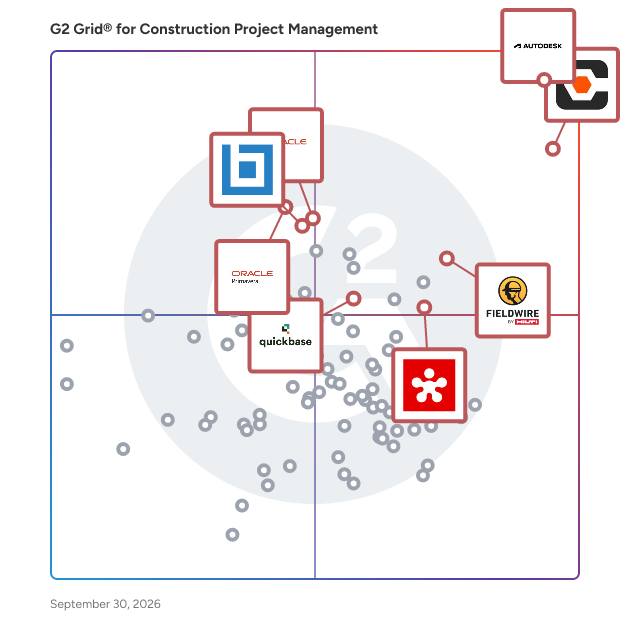
G2 Grid® for Construction Project Management Software

G2 Grid® for Construction Project Management Software plotting products by satisfaction and market presence

Highlighted products: Autodesk Forma (formerly Autodesk Construction Cloud), Procore, Oracle Aconex, Oracle Primavera, Bluebeam, Revizto, Fieldwire by Hilti, and Quickbase.

Underlying data: [Grid® JSON](https://www.g2.com/categories/construction-project-management/grids.json?focus%5B%5D=autodesk-forma-formerly-autodesk-construction-cloud&focus%5B%5D=procore&focus%5B%5D=oracle-aconex&focus%5B%5D=oracle-primavera&focus%5B%5D=bluebeam&focus%5B%5D=revizto&focus%5B%5D=fieldwire-by-hilti&focus%5B%5D=quickbase&segment=enterprise)

Autodesk Forma (formerly Autodesk Construction Cloud)

Autodesk Forma (formerly Autodesk Construction Cloud) connects workflows, teams and data at every stage of construction to reduce risk, maximize efficiency, and increase profits. Autodesk Build is part of Autodesk Forma (formerly Autodesk Construction Cloud)'s newest set of products that further connect data, workflows, and teams throughout the entire building lifecycle. Build delivers a broad, deep, and connected set of field execution and project management tools for builders in a single software platform that is easy to deploy, adopt and use. Autodesk Build delivers the unification of best-in-class technology from PlanGrid and BIM 360, along with new functionality, to connect construction data and workflows across the headquarters, office, and jobsite. It offers tools for project management, quality, safety, cost, document management and project closeout workflows in a single application that is purpose-built for what you do and where you are working. -Supports integrated & digitized processes for the build phase of a project in a platform that is easy to deploy, adopt and use, while ensuring information sharing and workflows are tightly controlled and highly-configurable. -Standardized and centralized data collection from design through operations enables data-driven decision making, and predictive analytics provide visibility into high-risk issues that can impact project cost, schedule, quality, and safety. -Cloud-based document management provides a single source of truth for all project documentation for the owner, GCs and subs. Autodesk Takeoff empowers estimators to create fast, accurate takeoffs in a cloud-based solution that combines 2D and 3D workflows. Autodesk Takeoff is part of Autodesk Forma (formerly Autodesk Construction Cloud)'s newest set of products that further connect data, workflows, and teams throughout the entire building lifecycle. Autodesk Takeoff allows estimators to perform more accurate 2D takeoffs and generate automated quantities from 3D models in a single online solution. Preconstruction teams are empowered to win more work with integrated takeoffs and quantities that help produce quality estimates for faster, more accurate bidding. -Manage sheets and models in one data environment with Autodesk Docs -Easily capture project scope with linear, count and area takeoff -Generate multiple quantities and use custom formulas -Get instant access to quantities from models for automated 3D takeoffs -Access aggregated quantities from drawings and models Autodesk BIM Collaborate is part of Autodesk Forma (formerly Autodesk Construction Cloud)'s newest set of products that further connect data, workflows, and teams throughout the entire building lifecycle. BIM Collaborate empowers project teams to align and execute on design intent and constructability by managing the entire design collaboration and coordination workflow. Autodesk BIM Collaborate empowers design and construction teams to align and execute on design intent and constructability in a single online solution. By allowing teams to manage the entire design collaboration and coordination process in a single common data environment, BIM Collaborate reduces rework and improves overall design quality. -No limits on projects or file storage -Subscribe once and use on any project you are working on -Flexible subscription offerings for users, projects and businesses -Easily add subscribers and models as your business grows -Keep the same central administration and user login when adding new products

Average Rating: 4.4/5.0

Total Reviews: 5,462

How Do G2 Users Rate Autodesk Forma (formerly Autodesk Construction Cloud)?

  • Has the product been a good partner in doing business?: 8.3/10 (Category avg: 8.8/10)
  • Construction Workforce Management Tool Integration: 7.2/10 (Category avg: 8.1/10)
  • Workforce Scheduling: 6.7/10 (Category avg: 7.8/10)
  • Information Management: 8.7/10 (Category avg: 8.9/10)

Who Is the Company Behind Autodesk Forma (formerly Autodesk Construction Cloud)?

  • Seller: Autodesk
  • Company Website:
  • Year Founded: 1982
  • HQ Location: San Francisco
  • Twitter: @autodesk
    273,215 Twitter followers
  • LinkedIn® Page: www.linkedin.com
    15,757 employees on LinkedIn®

Who Uses This Product?

  • Who Uses This: BIM Manager, Project Manager
  • Top Industries: Construction, Architecture & Planning
  • Company Size: 45% Medium, 31% Large

What Do G2 Reviewers Say About Autodesk Forma (formerly Autodesk Construction Cloud)?

AI-generated summary from verified user reviews

Pros
  • Users appreciate the simple user interface of Autodesk Forma, making it easy to navigate and utilize effectively.
  • Users value the real-time collaboration features of Autodesk Forma, enhancing project insight and coordination efficiency.
  • Users value the real-time collaboration features of Autodesk Forma, enhancing insights and teamwork throughout the design process.
  • Users value the seamless collaboration in Autodesk Forma, enhancing trust and efficiency across project phases.
  • Users value the easy access for team members to models and data, enhancing collaboration and understanding.
Cons
  • Users express frustration over missing features and complex access hurdles that limit functionality for architects in Autodesk Forma.
  • Users face limitations in tracking and functionality, making project management challenging and costing concerns prevalent.
  • Users face access limitations with Autodesk Forma, struggling with login prompts and multi-level assemblies access.
  • Users are frustrated by the lack of features in Autodesk Forma, making project management and collaboration challenging.
  • Users highlight the need for better configuration and accessibility in Autodesk Forma for improved usability.

What Are Recent G2 Reviews of Autodesk Forma (formerly Autodesk Construction Cloud)?

What Are G2 Users Discussing About Autodesk Forma (formerly Autodesk Construction Cloud)?

Procore

Procore construction software manages your construction projects, resources and financials from planning to closeout. The platform connects every project contributor to solutions built specifically for the industry for the owner, the general contractor and the specialty contractor. The ability to communicate across teams makes it easier to work together by establishing a single source of truth. This is how Procore gives your team easy access to everything they need to know to get the job done.

Average Rating: 4.6/5.0

Total Reviews: 4,284

How Do G2 Users Rate Procore?

  • Has the product been a good partner in doing business?: 8.9/10 (Category avg: 8.8/10)
  • Construction Workforce Management Tool Integration: 8.1/10 (Category avg: 8.1/10)
  • Workforce Scheduling: 7.9/10 (Category avg: 7.8/10)
  • Information Management: 9.0/10 (Category avg: 8.9/10)

Who Is the Company Behind Procore?

  • Seller: Procore Technologies
  • Company Website:
  • Year Founded: 2003
  • HQ Location: Carpinteria, CA
  • Twitter: @procoretech
    16,491 Twitter followers
  • LinkedIn® Page: www.linkedin.com
    4,788 employees on LinkedIn®

Who Uses This Product?

  • Who Uses This: Project Manager, Project Engineer
  • Top Industries: Construction, Architecture & Planning
  • Company Size: 48% Medium, 40% Small

What Do G2 Reviewers Say About Procore?

AI-generated summary from verified user reviews

Pros
  • Users highlight Procore's intuitive interface, making training and onboarding for new users effortless.
  • Users value the efficient document management in Procore, streamlining processes and reducing the need for physical storage.
  • Users value the logical organization of Procore, enhancing task management and collaboration on job sites.
  • Users value the centralization of information in Procore, streamlining processes and enhancing efficiency in construction projects.
Cons
  • Users find the learning curve steep, particularly with importing budgets from Excel, impacting overall user-friendliness.
  • Users note the missing features in Procore, particularly concerning material procurement and meeting management improvements.
  • Users express concerns about the lack of features in Procore, impacting versatility and user-friendliness.
  • Users find limitations in integration and reporting features that hinder Procore's overall effectiveness for their needs.
  • Users find Procore's difficult learning curve challenging, often feeling overwhelmed by its complex features and notifications.

What Are Recent G2 Reviews of Procore?

What Are G2 Users Discussing About Procore?

Oracle Aconex

Owners and delivery teams trust Oracle Aconex for visibility, control, reduced risk, and connected teams. Drive efficiency in design and construction coordination, project controls and cost management, document management, and field management. Get fast time to value with construction management software that is easy to use and deploys in days. The Aconex Difference: - A trusted platform and rock-solid audit trail drives adoption, visibility, a single source of truth and minimizes disputes. - Connected processes and data drives performance, insights, continuous learning and control. - Set up flexible processes based on how you work, and change as your processes develop. - Secure and compliant, meeting the highest international security standards. - Unparalleled service and support get your projects off to the best possible start and helps keep them running smoothly. Key Business Benefits of Oracle Aconex include: - Control, insights, effortless handover, and fast ROI - Process management across the entire lifecycle - Connected project team enhances collaboration - Common data environment (CDE) connects all project and model information - Configurable platform - enable specific processes - Single source of truth improves data management, reduces errors - Data-driven intelligence fuels continuous improvement Product Features: - Secure Document Management - Advanced Communications and Forms - Model Coordination in a Common Data Environment - Integrated Cost Management - Quality and Safety Processes - Unparalleled Service and Support “Using the review process, workflows and the online viewer have removed work duplication due to easy collaboration between all parties.” Nisha Khetani, Head of Document Control, Multiplex

Average Rating: 4.5/5.0

Total Reviews: 199

How Do G2 Users Rate Oracle Aconex?

  • Has the product been a good partner in doing business?: 8.5/10 (Category avg: 8.8/10)
  • Construction Workforce Management Tool Integration: 8.8/10 (Category avg: 8.1/10)
  • Workforce Scheduling: 9.2/10 (Category avg: 7.8/10)
  • Information Management: 9.4/10 (Category avg: 8.9/10)

Who Is the Company Behind Oracle Aconex?

  • Seller: Oracle
  • Year Founded: 1977
  • HQ Location: Austin, TX
  • Twitter: @Oracle
    827,997 Twitter followers
  • LinkedIn® Page: www.linkedin.com
    207,576 employees on LinkedIn®
  • Ownership: NYSE:ORCL

Who Uses This Product?

  • Who Uses This: Document Controller, Project Coordinator
  • Top Industries: Construction, Civil Engineering
  • Company Size: 54% Medium, 30% Large

What Do G2 Reviewers Say About Oracle Aconex?

AI-generated summary from verified user reviews

Cons
  • Users find the missing hierarchy in file organization problematic, particularly for project folders and document attributes.
  • Users find the missing hierarchy and document attributes in Oracle Aconex limit project organization and functionality.

What Are Recent G2 Reviews of Oracle Aconex?

What Are G2 Users Discussing About Oracle Aconex?

AI can help you find the answers. G2 helps you trust them.

Connect G2 to Claude or ChatGPT for answers grounded in G2's trusted reviews, comparisons, and pricing from real user insights.

How it works

Oracle Primavera

For more than 30 years, successful projects around the world have relied on Oracle Construction and Engineering's Primavera solutions to plan, build, and operate critical assets. It is the only solution that integrates project and portfolio planning and delivery teams for planning, resourcing, risk mitigation, scheduling, and program management. Manage projects of any size. Robust and easy-to-use. Key Benefits - Cloud-based, delivering fast time to value - One platform for planning, prioritizing, executing, and monitoring projects and programs - Optimization and oversight of capital spend to maximize return and align with strategies - Enhanced risk mitigation; better visibility of project and portfolio health - Comprehensive, integrated planning - critical path method (CPM) and Lean scheduling, plus upstream portfolio planning and downstream risk mitigation - Total resource management – maintain optimal staffing levels to improve delivery efficiency - Collaboration and control across teams – drive efficiency and quality, reduce waste - Connect teams with access from any device, create and update activities and tasks, and view portfolios and files with offline support - Risk mitigation – avoid delays and cost overruns

Average Rating: 4.4/5.0

Total Reviews: 345

How Do G2 Users Rate Oracle Primavera?

  • Has the product been a good partner in doing business?: 8.0/10 (Category avg: 8.8/10)
  • Construction Workforce Management Tool Integration: 8.1/10 (Category avg: 8.1/10)
  • Workforce Scheduling: 8.6/10 (Category avg: 7.8/10)
  • Information Management: 8.2/10 (Category avg: 8.9/10)

Who Is the Company Behind Oracle Primavera?

  • Seller: Oracle
  • Year Founded: 1977
  • HQ Location: Austin, TX
  • Twitter: @Oracle
    827,997 Twitter followers
  • LinkedIn® Page: www.linkedin.com
    207,576 employees on LinkedIn®
  • Ownership: NYSE:ORCL

Who Uses This Product?

  • Who Uses This: Planning Engineer, Project Manager
  • Top Industries: Construction, Oil & Energy
  • Company Size: 38% Medium, 37% Large

What Do G2 Reviewers Say About Oracle Primavera?

AI-generated summary from verified user reviews

Pros
  • Users value the essential project management capabilities of Oracle Primavera, keeping large projects organized and on track.
  • Users value the centralization of Oracle Primavera, which keeps large projects organized and on track.
  • Users value the comprehensive coverage of Oracle Primavera, facilitating effective project management from start to finish.
  • Users value the comprehensive features of Oracle Primavera for effective project planning, execution, and monitoring.
  • Users find Oracle Primavera essential for keeping projects organized and on track, even under high-stakes conditions.
Cons
  • Users struggle with the complex setup of Oracle Primavera, facing challenges with its steep learning curve and outdated interface.
  • Users find Oracle Primavera expensive, with complex features that may overwhelm small or simple projects.
  • Users find Oracle Primavera expensive, feeling its extensive features may be unnecessary for smaller projects.
  • Users find the limited features of Oracle Primavera inadequate for straightforward projects, leading to dissatisfaction.
  • Users find the limited functionality of Oracle Primavera excessive for smaller or simpler project needs.

What Are Recent G2 Reviews of Oracle Primavera?

What Are G2 Users Discussing About Oracle Primavera?

Bluebeam

Bluebeam provides leading digital productivity and collaboration solutions engineered specifically for the architecture, engineering, and construction (AEC) industries. Part of the Nemetschek Group and trusted by over 4 million professionals across 160+ countries, Bluebeam connects project teams through seamless desktop, web, and mobile workflows. From initial design review to field construction coordination, Bluebeam empowers teams to markup documents, conduct quantity takeoffs, track revisions, and collaborate in real-time on a single source of truth—accelerating project delivery, improving communication, and minimizing costly errors across the entire project lifecycle. With plan options like Bluebeam Max, organizations gain access to advanced features, AI-powered productivity tools, complete mobile flexibility, and enhanced support designed to scale across large enterprise teams.

Average Rating: 4.6/5.0

Total Reviews: 456

How Do G2 Users Rate Bluebeam?

  • Has the product been a good partner in doing business?: 8.2/10 (Category avg: 8.8/10)

Who Is the Company Behind Bluebeam?

  • Seller: Bluebeam
  • Year Founded: 2002
  • HQ Location: Pasadena , Calif
  • Twitter: @Bluebeam
    7,170 Twitter followers
  • LinkedIn® Page: www.linkedin.com
    736 employees on LinkedIn®

Who Uses This Product?

  • Who Uses This: Project Manager, Project Engineer
  • Top Industries: Construction, Architecture & Planning
  • Company Size: 44% Medium, 35% Small

What Do G2 Reviewers Say About Bluebeam?

AI-generated summary from verified user reviews

Pros
  • Users find Bluebeam to be very easy to use, facilitating quick collaboration and efficient implementation across teams.
  • Users appreciate the customizable tools in Bluebeam, enhancing their document editing and review experience significantly.
  • Users praise Bluebeam for its effective PDF editing and collaborative features, enhancing teamwork and functionality in projects.
  • Users find Bluebeam's intuitive design invaluable for seamless comments and reviews of drawings and documents.
  • Users love the ease of use and extensive features in Bluebeam, enhancing their document management experience.
Cons
  • Users find Bluebeam has a steep learning curve for new users, making initial setup challenging and daunting.
  • Users find the difficult learning curve for Bluebeam steep, making it challenging for beginners to use effectively.
  • Users are disappointed by the lack of features in Bluebeam, finding limited value in the subscription model.
  • Users find Bluebeam's subscription pricing expensive compared to one-time purchase options, lacking sufficient value for some users.
  • Users are frustrated with the subscription issues in Bluebeam, finding limited value and support for previous licenses.

What Are Recent G2 Reviews of Bluebeam?

What Are G2 Users Discussing About Bluebeam?

Revizto

Revizto is revolutionizing collaboration across the AECO industry. Helping architects, engineers, contractors, and owners deliver projects on time and on budget, without risk or waste. Revizto enables the people behind the world’s most important structures to do their best work. We connect architects, engineers, contractors, and owners through one shared 2D and 3D environment across the entire building lifecycle. By uniting teams from concept through completion, Revizto drives maximum collaboration, clarity, and results. Designed for professionals across the AECO industry, Revizto serves as a centralized Collaboration Hub where all project stakeholders can communicate, coordinate, and resolve issues in real time. The platform is especially powerful for large-scale, complex projects where alignment across multiple disciplines is critical. From airports and hospitals to data centers and other critical infrastructure, Revizto helps teams stay connected and informed, ensuring everyone is working from the same source of truth. Revizto’s intuitive interface allows users to visualize and interact with coordinated 2D sheets and 3D models in real time, making it easier to identify clashes, track issues, and resolve risks early in the design and construction process. Automated clash detection and robust issue tracking enable teams to assign responsibilities, monitor progress, and maintain accountability. This reduces rework, delays, and costly errors later in the project lifecycle. Built on a gaming engine, Revizto’s technology is purposefully engineered to withstand construction’s toughest conditions and most complex projects. The platform is fast, stable, and reliable, working seamlessly wherever teams need it, whether in the office or on site, across desktop, tablet, or mobile devices. As a cloud-based solution, Revizto ensures that every stakeholder has access to the most up-to-date project information, regardless of location. This flexibility supports today’s increasingly distributed teams while maintaining data integrity, security, and project continuity. Trusted by leading firms including Jacobs, AECOM, AtkinsRéalis, Skanska, and Stantec, Revizto is redefining how the built world collaborates. Backed by Summit Partners and headquartered in Lausanne, Switzerland, with team members across the globe, Revizto continues to transform the way critical infrastructure is designed and delivered, building a world that is made to last.

Average Rating: 4.6/5.0

Total Reviews: 325

How Do G2 Users Rate Revizto?

  • Has the product been a good partner in doing business?: 8.9/10 (Category avg: 8.8/10)
  • Construction Workforce Management Tool Integration: 7.5/10 (Category avg: 8.1/10)
  • Workforce Scheduling: 5.6/10 (Category avg: 7.8/10)
  • Information Management: 8.3/10 (Category avg: 8.9/10)

Who Is the Company Behind Revizto?

  • Seller: Revizto
  • Company Website:
  • Year Founded: 2010
  • HQ Location: Lausanne, Switzerland
  • Twitter: @REVIZTO
    9,157 Twitter followers
  • LinkedIn® Page: www.linkedin.com
    222 employees on LinkedIn®

Who Uses This Product?

  • Who Uses This: BIM Manager, VDC Manager
  • Top Industries: Construction, Architecture & Planning
  • Company Size: 49% Medium, 29% Large

What Do G2 Reviewers Say About Revizto?

AI-generated summary from verified user reviews

Pros
  • Users appreciate the ease of use of Revizto, enabling seamless collaboration and efficient BIM workflow management.
  • Users appreciate the centralized communication in Revizto, enhancing collaboration and streamlining project workflows effectively.
  • Users appreciate Revizto for its centralized communication and issue tracking, enhancing collaboration and workflow efficiency.
  • Users value Revizto's flexible issue management, fostering collaboration and streamlining workflows for efficient problem resolution.
  • Users value the team collaboration features of Revizto, facilitating seamless communication and efficient project management for all stakeholders.
Cons
  • Users express frustration over the missing features in Revizto, particularly concerning API limitations and integration with other platforms.
  • Users express concern over the lack of features in Revizto, particularly regarding integrations and usability improvements.
  • Users face functionality issues with Revizto, particularly in export processes and limitations in clash reporting and sectioning.
  • Users find the markup tools inadequate, especially compared to alternatives like Bluebeam, limiting effective project communication.
  • Users find the learning curve steep due to unclear icons and limited instructional resources, leading to frustration.

What Are Recent G2 Reviews of Revizto?

What Are G2 Users Discussing About Revizto?

Fieldwire by Hilti

The field-first construction platform for less busywork and more building. Trusted on 4M+ projects worldwide, Fieldwire by Hilti connects the field and office in one simple, powerful platform so teams can move faster, stay aligned, and navigate projects with confidence from start to finish. Construction demands clear information, reliable coordination, and tools that perform where the work happens. Fieldwire brings plans, tasks, and updates into one transparent source of truth, giving everyone – from CEO to installer – access to the information they need, whether in the office or on the jobsite. Built for contractors across every trade, Fieldwire keeps teams aligned with up-to-date information and no surprises. Designed for easy adoption in the field, teams gain real-time visibility into progress, clear ownership of work, and the context to make confident decisions. Automated workflows and streamlined reporting reduce manual work, improve accountability, and help projects stay on schedule and on budget. As part of the Hilti Group, Fieldwire combines deep construction expertise with modern digital innovation to deliver better outcomes on every job. Learn more at Fieldwire.com.

Average Rating: 4.5/5.0

Total Reviews: 579

How Do G2 Users Rate Fieldwire by Hilti?

  • Has the product been a good partner in doing business?: 8.9/10 (Category avg: 8.8/10)
  • Construction Workforce Management Tool Integration: 6.9/10 (Category avg: 8.1/10)
  • Workforce Scheduling: 6.9/10 (Category avg: 7.8/10)
  • Information Management: 8.4/10 (Category avg: 8.9/10)

Who Is the Company Behind Fieldwire by Hilti?

  • Seller: Fieldwire
  • Company Website:
  • Year Founded: 2013
  • HQ Location: San Francisco, CA
  • LinkedIn® Page: www.linkedin.com
    365 employees on LinkedIn®

Who Uses This Product?

  • Who Uses This: Project Manager, Project Engineer
  • Top Industries: Construction, Architecture & Planning
  • Company Size: 56% Small, 32% Medium

What Do G2 Reviewers Say About Fieldwire by Hilti?

AI-generated summary from verified user reviews

Pros
  • Users appreciate the ease of use of Fieldwire, simplifying communication and project management across teams.
  • Users appreciate the short learning curve of Fieldwire by Hilti, enhancing efficiency and project management quickly.
  • Users value the efficient team collaboration offered by Fieldwire, enhancing communication and project tracking seamlessly.
  • Users find easy access to files and prints invaluable, enhancing organization and collaboration on job sites.
  • Users find Fieldwire to be intuitive and easy to use, streamlining project management and enhancing communication.
Cons
  • Users find the limited customization of Fieldwire restrictive, affecting its adaptability for unique business needs.
  • Users express frustration with limited functionality, including difficulties in viewing multiple projects and editing markups.
  • Users experience slow performance with Fieldwire, particularly when switching between projects on mobile and desktop devices.
  • Users find it frustrating that missing features limit checklist imports and report customization options in Fieldwire.
  • Users report update issues with Fieldwire, including excessive emails and syncing delays between devices.

What Are Recent G2 Reviews of Fieldwire by Hilti?

What Are G2 Users Discussing About Fieldwire by Hilti?

Quickbase

Quickbase is an AI-driven platform designed to help businesses streamline their operations by adapting to their unique workflows and processes. Unlike traditional off-the-shelf software, which often requires users to conform to predefined structures, Quickbase empowers organizations to create customized solutions that align with their specific needs. This flexibility is crucial for companies seeking to eliminate inefficiencies and reduce the burden of 'Gray Work' - what we call the time-consuming tasks and manual processes that arise from using rigid software systems. The target audience for Quickbase includes businesses of all sizes across various industries that are looking to enhance their operational efficiency. Whether it's a 50 person small business or a large enterprise, organizations can benefit from a platform that allows them to connect disparate data sources, automate repetitive tasks, and scale their competitive advantages. Quickbase is particularly valuable for teams that rely on collaboration and data-driven decision-making, as it fosters an environment where information flows seamlessly and processes are optimized. Key features of Quickbase include its intuitive interface, which allows users to build custom applications without extensive coding knowledge. This user-friendly design enables teams to quickly adapt the platform to their specific workflows, ensuring that they can address unique challenges without the need for extensive IT support. Additionally, Quickbase offers powerful automation capabilities, allowing users to set up triggers and workflows that reduce manual effort and streamline operations. The platform also supports integration with various data sources, enabling businesses to consolidate their information and gain valuable insights. One of the standout benefits of Quickbase is its ability to scale with your business. As organizations grow and evolve, their processes often become more complex. Quickbase's adaptable nature ensures that users can modify their applications and workflows as needed, without the constraints typically associated with traditional software. This flexibility not only saves time but also fosters innovation, as teams can experiment with new processes and tools that enhance their productivity. By prioritizing user-centric design and adaptability, Quickbase stands out in the crowded landscape of business software solutions. It provides organizations with the tools they need to optimize their operations, reduce inefficiencies, and ultimately drive growth. With Quickbase, businesses can focus on what truly matters—leveraging their unique processes to gain a competitive edge in their respective markets.

Average Rating: 4.5/5.0

Total Reviews: 1,550

How Do G2 Users Rate Quickbase?

  • Has the product been a good partner in doing business?: 8.8/10 (Category avg: 8.8/10)
  • Information Management: 10.0/10 (Category avg: 8.9/10)

Who Is the Company Behind Quickbase?

  • Seller: Quickbase
  • Company Website:
  • Year Founded: 2012
  • HQ Location: Boston, MA
  • Twitter: @quickbase
    5,146 Twitter followers
  • LinkedIn® Page: www.linkedin.com
    806 employees on LinkedIn®

Who Uses This Product?

  • Who Uses This: Project Manager, Project Coordinator
  • Top Industries: Information Technology and Services, Construction
  • Company Size: 42% Medium, 31% Small

What Do G2 Reviewers Say About Quickbase?

AI-generated summary from verified user reviews

Pros
  • Users love the ease of use of Quickbase, finding it user-friendly and adaptable for various business needs.
  • Users value the customization options in Quickbase, enhancing adaptability and efficiency in managing their databases.
  • Users love the customizability of Quickbase, enabling tailored applications to fit specific business needs effectively.
  • Users appreciate the flexibility of Quickbase, enabling high customization and adaptation to diverse business needs.
  • Users love the customization options in Quickbase, tailoring databases to fit unique business needs effectively.
Cons
  • Users struggle with the learning curve due to enforced changes and lack of tailored training options.
  • Users feel the missing features in Quickbase limit its effectiveness for tasks like document management and reporting.
  • Users find Quickbase's limited features hinder effective integration, mobile usability, and overall flexibility in development.
  • Users find Quickbase to be not intuitive, with a confusing interface that affects overall usability and experience.
  • Users note limited customization options that can hinder flexibility, especially for those seeking advanced functionality and control.

What Are Recent G2 Reviews of Quickbase?

What Are G2 Users Discussing About Quickbase?

Methvin

Construction estimators don't lose bids because they priced too high. They lose because their numbers weren't built on solid ground. Methvin is the only platform that calculates costs from first principles. While other tools rely on historical averages that no longer reflect the market, Methvin builds every figure from scratch, labor, plant, and materials. One miscalculation on a tight-margin project doesn't just hurt the job; it can wipe out the profit from three others. Stop guessing. Start winning bids you can actually deliver on. --- WHY TOP FIRMS CHOOSE METHVIN --- ACCURACY: Automate heavy lifting and turn around accurate tenders faster without cutting corners. SCALABILITY: From small fitouts to large civil infrastructure, the platform scales without breaking your process. FLEXIBILITY: Configure workflows to match how your team actually estimates. Methvin adapts to you, not the other way around. REAL-TIME COLLABORATION: Everyone works from the same numbers, from anywhere, in real time. --- THE FULL PROJECT LIFECYCLE --- Beyond estimating, Methvin handles the heavy lifting of project management: Takeoff tools to measure quantities directly from plans. Gantt scheduling to keep timelines and dependencies visible. Job costing to track spend as it happens. Cost-vs-Allowable reporting to flag variances before they become problems. --- THE INTELLIGENT RECORD --- Most platforms miss the biggest risk: the "he-said, she-said" of site disputes. Methvin’s Correspondence module brings every contract, RFI, site instruction, and variation into one place. You can ask it questions in plain language: "What was agreed on the structural steel spec?" or "Has the client signed off on the drainage scope?" The answer comes straight from your documents instantly. In construction, a missed instruction can cost more than the original estimate. An intelligent, searchable record isn't a luxury, it is how professional teams protect their margins. Methvin is purpose-built for construction. If your current tools feel like you're working around them, it's time to see what a platform built for this industry actually feels like.

Average Rating: 4.6/5.0

Total Reviews: 112

How Do G2 Users Rate Methvin?

  • Has the product been a good partner in doing business?: 8.9/10 (Category avg: 8.8/10)
  • Construction Workforce Management Tool Integration: 9.8/10 (Category avg: 8.1/10)
  • Workforce Scheduling: 9.9/10 (Category avg: 7.8/10)
  • Information Management: 9.9/10 (Category avg: 8.9/10)

Who Is the Company Behind Methvin?

  • Seller: Methvin
  • Company Website:
  • Year Founded: 2018
  • HQ Location: Albany, Auckland
  • Twitter: @Methvin
    15 Twitter followers
  • LinkedIn® Page: www.linkedin.com
    7 employees on LinkedIn®

Who Uses This Product?

  • Top Industries: Construction, Civil Engineering
  • Company Size: 55% Small, 31% Large

What Do G2 Reviewers Say About Methvin?

AI-generated summary from verified user reviews

Pros
  • Users value Methvin's first-principles estimating, enhancing accuracy and client confidence in risk and margin management.
  • Users value the ease of use of Methvin, enhancing project management and streamlining collaboration across teams.
  • Users value the first-principles estimating of Methvin, enhancing accuracy and boosting client confidence in cost assessments.
  • Users value the efficient project management of Methvin, enabling quicker bid preparation and enhanced team collaboration.
  • Users value the strong collaboration enabled by Methvin, enhancing real-time data sharing among project teams.
Cons
  • Users find the learning curve steep, requiring time for setup, training, and adjustment for effective use.
  • Users note a steep learning curve with Methvin, requiring significant training and planning for effective use.
  • Users find that difficult learning curves are present, requiring significant training and configuration to fully utilize Methvin.
  • Users find the interface can feel dense, making initial adoption challenging and overwhelming for new users.
  • Users find the difficult learning curve of Methvin challenging, requiring significant training for effective use.

What Are Recent G2 Reviews of Methvin?

What Are G2 Users Discussing About Methvin?

Dalux

Simplify and streamline the management of the built environment's life cycle with Dalux's comprehensive SaaS product suite. Trusted by over 1,000,000 users and with projects in more than 147 countries, Dalux has the centre point in its cloud-based BIM Viewer, which ensures contextual information, visibility and seamless collaboration across teams, whether using mobile or desktop devices. Dalux's user-friendly approach adapts to your specific needs, offering a modular system that can be as minimal or powerful as required.

Average Rating: 4.6/5.0

Total Reviews: 170

How Do G2 Users Rate Dalux?

  • Has the product been a good partner in doing business?: 9.0/10 (Category avg: 8.8/10)
  • Construction Workforce Management Tool Integration: 5.9/10 (Category avg: 8.1/10)
  • Workforce Scheduling: 5.7/10 (Category avg: 7.8/10)
  • Information Management: 7.7/10 (Category avg: 8.9/10)

Who Is the Company Behind Dalux?

  • Seller: Dalux
  • Year Founded: 2005
  • HQ Location: Copenhagen Ø, DK
  • LinkedIn® Page: www.linkedin.com
    966 employees on LinkedIn®

Who Uses This Product?

  • Who Uses This: BIM Manager
  • Top Industries: Construction, Civil Engineering
  • Company Size: 44% Medium, 31% Large

What Do G2 Reviewers Say About Dalux?

AI-generated summary from verified user reviews

Pros
  • Users find Dalux to be incredibly easy to use, enhancing their workflow with its efficient features.
  • Users praise Dalux for its simplicity and intuitive design, making it a reliable and fast BIM viewer.
  • Users find Dalux to be very intuitive and easy to use, streamlining their construction project management effectively.
  • Users admire the innovation in Dalux, enjoying rapid performance and regular new features enhancing their experience.
  • Users value the effective communication capabilities of Dalux, enhancing collaboration between on-site and office teams.
Cons
  • Users find the lack of specific features in Dalux frustrating and often require workarounds to manage tasks.
  • Users find Dalux's limited features frustrating, particularly its inability to manage assembly levels in projects.
  • Users find the complex setup of Dalux to be challenging, making initial configuration difficult and frustrating.
  • Users face functionality issues with Dalux, particularly with adding pages and unsupported assemblies in the viewer.
  • Users are frustrated by a lack of essential features in Dalux, like search function and calendar view for planning.

What Are Recent G2 Reviews of Dalux?

Newforma

Newforma is project information management (PIM) software for the architecture, engineering, construction, and owner (AECO) industry. It connects the emails, instant messages, files, drawings, models, issues and contract documents spread across a project team's systems and makes them accessible in one searchable project record. Teams use Newforma to run construction administration workflows, control documents, coordinate BIM issues, while showing creating a complete audit log of who knew what and when. The platform comes in cloud and on-premises versions, so firms choose where their project data lives. Newforma Konekt is the cloud option, differentiated by its hosted access, a single mobile companion app, and BIM coordination in 2D and 3D. Newforma Project Center is the server-based option for firms that keep project information inside their own network for control, security, or compliance reasons. Both work with the tools teams most frequently use, including Microsoft Outlook, Microsoft Teams, Microsoft SharePoint, Autodesk Revit, Autodesk Data Management (formally named Docs), local file server drives and Procore. Newforma’s goal is not replacing these solutions but instead provide a single interface users can access their project information regardless of where it is stored. ideal customer types are mid-market and enterprise architects, engineers, general contractors, and owners, frequently delivering document-heavy projects. Common use cases include construction administration, document control, project correspondence, design coordination, and protecting the firm during claims and disputes. Main capabilities: - Search across everything. One search covers project email, files, plans, folders, sheets, and logs, including records stored in connected systems like SharePoint and Autodesk Docs. - Project communication management. Email is filed from Outlook to the project record, so correspondence belongs to the whole team instead of sitting in one person's inbox. Additionally, Newforma connects Microsoft Teams Channels to the project record, retrieving available history and continuously archiving new posts, replies, reactions, and attachments - Construction administration. RFIs, submittals, transmittals, and contract changes move through structured review cycles with due dates, revision history, and a full audit trail. - Document control and file sharing. Version control, drawing and sheet management, package issuance, and large file transfers to outside parties. - BIM coordination and action items. Issues are tracked by location in 2D sheets and 3D models, assigned to the right person, and resolved in Revit or another authoring tool. Newforma has worked in AECO information management for more than 20 years. Firms including Foster + Partners, HOK, WSP, Arcadis, and Thornton Tomasetti use Newforma, and the platform holds records for over 20 million projects and roughly 1 billion project emails. Customers report shorter RFI and submittal response times and faster document retrieval during audits and claims. Pricing is quoted by firm based on product, package, and user count. Support includes implementation services, a customer help center, and training through Newforma Academies.

Average Rating: 4.2/5.0

Total Reviews: 180

How Do G2 Users Rate Newforma?

  • Has the product been a good partner in doing business?: 9.1/10 (Category avg: 8.8/10)
  • Construction Workforce Management Tool Integration: 5.9/10 (Category avg: 8.1/10)
  • Workforce Scheduling: 4.0/10 (Category avg: 7.8/10)
  • Information Management: 9.0/10 (Category avg: 8.9/10)

Who Is the Company Behind Newforma?

  • Seller: Newforma
  • Company Website:
  • Year Founded: 2003
  • HQ Location: Manchester, NH
  • LinkedIn® Page: www.linkedin.com
    37 employees on LinkedIn®

Who Uses This Product?

  • Who Uses This: IT Manager
  • Top Industries: Architecture & Planning, Construction
  • Company Size: 65% Medium, 19% Large

What Do G2 Reviewers Say About Newforma?

AI-generated summary from verified user reviews

Pros
  • Users value the ease of use of Newforma Project Center, enjoying seamless management of all project processes in one platform.
  • Users appreciate the excellent organization capabilities of Newforma Project Center for efficiently managing project files and emails.
  • Users value the centralized document management of Newforma Project Center, streamlining access and improving project efficiency.
  • Users benefit from effective tracking of project data, making information retrieval and management seamless and efficient.
  • Users value the efficient data management of Newforma Project Center, enabling easy access, search, and organization of project information.
Cons
  • Users experience slow performance at times, which can hinder efficiency given the system's data processing demands.
  • Users experience slow processing during startup and email filing, affecting the overall efficiency of Newforma Project Center.
  • Users experience performance issues with Newforma Project Center, citing slow speeds and cumbersome processes that hinder efficiency.
  • Users express frustration over missing features in Newforma Project Center, affecting usability and workflow efficiency.
  • Users find the outdated interface of Newforma Project Center cumbersome and in need of significant improvements.

What Are Recent G2 Reviews of Newforma?

What Are G2 Users Discussing About Newforma?

Touchplan

Touchplan® is a production planning, scheduling, and analytics platform that helps project teams plan work together, make reliable commitments, and track progress in real time. Used by owners, general contractors, and trade partners across complex projects, Touchplan brings planning into a shared digital environment. Teams can align on sequencing, identify constraints early, and adjust plans as conditions change in the field. For project leaders, Touchplan provides visibility into performance through live data and production metrics, enabling more informed decision making. For field teams, it offers an intuitive interface to coordinate work, manage tasks, and keep projects on schedule. In one year, customers generate 430% ROI, reduce time spent in construction planning meetings by 50%, and experience a 50% reduction in planning related project delays. Touchplan® is the premier software offering of MOCA Systems, Inc. (MSI)

Average Rating: 4.3/5.0

Total Reviews: 190

How Do G2 Users Rate Touchplan?

  • Has the product been a good partner in doing business?: 8.9/10 (Category avg: 8.8/10)
  • Construction Workforce Management Tool Integration: 8.3/10 (Category avg: 8.1/10)
  • Workforce Scheduling: 8.5/10 (Category avg: 7.8/10)
  • Information Management: 8.1/10 (Category avg: 8.9/10)

Who Is the Company Behind Touchplan?

  • Seller: Touchplan
  • Year Founded: 2013
  • HQ Location: Boston, MA
  • Twitter: @TouchplanApp
    495 Twitter followers
  • LinkedIn® Page: www.linkedin.com
    36 employees on LinkedIn®

Who Uses This Product?

  • Who Uses This: Project Manager, Project Engineer
  • Top Industries: Construction, Architecture & Planning
  • Company Size: 53% Medium, 30% Large

What Are Recent G2 Reviews of Touchplan?

What Are G2 Users Discussing About Touchplan?

InEight

InEight is a comprehensive project controls software platform purpose-built for capital construction projects. The modular platform provides an integrated approach to managing every phase of a project, from pre-planning through execution and completion. By connecting cost, schedule, contracts, and project information in a single platform, InEight provides real-time visibility and advanced analytics that help teams make faster, more informed decisions. InEight is designed for owners, contractors, engineers, and other organizations delivering capital projects across infrastructure, transportation, mining, water, power and renewables, nuclear, and oil, gas, and chemical industries. Trusted by more than 850 customers in over 60 countries to manage projects totaling more than $1 trillion, InEight supports organizations looking to improve project delivery and operational efficiency. Its modular architecture enables flexible implementation, allowing organizations to address immediate priorities while expanding capabilities over time. The InEight platform includes purpose-built applications across project controls, estimating and scheduling, project information management, and construction intelligence. The platform enables organizations to manage scope, cost, and schedule in a connected environment while supporting budget management, forecasting, contract management, and document control. Collaboration tools help project teams stay aligned throughout the project lifecycle, improving visibility and accountability across stakeholders. InEight differentiates itself through its ability to capture and connect detailed project data across the capital project lifecycle, creating a trusted foundation for real-time decision-making and AI-powered workflows. By standardizing best practices, reducing project risk, and improving predictability, InEight helps organizations deliver complex capital projects with greater confidence and control.

Average Rating: 4.1/5.0

Total Reviews: 66

How Do G2 Users Rate InEight?

  • Has the product been a good partner in doing business?: 9.4/10 (Category avg: 8.8/10)
  • Construction Workforce Management Tool Integration: 8.7/10 (Category avg: 8.1/10)
  • Workforce Scheduling: 7.4/10 (Category avg: 7.8/10)
  • Information Management: 9.0/10 (Category avg: 8.9/10)

Who Is the Company Behind InEight?

  • Seller: InEight
  • Company Website:
  • Year Founded: 2014
  • HQ Location: Scottsdale, AZ
  • Twitter: @ineightsoftware
    11,727 Twitter followers
  • LinkedIn® Page: www.linkedin.com
    530 employees on LinkedIn®

Who Uses This Product?

  • Top Industries: Construction, Civil Engineering
  • Company Size: 38% Small, 32% Medium

What Do G2 Reviewers Say About InEight?

AI-generated summary from verified user reviews

Pros
  • Users value the seamless integration of cost, schedule, and forecasting, enhancing collaboration and decision-making in projects.
  • Users appreciate the ease of use of InEight, enjoying its seamless integration and valuable training resources.
  • Users appreciate the efficiency improvements with InEight, enabling seamless management of complex construction projects through integrated solutions.
  • Users value the integrated features of InEight, enhancing visibility and efficiency in project management.
  • Users value the real-time visibility and comprehensive integration of InEight's data management, enhancing project forecasting and decision-making.
Cons
  • Users find the complexity of InEight overwhelming due to its steep learning curve and intricate user interface.
  • Users find the steep learning curve of InEight challenging, requiring significant training to navigate its complex features.
  • Users often face a steep learning curve with InEight, requiring significant training to maximize its powerful features.
  • Users find the poor interface design confusing with non-intuitive navigation and an overwhelming number of options.
  • Users find InEight to be expensive and better suited for large projects, which may overwhelm smaller organizations.

What Are Recent G2 Reviews of InEight?

What Are G2 Users Discussing About InEight?

ProjectManager

ProjectManager is a project and portfolio management software that offers unparalleled control, in-depth project data and the most comprehensive planning features on the market. With advanced scheduling, automated cost and time tracking, risk analysis and resource management, our platform ensures flawless execution while providing unbeatable insights at every stage. Trusted by thousands worldwide for seamless collaboration, ProjectManager empowers teams to deliver with precision.

Average Rating: 4.4/5.0

Total Reviews: 95

How Do G2 Users Rate ProjectManager?

  • Has the product been a good partner in doing business?: 8.7/10 (Category avg: 8.8/10)
  • Construction Workforce Management Tool Integration: 8.3/10 (Category avg: 8.1/10)
  • Workforce Scheduling: 8.3/10 (Category avg: 7.8/10)
  • Information Management: 8.3/10 (Category avg: 8.9/10)

Who Is the Company Behind ProjectManager?

  • Seller: ProjectManager
  • Year Founded: 2008
  • HQ Location: Austin, Texas
  • Twitter: @ProjectTips
    52,588 Twitter followers
  • LinkedIn® Page: www.linkedin.com
    103 employees on LinkedIn®

Who Uses This Product?

  • Who Uses This: Project Manager
  • Top Industries: Information Technology and Services, Construction
  • Company Size: 50% Small, 32% Medium

What Do G2 Reviewers Say About ProjectManager?

AI-generated summary from verified user reviews

Pros
  • Users praise ProjectManager for its ease of use, enabling smooth project management from start to finish.
  • Users appreciate the helpful support from the knowledgeable staff, enhancing their experience with ProjectManager.
  • Users value ProjectManager for its effortless planning and smart execution, enhancing project management from start to finish.
  • Users value the centralized information of ProjectManager, enhancing project organization and collaboration for smooth execution.
  • Users value ProjectManager for its effective communication, enhancing collaboration and coordination throughout the project lifecycle.
Cons
  • Users face challenges with frequent refreshing due to slow updates, complicating their project management experience.
  • Users often face app crashes, requiring browser refreshes that disrupt their workflow and experience with ProjectManager.
  • Users find the integration limitations of ProjectManager frustrating, negatively impacting their workflows with existing tools.
  • Users often face website errors, necessitating a browser refresh that disrupts their workflow.

What Are Recent G2 Reviews of ProjectManager?

What Are G2 Users Discussing About ProjectManager?

Glaass Pro

Glaass Pro is an adaptable construction management platform that helps general contractors save time, reduce mistakes, and connect teams through one simple organised platform. Designed by construction professionals, for construction professionals with general contractors in mind, Glaass Pro is available on any device, online or offline, wherever you are. Glaass Pro bundles our advanced Glaass Core with construction specific modules and customisable templates that are configurable to project needs and requirements that help deliver projects on time and on budget. We work with international building and civil contractors to provide powerful tools that are proven to help teams work smarter with fewer delays and errors. At Glaass we are a full-service provider with an array of proven and personalised setup services that includes on-site training, inbuilt tutorials, video demonstrations, and go-live support.

Average Rating: 4.5/5.0

Total Reviews: 68

How Do G2 Users Rate Glaass Pro?

  • Has the product been a good partner in doing business?: 9.7/10 (Category avg: 8.8/10)
  • Construction Workforce Management Tool Integration: 8.6/10 (Category avg: 8.1/10)
  • Workforce Scheduling: 8.3/10 (Category avg: 7.8/10)
  • Information Management: 9.2/10 (Category avg: 8.9/10)

Who Is the Company Behind Glaass Pro?

  • Seller: Glaass
  • Year Founded: 2013
  • HQ Location: Gold Coast, Queensland
  • Twitter: @GlaassSoftware
    28 Twitter followers
  • LinkedIn® Page: www.linkedin.com
    24 employees on LinkedIn®

Who Uses This Product?

  • Who Uses This: Site Manager
  • Top Industries: Construction, Civil Engineering
  • Company Size: 65% Medium, 27% Large

What Do G2 Reviewers Say About Glaass Pro?

AI-generated summary from verified user reviews

Pros
  • Users find Glaass Pro to be extremely user-friendly, making case management and daily tasks straightforward and efficient.
  • Users commend Glaass Pro for its excellent customer support, making onboarding and maximizing features exceptionally smooth and effective.
  • Users appreciate the comprehensive coverage of Glaass Pro, seamlessly integrating case management and workflows into one platform.
  • Users value the continuous improvement of Glaass Pro, enhancing usability and efficiency in project management.
  • Users appreciate the centralization of case management and workflows in Glaass Pro, enhancing efficiency and accessibility.
Cons
  • Users find that notifications are inadequate, lacking essential details and failing to provide timely updates on cases.
  • Users are frustrated by poor reporting, finding text-based formats less effective than traditional document styles for clarity.
  • Users note the limitations in analytics offered by Glaass Pro, suggesting room for improvement in data insights.
  • Users find inefficient task management due to limitations like no backdating, evidence attachment enforcement, and missed reminders.
  • Users find a steep learning curve for new users, but it becomes intuitive after some training.

What Are Recent G2 Reviews of Glaass Pro?

What Are G2 Users Discussing About Glaass Pro?

Neya Kumaresan
NK
Researched and written by Neya Kumaresan
Updated