# Best Construction Accounting Software

  *By [Neya Kumaresan](https://research.g2.com/insights/author/neya-kumaresan)*

   Construction accounting software provides users with financial management tools for construction projects and activities. These products offer features such as job costing, payroll, accounts payable and receivable (AP/AR), general ledger, and audit reporting, among others. Some [construction accounting solutions](https://learn.g2.com/best-construction-accounting-software) are project focused for specific financial information, while others provide accounting insights into the company as a whole.

These solutions are nearly equivalent to basic [accounting software](https://www.g2.com/categories/accounting), however, they are specifically tailored to the construction industry. While construction accounting software may be offered as a standalone product, some also provide capabilities of [construction estimating software](https://www.g2.com/categories/construction-estimating/products) or [construction project management software](https://www.g2.com/categories/construction-project-management).

To qualify for inclusion in the Construction Accounting category, a product must:

- Offer accounting features solely for the construction industry as opposed to a variety of verticals
- Provide financial management functionality for construction firms
- Offer accounting insights at either project level or for the company as a whole
- Generate financial reports that follow and adhere to risk, safety, and industry regulation guidelines


## Category Overview

**Total Products under this Category:** 124


## Trust & Credibility Stats

**Why You Can Trust G2's Software Rankings:**

- 30 Analysts and Data Experts
- 12,000+ Authentic Reviews
- 124+ Products
- Unbiased Rankings

G2's software rankings are built on verified user reviews, rigorous moderation, and a consistent research methodology maintained by a team of analysts and data experts. Each product is measured using the same transparent criteria, with no paid placement or vendor influence. While reviews reflect real user experiences, which can be subjective, they offer valuable insight into how software performs in the hands of professionals. Together, these inputs power the G2 Score, a standardized way to compare tools within every category.


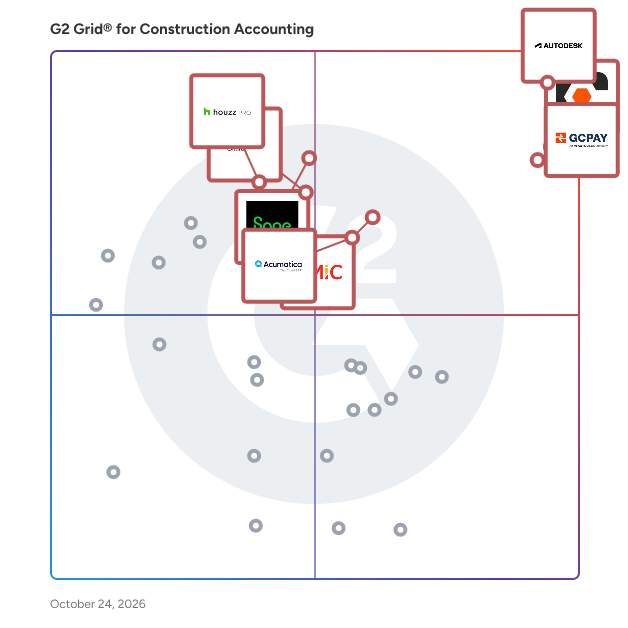
## Best Construction Accounting Software At A Glance

- **Leader:** [Procore](https://www.g2.com/products/procore/reviews)
- **Highest Performer:** [briq](https://www.g2.com/products/briq-briq/reviews)
- **Easiest to Use:** [GCPay](https://www.g2.com/products/gcpay/reviews)
- **Top Trending:** [Procore](https://www.g2.com/products/procore/reviews)
- **Best Free Software:** [Procore](https://www.g2.com/products/procore/reviews)

## Top-Rated Products (Ranked by G2 Score)
  ### 1. [Procore](https://www.g2.com/products/procore/reviews)
  Procore construction software manages your construction projects, resources and financials from planning to closeout. The platform connects every project contributor to solutions built specifically for the industry for the owner, the general contractor and the specialty contractor. The ability to communicate across teams makes it easier to work together by establishing a single source of truth. This is how Procore gives your team easy access to everything they need to know to get the job done.


  **Average Rating:** 4.6/5.0
  **Total Reviews:** 4,079

**User Satisfaction Scores:**

- **Ease of Use:** 8.6/10 (Category avg: 8.4/10)
- **Ease of Admin:** 8.5/10 (Category avg: 8.6/10)
- **Has the product been a good partner in doing business?:** 8.8/10 (Category avg: 8.8/10)
- **Quality of Support:** 9.0/10 (Category avg: 8.5/10)


**Seller Details:**

- **Seller:** [Procore Technologies](https://www.g2.com/sellers/procore-technologies)
- **Company Website:** https://www.procore.com
- **Year Founded:** 2003
- **HQ Location:** Carpinteria, CA
- **Twitter:** @procoretech (16,470 Twitter followers)
- **LinkedIn® Page:** https://www.linkedin.com/company/1912597/ (4,722 employees on LinkedIn®)

**Reviewer Demographics:**
  - **Who Uses This:** Project Manager, Project Engineer
  - **Top Industries:** Construction, Architecture &amp; Planning
  - **Company Size:** 49% Mid-Market, 39% Small-Business


#### Pros & Cons

**Pros:**

- Ease of Use (670 reviews)
- Project Management (355 reviews)
- Centralization (343 reviews)
- Document Management (293 reviews)
- Intuitive (292 reviews)

**Cons:**

- Missing Features (231 reviews)
- Learning Curve (192 reviews)
- Limitations (156 reviews)
- Difficult Learning (148 reviews)
- Improvement Needed (144 reviews)

  ### 2. [GCPay](https://www.g2.com/products/gcpay/reviews)
  GCPay, An Autodesk Company, is a cloud-based construction payment platform built specifically for general contractors. Teams use it to simplify how they manage payments and compliance with subcontractors. It automates pay apps, lien waivers, and compliance document collection in one place, with direct ERP integrations that cut down on manual work and back-and-forth. Customers use GCPay to reduce payment risk, speed up approvals, and get subcontractors paid faster—saving time for accounting and project teams while improving subcontractor relationships.


  **Average Rating:** 4.6/5.0
  **Total Reviews:** 292

**User Satisfaction Scores:**

- **Ease of Use:** 9.1/10 (Category avg: 8.4/10)
- **Ease of Admin:** 9.4/10 (Category avg: 8.6/10)
- **Has the product been a good partner in doing business?:** 9.5/10 (Category avg: 8.8/10)
- **Quality of Support:** 9.5/10 (Category avg: 8.5/10)


**Seller Details:**

- **Seller:** [GCPay](https://www.g2.com/sellers/gcpay)
- **Company Website:** https://ww3.gcpay.com/
- **Year Founded:** 2003
- **HQ Location:** Richmond, VA
- **Twitter:** @GetGCPay (10 Twitter followers)
- **LinkedIn® Page:** https://www.linkedin.com/company/getgcpay/ (35 employees on LinkedIn®)

**Reviewer Demographics:**
  - **Who Uses This:** Project Manager, Project Coordinator
  - **Top Industries:** Construction, Accounting
  - **Company Size:** 64% Mid-Market, 33% Small-Business


#### Pros & Cons

**Pros:**

- Customer Support (31 reviews)
- Ease of Use (31 reviews)
- Helpful (12 reviews)
- Tracking (11 reviews)
- Integrations (10 reviews)

**Cons:**

- Learning Curve (4 reviews)
- Limited Reporting (4 reviews)
- Slow Performance (4 reviews)
- Billing Issues (3 reviews)
- File Management (3 reviews)

  ### 3. [Acumatica](https://www.g2.com/products/acumatica/reviews)
  Acumatica Cloud ERP offers best-in-class functionality for small and mid-sized businesses to thrive in the digital economy. Its workflows span the full suite of business management applications, and it is built with open APIs for rapid integrations with other critical software. Its consumption-based licensing charges for resources used, not per user, and its future-proof platform drives value and provides flexibility, efficiency, and remote collaboration. Connected Business. Delivered. Rapid Integrations. Delivered. Remote Collaboration. Delivered. Business Resilience. Delivered. Future-proof platform. Delivered.


  **Average Rating:** 4.4/5.0
  **Total Reviews:** 1,901

**User Satisfaction Scores:**

- **Ease of Use:** 8.4/10 (Category avg: 8.4/10)
- **Ease of Admin:** 7.9/10 (Category avg: 8.6/10)
- **Has the product been a good partner in doing business?:** 8.5/10 (Category avg: 8.8/10)
- **Quality of Support:** 8.0/10 (Category avg: 8.5/10)


**Seller Details:**

- **Seller:** [Acumatica](https://www.g2.com/sellers/acumatica)
- **Company Website:** https://www.acumatica.com
- **Year Founded:** 2008
- **HQ Location:** Bellevue, WA
- **Twitter:** @Acumatica (28,290 Twitter followers)
- **LinkedIn® Page:** https://www.linkedin.com/company/492504/ (702 employees on LinkedIn®)

**Reviewer Demographics:**
  - **Who Uses This:** Controller, CFO
  - **Top Industries:** Construction, Manufacturing
  - **Company Size:** 49% Mid-Market, 28% Small-Business


#### Pros & Cons

**Pros:**

- Ease of Use (557 reviews)
- Customizability (224 reviews)
- Customization (224 reviews)
- Features (201 reviews)
- Customization Options (176 reviews)

**Cons:**

- Missing Features (229 reviews)
- Learning Curve (191 reviews)
- Difficult Setup (142 reviews)
- User Unfriendliness (131 reviews)
- Complex Setup (128 reviews)

  ### 4. [Deltek ComputerEase](https://www.g2.com/products/deltek-computerease/reviews)
  Deltek ComputerEase is construction accounting software that helps contractors protect job margins and get paid faster. Built for the construction industry, it combines real-time job costing, WIP reporting, construction billing, and payroll compliance in one connected system — so owners and finance teams see where money is made or lost and can act before a job slips. Best for: Small to mid-size contractors — including general, specialty, and trade businesses — running multiple concurrent jobs with thin margins, outgrowing generic accounting tools that can&#39;t handle construction-specific cost structures, billing, or payroll. Use cases:  Track real-time job profitability by job, phase, and cost code  Generate AIA and unit billing to speed up invoicing and improve cash flow  Manage union payroll, prevailing wage, and multistate tax compliance  Monitor committed costs from POs and subcontracts before invoices hit  Submit field costs, daily logs, and receipts from the job site via mobile Key Features:  Real-time job costing and Work in Progress (WIP) reporting  AIA billing, unit billing, and retainage management  Construction payroll with local, state, and federal tax compliance  Committed cost tracking across POs and subcontracts  Field app with Intelligent Character Recognition (ICR) and Dela AI orchestrator  Accounts payable and receivable with routing and approval workflows  Cloud hosting with 24/7 monitoring and FIPS 140-2 certified encryption Why construction firms choose ComputerEase:  Real-time margin visibility — not month-end surprises. WIP reporting and committed cost tracking surface overruns while work is happening, so you can act before a job slips.  Billing built for how contractors actually bill. AIA billing, unit billing, and retainage are native to the system — not workarounds bolted onto generic accounting.  Audit-ready payroll without the stress. Union payroll, prevailing wage, and multistate tax rules are handled by construction payroll experts, with free weekly office hours three days a week.  Built by construction pros for construction pros. The ComputerEase team brings 43+ years of industry focus and over 1,000 years of combined in- house construction accounting experience — reflected in a 96% customer renewal rate. Used by: General contractors, specialty contractors, and trade businesses across commercial and residential construction. Owners, finance leaders, and operations teams rely on ComputerEase to manage job costing, billing, and payroll. More than 4,000 contractors trust ComputerEase, backed by 43+ years serving the construction industry.


  **Average Rating:** 4.2/5.0
  **Total Reviews:** 240

**User Satisfaction Scores:**

- **Ease of Use:** 7.9/10 (Category avg: 8.4/10)
- **Ease of Admin:** 8.4/10 (Category avg: 8.6/10)
- **Has the product been a good partner in doing business?:** 8.7/10 (Category avg: 8.8/10)
- **Quality of Support:** 8.3/10 (Category avg: 8.5/10)


**Seller Details:**

- **Seller:** [Deltek](https://www.g2.com/sellers/deltek)
- **Company Website:** https://www.deltek.com/
- **Year Founded:** 1983
- **HQ Location:** Herndon, VA
- **Twitter:** @Deltek (6,582 Twitter followers)
- **LinkedIn® Page:** https://www.linkedin.com/company/163414/ (4,790 employees on LinkedIn®)

**Reviewer Demographics:**
  - **Who Uses This:** Controller, Office Manager
  - **Top Industries:** Construction, Accounting
  - **Company Size:** 51% Small-Business, 48% Mid-Market


#### Pros & Cons

**Pros:**

- Ease of Use (32 reviews)
- Customer Support (21 reviews)
- Reporting (14 reviews)
- Helpful (12 reviews)
- Project Management (10 reviews)

**Cons:**

- Learning Curve (10 reviews)
- Missing Features (9 reviews)
- Not User-Friendly (7 reviews)
- Poor Reporting (6 reviews)
- Poor Customer Support (5 reviews)

  ### 5. [Sage Intacct](https://www.g2.com/products/sage-intacct/reviews)
  Sage Intacct is the flexible and scalable financial platform that delivers deep accounting capabilities to thousands of businesses across the world. Sage Intacct delivers an array of core accounting applications such as a general ledger, accounts payable, accounts receivable, cash management, and order management to any accounting department or finance team. It also supports functionality for built-in dashboards, real time reporting, time and expense management, project accounting, revenue management, and global consolidations for multiple entities. The software can be used in a wide variety of industries as a horizontal accounting system, but also delivers specialized features for the following industries: Nonprofit, Software and SaaS, Professional Services, Financial Services, Healthcare, Hospitality, Wholesale Distribution, Construction and Real Estate.


  **Average Rating:** 4.3/5.0
  **Total Reviews:** 3,780

**User Satisfaction Scores:**

- **Ease of Use:** 8.4/10 (Category avg: 8.4/10)
- **Ease of Admin:** 8.3/10 (Category avg: 8.6/10)
- **Has the product been a good partner in doing business?:** 8.4/10 (Category avg: 8.8/10)
- **Quality of Support:** 8.1/10 (Category avg: 8.5/10)


**Seller Details:**

- **Seller:** [Sage Software](https://www.g2.com/sellers/sage-software-d61a780c-4fb3-4781-9519-baa772f5ea91)
- **Company Website:** https://www.sage.com/
- **Year Founded:** 1981
- **HQ Location:** Newcastle
- **LinkedIn® Page:** https://www.linkedin.com/company/2802/ (15,471 employees on LinkedIn®)
- **Ownership:** SGE.L

**Reviewer Demographics:**
  - **Who Uses This:** Controller, Senior Accountant
  - **Top Industries:** Accounting, Non-Profit Organization Management
  - **Company Size:** 58% Mid-Market, 25% Small-Business


#### Pros & Cons

**Pros:**

- Ease of Use (1027 reviews)
- Intuitive (519 reviews)
- Reporting (508 reviews)
- User-Friendly (467 reviews)
- Features (384 reviews)

**Cons:**

- Missing Features (385 reviews)
- Learning Curve (339 reviews)
- Limited Functionality (242 reviews)
- Access Limitations (238 reviews)
- Learning Difficulty (231 reviews)

  ### 6. [briq](https://www.g2.com/products/briq-briq/reviews)
  Briq is a financial automation platform that enables construction companies to be more efficient and profitable. Briq automates financial workflows by connecting the people, processes, and systems that contractors use to run their business. By empowering contractors to make better business decisions, hundreds of companies rely on Briq to manage their budget, forecast, and spend. Learn more at www.briq.com


  **Average Rating:** 4.9/5.0
  **Total Reviews:** 44

**User Satisfaction Scores:**

- **Ease of Use:** 9.5/10 (Category avg: 8.4/10)
- **Ease of Admin:** 9.6/10 (Category avg: 8.6/10)
- **Has the product been a good partner in doing business?:** 9.2/10 (Category avg: 8.8/10)
- **Quality of Support:** 9.7/10 (Category avg: 8.5/10)


**Seller Details:**

- **Seller:** [briq](https://www.g2.com/sellers/briq-18cb1d6f-c817-44ac-a65b-552fcd1957ec)
- **Year Founded:** 2018
- **HQ Location:** Santa Barbara, California, United States
- **LinkedIn® Page:** https://www.linkedin.com/company/briqhq/about/ (134 employees on LinkedIn®)

**Reviewer Demographics:**
  - **Top Industries:** Construction, Marketing and Advertising
  - **Company Size:** 55% Mid-Market, 45% Small-Business


  ### 7. [Houzz Pro](https://www.g2.com/products/houzz-pro/reviews)
  Houzz Pro, the leading platform for construction and design, empowers industry professionals and homeowners with the tools they need to make every project a success. Used by more than 3 million construction and design industry professionals and over 70 million homeowners and home design enthusiasts around the world, our AI-powered project management and design software helps pros win projects, collaborate with clients and teams, and run their businesses efficiently and profitably. It’s an all-in-one solution that spans the full customer lifecycle, CRM and Email Marketing tools, Estimates &amp; Proposals, 3D Floor Plans, Schedule, Selections, financial tools, Invoicing &amp; Payments, QuickBooks integration, and a client portal.


  **Average Rating:** 4.1/5.0
  **Total Reviews:** 35

**User Satisfaction Scores:**

- **Ease of Use:** 7.7/10 (Category avg: 8.4/10)
- **Ease of Admin:** 8.3/10 (Category avg: 8.6/10)
- **Has the product been a good partner in doing business?:** 8.8/10 (Category avg: 8.8/10)
- **Quality of Support:** 7.4/10 (Category avg: 8.5/10)


**Seller Details:**

- **Seller:** [Houzz](https://www.g2.com/sellers/houzz)
- **Company Website:** https://www.houzz.com/
- **Year Founded:** 2009
- **HQ Location:** Palo Alto, CA
- **Twitter:** @houzz (294,201 Twitter followers)
- **LinkedIn® Page:** https://www.linkedin.com/company/houzz/ (1,454 employees on LinkedIn®)

**Reviewer Demographics:**
  - **Top Industries:** Construction, Design
  - **Company Size:** 86% Small-Business, 3% Mid-Market


#### Pros & Cons

**Pros:**

- Ease of Use (11 reviews)
- Features (9 reviews)
- Integrations (5 reviews)
- Project Management (5 reviews)
- Business Integration (4 reviews)

**Cons:**

- Expensive (3 reviews)
- Improvement Needed (3 reviews)
- Integration Issues (3 reviews)
- Pricing Issues (3 reviews)
- Billing Issues (2 reviews)

  ### 8. [Knowify](https://www.g2.com/products/knowify/reviews)
  Knowify is job management software built for trade contractors. Founded in New York City, with team members across the U.S. and Canada, Knowify supports growing subcontractors with teams ranging from 2 to 200. The platform is trusted by contractors across trades like electrical, plumbing, HVAC, drywall, and remodeling. Knowify brings estimating, job costing, scheduling, time tracking, and invoicing together in one platform. It supports construction-specific workflows including AIA billing, change orders, certified payroll, and prevailing wage tracking. Mobile tools keep field teams connected to the office, and everything stays in sync with QuickBooks Online, QuickBooks Payroll, QuickBooks time, QuickBooks Payments, and Intuit Enterprise Suite through a best-in-class two-way integration. Knowify helps contractors stay organized, on schedule, and profitable. With real-time visibility into costs and progress, contractors can manage every job more efficiently and make confident financial decisions. Knowify replaces spreadsheets and disconnected tools with one system built to support growing construction businesses. Most importantly - our fully U.S.-based support team is full of real people ready to talk and help you solve the challenges in your business. We&#39;re proud partners of the trades - and proud of our commitment to top quality software and service.


  **Average Rating:** 4.5/5.0
  **Total Reviews:** 100

**User Satisfaction Scores:**

- **Ease of Use:** 8.8/10 (Category avg: 8.4/10)
- **Ease of Admin:** 8.7/10 (Category avg: 8.6/10)
- **Has the product been a good partner in doing business?:** 9.1/10 (Category avg: 8.8/10)
- **Quality of Support:** 9.4/10 (Category avg: 8.5/10)


**Seller Details:**

- **Seller:** [Knowify](https://www.g2.com/sellers/knowify)
- **Company Website:** https://www.knowify.com
- **Year Founded:** 2012
- **HQ Location:** New York, NY
- **Twitter:** @knowify (969 Twitter followers)
- **LinkedIn® Page:** https://www.linkedin.com/company/knowify-llc (52 employees on LinkedIn®)

**Reviewer Demographics:**
  - **Who Uses This:** Owner
  - **Top Industries:** Construction
  - **Company Size:** 85% Small-Business, 12% Mid-Market


#### Pros & Cons

**Pros:**

- Ease of Use (37 reviews)
- Customer Support (19 reviews)
- Data Management (19 reviews)
- Efficiency Improvement (17 reviews)
- Helpful (17 reviews)

**Cons:**

- Improvement Needed (25 reviews)
- Missing Features (16 reviews)
- Access Limitations (11 reviews)
- Invoicing Issues (10 reviews)
- Limited Customization (8 reviews)

  ### 9. [Sage Construction Management (formerly Corecon)](https://www.g2.com/products/sage-construction-management-formerly-corecon/reviews)
  Sage Construction Management (Formerly Corecon)’s cloud based software suite helps engineering and construction firms manage their projects more efficiently. The software helps people with different roles and responsibilities work together regardless if they are at the office or jobsite. The software suite includes modules for estimating, vendor bid management, contract administration, procurement, time tracking, correspondence, documentation, quality control, safety and scheduling. Being cloud based, contracting firms will have the ability to access their project information anytime anywhere and make quick and informed decisions. With its built-in wizards that automate complex tasks or comprehensive executive dashboards to analyze project budgets, Sage Construction Management (Formerly Corecon) provides cutting-edge technology to maximize the profitability of one’s projects and make all departments work more efficiently


  **Average Rating:** 3.9/5.0
  **Total Reviews:** 42

**User Satisfaction Scores:**

- **Ease of Use:** 7.1/10 (Category avg: 8.4/10)
- **Ease of Admin:** 8.0/10 (Category avg: 8.6/10)
- **Has the product been a good partner in doing business?:** 8.5/10 (Category avg: 8.8/10)
- **Quality of Support:** 7.8/10 (Category avg: 8.5/10)


**Seller Details:**

- **Seller:** [Sage Software](https://www.g2.com/sellers/sage-software-d61a780c-4fb3-4781-9519-baa772f5ea91)
- **Year Founded:** 1981
- **HQ Location:** Newcastle
- **LinkedIn® Page:** https://www.linkedin.com/company/2802/ (15,471 employees on LinkedIn®)
- **Ownership:** SGE.L
- **Phone:** +1 (866) 996-7243

**Reviewer Demographics:**
  - **Who Uses This:** Project Manager
  - **Top Industries:** Construction
  - **Company Size:** 79% Small-Business, 19% Mid-Market


#### Pros & Cons

**Pros:**

- Ease of Use (2 reviews)
- Construction Industry (1 reviews)
- Construction Management (1 reviews)
- Productivity (1 reviews)
- Setup Ease (1 reviews)

**Cons:**

- Access Limitations (1 reviews)
- Compatibility Issues (1 reviews)
- Complexity (1 reviews)
- Lack of Customization (1 reviews)
- Limitations (1 reviews)

  ### 10. [Oracle Textura Payment Management](https://www.g2.com/products/oracle-textura-payment-management/reviews)
  Oracle Textura Payment Management increases efficiency and control in construction payment management through a collaborative subcontractor invoicing and payment software system. The cloud solution streamlines and automates processes to accelerate payment, mitigate risk, and improve cash flow. Contractors can rely on the exchange of e-signed lien waivers and electronic payments. Key Business Benefits: - Increased efficiency: Eliminate paper and gridlock by standardizing processes and providing a single source of truth to the supply chain. - Control and risk mitigation: Enforce requirements and automate payment holds for compliance issues. - Insights and visibility: Analyze and easily report on payments and compliance data to improve project performance. Features include: - Streamlined Workflows and Automation - Online Collaboration in a Shared Environment - Lien Waivers and Compliance Documents - ERP/Accounting System Integration - Electronic Payment - Insights and Visibility - Dedicated Client Services


  **Average Rating:** 4.1/5.0
  **Total Reviews:** 43

**User Satisfaction Scores:**

- **Ease of Use:** 8.1/10 (Category avg: 8.4/10)
- **Ease of Admin:** 7.7/10 (Category avg: 8.6/10)
- **Has the product been a good partner in doing business?:** 8.0/10 (Category avg: 8.8/10)
- **Quality of Support:** 8.2/10 (Category avg: 8.5/10)


**Seller Details:**

- **Seller:** [Oracle](https://www.g2.com/sellers/oracle)
- **Year Founded:** 1977
- **HQ Location:** Austin, TX
- **Twitter:** @Oracle (827,310 Twitter followers)
- **LinkedIn® Page:** https://www.linkedin.com/company/1028/ (199,301 employees on LinkedIn®)
- **Ownership:** NYSE:ORCL

**Reviewer Demographics:**
  - **Top Industries:** Construction, Accounting
  - **Company Size:** 45% Mid-Market, 41% Small-Business


  ### 11. [JobTread](https://www.g2.com/products/jobtread/reviews)
  JobTread provides end-to-end construction management software that helps jobs-based businesses manage all of their processes, from pre-construction to project completion. The platform serves as a central location to manage jobs, teams, documents, photos, finances, customers, vendors, sub-contractors, and more. Its budget-first approach creates financial transparency at every stage of a project. Through JobTread, you will have access to an extensive list of Sales and Estimating features ranging from a construction CRM and budgeting to contracts and eSignitures. The Project Management features cover purchase orders, daily logs, tasks and scheduling and more. Its Finance and Cashflow features offer Change Orders, invoices, billing, job costing, and payment processing. With the Business Intelligence features the user has custom fields, reporting, dashboards, and performance insights. JobTread has integrations with Quickbooks Online, Stripe Payments, Slack, and Zapier.


  **Average Rating:** 5.0/5.0
  **Total Reviews:** 65

**User Satisfaction Scores:**

- **Ease of Use:** 9.4/10 (Category avg: 8.4/10)
- **Ease of Admin:** 9.5/10 (Category avg: 8.6/10)
- **Has the product been a good partner in doing business?:** 9.9/10 (Category avg: 8.8/10)
- **Quality of Support:** 9.9/10 (Category avg: 8.5/10)


**Seller Details:**

- **Seller:** [JobTread](https://www.g2.com/sellers/jobtread)
- **Company Website:** https://www.jobtread.com
- **Year Founded:** 2019
- **HQ Location:** Dallas, US
- **Twitter:** @jobtread (215 Twitter followers)
- **LinkedIn® Page:** https://www.linkedin.com/company/28920856 (60 employees on LinkedIn®)

**Reviewer Demographics:**
  - **Who Uses This:** Owner
  - **Top Industries:** Construction
  - **Company Size:** 94% Small-Business, 5% Enterprise


#### Pros & Cons

**Pros:**

- Ease of Use (10 reviews)
- Customer Support (9 reviews)
- Efficiency Improvement (7 reviews)
- Features (6 reviews)
- Helpful (5 reviews)

**Cons:**

- Missing Features (5 reviews)
- Access Limitations (2 reviews)
- Editing Difficulties (2 reviews)
- Improvement Needed (2 reviews)
- Update Issues (2 reviews)

  ### 12. [Adaptive](https://www.g2.com/products/adaptive-adaptive/reviews)
  Adaptive is a construction financial operations platform that helps contractors, builders, and construction accounting teams automate accounts payable, job costing, billing, and compliance workflows through AI and intelligent automation. Built specifically for the construction industry, Adaptive connects the financial workflows between the field and the office — eliminating the manual data entry, disconnected spreadsheets, and approval bottlenecks that slow down construction finance teams. The platform integrates directly with accounting systems and project management tools to keep job costs, budgets, and financials continuously updated as work happens. Adaptive was named Best Business Solution Software at the 2026 NAHB International Builders&#39; Show. Key capabilities include: - AI-powered bill and receipt capture: Invoices and receipts are automatically ingested, coded to the correct job and cost code, and routed for approval — eliminating manual data entry across accounts payable workflows. - Automated approval workflows: Bills, expenses, and pay applications move through customizable approval chains with full audit trails, reducing delays and keeping stakeholders aligned. - Lien waiver and compliance automation: Lien waivers, certificates of insurance, and vendor documents are tracked, requested, and tied to payment release automatically. - Real-time job costing and WIP reporting: Budget versus actual costs update continuously as transactions are processed, giving project managers and finance teams accurate, up-to-date financial visibility across all active jobs. - Accounting system integration: Two-way sync with major accounting platforms keeps financial records accurate without duplicate data entry. Adaptive is used by general contractors, specialty contractors, custom home builders, and construction accounting firms managing financial operations across multiple projects and entities.


  **Average Rating:** 4.9/5.0
  **Total Reviews:** 10

**User Satisfaction Scores:**

- **Ease of Use:** 10.0/10 (Category avg: 8.4/10)
- **Ease of Admin:** 10.0/10 (Category avg: 8.6/10)
- **Has the product been a good partner in doing business?:** 10.0/10 (Category avg: 8.8/10)
- **Quality of Support:** 9.8/10 (Category avg: 8.5/10)


**Seller Details:**

- **Seller:** [Adaptive](https://www.g2.com/sellers/adaptive-95a86ab5-e3dc-473d-82af-412dd9a5df01)
- **Company Website:** https://www.adaptive.build/
- **Year Founded:** 2022
- **HQ Location:** New York, US
- **LinkedIn® Page:** https://www.linkedin.com/company/adaptiverealestate (82 employees on LinkedIn®)

**Reviewer Demographics:**
  - **Top Industries:** Construction
  - **Company Size:** 82% Small-Business


#### Pros & Cons

**Pros:**

- Ease of Use (5 reviews)
- Efficiency Improvement (4 reviews)
- Invoicing (3 reviews)
- Automation (2 reviews)
- Process Streamlining (2 reviews)

**Cons:**

- Learning Curve (1 reviews)

  ### 13. [CoConstruct](https://www.g2.com/products/co-construct-coconstruct/reviews)
  Construction management software for home builders and remodelers used by 100,000+ building professionals in residential construction.


  **Average Rating:** 4.1/5.0
  **Total Reviews:** 19

**User Satisfaction Scores:**

- **Ease of Use:** 9.0/10 (Category avg: 8.4/10)
- **Ease of Admin:** 9.2/10 (Category avg: 8.6/10)
- **Has the product been a good partner in doing business?:** 8.9/10 (Category avg: 8.8/10)
- **Quality of Support:** 9.2/10 (Category avg: 8.5/10)


**Seller Details:**

- **Seller:** [CoConstruct](https://www.g2.com/sellers/coconstruct)
- **Year Founded:** 2005
- **HQ Location:** Charlottesville, VA
- **Twitter:** @coconstruct (302 Twitter followers)
- **LinkedIn® Page:** https://www.linkedin.com/company/2619963/ (32 employees on LinkedIn®)

**Reviewer Demographics:**
  - **Top Industries:** Construction
  - **Company Size:** 71% Small-Business, 19% Mid-Market


#### Pros & Cons

**Pros:**

- Cloud Collaboration (1 reviews)
- Communication (1 reviews)
- Communication Efficiency (1 reviews)
- Coordination (1 reviews)
- Ease of Use (1 reviews)

**Cons:**

- Complexity (1 reviews)
- Email Overload (1 reviews)
- Improvement Needed (1 reviews)
- Inconsistency (1 reviews)
- Learning Curve (1 reviews)

  ### 14. [Premier Construction Software](https://www.g2.com/products/premier-construction-software/reviews)
  Premier Construction Software is a global, AI-powered construction ERP that helps growing general contractors control job costs, cash flow, and risk across every project in one easy-to-use cloud platform. Replace disconnected accounting, project management, and field tools with a single source of truth for WIP, change orders, and forecasting, so your team can shorten billing cycles and keep margins on track. How we&#39;re different: • Built for general contractors, owners, and land developers managing multi-project, multi-entity portfolios. • Advanced construction accounting with detailed job costing, real-time WIP reporting, and cash-flow forecasting to spot issues before they hit the P&amp;L. • Project and field management with RFIs, subcontracts, drawings, and change orders tied directly to the budget and schedule. • Automated billing, approvals, and payroll to reduce manual entry and speed up collections. • Unlimited entities, consolidated reporting, and role-based dashboards.


  **Average Rating:** 4.7/5.0
  **Total Reviews:** 55

**User Satisfaction Scores:**

- **Ease of Use:** 9.3/10 (Category avg: 8.4/10)
- **Ease of Admin:** 9.3/10 (Category avg: 8.6/10)
- **Has the product been a good partner in doing business?:** 9.4/10 (Category avg: 8.8/10)
- **Quality of Support:** 9.3/10 (Category avg: 8.5/10)


**Seller Details:**

- **Seller:** [Premier Construction Software](https://www.g2.com/sellers/premier-construction-software-a430a4e6-3557-4c54-89fd-1c895629a400)
- **Company Website:** https://premiercs.com/
- **Year Founded:** 2009
- **HQ Location:** Markham, CA
- **Twitter:** @Jonas_Premier (218 Twitter followers)
- **LinkedIn® Page:** https://www.linkedin.com/company/premierconstructionsoftware/ (78 employees on LinkedIn®)

**Reviewer Demographics:**
  - **Top Industries:** Construction, Accounting
  - **Company Size:** 75% Small-Business, 25% Mid-Market


#### Pros & Cons

**Pros:**

- Project Management (4 reviews)
- Customer Support (2 reviews)
- Efficiency Improvement (2 reviews)
- Integrations (2 reviews)
- Reporting (2 reviews)

**Cons:**

- Learning Curve (3 reviews)
- Implementation Difficulties (1 reviews)
- Limited Functionality (1 reviews)
- Missing Features (1 reviews)

  ### 15. [Sage 300 Construction and Real Estate](https://www.g2.com/products/sage-300-construction-and-real-estate/reviews)
  Sage 300 Construction and Real Estate (CRE) is a comprehensive management solution tailored for the construction and real estate industries. It enables contractors, developers, and property managers to efficiently oversee projects and properties with precision and confidence. By integrating various facets of project management, accounting, and operations, Sage 300 CRE ensures streamlined workflows and enhanced collaboration across all project phases. Key Features and Functionality: - Project Management: Monitor project status, track costs, manage change orders, and ensure projects remain on schedule and within budget. - Accounting and Financials: Handle job costing, accounts payable and receivable, general ledger, and payroll, providing a solid financial foundation for your operations. - Document Management: Organize, store, and route essential documents such as contracts, invoices, and drawings, ensuring a clean audit trail and reducing risk. - Service Management: Optimize service dispatching, improve response times, and maintain tight control over service and preventive maintenance agreements. - Real Estate Management: Transform static lease documents into dynamic information sources, allowing for improved communication and flexible lease options. - Reporting and Analytics: Access over 1,400 prebuilt report formats and customizable reports to gain timely insights for better decision-making. Primary Value and Solutions Provided: Sage 300 CRE addresses the complexities inherent in construction and real estate management by offering an integrated platform that connects people, projects, processes, and properties. It enhances visibility into operations, mitigates risks associated with subcontractors and vendors, and facilitates real-time collaboration. By automating processes and providing accurate, up-to-date information, Sage 300 CRE empowers businesses to make informed decisions, improve efficiency, and maximize profitability.


  **Average Rating:** 3.6/5.0
  **Total Reviews:** 40

**User Satisfaction Scores:**

- **Ease of Use:** 6.2/10 (Category avg: 8.4/10)
- **Ease of Admin:** 7.5/10 (Category avg: 8.6/10)
- **Has the product been a good partner in doing business?:** 7.9/10 (Category avg: 8.8/10)
- **Quality of Support:** 7.1/10 (Category avg: 8.5/10)


**Seller Details:**

- **Seller:** [Sage Software](https://www.g2.com/sellers/sage-software-d61a780c-4fb3-4781-9519-baa772f5ea91)
- **Year Founded:** 1981
- **HQ Location:** Newcastle
- **LinkedIn® Page:** https://www.linkedin.com/company/2802/ (15,471 employees on LinkedIn®)
- **Ownership:** SGE.L
- **Phone:** +1 (866) 996-7243

**Reviewer Demographics:**
  - **Top Industries:** Construction, Accounting
  - **Company Size:** 54% Mid-Market, 41% Small-Business


#### Pros & Cons

**Pros:**

- Customizability (1 reviews)
- Ease of Use (1 reviews)
- Intuitive (1 reviews)
- Submittal Management (1 reviews)

**Cons:**

- Poor Customer Support (1 reviews)

  ### 16. [Spectrum](https://www.g2.com/products/trimble-spectrum/reviews)
  Spectrum® is a complete, web-based construction ERP solution with leading-edge tools for accounting, project management, equipment and materials management, service management, document control, HR and payroll, inventory, reporting and much more. Spectrum allows contractors to work in real time, no matter where work takes them. Spectrum Construction Software represents more than three decades of continuous innovation and investment in the latest technologies. We have done more than simply put Spectrum in the cloud—it is designed specifically for the cloud, providing an interface that allows you to work from just about any connected device, anywhere and anytime, by simply launching a web browser. Spectrum delivers the convenience of true cloud computing. Spectrum users enjoy the convenience of the cloud while still providing complete control over data security and user access. There is nothing easy about running a successful construction business. That’s why we designed Spectrum construction software to be as user friendly as possible—so you can spend time running the business, not figuring out how to run the software. With Spectrum construction management software, there are no complex menus to master and memorize. Start from the interactive Spectrum Dashboard that you customize to fit your needs, and dive into detailed information and the work you need to get done. As you work, a responsive InfoBar is always present, giving you one-click access to tasks and data related to what you are doing. All Spectrum applications work together seamlessly. Instead of opening several different applications to get one job done, simply start working and Spectrum gives you multiple ways to move forward with a single click, either through the intuitive InfoBar or through links directly from your data. And as you start new tasks, the web-based structure of Spectrum’s interface opens new work tabs. When you need to pick up where you left off on previous tasks, simply click on the tab you need. Spectrum construction management software gives you the tools you need to communicate, collaborate, and help everyone work better together Document Imaging Pane - Spectrum Construction Management SoftwareSpectrum is the first construction software to deliver fully-integrated web-based document management. Wherever work takes you, documents or images associated with your work are available through an image pane on the Spectrum desktop. View purchase orders, contracts, submittals, work orders, RFIs, job site photos—virtually any type of file associated with your task at hand. Adding a new document or image is as easy as dragging and dropping the file onto the image pane. The Spectrum Dashboard is an information portal for everyone in your company—not just licensed Spectrum users. Each person’s Dashboard can be customized with apps to fit the job they do. There is a growing selection of apps available and tools to help you build your own. Spectrum applications and mobile apps are completely integrated, giving you a complete view of your projects. Metrics such as Work In Progress, Cost to Complete, Over/Under Billing and Earned Revenue are available on a single screen. Spectrum also helps ensure that everyone you work with—owners, architects, subcontractors, vendors—all have access to the latest information. Spectrum’s Project Management Plan Room gives you a cloud-based platform to share documents, send, receive and track communications, and maintain an audit trail of all project activity and correspondence.


  **Average Rating:** 4.2/5.0
  **Total Reviews:** 130

**User Satisfaction Scores:**

- **Ease of Use:** 7.9/10 (Category avg: 8.4/10)
- **Ease of Admin:** 8.0/10 (Category avg: 8.6/10)
- **Has the product been a good partner in doing business?:** 8.0/10 (Category avg: 8.8/10)
- **Quality of Support:** 7.7/10 (Category avg: 8.5/10)


**Seller Details:**

- **Seller:** [Trimble](https://www.g2.com/sellers/trimble)
- **Year Founded:** 1978
- **HQ Location:** Sunnyvale, CA
- **Twitter:** @TrimbleCorpNews (12,036 Twitter followers)
- **LinkedIn® Page:** https://www.linkedin.com/company/5160/ (10,636 employees on LinkedIn®)
- **Ownership:** NASDAQ

**Reviewer Demographics:**
  - **Who Uses This:** Controller
  - **Top Industries:** Construction, Accounting
  - **Company Size:** 76% Mid-Market, 19% Small-Business


#### Pros & Cons

**Pros:**

- Ease of Use (2 reviews)
- Capabilities (1 reviews)
- Customer Support (1 reviews)
- Data Management (1 reviews)
- Ease of Learning (1 reviews)

**Cons:**

- Poor Customer Support (2 reviews)
- Poor Support Management (2 reviews)
- Bug Issues (1 reviews)
- Complex Usability (1 reviews)
- Difficult Learning (1 reviews)

  ### 17. [Vista](https://www.g2.com/products/trimble-vista/reviews)
  Comprehensive construction accounting and operations solution providing maximum configurability, scalability and reliability, while synchronizing your data across your entire enterprise. Vista™ by Viewpoint is a comprehensive software solution that helps contractors manage all areas of their operations. Featuring solutions for Accounting, Human Resources, Project Management, and Service Management, Vista is designed to synchronize all aspects of a construction business — helping contractors to better meet project profitability, delivery, and quality expectations. Vista is part of Viewpoint’s construction software suite providing contractors with insight into project revenue and cost management that is tightly integrated with accounting and project management — ensuring every project is under budget and profitable. With this software suite, contractors benefit from accounting and project management, document control and an easy-to-use mobile application that captures field observations from the job site anywhere, anytime.


  **Average Rating:** 4.0/5.0
  **Total Reviews:** 135

**User Satisfaction Scores:**

- **Ease of Use:** 7.4/10 (Category avg: 8.4/10)
- **Ease of Admin:** 7.6/10 (Category avg: 8.6/10)
- **Has the product been a good partner in doing business?:** 7.4/10 (Category avg: 8.8/10)
- **Quality of Support:** 6.9/10 (Category avg: 8.5/10)


**Seller Details:**

- **Seller:** [Trimble](https://www.g2.com/sellers/trimble)
- **Year Founded:** 1978
- **HQ Location:** Sunnyvale, CA
- **Twitter:** @TrimbleCorpNews (12,036 Twitter followers)
- **LinkedIn® Page:** https://www.linkedin.com/company/5160/ (10,636 employees on LinkedIn®)
- **Ownership:** NASDAQ

**Reviewer Demographics:**
  - **Who Uses This:** Controller, Accountant
  - **Top Industries:** Construction, Accounting
  - **Company Size:** 76% Mid-Market, 17% Small-Business


#### Pros & Cons

**Pros:**

- Customization Features (2 reviews)
- Accessibility (1 reviews)
- Budget Management (1 reviews)
- Collaboration Efficiency (1 reviews)
- Customer Support (1 reviews)

**Cons:**

- Cost Issues (1 reviews)
- Cumbersome Processes (1 reviews)
- Difficult Customization (1 reviews)
- Expensive (1 reviews)
- Limited Customization (1 reviews)

  ### 18. [Explorer Eclipse](https://www.g2.com/products/explorer-eclipse/reviews)
  Explorer Eclipse is a modern, all-in-one construction ERP (Enterprise Resource Planning) platform designed for contractors who need total visibility into their jobs, finances, and teams, without the complexity of disconnected systems or third-party bolt-ons. Tailored specifically for construction professionals, Eclipse combines construction accounting, project management, payroll, document workflows, real-time job costing, and business analytics in one unified, browser-based solution. Whether you’re managing a small firm or overseeing a large, multi-crew operation, Eclipse helps streamline processes, reduce risk, and drive profitability across your entire business. Why contractors choose Explorer Eclipse: Purpose-built for construction. Every feature is designed to reflect the way contractors actually work, from job costing to payroll to project control. Real-time job costing. Track labor, materials, equipment, and overhead as it happens. Get accurate, up-to-date visibility without waiting on batch reports. All core functions in one system. Accounting, payroll, project management, analytics, and document workflows are fully integrated. Flexible deployment options. Choose between cloud or on-premise deployment based on your company’s infrastructure. Access Eclipse from any browser, without remote desktop tools. Built for field and office teams. Connect jobsite and back-office teams with mobile access, real-time data, and streamlined communication. Strong API integrations. Eclipse works alongside the tools your business already uses, extending its capabilities through powerful, well-documented API connections. All your data in one place. The Eclipse Integrator add-on brings third-party data into Eclipse to give you a 360-degree view of your business in real time. No need for external reporting tools. Eclipse serves as the central hub for smarter construction management. From managing subcontractors and processing payroll to tracking budgets and staying ahead of change orders, Eclipse centralizes your most critical workflows. Its intuitive interface supports daily users, while powerful features give leaders the insight needed to make faster, more informed decisions. With real-time reporting, configurable dashboards, and full document control, Eclipse gives you the visibility you need to stay on top of every job, no matter how complex. The result is more insight, less chaos, and stronger margins. Explorer Eclipse helps construction companies simplify operations, scale with confidence, and deliver quality projects on time and within budget. Whether you&#39;re replacing outdated systems or preparing for growth, Eclipse is the ERP that grows with you.


  **Average Rating:** 4.0/5.0
  **Total Reviews:** 50

**User Satisfaction Scores:**

- **Ease of Use:** 7.7/10 (Category avg: 8.4/10)
- **Ease of Admin:** 8.3/10 (Category avg: 8.6/10)
- **Has the product been a good partner in doing business?:** 8.6/10 (Category avg: 8.8/10)
- **Quality of Support:** 7.7/10 (Category avg: 8.5/10)


**Seller Details:**

- **Seller:** [Explorer Software](https://www.g2.com/sellers/explorer-software)
- **Company Website:** https://www.explorer-software.com
- **Year Founded:** 1984
- **HQ Location:** North Vancouver, BC
- **Twitter:** @ExplorerGroup (143 Twitter followers)
- **LinkedIn® Page:** https://www.linkedin.com/company/explorer-software-group (59 employees on LinkedIn®)

**Reviewer Demographics:**
  - **Top Industries:** Construction, Accounting
  - **Company Size:** 66% Mid-Market, 18% Small-Business


#### Pros & Cons

**Pros:**

- Ease of Use (19 reviews)
- Navigation Ease (9 reviews)
- Easy Access (8 reviews)
- Efficiency Improvement (8 reviews)
- Organization (8 reviews)

**Cons:**

- Slow Performance (15 reviews)
- Difficult Navigation (7 reviews)
- Bug Issues (6 reviews)
- Learning Curve (6 reviews)
- Data Entry Issues (4 reviews)

  ### 19. [CMiC Platform](https://www.g2.com/products/cmic-platform/reviews)
  CMiC is the leading provider of an AI-powered, fully integrated construction ERP platform purpose-built for general contractors, specialty contractors, and civil/heavy-highway firms. Built on a Single Database Platform™, CMiC delivers a unified suite of Financials, Project Management, and Project Controls applications designed to manage the full complexity of construction operations. Core financial applications include Accounting, HR and Payroll, Opportunity Management (CRM), Resource Planning, and Inventory and Equipment Management. On the project management side, CMiC covers Bidding and Procurement, Drawing Management, and Project Management. Trusted by 1 in 5 General Contractors on Engineering News Record&#39;s Top 400, CMiC is an award-winning platform that enterprise construction firms rely on globally to drive financial control, operational efficiency, and project predictability. With a 25% market share among North America&#39;s top 400 contractors and a growing international footprint, some of the largest construction firms in the US have chosen CMiC as their long-term strategic ERP partner. CMiC&#39;s turnkey model means implementation, support, development, and customer success are all managed in-house, giving firms a single, accountable partner from initial deployment through long-term growth. With no middleware dependencies and over 50 integration partners, CMiC connects seamlessly with the tools and systems construction firms already rely on. CMiC&#39;s industry leadership has been consistently recognized by leading organizations. Deloitte has named CMiC a Best Managed Company for over seven years, a distinction it now holds at Platinum status. CMiC has also earned Construction Executive&#39;s Top Tech Award, BuildWorld&#39;s Preconstruction Tech Top 50, and Featured Customer&#39;s Market Leader Award. For more information, please visit www.cmicglobal.com.


  **Average Rating:** 3.4/5.0
  **Total Reviews:** 48

**User Satisfaction Scores:**

- **Ease of Use:** 6.4/10 (Category avg: 8.4/10)
- **Ease of Admin:** 5.0/10 (Category avg: 8.6/10)
- **Has the product been a good partner in doing business?:** 6.7/10 (Category avg: 8.8/10)
- **Quality of Support:** 6.0/10 (Category avg: 8.5/10)


**Seller Details:**

- **Seller:** [CMiC](https://www.g2.com/sellers/cmic)
- **Company Website:** https://www.cmicglobal.com
- **Year Founded:** 1974
- **HQ Location:** Toronto, Canada
- **Twitter:** @cmicsoftware (1,301 Twitter followers)
- **LinkedIn® Page:** https://www.linkedin.com/company/51331/ (697 employees on LinkedIn®)

**Reviewer Demographics:**
  - **Top Industries:** Construction
  - **Company Size:** 59% Mid-Market, 22% Small-Business


  ### 20. [AccuBuild](https://www.g2.com/products/accubuild/reviews)
  AccuBuild provides fully integrated, flexible Construction Business Management Software to help contractors gain a competitive advantage and confidently make faster, better decisions. We provide solutions to meet the needs of Executives, Accounting Staff, Project Managers, and Field Staff. Our tailored solutions reveal insights and strategies to improve your business performance and profitability.


  **Average Rating:** 4.8/5.0
  **Total Reviews:** 19

**User Satisfaction Scores:**

- **Ease of Use:** 9.2/10 (Category avg: 8.4/10)
- **Ease of Admin:** 9.6/10 (Category avg: 8.6/10)
- **Has the product been a good partner in doing business?:** 9.8/10 (Category avg: 8.8/10)
- **Quality of Support:** 9.7/10 (Category avg: 8.5/10)


**Seller Details:**

- **Seller:** [AccuBuild Construction Software](https://www.g2.com/sellers/accubuild-construction-software)
- **Year Founded:** 1987
- **HQ Location:** Georgetown, Texas
- **Twitter:** @AccuBuild (125 Twitter followers)
- **LinkedIn® Page:** https://www.linkedin.com/company/316959/ (16 employees on LinkedIn®)

**Reviewer Demographics:**
  - **Top Industries:** Construction
  - **Company Size:** 50% Mid-Market, 50% Small-Business


  ### 21. [Buildern](https://www.g2.com/products/buildern/reviews)
  Buildern is a comprehensive construction management software designed to streamline the complexities of both residential and commercial construction projects. It offers an all-in-one platform that integrates estimating, budgeting, project management, and communication tools, facilitating a seamless workflow for builders, contractors, and construction professionals. With its user-friendly interface, Buildern ensures that teams can efficiently manage every aspect of their projects, from pre-sales activities to day-to-day operations. Key Features and Functionality: - Estimating and Takeoff: Generate detailed and accurate estimates for materials, labor, and equipment using up-to-date cost data. The takeoff feature allows for precise measurement and quantity assessments directly from project plans. - Project Management: Assign tasks, track progress, and collaborate across teams with real-time visibility, reducing miscommunication and ensuring alignment from preconstruction to project closeout. - Scheduling: Develop and manage job schedules that reflect real construction timelines, assign responsibilities, and adjust milestones to keep projects on track. - Document Management: Centralize plans, specifications, revisions, and signed documents, controlling access by role and preventing version mix-ups. - Financial Management: Monitor job costs, margins, forecasts, and cash flow in real time through an integrated dashboard, enabling informed decision-making. - AI Billing: Automate billing tasks with AI-powered tools that match purchase orders, delivery records, and invoices, reducing errors and approval times. - Mobile App: Stay connected to projects from anywhere, allowing for file uploads, schedule checks, and team communication directly from mobile devices. Primary Value and Solutions Provided: Buildern addresses the common challenges faced by construction professionals, such as cost overruns, scheduling conflicts, and communication breakdowns. By offering a centralized platform that integrates various project management tools, Buildern enhances efficiency, reduces errors, and improves collaboration among all stakeholders. Its intuitive design ensures ease of use, allowing teams to focus on delivering quality construction projects on time and within budget. Additionally, Buildern&#39;s commitment to continuous improvement, with weekly feature releases and responsive support, ensures that the platform evolves to meet the ever-changing needs of the construction industry.


  **Average Rating:** 4.9/5.0
  **Total Reviews:** 22

**User Satisfaction Scores:**

- **Ease of Use:** 9.2/10 (Category avg: 8.4/10)
- **Ease of Admin:** 9.4/10 (Category avg: 8.6/10)
- **Has the product been a good partner in doing business?:** 10.0/10 (Category avg: 8.8/10)
- **Quality of Support:** 9.6/10 (Category avg: 8.5/10)


**Seller Details:**

- **Seller:** [Buildern](https://www.g2.com/sellers/buildern)
- **Year Founded:** 2021
- **HQ Location:** Glendale, US
- **LinkedIn® Page:** https://www.linkedin.com/company/79790794 (30 employees on LinkedIn®)

**Reviewer Demographics:**
  - **Top Industries:** Construction
  - **Company Size:** 95% Small-Business, 5% Mid-Market


#### Pros & Cons

**Pros:**

- Efficiency Improvement (3 reviews)
- Features (3 reviews)
- Customer Support (2 reviews)
- Helpful (2 reviews)
- Quality (2 reviews)

**Cons:**

- Missing Features (1 reviews)

  ### 22. [WERX](https://www.g2.com/products/werx-werx/reviews)
  Werx Contractor Software 30 DAY FREE TRIAL! No credit card required. Plans as low as $49/m. Elevate your business with WERX, the ultimate management solution for efficient project handling—from detailed estimating to streamlined payments. Empower your operations with features like real-time time tracking, AIA-Style billing, and flexible budgeting. Our integration with QuickBooks Online and Stripe ensures accuracy and fast payments. Enhance project transparency, boost cash flow, and focus on what matters most: growing your business and winning more bids.


  **Average Rating:** 4.4/5.0
  **Total Reviews:** 14

**User Satisfaction Scores:**

- **Ease of Use:** 9.2/10 (Category avg: 8.4/10)
- **Ease of Admin:** 8.9/10 (Category avg: 8.6/10)
- **Has the product been a good partner in doing business?:** 9.2/10 (Category avg: 8.8/10)
- **Quality of Support:** 9.3/10 (Category avg: 8.5/10)


**Seller Details:**

- **Seller:** [WERX](https://www.g2.com/sellers/werx-962a5c26-c676-4418-90c2-deb759f33a6c)
- **Year Founded:** 2016
- **HQ Location:** Georgetown, US
- **LinkedIn® Page:** https://www.linkedin.com/company/werxapp/ (8 employees on LinkedIn®)

**Reviewer Demographics:**
  - **Top Industries:** Construction
  - **Company Size:** 50% Mid-Market, 50% Small-Business


#### Pros & Cons

**Pros:**

- Ease of Use (5 reviews)
- Efficiency Improvement (3 reviews)
- Pricing (3 reviews)
- Tracking (3 reviews)
- Useful (3 reviews)

**Cons:**

- Expensive (2 reviews)
- Limited Customization (2 reviews)
- Limited Reporting (2 reviews)
- Poor Reporting (2 reviews)
- Access Limitations (1 reviews)

  ### 23. [Jonas Enterprise Service &amp; Construction Software](https://www.g2.com/products/jonas-enterprise-service-construction-software/reviews)
  Jonas Construction Software is a full suite of integrated construction solutions for mechanical and specialty contractors that drive the automation of Accounting, Job Project Management, Service Management, Operations, and Analytics/Reporting. We help you to increase your operational efficiency, make informed and timely decisions, manage cost overruns, and protect profits.


  **Average Rating:** 3.3/5.0
  **Total Reviews:** 23

**User Satisfaction Scores:**

- **Ease of Use:** 6.4/10 (Category avg: 8.4/10)
- **Ease of Admin:** 4.8/10 (Category avg: 8.6/10)
- **Has the product been a good partner in doing business?:** 5.2/10 (Category avg: 8.8/10)
- **Quality of Support:** 6.3/10 (Category avg: 8.5/10)


**Seller Details:**

- **Seller:** [Jonas Construction Software](https://www.g2.com/sellers/jonas-construction-software)
- **Year Founded:** 1990
- **HQ Location:** Ontario, Canada
- **Twitter:** @JonasSoftware (903 Twitter followers)
- **LinkedIn® Page:** https://www.linkedin.com/company/5101232/ (69 employees on LinkedIn®)

**Reviewer Demographics:**
  - **Top Industries:** Construction
  - **Company Size:** 57% Mid-Market, 39% Small-Business


#### Pros & Cons

**Pros:**

- Ease of Use (2 reviews)
- Easy Access (2 reviews)
- Access (1 reviews)
- Accessibility (1 reviews)
- Reporting (1 reviews)

**Cons:**

- Integration Issues (1 reviews)
- Limited Functionality (1 reviews)
- Not User-Friendly (1 reviews)
- Poor Integration (1 reviews)

  ### 24. [FOUNDATION](https://www.g2.com/products/foundation/reviews)
  FOUNDATION is powerful job costing construction accounting software that’s easy to use and provides the accounting and management tools you need to run a successful construction business.


  **Average Rating:** 3.6/5.0
  **Total Reviews:** 23

**User Satisfaction Scores:**

- **Ease of Use:** 6.7/10 (Category avg: 8.4/10)
- **Ease of Admin:** 8.3/10 (Category avg: 8.6/10)
- **Has the product been a good partner in doing business?:** 9.7/10 (Category avg: 8.8/10)
- **Quality of Support:** 8.3/10 (Category avg: 8.5/10)


**Seller Details:**

- **Seller:** [Foundation Software](https://www.g2.com/sellers/foundation-software)
- **Year Founded:** 1985
- **HQ Location:** Strongsville, OH
- **Twitter:** @FoundationSoft (1,443 Twitter followers)
- **LinkedIn® Page:** https://www.linkedin.com/company/28908/ (311 employees on LinkedIn®)

**Reviewer Demographics:**
  - **Top Industries:** Construction
  - **Company Size:** 57% Small-Business, 43% Mid-Market


#### Pros & Cons

**Pros:**

- Budget Management (1 reviews)
- Reporting (1 reviews)
- Tracking (1 reviews)


  ### 25. [EVision](https://www.g2.com/products/evision/reviews)
  EVision is a contract management software that helps your projects come to completion on time by giving you control of your commercial, financial, and operational processes and data.


  **Average Rating:** 4.5/5.0
  **Total Reviews:** 12

**User Satisfaction Scores:**

- **Ease of Use:** 9.0/10 (Category avg: 8.4/10)
- **Ease of Admin:** 7.3/10 (Category avg: 8.6/10)
- **Has the product been a good partner in doing business?:** 7.1/10 (Category avg: 8.8/10)
- **Quality of Support:** 8.1/10 (Category avg: 8.5/10)


**Seller Details:**

- **Seller:** [eQue2](https://www.g2.com/sellers/eque2)
- **Year Founded:** 2013
- **HQ Location:** Maidenhead, GB
- **Twitter:** @eque2software (2,602 Twitter followers)
- **LinkedIn® Page:** https://www.linkedin.com/company/3120656/ (199 employees on LinkedIn®)

**Reviewer Demographics:**
  - **Company Size:** 38% Small-Business, 38% Mid-Market


## Parent Category

[Construction Management Software](https://www.g2.com/categories/construction-management)


## Related Categories

- [Construction Estimating Software](https://www.g2.com/categories/construction-estimating-software)
- [Construction ERP Software](https://www.g2.com/categories/construction-erp)
- [Construction Project Management Software](https://www.g2.com/categories/construction-project-management)


---

## Buyer Guide

### What You Should Know About Construction Accounting Software

### What is Construction Accounting Software?

Construction companies of all sizes constantly communicate and work with contractors, subcontractors, and field crew teams, which inevitably complicates payroll and accounting responsibilities. Hence, accounting is one of the most important areas in construction. The unique business model of construction companies—each project is essentially its own business, with its own revenue, expenses, payroll, and moving parts—requires accounting software that is designed specifically for the construction industry. What distinguishes construction accounting software from generalized accounting software is an integrated job costing feature. Job costing that integrates with the general ledger enables the accurate tracking, utilizing, and replenishing of construction resources.

Construction accounting software reports on the profitability of each job and can even point out significant contributing factors to the profitability of a job. With construction accounting software, project managers and contractors can track financial data of projects and attribute data to specific projects. Ultimately, construction accounting software improves project performance, encourages visibility and transparency into utilized resources, and synchronizes project information across all players.

Key Benefits of Construction Accounting Software

- Optimizes accounting tasks as well as relevant financial-based operational tasks throughout the entire construction project lifecycle
- Connects information and systems via a centralized source of truth, bringing together field teams with administrative and accounting teams
- Provides insight into the financial health of individual construction projects or the entirety of a construction company’s project portfolio

### Why Use Construction Accounting Software?

Construction accounting software enables construction companies and contractors to operate efficiently. Effective construction accounting software allows construction businesses and firms to keep track of the financial aspects of construction projects. For example, if a project has already reached half of their budgets but hasn’t completed half of the jobsite, then accountants and project managers can better address inefficiencies and gaps with construction accounting software. Construction accounting software streamlines financial reporting and tracking capabilities, fully integrates financials with construction project documentation, and provides historical financial details that will help identify, analyze, and resolve irregularities. Additionally, construction accounting software smoothens the flow of sharing project financial information, to better keep stakeholders up to date on the progress and the health of projects.

**Provides a comprehensive picture of the finances and operations —** Updates project cost information in real time, enabling communication with the field, ensuring job costs do not deviate too drastically from initial estimates, and generating cost reports that can be used for future project planning. Construction accounting software records and keeps track of any and all actions on a construction project that makes, costs, or contributes to money.

**Enables greater productivity and better information sharing —** Construction accounting software does not need to integrate with construction project management software to facilitate information flow. On its own, construction accounting software enables a clear data trail for both auditing and project management purposes. Construction accounting software offers easy-to-use approval processes, which contributes to fewer mistakes, more efficiency, and accurate cost reporting.

**Increases potential client confidence —** With construction accounting software, users can tighten up how they track and record both financial and operational components of a construction project. This validates a company’s ability to complete a project in a timely and cost-efficient manner. Additionally, construction accounting software simultaneously eases the manual effort to keep a company’s finances in order as well as helps in impressing clients with outstanding bookkeeping instances.

### Who Uses Construction Accounting Software?

The finance or administration team at construction firms, independent contractors, land and building developers, and commercial real estate owners or operators can utilize and benefit from construction accounting software. Cloud-based construction accounting software is accessible anywhere, whether it’s at the office, on the jobsite, or on the move with clients. Construction accounting software facilitates seamless connectivity between employees, crew members, and relevant stakeholders, improving communication and flow of operations.

### Kinds of Construction Accounting Software

The kinds of projects that construction firms and contractors work on as well as any specialty trades that are contracted on projects determine which construction accounting solutions can match those needs. The size of construction companies also play a role in the kind of construction accounting software that is sought out by businesses. While more and more construction accounting systems (in addition to other types of construction software) are migrating to the cloud—to better fit the on-the-go and on-the-site realities of a construction professional—some solutions are still offered as on-premise solutions. One more thing of note: services companies do exist to streamline the training and consulting, and implementation and integration processes of deploying construction accounting software. The construction industry is a legacy one and while cloud-based, automated solutions have emerged to help modernize construction companies, it’s not easy for such companies to pivot. Service providers have emerged to bridge that gap, providing professionals with human resources that ease the burden of deploying and integrating brand new systems.

### Construction Accounting Software Features

Contractors, construction project managers, and construction accountants leverage construction accounting software to track the financial data of each project they manage. Construction accounting software provides construction companies an industry-specific financial management solution that efficiently handles job costing in addition to general ledger and payroll functionalities. The following features are core accounting modules that can be found in any construction accounting solution:

**Construction payroll —** Payroll is a necessary component of effectively managing contractors and construction workers. Construction accounting software ensures that a company’s payroll complies with regulations as set by federal and state agencies, equal employee opportunity (EEO) minority compliance, multi-state and multi-locality, automated fringes, and unions.

**Construction billing and procurement —** Billing is another important element that construction businesses must accurately record and track. Construction billing functionality from a construction accounting solution has to be able to generate and track invoices for time and materials, provide full visibility into bookkeeping, track both estimated and actual job costs, and generate standardized American Institute of Architects (AIA) billing forms. Some construction accounting solutions also integrate equipment management functionality, which enables the tracking of any physical assets or equipments borrowed to comply with IRS regulations.

**General ledger —** Effective construction accounting software provides an easy way to generate and manage general ledgers as well as any relevant financial reports that can help make informed business decisions.

**Project accounting —** Project accounting enables project managers and construction accountants to track revenue and costs that are allocated to a construction project. Job reports can be generated to help businesses understand whether a project is on or off track. Those job reports can include anything from over or under billing, estimated versus actual costs and production tracking, and cash flow analysis.

**Integration or compatibility with other construction systems —** While construction accounting software can exist and work on its own, it depends on the size of a construction company or the kinds of projects the company contracts. Software that is built to integrate with other construction solutions helps streamline all workflows and reduce any gaps in communication or handoffs.

**Forecasting —** Construction accounting software that records and stores data and financial results effectively creates a historical record of job costs and trends. That historical record can be leveraged to better forecast and predict similar projects in the future. This helps construction companies maintain and ensure profitability of future projects.

### Trends Related to Construction Accounting Software

Construction accounting software is just one more system that helps construction companies ensure profitability, facilitate confidence from stakeholders, keep a better eye on costs and finances, and remain competitive as construction companies bid against others during the prequalification stage. Construction accounting software is also industry specific, which reassures construction companies and accountants that they won’t need to exert quite as much time on important functions like compliance and audit tracking.

Many of the trends that impact the construction accounting software market revolve around the types of projects that are demanding the attention of construction firms; more attention is being spent on how construction systems in general can better align and communicate with each other. For example, infrastructure and state highway construction are projects that are impacted by funding and political impact; the need for innovation within construction accounting solutions to compensate for a windfall of worker supply or the calculation of unique building materials are far less important than projects such as solar and power construction.

The entire construction industry is realizing the need to leverage advanced technologies (like building information modeling collaboration and cloud-based solutions) which has increased the development of GPS or drone technology to improve back-office, jobsite, and project-specific operations. Construction accounting software vendors are recognizing the positive impact that comes with providing streamlined integration with other types of construction software. Any progress and development made on the construction accounting software front won’t mean much if that software cannot share cost or job information with, for example, a construction project management or construction enterprise resource planning (ERP) solution.

### Potential Issues with Construction Accounting Software

**Size of company —** The needs and requirements of a smaller construction company are not the same as the ones for a larger construction company. Some construction accounting solutions are more suited for a smaller business that take on less high tech projects; the same goes for solutions that are more suited for larger businesses that take on projects like warehousing and distribution centers for tech giants. Buyers must be able to suss out which accounting software will make the jobs of their accounting team (or person) easier.

**Vendor support—** Vendor support is crucial to ensuring that the deployed construction accounting solutions make good on the company’s investment. Regardless of the immediate, short-term benefits that a construction accounting system may bring to a construction company, if sustained vendor support (for both long-term support and initial training and integration support) isn’t provided, then construction companies will be left with an expensive, sophisticated system that can be just as arduous and ineffective as their previous legacy systems.

**Communication and collaboration —** If the database that a construction accounting solution provides or contributes to isn’t centralized, then the number and types of reports generated serves no purpose. If the construction accounting software doesn’t easily integrate with other existing construction systems, then the software cannot be as effective as advertised. Buyers need to ask questions about integrations and user access levels when researching appropriate construction accounting software to get the most out of their investment.

### Software and Services Related to Construction Accounting Software

Construction accounting software is utilized throughout the entire lifecycle of a construction project. It keeps companies and contractors accountable for costs on a jobsite and with stakeholders. The software can be used in tandem with other construction-specific solutions:

**Construction project management —** [Construction project management software](https://www.g2.com/categories/construction-project-management) enables project managers, stakeholders, and contractors stay on the same page as a project progresses. Construction project management software streamlines collaboration and communication, enables real-time reporting and documentation of jobsite activity, and eases the dissemination and tracking of assignments and tasks. When construction project management software is used alongside construction accounting software, the two solutions allow construction companies to reduce inefficiencies, ensure nothing falls through the cracks, and create a historical record of all activities.

**Construction estimating —** [Construction estimating software](https://www.g2.com/categories/construction-estimating) is utilized more in the pre-construction phase of a construction project. Project managers depend on construction estimating software to craft and deliver cost and bid estimates prior to the start of a construction project. They will then turn to those generated estimates throughout the duration of a project to determine where cost is over or underspending as jobsite activity commences.

**Project cost management —** [Project cost management software](https://www.g2.com/categories/project-cost-management) tracks and reports on the profitability of big projects like commercial buildings, plants, warehouses, and building portfolios. Project managers use project cost management software to ensure that their spend does not exceed their budgets and that their project remains profitable. Construction accountants can use project cost management software to monitor the individual and overall costs of construction projects within their business’ portfolio as well as keep track of both human and physical resources used during projects.

**Bid management —** [Bid management software](https://www.g2.com/categories/bid-management) enables the creation and sharing of bids, request for proposals (RFPs), and requests to tenders (RTTs), which are crucial to the hiring and management of contractors and physical resources. Construction accountants and project managers can look at the reports generated regarding bids for contractors and resources, to better identify and understand any trends in cost as well as connect spend estimates with actual spend.