# Best Enterprise UCaaS Platforms

*By [Neeraja Prakash](https://research.g2.com/insights/author/neeraja-prakash)*


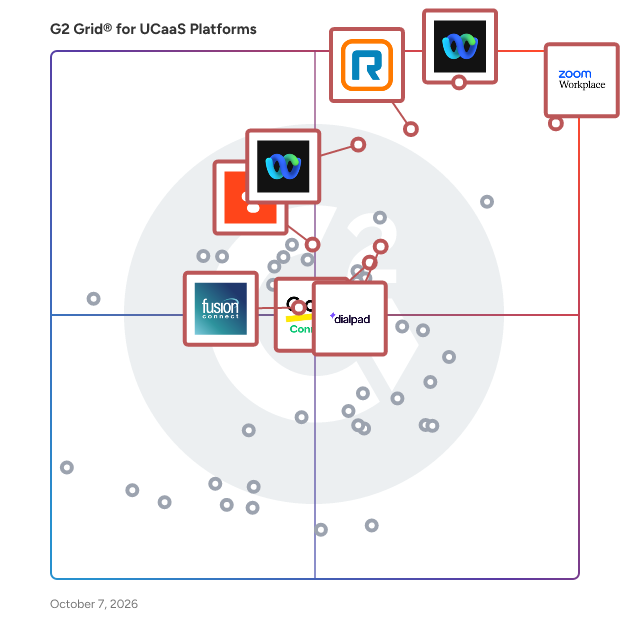
Products classified in the overall UCaaS Platforms category are similar in many regards and help companies of all sizes solve their business problems. However, enterprise business features, pricing, setup, and installation differ from businesses of other sizes, which is why we match buyers to the right Enterprise Business UCaaS Platforms to fit their needs. Compare product ratings based on reviews from enterprise users or connect with one of G2&#39;s buying advisors to find the right solutions within the Enterprise Business UCaaS Platforms category.

In addition to qualifying for inclusion in the UCaaS Platforms category, to qualify for inclusion in the Enterprise Business UCaaS Platforms category, a product must have at least 10 reviews left by a reviewer from an enterprise business.


## Top UCaaS Platforms at a Glance
| # | Product | Rating | Best For | What Users Say |
|---|---------|--------|----------|----------------|
| 1 | [Zoom Workplace](https://www.g2.com/products/zoom-workplace/reviews) | 4.5/5.0 (53,495 reviews) | AI-powered meeting collaboration with unified workspace | "[All-in-One Communication Hub with Reliable Meetings and Recordings](https://www.g2.com/survey_responses/zoom-workplace-review-13041207)" |
| 2 | [Webex Suite](https://www.g2.com/products/cisco-webex-suite/reviews) | 4.2/5.0 (17,655 reviews) | Hybrid meetings with AI-powered inclusivity features | "[All Your Collaboration Tools United with Brilliant AI Audio and Ironclad Security](https://www.g2.com/survey_responses/webex-suite-review-13050555)" |
| 3 | [Nextiva](https://www.g2.com/products/nextiva/reviews) | 4.5/5.0 (3,541 reviews) | Remote-first call routing with mobility | "[User-Friendly Phone Service Provider For Small Business](https://www.g2.com/survey_responses/nextiva-review-12747800)" |
| 4 | [RingEX](https://www.g2.com/products/ringex/reviews) | 4.2/5.0 (1,364 reviews) | AI call summaries for distributed teams | "[Seamless Communication, Unifies Our Workflow](https://www.g2.com/survey_responses/ringex-review-12983792)" |
| 5 | [Webex Calling](https://www.g2.com/products/webex-calling/reviews) | 4.5/5.0 (614 reviews) | CRM-integrated call analytics and location-based routing | "[Webex Calling Makes Switching Between Calls Effortless](https://www.g2.com/survey_responses/webex-calling-review-12721066)" |
| 6 | [8x8 Work](https://www.g2.com/products/8x8-work/reviews) | 4.2/5.0 (893 reviews) | Mobile-first calling with Teams integration | "[Feature-Rich Phone System with Great Ring Groups &amp; Analytics](https://www.g2.com/survey_responses/8x8-work-review-13060988)" |
| 7 | [GoTo Connect](https://www.g2.com/products/goto-connect/reviews) | 4.4/5.0 (1,389 reviews) | — | "[Easy Setup, Empowers Call Center Efficiency](https://www.g2.com/survey_responses/goto-connect-review-1180338)" |
| 8 | [Dialpad Connect](https://www.g2.com/products/dialpad-connect/reviews) | 4.4/5.0 (4,026 reviews) | — | "[Portable, Phone-Mirroring, Connected](https://www.g2.com/survey_responses/dialpad-connect-review-7418441)" |
| 9 | [Ringover](https://www.g2.com/products/ringover/reviews) | 4.6/5.0 (466 reviews) | CRM-integrated calling with automatic conversation logging | "[Seamless Embedded Calling with Ringover—and Truly Responsive Support](https://www.g2.com/survey_responses/ringover-review-12851244)" |
| 10 | [Zoho Meeting](https://www.g2.com/products/zoho-meeting/reviews) | 4.5/5.0 (1,138 reviews) | Zoho-integrated webinars with embedded registration tracking | "[Sharing my screen saves me from a lot of back-and-forth](https://www.g2.com/survey_responses/zoho-meeting-review-13064237)" |


## How Many UCaaS Platforms Products Does G2 Track?
**Total Products under this Category:** 220

### Category Stats (Jul 2026)
- **Average Rating**: 4.36/5 (↑0.01 vs Jun 2026) The average rating of products in this category, based on all submitted ratings
- **Top Trending Product**: Viirtue Platform (+2.78%) - Among all products in this category, Viirtue Platform recorded the largest rating increase compared to last month
*Last updated: July 06, 2026*


## How Does G2 Rank UCaaS Platforms Products?

**Why You Can Trust G2's Software Rankings:**

- 30 Analysts and Data Experts
- 98,600+ Authentic Reviews
- 220+ Products
- Unbiased Rankings

G2's software rankings are built on verified user reviews, rigorous moderation, and a consistent research methodology maintained by a team of analysts and data experts. Each product is measured using the same transparent criteria, with no paid placement or vendor influence. While reviews reflect real user experiences, which can be subjective, they offer valuable insight into how software performs in the hands of professionals. Together, these inputs power the G2 Score, a standardized way to compare tools within every category.


---

**Sponsored**

### 8x8 Work

8x8 Work – Business Phone System + VoIP, Video, and Messaging in One App 8x8 Work is a modern business phone system that unifies VoIP calling, video conferencing, and team messaging into one secure, reliable platform. Built for today’s hybrid workplace, 8x8 Work helps businesses streamline communication, boost productivity, and reduce IT complexity. It’s more than just a UCaaS solution — 8x8 Work is your entry point into The 8x8 Platform for CX, giving you the flexibility to scale from internal collaboration to full customer engagement with voice, video, chat, and APIs — all on one integrated platform. Top Reasons to Choose 8x8 Work All-in-One Cloud Communications: Replace separate phone, video, and messaging tools with a unified solution. Enterprise-Grade VoIP: Global voice coverage in 55+ countries, HD call quality, and a 99.999% uptime SLA. AI-Driven Meetings &amp; Messaging: Host secure video meetings with smart summaries, live transcription, and integrated chat. Integrated Admin &amp; Reporting: Centralized control panel for managing users, call routing, analytics, and permissions. Trusted Security &amp; Compliance: SOC 2, ISO 27001, HIPAA-ready — secure by design, not by add-on. Scalable to Contact Center: Seamlessly expand to include 8x8’s contact center, CPaaS, and AI capabilities when you’re ready. Features That Drive Productivity Business Phone System: Cloud-based PBX with voicemail, auto-attendant, call queues, number porting, and business SMS/MMS. Video Conferencing: Run secure, high-quality video meetings with up to 500 participants — no downloads required. Team Messaging: Create chat rooms, share files, pin important messages, and collaborate in real time. Mobile + Desktop Access: Use one app across all devices — Windows, Mac, iOS, Android, and web. Built-In Analytics: Get real-time visibility into usage, call quality, and team performance with visual dashboards. 40+ Integrations: Connect easily with Salesforce, Microsoft Teams, Google Workspace, Zendesk, and more. AI Enhancements: Use smart transcription, in-meeting summaries, and keyword detection to work smarter. The Power Behind 8x8 Work With over 300 patents and decades of cloud communications leadership, 8x8 helps businesses simplify IT, enhance employee experience, and accelerate customer engagement. 8x8 Work is the trusted choice for companies looking to modernize communications and prepare for what’s next.


[Visit website](https://www.g2.com/external_clickthroughs/record?secure%5Bad_program%5D=paid_promo&amp;secure%5Bad_slot%5D=category_product_list&amp;secure%5Bcategory_id%5D=1771&amp;secure%5Bchosen_at%5D=2026-07-07T00%3A52%3A46Z&amp;secure%5Bmedium%5D=sponsored&amp;secure%5Bprioritized%5D=false&amp;secure%5Bproduct_id%5D=71595&amp;secure%5Bresource_id%5D=1771&amp;secure%5Bresource_type%5D=Category&amp;secure%5Bsource_type%5D=category_page&amp;secure%5Bsource_url%5D=https%3A%2F%2Fwww.g2.com%2Fcategories%2Fucaas-platforms%2Fenterprise%3Fpage%3D2&amp;secure%5Btoken%5D=6f26585ef12ff375226fcc6bcb8c84dadfedfc97c9b4b195e66107d63042521f&amp;secure%5Burl%5D=https%3A%2F%2Fwww.8x8.com%2Fx-series%3Futm_medium%3Dsearch-paid-sem%26utm_source%3Dgoogle%26utm_campaign%3Delite%26_bk%3D8x8%2520x%2520series%26_bt%3D293404387581%26_bm%3D%7Bbidmatchtype%7D%26_bn%3Dg%26type%3DUS-SEM-Brand_XSeries%26gclid%3DEAIaIQobChMIu5rShLeL3gIVEtlkCh2hDgmMEAAYASAAEgJmnfD_BwE&amp;secure%5Burl_type%5D=paid_promos)

---

## What Are the Top-Rated UCaaS Platforms Products in 2026?
### 1. [Webex Suite](https://www.g2.com/products/cisco-webex-suite/reviews)
Webex Suite is an all-in-one, AI-powered collaboration suite built to increase productivity and maximize teamwork in today’s hybrid work. With 8 powerful individual workflows – Meetings, Messaging, Calling, Webinar, Events, Polling, Whiteboarding and Video Messaging in one, Webex Suite delivers exceptional value, world-class user experiences, and incredible audio and video, anywhere on any device. With a variety of collaboration and AI innovations, such as Webex AI Assistant, Real-time Translation, Background Noise Removal, and more, Webex Suite delivers rich and innovative experiences for employees and customers, enabling them to seamlessly connect, collaborate, engage and get work done. Webex Suite is powered by the industry-leading Webex Platform that is secure, compliant, and easily managed with built-in pervasive intelligence, bringing AI innovations across the entire Webex portfolio. The entire Webex Suite can be managed via the single-pane-of-glass management tool, Webex Control Hub. Webex Suite is backed by Cisco’s industry-leading security and networking infrastructure that ensures the best quality video and audio communications. Webex Suite Workflows: Meetings: Drive more productive meetings with AI-powered experiences and high-quality audio and video. Messaging: Collaborate async with rich messaging, secure file sharing, and digital whiteboarding to keep work flowing between meetings. Calling: Stay connected with modern business phone system and flexible calling options. Webinar: Host high quality webinars and drive engagement with immersive content and interactive audience experiences. Events: Power virtual, in-person, and hybrid events with immersive multi-track agendas, ticketing, attendee networking, analytics, and more. Polling: Enable active participation in every meeting with quizzes, polling, and interactive Q&amp;A. Whiteboarding: Unleash creativity with a digital whiteboarding solution for everyone, on any device. Video Messaging: Record, share ideas, engage, and facilitate real-time feedback with intuitive video messaging.


**Average Rating:** 4.2/5.0
**Total Reviews:** 17,655
**How Do G2 Users Rate Webex Suite?**

- **Has the product been a good partner in doing business?:** 8.7/10 (Category avg: 8.8/10)
- **Tenancy Flexibility:** 9.0/10 (Category avg: 8.8/10)
- **Video Conferencing:** 9.2/10 (Category avg: 8.8/10)
- **Native VoIP:** 8.9/10 (Category avg: 8.9/10)

**Who Is the Company Behind Webex Suite?**

- **Seller:** [Cisco](https://www.g2.com/sellers/cisco)
- **Company Website:** https://www.cisco.com
- **Year Founded:** 1984
- **HQ Location:** San Jose, CA
- **Twitter:** @Cisco (720,366 Twitter followers)
- **LinkedIn® Page:** https://www.linkedin.com/company/cisco/ (95,545 employees on LinkedIn®)

**Who Uses This Product?**
- **Who Uses This:** Software Engineer, Senior Software Engineer
- **Top Industries:** Information Technology and Services, Computer Software
- **Company Size:** 50% Enterprise, 31% Mid-Market


#### What Are Webex Suite's Pros and Cons?

**Pros:**

- Ease of Use (271 reviews)
- Video Conferencing (187 reviews)
- Reliability (182 reviews)
- Features (170 reviews)
- Video Quality (158 reviews)

**Cons:**

- Slow Loading (103 reviews)
- Performance Issues (93 reviews)
- Not User-Friendly (91 reviews)
- Lack of Intuitiveness (84 reviews)
- Poor User Experience (79 reviews)


### What Do G2 Reviewers Say About Webex Suite?
*AI-generated summary from verified user reviews*

**Pros:**

- Users appreciate the **ease of use** of Webex Suite, simplifying meetings and communications with a straightforward setup.
- Users value the **high-quality audio and video performance** of Webex Suite, enhancing collaboration and communication effortlessly.
- Users value the **reliability** of Webex Suite, praising its consistent audio and video quality across all situations.
- Users value the **all-in-one nature** of Webex Suite, appreciating its seamless integration of collaboration tools.
- Users commend the **excellent video quality** of Webex Suite, enhancing their virtual meeting experience without interruptions.

**Cons:**

- Users often experience **slow loading** times and lag, especially when using the mobile app on slower networks.
- Users often face **performance issues** with Webex Suite, including lag, freezes, and resource-intensive operations.
- Users find the **user interface frustrating** , noting that Webex Suite can be complex and unintuitive for new users.
- Users find the **lack of intuitiveness** in Webex Suite challenging, leading to a steep learning curve for newcomers.
- Users find the **poor user experience** of Webex Suite frustrating due to its complexity and outdated interface.

#### What Are Recent G2 Reviews of Webex Suite?

**"[All Your Collaboration Tools United with Brilliant AI Audio and Ironclad Security](https://www.g2.com/survey_responses/webex-suite-review-13050555)"**

**Rating:** 5.0/5.0 stars
*— Raghav h.*

[Read full review](https://www.g2.com/survey_responses/webex-suite-review-13050555)

---

**"[Great features, with excellent AI features](https://www.g2.com/survey_responses/webex-suite-review-12932142)"**

**Rating:** 4.0/5.0 stars
*— Rishon Daniel V.*

[Read full review](https://www.g2.com/survey_responses/webex-suite-review-12932142)

---


#### What Are G2 Users Discussing About Webex Suite?

- [How has the Webex App evolved to meet the demands of hybrid work environments and virtual collaboration?](https://www.g2.com/discussions/how-has-the-webex-app-evolved-to-meet-the-demands-of-hybrid-work-environments-and-virtual-collaboration) - 4 comments, 5 upvotes
- [How has Webex Meetings catered to the evolving needs of global virtual teams and large-scale webinars?](https://www.g2.com/discussions/how-has-webex-meetings-catered-to-the-evolving-needs-of-global-virtual-teams-and-large-scale-webinars) - 3 comments, 5 upvotes
- [What is Webex Meetings used for?](https://www.g2.com/discussions/what-is-webex-meetings-used-for) - 4 comments, 3 upvotes
- [What is Webex App used for?](https://www.g2.com/discussions/what-is-webex-app-used-for) - 5 comments, 2 upvotes
- [What is the Cisco Webex meetings desktop app?](https://www.g2.com/discussions/what-is-the-cisco-webex-meetings-desktop-app) - 2 comments, 1 upvote

### 2. [Zoom Workplace](https://www.g2.com/products/zoom-workplace/reviews)
Goodbye app overload. Hello effortless work. Work can be complicated. Your tools shouldn&#39;t be. Zoom Workplace connects all the ways you collaborate — from meetings to docs to chat and more — with built-in AI and seamless integrations that help teams focus and work flawlessly. Zoom Communications: Unified, Effortless Connection for Modern Work Bring every way your teams communicate—meetings, chat, calls, email, and scheduling—into one seamless experience. With Zoom, collaboration happens faster and more naturally across channels, without switching apps or losing context. From spontaneous chats to scheduled meetings and calls, everything stays connected, searchable, and secure—powered by one intuitive platform built for how modern teams work. Zoom Productivity: Workflows Connected, Work Effortless Transform how work gets done with AI-first collaboration that keeps people, content, and actions in one place. From brainstorming on whiteboards to co-creating in docs, sharing clips, and automating follow-ups, Zoom connects every step of your workflow. With Zoom Hub and integrated video management, knowledge stays organized, accessible, and actionable—so teams can move from idea to outcome without friction. Zoom Spaces: Smarter, Connected Workplaces for Every Team Bring your physical and hybrid environments to life with intelligent, connected spaces. Zoom Spaces unifies meeting rooms, desk reservations, digital signage, and visitor management into one seamless experience—making it simple to collaborate, navigate, and manage the workplace. Whether employees are remote, hybrid, or on-site, Zoom creates a consistent, secure, and flexible environment that keeps teams connected wherever work happens. Zoom Employee Engagement: Connect, Inspire, and Empower Every Employee Foster belonging and alignment with Workvivo by Zoom—a modern employee experience platform that unites communication, culture, and community in one place. From company-wide updates to recognition, feedback, and social engagement, Workvivo gives every employee a voice and a sense of connection. Built right into Zoom Workplace, it helps organizations strengthen culture, boost engagement, and keep teams informed and inspired—no matter where they work.


**Average Rating:** 4.5/5.0
**Total Reviews:** 53,495
**How Do G2 Users Rate Zoom Workplace?**

- **Has the product been a good partner in doing business?:** 9.1/10 (Category avg: 8.8/10)
- **Tenancy Flexibility:** 8.9/10 (Category avg: 8.8/10)
- **Video Conferencing:** 9.3/10 (Category avg: 8.8/10)
- **Native VoIP:** 8.8/10 (Category avg: 8.9/10)

**Who Is the Company Behind Zoom Workplace?**

- **Seller:** [Zoom](https://www.g2.com/sellers/zoom-a5000ea1-6d30-4ab4-b591-20723189ac97)
- **Company Website:** https://www.zoom.com
- **Year Founded:** 2011
- **HQ Location:** San Jose, CA
- **Twitter:** @zoom (1,042,714 Twitter followers)
- **LinkedIn® Page:** https://www.linkedin.com/company/2532259/ (13,494 employees on LinkedIn®)

**Who Uses This Product?**
- **Who Uses This:** Owner, Software Engineer
- **Top Industries:** Information Technology and Services, Computer Software
- **Company Size:** 51% Small-Business, 31% Mid-Market


#### What Are Zoom Workplace's Pros and Cons?

**Pros:**

- Ease of Use (4634 reviews)
- Video Conferencing (2761 reviews)
- Features (1641 reviews)
- Meetings (1519 reviews)
- Team Collaboration (1414 reviews)

**Cons:**

- Limited Features (1266 reviews)
- Zoom Issues (1210 reviews)
- Connection Issues (877 reviews)
- Missing Features (803 reviews)
- Audio Issues (747 reviews)


### What Do G2 Reviewers Say About Zoom Workplace?
*AI-generated summary from verified user reviews*

**Pros:**

- Users find the **ease of use** of Zoom Workplace enhances their experience and simplifies meeting management.
- Users enjoy the **excellent video and audio quality** in Zoom Workplace, enhancing communication and collaboration seamlessly.
- Users value the **AI-driven automation and seamless integration** of Zoom Workplace, enhancing collaboration and communication significantly.
- Users find Zoom Workplace&#39;s **ease of use for meetings** enhances effortless connections and effective communication across teams.
- Users praise the **seamless team collaboration** capabilities of Zoom Workplace, enhancing communication and connection for hybrid teams.

**Cons:**

- Users find **limited features** in Zoom Workplace, making it less appealing compared to alternatives like Google Meet.
- Users report issues with **background noise and meeting limits** , affecting call clarity and participation on Zoom Workplace.
- Users face **connection issues** with Zoom Workplace, leading to a less seamless and user-friendly experience overall.
- Users criticize the **missing features** of Zoom Workplace, indicating a need for improved functionality and user experience.
- Users face occasional **audio issues** that disrupt meetings, especially with multiple participants and overlapping media.

#### What Are Recent G2 Reviews of Zoom Workplace?

**"[All-in-One Communication Hub with Reliable Meetings and Recordings](https://www.g2.com/survey_responses/zoom-workplace-review-13041207)"**

**Rating:** 5.0/5.0 stars
*— Anjaly T.*

[Read full review](https://www.g2.com/survey_responses/zoom-workplace-review-13041207)

---

**"[Zoom Workplace: Seamless All-in-One Hub That Streamlines My Workflow](https://www.g2.com/survey_responses/zoom-workplace-review-13045001)"**

**Rating:** 5.0/5.0 stars
*— Raghav h.*

[Read full review](https://www.g2.com/survey_responses/zoom-workplace-review-13045001)

---


#### What Are G2 Users Discussing About Zoom Workplace?

- [Is Zoom Workplace worth it?](https://www.g2.com/discussions/is-zoom-workplace-worth-it) - 30 comments, 39 upvotes
- [What are your tips for using Zoom Workplace effectively?](https://www.g2.com/discussions/what-are-your-tips-for-using-zoom-workplace-effectively) - 10 comments, 12 upvotes
- [What does Zoom do?](https://www.g2.com/discussions/what-does-zoom-do) - 30 comments, 13 upvotes
- [What are the features offered by Zoom?](https://www.g2.com/discussions/what-are-the-features-offered-by-zoom) - 5 comments, 2 upvotes
- [How do you add features in Zoom?](https://www.g2.com/discussions/how-do-you-add-features-in-zoom) - 17 comments, 1 upvote

### 3. [Webex Calling](https://www.g2.com/products/webex-calling/reviews)
Webex Calling is a premium, cloud-based phone system designed to meet the demands of modern, hybrid workforces. Built on the secure and reliable Cisco infrastructure, it provides a comprehensive enterprise-grade calling solution that replaces traditional on-premises PBX systems with a flexible, scalable, and AI-powered platform Key Features Enterprise-Grade Reliability: Benefit from Cisco’s industry-leading networking infrastructure, ensuring high-quality audio and consistent uptime for global teams. Seamless Collaboration: Integrated directly into the Webex App, users can transition from a phone call to a video meeting or group chat with a single click, keeping workflows uninterrupted. Flexible Deployment: Whether you are looking for a cloud-only solution, a premises-based system, or a hybrid approach, Webex Calling adapts to your specific business needs. AI-Powered Intelligence: Leverage built-in AI features, such as background noise removal and real-time transcription, to ensure professional and clear communications in any environment. Simplified Management: Manage your entire global phone system through the Webex Control Hub, a single-pane-of-glass interface that provides deep analytics, security, and provisioning tools. Global Reach: Support your international offices with local calling capabilities in over 100 countries, backed by a secure and compliant global network. Why Choose Webex Calling? Webex Calling empowers organizations to stay connected from anywhere, on any device. By combining the ease of a modern phone system with the power of the Webex collaboration suite, it helps businesses improve productivity, reduce IT complexity, and provide a world-class communication experience for both employees and customers.


**Average Rating:** 4.5/5.0
**Total Reviews:** 614
**How Do G2 Users Rate Webex Calling?**

- **Has the product been a good partner in doing business?:** 8.8/10 (Category avg: 8.8/10)
- **Tenancy Flexibility:** 9.2/10 (Category avg: 8.8/10)
- **Video Conferencing:** 9.4/10 (Category avg: 8.8/10)
- **Native VoIP:** 9.3/10 (Category avg: 8.9/10)

**Who Is the Company Behind Webex Calling?**

- **Seller:** [Cisco](https://www.g2.com/sellers/cisco)
- **Company Website:** https://www.cisco.com
- **Year Founded:** 1984
- **HQ Location:** San Jose, CA
- **Twitter:** @Cisco (720,366 Twitter followers)
- **LinkedIn® Page:** https://www.linkedin.com/company/cisco/ (95,545 employees on LinkedIn®)

**Who Uses This Product?**
- **Who Uses This:** Software Engineer, Associate
- **Top Industries:** Information Technology and Services, Computer Software
- **Company Size:** 43% Mid-Market, 32% Small-Business


#### What Are Webex Calling's Pros and Cons?

**Pros:**

- Ease of Use (69 reviews)
- Reliability (50 reviews)
- Call Quality (41 reviews)
- Video Conferencing (31 reviews)
- Integrations (30 reviews)

**Cons:**

- Complex Processes (18 reviews)
- Lack of Intuitiveness (18 reviews)
- Slow Performance (17 reviews)
- Performance Issues (16 reviews)
- Limited Customization (13 reviews)


### What Do G2 Reviewers Say About Webex Calling?
*AI-generated summary from verified user reviews*

**Pros:**

- Users appreciate the **ease of use** of Webex Calling, making setup and access remarkably straightforward and efficient.
- Users appreciate the **reliable call quality** of Webex Calling, enjoying its seamless integration and stability during use.
- Users enjoy the **impeccable call quality** of Webex Calling, appreciating its smooth and stable communication experience.
- Users love the **seamless video conferencing** capabilities of Webex Calling, making virtual meetings easy and efficient.
- Users value the **seamless integrations** of Webex Calling, enhancing communication across calls, chats, and meetings effortlessly.

**Cons:**

- Users find **call routing configuration complex** , often feeling overwhelmed and wishing for clearer documentation and simpler automation.
- Users find the **lack of intuitiveness** in Webex Calling complicates setup and navigation for beginners.
- Users note the **slow performance** of Webex Calling, especially on lower bandwidth connections, impacting their experience.
- Users experience **performance issues** with Webex Calling, noting sluggishness and occasional lags during calls.
- Users desire more **advanced customization options** in Webex Calling to enhance their overall experience.

#### What Are Recent G2 Reviews of Webex Calling?

**"[Easy Calling Experience with Teams Integration](https://www.g2.com/survey_responses/webex-calling-review-12988940)"**

**Rating:** 4.5/5.0 stars
*— Balram T.*

[Read full review](https://www.g2.com/survey_responses/webex-calling-review-12988940)

---

**"[Webex Calling Makes Switching Between Calls Effortless](https://www.g2.com/survey_responses/webex-calling-review-12721066)"**

**Rating:** 4.0/5.0 stars
*— Soumi C.*

[Read full review](https://www.g2.com/survey_responses/webex-calling-review-12721066)

---


#### What Are G2 Users Discussing About Webex Calling?

- [What is Webex Calling used for?](https://www.g2.com/discussions/what-is-webex-calling-used-for) - 2 comments
- [Is Webex calling free?](https://www.g2.com/discussions/is-webex-calling-free) - 2 comments
- [What are the features of Cisco Webex?](https://www.g2.com/discussions/webex-calling-what-are-the-features-of-cisco-webex)
- [Which platform is Cisco Webex calling based upon?](https://www.g2.com/discussions/which-platform-is-cisco-webex-calling-based-upon) - 2 comments
- [What is Cisco Webex calling?](https://www.g2.com/discussions/what-is-cisco-webex-calling)

### 4. [RingEX](https://www.g2.com/products/ringex/reviews)
WHAT IS RINGEX? RingEX is the all-in-one business communications platform that connects teams, customers, and conversations across voice, video, messaging, SMS, and AI agents all powered by AI. Designed for organizations that value productivity, customer satisfaction, and simplicity, RingEX brings together everything your business needs to collaborate and engage effectively from anywhere. ADVANCED AI WITH AIR, AVA, AND ACE RingEX transforms every interaction into a strategic advantage through three specialized AI agents. AI Receptionist (AIR) acts as an intelligent digital front desk, answering calls 24/7 in natural, multilingual conversations to answer FAQs, capture leads, schedule appointments, and route complex calls with full context. AI Virtual Assistant (AVA) acts as a proactive co-pilot for daily tasks, automatically capturing meeting summaries, generating follow-up actions, and drafting context-aware messages. AI Conversation Expert (ACE) serves as a flagship conversation intelligence platform, analyzing every interaction to provide coaching, automated call scoring, and deep sentiment analysis. By turning raw data into executive insights and syncing directly with your CRM, ACE helps leaders replicate winning behaviors and stay ahead of customer trends. NEW: CUSTOMER ENGAGEMENT BUNDLE Built for small and mid-sized customer-facing teams, the Customer Engagement Bundle helps businesses deliver faster, more connected customer support without the complexity of a full contact center. The bundle seamlessly blends voice and SMS support in one unified workspace. Key capabilities include a shared SMS inbox for team visibility, automated SMS opt-out compliance, and reply templates to maintain a consistent brand voice. It also features queue transparency with place-in-line updates and live reports for real-time visibility into agent performance and service quality. WHY RINGEX? Whether your team is connecting internally or engaging customers, RingEX delivers reliability, flexibility, and intelligence in one platform. Backed by enterprise-grade security, RingEX helps you stay connected and responsive at every moment that matters. RingEX customers gain smarter communication with AVA, revenue intelligence with ACE, and better customer experiences through the Customer Engagement Bundle. RingEX isn’t just a phone system. It is the intelligent core of your business that ensures every conversation—internal or external—is connected, analyzed, and impactful.


**Average Rating:** 4.2/5.0
**Total Reviews:** 1,364
**How Do G2 Users Rate RingEX?**

- **Has the product been a good partner in doing business?:** 8.3/10 (Category avg: 8.8/10)
- **Tenancy Flexibility:** 8.6/10 (Category avg: 8.8/10)
- **Video Conferencing:** 8.6/10 (Category avg: 8.8/10)
- **Native VoIP:** 8.7/10 (Category avg: 8.9/10)

**Who Is the Company Behind RingEX?**

- **Seller:** [RingCentral](https://www.g2.com/sellers/ringcentral)
- **Company Website:** https://www.ringcentral.com
- **Year Founded:** 1999
- **HQ Location:** Belmont, CA
- **Twitter:** @RingCentral (61,963 Twitter followers)
- **LinkedIn® Page:** https://www.linkedin.com/company/60868/ (6,726 employees on LinkedIn®)

**Who Uses This Product?**
- **Who Uses This:** Office Manager, Owner
- **Top Industries:** Computer Software, Information Technology and Services
- **Company Size:** 57% Small-Business, 34% Mid-Market


#### What Are RingEX's Pros and Cons?

**Pros:**

- Ease of Use (195 reviews)
- Customer Support (124 reviews)
- Helpful (108 reviews)
- Reliability (96 reviews)
- Phone Calls (93 reviews)

**Cons:**

- Poor Customer Support (55 reviews)
- Customer Service (49 reviews)
- Call Issues (47 reviews)
- Complex Processes (44 reviews)
- Missing Features (37 reviews)


### What Do G2 Reviewers Say About RingEX?
*AI-generated summary from verified user reviews*

**Pros:**

- Users find the **ease of use** with RingEX enhances administration and device switching capabilities efficiently.
- Users commend the **helpful customer support** of RingEX, making the setup process smoother and more manageable.
- Users value the **reliable connection and helpful support** provided by RingEX, enhancing their communication experience.
- Users praise the **reliable connection** of RingEX, highlighting its excellent voice quality and user-friendly design.
- Users love the **high-quality phone calls** of RingEX, appreciating its ease of use and helpful features.

**Cons:**

- Users find the **customer support challenging** to interact with, often requiring excessive steps for known issues.
- Users find the **customer service challenging** , often facing unnecessary complications in resolving known issues.
- Users face persistent **call issues** with RingEX, including inadequate logs, confusing setup, and frustrating customer support experiences.
- Users find the **onboarding and setup processes complicated** , leading to confusion over extensions and features.
- Users face **missing features** like fax visibility issues and customer service difficulties impacting overall usability.

#### What Are Recent G2 Reviews of RingEX?

**"[Seamless Communication, Unifies Our Workflow](https://www.g2.com/survey_responses/ringex-review-12983792)"**

**Rating:** 5.0/5.0 stars
*— Suhasu U.*

[Read full review](https://www.g2.com/survey_responses/ringex-review-12983792)

---

**"[RingEx is easy to setup. I&#39;ve setup 25 contact center very easily using IVR editor and duplications](https://www.g2.com/survey_responses/ringex-review-11729131)"**

**Rating:** 5.0/5.0 stars
*— Raffy B.*

[Read full review](https://www.g2.com/survey_responses/ringex-review-11729131)

---


#### What Are G2 Users Discussing About RingEX?

- [What is RingCentral MVP used for?](https://www.g2.com/discussions/what-is-ringcentral-mvp-used-for)
- [Is RingCentral good?](https://www.g2.com/discussions/is-ringcentral-good) - 1 comment
- [What are the three RingCentral plans products?](https://www.g2.com/discussions/what-are-the-three-ringcentral-plans-products)
- [What is RingCentral office?](https://www.g2.com/discussions/what-is-ringcentral-office)

### 5. [Genesys Cloud CX](https://www.g2.com/products/genesys-cloud-cx/reviews)
Genesys Cloud CX® is an AI-Powered Experience Orchestration solution that enables organizations to coordinate customer and employee interactions across every touchpoint. By connecting data, systems and workflows in real time, it helps businesses deliver more consistent, personalized experiences that improve loyalty, efficiency and overall business outcomes. The solution brings together AI; voice and digital engagement; intelligent routing and automation; workforce engagement management; and end-to-end journey orchestration in a single, unified cloud solution. Its open, flexible architecture allows organizations to integrate easily with existing systems, reducing complexity while creating a more connected experience across channels and enabling innovation without disruption. Organizations use Genesys Cloud CX to accelerate time to value through rapid deployment and easy-to-deploy capabilities, while reducing cost to serve with AI-driven automation. Real-time personalization and context-aware interactions help improve customer satisfaction, while native AI capabilities enhance agent productivity, streamline workflows and support faster, more informed decision-making. A unified data layer provides real-time insights and ensures seamless experiences across channels, eliminating silos and improving visibility across operations. Built-in AI governance supports secure, compliant and explainable adoption, which is especially important for regulated industries. Designed for enterprise scale, the platform delivers high availability, stability and security, with the scalability and flexibility to support global operations and evolving business needs while maintaining resilience. Genesys Cloud CX is widely used by organizations of all sizes to orchestrate personalized customer experiences at scale, improve efficiency, simplify the technology stack and drive measurable ROI.


**Average Rating:** 4.4/5.0
**Total Reviews:** 1,463
**How Do G2 Users Rate Genesys Cloud CX?**

- **Has the product been a good partner in doing business?:** 8.5/10 (Category avg: 8.8/10)
- **Tenancy Flexibility:** 8.9/10 (Category avg: 8.8/10)
- **Video Conferencing:** 8.9/10 (Category avg: 8.8/10)
- **Native VoIP:** 9.3/10 (Category avg: 8.9/10)

**Who Is the Company Behind Genesys Cloud CX?**

- **Seller:** [Genesys](https://www.g2.com/sellers/genesys)
- **Company Website:** https://www.genesys.com
- **Year Founded:** 1990
- **HQ Location:** Menlo Park, CA
- **Twitter:** @Genesys (32,180 Twitter followers)
- **LinkedIn® Page:** https://www.linkedin.com/company/601919/ (8,569 employees on LinkedIn®)

**Who Uses This Product?**
- **Who Uses This:** Manager, Case Advocate
- **Top Industries:** Information Technology and Services, Financial Services
- **Company Size:** 45% Mid-Market, 40% Enterprise


#### What Are Genesys Cloud CX's Pros and Cons?

**Pros:**

- Ease of Use (135 reviews)
- Features (98 reviews)
- Reliability (76 reviews)
- Efficiency (72 reviews)
- Helpful (60 reviews)

**Cons:**

- Limited Features (55 reviews)
- Missing Features (53 reviews)
- Complexity (42 reviews)
- Inadequate Reporting (38 reviews)
- Learning Curve (37 reviews)


### What Do G2 Reviewers Say About Genesys Cloud CX?
*AI-generated summary from verified user reviews*

**Pros:**

- Users find the **ease of use** in Genesys Cloud CX enhances operational efficiency and supports seamless communication channels.
- Users value the **continuous innovation and feature-rich environment** of Genesys Cloud CX, enhancing multi-channel communication effectively.
- Users value the **reliability** of Genesys Cloud CX, ensuring seamless access and business continuity for projects.
- Users value the **efficiency of Genesys Cloud CX** , which streamlines operations and enhances agility in service delivery.
- Users find the **customization options** in Genesys Cloud CX invaluable for meeting their specific routing needs.

**Cons:**

- Users note **limited features** , requiring additional licenses and lacking specific functionalities, which complicates usage for smaller organizations.
- Users note the **missing features** in Genesys Cloud CX, requiring additional licenses and limiting functionality for certain needs.
- Users often find the **complexity** of Genesys Cloud CX challenging, particularly during initial setup and navigation.
- Users find the **inadequate reporting** in Genesys Cloud CX frustrating due to limitations and lack of customization options.
- Users find the **learning curve challenging** , particularly with complex features and an overwhelming interface for new users.

#### What Are Recent G2 Reviews of Genesys Cloud CX?

**"[Effortless Setup, Powerful Integrations](https://www.g2.com/survey_responses/genesys-cloud-cx-review-12997137)"**

**Rating:** 5.0/5.0 stars
*— Lucas A.*

[Read full review](https://www.g2.com/survey_responses/genesys-cloud-cx-review-12997137)

---

**"[A Flexible and Scalable Platform for Modern Customer Experience](https://www.g2.com/survey_responses/genesys-cloud-cx-review-12502148)"**

**Rating:** 5.0/5.0 stars
*— Phaneendra A.*

[Read full review](https://www.g2.com/survey_responses/genesys-cloud-cx-review-12502148)

---


#### What Are G2 Users Discussing About Genesys Cloud CX?

- [What is Genesys Cloud CX used for?](https://www.g2.com/discussions/what-is-genesys-cloud-cx-used-for) - 3 comments, 2 upvotes
- [What kind of software is zendesk?](https://www.g2.com/discussions/what-kind-of-software-is-zendesk) - 2 comments
- [What are the 4 most important benefits of Active Directory?](https://www.g2.com/discussions/what-are-the-4-most-important-benefits-of-active-directory) - 1 comment
- [What does Genesys Cloud For Salesforce do?](https://www.g2.com/discussions/what-does-genesys-cloud-for-salesforce-do) - 2 comments
- [Does Genesys integrate with Salesforce?](https://www.g2.com/discussions/purecloud-for-salesforce-does-genesys-integrate-with-salesforce)

### 6. [Dialpad Connect](https://www.g2.com/products/dialpad-connect/reviews)
Dialpad elevates every conversation with the leading Ai-powered customer communications platform. Tap into real-time Ai insights to enhance and streamline every interaction. With Dialpad Connect, you can: - Call, message, and meet in a single app - Seamlessly switch between devices - Focus on the conversation with real-time call transcriptions, Ai summaries, and action items


**Average Rating:** 4.4/5.0
**Total Reviews:** 4,026
**How Do G2 Users Rate Dialpad Connect?**

- **Has the product been a good partner in doing business?:** 8.9/10 (Category avg: 8.8/10)
- **Tenancy Flexibility:** 8.8/10 (Category avg: 8.8/10)
- **Video Conferencing:** 9.3/10 (Category avg: 8.8/10)
- **Native VoIP:** 9.2/10 (Category avg: 8.9/10)

**Who Is the Company Behind Dialpad Connect?**

- **Seller:** [Dialpad](https://www.g2.com/sellers/dialpad)
- **Company Website:** https://Dialpad.com
- **Year Founded:** 2011
- **HQ Location:** San Ramon, California
- **Twitter:** @DialpadHQ (60 Twitter followers)
- **LinkedIn® Page:** https://www.linkedin.com/company/3967399/ (1,491 employees on LinkedIn®)

**Who Uses This Product?**
- **Who Uses This:** Owner, CEO
- **Top Industries:** Information Technology and Services, Marketing and Advertising
- **Company Size:** 56% Small-Business, 32% Mid-Market


#### What Are Dialpad Connect's Pros and Cons?

**Pros:**

- Ease of Use (126 reviews)
- Call Management (70 reviews)
- Helpful (56 reviews)
- Call Recording (55 reviews)
- Features (51 reviews)

**Cons:**

- Call Issues (55 reviews)
- Connection Issues (42 reviews)
- Missing Functionality (29 reviews)
- Recording Issues (27 reviews)
- Call Quality Issues (26 reviews)


### What Do G2 Reviewers Say About Dialpad Connect?
*AI-generated summary from verified user reviews*

**Pros:**

- Users appreciate the **ease of use** of Dialpad Connect, benefiting from its intuitive interface and efficient call management.
- Users praise Dialpad Connect for its **excellent call management** , enhancing communication and simplifying CRM integration.
- Users find the **helpful customer support** of Dialpad Connect to enhance their overall experience and productivity.
- Users love Dialpad Connect&#39;s **call recording and AI transcription** , enhancing productivity and ensuring accurate follow-ups effortlessly.
- Users love the **user-friendly interface** of Dialpad Connect, enhancing productivity with seamless integrations and reliable call quality.

**Cons:**

- Users experience **call issues** such as poor call forwarding options and logging problems, impacting their communication effectiveness.
- Users frequently face **connection issues** with Dialpad Connect, hindering their communication experience and causing frustration.
- Users note the **missing functionality** in call forwarding and integration features, hindering effective administrative control.
- Users report **recording issues** with Dialpad Connect, affecting call quality and overall communication effectiveness.
- Users report **call quality issues** including delays, bugs, and difficulties with call forwarding and notifications.

#### What Are Recent G2 Reviews of Dialpad Connect?

**"[Portable, Phone-Mirroring, Connected](https://www.g2.com/survey_responses/dialpad-connect-review-7418441)"**

**Rating:** 5.0/5.0 stars
*— Elizabeth A.*

[Read full review](https://www.g2.com/survey_responses/dialpad-connect-review-7418441)

---

**"[User-Friendly Transcripts and Easy Contact Management](https://www.g2.com/survey_responses/dialpad-connect-review-13036710)"**

**Rating:** 5.0/5.0 stars
*— Alina M.*

[Read full review](https://www.g2.com/survey_responses/dialpad-connect-review-13036710)

---


#### What Are G2 Users Discussing About Dialpad Connect?

- [How does Dialpad Ai Voice&#39;s transcription feature enhance communication, and what are the best practices for using it?](https://www.g2.com/discussions/how-does-dialpad-ai-voice-s-transcription-feature-enhance-communication-and-what-are-the-best-practices-for-using-it)
- [How does Dialpad Ai Meetings enhance virtual meeting experiences with AI-driven features?](https://www.g2.com/discussions/how-does-dialpad-ai-meetings-enhance-virtual-meeting-experiences-with-ai-driven-features) - 1 comment
- [What is Dialpad Meetings (formerly UberConference) used for?](https://www.g2.com/discussions/what-is-dialpad-meetings-formerly-uberconference-used-for) - 1 comment
- [What is Dialpad Talk used for?](https://www.g2.com/discussions/what-is-dialpad-talk-used-for)
- [How much does Dialpad cost?](https://www.g2.com/discussions/dialpad-ai-voice-how-much-does-dialpad-cost) - 4 comments

### 7. [Fusion Connect: Modern Connectivity and Communications Solutions](https://www.g2.com/products/fusion-connect-modern-connectivity-and-communications-solutions/reviews)
Fusion Connect, an industry leading cloud communications provider, removes complexity so customers can focus on running their business. We use our technical expertise and industry know-how to build the ‘right-fit’ communications and collaboration solutions for our customers, be it managed connectivity and network access, UCaaS, CCaaS, SD-WAN, managed security, or Microsoft Teams. Fusion Connect, a Morgan Stanley Company, takes a unique customer-first approach to building, implementing, and supporting customized solutions with uptime performance backed by an industry-leading service guarantee.


**Average Rating:** 4.4/5.0
**Total Reviews:** 63
**How Do G2 Users Rate Fusion Connect: Modern Connectivity and Communications Solutions?**

- **Has the product been a good partner in doing business?:** 8.5/10 (Category avg: 8.8/10)
- **Tenancy Flexibility:** 8.5/10 (Category avg: 8.8/10)
- **Video Conferencing:** 8.7/10 (Category avg: 8.8/10)
- **Native VoIP:** 8.3/10 (Category avg: 8.9/10)

**Who Is the Company Behind Fusion Connect: Modern Connectivity and Communications Solutions?**

- **Seller:** [Fusion Connect](https://www.g2.com/sellers/fusion-connect)
- **Company Website:** https://www.fusionconnect.com
- **Year Founded:** 2003
- **HQ Location:** Atlanta, Georgia, United States
- **Twitter:** @FusionConnectSM (1,114 Twitter followers)
- **LinkedIn® Page:** https://www.linkedin.com/company/63248/ (1,615 employees on LinkedIn®)

**Who Uses This Product?**
- **Top Industries:** Non-Profit Organization Management, Restaurants
- **Company Size:** 37% Small-Business, 33% Mid-Market


#### What Are Fusion Connect: Modern Connectivity and Communications Solutions's Pros and Cons?

**Pros:**

- Helpful (17 reviews)
- Customer Support (16 reviews)
- Ease of Use (13 reviews)
- Reliability (11 reviews)
- Customer Service (8 reviews)

**Cons:**

- Poor Customer Support (12 reviews)
- Customer Service (11 reviews)
- Billing Issues (8 reviews)
- High Cost (6 reviews)
- Complex Processes (5 reviews)


### What Do G2 Reviewers Say About Fusion Connect: Modern Connectivity and Communications Solutions?
*AI-generated summary from verified user reviews*

**Pros:**

- Users value the **exceptional support** from Fusion Connect, appreciating timely responses and streamlined communication amidst complexities.
- Users praise the **responsive tech support** of Fusion Connect, highlighting their urgency and professionalism during critical situations.
- Users find Fusion Connect&#39;s service to be **easy to use** with seamless transitions and effective support from the team.
- Users commend the **reliability** of Fusion Connect, enjoying seamless transitions and robust, consistent service.
- Users value the **excellent customer service** of Fusion Connect, noting quick responses and helpful support from the team.

**Cons:**

- Users express frustration with **poor customer support** , citing unclear communication and lack of issue resolution.
- Users express frustration with **inconsistent customer service** , which hampers issue resolution and leads to additional complications.
- Users report significant **billing issues** with unexpected fees and poor communication regarding charges and service contracts.
- Users express concern about the **high costs** associated with Fusion Connect, feeling it lacks value for the price.
- Users find the **complex processes** of Fusion Connect challenging, particularly with configuration and billing management issues.

#### What Are Recent G2 Reviews of Fusion Connect: Modern Connectivity and Communications Solutions?

**"[Easy Transition with Significant Cost Savings](https://www.g2.com/survey_responses/fusion-connect-modern-connectivity-and-communications-solutions-review-11873272)"**

**Rating:** 5.0/5.0 stars
*— Kevin R.*

[Read full review](https://www.g2.com/survey_responses/fusion-connect-modern-connectivity-and-communications-solutions-review-11873272)

---

**"[Fusion Connect always Delivers](https://www.g2.com/survey_responses/fusion-connect-modern-connectivity-and-communications-solutions-review-11629005)"**

**Rating:** 4.5/5.0 stars
*— Nicholas K.*

[Read full review](https://www.g2.com/survey_responses/fusion-connect-modern-connectivity-and-communications-solutions-review-11629005)

---


### 8. [8x8 Work](https://www.g2.com/products/8x8-work/reviews)
8x8 Work – Business Phone System + VoIP, Video, and Messaging in One App 8x8 Work is a modern business phone system that unifies VoIP calling, video conferencing, and team messaging into one secure, reliable platform. Built for today’s hybrid workplace, 8x8 Work helps businesses streamline communication, boost productivity, and reduce IT complexity. It’s more than just a UCaaS solution — 8x8 Work is your entry point into The 8x8 Platform for CX, giving you the flexibility to scale from internal collaboration to full customer engagement with voice, video, chat, and APIs — all on one integrated platform. Top Reasons to Choose 8x8 Work All-in-One Cloud Communications: Replace separate phone, video, and messaging tools with a unified solution. Enterprise-Grade VoIP: Global voice coverage in 55+ countries, HD call quality, and a 99.999% uptime SLA. AI-Driven Meetings &amp; Messaging: Host secure video meetings with smart summaries, live transcription, and integrated chat. Integrated Admin &amp; Reporting: Centralized control panel for managing users, call routing, analytics, and permissions. Trusted Security &amp; Compliance: SOC 2, ISO 27001, HIPAA-ready — secure by design, not by add-on. Scalable to Contact Center: Seamlessly expand to include 8x8’s contact center, CPaaS, and AI capabilities when you’re ready. Features That Drive Productivity Business Phone System: Cloud-based PBX with voicemail, auto-attendant, call queues, number porting, and business SMS/MMS. Video Conferencing: Run secure, high-quality video meetings with up to 500 participants — no downloads required. Team Messaging: Create chat rooms, share files, pin important messages, and collaborate in real time. Mobile + Desktop Access: Use one app across all devices — Windows, Mac, iOS, Android, and web. Built-In Analytics: Get real-time visibility into usage, call quality, and team performance with visual dashboards. 40+ Integrations: Connect easily with Salesforce, Microsoft Teams, Google Workspace, Zendesk, and more. AI Enhancements: Use smart transcription, in-meeting summaries, and keyword detection to work smarter. The Power Behind 8x8 Work With over 300 patents and decades of cloud communications leadership, 8x8 helps businesses simplify IT, enhance employee experience, and accelerate customer engagement. 8x8 Work is the trusted choice for companies looking to modernize communications and prepare for what’s next.


**Average Rating:** 4.2/5.0
**Total Reviews:** 893
**How Do G2 Users Rate 8x8 Work?**

- **Has the product been a good partner in doing business?:** 8.5/10 (Category avg: 8.8/10)
- **Tenancy Flexibility:** 8.3/10 (Category avg: 8.8/10)
- **Video Conferencing:** 8.0/10 (Category avg: 8.8/10)
- **Native VoIP:** 8.7/10 (Category avg: 8.9/10)

**Who Is the Company Behind 8x8 Work?**

- **Seller:** [8x8](https://www.g2.com/sellers/8x8-b9e3382c-67d1-49f2-8c30-310d1ee608a0)
- **Company Website:** https://www.8x8.com
- **Year Founded:** 1987
- **HQ Location:** San Jose, CA
- **Twitter:** @8x8 (11,056 Twitter followers)
- **LinkedIn® Page:** https://www.linkedin.com/company/8x8 (2,811 employees on LinkedIn®)

**Who Uses This Product?**
- **Who Uses This:** Owner, Office Manager
- **Top Industries:** Information Technology and Services, Financial Services
- **Company Size:** 54% Small-Business, 35% Mid-Market


#### What Are 8x8 Work's Pros and Cons?

**Pros:**

- Ease of Use (110 reviews)
- Easy Communication (60 reviews)
- Reliability (55 reviews)
- Customer Support (45 reviews)
- Features (36 reviews)

**Cons:**

- Customer Service (25 reviews)
- Customer Support (22 reviews)
- Poor Customer Support (19 reviews)
- Limited Features (18 reviews)
- Technical Issues (17 reviews)


### What Do G2 Reviewers Say About 8x8 Work?
*AI-generated summary from verified user reviews*

**Pros:**

- Users value the **ease of use** of 8x8 Work, making communication tasks efficient and straightforward.
- Users value the **easy communication** with 8x8 Work, enhancing mobility and integration with tools like Microsoft Teams.
- Users value the **reliable service** of 8x8 Work, enjoying minimal downtime and seamless support throughout their experience.
- Users appreciate the **quick and efficient customer support** of 8x8 Work, ensuring seamless assistance from chat to live agents.
- Users value the **all-in-one communication platform** of 8x8 Work, enhancing convenience and remote work efficiency.

**Cons:**

- Users experience **slow customer service** which negatively impacts their overall experience and complicates issue resolution.
- Users note the **slow response time from customer support** negatively affects their experience and troubleshooting efforts.
- Users report **poor customer support** , with slow responses and difficulties in resolving issues, impacting overall experience.
- Users find the **limited features** of 8x8 Work frustrating, especially regarding integrations and analytics capabilities.
- Users experience **technical issues** such as lagging apps and login troubles, which can be frustrating and time-consuming.

#### What Are Recent G2 Reviews of 8x8 Work?

**"[Feature-Rich Phone System with Great Ring Groups &amp; Analytics](https://www.g2.com/survey_responses/8x8-work-review-13060988)"**

**Rating:** 5.0/5.0 stars
*— Joseph A.*

[Read full review](https://www.g2.com/survey_responses/8x8-work-review-13060988)

---

**"[Modern interface, easy configuration, and fast chat support](https://www.g2.com/survey_responses/8x8-work-review-12980303)"**

**Rating:** 4.5/5.0 stars
*— Leon K.*

[Read full review](https://www.g2.com/survey_responses/8x8-work-review-12980303)

---


#### What Are G2 Users Discussing About 8x8 Work?

- [What is 8x8 X Series used for?](https://www.g2.com/discussions/what-is-8x8-x-series-used-for)
- [Is 8x8 video conferencing secure?](https://www.g2.com/discussions/is-8x8-video-conferencing-secure) - 3 comments
- [Why is 8x8 called 8x8?](https://www.g2.com/discussions/why-is-8x8-called-8x8)
- [How do I set up an 8x8 conference call?](https://www.g2.com/discussions/how-do-i-set-up-an-8x8-conference-call) - 1 comment, 1 upvote
- [Is 8x8 a good phone system?](https://www.g2.com/discussions/is-8x8-a-good-phone-system) - 2 comments

### 9. [Cisco Unified Communications Manager (CallManager)](https://www.g2.com/products/cisco-unified-communications-manager-callmanager/reviews)
Cisco Unified Communications Manager (Unified CM), formerly known as Cisco CallManager, is a comprehensive call-processing system that delivers reliable, secure, and scalable voice and video communications for enterprises. It integrates voice, video, messaging, and mobility services, enabling seamless collaboration across various devices and locations. Key Features and Functionality: - Unified Communications: Provides IP telephony, high-definition video, unified messaging, instant messaging, and presence capabilities, consolidating communication tools into a single platform. - Enhanced Mobility: Supports mobile and remote workers with features that enable productivity from any location, transforming workspaces and attracting top talent. - Scalability: Accommodates organizations of varying sizes, from small businesses to large enterprises with up to 80,000 users, ensuring the solution grows with the organization&#39;s needs. - Cloud-Connected Operations: Offers Webex Cloud-Connected UC services, allowing centralized control of operations functions such as upgrades, analytics, and troubleshooting across multiple sites. - Open and Interoperable: Supports industry standards and a broad ecosystem of third-party integrations, facilitating rich collaboration and embedding communication within business applications. - Security and Compliance: Utilizes the latest authentication, encryption, and communication protocols, complying with key industry certifications to secure data and communications across various sectors. Primary Value and Solutions Provided: Cisco Unified Communications Manager addresses the need for a cohesive and efficient communication system within organizations. By integrating various communication services, it simplifies infrastructure, reduces costs, and enhances collaboration among employees, regardless of their location or device. Its scalability ensures that businesses can adapt to growth and changing requirements, while robust security measures protect sensitive information. The solution&#39;s flexibility, including cloud-connected options, allows organizations to modernize their communication systems and support a dynamic workforce effectively.


**Average Rating:** 4.4/5.0
**Total Reviews:** 104
**How Do G2 Users Rate Cisco Unified Communications Manager (CallManager)?**

- **Has the product been a good partner in doing business?:** 8.7/10 (Category avg: 8.8/10)

**Who Is the Company Behind Cisco Unified Communications Manager (CallManager)?**

- **Seller:** [Cisco](https://www.g2.com/sellers/cisco)
- **Year Founded:** 1984
- **HQ Location:** San Jose, CA
- **Twitter:** @Cisco (720,366 Twitter followers)
- **LinkedIn® Page:** https://www.linkedin.com/company/cisco/ (95,545 employees on LinkedIn®)
- **Ownership:** NASDAQ:CSCO

**Who Uses This Product?**
- **Top Industries:** Information Technology and Services, Higher Education
- **Company Size:** 49% Mid-Market, 45% Enterprise


#### What Are Cisco Unified Communications Manager (CallManager)'s Pros and Cons?

**Pros:**

- Reliability (3 reviews)
- Video Conferencing (3 reviews)
- Communication (2 reviews)
- Customer Service (2 reviews)
- Messaging Features (2 reviews)

**Cons:**

- Complex Processes (2 reviews)
- Billing Issues (1 reviews)
- High Cost (1 reviews)
- Missing Features (1 reviews)
- Missing Functionality (1 reviews)


### What Do G2 Reviewers Say About Cisco Unified Communications Manager (CallManager)?
*AI-generated summary from verified user reviews*

**Pros:**

- Users highlight the **reliability** of Cisco Unified Communications Manager in enhancing communication and improving customer service efficiency.
- Users commend the **feature-rich video conferencing** capabilities of Cisco Unified Communications Manager for diverse business needs.
- Users value the **effective communication** capabilities of Cisco Unified Communications Manager for enhancing collaboration in closed networks.
- Users commend the **exceptional customer service support** provided by Cisco Unified Communications Manager in their 24/7 operations.
- Users find the **robust messaging features** of CUCM enhance communication and streamline customer service operations effectively.

**Cons:**

- Users find the **complex processes** of CUCM overwhelming, especially with server management and integration challenges.
- Users face challenges due to the **missing internal billing and call detail record interface** , complicating management and tracking.
- Users find the **high cost** of Cisco Unified Communications Manager impractical for small companies with fewer telephone users.
- Users find the **missing internal billing and call detail record interface** a significant drawback for managing communications effectively.
- Users experience a **missing internal billing and call detail record interface** , which hampers tracking and reporting capabilities.

#### What Are Recent G2 Reviews of Cisco Unified Communications Manager (CallManager)?

**"[The Ferrari of Phone Systems](https://www.g2.com/survey_responses/cisco-unified-communications-manager-callmanager-review-8846620)"**

**Rating:** 5.0/5.0 stars
*— Claudia K.*

[Read full review](https://www.g2.com/survey_responses/cisco-unified-communications-manager-callmanager-review-8846620)

---

**"[Excellent Solution with Robust Features](https://www.g2.com/survey_responses/cisco-unified-communications-manager-callmanager-review-12092140)"**

**Rating:** 4.0/5.0 stars
*— Verified User in Education Management*

[Read full review](https://www.g2.com/survey_responses/cisco-unified-communications-manager-callmanager-review-12092140)

---


#### What Are G2 Users Discussing About Cisco Unified Communications Manager (CallManager)?

- [What are the benefits and challenges of using Cisco Unified Communications Manager for enterprise communication?](https://www.g2.com/discussions/what-are-the-benefits-and-challenges-of-using-cisco-unified-communications-manager-for-enterprise-communication)
- [What is Cisco Unified Communications Manager (CallManager) used for?](https://www.g2.com/discussions/what-is-cisco-unified-communications-manager-callmanager-used-for)
- [What is the latest version of Cisco Call Manager?](https://www.g2.com/discussions/what-is-the-latest-version-of-cisco-call-manager)
- [What is Cisco Unified Communications Manager Express?](https://www.g2.com/discussions/what-is-cisco-unified-communications-manager-express)
- [Is Cisco Call Manager a PBX?](https://www.g2.com/discussions/is-cisco-call-manager-a-pbx)

### 10. [Nextiva](https://www.g2.com/products/nextiva/reviews)
Nextiva is a Unified CXM company that provides AI-powered customer experience solutions. Nextiva powers 100,000+ businesses and billions of conversations every year with its all-in-one customer experience platform. From one AI-powered communication hub, Nextiva transforms the way businesses engage with their customers. The company’s commitment to Amazing Service® and a customer-focused approach has been its cornerstone for 15 years. Established in 2008 and headquartered in Scottsdale, Arizona, Nextiva secured $200M from Goldman Sachs Asset Management in its inaugural funding round, valuing the company at $2.7B in late 2021. Discover more at www.nextiva.com.


**Average Rating:** 4.5/5.0
**Total Reviews:** 3,541
**How Do G2 Users Rate Nextiva?**

- **Has the product been a good partner in doing business?:** 8.8/10 (Category avg: 8.8/10)
- **Tenancy Flexibility:** 8.5/10 (Category avg: 8.8/10)
- **Video Conferencing:** 8.4/10 (Category avg: 8.8/10)
- **Native VoIP:** 9.1/10 (Category avg: 8.9/10)

**Who Is the Company Behind Nextiva?**

- **Seller:** [Nextiva](https://www.g2.com/sellers/nextiva)
- **Year Founded:** 2008
- **HQ Location:** Scottsdale, Arizona
- **Twitter:** @Nextiva (21,295 Twitter followers)
- **LinkedIn® Page:** https://www.linkedin.com/company/459293/ (1,564 employees on LinkedIn®)

**Who Uses This Product?**
- **Who Uses This:** Owner, President
- **Top Industries:** Hospital &amp; Health Care, Insurance
- **Company Size:** 77% Small-Business, 22% Mid-Market


#### What Are Nextiva's Pros and Cons?

**Pros:**

- Customer Support (135 reviews)
- Ease of Use (128 reviews)
- Helpful (111 reviews)
- Easy Setup (94 reviews)
- Reliability (90 reviews)

**Cons:**

- Difficult Configuration (27 reviews)
- Complexity (25 reviews)
- Number Issues (22 reviews)
- Complex Processes (20 reviews)
- Difficult Setup (19 reviews)


### What Do G2 Reviewers Say About Nextiva?
*AI-generated summary from verified user reviews*

**Pros:**

- Users value the **excellent customer support** from Nextiva, ensuring quick assistance and easy account setup.
- Users find Nextiva&#39;s platform to be **easy to use** with excellent support, simplifying call management effortlessly.
- Users rave about Nextiva&#39;s **exceptional customer service** and seamless onboarding, making implementation a breeze.
- Users love the **easy setup** of Nextiva, enabling quick implementation and seamless integration across multiple locations.
- Users commend the **reliability** of Nextiva, appreciating its seamless functionality and exceptional customer support throughout.

**Cons:**

- Users find **difficult configuration** in Nextiva, describing setup and management as clunky and not user-friendly.
- Users find the **complexity of initial setup** and configuration challenging, especially for first-time users.
- Users report **number issues** with Nextiva, affecting call displays and delayed information retrieval, complicating daily operations.
- Users find the **complex processes** of Nextiva, including setup and reporting, to be challenging and time-consuming.
- Users find the **difficult setup** of Nextiva to be clunky and not user-friendly, complicating their initial experience.

#### What Are Recent G2 Reviews of Nextiva?

**"[User-Friendly Phone Service Provider For Small Business](https://www.g2.com/survey_responses/nextiva-review-12747800)"**

**Rating:** 4.5/5.0 stars
*— Nick Z.*

[Read full review](https://www.g2.com/survey_responses/nextiva-review-12747800)

---

**"[Reliable, Scalable Communications with Outstanding Support](https://www.g2.com/survey_responses/nextiva-review-12886187)"**

**Rating:** 4.5/5.0 stars
*— Connor J.*

[Read full review](https://www.g2.com/survey_responses/nextiva-review-12886187)

---


#### What Are G2 Users Discussing About Nextiva?

- [How has Nextiva revolutionized business communication systems with its VoIP solutions?](https://www.g2.com/discussions/how-has-nextiva-revolutionized-business-communication-systems-with-its-voip-solutions) - 2 comments
- [What is Nextiva used for?](https://www.g2.com/discussions/what-is-nextiva-used-for) - 2 comments
- [What is VoIP feature?](https://www.g2.com/discussions/what-is-voip-feature) - 3 comments
- [What are some features of a PBX?](https://www.g2.com/discussions/nextiva-what-are-some-features-of-a-pbx) - 1 comment
- [What does nextiva do?](https://www.g2.com/discussions/what-does-nextiva-do) - 3 comments

### 11. [GoTo Connect](https://www.g2.com/products/goto-connect/reviews)
GoTo Connect is the ultimate business communications solution for small, midsize, and multi-location organizations, delivering powerful cloud-based voice, video, and messaging—plus advanced features—all in one seamless platform. Our award-winning, all-in-one system is simple to deploy, manage, and scale, empowering teams to connect right away. With AI-driven tools like AI Receptionist, robust cloud infrastructure, and deep integrations, GoTo Connect streamlines communication, boosts productivity, and drives seamless collaboration. Connect anywhere, any way: Join meetings, calls, and chats from any device with GoTo Connect’s unified platform, keeping your teams and customers connected—wherever work happens. Easy to use and manage: Our fully hosted system ensures fast setup, effortless scaling, and straightforward management—no IT required. Unmatched reliability: Ensure 99.999% uptime, crystal-clear voice, and top-rated support so your business never misses a beat. Modern automation &amp; AI: GoTo Connect’s built-in AI Receptionist welcomes callers, routes conversations, and automates routine tasks—no third-party apps needed. Built for growth: Enhance your telecommunications with contact center and customer engagement tools that scale as you do. With award-winning support, industry-leading uptime, and top customer satisfaction scores, GoTo Connect isn’t just a phone system—it’s the backbone of meaningful and reliable business communication. Whether you’re streamlining internal calls, running virtual meetings, or enhancing customer engagement, GoTo Connect ensures every interaction is effortless, effective, and ready to help your business succeed.


**Average Rating:** 4.4/5.0
**Total Reviews:** 1,389
**How Do G2 Users Rate GoTo Connect?**

- **Has the product been a good partner in doing business?:** 9.1/10 (Category avg: 8.8/10)
- **Tenancy Flexibility:** 7.8/10 (Category avg: 8.8/10)
- **Video Conferencing:** 8.9/10 (Category avg: 8.8/10)
- **Native VoIP:** 9.0/10 (Category avg: 8.9/10)

**Who Is the Company Behind GoTo Connect?**

- **Seller:** [GoTo](https://www.g2.com/sellers/goto-e9cfa0d5-5de0-41fa-9bc6-a0e0ce54cb86)
- **Company Website:** https://www.goto.com
- **Year Founded:** 2003
- **HQ Location:** Boston, MA
- **Twitter:** @goto (41,211 Twitter followers)
- **LinkedIn® Page:** https://www.linkedin.com/company/37788/ (994 employees on LinkedIn®)

**Who Uses This Product?**
- **Who Uses This:** Owner, President
- **Top Industries:** Information Technology and Services, Hospital &amp; Health Care
- **Company Size:** 69% Small-Business, 24% Mid-Market


#### What Are GoTo Connect's Pros and Cons?

**Pros:**

- Ease of Use (127 reviews)
- Customer Support (46 reviews)
- Reliability (44 reviews)
- Easy Setup (40 reviews)
- Features (34 reviews)

**Cons:**

- Call Issues (28 reviews)
- Limitations (20 reviews)
- Limited Features (19 reviews)
- Customer Service (17 reviews)
- Poor Customer Support (17 reviews)


### What Do G2 Reviewers Say About GoTo Connect?
*AI-generated summary from verified user reviews*

**Pros:**

- Users love the **ease of use** of GoTo Connect, enjoying seamless communication and robust functionality from anywhere.
- Users praise **GoTo Connect&#39;s customer support** for being helpful, timely, and responsive to their needs.
- Users value the **reliability** of GoTo Connect, ensuring seamless communication with minimal glitches and efficient support.
- Users find the **easy setup** of GoTo Connect beneficial for quickly managing calls and users across different locations.
- Users admire the **user-friendly interface** of GoTo Connect, making navigation and setup efficient and straightforward.

**Cons:**

- Users face **call quality issues** with GoTo Connect, including muffled sounds and frustrating delays during conversations.
- Users face significant **limitations** with GoTo Connect, including a confusing app interface and cumbersome offboarding process.
- Users find the **limited features** of GoTo Connect frustrating, particularly with the complicated fax process and overwhelming options.
- Users report **inconsistent customer service** , with experiences ranging from helpful to frustratingly unresponsive.
- Users experience **poor customer support** , facing inconsistent help and challenges in reaching effective assistance.

#### What Are Recent G2 Reviews of GoTo Connect?

**"[Easy Setup, Empowers Call Center Efficiency](https://www.g2.com/survey_responses/goto-connect-review-1180338)"**

**Rating:** 5.0/5.0 stars
*— Jeff L.*

[Read full review](https://www.g2.com/survey_responses/goto-connect-review-1180338)

---

**"[Clear Calls, Easy Setup, But App Needs Improvement](https://www.g2.com/survey_responses/goto-connect-review-12443199)"**

**Rating:** 5.0/5.0 stars
*— Robert C.*

[Read full review](https://www.g2.com/survey_responses/goto-connect-review-12443199)

---


#### What Are G2 Users Discussing About GoTo Connect?

- [What is GoTo Connect used for?](https://www.g2.com/discussions/what-is-goto-connect-used-for) - 1 comment
- [What is GoTo Contact Center used for?](https://www.g2.com/discussions/what-is-goto-contact-center-used-for)
- [How do I use GoToConnect?](https://www.g2.com/discussions/how-do-i-use-gotoconnect)
- [How much does jive cost?](https://www.g2.com/discussions/how-much-does-jive-cost) - 1 comment
- [Is GoToConnect Hipaa compliant?](https://www.g2.com/discussions/is-gotoconnect-hipaa-compliant) - 1 comment

### 12. [Avaya Unified Communications](https://www.g2.com/products/avaya-unified-communications/reviews)
Avaya Unified Communications (UC) is an integrated platform that consolidates multiple communication and collaboration channels into a single, cohesive system. Designed for modern enterprises, Avaya UC enables organizations to streamline communications across voice, video, messaging, and conferencing while supporting flexible work environments and seamless device mobility. Core Capabilities Avaya Unified Communications encompasses a comprehensive set of features including: Voice &amp; Calling: VoIP, call forwarding, transfer, conferencing, and multi-line support Messaging &amp; Presence: Instant messaging, presence awareness (showing who is available, busy, or offline), and SMS/fax capabilities Video Conferencing: Browser-based HD video conferencing with screen sharing, annotation tools, and personalized meeting rooms Collaboration: Team workspaces, calendar integration, contact management, and third-party application integration Deployment Models Avaya offers multiple UC solutions to suit different organizational needs: Avaya Cloud Office is a cloud-based Unified Communications as a Service (UCaaS) platform providing phones, apps, messaging, conferencing, video, and team meeting capabilities in a single, flexible offering. Available in Standard, Premium, and Ultimate subscription tiers, it delivers streamlined global management with minimal IT overhead. Avaya IP Office Subscription supports both traditional Telephony Users and advanced UC Users. UC Users gain mobility features including softphone applications, video calling, instant messaging, presence capabilities, and integrations with Salesforce, Outlook, and Microsoft Teams. Avaya Aura is a communications platform that can be deployed on-premises, in private cloud, or in hybrid configurations, providing a robust foundation for voice, video, messaging, and collaboration with integration for modern collaboration tools. Avaya Aura Private Cloud offers cloud-hosted UC bundles—Essentials, Advanced, and Ultra—with capabilities including telephony, voicemail, instant messaging, team conferencing, mobility, and seamless integration with Microsoft Teams and Zoom. Avaya Managed Services provides dedicated support for organizations seeking operational simplification, with tiered UC offerings and ongoing vendor management. Key Benefits Unified Experience: Single interface for all communication modes reduces context-switching and improves productivity Mobility: Work from anywhere with secure mobile access and multi-device call management Scalability: Solutions for small teams to large enterprises with flexible subscription and licensing models Integration: Seamless compatibility with Microsoft Teams, Zoom, Salesforce, and other business-critical applications Security: Enterprise-grade security with device enrollment, call detail recording, and compliance features Cost Efficiency: Cloud-based options reduce capital infrastructure investment and IT management overhead Summary Avaya Unified Communications serves organizations seeking modern, integrated communication platforms that support hybrid and remote work, reduce communication silos, and enable employees to collaborate effectively from any location. Whether deployed on-premises, in the cloud, or in hybrid configurations, Avaya UC provides the flexibility, reliability, and feature richness enterprises require.


**Average Rating:** 4.2/5.0
**Total Reviews:** 38
**How Do G2 Users Rate Avaya Unified Communications?**

- **Has the product been a good partner in doing business?:** 8.9/10 (Category avg: 8.8/10)
- **Tenancy Flexibility:** 9.3/10 (Category avg: 8.8/10)
- **Video Conferencing:** 9.7/10 (Category avg: 8.8/10)
- **Native VoIP:** 9.0/10 (Category avg: 8.9/10)

**Who Is the Company Behind Avaya Unified Communications?**

- **Seller:** [Avaya](https://www.g2.com/sellers/avaya)
- **Year Founded:** 2000
- **HQ Location:** Morristown, NJ
- **Twitter:** @Avaya (36,704 Twitter followers)
- **LinkedIn® Page:** https://www.linkedin.com/company/1494/ (11,775 employees on LinkedIn®)

**Who Uses This Product?**
- **Company Size:** 60% Enterprise, 24% Mid-Market


#### What Are Avaya Unified Communications's Pros and Cons?

**Pros:**

- Ease of Use (3 reviews)
- Communication (1 reviews)
- Customizability (1 reviews)
- Customization (1 reviews)
- Easy Implementation (1 reviews)

**Cons:**

- Call Drops (2 reviews)
- Connection Issues (2 reviews)
- Audio Issues (1 reviews)
- Audio Problems (1 reviews)
- Call Connectivity Issues (1 reviews)


### What Do G2 Reviewers Say About Avaya Unified Communications?
*AI-generated summary from verified user reviews*

**Pros:**

- Users value the **ease of implementation and intuitive handling** with Avaya UCaaS, enhancing overall communication efficiency.
- Users praise the **seamless communication capabilities** of Avaya UCaaS, enhancing collaboration through VoIP and instant messaging.
- Users enjoy the **extensive customizability** of Avaya UCaaS, enhancing communication with tailored features and integrations.
- Users value the **extensive customization** options in Avaya UCaaS, enhancing flexibility and user experience significantly.
- Users value the **easy implementation** of Avaya Unified Communications, finding it intuitive and straightforward to use.

**Cons:**

- Users often face **call drops** with Avaya, impacting communication and leading to frustrating interruptions during conversations.
- Users experience **connection issues** with Avaya, including call drops, audio glitches, and video lag during conferences.
- Users report **audio issues** with Avaya, such as dropped calls and glitches affecting communication quality.
- Users often face **audio problems** with Avaya, including missed calls, drops, and glitches during conversations.
- Users highlight **call connectivity issues** that arise without proper configuration, leading to errors and dropped calls.

#### What Are Recent G2 Reviews of Avaya Unified Communications?

**"[Crystal-Clear Calls with Flexible Call Settings](https://www.g2.com/survey_responses/avaya-unified-communications-review-12316055)"**

**Rating:** 5.0/5.0 stars
*— Jose Pablo P.*

[Read full review](https://www.g2.com/survey_responses/avaya-unified-communications-review-12316055)

---

**"[superb](https://www.g2.com/survey_responses/avaya-unified-communications-review-3175470)"**

**Rating:** 4.5/5.0 stars
*— Verified User in Banking*

[Read full review](https://www.g2.com/survey_responses/avaya-unified-communications-review-3175470)

---


### 13. [CallTower](https://www.g2.com/products/calltower/reviews)
Since 2002, CallTower has been at the forefront of transforming global communication, emerging as a leader in enterprise-class cloud communication, collaboration, and CX solutions. We empower businesses with cutting-edge technologies like Microsoft® Teams Operator Connect, Webex by Cisco®, Zoom Phone, and AI-driven contact center solutions, including Webex Contact Center, Five9, and Genesys. Our expertise in contact center solutions enhances CCaaS and CX capabilities, delivering personalized optimization, conversational AI, and advanced analytics to elevate customer experiences and accelerate digital transformation. Driven by innovation and a commitment to excellence, CallTower continues to redefine how businesses connect, collaborate, and thrive on a global scale.


**Average Rating:** 4.3/5.0
**Total Reviews:** 369
**How Do G2 Users Rate CallTower?**

- **Has the product been a good partner in doing business?:** 8.9/10 (Category avg: 8.8/10)
- **Tenancy Flexibility:** 7.2/10 (Category avg: 8.8/10)
- **Video Conferencing:** 7.8/10 (Category avg: 8.8/10)
- **Native VoIP:** 8.0/10 (Category avg: 8.9/10)

**Who Is the Company Behind CallTower?**

- **Seller:** [CallTower](https://www.g2.com/sellers/calltower)
- **Company Website:** https://calltower.com
- **Year Founded:** 2002
- **HQ Location:** South Jordan, Utah, United States
- **Twitter:** @calltower (8,987 Twitter followers)
- **LinkedIn® Page:** https://www.linkedin.com/company/calltower/ (249 employees on LinkedIn®)

**Who Uses This Product?**
- **Who Uses This:** IT Manager, IT Director
- **Top Industries:** Information Technology and Services, Non-Profit Organization Management
- **Company Size:** 61% Mid-Market, 24% Small-Business


#### What Are CallTower's Pros and Cons?

**Pros:**

- Customer Support (56 reviews)
- Helpful (49 reviews)
- Reliability (39 reviews)
- Ease of Use (37 reviews)
- Customer Service (35 reviews)

**Cons:**

- Customer Service (16 reviews)
- Billing Issues (12 reviews)
- Poor Customer Support (12 reviews)
- Lack of Intuitiveness (11 reviews)
- Long Wait Times (11 reviews)


### What Do G2 Reviewers Say About CallTower?
*AI-generated summary from verified user reviews*

**Pros:**

- Users value the **outstanding customer support** from CallTower, ensuring quick resolutions and seamless transitions to their service.
- Users find the **customer service** of CallTower to be efficient and always ready to assist.
- Users commend CallTower&#39;s **reliable VoIP and UCaaS services** , ensuring excellent call quality and consistent performance.
- Users commend the **ease of use** of CallTower, appreciating its intuitive interface and efficient self-service options.
- Users commend the **excellent customer service** of CallTower, noting quick responses and effective support from real people.

**Cons:**

- Users feel the **customer service** is slow and ineffective, leading to unresolved issues and frustrating experiences.
- Users experience **billing issues** with CallTower, citing confusing invoices and poor resolution response times.
- Users report **poor customer support** from CallTower, with slow responses and a lack of effective assistance in resolving issues.
- Users find the **lack of intuitiveness** in CallTower&#39;s admin portal frustrating, complicating routine tasks and number management.
- Users experience **long wait times** for new numbers and support, affecting overall service satisfaction.

#### What Are Recent G2 Reviews of CallTower?

**"[One-Stop Shop for Seamless Telecom Integration](https://www.g2.com/survey_responses/calltower-review-12686530)"**

**Rating:** 4.5/5.0 stars
*— Antonio F.*

[Read full review](https://www.g2.com/survey_responses/calltower-review-12686530)

---

**"[Seamless Transition, Robust Support](https://www.g2.com/survey_responses/calltower-review-6696569)"**

**Rating:** 4.0/5.0 stars
*— Verified User in Non-Profit Organization Management*

[Read full review](https://www.g2.com/survey_responses/calltower-review-6696569)

---


#### What Are G2 Users Discussing About CallTower?

- [What is CallTower used for?](https://www.g2.com/discussions/what-is-calltower-used-for) - 1 comment

### 14. [Zoho Meeting](https://www.g2.com/products/zoho-meeting/reviews)
One stop solution to manage your online meetings, video conferencing, meeting rooms, business phones, and webinars for your organization. The best solution for your remote collaboration for the hybrid work. Communication and collaboration that cuts through EX to CX across all departments of an organization. Online meeting or web conferencing is a rapidly growing segment of the Internet as more businesses opt to connect with customers and partners remotely. Zoho Meeting is the easiest and most affordable online web conferencing tool to enhance the business collaboration with screen/application sharing, whiteboard sharing, remote control, audio, and video conferencing. It provides single users as well as small and large size organizations, a quick and easy way to host and conduct secure and cost-effective online meetings. Host product launches, feature demonstrations, sales presentations, lead-nurturing webinars, user education webinars, and online meetings, right from your browser. Zoho Meeting is typically used in the following scenarios. You can host secure, robust web meetings and share your screen online with your remote audience using any browser or computer operating system. Your remote audience can be from any part of the world and they can be in different locations. Zoho Meeting saves time, travel and money by providing real-time virtual meetings - While face-to-face meetings are still a necessity and irreplaceable in many circumstances; the power of a Zoho Meeting provides the next best thing. Online meeting is also tightly integrated with Zoho CRM, Zoho Projects, Microsoft Teams, Slack, Gmail, and more. Now you can schedule, invite, host meetings and view reports and recording from your Zoho CRM account. You can organize cost-effective sales and marketing meetings with a few simple clicks of your mouse. Demonstrate your products and services to potential clients, connect with your colleagues for discussions and periodic meetings, engage larger audiences and even perform after-sales support. Simplify your sales process with online presentations, conduct web meetings for business strategy and marketing; communicate efficiently and quickly with your customers anywhere, anytime. You can target new prospects or announce new product launches to your existing customer base using Zoho Meeting. Host large virtual events and live stream them on social platform. Webinars and media launches can effectively be managed to save you a bundle in time and money.


**Average Rating:** 4.5/5.0
**Total Reviews:** 1,138
**How Do G2 Users Rate Zoho Meeting?**

- **Has the product been a good partner in doing business?:** 9.0/10 (Category avg: 8.8/10)
- **Tenancy Flexibility:** 9.3/10 (Category avg: 8.8/10)
- **Video Conferencing:** 9.2/10 (Category avg: 8.8/10)
- **Native VoIP:** 9.1/10 (Category avg: 8.9/10)

**Who Is the Company Behind Zoho Meeting?**

- **Seller:** [Zoho](https://www.g2.com/sellers/zoho-b00ca9d5-bca8-41b5-a8ad-275480841704)
- **Year Founded:** 1996
- **HQ Location:** Austin, TX
- **Twitter:** @Zoho (137,880 Twitter followers)
- **LinkedIn® Page:** https://www.linkedin.com/company/38373/ (30,766 employees on LinkedIn®)
- **Phone:** +1 (888) 900-9646 

**Who Uses This Product?**
- **Who Uses This:** CEO, Founder
- **Top Industries:** Information Technology and Services, Computer Software
- **Company Size:** 80% Small-Business, 14% Mid-Market


#### What Are Zoho Meeting's Pros and Cons?

**Pros:**

- Ease of Use (48 reviews)
- Easy Setup (21 reviews)
- Features (16 reviews)
- Affordable (15 reviews)
- Simple (15 reviews)

**Cons:**

- Video Quality (10 reviews)
- Audio Issues (9 reviews)
- Missing Features (7 reviews)
- Missing Functionality (7 reviews)
- Poor Quality (7 reviews)


### What Do G2 Reviewers Say About Zoho Meeting?
*AI-generated summary from verified user reviews*

**Pros:**

- Users appreciate the **ease of use** of Zoho Meeting, making it accessible even for those with no prior experience.
- Users find Zoho Meeting&#39;s **easy setup** incredibly accessible, making it ideal for users of all technical skills.
- Users appreciate the **cost-effective essential conferencing features** of Zoho Meeting, making it an excellent alternative to competitors.
- Users find Zoho Meeting&#39;s pricing to be **affordable** , offering all essential features for both webinars and meetings.
- Users find Zoho Meeting to be **simple and easy to use** , enhancing their meeting experiences effectively.

**Cons:**

- Users experience **video quality issues** with Zoho Meeting, leading to frustration during meetings and presentations.
- Users experience **audio issues** with Zoho Meeting, affecting clarity and overall meeting quality compared to competitors.
- Users note the **limited advanced features** of Zoho Meeting, wishing for more customization and accessibility options.
- Users face a **missing functionality** in Zoho Meeting, struggling with time zone glitches and app requirements.
- Users experience **poor quality** with lag and video issues, detracting from the overall meeting experience.

#### What Are Recent G2 Reviews of Zoho Meeting?

**"[Sharing my screen saves me from a lot of back-and-forth](https://www.g2.com/survey_responses/zoho-meeting-review-13064237)"**

**Rating:** 4.5/5.0 stars
*— Alamgir H.*

[Read full review](https://www.g2.com/survey_responses/zoho-meeting-review-13064237)

---

**"[Simple, Reliable Meetings with Effortless Screen Sharing and Webinars](https://www.g2.com/survey_responses/zoho-meeting-review-13033378)"**

**Rating:** 5.0/5.0 stars
*— Muzammil M.*

[Read full review](https://www.g2.com/survey_responses/zoho-meeting-review-13033378)

---


#### What Are G2 Users Discussing About Zoho Meeting?

- [What is Zoho Meeting used for?](https://www.g2.com/discussions/zoho-meeting-what-is-zoho-meeting-used-for) - 1 comment
- [How do I host a Zoho Meeting?](https://www.g2.com/discussions/how-do-i-host-a-zoho-meeting) - 1 comment
- [Is Zoho Meeting free?](https://www.g2.com/discussions/is-zoho-meeting-free) - 2 comments, 1 upvote
- [What is Zoho Meeting used for?](https://www.g2.com/discussions/what-is-zoho-meeting-used-for) - 2 comments

### 15. [Intermedia Unite](https://www.g2.com/products/intermedia-unite/reviews)
Intermedia Unite® brings business communications, collaboration, and customer engagement into one easy-to-use platform—keeping teams connected, productive, and responsive from anywhere. It replaces fragmented tools by combining business phone service, video conferencing, team chat, and file sharing into one seamless experience, so employees can collaborate without switching apps. Unite delivers enterprise-grade calling with 100+ features, integrated customer engagement, and enhanced Microsoft Teams experiences. With mobile and desktop apps, users can call, meet, message, and engage customers from anywhere while maintaining a consistent business identity. AI-powered transcription, summaries, and insights help teams capture details and follow up efficiently. Backed by 99.999% uptime and J.D. Power-certified support, Unite ensures reliable performance—resulting in simpler communications, more productive teams, and better customer engagement.


**Average Rating:** 4.5/5.0
**Total Reviews:** 501
**How Do G2 Users Rate Intermedia Unite?**

- **Has the product been a good partner in doing business?:** 9.1/10 (Category avg: 8.8/10)
- **Tenancy Flexibility:** 8.8/10 (Category avg: 8.8/10)
- **Video Conferencing:** 9.0/10 (Category avg: 8.8/10)
- **Native VoIP:** 9.0/10 (Category avg: 8.9/10)

**Who Is the Company Behind Intermedia Unite?**

- **Seller:** [Intermedia](https://www.g2.com/sellers/intermedia)
- **Company Website:** https://www.intermedia.com/
- **Year Founded:** 1993
- **HQ Location:** Sunnyvale, California
- **Twitter:** @intermedia_net (4,556 Twitter followers)
- **LinkedIn® Page:** https://www.linkedin.com/company/8903/ (1,395 employees on LinkedIn®)

**Who Uses This Product?**
- **Who Uses This:** Owner, President
- **Top Industries:** Information Technology and Services, Marketing and Advertising
- **Company Size:** 67% Small-Business, 21% Mid-Market


#### What Are Intermedia Unite's Pros and Cons?

**Pros:**

- Customer Support (14 reviews)
- Ease of Use (14 reviews)
- Customer Service (9 reviews)
- Intuitive (9 reviews)
- Reliability (9 reviews)

**Cons:**

- Internet Dependency (3 reviews)
- Admin Control (2 reviews)
- Admin Control Issues (2 reviews)
- Connection Issues (2 reviews)
- Customer Service (2 reviews)


### What Do G2 Reviewers Say About Intermedia Unite?
*AI-generated summary from verified user reviews*

**Pros:**

- Users praise the **quick and responsive customer support** of Intermedia Unite, enhancing their overall experience.
- Users find Intermedia Unite to be exceptionally **easy to use** , enhancing their communication experience with its user-friendly interface.
- Users appreciate the **knowledgeable and responsive customer service** of Intermedia Unite, ensuring smooth onboarding and support.
- Users value the **intuitive interface** of Intermedia Unite, making it user-friendly and accessible for all ages.
- Users value the **reliability** of Intermedia Unite, appreciating efficient communication and excellent support throughout their experience.

**Cons:**

- Users face challenges due to **high internet dependency** with Intermedia Unite, leading to dropped calls and disruptions.
- Users struggle with **administrative complexities** in Intermedia Unite, affecting new admins and overall call reliability.
- Users face **admin control issues** that create complexities and inconsistencies in the Intermedia Unite experience.
- Users face **connection issues** with Intermedia Unite, leading to dropped calls and challenges during network connectivity problems.
- Users report **frustrating customer service** experiences due to poor communication and unresolved issues despite polite support.

#### What Are Recent G2 Reviews of Intermedia Unite?

**"[Seamless, Reliable Communication Across Devices with Powerful Texting and Integrations](https://www.g2.com/survey_responses/intermedia-unite-review-12654701)"**

**Rating:** 4.5/5.0 stars
*— Verified User in Non-Profit Organization Management*

[Read full review](https://www.g2.com/survey_responses/intermedia-unite-review-12654701)

---

**"[Clean, Easy, and Perfect for Simple Setup](https://www.g2.com/survey_responses/intermedia-unite-review-12603745)"**

**Rating:** 5.0/5.0 stars
*— Bruce H.*

[Read full review](https://www.g2.com/survey_responses/intermedia-unite-review-12603745)

---


#### What Are G2 Users Discussing About Intermedia Unite?

- [What is Intermedia Unite used for?](https://www.g2.com/discussions/what-is-intermedia-unite-used-for) - 1 comment
- [What is Anymeeting Video Conferencing used for?](https://www.g2.com/discussions/what-is-anymeeting-video-conferencing-used-for) - 2 comments, 1 upvote
- [What is the most used video conferencing software?](https://www.g2.com/discussions/what-is-the-most-used-video-conferencing-software) - 1 comment, 1 upvote
- [Is AnyMeeting safe?](https://www.g2.com/discussions/is-anymeeting-safe) - 1 comment, 1 upvote
- [What are the features of video conferencing software?](https://www.g2.com/discussions/what-are-the-features-of-video-conferencing-software) - 1 comment

### 16. [Vonage Business Communications](https://www.g2.com/products/vonage-business-communications/reviews)
Work smarter with Vonage Business Communications, our unified communications platform: seamlessly connect via voice, messaging and video, virtually anywhere globally. Over 40 powerful features give you the right balance of flexibility and control, offering everything your business needs to work smarter. With our award-winning mobile app, you can manage your communications from any device and collaborate from virtually anywhere. We boast a 99.999% uptime reliability¹, ensuring maximum productivity. Setup is simple, quick, and easy to scale as your business grows. No annual contracts mean you can cancel anytime. And we pride ourselves on top-notch customer service: access to help is just plain simple. That means you can call, email, chat, or visit our online support centers. We even offer customer portals with knowledge base articles that can help you find answers 24/7. ¹The 99.999% uptime claim is based on an average of Vonage Business&#39;s call availability.


**Average Rating:** 4.3/5.0
**Total Reviews:** 476
**How Do G2 Users Rate Vonage Business Communications?**

- **Has the product been a good partner in doing business?:** 8.9/10 (Category avg: 8.8/10)
- **Tenancy Flexibility:** 8.6/10 (Category avg: 8.8/10)
- **Video Conferencing:** 8.6/10 (Category avg: 8.8/10)
- **Native VoIP:** 8.9/10 (Category avg: 8.9/10)

**Who Is the Company Behind Vonage Business Communications?**

- **Seller:** [Vonage](https://www.g2.com/sellers/vonage)
- **Year Founded:** 2001
- **HQ Location:** Holmdel, NJ
- **Twitter:** @Vonage (11,195 Twitter followers)
- **LinkedIn® Page:** https://www.linkedin.com/company/5028/ (2,776 employees on LinkedIn®)

**Who Uses This Product?**
- **Who Uses This:** President, Office Manager
- **Top Industries:** Staffing and Recruiting, Information Technology and Services
- **Company Size:** 61% Small-Business, 33% Mid-Market


#### What Are Vonage Business Communications's Pros and Cons?

**Pros:**

- Ease of Use (20 reviews)
- Reliability (10 reviews)
- Calling Features (9 reviews)
- Customer Support (9 reviews)
- Messaging Features (9 reviews)

**Cons:**

- Texting Limitations (8 reviews)
- Call Drops (4 reviews)
- Customer Service (4 reviews)
- Call Connectivity Issues (3 reviews)
- Connection Issues (3 reviews)


### What Do G2 Reviewers Say About Vonage Business Communications?
*AI-generated summary from verified user reviews*

**Pros:**

- Users value the **ease of use** of Vonage Business Communications, noting its user-friendly interface and seamless integrations.
- Users value the **reliability** of Vonage Business Communications for seamless calls and essential features anytime, anywhere.
- Users value the **ease of use and comprehensive calling features** of Vonage Business Communications for effective communication.
- Users highlight the **excellent customer support** from Vonage, ensuring smooth transitions and successful implementations for businesses.
- Users praise the **easy-to-use messaging features** of Vonage, enhancing communication for business needs seamlessly.

**Cons:**

- Users face **texting limitations** with Vonage, experiencing unreliable SMS, delays, and challenges in exporting contacts/data.
- Users report frequent **call drops** during conversations, causing frustration and disruption in their communication experience.
- Users express frustration over **slow and unhelpful customer support** that hampers effective issue resolution and interactions.
- Users experience **call connectivity issues** , including call drops and complications when transferring between desktop and mobile.
- Users experience **connection issues** with Vonage, including dropped calls and delayed notifications, affecting communication quality.

#### What Are Recent G2 Reviews of Vonage Business Communications?

**"[Easy Setup with Minor Configuration Hurdles](https://www.g2.com/survey_responses/vonage-business-communications-review-12596875)"**

**Rating:** 4.0/5.0 stars
*— Jay C.*

[Read full review](https://www.g2.com/survey_responses/vonage-business-communications-review-12596875)

---

**"[Reliable, Flexible Communication That Keeps Our Team Connected Anywhere](https://www.g2.com/survey_responses/vonage-business-communications-review-12887738)"**

**Rating:** 5.0/5.0 stars
*— Pavnesh C.*

[Read full review](https://www.g2.com/survey_responses/vonage-business-communications-review-12887738)

---


#### What Are G2 Users Discussing About Vonage Business Communications?

- [What is Vonage Business Communications used for?](https://www.g2.com/discussions/vonage-business-communications-what-is-vonage-business-communications-used-for) - 2 comments
- [What is Vonage Business Communications used for?](https://www.g2.com/discussions/what-is-vonage-business-communications-used-for) - 1 comment

### 17. [CTM](https://www.g2.com/products/ctm-ctm/reviews)
CTM helps businesses turn everyday conversations into growth. Trusted by more than 100,000 users worldwide, including leading brands like Tinuiti, Morgan &amp; Morgan, Tutor Doctor, and ServiceMaster, CTM connects marketing performance to revenue outcomes, giving teams the clarity to see which campaigns drive conversions and the insight to optimize every customer touchpoint. The result: more efficient lead handling, higher conversion rates, and improved ROI. Powered by rich conversation analytics, CTM unifies fragmented call, text, chat, and form interactions into a single, actionable view of customer behavior. With deep integrations across leading marketing, advertising, and CRM platforms—and partnership opportunities for agencies, affiliates, and technology providers—CTM makes it simple to align data, teams, and results. Guided by our purpose to create a better human experience through technology, CTM empowers businesses to make every conversation count.


**Average Rating:** 4.5/5.0
**Total Reviews:** 726
**How Do G2 Users Rate CTM?**

- **Has the product been a good partner in doing business?:** 9.2/10 (Category avg: 8.8/10)
- **Tenancy Flexibility:** 9.6/10 (Category avg: 8.8/10)
- **Video Conferencing:** 10.0/10 (Category avg: 8.8/10)
- **Native VoIP:** 9.4/10 (Category avg: 8.9/10)

**Who Is the Company Behind CTM?**

- **Seller:** [CTM](https://www.g2.com/sellers/ctm)
- **Company Website:** https://www.ctm.com/
- **Year Founded:** 2009
- **HQ Location:** 231 Najoles Rd Suite 500, Millersville, MD 21108
- **LinkedIn® Page:** https://www.linkedin.com/company/5377709/ (114 employees on LinkedIn®)

**Who Uses This Product?**
- **Who Uses This:** Owner, President
- **Top Industries:** Marketing and Advertising, Internet
- **Company Size:** 65% Small-Business, 30% Mid-Market


#### What Are CTM's Pros and Cons?

**Pros:**

- Customer Support (49 reviews)
- Ease of Use (47 reviews)
- Helpful (43 reviews)
- Call Tracking (30 reviews)
- Features (28 reviews)

**Cons:**

- Learning Curve (23 reviews)
- Complexity (15 reviews)
- Difficult Navigation (15 reviews)
- Steep Learning Curve (15 reviews)
- Missing Functionality (11 reviews)


### What Do G2 Reviewers Say About CTM?
*AI-generated summary from verified user reviews*

**Pros:**

- Users commend the **excellent customer support** of CTM, appreciating their prompt and helpful assistance whenever needed.
- Users find CTM to have an **intuitive interface** and appreciate its straightforward usability with excellent support.
- Users praise the **excellent support and user-friendly features** of CTM, enhancing their business operations and training.
- Users value the **accurate call tracking** of CTM, enhancing campaign insights and optimizing marketing strategies effectively.
- Users value the **user-friendly interface** of CTM and the exceptional responsiveness of customer support.

**Cons:**

- Users find the **learning curve steep** for CTM, making setup and integration challenging and time-consuming.
- Users find the **complexity overwhelming** , with numerous features and a steep learning curve that hinders effective use.
- Users find **difficult navigation** in CallTrackingMetrics challenging, particularly for new users trying to access various features.
- Users find the **steep learning curve** of CTM challenging, impacting their ability to effectively utilize its features.
- Users struggle with the **missing functionality** of preset templates and limited global number availability in CTM.

#### What Are Recent G2 Reviews of CTM?

**"[Outstanding Support, Ease of Use &amp; Centralized Data](https://www.g2.com/survey_responses/ctm-review-11884549)"**

**Rating:** 5.0/5.0 stars
*— Kim F.*

[Read full review](https://www.g2.com/survey_responses/ctm-review-11884549)

---

**"[CallTrackingMetrics: A Strong Solution for Optimizing Call Tracking and Marketing Performance](https://www.g2.com/survey_responses/ctm-review-10369199)"**

**Rating:** 4.5/5.0 stars
*— Loganathan V.*

[Read full review](https://www.g2.com/survey_responses/ctm-review-10369199)

---


#### What Are G2 Users Discussing About CTM?

- [What is CallTrackingMetrics used for?](https://www.g2.com/discussions/what-is-calltrackingmetrics-used-for)


## What Is UCaaS Platforms?

[Collaboration &amp; Productivity Software](https://www.g2.com/categories/collaboration-productivity)

## What Software Categories Are Similar to UCaaS Platforms?

- [Video Conferencing Software](https://www.g2.com/categories/video-conferencing)
- [Contact Center Software](https://www.g2.com/categories/contact-center)
- [VoIP Providers](https://www.g2.com/categories/voip-providers)


---

## How Do You Choose the Right UCaaS Platforms?

### What You Should Know About UCaaS Platforms

### What are UCaaS Platforms?

UCaaS is a type of software as a service (SaaS) that provides multiple channels for communication in one platform. UCaaS platforms offer robust communication channels and features aimed at promoting efficiency and productivity in internal and external communications. UCaaS platforms include features such as instant messaging, [VoIP](https://www.g2.com/categories/voip), softphone (software for making phone calls online), CRM, SMS, and [video conferencing](https://www.g2.com/categories/video-conferencing) with many other cherry-picked collaboration tools like [screen sharing](https://www.g2.com/categories/screen-sharing), [whiteboarding](https://www.g2.com/categories/collaborative-whiteboard), and file sharing. UCaaS tools are also notable because the features provided by the platform are available on multiple devices. Users can easily access communication tools provided from desktops, laptops, mobile devices, and proprietary hardware if a service provides it.

Businesses have been leveraging unified communications (UC) systems for quite some time, but older solutions require extensive hardware setup and maintenance. The IT support required to maintain these on-premises solutions was expensive and demanding on manpower. UCaaS brings unified communications systems into the future by offering all the functionality buyers are looking for in a service conveniently hosted in the cloud. The pay-as-you-go model that comes with a cloud-based solution has driven down the cost for unified communications, which has made them more widely available to non-enterprise companies.

**What Does UCaaS Stand For?**

UCaaS stands for unified communications as a service.

#### What Types of UCaaS Platforms Exist?

There are two main distinctions buyers can make when looking for UCaaS products—internal versus external use and customizability. While some UCaaS systems can be used for both internal and external communications, many are specific to internal or external use cases. Additionally, customizability is determined if the UCaaS in question is a built-to-order, single-tenant system (one platform per user) or an out-of-the-box, multi-tenant system (one platform shared by multiple users).

**Internal use:** UCaaS products that support internal communications provide team collaboration tools, like whiteboarding and instant messaging, on top of the VoIP and video conferencing features that buyers expect. Internal-facing UCaaS products provide integrations with content management solutions to ease file sharing and storage needs. Many UCaaS solutions are available via mobile applications, making it a convenient option for teams.

**External use:** UCaaS for external use serves as the backbone for call center infrastructure. Call center representatives will have multiple communication channels to leverage when interacting with customers, and UCaaS systems conforming to this use case will provide integrations with help desk software to assist with ticketing and obtaining customer information.

**Single-tenant systems:** A single-tenant system is built for a specific client by a UCaaS service provider. Companies can pick and choose the functionality and integrations they require out of their UCaaS, ensuring they only pay for the features they need. Single-tenant systems are a great option for companies with specific needs, like particular APIs or less extensive offerings for a small business. Single-tenant systems can potentially be very expensive. A UCaaS provider may charge extra to develop a tool with all the functionality a business wants. If a business wants an enterprise-level custom product, they can expect a price tag that reflects that functionality accordingly.

**Multi-tenant systems:** Multi-tenant systems are generalized, out-of-the-box UCaaS products intended for use by multiple organizations. These offerings come as they are and have comparatively fewer customization options for businesses. Businesses looking for a UCaaS system they can simply deploy and maintain may stand to save money by choosing a multi-tenant system if they don’t require any specific integrations or APIs. **&amp;nbsp;**

### What are the Common Features of UCaaS Platforms?

A UCaaS product is a bundle of communication channels loaded into one offering, so the features of a typical UCaaS product often look like a list of point solutions. UCaaS products can vary in what channels they provide and the other collaboration tools they feature. Listed below are many of the popular features offered by UCaaS solutions, but this list is by no means exhaustive.

**Instant messaging:** One of the basic features of a UCaaS is 1:1 and group instant messaging. Users can either message each other directly or send messages to a group, promoting real-time business communication and collaboration.

**VoIP conferencing:** Audio conferencing in UCaaS products is provided via voice over internet protocol (VoIP). Users can access VoIP-based phone systems or audio conferencing over other devices.

**Video conferencing:** Another stable feature of UCaaS is video-based conferencing. The audio component of the video feed is hosted via VoIP telephony. Video conferencing often features a call recording function, allowing users to save and share the video with others.

**Screen sharing:** Any UCaaS that provides video conferencing will also provide screen sharing. Users can easily share a live feed of their screen or a specific program, making it a great feature for a collaborative user experience.

**File sharing:** Users can share files using a UCaaS platform. Some UCaaS products will streamline document and content sharing by integrating directly with content management systems.

**Whiteboard:** UCaaS products that heavily emphasize internal collaboration often natively provide a collaborative whiteboard software within the platform. Teams can use the whiteboard during in-person meetings or web conferencing, which can assist in streamlining workflows.

**Call routing:** An auto attendant automatically routes calls throughout an enterprise. This type of workflow automation is especially useful for companies that require an expansive PBX phone system.

[**Voicemail to email**](https://www.g2.com/categories/ucaas-platforms/f/voicemail-to-email): One benefit of UCaaS is the unified nature of the communication channels provided by the platform. Users can receive voicemails via email since phone calls are hosted over VoIP.

**Voicemail transcription:** Some UCaaS solutions can transcribe voicemails into text-based messages that are easier to store and keep track of compared to audio files.

Other Features of UCaaS Platforms: [CCaaS option](https://www.g2.com/categories/ucaas-platforms/f/ccaas-option), [Conference transcripts](https://www.g2.com/categories/ucaas-platforms/f/conference-transcripts), [Tenancy flexibility](https://www.g2.com/categories/ucaas-platforms/f/tenancy-flexibility)

### What are the Benefits of UCaaS Platforms?

Businesses often find point solutions for each of the communication channels they want covered. This means one product for VoIP phone services, another for business messaging, and one more for video conferencing. That also doesn’t include all the other productivity and collaboration tools teams use in conjunction with these channels. A UCaaS solution bundles all these communication channels and productivity tools into a single offering, which provides multiple benefits.

**Savings:** When a business covers all its communication channels with point solutions, the costs of licenses and monthly payments add up, especially for small and mid-market businesses. A UCaaS solution can bundle all communication channels, internal and external, into one platform for a business to pay for. While the initial price tag of a UCaaS product could potentially be high, the cost could be the same or higher when paying for several disparate solutions across months or years. Additionally, UCaaS customers can choose an option that allows them to only pay for the channels and features they want or a scaled-down, out-of-the-box solution to save money as well.

**Increased efficiency:** One issue with point solution communication software is there isn’t a guarantee that they will integrate. A conversation happening via instant messaging might become one that is better over a video feed. If a team only has point solutions to choose from, they will have to move to another application to continue, which may or may not be an easy transition. Even worse, the conversation may be put off entirely. This is especially necessary for sales or help desk representatives speaking to customers or clients in one channel who need to continue in another. When teams use UCaaS, they can move between different communications tools without leaving the application itself, streamlining conversations and ensuring users have access to the channel they need when they need it.

**Enhanced collaboration potential:** While businesses have the option to use point solutions for communication and collaboration, those solutions may not integrate. If they don’t, it can be problematic if users need to use multiple solutions during a conference call or collaboration session. For example, a remote team may benefit greatly from a UCaaS platform as it allows users to hold a video conference call while simultaneously whiteboarding or sharing content in real-time. The ability to use collaboration tools and conferencing solutions at the same time bolsters fruitful brainstorming sessions and meaningful conversations.

### Who Uses UCaaS Platforms?

The beauty of UCaaS is that it’s universally helpful regardless of the industry. The need for meaningful communication and collaboration is a necessity in every business. While larger businesses in the mid-market and enterprise levels arguably benefit more from comprehensive communication coverage, small businesses can still find benefits in the breadth of collaboration tools provided by UCaaS. However, the potentially high price tag attached to a UCaaS system will often make it a better choice for mid-market and enterprise organizations, and small businesses can easily have their collaboration and communications needs fulfilled by cheaper point solutions.

#### Software Related to UCaaS Platforms

Related solutions that can be used together with UCaaS platforms include:

[Cloud communication platforms](https://www.g2.com/categories/cloud-communication-platforms) **:** Cloud communication platforms can overlap heavily with UCaaS, in that both provide the infrastructure to support unified communications for a business. However, UCaaS platforms are fully built tools that may come with integrations, whereas cloud communications platforms are closer to development tools that allow businesses to connect their software to communications channels via APIs. The end result is the same though, and what companies have is a unified communication platform that connects to the tools they use currently.

**Contact center as a service (CCaaS):** CCaaS solutions can best be thought of as UCaaS solutions specifically for call centers. The infrastructure of both types is the same. Both provide unified cloud-based communication and a host of other internal collaboration tools. However, since CCaaS solutions are specifically intended for call centers, they come with a host of other features and tools helpful to call center representatives. This includes features like speech analytics and integrations with [customer data platforms (CDP)](https://www.g2.com/categories/customer-data-platform-cdp) and other customer data repositories.

### Challenges with UCaaS Platforms&amp;nbsp;

**Adoption:** One of the biggest challenges a company will face when switching its business phone system to a UCaaS platform is hesitance or resistance from employees. Changing any business system can be difficult or daunting, especially when there is a significant learning curve. To have a smooth transition, it’s important to provide employees with any extra support they may need as they begin to navigate a new platform. Creating a solid deployment plan in addition to working with a vendor that offers unlimited help desk support can make all the difference during this transition period.&amp;nbsp;

**Interoperability:** Another potential challenge with the transition to a UCaaS platform is a lack of integrations with a company’s existing technology. Sometimes a hardware upgrade may be necessary or recommended to fully utilize UCaaS software features.&amp;nbsp;

### How to Buy UCaaS Platforms

#### Requirements Gathering (RFI/RFP) for UCaaS Platforms

Whether a company is just starting to explore UCaaS software or looking for a more appropriate solution for its needs, g2.com can help inform buyers of the market and assist them in selecting the best software for their business.

The first step in deciding which kind of UCaaS software a buyer should look at is to assess the needs of the organization as a whole. Does the organization already use this kind of software? If so, what works and what doesn’t? Is this the first time the organization will be using UCaaS software? If that’s the case, buyers will need to determine how they plan to implement this software and whether or not their current systems are compatible. Some points to consider are:

**Company size:** Buyers will need to ensure that the products they are looking at will suit the size and need of the organization. When purchasing software, it’s important to ensure the product has the appropriate scalability to adapt to changing needs.

**Interoperability:** As mentioned earlier, it’s crucial to assess the organization’s current hardware and software setup as sometimes the current legacy system is not compatible with newer technology. This is important to assess beforehand so that a buyer knows what to look for in a product and is prepared to move forward if existing systems need to be upgraded.

#### Compare UCaaS Products

**Create a long list**

The first step to finding the perfect software is to create a preliminary list of products that fit the buyer’s general needs. The next step is to narrow down the list by selecting specific features that are must haves or requirements for the buyer. G2.com provides information about the best UCaaS software, allowing buyers to filter options as well as user reviews to help narrow down the product list to a more relevant selection.

**Create a short list**

Creating a short list of products is an important step in the buying process. While it may be daunting to filter through various products, users can get help by utilizing G2’s compare feature. This feature will take products of choice and display them side by side so the buyer can easily determine which software ticks the important boxes on the list.&amp;nbsp;

**Conduct demos**

Once the buyer has narrowed down the product list, the next step is to conduct a demo. Demos allow buyers to see a product and its features in more detail. To ensure a buyer gets the most out of a demo, it’s important to go in prepared. Buyers should have a business scenario ready that will fully test each product in consideration. Additionally, buyers should inquire about cost, vendor support, and any concerns they have about the product. Adequate preparation will make it easier for a buyer to compare products after demos have been completed.

#### Selection of UCaaS Platforms

**Choose a selection team**

UCaaS software is very practical and widely used in many businesses. With that in mind, a good starting point would be to select three to five team members from various departments and seniority levels (such as IT, management, sales, etc.) to be part of the selection team. The more varied the selection team is, the better a company can assess how well a product will meet their needs.&amp;nbsp;

**Negotiation**

Once the selection team has narrowed down their software picks, it’s time to discuss customization options, pricing, and the type of support needed from the vendor. It’s always important to address pricing options, even when they are listed on a vendor’s website. Many software vendors will provide discounts and custom pricing options based on what the buyer is looking to purchase.&amp;nbsp;

**Final decision**

Once a buyer has made the final decision on a product and is ready to move forward with a purchase, it is recommended that the buyer conducts a final demo, inquires about a trial run, and determines what the next steps are if the product doesn’t ultimately fit their needs. It&#39;s also important to look into the kind of support the vendor provides following implementation. Most vendors will provide customer support services to ensure a pleasant customer experience. These steps can provide a buyer with an additional sense of security and confidence when making a final decision.


