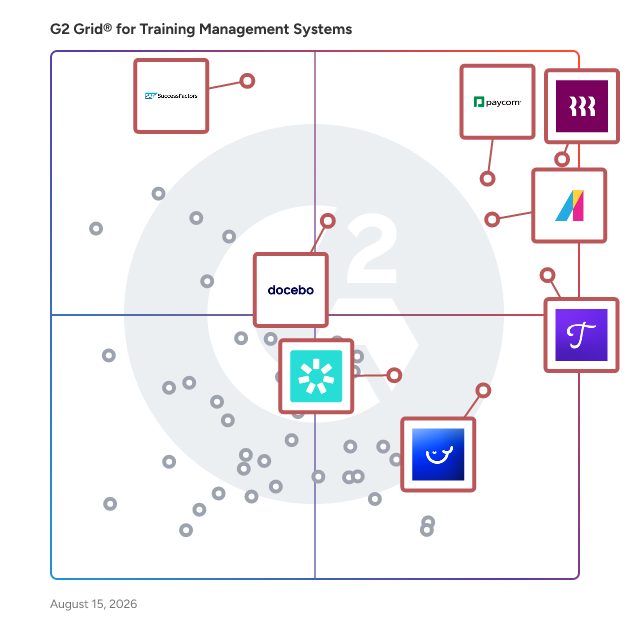
  # Best Training Management Software - Page 15

  *By [Grace Savides](https://research.g2.com/insights/author/grace-savides)*

   Training management software is used by training companies and learning and development departments to streamline training operations. These solutions help users design, organize, scale, and maintain training programs. Training management systems often provide solutions for all learning professionals (including training companies and learning and development departments) that schedule, track, and assess training efforts while overseeing employee training progress and certifications. Training management solutions also deliver tools that help training companies create and sell training courses and events. Additionally, these solutions provide learning and development departments with training resources, program budget monitoring, employee performance tracking, and so on.

Software for training companies and learning and development departments should not be confused with [corporate LMS software](https://www.g2.com/categories/corporate-lms), which helps companies manage employee training efforts and assign courses created using [course authoring software](https://www.g2.com/categories/course-authoring). In addition, training management systems may be integrated with [CRM software](https://www.g2.com/categories/crm), [CMS tools](https://www.g2.com/categories/cms-tools), and [video conferencing software](https://www.g2.com/categories/video-conferencing), among others. Some training management tools also provide [event management solutions](https://www.g2.com/categories/event-management-platforms), [e-commerce platforms](https://www.g2.com/categories/e-commerce-platforms), and corporate LMS tools to administer all training efforts.

To qualify for inclusion in the Training Management Systems category, a product must:

- Provide training management solutions that implement, manage, track, and analyze training efforts
- Manage certifications and qualifications for users, including teams, individual employees, and contractors
- Include tools to schedule and assign training courses
- Centralize organizations’ training data


## How Many Training Management Software Products Does G2 Track?
**Total Products under this Category:** 217

### Category Stats (Jun 2026)
- **Average Rating**: 4.53/5 (↑0.01 vs May 2026) The average rating of products in this category, based on all submitted ratings
- **New Reviews This Quarter**: 292
- **Buyer Segments**: Mid-Market 54% │ Small-Business 32% │ Enterprise 14% Represents the distribution of reviewers across all products in this category.
- **Top Trending Product**: Greenbeam (+0.067) - Among all products in this category, Greenbeam recorded the largest rating increase compared to last month
*Last updated: June 01, 2026*

  
## How Does G2 Rank Training Management Software Products?

**Why You Can Trust G2's Software Rankings:**

- 30 Analysts and Data Experts
- 33,900+ Authentic Reviews
- 217+ Products
- Unbiased Rankings

G2's software rankings are built on verified user reviews, rigorous moderation, and a consistent research methodology maintained by a team of analysts and data experts. Each product is measured using the same transparent criteria, with no paid placement or vendor influence. While reviews reflect real user experiences, which can be subjective, they offer valuable insight into how software performs in the hands of professionals. Together, these inputs power the G2 Score, a standardized way to compare tools within every category.

  
## Which Training Management Software Is Best for Your Use Case?

- **Leader:** [Rippling](https://www.g2.com/products/rippling/reviews)
- **Highest Performer:** [Whale](https://www.g2.com/products/whale/reviews)
- **Easiest to Use:** [Rippling](https://www.g2.com/products/rippling/reviews)
- **Top Trending:** [Rippling](https://www.g2.com/products/rippling/reviews)
- **Best Free Software:** [SAP SuccessFactors HCM](https://www.g2.com/products/sap-sap-successfactors-hcm/reviews)

  
---

**Sponsored**

### iSpring LMS

iSpring LMS is a feature-rich platform that helps companies accelerate their business momentum through ROI-efficient training. The LMS enables the entire training cycle with clarity and consistency, from structured onboarding to continuous employee development. It helps reduce employee turnover, improve performance, and ensure that teams stay aligned, skilled, and ready to support the company’s long-term growth. iSpring LMS gives managers and trainers a simple way to organize training, guide employees through skill-building, and see exactly how their learners are progressing. Employees get a clear path to follow, and leaders get the visibility they need to support growth, maintain standards, and keep performance on track. Here are the core capabilities that make this possible: - The mirrored organizational structure reflects how your company works, so training stays aligned with roles and teams. - Specified learning tracks guide learners step by step through required courses and programs. - Detailed reporting highlights progress, deadlines, and knowledge gaps with actionable insights. - The Supervisor Dashboard gives managers instant visibility into team performance without extra admin work. - Automated workflows handle enrollments, reminders, and assignments, saving time and reducing manual tasks. - The corporate portal and newsfeed centralize updates and announcements to keep everyone aligned. - 360-Degree Reviews gather well-rounded performance feedback from peers and supervisors. - On-The-Job Training validates real-world skills with structured checklists. - Knowledge Base gives employees quick access to SOPs, product info, and internal documentation. - Development Plans build personalized growth paths that connect training to long-term skill development.


[Visit website](https://www.g2.com/external_clickthroughs/record?secure%5Bad_program%5D=ppc&amp;secure%5Bad_slot%5D=category_product_list&amp;secure%5Bcategory_id%5D=1313&amp;secure%5Bdisplayable_resource_id%5D=1313&amp;secure%5Bdisplayable_resource_type%5D=Category&amp;secure%5Bmedium%5D=sponsored&amp;secure%5Bplacement_reason%5D=page_category&amp;secure%5Bplacement_resource_ids%5D%5B%5D=1313&amp;secure%5Bprioritized%5D=false&amp;secure%5Bproduct_id%5D=20042&amp;secure%5Bresource_id%5D=1313&amp;secure%5Bresource_type%5D=Category&amp;secure%5Bsource_type%5D=category_page&amp;secure%5Bsource_url%5D=https%3A%2F%2Fwww.g2.com%2Fcategories%2Ftraining-management-systems%3Fpage%3D5&amp;secure%5Btoken%5D=c96b3ebeda99f7bda073728d8ef13e97203f77272230c17ec6e5f447209138b8&amp;secure%5Burl%5D=https%3A%2F%2Fwww.ispring.com%2F%3Futm_source%3Dg2%26utm_medium%3Dpartner%26utm_campaign%3Dtraining_management_system_paid_clicks&amp;secure%5Burl_type%5D=custom_url)

---

  
    ## What Is Training Management Software?
  [Training eLearning Software](https://www.g2.com/categories/training-elearning)
  ## What Software Categories Are Similar to Training Management Software?
    - [Course Authoring Software](https://www.g2.com/categories/course-authoring)
    - [Corporate Learning Management Systems](https://www.g2.com/categories/corporate-learning-management-systems)
    - [eLearning Content Software](https://www.g2.com/categories/elearning-content)

  
---

## How Do You Choose the Right Training Management Software?

### What You Should Know About Training Management Software 

### What is Training Management Software?

Training management software is a centralized hub for employee training operations. Simply put, this tool helps learning and development departments design, organize, and deploy training opportunities. Learning and development departments oversee current training programs and assess their quality using featured metrics, reporting, and feedback from users. Training opportunities are often deployed via [corporate LMS software](https://www.g2.com/categories/corporate-lms), a solution that lets users complete training sessions and helps employers track and manage training efforts. The main use case for a training management system is to streamline training operations for a company.

A training management system is an eLearning solution for training departments to help create and monitor their own training opportunities for a company. This tool is ideal for departments that have experience with training and need a flexible tool that allows them to design training modules with complex features, such as collaboration features, screen sharing, and curated certification assessments. Custom assessments ensure education retention and improve the overall impact of employee training sessions.

**Key Benefits of Training Management Software**

- Implements and organizes training modules
- Allows performance and assessment monitoring
- Reduces training costs
- Training module scheduling and assigning

### Why Use Training Management Software?

Training management systems are ideal for companies that require in-depth training for their employees. In many cases, companies can’t rely on outsourced training opportunities or catchall training modules. Companies that need employees to learn a lot of company-specific information benefit from custom-tailored training modules curated by a training department.

**Education retention —** With custom assessments and interactive virtual classroom training opportunities, employees are more likely to enjoy and retain the education from each session.

**Insightful metrics —** Employers and learning and development departments receive real-time updates on the performance of each employee and can see who completed a module at what time. This helps training departments understand what topics employees are struggling with and which topics may need to be adjusted based on user feedback.

**Content distribution —** The process of distributing training documents and notes is streamlined with training management system tools. Employers and training departments can upload helpful presentations, training videos, and custom notes for each module to help guide users.

### Who Uses Training Management Software?

While departments commonly benefit from training management system tools, training companies and human resources departments may find themselves needing them, too.

**Learning and development departments —** Learning and development departments commonly use training management solutions and leverage the reporting and analytics features to assess and design the employee development aspects of the company.

**Training companies —** Training services providers across all corporate industries use training management system tools to curate pieces of training that can be sold as a service to companies that don’t use the tool themselves.

**Human resources departments —** Companies without learning and development departments might have their human resources departments handle training management system tools and curate training modules for employees.

### Training Management Software Features

Training management software provides many useful benefits.

**Course management —** Users can design and delegate courses based on the needs of the company and create training sessions that employees complete at their own pace or with a set deadline. Modules can also have a certification and assessment section. Depending on performance, employees can be required to redo an assessment or move on to a new module upon completion.

**Assessments and polls —** Assessments help evaluate every employee’s education retention after a given training module. With custom-built assessments, companies can ensure employees are well-equipped to move on to more advanced modules. Polls allow users to share immediate feedback and opinions, which training departments and managers can use to further enhance training.

**Activities —** Training departments can create engaging activities within training modules to further enhance the training experience. Activities often help employees retain the information given to them during the training and also make the process more approachable.

**Screen and whiteboard sharing —** Training modules can be made interactive with integrated screen sharing and whiteboard sharing within each module. Whiteboards and screens can be shared in real time to distribute notes pertaining to the module.

**Document sharing —** Users have the ability to upload and share documents related to the training and assessments. Related documents from users may include long-form answers or notes. Employers may choose to upload course notes and catalogs in the system using this feature.

**Certifications —** For added motivation, certifications can be awarded to users upon training module or assessment completion.

**Virtual classroom —** For the most engaging type of training module, virtual classrooms can be designed as training sessions. Virtual classrooms involve a recorded lecturer and even allow users to digitally raise their hand to ask a question and collaborate with other users.

**Reporting and metrics —** Managers and training departments can access performance metrics and analytics related to the module completion of each employee. Reporting includes test results, user feedback, and certification completion. Training departments can use this information to adjust modules with high failure rates or poor feedback.

### Trends Related to Training Management Software

Training management solutions are already easily customizable, but one trend is aiming to enhance the certification and rewards employees earn after a job well done.

**Gamification —** While certification rewards are common in training management system tools, the motivation aspect is easily enhanced with gamification. Similar to [gamification software](https://www.g2.com/categories/gamification), training management software can further entice good performance from each user using leaderboards, points, and achievements. With gamification, employees are more likely to perform better and retain more information.

### Potential Issues with Training Management Software

For many, training can be an arduous task, especially if the training topics are difficult. Additionally, training management software are robust and may require a substantial introduction for unfamiliar users before diving in.

**Learning curve —** For companies that may not employ a designated training or development department, training management systems might prove a bit intimidating. It takes some time to figure out how to design and deploy trainings within the tool for departments unfamiliar with the software. Despite this potential drawback, these solutions typically come with added customer service teams and comprehensive demos in case a company needs to combat the learning curve.

**Lack of employee motivation —** While training management software often come packed with engaging features such as certifications and gamification, employees might still be unmotivated to complete the courses. It’s up to the training departments, or whoever is in charge of curating training, to keep enticing and rewarding employees to complete training modules and perform well.

### Software and Services Related to Training Management Software

Several solutions are well paired with training management software:

[**Microlearning platforms**](https://www.g2.com/categories/microlearning-platforms) **—** Microlearning platforms are very similar to training management software, except the training modules are meant to be deployed and completed in short bursts, hence the term “microlearning&quot;. Educational content is typically focused on a particular topic and intended to be completed quickly to not disrupt daily workflow. Implementing a microlearning platform performs well alongside training management systems for companies that want to implement robust trainings as well as fast, simple trainings that don’t require much time.

[**eLearning content software**](https://www.g2.com/categories/elearning-content) **—** eLearning content software also works well alongside training management software. eLearning content tools are readily curated libraries of information related to the industries or topics of interest. This saves training departments time and effort by providing content pre-curated by the eLearning content platform and enhances the content in the training management system.


    ---
## What Are the Most Common Questions About Training Management Software?
*AI-generated · Last updated: May 26, 2026*
  ### What most trusted Training Management Systems by L&amp;D leaders based on reviews from mid-market organizations?
  Based on G2 reviews, verified users most often trust platforms that centralize training, make content easy to find, and reduce manual follow-up for administrators. Across recent reviews in this category, buyers repeatedly mention confidence in systems that support onboarding, compliance tracking, and ongoing learning in one place. According to verified users, Trainual stands out for structured onboarding, searchable process documentation, and role-based training paths that help teams maintain consistency. G2 reviewers mention that easy navigation, clear organization, and dependable support are key trust signals when L&amp;D leaders evaluate training management software for growing organizations.

**Here are some of the top-rated products on G2:**

- [Trainual](https://www.g2.com/products/trainual/reviews/trainual-review-12607551) – frequently used to centralize SOPs, onboarding, and policy training in one organized hub
- [Absorb LMS](https://www.g2.com/products/absorb-software-absorb-lms/reviews/absorb-lms-review-12845248) – often highlighted for branded training delivery, support, and reporting for distributed teams
- [Paycom](https://www.g2.com/products/paycom/reviews/paycom-review-12576947) – valued for keeping payroll, HR, and employee training accessible in one interface


  ### What best Training Management Systems software for measuring employee completion and time on training modules?
  Based on G2 reviews, buyers looking to measure completion most often favor tools with clear reporting, progress tracking, and compliance visibility. Verified users frequently describe Absorb LMS as strong for documenting training, retrieving records later, and checking learner progress during audits or compliance reviews. G2 reviewers mention that reporting depth and completion tracking are especially useful when teams need to monitor training status across employees or departments. Reviews across the category also show demand for systems that make reports easy to access without relying on manual spreadsheets, especially for onboarding, certifications, and mandatory learning programs.

**Here are some of the top-rated products on G2:**

- [Absorb LMS](https://www.g2.com/products/absorb-software-absorb-lms/reviews/absorb-lms-review-12837008) – often used to organize training records, review learner progress, and support audit readiness
- [Trainual](https://www.g2.com/products/trainual/reviews/trainual-review-12644080) – helps teams track training completion percentages and monitor onboarding progress
- [iSpring LMS](https://www.g2.com/products/ispring-lms/reviews/ispring-lms-review-12402107) – supports tracking completions, quiz outcomes, and training history for staff programs


  ### What Training Management Systems software for employee onboarding without IT-heavy setup or complex configuration?
  Based on G2 reviews, buyers seeking simpler onboarding setups tend to prioritize ease of implementation, intuitive interfaces, and minimal technical overhead. According to verified users, many platforms in this category help replace scattered documents and manual onboarding steps with a single training environment. G2 reviewers mention that straightforward setup is especially valuable when HR or L&amp;D teams need to launch quickly without heavy IT support. Common review themes include easy course creation, quick content uploads, and clear learner navigation. Users also repeatedly call out systems that reduce dependence on multiple tools by bringing onboarding content, training records, and reminders into one place.


  ### What top Training Management Systems tools supporting both video and written content for diverse learner types?
  Based on G2 reviews, top tools for mixed learning formats are the ones reviewers say handle videos, written guides, links, quizzes, and process documentation in one system. Verified users often highlight Trainual for combining text, videos, embedded resources, quizzes, and role-based paths in a way that supports different learning preferences. G2 reviewers mention that this flexibility is useful for onboarding, SOP training, and repeatable process education, especially when teams need both self-paced reading and visual instruction. Reviews across the category also show that buyers value platforms that make updates easy, keep materials centralized, and help learners revisit content when they need refreshers.

**Here are some of the top-rated products on G2:**

- [Trainual](https://www.g2.com/products/trainual/reviews/trainual-review-11174564) – combines text, images, videos, embedded links, and quizzes for structured onboarding and process training
- [Whale](https://www.g2.com/products/whale/reviews/whale-review-12655640) – supports playbooks with videos, SOPs, quizzes, and department-specific training materials
- [iSpring LMS](https://www.g2.com/products/ispring-lms/reviews/ispring-lms-review-12510846) – frequently used for structured courses with videos, PowerPoint-based content, and progress tracking


  ### What most reliable Training Management Systems based on reviews from companies with decentralized training?
  Based on G2 reviews, reliability in decentralized training environments usually comes down to consistent access, centralized records, and support for multiple locations or distributed teams. According to verified users, platforms in this category are valued when they let organizations keep training, policies, and reporting in one place while serving remote staff, field teams, or multi-site operations. G2 reviewers mention stable access, easy reporting, and role-based content delivery as recurring strengths. Reviews also emphasize the importance of platforms that reduce version confusion, make updates visible quickly, and allow learners to complete required training without depending on live sessions or local administrators.

**Here are some of the top-rated products on G2:**

- [Absorb LMS](https://www.g2.com/products/absorb-software-absorb-lms/reviews/absorb-lms-review-12770845) – supports centrally assigned training for global teams with anytime access and recordkeeping
- [Docebo](https://www.g2.com/products/docebo/reviews/docebo-review-12155042) – designed for distributed learning with cloud access and scalable delivery across teams
- [Zensai](https://www.g2.com/products/zensai/reviews/zensai-review-12670943) – used to deliver training to employees spread across locations and job sites from one platform


  ### What highest rated Training Management Systems for replacing manual onboarding and scattered training documents?
  Based on G2 reviews, the highest-rated options in this category are often the ones that help teams replace paper files, shared folders, and repeated explanations with one searchable training hub. Verified users repeatedly mention centralization as a major benefit, especially for onboarding and process consistency. G2 reviewers say these platforms reduce wasted time, improve access to the latest materials, and make it easier to train new hires without relying on tribal knowledge. Reviews also highlight better visibility into completions, stronger version control, and more consistent learner experiences when organizations move away from scattered documents and manual follow-up.

**Here are some of the top-rated products on G2:**

- [Trainual](https://www.g2.com/products/trainual/reviews/trainual-review-12614155) – often used to turn processes, policies, and onboarding steps into assignable training
- [Whale](https://www.g2.com/products/whale/reviews/whale-review-12724775) – helps teams replace scattered materials with a searchable, centralized SOP and training database
- [Docebo](https://www.g2.com/products/docebo/reviews/docebo-review-12064319) – centralizes onboarding and training content so teams can maintain consistent learning paths


  ### Which Training Management Systems achieve high adoption without requiring extensive training on the platform?
  Based on G2 reviews, [Rippling](https://www.g2.com/products/rippling/reviews/rippling-review-12869088) is the most visible recent option for fast adoption because it has the highest review volume among eligible products in this dataset. According to verified users, adoption tends to improve when the interface is intuitive, the setup feels straightforward, and employees can find training alongside other daily HR tasks. G2 reviewers mention user-friendly navigation, easy onboarding, and centralized access as the biggest drivers of platform adoption. Across reviews in this category, buyers consistently favor training management software that feels familiar quickly and does not require extensive retraining just to use the system itself.


  ### Which Training Management Systems platforms make updating content easiest for non-technical administrators?
  Based on G2 reviews, buyers often look for platforms that let non-technical admins edit content quickly, update procedures, and keep materials current without developer help. According to verified users, Trainual is frequently praised for easy edits, flexible organization, and quick updates to training content and policies. G2 reviewers mention that simple content maintenance matters because onboarding and process documentation can become outdated quickly if editing feels cumbersome. Reviews across the category also highlight the value of intuitive admin experiences, reusable templates, and centralized content libraries, especially for teams responsible for frequent policy, curriculum, or SOP updates.


  ### What are the best Training Management Systems for consolidating materials across multiple company departments?
  Based on G2 reviews, the best training management software for cross-department consolidation is usually the one that brings onboarding, compliance, policies, and role-based learning into a shared system without making content hard to navigate. Verified users say centralized access is especially valuable when HR, operations, managers, and frontline employees all rely on the same source of truth. G2 reviewers mention that these platforms reduce duplicated tools, make updates easier to manage, and help staff find materials faster. Reviews also point to stronger consistency when departments can store training resources, documentation, and progress records in one organized environment.

**Here are some of the top-rated products on G2:**

- [Rippling](https://www.g2.com/products/rippling/reviews/rippling-review-12866225) – centralizes learning, feedback, HR workflows, and employee experience tools in one platform
- [Paycom](https://www.g2.com/products/paycom/reviews/paycom-review-12576947) – combines payroll, HR, training, and talent management in a single interface
- [Zensai](https://www.g2.com/products/zensai/reviews/zensai-review-12669142) – helps combine training records, live learning, and induction workflows that previously needed multiple systems


  ### What Training Management Systems solutions with mobile access so employees complete onboarding on their schedule?
  Based on G2 reviews, mobile access matters most when employees need to complete training during onboarding, in the field, or outside a fixed desk setup. According to verified users, several platforms in this category make it easier to access courses, policies, and required tasks from phones or on the go. G2 reviewers mention mobile-friendly navigation, anywhere access, and self-paced learning as major benefits for onboarding flexibility. Reviews also show that buyers value systems that let learners review materials when convenient, while still giving admins visibility into progress, completions, and required follow-up for compliance or role readiness.


