Best Task Management Software - Page 4

How Many Task Management Software Products Does G2 Track?

Total Products under this Category: 560

Category Stats (Sep 2026)

  • Average Rating: 4.46/5 (↑0.01 vs Aug 2026) The average rating of products in this category, based on all submitted ratings
  • Top Trending Product: Chaser (+1.82%) - Among all products in this category, Chaser recorded the largest rating increase compared to last month

Last updated: September 01, 2026

How Does G2 Rank Task Management Software Products?

Why You Can Trust G2's Software Rankings:

  • 30 Analysts and Data Experts
  • 118,800+ Authentic Reviews
  • 560+ Products
  • Unbiased Rankings

G2's software rankings are built on verified user reviews, rigorous moderation, and a consistent research methodology maintained by a team of analysts and data experts. Each product is measured using the same transparent criteria, with no paid placement or vendor influence. While reviews reflect real user experiences, which can be subjective, they offer valuable insight into how software performs in the hands of professionals. Together, these inputs power the G2 Score, a standardized way to compare tools within every category.

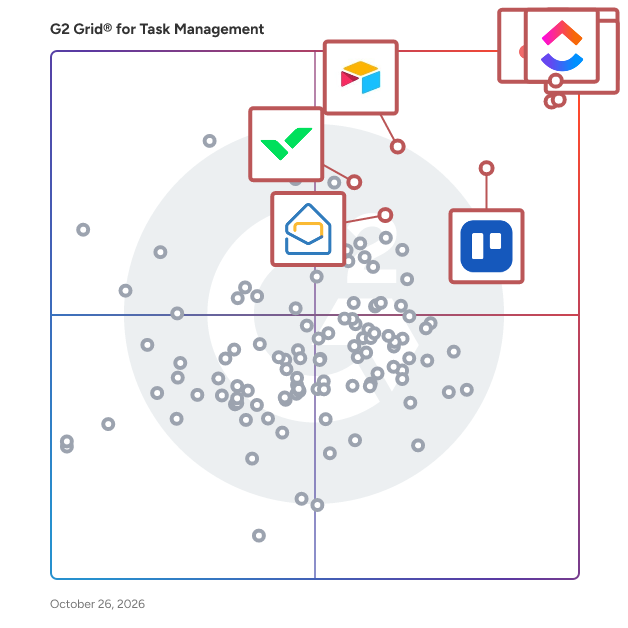
G2 Grid® for Task Management Software

G2 Grid® for Task Management Software plotting products by satisfaction and market presence

Highlighted products: Asana, ClickUp, monday AI Work Platform, Smartsheet, Trello, Airtable, Wrike, and Microsoft Planner.

Underlying data: [Grid® JSON](https://www.g2.com/categories/task-management-software/grids.json?focus%5B%5D=asana&focus%5B%5D=clickup&focus%5B%5D=monday-com&focus%5B%5D=smartsheet&focus%5B%5D=trello&focus%5B%5D=airtable&focus%5B%5D=wrike&focus%5B%5D=microsoft-planner)

GUIDEcx

GUIDEcx is the world's leading Client Onboarding solution that creates a seamless transition between your sales and implementation process. With over five years and 300,000 successful onboarding projects completed, we know how to leverage our wisdom to deliver consistent Customer Onboarding experiences. Our process is designed to drive engagement, increase efficiency, and expand capacity without sacrificing quality of service. Easy to integrate into your existing CRM, GUIDEcx has custom templates, different customer views for each role, purpose-built integrations, and robust reporting. We don't just move your process to our software, our Professional Services team and Guide University resources are here to Guide and support you through every step of the process to accelerate time to value and maximize your onboarding team productivity. Reach out today to and we can help you bring your Customer Onboarding experience to new heights.

Average Rating: 4.6/5.0

Total Reviews: 460

How Do G2 Users Rate GUIDEcx?

  • Has the product been a good partner in doing business?: 9.5/10 (Category avg: 9.0/10)
  • Task Prioritization: 8.7/10 (Category avg: 8.8/10)
  • Creation & Assignment: 9.0/10 (Category avg: 9.0/10)
  • To-Do Lists: 8.8/10 (Category avg: 8.9/10)

Who Is the Company Behind GUIDEcx?

  • Seller: GuideCX
  • Year Founded: 2017
  • HQ Location: Lehi, Utah
  • Twitter: @guidecx
    173 Twitter followers
  • LinkedIn® Page: www.linkedin.com
    53 employees on LinkedIn®

Who Uses This Product?

  • Who Uses This: Project Manager, Implementation Manager
  • Top Industries: Computer Software, Information Technology and Services
  • Company Size: 52% Medium, 39% Small

What Do G2 Reviewers Say About GUIDEcx?

AI-generated summary from verified user reviews

Pros
  • Users appreciate the ease of use of GUIDEcx, making the platform simple to navigate and implement.
  • Users commend the responsive customer support from GUIDEcx, which enhances their onboarding and project management experience.
  • Users commend how GUIDEcx enables seamless project management, enhancing onboarding efficiency and team communication.
  • Users find GUIDEcx's ease of learning exceptional, allowing smooth navigation and quick mastery of the platform.
  • Users highlight the effective team collaboration features of GUIDEcx, enhancing communication and project management effortlessly.
Cons
  • Users note a steep learning curve with GUIDEcx that requires mental effort for initial setup and customization.
  • Users experience slow loading times that hinder navigation and overall user experience in GUIDEcx.
  • Users report glitches and hiccups in GUIDEcx, particularly with ticket creation and profile impersonation issues.
  • Users note the complexity in setting up GUIDEcx, which may require significant mental effort for unclear onboarding flows.
  • Users report experiencing glitches such as lag and unexpected logouts, affecting their workflow significantly.

What Are Recent G2 Reviews of GUIDEcx?

What Are G2 Users Discussing About GUIDEcx?

Planfix

The Planfix platform allows organizations to manage their entire business online. Regardless of company size and industry, Planfix has something to offer as an excellent project and work management tool. With Planfix, your company gets a fully customizable management system, from process design to appearance. The integrated Planfix platform allows users to manage tasks and projects, CRM, sales, marketing, production, logistics, support services, finance, and human resources all at once. Data transfer between teams is seamless — for example, transactions during the implementation stage become projects, which are then transferred to support. Flexible access settings allow users to view only the information they need to remain productive at work, while managers can view the entire business process. No programming is needed to configure and control various business processes within a company. The platform offers a wide range of powerful features, including project management, client accounting, task management, online Gantt charts, email integration, calendars, event chronicles in real time, analytics and reporting, connecting external users, linking accounts, and much more. Whether you’re a newbie or a tech-savvy user, Planfix will be a perfect fit. Experienced users will find features in Planfix that aren’t available in other services and systems. These features include extensive customization, advanced automation of complex business processes, and flexible project building. Alternatively, ready-to-use configurations and automated procedures facilitate onboarding and implementation. We believe that Planfix is suitable for private businesses, nonprofits, public organizations, and any other group working towards a common goal. More than 68,000 users use Planfix to automate business workflows in over 7,000 companies.

Average Rating: 4.6/5.0

Total Reviews: 18

How Do G2 Users Rate Planfix?

  • Has the product been a good partner in doing business?: 8.7/10 (Category avg: 9.0/10)
  • Task Prioritization: 10.0/10 (Category avg: 8.8/10)
  • Creation & Assignment: 10.0/10 (Category avg: 9.0/10)
  • To-Do Lists: 10.0/10 (Category avg: 8.9/10)

Who Is the Company Behind Planfix?

  • Seller: Planfix
  • Year Founded: 2019
  • HQ Location: San Diego, US
  • Twitter: @planfix
    51 Twitter followers
  • LinkedIn® Page: www.linkedin.com
    20 employees on LinkedIn®

Who Uses This Product?

  • Company Size: 74% Small, 37% Medium

What Do G2 Reviewers Say About Planfix?

AI-generated summary from verified user reviews

Pros
  • Users appreciate the flexibility of Planfix, allowing easy configuration without needing developer assistance.

What Are Recent G2 Reviews of Planfix?

Stackby

Stackby is a no-code work management platform that brings the best of spreadsheets and databases to enable anyone to create their own collaborative workflows for their teams. No-coding or training needed. Stackby merges spreadsheet functionalities with the capabilities of a relational database, offering search, filtering, grouping and sorting options, as well as the ability to generate custom forms and views. It is designed for teams of any size from one to over 1000, making it scalable for fast growing startups. It also has 500+ templates across Marketing, Sales, HR, Project Management, Startups and more. Over 50,000 companies globally use Stackby to manage their data and automate their processes, in amazing ways.

Average Rating: 4.6/5.0

Total Reviews: 82

How Do G2 Users Rate Stackby?

  • Has the product been a good partner in doing business?: 9.2/10 (Category avg: 9.0/10)
  • Task Prioritization: 8.8/10 (Category avg: 8.8/10)
  • Creation & Assignment: 9.4/10 (Category avg: 9.0/10)
  • To-Do Lists: 9.0/10 (Category avg: 8.9/10)

Who Is the Company Behind Stackby?

  • Seller: Relytree Inc.
  • Year Founded: 2018
  • HQ Location: San Francisco (and vicinity), California
  • Twitter: @StackbyHQ
    1,050 Twitter followers
  • LinkedIn® Page: www.linkedin.com
    20 employees on LinkedIn®

Who Uses This Product?

  • Who Uses This: CEO
  • Top Industries: Marketing and Advertising, Management Consulting
  • Company Size: 90% Small, 6% Medium

What Do G2 Reviewers Say About Stackby?

AI-generated summary from verified user reviews

Pros
  • Users appreciate the ease of use of Stackby, enabling smooth workflow customization without technical expertise.
  • Users value the high level of customization in Stackby, enabling tailored workflows and efficient operations without technical skills.
  • Users love the flexibility of Stackby, combining spreadsheets and databases for customized, powerful workflow solutions.
  • Users love the automation feature in Stackby, enhancing workflow efficiency and supporting non-technical users effectively.
  • Users appreciate the customizability of Stackby, allowing effortless creation of tailored workflows and templates for various needs.
Cons
  • Users find Stackby has limited advanced features compared to Airtable or Notion, affecting workflow efficiency.
  • Users find missing advanced features in Stackby compared to Airtable or Notion, limiting their workflow capabilities.
  • Users find feature limitations in Stackby, especially compared to competitors like Airtable, impacting their workflows and experience.
  • Users notice integration issues, as Stackby lacks automation and deeper connections with popular tools compared to competitors.
  • Users find the limited advanced features in Stackby compared to Airtable or Notion somewhat restricting for power users.

What Are Recent G2 Reviews of Stackby?

What Are G2 Users Discussing About Stackby?

Voiset

Voiset is an AI day planner and voice-first task manager built for professionals, freelancers, and small teams who value their time. Unlike traditional task managers that force you to type everything, Voiset lets you create tasks by voice - just speak, and the AI captures, structures, and schedules them automatically. At its core, Voiset combines three things most productivity apps keep separate: an AI task manager, an AI scheduler with auto-planning, and AI smart notes that turn your spoken thoughts into actionable tasks. The AI analyzes your workload, priorities, and deadlines to schedule tasks at the most effective time - no manual reshuffling when plans change. Voiset reschedules missed tasks automatically and adapts your day in real time. What truly sets Voiset apart in 2026 is its integration with AI assistants. Through our MCP server, Voiset runs natively inside Claude - you can ask Claude to plan your day, schedule meetings, or review your week, and it works directly with your Voiset account. We also offer a ChatGPT plugin and Telegram bot for users who prefer those interfaces. This makes Voiset the only AI day planner that lives where you already work. Creating tasks in Voiset takes one tap or one voice command. The mobile app, available on iOS and Android, lets you capture ideas while driving, walking, or between meetings. Voice input works in 55 languages with real-time translation between team members - ideal for international teams, multilingual freelancers, and distributed startups. Voiset works as your AI personal planner across every area of life: work projects, family calendar, fitness goals, study schedules, and personal routines - all in one master calendar with color-coded workspaces. Built-in time tracking, and analytics show exactly where your hours go. Specific use cases where Voiset users save the most time: - ADHD-friendly planning - voice input removes the friction of typing, making task capture effortless for neurodivergent users - Real estate agents - capture follow-ups by voice between showings - Freelancers - auto-schedule client work across multiple projects - Small business owners - coordinate team workload without micromanagement - Students - turn lecture notes into study tasks instantly Integrations: Google Calendar, Microsoft 365, Zoom, ChatGPT, Claude (via MCP), and Telegram. Two-way calendar sync keeps everything in one place. If you spend more than 20 minutes a day planning, juggling calendars, or rewriting your to-do list - Voiset gives most of that time back.

Average Rating: 4.9/5.0

Total Reviews: 41

How Do G2 Users Rate Voiset?

  • Task Prioritization: 10.0/10 (Category avg: 8.8/10)
  • Creation & Assignment: 10.0/10 (Category avg: 9.0/10)
  • To-Do Lists: 10.0/10 (Category avg: 8.9/10)

Who Is the Company Behind Voiset?

Who Uses This Product?

  • Who Uses This: CEO
  • Top Industries: Information Technology and Services, Computer Software
  • Company Size: 66% Medium, 54% Small

What Do G2 Reviewers Say About Voiset?

AI-generated summary from verified user reviews

Pros
  • Users love the ease of use of Voiset, enabling seamless organization and efficient task management without distractions.
  • Users value the effective task management capabilities of Voiset, enhancing organization and collaboration across teams.
  • Users value the effective project management capabilities of Voiset, leading to increased productivity and streamlined operations.
  • Users value the organization capabilities of Voiset, enhancing task management and team collaboration seamlessly.
  • Users appreciate the automation features of Voiset, enhancing productivity with efficient task management and scheduling.
Cons
  • Users find Voiset's learning curve steep and overwhelming, requiring time to optimize workflows and understand its features.
  • Users find the limited customization in Voiset restricts their ability to effectively organize tasks and notifications.
  • Users find the inadequate reporting feature of Voiset limiting, especially for larger projects requiring detailed analytics.
  • Users face integration issues with Voiset, experiencing challenges in setup and functionality compared to other platforms.
  • Users note the lack of integration options with Voiset, limiting its connectivity with essential external applications.

What Are Recent G2 Reviews of Voiset?

Manifestly Checklists

Manifestly is the AI-first way to run every recurring process the right way. On time, every time. Audited. Secure. Dependable. We ship a native MCP server that makes every workflow callable by Claude, ChatGPT, Gemini, and any MCP-compatible assistant, so AI agents can start runs, complete steps, and read process data directly. And because that automation happens inside Manifestly, it inherits everything your SOPs already give you. Your processes get assigned, scheduled, and tracked, with deadlines, data capture, and audit-ready history. The SOP in the wiki becomes the SOP your team (and now your AI) actually follows, governed and audited, not run in a separate black box. Trusted by teams at Compass, Foxconn, Keller Williams, Ford and Sheraton, alongside thousands of operations, IT, HR, and services teams. ** How Manifestly works ** * Build your SOP once as a reusable template — start from a blank checklist or one of our pre-built ones * Schedule it to recur on any cadence, or trigger it from Slack, an API call, an email, or a Salesforce event * Each task gets assigned to the right person or role automatically when the workflow runs * Your team checks off steps, captures form data, attaches files, and signs off as work happens * You see live progress, get notified of blockers, and pull audit-ready reports any time ** Where Manifestly does its best work ** * IT and DevOps runbooks — access reviews, patching, deployments, incident response * Compliance and change control — approvals, evidence capture, sign-offs, ITGCs * Employee onboarding and offboarding * Customer onboarding and recurring services delivery * Finance and HR routines that must run the same way every time * Multi-location operations — store openings, property turnovers, facility checks * Manufacturing changeovers, quality inspections, and field service procedures ** Industries that rely on us ** * IT / SysAdmin and DevOps * Accounting and finance * HR and People Ops * SaaS and professional services * Healthcare operations * Manufacturing and field ops * Real estate and property management * Hospitality and multi-unit retail ** Why teams choose Manifestly ** * Fast to deploy — most teams have their first SOP running in under an hour, not a quarter * Actually gets used — simple enough that teams adopt it without weeks of training * Change tracking built in — see what changed, who changed it, and roll back when needed * Accountability that holds — every task has an owner and a deadline; nothing slips * Audit-ready by default — searchable history, captured data, file attachments, and exports for any review * Conditional logic — show or hide steps based on answers earlier in the workflow * Role-based assignments — assign by role, not by person, so workflows stay correct as your team changes ** Governance without the overhead ** * SOC 2 Type II audited annually * SAML SSO and role-based access control * Full version history and audit logs for every workflow run * Granular permissions and departments * Built to work with the AI agents your team already uses — Claude, ChatGPT, Copilot, Gemini ** Runs where your team already works ** * Slack — start, complete, and discuss checklists right in channel * Microsoft Teams — same, with notifications routed to the right channel * Salesforce — trigger workflows from records, log progress back * Notion — embed checklists in your existing docs * Zapier — connect to thousands of tools without code * Public API and webhooks — for the rest ** Quick answers ** * How fast can we be running? Most teams have their first SOP running in under an hour. No implementation project, no setup fees. * Do we need IT involved to deploy? No. Self-serve signup, with optional SAML SSO when you're ready. * Is there a free trial? Yes — 14 days, full Business plan, no credit card required. * What does it cost? $10/user/month for Business (or $100/user/year — save 17%). Enterprise tier with SSO and onboarding starts at $20/user/month, annual contract. * Is our data secure? SOC 2 Type II audited annually. Encrypted in transit and at rest. Standard SaaS deployment.

Average Rating: 4.5/5.0

Total Reviews: 135

How Do G2 Users Rate Manifestly Checklists?

  • Has the product been a good partner in doing business?: 9.0/10 (Category avg: 9.0/10)
  • Task Prioritization: 5.0/10 (Category avg: 8.8/10)
  • Creation & Assignment: 9.5/10 (Category avg: 9.0/10)
  • To-Do Lists: 9.7/10 (Category avg: 8.9/10)

Who Is the Company Behind Manifestly Checklists?

  • Seller: Manifestly
  • Company Website:
  • Year Founded: 2013
  • HQ Location: Madison, US
  • Twitter: @ManifestlyApp
    449 Twitter followers
  • LinkedIn® Page: www.linkedin.com
    2 employees on LinkedIn®

Who Uses This Product?

  • Top Industries: Information Technology and Services, Computer Software
  • Company Size: 45% Small, 39% Medium

What Do G2 Reviewers Say About Manifestly Checklists?

AI-generated summary from verified user reviews

Pros
  • Users value the ease of use of Manifestly, facilitating efficient workflows and simplifying team training and updates.
  • Users benefit from timely notifications in Manifestly Checklists, which help keep tasks on track and enhance accountability.
  • Users value the clarity and ease of workflow management with Manifestly, enhancing operations and compliance effortlessly.
  • Users commend the responsive customer support of Manifestly Checklists, consistently providing helpful and timely assistance.
  • Users value the ease of learning with Manifestly Checklists, finding it accessible and quick to adopt for all employees.
Cons
  • Users find that Manifestly lacks the ability to resolve confusion in undefined processes, requiring additional context for effective use.
  • Users find it challenging to make changes due to difficulties in usage while working on their current checklist iteration.
  • Users feel that the layout issues hinder navigation, suggesting a table of contents for better accessibility.
  • Users feel there is a steep learning curve and Manifestly requires adaptation rather than providing immediate clarity.
  • Users find Manifestly lacks flexibility in features, limiting its capacity to improve or adapt broken processes.

What Are Recent G2 Reviews of Manifestly Checklists?

What Are G2 Users Discussing About Manifestly Checklists?
Swit

Swit is every team's work hub that consolidates collaboration essentials in one place - task, chat, goals, approvals, and integrations with Google Workspace and Microsoft 365. It's purpose-built to drive Employee Connection Where It Counts. Bring your entire company together on a unified platform that supports communication, work management, task tracking, goal setting, and so much more! Swit is flexible and scalable to meet the needs of any organization of any size. Drag and drop emails into Channels or convert them into task cards. Drag and drop task cards into Channels or DMs. Attach Approvals or OKRs directly to task cards. See why Swit is loved by organizations of all sizes from Small Businesses to Enterprise customers.

Average Rating: 4.7/5.0

Total Reviews: 350

How Do G2 Users Rate Swit?

  • Has the product been a good partner in doing business?: 8.9/10 (Category avg: 9.0/10)
  • Task Prioritization: 9.4/10 (Category avg: 8.8/10)
  • Creation & Assignment: 10.0/10 (Category avg: 9.0/10)
  • To-Do Lists: 10.0/10 (Category avg: 8.9/10)

Who Is the Company Behind Swit?

  • Seller: Swit
  • Year Founded: 2018
  • HQ Location: San Francisco, California
  • Twitter: @GetSwit
    207 Twitter followers
  • LinkedIn® Page: www.linkedin.com
    179 employees on LinkedIn®

Who Uses This Product?

  • Who Uses This: CEO, Deputy General Manager
  • Top Industries: Airlines/Aviation, Computer Software
  • Company Size: 50% Small, 42% Medium

What Are Recent G2 Reviews of Swit?

What Are G2 Users Discussing About Swit?

MeisterTask

MeisterTask is a web-based task and project management tool that is perfect for agile project management. Beautifully-designed interface, intuitive functionality, and seamless integrations with other tools make it a logical choice for project teams. MeisterTask offers a free Basic plan (up to 3 projects), with paid subscriptions from €12,50 per user per month. Alongside customizable, Kanban-style project boards, MeisterTask boasts numerous powerful features designed to streamline project work. Workload can be managed with Timeline: a Gantt-style overview of tasks that pinpoints bottlenecks and keeps projects flowing smoothly. Set up Automations to speed up manual work or complete specific tasks automatically. MeisterTask is part of the Meister Suite, a group of products for flawless workflow management. From ideation in our mind mapping tool, MindMeister, to online documentation in MeisterNote, your team unlocks a powerful toolkit that drives projects every step of the way.

Average Rating: 4.6/5.0

Total Reviews: 166

How Do G2 Users Rate MeisterTask?

  • Has the product been a good partner in doing business?: 9.3/10 (Category avg: 9.0/10)
  • Task Prioritization: 8.9/10 (Category avg: 8.8/10)
  • Creation & Assignment: 9.5/10 (Category avg: 9.0/10)
  • To-Do Lists: 9.1/10 (Category avg: 8.9/10)

Who Is the Company Behind MeisterTask?

  • Seller: MeisterLabs
  • Year Founded: 2006
  • HQ Location: Vienna, Austria
  • Twitter: @mindmeister
    20,018 Twitter followers
  • LinkedIn® Page: www.linkedin.com
    128 employees on LinkedIn®

Who Uses This Product?

  • Who Uses This: Owner
  • Top Industries: Marketing and Advertising, Computer Software
  • Company Size: 72% Small, 20% Medium

What Are Recent G2 Reviews of MeisterTask?

What Are G2 Users Discussing About MeisterTask?

Enalytix

Enalytix is an AI-based Productivity App designed to enhance workforce management and operational efficiency. This works especially well for distributed or field workforces. Our key module include: Task Workflow Management: Assign and track tasks with geofencing/geo-tracking Define work mandates for each task such as audio/video/document requirements Supervisor task approval or rejection. Mobile-first, Automated Timesheets: Easy to fill, weekly timesheets Flexibility to link timesheets to assigned tasks automatically Timesheet Approval workflow Work Reports & Expense Tracking: Easy submission of work reports with approval workflow Real-time view of travels and expenses. Ensure valid expense pay-outs with tasks/reports tracking. Real-Time Collaboration: Secure peer-to-peer chats and document sharing. Broadcast updates to all employees. Role-based document access on mobile devices. Rewards & Recognition: Real-time recognition for big and small wins Reward employees instantly with a redemption catalogue. Configurable R&R campaigns for greater impact. Geo-fenced Facial Attendance: Accurate check-ins and check-outs with facial authentication. Auto-checkout based on geofence and shift times. Real-time tracking of work hours Align all other modules with check-ins to get a comprehensive view of an employee’s work day Self-service Admin Dashboard Easy to set up and configure business rules Multi-Admin access

Average Rating: 4.9/5.0

Total Reviews: 11

How Do G2 Users Rate Enalytix?

  • Has the product been a good partner in doing business?: 10.0/10 (Category avg: 9.0/10)
  • Task Prioritization: 9.3/10 (Category avg: 8.8/10)
  • Creation & Assignment: 10.0/10 (Category avg: 9.0/10)
  • To-Do Lists: 9.8/10 (Category avg: 8.9/10)

Who Is the Company Behind Enalytix?

Who Uses This Product?

  • Top Industries: Information Technology and Services
  • Company Size: 91% Medium, 9% Small

What Do G2 Reviewers Say About Enalytix?

AI-generated summary from verified user reviews

Pros
  • Users love the automated attendance tracking in Enalytix, making attendance management hassle-free and efficient.
  • Users value the versatile features of Enalytix, enhancing team performance and streamlining task management effectively.
  • Users love the ease of tracking attendance with Enalytix, praising its seamless reporting and simple interface.
  • Users love the ease of use of Enalytix, finding it intuitive for task and attendance management.
  • Users value the diverse range of modules in Enalytix, enhancing productivity and simplifying team management seamlessly.
Cons
  • Users desire more advanced analytics features in Enalytix to enhance their data analysis capabilities.
  • Users desire more advanced analytics features in Enalytix to enhance their analytical capabilities and insights.
  • Users find the feed section lacking user-friendliness, suggesting improvements for better engagement and information flow.
  • Users feel the poor design of Enalytix detracts from usability and overall experience of the product.
  • Users believe the UI could be more improved to enhance their overall experience with Enalytix.

What Are Recent G2 Reviews of Enalytix?

OnRamp

OnRamp is an intelligent customer onboarding and engagement solution designed to help businesses streamline their customer success processes. By automating the onboarding project kick-off directly from the CRM, OnRamp enables organizations to provide a more efficient and personalized experience for their customers. This software solution focuses on reducing the time it takes for customers to realize value from a product or service, thereby minimizing churn risk and fostering long-term relationships. Targeted primarily at customer success teams, OnRamp is particularly beneficial for companies that prioritize customer engagement and retention. It caters to a diverse range of industries, including SaaS, e-commerce, and service-based businesses, where effective onboarding is crucial for maximizing customer satisfaction and loyalty. The platform's personalized workflows guide customers through the onboarding process, ensuring that they receive the support and resources they need at every stage of their journey. Key features of OnRamp include real-time visibility into onboarding progress, inline collaboration tools, and usage insights that keep customers engaged. The ability to monitor onboarding milestones and track customer interactions allows businesses to proactively address any challenges that may arise, further enhancing the customer experience. Additionally, the scalable workflows offered by OnRamp enable organizations to deliver a high-touch experience without the need for increasing headcount, making it a cost-effective solution for managing customer success initiatives. By leveraging OnRamp, companies can achieve faster onboarding times, higher product adoption rates, and stronger customer relationships. The platform not only helps in retaining existing customers but also supports revenue growth through expansion opportunities. As businesses utilize OnRamp to enhance their customer engagement strategies, they can expect measurable improvements in customer satisfaction and loyalty, ultimately transforming customer success into a sustainable growth engine.

Average Rating: 4.4/5.0

Total Reviews: 193

How Do G2 Users Rate OnRamp?

  • Has the product been a good partner in doing business?: 9.5/10 (Category avg: 9.0/10)
  • Task Prioritization: 8.6/10 (Category avg: 8.8/10)
  • Creation & Assignment: 8.9/10 (Category avg: 9.0/10)
  • To-Do Lists: 8.3/10 (Category avg: 8.9/10)

Who Is the Company Behind OnRamp?

Who Uses This Product?

  • Who Uses This: Implementation Specialist, Customer Success Manager
  • Top Industries: Computer Software, Information Technology and Services
  • Company Size: 50% Medium, 47% Small

What Do G2 Reviewers Say About OnRamp?

AI-generated summary from verified user reviews

Pros
  • Users value the ease of use of OnRamp, enhancing collaboration and streamlining onboarding processes effectively.
  • Users commend the unmatched customer support from OnRamp, enhancing implementation and overall experience significantly.
  • Users value the streamlined efficiency of OnRamp, enhancing project management and improving customer experience effortlessly.
  • Users appreciate the efficient task management in OnRamp, enhancing organization and productivity for better project execution.
  • Users value the effective team collaboration features of OnRamp, enhancing project tracking and communication for better outcomes.
Cons
  • Users experience missing features such as inadequate customer mention visibility and limited customization options in OnRamp.
  • Users face a steep learning curve with OnRamp, finding navigation and efficient usage challenging due to numerous features.
  • Users express frustration over the limited customization options in OnRamp, finding bulk updates tedious and inflexible.
  • Users highlight missing functionality in OnRamp, such as lack of subtasks and complicated internal contributor interface.
  • Users note the limited features of OnRamp, particularly regarding video links and document management capabilities.

What Are Recent G2 Reviews of OnRamp?

TrackingTime PRO

TrackingTime is a time tracking software designed to help teams and freelancers efficiently manage their projects and enhance productivity. This solution enables managers to plan and monitor their team's work, ensuring that all tasks are aligned and any potential conflicts or bottlenecks are identified early on. By providing a comprehensive timeline for each project, TrackingTime allows users to maintain a clear overview of tasks and resources, facilitating better decision-making and project execution. The target audience for TrackingTime includes project managers overseeing multiple projects, freelancers managing their time across various clients, and teams looking to optimize their workflow. This software is particularly beneficial for organizations that require precise tracking of work hours, project progress, and employee attendance. Companies can leverage TrackingTime to streamline their payroll processes, as it provides accurate data on work hours, breaks, extra time, and time off, making payroll management significantly more efficient. One of the standout features of TrackingTime is its ability to create customized online timesheets that cater to the specific needs of a team. This functionality allows users to monitor and evaluate team performance, manage project budgets, and bill clients effectively. Additionally, the software enables users to export these timesheets into professional business reports, which can be easily shared with clients and colleagues, enhancing communication and transparency. This level of customization ensures that teams can adapt the tool to fit their unique workflows and reporting requirements. TrackingTime also excels in its integration capabilities, seamlessly connecting with over 60 popular business tools. This eliminates the need for users to switch between different applications, allowing for a more cohesive workflow. By integrating smoothly with existing processes, TrackingTime helps users maximize their efficiency and focus on their core work without the distractions of managing multiple platforms. The ease of integration contributes to a more streamlined experience, making it simpler for teams to adopt and utilize the software effectively. Overall, TrackingTime empowers teams to take control of their projects and workloads, ensuring optimal productivity and effective time management. With its robust features and user-friendly interface, it stands out as a valuable tool for anyone looking to enhance their project management capabilities and streamline their time tracking efforts. The combination of customizable timesheets, integration options, and comprehensive reporting makes TrackingTime a practical choice for organizations aiming to improve their operational efficiency.

Average Rating: 4.4/5.0

Total Reviews: 179

How Do G2 Users Rate TrackingTime PRO?

  • Has the product been a good partner in doing business?: 9.1/10 (Category avg: 9.0/10)
  • Task Prioritization: 6.3/10 (Category avg: 8.8/10)
  • Creation & Assignment: 7.9/10 (Category avg: 9.0/10)
  • To-Do Lists: 7.5/10 (Category avg: 8.9/10)

Who Is the Company Behind TrackingTime PRO?

  • Seller: TrackingTime
  • Company Website:
  • Year Founded: 2012
  • HQ Location: Buenos Aires, Argentina
  • Twitter: @TrackingTime
    1,367 Twitter followers
  • LinkedIn® Page: www.linkedin.com
    20 employees on LinkedIn®

Who Uses This Product?

  • Who Uses This: Owner
  • Top Industries: Marketing and Advertising, Computer Software
  • Company Size: 55% Small, 9% Medium

What Do G2 Reviewers Say About TrackingTime PRO?

AI-generated summary from verified user reviews

Pros
  • Users value the effortless time tracking of TrackingTime PRO, enhancing project management and billing accuracy seamlessly.
  • Users love the ease of use of TrackingTime PRO, making time tracking and project management seamless and efficient.
  • Users find time-saving benefits with TrackingTime PRO, enabling efficient project management and streamlined reporting.
  • Users find that task management features enhance productivity and streamline client billing in multi-project environments.
  • Users love the seamless integrations of TrackingTime Pro, enhancing efficiency and simplifying time management across platforms.
Cons
  • Users feel that TrackingTime PRO is a bit complex for crafting simple timesheets, hindering ease of use for time capture.
  • Users find time tracking issues with project hour breakdowns, necessitating manual calculations, especially in the free version.
  • Users struggle with a steep learning curve, finding navigation and reporting complicated without sufficient training or support.
  • Users often note the limited features of TrackingTime PRO, wishing for more options to enhance their usage.
  • Users find the reporting issues frustrating, wishing for more detailed and flexible generate reports in TrackingTime Pro.

What Are Recent G2 Reviews of TrackingTime PRO?

What Are G2 Users Discussing About TrackingTime PRO?

OmniFocus

Your Life, In Perspective

Average Rating: 4.6/5.0

Total Reviews: 55

How Do G2 Users Rate OmniFocus?

  • Has the product been a good partner in doing business?: 9.1/10 (Category avg: 9.0/10)
  • Task Prioritization: 7.5/10 (Category avg: 8.8/10)
  • Creation & Assignment: 9.6/10 (Category avg: 9.0/10)
  • To-Do Lists: 7.1/10 (Category avg: 8.9/10)

Who Is the Company Behind OmniFocus?

  • Seller: The Omni Group
  • Year Founded: 1992
  • HQ Location: Seattle, WA
  • Twitter: @OmniGroup
    17,761 Twitter followers
  • LinkedIn® Page: www.linkedin.com
    95 employees on LinkedIn®

Who Uses This Product?

  • Top Industries: Information Technology and Services, Computer Software
  • Company Size: 58% Small, 22% Large

What Are Recent G2 Reviews of OmniFocus?

What Are G2 Users Discussing About OmniFocus?

Task Tracker

Task Tracker is a comprehensive, AI-powered task and performance management tool designed to streamline business operations by digitizing and automating various departmental workflows. Its mobile-first approach ensures seamless team collaboration, making it an ideal solution for businesses aiming to enhance productivity and organization. Key Features and Functionality: - Attendance Management: Employees can mark attendance using GPS-based geo-location, ensuring accurate and flexible tracking. - Leave Management: Simplifies the leave request and approval process, eliminating the need for extensive email threads. - Calendar View: Provides a comprehensive weekly and monthly overview of tasks in a calendar format. - Multiple Shift Management: Allows setting different shift timings, automatically recording punch-in times to track attendance accurately. - Geofencing: Ensures employees can mark attendance only within designated areas, enhancing security and accuracy. - Daily Tasking and Recurring Task Management: Facilitates task assignment, tracking, and setting reminders for recurring tasks. - Instant Messaging and Voice Notes: Enables real-time communication through text and voice messages within the platform. - WhatsApp Notifications and Reminders: Sends regular updates and reminders via WhatsApp to keep teams informed. - Multilingual Support: Available in multiple languages, including English, Hindi, and seven regional languages, to cater to diverse teams. - Infographic Reporting and Timesheets: Offers color-coded reports and timesheets to analyze productivity and performance effectively. Primary Value and Solutions Provided: Task Tracker addresses common challenges in team coordination, task management, and performance monitoring by offering a centralized platform that integrates various functionalities. It enhances efficiency by automating routine processes, improves accountability through real-time tracking and reporting, and fosters better communication with integrated messaging features. By providing tools like geofencing for attendance, AI-driven task assignments, and multilingual support, Task Tracker ensures that businesses can manage their operations effectively, regardless of team size or location.

Average Rating: 4.5/5.0

Total Reviews: 33

How Do G2 Users Rate Task Tracker?

  • Has the product been a good partner in doing business?: 9.2/10 (Category avg: 9.0/10)
  • Task Prioritization: 9.0/10 (Category avg: 8.8/10)
  • Creation & Assignment: 9.3/10 (Category avg: 9.0/10)
  • To-Do Lists: 9.1/10 (Category avg: 8.9/10)

Who Is the Company Behind Task Tracker?

Who Uses This Product?

  • Top Industries: Computer Software
  • Company Size: 88% Small, 12% Medium

What Do G2 Reviewers Say About Task Tracker?

AI-generated summary from verified user reviews

Pros
  • Users love the task tracking feature of Task Tracker, enabling effortless management of deals and client follow-ups.
  • Users find Task Tracker essential for daily task management, enhancing clarity on pipelines, meetings, and follow-ups.
  • Users value the efficiency in task management provided by Task Tracker, enhancing team coordination and productivity.
  • Users praise the prompt and professional customer support of Task Tracker, enhancing overall satisfaction and reliability.
  • Users highlight the efficiency of Task Tracker, significantly enhancing team productivity and coordination with ease.
Cons
  • Users find the difficult navigation of Task Tracker frustrating, making it harder to attach evidence efficiently.
  • Users find the product expensive, yet believe it provides value that justifies the cost.
  • Users mention filtering issues that can affect task management, although the system is generally easy to use.
  • Users report occasional attendance punch issues that disrupt the overall effectiveness of the Task Tracker.
  • Users find the lack of integration with CRM tools and email platforms limits Task Tracker's effectiveness.

What Are Recent G2 Reviews of Task Tracker?

Workflowy

Workflowy is a organizational tool designed to help users manage tasks, projects, and ideas through a simple yet powerful interface. It employs a nested list structure, allowing users to create and organize information hierarchically, making it ideal for note-taking, brainstorming, and project management. Key Features and Functionality: - Infinite Nesting: Create lists within lists to any depth, enabling detailed organization of information. - Real-Time Collaboration: Share lists with others and collaborate simultaneously, enhancing team productivity. - Tagging and Filtering: Use tags to categorize items and quickly filter through content. - Search Functionality: Instantly locate any item within your lists using the robust search feature. - Cross-Platform Availability: Access your lists on various devices, including web browsers, iOS, and Android applications. - Offline Access: Work on your lists without an internet connection; changes sync once you're back online. - Keyboard Shortcuts: Utilize a range of shortcuts to navigate and manage lists efficiently. Primary Value and User Solutions: Workflowy simplifies the process of organizing complex information, making it accessible and manageable. By providing a flexible and intuitive platform, it caters to individuals and teams seeking to enhance productivity, streamline workflows, and maintain clarity in their projects and daily tasks.

Average Rating: 4.5/5.0

Total Reviews: 33

How Do G2 Users Rate Workflowy?

  • Has the product been a good partner in doing business?: 9.2/10 (Category avg: 9.0/10)
  • Task Prioritization: 6.5/10 (Category avg: 8.8/10)
  • Creation & Assignment: 7.7/10 (Category avg: 9.0/10)
  • To-Do Lists: 8.1/10 (Category avg: 8.9/10)

Who Is the Company Behind Workflowy?

  • Seller: WorkFlowy
  • Year Founded: 2010
  • HQ Location: Centennial, US
  • Twitter: @WorkFlowy
    15,836 Twitter followers
  • LinkedIn® Page: www.linkedin.com
    9 employees on LinkedIn®

Who Uses This Product?

  • Company Size: 71% Small, 21% Medium

What Do G2 Reviewers Say About Workflowy?

AI-generated summary from verified user reviews

Pros
  • Users find Workflowy very easy to learn, enjoying the simple and intuitive bullet list formatting that makes it quick to start.
  • Users commend the ease of use of Workflowy, finding it simple to get started by just typing.
  • Users love the easy setup of Workflowy, allowing them to start typing and instantly create organized bullet lists.
  • Users love how simple it is to get started with Workflowy, allowing easy organization by just typing.
Cons
  • Users find Workflowy's pricing to be expensive, especially with limited features on the free plan and only one costly paid option.
  • Users note the limited features in Workflowy, especially for advanced needs and pricing options that may be restrictive.

What Are Recent G2 Reviews of Workflowy?

What Are G2 Users Discussing About Workflowy?

Taskworld

Get it done! Taskworld is the world's first integrated project management platform that makes it easy to scale your organization. Taskworld helps you and your team collaborate remotely, set timelines, share files, visualize insights and work on tasks across different departments simultaneously. Move to your digital workspace today and start scaling the execution capabilities of your organization by increasing productivity, engagement & satisfaction.

Average Rating: 4.4/5.0

Total Reviews: 90

How Do G2 Users Rate Taskworld?

  • Has the product been a good partner in doing business?: 8.7/10 (Category avg: 9.0/10)
  • Task Prioritization: 9.2/10 (Category avg: 8.8/10)
  • Creation & Assignment: 8.8/10 (Category avg: 9.0/10)
  • To-Do Lists: 7.4/10 (Category avg: 8.9/10)

Who Is the Company Behind Taskworld?

  • Seller: Taskworld
  • Year Founded: 2012
  • HQ Location: New York, NY
  • Twitter: @taskworld
    9,552 Twitter followers
  • LinkedIn® Page: www.linkedin.com
    65 employees on LinkedIn®

Who Uses This Product?

  • Top Industries: Marketing and Advertising, Computer Software
  • Company Size: 61% Small, 35% Medium

What Do G2 Reviewers Say About Taskworld?

AI-generated summary from verified user reviews

Pros
  • Users value the efficient task management features of Taskworld, enhancing team collaboration and productivity significantly.
  • Users appreciate the efficient task organization in Taskworld, which enhances team collaboration and project visibility.
  • Users love the intuitive interface of Taskworld, which simplifies tracking task status and priorities effectively.
  • Users appreciate the efficient task management features of Taskworld, enabling seamless task creation, assignment, and tracking.
  • Users appreciate the efficient task management features of Taskworld, facilitating effective team collaboration and tracking.
Cons
  • Users find that while basics are simple, advanced features can be overwhelming and require significant time to master.
  • Users find some advanced features of Taskworld to be overwhelming for new users, requiring extra time to master.
  • Users experience slow performance with Taskworld on large projects, leading to delays in loading views and updates.
  • Users find that mastering advanced features of Taskworld can be time-consuming and overwhelming for beginners.

What Are Recent G2 Reviews of Taskworld?

Kanbanchi

Kanbanchi is a powerful project management tool that seamlessly integrates with Google Workspace or Microsoft, including Google Drive or OneDrive, Gmail or Outlook, Calendar, Forms, SharePoint, and more. It features an intuitive Kanban board, Gantt Chart, Time Tracker, and more built-in tools designed specifically for Google and Microsoft users. The Google Kanban board visualizes workflows for your tasks and activities, letting teams collaborate in real-time and manage projects visually within the Google environment! The Microsoft Kanban board works similarly for Microsoft users. As the only project management tool natively integrated with Google Workspace, Kanbanchi offers unmatched convenience. Sign up with your Google account and work with project boards stored directly in your Google Drive, sharing them effortlessly with colleagues. Kanbanchi provides flexible access permissions and a familiar interface with no learning curve - simply deploy Kanbanchi to all your organization's users from the Google Admin Console. The Microsoft version can also be accessed with a Microsoft account, and it works similarly in the Microsoft environment. Kanbanchi has high security standards. Your files remain on YOUR Google Drive with authentication managed by Google. This Google task management system is SOC2 Type II, ISO 27001, and CASA certified, GDPR and PCI DSS compliant, and follows HIPAA rules. Kanbanchi needs some permission to access certain parts of your Google Drive because Kanbanchi doesn’t store data on its side. All your files and sensitive information are stored in your Google Drive. However, the app should be able to operate within your Google Drive. Core functionality of the Kanbanchi project management app: – Create and share unlimited project boards and cards – Share internally and externally according to your company's policies – Receive notifications about board updates – Add events to Google Calendar – Attach files from Google Drive and Shared Drives, OneDrive, or SharePoint – Communicate with colleagues about tasks – Organize cards with text and color tags – Sort and filter cards as needed – Create boards as files in Google Drive (Shared Drives for Enterprise users) or OneDrive for Microsoft users – Launch Kanbanchi from any page with our Chrome extension to switch from browsing to planning instantly – Work from your computer, mobile phone, or tablet – Import your Trello Boards or import data from CSV Advanced functionality of the Kanbanchi project management app: — Gantt Chart for Project Management Convert your Kanbanchi board to a Gantt Chart with one click. See how all your cards relate in time and plan project schedules visually. — Time Tracker for Task Management Track time directly in Kanbanchi - choose a card, start the timer, and monitor your team's progress in the Timing tab, where all user timing data is recorded. — Building Reports for Project Tracking Monitor team progress to adjust the workflow quickly. Check user performance to manage resources effectively within your Google task management system. Extract any data and connect it to your preferred reporting dashboard, like Google Data Studio or Power BI. — Task Prioritization Simplify work by prioritizing each task and sorting accordingly. Automate this process for better control in your project management workflow. — Corporate Branding Customize Kanbanchi's look by adding your company's logo and background images. — Export to Google Sheets or CSV Export all board data, including assignments, dates, checklists, and comments, directly to Google Spreadsheets or CSV. — Card Creation from Gmail or Outlook Create new cards by emailing your board's unique address or installing our Gmail add-on to send information to any accessible board. — Backups for Project Security Back up important Kanbanchi boards for easy recovery, so your project data stays safe. — List View for Task Organization View all cards in a scrollable list, quickly navigate from top to bottom, and filter as needed. — Subcards for Detailed Task Management Organize complex tasks by breaking them into subcards that can be assigned and tracked separately. — Templates for Project Efficiency Speed up workflows with our template gallery or create custom board templates. Create card templates to streamline repetitive tasks. — Shared Drives Integration Attach files from Shared Drives to cards; enterprise users can create boards directly in their Shared Drives. — Swimlanes for Project Organization Easily manage multiple projects on a single board by using swimlanes. This feature lets you visually separate and track tasks from different projects in one place, giving you a clear overview of all your work within your Kanban board. Install Kanbanchi and start your free trial now!

Average Rating: 4.7/5.0

Total Reviews: 93

How Do G2 Users Rate Kanbanchi?

  • Has the product been a good partner in doing business?: 9.3/10 (Category avg: 9.0/10)
  • Task Prioritization: 9.2/10 (Category avg: 8.8/10)
  • Creation & Assignment: 10.0/10 (Category avg: 9.0/10)
  • To-Do Lists: 9.7/10 (Category avg: 8.9/10)

Who Is the Company Behind Kanbanchi?

  • Seller: Kanbanchi
  • Year Founded: 2013
  • HQ Location: Dartford, United Kingdom
  • Twitter: @Kanbanchi
    512 Twitter followers
  • LinkedIn® Page: www.linkedin.com
    9 employees on LinkedIn®

Who Uses This Product?

  • Top Industries: Information Technology and Services, Marketing and Advertising
  • Company Size: 59% Small, 23% Medium

What Are Recent G2 Reviews of Kanbanchi?

What Are G2 Users Discussing About Kanbanchi?

Subhransu Sahu
SS
Researched and written by Subhransu Sahu
Updated April 10, 2026