Best Task Management Software for Small Business - Page 5

How Many Task Management Software Products Does G2 Track?

Total Products under this Category: 570

Category Stats (Sep 2026)

  • Average Rating: 4.46/5 (↑0.01 vs Aug 2026) The average rating of products in this category, based on all submitted ratings
  • Top Trending Product: Chaser (+1.82%) - Among all products in this category, Chaser recorded the largest rating increase compared to last month

Last updated: September 01, 2026

How Does G2 Rank Task Management Software Products?

Why You Can Trust G2's Software Rankings:

  • 30 Analysts and Data Experts
  • 119,100+ Authentic Reviews
  • 570+ Products
  • Unbiased Rankings

G2's software rankings are built on verified user reviews, rigorous moderation, and a consistent research methodology maintained by a team of analysts and data experts. Each product is measured using the same transparent criteria, with no paid placement or vendor influence. While reviews reflect real user experiences, which can be subjective, they offer valuable insight into how software performs in the hands of professionals. Together, these inputs power the G2 Score, a standardized way to compare tools within every category.

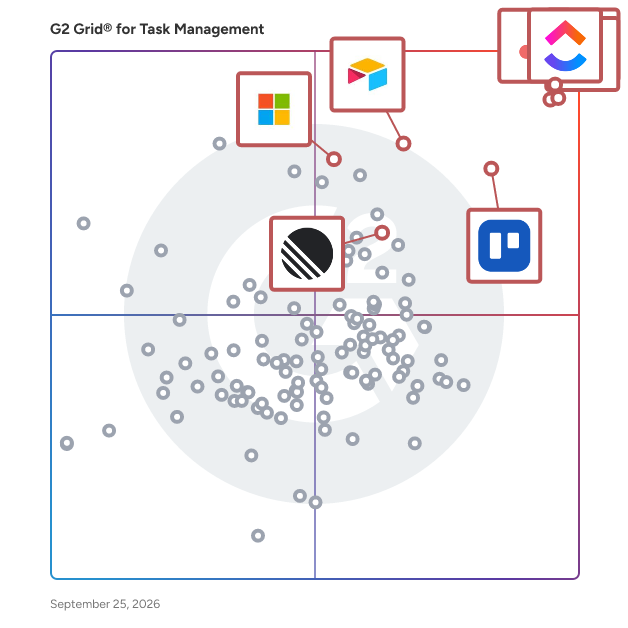
G2 Grid® for Task Management Software

G2 Grid® for Task Management Software plotting products by satisfaction and market presence

Highlighted products: Asana, ClickUp, monday AI Work Platform, Smartsheet, Trello, Airtable, Linear, and Microsoft Planner.

Underlying data: [Grid® JSON](https://www.g2.com/categories/task-management-software/grids.json?focus%5B%5D=asana&focus%5B%5D=clickup&focus%5B%5D=monday-com&focus%5B%5D=smartsheet&focus%5B%5D=trello&focus%5B%5D=airtable&focus%5B%5D=linear&focus%5B%5D=microsoft-planner&segment=small-business)

TaskRay

TaskRay is your ultimate solution for streamlined project management and seamless customer onboarding—all within Salesforce. Empower your teams to create project plans, automate repetitive tasks, allocate resources effectively, and foster collaboration across departments. Whether you're managing new customer implementations or driving internal initiatives, TaskRay ensures every project is delivered with precision and efficiency. 100% Salesforce Native TaskRay integrates seamlessly into your existing Salesforce ecosystem, offering unmatched visibility and alignment across Sales, CPQ, Service, and Experience Clouds. Designed for Growing Businesses If your organization has outgrown spreadsheets or non-Salesforce tools and needs better visibility into project performance, TaskRay is your next step. It's ideal for businesses facing challenges like: ✓ Revenue delays caused by lengthy onboarding or implementation timelines. ✓ Complex implementations, where multiple SKUs require custom solutions and support. ✓ Integrated customer management, spanning multiple Salesforce Clouds. Industry-Specific Expertise • TaskRay is trusted by industry leaders in: • Technology & SaaS • Healthcare & Life Sciences • Manufacturing • Real Estate & Franchising • Financial Services • Telecommunications Deliver Faster, Reduce Costs, and Increase Customer Satisfaction TaskRay helps you accelerate project timelines, cut operational costs, and improve productivity. Here's what our customers achieve: • 2.5x Faster Project Completion: Streamline workflows and improve efficiency. • 29% Faster Revenue Realization: Get to value quicker with optimized onboarding. • 21% Cost Reduction: Save time and resources with automation and visibility. • 15% Increase in Customer Satisfaction: Delight customers with smooth implementations. • 200% Boost in Project Visibility: Gain clarity and insight into every project detail. • 20% More Project Capacity: Handle more work without adding complexity. Proven Success Across Industries Join the growing list of businesses transforming their operations with TaskRay. From technology innovators to global manufacturers, our platform drives results.

Average Rating: 4.3/5.0

Total Reviews: 156

How Do G2 Users Rate TaskRay?

  • Has the product been a good partner in doing business?: 9.1/10 (Category avg: 9.0/10)
  • Task Prioritization: 8.2/10 (Category avg: 8.8/10)
  • Creation & Assignment: 8.8/10 (Category avg: 9.0/10)
  • To-Do Lists: 8.1/10 (Category avg: 8.9/10)

Who Is the Company Behind TaskRay?

  • Seller: TaskRay
  • Company Website:
  • Year Founded: 2010
  • HQ Location: Denver, CO
  • Twitter: @TaskRay
    400 Twitter followers
  • LinkedIn® Page: www.linkedin.com
    55 employees on LinkedIn®

Who Uses This Product?

  • Top Industries: Computer Software, Information Technology and Services
  • Company Size: 50% Medium, 47% Small

What Do G2 Reviewers Say About TaskRay?

AI-generated summary from verified user reviews

Pros
  • Users find the ease of use of TaskRay invaluable, facilitating seamless collaboration and efficient project management.
  • Users value the easy integration of TaskRay with Salesforce, enhancing collaboration and streamlining project management effortlessly.
  • Users highlight the seamless Salesforce integration of TaskRay, enabling centralized data and effective stakeholder collaboration.
  • Users value the seamless integration with Salesforce, enhancing data management and stakeholder connectivity across projects.
  • Users value the seamless organization of TaskRay, enhancing collaboration and clarity in project management within Salesforce.
Cons
  • Users find multiple portfolio management challenging with TaskRay, leading to operational issues and overwhelming large projects.
  • Users find TaskRay's inefficient task management challenging, particularly with complex projects and dependencies affecting productivity.
  • Users find TaskRay's complexity overwhelming, requiring significant time to understand its intricate interface and controls.
  • Users find difficult customization in TaskRay challenging, as the interface is complex and overwhelming to navigate.
  • Users find the steep learning curve of TaskRay challenging, particularly for those unfamiliar with Salesforce.

What Are Recent G2 Reviews of TaskRay?

What Are G2 Users Discussing About TaskRay?

Ora

Ora is an all-encompassing project management and team collaboration platform designed to transform the way teams work, plan, and achieve their goals. It stands out in the crowded space of productivity tools by offering a suite of unique selling points (USPs) that cater to a wide range of industries and work styles. Here are Ora’s core USPs: Intuitive Interface: Ora is celebrated for its user-friendly design, making it accessible for users of all technical levels. Its clean and straightforward layout allows teams to hit the ground running with minimal learning curve. Flexible Project Management: Whether you're running Scrum sprints, leveraging Kanban boards, or need a simple task list, Ora adapts to your methodology, offering customizable workflows to fit any project type. Integrated Team Chat: Communication is key to successful project management, and Ora integrates team chat directly within the platform. This feature ensures that discussions, decisions, and data stay aligned with tasks and projects, enhancing collaboration. Comprehensive Task Tracking: With detailed task management capabilities, including subtasks, checklists, deadlines, and time tracking, Ora provides a holistic view of project progress and individual contributions. Visual Timelines and Scheduling: Ora’s timeline and Gantt chart views offer visual scheduling tools that help plan and track project milestones and deadlines, ensuring teams stay on track and deliver on time. Powerful Automations and Integrations: Automate repetitive tasks and integrate with a wide array of tools like Slack, Zapier, and more. Ora’s automations save time and reduce manual effort, while integrations keep all your tools in sync. Productivity Enhancements: With features like drag-and-drop task management, customizable board views, and productivity shortcuts, Ora is designed to optimize your workflow and make project management as efficient as possible. Versatile for Various Team Sizes and Industries: Ora is scalable, catering to the needs of freelancers, small teams, and large organizations alike across tech, marketing, creative, education, and many other sectors. Enhanced Reporting and Analytics: Gain insights into project performance, team productivity, and time tracking with Ora’s comprehensive reporting tools, helping leaders make informed decisions. Secure and Reliable: Prioritizing data security and privacy, Ora ensures your project information and communications are protected with industry-standard encryption and security practices. Ora is more than just a project management tool; it’s a complete solution for teams looking to enhance productivity, streamline workflows, and achieve seamless collaboration, all within a single, intuitive platform.

Average Rating: 4.5/5.0

Total Reviews: 25

How Do G2 Users Rate Ora?

  • Has the product been a good partner in doing business?: 9.3/10 (Category avg: 9.0/10)
  • Task Prioritization: 9.0/10 (Category avg: 8.8/10)
  • Creation & Assignment: 9.3/10 (Category avg: 9.0/10)
  • To-Do Lists: 9.2/10 (Category avg: 8.9/10)

Who Is the Company Behind Ora?

  • Seller: Codemotion
  • Year Founded: 2013
  • HQ Location: Rome, Italy
  • Twitter: @codemotionWorld
    2,247 Twitter followers
  • LinkedIn® Page: www.linkedin.com
    59 employees on LinkedIn®

Who Uses This Product?

  • Top Industries: Marketing and Advertising, Computer Software
  • Company Size: 84% Small, 8% Medium

What Do G2 Reviewers Say About Ora?

AI-generated summary from verified user reviews

Pros
  • Users appreciate the customization options in Ora, enabling them to tailor workflows efficiently and effectively.
  • Users find Ora's ease of learning impressive, thanks to its intuitive interface and straightforward setup.
  • Users praise the ease of use of Ora, noting its intuitive interface and straightforward customization options.
  • Users love the easy setup of Ora, appreciating its intuitive interface and quick implementation for seamless use.
  • Users value the intuitive interface of Ora, enhancing task organization and workflow customization effortlessly.
Cons
  • Users find the lack of integration options limiting compared to larger tools, though it doesn't hinder daily use significantly.
  • Users note the limited features of Ora, expressing a desire for more advanced options and better integration.

What Are Recent G2 Reviews of Ora?

What Are G2 Users Discussing About Ora?

Taskade

Taskade is the simplest way to create team outlines, checklists, and workflows. Whether you are managing team projects, or planning future milestones — getting work done with Taskade is simple, fast, and fun! Collaborate with team members on the same page and edit projects together in real time. Chat, organize, and work together instantly. Use Taskade to supercharge your team productivity. Taskade can be used by individuals or teams, at home or at work (or anywhere!). Automatic syncing means your data are always up to date on every device. Taskade gives your team superpowers! - FEATURES • Create beautiful task lists, notes, and outlines • Share and collaborate with others instantly • Invite and add team members to workspaces • Chat and work together in real time • Create unlimited nested outlines • Easy one-tap editing projects • Tag projects to organize and prioritize • Assign projects to multiple team members • Real-time syncing across your phone, tablet and computer • Beautiful and minimal interface • Elegantly simple, free to use - IS TASKADE FREE? Yes, Taskade is completely free. You have the option to upgrade to Taskade Pro, which will unlock extra features. - ANY PRODUCTIVITY TIPS? Focus on one thing at a time. When you have a bunch of to-dos and ideas swimming around in your head it gets hard to focus. Use Taskade to declutter and document your thoughts so you can focus fully on every task and project. Make team communication open and efficient. Rather than rely on scheduled meetings (which, let’s face it, can be a huge time-suck) encourage team members to communicate problems and questions as soon as they arise. With Taskade teams can chat live and collaborate in real time, so things get sorted out in a snap. - CAN I USE TASKADE WITH MY TEAM? Yes. Taskade is designed to supercharge your team productivity. Simply invite your team members to join a Workspace. You can work together in real-time to manage projects and assign tasks. Get work done faster, smarter. - WHAT IS A WORKSPACE? A workspace is a collection of projects. Workspaces help to keep your task lists and notes organized. Make workspaces collaborative by inviting team members. Team members can edit all projects inside and collaborate in real-time. Team members will also receive push notifications for any updates inside. - TEMPLATES Find creative ways to use Taskade by selecting a template or creating your own. Design your own productivity systems and workflows using Taskade. • Weekly planner and task list • Team standup and scrum checklist • Daily bullet journal and team diary • Brainstorming and meeting notes • Project roadmaps and outliner • Unlimited Workspaces and teams. • Unlimited team members and sharing. • Unlimited image attachments and uploads. • Make Templates to automate workflows • Sync task lists between your iPhone, iPad, and Mac • Themes and night mode are on the way • Keep the Taskade updates coming - GET IN TOUCH Email support@taskade.com Visit us at https://taskade.com Privacy Policy: http://taskade.com/privacy Terms of Service: http://taskade.com/terms

Average Rating: 4.5/5.0

Total Reviews: 87

How Do G2 Users Rate Taskade?

  • Has the product been a good partner in doing business?: 9.1/10 (Category avg: 9.0/10)
  • Task Prioritization: 8.8/10 (Category avg: 8.8/10)
  • Creation & Assignment: 9.0/10 (Category avg: 9.0/10)
  • To-Do Lists: 9.0/10 (Category avg: 8.9/10)

Who Is the Company Behind Taskade?

  • Seller: Taskade
  • Year Founded: 2017
  • HQ Location: San Francisco, California
  • Twitter: @Taskade
    12,393 Twitter followers
  • LinkedIn® Page: www.linkedin.com
    16 employees on LinkedIn®

Who Uses This Product?

  • Who Uses This: Founder
  • Top Industries: Education Management, Computer Software
  • Company Size: 83% Small, 9% Medium

What Do G2 Reviewers Say About Taskade?

AI-generated summary from verified user reviews

Pros
  • Users praise the ease of use of Taskade, enhancing productivity with its intuitive interface and seamless features.
  • Users enjoy the ease of learning Taskade, praising its intuitive interface and speedy onboarding process.
  • Users value the easy setup of Taskade, enabling quick starts and enhanced productivity from the outset.
  • Users rave about the intuitive interface of Taskade, enhancing streamlined task management and collaboration.
  • Users love the seamless collaboration features of Taskade, enhancing team project management and workflow optimization.
Cons
  • Users find Taskade expensive, especially with unexpected billing for premium plans that don't meet their needs.
  • Users note that limited customization of dashboard widgets restricts flexibility for tailored team workflows in Taskade.
  • Users express frustration over limited features, highlighting issues with the user interface and file interaction.
  • Users find the overwhelming experience due to the rapid addition of new AI features in Taskade.
  • Users note slow loading during peak times, which slightly impacts mobile app responsiveness but appreciate Taskade's overall excellence.

What Are Recent G2 Reviews of Taskade?

What Are G2 Users Discussing About Taskade?

Microsoft Project & Portfolio Management

Microsoft Project is a project management software that helps users plan, execute, and monitor projects effectively. It includes powerful features for managing tasks, allocating resources and budgeting, all presented in an easy-to-use interface. With seamless integration into Microsoft 365, it supports real-time collaboration and data sharing. The advanced reporting and analytics tools allow users to track progress and make data-driven decisions. Stay organized, focused, and in charge. With Microsoft Project, easily plan your projects with the power of dynamic scheduling based on effort needed, project duration, and allotted team members. Suitable for projects of any size, Microsoft Project offers flexible deployment options, both cloud-based and on-premises, catering to a wide range of organizational needs.

Average Rating: 4.0/5.0

Total Reviews: 1,578

How Do G2 Users Rate Microsoft Project & Portfolio Management?

  • Has the product been a good partner in doing business?: 7.9/10 (Category avg: 9.0/10)
  • Task Prioritization: 3.3/10 (Category avg: 8.8/10)
  • Creation & Assignment: 1.7/10 (Category avg: 9.0/10)
  • To-Do Lists: 3.3/10 (Category avg: 8.9/10)

Who Is the Company Behind Microsoft Project & Portfolio Management?

  • Seller: Microsoft
  • Year Founded: 1975
  • HQ Location: Redmond, Washington
  • Twitter: @microsoft
    13,091,739 Twitter followers
  • LinkedIn® Page: www.linkedin.com
    232,750 employees on LinkedIn®
  • Ownership: MSFT

Who Uses This Product?

  • Who Uses This: Project Manager, Program Manager
  • Top Industries: Information Technology and Services, Computer Software
  • Company Size: 47% Large, 29% Medium

What Do G2 Reviewers Say About Microsoft Project & Portfolio Management?

AI-generated summary from verified user reviews

Pros
  • Users appreciate the abundance of features in Microsoft Project, enhancing project planning, budgeting, and visualization.
  • Users praise the visualization and tracking capabilities of Microsoft Project, enhancing project planning and management efficiency.
  • Users find Microsoft Project & Portfolio Management to be easy to use, facilitating project planning and task completion efficiently.
  • Users value the easy integration of Microsoft Project & Portfolio Management with other Microsoft tools, enhancing collaboration and productivity.
  • Users love the comprehensive features of Microsoft Project & Portfolio Management for effective project planning and visualization.
Cons
  • Users find limited customization options hinder adaptability, especially for smaller projects requiring integration with various tools.
  • Users find the high complexity of Microsoft PPM challenging for small projects, requiring time to adapt and learn.
  • Users find the steep learning curve of Microsoft Project & Portfolio Management challenging, complicating effective use of its features.
  • Users find budgeting and accounting issues to be a challenge, noting complexity and integration limitations hinder effectiveness.
  • Users face integration issues with Microsoft Project & Portfolio Management, complicating its compatibility with other systems.

What Are Recent G2 Reviews of Microsoft Project & Portfolio Management?

What Are G2 Users Discussing About Microsoft Project & Portfolio Management?

Profit.co

Profit.co is an AI-native Strategy Execution Suite that helps organizations turn strategy into measurable results. It connects strategy, projects, performance, and people in one unified platform, enabling leaders to plan priorities, align teams, track execution, and continuously improve outcomes. With Profit.co, organizations can define and cascade strategic priorities using OKRs, Balanced Scorecards, KPIs, and strategy roadmaps. Teams can connect projects and tasks to strategic goals, monitor progress through real-time dashboards and reports, and use AI-powered insights and agents to identify risks, surface opportunities, and keep execution on track. The platform extends strategy execution into performance and employee engagement, helping organizations connect individual contributions and performance with broader business priorities. Profit.co is highly configurable and integrates with the business applications teams already use, making it easier to embed strategy execution into everyday workflows. By bringing strategy, execution, and people together in a single platform, Profit.co helps organizations move from planning to execution and turn strategic priorities into measurable business outcomes.

Average Rating: 4.7/5.0

Total Reviews: 487

How Do G2 Users Rate Profit.co?

  • Has the product been a good partner in doing business?: 9.4/10 (Category avg: 9.0/10)
  • Task Prioritization: 9.0/10 (Category avg: 8.8/10)
  • Creation & Assignment: 9.0/10 (Category avg: 9.0/10)
  • To-Do Lists: 8.8/10 (Category avg: 8.9/10)

Who Is the Company Behind Profit.co?

  • Seller: Profit.co
  • Company Website:
  • Year Founded: 2018
  • HQ Location: Flower Mound,Texas
  • Twitter: @profit_co
    8,471 Twitter followers
  • LinkedIn® Page: www.linkedin.com
    267 employees on LinkedIn®

Who Uses This Product?

  • Who Uses This: CEO, Project Manager
  • Top Industries: Information Technology and Services, Computer Software
  • Company Size: 58% Medium, 28% Small

What Do G2 Reviewers Say About Profit.co?

AI-generated summary from verified user reviews

Pros
  • Users value the simplicity and user-friendliness of Profit.co, making tracking objectives effortless and efficient.
  • Users appreciate the responsive customer support of Profit.co, aiding in seamless onboarding and feature adoption.
  • Users appreciate the goal-setting capabilities of Profit.co, enhancing progress tracking and team alignment towards objectives.
  • Users value the clear ownership and alignment of OKRs in Profit.co, enhancing team focus and progress tracking.
  • Users value the progress tracking feature for its effectiveness in linking tasks to Key Results and updating statuses.
Cons
  • Users find the learning curve steep, feeling the need for better training and a more intuitive interface.
  • Users find limited customization in Profit.co, hindering adaptation to specific needs and complicating usability.
  • Users find missing features in Profit.co, leading to high costs and cumbersome navigation experiences.
  • Users find navigation challenging initially due to complexity and lack of intuitive features in Profit.co's interface.
  • Users find poor navigation challenging initially, complicating the experience and making it difficult to access essential features.

What Are Recent G2 Reviews of Profit.co?

What Are G2 Users Discussing About Profit.co?

Remember the Milk

On-Line and mobile task management tool

Average Rating: 4.4/5.0

Total Reviews: 16

How Do G2 Users Rate Remember the Milk?

  • Has the product been a good partner in doing business?: 9.4/10 (Category avg: 9.0/10)
  • Task Prioritization: 10.0/10 (Category avg: 8.8/10)
  • Creation & Assignment: 10.0/10 (Category avg: 9.0/10)
  • To-Do Lists: 10.0/10 (Category avg: 8.9/10)

Who Is the Company Behind Remember the Milk?

  • Seller: Remember the Milk
  • HQ Location: San Francisco, CA
  • Twitter: @rememberthemilk
    11,064 Twitter followers
  • LinkedIn® Page: www.linkedin.com
    8 employees on LinkedIn®

Who Uses This Product?

  • Top Industries: Computer Software
  • Company Size: 63% Small, 19% Large

What Are Recent G2 Reviews of Remember the Milk?

What Are G2 Users Discussing About Remember the Milk?

Zenkit

Zenkit is a collaborative SaaS platform for project management, database building and more. Follow your data through its entire lifecycle, from fluid brainstorming and research through to a structured system for collaborative use. Zenkit is the flexible workspace you can use to organize anything. Zenkit lets you view and manipulate your data in multiple intuitive ways to gain deeper insight into your projects. Start with a simple list or Kanban board to plan your process, or switch to a table to input additional data and view analytics. Use it to build your own CRM, automated reporting system, or financial planner, or simply save your recipes and plan your holidays. Share your workspaces and assign tasks to your friends and colleagues, and view as much or as little data as you need at any moment. Zenkit helps you to intuitively focus on what’s important. Hyper-flexible and customizable, Zenkit is a relational database that anyone can use and understand. It is the home for your data, your projects and your business, no matter how big or small, simple or complex. Use Zenkit to cultivate your data and help your projects flourish.

Average Rating: 4.7/5.0

Total Reviews: 88

How Do G2 Users Rate Zenkit?

  • Has the product been a good partner in doing business?: 8.9/10 (Category avg: 9.0/10)
  • Task Prioritization: 8.5/10 (Category avg: 8.8/10)
  • Creation & Assignment: 9.0/10 (Category avg: 9.0/10)
  • To-Do Lists: 8.4/10 (Category avg: 8.9/10)

Who Is the Company Behind Zenkit?

Who Uses This Product?

  • Top Industries: Information Technology and Services, Marketing and Advertising
  • Company Size: 74% Small, 19% Medium

What Are Recent G2 Reviews of Zenkit?

TeuxDeux

If you like making to-do lists, you will love TeuxDeux.

Average Rating: 4.5/5.0

Total Reviews: 28

How Do G2 Users Rate TeuxDeux?

  • Has the product been a good partner in doing business?: 9.2/10 (Category avg: 9.0/10)
  • Task Prioritization: 9.7/10 (Category avg: 8.8/10)
  • Creation & Assignment: 9.7/10 (Category avg: 9.0/10)
  • To-Do Lists: 10.0/10 (Category avg: 8.9/10)

Who Is the Company Behind TeuxDeux?

  • Seller: TeuxDeux
  • Year Founded: 2010
  • HQ Location: Brooklyn, New York
  • Twitter: @teuxdeux
    5,249 Twitter followers
  • LinkedIn® Page: www.linkedin.com
    3 employees on LinkedIn®

Who Uses This Product?

  • Top Industries: Marketing and Advertising
  • Company Size: 76% Small, 14% Large

What Are Recent G2 Reviews of TeuxDeux?

What Are G2 Users Discussing About TeuxDeux?

Ryver

Ryver enables you to organize your team’s communication IN ONE APP with group chat, task management, and voice & video calls.

Average Rating: 4.4/5.0

Total Reviews: 156

How Do G2 Users Rate Ryver?

  • Has the product been a good partner in doing business?: 8.8/10 (Category avg: 9.0/10)
  • Task Prioritization: 9.0/10 (Category avg: 8.8/10)
  • Creation & Assignment: 9.0/10 (Category avg: 9.0/10)
  • To-Do Lists: 9.0/10 (Category avg: 8.9/10)

Who Is the Company Behind Ryver?

  • Seller: Ryver
  • Year Founded: 2015
  • HQ Location: Scottsdale, AZ
  • Twitter: @RyverApp
    2,807 Twitter followers
  • LinkedIn® Page: www.linkedin.com
    3 employees on LinkedIn®

Who Uses This Product?

  • Who Uses This: Owner
  • Top Industries: Computer Software, Information Technology and Services
  • Company Size: 65% Small, 27% Medium

What Do G2 Reviewers Say About Ryver?

AI-generated summary from verified user reviews

Pros
  • Users value the seamless team collaboration in Ryver, enhancing communication and task management all in one platform.
  • Users appreciate the effective communication in Ryver, enjoying seamless integration of chat, tasks, and collaboration.
  • Users appreciate the ease of use in Ryver, enjoying straightforward setup and seamless integration of chat and tasks.
  • Users value the seamless integration of chat and task management in Ryver, enhancing team collaboration and efficiency.
  • Users love the easy initial setup of Ryver, enabling quick collaboration and efficient project management from the start.
Cons
  • Users find the learning curve challenging, making the initial setup and understanding of Ryver quite difficult.
  • Users note the missing features in Ryver, highlighting the need for better tools and an improved interface.
  • Users report degrading audio quality in Ryver, which hampers the overall video conferencing experience.
  • Users find difficult navigation with Ryver, as understanding features and locating files can be challenging initially.
  • Users feel that Ryver is expensive, which influences their decision on future purchases and overall satisfaction.

What Are Recent G2 Reviews of Ryver?

What Are G2 Users Discussing About Ryver?

OmniFocus

Your Life, In Perspective

Average Rating: 4.6/5.0

Total Reviews: 55

How Do G2 Users Rate OmniFocus?

  • Has the product been a good partner in doing business?: 9.1/10 (Category avg: 9.0/10)
  • Task Prioritization: 7.5/10 (Category avg: 8.8/10)
  • Creation & Assignment: 9.6/10 (Category avg: 9.0/10)
  • To-Do Lists: 7.1/10 (Category avg: 8.9/10)

Who Is the Company Behind OmniFocus?

  • Seller: The Omni Group
  • Year Founded: 1992
  • HQ Location: Seattle, WA
  • Twitter: @OmniGroup
    17,761 Twitter followers
  • LinkedIn® Page: www.linkedin.com
    95 employees on LinkedIn®

Who Uses This Product?

  • Top Industries: Information Technology and Services, Computer Software
  • Company Size: 58% Small, 22% Large

What Are Recent G2 Reviews of OmniFocus?

What Are G2 Users Discussing About OmniFocus?

Azendoo

Azendoo is a work tracking application that helps teams stay on top collaboration and projects. Bringing together context, conversations, and organization into one single product, we’re empowering teams to move work forward. With Azendoo you share tasks, due dates and priorities faster than ever while shortening planning time, reducing sync efforts and eliminating unnecessary meetings.

Average Rating: 4.2/5.0

Total Reviews: 56

How Do G2 Users Rate Azendoo?

  • Has the product been a good partner in doing business?: 8.8/10 (Category avg: 9.0/10)

Who Is the Company Behind Azendoo?

  • Seller: Azendoo
  • Year Founded: 2012
  • HQ Location: Bordeaux, Aquitaine
  • Twitter: @azendoo
    2,639 Twitter followers
  • LinkedIn® Page: www.linkedin.com
    2 employees on LinkedIn®

Who Uses This Product?

  • Top Industries: Marketing and Advertising
  • Company Size: 70% Small, 26% Medium

What Are Recent G2 Reviews of Azendoo?

What Are G2 Users Discussing About Azendoo?

TrackingTime PRO

TrackingTime is a time tracking software designed to help teams and freelancers efficiently manage their projects and enhance productivity. This solution enables managers to plan and monitor their team's work, ensuring that all tasks are aligned and any potential conflicts or bottlenecks are identified early on. By providing a comprehensive timeline for each project, TrackingTime allows users to maintain a clear overview of tasks and resources, facilitating better decision-making and project execution. The target audience for TrackingTime includes project managers overseeing multiple projects, freelancers managing their time across various clients, and teams looking to optimize their workflow. This software is particularly beneficial for organizations that require precise tracking of work hours, project progress, and employee attendance. Companies can leverage TrackingTime to streamline their payroll processes, as it provides accurate data on work hours, breaks, extra time, and time off, making payroll management significantly more efficient. One of the standout features of TrackingTime is its ability to create customized online timesheets that cater to the specific needs of a team. This functionality allows users to monitor and evaluate team performance, manage project budgets, and bill clients effectively. Additionally, the software enables users to export these timesheets into professional business reports, which can be easily shared with clients and colleagues, enhancing communication and transparency. This level of customization ensures that teams can adapt the tool to fit their unique workflows and reporting requirements. TrackingTime also excels in its integration capabilities, seamlessly connecting with over 60 popular business tools. This eliminates the need for users to switch between different applications, allowing for a more cohesive workflow. By integrating smoothly with existing processes, TrackingTime helps users maximize their efficiency and focus on their core work without the distractions of managing multiple platforms. The ease of integration contributes to a more streamlined experience, making it simpler for teams to adopt and utilize the software effectively. Overall, TrackingTime empowers teams to take control of their projects and workloads, ensuring optimal productivity and effective time management. With its robust features and user-friendly interface, it stands out as a valuable tool for anyone looking to enhance their project management capabilities and streamline their time tracking efforts. The combination of customizable timesheets, integration options, and comprehensive reporting makes TrackingTime a practical choice for organizations aiming to improve their operational efficiency.

Average Rating: 4.4/5.0

Total Reviews: 183

How Do G2 Users Rate TrackingTime PRO?

  • Has the product been a good partner in doing business?: 9.1/10 (Category avg: 9.0/10)
  • Task Prioritization: 6.3/10 (Category avg: 8.8/10)
  • Creation & Assignment: 7.9/10 (Category avg: 9.0/10)
  • To-Do Lists: 7.5/10 (Category avg: 8.9/10)

Who Is the Company Behind TrackingTime PRO?

  • Seller: TrackingTime
  • Company Website:
  • Year Founded: 2012
  • HQ Location: Buenos Aires, Argentina
  • Twitter: @TrackingTime
    1,367 Twitter followers
  • LinkedIn® Page: www.linkedin.com
    20 employees on LinkedIn®

Who Uses This Product?

  • Who Uses This: Owner
  • Top Industries: Marketing and Advertising, Computer Software
  • Company Size: 56% Small, 9% Medium

What Do G2 Reviewers Say About TrackingTime PRO?

AI-generated summary from verified user reviews

Pros
  • Users value the effortless time tracking of TrackingTime PRO, enhancing project management and billing accuracy seamlessly.
  • Users love the ease of use of TrackingTime PRO, making time tracking and project management seamless and efficient.
  • Users find time-saving benefits with TrackingTime PRO, enabling efficient project management and streamlined reporting.
  • Users find that task management features enhance productivity and streamline client billing in multi-project environments.
  • Users love the seamless integrations of TrackingTime Pro, enhancing efficiency and simplifying time management across platforms.
Cons
  • Users feel that TrackingTime PRO is a bit complex for crafting simple timesheets, hindering ease of use for time capture.
  • Users find time tracking issues with project hour breakdowns, necessitating manual calculations, especially in the free version.
  • Users struggle with a steep learning curve, finding navigation and reporting complicated without sufficient training or support.
  • Users often note the limited features of TrackingTime PRO, wishing for more options to enhance their usage.
  • Users find the reporting issues frustrating, wishing for more detailed and flexible generate reports in TrackingTime Pro.

What Are Recent G2 Reviews of TrackingTime PRO?

What Are G2 Users Discussing About TrackingTime PRO?

Daylite

When your time is your product, you can’t afford to waste it. Daylite is the CRM and project management app built exclusively for the Apple ecosystem, specifically for consultants, fractional executives, freelancers, construction companies, and other service-based businesses that sell their expertise. Most CRMs are built for sales teams. Daylite is built for people who are the business: it combines contact management, sales pipelines, project management, calendars, tasks, and email into one connected system that runs natively on Mac, iPhone, and iPad- not a web app wrapped in a browser tab. Why Apple-native matters: Daylite integrates directly with Apple Mail, Calendar, and Contacts, so every email, meeting, and task is automatically linked to the right client, opportunity, or project. It works offline and syncs seamlessly across your devices, with built-in AI (powered by Apple’s Writing Tools) to help you draft and polish communications faster. Everything stays connected: Every note, email, and task builds a searchable history for each client and project, so you and your team always have full context without switching apps or hunting through inboxes. Choose the plan that fits your business: Leap: This plan is designed for anyone starting their business journey or running a side hustle. It includes all essential Daylite features for one user, integration with one email account, up to 500 contacts, and email-only support. Growth: This plan is designed for full-time businesses with growing needs, including those looking to expand their team. It includes everything in Leap, supports up to 20 users, allows three email account integrations per user, includes up to 25,000 contacts, and comes with standard support and onboarding. Scale: This plan is designed for established businesses that need advanced tools and dedicated support to scale successfully. It includes everything in Growth, supports up to 100 users, allows 10 email account integrations per user, includes up to 250,000 contacts, and comes with premium support and onboarding. Daylite is developed by Marketcircle in Toronto, Canada. Marketcircle has built business apps exclusively for Apple devices for over 25 years, with customers in 80+ countries.

Average Rating: 4.5/5.0

Total Reviews: 161

How Do G2 Users Rate Daylite?

  • Has the product been a good partner in doing business?: 8.9/10 (Category avg: 9.0/10)

Who Is the Company Behind Daylite?

  • Seller: Marketcircle
  • Year Founded: 1999
  • HQ Location: Ontario, Canada
  • Twitter: @marketcircle
    2,812 Twitter followers
  • LinkedIn® Page: www.linkedin.com
    41 employees on LinkedIn®

Who Uses This Product?

  • Who Uses This: Director, Owner
  • Top Industries: Marketing and Advertising, Management Consulting
  • Company Size: 87% Small, 9% Medium

What Do G2 Reviewers Say About Daylite?

AI-generated summary from verified user reviews

Pros
  • Users appreciate the seamless contact management in Daylite, providing easy access to customer data across devices.
  • Users praise Daylite's excellent customer support, noting fast responses that keep the system running smoothly.
  • Users appreciate the organizational capabilities of Daylite, making client and task management seamless and efficient.
  • Users love Daylite for its effective project management, streamlining task organization and client interactions seamlessly.
  • Users value the easy access to their database on mobile devices, enhancing their productivity on the go.
Cons
  • Users find the limited integrations with other platforms a significant drawback for broader organizational compatibility.
  • Users find CRM issues with Daylite, noting the overwhelming interface and limited compatibility with non-Apple products.
  • Users feel the limited features of Daylite restrict access for non-Apple device users, affecting overall usability.
  • Users find the overwhelming experience with Daylite's interface challenging, requiring time to adjust for effective use.
  • Users find the app limitations frustrating, noting small print, exclusive Apple compatibility, and outdated CRM features.

What Are Recent G2 Reviews of Daylite?

What Are G2 Users Discussing About Daylite?

Allfred

Allfred is a workflow management tool tailor-made for Ad or PR agencies that enables all team members to work seamlessly together from the client's first brief to invoicing, streamlining the process and minimizing mistakes. Allfred was designed with "creatives in mind" to shift agencies' focus to do more creative work and less on paperwork and numerous Spreadsheets. We understand that for CFOs and managing directors, every decision must be rooted in financial data. That's why our platform offers real-time integrated financial and project data, allowing for better business decisions and increased profitability. Starting with automated Proposals and Budgeting, through interactive Resource Planning up to integrated Project Management and one-click Time Tracking, Allfred gives agency teams the right tools to make the process simple and efficient to deliver agencies more profit. *Time management* To-do-list and one-click time tracking reduces friction in communication within creative departments. *Resource planning* Interactive resource planning with drag&drop options increases agency team capacity and helps reduce overwork. *Project management* Time-saving automation and process assistance reduce dull work and frequent budgeting and project management mistakes. *Financial analysis* The Finance dashboard provides a comprehensive overview of your financial data and KPIs in one place. It helps you understand and analyze the sources of your revenue and identify opportunities for growth and allows you to track and optimize profitability and performance. With a step-by-step approach to onboarding into agency processes, we reduce the management effort and shorten the implementation time. We believe that better work for everyone means better profit for the agency.

Average Rating: 4.7/5.0

Total Reviews: 52

How Do G2 Users Rate Allfred?

  • Has the product been a good partner in doing business?: 9.6/10 (Category avg: 9.0/10)
  • Task Prioritization: 9.2/10 (Category avg: 8.8/10)
  • Creation & Assignment: 9.4/10 (Category avg: 9.0/10)
  • To-Do Lists: 8.7/10 (Category avg: 8.9/10)

Who Is the Company Behind Allfred?

  • Seller: Allfred
  • Year Founded: 2020
  • HQ Location: Bratislava, Slovakia
  • LinkedIn® Page: www.linkedin.com
    8 employees on LinkedIn®

Who Uses This Product?

  • Who Uses This: Account Manager
  • Top Industries: Marketing and Advertising
  • Company Size: 83% Small, 17% Medium

What Do G2 Reviewers Say About Allfred?

AI-generated summary from verified user reviews

Pros
  • Users highlight the ease of use of Allfred, appreciating its intuitive interface and seamless integration capabilities.
  • Users love the simple and organized task management of Allfred, finding it essential and efficient for daily use.
  • Users appreciate the comprehensive project management capabilities of Allfred, streamlining processes and enhancing team collaboration.
  • Users value the robust and customizable features of Allfred for effective resource management and streamlined project organization.
  • Users love the user-friendly interface of Allfred, appreciating its seamless integration and productivity-boosting capabilities.
Cons
  • Users experience slow loading times occasionally, especially with large sheets, which can hinder efficiency.
  • Users occasionally experience slow performance when handling large data sheets, impacting their overall efficiency.
  • Users often experience slow update issues, leading to confusion and delays in project and task management.
  • Users report encountering bug issues with Allfred, which can occasionally disrupt their workflow and experience.
  • Users encounter occasional glitches in Allfred, which can disrupt workflow but are generally minor and manageable.

What Are Recent G2 Reviews of Allfred?

Accelo

Most PSA platforms tell you what happened. Accelo tells you what's coming. Professional services firms running on disconnected tools are making critical decisions on data that's always a few weeks behind: a project tool here, a resourcing spreadsheet there, an invoicing system that talks to neither. Scope drifts unnoticed. Margins erode before anyone sees them. Resourcing decisions get made on gut feel. And 42% of professional services firms are losing revenue they've already earned as a result. Accelo is an AI-powered PSA platform that connects project delivery, resourcing, and financials in one place and tells you what's coming before it becomes a problem. Not another tool to add to the stack. The platform that replaces the gaps between them. Where traditional PSA software records and reports, Accelo forecasts and flags. AI surfaces scope drift and margin risk in real time, while there's still a conversation to have, not a write-off to explain. Intelligent resourcing matches people to work based on skills, workload, and past performance, not just who has an opening in a spreadsheet. Capacity gaps show up against your live pipeline before they affect delivery, not after a hiring decision goes wrong. Accelo's AI is embedded across the platform, not bolted on as a separate module or a marketing claim. Predictive risk flagging monitors projects, resourcing, and financials simultaneously, surfacing early warning signals before they escalate. AI-predicted project completion dates update in real time as delivery data changes. Automated time capture logs billable hours as work happens, closing the gap between hours worked and revenue collected. Intelligent resource matching evaluates skills, workload, and past project performance (not just calendar availability) to recommend the right person for every engagement. For teams already using AI tools in their workflow, Accelo connects natively to ChatGPT, Claude, Gemini, and Microsoft Copilot via MCP, enabling natural language queries against live project, resource, and financial data without leaving the tools your team already uses. Every project your team completes makes the platform's recommendations sharper. Accelo serves agencies, consulting firms, IT services companies, and other professional services businesses with 20 to +500 employees managing a mix of project and retainer work, where leadership is making decisions based on incomplete or delayed data and the cost of finding out too late is already showing up in the margins.

Average Rating: 4.3/5.0

Total Reviews: 661

How Do G2 Users Rate Accelo?

  • Has the product been a good partner in doing business?: 8.8/10 (Category avg: 9.0/10)
  • Task Prioritization: 7.6/10 (Category avg: 8.8/10)
  • Creation & Assignment: 8.2/10 (Category avg: 9.0/10)
  • To-Do Lists: 7.3/10 (Category avg: 8.9/10)

Who Is the Company Behind Accelo?

  • Seller: Accelo
  • Company Website:
  • Year Founded: 2011
  • HQ Location: Denver, Colorado
  • Twitter: @accelo
    2,980 Twitter followers
  • LinkedIn® Page: www.linkedin.com
    71 employees on LinkedIn®

Who Uses This Product?

  • Who Uses This: Project Manager, CEO
  • Top Industries: Marketing and Advertising, Information Technology and Services
  • Company Size: 72% Small, 25% Medium

What Do G2 Reviewers Say About Accelo?

AI-generated summary from verified user reviews

Pros
  • Users find Accelo easy to learn and access, enhancing collaboration and task management across various departments.
  • Users appreciate the effective project tracking features of Accelo, enhancing coordination and profitability across all tasks.
  • Users appreciate the efficiency of Accelo, seamlessly integrating multiple tools to streamline business processes and enhance productivity.
  • Users appreciate the integrated client management features of Accelo, enhancing coordination and transparency across all projects.
  • Users benefit from efficient task and project management in Accelo, enhancing transparency and profitability across teams.
Cons
  • Users find missing features in Accelo, like insufficient reporting and complex processes, hinder usability and efficiency.
  • Users find the learning curve steep, causing confusion and frustration with implementation and insufficient training support.
  • Users are frustrated with Accelo's limited features, outdated UI, and lack of effective customer support.
  • Users find Accelo's complexity overwhelming, with difficult configurations and inadequate training leading to frustration and inefficiency.
  • Users find limited customization in Accelo, making it challenging to tailor workflows and reports to specific needs.

What Are Recent G2 Reviews of Accelo?

What Are G2 Users Discussing About Accelo?

Subhransu Sahu
SS
Researched and written by Subhransu Sahu
Updated