Best Project Management Software for Small Business

How Many Project Management Software Products Does G2 Track?

Total Products under this Category: 1,376

Category Stats (Sep 2026)

  • Average Rating: 4.39/5 The average rating of products in this category, based on all submitted ratings
  • Top Trending Product: Workzone (+1.76%) - Among all products in this category, Workzone recorded the largest rating increase compared to last month

Last updated: September 01, 2026

How Does G2 Rank Project Management Software Products?

Why You Can Trust G2's Software Rankings:

  • 30 Analysts and Data Experts
  • 144,900+ Authentic Reviews
  • 1,376+ Products
  • Unbiased Rankings

G2's software rankings are built on verified user reviews, rigorous moderation, and a consistent research methodology maintained by a team of analysts and data experts. Each product is measured using the same transparent criteria, with no paid placement or vendor influence. While reviews reflect real user experiences, which can be subjective, they offer valuable insight into how software performs in the hands of professionals. Together, these inputs power the G2 Score, a standardized way to compare tools within every category.

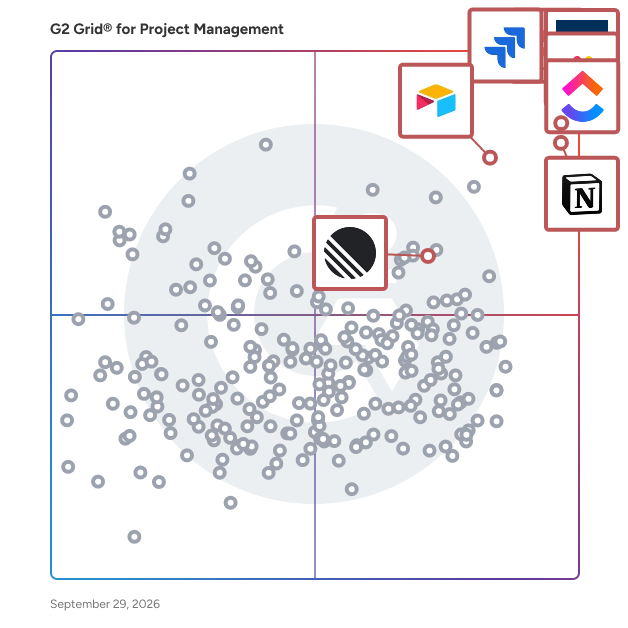
G2 Grid® for Project Management Software

G2 Grid® for Project Management Software plotting products by satisfaction and market presence

Highlighted products: Asana, ClickUp, monday AI Work Platform, Smartsheet, Notion, Jira, Airtable, and Linear.

Underlying data: [Grid® JSON](https://www.g2.com/categories/project-management/grids.json?focus%5B%5D=asana&focus%5B%5D=clickup&focus%5B%5D=monday-com&focus%5B%5D=smartsheet&focus%5B%5D=notion&focus%5B%5D=jira&focus%5B%5D=airtable&focus%5B%5D=linear&segment=small-business)

Asana

Asana is a leading work management platform for human + AI collaboration. Over 170,000 customers like Accenture, Amazon, Anthropic, and Suzuki rely on Asana to align teams and accelerate organizational impact. Whether it’s managing strategic initiatives, cross-functional programs, or company-wide goals, Asana helps organizations bring clarity to complexity—turning plans into action with AI working alongside teams every step of the way. To learn more, visit www.asana.com.

Average Rating: 4.4/5.0

Total Reviews: 13,410

How Do G2 Users Rate Asana?

  • Has the product been a good partner in doing business?: 8.7/10 (Category avg: 8.9/10)
  • Planning: 8.8/10 (Category avg: 8.8/10)
  • Creation & Assignment: 9.3/10 (Category avg: 8.9/10)
  • Resource Allocation: 8.0/10 (Category avg: 8.4/10)

Who Is the Company Behind Asana?

  • Seller: Asana
  • Company Website:
  • Year Founded: 2008
  • HQ Location: San Francisco, CA
  • Twitter: @Asana
    119,913 Twitter followers
  • LinkedIn® Page: www.linkedin.com
    4,427 employees on LinkedIn®

Who Uses This Product?

  • Who Uses This: Project Manager, Owner
  • Top Industries: Marketing and Advertising, Information Technology and Services
  • Company Size: 57% Small, 31% Medium

What Do G2 Reviewers Say About Asana?

AI-generated summary from verified user reviews

Pros
  • Users find Asana to have a user-friendly interface, making it simple to manage tasks and collaborate effectively.
  • Users appreciate Asana for its effective task management, enhancing productivity and collaboration across teams and projects.
  • Users value the workflow features of Asana, enhancing teamwork and project organization with flexible task management options.
  • Users appreciate the workflow features in Asana, facilitating team connectivity and enhancing project management efficiency.
  • Users value the user-friendly task tracking in Asana, enhancing organization and efficiency in managing deliverables.
Cons
  • Users experience a lack of essential features, including time tracking and project setup capabilities, hindering usability.
  • Users struggle with the steep learning curve of Asana, finding it messy and difficult to manage tasks effectively.
  • Users note the limited features in Asana, particularly with powerful tools locked behind higher pricing tiers.
  • Users find the UI not intuitive, with a clunky design that complicates navigation and task management.
  • Users find the search functionality lacking, making it difficult to efficiently locate projects and tasks.

What Are Recent G2 Reviews of Asana?

What Are G2 Users Discussing About Asana?

ClickUp

ClickUp is the world’s first Converged AI Workspace, bringing together all work apps, data, and workflows. ClickUp eliminates all forms of work sprawl to provide 100% context and a single place for humans and agents to work, together. Trusted by more than 20 million users worldwide, ClickUp is on a mission to maximize human productivity.

Average Rating: 4.6/5.0

Total Reviews: 13,673

How Do G2 Users Rate ClickUp?

  • Has the product been a good partner in doing business?: 9.0/10 (Category avg: 8.9/10)
  • Planning: 9.0/10 (Category avg: 8.8/10)
  • Creation & Assignment: 9.4/10 (Category avg: 8.9/10)
  • Resource Allocation: 8.3/10 (Category avg: 8.4/10)

Who Is the Company Behind ClickUp?

  • Seller: ClickUp
  • Company Website:
  • Year Founded: 2017
  • HQ Location: San Diego, California
  • Twitter: @clickup
    69,539 Twitter followers
  • LinkedIn® Page: www.linkedin.com
    7,082 employees on LinkedIn®

Who Uses This Product?

  • Who Uses This: CEO, Project Manager
  • Top Industries: Marketing and Advertising, Computer Software
  • Company Size: 77% Small, 19% Medium

What Do G2 Reviewers Say About ClickUp?

AI-generated summary from verified user reviews

Pros
  • Users find ClickUp to be incredibly easy and simple to use, streamlining tasks and enhancing productivity effortlessly.
  • Users value the flexibility in task management, enabling customized workflows for personal, team, and project tasks.
  • Users appreciate the abundance of features in ClickUp, making task management seamless and efficient.
  • Users appreciate ClickUp for its streamlined management tasks, enabling better organization and efficiency in project handling.
  • Users appreciate ClickUp for its streamlined organization, making team management and project tracking efficient and effortless.
Cons
  • Users find the missing features in ClickUp frustrating, particularly the lack of basic tools like subfolders.
  • Users experience a learning curve with ClickUp, finding the plethora of features daunting at first.
  • Users note limited features in ClickUp, with missing basic options and a complex setup process hindering ease of use.
  • Users find ClickUp not intuitive, feeling overwhelmed by its many features and struggling with initial setup and performance.
  • Users experience slow loading times in ClickUp, which affects their productivity when managing multiple tasks and fields.

What Are Recent G2 Reviews of ClickUp?

What Are G2 Users Discussing About ClickUp?

monday AI Work Platform

monday.com is the AI Work Platform where people and agents operate as one team - with shared cross-department context, enterprise-grade trust, and an easy-to-use interface built for adoption at scale. With monday.com, agents work alongside teams in the same boards, workflows, and goals they already use every day, creating a new kind of teamwork where people and agents move work forward together. Beyond agents, monday.com gives every team more ways to turn AI into real business impact. With monday vibe, teams can build custom work apps for their specific needs, and with monday sidekick, every user gets a personal AI assistant to help solve business challenges, move faster, and get more done. monday.com gives organizations the visibility, permissions, human oversight, and compliance standards they need to deploy AI with confidence. AI doesn’t operate in a black box - it operates within the same trusted guardrails teams already rely on. Because monday.com is already used across departments, agents can access the broader context of how work connects across marketing, sales, product, IT, HR, operations, and more. That means smarter decisions, faster execution, and fewer silos - all in one place. Today, over 250,000 customers and more than 60% of Fortune 500 companies trust monday.com with how they run their business.

Average Rating: 4.7/5.0

Total Reviews: 16,767

How Do G2 Users Rate monday AI Work Platform?

  • Has the product been a good partner in doing business?: 9.1/10 (Category avg: 8.9/10)
  • Planning: 9.1/10 (Category avg: 8.8/10)
  • Creation & Assignment: 9.3/10 (Category avg: 8.9/10)
  • Resource Allocation: 8.3/10 (Category avg: 8.4/10)

Who Is the Company Behind monday AI Work Platform?

  • Seller: monday.com
  • Company Website:
  • Year Founded: 2012
  • HQ Location: Tel Aviv
  • Twitter: @mondaydotcom
    40,761 Twitter followers
  • LinkedIn® Page: www.linkedin.com
    10,589 employees on LinkedIn®

Who Uses This Product?

  • Who Uses This: Project Manager, CEO
  • Top Industries: Marketing and Advertising, Information Technology and Services
  • Company Size: 61% Small, 30% Medium

What Do G2 Reviewers Say About monday AI Work Platform?

AI-generated summary from verified user reviews

Pros
  • Users find the ease of use of monday AI Work Platform essential for staying organized and productive.
  • Users appreciate the team collaboration features of monday AI Work Platform, enhancing project management across various business segments.
  • Users value the easy project management features of monday AI Work Platform, enhancing collaboration and workflow efficiency.
  • Users value how monday AI Work Platform enhances organization, making important information easily accessible and manageable.
  • Users appreciate the efficient task management in monday AI Work Platform, making collaboration and project tracking seamless.
Cons
  • Users note the missing features in monday AI Work Platform, expressing frustration over limitations like messaging contacts and seat requirements.
  • Users find the learning curve steep, especially when implementing across departments and managing large datasets effectively.
  • Users find the limited features of monday AI Work Platform restrict useful functionality and increase costs unnecessarily.
  • Users find the interface not intuitive, struggling with complex workflows and lacking straightforward functionality.
  • Users find the limited customization in monday AI Work Platform hampers their ability to streamline tasks effectively.

What Are Recent G2 Reviews of monday AI Work Platform?

What Are G2 Users Discussing About monday AI Work Platform?

Smartsheet

Smartsheet revolutionizes how you manage projects, portfolios, and processes. The Smartsheet AI-powered platform delivers adaptability, sophisticated experiences, and enterprise-grade rigor to support work across industries — from service delivery to construction, clinical trials, and marketing campaigns. Designed to meet demanding requirements, it helps organizations drive efficiency, accelerate innovation, and stay competitive. Over 85% of Fortune 500 companies trust Smartsheet to align their resources to improve efficiency, agility, and collaboration in today’s ever-changing world of work.

Average Rating: 4.4/5.0

Total Reviews: 22,331

How Do G2 Users Rate Smartsheet?

  • Has the product been a good partner in doing business?: 8.6/10 (Category avg: 8.9/10)
  • Planning: 8.6/10 (Category avg: 8.8/10)
  • Creation & Assignment: 8.7/10 (Category avg: 8.9/10)
  • Resource Allocation: 7.7/10 (Category avg: 8.4/10)

Who Is the Company Behind Smartsheet?

  • Seller: Smartsheet
  • Company Website:
  • Year Founded: 2005
  • HQ Location: Bellevue, WA
  • Twitter: @Smartsheet
    26,366 Twitter followers
  • LinkedIn® Page: www.linkedin.com
    4,034 employees on LinkedIn®

Who Uses This Product?

  • Who Uses This: Project Manager, Senior Project Manager
  • Top Industries: Information Technology and Services, Construction
  • Company Size: 41% Medium, 34% Small

What Do G2 Reviewers Say About Smartsheet?

AI-generated summary from verified user reviews

Pros
  • Users appreciate the ease of use of Smartsheet, enabling intuitive project management for all team skill levels.
  • Users value the streamlined collaboration and automation features of Smartsheet, enhancing project management efficiency and flexibility.
  • Users value the real-time collaboration features in Smartsheet, enhancing team synergy across remote locations.
  • Users value the comprehensive project tracking capabilities of Smartsheet, enhancing collaboration and project management efficiency.
  • Users appreciate the automation capabilities of Smartsheet, enhancing collaboration and streamlining project management processes.
Cons
  • Users face a steep learning curve with Smartsheet due to its limited formulas and unintuitive features.
  • Users find missing features in Smartsheet, causing challenges in tracking information and utilizing advanced functionalities.
  • Users find Smartsheet not intuitive, making navigation and mastering functions a challenging experience for many.
  • Users find that limited features hinder collaboration and escalate costs, especially for small businesses trying to scale.
  • Users experience limited functionality in Smartsheet, hindering their full utilization of the tool's capabilities.

What Are Recent G2 Reviews of Smartsheet?

What Are G2 Users Discussing About Smartsheet?

Notion

Notion is the connected AI workspace that brings all work together in a tool that adapts to every team—with AI to find answers and automate busywork. It's one place for search, manage projects, capture notes and company knowledge, and collaborate as a team. Millions love Notion because it increases productivity, reduces tools & costs, and empowers everyone to do their best work. Unlike fragmented, rigid software, Notion connects work into one tool that’s customizable and people love to use. Now you have beautiful tools to build your life’s work.

Average Rating: 4.6/5.0

Total Reviews: 12,522

How Do G2 Users Rate Notion?

  • Has the product been a good partner in doing business?: 8.8/10 (Category avg: 8.9/10)
  • Planning: 8.8/10 (Category avg: 8.8/10)
  • Creation & Assignment: 8.7/10 (Category avg: 8.9/10)
  • Resource Allocation: 7.6/10 (Category avg: 8.4/10)

Who Is the Company Behind Notion?

  • Seller: Notion
  • Company Website:
  • Year Founded: 2016
  • HQ Location: San Francisco, California
  • Twitter: @NotionHQ
    518,653 Twitter followers
  • LinkedIn® Page: www.linkedin.com
    7,360 employees on LinkedIn®

Who Uses This Product?

  • Who Uses This: Software Engineer, Student
  • Top Industries: Computer Software, Information Technology and Services
  • Company Size: 62% Small, 24% Medium

What Do G2 Reviewers Say About Notion?

AI-generated summary from verified user reviews

Pros
  • Users find Notion's ease of use incredibly helpful, appreciating its intuitive design and straightforward collaboration features.
  • Users love Notion’s flexible organization features, making it easy to manage projects, notes, and collaborate effectively.
  • Users love the integrated AI features of Notion, enhancing productivity and simplifying content management effortlessly.
  • Users find Notion extremely useful for managing tasks, enhancing collaboration, and streamlining documentation processes effectively.
  • Users love how Notion offers powerful organization features that greatly enhance productivity and streamline workflow management.
Cons
  • Users find the learning curve steep in Notion, leading to frustration with editing and organization.
  • Users find Notion's limited features frustrating, noting a lack of depth and missing functionalities like recording and free templates.
  • Users find the learning difficulty creates navigation challenges, making formatting and advanced features less intuitive.
  • Users note several missing features in Notion, which hinder optimization and streamline their workflow effectively.
  • Users express frustration with usage limitations in Notion, highlighting challenges in setup, organization, and document drafting.

What Are Recent G2 Reviews of Notion?

Jira

Jira provides a collaborative space to align on goals and priorities, track and collaborate on work, and gain valuable insights that drive better outcomes for your teams. Every team in your organization — from product to marketing and beyond — is empowered with the flexibility to work the way they want. And by seamlessly bringing that work together, Jira allows you to manage projects cohesively in one place. - From short projects to large cross-functional programs, break big ideas down into achievable steps. Organize work, create milestones, map dependencies, and let AI handle the heavy lifting. - Link work to goals so everyone can see how their work contributes to company objectives and stay aligned to what’s important. - Visualize work with lists, boards, calendars, and more. Make workflows for any process and integrate with the tools you love. - Get visibility into project progress, understand risks, and surface insights from real-time data to ensure delivery in on-time and in budget. Jira provides cross-functional planning and visibility that aligns work to outcomes — so that every team is able to deliver big ideas, together. 

Average Rating: 4.3/5.0

Total Reviews: 7,606

How Do G2 Users Rate Jira?

  • Has the product been a good partner in doing business?: 8.6/10 (Category avg: 8.9/10)
  • Planning: 9.0/10 (Category avg: 8.8/10)
  • Creation & Assignment: 9.3/10 (Category avg: 8.9/10)
  • Resource Allocation: 8.4/10 (Category avg: 8.4/10)

Who Is the Company Behind Jira?

  • Seller: Atlassian
  • Company Website:
  • Year Founded: 2002
  • HQ Location: Sydney and San Francisco
  • Twitter: @Atlassian
    106,496 Twitter followers
  • LinkedIn® Page: www.linkedin.com
    16,946 employees on LinkedIn®

Who Uses This Product?

  • Who Uses This: Software Engineer, Senior Software Engineer
  • Top Industries: Information Technology and Services, Computer Software
  • Company Size: 45% Medium, 33% Large

What Do G2 Reviewers Say About Jira?

AI-generated summary from verified user reviews

Pros
  • Users appreciate the ease of use of Jira, finding it intuitive for managing projects and workflows effectively.
  • Users commend the powerful flexibility of Jira for organizing projects, enhancing collaboration and tracking progress effectively.
  • Users value the powerful task tracking capabilities of Jira, enhancing project management and team collaboration efficiently.
  • Users value the versatile features of Jira, enhancing project management and team collaboration through customization and insights.
  • Users find Jira's powerful task management features invaluable for organizing and tracking project activities effectively.
Cons
  • Users find Jira's learning curve steep, making initial setup and understanding of features challenging for newcomers.
  • Users struggle with the complexity of Jira's interface and processes, finding it overwhelming and hard to navigate.
  • Users find Jira's steep learning curve challenging, particularly for new users working on simple projects.
  • Users find Jira overwhelming, particularly due to its complexity and the steep learning curve for new users.
  • Users often face slow performance when working on larger projects or numerous boards, affecting overall efficiency.

What Are Recent G2 Reviews of Jira?

What Are G2 Users Discussing About Jira?

Airtable

Airtable’s AI app platform is the easiest way to build custom apps to accelerate your business operations. Turn your data into custom apps, automations, and AI agents - no technical expertise required. Your teams can move from idea to impact in minutes. More than 500,000 organizations, including 80% of the Fortune 100, use Airtable to manage, build their businesses and enable citizen development. The result? Faster innovation, better customer experiences, enterprise-grade governance, and a modern way to work across teams. Get the free edition today at airtable.com

Average Rating: 4.6/5.0

Total Reviews: 3,211

How Do G2 Users Rate Airtable?

  • Has the product been a good partner in doing business?: 8.9/10 (Category avg: 8.9/10)
  • Planning: 8.4/10 (Category avg: 8.8/10)
  • Creation & Assignment: 8.6/10 (Category avg: 8.9/10)
  • Resource Allocation: 7.8/10 (Category avg: 8.4/10)

Who Is the Company Behind Airtable?

  • Seller: Airtable
  • Company Website:
  • Year Founded: 2012
  • HQ Location: San Francisco, California
  • Twitter: @airtable
    63,795 Twitter followers
  • LinkedIn® Page: www.linkedin.com
    1,268 employees on LinkedIn®

Who Uses This Product?

  • Who Uses This: Owner, Project Manager
  • Top Industries: Non-Profit Organization Management, Marketing and Advertising
  • Company Size: 60% Small, 26% Medium

What Do G2 Reviewers Say About Airtable?

AI-generated summary from verified user reviews

Pros
  • Users love the ease of use of Airtable, appreciating its flexibility and seamless project management capabilities.
  • Users love Airtable's automation features for seamless data updates and effective email outreach, enhancing overall efficiency.
  • Users value the versatility of Airtable, enhancing collaboration and improving team efficiency across various projects.
  • Users value the flexibility of Airtable, enabling easy customization and adaptability for various project needs.
  • Users find Airtable's intuitive layout enhances collaboration and simplifies data management across teams.
Cons
  • Users find the learning curve steep, struggling to navigate formulas and features, especially beginners and with large datasets.
  • Users find the missing features in Airtable to limit functionality, especially in integrations and customization options.
  • Users find the limited features of Airtable frustrating, especially regarding integrations and customization options.
  • Users find learning difficulty in Airtable, especially with complex formulas and a challenging user interface for beginners.
  • Users find Airtable's pricing expensive and wish for more affordable options for read-only access and essential features.

What Are Recent G2 Reviews of Airtable?

What Are G2 Users Discussing About Airtable?

Linear

Linear is the product development system for teams and agents. Purpose-built for planning and building products, and designed for the AI era. Linear powers more than 40,000 organizations, from ambitious startups to major enterprises and Fortune 20 companies, including OpenAI, Ramp, Cash App, Coinbase, Cursor, and Oscar Health.

Average Rating: 4.6/5.0

Total Reviews: 110

How Do G2 Users Rate Linear?

  • Has the product been a good partner in doing business?: 8.9/10 (Category avg: 8.9/10)
  • Planning: 9.7/10 (Category avg: 8.8/10)
  • Creation & Assignment: 8.7/10 (Category avg: 8.9/10)
  • Resource Allocation: 7.5/10 (Category avg: 8.4/10)

Who Is the Company Behind Linear?

  • Seller: Linear
  • Company Website:
  • Year Founded: 2019
  • HQ Location: San Francisco, California
  • Twitter: @linear
    105,690 Twitter followers
  • LinkedIn® Page: www.linkedin.com
    280 employees on LinkedIn®

Who Uses This Product?

  • Who Uses This: Software Engineer
  • Top Industries: Computer Software, Information Technology and Services
  • Company Size: 73% Small, 23% Medium

What Do G2 Reviewers Say About Linear?

AI-generated summary from verified user reviews

Pros
  • Users praise the ease of use in Linear, enjoying a clean interface that enhances productivity and workflow efficiency.
  • Users love Linear's clean and efficient interface, enhancing productivity while keeping the experience simple and focused.
  • Users love the clean interface of Linear, which enhances productivity without overwhelming them with unnecessary features.
  • Users love the intuitive design of Linear, praising its fast performance and seamless integrations for an excellent experience.
  • Users value the user-friendly interface of Linear, enabling effortless tracking and enhancing their productivity and focus.
Cons
  • Users find limited features in Linear, struggling with minimal customization and the need for more advanced tools.
  • Users note a lack of tools for epic management and advanced visualizations, limiting project planning and tracking.
  • Users find the limited customization options of Linear restrictive, especially for detailed analytics and complex workflows.
  • Users express concerns about missing features in Linear, citing lack of automation and limited documentation options.
  • Users find the platform not intuitive, especially for non-engineers, complicating navigation and accessibility for some.

What Are Recent G2 Reviews of Linear?

Zoho Projects

Zoho Projects is a cloud based project management software with over 200,000 customers worldwide. It helps you plan your projects, and execute them with perfection. With Projects, you can assign tasks easily, communicate effectively with both your team and clients, be informed on all project updates, get detailed reports on work progress and deliver projects on time, everytime. With a ton of customization capabilities and features such as Gantt Charts, Blueprints and Time sheets, Zoho Projects is a full-fledged project management tool which caters to the business needs of companies of all sizes and industries. With a wide range of in-house and third-party integrations, Projects is one of the most integrated project management tools available and can be a perfect fit for your work ecosystem.

Average Rating: 4.4/5.0

Total Reviews: 517

How Do G2 Users Rate Zoho Projects?

  • Has the product been a good partner in doing business?: 8.5/10 (Category avg: 8.9/10)
  • Planning: 8.7/10 (Category avg: 8.8/10)
  • Creation & Assignment: 8.9/10 (Category avg: 8.9/10)
  • Resource Allocation: 8.4/10 (Category avg: 8.4/10)

Who Is the Company Behind Zoho Projects?

  • Seller: Zoho
  • Year Founded: 1996
  • HQ Location: Austin, TX
  • Twitter: @Zoho
    137,880 Twitter followers
  • LinkedIn® Page: www.linkedin.com
    30,913 employees on LinkedIn®
  • Phone: +1 (888) 900-9646

Who Uses This Product?

  • Who Uses This: Project Manager, CEO
  • Top Industries: Information Technology and Services, Computer Software
  • Company Size: 59% Small, 31% Medium

What Do G2 Reviewers Say About Zoho Projects?

AI-generated summary from verified user reviews

Pros
  • Users appreciate the ease of use of Zoho Projects, which simplifies project management and daily task organization.
  • Users value the ease of project management in Zoho Projects, thanks to its integrated tools and automation features.
  • Users appreciate the task automation and dependency features of Zoho Projects, enhancing accountability and project visibility.
  • Users appreciate the effective project tracking of Zoho Projects, finding it essential for managing tasks efficiently.
  • Users appreciate the effective time tracking in Zoho Projects, enhancing accountability and transparency within teams.
Cons
  • Users often face limited features in Zoho Projects, particularly with project-level customization and advanced settings.
  • Users find the missing features in Zoho Projects hinder project management and decision-making capabilities.
  • Users face a steep learning curve with Zoho Projects, especially when navigating its advanced features and extensive functionalities.
  • Users find the interface not intuitive, complicating navigation and making project management more difficult than necessary.
  • Users note slow performance during large projects, affecting efficiency and overall experience with Zoho Projects.

What Are Recent G2 Reviews of Zoho Projects?

What Are G2 Users Discussing About Zoho Projects?

Quickbase

Quickbase is an AI-driven platform designed to help businesses streamline their operations by adapting to their unique workflows and processes. Unlike traditional off-the-shelf software, which often requires users to conform to predefined structures, Quickbase empowers organizations to create customized solutions that align with their specific needs. This flexibility is crucial for companies seeking to eliminate inefficiencies and reduce the burden of 'Gray Work' - what we call the time-consuming tasks and manual processes that arise from using rigid software systems. The target audience for Quickbase includes businesses of all sizes across various industries that are looking to enhance their operational efficiency. Whether it's a 50 person small business or a large enterprise, organizations can benefit from a platform that allows them to connect disparate data sources, automate repetitive tasks, and scale their competitive advantages. Quickbase is particularly valuable for teams that rely on collaboration and data-driven decision-making, as it fosters an environment where information flows seamlessly and processes are optimized. Key features of Quickbase include its intuitive interface, which allows users to build custom applications without extensive coding knowledge. This user-friendly design enables teams to quickly adapt the platform to their specific workflows, ensuring that they can address unique challenges without the need for extensive IT support. Additionally, Quickbase offers powerful automation capabilities, allowing users to set up triggers and workflows that reduce manual effort and streamline operations. The platform also supports integration with various data sources, enabling businesses to consolidate their information and gain valuable insights. One of the standout benefits of Quickbase is its ability to scale with your business. As organizations grow and evolve, their processes often become more complex. Quickbase's adaptable nature ensures that users can modify their applications and workflows as needed, without the constraints typically associated with traditional software. This flexibility not only saves time but also fosters innovation, as teams can experiment with new processes and tools that enhance their productivity. By prioritizing user-centric design and adaptability, Quickbase stands out in the crowded landscape of business software solutions. It provides organizations with the tools they need to optimize their operations, reduce inefficiencies, and ultimately drive growth. With Quickbase, businesses can focus on what truly matters—leveraging their unique processes to gain a competitive edge in their respective markets.

Average Rating: 4.5/5.0

Total Reviews: 1,550

How Do G2 Users Rate Quickbase?

  • Has the product been a good partner in doing business?: 8.8/10 (Category avg: 8.9/10)
  • Planning: 8.3/10 (Category avg: 8.8/10)
  • Creation & Assignment: 8.6/10 (Category avg: 8.9/10)
  • Resource Allocation: 7.9/10 (Category avg: 8.4/10)

Who Is the Company Behind Quickbase?

  • Seller: Quickbase
  • Company Website:
  • Year Founded: 2012
  • HQ Location: Boston, MA
  • Twitter: @quickbase
    5,146 Twitter followers
  • LinkedIn® Page: www.linkedin.com
    806 employees on LinkedIn®

Who Uses This Product?

  • Who Uses This: Project Manager, Project Coordinator
  • Top Industries: Information Technology and Services, Construction
  • Company Size: 42% Medium, 31% Small

What Do G2 Reviewers Say About Quickbase?

AI-generated summary from verified user reviews

Pros
  • Users love the ease of use of Quickbase, finding it user-friendly and adaptable for various business needs.
  • Users value the customization options in Quickbase, enhancing adaptability and efficiency in managing their databases.
  • Users love the customizability of Quickbase, enabling tailored applications to fit specific business needs effectively.
  • Users appreciate the flexibility of Quickbase, enabling high customization and adaptation to diverse business needs.
  • Users love the customization options in Quickbase, tailoring databases to fit unique business needs effectively.
Cons
  • Users struggle with the learning curve due to enforced changes and lack of tailored training options.
  • Users feel the missing features in Quickbase limit its effectiveness for tasks like document management and reporting.
  • Users find Quickbase's limited features hinder effective integration, mobile usability, and overall flexibility in development.
  • Users find Quickbase to be not intuitive, with a confusing interface that affects overall usability and experience.
  • Users note limited customization options that can hinder flexibility, especially for those seeking advanced functionality and control.

What Are Recent G2 Reviews of Quickbase?

What Are G2 Users Discussing About Quickbase?

Teamwork.com

Combining powerful project management and easily streamlined operations - we’re the only platform built for managing client projects, profitably. Deliver work on time and on budget, eliminate client chaos, and understand profitability, all in one platform. Headquartered in Cork, Ireland and founded by a team who have run an agency before, Teamwork.com has more than 20,000 customers around the world with a global team of over 350 employees. Learn more at teamwork.com.

Average Rating: 4.4/5.0

Total Reviews: 1,176

How Do G2 Users Rate Teamwork.com?

  • Has the product been a good partner in doing business?: 9.0/10 (Category avg: 8.9/10)
  • Planning: 9.0/10 (Category avg: 8.8/10)
  • Creation & Assignment: 9.1/10 (Category avg: 8.9/10)
  • Resource Allocation: 8.6/10 (Category avg: 8.4/10)

Who Is the Company Behind Teamwork.com?

  • Seller: Teamwork
  • Company Website:
  • Year Founded: 2007
  • HQ Location: Cork
  • Twitter: @teamwork
    1 Twitter followers
  • LinkedIn® Page: www.linkedin.com
    549 employees on LinkedIn®

Who Uses This Product?

  • Who Uses This: Project Manager, Owner
  • Top Industries: Marketing and Advertising, Information Technology and Services
  • Company Size: 57% Small, 31% Medium

What Do G2 Reviewers Say About Teamwork.com?

AI-generated summary from verified user reviews

Pros
  • Users appreciate the comprehensive project management capabilities of Teamwork.com, enhancing task tracking and workflow efficiency.
  • Users value the easy task management features of Teamwork.com, enhancing productivity and project visibility effectively.
  • Users appreciate the effective team collaboration in Teamwork.com, enhancing focus and productivity through user-friendly features.
  • Users value the comprehensive task tracking of Teamwork.com, enhancing project management and improving productivity.
  • Users find Teamwork.com to be exceptionally user-friendly, making task management and tracking seamless and efficient.
Cons
  • Users find the learning curve steep due to overwhelming features and confusing setup processes, hindering adoption.
  • Users find limited features on Teamwork.com hinder performance, navigation, and reporting capabilities, especially on basic tiers.
  • Users find the setup process complex and time-consuming, leading to frustration and delays in utilizing Teamwork.com effectively.
  • Users find the missing invoicing features in Teamwork.com frustrating, impacting their workflow and project management.
  • Users find some views of Teamwork.com to be not intuitive, complicating navigation and discovery of advanced features.

What Are Recent G2 Reviews of Teamwork.com?

What Are G2 Users Discussing About Teamwork.com?

Worksection

Worksection is a project management software solution that helps teams combine tasks, project timelines, time tracking, work chats, and file storage into a single unified workspace. When work lives in five different software apps, tasks in one place, chats in another, files somewhere else, important details get lost, and nobody sees the full project picture. Worksection puts everything into one system for one transparent per user price. This keeps daily team operations organized without the constant hassle of switching between multiple digital tools. Key system capabilities break down into several core areas. Project management tool offers tasks with deadlines, assignees, and customizable statuses for clear execution. Visual planner provides interactive Gantt charts, Kanban boards, and project calendars for visual timeline planning. Time tracker allows users to track work hours directly inside tasks and bill clients at accurate hourly rates. Work chats ensure context rich team discussions live right inside each individual task comment thread. File storage keeps project documents and attachments stored directly next to the tasks they belong to. Time tracking and client billing are built right into the platform, core operational features that many alternative tools sell only as separate paid add ons. Who it fits includes teams from 5 to 50 or more members across agencies, IT companies, consulting firms, manufacturing, and construction industries. It is especially effective for service based teams that regularly bill clients for their worked hours. Worksection has been helping businesses organize their daily projects and workflows since 2008. The platform is fully GDPR and ISO 27001 certified, supports 11 languages, and offers a completely free plan for small teams of up to 5 users.

Average Rating: 4.8/5.0

Total Reviews: 193

How Do G2 Users Rate Worksection?

  • Has the product been a good partner in doing business?: 9.7/10 (Category avg: 8.9/10)
  • Planning: 9.8/10 (Category avg: 8.8/10)
  • Creation & Assignment: 9.5/10 (Category avg: 8.9/10)
  • Resource Allocation: 9.5/10 (Category avg: 8.4/10)

Who Is the Company Behind Worksection?

  • Seller: Worksection
  • Company Website:
  • Year Founded: 2008
  • HQ Location: Kyiv, Ukraine
  • Twitter: @worksection
    238 Twitter followers
  • LinkedIn® Page: www.linkedin.com
    25 employees on LinkedIn®

Who Uses This Product?

  • Who Uses This: Project manager
  • Top Industries: Marketing and Advertising, Information Technology and Services
  • Company Size: 73% Small, 21% Medium

What Do G2 Reviewers Say About Worksection?

AI-generated summary from verified user reviews

Pros
  • Users appreciate the ease of use of Worksection, enabling quick team adoption and efficient task management.
  • Users value the user-friendly interface and powerful features in Worksection, streamlining project management and team collaboration.
  • Users appreciate the intuitive task management of Worksection, enabling seamless collaboration and efficient project tracking for remote teams.
  • Users value the intuitive task tracking in Worksection, enabling immediate team adoption and effective project management.
  • Users appreciate the management ease of Worksection, enabling efficient project handling and seamless team coordination.
Cons
  • Users find the limited features of Worksection restrict their ability to fully utilize the platform's potential.
  • Users find the mobile app's limitations challenging, as it lacks full functionality and can feel overwhelming for newcomers.
  • Users note the missing features in Worksection, particularly on mobile and integration limitations impacting workflow efficiency.
  • Users highlight the poor integration of Worksection, often resorting to workarounds for syncing with other tools.
  • Users find the mobile app functionality limited, making on-the-go adjustments challenging compared to the desktop version.

What Are Recent G2 Reviews of Worksection?

What Are G2 Users Discussing About Worksection?

Hive

Hive is an all-in-one project management software platform that helps teams plan, collaborate, automate workflows, and deliver projects faster. Designed for organizations of every size, Hive combines powerful project planning, task management, team collaboration, and workflow automation tools in one customizable workspace. Whether you're managing marketing campaigns, product launches, creative projects, client work, or cross-functional initiatives, Hive adapts to your team's unique processes. Unlike rigid project management tools, Hive offers flexible workflows, customizable dashboards, and multiple project views so every team can work the way they work best. Hive empowers marketing, operations, product, IT, creative, and remote teams with the tools they need to stay organized and aligned. With customizable workflows and powerful collaboration features, teams can centralize work, reduce manual tasks, and improve visibility across every project. Key capabilities include: - Multiple project views, including Kanban boards, Gantt charts, calendars, tables, and lists - Task management with custom fields, dependencies, milestones, and priorities - Workflow automation to eliminate repetitive work - Real-time team collaboration with messaging, comments, and file sharing - Time tracking, reporting, and analytics - Integrations with hundreds of popular business applications Every organization works differently, which is why Hive is built to be one of the most customizable project management platforms available. Teams can create workflows tailored to their business processes using custom fields, project templates, automations, approvals, and integrations. Instead of forcing teams to change how they work, Hive adapts to existing workflows — helping organizations improve efficiency without disrupting productivity. Hive gives teams the flexibility to manage projects from the perspective that works best for them. Switch seamlessly between: - Kanban boards for agile workflows - Gantt charts for timeline planning - Calendar views for scheduling - Table and List views for detailed task management These flexible project views help teams track deadlines, manage resources, identify bottlenecks, and keep projects moving forward. Hive brings projects, communication, and documentation together in one centralized workspace. Team members can collaborate in real time, assign tasks, share files, provide feedback, and monitor project progress without switching between multiple tools. By combining project planning, collaboration, automation, and reporting in a single platform, Hive helps teams reduce busywork and focus on delivering results. Hive is more than just task management software—it's a scalable work management platform built to evolve alongside your business. As your needs change, Hive continues to expand through new features, integrations, and customer-driven enhancements. With flexible customization, powerful automation, and dedicated customer support, Hive enables organizations to streamline workflows, improve cross-functional collaboration, and execute projects with greater speed and confidence.

Average Rating: 4.6/5.0

Total Reviews: 652

G2 Deal: Get 20% off Hive

Get 20% off Hive Starter or Hive Teams plans. Customize your project management experience with the best tools & functionality for every budget.

Price: ~~$5 per user/month~~ → $4 per user/month

View this exclusive G2 deal

How Do G2 Users Rate Hive?

  • Has the product been a good partner in doing business?: 9.4/10 (Category avg: 8.9/10)
  • Planning: 9.2/10 (Category avg: 8.8/10)
  • Creation & Assignment: 9.4/10 (Category avg: 8.9/10)
  • Resource Allocation: 8.5/10 (Category avg: 8.4/10)

Who Is the Company Behind Hive?

  • Seller: Hive
  • Company Website:
  • Year Founded: 2016
  • HQ Location: New York, New York
  • Twitter: @hive
    3,353 Twitter followers
  • LinkedIn® Page: www.linkedin.com
    63 employees on LinkedIn®

Who Uses This Product?

  • Who Uses This: Project Manager, Graphic Designer
  • Top Industries: Marketing and Advertising, Information Technology and Services
  • Company Size: 63% Small, 29% Medium

What Do G2 Reviewers Say About Hive?

AI-generated summary from verified user reviews

Pros
  • Users appreciate the versatile project tracking capabilities of Hive, enhancing organization and timely documentation across projects.
  • Users appreciate the ease of use of Hive, enabling quick project setup and valuable features right away.
  • Users value the strong team collaboration features of Hive, enhancing interaction and streamlining workflows effectively.
  • Users appreciate the collaborative and efficient features of Hive, enhancing project management and workflow execution.
  • Users appreciate the effective organization of projects and timelines, enhancing overall workflow and documentation.
Cons
  • Users find the missing features in Hive frustrating, such as limited calendar views and inadequate text formatting options.
  • Users note a challenging learning curve initially, but supportive resources help ease navigation through Hive.
  • Users find Hive's limited features a drawback, wishing for more customization and bulk actions to enhance usability.
  • Users find Hive's interface not intuitive, feeling overwhelmed with project organization and mobile app usability issues.
  • Users experience a learning curve with Hive due to its complexity and differences from other project management tools.

What Are Recent G2 Reviews of Hive?

actiTIME

actiTIME is time tracking software where businesses can manage projects, teams and clients. Keep your projects in check with task estimates, deadlines, comments and reports. Automate billing and accounting routines with billable and non-billable tasks, user- and task-specific rates. Review your projects’ health and team performance with time and financial reports. actiTIME is available as cloud and on-premises software, a browser extension, Android and iOS mobile apps. Explore actiTIME for free with a 30-day trial (no credit card required).

Average Rating: 4.6/5.0

Total Reviews: 50

How Do G2 Users Rate actiTIME?

  • Has the product been a good partner in doing business?: 9.1/10 (Category avg: 8.9/10)
  • Planning: 9.2/10 (Category avg: 8.8/10)
  • Creation & Assignment: 9.4/10 (Category avg: 8.9/10)
  • Resource Allocation: 9.4/10 (Category avg: 8.4/10)

Who Is the Company Behind actiTIME?

  • Seller: actiTIME
  • Year Founded: 2004
  • HQ Location: Ontario, Canada
  • Twitter: @actimind
    2 Twitter followers
  • LinkedIn® Page: www.linkedin.com
    16 employees on LinkedIn®

Who Uses This Product?

  • Who Uses This: Agente de ventas
  • Top Industries: Information Technology and Services, Financial Services
  • Company Size: 40% Large, 36% Small

What Do G2 Reviewers Say About actiTIME?

AI-generated summary from verified user reviews

Pros
  • Users value the complete visibility actiTIME provides on time tracking, enhancing project management and resource planning.
  • Users appreciate the time-saving benefits of actiTIME, facilitating better planning and resource allocation for projects.
  • Users appreciate the report generation in actiTIME for clear insights into time distribution and performance analysis.
  • Users value the visibility into time spent, enabling better resource planning and performance evaluation across projects.
  • Users value the clear visibility actiTIME provides into time management, enhancing project planning and performance evaluation.
Cons
  • Users desire more integration options with product management and business tools to enhance data connectivity and efficiency.
  • Users desire more reporting features in actiTIME to enhance analysis and visual presentation of data.
  • Users find the permissions settings complex initially, though they provide valuable access restrictions for sensitive data.
  • Users desire more integration options to overcome export issues that hinder seamless data flow with other business tools.
  • Users desire more visual dashboard customization options in actiTIME to enhance their user experience and flexibility.

What Are Recent G2 Reviews of actiTIME?

Freedcamp

The most user-friendly online experience for managing any type of Project. Contains one of the most comprehensive feature sets on the market while allowing you to only install the ones your team really needs. Offers innovative new user interfaces that reduce the amount of time required to stay on top of Projects. Ideal for businesses and freelancers are ready to get organized with ease. Check intro video here - https://www.youtube.com/watch?v=2oTmkmh88Bc&feature=youtu.be

Average Rating: 4.5/5.0

Total Reviews: 153

How Do G2 Users Rate Freedcamp?

  • Has the product been a good partner in doing business?: 9.3/10 (Category avg: 8.9/10)
  • Planning: 9.0/10 (Category avg: 8.8/10)
  • Creation & Assignment: 9.0/10 (Category avg: 8.9/10)
  • Resource Allocation: 8.6/10 (Category avg: 8.4/10)

Who Is the Company Behind Freedcamp?

  • Seller: Freedcamp
  • Year Founded: 2009
  • HQ Location: Santa Barbara, CA
  • LinkedIn® Page: www.linkedin.com
    6 employees on LinkedIn®

Who Uses This Product?

  • Top Industries: Non-Profit Organization Management, Marketing and Advertising
  • Company Size: 72% Small, 20% Medium

What Do G2 Reviewers Say About Freedcamp?

AI-generated summary from verified user reviews

Pros
  • Users appreciate the intuitive project management features of Freedcamp, enhancing efficiency and team collaboration.
  • Users highlight the intuitive task management of Freedcamp, enhancing workflow efficiency and project organization effortlessly.
  • Users appreciate the intuitive team collaboration in Freedcamp, enhancing communication and keeping projects organized and on track.
  • Users appreciate the ease of use of Freedcamp, making task management intuitive and efficient for all team members.
  • Users highlight the efficient task assignment capabilities of Freedcamp, keeping projects organized and teams productive.
Cons
  • Users find budgeting/accounting issues prevalent, as advanced features may be inaccessible for small teams or freelancers.
  • Users feel that Freedcamp has limited features, particularly on the mobile app and due to paywalls for advanced options.

What Are Recent G2 Reviews of Freedcamp?

What Are G2 Users Discussing About Freedcamp?

Subhransu Sahu
SS
Researched and written by Subhransu Sahu
Updated