# Best Professional Services Automation Software - Page 2

*By [Nathan Calabrese](https://research.g2.com/insights/author/nathan-calabrese)*


Professional services automation (PSA) software helps companies in professional services manage most or all back-office and front-office activities. PSA systems track operations, related costs, and the revenues they generate. These products are used by consultants, lawyers, marketing account managers, and other professional services industry roles that conduct business on a client-project level. PSA software delivers insight into the business processes of project and portfolio management to improve the efficiency, productivity, and profitability of the project operations in place. This type of software can be used by all departments of a professional services company, from sales and marketing to accounting, as well as by project managers.

There are two major types of PSA software—best of breed (which focuses exclusively on professional services) and ERP systems that provide features for PSA combined with functionality for manufacturing or distribution.

PSA systems can be integrated with [accounting software](https://www.g2.com/categories/accounting), [CRM software](https://www.g2.com/categories/crm), and [payroll software](https://www.g2.com/categories/payroll) to make a more end-to-end solution.

To qualify for inclusion in the Professional Services Automation category, a product must:

- Manage customer profiles, sales opportunities, and communications
- Include features for contract management and service level agreements (SLA)
- Provide project and portfolio management for professional services
- Deliver accounting functionality or integrate with accounting software
- Track project and portfolio costs such as time and expenses
- Record and allocate resources based on necessity and availability
- Recognize revenue by project, portfolio, or business unit
- Monitor project and portfolio performance, risk, and profitability


## Top Professional Services Automation Software at a Glance
| # | Product | Rating | Best For | What Users Say |
|---|---------|--------|----------|----------------|
| 1 | [Autotask](https://www.g2.com/products/autotask/reviews) | 4.2/5.0 (604 reviews) | PSA for managed service providers | "[Autotask: A Reliable, Centralized Hub with Strong Ticket Workflow Customization](https://www.g2.com/survey_responses/autotask-review-12875667)" |
| 2 | [BigTime](https://www.g2.com/products/bigtime/reviews) | 4.5/5.0 (1,695 reviews) | Time tracking and billing for consulting firms | "[Strong operational tool for invoicing, tracking, and analytics](https://www.g2.com/survey_responses/bigtime-review-12657814)" |
| 3 | [CMap](https://www.g2.com/products/cmap/reviews) | 4.4/5.0 (284 reviews) | — | "[CMAP: A Project Manager&#39;s sidekick](https://www.g2.com/survey_responses/cmap-review-12886982)" |
| 4 | [Syncro](https://www.g2.com/products/syncro/reviews) | 4.5/5.0 (501 reviews) | Unified IT and security operations for MSPs | "[User-Friendly and Efficient for Daily IT Support](https://www.g2.com/survey_responses/syncro-review-10823178)" |
| 5 | [Deltek Vantagepoint](https://www.g2.com/products/deltek-vantagepoint/reviews) | 4.1/5.0 (672 reviews) | PSA for architecture and engineering firms | "[User-Friendly Interface, Enhances Project Management](https://www.g2.com/survey_responses/deltek-vantagepoint-review-13078141)" |
| 6 | [SAP Cloud ERP (SAP S/4HANA Cloud)](https://www.g2.com/products/sap-cloud-erp-sap-s-4hana-cloud/reviews) | 4.4/5.0 (942 reviews) | Cloud ERP with real-time financial visibility | "[SAP: A Complete Logistics Package with Powerful End-to-End Capabilities](https://www.g2.com/survey_responses/sap-cloud-erp-sap-s-4hana-cloud-review-13058736)" |
| 7 | [Rocketlane](https://www.g2.com/products/rocketlane-corp/reviews) | 4.7/5.0 (833 reviews) | Customer onboarding with shared client portals | "[End-to-End PSA with Real-Time Reporting, Customization, and Leading AI Automation](https://www.g2.com/survey_responses/rocketlane-review-12717042)" |
| 8 | [Keka](https://www.g2.com/products/keka/reviews) | 4.4/5.0 (2,029 reviews) | HR-led PSA for India-based services firms | "[User-Friendly HR Platform That Simplifies Attendance, Leave, Payroll, and Performance](https://www.g2.com/survey_responses/keka-review-12995782)" |
| 9 | [Kantata Professional Services Automation (formerly Mavenlink+ Kimble)](https://www.g2.com/products/kantata-professional-services-automation-formerly-mavenlink-kimble/reviews) | 4.2/5.0 (1,451 reviews) | PSA with deep Salesforce integration | "[Kantata Tailored to Our Consulting Workflow—Better Forecasting with Less Effort](https://www.g2.com/survey_responses/kantata-professional-services-automation-formerly-mavenlink-kimble-review-12343700)" |
| 10 | [Scoro](https://www.g2.com/products/scoro/reviews) | 4.5/5.0 (481 reviews) | Centralized PSA for consultancies and agencies | "[Absolutely essential for time and team management](https://www.g2.com/survey_responses/scoro-review-4620988)" |

---
## What Are the Most Common Questions About Professional Services Automation Software?
*AI-generated · Last updated: May 26, 2026*
### What most popular PSA software for software agencies?
Based on G2 reviews, software teams looking at Professional Services Automation software most often emphasize centralized project visibility, time tracking, resource planning, billing workflows, and reporting that helps them stay ahead of margins and delivery risks. According to verified users, products in this category stand out when they reduce spreadsheet-heavy processes and give teams a clearer view of utilization, project progress, and invoicing readiness. G2 reviewers mention that ease of use, integrations with accounting or CRM systems, and strong reporting are especially important for agencies managing multiple client engagements at once. For software agencies, the most popular options in recent reviews tend to be the ones repeatedly praised for bringing project delivery, budgets, and team coordination into one workflow.

**Here are some of the top-rated products on G2:**

- [Autotask](https://www.g2.com/products/autotask/reviews) – centralizes ticketing, time tracking, billing, and reporting for service teams managing multiple client environments
- [BigTime](https://www.g2.com/products/bigtime/reviews) – commonly used for straightforward time tracking, billing support, project reporting, and budget visibility
- [Syncro](https://www.g2.com/products/syncro/reviews) – brings ticketing, billing, automation, and client management into one platform for service-focused teams


### Where to find the best professional services automation apps?
Based on G2 reviews, the best place to evaluate Professional Services Automation software is by comparing recent verified user feedback on the workflows that matter most to your team. According to verified users, buyers should focus on patterns in reviews around time tracking, project management, billing, reporting, and resource planning rather than broad feature claims. G2 reviewers mention that strong products are the ones that consistently help teams replace spreadsheets, improve visibility into utilization, and streamline invoicing or customer delivery. For buyers researching this category, recent reviews are especially useful for identifying whether a platform feels intuitive, supports real operational reporting, and handles the specific mix of project, financial, and team management needs common in professional services organizations.


### What best professional services automation software for consultants?
Based on G2 reviews, consultants evaluating Professional Services Automation software usually prioritize clear time tracking, project profitability visibility, billing support, and reporting that makes utilization easier to understand. According to verified users, the strongest tools help replace disconnected spreadsheets and bring project plans, timesheets, invoicing, and forecasting into one system. G2 reviewers mention that consultants also benefit from platforms that are easy to learn, flexible enough for different project types, and strong at surfacing budget health before issues grow. In this category, the best options for consultants are typically the products that consistently help teams manage client work, track effort accurately, and improve financial oversight without creating unnecessary administrative complexity.

**Here are some of the top-rated products on G2:**

- [Autotask](https://www.g2.com/products/autotask/reviews) – supports ticketing, time tracking, project visibility, billing, and reporting in one platform
- [BigTime](https://www.g2.com/products/bigtime/reviews) – frequently praised for organized time entry, clear reports, and billing-friendly project hour tracking
- [Syncro](https://www.g2.com/products/syncro/reviews) – combines ticketing, automation, invoicing, and client management for service-oriented consulting workflows


### Which PSA software is recommended for midsize tech companies?
Based on G2 reviews, [Autotask](https://www.g2.com/products/autotask/reviews) stands out as the most recommended PSA software in this recent review set for midsize tech companies. According to verified users, it helps centralize ticketing, time tracking, billing, reporting, and client communication in one place, which is valuable for teams managing multiple customers and technician workloads. G2 reviewers mention strong automation, integrations with adjacent tools, and better visibility into workloads and service delivery history as key strengths. Reviewers also note tradeoffs such as a dated interface, extra clicks in some workflows, and a learning curve for newer users. For midsize teams that need broad operational coverage, recent feedback shows it is frequently chosen for depth and centralized control.


### What what&#39;s the top professional automation tool for freelancers?
Based on G2 reviews, freelancers usually value Professional Services Automation software that is easy to learn, efficient for time entry, and helpful for invoicing or project tracking without a heavy setup burden. According to verified users, simpler workflows matter more than broad complexity for solo operators, especially when the goal is to track hours accurately, manage deliverables, and keep billing organized. G2 reviewers mention that many tools in this category are designed more for teams than solo consultants, so freelancers should pay close attention to ease of use, reporting clarity, and whether the system reduces administrative effort. Recent reviews suggest the strongest options for freelancers are those that make time tracking and billing straightforward while still offering enough visibility into project progress.


### What best service automation software for managing projects?
Based on G2 reviews, the best service automation software for managing projects is usually the option that combines project setup, time tracking, resource visibility, billing readiness, and reporting in one workflow. According to verified users, strong project management outcomes come from tools that reduce manual follow-up, make task ownership clearer, and give teams early visibility into budget drift or workload issues. G2 reviewers mention that project-focused buyers should look for software that supports both day-to-day execution and financial oversight, not just task tracking alone. Across recent feedback, the most effective products are the ones helping teams keep projects organized, connect effort to invoicing, and provide a clearer picture of profitability and team utilization over time.

**Here are some of the top-rated products on G2:**

- [Autotask](https://www.g2.com/products/autotask/reviews) – brings project, ticketing, billing, and technician workload visibility together for structured service delivery
- [BigTime](https://www.g2.com/products/bigtime/reviews) – supports project hour tracking, budget reporting, invoicing, and organized timesheet workflows
- [Syncro](https://www.g2.com/products/syncro/reviews) – helps teams manage support work, automation, billing, and project-related service tasks in one place


### What leading professional services automation solutions?
Based on G2 reviews, leading Professional Services Automation software solutions are typically the ones that repeatedly help teams unify project management, time entry, billing, forecasting, and reporting. According to verified users, products rise to the top when they create a single operational view instead of forcing teams to work across disconnected tools and spreadsheets. G2 reviewers mention that leading options in this category commonly support better utilization visibility, cleaner invoicing processes, and stronger control over project profitability. Buyers also pay attention to how quickly teams can adopt the software, how well it integrates with existing accounting or CRM workflows, and whether reporting is detailed enough to support both daily execution and higher-level operational planning.

**Here are some of the top-rated products on G2:**

- [Autotask](https://www.g2.com/products/autotask/reviews) – often used to centralize service desk work, time tracking, billing, and operational reporting
- [BigTime](https://www.g2.com/products/bigtime/reviews) – known in recent reviews for structured timekeeping, reporting, invoicing support, and project visibility
- [Syncro](https://www.g2.com/products/syncro/reviews) – combines remote management, ticketing, automation, and billing into a unified service operations platform


### What top PSA tools for IT services?
Based on G2 reviews, top PSA tools for IT services are usually judged by how well they handle ticketing, automation, time tracking, client communication, and billing in a single system. According to verified users, IT-focused teams need strong integrations with adjacent tools, better visibility into technician workloads, and workflows that reduce manual effort across service delivery. G2 reviewers mention that the best-performing products in this use case are often praised for helping MSPs and IT service teams centralize operations, improve documentation, and keep support activity tied to billing or reporting. Recent reviews also show that buyers pay close attention to usability, search and reporting flexibility, and whether automation actually helps simplify recurring service work.

**Here are some of the top-rated products on G2:**

- [Autotask](https://www.g2.com/products/autotask/reviews) – widely used for MSP ticketing, billing, technician tracking, and service reporting
- [Syncro](https://www.g2.com/products/syncro/reviews) – built around integrated RMM, ticketing, automation, invoicing, and remote support workflows
- [ConnectWise PSA](https://www.g2.com/products/connectwise-psa/reviews) – commonly chosen for ticketing, SLA tracking, billing automation, and MSP workflow customization


### What what&#39;s the best PSA software for small businesses?
Based on G2 reviews, small businesses shopping for Professional Services Automation software usually care most about ease of use, fast setup, and a practical mix of time tracking, project visibility, and billing support. According to verified users, the best fit is often not the most complex platform, but the one that helps a small team stay organized without adding unnecessary overhead. G2 reviewers mention that smaller businesses benefit most from tools that make hours easier to capture, reduce manual invoicing work, and improve visibility into budgets and team workload. Recent feedback suggests buyers in this segment should prioritize intuitive workflows, clear reporting, and enough flexibility to support growth without requiring heavy administration from day one.


### What best automation software for service firms?
Based on G2 reviews, the best automation software for service firms is usually the software that connects delivery work with billing, resource planning, and reporting instead of handling each area separately. According to verified users, service firms get the most value from platforms that automate repetitive workflows, improve visibility into project health, and make time tracking and invoicing less manual. G2 reviewers mention that good automation in this category often shows up in reminders, task workflows, reporting, scheduling support, and better alignment between operational activity and financial outcomes. Across recent reviews, buyers consistently favor tools that help service teams stay organized, reduce administrative effort, and make it easier to understand utilization, profitability, and customer work in real time.

**Here are some of the top-rated products on G2:**

- [Autotask](https://www.g2.com/products/autotask/reviews) – automates service desk workflows, recurring billing support, reporting, and technician coordination
- [Syncro](https://www.g2.com/products/syncro/reviews) – supports automated maintenance, ticket creation, billing, and client communication for IT service operations
- [Rocketlane](https://www.g2.com/products/rocketlane-corp/reviews) – helps service teams standardize onboarding, automate project workflows, and improve customer-facing delivery visibility


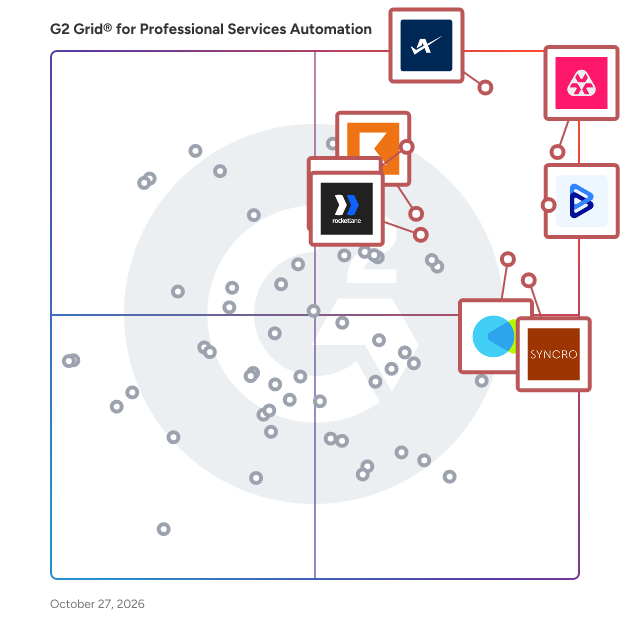
## G2 Grid® for Professional Services Automation Software
![G2 Grid® for Professional Services Automation Software plotting products by satisfaction and market presence](https://www.g2.com/categories/professional-services-automation/grids.png?focus%5B%5D=929&focus%5B%5D=1532&focus%5B%5D=51154&focus%5B%5D=101553&focus%5B%5D=104559&focus%5B%5D=19175&focus%5B%5D=152187&focus%5B%5D=21135)
Highlighted products: Autotask, BigTime, CMap, Syncro, Deltek Vantagepoint, SAP Cloud ERP (SAP S/4HANA Cloud), Rocketlane, and Keka.
Underlying data: [Grid® JSON](https://www.g2.com/categories/professional-services-automation/grids.json?focus%5B%5D=autotask&amp;focus%5B%5D=bigtime&amp;focus%5B%5D=cmap&amp;focus%5B%5D=syncro&amp;focus%5B%5D=deltek-vantagepoint&amp;focus%5B%5D=sap-cloud-erp-sap-s-4hana-cloud&amp;focus%5B%5D=rocketlane-corp&amp;focus%5B%5D=keka)


## How Many Professional Services Automation Software Products Does G2 Track?
**Total Products under this Category:** 137

### Category Stats (Jul 2026)
- **Average Rating**: 4.29/5 The average rating of products in this category, based on all submitted ratings
- **Top Trending Product**: Project Insight (+0.79%) - Among all products in this category, Project Insight recorded the largest rating increase compared to last month
*Last updated: July 11, 2026*


## How Does G2 Rank Professional Services Automation Software Products?

**Why You Can Trust G2's Software Rankings:**

- 30 Analysts and Data Experts
- 24,600+ Authentic Reviews
- 137+ Products
- Unbiased Rankings

G2's software rankings are built on verified user reviews, rigorous moderation, and a consistent research methodology maintained by a team of analysts and data experts. Each product is measured using the same transparent criteria, with no paid placement or vendor influence. While reviews reflect real user experiences, which can be subjective, they offer valuable insight into how software performs in the hands of professionals. Together, these inputs power the G2 Score, a standardized way to compare tools within every category.


## Which Professional Services Automation Software Is Best for Your Use Case?

- **Leader:** [Autotask](https://www.g2.com/products/autotask/reviews)
- **Highest Performer:** [PSOHUB.](https://www.g2.com/products/psohub/reviews)
- **Easiest to Use:** [Syncro](https://www.g2.com/products/syncro/reviews)
- **Top Trending:** [Rocketlane](https://www.g2.com/products/rocketlane-corp/reviews)
- **Best Free Software:** [BigTime](https://www.g2.com/products/bigtime/reviews)


---

**Sponsored**

### Screendragon

Screendragon is an enterprise work management and orchestrated intelligence platform built for complex marketing, and agency operations.​ It combines structured work management with AI-powered workflow orchestration, giving organisations real-time operational intelligence across projects, people, budgets, approvals, and performance. By connecting planning, execution, governance, and reporting in one platform, Screendragon helps teams run work with confidence at scale.​ Designed for organisations managing high volumes of work, multiple stakeholders, and strict governance requirements, Screendragon is commonly used by enterprise content teams, in-house agencies, external agencies, and marketing project teams that need visibility, control, and automation beyond basic task management.​ Key capabilities include configurable workflows, automated and AI-assisted approvals, resource and capacity planning, financial forecasting, and advanced operational reporting. The platform adapts to existing processes rather than forcing rigid templates, making it well suited to complex or regulated environments.​ Screendragon is designed to work as part of a broader enterprise ecosystem. It integrates with existing tools and platforms and provides an open API, enabling organisations to extend workflows, automate data exchange, and connect Screendragon to their wider technology stack.​ Trusted by global organisations including Kellogg’s, BP, TBWA, and McCann Worldgroup.


[Visit website](https://www.g2.com/external_clickthroughs/record?secure%5Bad_program%5D=paid_promo&amp;secure%5Bad_slot%5D=category_product_list&amp;secure%5Bcategory_id%5D=156&amp;secure%5Bchosen_at%5D=2026-07-11T13%3A48%3A21Z&amp;secure%5Bmedium%5D=sponsored&amp;secure%5Bprioritized%5D=false&amp;secure%5Bproduct_id%5D=61482&amp;secure%5Bresource_id%5D=156&amp;secure%5Bresource_type%5D=Category&amp;secure%5Bsource_type%5D=category_page&amp;secure%5Bsource_url%5D=https%3A%2F%2Fwww.g2.com%2Fcategories%2Fprofessional-services-automation%3Fpage%3D2&amp;secure%5Btoken%5D=819ae8b303633273dbbac99e3ebac283fbe0017b54a002d9983ed02d1986ad45&amp;secure%5Burl%5D=https%3A%2F%2Fwww.screendragon.com%2Fsolutions%2F&amp;secure%5Burl_type%5D=paid_promos)

---


## Professional Services Automation Software Features & Capabilities

### What are the Best Professional Services Automation Software with Portfolio Performance?
Monitor the performance of different types of portfolios and programs.

**Top-rated Professional Services Automation Software for Portfolio Performance:**
- [Autotask](https://www.g2.com/products/autotask/reviews)
- [BigTime](https://www.g2.com/products/bigtime/reviews)
- [CMap](https://www.g2.com/products/cmap/reviews)
[Explore Professional Services Automation Software with Portfolio Performance](https://www.g2.com/categories/professional-services-automation/f/portfolio-performance)

### What are the Best Professional Services Automation Software with Portfolio Definition?
Define multiple types of portfolios for projects, programs, and services.

**Top-rated Professional Services Automation Software for Portfolio Definition:**
- [Autotask](https://www.g2.com/products/autotask/reviews)
- [BigTime](https://www.g2.com/products/bigtime/reviews)
- [CMap](https://www.g2.com/products/cmap/reviews)
[Explore Professional Services Automation Software with Portfolio Definition](https://www.g2.com/categories/professional-services-automation/f/portfolio-definition)

### What are the Best Professional Services Automation Software with Project Accounting?
Deliver features to track and manage costs and revenues by project.

**Top-rated Professional Services Automation Software for Project Accounting:**
- [Autotask](https://www.g2.com/products/autotask/reviews)
- [BigTime](https://www.g2.com/products/bigtime/reviews)
- [CMap](https://www.g2.com/products/cmap/reviews)
[Explore Professional Services Automation Software with Project Accounting](https://www.g2.com/categories/professional-services-automation/f/project-accounting)

### What are the Best Professional Services Automation Software with Payments?
Accepts multiple types of payments from clients and match with invoices.

**Top-rated Professional Services Automation Software for Payments:**
- [Autotask](https://www.g2.com/products/autotask/reviews)
- [BigTime](https://www.g2.com/products/bigtime/reviews)
- [CMap](https://www.g2.com/products/cmap/reviews)
[Explore Professional Services Automation Software with Payments](https://www.g2.com/categories/professional-services-automation/f/payments)

### What are the Best Professional Services Automation Software with Portfolio Mix?
Create the optimal mix of portfolios to achieve operational and financial goals.

**Top-rated Professional Services Automation Software for Portfolio Mix:**
- [Autotask](https://www.g2.com/products/autotask/reviews)
- [BigTime](https://www.g2.com/products/bigtime/reviews)
- [CMap](https://www.g2.com/products/cmap/reviews)
[Explore Professional Services Automation Software with Portfolio Mix](https://www.g2.com/categories/professional-services-automation/f/portfolio-mix)


## What Are the Top-Rated Professional Services Automation Software Products in 2026?
### 1. [Dynamics 365 Project Operations](https://www.g2.com/products/dynamics-365-project-operations/reviews)
Dynamics 365 for Project Service Automation helps teams work efficiently by giving them automation technology and a complete view into their client relationships.


**Average Rating:** 4.0/5.0
**Total Reviews:** 12
**How Do G2 Users Rate Dynamics 365 Project Operations?**

- **Has the product been a good partner in doing business?:** 8.3/10 (Category avg: 8.7/10)
- **Portfolio Performance:** 6.7/10 (Category avg: 7.9/10)
- **Workflow:** 8.3/10 (Category avg: 8.4/10)

**Who Is the Company Behind Dynamics 365 Project Operations?**

- **Seller:** [Microsoft](https://www.g2.com/sellers/microsoft)
- **Year Founded:** 1975
- **HQ Location:** Redmond, Washington
- **Twitter:** @microsoft (13,091,739 Twitter followers)
- **LinkedIn® Page:** https://www.linkedin.com/company/microsoft/ (231,632 employees on LinkedIn®)
- **Ownership:** MSFT

**Who Uses This Product?**
- **Company Size:** 50% Mid-Market, 33% Enterprise


#### What Are Recent G2 Reviews of Dynamics 365 Project Operations?

**"[Great tool for sales](https://www.g2.com/survey_responses/dynamics-365-project-operations-review-6575747)"**

**Rating:** 5.0/5.0 stars
*— Verified User in Information Technology and Services*

[Read full review](https://www.g2.com/survey_responses/dynamics-365-project-operations-review-6575747)

---

**"[I have been integrating my applications with D365 for past 6 years &amp; realised key benefits for RMs.](https://www.g2.com/survey_responses/dynamics-365-project-operations-review-5440279)"**

**Rating:** 4.5/5.0 stars
*— Verified User in Banking*

[Read full review](https://www.g2.com/survey_responses/dynamics-365-project-operations-review-5440279)

---


#### What Are G2 Users Discussing About Dynamics 365 Project Operations?

- [What is dynamic PSA?](https://www.g2.com/discussions/dynamics-365-project-service-automation-what-is-dynamic-psa-626371e3-7f61-4821-9055-2d7455943340)
- [What is dynamic PSA?](https://www.g2.com/discussions/dynamics-365-project-service-automation-what-is-dynamic-psa-7606a096-8a64-4e3c-9703-a781b3a2b2fd)
- [What is dynamic PSA?](https://www.g2.com/discussions/dynamics-365-project-service-automation-what-is-dynamic-psa)
- [What is dynamic PSA?](https://www.g2.com/discussions/what-is-dynamic-psa)
- [What is PSA Microsoft?](https://www.g2.com/discussions/dynamics-365-project-service-automation-what-is-psa-microsoft)

### 2. [Workday Professional Services Automation](https://www.g2.com/products/workday-professional-services-automation/reviews)
Workday Professional Services Automation (PSA) automates the entire Opportunity to Cash process in one intuitive tool, linked directly to HCM and financials data like skills, resource availability, project margins, billing and staff utilization, all designed to match the right talent to the right project at the right time. This eliminates siloed systems, reducing manual, error-prone work, and preventing revenue leakage. Workday Services CPQ (Configure, Price, Quote) integrates with your CRM system to track project opportunities as they progress and automatically creates customer facing quotes, contracts and project resourcing plans, reducing several manual steps in the Sales to Service handoff and jumpstarting projects as soon as they are sold. Built with an adaptable architecture, Workday PSA supports flexible and secure project management, finance, accounting, and HR processes all on one platform, allowing for quick adaptation to business changes with &quot;on the fly&quot; reporting.


**Average Rating:** 4.1/5.0
**Total Reviews:** 20
**How Do G2 Users Rate Workday Professional Services Automation?**

- **Has the product been a good partner in doing business?:** 6.3/10 (Category avg: 8.7/10)
- **Portfolio Performance:** 6.7/10 (Category avg: 7.9/10)
- **Workflow:** 8.9/10 (Category avg: 8.4/10)
- **What is your organization&#39;s estimated ROI on the product (payback period in months)?:** 10/10 (Category avg: 10/10)

**Who Is the Company Behind Workday Professional Services Automation?**

- **Seller:** [Workday](https://www.g2.com/sellers/workday)
- **Year Founded:** 2005
- **HQ Location:** Pleasanton, CA
- **Twitter:** @Workday (52,273 Twitter followers)
- **LinkedIn® Page:** https://www.linkedin.com/company/17719/ (24,145 employees on LinkedIn®)
- **Ownership:** NYSE:WDAY

**Who Uses This Product?**
- **Company Size:** 68% Enterprise, 27% Mid-Market


#### What Are Recent G2 Reviews of Workday Professional Services Automation?

**"[Glueing Salesforce CMS daily business with HR management](https://www.g2.com/survey_responses/workday-professional-services-automation-review-9414399)"**

**Rating:** 4.5/5.0 stars
*— Verified User in Computer Software*

[Read full review](https://www.g2.com/survey_responses/workday-professional-services-automation-review-9414399)

---

**"[Workday](https://www.g2.com/survey_responses/workday-professional-services-automation-review-4202669)"**

**Rating:** 5.0/5.0 stars
*— Verified User in Insurance*

[Read full review](https://www.g2.com/survey_responses/workday-professional-services-automation-review-4202669)

---


### 3. [VOGSY](https://www.g2.com/products/vogsy-vogsy/reviews)
Lead-to-cash platform for global professional services organizations, combining PSA capabilities with project-based ERP to manage operations and financial performance. VOGSY is a Professional Services Automation (PSA) and project-based ERP platform designed for global professional services organizations that need to manage the full lead-to-cash lifecycle, including sales opportunities, project delivery, resource planning, project accounting, invoicing, and financial performance in a single operational system. The platform helps consulting firms, agencies, technology services companies, and other project-based businesses coordinate work across teams, offices, and countries while maintaining visibility into operational and financial performance. As a PSA and services ERP platform, VOGSY supports the full lead-to-cash lifecycle, allowing organizations to move from opportunity management and project planning to delivery, billing, and revenue reporting. The platform integrates operational data with financial insights, enabling leadership teams to track utilization, forecast revenue, and analyze project profitability across multiple entities and currencies. VOGSY combines the operational capabilities of PSA software with multi-entity project finance and reporting capabilities of a project-based ERP, enabling organizations to manage both delivery and financial performance. VOGSY is commonly used by professional services firms with 50 to 1,000 employees that operate across multiple regions or legal entities. These organizations often face challenges managing global delivery, aligning project execution with financial reporting, and maintaining visibility into margins and capacity across distributed teams. These organizations often require both operational coordination (PSA) and financial structure (ERP), particularly when managing multiple entities, currencies, and reporting requirements. VOGSY provides a centralized PSA platform that connects project operations with financial outcomes while allowing organizations to retain their existing regional accounting systems. Key capabilities: • End-to-end lead-to-cash workflow management connecting CRM opportunities, project planning, delivery, billing, and revenue recognition • Global resource management and capacity planning for allocating talent across projects, regions, and teams • Multi-currency project accounting across ERP entities and consolidated financial reporting • Time tracking, expense management, and automated billing tied directly to project budgets and contract terms • Project profitability analysis and ERP-level financial reporting, utilization tracking, and revenue forecasting • AI assistant provides profitability, capacity, and client health details (or data or reports) in natural language and automates daily tasks Security, compliance, and infrastructure: • ISO 42001 • ISO 27001 • SOC 1 • ISAE 3402 • Hosted on Google Cloud for global scalability and security • SSO support for Microsoft 365 and Google Workspace Integrations: • HubSpot • Salesforce • Zoho • Pipedrive • Copper • QuickBooks • Xero • Sage • Deltek • Certinia • Oracle NetSuite • Exact • Tally • Datev • Microsoft 365 • Google Workspace • Jira • Other web applications • API-based synchronization By connecting project delivery data with financial reporting and operational planning, VOGSY helps professional services organizations streamline global operations through a unified PSA and project-based ERP platform. Many organizations rely on multiple separate systems that limit visibility across teams, entities, and financial performance. VOGSY brings these capabilities together in a single platform, providing a more connected view of operations, resource utilization, and project profitability. Finance, operations, and delivery teams work from a shared source of operational and financial intelligence while maintaining compatibility with existing accounting systems across different countries.


**Average Rating:** 4.7/5.0
**Total Reviews:** 37
**How Do G2 Users Rate VOGSY?**

- **Has the product been a good partner in doing business?:** 9.7/10 (Category avg: 8.7/10)
- **Portfolio Performance:** 8.7/10 (Category avg: 7.9/10)
- **Workflow:** 8.9/10 (Category avg: 8.4/10)
- **What is your organization&#39;s estimated ROI on the product (payback period in months)?:** 10/10 (Category avg: 10/10)

**Who Is the Company Behind VOGSY?**

- **Seller:** [VOGSY](https://www.g2.com/sellers/vogsy)
- **Company Website:** https://www.vogsy.global
- **Year Founded:** 2015
- **HQ Location:** Boston, MA
- **Twitter:** @VOGSY_PSA (84 Twitter followers)
- **LinkedIn® Page:** https://www.linkedin.com/company/vogsy/ (14 employees on LinkedIn®)

**Who Uses This Product?**
- **Top Industries:** Computer Software, Marketing and Advertising
- **Company Size:** 84% Small-Business, 11% Mid-Market


#### What Are VOGSY's Pros and Cons?

**Pros:**

- Ease of Use (4 reviews)
- Integrations (4 reviews)
- Easy Integrations (3 reviews)
- Implementation Ease (3 reviews)
- Onboarding (3 reviews)

**Cons:**

- Integration Issues (1 reviews)
- Lack of Integrations (1 reviews)
- Limited Customization (1 reviews)
- Missing Features (1 reviews)
- Time Tracking Issues (1 reviews)


### What Do G2 Reviewers Say About VOGSY?
*AI-generated summary from verified user reviews*

**Pros:**

- Users praise the **ease of use** of VOGSY, appreciating its intuitive onboarding and seamless integration features.
- Users value the **seamless integration** of VOGSY with tools like QuickBooks and Google BigQuery for effective data management.
- Users value the **easy integrations** of VOGSY, facilitating seamless functionality within their IT ecosystem.
- Users commend VOGSY for its **implementation ease** , enabling quick onboarding and minimal training for seamless operation.
- Users find the **onboarding process of VOGSY easy and intuitive** , enabling a quick and smooth transition to operational use.

**Cons:**

- Users note the **integration issues** with German HR platforms, necessitating double-entry and complicating time-tracking processes.
- Users wish for more **native integration options** with specialized platforms to simplify time-tracking and reduce double-entry.
- Users find the **limited customization** options for reports in VOGSY restrictive, impacting their ability to tailor outputs.
- Users desire an improved **purchase order integration** in VOGSY for better vendor documentation and tracking.
- Users report **time tracking issues** due to double-entry requirements, complicating compliance with German labor laws.

#### What Are Recent G2 Reviews of VOGSY?

**"[Efficient and Effective—It Just Works!](https://www.g2.com/survey_responses/vogsy-review-12112543)"**

**Rating:** 5.0/5.0 stars
*— John-Erik H.*

[Read full review](https://www.g2.com/survey_responses/vogsy-review-12112543)

---

**"[Flexible, Intuitive, and Data-Driven—VOGSY Exceeds Expectations](https://www.g2.com/survey_responses/vogsy-review-12112567)"**

**Rating:** 5.0/5.0 stars
*— Carlos Q.*

[Read full review](https://www.g2.com/survey_responses/vogsy-review-12112567)

---


#### What Are G2 Users Discussing About VOGSY?

- [What is VOGSY used for?](https://www.g2.com/discussions/what-is-vogsy-used-for)

### 4. [BigTime Projector](https://www.g2.com/products/bigtime-projector/reviews)
Projector PSA, now powered by Big Time Software, is a cloud-based Professional Services Automation tool specifically designed for managing delivery organizations. Modules for Project Accounting, Project Delivery and Resource Management enable better profit margins, utilization rates and operational efficiency. Projector BI provides PSO specific analytics and intelligence to measure and manage at every level and model your future success. Integrate with your CRM for extended visibility into pipeline revenue and staffing. Projector’s out of the box functionality supports multi-currency, multi-company capabilities. Our tech-agnostic approach to integration means no compromising on tech today or in the future. Projector is the PSA built by services professionals to support the specific needs of PSOs and is consistently ranked #1 for customer satisfaction.


**Average Rating:** 4.5/5.0
**Total Reviews:** 131
**How Do G2 Users Rate BigTime Projector?**

- **Has the product been a good partner in doing business?:** 9.5/10 (Category avg: 8.7/10)
- **Portfolio Performance:** 9.3/10 (Category avg: 7.9/10)
- **Workflow:** 9.1/10 (Category avg: 8.4/10)
- **What is your organization&#39;s estimated ROI on the product (payback period in months)?:** 10/10 (Category avg: 10/10)

**Who Is the Company Behind BigTime Projector?**

- **Seller:** [BigTime](https://www.g2.com/sellers/bigtime)
- **Year Founded:** 2002
- **HQ Location:** Chicago, IL
- **Twitter:** @BigTimeSoftware (2,744 Twitter followers)
- **LinkedIn® Page:** https://www.linkedin.com/company/1457823/ (168 employees on LinkedIn®)

**Who Uses This Product?**
- **Top Industries:** Information Technology and Services, Management Consulting
- **Company Size:** 49% Mid-Market, 40% Small-Business


#### What Are Recent G2 Reviews of BigTime Projector?

**"[Fantastic product, even better customer service](https://www.g2.com/survey_responses/bigtime-projector-review-7919677)"**

**Rating:** 5.0/5.0 stars
*— John F.*

[Read full review](https://www.g2.com/survey_responses/bigtime-projector-review-7919677)

---

**"[Projector Professional Services Automation (PSA) software is best for tracking my time and expenses](https://www.g2.com/survey_responses/bigtime-projector-review-7342991)"**

**Rating:** 5.0/5.0 stars
*— Mohamed I.*

[Read full review](https://www.g2.com/survey_responses/bigtime-projector-review-7342991)

---


#### What Are G2 Users Discussing About BigTime Projector?

- [What is Projector PSA used for?](https://www.g2.com/discussions/what-is-projector-psa-used-for)

### 5. [Planview AdaptiveWork](https://www.g2.com/products/planview-adaptivework/reviews)
Planview® AdaptiveWork: Adapt and Deliver with Confidence Any Portfolio, Any Project, Any Team. Planview AdaptiveWork (formerly Clarizen) is a versatile portfolio, project, and work management software embedded with practical AI capabilities that adapts to how you operate so you can proactively plan and deliver any type and size of portfolio, project, and work. Whether you manage IT initiatives, business projects, R&amp;D programs, or professional services, AdaptiveWork provides ready-to-use capabilities whether you’re just starting, expanding and growing, or ready to scale into a full enterprise-wide strategy execution machine. Planview Anvi™, the AI for Connected Work, delivers expert-level guidance and intelligent actions powered by deep domain expertise and contextual data intelligence across your work ecosystem. This AI-driven capability enables strategic work execution by understanding your unique business context, helping organizations make more informed decisions and optimize their workflows. Built for (Nearly) Any Project Type Examples on projects include: - IT Portfolios - Business Projects - R&amp;D Programs - Professional Services Key Capabilities Ready on Day One - Artificial Intelligence - Portfolio Management - Project Management - Resource Planning - Team Collaboration Quick to Start, Ready to Adapt Start with out-of-box templates and workflows, then adjust as needed. AdaptiveWork grows with your organization while maintaining consistency across all portfolios. Thousands of global customers across 124 countries, including industry leaders such as Cognizant, Benifex, Dell, Publicis Groupe, JLL, IBM, and Siemens Energy, rely on AdaptiveWork to drive their business success. The platform&#39;s versatility makes it suitable for various industries, from technology and consulting to manufacturing and professional services. &quot;After successfully implementing core project and program management capabilities over the past few years, we&#39;ve built a solid foundation of data and processes. This positions us very well to leverage Gen AI and Planview Anvi to drive the next wave of transformation - enhancing productivity, accelerating adoption, and achieving higher levels of PPM maturity.&quot; – Estela Lauricella-Thota, Senior Director of Technology Transformation at Cognizant


**Average Rating:** 4.1/5.0
**Total Reviews:** 519
**How Do G2 Users Rate Planview AdaptiveWork?**

- **Has the product been a good partner in doing business?:** 8.4/10 (Category avg: 8.7/10)
- **Portfolio Performance:** 8.3/10 (Category avg: 7.9/10)
- **Workflow:** 9.0/10 (Category avg: 8.4/10)
- **What is your organization&#39;s estimated ROI on the product (payback period in months)?:** 10/10 (Category avg: 10/10)

**Who Is the Company Behind Planview AdaptiveWork?**

- **Seller:** [Planview](https://www.g2.com/sellers/planview)
- **Company Website:** https://www.planview.com
- **Year Founded:** 1989
- **HQ Location:** Austin, TX
- **Twitter:** @Planview (3,049 Twitter followers)
- **LinkedIn® Page:** https://www.linkedin.com/company/7268/ (1,868 employees on LinkedIn®)

**Who Uses This Product?**
- **Who Uses This:** Project Manager, Senior Project Manager
- **Top Industries:** Information Technology and Services, Computer Software
- **Company Size:** 49% Mid-Market, 41% Enterprise


#### What Are Planview AdaptiveWork's Pros and Cons?

**Pros:**

- Easy Management (2 reviews)
- Project Management (2 reviews)
- Customizability (1 reviews)
- Customization (1 reviews)
- Ease of Use (1 reviews)

**Cons:**

- Access Limitations (1 reviews)
- App Functionality (1 reviews)
- Change Adjustments (1 reviews)
- Inadequate Tools (1 reviews)
- Manual Data Entry (1 reviews)


### What Do G2 Reviewers Say About Planview AdaptiveWork?
*AI-generated summary from verified user reviews*

**Pros:**

- Users value the **easy management** features of Planview AdaptiveWork, facilitating seamless project tracking and customization.
- Users value the **customizability** of Planview AdaptiveWork, enabling efficient management and tracking of projects effortlessly.
- Users value the **customizability** of Planview AdaptiveWork, allowing easy creation of workflows and adaptable views without coding.
- Users value the **extensive customization options** in Planview AdaptiveWork, allowing easy creation of workflows without coding skills.
- Users value the **ease of customization** in Planview AdaptiveWork, allowing simple workflow creation without coding experience.

**Cons:**

- Users face **access limitations** , as many processes require external completion before being entered into Planview AdaptiveWork.
- Users struggle with **poor app functionality** , often resorting to external processes instead of using the tool effectively.
- Users face significant **change adjustments** , as many processes require external completion before being entered into the tool.
- Users face **inadequate tools** with many processes not functioning well, leading to workarounds outside the system.
- Users find that **manual data entry** is often necessary due to poor out-of-the-box functionality and inadequate support.

#### What Are Recent G2 Reviews of Planview AdaptiveWork?

**"[Director of Construction &amp; PMO](https://www.g2.com/survey_responses/planview-adaptivework-review-12748316)"**

**Rating:** 4.5/5.0 stars
*— Timothy G.*

[Read full review](https://www.g2.com/survey_responses/planview-adaptivework-review-12748316)

---

**"[Flexibility and Depth, but Challenges in Configuration](https://www.g2.com/survey_responses/planview-adaptivework-review-12756711)"**

**Rating:** 4.0/5.0 stars
*— Iker R.*

[Read full review](https://www.g2.com/survey_responses/planview-adaptivework-review-12756711)

---


#### What Are G2 Users Discussing About Planview AdaptiveWork?

- [What are the features of project management?](https://www.g2.com/discussions/planview-adaptivework-what-are-the-features-of-project-management)
- [What is clarizen used for?](https://www.g2.com/discussions/what-is-clarizen-used-for)
- [What is clarizen one?](https://www.g2.com/discussions/what-is-clarizen-one)
- [What is clarizen software?](https://www.g2.com/discussions/what-is-clarizen-software) - 1 comment

### 6. [Accelo](https://www.g2.com/products/accelo/reviews)
Most PSA platforms tell you what happened. Accelo tells you what&#39;s coming. Professional services firms running on disconnected tools are making critical decisions on data that&#39;s always a few weeks behind: a project tool here, a resourcing spreadsheet there, an invoicing system that talks to neither. Scope drifts unnoticed. Margins erode before anyone sees them. Resourcing decisions get made on gut feel. And 42% of professional services firms are losing revenue they&#39;ve already earned as a result. Accelo is an AI-powered PSA platform that connects project delivery, resourcing, and financials in one place and tells you what&#39;s coming before it becomes a problem. Not another tool to add to the stack. The platform that replaces the gaps between them. Where traditional PSA software records and reports, Accelo forecasts and flags. AI surfaces scope drift and margin risk in real time, while there&#39;s still a conversation to have, not a write-off to explain. Intelligent resourcing matches people to work based on skills, workload, and past performance, not just who has an opening in a spreadsheet. Capacity gaps show up against your live pipeline before they affect delivery, not after a hiring decision goes wrong. Accelo&#39;s AI is embedded across the platform, not bolted on as a separate module or a marketing claim. Predictive risk flagging monitors projects, resourcing, and financials simultaneously, surfacing early warning signals before they escalate. AI-predicted project completion dates update in real time as delivery data changes. Automated time capture logs billable hours as work happens, closing the gap between hours worked and revenue collected. Intelligent resource matching evaluates skills, workload, and past project performance (not just calendar availability) to recommend the right person for every engagement. For teams already using AI tools in their workflow, Accelo connects natively to ChatGPT, Claude, Gemini, and Microsoft Copilot via MCP, enabling natural language queries against live project, resource, and financial data without leaving the tools your team already uses. Every project your team completes makes the platform&#39;s recommendations sharper. Accelo serves agencies, consulting firms, IT services companies, and other professional services businesses with 20 to +500 employees managing a mix of project and retainer work, where leadership is making decisions based on incomplete or delayed data and the cost of finding out too late is already showing up in the margins.


**Average Rating:** 4.3/5.0
**Total Reviews:** 661
**How Do G2 Users Rate Accelo?**

- **Has the product been a good partner in doing business?:** 8.8/10 (Category avg: 8.7/10)
- **Portfolio Performance:** 8.1/10 (Category avg: 7.9/10)
- **Workflow:** 8.6/10 (Category avg: 8.4/10)
- **What is your organization&#39;s estimated ROI on the product (payback period in months)?:** 10/10 (Category avg: 10/10)

**Who Is the Company Behind Accelo?**

- **Seller:** [Accelo](https://www.g2.com/sellers/accelo)
- **Company Website:** https://www.accelo.com/
- **Year Founded:** 2011
- **HQ Location:** Denver, Colorado
- **Twitter:** @accelo (2,980 Twitter followers)
- **LinkedIn® Page:** https://www.linkedin.com/company/6652457/ (73 employees on LinkedIn®)

**Who Uses This Product?**
- **Who Uses This:** Project Manager, CEO
- **Top Industries:** Marketing and Advertising, Information Technology and Services
- **Company Size:** 72% Small-Business, 25% Mid-Market


#### What Are Accelo's Pros and Cons?

**Pros:**

- Ease of Use (35 reviews)
- Project Management (29 reviews)
- Efficiency (26 reviews)
- Client Management (25 reviews)
- Task Management (25 reviews)

**Cons:**

- Missing Features (20 reviews)
- Learning Curve (19 reviews)
- Limited Features (16 reviews)
- Limited Customization (13 reviews)
- Complexity (12 reviews)


### What Do G2 Reviewers Say About Accelo?
*AI-generated summary from verified user reviews*

**Pros:**

- Users value the **ease of use** of Accelo, seamlessly integrating various business functions into one platform.
- Users love the **integrated project management** features of Accelo, enabling seamless handling of projects and timesheets.
- Users value the **efficiency** of Accelo&#39;s integrated system, streamlining crucial business operations for better productivity.
- Users value the **integration of CRM and project management** in Accelo, enhancing efficiency and simplifying business growth.
- Users value the **automation and versatility** of Accelo&#39;s task management, enhancing project planning and communication efficiency.

**Cons:**

- Users report **missing features** in Accelo, like inadequate reporting and limitations in syncing capabilities with Quickbooks.
- Users find the **learning curve steep** due to extensive configuration needs and affecting usability for small enterprises.
- Users find the **limited features** of Accelo restricting for multiple businesses and insightful reporting.
- Users express concerns over **limited customization** in Accelo, which hinders usability for small enterprises and specific tasks.
- Users find the **complexity** of Accelo challenging, citing a steep learning curve and difficulty in navigation.

#### What Are Recent G2 Reviews of Accelo?

**"[Total control of projects and billing in an integrated and agile platform](https://www.g2.com/survey_responses/accelo-review-12720113)"**

**Rating:** 4.0/5.0 stars
*— Antonio H.*

[Read full review](https://www.g2.com/survey_responses/accelo-review-12720113)

---

**"[Streamlined Project Management, But Setup Can Be Overwhelming for Small Businesses](https://www.g2.com/survey_responses/accelo-review-11856029)"**

**Rating:** 4.5/5.0 stars
*— Ifeoma E.*

[Read full review](https://www.g2.com/survey_responses/accelo-review-11856029)

---


#### What Are G2 Users Discussing About Accelo?

- [What is Accelo used for?](https://www.g2.com/discussions/what-is-accelo-used-for) - 1 comment

### 7. [Productive](https://www.g2.com/products/productive/reviews)
Productive is the all-in-one professional services automation platform built for agencies, consultancies, and service businesses. Manage projects, resources, and finances in one place — with real-time visibility across your entire company. Sales Pipeline Easily manage your sales funnel and win more deals with a simple CRM solution. You won&#39;t ever forget to follow up on that potential business opportunity. When the deal is won, convert it into a project, and continue working in the same tool. Project Management Assign work, collaborate, and organize agency projects. Project Management features are integrated with Time Tracking and Task Management so you will run projects faster and more elegantly. Resource Planning Organize and plan a work schedule for your entire agency. Find bottlenecks that cost money and consume time. Avoid collisions, burnouts, and overbooking with resource planning features. Powerful Business Insights Build customizable reports from scratch by focusing on what&#39;s important for you: Actual Utilization by People, Revenue &amp; Profitability by Client, Invoiced Revenue by Months, Overtime by People, Profitability by Months, etc. Billing and Invoicing Automatically track invoiced amounts and be confident you’ve billed everything you need. Simply generate invoices using tracked time on billable services.


**Average Rating:** 4.6/5.0
**Total Reviews:** 73
**How Do G2 Users Rate Productive?**

- **Has the product been a good partner in doing business?:** 9.5/10 (Category avg: 8.7/10)
- **Portfolio Performance:** 10.0/10 (Category avg: 7.9/10)
- **Workflow:** 8.9/10 (Category avg: 8.4/10)
- **What is your organization&#39;s estimated ROI on the product (payback period in months)?:** 6.6/10 (Category avg: 10/10)

**Who Is the Company Behind Productive?**

- **Seller:** [Productive](https://www.g2.com/sellers/productive)
- **Year Founded:** 2014
- **HQ Location:** Claymont, US
- **LinkedIn® Page:** https://www.linkedin.com/company/productive-io/ (161 employees on LinkedIn®)

**Who Uses This Product?**
- **Top Industries:** Marketing and Advertising, Computer Software
- **Company Size:** 80% Small-Business, 17% Mid-Market


#### What Are Productive's Pros and Cons?

**Pros:**

- Ease of Use (10 reviews)
- Customizability (8 reviews)
- Team Collaboration (7 reviews)
- User Interface (7 reviews)
- Customer Support (6 reviews)

**Cons:**

- Lack of Integrations (3 reviews)
- Missing Features (3 reviews)
- Organization Difficulties (3 reviews)
- Challenging Reporting (2 reviews)
- Complex Usability (2 reviews)


### What Do G2 Reviewers Say About Productive?
*AI-generated summary from verified user reviews*

**Pros:**

- Users commend the **ease of use** of Productive, appreciating its intuitive interface and helpful integrations.
- Users value the **high customizability** of Productive, enabling personalized setups that enhance team productivity and individual preferences.
- Users value the **effective team collaboration** in Productive, enhancing project management and communication across the organization.
- Users love the **intuitive and user-friendly interface** of Productive, enhancing onboarding and overall project management experience.
- Users appreciate the **responsive and personal customer support** from Productive, enhancing their overall experience with the tool.

**Cons:**

- Users find the **lack of integrations** in Productive frustrating, impacting workflow and overall efficiency.
- Users find **missing features** like flexible reporting and mobile functionality limiting their experience with Productive.
- Users face **organization difficulties** due to overwhelming layout and limited integration across modules, complicating navigation and workflows.
- Users find the **challenging reporting** aspect of Productive limits flexibility and ease of use, especially on mobile devices.
- Users find **complex usability** due to overwhelming layouts and limited reporting tools, especially for new users.

#### What Are Recent G2 Reviews of Productive?

**"[We have used Productive for almost 10 years. It was good when we started and keeps getting better!](https://www.g2.com/survey_responses/productive-review-9235077)"**

**Rating:** 5.0/5.0 stars
*— Torin S.*

[Read full review](https://www.g2.com/survey_responses/productive-review-9235077)

---

**"[Intuitive Dashboards and Powerful AI Reporting That Transformed Our Workflow](https://www.g2.com/survey_responses/productive-review-13031933)"**

**Rating:** 5.0/5.0 stars
*— Verified User in Marketing and Advertising*

[Read full review](https://www.g2.com/survey_responses/productive-review-13031933)

---


#### What Are G2 Users Discussing About Productive?

- [What are the benefits of productivity software?](https://www.g2.com/discussions/what-are-the-benefits-of-productivity-software)
- [What are 3 examples of productivity software?](https://www.g2.com/discussions/what-are-3-examples-of-productivity-software)
- [What is productivity software?](https://www.g2.com/discussions/what-is-productivity-software)
- [What does productivity software include?](https://www.g2.com/discussions/what-does-productivity-software-include)

### 8. [Precursive](https://www.g2.com/products/precursive/reviews)
Precursive is a fast and flexible professional services automation solution to connect demand with delivery, improve execution and grow recurring revenue, that is 100% native to the Salesforce platform. Optimize sales, resourcing, delivery execution, customer collaboration and revenue management. Trusted by the worlds&#39;s best services teams such as Relias, Degreed, DealerTrack (COX Automotive), PagerDuty, Dutchie, Torrent Consulting. HOW WE HELP SALES - SERVICES HANDOVERS Create smooth transitions between sales, services and customer success by automating project creation from opportunities in Salesforce with the relevant staffing requirements and project plans ready to go! CUSTOMER ONBOARDING &amp; IMPLEMENTATION Precursive combines award-winning customer onboarding &amp; project management functionality with the leading capacity planning &amp; resource management tool. AGILE RESOURCE MANAGEMENT Agile resourcing tool with capacity planning, utilization monitoring &amp; simple scheduling. Easy-to-use planner so when projects shift, you can react. Gantt view &amp; skill seeker so the right person &amp; knowledge is found. HIGH-VELOCITY SERVICES DELIVERY Improve time-to-value with smooth services delivery. Close a new customer, launch them quickly and seamlessly transition to services delivery with project templates, Kanban boards, task allocation and easy-to-use time tracking. PROJECT ACCOUNTING Track project performance: see budgets, costings, profit &amp; margin in clear dashboards. Forecast and recognise services revenues across all people &amp; projects. Get rollups of all your key KPIs including billings, margins and revenues. TIMESHEET, EXPENSES &amp; BILLING Pre-populate timesheets for billable &amp; non-billable time + expenses. Accurate time tracking &amp; billing reduces revenue leakage. Improve cashflow with on-time accurate invoicing. Workforce management incl. staff profiles. REPORTING &amp; DASHBOARDS Make better decisions about your team, projects and customers across professional services. Get real-time information on capacity, demand, margins, project health, services revenues, and utilization. CUSTOMER SUCCESS Examples of how we have helped our customers include: Dealertrack | Automotive Software + $1M cost saving with increased visibility into resource management and finances. + 1.5 hours per week saved by 7 senior VPs Relias | Healthcare E-learning Software + $500k in cost savings without staff reductions and accelerated speed-to-revenue. + 34% increase on margin now easily tracked on a PS dashboard P3 Adaptive | Consultancy + 30 hours saved monthly - Streamlined systems now allow time spent on other tasks + 100% better forecasting - Financial forecasting has now doubled to 2 months


**Average Rating:** 4.2/5.0
**Total Reviews:** 64
**How Do G2 Users Rate Precursive?**

- **Has the product been a good partner in doing business?:** 8.9/10 (Category avg: 8.7/10)
- **Portfolio Performance:** 7.9/10 (Category avg: 7.9/10)
- **Workflow:** 7.6/10 (Category avg: 8.4/10)
- **What is your organization&#39;s estimated ROI on the product (payback period in months)?:** 10/10 (Category avg: 10/10)

**Who Is the Company Behind Precursive?**

- **Seller:** [Precursive](https://www.g2.com/sellers/precursive)
- **Year Founded:** 2011
- **HQ Location:** London
- **Twitter:** @precursive (2,598 Twitter followers)
- **LinkedIn® Page:** https://www.linkedin.com/company/1703411/ (35 employees on LinkedIn®)

**Who Uses This Product?**
- **Top Industries:** Computer Software, Information Technology and Services
- **Company Size:** 73% Mid-Market, 16% Small-Business


#### What Are Precursive's Pros and Cons?

**Pros:**

- Customer Support (4 reviews)
- Ease of Use (4 reviews)
- Project Management (4 reviews)
- User-Friendly (4 reviews)
- Intuitive (3 reviews)

**Cons:**

- Access Limitations (3 reviews)
- Limited Reporting (3 reviews)
- Reporting Issues (3 reviews)
- Limitations (2 reviews)
- App Functionality (1 reviews)


### What Do G2 Reviewers Say About Precursive?
*AI-generated summary from verified user reviews*

**Pros:**

- Users praise the **exceptional customer support** from Precursive, appreciating the responsive and personalized assistance they receive.
- Users find the **ease of use** in Precursive remarkable, streamlining task management without added complexity.
- Users appreciate the **seamless integration and intuitive design** of Precursive, enhancing project management within Salesforce effortlessly.
- Users love the **user-friendly interface** of Precursive, appreciating its intuitive design and seamless integration with Salesforce.
- Users find Precursive&#39;s **intuitive design** enhances efficiency, thanks to its seamless integration and familiar Salesforce interface.

**Cons:**

- Users find **access limitations** frustrating due to multiple clicks, license restrictions, and a constrained mobile experience.
- Users find the **limited reporting capabilities** of Precursive restrictive, impacting efficiency and data visibility across multiple objects.
- Users experience **reporting limitations** in Precursive, particularly with multi-object data visibility and editing restrictions.
- Users express concerns about **reporting limitations** and excessive navigation, impacting overall workflow efficiency in Precursive.
- Users find the **app functionality lacking** , with too many clicks and limited mobile experience impacting usability.

#### What Are Recent G2 Reviews of Precursive?

**"[Quality product, expert guidance](https://www.g2.com/survey_responses/precursive-review-11754590)"**

**Rating:** 5.0/5.0 stars
*— Ryan F.*

[Read full review](https://www.g2.com/survey_responses/precursive-review-11754590)

---

**"[feature rich software, with excellent support](https://www.g2.com/survey_responses/precursive-review-11537250)"**

**Rating:** 4.5/5.0 stars
*— luke s.*

[Read full review](https://www.g2.com/survey_responses/precursive-review-11537250)

---


#### What Are G2 Users Discussing About Precursive?

- [What is Precursive used for?](https://www.g2.com/discussions/what-is-precursive-used-for)

### 9. [Naverisk](https://www.g2.com/products/naverisk/reviews)
Naverisk is a robust All-in-One IT services platform for MSPs and IT Pro’s. Naverisk combines RMM, Service Desk, PSA and 100% free Data Protection into a single powerful solution. Our excellent global 24x7 support also means you can get real time help when you need it.


**Average Rating:** 4.7/5.0
**Total Reviews:** 71
**How Do G2 Users Rate Naverisk?**

- **Has the product been a good partner in doing business?:** 9.6/10 (Category avg: 8.7/10)
- **Portfolio Performance:** 9.4/10 (Category avg: 7.9/10)
- **Workflow:** 10.0/10 (Category avg: 8.4/10)
- **What is your organization&#39;s estimated ROI on the product (payback period in months)?:** 9.5/10 (Category avg: 10/10)

**Who Is the Company Behind Naverisk?**

- **Seller:** [Naverisk](https://www.g2.com/sellers/naverisk)
- **Year Founded:** 2010
- **HQ Location:** Auckland CBD, Auckland
- **Twitter:** @Naverisk (426 Twitter followers)
- **LinkedIn® Page:** https://www.linkedin.com/company/1557974/ (21 employees on LinkedIn®)

**Who Uses This Product?**
- **Who Uses This:** Director, Owner
- **Top Industries:** Information Technology and Services, Computer &amp; Network Security
- **Company Size:** 90% Small-Business, 8% Mid-Market


#### What Are Naverisk's Pros and Cons?

**Pros:**

- Reliability (3 reviews)
- Customer Support (2 reviews)
- Ease of Use (2 reviews)
- Client Management (1 reviews)
- Community Engagement (1 reviews)

**Cons:**

- Inefficient Ticketing System (1 reviews)
- Login Issues (1 reviews)
- Poor Design (1 reviews)
- Ticketing Issues (1 reviews)
- UX Improvement (1 reviews)


### What Do G2 Reviewers Say About Naverisk?
*AI-generated summary from verified user reviews*

**Pros:**

- Users commend Naverisk for its **high reliability** , consistently supporting IT needs with excellent value and support.
- Users commend the **excellent customer support** from Naverisk, praising their responsiveness and reliability over the years.
- Users value the **intuitive interface** of Naverisk, allowing new staff to learn quickly and easily.
- Users value the **high-quality client management** and reliable support from Naverisk, ensuring effective IT solutions.
- Users value the **high-quality support** from Naverisk, enhancing their IT experience through effective community engagement.

**Cons:**

- Users find the **ticketing system clunky** yet manageable, indicating room for improvement in efficiency.
- Users often face **login issues** requiring re-login to access all features effectively in Naverisk.
- Users feel the **interface is outdated** and needs a modern refresh for better usability.
- Users find the **ticketing system a little clunky** , but it&#39;s still manageable for their needs.
- Users feel the **interface is a bit dated** and would benefit from a modern refresh to enhance usability.

#### What Are Recent G2 Reviews of Naverisk?

**"[Fully Featured, Stable, and Highly Reliable](https://www.g2.com/survey_responses/naverisk-review-12003113)"**

**Rating:** 5.0/5.0 stars
*— Shannon H.*

[Read full review](https://www.g2.com/survey_responses/naverisk-review-12003113)

---

**"[Perfect Pricing and Local Hosting That Fits My Needs](https://www.g2.com/survey_responses/naverisk-review-12658821)"**

**Rating:** 5.0/5.0 stars
*— Kevin D.*

[Read full review](https://www.g2.com/survey_responses/naverisk-review-12658821)

---


#### What Are G2 Users Discussing About Naverisk?

- [What is Naverisk RMM &amp; PSA used for?](https://www.g2.com/discussions/what-is-naverisk-rmm-psa-used-for)

### 10. [Screendragon](https://www.g2.com/products/screendragon/reviews)
Screendragon is an enterprise work management and orchestrated intelligence platform built for complex marketing, and agency operations.​ It combines structured work management with AI-powered workflow orchestration, giving organisations real-time operational intelligence across projects, people, budgets, approvals, and performance. By connecting planning, execution, governance, and reporting in one platform, Screendragon helps teams run work with confidence at scale.​ Designed for organisations managing high volumes of work, multiple stakeholders, and strict governance requirements, Screendragon is commonly used by enterprise content teams, in-house agencies, external agencies, and marketing project teams that need visibility, control, and automation beyond basic task management.​ Key capabilities include configurable workflows, automated and AI-assisted approvals, resource and capacity planning, financial forecasting, and advanced operational reporting. The platform adapts to existing processes rather than forcing rigid templates, making it well suited to complex or regulated environments.​ Screendragon is designed to work as part of a broader enterprise ecosystem. It integrates with existing tools and platforms and provides an open API, enabling organisations to extend workflows, automate data exchange, and connect Screendragon to their wider technology stack.​ Trusted by global organisations including Kellogg’s, BP, TBWA, and McCann Worldgroup.


**Average Rating:** 4.7/5.0
**Total Reviews:** 110
**How Do G2 Users Rate Screendragon?**

- **Has the product been a good partner in doing business?:** 9.7/10 (Category avg: 8.7/10)
- **Portfolio Performance:** 8.6/10 (Category avg: 7.9/10)
- **Workflow:** 9.6/10 (Category avg: 8.4/10)
- **What is your organization&#39;s estimated ROI on the product (payback period in months)?:** 10/10 (Category avg: 10/10)

**Who Is the Company Behind Screendragon?**

- **Seller:** [Screendragon](https://www.g2.com/sellers/screendragon)
- **Company Website:** https://www.screendragon.com/
- **Year Founded:** 2001
- **HQ Location:** London, England
- **Twitter:** @screendragon (4,101 Twitter followers)
- **LinkedIn® Page:** https://www.linkedin.com/company/2018080/ (85 employees on LinkedIn®)

**Who Uses This Product?**
- **Who Uses This:** Project Manager
- **Top Industries:** Marketing and Advertising, Consumer Goods
- **Company Size:** 50% Mid-Market, 45% Enterprise


#### What Are Screendragon's Pros and Cons?

**Pros:**

- Customer Support (12 reviews)
- Team Collaboration (10 reviews)
- Ease of Use (8 reviews)
- Flexibility (7 reviews)
- Quick Response (6 reviews)

**Cons:**

- Limitations (3 reviews)
- Complexity (2 reviews)
- Complex Usability (2 reviews)
- Confusion (2 reviews)
- Inadequate Reporting (2 reviews)


### What Do G2 Reviewers Say About Screendragon?
*AI-generated summary from verified user reviews*

**Pros:**

- Users praise the **exceptional customer support** of Screendragon, highlighting quick responses and tailored solutions for their needs.
- Users value the **high efficiency and responsiveness** of Screendragon&#39;s team, enhancing overall collaboration and project management.
- Users find Screendragon to have **exceptional ease of use** , enhancing workflow management and simplifying project tracking and documentation.
- Users value the **flexibility** of Screendragon, appreciating its ability to adapt to varied project scopes and needs.
- Users value the **quick response** of Screendragon&#39;s team, appreciating their efficiency and support with urgent needs.

**Cons:**

- Users note significant **limitations in flexibility and user-friendliness** , leading to challenges in meeting larger organizational needs.
- Users find the **complexity of the admin console and settings** to be a barrier to user-friendliness.
- Users find the **complexity of the admin console** and settings challenging, affecting usability and user-friendliness.
- Users find the **confusion in report creation** challenging, wishing for a more user-friendly and dynamic platform.
- Users find the **reporting process inadequate** , as manual builds and technical barriers complicate report creation and exports.

#### What Are Recent G2 Reviews of Screendragon?

**"[Intuitive and Streamlined Project Management with Exceptional Support](https://www.g2.com/survey_responses/screendragon-review-12436350)"**

**Rating:** 5.0/5.0 stars
*— Chelsea L.*

[Read full review](https://www.g2.com/survey_responses/screendragon-review-12436350)

---

**"[Screendragon is a great resource &amp; project mgmt tool with a strong team standing behind the product](https://www.g2.com/survey_responses/screendragon-review-11383581)"**

**Rating:** 4.5/5.0 stars
*— Sheung L.*

[Read full review](https://www.g2.com/survey_responses/screendragon-review-11383581)

---


#### What Are G2 Users Discussing About Screendragon?

- [What is your experience with Screendragon for managing creative projects, and how does it compare to other tools?](https://www.g2.com/discussions/what-is-your-experience-with-screendragon-for-managing-creative-projects-and-how-does-it-compare-to-other-tools)
- [What is Screendragon used for?](https://www.g2.com/discussions/what-is-screendragon-used-for)

### 11. [Bonsai](https://www.g2.com/products/bonsai/reviews)
Bonsai is a one-stop platform for agencies, consultancies and professional service providers. It is designed to provide businesses with a complete and real-time overview of their business. Simplify your business operations and consolidate your projects, clients and team into one integrated, easy-to-use platform. From contracts, proposals and project management to client billing, revenue tracking and resource management. Project Management: Assign projects &amp; tasks to your team, prioritize your week and see exactly how your projects progress. Set project budgets &amp; avoid unexpected costs. Gantt chart, Kanban view, integrated timer for easy billing, and collaboration with external partners for an efficient work. Team Time Tracking: Get an instant report of your team&#39;s tracked hours with accurate timesheets &amp; see who&#39;s over capacity at a glance. Monitor your business&#39;s utilization &amp; get clarity on your team&#39;s efficiency &amp; profitability. Plan your resources in advance to keep your projects on track and on budget. CRM: Manage your clients and their projects in one place. Create unique client profiles with all your notes, contacts, rates and tags. Invite your clients to your branded Client Portal where they can access projects, documents and links you’ve shared with them.


**Average Rating:** 4.3/5.0
**Total Reviews:** 100
**How Do G2 Users Rate Bonsai?**

- **Has the product been a good partner in doing business?:** 9.1/10 (Category avg: 8.7/10)
- **What is your organization&#39;s estimated ROI on the product (payback period in months)?:** 10/10 (Category avg: 10/10)

**Who Is the Company Behind Bonsai?**

- **Seller:** [Bonsai (YC W16)](https://www.g2.com/sellers/bonsai-yc-w16)
- **Year Founded:** 2015
- **HQ Location:** San Francisco, California
- **Twitter:** @bonsaiinc (3,038 Twitter followers)
- **LinkedIn® Page:** https://www.linkedin.com/company/6591614/ (41 employees on LinkedIn®)

**Who Uses This Product?**
- **Who Uses This:** Owner
- **Top Industries:** Marketing and Advertising, Design
- **Company Size:** 94% Small-Business, 1% Enterprise


#### What Are Bonsai's Pros and Cons?

**Pros:**

- Ease of Use (21 reviews)
- Invoicing (17 reviews)
- Invoice Management (13 reviews)
- Time-saving (13 reviews)
- Time Tracking (13 reviews)

**Cons:**

- Missing Features (18 reviews)
- Expensive (8 reviews)
- Integration Issues (8 reviews)
- Limited Customization (8 reviews)
- Limited Features (8 reviews)


### What Do G2 Reviewers Say About Bonsai?
*AI-generated summary from verified user reviews*

**Pros:**

- Users love the **ease of use** of Bonsai, seamlessly managing proposals, invoices, and schedules in one place.
- Users value the **all-in-one invoicing management** of Bonsai, simplifying proposals, payments, and services effortlessly.
- Users appreciate the **convenient all-in-one invoice management** feature of Bonsai, streamlining business operations effectively.
- Users value the **time-saving capabilities** of Bonsai, consolidating tasks like invoicing and project management efficiently.
- Users appreciate the **efficient time tracking** features of Bonsai, streamlining project management and invoicing seamlessly.

**Cons:**

- Users note a **lack of features** like CSV export, mobile app, and responsive customer service, impacting overall satisfaction.
- Users find Bonsai **expensive** compared to similar services, often paying for features they don&#39;t utilize effectively.
- Users report **integration issues** with Bonsai, highlighting complications with Cronofy and the need for better task-tracking features.
- Users find the **limited customization** options frustrating, wishing for more adaptability to meet their specific needs.
- Users find the **limited features** of Bonsai restrictive, feeling they pay for unnecessary options and lack essential tools.

#### What Are Recent G2 Reviews of Bonsai?

**"[Great Accounts/CRM/collab solution for micro and small businesses](https://www.g2.com/survey_responses/bonsai-review-9713271)"**

**Rating:** 5.0/5.0 stars
*— Anita Q.*

[Read full review](https://www.g2.com/survey_responses/bonsai-review-9713271)

---

**"[A love hate relationship I love to hate](https://www.g2.com/survey_responses/bonsai-review-10245202)"**

**Rating:** 5.0/5.0 stars
*— Braden E.*

[Read full review](https://www.g2.com/survey_responses/bonsai-review-10245202)

---


#### What Are G2 Users Discussing About Bonsai?

- [What is Bonsai for freelancers?](https://www.g2.com/discussions/what-is-bonsai-for-freelancers)
- [Is Bonsai a CRM?](https://www.g2.com/discussions/is-bonsai-a-crm) - 1 comment
- [How does Bonsai app work?](https://www.g2.com/discussions/how-does-bonsai-app-work) - 1 comment
- [What is Bonsai software?](https://www.g2.com/discussions/what-is-bonsai-software) - 2 comments

### 12. [HaloPSA](https://www.g2.com/products/halopsa/reviews)
HaloPSA is a comprehensive, cloud-based Professional Services Automation (PSA) software tailored for Managed Service Providers (MSPs) and IT service providers. It integrates essential business functions such as service desk management, project planning, billing, and customer relationship management into a unified platform. This consolidation streamlines operations, enhances productivity, and improves service delivery, making it an ideal solution for service-oriented businesses. Key Features and Functionality: - Service Desk: Flexible, automation-driven ticketing system designed specifically for MSPs. - Contracts: Configurable agreements to fit various billing structures and client needs. - Billing &amp; Invoices: Automated invoicing processes to simplify financial operations. - Sales &amp; CRM: Tools to enhance pipeline visibility and manage customer relationships effectively. - Stock Management: Centralized tracking of stock levels to streamline procurement and inventory control. - Project Management: Comprehensive oversight of projects from initiation to completion. - Time Tracking: Accurate logging of billable hours to ensure precise client billing. - Reporting &amp; Analytics: Customizable reports and real-time analytics to monitor performance and inform decision-making. Primary Value and Solutions Provided: HaloPSA addresses the complexities MSPs face by offering an all-in-one platform that reduces the need for multiple disparate tools. Its automation capabilities free up resources by handling repetitive tasks, allowing teams to focus on strategic initiatives. The software&#39;s scalability ensures it grows alongside the business, accommodating increasing demands without compromising efficiency. By centralizing various business functions, HaloPSA enhances collaboration, improves service delivery, and drives overall business growth.


**Average Rating:** 4.6/5.0
**Total Reviews:** 43
**How Do G2 Users Rate HaloPSA?**

- **Has the product been a good partner in doing business?:** 9.1/10 (Category avg: 8.7/10)
- **Portfolio Performance:** 7.8/10 (Category avg: 7.9/10)
- **Workflow:** 9.1/10 (Category avg: 8.4/10)
- **What is your organization&#39;s estimated ROI on the product (payback period in months)?:** 10/10 (Category avg: 10/10)

**Who Is the Company Behind HaloPSA?**

- **Seller:** [Halo Service Solutions](https://www.g2.com/sellers/halo-service-solutions)
- **Year Founded:** 1994
- **HQ Location:** Stowmarket, England
- **LinkedIn® Page:** https://www.linkedin.com/company/2083634/ (294 employees on LinkedIn®)

**Who Uses This Product?**
- **Top Industries:** Information Technology and Services, Computer &amp; Network Security
- **Company Size:** 91% Small-Business, 9% Mid-Market


#### What Are HaloPSA's Pros and Cons?

**Pros:**

- Ease of Use (3 reviews)
- Customer Support (2 reviews)
- Easy Integrations (2 reviews)
- Flexibility (2 reviews)
- Organization (2 reviews)

**Cons:**

- Learning Curve (2 reviews)
- Billing Issues (1 reviews)
- Complex Usability (1 reviews)
- Difficult Setup (1 reviews)
- Invoicing Issues (1 reviews)


### What Do G2 Reviewers Say About HaloPSA?
*AI-generated summary from verified user reviews*

**Pros:**

- Users value the **ease of use** of HaloPSA, enjoying its simplicity and efficiency for daily tasks.
- Users commend the **excellent customer support** of HaloPSA, highlighting responsiveness and comprehensive assistance.
- Users praise the **easy integrations** with various systems, enhancing workflow and ticket management efficiently.
- Users appreciate the **flexibility** of HaloPSA, allowing customization based on individual use-cases and evolving needs.
- Users appreciate the **organization capabilities** of HaloPSA, making ticket tracking and daily tasks smoother.

**Cons:**

- Users often face a **steep learning curve** due to unclear documentation and potential feature conflicts in HaloPSA.
- Users find the **billing issues** in HaloPSA frustrating, especially with limitations on recurring billing features.
- Users find the **complex usability** of HaloPSA challenging due to insufficient documentation and reliance on trial and error.
- Users find the **difficult setup** of HaloPSA frustrating, wishing for a more straightforward implementation process.
- Users find that HaloPSA has **invoicing issues** , as the system lacks full support for recurring billing and purchase orders.

#### What Are Recent G2 Reviews of HaloPSA?

**"[Automation and Integration at Its Best](https://www.g2.com/survey_responses/halopsa-review-12797548)"**

**Rating:** 5.0/5.0 stars
*— Randal W.*

[Read full review](https://www.g2.com/survey_responses/halopsa-review-12797548)

---

**"[HaloPSA - A Comprehensive Solution](https://www.g2.com/survey_responses/halopsa-review-11850009)"**

**Rating:** 4.0/5.0 stars
*— max .*

[Read full review](https://www.g2.com/survey_responses/halopsa-review-11850009)

---


#### What Are G2 Users Discussing About HaloPSA?

- [What is HaloPSA used for?](https://www.g2.com/discussions/what-is-halopsa-used-for)

### 13. [Avaza](https://www.g2.com/products/avaza/reviews)
Avaza provides an integrated suite of functionality for running your client-focused business. This includes Project Management &amp; Collaboration, Team Chat, Resource Scheduling, Time Tracking, Expense Management, Quoting &amp; Invoicing. Each of these modules can be used together or independently to suit a wide range of businesses. Avaza is particularly useful for consulting &amp; professional services companies that need all these functions, and enjoy having a single source of truth &amp; powerful reporting. Avaza is built in the cloud and available on any device.


**Average Rating:** 4.5/5.0
**Total Reviews:** 371
**How Do G2 Users Rate Avaza?**

- **Has the product been a good partner in doing business?:** 9.3/10 (Category avg: 8.7/10)
- **Portfolio Performance:** 7.9/10 (Category avg: 7.9/10)
- **Workflow:** 8.7/10 (Category avg: 8.4/10)
- **What is your organization&#39;s estimated ROI on the product (payback period in months)?:** 8.8/10 (Category avg: 10/10)

**Who Is the Company Behind Avaza?**

- **Seller:** [Avaza Software](https://www.g2.com/sellers/avaza-software)
- **Company Website:** https://www.avaza.com
- **Year Founded:** 2014
- **HQ Location:** Neutral Bay
- **Twitter:** @AvazaHQ (1,038 Twitter followers)
- **LinkedIn® Page:** https://www.linkedin.com/company/3778536/ (20 employees on LinkedIn®)

**Who Uses This Product?**
- **Who Uses This:** Owner, Project Manager
- **Top Industries:** Marketing and Advertising, Information Technology and Services
- **Company Size:** 75% Small-Business, 22% Mid-Market


#### What Are Avaza's Pros and Cons?

**Pros:**

- Ease of Use (16 reviews)
- Time Tracking (15 reviews)
- Customer Support (12 reviews)
- Time-saving (12 reviews)
- User Interface (12 reviews)

**Cons:**

- Limited Features (11 reviews)
- Missing Features (10 reviews)
- Limited Customization (6 reviews)
- Challenging Reporting (5 reviews)
- Reporting Issues (5 reviews)


### What Do G2 Reviewers Say About Avaza?
*AI-generated summary from verified user reviews*

**Pros:**

- Users find Avaza **easy to use** , enabling effective collaboration and clear management of projects and team activities.
- Users value the **effective time tracking** in Avaza, simplifying overview of team productivity and budget management.
- Users commend the **world-class customer support** of Avaza, noting quick and effective assistance with their queries.
- Users value the **time-saving features** of Avaza, facilitating effective project management and team utilization insights.
- Users commend Avaza&#39;s **intuitive user interface** , noting its simplicity and ease of use alongside powerful functionality.

**Cons:**

- Users find **limited features** in Avaza, such as inflexible invoicing and challenging project management options.
- Users find the **missing features** in Avaza limiting, particularly in grouping timesheet entries and managing sub-tasks.
- Users face **limited customization** options in Avaza, leading to a lack of personalization in templates and reports.
- Users find **reporting challenges** with Avaza, struggling to extract relevant data from the complex and overwhelming setup.
- Users face challenges with **reporting issues** , including limited invoice customization and difficulties in extracting relevant data.

#### What Are Recent G2 Reviews of Avaza?

**"[Avaza Helps Me Track Time, Bill Accurately, and Build Client Trust](https://www.g2.com/survey_responses/avaza-review-9235185)"**

**Rating:** 5.0/5.0 stars
*— Trent C.*

[Read full review](https://www.g2.com/survey_responses/avaza-review-9235185)

---

**"[Avaza has help my team stay organized](https://www.g2.com/survey_responses/avaza-review-9237212)"**

**Rating:** 4.0/5.0 stars
*— Craig S.*

[Read full review](https://www.g2.com/survey_responses/avaza-review-9237212)

---


#### What Are G2 Users Discussing About Avaza?

- [What is Avaza used for?](https://www.g2.com/discussions/what-is-avaza-used-for)

### 14. [Allfred](https://www.g2.com/products/allfred/reviews)
Allfred is a workflow management tool tailor-made for Ad or PR agencies that enables all team members to work seamlessly together from the client&#39;s first brief to invoicing, streamlining the process and minimizing mistakes. Allfred was designed with &quot;creatives in mind&quot; to shift agencies&#39; focus to do more creative work and less on paperwork and numerous Spreadsheets. We understand that for CFOs and managing directors, every decision must be rooted in financial data. That&#39;s why our platform offers real-time integrated financial and project data, allowing for better business decisions and increased profitability. Starting with automated Proposals and Budgeting, through interactive Resource Planning up to integrated Project Management and one-click Time Tracking, Allfred gives agency teams the right tools to make the process simple and efficient to deliver agencies more profit. \*Time management\* To-do-list and one-click time tracking reduces friction in communication within creative departments. \*Resource planning\* Interactive resource planning with drag&amp;drop options increases agency team capacity and helps reduce overwork. \*Project management\* Time-saving automation and process assistance reduce dull work and frequent budgeting and project management mistakes. \*Financial analysis\* The Finance dashboard provides a comprehensive overview of your financial data and KPIs in one place. It helps you understand and analyze the sources of your revenue and identify opportunities for growth and allows you to track and optimize profitability and performance. With a step-by-step approach to onboarding into agency processes, we reduce the management effort and shorten the implementation time. We believe that better work for everyone means better profit for the agency.


**Average Rating:** 4.7/5.0
**Total Reviews:** 52
**How Do G2 Users Rate Allfred?**

- **Has the product been a good partner in doing business?:** 9.6/10 (Category avg: 8.7/10)
- **Portfolio Performance:** 7.8/10 (Category avg: 7.9/10)
- **Workflow:** 5.0/10 (Category avg: 8.4/10)
- **What is your organization&#39;s estimated ROI on the product (payback period in months)?:** 5.7/10 (Category avg: 10/10)

**Who Is the Company Behind Allfred?**

- **Seller:** [Allfred](https://www.g2.com/sellers/allfred)
- **Year Founded:** 2020
- **HQ Location:** Bratislava, Slovakia
- **LinkedIn® Page:** https://www.linkedin.com/company/allfred (8 employees on LinkedIn®)

**Who Uses This Product?**
- **Who Uses This:** Account Manager
- **Top Industries:** Marketing and Advertising
- **Company Size:** 83% Small-Business, 17% Mid-Market


#### What Are Allfred's Pros and Cons?

**Pros:**

- Ease of Use (18 reviews)
- Task Management (16 reviews)
- Project Management (15 reviews)
- Features (14 reviews)
- User Interface (14 reviews)

**Cons:**

- Slow Loading (8 reviews)
- Slow Performance (8 reviews)
- Update Issues (4 reviews)
- Bug Issues (3 reviews)
- Glitches (3 reviews)


### What Do G2 Reviewers Say About Allfred?
*AI-generated summary from verified user reviews*

**Pros:**

- Users appreciate the **ease of use** of Allfred, praising its simple interface and seamless integration with other tools.
- Users enjoy the **simple and organized task management** of Allfred, streamlining all their work in one place.
- Users value the **comprehensive project management** capabilities of Allfred, enhancing team collaboration and workflow transparency.
- Users value the **robust features** of Allfred for efficient resource planning, project management, and task organization.
- Users appreciate the **easy-to-use interface** of Allfred, facilitating seamless integration and enhanced productivity in their tasks.

**Cons:**

- Users experience occasional **slow loading** times, especially with large sheets, impacting their overall efficiency.
- Users experience occasional **slow performance** with large data sheets, though improvements in speed have been noted.
- Users report **update issues** , noting slow processing and difficulties with recent changes impacting their workflow.
- Users report **bug issues** with Allfred that can disrupt workflow, though they are usually minor and manageable.
- Users report **occasional glitches** that disrupt workflow, although they are generally considered minor issues.

#### What Are Recent G2 Reviews of Allfred?

**"[Efficient and Intuitive, But Room for Improvement](https://www.g2.com/survey_responses/allfred-review-10617922)"**

**Rating:** 4.5/5.0 stars
*— Vladyslav M.*

[Read full review](https://www.g2.com/survey_responses/allfred-review-10617922)

---

**"[One-Stop Tool for Managing Sales, Production, and Team Capacity](https://www.g2.com/survey_responses/allfred-review-12279476)"**

**Rating:** 4.0/5.0 stars
*— Adriano V.*

[Read full review](https://www.g2.com/survey_responses/allfred-review-12279476)

---


### 15. [Workamajig](https://www.g2.com/products/workamajig-workamajig/reviews)
Workamajig is a purpose-built agency management software for creative agencies, advertising agencies, marketing agencies, design studios, PR firms, and in-house creative departments. Unlike general project management tools, Workamajig is built around how agencies actually work - combining project management, time tracking, resource planning, client billing and invoicing, digital proofing, financial reporting, and CRM in one integrated system. No separate accounting software. No disconnected tools. One platform from creative brief to final invoice. Agency principals, project managers, and traffic coordinators get real-time visibility into project profitability, retainer hours, staff utilization, and client budgets. Serves agencies of 10 to 500+ users.


**Average Rating:** 3.9/5.0
**Total Reviews:** 297
**How Do G2 Users Rate Workamajig?**

- **Has the product been a good partner in doing business?:** 8.3/10 (Category avg: 8.7/10)
- **Portfolio Performance:** 8.2/10 (Category avg: 7.9/10)
- **Workflow:** 8.3/10 (Category avg: 8.4/10)
- **What is your organization&#39;s estimated ROI on the product (payback period in months)?:** 10/10 (Category avg: 10/10)

**Who Is the Company Behind Workamajig?**

- **Seller:** [Workamajig](https://www.g2.com/sellers/workamajig)
- **Year Founded:** 2008
- **HQ Location:** Anthem, AZ
- **Twitter:** @workamajig (2,401 Twitter followers)
- **LinkedIn® Page:** https://www.linkedin.com/company/2768397/ (38 employees on LinkedIn®)

**Who Uses This Product?**
- **Who Uses This:** Project Manager, Account Manager
- **Top Industries:** Marketing and Advertising, Information Technology and Services
- **Company Size:** 62% Small-Business, 31% Mid-Market


#### What Are Workamajig's Pros and Cons?

**Pros:**

- Ease of Use (9 reviews)
- Customization (6 reviews)
- Customizability (5 reviews)
- Comprehensive Features (4 reviews)
- Easy Tracking (4 reviews)

**Cons:**

- Complex Usability (5 reviews)
- Learning Curve (5 reviews)
- Poor Design (5 reviews)
- User Experience (5 reviews)
- Steep Learning Curve (4 reviews)


### What Do G2 Reviewers Say About Workamajig?
*AI-generated summary from verified user reviews*

**Pros:**

- Users love the **ease of use** of Workamajig, appreciating its user-friendly design and efficient project management features.
- Users appreciate the **customization capabilities** of Workamajig, allowing tailored solutions for different departments and roles.
- Users value the **high level of customizability** in Workamajig, tailoring the platform to meet diverse departmental needs.
- Users love the **comprehensive features** of Workamajig, offering tailored solutions essential for creative agency operations.
- Users value the **easy tracking** features of Workamajig, as it centralizes project information for better collaboration.

**Cons:**

- Users find **complex usability** to hinder adoption, with many clicking issues and difficulty in navigation and resource management.
- Users find the **steep learning curve** challenging, but training helps ease the transition and understanding of tools.
- Users find the **poor design** of Workamajig limits functionality and complicates user engagement and resource management.
- Users find the **user experience lacking** , citing confusion and inefficiency in navigation and task management.
- Users find the **steep learning curve** challenging, making full adoption and understanding of Workamajig difficult.

#### What Are Recent G2 Reviews of Workamajig?

**"[Highly Adaptable WMJ with Seamless Integrations and Continuous Improvements](https://www.g2.com/survey_responses/workamajig-review-13073071)"**

**Rating:** 5.0/5.0 stars
*— Christina C.*

[Read full review](https://www.g2.com/survey_responses/workamajig-review-13073071)

---

**"[One-Stop Shop for Agency Success](https://www.g2.com/survey_responses/workamajig-review-13072598)"**

**Rating:** 5.0/5.0 stars
*— Cindy V.*

[Read full review](https://www.g2.com/survey_responses/workamajig-review-13072598)

---


### 16. [Cloud Coach](https://www.g2.com/products/cloud-coach/reviews)
From Onboarding to Professional Services and Success, post-sales teams are in constant dialogue with your customers. Touchpoints are fragmented, with colleagues working in system silos, driven by separate KPIs and working to contrasting health scores. At Cloud Coach, we break down these barriers. Our one tool for key post-sales processes helps your teams run Customer Onboarding projects, PSA and Customer Success processes without ever leaving Salesforce. One team, working from one platform.


**Average Rating:** 4.5/5.0
**Total Reviews:** 172
**How Do G2 Users Rate Cloud Coach?**

- **Has the product been a good partner in doing business?:** 9.3/10 (Category avg: 8.7/10)
- **Portfolio Performance:** 6.8/10 (Category avg: 7.9/10)
- **Workflow:** 8.2/10 (Category avg: 8.4/10)
- **What is your organization&#39;s estimated ROI on the product (payback period in months)?:** 10/10 (Category avg: 10/10)

**Who Is the Company Behind Cloud Coach?**

- **Seller:** [Cloud Coach](https://www.g2.com/sellers/cloud-coach-43497685-2c64-4700-a4ec-dacdf7bf3c94)
- **Company Website:** https://www.cloudcoach.com
- **Year Founded:** 2005
- **HQ Location:** Fort Collins, Colorado
- **Twitter:** @cloudcoach (116 Twitter followers)
- **LinkedIn® Page:** https://www.linkedin.com/company/2739348/ (46 employees on LinkedIn®)

**Who Uses This Product?**
- **Who Uses This:** Project Manager
- **Top Industries:** Computer Software, Information Technology and Services
- **Company Size:** 54% Mid-Market, 31% Small-Business


#### What Are Cloud Coach's Pros and Cons?

**Pros:**

- Ease of Use (51 reviews)
- Project Management (44 reviews)
- Integrations (42 reviews)
- Easy Integration (33 reviews)
- Salesforce Integration (32 reviews)

**Cons:**

- Learning Curve (24 reviews)
- Complexity (20 reviews)
- Missing Features (15 reviews)
- Limited Customization (13 reviews)
- Complex Usability (12 reviews)


### What Do G2 Reviewers Say About Cloud Coach?
*AI-generated summary from verified user reviews*

**Pros:**

- Users appreciate the **user-friendly interface** of Cloud Coach, enhancing productivity and collaboration for effective project management.
- Users value the **seamless project management** capabilities of Cloud Coach, enhancing organization and collaboration across teams.
- Users praise the **seamless Salesforce integration** in Cloud Coach for enhancing project visibility and collaborative efforts.
- Users value the **seamless integration with Salesforce** , enhancing project management without the need for multiple tools.
- Users appreciate the **seamless Salesforce integration** of Cloud Coach, enhancing project visibility and simplifying implementation processes.

**Cons:**

- Users find the **learning curve steep** , making initial navigation of Cloud Coach intimidating for new users.
- Users find Cloud Coach&#39;s interface to be **cumbersome and overly complex** , particularly during initial navigation and customization.
- Users express concerns about the **missing features** in Cloud Coach, limiting customization and efficiency for task management.
- Users find **limited customization** in Cloud Coach leads to complexity and challenges in adapting workflows effectively.
- Users find **Cloud Coach&#39;s complexity** overwhelming, particularly due to its numerous features and steep learning curve.

#### What Are Recent G2 Reviews of Cloud Coach?

**"[Seamless Salesforce Integration and Powerful Project Management](https://www.g2.com/survey_responses/cloud-coach-review-12110564)"**

**Rating:** 4.5/5.0 stars
*— Msalazar L.*

[Read full review](https://www.g2.com/survey_responses/cloud-coach-review-12110564)

---

**"[Unified Project, CRM &amp; Support Platform That Streamlines Workflows and Capacity Tracking](https://www.g2.com/survey_responses/cloud-coach-review-12276021)"**

**Rating:** 5.0/5.0 stars
*— Beatrice  R.*

[Read full review](https://www.g2.com/survey_responses/cloud-coach-review-12276021)

---


#### What Are G2 Users Discussing About Cloud Coach?

- [How do you use Cloud Coach?](https://www.g2.com/discussions/how-do-you-use-cloud-coach)
- [Does salesforce have a project management tool?](https://www.g2.com/discussions/does-salesforce-have-a-project-management-tool)
- [How long is the cloud coach program?](https://www.g2.com/discussions/how-long-is-the-cloud-coach-program)
- [What does Cloud Coach do?](https://www.g2.com/discussions/what-does-cloud-coach-do) - 1 comment

### 17. [WorkflowMAX](https://www.g2.com/products/workflowmax/reviews)
WorkflowMAX is a job and profitability management software solution specifically designed to assist service firms in optimizing their operations. This platform provides users with comprehensive control over essential aspects such as time management, team collaboration, and profit tracking, all consolidated into a single interface. By streamlining processes like project management, timesheet tracking, invoicing, and purchase order issuance, WorkflowMAX enhances clarity at every stage of a firm&#39;s workflow. Targeted primarily at growing service-oriented businesses, WorkflowMAX empowers users to scale their operations effectively. With the ability to monitor where time is allocated and profits are generated, firms can make informed decisions, delegate tasks with accuracy, and expand their services without uncertainty. This adaptability ensures that the software aligns with the unique workflows of each firm, rather than imposing a rigid structure that may not fit their needs. Key features of WorkflowMAX include its robust project management tools, which allow users to create, assign, and track projects in real time. The timesheet functionality simplifies the process of logging hours worked, ensuring that all team members can accurately report their time. Additionally, the invoicing and purchase order capabilities facilitate seamless financial transactions, making it easier for firms to manage their cash flow. The software also integrates deeply with popular accounting platforms like Xero and QuickBooks, enabling users to synchronize financial data effortlessly. The benefits of using WorkflowMAX extend beyond its core functionalities. The software is designed to provide users with insights into their operations, helping them identify areas for improvement and opportunities for growth. The dedicated support team is another significant advantage, as they are genuinely invested in the success of their clients, offering assistance and guidance as needed. This commitment to customer support, combined with the software&#39;s comprehensive features, positions WorkflowMAX as a valuable asset for service firms looking to enhance their operational efficiency and profitability.


**Average Rating:** 4.1/5.0
**Total Reviews:** 63
**How Do G2 Users Rate WorkflowMAX?**

- **Has the product been a good partner in doing business?:** 8.3/10 (Category avg: 8.7/10)
- **What is your organization&#39;s estimated ROI on the product (payback period in months)?:** 10/10 (Category avg: 10/10)

**Who Is the Company Behind WorkflowMAX?**

- **Seller:** [WorkflowMAX](https://www.g2.com/sellers/workflowmax)
- **Company Website:** https://workflowmax.com
- **Year Founded:** 2023
- **HQ Location:** Melbourne
- **LinkedIn® Page:** https://www.linkedin.com/company/workflowmax-by-bluerock/ (26 employees on LinkedIn®)

**Who Uses This Product?**
- **Who Uses This:** Director
- **Top Industries:** Marketing and Advertising, Accounting
- **Company Size:** 76% Small-Business, 14% Mid-Market


#### What Are WorkflowMAX's Pros and Cons?

**Pros:**

- Ease of Use (25 reviews)
- Time Tracking (13 reviews)
- Easy Integration (12 reviews)
- Integrations (10 reviews)
- Project Management (10 reviews)

**Cons:**

- Missing Features (7 reviews)
- Limited Functionality (5 reviews)
- Billing Issues (4 reviews)
- Time-Consumption (4 reviews)
- Invoicing Problems (3 reviews)


### What Do G2 Reviewers Say About WorkflowMAX?
*AI-generated summary from verified user reviews*

**Pros:**

- Users find WorkflowMAX to be **simple and easy to use** , appreciating its intuitive design and helpful resources.
- Users value the **seamless time tracking** of WorkflowMAX, which simplifies project management and enhances team efficiency.
- Users appreciate the **easy integration** with Xero, ensuring streamlined processes without double handling invoices.
- Users appreciate the **seamless integration with Xero** , enhancing efficiency by eliminating double handling of invoices.
- Users love the **intuitive project management** of WorkflowMax, providing clear insights and seamless tracking for their businesses.

**Cons:**

- Users find **missing features** like multi-currency billing limiting and seek improvements in the lead management system.
- Users find WorkflowMAX has **limited functionality** , particularly in lead management and handling multiple tasks efficiently.
- Users report **billing issues** , such as discrepancies between quoted and invoiced amounts and lack of multi-currency support.
- Users find the **time-consumption** excessive due to cumbersome processes and outdated interface, hindering efficiency.
- Users experience **invoicing problems** like discrepancies between quoted and invoice values, lacking multi-currency and tax deduction features.

#### What Are Recent G2 Reviews of WorkflowMAX?

**"[Perfect for Creative Studios: Easy Reporting and Seamless Xero Integration](https://www.g2.com/survey_responses/workflowmax-review-12021501)"**

**Rating:** 5.0/5.0 stars
*— Verified User in Graphic Design*

[Read full review](https://www.g2.com/survey_responses/workflowmax-review-12021501)

---

**"[Outstanding Experience with No Drawbacks](https://www.g2.com/survey_responses/workflowmax-review-12203791)"**

**Rating:** 5.0/5.0 stars
*— nam.bui@nzier.org.nz B.*

[Read full review](https://www.g2.com/survey_responses/workflowmax-review-12203791)

---


#### What Are G2 Users Discussing About WorkflowMAX?

- [What is WorkflowMax used for?](https://www.g2.com/discussions/what-is-workflowmax-used-for)

### 18. [Upland PSA](https://www.g2.com/products/upland-psa/reviews)
Upland PSA (formerly Tenrox) helps professional services teams take their business to new heights. Customers around the world use PSA to streamline business operations for time tracking, resource management, project planning, and project financial management. The solution enables professional services teams deliver projects with certainty, assign resources based on skills, cost, and availability, and exceed client expectations every time. Customers love Upland PSA for its complete system configuration, quick start with the essentials, and the expertise that&#39;s readily available to them. Learn more at www.uplandsoftware.com/psa/


**Average Rating:** 4.0/5.0
**Total Reviews:** 109
**How Do G2 Users Rate Upland PSA?**

- **Has the product been a good partner in doing business?:** 8.6/10 (Category avg: 8.7/10)
- **Portfolio Performance:** 7.6/10 (Category avg: 7.9/10)
- **Workflow:** 7.8/10 (Category avg: 8.4/10)
- **What is your organization&#39;s estimated ROI on the product (payback period in months)?:** 10/10 (Category avg: 10/10)

**Who Is the Company Behind Upland PSA?**

- **Seller:** [Upland Software](https://www.g2.com/sellers/upland-software)
- **Year Founded:** 2010
- **HQ Location:** Austin, TX
- **LinkedIn® Page:** https://www.linkedin.com/company/3139095/ (815 employees on LinkedIn®)
- **Ownership:** NASDAQ:UPLD
- **Total Revenue (USD mm):** $291

**Who Uses This Product?**
- **Who Uses This:** Project Manager
- **Top Industries:** Computer Software, Information Technology and Services
- **Company Size:** 69% Mid-Market, 16% Small-Business


#### What Are Recent G2 Reviews of Upland PSA?

**"[Upland PSA Review](https://www.g2.com/survey_responses/upland-psa-review-4136259)"**

**Rating:** 4.5/5.0 stars
*— Madonna C.*

[Read full review](https://www.g2.com/survey_responses/upland-psa-review-4136259)

---

**"[Feature rich project &amp; resource management tool](https://www.g2.com/survey_responses/upland-psa-review-9385094)"**

**Rating:** 4.5/5.0 stars
*— Verified User in Computer &amp; Network Security*

[Read full review](https://www.g2.com/survey_responses/upland-psa-review-9385094)

---


#### What Are G2 Users Discussing About Upland PSA?

- [What advice do you have for others considering Upland PSA for professional services automation?](https://www.g2.com/discussions/what-advice-do-you-have-for-others-considering-upland-psa-for-professional-services-automation)
- [What is Upland PSA used for?](https://www.g2.com/discussions/what-is-upland-psa-used-for) - 1 upvote

### 19. [Synergist](https://www.g2.com/products/synergist/reviews)
Synergist is an all-in-one agency and project management software, designed for agencies that want to improve performance and profitability. From CRM, job costing, project management, resource scheduling and capacity planning to timesheets, expenses, billing and reporting, Synergist gives you everything you need to manage your agency’s projects, people, clients, and financials. Synergist comes with hundreds of features and gives you more advanced functionality as you grow. But we get that every agency is unique, so your system setup should be too. Synergist’s flexible nature means it can be configured to work as your agency does and give you the exact data intelligence you need. https://www.synergist.co.uk/


**Average Rating:** 4.6/5.0
**Total Reviews:** 31
**How Do G2 Users Rate Synergist?**

- **Has the product been a good partner in doing business?:** 8.9/10 (Category avg: 8.7/10)
- **What is your organization&#39;s estimated ROI on the product (payback period in months)?:** 7.8/10 (Category avg: 10/10)

**Who Is the Company Behind Synergist?**

- **Seller:** [Synergist](https://www.g2.com/sellers/synergist)
- **Company Website:** https://www.synergist.co.uk/
- **Year Founded:** 2003
- **HQ Location:** Bollington, England, United Kingdom
- **LinkedIn® Page:** https://www.linkedin.com/company/synergist/ (41 employees on LinkedIn®)
- **Ownership:** Private

**Who Uses This Product?**
- **Top Industries:** Marketing and Advertising
- **Company Size:** 63% Small-Business, 34% Mid-Market


#### What Are Synergist's Pros and Cons?

**Pros:**

- Ease of Use (11 reviews)
- Features (9 reviews)
- Project Management (9 reviews)
- Ease of Learning (8 reviews)
- Project Tracking (8 reviews)

**Cons:**

- Learning Curve (8 reviews)
- Complexity (6 reviews)
- Steep Learning Curve (5 reviews)
- Difficult Navigation (3 reviews)
- Difficult Onboarding (3 reviews)


### What Do G2 Reviewers Say About Synergist?
*AI-generated summary from verified user reviews*

**Pros:**

- Users appreciate the **ease of use** of Synergist, benefiting from its streamlined workflow and insightful reporting features.
- Users appreciate the **end-to-end visibility** of Synergist, enhancing decision-making through real-time insights across projects.
- Users appreciate the **comprehensive project management features** of Synergist, enhancing workflow and collaboration across teams.
- Users find Synergist&#39;s **ease of learning** exceptional, thanks to excellent training resources and responsive support.
- Users value the **end-to-end visibility** in Synergist, enhancing decision-making and project management efficiency.

**Cons:**

- Users note a significant **learning curve** with Synergist, requiring time and training to fully navigate its complexity.
- Users find the **complexity of Synergist** challenging, often requiring training to effectively navigate its features.
- Users find the **steep learning curve** challenging, requiring time and training to navigate Synergist&#39;s complex features.
- Users find **difficult navigation** in Synergist initially challenging, though support is available to ease the learning curve.
- Users find the **difficult onboarding** process challenging, but training is crucial for effective use of Synergist.

#### What Are Recent G2 Reviews of Synergist?

**"[End-to-End Project Visibility and Profitability Insights with Synergist](https://www.g2.com/survey_responses/synergist-review-12409450)"**

**Rating:** 5.0/5.0 stars
*— Paula M.*

[Read full review](https://www.g2.com/survey_responses/synergist-review-12409450)

---

**"[User-Friendly ERP with Stellar Scheduling, Needs Better Integration](https://www.g2.com/survey_responses/synergist-review-12970708)"**

**Rating:** 5.0/5.0 stars
*— Vince M.*

[Read full review](https://www.g2.com/survey_responses/synergist-review-12970708)

---


#### What Are G2 Users Discussing About Synergist?

- [What is Synergist used for?](https://www.g2.com/discussions/what-is-synergist-used-for)

### 20. [aec360](https://www.g2.com/products/aec360/reviews)
Microsoft’s leading Dynamics™ 365-based solution for the AEC industry, HSO’s aec360 is a cloud-based business platform designed to meet the unique needs of architecture, engineering, and construction firms. aec360 provides an integrated industry solution for marketing and business development, project management, accounting, and human resource management, and was built to leverage the best of the Microsoft cloud, helping AEC firms drive productivity, collaboration, and insights across their organization. For more information, please visit our website at www.aec360.com.


**Average Rating:** 4.3/5.0
**Total Reviews:** 36
**How Do G2 Users Rate aec360?**

- **Has the product been a good partner in doing business?:** 8.0/10 (Category avg: 8.7/10)
- **Portfolio Performance:** 7.7/10 (Category avg: 7.9/10)
- **Workflow:** 8.8/10 (Category avg: 8.4/10)
- **What is your organization&#39;s estimated ROI on the product (payback period in months)?:** 6.7/10 (Category avg: 10/10)

**Who Is the Company Behind aec360?**

- **Seller:** [HSO](https://www.g2.com/sellers/hso)
- **Year Founded:** 1987
- **HQ Location:** Veenendaal, Netherlands
- **Twitter:** @HSODynamicsAX (260 Twitter followers)
- **LinkedIn® Page:** https://www.linkedin.com/company/hso (2,967 employees on LinkedIn®)

**Who Uses This Product?**
- **Top Industries:** Accounting
- **Company Size:** 44% Mid-Market, 36% Small-Business


#### What Are Recent G2 Reviews of aec360?

**"[A Top Choice for AEC Project Management and Collaboration.](https://www.g2.com/survey_responses/aec360-review-9929546)"**

**Rating:** 5.0/5.0 stars
*— Snehal C.*

[Read full review](https://www.g2.com/survey_responses/aec360-review-9929546)

---

**"[One of the best ERP solutions](https://www.g2.com/survey_responses/aec360-review-9945805)"**

**Rating:** 4.5/5.0 stars
*— Soubitya S.*

[Read full review](https://www.g2.com/survey_responses/aec360-review-9945805)

---


#### What Are G2 Users Discussing About aec360?

- [What is aec360 used for?](https://www.g2.com/discussions/aec360-what-is-aec360-used-for)
- [What is aec360 used for?](https://www.g2.com/discussions/what-is-aec360-used-for)

### 21. [Birdview](https://www.g2.com/products/birdview/reviews)
Birdview is a comprehensive, full-cycle platform designed to assist organizations in planning, managing, and forecasting resources, finances, and projects in a unified environment. This solution provides total project visibility, enabling teams and clients to oversee their projects effectively, thereby fostering growth and promoting streamlined processes. Targeted at a diverse range of businesses, Birdview is particularly beneficial for organizations that handle multiple projects simultaneously. It offers customizable views and centralized data management, which allows users to maintain balanced workloads and adapt to evolving business needs. The platform&#39;s capabilities extend to precise financial management and budgeting, ensuring that organizations can keep their projects on track financially while optimizing resource allocation. Birdview features two distinct products tailored to meet varied client requirements. Birdview Project Management simplifies the lives of project managers by streamlining the entire project lifecycle, from intake and planning to execution and project accounting. This product is designed to enhance efficiency and control, allowing project managers to focus on delivering results rather than getting bogged down by administrative tasks. On the other hand, Birdview Professional Services is specifically crafted for service-oriented organizations, facilitating client project management and collaboration. This ensures smooth service delivery while also providing robust financial tracking capabilities. Each product is equipped with advanced features that provide control over every stage of the project. Business Intelligence (BI)-powered dashboards and reports enable data-driven decision-making, which is crucial for enhancing productivity, profitability, and overall efficiency. These tools allow organizations to visualize their project data in real-time, making it easier to identify trends, assess performance, and make informed adjustments as necessary. Furthermore, Birdview integrates seamlessly with over 5,000 applications, enhancing its utility in various organizational contexts. This extensive integration capability ensures that users can manage their projects more effectively, leveraging existing tools and systems to create a cohesive workflow. By providing a centralized platform that encompasses project management, financial oversight, and resource allocation, Birdview stands out as a versatile solution for organizations aiming to optimize their project management processes.


**Average Rating:** 4.2/5.0
**Total Reviews:** 391
**How Do G2 Users Rate Birdview?**

- **Has the product been a good partner in doing business?:** 8.9/10 (Category avg: 8.7/10)
- **Portfolio Performance:** 7.4/10 (Category avg: 7.9/10)
- **Workflow:** 9.3/10 (Category avg: 8.4/10)
- **What is your organization&#39;s estimated ROI on the product (payback period in months)?:** 10/10 (Category avg: 10/10)

**Who Is the Company Behind Birdview?**

- **Seller:** [Birdview PSA](https://www.g2.com/sellers/birdview-psa)
- **Company Website:** https://birdviewpsa.com/
- **Year Founded:** 2003
- **HQ Location:** Toronto
- **Twitter:** @birdviewpsa (1,202 Twitter followers)
- **LinkedIn® Page:** https://www.linkedin.com/company/birdviewpsa/ (34 employees on LinkedIn®)

**Who Uses This Product?**
- **Who Uses This:** Project Manager
- **Top Industries:** Marketing and Advertising, Information Technology and Services
- **Company Size:** 43% Mid-Market, 34% Small-Business


#### What Are Recent G2 Reviews of Birdview?

**"[Consultant - review after 6 months of work](https://www.g2.com/survey_responses/birdview-review-9723891)"**

**Rating:** 4.5/5.0 stars
*— Ravi Shankar P.*

[Read full review](https://www.g2.com/survey_responses/birdview-review-9723891)

---

**"[Birdview product review](https://www.g2.com/survey_responses/birdview-review-11666311)"**

**Rating:** 4.5/5.0 stars
*— Roshan R.*

[Read full review](https://www.g2.com/survey_responses/birdview-review-11666311)

---


#### What Are G2 Users Discussing About Birdview?

- [What is PSA in technology?](https://www.g2.com/discussions/what-is-psa-in-technology) - 1 comment
- [What are simple projects?](https://www.g2.com/discussions/what-are-simple-projects) - 2 comments
- [What is PSA in ERP?](https://www.g2.com/discussions/what-is-psa-in-erp) - 1 comment
- [What are some unique features of project management software?](https://www.g2.com/discussions/easy-projects-what-are-some-unique-features-of-project-management-software) - 1 comment
- [What is a PSA platform?](https://www.g2.com/discussions/what-is-a-psa-platform) - 1 comment

### 22. [Project Insight](https://www.g2.com/products/project-insight/reviews)
Project Insight is a strategic project and portfolio management software that gives companies a complete picture of the work happening across their entire organization. Streamline workflows, automate processes, enhance collaboration, and capture project data points from all your teams and systems in one central command center so you can make confident decisions about business. Manage work at the project, program or portfolio levels and integrate with the tools you already use, including Azure DevOps, Jira, Microsoft, Salesforce, and ServiceNow, and HubSpot to eliminate the need to manually key in data across teams. With the most views of any project management platform, teams can keep tabs on assignments, status, risks, resources, capacity, schedules, budgets, and more. Project Insight also offers free view only seats for clients. The power of AI can be used to assign action items after meetings, predict future capacity, balance workloads, &amp; select the right resources.


**Average Rating:** 4.2/5.0
**Total Reviews:** 20
**How Do G2 Users Rate Project Insight?**

- **Has the product been a good partner in doing business?:** 8.0/10 (Category avg: 8.7/10)
- **What is your organization&#39;s estimated ROI on the product (payback period in months)?:** 8.3/10 (Category avg: 10/10)

**Who Is the Company Behind Project Insight?**

- **Seller:** [Project Insight](https://www.g2.com/sellers/project-insight)
- **Company Website:** https://projectinsight.com/
- **Year Founded:** 2001
- **HQ Location:** Irvine, CA
- **Twitter:** @ProjectInsight (2,592 Twitter followers)
- **LinkedIn® Page:** https://www.linkedin.com/company/projectinsight/ (29 employees on LinkedIn®)

**Who Uses This Product?**
- **Top Industries:** Information Technology and Services
- **Company Size:** 40% Mid-Market, 30% Enterprise


#### What Are Project Insight's Pros and Cons?

**Pros:**

- Automation (1 reviews)
- Ease of Use (1 reviews)
- Easy Integration (1 reviews)
- Integrations (1 reviews)
- Security (1 reviews)

**Cons:**

- Learning Curve (1 reviews)
- Time-Consumption (1 reviews)


### What Do G2 Reviewers Say About Project Insight?
*AI-generated summary from verified user reviews*

**Pros:**

- Users value the **automation capabilities** of Project Insight, allowing them to focus on tasks rather than maintenance.
- Users value the **ease of use** in Project Insight, allowing them to focus on work without maintenance hassles.
- Users appreciate the **easy integration** of Project Insight, allowing for seamless automation and focus on project goals.
- Users benefit from seamless **integrations** in Project Insight, enhancing productivity and focusing on their project goals.
- Users appreciate the **robust security features** of Project Insight, ensuring their project data remains protected and secure.

**Cons:**

- Users find that the **learning curve** for Project Insight is steep, requiring significant time and patience to master.
- Users find that the **time-consuming features** of Project Insight require significant patience and effort to navigate effectively.

#### What Are Recent G2 Reviews of Project Insight?

**"[Customizable, Efficient, and User-Friendly for Large Teams](https://www.g2.com/survey_responses/project-insight-review-13037766)"**

**Rating:** 5.0/5.0 stars
*— Sajanbir K.*

[Read full review](https://www.g2.com/survey_responses/project-insight-review-13037766)

---

**"[User-Friendly Project Management Platform with Exceptional Support](https://www.g2.com/survey_responses/project-insight-review-12893415)"**

**Rating:** 5.0/5.0 stars
*— Verified User in Information Technology and Services*

[Read full review](https://www.g2.com/survey_responses/project-insight-review-12893415)

---


#### What Are G2 Users Discussing About Project Insight?

- [What are some unique features of project management software in general?](https://www.g2.com/discussions/project-insight-what-are-some-unique-features-of-project-management-software-in-general)
- [What are some project management tool features?](https://www.g2.com/discussions/project-insight-what-are-some-project-management-tool-features)
- [What is insight in project management?](https://www.g2.com/discussions/what-is-insight-in-project-management)
- [What are some project features?](https://www.g2.com/discussions/what-are-some-project-features)

### 23. [Total Synergy](https://www.g2.com/products/synergy-aec/reviews)
Founded in Australia in 1999, Total Synergy is an Australian-built project management platform created specifically for architecture and engineering (A&amp;E) firms. What began as a simple idea to simplify project management for A&amp;E firms, has grown into a globally trusted platform supporting A&amp;E businesses across Australia, New Zealand, the UK and beyond. Total Synergy brings project delivery and business management into one connected system. Designed for the way architects and engineers actually work, our all-in-one platform includes: • Project management and job tracking • Resource planning and capacity management • Timesheets and time tracking • Stage-based and discipline-based invoicing • Budget tracking and cost management • Work in progress (WIP) visibility • Real-time reporting and dashboards • Revenue forecasting • Document management • Client and contact management (CRM) • Expense tracking • Accounting integrations (including Xero and MYOB) • Business intelligence and performance insights By connecting operational and financial data in real time, Total Synergy gives A&amp;E leaders complete visibility across projects, people, and profitability. We help firms reduce manual processes, eliminate spreadsheets, improve cash flow, and make confident commercial decisions earlier. Trusted by hundreds of architecture and engineering practices worldwide, Total Synergy continues to evolve with one clear goal: to provide the clearest path to project profitability. Find out more: www.totalsynergy.com


**Average Rating:** 4.4/5.0
**Total Reviews:** 29
**How Do G2 Users Rate Total Synergy?**

- **Has the product been a good partner in doing business?:** 8.9/10 (Category avg: 8.7/10)
- **What is your organization&#39;s estimated ROI on the product (payback period in months)?:** 5.5/10 (Category avg: 10/10)

**Who Is the Company Behind Total Synergy?**

- **Seller:** [Total Synergy](https://www.g2.com/sellers/total-synergy)
- **Company Website:** https://totalsynergy.com
- **Year Founded:** 1999
- **HQ Location:** North Sydney, Australia
- **Twitter:** @totalsynergy (468 Twitter followers)
- **LinkedIn® Page:** https://www.linkedin.com/company/203382/ (67 employees on LinkedIn®)

**Who Uses This Product?**
- **Top Industries:** Civil Engineering, Architecture &amp; Planning
- **Company Size:** 77% Small-Business, 13% Mid-Market


#### What Are Total Synergy's Pros and Cons?

**Pros:**

- Ease of Use (3 reviews)
- Customer Support (2 reviews)
- Project Management (2 reviews)
- Project Tracking (2 reviews)
- Task Tracking (2 reviews)

**Cons:**

- Billing Issues (1 reviews)
- Cost Issues (1 reviews)
- Expensive (1 reviews)
- Integration Issues (1 reviews)
- Lack of Integration (1 reviews)


### What Do G2 Reviewers Say About Total Synergy?
*AI-generated summary from verified user reviews*

**Pros:**

- Users find that Total Synergy offers **ease of use** , streamlining project management and enhancing overall productivity.
- Users commend the **amazing customer support** of Total Synergy, enhancing their overall experience and satisfaction.
- Users commend the **user-friendly interface** of Total Synergy, enhancing project management and overall productivity.
- Users appreciate the **effective project tracking** in Total Synergy, significantly reducing workload and enhancing management efficiency.
- Users value the **effective task tracking** of Total Synergy, simplifying project management and significantly reducing workload.

**Cons:**

- Users report **billing issues** related to high costs, which may impact long-term use of Total Synergy.
- Users are concerned about the **high cost** of Total Synergy&#39;s Enterprise version potentially affecting long-term use.
- Users note that the **high cost** of Total Synergy may impact long-term usage decisions.
- Users face **integration issues** with Total Synergy, particularly with one-way communication with Xero affecting usability.
- Users find the **lack of integration** between Total Synergy and Xero limits their overall workflow efficiency.

#### What Are Recent G2 Reviews of Total Synergy?

**"[Well-Designed for Breaking Down Complex, Technical Projects](https://www.g2.com/survey_responses/total-synergy-review-12866139)"**

**Rating:** 4.0/5.0 stars
*— Verified User in Consulting*

[Read full review](https://www.g2.com/survey_responses/total-synergy-review-12866139)

---

**"[Quick, Easy Revenue Forecasting with Incredible Help Desk Support](https://www.g2.com/survey_responses/total-synergy-review-12611012)"**

**Rating:** 4.0/5.0 stars
*— Jennifer C.*

[Read full review](https://www.g2.com/survey_responses/total-synergy-review-12611012)

---


### 24. [BQE CORE](https://www.g2.com/products/core-bqe-software-inc/reviews)
Designed for and built by Architects , Engineers, Consulting Firms, and Professional Service Practices, BQE CORE is an all-in-one professional services work management platform that enables firms to control every aspect of their operations - project management, project accounting, time &amp; expense, time tracking, billing &amp; invoicing, project-based ERP, professional services automation, and so much more. BQE CORE makes it easier and more profitable to run professional services firms. It organizes information, automates repetitive tasks, and allows your firm to spend more time providing service to your clients instead of managing internal processes. It is built by Architects, Engineers, and CPA&#39;s to meet the specific needs of professional services firms. It helps firms bolster their cash flow by expediting their billing process while improving their project management and their ability to analyze performance. BQE CORE utilizes state-of-the-art technologies delivering actionable business intelligence and award winning artificial intelligence including natural language processing and speech recognition. BQE CORE supports a wide range of industries, including architect firms, engineering, legal services and many more. You can access BQE CORE from any browser or mobile device and experience full functionality. The native mobile app includes iPhone and Android devices. CORE also has over 200 report and invoice templates. Invoices for every contract type conceivable.


**Average Rating:** 4.3/5.0
**Total Reviews:** 437
**How Do G2 Users Rate BQE CORE?**

- **Has the product been a good partner in doing business?:** 8.4/10 (Category avg: 8.7/10)
- **Portfolio Performance:** 7.6/10 (Category avg: 7.9/10)
- **Workflow:** 8.1/10 (Category avg: 8.4/10)
- **What is your organization&#39;s estimated ROI on the product (payback period in months)?:** 10/10 (Category avg: 10/10)

**Who Is the Company Behind BQE CORE?**

- **Seller:** [BQE Software, Inc.](https://www.g2.com/sellers/bqe-software-inc)
- **Company Website:** https://www.bqe.com
- **Year Founded:** 1995
- **HQ Location:** Torrance, CA
- **Twitter:** @bqesoftware (3,923 Twitter followers)
- **LinkedIn® Page:** https://www.linkedin.com/company/151644/ (410 employees on LinkedIn®)

**Who Uses This Product?**
- **Who Uses This:** Office Manager, Architect
- **Top Industries:** Architecture &amp; Planning, Civil Engineering
- **Company Size:** 79% Small-Business, 19% Mid-Market


#### What Are BQE CORE's Pros and Cons?

**Pros:**

- Ease of Use (8 reviews)
- User Interface (5 reviews)
- Invoice Management (4 reviews)
- Invoicing (4 reviews)
- Time Tracking (4 reviews)

**Cons:**

- Slow Loading (4 reviews)
- Slow Performance (4 reviews)
- Learning Difficulty (3 reviews)
- Complex Usability (2 reviews)
- Learning Curve (2 reviews)


### What Do G2 Reviewers Say About BQE CORE?
*AI-generated summary from verified user reviews*

**Pros:**

- Users value the **ease of use** of BQE CORE, enabling efficient time tracking and quick edits anytime, anywhere.
- Users love the **intuitive interface** of BQE CORE, which simplifies project management and enhances productivity.
- Users value the **streamlined invoicing process** in BQE CORE, enhancing accuracy and efficiency in billing.
- Users value the **easy invoicing process** with BQE CORE, appreciating its simplicity and responsive customer support.
- Users find **time tracking effortless** with BQE CORE, enabling easy oversight of project phases and invoicing.

**Cons:**

- Users find the **slow loading** issues inconvenient, affecting page navigation and timecard submissions in BQE CORE.
- Users experience **slow performance** with BQE CORE, often facing lag and delays during page loads and submissions.
- Users find the **learning difficulty** of BQE CORE frustrating due to complicated navigation and clunky implementation.
- Users find the **navigational complexity** of BQE CORE challenging, with training and implementation also being somewhat difficult.
- Users find the **learning curve steep** , making initial navigation challenging and training hard to schedule.

#### What Are Recent G2 Reviews of BQE CORE?

**"[BQE has all of the pieces we were missing!](https://www.g2.com/survey_responses/bqe-core-review-7306061)"**

**Rating:** 4.0/5.0 stars
*— Verified User in Civil Engineering*

[Read full review](https://www.g2.com/survey_responses/bqe-core-review-7306061)

---

**"[Good Software](https://www.g2.com/survey_responses/bqe-core-review-11659639)"**

**Rating:** 5.0/5.0 stars
*— Camilo R.*

[Read full review](https://www.g2.com/survey_responses/bqe-core-review-11659639)

---


#### What Are G2 Users Discussing About BQE CORE?

- [What are the components in a core ERP system?](https://www.g2.com/discussions/what-are-the-components-in-a-core-erp-system)
- [What are the 3 most common core ERP components?](https://www.g2.com/discussions/what-are-the-3-most-common-core-erp-components)
- [What are two features of a ERP?](https://www.g2.com/discussions/what-are-two-features-of-a-erp)
- [What are the main features of ERP?](https://www.g2.com/discussions/bqe-core-what-are-the-main-features-of-erp)

### 25. [Planview ChangePoint](https://www.g2.com/products/planview-changepoint/reviews)
Planview ChangePoint is a Professional Services Automation (PSA) software solution that helps services organizations automate and connect every stage of the Orders-to-Cash (O2C) lifecycle, from CRM and opportunity management through contract execution, project delivery, time and expense tracking, billing, and revenue recognition, in a single application. ChangePoint is used by services organizations, including IT consulting, business consulting, high tech, and manufacturing companies, and is designed for VPs of Services, VPs of Finance, directors of consulting or services, resource management office (RMO) leaders, and PMO leadership who need real-time financial visibility into engagements rather than retrospective reporting after month-end close. A core architectural feature of ChangePoint is that it separates the financial contract, called an Engagement, from the project delivery mechanism, so billing rules and contract terms stay enforced independently of how a project is managed day to day. Main capabilities include: • Native CRM and opportunity management, with pipeline forecasting, resource demand signals, and product or service forecasting by line item • Engagement management that defines billing rates, contract terms, and revenue recognition rules separately from project delivery, supporting Fixed Fee, Time and Materials, and mixed billing types across multiple projects per engagement • Resource planning and management, including skills-based resource search, soft and hard bookings, and resource demand versus capacity analysis • Project and program management with a multi-level work breakdown structure, configurable stage-gate workflows, change and risk management, and bi-directional Microsoft Project integration • Time and expense management, plus billing and revenue recognition, including direct billing to clients or ERP systems, split billing, multi-currency invoicing, and embedded Cognos Analytics reporting ChangePoint is available as a SaaS or on-premises deployment and adapts to a customer&#39;s business model through approximately 300 configuration tables rather than custom code. It is also available with ChangePoint PLUS, an add-on that connects its financial governance model to Planview ProjectPlace&#39;s collaborative workspaces, so delivery teams can work in ProjectPlace while ChangePoint continues to enforce engagement-level financial rules.


**Average Rating:** 3.3/5.0
**Total Reviews:** 17
**How Do G2 Users Rate Planview ChangePoint?**

- **Has the product been a good partner in doing business?:** 6.3/10 (Category avg: 8.7/10)
- **Portfolio Performance:** 10.0/10 (Category avg: 7.9/10)
- **Workflow:** 9.6/10 (Category avg: 8.4/10)
- **What is your organization&#39;s estimated ROI on the product (payback period in months)?:** 10/10 (Category avg: 10/10)

**Who Is the Company Behind Planview ChangePoint?**

- **Seller:** [Planview](https://www.g2.com/sellers/planview)
- **Year Founded:** 1989
- **HQ Location:** Austin, TX
- **Twitter:** @Planview (3,049 Twitter followers)
- **LinkedIn® Page:** https://www.linkedin.com/company/7268/ (1,868 employees on LinkedIn®)

**Who Uses This Product?**
- **Top Industries:** Computer Software
- **Company Size:** 76% Enterprise, 35% Mid-Market


#### What Are Recent G2 Reviews of Planview ChangePoint?

**"[Changepoint app review](https://www.g2.com/survey_responses/planview-changepoint-review-5408231)"**

**Rating:** 4.0/5.0 stars
*— Bharat C.*

[Read full review](https://www.g2.com/survey_responses/planview-changepoint-review-5408231)

---

**"[Planview Changepoint Review](https://www.g2.com/survey_responses/planview-changepoint-review-7214522)"**

**Rating:** 5.0/5.0 stars
*— Ilya S.*

[Read full review](https://www.g2.com/survey_responses/planview-changepoint-review-7214522)

---


#### What Are G2 Users Discussing About Planview ChangePoint?

- [What is Planview ChangePoint used for?](https://www.g2.com/discussions/what-is-planview-changepoint-used-for)


## What Is Professional Services Automation Software?

[ERP Software](https://www.g2.com/categories/erp)

## What Software Categories Are Similar to Professional Services Automation Software?

- [Project Management Software](https://www.g2.com/categories/project-management)
- [Time Tracking Software](https://www.g2.com/categories/time-tracking-software)
- [Resource Management Software](https://www.g2.com/categories/resource-management)


---

## How Do You Choose the Right Professional Services Automation Software?

### What You Should Know About Professional Services Automation Software

### Professional Services Automation software buying insights at a glance

[Professional Services Automation (PSA) software](https://www.g2.com/categories/professional-services-automation) helps services organizations manage how work is delivered, staffed, and billed across projects and clients. As service models grow more complex, spanning multi-project portfolios, mixed billing structures, and tighter margin pressure, manual coordination across disconnected tools often leads to inefficiency and revenue leakage. A dedicated PSA platform centralizes delivery workflows, enforces consistency, and enables service execution at scale.

Based on G2 reviews, PSA tools are most commonly adopted to reduce operational fragmentation, improve utilization visibility, and strengthen the link between delivery execution and financial outcomes. The category averages a 4.51/5 rating, with 91% of reviewers giving 4+ stars, reflecting strong buyer confidence as teams move beyond spreadsheets and point solutions. Core use cases include project and portfolio management, time and expense tracking, resource capacity planning, billing, and margin reporting.

Reviewers consistently emphasize the need to strike a balance between flexibility and governance. High-performing teams value configurable project and resourcing models, alongside guardrails for time entry, billing rules, and approvals to protect margins. As a result, professional services automation software is increasingly treated not as a back-office admin tool, but as a system of record for forecasting, utilization planning, and executive reporting.

Companies evaluating the leading professional services automation solutions typically prioritize the balance between configurability and out-of-the-box workflows, especially for IT consulting firms managing client delivery across multiple engagements. Based on G2 reviews, services delivery leaders evaluate PSA tools by comparing resource utilization tracking, billing complexity coverage, and integrations with their existing ERP and CRM systems.

### Top 5 FAQs from software buyers:

- What features should I look for in the best professional services automation software?
- How does PSA software integrate with [ERP](https://www.g2.com/categories/erp-systems), [CRM](https://www.g2.com/categories/crm), and [accounting](https://www.g2.com/categories/accounting) systems?
- What’s the typical ROI from implementing professional services automation tools?
- What are the key differences between leading PSA platforms and ERP-based services modules?
- How long does it typically take to implement a professional services automation system?

G2’s top-rated Professional Services Automation software includes [Autotask](https://www.g2.com/products/autotask/reviews), [Syncro](https://www.g2.com/products/syncro/reviews), [SAP S/4HANA Cloud](https://www.g2.com/products/sap-s-4hana-cloud/reviews), and [Deltek Vantagepoint](https://www.g2.com/products/deltek-vantagepoint/reviews). ([Source 2](https://www.g2.com/reports))

### What are the top-reviewed Professional Services Automation on G2?

[Autotask](https://www.g2.com/products/autotask/reviews)

- Number of Reviews: 360
- Satisfaction: 97
- Market Score: 97
- G2 score: 97

[Syncro](https://www.g2.com/products/syncro/reviews)

- Number of Reviews: 195
- Satisfaction: 98
- Market Score: 72
- G2 score: 85

[SAP S/4HANA Cloud](https://www.g2.com/products/sap-s-4hana-cloud/reviews)

- Number of Reviews: 136
- Satisfaction: 67
- Market Score: 93
- G2 score: 80

[Rocketlane](https://www.g2.com/products/rocketlane-corp/reviews)

- Number of Reviews: 199
- Satisfaction: 90
- Market Score: 66
- G2 score: 78

[Keka](https://www.g2.com/products/keka/reviews)

- Number of Reviews: 194
- Satisfaction: 81
- Market Score: 72
- G2 score: 77

Satisfaction reflects user-reported ratings across various factors, including ease of use, feature fit, and quality of support. ([Source 2](https://www.g2.com/reports))

Market Presence scores are calculated based on review volume, third-party signals, and overall market visibility. ([Source 2](https://www.g2.com/reports))

G2 Score is a weighted composite of Satisfaction and Market Presence. ([Source 2](https://www.g2.com/reports))

Learn how G2 scores products. ([Source 1](https://documentation.g2.com/docs/research-scoring-methodologies?_gl=1*5vlk6s*_gcl_au*MTAwMzU5MzUxLjE3NjM0MTg0NzYuNjY0NTIxMTY0LjE3NjQ2MTc0NzcuMTc2NDYxNzQ3Nw..*_ga*NzY1MDU0NjE3LjE3NjM0NzQ3ODM.*_ga_MFZ5NDXZ5F*czE3NjYwODk1MTMkbzY3JGcxJHQxNzY2MDkyMjQyJGo1NyRsMCRoMA..))

### What I Often See in Professional Services Automation

Based on G2 reviews, buyers evaluating the leading professional services automation solutions weigh configurability, implementation effort, and how cleanly the platform absorbs the time-tracking, billing, and reporting workflows their teams already run. For consultants and agencies, reviewers consistently call out clean timesheet UX and accurate client invoicing as the workflow features that drive daily adoption across project-based service work. IT consulting firms and MSPs gravitate toward PSA apps that unify ticketing, RMM integration, and contract billing in a single operational hub for managed services delivery. Small IT consulting teams specifically prioritize implementation speed, predictable pricing, and out-of-the-box configurations over deep customization, since most cannot dedicate a full admin to ongoing platform tuning. The reviewer feedback below captures both sides of this tradeoff: what users consistently appreciate, and where leading platforms still fall short.

#### Feedback Pros: What Users Consistently Appreciate

- **Flexible, flat-fee IT management with easy scripting and broad integrations**
- _“Scripting things like new computer setups and installing third party software is very easy. As a one man shop with a break-fix/MSP hybrid model I also appreciate one flat fee, and not having to pay per seat. This makes it easy to throw a Syncro agent on all of my non-managed clients for basic monitoring and alerting, as well as ease of remote support in the future. The number of integrations with commonly used tech products is also helpful.”_ _-_ [_Thomas K._](https://www.g2.com/products/syncro/reviews/syncro-review-12114039)_, Syncro Review_
- **Transformative, AI-powered operations with exceptional support**
- _“__Rocketlane has revolutionised out operations and reporting and we use it on a daily basis. It&#39;s user-friendly, it allows my Team to do things we&#39;ve never been able to do before. The AI chat bot is one of the best I&#39;ve seen and the Support Team who&#39;s ready to jump in if AI can&#39;t help is outstanding. They&#39;re very quick to respond. Our relationship with our CSM and TAM is great too - overall, it&#39;s a pleasure to work with Rocketlane!”_ _-_ [_Maja B._](https://www.g2.com/products/rocketlane-corp/reviews/rocketlane-review-11697451)_, Rocketlane Review_
- **Centralized ticketing, projects, and billing with strong RMM integration**
- _“__Autotask has become an essential part of our daily operations. By keeping all our tickets, projects, and billing centralized, it makes it much easier for our team to stay organized. The integration with Datto RMM functions smoothly, allowing us to connect technical work directly to the service desk. Although it takes a little time to get familiar with the layout, once you do, it proves to be a powerful system that significantly reduces administrative workload.”_ _-_ [_Phillip P._](https://www.g2.com/products/autotask/reviews/autotask-review-11859915)_, Autotask Review_

#### Cons: Where Many Platforms Fall Short

- **Project and opportunity workflows feel rigid and complex to configure**
- “_I find the project workflow in Autotask could use some updating to better align with our specific needs. Despite discussing this with Kaseya, it remains an area of concern. Additionally, my sales department is dissatisfied with how the opportunities feature functions, as it doesn&#39;t fully meet their needs. We are hoping for better guidance on its usage and improvements in managing and viewing opportunities across multiple resources. Moreover, the initial setup of Autotask was challenging due to its size and complexity, requiring a significant investment of time to establish a base configuration.”_ - [David D.](https://www.g2.com/products/autotask/reviews/autotask-review-11658513), Autotask Review
- **Confusing permission setup and unreliable tools impact daily workflow**
- _“__I find it quite challenging to configure different user permissions effectively. My boss has been trying to figure out my user account permissions for a long time, and yet I still cannot access certain aspects of the platform properly. This makes it quite annoying since some essential features remain out of reach, affecting my workflow. Furthermore, the backgrounding tools that I initially found useful have become increasingly unreliable over time. They don&#39;t consistently work, which is frustrating. Although I reached out to customer support to resolve these reliability issues, I did not have much success, which adds to the frustration.”_ _-_ [_Mahmood I._](https://www.g2.com/products/syncro/reviews/syncro-review-11778419)_, Syncro Review_
- **Powerful platform with usability, customization, and support limitations**
- _“__My main dislike about SAP S/4HANA Cloud is that even though the system is powerful, the ease of use could still be improved. Some Fiori apps feel unintuitive at first and require extra training. Implementation also takes longer than expected because many processes need to fit into the standard, so customization options are limited. Customer support is helpful but sometimes slow to respond for complex issues. I use the system frequently, and while it offers a wide range of features, a few important ones still feel incomplete or require additional add-ons. Integration with other systems works well overall, but it can become complicated when dealing with non-SAP tools. So the platform is strong, but these areas still have room for improvement.”_ _-_ [_Harsh J._](https://www.g2.com/products/sap-s-4hana-cloud/reviews/sap-s-4hana-cloud-review-12011707)_,_ _SAP S/4HANA Cloud Review_

### My Expert Takeaway on Professional Services Automation Software

Across G2 reviews, professional services automation (PSA) delivers the most value when organizations treat it as an operating discipline rather than a set of loosely connected modules. High-performing teams establish clear ownership over resource planning, time capture, and billing rules early in the rollout, which reduces downstream friction and improves adoption across delivery, finance, and leadership. This pattern is reflected in the dataset, where day-to-day usability and vendor experience score strongly, while setup and administration tend to lag slightly.

Teams that achieve the best outcomes with PSA strike a balance between flexibility and governance. While advanced configuration and automation are powerful, ease of use remains a key differentiator for sustained adoption. In IT services and marketing agencies in particular, successful implementations standardize core templates, projects, roles, and rate cards before expanding into custom fields and advanced workflows. When PSA is tightly integrated across delivery, resourcing, and billing, it reduces handoffs and manual rework, becoming the system of record for utilization, margin, and forecasting.

For buyers evaluating the best professional services automation software, the core challenge is scaling delivery complexity without slowing teams down. The most effective PSA platforms support disciplined configuration upfront, then enable controlled expansion into deeper analytics, reporting, and integrations as organizational maturity grows. This approach improves trust in the data, minimizes administrative bottlenecks, and drives long-term adoption across services, finance, and executive stakeholders.

### Professional Services Automation Software FAQs

#### What is professional services automation software?

Professional services automation (PSA) software helps service organizations run their delivery end-to-end, manage projects, schedule resources, capture time/expense, bill, and report on profitability. Instead of stitching spreadsheets and point tools together, PSA centralizes delivery data, allowing teams to forecast utilization, reduce revenue leakage, and standardize client reporting. It’s most common in consultancies, agencies, and IT services firms.

#### What are examples of PSA tools?

Examples of PSA tools include platforms built for project delivery operations: project + portfolio management, resource capacity planning, timesheets/expenses, invoicing, and margin reporting in one system. Some are services-first suites; others extend from ERP, CRM, or project management ecosystems. In practice, “best fit” depends on whether you need deep financials, lightweight delivery tracking, or strong integrations.

#### What is the best PSA software?

The best PSA software depends on how your services organization operates, staffing model, billing complexity, and margin tracking needs. On G2, tools like [Kantata (formerly Mavenlink)](https://www.g2.com/products/kantata-professional-services-automation-formerly-mavenlink-kimble/reviews), [Certinia (FinancialForce PSA)](https://www.g2.com/products/certinia-financial-management-cloud/reviews), and [BigTime](https://www.g2.com/products/bigtime/reviews) are consistently rated highly for time tracking, resource forecasting, and billing accuracy. Buyers should compare satisfaction and Market Presence on G2, then validate fit through a real-world workflow pilot.

#### What is the difference between ERP and PSA?

ERP is primarily a finance-and-operations backbone (general ledger, procurement, inventory, company-wide financial controls). PSA is delivery-centric: planning and tracking services work (projects, staffing, timesheets, and client billing) often feeding clean operational data into the finance system. Some ERPs include PSA modules, but many teams adopt dedicated PSA when they need stronger utilization forecasting, delivery reporting, and services-specific workflows.

#### What is a professional services automation system?

A professional services automation system is the operational hub that standardizes how services are planned, delivered, and billed. It typically includes project templates, role-based staffing and utilization planning, timesheets/expenses, approvals, invoicing rules, and dashboards for revenue and margin. The goal is consistent delivery governance, allowing leadership to forecast capacity and profitability while teams spend less time on administration.

### Sources

1. [G2 Scoring Methodologies](https://documentation.g2.com/docs/research-scoring-methodologies?_gl=1*5vlk6s*_gcl_au*MTAwMzU5MzUxLjE3NjM0MTg0NzYuNjY0NTIxMTY0LjE3NjQ2MTc0NzcuMTc2NDYxNzQ3Nw..*_ga*NzY1MDU0NjE3LjE3NjM0NzQ3ODM.*_ga_MFZ5NDXZ5F*czE3NjYwODk1MTMkbzY3JGcxJHQxNzY2MDkyMjQyJGo1NyRsMCRoMA..)
2. [G2 Market Presence Score Overview](https://www.g2.com/reports)

Researched By: [Nathan Calabrese](https://research.g2.com/insights/author/nathan-calabrese)

**Last updated on: January 9, 2026**