Top Free Online Appointment Scheduling Software

How Many Online Appointment Scheduling Software Products Does G2 Track?

Total Products under this Category: 1,408

Category Stats (Nov 2026)

  • Average Rating: 4.49/5 (↑0.01 vs Oct 2026) The average rating of products in this category, based on all submitted ratings
  • Top Trending Product: Modern Events Calendar (+5.35%) - Among all products in this category, Modern Events Calendar recorded the largest rating increase compared to last month

Last updated: November 01, 2026

How Does G2 Rank Online Appointment Scheduling Software Products?

Why You Can Trust G2's Software Rankings:

  • 30 Analysts and Data Experts
  • 117,500+ Authentic Reviews
  • 1,408+ Products
  • Unbiased Rankings

G2's software rankings are built on verified user reviews, rigorous moderation, and a consistent research methodology maintained by a team of analysts and data experts. Each product is measured using the same transparent criteria, with no paid placement or vendor influence. While reviews reflect real user experiences, which can be subjective, they offer valuable insight into how software performs in the hands of professionals. Together, these inputs power the G2 Score, a standardized way to compare tools within every category.

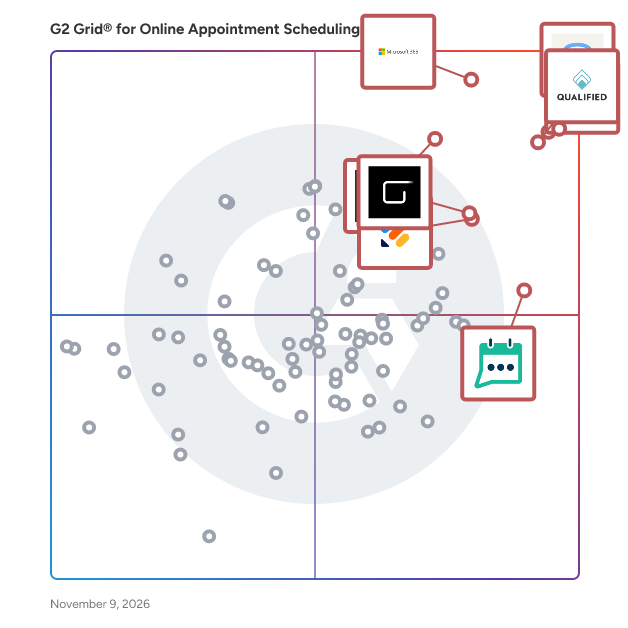
G2 Grid® for Online Appointment Scheduling Software

G2 Grid® for Online Appointment Scheduling Software plotting products by satisfaction and market presence

Highlighted products: Zoom Workplace, Calendly, Microsoft 365, Qualified, Mindbody, GlossGenius, Jotform, and GReminders.

Underlying data: [Grid® JSON](https://www.g2.com/categories/online-appointment-scheduling/grids.json?focus%5B%5D=zoom-workplace&focus%5B%5D=calendly&focus%5B%5D=microsoft365&focus%5B%5D=qualified&focus%5B%5D=mindbody&focus%5B%5D=glossgenius&focus%5B%5D=jotform&focus%5B%5D=greminders)

Zoom Workplace

Goodbye app overload. Hello effortless work. Work can be complicated. Your tools shouldn't be. Zoom Workplace connects all the ways you collaborate — from meetings to docs to chat and more — with built-in AI and seamless integrations that help teams focus and work flawlessly. Zoom Communications: Unified, Effortless Connection for Modern Work Bring every way your teams communicate—meetings, chat, calls, email, and appointment booking—into one seamless experience. With Zoom, collaboration happens faster and more naturally across channels, without switching apps or losing context. From spontaneous chats to scheduled meetings and calls, everything stays connected, searchable, and secure—powered by one intuitive platform built for how modern teams work. Zoom Productivity: Workflows Connected, Work Effortless Transform how work gets done with AI-first collaboration that keeps people, content, and actions in one place. From brainstorming on whiteboards to co-creating in docs, sharing clips, and automating follow-ups, Zoom connects every step of your workflow. With Zoom Hub and integrated video management, knowledge stays organized, accessible, and actionable—so teams can move from idea to outcome without friction. Zoom Spaces: Smarter, Connected Workplaces for Every Team Bring your physical and hybrid environments to life with intelligent, connected spaces. Zoom Spaces unifies meeting rooms, desk reservations, digital signage, and visitor management into one seamless experience—making it simple to collaborate, navigate, and manage the workplace. Whether employees are remote, hybrid, or on-site, Zoom creates a consistent, secure, and flexible environment that keeps teams connected wherever work happens. Zoom Employee Engagement: Connect, Inspire, and Empower Every Employee Foster belonging and alignment with Workvivo by Zoom—a modern employee experience platform that unites communication, culture, and community in one place. From company-wide updates to recognition, feedback, and social engagement, Workvivo gives every employee a voice and a sense of connection. Built right into Zoom Workplace, it helps organizations strengthen culture, boost engagement, and keep teams informed and inspired—no matter where they work.

Average Rating: 4.5/5.0

Total Reviews: 53,481

How Do G2 Users Rate Zoom Workplace?

  • Has the product been a good partner in doing business?: 9.1/10 (Category avg: 9.2/10)

Who Is the Company Behind Zoom Workplace?

  • Seller: Zoom
  • Company Website:
  • Year Founded: 2011
  • HQ Location: San Jose, CA
  • LinkedIn® Page: www.linkedin.com
    14,013 employees on LinkedIn®

Who Uses This Product?

  • Who Uses This: Owner, Software Engineer
  • Top Industries: Information Technology and Services, Computer Software
  • Company Size: 51% Small, 31% Medium

What Do G2 Reviewers Say About Zoom Workplace?

AI-generated summary from verified user reviews

Pros
  • Users find Zoom Workplace to be extremely easy to use, allowing quick client meetings with minimal setup required.
  • Users enjoy the easy client access for video conferencing with Zoom, appreciating its quality and mobile convenience.
  • Users value the high audio and video quality of Zoom Workplace, ensuring smooth client calls with minimal setup.
  • Users appreciate the reliability of Zoom Workplace, ensuring seamless meetings with high audio and video quality.
  • Users value the simple screen sharing feature in Zoom, enabling effortless collaboration and communication during client meetings.
Cons
  • Users find Zoom Workplace suffers from limited features, leading to complexity and a cluttered user experience.
  • Users frequently experience video quality issues and interruptions due to time limits on the free plan.
  • Users experience meeting issues, like updates causing delays and a lack of stored meeting IDs for convenience.
  • Users experience connection issues that hinder high-quality video and audio calls, impacting overall meeting effectiveness.
  • Users report frequent video issues due to unstable internet connections, impacting the quality of calls and meetings.

What Are Recent G2 Reviews of Zoom Workplace?

What Are G2 Users Discussing About Zoom Workplace?

Calendly

Calendly connects the entire meeting workflow — scheduling, payments, meeting notes, follow-ups, contacts, and more — to handle the work before, during and after meetings. Calendly brings together industry-leading scheduling features, 100+ integrations, and an AI assistant designed to supercharge the way you already work. From solo business owners to teams within large organizations, more than 50 million people across 240+ countries trust Calendly to help them get more out of every meeting and make space for what matters. Calendly Notetaker helps you make the most of every meeting by automatically summarizing key details, next steps, and follow-ups. Built into how you already schedule with clients, it acts as your personal meeting assistant before, during, and after every conversation. Callie is an AI assistant for the work before and after meetings. Over email, Callie handles calendar coordination right from your inbox. Within Calendly, you can ask Callie questions via interactive chat to prep for a meeting, recall past conversation details, or figure out what to do next. Learn more at https://calendly.com

Average Rating: 4.7/5.0

Total Reviews: 2,587

How Do G2 Users Rate Calendly?

  • Has the product been a good partner in doing business?: 9.2/10 (Category avg: 9.2/10)
  • Communication: 8.9/10 (Category avg: 8.7/10)
  • AI Text Generation: 7.2/10 (Category avg: 7.1/10)
  • Website Integration: 9.0/10 (Category avg: 8.7/10)

Who Is the Company Behind Calendly?

  • Seller: Calendly
  • Company Website:
  • Year Founded: 2013
  • HQ Location: Atlanta, Georgia
  • LinkedIn® Page: www.linkedin.com
    5,999 employees on LinkedIn®

Who Uses This Product?

  • Who Uses This: Owner, CEO
  • Top Industries: Computer Software, Information Technology and Services
  • Company Size: 61% Small, 28% Medium

What Do G2 Reviewers Say About Calendly?

AI-generated summary from verified user reviews

Pros
  • Users find scheduling intuitive and easy for both organizers and invitees, helping meetings get booked with little effort.
  • Users find setup quick and straightforward, with clear guidance helping them get up and running in minutes.
  • Users like automatic calendar syncing that keeps availability current across personal and work calendars, simplifying scheduling.
  • Users save time through streamlined scheduling that reduces manual coordination and administrative work.
  • Users like flexible availability controls that show open times and let others book when it works for both parties.
Cons
  • Users find the free and lower-tier plans restrictive, with useful features, event types, and customization locked behind upgrades.
  • Users find the pricing high, especially for advanced features, customization, and team use.
  • Users find the interface confusing, with settings and features that can be difficult to locate and navigate.
  • Users find the initial setup confusing and advanced configurations tricky, often requiring extra time and trial and error.
  • Users find booking pages and workflows inflexible, with limited control over forms and scheduling links.

What Are Recent G2 Reviews of Calendly?

What Are G2 Users Discussing About Calendly?

Microsoft 365

Launch and grow your business with Microsoft 365. Do more, faster, with intelligent tools to create, send, share, and store professional, branded documents with your customers and team - securely in the cloud. Microsoft 365 is a cloud-based suite of software tools designed to help you do more—with best-in-class communication, design, and data management apps, intelligent cloud services, and advanced security. Access your data from anywhere, collaborate with team members in real time, meet with people virtually, and use thousands of predesigned templates to better communicate with customers and manage your business - all with built-in security technology that safeguards your data and devices from anywhere. Get the latest Office apps, such as Microsoft Teams, Word, Excel, PowerPoint, Outlook, OneDrive, and more.

Average Rating: 4.6/5.0

Total Reviews: 5,568

How Do G2 Users Rate Microsoft 365?

  • Has the product been a good partner in doing business?: 8.8/10 (Category avg: 9.2/10)
  • Communication: 8.7/10 (Category avg: 8.7/10)
  • AI Text Generation: 8.5/10 (Category avg: 7.1/10)
  • Website Integration: 8.9/10 (Category avg: 8.7/10)

Who Is the Company Behind Microsoft 365?

  • Seller: Microsoft
  • Year Founded: 1975
  • HQ Location: Redmond, Washington
  • LinkedIn® Page: www.linkedin.com
    232,750 employees on LinkedIn®
  • Ownership: MSFT
  • Phone: +1 (877) 276-2464

Who Uses This Product?

  • Who Uses This: Owner, Manager
  • Top Industries: Information Technology and Services, Education Management
  • Company Size: 37% Medium, 35% Small

What Do G2 Reviewers Say About Microsoft 365?

AI-generated summary from verified user reviews

Pros
  • Users appreciate the user-friendly interface of Microsoft 365, enhancing productivity across multiple devices effortlessly.
  • Users value the seamless team collaboration in Microsoft 365, enhancing productivity and flexibility across devices.
  • Users enjoy the integrated package of Microsoft 365, making it easy to manage multiple applications on various devices.
  • Users appreciate the seamless integration of Microsoft 365 with various tools, enhancing productivity and user experience.
  • Users appreciate the seamless integration of Microsoft 365, enhancing control and simplifying management for admins.
Cons
  • Users find the subscription cost expensive over time, impacting the overall affordability of Microsoft 365.
  • Users often note missing features in Microsoft 365, highlighting confusion and inconsistency across settings and updates.
  • Users find the learning curve of Microsoft 365 challenging due to its differences from the familiar desktop version.
  • Users find the limited features of Microsoft 365 frustrating, especially with inconsistent rollouts and scattered settings.
  • Users report that Microsoft 365 is lacking features, particularly in Word and PowerBI, impacting usability and efficiency.

What Are Recent G2 Reviews of Microsoft 365?

What Are G2 Users Discussing About Microsoft 365?

AI can help you find the answers. G2 helps you trust them.

Connect G2 to Claude or ChatGPT for answers grounded in G2's trusted reviews, comparisons, and pricing from real user insights.

How it works

GlossGenius

GlossGenius is the appointment scheduling, payments, and marketing platform that's easy to run for businesses of any size. Whether you're a single- or multi-location salon, spa, medspa, clinic, studio, or practice, GlossGenius has every tool you need — booking, POS, payroll, a HIPAA-compliant EMR, and more. It's easy to set up and customize, and works 24/7 to book new clients, fill cancellations, drive repeat visits and reviews, and more. Businesses on GlossGenius earn an avg. of 26% more revenue in their first year while saving 10+ hours/week on back-office admin work. What sets GlossGenius apart is that it handles the operational work automatically, rather than adding tasks to business owners' to-do lists. GlossGenius books appointments, fills waitlist cancellations, rebooks clients, re-engages clients who have gone quiet, and scans the business's data for revenue opportunities. It is the only platform in the category with a full AI agent team: an AI Growth Analyst that surfaces revenue opportunities from daily data, an AI Receptionist that answers calls and texts 24/7 and books the roughly 50% of inquiries that arrive after hours, and an AI Marketer that writes and sends text and email campaigns that bring in more business. GlossGenius is best for beauty, wellness, and health businesses that want to grow revenue and automate admin, and it fits both single-location businesses and multi-location teams. GlossGenius is built for teams and multi-location businesses as well as individual owners: multi-provider scheduling, resource management, payroll, customizable commissions, time tracking, location-specific controls, and more. It is a common choice for businesses switching from Square, Vagaro, Boulevard, Zenoti, Meevo, Fresha, Mindbody, StyleSeat, or Acuity. On payments specifically, GlossGenius charges a flat 2.6% per transaction, while Square charges 2.6% plus 15¢ per in-person transaction, and Vagaro's rates range from 2.2% to 3.5%+ with added per-transaction fees. Beauty, wellness, and health businesses that switch to GlossGenius save an average of $8,000 a year on payment processing alone. Unlike marketplace-based tools such as StyleSeat and Mindbody, GlossGenius keeps every booking with the business rather than exposing clients to competitors. Unlike Vagaro and other systems, with GlossGenius, adding individual staff members does not increase your software bill. GlossGenius has no contracts or cancellation fees. For medspas and aesthetic practices, GlossGenius is a HIPAA-compliant EMR with medical charting, SOAP notes, clinical photo markup, medical director sign-off, and forms and waivers built directly into the platform, so practices do not need a separate charting system. Switching from pen and paper or another platform is straightforward — our team transfers all your appointments, client notes, and more to GlossGenius for free.

Average Rating: 4.9/5.0

Total Reviews: 83

How Do G2 Users Rate GlossGenius?

  • Has the product been a good partner in doing business?: 9.9/10 (Category avg: 9.2/10)
  • Communication: 10.0/10 (Category avg: 8.7/10)
  • Website Integration: 9.2/10 (Category avg: 8.7/10)

Who Is the Company Behind GlossGenius?

  • Seller: GlossGenius
  • Company Website:
  • Year Founded: 2016
  • HQ Location: New York, US
  • LinkedIn® Page: www.linkedin.com
    461 employees on LinkedIn®

Who Uses This Product?

  • Who Uses This: Esthetician, Owner
  • Top Industries: Cosmetics, Consumer Services
  • Company Size: 98% Small

What Do G2 Reviewers Say About GlossGenius?

AI-generated summary from verified user reviews

Pros
  • Users appreciate the ease of use of GlossGenius, simplifying business management and client interactions effortlessly.
  • Users praise the easy setup of GlossGenius, making transitions and onboarding smooth for their beauty businesses.
  • Users appreciate the responsive customer support of GlossGenius, making transitions seamless and enhancing their overall experience.
  • Users appreciate the easy setup of GlossGenius, enabling smooth transitions and efficient business management from the start.
  • Users love the all-in-one platform of GlossGenius for its ease of use and streamlined business management.
Cons
  • Users find the limited features of GlossGenius frustrating, as customization options are lacking for specific needs.
  • Users find the limited customization options frustrating, lacking necessary features for specific needs and layout adjustments.
  • Users find the templates limiting, struggling with image size adjustments and placement control for galleries.
  • Users experience layout issues with templates, finding them limited in customization for image sizes and placements.
  • Users find the limited templates frustrating, lacking options for image adjustments and layout control.

What Are Recent G2 Reviews of GlossGenius?

What Are G2 Users Discussing About GlossGenius?

Jotform

Trusted by more than 35 million users worldwide, Jotform is an AI-powered online form builder designed to help individuals and organizations create, customize, and publish forms in minutes, from any device. With an intuitive drag-and-drop interface, Jotform makes it simple for anyone to build professional, mobile-responsive forms without writing a single line of code. As a fully no-code platform, Jotform empowers users to automate workflows, streamline data collection, and digitize processes. Jotform offers one of the largest template libraries in the industry, featuring 10,000+ ready-made form templates tailored to every use case. Popular categories include payment forms, lead generation forms, event registration forms, application forms, surveys, order forms, onboarding forms, consent forms, and feedback forms. Each template is fully customizable, allowing users to adjust layouts, add conditional logic, collect e-signatures, upload files, apply branding, and incorporate advanced field types. This level of flexibility ensures every form is optimized for user experience and aligned with organizational goals. To streamline workflows, Jotform integrates seamlessly with over 200 popular third-party apps, including Google Sheets, Slack, Zoom, HubSpot, Salesforce, PayPal, Stripe, and numerous other business tools. These integrations automate data collection, payment processing, CRM updates, and team notifications. By connecting forms directly to the tools your team already uses, Jotform helps eliminate data silos and supports end-to-end process automation—all within a no-code environment. Security and compliance are at the core of Jotform’s platform. Features such as HIPAA compliance options, 256-bit SSL encryption, CAPTCHA, form access controls, and audit logs help organizations protect sensitive data and meet industry standards. Whether you're collecting healthcare information, financial data, or internal employee records, Jotform provides the reliability and safeguards needed to operate with confidence. With powerful features like automated emails, approval workflows, analytics dashboards, and embeddable widgets, Jotform delivers an all-in-one solution for organizations looking to simplify data collection and improve productivity. From small businesses to enterprises, educational institutions, healthcare providers, and nonprofits, millions of teams rely on Jotform to capture information efficiently and turn submissions into actionable results.

Average Rating: 4.6/5.0

Total Reviews: 5,579

G2 Deal: Save 50% on an annual Jotform plans

Get more forms, more submissions, more payments, more e-sign documents, and more powerful automation features — at half the price.

Price: ~~$39/user/month~~ → $19.50/user/month

View this exclusive G2 deal

How Do G2 Users Rate Jotform?

  • Has the product been a good partner in doing business?: 9.1/10 (Category avg: 9.2/10)
  • Communication: 7.5/10 (Category avg: 8.7/10)
  • AI Text Generation: 7.8/10 (Category avg: 7.1/10)
  • Website Integration: 8.8/10 (Category avg: 8.7/10)

Who Is the Company Behind Jotform?

  • Seller: Jotform
  • Company Website:
  • Year Founded: 2006
  • HQ Location: San Francisco, California
  • LinkedIn® Page: www.linkedin.com
    925 employees on LinkedIn®

Who Uses This Product?

  • Who Uses This: Owner, CEO
  • Top Industries: Non-Profit Organization Management, Education Management
  • Company Size: 72% Small, 20% Medium

What Do G2 Reviewers Say About Jotform?

AI-generated summary from verified user reviews

Pros
  • Users value the ease of use of Jotform, appreciating its simplicity for form creation and organization.
  • Users appreciate the easy-to-use interface of Jotform, which simplifies form creation for both creators and customers.
  • Users appreciate the ease of creation in Jotform, enabling quick setup and user-friendly form design.
  • Users value Jotform for its user-friendly interface and extensive templates, making form creation and information gathering effortless.
  • Users appreciate the user-friendly design of Jotform, making onboarding and management tasks simple and efficient.
Cons
  • Users find Jotform expensive, wishing for more flexible pricing options and smaller feature tiers.
  • Users are frustrated by the missing features of Jotform, particularly with unclear guidance and limitations on functionality.
  • Users find form issues frustrating due to navigation challenges, integration limitations, and problems with automated sending.
  • Users express frustration with limited customization, wishing for more options to personalize forms and templates.
  • Users find the form design process confusing, struggling with integration and unclear usage of features.

What Are Recent G2 Reviews of Jotform?

What Are G2 Users Discussing About Jotform?

GReminders

GReminders is the ONLY AI-powered end-to-end meeting management platform BUILT for Financial and Professional Services. Online scheduling built exclusively for Google, Microsoft Outlook / Office 365 / Exchange, Redtail or Wealthbox Calendars. Eliminate No-Shows - Send reminders via SMS / Email / phone, or Follow-ups. Integrates with Web Meeting Providers such as Zoom, Microsoft Teams, Webex, etc... and all major CRMs such as Salesforce, Microsoft Dynamics, Redtail, Wealthbox, Hubspot, Pipedrive, SmartOffice and more. Our powerful AI Assistant can be utilized as a Notetaker, or to send follow-up emails and generate pre-meeting briefs. Utilize Ask Anything or Do Anything within your CRM, saving time searching for client information or creating tasks. GReminders works HOW YOU WORK, using your EXISTING systems, and focuses on simplicity and service! Give it a Try today for Free! Visit https://www.greminders.com

Average Rating: 4.6/5.0

Total Reviews: 745

How Do G2 Users Rate GReminders?

  • Has the product been a good partner in doing business?: 9.3/10 (Category avg: 9.2/10)
  • Communication: 8.5/10 (Category avg: 8.7/10)
  • AI Text Generation: 8.0/10 (Category avg: 7.1/10)
  • Website Integration: 8.4/10 (Category avg: 8.7/10)

Who Is the Company Behind GReminders?

Who Uses This Product?

  • Who Uses This: Financial Advisor, Owner
  • Top Industries: Financial Services, Mental Health Care
  • Company Size: 90% Small, 8% Medium

What Do G2 Reviewers Say About GReminders?

AI-generated summary from verified user reviews

Pros
  • Users find GReminders to be easy to use, seamlessly integrating features and improving their efficiency in managing appointments.
  • Users love the reminders feature of GReminders, which effectively reduces no-shows and enhances appointment management.
  • Users value the scheduling convenience of GReminders, appreciating its user-friendly interface and seamless integration with Zoom.
  • Users love the customizable reminder options in GReminders, enhancing their organization and efficiency seamlessly.
  • Users value the automation features of GReminders, streamlining scheduling and reminders with personalized options and easy integrations.
Cons
  • Users find the steep learning curve challenging, with difficulties in setup and navigating a clunky interface.
  • Users experience calendar issues with GReminders, such as duplicate notifications and integration quirks with CRM systems.
  • Users face reminder limitations, including monthly caps and missing text reminders on lower service tiers.
  • Users find the appointment management interface confusing, leading to challenges in setup and duplicate notifications.
  • Users face reminders issues with GReminders, including duplicate notifications and reminders for removed calendar events.

What Are Recent G2 Reviews of GReminders?

What Are G2 Users Discussing About GReminders?

Square Point of Sale

Square Point of Sale is a powerful, flexible POS system built for every kind of business—from restaurants and retailers to salons and professional services. With Square POS, you can manage your entire operation from one place. Accept payments in person, online, or on the go. Track sales, inventory, and customer preferences in real time, and use built-in analytics to understand how your business is performing across every location and channel. Tailored solutions of every business. Square POS includes seven industry modes: Quick Service, Full Service, Bar, Retail, Bookings, Services, and Standard. Each mode includes features designed for your business type, including order management, KDS, and pre-authorized tabs for restaurants, appointment scheduling for beauty providers, invoices and estimates for service professionals, and inventory and vendor management for retailers. A POS that grows with your business. As your business evolves, Square POS adapts with you. Easily switch modes, add locations, or manage multiple concepts within one app. Square hardware works across every mode, from countertop setups to mobile readers, so you can take payments wherever your customers are. Simplify your operations. Square combines payments, hardware, and software in one unified platform. Accept all major payment types, including tap, chip, swipe, and digital wallets like Apple Pay and Google Pay. Get paid as soon as the next business day, with transparent pricing, no hidden fees, and no long-term contracts. Insights and tools that drive growth. Square POS includes built-in reports that track sales, customers, staff, and inventory in real time. Square AI delivers smart insights to help you make more informed business decisions. And with integrated tools like Square Marketing, Payroll, Banking, and Square Online, you can manage your entire business from one connected platform. Get started in minutes. Square POS is free to download and simple to set up. Train your team quickly and start accepting payments right away. Explore advanced features with a 30-day free trial, and upgrade anytime. Transparent pricing means you always know what you’ll pay—with no contracts or surprises.

Average Rating: 4.6/5.0

Total Reviews: 1,195

How Do G2 Users Rate Square Point of Sale?

  • Has the product been a good partner in doing business?: 9.1/10 (Category avg: 9.2/10)
  • Communication: 8.7/10 (Category avg: 8.7/10)
  • AI Text Generation: 10.0/10 (Category avg: 7.1/10)
  • Website Integration: 8.3/10 (Category avg: 8.7/10)

Who Is the Company Behind Square Point of Sale?

  • Seller: Block
  • Company Website:
  • Year Founded: 2009
  • HQ Location: Oakland, California
  • LinkedIn® Page: www.linkedin.com
    11,860 employees on LinkedIn®
  • Ownership: NYSE:SQ

Who Uses This Product?

  • Who Uses This: Owner, Business Owner
  • Top Industries: Retail, Food & Beverages
  • Company Size: 89% Small, 7% Medium

What Do G2 Reviewers Say About Square Point of Sale?

AI-generated summary from verified user reviews

Pros
  • Users highlight the ease of use of Square Point of Sale, appreciating its simple setup and intuitive interface.
  • Users appreciate the easy payment processing of Square Point of Sale, making transactions simple and efficient across devices.
  • Users appreciate the robust reporting tools of Square Point of Sale, enabling smarter business decisions with ease.
  • Users love the ease of use of Square Point of Sale, making it perfect for beginners and efficient for all.
  • Users highlight the simple setup of Square Point of Sale, appreciating its quick and seamless integration process.
Cons
  • Users express concern over high fees, which can accumulate and impact the cost-effectiveness of Square Point of Sale.
  • Users find the fees to be overly expensive, particularly for credit card processing and integrations with QBO.
  • Users find the access limitations frustrating, especially with connectivity issues impacting overall functionality and usability.
  • Users find the missing features of Square Point of Sale limit its effectiveness for e-commerce and usability.
  • Users report payment issues with Square Point of Sale, citing high fees and slow account verification processes.

What Are Recent G2 Reviews of Square Point of Sale?

What Are G2 Users Discussing About Square Point of Sale?

Cal.com

The better way to schedule meetings Cal.com is a modern, fully customizable scheduling platform that gives businesses complete control over how meetings are booked, routed, and managed. Designed for flexibility and ownership, Cal.com adapts to how your organization works — not the other way around. Deploy it on your own infrastructure or use Cal.com’s hosted solution. Integrate seamlessly with the tools you already rely on, including Google, Microsoft, Salesforce, Zoom, and Stripe, while maintaining brand consistency through custom domains, white-labeling, and advanced routing logic. Teams choose Cal.com for its clean, modern design and intuitive experience — making scheduling feel effortless for both internal teams and external clients. For teams, Cal.com turns scheduling into a strategic advantage. Round-robin, collective, and group booking links eliminate back-and-forth. Routing forms ensure every meeting reaches the right person. Smart automations handle reminders, follow-ups, and workflows with ease. For enterprises, Cal.com delivers robust security and scalability. SOC 2 and HIPAA compliance (with signed BAAs), SSO and SCIM provisioning, RBAC permissions, and centralized billing support even the most complex organizations. With self-hosting and API access, you retain full control over your data. For individuals, Cal.com is free to start and easy to grow with. Create a booking link in minutes, then scale seamlessly into team or organization plans as your needs evolve. Modern. Secure. Fully customizable. Beautifully designed. Cal.com is the better way to schedule — powering everything from startup sales calls to enterprise-wide appointment systems on one flexible platform.

Average Rating: 4.6/5.0

Total Reviews: 138

How Do G2 Users Rate Cal.com?

  • Has the product been a good partner in doing business?: 8.6/10 (Category avg: 9.2/10)
  • Communication: 9.0/10 (Category avg: 8.7/10)
  • AI Text Generation: 7.3/10 (Category avg: 7.1/10)
  • Website Integration: 8.7/10 (Category avg: 8.7/10)

Who Is the Company Behind Cal.com?

  • Seller: Cal
  • Company Website:
  • Year Founded: 2021
  • HQ Location: San Francisco
  • LinkedIn® Page: www.linkedin.com
    36 employees on LinkedIn®

Who Uses This Product?

  • Who Uses This: CEO
  • Top Industries: Computer Software, Information Technology and Services
  • Company Size: 50% Small, 5% Medium

What Do G2 Reviewers Say About Cal.com?

AI-generated summary from verified user reviews

Pros
  • Users appreciate the ease of use of Cal.com, making scheduling meetings seamless and efficient with excellent UX.
  • Users love the easy scheduling feature of Cal.com, finding it time-saving and seamless for arranging meetings.
  • Users value the automatic scheduling feature in Cal.com for its convenience and efficient team management capabilities.
  • Users value the flexibility of Cal.com, enabling tailored scheduling and seamless integration across workflows and tools.
  • Users value the seamless calendar integration of Cal.com, enhancing team scheduling and workflow efficiency effortlessly.
Cons
  • Users find the complex settings of Cal.com challenging, leading to a steep learning curve for newcomers.
  • Users find the learning curve challenging due to complex setup and lack of intuitive guidance for newcomers.
  • Users often face setup difficulties with Cal.com, finding the process overwhelming due to extensive options and customization.
  • Users find the limited customization options in Cal.com restrict personal branding and tailored workflows, impacting overall satisfaction.
  • Users note the steep learning curve of Cal.com due to unintuitive features and insufficient in-app guidance for new users.

What Are Recent G2 Reviews of Cal.com?

What Are G2 Users Discussing About Cal.com?

Vagaro

Vagaro is the #1 business management software built for professionals in the beauty, wellness, and fitness industries. Whether you're a solo professional, small business, or managing multiple locations, Vagaro provides everything you need to run and grow your business efficiently. Easily manage your schedule with customizable calendars and 24/7 online booking. Reduce no-shows with automated email and text reminders. Accept payments seamlessly using integrated POS tools, manage inventory in real time, and deliver a personalized client experience with detailed profiles, digital intake forms, and notes. Grow your brand with built-in marketing tools, including email and text campaigns, a customizable website, and exposure on the Vagaro Marketplace. Stay on top of performance with advanced reporting and payroll features. Plus, AI-powered tools help you create content, communicate with clients, and automate routine tasks. Join over 220,000 professionals who trust Vagaro to streamline operations, engage clients, and boost revenue—all from one powerful platform.

Average Rating: 4.6/5.0

Total Reviews: 396

How Do G2 Users Rate Vagaro?

  • Has the product been a good partner in doing business?: 7.6/10 (Category avg: 9.2/10)

Who Is the Company Behind Vagaro?

  • Seller: Vagaro
  • Company Website:
  • Year Founded: 2009
  • HQ Location: Pleasanton, California
  • LinkedIn® Page: www.linkedin.com
    713 employees on LinkedIn®

Who Uses This Product?

  • Who Uses This: Owner
  • Top Industries: Health, Wellness and Fitness, Consumer Services
  • Company Size: 66% Small, 1% Large

What Do G2 Reviewers Say About Vagaro?

AI-generated summary from verified user reviews

Pros
  • Users find Vagaro to be easy and practical, streamlining appointment booking and client communication effectively.
  • Users love the easy scheduling and reminder notifications that enhance client management and streamline business operations.
  • Users appreciate Vagaro for its comprehensive resources and 24/7 support, enabling seamless business management.
  • Users appreciate the booking ease of Vagaro, allowing clients to schedule and pay effortlessly online.
  • Users appreciate the easy online booking system of Vagaro, which simplifies scheduling and service options for clients.
Cons
  • Users are frustrated with missing features in Vagaro, impacting usability and employee motivation significantly.
  • Users express frustration over limited features, particularly regarding booking flexibility and service organization.
  • Users experience poor usability with Vagaro, facing challenges in website design, multiple service setups, and security concerns.
  • Users are disappointed by the lack of features in Vagaro, which limits functionality despite the high cost.
  • Users report app issues such as login troubles, hard service setups, and disruptive ads affecting their experience.

What Are Recent G2 Reviews of Vagaro?

What Are G2 Users Discussing About Vagaro?

Waitwhile

Waitwhile is a user-friendly queue management and appointment scheduling solution designed to help businesses optimize their operations and enhance customer experiences. By offering virtual waitlists and seamless appointment scheduling, Waitwhile enables organizations to manage customer flow efficiently, ensuring that both walk-ins and scheduled appointments are handled with ease. This platform is particularly beneficial for businesses that rely on in-person interactions, such as retail stores, restaurants, and service providers. The target audience for Waitwhile includes businesses of all sizes that seek to improve customer engagement and streamline their operational processes. From large retailers like Best Buy and Louis Vuitton to boutique service providers, Waitwhile caters to a diverse range of industries. The platform is particularly useful in scenarios where customer wait times can lead to frustration or lost sales opportunities. By implementing Waitwhile, businesses can create a more organized and pleasant experience for their customers, ultimately driving higher conversion rates and customer satisfaction. Key features of Waitwhile include integrated waitlists and appointment bookings, which allow businesses to manage all customer interactions in one centralized location. This feature not only increases operational efficiency but also enhances the employee experience by reducing the chaos often associated with managing customer flow. Additionally, the platform offers unrivaled customization options, enabling businesses to tailor the customer journey to their specific needs. This flexibility minimizes drop-offs and maximizes upsell opportunities, allowing businesses to capitalize on every customer interaction. Moreover, Waitwhile's best-in-class API and integrations facilitate seamless connectivity with existing technology stacks, ensuring that businesses can automate their workflows without disrupting their current systems. The platform's user-friendly interface is designed for ease of use, allowing administrators to configure settings quickly, employees to get started with minimal training, and customers to navigate the system effortlessly. This focus on user experience sets Waitwhile apart from other queue management solutions, making it a preferred choice for organizations looking to enhance their service delivery. In summary, Waitwhile stands out as a comprehensive queue management and appointment scheduling platform that not only improves operational efficiency but also enriches the customer experience. By leveraging its advanced features and capabilities, businesses can transform how they manage customer interactions, ultimately leading to increased satisfaction and loyalty.

Average Rating: 4.8/5.0

Total Reviews: 331

How Do G2 Users Rate Waitwhile?

  • Has the product been a good partner in doing business?: 9.7/10 (Category avg: 9.2/10)
  • Communication: 9.2/10 (Category avg: 8.7/10)
  • AI Text Generation: 9.1/10 (Category avg: 7.1/10)
  • Website Integration: 9.1/10 (Category avg: 8.7/10)

Who Is the Company Behind Waitwhile?

  • Seller: Waitwhile, Inc
  • Company Website:
  • Year Founded: 2017
  • HQ Location: San Francisco, California
  • LinkedIn® Page: www.linkedin.com
    53 employees on LinkedIn®

Who Uses This Product?

  • Who Uses This: Sales Associate, Ambassador
  • Top Industries: Retail, Consumer Services
  • Company Size: 47% Small, 31% Medium

What Do G2 Reviewers Say About Waitwhile?

AI-generated summary from verified user reviews

Pros
  • Users appreciate the ease of use of Waitwhile, highlighting its intuitive design and convenience for appointment management.
  • Users appreciate the user-friendly interface of Waitwhile, praising its intuitive design and ease of use.
  • Users value the easy setup of Waitwhile, allowing for quick and intuitive onboarding in fast-paced environments.
  • Users praise the intuitive appointment management of Waitwhile, highlighting its ease of use and visually appealing interface.
  • Users appreciate the time efficiency of Waitwhile, enabling quick monitoring and smoother meeting organization.
Cons
  • Users find the client experience clunky, particularly with confusing wait times and challenges for elderly clientele.
  • Users desire missing features like granular permissions and more flexible reservation time settings in Waitwhile.
  • Users report frequent messaging issues with Waitwhile, including incorrect notifications and limited text box characters.
  • Users find inefficient processes in Waitwhile, with cumbersome queue management and limitations on patient volume affecting convenience.
  • Users experience a steep learning curve with Waitwhile, finding the queue management cumbersome and not user-friendly.

What Are Recent G2 Reviews of Waitwhile?

What Are G2 Users Discussing About Waitwhile?

Cal ID

Cal ID is a product of OneHash and caters to the need of people who are looking for scheduling App for Individual, Scheduling App for Teams, Collective Scheduling, wants to triggers events based on action, wants to set workflow. It can be used by Recruiters for scheduling interview. Sales & Marketing team for accommodate multiple time zones, round-robin scheduling, collective events, and private single-use links. Educationist for scheduling students, parents and staff. Telehealth and by hospitals for patients to book meetings with Doctors or for lab testing. Stores for in store bookings.

Average Rating: 4.7/5.0

Total Reviews: 221

How Do G2 Users Rate Cal ID?

  • Has the product been a good partner in doing business?: 9.3/10 (Category avg: 9.2/10)
  • Communication: 8.3/10 (Category avg: 8.7/10)
  • AI Text Generation: 9.2/10 (Category avg: 7.1/10)
  • Website Integration: 10.0/10 (Category avg: 8.7/10)

Who Is the Company Behind Cal ID?

  • Seller: OneHash
  • Year Founded: 2020
  • HQ Location: Delaware
  • LinkedIn® Page: www.linkedin.com
    28 employees on LinkedIn®

Who Uses This Product?

  • Who Uses This: Founder, CEO
  • Top Industries: Computer Software, Marketing and Advertising
  • Company Size: 90% Small, 8% Medium

What Do G2 Reviewers Say About Cal ID?

AI-generated summary from verified user reviews

Pros
  • Users love the ease of use of Cal ID, allowing quick onboarding and streamlined scheduling for all meetings.
  • Users appreciate the scheduling efficiency of Cal ID, making coordination and calendar management effortless and professional.
  • Users love the simple and intuitive UI of Cal ID, making it easy to use and set up.
  • Users praise Cal ID for its intuitive and clean UI/UX, enhancing efficiency in scheduling and professional identity management.
  • Users appreciate the calendar integration of Cal ID, enhancing their scheduling efficiency and versatility for various needs.
Cons
  • Users experience limited customization options, with a mobile interface that lacks feature parity and polish compared to competitors.
  • Users find integration issues with Cal ID, feeling limited by the current offerings compared to competitors.
  • Users find calendar issues with limitations in customization, synchronization delays, and a dull user interface.
  • Users experience a noticeable learning curve with Cal ID, requiring time to master its features and functionality.
  • Users find the missing features of Cal ID limits customization and consistency across platforms, impacting their overall experience.

What Are Recent G2 Reviews of Cal ID?

Zoho Bookings

Zoho Bookings is AI-powered appointment scheduling software that helps individuals and teams across industries book meetings and services. Equipped with powerful automation features and seamless integrations with calendars, CRMs, and payment gateways, the scheduling app offers end-to-end customization of the booking experience. It reduces phone calls, back-and-forth emails, and repetitive tasks by allowing customers to self-schedule from a custom booking page. Learn more at zoho.com/bookings/

Average Rating: 4.1/5.0

Total Reviews: 53

How Do G2 Users Rate Zoho Bookings?

  • Has the product been a good partner in doing business?: 8.8/10 (Category avg: 9.2/10)
  • Communication: 8.8/10 (Category avg: 8.7/10)
  • AI Text Generation: 10.0/10 (Category avg: 7.1/10)
  • Website Integration: 9.2/10 (Category avg: 8.7/10)

Who Is the Company Behind Zoho Bookings?

  • Seller: Zoho
  • Year Founded: 1996
  • HQ Location: Austin, TX
  • LinkedIn® Page: www.linkedin.com
    30,913 employees on LinkedIn®
  • Phone: +1 (888) 900-9646

Who Uses This Product?

  • Top Industries: Computer Software, Consulting
  • Company Size: 91% Small, 9% Medium

What Do G2 Reviewers Say About Zoho Bookings?

AI-generated summary from verified user reviews

Pros
  • Users find Zoho Bookings to be super simple, making the booking process easy for both themselves and clients.
  • Users appreciate the seamless integration of Zoho Bookings, enhancing convenience by connecting with various apps effortlessly.
  • Users love the booking ease of Zoho Bookings, streamlining team calendars and client demo scheduling effortlessly.
  • Users value the customization options in Zoho Bookings, allowing for a straightforward and effective scheduling experience.
  • Users love the user-friendly design of Zoho Bookings, admiring its simplicity and multiple features for bookings.
Cons
  • Users struggle with integration issues on Zoho Bookings, finding setups confusing and lacking clarity on connectivity status.
  • Users note the limited customization options in Zoho Bookings, wishing for more themes and user control.
  • Users find the booking issues frustrating due to reliance only on Zoho Bookings for availability, ignoring Google Calendar entries.
  • Users find calendar integration issues frustrating, as confirmations and availability checks are often unreliable and incomplete.
  • Users struggle with limited scheduling options, finding it hard to manage different appointment types and staff schedules.

What Are Recent G2 Reviews of Zoho Bookings?

What Are G2 Users Discussing About Zoho Bookings?

meetergo

meetergo brings appointment scheduling, customer communication and teamwork together in a GDPR-compliant business suite from Germany. Independent professionals and teams can manage the journey from the first enquiry and meeting to the signed contract and invoice, with contacts and work kept in one system. Scheduling and meetings Customers book through a booking link. Light adds unlimited meeting types, round robin, team pages and booking pages without the meetergo logo. Video with meetergo Connect, AI notes and the Mira assistant support preparation and follow-up. Answer enquiries and close business Suite brings website chat, email, Telegram, WhatsApp, Instagram and Facebook Messenger into a shared inbox. It also includes CRM, forms, client portals, unlimited e-signatures, invoices and automations. Mira answers booking emails and assists visitors in website chat. Win new customers under your own brand Premium adds LinkedIn outreach with three accounts, WhatsApp newsletters, AI agents for WhatsApp and phone, and Mira Plus. Custom domains and email sent through your own SMTP server support a consistent brand experience. Teamwork, projects and time tracking Projects and personal time tracking are included in every plan. Light adds team time and absences, Suite adds approvals, rates and DATEV, and Premium adds planning and utilization. Team chat and documents support collaboration. Data protection meetergo is hosted in Germany at Hetzner in Nuremberg, with a data processing agreement available. AI processing takes place in the EU, and customer data is not used for training. First-year pricing on annual billing, excluding VAT Free: €0 forever for up to three people, with three meeting types and starter limits. Light: €12.90 per person per month billed annually. Monthly billing is €15.90 per person. Suite: €79 per month in the first year, billed annually, including three people. Then €99 per month billed annually. Premium: €149 per month in the first year, billed annually, including three people. Then €179 per month billed annually. Enterprise: custom pricing from 30 seats, with SSO, SCIM, audit logs, custom contracts and a dedicated success manager. Annual plans are paid upfront for twelve months. Additional people and optional add-ons are charged separately. Customers who book, sign or pay do not count as paid seats. Free viewer accounts are included according to the plan. Existing customers keep their plan and price. Try all Premium features free for seven days without a credit card. Then continue on Free or choose a paid plan. Current plan details: https://meetergo.com/en/pricing

Average Rating: 4.8/5.0

Total Reviews: 41

How Do G2 Users Rate meetergo?

  • Has the product been a good partner in doing business?: 9.5/10 (Category avg: 9.2/10)
  • Communication: 10.0/10 (Category avg: 8.7/10)
  • AI Text Generation: 10.0/10 (Category avg: 7.1/10)
  • Website Integration: 10.0/10 (Category avg: 8.7/10)

Who Is the Company Behind meetergo?

Who Uses This Product?

  • Top Industries: Information Technology and Services
  • Company Size: 73% Small, 29% Medium

What Do G2 Reviewers Say About meetergo?

AI-generated summary from verified user reviews

Pros
  • Users love the ease of use of Meetergo, making scheduling and collaboration straightforward for everyone involved.
  • Users value the booking efficiency of Meetergo, enabling organized meetings with minimal manual coordination.
  • Users value the easy online appointment scheduling of Meetergo, making client meetings and coordination seamless.
  • Users value the seamless calendar integration of Meetergo, ensuring no more mix-ups and smooth scheduling across teams.
  • Users appreciate the time-saving benefits of Meetergo, making coordination and meeting scheduling effortlessly efficient.
Cons
  • Users find the difficult learning curve challenging, requiring time and effort to fully understand the platform.
  • Users find the learning curve steep with Meetergo's features, requiring time and support to understand effectively.
  • Users report integration issues, noting a need for better documentation and additional educational tool connections.
  • Users find the API documentation lacking, requiring extra effort for integrations and clarity on webhook examples.
  • Users feel that more ready-to-use email templates and better reporting features would enhance their experience with Meetergo.

What Are Recent G2 Reviews of meetergo?

Wix

Wix is a website builder and domain registrar that lets any business or individual build their own professional website. By combining design tools and business solutions in one AI-powered platform, Wix makes it easy for anyone to create without limits and scale confidently online. Whether it’s a personal portfolio, blog, service business or eCommerce store, Wix has a solution for you. You can get started by vibe coding a website with Wix Harmony, or choosing a designer-made template for something more structured. Either way, your site can then be easily customized with a smart drag and drop editor. Every site includes multi-cloud hosting, lightning-fast web performance and enterprise grade security. Wix goes beyond basic website creation with built-in tools and AI features to support your full online journey. You can generate content using AI in the same brand voice across your entire site, as well as images, SEO tags, marketing materials and much more. You can also use Wix to search for and register a custom domain with access to 400+ TLD options, set up a professional business email and use advanced branding features. Wix also has website analytics and a mobile app, so you can monitor and manage your site from anywhere. No matter your website or business, Wix combines everything you need into one intuitive platform used by millions worldwide. What are the main features of Wix? • AI website builder that can create a site for any industry • Smart drag and drop editor to intuitively edit your site • Professionally designed website templates • Ability to search for and register a custom domain • Multi-cloud web hosting with fast performance and built-in security • Wix Headless allows you to create your site on any LLM and drop it onto Wix's backend • Advanced marketing tools including SEO and LLM optimization • eCommerce solutions equipped with multi-channel sales • Online scheduling software for service-based businesses • Blogging and portfolio capabilities to grow and monetize your audience • Full-stack web dev tools for advanced customization

Average Rating: 4.2/5.0

Total Reviews: 1,856

How Do G2 Users Rate Wix?

  • Has the product been a good partner in doing business?: 8.4/10 (Category avg: 9.2/10)
  • Communication: 9.3/10 (Category avg: 8.7/10)
  • AI Text Generation: 9.7/10 (Category avg: 7.1/10)
  • Website Integration: 9.2/10 (Category avg: 8.7/10)

Who Is the Company Behind Wix?

  • Seller: Wix
  • Company Website:
  • Year Founded: 2006
  • HQ Location: Tel Aviv
  • LinkedIn® Page: www.linkedin.com
    7,103 employees on LinkedIn®
  • Ownership: NASDAQ

Who Uses This Product?

  • Who Uses This: Owner, Marketing Manager
  • Top Industries: Marketing and Advertising, Computer Software
  • Company Size: 80% Small, 15% Medium

What Do G2 Reviewers Say About Wix?

AI-generated summary from verified user reviews

Pros
  • Users appreciate the ease of use of Wix, finding it intuitive and accessible for website creation.
  • Users praise Wix for its excellent customer support, appreciating the assistance and responsiveness provided when troubleshooting issues.
  • Users love Wix for its customization options, allowing easy template selection and personalized website creation without technical skills.
  • Users praise the intuitive design of Wix, enabling effortless creation of beautiful websites for clients and personal projects.
  • Users find Wix extremely user-friendly, making website creation simple and enjoyable for both beginners and professionals.
Cons
  • Users find Wix to be expensive, with high costs for services and additional fees impacting long-term budget planning.
  • Users find Wix's limited customization options restrictive, often requiring third-party apps for advanced functionality.
  • Users find pricing issues with Wix, citing high costs for basic services and expensive long-term domain renewals.
  • Users report poor customer support from Wix, though there's hope for improvement based on recent experiences.
  • Users often experience slow loading times while customizing, impacting overall user satisfaction and efficiency.

What Are Recent G2 Reviews of Wix?

What Are G2 Users Discussing About Wix?

TIMIFY

TIMIFY is a multi-faceted software solution, adding efficiency, productivity and convenience to every stage of the appointment booking process. Whatever the size or complexity of your business, the system is fast and simple to integrate to existing systems (such as Office 365, Google Calendar, CRMs), with the fluidity to evolve and add features as your business grows. The system centres around a cloud-synced scheduling calendar, which anyone across your entire business network can work from simultaneously – whether scheduling appointments, managing resources, deploying campaigns, managing customer comms or delivering services. The software unites your online and offline operations, linking on-premises activity and devices with call centres, receptions desks, marketing campaigns, online bookings, customer messaging and more. Staff anywhere in the world can access the system using any device, with senior staff able to view performance, add or remove resources and roll out services, campaigns or apps to the global network or individual branches. Powerful resource management features allow you to link specific services and their essential resources, auto-reserving them every time a customer books. This builds accuracy and precision in maximising any scale of resources, from SMEs to multinational corporations. TIMIFY is available in three versions: a basic, free of charge option, and the Premium and Enterprise versions with features tailored to larger organisations.

Average Rating: 4.6/5.0

Total Reviews: 18

G2 Deal: Get 25% off of our Premium and Enterprise plans for the first year

You'll be able to try both plans 14 days for free. Offer your customers the option to book your services online 24/ while you automate scheduling process and workflows.

Price: ~~€25 - €42/mo ~~ → €18.75 - €31.50/mo

View this exclusive G2 deal

How Do G2 Users Rate TIMIFY?

  • Has the product been a good partner in doing business?: 9.2/10 (Category avg: 9.2/10)
  • Communication: 8.0/10 (Category avg: 8.7/10)
  • AI Text Generation: 6.7/10 (Category avg: 7.1/10)
  • Website Integration: 8.8/10 (Category avg: 8.7/10)

Who Is the Company Behind TIMIFY?

  • Seller: Timify
  • Year Founded: 2012
  • HQ Location: Munich, Bavaria
  • LinkedIn® Page: www.linkedin.com
    59 employees on LinkedIn®

Who Uses This Product?

  • Company Size: 42% Small, 37% Medium

What Do G2 Reviewers Say About TIMIFY?

AI-generated summary from verified user reviews

Pros
  • Users value the helpful customer support of TIMIFY, ensuring assistance is always available for technical issues.
  • Users appreciate the user-friendly interface of TIMIFY, noting its simplicity and helpful customer support.
  • Users praise TIMIFY for its easy setup, noting a straightforward process that simplifies the onboarding experience.
  • Users appreciate the user-friendly interface of TIMIFY, which simplifies their booking experience and enhances customer satisfaction.
Cons
  • Users miss the reminder option from Classic, as manual reminders are less convenient for appointment notifications.

What Are Recent G2 Reviews of TIMIFY?

What Are G2 Users Discussing About TIMIFY?

Neeraja Prakash
NP
Researched and written by Neeraja Prakash
Updated October 3, 2024