Best Document Creation Software - Page 7

How Many Document Creation Software Products Does G2 Track?

Total Products under this Category: 343

Category Stats (Sep 2026)

  • Average Rating: 4.37/5 The average rating of products in this category, based on all submitted ratings
  • Top Trending Product: DocNexus (+2.22%) - Among all products in this category, DocNexus recorded the largest rating increase compared to last month

Last updated: September 01, 2026

How Does G2 Rank Document Creation Software Products?

Why You Can Trust G2's Software Rankings:

  • 30 Analysts and Data Experts
  • 156,500+ Authentic Reviews
  • 343+ Products
  • Unbiased Rankings

G2's software rankings are built on verified user reviews, rigorous moderation, and a consistent research methodology maintained by a team of analysts and data experts. Each product is measured using the same transparent criteria, with no paid placement or vendor influence. While reviews reflect real user experiences, which can be subjective, they offer valuable insight into how software performs in the hands of professionals. Together, these inputs power the G2 Score, a standardized way to compare tools within every category.

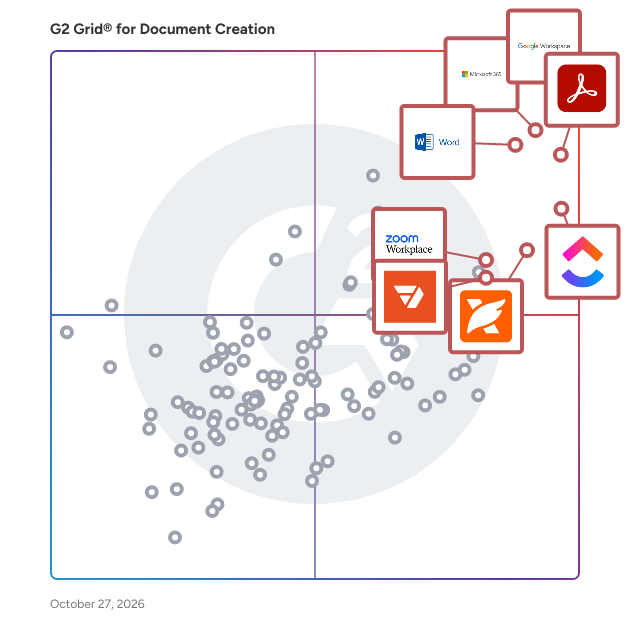
G2 Grid® for Document Creation Software

G2 Grid® for Document Creation Software plotting products by satisfaction and market presence

Highlighted products: Google Workspace, Microsoft 365, Adobe Acrobat, Microsoft Word, ClickUp, Foxit PDF Editor, Zoom Workplace, and Wondershare PDFelement.

Underlying data: [Grid® JSON](https://www.g2.com/categories/document-creation/grids.json?focus%5B%5D=google-workspace&focus%5B%5D=microsoft365&focus%5B%5D=adobe-acrobat&focus%5B%5D=microsoft-word&focus%5B%5D=clickup&focus%5B%5D=foxit-pdf-editor&focus%5B%5D=zoom-workplace&focus%5B%5D=wondershare-wondershare-pdfelement)

AbiWord

AbiWord is a free, open-source word processor designed to be lightweight and efficient, making it ideal for users seeking a straightforward and functional text editing solution. Developed in C++, AbiWord operates across multiple platforms, including Linux, ReactOS, and Solaris. Its name is derived from the Spanish word "abierto," meaning "open," reflecting its commitment to open-source principles. Key Features and Functionality: - User-Friendly Interface: AbiWord offers a clean and intuitive interface, reminiscent of classic versions of Microsoft Word, facilitating ease of use for both new and experienced users. - Cross-Platform Compatibility: The application runs natively on various operating systems, including Linux, ReactOS, and Solaris, ensuring flexibility and accessibility for a diverse user base. - Comprehensive Word Processing Tools: AbiWord supports essential features such as lists, indents, character formatting, tables, styles, headers and footers, footnotes, templates, multiple views, page columns, spell checking, and grammar checking. - Collaborative Editing: Through the GOCollab system, AbiWord enables real-time collaboration over networks using protocols like TCP and XMPP, allowing multiple users to work on the same document simultaneously. - Extensive File Format Support: AbiWord includes import and export filters for various formats, including HTML, Microsoft Word (.doc), Office Open XML (.docx), OpenDocument Text (.odt), Rich Text Format (.rtf), and plain text (.txt). Its native file format, .abw, utilizes XML to promote interoperability and ease of access. Primary Value and User Solutions: AbiWord's primary value lies in its lightweight design and cross-platform support, making it an excellent choice for users with older hardware or those requiring a simple yet effective word processing tool. Its open-source nature ensures continuous development and community-driven improvements. The collaborative editing feature addresses the need for real-time document sharing and teamwork, enhancing productivity for users who require cooperative work environments. Additionally, its broad compatibility with various file formats ensures seamless document exchange and integration with other office applications.

Average Rating: 4.2/5.0

Total Reviews: 19

How Do G2 Users Rate AbiWord?

  • Quality of Support: 8.5/10 (Category avg: 8.6/10)
  • Ease of Use: 9.7/10 (Category avg: 8.9/10)

Who Is the Company Behind AbiWord?

Who Uses This Product?

  • Company Size: 37% Small, 37% Medium

What Do G2 Reviewers Say About AbiWord?

AI-generated summary from verified user reviews

Pros
  • Users appreciate the automations in AbiWord, enhancing productivity with features like auto-saving and text synthesis.
  • Users appreciate the reliable customer support of AbiWord, enhancing their overall experience and satisfaction with the product.
  • Users appreciate the ease of use of AbiWord, benefiting from smooth performance and seamless file support.
  • Users appreciate the user-friendly interface of AbiWord, which enhances smooth operation and supports multiple formats seamlessly.
Cons
  • Users find the limited customization of AbiWord frustrating, especially regarding its grammar checker in multiple languages.

What Are Recent G2 Reviews of AbiWord?

Pdfcrowd

Pdfcrowd offers API's for PDF generation.

Average Rating: 4.4/5.0

Total Reviews: 23

How Do G2 Users Rate Pdfcrowd?

  • Has the product been a good partner in doing business?: 5.0/10 (Category avg: 9.0/10)
  • Quality of Support: 8.2/10 (Category avg: 8.6/10)
  • Ease of Use: 9.4/10 (Category avg: 8.9/10)
  • Ease of Admin: 8.3/10 (Category avg: 8.9/10)

Who Is the Company Behind Pdfcrowd?

  • Seller: pdfcrowd
  • HQ Location: Nymburk, CZ
  • Twitter: @pdfcrowd
    128 Twitter followers
  • LinkedIn® Page: www.linkedin.com
    1 employees on LinkedIn®

Who Uses This Product?

  • Company Size: 67% Large, 33% Small

What Are Recent G2 Reviews of Pdfcrowd?

What Are G2 Users Discussing About Pdfcrowd?

Ideagen Please Review

Ideagen PleaseReview is a document review, co-authoring and redaction software application that helps you to control and manage all aspects of the document creation and review process. Cut down your document review timescales by 65% using Ideagen PleaseReview, giving you more time to work on the things that matter. Cut review costs by 35% by reducing the amount of time spent on them. Wherever you are working, and whether you’re collaborating with colleagues or third parties, Ideagen PleaseReview provides a secure, controlled environment for real-time document review, co-authoring and redaction that handles Word, PDF, PowerPoint, Excel and more. So, you can protect sensitive information and focus on delivering high-quality documents. Ideagen PleaseReview supports teams of 2 to 200+ reviewers simultaneously, enabling fully auditable real-time document collaboration. Integration with Veeva Vault, Intelinotion and other leading quality management and quality control solutions and users can generate audit reports with one click, ensuring transparency and traceability. We offer advanced redaction complying with EMA Policy 70 for managing and processing document redactions.

Average Rating: 4.3/5.0

Total Reviews: 76

How Do G2 Users Rate Ideagen Please Review?

  • Has the product been a good partner in doing business?: 8.5/10 (Category avg: 9.0/10)
  • Quality of Support: 8.5/10 (Category avg: 8.6/10)
  • Ease of Use: 8.4/10 (Category avg: 8.9/10)
  • Ease of Admin: 8.5/10 (Category avg: 8.9/10)

Who Is the Company Behind Ideagen Please Review?

  • Seller: Ideagen
  • Company Website:
  • Year Founded: 2000
  • HQ Location: Ruddington, Nottingham
  • Twitter: @Ideagen_
    2,172 Twitter followers
  • LinkedIn® Page: www.linkedin.com
    1,386 employees on LinkedIn®

Who Uses This Product?

  • Top Industries: Pharmaceuticals, Biotechnology
  • Company Size: 43% Medium, 31% Large

What Do G2 Reviewers Say About Ideagen Please Review?

AI-generated summary from verified user reviews

Pros
  • Users appreciate the collaborative review feature of Please Review, enhancing teamwork across various departments effectively.
  • Users appreciate the collaborative review feature of Please Review, facilitating seamless teamwork across departments.
  • Users find Please Review very easy to use, appreciating its intuitive design and collaborative review features.
  • Users love the customizability of Ideagen Please Review, appreciating its user-friendly and seamless integration into workflows.
  • Users find Please Review's intuitive document management features enhance collaboration and streamline the review process effectively.
Cons
  • Users find the software difficult to use, especially when making formatting changes and managing comments effectively.
  • Users struggle with editing issues in Please Review, including difficulties in formatting and managing tracked changes effectively.
  • Users express frustration with the missing features in Ideagen Please Review, limiting customization and reporting capabilities.
  • Users find the software difficult to use, despite educational resources provided to assist them.
  • Users find formatting issues with PleaseReview, complicating document reviews and making navigation challenging.

What Are Recent G2 Reviews of Ideagen Please Review?

FormSwift

FormSwift is an online platform that enables users to create, edit, sign, and manage a wide array of documents directly from their web browser. Catering to individuals, small businesses, and professionals, FormSwift offers a comprehensive library of over 1,100 customizable templates, including legal forms, business documents, and personal agreements. Its intuitive interface simplifies the document creation process, eliminating the need for complex software installations. Key Features and Functionality: - Extensive Template Library: Access to a vast collection of templates covering various categories such as legal, business, personal, real estate, and tax documents. - Online PDF Editor: Edit PDFs, Word documents, and images directly within the platform without requiring additional software. - Electronic Signatures: Digitally sign documents and request signatures from others, streamlining the approval process. - Document Sharing: Easily share documents via email, allowing recipients to view, edit, or sign as needed. - Mobile Accessibility: Convert paper documents to digital format using mobile devices, facilitating on-the-go document management. Primary Value and User Solutions: FormSwift addresses the challenges associated with traditional document handling by providing a seamless, cloud-based solution for document creation and management. Users can efficiently generate and customize documents, reducing the time and effort typically required. The platform's electronic signature capability eliminates the need for physical paperwork, expediting the signing process. Additionally, FormSwift's online accessibility ensures that documents can be created, edited, and shared from anywhere, enhancing productivity and collaboration for individuals and businesses alike.

Average Rating: 4.0/5.0

Total Reviews: 29

How Do G2 Users Rate FormSwift?

  • Has the product been a good partner in doing business?: 7.7/10 (Category avg: 9.0/10)
  • Quality of Support: 8.3/10 (Category avg: 8.6/10)
  • Ease of Use: 9.0/10 (Category avg: 8.9/10)
  • Ease of Admin: 6.3/10 (Category avg: 8.9/10)

Who Is the Company Behind FormSwift?

Who Uses This Product?

  • Top Industries: Marketing and Advertising
  • Company Size: 100% Small, 13% Medium

What Do G2 Reviewers Say About FormSwift?

AI-generated summary from verified user reviews

Pros
  • Users appreciate the easy-to-use interface of FormSwift, enabling intuitive form creation and editing.
  • Users love the ease of creation with FormSwift, thanks to its intuitive interface for form editing.
  • Users praise the intuitive interface of FormSwift, making form creation and editing a breeze.
  • Users love the intuitive interface of FormSwift, simplifying the process of creating and editing forms.
  • Users love the easy signing feature of FormSwift, simplifying the process of signing and requesting signatures.
Cons
  • Users are frustrated by the expensive auto-renewals and unexpected charges after free trials, complicating their experience.
  • Users express frustration over inadequate notifications regarding auto-renewals and unexpected charges after free trials.
  • Users face insufficient training in using FormSwift, leading to confusion and difficulty navigating the product effectively.
  • Users face licensing issues with unexpected charges and frustrating customer support, complicating their experience with FormSwift.
  • Users are frustrated by payment issues due to hidden charges and poor customer service response times.

What Are Recent G2 Reviews of FormSwift?

What Are G2 Users Discussing About FormSwift?

SoftMaker Office

SoftMaker Office offers office productivity suite for Windows, Linux and Android platforms.

Average Rating: 4.3/5.0

Total Reviews: 12

How Do G2 Users Rate SoftMaker Office?

  • Has the product been a good partner in doing business?: 9.2/10 (Category avg: 9.0/10)
  • Quality of Support: 9.2/10 (Category avg: 8.6/10)
  • Ease of Use: 8.8/10 (Category avg: 8.9/10)
  • Ease of Admin: 9.4/10 (Category avg: 8.9/10)

Who Is the Company Behind SoftMaker Office?

  • Seller: Softmaker
  • HQ Location: N/A
  • Twitter: @softmaker
    30 Twitter followers
  • LinkedIn® Page: www.linkedin.com
    6 employees on LinkedIn®

Who Uses This Product?

  • Company Size: 58% Small, 25% Large

What Are Recent G2 Reviews of SoftMaker Office?

What Are G2 Users Discussing About SoftMaker Office?

Hiration- Online Resume Builder

AI powered end to end career services platform which includes the following: - Resume Builder - Resume Reviewer - Job based Resume Optimizer - Cover Letter Builder - LinkedIn Profile Optimizer - Digital Portfolio Builder

Average Rating: 4.5/5.0

Total Reviews: 18

How Do G2 Users Rate Hiration- Online Resume Builder?

  • Quality of Support: 8.1/10 (Category avg: 8.6/10)
  • Ease of Use: 8.6/10 (Category avg: 8.9/10)

Who Is the Company Behind Hiration- Online Resume Builder?

  • Seller: Hiration
  • Year Founded: 2017
  • HQ Location: Palo Alto, California
  • Twitter: @teamhiration
    90 Twitter followers
  • LinkedIn® Page: www.linkedin.com
    20 employees on LinkedIn®

Who Uses This Product?

  • Company Size: 83% Medium, 28% Small

What Are Recent G2 Reviews of Hiration- Online Resume Builder?

PDF Watermark

PDF Watermark is designed to help watermark PDF files for higher security level.

Average Rating: 4.3/5.0

Total Reviews: 23

How Do G2 Users Rate PDF Watermark?

  • Has the product been a good partner in doing business?: 9.6/10 (Category avg: 9.0/10)
  • Quality of Support: 8.9/10 (Category avg: 8.6/10)
  • Ease of Use: 9.1/10 (Category avg: 8.9/10)
  • Ease of Admin: 9.2/10 (Category avg: 8.9/10)

Who Is the Company Behind PDF Watermark?

Who Uses This Product?

  • Company Size: 43% Small, 35% Medium

What Are Recent G2 Reviews of PDF Watermark?

What Are G2 Users Discussing About PDF Watermark?

Proton Workspace

Proton Workspace is a business productivity and collaboration software suite that helps organizations manage communication, scheduling, files, documents, access, and internal collaboration, all with privacy-focused security controls. It is designed for businesses, distributed teams, startups, nonprofits, and regulated organizations seeking a single workspace for email, calendar, cloud storage, document collaboration, video meetings, password management, VPN access, and administrative controls. Proton positions it as an integrated business suite within the broader collaboration and secure workplace software category. Proton Workspace supports everyday business workflows, including company email and calendar management, secure file storage and sharing, document and spreadsheet collaboration, team meetings, credential management, and remote access protection. It can also support IT and operations teams that need centralized user administration, storage allocation, and policy enforcement across multiple workplace tools. According to Proton’s business materials, the suite brings together Proton Mail, Calendar, Drive, Docs, Sheets, Meet, Pass, VPN, and a private AI assistant in one subscription for business users. - Unified workspace for business operations: Combines encrypted email, calendar, cloud storage, document editing, spreadsheets, meetings, password management, and VPN services in one environment. - Privacy-focused architecture: Built around end-to-end encryption and zero-access encryption for core data types, which is relevant for teams handling sensitive communications, files, or credentials. - Team collaboration tools: Supports file sharing, permission controls, password-protected links, real-time document collaboration, spreadsheets, and video meetings for internal and external work. - Business administration features: Includes user management, storage allocation, support for custom email domains, and security settings for organizational deployment. - Use cases across secure work environments: Suitable for companies that need an alternative to standard office suites, especially where data protection, remote work security, and centralized tool management are priorities.

Average Rating: 4.6/5.0

Total Reviews: 33

How Do G2 Users Rate Proton Workspace?

  • Has the product been a good partner in doing business?: 9.2/10 (Category avg: 9.0/10)
  • Quality of Support: 9.2/10 (Category avg: 8.6/10)
  • Ease of Use: 8.9/10 (Category avg: 8.9/10)
  • Ease of Admin: 9.6/10 (Category avg: 8.9/10)

Who Is the Company Behind Proton Workspace?

  • Seller: Proton AG
  • Company Website:
  • Year Founded: 2014
  • HQ Location: Plan-les-Ouates, Geneva, Switzerland
  • Twitter: @ProtonPrivacy
    363,085 Twitter followers
  • LinkedIn® Page: www.linkedin.com
    894 employees on LinkedIn®

Who Uses This Product?

  • Top Industries: Information Technology and Services
  • Company Size: 21% Small, 9% Medium

What Are Recent G2 Reviews of Proton Workspace?

Rapidocs

Rapidocs is a document automation and online client engagement solution taht can help create legal documents and collaborate with clients.

Average Rating: 4.2/5.0

Total Reviews: 11

How Do G2 Users Rate Rapidocs?

  • Quality of Support: 9.0/10 (Category avg: 8.6/10)
  • Ease of Use: 8.3/10 (Category avg: 8.9/10)

Who Is the Company Behind Rapidocs?

  • Seller: Epoq Group
  • Year Founded: 1998
  • HQ Location: Borehamwood, Hertfordshire
  • Twitter: @epoq
    398 Twitter followers
  • LinkedIn® Page: www.linkedin.com
    37 employees on LinkedIn®

Who Uses This Product?

  • Company Size: 42% Medium, 42% Small

What Are Recent G2 Reviews of Rapidocs?

What Are G2 Users Discussing About Rapidocs?

AvePDF

AvePDF is a next-generation web application to process any document online. Thanks to its built-in premium document imaging technology core, AvePDF provides professionals of all industries the tools they need for their daily document management tasks, as well as more advanced functionalities like - hyper-compression - office formats conversion to PDF - form fields support - DXF, SVG, and DICOM conversion to PDF - PDF/A conversion for long-term archiving - redaction to remove sensitive data from a document - advanced encryption features - repair - OCR - online scanning - annotations - content removal - Web optimization - and more! The highest level of security and confidentiality is provided. All files are encrypted and the user can choose to delete the documents processed manually. If this action has not been done, the files are automatically deleted from the servers after 30 minutes. The performances of AvePDF are continuously improved, and new features are added weekly.

Average Rating: 4.3/5.0

Total Reviews: 14

How Do G2 Users Rate AvePDF?

  • Quality of Support: 9.0/10 (Category avg: 8.6/10)
  • Ease of Use: 9.0/10 (Category avg: 8.9/10)

Who Is the Company Behind AvePDF?

  • Seller: Nutrient
  • Year Founded: 2011
  • HQ Location: Raleigh, North Carolina USA
  • Twitter: @nutrientdocs
    4,183 Twitter followers
  • LinkedIn® Page: www.linkedin.com
    141 employees on LinkedIn®
  • Phone: +1 888 356 4219

Who Uses This Product?

  • Company Size: 57% Small, 36% Medium

What Are Recent G2 Reviews of AvePDF?

What Are G2 Users Discussing About AvePDF?

MyDocSafe

MyDocSafe is a secure client and employee onboarding platform for all size of business. We empower companies to design, deploy and manage bespoke onboarding and hiring processes that combine secure e-forms, identity verification, electronic signature and payment processing. We save more than 50% of time and cost of those processes while improving service quality.

Average Rating: 3.9/5.0

Total Reviews: 15

How Do G2 Users Rate MyDocSafe?

  • Has the product been a good partner in doing business?: 8.3/10 (Category avg: 9.0/10)
  • Quality of Support: 7.7/10 (Category avg: 8.6/10)
  • Ease of Use: 8.6/10 (Category avg: 8.9/10)
  • Ease of Admin: 7.1/10 (Category avg: 8.9/10)

Who Is the Company Behind MyDocSafe?

  • Seller: MyDocSafe.com
  • Year Founded: 2013
  • HQ Location: Bedford, England
  • Twitter: @MyDocSafe
    1,343 Twitter followers
  • LinkedIn® Page: www.linkedin.com
    5 employees on LinkedIn®

Who Uses This Product?

  • Company Size: 88% Small, 13% Medium

What Are Recent G2 Reviews of MyDocSafe?

What Are G2 Users Discussing About MyDocSafe?

JungleDocs

JungleDocs helps to manage documents in SharePoint according to best practices. You can reuse your data in few intuitive clicks, to avoid typing. Automate Word, Excel and PowerPoint documents. Generate nice looking reports by exporting SharePoint list view content to Word. And keep them in sync. JungleDocs Workflow actions help to create, combine and automate documents unattended or after something happens. Available for SharePoint 2010, 2013 and 2016.

Average Rating: 4.5/5.0

Total Reviews: 11

How Do G2 Users Rate JungleDocs?

  • Quality of Support: 8.8/10 (Category avg: 8.6/10)
  • Ease of Use: 9.2/10 (Category avg: 8.9/10)
  • Ease of Admin: 8.3/10 (Category avg: 8.9/10)

Who Is the Company Behind JungleDocs?

  • Seller: Enovapoint
  • Year Founded: 2007
  • HQ Location: Vilnius, Vilniaus Apskritis
  • Twitter: @EnovaPoint
    297 Twitter followers
  • LinkedIn® Page: www.linkedin.com
    5 employees on LinkedIn®

Who Uses This Product?

  • Company Size: 50% Medium, 33% Small

What Are Recent G2 Reviews of JungleDocs?

What Are G2 Users Discussing About JungleDocs?

PDF Document Writer

Corel® PDF Document Writer is a application designed to convert various file types into PDFs seamlessly on Windows® 8 Pro tablets and desktops. With a simple tap or click, users can transform documents, emails, images, and more into PDFs suitable for viewing and sharing. This tool ensures that whether you're in the office or on the move, creating and saving PDFs is both quick and efficient. Key Features and Functionality: - Universal File Conversion: Convert emails, images, documents, and other file types into PDFs effortlessly. - Instant PDF Saving: Save PDFs instantly for future reference or sharing purposes. - Cross-Device Compatibility: Print to PDF on both Windows 8 Pro tablets and desktop computers, supporting both 32-bit and 64-bit systems. Primary Value and User Solutions: PDF Document Writer addresses the need for a straightforward and reliable method to create PDFs from various file formats without requiring complex software. It simplifies the process of converting and sharing documents, enhancing productivity for users who frequently handle diverse file types. By offering compatibility across Windows 8 Pro devices, it ensures flexibility and convenience, catering to professionals and individuals who require efficient PDF creation on the go.

Average Rating: 4.4/5.0

Total Reviews: 43

How Do G2 Users Rate PDF Document Writer?

  • Has the product been a good partner in doing business?: 10.0/10 (Category avg: 9.0/10)
  • Quality of Support: 9.0/10 (Category avg: 8.6/10)
  • Ease of Use: 8.9/10 (Category avg: 8.9/10)
  • Ease of Admin: 9.2/10 (Category avg: 8.9/10)

Who Is the Company Behind PDF Document Writer?

Who Uses This Product?

  • Company Size: 38% Medium, 33% Small

What Do G2 Reviewers Say About PDF Document Writer?

AI-generated summary from verified user reviews

Pros
  • Users value the ease of use of PDF Document Writer, as its intuitive UI enhances the user experience significantly.
  • Users value the stability and performance of PDF Document Writer, appreciating its lightweight design and intuitive UI.
  • Users value the intuitive design of PDF Document Writer, enhancing usability and streamlining their document conversion tasks.
  • Users value the reliability of PDF Document Writer, noting its stable performance and flawless conversion capabilities.
  • Users value the clean and intuitive UI of PDF Document Writer, enhancing their overall experience with its performance.
Cons
  • Users find the integration issues challenging, as the lack of APIs limits functionality and developer utility.
  • Users criticize the lack of advanced features, noting limited integration options and minimal editing capabilities.
  • Users noted that the slow loading occurs occasionally during export, impacting the overall experience but not frequently.

What Are Recent G2 Reviews of PDF Document Writer?

What Are G2 Users Discussing About PDF Document Writer?

Documatrix

DocuMatrix forms data to documents with solutions for high-volume, personalized document output to improve customer relations

Average Rating: 3.7/5.0

Total Reviews: 11

How Do G2 Users Rate Documatrix?

  • Has the product been a good partner in doing business?: 10.0/10 (Category avg: 9.0/10)
  • Quality of Support: 8.5/10 (Category avg: 8.6/10)
  • Ease of Use: 8.0/10 (Category avg: 8.9/10)
  • Ease of Admin: 10.0/10 (Category avg: 8.9/10)

Who Is the Company Behind Documatrix?

  • Seller: LAYOUTindex
  • Year Founded: 2009
  • HQ Location: Colombo, Sri Lanka
  • Twitter: @LAYOUTindex
    57 Twitter followers
  • LinkedIn® Page: www.linkedin.com
    46 employees on LinkedIn®

Who Uses This Product?

  • Company Size: 50% Medium, 42% Small

What Are Recent G2 Reviews of Documatrix?

What Are G2 Users Discussing About Documatrix?

Open Live Writer

Open Live Writer is like Word for your blog. Open Live Writer is a powerful, lightweight blog editor that allows you to create blog posts, add photos and videos then publish to your website.

Average Rating: 4.3/5.0

Total Reviews: 20

How Do G2 Users Rate Open Live Writer?

  • Has the product been a good partner in doing business?: 8.3/10 (Category avg: 9.0/10)
  • Quality of Support: 8.1/10 (Category avg: 8.6/10)
  • Ease of Use: 9.4/10 (Category avg: 8.9/10)
  • Ease of Admin: 10.0/10 (Category avg: 8.9/10)

Who Is the Company Behind Open Live Writer?

Who Uses This Product?

  • Company Size: 60% Small, 40% Medium

What Are Recent G2 Reviews of Open Live Writer?

What Are G2 Users Discussing About Open Live Writer?

Neeraja Prakash
NP
Researched and written by Neeraja Prakash
Updated April 10, 2026