Best Calendar Software - Page 2

How Many Calendar Software Products Does G2 Track?

Total Products under this Category: 157

Category Stats (Sep 2026)

  • Average Rating: 4.46/5 (↑0.01 vs Aug 2026) The average rating of products in this category, based on all submitted ratings
  • Top Trending Product: GlossGenius (+4.34%) - Among all products in this category, GlossGenius recorded the largest rating increase compared to last month

Last updated: September 01, 2026

How Does G2 Rank Calendar Software Products?

Why You Can Trust G2's Software Rankings:

  • 30 Analysts and Data Experts
  • 150,100+ Authentic Reviews
  • 157+ Products
  • Unbiased Rankings

G2's software rankings are built on verified user reviews, rigorous moderation, and a consistent research methodology maintained by a team of analysts and data experts. Each product is measured using the same transparent criteria, with no paid placement or vendor influence. While reviews reflect real user experiences, which can be subjective, they offer valuable insight into how software performs in the hands of professionals. Together, these inputs power the G2 Score, a standardized way to compare tools within every category.

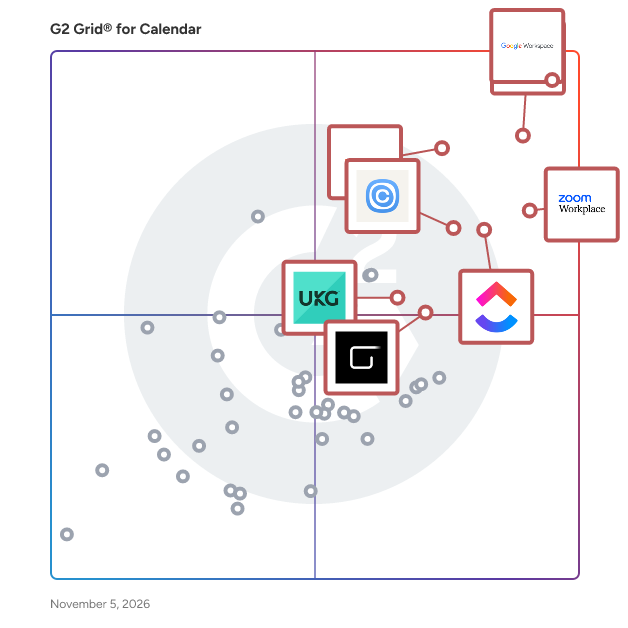
G2 Grid® for Calendar Software

G2 Grid® for Calendar Software plotting products by satisfaction and market presence

Highlighted products: Google Workspace, Microsoft Outlook, Zoom Workplace, Microsoft 365, Calendly, ClickUp, Zoho Mail, and Reclaim.ai.

Underlying data: [Grid® JSON](https://www.g2.com/categories/calendar-software/grids.json?focus%5B%5D=google-workspace&focus%5B%5D=microsoft-outlook&focus%5B%5D=zoom-workplace&focus%5B%5D=microsoft365&focus%5B%5D=calendly&focus%5B%5D=clickup&focus%5B%5D=zoho-mail&focus%5B%5D=reclaim-ai)

OneCal

OneCal is a calendar platform that syncs iCloud, Outlook, and Google Calendars in real time, provides intuitive Scheduling Links that make booking meetings simple, and lets you view and manage all of your calendars in a unified calendar view. The service is cloud-based, so there is nothing to install, and the setup takes just a few minutes. Main features: • Calendar Synchronization: OneCal is the most advanced Calendar Sync software in the market. You can sync multiple iCloud, Google, and Outlook calendars in real time, so your availability is reflected everywhere and you never get double booked. Syncs can be one-way or multi-way, and you choose exactly which event details are copied, which keeps your personal life private. You can also exclude events from syncing by color or category, color-code the synced events, and add an identifier to cloned events so they are easy to recognize. Every plan includes unlimited sync configurations and unlimited synced events. • Scheduling Links: You can effortlessly manage your appointments, meetings, and events with our user-friendly Scheduling Links, and say goodbye to tedious back-and-forth communication. All plans include unlimited one-on-one and collective booking links. OneCal reads your availability from all of your connected calendars, so invitees only see times when you are truly free. Each link can be customized with meeting durations, time slot intervals, availability schedules, buffer times, minimum notice periods, and limits on how far in advance people can book. You can also ask invitees custom questions, require manual confirmation, show a custom confirmation message, and redirect invitees to your own page after they book. Booking pages can carry your own logo, they can be embedded on your website, and the Premium plan lets you remove OneCal branding completely. • Unified Calendar View: The Unified Calendar View lets you see and manage all of your iCloud, Outlook, and Google Calendars in one place. You can create, edit, and delete events, RSVP to invites, join meetings with one click, hide the clones created by OneCal Calendar Sync, and see when your teammates are available. Available on the App Store and Play Store.. • Mobile and Desktop Apps: You can use all of the OneCal features straight from your preferred device with our iOS, Android, and macOS apps. The mobile apps let you manage your calendar syncs, scheduling links, and calendars right from your phone. • Integrations: OneCal connects with the tools you already use. Zoom, Google Meet, and Microsoft Teams links are added to your bookings automatically, so every meeting is ready the moment it is scheduled. Through Zapier, you can connect OneCal to thousands of other apps using pre-built triggers and actions. • MCP Server: The OneCal MCP Server gives AI assistants like Claude and ChatGPT secure access to your calendars. Your assistant can list your events, check your availability, and create, update, or delete events for you. Built for teams and enterprises: • Admin Managed Accounts: Admins can fully manage the accounts of their team members, as long as each user allows it. • User Provisioning API: The API lets you programmatically invite users, remove users, retrieve existing team members along with their sync usage, and view pending invitations. • OIDC/SAML SSO: Your team can sign in to OneCal through your identity provider, such as Okta, Azure AD, or Google Workspace, using OpenID Connect or SAML. • SCIM Directory Sync: Team members are automatically provisioned and deprovisioned from your identity provider using the SCIM protocol. • Team management: Pricing is per user, team management is simple and intuitive, and team members can sign up on their own. • Dedicated support: Teams on the Premium plan get dedicated support through Slack or Discord, along with hands-on user onboarding assistance. Security and compliance: • OneCal is SOC 2 Type II certified and GDPR compliant, and a Data Processing Agreement (DPA) is included. • OneCal connects to your calendars through OAuth2 and never stores your passwords. All data is encrypted in transit and at rest. • OneCal does not store or analyze your calendar event data, and it only asks for the minimal permissions it needs to work. You can try OneCal free for 14 days, and no credit card is required.

Average Rating: 4.7/5.0

Total Reviews: 97

How Do G2 Users Rate OneCal?

  • Has the product been a good partner in doing business?: 10.0/10 (Category avg: 9.1/10)
  • Sync Multiple Calendars: 9.8/10 (Category avg: 8.7/10)
  • Software Integrations: 9.0/10 (Category avg: 8.2/10)
  • Customized Calendar Notifications: 9.4/10 (Category avg: 8.8/10)

Who Is the Company Behind OneCal?

  • Seller: OneCal
  • Year Founded: 2022
  • HQ Location: N/A
  • Twitter: @onecal_io
    48 Twitter followers
  • LinkedIn® Page: www.linkedin.com
    5 employees on LinkedIn®

Who Uses This Product?

  • Top Industries: Consulting, Computer Software
  • Company Size: 84% Small, 10% Medium

What Do G2 Reviewers Say About OneCal?

AI-generated summary from verified user reviews

Pros
  • Users commend the ease of use of OneCal, appreciating its seamless calendar synchronization and fantastic support.
  • Users value the seamless calendar integration of OneCal, effectively avoiding scheduling conflicts and saving time.
  • Users appreciate the simple setup of OneCal, making scheduling effortless and saving valuable time on rescheduling.
  • Users value the real-time syncing capabilities of OneCal, effectively managing availability across multiple calendars without conflicts.
  • Users praise the easy setup of OneCal, enabling seamless integration and effortless scheduling management.
Cons
  • Users find the 50 calendar limit restrictive, complicating management and sync processes, leading to inefficiencies.
  • Users note the missing features in OneCal's booking system, limiting its functionality compared to competitors.
  • Users find OneCal to be a bit expensive, particularly when connecting multiple calendars over five.
  • Users highlight the pricing issues for an unresponsive app that requires frequent unlinking and relinking of calendars.
  • Users experience scheduling issues with OneCal's less mature booking feature, affecting their overall satisfaction.

What Are Recent G2 Reviews of OneCal?

Brevo Marketing Platform

Trusted by over 500,000 businesses worldwide, Brevo (formerly Sendinblue) is the affordable, all-in-one marketing and CRM stack that helps growing businesses scale faster. It's easy to use and suitable for companies of all sizes. Build lasting customer relationships with Brevo's flexible toolkit. Products range from marketing to sales, chat, and transactional emails. Choose what you need — and only pay for what you use. Here are just some of the things you can do with Brevo: - Run multi-channel marketing campaigns across email, WhatsApp, SMS, web push, and Facebook ads - Trigger transactional emails, SMS, and WhatsApp notifications over Brevo SMTP and APIs - Automate marketing activities to deliver the right message at the right time, and efficiently manage your audience - Reduce the number of marketing and sales apps — and get a full view of customer interactions with tools that talk to each other - Engage customers in real-time and reply to FAQs 24/7 with live chat and chatbot - Track leads, automate tasks, and schedule meetings with the Brevo Sales Platform - Connect your e-commerce store to track web sales and use the Retention analysis to improve your marketing strategy. - Talk to customers anytime, anywhere with Brevo’s cloud-based phone system Learn more and start for free at https://www.brevo.com/products/marketing-platform/ Get a custom quote: https://www.brevo.com/plus/contact/

Average Rating: 4.5/5.0

Total Reviews: 2,494

How Do G2 Users Rate Brevo Marketing Platform?

  • Has the product been a good partner in doing business?: 8.9/10 (Category avg: 9.1/10)
  • Sync Multiple Calendars: 8.1/10 (Category avg: 8.7/10)
  • Software Integrations: 7.9/10 (Category avg: 8.2/10)
  • Customized Calendar Notifications: 8.8/10 (Category avg: 8.8/10)

Who Is the Company Behind Brevo Marketing Platform?

  • Seller: Brevo
  • Company Website:
  • Year Founded: 2012
  • HQ Location: Paris
  • Twitter: @brevo_official
    16,032 Twitter followers
  • LinkedIn® Page: www.linkedin.com
    880 employees on LinkedIn®

Who Uses This Product?

  • Who Uses This: CEO, Founder
  • Top Industries: Marketing and Advertising, Information Technology and Services
  • Company Size: 84% Small, 13% Medium

What Do G2 Reviewers Say About Brevo Marketing Platform?

AI-generated summary from verified user reviews

Pros
  • Users appreciate the ease of use of Brevo, finding it straightforward to navigate and manage their marketing efforts.
  • Users appreciate the easy campaign scheduling and automation features of Brevo, making email marketing efficient and effective.
  • Users find Brevo Marketing Platform's easy setup and automation features greatly enhance their email marketing experience.
  • Users appreciate the convenient and efficient email marketing features of Brevo, making automation and scheduling a breeze.
  • Users appreciate the simplicity of Brevo, noting its ease in creating effective marketing campaigns without complexity.
Cons
  • Users find the missing features in Brevo's automation and design limits frustrating for complex marketing tasks.
  • Users note the limited features in Brevo, particularly in customization and automation options, affecting functionality.
  • Users find the limited customization options restrict their ability to create unique and visually appealing designs.
  • Users find the learning curve steep initially, with some features feeling unintuitive for beginners.
  • Users find Brevo Marketing Platform expensive, especially with rising SMS costs and navigating complex pricing tiers.

What Are Recent G2 Reviews of Brevo Marketing Platform?

What Are G2 Users Discussing About Brevo Marketing Platform?

AddEvent

AddEvent is the leading no-code platform for calendar and event marketing. AddEvent helps businesses promote events, drive attendance, and reduce no-shows. With Add to Calendar buttons, embeddable widgets, followable calendars, and RSVP tools, AddEvent makes it simple to connect your events with your audience’s personal calendars. Create branded event and calendar landing pages without coding, embed calendars or event lists on your website, and use automated reminders to keep attendees engaged. AddEvent’s no-code tools are designed to help marketers, event professionals, and product teams maximize attendance and retention. Whether you’re promoting webinars, conferences, or recurring community events, AddEvent gives you the power to get on their calendars, improve engagement, and make sure your customers never miss what’s next. Add to Calendar Buttons and Links Use our beautiful Add to Calendar buttons and links on your website, landing pages, emails, social media, and SMS to give your users a quick and effortless way to add your events to their calendars. When your users click the button or link, our service quickly adds your event to their calendar of choice. Dynamic Add to Calendar Build dynamic Add to Calendar functionality into your booking confirmation and email campaign templates to give your users Add to Calendar buttons and links customized just for their appointment. Dynamic Add to Calendar is perfect for getting on their calendar during the time of booking. Calendar Marketing An Embeddable Calendar, a Subscription Calendar, and a subscriber data collection service all rolled into one. Calendar Marketing is a marketing channel that delivers content, events, and updates directly to a user’s digital calendar through Subscription Calendars. Simply share your calendar with your customer base and get on their calendars with 1-click. Include upgrade and upsell offers, new product releases, and more to their calendars to get your customers from interested to converted. Zapier Integration AddEvent has built out a robust Zapier app that allows customers to pair AddEvent with their tools of choice. Share RSVP updates in Slack, Create an Event by adding rows to a Google Sheet, or Create and Update Contact information in your CRM from an RSVP. Apps & Marketplace You can also find AddEvent in Webflow, Wix, WordPress, and Mailchimp marketplaces to display and share your calendar and events without needing to copy code over. Security & Trust At AddEvent, we’re committed to the security and privacy of your data. AddEvent is SOC 2 compliant and adheres to GDPR, CCPA and other privacy and security regulations. We also have policies and controls for you to manage security threats, keep your data safe and help you meet your compliance obligations. AddEvent began as simple, powerful API’s built for developers, by developers. Since our founding, we’ve expanded our offering to support no-code solutions such as no-code landing pages, no-code widgets, WYSIWYG automated emails, and more. AddEvent is used by companies and organizations that rely on us to drive attendance for events, campaigns, product launches, webinars, sales, appointments and more. So no important moment is ever missed.

Average Rating: 4.5/5.0

Total Reviews: 68

How Do G2 Users Rate AddEvent?

  • Has the product been a good partner in doing business?: 9.5/10 (Category avg: 9.1/10)
  • Sync Multiple Calendars: 7.7/10 (Category avg: 8.7/10)
  • Software Integrations: 7.9/10 (Category avg: 8.2/10)
  • Customized Calendar Notifications: 8.8/10 (Category avg: 8.8/10)

Who Is the Company Behind AddEvent?

  • Seller: AddEvent
  • Company Website:
  • Year Founded: 2015
  • HQ Location: San Francisco, California
  • Twitter: @addevent
    18 Twitter followers
  • LinkedIn® Page: www.linkedin.com
    20 employees on LinkedIn®

Who Uses This Product?

  • Top Industries: Computer Software, Marketing and Advertising
  • Company Size: 67% Small, 17% Medium

What Do G2 Reviewers Say About AddEvent?

AI-generated summary from verified user reviews

Pros
  • Users find AddEvent to be incredibly easy to use, streamlining workflows and enhancing attendee engagement effortlessly.
  • Users value the seamless calendar integration of AddEvent, enhancing convenience and attendance for diverse event participants.
  • Users appreciate the easy setup of AddEvent, enhancing convenience for guests and ensuring seamless event integration.
  • Users appreciate the consistent and simple UX/GUI of AddEvent, enhancing event management and guest engagement effectively.
  • Users love the automation of AddEvent, making it easy to manage events and enhance guest engagement seamlessly.
Cons
  • Users report serious calendar issues with AddEvent, including unreliable reminders and confusing update effects.
  • Users find AddEvent to be expensive for limited use, and feel stuck with rigid pricing and ineffective features.
  • Users express that there are limited options for customization and functionality in AddEvent, particularly for embedding calendars.
  • Users find some missing features in AddEvent, such as limited integrations and confusing naming conventions.
  • Users find limited customization options for landing pages and embeddable calendars, hindering their desired personalization.

What Are Recent G2 Reviews of AddEvent?

What Are G2 Users Discussing About AddEvent?

Chili Piper

Chili Piper is the Demand Conversion Platform, used by Meta, Verizon, Gong, monday.com, and thousands more 🌶️ Chili Piper is a demand conversion platform that helps B2B companies turn website visitors into qualified pipeline. It combines AI agents and configurable workflows to instantly qualify, route, and schedule inbound leads, eliminating the lag between a prospect showing interest and a rep booking a meeting. With features like AI chat, lead routing, automated scheduling, and enrichment built in, Chili Piper gives revenue teams the infrastructure to convert more of the demand they're already generating. Ready to convert more of the demand you're already generating? 🔥

Average Rating: 4.6/5.0

Total Reviews: 718

How Do G2 Users Rate Chili Piper?

  • Has the product been a good partner in doing business?: 8.9/10 (Category avg: 9.1/10)
  • Sync Multiple Calendars: 9.3/10 (Category avg: 8.7/10)
  • Software Integrations: 9.3/10 (Category avg: 8.2/10)
  • Customized Calendar Notifications: 9.4/10 (Category avg: 8.8/10)

Who Is the Company Behind Chili Piper?

  • Seller: Chili Piper
  • Company Website:
  • Year Founded: 2016
  • HQ Location: Brooklyn, NY
  • Twitter: @chilipiper
    2,078 Twitter followers
  • LinkedIn® Page: www.linkedin.com
    273 employees on LinkedIn®

Who Uses This Product?

  • Who Uses This: Account Executive, Sales Development Representative
  • Top Industries: Computer Software, Information Technology and Services
  • Company Size: 64% Medium, 21% Small

What Do G2 Reviewers Say About Chili Piper?

AI-generated summary from verified user reviews

Pros
  • Users appreciate the ease of use of Chili Piper, making scheduling effortless and enhancing overall productivity.
  • Users appreciate the seamless scheduling of Chili Piper, enhancing productivity by eliminating back-and-forth emails for meetings.
  • Users commend the exceptional customer support from Chili Piper, especially appreciating the knowledgeable and accessible account team.
  • Users value the exceptional customer support from Chili Piper, making administration and implementation seamless and efficient.
  • Users value the seamless scheduling of Chili Piper, enhancing productivity and transforming team workflows effortlessly.
Cons
  • Users find Chili Piper expensive, citing unexpected costs and poor customer support as major issues.
  • Users note a steep learning curve for non-technical team members due to complexity and admin dependency.
  • Users find the troubleshooting process challenging, especially with complex setups and a high dependency on admin support.
  • Users express frustration with the limited customization options in Chili Piper, impacting usability and flexibility for teams.
  • Users note the missing features in Chili Piper, affecting intuitiveness and integration capabilities with other tools.

What Are Recent G2 Reviews of Chili Piper?

What Are G2 Users Discussing About Chili Piper?

Akiflow

Akiflow is a personal task manager + calendar desktop app (win+mac) that will help you keep yourself always organized. By becoming 10x faster on the basics, keeping yourself organized will not be a burden or require too much time throughout the day WHY AKIFLOW? We built Akiflow focusing on speeding up the fundamentals of productivity: capturing tasks, processing them, and always knowing what to work on. → Reduce the effort By becoming 10x faster on the basics, keeping yourself organised will not be a burden or require too much time throughout the day. → Prevent mistakes Akiflow is built to prevent the most common mistakes that affect productivity. Our features are designed to help you avoid cognitive overload, distractions, over-scheduling and context switching. → Peace of mind A single source of truth. A clear schedule. Notifications to guide you throughout the day. Everything one shortcut away. Akiflow is built to keep your mind clear and focused. OUR KEY FEATURES INCLUDE → Universal task Inbox - Capture anything, anywhere. Centralise your tasks. → Command Bar - Sort things out in seconds. Prioritise, Plan and Snooze with keyboard shortcuts. → One tool - No more context switching. Tasks + Calendars. Your single source of truth. → Tray Notification - Always know what to do next. Your day at a glance. PACKED WITH FEATURES → Share availability - No more ping-ping between email and calendar tabs to share your availability. Quickly select and share your slots in seconds. → Recurrent tasks - Create tasks with any recurrence: every day, every 1st of the month, custom - you name it. → Priority management - Set in Akiflow your real Goals - the tasks that will make you progress - and start executing. → Time blocking - Lock time in your calendar for your tasks. Akiflow will create an event in your calendar to let your colleagues know when you’re busy. → Timezones - Hit one shortcut to show every city's time zone in your calendar, side by side with your local time. → Smart lists - Custom labels to organize your work the way feels right for you. Easy to add, they help you have a visually clear view of your day. → Smart notifications - What you need, at the right time. Never miss a meeting, quick jump into a call. Better yet, totally customizable. INTEGRATED WITH ALL YOUR APPS Gmail, Calendar, Slack, Gmail, Zoom, Todoist, Trello, Asana, Superhuman and more. You can also request the integrations you want.

Average Rating: 4.8/5.0

Total Reviews: 99

How Do G2 Users Rate Akiflow?

  • Has the product been a good partner in doing business?: 10.0/10 (Category avg: 9.1/10)
  • Sync Multiple Calendars: 9.5/10 (Category avg: 8.7/10)
  • Software Integrations: 9.0/10 (Category avg: 8.2/10)
  • Customized Calendar Notifications: 8.6/10 (Category avg: 8.8/10)

Who Is the Company Behind Akiflow?

  • Seller: Akiflow
  • HQ Location: Remote, US
  • Twitter: @getAkiflow
    2,345 Twitter followers
  • LinkedIn® Page: www.linkedin.com
    19 employees on LinkedIn®

Who Uses This Product?

  • Top Industries: Information Technology and Services, Marketing and Advertising
  • Company Size: 70% Small, 7% Medium

What Do G2 Reviewers Say About Akiflow?

AI-generated summary from verified user reviews

Pros
  • Users find Akiflow to be easy to use, facilitating seamless task management and organization for enhanced productivity.
  • Users love seamless scheduling in Akiflow, effortlessly managing tasks and calendars in a unified, efficient workspace.
  • Users commend the exceptional customer support at Akiflow, highlighting proactive assistance and personalized onboarding experiences.
  • Users commend the easy setup of Akiflow, enabling effective workflows and efficient task management in no time.
  • Users highlight the efficiency of Akiflow, enabling quick task management and structured weekly planning with minimal effort.
Cons
  • Users find the missing features in Akiflow, such as limited Notion sync and lack of task dependencies, frustrating.
  • Users experience integration issues, wishing for deeper connections with tools like Notion and iOS calendar.
  • Users find the learning curve steep with Akiflow, struggling with its complexity and overwhelming setup process.
  • Users find the learning difficulty challenging, as it complicates project setup and initial usage.
  • Users express a desire for enhanced customization options in Akiflow, particularly regarding hotkeys and themes.

What Are Recent G2 Reviews of Akiflow?

What Are G2 Users Discussing About Akiflow?

Spike

Spike is an AI-powered email and team communication platform that combines email, chat, meetings, and collaboration tools into a single, organized workspace. It is designed for professionals, small teams, and businesses that use email as their primary communication channel but want a faster, more streamlined way to manage daily interactions and tasks. By transforming traditional email into a chat-like format, Spike simplifies how users read and reply to messages. The platform removes repetitive headers, quoted text, and long chains, allowing conversations to appear as clean, continuous threads. Users can manage all email accounts, calendars, and contacts in one place while taking advantage of built-in AI to summarize conversations, draft replies, and organize the inbox automatically. Spike supports both individual and team use. Freelancers and professionals use it to manage clients and projects more efficiently, while teams rely on Spike to centralize communication, share files, and collaborate in real time without switching between multiple tools. Core Features: Conversational Email: Presents emails as natural chat-like conversations while remaining fully compatible with standard email protocols. AI Productivity Tools: Provides automatic summaries, suggested replies, translations, and content drafting to speed up workflow. Priority Inbox: Uses AI to sort incoming messages into relevant categories—Priority, Other, Notes, and Starred—helping users focus on what matters most. Integrated Meetings: Enables voice and video calls directly from email threads for faster coordination. Collaborative Notes and Docs: Allows users to create, edit, and share documents in real time within the inbox. Unified Inbox and Search: Consolidates multiple email accounts and calendars into a single interface with cross-account search. Shared Inbox: Helps teams manage customer and project communications collaboratively, ensuring faster response times. Compatibility: Works with Gmail, Outlook, iCloud, Office 365, Yahoo Mail, and all IMAP-supported accounts across desktop, mobile, and web platforms. Security and Privacy: Spike is ad-free and never sells or monetizes user data. All message data is encrypted using the AES-256 standard. Spike is suited for users seeking a unified communication platform that enhances productivity while maintaining the familiarity of email. It bridges the gap between traditional email clients and modern collaboration tools, offering a single, AI-enhanced workspace that helps individuals and teams stay focused and efficient.

Average Rating: 4.6/5.0

Total Reviews: 249

How Do G2 Users Rate Spike?

  • Has the product been a good partner in doing business?: 8.6/10 (Category avg: 9.1/10)
  • Sync Multiple Calendars: 9.3/10 (Category avg: 8.7/10)
  • Software Integrations: 9.2/10 (Category avg: 8.2/10)
  • Customized Calendar Notifications: 8.3/10 (Category avg: 8.8/10)

Who Is the Company Behind Spike?

  • Seller: Spike
  • Year Founded: 2014
  • HQ Location: Herzliya, IL
  • Twitter: @SpikeNowHQ
    3,036 Twitter followers
  • LinkedIn® Page: www.linkedin.com
    29 employees on LinkedIn®

Who Uses This Product?

  • Who Uses This: CEO, Owner
  • Top Industries: Information Technology and Services, Computer Software
  • Company Size: 72% Small, 15% Medium

What Do G2 Reviewers Say About Spike?

AI-generated summary from verified user reviews

Pros
  • Users find Spike's ease of use remarkable, simplifying communications and enhancing their productivity significantly.
  • Users love the easy email management of Spike, appreciating its simple interface and organized personal messages.
  • Users love Spike's modern chat-like communication, which simplifies email management and enhances productivity through its intuitive design.
  • Users appreciate the intuitive chat-style interface of Spike, enhancing email management and reducing inbox anxiety significantly.
  • Users love Spike's chat-style interface and unified inbox, significantly enhancing productivity and email management.
Cons
  • Users note a lack of essential features in Spike, particularly impacting usability for structured and professional environments.
  • Users highlight limited features in Spike, noting message history caps and lack of search for Japanese text as significant drawbacks.
  • Users note integration issues with Spike, citing limited third-party support and occasional syncing problems with external email providers.
  • Users find Spike expensive, particularly feeling pressured towards paid plans due to limitations on the free tier.
  • Users express frustration with the limited customization options in Spike, impacting notification management and overall experience.

What Are Recent G2 Reviews of Spike?

What Are G2 Users Discussing About Spike?

ONLYOFFICE Workspace

ONLYOFFICE Workspace is a web-based open-source business platform for efficient team management and online collaboration, developed by Ascensio System SIA, a Latvian software development company. The solution features online document editors, a platform for document management, corporate communication, mail and project management tools. The ONLYOFFICE online editors allow you to create, edit and collaborate on text documents, spreadsheets, presentations, fillable forms and PDF files. Complete compatibility with Word, Excel and PowerPoint files.

Average Rating: 4.4/5.0

Total Reviews: 63

How Do G2 Users Rate ONLYOFFICE Workspace?

  • Has the product been a good partner in doing business?: 9.2/10 (Category avg: 9.1/10)
  • Sync Multiple Calendars: 5.8/10 (Category avg: 8.7/10)
  • Software Integrations: 7.5/10 (Category avg: 8.2/10)
  • Customized Calendar Notifications: 7.5/10 (Category avg: 8.8/10)

Who Is the Company Behind ONLYOFFICE Workspace?

  • Seller: Ascensio System
  • Year Founded: 2008
  • HQ Location: Riga, Latvia
  • Twitter: @only_office
    6,700 Twitter followers
  • LinkedIn® Page: www.linkedin.com
    120 employees on LinkedIn®

Who Uses This Product?

  • Top Industries: Computer Software, Higher Education
  • Company Size: 76% Small, 17% Medium

What Do G2 Reviewers Say About ONLYOFFICE Workspace?

AI-generated summary from verified user reviews

Pros
  • Users appreciate the affordability of ONLYOFFICE Workspace, especially with the availability of a free tier.
  • Users appreciate the centralization of documents in ONLYOFFICE Workspace, enhancing organization and ease of access.
  • Users enjoy the intuitive and centralized organization of ONLYOFFICE Workspace, making document management effortless and efficient.
  • Users appreciate the ease of use of ONLYOFFICE Workspace, finding it intuitive and helpful for organization.
  • Users appreciate the easy collaboration of ONLYOFFICE Workspace, enhanced by its intuitive interface and centralized document management.
Cons
  • Users express frustration over billing issues and a lack of effective customer support, impacting their overall experience.
  • Users are frustrated by the incomplete information and lack of responsive customer support in ONLYOFFICE Workspace.
  • Users are frustrated with the insufficient training and lack of customer support for ONLYOFFICE Workspace.
  • Users are frustrated by the limited storage capacity and inadequate customer support when dealing with large documents.
  • Users express disappointment with the poor customer support of ONLYOFFICE Workspace, highlighting the need for improvement in assistance.

What Are Recent G2 Reviews of ONLYOFFICE Workspace?

What Are G2 Users Discussing About ONLYOFFICE Workspace?

Calendar.online

Calendar.online is an easy to use and easy to share web-based online calendar with extended right management

Average Rating: 4.3/5.0

Total Reviews: 20

How Do G2 Users Rate Calendar.online?

  • Has the product been a good partner in doing business?: 9.0/10 (Category avg: 9.1/10)
  • Sync Multiple Calendars: 8.6/10 (Category avg: 8.7/10)
  • Software Integrations: 7.6/10 (Category avg: 8.2/10)
  • Customized Calendar Notifications: 8.8/10 (Category avg: 8.8/10)

Who Is the Company Behind Calendar.online?

Who Uses This Product?

  • Company Size: 75% Small, 25% Medium

What Do G2 Reviewers Say About Calendar.online?

AI-generated summary from verified user reviews

Pros
  • Users enjoy the efficient scheduling of Calendar.online, appreciating timely bookings and automated notifications for all participants.
  • Users love the ease of use of Calendar.online, making scheduling effortless and organized across devices.
  • Users value the seamless calendar integration of Calendar.online, enhancing their scheduling and communication experience effectively.
  • Users love the intuitive platform of Calendar.online, simplifying scheduling and enhancing overall experience seamlessly.
  • Users appreciate the accessibility of Calendar.online, enjoying its convenience across multiple devices while on the go.
Cons
  • Users express concerns about time constraints due to limited functionality and syncing issues affecting scheduling efficiency.
  • Users face significant integration issues with Calendar.online, limiting its connectivity with other productivity tools and devices.
  • Users find the limited customization options of Calendar.online hinder their personal experience and integration with other tools.
  • Users find the limited features of Calendar.online restrict their productivity and personalization capabilities.
  • Users find calendar recurrence limitations frustrating, complicating event creation and management for their specific schedules.

What Are Recent G2 Reviews of Calendar.online?

What Are G2 Users Discussing About Calendar.online?

CiraSync

Specifically for Office 365 business users, CiraSync automatically enables access to shared calendars, Global Address Lists, and Public Folder contacts and calendars on business smartphones. Native Salesforce connector available plus sync to 170+ CRMs via PieSync. CiraSync is a secure, Azure-based solution that is extremely flexible, easy to configure, and requires no user training. The solution scales to thousands of smartphones. More than 8,500 companies with 125,000+ users benefit from the productivity gains and cost savings of contact and calendar automation with CiraSync. The solution is GDPR compliant. Free technical support for Enterprise Edition is available 7 days a week. 30-day, 100-user Free Trial.

Average Rating: 4.6/5.0

Total Reviews: 146

How Do G2 Users Rate CiraSync?

  • Has the product been a good partner in doing business?: 9.4/10 (Category avg: 9.1/10)
  • Sync Multiple Calendars: 9.2/10 (Category avg: 8.7/10)
  • Software Integrations: 9.2/10 (Category avg: 8.2/10)
  • Customized Calendar Notifications: 8.9/10 (Category avg: 8.8/10)

Who Is the Company Behind CiraSync?

  • Seller: CiraApps Ltd
  • Year Founded: 2016
  • HQ Location: San Jose, California
  • Twitter: @cirasync
    71 Twitter followers
  • LinkedIn® Page: www.linkedin.com
    57 employees on LinkedIn®

Who Uses This Product?

  • Who Uses This: IT Manager
  • Top Industries: Construction, Information Technology and Services
  • Company Size: 74% Medium, 22% Small

What Are Recent G2 Reviews of CiraSync?

What Are G2 Users Discussing About CiraSync?

Cirrus Insight

From CRM hygiene to AI-orchestrated selling, Cirrus is uniquely positioned to fuel your end-to-end sales engine. For over a decade, we’ve been listening, logging, and capturing the relationship history inside Gmail, Outlook, and Salesforce, so your CRM has the clean, complete data it needs to work. Cirrus automates pipeline creation, actively manages deals, and equips every meeting with prep and follow-up without pulling reps out of their inbox. The result is a sales organization that’s proactive instead of reactive: calendars stay full, buyer committees stay engaged, and forecasts reflect reality. Whether you’re an admin, sales leader, rep, or advisor, Cirrus keeps the GTM motion aligned and your CRM pristine, so you can predict, prioritize, and win faster. What Cirrus does best: Build Pipeline: Intelligent scheduling and instant lead routing/assignment to keep calendars full and funnels fresh. Manage Pipeline: Always-on CRM hygiene, a pipeline health view, process guidance, buyer-committee mapping, and real-time engagement signals so no deal goes dark. Win Every Meeting: Automated pre-meeting briefs, live coaching and nudges and proposals/ROI builders for momentum in every interaction. Sell Smarter: Analytics and forecasting powered by trustworthy data, plus relationship and deal intelligence that surface what truly drives revenue. Teams choose Cirrus because we have Salesforce data you can trust, AI that actually performs because it’s trained on clean historical context, and inbox-native workflows for Gmail and Outlook that reps love and adopt.

Average Rating: 4.2/5.0

Total Reviews: 1,467

How Do G2 Users Rate Cirrus Insight?

  • Has the product been a good partner in doing business?: 8.3/10 (Category avg: 9.1/10)
  • Sync Multiple Calendars: 8.3/10 (Category avg: 8.7/10)
  • Software Integrations: 8.1/10 (Category avg: 8.2/10)
  • Customized Calendar Notifications: 6.8/10 (Category avg: 8.8/10)

Who Is the Company Behind Cirrus Insight?

  • Seller: Cirrus Insight
  • Company Website:
  • Year Founded: 2011
  • HQ Location: Irvine, CA
  • Twitter: @cirrusinsight
    3,188 Twitter followers
  • LinkedIn® Page: www.linkedin.com
    33 employees on LinkedIn®

Who Uses This Product?

  • Who Uses This: Account Executive, Account Manager
  • Top Industries: Computer Software, Information Technology and Services
  • Company Size: 46% Medium, 37% Small

What Do G2 Reviewers Say About Cirrus Insight?

AI-generated summary from verified user reviews

Pros
  • Users appreciate the seamless email and calendar integration with Salesforce, enhancing data syncing and usability.
  • Users love the calendar link feature of Cirrus Insight, simplifying meeting scheduling and eliminating back-and-forth communication.
  • Users appreciate the sophisticated integrations of Cirrus Insight, enhancing CRM adoption and streamlining tasks with Salesforce.
  • Users appreciate the seamless calendar integration in Cirrus Insight, enhancing daily planning and CRM functionality effortlessly.
  • Users find Cirrus Insight to have an incredibly user-friendly interface, simplifying the integration with email and Salesforce.
Cons
  • Users report issues with missing features, such as the "file email" button and ineffective syncing capabilities.
  • Users find the learning curve steep and report difficulties with setup and unclear cancellation processes.
  • Users find Cirrus Insight not intuitive for setup and cancellation, complicating their overall experience and service management.
  • Users frequently experience poor customer support, making resolution of issues and setup implementation challenging and frustrating.
  • Users face integration issues with Cirrus Insight, especially concerning calendar and email sync with Salesforce.

What Are Recent G2 Reviews of Cirrus Insight?

What Are G2 Users Discussing About Cirrus Insight?

Silverline CalendarAnything

A calendar is just the beginning for this popular Salesforce AppExchange Product! CalendarAnything gives you the power to zoom in on the details or take a step back for the big picture — all in one place. Whether you're coordinating marketing campaigns, planning epic events, optimizing resources, managing projects, or scheduling meetings and appointments, CalendarAnything is completely customizable to your business. With CalendarAnything, you can... - See the most important information at-a-glance - Streamline operations by manipulating Salesforce data directly from CalendarAnything - Build real-time pipelines, project plans, roadmaps, timelines, and more - Customize variables to what matters to your business - Export calendars to Excel You don't need costly custom development to have a 360 degree view of your operations — anyone can set up and use CalendarAnything on day one. See why we're AppExchange's #1 calendar app for yourself. Try us free for 15 days!

Average Rating: 4.6/5.0

Total Reviews: 11

How Do G2 Users Rate Silverline CalendarAnything?

  • Has the product been a good partner in doing business?: 8.6/10 (Category avg: 9.1/10)

Who Is the Company Behind Silverline CalendarAnything?

  • Seller: Silverline
  • Year Founded: 2009
  • HQ Location: New York, NY
  • Twitter: @silverlinecrm
    1,416 Twitter followers
  • LinkedIn® Page: www.linkedin.com
    490 employees on LinkedIn®

Who Uses This Product?

  • Company Size: 77% Medium, 15% Large

What Are Recent G2 Reviews of Silverline CalendarAnything?

What Are G2 Users Discussing About Silverline CalendarAnything?

Clockwise

Clockwise is an AI-powered calendar assistant that builds better and more productive schedules – designed to alleviate the stress of calendar management for busy professionals. Powered by automation and AI, Clockwise rapidly calculates the best time for meetings, tasks, and deep work – all based on your preferences. Clockwise works across individuals, teams, and entire companies, and it gets smarter and more powerful as more people use it. Over 40,000 organizations run on Clockwise, including Atlassian, Asana, Reddit, and Twitter. Learn more at getclockwise.com.

Average Rating: 4.7/5.0

Total Reviews: 71

How Do G2 Users Rate Clockwise?

  • Has the product been a good partner in doing business?: 7.5/10 (Category avg: 9.1/10)
  • Sync Multiple Calendars: 7.5/10 (Category avg: 8.7/10)
  • Software Integrations: 8.7/10 (Category avg: 8.2/10)
  • Customized Calendar Notifications: 7.6/10 (Category avg: 8.8/10)

Who Is the Company Behind Clockwise?

  • Seller: Clockwise
  • Year Founded: 2016
  • HQ Location: San Francisco, California
  • Twitter: @clockwise
    10 Twitter followers
  • LinkedIn® Page: www.linkedin.com
    19 employees on LinkedIn®

Who Uses This Product?

  • Top Industries: Computer Software, Information Technology and Services
  • Company Size: 51% Medium, 26% Small

What Do G2 Reviewers Say About Clockwise?

AI-generated summary from verified user reviews

Pros
  • Users appreciate the syncing capabilities of Clockwise, enhancing personal scheduling and optimizing time management effectively.
  • Users appreciate the scheduling ease of Clockwise, effectively managing personal and team calendars for enhanced productivity.
  • Users value the actionable insights from Clockwise, allowing for better time management and improved scheduling efficiency.
  • Users appreciate the calendar integration that effectively syncs personal schedules and manages recurring commitments.
  • Users value the responsive and helpful customer support that enhances onboarding and troubleshooting experiences effectively.
Cons
  • Users face challenges with calendar integration, finding it disruptive and in need of better guidance for superiors.
  • Users express frustration with scheduling issues, as the AI can make unexpected changes that require manual tweaks.
  • Users find the unexpected AI scheduling changes sometimes require manual adjustments, hindering the overall experience.
  • Users experience calendar issues with Clockwise, often finding conflicts and frequent rescheduling disruptive to their workflow.
  • Users experience delays in appointment management due to frequent rescheduling, causing confusion among colleagues not using the app.

What Are Recent G2 Reviews of Clockwise?

What Are G2 Users Discussing About Clockwise?

Bitrix24

Bitrix24 is an all-in-one business workspace that combines CRM, collaboration, and management tools in a single, easy-to-use platform – free for unlimited users. Whether you're a small team or a growing business, Bitrix24 helps you to: — Track leads and manage customer relationships with a built-in CRM — Stay on top of projects and tasks with Kanban boards, timelines, and time tracking — Communicate easily via team messenger, video calls, and shared calendars — Create and edit documents, manage files, and collect e-signatures — Run marketing campaigns and manage customer interactions through email, calls, and WhatsApp Bitrix24’s AI-powered assistant CoPilot helps automate routine tasks, write emails, analyze data, and suggest next steps, saving time and boosting productivity. What makes Bitrix24 a great solution for businesses: — Free forever for unlimited users, with access to core features and 5 GB storage — No per-user fees – upgrade only when you need more storage or advanced tools — Accessible anywhere via web, desktop, and mobile apps — Scalable – grow your business without switching platforms or juggling tools Over 15 million companies trust Bitrix24 to simplify operations, cut costs, and get more done – all in one place.

Average Rating: 4.1/5.0

Total Reviews: 578

How Do G2 Users Rate Bitrix24?

  • Has the product been a good partner in doing business?: 7.8/10 (Category avg: 9.1/10)
  • Sync Multiple Calendars: 7.8/10 (Category avg: 8.7/10)
  • Software Integrations: 8.1/10 (Category avg: 8.2/10)
  • Customized Calendar Notifications: 8.0/10 (Category avg: 8.8/10)

Who Is the Company Behind Bitrix24?

  • Seller: Bitrix24
  • Company Website:
  • Year Founded: 1998
  • HQ Location: Alexandria, Virginia
  • LinkedIn® Page: www.linkedin.com
    268 employees on LinkedIn®

Who Uses This Product?

  • Who Uses This: Marketing Manager, Project Manager
  • Top Industries: Information Technology and Services, Marketing and Advertising
  • Company Size: 55% Small, 34% Medium

What Do G2 Reviewers Say About Bitrix24?

AI-generated summary from verified user reviews

Pros
  • Users find Bitrix24 to be easy to use, effectively streamlining business processes and enhancing customer experience.
  • Users appreciate the team collaboration tools in Bitrix24, enhancing communication and streamlining business processes effortlessly.
  • Users value the effective communication capabilities of Bitrix24, enhancing collaboration with teams and customers seamlessly.
  • Users appreciate the flexibility and versatility of Bitrix24, enjoying its comprehensive features for business management.
  • Users find Bitrix24 intuitive, making collaboration and customer management seamless and enhancing overall productivity.
Cons
  • Users find the learning curve steep, requiring time and training to fully utilize Bitrix24's extensive features.
  • Users report performance issues with Bitrix24, experiencing lag and slowdowns, especially during complex workflows.
  • Users express concern over lacking features, with notable omissions affecting value as compared to initial promises.
  • Users find Bitrix24 to be not user-friendly, often struggling to locate tools and navigate the system efficiently.
  • Users experience slow performance with Bitrix24, especially during complex workflows, impacting overall productivity.

What Are Recent G2 Reviews of Bitrix24?

What Are G2 Users Discussing About Bitrix24?

Morgen

Morgen is a daily planner that prioritizes your most important to-dos, events, and projects in one app. Get AI-powered recommendations, plan manually, an time-blocking tasks from all your favorite tools—like Notion, Todoist, ClickUp, Obsidian, and more. Available on Linux, Windows, macOS, iOS, and Android.

Average Rating: 4.8/5.0

Total Reviews: 29

How Do G2 Users Rate Morgen?

  • Has the product been a good partner in doing business?: 9.7/10 (Category avg: 9.1/10)
  • Sync Multiple Calendars: 9.2/10 (Category avg: 8.7/10)
  • Software Integrations: 9.2/10 (Category avg: 8.2/10)
  • Customized Calendar Notifications: 9.2/10 (Category avg: 8.8/10)

Who Is the Company Behind Morgen?

Who Uses This Product?

  • Company Size: 76% Small, 10% Medium

What Do G2 Reviewers Say About Morgen?

AI-generated summary from verified user reviews

Pros
  • Users praise the ease of scheduling and calendar integration, which enhances organization and boosts work-life balance.
  • Users love the ease of use of Morgen, finding its intuitive design enhances productivity and organization seamlessly.
  • Users value the seamless calendar integration of Morgen, which simplifies planning by consolidating tasks and appointments.
  • Users love the seamless integration of Morgen with multiple calendars, enhancing their daily organization and productivity.
  • Users love the easy setup of Morgen, making calendar and task management seamless and efficient.
Cons
  • Users experience slow loading times, particularly with syncing between devices and performing simple tasks, hindering usability.
  • Users feel Morgen lacks essential features like task dependencies and intuitive scheduling tools, impacting overall usability.
  • Users find the slow performance of Morgen to be frustrating, especially with task completion and synchronization delays.
  • Users are frustrated by the lack of task dependency creation, which hampers the use of AI functionality in Morgen.
  • Users find the difficulty in time management challenging, often feeling overwhelmed by the number of tasks.

What Are Recent G2 Reviews of Morgen?

What Are G2 Users Discussing About Morgen?

GoodTime

GoodTime is the leader in complex interview scheduling automation for enterprise talent teams. Built for scale, our platform handles the complexity others can’t — automating every type of interview, from multi-day panels across time zones to high-volume hiring events, with unmatched speed and precision. Behind every seamless schedule is Cori, our AI agent that eliminates delays, surfaces insights, and keeps hiring teams perfectly in sync. Leaders at companies like Databricks, Aon, HubSpot, and HelloFresh trust GoodTime to orchestrate smarter, faster, people-first hiring experiences for their candidates, interviewers, and talent teams. Learn more at GoodTime.io

Average Rating: 4.4/5.0

Total Reviews: 112

How Do G2 Users Rate GoodTime?

  • Has the product been a good partner in doing business?: 8.9/10 (Category avg: 9.1/10)
  • Sync Multiple Calendars: 7.9/10 (Category avg: 8.7/10)
  • Software Integrations: 9.0/10 (Category avg: 8.2/10)
  • Customized Calendar Notifications: 8.6/10 (Category avg: 8.8/10)

Who Is the Company Behind GoodTime?

  • Seller: GoodTime.io
  • Company Website:
  • Year Founded: 2016
  • HQ Location: San Francisco, California, United States
  • Twitter: @goodtimeio
    243 Twitter followers
  • LinkedIn® Page: www.linkedin.com
    92 employees on LinkedIn®

Who Uses This Product?

  • Who Uses This: Recruiting Coordinator, Recruiter
  • Top Industries: Information Technology and Services, Staffing and Recruiting
  • Company Size: 52% Large, 36% Medium

What Do G2 Reviewers Say About GoodTime?

AI-generated summary from verified user reviews

Pros
  • Users highlight the automated scheduling feature of GoodTime, significantly reducing time spent on coordination and emails.
  • Users appreciate the ease of use of GoodTime, finding scheduling and processes simple and efficient.
  • Users love the easy scheduling with GoodTime, streamlining processes and enhancing productivity effortlessly.
  • Users praise the swift customer support of GoodTime, which quickly resolves doubts and issues effectively.
  • Users find GoodTime's ease of use and excellent customer support greatly enhances their hiring and scheduling experience.
Cons
  • Users report technical issues with GoodTime, including missed time slots and frequent crashes disrupting functionality.
  • Users experience app glitches with GoodTime, including missing time slots and occasional crashes that disrupt usability.
  • Users experience calendar issues with GoodTime, where available time slots are sometimes not displayed correctly.
  • Users find the learning curve steep, making the initial setup and customization time-consuming and complex.
  • Users express frustration over limited customization options in GoodTime, feeling restricted by its automation features.

What Are Recent G2 Reviews of GoodTime?

What Are G2 Users Discussing About GoodTime?

Neeraja Prakash
NP
Researched and written by Neeraja Prakash
Updated March 6, 2025