# Best Benefits Administration Software

*By [Jeffrey Lin](https://research.g2.com/insights/author/jeffrey-lin)*


Benefits administration software helps organizations plan, manage, and administer employee benefits packages, including insurance plans, stock options, and open enrollment, while ensuring compliance with government regulations such as the ACA and HIPAA through centralized dashboards and employee self-service portals.

### Core Capabilities of Benefits Administration Software

To qualify for inclusion in the Benefits Administration category, a product must:

- Provide a centralized administrator dashboard to visualize benefits data
- Facilitate access to marketplaces of benefits vendors, such as insurance carriers
- Offer a benefits portal through which employers and employees can access plans, update information, and enroll in benefits during and outside of open enrollment
- Enable administrators to create total compensation statements to share with relevant stakeholders
- Help HR managers check and report on compliance with government regulations through built-in compliance checking and reporting features

### Common Use Cases for Benefits Administration Software

HR departments use benefits administration platforms to streamline enrollment management and give employees visibility into their benefits options. Common use cases include:

- Managing annual open enrollment periods and mid-year benefits changes
- Identifying which benefits provide the most value to employees while reducing overall costs
- Ensuring organizational compliance with federal and local benefits regulations

### How Benefits Administration Software Differs from Other Tools

Benefits administration software can be deployed as a standalone solution or as part of an integrated HR management suite. Some providers also function as BPaaS vendors, offering benefits administration and payroll services alongside the software. Products in this category are distinct from [employee perks software](https://www.g2.com/categories/employee-perks), which manages benefits outside a standard employee benefits package, rather than core plan administration and compliance.

### Insights from G2 on Benefits Administration Software

Based on category trends on G2, open enrollment management and employee self-service portals stand out as the most valued features. Improved compliance confidence and reduced administrative workload stand out as primary outcomes of adoption.


## Top Benefits Administration Software at a Glance
| # | Product | Rating | Best For | What Users Say |
|---|---------|--------|----------|----------------|
| 1 | [Gusto](https://www.g2.com/products/gusto/reviews) | 4.6/5.0 (11,654 reviews) | Unified payroll, benefits, and compliance administration | "[User-Friendly, Reliable, and Easy to Integrate with Responsive Support](https://www.g2.com/survey_responses/gusto-review-13095688)" |
| 2 | [Rippling](https://www.g2.com/products/rippling/reviews) | 4.8/5.0 (11,554 reviews) | Unified benefits enrollment with automated HR-IT provisioning | "[Smooth User Experience with Rippling](https://www.g2.com/survey_responses/rippling-review-11136743)" |
| 3 | [TriNet](https://www.g2.com/products/trinet/reviews) | 4.2/5.0 (1,883 reviews) | — | "[TriNet Simplifies HR So SMBs Can Focus on Growth](https://www.g2.com/survey_responses/trinet-review-12967209)" |
| 4 | [ADP Workforce Now](https://www.g2.com/products/adp-workforce-now/reviews) | 4.2/5.0 (4,146 reviews) | Unified benefits-to-payroll deduction administration | "[Helpful HR Tool for Attendance, Payroll, and Employee Information](https://www.g2.com/survey_responses/adp-workforce-now-review-12882746)" |
| 5 | [Remote](https://www.g2.com/products/remote/reviews) | 4.5/5.0 (3,698 reviews) | Cross-border EOR payroll and benefits compliance | "[Clean UI, Great Localized Benefits, and Fast Support](https://www.g2.com/survey_responses/remote-review-13085170)" |
| 6 | [Justworks](https://www.g2.com/products/justworks/reviews) | 4.6/5.0 (1,119 reviews) | Consolidated benefits administration with PEO-backed compliance | "[User-Friendly and Cost-Effective Business Administration](https://www.g2.com/survey_responses/justworks-review-12678982)" |
| 7 | [Paylocity](https://www.g2.com/products/paylocity/reviews) | 4.4/5.0 (5,995 reviews) | Unified benefits-to-payroll enrollment with EDI feeds | "[Seamless All-in-One HR Platform That Saves Hours](https://www.g2.com/survey_responses/paylocity-review-12915096)" |
| 8 | [Paycom](https://www.g2.com/products/paycom/reviews) | 4.5/5.0 (4,601 reviews) | Single-database benefits enrollment with carrier file feeds | "[Paycom Review 06.26.2026](https://www.g2.com/survey_responses/paycom-review-13036323)" |
| 9 | [CoAdvantage](https://www.g2.com/products/coadvantage/reviews) | 4.3/5.0 (135 reviews) | Bundled benefits administration with PEO-backed compliance | "[Great Benefits with Room for Customer Service Improvement](https://www.g2.com/survey_responses/coadvantage-review-11943384)" |
| 10 | [Forma](https://www.g2.com/products/formabenefits/reviews) | 4.8/5.0 (818 reviews) | Flexible spending account reimbursement and claims processing | "[Fast Claim Approvals and a Simple, Comprehensive Submission Process](https://www.g2.com/survey_responses/forma-review-12655465)" |

---
## What Are the Most Common Questions About Benefits Administration Software?
*AI-generated · Last updated: May 26, 2026*
### What Top Benefits Administration platforms for Technology companies seeking easy integration and minimal implementation complexity?
Based on G2 reviews, Technology teams most often praise benefits administration software that connects payroll, onboarding, and employee records in one place while keeping setup manageable for lean HR teams. Reviewers consistently highlight easy navigation, centralized benefits access, and fewer manual handoffs as the biggest drivers of satisfaction. According to verified users, the strongest experiences come from platforms that simplify onboarding, benefits enrollment, payroll deductions, and employee self-service without requiring heavy process redesign. G2 reviewers mention that smooth implementation, responsive support, and reliable integrations are especially important when teams want to avoid long deployment cycles and external complexity.

**Here are some of the top-rated products on G2:**

- [Gusto](https://www.g2.com/products/gusto/reviews) – often used by small and growing teams to combine payroll, onboarding, benefits, and tax workflows in one easy-to-use system
- [Rippling](https://www.g2.com/products/rippling/reviews) – frequently praised for bringing payroll, benefits, and employee data into one portal with straightforward setup
- [ADP Workforce Now](https://www.g2.com/products/adp-workforce-now/reviews) – used by organizations that want broad HR, payroll, and benefits functionality with centralized employee management


### What Most reliable Benefits Administration based on reviews from Operations Manager managing Technology company operations?
Based on G2 reviews, reliability in benefits administration usually comes down to consistency in payroll-linked deductions, dependable employee self-service, and support teams that resolve issues quickly. According to verified users, the most reliable platforms help operations leaders reduce manual work by centralizing benefits, payroll, documents, and employee updates in one system. G2 reviewers mention that dependable platforms are the ones employees keep using for pay information, time off, benefits access, and onboarding without frequent confusion. Across recent reviews, buyers should pay close attention to comments about support responsiveness, system stability, and whether benefits processes continue to run smoothly during onboarding, renewals, and everyday administration.


### What Highest rated Benefits Administration for Mid-market Technology companies focused on easy integration delivery?
Based on G2 reviews, mid-market buyers looking for easy integration delivery tend to favor platforms that connect benefits with payroll, onboarding, and employee records without forcing teams into complex manual workarounds. According to verified users, strong products reduce duplicate entry, keep employee information centralized, and make benefits easier to administer alongside hiring and payroll. G2 reviewers mention that integration quality matters most when HR teams need data to move cleanly between systems, especially during enrollment, onboarding, and payroll processing. The most positively described tools are usually the ones that combine an intuitive interface with implementation support and clear workflows, helping teams go live faster and maintain consistency afterward.


### What Benefits Administration supporting real-time visibility without sacrificing system stability and overall data integrity?
Based on G2 reviews, buyers looking for real-time visibility without sacrificing stability should prioritize platforms that centralize payroll, benefits, employee records, and reporting in one environment. According to verified users, the most effective systems give teams quick access to pay details, benefits information, PTO balances, and employee updates while reducing the need to reconcile data across multiple tools. G2 reviewers mention that this kind of visibility is most useful when paired with dependable performance, organized dashboards, and accurate records that stay current across workflows. Recent reviews also show that companies value systems that make information easy to find for both employees and administrators without introducing frequent errors or heavy manual checks.


### What Benefits Administration with the simplest configuration and onboarding for non-technical teams in Mid-market?
Based on G2 reviews, non-technical mid-market teams tend to prefer benefits administration software that uses guided setup, straightforward navigation, and employee self-service to reduce training needs. According to verified users, the simplest onboarding experiences come from products that let employees enter their own details, complete enrollment tasks, and access documents without constant HR intervention. G2 reviewers mention that step-by-step implementation, easy document collection, and centralized workflows are especially helpful when teams do not have dedicated technical resources. Recent feedback suggests that buyers should look for solutions where onboarding, payroll, benefits, and employee records work together in a single environment, making setup and day-to-day administration less intimidating for smaller HR teams.


### Which Benefits Administration do teams actually keep using beyond rollout instead of reverting?
Based on G2 reviews, [Gusto](https://www.g2.com/products/gusto/reviews) stands out as the product with the strongest recent review volume among eligible options, and reviewers often describe it as a platform they keep using across payroll, onboarding, time tracking, and benefits rather than abandoning after rollout. According to verified users, long-term adoption is driven by simple navigation, centralized employee access, and fewer manual processes. G2 reviewers mention that teams stick with platforms when employees can manage pay details, benefits, and documents on their own, while administrators can keep payroll and onboarding organized in one place. Continued usage is also linked to responsive support, easy setup, and workflows that remain manageable after implementation.


### Which Benefits Administration solutions deliver streamlined workflow while maintaining strong user team adoption?
Based on G2 reviews, [Gusto](https://www.g2.com/products/gusto/reviews) is the most eligible single product to highlight here because recent reviewers repeatedly describe it as a streamlined system for payroll, onboarding, benefits, and employee self-service. According to verified users, strong adoption happens when teams can complete common tasks like accessing pay information, updating personal details, and reviewing benefits without confusion. G2 reviewers mention that workflow improvements are strongest when a product reduces spreadsheet work, keeps documents centralized, and connects time, payroll, and benefits in one experience. Recent feedback also shows that adoption is reinforced by easy navigation, smooth onboarding, and support resources that help both administrators and employees stay productive.


### What Most trusted Benefits Administration solutions for Operations Manager teams based on user reviews?
Based on G2 reviews, Operations Manager teams tend to trust benefits administration solutions that reduce compliance stress, centralize employee data, and give dependable access to payroll and benefits information. According to verified users, trust is built when platforms consistently handle onboarding, payroll-linked benefits, time tracking, and employee document access without forcing teams into repeated manual corrections. G2 reviewers mention that responsive support and clear workflows are as important as product functionality, especially for managers overseeing multiple locations or distributed teams. Recent feedback suggests that the most trusted tools are the ones employees can use independently while HR and operations teams maintain visibility into requests, records, and routine administrative tasks from a single system.

**Here are some of the top-rated products on G2:**

- [Gusto](https://www.g2.com/products/gusto/reviews) – widely used for combining payroll, benefits, taxes, and onboarding in one platform that employees and admins can navigate easily
- [Rippling](https://www.g2.com/products/rippling/reviews) – valued for centralizing payroll, benefits, employee data, and workflow automation in a single system
- [ADP Workforce Now](https://www.g2.com/products/adp-workforce-now/reviews) – frequently chosen by teams needing a broad HR and benefits platform with reporting and employee self-service tools


### What Best Benefits Administration platforms for Mid-market organizations that require real-time visibility effectively?
Based on G2 reviews, mid-market organizations that need real-time visibility tend to benefit most from platforms that surface payroll, benefits, PTO, employee records, and reporting in one place. According to verified users, effective visibility is not just about dashboards but about having dependable access to up-to-date information that managers and employees can actually use. G2 reviewers mention that strong platforms reduce the need for separate systems, make data easier to find, and support faster decisions around payroll, benefits, and workforce administration. Buyers evaluating benefits administration software should focus on comments related to centralized data, employee self-service, and how smoothly updates move through the system during routine HR processes.

**Here are some of the top-rated products on G2:**

- [Gusto](https://www.g2.com/products/gusto/reviews) – helpful for mid-market and growing teams that want clear access to payroll, benefits, documents, and onboarding status in one system
- [Rippling](https://www.g2.com/products/rippling/reviews) – commonly praised for centralizing workforce information so teams can view payroll, benefits, and employee details together
- [ADP Workforce Now](https://www.g2.com/products/adp-workforce-now/reviews) – often used by organizations needing consolidated employee data, payroll, reporting, and benefits visibility


### Which Benefits Administration provide streamlined workflow without expensive implementation costs or outside consulting?
Based on G2 reviews, [Gusto](https://www.g2.com/products/gusto/reviews) is the clearest single product to mention because reviewers repeatedly describe it as easy to set up, simple to navigate, and useful for handling payroll, benefits, and onboarding without a heavy lift. According to verified users, platforms that avoid expensive implementation complexity usually rely on guided setup, employee self-service, and integrated workflows rather than custom consulting-heavy deployments. G2 reviewers mention that teams value products that let them centralize payroll, taxes, benefits, and employee information quickly while minimizing training and support burden. Recent feedback also highlights that strong usability and responsive support help buyers avoid reverting to spreadsheets or piecing together multiple systems.


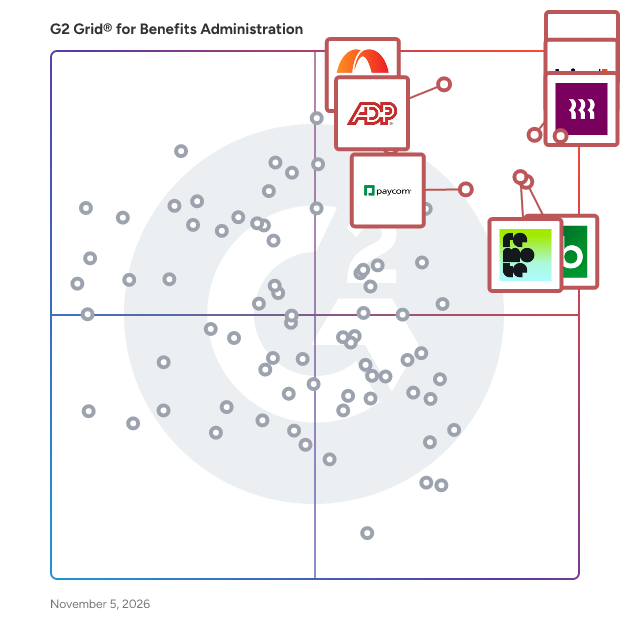
## G2 Grid® for Benefits Administration Software
![G2 Grid® for Benefits Administration Software plotting products by satisfaction and market presence](https://www.g2.com/categories/benefits-administration/grids.png?focus%5B%5D=3637&focus%5B%5D=53090&focus%5B%5D=4062&focus%5B%5D=3924&focus%5B%5D=79064&focus%5B%5D=4499&focus%5B%5D=1209&focus%5B%5D=14860)
Highlighted products: Gusto, Rippling, TriNet, ADP Workforce Now, Remote, Justworks, Paylocity, and Paycom.
Underlying data: [Grid® JSON](https://www.g2.com/categories/benefits-administration/grids.json?focus%5B%5D=gusto&amp;focus%5B%5D=rippling&amp;focus%5B%5D=trinet&amp;focus%5B%5D=adp-workforce-now&amp;focus%5B%5D=remote&amp;focus%5B%5D=justworks&amp;focus%5B%5D=paylocity&amp;focus%5B%5D=paycom)


## How Many Benefits Administration Software Products Does G2 Track?
**Total Products under this Category:** 189

### Category Stats (Jul 2026)
- **Average Rating**: 4.3/5 The average rating of products in this category, based on all submitted ratings
- **Top Trending Product**: G&amp;A Partners (+10.2%) - Among all products in this category, G&amp;A Partners recorded the largest rating increase compared to last month
*Last updated: July 14, 2026*


## How Does G2 Rank Benefits Administration Software Products?

**Why You Can Trust G2's Software Rankings:**

- 30 Analysts and Data Experts
- 74,600+ Authentic Reviews
- 189+ Products
- Unbiased Rankings

G2's software rankings are built on verified user reviews, rigorous moderation, and a consistent research methodology maintained by a team of analysts and data experts. Each product is measured using the same transparent criteria, with no paid placement or vendor influence. While reviews reflect real user experiences, which can be subjective, they offer valuable insight into how software performs in the hands of professionals. Together, these inputs power the G2 Score, a standardized way to compare tools within every category.


## Which Benefits Administration Software Is Best for Your Use Case?

- **Leader:** [Gusto](https://www.g2.com/products/gusto/reviews)
- **Highest Performer:** [APS](https://www.g2.com/products/aps-aps/reviews)
- **Easiest to Use:** [Gusto](https://www.g2.com/products/gusto/reviews)
- **Top Trending:** [Gusto](https://www.g2.com/products/gusto/reviews)
- **Best Free Software:** [Paylocity](https://www.g2.com/products/paylocity/reviews)


---

**Sponsored**

### Rise Works

Rise | Pay contractors in local currency and stablecoins in 190 countries Rise is a global payroll platform built for companies hiring, paying, and managing contractors and full-time employees across borders. With over $1.5 billion in total payroll volume processed, Rise combines full-service global compliance, instant cross-border payments, and next-generation payroll infrastructure, including both fiat and crypto rails into one unified system. Hire Compliantly Anywhere Companies use Rise to compliantly hire full-time employees through our Employer of Record (EOR) solution, or engage international contractors via our Agent of Record (AOR) and Contractor Pay capabilities. Rise acts as the legal employer on your behalf, handling payroll, taxes, benefits administration, onboarding, and local labor compliance so teams can expand into new markets without setting up local entities or navigating unfamiliar employment laws. Rise supports teams operating across 190+ countries, with new markets continuously added as clients scale. Global Payments Built for Speed and Flexibility Rise&#39;s payment infrastructure enables companies to pay workers globally in local currency, stablecoins, or crypto with greater speed, transparency, and cost efficiency than traditional international payroll systems. Workers get faster access to earnings. Finance teams get reduced payment errors, full traceability, and compliant payout workflows. Over 50% of worker withdrawals on Rise are made in stablecoins, a signal of where global payroll is heading. Finance, HR, and operations teams get a single dashboard for contract management, onboarding, tax documentation, global payments, localized compliance automation, audit logs, and Rise ID, which is an identity framework built to reduce fraud and simplify cross-border hiring. No stitched-together tools. No manual reconciliation. One system that scales with your team. Built for Every Stage of Global Growth Whether you&#39;re a startup entering your first international market, a remote-first company scaling across time zones, or an enterprise modernizing legacy payroll infrastructure, Rise delivers the compliance coverage, payment flexibility, and operational speed needed to grow confidently.


[Visit website](https://www.g2.com/external_clickthroughs/record?secure%5Bad_program%5D=ppc&amp;secure%5Bad_slot%5D=category_product_list&amp;secure%5Bcategory_id%5D=590&amp;secure%5Bchosen_at%5D=2026-07-14T23%3A36%3A38Z&amp;secure%5Bdisplayable_resource_id%5D=162&amp;secure%5Bdisplayable_resource_type%5D=Category&amp;secure%5Bmedium%5D=sponsored&amp;secure%5Bplacement_reason%5D=neighbor_category&amp;secure%5Bplacement_resource_ids%5D%5B%5D=162&amp;secure%5Bprioritized%5D=false&amp;secure%5Bproduct_id%5D=1348077&amp;secure%5Bresource_id%5D=590&amp;secure%5Bresource_type%5D=Category&amp;secure%5Bsource_type%5D=category_page&amp;secure%5Bsource_url%5D=https%3A%2F%2Fwww.g2.com%2Fcategories%2Fbenefits-administration%3Fpage%3D4&amp;secure%5Btoken%5D=c85ceafbe2f38fed1d2f90fdafdfe58ea0b5666a66a542c522313f6e2b3c3112&amp;secure%5Burl%5D=https%3A%2F%2Fwww.riseworks.io%2F%3Futm_source%3Dg2%26utm_medium%3Dcpc%26utm_campaign%3Dg2_clicks%26utm_content%3Dprofile_click&amp;secure%5Burl_type%5D=custom_url)

---

## What Are the Top-Rated Benefits Administration Software Products in 2026?
### 1. [Gusto](https://www.g2.com/products/gusto/reviews)
Gusto is a comprehensive human resources (HR) solution designed to assist businesses in managing their payroll, benefits, hiring, and employee management needs. This platform caters to a wide range of organizations, from startups to established enterprises, providing essential tools that streamline HR processes and enhance team engagement. By consolidating various HR functions into a single, user-friendly interface, Gusto simplifies the complexities of workforce management, allowing businesses to focus on growth and development. Targeted primarily at small to medium-sized businesses, Gusto addresses the unique challenges faced by organizations that may not have extensive HR departments. The platform is particularly beneficial for entrepreneurs and business owners who seek to establish a solid foundation for their workforce without the burden of managing multiple systems. Gusto&#39;s features are designed to support various use cases, including onboarding new employees, administering payroll, and managing employee benefits, making it a versatile tool for any growing business. One of Gusto&#39;s key features is its payroll management system, which automates calculations and tax filings, ensuring compliance with federal and state regulations. This not only saves time but also reduces the risk of costly errors. Additionally, Gusto offers competitive compensation tools that help businesses benchmark salaries and create attractive compensation packages, which can be crucial for attracting and retaining top talent. The platform also includes benefits administration, allowing employers to offer health insurance, retirement plans, and other perks seamlessly. Moreover, Gusto provides a wealth of management resources, including templates and guides for performance reviews, employee handbooks, and compliance checklists. These resources empower business owners to foster a positive workplace culture and ensure that their teams are well-informed and engaged. Gusto&#39;s commitment to customer support further enhances its value, as users can access expert guidance to navigate the complexities of HR management. In summary, Gusto stands out in the HR software category by offering an all-in-one solution that meets the diverse needs of businesses. With its modern features, user-friendly interface, and robust support, Gusto enables organizations to nurture their teams effectively, ensuring that both employees and the business can thrive together.


**Average Rating:** 4.6/5.0
**Total Reviews:** 11,654
**How Do G2 Users Rate Gusto?**

- **Has the product been a good partner in doing business?:** 9.1/10 (Category avg: 8.7/10)
- **Benefits Record Management:** 9.0/10 (Category avg: 8.7/10)
- **Enrollment Planning:** 8.9/10 (Category avg: 8.5/10)
- **Benefits Dashboards:** 9.1/10 (Category avg: 8.5/10)

**Who Is the Company Behind Gusto?**

- **Seller:** [Gusto](https://www.g2.com/sellers/gusto)
- **Company Website:** https://gusto.com/
- **Year Founded:** 2011
- **HQ Location:** San Francisco, CA
- **Twitter:** @GustoHQ (21,245 Twitter followers)
- **LinkedIn® Page:** https://www.linkedin.com/company/2499210/ (4,426 employees on LinkedIn®)

**Who Uses This Product?**
- **Who Uses This:** Owner, CEO
- **Top Industries:** Non-Profit Organization Management, Health, Wellness and Fitness
- **Company Size:** 76% Small-Business, 14% Mid-Market


#### What Are Gusto's Pros and Cons?

**Pros:**

- Ease of Use (5642 reviews)
- Payroll Ease (2984 reviews)
- Easy Setup (2807 reviews)
- Simple (2800 reviews)
- User Interface (2347 reviews)

**Cons:**

- Missing Features (614 reviews)
- Poor Customer Support (601 reviews)
- Payroll Issues (488 reviews)
- Login Issues (416 reviews)
- Limited Customization (409 reviews)


### What Do G2 Reviewers Say About Gusto?
*AI-generated summary from verified user reviews*

**Pros:**

- Users love Gusto for its **super user-friendly interface** , making payroll management efficient and hassle-free.
- Users find Gusto&#39;s **payroll ease** invaluable, praising its simplicity and efficiency for small business management.
- Users praise Gusto for its **remarkably easy setup** , allowing for a smooth transition and quick adoption by teams.
- Users commend Gusto for its **ease of use** , making payroll management and time tracking stress-free and efficient.
- Users commend Gusto for its **user-friendly interface** , which simplifies complex tasks and enhances productivity effortlessly.

**Cons:**

- Users miss essential **missing features** , like live chat and improved expense views, impacting their overall experience with Gusto.
- Users express frustration over **poor customer support** , facing long response times and unhelpful assistance when issues arise.
- Users face recurring **payroll issues** that require support intervention, complicating access and management of payroll information.
- Users face **login issues** due to unclear two-factor authentication requirements and glitches on the login page.
- Users note **limited customization** options in Gusto, leading to a less tailored experience for different needs.

#### What Are Recent G2 Reviews of Gusto?

**"[User-Friendly, Reliable, and Easy to Integrate with Responsive Support](https://www.g2.com/survey_responses/gusto-review-13095688)"**

**Rating:** 5.0/5.0 stars
*— Kaela C.*

[Read full review](https://www.g2.com/survey_responses/gusto-review-13095688)

---

**"[All-in-One HR Made Easy: Intuitive, Reliable, and Great Value](https://www.g2.com/survey_responses/gusto-review-13098217)"**

**Rating:** 5.0/5.0 stars
*— Elizabeth Z.*

[Read full review](https://www.g2.com/survey_responses/gusto-review-13098217)

---


#### What Are G2 Users Discussing About Gusto?

- [What is Gusto used for?](https://www.g2.com/discussions/what-is-gusto-used-for) - 2 comments
- [How do you use gusto payroll?](https://www.g2.com/discussions/how-do-you-use-gusto-payroll)
- [Is gusto payroll safe?](https://www.g2.com/discussions/is-gusto-payroll-safe) - 4 comments, 7 upvotes
- [Is there an app for Gusto payroll?](https://www.g2.com/discussions/is-there-an-app-for-gusto-payroll) - 4 comments, 1 upvote
- [What is gusto payroll?](https://www.g2.com/discussions/what-is-gusto-payroll) - 2 comments

### 2. [Rippling](https://www.g2.com/products/rippling/reviews)
Rippling is the AI platform that connects HR, IT, and Finance — giving Rippling AI everything it needs to help run your company. Because employee data, permissions, and approvals all live in one place, Rippling AI has a complete view of your business and can take action quickly and safely, across the entire employee lifecycle, from hiring to benefits administration to access management. Automate business tasks, ensure compliance, and streamline approvals with workflows that understand your organization. Enjoy timely payroll, real-time financial visibility, and dynamic spend policies that adjust as your business changes. Simplify IT with device management, software access, and compliance monitoring, all from one dashboard. Because Rippling AI works from a single source of truth instead of disconnected systems, your business can save time, reduce costs, and enhance efficiency — with the trust and safety that comes from unified data and permissions. Experience the power of AI-driven, unified management with Rippling today.


**Average Rating:** 4.8/5.0
**Total Reviews:** 11,554
**How Do G2 Users Rate Rippling?**

- **Has the product been a good partner in doing business?:** 9.1/10 (Category avg: 8.7/10)
- **Benefits Record Management:** 9.4/10 (Category avg: 8.7/10)
- **Enrollment Planning:** 9.4/10 (Category avg: 8.5/10)
- **Benefits Dashboards:** 9.5/10 (Category avg: 8.5/10)

**Who Is the Company Behind Rippling?**

- **Seller:** [Rippling](https://www.g2.com/sellers/rippling)
- **Company Website:** https://www.rippling.com
- **Year Founded:** 2016
- **HQ Location:** San Francisco, CA
- **Twitter:** @Rippling (12,402 Twitter followers)
- **LinkedIn® Page:** https://www.linkedin.com/company/17988315/ (7,523 employees on LinkedIn®)

**Who Uses This Product?**
- **Who Uses This:** Software Engineer, Account Executive
- **Top Industries:** Computer Software, Information Technology and Services
- **Company Size:** 54% Mid-Market, 29% Small-Business


#### What Are Rippling's Pros and Cons?

**Pros:**

- Ease of Use (6968 reviews)
- Intuitive (5171 reviews)
- Simple (4565 reviews)
- User Interface (3811 reviews)
- Easy Access (3660 reviews)

**Cons:**

- Missing Features (1241 reviews)
- Not User-Friendly (886 reviews)
- Learning Curve (858 reviews)
- Limited Features (843 reviews)
- Improvement Needed (820 reviews)


### What Do G2 Reviewers Say About Rippling?
*AI-generated summary from verified user reviews*

**Pros:**

- Users appreciate the **ease of use** of Rippling, benefiting from a streamlined platform and single login access.
- Users appreciate the **intuitive interface** of Rippling, highlighting its ease of use and efficient navigation.
- Users love the **easy navigation** of Rippling, finding it simple to access essential features effortlessly.
- Users love the **user-friendly interface** of Rippling, appreciating features like the calendar and efficient search bar.
- Users love the **easy access** to clock in/out and payslips, appreciating the streamlined experience and convenience.

**Cons:**

- Users find **missing features** in Rippling, such as complex reporting and slow notifications, hinder usability.
- Users find Rippling **not user-friendly** , struggling with slow load times and complicated report-building processes.
- Users find the **learning curve challenging** , as adapting to Rippling&#39;s features can be overwhelming and time-consuming.
- Users find Rippling&#39;s **limited features** affect usability, with outdated design and clunky information presentation.
- Users report that **improvement is needed** in notifications and speed, making leave requests unnecessarily complicated.

#### What Are Recent G2 Reviews of Rippling?

**"[Smooth User Experience with Rippling](https://www.g2.com/survey_responses/rippling-review-11136743)"**

**Rating:** 5.0/5.0 stars
*— Frebeliza B.*

[Read full review](https://www.g2.com/survey_responses/rippling-review-11136743)

---

**"[Easy Spending on my card](https://www.g2.com/survey_responses/rippling-review-13079162)"**

**Rating:** 5.0/5.0 stars
*— Tim w.*

[Read full review](https://www.g2.com/survey_responses/rippling-review-13079162)

---


#### What Are G2 Users Discussing About Rippling?

- [How is Rippling innovating in the field of HR and IT management for businesses?](https://www.g2.com/discussions/how-is-rippling-innovating-in-the-field-of-hr-and-it-management-for-businesses) - 6 comments, 7 upvotes
- [What is Rippling used for?](https://www.g2.com/discussions/what-is-rippling-used-for) - 6 comments, 3 upvotes

### 3. [TriNet](https://www.g2.com/products/trinet/reviews)
TriNet has been a trusted leader in the Professional Employer Organization (PEO) industry for over 30 years, providing comprehensive HR solutions tailored specifically for small and midsize businesses. This longevity in the market reflects deep expertise and a proven track record of helping companies streamline their human resources functions, mitigate risks, and enhance employee satisfaction. TriNet helps simplify complex HR challenges by offering a unified platform that integrates payroll processing, benefits administration, risk mitigation, and compliance support. This consolidates the need for multiple vendors, reducing administrative burden and allows business leaders to focus on growth and strategic priorities. Key areas of service include industry-specific HR expertise, access to premium employee benefits through national and regional carriers or ability to sponsor your own benefits, and advanced proprietary technology. The TriNet platform delivers an intuitive user experience with capabilities spanning payroll, benefits administration, time tracking, performance management, learning and development, and workforce analytics. This comprehensive platform empowers clients with real-time insights and streamlined processes. TriNet’s dedicated service model combines personalized support from assigned HR professionals and relationship managers with access to specialized HR experts via multiple communication channels. This helps deliver timely, expert best practices guidance tailored to each client’s unique needs. TriNet also provides instructor-led trainings and expert consultations to help clients build HR processes in key areas, like performance management, hiring/onboarding, and compensation.


**Average Rating:** 4.2/5.0
**Total Reviews:** 1,883
**How Do G2 Users Rate TriNet?**

- **Has the product been a good partner in doing business?:** 8.2/10 (Category avg: 8.7/10)
- **Benefits Record Management:** 10.0/10 (Category avg: 8.7/10)

**Who Is the Company Behind TriNet?**

- **Seller:** [TriNet](https://www.g2.com/sellers/trinet)
- **Company Website:** https://www.trinet.com
- **Year Founded:** 1988
- **HQ Location:** Dublin , CA
- **Twitter:** @TriNet (24,429 Twitter followers)
- **LinkedIn® Page:** https://www.linkedin.com/company/9438/ (4,423 employees on LinkedIn®)

**Who Uses This Product?**
- **Who Uses This:** Controller, Office Manager
- **Top Industries:** Information Technology and Services, Computer Software
- **Company Size:** 49% Small-Business, 47% Mid-Market


#### What Are TriNet's Pros and Cons?

**Pros:**

- Customer Support (118 reviews)
- Helpful (117 reviews)
- Ease of Use (104 reviews)
- Payroll (66 reviews)
- Response Time (40 reviews)

**Cons:**

- Poor Customer Support (61 reviews)
- High Fees (31 reviews)
- Not Intuitive (28 reviews)
- Navigation Difficulty (22 reviews)
- Limited Features (21 reviews)


### What Do G2 Reviewers Say About TriNet?
*AI-generated summary from verified user reviews*

**Pros:**

- Users commend the **responsive customer support** of TriNet, consistently resolving issues and enhancing the user experience.
- Users appreciate the **responsive customer support** at TriNet, noting thoughtful assistance and quick issue resolution.
- Users value the **ease of use** of TriNet, praising its smooth implementation and user-friendly interface.
- Users value the **reliable payroll processing** of TriNet, easing management with automatic and comprehensive solutions.
- Users value the **immediate response time** from TriNet&#39;s support team, enhancing their overall experience and satisfaction.

**Cons:**

- Users often experience **poor customer support** , leading to delays and complications with simple inquiries and case handling.
- Users find TriNet&#39;s pricing to be **on the higher end** , making it less competitive compared to alternatives.
- Users find TriNet&#39;s interface to be **not intuitive** , making navigation and functionality a frustrating experience.
- Users find the **navigation difficult** and experience clunky redirects, complicating their overall use of TriNet.
- Users find TriNet has **limited features** like insufficient payroll approvals and lack of salary history for employees.

#### What Are Recent G2 Reviews of TriNet?

**"[TriNet Simplifies HR So SMBs Can Focus on Growth](https://www.g2.com/survey_responses/trinet-review-12967209)"**

**Rating:** 5.0/5.0 stars
*— Tiffany V.*

[Read full review](https://www.g2.com/survey_responses/trinet-review-12967209)

---

**"[Simple and Stress-Free Benefits Management](https://www.g2.com/survey_responses/trinet-review-13036603)"**

**Rating:** 5.0/5.0 stars
*— Gianna G.*

[Read full review](https://www.g2.com/survey_responses/trinet-review-13036603)

---


#### What Are G2 Users Discussing About TriNet?

- [What is TriNet used for?](https://www.g2.com/discussions/what-is-trinet-used-for) - 1 comment, 1 upvote
- [How much does TriNet cost?](https://www.g2.com/discussions/how-much-does-trinet-cost)
- [Is TriNet a good company to work for?](https://www.g2.com/discussions/is-trinet-a-good-company-to-work-for)
- [What is TriNet passport?](https://www.g2.com/discussions/what-is-trinet-passport) - 1 comment, 1 upvote
- [What is a TriNet?](https://www.g2.com/discussions/what-is-a-trinet) - 1 comment

### 4. [ADP Workforce Now](https://www.g2.com/products/adp-workforce-now/reviews)
ADP Workforce Now is the only all-in-one, cloud-based HR suite that adapts to the way you work. Built on a single database, ADP Workforce Now features Human Resource Management, Payroll, Benefits, Talent Management, Time &amp; Labor Management, Learning and Analytics, and Return to Office capabilities. Managing your people has never been easier. ADP Workforce Now equips you with the tools not just to track HR information, but to help you manage your workforce and make data-driven decisions. And, as you grow, you can add the functionality you need. Empower all levels of your organization with tools and capabilities designed specifically to provide an engaging experience for business leaders, managers, and workers. • All-in-one: A configurable HR platform to efficiently manage all your people management functions — payroll, HR, time, talent, and benefits — within a single database. • Confident Compliance: Our industry-leading security keeps your data safe, while our deep compliance expertise and solutions help you protect your business. • Ease of use: Innovative, easy-to-use features at your fingertips, making it easy to work in ways that fit your needs while also providing a better experience for your workforce • Insights in the flow of work: Make decisions with confidence, informed by insights from the richest and most robust workforce database in the business. • Integrated and connected ecosystem: Broaden your people management capabilities with the largest HR ecosystem that easily and securely integrates with leading third-party solutions. Easily connect with vital partners such as accountants, brokers and financial providers. PAYROLL. Save time and reduce errors with the all-in-one suite purposefully built to help you operate your business and meet your compliance needs. With anytime, anywhere access, quickly and accurately process payroll and gain insights into pay and earnings trends. Improve accuracy and increase confidence by reviewing and correcting errors before running payroll. Manage and pay employees across different jurisdictions and borders. ADP Workforce Now is also engineered to help support your tax &amp; compliance obligations and scales with you as you grow. Manage payroll for a global workforce with a single solution. HUMAN RESOURCES. Transform HR management from an administrative function to a vital, strategic part of your business. With configurable workflows and online document storage, reduce the time spent with paperwork and increase the time managing and transforming your people. Automate and streamline key needs including new hire onboarding and employee acknowledgment. Reduce employee and manager questions by equipping them with anytime, anywhere access so they can take action at their convenience. TALENT. Recruitment, performance management, compensation, learning. Attract top talent with intelligent and easy-to-use tools. Advertise open positions across 25,000+ Job Sites with JobTarget. Take a proactive approach to hiring with embedded ZipRecruiter Job Slots that helps you identify and match active job seekers with best fit jobs. Intelligently analyze which applicants best match your job description with Profile Relevancy. Define job requisitions with confidence using industry and geographic Compensation Benchmarks. Streamline the performance review process to better assess and develop high-performing teams. Align performance to corporate goals with the help of cascading and weighted goals and view team priorities and goal progress in one place with an organized Performance dashboard. Provide flexibility outside of the traditional annual review process with continuous and non-common date reviews. Develop a defined pay-for-performance compensation strategy to help retain top talent. BENEFITS ADMINISTRATION. Streamline your benefits administration with an actionable dashboard that brings notifications and tasks to your attention. Administer benefit plans, execute a smooth open enrollment process, and collect the data required to be compliant with the ACA. Utilize electronic carrier connections to ensure that enrolled employees and their dependents match your organization’s records saving you money. Reduce your administrative burden and simplify Open Enrollment with our OE Center and service team TIME &amp; ATTENDANCE. Experience time tracking that’s easy, convenient and accurate — for both employees and managers. Manage labor costs, boost productivity and simplify compliance by automating your timekeeping, attendance tracking and scheduling. Time-saving automation, seamless payroll integration, real-time visibility into attendance, time off, and overtime as well as real-time analytics help you effectively manage your workforce, every day. ADP DATACLOUD. Making data-driven business decisions has never been easier. With all of your Payroll, Human Resources, Benefits, Time and Talent information in one system, you can gain real, data-driven insight into your business. ADP Benchmarks lets you see how you compare to companies like yours— industries like yours— and locations like yours—so that you can confidently make strategic decisions based on the industry&#39;s largest data set. MOBILE. Equip employees and managers with anytime, anywhere access to view pay and tax information, complete benefits enrollment, clock in or out, manage payment options, and may. Empower business leaders with actionable workforce insights on their mobile device — when and how they need them with Executive and manager insights. ADP MARKETPLACE. Broaden the capabilities of your HR suite with leading solutions ready to easily and securely share data with ADP Workforce Now. ADP API CENTRAL. Supports developers with tools for custom integrations to other HR and business systems to share and synchronize HR data to save time and maintain data accuracy.


**Average Rating:** 4.2/5.0
**Total Reviews:** 4,146
**How Do G2 Users Rate ADP Workforce Now?**

- **Has the product been a good partner in doing business?:** 8.0/10 (Category avg: 8.7/10)
- **Benefits Record Management:** 8.5/10 (Category avg: 8.7/10)
- **Enrollment Planning:** 8.4/10 (Category avg: 8.5/10)
- **Benefits Dashboards:** 8.4/10 (Category avg: 8.5/10)

**Who Is the Company Behind ADP Workforce Now?**

- **Seller:** [ADP](https://www.g2.com/sellers/adp)
- **Company Website:** https://ADP.com
- **Year Founded:** 1949
- **HQ Location:** Roseland, New Jersey
- **Twitter:** @ADP (48,757 Twitter followers)
- **LinkedIn® Page:** https://www.linkedin.com/company/adp/ (99,043 employees on LinkedIn®)

**Who Uses This Product?**
- **Who Uses This:** Human Resources Manager, HR Manager
- **Top Industries:** Hospital &amp; Health Care, Non-Profit Organization Management
- **Company Size:** 64% Mid-Market, 20% Enterprise


#### What Are ADP Workforce Now's Pros and Cons?

**Pros:**

- Ease of Use (428 reviews)
- Helpful (218 reviews)
- Payroll (204 reviews)
- Customer Support (186 reviews)
- Payroll Management (160 reviews)

**Cons:**

- Poor Customer Support (175 reviews)
- Not User-Friendly (95 reviews)
- Not Intuitive (86 reviews)
- Limited Customization (81 reviews)
- Missing Features (79 reviews)


### What Do G2 Reviewers Say About ADP Workforce Now?
*AI-generated summary from verified user reviews*

**Pros:**

- Users commend the **ease of use** of ADP Workforce Now, enhancing their payroll and reporting experiences significantly.
- Users commend the **helpful customer support** and features of ADP Workforce Now, enhancing both admin and employee experiences.
- Users appreciate the **user-friendly payroll dashboard** of ADP Workforce Now, which simplifies navigation and enhances efficiency.
- Users value the **helpful customer support** of ADP Workforce Now, enhancing their overall user experience and assistance.
- Users appreciate the **easy access to payroll and benefits** with ADP Workforce Now, simplifying their management tasks significantly.

**Cons:**

- Users find **poor customer support** frustrating, with difficulties in understanding issues and inadequate follow-up on cases.
- Users find ADP Workforce Now **not user-friendly** , struggling with a clunky review process and difficult navigation.
- Users find the **interface not intuitive** , noting challenges with navigation and accessing reports effectively.
- Users find that **customization is limited** , making the system rigid and challenging to adapt to specific needs.
- Users find the **missing features** in ADP Workforce Now limiting, impacting functionality and customization options significantly.

#### What Are Recent G2 Reviews of ADP Workforce Now?

**"[All-in-One, User-Friendly HR Platform That Saves Time](https://www.g2.com/survey_responses/adp-workforce-now-review-12858369)"**

**Rating:** 5.0/5.0 stars
*— Jagdish D.*

[Read full review](https://www.g2.com/survey_responses/adp-workforce-now-review-12858369)

---

**"[Helpful HR Tool for Attendance, Payroll, and Employee Information](https://www.g2.com/survey_responses/adp-workforce-now-review-12882746)"**

**Rating:** 5.0/5.0 stars
*— Amit B.*

[Read full review](https://www.g2.com/survey_responses/adp-workforce-now-review-12882746)

---


#### What Are G2 Users Discussing About ADP Workforce Now?

- [How is ADP Workforce Now transforming human resource management and payroll processing in organizations?](https://www.g2.com/discussions/how-is-adp-workforce-now-transforming-human-resource-management-and-payroll-processing-in-organizations) - 3 comments
- [How is ADP Workforce Now being used to enhance operational efficiency and user experience in its specific field?](https://www.g2.com/discussions/how-is-adp-workforce-now-being-used-to-enhance-operational-efficiency-and-user-experience-in-its-specific-field) - 2 comments
- [What is ADP Workforce Now used for?](https://www.g2.com/discussions/what-is-adp-workforce-now-used-for) - 2 comments
- [What is the difference between ADP run and ADP Workforce Now?](https://www.g2.com/discussions/adp-workforce-now-what-is-the-difference-between-adp-run-and-adp-workforce-now) - 2 comments
- [What software does ADP use?](https://www.g2.com/discussions/adp-workforce-now-what-software-does-adp-use)

### 5. [Remote](https://www.g2.com/products/remote/reviews)
Remote is the all-in-one HR and payroll platform to find, hire, manage, and pay your entire team everywhere. Whether onboarding your first cross-border hire or scaling across continents, Remote delivers enterprise-grade compliance, intuitive design, and dedicated local expertise. With one platform for every contract, payslip, and regulation, Remote helps you grow without borders. Services we offer: HRIS, Payroll, Performance Management, Employer of Record, Contractor of Record, Contractor Management, Recruit, Job Listings and PEO services. You no longer need to rely on convoluted HR tech stacks, expensive in-house teams, or unreliable third parties; Remote’s centralized platform supports you at every stage of the employment lifecycle. Easily find and hire the ideal candidate anywhere in the world with Recruit’s data-driven insights, then onboard them in a matter of days. Create and provide a locally-tailored benefits package, including equity incentives. Pay them accurately and compliantly through Payroll’s cutting-edge, best-in-class infrastructure, and easily track, manage, and solve their day-to-day HR needs. And that’s not all. Need to relocate people? Set up your own entity abroad? Whatever your situation and size, Remote has you covered. Remote also makes it simple to onboard and pay contractors, with localized agreements, multi-currency payments, and protection against misclassification. And all the while, it does so safely and securely. Remote doesn’t cut corners or entertain risk; compliance always comes first, with no exceptions. This includes taking stringent, enterprise-standard security measures, and ensuring your data and IPs are protected at all times. Whatever your business goals and HR needs, Remote doesn’t just save you time and money — and it’s more than just a vendor. It’s a dedicated strategic partner, empowering you to build the workforce that drives your company’s growth — smartly, efficiently, and compliantly.


**Average Rating:** 4.5/5.0
**Total Reviews:** 3,698
**How Do G2 Users Rate Remote?**

- **Has the product been a good partner in doing business?:** 8.9/10 (Category avg: 8.7/10)
- **Benefits Record Management:** 8.7/10 (Category avg: 8.7/10)
- **Enrollment Planning:** 8.6/10 (Category avg: 8.5/10)
- **Benefits Dashboards:** 8.8/10 (Category avg: 8.5/10)

**Who Is the Company Behind Remote?**

- **Seller:** [Remote](https://www.g2.com/sellers/remote)
- **Company Website:** https://remote.com
- **Year Founded:** 2019
- **HQ Location:** San Francisco, CA
- **Twitter:** @remote (34,740 Twitter followers)
- **LinkedIn® Page:** https://www.linkedin.com/company/remote.com (15,644 employees on LinkedIn®)

**Who Uses This Product?**
- **Who Uses This:** Software Engineer, Senior Software Engineer
- **Top Industries:** Computer Software, Information Technology and Services
- **Company Size:** 44% Mid-Market, 42% Small-Business


#### What Are Remote's Pros and Cons?

**Pros:**

- Ease of Use (1694 reviews)
- Helpful (1238 reviews)
- Customer Support (1198 reviews)
- Easy Setup (801 reviews)
- Simple (793 reviews)

**Cons:**

- Poor Customer Support (373 reviews)
- Delays (314 reviews)
- Missing Features (184 reviews)
- Payment Issues (162 reviews)
- Slow Response (157 reviews)


### What Do G2 Reviewers Say About Remote?
*AI-generated summary from verified user reviews*

**Pros:**

- Users enjoy the **ease of use** of Remote, appreciating the straightforward setup and responsive support.
- Users value the **helpful customer support** and the clear, user-friendly interface of the Remote platform.
- Users commend the **responsive and friendly customer support** that quickly resolves issues and enhances their experience.
- Users commend the **easy setup** of Remote, appreciating its seamless initial process and efficient document management.
- Users appreciate the **simplicity and user-friendly design** of Remote, which streamlines administration and support.

**Cons:**

- Users report **poor customer support** , with varied response times and changing points of contact complicating their experience.
- Users report **delays** in processing times and fund transfers, impacting overall efficiency and satisfaction with Remote.
- Users express a desire for improved **missing features** in Remote, like WellHapp and detailed payslips for better clarity.
- Users report **payment issues** with tight schedules and inflexible due dates, causing frustration and delays in processing.
- Users experience **slow response times** for payments and app launches, impacting their overall satisfaction with Remote.

#### What Are Recent G2 Reviews of Remote?

**"[Intuitive, Reliable Platform with a Helpful Payroll Representative](https://www.g2.com/survey_responses/remote-review-13076362)"**

**Rating:** 4.0/5.0 stars
*— Martina R.*

[Read full review](https://www.g2.com/survey_responses/remote-review-13076362)

---

**"[Clean UI, Great Localized Benefits, and Fast Support](https://www.g2.com/survey_responses/remote-review-13085170)"**

**Rating:** 4.5/5.0 stars
*— Ayush C.*

[Read full review](https://www.g2.com/survey_responses/remote-review-13085170)

---


#### What Are G2 Users Discussing About Remote?

- [What is Remote used for?](https://www.g2.com/discussions/what-is-remote-used-for) - 6 comments, 1 upvote

### 6. [Justworks](https://www.g2.com/products/justworks/reviews)
Justworks is a multi-product solution offering global payroll, benefits, compliance support, time tracking, HR tools and more with award-winning support by HR certified experts. We handle the nitty gritty so you can focus on what matters: building your business and your team.


**Average Rating:** 4.6/5.0
**Total Reviews:** 1,119
**How Do G2 Users Rate Justworks?**

- **Has the product been a good partner in doing business?:** 9.2/10 (Category avg: 8.7/10)
- **Benefits Record Management:** 9.0/10 (Category avg: 8.7/10)
- **Enrollment Planning:** 9.0/10 (Category avg: 8.5/10)
- **Benefits Dashboards:** 9.0/10 (Category avg: 8.5/10)

**Who Is the Company Behind Justworks?**

- **Seller:** [Justworks](https://www.g2.com/sellers/justworks)
- **Company Website:** https://www.justworks.com
- **Year Founded:** 2012
- **HQ Location:** New York
- **LinkedIn® Page:** https://www.linkedin.com/company/justworks-/ (1,586 employees on LinkedIn®)
- **Ownership:** NASDAQ: JW

**Who Uses This Product?**
- **Who Uses This:** Operations Manager, CEO
- **Top Industries:** Computer Software, Information Technology and Services
- **Company Size:** 75% Small-Business, 24% Mid-Market


#### What Are Justworks's Pros and Cons?

**Pros:**

- Ease of Use (315 reviews)
- Customer Support (223 reviews)
- Helpful (216 reviews)
- User Interface (167 reviews)
- Intuitive (162 reviews)

**Cons:**

- Missing Features (65 reviews)
- Poor Customer Support (50 reviews)
- Limited Features (48 reviews)
- Limited Customization (34 reviews)
- Poor Benefits (32 reviews)


### What Do G2 Reviewers Say About Justworks?
*AI-generated summary from verified user reviews*

**Pros:**

- Users find Justworks to be **user-friendly** , enjoying the simplicity and helpful resources available for HR management.
- Users praise Justworks for their **stellar customer support** , highlighting responsiveness and professionalism in resolving issues.
- Users appreciate the **stellar customer support** of Justworks, making workplace management and HR tasks stress-free and efficient.
- Users praise the **user-friendly interface** of Justworks, enhancing ease of use and overall experience.
- Users value the **intuitive user interface** of Justworks, making it easy to navigate and manage HR tasks effortlessly.

**Cons:**

- Users find **missing features** in Justworks, particularly in the mobile app and limited insurance options.
- Users express frustration over **poor customer support** , citing slow responses and lack of direct communication channels.
- Users find **limited features** in Justworks, lacking flexibility for reporting and data analysis capabilities.
- Users find **limited customization** frustrating, desiring more control over data and reporting capabilities within Justworks.
- Users express frustration with **poor benefits** , noting inadequate coverage and a lack of transparency in healthcare options.

#### What Are Recent G2 Reviews of Justworks?

**"[User-Friendly and Cost-Effective Business Administration](https://www.g2.com/survey_responses/justworks-review-12678982)"**

**Rating:** 4.0/5.0 stars
*— Imran B.*

[Read full review](https://www.g2.com/survey_responses/justworks-review-12678982)

---

**"[Justworks Simplifies Onboarding, Payroll, Benefits, and Compliance in One Intuitive Platform](https://www.g2.com/survey_responses/justworks-review-12725889)"**

**Rating:** 5.0/5.0 stars
*— Verified User in Capital Markets*

[Read full review](https://www.g2.com/survey_responses/justworks-review-12725889)

---


#### What Are G2 Users Discussing About Justworks?

- [What is Justworks used for?](https://www.g2.com/discussions/what-is-justworks-used-for) - 1 comment
- [What are the features of payroll system?](https://www.g2.com/discussions/justworks-what-are-the-features-of-payroll-system) - 1 comment
- [How much does Justworks cost?](https://www.g2.com/discussions/how-much-does-justworks-cost) - 1 comment
- [Does Justworks have an app?](https://www.g2.com/discussions/does-justworks-have-an-app) - 2 comments
- [What is Justworks?](https://www.g2.com/discussions/what-is-justworks) - 1 comment

### 7. [Paylocity](https://www.g2.com/products/paylocity/reviews)
Paylocity delivers the most innovative technology bringing HR, Finance, and IT together in one modern, easy-to-use platform to empower teams, simplify processes, and deliver real results. Run payroll, benefits, talent and workforce management while also managing all non-payroll spend including expenses, accounts payable, corporate cards, procurement, and headcount planning. Anchored to a single employee record, policy, limit, and approval workflows stay in lockstep as people join, move, and grow. We&#39;re more than a platform, we’re the partner helping you shape the future of work.


**Average Rating:** 4.4/5.0
**Total Reviews:** 5,995
**How Do G2 Users Rate Paylocity?**

- **Has the product been a good partner in doing business?:** 8.8/10 (Category avg: 8.7/10)
- **Benefits Record Management:** 8.5/10 (Category avg: 8.7/10)
- **Enrollment Planning:** 7.9/10 (Category avg: 8.5/10)
- **Benefits Dashboards:** 8.6/10 (Category avg: 8.5/10)

**Who Is the Company Behind Paylocity?**

- **Seller:** [Paylocity](https://www.g2.com/sellers/paylocity)
- **Company Website:** https://www.paylocity.com
- **Year Founded:** 1997
- **HQ Location:** Schaumburg, IL
- **Twitter:** @Paylocity (4,577 Twitter followers)
- **LinkedIn® Page:** https://www.linkedin.com/company/24614/ (6,978 employees on LinkedIn®)

**Who Uses This Product?**
- **Who Uses This:** HR Manager, Controller
- **Top Industries:** Computer Software, Information Technology and Services
- **Company Size:** 69% Mid-Market, 19% Small-Business


#### What Are Paylocity's Pros and Cons?

**Pros:**

- Ease of Use (1348 reviews)
- Helpful (681 reviews)
- Customer Support (627 reviews)
- Intuitive (569 reviews)
- Simple (558 reviews)

**Cons:**

- Poor Customer Support (502 reviews)
- Missing Features (323 reviews)
- Learning Curve (315 reviews)
- Limited Features (256 reviews)
- Time-Consuming (239 reviews)


### What Do G2 Reviewers Say About Paylocity?
*AI-generated summary from verified user reviews*

**Pros:**

- Users find Paylocity to be **very user friendly** , appreciating its seamless implementation and efficient customer service support.
- Users value the **exceptional customer service** from Paylocity, appreciating quick responses and knowledgeable support staff.
- Users appreciate Paylocity&#39;s **excellent customer support** , noting easy access to live assistance and effective follow-up on issues.
- Users appreciate the **intuitive design** of Paylocity, noting its user-friendly navigation and helpful features.
- Users value the **user-friendly interface** of Paylocity, enhancing efficiency and simplifying HR management seamlessly.

**Cons:**

- Users express frustration with **poor customer support** , citing long wait times and unhelpful responses to their inquiries.
- Users note a lack of **flexibility in features** , creating occasional workflow disruptions and a learning curve for new users.
- Users face a **learning curve** during setup, which can initially hinder the overall user experience with Paylocity.
- Users find Paylocity&#39;s **limited features** hinder effective customization and management, causing significant operational challenges.
- Users find Paylocity to be **time-consuming** and inefficient, often leading to frustration and errors in reporting.

#### What Are Recent G2 Reviews of Paylocity?

**"[Seamless All-in-One HR Platform That Saves Hours](https://www.g2.com/survey_responses/paylocity-review-12915096)"**

**Rating:** 5.0/5.0 stars
*— Ahtziri A.*

[Read full review](https://www.g2.com/survey_responses/paylocity-review-12915096)

---

**"[User-Friendly, Seamless Suite with Helpful and Quick Support](https://www.g2.com/survey_responses/paylocity-review-12934263)"**

**Rating:** 4.5/5.0 stars
*— Whitney J.*

[Read full review](https://www.g2.com/survey_responses/paylocity-review-12934263)

---


#### What Are G2 Users Discussing About Paylocity?

- [I&#39;m having trouble understanding how to use Airbase for managing company-wide spend. Could someone explain the best practices?](https://www.g2.com/discussions/i-m-having-trouble-understanding-how-to-use-airbase-for-managing-company-wide-spend-could-someone-explain-the-best-practices)
- [How is Paylocity transforming payroll and human capital management for businesses?](https://www.g2.com/discussions/how-is-paylocity-transforming-payroll-and-human-capital-management-for-businesses)
- [What is Paylocity used for?](https://www.g2.com/discussions/what-is-paylocity-used-for) - 1 comment
- [What is Airbase used for?](https://www.g2.com/discussions/what-is-airbase-used-for) - 3 comments
- [Why is paylocity not working?](https://www.g2.com/discussions/why-is-paylocity-not-working) - 3 comments

### 8. [Paycom](https://www.g2.com/products/paycom/reviews)
Paycom is the most automated HCM platform and the only HR and payroll software built on a truly single, unique database that automates the entire employee life cycle. Designed as a unified system, Paycom eliminates inefficiencies and errors caused by integrating multiple platforms by using command driven AI and full solution automation. Built on a single data source, Paycom enables uninterrupted data flow across HR and payroll, streamlining performance, communication and compliance. Frequently recognized by third party reviewers as one of the best payroll and HR software solutions, Paycom is used by organizations of all sizes across the U.S. and internationally to simplify workforce management and free HR teams to focus on strategic initiatives.


**Average Rating:** 4.5/5.0
**Total Reviews:** 4,601
**How Do G2 Users Rate Paycom?**

- **Has the product been a good partner in doing business?:** 8.3/10 (Category avg: 8.7/10)
- **Benefits Record Management:** 8.9/10 (Category avg: 8.7/10)
- **Enrollment Planning:** 8.8/10 (Category avg: 8.5/10)
- **Benefits Dashboards:** 8.7/10 (Category avg: 8.5/10)

**Who Is the Company Behind Paycom?**

- **Seller:** [Paycom](https://www.g2.com/sellers/paycom)
- **Company Website:** https://www.paycom.com/
- **Year Founded:** 1998
- **HQ Location:** Oklahoma City, OK
- **Twitter:** @Paycom (33,252 Twitter followers)
- **LinkedIn® Page:** https://www.linkedin.com/company/37759/ (5,844 employees on LinkedIn®)

**Who Uses This Product?**
- **Who Uses This:** HR Manager, Human Resources Manager
- **Top Industries:** Hospital &amp; Health Care, Non-Profit Organization Management
- **Company Size:** 19% Mid-Market, 4% Small-Business


#### What Are Paycom's Pros and Cons?

**Pros:**

- Ease of Use (395 reviews)
- Helpful (276 reviews)
- Customer Support (252 reviews)
- Payroll Management (242 reviews)
- Simple (210 reviews)

**Cons:**

- Poor Customer Support (107 reviews)
- Learning Curve (103 reviews)
- Not Intuitive (103 reviews)
- Limited Features (99 reviews)
- Not User-Friendly (92 reviews)


### What Do G2 Reviewers Say About Paycom?
*AI-generated summary from verified user reviews*

**Pros:**

- Users appreciate the **ease of use** of Paycom, highlighting its simple interface and quick setup process.
- Users value the **user-friendly technology** of Paycom, which simplifies payroll processing and enhances employee access to documentation.
- Users praise Paycom&#39;s **knowledgeable customer support** , noting quick and thorough responses that enhance their overall experience.
- Users value the **simplified payroll processing** of Paycom, enhancing efficiency for HR and empowering employees.
- Users value the **simplicity of Paycom&#39;s timeclock and payroll processing** , enjoying streamlined workflows and reduced errors.

**Cons:**

- Users express frustration with **poor customer support** , highlighting unresponsiveness and lack of understanding in addressing concerns.
- Users find a steep **learning curve** with Paycom, complicating navigation and making onboarding challenging for newcomers.
- Users find Paycom&#39;s interface **not intuitive** , often requiring excessive steps to perform basic tasks and causing frustrations.
- Users criticize Paycom for its **limited features** , outdated interface, and lack of responsive support for needs.
- Users find Paycom to be **not user-friendly** , struggling with its unintuitive interface and cumbersome processes.

#### What Are Recent G2 Reviews of Paycom?

**"[Efficient Payroll and HR with Beti AI, Great Integrations, and Top-Notch Support](https://www.g2.com/survey_responses/paycom-review-13043985)"**

**Rating:** 4.0/5.0 stars
*— Andrew H.*

[Read full review](https://www.g2.com/survey_responses/paycom-review-13043985)

---

**"[Paycom Review 06.26.2026](https://www.g2.com/survey_responses/paycom-review-13036323)"**

**Rating:** 4.0/5.0 stars
*— Mia J.*

[Read full review](https://www.g2.com/survey_responses/paycom-review-13036323)

---


### 9. [CoAdvantage](https://www.g2.com/products/coadvantage/reviews)
CoAdvantage is a Professional Employer Organization (PEO) that helps small and mid-sized businesses manage human resources, payroll, and employee benefits, so they can focus on running and growing their business. With over 25 years of experience, we support more than 110,000 employees nationwide, providing both technology and expertise to simplify complex HR tasks. Our proprietary CoAdQuantum platform combines advanced tools and reporting systems with personalized service, making it easier to track employee information, process payroll, and manage benefits accurately and efficiently. We also provide guidance and support for risk management and workers’ compensation, helping businesses protect their workforce while staying informed about regulatory requirements. At CoAdvantage, HR is a partnership, not just a process. We work side by side with our clients to reduce administrative burdens, support compliance efforts, and provide guidance tailored to each company’s unique needs. By streamlining HR operations, we give businesses the freedom to focus on growing their business, improving productivity, and creating a foundation for long-term success. Our approach combines innovative technology with dedicated service, delivering efficiency, accuracy, and personalized support. By partnering with CoAdvantage, businesses gain a trusted HR partner who can simplify complex processes, empower employees, and enable sustainable success in an ever-changing business environment.


**Average Rating:** 4.3/5.0
**Total Reviews:** 135
**How Do G2 Users Rate CoAdvantage?**

- **Has the product been a good partner in doing business?:** 9.1/10 (Category avg: 8.7/10)
- **Benefits Record Management:** 10.0/10 (Category avg: 8.7/10)
- **Enrollment Planning:** 10.0/10 (Category avg: 8.5/10)

**Who Is the Company Behind CoAdvantage?**

- **Seller:** [CoAdvantage](https://www.g2.com/sellers/coadvantage)
- **Company Website:** https://www.coadvantage.com
- **Year Founded:** 1997
- **HQ Location:** Bradenton, Florida, United States
- **LinkedIn® Page:** https://www.linkedin.com/company/coadvantage (625 employees on LinkedIn®)

**Who Uses This Product?**
- **Top Industries:** Construction, Manufacturing
- **Company Size:** 53% Small-Business, 23% Mid-Market


#### What Are Recent G2 Reviews of CoAdvantage?

**"[Great Benefits with Room for Customer Service Improvement](https://www.g2.com/survey_responses/coadvantage-review-11943384)"**

**Rating:** 4.0/5.0 stars
*— Paul C.*

[Read full review](https://www.g2.com/survey_responses/coadvantage-review-11943384)

---

**"[Excellent Service and Intuitive Software That Boosts Efficiency](https://www.g2.com/survey_responses/coadvantage-review-12633390)"**

**Rating:** 5.0/5.0 stars
*— Brittany B.*

[Read full review](https://www.g2.com/survey_responses/coadvantage-review-12633390)

---


#### What Are G2 Users Discussing About CoAdvantage?

- [How do you use Coadvantage?](https://www.g2.com/discussions/how-do-you-use-coadvantage)
- [How many employees does CoAdvantage have?](https://www.g2.com/discussions/how-many-employees-does-coadvantage-have)
- [Is CoAdvantage a certified PEO?](https://www.g2.com/discussions/is-coadvantage-a-certified-peo)
- [What does CoAdvantage do?](https://www.g2.com/discussions/what-does-coadvantage-do)

### 10. [Forma](https://www.g2.com/products/formabenefits/reviews)
Companies spend millions annually on employee benefits that employees neither value nor regularly use. Founded in 2017, Forma set out to build a better model by challenging traditional one-size-fits-all approaches. Forma’s flexible benefits software helps companies offer competitive benefits packages while reducing costs and inefficiencies, by giving employees more choice and flexibility in how they spend their benefit allowances. The platform also saves HR professionals countless hours managing and supporting various point solutions. Using Forma, companies can select from a suite of products that include Lifestyle Spending Accounts, Health Spending Accounts, Health Reimbursement Arrangements, Flexible Spending Accounts, and more to design and deliver customized benefits programs–all through a single platform. Employees then have three choices to spend account funds: The Forma Store with discounted products and services, The Forma Visa Card, or claim reimbursement backed by Forma’s world-class member support team. Forma has helped hundreds of the world’s most admired companies, including Stripe, Zoom, Lululemon, and Affirm, design and support flexible, inclusive benefits programs for nearly a million employees. And, we are seeing great success with 98% customer retention, 75 NPS, and 98 CSAT ratings from members. Forma is backed by Emergence Capital and Ribbit Capital and has received numerous awards for its exponential growth, its software innovation, and as a “Great Place to Work.”


**Average Rating:** 4.8/5.0
**Total Reviews:** 818
**How Do G2 Users Rate Forma?**

- **Has the product been a good partner in doing business?:** 9.5/10 (Category avg: 8.7/10)
- **Benefits Record Management:** 9.5/10 (Category avg: 8.7/10)
- **Enrollment Planning:** 9.1/10 (Category avg: 8.5/10)
- **Benefits Dashboards:** 9.6/10 (Category avg: 8.5/10)

**Who Is the Company Behind Forma?**

- **Seller:** [Forma](https://www.g2.com/sellers/forma-bfd1d8b9-e08e-48df-ac9a-cdac541be19a)
- **Company Website:** https://joinforma.com
- **Year Founded:** 2017
- **HQ Location:** San Francisco, CA
- **LinkedIn® Page:** https://www.linkedin.com/company/joinforma/ (218 employees on LinkedIn®)

**Who Uses This Product?**
- **Who Uses This:** Software Engineer, Senior Software Engineer
- **Top Industries:** Computer Software, Information Technology and Services
- **Company Size:** 70% Enterprise, 21% Mid-Market


#### What Are Forma's Pros and Cons?

**Pros:**

- Ease of Use (150 reviews)
- Simple (58 reviews)
- Helpful (55 reviews)
- Submission Ease (54 reviews)
- Intuitive (51 reviews)

**Cons:**

- Claim Issues (27 reviews)
- Insufficient Information (27 reviews)
- Reimbursement Issues (22 reviews)
- Lack of Information (20 reviews)
- Poor Customer Support (15 reviews)


### What Do G2 Reviewers Say About Forma?
*AI-generated summary from verified user reviews*

**Pros:**

- Users appreciate the **ease of use** of Forma, finding setup and claim submissions straightforward and fast.
- Users appreciate the **simple and user-friendly interface** of Forma, enhancing their overall experience and ease of use.
- Users appreciate the **helpful customer support** of Forma, enhancing their experience with quick responses and easy access.
- Users appreciate the **ease of submitting claims** with Forma, enjoying a convenient and efficient process.
- Users highlight the **intuitive design** of Forma, appreciating its ease of setup and user-friendly experience.

**Cons:**

- Users express frustration with **claim issues** in Forma, citing frequent rejections and inadequate support for resolution.
- Users express frustration over **insufficient information** regarding purchase approvals and vendor locations impacting their experience.
- Users experience **reimbursement issues** with Forma, facing unclear guidelines and frequent denials for approved purchases.
- Users find the **lack of information** confusing, wishing for clearer guidelines on claims and vendor coverage.
- Users express frustration with **poor customer support** , highlighting delays and the removal of real-time consultation options.

#### What Are Recent G2 Reviews of Forma?

**"[Fast Claim Approvals and a Simple, Comprehensive Submission Process](https://www.g2.com/survey_responses/forma-review-12655465)"**

**Rating:** 5.0/5.0 stars
*— Andrew T.*

[Read full review](https://www.g2.com/survey_responses/forma-review-12655465)

---

**"[Convenient](https://www.g2.com/survey_responses/forma-review-11461685)"**

**Rating:** 4.0/5.0 stars
*— Zyon P.*

[Read full review](https://www.g2.com/survey_responses/forma-review-11461685)

---


### 11. [Workday HCM](https://www.g2.com/products/workday-hcm/reviews)
Workday Human Capital Management is a single, unified system, offering one security model and a seamless user experience. Infused with artificial intelligence, Workday provides a cloud-based platform that intelligently adapts to your organization&#39;s evolving needs. This user-friendly, global system leverages AI to deliver personalized experiences and predictive insights, ensuring you&#39;re always on the latest version, whether on a browser or mobile device. As part of the unified Workday suite, which includes Financial Management, Payroll, and Recruiting, its AI capabilities help you make smarter, data-driven decisions for the future of your workforce.


**Average Rating:** 4.1/5.0
**Total Reviews:** 1,603
**How Do G2 Users Rate Workday HCM?**

- **Has the product been a good partner in doing business?:** 8.3/10 (Category avg: 8.7/10)
- **Benefits Record Management:** 8.6/10 (Category avg: 8.7/10)
- **Enrollment Planning:** 8.5/10 (Category avg: 8.5/10)
- **Benefits Dashboards:** 8.6/10 (Category avg: 8.5/10)

**Who Is the Company Behind Workday HCM?**

- **Seller:** [Workday](https://www.g2.com/sellers/workday)
- **Company Website:** https://www.workday.com
- **Year Founded:** 2005
- **HQ Location:** Pleasanton, CA
- **Twitter:** @Workday (52,273 Twitter followers)
- **LinkedIn® Page:** https://www.linkedin.com/company/17719/ (24,145 employees on LinkedIn®)

**Who Uses This Product?**
- **Who Uses This:** Recruiter, Account Executive
- **Top Industries:** Information Technology and Services, Computer Software
- **Company Size:** 70% Enterprise, 22% Mid-Market


#### What Are Workday HCM's Pros and Cons?

**Pros:**

- Ease of Use (153 reviews)
- Comprehensive Features (55 reviews)
- Integrations (47 reviews)
- Helpful (46 reviews)
- User Interface (46 reviews)

**Cons:**

- Limited Customization (40 reviews)
- Poor Interface Design (37 reviews)
- Not User-Friendly (35 reviews)
- Learning Curve (33 reviews)
- Not Intuitive (30 reviews)


### What Do G2 Reviewers Say About Workday HCM?
*AI-generated summary from verified user reviews*

**Pros:**

- Users find Workday HCM to have a **user-friendly interface** that simplifies daily HR tasks efficiently.
- Users value the **comprehensive features** of Workday HCM, enhancing efficiency and simplifying HR management through automation.
- Users appreciate the **seamless integrations** in Workday HCM, which facilitate intuitive data management across platforms.
- Users appreciate the **transparency and control** Workday HCM provides, making HR tasks simple and efficient.
- Users love the **intuitive user interface** of Workday HCM, making HR processes simple and efficient across devices.

**Cons:**

- Users find **limited customization** in Workday HCM, leading to challenges in configuring workflows and templates effectively.
- Users struggle with the **poor interface design** of Workday HCM, finding it complex and challenging to navigate.
- Users often face a **confusing navigation** experience in Workday, complicating simple tasks and requiring excessive clicks.
- Users find the **learning curve steep** , as Workday HCM&#39;s complex UI and configurations can be challenging for newcomers.
- Users often find the navigation **confusing and not intuitive** , leading to excessive clicks for simple tasks.

#### What Are Recent G2 Reviews of Workday HCM?

**"[Intuitive, Fast, and Customizable HCM Solution](https://www.g2.com/survey_responses/workday-hcm-review-12642058)"**

**Rating:** 4.5/5.0 stars
*— Tim C.*

[Read full review](https://www.g2.com/survey_responses/workday-hcm-review-12642058)

---

**"[Seamless Compensation Management with Intuitive Updates](https://www.g2.com/survey_responses/workday-hcm-review-12626194)"**

**Rating:** 5.0/5.0 stars
*— Samantha R.*

[Read full review](https://www.g2.com/survey_responses/workday-hcm-review-12626194)

---


#### What Are G2 Users Discussing About Workday HCM?

- [What is Workday HCM used for?](https://www.g2.com/discussions/what-is-workday-hcm-used-for) - 1 comment, 2 upvotes
- [What are the different workday modules?](https://www.g2.com/discussions/what-are-the-different-workday-modules)
- [What is the workday platform?](https://www.g2.com/discussions/what-is-the-workday-platform)
- [What is Workday software used for?](https://www.g2.com/discussions/workday-hcm-what-is-workday-software-used-for)
- [What is included in Workday HCM?](https://www.g2.com/discussions/what-is-included-in-workday-hcm) - 2 comments

### 12. [SAP SuccessFactors HCM](https://www.g2.com/products/sap-sap-successfactors-hcm/reviews)
SAP SuccessFactors HCM is a global, AI-powered cloud HR suite designed to help organizations thrive in a fast-moving world. With 100+ localizations, it delivers real-time visibility and connected solutions across core HR, payroll, talent management, learning, analytics, planning, and employee experience. More than 10,000 organizations trust SAP SuccessFactors HCM to enhance every employee experience, workforce decision, and people process—turning each employee into a success story. With SAP SuccessFactors HCM, you can: - Empower your workforce with AI-driven tools for self-service, learning, performance, and development to help people work faster and smarter. - Identify and develop top talent with a unified source of people and skills data that supports both HR strategies and business goals. - Stay compliant and agile with built-in legal and regulatory updates tailored to local business requirements. - Accelerate time to value by leveraging proven HR best practices and the strength of a global partner ecosystem.


**Average Rating:** 4.1/5.0
**Total Reviews:** 1,474
**How Do G2 Users Rate SAP SuccessFactors HCM?**

- **Has the product been a good partner in doing business?:** 8.3/10 (Category avg: 8.7/10)
- **Benefits Dashboards:** 10.0/10 (Category avg: 8.5/10)

**Who Is the Company Behind SAP SuccessFactors HCM?**

- **Seller:** [SAP](https://www.g2.com/sellers/sap)
- **Company Website:** https://www.sap.com/
- **Year Founded:** 1972
- **HQ Location:** Walldorf
- **Twitter:** @SAP (297,052 Twitter followers)
- **LinkedIn® Page:** https://www.linkedin.com/company/sap/ (141,955 employees on LinkedIn®)

**Who Uses This Product?**
- **Who Uses This:** Recruiter, Consultant
- **Top Industries:** Information Technology and Services, Computer Software
- **Company Size:** 56% Enterprise, 34% Mid-Market


#### What Are SAP SuccessFactors HCM's Pros and Cons?

**Pros:**

- Ease of Use (217 reviews)
- Features (118 reviews)
- HR Management (113 reviews)
- Comprehensive Features (104 reviews)
- Simple (93 reviews)

**Cons:**

- Limited Customization (83 reviews)
- Not User-Friendly (80 reviews)
- Not Intuitive (76 reviews)
- Learning Curve (74 reviews)
- Limited Features (69 reviews)


### What Do G2 Reviewers Say About SAP SuccessFactors HCM?
*AI-generated summary from verified user reviews*

**Pros:**

- Users appreciate the **user-friendly interface** of SAP SuccessFactors HCM, enjoying seamless navigation and efficiency in operations.
- Users value the **extensive integration options** and diverse modules of SAP SuccessFactors, streamlining HR tasks effectively.
- Users value the **centralized HR management** of SAP SuccessFactors HCM, streamlining processes and enhancing employee experience.
- Users appreciate the **comprehensive features** of SAP SuccessFactors HCM, noting its intuitive UI and easy data management.
- Users praise the **intuitive simplicity** of SAP SuccessFactors HCM, making everyday tasks easy and accessible.

**Cons:**

- Users feel the **limited customization** options restrict their ability to tailor the system to their needs.
- Users find SAP SuccessFactors HCM to be **not user-friendly** , facing challenges with the interface and complex features.
- Users find SAP SuccessFactors HCM **not intuitive** , citing challenges in user-friendliness and difficulty adapting quickly.
- Users find the **learning curve steep** due to complexity and outdated UI, making initial use challenging.
- Users note the **limited features** of SAP SuccessFactors HCM, especially regarding APIs and employee benefits clarity.

#### What Are Recent G2 Reviews of SAP SuccessFactors HCM?

**"[Simple, Easy and Efficient HR Management with SAP SuccessFactors HCM](https://www.g2.com/survey_responses/sap-successfactors-hcm-review-12763697)"**

**Rating:** 4.5/5.0 stars
*— Sayan P.*

[Read full review](https://www.g2.com/survey_responses/sap-successfactors-hcm-review-12763697)

---

**"[Simplifies HR Processes and Improves Productivity](https://www.g2.com/survey_responses/sap-successfactors-hcm-review-12919619)"**

**Rating:** 5.0/5.0 stars
*— Madhavi G.*

[Read full review](https://www.g2.com/survey_responses/sap-successfactors-hcm-review-12919619)

---


#### What Are G2 Users Discussing About SAP SuccessFactors HCM?

- [What is your experience with SAP SuccessFactors Employee Central Payroll, and what improvements would you suggest?](https://www.g2.com/discussions/what-is-your-experience-with-sap-successfactors-employee-central-payroll-and-what-improvements-would-you-suggest)
- [What is SAP SuccessFactors used for?](https://www.g2.com/discussions/sap-successfactors-what-is-sap-successfactors-used-for) - 1 comment
- [What is SmartRecruiters used for?](https://www.g2.com/discussions/smartrecruiters-what-is-smartrecruiters-used-for)
- [What is SAP SuccessFactors used for?](https://www.g2.com/discussions/what-is-sap-successfactors-used-for)
- [What is SmartRecruiters used for?](https://www.g2.com/discussions/what-is-smartrecruiters-used-for)

### 13. [ADP Comprehensive Services](https://www.g2.com/products/adp-comprehensive-services/reviews)
ADP Comprehensive Services provides managed HR and payroll services to businesses of all sizes through the support of a team of committed professionals, trusted workflows and best practices and all-in-one technology within the ADP Workforce Now platform for your HR, talent management, benefits administration and payroll tasks. With ADP Comprehensive Services, you get outsourced execution centered around strategic guidance from a designated team of pros. Whether you choose one, some or all areas of managed services across our services, you&#39;ll find a perfect blend of support through insights, best practices, and full-service technology that will scale along with you.


**Average Rating:** 4.3/5.0
**Total Reviews:** 165
**How Do G2 Users Rate ADP Comprehensive Services?**

- **Has the product been a good partner in doing business?:** 8.8/10 (Category avg: 8.7/10)
- **Benefits Record Management:** 9.1/10 (Category avg: 8.7/10)
- **Enrollment Planning:** 9.2/10 (Category avg: 8.5/10)
- **Benefits Dashboards:** 9.4/10 (Category avg: 8.5/10)

**Who Is the Company Behind ADP Comprehensive Services?**

- **Seller:** [ADP](https://www.g2.com/sellers/adp)
- **Company Website:** https://ADP.com
- **Year Founded:** 1949
- **HQ Location:** Roseland, New Jersey
- **Twitter:** @ADP (48,757 Twitter followers)
- **LinkedIn® Page:** https://www.linkedin.com/company/adp/ (99,043 employees on LinkedIn®)

**Who Uses This Product?**
- **Who Uses This:** HR Manager, Director of Human Resources
- **Top Industries:** Hospital &amp; Health Care, Manufacturing
- **Company Size:** 62% Mid-Market, 18% Small-Business


#### What Are ADP Comprehensive Services's Pros and Cons?

**Pros:**

- Helpful (38 reviews)
- Ease of Use (30 reviews)
- Customer Support (29 reviews)
- Payroll Management (26 reviews)
- Payroll Ease (25 reviews)

**Cons:**

- Missing Features (10 reviews)
- Poor Customer Support (10 reviews)
- Steep Learning Curve (9 reviews)
- Learning Curve (8 reviews)
- Limited Features (8 reviews)


### What Do G2 Reviewers Say About ADP Comprehensive Services?
*AI-generated summary from verified user reviews*

**Pros:**

- Users value the **streamlined processes and expert support** of ADP Comprehensive Services, enhancing efficiency and ease of management.
- Users value the **ease of use** of ADP Comprehensive Services, enjoying its user-friendly interface and support team.
- Users value the **excellent customer support** of ADP Comprehensive Services, ensuring quick and helpful responses to their needs.
- Users value the **expertise in payroll management** offered by ADP, enhancing efficiency and user-friendliness in their processes.
- Users value the **user-friendly payroll process** of ADP Comprehensive Services, enhancing efficiency and support in their HR tasks.

**Cons:**

- Users find **missing features** in ADP Comprehensive Services, particularly in customer support and training options for small companies.
- Users face **poor customer support** , with long wait times and issues unresolved due to limited HR access and permissions.
- Users find the **steep learning curve** challenging, struggling to navigate and utilize ADP effectively without guidance.
- Users find the **learning curve steep** due to insufficient training and dependency on HR for support.
- Users find the **limited features** of ADP Comprehensive Services insufficient compared to other solutions, impacting their experience.

#### What Are Recent G2 Reviews of ADP Comprehensive Services?

**"[Effortless HR Management with Unmatched Support](https://www.g2.com/survey_responses/adp-comprehensive-services-review-12214722)"**

**Rating:** 5.0/5.0 stars
*— Taylor I.*

[Read full review](https://www.g2.com/survey_responses/adp-comprehensive-services-review-12214722)

---

**"[Streamlined HR and Payroll with Room for Support Improvement](https://www.g2.com/survey_responses/adp-comprehensive-services-review-11694598)"**

**Rating:** 4.0/5.0 stars
*— Danielle M.*

[Read full review](https://www.g2.com/survey_responses/adp-comprehensive-services-review-11694598)

---


#### What Are G2 Users Discussing About ADP Comprehensive Services?

- [Is ADP software as a service?](https://www.g2.com/discussions/is-adp-software-as-a-service)
- [What type of software is ADP?](https://www.g2.com/discussions/adp-comprehensive-services-what-type-of-software-is-adp)
- [What kind of services does ADP provide?](https://www.g2.com/discussions/what-kind-of-services-does-adp-provide) - 1 comment
- [What is comprehensive services ADP?](https://www.g2.com/discussions/adp-comprehensive-services-what-is-comprehensive-services-adp) - 2 comments

### 14. [ADP TotalSource](https://www.g2.com/products/adp-totalsource/reviews)
ADP TotalSource is a Certified Professional Employer Organization (CPEO) that helps businesses manage HR, payroll, benefits, compliance and talent management through a single solution. As an IRS-certified CPEO and ESAC-accredited PEO, ADP TotalSource combines technology with hands-on HR expertise to help organizations navigate the complexities of managing employees. Businesses can streamline processes across the employee lifecycle, from hiring and onboarding to payroll, benefits administration, performance management and workforce planning. Designed for businesses with 5 to more than 1,000 employees, ADP TotalSource helps reduce administrative burdens while providing access to competitive employee benefits, compliance support and strategic HR guidance. Employees benefit from self-service tools and mobile access that make it easier to manage payroll, benefits and other workplace tasks. With integrated technology and dedicated support, ADP TotalSource helps organizations create a better employee experience, stay focused on compliance and spend more time growing their business.


**Average Rating:** 4.3/5.0
**Total Reviews:** 345
**How Do G2 Users Rate ADP TotalSource?**

- **Has the product been a good partner in doing business?:** 8.6/10 (Category avg: 8.7/10)
- **Benefits Record Management:** 8.4/10 (Category avg: 8.7/10)
- **Enrollment Planning:** 8.6/10 (Category avg: 8.5/10)
- **Benefits Dashboards:** 8.5/10 (Category avg: 8.5/10)

**Who Is the Company Behind ADP TotalSource?**

- **Seller:** [ADP](https://www.g2.com/sellers/adp)
- **Company Website:** https://ADP.com
- **Year Founded:** 1949
- **HQ Location:** Roseland, New Jersey
- **Twitter:** @ADP (48,757 Twitter followers)
- **LinkedIn® Page:** https://www.linkedin.com/company/adp/ (99,043 employees on LinkedIn®)

**Who Uses This Product?**
- **Who Uses This:** President, Controller
- **Top Industries:** Non-Profit Organization Management, Construction
- **Company Size:** 69% Small-Business, 27% Mid-Market


#### What Are ADP TotalSource's Pros and Cons?

**Pros:**

- Customer Support (71 reviews)
- Ease of Use (67 reviews)
- HR Management (55 reviews)
- Payroll Management (55 reviews)
- Helpful (52 reviews)

**Cons:**

- Poor Customer Support (38 reviews)
- Expensive (29 reviews)
- Payroll Issues (25 reviews)
- High Fees (20 reviews)
- Navigation Difficulty (20 reviews)


### What Do G2 Reviewers Say About ADP TotalSource?
*AI-generated summary from verified user reviews*

**Pros:**

- Users value the **exceptional customer support** from ADP TotalSource, enhancing usability and overall satisfaction.
- Users appreciate the **ease of use** of ADP TotalSource, enjoying the convenient access to benefits and paystubs.
- Users value the **dedicated HR support** provided by ADP TotalSource, ensuring seamless management of payroll and employee benefits.
- Users appreciate the **efficiency of ADP TotalSource&#39;s integrated payroll management** , simplifying HR tasks and saving valuable time.
- Users value the **helpful support team** of ADP TotalSource, ensuring HR needs are efficiently met every day.

**Cons:**

- Users report experiencing **poor customer support** , highlighting slow response times and unresolved critical issues.
- Users find the **high cost and lack of transparency** in ADP TotalSource to be significant concerns for their budgets.
- Users experience **payroll issues** with ADP TotalSource, including errors, confusing transitions between employee statuses, and limited functionality.
- Users express concern over the **high fees** associated with ADP TotalSource, which may deter smaller businesses.
- Users often face **navigation difficulties** , finding the user interface and report writing system challenging and time-consuming.

#### What Are Recent G2 Reviews of ADP TotalSource?

**"[Easy Payroll &amp; HR with ADP TotalSource’s Expert Guidance](https://www.g2.com/survey_responses/adp-totalsource-review-13072793)"**

**Rating:** 5.0/5.0 stars
*— Katie D.*

[Read full review](https://www.g2.com/survey_responses/adp-totalsource-review-13072793)

---

**"[All-in-One Payroll, HR, and Work Comp With Great After-Hours Employee Support](https://www.g2.com/survey_responses/adp-totalsource-review-13074370)"**

**Rating:** 4.0/5.0 stars
*— Verified User in Real Estate*

[Read full review](https://www.g2.com/survey_responses/adp-totalsource-review-13074370)

---


#### What Are G2 Users Discussing About ADP TotalSource?

- [What is ADP TotalSource used for?](https://www.g2.com/discussions/what-is-adp-totalsource-used-for) - 1 comment
- [What software does ADP use?](https://www.g2.com/discussions/adp-totalsource-what-software-does-adp-use) - 1 comment
- [How much does ADP TotalSource cost?](https://www.g2.com/discussions/how-much-does-adp-totalsource-cost) - 1 comment
- [What is the difference between ADP and ADP TotalSource?](https://www.g2.com/discussions/what-is-the-difference-between-adp-and-adp-totalsource) - 2 comments, 1 upvote
- [How does ADP TotalSource work?](https://www.g2.com/discussions/how-does-adp-totalsource-work) - 2 comments, 1 upvote

### 15. [APS](https://www.g2.com/products/aps-aps/reviews)
APS (Automatic Payroll Systems, Inc.) is a type of Human Capital Management (HCM) solution designed to help users streamline payroll and HR processes. This all-in-one, cloud-based platform equips businesses with the necessary tools to manage their workforce efficiently and effectively, catering to a wide range of organizational needs. By consolidating various HR functions into a single platform, APS allows organizations to enhance their operational workflows and improve overall productivity. The APS platform is particularly beneficial for small, mid-sized, and larger organizations seeking to optimize their HR functions. It offers a comprehensive suite of features that address various aspects of human capital management. With dedicated modules for payroll management, HR management, time and attendance tracking, workforce analytics, and benefits administration, APS provides a holistic approach to managing employee-related processes. This makes it suitable for HR professionals, payroll administrators, and business leaders who require a reliable system to enhance their operational efficiency. One of the standout features of APS is its payroll management capabilities, which ensure accurate and timely payroll runs. This includes automatic tax calculations and compliance with federal, state, and local regulations, allowing businesses to navigate the complexities of payroll with ease. The HR management module further supports organizations by offering tools for employee data management, performance tracking, and applicant tracking, thus streamlining the hiring and onboarding processes. Additionally, the time and attendance feature allows real-time tracking of employee hours, integrating seamlessly with payroll for precise wage calculations. Businesses benefit significantly from using APS due to its ability to enhance efficiency and accuracy. By automating payroll and HR processes, organizations can reduce the time and effort required to manage these functions, allowing them to focus on strategic initiatives. The platform&#39;s workforce planning tools provide insights into labor costs and headcount management, aiding in informed decision-making. Furthermore, APS helps organizations maintain compliance with ever-changing tax laws and employment regulations, mitigating the risk of penalties and fines. The value that APS offers extends beyond its core functionalities. Its scalable design means that the platform can grow alongside a business, making it a versatile solution for organizations of varying sizes. The user-friendly interface simplifies complex tasks, ensuring that users can navigate the system with ease. APS&#39; guided implementation process ensures visibility, accountability, and long-term success. Additionally, APS provides personalized support and training resources, ensuring that users can maximize the platform&#39;s benefits. With seamless integration capabilities with other business systems, such as accounting and ERP software, APS fosters a cohesive workflow that enhances overall productivity.


**Average Rating:** 4.6/5.0
**Total Reviews:** 838
**How Do G2 Users Rate APS?**

- **Has the product been a good partner in doing business?:** 9.5/10 (Category avg: 8.7/10)
- **Benefits Record Management:** 8.6/10 (Category avg: 8.7/10)
- **Enrollment Planning:** 8.2/10 (Category avg: 8.5/10)
- **Benefits Dashboards:** 8.2/10 (Category avg: 8.5/10)

**Who Is the Company Behind APS?**

- **Seller:** [APS](https://www.g2.com/sellers/aps)
- **Company Website:** https://www.apspayroll.com
- **Year Founded:** 1996
- **HQ Location:** Shreveport, LA
- **Twitter:** @APSPayroll (1,099 Twitter followers)
- **LinkedIn® Page:** https://www.linkedin.com/company/427924/ (204 employees on LinkedIn®)

**Who Uses This Product?**
- **Who Uses This:** Controller, HR Manager
- **Top Industries:** Non-Profit Organization Management, Hospital &amp; Health Care
- **Company Size:** 54% Mid-Market, 43% Small-Business


#### What Are APS's Pros and Cons?

**Pros:**

- Customer Support (125 reviews)
- Helpful (44 reviews)
- Ease of Use (41 reviews)
- Payroll (32 reviews)
- Simple (32 reviews)

**Cons:**

- Limited Features (25 reviews)
- Limited Customization (18 reviews)
- Missing Features (14 reviews)
- Feature Absence (13 reviews)
- Not User-Friendly (13 reviews)


### What Do G2 Reviewers Say About APS?
*AI-generated summary from verified user reviews*

**Pros:**

- Users highlight the **responsive customer support** of APS, ensuring quick assistance and effective problem resolution.
- Users commend the **exceptional customer service** and responsiveness of APS, feeling valued and supported throughout their experience.
- Users value the **user-friendly interface** of APS, making it easy to navigate and utilize effectively.
- Users value the **user-friendly system** of APS, appreciating its organized implementation and excellent customer support.
- Users appreciate the **user-friendly simplicity** of APS, making staffing and management tasks effortless and efficient.

**Cons:**

- Users find **limited reporting customization** and challenging navigation, which affects their overall experience with APS.
- Users find the **limited customization** in APS restrictive, preferring more intuitive controls for managing their configurations.
- Users find the **missing features** in APS create challenges in reporting and employee management tasks.
- Users find the **lack of report-building features** in APS frustrating, requiring manual effort to access necessary information.
- Users find APS to be **not user-friendly** , particularly with automatic changes and complex features affecting usability.

#### What Are Recent G2 Reviews of APS?

**"[Affordable, Simple, and Streamlines Key HR Tasks](https://www.g2.com/survey_responses/aps-review-13078490)"**

**Rating:** 4.0/5.0 stars
*— Paulette C.*

[Read full review](https://www.g2.com/survey_responses/aps-review-13078490)

---

**"[Stellar Service &amp; Fit for Ministry Needs](https://www.g2.com/survey_responses/aps-review-12613014)"**

**Rating:** 5.0/5.0 stars
*— melissa f.*

[Read full review](https://www.g2.com/survey_responses/aps-review-12613014)

---


#### What Are G2 Users Discussing About APS?

- [What is the best free payroll software?](https://www.g2.com/discussions/what-is-the-best-free-payroll-software)
- [What payroll software does ADP use?](https://www.g2.com/discussions/aps-payroll-solution-what-payroll-software-does-adp-use)
- [What does a payroll software do?](https://www.g2.com/discussions/aps-payroll-solution-what-does-a-payroll-software-do)
- [What software do you use for payroll?](https://www.g2.com/discussions/what-software-do-you-use-for-payroll) - 1 comment

### 16. [G&amp;A Partners](https://www.g2.com/products/g-a-partners-g-a-partners/reviews)
G&amp;A Partners is a nationwide HR outsourcing provider that offers two distinct HR solutions designed to fit the way your business works: • Our PEO (Professional Employer Organization) model delivers comprehensive HR services, support, and technology. With this option, our team takes on administrative tasks like payroll, benefits administration, HR management, and more, while also providing our clients with access to experienced HR professionals and competitive benefit plans. In short, we help you offload time-consuming HR tasks, so you can focus on running your business. • Alternatively, our HCM (Human Capital Management) software solution gives you a powerful, self-service platform to manage HR functions internally, with the added confidence of G&amp;A’s expert guidance when you need it. No matter which solution you choose, you’ll benefit from G&amp;A’s commitment to responsive, personalized service. Our Net Promoter Score (NPS)—a benchmark for customer satisfaction and loyalty—is nearly double the industry average for HR outsourcing providers. That means our clients don’t just get results—they get a true partner that shows up, follows through, and helps them succeed. Key highlights: • Comprehensive PEO support that transfers day-to-day HR administration—like payroll and benefits tasks—to G&amp;A’s expert team. • Self-service HCM software designed for businesses that want control and flexibility, with expert support just a click or call away. • Tailored solutions that adapt to your business size, goals, and industry—whether you&#39;re growing fast or streamlining operations. • Access to experienced HR professionals who provide strategic guidance, process expertise, and timely support. • Simplified benefits administration and access to competitive benefit plans that help you attract and retain top talent. • Compliance support that helps you stay ahead of evolving labor laws and workplace regulations—with proactive alerts and resources. • Data-driven insights and reporting tools that help you make smarter decisions about your workforce. • A proven partner with long-standing client relationships—reflected in our high satisfaction scores and retention rates.


**Average Rating:** 4.4/5.0
**Total Reviews:** 49
**How Do G2 Users Rate G&amp;A Partners?**

- **Has the product been a good partner in doing business?:** 8.7/10 (Category avg: 8.7/10)
- **Enrollment Planning:** 8.1/10 (Category avg: 8.5/10)

**Who Is the Company Behind G&amp;A Partners?**

- **Seller:** [G&amp;A Partners](https://www.g2.com/sellers/g-a-partners)
- **Company Website:** https://www.gnapartners.com
- **Year Founded:** 1995
- **HQ Location:** Houston, TX
- **Twitter:** @GAPartners (2,942 Twitter followers)
- **LinkedIn® Page:** https://www.linkedin.com/company/40520 (860 employees on LinkedIn®)

**Who Uses This Product?**
- **Top Industries:** Construction, Oil &amp; Energy
- **Company Size:** 69% Small-Business, 27% Mid-Market


#### What Are G&amp;A Partners's Pros and Cons?

**Pros:**

- Helpful (6 reviews)
- Customer Support (4 reviews)
- Ease of Use (3 reviews)
- Payroll Ease (3 reviews)
- Payroll Management (3 reviews)

**Cons:**

- Poor Customer Support (3 reviews)
- PTO Management (3 reviews)
- Payroll Issues (2 reviews)
- Poor Support Services (2 reviews)
- PTO Management Issues (2 reviews)


### What Do G2 Reviewers Say About G&amp;A Partners?
*AI-generated summary from verified user reviews*

**Pros:**

- Users find G&amp;A Partners&#39; **supportive team** accessible and efficient, making the payroll process smooth and time-saving.
- Users value the **comprehensive and prompt customer support** provided by G&amp;A Partners, enhancing their experience effectively.
- Users value the **ease of use** of G&amp;A Partners, appreciating its smooth processes and prompt support from the team.
- Users value the **comprehensive support** from G&amp;A Partners, noting quick responses and expert guidance across payroll and HR needs.
- Users value the **quick and comprehensive support** from G&amp;A Partners for payroll and HR-related inquiries.

**Cons:**

- Users express frustration with the **poor customer support** from G&amp;A Partners, citing lack of expertise and ineffective communication.
- Users face issues with **PTO management** , experiencing outages and inaccuracies that hinder payroll processes and tracking.
- Users face **payroll issues** due to outages and irrelevant notifications, complicating the payroll processing experience.
- Users are disappointed with the **poor support services** that fail to provide expert guidance and clear communication.
- Users face **PTO management issues** with G&amp;A Partners, leading to inaccurate tracking and additional administrative burdens.

#### What Are Recent G2 Reviews of G&amp;A Partners?

**"[Reliable, Responsive Support That Makes HR and Payroll Easier](https://www.g2.com/survey_responses/g-a-partners-review-13032534)"**

**Rating:** 5.0/5.0 stars
*— Meghan M.*

[Read full review](https://www.g2.com/survey_responses/g-a-partners-review-13032534)

---

**"[Responsive, Knowledgeable Support with Easy Direct Access to Specialists](https://www.g2.com/survey_responses/g-a-partners-review-13021337)"**

**Rating:** 5.0/5.0 stars
*— Bobbie L.*

[Read full review](https://www.g2.com/survey_responses/g-a-partners-review-13021337)

---


### 17. [G-P](https://www.g2.com/products/g-p/reviews)
G-P (Globalization Partners) is the recognized leader in global employment, ranked No. 1 in every industry analyst report. G-P’s global employment platform delivers everything companies of all sizes need to manage the full employee lifecycle with its trusted Global HR Agent, G-P Gia, and AI-powered Employer of Record (EOR) and Contractor products. G-P supports teams in 180+ countries with more than a decade of global employment experience, the largest team of in-country HR, legal, and compliance experts, and its unmatched proprietary knowledge base. Learn more at G-P.com.


**Average Rating:** 4.4/5.0
**Total Reviews:** 1,036
**How Do G2 Users Rate G-P?**

- **Has the product been a good partner in doing business?:** 9.1/10 (Category avg: 8.7/10)
- **Benefits Record Management:** 8.6/10 (Category avg: 8.7/10)
- **Enrollment Planning:** 8.4/10 (Category avg: 8.5/10)
- **Benefits Dashboards:** 8.3/10 (Category avg: 8.5/10)

**Who Is the Company Behind G-P?**

- **Seller:** [G-P](https://www.g2.com/sellers/g-p)
- **Company Website:** https://www.g-p.com
- **Year Founded:** 2012
- **HQ Location:** Boston, MA
- **Twitter:** @GlobalEOR (19,776 Twitter followers)
- **LinkedIn® Page:** https://www.linkedin.com/company/g-p/ (2,111 employees on LinkedIn®)

**Who Uses This Product?**
- **Who Uses This:** HR Manager, Human Resources Manager
- **Top Industries:** Information Technology and Services, Computer Software
- **Company Size:** 45% Mid-Market, 33% Small-Business


#### What Are G-P's Pros and Cons?

**Pros:**

- Helpful (357 reviews)
- Customer Support (303 reviews)
- Ease of Use (266 reviews)
- Response Time (214 reviews)
- Easy Setup (207 reviews)

**Cons:**

- Poor Customer Support (92 reviews)
- Delays (78 reviews)
- Poor Support Services (69 reviews)
- Not User-Friendly (61 reviews)
- Poor Interface Design (61 reviews)


### What Do G2 Reviewers Say About G-P?
*AI-generated summary from verified user reviews*

**Pros:**

- Users value the **quick and supportive customer service** from G-P, easing the international hiring process significantly.
- Users value the **quick and supportive customer support** from G-P, enhancing their experience with international hiring.
- Users value the **ease of use** of G-P, appreciating its intuitive interface for managing tasks and payroll efficiently.
- Users commend the **quick response time** of G-P, ensuring effective support and worry-free management of payroll.
- Users love the **easy setup** of G-P, appreciating its user-friendly interface and efficient task management capabilities.

**Cons:**

- Users face **poor customer support** , struggling with slow responses, complex processes, and time zone communication issues.
- Users express frustration with **delays** in G-P&#39;s service implementation and slow customer support, affecting their overall satisfaction.
- Users express frustration over the **poor support services** that delay responses and complicate assistance processes.
- Users find G-P&#39;s platform to be **not user-friendly** , citing slow navigation and a lack of detailed information.
- Users find the **poor interface design** of G-P frustrating, negatively impacting usability and overall satisfaction.

#### What Are Recent G2 Reviews of G-P?

**"[Exceptional Account Management and Reliable Global Compliance &amp; Payroll](https://www.g2.com/survey_responses/g-p-review-13002978)"**

**Rating:** 5.0/5.0 stars
*— Jay S.*

[Read full review](https://www.g2.com/survey_responses/g-p-review-13002978)

---

**"[Intuitive, Reliable Platform with Fast Docs and Helpful Support](https://www.g2.com/survey_responses/g-p-review-12994902)"**

**Rating:** 4.5/5.0 stars
*— FERNANDO MARK L.*

[Read full review](https://www.g2.com/survey_responses/g-p-review-12994902)

---


#### What Are G2 Users Discussing About G-P?

- [How many employees does globalization partners have?](https://www.g2.com/discussions/how-many-employees-does-globalization-partners-have)
- [Is globalization partners a PEO?](https://www.g2.com/discussions/is-globalization-partners-a-peo) - 1 comment
- [Is Globalization Partners legit?](https://www.g2.com/discussions/is-globalization-partners-legit) - 2 comments
- [What do globalization partners do?](https://www.g2.com/discussions/what-do-globalization-partners-do) - 1 comment

### 18. [Ease](https://www.g2.com/products/employee-navigator-ease/reviews)
Ease helps insurance brokers offer their SMB clients better service through simple technology. Ease makes it simple to set up and manage benefits, onboard new hires, stay compliant, and offer employees one destination for all their human resources information. Today, more than 75,000 SMBs use Ease for benefits and HR.


**Average Rating:** 4.6/5.0
**Total Reviews:** 1,347
**How Do G2 Users Rate Ease?**

- **Has the product been a good partner in doing business?:** 9.2/10 (Category avg: 8.7/10)
- **Benefits Record Management:** 9.2/10 (Category avg: 8.7/10)
- **Enrollment Planning:** 9.1/10 (Category avg: 8.5/10)
- **Benefits Dashboards:** 9.1/10 (Category avg: 8.5/10)

**Who Is the Company Behind Ease?**

- **Seller:** [Employee Navigator](https://www.g2.com/sellers/employee-navigator)
- **Year Founded:** 2008
- **HQ Location:** Bethesda, MD
- **Twitter:** @EmployeeNav (712 Twitter followers)
- **LinkedIn® Page:** https://www.linkedin.com/sales/company/804727?_ntb=dmAtVkEWTquE5VXISrvHeg%3D%3D (453 employees on LinkedIn®)

**Who Uses This Product?**
- **Who Uses This:** HR Manager, Account Manager
- **Top Industries:** Insurance, Construction
- **Company Size:** 52% Small-Business, 46% Mid-Market


#### What Are Ease's Pros and Cons?

**Pros:**

- Ease of Use (3 reviews)
- Simplicity (3 reviews)
- Easy Setup (2 reviews)
- Ease of Understanding (1 reviews)
- Easy Access (1 reviews)

**Cons:**

- Integration Issues (1 reviews)
- Limited Capabilities (1 reviews)
- Limited Customization (1 reviews)
- Limited Options (1 reviews)
- Missing Features (1 reviews)


### What Do G2 Reviewers Say About Ease?
*AI-generated summary from verified user reviews*

**Pros:**

- Users find Ease to have **simple aesthetics and obvious navigation** , making it very user-friendly for client setup.
- Users appreciate the **simple aesthetics and obvious navigation** of Ease, making it user-friendly for client setup.
- Users find the **easy setup** of Ease beneficial, allowing quick enrollment and efficient benefits management.
- Users appreciate the **ease of understanding** of Ease, describing it as self-explanatory and user-friendly.
- Users commend the **easy accessibility** of Ease, making it ideal for new brokers and small companies.

**Cons:**

- Users find **integration issues** with payroll and HR features, limiting the overall effectiveness of Ease.
- Users find the **limited capabilities** of Ease almost unnecessary, suggesting it feels like a Gusto extension.
- Users find the **limited customization** options unnecessary, suggesting it could easily integrate with Gusto instead.
- Users find the **limited options** of Ease make it feel unnecessary, as it could be integrated with Gusto.
- Users find the **lack of seamless integration** with payroll and HR features limits the product&#39;s overall utility.

#### What Are Recent G2 Reviews of Ease?

**"[Good platform for employees to select benefits and for the company to administer these.](https://www.g2.com/survey_responses/ease-review-12710286)"**

**Rating:** 4.5/5.0 stars
*— Adrian  A.*

[Read full review](https://www.g2.com/survey_responses/ease-review-12710286)

---

**"[Revolutionized Our Benefits Management](https://www.g2.com/survey_responses/ease-review-4349915)"**

**Rating:** 5.0/5.0 stars
*— James D.*

[Read full review](https://www.g2.com/survey_responses/ease-review-4349915)

---


#### What Are G2 Users Discussing About Ease?

- [What does Ease do?](https://www.g2.com/discussions/what-does-ease-do) - 5 comments
- [How do you use an ease address?](https://www.g2.com/discussions/how-do-you-use-an-ease-address) - 2 comments
- [How do you use EASE Focus?](https://www.g2.com/discussions/how-do-you-use-ease-focus)
- [What is ease software?](https://www.g2.com/discussions/what-is-ease-software) - 7 comments

### 19. [Workday Benefits](https://www.g2.com/products/workday-benefits/reviews)
Workday Benefits provides administrators with unparalleled flexibility and control, to easily design and update global benefits plans with effective-date changes. It acts as a single source for all data, seamlessly integrating with core HR to automate benefits rollout and instantly reflect employee status changes without manual re-entry. Workday offers robust compliance support for regulations like ACA, eliminating the need for complex integrations, manual calculations, or form generation. This significantly reduces administrative burden and ensures accuracy.


**Average Rating:** 4.1/5.0
**Total Reviews:** 122
**How Do G2 Users Rate Workday Benefits?**

- **Has the product been a good partner in doing business?:** 7.1/10 (Category avg: 8.7/10)
- **Benefits Record Management:** 8.8/10 (Category avg: 8.7/10)
- **Enrollment Planning:** 8.7/10 (Category avg: 8.5/10)
- **Benefits Dashboards:** 8.9/10 (Category avg: 8.5/10)

**Who Is the Company Behind Workday Benefits?**

- **Seller:** [Workday](https://www.g2.com/sellers/workday)
- **Year Founded:** 2005
- **HQ Location:** Pleasanton, CA
- **Twitter:** @Workday (52,273 Twitter followers)
- **LinkedIn® Page:** https://www.linkedin.com/company/17719/ (24,145 employees on LinkedIn®)
- **Ownership:** NYSE:WDAY

**Who Uses This Product?**
- **Top Industries:** Information Technology and Services, Computer Software
- **Company Size:** 62% Enterprise, 31% Mid-Market


#### What Are Workday Benefits's Pros and Cons?

**Pros:**

- Ease of Use (3 reviews)
- Simple (2 reviews)
- Comprehensive Features (1 reviews)
- Convenience (1 reviews)
- Customizability (1 reviews)

**Cons:**

- Difficulty (2 reviews)
- Not Intuitive (1 reviews)
- Not User-Friendly (1 reviews)
- Poor Search Functionality (1 reviews)
- PTO Management Issues (1 reviews)


### What Do G2 Reviewers Say About Workday Benefits?
*AI-generated summary from verified user reviews*

**Pros:**

- Users value the **ease of use** of Workday Benefits, appreciating its user-friendly design and guided enrollment process.
- Users find Workday Benefits **simple and user-friendly** , appreciating the easy navigation and clear cost comparisons.
- Users value the **comprehensive range of features** in Workday Benefits, allowing for independent task management and easy tracking.
- Users appreciate the **convenience** of Workday Benefits, enabling easy management of tasks and account updates without HR assistance.
- Users appreciate the **customizability** of Workday Benefits, allowing tailored solutions for various organizational needs.

**Cons:**

- Users face **difficulty logging in and selecting PTO hours** , complicating their overall experience with Workday Benefits.
- Users find the **interface not intuitive** , requiring excessive navigation to locate information and make changes.
- Users find Workday Benefits **not user-friendly** , often struggling with navigation and clarity when searching for information.
- Users find the **poor search functionality** frustrating, making it hard to locate information efficiently.
- Users struggle with **PTO management issues** , including complex login processes and confusion in selecting PTO hours for requests.

#### What Are Recent G2 Reviews of Workday Benefits?

**"[All the Features in One Place - Super Convenient](https://www.g2.com/survey_responses/workday-benefits-review-12536485)"**

**Rating:** 4.0/5.0 stars
*— Verified User in Health, Wellness and Fitness*

[Read full review](https://www.g2.com/survey_responses/workday-benefits-review-12536485)

---

**"[Easy to Use, Clear Cost Breakdown Year-Round](https://www.g2.com/survey_responses/workday-benefits-review-12722304)"**

**Rating:** 5.0/5.0 stars
*— Verified User in Food Production*

[Read full review](https://www.g2.com/survey_responses/workday-benefits-review-12722304)

---


#### What Are G2 Users Discussing About Workday Benefits?

- [What is Workday Benefits used for?](https://www.g2.com/discussions/what-is-workday-benefits-used-for)
- [What products does workday offer?](https://www.g2.com/discussions/workday-benefits-what-products-does-workday-offer)
- [How do I change my benefit on workday?](https://www.g2.com/discussions/how-do-i-change-my-benefit-on-workday)
- [What are the benefits of workday?](https://www.g2.com/discussions/what-are-the-benefits-of-workday)
- [What is Workday software used for?](https://www.g2.com/discussions/what-is-workday-software-used-for) - 1 comment

### 20. [EPAY HCM](https://www.g2.com/products/epay-hcm/reviews)
EPAY Systems seamless human capital management solution will ease the HR burden right off your shoulders, while reducing your admin costs and—this is important—helping you get more from your workforce. Our unified suite of HCM technology and professional services streamline your HR processes. They include: -Recruiting and applicant tracking -Onboarding -Human resource management -Benefits administration -Time and attendance -Payroll and tax management -ACA compliance -COBRA benefits administration Together, our human capital management solutions will help you simplify workflows, cut your labor expenses, improve labor compliance, and manage your people more effectively. Our powerful time and labor management application elevates our entire unified human capital management solution. Beyond capturing time and attendance, we provide you with real-time visibility into labor hours and dollars, which allows you to manage your workforce in ways you didn’t think possible. At EPAY, we take the time to understand your business needs, so we can provide you with the best possible service. And we back it up with free, round-the-clock customer support. Our HCM system is easy to use, so your staff may not need help very often. But we’ll be close by when they do.


**Average Rating:** 4.7/5.0
**Total Reviews:** 154
**How Do G2 Users Rate EPAY HCM?**

- **Has the product been a good partner in doing business?:** 9.0/10 (Category avg: 8.7/10)
- **Benefits Record Management:** 9.3/10 (Category avg: 8.7/10)
- **Enrollment Planning:** 9.3/10 (Category avg: 8.5/10)
- **Benefits Dashboards:** 9.0/10 (Category avg: 8.5/10)

**Who Is the Company Behind EPAY HCM?**

- **Seller:** [Vensure Employer Solutions](https://www.g2.com/sellers/vensure-employer-solutions)
- **Year Founded:** 2004
- **HQ Location:** Chandler, US
- **Twitter:** @VensureHR (600 Twitter followers)
- **LinkedIn® Page:** https://www.linkedin.com/company/vensure-employer-services/ (3,336 employees on LinkedIn®)

**Who Uses This Product?**
- **Who Uses This:** Account Manager
- **Top Industries:** Facilities Services, Hospital &amp; Health Care
- **Company Size:** 43% Enterprise, 31% Mid-Market


#### What Are EPAY HCM's Pros and Cons?

**Pros:**

- Ease of Use (2 reviews)
- Simple (2 reviews)
- Ease of Understanding (1 reviews)
- Navigation Ease (1 reviews)
- Time Tracking (1 reviews)

**Cons:**

- Limited Admin Control (1 reviews)
- Software Glitches (1 reviews)


### What Do G2 Reviewers Say About EPAY HCM?
*AI-generated summary from verified user reviews*

**Pros:**

- Users value the **ease of use** of EPAY HCM, finding it simple to navigate and learn quickly.
- Users appreciate the **ease of use** of EPAY HCM, finding it simple to navigate and efficient for time tracking.
- Users appreciate the **ease of understanding** in EPAY HCM, allowing for quick adaptation and efficient navigation.
- Users appreciate the **navigation ease** of EPAY HCM, finding it user-friendly and simple to access employee information.
- Users value the **easy time tracking** with EPAY HCM, facilitating seamless clock-ins and effortless information access.

**Cons:**

- Users find the **limited admin control** frustrating, hindering access to full details for better management.
- Users report occasional **software glitches** with EPAY HCM, including freezing frames that disrupt usability.

#### What Are Recent G2 Reviews of EPAY HCM?

**"[Get On-Top of Your Hours Worked](https://www.g2.com/survey_responses/epay-hcm-review-7325435)"**

**Rating:** 5.0/5.0 stars
*— Verified User in Security and Investigations*

[Read full review](https://www.g2.com/survey_responses/epay-hcm-review-7325435)

---

**"[Love Them, or Lose Them](https://www.g2.com/survey_responses/epay-hcm-review-7030425)"**

**Rating:** 5.0/5.0 stars
*— Wilma C.*

[Read full review](https://www.g2.com/survey_responses/epay-hcm-review-7030425)

---


#### What Are G2 Users Discussing About EPAY HCM?

- [What is EPAY HCM used for?](https://www.g2.com/discussions/what-is-epay-hcm-used-for)

### 21. [isolved](https://www.g2.com/products/isolved/reviews)
isolved is a provider of human capital management (HCM) solutions that help organizations recruit, retain and elevate their workforce. More than 195,000 employers and 8 million employees rely on isolved&#39;s software and services to streamline human resource (HR) operations and deliver employee experiences that matter. isolved People Cloud™ is a unified yet modular HCM platform with built-in artificial intelligence (AI) and analytics that connects HR, payroll, benefits, and workforce and talent management into a single solution that drives better business outcomes. Through the Sidekick Advantage™, isolved also provides expert guidance, embedded services and an engaged community that empowers People Heroes™ to grow their companies and careers. Learn more at www.isolvedhcm.com.


**Average Rating:** 4.3/5.0
**Total Reviews:** 1,281
**How Do G2 Users Rate isolved?**

- **Has the product been a good partner in doing business?:** 8.5/10 (Category avg: 8.7/10)
- **Benefits Record Management:** 8.4/10 (Category avg: 8.7/10)
- **Enrollment Planning:** 8.3/10 (Category avg: 8.5/10)
- **Benefits Dashboards:** 8.3/10 (Category avg: 8.5/10)

**Who Is the Company Behind isolved?**

- **Seller:** [isolved HCM](https://www.g2.com/sellers/isolved-hcm)
- **Company Website:** https://www.isolvedhcm.com/
- **Year Founded:** 1986
- **HQ Location:** Charlotte, NC
- **Twitter:** @iSolvedHCM (2,254 Twitter followers)
- **LinkedIn® Page:** https://www.linkedin.com/company/10862921/ (1,867 employees on LinkedIn®)

**Who Uses This Product?**
- **Who Uses This:** HR Manager, Office Manager
- **Top Industries:** Hospital &amp; Health Care, Non-Profit Organization Management
- **Company Size:** 54% Mid-Market, 41% Small-Business


#### What Are isolved's Pros and Cons?

**Pros:**

- Helpful (156 reviews)
- Customer Support (145 reviews)
- Ease of Use (139 reviews)
- Response Time (126 reviews)
- Comprehensive Features (98 reviews)

**Cons:**

- Poor Customer Support (70 reviews)
- Not User-Friendly (62 reviews)
- Not Intuitive (58 reviews)
- Limited Features (56 reviews)
- Missing Features (47 reviews)


### What Do G2 Reviewers Say About isolved?
*AI-generated summary from verified user reviews*

**Pros:**

- Users value the **excellent support** from Isolved, which offers quick solutions and ease of use.
- Users praise Isolved for its **exceptional customer support** , noting the team&#39;s responsiveness and helpfulness with inquiries.
- Users highlight the **ease of use** of isolved, praising its user-friendly platform and supportive customer service.
- Users commend iSolved for its **quick response time** , enhancing user satisfaction and support for HR operations.
- Users value the **comprehensive features** of iSolved, which streamline HR operations and enhance user satisfaction on a unified platform.

**Cons:**

- Users experience **poor customer support** , noting inefficiencies and inadequate responses, which complicate their overall experience with isolved.
- Users find Isolved **not user-friendly** due to unexpected changes and a lack of intuitive design for admins and mobile.
- Users find the **interface not intuitive** , often discovering screen changes unexpectedly and needing help to access features.
- Users note the **limited features** of isolved, expressing a desire for enhanced functionality and usability improvements.
- Users express frustration with **missing features** in isolved, hindering navigation and accessibility across multiple platforms.

#### What Are Recent G2 Reviews of isolved?

**"[Flexible Payroll Processing with Top-Notch UI and Support Materials](https://www.g2.com/survey_responses/isolved-review-13001705)"**

**Rating:** 4.0/5.0 stars
*— Derrick R.*

[Read full review](https://www.g2.com/survey_responses/isolved-review-13001705)

---

**"[Easy Timecards and Onboarding with Responsive Support](https://www.g2.com/survey_responses/isolved-review-12939213)"**

**Rating:** 5.0/5.0 stars
*— Leigh F.*

[Read full review](https://www.g2.com/survey_responses/isolved-review-12939213)

---


#### What Are G2 Users Discussing About isolved?

- [What is isolved used for?](https://www.g2.com/discussions/isolved-what-is-isolved-used-for) - 1 comment
- [What is isolved used for?](https://www.g2.com/discussions/what-is-isolved-used-for) - 1 comment

### 22. [Paychex](https://www.g2.com/products/paychex/reviews)
Paychex Flex® is an all-in-one HR platform built to help businesses hire, pay, manage, and retain employees all from a single interface. Designed to grow alongside your organization, Paychex Flex combines intelligent technology with flexible support to simplify the full scope of human resource management. At the core of the platform is a connected suite of payroll, HR, benefits, and workforce management tools. Paychex Flex automates routine administrative tasks from payroll processing and tax management to benefits enrollment and scheduling. The all-in-one solution utilizes AI-enabled features such as intelligent payroll automation, predictive analytics and customizable dashboards, as well as AI-supported recruiting technology. For talent management, the platform consolidates recruiting, onboarding, and employee development into one experience. This streamlines hiring workflows and supports a more engaged workforce. Workforce management tools help managers optimize schedules and allocate resources more effectively, while self-service options give employees direct access to pay information, benefits, training resources, and financial management tools. Compliance is built into the platform. Paychex Flex monitors relevant changes to federal, state, and local employment law and automatically alerts businesses to required actions. Organizations can also work with a dedicated HR professional who can interpret regulations and apply them to their specific workplace, combining automated monitoring with human guidance. Reporting and data accuracy benefit from AI, as well. The platform helps organizations identify workforce trends, interpret complex employment data, and manage their people all within a single system of record. Every Paychex Flex user has complete access to in-platform tools and flexible support options at any time. Organizations can select the level of technology and support that best suits their current needs while maintaining the flexibility to adapt as they grow. The result is a platform that adapts to your organization, whether you&#39;re managing payroll for a small team or supporting a full HR function across multiple locations.


**Average Rating:** 4.1/5.0
**Total Reviews:** 1,691
**How Do G2 Users Rate Paychex?**

- **Has the product been a good partner in doing business?:** 8.5/10 (Category avg: 8.7/10)
- **Benefits Record Management:** 8.2/10 (Category avg: 8.7/10)
- **Enrollment Planning:** 8.0/10 (Category avg: 8.5/10)
- **Benefits Dashboards:** 8.3/10 (Category avg: 8.5/10)

**Who Is the Company Behind Paychex?**

- **Seller:** [Paychex Inc](https://www.g2.com/sellers/paychex-inc)
- **Company Website:** https://www.paychex.com/
- **Year Founded:** 1971
- **HQ Location:** Rochester, NY
- **Twitter:** @Paychex (11,857 Twitter followers)
- **LinkedIn® Page:** https://www.linkedin.com/company/4255/ (18,527 employees on LinkedIn®)

**Who Uses This Product?**
- **Who Uses This:** Office Manager, Owner
- **Top Industries:** Non-Profit Organization Management, Construction
- **Company Size:** 74% Small-Business, 23% Mid-Market


#### What Are Paychex's Pros and Cons?

**Pros:**

- Ease of Use (128 reviews)
- Helpful (61 reviews)
- Customer Support (59 reviews)
- Payroll Management (58 reviews)
- Payroll (49 reviews)

**Cons:**

- Poor Customer Support (63 reviews)
- Payroll Issues (31 reviews)
- Poor Support Services (27 reviews)
- Expensive (25 reviews)
- Not Intuitive (24 reviews)


### What Do G2 Reviewers Say About Paychex?
*AI-generated summary from verified user reviews*

**Pros:**

- Users love the **ease of use** in Paychex, finding it simple and organized for adding new hire information.
- Users value the **helpful customer support** of Paychex, which simplifies problem-solving and enhances user experience.
- Users praise the **friendly and helpful customer support** of Paychex, enhancing their overall experience with the service.
- Users value the **user-friendly payroll management** of Paychex, simplifying payments and compliance for small businesses.
- Users value the **user-friendly payroll tracking** of Paychex, praising reliable customer support and easy setup.

**Cons:**

- Users report experiencing **poor customer support** with Paychex, facing long hold times and delayed email responses.
- Users report significant **payroll issues** , including unexpected price hikes and billing disputes, affecting overall satisfaction.
- Users report **poor support services** from Paychex, citing slow responses and unresolved issues leading to significant financial losses.
- Users find Paychex to be **expensive** , facing unexpected charges and fees while dealing with frustrating service issues.
- Users find the **interface not intuitive** , making it challenging to navigate and learn the system effectively.

#### What Are Recent G2 Reviews of Paychex?

**"[Paychex Saves Hours Monthly with Easy GL Entries, Billing, and Reporting](https://www.g2.com/survey_responses/paychex-review-13072750)"**

**Rating:** 5.0/5.0 stars
*— Shelly M.*

[Read full review](https://www.g2.com/survey_responses/paychex-review-13072750)

---

**"[Paychex Flex Makes Weekly Payroll Fast and Easy](https://www.g2.com/survey_responses/paychex-review-12965714)"**

**Rating:** 5.0/5.0 stars
*— Carol S.*

[Read full review](https://www.g2.com/survey_responses/paychex-review-12965714)

---


#### What Are G2 Users Discussing About Paychex?

- [I&#39;m struggling with setting up payroll in Paychex Flex. What are the steps to ensure accurate and timely payroll processing?](https://www.g2.com/discussions/i-m-struggling-with-setting-up-payroll-in-paychex-flex-what-are-the-steps-to-ensure-accurate-and-timely-payroll-processing) - 1 comment
- [What is Paychex Flex used for?](https://www.g2.com/discussions/what-is-paychex-flex-used-for) - 1 comment
- [How do you use Paychex Flex?](https://www.g2.com/discussions/how-do-you-use-paychex-flex) - 2 comments
- [Is Paychex flex legit?](https://www.g2.com/discussions/is-paychex-flex-legit) - 2 comments
- [What does Paychex Flex do?](https://www.g2.com/discussions/what-does-paychex-flex-do) - 2 comments

### 23. [OnPay](https://www.g2.com/products/onpay/reviews)
OnPay is designed for business owners who want to spend more time running their business — and less time managing back-office tasks. This award-winning payroll and HR software helps small and mid-sized businesses save over 15 hours each month by automating time-consuming processes and simplifying workforce management. “It’s an easy, quick, mobile-friendly system that doesn’t require a steep learning curve,” according to Entrepreneur, and it is rated “Outstanding” by PCMag. With OnPay, you can run payroll in minutes, automate federal and state tax calculations and filings, and reduce compliance risks with built-in accuracy. Employees can access their own pay stubs, tax documents, and personal information through self-service tools, which helps reduce administrative work for business owners and HR teams. The platform also makes it easy to streamline HR processes, manage employee records, and offer top-tier benefits in all 50 states. Payroll essentials start at just $49 plus $6 per worker per month. This includes full-service payroll processing, automated tax filings, year-end forms, and seamless integrations with popular accounting software like QuickBooks and Xero, as well as leading time-tracking tools. OnPay also provides onboarding support and account migration at no additional cost, making it easy to switch from another payroll provider. For businesses that need more advanced HR features, the optional HR add-on is available for $15 base plus $2 per worker per month. It includes tools like employee self-service, PTO management, and org charts to help you better manage your team. You can also add integrated benefits, a 401(k) plan, and pay-as-you-go workers’ compensation, giving you a scalable payroll and HR solution that grows with your business.


**Average Rating:** 4.8/5.0
**Total Reviews:** 409
**How Do G2 Users Rate OnPay?**

- **Has the product been a good partner in doing business?:** 9.7/10 (Category avg: 8.7/10)
- **Benefits Record Management:** 8.9/10 (Category avg: 8.7/10)
- **Enrollment Planning:** 8.9/10 (Category avg: 8.5/10)
- **Benefits Dashboards:** 9.0/10 (Category avg: 8.5/10)

**Who Is the Company Behind OnPay?**

- **Seller:** [OnPay, Inc.](https://www.g2.com/sellers/onpay-inc)
- **Company Website:** https://onpay.com
- **Year Founded:** 2011
- **HQ Location:** Atlanta, GA
- **Twitter:** @onpay_payroll (20,884 Twitter followers)
- **LinkedIn® Page:** https://www.linkedin.com/company/10961327/ (184 employees on LinkedIn®)

**Who Uses This Product?**
- **Who Uses This:** Owner, President
- **Top Industries:** Accounting, Non-Profit Organization Management
- **Company Size:** 96% Small-Business, 3% Mid-Market


#### What Are OnPay's Pros and Cons?

**Pros:**

- Ease of Use (57 reviews)
- Customer Support (56 reviews)
- Helpful (40 reviews)
- Easy Onboarding (28 reviews)
- Onboarding (27 reviews)

**Cons:**

- Poor Customer Support (11 reviews)
- Missing Features (10 reviews)
- Poor Support Services (7 reviews)
- Integration Issues (6 reviews)
- Inadequate Verification (5 reviews)


### What Do G2 Reviewers Say About OnPay?
*AI-generated summary from verified user reviews*

**Pros:**

- Users find OnPay to be **easy to use** , significantly simplifying payroll processes and client onboarding.
- Users praise the **phenomenal customer support** of OnPay, valuing their responsiveness and assistance during onboarding.
- Users find OnPay&#39;s **customer support** highly responsive and helpful, ensuring smooth payroll management and implementation.
- Users find the **easy onboarding** process of OnPay exceptional, enabling quick setup and efficient payroll management.
- Users find the **onboarding process smooth and efficient** , with responsive support making implementation easy and stress-free.

**Cons:**

- Users express dissatisfaction with OnPay&#39;s **poor customer support** , finding it overwhelming and lacking dedicated assistance for specific needs.
- Users desire a **time clock feature** and automatic payroll for a smoother OnPay experience.
- Users express frustration with OnPay&#39;s **poor support services** , citing slow responses and unfulfilled assurances during critical issues.
- Users experience **integration issues** with OnPay, particularly difficulties syncing transactions with QuickBooks and limited time tracking service options.
- Users experience **inadequate verification** processes, resulting in delays and unclear requirements during sign-up and registration.

#### What Are Recent G2 Reviews of OnPay?

**"[Efficient, Simple, and Perfect for Nonprofits](https://www.g2.com/survey_responses/onpay-review-12984843)"**

**Rating:** 5.0/5.0 stars
*— David D.*

[Read full review](https://www.g2.com/survey_responses/onpay-review-12984843)

---

**"[Intuitive, Reliable Payroll with Great Support with Transparent Pricing](https://www.g2.com/survey_responses/onpay-review-12908715)"**

**Rating:** 5.0/5.0 stars
*— Brenda B.*

[Read full review](https://www.g2.com/survey_responses/onpay-review-12908715)

---


#### What Are G2 Users Discussing About OnPay?

- [What is OnPay used for?](https://www.g2.com/discussions/what-is-onpay-used-for) - 1 comment

### 24. [QuickBooks Workforce](https://www.g2.com/products/quickbooks-workforce/reviews)
QuickBooks Workforce is a payroll and human capital management (HCM) solution that helps businesses manage payroll processing, tax compliance, time tracking, HR operations, and talent management within a single platform. It is available in three tiers, each one expanding capabilities to support teams as they grow. QuickBooks Workforce is built on the same platform as QuickBooks Online, giving businesses one place to manage their people and their finances together. Rather than syncing data between separate systems, payroll costs, time, and employee records live natively alongside accounting — so business owners can see how workforce decisions affect the bottom line without toggling between tools or reconciling separate sources of truth. Key features across plans include: - Automated payroll and taxes: QuickBooks Workforce calculates wages, deductions, overtime, and bonuses, and handles federal and state payroll tax filings, W-2 and 1099 generation, and direct deposit. Workforce Elite includes tax penalty protection of up to $25,000 per year. - Time tracking and labor cost visibility: Geofencing, project tracking, manager approval workflows, and real-time reporting give businesses a clear view of hours worked and what those hours mean for the business — all in the same place as payroll and accounting. - HR tools and compliance support: Hiring, onboarding, and offboarding workflows can be automated across the employee lifecycle. Plus, get access to HR advisory support through Mineral, Inc. for guidance on wages, overtime, hiring, and termination. - Talent management: Workforce includes tools for recruiting and applicant tracking, AI-powered job descriptions and candidate summaries, performance reviews, goal-setting, and progress tracking — supporting the full employee journey from hire to development. - Intuit AI and payroll automation: AI-assisted tools collect time data, flag payroll issues, and send updates to help you run payroll accurately and on time. Auto Payroll enables recurring payroll to run automatically after initial setup, on qualifying plans. QuickBooks Workforce is designed for businesses that want payroll, HR, time tracking, and financial data to work as one system rather than a patchwork of connected tools. Availability of features and functionality varies by plan. Subscription to QuickBooks Online is required for integrated financials and accounting.


**Average Rating:** 4.4/5.0
**Total Reviews:** 489
**How Do G2 Users Rate QuickBooks Workforce?**

- **Has the product been a good partner in doing business?:** 8.9/10 (Category avg: 8.7/10)
- **Benefits Record Management:** 9.0/10 (Category avg: 8.7/10)
- **Enrollment Planning:** 9.2/10 (Category avg: 8.5/10)
- **Benefits Dashboards:** 9.2/10 (Category avg: 8.5/10)

**Who Is the Company Behind QuickBooks Workforce?**

- **Seller:** [Intuit](https://www.g2.com/sellers/intuit)
- **Company Website:** https://www.intuit.com/
- **Year Founded:** 1983
- **HQ Location:** Mountain View, California
- **Twitter:** @Intuit (80,559 Twitter followers)
- **LinkedIn® Page:** https://www.linkedin.com/company/1666/ (18,185 employees on LinkedIn®)

**Who Uses This Product?**
- **Who Uses This:** Owner, CEO
- **Top Industries:** Computer Software, Non-Profit Organization Management
- **Company Size:** 53% Small-Business, 41% Mid-Market


#### What Are QuickBooks Workforce's Pros and Cons?

**Pros:**

- Ease of Use (39 reviews)
- Helpful (23 reviews)
- Customer Support (19 reviews)
- Payroll (18 reviews)
- Efficiency (15 reviews)

**Cons:**

- Poor Customer Support (16 reviews)
- Missing Features (14 reviews)
- Lack of Features (9 reviews)
- Inadequate Reporting (8 reviews)
- Payroll Issues (8 reviews)


### What Do G2 Reviewers Say About QuickBooks Workforce?
*AI-generated summary from verified user reviews*

**Pros:**

- Users appreciate the **ease of use** of QuickBooks Workforce, making payroll setup and management straightforward and efficient.
- Users find GoCo **incredibly helpful** , streamlining HR tasks and keeping essential information organized and accessible.
- Users praise GoCo for its **excellent customer support** , receiving timely responses that enhance the overall user experience.
- Users value the **simplicity and efficiency** of QuickBooks Payroll, finding it easy to set up and manage.
- Users value the **efficiency** of QuickBooks Workforce, enabling quick and easy payroll setup and document preparation.

**Cons:**

- Users report **poor customer support** from QuickBooks Workforce, leading to unresolved issues and significant frustration. 
- Users find the **basic payroll reports** from QuickBooks Workforce unsatisfactory and challenging to customize effectively.
- Users are frustrated by the **lack of features** in QuickBooks Workforce, complicating essential tasks and configurations.
- Users express frustration with the **inadequate reporting** features, finding them basic and not user-friendly.
- Users face **payroll issues** with GoCo, including lack of customization and slow response times from partners.

#### What Are Recent G2 Reviews of QuickBooks Workforce?

**"[Easy Setup, Strong Privacy, and Time-Saving Payroll at a Great Price](https://www.g2.com/survey_responses/quickbooks-workforce-review-12548723)"**

**Rating:** 5.0/5.0 stars
*— Denyse C.*

[Read full review](https://www.g2.com/survey_responses/quickbooks-workforce-review-12548723)

---

**"[One-Click Payroll That Handles Direct Deposits and Tax Filings](https://www.g2.com/survey_responses/quickbooks-workforce-review-12792022)"**

**Rating:** 5.0/5.0 stars
*— Brian M.*

[Read full review](https://www.g2.com/survey_responses/quickbooks-workforce-review-12792022)

---


#### What Are G2 Users Discussing About QuickBooks Workforce?

- [What are the 3 QuickBooks Online Payroll offerings?](https://www.g2.com/discussions/what-are-the-3-quickbooks-online-payroll-offerings)
- [What is included in QuickBooks enhanced payroll?](https://www.g2.com/discussions/what-is-included-in-quickbooks-enhanced-payroll)
- [Which QuickBooks does payroll?](https://www.g2.com/discussions/which-quickbooks-does-payroll)
- [Does QuickBooks help with payroll?](https://www.g2.com/discussions/does-quickbooks-help-with-payroll)

### 25. [Fingercheck](https://www.g2.com/products/fingercheck/reviews)
Fingercheck is a cloud-based payroll, HR, and time tracking platform built for small and mid-sized businesses. Founded in 2013 and headquartered in Brooklyn, NY, Fingercheck serves 5,000+ businesses and 100,000+ workers across the US. The platform is available in English and Spanish. Most payroll software is designed for office workers. Fingercheck is built for businesses where work happens in the field: on job sites, across multiple locations, and with crews that clock in and out every shift. For business owners managing hourly workers, disconnected tools are expensive: time theft adds up, payroll errors cost hours to fix, and chasing down timesheets every pay cycle pulls owners away from running their business. Fingercheck solves this by connecting time tracking, scheduling, and payroll in a single native system. Verified hours flow directly into payroll, with overtime and break rules automatically calculated in line with local law. No manual entry, no jumping between apps, no reconciliation at the end of every pay period. For business owners and operators, the platform includes unlimited payroll runs at flat-rate pricing (no per-run fees, no long-term contracts), automated multi-state tax filing, GPS-verified punches, geofencing, biometric and facial recognition time clocks, anti-buddy-punch photo verification, and drag-and-drop scheduling with 7-level job costing. Industry-specific features include Certified Payroll reporting for construction, PBJ reporting for healthcare, and tip pooling for hospitality. Multi-state payroll allows businesses with employees working across state lines to calculate and file taxes for multiple states in a single pay cycle — no separate payroll runs, no manual adjustments. Pay On-Demand lets employees access earned wages before payday, with no cash flow risk to the employer. For HR and payroll administrators, Fingercheck includes a self-onboarding wizard, built-in ATS, benefits administration, ACA reporting, 401(k) integrations, pay-as-you-go Workers&#39; Compensation, and the Fingercheck Accountant Portal. Users report cutting payroll processing from a full day to under an hour and saving 10+ hours per month in admin time. Setup is completed in under one week. And when something goes wrong, Fingercheck connects you directly to a payroll specialist with same-day resolution.


**Average Rating:** 4.7/5.0
**Total Reviews:** 352
**How Do G2 Users Rate Fingercheck?**

- **Has the product been a good partner in doing business?:** 9.5/10 (Category avg: 8.7/10)
- **Benefits Record Management:** 9.2/10 (Category avg: 8.7/10)
- **Enrollment Planning:** 9.0/10 (Category avg: 8.5/10)
- **Benefits Dashboards:** 9.1/10 (Category avg: 8.5/10)

**Who Is the Company Behind Fingercheck?**

- **Seller:** [Fingercheck](https://www.g2.com/sellers/fingercheck)
- **Company Website:** https://fingercheck.com
- **Year Founded:** 2013
- **HQ Location:** Brooklyn, NY
- **Twitter:** @FingerCheck (1,914 Twitter followers)
- **LinkedIn® Page:** https://www.linkedin.com/company/fingercheck (141 employees on LinkedIn®)

**Who Uses This Product?**
- **Who Uses This:** CFO, Bookkeeper
- **Top Industries:** Construction, Real Estate
- **Company Size:** 66% Small-Business, 30% Mid-Market


#### What Are Fingercheck's Pros and Cons?

**Pros:**

- Ease of Use (100 reviews)
- Customer Support (74 reviews)
- Helpful (61 reviews)
- Payroll (41 reviews)
- Payroll Ease (34 reviews)

**Cons:**

- Poor Customer Support (11 reviews)
- Clarity Issues (9 reviews)
- Date Issues (9 reviews)
- Slow Loading (9 reviews)
- Missing Features (8 reviews)


### What Do G2 Reviewers Say About Fingercheck?
*AI-generated summary from verified user reviews*

**Pros:**

- Users appreciate the **ease of use** of Fingercheck, highlighting its user-friendly dashboard and excellent customer service.
- Users praise Fingercheck for its **excellent customer support** , making payroll processing seamless and user-friendly.
- Users appreciate the **helpful and user-friendly nature** of Fingercheck, enhancing their experience and efficiency significantly.
- Users appreciate the **seamless payroll processing** of Fingercheck, making it easy and organized for both employers and employees.
- Users appreciate the **seamless payroll processing** of Fingercheck, enhancing efficiency with employee portals and easy approvals.

**Cons:**

- Users report **poor customer support** , often facing long hold times and inadequate responses from agents.
- Users find **clarity issues** in Fingercheck, particularly with reporting, PTO, and navigation for payroll information.
- Users often face **date issues** with Fingercheck, leading to payroll confusion and inaccurate clock management.
- Users experience **slow loading** times and occasional lag, impacting efficiency but not entirely compromising usability.
- Users express a desire for **missing features** like streamlined absence request approvals directly via email.

#### What Are Recent G2 Reviews of Fingercheck?

**"[5+ year journey with Fingercheck](https://www.g2.com/survey_responses/fingercheck-review-4582316)"**

**Rating:** 5.0/5.0 stars
*— Anna P.*

[Read full review](https://www.g2.com/survey_responses/fingercheck-review-4582316)

---

**"[Effortless Payroll with Stellar Support](https://www.g2.com/survey_responses/fingercheck-review-12633899)"**

**Rating:** 5.0/5.0 stars
*— Hannah E.*

[Read full review](https://www.g2.com/survey_responses/fingercheck-review-12633899)

---


#### What Are G2 Users Discussing About Fingercheck?

- [What is Fingercheck Payroll used for?](https://www.g2.com/discussions/what-is-fingercheck-payroll-used-for)


## What Is Benefits Administration Software?

[HR Software](https://www.g2.com/categories/hr)

## What Software Categories Are Similar to Benefits Administration Software?

- [Payroll Software](https://www.g2.com/categories/payroll)
- [Core HR Software](https://www.g2.com/categories/core-hr)
- [Onboarding Software](https://www.g2.com/categories/onboarding-software)


---

## How Do You Choose the Right Benefits Administration Software?

### What You Should Know About Benefits Administration Software

### Benefits administration software buying insights at a glance

[Benefits administration software](https://www.g2.com/categories/benefits-administration) helps HR teams manage employee benefits programs more efficiently by centralizing enrollment, [payroll](https://www.g2.com/categories/payroll-services) deductions, [compliance tracking](https://www.g2.com/categories/hr-compliance), and [employee self-service tools](https://www.g2.com/products/employee-self-service-portal-and-catalog/reviews)in a single platform. These platforms bring together benefits data, carrier connections, and HR records so organizations can manage plan information, employee selections, and related processes without relying on disconnected systems or manual spreadsheets. In practice, Benefits administration software acts as a bridge between HR operations and employee experience, helping teams move from “how do we manage benefits data?” to “how do we deliver a smooth enrollment and administration process?” with less administrative effort.

As organizations grow and benefits programs become more complex, Benefits administration platforms have become increasingly important for HR teams that need reliable systems to manage enrollment, deductions, and compliance workflows. Buyers typically adopt benefits administration solutions to reduce system fragmentation, simplify employee access to benefits information, and keep routine HR processes moving without constant manual intervention.

Based on G2 review data, the category performs strongly overall, with an average star rating of 4.56/5 and an average likelihood-to-recommend score of 9.20/10. Usability metrics are also high, with ease of use averaging 6.40/7, ease of setup 6.24/7, ease of admin 6.09/7, and quality of support 6.21/7. One pattern I notice is that many organizations are entering the category for the first time rather than replacing an existing system—only about 18.5% of reviewers reported switching from another product.&amp;nbsp;

Teams evaluating the best Benefits administration software are usually looking for two things at once: a system that simplifies day-to-day HR workflows and a platform that connects benefits, payroll, and employee data into a single operational workflow. That’s why the best Benefits administration software and modern benefits administration platforms are often judged not just by their feature sets, but by how easily they integrate into everyday HR processes and reduce administrative friction.

The most common use cases center on unifying benefits enrollment with payroll and HR records, giving employees a self-service portal for pay and plan information, managing time-off and related workflows, and reducing compliance risk around core Benefits administration processes. Businesses benefit most when the platform cuts down on system switching, speeds up onboarding and setup, and makes everyday tasks intuitive for both employees and administrators.

From a pricing standpoint, I’d describe this category as typically employee-count-based and module-based. Many products are sold through annual software licensing and often scale with the number of employees supported in the system; the market also includes both paid and free-entry options, depending on product scope. That means buyers evaluating Benefits administration software, benefit administration systems, or broader benefits administration solutions should expect total cost to move with headcount, payroll bundling, implementation complexity, and whether they need deeper reporting, compliance, or global employment capabilities.

### Top 5 FAQs from software buyers

- How well does the platform support benefits enrollment and administration, including medical, dental, vision, retirement, and voluntary benefits?
- How seamlessly does it integrate with HR, payroll, and HRIS systems to ensure accurate employee data and deductions?
- How configurable are benefits plans and eligibility rules, including support for different employee types, locations, and compliance requirements?
- How well does the platform support compliance and reporting, including ACA, COBRA, and other regulatory requirements?
- How intuitive is the employee experience, including self-service enrollment, decision support tools, and ongoing benefits management?

G2’s top-rated benefits administration software, based on verified reviews, includes [Rippling](https://www.g2.com/products/rippling/reviews) **,** [Gusto](https://www.g2.com/products/gusto/reviews) **,** [Justworks](https://www.g2.com/products/justworks/reviews) **,** and [Remote](https://www.g2.com/products/remote/reviews).

### What are the top-reviewed benefits administration software on G2?

[Rippling](https://www.g2.com/products/rippling/reviews)

- Number of Reviews: 4334
- Satisfaction: 100
- Market Score: 94
- G2 Score: 97

[Gusto](https://www.g2.com/products/gusto/reviews)

- Number of Reviews: 1813
- Satisfaction: 100
- Market Score: 89
- G2 Score: 95

[Justworks](https://www.g2.com/products/justworks/reviews)

- Number of Reviews: 780
- Satisfaction: 88
- Market Score: 80
- G2 Score: 84

[Remote](https://www.g2.com/products/remote/reviews)

- Number of Reviews: 593
- Satisfaction: 84
- Market Score: 80
- G2 Score: 82

[Workforce Now](https://www.g2.com/products/adp-workforce-now/reviews)

- Number of Reviews: 1905
- Satisfaction: 52
- Market Score: 98
- G2 Score: 75

**Satisfaction** reflects user-reported product experience using review-based signals and scoring logic. ([Source 2](https://www.g2.com/reports))

**Market Presence** reflects a product’s footprint and visibility in the market using multiple market signals. ([Source 2](https://www.g2.com/reports))

**G2 Score** is a category score that combines Satisfaction and Market Presence so products can be compared within the same category. ([Source 2](https://www.g2.com/reports))

Learn how G2 scores products. ([Source 1](https://documentation.g2.com/docs/research-scoring-methodologies?_gl=1*5vlk6s*_gcl_au*MTAwMzU5MzUxLjE3NjM0MTg0NzYuNjY0NTIxMTY0LjE3NjQ2MTc0NzcuMTc2NDYxNzQ3Nw..*_ga*NzY1MDU0NjE3LjE3NjM0NzQ3ODM.*_ga_MFZ5NDXZ5F*czE3NjYwODk1MTMkbzY3JGcxJHQxNzY2MDkyMjQyJGo1NyRsMCRoMA..))

### What I Often See in Benefits Administration Software

#### Feedback Pros: What Users Consistently Appreciate

- **Unified payroll, benefits, and HR tasks in one workflow**

_“I like that I can see all of my benefits information and I love that I can clock in and out through the mobile app right from my phone. Rippling makes accessing all of my pay information and clocking in and out super easy. I can always access all of my benefits information, information about my employer and their administration team, and much more. Being able to do it quickly through my phone is so convenient. I also don&#39;t have to hunt around for my insurance/benefits information - it&#39;s all easily accessible in one tab.”_

_-_ [_noelia l._](https://www.g2.com/products/rippling/reviews/rippling-review-12433875)_, Rippling Review_

- **Fast initial setup with guided enrollment and admin controls**

_“Gusto has been a great help in making our payroll process much more streamlined. I love how running payroll is straightforward, tax filings are handled automatically, and the clear reminders ensure nothing gets missed, which takes the pressure off our team. The ease of onboarding new employees and sending them documents electronically is another plus. Our team appreciates the ability to log in and access their pay stubs and tax forms anytime. I also find the customer support to be reliable, with fast and clear responses, especially important for compliance and tax issues. I am very satisfied with the value and convenience Gusto provides. Additionally, the initial setup was very user-friendly.”_

_-_ [_Sejal V.,_](https://www.g2.com/products/gusto/reviews/gusto-review-12407333) _Gusto Review_

- **Employee self-service for paystubs, time off, and benefits**

_“I love that Justworks is an all in one platform that is extremely user friendly and makes the HR process a breeze! Entering time every 2 weeks takes less than 5 minutes and I am able to view all my important documents, holidays, time off requests, team members in one place. I especially also like their training modules on important workplace topics because they are engaging.”_

_-_ [_Natalie S_](https://www.g2.com/products/justworks/reviews/justworks-review-11110176)_., Justworks Review_

#### Cons: Where Many Platforms Fall Short

- **Mobile app lacks desktop parity for admin-heavy workflows**

_“I think the mobile app needs to be the same with the desktop or browser layout, for example, it&#39;s better if we can see the year-to-date earnings in mobile too, instead of just in desktop. If the mobile app can show similar fluidity and features that the desktop app has, it&#39;s going to be more convenient.”_

_-_ [_Nicasio S_](https://www.g2.com/products/remote/reviews/remote-review-12102541)_., Remote Review_

- **Open enrollment and carrier setup can feel confusing**

“During the open enrollment wizard it lacks an easy way for our employees to navigate. We would also would like the option to remove the beneficiary form for the benefits. Our employees get confused.”

- [_Kimberly L_](https://www.g2.com/products/adp-workforce-now/reviews/adp-workforce-now-review-11169729)_., Workforce Now Review_

- **Advanced reporting, customization, and support responsiveness still vary**

_“What I dislike is that some advanced features and integrations can feel limited unless you’re on a higher-tier plan. Customer support is generally helpful, but response times can vary during peak periods. Pricing can also add up quickly as your team grows.”_

- [_Eddie F.,_](https://www.g2.com/products/gusto/reviews/gusto-review-12437992) _Gusto Review_

### My Expert Takeaway on Benefits Administration Software in 2026

Based on G2 reviews, tools in the benefits administration category perform strongly across the metrics that typically signal real operational value: a 4.56/5 average star rating, 9.20/10 likelihood to recommend, 6.40/7 ease of use, 6.24/7 ease of setup, 6.09/7 ease of admin, and 6.21/7 quality of support. That performance profile suggests organizations are not simply adopting these platforms as HR utilities, they’re relying on them as core infrastructure for managing employee benefits, payroll connections, and compliance workflows in a single system.

Where the most successful teams stand out is in how they use these platforms operationally. Instead of treating benefits administration software as a once-a-year enrollment tool, high-performing teams use it as a coordination layer between HR, payroll, and employee records. Review patterns consistently reward products that reduce system switching, centralize payroll and benefits workflows, and give employees direct access to their information without constant HR involvement.&amp;nbsp;

I also notice stronger adoption among growing organizations—particularly companies with 11-50 and 51-200 employees, which together represent about 57% of reviewers who shared company size. That pattern suggests benefits administration platforms are especially valuable for SMB and lower-mid-market teams that need more structure than spreadsheets can provide but still require intuitive systems that are easy to manage.

If you’re evaluating whether benefits administration software is the right investment for your organization, I recommend validating three things early: how well the system connects benefits data with payroll and HR records, whether employees can easily access and manage their benefits without HR assistance, and how flexible the platform is when handling real-world administrative scenarios such as enrollment updates, compliance tracking, and reporting. Teams that focus on these areas tend to adopt the best benefits administration software more successfully and see long-term operational improvements, while teams that overlook them often end up with tools that work during enrollment but create friction in everyday HR processes.

### Benefits Administration Software FAQs

#### **Why do companies outsource benefits administration?**

Companies outsource benefits administration to reduce manual HR work, improve compliance accuracy, speed up enrollment and employee changes, and give employees a more consistent self-service experience. In practice, businesses usually do this when benefits tasks start spanning too many systems, carriers, spreadsheets, and payroll handoffs for an internal team to manage efficiently.&amp;nbsp;

#### **What is benefits administration software?**

Benefits administration software is a system companies use to manage employee benefits enrollment, deductions, eligibility, records, and related HR workflows in one place. On G2, leading products in this space are typically positioned as broader HR or payroll platforms that also support benefits workflows, employee records, time-off visibility, and administrative controls.&amp;nbsp;

#### **What is an example of benefits administration?**

A common example of benefits administration is onboarding a new employee, letting them choose medical and other plan options during enrollment, applying the correct payroll deductions, and storing their elections so both the employee and HR team can access them later. That same workflow often extends to life events, open enrollment, and time-off or paystub visibility inside the same system.&amp;nbsp;

#### **What skills do you need to be a benefits administrator?**

A strong benefits administrator usually needs benefits and compliance knowledge, attention to detail, payroll coordination, data accuracy, employee communication skills, and comfort working across HR systems. The role becomes more strategic when teams also need experience with enrollment workflows, reporting, vendor coordination, and troubleshooting employee issues across benefits and payroll together.&amp;nbsp;

#### **Which benefits administration tool integrates with payroll?**

[Rippling](https://www.g2.com/products/rippling/reviews) is a strong fit for companies that want HR, payroll, benefits, and IT in one unified platform;[Gusto](https://www.g2.com/products/gusto/reviews) is a strong fit for SMBs that want payroll-first simplicity with benefits built in. All three are described on G2 as supporting payroll-linked workflows rather than treating benefits as a standalone point tool.

#### **Which is the best benefits administration software for enterprises?**

For enterprises, I’d usually point to[](https://www.g2.com/products/rippling/reviews)[Rippling](https://www.g2.com/products/rippling/reviews) for buyers that want broad cross-functional unification across HR, payroll, and IT.[](https://www.g2.com/products/remote/reviews)[Remote](https://www.g2.com/products/remote/reviews) is the better pick when enterprise needs are tied to international hiring and payroll operations. The best choice depends less on “best overall” and more on whether the enterprise need is unified operations, workforce administration depth, or global employment support.

#### Sources

- [G2 Research Hub](https://research.g2.com/insights/demo-automation)
- [G2 Research Scoring Methodologies](https://documentation.g2.com/docs/research-scoring-methodologies)
- [G2 Market Presence Score Overview](https://www.g2.com/reports)

Researched and written by[](https://research.g2.com/insights/author/gauri-pawsey)[Jeffrey Lin](https://research.g2.com/insights/author/jeffrey-lin)

Last updated on: March 16, 2026


