# Best Document Creation Software

*By [Neeraja Prakash](https://research.g2.com/insights/author/neeraja-prakash)*


Document creation software allows users to customize, edit, store, and share text-based documents, functioning as word processors and PDF creators with collaborative editing capabilities, either as standalone platforms or as part of a larger business software suite.

### Core Capabilities of Document Creation Software

To qualify for inclusion in the Document Creation category, a product must:

- Enable the creation of text-based documents
- Allow documents to be saved and exported in multiple formats
- Have the ability to store and share documents
- Allow for versions and revision history

### Common Use Cases for Document Creation Software

Teams across functions use document creation software to produce, collaborate on, and manage written content. Common use cases include:

- Drafting and editing reports, proposals, and business documents collaboratively
- Exporting documents in multiple formats such as PDF, DOCX, or plain text for distribution
- Managing document version history and tracking revisions across team members

### How Document Creation Software Differs from Other Tools

Document creation software is designed for editable, collaborative text files, unlike PDF editors, which work with fixed-format documents that require specialized tools to modify. Document creation solutions are often part of a larger suite of productivity products or configured as integrations for more expansive business software, but can also function as independent, highly focused platforms.

### Insights from G2 on Document Creation Software

Based on category trends on G2, collaborative editing and version control stand out as the most valued capabilities. These platforms deliver ease of formatting and seamless document sharing as primary reasons for adoption.


## Top Document Creation Software at a Glance
| # | Product | Rating | Best For | What Users Say |
|---|---------|--------|----------|----------------|
| 1 | [Google Workspace](https://www.g2.com/products/google-workspace/reviews) | 4.6/5.0 (45,602 reviews) | Real-time co-authoring with version-conflict elimination | "[Empowers Seamless Collaboration Across Platforms](https://www.g2.com/survey_responses/google-workspace-review-12960016)" |
| 2 | [Microsoft 365](https://www.g2.com/products/microsoft365/reviews) | 4.6/5.0 (5,521 reviews) | Cross-app document creation with real-time co-authoring | "[All in One Productivity Ecosystem with Seamless Collaboration Across Devices](https://www.g2.com/survey_responses/microsoft-365-review-12930516)" |
| 3 | [Adobe Acrobat](https://www.g2.com/products/adobe-acrobat/reviews) | 4.5/5.0 (4,555 reviews) | PDF authoring, editing, and e-signature workflows | "[Consistent Formatting Across Devices, Easy Editing and Signing](https://www.g2.com/survey_responses/adobe-acrobat-review-13000539)" |
| 4 | [Microsoft Word](https://www.g2.com/products/microsoft-word/reviews) | 4.7/5.0 (1,996 reviews) | Collaborative document authoring with tracked revisions | "[MS Word: Excellent Performance, Seamless Integration, and a Copilot Game Changer](https://www.g2.com/survey_responses/microsoft-word-review-12976489)" |
| 5 | [ClickUp](https://www.g2.com/products/clickup/reviews) | 4.6/5.0 (12,258 reviews) | Task-linked docs with cross-functional context | "[Intuitive Interface but Slow Performance with Tasks](https://www.g2.com/survey_responses/clickup-review-12993610)" |
| 6 | [Foxit PDF Editor](https://www.g2.com/products/foxit-pdf-editor/reviews) | 4.6/5.0 (3,423 reviews) | PDF creation, editing, and e-signing workflows | "[It&#39;s been much more than just a PDF Editor in my experience](https://www.g2.com/survey_responses/foxit-pdf-editor-review-12995599)" |
| 7 | [Zoom Workplace](https://www.g2.com/products/zoom-workplace/reviews) | 4.5/5.0 (53,479 reviews) | AI-summarized meeting docs with unified workspace | "[Responsive Desktop App with Powerful Tools, AI Features, and Noise Cancellation](https://www.g2.com/survey_responses/zoom-workplace-review-12977340)" |
| 8 | [Wondershare PDFelement](https://www.g2.com/products/wondershare-wondershare-pdfelement/reviews) | 4.5/5.0 (1,028 reviews) | All-in-one PDF editing and conversion workflows | "[The undisputed KING of PDFs -- Easy to Use, All-In-One AI Solution](https://www.g2.com/survey_responses/wondershare-pdfelement-review-11605844)" |
| 9 | [pdfFiller](https://www.g2.com/products/pdffiller/reviews) | 4.6/5.0 (869 reviews) | Fillable PDF creation with reusable templates | "[Revolutionized Document Handling in Real Estate](https://www.g2.com/survey_responses/pdffiller-review-12664792)" |
| 10 | [Pages](https://www.g2.com/products/pages/reviews) | 4.3/5.0 (371 reviews) | Apple-native document creation with design-grade layout | "[Reliable, Easy to Use, Nice iCloud Integration](https://www.g2.com/survey_responses/pages-review-12680803)" |

---
## What Are the Most Common Questions About Document Creation Software?
*AI-generated · Last updated: May 26, 2026*
### What Document Creation software most relied on by managers for daily client communication and proposal sharing?
Based on G2 reviews, managers looking for document creation software for daily client communication and proposal sharing often prioritize tools that combine document editing with email, file sharing, and collaboration in one workflow. According to verified users, Google Workspace is frequently described as a central place for Gmail, Docs, Drive, and shared files, which helps teams avoid back-and-forth attachments and keep proposals accessible from anywhere. G2 reviewers mention that Microsoft 365 is also valued for Word, Outlook, OneDrive, and real-time co-editing, especially when polished formatting matters. Adobe Acrobat is commonly mentioned for finalizing, editing, and sharing PDF-based client documents, especially when signatures or controlled formatting are important.


### What should remote teams evaluate when selecting Document Creation for preventing formatting changes across systems?
Based on G2 reviews, remote teams should evaluate how consistently a product preserves formatting when files are opened, shared, exported, or converted across devices and software. According to verified users, Microsoft 365 is often valued for professional formatting and collaboration, though some reviewers mention occasional sync heaviness. G2 reviewers mention that Google Workspace supports easy cross-device access and real-time editing, but some users note limitations when moving between Google and Microsoft file types. Adobe Acrobat is frequently highlighted for keeping PDFs consistent across systems, which helps reduce formatting surprises when documents are distributed widely. Teams should also look at version control, cloud access, commenting, and compatibility with large or complex files.


### What is the best Document Creation platforms for managers maintaining work-life balance with integrated communication tools?
Based on G2 reviews, Google Workspace stands out as the single best fit for managers who want document creation alongside integrated communication tools. According to verified users, it brings Gmail, Docs, Sheets, Drive, Meet, and Calendar into one connected environment, which reduces the need to switch between separate apps throughout the day. G2 reviewers mention that real-time collaboration, easy sharing, and access from different devices help managers move faster on drafts, proposals, and team updates while staying organized. Reviewers also note that built-in communication features make it easier to handle meetings, feedback, and follow-up without breaking workflow, which supports a more manageable day-to-day routine for busy teams.


### What Document Creation platforms with preset style libraries and citation generation used by managers and analysts?
Based on G2 reviews, Microsoft Word is one of the clearest matches for teams that need preset style libraries and citation support. According to verified users, Word is praised for its preset styles for titles, headers, and body text, along with tools that help users insert citations and generate references tables while writing. G2 reviewers mention that these features help managers, analysts, and technical writers produce organized documents more efficiently and maintain consistency across reports. Reviewers also highlight Track Changes, templates, and formatting controls as useful for review workflows. For teams creating formal reports, project documentation, or structured written deliverables, these capabilities are repeatedly called out in recent feedback.


### What most trusted Document Creation by account managers and data analysts based on user reviews?
Based on G2 reviews, trust in document creation software for account managers and data analysts centers on reliability, collaboration, and the ability to support reporting without constant formatting or version issues. According to verified users, Google Workspace is trusted for real-time collaboration, shared docs, and connected communication tools that help teams stay aligned. G2 reviewers mention Microsoft 365 as a dependable choice for professional document creation, reporting, and spreadsheet-heavy work, especially when advanced formatting and analysis matter. Adobe Acrobat is also trusted when teams need final document control, PDF editing, signatures, and secure sharing. Across reviews, buyers consistently emphasize dependable day-to-day performance, familiar workflows, and easier teamwork over broad feature lists alone.


### What Document Creation tools that seamlessly combine email, documents, and real-time editing in one unified platform?
Based on G2 reviews, the tools most often described this way are Google Workspace and Microsoft 365. According to verified users, Google Workspace brings Gmail, Docs, Drive, Meet, and Calendar together in one connected environment, making it easy to draft, share, and discuss documents without leaving the broader workflow. G2 reviewers mention Microsoft 365 for its combination of Outlook, Word, Excel, Teams, and OneDrive, which supports communication and collaborative editing in a familiar ecosystem. Users repeatedly point to reduced version confusion, smoother teamwork, and easier sharing as key benefits. For teams prioritizing unified work rather than separate point tools, these two products appear most consistently in recent review themes.


### Which Document Creation platforms eliminate switching between tools for proposals, briefs, and internal reports?
Based on G2 reviews, Google Workspace is the strongest single winner for teams trying to avoid switching between separate tools for proposals, briefs, and internal reports. According to verified users, it combines document creation, sharing, email, meetings, storage, and comments in one environment, so teams can draft and collaborate without bouncing across disconnected apps. G2 reviewers mention Docs, Drive, Gmail, and Meet together as a practical workflow for handling client-facing and internal work in one place. Reviewers also note that this setup helps reduce version confusion and makes collaboration faster. For buyers focused on fewer handoffs and a more centralized day-to-day process, Google Workspace appears most aligned with that need.


### What highest rated Document Creation for consolidating technical documents and maintaining governance across diverse teams?
Based on G2 reviews, Microsoft 365 is frequently associated with consolidating technical documentation while supporting governance across larger or more varied teams. According to verified users, tools like Word, OneDrive, SharePoint, and Teams help centralize files, reduce version confusion, and keep documentation accessible across locations. G2 reviewers mention that it is especially useful for technical documentation, project files, and structured collaboration where version control and professional formatting matter. Some reviews also highlight connected security, permissions, and admin capabilities as helpful for managing broader organizational needs. For teams balancing documentation depth with collaboration and control, Microsoft 365 appears repeatedly in recent feedback as a dependable choice.

**Here are some of the top-rated products on G2:**

- [Microsoft 365](https://www.g2.com/products/microsoft365/reviews/microsoft-365-review-12834956) – used for technical documentation, shared files, and connected collaboration across teams
- [Google Workspace](https://www.g2.com/products/google-workspace/reviews/google-workspace-review-12837282) – helps centralize docs, shared drives, and team knowledge with collaborative editing
- [Adobe Acrobat](https://www.g2.com/products/adobe-acrobat/reviews/adobe-acrobat-review-12824690) – supports organized, secure technical PDFs, forms, and controlled document distribution


### Which Document Creation tools prevent difficult file permissions management in shared client and team environments?
Based on G2 reviews, Google Workspace, Microsoft 365, and Zoho WorkDrive are commonly discussed as tools that help reduce permission headaches in shared environments. According to verified users, Google Workspace makes sharing documents and setting access easier within Drive and Docs, though some smaller teams mention admin settings can still take time to learn. G2 reviewers mention Microsoft 365 for connected document sharing and centralized file access, especially in business environments using OneDrive and SharePoint. Zoho WorkDrive is also noted for team folders and controlled access that support organized collaboration. Across reviews, the biggest advantage is clearer shared storage, fewer attachment-based workflows, and easier access control for teams and clients.


### Which Document Creation platforms offer tracking changes and review mode for collaborative feedback and audit trails?
Based on G2 reviews, Microsoft Word is the clearest fit for collaborative feedback and audit trail needs. According to verified users, Track Changes, comments, review mode, and revision workflows are among its most valued features for contracts, reports, and team editing. G2 reviewers mention that these capabilities make it easier to manage edits from multiple contributors, preserve document history, and decide whether to accept or reject changes. Some users specifically call out how helpful review mode is for supervisors, editors, and colleagues working through feedback cycles. For teams where controlled revisions and clear accountability matter, Word is repeatedly described as a strong option grounded in everyday document collaboration.


## How Many Document Creation Software Products Does G2 Track?
**Total Products under this Category:** 301

### Category Stats (Jun 2026)
- **Average Rating**: 4.36/5 The average rating of products in this category, based on all submitted ratings
- **Top Trending Product**: DocNexus (+3.85%) - Among all products in this category, DocNexus recorded the largest rating increase compared to last month
*Last updated: June 18, 2026*


## How Does G2 Rank Document Creation Software Products?

**Why You Can Trust G2's Software Rankings:**

- 30 Analysts and Data Experts
- 154,400+ Authentic Reviews
- 301+ Products
- Unbiased Rankings

G2's software rankings are built on verified user reviews, rigorous moderation, and a consistent research methodology maintained by a team of analysts and data experts. Each product is measured using the same transparent criteria, with no paid placement or vendor influence. While reviews reflect real user experiences, which can be subjective, they offer valuable insight into how software performs in the hands of professionals. Together, these inputs power the G2 Score, a standardized way to compare tools within every category.


## Which Document Creation Software Is Best for Your Use Case?

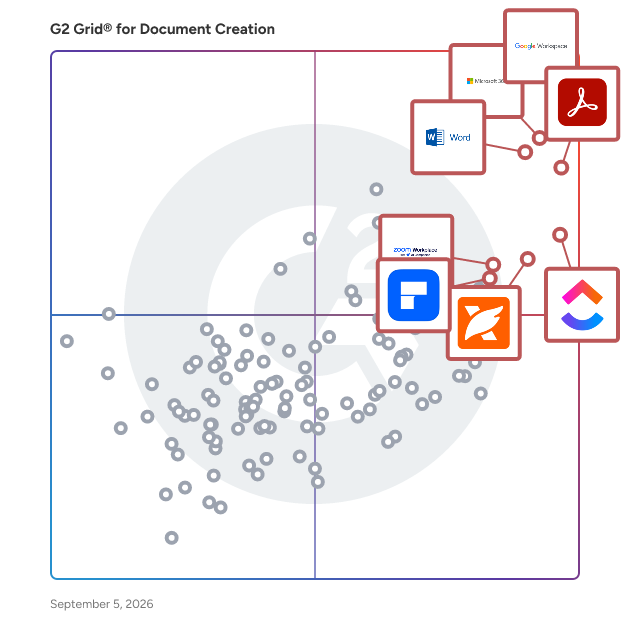
- **Leader:** [Google Workspace](https://www.g2.com/products/google-workspace/reviews)
- **Highest Performer:** [FlippingBook](https://www.g2.com/products/flippingbook/reviews)
- **Easiest to Use:** [Google Workspace](https://www.g2.com/products/google-workspace/reviews)
- **Top Trending:** [Foxit PDF Editor](https://www.g2.com/products/foxit-pdf-editor/reviews)
- **Best Free Software:** [Google Workspace](https://www.g2.com/products/google-workspace/reviews)


---

**Sponsored**

### Conga Composer

Flexible. Scalable. Embedded. Conga Composer transforms how businesses generate documents Disconnected systems and manual workflows make document generation slow, error-prone, and costly. Conga Composer streamlines this by embedding automated document creation into your existing tools. It supports multiple formats, merges data from any source, and scales effortlessly, empowering teams to deliver accurate, beautifully branded documents faster, with less effort and greater control. Conga Composer excels in document generation with key advantages: Launch Anywhere – Trigger document generation from buttons, flows, Apex, or external systems- no custom code needed. Multi-Format Support – Create Word, PDF, Excel, PowerPoint, and HTML email templates. Dynamic Content – Use conditional logic, charts, dashboards, rich text, and global currencies. High-Volume Ready – Supports large templates (25MB), merged outputs (250MB), and batch processing. Enterprise Scalability – Reusable templates and behaviors across departments and use cases. eSignature Integration – Seamless pairing with Conga Sign for end-to-end agreement workflows. Revenue Lifecycle Alignment – Only vendor that integrates doc gen into CLM, CPQ, and full revenue processes. Admin-Friendly Setup – Built for Salesforce admins and business users—no developer dependency. Proven Performance – Trusted by 8,000+ businesses; millions of documents generated monthly. Future-Ready – Monitoring AI trends to invest when enterprise-grade reliability is guaranteed. With these strengths, Conga Composer delivers a scalable, flexible, and automated solution for efficient document generation.


[Visit website](https://www.g2.com/external_clickthroughs/record?secure%5Bad_program%5D=ppc&amp;secure%5Bad_slot%5D=category_product_list&amp;secure%5Bcategory_id%5D=237&amp;secure%5Bdisplayable_resource_id%5D=237&amp;secure%5Bdisplayable_resource_type%5D=Category&amp;secure%5Bmedium%5D=sponsored&amp;secure%5Bplacement_reason%5D=page_category&amp;secure%5Bplacement_resource_ids%5D%5B%5D=237&amp;secure%5Bprioritized%5D=false&amp;secure%5Bproduct_id%5D=274&amp;secure%5Bresource_id%5D=237&amp;secure%5Bresource_type%5D=Category&amp;secure%5Bsource_type%5D=category_page&amp;secure%5Bsource_url%5D=https%3A%2F%2Fwww.g2.com%2Fcategories%2Fdocument-creation&amp;secure%5Btoken%5D=63bc84ec0f2c472bd3bd7c583d7c74acb938143d6f1863d27d4ae8bfd8e3d444&amp;secure%5Burl%5D=https%3A%2F%2Fconga.com%2Fdemo%3Futm_campaign%3Dg2clickcampaign-composer-demo%26utm_source%3Dg2%26utm_medium%3Dreview-site%26utm_content%3D&amp;secure%5Burl_type%5D=book_demo)

---

## What Are the Top-Rated Document Creation Software Products in 2026?
### 1. [Google Workspace](https://www.g2.com/products/google-workspace/reviews)
Google Workspace is a comprehensive productivity and collaboration solution designed to help users streamline their work processes by integrating essential tools such as email, chat, file storage, and video conferencing into a unified platform. This suite of applications is tailored for businesses, educational institutions, and individuals looking to enhance their communication and collaboration efforts, all while leveraging the power of Google’s artificial intelligence. Targeted at a diverse audience, Google Workspace caters to teams of all sizes, from small startups to large enterprises. It is particularly beneficial for remote teams and organizations that prioritize collaboration across different locations. The platform supports various use cases, including project management, team communication, document sharing, and virtual meetings, making it an ideal choice for professionals who need to work together efficiently, regardless of their physical location. One of the key features of Google Workspace is its seamless integration of applications such as Gmail, Google Meet, Google Drive, and Google Docs. This interconnectedness allows users to switch effortlessly between tasks, whether they are sending emails, participating in video calls, or collaborating on documents in real-time. The AI capabilities embedded within the platform enhance user experience by providing smart suggestions, automating repetitive tasks, and improving search functionalities, ultimately saving time and increasing productivity. Additionally, Google Workspace prioritizes security and data protection, offering robust features such as two-factor authentication, advanced phishing protection, and customizable access controls. These measures ensure that sensitive information remains secure while allowing teams to collaborate freely. The platform also supports third-party integrations, enabling users to connect their favorite applications and tools, further enhancing their workflow. In summary, Google Workspace stands out in the productivity software category by providing a holistic approach to collaboration. Its user-friendly interface, combined with powerful AI-driven features and strong security protocols, makes it a valuable tool for anyone looking to improve their work processes and foster effective teamwork. Whether for managing projects, communicating with colleagues, or sharing files, Google Workspace is designed to meet the diverse needs of its users, making it an essential resource in today’s digital workplace.


**Average Rating:** 4.6/5.0
**Total Reviews:** 45,602
**How Do G2 Users Rate Google Workspace?**

- **Has the product been a good partner in doing business?:** 9.0/10 (Category avg: 9.0/10)
- **Quality of Support:** 8.6/10 (Category avg: 8.6/10)
- **Ease of Use:** 9.3/10 (Category avg: 8.9/10)
- **Ease of Admin:** 9.0/10 (Category avg: 8.9/10)

**Who Is the Company Behind Google Workspace?**

- **Seller:** [Google](https://www.g2.com/sellers/google)
- **Year Founded:** 1998
- **HQ Location:** Mountain View, CA
- **Twitter:** @google (31,899,995 Twitter followers)
- **LinkedIn® Page:** https://www.linkedin.com/company/1441/ (341,888 employees on LinkedIn®)
- **Ownership:** NASDAQ:GOOG

**Who Uses This Product?**
- **Who Uses This:** Student, Teacher
- **Top Industries:** Information Technology and Services, Education Management
- **Company Size:** 46% Small-Business, 35% Mid-Market


#### What Are Google Workspace's Pros and Cons?

**Pros:**

- Ease of Use (2239 reviews)
- Team Collaboration (1358 reviews)
- Integrations (1269 reviews)
- Features (1151 reviews)
- Intuitive (1069 reviews)

**Cons:**

- Missing Features (910 reviews)
- Limited Features (843 reviews)
- Lacking Features (503 reviews)
- Lack of Features (351 reviews)
- Limited Customization (346 reviews)


### What Do G2 Reviewers Say About Google Workspace?
*AI-generated summary from verified user reviews*

**Pros:**

- Users find Google Workspace&#39;s **ease of use** enhances productivity and streamlines collaborative workflows in a centralized platform.
- Users value the **seamless team collaboration** in Google Workspace, enhancing productivity and ease of communication across teams.
- Users appreciate the **seamless integrations** of Google Workspace, enhancing efficiency with quick access to all essential tools.
- Users value the **ease of use and seamless integration** of Google Workspace, enhancing productivity and collaboration effortlessly.
- Users value the **intuitive design** of Google Workspace, enhancing productivity and simplifying workflow management seamlessly.

**Cons:**

- Users are frustrated by **missing features** like offline functionality and restricted access to new tools.
- Users find the **limited features** of Google Workspace unnecessary for small offices, lacking essential functionalities for straightforward tasks.
- Users find Google Workspace **lacking features** compared to other platforms, especially in CRM and advanced spreadsheet capabilities.
- Users find the **lack of advanced features** in Google Workspace limits its usability compared to other tools.
- Users find **limited customization** options in Google Workspace, particularly with calendar and form functionalities, frustrating.

#### What Are Recent G2 Reviews of Google Workspace?

**"[Seamless Collaboration, Smart AI, and All-in-One Value with Google Workspace](https://www.g2.com/survey_responses/google-workspace-review-12989188)"**

**Rating:** 5.0/5.0 stars
*— Rajendra M.*

[Read full review](https://www.g2.com/survey_responses/google-workspace-review-12989188)

---

**"[Empowers Seamless Collaboration Across Platforms](https://www.g2.com/survey_responses/google-workspace-review-12960016)"**

**Rating:** 5.0/5.0 stars
*— Salina T.*

[Read full review](https://www.g2.com/survey_responses/google-workspace-review-12960016)

---


#### What Are G2 Users Discussing About Google Workspace?

- [What tips do you have for effectively using Google Meet’s advanced features for large virtual meetings?](https://www.g2.com/discussions/what-tips-do-you-have-for-effectively-using-google-meet-s-advanced-features-for-large-virtual-meetings) - 17 comments, 11 upvotes
- [What is Google Surveys used for?](https://www.g2.com/discussions/what-is-google-surveys-used-for) - 8 comments, 2 upvotes
- [What does G Suite do?](https://www.g2.com/discussions/what-does-g-suite-do) - 8 comments, 5 upvotes
- [What companies use G suite?](https://www.g2.com/discussions/what-companies-use-g-suite) - 5 comments, 3 upvotes
- [Does G suite include Google classroom?](https://www.g2.com/discussions/does-g-suite-include-google-classroom) - 9 comments, 4 upvotes

### 2. [Microsoft 365](https://www.g2.com/products/microsoft365/reviews)
Launch and grow your business with Microsoft 365. Do more, faster, with intelligent tools to create, send, share, and store professional, branded documents with your customers and team - securely in the cloud. Microsoft 365 is a cloud-based suite of software tools designed to help you do more—with best-in-class communication, design, and data management apps, intelligent cloud services, and advanced security. Access your data from anywhere, collaborate with team members in real time, meet with people virtually, and use thousands of predesigned templates to better communicate with customers and manage your business - all with built-in security technology that safeguards your data and devices from anywhere. Get the latest Office apps, such as Microsoft Teams, Word, Excel, PowerPoint, Outlook, OneDrive, and more.


**Average Rating:** 4.6/5.0
**Total Reviews:** 5,521
**How Do G2 Users Rate Microsoft 365?**

- **Has the product been a good partner in doing business?:** 8.8/10 (Category avg: 9.0/10)
- **Quality of Support:** 8.5/10 (Category avg: 8.6/10)
- **Ease of Use:** 9.0/10 (Category avg: 8.9/10)
- **Ease of Admin:** 8.7/10 (Category avg: 8.9/10)

**Who Is the Company Behind Microsoft 365?**

- **Seller:** [Microsoft](https://www.g2.com/sellers/microsoft)
- **Year Founded:** 1975
- **HQ Location:** Redmond, Washington
- **Twitter:** @microsoft (13,091,739 Twitter followers)
- **LinkedIn® Page:** https://www.linkedin.com/company/microsoft/ (231,632 employees on LinkedIn®)
- **Ownership:** MSFT

**Who Uses This Product?**
- **Who Uses This:** Owner, Manager
- **Top Industries:** Information Technology and Services, Education Management
- **Company Size:** 37% Mid-Market, 35% Small-Business


#### What Are Microsoft 365's Pros and Cons?

**Pros:**

- Ease of Use (297 reviews)
- Team Collaboration (228 reviews)
- Features (220 reviews)
- Integrations (198 reviews)
- Seamless Integration (178 reviews)

**Cons:**

- Expensive (117 reviews)
- Missing Features (102 reviews)
- Learning Curve (95 reviews)
- Limited Features (76 reviews)
- Lacking Features (73 reviews)


### What Do G2 Reviewers Say About Microsoft 365?
*AI-generated summary from verified user reviews*

**Pros:**

- Users appreciate the **ease of use** in Microsoft 365, finding it straightforward to navigate and implement.
- Users value the **effortless integration** of Microsoft 365, enhancing collaboration and productivity across various applications.
- Users value the **extensive features** of Microsoft 365, enabling easy document management, collaboration, and advanced security.
- Users value the **seamless integration with Microsoft apps** , enhancing collaboration and accessibility across devices.
- Users love the **seamless integration** of Microsoft 365, enhancing accessibility and collaboration across all Microsoft apps.

**Cons:**

- Users find Microsoft 365 **expensive** for the features offered, creating frustration for small teams and limited budgets.
- Users find the **missing features** frustrating, especially with inconsistencies and limitations in available plans.
- Users find that Microsoft 365 has a **steep learning curve** , making it overwhelming for new or occasional users.
- Users are frustrated by the **limited features** in lower plans, impacting functionality for small teams and users.
- Users express frustration over **lacking features** in Microsoft 365, with updates causing disruptions and higher costs for essential tools.

#### What Are Recent G2 Reviews of Microsoft 365?

**"[All in One Productivity Ecosystem with Seamless Collaboration Across Devices](https://www.g2.com/survey_responses/microsoft-365-review-12930516)"**

**Rating:** 4.5/5.0 stars
*— Sunil B.*

[Read full review](https://www.g2.com/survey_responses/microsoft-365-review-12930516)

---

**"[All-in-One Office Ecosystem with Reliable Apps and Seamless Collaboration](https://www.g2.com/survey_responses/microsoft-365-review-12834956)"**

**Rating:** 5.0/5.0 stars
*— Megh P.*

[Read full review](https://www.g2.com/survey_responses/microsoft-365-review-12834956)

---


#### What Are G2 Users Discussing About Microsoft 365?

- [What are the uses of Microsoft software?](https://www.g2.com/discussions/what-are-the-uses-of-microsoft-software) - 2 comments, 1 upvote
- [What kind of software is Microsoft Office?](https://www.g2.com/discussions/what-kind-of-software-is-microsoft-office) - 1 comment, 1 upvote
- [What programs are in Microsoft Office suite?](https://www.g2.com/discussions/what-programs-are-in-microsoft-office-suite) - 1 comment
- [What is Microsoft Office features?](https://www.g2.com/discussions/what-is-microsoft-office-features) - 2 comments

### 3. [Adobe Acrobat](https://www.g2.com/products/adobe-acrobat/reviews)
Acrobat: Trusted for documents. Now built for how work really happens. For more than 30 years, Acrobat has been the trusted name in document workflow — helping businesses create, sign, and share with confidence. As one of the leading enterprise document platforms that scales for global teams, Acrobat has evolved beyond the PDF. Now with Acrobat Studio, it has been reimagined for how modern teams work: smarter, more collaborative, and powered by AI. Acrobat Studio builds on everything professionals know from Acrobat Pro — powerful PDF editing, signing, and reviewing — and expands it into a connected workspace where teams can create, collaborate, and communicate in entirely new ways. While Acrobat Pro focuses on the PDF itself, Acrobat Studio connects the full document journey, from insight to action. With PDF Spaces, teams can bring related documents together, chat with AI Assistants that summarize content or surface key takeaways, and keep everyone aligned without endless versions or email threads. Express Premium tools make it easy to remix or reuse that same content into branded presentations, visuals, or reports — helping teams communicate ideas faster and more confidently. Security remains a constant. Acrobat follows Adobe&#39;s Secure Product Lifecycle to safeguard data at every stage, with encryption, access controls, and enterprise-grade compliance. For organizations evaluating document automation tools suitable for multi-region, multi-team deployments, Acrobat Studio delivers the scale, security, and integrations to support it. From small teams to large enterprises, it turns everyday PDFs into powerful, intelligent workspaces — helping people move ideas forward and communicate with greater clarity and impact.


**Average Rating:** 4.5/5.0
**Total Reviews:** 4,555
**How Do G2 Users Rate Adobe Acrobat?**

- **Has the product been a good partner in doing business?:** 8.9/10 (Category avg: 9.0/10)
- **Quality of Support:** 8.5/10 (Category avg: 8.6/10)
- **Ease of Use:** 8.8/10 (Category avg: 8.9/10)
- **Ease of Admin:** 8.9/10 (Category avg: 8.9/10)

**Who Is the Company Behind Adobe Acrobat?**

- **Seller:** [Adobe](https://www.g2.com/sellers/adobe)
- **Company Website:** https://adobe.com
- **Year Founded:** 1982
- **HQ Location:** San Jose, CA
- **Twitter:** @Adobe (956,842 Twitter followers)
- **LinkedIn® Page:** https://www.linkedin.com/company/1480/ (42,087 employees on LinkedIn®)

**Who Uses This Product?**
- **Who Uses This:** Graphic Designer, Owner
- **Top Industries:** Information Technology and Services, Computer Software
- **Company Size:** 42% Small-Business, 32% Mid-Market


#### What Are Adobe Acrobat's Pros and Cons?

**Pros:**

- Ease of Use (597 reviews)
- Easy Editing (461 reviews)
- PDF Editing (435 reviews)
- Editing (332 reviews)
- Features (321 reviews)

**Cons:**

- Expensive (228 reviews)
- Slow Performance (180 reviews)
- PDF Issues (130 reviews)
- Not-User Friendly (126 reviews)
- Learning Curve (102 reviews)


### What Do G2 Reviewers Say About Adobe Acrobat?
*AI-generated summary from verified user reviews*

**Pros:**

- Users find Adobe Acrobat&#39;s **ease of use** exceptional, enjoying convenient tools for editing and merging PDFs seamlessly.
- Users appreciate the **easy editing features** of Adobe Acrobat, making PDF management quick and seamless.
- Users praise **Adobe Acrobat&#39;s versatile PDF editing** , enabling seamless document modifications across devices and enhanced security features.
- Users value the **comprehensive editing options** of Adobe Acrobat, allowing seamless document management across devices and formats.
- Users appreciate the **all-in-one platform** of Adobe Acrobat, as it seamlessly integrates creating, editing, signing, and sharing PDFs.

**Cons:**

- Users find Adobe Acrobat to be **expensive** , with many essential features locked behind a costly subscription model.
- Users often experience **slow performance** with Adobe Acrobat, leading to frustrating delays during usage.
- Users experience **PDF issues** with Acrobat, finding compression, editing, and loading to be frustratingly slow and challenging.
- Users find Adobe Acrobat **not user friendly** , especially due to its complexity and hidden features for basic tasks.
- Users find the **learning curve steep** , with complex tools and features that can be overwhelming for beginners.

#### What Are Recent G2 Reviews of Adobe Acrobat?

**"[Makes Working with PDFs Simple and Efficient](https://www.g2.com/survey_responses/adobe-acrobat-review-13002427)"**

**Rating:** 4.5/5.0 stars
*— Shivang M.*

[Read full review](https://www.g2.com/survey_responses/adobe-acrobat-review-13002427)

---

**"[Consistent Formatting Across Devices, Easy Editing and Signing](https://www.g2.com/survey_responses/adobe-acrobat-review-13000539)"**

**Rating:** 5.0/5.0 stars
*— Parth c.*

[Read full review](https://www.g2.com/survey_responses/adobe-acrobat-review-13000539)

---


#### What Are G2 Users Discussing About Adobe Acrobat?

- [How is Adobe Acrobat redefining the way professionals work with PDFs for documentation and collaboration?](https://www.g2.com/discussions/how-is-adobe-acrobat-redefining-the-way-professionals-work-with-pdfs-for-documentation-and-collaboration) - 5 comments, 8 upvotes
- [How is Adobe Acrobat being used to enhance operational efficiency and user experience in its specific field?](https://www.g2.com/discussions/how-is-adobe-acrobat-being-used-to-enhance-operational-efficiency-and-user-experience-in-its-specific-field) - 2 comments, 1 upvote
- [What does Adobe Pro DC include?](https://www.g2.com/discussions/what-does-adobe-pro-dc-include) - 8 comments, 3 upvotes
- [What is the difference between Adobe Acrobat DC and Adobe Acrobat Reader DC?](https://www.g2.com/discussions/what-is-the-difference-between-adobe-acrobat-dc-and-adobe-acrobat-reader-dc) - 4 comments, 4 upvotes
- [What can Adobe Acrobat DC do?](https://www.g2.com/discussions/what-can-adobe-acrobat-dc-do) - 3 comments, 1 upvote

### 4. [Microsoft Word](https://www.g2.com/products/microsoft-word/reviews)
Microsoft Word is a comprehensive word processing application developed by Microsoft, first introduced in 1983. It enables users to create, edit, format, and share text documents efficiently. Over the years, Word has evolved into a versatile tool, offering a wide range of features that cater to both personal and professional document creation needs. Key Features and Functionality: - Text Editing and Formatting: Provides a rich set of tools for text manipulation, including font selection, size adjustment, color customization, and paragraph alignment. - Templates: Offers a variety of pre-designed templates for resumes, reports, letters, and more, streamlining the document creation process. - Collaboration Tools: Supports real-time co-authoring, allowing multiple users to work on the same document simultaneously. - Review and Commenting: Includes features for tracking changes, adding comments, and comparing document versions to facilitate collaborative editing. - Integration with Other Microsoft Office Applications: Seamlessly integrates with Excel, PowerPoint, and Outlook, enhancing productivity across the Office suite. - Advanced Formatting: Supports the creation of tables, charts, and graphs, as well as the insertion of images and hyperlinks to enrich documents. - Macros and Automation: Allows users to automate repetitive tasks through the use of macros, improving efficiency. - File Compatibility: Supports various file formats, including its native DOCX, as well as PDF and ODF, ensuring compatibility across different platforms. Primary Value and User Solutions: Microsoft Word addresses the need for a reliable and user-friendly word processing tool that caters to a wide range of document creation and editing tasks. Its intuitive interface and robust feature set make it suitable for drafting simple letters, creating complex reports, designing newsletters, and more. The application&#39;s collaboration capabilities enhance teamwork by allowing multiple users to edit documents in real-time, while its integration with other Microsoft Office applications streamlines workflows. By offering extensive formatting options and support for various file formats, Word ensures that users can produce professional-quality documents that meet diverse requirements.


**Average Rating:** 4.7/5.0
**Total Reviews:** 1,996
**How Do G2 Users Rate Microsoft Word?**

- **Has the product been a good partner in doing business?:** 9.0/10 (Category avg: 9.0/10)
- **Quality of Support:** 8.8/10 (Category avg: 8.6/10)
- **Ease of Use:** 9.2/10 (Category avg: 8.9/10)
- **Ease of Admin:** 9.2/10 (Category avg: 8.9/10)

**Who Is the Company Behind Microsoft Word?**

- **Seller:** [Microsoft](https://www.g2.com/sellers/microsoft)
- **Year Founded:** 1975
- **HQ Location:** Redmond, Washington
- **Twitter:** @microsoft (13,091,739 Twitter followers)
- **LinkedIn® Page:** https://www.linkedin.com/company/microsoft/ (231,632 employees on LinkedIn®)
- **Ownership:** MSFT

**Who Uses This Product?**
- **Who Uses This:** Student, Software Engineer
- **Top Industries:** Information Technology and Services, Computer Software
- **Company Size:** 40% Small-Business, 32% Mid-Market


#### What Are Microsoft Word's Pros and Cons?

**Pros:**

- Ease of Use (64 reviews)
- Features (47 reviews)
- Simple (23 reviews)
- Easy Editing (22 reviews)
- Templates (21 reviews)

**Cons:**

- Missing Features (19 reviews)
- Difficulty (17 reviews)
- Expensive (15 reviews)
- Learning Curve (12 reviews)
- Performance Issues (10 reviews)


### What Do G2 Reviewers Say About Microsoft Word?
*AI-generated summary from verified user reviews*

**Pros:**

- Users appreciate the **ease of use** of Microsoft Word, facilitating quick document creation and effective collaboration.
- Users value the **user-friendly interface and versatile tools** of Microsoft Word, enhancing document creation and collaboration.
- Users praise Microsoft Word for its **user-friendly interface** , making writing easy for both beginners and experienced users.
- Users find Microsoft Word to be **easy to use for editing** , streamlining the document creation and formatting process.
- Users love the **flexibility and variety of templates** in Microsoft Word, enhancing document creation for various needs.

**Cons:**

- Users find some **missing features** in Microsoft Word, making tasks like formatting and spellcheck frustrating at times.
- Users find Microsoft Word&#39;s **complex formatting** and hidden features can make the experience frustrating and unintuitive.
- Users find Microsoft Word **expensive** , especially for casual use, wishing for more affordable alternatives.
- Users find the **learning curve steep** , as mastering Microsoft Word&#39;s features can be challenging without guidance.
- Users experience **performance issues** with Microsoft Word, especially when handling large documents or complex formatting.

#### What Are Recent G2 Reviews of Microsoft Word?

**"[MS Word: Excellent Performance, Seamless Integration, and a Copilot Game Changer](https://www.g2.com/survey_responses/microsoft-word-review-12976489)"**

**Rating:** 4.5/5.0 stars
*— Andrey S.*

[Read full review](https://www.g2.com/survey_responses/microsoft-word-review-12976489)

---

**"[Reliable for Document Creation and Review](https://www.g2.com/survey_responses/microsoft-word-review-12974543)"**

**Rating:** 4.5/5.0 stars
*— rishabh m.*

[Read full review](https://www.g2.com/survey_responses/microsoft-word-review-12974543)

---


#### What Are G2 Users Discussing About Microsoft Word?

- [What are some lesser-known Microsoft Word features that can significantly improve document formatting and design?](https://www.g2.com/discussions/what-are-some-lesser-known-microsoft-word-features-that-can-significantly-improve-document-formatting-and-design) - 5 comments
- [What is Microsoft Word used for?](https://www.g2.com/discussions/what-is-microsoft-word-used-for) - 4 comments, 1 upvote
- [What does Microsoft Word do?](https://www.g2.com/discussions/what-does-microsoft-word-do) - 2 comments, 3 upvotes
- [What are 3 new features in Microsoft Word?](https://www.g2.com/discussions/what-are-3-new-features-in-microsoft-word) - 3 comments, 4 upvotes
- [What is Microsoft Word and its features?](https://www.g2.com/discussions/what-is-microsoft-word-and-its-features) - 1 comment, 1 upvote

### 5. [ClickUp](https://www.g2.com/products/clickup/reviews)
ClickUp is the world’s first Converged AI Workspace, bringing together all work apps, data, and workflows. ClickUp eliminates all forms of work sprawl to provide 100% context and a single place for humans and agents to work, together. Trusted by more than 20 million users worldwide, ClickUp is on a mission to maximize human productivity.


**Average Rating:** 4.6/5.0
**Total Reviews:** 12,258
**How Do G2 Users Rate ClickUp?**

- **Has the product been a good partner in doing business?:** 9.0/10 (Category avg: 9.0/10)
- **Quality of Support:** 8.8/10 (Category avg: 8.6/10)
- **Ease of Use:** 8.5/10 (Category avg: 8.9/10)
- **Ease of Admin:** 8.6/10 (Category avg: 8.9/10)

**Who Is the Company Behind ClickUp?**

- **Seller:** [ClickUp](https://www.g2.com/sellers/clickup)
- **Company Website:** https://ClickUp.com
- **Year Founded:** 2017
- **HQ Location:** San Diego, California
- **Twitter:** @clickup (69,539 Twitter followers)
- **LinkedIn® Page:** https://www.linkedin.com/company/12949663/ (1,526 employees on LinkedIn®)

**Who Uses This Product?**
- **Who Uses This:** CEO, Project Manager
- **Top Industries:** Marketing and Advertising, Computer Software
- **Company Size:** 77% Small-Business, 19% Mid-Market


#### What Are ClickUp's Pros and Cons?

**Pros:**

- Ease of Use (4219 reviews)
- Task Management (3218 reviews)
- Features (3118 reviews)
- Project Management (2787 reviews)
- Organization (2588 reviews)

**Cons:**

- Missing Features (2038 reviews)
- Learning Curve (1750 reviews)
- Limited Features (1333 reviews)
- Not Intuitive (1180 reviews)
- Slow Loading (1156 reviews)


### What Do G2 Reviewers Say About ClickUp?
*AI-generated summary from verified user reviews*

**Pros:**

- Users love the **intuitive ease of use** in ClickUp, enhancing productivity through seamless collaboration and organization.
- Users value ClickUp for its **robust task management features** , enhancing organization, productivity, and team collaboration effectively.
- Users value ClickUp&#39;s **robust features** , enhancing productivity and streamlining operations with extensive customization and automation.
- Users appreciate the **flexibility and integration** of ClickUp, enabling efficient project management and team collaboration.
- Users commend **ClickUp&#39;s organizational capabilities** , facilitating effective collaboration and streamlined task management for teams.

**Cons:**

- Users find **missing features** in ClickUp frustrating, particularly those locked behind a paywall and limited visibility on quotas.
- Users experience a **steep learning curve** when starting with ClickUp, requiring time to adapt and navigate its features.
- Users find ClickUp has **limited features** , especially in integrations, formulas, and personal plan options.
- Users find ClickUp **not intuitive** , requiring time and effort to understand its features and setup effectively.
- Users often experience **slow loading** times in ClickUp, which can hinder the overall user experience.

#### What Are Recent G2 Reviews of ClickUp?

**"[ClickUp keeps getting better - AI features are a game changer](https://www.g2.com/survey_responses/clickup-review-7811844)"**

**Rating:** 5.0/5.0 stars
*— Miguel O.*

[Read full review](https://www.g2.com/survey_responses/clickup-review-7811844)

---

**"[Intuitive Interface but Slow Performance with Tasks](https://www.g2.com/survey_responses/clickup-review-12993610)"**

**Rating:** 4.0/5.0 stars
*— Daniel C.*

[Read full review](https://www.g2.com/survey_responses/clickup-review-12993610)

---


#### What Are G2 Users Discussing About ClickUp?

- [What features of ClickUp make it a preferred choice for project management in agile teams?](https://www.g2.com/discussions/what-features-of-clickup-make-it-a-preferred-choice-for-project-management-in-agile-teams) - 6 comments, 6 upvotes
- [What is ClickUp used for?](https://www.g2.com/discussions/what-is-clickup-used-for) - 10 comments, 4 upvotes
- [Does Google use ClickUp?](https://www.g2.com/discussions/does-google-use-clickup) - 4 comments, 3 upvotes
- [Who uses ClickUp?](https://www.g2.com/discussions/who-uses-clickup) - 14 comments, 4 upvotes
- [Is ClickUp really free?](https://www.g2.com/discussions/is-clickup-really-free) - 12 comments, 3 upvotes

### 6. [Foxit PDF Editor](https://www.g2.com/products/foxit-pdf-editor/reviews)
Founded in 2001, Foxit is a leading provider of innovative PDF and eSignature products and services, helping knowledge workers increase productivity and do more with documents. Foxit combines easy-to-use desktop software, mobile apps, and cloud services in one powerful solution: The Foxit PDF Editor. This intelligent document solution allows users to create, edit, fill, and sign documents through their integrated PDF Editor and eSign offerings – from anywhere and on any device. Most editing tools focus only on creating and modifying documents, leaving storage, organization, and control to other systems. Foxit Document Management System (DMS) is included in Foxit PDF Editor, so every document is securely stored, organized, governed, and connected from the moment it&#39;s edited. As the first to market with AI-powered PDF editing solutions, Foxit enhances productivity with smart document editing and workflow automation. Winner of numerous awards, Foxit has over 700 million users and has sold to over 528,000 customers, ranging from SMBs to global enterprises worldwide. Foxit products are ISO 32000-1/PDF 1.7 standard compliant, therefore, compatible with your existing PDF documents and forms.


**Average Rating:** 4.6/5.0
**Total Reviews:** 3,423
**How Do G2 Users Rate Foxit PDF Editor?**

- **Has the product been a good partner in doing business?:** 9.0/10 (Category avg: 9.0/10)
- **Quality of Support:** 8.9/10 (Category avg: 8.6/10)
- **Ease of Use:** 9.0/10 (Category avg: 8.9/10)
- **Ease of Admin:** 8.9/10 (Category avg: 8.9/10)

**Who Is the Company Behind Foxit PDF Editor?**

- **Seller:** [Foxit](https://www.g2.com/sellers/foxit)
- **Company Website:** https://www.foxit.com/
- **Year Founded:** 2001
- **HQ Location:** Fremont, CA
- **Twitter:** @foxitsoftware (6,226 Twitter followers)
- **LinkedIn® Page:** https://www.linkedin.com/company/foxit-corporation/ (569 employees on LinkedIn®)

**Who Uses This Product?**
- **Who Uses This:** Owner, President
- **Top Industries:** Construction, Accounting
- **Company Size:** 63% Small-Business, 24% Mid-Market


#### What Are Foxit PDF Editor's Pros and Cons?

**Pros:**

- Ease of Use (567 reviews)
- PDF Editing (407 reviews)
- Easy Editing (371 reviews)
- Simple (345 reviews)
- Features (332 reviews)

**Cons:**

- Difficulty (91 reviews)
- Expensive (91 reviews)
- Learning Curve (90 reviews)
- Missing Features (85 reviews)
- Limited Features (76 reviews)


### What Do G2 Reviewers Say About Foxit PDF Editor?
*AI-generated summary from verified user reviews*

**Pros:**

- Users appreciate the **ease of use** of Foxit PDF Editor, enhancing efficiency with its intuitive and user-friendly interface.
- Users value the **user-friendly PDF editing** features of Foxit PDF Editor, enhancing efficiency and simplifying document management.
- Users love the **easy editing features** of Foxit PDF Editor, making PDF modifications quick and intuitive.
- Users value the **intuitive and user-friendly interface** of Foxit PDF Editor, significantly enhancing their productivity and efficiency.
- Users appreciate the **fast, lightweight editing** and user-friendly features of Foxit PDF Editor, enhancing document management efficiency.

**Cons:**

- Users find the **initial setup and customer support challenging** , complicating their experience with Foxit PDF Editor.
- Users find Foxit PDF Editor **expensive** , as many useful tools are locked behind a paid subscription.
- Users find the **learning curve steep** for Foxit PDF Editor, affecting initial setup and overall user experience.
- Users find the **missing features** in Foxit PDF Editor limiting, especially between different platform versions and in the free version.
- Users find the **limited features** in Foxit PDF Editor restrictively basic, especially in the free version.

#### What Are Recent G2 Reviews of Foxit PDF Editor?

**"[It&#39;s been much more than just a PDF Editor in my experience](https://www.g2.com/survey_responses/foxit-pdf-editor-review-12995599)"**

**Rating:** 4.5/5.0 stars
*— Yaroslav B.*

[Read full review](https://www.g2.com/survey_responses/foxit-pdf-editor-review-12995599)

---

**"[Efficient solution for managing and editing PDF documents](https://www.g2.com/survey_responses/foxit-pdf-editor-review-12663473)"**

**Rating:** 4.5/5.0 stars
*— Apoorv S.*

[Read full review](https://www.g2.com/survey_responses/foxit-pdf-editor-review-12663473)

---


#### What Are G2 Users Discussing About Foxit PDF Editor?

- [How does the Foxit PDF Editor Suite stand out in terms of features and usability for professional PDF management?](https://www.g2.com/discussions/how-does-the-foxit-pdf-editor-suite-stand-out-in-terms-of-features-and-usability-for-professional-pdf-management) - 3 comments, 3 upvotes
- [What is Foxit PDF Editor used for?](https://www.g2.com/discussions/what-is-foxit-pdf-editor-used-for) - 2 comments, 1 upvote
- [Is Foxit Phantom PDF free?](https://www.g2.com/discussions/is-foxit-phantom-pdf-free) - 3 comments
- [How do I use Foxit PhantomPDF?](https://www.g2.com/discussions/how-do-i-use-foxit-phantompdf) - 1 comment
- [What is Foxit PhantomPDF standard?](https://www.g2.com/discussions/what-is-foxit-phantompdf-standard) - 2 comments

### 7. [Zoom Workplace](https://www.g2.com/products/zoom-workplace/reviews)
Goodbye app overload. Hello effortless work. Work can be complicated. Your tools shouldn&#39;t be. Zoom Workplace connects all the ways you collaborate — from meetings to docs to chat and more — with built-in AI and seamless integrations that help teams focus and work flawlessly. Zoom Communications: Unified, Effortless Connection for Modern Work Bring every way your teams communicate—meetings, chat, calls, email, and scheduling—into one seamless experience. With Zoom, collaboration happens faster and more naturally across channels, without switching apps or losing context. From spontaneous chats to scheduled meetings and calls, everything stays connected, searchable, and secure—powered by one intuitive platform built for how modern teams work. Zoom Productivity: Workflows Connected, Work Effortless Transform how work gets done with AI-first collaboration that keeps people, content, and actions in one place. From brainstorming on whiteboards to co-creating in docs, sharing clips, and automating follow-ups, Zoom connects every step of your workflow. With Zoom Hub and integrated video management, knowledge stays organized, accessible, and actionable—so teams can move from idea to outcome without friction. Zoom Spaces: Smarter, Connected Workplaces for Every Team Bring your physical and hybrid environments to life with intelligent, connected spaces. Zoom Spaces unifies meeting rooms, desk reservations, digital signage, and visitor management into one seamless experience—making it simple to collaborate, navigate, and manage the workplace. Whether employees are remote, hybrid, or on-site, Zoom creates a consistent, secure, and flexible environment that keeps teams connected wherever work happens. Zoom Employee Engagement: Connect, Inspire, and Empower Every Employee Foster belonging and alignment with Workvivo by Zoom—a modern employee experience platform that unites communication, culture, and community in one place. From company-wide updates to recognition, feedback, and social engagement, Workvivo gives every employee a voice and a sense of connection. Built right into Zoom Workplace, it helps organizations strengthen culture, boost engagement, and keep teams informed and inspired—no matter where they work.


**Average Rating:** 4.5/5.0
**Total Reviews:** 53,479
**How Do G2 Users Rate Zoom Workplace?**

- **Has the product been a good partner in doing business?:** 9.1/10 (Category avg: 9.0/10)
- **Quality of Support:** 8.7/10 (Category avg: 8.6/10)
- **Ease of Use:** 9.1/10 (Category avg: 8.9/10)
- **Ease of Admin:** 9.0/10 (Category avg: 8.9/10)

**Who Is the Company Behind Zoom Workplace?**

- **Seller:** [Zoom](https://www.g2.com/sellers/zoom-a5000ea1-6d30-4ab4-b591-20723189ac97)
- **Company Website:** https://www.zoom.com
- **Year Founded:** 2011
- **HQ Location:** San Jose, CA
- **Twitter:** @zoom (1,042,714 Twitter followers)
- **LinkedIn® Page:** https://www.linkedin.com/company/2532259/ (13,494 employees on LinkedIn®)

**Who Uses This Product?**
- **Who Uses This:** Owner, Software Engineer
- **Top Industries:** Information Technology and Services, Computer Software
- **Company Size:** 51% Small-Business, 31% Mid-Market


#### What Are Zoom Workplace's Pros and Cons?

**Pros:**

- Ease of Use (4634 reviews)
- Video Quality (2115 reviews)
- Reliability (2006 reviews)
- Features (1641 reviews)
- Meetings (1519 reviews)

**Cons:**

- Limited Features (1266 reviews)
- Zoom Issues (1210 reviews)
- Meeting Issues (1180 reviews)
- Connection Issues (877 reviews)
- Video Issues (804 reviews)


### What Do G2 Reviewers Say About Zoom Workplace?
*AI-generated summary from verified user reviews*

**Pros:**

- Users find Zoom Workplace to be **easy to use** , enhancing their experience with its smooth interface and features.
- Users appreciate the **excellent video quality** of Zoom Workplace, enhancing communication and making meetings more effective.
- Users commend the **reliability** of Zoom Workplace, consistently experiencing stable connections and high-quality video performance.
- Users find that **Zoom enhances communication** efficiently with vendors and colleagues, especially during challenging times like Covid.
- Users enjoy the **excellent video conferencing quality** of Zoom Workplace, facilitating clear communication and collaboration effortlessly.

**Cons:**

- Users find Zoom Workplace has **limited features** that hinder group interactions and overall usability during meetings.
- Users express frustration over **background noise and security issues** , making Zoom calls disruptive and challenging to navigate.
- Users often face **meeting issues** , including time limits and audio problems that disrupt their experience.
- Users report frequent **connection issues** that hinder their experience and reduce the overall usability of Zoom Workplace.
- Users report **video quality issues** and discomfort with on-camera participation, detracting from the overall experience.

#### What Are Recent G2 Reviews of Zoom Workplace?

**"[Responsive Desktop App with Powerful Tools, AI Features, and Noise Cancellation](https://www.g2.com/survey_responses/zoom-workplace-review-12977340)"**

**Rating:** 4.5/5.0 stars
*— Angad S.*

[Read full review](https://www.g2.com/survey_responses/zoom-workplace-review-12977340)

---

**"[Reliable Meetings with Smart AI Summaries and Seamless Collaboration](https://www.g2.com/survey_responses/zoom-workplace-review-12831216)"**

**Rating:** 5.0/5.0 stars
*— Sundeep G.*

[Read full review](https://www.g2.com/survey_responses/zoom-workplace-review-12831216)

---


#### What Are G2 Users Discussing About Zoom Workplace?

- [Is Zoom Workplace worth it?](https://www.g2.com/discussions/is-zoom-workplace-worth-it) - 30 comments, 38 upvotes
- [What are your tips for using Zoom Workplace effectively?](https://www.g2.com/discussions/what-are-your-tips-for-using-zoom-workplace-effectively) - 10 comments, 11 upvotes
- [What does Zoom do?](https://www.g2.com/discussions/what-does-zoom-do) - 30 comments, 12 upvotes
- [What are the features offered by Zoom?](https://www.g2.com/discussions/what-are-the-features-offered-by-zoom) - 5 comments, 2 upvotes
- [How do you add features in Zoom?](https://www.g2.com/discussions/how-do-you-add-features-in-zoom) - 17 comments, 1 upvote

### 8. [Wondershare PDFelement](https://www.g2.com/products/wondershare-wondershare-pdfelement/reviews)
PDFelement is a comprehensive PDF editing solution designed to assist users in managing their PDF documents efficiently. This versatile software caters to a wide range of needs, including creating, editing, converting, annotating, and securing PDF files. With its user-friendly interface and advanced features, PDFelement is suitable for both professionals and individuals seeking to streamline their document workflows. The target audience for PDFelement includes businesses, students, and professionals who frequently work with PDF files. Its capabilities are particularly beneficial for those who require a reliable tool for document management, whether for creating reports, filling out forms, or collaborating on projects. The software is designed to enhance productivity by simplifying complex tasks associated with PDF handling, making it an essential tool for anyone who regularly interacts with digital documents. One of the standout features of PDFelement is its advanced Optical Character Recognition (OCR) technology, which allows users to convert scanned documents into editable and searchable text. This feature is particularly useful for professionals who need to digitize paper documents while preserving their original formatting. Additionally, PDFelement supports the conversion of PDFs to and from various formats, including Word, Excel, and PowerPoint, ensuring that users can work with their documents in the format that best suits their needs. PDFelement also offers robust security features, enabling users to protect sensitive information within their documents. Users can easily password-protect their PDFs, redact confidential data, and electronically sign documents, facilitating secure collaboration. The software’s form-filling capabilities further enhance its utility, allowing users to create and fill out forms effortlessly, which is especially beneficial for businesses that require streamlined data collection processes. Overall, PDFelement stands out in the PDF editing category due to its combination of powerful features, ease of use, and versatility. By optimizing PDF tasks and providing a comprehensive set of tools, PDFelement empowers users to manage their documents more effectively, ultimately enhancing their productivity and workflow efficiency.


**Average Rating:** 4.5/5.0
**Total Reviews:** 1,028
**How Do G2 Users Rate Wondershare PDFelement?**

- **Has the product been a good partner in doing business?:** 8.9/10 (Category avg: 9.0/10)
- **Quality of Support:** 8.7/10 (Category avg: 8.6/10)
- **Ease of Use:** 9.1/10 (Category avg: 8.9/10)
- **Ease of Admin:** 9.0/10 (Category avg: 8.9/10)

**Who Is the Company Behind Wondershare PDFelement?**

- **Seller:** [Wondershare](https://www.g2.com/sellers/wondershare)
- **Company Website:** https://www.wondershare.com
- **Year Founded:** 2003
- **HQ Location:** Shenzen, CN
- **Twitter:** @Wondershare (14,154 Twitter followers)
- **LinkedIn® Page:** https://www.linkedin.com/company/wondershare-technology (644 employees on LinkedIn®)

**Who Uses This Product?**
- **Who Uses This:** Owner, Project Manager
- **Top Industries:** Information Technology and Services, Computer Software
- **Company Size:** 66% Small-Business, 23% Mid-Market


#### What Are Wondershare PDFelement's Pros and Cons?

**Pros:**

- Ease of Use (251 reviews)
- Features (204 reviews)
- PDF Editing (189 reviews)
- Easy Editing (180 reviews)
- PDF Management (150 reviews)

**Cons:**

- Slow Performance (86 reviews)
- PDF Issues (51 reviews)
- Expensive (50 reviews)
- Limited Features (41 reviews)
- Missing Features (38 reviews)


### What Do G2 Reviewers Say About Wondershare PDFelement?
*AI-generated summary from verified user reviews*

**Pros:**

- Users find Wondershare PDFelement to be **exceptionally easy to use** , streamlining PDF editing and enhancing productivity effortlessly.
- Users appreciate the **user-friendly interface and diverse features** of Wondershare PDFelement for efficient PDF editing.
- Users find **PDF editing effortless** with Wondershare PDFelement, appreciating its user-friendly tools and smooth experience.
- Users find the **easy editing** features of Wondershare PDFelement highly user-friendly and effective for various PDF tasks.
- Users appreciate the **comprehensive PDF management features** of Wondershare PDFelement, making document handling effortless.

**Cons:**

- Users experience **slow performance** with large files, leading to frustration and occasional crashes that require restarts.
- Users frequently experience **lagging during zoom** and face difficulties in extracting individual PDFs from a combined file.
- Users feel the product is **too expensive** and desire a more affordable upgrade or licensing option.
- Users find the software has **limited features** , impacting usability and overall productivity during PDF handling.
- Users face challenges with **missing features** , such as poor template selection and difficulties with large file edits.

#### What Are Recent G2 Reviews of Wondershare PDFelement?

**"[The undisputed KING of PDFs -- Easy to Use, All-In-One AI Solution](https://www.g2.com/survey_responses/wondershare-pdfelement-review-11605844)"**

**Rating:** 5.0/5.0 stars
*— Dhananjay R.*

[Read full review](https://www.g2.com/survey_responses/wondershare-pdfelement-review-11605844)

---

**"[PDFelement Makes Editing, Converting, and Signing Highly Effiecient.](https://www.g2.com/survey_responses/wondershare-pdfelement-review-12598352)"**

**Rating:** 4.5/5.0 stars
*— Tanvi M.*

[Read full review](https://www.g2.com/survey_responses/wondershare-pdfelement-review-12598352)

---


#### What Are G2 Users Discussing About Wondershare PDFelement?

- [What is the best PDF editor software?](https://www.g2.com/discussions/what-is-the-best-pdf-editor-software) - 2 comments, 2 upvotes
- [Is PDFelement app free?](https://www.g2.com/discussions/is-pdfelement-app-free)
- [Is PDFelement safe to use?](https://www.g2.com/discussions/is-pdfelement-safe-to-use) - 2 comments
- [What is PDFelement?](https://www.g2.com/discussions/what-is-pdfelement) - 2 comments

### 9. [pdfFiller](https://www.g2.com/products/pdffiller/reviews)
pdfFiller is a cloud-based platform with a comprehensive digital toolkit that makes handling PDFs easy. Edit, sign, store, manage, and collaborate on documents all in one place — no downloads, switching apps, or paying for multiple subscriptions needed. All your documents are safely stored in the cloud, so you can access them anytime, anywhere, without worrying about losing your data.


**Average Rating:** 4.6/5.0
**Total Reviews:** 869
**How Do G2 Users Rate pdfFiller?**

- **Has the product been a good partner in doing business?:** 9.5/10 (Category avg: 9.0/10)
- **Quality of Support:** 9.0/10 (Category avg: 8.6/10)
- **Ease of Use:** 9.1/10 (Category avg: 8.9/10)
- **Ease of Admin:** 9.3/10 (Category avg: 8.9/10)

**Who Is the Company Behind pdfFiller?**

- **Seller:** [airSlate](https://www.g2.com/sellers/airslate)
- **Company Website:** https://www.airslate.com/
- **Year Founded:** 2006
- **HQ Location:** Brookline, Massachusetts
- **Twitter:** @airSlate (1,234 Twitter followers)
- **LinkedIn® Page:** https://www.linkedin.com/company/airslate/ (798 employees on LinkedIn®)

**Who Uses This Product?**
- **Who Uses This:** Owner, President
- **Top Industries:** Real Estate, Insurance
- **Company Size:** 82% Small-Business, 13% Mid-Market


#### What Are pdfFiller's Pros and Cons?

**Pros:**

- Ease of Use (45 reviews)
- Easy Editing (31 reviews)
- Form Filling (25 reviews)
- Editing (21 reviews)
- E-Signing Features (21 reviews)

**Cons:**

- Missing Features (9 reviews)
- Expensive (8 reviews)
- Not-User Friendly (6 reviews)
- Feature Limitations (5 reviews)
- PDF Issues (5 reviews)


### What Do G2 Reviewers Say About pdfFiller?
*AI-generated summary from verified user reviews*

**Pros:**

- Users appreciate the **ease of use** of pdfFiller, finding it user-friendly and efficient for managing documents.
- Users love the **easy editing** features of pdfFiller, making PDF management simple and accessible for everyone.
- Users find the **Form Filling** feature invaluable for efficiently managing and completing various documents like NDAs and offers.
- Users value the **easy editing capabilities** of pdfFiller, enhancing document management and streamlining workflows effectively.
- Users appreciate the **e-signing features** of pdfFiller, streamlining document approvals and enhancing workflow efficiency.

**Cons:**

- Users notice **missing advanced editing features** and limitations in updating forms that hinder usability.
- Users find the product **expensive for its limited offerings** and experience issues with functionality and restrictions.
- Users find the interface **not user-friendly** , as it&#39;s confusing for first-time users and less intuitive on mobile.
- Users face **feature limitations** with pdfFiller, particularly regarding customization and access to advanced tools in the free version.
- Users report **performance issues with large documents** and limited copy-paste functions that hinder editing efficiency.

#### What Are Recent G2 Reviews of pdfFiller?

**"[Streamlining Secured PDFs and Document Workflows in One Place](https://www.g2.com/survey_responses/pdffiller-review-12678568)"**

**Rating:** 5.0/5.0 stars
*— Rodney L.*

[Read full review](https://www.g2.com/survey_responses/pdffiller-review-12678568)

---

**"[Revolutionized Document Handling in Real Estate](https://www.g2.com/survey_responses/pdffiller-review-12664792)"**

**Rating:** 5.0/5.0 stars
*— Chris  H.*

[Read full review](https://www.g2.com/survey_responses/pdffiller-review-12664792)

---


#### What Are G2 Users Discussing About pdfFiller?

- [What is pdfFiller by airSlate used for?](https://www.g2.com/discussions/what-is-pdffiller-by-airslate-used-for) - 1 comment
- [How do I use pdfFiller for free?](https://www.g2.com/discussions/how-do-i-use-pdffiller-for-free) - 2 comments
- [How much does pdfFiller cost?](https://www.g2.com/discussions/how-much-does-pdffiller-cost) - 2 comments
- [What does PDF Filler do?](https://www.g2.com/discussions/what-does-pdf-filler-do) - 1 comment
- [What is pdfFiller software?](https://www.g2.com/discussions/what-is-pdffiller-software) - 2 comments

### 10. [Pages](https://www.g2.com/products/pages/reviews)
Pages is a word processor developed by Apple, designed to create stunning documents with ease. It comes pre-installed on most Apple devices, including Mac, iPad, and iPhone, and is also accessible via iCloud on a PC. With real-time collaboration features, teams can work together seamlessly from anywhere. Key Features and Functionality: - Templates: Over 90 Apple-designed templates for reports, letters, resumes, and more. - Media Integration: Easily add images, videos, audio clips, and customizable shapes to documents. - Apple Pencil Support: On iPad, use Apple Pencil to draw, annotate, and convert handwriting to text. - Real-Time Collaboration: Work simultaneously with others, with automatic saving and change tracking. - Cross-Device Compatibility: Seamlessly transition between Mac, iPad, iPhone, and even PC via iCloud. - Advanced Formatting: Customize fonts, text styles, and utilize features like Smart Annotation. - Multimedia Support: Embed YouTube and Vimeo videos directly into documents. Primary Value and User Solutions: Pages empowers users to produce professional-quality documents effortlessly, catering to both personal and professional needs. Its intuitive design and robust features streamline the document creation process, while real-time collaboration and cross-device compatibility enhance productivity and flexibility. Whether drafting a simple letter or designing an interactive digital book, Pages provides the tools necessary to bring ideas to life.


**Average Rating:** 4.3/5.0
**Total Reviews:** 371
**How Do G2 Users Rate Pages?**

- **Has the product been a good partner in doing business?:** 8.6/10 (Category avg: 9.0/10)
- **Quality of Support:** 8.7/10 (Category avg: 8.6/10)
- **Ease of Use:** 8.9/10 (Category avg: 8.9/10)
- **Ease of Admin:** 8.7/10 (Category avg: 8.9/10)

**Who Is the Company Behind Pages?**

- **Seller:** [Apple](https://www.g2.com/sellers/apple)
- **Year Founded:** 1976
- **HQ Location:** Cupertino, CA
- **Twitter:** @Apple (9,935,357 Twitter followers)
- **LinkedIn® Page:** https://www.linkedin.com/company/162479/ (180,534 employees on LinkedIn®)
- **Ownership:** NASDAQ:AAPL

**Who Uses This Product?**
- **Who Uses This:** Owner, Teacher
- **Top Industries:** Education Management, Marketing and Advertising
- **Company Size:** 66% Small-Business, 18% Mid-Market


#### What Are Pages's Pros and Cons?

**Pros:**

- Ease of Use (1 reviews)
- Easy Editing (1 reviews)
- Integrations (1 reviews)
- Sharing Ease (1 reviews)
- Simple (1 reviews)

**Cons:**

- Access Control (1 reviews)
- Missing Features (1 reviews)


### What Do G2 Reviewers Say About Pages?
*AI-generated summary from verified user reviews*

**Pros:**

- Users find the **ease of use** in Pages enhances collaboration and simplifies the creation of digital books.
- Users love the **easy editing** capabilities with real-time collaboration, enhancing their digital book creation experience.
- Users love the **seamless integrations** in Pages, enhancing their writing experience with innovative tools and templates.
- Users appreciate the **sharing ease** of Pages, enabling seamless real-time collaboration and interactive content creation.
- Users appreciate the **clean interface** of Pages, enjoying seamless integration with Numbers and Keynote.

**Cons:**

- Users find **collaboration challenging** due to limited access for non-Apple ecosystem users and issues with .pages files.
- Users report issues with **missing features** when exporting files, causing layout and formatting problems with tables and styles.

#### What Are Recent G2 Reviews of Pages?

**"[Reliable, Easy to Use, Nice iCloud Integration](https://www.g2.com/survey_responses/pages-review-12680803)"**

**Rating:** 4.5/5.0 stars
*— Verified User in Computer Software*

[Read full review](https://www.g2.com/survey_responses/pages-review-12680803)

---

**"[Pages is a professional editor](https://www.g2.com/survey_responses/pages-review-12371555)"**

**Rating:** 5.0/5.0 stars
*— Gerardo E.*

[Read full review](https://www.g2.com/survey_responses/pages-review-12371555)

---


#### What Are G2 Users Discussing About Pages?

- [What is Pages used for?](https://www.g2.com/discussions/what-is-pages-used-for)
- [How do I make a checklist in pages?](https://www.g2.com/discussions/how-do-i-make-a-checklist-in-pages) - 1 comment
- [What&#39;s new in Apple Pages?](https://www.g2.com/discussions/what-s-new-in-apple-pages)
- [What does facing pages mean in pages?](https://www.g2.com/discussions/what-does-facing-pages-mean-in-pages)
- [What is the Pages app used for?](https://www.g2.com/discussions/what-is-the-pages-app-used-for)

### 11. [Conga Composer](https://www.g2.com/products/conga-composer/reviews)
Flexible. Scalable. Embedded. Conga Composer transforms how businesses generate documents Disconnected systems and manual workflows make document generation slow, error-prone, and costly. Conga Composer streamlines this by embedding automated document creation into your existing tools. It supports multiple formats, merges data from any source, and scales effortlessly, empowering teams to deliver accurate, beautifully branded documents faster, with less effort and greater control. Conga Composer excels in document generation with key advantages: Launch Anywhere – Trigger document generation from buttons, flows, Apex, or external systems- no custom code needed. Multi-Format Support – Create Word, PDF, Excel, PowerPoint, and HTML email templates. Dynamic Content – Use conditional logic, charts, dashboards, rich text, and global currencies. High-Volume Ready – Supports large templates (25MB), merged outputs (250MB), and batch processing. Enterprise Scalability – Reusable templates and behaviors across departments and use cases. eSignature Integration – Seamless pairing with Conga Sign for end-to-end agreement workflows. Revenue Lifecycle Alignment – Only vendor that integrates doc gen into CLM, CPQ, and full revenue processes. Admin-Friendly Setup – Built for Salesforce admins and business users—no developer dependency. Proven Performance – Trusted by 8,000+ businesses; millions of documents generated monthly. Future-Ready – Monitoring AI trends to invest when enterprise-grade reliability is guaranteed. With these strengths, Conga Composer delivers a scalable, flexible, and automated solution for efficient document generation.


**Average Rating:** 4.4/5.0
**Total Reviews:** 834
**How Do G2 Users Rate Conga Composer?**

- **Has the product been a good partner in doing business?:** 8.7/10 (Category avg: 9.0/10)
- **Quality of Support:** 8.7/10 (Category avg: 8.6/10)
- **Ease of Use:** 8.3/10 (Category avg: 8.9/10)
- **Ease of Admin:** 8.1/10 (Category avg: 8.9/10)

**Who Is the Company Behind Conga Composer?**

- **Seller:** [Conga](https://www.g2.com/sellers/conga)
- **Company Website:** https://conga.com/
- **Year Founded:** 2006
- **HQ Location:** 3200 Kirby Dr., Suite 500, Houston, TX 77098
- **LinkedIn® Page:** https://www.linkedin.com/company/conga/ (2,116 employees on LinkedIn®)
- **Phone:** (303) 465-1616

**Who Uses This Product?**
- **Who Uses This:** Salesforce Administrator, Salesforce Consultant
- **Top Industries:** Information Technology and Services, Computer Software
- **Company Size:** 47% Mid-Market, 28% Enterprise


#### What Are Conga Composer's Pros and Cons?

**Pros:**

- Features (89 reviews)
- Document Management (83 reviews)
- Ease of Use (76 reviews)
- Time-saving (56 reviews)
- Templates (55 reviews)

**Cons:**

- Learning Curve (50 reviews)
- Steep Learning Curve (31 reviews)
- Time-Consuming (28 reviews)
- Difficulty (26 reviews)
- Limited Template Flexibility (21 reviews)


### What Do G2 Reviewers Say About Conga Composer?
*AI-generated summary from verified user reviews*

**Pros:**

- Users value the **powerful API for bulk document generation** , enhancing efficiency and versatility in complex use cases.
- Users value the **efficient bulk document generation** and robust API of Conga Composer, enhancing performance and integration.
- Users value the **ease of use** in Conga Composer, highlighting its straightforward setup and smooth integration with other tools.
- Users value the **time-saving automation** of Conga Composer, streamlining document creation and reducing delivery times significantly.
- Users value the **efficient templates** of Conga Composer, significantly improving document generation and reducing errors within their CRM.

**Cons:**

- Users find the **learning curve steep** for Conga Composer, complicating configuration and making troubleshooting frustratingly difficult.
- Users find the **steep learning curve** of Conga Composer challenging, especially with complex formatting and syntax requirements.
- Users find that **time-consuming processes** hinder efficiency, especially with complex setups and large documents.
- Users find the **setup process challenging** , with too many steps and confusing documentation for new projects.
- Users find the **limited template flexibility** of Conga Composer cumbersome, needing technical skills for configuration and troubleshooting.

#### What Are Recent G2 Reviews of Conga Composer?

**"[Efficient Salesforce Document Generation with Consistent, High-ROI Reporting](https://www.g2.com/survey_responses/conga-composer-review-12706846)"**

**Rating:** 4.5/5.0 stars
*— Harshit S.*

[Read full review](https://www.g2.com/survey_responses/conga-composer-review-12706846)

---

**"[An Easy-to-Use and Reliable Document Generation Tool](https://www.g2.com/survey_responses/conga-composer-review-9699157)"**

**Rating:** 4.0/5.0 stars
*— Trupti J.*

[Read full review](https://www.g2.com/survey_responses/conga-composer-review-9699157)

---


#### What Are G2 Users Discussing About Conga Composer?

- [What is conga solution?](https://www.g2.com/discussions/what-is-conga-solution)
- [What is Conga Composer?](https://www.g2.com/discussions/what-is-conga-composer) - 3 comments
- [What does conga software do?](https://www.g2.com/discussions/what-does-conga-software-do)

### 12. [iLovePDF](https://www.g2.com/products/ilovepdf/reviews)
iLovePDF streamlines document management with a versatile suite of 25+ tools, accessible on mobile, desktop, and via a REST API. Whether editing, merging, splitting, compressing, converting, or eSigning PDFs, it offers an all-in-one solution. Trusted by millions worldwide, iLovePDF caters to diverse users, from local businesses to global enterprises and public institutions.


**Average Rating:** 4.6/5.0
**Total Reviews:** 571
**How Do G2 Users Rate iLovePDF?**

- **Has the product been a good partner in doing business?:** 9.0/10 (Category avg: 9.0/10)
- **Quality of Support:** 9.0/10 (Category avg: 8.6/10)
- **Ease of Use:** 9.6/10 (Category avg: 8.9/10)
- **Ease of Admin:** 9.1/10 (Category avg: 8.9/10)

**Who Is the Company Behind iLovePDF?**

- **Seller:** [ILovePDF](https://www.g2.com/sellers/ilovepdf)
- **Year Founded:** 2010
- **HQ Location:** Barcelona
- **Twitter:** @ilovepdf_com (28,781 Twitter followers)
- **LinkedIn® Page:** https://www.linkedin.com/company/9465778/ (70 employees on LinkedIn®)

**Who Uses This Product?**
- **Who Uses This:** Software Engineer, Assistant Manager
- **Top Industries:** Information Technology and Services, Accounting
- **Company Size:** 48% Small-Business, 32% Mid-Market


#### What Are iLovePDF's Pros and Cons?

**Pros:**

- Ease of Use (29 reviews)
- Easy Conversion (22 reviews)
- PDF Processing (22 reviews)
- Features (17 reviews)
- Simple (15 reviews)

**Cons:**

- Missing Features (12 reviews)
- Limited Features (8 reviews)
- Subscription Model (8 reviews)
- Expensive (7 reviews)
- Software Limitations (6 reviews)


### What Do G2 Reviewers Say About iLovePDF?
*AI-generated summary from verified user reviews*

**Pros:**

- Users love the **ease of use** of iLovePDF, finding it straightforward and convenient for all PDF tasks.
- Users love the **easy conversion** of iLovePDF, enjoying fast and intuitive file management for various document formats.
- Users praise iLovePDF for its **simplicity and convenience** , offering all essential PDF tools in one easy-to-use platform.
- Users appreciate the **convenience and simplicity** of iLovePDF, making PDF tasks effortless and efficient.
- Users find iLovePDF to be a **simple and convenient tool** for effortlessly managing PDF files with ease.

**Cons:**

- Users are frustrated by the **missing features** in iLovePDF, especially with limits on the free version and batch processing.
- Users note the **limited features** of iLovePDF, especially with restrictions in the free version and essential tools requiring payment.
- Users are frustrated by the **limitations of the subscription model** , which restricts access to advanced features and tools.
- Users find the **costly subscription** for advanced features and limitations on the free version frustrating.
- Users often face **limitations in the free version** , causing frustration with functionality and performance issues for large files.

#### What Are Recent G2 Reviews of iLovePDF?

**"[Very Useful for Office and Study Work](https://www.g2.com/survey_responses/ilovepdf-review-12842009)"**

**Rating:** 5.0/5.0 stars
*— Dinesh  C.*

[Read full review](https://www.g2.com/survey_responses/ilovepdf-review-12842009)

---

**"[Effortless PDF to JPG conversion](https://www.g2.com/survey_responses/ilovepdf-review-11439113)"**

**Rating:** 4.0/5.0 stars
*— Callum B.*

[Read full review](https://www.g2.com/survey_responses/ilovepdf-review-11439113)

---


#### What Are G2 Users Discussing About iLovePDF?

- [What is iLovePDF used for?](https://www.g2.com/discussions/what-is-ilovepdf-used-for) - 1 comment, 1 upvote
- [How can I optimize a PDF for free?](https://www.g2.com/discussions/how-can-i-optimize-a-pdf-for-free) - 1 comment, 4 upvotes
- [What is the best PDF Merge software?](https://www.g2.com/discussions/what-is-the-best-pdf-merge-software) - 1 comment
- [How do I unsubscribe from iLovePDF?](https://www.g2.com/discussions/how-do-i-unsubscribe-from-ilovepdf) - 1 comment, 1 upvote
- [How safe is iLovePDF?](https://www.g2.com/discussions/how-safe-is-ilovepdf) - 1 comment

### 13. [Dropbox Paper](https://www.g2.com/products/dropbox-paper/reviews)
Dropbox Paper is a collaborative document-editing service developed by Dropbox, designed to facilitate seamless teamwork and idea sharing. Launched in January 2017, Paper provides a flexible workspace where teams can create, review, and organize content in real-time, enhancing productivity and collaboration. Key Features and Functionality: - Real-Time Collaboration: Multiple users can simultaneously edit documents, with changes instantly visible to all participants. - Rich Media Integration: Embed images, videos, audio files, and even code snippets directly into documents, supporting a wide range of content types. - Task Management: Assign tasks, set due dates, and track progress within documents, streamlining project management. - Commenting and Annotation: Add comments and annotations to specific sections of a document, facilitating clear communication and feedback. - Version History: Access previous versions of documents to track changes and revert to earlier iterations if necessary. - Integration with Third-Party Tools: Connect with popular design and productivity tools like InVision, Figma, and Sketch, allowing for seamless workflow integration. Primary Value and User Solutions: Dropbox Paper addresses the need for a unified platform where teams can collaboratively create and manage content without the constraints of traditional document editors. By combining document creation, media embedding, and task management in a single interface, Paper eliminates the need to switch between multiple applications, thereby reducing workflow fragmentation. Its real-time collaboration features ensure that team members stay aligned, while the integration with various tools enhances versatility. Overall, Dropbox Paper simplifies the collaborative process, making it more efficient and effective for teams of all sizes.


**Average Rating:** 4.1/5.0
**Total Reviews:** 4,381
**How Do G2 Users Rate Dropbox Paper?**

- **Has the product been a good partner in doing business?:** 8.6/10 (Category avg: 9.0/10)
- **Quality of Support:** 8.4/10 (Category avg: 8.6/10)
- **Ease of Use:** 8.7/10 (Category avg: 8.9/10)
- **Ease of Admin:** 8.5/10 (Category avg: 8.9/10)

**Who Is the Company Behind Dropbox Paper?**

- **Seller:** [Dropbox](https://www.g2.com/sellers/dropbox)
- **Year Founded:** 2007
- **HQ Location:** San Francisco, California
- **Twitter:** @Dropbox (3,279,477 Twitter followers)
- **LinkedIn® Page:** https://www.linkedin.com/company/167251/ (4,149 employees on LinkedIn®)
- **Ownership:** NASDAQ: DBX

**Who Uses This Product?**
- **Who Uses This:** Teacher, Owner
- **Top Industries:** Education Management, Higher Education
- **Company Size:** 50% Small-Business, 27% Mid-Market


#### What Are Dropbox Paper's Pros and Cons?

**Pros:**

- Ease of Use (9 reviews)
- Team Collaboration (8 reviews)
- Easy Integrations (4 reviews)
- Easy Editing (3 reviews)
- Features (3 reviews)

**Cons:**

- Limited Features (4 reviews)
- Missing Features (3 reviews)
- Integration Issues (2 reviews)
- Internet Dependency (2 reviews)
- Expensive (1 reviews)


### What Do G2 Reviewers Say About Dropbox Paper?
*AI-generated summary from verified user reviews*

**Pros:**

- Users love the **ease of use** in Dropbox Paper, appreciating its seamless integration and intuitive interface for productivity.
- Users enjoy the **real-time collaboration** features of Dropbox Paper, enhancing teamwork and productivity in a seamless environment.
- Users love the **seamless Dropbox integration** , effortlessly adding files for a smooth collaborative experience.
- Users appreciate the **easy editing** features of Dropbox Paper, enhancing collaboration and organization in their projects.
- Users appreciate the **real-time collaboration** of Dropbox Paper, allowing seamless teamwork with easy editing and sharing.

**Cons:**

- Users find **limited features** in Dropbox Paper, particularly in formatting options and third-party integrations.
- Users find Dropbox Paper&#39;s **missing features** frustrating, particularly in formatting, offline editing, and export options.
- Users face **integration issues** with Dropbox Paper, limiting connectivity to external apps and affecting overall usability.
- Users find **internet dependency** restrictive, as Dropbox Paper&#39;s functionality diminishes significantly without a connection.
- Users find the **costs to be very high** due to limited free storage in Dropbox Paper.

#### What Are Recent G2 Reviews of Dropbox Paper?

**"[Dropbox Paper Review](https://www.g2.com/survey_responses/dropbox-paper-review-5203423)"**

**Rating:** 4.5/5.0 stars
*— Danesha A.*

[Read full review](https://www.g2.com/survey_responses/dropbox-paper-review-5203423)

---

**"[Effortless Collaboration and Clear Client Alignment with Dropbox Paper](https://www.g2.com/survey_responses/dropbox-paper-review-12727070)"**

**Rating:** 4.0/5.0 stars
*— Verified User in Marketing and Advertising*

[Read full review](https://www.g2.com/survey_responses/dropbox-paper-review-12727070)

---


#### What Are G2 Users Discussing About Dropbox Paper?

- [In what ways is Dropbox Paper changing the dynamics of team collaboration and document sharing?](https://www.g2.com/discussions/in-what-ways-is-dropbox-paper-changing-the-dynamics-of-team-collaboration-and-document-sharing)
- [How is Dropbox Paper being used to enhance operational efficiency and user experience in its specific field?](https://www.g2.com/discussions/how-is-dropbox-paper-being-used-to-enhance-operational-efficiency-and-user-experience-in-its-specific-field)
- [What is Dropbox Paper used for?](https://www.g2.com/discussions/what-is-dropbox-paper-used-for) - 1 comment
- [How do I create a paper in Dropbox?](https://www.g2.com/discussions/how-do-i-create-a-paper-in-dropbox)
- [Does Dropbox paper have a desktop app?](https://www.g2.com/discussions/does-dropbox-paper-have-a-desktop-app) - 1 comment

### 14. [Adobe Export PDF](https://www.g2.com/products/adobe-export-pdf/reviews)
Adobe Export PDF is a subscription-based service that enables users to convert PDF files into editable formats such as Microsoft Word, Excel, PowerPoint, and Rich Text Format (RTF). This tool is designed to streamline workflows by allowing users to repurpose content from PDFs without the need for manual retyping, thereby enhancing productivity and efficiency. Key Features and Functionality: - Multiple Format Conversion: Convert PDFs into various formats, including DOCX, XLSX, PPTX, and RTF, facilitating easy editing and content reuse. - Optical Character Recognition (OCR): Utilize OCR technology to convert scanned documents and images within PDFs into searchable and editable text, supporting multiple languages. - Preserved Formatting: Maintain the original layout, fonts, and formatting of the PDF during conversion, ensuring consistency and reducing the need for post-conversion adjustments. - Cross-Platform Accessibility: Access and use the service across various devices and operating systems, including desktop and mobile platforms, providing flexibility for users on the go. - Integration with Adobe Acrobat Reader: Seamlessly integrate with Adobe Acrobat Reader, allowing users to export PDFs directly from the application. Primary Value and User Solutions: Adobe Export PDF addresses the common challenge of editing and repurposing content locked within PDF files. By enabling straightforward conversion to editable formats, it eliminates the time-consuming process of manual data entry and reformatting. This service is particularly beneficial for professionals who frequently work with documents, such as business reports, academic papers, and legal contracts, allowing them to efficiently extract and modify content as needed. Additionally, the OCR feature enhances accessibility by transforming scanned documents into editable text, making it easier to update and share information. Overall, Adobe Export PDF simplifies document management tasks, enhances collaboration, and boosts overall productivity.


**Average Rating:** 4.6/5.0
**Total Reviews:** 435
**How Do G2 Users Rate Adobe Export PDF?**

- **Has the product been a good partner in doing business?:** 8.7/10 (Category avg: 9.0/10)
- **Quality of Support:** 8.7/10 (Category avg: 8.6/10)
- **Ease of Use:** 9.2/10 (Category avg: 8.9/10)
- **Ease of Admin:** 9.0/10 (Category avg: 8.9/10)

**Who Is the Company Behind Adobe Export PDF?**

- **Seller:** [Adobe](https://www.g2.com/sellers/adobe)
- **Year Founded:** 1982
- **HQ Location:** San Jose, CA
- **Twitter:** @Adobe (956,842 Twitter followers)
- **LinkedIn® Page:** https://www.linkedin.com/company/1480/ (42,087 employees on LinkedIn®)
- **Ownership:** NASDAQ:ADBE

**Who Uses This Product?**
- **Who Uses This:** Student, Manager
- **Top Industries:** Information Technology and Services, Computer Software
- **Company Size:** 41% Small-Business, 30% Mid-Market


#### What Are Adobe Export PDF's Pros and Cons?

**Pros:**

- Ease of Use (8 reviews)
- Easy Editing (5 reviews)
- Features (4 reviews)
- Easy Integrations (3 reviews)
- Daily Use (2 reviews)

**Cons:**

- Slow Performance (3 reviews)
- Performance Issues (2 reviews)
- Slow Loading (2 reviews)
- Expensive (1 reviews)
- Internet Dependency (1 reviews)


### What Do G2 Reviewers Say About Adobe Export PDF?
*AI-generated summary from verified user reviews*

**Pros:**

- Users appreciate the **ease of use** of Adobe Export PDF, enjoying seamless integration and user-friendly navigation.
- Users praise the **easy editing capability** of Adobe Export PDF, enhancing document management for both personal and professional tasks.
- Users appreciate the **easy and fast conversion** of PDFs to various formats, maintaining layout integrity effortlessly.
- Users appreciate the **easy integrations** of Adobe Export PDF, enhancing workflow across various formats and platforms.
- Users value the **ease of daily conversions** with Adobe Export PDF, streamlining document management effortlessly.

**Cons:**

- Users experience **slow performance** with Adobe Export PDF, leading to inefficiencies and frequent reliance on alternative solutions.
- Users experience **performance issues** with slow processing times for large files, requiring a stable internet connection.
- Users experience **slow loading** times with Adobe Export PDF, which affects the efficiency of their workflow.
- Users find the service **expensive** , particularly when purchased separately, posing challenges for small businesses and individuals.
- Users often experience **internet dependency** , making it frustrating when a stable connection is required for file conversion.

#### What Are Recent G2 Reviews of Adobe Export PDF?

**"[Seamless, Easy PDF Conversion That Helps Our Team](https://www.g2.com/survey_responses/adobe-export-pdf-review-12495771)"**

**Rating:** 5.0/5.0 stars
*— Timothy S.*

[Read full review](https://www.g2.com/survey_responses/adobe-export-pdf-review-12495771)

---

**"[Accurate, Easy PDF Conversions with Flexible Formats and Cross-Device Use](https://www.g2.com/survey_responses/adobe-export-pdf-review-12727004)"**

**Rating:** 4.5/5.0 stars
*— Ria A.*

[Read full review](https://www.g2.com/survey_responses/adobe-export-pdf-review-12727004)

---


#### What Are G2 Users Discussing About Adobe Export PDF?

- [What is Adobe Export PDF used for?](https://www.g2.com/discussions/what-is-adobe-export-pdf-used-for) - 1 comment, 1 upvote
- [How do I export an Adobe PDF?](https://www.g2.com/discussions/how-do-i-export-an-adobe-pdf) - 1 comment
- [How much does adobe export pdf cost?](https://www.g2.com/discussions/how-much-does-adobe-export-pdf-cost) - 1 comment
- [Where is export option in PDF?](https://www.g2.com/discussions/where-is-export-option-in-pdf) - 1 comment
- [What is the export PDF tool?](https://www.g2.com/discussions/what-is-the-export-pdf-tool)

### 15. [UPDF](https://www.g2.com/products/updf/reviews)
This leading alternative to Adobe® Acrobat® and Foxit® offers enterprise-grade PDF functionalities and perpetual licensing at a fraction of the price.UPDF is an all-in-one PDF solution that allows you to view,OCR,edit, sign,annotate, convert, protect, organize, crop, split, and share PDF files effortlessly.We support SSO and Online management portal to manage your licenses. It is compatible with Windows, macOS, iOS, and Android systems. With UPDF, you can easily process your PDF files wherever you go. One license can be used across Windows, macOS, iOS, and Android systems.


**Average Rating:** 4.5/5.0
**Total Reviews:** 439
**How Do G2 Users Rate UPDF?**

- **Has the product been a good partner in doing business?:** 9.2/10 (Category avg: 9.0/10)
- **Quality of Support:** 8.9/10 (Category avg: 8.6/10)
- **Ease of Use:** 9.1/10 (Category avg: 8.9/10)
- **Ease of Admin:** 9.3/10 (Category avg: 8.9/10)

**Who Is the Company Behind UPDF?**

- **Seller:** [Superace Software Technology ](https://www.g2.com/sellers/superace-software-technology)
- **Company Website:** https://updf.com/
- **HQ Location:** Shenzhen, Guangdong
- **Twitter:** @updfeditor (755 Twitter followers)
- **LinkedIn® Page:** https://www.linkedin.com/company/superace-software/ (22 employees on LinkedIn®)

**Who Uses This Product?**
- **Who Uses This:** CEO, Owner
- **Top Industries:** Consulting, Higher Education
- **Company Size:** 81% Small-Business, 8% Mid-Market


#### What Are UPDF's Pros and Cons?

**Pros:**

- Ease of Use (104 reviews)
- Features (70 reviews)
- PDF Editing (53 reviews)
- Easy Editing (52 reviews)
- User-Friendly Interface (49 reviews)

**Cons:**

- Missing Features (23 reviews)
- PDF Issues (18 reviews)
- Learning Curve (15 reviews)
- Limited Features (13 reviews)
- Not-User Friendly (12 reviews)


### What Do G2 Reviewers Say About UPDF?
*AI-generated summary from verified user reviews*

**Pros:**

- Users love the **ease of use** of UPDF, highlighting its intuitive design and quick setup for document management.
- Users value the **cloud feature** of UPDF, enabling seamless access to PDFs across devices for projects.
- Users love UPDF for its **affordable pricing and superior editing features** , making it a top choice among PDF editors.
- Users rave about the **easy editing** features of UPDF, enhancing their PDF management with a user-friendly interface.
- Users appreciate the **user-friendly interface** of UPDF, making PDF editing efficient and easy for their needs.

**Cons:**

- Users find UPDF lacking in **missing features** , particularly in OCR quality and essential functionalities for efficiency.
- Users find **PDF issues** with UPDF, including limited multi-view and absence of JavaScript/Markdown support for advanced documents.
- Users experience a **minimal learning curve** with UPDF, though adjustments from previous software take some time.
- Users feel frustrated by the **limited features** in UPDF, especially for professional use and advanced functionalities.
- Users find the **UPDF not user-friendly** due to difficulty locating features and compatibility issues with their devices.

#### What Are Recent G2 Reviews of UPDF?

**"[Great PDF editor cross platform with Cloud](https://www.g2.com/survey_responses/updf-review-12868170)"**

**Rating:** 5.0/5.0 stars
*— Luca P.*

[Read full review](https://www.g2.com/survey_responses/updf-review-12868170)

---

**"[User-Friendly PDF Handling with Powerful AI Tools](https://www.g2.com/survey_responses/updf-review-12894360)"**

**Rating:** 4.5/5.0 stars
*— Konjengbam  M.*

[Read full review](https://www.g2.com/survey_responses/updf-review-12894360)

---


### 16. [Adobe PDF Pack](https://www.g2.com/products/adobe-pdf-pack/reviews)
Adobe Acrobat PDF Pack is a comprehensive suite of online tools designed to streamline the creation, conversion, organization, and sharing of PDF documents. Accessible via web browsers and mobile devices, it offers a user-friendly platform for managing PDFs without the need for additional software installations. Key Features and Functionality: - Create PDFs: Convert various file formats, including Microsoft Word, Excel, PowerPoint, and image files, into high-quality PDFs. - Combine and Organize: Merge multiple documents into a single PDF and rearrange pages as needed. - Export PDFs: Transform PDFs into editable Word, Excel, PowerPoint, or RTF files, facilitating easy content reuse. - Compress PDFs: Reduce file sizes for more efficient storage and sharing. - E-Signatures: Fill out, sign, and send forms digitally, as well as request signatures from others, streamlining document approval processes. - Share and Track: Distribute PDFs for review, collect feedback from multiple reviewers, and monitor the status of shared documents. Primary Value and User Solutions: Adobe Acrobat PDF Pack addresses the need for efficient document management by providing a centralized platform for handling PDFs. It simplifies tasks such as document conversion, organization, and electronic signing, thereby enhancing productivity and collaboration. By offering these tools online, it eliminates the necessity for complex software installations, making it an ideal solution for both individuals and businesses seeking a reliable and accessible PDF management system.


**Average Rating:** 4.5/5.0
**Total Reviews:** 333
**How Do G2 Users Rate Adobe PDF Pack?**

- **Has the product been a good partner in doing business?:** 9.1/10 (Category avg: 9.0/10)
- **Quality of Support:** 8.6/10 (Category avg: 8.6/10)
- **Ease of Use:** 9.1/10 (Category avg: 8.9/10)
- **Ease of Admin:** 9.1/10 (Category avg: 8.9/10)

**Who Is the Company Behind Adobe PDF Pack?**

- **Seller:** [Adobe](https://www.g2.com/sellers/adobe)
- **Year Founded:** 1982
- **HQ Location:** San Jose, CA
- **Twitter:** @Adobe (956,842 Twitter followers)
- **LinkedIn® Page:** https://www.linkedin.com/company/1480/ (42,087 employees on LinkedIn®)
- **Ownership:** NASDAQ:ADBE

**Who Uses This Product?**
- **Top Industries:** Information Technology and Services, Marketing and Advertising
- **Company Size:** 42% Small-Business, 34% Mid-Market


#### What Are Adobe PDF Pack's Pros and Cons?

**Pros:**

- Ease of Use (4 reviews)
- Daily Use (3 reviews)
- PDF Processing (3 reviews)
- Document Management (2 reviews)
- Easy Installation (2 reviews)

**Cons:**

- Software Bugs (2 reviews)
- Compatibility Issues (1 reviews)
- Conversion Issues (1 reviews)
- Difficulty (1 reviews)
- Editing Issues (1 reviews)


### What Do G2 Reviewers Say About Adobe PDF Pack?
*AI-generated summary from verified user reviews*

**Pros:**

- Users love the **ease of use** of Adobe PDF Pack, finding all tools conveniently accessible for efficient document management.
- Users love the **convenience of daily PDF management** with Adobe PDF Pack, thanks to its comprehensive tools and mobile access.
- Users value the **comprehensive PDF processing** capabilities of Adobe PDF Pack, streamlining their document management needs effortlessly.
- Users value the **document management capabilities** of Adobe PDF Pack, enjoying seamless access and integration across devices.
- Users value the **easy installation** of Adobe PDF Pack, allowing them to quickly start utilizing its features.

**Cons:**

- Users experience **interface bugs** with Adobe PDF Pack, leading to freezing and issues with file compatibility.
- Users report **compatibility issues** with Adobe PDF Pack, facing glitches and trouble opening various file types.
- Users find **conversion issues** with Adobe PDF Pack, making document editing time-consuming and challenging.
- Users find **editing challenges** in Adobe PDF Pack, leading to time-consuming conversions to Word for necessary edits.
- Users find **editing difficulties** in Adobe PDF Pack, necessitating format conversions that slow down their workflow.

#### What Are Recent G2 Reviews of Adobe PDF Pack?

**"[Useful for managing PDFs but lower the software prices](https://www.g2.com/survey_responses/adobe-pdf-pack-review-12062319)"**

**Rating:** 4.0/5.0 stars
*— Fabrizio M.*

[Read full review](https://www.g2.com/survey_responses/adobe-pdf-pack-review-12062319)

---

**"[All-in-One Mobile PDF Editing with Smooth Dropbox Integration](https://www.g2.com/survey_responses/adobe-pdf-pack-review-12411596)"**

**Rating:** 5.0/5.0 stars
*— Fgonzalez G.*

[Read full review](https://www.g2.com/survey_responses/adobe-pdf-pack-review-12411596)

---


#### What Are G2 Users Discussing About Adobe PDF Pack?

- [What is Adobe PDF Pack used for?](https://www.g2.com/discussions/what-is-adobe-pdf-pack-used-for)
- [What Adobe software do I need to edit PDF files?](https://www.g2.com/discussions/adobe-pdf-pack-what-adobe-software-do-i-need-to-edit-pdf-files) - 2 comments
- [How do I download Adobe PDF pack?](https://www.g2.com/discussions/how-do-i-download-adobe-pdf-pack) - 1 comment
- [What is Adobe PDF pack subs?](https://www.g2.com/discussions/what-is-adobe-pdf-pack-subs)

### 17. [Zoho WorkDrive](https://www.g2.com/products/zoho-workdrive/reviews)
Zoho Docs is now Zoho WorkDrive! Launched in 2019 as the successor to Zoho Docs, Zoho WorkDrive is a robust content management platform trusted by over 1 million businesses worldwide. Built for modern teams, small businesses, and enterprises, it provides secure file storage, seamless collaboration, and powerful automation features. With detailed access stats, mobile apps for Android and iOS, and a desktop sync application, WorkDrive empowers teams to work efficiently from anywhere, anytime.


**Average Rating:** 4.4/5.0
**Total Reviews:** 692
**How Do G2 Users Rate Zoho WorkDrive?**

- **Has the product been a good partner in doing business?:** 8.8/10 (Category avg: 9.0/10)
- **Quality of Support:** 8.6/10 (Category avg: 8.6/10)
- **Ease of Use:** 9.1/10 (Category avg: 8.9/10)
- **Ease of Admin:** 8.7/10 (Category avg: 8.9/10)

**Who Is the Company Behind Zoho WorkDrive?**

- **Seller:** [Zoho](https://www.g2.com/sellers/zoho-b00ca9d5-bca8-41b5-a8ad-275480841704)
- **Year Founded:** 1996
- **HQ Location:** Austin, TX
- **Twitter:** @Zoho (137,880 Twitter followers)
- **LinkedIn® Page:** https://www.linkedin.com/company/38373/ (30,766 employees on LinkedIn®)
- **Phone:** +1 (888) 900-9646 

**Who Uses This Product?**
- **Who Uses This:** Software Engineer, Owner
- **Top Industries:** Information Technology and Services, Computer Software
- **Company Size:** 51% Small-Business, 36% Mid-Market


#### What Are Zoho WorkDrive's Pros and Cons?

**Pros:**

- Ease of Use (72 reviews)
- Team Collaboration (66 reviews)
- Collaboration (44 reviews)
- Real-Time Collaboration (44 reviews)
- Seamless Integration (44 reviews)

**Cons:**

- Slow Loading (33 reviews)
- Slow Performance (31 reviews)
- Syncing Issues (22 reviews)
- Missing Features (21 reviews)
- Performance Issues (21 reviews)


### What Do G2 Reviewers Say About Zoho WorkDrive?
*AI-generated summary from verified user reviews*

**Pros:**

- Users appreciate the **ease of use** of Zoho WorkDrive, benefiting from its straightforward setup and user-friendly interface.
- Users value the **excellent team collaboration** features in Zoho WorkDrive, enhancing integration and document sharing efficiency.
- Users value the **seamless team collaboration** in Zoho WorkDrive, enhancing productivity with organized sharing and real-time editing.
- Users love the **real-time collaboration** features of Zoho WorkDrive, enhancing teamwork with seamless document sharing and communication.
- Users love the **seamless integration** of Zoho WorkDrive, enhancing collaboration and centralizing document management effortlessly.

**Cons:**

- Users experience **slow loading times** with Zoho WorkDrive, particularly when dealing with larger files and datasets.
- Users frequently experience **slow performance** with Zoho WorkDrive, particularly when handling large files and syncing data.
- Users often face **syncing issues** with Zoho WorkDrive, including slow performance and lack of offline access.
- Users find Zoho WorkDrive to be missing essential **features** , impacting usability and overall experience compared to competitors.
- Users report **performance issues** , including slow sync and lag, impacting their overall experience with Zoho WorkDrive.

#### What Are Recent G2 Reviews of Zoho WorkDrive?

**"[A reliable platform for document sharing](https://www.g2.com/survey_responses/zoho-workdrive-review-12927469)"**

**Rating:** 4.5/5.0 stars
*— Sabri S.*

[Read full review](https://www.g2.com/survey_responses/zoho-workdrive-review-12927469)

---

**"[Helpful for organizing department documents and academic work in one place](https://www.g2.com/survey_responses/zoho-workdrive-review-12803309)"**

**Rating:** 4.5/5.0 stars
*— Rakesh J.*

[Read full review](https://www.g2.com/survey_responses/zoho-workdrive-review-12803309)

---


#### What Are G2 Users Discussing About Zoho WorkDrive?

- [What is Zoho Docs used for?](https://www.g2.com/discussions/what-is-zoho-docs-used-for) - 2 comments, 2 upvotes
- [What is Zoho platform?](https://www.g2.com/discussions/zoho-docs-what-is-zoho-platform) - 3 comments, 1 upvote
- [Is WorkDrive free?](https://www.g2.com/discussions/is-workdrive-free) - 2 comments
- [How do I use Zoho documents?](https://www.g2.com/discussions/how-do-i-use-zoho-documents) - 1 comment
- [Is Zoho WorkDrive secure?](https://www.g2.com/discussions/is-zoho-workdrive-secure) - 2 comments

### 18. [Nitro PDF](https://www.g2.com/products/nitro-pdf/reviews)
1. What is Nitro PDF? Nitro PDF is a full-featured PDF editor that enables you to create, edit, convert, sign, and secure PDF documents. It is designed for individuals, small businesses, and enterprises as a cost-effective alternative to Adobe Acrobat, combining powerful functionality with an intuitive interface that works across devices. 2. What are the main features of Nitro PDF? Nitro PDF is a comprehensive solution for creating, editing, and securing documents across Windows, Mac, iOS, and web browsers. It includes powerful AI productivity tools and is built with an intuitive interface mirroring the Microsoft Office and Apple toolbars. Key features of Nitro PDF include: • Core Editing: Tools to create, edit, convert, combine, and annotate PDFs, including advanced OCR and secure signing capabilities. • AI Smart Tools: Enhances productivity via smart data extraction, automated form creation, and intelligent document redaction. • Nitro Analytics: Real-time visibility into PDF usage, allowing organizations to measure productivity, prove ROI, and track sustainability. • Nitro Workspace: A centralized cloud hub for accessing PDF and eSign tools, AI assistants, and administration from any device. • Advanced Editing: Create PDFs from any file type and convert PDFs into editable Microsoft Word, Excel, and PowerPoint files while maintaining original layouts. • Powerful OCR (Optical Character Recognition): Turn scanned paper documents and images into fully searchable and editable PDFs with high-accuracy text recognition. Nitro PDF is available in multiple plans to suit different business needs. 3. What support options does Nitro offer? Whether you&#39;re a five-person team or a global enterprise, our dedicated support is available 24/7. • Human Support: Nitro offers dedicated customer support, including onboarding, training, and troubleshooting resources, to ensure a smooth experience for your team. • Knowledge Base and Guides: Access hundreds of detailed articles covering product features, integrations, workflows, and best practices. • Video Tutorials: Step-by-step walkthroughs and demonstrations to help you learn and master Nitro tools quickly. • Community Forum: Connect with other Nitro users, share feedback, ask questions, and discover tips and solutions. • Knowledge Assistant: A 24/7 in-app AI assistant providing instant, context-aware guidance on features, workflows, and troubleshooting. 4. Does Nitro PDF support integrations with other business tools? Yes. Nitro PDF integrates with software such as Microsoft Office suite, OneDrive, Dropbox, and other platforms. These integrations simplify document workflows and make it easy to create, edit, and share PDFs directly within your existing environment. 5. How does Nitro ensure document security and compliance? Nitro protects sensitive information with advanced encryption, password protection, granular access controls, and tamper-evident audit trails. Nitro’s solutions are designed to meet enterprise and mid-market compliance requirements, including GDPR, SOC 2, HIPAA, eIDAS, UETA, and the ESIGN Act.


**Average Rating:** 4.4/5.0
**Total Reviews:** 375
**How Do G2 Users Rate Nitro PDF?**

- **Has the product been a good partner in doing business?:** 8.9/10 (Category avg: 9.0/10)
- **Quality of Support:** 8.1/10 (Category avg: 8.6/10)
- **Ease of Use:** 8.8/10 (Category avg: 8.9/10)
- **Ease of Admin:** 8.9/10 (Category avg: 8.9/10)

**Who Is the Company Behind Nitro PDF?**

- **Seller:** [Nitro, Inc](https://www.g2.com/sellers/nitro-inc)
- **Company Website:** https://www.gonitro.com
- **Year Founded:** 2005
- **HQ Location:** San Francisco, CA
- **LinkedIn® Page:** https://www.linkedin.com/company/go-nitro/ (371 employees on LinkedIn®)

**Who Uses This Product?**
- **Who Uses This:** IT Manager
- **Top Industries:** Information Technology and Services, Construction
- **Company Size:** 47% Small-Business, 36% Mid-Market


#### What Are Nitro PDF's Pros and Cons?

**Pros:**

- Ease of Use (62 reviews)
- Easy Editing (40 reviews)
- Features (38 reviews)
- PDF Editing (31 reviews)
- Easy Conversion (30 reviews)

**Cons:**

- PDF Issues (22 reviews)
- Expensive (13 reviews)
- Slow Performance (11 reviews)
- Limited Features (10 reviews)
- Performance Issues (10 reviews)


### What Do G2 Reviewers Say About Nitro PDF?
*AI-generated summary from verified user reviews*

**Pros:**

- Users find Nitro PDF to be **intuitive and user-friendly** , facilitating a seamless PDF editing and conversion experience.
- Users love the **easy editing** capabilities of Nitro PDF, ensuring original formatting is maintained while being intuitive and versatile.
- Users highlight the **ironclad security** of Nitro PDF, enhancing protection for sensitive documents with ease of use.
- Users praise Nitro PDF for its **easy PDF editing** capabilities, enabling seamless changes to text, layout, and photos.
- Users love the **easy conversion** feature of Nitro PDF, streamlining tasks and saving valuable time on formatting.

**Cons:**

- Users report **PDF issues** with Nitro PDF, especially regarding compatibility and inaccurate text scanning for certain languages.
- Users find the **pricing to be high** for individuals and small teams, limiting access to essential features.
- Users experience **slow performance** with Nitro PDF, especially when handling large documents, affecting overall productivity.
- Users find the **limited features** of Nitro PDF lacking, especially when compared to higher-end PDF tools.
- Users experience **performance issues** with Nitro PDF, especially with large files, leading to frustrating system slowdowns and errors.

#### What Are Recent G2 Reviews of Nitro PDF?

**"[Familiar Office-Style Interface Makes Nitro Intuitive and Easy to Use](https://www.g2.com/survey_responses/nitro-pdf-review-12802767)"**

**Rating:** 5.0/5.0 stars
*— Abhijit S.*

[Read full review](https://www.g2.com/survey_responses/nitro-pdf-review-12802767)

---

**"[Efficient and User-Friendly PDF Solution for Daily Work](https://www.g2.com/survey_responses/nitro-pdf-review-12704879)"**

**Rating:** 5.0/5.0 stars
*— Swaroop W.*

[Read full review](https://www.g2.com/survey_responses/nitro-pdf-review-12704879)

---


#### What Are G2 Users Discussing About Nitro PDF?

- [What is Nitro PDF Productivity used for?](https://www.g2.com/discussions/what-is-nitro-pdf-productivity-used-for)
- [What is PDFpen used for?](https://www.g2.com/discussions/what-is-pdfpen-used-for)
- [What is Connective used for?](https://www.g2.com/discussions/what-is-connective-used-for)

### 19. [FlippingBook](https://www.g2.com/products/flippingbook/reviews)
FlippingBook is an online tool and desktop software for creating professional digital flipbooks. It makes your PDF ebooks, e-catalogs, digital brochures, annual reports, presentations, magazines, and sales collateral interactive. More than 50,000 companies across 179 countries use FlippingBook to create easy-to-use online documents, deliver content across the web, and improve their communication processes. The service works on desktops and mobile devices and can be integrated with third-party systems such as Zapier, Google Analytics, and WordPress. FlippingBook helps small businesses and large renowned brands, such as Unilever, Marriott, Intel, Cartier, FOX, Nestle.


**Average Rating:** 4.7/5.0
**Total Reviews:** 292
**How Do G2 Users Rate FlippingBook?**

- **Has the product been a good partner in doing business?:** 9.4/10 (Category avg: 9.0/10)
- **Quality of Support:** 9.4/10 (Category avg: 8.6/10)
- **Ease of Use:** 9.3/10 (Category avg: 8.9/10)
- **Ease of Admin:** 9.4/10 (Category avg: 8.9/10)

**Who Is the Company Behind FlippingBook?**

- **Seller:** [FlippingBook](https://www.g2.com/sellers/flippingbook)
- **Year Founded:** 2004
- **HQ Location:** Cospicua, Malta
- **Twitter:** @flippingbook (1,120 Twitter followers)
- **LinkedIn® Page:** https://www.linkedin.com/company/2495509/ (46 employees on LinkedIn®)

**Who Uses This Product?**
- **Who Uses This:** Marketing Manager, Marketing Coordinator
- **Top Industries:** Marketing and Advertising, Real Estate
- **Company Size:** 58% Small-Business, 31% Mid-Market


#### What Are FlippingBook's Pros and Cons?

**Pros:**

- Ease of Use (45 reviews)
- Intuitive (28 reviews)
- Quality (26 reviews)
- Features (22 reviews)
- User Interface (22 reviews)

**Cons:**

- Feature Limitations (7 reviews)
- Limited Customization (7 reviews)
- Missing Features (7 reviews)
- Limited Features (6 reviews)
- Expensive (5 reviews)


### What Do G2 Reviewers Say About FlippingBook?
*AI-generated summary from verified user reviews*

**Pros:**

- Users appreciate the **ease of use** of FlippingBook, enabling effortless creation of engaging and interactive resources.
- Users find FlippingBook to be **intuitive** , facilitating seamless PDF conversion and enhancing customer engagement effectively.
- Users commend the **quality and intuitiveness** of FlippingBook, enhancing engagement and streamlining communication effectively.
- Users love the **seamless PDF conversion** and interactive features of FlippingBook, enhancing customer communication and engagement.
- Users appreciate the **intuitive and user-friendly interface** of FlippingBook, enhancing their experience and efficiency significantly.

**Cons:**

- Users note several **feature limitations** in FlippingBook, such as lack of in-app authoring and tracking capabilities.
- Users note the **limited customization** options in FlippingBook, which may restrict design flexibility for some brands.
- Users find the **missing features** in FlippingBook, like detailed reports and spreadsheet integration, quite limiting and frustrating.
- Users find the **limited features** of FlippingBook frustrating, particularly regarding customization and reporting options.
- Users find the product **expensive** , especially considering the limited customization options and missing detailed reporting features.

#### What Are Recent G2 Reviews of FlippingBook?

**"[Stable Links and Great Value for Managing Many FlippingBooks](https://www.g2.com/survey_responses/flippingbook-review-12496818)"**

**Rating:** 5.0/5.0 stars
*— Loni S.*

[Read full review](https://www.g2.com/survey_responses/flippingbook-review-12496818)

---

**"[Very happy with FlippingBook](https://www.g2.com/survey_responses/flippingbook-review-1361061)"**

**Rating:** 5.0/5.0 stars
*— Peter J.*

[Read full review](https://www.g2.com/survey_responses/flippingbook-review-1361061)

---


#### What Are G2 Users Discussing About FlippingBook?

- [What is FlippingBook used for?](https://www.g2.com/discussions/what-is-flippingbook-used-for)
- [How much does flipbook cost?](https://www.g2.com/discussions/how-much-does-flipbook-cost) - 1 comment
- [Is flipbook free?](https://www.g2.com/discussions/is-flipbook-free) - 1 comment
- [What is the best flipbook software?](https://www.g2.com/discussions/what-is-the-best-flipbook-software) - 1 comment
- [What is FlippingBook?](https://www.g2.com/discussions/what-is-flippingbook) - 3 comments

### 20. [Zoho Sheet](https://www.g2.com/products/zoho-sheet/reviews)
Zoho Sheet is an online spreadsheet app from Zoho&#39;s Office Suite, built for businesses of all sizes. It lets teams create, edit, and most importantly, collaborate on spreadsheets in real time. Offering all the core spreadsheet features in a clean, intuitive interface—at no cost—it delivers both productivity and value. Key features: 1. Import data or existing spreadsheets from cloud drives or devices in your preferred format (XLS, XLSX, XLSM, CSV, PDF, and more) and continue where you left off. 2. Remove duplicates, fix inconsistencies, and fill in missing values—all in no time using Zia, our in-house AI. 3. Crunch numbers with 450+ built-in functions; ask Zia for suggestions. Even better, create and use functions unique to your use cases using Deluge, our own programming language for non-developers. 4. Analyze your data further with pivot tables and slicers. Watch Zia automatically generate different pivot tables based on different aspects of your dataset. 5. Visualize your data with a variety of charts and embed them on your website or blog with full control. Not sure which chart suits your dataset best? Don&#39;t worry! Zia automatically generates relevant options at the click of a button. 6. Share your spreadsheets with different permissions, edit and chat with collaborators in real time, @mention them in comment threads, and more. 7. Maximize clarity for collaborators and maintain data integrity by setting up review and approval workflows, locking different parts of your spreadsheets, and preserving audit trails and version histories for transparency. 8. Automate repetitive tasks with VBA macros. 9. Create invoices, employee records, sales quotes, and more from within your spreadsheets using merge templates. 10. Work on the go with apps for your iOS and Android devices with instant and automatic data synchronization with the web. Have important questions you&#39;d like to ask before you try Zoho Sheet? Please get in touch with us at support@zohosheet.com, and our product experts will assist you promptly.


**Average Rating:** 4.4/5.0
**Total Reviews:** 154
**How Do G2 Users Rate Zoho Sheet?**

- **Has the product been a good partner in doing business?:** 9.0/10 (Category avg: 9.0/10)
- **Quality of Support:** 8.8/10 (Category avg: 8.6/10)
- **Ease of Use:** 9.1/10 (Category avg: 8.9/10)
- **Ease of Admin:** 8.8/10 (Category avg: 8.9/10)

**Who Is the Company Behind Zoho Sheet?**

- **Seller:** [Zoho](https://www.g2.com/sellers/zoho-b00ca9d5-bca8-41b5-a8ad-275480841704)
- **Year Founded:** 1996
- **HQ Location:** Austin, TX
- **Twitter:** @Zoho (137,880 Twitter followers)
- **LinkedIn® Page:** https://www.linkedin.com/company/38373/ (30,766 employees on LinkedIn®)
- **Phone:** +1 (888) 900-9646 

**Who Uses This Product?**
- **Top Industries:** Computer Software, Information Technology and Services
- **Company Size:** 52% Small-Business, 36% Mid-Market


#### What Are Zoho Sheet's Pros and Cons?

**Pros:**

- Ease of Use (4 reviews)
- Intuitive (3 reviews)
- Easy Integrations (2 reviews)
- Easy Setup (2 reviews)
- Efficiency (2 reviews)

**Cons:**

- Internet Dependency (2 reviews)
- Access Control (1 reviews)
- Data Deletion (1 reviews)
- Google Dependency (1 reviews)
- Limited Offline Functionality (1 reviews)


### What Do G2 Reviewers Say About Zoho Sheet?
*AI-generated summary from verified user reviews*

**Pros:**

- Users find Zoho Sheet **incredibly easy to use** , with seamless integration and intuitive functionality enhancing their workflow.
- Users find Zoho Sheet **intuitive** , making it simple to use and integrate into their workflows effortlessly.
- Users value the **easy integrations** of Zoho Sheet, streamlining workflows and enhancing overall productivity effectively.
- Users praise the **easy setup** of Zoho Sheet, facilitating quick integration into their workflows seamlessly.
- Users value the **efficiency** of Zoho Sheet, enjoying seamless integration and smooth collaboration on a single platform.

**Cons:**

- Users often find Zoho Sheet **slow and internet-dependent** , preferring a desktop application for better performance.
- Users dislike the **mandatory Zoho Mail access** , requiring alternate logins for those without a Zoho email.
- Users experience **slow performance and internet dependency** with Zoho Sheet, affecting their overall productivity and efficiency.
- Users dislike the **mandatory Zoho Mail requirement** , limiting login options and creating inconvenience for non-Zoho users.
- Users wish for a **desktop application version** of Zoho Sheet to enhance offline functionality and accessibility.

#### What Are Recent G2 Reviews of Zoho Sheet?

**"[Solid Integration at a Great Price](https://www.g2.com/survey_responses/zoho-sheet-review-12637641)"**

**Rating:** 4.0/5.0 stars
*— Pushkar N.*

[Read full review](https://www.g2.com/survey_responses/zoho-sheet-review-12637641)

---

**"[Clean, User Friendly Spreadsheet That Makes Daily Work Easy](https://www.g2.com/survey_responses/zoho-sheet-review-12822178)"**

**Rating:** 5.0/5.0 stars
*— Muzammil M.*

[Read full review](https://www.g2.com/survey_responses/zoho-sheet-review-12822178)

---


#### What Are G2 Users Discussing About Zoho Sheet?

- [What is Zoho Sheet used for?](https://www.g2.com/discussions/what-is-zoho-sheet-used-for)
- [How do I create a Zoho Sheet?](https://www.g2.com/discussions/how-do-i-create-a-zoho-sheet)
- [Is Zoho Sheets free?](https://www.g2.com/discussions/is-zoho-sheets-free)
- [What are the features of spreadsheet software?](https://www.g2.com/discussions/what-are-the-features-of-spreadsheet-software)
- [What is Zoho Sheet?](https://www.g2.com/discussions/what-is-zoho-sheet)

### 21. [FineReader PDF for Windows and Mac](https://www.g2.com/products/finereader-pdf-for-windows-and-mac/reviews)
FineReader is an all-in-one OCR and PDF software application designed to increase business productivity. It provides easy-to-use tools to access and modify information locked in paper-based documents and PDFs. ABBYY FineReader PDF 16 for Windows Digitize, retrieve, edit, protect, share, and collaborate on all kinds of documents in the same workflow. Edit digital and scanned PDFs with a newfound ease: correct whole sentences and paragraphs or even adjust the layout. Incorporate paper documents into a digital workplace with AI-based OCR technology to simplify daily work. ABBYY FineReader PDF for Mac® Manage your documents more easily and perform all document tasks quicker in digital workflows. Convert PDFs, document images and scans with unmatched accuracy Achieve new levels of productivity when converting documents with the latest OCR technology and view and reuse content from PDFs of any kind with ease. ABBYY FineReader PDF for iOS - The first smart AI-powered scanner that turns your mobile device into an all-purpose tool to quickly capture docs and books, create electronic copies in PDF and JPEG, and extract texts from scans for further editing and sharing.


**Average Rating:** 4.5/5.0
**Total Reviews:** 293
**How Do G2 Users Rate FineReader PDF for Windows and Mac?**

- **Has the product been a good partner in doing business?:** 8.9/10 (Category avg: 9.0/10)
- **Quality of Support:** 8.4/10 (Category avg: 8.6/10)
- **Ease of Use:** 8.9/10 (Category avg: 8.9/10)
- **Ease of Admin:** 9.1/10 (Category avg: 8.9/10)

**Who Is the Company Behind FineReader PDF for Windows and Mac?**

- **Seller:** [ABBYY](https://www.g2.com/sellers/abbyy)
- **Company Website:** https://www.ABBYY.com
- **Year Founded:** 1989
- **HQ Location:** Milpitas, CA
- **Twitter:** @ABBYY_Software (3,018 Twitter followers)
- **LinkedIn® Page:** https://www.linkedin.com/company/16372/ (953 employees on LinkedIn®)

**Who Uses This Product?**
- **Who Uses This:** Owner, President
- **Top Industries:** Translation and Localization, Information Technology and Services
- **Company Size:** 74% Small-Business, 18% Mid-Market


#### What Are FineReader PDF for Windows and Mac's Pros and Cons?

**Pros:**

- Ease of Use (13 reviews)
- Document Conversion (11 reviews)
- Easy Conversion (11 reviews)
- Accuracy (10 reviews)
- Easy Editing (9 reviews)

**Cons:**

- Expensive (4 reviews)
- Learning Curve (4 reviews)
- Difficulty (3 reviews)
- Missing Features (3 reviews)
- OCR Issues (3 reviews)


### What Do G2 Reviewers Say About FineReader PDF for Windows and Mac?
*AI-generated summary from verified user reviews*

**Pros:**

- Users appreciate the **ease of use** of FineReader PDF, allowing efficient document management without advanced training.
- Users appreciate the **easy document conversion** capabilities of FineReader PDF, streamlining their workflows with minimal effort.
- Users love the **easy conversion** features of FineReader PDF, streamlining document management with its user-friendly interface.
- Users commend the **remarkable accuracy** of FineReader PDF in converting and recognizing text from documents and images.
- Users value the **easy editing** capabilities of FineReader PDF, enhancing efficiency in managing and converting documents effortlessly.

**Cons:**

- Users find the **pricing too high** for small teams, making it less accessible compared to other PDF tools.
- Users report a **steep learning curve** when starting with FineReader PDF, making it challenging for beginners to adapt.
- Users experience **difficulty** with OCR accuracy and a steep learning curve, particularly when switching between Windows and Mac.
- Users face issues with **missing features** , such as poor OCR accuracy and inconsistent options across Windows and Mac.
- Users frequently face **OCR issues** with FineReader PDF, especially with low-quality scanned documents and non-Latin languages.

#### What Are Recent G2 Reviews of FineReader PDF for Windows and Mac?

**"[Intuitive Design but OCR Needs Improvement](https://www.g2.com/survey_responses/finereader-pdf-for-windows-and-mac-review-12275431)"**

**Rating:** 4.0/5.0 stars
*— Pooja K.*

[Read full review](https://www.g2.com/survey_responses/finereader-pdf-for-windows-and-mac-review-12275431)

---

**"[Overall good experience with Windows compared to Mac](https://www.g2.com/survey_responses/finereader-pdf-for-windows-and-mac-review-11715155)"**

**Rating:** 4.5/5.0 stars
*— Dharan P.*

[Read full review](https://www.g2.com/survey_responses/finereader-pdf-for-windows-and-mac-review-11715155)

---


#### What Are G2 Users Discussing About FineReader PDF for Windows and Mac?

- [What is FineReader PDF for Windows and Mac used for?](https://www.g2.com/discussions/what-is-finereader-pdf-for-windows-and-mac-used-for)
- [What is the best PDF OCR software?](https://www.g2.com/discussions/what-is-the-best-pdf-ocr-software)
- [Is abbyy FineReader free?](https://www.g2.com/discussions/is-abbyy-finereader-free)
- [What does abbyy FineReader do?](https://www.g2.com/discussions/what-does-abbyy-finereader-do) - 4 comments
- [How do you use abbyy FineReader 15?](https://www.g2.com/discussions/how-do-you-use-abbyy-finereader-15) - 1 comment

### 22. [WPS Writer](https://www.g2.com/products/wps-writer/reviews)
WPS Writer is a powerful and versatile word processing application designed to meet the needs of both individual users and businesses. It offers a comprehensive suite of tools for creating, editing, and formatting documents with ease. Compatible with various file formats, including Microsoft Word, WPS Writer ensures seamless collaboration and document sharing across different platforms. Key Features and Functionality: - Intuitive Interface: User-friendly design that simplifies document creation and editing. - Rich Formatting Tools: Advanced options for text formatting, paragraph alignment, and style customization. - Templates and Styles: A wide range of pre-designed templates and styles to enhance document appearance. - Collaboration Tools: Real-time collaboration features, including track changes and comments, to facilitate teamwork. - Compatibility: Supports multiple file formats, ensuring smooth interoperability with other word processors. - Cloud Integration: Seamless integration with cloud storage services for easy access and backup of documents. - Security Features: Password protection and encryption options to safeguard sensitive information. Primary Value and User Solutions: WPS Writer addresses the need for a reliable and feature-rich word processing tool that enhances productivity and collaboration. Its compatibility with various file formats ensures that users can work with documents from different sources without compatibility issues. The intuitive interface and rich set of features make it suitable for a wide range of users, from students to professionals. By offering real-time collaboration tools and cloud integration, WPS Writer facilitates efficient teamwork and document management, making it an ideal solution for both personal and business use.


**Average Rating:** 4.3/5.0
**Total Reviews:** 186
**How Do G2 Users Rate WPS Writer?**

- **Has the product been a good partner in doing business?:** 8.5/10 (Category avg: 9.0/10)
- **Quality of Support:** 8.5/10 (Category avg: 8.6/10)
- **Ease of Use:** 9.1/10 (Category avg: 8.9/10)
- **Ease of Admin:** 9.0/10 (Category avg: 8.9/10)

**Who Is the Company Behind WPS Writer?**

- **Seller:** [Kingsoft Office Software](https://www.g2.com/sellers/kingsoft-office-software)
- **Year Founded:** 1988
- **HQ Location:** Palo Alto, California
- **Twitter:** @WPS_Office (27,484 Twitter followers)
- **LinkedIn® Page:** https://www.linkedin.com/company/2496204/ (1,818 employees on LinkedIn®)
- **Ownership:** KSFTF

**Who Uses This Product?**
- **Who Uses This:** Software Engineer
- **Top Industries:** Information Technology and Services, Computer Software
- **Company Size:** 51% Small-Business, 33% Mid-Market


#### What Are WPS Writer's Pros and Cons?

**Pros:**

- Ease of Use (3 reviews)
- Features (2 reviews)
- Accessibility (1 reviews)
- Daily Use (1 reviews)
- Easy Creation (1 reviews)

**Cons:**

- Expensive (3 reviews)
- Learning Curve (1 reviews)
- Missing Features (1 reviews)
- Not Intuitive (1 reviews)
- Privacy Concerns (1 reviews)


### What Do G2 Reviewers Say About WPS Writer?
*AI-generated summary from verified user reviews*

**Pros:**

- Users find WPS Writer to be incredibly **user-friendly** , making document creation efficient and accessible for everyone.
- Users love the **user-friendly design** and comprehensive tools of WPS Writer for creating professional documents effortlessly.
- Users find WPS Writer&#39;s **accessibility and usability** exceptional, allowing easy document creation anywhere with reliable backup support.
- Users appreciate the **user-friendly interface** of WPS Writer, making document creation accessible and efficient for daily use.
- Users enjoy the **easy creation** process in WPS Writer, finding it an effective alternative to Microsoft Office 365.

**Cons:**

- Users find the **expensive subscription** limits their access to advanced features and spell checking capabilities.
- Users find the **learning curve steep** , especially with AI spell checking compared to more straightforward alternatives.
- Users find the **missing traditional spell check** feature frustrating, complicating their editing experience compared to Microsoft Edit.
- Users find the **not intuitive interface** of WPS Writer challenging, along with lagging performance during use.
- Users express **privacy concerns** regarding data security when utilizing WPS Writer&#39;s cloud features.

#### What Are Recent G2 Reviews of WPS Writer?

**"[Feature-Rich, Affordable Office Suite with Helpful Free Templates](https://www.g2.com/survey_responses/wps-writer-review-12911128)"**

**Rating:** 5.0/5.0 stars
*— Deepak K.*

[Read full review](https://www.g2.com/survey_responses/wps-writer-review-12911128)

---

**"[Feature-Rich, User-Friendly, and Free Document Creation](https://www.g2.com/survey_responses/wps-writer-review-11747046)"**

**Rating:** 5.0/5.0 stars
*— Verified User in Consulting*

[Read full review](https://www.g2.com/survey_responses/wps-writer-review-11747046)

---


#### What Are G2 Users Discussing About WPS Writer?

- [What is WPS Writer used for?](https://www.g2.com/discussions/what-is-wps-writer-used-for) - 1 comment, 1 upvote

### 23. [PDF-XChange Editor](https://www.g2.com/products/pdf-xchange-editor/reviews)
Our business began in 1997 as ‘Tracker Software Products Ltd’ to develop document management and imaging-related software. These products included TIFF and PDF digital conversion utilities that enabled the conversion of many document formats to TIFF and PDF for subsequent archiving within document management products. These standalone conversion applications quickly proved their worth and we made the decision to concentrate on the development of these utilities for the end-user and third-party software developer markets. During the intervening years we have become a global leader in the PDF software market. Our offices are located in Canada, the U.K., Bulgaria and Ukraine. Our corporate headquarters relocated to Vancouver Island, British Columbia, in 2008. At 2016 we incorporated PDF-XChange Co Ltd in the U.K. to tie together all of our interests worldwide. In the coming months it is our intention to rebrand all of our sales and marketing under this one common brand worldwide. Our vision is to provide dynamic and powerful software for the creation, editing, manipulation and conversion of PDF documents, and our applications can convert a huge range of document formats to and from PDF. Our dedicated team of developers strive continually to improve the quality and functionality of our products. We aim to create applications that are flexible enough to meet the needs of all practitioners from novice users to professional document creators. Our software creates files that conform to the internationally-recognized ISO PDF standard, which means they are compatible with all major PDF document viewers/editors worldwide.


**Average Rating:** 4.6/5.0
**Total Reviews:** 146
**How Do G2 Users Rate PDF-XChange Editor?**

- **Has the product been a good partner in doing business?:** 9.0/10 (Category avg: 9.0/10)
- **Quality of Support:** 8.8/10 (Category avg: 8.6/10)
- **Ease of Use:** 9.1/10 (Category avg: 8.9/10)
- **Ease of Admin:** 8.8/10 (Category avg: 8.9/10)

**Who Is the Company Behind PDF-XChange Editor?**

- **Seller:** [PDF-XChange Co. Ltd. (Tracker Software)](https://www.g2.com/sellers/pdf-xchange-co-ltd-tracker-software)
- **Year Founded:** 2008
- **HQ Location:** Oulunsalo
- **Twitter:** @PDFXEditor (173 Twitter followers)
- **LinkedIn® Page:** https://www.linkedin.com/company/No-Linkedin-Presence-Added-Intentionally-By-DataOps (1 employees on LinkedIn®)

**Who Uses This Product?**
- **Top Industries:** Information Technology and Services, Accounting
- **Company Size:** 39% Enterprise, 36% Small-Business


#### What Are PDF-XChange Editor's Pros and Cons?

**Pros:**

- Ease of Use (4 reviews)
- Easy Editing (4 reviews)
- Document Editing (3 reviews)
- Easy Conversion (3 reviews)
- Features (3 reviews)

**Cons:**

- Not-User Friendly (2 reviews)
- Design Issues (1 reviews)
- Difficulty (1 reviews)
- Integration Issues (1 reviews)
- Lack of Integrations (1 reviews)


### What Do G2 Reviewers Say About PDF-XChange Editor?
*AI-generated summary from verified user reviews*

**Pros:**

- Users enjoy the **ease of use** with PDF-XChange Editor, appreciating its smooth performance and intuitive interface.
- Users highlight the **easy editing** features of PDF-XChange Editor, making document management and collaboration a breeze.
- Users commend the **efficient document editing** capabilities of PDF-XChange Editor, praising its smooth performance and robust feature set.
- Users appreciate the **easy conversion** and versatility of PDF-XChange Editor for managing and editing PDF files efficiently.
- Users value the **powerful annotation tools** and smooth performance of PDF-XChange Editor for efficient document collaboration.

**Cons:**

- Users find the **interface outdated** and believe it hinders user-friendliness and adoption of PDF-XChange Editor.
- Users note the **old-fashioned UI** of PDF-XChange Editor, suggesting a need for a more modern design overhaul.
- Users find **user adoption challenging** , requiring significant efforts to achieve acceptance and ease of use.
- Users experience **integration issues** with cloud services, limiting the overall utility of PDF-XChange Editor.
- Users find the **lack of integrations** with cloud services like ACC and SharePoint limiting for their workflows.

#### What Are Recent G2 Reviews of PDF-XChange Editor?

**"[Secure PDF Protection and Impressive Editing tools for Corporate Documents](https://www.g2.com/survey_responses/pdf-xchange-editor-review-12629104)"**

**Rating:** 5.0/5.0 stars
*— Sagar J.*

[Read full review](https://www.g2.com/survey_responses/pdf-xchange-editor-review-12629104)

---

**"[Lightweight Editor with Powerful Annotation Features](https://www.g2.com/survey_responses/pdf-xchange-editor-review-12069658)"**

**Rating:** 4.5/5.0 stars
*— Vahid T.*

[Read full review](https://www.g2.com/survey_responses/pdf-xchange-editor-review-12069658)

---


#### What Are G2 Users Discussing About PDF-XChange Editor?

- [What is PDF-XChange Editor used for?](https://www.g2.com/discussions/what-is-pdf-xchange-editor-used-for)
- [How do I resize a PDF in XChange editor?](https://www.g2.com/discussions/how-do-i-resize-a-pdf-in-xchange-editor)
- [Who makes PDF XChange?](https://www.g2.com/discussions/who-makes-pdf-xchange) - 1 comment
- [How do I use PDF editor XChange?](https://www.g2.com/discussions/how-do-i-use-pdf-editor-xchange)
- [What does PDF XChange editor do?](https://www.g2.com/discussions/what-does-pdf-xchange-editor-do)

### 24. [Zoho Writer](https://www.g2.com/products/zoho-writer/reviews)
Zoho Writer is an online word processor that allows you to write, edit, and collaborate on documents, as well as publish them on multiple platforms. With powerful editing tools, an AI-powered, multilingual writing assistant, and a multi-stage approval workflow, Writer is just the right tool for all your content-writing needs. Writer is a powerful, cloud-based word processor that allows you to easily and efficiently create online documents. With Writer you can: Collaborate with your team in real-time and leverage their collective knowledge to build informative and engaging documents Receive writing and style suggestions from the smart writing assistant Instantly check for plagiarized and duplicated content in your document Automate document creation and simplify business processes with mail merge, fillable forms, and e-signature collection Confidently finalize all documents with multi-stage document approval workflows Publish and distribute documents in multiple channels directly from the Writer platform Maximize your productivity with extensions Create and edit documents from anywhere, on any device with apps for iOS and Android and mobile web browser support Create, edit, and collaborate on documents from the comfort of your PC with desktop app Writer&#39;s compatibility with popular platforms like MS Word and OpenOffice, along with its integration with over 25 productivity apps and document platforms including Zoho CRM, Zoho Creator, Adobe Sign, WordPress, Google Drive, Dropbox, and OneDrive make it the ideal document creation application.


**Average Rating:** 4.4/5.0
**Total Reviews:** 96
**How Do G2 Users Rate Zoho Writer?**

- **Has the product been a good partner in doing business?:** 9.4/10 (Category avg: 9.0/10)
- **Quality of Support:** 8.8/10 (Category avg: 8.6/10)
- **Ease of Use:** 9.2/10 (Category avg: 8.9/10)
- **Ease of Admin:** 9.8/10 (Category avg: 8.9/10)

**Who Is the Company Behind Zoho Writer?**

- **Seller:** [Zoho](https://www.g2.com/sellers/zoho-b00ca9d5-bca8-41b5-a8ad-275480841704)
- **Year Founded:** 1996
- **HQ Location:** Austin, TX
- **Twitter:** @Zoho (137,880 Twitter followers)
- **LinkedIn® Page:** https://www.linkedin.com/company/38373/ (30,766 employees on LinkedIn®)
- **Phone:** +1 (888) 900-9646 

**Who Uses This Product?**
- **Who Uses This:** Professor
- **Top Industries:** Higher Education, Computer Software
- **Company Size:** 65% Small-Business, 33% Mid-Market


#### What Are Zoho Writer's Pros and Cons?

**Pros:**

- Easy Access (1 reviews)
- Easy Integrations (1 reviews)
- Features (1 reviews)
- Integrations (1 reviews)
- Reliability (1 reviews)


### What Do G2 Reviewers Say About Zoho Writer?
*AI-generated summary from verified user reviews*

**Pros:**

- Users appreciate the **easy access** to documents in Zoho Writer, facilitated by seamless OneDrive integration.
- Users appreciate the **easy integrations** of Zoho Writer, allowing seamless access to documents from OneDrive.
- Users appreciate the **clean interface and integration** of Zoho Writer, enhancing writing focus and document accessibility.
- Users appreciate the **seamless integrations** of Zoho Writer, enhancing document access and collaboration effortlessly.
- Users trust the **reliable performance** of Zoho Writer, appreciating its organized interface and seamless integrations.


#### What Are Recent G2 Reviews of Zoho Writer?

**"[Clean, Distraction-Free Writing with Seamless Real-Time Collaboration in Zoho Writer](https://www.g2.com/survey_responses/zoho-writer-review-12868714)"**

**Rating:** 5.0/5.0 stars
*— Muzammil M.*

[Read full review](https://www.g2.com/survey_responses/zoho-writer-review-12868714)

---

**"[Fast Onboarding, User-Friendly Collaboration, and AI-Powered Writing](https://www.g2.com/survey_responses/zoho-writer-review-12935189)"**

**Rating:** 4.5/5.0 stars
*— Konjengbam  M.*

[Read full review](https://www.g2.com/survey_responses/zoho-writer-review-12935189)

---


#### What Are G2 Users Discussing About Zoho Writer?

- [What are the benefits and drawbacks of using Zoho Writer for document creation?](https://www.g2.com/discussions/what-are-the-benefits-and-drawbacks-of-using-zoho-writer-for-document-creation)
- [What is Zoho Writer used for?](https://www.g2.com/discussions/what-is-zoho-writer-used-for)
- [How do I write a document?](https://www.g2.com/discussions/how-do-i-write-a-document) - 1 comment, 1 upvote
- [How can I create a document without word?](https://www.g2.com/discussions/how-can-i-create-a-document-without-word) - 1 comment, 1 upvote
- [Is Zoho Writer free?](https://www.g2.com/discussions/is-zoho-writer-free) - 1 comment, 1 upvote

### 25. [Hudu](https://www.g2.com/products/hudu/reviews)
Hudu is a comprehensive IT documentation platform designed to help organizations streamline their operations and improve team efficiency. It provides a centralized hub for storing critical documentation—covering everything from systems, processes, and policies to credentials, SOPs, and asset records. With Hudu, teams can ensure that important information is always organized, easy to access, and kept up to date, making day-to-day work smoother and decision-making faster. While originally built for internal IT departments and MSPs, Hudu is flexible enough to support a wide range of industries, including finance, healthcare, education, and construction. Its structure can be tailored to fit the needs of any organization, whether you&#39;re managing internal infrastructure, supporting clients, or coordinating distributed teams. Teams can build custom asset layouts to track hardware, software, or industry-specific data. Knowledge base articles and SOPs support rich formatting, embedded content, and reusable templates to keep documentation consistent and easy to follow. Passwords and OTPs are stored securely with full access controls and history tracking for auditability and compliance. Hudu supports detailed permission management, so teams can control access at a granular level across departments, roles, or clients. It integrates with popular tools like Microsoft 365, ConnectWise, HaloPSA, NinjaOne, N-able, and many more to automatically sync key data and reduce manual entry. A browser extension and mobile app make it easy to access or update documentation on the go, whether in the office or the field. For more advanced workflows, Hudu offers a powerful API, allowing teams to automate documentation or integrate with internal systems. Organizations with strict security requirements can also choose to deploy Hudu on-premises with full control over their environment. With Hudu, teams can reduce onboarding time, cut down on repetitive questions, and ensure processes are followed consistently. It replaces scattered documentation with a centralized source of truth that’s easy to manage and scale. If your team depends on shared knowledge to operate efficiently, Hudu helps you keep it organized, accessible, and secure—no matter your industry or size.


**Average Rating:** 4.7/5.0
**Total Reviews:** 356
**How Do G2 Users Rate Hudu?**

- **Has the product been a good partner in doing business?:** 9.5/10 (Category avg: 9.0/10)
- **Quality of Support:** 9.2/10 (Category avg: 8.6/10)
- **Ease of Use:** 9.2/10 (Category avg: 8.9/10)
- **Ease of Admin:** 9.2/10 (Category avg: 8.9/10)

**Who Is the Company Behind Hudu?**

- **Seller:** [Hudu](https://www.g2.com/sellers/hudu)
- **Company Website:** https://hudu.com/
- **Year Founded:** 2018
- **HQ Location:** Fort Collins, Colorado
- **Twitter:** @HuduHQ (500 Twitter followers)
- **LinkedIn® Page:** https://www.linkedin.com/company/hudu-technologies/ (32 employees on LinkedIn®)

**Who Uses This Product?**
- **Who Uses This:** Owner, Director
- **Top Industries:** Information Technology and Services, Computer &amp; Network Security
- **Company Size:** 70% Small-Business, 12% Mid-Market


#### What Are Hudu's Pros and Cons?

**Pros:**

- Ease of Use (207 reviews)
- Features (111 reviews)
- Integrations (103 reviews)
- Easy Setup (95 reviews)
- Simple (85 reviews)

**Cons:**

- Missing Features (75 reviews)
- Poor Integration (43 reviews)
- UX Improvement (41 reviews)
- Limited Features (38 reviews)
- Integration Issues (36 reviews)


### What Do G2 Reviewers Say About Hudu?
*AI-generated summary from verified user reviews*

**Pros:**

- Users find Hudu&#39;s interface **intuitive and user-friendly** , making onboarding and daily use effortless and effective.
- Users love Hudu for its **user-friendly design** and the responsive development team that actively improves the platform.
- Users commend Hudu for its **seamless integrations** with existing systems, making setup and data transfer exceptionally easy.
- Users praise the **easy setup** of Hudu, enabling quick implementation and integration with existing systems.
- Users value Hudu&#39;s **clean and simple design** , enhancing usability and customization for tailored solutions.

**Cons:**

- Users feel Hudu is **missing important features** , like a unified search bar and smoother integrations, impacting usability.
- Users find **poor integration** with Hudu, requiring additional setup and lacking native support for key tools.
- Users suggest that **UX improvement** is necessary for Hudu, highlighting issues with navigation and outdated design.
- Users find Hudu&#39;s **limited features** restrict functionality and express a desire for more innovation and integrations.
- Users face **integration issues** with Hudu, particularly lacking functionality with RMM tools and complicated migration processes.

#### What Are Recent G2 Reviews of Hudu?

**"[Secure Self-Hosting, Great UI, and Seamless HaloPSA Integration](https://www.g2.com/survey_responses/hudu-review-12997857)"**

**Rating:** 5.0/5.0 stars
*— Anthony R.*

[Read full review](https://www.g2.com/survey_responses/hudu-review-12997857)

---

**"[Self-Hosted Documentation with a Clean API and Flexible MSP Asset Modeling](https://www.g2.com/survey_responses/hudu-review-12577291)"**

**Rating:** 5.0/5.0 stars
*— Mark H.*

[Read full review](https://www.g2.com/survey_responses/hudu-review-12577291)

---


#### What Are G2 Users Discussing About Hudu?

- [What is Hudu used for?](https://www.g2.com/discussions/what-is-hudu-used-for) - 1 comment


## What Is Document Creation Software?

[Collaboration &amp; Productivity Software](https://www.g2.com/categories/collaboration-productivity)

## What Software Categories Are Similar to Document Creation Software?

- [E-Signature Software](https://www.g2.com/categories/e-signature)
- [Document Generation Software](https://www.g2.com/categories/document-generation)
- [PDF Editors](https://www.g2.com/categories/pdf-editor)


---

## How Do You Choose the Right Document Creation Software?

### What You Should Know About Document Creation Software

### What is Document Creation Software?

Cloud-based document creation tools can be shared, viewed, and adjusted with anyone a user chooses to collaborate with. Additionally, the tools include access privilege settings so only users with permissions can view certain documents. Cloud-based tools also provide users with access to documents anytime, anywhere, provided you have internet access. In some cases, document creation tools allow offline adjustments—although those edits won’t save until internet access is regained—which is particularly helpful for workers who are traveling and cannot easily access the internet.

On top of its accessibility benefits, document creation software enables better organization. In many cases, the software provides a repository to store and manage all created documents. Such a repository generally exists on a drive that can easily be shared with a team. If an entire team has access to the documents created, they can more easily locate specific projects and better collaborate with team members.

Key Benefits of Document Creation Software

- Provides an easy collaboration solution
- Easily configures settings to formalize consistent formatting standards and ensure privacy
- Eases the sharing and managing of stored documents

### Why Use Document Creation Software?

For businesses, the main benefit of a document creation solution is collaboration on written or visual projects. Document creation software can significantly simplify collaborative projects, easily storing, organizing, and allowing edits to any project-related documentation. That benefit can be felt either in situations where multiple team members must equally contribute to a project or when a single document requires a second set of eyes prior to publication.

Furthermore, document creation software provides a seamless solution for writers. Take, for example, remote freelance writers or team members: Rather than endlessly email pieces of content back and forth, they can easily submit their written content on a company&#39;s shared drive. Once the content exists on the drive, then it can easily be shared with other team members and managers, seamlessly fitting into existing processes and workflows.

### Who Uses Document Creation Software?

Written and visual content is everywhere, no matter the industry, so all businesses and freelancers have a use case for document creation software. Document creation tools are most commonly seen in industries that publish or share content, such as marketing, media, and education. Additionally, financial services companies, law firms, and other corporate entities all use document creation tools to produce documents. For example, a loan originator might use a document generator to create a loan contract quickly and easily. The collaborative aspect helps connect teams on single projects, assists with file conversions, and provides an easy word processing solution, which is why the software is popular across all industries.

### Kinds of Document Creation software

There are a couple of different document creation tools available:

**Word processor —** When the goal is putting words onto the page, a word processor is your go-to type of document creation tool. Whether it’s a report, contract, or even brainstorming notes, word processors provide a variety of resources to facilitate the writing process. For example, word count and page count, which are common features of word processors, help the user keep track of any task goals or parameters they have set in place.

**PDF creator/editor —** PDF editors assist in creating, editing, and converting PDFs. PDF editors are useful in situations where text needs to be redacted or when you need to make a document&#39;s text searchable.

### Document Creation Software Features

Despite their apparent simplicity, document creation software comes packed with features to streamline the process of typing documents. Most products in the space will come with the same basic features, but many cloud-based solutions are able to provide extra collaborative features because of their syncable nature.

**Word processor —** All document creation solutions serve as a word processor. The main, bare-bones use case of a document creation solution is to allow users to input, edit, and format text.

**Grammar and spell check —** The majority of document creation solutions provide a built-in grammar and spell checker. Words that are either spelled incorrectly or used incorrectly in terms of grammar are highlighted so users can review them and make changes. Grammar and spell checkers will also often provide a recommended fix that offers the potential correct spelling or usage for a word.

**Font modifiers —** Document creation software may provide dozens of preinstalled fonts for users to choose from. For on-premises solutions, users can also download fonts online and use them within the software after installation. Users also have the ability to bold, italicize, and underline text, and some options also allow users to change the color of text and highlight sections.

**Save and store —** Users can save and store their documents from inside the document creation software. On-premises solutions will allow users to name their documents and decide where in their hard drive they want to store the document. Cloud-based solutions will often integrate with a [content management system](https://www.g2.com/categories/content-management) to store saved documents. All saved documents can be opened again later so users can continue writing or edit them.

**Document formatting —** Document creation tools enable users to change all aspects of a document, including margins, headers and footers, line spacing, and indentation.

**Templates —** Document formats can be saved as a template for repeat use. Many document creation tools will also provide premade templates for documents like resumes, legal forms, letters, and brochures.

**Insert images —** Document creation tools can add images to documents from saved local storage or from the cloud, depending on the solution. Some solutions can even pull images like graphs or charts from other software like [spreadsheets](https://www.g2.com/categories/spreadsheets) if integrations are provided.

**File types —** Most document creation tools will allow users to save or download their documents as different file types, including PDF, plain text files, and rich text files.

#### Additional Document Creation Features

**Collaborative editing —** Since cloud-based document creation solutions can sync across devices, most allow multiple users to edit a document at the same time. Users can view changes and additions in real time (and see who is making them). Cloud-based solutions also allow users to see everyone who is viewing the document at a given moment, even if they aren’t making any additions to the document itself.

**Suggest edits —** Cloud-based solutions will allow users to share documents with others so they can proofread their work. Proofreaders will have the option to suggest edits instead of editing the document directly. These suggested edits can then be approved by either the document’s owner or whoever the owner gives permission. Once changes are approved, the recommended edit is then applied to the original document.

**Sharing —** While documents created using on-premises document creation solutions will have to be attached to a message to share it, those made with cloud-based solutions can simply share a link that takes the user to the document. The owner of the document can set different permissions per document or user, such as view-only or allow others to make changes.

### Trends Related to Document Creation Software

As document creation tools become more popular within collaborative environments, there’s more room for digital transformation:

**Social integration —** Many document creation solutions offer connection to social media websites, such as Facebook and Twitter, which enhances collaboration and storage features. For example, some cloud-based tools allow users to instantly share a file via social media.

**More cloud-based platforms —** There are numerous benefits to leveraging a cloud-based document creation tool, such as ease of collaboration, accountability, and project management. Because of this, more and more people are interested in using cloud-based document creation tools. As companies react to this shift, cloud-based solutions are becoming more abundant and developed.

### Potential Issues with Document Creation Software

**Potentially expensive —** While some computers will come with an on-premises, local document creation tool preinstalled, those that don’t will have to pay for a license for an on-premises solution should they want one. On-premises solutions can be expensive without discounts like vouchers or complimentary licenses through schools, universities, or employers. While free on-premises document creation solutions are available, name-brand options that are sometimes required by schools or workplaces come with a hefty price tag.

While popular cloud-based document creation solutions offer a free base product, businesses looking for storage space that can accomodate them might have to pay extra. While the ability to use the document creation software is usually free, the accompanying cloud storage space required may be expensive.

### Software and Services Related to Document Creation Software

There are several other software options available that supplement document creation tools:

[**Spreadsheets software**](https://www.g2.com/categories/spreadsheets) **—** Similar to document creation software, spreadsheets software organizes, catalogues, and maintains data but in the form of a spreadsheet. The data within the spreadsheet can then be turned into charts and graphs. Spreadsheet software also offers collaboration features similar to the ones offered in document creation software.

[**Presentation software**](https://www.g2.com/categories/presentation) **—** Presentation software allows users to create interactive, slide-based presentations using custom or premade templates. Similar to document creation tools, presentation software allows users to generate visual documents in a collaborative manner.

[**Office suites**](https://www.g2.com/categories/office-suites) **—** Document creation software will sometimes come bundled in with a larger suite of office tools that will also include [presentation software](https://www.g2.com/categories/presentation) and spreadsheet software. Users will benefit from the fact that the software in the bundled office suite integrates with one another, allowing users to easily pull information from one into another. For example, a document creation tool that integrates with a spreadsheet software can pull graphs and charts from it and add them to a text document without requiring the user to leave the software.

[**Document generation software**](https://www.g2.com/categories/document-generation) **—** Document generation software is similar to document creation software, in that both are concerned with creating text-based documents. However, document generation software is used specifically for documents that require data to be pulled from an outside source and used to generate a form. While document creation tools can be used on nonroutine instances, businesses that require a streamlined workflow between data and form creation would have their needs best met with a document generation solution.

[**PDF editor software**](https://www.g2.com/categories/pdf-editor) **—** While document creation tools can usually save a document as a PDF, few can edit PDFs themselves. If users don’t have access to a non-PDF version of a document, they won’t be able to make edits to it using only a document creation solution. Instead, users will need to turn to a PDF editor if they want to make changes to a PDF file.