Best Employee Communications Software

Nana Serwah Nkrahene
NSN
Researched and written by Nana Serwah Nkrahene

Employee communications software provides organizations with a unified digital platform to facilitate seamless communication across office-based, remote, and deskless employees, supporting instant messaging, email, newsletters, multi-channel sharing, and emergency notifications from a single tool.

Core Capabilities of Employee Communications Software

To qualify for inclusion in the Employee Communications category, a product must:

Facilitate top-down, bottom-up, synchronous, and asynchronous communication across an organization
Personalize content distribution by allowing users to segment audiences into specific groups
Provide engagement mechanisms including real-time messaging, discussion forums, polls, surveys, and social features
Allow users to subscribe to specific topics or content of interest
Provide analytics to measure behavioral data, content performance, and communication effectiveness
Distribute communication across multiple touchpoints including in-app, email, and intranet
Offer white-labeling options to customize the platform for branding needs
Integrate with collaboration tools including intranet and business instant messaging platforms
Common Use Cases for Employee Communications Software

Organizations use employee communications platforms to keep distributed and diverse workforces aligned and informed. Common use cases include:

Delivering company-wide announcements to office-based and deskless workers
Running targeted internal campaigns segmented by team, location, or role
Measuring employee engagement through built-in analytics
How Employee Communications Software Differs from Other Tools

Unlike specialized tools such as internal newsletter software, frontline worker communication platforms, and enterprise social networking (ESN) software, employee communications platforms provide a broad range of communication methods in one solution. They also integrate with business instant messaging software and employee intranet software to ensure workflow consistency.

Insights from G2 Reviews on Employee Communications Software

According to G2 review data, users highlight multi-channel reach and audience segmentation as top strengths. The ability to communicate effectively with deskless and remote workers from a single platform is frequently cited as a key value driver.

Show More
Show Less

Featured Employee Communications Software At A Glance

Leader:
Highest Performer:
Easiest to Use:
Top Trending:
Show LessShow More
Highest Performer:
Easiest to Use:
Top Trending:

G2 takes pride in showing unbiased reviews on user satisfaction in our ratings and reports. We do not allow paid placements in any of our ratings, rankings, or reports. Learn about our scoring methodologies.

No filters applied
78 Listings in Employee Communications Available
(3,500)4.6 out of 5
4th Easiest To Use in Employee Communications software
Entry Level Price:Free
  • Overview
    Expand/Collapse Overview
  • Product Description
    How are these determined?Information
    This description is provided by the seller.

    Connecteam is a mobile-first workforce management app featuring a robust set of tools designed to help organizations with deskless teams improve communication, retain staff, and drive operational effi

    Users
    • Owner
    • Manager
    Industries
    • Construction
    • Retail
    Market Segment
    • 83% Small-Business
    • 14% Mid-Market
    User Sentiment
    How are these determined?Information
    These insights, currently in beta, are compiled from user reviews and grouped to display a high-level overview of the software.
    • Connecteam is a software platform designed to manage team tasks, schedules, and communication, with features such as time tracking, task assignment, and messaging.
    • Users frequently mention the convenience of having all necessary features in one place, such as work schedules, tasks, messages, and time tracking, which saves them from switching between different platforms.
    • Users reported issues with the app slowing down, difficulties with the job scheduler, inability to request shifts on certain days, and a lack of deep statistical analysis for reports.
  • Pros and Cons
    Expand/Collapse Pros and Cons
  • Connecteam Pros and Cons
    How are these determined?Information
    Pros and Cons are compiled from review feedback and grouped into themes to provide an easy-to-understand summary of user reviews.
    Pros
    Ease of Use
    2,137
    Features
    1,202
    Scheduling
    1,105
    Team Collaboration
    886
    User-Friendly
    878
    Cons
    Missing Features
    624
    Limited Features
    568
    Scheduling Issues
    416
    Improvement Needed
    374
    Not User-Friendly
    353
  • User Satisfaction
    Expand/Collapse User Satisfaction
  • Connecteam features and usability ratings that predict user satisfaction
    9.0
    Ease of Use
    Average: 9.2
    7.9
    Inline Translation
    Average: 7.7
    8.3
    Multi-Channel Sharing
    Average: 8.3
    8.9
    Confirmation
    Average: 8.5
  • Seller Details
    Expand/Collapse Seller Details
  • Seller Details
    Company Website
    Year Founded
    2015
    HQ Location
    New York, NY
    Twitter
    @ConnecteamApp
    1,241 Twitter followers
    LinkedIn® Page
    www.linkedin.com
    504 employees on LinkedIn®
Product Description
How are these determined?Information
This description is provided by the seller.

Connecteam is a mobile-first workforce management app featuring a robust set of tools designed to help organizations with deskless teams improve communication, retain staff, and drive operational effi

Users
  • Owner
  • Manager
Industries
  • Construction
  • Retail
Market Segment
  • 83% Small-Business
  • 14% Mid-Market
User Sentiment
How are these determined?Information
These insights, currently in beta, are compiled from user reviews and grouped to display a high-level overview of the software.
  • Connecteam is a software platform designed to manage team tasks, schedules, and communication, with features such as time tracking, task assignment, and messaging.
  • Users frequently mention the convenience of having all necessary features in one place, such as work schedules, tasks, messages, and time tracking, which saves them from switching between different platforms.
  • Users reported issues with the app slowing down, difficulties with the job scheduler, inability to request shifts on certain days, and a lack of deep statistical analysis for reports.
Connecteam Pros and Cons
How are these determined?Information
Pros and Cons are compiled from review feedback and grouped into themes to provide an easy-to-understand summary of user reviews.
Pros
Ease of Use
2,137
Features
1,202
Scheduling
1,105
Team Collaboration
886
User-Friendly
878
Cons
Missing Features
624
Limited Features
568
Scheduling Issues
416
Improvement Needed
374
Not User-Friendly
353
Connecteam features and usability ratings that predict user satisfaction
9.0
Ease of Use
Average: 9.2
7.9
Inline Translation
Average: 7.7
8.3
Multi-Channel Sharing
Average: 8.3
8.9
Confirmation
Average: 8.5
Seller Details
Company Website
Year Founded
2015
HQ Location
New York, NY
Twitter
@ConnecteamApp
1,241 Twitter followers
LinkedIn® Page
www.linkedin.com
504 employees on LinkedIn®
(2,617)4.8 out of 5
Optimized for quick response
2nd Easiest To Use in Employee Communications software
  • Overview
    Expand/Collapse Overview
  • Product Description
    How are these determined?Information
    This description is provided by the seller.

    Workvivo by Zoom is a leading Employee Experience Platform (EXP) that unifies internal communications, employee engagement, intranet, and employee listening in one modern, mobile-first hub. Built for

    Users
    • SPS Associate
    • Software Engineer
    Industries
    • Consumer Services
    • Information Technology and Services
    Market Segment
    • 57% Enterprise
    • 29% Mid-Market
    User Sentiment
    How are these determined?Information
    These insights, currently in beta, are compiled from user reviews and grouped to display a high-level overview of the software.
    • Workvivo is an internal communication and employee engagement platform that allows users to stay updated on organizational activities, connect with colleagues, and access various work-related tools.
    • Reviewers like Workvivo's user-friendly interface, its similarity to social media platforms, the ability to recognize colleagues, and the convenience of having all work-related tools and updates in one place.
    • Users mentioned issues with the platform's notification system, which can be overwhelming, the lack of customization options, occasional slow loading times, and the need for frequent authentication.
  • Pros and Cons
    Expand/Collapse Pros and Cons
  • Workvivo Pros and Cons
    How are these determined?Information
    Pros and Cons are compiled from review feedback and grouped into themes to provide an easy-to-understand summary of user reviews.
    Pros
    Ease of Use
    442
    Engagement
    340
    Employee Engagement
    254
    Communication
    243
    Peer Recognition
    217
    Cons
    Slow Loading
    102
    Lack of Notifications
    72
    Notification Issues
    70
    Not User-Friendly
    66
    Excessive Notifications
    65
  • User Satisfaction
    Expand/Collapse User Satisfaction
  • Workvivo features and usability ratings that predict user satisfaction
    9.5
    Ease of Use
    Average: 9.2
    9.2
    Inline Translation
    Average: 7.7
    9.3
    Multi-Channel Sharing
    Average: 8.3
    9.2
    Confirmation
    Average: 8.5
  • Seller Details
    Expand/Collapse Seller Details
  • Seller Details
    Seller
    Zoom
    Company Website
    Year Founded
    2011
    HQ Location
    San Jose, CA
    Twitter
    @zoom
    1,045,642 Twitter followers
    LinkedIn® Page
    www.linkedin.com
    12,688 employees on LinkedIn®
Product Description
How are these determined?Information
This description is provided by the seller.

Workvivo by Zoom is a leading Employee Experience Platform (EXP) that unifies internal communications, employee engagement, intranet, and employee listening in one modern, mobile-first hub. Built for

Users
  • SPS Associate
  • Software Engineer
Industries
  • Consumer Services
  • Information Technology and Services
Market Segment
  • 57% Enterprise
  • 29% Mid-Market
User Sentiment
How are these determined?Information
These insights, currently in beta, are compiled from user reviews and grouped to display a high-level overview of the software.
  • Workvivo is an internal communication and employee engagement platform that allows users to stay updated on organizational activities, connect with colleagues, and access various work-related tools.
  • Reviewers like Workvivo's user-friendly interface, its similarity to social media platforms, the ability to recognize colleagues, and the convenience of having all work-related tools and updates in one place.
  • Users mentioned issues with the platform's notification system, which can be overwhelming, the lack of customization options, occasional slow loading times, and the need for frequent authentication.
Workvivo Pros and Cons
How are these determined?Information
Pros and Cons are compiled from review feedback and grouped into themes to provide an easy-to-understand summary of user reviews.
Pros
Ease of Use
442
Engagement
340
Employee Engagement
254
Communication
243
Peer Recognition
217
Cons
Slow Loading
102
Lack of Notifications
72
Notification Issues
70
Not User-Friendly
66
Excessive Notifications
65
Workvivo features and usability ratings that predict user satisfaction
9.5
Ease of Use
Average: 9.2
9.2
Inline Translation
Average: 7.7
9.3
Multi-Channel Sharing
Average: 8.3
9.2
Confirmation
Average: 8.5
Seller Details
Seller
Zoom
Company Website
Year Founded
2011
HQ Location
San Jose, CA
Twitter
@zoom
1,045,642 Twitter followers
LinkedIn® Page
www.linkedin.com
12,688 employees on LinkedIn®
G2 Advertising
Sponsored
G2 Advertising
Get 2x conversion than Google Ads with G2 Advertising!
G2 Advertising places your product in premium positions on high-traffic pages and on targeted competitor pages to reach buyers at key comparison moments.
Entry Level Price:$2.00
  • Overview
    Expand/Collapse Overview
  • Product Description
    How are these determined?Information
    This description is provided by the seller.

    🚀 Assembly: Modern Employee Recognition That Drives Retention, Culture, and ROI Assembly is an employee recognition and engagement platform that helps HR teams build high-performing, connected cult

    Users
    • Software Engineer
    • Manager
    Industries
    • Computer Software
    • Information Technology and Services
    Market Segment
    • 66% Mid-Market
    • 19% Enterprise
    User Sentiment
    How are these determined?Information
    These insights, currently in beta, are compiled from user reviews and grouped to display a high-level overview of the software.
    • Assembly is a platform designed to facilitate employee recognition and rewards, allowing users to give kudos, share feedback, and redeem points for various rewards.
    • Reviewers frequently mention the ease of use, the ability to publicly acknowledge colleagues, the variety of gift card options, and the positive impact on team morale and culture.
    • Users experienced limitations with the AI assistance, issues with reward redemption, a desire for more customization options, and some found the interface initially challenging to navigate.
  • Pros and Cons
    Expand/Collapse Pros and Cons
  • Assembly Pros and Cons
    How are these determined?Information
    Pros and Cons are compiled from review feedback and grouped into themes to provide an easy-to-understand summary of user reviews.
    Pros
    Recognition
    1,652
    Ease of Use
    1,337
    Rewards
    1,164
    Appreciation
    1,160
    Peer Recognition
    1,143
    Cons
    Limited Options
    204
    Reward Limitations
    203
    Limited Points
    194
    Not User-Friendly
    158
    Confusion
    141
  • User Satisfaction
    Expand/Collapse User Satisfaction
  • Assembly features and usability ratings that predict user satisfaction
    9.5
    Ease of Use
    Average: 9.2
    8.8
    Inline Translation
    Average: 7.7
    8.9
    Multi-Channel Sharing
    Average: 8.3
    9.1
    Confirmation
    Average: 8.5
  • Seller Details
    Expand/Collapse Seller Details
  • Seller Details
    Company Website
    Year Founded
    2002
    HQ Location
    Omaha, NE
    Twitter
    @QuantumWork
    1,915 Twitter followers
    LinkedIn® Page
    www.linkedin.com
    147 employees on LinkedIn®
Product Description
How are these determined?Information
This description is provided by the seller.

🚀 Assembly: Modern Employee Recognition That Drives Retention, Culture, and ROI Assembly is an employee recognition and engagement platform that helps HR teams build high-performing, connected cult

Users
  • Software Engineer
  • Manager
Industries
  • Computer Software
  • Information Technology and Services
Market Segment
  • 66% Mid-Market
  • 19% Enterprise
User Sentiment
How are these determined?Information
These insights, currently in beta, are compiled from user reviews and grouped to display a high-level overview of the software.
  • Assembly is a platform designed to facilitate employee recognition and rewards, allowing users to give kudos, share feedback, and redeem points for various rewards.
  • Reviewers frequently mention the ease of use, the ability to publicly acknowledge colleagues, the variety of gift card options, and the positive impact on team morale and culture.
  • Users experienced limitations with the AI assistance, issues with reward redemption, a desire for more customization options, and some found the interface initially challenging to navigate.
Assembly Pros and Cons
How are these determined?Information
Pros and Cons are compiled from review feedback and grouped into themes to provide an easy-to-understand summary of user reviews.
Pros
Recognition
1,652
Ease of Use
1,337
Rewards
1,164
Appreciation
1,160
Peer Recognition
1,143
Cons
Limited Options
204
Reward Limitations
203
Limited Points
194
Not User-Friendly
158
Confusion
141
Assembly features and usability ratings that predict user satisfaction
9.5
Ease of Use
Average: 9.2
8.8
Inline Translation
Average: 7.7
8.9
Multi-Channel Sharing
Average: 8.3
9.1
Confirmation
Average: 8.5
Seller Details
Company Website
Year Founded
2002
HQ Location
Omaha, NE
Twitter
@QuantumWork
1,915 Twitter followers
LinkedIn® Page
www.linkedin.com
147 employees on LinkedIn®
(138)4.8 out of 5
Optimized for quick response
6th Easiest To Use in Employee Communications software
  • Overview
    Expand/Collapse Overview
  • Product Description
    How are these determined?Information
    This description is provided by the seller.

    Connect your people, places, and spaces. Appspace is the workplace experience platform for your whole team that lets you manage it all – from employee communications to your physical office spaces. So

    Users
    No information available
    Industries
    • Consumer Services
    • Information Technology and Services
    Market Segment
    • 53% Mid-Market
    • 36% Small-Business
    User Sentiment
    How are these determined?Information
    These insights, currently in beta, are compiled from user reviews and grouped to display a high-level overview of the software.
    • Appspace is a software platform designed to manage office spaces, room bookings, and digital signage displays, with additional features for internal communication and calendar integration.
    • Reviewers frequently mention the user-friendly booking system, easy implementation, and the ability to manage and schedule content for digital signage as key benefits of using Appspace.
    • Users reported issues with slow interface loading during peak hours, problems with double booking of rooms, and difficulties with certain integrations and updates.
  • Pros and Cons
    Expand/Collapse Pros and Cons
  • Appspace Pros and Cons
    How are these determined?Information
    Pros and Cons are compiled from review feedback and grouped into themes to provide an easy-to-understand summary of user reviews.
    Pros
    Ease of Use
    81
    Features
    46
    Navigation Ease
    36
    Setup Ease
    32
    Easy Setup
    31
    Cons
    Confusion
    15
    Missing Features
    15
    Slow Loading
    14
    User Interface Issues
    14
    Poor Usability
    13
  • User Satisfaction
    Expand/Collapse User Satisfaction
  • Appspace features and usability ratings that predict user satisfaction
    9.7
    Ease of Use
    Average: 9.2
    8.0
    Inline Translation
    Average: 7.7
    8.7
    Multi-Channel Sharing
    Average: 8.3
    1.7
    Confirmation
    Average: 8.5
  • Seller Details
    Expand/Collapse Seller Details
  • Seller Details
    Seller
    Appspace
    Company Website
    Year Founded
    2002
    HQ Location
    Tampa, FL
    Twitter
    @appspace
    786 Twitter followers
    LinkedIn® Page
    www.linkedin.com
    487 employees on LinkedIn®
Product Description
How are these determined?Information
This description is provided by the seller.

Connect your people, places, and spaces. Appspace is the workplace experience platform for your whole team that lets you manage it all – from employee communications to your physical office spaces. So

Users
No information available
Industries
  • Consumer Services
  • Information Technology and Services
Market Segment
  • 53% Mid-Market
  • 36% Small-Business
User Sentiment
How are these determined?Information
These insights, currently in beta, are compiled from user reviews and grouped to display a high-level overview of the software.
  • Appspace is a software platform designed to manage office spaces, room bookings, and digital signage displays, with additional features for internal communication and calendar integration.
  • Reviewers frequently mention the user-friendly booking system, easy implementation, and the ability to manage and schedule content for digital signage as key benefits of using Appspace.
  • Users reported issues with slow interface loading during peak hours, problems with double booking of rooms, and difficulties with certain integrations and updates.
Appspace Pros and Cons
How are these determined?Information
Pros and Cons are compiled from review feedback and grouped into themes to provide an easy-to-understand summary of user reviews.
Pros
Ease of Use
81
Features
46
Navigation Ease
36
Setup Ease
32
Easy Setup
31
Cons
Confusion
15
Missing Features
15
Slow Loading
14
User Interface Issues
14
Poor Usability
13
Appspace features and usability ratings that predict user satisfaction
9.7
Ease of Use
Average: 9.2
8.0
Inline Translation
Average: 7.7
8.7
Multi-Channel Sharing
Average: 8.3
1.7
Confirmation
Average: 8.5
Seller Details
Seller
Appspace
Company Website
Year Founded
2002
HQ Location
Tampa, FL
Twitter
@appspace
786 Twitter followers
LinkedIn® Page
www.linkedin.com
487 employees on LinkedIn®
(57)4.5 out of 5
10th Easiest To Use in Employee Communications software
  • Overview
    Expand/Collapse Overview
  • Product Description
    How are these determined?Information
    This description is provided by the seller.

    WorkJam is the leading digital frontline workplace, proven to deliver a 410% ROI by combining task management, scheduling, learning, and communication into one easy-to-use super app for employees who

    Users
    No information available
    Industries
    • Retail
    Market Segment
    • 39% Enterprise
    • 28% Mid-Market
    User Sentiment
    How are these determined?Information
    These insights, currently in beta, are compiled from user reviews and grouped to display a high-level overview of the software.
    • WorkJam is a platform that integrates communication, task management, training, and scheduling for frontline teams.
    • Reviewers frequently mention the user-friendly nature of the platform, its ability to provide clear task assignments and tracking, and the convenience of having schedules and pay stubs readily available.
    • Reviewers mentioned occasional glitches, difficulty understanding certain aspects, and issues with tasks not completing when off the clock, as well as the need for configuration or phased rollout for some features to align with existing processes.
  • Pros and Cons
    Expand/Collapse Pros and Cons
  • WorkJam Pros and Cons
    How are these determined?Information
    Pros and Cons are compiled from review feedback and grouped into themes to provide an easy-to-understand summary of user reviews.
    Pros
    Ease of Use
    24
    Communication Efficiency
    15
    Communication
    13
    Scheduling
    13
    Intuitive
    12
    Cons
    App Glitches
    4
    Scheduling Issues
    4
    Integration Issues
    3
    Learning Curve
    3
    Complexity
    2
  • User Satisfaction
    Expand/Collapse User Satisfaction
  • WorkJam features and usability ratings that predict user satisfaction
    9.2
    Ease of Use
    Average: 9.2
    9.4
    Inline Translation
    Average: 7.7
    9.4
    Multi-Channel Sharing
    Average: 8.3
    8.9
    Confirmation
    Average: 8.5
  • Seller Details
    Expand/Collapse Seller Details
  • Seller Details
    Seller
    WorkJam
    Company Website
    Year Founded
    2014
    HQ Location
    Montreal, CA
    Twitter
    @WorkJam
    707 Twitter followers
    LinkedIn® Page
    www.linkedin.com
    239 employees on LinkedIn®
Product Description
How are these determined?Information
This description is provided by the seller.

WorkJam is the leading digital frontline workplace, proven to deliver a 410% ROI by combining task management, scheduling, learning, and communication into one easy-to-use super app for employees who

Users
No information available
Industries
  • Retail
Market Segment
  • 39% Enterprise
  • 28% Mid-Market
User Sentiment
How are these determined?Information
These insights, currently in beta, are compiled from user reviews and grouped to display a high-level overview of the software.
  • WorkJam is a platform that integrates communication, task management, training, and scheduling for frontline teams.
  • Reviewers frequently mention the user-friendly nature of the platform, its ability to provide clear task assignments and tracking, and the convenience of having schedules and pay stubs readily available.
  • Reviewers mentioned occasional glitches, difficulty understanding certain aspects, and issues with tasks not completing when off the clock, as well as the need for configuration or phased rollout for some features to align with existing processes.
WorkJam Pros and Cons
How are these determined?Information
Pros and Cons are compiled from review feedback and grouped into themes to provide an easy-to-understand summary of user reviews.
Pros
Ease of Use
24
Communication Efficiency
15
Communication
13
Scheduling
13
Intuitive
12
Cons
App Glitches
4
Scheduling Issues
4
Integration Issues
3
Learning Curve
3
Complexity
2
WorkJam features and usability ratings that predict user satisfaction
9.2
Ease of Use
Average: 9.2
9.4
Inline Translation
Average: 7.7
9.4
Multi-Channel Sharing
Average: 8.3
8.9
Confirmation
Average: 8.5
Seller Details
Seller
WorkJam
Company Website
Year Founded
2014
HQ Location
Montreal, CA
Twitter
@WorkJam
707 Twitter followers
LinkedIn® Page
www.linkedin.com
239 employees on LinkedIn®
(268)4.7 out of 5
8th Easiest To Use in Employee Communications software
Entry Level Price:Contact Us
  • Overview
    Expand/Collapse Overview
  • Pros and Cons
    Expand/Collapse Pros and Cons
  • User Satisfaction
    Expand/Collapse User Satisfaction
  • Seller Details
    Expand/Collapse Seller Details
(245)4.6 out of 5
Optimized for quick response
  • Overview
    Expand/Collapse Overview
  • Product Description
    How are these determined?Information
    This description is provided by the seller.

    Staffbase is the first AI-native employee experience platform. Staffbase enables HR, IT and internal communication teams to reach, connect and engage all employees - from headquarters to the frontl

    Users
    No information available
    Industries
    • Hospital & Health Care
    • Construction
    Market Segment
    • 59% Enterprise
    • 37% Mid-Market
  • Pros and Cons
    Expand/Collapse Pros and Cons
  • Staffbase Pros and Cons
    How are these determined?Information
    Pros and Cons are compiled from review feedback and grouped into themes to provide an easy-to-understand summary of user reviews.
    Pros
    Ease of Use
    12
    Customer Support
    9
    Intuitive
    9
    Access Ease
    6
    User Interface Design
    6
    Cons
    Limited Customization
    2
    Limited Design Options
    2
    Limited Multimedia Features
    2
    Limited Options
    2
    Missing Features
    2
  • User Satisfaction
    Expand/Collapse User Satisfaction
  • Staffbase features and usability ratings that predict user satisfaction
    9.3
    Ease of Use
    Average: 9.2
    7.2
    Inline Translation
    Average: 7.7
    8.0
    Multi-Channel Sharing
    Average: 8.3
    8.2
    Confirmation
    Average: 8.5
  • Seller Details
    Expand/Collapse Seller Details
  • Seller Details
    Seller
    Staffbase
    Company Website
    Year Founded
    2014
    HQ Location
    Chemnitz, Germany
    Twitter
    @Staffbase
    3,902 Twitter followers
    LinkedIn® Page
    www.linkedin.com
    938 employees on LinkedIn®
Product Description
How are these determined?Information
This description is provided by the seller.

Staffbase is the first AI-native employee experience platform. Staffbase enables HR, IT and internal communication teams to reach, connect and engage all employees - from headquarters to the frontl

Users
No information available
Industries
  • Hospital & Health Care
  • Construction
Market Segment
  • 59% Enterprise
  • 37% Mid-Market
Staffbase Pros and Cons
How are these determined?Information
Pros and Cons are compiled from review feedback and grouped into themes to provide an easy-to-understand summary of user reviews.
Pros
Ease of Use
12
Customer Support
9
Intuitive
9
Access Ease
6
User Interface Design
6
Cons
Limited Customization
2
Limited Design Options
2
Limited Multimedia Features
2
Limited Options
2
Missing Features
2
Staffbase features and usability ratings that predict user satisfaction
9.3
Ease of Use
Average: 9.2
7.2
Inline Translation
Average: 7.7
8.0
Multi-Channel Sharing
Average: 8.3
8.2
Confirmation
Average: 8.5
Seller Details
Seller
Staffbase
Company Website
Year Founded
2014
HQ Location
Chemnitz, Germany
Twitter
@Staffbase
3,902 Twitter followers
LinkedIn® Page
www.linkedin.com
938 employees on LinkedIn®
(1,075)4.6 out of 5
Optimized for quick response
3rd Easiest To Use in Employee Communications software
Entry Level Price:Contact Us
  • Overview
    Expand/Collapse Overview
  • Product Description
    How are these determined?Information
    This description is provided by the seller.

    DSMN8 is the #1 employee advocacy platform, trusted by global brands like McKinsey, Nokia, and Dropbox. Our software makes it effortless for employees to become authentic brand advocates, social selle

    Users
    • Recruitment Consultant
    • Account Executive
    Industries
    • Telecommunications
    • Information Technology and Services
    Market Segment
    • 68% Enterprise
    • 24% Mid-Market
    User Sentiment
    How are these determined?Information
    These insights, currently in beta, are compiled from user reviews and grouped to display a high-level overview of the software.
    • DSMN8 is a social media management tool that allows users to easily share company content across various platforms and track engagement.
    • Users like the platform's user-friendly interface, its ability to schedule posts, and the analytics feature that provides insights into post engagement and reach.
    • Reviewers mentioned issues with the platform's navigation, lack of personalization options, and the need to frequently reconnect their LinkedIn accounts.
  • Pros and Cons
    Expand/Collapse Pros and Cons
  • DSMN8 Pros and Cons
    How are these determined?Information
    Pros and Cons are compiled from review feedback and grouped into themes to provide an easy-to-understand summary of user reviews.
    Pros
    Ease of Use
    345
    Easy Sharing
    208
    Sharing Ease
    187
    Content Posting
    151
    Content Sharing
    136
    Cons
    Sharing Limitations
    45
    Sharing Issues
    39
    Limited Content
    33
    Post Limitations
    29
    Irrelevant Content
    28
  • User Satisfaction
    Expand/Collapse User Satisfaction
  • DSMN8 features and usability ratings that predict user satisfaction
    9.3
    Ease of Use
    Average: 9.2
    8.3
    Inline Translation
    Average: 7.7
    8.8
    Multi-Channel Sharing
    Average: 8.3
    8.9
    Confirmation
    Average: 8.5
  • Seller Details
    Expand/Collapse Seller Details
  • Seller Details
    Seller
    DSMN8
    Company Website
    Year Founded
    2016
    HQ Location
    Cambridge, Cambridgeshire
    Twitter
    @dsmn8
    2,736 Twitter followers
    LinkedIn® Page
    www.linkedin.com
    57 employees on LinkedIn®
Product Description
How are these determined?Information
This description is provided by the seller.

DSMN8 is the #1 employee advocacy platform, trusted by global brands like McKinsey, Nokia, and Dropbox. Our software makes it effortless for employees to become authentic brand advocates, social selle

Users
  • Recruitment Consultant
  • Account Executive
Industries
  • Telecommunications
  • Information Technology and Services
Market Segment
  • 68% Enterprise
  • 24% Mid-Market
User Sentiment
How are these determined?Information
These insights, currently in beta, are compiled from user reviews and grouped to display a high-level overview of the software.
  • DSMN8 is a social media management tool that allows users to easily share company content across various platforms and track engagement.
  • Users like the platform's user-friendly interface, its ability to schedule posts, and the analytics feature that provides insights into post engagement and reach.
  • Reviewers mentioned issues with the platform's navigation, lack of personalization options, and the need to frequently reconnect their LinkedIn accounts.
DSMN8 Pros and Cons
How are these determined?Information
Pros and Cons are compiled from review feedback and grouped into themes to provide an easy-to-understand summary of user reviews.
Pros
Ease of Use
345
Easy Sharing
208
Sharing Ease
187
Content Posting
151
Content Sharing
136
Cons
Sharing Limitations
45
Sharing Issues
39
Limited Content
33
Post Limitations
29
Irrelevant Content
28
DSMN8 features and usability ratings that predict user satisfaction
9.3
Ease of Use
Average: 9.2
8.3
Inline Translation
Average: 7.7
8.8
Multi-Channel Sharing
Average: 8.3
8.9
Confirmation
Average: 8.5
Seller Details
Seller
DSMN8
Company Website
Year Founded
2016
HQ Location
Cambridge, Cambridgeshire
Twitter
@dsmn8
2,736 Twitter followers
LinkedIn® Page
www.linkedin.com
57 employees on LinkedIn®
  • Overview
    Expand/Collapse Overview
  • Product Description
    How are these determined?Information
    This description is provided by the seller.

    Axios HQ is an internal communications solution built by communicators for communicators. We help organizations in all industries reach their business goals and outcomes by combining software, trainin

    Users
    No information available
    Industries
    • Non-Profit Organization Management
    • Financial Services
    Market Segment
    • 41% Mid-Market
    • 31% Small-Business
  • Pros and Cons
    Expand/Collapse Pros and Cons
  • Axios HQ Pros and Cons
    How are these determined?Information
    Pros and Cons are compiled from review feedback and grouped into themes to provide an easy-to-understand summary of user reviews.
    Pros
    Ease of Use
    14
    Communication
    11
    Features
    11
    AI Summarization
    10
    Easy Creation
    9
    Cons
    Limited Customization
    6
    Lack of Customization
    5
    Limitations
    4
    Missing Features
    4
    Email Integration Issues
    3
  • User Satisfaction
    Expand/Collapse User Satisfaction
  • Axios HQ features and usability ratings that predict user satisfaction
    9.3
    Ease of Use
    Average: 9.2
    7.2
    Inline Translation
    Average: 7.7
    7.7
    Multi-Channel Sharing
    Average: 8.3
    8.3
    Confirmation
    Average: 8.5
  • Seller Details
    Expand/Collapse Seller Details
  • Seller Details
    Seller
    Axios HQ
    Year Founded
    2021
    HQ Location
    Arlington, Virginia
    Twitter
    @AxiosHQ
    890 Twitter followers
    LinkedIn® Page
    www.linkedin.com
    71 employees on LinkedIn®
Product Description
How are these determined?Information
This description is provided by the seller.

Axios HQ is an internal communications solution built by communicators for communicators. We help organizations in all industries reach their business goals and outcomes by combining software, trainin

Users
No information available
Industries
  • Non-Profit Organization Management
  • Financial Services
Market Segment
  • 41% Mid-Market
  • 31% Small-Business
Axios HQ Pros and Cons
How are these determined?Information
Pros and Cons are compiled from review feedback and grouped into themes to provide an easy-to-understand summary of user reviews.
Pros
Ease of Use
14
Communication
11
Features
11
AI Summarization
10
Easy Creation
9
Cons
Limited Customization
6
Lack of Customization
5
Limitations
4
Missing Features
4
Email Integration Issues
3
Axios HQ features and usability ratings that predict user satisfaction
9.3
Ease of Use
Average: 9.2
7.2
Inline Translation
Average: 7.7
7.7
Multi-Channel Sharing
Average: 8.3
8.3
Confirmation
Average: 8.5
Seller Details
Seller
Axios HQ
Year Founded
2021
HQ Location
Arlington, Virginia
Twitter
@AxiosHQ
890 Twitter followers
LinkedIn® Page
www.linkedin.com
71 employees on LinkedIn®
  • Overview
    Expand/Collapse Overview
  • Product Description
    How are these determined?Information
    This description is provided by the seller.

    YOOBIC is the leading AI-powered retail operations platform helping global brands achieve operational excellence and measurable business impact. The mobile-first platform empowers store teams to execu

    Users
    • Store Manager
    • Store manager
    Industries
    • Retail
    • Apparel & Fashion
    Market Segment
    • 46% Enterprise
    • 34% Mid-Market
    User Sentiment
    How are these determined?Information
    These insights, currently in beta, are compiled from user reviews and grouped to display a high-level overview of the software.
    • YOOBIC is a tool used to streamline business operations, enhance communication, and provide employee training.
    • Users like the ease of use, the ability to digitize and standardize business operations, and the centralized communication system that ensures timely updates for all teams.
    • Reviewers mentioned issues with frequent logouts, difficulty in finding the login link from home computers, and the cumbersome search function.
  • Pros and Cons
    Expand/Collapse Pros and Cons
  • YOOBIC Pros and Cons
    How are these determined?Information
    Pros and Cons are compiled from review feedback and grouped into themes to provide an easy-to-understand summary of user reviews.
    Pros
    Ease of Use
    52
    Communication
    20
    Communication Efficiency
    20
    Helpful
    19
    Navigation Ease
    19
    Cons
    Confusion
    13
    Understanding Difficulty
    9
    Learning Curve
    7
    Limited Access
    6
    Missing Features
    6
  • User Satisfaction
    Expand/Collapse User Satisfaction
  • YOOBIC features and usability ratings that predict user satisfaction
    8.9
    Ease of Use
    Average: 9.2
    8.4
    Inline Translation
    Average: 7.7
    8.7
    Multi-Channel Sharing
    Average: 8.3
    8.8
    Confirmation
    Average: 8.5
  • Seller Details
    Expand/Collapse Seller Details
  • Seller Details
    Seller
    YOOBIC
    Company Website
    Year Founded
    2014
    HQ Location
    New York, New York
    Twitter
    @YOOBIC
    787 Twitter followers
    LinkedIn® Page
    www.linkedin.com
    205 employees on LinkedIn®
Product Description
How are these determined?Information
This description is provided by the seller.

YOOBIC is the leading AI-powered retail operations platform helping global brands achieve operational excellence and measurable business impact. The mobile-first platform empowers store teams to execu

Users
  • Store Manager
  • Store manager
Industries
  • Retail
  • Apparel & Fashion
Market Segment
  • 46% Enterprise
  • 34% Mid-Market
User Sentiment
How are these determined?Information
These insights, currently in beta, are compiled from user reviews and grouped to display a high-level overview of the software.
  • YOOBIC is a tool used to streamline business operations, enhance communication, and provide employee training.
  • Users like the ease of use, the ability to digitize and standardize business operations, and the centralized communication system that ensures timely updates for all teams.
  • Reviewers mentioned issues with frequent logouts, difficulty in finding the login link from home computers, and the cumbersome search function.
YOOBIC Pros and Cons
How are these determined?Information
Pros and Cons are compiled from review feedback and grouped into themes to provide an easy-to-understand summary of user reviews.
Pros
Ease of Use
52
Communication
20
Communication Efficiency
20
Helpful
19
Navigation Ease
19
Cons
Confusion
13
Understanding Difficulty
9
Learning Curve
7
Limited Access
6
Missing Features
6
YOOBIC features and usability ratings that predict user satisfaction
8.9
Ease of Use
Average: 9.2
8.4
Inline Translation
Average: 7.7
8.7
Multi-Channel Sharing
Average: 8.3
8.8
Confirmation
Average: 8.5
Seller Details
Seller
YOOBIC
Company Website
Year Founded
2014
HQ Location
New York, New York
Twitter
@YOOBIC
787 Twitter followers
LinkedIn® Page
www.linkedin.com
205 employees on LinkedIn®
(80)4.9 out of 5
Optimized for quick response
5th Easiest To Use in Employee Communications software
Entry Level Price:Contact Us
  • Overview
    Expand/Collapse Overview
  • Product Description
    How are these determined?Information
    This description is provided by the seller.

    Creating internal communications and HR content isn’t easy. HR and Marketing teams often face the challenge of juggling multiple tools or relying on basic templates that don’t capture their organizati

    Users
    No information available
    Industries
    • Hospital & Health Care
    • Information Technology and Services
    Market Segment
    • 76% Mid-Market
    • 13% Enterprise
    User Sentiment
    How are these determined?Information
    These insights, currently in beta, are compiled from user reviews and grouped to display a high-level overview of the software.
    • ChangeEngine is a software platform that automates administrative tasks and facilitates professional communications during employee onboarding and offboarding transitions.
    • Users like the platform's integration with other HR technologies, its ability to draft and schedule emails, and the exceptional customer service provided by the ChangeEngine team.
    • Reviewers mentioned a learning curve in the early stages of using the platform, occasional delays in team responses to edits, and some difficulties with HRIS mapping.
  • Pros and Cons
    Expand/Collapse Pros and Cons
  • ChangeEngine Pros and Cons
    How are these determined?Information
    Pros and Cons are compiled from review feedback and grouped into themes to provide an easy-to-understand summary of user reviews.
    Pros
    Helpful
    57
    Ease of Use
    54
    Customer Support
    45
    Communication
    44
    Engagement
    38
    Cons
    Not User-Friendly
    5
    Confusion
    4
    Email Issues
    4
    Reporting Issues
    4
    Learning Curve
    3
  • User Satisfaction
    Expand/Collapse User Satisfaction
  • ChangeEngine features and usability ratings that predict user satisfaction
    9.4
    Ease of Use
    Average: 9.2
    7.5
    Inline Translation
    Average: 7.7
    9.6
    Multi-Channel Sharing
    Average: 8.3
    8.5
    Confirmation
    Average: 8.5
  • Seller Details
    Expand/Collapse Seller Details
  • Seller Details
    Company Website
    Year Founded
    2021
    HQ Location
    San Francisco, US
    LinkedIn® Page
    www.linkedin.com
    293 employees on LinkedIn®
Product Description
How are these determined?Information
This description is provided by the seller.

Creating internal communications and HR content isn’t easy. HR and Marketing teams often face the challenge of juggling multiple tools or relying on basic templates that don’t capture their organizati

Users
No information available
Industries
  • Hospital & Health Care
  • Information Technology and Services
Market Segment
  • 76% Mid-Market
  • 13% Enterprise
User Sentiment
How are these determined?Information
These insights, currently in beta, are compiled from user reviews and grouped to display a high-level overview of the software.
  • ChangeEngine is a software platform that automates administrative tasks and facilitates professional communications during employee onboarding and offboarding transitions.
  • Users like the platform's integration with other HR technologies, its ability to draft and schedule emails, and the exceptional customer service provided by the ChangeEngine team.
  • Reviewers mentioned a learning curve in the early stages of using the platform, occasional delays in team responses to edits, and some difficulties with HRIS mapping.
ChangeEngine Pros and Cons
How are these determined?Information
Pros and Cons are compiled from review feedback and grouped into themes to provide an easy-to-understand summary of user reviews.
Pros
Helpful
57
Ease of Use
54
Customer Support
45
Communication
44
Engagement
38
Cons
Not User-Friendly
5
Confusion
4
Email Issues
4
Reporting Issues
4
Learning Curve
3
ChangeEngine features and usability ratings that predict user satisfaction
9.4
Ease of Use
Average: 9.2
7.5
Inline Translation
Average: 7.7
9.6
Multi-Channel Sharing
Average: 8.3
8.5
Confirmation
Average: 8.5
Seller Details
Company Website
Year Founded
2021
HQ Location
San Francisco, US
LinkedIn® Page
www.linkedin.com
293 employees on LinkedIn®
(361)4.6 out of 5
Optimized for quick response
  • Overview
    Expand/Collapse Overview
  • Product Description
    How are these determined?Information
    This description is provided by the seller.

    Simpplr is the AI-powered employee experience platform with the most comprehensive intranet as the foundation. Simpplr is the only platform that unifies employee engagement, enablement, and servic

    Users
    • Communications Manager
    Industries
    • Information Technology and Services
    • Computer Software
    Market Segment
    • 57% Mid-Market
    • 40% Enterprise
    User Sentiment
    How are these determined?Information
    These insights, currently in beta, are compiled from user reviews and grouped to display a high-level overview of the software.
    • Simpplr is a team communication solution that offers features for employee engagement and internal communication across various devices.
    • Reviewers like the ease of use, the ability to keep teams connected and informed, the security features, and the tool's scalability, which enhances productivity and simplifies team engagement.
    • Reviewers mentioned limitations in customization options, the need for familiarity with the platform's features, and the requirement to log in each time as some of the drawbacks of the tool.
  • Pros and Cons
    Expand/Collapse Pros and Cons
  • Simpplr Pros and Cons
    How are these determined?Information
    Pros and Cons are compiled from review feedback and grouped into themes to provide an easy-to-understand summary of user reviews.
    Pros
    Ease of Use
    19
    Helpful
    12
    Features
    9
    Collaboration
    8
    Communication
    8
    Cons
    Missing Features
    6
    Lack of Features
    5
    Limited Design Options
    5
    Lack of Customization
    4
    Limited Customization
    4
  • User Satisfaction
    Expand/Collapse User Satisfaction
  • Simpplr features and usability ratings that predict user satisfaction
    9.4
    Ease of Use
    Average: 9.2
    8.0
    Inline Translation
    Average: 7.7
    8.5
    Multi-Channel Sharing
    Average: 8.3
    9.2
    Confirmation
    Average: 8.5
  • Seller Details
    Expand/Collapse Seller Details
  • Seller Details
    Seller
    Simpplr
    Company Website
    Year Founded
    2014
    HQ Location
    Redwood City, CA
    Twitter
    @simpplr
    1,324 Twitter followers
    LinkedIn® Page
    www.linkedin.com
    555 employees on LinkedIn®
Product Description
How are these determined?Information
This description is provided by the seller.

Simpplr is the AI-powered employee experience platform with the most comprehensive intranet as the foundation. Simpplr is the only platform that unifies employee engagement, enablement, and servic

Users
  • Communications Manager
Industries
  • Information Technology and Services
  • Computer Software
Market Segment
  • 57% Mid-Market
  • 40% Enterprise
User Sentiment
How are these determined?Information
These insights, currently in beta, are compiled from user reviews and grouped to display a high-level overview of the software.
  • Simpplr is a team communication solution that offers features for employee engagement and internal communication across various devices.
  • Reviewers like the ease of use, the ability to keep teams connected and informed, the security features, and the tool's scalability, which enhances productivity and simplifies team engagement.
  • Reviewers mentioned limitations in customization options, the need for familiarity with the platform's features, and the requirement to log in each time as some of the drawbacks of the tool.
Simpplr Pros and Cons
How are these determined?Information
Pros and Cons are compiled from review feedback and grouped into themes to provide an easy-to-understand summary of user reviews.
Pros
Ease of Use
19
Helpful
12
Features
9
Collaboration
8
Communication
8
Cons
Missing Features
6
Lack of Features
5
Limited Design Options
5
Lack of Customization
4
Limited Customization
4
Simpplr features and usability ratings that predict user satisfaction
9.4
Ease of Use
Average: 9.2
8.0
Inline Translation
Average: 7.7
8.5
Multi-Channel Sharing
Average: 8.3
9.2
Confirmation
Average: 8.5
Seller Details
Seller
Simpplr
Company Website
Year Founded
2014
HQ Location
Redwood City, CA
Twitter
@simpplr
1,324 Twitter followers
LinkedIn® Page
www.linkedin.com
555 employees on LinkedIn®
(224)4.6 out of 5
Optimized for quick response
14th Easiest To Use in Employee Communications software
Entry Level Price:$5.00
  • Overview
    Expand/Collapse Overview
  • Product Description
    How are these determined?Information
    This description is provided by the seller.

    Jostle’s employee success platform is where everyone connects, communicates, and celebrates at work. It’s the heartbeat of our own company and has helped employees in over 1,000 organizations easily b

    Users
    • Marketing Manager
    Industries
    • Non-Profit Organization Management
    • Construction
    Market Segment
    • 76% Mid-Market
    • 13% Small-Business
    User Sentiment
    How are these determined?Information
    These insights, currently in beta, are compiled from user reviews and grouped to display a high-level overview of the software.
    • Jostle is a business communication tool that offers features such as text color and highlight changes, emoji addition, and integration of external content using HTML.
    • Users like the app's adaptability, the variety of content it offers, its user-friendly layout, and the responsive support team that assists with questions and suggestions.
    • Reviewers noted issues with the mobile version and app stability, limitations in terms of user interface personalization, occasional login challenges, and the inability to set fixed notifications for important content.
  • Pros and Cons
    Expand/Collapse Pros and Cons
  • Jostle Pros and Cons
    How are these determined?Information
    Pros and Cons are compiled from review feedback and grouped into themes to provide an easy-to-understand summary of user reviews.
    Pros
    Ease of Use
    16
    Features
    10
    Team Collaboration
    9
    Communication
    8
    Engagement
    7
    Cons
    Slow Loading
    4
    Missing Features
    3
    Inefficient Searching
    2
    Login Issues
    2
    Mobile App Issues
    2
  • User Satisfaction
    Expand/Collapse User Satisfaction
  • Jostle features and usability ratings that predict user satisfaction
    9.1
    Ease of Use
    Average: 9.2
    5.7
    Inline Translation
    Average: 7.7
    8.9
    Multi-Channel Sharing
    Average: 8.3
    8.8
    Confirmation
    Average: 8.5
  • Seller Details
    Expand/Collapse Seller Details
  • Seller Details
    Company Website
    Year Founded
    2009
    HQ Location
    Vancouver
    Twitter
    @JostleMe
    4,324 Twitter followers
    LinkedIn® Page
    www.linkedin.com
    66 employees on LinkedIn®
Product Description
How are these determined?Information
This description is provided by the seller.

Jostle’s employee success platform is where everyone connects, communicates, and celebrates at work. It’s the heartbeat of our own company and has helped employees in over 1,000 organizations easily b

Users
  • Marketing Manager
Industries
  • Non-Profit Organization Management
  • Construction
Market Segment
  • 76% Mid-Market
  • 13% Small-Business
User Sentiment
How are these determined?Information
These insights, currently in beta, are compiled from user reviews and grouped to display a high-level overview of the software.
  • Jostle is a business communication tool that offers features such as text color and highlight changes, emoji addition, and integration of external content using HTML.
  • Users like the app's adaptability, the variety of content it offers, its user-friendly layout, and the responsive support team that assists with questions and suggestions.
  • Reviewers noted issues with the mobile version and app stability, limitations in terms of user interface personalization, occasional login challenges, and the inability to set fixed notifications for important content.
Jostle Pros and Cons
How are these determined?Information
Pros and Cons are compiled from review feedback and grouped into themes to provide an easy-to-understand summary of user reviews.
Pros
Ease of Use
16
Features
10
Team Collaboration
9
Communication
8
Engagement
7
Cons
Slow Loading
4
Missing Features
3
Inefficient Searching
2
Login Issues
2
Mobile App Issues
2
Jostle features and usability ratings that predict user satisfaction
9.1
Ease of Use
Average: 9.2
5.7
Inline Translation
Average: 7.7
8.9
Multi-Channel Sharing
Average: 8.3
8.8
Confirmation
Average: 8.5
Seller Details
Company Website
Year Founded
2009
HQ Location
Vancouver
Twitter
@JostleMe
4,324 Twitter followers
LinkedIn® Page
www.linkedin.com
66 employees on LinkedIn®
  • Overview
    Expand/Collapse Overview
  • Product Description
    How are these determined?Information
    This description is provided by the seller.

    Firstup’s mission is to improve the employee experience at every moment that matters. The Firstup intelligent communication platform empowers Comms, HR, and EX leaders to reach every employee and impr

    Users
    No information available
    Industries
    • Hospital & Health Care
    • Manufacturing
    Market Segment
    • 78% Enterprise
    • 29% Mid-Market
    User Sentiment
    How are these determined?Information
    These insights, currently in beta, are compiled from user reviews and grouped to display a high-level overview of the software.
    • Firstup is a communication platform that centralizes resources, messages, and updates, and delivers personalized content across multiple channels including email, mobile, and digital signage.
    • Reviewers frequently mention the platform's user-friendly nature, its ability to tailor content based on user feedback, and its transformative impact on team communication, with its multi-channel delivery capabilities and centralized knowledge hub being particularly appreciated.
    • Reviewers noted issues with the platform's limited UI customization support, complex navigation for searching old messages, recurring glitches in the Studio, and the need for more technical help in setting up, as well as the lack of certain features like the Knowledge Hub as a standard part of the platform.
  • Pros and Cons
    Expand/Collapse Pros and Cons
  • Firstup Pros and Cons
    How are these determined?Information
    Pros and Cons are compiled from review feedback and grouped into themes to provide an easy-to-understand summary of user reviews.
    Pros
    Ease of Use
    82
    Helpful
    50
    Communication
    48
    Features
    44
    Engagement
    43
    Cons
    Missing Features
    37
    Reporting Issues
    26
    Limited Customization
    17
    Limited Features
    17
    Organizational Challenges
    16
  • User Satisfaction
    Expand/Collapse User Satisfaction
  • Firstup features and usability ratings that predict user satisfaction
    8.7
    Ease of Use
    Average: 9.2
    7.7
    Inline Translation
    Average: 7.7
    8.2
    Multi-Channel Sharing
    Average: 8.3
    7.7
    Confirmation
    Average: 8.5
  • Seller Details
    Expand/Collapse Seller Details
  • Seller Details
    Seller
    Firstup
    Company Website
    Year Founded
    2008
    HQ Location
    San Francisco, CA
    Twitter
    @Firstup_io
    491 Twitter followers
    LinkedIn® Page
    www.linkedin.com
    252 employees on LinkedIn®
Product Description
How are these determined?Information
This description is provided by the seller.

Firstup’s mission is to improve the employee experience at every moment that matters. The Firstup intelligent communication platform empowers Comms, HR, and EX leaders to reach every employee and impr

Users
No information available
Industries
  • Hospital & Health Care
  • Manufacturing
Market Segment
  • 78% Enterprise
  • 29% Mid-Market
User Sentiment
How are these determined?Information
These insights, currently in beta, are compiled from user reviews and grouped to display a high-level overview of the software.
  • Firstup is a communication platform that centralizes resources, messages, and updates, and delivers personalized content across multiple channels including email, mobile, and digital signage.
  • Reviewers frequently mention the platform's user-friendly nature, its ability to tailor content based on user feedback, and its transformative impact on team communication, with its multi-channel delivery capabilities and centralized knowledge hub being particularly appreciated.
  • Reviewers noted issues with the platform's limited UI customization support, complex navigation for searching old messages, recurring glitches in the Studio, and the need for more technical help in setting up, as well as the lack of certain features like the Knowledge Hub as a standard part of the platform.
Firstup Pros and Cons
How are these determined?Information
Pros and Cons are compiled from review feedback and grouped into themes to provide an easy-to-understand summary of user reviews.
Pros
Ease of Use
82
Helpful
50
Communication
48
Features
44
Engagement
43
Cons
Missing Features
37
Reporting Issues
26
Limited Customization
17
Limited Features
17
Organizational Challenges
16
Firstup features and usability ratings that predict user satisfaction
8.7
Ease of Use
Average: 9.2
7.7
Inline Translation
Average: 7.7
8.2
Multi-Channel Sharing
Average: 8.3
7.7
Confirmation
Average: 8.5
Seller Details
Seller
Firstup
Company Website
Year Founded
2008
HQ Location
San Francisco, CA
Twitter
@Firstup_io
491 Twitter followers
LinkedIn® Page
www.linkedin.com
252 employees on LinkedIn®
  • Overview
    Expand/Collapse Overview
  • Product Description
    How are these determined?Information
    This description is provided by the seller.

    Poppulo is the leading provider of enterprise employee experience and digital signage software designed to enhance communication and engagement with your most important audiences. Trusted by over 4

    Users
    • Internal Communications Manager
    Industries
    • Financial Services
    • Information Technology and Services
    Market Segment
    • 75% Enterprise
    • 18% Mid-Market
    User Sentiment
    How are these determined?Information
    These insights, currently in beta, are compiled from user reviews and grouped to display a high-level overview of the software.
    • Poppulo is a digital signage solution that allows users to create and display content, integrate with HRIS data, plan emails, and generate performance reports.
    • Reviewers like the straightforward upload process, the ability to target article-level content, the planning tools for emails, and the insightful performance reports.
    • Reviewers mentioned issues with content optimization, limited customization options, difficulty in using the email builder, high cost, occasional inaccurate preview, and technical issues.
  • Pros and Cons
    Expand/Collapse Pros and Cons
  • Poppulo Pros and Cons
    How are these determined?Information
    Pros and Cons are compiled from review feedback and grouped into themes to provide an easy-to-understand summary of user reviews.
    Pros
    Ease of Use
    20
    Communication Efficiency
    11
    Helpful
    11
    Simple
    10
    Customer Support
    9
    Cons
    Limited Features
    9
    Limited Customization
    6
    Missing Features
    6
    Formatting Issues
    5
    Limited Options
    5
  • User Satisfaction
    Expand/Collapse User Satisfaction
  • Poppulo features and usability ratings that predict user satisfaction
    8.2
    Ease of Use
    Average: 9.2
    6.2
    Inline Translation
    Average: 7.7
    7.2
    Multi-Channel Sharing
    Average: 8.3
    8.1
    Confirmation
    Average: 8.5
  • Seller Details
    Expand/Collapse Seller Details
  • Seller Details
    Seller
    Poppulo
    Company Website
    HQ Location
    Denver, US
    Twitter
    @poppulosays
    5,403 Twitter followers
    LinkedIn® Page
    www.linkedin.com
    536 employees on LinkedIn®
Product Description
How are these determined?Information
This description is provided by the seller.

Poppulo is the leading provider of enterprise employee experience and digital signage software designed to enhance communication and engagement with your most important audiences. Trusted by over 4

Users
  • Internal Communications Manager
Industries
  • Financial Services
  • Information Technology and Services
Market Segment
  • 75% Enterprise
  • 18% Mid-Market
User Sentiment
How are these determined?Information
These insights, currently in beta, are compiled from user reviews and grouped to display a high-level overview of the software.
  • Poppulo is a digital signage solution that allows users to create and display content, integrate with HRIS data, plan emails, and generate performance reports.
  • Reviewers like the straightforward upload process, the ability to target article-level content, the planning tools for emails, and the insightful performance reports.
  • Reviewers mentioned issues with content optimization, limited customization options, difficulty in using the email builder, high cost, occasional inaccurate preview, and technical issues.
Poppulo Pros and Cons
How are these determined?Information
Pros and Cons are compiled from review feedback and grouped into themes to provide an easy-to-understand summary of user reviews.
Pros
Ease of Use
20
Communication Efficiency
11
Helpful
11
Simple
10
Customer Support
9
Cons
Limited Features
9
Limited Customization
6
Missing Features
6
Formatting Issues
5
Limited Options
5
Poppulo features and usability ratings that predict user satisfaction
8.2
Ease of Use
Average: 9.2
6.2
Inline Translation
Average: 7.7
7.2
Multi-Channel Sharing
Average: 8.3
8.1
Confirmation
Average: 8.5
Seller Details
Seller
Poppulo
Company Website
HQ Location
Denver, US
Twitter
@poppulosays
5,403 Twitter followers
LinkedIn® Page
www.linkedin.com
536 employees on LinkedIn®

Learn More About Employee Communications Software

Employee communications software buying insights at a glance

Employee communications software helps organizations share announcements, updates, and internal content from a centralized system. These solutions allow companies to reach employees across offices, remote teams, and frontline environments without relying on fragmented communication channels. 

Businesses most often use these communication systems to deliver company announcements, support recognition programs, and keep employees informed across departments. Teams evaluating the best employee communications software frequently prioritize ease of use, mobile accessibility, and tools that encourage employee engagement rather than one-way messaging.

Pricing varies depending on the complexity of the solution. Some vendors provide lightweight tools designed for small teams, while others offer enterprise-grade employee communication platforms with advanced analytics, integrations, and administrative controls. Pricing is typically tied to the number of employees using the platform and the level of communication features included.

Top 5 FAQs from software buyers

  • How do employee communications platforms support distributed and frontline workforces?
  • Which employee communication tools work best for delivering company-wide updates and announcements?
  • How do employee communication apps ensure accessibility and engagement for frontline employees?
  • How well do employee communications platforms perform on mobile for on-the-go access?
  • What features should companies look for in internal communication platforms?

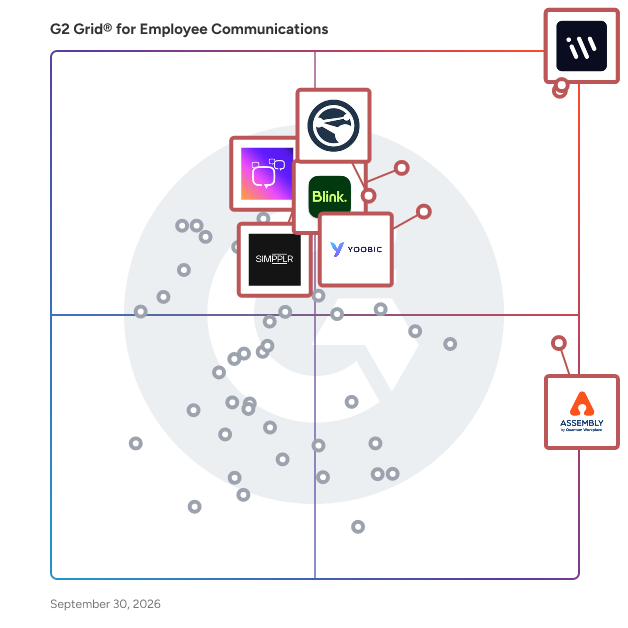
G2's top-rated Employee Communications Software, based on verified user reviews, includes Connecteam, Workvivo, Assembly, WorkJam, and Blink.

What are the top-reviewed employee communications software on G2?

Connecteam

  • Number of Reviews: 1590
  • Satisfaction: 100
  • Market Presence: 98
  • G2 Score: 99

Workvivo

  • Number of Reviews: 2066
  • Satisfaction: 100
  • Market Presence: 96
  • G2 Score: 98

Assembly

  • Number of Reviews: 574
  • Satisfaction: 97
  • Market Presence: 56
  • G2 Score: 77

WorkJam

  • Number of Reviews: 30
  • Satisfaction: 62
  • Market Presence: 70
  • G2 Score: 66

Blink

  • Number of Reviews: 126
  • Satisfaction: 59
  • Market Presence: 70
  • G2 Score: 64

Satisfaction reflects user-reported ratings, including ease of use, support, and feature fit. (Source 2)

Market Presence scores combine review and external signals that indicate market momentum and footprint. (Source 2)

G2 Score is a weighted composite of Satisfaction and Market Presence. (Source 2)

Learn how G2 scores products. (Source 1)

What I Often See in Employee Communications Software

Feedback Pros: What Users Consistently Appreciate

Intuitive user-friendly interface enabling quick adoption across teams

“Assembly makes employee recognition easy, genuine, and visible across the team. I really like how simple it is to give recognition and how it helps create a positive, supportive culture. The platform is easy to use, intuitive, and doesn’t feel overwhelming, which makes people more likely to actually use it regularly. It’s a great way to celebrate wins, big or small.”

- Rayniel V., Assembly review

Simple onboarding process requiring minimal setup or configuration

“I really like Connecteam's mobile-first, all-in-one approach that brings scheduling, time tracking, communication, task management, and basic HR tools into a single, intuitive app for deskless teams. It significantly reduces operational complexity and ensures frontline employees stay informed without relying on email or desktops. I also appreciate how it gives managers real-time visibility and control, while remaining easy to adopt, scalable, and cost-effective for growing organizations. The initial setup is straightforward, with guided workflows and an intuitive interface that help reduce onboarding friction. I think it delivers strong value for organizations with deskless or frontline teams by simplifying scheduling, time tracking, communication, and daily operations in a unified platform.”

- Harish T., Connecteam review

Social-style communication feeds supporting updates, recognition, and engagement

“The interface is incredibly intuitive because it mimics the "social media" experience we are already used to (like IG, LinkedIn, or FB), which means there is almost no learning curve. I particularly appreciate the employee recognition (shout-out) features and the mobile app experience. It bridges the gap between desk-based teams & field teams effectively, ensuring everyone feels part of the same culture regardless of their physical location.”

- Umesh S., Workvivo review

Cons: Where Many Platforms Fall Short

Mobile app stability issues reported across different devices

“One downside is that the mobile app doesn’t always work smoothly on my phone. I’ve experienced occasional lag and features not loading correctly, which makes it less convenient to use on mobile compared to desktop.”

- Verified User in Industrial Automation, Assemble review

Limited customization options for announcements, notifications, and workflows

“I honestly would love more customization options for reports. More flexibility in filtering and exporting reports would be awesome, like being able to group data by department, project, or custom fields for payroll and analytics.”

- John I., Connecteam review

Navigation challenges when searching through large communication archives

“This product is excellent for end-users, but the administrative workflows could use some improvement. Many configuration options are hidden deep within the interface, which makes them hard to locate quickly. Enhancing navigation, making frequently used settings more accessible, and providing in-context help would go a long way toward easing the administrative burden.”

- Elgin Eugene K., Interact review

My Expert Takeaway on Employee Communications Software in 2026

G2 review data indicates strong satisfaction with tools in this category. Across the 960 reviews analyzed, the average rating for employee communication platforms is 4.69 out of 5 stars, reflecting generally positive user experiences.

Based on my observations, operational metrics support this trend. Reviewers report high scores for attributes such as ease of use, setup, and customer support, indicating that most platforms are designed for quick deployment with minimal technical involvement, and that help is available when needed.

Recommendation rates are particularly strong. The dataset shows an average likelihood to recommend of 9.38 out of 10, indicating that organizations often see measurable value after implementing these tools.

Another pattern I noticed in the dataset was strong adoption in industries with distributed or frontline workforces. Consumer services, retail, hospitality, and transportation frequently appear in reviews, underscoring the importance of mobile-first employee communication apps for workers who may not regularly use email or desktop systems.

Organizations that gain the most value from these solutions tend to treat them as engagement hubs rather than simple announcement systems. When companies combine updates, recognition, and internal discussion in a single environment, employee communication tools become part of daily workflows rather than occasional broadcast channels.

Employee Communication Software FAQs

What is the best employee communication app for small businesses?

Small businesses typically need employee communication apps that are simple to deploy, mobile-friendly, and easy for teams to adopt without IT support.

According to G2 data, several platforms have strong adoption among small business teams:

  • Connecteam: Used by 83% small business customers, Connecteam offers internal messaging, announcements, scheduling updates, and task communication in a mobile-first environment.
  • AgilityPortal: With 47% small business users, AgilityPortal focuses on internal communication, employee engagement, and knowledge sharing through a centralized company hub.
  • Workvivo: Used by 12% small businesses, Workvivo blends internal communication with employee engagement features like social feeds, recognition, and company-wide updates.

For smaller organizations, these tools help replace fragmented communication channels and ensure updates reach employees quickly.

What's the best platform for employee messaging?

The best employee messaging platform depends on how teams communicate internally. Some organizations need real-time chat, while others prioritize company-wide announcements and internal engagement.

Several platforms frequently appear in G2 reviews for employee messaging:

  • Connecteam: Provides mobile messaging, team chat, announcements, and operational updates for frontline and remote workers.
  • Workvivo: Focuses on company-wide communication through a social-style feed where teams can post updates, share announcements, and interact with content.
  • Assembly: Combines internal communication with recognition programs, allowing employees to message peers while celebrating team achievements.

These platforms help centralize internal messaging so employees receive updates without relying on scattered tools like email threads or separate messaging apps.

What are the best employee communication apps for frontline and deskless teams?

Frontline and deskless employees often need mobile-first communication tools because they may not regularly access corporate email or desktop systems. The most effective apps focus on quick updates, push notifications, and simple messaging features that work well on mobile devices.

These platforms on G2 are commonly used by organizations with deskless or distributed teams:

  • WorkJam: Designed for deskless and shift-based workforces, WorkJam allows companies to send announcements, share updates, and communicate operational information directly through a mobile app.
  • Staffbase: It helps organizations deliver targeted internal communication and company updates to distributed employees across multiple locations.
  • Blink: It provides a mobile-first communication hub that combines messaging, company news, and operational resources for frontline teams.

These platforms help organizations ensure that important updates reach employees in the field, on the shop floor, or working across multiple locations.

Where can I find an employee communication app?

Employee communication apps can be explored and compared on platforms like G2, where verified user reviews highlight how different tools perform in real business environments.

The G2 Employee Communications Software category includes platforms designed for internal messaging, announcements, and employee engagement. Buyers can compare products based on review ratings, ease of use, market presence, and industry adoption.

Browsing the category allows teams to evaluate different tools, compare features, and see which solutions are commonly used by companies with similar needs.

Why use an app for employee communication?

Employee communication apps help organizations centralize internal messaging so employees receive updates quickly and consistently.

Companies often adopt these tools to solve common internal communication challenges, such as:

  • Employees missing important announcements in email
  • Difficulty communicating with frontline or remote teams
  • Lack of visibility across departments
  • Limited engagement with traditional intranet systems

Communication apps address these issues by providing a centralized space where updates, announcements, and conversations can reach employees across devices. Many platforms also include mobile access, recognition features, and real-time messaging to encourage ongoing engagement within teams.

Sources

Researched By: Nana Serwah Nkrahene

Last updated on March 16, 2026