# Best Cloud Content Collaboration Software

*By [Neeraja Prakash](https://research.g2.com/insights/author/neeraja-prakash)*


Cloud content collaboration software provides dedicated cloud storage and file sharing solutions for documents, images, videos, spreadsheets, and other files created and used by businesses. These tools act as flexible and synchronized repositories for all business content, aiming to be a one-stop solution for storing, sharing, creating, collaborating on, and retrieving content across multiple devices.

For remote and hybrid teams, cloud content collaboration solutions facilitate accessing and co-editing files in real time from various locations. Marketing teams use it to share campaign assets with clients. Legal and compliance teams use cloud content collaboration products to manage contract revisions and regulated documentation. These solutions also support product and design teams in coordinating on launch strategies and visual content, and enable finance teams to securely share reports and regulatory documents across departments and with external partners.

There is significant overlap between [cloud content collaboration software](https://www.g2.com/categories/cloud-content-collaboration), [document management software](https://www.g2.com/categories/document-management?source=search), and [enterprise content management (ECM) software](https://www.g2.com/categories/enterprise-content-management-ecm?source=search) in terms of features. However, as the name implies, enterprise content management tools are designed for enterprise-level businesses and organizations, offering tighter security, greater storage capacity, and on-premises deployment options. Document management tools focus on document lifecycle control and centralized file repositories. The best cloud content collaboration tools can integrate with ECM and other content management systems to create a comprehensive content storage ecosystem.

To qualify for inclusion in the Cloud Content Collaboration category, a product must:

- Provide cloud-based storage across multiple file types
- Synchronize files across repositories and devices
- Provide tools for both external and internal file sharing
- Support versioning across files
- Offer access to files from multiple devices
- Enable secure and compliant file sharing with real-time monitoring and risk mitigation
- Feature prominent collaboration tools


## Top Cloud Content Collaboration Software at a Glance
| # | Product | Rating | Best For | What Users Say |
|---|---------|--------|----------|----------------|
| 1 | [Google Workspace](https://www.g2.com/products/google-workspace/reviews) | 4.6/5.0 (45,602 reviews) | Cross-functional document collaboration inside Google ecosystem | "[Seamless Collaboration, Smart AI, and All-in-One Value with Google Workspace](https://www.g2.com/survey_responses/google-workspace-review-12989188)" |
| 2 | [Microsoft OneDrive for Business](https://www.g2.com/products/microsoft-onedrive-for-business/reviews) | 4.3/5.0 (9,935 reviews) | Microsoft 365-native co-authoring and file sync | "[Seamless Microsoft 365 Integration for Easy Sharing and Real-Time Collaboration](https://www.g2.com/survey_responses/microsoft-onedrive-for-business-review-13041887)" |
| 3 | [Dropbox](https://www.g2.com/products/dropbox/reviews) | 4.4/5.0 (30,823 reviews) | Cross-device file sync with secure external sharing | "[Deeper Search Functionality, Needs Better Integrations](https://www.g2.com/survey_responses/dropbox-review-12952362)" |
| 4 | [Microsoft 365](https://www.g2.com/products/microsoft365/reviews) | 4.6/5.0 (5,521 reviews) | Cross-app real-time document co-authoring | "[All in One Productivity Ecosystem with Seamless Collaboration Across Devices](https://www.g2.com/survey_responses/microsoft-365-review-12930516)" |
| 5 | [Box](https://www.g2.com/products/box/reviews) | 4.2/5.0 (5,031 reviews) | Secure cross-organizational content collaboration with governance | "[Box Helps Us Manage and Share Business Documents Securely Across Teams](https://www.g2.com/survey_responses/box-review-12922941)" |
| 6 | [Egnyte](https://www.g2.com/products/egnyte/reviews) | 4.4/5.0 (1,134 reviews) | Secure file collaboration with granular permission controls | "[Easy way to manage, Share and secure files With team collaboration](https://www.g2.com/survey_responses/egnyte-review-12753699)" |
| 7 | [Zoho WorkDrive](https://www.g2.com/products/zoho-workdrive/reviews) | 4.4/5.0 (693 reviews) | Team-owned content collaboration inside Zoho ecosystem | "[A reliable platform for document sharing](https://www.g2.com/survey_responses/zoho-workdrive-review-12927469)" |
| 8 | [LucidLink](https://www.g2.com/products/lucidlink/reviews) | 4.5/5.0 (644 reviews) | Streaming-native cloud collaboration for large-file workflows | "[Smart Caching, Seamless macOS Integration — Fast, Reliable, AI-Ready](https://www.g2.com/survey_responses/lucidlink-review-13051939)" |
| 9 | [IBM Aspera on Cloud](https://www.g2.com/products/ibm-aspera-on-cloud/reviews) | 4.4/5.0 (131 reviews) | High-speed large-file transfer across global teams | "[Aspera Delivers Fast, Reliable Large-File Transfers with Strong Visibility and Control](https://www.g2.com/survey_responses/ibm-aspera-on-cloud-review-12824286)" |
| 10 | [M-Files](https://www.g2.com/products/m-files/reviews) | 4.4/5.0 (229 reviews) | Metadata-driven document collaboration with version control | "[Reliable Platform for Managing Documents and Content Workflows](https://www.g2.com/survey_responses/m-files-review-12787325)" |

---
## What Are the Most Common Questions About Cloud Content Collaboration Software?
*AI-generated · Last updated: May 26, 2026*
### What highest rated Cloud Content Collaboration Software for replacing scattered file storage with centralized knowledge?
Based on G2 reviews, buyers in cloud content collaboration most often describe a few products as strong options for replacing scattered files with a centralized workspace. According to verified users, Google Workspace is frequently praised for keeping docs, email, chat, meetings, and shared storage in one connected environment, while reviewers of Microsoft OneDrive for Business highlight centralized file access, backup, and easier document sharing across devices. G2 reviewers mention Box as a secure hub for internal and external file collaboration, especially when version control and permissions matter. Review themes across these products consistently focus on reducing version confusion, improving findability, and giving teams one place to store and share current files.

**Here are some of the top-rated products on G2:**

- [Google Workspace](https://www.g2.com/products/google-workspace/reviews) – often used to centralize documents, shared drives, email, and real-time team collaboration
- [Microsoft OneDrive for Business](https://www.g2.com/products/microsoft-onedrive-for-business/reviews) – suited for centralized file storage, backup, and cross-device document access
- [Box](https://www.g2.com/products/box/reviews) – commonly chosen for secure file organization, version control, and controlled sharing


### What most trusted Cloud Content Collaboration Software by technical teams at startups based on user reviews?
Based on G2 reviews, trust in cloud content collaboration software often comes down to security, reliability, and how easily teams can manage files across devices and workflows. According to verified users, Box is often highlighted for secure file sharing, permissions, auditability, and external collaboration, while Dropbox reviewers repeatedly mention reliability, simple syncing, and easy file access across distributed teams. G2 reviewers also mention Google Workspace for fast onboarding, broad familiarity, and seamless collaboration across documents and communication tools. Across these reviews, technical buyers appear to value products that reduce file confusion, support remote access, and keep collaboration predictable without creating extra administrative overhead.


### What Top Cloud Content Collaboration Software offering wiki-style editing and structured documentation for teams?
Based on G2 reviews, some cloud content collaboration tools stand out when teams need structured documentation rather than only file storage. According to verified users, Google Workspace is often used to build shared documentation because teams can edit Docs in real time, comment, and maintain one current version. G2 reviewers also mention Zoho WorkDrive for organized team folders and in-browser document collaboration, which supports shared document workflows for departments and projects. Reviewers of Box describe using it as a centralized source of truth with version control and secure access, which helps larger teams keep documentation organized. Across reviews, buyers emphasize real-time editing, shared structure, and easier access to current files over fragmented document repositories.

**Here are some of the top-rated products on G2:**

- [Google Workspace](https://www.g2.com/products/google-workspace/reviews) – widely used for real-time shared docs, comments, and collaborative team documentation
- [Zoho WorkDrive](https://www.g2.com/products/zoho-workdrive/reviews) – useful for structured team folders and browser-based document collaboration
- [Box](https://www.g2.com/products/box/reviews) – supports centralized documentation with version tracking and controlled access


### Which Cloud Content Collaboration Software has the easiest setup and lets teams edit documents remotely?
Based on G2 reviews, Google Workspace stands out most clearly here. According to verified users, it is frequently described as easy to set up, simple to learn, and effective for remote editing across Docs, Sheets, and shared files. Reviewers consistently mention smooth real-time collaboration, quick onboarding, and easy switching between communication, storage, and document tools. G2 reviewers also note that clients and teammates often already know the interface, which reduces training time and helps remote work move faster. While other products in this category support collaboration, Google Workspace is the most consistently reinforced in recent reviews for easy setup combined with remote document editing.


### What Cloud Content Collaboration platforms with secure file sharing that eliminate risky workarounds and leaks?
Based on G2 reviews, secure file sharing is a consistent theme for buyers trying to replace email attachments, unsecured links, and scattered sharing practices. According to verified users, Box is often praised for secure sharing links, permissions, and collaboration with external stakeholders. G2 reviewers mention Dropbox for simple but dependable file sharing across teams and devices, while Box reviewers more often emphasize governance and controlled access. Google Workspace also appears in reviews where teams want secure links and shared documents without constant file resending. Across these products, reviewers repeatedly connect secure sharing with fewer risky workarounds, better control over who can view or edit files, and less confusion around the latest document version.


### What Reliable Cloud Content Collaboration platforms that maintain speed and uptime under heavy file loads?
Based on G2 reviews, reliability under heavier workloads is usually described in terms of consistent access, smooth syncing, and dependable collaboration rather than formal uptime claims. According to verified users, Dropbox is often described as reliable for storage, syncing, and access across devices, especially for teams sharing larger files. G2 reviewers mention Box as dependable for centralized file management and controlled collaboration, while Microsoft OneDrive for Business is regularly cited for keeping work files available across devices with backup and browser-based access. Reviewers also note that some tools can slow with very large files, but these products are repeatedly chosen when buyers want fewer interruptions and a more stable day-to-day collaboration experience.


### What Cloud Content Collaboration platforms built for compliance-critical teams needing audit trails and controls?
Based on G2 reviews, Box is one of the clearest fits for compliance-focused teams because reviewers repeatedly mention audit trails, permissions, and secure external sharing. According to verified users, Box helps organizations manage controlled access to sensitive content and maintain version history for collaboration. G2 reviewers also mention Google Workspace in contexts where admins need permissions, shared drives, and centralized file governance, though some reviews note limits for advanced controls. Microsoft OneDrive for Business is another option frequently cited for centralized document access and permission-based sharing within Microsoft-centered environments. Across reviews, buyers in regulated or security-conscious settings consistently prioritize detailed access management, traceability, and safer collaboration workflows.


### What Cloud Content Collaboration Software with modern UI that&#39;s intuitive for non-technical team members?
Based on G2 reviews, Google Workspace is frequently described as intuitive for both new and non-technical users because the interface is familiar, easy to navigate, and consistent across core apps. According to verified users, Dropbox is also often praised for simplicity, easy sharing, and fast file access without much setup. G2 reviewers mention Box as having a clean interface for secure file management, though some users note a learning curve in deeper administrative controls. Across these products, the most repeated buyer benefit is reduced onboarding friction: teams can start sharing, editing, and organizing documents quickly without relying heavily on IT support or formal training.


### Which Cloud Content Collaboration systems prevent file transfer bottlenecks and maintain security at scale?
Based on G2 reviews, Google Workspace is the strongest match in this dataset. According to verified users, it centralizes files, supports link-based sharing, enables remote collaboration, and reduces the delays that come from attachments and version confusion. Reviewers repeatedly describe it as accessible, organized, and effective for teams that need to move documents quickly while maintaining permissions and shared visibility. G2 reviewers also mention that real-time collaboration and broad familiarity help reduce transfer friction for both internal teams and external stakeholders. For buyers seeking a system that keeps file sharing moving without losing control, Google Workspace is the most consistently supported option in recent reviews.


### What Best Cloud Content Collaboration Software for distributed tech teams centralizing documentation with zero risk?
Based on G2 reviews, no product can be described as offering zero risk, but several are consistently praised for helping distributed teams centralize documentation more securely. According to verified users, Google Workspace is often chosen for shared docs, comments, remote collaboration, and centralized access to the latest version of files. G2 reviewers also mention Box when secure collaboration, permissions, and audit visibility matter more. Dropbox appears in reviews focused on dependable syncing and simple cross-device access for distributed work. Across all three, reviewers point to fewer version conflicts, easier file discovery, and safer document sharing, but they also still note occasional limitations around performance, integrations, or advanced controls.

**Here are some of the top-rated products on G2:**

- [Google Workspace](https://www.g2.com/products/google-workspace/reviews) – strong for shared documentation, remote editing, and keeping distributed teams aligned on current files
- [Box](https://www.g2.com/products/box/reviews) – useful for secure documentation workflows, permissions, and external collaboration controls
- [Dropbox](https://www.g2.com/products/dropbox/reviews) – often used for reliable syncing, organized file access, and simple collaboration across devices


## How Many Cloud Content Collaboration Software Products Does G2 Track?
**Total Products under this Category:** 208

### Category Stats (Jun 2026)
- **Average Rating**: 4.35/5 (↓0.01 vs May 2026) The average rating of products in this category, based on all submitted ratings
- **Top Trending Product**: Sync.com (+5.56%) - Among all products in this category, Sync.com recorded the largest rating increase compared to last month
*Last updated: June 30, 2026*


## How Does G2 Rank Cloud Content Collaboration Software Products?

**Why You Can Trust G2's Software Rankings:**

- 30 Analysts and Data Experts
- 118,000+ Authentic Reviews
- 208+ Products
- Unbiased Rankings

G2's software rankings are built on verified user reviews, rigorous moderation, and a consistent research methodology maintained by a team of analysts and data experts. Each product is measured using the same transparent criteria, with no paid placement or vendor influence. While reviews reflect real user experiences, which can be subjective, they offer valuable insight into how software performs in the hands of professionals. Together, these inputs power the G2 Score, a standardized way to compare tools within every category.


## Which Cloud Content Collaboration Software Is Best for Your Use Case?

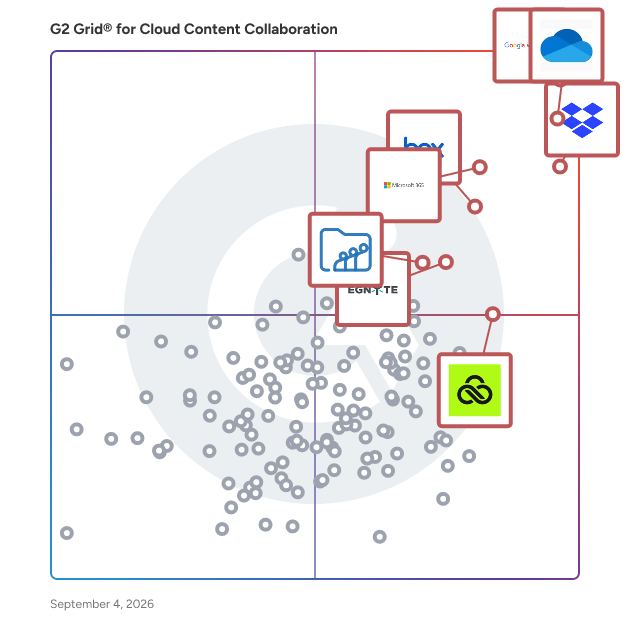
- **Leader:** [Google Workspace](https://www.g2.com/products/google-workspace/reviews)
- **Highest Performer:** [LucidLink](https://www.g2.com/products/lucidlink/reviews)
- **Easiest to Use:** [Air](https://www.g2.com/products/air-labs-inc-air/reviews)
- **Top Trending:** [Air](https://www.g2.com/products/air-labs-inc-air/reviews)
- **Best Free Software:** [Google Workspace](https://www.g2.com/products/google-workspace/reviews)


---

**Sponsored**

### Frame.io

One platform for all your creative work. Frame.io is the all-in-one platform that helps creative teams collaborate, review, and deliver projects faster. Whether you’re working in video, design, or marketing, Frame.io centralizes your creative process—from upload to approval—in one secure, easy-to-use workspace built specifically for creatives. Upload nearly any creative file lightning-fast to a cloud workspace purpose-built for visual assets. Panel-based workspaces and nested folder trees make organizing, finding, and sharing assets intuitive and effortless. With flexible metadata, you can tag, sort, and group files by assignee, due date, status, and more—so your team can work the way it wants. Frame.io eliminates silos with secure, centralized communication that follows the work. You can share assets on the fly, collaborate in context, and find anything instantly across projects. Powerful features like speaker-labeled transcripts, searchable captions, and Collections make managing even the most complex creative pipelines simple. Best-in-Class Review &amp; Approval Get precise, actionable feedback on videos, images, and documents with tools designed for every stakeholder—creatives, clients, and executives alike. Comment directly on a frame or image, timestamp notes, and keep conversations tied to specific assets so nothing gets lost in translation. Customized Workflow Management Assign tasks, track milestones, and build workflows tailored to your team’s unique process. Metadata-powered tracking helps you visualize progress from concept through delivery, ensuring every step is aligned, transparent, and on schedule. Beautiful Sharing &amp; Presentations Showcase your work in crystal-clear high resolution with custom-branded share links and presentations. Add your logo, background, colors, and headers so everything stays on brand. Control permissions with a click—decide who can view, comment, or download, and easily toggle settings as needs evolve. Enterprise-Grade Security Protect your intellectual property with advanced security features like watermarking, single sign-on (SSO), and two-factor authentication (2FA). You decide who sees what, how they interact with assets, and when access expires—so your creative work stays safe at every stage. Whatever you create, Frame.io helps you deliver it faster. That’s why teams across industries choose Frame.io to accelerate their creative workflows, unify collaboration, and elevate the way they produce and present their work.


[Visit website](https://www.g2.com/external_clickthroughs/record?secure%5Bad_program%5D=ppc&amp;secure%5Bad_slot%5D=category_product_list&amp;secure%5Bcategory_id%5D=236&amp;secure%5Bdisplayable_resource_id%5D=236&amp;secure%5Bdisplayable_resource_type%5D=Category&amp;secure%5Bmedium%5D=sponsored&amp;secure%5Bplacement_reason%5D=page_category&amp;secure%5Bplacement_resource_ids%5D%5B%5D=236&amp;secure%5Bprioritized%5D=false&amp;secure%5Bproduct_id%5D=20378&amp;secure%5Bresource_id%5D=236&amp;secure%5Bresource_type%5D=Category&amp;secure%5Bsource_type%5D=category_page&amp;secure%5Bsource_url%5D=https%3A%2F%2Fwww.g2.com%2Fcategories%2Fcloud-content-collaboration&amp;secure%5Btoken%5D=1437456c9d55c80a2cccecf4163c716a096bfef562beb4e7d61010348187fb13&amp;secure%5Burl%5D=https%3A%2F%2Fbusiness.adobe.com%2Fproducts%2Fframeio-business.html%3Fsdid%3DKVGRTQ5S%26mv%3Daffiliate&amp;secure%5Burl_type%5D=custom_url)

---

## What Are the Top-Rated Cloud Content Collaboration Software Products in 2026?
### 1. [Google Workspace](https://www.g2.com/products/google-workspace/reviews)
Google Workspace is a comprehensive productivity and collaboration solution designed to help users streamline their work processes by integrating essential tools such as email, chat, file storage, and video conferencing into a unified platform. This suite of applications is tailored for businesses, educational institutions, and individuals looking to enhance their communication and collaboration efforts, all while leveraging the power of Google’s artificial intelligence. Targeted at a diverse audience, Google Workspace caters to teams of all sizes, from small startups to large enterprises. It is particularly beneficial for remote teams and organizations that prioritize collaboration across different locations. The platform supports various use cases, including project management, team communication, document sharing, and virtual meetings, making it an ideal choice for professionals who need to work together efficiently, regardless of their physical location. One of the key features of Google Workspace is its seamless integration of applications such as Gmail, Google Meet, Google Drive, and Google Docs. This interconnectedness allows users to switch effortlessly between tasks, whether they are sending emails, participating in video calls, or collaborating on documents in real-time. The AI capabilities embedded within the platform enhance user experience by providing smart suggestions, automating repetitive tasks, and improving search functionalities, ultimately saving time and increasing productivity. Additionally, Google Workspace prioritizes security and data protection, offering robust features such as two-factor authentication, advanced phishing protection, and customizable access controls. These measures ensure that sensitive information remains secure while allowing teams to collaborate freely. The platform also supports third-party integrations, enabling users to connect their favorite applications and tools, further enhancing their workflow. In summary, Google Workspace stands out in the productivity software category by providing a holistic approach to collaboration. Its user-friendly interface, combined with powerful AI-driven features and strong security protocols, makes it a valuable tool for anyone looking to improve their work processes and foster effective teamwork. Whether for managing projects, communicating with colleagues, or sharing files, Google Workspace is designed to meet the diverse needs of its users, making it an essential resource in today’s digital workplace.


**Average Rating:** 4.6/5.0
**Total Reviews:** 45,602
**How Do G2 Users Rate Google Workspace?**

- **Has the product been a good partner in doing business?:** 9.0/10 (Category avg: 8.8/10)
- **Performance and Reliability:** 9.3/10 (Category avg: 8.7/10)
- **File following:** 9.0/10 (Category avg: 8.7/10)
- **Device Syncing:** 9.2/10 (Category avg: 8.7/10)

**Who Is the Company Behind Google Workspace?**

- **Seller:** [Google](https://www.g2.com/sellers/google)
- **Year Founded:** 1998
- **HQ Location:** Mountain View, CA
- **Twitter:** @google (31,899,995 Twitter followers)
- **LinkedIn® Page:** https://www.linkedin.com/company/1441/ (341,888 employees on LinkedIn®)
- **Ownership:** NASDAQ:GOOG

**Who Uses This Product?**
- **Who Uses This:** Student, Teacher
- **Top Industries:** Information Technology and Services, Education Management
- **Company Size:** 46% Small-Business, 35% Mid-Market


#### What Are Google Workspace's Pros and Cons?

**Pros:**

- Ease of Use (1396 reviews)
- Integrations (1270 reviews)
- Team Collaboration (1000 reviews)
- File Sharing (826 reviews)
- Features (809 reviews)

**Cons:**

- Missing Features (591 reviews)
- Limited Features (545 reviews)
- Lacking Features (374 reviews)
- Expensive (325 reviews)
- Tool Limitations (321 reviews)


### What Do G2 Reviewers Say About Google Workspace?
*AI-generated summary from verified user reviews*

**Pros:**

- Users appreciate the **ease of use** of Google Workspace, making communication and collaboration seamless and intuitive.
- Users value the **seamless integrations** of Google Workspace, enhancing collaboration and reducing context-switching effectively.
- Users love the **seamless integration** of Google Workspace, enhancing collaboration and making teamwork more efficient.
- Users adore the **seamless integration** of tools in Google Workspace, enhancing collaboration and productivity effortlessly.
- Users value the **seamless integration** of Google Workspace, facilitating effortless collaboration across various tools and enhancing productivity.

**Cons:**

- Users find the **missing features** in Google Workspace limiting, especially in version history and CRM functionality.
- Users find the **limited features** of Google Workspace insufficient compared to other Email CRM platforms for campaign management.
- Users find Google Workspace **lacking features** compared to Office 365, especially for CRM and advanced reporting needs.
- Users find Google Workspace **very expensive** , especially challenging for small businesses with limited budgets.
- Users struggle with **internet dependency** , as offline functionality is limited and quality drops unexpectedly even online.

#### What Are Recent G2 Reviews of Google Workspace?

**"[Empowers Seamless Collaboration Across Platforms](https://www.g2.com/survey_responses/google-workspace-review-12960016)"**

**Rating:** 5.0/5.0 stars
*— Salina T.*

[Read full review](https://www.g2.com/survey_responses/google-workspace-review-12960016)

---

**"[Seamless Collaboration, Smart AI, and All-in-One Value with Google Workspace](https://www.g2.com/survey_responses/google-workspace-review-12989188)"**

**Rating:** 5.0/5.0 stars
*— Rajendra M.*

[Read full review](https://www.g2.com/survey_responses/google-workspace-review-12989188)

---


#### What Are G2 Users Discussing About Google Workspace?

- [What tips do you have for effectively using Google Meet’s advanced features for large virtual meetings?](https://www.g2.com/discussions/what-tips-do-you-have-for-effectively-using-google-meet-s-advanced-features-for-large-virtual-meetings) - 17 comments, 11 upvotes
- [What is Google Surveys used for?](https://www.g2.com/discussions/what-is-google-surveys-used-for) - 8 comments, 2 upvotes
- [What does G Suite do?](https://www.g2.com/discussions/what-does-g-suite-do) - 8 comments, 5 upvotes
- [What companies use G suite?](https://www.g2.com/discussions/what-companies-use-g-suite) - 5 comments, 3 upvotes
- [Does G suite include Google classroom?](https://www.g2.com/discussions/does-g-suite-include-google-classroom) - 9 comments, 4 upvotes

### 2. [Microsoft OneDrive for Business](https://www.g2.com/products/microsoft-onedrive-for-business/reviews)
Microsoft OneDrive for Business lets you securely store, access, share, and collaborate on all your files from anywhere. -Access your files anywhere across all your devices -Store and organize your work documents in a secure location in the cloud.​ -Share documents with others and work together in real time. -Get 1 TB of storage per user and upload files up to 250GB in size. ​ -Synchronize documents stored in the cloud to your computer or mobile device so that you can access your documents offline. Back up and protect your files so you can easily recover from accidental deletes or malicious attacks.


**Average Rating:** 4.3/5.0
**Total Reviews:** 9,935
**How Do G2 Users Rate Microsoft OneDrive for Business?**

- **Has the product been a good partner in doing business?:** 8.7/10 (Category avg: 8.8/10)
- **Performance and Reliability:** 8.8/10 (Category avg: 8.7/10)
- **File following:** 8.7/10 (Category avg: 8.7/10)
- **Device Syncing:** 8.7/10 (Category avg: 8.7/10)

**Who Is the Company Behind Microsoft OneDrive for Business?**

- **Seller:** [Microsoft](https://www.g2.com/sellers/microsoft)
- **Year Founded:** 1975
- **HQ Location:** Redmond, Washington
- **Twitter:** @microsoft (13,091,739 Twitter followers)
- **LinkedIn® Page:** https://www.linkedin.com/company/microsoft/ (231,632 employees on LinkedIn®)
- **Ownership:** MSFT

**Who Uses This Product?**
- **Who Uses This:** Project Manager, Owner
- **Top Industries:** Information Technology and Services, Education Management
- **Company Size:** 38% Enterprise, 33% Mid-Market


#### What Are Microsoft OneDrive for Business's Pros and Cons?

**Pros:**

- Ease of Use (198 reviews)
- Easy Access (180 reviews)
- Seamless Integration (170 reviews)
- Cloud Storage (161 reviews)
- Team Collaboration (139 reviews)

**Cons:**

- Syncing Issues (166 reviews)
- Permission Issues (41 reviews)
- Slow Uploads (40 reviews)
- Slow Loading (31 reviews)
- File Size (27 reviews)


### What Do G2 Reviewers Say About Microsoft OneDrive for Business?
*AI-generated summary from verified user reviews*

**Pros:**

- Users find **ease of use** in Microsoft OneDrive for Business, enjoying effortless file management and seamless access across devices.
- Users appreciate the **easy access** of OneDrive for Business, enabling seamless work from any device, anytime.
- Users love the **seamless integration** of Microsoft OneDrive for Business with Microsoft 365 apps for effortless collaboration.
- Users find Microsoft OneDrive for Business to be **extremely helpful for cloud storage and real-time collaboration** across teams.
- Users enjoy the **seamless team collaboration** in Microsoft OneDrive for Business, enhancing productivity in larger teams.

**Cons:**

- Users experience occasional **syncing issues** with shared folders, which can lead to confusion and duplicate files.
- Users face **permission issues** with OneDrive for Business, complicating file sharing and access management across different platforms.
- Users find the **slow uploads** frustrating, impacting efficiency and causing time-consuming interruptions during file management.
- Users experience **slow loading** times with OneDrive for Business, causing delays in file synchronization and access.
- Users often face **syncing issues** with large files and shared folders, leading to frustrating delays and conflicts.

#### What Are Recent G2 Reviews of Microsoft OneDrive for Business?

**"[Seamless Microsoft 365 Integration for Easy Sharing and Real-Time Collaboration](https://www.g2.com/survey_responses/microsoft-onedrive-for-business-review-13041887)"**

**Rating:** 4.0/5.0 stars
*— Dharamveer p.*

[Read full review](https://www.g2.com/survey_responses/microsoft-onedrive-for-business-review-13041887)

---

**"[Seamless Microsoft 365 Integration Powers Effortless Collaboration](https://www.g2.com/survey_responses/microsoft-onedrive-for-business-review-13045375)"**

**Rating:** 5.0/5.0 stars
*— Raghav h.*

[Read full review](https://www.g2.com/survey_responses/microsoft-onedrive-for-business-review-13045375)

---


#### What Are G2 Users Discussing About Microsoft OneDrive for Business?

- [How does Microsoft OneDrive for Business enhance collaboration and productivity in remote work settings?](https://www.g2.com/discussions/how-does-microsoft-onedrive-for-business-enhance-collaboration-and-productivity-in-remote-work-settings) - 6 comments, 3 upvotes
- [What is Microsoft OneDrive for Business used for?](https://www.g2.com/discussions/what-is-microsoft-onedrive-for-business-used-for) - 4 comments, 1 upvote
- [Is OneDrive secure for business?](https://www.g2.com/discussions/is-onedrive-secure-for-business) - 4 comments, 5 upvotes
- [Does Microsoft teams require OneDrive?](https://www.g2.com/discussions/does-microsoft-teams-require-onedrive) - 3 comments
- [Is there a difference between OneDrive and Onedrive for business?](https://www.g2.com/discussions/is-there-a-difference-between-onedrive-and-onedrive-for-business) - 3 comments

### 3. [Dropbox](https://www.g2.com/products/dropbox/reviews)
Keep creative projects moving from first draft to final sign-off. Dropbox brings your team’s files, feedback, and approvals together in one secure cloud storage platform. Back up your work, send large files in seconds, and keep everyone in sync—so nothing slows you down. Find it fast, from anywhere Dropbox makes it easy to find and share files across desktop, mobile, and web—whether your team is in the office, remote, or on the go. Organize your work, align your team Every version stays current and simple to manage. Synced team folders keep content up to date, and previews for 175+ file types keep your team in the loop. Share anything, instantly Send large assets—up to 2 TB uploads and 1 TB video previews—with just a link. Security you can trust Protect your files with industry-leading encryption, granular permissions, compliance-ready controls, and built-in recovery features. Dropbox integrates with Google Workspace, Microsoft 365, Adobe Creative Cloud, Slack, Salesforce, Canva, Autodesk, Zoom, and more. Trusted by more than 700 million users and 575,000 teams worldwide.


**Average Rating:** 4.4/5.0
**Total Reviews:** 30,823
**How Do G2 Users Rate Dropbox?**

- **Has the product been a good partner in doing business?:** 8.9/10 (Category avg: 8.8/10)
- **Performance and Reliability:** 9.0/10 (Category avg: 8.7/10)
- **File following:** 8.7/10 (Category avg: 8.7/10)
- **Device Syncing:** 8.9/10 (Category avg: 8.7/10)

**Who Is the Company Behind Dropbox?**

- **Seller:** [Dropbox](https://www.g2.com/sellers/dropbox)
- **Company Website:** https://www.dropbox.com/
- **Year Founded:** 2007
- **HQ Location:** San Francisco, California
- **Twitter:** @Dropbox (3,279,477 Twitter followers)
- **LinkedIn® Page:** https://www.linkedin.com/company/167251/ (4,149 employees on LinkedIn®)

**Who Uses This Product?**
- **Who Uses This:** Owner, Project Manager
- **Top Industries:** Information Technology and Services, Marketing and Advertising
- **Company Size:** 63% Small-Business, 23% Mid-Market


#### What Are Dropbox's Pros and Cons?

**Pros:**

- Ease of Use (1693 reviews)
- Easy Access (856 reviews)
- File Sharing (818 reviews)
- Easy Sharing (685 reviews)
- Cloud Storage (645 reviews)

**Cons:**

- Expensive Cost (525 reviews)
- Expensive (513 reviews)
- Plan Limitations (501 reviews)
- Limited Storage (491 reviews)
- Not Free (297 reviews)


### What Do G2 Reviewers Say About Dropbox?
*AI-generated summary from verified user reviews*

**Pros:**

- Users value the **ease of use** in Dropbox, appreciating its intuitive UI for seamless file management and sharing.
- Users appreciate the **easy access** to Dropbox from multiple devices, making file sharing and organization effortless.
- Users value the **efficient file sharing** in Dropbox, making it easy to collaborate and access files across devices.
- Users love the **easy sharing** capabilities of Dropbox, particularly for sending large and confidential files.
- Users appreciate the **seamless collaboration and easy file management** offered by Dropbox, enhancing their productivity significantly.

**Cons:**

- Users find the **high cost of storage upgrades** for Dropbox to be excessive, especially for individuals and small teams.
- Users find Dropbox **too expensive** for the limited storage offered, feeling premium fees are unjustified for their needs.
- Users find Dropbox’s **storage limits and plan pricing costly** , making upgrades necessary yet expensive for larger needs.
- Users find the **limited storage** of Dropbox insufficient for their needs, quickly necessitating an upgrade to a paid plan.
- Users find the **storage plans pricey** and the free version too limited for their needs.

#### What Are Recent G2 Reviews of Dropbox?

**"[Deeper Search Functionality, Needs Better Integrations](https://www.g2.com/survey_responses/dropbox-review-12952362)"**

**Rating:** 4.5/5.0 stars
*— Prahlad K.*

[Read full review](https://www.g2.com/survey_responses/dropbox-review-12952362)

---

**"[Dropbox: Simple, Reliable Cloud Storage with Smooth Sync and Team Collaboration](https://www.g2.com/survey_responses/dropbox-review-13049539)"**

**Rating:** 5.0/5.0 stars
*— jamsheed I.*

[Read full review](https://www.g2.com/survey_responses/dropbox-review-13049539)

---


#### What Are G2 Users Discussing About Dropbox?

- [What strategies do you use to ensure secure and efficient file sharing with Dropbox in your organization?](https://www.g2.com/discussions/what-strategies-do-you-use-to-ensure-secure-and-efficient-file-sharing-with-dropbox-in-your-organization) - 6 comments, 5 upvotes
- [What is Dropbox used for?](https://www.g2.com/discussions/what-is-dropbox-used-for) - 8 comments, 7 upvotes
- [What is Dropbox and how it works?](https://www.g2.com/discussions/what-is-dropbox-and-how-it-works) - 6 comments, 5 upvotes
- [Can I scan directly to Dropbox?](https://www.g2.com/discussions/can-i-scan-directly-to-dropbox) - 4 comments, 3 upvotes
- [How does Dropbox for business work?](https://www.g2.com/discussions/how-does-dropbox-for-business-work) - 2 comments

### 4. [Microsoft 365](https://www.g2.com/products/microsoft365/reviews)
Launch and grow your business with Microsoft 365. Do more, faster, with intelligent tools to create, send, share, and store professional, branded documents with your customers and team - securely in the cloud. Microsoft 365 is a cloud-based suite of software tools designed to help you do more—with best-in-class communication, design, and data management apps, intelligent cloud services, and advanced security. Access your data from anywhere, collaborate with team members in real time, meet with people virtually, and use thousands of predesigned templates to better communicate with customers and manage your business - all with built-in security technology that safeguards your data and devices from anywhere. Get the latest Office apps, such as Microsoft Teams, Word, Excel, PowerPoint, Outlook, OneDrive, and more.


**Average Rating:** 4.6/5.0
**Total Reviews:** 5,521
**How Do G2 Users Rate Microsoft 365?**

- **Has the product been a good partner in doing business?:** 8.8/10 (Category avg: 8.8/10)
- **Performance and Reliability:** 9.3/10 (Category avg: 8.7/10)
- **File following:** 9.2/10 (Category avg: 8.7/10)
- **Device Syncing:** 9.3/10 (Category avg: 8.7/10)

**Who Is the Company Behind Microsoft 365?**

- **Seller:** [Microsoft](https://www.g2.com/sellers/microsoft)
- **Year Founded:** 1975
- **HQ Location:** Redmond, Washington
- **Twitter:** @microsoft (13,091,739 Twitter followers)
- **LinkedIn® Page:** https://www.linkedin.com/company/microsoft/ (231,632 employees on LinkedIn®)
- **Ownership:** MSFT

**Who Uses This Product?**
- **Who Uses This:** Owner, Manager
- **Top Industries:** Information Technology and Services, Education Management
- **Company Size:** 37% Mid-Market, 35% Small-Business


#### What Are Microsoft 365's Pros and Cons?

**Pros:**

- Ease of Use (264 reviews)
- Team Collaboration (228 reviews)
- Features (191 reviews)
- Integrations (184 reviews)
- Seamless Integration (169 reviews)

**Cons:**

- Expensive (112 reviews)
- Missing Features (97 reviews)
- Learning Curve (90 reviews)
- Lacking Features (71 reviews)
- Limited Features (70 reviews)


### What Do G2 Reviewers Say About Microsoft 365?
*AI-generated summary from verified user reviews*

**Pros:**

- Users appreciate the **ease of use** in Microsoft 365, benefiting from simple setup and intuitive navigation.
- Users value the **seamless tool integration** in Microsoft 365, enhancing collaboration and productivity across teams.
- Users value the **seamless integration** and extensive features of Microsoft 365 for enhancing productivity and collaboration.
- Users appreciate the **seamless integration** of Microsoft 365 with Microsoft apps, enhancing collaboration and productivity effortlessly.
- Users appreciate the **seamless integration** of Microsoft 365 with other apps, enhancing accessibility and collaboration effortlessly.

**Cons:**

- Users find Microsoft 365 **expensive** , especially for small teams needing features available only in higher-priced plans.
- Users find **missing features** frustrating, as some functionalities are locked behind higher-priced plans and inconsistent updates disrupt usage.
- Users find the **learning curve steep** with Microsoft 365, making it challenging for new or occasional users to adapt.
- Users find Microsoft 365 **lacking features** in lower-tier plans, making it frustrating for small teams to adapt.
- Users express frustration with **limited features** and frequent updates that disrupt functionality and usability in Microsoft 365.

#### What Are Recent G2 Reviews of Microsoft 365?

**"[All in One Productivity Ecosystem with Seamless Collaboration Across Devices](https://www.g2.com/survey_responses/microsoft-365-review-12930516)"**

**Rating:** 4.5/5.0 stars
*— Sunil B.*

[Read full review](https://www.g2.com/survey_responses/microsoft-365-review-12930516)

---

**"[All-in-One Office Ecosystem with Reliable Apps and Seamless Collaboration](https://www.g2.com/survey_responses/microsoft-365-review-12834956)"**

**Rating:** 5.0/5.0 stars
*— Megh P.*

[Read full review](https://www.g2.com/survey_responses/microsoft-365-review-12834956)

---


#### What Are G2 Users Discussing About Microsoft 365?

- [What are the uses of Microsoft software?](https://www.g2.com/discussions/what-are-the-uses-of-microsoft-software) - 2 comments, 1 upvote
- [What kind of software is Microsoft Office?](https://www.g2.com/discussions/what-kind-of-software-is-microsoft-office) - 1 comment, 1 upvote
- [What programs are in Microsoft Office suite?](https://www.g2.com/discussions/what-programs-are-in-microsoft-office-suite) - 1 comment
- [What is Microsoft Office features?](https://www.g2.com/discussions/what-is-microsoft-office-features) - 2 comments

### 5. [Box](https://www.g2.com/products/box/reviews)
Box: The leader in Intelligent Content Management — Store, secure, and automate content on an AI-powered platform Box helps businesses of every size get more value from their documents and files with stringent security controls, intelligent workflow automation, and AI agents that extract critical insight. ✓ Box AI — Summarize documents, extract insights, ask questions in natural language, and deploy and create intelligent AI agents that automate repetitive work ✓ Intelligent workflow automation — Streamline reviews, contract approvals, and onboarding with AI-powered workflows ✓ Security and compliance — Protect sensitive information with granular access controls, intelligent threat detection, and AI governance that meet HIPAA, FINRA, FedRAMP, and GDPR standards ✓ Integrations and extensibility — Connect Box with 1,500+ popular apps or extend functionality with APIs and SDKs ✓ Industry solutions — Trusted by leading finance, technology, government, and life sciences organizations for secure collaboration and AI-enhanced productivity


**Average Rating:** 4.2/5.0
**Total Reviews:** 5,031
**How Do G2 Users Rate Box?**

- **Has the product been a good partner in doing business?:** 8.7/10 (Category avg: 8.8/10)
- **Performance and Reliability:** 8.9/10 (Category avg: 8.7/10)
- **File following:** 8.7/10 (Category avg: 8.7/10)
- **Device Syncing:** 8.6/10 (Category avg: 8.7/10)

**Who Is the Company Behind Box?**

- **Seller:** [Box](https://www.g2.com/sellers/box)
- **Company Website:** https://cloud.app.box.com
- **Year Founded:** 1998
- **HQ Location:** Redwood City, CA
- **Twitter:** @Box (78,537 Twitter followers)
- **LinkedIn® Page:** https://www.linkedin.com/company/box/ (4,311 employees on LinkedIn®)

**Who Uses This Product?**
- **Who Uses This:** Project Manager, Consultant
- **Top Industries:** Higher Education, Information Technology and Services
- **Company Size:** 41% Enterprise, 32% Mid-Market


#### What Are Box's Pros and Cons?

**Pros:**

- Ease of Use (96 reviews)
- Security (57 reviews)
- Sharing (54 reviews)
- Easy Sharing (50 reviews)
- Seamless Integration (47 reviews)

**Cons:**

- Slow Performance (30 reviews)
- Expensive (27 reviews)
- Storage Limitations (20 reviews)
- Lacking Features (17 reviews)
- Performance Issues (17 reviews)


### What Do G2 Reviewers Say About Box?
*AI-generated summary from verified user reviews*

**Pros:**

- Users value the **ease of use** of Box, noting its intuitive design and minimal training requirements.
- Users value the **strong security features** of Box, ensuring safe document sharing and robust access controls.
- Users value the **seamless sharing and collaboration** features of Box, enhancing productivity and simplifying document management.
- Users appreciate the **easy sharing** capabilities of Box, enhancing collaboration and ensuring secure access to documents anywhere.
- Users love the **seamless integration** of Box, simplifying file sharing and enhancing team collaboration effortlessly.

**Cons:**

- Users report **slow performance** , especially during syncing and when using the mobile app, affecting overall efficiency.
- Users are concerned about the **high pricing** of Box, especially for smaller teams compared to other storage solutions.
- Users find **storage limitations** with Box frustrating, particularly regarding costs and file organization options.
- Users feel that Box is **lacking features** in lower-tier plans, making advanced functionalities less accessible.
- Users experience **performance issues** with slow uploads and downloads on Box, impacting overall productivity and efficiency.

#### What Are Recent G2 Reviews of Box?

**"[Secure, Well-Managed Document Storage with Smooth Microsoft 365 and Google Workspace Integration](https://www.g2.com/survey_responses/box-review-12910432)"**

**Rating:** 4.5/5.0 stars
*— Nicole R.*

[Read full review](https://www.g2.com/survey_responses/box-review-12910432)

---

**"[Box Helps Us Manage and Share Business Documents Securely Across Teams](https://www.g2.com/survey_responses/box-review-12922941)"**

**Rating:** 5.0/5.0 stars
*— Shibu K.*

[Read full review](https://www.g2.com/survey_responses/box-review-12922941)

---


#### What Are G2 Users Discussing About Box?

- [How does Box facilitate secure and efficient cloud-based collaboration for teams?](https://www.g2.com/discussions/how-does-box-facilitate-secure-and-efficient-cloud-based-collaboration-for-teams) - 1 comment
- [How is Box being used to enhance operational efficiency and user experience in its specific field?](https://www.g2.com/discussions/how-is-box-being-used-to-enhance-operational-efficiency-and-user-experience-in-its-specific-field) - 1 comment
- [What is Box used for?](https://www.g2.com/discussions/what-is-box-used-for) - 1 comment
- [Is Box A document management system?](https://www.g2.com/discussions/is-box-a-document-management-system) - 1 comment, 2 upvotes
- [Is Box A SaaS?](https://www.g2.com/discussions/is-box-a-saas) - 2 comments

### 6. [Egnyte](https://www.g2.com/products/egnyte/reviews)
Egnyte combines the power of cloud content management, data security, and AI into one intelligent content platform. More than 22,000 customers trust Egnyte to improve employee productivity, automate business processes, and safeguard critical data, in addition to offering specialized content intelligence and automation solutions across industries, including architecture, engineering, and construction (AEC), life sciences, and financial services.


**Average Rating:** 4.4/5.0
**Total Reviews:** 1,134
**How Do G2 Users Rate Egnyte?**

- **Has the product been a good partner in doing business?:** 8.8/10 (Category avg: 8.8/10)
- **Performance and Reliability:** 9.2/10 (Category avg: 8.7/10)
- **File following:** 8.9/10 (Category avg: 8.7/10)
- **Device Syncing:** 8.9/10 (Category avg: 8.7/10)

**Who Is the Company Behind Egnyte?**

- **Seller:** [Egnyte](https://www.g2.com/sellers/egnyte)
- **Company Website:** https://www.egnyte.com
- **Year Founded:** 2008
- **HQ Location:** Mountain View, CA
- **Twitter:** @Egnyte (16,127 Twitter followers)
- **LinkedIn® Page:** https://www.linkedin.com/company/1015589/ (1,289 employees on LinkedIn®)

**Who Uses This Product?**
- **Who Uses This:** Project Manager, Owner
- **Top Industries:** Construction, Marketing and Advertising
- **Company Size:** 44% Small-Business, 38% Mid-Market


#### What Are Egnyte's Pros and Cons?

**Pros:**

- Ease of Use (119 reviews)
- File Sharing (69 reviews)
- Easy Sharing (53 reviews)
- Easy Access (45 reviews)
- Security (44 reviews)

**Cons:**

- Expensive (21 reviews)
- File Management (19 reviews)
- User Difficulty (13 reviews)
- Lacking Features (12 reviews)
- Missing Features (12 reviews)


### What Do G2 Reviewers Say About Egnyte?
*AI-generated summary from verified user reviews*

**Pros:**

- Users find Egnyte&#39;s platform to be **user-friendly and easy to integrate** , enhancing their overall data management experience.
- Users value the **ease of file sharing** with Egnyte, enhancing collaboration and document access seamlessly.
- Users value the **easy sharing** of documents on Egnyte, enhancing collaboration for both remote and in-office teams.
- Users value the **easy access** to Egnyte, appreciating seamless document sharing and remote file management capabilities.
- Users value Egnyte&#39;s **robust security features** , enhancing data protection and compliance for their organizations.

**Cons:**

- Users find Egnyte to be **expensive for small and mid-sized businesses** , with rigid terms and high costs impeding flexibility.
- Users experience **delayed drive accessibility** and limitations with file locking and exe file usage in Egnyte.
- Users find Egnyte to be **clunky and overwhelming** , particularly with syncing, search, and complex permissions management.
- Users find Egnyte **lacking essential features** that complicate collaboration, such as visibility, AI training clarity, and file handling.
- Users find the **missing features** in Egnyte, such as 3D collaboration, limit its effectiveness for certain projects.

#### What Are Recent G2 Reviews of Egnyte?

**"[Easy way to manage, Share and secure files With team collaboration](https://www.g2.com/survey_responses/egnyte-review-12753699)"**

**Rating:** 5.0/5.0 stars
*— Ishan S.*

[Read full review](https://www.g2.com/survey_responses/egnyte-review-12753699)

---

**"[Secure, Powerful AI Collaboration with Outstanding Workflow Management](https://www.g2.com/survey_responses/egnyte-review-12819916)"**

**Rating:** 4.5/5.0 stars
*— Konjengbam  M.*

[Read full review](https://www.g2.com/survey_responses/egnyte-review-12819916)

---


#### What Are G2 Users Discussing About Egnyte?

- [What is Egnyte used for?](https://www.g2.com/discussions/egnyte-what-is-egnyte-used-for) - 1 comment
- [Is egnyte secure?](https://www.g2.com/discussions/is-egnyte-secure) - 1 comment
- [What is egnyte used for?](https://www.g2.com/discussions/what-is-egnyte-used-for) - 2 comments
- [What is egnyte software?](https://www.g2.com/discussions/what-is-egnyte-software) - 1 comment

### 7. [Zoho WorkDrive](https://www.g2.com/products/zoho-workdrive/reviews)
Zoho Docs is now Zoho WorkDrive! Launched in 2019 as the successor to Zoho Docs, Zoho WorkDrive is a robust content management platform trusted by over 1 million businesses worldwide. Built for modern teams, small businesses, and enterprises, it provides secure file storage, seamless collaboration, and powerful automation features. With detailed access stats, mobile apps for Android and iOS, and a desktop sync application, WorkDrive empowers teams to work efficiently from anywhere, anytime.


**Average Rating:** 4.4/5.0
**Total Reviews:** 693
**How Do G2 Users Rate Zoho WorkDrive?**

- **Has the product been a good partner in doing business?:** 8.8/10 (Category avg: 8.8/10)
- **Performance and Reliability:** 8.6/10 (Category avg: 8.7/10)
- **File following:** 9.0/10 (Category avg: 8.7/10)
- **Device Syncing:** 8.9/10 (Category avg: 8.7/10)

**Who Is the Company Behind Zoho WorkDrive?**

- **Seller:** [Zoho](https://www.g2.com/sellers/zoho-b00ca9d5-bca8-41b5-a8ad-275480841704)
- **Year Founded:** 1996
- **HQ Location:** Austin, TX
- **Twitter:** @Zoho (137,880 Twitter followers)
- **LinkedIn® Page:** https://www.linkedin.com/company/38373/ (30,766 employees on LinkedIn®)
- **Phone:** +1 (888) 900-9646 

**Who Uses This Product?**
- **Who Uses This:** Software Engineer, Owner
- **Top Industries:** Information Technology and Services, Computer Software
- **Company Size:** 51% Small-Business, 36% Mid-Market


#### What Are Zoho WorkDrive's Pros and Cons?

**Pros:**

- Ease of Use (65 reviews)
- Team Collaboration (64 reviews)
- Seamless Integration (44 reviews)
- Real-Time Collaboration (43 reviews)
- Collaboration (41 reviews)

**Cons:**

- Slow Loading (33 reviews)
- Slow Performance (30 reviews)
- Syncing Issues (22 reviews)
- Missing Features (21 reviews)
- Performance Issues (20 reviews)


### What Do G2 Reviewers Say About Zoho WorkDrive?
*AI-generated summary from verified user reviews*

**Pros:**

- Users value the **easy-to-use interface** of Zoho WorkDrive, enhancing organization and collaboration effortlessly across teams.
- Users appreciate the **seamless team collaboration** in Zoho WorkDrive, enhancing project organization and continuity of work.
- Users love the **seamless integration** of Zoho WorkDrive with other apps, enhancing collaboration and file accessibility effortlessly.
- Users value the **real-time collaboration** feature of Zoho WorkDrive, enhancing communication and teamwork efficiency significantly.
- Users appreciate the **seamless collaboration** in Zoho WorkDrive, enhancing teamwork with real-time updates and efficient file sharing.

**Cons:**

- Users experience **slow loading times** when syncing larger files, causing frustration especially under tight deadlines.
- Users experience **slow performance** with navigation and syncing, making collaboration challenging and frustrating during teamwork.
- Users experience **syncing issues** with Zoho WorkDrive, particularly when dealing with large files or using the mobile app.
- Users note the **missing features** in Zoho WorkDrive, especially compared to more integrated solutions like SharePoint.
- Users experience **performance issues** with slow file syncing, mobile app lag, and subpar video quality in Zoho WorkDrive.

#### What Are Recent G2 Reviews of Zoho WorkDrive?

**"[A reliable platform for document sharing](https://www.g2.com/survey_responses/zoho-workdrive-review-12927469)"**

**Rating:** 4.5/5.0 stars
*— Sabri S.*

[Read full review](https://www.g2.com/survey_responses/zoho-workdrive-review-12927469)

---

**"[Zoho WorkDrive Makes Team File Collaboration Effortless](https://www.g2.com/survey_responses/zoho-workdrive-review-13042588)"**

**Rating:** 4.5/5.0 stars
*— Dharamveer p.*

[Read full review](https://www.g2.com/survey_responses/zoho-workdrive-review-13042588)

---


#### What Are G2 Users Discussing About Zoho WorkDrive?

- [What is Zoho Docs used for?](https://www.g2.com/discussions/what-is-zoho-docs-used-for) - 2 comments, 2 upvotes
- [What is Zoho platform?](https://www.g2.com/discussions/zoho-docs-what-is-zoho-platform) - 3 comments, 1 upvote
- [Is WorkDrive free?](https://www.g2.com/discussions/is-workdrive-free) - 2 comments
- [How do I use Zoho documents?](https://www.g2.com/discussions/how-do-i-use-zoho-documents) - 1 comment
- [Is Zoho WorkDrive secure?](https://www.g2.com/discussions/is-zoho-workdrive-secure) - 2 comments

### 8. [LucidLink](https://www.g2.com/products/lucidlink/reviews)
LucidLink is a cloud-based file collaboration platform that empowers teams across industries to work together effortlessly, no matter where they’re located. By combining the familiarity of a local drive with the flexibility and power of cloud storage, LucidLink gives users the ability to access, edit, and share files in real time within a single, secure shared filespace. Built with creative professionals in mind, LucidLink is a game-changer for industries like media production, design, and film. It’s equally valuable for teams in marketing, architecture, engineering, healthcare, and enterprises working with large datasets. LucidLink eliminates the delays of traditional file-sharing methods, enabling teams to collaborate simultaneously and stay productive around the clock. What makes LucidLink stand out is its ability to provide immediate access to shared files—no downloading, syncing, or waiting. This means teams can start working on projects right away, seamlessly handling even the largest files and keeping workflows moving without interruption. It’s designed to adapt to the way teams work, not the other way around. Security is fundamental to LucidLink. With zero-knowledge encryption, centralized access management, and single sign-on (SSO) integration, your files are accessible only to authorized users. Whether you’re working on sensitive creative assets or proprietary business content, you can trust LucidLink to keep your data secure. LucidLink works seamlessly with tools like Adobe Premiere Pro, Media Composer, DaVinci Resolve, and CAD software, making it easy to integrate into existing workflows. With an intuitive setup and minimal learning curve, teams can start collaborating instantly without missing a beat. Whether it’s a small creative studio or a global enterprise, LucidLink helps organizations unlock their potential, improve efficiency, and stay ahead in today’s fast-paced digital landscape.


**Average Rating:** 4.5/5.0
**Total Reviews:** 644
**How Do G2 Users Rate LucidLink?**

- **Has the product been a good partner in doing business?:** 8.9/10 (Category avg: 8.8/10)
- **Performance and Reliability:** 8.6/10 (Category avg: 8.7/10)
- **File following:** 8.0/10 (Category avg: 8.7/10)
- **Device Syncing:** 8.7/10 (Category avg: 8.7/10)

**Who Is the Company Behind LucidLink?**

- **Seller:** [LucidLink Corp.](https://www.g2.com/sellers/lucidlink-corp)
- **Company Website:** https://www.lucidlink.com/
- **Year Founded:** 2016
- **HQ Location:** San Francisco, California, United States
- **Twitter:** @Lucid_Link (1,203 Twitter followers)
- **LinkedIn® Page:** https://www.linkedin.com/company/lucidlink/ (258 employees on LinkedIn®)

**Who Uses This Product?**
- **Who Uses This:** Video Editor, Creative Director
- **Top Industries:** Media Production, Marketing and Advertising
- **Company Size:** 60% Small-Business, 25% Mid-Market


#### What Are LucidLink's Pros and Cons?

**Pros:**

- Ease of Use (153 reviews)
- Remote Work (128 reviews)
- Team Collaboration (123 reviews)
- Collaboration (99 reviews)
- Easy Access (99 reviews)

**Cons:**

- Slow Performance (53 reviews)
- Expensive (48 reviews)
- Slow Internet Speed (42 reviews)
- Storage Limitations (31 reviews)
- Complex Setup (27 reviews)


### What Do G2 Reviewers Say About LucidLink?
*AI-generated summary from verified user reviews*

**Pros:**

- Users appreciate the **ease of use** of LucidLink, allowing for seamless collaboration and quick, intuitive operations.
- Users highlight the **seamless remote collaboration** with LucidLink, making project sharing and file access incredibly efficient.
- Users appreciate LucidLink&#39;s **real-time collaboration** , allowing seamless access and sharing of files among team members remotely.
- Users value the **seamless collaboration** capabilities of LucidLink, enabling real-time access to shared files globally.
- Users value the **easy access** to files from anywhere, greatly enhancing their collaborative workflow and productivity.

**Cons:**

- Users experience **slow performance** with LucidLink, particularly with large files and during multi-cam editing, affecting productivity.
- Users find the **pricing steep** for smaller teams, making it less accessible than traditional cloud storage options.
- Users note that the **slow internet speed** can hinder their experience, especially with unstable connections impacting performance.
- Users report **storage limitations** creating challenges, particularly when managing large project databases on their devices.
- Users find the **complex setup** of LucidLink challenging and time-consuming, particularly with permission management.

#### What Are Recent G2 Reviews of LucidLink?

**"[LucidLink: Seamless Mac Integration, Reliable Performance, and Excellent Support](https://www.g2.com/survey_responses/lucidlink-review-13052133)"**

**Rating:** 5.0/5.0 stars
*— Matt P.*

[Read full review](https://www.g2.com/survey_responses/lucidlink-review-13052133)

---

**"[Smart Caching, Seamless macOS Integration — Fast, Reliable, AI-Ready](https://www.g2.com/survey_responses/lucidlink-review-13051939)"**

**Rating:** 5.0/5.0 stars
*— Francesco M.*

[Read full review](https://www.g2.com/survey_responses/lucidlink-review-13051939)

---


#### What Are G2 Users Discussing About LucidLink?

- [What is LucidLink used for?](https://www.g2.com/discussions/what-is-lucidlink-used-for)

### 9. [IBM Aspera on Cloud](https://www.g2.com/products/ibm-aspera-on-cloud/reviews)
IBM Aspera on Cloud is a hosted SaaS service of IBM Aspera. Rather than optimize or accelerate data transfer, IBM Aspera’s high-speed data transfer fully utilizes available network bandwidth to maximize speed and quickly scale up with no theoretical limit, without impacting other network traffic. The result is unmatched transfer speeds, end-to-end security, reliability, and exceptional bandwidth control. IBM Aspera on Cloud also offers intuitive file sharing, big data transfer, workflow automation, central administration, and real-time visibility.


**Average Rating:** 4.4/5.0
**Total Reviews:** 131
**How Do G2 Users Rate IBM Aspera on Cloud?**

- **Has the product been a good partner in doing business?:** 8.8/10 (Category avg: 8.8/10)
- **Performance and Reliability:** 8.9/10 (Category avg: 8.7/10)
- **File following:** 8.5/10 (Category avg: 8.7/10)
- **Device Syncing:** 8.5/10 (Category avg: 8.7/10)

**Who Is the Company Behind IBM Aspera on Cloud?**

- **Seller:** [IBM](https://www.g2.com/sellers/ibm)
- **Company Website:** https://www.ibm.com
- **Year Founded:** 1911
- **HQ Location:** Armonk, New York, United States
- **Twitter:** @IBMSecurity (74,660 Twitter followers)
- **LinkedIn® Page:** https://www.linkedin.com/company/1009/ (328,202 employees on LinkedIn®)

**Who Uses This Product?**
- **Top Industries:** Information Technology and Services, Computer Software
- **Company Size:** 42% Small-Business, 29% Mid-Market


#### What Are IBM Aspera on Cloud's Pros and Cons?

**Pros:**

- Security (32 reviews)
- Speed Efficiency (32 reviews)
- Large Files (24 reviews)
- Reliability (22 reviews)
- Ease of Use (19 reviews)

**Cons:**

- Expensive (30 reviews)
- Training Required (15 reviews)
- Pricing Concerns (10 reviews)
- Lacking Features (7 reviews)
- Internet Dependence (4 reviews)


### What Do G2 Reviewers Say About IBM Aspera on Cloud?
*AI-generated summary from verified user reviews*

**Pros:**

- Users appreciate the **high security** of IBM Aspera on Cloud, ensuring safe and reliable data transfers across platforms.
- Users appreciate the **speed efficiency** of IBM Aspera on Cloud, enabling fast and reliable transfers of large files.
- Users commend the **speed and reliability** of IBM Aspera on Cloud for transferring large files seamlessly and securely.
- Users highlight the **reliability** of IBM Aspera on Cloud for fast and secure file transfers, exceeding traditional methods.
- Users commend the **user-friendly interface** of IBM Aspera on Cloud, making cloud computing and file transfers very simple.

**Cons:**

- Users find IBM Aspera on Cloud to have a **surprising and expensive pricing model** , especially for small teams and organizations.
- Users find the **training required** frustrating, especially for non-technical teammates, complicating initial setup and usage.
- Users find the **pricing concerns** of IBM Aspera on Cloud challenging, particularly for smaller teams with fluctuating needs.
- Users note a **lack of features** , including outdated UI, complexity for new users, and high pricing for small teams.
- Users face challenges with **internet dependence** , affecting performance and complicating large workflows on IBM Aspera on Cloud.

#### What Are Recent G2 Reviews of IBM Aspera on Cloud?

**"[Aspera Delivers Fast, Reliable Large-File Transfers with Strong Visibility and Control](https://www.g2.com/survey_responses/ibm-aspera-on-cloud-review-12824286)"**

**Rating:** 4.0/5.0 stars
*— Arkajit D.*

[Read full review](https://www.g2.com/survey_responses/ibm-aspera-on-cloud-review-12824286)

---

**"[Reliable Large File Transfers That Improved Team Collaboration](https://www.g2.com/survey_responses/ibm-aspera-on-cloud-review-12736021)"**

**Rating:** 4.5/5.0 stars
*— Siddhartha P.*

[Read full review](https://www.g2.com/survey_responses/ibm-aspera-on-cloud-review-12736021)

---


#### What Are G2 Users Discussing About IBM Aspera on Cloud?

- [What is the maximum speed of an Aspera transfer?](https://www.g2.com/discussions/what-is-the-maximum-speed-of-an-aspera-transfer)
- [How does IBM Aspera work?](https://www.g2.com/discussions/how-does-ibm-aspera-work) - 1 comment, 2 upvotes
- [Is IBM Aspera Connect free?](https://www.g2.com/discussions/is-ibm-aspera-connect-free) - 1 comment, 2 upvotes
- [What is IBM Aspera?](https://www.g2.com/discussions/what-is-ibm-aspera)

### 10. [M-Files](https://www.g2.com/products/m-files/reviews)
M-Files delivers Context-First Document Management with an AI-native, metadata-driven architecture that eliminates information chaos and improves productivity across the document lifecycle. By linking documents to the people, processes, clients, and projects that give them meaning, M-Files creates a unified, connected environment that accelerates decision-making, strengthens governance, and streamlines industry-specific workflows through advanced workflow automation and AI. M-Files is also the only document management system that is native to Microsoft 365. This unified solution extends Microsoft collaboration, Copilot, and Purview capabilities to curated M-Files content, enabling stronger security, more consistent compliance, and more accurate AI outcomes grounded in trusted, contextualized information. Organizations gain a seamless, future-ready environment that maximizes ROI on their Microsoft investments while supporting smarter and more efficient work across the business. Schedule a Demo: https://bit.ly/3O1SCm0 Free Trial: https://bit.ly/4ehlAsV


**Average Rating:** 4.4/5.0
**Total Reviews:** 229
**How Do G2 Users Rate M-Files?**

- **Has the product been a good partner in doing business?:** 8.4/10 (Category avg: 8.8/10)
- **Performance and Reliability:** 9.4/10 (Category avg: 8.7/10)
- **File following:** 9.3/10 (Category avg: 8.7/10)
- **Device Syncing:** 9.5/10 (Category avg: 8.7/10)

**Who Is the Company Behind M-Files?**

- **Seller:** [M-Files Corporation](https://www.g2.com/sellers/m-files-corporation)
- **Year Founded:** 2002
- **HQ Location:** Austin, Texas
- **Twitter:** @M_Files (8,609 Twitter followers)
- **LinkedIn® Page:** https://www.linkedin.com/company/118361/ (842 employees on LinkedIn®)

**Who Uses This Product?**
- **Who Uses This:** Project Manager, Director
- **Top Industries:** Information Technology and Services, Computer Software
- **Company Size:** 48% Mid-Market, 41% Small-Business


#### What Are M-Files's Pros and Cons?

**Pros:**

- Ease of Use (93 reviews)
- Document Management (52 reviews)
- Easy Access (45 reviews)
- Data Management (39 reviews)
- Organization (39 reviews)

**Cons:**

- Learning Curve (32 reviews)
- Training Required (26 reviews)
- Slow Performance (19 reviews)
- Slow Loading (15 reviews)
- Outdated Features (13 reviews)


### What Do G2 Reviewers Say About M-Files?
*AI-generated summary from verified user reviews*

**Pros:**

- Users commend the **user-friendly interface** of M-Files, significantly enhancing their document management and retrieval efficiency.
- Users commend M-Files for its **easy organization and collaboration** , enabling efficient document management without duplication.
- Users appreciate the **easy access** to files in M-Files, enabling quick retrieval and secure storage.
- Users value the **effective information retrieval** and organization of documents with M-Files, enhancing overall efficiency and collaboration.
- Users appreciate the **effective organization** M-Files offers, simplifying project management and enhancing workflow efficiency.

**Cons:**

- Users find that M-Files has a steep **learning curve** , requiring time and dedication for effective onboarding.
- Users experienced a **need for training** during onboarding, which can slow down the adaptation to M-Files.
- Users often experience **slow performance** with M-Files, hindering efficiency during document retrieval and complex searches.
- Users experience **slow loading** times with M-Files, causing delays when managing documents and performing searches.
- Users note the **outdated interface** of M-Files, which complicates usability and efficiency, particularly for newcomers.

#### What Are Recent G2 Reviews of M-Files?

**"[Reliable Platform for Managing Documents and Content Workflows](https://www.g2.com/survey_responses/m-files-review-12787325)"**

**Rating:** 5.0/5.0 stars
*— Ishan S.*

[Read full review](https://www.g2.com/survey_responses/m-files-review-12787325)

---

**"[Good Metadata Driven Document Management And Requires Planning Up Front](https://www.g2.com/survey_responses/m-files-review-12806906)"**

**Rating:** 4.5/5.0 stars
*— Kaleem A.*

[Read full review](https://www.g2.com/survey_responses/m-files-review-12806906)

---


#### What Are G2 Users Discussing About M-Files?

- [Is anyone else struggling with AI tagging and advanced workflows adding chaos instead of clarity?](https://www.g2.com/discussions/is-anyone-else-struggling-with-ai-tagging-and-advanced-workflows-adding-chaos-instead-of-clarity) - 1 comment, 1 upvote
- [How are you dealing with the older‑feeling desktop client and extra clicks in everyday work?](https://www.g2.com/discussions/how-are-you-dealing-with-the-older-feeling-desktop-client-and-extra-clicks-in-everyday-work) - 1 comment, 1 upvote
- [What are you doing to cope with slow performance on large data sets and in the cloud?](https://www.g2.com/discussions/what-are-you-doing-to-cope-with-slow-performance-on-large-data-sets-and-in-the-cloud) - 1 comment, 1 upvote
- [How are you helping new and non‑technical colleagues get over the M-Files learning curve?](https://www.g2.com/discussions/how-are-you-helping-new-and-non-technical-colleagues-get-over-the-m-files-learning-curve) - 1 comment, 1 upvote
- [Complex setup and constant metadata tweaks slow my rollout and ongoing work](https://www.g2.com/discussions/complex-setup-and-constant-metadata-tweaks-slow-my-rollout-and-ongoing-work) - 1 comment, 1 upvote

### 11. [Air](https://www.g2.com/products/air-labs-inc-air/reviews)
Air is a creative operations platform designed for teams that produce and manage high volumes of visual content, enabling them to organize, approve, and scale assets across every channel, tool, and team. Creative teams face a common operational problem: work becomes unfindable the moment it&#39;s approved. Versions scatter across Dropbox, Google Drive, email, and Slack. When a marketer needs to resize an asset for a new channel or generate campaign variants, they either search for hours or rebuild from scratch — resulting in duplicated effort, inconsistent output, and wasted creative investment. Unlike DAMs that only store finished files, or cloud storage that treats creative work like any other document, Air tracks every asset, version, and approval in one place and preserves the full context behind creative decisions. That context — what&#39;s approved, why it was made, what changed — powers everything that happens next. Key capabilities include: • Asset organization and findability — Air auto-tags and structures creative work so approved assets can be located in seconds, not hours. • Version and approval tracking — every revision, feedback round, and sign-off is recorded, giving teams a single source of truth for what&#39;s current and what&#39;s approved. • Asset scaling and adaptation — approved work can be resized, reformatted, and adapted into variants for any channel without starting from scratch. • Cross-team alignment — Air serves as a shared system of record connecting the creative team that produces work to the marketing team that deploys it. • Context preservation — unlike general file storage, Air retains the intent and decision history attached to each asset, making it possible to build on approved work rather than recreate it. Air is used by two distinct audiences within the same organization: creative teams who use it to organize and protect their work, and marketing teams who use it to find, adapt, and scale that work across channels.


**Average Rating:** 4.6/5.0
**Total Reviews:** 814
**How Do G2 Users Rate Air?**

- **Has the product been a good partner in doing business?:** 9.3/10 (Category avg: 8.8/10)
- **Performance and Reliability:** 9.2/10 (Category avg: 8.7/10)
- **File following:** 9.0/10 (Category avg: 8.7/10)
- **Device Syncing:** 8.4/10 (Category avg: 8.7/10)

**Who Is the Company Behind Air?**

- **Seller:** [Air Labs, Inc.](https://www.g2.com/sellers/air-labs-inc)
- **Company Website:** https://air.inc
- **Year Founded:** 2017
- **HQ Location:** Brooklyn, NY
- **Twitter:** @airHQ (2,333 Twitter followers)
- **LinkedIn® Page:** https://www.linkedin.com/company/airhq/ (282 employees on LinkedIn®)

**Who Uses This Product?**
- **Who Uses This:** Graphic Designer, Creative Director
- **Top Industries:** Marketing and Advertising, Consumer Goods
- **Company Size:** 65% Small-Business, 29% Mid-Market


#### What Are Air's Pros and Cons?

**Pros:**

- Ease of Use (190 reviews)
- Easy Organization (91 reviews)
- Team Collaboration (82 reviews)
- Asset Management (75 reviews)
- Intuitive (75 reviews)

**Cons:**

- Tagging Issues (27 reviews)
- Lacking Features (24 reviews)
- Search Difficulties (20 reviews)
- Expensive (19 reviews)
- Upload Issues (17 reviews)


### What Do G2 Reviewers Say About Air?
*AI-generated summary from verified user reviews*

**Pros:**

- Users appreciate the **ease of use** of Air, allowing for quick access to creative assets and an enjoyable experience.
- Users rave about the **easy organization** features of AIR, enhancing team collaboration and streamlining creative processes.
- Users rave about the **efficient team collaboration** capabilities of Air, enhancing workflow and creativity across projects.
- Users love the **intuitive and user-friendly asset management** of Air, enhancing collaboration and organization for teams.
- Users love the **intuitive design** of Air, enhancing organization and collaboration for efficient workflows across devices.

**Cons:**

- Users find the **tagging process laborious** , highlighting the need for smarter, more intuitive AI functionality.
- Users find Air **lacking essential features** like batch export, mass tagging, and basic editing tools.
- Users face **search difficulties** due to overly broad results that hinder finding specific pictures effectively.
- Users find the **pricing to be quite high** , especially for freelancers and the added costs for features.
- Users experience frequent **upload issues** with Air, especially when using mobile devices, hindering workflow efficiency.

#### What Are Recent G2 Reviews of Air?

**"[Streamlined Collaboration with an Intuitive Interface](https://www.g2.com/survey_responses/air-review-8168553)"**

**Rating:** 5.0/5.0 stars
*— Lacee T.*

[Read full review](https://www.g2.com/survey_responses/air-review-8168553)

---

**"[Enhanced Visual Assets Management, High Cost a Concern](https://www.g2.com/survey_responses/air-review-11884118)"**

**Rating:** 4.0/5.0 stars
*— Lindsey D.*

[Read full review](https://www.g2.com/survey_responses/air-review-11884118)

---


### 12. [DocSend](https://www.g2.com/products/dropbox-docsend/reviews)
Dropbox DocSend helps business professionals like you to securely share and control the content that drives your business forward. Dropbox DocSend&#39;s powerful link-based system makes it easy to set security preferences for each stakeholder, receive notifications each time someone views your file, analyze content performance on a page-by-page basis, and create modern virtual deal rooms. With DocSend, business can offload administrative burdens and securely share the most impactful proprietary information faster. DocSend’s Virtual Data Rooms manage sensitive documents securely and gets team real-time deal insights, simplying the entire deal process from initial pitch to final signature. Join over 34,000 companies that rely on Dropbox DocSend to share and manage sensitive information.


**Average Rating:** 4.6/5.0
**Total Reviews:** 559
**How Do G2 Users Rate DocSend?**

- **Has the product been a good partner in doing business?:** 8.8/10 (Category avg: 8.8/10)
- **Performance and Reliability:** 9.3/10 (Category avg: 8.7/10)
- **File following:** 9.1/10 (Category avg: 8.7/10)
- **Device Syncing:** 9.1/10 (Category avg: 8.7/10)

**Who Is the Company Behind DocSend?**

- **Seller:** [Dropbox](https://www.g2.com/sellers/dropbox)
- **Year Founded:** 2007
- **HQ Location:** San Francisco, California
- **Twitter:** @Dropbox (3,279,477 Twitter followers)
- **LinkedIn® Page:** https://www.linkedin.com/company/167251/ (4,149 employees on LinkedIn®)
- **Ownership:** NASDAQ: DBX

**Who Uses This Product?**
- **Who Uses This:** CEO, Founder
- **Top Industries:** Computer Software, Information Technology and Services
- **Company Size:** 76% Small-Business, 21% Mid-Market


#### What Are DocSend's Pros and Cons?

**Pros:**

- Ease of Use (53 reviews)
- Document Management (45 reviews)
- Features (37 reviews)
- Tracking Features (35 reviews)
- Security (32 reviews)

**Cons:**

- Expensive (17 reviews)
- App Functionality (10 reviews)
- Lacking Features (10 reviews)
- Limited Features (9 reviews)
- Limitations (8 reviews)


### What Do G2 Reviewers Say About DocSend?
*AI-generated summary from verified user reviews*

**Pros:**

- Users value the **ease of use** of DocSend, appreciating its intuitive features for secure document sharing and insights.
- Users appreciate the **visibility into document engagement** that DocSend provides, enhancing decision-making and content strategy.
- Users value the **real-time visibility and analytics** of DocSend, enhancing document sharing and collaboration capabilities.
- Users appreciate the **real-time tracking features** of DocSend, allowing insights into document engagement and audience interest.
- Users value the **robust security features** of DocSend, ensuring safe document sharing while tracking engagement insights.

**Cons:**

- Users find DocSend to be **expensive** , especially with high pricing tiers and no free trial available.
- Users find the **app functionality lacking** due to slow loading and limited file type support, affecting usability.
- Users find **lacking features** in DocSend, including limited analytics and poor mobile optimization for document reading.
- Users find DocSend&#39;s **limited features** unworthy of the high cost, especially without a startup program.
- Users face **limitations** with advanced features locked behind higher tiers, slow loading, and a less intuitive mobile experience.

#### What Are Recent G2 Reviews of DocSend?

**"[Easy Onboarding and User-Friendly E‑Signing That Streamlines Contracts](https://www.g2.com/survey_responses/docsend-review-12740184)"**

**Rating:** 4.5/5.0 stars
*— Konjengbam  M.*

[Read full review](https://www.g2.com/survey_responses/docsend-review-12740184)

---

**"[Effortless Controlled Document Sharing with One Always-Up-to-Date Link](https://www.g2.com/survey_responses/docsend-review-12503276)"**

**Rating:** 4.0/5.0 stars
*— Vikram A.*

[Read full review](https://www.g2.com/survey_responses/docsend-review-12503276)

---


#### What Are G2 Users Discussing About DocSend?

- [Is DocSend safe?](https://www.g2.com/discussions/is-docsend-safe)
- [How do I use DocSend?](https://www.g2.com/discussions/how-do-i-use-docsend)
- [What is DocSend?](https://www.g2.com/discussions/what-is-docsend)

### 13. [Laserfiche](https://www.g2.com/products/laserfiche/reviews)
Get work done faster with Laserfiche, the leading SaaS provider of AI-powered document management and process automation. Through powerful workflows, electronic forms, document management and analytics, Laserfiche accelerates processes across the enterprise. ✓ Organize Your Content with AI-Powered Document Management Optimize your operations and increase team productivity with AI-powered document management. Centralize your content, improve collaboration and maintain audit trails to support compliance needs. ✓ Boost Your Productivity with Intelligent Automation Increase efficiency by automating tasks with low-code process automation and prebuilt solution templates. Work smarter and shift your team’s focus to higher priority strategic goals. ✓ Unify Your Systems with Powerful Integrations Laserfiche is the backbone connecting hundreds of mission-critical applications. Users can access relevant documents from a single location, eliminating the need to search across multiple platforms. ✓ Elevate Your Work with Laserfiche AI Laserfiche AI enables organizations to simplify their work, take control of processes and supercharge productivity — all without losing sight of critical data privacy and security standards.


**Average Rating:** 4.7/5.0
**Total Reviews:** 1,206
**How Do G2 Users Rate Laserfiche?**

- **Has the product been a good partner in doing business?:** 9.2/10 (Category avg: 8.8/10)
- **Performance and Reliability:** 9.2/10 (Category avg: 8.7/10)
- **File following:** 9.0/10 (Category avg: 8.7/10)
- **Device Syncing:** 8.4/10 (Category avg: 8.7/10)

**Who Is the Company Behind Laserfiche?**

- **Seller:** [Laserfiche](https://www.g2.com/sellers/laserfiche)
- **Company Website:** https://www.laserfiche.com/
- **Year Founded:** 1976
- **HQ Location:** Long Beach, California
- **Twitter:** @laserfiche (4,770 Twitter followers)
- **LinkedIn® Page:** https://www.linkedin.com/company/19414/ (403 employees on LinkedIn®)

**Who Uses This Product?**
- **Who Uses This:** Deputy City Clerk, Business Systems Analyst
- **Top Industries:** Government Administration, Education Management
- **Company Size:** 60% Mid-Market, 25% Enterprise


#### What Are Laserfiche's Pros and Cons?

**Pros:**

- Ease of Use (125 reviews)
- Process Automation (88 reviews)
- Automation (83 reviews)
- Workflow Management (70 reviews)
- Document Management (66 reviews)

**Cons:**

- Learning Curve (40 reviews)
- Learning Difficulty (33 reviews)
- Missing Features (28 reviews)
- Update Issues (23 reviews)
- Limited Functionality (22 reviews)


### What Do G2 Reviewers Say About Laserfiche?
*AI-generated summary from verified user reviews*

**Pros:**

- Users commend the **ease of use** of Laserfiche, enabling smooth implementation and efficient process management without coding.
- Users appreciate the **process automation** of Laserfiche, streamlining workflows and simplifying business processes effortlessly.
- Users benefit from **automated workflows** in Laserfiche, enhancing efficiency in form processes and document management.
- Users value the **automation and flexibility** of Laserfiche Workflow, enhancing document management and integration capabilities seamlessly.
- Users commend Laserfiche for its **intuitive document management** , enhancing workflow and simplifying employee onboarding.

**Cons:**

- Users note a **small learning curve** with Laserfiche, especially in grasping metadata and workflows effectively.
- Users experience a **steep learning curve** when navigating Laserfiche, which can hinder effective use and efficiency.
- Users find the **missing features** in Laserfiche frustrating, especially in the unlicensed version and setup process.
- Users express concerns about **update issues** , struggling to keep up with the rapid pace of development.
- Users express frustration over **limited functionality** , particularly regarding basic wireframing and coding in form design.

#### What Are Recent G2 Reviews of Laserfiche?

**"[Document Management and Automation](https://www.g2.com/survey_responses/laserfiche-review-3536890)"**

**Rating:** 4.5/5.0 stars
*— Matthew D.*

[Read full review](https://www.g2.com/survey_responses/laserfiche-review-3536890)

---

**"[Robust and Reliable](https://www.g2.com/survey_responses/laserfiche-review-10968098)"**

**Rating:** 4.5/5.0 stars
*— Holly V.*

[Read full review](https://www.g2.com/survey_responses/laserfiche-review-10968098)

---


#### What Are G2 Users Discussing About Laserfiche?

- [What is Laserfiche used for?](https://www.g2.com/discussions/what-is-laserfiche-used-for)
- [What is document imaging software?](https://www.g2.com/discussions/what-is-document-imaging-software) - 1 upvote
- [How much is laserfiche?](https://www.g2.com/discussions/how-much-is-laserfiche)
- [What is Laserfiche software?](https://www.g2.com/discussions/what-is-laserfiche-software) - 2 comments

### 14. [TitanFile](https://www.g2.com/products/titanfile/reviews)
TitanFile is an award-winning secure file sharing and client collaboration platform. TitanFile is as easy to use as email, resulting in increased efficiency, cost savings and higher customer satisfaction while improving security and compliance. The TitanFile platform is comprehensive and supports diverse use cases and workflows such as secure file sharing, group collaboration, customer-initiated workflows, and shared mailboxes.


**Average Rating:** 4.6/5.0
**Total Reviews:** 136
**How Do G2 Users Rate TitanFile?**

- **Has the product been a good partner in doing business?:** 9.6/10 (Category avg: 8.8/10)
- **Performance and Reliability:** 9.4/10 (Category avg: 8.7/10)
- **File following:** 9.5/10 (Category avg: 8.7/10)
- **Device Syncing:** 8.9/10 (Category avg: 8.7/10)

**Who Is the Company Behind TitanFile?**

- **Seller:** [TitanFile Inc.](https://www.g2.com/sellers/titanfile-inc)
- **Year Founded:** 2011
- **HQ Location:** Toronto, Ontario
- **Twitter:** @titanfile (852 Twitter followers)
- **LinkedIn® Page:** https://www.linkedin.com/company/titanfile-inc./ (27 employees on LinkedIn®)

**Who Uses This Product?**
- **Top Industries:** Accounting, Law Practice
- **Company Size:** 81% Small-Business, 14% Mid-Market


#### What Are TitanFile's Pros and Cons?

**Pros:**

- Ease of Use (43 reviews)
- Security (32 reviews)
- File Sharing (14 reviews)
- Secure Sharing (14 reviews)
- Easy Setup (13 reviews)

**Cons:**

- Complex Usability (14 reviews)
- Complexity (8 reviews)
- Integration Issues (7 reviews)
- Difficult Learning (6 reviews)
- Expensive (6 reviews)


### What Do G2 Reviewers Say About TitanFile?
*AI-generated summary from verified user reviews*

**Pros:**

- Users find TitanFile&#39;s **ease of use** outstanding, simplifying secure file sharing with a professional touch.
- Users value the **high security** of TitanFile, ensuring safe and easy sharing of confidential documents.
- Users appreciate the **easy and secure file sharing** of TitanFile, enhancing client communication and maintaining confidentiality.
- Users appreciate the **secure sharing** capabilities of TitanFile, ensuring confidentiality while making document exchange effortless.
- Users highlight the **easy setup** of TitanFile, allowing for quick and intuitive file sharing from the start.

**Cons:**

- Users find TitanFile&#39;s interface to have **complex usability** , making navigation and sharing cumbersome for new or casual users.
- Users find the **document signing process cumbersome** , expressing a desire for a smoother and more streamlined experience.
- Users find **integration issues** frustrating, especially the lack of automatic data syncing and email system compatibility.
- Users find TitanFile&#39;s **difficult learning curve** a challenge, especially for infrequent use and accessing certain features.
- Users note the **high cost** of TitanFile, which may deter budget-conscious companies from using the service.

#### What Are Recent G2 Reviews of TitanFile?

**"[Very Helpful for Handling Records, Reports, and Shared Files](https://www.g2.com/survey_responses/titanfile-review-12958040)"**

**Rating:** 4.5/5.0 stars
*— Ishan S.*

[Read full review](https://www.g2.com/survey_responses/titanfile-review-12958040)

---

**"[Secure, Reliable Large-File Sharing with Easy Client Access and DocuSign Integration](https://www.g2.com/survey_responses/titanfile-review-12824407)"**

**Rating:** 4.5/5.0 stars
*— Konjengbam  M.*

[Read full review](https://www.g2.com/survey_responses/titanfile-review-12824407)

---


#### What Are G2 Users Discussing About TitanFile?

- [How do I use Titan file?](https://www.g2.com/discussions/how-do-i-use-titan-file)
- [How much does TitanFile cost?](https://www.g2.com/discussions/how-much-does-titanfile-cost)
- [What is TitanFile com?](https://www.g2.com/discussions/what-is-titanfile-com)
- [Is TitanFile secure?](https://www.g2.com/discussions/is-titanfile-secure) - 1 comment

### 15. [AlphaSense](https://www.g2.com/products/alphasense/reviews)
Meet AlphaSense: the world&#39;s leading market intelligence and search platform. AlphaSense is a market intelligence platform used by the world’s top companies and financial institutions to help professionals make better business decisions with confidence and speed. Since 2011, our AI-based technology has delivered insights from an extensive universe of public and private content—including realtime and aftermarket broker research, expert calls, private company data, SEC filings, earnings transcripts, regulatory content, news and trade journals. Our platform is trusted by over 4,000 enterprise customers, including a majority of the S&amp;P 500. For more information, please visit www.alpha-sense.com.


**Average Rating:** 4.6/5.0
**Total Reviews:** 316
**How Do G2 Users Rate AlphaSense?**

- **Has the product been a good partner in doing business?:** 9.4/10 (Category avg: 8.8/10)
- **Performance and Reliability:** 9.3/10 (Category avg: 8.7/10)
- **File following:** 8.7/10 (Category avg: 8.7/10)
- **Device Syncing:** 8.8/10 (Category avg: 8.7/10)

**Who Is the Company Behind AlphaSense?**

- **Seller:** [AlphaSense](https://www.g2.com/sellers/alphasense)
- **Company Website:** https://www.alpha-sense.com
- **Year Founded:** 2011
- **HQ Location:** New York
- **Twitter:** @AlphaSenseInc (34,479 Twitter followers)
- **LinkedIn® Page:** https://www.linkedin.com/company/2316358/ (3,006 employees on LinkedIn®)

**Who Uses This Product?**
- **Who Uses This:** Analyst, Associate
- **Top Industries:** Financial Services, Pharmaceuticals
- **Company Size:** 47% Enterprise, 32% Small-Business


#### What Are AlphaSense's Pros and Cons?

**Pros:**

- Ease of Use (38 reviews)
- Search Functionality (29 reviews)
- AI Technology (23 reviews)
- Artificial Intelligence (23 reviews)
- Features (23 reviews)

**Cons:**

- Learning Difficulty (13 reviews)
- Difficult Learning (12 reviews)
- Learning Curve (12 reviews)
- Search Functionality (12 reviews)
- Insufficient Information (11 reviews)


### What Do G2 Reviewers Say About AlphaSense?
*AI-generated summary from verified user reviews*

**Pros:**

- Users appreciate the **ease of use** of AlphaSense, enjoying quick access to resources and excellent customer support.
- Users value the **powerful search functionality** of AlphaSense for quickly finding relevant data and insights.
- Users praise AlphaSense for its **intuitive AI technology** , delivering quick, reliable insights and efficient market analysis.
- Users appreciate the **intuitive and efficient AI search** in AlphaSense, which enhances market intelligence and summary accuracy.
- Users love AlphaSense&#39;s **AI-powered search and user-friendly interface** , enhancing efficiency in gathering competitive intelligence.

**Cons:**

- The platform can be **overwhelming for new users** , making it difficult to navigate the extensive features and data offered.
- Users find the **difficult learning curve** of AlphaSense overwhelming, especially due to its extensive features and data.
- Users find the **learning curve steep** , as the volume of data can be overwhelming for newcomers.
- Users find the **search functionality challenging** due to the overwhelming amount of information, making relevant results hard to locate.
- Users express concerns about **insufficient information** , seeking more specific resources and detailed content from trusted sources.

#### What Are Recent G2 Reviews of AlphaSense?

**"[Generative Search That Transformed My Investment Research Workflow](https://www.g2.com/survey_responses/alphasense-review-13041166)"**

**Rating:** 4.5/5.0 stars
*— Prasoon C.*

[Read full review](https://www.g2.com/survey_responses/alphasense-review-13041166)

---

**"[Deep Content Coverage with AI-Synthesized, Cited Answers](https://www.g2.com/survey_responses/alphasense-review-12866584)"**

**Rating:** 5.0/5.0 stars
*— Verified User in Accounting*

[Read full review](https://www.g2.com/survey_responses/alphasense-review-12866584)

---


#### What Are G2 Users Discussing About AlphaSense?

- [Has anyone else struggled with navigation and staying oriented in large research projects?](https://www.g2.com/discussions/has-anyone-else-struggled-with-navigation-and-staying-oriented-in-large-research-projects) - 1 comment
- [Do others feel the AI answers and search prompts fall short when you need very specific insight?](https://www.g2.com/discussions/do-others-feel-the-ai-answers-and-search-prompts-fall-short-when-you-need-very-specific-insight) - 1 comment
- [In what ways does the current pricing model fit or clash with how often you actually use AlphaSense?](https://www.g2.com/discussions/in-what-ways-does-the-current-pricing-model-fit-or-clash-with-how-often-you-actually-use-alphasense) - 1 comment
- [How are you handling the steep learning curve without losing a week of productivity?](https://www.g2.com/discussions/how-are-you-handling-the-steep-learning-curve-without-losing-a-week-of-productivity) - 1 comment
- [Complex search results and noisy alerts are eating into my research time and client prep](https://www.g2.com/discussions/complex-search-results-and-noisy-alerts-are-eating-into-my-research-time-and-client-prep) - 1 comment

### 16. [Proton Drive For Business](https://www.g2.com/products/proton-drive-for-business/reviews)
Proton Drive for Business is a secure cloud storage and collaboration solution specifically designed to assist small and medium-sized businesses (SMBs) in safely storing, sharing, and managing their files and documents. This platform prioritizes privacy and security, employing robust encryption methods to protect sensitive business data. By ensuring that only authorized users can access files, Proton Drive for Business also helps organizations comply with various data protection regulations, making it an essential tool for businesses that handle confidential information. The target audience for Proton Drive for Business includes SMBs that require stringent safeguards for client data, intellectual property, and operational documents while facilitating seamless team collaboration. Typical use cases encompass securely storing business files, sharing documents with internal teams or external partners, and enabling real-time editing of documents and spreadsheets. The platform’s central administrative interface allows for effective management of access controls and compliance measures, ensuring that businesses can operate securely and efficiently. Key features of Proton Drive for Business include end-to-end encrypted cloud storage, which ensures that files are encrypted on the user’s device before being uploaded, with only authorized users able to access them. This level of security means that even Proton cannot decrypt customer files, providing an added layer of privacy. The solution also supports regulatory compliance with international standards such as ISO 27001, GDPR, HIPAA, and CCPA, making it particularly valuable for SMBs operating in regulated industries. Additionally, data stored in Proton Drive benefits from Swiss legal protections, which offer stronger safeguards against surveillance and unauthorized access compared to many other jurisdictions. Collaboration and sharing features are integral to Proton Drive for Business, allowing users to share files securely via encrypted links or email invites. Users can set passwords, expiration dates, and revoke access at any time, ensuring flexibility in file sharing. The platform also supports real-time collaboration, enabling teams to work together on documents and spreadsheets with synchronized updates. Features such as file versioning and recovery further enhance business continuity by allowing users to track changes and restore previous versions of files, mitigating risks associated with accidental alterations or data loss. For administrators, Proton Drive for Business offers a centralized panel for managing users, permissions, and storage limits, along with monitoring sharing activity. The solution supports multi-user environments and allows for the implementation of security policies, including two-factor authentication (2FA) and hardware security keys. This comprehensive approach to security and management positions Proton Drive for Business as a privacy-centric alternative to mainstream cloud services, ensuring that business data remains accessible only to authorized personnel while integrating essential compliance features for SMBs in regulated environments.


**Average Rating:** 4.5/5.0
**Total Reviews:** 135
**How Do G2 Users Rate Proton Drive For Business?**

- **Has the product been a good partner in doing business?:** 8.5/10 (Category avg: 8.8/10)
- **Performance and Reliability:** 7.4/10 (Category avg: 8.7/10)
- **File following:** 10.0/10 (Category avg: 8.7/10)
- **Device Syncing:** 7.7/10 (Category avg: 8.7/10)

**Who Is the Company Behind Proton Drive For Business?**

- **Seller:** [Proton AG](https://www.g2.com/sellers/proton-ag)
- **Company Website:** https://proton.me/
- **Year Founded:** 2014
- **HQ Location:** Plan-les-Ouates, Geneva, Switzerland
- **Twitter:** @ProtonPrivacy (363,085 Twitter followers)
- **LinkedIn® Page:** https://www.linkedin.com/company/protonprivacy/ (894 employees on LinkedIn®)

**Who Uses This Product?**
- **Who Uses This:** Owner
- **Top Industries:** Information Technology and Services, Mental Health Care
- **Company Size:** 14% Small-Business, 2% Mid-Market


#### What Are Proton Drive For Business's Pros and Cons?

**Pros:**

- Cloud Storage (1 reviews)
- Reliability (1 reviews)
- Storage Solutions (1 reviews)

**Cons:**

- Missing Features (1 reviews)
- Syncing Issues (1 reviews)


### What Do G2 Reviewers Say About Proton Drive For Business?
*AI-generated summary from verified user reviews*

**Pros:**

- Users highlight the **trustworthiness and reliability** of Proton Drive For Business for secure cloud storage needs.
- Users value the **reliability** of Proton Drive For Business, trusting it for secure data storage solutions.
- Users value the **reliable and trustworthy storage solutions** of Proton Drive for Business for their data needs.

**Cons:**

- Users are frustrated by the **lack of a native Linux client** , wishing for better syncing options in Proton Drive.
- Users are frustrated by the **lack of a native Linux client** for syncing data, hoping for future availability.

#### What Are Recent G2 Reviews of Proton Drive For Business?

**"[Flexible Large-File Sharing with Customizable Shareable Link Permissions](https://www.g2.com/survey_responses/proton-drive-for-business-review-12801063)"**

**Rating:** 4.5/5.0 stars
*— James B.*

[Read full review](https://www.g2.com/survey_responses/proton-drive-for-business-review-12801063)

---

**"[An online storage solution that is secured within an environment focused on safety](https://www.g2.com/survey_responses/proton-drive-for-business-review-12801679)"**

**Rating:** 5.0/5.0 stars
*— B A R.*

[Read full review](https://www.g2.com/survey_responses/proton-drive-for-business-review-12801679)

---


### 17. [Assembly](https://www.g2.com/products/assemblysoftware/reviews)
Create remarkable client experiences. CRM, portal, payments, tasks, contracts &amp; more — with an AI Assistant that works for you. Assembly is the AI-powered platform for professional service firms. It replaces a patchwork of point tools with one place to run client work — so clients get a clean, branded portal for tasks, payments, messages, files, contracts, and forms, and your team runs on a simple CRM with an AI Assistant that knows full client context. The result: faster onboarding, improved retention, and happier clients. Assembly also fits the stack you already use. Embed Calendly, Airtable, and 1,000s of other products, connect Zapier/Make and webhooks, or build Custom Apps with our API so your workflow drives the software, not the other way around. Trusted by 1,000+ businesses serving 1M+ clients. SOC 2 Type II and HIPAA. Start a 14-day trial at assembly.com.


**Average Rating:** 4.7/5.0
**Total Reviews:** 316
**How Do G2 Users Rate Assembly?**

- **Has the product been a good partner in doing business?:** 9.5/10 (Category avg: 8.8/10)
- **Performance and Reliability:** 9.1/10 (Category avg: 8.7/10)
- **File following:** 9.4/10 (Category avg: 8.7/10)
- **Device Syncing:** 9.4/10 (Category avg: 8.7/10)

**Who Is the Company Behind Assembly?**

- **Seller:** [Assembly](https://www.g2.com/sellers/assembly-a15c4322-09e3-4e56-ade0-1ad0a66d9bd1)
- **Company Website:** https://assembly.com/
- **Year Founded:** 2020
- **HQ Location:** New York, US
- **Twitter:** @copilot (60,010 Twitter followers)
- **LinkedIn® Page:** https://www.linkedin.com/company/assemblycom/ (42 employees on LinkedIn®)

**Who Uses This Product?**
- **Who Uses This:** CEO, Owner
- **Top Industries:** Marketing and Advertising, Accounting
- **Company Size:** 91% Small-Business, 4% Mid-Market


#### What Are Assembly's Pros and Cons?

**Pros:**

- Ease of Use (147 reviews)
- Easy Setup (80 reviews)
- Customer Support (75 reviews)
- Integrations (73 reviews)
- Intuitive (73 reviews)

**Cons:**

- Missing Features (96 reviews)
- Limited Features (69 reviews)
- Lacking Features (47 reviews)
- Limited Customization (47 reviews)
- Integration Issues (33 reviews)


### What Do G2 Reviewers Say About Assembly?
*AI-generated summary from verified user reviews*

**Pros:**

- Users appreciate the **ease of use** of Assembly, enhancing client engagement and streamlining information management.
- Users highlight the **easy setup** of Copilot, facilitating smooth onboarding and integration for both businesses and clients.
- Users value the **responsive customer support** of Assembly, enhancing their overall experience and satisfaction.
- Users value the **seamless integration capabilities** of Assembly, enhancing client management and workflow efficiency significantly.
- Users appreciate the **intuitive interface** of Assembly, making client management and integrations seamless and efficient.

**Cons:**

- Users desire **more features** in Assembly, particularly for Rich text, HTML, and integration opportunities.
- Users feel the **limited features** of Assembly hinder its potential for better integration and customization.
- Users note a **lack of features** on Assembly, making it feel like a &#39;beta version&#39; but hope for future improvements.
- Users find the **limited customization options** in Assembly inadequate for their specific needs and preferences.
- Users find the **integration issues** frustrating, limiting the functionality and compatibility with other essential tools.

#### What Are Recent G2 Reviews of Assembly?

**"[Custom Workflows, Forms, and Easy Client Billing in One System](https://www.g2.com/survey_responses/assembly-review-12715760)"**

**Rating:** 5.0/5.0 stars
*— John M.*

[Read full review](https://www.g2.com/survey_responses/assembly-review-12715760)

---

**"[Smooth Client Data Capture with a Stable, White-Label-Friendly UI](https://www.g2.com/survey_responses/assembly-review-13020502)"**

**Rating:** 4.5/5.0 stars
*— Verified User in Civil Engineering*

[Read full review](https://www.g2.com/survey_responses/assembly-review-13020502)

---


#### What Are G2 Users Discussing About Assembly?

- [What is the purpose and features of a portal?](https://www.g2.com/discussions/what-is-the-purpose-and-features-of-a-portal)
- [What are the functions of a portal?](https://www.g2.com/discussions/what-are-the-functions-of-a-portal) - 1 upvote
- [What are the features of customer portal?](https://www.g2.com/discussions/portal-what-are-the-features-of-customer-portal) - 1 upvote
- [What are the features of a portal?](https://www.g2.com/discussions/what-are-the-features-of-a-portal)

### 18. [Nextcloud](https://www.g2.com/products/nextcloud/reviews)
Nextcloud provides universal access to data while keeping IT in control, with a complete content collaboration platform. Store, share and edit documents alone or with others, take notes during an audio/video chat or manage your tasks and calendars from one platform. Through our user friendly mobile and web interfaces, teams can collaborate on documents, calendars and projects on the go, while data remains secure on the existing company servers. Nextcloud is: \* supremely easy to use and accessible \* quick to deploy and integrate in existing infrastructure \* extremely secure with multiple layers of encryption and authentication \* used by over 35 million users on more than 300.000 servers all over the world \* 100% open source software, with a strong ecosystem backed by a German, employee-owned company


**Average Rating:** 4.4/5.0
**Total Reviews:** 190
**How Do G2 Users Rate Nextcloud?**

- **Has the product been a good partner in doing business?:** 8.5/10 (Category avg: 8.8/10)
- **Performance and Reliability:** 8.3/10 (Category avg: 8.7/10)
- **File following:** 8.5/10 (Category avg: 8.7/10)
- **Device Syncing:** 8.4/10 (Category avg: 8.7/10)

**Who Is the Company Behind Nextcloud?**

- **Seller:** [Nextcloud](https://www.g2.com/sellers/nextcloud)
- **Year Founded:** 2016
- **HQ Location:** Stuttgart, Baden-Württemberg
- **Twitter:** @Nextclouders (36,053 Twitter followers)
- **LinkedIn® Page:** https://www.linkedin.com/company/10827569/ (145 employees on LinkedIn®)

**Who Uses This Product?**
- **Top Industries:** Information Technology and Services, Computer Software
- **Company Size:** 57% Small-Business, 29% Mid-Market


#### What Are Nextcloud's Pros and Cons?

**Pros:**

- Team Collaboration (14 reviews)
- Ease of Use (11 reviews)
- File Sharing (11 reviews)
- Security (11 reviews)
- Easy Collaboration (10 reviews)

**Cons:**

- Training Required (10 reviews)
- Slow Performance (9 reviews)
- File Size (4 reviews)
- Integration Difficulty (3 reviews)
- Permission Issues (3 reviews)


### What Do G2 Reviewers Say About Nextcloud?
*AI-generated summary from verified user reviews*

**Pros:**

- Users value the **effective team collaboration** features of Nextcloud, enjoying seamless integration and data control.
- Users appreciate the **ease of use** of Nextcloud, finding it intuitive and efficient for personal and organizational needs.
- Users highlight the **effective file sharing and sync capabilities** of Nextcloud, enhancing collaboration and data management.
- Users value the **strong security** of Nextcloud, appreciating complete data ownership and enhanced transparency in data protection.
- Users appreciate the **easy collaboration** features in Nextcloud, enhancing teamwork while maintaining data control and privacy.

**Cons:**

- Users find the **training required** for Nextcloud setup and maintenance challenging, especially without technical experience.
- Users report **slow performance** on weaker servers, especially affecting features like file previews and document editing.
- Users note that handling **large file sizes** can lead to inconsistent performance and occasional confusion in sharing permissions.
- Users find the **integration difficulty** with Nextcloud challenging, particularly for those lacking technical expertise.
- Users find **permission issues** challenging, complicating setup and usage for non-technical individuals in Nextcloud.

#### What Are Recent G2 Reviews of Nextcloud?

**"[Nextclod is nextlevel](https://www.g2.com/survey_responses/nextcloud-review-11503701)"**

**Rating:** 4.5/5.0 stars
*— VIVEK KUMAR D.*

[Read full review](https://www.g2.com/survey_responses/nextcloud-review-11503701)

---

**"[Nextcloud: Complete Control and a Feature-Rich All-in-One Workspace](https://www.g2.com/survey_responses/nextcloud-review-12904093)"**

**Rating:** 5.0/5.0 stars
*— Vishal K.*

[Read full review](https://www.g2.com/survey_responses/nextcloud-review-12904093)

---


#### What Are G2 Users Discussing About Nextcloud?

- [Is Nextcloud open source?](https://www.g2.com/discussions/is-nextcloud-open-source) - 2 comments
- [How much does Nextcloud cost?](https://www.g2.com/discussions/how-much-does-nextcloud-cost) - 2 comments
- [How good is Nextcloud?](https://www.g2.com/discussions/how-good-is-nextcloud) - 2 comments
- [What is Nextcloud used for?](https://www.g2.com/discussions/what-is-nextcloud-used-for)

### 19. [Webdocs](https://www.g2.com/products/fortra-webdocs/reviews)
A Key Part of Fortra (the new face of HelpSystems) Webdocs is proud to be part of Fortra’s comprehensive cybersecurity portfolio. Fortra simplifies today’s complex cybersecurity landscape by bringing complementary products together to solve problems in innovative ways. These integrated, scalable solutions address the fast-changing challenges you face in safeguarding your organization. With the help of the powerful protection from Webdocs and others, Fortra is your relentless ally, here for you every step of the way throughout your cybersecurity journey.


**Average Rating:** 4.4/5.0
**Total Reviews:** 86
**How Do G2 Users Rate Webdocs?**

- **Has the product been a good partner in doing business?:** 8.9/10 (Category avg: 8.8/10)
- **Performance and Reliability:** 8.3/10 (Category avg: 8.7/10)
- **File following:** 8.6/10 (Category avg: 8.7/10)
- **Device Syncing:** 8.6/10 (Category avg: 8.7/10)

**Who Is the Company Behind Webdocs?**

- **Seller:** [Fortra](https://www.g2.com/sellers/fortra)
- **Year Founded:** 1982
- **HQ Location:** Eden Prairie, Minnesota
- **Twitter:** @fortraofficial (2,773 Twitter followers)
- **LinkedIn® Page:** https://www.linkedin.com/company/fortra (1,755 employees on LinkedIn®)

**Who Uses This Product?**
- **Top Industries:** Information Technology and Services, Computer Software
- **Company Size:** 47% Mid-Market, 28% Small-Business


#### What Are Webdocs's Pros and Cons?

**Pros:**

- Ease of Use (12 reviews)
- Organization (7 reviews)
- Features (6 reviews)
- Team Collaboration (6 reviews)
- Data Management (5 reviews)

**Cons:**

- Limited Customization (5 reviews)
- Slow Performance (4 reviews)
- Document (3 reviews)
- Performance Issues (3 reviews)
- Integration Difficulty (2 reviews)


### What Do G2 Reviewers Say About Webdocs?
*AI-generated summary from verified user reviews*

**Pros:**

- Users appreciate the **ease of use** of Webdocs, finding navigation intuitive and collaboration seamless and efficient.
- Users appreciate the **efficient organization** of Webdocs, enhancing collaboration and making document management effortless and intuitive.
- Users value the **effortless collaboration** and intuitive interface of Webdocs, enhancing real-time document management and access.
- Users value the **seamless collaboration features** of Webdocs, enhancing organization and efficiency in their workflow.
- Users value the **efficient document management** of Webdocs, which enhances workflow, security, and compliance effortlessly.

**Cons:**

- Users find the **limited customization** options in Webdocs restrict their ability to tailor the platform to their needs.
- Users experience **slow performance** with Webdocs, especially when handling large documents and navigating the interface.
- Users experience **limited document formatting and customization** options in Webdocs, particularly for complex or lengthy documents.
- Users experience **performance issues** with Webdocs, particularly when handling large documents or numerous files, impacting efficiency.
- Users often face **integration difficulties** when uploading documents and with third-party application compatibility, impacting workflow efficiency.

#### What Are Recent G2 Reviews of Webdocs?

**"[Organized, Secure, Yet Needs Faster Uploads](https://www.g2.com/survey_responses/webdocs-review-13032530)"**

**Rating:** 4.0/5.0 stars
*— Verified User in Medical Devices*

[Read full review](https://www.g2.com/survey_responses/webdocs-review-13032530)

---

**"[Exceptional Document Management with GDPR Compliance](https://www.g2.com/survey_responses/webdocs-review-13035223)"**

**Rating:** 4.5/5.0 stars
*— Noraziah B.*

[Read full review](https://www.g2.com/survey_responses/webdocs-review-13035223)

---


### 20. [Clinked](https://www.g2.com/products/clinked/reviews)
Clinked is a secure, cloud-based client portal and virtual data room that gives teams, clients, and external stakeholders one place to work together without relying on endless email chains, scattered file-sharing links, or disconnected tools. Instead of hunting through inboxes for the latest document, approval, or update, everyone works from the same branded workspace with access to the information relevant to them. Used by organisations across professional services, legal, finance, healthcare, government organisations and other high-trust industries, Clinked helps businesses manage sensitive documents, client communication, projects, and approvals in a secure environment. Whether you&#39;re onboarding clients, managing ongoing projects, coordinating due diligence, or sharing confidential information, Clinked brings files, conversations, tasks, and updates together in a single location. Organisations can choose from a range of solutions, including a branded client portal, a fully customised portal experience, or a virtual data room designed for confidential transactions and document-heavy projects. This flexibility allows teams to create an experience that matches both their workflow and their clients&#39; expectations. One of Clinked&#39;s defining features is its extensive white-label capability. Businesses can customise portals with their own logos, colours, domains, email templates, and branding elements, creating an experience that feels like a natural extension of their company. Clients interact with your brand, not a third-party platform. Branded mobile apps for iOS and Android further extend that experience beyond the desktop. Clinked is built around reducing the friction that often comes with client work. Instead of sharing files through email, discussing them in separate chat tools, and tracking progress elsewhere, teams can manage documents, conversations, tasks, approvals, events, and project activity in one place. Activity feeds and dashboards provide visibility into what has changed, while task management tools help teams assign responsibilities, track progress, and keep projects moving forward. Document management is a core strength of the platform. Teams can organize files with granular permission controls, version tracking, audit trails, approvals, and secure sharing. Users can quickly find information through intelligent search tools and structured workspaces, while document previews, annotations, and comments make collaboration easier without requiring downloads or lengthy email exchanges. Security remains central to everything Clinked offers. The platform is ISO 27001 certified and protects data through bank-grade encryption, detailed permission controls, two-factor authentication, audit logs, and secure infrastructure. These safeguards make it well suited for organizations handling confidential information, regulated data, or client records where visibility and accountability matter. Clinked also connects with widely used business tools including Zapier, Google Workspace, Microsoft 365, DocuSign, Jotform, and many other third-party applications. Through integrations, APIs, and automation capabilities, organizations can connect Clinked to existing workflows while keeping client-facing collaboration in a secure, branded environment. For organizations looking to reduce email dependency, improve visibility across projects, and provide a more professional experience for clients, Clinked offers a practical alternative to juggling multiple systems. It combines secure document management, communication, project coordination, and branding flexibility in a single platform designed around how modern client work actually happens.


**Average Rating:** 4.8/5.0
**Total Reviews:** 143
**How Do G2 Users Rate Clinked?**

- **Has the product been a good partner in doing business?:** 9.7/10 (Category avg: 8.8/10)
- **Performance and Reliability:** 9.6/10 (Category avg: 8.7/10)
- **File following:** 9.6/10 (Category avg: 8.7/10)
- **Device Syncing:** 9.6/10 (Category avg: 8.7/10)

**Who Is the Company Behind Clinked?**

- **Seller:** [Clinked](https://www.g2.com/sellers/clinked)
- **Company Website:** https://clinked.com/
- **Year Founded:** 2008
- **HQ Location:** Cambridge, UK
- **Twitter:** @clinked (1,295 Twitter followers)
- **LinkedIn® Page:** https://www.linkedin.com/company/clinked/about (20 employees on LinkedIn®)

**Who Uses This Product?**
- **Top Industries:** Computer Software, Marketing and Advertising
- **Company Size:** 66% Small-Business, 25% Mid-Market


#### What Are Clinked's Pros and Cons?

**Pros:**

- Ease of Use (235 reviews)
- Collaboration (202 reviews)
- Team Collaboration (181 reviews)
- File Sharing (117 reviews)
- Functionality (117 reviews)

**Cons:**

- Limited Customization (32 reviews)
- Learning Curve (22 reviews)
- Missing Features (21 reviews)
- Integration Issues (20 reviews)
- Limited Features (17 reviews)


### What Do G2 Reviewers Say About Clinked?
*AI-generated summary from verified user reviews*

**Pros:**

- Users find Clinked to be **quick and easy to use** , making document sharing with clients seamless.
- Users value the **easy collaboration** features of Clinked, enhancing organization and streamlining communication across projects.
- Users value the **seamless team collaboration** in Clinked, enhancing communication and project management efficiency.
- Users appreciate the **quick and easy file sharing** capabilities of Clinked, enhancing communication and professionalism.
- Users value the **all-in-one functionality** of Clinked, streamlining project management and enhancing client communication effectively.

**Cons:**

- Users find the **limited customization** options of Clinked hinder their ability to personalize their workspace effectively.
- Users find the **learning curve steep** , leading to initial discomfort before becoming proficient with Clinked.
- Users find **missing features** like improved chat and email syncing necessary for enhancing Clinked&#39;s overall experience.
- Users faced some **integration issues** with Clinked, though support was prompt and helpful in resolving them.
- Users identify **limited features** in Clinked&#39;s mobile app compared to the desktop version, impacting task management on the go.

#### What Are Recent G2 Reviews of Clinked?

**"[Reliable platform for client collaboration and secure document sharing](https://www.g2.com/survey_responses/clinked-review-12299037)"**

**Rating:** 4.0/5.0 stars
*— Christian K.*

[Read full review](https://www.g2.com/survey_responses/clinked-review-12299037)

---

**"[Easy to Use with Smooth External Feature Integration](https://www.g2.com/survey_responses/clinked-review-12988424)"**

**Rating:** 5.0/5.0 stars
*— Verified User in Consulting*

[Read full review](https://www.g2.com/survey_responses/clinked-review-12988424)

---


#### What Are G2 Users Discussing About Clinked?

- [What does Clinked do?](https://www.g2.com/discussions/what-does-clinked-do)
- [What should be included in a client portal?](https://www.g2.com/discussions/what-should-be-included-in-a-client-portal)
- [What does a client portal do?](https://www.g2.com/discussions/what-does-a-client-portal-do) - 2 comments, 1 upvote
- [What is Clinked com?](https://www.g2.com/discussions/what-is-clinked-com) - 2 comments

### 21. [Tresorit](https://www.g2.com/products/tresorit/reviews)
Tresorit is a secure content collaboration platform designed to help individuals and organizations store, sync, and share sensitive information while prioritizing privacy. This comprehensive solution integrates encrypted storage, file sharing, collaboration tools, data rooms, and e-signatures into a single product family. Trusted by thousands of organizations worldwide, Tresorit is part of Swiss Post and serves as a privacy-first alternative to mainstream cloud tools, particularly for teams managing confidential files, regulated data, or client-facing work. At the heart of Tresorit is its commitment to zero-knowledge, end-to-end encryption. This means that files are encrypted on the user&#39;s device before being uploaded, and the encryption keys remain inaccessible to Tresorit itself. As a result, the platform cannot read customer content, ensuring that sensitive information remains protected even in the event of infrastructure compromise. Tresorit&#39;s cryptographic design choices are specifically intended to prevent data leakage through content matching or server-side visibility, providing users with peace of mind regarding their data security. Tresorit SecureCloud serves as an encrypted workspace that facilitates both internal collaboration and external exchanges. It supports secure file storage, syncing, and team collaboration while maintaining user-friendly workflows. The platform offers personal and business plans, with personal use functioning as an encrypted vault for sensitive documents and business use providing a secure workspace that emphasizes IT control, governance, and collaboration. This dual approach caters to a wide range of users, from individuals to large organizations. The Tresorit Drive experience allows users to access encrypted content through familiar interfaces such as Windows File Explorer and macOS Finder. This feature includes “cloud-only” access, which prevents the need to store all files locally, thus enhancing efficiency while maintaining centralized control. Administrators have the capability to take action if a device is lost or compromised, such as revoking access and unlinking the device to mitigate risks. For secure external sharing, Tresorit FileSharing offers robust access control features. Users can protect sharing links with expiration rules, passwords, watermarks, and restrictions on downloading or printing, all while benefiting from detailed activity tracking and auditing. Additionally, Tresorit integrates seamlessly into email workflows like Outlook and Gmail, helping to minimize the risks associated with sending sensitive attachments. For structured client collaboration, Tresorit Engage provides customizable, encrypted data rooms that support ongoing projects, role-based access control, and granular permissions, making it particularly useful for industries such as legal, finance, and consulting. Tresorit also enhances its offerings with Tresorit eSign, which combines document signing with encrypted file handling, supporting EU-qualified electronic signatures for high-trust workflows. Tresorit Email Encryption allows users to send encrypted emails directly from Outlook, ensuring secure communication without imposing complex setups on recipients. On the compliance front, Tresorit boasts strong security validation and certifications, including ISO 27001:2022 and Common Criteria EAL4+, while also supporting compliance with frameworks like GDPR and HIPAA. With data residency options across multiple regions, organizations can align their storage locations with legal and governance requirements, further solidifying Tresorit&#39;s position as a trusted solution for secure content collaboration.


**Average Rating:** 4.5/5.0
**Total Reviews:** 257
**How Do G2 Users Rate Tresorit?**

- **Has the product been a good partner in doing business?:** 8.9/10 (Category avg: 8.8/10)
- **Performance and Reliability:** 9.0/10 (Category avg: 8.7/10)
- **File following:** 8.8/10 (Category avg: 8.7/10)
- **Device Syncing:** 8.9/10 (Category avg: 8.7/10)

**Who Is the Company Behind Tresorit?**

- **Seller:** [Tresorit](https://www.g2.com/sellers/tresorit)
- **Company Website:** https://tresorit.com
- **Year Founded:** 2011
- **HQ Location:** Zurich, Zurich
- **Twitter:** @Tresorit (7,446 Twitter followers)
- **LinkedIn® Page:** https://www.linkedin.com/company/2449399/ (144 employees on LinkedIn®)

**Who Uses This Product?**
- **Who Uses This:** CEO, Manager
- **Top Industries:** Information Technology and Services, Non-Profit Organization Management
- **Company Size:** 84% Small-Business, 15% Mid-Market


#### What Are Tresorit's Pros and Cons?

**Pros:**

- Ease of Use (98 reviews)
- Security (85 reviews)
- File Sharing (64 reviews)
- Secure Sharing (57 reviews)
- Security Focus (36 reviews)

**Cons:**

- Access Limitations (24 reviews)
- Expensive (23 reviews)
- File Management Issues (20 reviews)
- Syncing Issues (19 reviews)
- File Sharing Issues (18 reviews)


### What Do G2 Reviewers Say About Tresorit?
*AI-generated summary from verified user reviews*

**Pros:**

- Users appreciate the **user-friendly interface** of Tresorit, making secure file sharing straightforward and efficient.
- Users value **strong security** in Tresorit, appreciating secure sharing and encryption for sensitive file handling and collaboration.
- Users value Tresorit&#39;s **seamless and secure file sharing** , enhancing efficiency without compromising confidentiality and privacy.
- Users appreciate the **secure sharing capabilities** of Tresorit, allowing easy and private sharing of sensitive information.
- Users value **strong end-to-end encryption** and a zero-knowledge approach, ensuring maximum privacy for their files.

**Cons:**

- Users find **access limitations** with Tresorit frustrating, impacting file organization, collaboration, and sharing efficiency.
- Users find Tresorit&#39;s **expensive pricing** structure challenging for small businesses and solo practitioners with limited budgets.
- Users experience **file management issues** with slow downloads, cumbersome reorganizing, and limited customization options in Tresorit.
- Users face **syncing issues** with Tresorit, as accidental deletions can be replicated across all devices, complicating recovery.
- Users experience **cumbersome file sharing issues** and find limited real-time collaboration impacts their teamwork efficiency.

#### What Are Recent G2 Reviews of Tresorit?

**"[Peace of Mind with True Zero-Knowledge Encryption and Seamless Secure Sharing](https://www.g2.com/survey_responses/tresorit-review-13018526)"**

**Rating:** 5.0/5.0 stars
*— Gaetano Mauro F.*

[Read full review](https://www.g2.com/survey_responses/tresorit-review-13018526)

---

**"[Keeping Important Work Files and Shared Resources Better Organized and Easier to Access](https://www.g2.com/survey_responses/tresorit-review-12881466)"**

**Rating:** 5.0/5.0 stars
*— Ishan S.*

[Read full review](https://www.g2.com/survey_responses/tresorit-review-12881466)

---


#### What Are G2 Users Discussing About Tresorit?

- [Is Tresorit really safe?](https://www.g2.com/discussions/is-tresorit-really-safe) - 2 comments
- [Can you edit documents in Tresorit?](https://www.g2.com/discussions/can-you-edit-documents-in-tresorit) - 1 comment
- [Is Tresorit end-to-end encrypted?](https://www.g2.com/discussions/is-tresorit-end-to-end-encrypted) - 2 comments
- [What is Tresorit used for?](https://www.g2.com/discussions/what-is-tresorit-used-for) - 2 comments

### 22. [Datto Workplace](https://www.g2.com/products/datto-workplace/reviews)
Datto Workplace is a security-focused enterprise file sync and share (EFSS) solution designed to facilitate secure and efficient collaboration for businesses. It enables employees to access, edit, and share files seamlessly from any location and device, enhancing productivity without compromising security. With deep integrations into Microsoft Office, Teams, and Outlook, Datto Workplace fits naturally into existing workflows, minimizing the need for process changes. Key Features and Functionality: - Seamless Integration: Integrates with Microsoft Office, Teams, and Outlook, allowing users to collaborate within familiar applications. - Proactive Threat Detection: Employs patented active malware and ransomware detection to identify and mitigate threats, ensuring data integrity. - Advanced Security Measures: Utilizes in-transit and at-rest data encryption, role-based access control (RBAC), and audit trails to maintain high security standards. - Compliance Assurance: Meets compliance requirements for HIPAA, GDPR, and SOC 2, providing peace of mind for businesses handling sensitive information. - Flexible Accessibility: Offers access via desktop, mobile devices, and web interfaces, supporting both online and offline work environments. - Administrative Control: Provides a multi-tenant cloud portal for full administrative control, including license management, automated alerts, and reporting configurations. Primary Value and Solutions Provided: Datto Workplace addresses the critical need for secure, remote file access and collaboration in today&#39;s business environment. By integrating seamlessly with existing tools and providing robust security features, it enables organizations to enhance productivity without sacrificing data protection. The platform&#39;s compliance with major regulatory standards ensures that businesses can confidently manage sensitive information. Additionally, its proactive threat detection capabilities safeguard against potential cyber threats, minimizing downtime and data loss. Overall, Datto Workplace empowers businesses to collaborate effectively and securely, regardless of location or device.


**Average Rating:** 4.4/5.0
**Total Reviews:** 39
**How Do G2 Users Rate Datto Workplace?**

- **Has the product been a good partner in doing business?:** 9.3/10 (Category avg: 8.8/10)
- **Performance and Reliability:** 9.0/10 (Category avg: 8.7/10)
- **File following:** 9.1/10 (Category avg: 8.7/10)
- **Device Syncing:** 8.9/10 (Category avg: 8.7/10)

**Who Is the Company Behind Datto Workplace?**

- **Seller:** [Kaseya](https://www.g2.com/sellers/kaseya)
- **Year Founded:** 2000
- **HQ Location:** Miami, FL
- **Twitter:** @KaseyaCorp (17,411 Twitter followers)
- **LinkedIn® Page:** https://www.linkedin.com/company/kaseya/ (5,471 employees on LinkedIn®)

**Who Uses This Product?**
- **Top Industries:** Information Technology and Services
- **Company Size:** 78% Small-Business, 15% Mid-Market


#### What Are Datto Workplace's Pros and Cons?

**Pros:**

- File Sharing (5 reviews)
- Ease of Use (4 reviews)
- Easy Collaboration (4 reviews)
- Reliability (4 reviews)
- Security (4 reviews)

**Cons:**

- Lacking Features (2 reviews)
- Slow Uploads (2 reviews)
- Syncing Issues (2 reviews)
- Document (1 reviews)
- Expensive (1 reviews)


### What Do G2 Reviewers Say About Datto Workplace?
*AI-generated summary from verified user reviews*

**Pros:**

- Users value the **seamless file sharing** features of Datto Workplace, enhancing collaboration and productivity across teams.
- Users commend the **ease of use** of Datto Workplace, appreciating its simple setup and seamless integration with tools.
- Users find **easy collaboration** with Datto Workplace, appreciating seamless file sharing and real-time teamwork capabilities.
- Users commend the **reliability** of Datto Workplace, ensuring secure and seamless access to files anytime, anywhere.
- Users value the **robust security measures** of Datto Workplace, ensuring data protection and efficient team collaboration.

**Cons:**

- Users report that Datto Workplace is **lacking features** compared to competitors, affecting ease of use and efficiency.
- Users experience **slow uploads** that hinder workflow, particularly with large files during adverse conditions.
- Users often face **syncing issues** with large folders in Datto Workplace, leading to delays and frustration.
- Users face **inability to view documents directly** in Datto Workplace, requiring separate tabs for access and decreasing efficiency.
- Users find Datto Workplace to be **expensive** and lacking features compared to other platforms, affecting overall value.

#### What Are Recent G2 Reviews of Datto Workplace?

**"[Secure and Efficient Collaboration Platform](https://www.g2.com/survey_responses/datto-workplace-review-12625595)"**

**Rating:** 4.5/5.0 stars
*— sachin s.*

[Read full review](https://www.g2.com/survey_responses/datto-workplace-review-12625595)

---

**"[Reliable File Sync and Recovery Without a Steep Learning Curve](https://www.g2.com/survey_responses/datto-workplace-review-12708465)"**

**Rating:** 4.0/5.0 stars
*— Jacob H.*

[Read full review](https://www.g2.com/survey_responses/datto-workplace-review-12708465)

---


#### What Are G2 Users Discussing About Datto Workplace?

- [Is datto workplace Hipaa compliant?](https://www.g2.com/discussions/is-datto-workplace-hipaa-compliant)
- [What is datto workplace desktop?](https://www.g2.com/discussions/what-is-datto-workplace-desktop)
- [Is datto workplace free?](https://www.g2.com/discussions/is-datto-workplace-free) - 1 comment
- [How does datto workplace work?](https://www.g2.com/discussions/how-does-datto-workplace-work)

### 23. [DocuWare](https://www.g2.com/products/ricoh-india-ltd-docuware/reviews)
DocuWare is a comprehensive document management and workflow automation solution designed to streamline business processes by enabling organizations to securely store, manage, and share documents across various formats and sources. Whether operating from the office, home, or on the go, DocuWare facilitates efficient document handling and approval processes through automated workflows, available in both on-premise and cloud configurations. Key Features and Functionality: - Document Management: Centralized storage of documents, ensuring they are accessible, secure, and compliant. - Automated Workflows: Simplification of approvals and document processing, reducing manual tasks and accelerating business operations. - AI-Powered Data Processing: Utilization of Intelligent Document Processing (IDP) to extract and process complex, unstructured data efficiently, even from handwritten or degraded documents. - Remote Accessibility: Secure access to documents and workflows from any device with internet connectivity, supporting distributed and remote teams. - Integration Capabilities: Seamless integration with various applications, enhancing existing business systems and workflows. Primary Value and Solutions Provided: DocuWare addresses the challenges of manual document handling and inefficient workflows by automating and digitizing these processes. This leads to increased productivity, as teams can quickly find and retrieve documents, focus on strategic initiatives, and respond promptly to customer and business needs. By reducing manual tasks, organizations can enhance efficiency, ensure data security, and maintain compliance with regulatory standards. Ultimately, DocuWare empowers businesses to be more agile and competitive in their respective industries.


**Average Rating:** 4.3/5.0
**Total Reviews:** 27
**How Do G2 Users Rate DocuWare?**

- **Has the product been a good partner in doing business?:** 4.2/10 (Category avg: 8.8/10)
- **Performance and Reliability:** 8.8/10 (Category avg: 8.7/10)
- **File following:** 8.2/10 (Category avg: 8.7/10)
- **Device Syncing:** 8.4/10 (Category avg: 8.7/10)

**Who Is the Company Behind DocuWare?**

- **Seller:** [Ricoh USA, Inc](https://www.g2.com/sellers/ricoh-usa-inc-0069db09-c48d-4c8b-ac83-37df688ac8d5)
- **Year Founded:** 1962
- **HQ Location:** New Delhi, India
- **Twitter:** @RicohIDC (111 Twitter followers)
- **LinkedIn® Page:** https://www.linkedin.com/company/ricoh-company-ltd-/ (18,363 employees on LinkedIn®)
- **Ownership:** BSE: 517496

**Who Uses This Product?**
- **Company Size:** 48% Small-Business, 41% Mid-Market


#### What Are DocuWare's Pros and Cons?

**Pros:**

- Ease of Use (5 reviews)
- Data Management (3 reviews)
- Collaboration Focus (2 reviews)
- Easy Access (2 reviews)
- Easy Implementation (2 reviews)

**Cons:**

- Cost Issues (2 reviews)
- Learning Curve (2 reviews)
- Training Required (2 reviews)
- Difficult Learning (1 reviews)
- Expensive (1 reviews)


### What Do G2 Reviewers Say About DocuWare?
*AI-generated summary from verified user reviews*

**Pros:**

- Users find DocuWare to be **easy to use** , significantly improving document storage and retrieval efficiency.
- Users highlight the **intelligent document recognition** and automation features of DocuWare, enhancing efficiency and productivity.
- Users value the **collaboration tools** in RicohDocs, enhancing teamwork and productivity within their organizations.
- Users value the **easy access** of DocuWare, streamlining document management and enhancing organizational efficiency.
- Users find **DocuWare&#39;s easy implementation** essential for transforming their organizations into efficient, paperless environments.

**Cons:**

- Users find the **cost issues** of DocuWare to be somewhat high, affecting their overall satisfaction with the product.
- Users face a challenging **learning curve** with DocuWare, particularly for non-technical teams adapting to its features.
- Users find the **training required** for DocuWare challenging, particularly for non-technical teams needing to master workflows and configurations.
- Users find the **difficult learning curve** for indexing and workflows challenging, particularly for non-technical teams.
- Users find the **cost of DocuWare to be a bit high** , impacting their overall satisfaction with the product.

#### What Are Recent G2 Reviews of DocuWare?

**"[Reliable Document Centralization with Smooth Workflow Automation](https://www.g2.com/survey_responses/docuware-review-12713517)"**

**Rating:** 4.0/5.0 stars
*— Verified User in Oil &amp; Energy*

[Read full review](https://www.g2.com/survey_responses/docuware-review-12713517)

---

**"[DocuWare Centralizes Documents and Streamlines Workflow Automation](https://www.g2.com/survey_responses/docuware-review-12936128)"**

**Rating:** 4.5/5.0 stars
*— Dharamveer p.*

[Read full review](https://www.g2.com/survey_responses/docuware-review-12936128)

---


#### What Are G2 Users Discussing About DocuWare?

- [What is RicohDocs used for?](https://www.g2.com/discussions/what-is-ricohdocs-used-for)

### 24. [Trimble Connect](https://www.g2.com/products/trimble-connect/reviews)
Trimble Connect is a new way for designers, builders, owners and operators to collaborate, share and view project information. It is based on GTeam, the ground-breaking collaboration platform developed by Gehry Technologies.


**Average Rating:** 4.4/5.0
**Total Reviews:** 33
**How Do G2 Users Rate Trimble Connect?**

- **Has the product been a good partner in doing business?:** 9.0/10 (Category avg: 8.8/10)
- **Performance and Reliability:** 8.7/10 (Category avg: 8.7/10)
- **File following:** 8.6/10 (Category avg: 8.7/10)
- **Device Syncing:** 9.3/10 (Category avg: 8.7/10)

**Who Is the Company Behind Trimble Connect?**

- **Seller:** [Trimble](https://www.g2.com/sellers/trimble)
- **Year Founded:** 1978
- **HQ Location:** Sunnyvale, CA
- **Twitter:** @TrimbleCorpNews (12,061 Twitter followers)
- **LinkedIn® Page:** https://www.linkedin.com/company/5160/ (10,997 employees on LinkedIn®)
- **Ownership:** NASDAQ

**Who Uses This Product?**
- **Top Industries:** Construction
- **Company Size:** 45% Small-Business, 39% Mid-Market


#### What Are Trimble Connect's Pros and Cons?

**Pros:**

- Ease of Use (6 reviews)
- Easy Collaboration (3 reviews)
- File Sharing (3 reviews)
- Seamless Integration (3 reviews)
- Cloud Storage (2 reviews)

**Cons:**

- Lacking Features (3 reviews)
- Training Required (3 reviews)
- Expensive (2 reviews)
- Limited Functionality (2 reviews)
- Slow Performance (2 reviews)


### What Do G2 Reviewers Say About Trimble Connect?
*AI-generated summary from verified user reviews*

**Pros:**

- Users find Trimble Connect&#39;s **ease of use** enhances collaboration, allowing seamless access to essential project resources.
- Users appreciate the **easy collaboration** that Trimble Connect offers, streamlining project coordination and enhancing team communication.
- Users value the **easy file sharing** of Trimble Connect, enhancing collaboration and organization across project teams.
- Users value the **seamless integration** of Trimble Connect for efficient collaboration and enhanced project management.
- Users appreciate the **centralized cloud platform** of Trimble Connect, enhancing BIM coordination and data management across teams.

**Cons:**

- Users express concerns about **lacking features** in Trimble Connect, noting complexities and inefficiencies in navigation and functionality.
- Users find the **training required** for Trimble Connect to be a significant obstacle in their onboarding experience.
- Users find Trimble Connect to be **expensive** , particularly challenging for small contractors regarding pricing and learning curve.
- Users are frustrated by the **limited design capabilities** and must enable features individually for field data access.
- Users experience **slow performance** with large models, impacting efficiency and user experience, especially during peak activity.

#### What Are Recent G2 Reviews of Trimble Connect?

**"[Trimble Connect Makes Team Collaboration and Project Data Sharing Effortless](https://www.g2.com/survey_responses/trimble-connect-review-13042689)"**

**Rating:** 4.0/5.0 stars
*— Dharamveer p.*

[Read full review](https://www.g2.com/survey_responses/trimble-connect-review-13042689)

---

**"[Trimble Connect: A Powerful AEC CDE for Model Viewing, Coordination and Collaboration](https://www.g2.com/survey_responses/trimble-connect-review-12669092)"**

**Rating:** 4.5/5.0 stars
*— Sumit R.*

[Read full review](https://www.g2.com/survey_responses/trimble-connect-review-12669092)

---


#### What Are G2 Users Discussing About Trimble Connect?

- [How do you use Trimble Connect?](https://www.g2.com/discussions/trimble-connect-how-do-you-use-trimble-connect)
- [How do you use Trimble Connect?](https://www.g2.com/discussions/how-do-you-use-trimble-connect)
- [What is the use of Trimble Connect?](https://www.g2.com/discussions/what-is-the-use-of-trimble-connect)
- [Is Trimble connect BIM?](https://www.g2.com/discussions/is-trimble-connect-bim)
- [What does Trimble Connect do?](https://www.g2.com/discussions/what-does-trimble-connect-do)

### 25. [pCloud](https://www.g2.com/products/pcloud/reviews)
pCloud is Swiss cloud storage that provides access to all your digital content including images, video, audio, documents, and more- anytime, anywhere, on any device. Our security approach focuses on making sure your data is safe and you&#39;re as much in control as possible. When you sign up for pCloud, you choose the data region, where your files and personal data are stored - either in the United States (Dallas, Texas) or the European Union (Luxembourg). Test pCloud with a free account with up to 10GB storage space! Keep all of your important files safe and centralized in one place. You can share with team members, clients, etc. across the globe and give them controlled access and permissions to your digital library. It has a user-friendly interface that clearly shows where everything is located and what it does. The software is available for multiple platforms – iOS and Android devices, Mac, Windows, and Linux. By installing pCloud on your computer (through its desktop application pCloud Drive), the app creates a secure virtual drive that expands your local storage space. Every change you make in your pCloud can be seen immediately on your computer, phone, or tablet. All your devices are instantly synchronized and you have direct file access to any update you make. pCloud&#39;s latest feature Branded links allows you to customize download links with your brand&#39;s style and logo. pCloud Crypto is the highest level of security for your files. You could save your sensitive information, and your private documents in the cloud, and have them on any device. Nobody has access to these files, including the administrators of pCloud. With client-side encryption, your files are encrypted locally on your computer, and only the encrypted information is uploaded to the cloud. The files never leave your device without the encryption Since 2013, more than 16,000,000+ users worldwide trusted us. We believe in creating reliable and safe cloud storage for both individuals and businesses.


**Average Rating:** 4.3/5.0
**Total Reviews:** 164
**How Do G2 Users Rate pCloud?**

- **Has the product been a good partner in doing business?:** 7.5/10 (Category avg: 8.8/10)
- **Performance and Reliability:** 8.3/10 (Category avg: 8.7/10)
- **File following:** 8.2/10 (Category avg: 8.7/10)
- **Device Syncing:** 8.9/10 (Category avg: 8.7/10)

**Who Is the Company Behind pCloud?**

- **Seller:** [pCloud](https://www.g2.com/sellers/pcloud)
- **Year Founded:** 2013
- **HQ Location:** Baar, Switzerland
- **Twitter:** @pCloudapp (13,979 Twitter followers)
- **LinkedIn® Page:** https://www.linkedin.com/company/3726623/ (48 employees on LinkedIn®)

**Who Uses This Product?**
- **Who Uses This:** Software Engineer
- **Top Industries:** Information Technology and Services, Marketing and Advertising
- **Company Size:** 53% Small-Business, 25% Mid-Market


#### What Are pCloud's Pros and Cons?

**Pros:**

- Cloud Storage (6 reviews)
- Ease of Use (6 reviews)
- Large Files (3 reviews)
- Reliability (3 reviews)
- Security (3 reviews)

**Cons:**

- Lacking Features (2 reviews)
- Performance Issues (2 reviews)
- Poor Customer Support (2 reviews)
- Slow Loading (2 reviews)
- Limited Social Interaction (1 reviews)


### What Do G2 Reviewers Say About pCloud?
*AI-generated summary from verified user reviews*

**Pros:**

- Users highlight the **generous free storage** offered by pCloud, making file backup simple and efficient.
- Users value the **ease of use** of pCloud, enjoying a straightforward setup and reliable backup solution.
- Users love the **fast uploading of large files** with pCloud, enhancing their overall cloud storage experience.
- Users value pCloud&#39;s **reliable performance** , praising its file backup capabilities and flexibility with lifetime storage options.
- Users value the **strong file security** of pCloud, with features like client-side encryption ensuring their data is safe.

**Cons:**

- Users note pCloud&#39;s **lacking collaboration features** , often relying on other tools for real-time document sharing.
- Users experience **performance issues** with pCloud, noting slow mobile app loading and initial sync delays for large folders.
- Users express frustration with **poor customer support** , noting slow response times and limited communication options.
- Users report **slow loading** times for large previews in the pCloud mobile app, affecting the overall experience.
- Users find the **limited collaboration features** of pCloud restrict social interaction and often turn to external tools.

#### What Are Recent G2 Reviews of pCloud?

**"[Keeps Files Organized, Synchronized, and Easy to Access](https://www.g2.com/survey_responses/pcloud-review-12955283)"**

**Rating:** 4.5/5.0 stars
*— Ishan S.*

[Read full review](https://www.g2.com/survey_responses/pcloud-review-12955283)

---

**"[A cloud storage - just what I was looking for!](https://www.g2.com/survey_responses/pcloud-review-5239585)"**

**Rating:** 5.0/5.0 stars
*— Egor U.*

[Read full review](https://www.g2.com/survey_responses/pcloud-review-5239585)

---


#### What Are G2 Users Discussing About pCloud?

- [What is pCloud used for?](https://www.g2.com/discussions/pcloud-what-is-pcloud-used-for) - 1 comment
- [Can pCloud see my files?](https://www.g2.com/discussions/can-pcloud-see-my-files)
- [Is pCloud better than Dropbox?](https://www.g2.com/discussions/is-pcloud-better-than-dropbox) - 1 comment
- [What is pCloud used for?](https://www.g2.com/discussions/what-is-pcloud-used-for) - 1 comment
- [Is pCloud any good?](https://www.g2.com/discussions/is-pcloud-any-good) - 2 comments, 1 upvote


## What Is Cloud Content Collaboration Software?

[Content Management Systems](https://www.g2.com/categories/content-management)

## What Software Categories Are Similar to Cloud Content Collaboration Software?

- [Enterprise Content Management (ECM) Systems](https://www.g2.com/categories/enterprise-content-management-ecm)
- [Client Portal Software](https://www.g2.com/categories/client-portal)
- [Document Management Software](https://www.g2.com/categories/document-management)


---

## How Do You Choose the Right Cloud Content Collaboration Software?

### What You Should Know About Cloud Content Collaboration Software

### What is the best cloud content collaboration software for small businesses in 2025?

Teams in [small businesses](https://www.g2.com/categories/cloud-content-collaboration/small-business) thrive on speed and simplicity. The tools below, praised on G2, make it easy to share files, co-edit documents, and stay in sync, without the overhead:

- [Dropbox](https://www.g2.com/products/dropbox/reviews): Known for its clean interface and ease of use, Dropbox offers file syncing, team folders, and smart content suggestions, ideal for small teams managing shared documents.
- [Google Workspace](https://www.g2.com/products/google-workspace/reviews): Provides seamless collaboration across Docs, Sheets, Slides, and Drive, with real-time co-authoring and powerful sharing controls, all accessible via a single Google login.
- [Microsoft OneDrive](https://www.g2.com/products/microsoft-onedrive-for-business/reviews): Integrated with the Microsoft ecosystem, OneDrive enables secure file storage, sharing, and collaboration with automatic syncing across devices.
- [Microsoft 365](https://www.g2.com/products/microsoft365/reviews): Goes beyond storage by combining Word, Excel, PowerPoint, Teams, and OneDrive into one suite, helping small teams co-author files, chat, and manage tasks from a single platform.

### What are the top cloud content collaboration solutions for improving team productivity?

To boost team productivity, the best cloud content collaboration platforms offer seamless file sharing, version control, and secure workflows, enabling teams to collaborate in real time while keeping data organized and accessible. According to G2 reviews, these top solutions stand out:

- [Box](https://www.g2.com/products/box/reviews): Offers enterprise-grade security with collaborative features like shared folders, workflow automation, and integrations with tools like Slack and Microsoft 365, ideal for teams that handle sensitive documents.
- [Egnyte](https://www.g2.com/products/egnyte/reviews): Blends secure cloud storage with collaborative content governance, giving teams fast access to files while enforcing compliance and user permissions across remote and hybrid environments.
- [IBM Aspera on Cloud](https://www.g2.com/products/ibm-aspera-on-cloud/reviews): Specializes in fast, secure transfer of large files between teams and locations, making it a strong fit for media, healthcare, and research teams managing heavy content workloads.