# Best Workforce Management Software for Small Business - Page 2

*By [Jeffrey Lin](https://research.g2.com/insights/author/jeffrey-lin)*


Products classified in the overall Workforce Management category are similar in many regards and help companies of all sizes solve their business problems. However, small business features, pricing, setup, and installation differ from businesses of other sizes, which is why we match buyers to the right Small Business Workforce Management to fit their needs. Compare product ratings based on reviews from enterprise users or connect with one of G2&#39;s buying advisors to find the right solutions within the Small Business Workforce Management category.

In addition to qualifying for inclusion in the Workforce Management Software category, to qualify for inclusion in the Small Business Workforce Management Software category, a product must have at least 10 reviews left by a reviewer from a small business.


## Top Workforce Management Software at a Glance
| # | Product | Rating | Best For | What Users Say |
|---|---------|--------|----------|----------------|
| 1 | [BambooHR](https://www.g2.com/products/bamboohr/reviews) | 4.4/5.0 (5,223 reviews) | Employee self-service with centralized time-off tracking | "[Streamlined HR Tasks with Ultimate Ease](https://www.g2.com/survey_responses/bamboohr-review-13088413)" |
| 2 | [Rippling](https://www.g2.com/products/rippling/reviews) | 4.8/5.0 (11,568 reviews) | HR-IT unified onboarding with workflow automation | "[Smooth User Experience with Rippling](https://www.g2.com/survey_responses/rippling-review-11136743)" |
| 3 | [Employment Hero](https://www.g2.com/products/employment-hero/reviews) | 4.4/5.0 (2,577 reviews) | Award-compliant payroll with integrated HR onboarding | "[Helping HR Focus Less on Admin, More on People - Valuable all-in-one platform](https://www.g2.com/survey_responses/employment-hero-review-13108243)" |
| 4 | [Connecteam](https://www.g2.com/products/connecteam/reviews) | 4.6/5.0 (3,491 reviews) | Mobile-first scheduling with GPS-verified time tracking | "[Connecteam Review](https://www.g2.com/survey_responses/connecteam-review-10735494)" |
| 5 | [ADP Workforce Now](https://www.g2.com/products/adp-workforce-now/reviews) | 4.2/5.0 (4,152 reviews) | Integrated payroll and HR with self-service | "[Solid product that could benefit from more updated reporting functionality](https://www.g2.com/survey_responses/adp-workforce-now-review-13117601)" |
| 6 | [UKG Ready](https://www.g2.com/products/ukg-ready/reviews) | 4.4/5.0 (2,369 reviews) | Unified timekeeping, payroll, and HR workflows | "[Intuitive, Fast, and Insightful—UKG Ready Delivers Real Workflow Efficiency](https://www.g2.com/survey_responses/ukg-ready-review-12643555)" |
| 7 | [HROne](https://www.g2.com/products/uneecops-hrone/reviews) | 4.8/5.0 (2,062 reviews) | Automated attendance-to-payroll with biometric integration | "[On-time support &amp; easy access, email pay-slip automation can be improved](https://www.g2.com/survey_responses/hrone-review-10898412)" |
| 8 | [Homebase](https://www.g2.com/products/homebase/reviews) | 4.6/5.0 (548 reviews) | Hourly scheduling with shift-swap automation | "[Gorgeous Scheduling and Secure Team Communication That Boosts Efficiency](https://www.g2.com/survey_responses/homebase-review-13067764)" |
| 9 | [Paylocity](https://www.g2.com/products/paylocity/reviews) | 4.4/5.0 (5,997 reviews) | Unified payroll, time tracking, and onboarding | "[Seamless All-in-One HR Platform That Saves Hours](https://www.g2.com/survey_responses/paylocity-review-12915096)" |
| 10 | [Keka](https://www.g2.com/products/keka/reviews) | 4.4/5.0 (2,035 reviews) | — | "[Streamlined HR Tasks with Some Room for Improvement](https://www.g2.com/survey_responses/keka-review-13070476)" |

---
## What Are the Most Common Questions About Workforce Management Software?
*AI-generated · Last updated: May 26, 2026*
### What leading workforce management services for midsize companies?
Based on G2 reviews, midsize companies in this category often prioritize platforms that centralize scheduling, time tracking, payroll-related workflows, and employee records while staying easy for both managers and employees to use. According to verified users, products that stand out tend to reduce spreadsheet work, improve visibility into staffing, and support smoother day-to-day coordination. G2 reviewers mention that buyers in this segment value strong reporting, mobile access, onboarding support, and reliable customer service when rolling out workforce management software across growing teams. They also frequently call out the importance of balancing broad functionality with ease of use so managers can adopt the system without adding administrative burden.

**Here are some of the top-rated products on G2:**

- [BambooHR](https://www.g2.com/products/bamboohr/reviews) – often used to centralize employee information, time off, onboarding, and HR tasks in one place
- [Rippling](https://www.g2.com/products/rippling/reviews) – frequently highlighted for combining HR, payroll, onboarding, and broader workforce operations in one system
- [ADP Workforce Now](https://www.g2.com/products/adp-workforce-now/reviews) – commonly used by teams that need payroll, attendance, benefits, and employee management together


### What is the best workforce software for productivity tracking?
Based on G2 reviews, [BambooHR](https://www.g2.com/products/bamboohr/reviews) appears most often in recent feedback among products in this category, and reviewers frequently describe it as helpful for keeping employee information, time off, goals, and performance-related tasks in one place. According to verified users, productivity tracking in workforce management software is less about surveillance and more about reducing manual work, improving visibility, and helping teams stay organized. G2 reviewers mention that useful capabilities include tracking attendance, schedules, approvals, performance conversations, and workload planning in a single workflow. Many also note that buyer value comes from how quickly teams can access information and complete routine tasks without relying on multiple disconnected systems.

**Here are some of the top-rated products on G2:**

- [BambooHR](https://www.g2.com/products/bamboohr/reviews) – commonly used to manage goals, employee information, time off, and routine HR tasks from one dashboard
- [Rippling](https://www.g2.com/products/rippling/reviews) – often mentioned for tracking employee changes, time, payroll, and automation across teams
- [UKG Ready](https://www.g2.com/products/ukg-ready/reviews) – frequently used for timekeeping, scheduling, and payroll visibility in one system


### Which cost-effective workforce management systems?
Based on G2 reviews, cost-effective workforce management software is usually described as tools that reduce manual admin, combine core HR and scheduling tasks, and save teams time without requiring extra systems. According to verified users, buyers often look for products that handle attendance, payroll-related processes, leave, scheduling, and employee self-service in one place. G2 reviewers mention that value is not only about upfront affordability but also about fewer errors, less duplicate entry, and faster day-to-day operations. Reviews in this category also show that ease of setup, accessible support, and practical mobile use matter when assessing affordability because teams want software that works quickly without adding hidden operational complexity.

**Here are some of the top-rated products on G2:**

- [BambooHR](https://www.g2.com/products/bamboohr/reviews) – praised for centralizing employee data, time off, documents, and HR tasks in one user-friendly system
- [Rippling](https://www.g2.com/products/rippling/reviews) – valued for consolidating HR, payroll, and employee management workflows into one platform


### What best-rated workforce management solutions?
Based on G2 reviews, best-rated workforce management solutions are typically the ones users describe as reliable, easy to navigate, and effective at centralizing scheduling, employee data, time tracking, and payroll-related administration. According to verified users, strong solutions reduce manual work and make it easier for employees to self-serve routine tasks like checking schedules, requesting time off, or accessing documents. G2 reviewers mention that buyers also care about how well a platform supports reporting, onboarding, attendance visibility, and internal coordination. Across the category, the most positively discussed tools tend to be those that help teams manage workforce operations in one place while still remaining approachable for both administrators and frontline staff.

**Here are some of the top-rated products on G2:**

- [BambooHR](https://www.g2.com/products/bamboohr/reviews) – widely praised for organizing employee records, leave, onboarding, and day-to-day HR work
- [Rippling](https://www.g2.com/products/rippling/reviews) – frequently highlighted for centralizing HR, payroll, IT-related workflows, and employee operations
- [ADP Workforce Now](https://www.g2.com/products/adp-workforce-now/reviews) – often used to connect payroll, attendance, benefits, and reporting in one environment


### What is the best workforce management software for a small business?
Based on G2 reviews, [BambooHR](https://www.g2.com/products/bamboohr/reviews) is the strongest single-product pick from the recent review set for buyers asking this exact type of question. According to verified users, it is often described as easy to navigate, simple to adopt, and helpful for keeping employee information, time off, documents, and onboarding steps in one place. G2 reviewers mention that small businesses often want workforce management software that reduces paperwork, gives employees self-service access, and makes routine tasks easier without requiring multiple systems. Ease of setup, visibility into leave and employee records, and a clean everyday user experience are common strengths buyers highlight when comparing options for smaller teams.

**Here are some of the top-rated products on G2:**

- [BambooHR](https://www.g2.com/products/bamboohr/reviews) – well suited for teams that want simple HR workflows, employee records, leave tracking, and onboarding in one place
- [Rippling](https://www.g2.com/products/rippling/reviews) – useful for small businesses needing one platform for HR, payroll, onboarding, and employee operations
- [UKG Ready](https://www.g2.com/products/ukg-ready/reviews) – often used for payroll, timekeeping, and employee access to pay and scheduling information


### What is the best all-in-one workforce platform?
Based on G2 reviews, [BambooHR](https://www.g2.com/products/bamboohr/reviews) is the most supported all-in-one option within this recent dataset. According to verified users, it is repeatedly described as a centralized place for employee records, time off, onboarding, documents, benefits access, and other day-to-day HR tasks. G2 reviewers mention that an all-in-one workforce management software platform is most useful when employees and managers do not need to jump between disconnected tools for scheduling, people data, requests, and reporting. Reviews also show that buyers value clean navigation, self-service access, and smoother administrative workflows. The strongest all-in-one products are the ones that reduce friction for both HR teams and employees while keeping workforce processes visible in one system.

**Here are some of the top-rated products on G2:**

- [BambooHR](https://www.g2.com/products/bamboohr/reviews) – commonly used as a central hub for employee data, leave, onboarding, and HR self-service
- [Rippling](https://www.g2.com/products/rippling/reviews) – frequently cited for unifying HR, payroll, IT-related access, and employee lifecycle workflows
- [ADP Workforce Now](https://www.g2.com/products/adp-workforce-now/reviews) – often chosen for bringing payroll, attendance, benefits, and employee management together


### What is the best workforce management software to integrate with existing systems?
Based on G2 reviews, [BambooHR](https://www.g2.com/products/bamboohr/reviews) is the strongest single recent-review choice for this type of buyer need. According to verified users, integration is a major factor when teams want workforce management software that connects employee data, onboarding, reporting, and routine workflows without creating duplicate admin work. G2 reviewers mention successful use with other systems for HR workflows, and they also highlight the value of having one source for employee information that supports easier day-to-day coordination. More broadly, buyers in this category tend to favor platforms that reduce handoffs, keep records organized, and help information move cleanly between workforce processes such as payroll, attendance, documents, and team management.

**Here are some of the top-rated products on G2:**

- [BambooHR](https://www.g2.com/products/bamboohr/reviews) – often mentioned for helping teams streamline HR workflows and centralize employee information
- [Rippling](https://www.g2.com/products/rippling/reviews) – noted for broad integration use cases spanning HR, payroll, finance, apps, and employee operations
- [ADP Workforce Now](https://www.g2.com/products/adp-workforce-now/reviews) – frequently discussed for connecting payroll, compliance, attendance, and employee data processes


### What what&#39;s the best staff scheduling tool?
Based on G2 reviews, staff scheduling buyers most often praise tools that make shift creation quick, improve visibility into who is working, and reduce manual back-and-forth around changes. According to verified users, effective scheduling software supports reminders, time tracking, easy approvals, and a clear view of staffing coverage. G2 reviewers mention that the best tools also help managers react quickly to absences, open shifts, and labor planning without relying on paper schedules or scattered messages. Across this review set, users repeatedly value mobile access, clean layouts, and simple ways for employees to see schedules, request time off, or pick up shifts. Strong scheduling tools also help reduce confusion and keep teams aligned in real time.

**Here are some of the top-rated products on G2:**

- [Homebase](https://www.g2.com/products/homebase/reviews) – often used for shift scheduling, time tracking, payroll prep, and team communication in one place
- [Connecteam](https://www.g2.com/products/connecteam/reviews) – commonly chosen for mobile-first scheduling, task coordination, and employee communication
- [Rippling](https://www.g2.com/products/rippling/reviews) – frequently mentioned for managing schedules, time off, and broader workforce workflows together


### What top-rated workforce management apps?
Based on G2 reviews, top-rated workforce management apps are usually the ones employees describe as easy to access on mobile while still giving managers clear visibility into schedules, time, and employee information. According to verified users, strong mobile experiences matter for checking schedules, requesting time off, accessing pay details, and staying informed without needing a desktop. G2 reviewers mention that good apps support employee self-service, reduce communication gaps, and help teams stay organized in day-to-day work. In this category, highly rated apps tend to stand out when they keep common workforce tasks simple, fast, and centralized while also helping businesses maintain better coordination across shifts, documents, and HR processes.

**Here are some of the top-rated products on G2:**

- [Rippling](https://www.g2.com/products/rippling/reviews) – often praised for giving employees one mobile-friendly place for payroll, time, benefits, and HR tasks
- [BambooHR](https://www.g2.com/products/bamboohr/reviews) – valued for app access to leave requests, employee information, and key HR resources
- [Connecteam](https://www.g2.com/products/connecteam/reviews) – frequently highlighted for scheduling, communication, forms, and workforce coordination on mobile


### Which user-friendly workforce app for companies?
Based on G2 reviews, companies looking for a user-friendly workforce app usually care most about fast adoption, simple navigation, and easy access to schedules, employee records, and common HR actions. According to verified users, the strongest apps minimize training needs and make it easy for employees to request time off, check information, and complete basic tasks without confusion. G2 reviewers mention that intuitive mobile access is especially valuable for distributed teams, frontline workers, and managers who need real-time visibility. Ease of use consistently appears alongside benefits like centralized information, smoother communication, and reduced manual follow-up, which makes a user-friendly app a practical extension of broader workforce management software.

**Here are some of the top-rated products on G2:**

- [UKG Ready](https://www.g2.com/products/ukg-ready/reviews) – often praised for straightforward timekeeping, payroll access, and easy employee self-service
- [Connecteam](https://www.g2.com/products/connecteam/reviews) – useful for companies that want a simple mobile-first app for scheduling, tasks, and updates
- [Homebase](https://www.g2.com/products/homebase/reviews) – commonly used for easy scheduling, communication, and time tracking across hourly teams


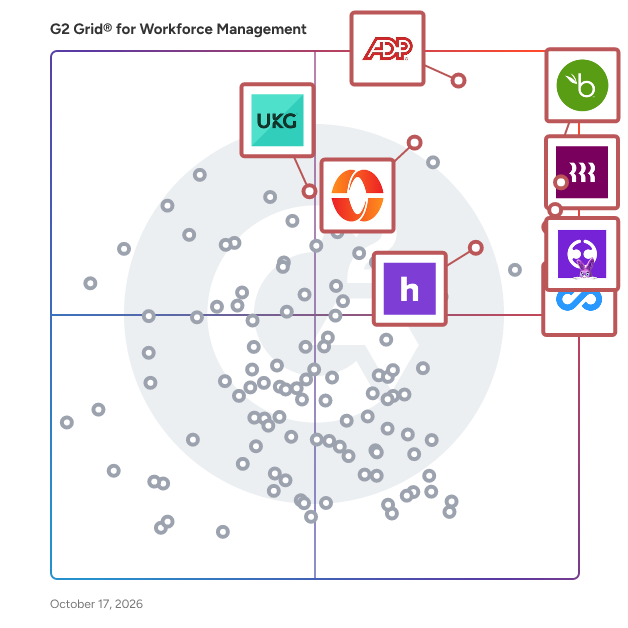
## G2 Grid® for Workforce Management Software
![G2 Grid® for Workforce Management Software plotting products by satisfaction and market presence](https://www.g2.com/categories/workforce-management/grids.png?focus%5B%5D=3236&focus%5B%5D=20433&focus%5B%5D=53090&focus%5B%5D=19474&focus%5B%5D=3924&focus%5B%5D=4132&focus%5B%5D=553&focus%5B%5D=1698)
Highlighted products: BambooHR, Connecteam, Rippling, Homebase, ADP Workforce Now, UKG Ready, UKG Pro, and Paychex.
Underlying data: [Grid® JSON](https://www.g2.com/categories/workforce-management/grids.json?focus%5B%5D=bamboohr&amp;focus%5B%5D=connecteam&amp;focus%5B%5D=rippling&amp;focus%5B%5D=homebase&amp;focus%5B%5D=adp-workforce-now&amp;focus%5B%5D=ukg-ready&amp;focus%5B%5D=ukg-pro&amp;focus%5B%5D=paychex&amp;segment=small-business)


## How Many Workforce Management Software Products Does G2 Track?
**Total Products under this Category:** 498

### Category Stats (Jul 2026)
- **Average Rating**: 4.33/5 (↓0.01 vs Jun 2026) The average rating of products in this category, based on all submitted ratings
- **Top Trending Product**: G&amp;A Partners (+10.2%) - Among all products in this category, G&amp;A Partners recorded the largest rating increase compared to last month
*Last updated: July 17, 2026*


## How Does G2 Rank Workforce Management Software Products?

**Why You Can Trust G2's Software Rankings:**

- 30 Analysts and Data Experts
- 88,300+ Authentic Reviews
- 498+ Products
- Unbiased Rankings

G2's software rankings are built on verified user reviews, rigorous moderation, and a consistent research methodology maintained by a team of analysts and data experts. Each product is measured using the same transparent criteria, with no paid placement or vendor influence. While reviews reflect real user experiences, which can be subjective, they offer valuable insight into how software performs in the hands of professionals. Together, these inputs power the G2 Score, a standardized way to compare tools within every category.


---

**Sponsored**

### SAP SuccessFactors HCM

SAP SuccessFactors HCM is a global, AI-powered cloud HR suite designed to help organizations thrive in a fast-moving world. With 100+ localizations, it delivers real-time visibility and connected solutions across core HR, payroll, talent management, learning, analytics, planning, and employee experience. More than 10,000 organizations trust SAP SuccessFactors HCM to enhance every employee experience, workforce decision, and people process—turning each employee into a success story. With SAP SuccessFactors HCM, you can: - Empower your workforce with AI-driven tools for self-service, learning, performance, and development to help people work faster and smarter. - Identify and develop top talent with a unified source of people and skills data that supports both HR strategies and business goals. - Stay compliant and agile with built-in legal and regulatory updates tailored to local business requirements. - Accelerate time to value by leveraging proven HR best practices and the strength of a global partner ecosystem.


[Visit website](https://www.g2.com/external_clickthroughs/record?secure%5Bad_program%5D=paid_promo&amp;secure%5Bad_slot%5D=category_product_list&amp;secure%5Bcategory_id%5D=171&amp;secure%5Bchosen_at%5D=2026-07-18T17%3A25%3A58Z&amp;secure%5Bmedium%5D=sponsored&amp;secure%5Bprioritized%5D=false&amp;secure%5Bproduct_id%5D=511&amp;secure%5Bresource_id%5D=171&amp;secure%5Bresource_type%5D=Category&amp;secure%5Bsource_type%5D=category_page&amp;secure%5Bsource_url%5D=https%3A%2F%2Fwww.g2.com%2Fcategories%2Fworkforce-management%2Fsmall-business%3Fpage%3D2&amp;secure%5Btoken%5D=b87d758b6d70a96607422a162ad0c4b15f9f247ce3d680e6051584bc9581a9c4&amp;secure%5Burl%5D=https%3A%2F%2Fwww.sap.com%2Fproducts%2Fhcm.html&amp;secure%5Burl_type%5D=paid_promos)

---

## What Are the Top-Rated Workforce Management Software Products in 2026?
### 1. [Tanda](https://www.g2.com/products/tanda/reviews)
Tanda is a workforce management and payroll platform that helps businesses manage employee rostering, time tracking, award interpretation, payroll, onboarding and compliance from a single system. Trusted by hospitality, retail, healthcare and other shift-based businesses, Tanda automates award interpretation, reduces payroll errors and helps managers control labour costs in real time.


**Average Rating:** 4.8/5.0
**Total Reviews:** 56
**How Do G2 Users Rate Tanda?**

- **Has the product been a good partner in doing business?:** 9.3/10 (Category avg: 8.7/10)
- **Performance:** 9.2/10 (Category avg: 8.6/10)
- **Skills Management:** 8.7/10 (Category avg: 8.3/10)
- **Workforce Analytics:** 8.8/10 (Category avg: 8.4/10)

**Who Is the Company Behind Tanda?**

- **Seller:** [Tanda](https://www.g2.com/sellers/tanda)
- **Company Website:** https://tanda.com.au
- **Year Founded:** 2012
- **HQ Location:** Brisbane
- **Twitter:** @TandaHQ (1,346 Twitter followers)
- **LinkedIn® Page:** https://www.linkedin.com/company/2942441/ (245 employees on LinkedIn®)

**Who Uses This Product?**
- **Top Industries:** Hospitality, Retail
- **Company Size:** 53% Small-Business, 43% Mid-Market


#### What Are Tanda's Pros and Cons?

**Pros:**

- Ease of Use (19 reviews)
- Helpful (17 reviews)
- Customer Support (15 reviews)
- Payroll (10 reviews)
- Time-saving (10 reviews)

**Cons:**

- Integration Issues (3 reviews)
- Poor Customer Support (3 reviews)
- Delayed Support (2 reviews)
- Improvement Needed (2 reviews)
- Learning Curve (2 reviews)


### What Do G2 Reviewers Say About Tanda?
*AI-generated summary from verified user reviews*

**Pros:**

- Users find Tanda&#39;s **ease of use** exceptional, making management and team interaction simple and efficient.
- Users highly value Tanda&#39;s **responsive support** , praising its ease of use and seamless integration with other systems.
- Users praise Tanda for its **outstanding customer support** , highlighting responsiveness and dedication from the support team.
- Users admire Tanda for its **responsive support** and easy integration, enhancing payroll and rostering experiences.
- Users appreciate the **time-saving features** of Tanda, simplifying processes and keeping schedules updated effortlessly.

**Cons:**

- Users face **integration issues** with Tanda, noting slow syncing and limited functionality that can hinder the experience.
- Users express frustration with Tanda&#39;s **poor customer support** , citing delays and limited immediate assistance in critical situations.
- Users experience **delayed support** from Tanda, causing frustration during critical moments when immediate assistance is needed.
- Users find a **lack of structured setup process** frustrating, leading to confusion during initial system configuration.
- Users find the **learning curve challenging** due to disorganized setup and limited training resources for broader implementation.

#### What Are Recent G2 Reviews of Tanda?

**"[All-in-One Workforce and Payroll Management That Saves Serious Admin Time](https://www.g2.com/survey_responses/tanda-review-12809173)"**

**Rating:** 5.0/5.0 stars
*— Margaret B.*

[Read full review](https://www.g2.com/survey_responses/tanda-review-12809173)

---

**"[Intuitive, Time-Saving Rostering with Awesome Features](https://www.g2.com/survey_responses/tanda-review-12698891)"**

**Rating:** 5.0/5.0 stars
*— Daniel C.*

[Read full review](https://www.g2.com/survey_responses/tanda-review-12698891)

---


#### What Are G2 Users Discussing About Tanda?

- [Is Tanda good?](https://www.g2.com/discussions/is-tanda-good)
- [How does the Tanda app work?](https://www.g2.com/discussions/how-does-the-tanda-app-work)
- [What is Tanda system?](https://www.g2.com/discussions/what-is-tanda-system) - 1 comment
- [What does Tanda do?](https://www.g2.com/discussions/what-does-tanda-do) - 1 comment

### 2. [Humanity Schedule by TCP](https://www.g2.com/products/humanity-schedule-by-tcp/reviews)
Humanity Schedule by TCP provides a flexible approach to employee scheduling, no matter where your teams work or what device they use. Humanity Schedule automates dynamic scheduling and shift planning to eliminate over-scheduling issues and staffing errors, reduces unexpected labor costs, and mitigates compliance concerns to create an efficient, stress-free scheduling experience for managers and employees alike.  With Humanity Schedule, you easily fill coverage gaps with AI-driven demand forecasting, avoid scheduling conflicts with adaptive scheduling capabilities, and eliminate manual tasks and overspending — all in one solution that ensures compliance and clarity for every employee.


**Average Rating:** 4.3/5.0
**Total Reviews:** 1,103
**How Do G2 Users Rate Humanity Schedule by TCP?**

- **Has the product been a good partner in doing business?:** 8.9/10 (Category avg: 8.7/10)
- **Performance:** 8.4/10 (Category avg: 8.6/10)
- **Skills Management:** 8.1/10 (Category avg: 8.3/10)
- **Workforce Analytics:** 8.2/10 (Category avg: 8.4/10)

**Who Is the Company Behind Humanity Schedule by TCP?**

- **Seller:** [TCP Software](https://www.g2.com/sellers/tcp-software)
- **Company Website:** https://www.tcpsoftware.com/
- **Year Founded:** 1988
- **HQ Location:** Plano, US
- **Twitter:** @tcpsoftware (450 Twitter followers)
- **LinkedIn® Page:** https://www.linkedin.com/company/2644323/ (1,341 employees on LinkedIn®)

**Who Uses This Product?**
- **Who Uses This:** General Manager, Manager
- **Top Industries:** Hospital &amp; Health Care, Retail
- **Company Size:** 49% Mid-Market, 38% Small-Business


#### What Are Humanity Schedule by TCP's Pros and Cons?

**Pros:**

- Ease of Use (18 reviews)
- Scheduling Ease (15 reviews)
- Scheduling (14 reviews)
- Simple (10 reviews)
- Intuitive (8 reviews)

**Cons:**

- Scheduling Issues (7 reviews)
- Learning Curve (5 reviews)
- Missing Features (5 reviews)
- Slow Loading (5 reviews)
- Complexity (4 reviews)


### What Do G2 Reviewers Say About Humanity Schedule by TCP?
*AI-generated summary from verified user reviews*

**Pros:**

- Users find the **ease of use** with Humanity Schedule by TCP beneficial for managing schedules effortlessly.
- Users find **scheduling effortless** with Humanity Schedule, enjoying its intuitive interface and instant updates for team coordination.
- Users value the **effortless scheduling** of Humanity Schedule, appreciating its intuitive interface and time-saving benefits.
- Users appreciate the **ease of scheduling** for large teams, enjoying quick updates and responsive customer support.
- Users value the **intuitive interface** of Humanity Schedule, making scheduling effortless and user-friendly for all employees.

**Cons:**

- Users experience **scheduling issues** with Humanity Schedule, such as disappearing schedules and inefficient reporting processes.
- Users find the **learning curve challenging** , often taking time to navigate and utilize Humanity Schedule effectively.
- Users express frustration over **missing features** like integration with Dayforce and better clarity in job descriptions.
- Users report **slow loading times** on the mobile app, particularly during bulk updates and approvals.
- Users find the **complexity** of Humanity Schedule challenging, especially when learning how to navigate the system effectively.

#### What Are Recent G2 Reviews of Humanity Schedule by TCP?

**"[Easy Scheduling with Handy Repeat Tools](https://www.g2.com/survey_responses/humanity-schedule-by-tcp-review-13118587)"**

**Rating:** 5.0/5.0 stars
*— Merina .*

[Read full review](https://www.g2.com/survey_responses/humanity-schedule-by-tcp-review-13118587)

---

**"[Intuitive Scheduling with Seamless Mobile Access](https://www.g2.com/survey_responses/humanity-schedule-by-tcp-review-331773)"**

**Rating:** 4.0/5.0 stars
*— Amy L.*

[Read full review](https://www.g2.com/survey_responses/humanity-schedule-by-tcp-review-331773)

---


#### What Are G2 Users Discussing About Humanity Schedule by TCP?

- [What is TCP Humanity Scheduling used for?](https://www.g2.com/discussions/what-is-tcp-humanity-scheduling-used-for)
- [How do you use humanity scheduling?](https://www.g2.com/discussions/how-do-you-use-humanity-scheduling) - 1 comment
- [How much does humanity cost?](https://www.g2.com/discussions/how-much-does-humanity-cost) - 1 comment
- [What is the humanity app?](https://www.g2.com/discussions/what-is-the-humanity-app) - 4 comments

### 3. [RosterElf](https://www.g2.com/products/rosterelf/reviews)
RosterElf is a cloud-based workforce management solution that helps businesses automate employee rostering, time tracking, leave management, onboarding, team communication, and payroll integration. RosterElf sits within the employee scheduling software and workforce management platform categories. It is designed for small to mid-sized businesses—particularly in retail, hospitality, healthcare, and other shift-based industries. With a mobile-first interface, RosterElf provides managers and frontline staff with powerful rostering tools, real-time attendance monitoring, and labour law compliance checks to ensure efficient and reliable workforce operations. Key Features &amp; Capabilities: - Employee rostering software Create, adjust, and publish rosters in minutes with drag-and-drop functionality. Conflict detection ensures compliance with workplace rules and awards, supporting businesses in Australia and beyond. - Time &amp; attendance tracking Employees clock in/out via mobile or tablet using GPS and photo capture, giving businesses accurate, verifiable attendance records. Managers gain instant workforce visibility across multiple sites. - Leave management &amp; staff availability Employees request leave or update availability through the app. Managers can approve requests and fill open shifts quickly, avoiding double-booking or overtime breaches. - Payroll integration &amp; labour law compliance tool Timesheets flow directly into payroll systems such as Xero and MYOB. The platform automatically interprets modern awards, overtime, allowances, and penalty rates to reduce payroll errors and meet Fair Work compliance. - Team communication &amp; mobile access Staff view rosters, update their availability, and claim shifts via the RosterElf mobile app. Secure in-app messaging centralises communication and reduces the need for separate tools. Onboarding &amp; HR management - Paperless onboarding with digital signatures and secure document storage keeps employee records organised in a centralised HR hub. Managers can oversee staff information, certifications, and compliance documentation easily. Benefits for Businesses: - Ease of use &amp; fast adoption An intuitive interface means businesses can implement RosterElf quickly without lengthy training. - Operational efficiency Automating scheduling, award interpretation, and payroll processes saves valuable admin time, enabling managers to focus on business performance. - Improved workforce visibility &amp; engagement Employees enjoy transparent access to rosters and shift updates, boosting communication and staff satisfaction. Company Background: Founded in Australia in 2011, RosterElf is a privately held company dedicated to simplifying workforce management for businesses with shift-based teams. Serving thousands of active users, RosterElf continues to grow globally while maintaining strong expertise in Australian rostering standards, payroll integration, and labour law compliance.


**Average Rating:** 4.3/5.0
**Total Reviews:** 108
**How Do G2 Users Rate RosterElf?**

- **Has the product been a good partner in doing business?:** 9.0/10 (Category avg: 8.7/10)
- **Performance:** 8.3/10 (Category avg: 8.6/10)
- **Skills Management:** 7.7/10 (Category avg: 8.3/10)
- **Workforce Analytics:** 7.8/10 (Category avg: 8.4/10)

**Who Is the Company Behind RosterElf?**

- **Seller:** [RosterElf](https://www.g2.com/sellers/rosterelf)
- **Company Website:** https://www.rosterelf.com
- **Year Founded:** 2011
- **HQ Location:** Perth, AU
- **Twitter:** @RosterElf (47 Twitter followers)
- **LinkedIn® Page:** https://www.linkedin.com/company/rosterelf (12 employees on LinkedIn®)

**Who Uses This Product?**
- **Top Industries:** Hospitality, Retail
- **Company Size:** 84% Small-Business, 10% Mid-Market


#### What Are RosterElf's Pros and Cons?

**Pros:**

- Ease of Use (69 reviews)
- Scheduling (53 reviews)
- Shift Management (48 reviews)
- Simple (36 reviews)
- Intuitive (27 reviews)

**Cons:**

- Scheduling Issues (15 reviews)
- Login Problems (14 reviews)
- Clocking Issues (13 reviews)
- Poor Notifications (13 reviews)
- Notification Issues (12 reviews)


### What Do G2 Reviewers Say About RosterElf?
*AI-generated summary from verified user reviews*

**Pros:**

- Users love the **ease of use** of RosterElf, simplifying rostering and payroll management effectively and efficiently.
- Users appreciate the **ease of scheduling** with RosterElf, enabling effortless shift management and timely notifications.
- Users appreciate the **effortless shift management** of RosterElf, making scheduling seamless and enhancing team coordination.
- Users love the **simple and intuitive design** of RosterElf, making navigation and management effortless.
- Users find RosterElf to be **intuitive** , facilitating easy setup and efficient management of their rosters and availability.

**Cons:**

- Users find **scheduling issues** with RosterElf, citing excessive notifications and inflexible shift end times as problematic.
- Users are frustrated with frequent **login problems** , requiring repeated sign-ins and affecting overall usability of RosterElf.
- Users struggle with **clocking issues** in RosterElf, facing persistent reminders and challenges in accessing clock-in/out functionality.
- Users are frustrated with **poor notifications** , overwhelmed by unnecessary emails and missing important shift updates.
- Users are frustrated by **notification issues** that overwhelm and hinder their ability to manage shifts effectively.

#### What Are Recent G2 Reviews of RosterElf?

**"[Rosterelf made my team management better](https://www.g2.com/survey_responses/rosterelf-review-11785175)"**

**Rating:** 5.0/5.0 stars
*— Leanus L.*

[Read full review](https://www.g2.com/survey_responses/rosterelf-review-11785175)

---

**"[Simple, Efficient Shift Planning with RosterElf](https://www.g2.com/survey_responses/rosterelf-review-11780283)"**

**Rating:** 4.5/5.0 stars
*— Celine T.*

[Read full review](https://www.g2.com/survey_responses/rosterelf-review-11780283)

---


#### What Are G2 Users Discussing About RosterElf?

- [What is RosterElf used for?](https://www.g2.com/discussions/what-is-rosterelf-used-for)

### 4. [ZoomShift](https://www.g2.com/products/zoomshift/reviews)
ZoomShift is a comprehensive employee scheduling software designed to streamline workforce management for businesses with hourly employees. It enables managers to create work schedules efficiently, track employee time, and enhance team communication, all within a user-friendly platform accessible via web and mobile applications. Key Features and Functionality: - Employee Scheduling: Quickly build and share work schedules using drag-and-drop functionality and customizable templates. - Time Tracking: Monitor employee hours with GPS-enabled time clocks, manage timesheets, and ensure accurate payroll processing. - Shift Management: Facilitate shift swaps and cover requests, allowing employees to manage their schedules collaboratively. - Team Communication: Utilize group chats, direct messaging, and notifications to keep staff informed about schedule changes and important updates. - Labor Cost Management: Track labor costs in real-time, set overtime limits, and generate payroll reports to maintain budget control. Primary Value and Solutions Provided: ZoomShift addresses common challenges in employee scheduling by reducing the time spent on creating and managing schedules, minimizing errors associated with manual processes, and improving overall staff accountability. By centralizing scheduling, time tracking, and communication, it helps businesses optimize labor costs, ensure compliance with labor regulations, and foster a more organized and efficient work environment.


**Average Rating:** 4.8/5.0
**Total Reviews:** 45
**How Do G2 Users Rate ZoomShift?**

- **Has the product been a good partner in doing business?:** 9.4/10 (Category avg: 8.7/10)
- **Performance:** 8.5/10 (Category avg: 8.6/10)
- **Skills Management:** 8.2/10 (Category avg: 8.3/10)
- **Workforce Analytics:** 7.9/10 (Category avg: 8.4/10)

**Who Is the Company Behind ZoomShift?**

- **Seller:** [ZoomShift](https://www.g2.com/sellers/zoomshift-45f84065-6791-469d-96da-5dda3ca7c8f2)
- **Year Founded:** 2011
- **HQ Location:** Milwaukee, WI
- **Twitter:** @ZoomShift (577 Twitter followers)
- **LinkedIn® Page:** https://www.linkedin.com/company/2109044/ (3 employees on LinkedIn®)

**Who Uses This Product?**
- **Company Size:** 56% Small-Business, 44% Mid-Market


#### What Are ZoomShift's Pros and Cons?

**Pros:**

- Ease of Use (16 reviews)
- Scheduling (9 reviews)
- Scheduling Ease (9 reviews)
- Customer Support (7 reviews)
- Easy Setup (5 reviews)

**Cons:**

- Login Issues (3 reviews)
- Missing Features (3 reviews)
- Scheduling Issues (3 reviews)
- Clocking Issues (2 reviews)
- Improvement Needed (2 reviews)


### What Do G2 Reviewers Say About ZoomShift?
*AI-generated summary from verified user reviews*

**Pros:**

- Users find ZoomShift to be exceptionally **easy to use** , streamlining scheduling and enhancing productivity effortlessly.
- Users love the **easy scheduling capabilities** of ZoomShift, enhancing team management and saving valuable time.
- Users appreciate the **flexible scheduling options** of ZoomShift, making shift management and team organization effortless.
- Users praise the **excellent customer support** of ZoomShift, highlighting quick response times and helpful assistance during setup.
- Users enjoy the **easy setup** of ZoomShift, allowing efficient management of complex scheduling tasks effortlessly.

**Cons:**

- Users frequently face **login issues** that hinder their experience, highlighting the need for improved access reliability.
- Users find **missing advanced features** in ZoomShift limit functionality and can complicate management tasks.
- Users often face **scheduling issues** leading to manual work, overtime, and inconvenient shift management challenges.
- Users face **clocking issues** with overtime calculations, leading to excessive manual payroll adjustments and added complexity.
- Users desire **improvement in analytics** and would prefer overtime rounding instead of minute tracking for convenience.

#### What Are Recent G2 Reviews of ZoomShift?

**"[User-Friendly Scheduling with Room for Improvement](https://www.g2.com/survey_responses/zoomshift-review-12706939)"**

**Rating:** 4.5/5.0 stars
*— Nathanial C.*

[Read full review](https://www.g2.com/survey_responses/zoomshift-review-12706939)

---

**"[Easy Staff Scheduling with a Few Cost Concerns](https://www.g2.com/survey_responses/zoomshift-review-11381205)"**

**Rating:** 5.0/5.0 stars
*— Verified User in Events Services*

[Read full review](https://www.g2.com/survey_responses/zoomshift-review-11381205)

---


### 5. [Bizimply](https://www.g2.com/products/bizimply/reviews)
Bizimply is a specialised workforce management solution built specifically for shift-based businesses across the UK and Ireland. We focus on perfecting daily operations by combining scheduling, time and attendance, frontline HR, and team communication into one intuitive, easy-to-use platform. Who We Serve We support multi-location operations in the hospitality, retail, and healthcare sectors. Bizimply gives managers the tools they need to run efficient daily shifts and manage their people on the floor without the administrative headache of spreadsheets and disconnected tools. Key Capabilities - Efficient Scheduling: Create, adjust, and share staff rotas in minutes, ensuring your shifts are always optimally staffed. - Smart Time &amp; Attendance: Track hours accurately with our photo-verified Timestation app to eliminate buddy punching. - Frontline HR &amp; E-Signatures: Manage secure digital employee profiles, track training certifications, and utilise our integrated e-signature feature to send, track, and complete legally binding employment contracts and policy updates digitally. - Bizimply Connect™ Communication: Broadcast company-wide news, share shift reminders, and message your team directly via the MyZimply employee app to drive alignment and accountability. - Payroll Ready Timesheets: Automatically convert tracked hours into approved timesheets that plug smoothly into UK and Irish payroll systems. The Results By bridging the gap between scheduling, actual hours worked, and employee compliance, our customers typically achieve: - Up to a 5% reduction in labour costs through better shift visibility and optimised scheduling. - Up to 80% faster onboarding turnarounds using seamless, paperless digital document e-signing. - Up to 10 Hours saved weekly on administrative tasks, rota creation, and payroll preparation. - Enhanced staff engagement by giving teams instant access to schedules, communication, and time-off requests right on their phones.


**Average Rating:** 4.6/5.0
**Total Reviews:** 219
**How Do G2 Users Rate Bizimply?**

- **Has the product been a good partner in doing business?:** 9.3/10 (Category avg: 8.7/10)
- **Performance:** 9.1/10 (Category avg: 8.6/10)
- **Skills Management:** 8.5/10 (Category avg: 8.3/10)
- **Workforce Analytics:** 8.7/10 (Category avg: 8.4/10)

**Who Is the Company Behind Bizimply?**

- **Seller:** [Bizimply](https://www.g2.com/sellers/bizimply)
- **Company Website:** https://www.bizimply.com
- **Year Founded:** 2013
- **HQ Location:** Dublin, Ireland
- **Twitter:** @bizimply (9,211 Twitter followers)
- **LinkedIn® Page:** https://www.linkedin.com/company/bizimply (66 employees on LinkedIn®)

**Who Uses This Product?**
- **Who Uses This:** General Manager, Store Manager
- **Top Industries:** Hospitality, Retail
- **Company Size:** 52% Mid-Market, 46% Small-Business


#### What Are Bizimply's Pros and Cons?

**Pros:**

- Ease of Use (12 reviews)
- Customer Support (7 reviews)
- Scheduling (7 reviews)
- Scheduling Ease (6 reviews)
- Helpful (5 reviews)

**Cons:**

- Limited Features (6 reviews)
- Missing Features (3 reviews)
- Scheduling Issues (3 reviews)
- Cluttered Interface (2 reviews)
- Display Issues (2 reviews)


### What Do G2 Reviewers Say About Bizimply?
*AI-generated summary from verified user reviews*

**Pros:**

- Users value the **ease of use** of Bizimply, which simplifies scheduling, attendance tracking, and communication seamlessly.
- Users praise Bizimply for its **excellent customer support** , highlighting quick responses and helpful onboarding assistance.
- Users love the **easy and effective scheduling system** of Bizimply, simplifying rota planning and attendance tracking.
- Users appreciate the **scheduling ease** with Bizimply, enabling effortless automation and accurate tracking of employee attendance.
- Users appreciate the **helpful customer support** and onboarding process, ensuring smooth implementation and effective use of Bizimply.

**Cons:**

- Users note the **limited features** of Bizimply, suggesting improvements and customization for better user experience.
- Users find that some **missing features** hinder their experience, though support for improvements is highly appreciated.
- Users experience **scheduling issues** with double entries and lack of flexibility in the Bizimply app.
- Users find the interface **cluttered and outdated** , making navigation and customization of the rota challenging.
- Users find **display issues** frustrating, needing better visibility and easier navigation within Bizimply&#39;s scheduling features.

#### What Are Recent G2 Reviews of Bizimply?

**"[Bizimply Brings Clarity and Peace of Mind to Staff Scheduling](https://www.g2.com/survey_responses/bizimply-review-12629768)"**

**Rating:** 4.5/5.0 stars
*— TOMAS C.*

[Read full review](https://www.g2.com/survey_responses/bizimply-review-12629768)

---

**"[User-Friendly and Supportive Staff Management Tool](https://www.g2.com/survey_responses/bizimply-review-12819593)"**

**Rating:** 5.0/5.0 stars
*— Sonya M.*

[Read full review](https://www.g2.com/survey_responses/bizimply-review-12819593)

---


#### What Are G2 Users Discussing About Bizimply?

- [What is Bizimply used for?](https://www.g2.com/discussions/what-is-bizimply-used-for) - 1 comment

### 6. [Anaplan](https://www.g2.com/products/anaplan/reviews)
Anaplan is the only scenario planning and analysis platform designed to optimize decision-making in today’s complex business environment so that enterprises can outpace their competition and the market. By building connections and collaboration across organizational silos, the platform intelligently surfaces key insights — so businesses can make the right decisions, right now.​ More than 2,400 of the world’s best brands continually optimize their decision-making by planning with Anaplan. G2 categories include: Corporate Performance Management, Budgeting &amp; Forecasting, Compensation Management, Financial Close, Sales &amp; Ops Planning, Sales Performance Management, Sales Planning, Supply Chain Planning, and Workforce Management.


**Average Rating:** 4.6/5.0
**Total Reviews:** 396
**How Do G2 Users Rate Anaplan?**

- **Has the product been a good partner in doing business?:** 8.6/10 (Category avg: 8.7/10)
- **Performance:** 8.7/10 (Category avg: 8.6/10)
- **Skills Management:** 7.7/10 (Category avg: 8.3/10)
- **Workforce Analytics:** 8.5/10 (Category avg: 8.4/10)

**Who Is the Company Behind Anaplan?**

- **Seller:** [Anaplan](https://www.g2.com/sellers/anaplan)
- **Company Website:** https://www.anaplan.com
- **Year Founded:** 2006
- **HQ Location:** Miami, FL
- **Twitter:** @anaplan (21,768 Twitter followers)
- **LinkedIn® Page:** https://www.linkedin.com/company/anaplan/ (2,836 employees on LinkedIn®)

**Who Uses This Product?**
- **Who Uses This:** Manager, Senior Consultant
- **Top Industries:** Information Technology and Services, Financial Services
- **Company Size:** 52% Enterprise, 34% Mid-Market


#### What Are Anaplan's Pros and Cons?

**Pros:**

- Ease of Use (100 reviews)
- Flexibility (90 reviews)
- Features (87 reviews)
- Efficiency (63 reviews)
- Planning (59 reviews)

**Cons:**

- Limitations (44 reviews)
- Missing Features (39 reviews)
- Learning Curve (33 reviews)
- Performance Issues (30 reviews)
- Lack of Features (29 reviews)


### What Do G2 Reviewers Say About Anaplan?
*AI-generated summary from verified user reviews*

**Pros:**

- Users find Anaplan&#39;s **ease of use** exceptional, enhancing collaboration and simplifying the planning process for all types of users.
- Users value the **flexibility** of Anaplan, allowing customized planning models that adapt to their unique business needs.
- Users value the **user-friendly interface** of Anaplan, which simplifies complex planning applications across various use cases.
- Users value the **efficiency** of Anaplan, enabling quick responses to changing business needs with integrated planning solutions.
- Users value Anaplan for its **easy-to-use and scalable planning capabilities** , enhancing decision-making across various business areas.

**Cons:**

- Users criticize Anaplan for **limited support and high costs** , along with performance issues affecting large datasets and analysis.
- Users express concerns over **missing features** like public APIs and poor data visualization, impacting overall usability.
- Users find the **learning curve steep** in mastering Anaplan, needing significant time and expertise for optimal use.
- Users experience **performance issues** with Anaplan, particularly lengthy loading times during complex calculations and workspace limitations.
- Users find a **lack of features** in Anaplan, feeling essential tools are either missing or behind paywalls.

#### What Are Recent G2 Reviews of Anaplan?

**"[Real-Time, Flexible Modeling That Speeds Up Decision-Making](https://www.g2.com/survey_responses/anaplan-review-12715706)"**

**Rating:** 4.0/5.0 stars
*— Alex P.*

[Read full review](https://www.g2.com/survey_responses/anaplan-review-12715706)

---

**"[Fast Real-Time Reporting and Scalable Multidimensional Modeling in Anaplan](https://www.g2.com/survey_responses/anaplan-review-12927992)"**

**Rating:** 4.5/5.0 stars
*— Kumar S.*

[Read full review](https://www.g2.com/survey_responses/anaplan-review-12927992)

---


#### What Are G2 Users Discussing About Anaplan?

- [What is Fluence Technologies used for?](https://www.g2.com/discussions/what-is-fluence-technologies-used-for) - 1 comment
- [How is anaplan different?](https://www.g2.com/discussions/how-is-anaplan-different) - 6 comments
- [Is anaplan any good?](https://www.g2.com/discussions/is-anaplan-any-good) - 1 comment
- [What database does anaplan use?](https://www.g2.com/discussions/what-database-does-anaplan-use) - 3 comments
- [What is anaplan software?](https://www.g2.com/discussions/what-is-anaplan-software) - 4 comments

### 7. [Verint Workforce Management](https://www.g2.com/products/verint-workforce-management/reviews)
Verint Workforce Management is an AI-powered solution that forecasts your customer demand, analyzes and predicts the number of employees needed, and optimizes employee schedules to align with demand across contact center and back-office operations, to help you meet your CX and efficiency goals. We provide industry-leading forecasting accuracy (+/- 95%), the most flexibility in employee scheduling, and AI-derived data insights and dashboards for faster, better decision making. Verint WFM customers have achieved such AI-powered business outcomes as: 20% increase in employee productivity, 20%-30% reduction in employee attrition, 5%-10% increase in NPS / CSAT scores, 35% increase in manager capacity. Verint WFM is part of Verint Open Platform, which helps your customer service operations lower costs and elevate EX and CX with AI-powered bots that automate CX workflows. The Verint Platform has the broadest range of CX Automation solutions, including Agent Copilot Bots, Knowledge Management, Intelligent Virtual Assistants and more. The Platform and solutions are scalable from SMB customers to global enterprises, and can be deployed on-premises, single or multi-tenant cloud, or a hybrid mix.


**Average Rating:** 4.2/5.0
**Total Reviews:** 210
**How Do G2 Users Rate Verint Workforce Management?**

- **Has the product been a good partner in doing business?:** 8.5/10 (Category avg: 8.7/10)
- **Performance:** 8.4/10 (Category avg: 8.6/10)
- **Skills Management:** 7.9/10 (Category avg: 8.3/10)
- **Workforce Analytics:** 8.3/10 (Category avg: 8.4/10)

**Who Is the Company Behind Verint Workforce Management?**

- **Seller:** [Verint](https://www.g2.com/sellers/verint)
- **Year Founded:** 1994
- **HQ Location:** Melville, New York
- **Twitter:** @Verint (7,739 Twitter followers)
- **LinkedIn® Page:** https://www.linkedin.com/company/verint (4,343 employees on LinkedIn®)
- **Ownership:** Thoma Bravo

**Who Uses This Product?**
- **Top Industries:** Insurance, Financial Services
- **Company Size:** 55% Enterprise, 35% Mid-Market


#### What Are Verint Workforce Management's Pros and Cons?

**Pros:**

- Ease of Use (18 reviews)
- Efficiency (16 reviews)
- Scheduling (15 reviews)
- Features (9 reviews)
- Agent Management (5 reviews)

**Cons:**

- Limited Customization (8 reviews)
- Learning Curve (6 reviews)
- User Interface Issues (6 reviews)
- Missing Features (5 reviews)
- Poor Reporting (5 reviews)


### What Do G2 Reviewers Say About Verint Workforce Management?
*AI-generated summary from verified user reviews*

**Pros:**

- Users find Verint Workforce Management to be **extremely user friendly** , making processes easy to learn and understand.
- Users highlight the **efficiency** of Verint Workforce Management, praising its real-time capabilities and time-saving features.
- Users appreciate the **ease of scheduling and real-time updates** offered by Verint Workforce Management for effective agent management.
- Users value the **robust features** of Verint Workforce Management, enhancing operational efficiency and supporting diverse business needs.
- Users appreciate the **real-time monitoring and reporting** features of Verint Workforce Management for effective agent management.

**Cons:**

- Users find **limited customization** options frustrating, wishing for more granular control over dashboard and reporting features.
- Users often struggle with a **steep learning curve** and find the interface of Verint Workforce Management unintuitive.
- Users find the **user interface cumbersome** compared to competitors, with navigation issues affecting overall experience.
- Users feel Verint Workforce Management is **missing key features** that hinder detailed reporting and configuration ease.
- Users find **reporting poor** in Verint Workforce Management, highlighting delays and difficulties in navigating modules.

#### What Are Recent G2 Reviews of Verint Workforce Management?

**"[Robust WFM Solution with Room for Improvement](https://www.g2.com/survey_responses/verint-workforce-management-review-13001389)"**

**Rating:** 4.0/5.0 stars
*— Joe B.*

[Read full review](https://www.g2.com/survey_responses/verint-workforce-management-review-13001389)

---

**"[Staffing made easy](https://www.g2.com/survey_responses/verint-workforce-management-review-13024202)"**

**Rating:** 5.0/5.0 stars
*— Edward R.*

[Read full review](https://www.g2.com/survey_responses/verint-workforce-management-review-13024202)

---


#### What Are G2 Users Discussing About Verint Workforce Management?

- [What are the benefits and drawbacks of using Verint Workforce Management for employee scheduling?](https://www.g2.com/discussions/what-are-the-benefits-and-drawbacks-of-using-verint-workforce-management-for-employee-scheduling) - 1 comment
- [What is Verint Workforce Management used for?](https://www.g2.com/discussions/what-is-verint-workforce-management-used-for) - 1 comment
- [What is the best workforce management software?](https://www.g2.com/discussions/verint-workforce-management-what-is-the-best-workforce-management-software)
- [How do you request time off in Verint?](https://www.g2.com/discussions/how-do-you-request-time-off-in-verint) - 1 comment
- [What does workforce management software do?](https://www.g2.com/discussions/verint-workforce-management-what-does-workforce-management-software-do)

### 8. [Paycom](https://www.g2.com/products/paycom/reviews)
Paycom is the most automated HCM platform and the only HR and payroll software built on a truly single, unique database that automates the entire employee life cycle. Designed as a unified system, Paycom eliminates inefficiencies and errors caused by integrating multiple platforms by using command driven AI and full solution automation. Built on a single data source, Paycom enables uninterrupted data flow across HR and payroll, streamlining performance, communication and compliance. Frequently recognized by third party reviewers as one of the best payroll and HR software solutions, Paycom is used by organizations of all sizes across the U.S. and internationally to simplify workforce management and free HR teams to focus on strategic initiatives.


**Average Rating:** 4.5/5.0
**Total Reviews:** 4,623
**How Do G2 Users Rate Paycom?**

- **Has the product been a good partner in doing business?:** 8.3/10 (Category avg: 8.7/10)
- **Performance:** 8.8/10 (Category avg: 8.6/10)
- **Skills Management:** 8.5/10 (Category avg: 8.3/10)
- **Workforce Analytics:** 8.6/10 (Category avg: 8.4/10)

**Who Is the Company Behind Paycom?**

- **Seller:** [Paycom](https://www.g2.com/sellers/paycom)
- **Company Website:** https://www.paycom.com/
- **Year Founded:** 1998
- **HQ Location:** Oklahoma City, OK
- **Twitter:** @Paycom (33,252 Twitter followers)
- **LinkedIn® Page:** https://www.linkedin.com/company/37759/ (5,844 employees on LinkedIn®)

**Who Uses This Product?**
- **Who Uses This:** HR Manager, Human Resources Manager
- **Top Industries:** Hospital &amp; Health Care, Non-Profit Organization Management
- **Company Size:** 18% Mid-Market, 4% Small-Business


#### What Are Paycom's Pros and Cons?

**Pros:**

- Ease of Use (395 reviews)
- Helpful (276 reviews)
- Customer Support (252 reviews)
- Payroll Management (242 reviews)
- Simple (210 reviews)

**Cons:**

- Poor Customer Support (107 reviews)
- Learning Curve (103 reviews)
- Not Intuitive (103 reviews)
- Limited Features (99 reviews)
- Not User-Friendly (92 reviews)


### What Do G2 Reviewers Say About Paycom?
*AI-generated summary from verified user reviews*

**Pros:**

- Users appreciate the **ease of use** of Paycom, finding it simple to set up and navigate for tracking hours.
- Users appreciate the **user-friendly technology** of Paycom, making payroll processing and time tracking seamless and efficient.
- Users commend the **knowledgeable and responsive customer support** of Paycom, enhancing their overall experience and satisfaction.
- Users love the **streamlined payroll management** of Paycom, simplifying processes and enhancing efficiency for everyone involved.
- Users find Paycom&#39;s **user-friendly technology** simplifies payroll and time tracking, increasing accuracy and reducing errors.

**Cons:**

- Users express disappointment with Paycom&#39;s **poor customer support** , indicating unresponsiveness and a lack of effective solutions.
- Users experience a **steep learning curve** with Paycom, finding it unintuitive and frustratingly complex to navigate.
- Users find the **UI unintuitive** , making navigation and task completion unnecessarily complicated and time-consuming.
- Users find Paycom&#39;s **limited features** inadequate for modern needs, causing significant frustration and operational inefficiencies.
- Users find Paycom **not user-friendly** , struggling with its unintuitive interface and complicated processes that hinder productivity.

#### What Are Recent G2 Reviews of Paycom?

**"[Paycom Review 06.26.2026](https://www.g2.com/survey_responses/paycom-review-13036323)"**

**Rating:** 4.0/5.0 stars
*— Mia J.*

[Read full review](https://www.g2.com/survey_responses/paycom-review-13036323)

---

**"[Efficient Payroll and HR with Beti AI, Great Integrations, and Top-Notch Support](https://www.g2.com/survey_responses/paycom-review-13043985)"**

**Rating:** 4.0/5.0 stars
*— Andrew H.*

[Read full review](https://www.g2.com/survey_responses/paycom-review-13043985)

---


### 9. [Thareja AI](https://www.g2.com/products/thareja-ai/reviews)
Thareja is an AI customer support platform that lets businesses build custom AI agents trained on their own content — websites, help centers, docs, PDFs, and internal knowledge bases. Unlike generic chatbots, Thareja agents deliver accurate, company-specific answers around the clock across web chat, email, Zendesk, WhatsApp, Slack, Instagram, and more. When the AI can&#39;t resolve an issue, it automatically creates a support ticket for your team. Thareja includes a built-in project and task management platform with time tracking and live productivity analytics, so teams can manage escalations, track workload, and measure performance in one place. Thareja also offers marketing tools like MagicReel, which helps teams create short-form video content for social channels. From automating support and qualifying leads to managing tickets and producing marketing content, Thareja gives growing teams a unified platform to handle more without hiring more.


**Average Rating:** 4.9/5.0
**Total Reviews:** 28
**How Do G2 Users Rate Thareja AI?**

- **Has the product been a good partner in doing business?:** 10.0/10 (Category avg: 8.7/10)
- **Performance:** 9.6/10 (Category avg: 8.6/10)
- **Skills Management:** 9.5/10 (Category avg: 8.3/10)
- **Workforce Analytics:** 9.2/10 (Category avg: 8.4/10)

**Who Is the Company Behind Thareja AI?**

- **Seller:** [Thareja Technologies](https://www.g2.com/sellers/thareja-technologies)
- **Year Founded:** 2015
- **HQ Location:** Fort Lauderdale, US
- **LinkedIn® Page:** https://www.linkedin.com/company/thareja (14 employees on LinkedIn®)

**Who Uses This Product?**
- **Top Industries:** Computer Software, Information Technology and Services
- **Company Size:** 89% Small-Business, 7% Mid-Market


#### What Are Thareja AI's Pros and Cons?

**Pros:**

- Time Tracking (19 reviews)
- Time-saving (16 reviews)
- Simple (14 reviews)
- Automation (12 reviews)
- Ease of Use (12 reviews)

**Cons:**

- Learning Curve (6 reviews)
- Steep Learning Curve (5 reviews)
- Display Issues (3 reviews)
- Limited Features (3 reviews)
- Integration Issues (2 reviews)


### What Do G2 Reviewers Say About Thareja AI?
*AI-generated summary from verified user reviews*

**Pros:**

- Users value the **effective time tracking** and streamlined management of Thareja AI for effortless invoicing and payments.
- Users love the **time-saving capabilities** of Thareja AI, greatly enhancing efficiency and simplifying workflows for teams.
- Users appreciate the **simplicity and efficiency** of Thareja AI, enjoying seamless project management and timely payments.
- Users love the **automation features** of Thareja AI, streamlining compliance, time tracking, and payments for enhanced efficiency.
- Users find Thareja AI to be **exceptionally easy to use** , streamlining project management and enhancing efficiency.

**Cons:**

- Users experience a **small learning curve** initially, but adaptability improves their familiarity with Thareja AI over time.
- Users experience a **steep learning curve** with Thareja AI, requiring time to navigate its complex features effectively.
- Users report **display issues** with Thareja AI, noting slow project switching and a need for UI improvements.
- Users note the **limited features** of Thareja AI, wishing for more customization and integrations available on mobile.
- Users face a **learning curve and integration issues** with Thareja AI, though performance improves with familiarity.

#### What Are Recent G2 Reviews of Thareja AI?

**"[Best experiance with Thareja AI](https://www.g2.com/survey_responses/thareja-ai-review-11741506)"**

**Rating:** 4.5/5.0 stars
*— Ayesha Z.*

[Read full review](https://www.g2.com/survey_responses/thareja-ai-review-11741506)

---

**"[Superb Support and Smart Recommendations Made Everything Smooth](https://www.g2.com/survey_responses/thareja-ai-review-12842313)"**

**Rating:** 5.0/5.0 stars
*— Ridwan R.*

[Read full review](https://www.g2.com/survey_responses/thareja-ai-review-12842313)

---


### 10. [Planday](https://www.g2.com/products/planday/reviews)
Planday is a workforce management platform that enables shift-based businesses of almost any size and vertical to manage their workforce all in one web-based system. Manage employee schedules, working hours, shift-swaps, vacation requests and payroll all in one place. Planday also has a fully integrated employee communication function, so managers can text or email employees quickly.


**Average Rating:** 4.5/5.0
**Total Reviews:** 87
**How Do G2 Users Rate Planday?**

- **Has the product been a good partner in doing business?:** 9.0/10 (Category avg: 8.7/10)
- **Performance:** 8.5/10 (Category avg: 8.6/10)
- **Skills Management:** 9.5/10 (Category avg: 8.3/10)
- **Workforce Analytics:** 8.9/10 (Category avg: 8.4/10)

**Who Is the Company Behind Planday?**

- **Seller:** [Planday](https://www.g2.com/sellers/planday)
- **Year Founded:** 2005
- **HQ Location:** Copenhagen, Denmark
- **Twitter:** @Planday (3,432 Twitter followers)
- **LinkedIn® Page:** https://www.linkedin.com/company/planday (252 employees on LinkedIn®)

**Who Uses This Product?**
- **Top Industries:** Hospitality, Restaurants
- **Company Size:** 51% Mid-Market, 40% Small-Business


#### What Are Planday's Pros and Cons?

**Pros:**

- Ease of Use (1 reviews)
- Intuitive (1 reviews)
- Navigation Ease (1 reviews)
- Scheduling (1 reviews)
- Scheduling Ease (1 reviews)

**Cons:**

- Payroll Issues (1 reviews)
- Payroll Processing Issues (1 reviews)


### What Do G2 Reviewers Say About Planday?
*AI-generated summary from verified user reviews*

**Pros:**

- Users find the **ease of use** in Planday beneficial for efficiently managing and scheduling shifts collaboratively.
- Users find Planday&#39;s interface **intuitive** , making it easy to view and manage shifts for all employees.
- Users appreciate the **navigation ease** of Planday, finding it simple to view and manage employee shifts efficiently.
- Users value the **easy shift management** in Planday, enabling straightforward scheduling and changes for all employees.
- Users value the **scheduling ease** of Planday, finding it convenient to manage shifts for all employees.

**Cons:**

- Users find the **payroll system tricky to implement** when using Planday with Xero, leading to complications.
- Users find the **payroll processing issues** with Planday tricky, particularly when integrating with Xero.

#### What Are Recent G2 Reviews of Planday?

**"[Planday usage review as a user](https://www.g2.com/survey_responses/planday-review-10871533)"**

**Rating:** 4.0/5.0 stars
*— Aimen M.*

[Read full review](https://www.g2.com/survey_responses/planday-review-10871533)

---

**"[Complete schedule tracker](https://www.g2.com/survey_responses/planday-review-7631236)"**

**Rating:** 4.5/5.0 stars
*— Verified User in Marketing and Advertising*

[Read full review](https://www.g2.com/survey_responses/planday-review-7631236)

---


### 11. [HR Plus](https://www.g2.com/products/trinet-hr-plus/reviews)
HR Plus (formerly Zenefits) is an administrative services organization (ASO) solution from TriNet designed to help meet these challenges by offering small and medium-sized businesses dedicated HR and or payroll support combined with a modern, all-in-one technology platform. Our expert support can be more cost-effective than hiring an in-house HR team, and our unified technology provides a smooth experience for both leaders and employees. With HR Plus, you gain the expertise to navigate compliance, along with personalized support and scalable technology that helps save you time and money.


**Average Rating:** 3.9/5.0
**Total Reviews:** 450
**How Do G2 Users Rate HR Plus?**

- **Has the product been a good partner in doing business?:** 7.7/10 (Category avg: 8.7/10)
- **Performance:** 8.3/10 (Category avg: 8.6/10)
- **Skills Management:** 8.9/10 (Category avg: 8.3/10)
- **Workforce Analytics:** 8.4/10 (Category avg: 8.4/10)

**Who Is the Company Behind HR Plus?**

- **Seller:** [TriNet](https://www.g2.com/sellers/trinet)
- **Year Founded:** 1988
- **HQ Location:** Dublin , CA
- **Twitter:** @TriNet (24,429 Twitter followers)
- **LinkedIn® Page:** https://www.linkedin.com/company/9438/ (4,423 employees on LinkedIn®)
- **Ownership:** NYSE: TNET

**Who Uses This Product?**
- **Who Uses This:** Human Resources Manager, CEO
- **Top Industries:** Computer Software, Information Technology and Services
- **Company Size:** 54% Small-Business, 43% Mid-Market


#### What Are HR Plus's Pros and Cons?

**Pros:**

- Ease of Use (12 reviews)
- Easy Onboarding (5 reviews)
- Customer Support (4 reviews)
- Easy Access (4 reviews)
- Payroll (4 reviews)

**Cons:**

- Poor Customer Support (8 reviews)
- Missing Features (5 reviews)
- Payment Issues (3 reviews)
- Poor Support Services (3 reviews)
- Service Delays (3 reviews)


### What Do G2 Reviewers Say About HR Plus?
*AI-generated summary from verified user reviews*

**Pros:**

- Users appreciate the **ease of use** of HR Plus, enjoying seamless access to essential employee information and services.
- Users value the **easy onboarding** process of HR Plus, allowing efficient workflow management and prioritization of tasks.
- Users value the **excellent customer support** of HR Plus, enhancing their overall experience with the platform.
- Users appreciate the **easy access** of HR Plus, enabling seamless self-service for various employee needs.
- Users appreciate the **user-friendly payroll system** of HR Plus, simplifying onboarding and payroll management.

**Cons:**

- Users find the **poor customer support** of HR Plus frustrating due to slow response times and inadequate assistance.
- Users feel HR Plus lacks **usability features** , missing out on essential functionalities and detailed guidelines for effective use.
- Users often face **payment issues** with HR Plus, including miscalculations and unresponsive customer service that complicates payroll management.
- Users express frustration with the **poor support services** of HR Plus, highlighting inefficiencies and unresolved issues.
- Users face significant **service delays** with Zenefits, experiencing frustratingly long wait times and inefficient support processes.

#### What Are Recent G2 Reviews of HR Plus?

**"[Robust Reporting, Performance Management, and Learning Tools with Strong Compliance Support](https://www.g2.com/survey_responses/hr-plus-review-13080062)"**

**Rating:** 4.0/5.0 stars
*— Almas S.*

[Read full review](https://www.g2.com/survey_responses/hr-plus-review-13080062)

---

**"[Integrated Login Makes Benefits Access Easy](https://www.g2.com/survey_responses/hr-plus-review-10263007)"**

**Rating:** 4.5/5.0 stars
*— Verified User in Biotechnology*

[Read full review](https://www.g2.com/survey_responses/hr-plus-review-10263007)

---


#### What Are G2 Users Discussing About HR Plus?

- [What is Zenefits used for?](https://www.g2.com/discussions/what-is-zenefits-used-for)
- [Is Zenefits secure?](https://www.g2.com/discussions/zenefits-is-zenefits-secure) - 2 comments
- [How much does Zenefits cost?](https://www.g2.com/discussions/zenefits-how-much-does-zenefits-cost)
- [Does Zenefits do payroll?](https://www.g2.com/discussions/does-zenefits-do-payroll) - 2 comments

### 12. [LASSO](https://www.g2.com/products/lasso-lasso/reviews)
LASSO is an all-in-one event management software platform built for live event production companies that have outgrown rental-only or point solutions. Unlike tools focused solely on inventory, LASSO connects quoting, crew management, event staffing, production scheduling, inventory tracking, payroll, payments, and reporting in one unified system. From RFP to final invoice, teams gain real-time visibility into labor, gear, and profitability—eliminating spreadsheets and manual handoffs. LASSO is a complete live event operations platform designed to help event companies scale efficiently and protect margins.


**Average Rating:** 4.4/5.0
**Total Reviews:** 76
**How Do G2 Users Rate LASSO?**

- **Has the product been a good partner in doing business?:** 9.7/10 (Category avg: 8.7/10)
- **Performance:** 8.3/10 (Category avg: 8.6/10)
- **Skills Management:** 8.7/10 (Category avg: 8.3/10)
- **Workforce Analytics:** 9.0/10 (Category avg: 8.4/10)

**Who Is the Company Behind LASSO?**

- **Seller:** [LASSO](https://www.g2.com/sellers/lasso-1f36dafb-ed66-441d-84ac-1eb26b259425)
- **Year Founded:** 2014
- **HQ Location:** Nashville, US
- **LinkedIn® Page:** https://www.linkedin.com/company/lasso-io/ (262 employees on LinkedIn®)

**Who Uses This Product?**
- **Top Industries:** Events Services, Entertainment
- **Company Size:** 47% Small-Business, 42% Mid-Market


#### What Are Recent G2 Reviews of LASSO?

**"[The best all in one platform for events. Love it](https://www.g2.com/survey_responses/lasso-review-12696495)"**

**Rating:** 5.0/5.0 stars
*— Jason S.*

[Read full review](https://www.g2.com/survey_responses/lasso-review-12696495)

---

**"[Streamlined Crew Management and Scheduling with Lasso](https://www.g2.com/survey_responses/lasso-review-13119804)"**

**Rating:** 5.0/5.0 stars
*— Olivia H.*

[Read full review](https://www.g2.com/survey_responses/lasso-review-13119804)

---


### 13. [Sloneek](https://www.g2.com/products/sloneek/reviews)
Sloneek is a cloud-based HR system designed to streamline human resource management for hybrid teams operating across various countries. This innovative solution leverages advanced technology, including an AI assistant, to significantly reduce the time spent on HR-related tasks and paperwork, potentially saving users up to 20 hours each week. By automating essential HR functions, Sloneek aims to alleviate administrative burdens and enhance overall productivity within organizations. Targeted primarily at businesses with remote or hybrid workforces, Sloneek caters to the needs of HR professionals and team leaders who require efficient tools to manage employee records, attendance, absence management, and time tracking. The platform is particularly beneficial for organizations that operate in multiple countries, as it provides features that accommodate diverse work environments and cultural differences. For instance, Sloneek offers insights into public holidays based on each user’s location, ensuring that teams remain informed and connected despite geographical barriers. Key features of Sloneek include comprehensive worker records management, streamlined onboarding and offboarding processes, and the ability to supervise work tools and documents. The platform’s automation capabilities simplify HR workflows, allowing users to focus on strategic initiatives rather than getting bogged down by administrative tasks. Additionally, Sloneek integrates seamlessly with popular collaboration tools such as Slack and JIRA, facilitating a cohesive work experience and enhancing communication across teams. Another significant advantage of Sloneek is its people analytics functionality, which provides valuable insights into employee engagement and performance. By enabling HR professionals to monitor trends and identify potential issues early on, Sloneek empowers organizations to foster a positive work environment and address challenges proactively. Furthermore, the platform encourages social interaction among colleagues by connecting team members based on shared interests, making the workplace more enjoyable and collaborative. Overall, Sloneek stands out in the HR software category by offering a comprehensive, user-friendly solution that addresses the unique challenges faced by hybrid teams. Its focus on automation, integration, and analytics positions it as a valuable tool for organizations looking to enhance their HR processes and improve employee satisfaction.


**Average Rating:** 4.7/5.0
**Total Reviews:** 85
**How Do G2 Users Rate Sloneek?**

- **Has the product been a good partner in doing business?:** 9.6/10 (Category avg: 8.7/10)
- **Performance:** 9.2/10 (Category avg: 8.6/10)
- **Skills Management:** 8.1/10 (Category avg: 8.3/10)
- **Workforce Analytics:** 9.3/10 (Category avg: 8.4/10)

**Who Is the Company Behind Sloneek?**

- **Seller:** [Sloneek Europe](https://www.g2.com/sellers/sloneek-europe)
- **Company Website:** https://sloneek.com
- **Year Founded:** 2016
- **HQ Location:** London, England
- **Twitter:** @SloneekHR (7 Twitter followers)
- **LinkedIn® Page:** https://www.linkedin.com/company/sloneek-eu/ (39 employees on LinkedIn®)

**Who Uses This Product?**
- **Top Industries:** Computer Software, Information Technology and Services
- **Company Size:** 71% Small-Business, 29% Mid-Market


#### What Are Sloneek's Pros and Cons?

**Pros:**

- Ease of Use (43 reviews)
- Helpful (32 reviews)
- Comprehensive Features (31 reviews)
- Features (31 reviews)
- Intuitive (30 reviews)

**Cons:**

- Missing Features (19 reviews)
- Limited Features (17 reviews)
- Limited Customization (6 reviews)
- Software Bugs (6 reviews)
- Learning Curve (5 reviews)


### What Do G2 Reviewers Say About Sloneek?
*AI-generated summary from verified user reviews*

**Pros:**

- Users find Sloneek **extremely user-friendly** , appreciating its intuitive design and responsive customer support.
- Users highlight the **user-friendly design** and excellent customer support as key benefits of Sloneek.
- Users praise Sloneek for its **comprehensive features** , effortlessly managing HR tasks and providing crucial insights for teams.
- Users appreciate Sloneek&#39;s **user-friendly interface and extensive features** , simplifying HR tasks and enhancing operational efficiency.
- Users praise the **intuitive design** of Sloneek, finding it user-friendly and effective for HR tracking needs.

**Cons:**

- Users wish for more **missing features** , such as comprehensive AI tools and enhanced customization options in Sloneek.
- Users express a desire for more **comprehensive features** in Sloneek, emphasizing the need for improved customization and clarity.
- Users desire more **customization options** within Sloneek, finding current personalization limitations frustrating and restrictive.
- Users experience **occasional software bugs** , but they appreciate the swift support and resolution process.
- Users find the **learning curve challenging** , particularly for older employees and complex setup requirements in some countries.

#### What Are Recent G2 Reviews of Sloneek?

**"[All-in-One HR Platform with Built-In ATS for Seamless Recruiting](https://www.g2.com/survey_responses/sloneek-review-12279045)"**

**Rating:** 5.0/5.0 stars
*— Tamara I.*

[Read full review](https://www.g2.com/survey_responses/sloneek-review-12279045)

---

**"[Efficient HR Management, Needs Enhanced Appraisals](https://www.g2.com/survey_responses/sloneek-review-12951975)"**

**Rating:** 4.0/5.0 stars
*— Verified User in Information Technology and Services*

[Read full review](https://www.g2.com/survey_responses/sloneek-review-12951975)

---


### 14. [WorkforceHub](https://www.g2.com/products/workforcehub/reviews)
WorkforceHub is the instantly useful, delightfully simple-to-use small business solution for tracking time, scheduling, and hiring. It scales as your business grows while delivering the mission-critical features an organization needs. It is tailored to, built for, and priced for small business employers. The integrated solution supports employees with self-service tools, PTO tracking, and engagement features that improve the employee experience. The solution helps build talented, high-performing teams with applicant tracking and employee onboarding. SmartShifts, WorkforceHub’s intelligent scheduling feature, enhances this experience by automatically aligning employees to the right shifts based on roles, jobs, and locations—then seamlessly transferring that data to timecards for accurate labor tracking. It eliminates manual entry, improves coverage, and reduces scheduling complexity. Reduce workforce management complexity with seamless time and attendance tracking, employee scheduling, geofencing, and more. WorkforceHub can connect to the systems you may already have in place, allowing you to add more functionality over time. Radically flexible and empowering.


**Average Rating:** 4.0/5.0
**Total Reviews:** 60
**How Do G2 Users Rate WorkforceHub?**

- **Has the product been a good partner in doing business?:** 8.5/10 (Category avg: 8.7/10)
- **Performance:** 8.7/10 (Category avg: 8.6/10)
- **Skills Management:** 7.3/10 (Category avg: 8.3/10)
- **Workforce Analytics:** 7.7/10 (Category avg: 8.4/10)

**Who Is the Company Behind WorkforceHub?**

- **Seller:** [Swipeclock](https://www.g2.com/sellers/swipeclock)
- **Company Website:** https://www3.swipeclock.com
- **Year Founded:** 1999
- **HQ Location:** South Jordan, UT
- **Twitter:** @SwipeClock (5,841 Twitter followers)
- **LinkedIn® Page:** https://www.linkedin.com/company/940888/ (87 employees on LinkedIn®)

**Who Uses This Product?**
- **Who Uses This:** Office Manager
- **Top Industries:** Manufacturing
- **Company Size:** 55% Small-Business, 33% Mid-Market


#### What Are WorkforceHub's Pros and Cons?

**Pros:**

- Time-saving (7 reviews)
- Attendance Tracking (6 reviews)
- Ease of Use (6 reviews)
- Time Tracking (6 reviews)
- Comprehensive Features (4 reviews)

**Cons:**

- Limited Customization (3 reviews)
- Limited Features (3 reviews)
- Not Intuitive (3 reviews)
- Admin Limitations (2 reviews)
- Integration Issues (2 reviews)


### What Do G2 Reviewers Say About WorkforceHub?
*AI-generated summary from verified user reviews*

**Pros:**

- Users value the **time-saving capabilities** of WorkforceHub, streamlining attendance and scheduling in one easy-to-use platform.
- Users value the **ease of attendance tracking** in WorkforceHub, streamlining processes and enhancing organization significantly.
- Users appreciate the **ease of use** of WorkforceHub, simplifying tasks and enhancing organization for everyday work.
- Users appreciate the **convenient time management** features of WorkforceHub, enhancing efficiency and transparency across teams.
- Users appreciate the **comprehensive features** of WorkforceHub, simplifying tasks and improving team communication.

**Cons:**

- Users find the **limited customization** in WorkforceHub hinders usability and complicates the overall user experience.
- Users experience **limited features** in WorkforceHub, which hampers usability and complicates reporting and customization options.
- Users find the **user interface not intuitive** , leading to confusion and a steep learning curve for effective use.
- Users find **admin limitations** frustrating, especially with editing approved requests and confusing password management.
- Users report **integration issues** , with installation taking longer than expected despite good customer support for troubleshooting.

#### What Are Recent G2 Reviews of WorkforceHub?

**"[Streamlined Real-Time Process That Just Works](https://www.g2.com/survey_responses/workforcehub-review-12939161)"**

**Rating:** 5.0/5.0 stars
*— Eric J.*

[Read full review](https://www.g2.com/survey_responses/workforcehub-review-12939161)

---

**"[Reliable Workforce Management with a Friendly UI](https://www.g2.com/survey_responses/workforcehub-review-11995920)"**

**Rating:** 4.5/5.0 stars
*— Avinash K.*

[Read full review](https://www.g2.com/survey_responses/workforcehub-review-11995920)

---


#### What Are G2 Users Discussing About WorkforceHub?

- [What is TimeWorksPlus used for?](https://www.g2.com/discussions/what-is-timeworksplus-used-for)
- [What is WorkforceHUB used for?](https://www.g2.com/discussions/what-is-workforcehub-used-for)

### 15. [Paycor](https://www.g2.com/products/paycor/reviews)
Paycor, a Paychex company, offers the most comprehensive, flexible, and innovative Human Capital Management (HCM) platform on the market. Paycor unifies employee data in a single system while seamlessly integrating with third-party applications. Paycor’s cloud-based solution delivers everything from applicant tracking and onboarding to payroll, benefits administration, talent management, and expense management—all within one intuitive interface. This integrated approach eliminates platform switching and re-keying information, ensuring data accuracy and saving valuable time. The combination of Paycor and Paychex provides more choice, more expertise, and more flexibility to customers. Organizations gain access to an expanded suite of solutions that combines Paycor&#39;s innovative technology with Paychex&#39;s deep compliance expertise and advisory services. This powerful partnership raises the bar for what businesses can expect from their HCM provider. With Paycor, leaders can modernize every aspect of people management and focus on what really matters: building winning teams. The platform automates tedious administrative tasks, mitigates compliance risk through built-in safeguards and real-time updates, and drives organizational efficiencies through streamlined workflows. Employees benefit from self-service capabilities and mobile access that allow them to manage their own information, request time off, access pay statements and control their financial health. Leaders gain strategic advantages through COR Leadership Insights, providing data-driven intelligence that transforms routine workforce information into actionable insights. These analytics help managers improve team performance, strengthen employee engagement, and make more informed business decisions. The platform&#39;s open architecture ensures that as business needs evolve, Paycor scales accordingly, supporting both rapid growth scenarios and long-term sustainability goals. Backed by responsive customer support and enhanced by Paychex&#39;s advisory expertise, Paycor functions as more than just a technology provider—it serves as a trusted partner in helping organizations optimize their most valuable asset: their people.


**Average Rating:** 3.9/5.0
**Total Reviews:** 1,266
**How Do G2 Users Rate Paycor?**

- **Has the product been a good partner in doing business?:** 7.7/10 (Category avg: 8.7/10)
- **Performance:** 7.8/10 (Category avg: 8.6/10)
- **Skills Management:** 7.4/10 (Category avg: 8.3/10)
- **Workforce Analytics:** 7.3/10 (Category avg: 8.4/10)

**Who Is the Company Behind Paycor?**

- **Seller:** [Paycor](https://www.g2.com/sellers/paycor)
- **Company Website:** https://www.paycor.com
- **Year Founded:** 1990
- **HQ Location:** Cincinnati, OH
- **Twitter:** @PaycorInc (3,842 Twitter followers)
- **LinkedIn® Page:** https://www.linkedin.com/company/22803/ (2,736 employees on LinkedIn®)

**Who Uses This Product?**
- **Who Uses This:** HR Manager, Human Resources Manager
- **Top Industries:** Hospital &amp; Health Care, Non-Profit Organization Management
- **Company Size:** 71% Mid-Market, 18% Small-Business


#### What Are Paycor's Pros and Cons?

**Pros:**

- Ease of Use (414 reviews)
- Payroll Management (221 reviews)
- Easy Access (190 reviews)
- Simple (184 reviews)
- Helpful (182 reviews)

**Cons:**

- Poor Customer Support (192 reviews)
- Poor Support Services (107 reviews)
- Reporting Issues (102 reviews)
- Not User-Friendly (101 reviews)
- Missing Features (96 reviews)


### What Do G2 Reviewers Say About Paycor?
*AI-generated summary from verified user reviews*

**Pros:**

- Users appreciate the **ease of use** of Paycor, enjoying straightforward management of PTO and time tracking.
- Users appreciate the **ease of use** in Paycor&#39;s payroll management, enhancing efficiency and minimizing issues.
- Users appreciate the **easy accessibility** of Paycor for paycheck details, PTO requests, and time tracking.
- Users value Paycor as an **all-in-one HRIS system** , appreciating its functionality and affordability compared to competitors.
- Users appreciate Paycor&#39;s **user-friendly interface** , enabling efficient management of HR tasks without constant assistance.

**Cons:**

- Users experience **poor customer support** with unhelpful agents and ineffective self-help resources, complicating their assistance needs.
- Users express frustration with **poor support services** , citing unhelpful customer service and lack of comprehensive assistance.
- Users report frequent **issues with reporting and support** , leading to misinformation and unresolved complications in payroll management.
- Users find Paycor to be **not user-friendly** , struggling with navigation and difficult access to essential resources.
- Users find the lack of **missing features** in Paycor frustrating, impacting their overall support and reporting experience.

#### What Are Recent G2 Reviews of Paycor?

**"[Paycor: A Comprehensive HR Solution Enhancer](https://www.g2.com/survey_responses/paycor-review-12676440)"**

**Rating:** 5.0/5.0 stars
*— Nia Y.*

[Read full review](https://www.g2.com/survey_responses/paycor-review-12676440)

---

**"[User-Friendly HRIS with Exceptional Issue Resolution](https://www.g2.com/survey_responses/paycor-review-6728223)"**

**Rating:** 5.0/5.0 stars
*— Verified User in Program Development*

[Read full review](https://www.g2.com/survey_responses/paycor-review-6728223)

---


#### What Are G2 Users Discussing About Paycor?

- [What is Paycor used for?](https://www.g2.com/discussions/what-is-paycor-used-for)
- [What is Talenya used for?](https://www.g2.com/discussions/what-is-talenya-used-for)
- [Does paycor have an app?](https://www.g2.com/discussions/does-paycor-have-an-app) - 3 comments
- [What companies use paycor?](https://www.g2.com/discussions/what-companies-use-paycor)
- [How much does paycor cost?](https://www.g2.com/discussions/how-much-does-paycor-cost)

### 16. [APS](https://www.g2.com/products/aps-aps/reviews)
APS (Automatic Payroll Systems, Inc.) is a type of Human Capital Management (HCM) solution designed to help users streamline payroll and HR processes. This all-in-one, cloud-based platform equips businesses with the necessary tools to manage their workforce efficiently and effectively, catering to a wide range of organizational needs. By consolidating various HR functions into a single platform, APS allows organizations to enhance their operational workflows and improve overall productivity. The APS platform is particularly beneficial for small, mid-sized, and larger organizations seeking to optimize their HR functions. It offers a comprehensive suite of features that address various aspects of human capital management. With dedicated modules for payroll management, HR management, time and attendance tracking, workforce analytics, and benefits administration, APS provides a holistic approach to managing employee-related processes. This makes it suitable for HR professionals, payroll administrators, and business leaders who require a reliable system to enhance their operational efficiency. One of the standout features of APS is its payroll management capabilities, which ensure accurate and timely payroll runs. This includes automatic tax calculations and compliance with federal, state, and local regulations, allowing businesses to navigate the complexities of payroll with ease. The HR management module further supports organizations by offering tools for employee data management, performance tracking, and applicant tracking, thus streamlining the hiring and onboarding processes. Additionally, the time and attendance feature allows real-time tracking of employee hours, integrating seamlessly with payroll for precise wage calculations. Businesses benefit significantly from using APS due to its ability to enhance efficiency and accuracy. By automating payroll and HR processes, organizations can reduce the time and effort required to manage these functions, allowing them to focus on strategic initiatives. The platform&#39;s workforce planning tools provide insights into labor costs and headcount management, aiding in informed decision-making. Furthermore, APS helps organizations maintain compliance with ever-changing tax laws and employment regulations, mitigating the risk of penalties and fines. The value that APS offers extends beyond its core functionalities. Its scalable design means that the platform can grow alongside a business, making it a versatile solution for organizations of varying sizes. The user-friendly interface simplifies complex tasks, ensuring that users can navigate the system with ease. APS&#39; guided implementation process ensures visibility, accountability, and long-term success. Additionally, APS provides personalized support and training resources, ensuring that users can maximize the platform&#39;s benefits. With seamless integration capabilities with other business systems, such as accounting and ERP software, APS fosters a cohesive workflow that enhances overall productivity.


**Average Rating:** 4.6/5.0
**Total Reviews:** 842
**How Do G2 Users Rate APS?**

- **Has the product been a good partner in doing business?:** 9.5/10 (Category avg: 8.7/10)
- **Performance:** 8.7/10 (Category avg: 8.6/10)
- **Skills Management:** 8.0/10 (Category avg: 8.3/10)
- **Workforce Analytics:** 7.9/10 (Category avg: 8.4/10)

**Who Is the Company Behind APS?**

- **Seller:** [APS](https://www.g2.com/sellers/aps)
- **Company Website:** https://www.apspayroll.com
- **Year Founded:** 1996
- **HQ Location:** Shreveport, LA
- **Twitter:** @APSPayroll (1,099 Twitter followers)
- **LinkedIn® Page:** https://www.linkedin.com/company/427924/ (204 employees on LinkedIn®)

**Who Uses This Product?**
- **Who Uses This:** Controller, HR Manager
- **Top Industries:** Non-Profit Organization Management, Hospital &amp; Health Care
- **Company Size:** 54% Mid-Market, 43% Small-Business


#### What Are APS's Pros and Cons?

**Pros:**

- Customer Support (47 reviews)
- Helpful (44 reviews)
- Ease of Use (41 reviews)
- Payroll (32 reviews)
- Payroll Ease (30 reviews)

**Cons:**

- Limited Customization (18 reviews)
- Limited Features (18 reviews)
- Missing Features (15 reviews)
- Not User-Friendly (13 reviews)
- Not Intuitive (11 reviews)


### What Do G2 Reviewers Say About APS?
*AI-generated summary from verified user reviews*

**Pros:**

- Users highlight the **exceptional customer support** provided by APS, feeling valued and engaged in system improvements.
- Users highlight the **exceptional customer support** of APS, appreciating the responsiveness and dedication to resolving issues effectively.
- Users appreciate the **user-friendly interface** of APS, which simplifies onboarding and daily operations significantly.
- Users appreciate the **user-friendly payroll system** of APS, finding it efficient and supportive throughout the implementation process.
- Users appreciate the **streamlined payroll process** of APS, enhancing efficiency in recruitment and employee management.

**Cons:**

- Users express frustration over the **limited customization** in APS, particularly for report generation and system changes.
- Users express frustration with **limited features** , particularly in customization and document handling within APS.
- Users find the **missing features** of APS frustrating, citing limitations in employee management and reporting flexibility.
- Users find APS to have a **not user-friendly** interface, making certain features complicated and less intuitive.
- Users find APS features to be **not intuitive** , often leading to confusion and reliance on customer support for assistance.

#### What Are Recent G2 Reviews of APS?

**"[Affordable, Simple, and Streamlines Key HR Tasks](https://www.g2.com/survey_responses/aps-review-13078490)"**

**Rating:** 4.0/5.0 stars
*— Paulette C.*

[Read full review](https://www.g2.com/survey_responses/aps-review-13078490)

---

**"[Stellar Service &amp; Fit for Ministry Needs](https://www.g2.com/survey_responses/aps-review-12613014)"**

**Rating:** 5.0/5.0 stars
*— melissa f.*

[Read full review](https://www.g2.com/survey_responses/aps-review-12613014)

---


#### What Are G2 Users Discussing About APS?

- [What is the best free payroll software?](https://www.g2.com/discussions/what-is-the-best-free-payroll-software)
- [What payroll software does ADP use?](https://www.g2.com/discussions/aps-payroll-solution-what-payroll-software-does-adp-use)
- [What does a payroll software do?](https://www.g2.com/discussions/aps-payroll-solution-what-does-a-payroll-software-do)
- [What software do you use for payroll?](https://www.g2.com/discussions/what-software-do-you-use-for-payroll) - 1 comment

### 17. [WebHR](https://www.g2.com/products/webhr/reviews)
WebHR is a social all-in-one HR software that covers everything from &quot;Hire&quot; to &quot;Retire&quot; for the most important asset in your company - your employees. WebHR will make it easy for your HR team to start managing your HR effectively and efficiently. WebHR is an indispensable tool not just for HR but for the entire company. WebHR is based on Software as a Service (SaaS) and Cloud Computing model.


**Average Rating:** 4.4/5.0
**Total Reviews:** 185
**How Do G2 Users Rate WebHR?**

- **Has the product been a good partner in doing business?:** 9.1/10 (Category avg: 8.7/10)
- **Performance:** 9.1/10 (Category avg: 8.6/10)
- **Skills Management:** 9.0/10 (Category avg: 8.3/10)
- **Workforce Analytics:** 8.9/10 (Category avg: 8.4/10)

**Who Is the Company Behind WebHR?**

- **Seller:** [WebHR](https://www.g2.com/sellers/webhr)
- **Year Founded:** 2016
- **HQ Location:** 39111 Paseo Padre Parkway, Fremont, California, 94538, USA
- **Twitter:** @webhrco (4,134 Twitter followers)
- **LinkedIn® Page:** https://www.linkedin.com/company/3512509/ (76 employees on LinkedIn®)

**Who Uses This Product?**
- **Who Uses This:** HR Manager
- **Top Industries:** Non-Profit Organization Management, Information Technology and Services
- **Company Size:** 68% Mid-Market, 30% Small-Business


#### What Are WebHR's Pros and Cons?

**Pros:**

- Ease of Use (34 reviews)
- Customer Support (24 reviews)
- Comprehensive Features (15 reviews)
- Intuitive (15 reviews)
- User Interface (15 reviews)

**Cons:**

- Limited Customization (12 reviews)
- Integration Issues (8 reviews)
- Steep Learning Curve (7 reviews)
- Limited Features (6 reviews)
- Not Intuitive (6 reviews)


### What Do G2 Reviewers Say About WebHR?
*AI-generated summary from verified user reviews*

**Pros:**

- Users value the **ease of use** of WebHR, appreciating its straightforward interface and efficient setup.
- Users value the **exceptional customer support** from WebHR, noting responsiveness and willingness to accommodate enhancement requests.
- Users appreciate the **comprehensive features** of WebHR, simplifying HR tasks from recruitment to payroll with ease.
- Users value WebHR&#39;s **intuitive user interface** , making navigation and HR management simple and efficient.
- Users appreciate the **user-friendly interface** of WebHR, which simplifies HR processes and enhances employee management.

**Cons:**

- Users find **limited customization** options in WebHR, restricting their ability to tailor the experience to their needs.
- Users struggle with **integration issues** in WebHR, making it difficult to synchronize data with third-party systems.
- The **steep learning curve** of WebHR can overwhelm new users, making mastery time-consuming and challenging.
- Users find WebHR&#39;s **limited features** restrict creativity and integration, making it less adaptable to modern HR needs.
- Users find the **navigation not intuitive** , which hinders the experience for new users of WebHR.

#### What Are Recent G2 Reviews of WebHR?

**"[Streamlined HR Operations with Powerful Automations](https://www.g2.com/survey_responses/webhr-review-12403216)"**

**Rating:** 4.0/5.0 stars
*— Lucas T.*

[Read full review](https://www.g2.com/survey_responses/webhr-review-12403216)

---

**"[Good HR Software with best in providing solutions for HR Department](https://www.g2.com/survey_responses/webhr-review-11758092)"**

**Rating:** 4.0/5.0 stars
*— Lalit A.*

[Read full review](https://www.g2.com/survey_responses/webhr-review-11758092)

---


#### What Are G2 Users Discussing About WebHR?

- [What is WebHR used for?](https://www.g2.com/discussions/what-is-webhr-used-for)

### 18. [Aplano](https://www.g2.com/products/aplano/reviews)
Aplano is a cloud-based employee scheduling and time tracking software that helps businesses manage their workforce more efficiently. It allows you to create and manage shift plans digitally, track working hours via app or punch clock, handle absences and vacation requests, and communicate with your team—all in one platform.


**Average Rating:** 4.8/5.0
**Total Reviews:** 42
**How Do G2 Users Rate Aplano?**

- **Has the product been a good partner in doing business?:** 9.4/10 (Category avg: 8.7/10)

**Who Is the Company Behind Aplano?**

- **Seller:** [Aplano](https://www.g2.com/sellers/aplano)
- **Company Website:** https://www.aplano.de
- **Year Founded:** 2020
- **HQ Location:** Berlin, DE
- **Twitter:** @aplano_app (10 Twitter followers)
- **LinkedIn® Page:** https://www.linkedin.com/company/aplano/ (5 employees on LinkedIn®)

**Who Uses This Product?**
- **Company Size:** 70% Small-Business, 23% Mid-Market


#### What Are Recent G2 Reviews of Aplano?

**"[Efficient scheduling with Aplano, Highly Recommended!](https://www.g2.com/survey_responses/aplano-review-12719252)"**

**Rating:** 5.0/5.0 stars
*— Hasan H.*

[Read full review](https://www.g2.com/survey_responses/aplano-review-12719252)

---

**"[Aplano: Self-explanatory, clear, and vacation approvals directly in the app](https://www.g2.com/survey_responses/aplano-review-12727954)"**

**Rating:** 5.0/5.0 stars
*— Andreas D.*

[Read full review](https://www.g2.com/survey_responses/aplano-review-12727954)

---


#### What Are G2 Users Discussing About Aplano?

- [What is Aplano used for?](https://www.g2.com/discussions/what-is-aplano-used-for)

### 19. [Humanforce](https://www.g2.com/products/humanforce/reviews)
Humanforce is an all-in-one HCM platform built for frontline and flexible workforces. We deliver intelligent, employee-centred, and compliant solutions across Workforce Management (WFM), HR, Talent, Payroll, and Benefits. Founded in 2002, Humanforce supports mid-to-large organisations across Australia, New Zealand, the United Kingdom, and beyond. Our platform is trusted in shift-based industries like aged care, childcare, hospitality, retail, events, and local government. Our goal is simple: make work easier and life better. We help frontline teams stay engaged and productive with mobile-first tools for rosters, leave, timesheets, and communication - while giving leaders full visibility and control to optimise operations, improve compliance, and reduce costs. Key capabilities: - Workforce Management (WFM) - Simplify rostering, optimise labour costs, automate compliance, and engage with your team - HR - End-to-end human management system designed to create a better work life for employees - Talent - A candidate-centric solution empowering the flow of the world&#39;s talent - Benefits - Ultimate financial wellbeing tools designed to boost productivity and attract and retain talent - Payroll - End-to-end payroll solution that ensures accurate, timely and automated calculations Humanforce offers the flexibility, scalability, and local support businesses need to manage today’s workforce challenges - and tomorrow’s growth. www.humanforce.com


**Average Rating:** 4.7/5.0
**Total Reviews:** 158
**How Do G2 Users Rate Humanforce?**

- **Has the product been a good partner in doing business?:** 9.5/10 (Category avg: 8.7/10)
- **Performance:** 9.0/10 (Category avg: 8.6/10)
- **Skills Management:** 8.7/10 (Category avg: 8.3/10)
- **Workforce Analytics:** 9.0/10 (Category avg: 8.4/10)

**Who Is the Company Behind Humanforce?**

- **Seller:** [Humanforce](https://www.g2.com/sellers/humanforce)
- **Year Founded:** 2002
- **HQ Location:** North Sydney, New South Wales
- **Twitter:** @humanforce (43 Twitter followers)
- **LinkedIn® Page:** https://www.linkedin.com/company/1720666/ (293 employees on LinkedIn®)

**Who Uses This Product?**
- **Top Industries:** Staffing and Recruiting, Hospitality
- **Company Size:** 44% Mid-Market, 38% Small-Business


#### What Are Humanforce's Pros and Cons?

**Pros:**

- Ease of Use (13 reviews)
- Features (6 reviews)
- Helpful (6 reviews)
- Simple (5 reviews)
- User Experience (5 reviews)

**Cons:**

- Expensive (4 reviews)
- Technical Issues (4 reviews)
- Limited Customization (3 reviews)
- Poor Customer Support (3 reviews)
- Data Inaccuracy (2 reviews)


### What Do G2 Reviewers Say About Humanforce?
*AI-generated summary from verified user reviews*

**Pros:**

- Users praise the **ease of use** of Humanforce, facilitating efficient management of HR tasks and employee information.
- Users value the **intuitive interface** of IntelliHR, which simplifies employee management and enhances productivity.
- Users find the **helpful self-service portal** of IntelliHR invaluable for managing employee tasks and reducing administrative workload.
- Users appreciate the **simple and easy-to-use interface** of Humanforce, enhancing their overall management experience.
- Users praise intelliHR for its **intuitive design and efficient features** , greatly enhancing their HR management experience.

**Cons:**

- Users find the pricing a bit **expensive** , particularly smaller businesses that struggle with the cost compared to peers.
- Users experience occasional **technical issues** with syncing and data accuracy, which can disrupt their workflow.
- Users find the **limited customization options** inconvenient, often requiring support for necessary adjustments and creating delays.
- Users experience **poor customer support** , particularly regarding self-service options and access to back-end functions.
- Users experience **data inaccuracies** , particularly with vacation days, often attributed to syncing issues.

#### What Are Recent G2 Reviews of Humanforce?

**"[Gets the Job Done](https://www.g2.com/survey_responses/humanforce-review-11728927)"**

**Rating:** 5.0/5.0 stars
*— Shivansh  T.*

[Read full review](https://www.g2.com/survey_responses/humanforce-review-11728927)

---

**"[Great Multi-Platform Advertising, Minor Sync Delays](https://www.g2.com/survey_responses/humanforce-review-11887634)"**

**Rating:** 4.0/5.0 stars
*— Verified User in Hospital &amp; Health Care*

[Read full review](https://www.g2.com/survey_responses/humanforce-review-11887634)

---


#### What Are G2 Users Discussing About Humanforce?

- [What advice would you give to others considering intelliHR for people management?](https://www.g2.com/discussions/what-advice-would-you-give-to-others-considering-intellihr-for-people-management)
- [What is intelliHR - Intelligent People Management used for?](https://www.g2.com/discussions/what-is-intellihr-intelligent-people-management-used-for)
- [What is LiveHire used for?](https://www.g2.com/discussions/what-is-livehire-used-for)
- [What is Humanforce used for?](https://www.g2.com/discussions/what-is-humanforce-used-for)

### 20. [Aladtec by TCP](https://www.g2.com/products/aladtec-by-tcp/reviews)
Aladtec is a specialized employee scheduling software solution designed specifically for public safety organizations, such as fire departments, police departments, and emergency medical services. This innovative platform streamlines the complex process of scheduling personnel around the clock, allowing agencies to focus on their critical mission of serving the community rather than getting bogged down in administrative tasks. By automating scheduling, Aladtec helps organizations manage their workforce more effectively, ensuring that they have the right number of staff available at all times. The target audience for Aladtec includes public safety administrators, human resources personnel, and operational managers who are responsible for maintaining compliance with labor laws and union agreements while also managing budgets and overtime costs. The software is particularly beneficial for organizations that operate on unique rotation patterns and require adherence to specific staffing policies. By providing a centralized platform for scheduling, Aladtec enhances communication and collaboration among team members, ultimately leading to improved employee satisfaction and retention. Key features of Aladtec include real-time data access, which allows administrators to monitor staffing levels, budget allocations, and overtime usage effectively. This insight is crucial for making informed decisions that can help mitigate unnecessary costs. Additionally, the software offers self-service tools for employees, granting them the flexibility to manage their schedules according to their preferences. This includes the ability to trade shifts, bid for open shifts, and view their schedules at any time, fostering a sense of ownership and accountability among staff. Aladtec stands out in the public safety scheduling software category by providing tailored solutions that align with the specific needs of emergency service organizations. Its focus on compliance tracking and adherence to labor rules helps mitigate risks associated with scheduling errors. Furthermore, the platform’s user-friendly interface ensures that both administrators and employees can navigate the system with ease, enhancing overall productivity. By automating routine scheduling tasks, Aladtec empowers public safety personnel to devote more time to their core responsibilities, ultimately benefiting the communities they serve.


**Average Rating:** 4.5/5.0
**Total Reviews:** 115
**How Do G2 Users Rate Aladtec by TCP?**

- **Has the product been a good partner in doing business?:** 9.1/10 (Category avg: 8.7/10)
- **Performance:** 9.4/10 (Category avg: 8.6/10)
- **Skills Management:** 8.4/10 (Category avg: 8.3/10)
- **Workforce Analytics:** 8.5/10 (Category avg: 8.4/10)

**Who Is the Company Behind Aladtec by TCP?**

- **Seller:** [TCP Software](https://www.g2.com/sellers/tcp-software)
- **Company Website:** https://www.tcpsoftware.com/
- **Year Founded:** 1988
- **HQ Location:** Plano, US
- **Twitter:** @tcpsoftware (450 Twitter followers)
- **LinkedIn® Page:** https://www.linkedin.com/company/2644323/ (1,341 employees on LinkedIn®)

**Who Uses This Product?**
- **Top Industries:** Public Safety, Hospital &amp; Health Care
- **Company Size:** 51% Small-Business, 45% Mid-Market


#### What Are Aladtec by TCP's Pros and Cons?

**Pros:**

- Ease of Use (9 reviews)
- Scheduling Ease (6 reviews)
- Helpful (5 reviews)
- Scheduling (5 reviews)
- Customer Support (4 reviews)

**Cons:**

- Scheduling Issues (3 reviews)
- Shift Management (3 reviews)
- Difficult Setup (2 reviews)
- Learning Curve (2 reviews)
- Mobile App Issues (2 reviews)


### What Do G2 Reviewers Say About Aladtec by TCP?
*AI-generated summary from verified user reviews*

**Pros:**

- Users find Aladtec remarkably **easy to use** , with helpful tech support for any questions or issues.
- Users value the **scheduling ease** of Aladtec, which greatly simplifies shift management and time tracking.
- Users find Aladtec&#39;s **helpful support** team fantastic, enhancing their experience with responsive assistance for any inquiries.
- Users value the **automated scheduling process** of Aladtec, significantly improving efficiency and simplifying management tasks.
- Users commend Aladtec&#39;s **excellent customer support** , noting its helpfulness and responsiveness to inquiries.

**Cons:**

- Users face **scheduling issues** with blocked publishing privileges and overtime conflicts that complicate the scheduling process.
- Users are frustrated by the **inability to edit schedules while unpublished schedules are blocked** , complicating shift management.
- Users find the **difficult setup** of Aladtec challenging initially, but rewards come with time and support.
- Users find a **steep learning curve** with Aladtec, requiring time and effort to master its features effectively.
- Users find the **mobile app limited** , lacking features available on the desktop version, which affects overall usability.

#### What Are Recent G2 Reviews of Aladtec by TCP?

**"[Adaptable Scheduling for FT/PT/Volunteers—A Great Fit for 24/7 Operations](https://www.g2.com/survey_responses/aladtec-by-tcp-review-13086195)"**

**Rating:** 4.5/5.0 stars
*— John F.*

[Read full review](https://www.g2.com/survey_responses/aladtec-by-tcp-review-13086195)

---

**"[Powerful Scheduling and Reporting with Responsive Customer Support](https://www.g2.com/survey_responses/aladtec-by-tcp-review-13116938)"**

**Rating:** 4.5/5.0 stars
*— Verified User in Public Safety*

[Read full review](https://www.g2.com/survey_responses/aladtec-by-tcp-review-13116938)

---


### 21. [Zendesk for Customer Service](https://www.g2.com/products/zendesk-for-customer-service/reviews)
&quot;Zendesk for Customer Service is an AI-powered service solution that’s easy to set up, use, and scale. It offers out-of-the-box functionality that’s simple to modify, helping businesses move faster. Leveraging AI built on billions of CX interactions, Zendesk enhances the entire service experience—from self-service to agents and admins—improving efficiency at scale. Zendesk equips agents with tools, insights, and context to deliver personalized service across all channels, including social messaging, phone, and email. It unifies personalized conversations, omnichannel case management, AI workflows, automation, and a Marketplace of 1800+ apps under one platform. Zendesk QA uses AI to evaluate and improve agent performance, while Workforce Management optimizes scheduling and productivity to ensure readiness during peak times. The solution is easy to implement and adjust without needing IT or developers. Zendesk’s mission is to simplify business complexity and enable meaningful customer connections for companies of all sizes. Serving 130K+ global brands in 30+ languages, Zendesk is headquartered in San Francisco with offices worldwide.&quot;


**Average Rating:** 4.3/5.0
**Total Reviews:** 6,650
**How Do G2 Users Rate Zendesk for Customer Service?**

- **Has the product been a good partner in doing business?:** 8.4/10 (Category avg: 8.7/10)
- **Performance:** 8.8/10 (Category avg: 8.6/10)
- **Skills Management:** 8.8/10 (Category avg: 8.3/10)
- **Workforce Analytics:** 8.3/10 (Category avg: 8.4/10)

**Who Is the Company Behind Zendesk for Customer Service?**

- **Seller:** [Zendesk](https://www.g2.com/sellers/zendesk)
- **Company Website:** https://www.zendesk.com
- **Year Founded:** 2007
- **HQ Location:** San Francisco, CA
- **Twitter:** @Zendesk (102,672 Twitter followers)
- **LinkedIn® Page:** https://www.linkedin.com/company/418095/ (7,302 employees on LinkedIn®)

**Who Uses This Product?**
- **Who Uses This:** Customer Success Manager, Customer Service Manager
- **Top Industries:** Computer Software, Information Technology and Services
- **Company Size:** 45% Mid-Market, 40% Small-Business


#### What Are Zendesk for Customer Service's Pros and Cons?

**Pros:**

- Ease of Use (526 reviews)
- Features (402 reviews)
- Customer Support (286 reviews)
- Helpful (280 reviews)
- Ticket Management (252 reviews)

**Cons:**

- Missing Features (217 reviews)
- Limited Features (180 reviews)
- Learning Curve (179 reviews)
- Limited Customization (159 reviews)
- Complexity (139 reviews)


### What Do G2 Reviewers Say About Zendesk for Customer Service?
*AI-generated summary from verified user reviews*

**Pros:**

- Users value the **ease of use** of Zendesk, which facilitates quick responses and organized support workflows.
- Users appreciate the **seamless workspaces** in Zendesk, enhancing usability through effective tools like Talk and email ticketing.
- Users value the **efficient customer support** provided by Zendesk, appreciating the organized and fast response capabilities.
- Users value the **helpful organization** of Zendesk, enabling faster responses and improved customer support management.
- Users value the **easy ticket management** in Zendesk, enabling effective collaboration and efficient customer support tracking.

**Cons:**

- Users express frustration over **missing customizable features** , limiting their ability to manage ticket statuses and updates effectively.
- Users find the **limited features** of Zendesk for Customer Service frustrating, impacting usability and efficiency in setup.
- Users find the **learning curve steep** for Zendesk&#39;s advanced features, posing challenges for those lacking technical expertise.
- Users find **limited customization** options for ticket statuses and agent permissions a drawback for their workflows in Zendesk.
- Users find Zendesk&#39;s **complexity and learning curve** challenging, alongside issues with bugs and limited integrations.

#### What Are Recent G2 Reviews of Zendesk for Customer Service?

**"[Great Complete CRM](https://www.g2.com/survey_responses/zendesk-for-customer-service-review-4530447)"**

**Rating:** 4.5/5.0 stars
*— Lisa M.*

[Read full review](https://www.g2.com/survey_responses/zendesk-for-customer-service-review-4530447)

---

**"[Reliable and Flexible Platform That Continues to Evolve](https://www.g2.com/survey_responses/zendesk-for-customer-service-review-13112636)"**

**Rating:** 4.0/5.0 stars
*— Abdallah M.*

[Read full review](https://www.g2.com/survey_responses/zendesk-for-customer-service-review-13112636)

---


#### What Are G2 Users Discussing About Zendesk for Customer Service?

- [How is Zendesk Support Suite transforming the customer service experience in various industries?](https://www.g2.com/discussions/how-is-zendesk-support-suite-transforming-the-customer-service-experience-in-various-industries) - 6 comments, 4 upvotes
- [What is Zendesk Support Suite used for?](https://www.g2.com/discussions/what-is-zendesk-support-suite-used-for) - 3 comments, 2 upvotes
- [Is there a free version of Zendesk?](https://www.g2.com/discussions/is-there-a-free-version-of-zendesk) - 7 comments, 1 upvote
- [Is zendesk any good?](https://www.g2.com/discussions/is-zendesk-any-good) - 8 comments, 1 upvote
- [What can you do with Zendesk?](https://www.g2.com/discussions/what-can-you-do-with-zendesk) - 3 comments, 3 upvotes

### 22. [Deltek Replicon Time](https://www.g2.com/products/deltek-replicon-time/reviews)
Deltek Replicon Time is an AI-powered time intelligence software that helps project- based firms recover missed billable hours, reduce revenue leakage, and speed up billing cycles. It unifies project time capture, workforce management, time off, and labour compliance in one configurable, cloud-based application — part of the Deltek platform. ZeroTime™, powered by Dela, auto-captures time from 100+ work applications and translates activity into accurate, ready-to-submit timesheets. Best for: Project-based firms — from growing consultancies to global enterprises — managing distributed teams, complex billing models, and evolving labour regulations across multiple regions. Use cases:  Track project billable hours automatically to improve margins and accelerate invoicing  Manage workforce attendance, schedules, overtime, and gross pay calculations in one place  Navigate labour compliance across 145+ jurisdictions in 75+ countries using preconfigured rules  Consolidate disconnected time-tracking systems into a single, scalable application  Capture project expenses and map them to jobs for on-time billing and reimbursement Key Features:  ZeroTime™ intelligent timesheets — AI-powered time capture from 100+ work apps  Configurable project time tracking with flexible approval workflows  Global labour compliance with preconfigured rules for overtime, breaks, leave, and gross pay  CloudClock with facial recognition and voice commands for field and frontline teams  Workforce management — attendance, scheduling, and time-off administration  Seamless integration with ERP, CRM, HCM, payroll, and project management systems  Advanced analytics with custom dashboards, reports, and connections to Tableau and Power BI Why project-based firms choose Replicon Time:  AI captures every billable hour so revenue stops slipping through the cracks. ZeroTime™ auto-populates timesheets from 100+ work apps — eliminating the end-of-week scramble and recovering hours that manual entry misses.  One application replaces fragmented time-tracking systems across the business. Replicon Time brings project time, workforce management, leave, and compliance together — cutting silos and reducing manual errors at source.  Global teams stay compliant without adding operational overhead. Preconfigured rules cover labour laws in 145+ jurisdictions across 75+ countries, with intelligent validation and complete audit trails built in. Used by: Professional services, consulting, government contracting, and technology firms — from mid-market to Fortune 500 — managing complex projects and distributed workforces globally. Replicon Time is FedRAMP Moderate authorized and supports 30+ languages and multiple currencies. Backed by 25+ years of industry leadership in time tracking and workforce management.


**Average Rating:** 4.3/5.0
**Total Reviews:** 776
**How Do G2 Users Rate Deltek Replicon Time?**

- **Has the product been a good partner in doing business?:** 8.9/10 (Category avg: 8.7/10)
- **Performance:** 8.6/10 (Category avg: 8.6/10)
- **Skills Management:** 7.8/10 (Category avg: 8.3/10)
- **Workforce Analytics:** 8.0/10 (Category avg: 8.4/10)

**Who Is the Company Behind Deltek Replicon Time?**

- **Seller:** [Deltek](https://www.g2.com/sellers/deltek)
- **Company Website:** https://www.deltek.com/
- **Year Founded:** 1983
- **HQ Location:** Herndon, VA
- **Twitter:** @Deltek (6,574 Twitter followers)
- **LinkedIn® Page:** https://www.linkedin.com/company/163414/ (4,828 employees on LinkedIn®)

**Who Uses This Product?**
- **Who Uses This:** Controller, Office Manager
- **Top Industries:** Information Technology and Services, Computer Software
- **Company Size:** 43% Mid-Market, 41% Small-Business


#### What Are Deltek Replicon Time's Pros and Cons?

**Pros:**

- Ease of Use (19 reviews)
- Time Tracking (16 reviews)
- Features (13 reviews)
- Efficiency (9 reviews)
- Customer Support (8 reviews)

**Cons:**

- Reporting Issues (9 reviews)
- Limited Customization (8 reviews)
- Data Management (5 reviews)
- Learning Curve (5 reviews)
- Limited Features (5 reviews)


### What Do G2 Reviewers Say About Deltek Replicon Time?
*AI-generated summary from verified user reviews*

**Pros:**

- Users appreciate the **ease of use** of Deltek Replicon Time, citing its straightforward interface and quick navigation.
- Users appreciate the **straightforward time tracking** of Deltek Replicon Time, simplifying project management and organization.
- Users appreciate the **user-friendly interface** of Deltek Replicon Time, enabling efficient tracking and management of projects and time.
- Users commend the **efficiency** of Deltek Replicon Time, streamlining project management and time tracking effortlessly.
- Users value the **excellent customer support** from Deltek Replicon Time, noting prompt resolutions and outstanding service.

**Cons:**

- Users face **reporting issues** with Deltek Replicon Time, impacting accuracy and customization options in their experience.
- Users express frustration over **limited customization** options in Deltek Replicon, hindering their ability to tailor the system effectively.
- Users find the **data management** to be lacking, with issues like empty timesheets and unhelpful logs.
- Users find the **learning curve steep** , noting that initial setup and reporting features can be complex.
- Users find the **limited features** of Deltek Replicon Time hinder effective organization and accurate reporting.

#### What Are Recent G2 Reviews of Deltek Replicon Time?

**"[Intuitive Time Management That Boosts Productivity and Cuts Billing Errors](https://www.g2.com/survey_responses/deltek-replicon-time-review-12832319)"**

**Rating:** 4.0/5.0 stars
*— Ryan K.*

[Read full review](https://www.g2.com/survey_responses/deltek-replicon-time-review-12832319)

---

**"[Simple, Web-Based UI You Can Access Anywhere](https://www.g2.com/survey_responses/deltek-replicon-time-review-13029867)"**

**Rating:** 4.5/5.0 stars
*— Chris P.*

[Read full review](https://www.g2.com/survey_responses/deltek-replicon-time-review-13029867)

---


#### What Are G2 Users Discussing About Deltek Replicon Time?

- [What is Replicon PSA used for?](https://www.g2.com/discussions/what-is-replicon-psa-used-for) - 1 comment
- [What does Replicon PSA do?](https://www.g2.com/discussions/what-does-replicon-psa-do)
- [What is a PSA tool?](https://www.g2.com/discussions/what-is-a-psa-tool) - 1 comment
- [What is a PSA in technology?](https://www.g2.com/discussions/what-is-a-psa-in-technology) - 2 comments
- [What is Replicon software?](https://www.g2.com/discussions/what-is-replicon-software) - 2 comments

### 23. [Namely](https://www.g2.com/products/namely/reviews)
As a member of the Vensure Employer Solutions family, Namely helps small to mid-sized companies simplify processes, reduce risk and improve the employee experience through our Human Capital Management (HCM) platform built for today’s dynamic and diverse workforces. Designed to meet your company’s needs now and in the future, Namely combines HR, Payroll, Time, Benefits &amp; Talent software in a single platform to help you handle critical business functions faster, easier and more accurately.


**Average Rating:** 3.9/5.0
**Total Reviews:** 328
**How Do G2 Users Rate Namely?**

- **Has the product been a good partner in doing business?:** 7.5/10 (Category avg: 8.7/10)
- **Performance:** 7.7/10 (Category avg: 8.6/10)
- **Skills Management:** 8.1/10 (Category avg: 8.3/10)
- **Workforce Analytics:** 7.9/10 (Category avg: 8.4/10)

**Who Is the Company Behind Namely?**

- **Seller:** [Vensure Employer Solutions](https://www.g2.com/sellers/vensure-employer-solutions)
- **Company Website:** https://vensure.com
- **Year Founded:** 2004
- **HQ Location:** Chandler, US
- **Twitter:** @VensureHR (600 Twitter followers)
- **LinkedIn® Page:** https://www.linkedin.com/company/vensure-employer-services/ (3,336 employees on LinkedIn®)

**Who Uses This Product?**
- **Who Uses This:** HR Manager
- **Top Industries:** Computer Software, Information Technology and Services
- **Company Size:** 81% Mid-Market, 15% Small-Business


#### What Are Namely's Pros and Cons?

**Pros:**

- Ease of Use (28 reviews)
- Payroll (19 reviews)
- Customer Support (14 reviews)
- User Interface (13 reviews)
- Simple (11 reviews)

**Cons:**

- Complex Reporting (10 reviews)
- Poor Customer Support (10 reviews)
- Limited Features (9 reviews)
- Limited Customization (8 reviews)
- Not Intuitive (6 reviews)


### What Do G2 Reviewers Say About Namely?
*AI-generated summary from verified user reviews*

**Pros:**

- Users value the **ease of use** of Namely, appreciating its intuitive interface and efficient HR functionalities.
- Users find Namely&#39;s **payroll features effective and user-friendly** , streamlining compensation and ensuring smooth administrative processes.
- Users commend Namely for its **exceptional customer support** , with prompt resolutions and a user-friendly interface enhancing their experience.
- Users appreciate the **user-friendly and attractive interface** of Namely, making navigation and accessibility effortless.
- Users value the **user-friendly interface** of Namely, making navigation and HR functions intuitive and efficient.

**Cons:**

- Users find **reporting complex** and difficult to navigate, leading to frustration and a disjointed experience with Namely.
- Users express frustration with **poor customer support** , experiencing unresponsive assistance and lack of consistent guidance.
- Users note the **limited features** of Namely, affecting efficiency and creating a complicated user experience.
- Users express frustration over **limited customization** options, hindering workflow adjustments and insights into important metrics.
- Users find Namely&#39;s interface **not intuitive** , leading to inefficiencies and frustrations with basic tasks and support.

#### What Are Recent G2 Reviews of Namely?

**"[NAMELY amazing HR services](https://www.g2.com/survey_responses/namely-review-12197628)"**

**Rating:** 4.5/5.0 stars
*— Verified User in Information Technology and Services*

[Read full review](https://www.g2.com/survey_responses/namely-review-12197628)

---

**"[A Solid HRIS for Growing Teams with Room for Customization](https://www.g2.com/survey_responses/namely-review-11241832)"**

**Rating:** 4.0/5.0 stars
*— Tiffany M.*

[Read full review](https://www.g2.com/survey_responses/namely-review-11241832)

---


### 24. [Oracle PeopleSoft](https://www.g2.com/products/oracle-peoplesoft/reviews)
Oracle PeopleSoft is a comprehensive suite of enterprise resource planning (ERP) applications designed to meet the complex business requirements of organizations across various industries. Originally developed to support human resources and financial operations, PeopleSoft has evolved to offer a wide range of industry-specific solutions, including those for healthcare, education, communications, and manufacturing. Acquired by Oracle Corporation in 2005, PeopleSoft now provides an integrated platform that helps organizations manage human capital, finance, supply chain, customer relationships, and business analytics from a centralized system. Key Features and Functionality: - Human Capital Management (HCM): Streamlines HR processes, including talent acquisition, payroll, benefits administration, and workforce analytics. - Financial Management Solutions (FMS): Offers tools for managing financial operations, such as general ledger, accounts payable and receivable, and asset management. - Supply Chain Management (SCM): Enhances supply chain efficiency through inventory management, procurement, and supplier collaboration. - Customer Relationship Management (CRM): Provides capabilities for sales automation, customer service, and marketing campaigns. - Enterprise Performance Management (EPM): Delivers analytics and reporting tools to monitor and improve business performance. - PeopleTools Technology: A robust development toolset that supports the customization and extension of PeopleSoft applications, facilitating integration with other systems and adherence to service-oriented architecture (SOA) principles. Primary Value and Solutions Provided: PeopleSoft&#39;s primary value lies in its ability to integrate various business functions into a unified system, thereby enhancing operational efficiency and decision-making. By offering a modular and scalable architecture, it allows organizations to tailor the software to their specific needs, ensuring flexibility and adaptability in a dynamic business environment. The platform&#39;s intuitive user interface and powerful analytics empower users to access critical information and insights, facilitating informed decision-making and strategic planning. Additionally, PeopleSoft&#39;s continuous delivery model ensures that organizations can adopt new features and updates seamlessly, reducing the total cost of ownership and improving the overall user experience.


**Average Rating:** 3.8/5.0
**Total Reviews:** 664
**How Do G2 Users Rate Oracle PeopleSoft?**

- **Has the product been a good partner in doing business?:** 8.0/10 (Category avg: 8.7/10)
- **Performance:** 8.0/10 (Category avg: 8.6/10)
- **Skills Management:** 8.0/10 (Category avg: 8.3/10)
- **Workforce Analytics:** 8.1/10 (Category avg: 8.4/10)

**Who Is the Company Behind Oracle PeopleSoft?**

- **Seller:** [Oracle](https://www.g2.com/sellers/oracle)
- **Year Founded:** 1977
- **HQ Location:** Austin, TX
- **Twitter:** @Oracle (827,997 Twitter followers)
- **LinkedIn® Page:** https://www.linkedin.com/company/1028/ (208,078 employees on LinkedIn®)
- **Ownership:** NYSE:ORCL

**Who Uses This Product?**
- **Top Industries:** Hospital &amp; Health Care, Higher Education
- **Company Size:** 70% Enterprise, 23% Mid-Market


#### What Are Oracle PeopleSoft's Pros and Cons?

**Pros:**

- Ease of Use (8 reviews)
- Efficiency (5 reviews)
- Reporting (5 reviews)
- Simple (5 reviews)
- Helpful (4 reviews)

**Cons:**

- Slow Performance (8 reviews)
- Not User-Friendly (6 reviews)
- Slow Loading (6 reviews)
- Steep Learning Curve (5 reviews)
- Delays (4 reviews)


### What Do G2 Reviewers Say About Oracle PeopleSoft?
*AI-generated summary from verified user reviews*

**Pros:**

- Users appreciate the **ease of use** in Oracle PeopleSoft, finding it user-friendly and easy to navigate.
- Users value the **efficiency** of Oracle PeopleSoft, streamlining management of payroll, benefits, and employee records effectively.
- Users appreciate the **robust reporting features** of Oracle PeopleSoft, enhancing visibility into financial and operational data.
- Users love the **user-friendly interface** of Oracle PeopleSoft, making navigation and management of information easy and efficient.
- Users value the **helpfulness** of Oracle PeopleSoft, praising its ease of use and effective reporting functionalities.

**Cons:**

- Users experience **slow performance** with Oracle PeopleSoft, finding it clunky and time-consuming for processing tasks.
- Users find Oracle PeopleSoft to have a **not user-friendly interface** , making it challenging for new users and inefficient overall.
- Users find that the **slow loading** times hinder efficiency and make the experience frustrating, especially during busy periods.
- Users find the **steep learning curve** of Oracle PeopleSoft challenging due to its complexity and outdated interface.
- Users experience **delays** in processing and system glitches, making Oracle PeopleSoft feel cumbersome and slow over time.

#### What Are Recent G2 Reviews of Oracle PeopleSoft?

**"[Reliable and Stable for Daily Accounting Tasks](https://www.g2.com/survey_responses/oracle-peoplesoft-review-12381142)"**

**Rating:** 4.5/5.0 stars
*— William L.*

[Read full review](https://www.g2.com/survey_responses/oracle-peoplesoft-review-12381142)

---

**"[People soft All the Basics Covered: Tax Structure, Salary Slips, and KRA](https://www.g2.com/survey_responses/oracle-peoplesoft-review-12701452)"**

**Rating:** 5.0/5.0 stars
*— Savitha N.*

[Read full review](https://www.g2.com/survey_responses/oracle-peoplesoft-review-12701452)

---


#### What Are G2 Users Discussing About Oracle PeopleSoft?

- [What is Oracle PeopleSoft used for?](https://www.g2.com/discussions/oracle-peoplesoft-what-is-oracle-peoplesoft-used-for) - 1 comment
- [Is PeopleSoft an accounting software?](https://www.g2.com/discussions/is-peoplesoft-an-accounting-software) - 1 comment
- [Is Oracle and PeopleSoft the same?](https://www.g2.com/discussions/is-oracle-and-peoplesoft-the-same) - 1 comment
- [Who uses PeopleSoft software?](https://www.g2.com/discussions/who-uses-peoplesoft-software) - 1 comment
- [What is Oracle PeopleSoft used for?](https://www.g2.com/discussions/what-is-oracle-peoplesoft-used-for) - 1 comment

### 25. [Breathe](https://www.g2.com/products/centurion-management-systems-breathe/reviews)
Breathe is a type of human resource management software solution designed to help users streamline their core people processes online. Specifically tailored for small and medium-sized enterprises (SMEs) in the UK, Breathe facilitates the management of essential HR functions, allowing businesses to save time, enhance efficiency, and provide peace of mind, regardless of their operational location. Targeted primarily at UK-based SMEs and charities, Breathe addresses the unique challenges these organisations face in managing their workforce. With over 16,000 businesses already utilizing the platform to oversee more than 500,000 employees, Breathe has established itself as a trusted partner in the HR space. Its endorsement by a network of over 950 partners further solidifies its reputation as a reliable solution for organisations looking to modernise their HR processes. Breathe offers a comprehensive suite of features designed to meet the diverse needs of its users. Key functionalities include holiday and leave management, which simplifies the process of tracking employee time off, and sickness and absence monitoring, ensuring that organizations can maintain productivity even when employees are away. The platform also includes performance management tools that help businesses set goals and evaluate employee performance effectively. Additionally, expense management and employee scheduling features streamline financial tracking and workforce planning, while time tracking capabilities provide insights into employee hours and productivity. The platform&#39;s employee database and analytics feature allows organizations to maintain a centralised repository of employee information, facilitating better decision-making through data-driven insights. Unlimited document storage ensures that essential HR documents are easily accessible and securely stored, while rota, time, and attendance functionalities help organisations manage their workforce efficiently. By integrating these features into a single platform, Breathe stands out in its category, offering a holistic approach to HR management that is both intuitive and user-friendly. Overall, Breathe provides a robust solution for SMEs looking to enhance their HR processes. By moving core people management functions online, organisations can not only save time but also improve compliance and employee satisfaction. The platform&#39;s focus on security and ease of use makes it an appealing choice for businesses aiming to modernize their HR practices while maintaining a strong connection with their workforce.


**Average Rating:** 4.4/5.0
**Total Reviews:** 600
**How Do G2 Users Rate Breathe?**

- **Has the product been a good partner in doing business?:** 8.7/10 (Category avg: 8.7/10)
- **Performance:** 8.2/10 (Category avg: 8.6/10)
- **Skills Management:** 7.5/10 (Category avg: 8.3/10)
- **Workforce Analytics:** 7.6/10 (Category avg: 8.4/10)

**Who Is the Company Behind Breathe?**

- **Seller:** [Breathe](https://www.g2.com/sellers/breathe-10f68cea-ed3c-435a-9e0b-ba3e053a1da9)
- **Year Founded:** 1996
- **HQ Location:** Horsham, West Sussex
- **LinkedIn® Page:** https://www.linkedin.com/company/2237549/ (118 employees on LinkedIn®)

**Who Uses This Product?**
- **Who Uses This:** Director, HR Manager
- **Top Industries:** Non-Profit Organization Management, Construction
- **Company Size:** 73% Small-Business, 26% Mid-Market


#### What Are Breathe's Pros and Cons?

**Pros:**

- Ease of Use (36 reviews)
- Helpful (23 reviews)
- Intuitive (23 reviews)
- User Interface (20 reviews)
- Easy Access (18 reviews)

**Cons:**

- Limited Features (11 reviews)
- Missing Features (11 reviews)
- Limited Customization (9 reviews)
- Navigation Difficulty (7 reviews)
- Poor Navigation (6 reviews)


### What Do G2 Reviewers Say About Breathe?
*AI-generated summary from verified user reviews*

**Pros:**

- Users value the **ease of use** of Breathe, highlighting its user-friendly interface and intuitive navigation.
- Users find Breathe **extremely helpful** with its user-friendly interface and excellent customer support for streamlined operations.
- Users love the **intuitive interface** of Breathe, making navigation and setup a breeze for everyone.
- Users praise the **user-friendly interface** of Breathe, highlighting its ease of navigation and intuitive design.
- Users find Breathe&#39;s interface **easy to use** , making tracking and managing employee details straightforward and intuitive.

**Cons:**

- Users find the **limited features** of Breathe to be clunky and confusing, hindering a smooth experience.
- Users express frustration over **missing features** like limited customisation and poor integrations, impacting overall usability.
- Users find the **limited customization** frustrating, especially for specific processes and reporting needs.
- Users often find **navigation difficult** , leading to confusion when trying to access objectives and deliverables.
- Users experience **poor navigation** in Breathe, often finding it difficult to locate objectives and deliverables effectively.

#### What Are Recent G2 Reviews of Breathe?

**"[Streamlined HR Processes with Room for Improvement in Compliance](https://www.g2.com/survey_responses/breathe-review-13058314)"**

**Rating:** 4.0/5.0 stars
*— Hellgren G.*

[Read full review](https://www.g2.com/survey_responses/breathe-review-13058314)

---

**"[Centralizes HR Admin with Intuitive Self-Service](https://www.g2.com/survey_responses/breathe-review-13088693)"**

**Rating:** 4.5/5.0 stars
*— Jessel W.*

[Read full review](https://www.g2.com/survey_responses/breathe-review-13088693)

---


#### What Are G2 Users Discussing About Breathe?

- [Who owns BreatheHR?](https://www.g2.com/discussions/who-owns-breathehr) - 1 comment
- [Is there a BreatheHR app?](https://www.g2.com/discussions/is-there-a-breathehr-app) - 2 comments
- [What is Breathe website?](https://www.g2.com/discussions/what-is-breathe-website) - 1 comment
- [What is HR breathe?](https://www.g2.com/discussions/what-is-hr-breathe) - 1 comment


## What Is Workforce Management Software?

[HR Software](https://www.g2.com/categories/hr)

## What Software Categories Are Similar to Workforce Management Software?

- [HCM Software](https://www.g2.com/categories/hcm-software)
- [Performance Management Software](https://www.g2.com/categories/performance-management)
- [Payroll Software](https://www.g2.com/categories/payroll)
- [Core HR Software](https://www.g2.com/categories/core-hr)
- [Time Tracking Software](https://www.g2.com/categories/time-tracking-software)
- [Employee Scheduling Software](https://www.g2.com/categories/employee-scheduling-software)
- [Time &amp; Attendance Software](https://www.g2.com/categories/time-attendance)


---

## How Do You Choose the Right Workforce Management Software?

### What You Should Know About Workforce Management Software

### What is Workforce Management Software?

Workforce management solutions help businesses track, monitor, and evaluate business metrics, which in turn help human resources departments and personnel oversee and optimize employee schedules and workloads.

Key Benefits of Workforce Management Software

- Reduce expenses by optimizing employee schedules
- ncrease operational productivity
- Minimize financial and non-compliance risks
- Improve employee morale and reduce churn rates
- Automate non-critical labor activities
- Optimize skill usage around value-driving activities

### Why Use Workforce Management software?

Workforce management platforms help businesses optimize their workforce efforts by forecasting labor demand, creating and managing employee schedules, tracking employee attendance, and reporting on workforce efficiency. Workforce management solution use and implementation varies from organization to organization; it also differs in terms of scope. Some tools only focus on employee scheduling and time-off requests; meanwhile, the more robust (and more commonly used) workforce management tools provide payroll, time tracking, and reporting solutions.

**Forecast labor demands –** Many workforce management tools enable businesses to forecast labor demands that help reduce over- or understaffed workdays. This also helps prevent businesses from paying unnecessary overtime pay. Since workforce management tools allow employees to submit time-off requests directly into the software, mistakes such as scheduling an employee when she or he is unavailable are significantly mitigated because all requests are documented in the system.

**Employee schedules –** Depending on the nature and size of a business, scheduling employees can be a complicated task. One that, when mistakes are made, can result in missed shifts, upset employees, and poor customer service. Workforce management software solutions enable employers to house all employee schedules in one place. The software also allows employees to gain greater insight into their upcoming schedules, while providing communication tools for things like time-off requests.

**Payroll –** Many workforce management tools have payroll functionality, or integrate with payroll software, to automatically account for employee hours worked.

**Time tracking –** Through the use of built-in time tracking features, workforce management solutions helps users ensure that their employees are only accruing time worked when they are actually working.

**Employee portal–** Workforce management products often provide an employee portal. This way, employees can log into the system and see when they are scheduled to work, request time off, and even clock in and out.

**Reports –** Workforce management software can generate reports based on time clocked. This provides employers with insights into which employees are on time and which aren’t; it also allows employers to identify any missed shifts.

### Who Uses Workforce Management software?

Though workforce management tools can be used by any business, traditionally they are used by organizations with large hourly and part-time workforces in industries such as retail, manufacturing, hospitality, and health care.

Small businesses in some industries, such as retail or hospitality, deal with a larger number of high turnover rates and employees that work part-time. Workforce management systems make it easy to track all employees. Organizations in other sectors have seen the need to track time and work activities for highly skilled and diverse workforces increase, particularly with the increase in remote and contract employees.

Ultimately, workforce management software is great for businesses of all sizes looking to streamline management’s workload while providing more transparency to the entire team when it comes to scheduling.

### Workforce Management Software Features

**Labor forecasting –** Workforce management solutions help companies predict the number and types of employees necessary to meet anticipated demand and control labor costs.

**Shift scheduling –** Companies can use WFM solutions to plan employee work shifts according to availability, as well as provide notifications to employees when they are scheduled.

**Time &amp; attendance management –** Workforce management tools let employees track the hours they have worked through integrations with time tracking products or built-in time tracking features.

**Absence &amp; leave management –** With workforce management solutions, employees can submit paid time off (PTO) or leave of absence requests that managers can approve or deny within the platform.

**Skills management –** WFM solutions let businesses organize, sort, and view employees based on skills and qualifications in order to make smarter scheduling decisions.

**Succession management –** With WFM solutions, businesses can identify high-performing employees with potential to be promoted with minimal development.

**Workforce analytics –** Workforce management tools are designed to help analyze employee data and develop a baseline for evaluating and optimizing workforce management.

**Self-service capabilities –** Workforce management solutions provide employee self-service portals through which they can view their schedules, submit PTO requests, configure work availability and preferences, and self-schedule from available work times.

**Mobile shift scheduling –** Many workforce management tools offer mobile applications or mobile-optimized websites that provide mobile workforce management solutions. Many of these mobile applications facilitate communication between employees and managers around shift scheduling. Managers and employees can use WFM solutions to create or claim available work shifts and receive notifications on their mobile devices. Features such as leave and absence management, as well as time and attendance tracking features, are often included in mobile applications, allowing managers to approve or deny employee requests on the go.

**Team communication –** WFM solutions provide messaging solutions for team members or managers through built-in text or emailing functions and communicate scheduling or leave requests. Another great function of many workforce management tools is communication between management and employees. If you are managing a team, it can be easy to lose track of individual correspondences with each employee. Many workforce management tools allow you to communicate with employees inside the tool. This way you can make changes to a schedule and notify an employee all in the same tool.

**Customization –** Workforce management software allows administrators to customize the solution to accommodate their unique processes. This includes the ability to create custom objects, fields, rules, calculations, and views.

**Cloud-based solutions –** Cloud-based workforce management software lets companies and employees access the software anywhere.

**Integrated application programming interface (APIs) –** WFM solutions provide specifications for how the application communicates with other software. APIs typically enable integration of data, logic, and objects with other software applications.

**Dashboards –** WFM software provides an easy-to-read, often single-page, real-time user interface, showing a graphical presentation of the current status and historical trends of an organization’s key performance indicators (KPIs) to enable instantaneous and informed decisions to be made at a glance.

**Reporting –** Workforce management systems enable reporting of all data contained within the system. Typically contains standard reports as well as the ability to create ad-hoc reports.

**Analytics –** An emerging area of importance in workforce management tools is the ability to provide actionable workforce analytics about people in the workplace. The data collected by workforce management software includes information such as employee skills and time attendance, which can be used to uncover and report on insights into workforce efficiencies. Companies are also able to identify the likelihood of employee success and predict the need for certain skill sets.

#### Additional Workforce Management Software Features

Additional features that some workforce management solutions may offer include succession and contingency planning, as well as compliance and risk management.

### Potential Issues with Workforce Management Software

Workforce management vs. time tracking software – Workforce management and time tracking software are often confused due to their overlap in functionality. These solutions are not the same; workforce management is more concerned with scheduling worker hours, and time tracking software is concerned with tracking the hours that were scheduled. However, given how closely related these two functions are, it’s common for one tool to contain functionality for both tasks.

### Software and Services Related to Workforce Management Software

[**HR Management Suites Software**](https://www.g2.com/categories/hr-management-suites)

[**Core HR Software**](https://www.g2.com/categories/core-hr)

[**Time Tracking Software**](https://www.g2.com/categories/time-tracking)

[**Payroll Software**](https://www.g2.com/categories/payroll)

[**Contact Center Infrastructure Software**](https://www.g2.com/categories/contact-center-infrastructure)

[**Field Service Management Software**](https://www.g2.com/categories/field-service-management)

[**Onboarding Software**](https://www.g2.com/categories/onboarding)

[**Employee Engagement Software**](https://www.g2.com/categories/employee-engagement)

### What are the best workforce management software options to integrate with existing systems?

Here are some of the best workforce management platforms that integrate easily with existing tools and systems.

- [Rippling](https://www.g2.com/products/rippling/reviews) offers seamless integration across HR, IT, and payroll systems, making it ideal for unifying workforce operations without manual syncing.
- [BambooHR](https://www.g2.com/products/bamboohr/reviews) integrates easily with third-party tools and HR tech stacks, allowing companies to expand functionality without switching platforms.
- [Zoho People](https://www.g2.com/products/zoho-people/reviews) provides a highly flexible API and built-in integrations, making it simple to connect with CRMs, payroll, and productivity apps.
- [UKG Ready](https://www.g2.com/products/ukg-ready/reviews) delivers robust integration capabilities with payroll, time tracking, and ERP systems to streamline complex workforce processes.
- [Deputy](https://www.g2.com/products/deputy/reviews) connects with POS, payroll, and HR systems, helping businesses simplify scheduling and labor cost tracking with minimal friction.

### What are the most user-friendly workforce apps for companies?

Here are some of the most user-friendly workforce apps designed to simplify team management and scheduling:

- [Connecteam](https://www.g2.com/products/connecteam/reviews) delivers an all-in-one mobile-first platform that’s easy to navigate for deskless teams handling scheduling, communication, and task management.
- [Homebase](https://www.g2.com/products/homebase/reviews) offers an intuitive interface for time tracking, shift planning, and team messaging, making it ideal for small business teams.
- [BambooHR](https://www.g2.com/products/bamboohr/reviews) combines simplicity with powerful HR features, giving teams a clear and accessible platform for employee data and workflows.
- [When I Work](https://www.g2.com/products/when-i-work/reviews) simplifies staff scheduling and attendance tracking with a clean, drag-and-drop interface that’s easy for managers and employees alike.
- [Zoho People](https://www.g2.com/products/zoho-people/reviews) packs essential HR functions into a user-friendly dashboard that can be customized to fit a company’s unique workflow needs.

### What are the most cost-effective workforce management systems?

Here are some cost-effective workforce management systems that offer strong value without compromising on features:

- [Homebase](https://www.g2.com/products/homebase/reviews) offers free scheduling and time-tracking tools for small teams, making it a budget-friendly option for growing businesses.
- [greytHR](https://www.g2.com/products/greythr/reviews) delivers essential HR and payroll features at a competitive price, ideal for companies looking to digitize without overspending.
- [Zoho People](https://www.g2.com/products/zoho-people/reviews) provides a scalable HR suite with affordable pricing tiers, helping businesses manage attendance, leave, and performance cost-effectively.
- [When I Work](https://www.g2.com/products/when-i-work/reviews) combines low-cost scheduling and team communication features in an easy-to-use platform suited for hourly workforces.
- [Hubstaff](https://www.g2.com/products/hubstaff/reviews) enables remote time tracking and productivity monitoring with transparent pricing, great for lean teams needing basic workforce visibility.


