Introducing G2.ai, the future of software buying.Try now

Best Transcription Software

Nana Serwah Nkrahene
NSN
Researched and written by Nana Serwah Nkrahene

Transcription software automatically transcribes audio from interviews, conversations, dictations, video footage, and more into text. Although these tools use technologies such as natural language processing (NLP) and machine learning to transcribe the speech, some tools utilize a human-in-the-loop (HITL) model to help ensure the quality of the transcription. In contrast to voice recognition software, which provide APIs or web services for integration into web pages or with other software, transcription software provides an easy-to-use standalone platform for the purpose of transcribing speech, also known as speech to text (STT).

Solutions in this category allow users to upload audio to the platform, in addition to transcribing speech dictated directly into the software. These tools may also allow users to incorporate live transcription into video footage. Other features within transcription tools may include API integration, collaborative editing, and analytics reporting on transcription throughput and accuracy.

To qualify for inclusion in the Transcription category, a product must:

Provide a platform to transcribe audio using automated means
Upload audio to the platform to be transcribed
Leverage machine learning or NLP technology to transcribe text
Facilitate the editing of transcription via a text editor
Show More
Show Less

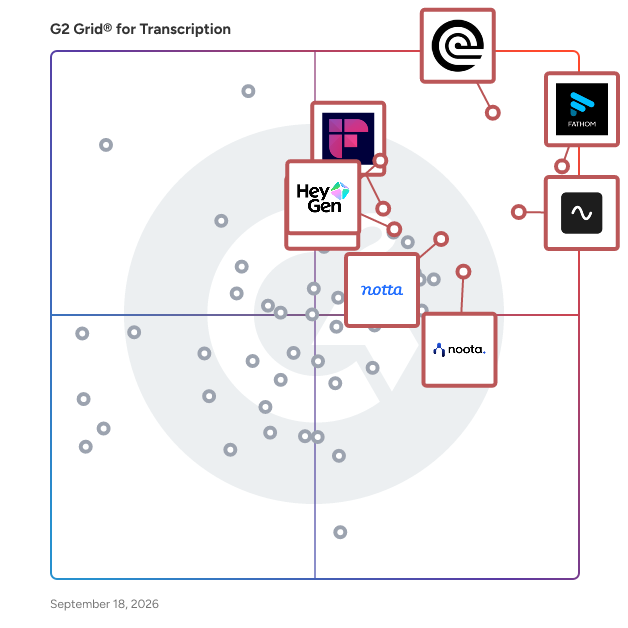
Featured Transcription Software At A Glance

Free Plan Available:
Fathom
Sponsored
Leader:
Highest Performer:
Easiest to Use:
Top Trending:
Show LessShow More
Highest Performer:
Easiest to Use:
Top Trending:

G2 takes pride in showing unbiased reviews on user satisfaction in our ratings and reports. We do not allow paid placements in any of our ratings, rankings, or reports. Learn about our scoring methodologies.

Coming Soon
Get Trending Transcription Products in Your Inbox

A weekly snapshot of rising stars, new launches, and what everyone's buzzing about.

Sample Trending Products Newsletter
No filters applied
207 Listings in Transcription Available
(6,295)5.0 out of 5
Optimized for quick response
2nd Easiest To Use in Transcription software
View top Consulting Services for Fathom
Save to My Lists
Entry Level Price:Free
  • Overview
    Expand/Collapse Overview
  • Product Description
    How are these determined?Information
    This description is provided by the seller.

    Fathom is a free app that instantly records, transcribes, and summarizes your Zoom, Google Meet, or Microsoft Teams meetings so you can focus on the conversation instead of taking notes. Receive accur

    Users
    • CEO
    • Founder
    Industries
    • Marketing and Advertising
    • Computer Software
    Market Segment
    • 78% Small-Business
    • 19% Mid-Market
    User Sentiment
    How are these determined?Information
    These insights, currently in beta, are compiled from user reviews and grouped to display a high-level overview of the software.
    • Fathom is a tool that records and transcribes meetings, providing summaries, action items, and transcripts for users to review.
    • Reviewers frequently mention the convenience of Fathom's automatic note-taking, its accurate summaries, and the time-saving benefits of not having to manually record meeting details.
    • Reviewers experienced issues with the transcription accuracy, the visibility of the AI notetaker during meetings, and the lack of customization options for the meeting summaries.
  • Pros and Cons
    Expand/Collapse Pros and Cons
  • Fathom Pros and Cons
    How are these determined?Information
    Pros and Cons are compiled from review feedback and grouped into themes to provide an easy-to-understand summary of user reviews.
    Pros
    AI Summary
    1,738
    Ease of Use
    1,623
    Accuracy
    1,607
    Helpful
    1,516
    Note-taking
    1,281
    Cons
    Meeting Management
    453
    Recording Issues
    418
    Missing Features
    276
    Call Issues
    249
    Recording Limitations
    234
  • User Satisfaction
    Expand/Collapse User Satisfaction
  • Fathom features and usability ratings that predict user satisfaction
    9.7
    Has the product been a good partner in doing business?
    Average: 9.1
    9.2
    Collaboration
    Average: 8.4
    9.1
    Voice Files
    Average: 8.9
    5.2
    What is your organization's estimated ROI on the product (payback period in months)?
    Average: 10
  • Seller Details
    Expand/Collapse Seller Details
  • Seller Details
    Seller
    Fathom
    Company Website
    Year Founded
    2020
    HQ Location
    San Francisco, CA
    Twitter
    @FathomDotVideo
    2,626 Twitter followers
    LinkedIn® Page
    www.linkedin.com
    174 employees on LinkedIn®
Product Description
How are these determined?Information
This description is provided by the seller.

Fathom is a free app that instantly records, transcribes, and summarizes your Zoom, Google Meet, or Microsoft Teams meetings so you can focus on the conversation instead of taking notes. Receive accur

Users
  • CEO
  • Founder
Industries
  • Marketing and Advertising
  • Computer Software
Market Segment
  • 78% Small-Business
  • 19% Mid-Market
User Sentiment
How are these determined?Information
These insights, currently in beta, are compiled from user reviews and grouped to display a high-level overview of the software.
  • Fathom is a tool that records and transcribes meetings, providing summaries, action items, and transcripts for users to review.
  • Reviewers frequently mention the convenience of Fathom's automatic note-taking, its accurate summaries, and the time-saving benefits of not having to manually record meeting details.
  • Reviewers experienced issues with the transcription accuracy, the visibility of the AI notetaker during meetings, and the lack of customization options for the meeting summaries.
Fathom Pros and Cons
How are these determined?Information
Pros and Cons are compiled from review feedback and grouped into themes to provide an easy-to-understand summary of user reviews.
Pros
AI Summary
1,738
Ease of Use
1,623
Accuracy
1,607
Helpful
1,516
Note-taking
1,281
Cons
Meeting Management
453
Recording Issues
418
Missing Features
276
Call Issues
249
Recording Limitations
234
Fathom features and usability ratings that predict user satisfaction
9.7
Has the product been a good partner in doing business?
Average: 9.1
9.2
Collaboration
Average: 8.4
9.1
Voice Files
Average: 8.9
5.2
What is your organization's estimated ROI on the product (payback period in months)?
Average: 10
Seller Details
Seller
Fathom
Company Website
Year Founded
2020
HQ Location
San Francisco, CA
Twitter
@FathomDotVideo
2,626 Twitter followers
LinkedIn® Page
www.linkedin.com
174 employees on LinkedIn®
(560)4.7 out of 5
Optimized for quick response
3rd Easiest To Use in Transcription software
Save to My Lists
Entry Level Price:Free
  • Overview
    Expand/Collapse Overview
  • Product Description
    How are these determined?Information
    This description is provided by the seller.

    Rev helps legal professionals, journalists, and researchers capture, process, and use critical speech data. With 96%+ accurate AI transcription (upgradable to 99%+ with human review), Rev helps you wo

    Users
    • Owner
    • CEO
    Industries
    • Marketing and Advertising
    • Media Production
    Market Segment
    • 60% Small-Business
    • 24% Mid-Market
    User Sentiment
    How are these determined?Information
    These insights, currently in beta, are compiled from user reviews and grouped to display a high-level overview of the software.
    • Rev is a transcription platform that converts audio and video files into text-based content, offering both human-based and AI-based transcription services.
    • Reviewers appreciate Rev's high accuracy rate, quick turnaround time, and its ability to handle high volumes of transcript and SRT files, making it an indispensable tool for many users.
    • Reviewers mentioned that the software struggles with different accents, background noise, and high-definition videos, which can lead to inaccuracies and decreased productivity.
  • Pros and Cons
    Expand/Collapse Pros and Cons
  • Rev Pros and Cons
    How are these determined?Information
    Pros and Cons are compiled from review feedback and grouped into themes to provide an easy-to-understand summary of user reviews.
    Pros
    Accuracy
    169
    Transcription
    163
    Ease of Use
    154
    Transcription Accuracy
    126
    Time-saving
    113
    Cons
    Inaccurate Transcription
    51
    AI Inaccuracy
    45
    Inaccuracy
    32
    Poor Transcription Accuracy
    26
    AI Limitations
    23
  • User Satisfaction
    Expand/Collapse User Satisfaction
  • Rev features and usability ratings that predict user satisfaction
    9.5
    Has the product been a good partner in doing business?
    Average: 9.1
    8.2
    Collaboration
    Average: 8.4
    8.8
    Voice Files
    Average: 8.9
    5.1
    What is your organization's estimated ROI on the product (payback period in months)?
    Average: 10
  • Seller Details
    Expand/Collapse Seller Details
  • Seller Details
    Seller
    Rev
    Company Website
    Year Founded
    2010
    HQ Location
    Austin, Texas
    Twitter
    @rev
    10,739 Twitter followers
    LinkedIn® Page
    www.linkedin.com
    4,000 employees on LinkedIn®
Product Description
How are these determined?Information
This description is provided by the seller.

Rev helps legal professionals, journalists, and researchers capture, process, and use critical speech data. With 96%+ accurate AI transcription (upgradable to 99%+ with human review), Rev helps you wo

Users
  • Owner
  • CEO
Industries
  • Marketing and Advertising
  • Media Production
Market Segment
  • 60% Small-Business
  • 24% Mid-Market
User Sentiment
How are these determined?Information
These insights, currently in beta, are compiled from user reviews and grouped to display a high-level overview of the software.
  • Rev is a transcription platform that converts audio and video files into text-based content, offering both human-based and AI-based transcription services.
  • Reviewers appreciate Rev's high accuracy rate, quick turnaround time, and its ability to handle high volumes of transcript and SRT files, making it an indispensable tool for many users.
  • Reviewers mentioned that the software struggles with different accents, background noise, and high-definition videos, which can lead to inaccuracies and decreased productivity.
Rev Pros and Cons
How are these determined?Information
Pros and Cons are compiled from review feedback and grouped into themes to provide an easy-to-understand summary of user reviews.
Pros
Accuracy
169
Transcription
163
Ease of Use
154
Transcription Accuracy
126
Time-saving
113
Cons
Inaccurate Transcription
51
AI Inaccuracy
45
Inaccuracy
32
Poor Transcription Accuracy
26
AI Limitations
23
Rev features and usability ratings that predict user satisfaction
9.5
Has the product been a good partner in doing business?
Average: 9.1
8.2
Collaboration
Average: 8.4
8.8
Voice Files
Average: 8.9
5.1
What is your organization's estimated ROI on the product (payback period in months)?
Average: 10
Seller Details
Seller
Rev
Company Website
Year Founded
2010
HQ Location
Austin, Texas
Twitter
@rev
10,739 Twitter followers
LinkedIn® Page
www.linkedin.com
4,000 employees on LinkedIn®

This is how G2 Deals can help you:

  • Easily shop for curated – and trusted – software
  • Own your own software buying journey
  • Discover exclusive deals on software
  • Overview
    Expand/Collapse Overview
  • Product Description
    How are these determined?Information
    This description is provided by the seller.

    Google Cloud’s Speech API processes more than 1 billion voice minutes per month with close to human levels of understanding for many commonly spoken languages. Powered by the best of Google's AI resea

    Users
    • Data Engineer
    • Software Engineer
    Industries
    • Information Technology and Services
    • Computer Software
    Market Segment
    • 41% Mid-Market
    • 40% Small-Business
  • Pros and Cons
    Expand/Collapse Pros and Cons
  • Google Cloud Speech-to-Text Pros and Cons
    How are these determined?Information
    Pros and Cons are compiled from review feedback and grouped into themes to provide an easy-to-understand summary of user reviews.
    Pros
    Accuracy
    63
    Ease of Use
    56
    Transcription Accuracy
    52
    Speech to Text Conversion
    48
    Transcription
    31
    Cons
    Inaccuracy
    23
    Pricing Issues
    23
    Accent Recognition
    22
    Expensive
    21
    Accuracy Issues
    18
  • User Satisfaction
    Expand/Collapse User Satisfaction
  • Google Cloud Speech-to-Text features and usability ratings that predict user satisfaction
    8.9
    Has the product been a good partner in doing business?
    Average: 9.1
    9.0
    Collaboration
    Average: 8.4
    9.0
    Voice Files
    Average: 8.9
    10.0
    What is your organization's estimated ROI on the product (payback period in months)?
    Average: 10
  • Seller Details
    Expand/Collapse Seller Details
  • Seller Details
    Seller
    Google
    Company Website
    Year Founded
    1998
    HQ Location
    Mountain View, CA
    Twitter
    @google
    31,497,057 Twitter followers
    LinkedIn® Page
    www.linkedin.com
    325,307 employees on LinkedIn®
Product Description
How are these determined?Information
This description is provided by the seller.

Google Cloud’s Speech API processes more than 1 billion voice minutes per month with close to human levels of understanding for many commonly spoken languages. Powered by the best of Google's AI resea

Users
  • Data Engineer
  • Software Engineer
Industries
  • Information Technology and Services
  • Computer Software
Market Segment
  • 41% Mid-Market
  • 40% Small-Business
Google Cloud Speech-to-Text Pros and Cons
How are these determined?Information
Pros and Cons are compiled from review feedback and grouped into themes to provide an easy-to-understand summary of user reviews.
Pros
Accuracy
63
Ease of Use
56
Transcription Accuracy
52
Speech to Text Conversion
48
Transcription
31
Cons
Inaccuracy
23
Pricing Issues
23
Accent Recognition
22
Expensive
21
Accuracy Issues
18
Google Cloud Speech-to-Text features and usability ratings that predict user satisfaction
8.9
Has the product been a good partner in doing business?
Average: 9.1
9.0
Collaboration
Average: 8.4
9.0
Voice Files
Average: 8.9
10.0
What is your organization's estimated ROI on the product (payback period in months)?
Average: 10
Seller Details
Seller
Google
Company Website
Year Founded
1998
HQ Location
Mountain View, CA
Twitter
@google
31,497,057 Twitter followers
LinkedIn® Page
www.linkedin.com
325,307 employees on LinkedIn®
(723)4.8 out of 5
8th Easiest To Use in Transcription software
Save to My Lists
Entry Level Price:Free
  • Overview
    Expand/Collapse Overview
  • Product Description
    How are these determined?Information
    This description is provided by the seller.

    Fireflies is an AI voice assistant that helps transcribe, summarize take notes, and complete actions during meetings. Our AI assistant, Fred, integrates with all the leading web-conferencing platf

    Users
    • CEO
    • Founder
    Industries
    • Consulting
    • Marketing and Advertising
    Market Segment
    • 80% Small-Business
    • 17% Mid-Market
  • Pros and Cons
    Expand/Collapse Pros and Cons
  • Fireflies.ai Pros and Cons
    How are these determined?Information
    Pros and Cons are compiled from review feedback and grouped into themes to provide an easy-to-understand summary of user reviews.
    Pros
    AI Summary
    141
    Transcription
    130
    Ease of Use
    125
    Transcripts
    121
    Accuracy
    107
    Cons
    AI Inaccuracy
    45
    Meeting Management
    42
    Expensive
    35
    Poor Summarization
    29
    AI Limitations
    27
  • User Satisfaction
    Expand/Collapse User Satisfaction
  • Fireflies.ai features and usability ratings that predict user satisfaction
    9.1
    Has the product been a good partner in doing business?
    Average: 9.2
    8.6
    Collaboration
    Average: 8.4
    8.8
    Voice Files
    Average: 8.9
    10.0
    What is your organization's estimated ROI on the product (payback period in months)?
    Average: 10
  • Seller Details
    Expand/Collapse Seller Details
  • Seller Details
    Year Founded
    2016
    HQ Location
    San Francisco, CA
    Twitter
    @firefliesai
    7,378 Twitter followers
    LinkedIn® Page
    www.linkedin.com
    111 employees on LinkedIn®
Product Description
How are these determined?Information
This description is provided by the seller.

Fireflies is an AI voice assistant that helps transcribe, summarize take notes, and complete actions during meetings. Our AI assistant, Fred, integrates with all the leading web-conferencing platf

Users
  • CEO
  • Founder
Industries
  • Consulting
  • Marketing and Advertising
Market Segment
  • 80% Small-Business
  • 17% Mid-Market
Fireflies.ai Pros and Cons
How are these determined?Information
Pros and Cons are compiled from review feedback and grouped into themes to provide an easy-to-understand summary of user reviews.
Pros
AI Summary
141
Transcription
130
Ease of Use
125
Transcripts
121
Accuracy
107
Cons
AI Inaccuracy
45
Meeting Management
42
Expensive
35
Poor Summarization
29
AI Limitations
27
Fireflies.ai features and usability ratings that predict user satisfaction
9.1
Has the product been a good partner in doing business?
Average: 9.2
8.6
Collaboration
Average: 8.4
8.8
Voice Files
Average: 8.9
10.0
What is your organization's estimated ROI on the product (payback period in months)?
Average: 10
Seller Details
Year Founded
2016
HQ Location
San Francisco, CA
Twitter
@firefliesai
7,378 Twitter followers
LinkedIn® Page
www.linkedin.com
111 employees on LinkedIn®
(1,543)4.8 out of 5
1st Easiest To Use in Transcription software
Save to My Lists
Entry Level Price:Free
  • Overview
    Expand/Collapse Overview
  • Product Description
    How are these determined?Information
    This description is provided by the seller.

    Riverside is an all-in-one podcast and video studio for businesses and content creators who demand professional quality without technical complexity. Podcasters, video creators, and businesses across

    Users
    • Founder
    • Owner
    Industries
    • Entertainment
    • Media Production
    Market Segment
    • 87% Small-Business
    • 11% Mid-Market
  • Pros and Cons
    Expand/Collapse Pros and Cons
  • Riverside Pros and Cons
    How are these determined?Information
    Pros and Cons are compiled from review feedback and grouped into themes to provide an easy-to-understand summary of user reviews.
    Pros
    Ease of Use
    917
    Quality
    696
    High Quality
    639
    Recording
    584
    Video Quality
    576
    Cons
    Recording Issues
    227
    Feature Deficiency
    176
    Missing Features
    161
    Audio Issues
    136
    Editing Issues
    118
  • User Satisfaction
    Expand/Collapse User Satisfaction
  • Riverside features and usability ratings that predict user satisfaction
    9.5
    Has the product been a good partner in doing business?
    Average: 9.1
    8.6
    Collaboration
    Average: 8.4
    9.0
    Voice Files
    Average: 8.9
    10.0
    What is your organization's estimated ROI on the product (payback period in months)?
    Average: 10
  • Seller Details
    Expand/Collapse Seller Details
  • Seller Details
    Year Founded
    2019
    HQ Location
    Tel Aviv, IL
    Twitter
    @RiversidedotFM
    10,151 Twitter followers
    LinkedIn® Page
    www.linkedin.com
    356 employees on LinkedIn®
Product Description
How are these determined?Information
This description is provided by the seller.

Riverside is an all-in-one podcast and video studio for businesses and content creators who demand professional quality without technical complexity. Podcasters, video creators, and businesses across

Users
  • Founder
  • Owner
Industries
  • Entertainment
  • Media Production
Market Segment
  • 87% Small-Business
  • 11% Mid-Market
Riverside Pros and Cons
How are these determined?Information
Pros and Cons are compiled from review feedback and grouped into themes to provide an easy-to-understand summary of user reviews.
Pros
Ease of Use
917
Quality
696
High Quality
639
Recording
584
Video Quality
576
Cons
Recording Issues
227
Feature Deficiency
176
Missing Features
161
Audio Issues
136
Editing Issues
118
Riverside features and usability ratings that predict user satisfaction
9.5
Has the product been a good partner in doing business?
Average: 9.1
8.6
Collaboration
Average: 8.4
9.0
Voice Files
Average: 8.9
10.0
What is your organization's estimated ROI on the product (payback period in months)?
Average: 10
Seller Details
Year Founded
2019
HQ Location
Tel Aviv, IL
Twitter
@RiversidedotFM
10,151 Twitter followers
LinkedIn® Page
www.linkedin.com
356 employees on LinkedIn®
Entry Level Price:Free
  • Overview
    Expand/Collapse Overview
  • Product Description
    How are these determined?Information
    This description is provided by the seller.

    Otter.ai is the leading AI Meeting Assistant that helps sales, marketing, product, finance, operations design, customer success, customer support and cross functional teams automatically record, trans

    Users
    • CEO
    • Account Executive
    Industries
    • Computer Software
    • Marketing and Advertising
    Market Segment
    • 70% Small-Business
    • 19% Mid-Market
    User Sentiment
    How are these determined?Information
    These insights, currently in beta, are compiled from user reviews and grouped to display a high-level overview of the software.
    • Otter.ai is a transcription and note-taking tool that captures and summarizes discussions during calls, allowing users to focus on the conversation.
    • Reviewers frequently mention the tool's ability to accurately transcribe discussions, even in group settings, and its seamless integration with platforms like Zoom and Google Meet.
    • Users reported issues with the tool's ability to handle heavy accents or technical jargon, and limitations in the free version, including restricted transcription time and limited features.
  • Pros and Cons
    Expand/Collapse Pros and Cons
  • Otter.ai Pros and Cons
    How are these determined?Information
    Pros and Cons are compiled from review feedback and grouped into themes to provide an easy-to-understand summary of user reviews.
    Pros
    Ease of Use
    188
    Helpful
    148
    Accuracy
    130
    AI Summary
    130
    Transcription
    128
    Cons
    Recording Issues
    81
    Accuracy Issues
    56
    Missing Features
    50
    AI Inaccuracy
    48
    Inaccuracy
    46
  • User Satisfaction
    Expand/Collapse User Satisfaction
  • Otter.ai features and usability ratings that predict user satisfaction
    8.5
    Has the product been a good partner in doing business?
    Average: 9.1
    8.2
    Collaboration
    Average: 8.4
    8.3
    Voice Files
    Average: 8.9
    10.0
    What is your organization's estimated ROI on the product (payback period in months)?
    Average: 10
  • Seller Details
    Expand/Collapse Seller Details
  • Seller Details
    Seller
    Otter.ai
    Company Website
    HQ Location
    Mountain View, California
    Twitter
    @otter_ai
    17,053 Twitter followers
    LinkedIn® Page
    www.linkedin.com
    281 employees on LinkedIn®
Product Description
How are these determined?Information
This description is provided by the seller.

Otter.ai is the leading AI Meeting Assistant that helps sales, marketing, product, finance, operations design, customer success, customer support and cross functional teams automatically record, trans

Users
  • CEO
  • Account Executive
Industries
  • Computer Software
  • Marketing and Advertising
Market Segment
  • 70% Small-Business
  • 19% Mid-Market
User Sentiment
How are these determined?Information
These insights, currently in beta, are compiled from user reviews and grouped to display a high-level overview of the software.
  • Otter.ai is a transcription and note-taking tool that captures and summarizes discussions during calls, allowing users to focus on the conversation.
  • Reviewers frequently mention the tool's ability to accurately transcribe discussions, even in group settings, and its seamless integration with platforms like Zoom and Google Meet.
  • Users reported issues with the tool's ability to handle heavy accents or technical jargon, and limitations in the free version, including restricted transcription time and limited features.
Otter.ai Pros and Cons
How are these determined?Information
Pros and Cons are compiled from review feedback and grouped into themes to provide an easy-to-understand summary of user reviews.
Pros
Ease of Use
188
Helpful
148
Accuracy
130
AI Summary
130
Transcription
128
Cons
Recording Issues
81
Accuracy Issues
56
Missing Features
50
AI Inaccuracy
48
Inaccuracy
46
Otter.ai features and usability ratings that predict user satisfaction
8.5
Has the product been a good partner in doing business?
Average: 9.1
8.2
Collaboration
Average: 8.4
8.3
Voice Files
Average: 8.9
10.0
What is your organization's estimated ROI on the product (payback period in months)?
Average: 10
Seller Details
Seller
Otter.ai
Company Website
HQ Location
Mountain View, California
Twitter
@otter_ai
17,053 Twitter followers
LinkedIn® Page
www.linkedin.com
281 employees on LinkedIn®
(822)4.6 out of 5
View top Consulting Services for Descript
Save to My Lists
Entry Level Price:Free
  • Overview
    Expand/Collapse Overview
  • Product Description
    How are these determined?Information
    This description is provided by the seller.

    In Descript you can make any video you want, any way you want. All you need is an idea; it helps if you know how to type. With the world’s first only AI co-editor, Underlord, you can make a video j

    Users
    • Founder
    • Owner
    Industries
    • Marketing and Advertising
    • Media Production
    Market Segment
    • 87% Small-Business
    • 7% Mid-Market
    User Sentiment
    How are these determined?Information
    These insights, currently in beta, are compiled from user reviews and grouped to display a high-level overview of the software.
    • Descript is a video editing and transcription tool that allows users to edit videos, generate transcripts, and remove filler words using AI technology.
    • Reviewers like the ease of use, the accurate transcription feature, the ability to edit directly in the transcript, and the time-saving AI features that remove filler words and silence gaps.
    • Reviewers experienced issues with video quality degradation after applying tools, difficulty in adding multiple videos together, occasional system lag with large projects, and challenges in navigating all the features due to the tool's extensive capabilities.
  • Pros and Cons
    Expand/Collapse Pros and Cons
  • Descript Pros and Cons
    How are these determined?Information
    Pros and Cons are compiled from review feedback and grouped into themes to provide an easy-to-understand summary of user reviews.
    Pros
    Easy Editing
    294
    Ease of Use
    263
    Video Editing
    204
    Editing Features
    196
    Quality
    194
    Cons
    Learning Curve
    82
    Slow Performance
    76
    Difficulty/Complexity
    74
    Learning Difficulty
    72
    Editing Issues
    57
  • User Satisfaction
    Expand/Collapse User Satisfaction
  • Descript features and usability ratings that predict user satisfaction
    8.7
    Has the product been a good partner in doing business?
    Average: 9.1
    8.4
    Collaboration
    Average: 8.4
    8.6
    Voice Files
    Average: 8.9
    10.0
    What is your organization's estimated ROI on the product (payback period in months)?
    Average: 10
  • Seller Details
    Expand/Collapse Seller Details
  • Seller Details
    Seller
    Descript
    Company Website
    Year Founded
    2017
    HQ Location
    San Francisco, CA
    Twitter
    @DescriptApp
    30,734 Twitter followers
    LinkedIn® Page
    www.linkedin.com
    182 employees on LinkedIn®
Product Description
How are these determined?Information
This description is provided by the seller.

In Descript you can make any video you want, any way you want. All you need is an idea; it helps if you know how to type. With the world’s first only AI co-editor, Underlord, you can make a video j

Users
  • Founder
  • Owner
Industries
  • Marketing and Advertising
  • Media Production
Market Segment
  • 87% Small-Business
  • 7% Mid-Market
User Sentiment
How are these determined?Information
These insights, currently in beta, are compiled from user reviews and grouped to display a high-level overview of the software.
  • Descript is a video editing and transcription tool that allows users to edit videos, generate transcripts, and remove filler words using AI technology.
  • Reviewers like the ease of use, the accurate transcription feature, the ability to edit directly in the transcript, and the time-saving AI features that remove filler words and silence gaps.
  • Reviewers experienced issues with video quality degradation after applying tools, difficulty in adding multiple videos together, occasional system lag with large projects, and challenges in navigating all the features due to the tool's extensive capabilities.
Descript Pros and Cons
How are these determined?Information
Pros and Cons are compiled from review feedback and grouped into themes to provide an easy-to-understand summary of user reviews.
Pros
Easy Editing
294
Ease of Use
263
Video Editing
204
Editing Features
196
Quality
194
Cons
Learning Curve
82
Slow Performance
76
Difficulty/Complexity
74
Learning Difficulty
72
Editing Issues
57
Descript features and usability ratings that predict user satisfaction
8.7
Has the product been a good partner in doing business?
Average: 9.1
8.4
Collaboration
Average: 8.4
8.6
Voice Files
Average: 8.9
10.0
What is your organization's estimated ROI on the product (payback period in months)?
Average: 10
Seller Details
Seller
Descript
Company Website
Year Founded
2017
HQ Location
San Francisco, CA
Twitter
@DescriptApp
30,734 Twitter followers
LinkedIn® Page
www.linkedin.com
182 employees on LinkedIn®
(299)4.7 out of 5
4th Easiest To Use in Transcription software
Save to My Lists
Entry Level Price:Free
  • Overview
    Expand/Collapse Overview
  • Product Description
    How are these determined?Information
    This description is provided by the seller.

    AI Meetings Note Platform with AI-Powered Automation Noota is an advanced AI meeting assistant designed to turn your conversations into actionable insights. Tailored for professionals across indust

    Users
    • CEO
    Industries
    • Computer Software
    • Staffing and Recruiting
    Market Segment
    • 31% Small-Business
    • 5% Mid-Market
  • Pros and Cons
    Expand/Collapse Pros and Cons
  • Noota Pros and Cons
    How are these determined?Information
    Pros and Cons are compiled from review feedback and grouped into themes to provide an easy-to-understand summary of user reviews.
    Pros
    Ease of Use
    43
    Useful
    32
    Easy Setup
    31
    Transcription
    31
    Meetings
    27
    Cons
    Limited Features
    7
    Integration Issues
    6
    Limited Language Options
    4
    Limited Language Support
    4
    User Confusion
    4
  • User Satisfaction
    Expand/Collapse User Satisfaction
  • Noota features and usability ratings that predict user satisfaction
    8.3
    Has the product been a good partner in doing business?
    Average: 9.2
    8.2
    Collaboration
    Average: 8.4
    8.7
    Voice Files
    Average: 8.9
    6.1
    What is your organization's estimated ROI on the product (payback period in months)?
    Average: 10
  • Seller Details
    Expand/Collapse Seller Details
  • Seller Details
    Seller
    Noota
    Year Founded
    2020
    HQ Location
    Paris, FR
    LinkedIn® Page
    www.linkedin.com
    48 employees on LinkedIn®
Product Description
How are these determined?Information
This description is provided by the seller.

AI Meetings Note Platform with AI-Powered Automation Noota is an advanced AI meeting assistant designed to turn your conversations into actionable insights. Tailored for professionals across indust

Users
  • CEO
Industries
  • Computer Software
  • Staffing and Recruiting
Market Segment
  • 31% Small-Business
  • 5% Mid-Market
Noota Pros and Cons
How are these determined?Information
Pros and Cons are compiled from review feedback and grouped into themes to provide an easy-to-understand summary of user reviews.
Pros
Ease of Use
43
Useful
32
Easy Setup
31
Transcription
31
Meetings
27
Cons
Limited Features
7
Integration Issues
6
Limited Language Options
4
Limited Language Support
4
User Confusion
4
Noota features and usability ratings that predict user satisfaction
8.3
Has the product been a good partner in doing business?
Average: 9.2
8.2
Collaboration
Average: 8.4
8.7
Voice Files
Average: 8.9
6.1
What is your organization's estimated ROI on the product (payback period in months)?
Average: 10
Seller Details
Seller
Noota
Year Founded
2020
HQ Location
Paris, FR
LinkedIn® Page
www.linkedin.com
48 employees on LinkedIn®
(455)4.7 out of 5
Optimized for quick response
7th Easiest To Use in Transcription software
Save to My Lists
  • Overview
    Expand/Collapse Overview
  • Product Description
    How are these determined?Information
    This description is provided by the seller.

    AKOOL is a complete AI Video Generation Suite, transforming how professional video content is created. Our multimodal platform combines cutting-edge generation tools with enterprise-grade production i

    Users
    • Marketing Manager
    • Manager
    Industries
    • Marketing and Advertising
    • Information Technology and Services
    Market Segment
    • 78% Small-Business
    • 19% Mid-Market
    User Sentiment
    How are these determined?Information
    These insights, currently in beta, are compiled from user reviews and grouped to display a high-level overview of the software.
    • Akool is a video creation tool that uses AI to generate realistic faces and avatars, and offers features such as face swapping, video translation, and automatic scene setup.
    • Reviewers like the realistic avatar feature for creating safety training videos, the time-saving aspect of the tool for creating outreach videos, and the user-friendly interface that is easy to navigate even for beginners.
    • Reviewers mentioned issues such as the tool being laggy at times, especially when editing or rendering longer videos, the rendering time for 4K being noticeably slower, and the avatars appearing somewhat generic and having a westernized look.
  • Pros and Cons
    Expand/Collapse Pros and Cons
  • AKOOL Pros and Cons
    How are these determined?Information
    Pros and Cons are compiled from review feedback and grouped into themes to provide an easy-to-understand summary of user reviews.
    Pros
    Ease of Use
    234
    Quality
    223
    Features
    185
    Video Creation
    185
    High Quality
    130
    Cons
    Slow Performance
    66
    Expensive
    61
    Slow Rendering
    57
    Expensive Cost
    52
    Pricing Issues
    48
  • User Satisfaction
    Expand/Collapse User Satisfaction
  • AKOOL features and usability ratings that predict user satisfaction
    9.5
    Has the product been a good partner in doing business?
    Average: 9.2
    8.7
    Collaboration
    Average: 8.4
    8.9
    Voice Files
    Average: 8.9
    4.1
    What is your organization's estimated ROI on the product (payback period in months)?
    Average: 10
  • Seller Details
    Expand/Collapse Seller Details
  • Seller Details
    Company Website
    HQ Location
    471 Emerson St Palo Alto, CA 94301
    Twitter
    @AkoolInc
    66,593 Twitter followers
    LinkedIn® Page
    www.linkedin.com
    103 employees on LinkedIn®
Product Description
How are these determined?Information
This description is provided by the seller.

AKOOL is a complete AI Video Generation Suite, transforming how professional video content is created. Our multimodal platform combines cutting-edge generation tools with enterprise-grade production i

Users
  • Marketing Manager
  • Manager
Industries
  • Marketing and Advertising
  • Information Technology and Services
Market Segment
  • 78% Small-Business
  • 19% Mid-Market
User Sentiment
How are these determined?Information
These insights, currently in beta, are compiled from user reviews and grouped to display a high-level overview of the software.
  • Akool is a video creation tool that uses AI to generate realistic faces and avatars, and offers features such as face swapping, video translation, and automatic scene setup.
  • Reviewers like the realistic avatar feature for creating safety training videos, the time-saving aspect of the tool for creating outreach videos, and the user-friendly interface that is easy to navigate even for beginners.
  • Reviewers mentioned issues such as the tool being laggy at times, especially when editing or rendering longer videos, the rendering time for 4K being noticeably slower, and the avatars appearing somewhat generic and having a westernized look.
AKOOL Pros and Cons
How are these determined?Information
Pros and Cons are compiled from review feedback and grouped into themes to provide an easy-to-understand summary of user reviews.
Pros
Ease of Use
234
Quality
223
Features
185
Video Creation
185
High Quality
130
Cons
Slow Performance
66
Expensive
61
Slow Rendering
57
Expensive Cost
52
Pricing Issues
48
AKOOL features and usability ratings that predict user satisfaction
9.5
Has the product been a good partner in doing business?
Average: 9.2
8.7
Collaboration
Average: 8.4
8.9
Voice Files
Average: 8.9
4.1
What is your organization's estimated ROI on the product (payback period in months)?
Average: 10
Seller Details
Company Website
HQ Location
471 Emerson St Palo Alto, CA 94301
Twitter
@AkoolInc
66,593 Twitter followers
LinkedIn® Page
www.linkedin.com
103 employees on LinkedIn®
(189)4.5 out of 5
Optimized for quick response
Save to My Lists
  • Overview
    Expand/Collapse Overview
  • Pros and Cons
    Expand/Collapse Pros and Cons
  • User Satisfaction
    Expand/Collapse User Satisfaction
  • Seller Details
    Expand/Collapse Seller Details
(52)4.8 out of 5
Optimized for quick response
Save to My Lists
Entry Level Price:Free
  • Overview
    Expand/Collapse Overview
  • Product Description
    How are these determined?Information
    This description is provided by the seller.

    Speechmatics: Best-in-Market Speech-to-Text & Voice AI for Enterprises Speechmatics delivers industry-leading Speech-to-Text and Voice AI solutions, designed for enterprises that demand best-in

    Users
    No information available
    Industries
    • Computer Software
    • Broadcast Media
    Market Segment
    • 56% Small-Business
    • 31% Mid-Market
    User Sentiment
    How are these determined?Information
    These insights, currently in beta, are compiled from user reviews and grouped to display a high-level overview of the software.
    • Speechmatics is a speech-to-text service that provides transcription capabilities across multiple languages and dialects, and is used for various purposes such as transcribing audio recordings, integrating as a transcription layer to research tools, and processing large-scale audio recordings of call recordings.
    • Users frequently mention the high accuracy of transcriptions, even in challenging audio conditions and diverse accents, the speed of processing, the ease of integration into workflows, and the support for multiple languages as key benefits of using Speechmatics.
    • Reviewers experienced some issues such as the lack of support for certain local languages, the need for more robust free/trial plans, the deletion of transcription jobs after 7 days, and occasional lags in real-time processing.
  • Pros and Cons
    Expand/Collapse Pros and Cons
  • Speechmatics Pros and Cons
    How are these determined?Information
    Pros and Cons are compiled from review feedback and grouped into themes to provide an easy-to-understand summary of user reviews.
    Pros
    Accuracy
    21
    Transcription Accuracy
    17
    Ease of Use
    15
    Efficiency
    13
    Speed
    12
    Cons
    Limited Features
    4
    Limited Language Support
    4
    Slow Performance
    4
    Limited Language Options
    3
    Missing Features
    3
  • User Satisfaction
    Expand/Collapse User Satisfaction
  • Speechmatics features and usability ratings that predict user satisfaction
    9.5
    Has the product been a good partner in doing business?
    Average: 9.2
    0.0
    No information available
    9.1
    Voice Files
    Average: 8.9
    4.0
    What is your organization's estimated ROI on the product (payback period in months)?
    Average: 10
  • Seller Details
    Expand/Collapse Seller Details
  • Seller Details
    Company Website
    Year Founded
    2006
    HQ Location
    Cambridge, England‎
    Twitter
    @Speechmatics
    3,605 Twitter followers
    LinkedIn® Page
    www.linkedin.com
    103 employees on LinkedIn®
Product Description
How are these determined?Information
This description is provided by the seller.

Speechmatics: Best-in-Market Speech-to-Text & Voice AI for Enterprises Speechmatics delivers industry-leading Speech-to-Text and Voice AI solutions, designed for enterprises that demand best-in

Users
No information available
Industries
  • Computer Software
  • Broadcast Media
Market Segment
  • 56% Small-Business
  • 31% Mid-Market
User Sentiment
How are these determined?Information
These insights, currently in beta, are compiled from user reviews and grouped to display a high-level overview of the software.
  • Speechmatics is a speech-to-text service that provides transcription capabilities across multiple languages and dialects, and is used for various purposes such as transcribing audio recordings, integrating as a transcription layer to research tools, and processing large-scale audio recordings of call recordings.
  • Users frequently mention the high accuracy of transcriptions, even in challenging audio conditions and diverse accents, the speed of processing, the ease of integration into workflows, and the support for multiple languages as key benefits of using Speechmatics.
  • Reviewers experienced some issues such as the lack of support for certain local languages, the need for more robust free/trial plans, the deletion of transcription jobs after 7 days, and occasional lags in real-time processing.
Speechmatics Pros and Cons
How are these determined?Information
Pros and Cons are compiled from review feedback and grouped into themes to provide an easy-to-understand summary of user reviews.
Pros
Accuracy
21
Transcription Accuracy
17
Ease of Use
15
Efficiency
13
Speed
12
Cons
Limited Features
4
Limited Language Support
4
Slow Performance
4
Limited Language Options
3
Missing Features
3
Speechmatics features and usability ratings that predict user satisfaction
9.5
Has the product been a good partner in doing business?
Average: 9.2
0.0
No information available
9.1
Voice Files
Average: 8.9
4.0
What is your organization's estimated ROI on the product (payback period in months)?
Average: 10
Seller Details
Company Website
Year Founded
2006
HQ Location
Cambridge, England‎
Twitter
@Speechmatics
3,605 Twitter followers
LinkedIn® Page
www.linkedin.com
103 employees on LinkedIn®
(1,280)4.8 out of 5
13th Easiest To Use in Transcription software
View top Consulting Services for HeyGen Video Agent
Save to My Lists
Entry Level Price:Free
  • Overview
    Expand/Collapse Overview
  • Product Description
    How are these determined?Information
    This description is provided by the seller.

    HeyGen is the leading AI video generation platform designed to assist users in creating visually engaging videos effortlessly. This innovative solution caters to a wide range of users, from small busi

    Users
    • CEO
    • Owner
    Industries
    • Marketing and Advertising
    • Education Management
    Market Segment
    • 87% Small-Business
    • 9% Mid-Market
    User Sentiment
    How are these determined?Information
    These insights, currently in beta, are compiled from user reviews and grouped to display a high-level overview of the software.
    • HeyGen is a tool that allows users to create AI-generated videos in multiple languages and tailor messages to their community.
    • Reviewers like the realistic AI avatars, the ability to create videos on the go, the multilingual support, and the user-friendly interface that HeyGen offers.
    • Reviewers noted issues with video glitches counting against their monthly minutes, limitations on video size, the need for more realistic voice clones, outdated tutorials, and a confusing credit system.
  • Pros and Cons
    Expand/Collapse Pros and Cons
  • HeyGen Video Agent Pros and Cons
    How are these determined?Information
    Pros and Cons are compiled from review feedback and grouped into themes to provide an easy-to-understand summary of user reviews.
    Pros
    Ease of Use
    552
    Realistic Avatars
    390
    Quality
    388
    Video Creation
    341
    Easy Creation
    258
    Cons
    Expensive
    172
    Expensive Cost
    149
    Pricing Issues
    144
    Cost Issue
    130
    Avatar Limitations
    118
  • User Satisfaction
    Expand/Collapse User Satisfaction
  • HeyGen Video Agent features and usability ratings that predict user satisfaction
    9.2
    Has the product been a good partner in doing business?
    Average: 9.1
    8.7
    Collaboration
    Average: 8.4
    9.2
    Voice Files
    Average: 8.9
    9.8
    What is your organization's estimated ROI on the product (payback period in months)?
    Average: 10
  • Seller Details
    Expand/Collapse Seller Details
  • Seller Details
    Seller
    HeyGen
    Company Website
    Year Founded
    2020
    HQ Location
    Los Angeles, California
    Twitter
    @HeyGen_Official
    86,057 Twitter followers
    LinkedIn® Page
    www.linkedin.com
    269 employees on LinkedIn®
Product Description
How are these determined?Information
This description is provided by the seller.

HeyGen is the leading AI video generation platform designed to assist users in creating visually engaging videos effortlessly. This innovative solution caters to a wide range of users, from small busi

Users
  • CEO
  • Owner
Industries
  • Marketing and Advertising
  • Education Management
Market Segment
  • 87% Small-Business
  • 9% Mid-Market
User Sentiment
How are these determined?Information
These insights, currently in beta, are compiled from user reviews and grouped to display a high-level overview of the software.
  • HeyGen is a tool that allows users to create AI-generated videos in multiple languages and tailor messages to their community.
  • Reviewers like the realistic AI avatars, the ability to create videos on the go, the multilingual support, and the user-friendly interface that HeyGen offers.
  • Reviewers noted issues with video glitches counting against their monthly minutes, limitations on video size, the need for more realistic voice clones, outdated tutorials, and a confusing credit system.
HeyGen Video Agent Pros and Cons
How are these determined?Information
Pros and Cons are compiled from review feedback and grouped into themes to provide an easy-to-understand summary of user reviews.
Pros
Ease of Use
552
Realistic Avatars
390
Quality
388
Video Creation
341
Easy Creation
258
Cons
Expensive
172
Expensive Cost
149
Pricing Issues
144
Cost Issue
130
Avatar Limitations
118
HeyGen Video Agent features and usability ratings that predict user satisfaction
9.2
Has the product been a good partner in doing business?
Average: 9.1
8.7
Collaboration
Average: 8.4
9.2
Voice Files
Average: 8.9
9.8
What is your organization's estimated ROI on the product (payback period in months)?
Average: 10
Seller Details
Seller
HeyGen
Company Website
Year Founded
2020
HQ Location
Los Angeles, California
Twitter
@HeyGen_Official
86,057 Twitter followers
LinkedIn® Page
www.linkedin.com
269 employees on LinkedIn®
(250)4.8 out of 5
6th Easiest To Use in Transcription software
Save to My Lists
  • Overview
    Expand/Collapse Overview
  • Product Description
    How are these determined?Information
    This description is provided by the seller.

    Bluedot is a privacy-first AI note taker built for clarity, speed, and simplicity - without the bots. Unlike traditional notetakers that rely on intrusive pop-ins, Bluedot captures your Zoom, Google M

    Users
    • CEO
    • Founder
    Industries
    • Computer Software
    • Information Technology and Services
    Market Segment
    • 60% Small-Business
    • 20% Mid-Market
    User Sentiment
    How are these determined?Information
    These insights, currently in beta, are compiled from user reviews and grouped to display a high-level overview of the software.
    • Bluedot is a tool that automatically captures meeting conversations and turns them into structured notes, saving users time and ensuring that nothing important gets missed.
    • Reviewers appreciate Bluedot's ability to accurately transcribe and summarize meetings, reducing manual work and ensuring key decisions are clearly documented.
    • Users mentioned that some features take a little time for new users to understand and that more customization options for exported summaries would be useful.
  • Pros and Cons
    Expand/Collapse Pros and Cons
  • Bluedot Pros and Cons
    How are these determined?Information
    Pros and Cons are compiled from review feedback and grouped into themes to provide an easy-to-understand summary of user reviews.
    Pros
    Ease of Use
    90
    Helpful
    60
    Accuracy
    59
    Transcription
    55
    Transcripts
    55
    Cons
    Missing Features
    27
    Recording Issues
    23
    Transcript Accuracy
    17
    Integration Issues
    14
    Expensive
    13
  • User Satisfaction
    Expand/Collapse User Satisfaction
  • Bluedot features and usability ratings that predict user satisfaction
    9.1
    Has the product been a good partner in doing business?
    Average: 9.2
    8.6
    Collaboration
    Average: 8.4
    8.8
    Voice Files
    Average: 8.9
    2.0
    What is your organization's estimated ROI on the product (payback period in months)?
    Average: 10
  • Seller Details
    Expand/Collapse Seller Details
  • Seller Details
    Seller
    Bluedot
    Company Website
    HQ Location
    London, United Kingdom
    Twitter
    @bluedotrocks
    96 Twitter followers
    LinkedIn® Page
    www.linkedin.com
    15 employees on LinkedIn®
Product Description
How are these determined?Information
This description is provided by the seller.

Bluedot is a privacy-first AI note taker built for clarity, speed, and simplicity - without the bots. Unlike traditional notetakers that rely on intrusive pop-ins, Bluedot captures your Zoom, Google M

Users
  • CEO
  • Founder
Industries
  • Computer Software
  • Information Technology and Services
Market Segment
  • 60% Small-Business
  • 20% Mid-Market
User Sentiment
How are these determined?Information
These insights, currently in beta, are compiled from user reviews and grouped to display a high-level overview of the software.
  • Bluedot is a tool that automatically captures meeting conversations and turns them into structured notes, saving users time and ensuring that nothing important gets missed.
  • Reviewers appreciate Bluedot's ability to accurately transcribe and summarize meetings, reducing manual work and ensuring key decisions are clearly documented.
  • Users mentioned that some features take a little time for new users to understand and that more customization options for exported summaries would be useful.
Bluedot Pros and Cons
How are these determined?Information
Pros and Cons are compiled from review feedback and grouped into themes to provide an easy-to-understand summary of user reviews.
Pros
Ease of Use
90
Helpful
60
Accuracy
59
Transcription
55
Transcripts
55
Cons
Missing Features
27
Recording Issues
23
Transcript Accuracy
17
Integration Issues
14
Expensive
13
Bluedot features and usability ratings that predict user satisfaction
9.1
Has the product been a good partner in doing business?
Average: 9.2
8.6
Collaboration
Average: 8.4
8.8
Voice Files
Average: 8.9
2.0
What is your organization's estimated ROI on the product (payback period in months)?
Average: 10
Seller Details
Seller
Bluedot
Company Website
HQ Location
London, United Kingdom
Twitter
@bluedotrocks
96 Twitter followers
LinkedIn® Page
www.linkedin.com
15 employees on LinkedIn®
(456)4.7 out of 5
15th Easiest To Use in Transcription software
Save to My Lists
Entry Level Price:Free
  • Overview
    Expand/Collapse Overview
  • Product Description
    How are these determined?Information
    This description is provided by the seller.

    tl;dv is an AI meeting assistant and official partner of Anthropic. It automatically records video, transcribes and get AI Insights from Google Meet, Zoom and MS Teams for FREE. With tl;dv you c

    Users
    • CEO
    • Founder
    Industries
    • Computer Software
    • Marketing and Advertising
    Market Segment
    • 73% Small-Business
    • 23% Mid-Market
    User Sentiment
    How are these determined?Information
    These insights, currently in beta, are compiled from user reviews and grouped to display a high-level overview of the software.
    • tl;dv is a tool designed to record and transcribe virtual meetings, generate AI summaries, and integrate with various meeting platforms.
    • Reviewers frequently mention the tool's ability to accurately transcribe and summarize meetings, its seamless integration with other platforms, and its user-friendly setup process.
    • Reviewers experienced issues with the quality of transcripts, poor customer support, and difficulties in understanding how to use certain features.
  • Pros and Cons
    Expand/Collapse Pros and Cons
  • tl;dv Pros and Cons
    How are these determined?Information
    Pros and Cons are compiled from review feedback and grouped into themes to provide an easy-to-understand summary of user reviews.
    Pros
    Ease of Use
    215
    AI Summary
    160
    Helpful
    155
    Meetings
    155
    Accuracy
    141
    Cons
    Recording Issues
    68
    AI Inaccuracy
    48
    Missing Features
    40
    Meeting Management
    36
    Accuracy Issues
    34
  • User Satisfaction
    Expand/Collapse User Satisfaction
  • tl;dv features and usability ratings that predict user satisfaction
    9.1
    Has the product been a good partner in doing business?
    Average: 9.2
    8.5
    Collaboration
    Average: 8.4
    8.3
    Voice Files
    Average: 8.9
    4.8
    What is your organization's estimated ROI on the product (payback period in months)?
    Average: 10
  • Seller Details
    Expand/Collapse Seller Details
  • Seller Details
    Year Founded
    2021
    HQ Location
    Aachen, NRW
    Twitter
    @tldview
    9,854 Twitter followers
    LinkedIn® Page
    www.linkedin.com
    41 employees on LinkedIn®
Product Description
How are these determined?Information
This description is provided by the seller.

tl;dv is an AI meeting assistant and official partner of Anthropic. It automatically records video, transcribes and get AI Insights from Google Meet, Zoom and MS Teams for FREE. With tl;dv you c

Users
  • CEO
  • Founder
Industries
  • Computer Software
  • Marketing and Advertising
Market Segment
  • 73% Small-Business
  • 23% Mid-Market
User Sentiment
How are these determined?Information
These insights, currently in beta, are compiled from user reviews and grouped to display a high-level overview of the software.
  • tl;dv is a tool designed to record and transcribe virtual meetings, generate AI summaries, and integrate with various meeting platforms.
  • Reviewers frequently mention the tool's ability to accurately transcribe and summarize meetings, its seamless integration with other platforms, and its user-friendly setup process.
  • Reviewers experienced issues with the quality of transcripts, poor customer support, and difficulties in understanding how to use certain features.
tl;dv Pros and Cons
How are these determined?Information
Pros and Cons are compiled from review feedback and grouped into themes to provide an easy-to-understand summary of user reviews.
Pros
Ease of Use
215
AI Summary
160
Helpful
155
Meetings
155
Accuracy
141
Cons
Recording Issues
68
AI Inaccuracy
48
Missing Features
40
Meeting Management
36
Accuracy Issues
34
tl;dv features and usability ratings that predict user satisfaction
9.1
Has the product been a good partner in doing business?
Average: 9.2
8.5
Collaboration
Average: 8.4
8.3
Voice Files
Average: 8.9
4.8
What is your organization's estimated ROI on the product (payback period in months)?
Average: 10
Seller Details
Year Founded
2021
HQ Location
Aachen, NRW
Twitter
@tldview
9,854 Twitter followers
LinkedIn® Page
www.linkedin.com
41 employees on LinkedIn®
(320)4.7 out of 5
11th Easiest To Use in Transcription software
Save to My Lists
  • Overview
    Expand/Collapse Overview
  • Product Description
    How are these determined?Information
    This description is provided by the seller.

    Claap leverages AI to automate post meeting tasks — meeting notes, followup emails, CRM enrichment — and uncover insights so revenue leaders understand why they win (or lose) deals. On average, sales

    Users
    • Manager
    • Software Engineer
    Industries
    • Computer Software
    • Information Technology and Services
    Market Segment
    • 45% Small-Business
    • 41% Mid-Market
  • Pros and Cons
    Expand/Collapse Pros and Cons
  • Claap Pros and Cons
    How are these determined?Information
    Pros and Cons are compiled from review feedback and grouped into themes to provide an easy-to-understand summary of user reviews.
    Pros
    Ease of Use
    143
    Time-saving
    118
    Team Collaboration
    96
    Easy Recording
    89
    Helpful
    89
    Cons
    Recording Limitations
    31
    Integration Issues
    30
    Limited Features
    30
    Editing Issues
    26
    Recording Issues
    25
  • User Satisfaction
    Expand/Collapse User Satisfaction
  • Claap features and usability ratings that predict user satisfaction
    9.0
    Has the product been a good partner in doing business?
    Average: 9.1
    8.9
    Collaboration
    Average: 8.4
    8.8
    Voice Files
    Average: 8.9
    7.6
    What is your organization's estimated ROI on the product (payback period in months)?
    Average: 10
  • Seller Details
    Expand/Collapse Seller Details
  • Seller Details
    Seller
    Claap
    Year Founded
    2021
    HQ Location
    Hempstead, New York
    Twitter
    @claap_io
    341 Twitter followers
    LinkedIn® Page
    www.linkedin.com
    20 employees on LinkedIn®
Product Description
How are these determined?Information
This description is provided by the seller.

Claap leverages AI to automate post meeting tasks — meeting notes, followup emails, CRM enrichment — and uncover insights so revenue leaders understand why they win (or lose) deals. On average, sales

Users
  • Manager
  • Software Engineer
Industries
  • Computer Software
  • Information Technology and Services
Market Segment
  • 45% Small-Business
  • 41% Mid-Market
Claap Pros and Cons
How are these determined?Information
Pros and Cons are compiled from review feedback and grouped into themes to provide an easy-to-understand summary of user reviews.
Pros
Ease of Use
143
Time-saving
118
Team Collaboration
96
Easy Recording
89
Helpful
89
Cons
Recording Limitations
31
Integration Issues
30
Limited Features
30
Editing Issues
26
Recording Issues
25
Claap features and usability ratings that predict user satisfaction
9.0
Has the product been a good partner in doing business?
Average: 9.1
8.9
Collaboration
Average: 8.4
8.8
Voice Files
Average: 8.9
7.6
What is your organization's estimated ROI on the product (payback period in months)?
Average: 10
Seller Details
Seller
Claap
Year Founded
2021
HQ Location
Hempstead, New York
Twitter
@claap_io
341 Twitter followers
LinkedIn® Page
www.linkedin.com
20 employees on LinkedIn®