Introducing G2.ai, the future of software buying.Try now

Best Server Backup Software for Small Business

Tian Lin
TL
Researched and written by Tian Lin

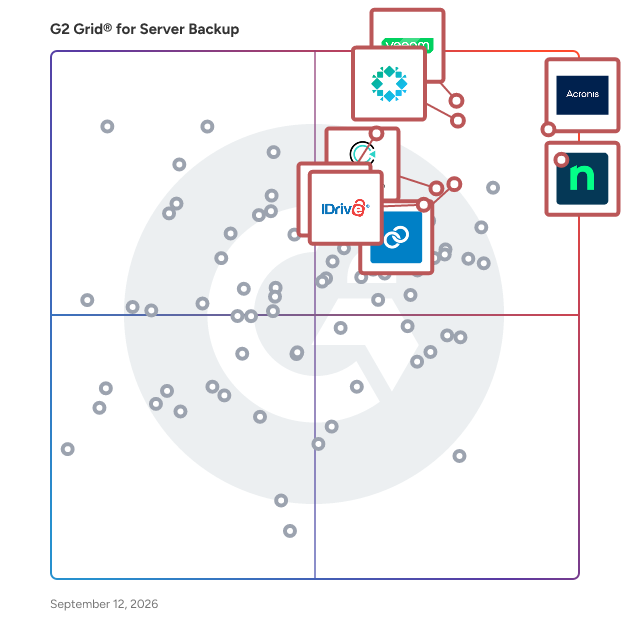
Products classified in the overall Server Backup category are similar in many regards and help companies of all sizes solve their business problems. However, small business features, pricing, setup, and installation differ from businesses of other sizes, which is why we match buyers to the right Small Business Server Backup to fit their needs. Compare product ratings based on reviews from enterprise users or connect with one of G2's buying advisors to find the right solutions within the Small Business Server Backup category.

In addition to qualifying for inclusion in the Server Backup Software category, to qualify for inclusion in the Small Business Server Backup Software category, a product must have at least 10 reviews left by a reviewer from a small business.

Show More
Show Less

G2 takes pride in showing unbiased reviews on user satisfaction in our ratings and reports. We do not allow paid placements in any of our ratings, rankings, or reports. Learn about our scoring methodologies.

1 filter applied
Clear All

49 Listings in Small Business Server Backup Available

(1,266)4.7 out of 5
8th Easiest To Use in Server Backup software
View top Consulting Services for Acronis Cyber Protect Cloud
Save to My Lists
  • Overview
    Expand/Collapse Overview
  • Product Description
    How are these determined?Information
    This description is provided by the seller.

    Acronis delivers the world’s most complete cyber resilience platform, combining backup, disaster recovery, cybersecurity, RMM, and business operations tools into a single, natively integrated solution

    Users
    • Director
    • CEO
    Industries
    • Information Technology and Services
    • Computer & Network Security
    Market Segment
    • 69% Small-Business
    • 27% Mid-Market
    User Sentiment
    How are these determined?Information
    These insights, currently in beta, are compiled from user reviews and grouped to display a high-level overview of the software.
    • Acronis Cyber Protect Cloud is a platform primarily used for backups and security, offering an all-in-one solution for data protection and cybersecurity.
    • Users like the platform's ease of use, its ability to manage and change things on the fly, and the provision of monthly reports on customer sales and engagement.
    • Users mentioned that the support could be improved, the pricing structure is a bit complicated, and operational activity gets slow when doing complex backups or restoration of data.
  • Pros and Cons
    Expand/Collapse Pros and Cons
  • Acronis Cyber Protect Cloud Pros and Cons
    How are these determined?Information
    Pros and Cons are compiled from review feedback and grouped into themes to provide an easy-to-understand summary of user reviews.
    Pros
    Ease of Use
    195
    Backup Solutions
    190
    Backup Ease
    151
    Protection
    140
    Reliability
    139
    Cons
    Slow Performance
    69
    Expensive
    54
    Poor Customer Support
    50
    Complexity
    46
    Learning Curve
    37
  • User Satisfaction
    Expand/Collapse User Satisfaction
  • Acronis Cyber Protect Cloud features and usability ratings that predict user satisfaction
    9.2
    Has the product been a good partner in doing business?
    Average: 8.7
    9.2
    Security Standards
    Average: 8.7
    9.1
    Disaster Recovery
    Average: 8.6
    9.0
    Activity Monitoring
    Average: 8.6
  • Seller Details
    Expand/Collapse Seller Details
  • Seller Details
    Seller
    Acronis
    Company Website
    Year Founded
    2003
    HQ Location
    Schaffhausen
    Twitter
    @acronis
    95,076 Twitter followers
    LinkedIn® Page
    www.linkedin.com
    1,921 employees on LinkedIn®
Product Description
How are these determined?Information
This description is provided by the seller.

Acronis delivers the world’s most complete cyber resilience platform, combining backup, disaster recovery, cybersecurity, RMM, and business operations tools into a single, natively integrated solution

Users
  • Director
  • CEO
Industries
  • Information Technology and Services
  • Computer & Network Security
Market Segment
  • 69% Small-Business
  • 27% Mid-Market
User Sentiment
How are these determined?Information
These insights, currently in beta, are compiled from user reviews and grouped to display a high-level overview of the software.
  • Acronis Cyber Protect Cloud is a platform primarily used for backups and security, offering an all-in-one solution for data protection and cybersecurity.
  • Users like the platform's ease of use, its ability to manage and change things on the fly, and the provision of monthly reports on customer sales and engagement.
  • Users mentioned that the support could be improved, the pricing structure is a bit complicated, and operational activity gets slow when doing complex backups or restoration of data.
Acronis Cyber Protect Cloud Pros and Cons
How are these determined?Information
Pros and Cons are compiled from review feedback and grouped into themes to provide an easy-to-understand summary of user reviews.
Pros
Ease of Use
195
Backup Solutions
190
Backup Ease
151
Protection
140
Reliability
139
Cons
Slow Performance
69
Expensive
54
Poor Customer Support
50
Complexity
46
Learning Curve
37
Acronis Cyber Protect Cloud features and usability ratings that predict user satisfaction
9.2
Has the product been a good partner in doing business?
Average: 8.7
9.2
Security Standards
Average: 8.7
9.1
Disaster Recovery
Average: 8.6
9.0
Activity Monitoring
Average: 8.6
Seller Details
Seller
Acronis
Company Website
Year Founded
2003
HQ Location
Schaffhausen
Twitter
@acronis
95,076 Twitter followers
LinkedIn® Page
www.linkedin.com
1,921 employees on LinkedIn®
(3,241)4.7 out of 5
Optimized for quick response
3rd Easiest To Use in Server Backup software
View top Consulting Services for NinjaOne
Save to My Lists
  • Overview
    Expand/Collapse Overview
  • Product Description
    How are these determined?Information
    This description is provided by the seller.

    NinjaOne unifies IT to simplify work for 35,000+ customers in 140+ countries. The NinjaOne Unified IT Operations Platform delivers endpoint management, autonomous patching, backup, and remote acces

    Users
    • IT Manager
    • Owner
    Industries
    • Information Technology and Services
    • Computer & Network Security
    Market Segment
    • 49% Mid-Market
    • 45% Small-Business
    User Sentiment
    How are these determined?Information
    These insights, currently in beta, are compiled from user reviews and grouped to display a high-level overview of the software.
    • NinjaOne is a versatile tool that serves multiple purposes, including device management, monitoring, application management, and more.
    • Users frequently mention the ease of use, reliability, and the quality of the remote screen share, as well as the continuous updates that add new features and make patch management easier.
    • Users mentioned that certain settings and features can be unnecessarily complicated, the interface can feel cluttered due to recent updates, and the reporting feature could use some improvement.
  • Pros and Cons
    Expand/Collapse Pros and Cons
  • NinjaOne Pros and Cons
    How are these determined?Information
    Pros and Cons are compiled from review feedback and grouped into themes to provide an easy-to-understand summary of user reviews.
    Pros
    Ease of Use
    1,871
    Features
    1,212
    Remote Access
    1,092
    Automation
    1,072
    Customer Support
    995
    Cons
    Missing Features
    960
    Limited Features
    462
    Improvement Needed
    457
    Feature Issues
    441
    Needs Improvement
    428
  • User Satisfaction
    Expand/Collapse User Satisfaction
  • NinjaOne features and usability ratings that predict user satisfaction
    9.5
    Has the product been a good partner in doing business?
    Average: 8.7
    8.7
    Security Standards
    Average: 8.7
    8.3
    Disaster Recovery
    Average: 8.6
    9.2
    Activity Monitoring
    Average: 8.6
  • Seller Details
    Expand/Collapse Seller Details
  • Seller Details
    Seller
    NinjaOne
    Company Website
    Year Founded
    2013
    HQ Location
    Austin, Texas
    Twitter
    @NinjaOne
    3,416 Twitter followers
    LinkedIn® Page
    www.linkedin.com
    2,006 employees on LinkedIn®
Product Description
How are these determined?Information
This description is provided by the seller.

NinjaOne unifies IT to simplify work for 35,000+ customers in 140+ countries. The NinjaOne Unified IT Operations Platform delivers endpoint management, autonomous patching, backup, and remote acces

Users
  • IT Manager
  • Owner
Industries
  • Information Technology and Services
  • Computer & Network Security
Market Segment
  • 49% Mid-Market
  • 45% Small-Business
User Sentiment
How are these determined?Information
These insights, currently in beta, are compiled from user reviews and grouped to display a high-level overview of the software.
  • NinjaOne is a versatile tool that serves multiple purposes, including device management, monitoring, application management, and more.
  • Users frequently mention the ease of use, reliability, and the quality of the remote screen share, as well as the continuous updates that add new features and make patch management easier.
  • Users mentioned that certain settings and features can be unnecessarily complicated, the interface can feel cluttered due to recent updates, and the reporting feature could use some improvement.
NinjaOne Pros and Cons
How are these determined?Information
Pros and Cons are compiled from review feedback and grouped into themes to provide an easy-to-understand summary of user reviews.
Pros
Ease of Use
1,871
Features
1,212
Remote Access
1,092
Automation
1,072
Customer Support
995
Cons
Missing Features
960
Limited Features
462
Improvement Needed
457
Feature Issues
441
Needs Improvement
428
NinjaOne features and usability ratings that predict user satisfaction
9.5
Has the product been a good partner in doing business?
Average: 8.7
8.7
Security Standards
Average: 8.7
8.3
Disaster Recovery
Average: 8.6
9.2
Activity Monitoring
Average: 8.6
Seller Details
Seller
NinjaOne
Company Website
Year Founded
2013
HQ Location
Austin, Texas
Twitter
@NinjaOne
3,416 Twitter followers
LinkedIn® Page
www.linkedin.com
2,006 employees on LinkedIn®

This is how G2 Deals can help you:

  • Easily shop for curated – and trusted – software
  • Own your own software buying journey
  • Discover exclusive deals on software
(269)4.6 out of 5
4th Easiest To Use in Server Backup software
Save to My Lists
  • Overview
    Expand/Collapse Overview
  • Product Description
    How are these determined?Information
    This description is provided by the seller.

    Datto SIRIS is an all-in-one BCDR solution built for MSPs to efficiently prevent data loss and minimize downtime. Utilizing a cloud-first approach, MSPs can offer their clients local backup and re

    Users
    • Owner
    • President
    Industries
    • Information Technology and Services
    • Computer & Network Security
    Market Segment
    • 65% Small-Business
    • 29% Mid-Market
    User Sentiment
    How are these determined?Information
    These insights, currently in beta, are compiled from user reviews and grouped to display a high-level overview of the software.
    • Datto BCDR is a backup and disaster recovery solution that restores individual files quickly and backs up both servers and desktops.
    • Reviewers like the robust security features, fast and reliable recovery, and user-friendly interface, which contribute to a dependable and efficient service.
    • Reviewers noted that Datto BCDR can be slow when backing up large amounts of data, the interface could be more intuitive, and the reporting features would benefit from greater customization options.
  • Pros and Cons
    Expand/Collapse Pros and Cons
  • Datto BCDR Pros and Cons
    How are these determined?Information
    Pros and Cons are compiled from review feedback and grouped into themes to provide an easy-to-understand summary of user reviews.
    Pros
    Ease of Use
    89
    Reliability
    81
    Customer Support
    61
    Recovery Ease
    61
    Backup Solutions
    59
    Cons
    Expensive
    35
    Poor Customer Support
    25
    Pricing Issues
    19
    Restore Issues
    16
    Storage Issues
    16
  • User Satisfaction
    Expand/Collapse User Satisfaction
  • Datto BCDR features and usability ratings that predict user satisfaction
    9.0
    Has the product been a good partner in doing business?
    Average: 8.7
    9.2
    Security Standards
    Average: 8.7
    9.6
    Disaster Recovery
    Average: 8.6
    9.0
    Activity Monitoring
    Average: 8.6
  • Seller Details
    Expand/Collapse Seller Details
  • Seller Details
    Seller
    Kaseya
    Company Website
    Year Founded
    2000
    HQ Location
    Miami, FL
    Twitter
    @KaseyaCorp
    17,481 Twitter followers
    LinkedIn® Page
    www.linkedin.com
    5,388 employees on LinkedIn®
Product Description
How are these determined?Information
This description is provided by the seller.

Datto SIRIS is an all-in-one BCDR solution built for MSPs to efficiently prevent data loss and minimize downtime. Utilizing a cloud-first approach, MSPs can offer their clients local backup and re

Users
  • Owner
  • President
Industries
  • Information Technology and Services
  • Computer & Network Security
Market Segment
  • 65% Small-Business
  • 29% Mid-Market
User Sentiment
How are these determined?Information
These insights, currently in beta, are compiled from user reviews and grouped to display a high-level overview of the software.
  • Datto BCDR is a backup and disaster recovery solution that restores individual files quickly and backs up both servers and desktops.
  • Reviewers like the robust security features, fast and reliable recovery, and user-friendly interface, which contribute to a dependable and efficient service.
  • Reviewers noted that Datto BCDR can be slow when backing up large amounts of data, the interface could be more intuitive, and the reporting features would benefit from greater customization options.
Datto BCDR Pros and Cons
How are these determined?Information
Pros and Cons are compiled from review feedback and grouped into themes to provide an easy-to-understand summary of user reviews.
Pros
Ease of Use
89
Reliability
81
Customer Support
61
Recovery Ease
61
Backup Solutions
59
Cons
Expensive
35
Poor Customer Support
25
Pricing Issues
19
Restore Issues
16
Storage Issues
16
Datto BCDR features and usability ratings that predict user satisfaction
9.0
Has the product been a good partner in doing business?
Average: 8.7
9.2
Security Standards
Average: 8.7
9.6
Disaster Recovery
Average: 8.6
9.0
Activity Monitoring
Average: 8.6
Seller Details
Seller
Kaseya
Company Website
Year Founded
2000
HQ Location
Miami, FL
Twitter
@KaseyaCorp
17,481 Twitter followers
LinkedIn® Page
www.linkedin.com
5,388 employees on LinkedIn®
(409)4.5 out of 5
Optimized for quick response
6th Easiest To Use in Server Backup software
Save to My Lists
  • Overview
    Expand/Collapse Overview
  • Product Description
    How are these determined?Information
    This description is provided by the seller.

    Cove Data Protection, from N-able, is a cloud-first backup and disaster recovery service for servers, workstations, and Microsoft 365™, all managed from a multitenant web-based dashboard. Cove was

    Users
    • President
    • Owner
    Industries
    • Information Technology and Services
    • Computer & Network Security
    Market Segment
    • 76% Small-Business
    • 21% Mid-Market
    User Sentiment
    How are these determined?Information
    These insights, currently in beta, are compiled from user reviews and grouped to display a high-level overview of the software.
    • N-Able Cove Data is a tool that allows technicians to monitor the backup status of multiple computers, aiming to prevent problems by ensuring all backups are fully monitored.
    • Reviewers like the user-friendly restoration process, the efficient data backup and restoration, the easy-to-use interface, the secure and encrypted backup solutions, and the proactive alerting and reporting features.
    • Users reported issues with the notification settings, slow restoration dependent on a good internet connection, difficulties in reaching support, confusion during the deployment process, problems during internet outages, issues with the backup manager losing its connection, difficulties with retention policies and storage location configuration during setup, and the lack of Google platform backup support.
  • Pros and Cons
    Expand/Collapse Pros and Cons
  • Cove Data Protection Pros and Cons
    How are these determined?Information
    Pros and Cons are compiled from review feedback and grouped into themes to provide an easy-to-understand summary of user reviews.
    Pros
    Ease of Use
    130
    Backup Solutions
    70
    Backup Frequency
    62
    Reliability
    60
    Easy Setup
    52
    Cons
    Backup Issues
    40
    Backup Failures
    25
    Restore Issues
    25
    Slow Restoration
    20
    Restoration Issues
    19
  • User Satisfaction
    Expand/Collapse User Satisfaction
  • Cove Data Protection features and usability ratings that predict user satisfaction
    8.9
    Has the product been a good partner in doing business?
    Average: 8.7
    8.8
    Security Standards
    Average: 8.7
    8.8
    Disaster Recovery
    Average: 8.6
    8.9
    Activity Monitoring
    Average: 8.6
  • Seller Details
    Expand/Collapse Seller Details
  • Seller Details
    Seller
    N-able
    Company Website
    HQ Location
    Morrisville, North Carolina
    Twitter
    @Nable
    15,926 Twitter followers
    LinkedIn® Page
    www.linkedin.com
    2,149 employees on LinkedIn®
    Ownership
    NYSE: NABL
Product Description
How are these determined?Information
This description is provided by the seller.

Cove Data Protection, from N-able, is a cloud-first backup and disaster recovery service for servers, workstations, and Microsoft 365™, all managed from a multitenant web-based dashboard. Cove was

Users
  • President
  • Owner
Industries
  • Information Technology and Services
  • Computer & Network Security
Market Segment
  • 76% Small-Business
  • 21% Mid-Market
User Sentiment
How are these determined?Information
These insights, currently in beta, are compiled from user reviews and grouped to display a high-level overview of the software.
  • N-Able Cove Data is a tool that allows technicians to monitor the backup status of multiple computers, aiming to prevent problems by ensuring all backups are fully monitored.
  • Reviewers like the user-friendly restoration process, the efficient data backup and restoration, the easy-to-use interface, the secure and encrypted backup solutions, and the proactive alerting and reporting features.
  • Users reported issues with the notification settings, slow restoration dependent on a good internet connection, difficulties in reaching support, confusion during the deployment process, problems during internet outages, issues with the backup manager losing its connection, difficulties with retention policies and storage location configuration during setup, and the lack of Google platform backup support.
Cove Data Protection Pros and Cons
How are these determined?Information
Pros and Cons are compiled from review feedback and grouped into themes to provide an easy-to-understand summary of user reviews.
Pros
Ease of Use
130
Backup Solutions
70
Backup Frequency
62
Reliability
60
Easy Setup
52
Cons
Backup Issues
40
Backup Failures
25
Restore Issues
25
Slow Restoration
20
Restoration Issues
19
Cove Data Protection features and usability ratings that predict user satisfaction
8.9
Has the product been a good partner in doing business?
Average: 8.7
8.8
Security Standards
Average: 8.7
8.8
Disaster Recovery
Average: 8.6
8.9
Activity Monitoring
Average: 8.6
Seller Details
Seller
N-able
Company Website
HQ Location
Morrisville, North Carolina
Twitter
@Nable
15,926 Twitter followers
LinkedIn® Page
www.linkedin.com
2,149 employees on LinkedIn®
Ownership
NYSE: NABL
  • Overview
    Expand/Collapse Overview
  • Product Description
    How are these determined?Information
    This description is provided by the seller.

    Azure Backup is a centralized cloud-based service designed to protect your data across various environments, including on-premises and cloud-based infrastructures. It offers enterprise-grade data prot

    Users
    No information available
    Industries
    • Information Technology and Services
    • Computer Software
    Market Segment
    • 46% Mid-Market
    • 29% Enterprise
  • Pros and Cons
    Expand/Collapse Pros and Cons
  • Azure Backup Pros and Cons
    How are these determined?Information
    Pros and Cons are compiled from review feedback and grouped into themes to provide an easy-to-understand summary of user reviews.
    Pros
    Reliability
    3
    Ease of Use
    2
    Easy Setup
    2
    Management Ease
    2
    Centralized Management
    1
    Cons
    Expensive
    3
  • User Satisfaction
    Expand/Collapse User Satisfaction
  • Azure Backup features and usability ratings that predict user satisfaction
    9.0
    Has the product been a good partner in doing business?
    Average: 8.7
    8.8
    Security Standards
    Average: 8.7
    8.9
    Disaster Recovery
    Average: 8.6
    8.9
    Activity Monitoring
    Average: 8.6
  • Seller Details
    Expand/Collapse Seller Details
  • Seller Details
    Seller
    Microsoft
    Year Founded
    1975
    HQ Location
    Redmond, Washington
    Twitter
    @microsoft
    13,087,439 Twitter followers
    LinkedIn® Page
    www.linkedin.com
    226,132 employees on LinkedIn®
    Ownership
    MSFT
Product Description
How are these determined?Information
This description is provided by the seller.

Azure Backup is a centralized cloud-based service designed to protect your data across various environments, including on-premises and cloud-based infrastructures. It offers enterprise-grade data prot

Users
No information available
Industries
  • Information Technology and Services
  • Computer Software
Market Segment
  • 46% Mid-Market
  • 29% Enterprise
Azure Backup Pros and Cons
How are these determined?Information
Pros and Cons are compiled from review feedback and grouped into themes to provide an easy-to-understand summary of user reviews.
Pros
Reliability
3
Ease of Use
2
Easy Setup
2
Management Ease
2
Centralized Management
1
Cons
Expensive
3
Azure Backup features and usability ratings that predict user satisfaction
9.0
Has the product been a good partner in doing business?
Average: 8.7
8.8
Security Standards
Average: 8.7
8.9
Disaster Recovery
Average: 8.6
8.9
Activity Monitoring
Average: 8.6
Seller Details
Seller
Microsoft
Year Founded
1975
HQ Location
Redmond, Washington
Twitter
@microsoft
13,087,439 Twitter followers
LinkedIn® Page
www.linkedin.com
226,132 employees on LinkedIn®
Ownership
MSFT
(686)4.6 out of 5
Optimized for quick response
5th Easiest To Use in Server Backup software
Save to My Lists
  • Overview
    Expand/Collapse Overview
  • Product Description
    How are these determined?Information
    This description is provided by the seller.

    #1 Global Leader in Data Resilience We keep businesses worldwide up and running From secure backups to intelligent data insights, Veeam Data Platform is engineered to tackle the realities of t

    Users
    • IT Manager
    • System Administrator
    Industries
    • Information Technology and Services
    • Government Administration
    Market Segment
    • 59% Mid-Market
    • 23% Small-Business
    User Sentiment
    How are these determined?Information
    These insights, currently in beta, are compiled from user reviews and grouped to display a high-level overview of the software.
    • Veeam Data Platform is a data backup and recovery solution that offers easy management, strong ransomware protection, and seamless cloud integration.
    • Reviewers like the platform's reliability, fast recovery, easy setup, and strong cloud-based support, appreciating its user-friendly interface, seamless integration process, and the confidence it provides in restoring critical data.
    • Reviewers noted that the licensing and cost can be expensive, maintenance can be tricky, and the platform has a few limitations, including resource-intensive operations during large backups, a steep learning curve for some features, and unclear reporting capabilities.
  • Pros and Cons
    Expand/Collapse Pros and Cons
  • Veeam Data Platform Pros and Cons
    How are these determined?Information
    Pros and Cons are compiled from review feedback and grouped into themes to provide an easy-to-understand summary of user reviews.
    Pros
    Ease of Use
    106
    Backup Solutions
    102
    Backup Frequency
    68
    Reliability
    67
    Easy Setup
    56
    Cons
    Backup Issues
    34
    Expensive
    33
    Licensing Issues
    23
    Backup Problems
    21
    Complex Setup
    20
  • User Satisfaction
    Expand/Collapse User Satisfaction
  • Veeam Data Platform features and usability ratings that predict user satisfaction
    9.0
    Has the product been a good partner in doing business?
    Average: 8.7
    9.1
    Security Standards
    Average: 8.7
    9.3
    Disaster Recovery
    Average: 8.6
    8.9
    Activity Monitoring
    Average: 8.6
  • Seller Details
    Expand/Collapse Seller Details
  • Seller Details
    Seller
    Veeam
    Company Website
    Year Founded
    2006
    HQ Location
    Columbus, OH
    Twitter
    @veeam
    51,668 Twitter followers
    LinkedIn® Page
    www.linkedin.com
    6,666 employees on LinkedIn®
Product Description
How are these determined?Information
This description is provided by the seller.

#1 Global Leader in Data Resilience We keep businesses worldwide up and running From secure backups to intelligent data insights, Veeam Data Platform is engineered to tackle the realities of t

Users
  • IT Manager
  • System Administrator
Industries
  • Information Technology and Services
  • Government Administration
Market Segment
  • 59% Mid-Market
  • 23% Small-Business
User Sentiment
How are these determined?Information
These insights, currently in beta, are compiled from user reviews and grouped to display a high-level overview of the software.
  • Veeam Data Platform is a data backup and recovery solution that offers easy management, strong ransomware protection, and seamless cloud integration.
  • Reviewers like the platform's reliability, fast recovery, easy setup, and strong cloud-based support, appreciating its user-friendly interface, seamless integration process, and the confidence it provides in restoring critical data.
  • Reviewers noted that the licensing and cost can be expensive, maintenance can be tricky, and the platform has a few limitations, including resource-intensive operations during large backups, a steep learning curve for some features, and unclear reporting capabilities.
Veeam Data Platform Pros and Cons
How are these determined?Information
Pros and Cons are compiled from review feedback and grouped into themes to provide an easy-to-understand summary of user reviews.
Pros
Ease of Use
106
Backup Solutions
102
Backup Frequency
68
Reliability
67
Easy Setup
56
Cons
Backup Issues
34
Expensive
33
Licensing Issues
23
Backup Problems
21
Complex Setup
20
Veeam Data Platform features and usability ratings that predict user satisfaction
9.0
Has the product been a good partner in doing business?
Average: 8.7
9.1
Security Standards
Average: 8.7
9.3
Disaster Recovery
Average: 8.6
8.9
Activity Monitoring
Average: 8.6
Seller Details
Seller
Veeam
Company Website
Year Founded
2006
HQ Location
Columbus, OH
Twitter
@veeam
51,668 Twitter followers
LinkedIn® Page
www.linkedin.com
6,666 employees on LinkedIn®
  • Overview
    Expand/Collapse Overview
  • Product Description
    How are these determined?Information
    This description is provided by the seller.

    IDrive protects all your PCs, Macs, mobile devices, Servers, your Cloud Applications Data (SAAS) including Office 365, Google Workspace and more, and provides the best in class S3 compatible Object St

    Users
    • Owner
    • President
    Industries
    • Photography
    • Information Technology and Services
    Market Segment
    • 89% Small-Business
    • 4% Mid-Market
    User Sentiment
    How are these determined?Information
    These insights, currently in beta, are compiled from user reviews and grouped to display a high-level overview of the software.
    • IDrive Online and SaaS Backup, Object Storage e2 is a backup tool that stores files on a server and allows users to back up multiple devices to one location.
    • Users frequently mention the ease of setup, the affordability, the 'set it and forget it' nature of the product, and the peace of mind it provides knowing their data is safe.
    • Reviewers experienced issues with account login, a confusing interface with too many similar options, dated app's interface, unclear backup progress, and slow upload speeds.
  • Pros and Cons
    Expand/Collapse Pros and Cons
  • IDrive Online and SaaS Backup, Object Storage e2 Pros and Cons
    How are these determined?Information
    Pros and Cons are compiled from review feedback and grouped into themes to provide an easy-to-understand summary of user reviews.
    Pros
    Ease of Use
    423
    Affordable
    345
    Storage Capacity
    318
    Backup Frequency
    306
    Setup Ease
    286
    Cons
    Backup Issues
    211
    Poor Interface Design
    115
    Backup Failures
    109
    Storage Issues
    97
    Slow Backup
    96
  • User Satisfaction
    Expand/Collapse User Satisfaction
  • IDrive Online and SaaS Backup, Object Storage e2 features and usability ratings that predict user satisfaction
    9.0
    Has the product been a good partner in doing business?
    Average: 8.7
    9.1
    Security Standards
    Average: 8.7
    9.2
    Disaster Recovery
    Average: 8.6
    8.6
    Activity Monitoring
    Average: 8.6
  • Seller Details
    Expand/Collapse Seller Details
  • Seller Details
    Seller
    IDrive
    Year Founded
    2007
    HQ Location
    Calabasas, CA
    Twitter
    @IDriveBackup
    17,879 Twitter followers
    LinkedIn® Page
    www.linkedin.com
    123 employees on LinkedIn®
Product Description
How are these determined?Information
This description is provided by the seller.

IDrive protects all your PCs, Macs, mobile devices, Servers, your Cloud Applications Data (SAAS) including Office 365, Google Workspace and more, and provides the best in class S3 compatible Object St

Users
  • Owner
  • President
Industries
  • Photography
  • Information Technology and Services
Market Segment
  • 89% Small-Business
  • 4% Mid-Market
User Sentiment
How are these determined?Information
These insights, currently in beta, are compiled from user reviews and grouped to display a high-level overview of the software.
  • IDrive Online and SaaS Backup, Object Storage e2 is a backup tool that stores files on a server and allows users to back up multiple devices to one location.
  • Users frequently mention the ease of setup, the affordability, the 'set it and forget it' nature of the product, and the peace of mind it provides knowing their data is safe.
  • Reviewers experienced issues with account login, a confusing interface with too many similar options, dated app's interface, unclear backup progress, and slow upload speeds.
IDrive Online and SaaS Backup, Object Storage e2 Pros and Cons
How are these determined?Information
Pros and Cons are compiled from review feedback and grouped into themes to provide an easy-to-understand summary of user reviews.
Pros
Ease of Use
423
Affordable
345
Storage Capacity
318
Backup Frequency
306
Setup Ease
286
Cons
Backup Issues
211
Poor Interface Design
115
Backup Failures
109
Storage Issues
97
Slow Backup
96
IDrive Online and SaaS Backup, Object Storage e2 features and usability ratings that predict user satisfaction
9.0
Has the product been a good partner in doing business?
Average: 8.7
9.1
Security Standards
Average: 8.7
9.2
Disaster Recovery
Average: 8.6
8.6
Activity Monitoring
Average: 8.6
Seller Details
Seller
IDrive
Year Founded
2007
HQ Location
Calabasas, CA
Twitter
@IDriveBackup
17,879 Twitter followers
LinkedIn® Page
www.linkedin.com
123 employees on LinkedIn®
  • Overview
    Expand/Collapse Overview
  • Product Description
    How are these determined?Information
    This description is provided by the seller.

    Synology ActiveProtect is a purpose-built backup appliance solution designed to centralize, protect, and recover enterprise data via a unified platform. Keep an eye on your backups no matter where you

    Users
    No information available
    Industries
    • Information Technology and Services
    Market Segment
    • 78% Small-Business
    • 19% Mid-Market
  • Pros and Cons
    Expand/Collapse Pros and Cons
  • Synology Data Protection Solutions Pros and Cons
    How are these determined?Information
    Pros and Cons are compiled from review feedback and grouped into themes to provide an easy-to-understand summary of user reviews.
    Pros
    Ease of Use
    15
    Setup Ease
    8
    Easy Setup
    7
    User Interface
    7
    Backup Ease
    6
    Cons
    Backup Issues
    8
    Backup Failures
    5
    Data Deletion Issues
    3
    Difficult Learning
    3
    Restore Issues
    3
  • User Satisfaction
    Expand/Collapse User Satisfaction
  • Synology Data Protection Solutions features and usability ratings that predict user satisfaction
    8.8
    Has the product been a good partner in doing business?
    Average: 8.7
    9.3
    Security Standards
    Average: 8.7
    9.0
    Disaster Recovery
    Average: 8.6
    8.8
    Activity Monitoring
    Average: 8.6
  • Seller Details
    Expand/Collapse Seller Details
  • Seller Details
    Seller
    Synology
    Year Founded
    2000
    HQ Location
    Taiwan
    Twitter
    @Synology
    67,576 Twitter followers
    LinkedIn® Page
    www.linkedin.com
    976 employees on LinkedIn®
Product Description
How are these determined?Information
This description is provided by the seller.

Synology ActiveProtect is a purpose-built backup appliance solution designed to centralize, protect, and recover enterprise data via a unified platform. Keep an eye on your backups no matter where you

Users
No information available
Industries
  • Information Technology and Services
Market Segment
  • 78% Small-Business
  • 19% Mid-Market
Synology Data Protection Solutions Pros and Cons
How are these determined?Information
Pros and Cons are compiled from review feedback and grouped into themes to provide an easy-to-understand summary of user reviews.
Pros
Ease of Use
15
Setup Ease
8
Easy Setup
7
User Interface
7
Backup Ease
6
Cons
Backup Issues
8
Backup Failures
5
Data Deletion Issues
3
Difficult Learning
3
Restore Issues
3
Synology Data Protection Solutions features and usability ratings that predict user satisfaction
8.8
Has the product been a good partner in doing business?
Average: 8.7
9.3
Security Standards
Average: 8.7
9.0
Disaster Recovery
Average: 8.6
8.8
Activity Monitoring
Average: 8.6
Seller Details
Seller
Synology
Year Founded
2000
HQ Location
Taiwan
Twitter
@Synology
67,576 Twitter followers
LinkedIn® Page
www.linkedin.com
976 employees on LinkedIn®
Entry Level Price:Starting at $2.45
  • Overview
    Expand/Collapse Overview
  • Product Description
    How are these determined?Information
    This description is provided by the seller.

    NAKIVO Backup & Replication is a fast, affordable and top-rated backup and disaster recovery solution for VMware vSphere, Microsoft Hyper-V, Nutanix AHV, Proxmox VE, physical machines, NAS, Micros

    Users
    • IT Manager
    • Owner
    Industries
    • Information Technology and Services
    • Computer & Network Security
    Market Segment
    • 59% Small-Business
    • 36% Mid-Market
    User Sentiment
    How are these determined?Information
    These insights, currently in beta, are compiled from user reviews and grouped to display a high-level overview of the software.
    • NAKIVO Backup & Replication is a backup solution that offers features such as replication, backup, failover, failback, and data protection for various environments including VMware, Hyper-V, Nutanix, Proxmox, physical servers, Microsoft 365, NAS, and multiple clouds.
    • Users frequently mention the ease of setup, user-friendly interface, robust features, and excellent customer support as key benefits of using NAKIVO Backup & Replication, along with its affordability and efficient data protection capabilities.
    • Users mentioned some limitations such as lack of support for Unix like platforms like IBM AIX servers, outdated design of the admin console, and desire for more advanced reporting and monitoring features, as well as a learning curve for new users.
  • Pros and Cons
    Expand/Collapse Pros and Cons
  • NAKIVO Backup & Replication Pros and Cons
    How are these determined?Information
    Pros and Cons are compiled from review feedback and grouped into themes to provide an easy-to-understand summary of user reviews.
    Pros
    Ease of Use
    81
    Backup Solutions
    64
    Customer Support
    63
    Features
    49
    Affordable
    46
    Cons
    Backup Issues
    19
    Backup Problems
    13
    Storage Limitations
    13
    Limited Features
    11
    Lack of Backup
    10
  • User Satisfaction
    Expand/Collapse User Satisfaction
  • NAKIVO Backup & Replication features and usability ratings that predict user satisfaction
    9.4
    Has the product been a good partner in doing business?
    Average: 8.7
    9.1
    Security Standards
    Average: 8.7
    9.4
    Disaster Recovery
    Average: 8.6
    9.2
    Activity Monitoring
    Average: 8.6
  • Seller Details
    Expand/Collapse Seller Details
  • Seller Details
    Year Founded
    2012
    HQ Location
    Sparks, Nevada, USA
    Twitter
    @Nakivo
    1,373 Twitter followers
    LinkedIn® Page
    www.linkedin.com
    177 employees on LinkedIn®
Product Description
How are these determined?Information
This description is provided by the seller.

NAKIVO Backup & Replication is a fast, affordable and top-rated backup and disaster recovery solution for VMware vSphere, Microsoft Hyper-V, Nutanix AHV, Proxmox VE, physical machines, NAS, Micros

Users
  • IT Manager
  • Owner
Industries
  • Information Technology and Services
  • Computer & Network Security
Market Segment
  • 59% Small-Business
  • 36% Mid-Market
User Sentiment
How are these determined?Information
These insights, currently in beta, are compiled from user reviews and grouped to display a high-level overview of the software.
  • NAKIVO Backup & Replication is a backup solution that offers features such as replication, backup, failover, failback, and data protection for various environments including VMware, Hyper-V, Nutanix, Proxmox, physical servers, Microsoft 365, NAS, and multiple clouds.
  • Users frequently mention the ease of setup, user-friendly interface, robust features, and excellent customer support as key benefits of using NAKIVO Backup & Replication, along with its affordability and efficient data protection capabilities.
  • Users mentioned some limitations such as lack of support for Unix like platforms like IBM AIX servers, outdated design of the admin console, and desire for more advanced reporting and monitoring features, as well as a learning curve for new users.
NAKIVO Backup & Replication Pros and Cons
How are these determined?Information
Pros and Cons are compiled from review feedback and grouped into themes to provide an easy-to-understand summary of user reviews.
Pros
Ease of Use
81
Backup Solutions
64
Customer Support
63
Features
49
Affordable
46
Cons
Backup Issues
19
Backup Problems
13
Storage Limitations
13
Limited Features
11
Lack of Backup
10
NAKIVO Backup & Replication features and usability ratings that predict user satisfaction
9.4
Has the product been a good partner in doing business?
Average: 8.7
9.1
Security Standards
Average: 8.7
9.4
Disaster Recovery
Average: 8.6
9.2
Activity Monitoring
Average: 8.6
Seller Details
Year Founded
2012
HQ Location
Sparks, Nevada, USA
Twitter
@Nakivo
1,373 Twitter followers
LinkedIn® Page
www.linkedin.com
177 employees on LinkedIn®
(97)4.7 out of 5
12th Easiest To Use in Server Backup software
Save to My Lists
Entry Level Price:Contact Us
  • Overview
    Expand/Collapse Overview
  • Product Description
    How are these determined?Information
    This description is provided by the seller.

    Vinchin is a professional provider of data protection solutions for enterprises. It provides a series of data backup, instant recovery, and offsite DR solutions for private cloud, public cloud and hyb

    Users
    • IT Manager
    • CEO
    Industries
    • Information Technology and Services
    • Computer & Network Security
    Market Segment
    • 60% Small-Business
    • 33% Mid-Market
    User Sentiment
    How are these determined?Information
    These insights, currently in beta, are compiled from user reviews and grouped to display a high-level overview of the software.
    • Vinchin Backup & Recovery is a backup tool designed for both cloud and local workloads, offering features such as backup automation, ease of use, and a user-friendly dashboard.
    • Users frequently mention the product's reliability, ease of use, fast and efficient backup process, intuitive interface, flexible recovery options, and responsive customer support.
    • Reviewers noted some issues such as the lack of a replication feature for Active and DR Site, problems with license when the Vinchin VM changed from one host to another, and the need for more frequent updates with new integrations.
  • Pros and Cons
    Expand/Collapse Pros and Cons
  • Vinchin Backup & Recovery Pros and Cons
    How are these determined?Information
    Pros and Cons are compiled from review feedback and grouped into themes to provide an easy-to-understand summary of user reviews.
    Pros
    Ease of Use
    21
    Backup Frequency
    13
    User Interface
    12
    Customer Support
    9
    Features
    9
    Cons
    Missing Features
    5
    Backup Issues
    4
    Limited Features
    3
    Update Issues
    3
    Complex Interface
    2
  • User Satisfaction
    Expand/Collapse User Satisfaction
  • Vinchin Backup & Recovery features and usability ratings that predict user satisfaction
    9.4
    Has the product been a good partner in doing business?
    Average: 8.7
    9.1
    Security Standards
    Average: 8.7
    9.2
    Disaster Recovery
    Average: 8.6
    9.3
    Activity Monitoring
    Average: 8.6
  • Seller Details
    Expand/Collapse Seller Details
  • Seller Details
    Seller
    Vinchin
    Year Founded
    2015
    HQ Location
    Chengdu , Sichuan
    Twitter
    @vinchin
    1 Twitter followers
    LinkedIn® Page
    www.linkedin.com
    102 employees on LinkedIn®
Product Description
How are these determined?Information
This description is provided by the seller.

Vinchin is a professional provider of data protection solutions for enterprises. It provides a series of data backup, instant recovery, and offsite DR solutions for private cloud, public cloud and hyb

Users
  • IT Manager
  • CEO
Industries
  • Information Technology and Services
  • Computer & Network Security
Market Segment
  • 60% Small-Business
  • 33% Mid-Market
User Sentiment
How are these determined?Information
These insights, currently in beta, are compiled from user reviews and grouped to display a high-level overview of the software.
  • Vinchin Backup & Recovery is a backup tool designed for both cloud and local workloads, offering features such as backup automation, ease of use, and a user-friendly dashboard.
  • Users frequently mention the product's reliability, ease of use, fast and efficient backup process, intuitive interface, flexible recovery options, and responsive customer support.
  • Reviewers noted some issues such as the lack of a replication feature for Active and DR Site, problems with license when the Vinchin VM changed from one host to another, and the need for more frequent updates with new integrations.
Vinchin Backup & Recovery Pros and Cons
How are these determined?Information
Pros and Cons are compiled from review feedback and grouped into themes to provide an easy-to-understand summary of user reviews.
Pros
Ease of Use
21
Backup Frequency
13
User Interface
12
Customer Support
9
Features
9
Cons
Missing Features
5
Backup Issues
4
Limited Features
3
Update Issues
3
Complex Interface
2
Vinchin Backup & Recovery features and usability ratings that predict user satisfaction
9.4
Has the product been a good partner in doing business?
Average: 8.7
9.1
Security Standards
Average: 8.7
9.2
Disaster Recovery
Average: 8.6
9.3
Activity Monitoring
Average: 8.6
Seller Details
Seller
Vinchin
Year Founded
2015
HQ Location
Chengdu , Sichuan
Twitter
@vinchin
1 Twitter followers
LinkedIn® Page
www.linkedin.com
102 employees on LinkedIn®
  • Overview
    Expand/Collapse Overview
  • Product Description
    How are these determined?Information
    This description is provided by the seller.

    Veeam® Backup for AWS delivers native, policy-based protection for reliable recovery from accidental deletion, ransomware and other data loss scenarios. With an API-first approach, immutable backups a

    Users
    • Software Engineer
    Industries
    • Information Technology and Services
    • Computer Software
    Market Segment
    • 39% Mid-Market
    • 32% Small-Business
  • Pros and Cons
    Expand/Collapse Pros and Cons
  • Veeam Backup for AWS Pros and Cons
    How are these determined?Information
    Pros and Cons are compiled from review feedback and grouped into themes to provide an easy-to-understand summary of user reviews.
    Pros
    Affordable
    1
    Backup Efficiency
    1
    Cloud Backup
    1
    Cloud Integration
    1
    Customer Support
    1
    Cons
    Technical Difficulties
    1
  • User Satisfaction
    Expand/Collapse User Satisfaction
  • Veeam Backup for AWS features and usability ratings that predict user satisfaction
    8.9
    Has the product been a good partner in doing business?
    Average: 8.7
    9.4
    Security Standards
    Average: 8.7
    9.3
    Disaster Recovery
    Average: 8.6
    9.1
    Activity Monitoring
    Average: 8.6
  • Seller Details
    Expand/Collapse Seller Details
  • Seller Details
    Seller
    Veeam
    Year Founded
    2006
    HQ Location
    Columbus, OH
    Twitter
    @veeam
    51,668 Twitter followers
    LinkedIn® Page
    www.linkedin.com
    6,666 employees on LinkedIn®
Product Description
How are these determined?Information
This description is provided by the seller.

Veeam® Backup for AWS delivers native, policy-based protection for reliable recovery from accidental deletion, ransomware and other data loss scenarios. With an API-first approach, immutable backups a

Users
  • Software Engineer
Industries
  • Information Technology and Services
  • Computer Software
Market Segment
  • 39% Mid-Market
  • 32% Small-Business
Veeam Backup for AWS Pros and Cons
How are these determined?Information
Pros and Cons are compiled from review feedback and grouped into themes to provide an easy-to-understand summary of user reviews.
Pros
Affordable
1
Backup Efficiency
1
Cloud Backup
1
Cloud Integration
1
Customer Support
1
Cons
Technical Difficulties
1
Veeam Backup for AWS features and usability ratings that predict user satisfaction
8.9
Has the product been a good partner in doing business?
Average: 8.7
9.4
Security Standards
Average: 8.7
9.3
Disaster Recovery
Average: 8.6
9.1
Activity Monitoring
Average: 8.6
Seller Details
Seller
Veeam
Year Founded
2006
HQ Location
Columbus, OH
Twitter
@veeam
51,668 Twitter followers
LinkedIn® Page
www.linkedin.com
6,666 employees on LinkedIn®
(131)4.6 out of 5
Optimized for quick response
Save to My Lists
  • Overview
    Expand/Collapse Overview
  • Product Description
    How are these determined?Information
    This description is provided by the seller.

    Axcient x360Recover is the most reliable, flexible and cost-effective business continuity and disaster recovery (BCDR) solution for MSPs and the SMBs they serve. With x360Recover you can comprehensiv

    Users
    • Owner
    • CEO
    Industries
    • Information Technology and Services
    • Computer & Network Security
    Market Segment
    • 78% Small-Business
    • 24% Mid-Market
  • Pros and Cons
    Expand/Collapse Pros and Cons
  • Axcient x360Recover Pros and Cons
    How are these determined?Information
    Pros and Cons are compiled from review feedback and grouped into themes to provide an easy-to-understand summary of user reviews.
    Pros
    Customer Support
    15
    Ease of Use
    14
    Reliability
    11
    Data Recovery
    8
    Recovery Ease
    7
    Cons
    UX Improvement
    7
    Navigation Issues
    4
    Storage Issues
    4
    Billing Issues
    3
    Confusing Implementation
    3
  • User Satisfaction
    Expand/Collapse User Satisfaction
  • Axcient x360Recover features and usability ratings that predict user satisfaction
    9.0
    Has the product been a good partner in doing business?
    Average: 8.7
    9.0
    Security Standards
    Average: 8.7
    9.4
    Disaster Recovery
    Average: 8.6
    8.7
    Activity Monitoring
    Average: 8.6
  • Seller Details
    Expand/Collapse Seller Details
  • Seller Details
    Company Website
    Year Founded
    1982
    HQ Location
    Tampa, FL
    Twitter
    @ConnectWise
    14,938 Twitter followers
    LinkedIn® Page
    www.linkedin.com
    3,452 employees on LinkedIn®
Product Description
How are these determined?Information
This description is provided by the seller.

Axcient x360Recover is the most reliable, flexible and cost-effective business continuity and disaster recovery (BCDR) solution for MSPs and the SMBs they serve. With x360Recover you can comprehensiv

Users
  • Owner
  • CEO
Industries
  • Information Technology and Services
  • Computer & Network Security
Market Segment
  • 78% Small-Business
  • 24% Mid-Market
Axcient x360Recover Pros and Cons
How are these determined?Information
Pros and Cons are compiled from review feedback and grouped into themes to provide an easy-to-understand summary of user reviews.
Pros
Customer Support
15
Ease of Use
14
Reliability
11
Data Recovery
8
Recovery Ease
7
Cons
UX Improvement
7
Navigation Issues
4
Storage Issues
4
Billing Issues
3
Confusing Implementation
3
Axcient x360Recover features and usability ratings that predict user satisfaction
9.0
Has the product been a good partner in doing business?
Average: 8.7
9.0
Security Standards
Average: 8.7
9.4
Disaster Recovery
Average: 8.6
8.7
Activity Monitoring
Average: 8.6
Seller Details
Company Website
Year Founded
1982
HQ Location
Tampa, FL
Twitter
@ConnectWise
14,938 Twitter followers
LinkedIn® Page
www.linkedin.com
3,452 employees on LinkedIn®
(172)4.6 out of 5
10th Easiest To Use in Server Backup software
Save to My Lists
Entry Level Price:$99.00
  • Overview
    Expand/Collapse Overview
  • Product Description
    How are these determined?Information
    This description is provided by the seller.

    ScalePad Backup Radar is an automated backup monitoring platform that Managed Service Providers can rely on. It eliminates errors and the risk of data loss by highlighting the gaps in any backup envir

    Users
    • Systems Engineer
    Industries
    • Information Technology and Services
    • Computer & Network Security
    Market Segment
    • 60% Small-Business
    • 36% Mid-Market
    User Sentiment
    How are these determined?Information
    These insights, currently in beta, are compiled from user reviews and grouped to display a high-level overview of the software.
    • Backup Radar is a tool that integrates with multiple platforms to monitor and organize backup alerts based on department groupings and teams.
    • Reviewers frequently mention the centralized view of all client backups, the automated ticketing and alerting system, and the easy integration with major backup vendors and PSA tools.
    • Users mentioned that the user interface could be more modern and responsive, customizing reports and alerts can be unintuitive, and there is a need for more granular control over ticket generation rules and better documentation.
  • Pros and Cons
    Expand/Collapse Pros and Cons
  • ScalePad Backup Radar Pros and Cons
    How are these determined?Information
    Pros and Cons are compiled from review feedback and grouped into themes to provide an easy-to-understand summary of user reviews.
    Pros
    Ease of Use
    28
    Customer Support
    25
    Integrations
    20
    Backup Frequency
    19
    Easy Integrations
    17
    Cons
    Backup Issues
    11
    Complex Setup
    8
    Improvement Needed
    5
    Software Integration
    4
    Difficult Configuration
    3
  • User Satisfaction
    Expand/Collapse User Satisfaction
  • ScalePad Backup Radar features and usability ratings that predict user satisfaction
    9.2
    Has the product been a good partner in doing business?
    Average: 8.7
    8.4
    Security Standards
    Average: 8.7
    8.3
    Disaster Recovery
    Average: 8.6
    9.0
    Activity Monitoring
    Average: 8.6
  • Seller Details
    Expand/Collapse Seller Details
  • Seller Details
    Seller
    ScalePad
    Company Website
    Year Founded
    2015
    HQ Location
    Vancouver, BC
    Twitter
    @GoScalePad
    987 Twitter followers
    LinkedIn® Page
    www.linkedin.com
    241 employees on LinkedIn®
Product Description
How are these determined?Information
This description is provided by the seller.

ScalePad Backup Radar is an automated backup monitoring platform that Managed Service Providers can rely on. It eliminates errors and the risk of data loss by highlighting the gaps in any backup envir

Users
  • Systems Engineer
Industries
  • Information Technology and Services
  • Computer & Network Security
Market Segment
  • 60% Small-Business
  • 36% Mid-Market
User Sentiment
How are these determined?Information
These insights, currently in beta, are compiled from user reviews and grouped to display a high-level overview of the software.
  • Backup Radar is a tool that integrates with multiple platforms to monitor and organize backup alerts based on department groupings and teams.
  • Reviewers frequently mention the centralized view of all client backups, the automated ticketing and alerting system, and the easy integration with major backup vendors and PSA tools.
  • Users mentioned that the user interface could be more modern and responsive, customizing reports and alerts can be unintuitive, and there is a need for more granular control over ticket generation rules and better documentation.
ScalePad Backup Radar Pros and Cons
How are these determined?Information
Pros and Cons are compiled from review feedback and grouped into themes to provide an easy-to-understand summary of user reviews.
Pros
Ease of Use
28
Customer Support
25
Integrations
20
Backup Frequency
19
Easy Integrations
17
Cons
Backup Issues
11
Complex Setup
8
Improvement Needed
5
Software Integration
4
Difficult Configuration
3
ScalePad Backup Radar features and usability ratings that predict user satisfaction
9.2
Has the product been a good partner in doing business?
Average: 8.7
8.4
Security Standards
Average: 8.7
8.3
Disaster Recovery
Average: 8.6
9.0
Activity Monitoring
Average: 8.6
Seller Details
Seller
ScalePad
Company Website
Year Founded
2015
HQ Location
Vancouver, BC
Twitter
@GoScalePad
987 Twitter followers
LinkedIn® Page
www.linkedin.com
241 employees on LinkedIn®
  • Overview
    Expand/Collapse Overview
  • Product Description
    How are these determined?Information
    This description is provided by the seller.

    Hornetsecurity‘s VM Backup is a powerful, reliable and easy-to-use backup and replication solution for Microsoft Hyper-V and VMware virtual machines (VMs) and physical Windows servers, to protect agai

    Users
    • Owner
    • IT Manager
    Industries
    • Information Technology and Services
    • Computer & Network Security
    Market Segment
    • 68% Small-Business
    • 30% Mid-Market
  • Pros and Cons
    Expand/Collapse Pros and Cons
  • Hornetsecurity VM Backup Pros and Cons
    How are these determined?Information
    Pros and Cons are compiled from review feedback and grouped into themes to provide an easy-to-understand summary of user reviews.
    Pros
    Customer Support
    1
    Ease of Use
    1
    Simple
    1
    Cons
    This product has not yet received any negative sentiments.
  • User Satisfaction
    Expand/Collapse User Satisfaction
  • Hornetsecurity VM Backup features and usability ratings that predict user satisfaction
    9.3
    Has the product been a good partner in doing business?
    Average: 8.7
    9.2
    Security Standards
    Average: 8.7
    9.3
    Disaster Recovery
    Average: 8.6
    9.2
    Activity Monitoring
    Average: 8.6
  • Seller Details
    Expand/Collapse Seller Details
  • Seller Details
    Year Founded
    2007
    HQ Location
    Hannover, DE
    Twitter
    @Hornetsecurity
    1,120 Twitter followers
    LinkedIn® Page
    www.linkedin.com
    378 employees on LinkedIn®
Product Description
How are these determined?Information
This description is provided by the seller.

Hornetsecurity‘s VM Backup is a powerful, reliable and easy-to-use backup and replication solution for Microsoft Hyper-V and VMware virtual machines (VMs) and physical Windows servers, to protect agai

Users
  • Owner
  • IT Manager
Industries
  • Information Technology and Services
  • Computer & Network Security
Market Segment
  • 68% Small-Business
  • 30% Mid-Market
Hornetsecurity VM Backup Pros and Cons
How are these determined?Information
Pros and Cons are compiled from review feedback and grouped into themes to provide an easy-to-understand summary of user reviews.
Pros
Customer Support
1
Ease of Use
1
Simple
1
Cons
This product has not yet received any negative sentiments.
Hornetsecurity VM Backup features and usability ratings that predict user satisfaction
9.3
Has the product been a good partner in doing business?
Average: 8.7
9.2
Security Standards
Average: 8.7
9.3
Disaster Recovery
Average: 8.6
9.2
Activity Monitoring
Average: 8.6
Seller Details
Year Founded
2007
HQ Location
Hannover, DE
Twitter
@Hornetsecurity
1,120 Twitter followers
LinkedIn® Page
www.linkedin.com
378 employees on LinkedIn®
(527)4.5 out of 5
Optimized for quick response
Save to My Lists
Entry Level Price:Free
  • Overview
    Expand/Collapse Overview
  • Product Description
    How are these determined?Information
    This description is provided by the seller.

    MSP360 Managed Backup is a centralized, multi-platform backup solution for MSPs and IT teams. It offers automated backups, compliance-ready security, white-labeling, and seamless integration with MSP3

    Users
    • Owner
    • President
    Industries
    • Information Technology and Services
    • Computer Software
    Market Segment
    • 81% Small-Business
    • 14% Mid-Market
    User Sentiment
    How are these determined?Information
    These insights, currently in beta, are compiled from user reviews and grouped to display a high-level overview of the software.
    • MSP360 is a software that allows backups to a local USB drive, NAS, or directly to the cloud and can be integrated with Google.
    • Reviewers appreciate the software's versatility, ease of use, fast support, comprehensive coverage across platforms, granular control over backup policies, and storage options, making it an invaluable tool for data protection.
    • Users experienced issues with the software's learning curve, lack of dedicated support in Spanish, unsuccessful installation script, and the need to pay for a yearly license fee.
  • Pros and Cons
    Expand/Collapse Pros and Cons
  • MSP360 Backup Pros and Cons
    How are these determined?Information
    Pros and Cons are compiled from review feedback and grouped into themes to provide an easy-to-understand summary of user reviews.
    Pros
    Ease of Use
    46
    Backup Solutions
    33
    Features
    20
    Customer Support
    19
    Affordable
    17
    Cons
    Poor Customer Support
    10
    Backup Issues
    9
    Poor Interface Design
    9
    Lack of Backup
    8
    Learning Difficulty
    8
  • User Satisfaction
    Expand/Collapse User Satisfaction
  • MSP360 Backup features and usability ratings that predict user satisfaction
    8.9
    Has the product been a good partner in doing business?
    Average: 8.7
    9.2
    Security Standards
    Average: 8.7
    9.0
    Disaster Recovery
    Average: 8.6
    8.9
    Activity Monitoring
    Average: 8.6
  • Seller Details
    Expand/Collapse Seller Details
  • Seller Details
    Seller
    MSP360
    Company Website
    Year Founded
    2011
    HQ Location
    Pittsburgh, PA
    Twitter
    @msp360
    2,804 Twitter followers
    LinkedIn® Page
    www.linkedin.com
    118 employees on LinkedIn®
Product Description
How are these determined?Information
This description is provided by the seller.

MSP360 Managed Backup is a centralized, multi-platform backup solution for MSPs and IT teams. It offers automated backups, compliance-ready security, white-labeling, and seamless integration with MSP3

Users
  • Owner
  • President
Industries
  • Information Technology and Services
  • Computer Software
Market Segment
  • 81% Small-Business
  • 14% Mid-Market
User Sentiment
How are these determined?Information
These insights, currently in beta, are compiled from user reviews and grouped to display a high-level overview of the software.
  • MSP360 is a software that allows backups to a local USB drive, NAS, or directly to the cloud and can be integrated with Google.
  • Reviewers appreciate the software's versatility, ease of use, fast support, comprehensive coverage across platforms, granular control over backup policies, and storage options, making it an invaluable tool for data protection.
  • Users experienced issues with the software's learning curve, lack of dedicated support in Spanish, unsuccessful installation script, and the need to pay for a yearly license fee.
MSP360 Backup Pros and Cons
How are these determined?Information
Pros and Cons are compiled from review feedback and grouped into themes to provide an easy-to-understand summary of user reviews.
Pros
Ease of Use
46
Backup Solutions
33
Features
20
Customer Support
19
Affordable
17
Cons
Poor Customer Support
10
Backup Issues
9
Poor Interface Design
9
Lack of Backup
8
Learning Difficulty
8
MSP360 Backup features and usability ratings that predict user satisfaction
8.9
Has the product been a good partner in doing business?
Average: 8.7
9.2
Security Standards
Average: 8.7
9.0
Disaster Recovery
Average: 8.6
8.9
Activity Monitoring
Average: 8.6
Seller Details
Seller
MSP360
Company Website
Year Founded
2011
HQ Location
Pittsburgh, PA
Twitter
@msp360
2,804 Twitter followers
LinkedIn® Page
www.linkedin.com
118 employees on LinkedIn®