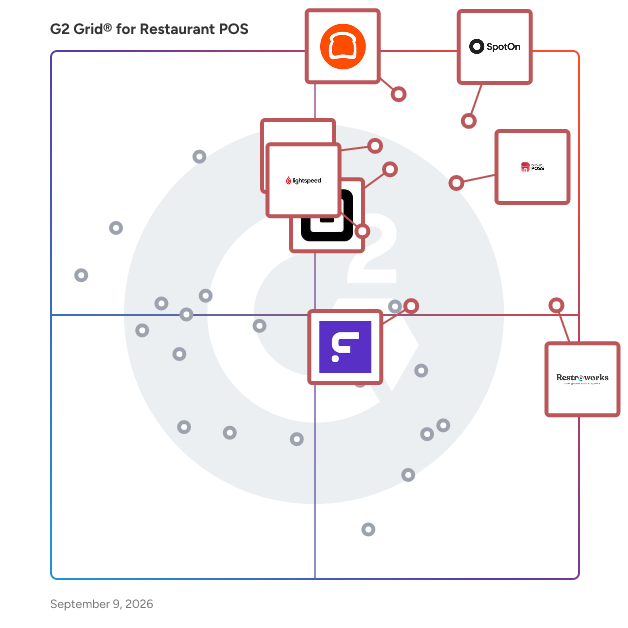
# Best Restaurant POS Systems - Page 5

*By [Neya Kumaresan](https://research.g2.com/insights/author/neya-kumaresan)*


Restaurant point of sale (POS) software provides restaurant and bar servers an easy way to take orders and process payment for multiple checks simultaneously.

With POS software, restaurant managers and owners can meet many of their practical business needs, from managing daily service all the way up to high-level analytics. Orders can be entered either at touchscreen stations or tableside with mobile devices, and servers can easily keep track of their tables, edit orders, easily split checks, and apply discounts. Some products allow communication between servers and the kitchen, allowing them to be aware of inventory shortages and delays. By empowering servers with software that can provide myriad services, they can be more efficient and accommodating for customers.

Many products are meant to be used on mounted tablets or other handheld devices, and can include ticket printers or cash drawers. Managers can also keep track of profits, inventory, menu trends, and other analytics. Certain products will also integrate food-delivery services, so you can either set up your own online ordering platform or work with another provider. POS software is often implemented along with other restaurant management systems like staffing management, inventory management, and finance platforms. Many products can integrate with these systems directly to create a streamlined experience.

To qualify in the restaurant POS category, a product must:

- Take orders from a menu and submit those orders to the kitchen for multiple guests or tables
- Process payments using various methods such as cash, credit or debit card, etc. as well as split checks and add discounts
- Offer secure data access and functionality to protect sensitive data such as customer information and credit card numbers
- Include reporting and analytics to monitor sales indicators for each location, as well as order cancellations


## Top Restaurant POS Systems at a Glance
| # | Product | Rating | Best For | What Users Say |
|---|---------|--------|----------|----------------|
| 1 | [SpotOn](https://www.g2.com/products/spoton/reviews) | 4.4/5.0 (236 reviews) | High-speed order flow during peak service | "[I have spoton for multiple locations and it has been working for us perfectly](https://www.g2.com/survey_responses/spoton-review-11052023)" |
| 2 | [Toast](https://www.g2.com/products/toast/reviews) | 4.2/5.0 (352 reviews) | Full-service restaurants needing tight FOH–BOH coordination | "[Easy Tableside Payments That Just Work but a host of issues that remain unaddressed after a year](https://www.g2.com/survey_responses/toast-review-12908666)" |
| 3 | [Petpooja POSS](https://www.g2.com/products/petpooja-poss/reviews) | 4.7/5.0 (283 reviews) | Unified restaurant operations with multi-channel ordering | "[A lifesaver for daily operations, KOTs, and inventory tracking](https://www.g2.com/survey_responses/petpooja-poss-review-12865035)" |
| 4 | [Restroworks Restaurant POS](https://www.g2.com/products/restroworks-restaurant-pos/reviews) | 4.8/5.0 (1,296 reviews) | Centralized control across multi-location chains | "[Smooth PMS Integration and Excellent Support for Banquet operations](https://www.g2.com/survey_responses/restroworks-restaurant-pos-review-13036146)" |
| 5 | [Aloha Cloud](https://www.g2.com/products/aloha-cloud/reviews) | 3.9/5.0 (328 reviews) | Hybrid service models (table + counter) | "[Aloha Cloud: Reliable, Versatile, Needs Slight Tuning](https://www.g2.com/survey_responses/aloha-cloud-review-12253668)" |
| 6 | [Square Point of Sale](https://www.g2.com/products/square-point-of-sale/reviews) | 4.6/5.0 (1,182 reviews) | Simple, flexible POS setups for small-format dining | "[Seamless Payment Collection with Automation](https://www.g2.com/survey_responses/square-point-of-sale-review-12672421)" |
| 7 | [Foodics](https://www.g2.com/products/foodics/reviews) | 4.6/5.0 (49 reviews) | Ingredient-level inventory and cost-focused operations | "[Great product that allows me to concentrate on what I need to see](https://www.g2.com/survey_responses/foodics-review-6922410)" |
| 8 | [Chowbus POS](https://www.g2.com/products/chowbus-pos/reviews) | 4.9/5.0 (12 reviews) | Delivery-heavy restaurants with multiple order channels | "[This POS company truly offers the best service](https://www.g2.com/survey_responses/chowbus-pos-review-10405974)" |
| 9 | [Clover](https://www.g2.com/products/clover/reviews) | 3.8/5.0 (106 reviews) | Modular POS workflows with hardware flexibility | "[Seamless Integration, Real-Time Reports, and Helpful Support](https://www.g2.com/survey_responses/clover-review-12694770)" |
| 10 | [Lightspeed Restaurant](https://www.g2.com/products/lightspeed-restaurant/reviews) | 4.3/5.0 (51 reviews) | — | "[Fantastic POS](https://www.g2.com/survey_responses/lightspeed-restaurant-review-7700431)" |


## How Many Restaurant POS Systems Products Does G2 Track?
**Total Products under this Category:** 484

### Category Stats (Jul 2026)
- **Average Rating**: 4.12/5 The average rating of products in this category, based on all submitted ratings
- **Top Trending Product**: SpotOn (+0.05%) - Among all products in this category, SpotOn recorded the largest rating increase compared to last month
*Last updated: July 08, 2026*


## How Does G2 Rank Restaurant POS Systems Products?

**Why You Can Trust G2's Software Rankings:**

- 30 Analysts and Data Experts
- 5,100+ Authentic Reviews
- 484+ Products
- Unbiased Rankings

G2's software rankings are built on verified user reviews, rigorous moderation, and a consistent research methodology maintained by a team of analysts and data experts. Each product is measured using the same transparent criteria, with no paid placement or vendor influence. While reviews reflect real user experiences, which can be subjective, they offer valuable insight into how software performs in the hands of professionals. Together, these inputs power the G2 Score, a standardized way to compare tools within every category.


## Which Restaurant POS Systems Is Best for Your Use Case?

- **Leader:** [SpotOn](https://www.g2.com/products/spoton/reviews)
- **Highest Performer:** [Foodics](https://www.g2.com/products/foodics/reviews)
- **Easiest to Use:** [Restroworks Restaurant POS](https://www.g2.com/products/restroworks-restaurant-pos/reviews)
- **Top Trending:** [Restroworks Restaurant POS](https://www.g2.com/products/restroworks-restaurant-pos/reviews)
- **Best Free Software:** [Square Point of Sale](https://www.g2.com/products/square-point-of-sale/reviews)


---

**Sponsored**

### Rezku POS

Rezku is a powerful restaurant POS solution designed to simplify front-of house and back-of-house operations, boosting growth and enhancing the guest experience. Easily manage online ordering, inventory, and reporting—plus get built-in tools for delivery, loyalty programs, gift cards, and more. Rezku makes restaurant operations smoother with seamless integrations and flexible tools. Whether you run a bar, café, food truck, or full-service restaurant, Rezku’s POS system delivers dependable hardware and adaptable software to match your unique needs.


[Visit website](https://www.g2.com/external_clickthroughs/record?secure%5Bad_program%5D=ppc&amp;secure%5Bad_slot%5D=category_product_list&amp;secure%5Bcategory_id%5D=1112&amp;secure%5Bchosen_at%5D=2026-07-08T19%3A54%3A52Z&amp;secure%5Bdisplayable_resource_id%5D=1112&amp;secure%5Bdisplayable_resource_type%5D=Category&amp;secure%5Bmedium%5D=sponsored&amp;secure%5Bplacement_reason%5D=page_category&amp;secure%5Bplacement_resource_ids%5D%5B%5D=1112&amp;secure%5Bprioritized%5D=false&amp;secure%5Bproduct_id%5D=49847&amp;secure%5Bresource_id%5D=1112&amp;secure%5Bresource_type%5D=Category&amp;secure%5Bsource_type%5D=category_page&amp;secure%5Bsource_url%5D=https%3A%2F%2Fwww.g2.com%2Fcategories%2Frestaurant-pos%3Fpage%3D5&amp;secure%5Btoken%5D=1ec36b77c226b71f26d76149ae0966c3d14cf7f88187efe40f38de53cb1cc061&amp;secure%5Burl%5D=https%3A%2F%2Frezku.com%2Fconversion%2Fg2&amp;secure%5Burl_type%5D=custom_url)

---

## What Are the Top-Rated Restaurant POS Systems Products in 2026?
### 1. [IQWARE POS](https://www.g2.com/products/iqware-pos/reviews)
From quick service to high-end restaurants and lounges to bustling bars, our integrated point of sale (POS) software combines performance with ease of use.


**Total Reviews:** 1
**How Do G2 Users Rate IQWARE POS?**

- **Ease of Use:** 3.3/10 (Category avg: 8.6/10)

**Who Is the Company Behind IQWARE POS?**

- **Seller:** [IQware](https://www.g2.com/sellers/iqware)
- **Year Founded:** 1984
- **HQ Location:** N/A
- **Twitter:** @IQwareInc (156 Twitter followers)
- **LinkedIn® Page:** https://www.linkedin.com/company/iqware-inc-/ (44 employees on LinkedIn®)

**Who Uses This Product?**
- **Company Size:** 100% Mid-Market


#### What Are G2 Users Discussing About IQWARE POS?

- [What is IQWARE POS used for?](https://www.g2.com/discussions/what-is-iqware-pos-used-for)

### 2. [jRestaurant POS](https://www.g2.com/products/jrestaurant-pos/reviews)
jRestaurant POS provides table service and fine dining software, bar and nightclub software, pizza and delivery software, fast food and quick service software.


**Average Rating:** 5.0/5.0
**Total Reviews:** 1
**How Do G2 Users Rate jRestaurant POS?**

- **Ease of Use:** 10.0/10 (Category avg: 8.6/10)
- **Takeout &amp; Delivery:** 10.0/10 (Category avg: 8.5/10)
- **Accounting:** 10.0/10 (Category avg: 8.0/10)
- **Payment Gateway:** 10.0/10 (Category avg: 8.6/10)

**Who Is the Company Behind jRestaurant POS?**

- **Seller:** [Creative Software Solutions](https://www.g2.com/sellers/creative-software-solutions)
- **Year Founded:** 1996
- **HQ Location:** Springfield, US
- **LinkedIn® Page:** https://www.linkedin.com/company/331581 (8 employees on LinkedIn®)

**Who Uses This Product?**
- **Company Size:** 100% Mid-Market


#### What Are Recent G2 Reviews of jRestaurant POS?

**"[Increase Efficiency in Restaurant Operations](https://www.g2.com/survey_responses/jrestaurant-pos-review-8248946)"**

**Rating:** 5.0/5.0 stars
*— Vikas t.*

[Read full review](https://www.g2.com/survey_responses/jrestaurant-pos-review-8248946)

---


### 3. [KaHero POS](https://www.g2.com/products/kahero-pos/reviews)
KaHero POS is a free mobile POS system that allows businesses to keep track of their sales, inventory and employees with the use of your mobile devices. It allows owners to access business data collected by the POS system on the Internet anytime and anywhere. KaHero provides a wide array of features including managing in-store sales and business dealings, managing online orders, creating sales reports, processing offline transactions and real-time analytics.


**Average Rating:** 3.5/5.0
**Total Reviews:** 1

**Who Is the Company Behind KaHero POS?**

- **Seller:** [KaHero](https://www.g2.com/sellers/kahero)
- **HQ Location:** Cagayan de Oro, PH
- **LinkedIn® Page:** https://www.linkedin.com/company/kahero/ (14 employees on LinkedIn®)

**Who Uses This Product?**
- **Company Size:** 100% Small-Business


### 4. [Kyte](https://www.g2.com/products/kyte/reviews)
Step into the world of Kyte, where running your small business feels like a breeze. It&#39;s the ultimate toolkit for small businesses, retailers, wholesalers, and home-based entrepreneurs. No tech headaches, no hefty expenses. Kyte is a point of sale system with tools to streamline your small business operations and boost sales. Imagine having a trusty sidekick that manages your inventory, tracks your sales, and takes care of your customers. That&#39;s what Kyte brings to the table. You can set up shop anywhere you like - be it a snazzy online store, in-person with your regulars, or even on social media. Plus, no more &quot;oops, we&#39;re out of stock&quot; moments. Kyte&#39;s got your back with nifty low-stock alerts, ensuring you never miss a sale. But that&#39;s not all. Kyte&#39;s AI feature can help you write product descriptions, making your goods shine like a beacon. Want to spice things up on Instagram or Facebook? Kyte&#39;s got your back there too, helping you reach more customers and forge those lasting connections. It&#39;s more than a point-of-sale system; it&#39;s your secret recipe for a successful small business. Besides that, Kyte has an expense management feature that simplifies financial tracking for small businesses, centralizing expense control in one place. It offers easy-to-use tools for managing spending, providing a clear overview of expenses, and streamlining payment management.


**Average Rating:** 4.0/5.0
**Total Reviews:** 1
**How Do G2 Users Rate Kyte?**

- **Ease of Use:** 10.0/10 (Category avg: 8.6/10)

**Who Is the Company Behind Kyte?**

- **Seller:** [Kyte](https://www.g2.com/sellers/kyte)
- **Year Founded:** 2017
- **HQ Location:** Florianópolis, BR
- **Twitter:** @kytepos (3,679 Twitter followers)
- **LinkedIn® Page:** https://www.linkedin.com/company/kyteapp (44 employees on LinkedIn®)

**Who Uses This Product?**
- **Company Size:** 100% Small-Business


#### What Are Recent G2 Reviews of Kyte?

**"[Better than I expected](https://www.g2.com/survey_responses/kyte-review-7027581)"**

**Rating:** 4.0/5.0 stars
*— Carlos J.*

[Read full review](https://www.g2.com/survey_responses/kyte-review-7027581)

---


### 5. [MenuSifu](https://www.g2.com/products/menusifu/reviews)
Restaurants, Bars, Breweries, Nightclubs, Cafes, Food Trucks, Bakeries, and Fast Casual


**Average Rating:** 5.0/5.0
**Total Reviews:** 1
**How Do G2 Users Rate MenuSifu?**

- **Ease of Use:** 10.0/10 (Category avg: 8.6/10)
- **Takeout &amp; Delivery:** 10.0/10 (Category avg: 8.5/10)
- **Accounting:** 10.0/10 (Category avg: 8.0/10)
- **Payment Gateway:** 10.0/10 (Category avg: 8.6/10)

**Who Is the Company Behind MenuSifu?**

- **Seller:** [MenuSifu](https://www.g2.com/sellers/menusifu)
- **Year Founded:** 2013
- **HQ Location:** New York, US
- **LinkedIn® Page:** https://www.linkedin.com/company/menusifu (139 employees on LinkedIn®)

**Who Uses This Product?**
- **Company Size:** 100% Small-Business


#### What Are MenuSifu's Pros and Cons?

**Pros:**

- Inventory Management (1 reviews)
- Menu Management (1 reviews)
- Online Ordering (1 reviews)
- Reliability (1 reviews)
- Smooth Operations (1 reviews)


### What Do G2 Reviewers Say About MenuSifu?
*AI-generated summary from verified user reviews*

**Pros:**

- Users value the **effective inventory management** of MenuSifu, enhancing order efficiency and overall business operations.
- Users value the **efficient menu management** of MenuSifu, enhancing order processing and overall business support.
- Users love the **efficient online ordering** capabilities of MenuSifu, enhancing order management and boosting overall business performance.
- Users commend MenuSifu for its **reliable order management** , significantly enhancing efficiency and support in business operations.
- Users commend the **smooth operations** of MenuSifu, enhancing order management and overall business efficiency significantly.


#### What Are Recent G2 Reviews of MenuSifu?

**"[Great experience with MenuSifu](https://www.g2.com/survey_responses/menusifu-review-11768755)"**

**Rating:** 5.0/5.0 stars
*— Verified User in Food &amp; Beverages*

[Read full review](https://www.g2.com/survey_responses/menusifu-review-11768755)

---


### 6. [Microworks PrISM](https://www.g2.com/products/microworks-prism/reviews)
PrISM is a restaurant computer and POS software system that has advanced touch screen ordering, restaurant and inventory management, employee scheduling, and Quickbooks integration.


**Average Rating:** 1.0/5.0
**Total Reviews:** 1

**Who Is the Company Behind Microworks PrISM?**

- **Seller:** [Microworks POS Solutions](https://www.g2.com/sellers/microworks-pos-solutions)
- **Year Founded:** 1987
- **HQ Location:** Webster, US
- **LinkedIn® Page:** https://www.linkedin.com/company/microworks-pos-solutions (13 employees on LinkedIn®)

**Who Uses This Product?**
- **Company Size:** 100% Small-Business


#### What Are G2 Users Discussing About Microworks PrISM?

- [What is Microworks PrISM used for?](https://www.g2.com/discussions/microworks-prism-what-is-microworks-prism-used-for)
- [What is Microworks PrISM used for?](https://www.g2.com/discussions/what-is-microworks-prism-used-for)

### 7. [Mink Foodiee](https://www.g2.com/products/indianmesh-pvt-ltd-mink-foodiee/reviews)
Restaurant Activity Tracker Real-time Analytics Tableside Ordering Daily Reports Customer Content Bar Exchange Inventory Check. Add a happy face to your customer base every hour only with Mink Foodie POS.


**Average Rating:** 4.5/5.0
**Total Reviews:** 1
**How Do G2 Users Rate Mink Foodiee?**

- **Ease of Use:** 8.3/10 (Category avg: 8.6/10)

**Who Is the Company Behind Mink Foodiee?**

- **Seller:** [Indianmesh Pvt Ltd](https://www.g2.com/sellers/indianmesh-pvt-ltd)
- **Year Founded:** 2011
- **HQ Location:** India
- **LinkedIn® Page:** http://www.linkedin.com/company/indian-mesh-pvt-ltd- (54 employees on LinkedIn®)

**Who Uses This Product?**
- **Company Size:** 100% Small-Business


#### What Are Recent G2 Reviews of Mink Foodiee?

**"[track all the live activities in the restaurant](https://www.g2.com/survey_responses/mink-foodiee-review-8751202)"**

**Rating:** 4.5/5.0 stars
*— Aavartha  B.*

[Read full review](https://www.g2.com/survey_responses/mink-foodiee-review-8751202)

---


### 8. [Newhotel Cloud Point of Sale](https://www.g2.com/products/newhotel-cloud-point-of-sale/reviews)
NewHotel Cloud Point of Sale specializes in hotels and restaurants offering a complete set of functions like quick sale, Preparations and seasonings, client cards, etc., and is interegated with front-office, stocks, and events.


**Average Rating:** 4.0/5.0
**Total Reviews:** 1
**How Do G2 Users Rate Newhotel Cloud Point of Sale?**

- **Ease of Use:** 8.3/10 (Category avg: 8.6/10)

**Who Is the Company Behind Newhotel Cloud Point of Sale?**

- **Seller:** [NewHotel Software](https://www.g2.com/sellers/newhotel-software-8778a00b-eb00-4778-b97c-30d672a8c65b)
- **Year Founded:** 1984
- **HQ Location:** Lisboa, PT
- **LinkedIn® Page:** https://www.linkedin.com/company/newhotel-software (111 employees on LinkedIn®)

**Who Uses This Product?**
- **Company Size:** 100% Small-Business


#### What Are Recent G2 Reviews of Newhotel Cloud Point of Sale?

**"[Efficient and User-Friendly POS System&quot;](https://www.g2.com/survey_responses/newhotel-cloud-point-of-sale-review-10040161)"**

**Rating:** 4.0/5.0 stars
*— Vedant B.*

[Read full review](https://www.g2.com/survey_responses/newhotel-cloud-point-of-sale-review-10040161)

---


### 9. [North](https://www.g2.com/products/north-2025-04-16/reviews)
Founded in 1992, North is a leading financial technology company building innovative, frictionless, end-to-end payment solutions for businesses of all sizes and industry types. North’s superior solutions span the entire payment ecosystem, from development, to partnerships that expand the landscape, creating a flexible universe that supports growth and scale for small businesses and merchants, as well larger enterprises with over $100 billion per year in electronic transaction volume. Experience easy-to-manage operations and payments infrastructure with a user-friendly merchant portal, end-to-end processing capabilities, and personalized support. For more information, please visit www.north.com.


**Average Rating:** 1.5/5.0
**Total Reviews:** 3
**How Do G2 Users Rate North?**

- **Ease of Use:** 3.3/10 (Category avg: 8.6/10)

**Who Is the Company Behind North?**

- **Seller:** [North](https://www.g2.com/sellers/north-2026-06-16)
- **Company Website:** https://www.north.com/
- **Year Founded:** 1992
- **HQ Location:** Troy, MI
- **LinkedIn® Page:** https://www.linkedin.com/company/northpayments (1,599 employees on LinkedIn®)

**Who Uses This Product?**
- **Company Size:** 50% Small-Business, 25% Mid-Market


#### What Are Recent G2 Reviews of North?

**"[Good rates always reliable](https://www.g2.com/survey_responses/north-review-281679)"**

**Rating:** 4.5/5.0 stars
*— Verified User in Package/Freight Delivery*

[Read full review](https://www.g2.com/survey_responses/north-review-281679)

---

**"[A good payment processing service but needs to get better in dealing with changes](https://www.g2.com/survey_responses/north-review-74741)"**

**Rating:** 4.0/5.0 stars
*— Jennifer R G.*

[Read full review](https://www.g2.com/survey_responses/north-review-74741)

---


#### What Are G2 Users Discussing About North?

- [What is North American Bancard used for?](https://www.g2.com/discussions/what-is-north-american-bancard-used-for)

### 10. [Oracle Food and Beverage POS](https://www.g2.com/products/oracle-food-and-beverage-pos/reviews)
Oracle Simphony POS is built for ambitious restaurants. Our cloud-based POS connects every aspect of your operations so you can easily manage online orders, kitchen ops, inventory, menus, delivery, loyalty &amp; more. Real-time analytics are included so you always have a pulse on sales, costs &amp; staff performance. Simphony&#39;s open API &amp; extensive cloud marketplace give you unlimited flexibility, agility &amp; scale.


**Average Rating:** 4.6/5.0
**Total Reviews:** 4
**How Do G2 Users Rate Oracle Food and Beverage POS?**

- **Ease of Use:** 7.2/10 (Category avg: 8.6/10)

**Who Is the Company Behind Oracle Food and Beverage POS?**

- **Seller:** [Oracle](https://www.g2.com/sellers/oracle)
- **Year Founded:** 1977
- **HQ Location:** Austin, TX
- **Twitter:** @Oracle (827,997 Twitter followers)
- **LinkedIn® Page:** https://www.linkedin.com/company/1028/ (208,078 employees on LinkedIn®)
- **Ownership:** NYSE:ORCL

**Who Uses This Product?**
- **Company Size:** 50% Mid-Market, 33% Small-Business


#### What Are Oracle Food and Beverage POS's Pros and Cons?

**Pros:**

- Customer Satisfaction (1 reviews)
- Ease of Use (1 reviews)
- Inventory Management (1 reviews)
- POS Integration (1 reviews)
- Reliability (1 reviews)

**Cons:**

- Expensive (1 reviews)


### What Do G2 Reviewers Say About Oracle Food and Beverage POS?
*AI-generated summary from verified user reviews*

**Pros:**

- Users praise the **customer satisfaction** provided by Oracle Food and Beverage POS, enhancing their operational efficiency and experience.
- Users appreciate the **ease of use** of Oracle Food and Beverage POS, facilitating streamlined management of their operations.
- Users value the **comprehensive inventory management** tools in Oracle Food and Beverage POS for streamlining operations effectively.
- Users value the **seamless POS integration** of Oracle Food and Beverage POS, enhancing operational efficiency across various functions.
- Users appreciate the **reliability** of Oracle Food and Beverage POS, effectively managing operations from a single platform.

**Cons:**

- Users find Oracle Food and Beverage POS to be **quite expensive** , making it challenging for smaller businesses to afford.

#### What Are Recent G2 Reviews of Oracle Food and Beverage POS?

**"[Super Convenient on the bar](https://www.g2.com/survey_responses/oracle-food-and-beverage-pos-review-8292936)"**

**Rating:** 4.5/5.0 stars
*— Akshaysingh C.*

[Read full review](https://www.g2.com/survey_responses/oracle-food-and-beverage-pos-review-8292936)

---

**"[Comprehensive Review of Oracle Food and Beverage Solutions](https://www.g2.com/survey_responses/oracle-food-and-beverage-pos-review-9920104)"**

**Rating:** 4.0/5.0 stars
*— Pratibha S.*

[Read full review](https://www.g2.com/survey_responses/oracle-food-and-beverage-pos-review-9920104)

---


### 11. [Ordera POS](https://www.g2.com/products/ordera-pos/reviews)
Ordera is a cloud-based POS system built for restaurants and cafés in the UAE. It includes QR menu ordering, a kitchen display system with per-station routing, a live order dashboard, UAE VAT 5% receipts, inventory tracking with stock level alerts, and a full activity log. No app download required for customers. Free setup, no contracts, Arabic support.


**Average Rating:** 5.0/5.0
**Total Reviews:** 1
**How Do G2 Users Rate Ordera POS?**

- **Ease of Use:** 10.0/10 (Category avg: 8.6/10)

**Who Is the Company Behind Ordera POS?**

- **Seller:** [Ordera](https://www.g2.com/sellers/ordera)
- **HQ Location:** N/A
- **LinkedIn® Page:** https://www.linkedin.com/company/No-Linkedin-Presence-Added-Intentionally-By-DataOps (1 employees on LinkedIn®)

**Who Uses This Product?**
- **Company Size:** 100% Mid-Market


#### What Are Recent G2 Reviews of Ordera POS?

**"[Ordera Is Smooth, Smart, and Hassle-Free](https://www.g2.com/survey_responses/ordera-pos-review-12863858)"**

**Rating:** 5.0/5.0 stars
*— Ahmed L.*

[Read full review](https://www.g2.com/survey_responses/ordera-pos-review-12863858)

---


### 12. [orderbird POS](https://www.g2.com/products/orderbird-pos/reviews)
Let your hospitality soar! With our POS system you will be more successful, you will save time and money and reduce stress. Experience orderbird in Germany, Austria, Switzerland, Great Britain, Ireland and France.


**Average Rating:** 3.5/5.0
**Total Reviews:** 1
**How Do G2 Users Rate orderbird POS?**

- **Ease of Use:** 5.0/10 (Category avg: 8.6/10)

**Who Is the Company Behind orderbird POS?**

- **Seller:** [orderbird](https://www.g2.com/sellers/orderbird)
- **Year Founded:** 2011
- **HQ Location:** Berlin, Berlin, Germany
- **Twitter:** @orderbird (1,087 Twitter followers)
- **LinkedIn® Page:** https://www.linkedin.com/company/orderbird/ (106 employees on LinkedIn®)

**Who Uses This Product?**
- **Company Size:** 100% Small-Business


#### What Are G2 Users Discussing About orderbird POS?

- [What is orderbird POS used for?](https://www.g2.com/discussions/what-is-orderbird-pos-used-for)

### 13. [Orderlord](https://www.g2.com/products/orderlord/reviews)
Orderlord is a delivery management solution for restaurants and chains directly integrated into a POS for seamless delivery.


**Average Rating:** 4.0/5.0
**Total Reviews:** 1
**How Do G2 Users Rate Orderlord?**

- **Ease of Use:** 8.3/10 (Category avg: 8.6/10)

**Who Is the Company Behind Orderlord?**

- **Seller:** [Orderlord](https://www.g2.com/sellers/orderlord)
- **Year Founded:** 2013
- **HQ Location:** Bratislava, SK
- **Twitter:** @OrderLord (147 Twitter followers)
- **LinkedIn® Page:** https://www.linkedin.com/company/3332312 (7 employees on LinkedIn®)

**Who Uses This Product?**
- **Company Size:** 100% Small-Business


#### What Are Recent G2 Reviews of Orderlord?

**"[Next generation delivery with Orderlord](https://www.g2.com/survey_responses/orderlord-review-8604415)"**

**Rating:** 4.0/5.0 stars
*— Haya Q.*

[Read full review](https://www.g2.com/survey_responses/orderlord-review-8604415)

---


### 14. [OrderPort POS](https://www.g2.com/products/orderport-pos/reviews)
OrderPort POS provides Point of Sale capabilities on the iPad for sales at winery tasting rooms. It is integrated with OrderPort’s complete commerce solution which includes website, eCommerce, mobile commerce, inventory management and wine club administration.


**Average Rating:** 2.5/5.0
**Total Reviews:** 1

**Who Is the Company Behind OrderPort POS?**

- **Seller:** [OrderPort](https://www.g2.com/sellers/orderport)
- **Year Founded:** 2002
- **HQ Location:** Bellevue, US
- **Twitter:** @OPWineSolutions
- **LinkedIn® Page:** https://www.linkedin.com/company/orderport (30 employees on LinkedIn®)

**Who Uses This Product?**
- **Company Size:** 100% Small-Business


### 15. [PlusOne POS](https://www.g2.com/products/plusone-pos/reviews)
Cloud based iPad POS for Restaurants and Retail Businesses for multiple to single location. Builtin Customer feedback and inventory management system. Our Kitchen display system and customer facing display provides convenient and efficiency.


**Average Rating:** 5.0/5.0
**Total Reviews:** 1
**How Do G2 Users Rate PlusOne POS?**

- **Ease of Use:** 8.3/10 (Category avg: 8.6/10)
- **Takeout &amp; Delivery:** 10.0/10 (Category avg: 8.5/10)
- **Accounting:** 6.7/10 (Category avg: 8.0/10)
- **Payment Gateway:** 6.7/10 (Category avg: 8.6/10)

**Who Is the Company Behind PlusOne POS?**

- **Seller:** [SISIA Solutions](https://www.g2.com/sellers/sisia-solutions)
- **HQ Location:** N/A
- **LinkedIn® Page:** https://www.linkedin.com/company/No-Linkedin-Presence-Added-Intentionally-By-DataOps (1 employees on LinkedIn®)

**Who Uses This Product?**
- **Company Size:** 100% Small-Business


#### What Are Recent G2 Reviews of PlusOne POS?

**"[Best POS for Restaurants](https://www.g2.com/survey_responses/plusone-pos-review-4152302)"**

**Rating:** 5.0/5.0 stars
*— Verified User in Restaurants*

[Read full review](https://www.g2.com/survey_responses/plusone-pos-review-4152302)

---


### 16. [Point of Sale Software](https://www.g2.com/products/point-of-sale-software/reviews)
Quick POS (Point Of Sales) is an inventory &amp; customer management software.


**Average Rating:** 3.3/5.0
**Total Reviews:** 2
**How Do G2 Users Rate Point of Sale Software?**

- **Ease of Use:** 6.7/10 (Category avg: 8.6/10)
- **Takeout &amp; Delivery:** 8.3/10 (Category avg: 8.5/10)
- **Accounting:** 8.3/10 (Category avg: 8.0/10)
- **Payment Gateway:** 8.3/10 (Category avg: 8.6/10)

**Who Is the Company Behind Point of Sale Software?**

- **Seller:** [Custom Business Solutions](https://www.g2.com/sellers/custom-business-solutions-fac5ef91-ef1a-4664-a449-363d25b2cd98)
- **Year Founded:** 1994
- **HQ Location:** Irvine, US
- **LinkedIn® Page:** https://www.linkedin.com/company/27737?trk=tyah&amp;trkInfo=clickedVertical%3Acompany%2CclickedEntityId%3A27737%2Cidx%3A2-2-3%2CtarId%3A1463539004785%2Ctas%3Acustom%20business (109 employees on LinkedIn®)

**Who Uses This Product?**
- **Company Size:** 50% Enterprise, 50% Mid-Market


#### What Are Recent G2 Reviews of Point of Sale Software?

**"[POS made easy ](https://www.g2.com/survey_responses/point-of-sale-software-review-1507506)"**

**Rating:** 4.0/5.0 stars
*— Jasmine M.*

[Read full review](https://www.g2.com/survey_responses/point-of-sale-software-review-1507506)

---


### 17. [Point of Sale System](https://www.g2.com/products/point-of-sale-system/reviews)
A smart POS software makes a big difference in the way you manage your restaurant. It greatly improves your efficiency and savs significant amount of your time.


**Average Rating:** 4.0/5.0
**Total Reviews:** 1

**Who Is the Company Behind Point of Sale System?**

- **Seller:** [Accrete InfoSolution Technologies](https://www.g2.com/sellers/accrete-infosolution-technologies)
- **Year Founded:** 2016
- **HQ Location:** Gandhinagar, IN
- **LinkedIn® Page:** https://www.linkedin.com/company/accreteinfo (45 employees on LinkedIn®)

**Who Uses This Product?**
- **Company Size:** 100% Small-Business


#### What Are Recent G2 Reviews of Point of Sale System?

**"[Review for POS in general](https://www.g2.com/survey_responses/point-of-sale-system-review-5016838)"**

**Rating:** 4.0/5.0 stars
*— Karan R.*

[Read full review](https://www.g2.com/survey_responses/point-of-sale-system-review-5016838)

---


#### What Are G2 Users Discussing About Point of Sale System?

- [What is Point of Sale System used for?](https://www.g2.com/discussions/what-is-point-of-sale-system-used-for)

### 18. [POSnet POS](https://www.g2.com/products/posnet-pos/reviews)
POSnet POS is a point of sale software that includes: quick and table services, system upgrades, and remote access.


**Average Rating:** 5.0/5.0
**Total Reviews:** 1

**Who Is the Company Behind POSnet POS?**

- **Seller:** [POSnet](https://www.g2.com/sellers/posnet)
- **HQ Location:** N/A
- **LinkedIn® Page:** https://www.linkedin.com/company/No-Linkedin-Presence-Added-Intentionally-By-DataOps (1 employees on LinkedIn®)

**Who Uses This Product?**
- **Company Size:** 100% Small-Business


#### What Are Recent G2 Reviews of POSnet POS?

**"[Good](https://www.g2.com/survey_responses/posnet-pos-review-1610959)"**

**Rating:** 5.0/5.0 stars
*— Verified User in Restaurants*

[Read full review](https://www.g2.com/survey_responses/posnet-pos-review-1610959)

---


#### What Are G2 Users Discussing About POSnet POS?

- [What is POSnet POS used for?](https://www.g2.com/discussions/what-is-posnet-pos-used-for)

### 19. [POS Pizza](https://www.g2.com/products/pos-pizza/reviews)
POS Pizza is a restaurant POS software that includes online ordering optimized for hand-held devices, driver dispatching, caller-ID, touch-screen, make-line monitors, make-line box labels, make line slips, special inventory item pricing, the day of week pricing, the day of week filtering, and coupons and discounts.


**Average Rating:** 4.5/5.0
**Total Reviews:** 1
**How Do G2 Users Rate POS Pizza?**

- **Ease of Use:** 10.0/10 (Category avg: 8.6/10)

**Who Is the Company Behind POS Pizza?**

- **Seller:** [Summit Computer Networks](https://www.g2.com/sellers/summit-computer-networks)
- **Year Founded:** 1996
- **HQ Location:** N/A
- **LinkedIn® Page:** http://www.linkedin.com/company/summit-computer-networks-inc- (1 employees on LinkedIn®)

**Who Uses This Product?**
- **Company Size:** 100% Small-Business


#### What Are Recent G2 Reviews of POS Pizza?

**"[Review of POS Pizza](https://www.g2.com/survey_responses/pos-pizza-review-5079796)"**

**Rating:** 4.5/5.0 stars
*— Mark L.*

[Read full review](https://www.g2.com/survey_responses/pos-pizza-review-5079796)

---


#### What Are G2 Users Discussing About POS Pizza?

- [What is POS Pizza used for?](https://www.g2.com/discussions/what-is-pos-pizza-used-for)

### 20. [POSUSA Free POS](https://www.g2.com/products/posusa-free-pos/reviews)
POSUSA Free POS is a cloud-based, web-based point of sale system designed to help small businesses get started without committing to paid software plans or long-term contracts. It provides a practical entry point for businesses that need core POS functionality without the complexity or cost often associated with traditional systems. The platform includes tools for managing products or menu items, processing orders, accepting payments, and handling basic table management through a browser-based interface. Businesses can organize menus or product catalogs, update pricing, and manage day-to-day transactions from a central dashboard that does not require technical setup or specialized hardware. POSUSA Free POS also supports customer-facing online ordering, allowing customers to browse items and place orders directly through a web link. For contactless and mobile-friendly transactions, the system offers QR code checkout, enabling customers to view menus and complete payments from their own devices without downloading a native app. This approach is particularly useful for food trucks, pop-ups, and small restaurants that value speed, flexibility, and minimal setup during service. In addition, optional AI-assisted menu creation is available to help businesses build menus or product lists from uploaded files or images, reducing the time required to configure the system. POSUSA Free POS is designed with simplicity in mind and is well suited for businesses with straightforward operational needs. Common use cases include food trucks, small restaurants, temporary vendors, retail locations, and service-based businesses that want a reliable POS without advanced enterprise features. As a business grows, additional features and integrations can be added to support expanded workflows, making POSUSA Free POS a flexible solution that can adapt over time while maintaining a low barrier to entry.


**Average Rating:** 5.0/5.0
**Total Reviews:** 1
**How Do G2 Users Rate POSUSA Free POS?**

- **Ease of Use:** 10.0/10 (Category avg: 8.6/10)
- **Payment Gateway:** 10.0/10 (Category avg: 8.6/10)

**Who Is the Company Behind POSUSA Free POS?**

- **Seller:** [POSUSA](https://www.g2.com/sellers/posusa)
- **Year Founded:** 2011
- **HQ Location:** Arlington, US
- **LinkedIn® Page:** https://www.linkedin.com/company/point-of-sale-usa/ (6 employees on LinkedIn®)

**Who Uses This Product?**
- **Company Size:** 100% Small-Business


#### What Are POSUSA Free POS's Pros and Cons?

**Pros:**

- Affordable (1 reviews)
- Ease of Use (1 reviews)
- Invoicing (1 reviews)
- Payment Convenience (1 reviews)
- Payment Processing (1 reviews)


### What Do G2 Reviewers Say About POSUSA Free POS?
*AI-generated summary from verified user reviews*

**Pros:**

- Users appreciate the **affordability** of POSUSA Free POS, enabling efficient invoicing and payment processing for their businesses.
- Users find the **ease of setup** of POSUSA Free POS enhances business efficiency and simplifies payment processes.
- Users find the **invoicing capabilities** of POSUSA Free POS invaluable for enhancing cash flow and efficiency.
- Users value the **payment convenience** of POSUSA Free POS, enhancing cash flow and simplifying transactions.
- Users appreciate the **easy payment processing** with POSUSA Free POS, enhancing cash flow and operational efficiency.


#### What Are Recent G2 Reviews of POSUSA Free POS?

**"[Free POS That Streamlines Quotes, Invoicing, and Card Payments](https://www.g2.com/survey_responses/posusa-free-pos-review-12356855)"**

**Rating:** 5.0/5.0 stars
*— Jeff F.*

[Read full review](https://www.g2.com/survey_responses/posusa-free-pos-review-12356855)

---


### 21. [Restaurant Point Of Sale](https://www.g2.com/products/restaurant-point-of-sale/reviews)
Restaurant Point of Sale provides a Point of Sale system for large chains and individual stores, combining dependable real time POS operation with a wide range of functions and reports, rapid deployment and low lifetime costs


**Average Rating:** 5.0/5.0
**Total Reviews:** 1
**How Do G2 Users Rate Restaurant Point Of Sale?**

- **Ease of Use:** 8.3/10 (Category avg: 8.6/10)

**Who Is the Company Behind Restaurant Point Of Sale?**

- **Seller:** [POSnet](https://www.g2.com/sellers/posnet)
- **HQ Location:** N/A
- **LinkedIn® Page:** https://www.linkedin.com/company/No-Linkedin-Presence-Added-Intentionally-By-DataOps (1 employees on LinkedIn®)

**Who Uses This Product?**
- **Company Size:** 100% Small-Business


#### What Are Recent G2 Reviews of Restaurant Point Of Sale?

**"[Restaurant Must Have](https://www.g2.com/survey_responses/restaurant-point-of-sale-review-469712)"**

**Rating:** 5.0/5.0 stars
*— Kristen S.*

[Read full review](https://www.g2.com/survey_responses/restaurant-point-of-sale-review-469712)

---


#### What Are G2 Users Discussing About Restaurant Point Of Sale?

- [What is Restaurant Point Of Sale used for?](https://www.g2.com/discussions/what-is-restaurant-point-of-sale-used-for)

### 22. [Restora POS](https://www.g2.com/products/restora-pos/reviews)
Restora POS is the next generation automation solution for restaurant business entrepreneurs. A brilliant restaurant POS billing software solution, which can solely handle every operation in your restaurant. Restora POS has come up with an advanced managerial digital solution, hassle-free technology, responsive online/ offline system and skilled support team for back-up. Vital Features Of Restora POS: =\&gt; Responsive Support =\&gt; Powerful Website And App Integration =\&gt; Cloud POS Billing System =\&gt; Monthly and Half-yearly subscription facilities Core Product Of Restora POS: =\&gt; Restaurant Management Software =\&gt; Restaurant Inventory Management software =\&gt; Restaurant POS software =\&gt; Online Food Ordering System =\&gt; Cloud Kitchen Software Significant Business Type That Restora POS Offers: =\&gt; Bar &amp; Breweries =\&gt; Bakery &amp; Confectionery =\&gt; Burger &amp; Sandwich shop =\&gt; Fine-Dine Restaurant =\&gt; Quick Service Restaurant =\&gt; Franchise Restaurant =\&gt; Canteen Restaurant =\&gt; Food Court =\&gt; Cloud Kitchen Restora POS is not just a restaurant automation solution but an ultimate all-in-one solution for any kind and size of the restaurant. In addition, Restora POS is strongly integrated with Website, App and Third-party delivery companies for efficient and smooth delivery service and also increases the online visibility over different social media.


**Average Rating:** 5.0/5.0
**Total Reviews:** 1
**How Do G2 Users Rate Restora POS?**

- **Ease of Use:** 10.0/10 (Category avg: 8.6/10)
- **Takeout &amp; Delivery:** 10.0/10 (Category avg: 8.5/10)
- **Accounting:** 10.0/10 (Category avg: 8.0/10)
- **Payment Gateway:** 10.0/10 (Category avg: 8.6/10)

**Who Is the Company Behind Restora POS?**

- **Seller:** [Restora POS](https://www.g2.com/sellers/restora-pos)
- **Year Founded:** 2021
- **HQ Location:** Dhaka, BD
- **LinkedIn® Page:** https://www.linkedin.com/company/restorapos (2 employees on LinkedIn®)

**Who Uses This Product?**
- **Company Size:** 100% Small-Business


#### What Are Recent G2 Reviews of Restora POS?

**"[Review for Restora POS](https://www.g2.com/survey_responses/restora-pos-review-8240999)"**

**Rating:** 5.0/5.0 stars
*— Ma. Hazel D.*

[Read full review](https://www.g2.com/survey_responses/restora-pos-review-8240999)

---


### 23. [Restro Pro](https://www.g2.com/products/restro-pro/reviews)
Restaurant Pro comes with Online and Offline version, which has huge user management. It helps restaurant owners to manage the complete inventory stock as well as point of sales. The software comes with free version to access and check its working for the registered users. It is the best restaurant pos software in India, having installation in more than 1000 + Restaurants all over India. When it is accessed by many users from different captains, at the same time the administrator can monitors the sales at the same time. KOT generated can be seen by the specific kitchen, at the same time it increases efficiency of hotel staff, putting less efforts and maximizing the orders generation capability for the restaurant. The administrator can put staff with specific table which can also be analyzed for sales of inventory from particular tables and sales capability of waiters. It has also the android version for order generation, which helps waiter to give better hospitality to the customers, so that they can enjoy their food and ambiance of the hotel. The integration of food apps makes the counter billing faster and user friendly. It is the best restaurant billing software in India. When we have taken care of security, we have also quality checked with faster accessibility. The users says Restaurant Pro as “best restaurant software in India”, “perfect blend of the technology and users interface”. Further, it has integration of banquet hall booking software, which helps users to book the banquet / hall in very small time. The amazing time slot booking is the USP of the banquet hall management software. The complete time management takes care, which is easy to recognize and restricting the time slot, so that no booking can be undertaken by the software. The banquet software is managed with accounting software which helps the users to manages pay part and receipt generation. Below is the demo of the software available on YouTube. You can contact us for more information at any point of time. We provide legitimate services making ours best software company in Mumbai as well software company in India.


**Average Rating:** 5.0/5.0
**Total Reviews:** 1
**How Do G2 Users Rate Restro Pro?**

- **Ease of Use:** 10.0/10 (Category avg: 8.6/10)
- **Takeout &amp; Delivery:** 10.0/10 (Category avg: 8.5/10)
- **Accounting:** 10.0/10 (Category avg: 8.0/10)
- **Payment Gateway:** 8.3/10 (Category avg: 8.6/10)

**Who Is the Company Behind Restro Pro?**

- **Seller:** [Hardik Nadiyana](https://www.g2.com/sellers/hardik-nadiyana)
- **Year Founded:** 2012
- **HQ Location:** Mumbai, IN
- **LinkedIn® Page:** https://www.linkedin.com/company/sednatech/ (6 employees on LinkedIn®)

**Who Uses This Product?**
- **Company Size:** 100% Small-Business


#### What Are Restro Pro's Pros and Cons?

**Pros:**

- Billing Ease (1 reviews)
- Ease of Operation (1 reviews)
- Ease of Use (1 reviews)

**Cons:**

- Connectivity Issues (1 reviews)
- Slow Performance (1 reviews)


### What Do G2 Reviewers Say About Restro Pro?
*AI-generated summary from verified user reviews*

**Pros:**

- Users find the **billing management** of Restro Pro exceptionally easy, facilitating quick learning and usability.
- Users find Restro Pro&#39;s **ease of operation** exceptional, allowing effortless billing management and quick learning.
- Users find Restro Pro&#39;s **ease of use** remarkable, allowing for effortless billing management and quick learning.

**Cons:**

- Users experience **connectivity issues** with Restro Pro, including lag and slow synchronization during internet disturbances.
- Users experience **slow performance** with Restro Pro, often related to internet lag and sync delays.

#### What Are Recent G2 Reviews of Restro Pro?

**"[Effortless Billing and Easy to Learn—Best POS Experience](https://www.g2.com/survey_responses/restro-pro-review-11889515)"**

**Rating:** 5.0/5.0 stars
*— Vikash K.*

[Read full review](https://www.g2.com/survey_responses/restro-pro-review-11889515)

---


### 24. [S4D](https://www.g2.com/products/s4d/reviews)
S4D delivers an omnichannel solution that is specifically built for quick service restaurant chains. S4D is the digital partner that has helped restaurant chains: - Improve their online/offline customer journey - Streamline operations - Gather actionable data By providing them with: - In-store solutions: POS, Makescreen, KDS, Pack screen, SOK - Online solutions: Website, App, Brand and Menu Management, - Actionable Data: For the stores in the POS with 150+ real-time reports and NPS and all data from the platform that is available for the headquarters (including PowerBI integration)


**Average Rating:** 4.5/5.0
**Total Reviews:** 1
**How Do G2 Users Rate S4D?**

- **Ease of Use:** 10.0/10 (Category avg: 8.6/10)
- **Takeout &amp; Delivery:** 10.0/10 (Category avg: 8.5/10)
- **Accounting:** 8.3/10 (Category avg: 8.0/10)
- **Payment Gateway:** 8.3/10 (Category avg: 8.6/10)

**Who Is the Company Behind S4D?**

- **Seller:** [Solutions4Delivery](https://www.g2.com/sellers/solutions4delivery)
- **Year Founded:** 2017
- **HQ Location:** Amsterdam, NL
- **LinkedIn® Page:** https://www.linkedin.com/company/solutions4delivery (84 employees on LinkedIn®)

**Who Uses This Product?**
- **Company Size:** 100% Small-Business


#### What Are Recent G2 Reviews of S4D?

**"[Services provided by Solutions 4 Delivery](https://www.g2.com/survey_responses/s4d-review-8405014)"**

**Rating:** 4.5/5.0 stars
*— Rinkesh P.*

[Read full review](https://www.g2.com/survey_responses/s4d-review-8405014)

---


### 25. [SalesVu](https://www.g2.com/products/salesvu/reviews)
All-In-One Business Management Solution. Modular cloud-based software customizable for your exact needs


**Average Rating:** 4.5/5.0
**Total Reviews:** 4
**How Do G2 Users Rate SalesVu?**

- **Ease of Use:** 8.3/10 (Category avg: 8.6/10)

**Who Is the Company Behind SalesVu?**

- **Seller:** [SalesVu](https://www.g2.com/sellers/salesvu)
- **HQ Location:** Austin, US
- **LinkedIn® Page:** https://www.linkedin.com/company/salesvu/ (28 employees on LinkedIn®)

**Who Uses This Product?**
- **Company Size:** 50% Small-Business, 25% Enterprise


#### What Are Recent G2 Reviews of SalesVu?

**"[Exceptional SalesVu : A Game-Changer for Businesses](https://www.g2.com/survey_responses/salesvu-review-7504633)"**

**Rating:** 4.0/5.0 stars
*— Rishabh M.*

[Read full review](https://www.g2.com/survey_responses/salesvu-review-7504633)

---

**"[Thumbs up for Salesvu](https://www.g2.com/survey_responses/salesvu-review-5366671)"**

**Rating:** 4.0/5.0 stars
*— Manjunath V.*

[Read full review](https://www.g2.com/survey_responses/salesvu-review-5366671)

---


#### What Are G2 Users Discussing About SalesVu?

- [What is SalesVu used for?](https://www.g2.com/discussions/what-is-salesvu-used-for)


## What Is Restaurant POS Systems?

[Restaurant Software](https://www.g2.com/categories/restaurant)

## What Software Categories Are Similar to Restaurant POS Systems?

- [Restaurant Management Software](https://www.g2.com/categories/restaurant-management)
- [Retail POS Systems](https://www.g2.com/categories/retail-pos)
- [Cloud Kitchen Management Software](https://www.g2.com/categories/cloud-kitchen-management)


---

## How Do You Choose the Right Restaurant POS Systems?

### What You Should Know about Restaurant POS Systems

### What are Restaurant POS Systems?

Restaurant POS systems are crucial to keeping a restaurant running smoothly. As anyone who has worked in a restaurant knows, there are a lot of moving parts in both the front and the back of the house. Day-to-day operations are complicated and can involve everything from inventory management and purchasing, to employee management and scheduling reservations for guests. While [restaurant management software](https://www.g2.com/categories/restaurant-management) is intended to be more of an end-to-end solution, restaurant point of sale software can also contain many of the same features. One of the main advantages of restaurant POS systems is the ability to integrate with important software such as accounting tools, online ordering platforms, customer management software, and much more. The inclusion of a cash drawer, barcode reader, and an android and iPad stand to be used either at the counter or tableside is an added advantage.

**What Does Restaurant POS Stand For?**

Restaurant POS stands for Restaurant Point Of Sale. It is a place in the restaurant where an order is taken from the customer, or a transaction is completed against an order placed. Restaurant POS software has a front end and a back end. The front end is where the transaction is processed at the point of sale. The back end gives access to the analytics, sales figures, inventory tracking, and other relevant information to be used by the management.

#### What Types of Restaurant POS Systems Exist?

There are mainly two types of restaurant POS systems currently in use; traditional POS systems and cloud-based POS systems. While most of the technological operations were earlier performed by traditional POS systems, more and more businesses are moving towards cloud-based systems for their restaurants.

**Traditional POS system**

Traditional POS systems, also known as on-premises or legacy POS systems, consisted of desktop computers and other pieces of hardware which were linked to the internet by a remote server set separately inside restaurant locations. These systems are traditional in a way that they need to be updated manually and most of their security and data storage takes place inside restaurant premises. Once an order is placed manually and an invoice is generated through a printer, the service staff has to then coordinate with the kitchen staff to fulfill the ticket.

**Cloud-based POS system**

Cloud-based restaurant POS or mobile POS (android/iOS) systems are all-in-one POS systems that provide enormous advantages over traditional POS systems. These user-friendly POS systems are hosted on the cloud, hence all the data entered is saved on a real-time basis. This software can be easily installed on a smartphone or an iPad and placed at the counter or tableside. Cloud-based functionality allows a convenient and efficient path of communication by automating tasks at each station; from placing a contactless order and fulfilling a ticket, to processing a payment and scheduling an update. This software also provides 24-7 customer support for any technical issue.&amp;nbsp;

### What are Common Features of Restaurant POS Systems?

There are several features a restaurant POS software provides. The following are some core features that can help users in multiple ways:

**Online ordering:** Customers love ordering food online, so it makes sense to get in on the action. A POS system with functionality to create an online ordering integrated with a third-party delivery service portal helps keep everything in one place as well as save time and money when trying to figure out how to build a website and avoid vendor fees. Also, with those orders coming directly through the POS tool, orders are less likely to be lost or pushed aside in favor of in-house diners.

**Tableside ordering:** Since it&#39;s important to reduce the use of paper these days, POS systems help users go paperless. POS systems with mobile capabilities allow servers to place orders directly into the system using a tablet or mobile phone. Not only does this reduce mistakes, but it also increases efficiency as orders are sent to the kitchen immediately. There is also the possibility for order kiosks, allowing customers to place their orders directly into the POS system and bypassing servers entirely. This is ideal for restaurants where customers order at the counter, freeing up cashiers to help prepare orders faster.

**Inventory management:** Linking back-of-house and front-of-house functions are crucial, and many restaurant POS systems include inventory management features that allow users to be on top of sourcing and purchasing. In many tools, this is automated such that every item ordered is automatically removed from the restaurant’s inventory. With accurate reporting of what’s available, users will be able to save more money ordering only what is necessary while reducing waste.

**Menu building:** Building a menu can be a complex endeavor, but restaurant POS systems allow users to see their inventory and build an appropriate menu. With the menu already in the POS system, servers can easily place orders, especially if that menu is intuitively organized specifically for the restaurant’s workflow.

**Seating plans:** The advantage of a POS system is that users can dynamically seat customers as tables become available. With the ability to track reservations and know which tables are reserved at the beginning of service, it becomes much easier to seat walk-in customers. The system may also allow users to see how close a table is to finishing, helping them avoid giving inaccurate wait times and potentially losing customers.

**Quality reports:** Various reports help users run their businesses more intelligently because they provide key insights into what they are doing well and what they may need to work on. Perhaps a certain menu item is ordered much less often than others. It may be time to rework it or remove it from the menu. Reports can also help with labor costs by determining which shifts have the most business and therefore need the most servers. Reports provide a large-scale view of the business and are therefore extremely helpful for creating a plan.

**Loyalty programs:** Marketing is important for every small business, especially when there aren’t a lot of extra funds lying around to pay for it. Loyalty programs, therefore, are an easy way to help ensure repeat business. Using a POS tool with a built-in loyalty program, users can create gift cards, punch cards, or any other loyalty programs quickly and easily to ensure customers keep coming back and spending more.

**Hardware:** Many POS systems come with hardware options such as cash drawers, tablets, card readers, and receipt printers. Hardware can be expensive, so any hardware must work well with the software purchased. It’s also important that the hardware is reliable and durable since it will ideally be getting a lot of use. Because hardware can be a significant expense, users may be reluctant to buy more than the bare minimum, but their restaurant will work more efficiently if they purchase enough hardware so employees aren’t doubling up.

**Accounting:** Keeping track of how much money is coming in and how it is being used is crucial to any business. Accounting features within a POS system make it easy to monitor every transaction, track purchasing, and keep an eye on general overhead spending. The more organized a business’s finances are, the easier it is to focus on the day-to-day restaurant operations.

### What are the Benefits of Restaurant POS Systems?

Running a successful restaurant business needs a thorough understanding of the brand image, customers’ needs, and its service offerings. POS systems come with multiple benefits that can keep track of these metrics and help businesses stay ahead of the competition.

**Benefits for owners:** With a restaurant POS software in place, owners can monitor sales, check inventory usages, and track staff behavior without a physical presence on the site. Also, it helps in contributing to the restaurant’s marketing efforts with specific features like loyalty programs, gift cards, customer rewards, messaging tools, targeted promotions, and more. It helps in identifying and addressing all those issues that may affect the bottom line and formulating a strategy to tackle them.

**Benefits for staff:** POS software helps in taking orders, communicating those orders to the kitchen, and providing quick service to the customers. It helps chefs potentially build menus and indicate which menu items are no longer available as service progresses. The advantage is that servers can create, split, or refund checks quickly and easily. It also includes time clock functionality, with staff signing in and out as per their schedules on a POS terminal. As a whole, it ensures stronger financial security and streamlined time management.

**Benefits for customers:** The results of all the actions that a POS software takes care of lead to an increase in customer satisfaction, retention, footfall at the restaurant. Reduction in waiting time, self-ordering options, execution of correct orders, electronic bills, contactless payment processes, offers, and discounts are some of the benefits a customer gets with the joint effort of POS software and restaurants.

### Who Uses Restaurant POS Systems?

**Servers:** Restaurant POS software is primarily used by restaurant servers and cashiers to place orders and process payments.&amp;nbsp;

**Managers:** With additional features such as [accounting](https://www.g2.com/categories/accounting) or [restaurant reservations](https://www.g2.com/categories/restaurant-reservations), restaurant managers and owners can keep an eye on their business.&amp;nbsp;

**Customers:** Customers may even be able to place their orders using an iPad POS system mounted at the table or POS terminals around the restaurant.&amp;nbsp;

**Kitchen staff:** POS systems also affect the kitchen, as many POS systems either include or interface with a ticketing system to help keep orders organized and provide quick service to the customers.

### What are the Alternatives to Restaurant POS Systems?

Alternatives that can replace this type of software, either partially or completely:

[Restaurant management software](https://www.g2.com/categories/restaurant-management): Restaurant management software contains POS features among other additional features to run the restaurant. These are end-to-end solutions that keep track of inventory, payroll, orders, and analytics. Restaurant management software serves the purpose of keeping track of the behind-the-scenes processes in a restaurant rather than just taking care of customer-facing tasks.

#### Software Related to Restaurant POS Systems

Related solutions that can be used together with this software include:

[Restaurant scheduling software](https://www.g2.com/categories/restaurant-scheduling): Restaurant scheduling software helps organize the workforce schedule of a restaurant. It helps in creating calendars and tracking the present status of employees working in the restaurant. During last-minute shift changes, this scheduling software helps organize shifts and inform staff via texts. Scheduling software can easily be integrated with POS systems or restaurant management software to avail a pool of features.

[Restaurant inventory management &amp; purchasing software](https://www.g2.com/categories/restaurant-inventory-management-purchasing) **:** This software helps restaurant businesses manage their food inventory which in return helps control trivial costs caused by food waste. It maintains inventory information, keeps details of suppliers, and digitizes invoices and receipts for easier bookkeeping. It also balances the incoming revenue to the cost of raw materials purchased. Additionally, restaurant inventory management software can be integrated into restaurant POS systems.&amp;nbsp;

### Challenges with Restaurant POS Systems

POS software comes with its own set of challenges. It could be during the implementation or operation phases. However, these challenges can be monitored and overcome by following the necessary steps.

**System upgrades:** POS software might require frequent updates. Transitioning to new versions from an old version not only demands time and expertise but also creates confusion in the mind of the users. Users might receive system updates in the middle of the restaurant hours which could slow down processes on POS. While these updates are necessary for smooth functioning, one needs to make sure to schedule these updates during a time that wouldn’t interfere with the restaurant hours.

**Internet connectivity:** Many POS systems need an internet connection. If the internet suddenly goes off, it might create issues in accepting orders, processing orders, and accepting payment, and so on. A consistent internet connection is essential for uninterrupted operation. There are also some advanced POS software that do not require an internet connection. It is always better to have something that can operate both in online and offline mode.

**Fraud/security issue:** Restaurant POS allows multiple payment methods for customers. With the increasing use of payments via debit/credit card, there exists a risk of online fraud. Hence, it is mandatory to have EMV-compliant POS systems and PCI-compliant payment gateways to ensure the security of transactions. Buyers must make sure that the software of the vendor qualifies for all the necessary criteria before implementing it into the restaurant.

### Which Companies Should Buy Restaurant POS Systems?

**Food service providers:** This POS software is not only limited to restaurants but also other food service providers like fast food centers, coffee houses, food trucks and food carts, cloud kitchens, bakeries and sweet shops, pubs and bars, ice cream parlors, etc. All food service providers interested in automating their daily simple tasks like online ordering, changing orders, and releasing refunds, payment processing, inventory control, and more, can implement this software in their businesses.

### How to Buy Restaurant POS Systems

#### Requirements Gathering (RFI/RFP) for Restaurant POS Systems

Finding the best restaurant POS software for the business is highly essential. There exists a variety of POS software for every type of restaurant. Small size restaurants, whether fixed or mobile, operating on a single location would require a very basic kind of software that would serve specific needs. Similarly, mid-sized restaurants that are on the growth track would require software that would cater to their high volume orders and provide necessary features like inventory control, online ordering, reports, and analytics, and others. Large-sized restaurants operating in multiple locations should seek POS software with lucrative features with access to multiple location management.

Buyers must do thorough research and ask vendors for all necessary information through a quotation or RFI/RFPs before purchasing any kind of software. The solution should address their business needs, hence once a quotation or RFI/RFP is received, a comparative analysis of the features offered by the vendor should be mapped against the problems that the software will be going to solve. Buyers also need to carefully examine the price offerings of the vendor. Since most of the POS software comes under a subscription package or a monthly fee instead of a one-time payment, buyers need to consider all essential attributes before making a purchase. A clear path of communication needs to be established between the buyer and vendor for a successful business agreement.

#### Compare POS Software Products

**Create a long list**

A long list can be created to select some vendors whose offerings are exactly aligned with the needs of the buyer. It eliminates software that don’t support critical functionalities. For example, a POS software that doesn’t support analytics and reports for a mid-size or a large-size restaurant business doesn’t qualify to be on the long list because it lacks such functionality that is non-negotiable. Hence it is recommended to examine and select the vendors by their product/service offerings, reviews and ratings it has received from other buyers, and the overall reputation it has in the category.

**Create a short list**

A short list is prepared by bringing down the number of less relevant vendors from the long list. This should be done by understanding the business requirements deeply and mapping them against software features, keeping in mind the cost associated with each of them. In cases where vendors don&#39;t respond to the RFIs, they are eliminated directly. For example, out of 10 vendors selected for the long list, buyers must make an effort to bring it to five specific vendors for the short list that would meet their business requirements at the spot with a desirable price offering. Users must not ignore the most important functionalities required while making final purchase decisions.

**Conduct demos**

It is essential to conduct software demos before selecting a final vendor. It ensures software compatibility and avoids unnecessary last-minute confusion. Buyers, with the help of internal IT departments or outsourced IT experts, can initiate the demo process. In most cases, vendors provide all the necessary support for a successful demo test.&amp;nbsp;

#### Selection of Restaurant POS Systems

**Choose a selection team**

There is less scope of having a proper selection team in small and mid-size restaurants, hence they stay dependent on outsourced IT experts for all IT requirements. In most cases, it becomes the owner’s task to evaluate the right software for the business. Large size restaurants that are part of big hotel chains usually have management in place and have separate IT departments like any other organization. In such systems, it&#39;s easy to form a selection team consisting of employees who will use the software, an executive that handles the budget, IT personnel who evaluate technical specifications, and management who takes care of the overall process.

**Negotiation**

Negotiation of the right kind of POS system depends on the prices offered by the vendor to arrive at a final price. It generally happens between two selected vendors out of which one wins the deal. Final negotiation must be done by considering attributes like the quality of service and support, add-on features offered, and price ranges that suit the package.

**Final decision**

The final decision should be based on the analysis of all the information gathered from the vendor and looking at the right product fit in the business.

### What Do Restaurant POS Systems Cost?

The cost of a POS system for restaurants may vary depending on the features it offers or functionalities it supports. It typically costs between $40-$150 per month as subscription charges per terminal. The cost of hardware integrations like tablets, cash drawers, printers, and others could go up to $1000 for one-time payment charges

Cloud-based POS software is typically charged on a subscription pricing structure per month basis. Many vendors offer discounts if the software is subscribed annually or may charge a premium for the addition of extra features. Traditional POS systems or on-premise POS systems may cost a hefty amount of money as these don&#39;t include subscription packages and are generally used for more than one terminal with restaurant businesses operating in multiple locations under one brand.

### Implementation of Restaurant POS Systems

**How are Restaurant POS Systems Implemented?**

Restaurants can implement a POS system either at the start of their business or they can switch from one vendor to another. The POS system helps replace the traditional register method of documenting orders, checking inventory, and calculating revenue. Once a vendor is finalized for onboarding, a designated team from the vendor and buyer comes together and initiates the implementation process.

**Who is Responsible for Restaurant POS Systems Implementation?**

Implementation of the software is generally handled by the service engineer from the vendors’ side in the case of small and mid-size restaurants. Whereas, in the case of restaurants that are part of big hotel chains, the implementation is handled by technical experts from vendors or partners in collaboration with the in-house technical team of the hotel.

**When Should You Implement Restaurant POS Systems?**

POS software can be implemented either during the start of a new business or in the middle. Buyers should make sure that the implementation process doesn’t interfere with the daily operation of the restaurant. Hence, it is recommended to schedule a suitable time after business hours or on weekly off days that doesn’t hamper the regular timeline and makes the entire process seamless.&amp;nbsp;

### Restaurant POS Systems Trends

**Online ordering**

Ordering food online is a huge trend and one that is likely not going away anytime soon. If a restaurant doesn’t offer online ordering, they’re likely missing out on a huge amount of potential revenue. Luckily, restaurant POS software makes it easy to create an online ordering portal with minimal effort on the user’s part.

**Table management**

Cloud-based POS software simplifies syncing multiple mobile devices so servers can ditch the ticket pad and use a tablet or mobile phone to place orders. With the increased speed and accuracy, it’s understandable why more and more full-service restaurants are implementing this solution.

**Tablet-based POS&amp;nbsp;**

Most POS systems are optimized to run on an iPad or similar tablets, saving restaurant owners money by being easily replaceable and not requiring a computer mouse or keyboard. Tablets are also portable and easy to set up, making them ideal if the user wants to try out new layouts or train new employees.

**Customer self-service&amp;nbsp;**

With cloud-based POS systems, kiosks can easily be set up so customers can place orders at their convenience. Much like online ordering, customers are interested in on-demand services that reduce wait times.


---
## What Are the Most Common Questions About Restaurant POS Systems?

### What are the key features to look for in a Restaurant POS system?

Key features to look for in a Restaurant POS system include ease of use, which is highlighted by users who prioritize intuitive interfaces; robust reporting and analytics capabilities, essential for tracking sales and inventory; integration with payment processing systems for seamless transactions; and customer relationship management tools to enhance guest experiences. Additionally, mobile accessibility is increasingly valued, allowing staff to take orders and process payments on the go. Security features are also critical, ensuring customer data protection.


### How does pricing vary among different Restaurant POS solutions?

Pricing for Restaurant POS solutions varies significantly. For instance, Toast typically starts around $69 per month, while Square for Restaurants offers a free tier with additional features at $60 per month. Lightspeed Restaurant pricing begins at $69 per month, and TouchBistro starts at $69 per month as well. Other solutions like Clover and Revel Systems have more customized pricing based on features and business size, often requiring direct consultation for accurate quotes. Overall, the pricing structure reflects the range of features and services offered by each provider.


### What integrations should a Restaurant POS have for optimal performance?

For optimal performance, a Restaurant POS should integrate with payment processors, inventory management systems, employee scheduling tools, and customer relationship management (CRM) software. Key integrations frequently highlighted by users include Square, Toast, and Lightspeed, which enhance transaction efficiency, streamline inventory tracking, and improve staff management. Additionally, integration with delivery services like DoorDash and UberEats is crucial for expanding reach and improving customer service. These integrations collectively contribute to a more efficient and responsive restaurant operation.


### How user-friendly are the top-rated Restaurant POS systems?

The top-rated Restaurant POS systems are generally considered user-friendly, with high ratings for ease of use. For instance, Toast POS has an average ease of use rating of 4.7 out of 5, while Square for Restaurants scores 4.6. Lightspeed Restaurant also receives a 4.5 rating, indicating that users find these systems intuitive and straightforward to navigate. Overall, the consensus among users highlights a strong emphasis on user-friendly interfaces across these leading solutions.


### What support options are typically available for Restaurant POS users?

Restaurant POS users typically have access to a variety of support options, including 24/7 customer support, online resources such as FAQs and knowledge bases, live chat assistance, and dedicated account managers. Many systems also offer training sessions and onboarding support to help users maximize their software&#39;s capabilities. For instance, products like Toast, Square for Restaurants, and Lightspeed Restaurant are noted for their comprehensive support services, with Toast receiving high ratings for its customer service responsiveness.


### How scalable are Restaurant POS systems for growing businesses?

Restaurant POS systems are generally highly scalable, accommodating the needs of growing businesses. Many users report that systems like Toast, Square for Restaurants, and Lightspeed Restaurant offer features that support expansion, such as multi-location management and customizable integrations. For instance, Toast users highlight its ability to handle increased transaction volumes seamlessly, while Square for Restaurants is praised for its flexibility in adding new locations. Additionally, Lightspeed Restaurant&#39;s cloud-based architecture allows for easy updates and scalability, making it suitable for businesses of various sizes.


### What are common implementation challenges with Restaurant POS systems?

Common implementation challenges with Restaurant POS systems include integration issues with existing hardware and software, which can lead to operational disruptions. Users frequently report difficulties in training staff on new systems, resulting in a steep learning curve. Additionally, data migration from legacy systems often presents complications, causing delays. Some users also mention the need for ongoing technical support during the transition period, as well as concerns about system reliability and downtime affecting service. These challenges are consistently highlighted across various user reviews.


### How do Restaurant POS systems handle inventory management?

Restaurant POS systems typically manage inventory through features like real-time tracking, automated stock updates, and integration with suppliers. For instance, Toast offers comprehensive inventory management tools that allow users to monitor stock levels and receive alerts for low inventory. Square POS provides inventory tracking that syncs with sales data, ensuring accurate stock counts. Lightspeed POS includes advanced reporting features that help identify trends in inventory usage, while TouchBistro allows for ingredient-level tracking to optimize menu offerings. These functionalities enhance operational efficiency and reduce waste.


### What reporting capabilities should I expect from a Restaurant POS?

Expect robust reporting capabilities from a Restaurant POS, including sales reports, inventory tracking, employee performance metrics, and customer analytics. Top products like Toast POS, Square for Restaurants, and Lightspeed Restaurant offer customizable reporting features, enabling users to generate detailed insights on sales trends, peak hours, and menu performance. Additionally, many systems provide real-time data visualization and integration with accounting software, enhancing operational efficiency and decision-making. User reviews highlight the importance of these features in optimizing restaurant management and improving profitability.


### How do Restaurant POS systems improve customer experience?

Restaurant POS systems enhance customer experience by streamlining order processing, reducing wait times, and improving order accuracy. Features like mobile ordering and table-side payment options allow for quicker service, which 78% of users find significantly enhances their dining experience. Additionally, integrated loyalty programs and personalized promotions help build customer relationships, with 65% of users noting increased customer satisfaction. Systems such as Toast, Square for Restaurants, and Lightspeed Restaurant are noted for their user-friendly interfaces and robust customer support, further contributing to a positive dining atmosphere.


### What security features are essential in a Restaurant POS system?

Essential security features in a Restaurant POS system include end-to-end encryption for payment processing, user access controls to restrict sensitive data access, compliance with PCI DSS standards, and regular software updates to protect against vulnerabilities. Additionally, features like secure cloud backups and fraud detection mechanisms are highly valued by users. Systems such as Toast POS, Square for Restaurants, and Lightspeed Restaurant are noted for their robust security measures, ensuring data protection and compliance.


### How do Restaurant POS systems facilitate online ordering and delivery?

Restaurant POS systems enhance online ordering and delivery by integrating features such as mobile ordering, real-time inventory management, and customer relationship management. Products like Toast, Square for Restaurants, and TouchBistro offer seamless online ordering capabilities, allowing customers to place orders directly through the restaurant&#39;s website or app. These systems also facilitate efficient order processing and tracking, ensuring timely delivery. User reviews highlight the importance of user-friendly interfaces and reliable payment processing, which are critical for enhancing customer satisfaction and operational efficiency.


