Best Invoice Management Software for Small Business - Page 3

How Many Invoice Management Software Products Does G2 Track?

Total Products under this Category: 808

Category Stats (Nov 2026)

  • Average Rating: 4.48/5 (↑0.01 vs Oct 2026) The average rating of products in this category, based on all submitted ratings
  • Top Trending Product: OneSuite (+3.41%) - Among all products in this category, OneSuite recorded the largest rating increase compared to last month

Last updated: November 01, 2026

How Does G2 Rank Invoice Management Software Products?

Why You Can Trust G2's Software Rankings:

  • 30 Analysts and Data Experts
  • 46,500+ Authentic Reviews
  • 808+ Products
  • Unbiased Rankings

G2's software rankings are built on verified user reviews, rigorous moderation, and a consistent research methodology maintained by a team of analysts and data experts. Each product is measured using the same transparent criteria, with no paid placement or vendor influence. While reviews reflect real user experiences, which can be subjective, they offer valuable insight into how software performs in the hands of professionals. Together, these inputs power the G2 Score, a standardized way to compare tools within every category.

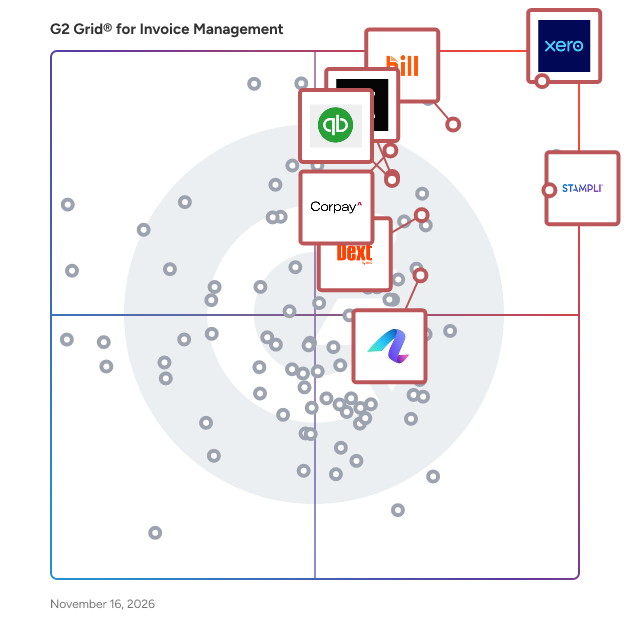
G2 Grid® for Invoice Management Software

G2 Grid® for Invoice Management Software plotting products by satisfaction and market presence

Highlighted products: Xero, BILL AP/AR, Dext, QuickBooks Bill Pay, Stampli, Corpay Cross-Border, Qonto, and Anchor.

Underlying data: [Grid® JSON](https://www.g2.com/categories/invoice-management/grids.json?focus%5B%5D=xero&focus%5B%5D=bill-ap-ar&focus%5B%5D=dext&focus%5B%5D=quickbooks-bill-pay&focus%5B%5D=stampli&focus%5B%5D=corpay-cross-border&focus%5B%5D=qonto&focus%5B%5D=anchor-anchor&segment=small-business)

Method CRM

Method CRM is the customizable CRM for QuickBooks that adapts to your business, not the other way around. Rated the #1 CRM for businesses using QuickBooks, Method lets growing companies automate their real-world workflows, so everything fits the way their business actually works, saving them hours every week. In the real world, business changes daily. There are new customer requirements, new job details, rules to follow, workflows to refine, and people to onboard. Teams get slowed down jumping between tools, retyping the same information, and fixing mistakes, whether they are juggling spreadsheets or a CRM that forces them into a box. Method replaces that with one system that flexes as fast as the work does. Yes to real-world business Customize records, fields, screens, job stages, approvals, notifications, automations, and customer portals without compromising your QuickBooks connection. Make it yours with Method AI. Say what you need in plain words, like "add the PO number column" or "hide the cost column on estimates", and the screen you're on changes. Any change can be undone in one step by simply ask Method AI, and our experts build the bigger stuff for you, all in two-way sync with QuickBooks. Yes to quote to cash Connect the dots across your business, streamlining every step from lead to payment. Capture leads through web forms, track opportunities and follow-ups, keep complete customer histories, create estimates and proposals, collect approvals and e-signatures, and convert approved work into invoices in one click. With Method Pay, customers pay by card or ACH through a branded 24/7 portal, and each payment is matched to its invoice and posted to QuickBooks automatically. Even easier, Tap to Pay lets your team accept contactless cards on their phone, with no extra hardware. Deposits, payment links, recurring billing, and clear visibility into paid, pending, refunded, and overdue transactions are built in. Yes to QuickBooks Method instantly syncs with QuickBooks Online and QuickBooks Desktop across your business, eliminating double entry and reducing busy work and errors. Customer records, estimates, invoices, and payments stay current in both systems, while QuickBooks remains your accounting system of record. Role-based access lets sales, service, and operations work with the data they need without direct access to your QuickBooks file. Yes to expert support Customers praise Method for fast access to real subject-matter experts who treat you like a partner, not a ticket. Method's team helps you set up, customize, and keep evolving your workflows, and handles deeper builds when you need them. Built for operational businesses Manufacturers and distributors manage orders, approvals, purchasing, and billing without adopting a large, expensive ERP. Field service businesses schedule jobs, dispatch teams, track work, and invoice faster. Construction companies connect estimates, change orders, job activity, and billing. Professional services teams manage relationships, proposals, recurring work, and payments around their own processes. Nearly 4,000 businesses use Method to connect leads, customers, quotes, jobs, invoices, and payments in one customizable system while QuickBooks continues to handle accounting. Yes, there's a Method for that.

Average Rating: 4.4/5.0

Total Reviews: 344

How Do G2 Users Rate Method CRM?

  • Has the product been a good partner in doing business?: 8.9/10 (Category avg: 8.9/10)
  • Accounting: 8.3/10 (Category avg: 8.8/10)
  • Cashflow: 8.3/10 (Category avg: 8.4/10)
  • Payments: 7.8/10 (Category avg: 8.7/10)

Who Is the Company Behind Method CRM?

Who Uses This Product?

  • Who Uses This: Owner, Office Manager
  • Top Industries: Construction, Wholesale
  • Company Size: 88% Small, 10% Medium

What Do G2 Reviewers Say About Method CRM?

AI-generated summary from verified user reviews

Pros
  • Users appreciate the ease of use of Method CRM, highlighting the straightforward setup and user-friendly navigation.
  • Users value the easy customization of Method CRM, allowing seamless adaptation to unique business needs and workflows.
  • Users value the seamless integration with QuickBooks, enhancing workflow and accessibility for their custom manufacturing needs.
  • Users commend the outstanding customer support of Method CRM, noting its prompt responses and helpful resources.
  • Users value the easy integration of Method CRM with QuickBooks, streamlining workflows and enhancing daily operations.
Cons
  • Users face a steep learning curve with Method CRM's initial setup and functionality, making it challenging for newcomers.
  • Users face limited customization, as many changes require expensive developer support and can complicate system stability.
  • Users face glitches and performance issues with the Method CRM, particularly affecting the mobile app and syncing.
  • Users find Method CRM's customization costs to be high, with added fees making changes expensive over time.
  • Users note the missing features in Method CRM, particularly for project management, financials, and advanced reporting tools.

What Are Recent G2 Reviews of Method CRM?

What Are G2 Users Discussing About Method CRM?

WorkflowMAX

WorkflowMAX is a job and profitability management software solution specifically designed to assist service firms in optimizing their operations. This platform provides users with comprehensive control over essential aspects such as time management, team collaboration, and profit tracking, all consolidated into a single interface. By streamlining processes like project management, timesheet tracking, invoicing, and purchase order issuance, WorkflowMAX enhances clarity at every stage of a firm's workflow. Targeted primarily at growing service-oriented businesses, WorkflowMAX empowers users to scale their operations effectively. With the ability to monitor where time is allocated and profits are generated, firms can make informed decisions, delegate tasks with accuracy, and expand their services without uncertainty. This adaptability ensures that the software aligns with the unique workflows of each firm, rather than imposing a rigid structure that may not fit their needs. Key features of WorkflowMAX include its robust project management tools, which allow users to create, assign, and track projects in real time. The timesheet functionality simplifies the process of logging hours worked, ensuring that all team members can accurately report their time. Additionally, the invoicing and purchase order capabilities facilitate seamless financial transactions, making it easier for firms to manage their cash flow. The software also integrates deeply with popular accounting platforms like Xero and QuickBooks, enabling users to synchronize financial data effortlessly. The benefits of using WorkflowMAX extend beyond its core functionalities. The software is designed to provide users with insights into their operations, helping them identify areas for improvement and opportunities for growth. The dedicated support team is another significant advantage, as they are genuinely invested in the success of their clients, offering assistance and guidance as needed. This commitment to customer support, combined with the software's comprehensive features, positions WorkflowMAX as a valuable asset for service firms looking to enhance their operational efficiency and profitability.

Average Rating: 4.1/5.0

Total Reviews: 63

How Do G2 Users Rate WorkflowMAX?

  • Has the product been a good partner in doing business?: 8.3/10 (Category avg: 8.9/10)

Who Is the Company Behind WorkflowMAX?

  • Seller: WorkflowMAX
  • Company Website:
  • Year Founded: 2023
  • HQ Location: Melbourne
  • LinkedIn® Page: www.linkedin.com
    27 employees on LinkedIn®

Who Uses This Product?

  • Who Uses This: Director
  • Top Industries: Marketing and Advertising, Accounting
  • Company Size: 76% Small, 14% Medium

What Do G2 Reviewers Say About WorkflowMAX?

AI-generated summary from verified user reviews

Pros
  • Users value the ease of use of WorkflowMax, praising its efficiency in project management and seamless integration with Xero.
  • Users value the ease of use and efficiency of WorkflowMAX, enhancing time tracking and streamlining processes effectively.
  • Users value the easy integration with Xero, which streamlines project management and eliminates double handling of invoices.
  • Users appreciate the seamless Xero integration of WorkflowMAX, streamlining project management and financial tracking effectively.
  • Users find WorkflowMax to provide easy project management from start to finish, ensuring efficient tracking and financial performance.
Cons
  • Users miss the lost integration with Dext in WorkflowMAX, which previously saved significant time and improved efficiency.
  • Users find WorkflowMAX's limited functionality frustrating, as it lacks flexibility and has numerous bugs affecting performance.
  • Users encounter billing issues, particularly with invoicing discrepancies and limited multi-currency support.
  • Users find WorkflowMAX to be time-consuming, as some tasks require excessive clicks and lack efficient scheduling.
  • Users are frustrated by invoicing problems, including discrepancies and limitations in features like multi-currency billing.

What Are Recent G2 Reviews of WorkflowMAX?

What Are G2 Users Discussing About WorkflowMAX?

Rillion

Rillion – AI-powered AP automation from invoice to payment Rillion is an accounts payable automation platform that helps finance teams capture, code, match, approve and pay invoices with less manual work and greater control. Built for midsized and large organizations with complex requirements, Rillion combines specialized AP automation, flexible workflows and AI that learns from historical invoice data. The platform supports multiple entities, locations and ERP systems, providing one connected view of invoices, approvals, spend and payment status. AI built for accounts payable Rillion applies AI throughout the invoice process. Rillion Capture uses AI and large language model technology to read and understand the full content of an invoice. Unlike traditional OCR solutions that depend on fixed templates and predefined field positions, Rillion Capture handles new invoice layouts without supplier-specific setup or training. It extracts header and line-level data with over 95% accuracy from day one and flags missing or uncertain information for verification. Finance teams can also use plain-language instructions and capture rules to define what the AI should extract, transform or validate. Rillion AI also uses historical invoice data and previous decisions to suggest account coding, cost centers, projects and approval routes. Field-level confidence indicators and visible reasoning help users understand when they can trust a suggestion and when closer review is needed. Key features and capabilities AI-native invoice capture Extract header and line-level data without OCR templates or supplier-specific setup. Configure custom fields and capture rules in plain language. AI-assisted coding and routing Receive coding and approval suggestions based on historical patterns, supported by transparent reasoning and confidence indicators. Automated matching Match invoices against purchase orders, goods receipts and contracts. Two-way and three-way matching automatically identifies exceptions requiring review. Flexible approval workflows Build approval flows based on amount, supplier, entity, department or cost center. Combine predefined rules with AI-powered routing, reminders and mobile approvals. Multi-entity management Manage AP across companies, locations and regions while retaining centralized visibility and control. Analytics and audit trail Monitor invoice flow, approval performance, spend, payables and cash flow. Every action is recorded in a searchable, time-stamped audit trail. Payment automation Where available, Rillion Pay supports secure vendor payments through ACH, virtual cards, wires and e-checks, with remittance delivery and automated reconciliation. ERP integrations Connect Rillion with Microsoft Dynamics 365 Finance, Business Central and AX, Oracle NetSuite, Sage Intacct, Sage X3, SAP Business One and other ERP systems. Business value Rillion helps organizations: Increase touchless invoice processing Reduce manual entry, coding and approval work Improve data quality and processing speed Automate complex invoice matching Strengthen spend and cash flow visibility Manage AP consistently across entities and ERPs Maintain searchable records for audits and compliance Security and compliance Rillion protects financial data through encryption, role-based access controls, secure development practices and complete audit trails. The platform maintains SOC 1 and SOC 2 compliance and supports applicable requirements including GDPR, CCPA and HIPAA. Rillion brings capture, coding, matching, approvals, analytics, ERP connectivity and payments into one connected platform—helping finance teams automate more without losing control.

Average Rating: 4.2/5.0

Total Reviews: 129

How Do G2 Users Rate Rillion?

  • Has the product been a good partner in doing business?: 9.0/10 (Category avg: 8.9/10)
  • Accounting: 10.0/10 (Category avg: 8.8/10)

Who Is the Company Behind Rillion?

  • Seller: Rillion
  • Company Website:
  • Year Founded: 1993
  • HQ Location: Stockholm, SE
  • LinkedIn® Page: www.linkedin.com
    191 employees on LinkedIn®

Who Uses This Product?

  • Top Industries: Real Estate, Accounting
  • Company Size: 66% Medium, 27% Small

What Do G2 Reviewers Say About Rillion?

AI-generated summary from verified user reviews

Pros
  • Users commend Rillion for its ease of use, appreciating the user-friendly interface and efficient workflow management.
  • Users find Rillion's interface easy to use, enabling quick navigation and effective workflow management.
  • Users appreciate the excellent customer support from Rillion, ensuring quick assistance and effective problem resolution.
  • Users commend Rillion for its intuitive design, enabling easy navigation and quick understanding from the start.
  • Users value the tracking ease of Rillion, enabling effortless invoice management with clear overviews and reports.
Cons
  • Users feel the design of Rillion could be more modern, suggesting updates to tabs and buttons for better appeal.
  • Users find the search functionality challenging, struggling with inefficiencies and a cumbersome process to locate invoices.
  • Users find the learning curve steep with Rillion, requiring time and skill to master its functionalities.
  • Users find Rillion's interface not user-friendly, especially for those lacking average computer skills, causing frustrating experiences.
  • Users find the missing features in Rillion limit their efficiency, particularly in bulk management and support responsiveness.

What Are Recent G2 Reviews of Rillion?

What Are G2 Users Discussing About Rillion?

AI can help you find the answers. G2 helps you trust them.

Connect G2 to Claude or ChatGPT for answers grounded in G2's trusted reviews, comparisons, and pricing from real user insights.

How it works

Paylocity

Paylocity is a software designed to help organizations manage HR, finance, and IT operations together in one modern, unified platform. The software provides payroll, benefits, talent management, accounts payable, corporate cards, and procurement capabilities by leveraging a single employee record that keeps policies, limits, and approval workflows synchronized across the employee lifecycle. It automates non-payroll spend management including expenses and headcount planning and reduces the administrative burden of maintaining separate HR and finance systems. Paylocity addresses operational fragmentation by anchoring all workforce and financial processes to a single source of truth that adapts as employees join, move, and grow. The software supports use cases spanning payroll processing, workforce management, AP automation, and procurement within a single integrated environment.

Average Rating: 4.4/5.0

Total Reviews: 6,291

How Do G2 Users Rate Paylocity?

  • Has the product been a good partner in doing business?: 8.7/10 (Category avg: 8.9/10)
  • Accounting: 8.9/10 (Category avg: 8.8/10)
  • Cashflow: 8.9/10 (Category avg: 8.4/10)
  • Payments: 9.2/10 (Category avg: 8.7/10)

Who Is the Company Behind Paylocity?

  • Seller: Paylocity
  • Company Website:
  • Year Founded: 1997
  • HQ Location: Schaumburg, IL
  • LinkedIn® Page: www.linkedin.com
    7,164 employees on LinkedIn®
  • Ownership: NASDAQ: PCTY

Who Uses This Product?

  • Who Uses This: HR Manager, Human Resources Manager
  • Top Industries: Computer Software, Hospital & Health Care
  • Company Size: 69% Medium, 20% Small

What Do G2 Reviewers Say About Paylocity?

AI-generated summary from verified user reviews

Pros
  • Users find the platform easy to learn and navigate, helping them handle daily tasks with little difficulty.
  • Users value responsive, helpful support that answers questions promptly and provides assistance when needed.
  • Users like having HR, payroll, employee records, and related tools in one place, making information and functions easier to access.
  • Users find payroll processing straightforward and efficient, helping them run payroll quickly and manage it with ease.
  • Users find setup and implementation easy and smooth, with helpful onboarding support guiding them through the process.
Cons
  • Users find navigation unintuitive, with layered menus and multiple paths making features and tasks harder to locate.
  • Users report inconsistent answers, limited product knowledge, and support that overlooks problem details or gives vague, unhelpful guidance.
  • Users report slow support replies, long phone hold times, and difficulty reaching the right department.
  • Users describe initial setup as difficult and confusing, with configuration mistakes and implementation follow-through issues.
  • Users find reporting confusing and difficult to create, navigate, and use.

What Are Recent G2 Reviews of Paylocity?

What Are G2 Users Discussing About Paylocity?

Checkbook

At Checkbook, we have built a way for businesses and individuals to send and receive Digital Checks, with a few simple clicks. Checkbook.io is solving push payments by providing a seamless experience for both sender and recipient. It requires no recipient onboarding and gives them the power of choice in selecting a payment method for receiving funds, whether it be Instant Pay, Direct Deposit, or a Printable Check. The simple flow has helped our companies reach 99% in digital conversion, which has drastically cut the cost and support of antiquated paper checks.

Average Rating: 4.1/5.0

Total Reviews: 17

How Do G2 Users Rate Checkbook?

  • Has the product been a good partner in doing business?: 9.8/10 (Category avg: 8.9/10)
  • Accounting: 9.3/10 (Category avg: 8.8/10)
  • Cashflow: 9.7/10 (Category avg: 8.4/10)
  • Payments: 9.3/10 (Category avg: 8.7/10)

Who Is the Company Behind Checkbook?

  • Seller: Checkbook
  • Year Founded: 2015
  • HQ Location: San Mateo, CA
  • LinkedIn® Page: www.linkedin.com
    51 employees on LinkedIn®

Who Uses This Product?

  • Company Size: 83% Small, 6% Medium

What Do G2 Reviewers Say About Checkbook?

AI-generated summary from verified user reviews

Cons
  • Users are frustrated with Checkbook's poor customer support, facing unresponsive communication and unresolved issues.
  • Users express frustration over the lack of communication features, leading to confusion and dissatisfaction with Checkbook's service.
  • Users face approval process issues with delayed timelines and poor communication, leading to frustration and dissatisfaction.
  • Users express concern over unexpected cost increases and poor communication, negatively affecting the overall experience with Checkbook.
  • Users report frustrating delays in processing times and poor communication from Checkbook, leading to a negative experience.

What Are Recent G2 Reviews of Checkbook?

BlueSnap Accounts Receivable Automation

The Armatic platform enhances the power of your existing accounting/ ERP software and your existing CRM system with workflow automation, powerful business intelligence and fully integrated cross-department communications functionality to automate tasks in finance, sales, support, HR and operations. 1. Finance & Billing Automation (AR, AP, Invoices, Subscriptions, Payments): Fully automated AR Collections drastically reduces time to payment (DSO). Our advanced rules engine delivers the right message at the right time automatically, ensuring the highest likelihood of payment, while enabling prompt, efficient customer communication. Never have another vendor payment not accounted for, assign vendor bills for review and approvals. Leverage our workflow automation and approval engine to route all your bills for optimized payments. Enable subscription/recurring billing, progress billing, invoice creation, automatic payments, payment plans, late fees, coupons, online billing and interactive customer portals, all integrated and synced with your current accounting and CRM systems. Payment tokenization and automated failed payment recovery ensures no payment is missed and all data is secure. 2. Sales & Success Automation (QTC, CPQ, NPS, eSign): Automate quotes for prospects, control your pricing and close deals faster with our QTC and CPQ features. Everything from creating a quote to collecting cash from customers. Empower your sales and success team to handle the QTC process and remove departmental bottlenecks. No more second-guessing, let your sales team handle all aspects of new contract creation within a clearly defined framework - from quote to eSignature and payment. Share all historical communication data, files, documents, invoices and contracts across your whole team from the customer manager. Use Armatic's build in contact center to communicate with your customers. Leverage the Armatic Net Promoter Score engine to join companies that have grown 2x faster vs the competition. Empower your teams to make better decisions backed by customer feedback. 3. Human Capital Automation (eNPS, Employee Advocacy, Contracts, eRecords): Measure and improve your employee satisfaction with the Armatic employee NPS. Create communication feedback loops with your employees to drive loyalty and employee engagement. Amplify your companies social reach with Employee Advocacy. Leverage the social networks of your employees, by providing them an easy way to share approved company information. Your companies social posts reach a magnitude of prospects and potential new hires. Provide your HR team and managers across your organization a solution to eSign, store and manage securely all employee contracts. Share all historical communication data, files, documents, employee contracts and NDAs across your whole team. The Armatic employee contact manager provides your team instant and easy access to all employee relevant information, including communication data, contracts, and HR related notes.

Average Rating: 4.6/5.0

Total Reviews: 37

How Do G2 Users Rate BlueSnap Accounts Receivable Automation?

  • Has the product been a good partner in doing business?: 9.6/10 (Category avg: 8.9/10)
  • Accounting: 9.3/10 (Category avg: 8.8/10)
  • Cashflow: 8.7/10 (Category avg: 8.4/10)
  • Payments: 9.0/10 (Category avg: 8.7/10)

Who Is the Company Behind BlueSnap Accounts Receivable Automation?

  • Seller: Payroc
  • Year Founded: 2003
  • HQ Location: Tinley Park, US
  • LinkedIn® Page: www.linkedin.com
    1,132 employees on LinkedIn®

Who Uses This Product?

  • Company Size: 59% Small, 19% Medium

What Do G2 Reviewers Say About BlueSnap Accounts Receivable Automation?

AI-generated summary from verified user reviews

Pros
  • Users value the automation features of BlueSnap Accounts Receivable Automation, streamlining invoicing and enhancing payment speed effortlessly.
  • Users appreciate the efficiency of BlueSnap Accounts Receivable Automation, minimizing manual work and streamlining invoicing processes.
  • Users value the seamless payment processing of BlueSnap, enhancing efficiency and reducing manual follow-ups on invoices.
  • Users love the time-saving automation of BlueSnap Accounts Receivable, streamlining invoicing and payments effortlessly.
  • Users love the ease of use of BlueSnap Accounts Receivable Automation, streamlining invoicing and payment processes effortlessly.
Cons
  • Users often find the complexity of BlueSnap's setup and reporting features impacts their efficiency and experience negatively.
  • Users feel that reporting is complicated, requiring extra effort to interpret data, especially under pressure.
  • Users express frustration with limited customization, making it difficult to adapt workflows for unique billing scenarios.
  • Users find the reporting features unclear, requiring extra effort to see progress and affecting overall efficiency.
  • Users find the complex features of BlueSnap Accounts Receivable Automation challenging, particularly during setup and reporting.

What Are Recent G2 Reviews of BlueSnap Accounts Receivable Automation?

SAP Ariba

SAP Ariba is a software designed to help organizations of all sizes automate and manage the purchasing lifecycle for indirect goods and services. The software provides end-to-end spend visibility, procurement workflow automation, and compliance management by leveraging integration with SAP ERP systems and a broad supplier network. It automates approval routing and exception handling and reduces errors across purchasing workflows for both smaller companies and large global enterprises. SAP Ariba addresses the challenge of managing high volumes of indirect spend by delivering control and compliance regardless of whether teams rely on simple automation or complex multi-ERP environments. The software supports procure-to-pay use cases, supplier collaboration, spend reporting, and seamless connectivity with SAP and third-party financial systems.

Average Rating: 4.1/5.0

Total Reviews: 772

How Do G2 Users Rate SAP Ariba?

  • Has the product been a good partner in doing business?: 8.1/10 (Category avg: 8.9/10)
  • Accounting: 8.3/10 (Category avg: 8.8/10)
  • Cashflow: 8.2/10 (Category avg: 8.4/10)
  • Payments: 8.5/10 (Category avg: 8.7/10)

Who Is the Company Behind SAP Ariba?

  • Seller: SAP
  • Company Website:
  • Year Founded: 1972
  • HQ Location: Walldorf
  • LinkedIn® Page: www.linkedin.com
    149,349 employees on LinkedIn®
  • Ownership: NYSE:SAP

Who Uses This Product?

  • Who Uses This: Manager, Consultant
  • Top Industries: Information Technology and Services, Accounting
  • Company Size: 55% Large, 29% Medium

What Do G2 Reviewers Say About SAP Ariba?

AI-generated summary from verified user reviews

Pros
  • Users find SAP Ariba's ease of use enhances their purchasing efficiency and simplifies supplier management.
  • Users value the efficiency of SAP Ariba, facilitating easy supplier discovery and streamlined purchase request management.
  • Users appreciate the procurement efficiency of SAP Ariba, benefiting from streamlined processes and enhanced visibility for informed decision-making.
  • Users value the time-saving features of SAP Ariba, streamlining procurement processes and reducing confusion in order tracking.
  • Users appreciate the ease of use and extensive supplier options in SAP Ariba, enhancing their purchasing efficiency.
Cons
  • Users find SAP Ariba's interface complex and not intuitive, leading to confusion and delays in task completion.
  • Users find the learning curve steep, as the interface can be complex and not very intuitive for new users.
  • Users find SAP Ariba not user-friendly, navigating complex interfaces and multi-step tasks that hinder efficiency.
  • Users find the poor interface design of SAP Ariba to be complex, overwhelming, and inefficient for basic tasks.
  • Users face a complex setup process with SAP Ariba, often requiring extensive time and effort to integrate.

What Are Recent G2 Reviews of SAP Ariba?

What Are G2 Users Discussing About SAP Ariba?

OneSuite

OneSuite is an all-in-one client work management platform built for agencies, professional service teams, consultants, and independent professionals. It brings CRM, projects, clients, teams, time tracking, documents, invoicing, communication, and client collaboration into one connected workspace. Instead of managing client work across disconnected tools, OneSuite helps businesses manage the complete client journey, from the first opportunity and proposal to project delivery, tracked time, invoicing, and ongoing client relationships. Manage Leads and Clients With a Connected CRM OneSuite’s built-in CRM helps service businesses organize leads, manage opportunities, and move potential clients through customizable pipelines. Keep client details, conversations, projects, documents, invoices, and related activity connected, giving your team a clearer picture of every relationship. Plan and Deliver Client Projects Manage projects using flexible boards and lists, create and assign tasks, set priorities and deadlines, organize project files, and keep work moving from start to finish. Because projects are connected with clients, teams can easily understand what they’re working on, who it’s for, and what needs attention next. Track Time and Understand Team Capacity Built-in time tracking connects working hours directly with projects, tasks, and team members. Track billable and non-billable time, review timesheets, and understand where your team’s time is going. Team View brings important workforce information together so you can see assignments, capacity, utilization, permissions, rates, and contributions in one place. This helps agencies make better decisions about workloads, resources, and profitability without relying on separate tools. Create Proposals, Contracts, and Documents Create and manage proposals, contracts, agreements, and other client documents directly in OneSuite. Reusable templates and built-in e-signatures make it easier to standardize your sales and onboarding process while reducing paperwork and tool switching. Invoice Clients and Manage Recurring Billing Turn client work into revenue with one-time and recurring invoices. Manage retainers and ongoing services, keep track of invoice activity, and give clients convenient ways to pay online through supported payment providers. Because clients, projects, tracked time, documents, and billing live in the same system, teams get a more connected view of their work and finances. Give Clients a Branded Portal OneSuite includes a white-label client portal that creates a professional, branded experience for your clients. Customize the portal with your business branding and domain while giving clients a central place to access their projects, documents, invoices, and other shared information. This keeps clients informed without forcing your team to manage endless email threads or send information across multiple platforms. Keep Client Communication Connected Manage client communication closer to the work with OneSuite’s built-in email capabilities. Teams can connect email, keep conversations organized, and reduce the need to constantly switch between their inbox and client management tools. Custom SMTP support also gives businesses greater flexibility over how emails are sent from their workspace. Connect Your Accounting Workflow OneSuite integrates with QuickBooks and Xero, helping businesses connect their client management and invoicing workflows with the accounting tools they already use. Instead of manually moving information between disconnected systems, teams can build a more connected workflow from client work to financial management. Run Client Work From One Place OneSuite is designed to reduce the growing software stack that service businesses often need to manage their operations. CRM, client management, projects, tasks, team management, time tracking, timesheets, documents, e-signatures, invoicing, recurring billing, email, files, client portals, payment options, and integrations work together in one platform. For agencies and service professionals, that means less time switching between tools, better visibility across client work, and a more consistent experience for both teams and clients. With OneSuite, you can manage the client journey from lead to payment—and the work in between—from one connected platform.

Average Rating: 4.9/5.0

Total Reviews: 20

How Do G2 Users Rate OneSuite?

  • Has the product been a good partner in doing business?: 9.4/10 (Category avg: 8.9/10)
  • Accounting: 6.7/10 (Category avg: 8.8/10)
  • Cashflow: 7.2/10 (Category avg: 8.4/10)
  • Payments: 7.8/10 (Category avg: 8.7/10)

Who Is the Company Behind OneSuite?

  • Seller: OneSuite
  • Year Founded: 2024
  • HQ Location: Wilmington, Delaware, United States
  • LinkedIn® Page: www.linkedin.com
    7 employees on LinkedIn®

Who Uses This Product?

  • Company Size: 90% Small, 10% Medium

What Do G2 Reviewers Say About OneSuite?

AI-generated summary from verified user reviews

Pros
  • Users love the Task Management features of OneSuite, allowing them to effectively keep track of multiple projects seamlessly.
  • Users find OneSuite’s ease of use invaluable for managing multiple projects efficiently and intuitively.
  • Users love the Calendar and Dashboard features of OneSuite, simplifying project management and enhancing productivity.
  • Users highlight the time-saving features of OneSuite, enhancing task management and streamlining their workflow efficiently.
  • Users value the automation features of OneSuite, streamlining tasks and significantly improving workflow efficiency.
Cons
  • Users feel a lack of updates and features that align with their experience, hindering overall satisfaction with OneSuite.
  • Users find the time management challenging due to overwhelming customization options and technical issues like slow loading.
  • Users suggest that cost issues could be improved for a better overall value with OneSuite.
  • Users feel that while there is nothing to dislike, the product is expensive and suggest reducing costs.

What Are Recent G2 Reviews of OneSuite?

AvidXchange

AvidXchange is the AI-powered accounts payable (AP) and payments solution built for mid-market businesses. We combine AI that eliminates manual work with over 25 years of experience and data intelligence to get it right, so finance teams can move faster, pay smarter, and operate with complete confidence. Over 8,000 growth-driven businesses rely on AvidXchange to deliver greater efficiency, tighter control, and real-time visibility into their AP process and to execute millions of payments with accuracy and enhanced security through our proprietary payment network. For more information, visit avidxchange.com.

Average Rating: 4.4/5.0

Total Reviews: 357

How Do G2 Users Rate AvidXchange?

  • Has the product been a good partner in doing business?: 8.4/10 (Category avg: 8.9/10)
  • Accounting: 8.6/10 (Category avg: 8.8/10)
  • Cashflow: 7.2/10 (Category avg: 8.4/10)
  • Payments: 8.6/10 (Category avg: 8.7/10)

Who Is the Company Behind AvidXchange?

  • Seller: AvidXchange
  • Company Website:
  • Year Founded: 2000
  • HQ Location: Charlotte, NC
  • LinkedIn® Page: www.linkedin.com
    1,672 employees on LinkedIn®
  • Ownership: NASDAQ: AVDX

Who Uses This Product?

  • Who Uses This: Accounts Payable, Accounts Payable Manager
  • Top Industries: Real Estate, Accounting
  • Company Size: 51% Medium, 39% Small

What Do G2 Reviewers Say About AvidXchange?

AI-generated summary from verified user reviews

Pros
  • Users value the ease of use of AvidXchange, enhancing organization and efficiency in handling invoices and approvals.
  • Users value the time-saving features of AvidXchange, streamlining the AP process and enhancing overall efficiency.
  • Users commend AvidXchange for its efficiency in automating AP workflows, enhancing organization and reducing manual errors.
  • Users value the streamlined AP workflow of AvidXchange, enhancing efficiency and reducing manual errors significantly.
  • Users value the streamlined invoicing process of AvidXchange, enhancing efficiency and control in accounts payable workflows.
Cons
  • AvidXchange needs to enhance their customer support as users face long wait times and slow resolution processes.
  • Users experience delays in support resolution, with long wait times impacting the overall satisfaction with AvidXchange.
  • Users face frequent payment issues with AvidXchange, causing delays and requiring constant support for resolution.
  • Users experience delays in vendor payments and find it difficult to choose preferred payment methods in AvidXchange.
  • Users face invoicing issues with AvidXchange, struggling with limited invoice visibility and errors in indexing.

What Are Recent G2 Reviews of AvidXchange?

What Are G2 Users Discussing About AvidXchange?

Trail Agent Builder

Nanonets agents run complex, document-heavy processes from start to finish. They read incoming documents, apply your business rules, make the call, and post clean data into SAP, Salesforce, NetSuite, and beyond. Teams use them for accounts payable, invoice processing, order management, reconciliation, and supplier onboarding, cutting processing time by 95%. Context Graph is what makes that work in production. It holds thousands of your business rules and applies the right one in the right situation, which is where generic agents fail, because real processes carry rules that change by vendor, region, and value. Add a rule and Context Graph tracks which rule drove which decision. Every decision is traceable. You can see what the agent read, which rule fired, and why it made the call, instead of accepting a black box that guesses and invents field values. When an agent is uncertain, it routes the exception to a named owner rather than silently getting it wrong. When someone corrects it, every agent sharing that rule learns. Nanonets ranks #1 for accuracy on complex documents, and global enterprises including Volkswagen, Schneider Electric, Mondelez, and Roche run it where accuracy is non-negotiable. It is not just an agent. It is the only automation layer you can actually audit, control, and trust.

Average Rating: 4.7/5.0

Total Reviews: 100

How Do G2 Users Rate Trail Agent Builder?

  • Has the product been a good partner in doing business?: 9.4/10 (Category avg: 8.9/10)
  • Accounting: 9.2/10 (Category avg: 8.8/10)
  • Cashflow: 8.3/10 (Category avg: 8.4/10)

Who Is the Company Behind Trail Agent Builder?

  • Seller: Trail
  • Year Founded: 2017
  • HQ Location: San Francisco, CA
  • LinkedIn® Page: www.linkedin.com
    331 employees on LinkedIn®

Who Uses This Product?

  • Top Industries: Accounting, Information Technology and Services
  • Company Size: 42% Small, 39% Medium

What Do G2 Reviewers Say About Trail Agent Builder?

AI-generated summary from verified user reviews

Pros
  • Users value the excellent customer support offered by Trail Agent Builder, ensuring quick resolutions and helpful guidance.
  • Users find the ease of use of Trail Agent Builder enhances their experience, ensuring smooth integration and access.
  • Users value the time-saving automation of Nanonets, significantly enhancing workflow efficiency and reducing manual tasks.
  • Users commend Nanonets for its exceptional accuracy in data extraction, making invoicing efficient and reliable.
  • Users appreciate the customizable workflows that enhance productivity and adapt to specific business needs.
Cons
  • Users face data management issues with Trail Agent Builder, struggling with processing and tracking various files effectively.
  • Users find the learning curve steep, particularly for advanced setups and model training, impacting overall usability.
  • Users find the pricing model expensive and less transparent compared to competitors, complicating budget management.
  • Users report occasional OCR mapping inaccuracies that may require manual correction, though improvements have been noted over time.
  • Users find the learning difficulty in setting up advanced workflows in Trail Agent Builder challenging and time-consuming.

What Are Recent G2 Reviews of Trail Agent Builder?

What Are G2 Users Discussing About Trail Agent Builder?

Webexpenses

Webexpenses is a comprehensive spend management solution designed to assist organizations in effectively managing their financial expenditures. This platform integrates smart Expense Cards with cloud-based software, enabling businesses to gain complete control over their spending activities. Catering to finance teams across various industries and company sizes, Webexpenses automates expense management processes, enforces financial policies, and helps control costs, ultimately allowing companies to allocate resources more efficiently towards growth initiatives. The target audience for Webexpenses includes finance professionals and teams within organizations that seek to streamline their expense management processes. With over 2,000 finance teams utilizing the platform in more than 70 countries, it is evident that Webexpenses addresses a critical need for businesses looking to enhance their financial oversight. The solution is particularly beneficial for organizations that experience high travel and entertainment (T&E) expenses, as it provides tools to reduce spending by up to 30%. Webexpenses offers a range of specific use cases that enhance operational efficiency. For direct company spending, the integrated Expense Cards automate transaction processing, feeding data into the platform in real-time. This feature not only simplifies expense tracking but also ensures that finance teams have immediate access to spending data. For out-of-pocket expenses, users can conveniently create claims by scanning receipts using the intuitive mobile app. This functionality enhances visibility for finance teams and ensures compliance with company policies at the point of sale, significantly improving the overall expense management experience. In addition to expense tracking, Webexpenses provides a unified platform for total spend management, which includes features for invoice processing, payments, and advanced auditing of all transactions. The platform's robust tools are designed to detect errors, prevent fraudulent activities, and maximize tax reclaims. By offering these capabilities, Webexpenses helps organizations achieve compliance while simultaneously saving money and reducing administrative burdens associated with financial management. The combination of automation, policy enforcement, and cost control makes Webexpenses a valuable asset for any organization looking to optimize its spend management processes. By leveraging this platform, businesses can streamline their financial operations, improve visibility into spending patterns, and ultimately drive better financial outcomes.

Average Rating: 4.3/5.0

Total Reviews: 2,751

How Do G2 Users Rate Webexpenses?

  • Has the product been a good partner in doing business?: 8.7/10 (Category avg: 8.9/10)
  • Accounting: 8.3/10 (Category avg: 8.8/10)
  • Cashflow: 7.9/10 (Category avg: 8.4/10)
  • Payments: 8.0/10 (Category avg: 8.7/10)

Who Is the Company Behind Webexpenses?

  • Seller: Signifo
  • Company Website:
  • Year Founded: 2000
  • HQ Location: Witney
  • LinkedIn® Page: www.linkedin.com
    132 employees on LinkedIn®

Who Uses This Product?

  • Who Uses This: Manager, Account Manager
  • Top Industries: Financial Services, Construction
  • Company Size: 54% Medium, 28% Large

What Do G2 Reviewers Say About Webexpenses?

AI-generated summary from verified user reviews

Pros
  • Users praise the ease of use of Webexpenses, highlighting its intuitive navigation and clear expense tracking features.
  • Users find the ease of use in Webexpenses remarkable, simplifying the process of managing and compiling expenses.
  • Users enjoy the quick and easy upload feature of Webexpenses, making expense tracking convenient and efficient.
  • Users value the user-friendly interface of Webexpenses, making it effortless to manage and track their expenses.
  • Users appreciate the simplicity of Webexpenses, enjoying its intuitive interface and easy mileage claims process.
Cons
  • Users experience a slow and clunky mobile app that complicates receipt management and overall usability.
  • Users find receipt scanning issues frustrating, often citing slow uploads and lack of intuitive functionality.
  • Users find upload issues frustrating, experiencing slow mobile app performance and occasional delays in receipt uploads.
  • Users feel that Webexpenses is not intuitive, struggling with slow performance and a difficult receipt upload process.
  • Users feel the design needs improvement, citing outdated elements and a cluttered user interface affecting usability.

What Are Recent G2 Reviews of Webexpenses?

PaperLess

PaperLess – AI-Powered Accounts Payable (AP) Automation Software PaperLess handles accounts payable automation for finance teams that need to move away from manual invoice processing. If your AP team is still typing invoices, chasing approvals via email, or hunting through filing cabinets, PaperLess addresses these bottlenecks directly. We work with organisations running Sage 50, Sage 200, Sage Intacct, Xero, SAP Business One and OrderWise—typically finance departments that have outgrown spreadsheets but need software that integrates with their existing accounting system rather than replacing it. Invoice capture – AI-OCR technology reads invoices automatically, including line-level detail (descriptions, quantities, VAT codes, nominal codes). Your team validates rather than types. Accuracy typically exceeds 95% from day one. Approval workflows – Configure routing rules based on invoice amount, supplier, department or cost centre. Invoices route automatically to the right approver with mobile approval capability. Every approval is logged with complete audit trails. You can hold invoices in the system before posting—useful for month-end accruals whilst maintaining payment controls. Purchase order matching – Automatic 2-way and 3-way matching compares invoices against POs and goods received notes. Clean matches can auto-approve and post. Variances flag for investigation. For organisations using POs properly, this typically enables touchless processing for 80-90% of invoices. PO requisitions – Control spending before orders are placed, not after invoices arrive. Employees submit purchase requests through configurable approval workflows. Approved requisitions convert to purchase orders automatically. Expense management – Employees capture receipts via mobile, submit expense claims automatically, and route for approval. Everything posts directly into your accounting system. Our customers include CFOs, Finance Directors, Finance Managers and AP teams across construction, distribution, manufacturing, professional services and not-for-profit sectors. They implement PaperLess primarily for two reasons: stronger financial controls (systematic approval enforcement, complete audit trails) and operational efficiency (significant reduction in manual processing, faster month-end close). Most organisations are processing invoices automatically within 2 hours of starting implementation. We support both single-entity businesses and multi-entity organisations requiring consolidated visibility with location-specific workflows.

Average Rating: 4.4/5.0

Total Reviews: 23

How Do G2 Users Rate PaperLess?

  • Has the product been a good partner in doing business?: 9.3/10 (Category avg: 8.9/10)
  • Accounting: 8.8/10 (Category avg: 8.8/10)
  • Cashflow: 8.9/10 (Category avg: 8.4/10)
  • Payments: 7.8/10 (Category avg: 8.7/10)

Who Is the Company Behind PaperLess?

Who Uses This Product?

  • Top Industries: Accounting
  • Company Size: 65% Small, 26% Medium

What Are Recent G2 Reviews of PaperLess?

What Are G2 Users Discussing About PaperLess?

MineralTree

MineralTree provides secure, easy-to-use, end-to-end Accounts Payable and payment automation solutions that reduce costs by more than 75%, increase visibility and control, mitigate fraud and risk, while improving cash flow. More than 2,000 mid-sized companies, as well as several financial institutions, rely on MineralTree to help transform the finance function from a cost center to a profit center. With MineralTree, you can be up and running in days.

Average Rating: 4.5/5.0

Total Reviews: 162

How Do G2 Users Rate MineralTree?

  • Has the product been a good partner in doing business?: 9.3/10 (Category avg: 8.9/10)
  • Accounting: 8.9/10 (Category avg: 8.8/10)
  • Cashflow: 7.4/10 (Category avg: 8.4/10)
  • Payments: 8.8/10 (Category avg: 8.7/10)

Who Is the Company Behind MineralTree?

  • Seller: Global Payments
  • Company Website:
  • Year Founded: 1967
  • HQ Location: Atlanta, US
  • LinkedIn® Page: www.linkedin.com
    18,549 employees on LinkedIn®
  • Ownership: NYSE:GPN

Who Uses This Product?

  • Who Uses This: CFO, Accounting Manager
  • Top Industries: Accounting, Non-Profit Organization Management
  • Company Size: 62% Medium, 39% Small

What Do G2 Reviewers Say About MineralTree?

AI-generated summary from verified user reviews

Pros
  • Users value the ease of use of MineralTree, significantly streamlining invoice processing and payment efficiency.
  • Users commend the fantastic customer support of MineralTree, enhancing their overall experience and efficiency in invoice management.
  • Users appreciate the seamless integrations of MineralTree, enhancing efficiency in processing and managing invoices effectively.
  • Users find MineralTree highly efficient, streamlining invoice processing and significantly reducing manual workload and errors.
  • Users highlight the superior automation features of MineralTree, simplifying invoice processing and minimizing manual efforts.
Cons
  • Users report integration issues that hinder payment processing, leading to confusion and potential cash flow risks.
  • Users report several technical issues with MineralTree, including poor invoice capture, syncing problems, and outdated interface design.
  • Users face payment issues with risks in virtual card payments and challenges in ERP reconciliation, leading to confusion.
  • Users experience syncing issues with MineralTree, leading to potential data loss and impacting overall functionality.
  • Users face invoicing issues with approval visibility and workflow inefficiencies, leading to time-consuming manual processes.

What Are Recent G2 Reviews of MineralTree?

What Are G2 Users Discussing About MineralTree?

QuoteIQ

QuoteIQ is the definitive all-in-one CRM and business management software built specifically for home‑service professionals—whether you’re in pressure washing, landscaping, painting, pest control, HVAC, mobile detailing, or handyman services. Designed by contractor-led founders who scaled multi-truck service businesses, QuoteIQ brings every essential tool—quoting, invoicing, scheduling, payments, marketing, client communication, photo documentation, analytics, route optimization—into one cohesive, mobile-first platform, eliminating the need for third-party add-ons or expensive integrations . At its core, QuoteIQ accelerates lead-to-cash workflows with features like MapMeasure Pro, which lets you outline properties remotely via satellite or street view, calculate area or linear footage, and instantly populate pricing into your estimates—all from your phone or tablet . InstaQuote and InstaSchedule empower customers to generate quotes and book appointments online based on real-time availability, turning your website or social profiles into active sales channels . Once a job is booked, robust job and crew scheduling tools—with drag-and-drop UIs, “on-the-way” texts, and route optimization—keep your team organized and reduce no-shows. Meanwhile, QuoteIQ Cam captures before-and-after photos and inspection forms directly within each job, linking documentation, notes, and client approval into a single accessible record . ClientHub handles two-way business texting, keeping all communication in one place without resorting to personal lines . When work is complete, QuoteIQ lets you send branded invoices, collect payments online or in-person, track outstanding balances, and automatically trigger review requests via the built-in Review Multiplier to boost your Google reputation—all while consolidating tips, expenses, and team time tracking in one dashboard . Its real-time analytics dashboard provides visibility into revenue, conversion rates, lead sources, average ticket size, profit margins, and ROI—empowering data-driven decisions in the office or on the road . Unlike platforms that fragment functionality across multiple subscriptions and integrations, QuoteIQ delivers everything under one transparent pricing model that scales with your team—starting at $29/month for beginners, $79/month for Pro users, and $149.99/month for up to ten users in the Elite tier (). That flat-fee approach offers full feature access—InstaQuote, InstaSchedule, marketing campaigns, virtual call teams, dedicated account manager, route optimization, and more—without hidden fees or surprises . Today, over 10,000 service professionals trust QuoteIQ to streamline operations, save time, close more deals, and scale their businesses—without juggling multiple tools or subscriptions

Average Rating: 4.6/5.0

Total Reviews: 20

How Do G2 Users Rate QuoteIQ?

  • Has the product been a good partner in doing business?: 9.3/10 (Category avg: 8.9/10)
  • Accounting: 10.0/10 (Category avg: 8.8/10)
  • Cashflow: 10.0/10 (Category avg: 8.4/10)
  • Payments: 10.0/10 (Category avg: 8.7/10)

Who Is the Company Behind QuoteIQ?

Who Uses This Product?

  • Who Uses This: Owner
  • Top Industries: Consumer Services
  • Company Size: 105% Small

What Are Recent G2 Reviews of QuoteIQ?

Corpay Spend Management

The smarter, faster way to manage all business payments — without the hassle. Corpay Complete brings AP automation, corporate card management, and expense control into one seamless platform. Say goodbye to manual processes and disconnected systems. Now, you can automate the P2P process, track expenses in real time, and gain full visibility over all of your company spend. With best-in-class automation, built-in fraud protection, and enterprise-grade security, Corpay Complete helps businesses reduce risk, increase efficiency, and scale with ease. Start with the tools you need today and expand as your business grows. Product Description Corpay (NYSE: CPAY) is America’s #1 commercial card issuer and a trusted S&P 500 company, helping 800,000 businesses streamline payments across 200+ countries. Corpay Complete is Fully Managed AP. It eliminates inefficiencies by consolidating purchase orders, invoicing, vendor payments, corporate cards, and expense controls into a single, automated workflow. No more juggling multiple vendors or disconnected systems. Instead, businesses get one intuitive platform designed for complete control over spend. With real-time visibility, built-in fraud protection, and seamless ERP integrations — including NetSuite, QuickBooks, and Microsoft Dynamics and more — finance teams can close the books faster, optimize cash flow, strengthen financial oversight without payments related distractions. . How Do You Position Yourself Against Competitors? Unlike fragmented solutions that require multiple vendors and manual processes, Corpay Complete consolidates all AP and expense processes in one intelligent platform. We do more than just “Bill Pay”. We are the only provider that provides “Fully Managed AP”. That means Automating the entire P2P process, managing vendor enrollment/payments, , and eliminating manual work enabling our clients to spend more time focusing on their core business. With 1.8 billion payments processed annually and vendor network of 3.8M vendors, Corpay is the trusted choice for finance teams that need speed, security, and scale.

Average Rating: 4.6/5.0

Total Reviews: 418

How Do G2 Users Rate Corpay Spend Management?

  • Has the product been a good partner in doing business?: 9.3/10 (Category avg: 8.9/10)
  • Accounting: 9.9/10 (Category avg: 8.8/10)
  • Cashflow: 9.5/10 (Category avg: 8.4/10)
  • Payments: 9.9/10 (Category avg: 8.7/10)

Who Is the Company Behind Corpay Spend Management?

  • Seller: Corpay
  • Company Website:
  • Year Founded: 2000
  • HQ Location: Atlanta, US
  • LinkedIn® Page: www.linkedin.com
    7,238 employees on LinkedIn®

Who Uses This Product?

  • Who Uses This: Controller, CFO
  • Top Industries: Automotive, Primary/Secondary Education
  • Company Size: 69% Medium, 18% Large

What Do G2 Reviewers Say About Corpay Spend Management?

AI-generated summary from verified user reviews

Pros
  • Users appreciate the ease of use of Corpay Spend Management, streamlining financial processes and enhancing account organization.
  • Users appreciate the efficiency of Corpay Spend Management, streamlining financial processes and enhancing asset management effectively.
  • Users value the efficient customer support of Corpay Spend Management, enhancing their experience and satisfaction with the product.
  • Users appreciate the efficient payment processing of Corpay Spend Management, enhancing automation and integration for smoother transactions.
  • Users appreciate the easy payment features of Corpay Complete, enhancing security and efficiency in financial management.
Cons
  • Users face payment issues with Corpay Spend Management, leading to communication problems and a frustrating onboarding process.
  • Users face difficulties in vendor setup and some hiccups with certain vendors, impacting the overall experience.
  • Users face poor customer support with Corpay Spend Management, leading to frustrating communication and operational challenges.
  • Users face delays during onboarding and payment processes, impacting their efficiency and overall experience with Corpay Spend Management.
  • Users face poor communication and rigidity in payment processing, leading to delays and internal workarounds.

What Are Recent G2 Reviews of Corpay Spend Management?

What Are G2 Users Discussing About Corpay Spend Management?

Nathan Calabrese
NC
Researched and written by Nathan Calabrese
Updated