Best Enterprise IT Management Software

How Many Enterprise IT Management Software Products Does G2 Track?

Total Products under this Category: 143

Category Stats (Sep 2026)

  • Average Rating: 4.4/5 (↓0.01 vs Aug 2026) The average rating of products in this category, based on all submitted ratings
  • Top Trending Product: env zero (+1.33%) - Among all products in this category, env zero recorded the largest rating increase compared to last month

Last updated: September 01, 2026

How Does G2 Rank Enterprise IT Management Software Products?

Why You Can Trust G2's Software Rankings:

  • 30 Analysts and Data Experts
  • 20,300+ Authentic Reviews
  • 143+ Products
  • Unbiased Rankings

G2's software rankings are built on verified user reviews, rigorous moderation, and a consistent research methodology maintained by a team of analysts and data experts. Each product is measured using the same transparent criteria, with no paid placement or vendor influence. While reviews reflect real user experiences, which can be subjective, they offer valuable insight into how software performs in the hands of professionals. Together, these inputs power the G2 Score, a standardized way to compare tools within every category.

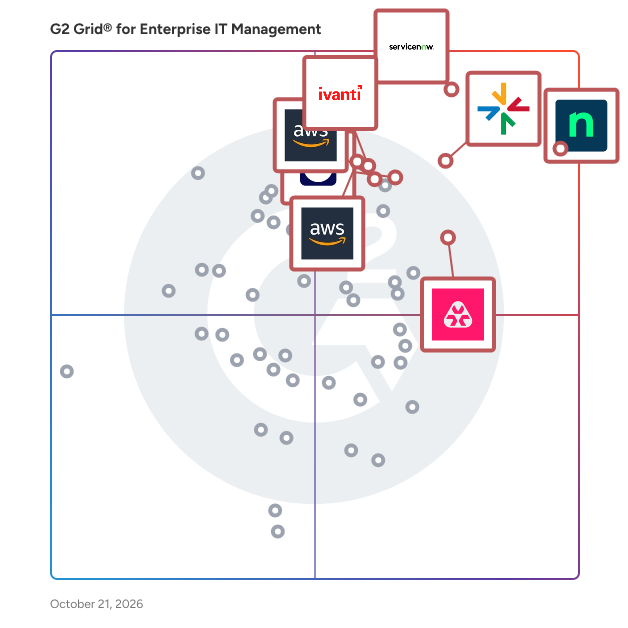
G2 Grid® for Enterprise IT Management Software

G2 Grid® for Enterprise IT Management Software plotting products by satisfaction and market presence

Highlighted products: NinjaOne, ServiceNow IT Operations Management, ManageEngine Endpoint Central, Remote Monitoring and Management, TeamViewer, AWS Systems Manager, Ivanti Neurons for Unified Endpoint Management, and OpManager Nexus.

Underlying data: [Grid® JSON](https://www.g2.com/categories/enterprise-it-management/grids.json?focus%5B%5D=ninjaone&focus%5B%5D=servicenow-it-operations-management&focus%5B%5D=manageengine-endpoint-central&focus%5B%5D=remote-monitoring-and-management&focus%5B%5D=teamviewer&focus%5B%5D=aws-systems-manager&focus%5B%5D=ivanti-neurons-for-unified-endpoint-management&focus%5B%5D=opmanager-nexus)

NinjaOne

NinjaOne is the unified IT operations platform that helps IT teams and managed service providers manage, secure, and support every endpoint from a single cloud-native console. Nearly 40,000 customers across 140+ countries use NinjaOne to replace fragmented point tools with one platform built to scale. The platform brings together the core work of modern IT operations: endpoint management, autonomous patch management, vulnerability management, endpoint and SaaS backup, remote access, and IT service desk. Teams monitor and control Windows, macOS, Linux, mobile, and virtual devices in one place, automate routine work with policy-based automation and human-centered AI, and cut the cost and risk that come from running many disconnected tools. NinjaOne serves internal IT teams and MSPs alike, from lean IT departments to mid-market and large enterprise organizations managing distributed, multi-site environments. Common uses include consolidating IT tooling, automating patching for security and compliance, managing distributed and hybrid workforces, improving endpoint visibility, and strengthening backup and ransomware readiness. NinjaOne has maintained a 98 percent customer satisfaction score for more than five years, backed by free unlimited onboarding and 24/7 support in seven languages. Organizations that move to NinjaOne report replacing four or more separate tools with the single platform. NinjaOne is FedRAMP Moderate Authorized and SOC 2 Type II and Type III compliant, and supports audit-ready compliance evidence across frameworks including CMMC, ISO 27001, and HIPAA. The mission behind the platform is simple: unify IT to simplify work, giving IT teams better tools and employees a great technology experience at work.

Average Rating: 4.7/5.0

Total Reviews: 4,988

How Do G2 Users Rate NinjaOne?

  • Has the product been a good partner in doing business?: 9.4/10 (Category avg: 8.9/10)
  • Service Management: 8.9/10 (Category avg: 8.6/10)
  • ITIL Policy Compliance: 8.3/10 (Category avg: 8.4/10)
  • Disaster Recovery: 7.8/10 (Category avg: 7.6/10)

Who Is the Company Behind NinjaOne?

  • Seller: NinjaOne
  • Company Website:
  • Year Founded: 2013
  • HQ Location: Austin, Texas
  • Twitter: @NinjaOne
    3,607 Twitter followers
  • LinkedIn® Page: www.linkedin.com
    2,376 employees on LinkedIn®

Who Uses This Product?

  • Who Uses This: IT Manager, Owner
  • Top Industries: Information Technology and Services, Computer & Network Security
  • Company Size: 47% Medium, 45% Small

What Do G2 Reviewers Say About NinjaOne?

AI-generated summary from verified user reviews

Pros
  • Users value the ease of use of NinjaOne, highlighting its seamless implementation and effective support for MSPs.
  • Users praise NinjaOne for its easy-to-navigate remote access and full visibility, enhancing IT support efficiency.
  • Users appreciate the ongoing feature enhancements of NinjaOne, ensuring the platform continuously evolves to meet our needs.
  • Users praise the powerful automation features of NinjaOne, enhancing efficiency and simplifying management tasks.
  • Users appreciate the exceptional customer support of NinjaOne, which simplifies learning and enhances overall usability.
Cons
  • Users notice the missing features in NinjaOne, specifically regarding client and customer portal capabilities.
  • Users find the limited features of NinjaOne frustrating, especially regarding user management and third-party software automation.
  • Users find the search function lacking and struggle with visibility and usability issues in NinjaOne.
  • Users feel the search function needs improvement and find the visibility of the NinjaOne icon inconsistent.
  • Users express concerns about feature issues, including confusion over roles, auto-installations, and OS compatibility challenges.

What Are Recent G2 Reviews of NinjaOne?

What Are G2 Users Discussing About NinjaOne?

ServiceNow IT Operations Management

ServiceNow IT Operations Management (ITOM) is a comprehensive solution designed to enhance the visibility, health, and optimization of an organization's IT infrastructure. By integrating advanced automation and artificial intelligence, ITOM enables proactive management of IT operations, reducing downtime and improving service delivery. Key Features and Functionality: - ITOM Visibility: Automates the discovery of IT assets across on-premises, cloud, and hybrid environments, providing a unified view of the infrastructure. Service Mapping identifies dependencies between IT components, facilitating impact analysis and change management. - ITOM Health: Consolidates and correlates events from various monitoring tools, enabling IT teams to prioritize and respond to critical incidents promptly. Operational Intelligence leverages AI and machine learning to detect patterns and anomalies, allowing for proactive issue resolution. - ITOM Optimization: Manages cloud resources effectively by providing visibility and control over public, private, and hybrid cloud environments. Automates provisioning, lifecycle management, and cost optimization of IT resources supporting application services. Primary Value and Solutions Provided: ServiceNow ITOM addresses the challenges of managing complex IT environments by offering a unified platform that enhances operational efficiency and service reliability. It enables organizations to transition from reactive to proactive operations, minimizing the risk of outages and optimizing resource utilization. By automating routine tasks and providing real-time insights, ITOM empowers IT teams to focus on strategic initiatives, ultimately driving business growth and resilience.

Average Rating: 4.4/5.0

Total Reviews: 455

How Do G2 Users Rate ServiceNow IT Operations Management?

  • Has the product been a good partner in doing business?: 8.8/10 (Category avg: 8.9/10)
  • Service Management: 9.2/10 (Category avg: 8.6/10)
  • ITIL Policy Compliance: 9.0/10 (Category avg: 8.4/10)
  • Disaster Recovery: 8.3/10 (Category avg: 7.6/10)

Who Is the Company Behind ServiceNow IT Operations Management?

  • Seller: ServiceNow
  • Company Website:
  • Year Founded: 2004
  • HQ Location: Santa Clara, CA
  • Twitter: @servicenow
    55,548 Twitter followers
  • LinkedIn® Page: www.linkedin.com
    35,078 employees on LinkedIn®

Who Uses This Product?

  • Top Industries: Information Technology and Services, Financial Services
  • Company Size: 50% Large, 20% Medium

What Do G2 Reviewers Say About ServiceNow IT Operations Management?

AI-generated summary from verified user reviews

Pros
  • Users appreciate the ease of use of ServiceNow IT Operations Management, enhancing customer support and operational efficiency.
  • Users value the visibility provided by ServiceNow IT Operations Management, enhancing transparency and driving productivity across the organization.
  • Users value the visibility and insights provided by ServiceNow IT Operations Management, enhancing infrastructure and application management.
  • Users value the time-saving automation in ServiceNow IT Operations Management, enhancing transparency and operational control.
  • Users praise the exceptional flexibility of ServiceNow IT Operations Management, enhancing case resolution and documentation efficiency.
Cons
  • Users face a steep learning curve with ServiceNow IT Operations Management due to its complexity and numerous features.
  • Users find the complexity of ServiceNow IT Operations Management to be a significant barrier, hindering effective setup and usage.
  • Users find the setup complexity to be a challenge, requiring significant effort and expertise to navigate effectively.
  • Users find ServiceNow IT Operations Management to be expensive, which may limit accessibility for smaller organizations.
  • Users face a steep learning curve with ServiceNow IT Operations Management, making effective use challenging and time-consuming.

What Are Recent G2 Reviews of ServiceNow IT Operations Management?

What Are G2 Users Discussing About ServiceNow IT Operations Management?

ManageEngine Endpoint Central

ManageEngine Endpoint Central is an all-in-one unified endpoint management and security (UEMS) solution that delivers end-to-end life cycle management and endpoint protection. From automated multi-OS patching and software deployment to asset intelligence and mobile device management, it unifies the core workflows IT teams rely on every day. On the security side, its next-generation antivirus (NGAV) uses behavioral detection, AI, and real-time analytics to detect and stop advanced threats, while built-in attack surface management, browser security, and data loss prevention keep sensitive data protected across office, remote, and frontline endpoints alike. Endpoint Central also prioritizes productivity through digital employee experience (DEX) monitoring, delivering real-time insights into device health, application performance, and endpoint telemetry so IT teams can resolve issues before they impact employees. Recognized as a leader by Gartner®, IDC, and Forrester, Endpoint Central is trusted by over 31, 000 enterprises worldwide and available in both on-premises and SaaS editions. This solution streamlines the complex landscape of endpoint management, empowering IT and security teams to manage more with less, delivering intelligent automation and AI-powered threat mitigation through one unified platform. Business benefits and ROI A commissioned Forrester Total Economic Impact™ study found that organizations deploying Endpoint Central achieved several significant business benefits, including: - 442% return on investment over three years, driven by tool consolidation, automation, and reduced operational overhead. - $4.5 million in total quantified economic benefits (present value), a net present value of $3.7 million, and a payback period of under six months. - 95% reduction in manual patching time, as well as cut licensing and insurance costs through improved security posture and compliance. - Significant reductions in compliance violations and security-related disruptions driven by Endpoint Central’s capability to convert endpoint stability and risk reduction into measurable business outcomes.

Average Rating: 4.5/5.0

Total Reviews: 1,124

How Do G2 Users Rate ManageEngine Endpoint Central?

  • Has the product been a good partner in doing business?: 8.9/10 (Category avg: 8.9/10)
  • Service Management: 8.2/10 (Category avg: 8.6/10)
  • ITIL Policy Compliance: 8.2/10 (Category avg: 8.4/10)
  • Disaster Recovery: 7.2/10 (Category avg: 7.6/10)

Who Is the Company Behind ManageEngine Endpoint Central?

  • Seller: Zoho
  • Year Founded: 1996
  • HQ Location: Austin, TX
  • Twitter: @Zoho
    137,880 Twitter followers
  • LinkedIn® Page: www.linkedin.com
    30,913 employees on LinkedIn®
  • Phone: +1 (888) 900-9646

Who Uses This Product?

  • Who Uses This: IT Manager, System Administrator
  • Top Industries: Information Technology and Services, Financial Services
  • Company Size: 64% Medium, 24% Large

What Do G2 Reviewers Say About ManageEngine Endpoint Central?

AI-generated summary from verified user reviews

Pros
  • Users find the ease of use of ManageEngine Endpoint Central invaluable for efficient IT operations and streamlined management.
  • Users value the efficient patch management in ManageEngine Endpoint Central, simplifying endpoint updates and enhancing security.
  • Users appreciate the extensive features of ManageEngine Endpoint Central, enabling efficient endpoint and security management in one platform.
  • Users value the software deployment capabilities of ManageEngine Endpoint Central for efficient and streamlined management of endpoints.
  • Users value the comprehensive endpoint management features of ManageEngine Endpoint Central for efficient security and asset management.
Cons
  • Users feel the product lacks reporting functionality and dynamic group settings, which limits flexibility for managed service providers.
  • Users experience feature issues with Endpoint Central, particularly regarding Active Directory updates and unclear deployment remarks.
  • Users face patching issues with ManageEngine Endpoint Central, experiencing problems with updates and continuous review popups.
  • Users find the initial complexity of Endpoint Central challenging due to numerous features and unclear documentation.
  • Users find the learning curve and limited customization challenging, requiring time and training for effective use.

What Are Recent G2 Reviews of ManageEngine Endpoint Central?

What Are G2 Users Discussing About ManageEngine Endpoint Central?

Remote Monitoring and Management

Atera is defining the category of Autonomous IT, where AI agents resolve technical incidents end to end, without a technician in the loop. Atera's AI-native IT management platform consolidates RMM, helpdesk, ticketing, advanced reporting, and automation, empowering IT teams and MSPs to manage and protect infrastructure, automate tasks, and boost service quality by reducing downtime and improving SLAs. Atera’s autonomous AI agent, Robin, detects, diagnoses, remediates, and verifies incidents by taking action directly on devices, servers, networks, and mainframes, resolving Tier-1 and complex Tier-2 incidents in full. 1) Resolution without the wait. Robin doesn't just suggest or assist, it acts and resolves, on its own, instantly. 2) Always-on coverage, day and night. Robin extends your team's reach around the clock, resolving issues at 2am just as reliably as at 2pm, so your team isn't the only line of defense when it comes to fighting downtime. 3) A personal IT tech for every employee. An intelligent, context-aware AI agent that understands your environment, adapts to each user, and responds instantly. Built on a patented architecture, Robin operates as a system of action within your existing enterprise environment, adhering to the highest enterprise-grade security and compliance standards. It's governed by configurable guardrails, a complete audit trail, and approval workflows, so autonomy never comes at the cost of control. More than 13,000 organizations across 120+ countries rely on Atera to keep their people working, uninterrupted. Discover how Atera can help you achieve unparalleled organizational efficiency at www.atera.com.

Average Rating: 4.6/5.0

Total Reviews: 1,245

How Do G2 Users Rate Remote Monitoring and Management?

  • Has the product been a good partner in doing business?: 9.2/10 (Category avg: 8.9/10)
  • Service Management: 8.3/10 (Category avg: 8.6/10)
  • ITIL Policy Compliance: 8.1/10 (Category avg: 8.4/10)
  • Disaster Recovery: 7.4/10 (Category avg: 7.6/10)

Who Is the Company Behind Remote Monitoring and Management?

  • Seller: Atera
  • Company Website:
  • Year Founded: 2011
  • HQ Location: New York
  • Twitter: @ateracloud
    1,675 Twitter followers
  • LinkedIn® Page: www.linkedin.com
    416 employees on LinkedIn®

Who Uses This Product?

  • Who Uses This: Owner, IT Manager
  • Top Industries: Information Technology and Services, Computer & Network Security
  • Company Size: 55% Small, 31% Medium

What Do G2 Reviewers Say About Remote Monitoring and Management?

AI-generated summary from verified user reviews

Pros
  • Users find Atera's ease of use exceptional, streamlining management and enhancing efficiency across various tasks.
  • Users appreciate the powerful automation tools of Atera, enabling efficient management and consistent setup for new employees.
  • Users appreciate the all-in-one dashboard of Atera, enhancing efficiency with seamless access to various tools and features.
  • Users praise Atera for its efficiency, streamlining processes and enhancing remote management of devices.
  • Users value the proactive monitoring and all-in-one platform of Atera, significantly enhancing productivity and efficiency.
Cons
  • Users find missing features in Atera, such as insufficient alert context and lack of essential ticketing tools.
  • Users find the limited features of Atera, especially in the mobile app, restrict overall functionality for freelancers.
  • Users find improvement needed in Atera's interface changes and agent installation process, along with remote access reliability.
  • Users note that report loading times and limited customization can hinder efficiency, revealing areas for improvement.
  • Users express concerns about feature issues in Atera, citing limitations and disruptions affecting their workflow.

What Are Recent G2 Reviews of Remote Monitoring and Management?

What Are G2 Users Discussing About Remote Monitoring and Management?

TeamViewer

TeamViewer is a leading provider of remote connectivity software for individuals and businesses of all sizes. Our remote software enables companies across various industries to enhance their efficiency and achieve their business goals by digitally transforming their processes. We offer a selection of bespoke solutions: TeamViewer Tensor, our enterprise remote connectivity solution, enables businesses to connect, manage, and protect computers, mobile devices, and embedded platforms – on site and around the globe. TeamViewer Remote, our remote access and support solution, enables secure access to devices for remote support in small and medium-sized businesses. A free version of TeamViewer Remote is available for personal use. TeamViewer is actively working to shape the digital revolution by innovating in the fields of augmented reality (AR) and the Internet of Things (IoT). Our AR platform, Frontline, brings digital technology onto the shop floor with industrial AR solutions designed to optimize manual processes. Strategic partnerships and software integrations with other industry leaders such as SAP, Google, and Microsoft let us provide our customers with a seamless experience, regardless of their device or operating system. Since TeamViewer was founded in Göppingen, Germany, in 2005, our solutions have been installed on more than 2.5 billion devices worldwide. For more information, visit www.teamviewer.com.

Average Rating: 4.5/5.0

Total Reviews: 4,077

How Do G2 Users Rate TeamViewer?

  • Has the product been a good partner in doing business?: 8.6/10 (Category avg: 8.9/10)
  • Service Management: 9.7/10 (Category avg: 8.6/10)
  • ITIL Policy Compliance: 9.1/10 (Category avg: 8.4/10)
  • Disaster Recovery: 9.2/10 (Category avg: 7.6/10)

Who Is the Company Behind TeamViewer?

  • Seller: TeamViewer
  • Company Website:
  • Year Founded: 2005
  • HQ Location: Goppingen
  • Twitter: @TeamViewer
    48,070 Twitter followers
  • LinkedIn® Page: www.linkedin.com
    2,818 employees on LinkedIn®

Who Uses This Product?

  • Who Uses This: Software Engineer, IT Manager
  • Top Industries: Information Technology and Services, Computer Software
  • Company Size: 41% Small, 34% Medium

What Do G2 Reviewers Say About TeamViewer?

AI-generated summary from verified user reviews

Pros
  • Users appreciate the ease of use of TeamViewer, enjoying a smooth experience for remote access and support.
  • Users appreciate the easy remote access provided by TeamViewer, simplifying connections and enhancing productivity.
  • Users value the easy remote access with TeamViewer, simplifying connections and control over devices effortlessly.
  • Users love the Easy Access feature of TeamViewer, making remote connections seamless and efficient.
  • Users appreciate the seamless remote access of TeamViewer, enhancing productivity through easy connections and cross-platform compatibility.
Cons
  • Users face significant connection issues with TeamViewer, impacting performance during slow or unstable internet conditions.
  • Users experience connectivity issues with TeamViewer, leading to poor performance during slow or bad connections.
  • Users find TeamViewer expensive in South Africa due to high subscription fees and limited performance on slow connections.
  • Users experience slow performance with TeamViewer, particularly during weak internet connections and after network disruptions.
  • Users often face remote access issues with TeamViewer, including connection failures and confusing control panel interfaces.

What Are Recent G2 Reviews of TeamViewer?

What Are G2 Users Discussing About TeamViewer?

AWS Systems Manager

AWS Systems Manager gives you visibility and control of your infrastructure on AWS. Systems Manager provides a user interface so you can view operational data from multiple AWS services and allows you to automate operational tasks across your AWS resources.

Average Rating: 4.5/5.0

Total Reviews: 25

How Do G2 Users Rate AWS Systems Manager?

  • Has the product been a good partner in doing business?: 8.8/10 (Category avg: 8.9/10)
  • Service Management: 9.0/10 (Category avg: 8.6/10)
  • ITIL Policy Compliance: 9.0/10 (Category avg: 8.4/10)
  • Disaster Recovery: 8.8/10 (Category avg: 7.6/10)

Who Is the Company Behind AWS Systems Manager?

  • Seller: Amazon Web Services (AWS)
  • Year Founded: 2006
  • HQ Location: Seattle, WA
  • Twitter: @awscloud
    2,232,483 Twitter followers
  • LinkedIn® Page: www.linkedin.com
    147,094 employees on LinkedIn®
  • Ownership: NASDAQ: AMZN

Who Uses This Product?

  • Top Industries: Computer Software, Information Technology and Services
  • Company Size: 42% Large, 31% Medium

What Do G2 Reviewers Say About AWS Systems Manager?

AI-generated summary from verified user reviews

Pros
  • Users appreciate the automation capabilities of AWS Systems Manager for simplifying patch management and ensuring security compliance.
  • Users appreciate the comprehensive customer support of AWS Systems Manager, providing extensive documentation and community assistance.
  • Users find the ease of use in AWS Systems Manager valuable for security, compliance, and patch management.
  • Users value the easy integrations of AWS Systems Manager, enhancing security and compliance through seamless service connections.
  • Users find the implementation ease of AWS Systems Manager impressive, thanks to accessible resources and seamless integrations.
Cons
  • Users find the complexity of identifying sensitive information in images or PDFs a challenge with AWS Systems Manager.
  • Users find learning difficulties with AWS Systems Manager, particularly in identifying PII within images and PDFs.

What Are Recent G2 Reviews of AWS Systems Manager?

What Are G2 Users Discussing About AWS Systems Manager?

OpManager Nexus

OpManager Nexus is a full-stack observability platform that helps IT teams monitor and manage their entire infrastructure, including networks, servers, applications, databases, and websites, from a single console. Designed for mid-size to large organizations managing hybrid and on-premises environments, OpManager Nexus provides deep visibility across every layer of the IT stack. IT teams gain a consolidated view of their infrastructure, eliminating the need for multiple disconnected monitoring tools and reducing the operational overhead that comes with managing them. This unified approach enables faster decision-making and helps organizations maintain service reliability across complex, distributed environments where downtime can have a direct impact on business continuity. OpManager Nexus includes AIOps capabilities that go beyond traditional monitoring. Agentic AI and generative AI integrations automate routine diagnostics and accelerate issue resolution, while smart event correlation identifies relationships between alerts across the stack. Together, these capabilities help IT teams detect issues early, cut through alert noise, and resolve problems before they impact end users or broader business operations. For IT teams dealing with high volumes of events across large environments, this level of automation significantly reduces the time spent on manual troubleshooting. On the deployment front, OpManager Nexus supports both on-premises installation and cloud access (powered by Site24x7) through ManageEngine's private datacenters. Organizations can choose the model that aligns with their infrastructure strategy, security policies, and compliance requirements, without compromising on monitoring depth or platform capability. As part of the ManageEngine ecosystem, OpManager Nexus integrates natively with ITSM, analytics, and security tools, giving IT teams the full operational context needed to manage infrastructure performance and respond to incidents end to end.

Average Rating: 4.6/5.0

Total Reviews: 229

How Do G2 Users Rate OpManager Nexus?

  • Has the product been a good partner in doing business?: 9.0/10 (Category avg: 8.9/10)
  • Service Management: 10.0/10 (Category avg: 8.6/10)
  • ITIL Policy Compliance: 10.0/10 (Category avg: 8.4/10)

Who Is the Company Behind OpManager Nexus?

  • Seller: Zoho
  • Company Website:
  • Year Founded: 1996
  • HQ Location: Austin, TX
  • Twitter: @Zoho
    137,880 Twitter followers
  • LinkedIn® Page: www.linkedin.com
    30,913 employees on LinkedIn®

Who Uses This Product?

  • Who Uses This: IT Manager, Network Administrator
  • Top Industries: Information Technology and Services, Financial Services
  • Company Size: 54% Medium, 32% Large

What Do G2 Reviewers Say About OpManager Nexus?

AI-generated summary from verified user reviews

Pros
  • Users value the effective monitoring capabilities of OpManager Nexus, essential for managing bandwidth and network performance.
  • Users value the real-time monitoring capabilities of OpManager Nexus, enhancing issue resolution and network visibility.
  • Users find OpManager Nexus to have ease of use with intuitive dashboards and efficient monitoring capabilities.
  • Users appreciate the comprehensive monitoring capabilities of OpManager Nexus, enhancing the management of critical devices and networks.
  • Users value the real-time alert notifications of OpManager Nexus, enhancing their network monitoring and issue resolution efficiency.
Cons
  • Users find the setup complex for large networks, with performance slowdowns and additional licensing adding to the challenge.
  • Users find the complex configuration of OpManager Nexus challenging, particularly in large network setups and advanced features.
  • Users find the complex setup of OpManager Nexus challenging, especially for large networks and during onboarding.
  • Users note the missing features in OpManager Nexus, particularly lacking advanced metrics and cloud-native integrations.
  • Users find the difficult configuration of OpManager challenging, particularly when managing alerts and third-party integrations.

What Are Recent G2 Reviews of OpManager Nexus?

What Are G2 Users Discussing About OpManager Nexus?

Ivanti Neurons for Unified Endpoint Management

Ivanti Neurons for UEM unifies the management and security of every device across the enterprise—Windows, macOS, Linux, mobile, rugged, IoT, and VR/XR headsets—within a single platform. Powered by AI, it automates patching, compliance, onboarding, and remediation, eliminating manual effort while strengthening protection across the entire device estate. With Ivanti Neurons for UEM, organizations gain risk based patching, zero touch onboarding, self healing device capabilities, proactive digital experience optimization, and continuous compliance, all reinforced by automated AI insights that surface issues before they impact productivity. Ivanti Neurons for UEM delivers full visibility across your environment, eliminating blind spots and enabling IT and Security teams to shift from reactive firefighting to strategic action. Its native integrations streamline workflows, enhance cross team alignment, and help strengthen an organization’s overall security posture. The result: organizations reduce risk, scale IT efficiency, and deliver seamless, resilient, and secure digital experiences for every user.

Average Rating: 4.3/5.0

Total Reviews: 383

How Do G2 Users Rate Ivanti Neurons for Unified Endpoint Management?

  • Has the product been a good partner in doing business?: 8.4/10 (Category avg: 8.9/10)
  • Service Management: 8.2/10 (Category avg: 8.6/10)
  • ITIL Policy Compliance: 8.3/10 (Category avg: 8.4/10)
  • Disaster Recovery: 7.2/10 (Category avg: 7.6/10)

Who Is the Company Behind Ivanti Neurons for Unified Endpoint Management?

  • Seller: Ivanti
  • Company Website:
  • Year Founded: 1985
  • HQ Location: South Jordan, UT
  • Twitter: @GoIvanti
    6,761 Twitter followers
  • LinkedIn® Page: www.linkedin.com
    3,026 employees on LinkedIn®

Who Uses This Product?

  • Who Uses This: Software Engineer
  • Top Industries: Information Technology and Services, Computer & Network Security
  • Company Size: 48% Large, 34% Medium

What Do G2 Reviewers Say About Ivanti Neurons for Unified Endpoint Management?

AI-generated summary from verified user reviews

Pros
  • Users appreciate the strong automation features of Ivanti Neurons, making endpoint management seamless and efficient.
  • Users value the strong automation and self-healing features of Ivanti Neurons, enhancing device management and visibility.
  • Users value the strong automation and AI-driven features of Ivanti Neurons, streamlining device management and enhancing productivity.
  • Users find the ease of use of Ivanti Neurons invaluable for seamless management and efficient operations across environments.
  • Users find easy implementation of Ivanti Neurons for Unified Endpoint Management greatly simplifies their management processes.
Cons
  • Users experience poor customer support, with inconsistent response times hampering troubleshooting during critical incidents.
  • Users experience communication delays in support responsiveness, impacting critical troubleshooting during high-priority incidents.
  • Users report feature issues such as a cluttered UI and sluggish performance with large device counts.
  • Users find the steep learning curve challenging, particularly with the setup and the cluttered interface hindering usability.
  • Users face patching issues with inconsistent deployment timelines and sluggish performance during critical updates and management tasks.

What Are Recent G2 Reviews of Ivanti Neurons for Unified Endpoint Management?

What Are G2 Users Discussing About Ivanti Neurons for Unified Endpoint Management?

AWS Management Console

The AWS Management Console is a web-based interface that provides centralized access to a vast array of Amazon Web Services (AWS). It enables users to manage and monitor their cloud resources efficiently, offering tools to configure, deploy, and oversee applications across AWS's global infrastructure. With its intuitive design, the console simplifies cloud management tasks, making it accessible for both beginners and experienced users. Key Features and Functionality: - Unified Dashboard: Access and manage over 200 AWS services from a single location, streamlining operations and reducing the need to switch between multiple platforms. - Customization: Tailor the Console Home with widgets such as Recently Visited, AWS Health, and Cost and Usage, allowing users to focus on the information most relevant to their needs. - Resource Management: Easily create, configure, and monitor AWS resources like EC2 instances, S3 buckets, and RDS databases, facilitating efficient resource allocation and oversight. - Billing and Cost Management: Monitor usage patterns and manage expenses with integrated billing tools, providing transparency and control over cloud expenditures. - Security and Compliance: Utilize AWS Identity and Access Management (IAM) to control user permissions and ensure secure access to resources, enhancing the overall security posture. - Mobile Access: Manage AWS resources on-the-go with the AWS Console Mobile Application, offering flexibility and continuous oversight of cloud operations. Primary Value and Solutions Provided: The AWS Management Console addresses the complexity of cloud resource management by offering a centralized, user-friendly platform. It empowers users to efficiently oversee their cloud infrastructure, optimize performance, and control costs. By integrating various AWS services into a cohesive interface, the console enhances productivity, accelerates deployment times, and ensures that users can effectively manage their cloud environments without the need for extensive technical expertise.

Average Rating: 4.5/5.0

Total Reviews: 46

How Do G2 Users Rate AWS Management Console?

  • Has the product been a good partner in doing business?: 8.5/10 (Category avg: 8.9/10)
  • Service Management: 8.5/10 (Category avg: 8.6/10)
  • ITIL Policy Compliance: 8.9/10 (Category avg: 8.4/10)
  • Disaster Recovery: 8.6/10 (Category avg: 7.6/10)

Who Is the Company Behind AWS Management Console?

  • Seller: Amazon Web Services (AWS)
  • Year Founded: 2006
  • HQ Location: Seattle, WA
  • Twitter: @awscloud
    2,232,483 Twitter followers
  • LinkedIn® Page: www.linkedin.com
    147,094 employees on LinkedIn®
  • Ownership: NASDAQ: AMZN

Who Uses This Product?

  • Top Industries: Information Technology and Services, Computer Software
  • Company Size: 45% Small, 28% Large

What Do G2 Reviewers Say About AWS Management Console?

AI-generated summary from verified user reviews

Pros
  • Users value the centralized management in AWS Management Console, enhancing efficiency and minimizing confusion across services and accounts.
  • Users enjoy the unified web interface of AWS Management Console, which simplifies access and enhances productivity across services.
  • Users value the customizable home interface of AWS Management Console, enhancing productivity and personalization for teams.
  • Users appreciate the ease of use of AWS Management Console, simplifying management and enhancing productivity across services.
  • Users appreciate the seamless integrations of AWS Management Console, enhancing productivity and collaboration across various services.

What Are Recent G2 Reviews of AWS Management Console?

What Are G2 Users Discussing About AWS Management Console?

Freshservice

Freshservice by Freshworks is an AI-powered, unified service operations platform built for agile enterprises that need to move fast without sacrificing control. Freshworks is named a Leader in the 2026 Gartner® Magic Quadrant™ for IT Service Management Platforms, recognition we believe reflects our strategic platform investments, product enhancements shaped by customer feedback, and strong visibility among ITSM buyers. By bringing ITSM, ITOM, ITAM, and enterprise service management together on one platform with a shared data and context model, Freshservice reduces the fragmentation and tool sprawl that slow teams down, creating a more consistent source of truth across services, assets, and infrastructure. IT teams gain visibility into their environment through automated discovery, a robust CMDB for impact analysis and root cause resolution, and streamlined incident, problem, change, and major incident management. Beyond IT, Freshservice extends service delivery to HR, finance, and facilities, giving business teams a consistent and efficient service experience without requiring separate tools. Freshservice includes Freddy AI, a domain-specific AI layer that helps agents resolve issues faster, automates employee service requests, and gives leaders insights to make better decisions. Embedded across service workflows, Freddy AI acts as a force multiplier for teams by helping reduce repetitive work, accelerate resolution, and surface patterns and risks earlier. The result is faster, more informed service operations that help teams become more proactive while maintaining the governance and control the business requires.

Average Rating: 4.6/5.0

Total Reviews: 1,307

How Do G2 Users Rate Freshservice?

  • Has the product been a good partner in doing business?: 9.0/10 (Category avg: 8.9/10)
  • Service Management: 8.9/10 (Category avg: 8.6/10)
  • ITIL Policy Compliance: 8.7/10 (Category avg: 8.4/10)
  • Disaster Recovery: 7.5/10 (Category avg: 7.6/10)

Who Is the Company Behind Freshservice?

  • Seller: Freshworks
  • Company Website:
  • Year Founded: 2010
  • HQ Location: San Mateo, CA
  • Twitter: @FreshworksInc
    19,020 Twitter followers
  • LinkedIn® Page: www.linkedin.com
    7,783 employees on LinkedIn®

Who Uses This Product?

  • Who Uses This: IT Manager, IT Director
  • Top Industries: Information Technology and Services, Computer Software
  • Company Size: 61% Medium, 21% Large

What Do G2 Reviewers Say About Freshservice?

AI-generated summary from verified user reviews

Pros
  • Users value the ease of use of Freshservice, finding it intuitive and efficient for ticket management.
  • Users enjoy the user-friendly interface and extensive features of Freshservice, making task management effortless and customizable.
  • Users value the automation capabilities of Freshservice, allowing for streamlined processes and effective management of tasks.
  • Users value the seamless integrations of Freshservice, enhancing operational efficiency and simplifying workflows significantly.
  • Users appreciate the ease of use of Freshservice's ticketing system, enhancing efficiency and streamlining requests seamlessly.
Cons
  • Users find the missing features in Freshservice to be a significant limitation, impacting their overall efficiency.
  • Users often encounter limited features in Freshservice, hindering effective workflow and making management cumbersome.
  • Users find the steep learning curve of Freshservice challenging, due to customization complexities and lack of tutorials.
  • Users find the limited customization options of Freshservice frustrating and challenging for tailoring their experience effectively.

What Are Recent G2 Reviews of Freshservice?

What Are G2 Users Discussing About Freshservice?

Red Hat Smart Management

Red Hat Smart Management combines the flexible and powerful infrastructure management capabilities of Red Hat Satellite with the simplicity of cloud management services for Red Hat Enterprise Linux. It helps you more securely manage any environment supported by Red Hat Enterprise Linux—from physical machines to hybrid multiclouds.

Average Rating: 4.9/5.0

Total Reviews: 32

How Do G2 Users Rate Red Hat Smart Management?

  • Has the product been a good partner in doing business?: 9.4/10 (Category avg: 8.9/10)
  • Service Management: 9.5/10 (Category avg: 8.6/10)
  • ITIL Policy Compliance: 9.6/10 (Category avg: 8.4/10)
  • Disaster Recovery: 9.3/10 (Category avg: 7.6/10)

Who Is the Company Behind Red Hat Smart Management?

  • Seller: Red Hat
  • Year Founded: 1993
  • HQ Location: Raleigh, NC
  • Twitter: @RedHat
    300,769 Twitter followers
  • LinkedIn® Page: www.linkedin.com
    19,487 employees on LinkedIn®

Who Uses This Product?

  • Top Industries: Information Technology and Services
  • Company Size: 73% Medium, 18% Small

What Are Recent G2 Reviews of Red Hat Smart Management?

What Are G2 Users Discussing About Red Hat Smart Management?

Nerdio Manager

Nerdio Manager is an Azure-native management platform designed to help IT teams deploy, manage, and optimize Microsoft cloud desktops and endpoints at scale. This solution operates entirely within a customer’s Azure tenant, adhering to Microsoft best practices, and enhances the native capabilities of Azure Virtual Desktop (AVD), Windows 365 Cloud PCs, Microsoft 365, and Microsoft Intune. With built-in automation, cost optimization, security controls, and migration tooling, Nerdio Manager addresses the complexities of managing cloud environments. As organizations increasingly adopt hybrid and remote work models, the responsibility of IT teams has expanded to ensure secure and high-performance access to corporate resources across both cloud and physical environments. While Microsoft technologies like AVD, Windows 365, and Intune provide essential building blocks for modern endpoint strategies, managing these platforms through native tools can lead to operational challenges. Nerdio Manager fills this gap by offering a unified management layer that simplifies administration and centralizes control across these services, thereby reducing the manual effort and cost challenges often encountered at scale. Key features of Nerdio Manager include intelligent automation and autoscaling capabilities, which help decrease infrastructure and operational costs while ensuring users have timely access to necessary resources. The platform offers centralized policy management and role-based controls, allowing IT teams to enforce consistent security and compliance standards across diverse environments. Additionally, built-in monitoring and insights provide near real-time visibility into endpoint performance, usage, and capacity, empowering IT teams to make informed decisions. Moreover, Nerdio Manager includes migration tools that facilitate the transition from legacy Virtual Desktop Infrastructure (VDI) platforms and on-premises environments to Microsoft cloud desktops with minimal disruption. This capability is particularly beneficial for organizations looking to modernize their digital workspace without incurring significant downtime or operational hiccups. In essence, Nerdio Manager serves as the operational control plane for Microsoft cloud desktops and endpoint management. It enables organizations to modernize their digital workspace environments while effectively managing costs, simplifying daily operations, and retaining full ownership and control over their infrastructure. By transforming powerful but fragmented tools into a cohesive and manageable platform, Nerdio Manager maximizes the value of Microsoft Cloud investments, making it a vital asset for IT teams navigating the complexities of modern endpoint management.

Average Rating: 4.7/5.0

Total Reviews: 230

How Do G2 Users Rate Nerdio Manager?

  • Has the product been a good partner in doing business?: 9.4/10 (Category avg: 8.9/10)
  • Service Management: 8.3/10 (Category avg: 8.6/10)
  • ITIL Policy Compliance: 7.0/10 (Category avg: 8.4/10)
  • Disaster Recovery: 7.8/10 (Category avg: 7.6/10)

Who Is the Company Behind Nerdio Manager?

  • Seller: Nerdio
  • Company Website:
  • Year Founded: 2016
  • HQ Location: Chicago, IL
  • Twitter: @GetNerdio
    2,103 Twitter followers
  • LinkedIn® Page: www.linkedin.com
    450 employees on LinkedIn®

Who Uses This Product?

  • Who Uses This: President
  • Top Industries: Information Technology and Services, Computer & Network Security
  • Company Size: 47% Small, 29% Medium

What Do G2 Reviewers Say About Nerdio Manager?

AI-generated summary from verified user reviews

Pros
  • Users value the ease of use of Nerdio Manager, making workspace creation and IT management straightforward.
  • Users appreciate the automation features of Nerdio Manager, significantly reducing manual effort and enhancing control over Azure management.
  • Users appreciate the cost efficiency of Nerdio Manager, benefiting from automated scaling and optimized resource management.
  • Users value the time-saving automation of Nerdio Manager, significantly reducing manual effort in Azure management tasks.
  • Users value the automation efficiency of Nerdio Manager, significantly reducing operational overhead and simplifying workflows.
Cons
  • Users note a steep learning curve with Nerdio Manager, as the interface can initially feel overwhelming and less intuitive.
  • Users express concern over missing features, particularly the lack of support for GCC 365 tenants.
  • Users find the complex setup of Nerdio Manager challenging, often leading to frustration and unclear functionality.
  • Users find the difficult setup process of Nerdio Manager challenging due to its self-hosted Azure instance requirements.
  • Users find the cost of Nerdio Manager to be a primary drawback, particularly for smaller organizations.

What Are Recent G2 Reviews of Nerdio Manager?

What Are G2 Users Discussing About Nerdio Manager?

Amazon EC2 Systems Manager

Amazon EC2 Systems Manager is a management service designed to help users automatically collect software inventory, apply OS patches, create system images, and configure Windows and Linux operating systems.

Average Rating: 4.4/5.0

Total Reviews: 108

How Do G2 Users Rate Amazon EC2 Systems Manager?

  • Has the product been a good partner in doing business?: 8.4/10 (Category avg: 8.9/10)
  • Service Management: 8.7/10 (Category avg: 8.6/10)
  • ITIL Policy Compliance: 8.4/10 (Category avg: 8.4/10)
  • Disaster Recovery: 8.1/10 (Category avg: 7.6/10)

Who Is the Company Behind Amazon EC2 Systems Manager?

  • Seller: Amazon Web Services (AWS)
  • Year Founded: 2006
  • HQ Location: Seattle, WA
  • Twitter: @awscloud
    2,232,483 Twitter followers
  • LinkedIn® Page: www.linkedin.com
    147,094 employees on LinkedIn®
  • Ownership: NASDAQ: AMZN

Who Uses This Product?

  • Who Uses This: Software Engineer
  • Top Industries: Information Technology and Services, Computer Software
  • Company Size: 58% Large, 30% Medium

What Are Recent G2 Reviews of Amazon EC2 Systems Manager?

What Are G2 Users Discussing About Amazon EC2 Systems Manager?

SymphonyAI IT Service Management

SymphonyAI IT Service Management offers an enterprise-class solution that delivers measurable business outcomes leveraging automation, predictive, and generative AI. Customers have been able to automate 60% of service requests, achieve a 50% faster resolution, and realize a 30% savings on hardware and software costs using our ITSM platform. We are recognized as a Gartner Customers’ Choice, featured as a leader and significant player in many leading analyst reports. Leading global companies like KPMG, Toyota, Trelix, Ameritas, Hershey’s, Smart & Final, are SymphonyAI customers. SymphonyAI ITSM can generate significant cost savings and a faster time to value compared to any leading players in the market.

Average Rating: 4.6/5.0

Total Reviews: 66

How Do G2 Users Rate SymphonyAI IT Service Management?

  • Has the product been a good partner in doing business?: 8.7/10 (Category avg: 8.9/10)
  • Service Management: 8.7/10 (Category avg: 8.6/10)
  • ITIL Policy Compliance: 8.8/10 (Category avg: 8.4/10)
  • Disaster Recovery: 6.7/10 (Category avg: 7.6/10)

Who Is the Company Behind SymphonyAI IT Service Management?

  • Seller: SymphonyAI
  • Year Founded: 2017
  • HQ Location: Palo Alto, California
  • Twitter: @SymphonySummit
    470 Twitter followers
  • LinkedIn® Page: www.linkedin.com
    2,087 employees on LinkedIn®

Who Uses This Product?

  • Top Industries: Information Technology and Services, Automotive
  • Company Size: 68% Large, 32% Medium

What Do G2 Reviewers Say About SymphonyAI IT Service Management?

AI-generated summary from verified user reviews

Pros
  • Users find the automation of service request creation via email to be an excellent efficiency booster.
  • Users commend the automation efficiency of SymphonyAI, simplifying service request management through seamless email integration.
  • Users find configuring service requests incredibly simple, highlighting the configuration ease of SymphonyAI IT Service Management.
  • Users find SymphonyAI's customizability excellent, allowing easy configuration and automation of service requests via email.
  • Users find SymphonyAI IT Service Management to offer exceptional ease of use for service request configuration and automation.
Cons
  • Users find the complex configuration of SymphonyAI IT Service Management challenging and seek simpler backend setups.
  • Users find the complexity of backend configurations challenging and seek a more streamlined experience.
  • Users find the complex setup of SymphonyAI IT Service Management challenging and time-consuming to manage.
  • Users find the expensive subscription model and missing features like screenshots and approval mechanisms frustrating.
  • Users face challenges with filtering issues that restrict the exclusion of specific email addresses.

What Are Recent G2 Reviews of SymphonyAI IT Service Management?

What Are G2 Users Discussing About SymphonyAI IT Service Management?

Tines Stories

Tines is the intelligent workflow platform trusted by the world's most advanced organizations. Companies like Coinbase, Databricks, Mars, Reddit, and SAP use Tines to power their most important workflows. With Tines, they’ve built a secure, flexible foundation to operationalize AI agents and intelligent workflows, unlocking productivity, moving faster, and future-proofing how work gets done.

Average Rating: 4.7/5.0

Total Reviews: 424

How Do G2 Users Rate Tines Stories?

  • Has the product been a good partner in doing business?: 9.7/10 (Category avg: 8.9/10)
  • Service Management: 9.2/10 (Category avg: 8.6/10)
  • ITIL Policy Compliance: 9.2/10 (Category avg: 8.4/10)
  • Disaster Recovery: 8.3/10 (Category avg: 7.6/10)

Who Is the Company Behind Tines Stories?

  • Seller: Tines
  • Company Website:
  • Year Founded: 2018
  • HQ Location: Dublin, IE
  • LinkedIn® Page: www.linkedin.com
    619 employees on LinkedIn®

Who Uses This Product?

  • Who Uses This: Security Engineer, Software Engineer
  • Top Industries: Information Technology and Services, Computer & Network Security
  • Company Size: 38% Medium, 35% Large

What Do G2 Reviewers Say About Tines Stories?

AI-generated summary from verified user reviews

Pros
  • Users value the ease of use of Tines, enabling seamless automation without any coding knowledge.
  • Users highlight the flexibility and ease of automation with Tines, making integration and workflow creation seamless.
  • Users commend Tines for its exceptional customer support, appreciating the team's responsiveness and proactive assistance.
  • Users value the easy integrations of Tines, enabling quick and effective automation without coding skills.
  • Users praise Tines for its seamless integrations and robust support, enabling efficient workflow automation with ease.
Cons
  • Users find Tines lacking in missing features that can hinder initial onboarding and expectations for functionality.
  • Users note a steep learning curve with Tines, especially for newcomers to automation and orchestration tools.
  • Users note a lack of features in Tines, pointing out missing options and inconsistencies in functionality.
  • Users find Tines expensive, particularly for smaller teams, due to its rigid pricing model and limited ticketing features.
  • Users find the complexity of advanced features in Tines overwhelming, especially for teams lacking a clear strategy.

What Are Recent G2 Reviews of Tines Stories?

What Are G2 Users Discussing About Tines Stories?

Tian Lin
TL
Researched and written by Tian Lin
Updated October 3, 2024

Learn More About Enterprise IT Management Software

What is Enterprise IT Management Software?

Enterprise IT management software provides a centralized point of control for hundreds or thousands of IT asset lifecycles and users involved in one or multiple environments. IT departments use this comprehensive tool to monitor, optimize, and troubleshoot hardware, software, and applications to ensure that they have enough resources to perform at the SLA level. 

This software is a collection of software that usually includes monitoring tools, help desk software, service desk software, IT service management tools, incident management software, endpoint management software, and other types of IT management solutions. Beyond basic monitoring and inventory management, many tools in this category offer assistance for cloud computing processes and automated software patching so IT experts can manage their time better and not have to manually update each computer. Some of the tools can also assist routine IT tasks automation, allowing IT departments to focus time and energy on more pressing activities. There is no standard as to which software capabilities should be included in this software. Software features requirements for companies are different based on factors such as operating systems, workflows, business processes, business applications, and so on. The main goal is to centralize different IT management processes into a one-stop tool for enterprise-grade IT environments.

For mid-size and enterprise business operations with a complex tech environment, IT issues can halt daily operations. Once an organization reaches a certain size, it’s nearly impossible for IT teams to manually deliver system maintenance and updates. Furthermore, ensuring each company computer is updated with the correct applications and compliant with internal standards affects everything from security to financial outcomes. If a business is approaching a headcount that demands a simplified version of IT operational health, this software is a must-have to complete all of the tasks mentioned above.

What Types of Enterprise IT Management Software Exist?

Service management tools

This type of tool focuses on IT service management to help employees and customers navigate the company’s IT operations. This includes help desk, service desk, knowledge management, patch management, IT service management, and incident management software. DevOps and IT teams would use this type of tool to respond and deliver great user experiences.

Performance management tools

Performance management tools focus on ensuring that the company’s IT infrastructure is running smoothly. This includes a set of monitoring software such as application performance monitoring, cloud infrastructure monitoring, ​​network monitoring, and so on. This provides visibility to all the company’s IT infrastructure performance and connects with service management tools when a performance problem arises. Advanced tools also have AIOps and machine learning to analyze to identify performance issues and provide root-cause analysis for the IT teams. 

What are the Common Features of Enterprise IT Management Software?

The following are some core features within enterprise IT management tools that can help users in better managing their IT infrastructure and service:

Asset discovery: At any point in an enterprise, there can be hundreds or thousands of technology assets that are critical for employees and the operation of the company. Taking proper stock of these assets is important for tracking, maintenance, and ensuring compliance and security. The platforms in this category offer enterprise data management related to asset inventory, performance, and history, beginning with the initial discovery of assets for accurate representation. A primary component of many enterprise IT management solutions is the ability to scan a company’s networks and identify the connected devices and assets, including laptops, desktops, and monitors. If new computers are added or removed, the discovery tools in some platforms can automatically detect this and update the data as necessary. IT experts might still need to perform certain manual tasks for configuring new assets based on proper compliance and permissions, but automated asset discovery and history tracking can help provide an accurate picture with minimal legwork.

IT monitoring: Monitor or log abnormalities is one of the key capabilities. Monitoring software allows companies to keep tabs on every aspect of their application, software, network, and other IT assets’ functionality. It sets a functional baseline for their overall IT health status and alerts IT managers when the performance dips below the baseline. Most software provides dashboards that allow companies to view their IT performance in real-time.

Patch management: Technology evolves quickly, and once employees are set up with appropriate systems, they require ongoing support to keep various applications updated with the constant flow of security patches and third-party updates. The platforms in this category help IT specialists maintain a bird’s eye view of the many patches and updates required for company assets, and the status of each device and network concerning these updates. When an important patch comes along, the files can be mass distributed to many systems connected to the company network, and in some cases automatically installed within corresponding apps. Several platforms offer similar capabilities with new software as a whole, deploying new applications onto devices so employees don’t have to do it themselves.

Remote desktop access and control: Although IT teams in larger companies can’t always deliver in-person assistance, modern solutions allow them to assist with individual support issues from afar. Many enterprise IT tools in this category share features of remote support software, which provide users with a way to remotely connect and gain temporary control over employee devices. If an employee is having technical issues with an application or the device itself, IT experts can leverage some of the tools in the category to provide direct support, either walking the employee through the troubleshooting process or taking specific actions directly on their computers through remote control. These capabilities can also be leveraged to help onboard new employees or help them master complex processes involving their technology assets. 

ITSM integration: IT service management (ITSM) tools should be connected with the monitoring and system management tools. This makes it easier for the users to manage their IT resources and support tickets. For optimal monitoring and resolution of internal issues, these platforms may integrate with service desk software or other programs designed around internal IT support ticketing, case assignment, and resource management.

What are the Benefits of Enterprise IT Management Software?

A few of the benefits of enterprise IT management software are as follows:

Provide visibility over the complete IT infrastructure: The enterprise solutions in this category offer high-level insights into critical systems, assist with project management related to optimization, balancing, and remediation of company infrastructure. The data generated by these platforms makes them a natural complement to corporate performance management software, which provides insight into business objectives and the distributed activities that play a role in several KPIs. In addition, this solution can collect data from various sources such as SaaS, cloud platforms, mobile devices, on-premise assets, and so on. Enterprise IT management platforms offer the most relevant data for keeping systems running alongside other assets that assist with many other tasks IT teams perform. Visibility is a priceless commodity for modern IT teams; these tools are an ideal way for these departments to achieve it.

Reduce downtime: For mid-size and enterprise businesses, the integrity and performance of company data centers and devices are paramount. With these robust platforms, IT teams can better manage IT asset performance via a central dashboard and related systems to ensure that operations run smoothly. The comprehensive performance metrics and actionable insights offered by these solutions benefit IT teams with planning and execution of resource allocation. When companies get too big for more hands-on IT processes, these tools can help transition teams into the enterprise mindset with large-scale device management and analysis.

Save time from repetitive tasks: To manage hundreds to thousands of IT assets and devices, IT managers can streamline tasks such as patch deployment and user administration to make sure everything is up to date and follows compliance. Enterprise IT management solutions help automate security and compliance by systematically applying patches, configurations, and custom policies. This helps companies to enforce the most up-to-date IT policies to better control their IT infrastructure.

Who Uses Enterprise IT Management Software?

Below are the teams, personas, roles, and functions that may use the software:

IT teams: Enterprise IT management tools are specially designed to be used across the IT department of a mid-sized or larger organization. With this software, the IT team can automate asset management, fix abnormalities, and support individual employees with IT issues. 

Cross-functional teams: Outside of the IT department, other teams can use this software to manage software and devices. They can file tickets and receive remote support when they encounter IT problems. 

Software Related to Enterprise IT Management Software

Related solutions that can be used together with enterprise IT management software include:

Software asset management (SAM) software: The software used by any organization are central to the daily processes and objectives. These applications can require a great deal of tracking and updating as new versions are released and licenses approach expiration. Software asset management (SAM) is a natural complement to enterprise IT management software since they help IT teams maintain visibility over software, its usage, and use cases across teams. These platforms offer a detailed inventory of a company’s active and inactive software tools, along with their versioning and license details, and the employees currently using them. If an important patch is made available for a tool, these platforms can help deploy and configure timely updates. Furthermore, if a critical application is nearing the end of its license terms, these platforms can help facilitate renewals or upgrades so employees can continue to use and benefit from their important applications.

IT strategy consulting providers: Deciding how to structure an IT team—including the technology and how they use it—requires a great deal of consideration, with each decision affecting the business as a whole. As a company grows and IT operations become more complex, it may benefit a company to hire an outside consultant for assistance in making the best decisions for a business’s unique needs. IT strategy consulting providers offer a variety of advisory services related to planning and implementing technology strategies. These services might come in handy when mapping out a company’s initial IT efforts, but also when restructuring or optimizing an existing IT department.

Challenges with Enterprise IT Management Software

Software solutions can come with their own set of challenges. 

Integration with other solutions: Since an enterprise IT management software is usually a collection of software, it is difficult to integrate them with existing infrastructure. Unless the company operates under a single environment, which is rarely the case with large companies, there will be compatibility issues. The company should prepare to pay for additional customization to integrate the software into its legacy systems. 

Resistance to change: There will be resistance from employees when the company is introducing a set of software. This is an implementation challenge that usually comes with the introduction of any new software, except that this time the challenge is bigger with a collection of software. Those who benefit from the current infrastructure or manual work might fear losing their job or have trouble adapting to the new software. The best way to handle this is to communicate with the stakeholders early during the RFP process so they can have their input. This also encourages buy-in since everyone’s voice is being heard.

Lack of training: It is not easy to adapt to a new set of software. The company needs to ensure that the IT team and other employees have time for training before the official launch. There should also be a place where staff can ask questions early so everyone is on the same page. Again, those questions sometimes bring out integration issues so it is best to spot them early. 

How to Buy Enterprise IT Management Software

Requirements Gathering (RFI/RFP) for Enterprise IT Management Software

Enterprise IT management software requirements can include standard asset management features like asset discovery and remote control and industry-specific criteria such as compliance with data regulations. Every company has different needs and many might not even need every software under this software. The buyer should make a business case of what goals need to be accomplished. Then they can list out the feature requirements based on the goals. Last, the buyer needs to create a budget based on the identified goals, and how much value will the software bring to the table. 

Compare Enterprise IT Management Software Products

Create a long list

A long list should include all products that have the core features for an enterprise-level IT management software unless the feature requirement doesn’t need that specific feature. For example, there is no need to have network monitoring if the company is happy with the existing network monitoring software. When buyers also need to replace certain systems, the long list can consist of software with advanced functionality such as workload automation and cloud computing. 

Create a short list

To generate a short list, buyers should eliminate products from the long list based on integration issues, budget, and bundling. Integration issues are paramount, so the buyer should enquire about additional customization costs with the vendor. Some vendors sell everything in a bundle, which increases the cost. Bundling should be negotiated to fit the budget, especially when the buyer already has some part of the system in place. There should be fewer than five vendors at this point. 

Conduct demos

The demos should be based on scenarios that simulate real-life operations at each stage of the IT asset operation, from daily operations to specific scenarios such as server downtime. Each scenario can focus on a type of requirement, such as monitoring abnormalities, remote support on company devices, or patching new software across different environments. This might take a long time because the buyer is testing a software. Ensuring that there are five or lesser than five products from the short list will help the company to save time while conducting extensive demos. 

Selection of Enterprise IT Management Software

Choose a selection team

The selection team usually includes IT asset managers, executives such as the CIO, and subject matter experts with extensive knowledge of the use cases. Managers from other departments such as support or procurement can also be involved in their teams using the software depending on the use case. Employees should also have their input during the product demo so everyone has a basic understanding of the software. 

Negotiation

The negotiation should focus on the strengths and weaknesses of each product and vendor. For instance, the ability of the vendor to customize the system or provide global support can be a deal-breaker.

Final decision

Since different software will provide different capabilities, there might not be a direct comparison between the selections. So while the pricing of the software is important, buyers should try to estimate the potential ROI of each solution before making a decision.